
#archived-shaders
1 messages · Page 130 of 1

 sullen elk
yeah, just in 2D
 devout quarry
And what do you mean react to music and stuff? What specifically needs to be shown on it? A color? A gradient color? Things like a forest?
sullen elk
i was thinking just some geometric structures
i've seen people program shaders like that, so I wanna try that out
devout quarry
Hmm personally what I would do, is have 1 background plane that just displays like a gradient color to show the sky, maybe with some clouds mapped to it. Then using a script, I would spawn in extra planes for things like houses, trees maybe
So they get spawned and despawned as the player moves
Do you have an example of the shader you have in mind that some other people made?
sullen elk
it's more like an 8-bit space game, so the background can pretty much be anything. for example a moving white grid on a black background for starters
devout quarry
Hmm any visual examples?
This for example, the starry background
Would just be a plane
And then in the shader you sample a stars texture
Using world space uvs
sullen elk
ok so Plane > World Space Canvas?
devout quarry
as in 'better'?
sullen elk
yes
 odd sparrow
@devout quarry that looks nice
sullen elk
as in performance i guess
devout quarry
@odd sparrow the background isn't mine haha
odd sparrow
:/
sullen elk
if that's actually a thing I have to worry about lol
devout quarry
And um so you tried a world space canvas following the player right?
And on the canvas there is an image
sullen elk
trying
devout quarry
Does that not fit your needs?
What specifically do you need more other than just displaying a background image?
It would be useful if you had a specific list of things you wanted to display on the background
As a start
sullen elk
well nothing... i guess it's not really an important question 😅
devout quarry
What do you mean nothing haha w
sullen elk
nothing as in it should be just an animated background image that moves to the music
devout quarry
What has to move to the music?
devout quarry
Yeah sure but what kind of 'graphics' are we talking about
Stars? Planets? And how should they move? Get bigger with the volume? Vibrate when a certain sound plays?
sullen elk
like a grid, triangles, shapes of any kind in any composition
Get bigger with the volume? Vibrate when a certain sound plays? yes
devout quarry
I mean it's really hard to give you a decent answer because right now the scope of this shader has no bounds
But for a start
You can write a simple shader that has a solid, 1 color background
Then you add a texture that is put onto that background
Then, you add a property that controls the scale of that texture using the uv's
And then lastly, you can write a c# script that controls that scale property
So you can link it to the volume in the scene and have it affect the shader
sullen elk
I mean, I probably don't know what I'm getting myself into anyway. The only shader I ever made was written off that Mandelbrot shader tutorial by The Art of Code 😅
sullen elk
no just a standard 2D project
devout quarry
So default renderer?
sullen elk
yupp
devout quarry
Alright try playing around with a simple shader that just samples a texture
Start with that
Then next step, try to modify its uv's
Scaling them to make the texture bigger
sullen elk
yes sir
devout quarry
Creating shaders just like programs is iterative work
 willow summit
@rustic dragon that actually worked thanks alot 😄
 astral pecan
Is there a way to do 3D noise in Shader Graph?
Like 3D UV offset + 3D Noise
Wanted to do 3D texture for volumetric fog
Would be great if its possible to do it procedurally in shaders
devout quarry
yeah it is
If I understand correctly what you want
is 3d noise just offseting x,y,z of vertices?
astral pecan
Yeah, a way to procedurally generate a 3D noise, and the ability to offset them in x/y/z axis
That way I can use the generated Texture3D result and input them to volumetric fogs/clouds/etc
devout quarry
you could implement something like this

GitHub
1D/2D/3D Perlin noise function for Unity. Contribute to keijiro/PerlinNoise development by creating an account on GitHub.
 slate patrol
Hmmmmm... I have a very nasty question
Let's hypothetically say that I have an asset bundle, which has a mesh, material and a shader in it
I have a scene which is not in an asset bundle and it has a dupe of those same mesh, material and shader
Aside from two duped materials, will the shaders be treated as a single shader or two entirely different?
 mental sentinel
Two entirely different I would say
 tame smelt
hey guys, I'm working on a project using HDRP and I have an issue where I can't see the origin of light sources. In the screenshot example, I've attached a spotlight to the lamp above the sewer pipe, but as you see the light near the lamp is invisible.
 grand jolt
Hello. Does anyone know a visual studio code extension for intellisense or any other code completion?
or generally any other suggestion
 low lichen
@harsh marsh Not sure what you mean by that. You mean you're running a compute shader with a texture of a rendered scene and you want to only affect specific objects in that texture?
 harsh marsh
yes. Either that or effect a certain layer
low lichen
What is it you're trying to achieve? Some post processing effect?
harsh marsh
sort of. I want to check if an object is on screen by colouring it red or any other specific colour and checking how many pixels on screen are that color
can't use onVisible and related functions since they don't take into account occlusion (if the object is behind a wall) and raycasting is too inaccurate unless I want to do hundreds of raycasts
low lichen
What's the ultimate goal here? Maybe there's another way to do it, but I can't say since I don't know what you're trying to do
harsh marsh
to check if an object is visible
low lichen
Okay, how many objects do you think you'll need to check this for? I've done something very similar using a compute shader as well.
The more objects you're checking, the smarter you'll have to make this to make it performant. If it's just one object, no problem.
harsh marsh
one, atm
it's for a horror game. I have this wooden mannequin doll (think of the one artists use) that I want to move around the house when the player isn't looking.
Currently I have it set up to use onVisible + a raycast for each bodypart on the mannequin which is still quite inaccurate and I still notice the mannequin moving when I can see it perfectly
with the shader I should also be able to do stuff like checking how much of the object is visible (how many of the screen pixels are red/whatever)
low lichen
I did something similar which was for checking how visible an object was to determine the volume of audio it produced. The way I did it was I rendered another camera with a render texture that only rendered the object I wanted and rendered it with a custom unlit shader of a solid color.
Then in a compute shader I counted the red pixels and compared that with the total amount of pixels in the texture to determine how visible it was.
harsh marsh
I have a two camera setup currently. One that renders the whole scene and one that renders only 1 layer (the layer with the object I want to colour red. In this test scenario it's the sphere)
low lichen
You can put a replacement shader on the second camera to render all objects with that shader

Assuming you're not using a scriptable render pipeline, anyway
harsh marsh
Okay, I've done that now.
Would I then send the camera's render texture to the compute shader?
harsh marsh
Sure, that'd be great. Thanks
low lichen
@harsh marsh I had to simplify it a bit, since I was counting more shades of red than one, but I believe this should work:
Texture2D<float4> InputTexture;
RWBuffer<int> PixelCount;

[numthreads(8,8,1)]
void CSMain (uint3 id : SV_DispatchThreadID)
{
    float r = InputTexture[id.xy].r;

    if (r > 0)
    {
        InterlockedAdd(PixelCount[0], 1);
    }
}
Getting that count back from the compute shader isn't super straight forward if you care about performance
Actually, you can only read back buffers, so you'd need to change that to a buffer. I'll edit the snippet.
 meager pelican
He may not even need the # of pixels, if he wants a binary on "is visible" or not. So zero the buffer before rendering starts, then set it to 1 probably don't need an interlock. If you do it in the pixel shader, and you have early-z testing, I think that it would only happen on visible pixels. MAY not need interlocks either since the only thing it could "clobber" it with is a 1. So if it all comes back 0, it wasn't drawn at all.
Kinda hypothesizing here. I mean, if you want the actual counts, then yeah, you'll have to lock the storage to do the add.
low lichen
Good point, though they did mention that the shader approach would be able to check how much of the object is visible, so they seem to have some interest in that.
meager pelican
Yep. good point too. Since you could have a 1-pixel-visible situation. Does that count? 😉
 patent lodge
hey, is there currently any way you can have toon shading in hdrp or urp with support for multiple lights? Ive been looking for info on this, but it seems it is not possible? I have found some implementation examples, but only using directional lights.
harsh marsh
well it works and gets the amount of red pixels on screen, but it seems it still won't work with occlusion since I'm only rendering it on one layer (the layer that only contains the objects I want to see are visible)
cam preview still shows red sphere despite cube because they're on different layers. Making cube same layer would colour it red.
Maybe adding a script that changes the replacement shaders colour based on what it is?
low lichen
@harsh marsh That probably would work, but it would double your drawcalls since you'd be rendering the scene twice.
I can think of two ways to fix this. One is to use the depth buffer from the main camera when you render the second camera, so the red sphere will get z rejected based on the buffer from the main camera.
The other is to use the stencil buffer and try to read that in the compute shader instead. Then you won't even need a second camera or render the object twice.
Seems like it's not super straight forward to read the stencil buffer in a compute shader
https://stackoverflow.com/questions/34601325/directx11-read-stencil-bit-from-compute-shader
 regal stag
@patent lodge This article might help, it has info on how to deal with additional lights in LWRP/URP. https://blogs.unity3d.com/2019/07/31/custom-lighting-in-shader-graph-expanding-your-graphs-in-2019/
patent lodge
okay, are there any big differences between hdrp and urp? URP seems a bit limiting, although it might work for our case. but thnaks a bunch, I'll check that blog entry
but yeah it looks like whats in that link you sen tme is enough to get started. thanks a bunch!
harsh marsh
weirdly enough, enabling the script that does the whole thing makes the triangle count go down as-well as setpass calls
with it on
with it off
low lichen
Is this in playmode?
harsh marsh
yea
harsh marsh
In edit mode it seems to work fine but in playmode it does this
more red pixels than there are pixels in the image 🤔
maybe PixelCount isn't being reset properly?
 rustic dragon
@harsh marsh so you are drawing an image and then counting pixels? How is that speed wise so far?
harsh marsh
i see no change in performance
rustic dragon
but you don't get occlusion?
harsh marsh
I just made it render the entire scene with the replacement shader and have a script that changes only the object I want's colour to red(materialpropertyblock) while keeping everything black
probably not a good idea if I want to keep draw calls and triangle count low, but it works and this is mainly for a prototype, rather than actual game
rustic dragon
ah nice
are you doing that render pass with a 2nd camera, and is the resolution of that camera the same as the scene
rustic dragon
ah, I was going to say if it ate up frames, you could use a raycast to the center of the potential target, then with the render bounds of that asset, find out what region of the screen needed that math and only compute that region in your seek texture
 noble lily
can somebody please explain what shading language I should learn to effectively write shaders in Unity? Official manual points to Cg but it's deprecated by Nvidia and I vaguely remember hearing about Unity deprecating it too in the future. Also Cg is similar to HLSL which is not deprecated, but all shaders I see in tutorials and documentation contain CGPROGRAM ENDCG directives
 amber saffron
HLSL
sullen elk
 stoic mist
Using Unity's new 2D lighting system (URP), and it looks like when you flip a sprite (using the checkbox on the sprite renderer), it doesn't correctly flip/process the normal map. If you set scale X = -1 it works correctly, but doesn't setting scales to negative numbers cause a batch flush?
Whats up with that? 😢
 dim sequoia
For the old standard rendering pipeline:
I would like to know about a good approach for how to draw holes onto a mesh surface at specified spots (like the point of a raycast hit)
I thought there could be a c# script that manages a custom alpha map texture which greyscales or alpha values are used to determine if the underlying pixel should be transparent or not - this texture will be consumed by a shader that supports transparency and if a pixel is drawn or not is determined by the alpha map. So when there is a hit at a texture coordinate, I would set try to set the area surrounding this coordinate on the alpha map, in a circle shape, to be transparent, and then pass the texture to the shader or update the existing one. I read that using the Apply() method on a texture is expensive to save the changes, but it is possible to use https://docs.unity3d.com/ScriptReference/Graphics.CopyTexture.html to copy the changes to the shader? I don't know how to use it though. It would be great if there was a way to have the alpha map smaller than the actual albedo map, if that is possible.
 brazen comet
In the Shader Graph : any ways to desactivate the autocompiling for "preview shaders" each time I modify something ?
 orchid peak
@dim sequoia how many holes are you planning on drawing? If it's very few, you can just pass the hole positions into a shader and create the hole in a frag shader
dim sequoia
maybe max 10, but I thought it should be lighter on the shader to just read the values from a texture instead?
the texture would only have to change when there is a new hit.
At least I thought this was the better idea.
low lichen
Uploading the texture back to the GPU is the expensive part of that. You could modify the texture on the GPU, which would cost at least 1 draw call.
There are ways to fake holes using the stencil buffer as well
dim sequoia
if I could do that, that would be great, don't have much experience with shaders yet, so I wanted to ask for a general approach, I think I can figure the details out then.
my fear was that I would have to do a calculation like -> if the current pixel if inside the radius (using sqr magnitude of distance between hole center and pixel) don't draw it, else draw it, for every pixel per frame?
If I could keep the texture in the gpu but persist state (so this is possible it seems? but not sure how to make the changes on the gpu yet) - that would be great
it is a purely visual effect, so just having it on the gpu is fine
- but about the uploading, not sure how expensive this is, but it is not that frequent, just everytime a character gets a hard hit (hmmhh, I guess that is somewhat semi frequent)
low lichen
How big is the texture?
dim sequoia
I hope there is a way to scale the alphamap I want to create, so that it can be smaller in comparison to the albedo map.
I don't know, maybe 256x256 or 512x512 is a place where I would try to start?
otherwise, the original albedo is 2k times 2k
low lichen
If you have a custom shader, you could have a separate texture with just the alpha, otherwise referred to as a mask. I haven't personally done a lot of texture manipulation on the CPU. If it works for you, I don't see any problem with it.
dim sequoia
okay, I think I might try just that. Thanks!
orchid peak
@dim sequoia you are correct, you do a distance check for each pixel. It's actually a really quick operation, so it's not too bad, but ofc it scales with the number of holes

reddit
Posted in r/Unity3D by u/IronWarriorU • 695 points and 36 comments
this is a post I did a couple years ago with the same concept
and I assume this uses the same technique


激光特效练习,赶一赶周5发,没做完!。a WIP Laser Effect ... #VFXFriday #VFX #madewithunity #raeltimeVFX #Unity3D #gamedev https://t.co/MIAKPAwohW
Retweets
673
Likes
3169
 Twitter
dim sequoia
Twitter
dim sequoia
amazing! thanks for sharing this!
out of curiosity, the update done in BubbleShield.cs, where the ripple.w fields are increased according to the grow speed, would it also be possible to have that logic directly inside the shader?
I know, this operation is super light on the cpu, with that small bubble amount, but was wondering if it was possible
 willow pike
Hey all. Relatively new to shaders. Looking for some help creating a vertical skirt fog in an orthographic view. I've gotten this far but can't seem to get the fog to transition more gradually.
Here's my graph right now. Been using tips from @regal stag which have been super helpful.
orchid peak
@dim sequoia probably in a compute shader
regal stag
@willow pike I may have misinterpreted the tweets you sent, but as I mentioned you can use a Multiply/Divide if you want to spread the fog out as shown here. It may look like the preview is "dimmer" but that's only because the preview is from y=-0.5 (at the top) to 0.5 (at the bottom).
@willow pike You can also use a Power node, which makes it less linear, perhaps that is more what you want.
willow pike
Ah okay maybe there is something else going on in my scene that's causing the issue, let me try again. Thanks so much for the help @regal stag sorry for pesterin ya so much with this one 😅
Definitely looks like you've got the effect I'm looking for there
regal stag
No problem, happy to help. Make sure you are doing the Multiply/Divide before the Saturate (in case you are unaware, the Saturate node clamps values between 0 and 1. If you do the Multiply after clamping then it will look dimmer since the maximum value is 1, then 1*0.2 or whatever will output 0.2). And the Power should come after a Saturate, to remove any negative values.
willow pike
Nope wasn't aware! Only started with Shader Graph a few days ago...still getting familiar with how each node functions
Coming to this as a 2D illustrator and graphic designer which has been somewhat helpful at least with knowing how different blending modes and transparency effects work.
regal stag
If you don't know what a node does, you should be able to right-click the node and click "Open Documentation" which will take you to a page explaining it briefly.
Or look here at the Node Library on the left : https://docs.unity3d.com/Packages/com.unity.shadergraph@latest
willow pike
So it looks like the problem was in my terrain geometry just not extending far enough 🤦♂️
Jeeze I feel dumb hahaha
regal stag
Ah! 😄
willow pike
Really though, when I found that thread on Twitter you saved me. There aren't many tutorials on dealing with depth in an orthographic perspective.
regal stag
No problem! It was actually someone else who first asked me about it, and I didn't know much about orthographic projection. After a bit of research I got something that worked for them so also shared it on twitter. Glad it's helping others too.
 real basin
anyone know if there's a way to differentiate between the rendering camera and the shadowmap camera in a shader? I want to change the depth writing to the scene camera without it affecting the depth for the shadows
low lichen
@real basin In a surface shader, you mean?
real basin
non-surface, a color pass and a depth pass
low lichen
The shadow pass is a totally separate pass, so you can do whatever you want in there.
Are you using a fallback shader to get the shadow pass now?
real basin
no I'm using my own shadowcaster pass, but both the scene camera and the light share it for depth writing
low lichen
@real basin Okay, I think I understand what you mean. You have a depth pre-pass for the camera which you want to write different depth to from the light shadowmap camera?
Thought you meant just the depth buffer of the render target of the camera
You can add a command buffer to a light to enable a global shader keyword just before the shadowmap is rendered and then disable it afterwards
That should get you what you need
real basin
oh that's a good idea, thanks
 gritty linden
Hey, is there anyone who could help me with a custom shader? I'm trying to join two lights together but I don't seem to be getting it to work
Here's the code, is anything wrong?
Here's the result. Despite receiving light, her side is still dark.
The custom node with the light. The "All Lights" is just a custom node with the above function as return and input parameters.
gritty linden
Yes, that is. But the area on her left thigh isn't.
This here
Even though there is a light right next to it, it doesn't receive light
devout quarry
it's hard to see what's going on, on a simple sphere or some other simple geometry, what do you get?
gritty linden
I switched to 2020 because I thought that could be it and now it seems the light gizmos aren't appearing, so please pardon me for that
in any case, the axis is supposed to show a light
However, the light simply does not appear for some reason...
If I bring it closer, however, it does show some light, but not much
I think it also shows that the other light was changed for some reason, even though I didn't change its position...
 uncut karma
@gritty linden I think it is working but not like you expect, is it code u wrote or based on an example? The direction out is going to be the accumulated direction (the forward dirs of the lights)
 daring patrol
i'm trying to make a fog shader, but i can't seem to get it right. this is my node setup.
my goal is to make it look like this:
 vocal narwhal
There's an implementation pinned to this channel that might help
 vast saddle
Silly question.. but with standard shaders in transparent mode, the alpha of the albedo color affects the alpha of the whole model. How do i achieve something similar in shader graph?
gritty linden
@uncut karma Part of it is from https://github.com/ciro-unity/BotW-ToonShader/tree/master, I just modified the code to support multiple lights
Hmm, what you are saying makes sense
So I guess it's impossible to get the directions separately then. Oh well 🤷♂️
Actually, is it possible to return an array with the many directions? I guess that could work 🤔
 silk sky
guys I have a problem regarding Metallic/Smoothness texture
should I change the texture type?
cause when I improt on Unity those become fully black
amber saffron
Except that you should disable "sRGB", importing them as default textures should be okay
 void nexus
hey all, is it possible to import Alpha attribute from houdini in a vertex shader (VAT 2.0, H17.5) only option I see in the shader that houdini generates would be Base Map but I don't see any option to export that anywhere?
uncut karma
@gritty linden I think you'd do what you're doing but it would have to treat each light separately, and mix the contribution of each, usually lights are additive so the specular might bloom out etc
But for cell shading not sure
Maybe mixing the results of lights for specular highlights with max() could work
But either way I think the direction out and other stuff u use to shade, would occur during that light loop instead of outside it
U have part of it there I think with the diffuse being lit in the loop
gritty linden
Mhmm, okay, I think I get it
gritty linden
I kind of managed it to work, but now the shader does not receive shadows
Is there any way to make unlit shaders receive shadows?
silk sky
noob questions: do blender and unity share the same nodes?
I've found a really interesting tutorial on how create a meterial on blender but I've never used that software, are the nodes comaptible with the unity shadergraph?
 plucky bone
No
devout quarry
@silk sky no but some of the nodes might be similar and blender is open source so you can look at their implementation
 topaz osprey
hi, I have a problem in unity, I want to add normal maps to the terrain detail meshes, the default built-in material doesn't do it
 sonic umbra
In order to use shader graph, do I just need to install it and LWRP from the package manager? (Unity version 2018.4.14f1 Personal)
And if so, should I be using the latest version or is that incompatible with my unity editor version
(not sure if this is a question for here or #archived-hdrp )
The current issue I am having, is when I attempt to open a new PBR graph, the editor shows a blank window, and a NullReferenceException is thrown in the console.
devout quarry
Just Create a project that's lwrp/urp/hdrp
Then get it from package manager
And I think lwrp/urp versions should match with shader graph version
devout quarry
Ah yeah that would fix it ;)
sonic umbra
I should have created a LWRP asset and set that in graphics settings
Thanks anyways though!
devout quarry
Yeah, although if you create a lwrp project there already should be an asset
Like in the demo scene
sonic umbra
I transferred over files from a (very small) 2017 project so I probably deleted the file in that process
 sand wasp
If I'm doing vertex displacement on a plane, it only processess lights that hit the original plane. Is there a simple way of getting it to get it to accept lights in the displaced bounds?
low lichen
@sand wasp If you sort of know what the bounds will be, you can update them in the plane mesh.
sand wasp
Can you elaborate?
low lichen
sand wasp
That's probably useful
 blissful portal
Hello, How would I place a texture on top of another texture in 2d shader graph. for example placing a texture on a background texture.
rustic dragon
that would depend on how you want them to be layered, would they blend, or is there a mask to determine which layer you see anywhere on the mesh?
 hoary umbra
hi
hoary umbra
I tried to make a toonshader with shade graph and a bit of scripting. mostly with try and error and tutorials that I don't really understood. overall it worked, but it doesn't react the way I hoped it would react. like either not revicing shadows, or not getting the darkest color of the color ramp. and increasing light intensity turns either into a mess or into a white blooming shadow. and having multiple lights in the scene also doesn't work yet.
sand wasp
@hoary umbra https://blogs.unity3d.com/2019/07/31/custom-lighting-in-shader-graph-expanding-your-graphs-in-2019/ I think this is definitely worth reading, as it's how I got my shitty toon shader working. Scrolling down into the comments, shadows can't be received in an unlit graph, and if you're doing custom lighting you don't need to spend the GPU cost to calculate the lights twice. What I did, basically, was multiply everything except color, then run it through a ramp, or in my case just a step function, and then multiply by color. (My speculars still need work but whatever).
hoary umbra
I know this side. but I am the 3D designer in the group and not one of the scripters. but the scripters don't have time for it yet. I am just suprised how for I got without understanding it really
@sand wasp could we also chat in PM?
sand wasp
I suppose? But keep in mind, I'm kinda a newbie and my cell shader isn't doing everything I need it to yet either
hoary umbra
same. the look was fine in the first test, but it wasn't reacting to everything it should
uncut karma
@dark flare no experience with vulkan, but I would check that the indirect arguments are correct for what dx expects
 mild frigate
hi guys, a while ago I was asking about water foam in ortographic camera and someone posted me a twitter post from @regal stag but I can't get it to work, this is the shader
result
astral pecan
How do I setup PerRenderData with Shader Graph?
devout quarry
@mild frigate 2 seconds I'll help you out
okay
so after the transform node that does view->world
try this node setup
where instead of my 'scene position' you would put the output of that transform node
and then the output of that saturate node can go into a lerp between 2 colors
but to be honest I can't quite see your nodes, it's too blurry
regal stag
@mild frigate Can't exactly see the graph all that well, but it looks okay. Make sure you've enabled the "Depth Texture" option on the LW/U Pipeline Settings Asset (or on the Camera) otherwise the Scene Depth node won't work.
mental sentinel
@astral pecan I don't think you need the attribute to make material property blocks working
 distant pawn
Hi. I am trying to tile my shader graph shader's output. I have a bunch of gradient and colour nodes running into a add node. I need to turn the output of the add node into a 2D texture, so I can then use the Tiling and Offset node. I am new to shaders, so there is an easier way to do this, please don't make fun of me.
e.g. I got this, but instead of the Texture node, I need to have an Add node running into the Sample Texture Node
regal stag
@distant pawn There should be a Repeat option if you add a Sampler State node to the Sampler (SS) Input. I'm not entirely sure what you mean by "I need to turn the output of the add node into a 2D texture" though, that's not what the node does. It samples a texture using the coordinates of the add node, but perhaps that is what you meant?
dim sequoia
Hi,
I have a shader/mesh space related question this time:
I just want to figure out the mesh local position of a world space point (on a skinned mesh)
I bake a mesh by a calling skinnedMeshRenderer.BakeMesh().
the skinnedMeshRenderer transform itself stays at position 0 during the game, while the bones are driven in world space.
the documentation about the BakeMesh() method says:
The vertices are relative to the SkinnedMeshRenderer Transform component.
using the regular transform the skinnedMeshRenderer belongs to - to use InverseTransformPoint - doesn't work.
The documentation says, that for those purposes, https://docs.unity3d.com/ScriptReference/Renderer-worldToLocalMatrix.html should be used.
I then basically tried to do:
Vector3 meshLocalPoint = renderer.worldToLocalMatrix.MultiplyPoint(globalPoint);
which didn't work either
So, for the setup, the skinnedMeshRenderer gameObject transform stays at position 0, it has the lossy scale of 200, if that information helps,
the bones that drive the skinned mesh animation move around in the world, but have the same scaling.
distant pawn
@regal stag I am just trying to tile the material as it moves on the x and z axis. I got it working with 2D textures, but now I need to do it with just this:
regal stag
@distant pawn Is this the result you want? You can use the Fraction node to make UVs repeat like this, which is then used to sample the Voronoi. It won't be seamless though.
 full sail
Hey guys, pretty much the "classic" 2d tile question.. but the issue of non square pixels
I've tried using the pixel perfect camera and it fixes this issue when camera snapping to pixel works, but that makes the camera movement look janky as all hell
I'm not using a sprite renderer, I've written a shader which takes just a sprite sheet and a marching squares index map to offset to the appropriate tiles
but I'e left a single pixel alpha padding around each tile and I think that's coming back to bite me.. but I feel like it shouldn't
is the pixel perfect camera still the best way to deal with these problems?
 marble lance
is it possible to make readwrite temporary rt so i can pass it to compute shader?
dim sequoia
someone told me this is possible with compute shaders
not sure about rw part for creation, but you can certainly make a temporary one in code:
https://docs.unity3d.com/ScriptReference/RenderTexture.Create.html
and when you are done with everything you might want to call Release
if you use ComputeShader SetTexture, the documentation tells me this
This function can either set a regular texture that is read in the compute shader, or an output texture that is written into by the shader. For an output texture, it has to be a RenderTexture with random write flag enabled, see RenderTexture.enableRandomWrite.
marble lance
thanks i got it
dim sequoia
Resolved my issue from above https://discordapp.com/channels/489222168727519232/497874081329184799/657587632338894860
with this:
Under regular circumstances, the example code above works fine,
but I used a new mesh to bake the skinnedMeshRenderer data back into. It seems like this unrelated mesh has a different concept of the local transform matrix.
I know bake back into skinnedMeshRenderer.sharedMesh, and before that I assigned a copy of the original sharedMesh to this attribute.
stoic mist
Im working on a 2D shader that distorts an image (for a reflection in water) - it distorts by sampling a pixel of the main diffuse texture that is offset from the pixel it would normally sample.
I would like to normalize how far that offset is - basically I would like to say "sample the pixel that is 5 pixels to the left".
Right now my offset value samples the pixel that is at (vertex location + offsetValue) using the 0 to 1 coordinate system for a texture. So that means if I have a small texture, its only sampling a few pixels to the side for the offset, but if the texture is big its sampling WAY out to the side.
TLDR: Is there a way to get the size of the texture in the shader, so I can normalize my sample offset value to be in pixels rather than 'percentage of texture'?
Welp, I think i found the answer: TextureName_TexelSize
I had googled to find the answer... and the top response said "no, you cant get the texture size in shader" so I didn't read any further... until a minute ago when I went back and saw that someone had answered it underneath >.>
willow pike
Anyone know what the simplest way to add some roughness to the grass edge on my triplanar terrain shader would be?
This is a bad PS mockup but basically the idea
brazen comet
Hi here ! Is there a way to blur something in the shader graph ? I see no related node for that
devout quarry
@brazen comet


Made this #Unity3d UI Overlay Blur Scriptable Render Pass example this morning; still some more things to add and be technically-verified before it can be released. :)
Using Universal Render Pipeline! https://t.co/hvD7tp8UD2
Likes
675
Twitter
there is no 'blur' node
and if you look up 'unity shadergraph blur'
you'll find several tutorials
haven't watched them, but I would give them a shot
my bet is that you would use the scene color node
and distort it
patent lodge
Hey, quick question: How can I get the worldNormals in a postprocess(Or custom renderer). I'm looking at the outline sample in the Universal rendering samples, and i want to do some changes to it. Is there documention somewhere of what is available. https://github.com/Unity-Technologies/UniversalRenderingExamples this one.

GitHub
This project contains a collection of Custom Renderer examples. This will be updated as we refine the feature and add more options. - Unity-Technologies/UniversalRenderingExamples
willow pike
Hey I'm wondering if someone could help out with my orthographic water shader. I've got the foam line intersection working but it's drawing it above my character and along the tops of objects that are not intersecting with the water. Any idea where I went wrong?
Here's my graph
It must have something to do with my surface displacement because when I unplug the position node it fixes the issue (but then the waves don't work)
 valid harness
@willow pike Dungeon keeper used to randomly offset the mesh vertices for a more rough variation for the edges of walls. Maybe you can try something similar.
willow pike
@valid harness interesting, thanks for the tip! Any idea how I'd do that?
valid harness

Game Development Stack Exchange
In Dungeon Keeper 2, the walls of the dungeon have different random shapes depending on its state (freshly dug or reinforced, and so on).
They look like they are cubes of 3x3 vertices that have a...
I think you could loop through every vertex of all your env meshes and add an offset to them. (So best do that in a vertex shader now)
based on some 3d noise perhaps
you could also use that 3d noise to just add some noise to your normal direction in your tri-planar shader
instead of moving vertices around
Another options is to use a height-map in your tri-planar shader
regal stag
@willow pike Hmm.. I believe this is/was a bug in LWRP. The screen position used to sample the depth texture isn't updated when offsetting vertices. If I recall correctly it was fixed in package version 7.1.1? I think that might be a Universal Render Pipeline version though (what LWRP was renamed to). You should be able to update via the Package Manager, but you may need a newer Unity version to access the URP (definitely recommend a backup in case updating goes wrong).
Alternatively, if you can't update, you can get shadergraph to generate a code version of the shader which you can then edit to fix it - (explained briefly at the very bottom of this post: https://cyangamedev.wordpress.com/2019/09/25/cloud-shader-breakdown/) but then you won't be able to make changes using shadergraph (unless you switch back to the shadergraph version, make changes, then convert it to code and fix it again).
willow pike
Okay that's super helpful thank you both! @regal stag I'll give it a shot by altering the code first but suspect I'll need to update this project to a new version eventually anyway.
willow pike
Cloned the project and updating here's to hoping it fixes it 🤞
So apparently I now have both URP and LWRP? Isn't URP supposed to be a replacement of the LWRP?
regal stag
Yeah, I guess you have to uninstall LWRP manually. 🤷
Since they are separate in the Package Manager due to the renaming, URP doesn't override LWRP like when normally updating a package.
willow pike
Gotcha! Well you were definitely right about updating. It fixed the weird artifact/foam lines above objects not intersecting! 😄
willow pike
Any idea how I can get the bottom of the foam line to have the same shape at the top? @regal stag
See how it's just flat along the bottom?
regal stag
@willow pike Hmm, you could try subtracting the noise (used to vertex offset) from the Y position that makes that line
willow pike
Ah okay, let me attempt to figure out how to do that. Thanks again for all your help 🙌
regal stag
@willow pike actually it might need an Add not subtract. It might be as simple as connecting your noise to here:
Oh, but you'll need to multiply it by your wave height before it goes in there too
willow pike
Hmm seems to give this effect @regal stag
regal stag
Hmm, maybe not then 😅
willow pike
Hahaha 😄
regal stag
@willow pike I seem to get fairly good results by doing this as long as the wave height isn't too high, and if the water isn't too shallow which might have been why your image is too noisy. (subtracting noise * waveHeight from y, I should have stuck with what I suggested first 😅 )
willow pike
Ah this is great! Getting some interesting effects by just playing around but you've definitely got what I was looking for
Can I see the full graph? Assuming the rest is the same but wanna make sure I don't mess it up
regal stag
The rest of the graph is pretty much identical to what you have now
willow pike
Okay thanks, you rock
regal stag
Except the added Voronoi you have of course
 shy vine
with shader graph is it possible to have a boolen to swich between unlit or pbr?
 knotty juniper
Why not make the unlit part simply emmisive
shy vine
i dont want it to bloom
knotty juniper
Emissive value of one shoud not bloom unless you set the post precess to do so
normaly i this would be a perfect fit for multi pass shader but shdergraph does not support that
 kind leaf
New to shaders, rendering cubes with this shader: https://hastebin.com/evanevafom.cs
With 10k non-flashing (_Flashing = 0) cubes on screen, I get around 60 FPS. Cubes need flat colors only. Any tips on optimizing the shader to squeeze more FPS?
knotty juniper
how are you rendering the qubes? With gameobjects or some other way?
kind leaf
GameObject, Mesh Filter, Mesh Renderer
knotty juniper
It the limiting factor the GPU?
kind leaf
13ms of 17ms frame is Camera.Render
vocal narwhal
Go into the frame debugger Window/Analysis/Frame Debugger, and it'll show you why elements may not be batching or instancing
kind leaf
They seem to be batching fine, I was wondering if shader could be optimized and if it will yield any FPS gain
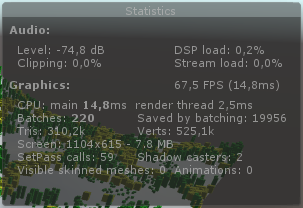 vocal narwhal
if you get rid of the if statement does it fix it
kind leaf
Tried it, maybe a 1-2 FPS gain at best.
(None of cubes are flashing in my scene)
Maybe there wasn't any gain, hard to tell with FPS fluctuations
knotty juniper
is using Graphics.DrawMeshInstanced a option?
kind leaf
Commenting out whole body of surf doesn't seem to change anything FPS-wise, actually
@knotty juniper I'd prefer not to. What do you think it will improve though?
knotty juniper
If your shader is intended to use PBR and getting rid of the if did not bring any impovements i do not see much that you can do inside the shader
kind leaf
Yeah seems that shader is not an issue here.
knotty juniper
10.000 cubes with your shader drawn with Graphics.DrawMeshInstanced
maybe a bit slower if every object has its own uniqe fade value but not much
kind leaf
🤔
 tranquil bronze
I wrote a shader following this tutorial https://www.youtube.com/watch?v=EthjeNeNTsM
We create a sweet little 2 pass shader to make our object always visible!
The water shader used:
https://www.assetstore.unity3d.com/en/#!/content/79255?aid=1011lK8L
►-------------------------------------------------------◄
Join the community, keep on learning.
► Com...
however when i did that the shadows arent there
how do i enable the shadows again
and also stop the mesh from being so bright
i am completely new to shaders btw
low lichen
@tranquil bronze Shadows are handled partly by the shader itself. Specifically, there's a specific shadow caster pass. You can make that pass yourself, or you can use a Fallback shader to use the shadow caster pass from that shader
Writing Fallback "Diffuse" at the bottom of the shader, before the last bracket, should work
tranquil bronze
That works but the character is still really bright
low lichen
The shader handles shading, so your custom shader has to handle shading
low lichen
It's easier to find a shader that does the shading you like and modify it to add this always visible pass
@tranquil bronze Actually, there's an easier way to do what you want I believe
And will work with any shader, like the Standard shader
tranquil bronze
what is it
low lichen
Need to make it real quick to confirm that it will work
tranquil bronze
ok
low lichen
@tranquil bronze Yep, works. Make a simple unlit shader, which will be the shader that you see when the object is behind other objects and change ZTest to Greater, so it only renders when there is a pixel with a greater Z/depth value, or in other words is in front of it.
Here's one I made:
https://hatebin.com/hszpazrkal
Then make a material using this shader and add it to the game object as a second material. Objects can have multiple materials.
This technique probably doesn't work if you're already using submeshes and multiple materials, though
tranquil bronze
https://gyazo.com/bdf714ddae0160698efbc727c04f3063.gif i did that but i got this result

i set the main mat shader to cutout it seems to work
thanks @low lichen
low lichen
@tranquil bronze That probably only works because the main shader is no longer writing to Z.
tranquil bronze
the seethroughwalls effect is still there
low lichen
If it works, it works. Better to get an understanding why it works and maybe find a better solution.
tranquil bronze
true, ill probably revisit this later, for now im going to move on
sonic umbra
So shader graph has a Hue and Saturation node, but what about lightness?
Is there an equivalent to it's function in a HSV scale?
rustic dragon
@sonic umbra something like this mimics photoshop when you use the Hue/Saturation adjustment where the value you feed into it is Lightness from -100 to 100, not 100% accurate but it seems pretty close.
stoic mist
Hey guys, what is the equivalent to a Frame Buffer in Unity? I've been googling for a while and people keep mentioning "RenderTextures" - but is that really the same thing?
What I'm trying to do is make a screensized Frame Buffer, and set it to be the render target, and then draw some stuff to it, and then render that entire Frame Buffer to the back buffer with a special shader effect.
I'm new-ish to Unity and the render pipeline / shaders are my weakpoint right now. If anyone could just give me some keywords to google/research I'd appreciate it! (pls @stoic mist me if you can respond, thanks a lot!)
Well, found a forum post where someone said this You can change the render target to a render texture (which is the Unity equivalent to an FBO) from script so maybe it is the same thing, lol
orchid peak
@stoic mist I recommend looking into Command Buffers, they're pretty useful if you want to do a bunch of work on a screensized image
 rustic crane
Hey all, I'm using the URP in Unity 2019.3 to create a custom render pass that outlines my objects with a shader. I can get the effect in my scene view, however my game view doesn't seem to inherit it as well. Strangely, disabling post-process for my game camera will show the effect in my game view, however it is from the angle of my work camera view and doesn't line up with actual edges. I will note, other post processing effects like bloom are working in both views, I don't know if that matters. I'm pretty new to this sort of stuff so any suggestions on what I can try are super welcome.
 proven sundial
On a general level is it cheaper to use a SimpleNoise node than a 2d image of noise?
devout quarry
Is there a way to sample _CameraDepthTexture in shadergraph?
in a custom function node
 gloomy oasis
hi ^^
I have a problem with my shader, I work in LWRP in Unity, I'm making a grass shader, you know, the one's moving, and well, i put the material on the mesh but the shader isn't visible ON the mesh, it is nearby, and it's really strange. It's working on HDRP so.... Does anyone could help please? ^^
devout quarry
has to do with how you are offsetting the object's position
any nodes you can show?
devout quarry
what if you use object position instead of world?
I"m not sure but I think things are different in URP than HDRP
something about being relative to camera
gloomy oasis
I already tried, it doesn't change anything :/
i retried it, but weel, as you can see nothing happened
EVERYTHING is working, except it's not at the right place
amber saffron
You shouldn't subtract the camera position
This is only for HDRP
Because HDRP is "camera relative"
amber saffron
I don't know what version you're using, but now Shadergraph has a differentiation between "world" and "absolute world" position. One is camera relative, the other isn't.
The last one should make the shader behave the same in both RPs
shy vine
how do i tile an add node?
regal stag
@shy vine The Tiling and Offset node only really works for tiling UVs for sampling textures. It's actually just "UV * Tiling + Offset". You can use a Fraction node to produce a tiling effect though, but it depends on how your nodes are set up. Could you provide the full graph?
regal stag
@shy vine Okay, to start with, this is a much simpler way to produce a square. You can use a single centered rectangle, and then invert the result (with One Minus, aka where it is black(0) it becomes 1, and where it is white(1) it becomes 0).
shy vine
why dident i think of that!
regal stag
@shy vine Then, in order to tile it, we can use this:
shy vine
thank you!
regal stag
To be clear, the Tiling and Offset node here isn't doing anything special. It would be identical to a Multiply and an Add node.
The previews show values from black to red/green (for X/Y axis) of the UV. They go from 0 to 1 in the UV preview, but we then Multiply (in the Tiling and Offset) by 3, so they go from 0 to 3. The Fraction node returns the fractional part of the number (without the integer part), so we get 0-1 repeating which creates the tiling effect.
 frank ferry
Hey,
How to sampled a Texture2dArray in a vertex shader?
frank ferry
That macro doesn't wwork in a vertex shader
vocal narwhal
SAMPLE_TEXTURE2D_ARRAY_LOD?
shy vine
in shader graph is it possible to have what ever is behind an object glow? im trying to make a screen effect that makes the outside world look digital
frank ferry
@vocal narwhal what's the second argument for that macro?
vocal narwhal
it should just add an additional argument for the mip at the end
you can just pass it 0 to test (or for your implementation if you want)
devout quarry
@shy vine you have a visual example?
shy vine
yes let me find a good image
devout quarry
like imagine you look through a window and everything you see through it is glowy?
shy vine
yes or like a whole difrent reality/space is the type of feal im going for
frank ferry
@vocal narwhal undeclared identifier 'SAMPLE_TEXTURE2D_ARRAY_LOD'
... those macros do not work in a vertex shader
shy vine
like this effect in boneworks (looks alot beter in 3d)
rustic dragon
probably a render texture with some sort of processing in a shader on it like LCD screen effect
vocal narwhal
render textures can be sampled just like normal textures, so yes
shy vine
can the render texture portal trick work on a large scale? like when you rotate and move the camera thats taking the texture to mach your view?
rustic dragon
close look at the effect, but if it's a window you see through, you just render to texture from a camera, apply to a material with that texture being processed, and display on a surface, then if you move the camera properly based on your view, it'll be a portal
shy vine
yeah but would that work on a lage plane is my question
rustic dragon

Learn how to create a portal effect in Unity's Lightweight Render Pipeline and Shader Graph.
Download the free sample project here: https://ole.unity.com/lightweightportals
I imagine so, worth a try
frank ferry
UNITY_SAMPLE_TEX2DARRAY_LOD worked in vertex shader
vocal narwhal
If you're talking about noise in each channel then you can use photoshop to copy noises by pasting into each channel selectively
There's also various other generators and stuff
devout quarry
Yeah I was talking about something texture-less
plucky bone
You could just generate perlin noise in different channels
Or generate random points on a surface, do some sort of triangulation like delauney
And fill each area with a random colour
devout quarry
okay will look into it!
plucky bone
It depends what kind of thing you want tbh 😛
devout quarry
I want pixelated noise, so really squares and then each square random color
something like this maybe?
will see if this kind of thing gets me the desired result
thank you for the input guys
plucky bone
https://forum.unity.com/threads/generate-random-float-between-0-and-1-in-shader.610810/#post-4089295
Unity Forum
Hi,
Is there any way of constructing a high quality random number generator in a surface shader? I've implemented one but I feel it is not very...
I'd just do something like that then
In each channel
low lichen
@shy vine It's more likely that the 3D environment is just projected textures in the shader, rather than an actual 3D environment being rendered by a camera.
shy vine
HOW ARE YOU ABLE TO DO THIS IN SHADER GRAPH!?!?!? im so proud of myself for following a tutorial
i added emision to it by multiplying the texture by a value and its not showing up
(i know glow stregth is 0 in the editor its like 5 in the scene)
shy vine
how can i stop this from happening with realy small grids where when you zoom out it distorts terrbily
Like is there a way to make the grid go invisable when you zoom out
shy vine
nvm
ok i have a new problem the distance is being taken from the center of the plane when it needs to be taken from the whole plane
how can i do this in shader graph
i tought of using scene depth but that seems to not work with this
oh i see why its geting the depth of everything but the object how do i change this
vocal narwhal
If you use Position and not Object Position it should be using the correct position
shy vine
i think it works thank you!
stoic mist
anyone know of a good tutorial (video preferable if possible) on custom render pipeline stuff / command buffers / render textures ? I'm surprised at how little I can find, and I'm worried that a lot of the info is outdated since Unity is adding new stuff all of the time
Like, I can't find a single video on Command Buffers - I've only found two small tutorials
devout quarry
@stoic mist um pm me
I have some code you could take a look at
It's not written as a tutorial but as a reference might help you our
Out
Also
There are examples in the unity GitHub! They added custom renderer features
Then lastly catlikecoding has a good tutorial about render pipeline in general
stoic mist
Thanks Alex, away from computer for juwt a bit but will check it out!
distant pawn
sorry. I am big noob. Any one know how to change a 2D texture size with a vector3 in shader graph unity?
rustic dragon
@distant pawn not sure what you mean by change a Texture2D texture size? What are you trying to accomplish?
distant pawn
@rustic dragon I am trying to make a circular texture get smaller over time. I thought I should start by being able to resize the image via vector3.
rustic dragon
so you have a geometric surface that displays a material with a texture, and you want that texture to get smaller?
can you show what this geometry looks like, and the texture?
distant pawn
The texture at the moment is just the default particle texture, and the geometry is just a plane
rustic dragon
oh, you are talking particles?
rustic dragon
ok, so you have plane with this circle on it, would just changing the scale of the plane do?
distant pawn
That doesn't work with what I am planning to do with it
rustic dragon
but if not, if you actually want the drawn texture on that plane to change scale, you want to adjust the UV's of that texture in the shader
which is a vector4, but it inly uses the x and y (or u and v so to say)
you have to set the texture to Clamp for Wrap Mode though
distant pawn
do you have any visual aid for this. I am not a very good learner
rustic dragon
do you have a scene setup with LWRP (URP if you are 2019.3) or HDRP?
distant pawn
I have HDRP
distant pawn
yes
rustic dragon
let me load up
distant pawn
sure
rustic dragon
so you want to adjust this in your texture node, I'll show further
distant pawn
k
rustic dragon
ok, this setup will allow you to change the UV's on the texture, you can try and mimic this
distant pawn
I'll give it ago
rustic dragon
this is not what you want, but it's a step towards it and understanding the possibilities
rustic dragon
now you can slide the value(s) in that Vector2 in the middle top and see things change in the window
but you'll see it get smaller and bigger from the origin of the bottom left, and you'll see it tile when it gets smaller
rustic dragon
the movement of a texture on a piece of geometry is only in 2D
based on the plane of the geometry the texture is applied to
so maybe I don't quite get what you want
but this path will eventually allow you to make a circle on a plane get smaller, the plane will not change scale, just the visual circle on it
distant pawn
Sorry. I'll explain exactly what I am trying to do. I am trying to make a ripple shader for a game. I was going to use a texture a bit like the default particle texture. What I need is to be able to pick a position on that plane then make the texture resize from there, becoming bigger and bigger.
rustic dragon
maybe a decal would be better, you can place and scale that like a gameobject, and it would project what you want
distant pawn
I'll look into it thanks
rustic dragon
https://docs.unity3d.com/Manual/class-Projector.html this is the non HDRP older version of it if you want
and there are ways of making something on a surface of another thing with materials in shader graph, I set one up in unreal where fire would start at one point and radiate out burning the surface, it was controlled by a sphere object that when brought closer to the surface and scaled, it would grow the burn
it's just more complex of a solution 🙂
@distant pawn this was what I was heading to, how you can scale a texture on a plane, this happens to scale from the center with a bit of math, and I set the texture to Clamp for Wrap Mode so it won't repeat, etc
 dark flare
On standard shader? Depends on your lighting tab in the scene. Static doesn't matter
dark flare
@fallen cypress
 fallen cypress
Thanks, yea
distant pawn
ok. I got this working (image bellow). All it does is resize the texture using a Vector 1. How do I make it so I can move the texture to where ever I want on the plane, using a vector3. Like in: https://www.youtube.com/watch?v=UVdXUXv3Bw8&t=511s , where the ripple is emitted were the player clicks

Welcome back!
Let's expand our Ripple Shader so it's a bit easier to control and set the groundwork for some of the upcoming features we'll want to build for it. We're going to create two features:
The first is to move the distance or radius of the pulse ring into the Vecto...
distant pawn
no it doesn't
vocal narwhal
Sorry, I was mistaken to what you're asking. They don't remap a texture, they're just measuring the distance from a fragment to a point.
 vivid valley
sometimes I even amaze myself
devout quarry
Shader graph devs, what is the best way to request features or report bugs again?
minor things
like for example this
I would like the group size to be large enough to accommodate for when the value fields are extended
the value fields are part of the node
and the node is part of the group, so I feel like the group box should contain it fully
proven sundial
I'm struggling with understanding the best way to work with masks..
Ive got a mask on the right side, that I want to remove the left mask from. -> turn the white in the left node black in the right node. Is subtract the way. Gives me a strange end result.
devout quarry
what is value A?
and are you sure it's not desired result? maybe it's just weird because of the 3D sphere preview
proven sundial
Value A is another mask (simple noise).
stoic mist
I'm working on a 2D game with forward rendering. I'd like to blit a renderTexture to the main camera texture in between two of my layers. Is this possible? The command buffer documentation acts like you don't get a CameraEvent for each of the layers: https://docs.unity3d.com/Manual/GraphicsCommandBuffers.html
Do I need to do something janky like create another layer (between the two layers, where I want to blit the renderTexture) and like... setup a random object there that references the renderTexture and manipulate how it is rendered? Seems like a weird way to do it
 stone sandal
@devout quarry the best place right now for posterity is the forums, but what you’ve just asked for is already been asked and we know. we’re hoping to having a better interface for requests in the new year.
if you have something that you think is actual bug, then please report it using the editors built in bug reporting service
also, technically the input fields aren’t part of the node, just parented to it, at least code and UI structure wise 😉
proven sundial
Any tips on how to get the edges of a voronoi?
rustic dragon
@proven sundial you can try a few things, take that mask, invert it, then so a a min on the two, it should give you an outline
then if you have any control over the original masks ramp on it's edges, it's blurriness, increase that and do the same one minus and min, then power it up until it's distinct enough, then clamp
 honest frigate
Hello guys, i'm trying to replicate this effect when the player moves in the grass field the grass bend around me, any tips to achive this ? I'm a noob with shaders 😢
orchid peak
this is a two step problem @honest frigate
- You need to decide how you will pass in the data to the shader that decides where the grass ought to be bent. If you just want it to react to a single player (rather than a variety of different objects), the simplest way is to just create a single Vector property and pass in the player's position.
- Next, you need to actually bend the grass (in the vertex shader typically). So for each vertex, you test how far away it is from the player's position, and if it is under a certain threshold, you can bend away
this is ofc a high level overview, but it's not a super beginner topic

Crumble
sort of related, but a bit of a different technique
regal stag
@proven sundial I have some examples of Voronoi edges functions here which might help if you want to generate it. https://cyangamedev.wordpress.com/2019/07/16/voronoi/
 proven sundial
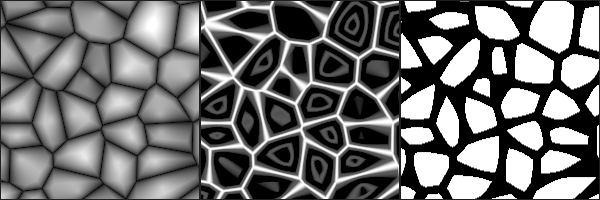
@regal stag I've ended up on your pages a few times. I'm not as programming-oriented as you are (read gifted), so I'm trying to make a broken glass texture using shadergraph.
rustic dragon
@proven sundial do you have an example of what you want, before/after mocked up?
proven sundial
Here's me experimenting. The node to the left is the standard voronoi node in shadergraph.
I'd like to get closer to the right example here, taken from Cyans site
From there I figured I could play around with polar coordinates or something, and maybe get an output like this
But just those edges are an acceptable result for today 😉
Unable to watch this video, but I'm guessing there is some workflow that can be copied https://vimeo.com/233305131
rustic dragon
yeah, you might need to actually recreate what Cyan had but math by math node, I don't know if the voronoi node will give you the proper harder edged voronoi
oh, he edits the node 😮
proven sundial
Yes, reading it properly again now, rathet than just skimming for the correct node I thought I could pull it through. I wonder if this would be cheaper to do just by using a texture??
rustic dragon
I imagine yes, and you'd get more of that crracked look
do you want it to just 'splat' crack, or spread?
proven sundial
Cracked would do.
Doing a car shader with "damage" input" The windows would look better with some more detail after damage
vocal narwhal
If you're just looking to create lines, why not just step your voronoi?
proven sundial
Tried that, just getting circles.
vocal narwhal
Ah, right
dim sequoia
Regular pipeline, hlsl:
Is it possible to get the mesh vertex colors inside a surface shader?
#pragma surface surf Standard fullforwardshadows
with this input snippet, i am able to get the correct alpha value for the vertices, but even if I set the vertices colors before (for the mesh the shader applies to), I am not able to get a correct rgb value (always seems to be 1,1,1 - white)
struct Input
        {
            float2 uv_MainTex;
            float4 color: Color;
        };

       void surf (Input IN, inout SurfaceOutputStandard o)
        {
            // all I want to do:
            o.Albedo = IN.color.rgb;
        }
Makes sense now I think about it 😛
Looking at other resources I think you need more info and other content than shadergraph provides https://www.iquilezles.org/www/articles/voronoilines/voronoilines.htm to do it
I might be mistaken though, but I don't think you can do it with the nodes they provide
rustic dragon
stuff like this is optional too, especially if you want it to spread from a point
proven sundial
I think I'll try to just to it with a texture for now. I'm curious if even simple noise is best to generate in the shader, or by using a texture input. For this the result will likely be better with a 2d. Though, it kind of is an interesting challenge.
rustic dragon
yeah, not sure how expensive noise gen is, usually I add it to an available mask slot in an already existing texture
meager pelican
I'm not really following closely so excuse, but SG has a node for derivatives that would work with a stark mask like the one presented/generated way above. You should be able to do edge detection with that, and decide if you have "a line".
IDK if that helps at all. Or Cyan has probably already done it. Because Cyan. (I didn't look at his lib above either).
So flyby, and ramble! ;)
https://docs.unity3d.com/Packages/com.unity.shadergraph@6.9/manual/DDXY-Node.html
proven sundial
@meager pelican Definitely promising right off the bat!
meager pelican
Good. Yeah, and you may wish to throw in some scalers or thresholds. Or a binary op for black/white no grey.
devout quarry
@proven sundial why are you not using cyan's method?
it provides you with exactly the result you want no?
shy vine
Can someone send me a good shader tutorial I have been using shadergraph for. Bit and want to learn how to do this with actual code
Also I thought the custom function node was removed?
shy vine
Just shaders in general
devout quarry
so not specifically shader graph?
brackeys has some beginner tutorials
makingstufflookgood is a nice channel
ah so yeah you mean you want to do this without shadergraph, I read your question wrong
devout quarry
what version are you on? maybe it's not there
but the node is called 'custom function'
you add it like any other node
shy vine
I think I am on the latest version of shader graph
devout quarry
vocal narwhal
the latest version of shadergraph would be bundled with the latest URP or HDRP
Or is that Post Processing I'm thinking of 🤔
devout quarry
no I think it comes bundled with URP/HDRP yes
vocal narwhal
It's in the docs, so I imagine you're not on the latest https://docs.unity3d.com/Packages/com.unity.shadergraph@7.1/manual/Custom-Function-Node.html
fallen cypress
Idk why with the new unity open demo relase the model doesn't render when using mobile lit / unlit ( display a pink colour)
only unlit/texture shader work
vocal narwhal
What demo are you talking about?
fallen cypress
2019.3f something
Is there any recommended shader customized for 24 day/night cycle photogrammetry scaned assets?
😞I use unlit for day to get the best texture quality,at night use standard shader
vocal narwhal
No. I would be using a render pipeline, and variations of the lit master nodes they provide
shy vine
i still cant find custom functions
fallen cypress
Targeting mobile smartphone
vocal narwhal
URP is perfect for that
@shy vine what version of URP are you using?
Both projects I have have it, URP 7.11, and LWRP 6.92.
vocal narwhal
...what do you mean? The preset is the package manager version
shy vine
i mean the presets you get when you create a new unity project
vocal narwhal
So do I
shy vine
hmm
vocal narwhal
well, you're gonna have to help yourself with that one
It was introduced in 6.6.0 apparently. So if you can upgrade to a version that supports that, that's the minimum.
vocal narwhal
Yes, but you need to update the HDRP version in the package manager when you update
shy vine
ok
 safe tide
Does anyone know of a way to get the actual resolution of the shadow map of a light? Light.shadowResolution is an enum (high, medium, low) and not an actual number.
The actual resolution changes based on the importance of the light e.g. how close it is to the camera
I need to write into the shadow map from a compute shader. But the shadow maps that Unity creates for the lights do not have random access enabled, so I can't write into them. Instead I can write into my own RenderTexture and then blit that into the shadow map
This works, but the resolution of my RenderTexture is fixed and I can't figure out how to match the current resolution of the shadow map
proven sundial
@devout quarry I'm trying to figure out how to add Cyan's code as a custom node now. Was rather late last night. It doesn't seem to be completely effortless. Am I missing part of the hlsl header code or is it just that snippet on the linked tutorial you used? Did you define your own input/output?
devout quarry
so yeah add custom function node, vector2, vector1 and vector1 input, vector1 output
and then it was the code in the article
the one using 2 loops
and then you refer to that file
regal stag
@proven sundial The page contains the entire function. Copy and save it in a file with a .hlsl extension, then on the Custom Function node you can choose a source file for it to point to. You also need to set up the inputs and outputs on the node, so it matches the hlsl function.
devout quarry
and the function name is 'Voronoi'
rustic dragon
Voronoi
regal stag
Voronoi for the function name yeah. I think it also needs the float precision as that's what the function uses
proven sundial
proven sundial
regal stag
And you need to add the inputs:
float2 UV, float AngleOffset, float CellDensity
and outputs:
out float Out, out float Cells
proven sundial
Gotcha.
regal stag
The names themselves aren't important, as long as they are in the same order I think it will still work
devout quarry
that's correct
regal stag
Actually also, the Out parameter is a float2 in the first function and a float in the second
proven sundial
Thanks so much both of you!
devout quarry
lovely
proven sundial
An issue with thee DDXY node was that it could look good up close, but cluttered zoomed out. Like its output overwrote other pixels.
rustic dragon
nice, you got it all to work
proven sundial
Yes. Just got to tune the step according to the Celldensity valuee, so that thee lines stay somewhat constant in thickness. Which I ithink thee DDXY did by default, but each pixel was also constant regardless of cam distance.
meager pelican
@proven sundial
An issue with thee DDXY node was that it could look good up close, but cluttered zoomed out. Like its output overwrote other pixels.
Yes. Just got to tune the step according to the Celldensity valuee, so that thee lines stay somewhat constant in thickness. Which I ithink thee DDXY did by default, but each pixel was also constant regardless of cam distance.
yeah, the DD? function work based on change-from-adjacent-pixel logic built into the GPU. Like I said, I wasn't following too closely, so it may not be what you're looking for, depending on use case. But it's an interesting thing. You can get change in color, or really change in any input (like depth) from one pixel to another.
But yeah, it's pixel based as it's done by the GPU between rasterized pixels.
devout quarry
oh shit something is bad
every time I wanna open my graph, Unity crashes...
I can't lose this graph 😧
proven sundial
@meager pelican Definitely a node I'm glad you introduced me to. Can imagine a lot of good usecases!
 oak sandal
``Texture2D texture = DownloadHandlerTexture.GetContent(uwr);
Texture2D newTexture = new Texture2D(texture.width, texture.height, TextureFormat.RGBA32, true);
newTexture.SetPixels(0, 0, texture.width, texture.height, texture.GetPixels());
newTexture.Apply(true);``
I'm pulling lost of images from a server and turning them into textures, and I'd like them to have mipmaps
This is very slow, so firstly... this isn't a terribly wrong approach, right? It's just this kind of thing is resource intensive?
Secondly, it makes my game jitter... can I fix this with coroutines? Or threads? Is that the right direction?
rustic dragon
TextureImporter you can use to set texture parameters without having to re create them
oak sandal
Oh snap, that'll already help out a ton I expect, thanks
rustic dragon
it's not the most straightforward thing to use, but you can do all the stuff
are these coming in from an asset bundle or something?
oak sandal
No, standard images - png/jpeg etc
rustic dragon
https://docs.unity3d.com/ScriptReference/TextureImporter.GetPlatformTextureSettings.html this kind of shows it's use, as you have to create a texture importer object first
oak sandal
Ah, sorry, I didn't say... I can't say what the contents of the images will be beforehand
So they have to be made at runtime
Which reading TextureImporter... I think it means it can't be used for what I need?
It's not a huge deal if the operation itself is slow, it's really the freezing of the game that's a pain, I don't mind if it takes a second for the images to appear in the game
Which I think I can fix with coroutines or threads maybe, but I'm pretty new to Unity and don't really understand either or what can be processed in them
I'll keep fiddling, thanks for the help
oak sandal
I don't think so, seems promising, I'm going to have a play with it
rustic dragon
trying that .bytes thing myself
oak sandal
Thanks
rustic dragon
@oak sandal take a look at this https://hatebin.com/hcztzwdeum, this skips the step of making a new texture to make it mip, loadImage seems to do the trick and a lot faster (though it's truly hard to tell with web stuff).
power of 2 stuff would need the textureimporter to do that pretty sure
oak sandal
It's already a ton faster (22 seconds to 7 to load what I have). I'll see if it's my non-power of two images really throwing stuff off with that next
rustic dragon
@oak sandal cool, if you are using these downloaded assets as textures in game in some way, they'll just be way more expensive as non-power of 2 textures are uncompressed
can add up fast if you have a lot
 cinder mauve
Hi everyone. Has anyone experienced switching platforms to ios and their shaders on meshes turning flat black? I have it set in the project settings graphics to include the shader, but that didn't seem to work.
 glad relic
hey guyys can some one tell me why my shaders look like this they are the default unity shaders
glad relic
no the object on which the red cube is sitting is pure white
but in here it is looking like a yellow shade
rustic dragon
what color is your light?
rustic dragon
weird, when start a new scene it definitely defaults the lighting to beige
glad relic
hmm
it was working fine before
after i saved it and restarted my pc this started to happen
rustic dragon
so you are saying your directional light is pure white?
glad relic
wellif i start a new project its is good there
no it is not pure white when i start a new project
wait i am sending a screenshot
rustic dragon
what is the color of the directional light in the scene you have that looks beige
and I said I started a new scene, not a new project, maybe it's a LWRP thing
glad relic
it is a really light shade of yellow by default setting it to pure white does not help
hey its fixed now
what i did was to make a new project and copy my assets in it an delete the old one
i was luck that i had just started the project
orchid peak
@glad relic Window->Rendering->Lighting Settings. Make sure Auto Generate is set true at the bottom
brazen comet
Hi here 👋
Is there a way to transform a black and white mask made with vertex information into a sampler 2D, to be threated like a texture ?
(In the shader graph)
rustic dragon
you can get vert color information and do stuff with it like use it as a mask
if that is what you are looking for
brazen comet
That's what I already have. But I would like to transform it into a 2D sample so I can get more precise controls. Like if I blur the mask it doesnt change the sharpness if there is a heavy or light mesh density , but it takes pixels in account
for example
rustic dragon
you'd have to give an example of what you mean or what you are seeing you'd want to fix, I imagine converting any vert coloring to a texture wouldn't change it's potential to be blurred or sharpened
brazen comet
I got a snow shader with snow falling on the mesh depending on world axis. I wanted to add normal map informations based on the edge of the snow mask. I now have the border of the snow mask but on the primitive sphere I have a really smooth and large edge and on other meshes with more polycount I got a really sharp edge
 steel notch
How would you go about creating a shader that blurred sprites and objects behind it?
brazen comet
I remember in Amplify being able to plug things into a sampler 2D , but I can't find a way here in Shader Graph
The thing is... i'm not sure 100% it would help me 😄
just wanted to try
rustic dragon
confused, are you painting vert colors to get this snow blend, or is it all world space math?
brazen comet
World space blends
rustic dragon
interesting you get a harder edge on the higher resolution mesh, world space stuff should only be based on normal angles, not the spread of verts
like if you had an edge that is pure white, and an edge a foot away that is pure black, it'd blend between the two smoothly, but if in that space you had 5 edges, if they are rounded enough should spread as evenly, or close to
brazen comet
Hm it's true
rustic dragon
got any visuals?
like for instance a 1000 triangle sphere should look identical to a 5000 triangle sphere if you are using world space masking
brazen comet
Yes that's true I wasnt thinking enough, If I have different results is because the sphere is quite round compared to my rock , but then I'm thinking I will have to work with another way
rustic dragon
yeah, if the rock has a harder/sharper edge, you would need to do some math in the shader to blur the edges more on the rock
brazen comet
.. not easy 😄
rustic dragon
but really it's kind of what you'd expect, a sharper edge would have the snow terminate very harshly
I usually mix in a tile detail height type map to roughen up that edge, it could help
rustic dragon
@brazen comet so you don't know how to set it up to where you can adjust the terminator around, make it looser/tighter or offset it?
brazen comet
I'm going to work on it ^^
rustic dragon
cool, I got something if you want to see it, let me know
brazen comet
Dont tease me like that ! 😄 if you have a screenshot of some nodes I wouldn't say no..
To give a direction
rustic dragon
here it is in action, it basically tightens at the midpoint, and you can push it up or down, I will post graph
brazen comet
oooh the mid point thing is nice
rustic dragon
the only thing this doesn't support yet is scale, when you do scale you have to push it a bit differently, trying to figure that one out 🙂
brazen comet
Thank you for the share !
rustic dragon
np
here is a bit of edge roughening with a tiled noise mask, the UV's on this primitive sphere aren't the best so the detail map stretches weird, but I think you can get the idea
this is the math I did for this, everything after that same Clamp and before that end Lerp is the new stuff
brazen comet
❤️
devout quarry
that is a cool effect @rustic dragon thank you!
steel notch
How would you go about creating a shader that blurred sprites and objects behind it?
 mint flax
Can someone better explain the function unityobjecttoclippos() ? I see it used in shader code but idk what it's for
rustic dragon
@steel notch https://www.youtube.com/watch?v=sDG4XR-83X4

00:20 Setting up the scene
01:16 IMPORTANT setup for the blur
02:36 Start working in ShaderGraph
05:55 Duplicating the texture for Positive offset
10:20 Making the Negative offset
13:26 Full Graph
13:48 Testing
14:45 Making Blur UI overlay
@mint flax https://docs.unity3d.com/Manual/SL-BuiltinFunctions.html I don't know if this helps or if you have seen this small description
mint flax
What is camera clip space?
devout quarry
idk why it's so blurry, but my understanding is that clip space is space between near/far plane
clip space depth goes from like 0 at near plane to 1 at far plane
but this depends on the used graphics API
mint flax
So that it doesn't attempt to render stuff your camera can't see?
mint flax
Makes sense
devout quarry
also, depth is not linear between near and far plane
nvidia has a good article on it
it's for precision purposes
mint flax
Pretty sweet, thanks
 opaque grove
Does anyone know if its possible to have a specific shader run at the end of a particle systems lifetime? What I want to do is make a "shell ejection" system from a gun (using a low poly 3D model), bullets hit the floor, then instead of jut teleport when it dies, I wanna apply a dissolve shader I have to them instead - im just wondering if its possible to do something like that, and how I might be able to approach it, like would it be something id have to monitor in the OnParticleCollision call or something?
patent lodge
hey, so I've slowly started on a toon/stylized shader using the unlit graph (for now). I need normalmaps for this, so I currently use a tangent spacenormalmap, then I use a transform node from tangent to world, and do the usual dot. Is this fine, or are there better/more correct ways of doing it?
orchid peak
@opaque grove you can use a custom shader that implements the dissolve based off the particle's current remaining life.
opaque grove
Sorry, @orchid peak I dont know a whole lot about programming shaders - your saying I should be able to use this vertex stream idea to get the lifetime, based off that, I could call another shader? Or copy the dissolve logic of my other shader into a new one and use this vertex stream in replacement of the shader on the particle system?
orchid peak
@opaque grove vertex streams are used to pass data into the shader, as above
you can then use the incoming data in the shader
opaque grove
Oh ok, that could be useful to play around with then - thanks!
meager pelican
Unity is the ultimate game development platform. Use Unity to build high-quality 3D and 2D games, deploy them across mobile, desktop, VR/AR, consoles or the Web, and connect with loyal and enthusiastic players and customers.
steel notch
How would you go about creating a shader that blurred sprites and objects behind it for an orthographic camera?
fallen cypress
Hi is there any graphic technical savvy I want to ask some questions
including lighting, rendering pathways , shaders etc..
mint flax
Woah I'm tripping balls man https://gyazo.com/f65e25bf0432d63c40430c37a4be4693
Don't do shaders kids
mint flax
well I'm literally day one into learning shaders so
might want to ask someone more practiced :^)
 silent fulcrum
playing around with ghost/holo shaders for vr hands and i want to make the vr hands persist, even when its behind objects. for example, this video shows how the hands abruptly disappear when it becomes occluded by the ball object. how do i make it so that the hand either A. always persists even behind objects, or B. smoothly occlude when being occluded by objects, instead of all at once.
ive tried playing around with the render queue value of the shader, but anything besides 3000 makes the behavior muuuch worse. any help would be greatly appreciated ^_^
rustic dragon
@silent fulcrum https://www.youtube.com/watch?v=szsWx9IQVDI somethign like this?

Let's learn how to render characters behind other objects using Scriptable Render Passes!
This video is sponsored by Unity
● Download Project: https://ole.unity.com/occlusiondemo
● More on Lightweight: https://ole.unity.com/lightweight
················...
silent fulcrum
somewhat yeah, but it wouldn't necessarily need to be a different render, it could be the same look when occluded
also might be worth noting, im on 2017
and am not in a position to upgrade as i'm close to release 😦
meager pelican
The hand shader could always render (no auto depth test) BUT it might render a different color when it's behind something than when it is not. You'd probably want to put it in a geometry+1 or something, or another layer.
You'd have to do manual depth testing.
Quick guess here.
silent fulcrum
if you mean manual depth testing as in changing values of the render queue, i did that to no avail
i had tried geometry +1, -1 as well as many other values and they had worse results than just leaving it at base geometry
what did you mean by another layer?
meager pelican
No, I mean change the pixel color based on the "is occluded" logic
meager pelican
You can get the pixel depth in the shader, and also get the current depth buffer value. And compare them.
Would be in the pixel shader stage.
silent fulcrum
cool thanks
orchid peak
@silent fulcrum thread I started a few years ago on the subject: https://forum.unity.com/threads/render-object-behind-others-with-ztest-greater-but-ignore-self.429493/

Unity Forum
I'm attempting to make a shader (that is an additional pass on the Standard Shader) that will render an unlit silhouette when the object is occluded by...
mint flax
@silent fulcrum you can do the camera layers trick
altho there's probably a way to render objects in front
using shaders
fallen cypress
Important Note
The Filmic addon is no longer required and will actually potentially cause some compatibility issues with other addons.
Filmic is now included with Blender by default and can be configured via the color management panel.
Discover why the restricted dynamic ...
silent fulcrum
thanks everyone! will look into it
tranquil bronze
I made a shader that makes it so that an object (in this case the player) can still be seen through objects such as walls when those walls are hiding the player https://gyazo.com/663163f4bb17d3d39680464dfee9a96e.gif

how do I make it so that this effect only occurs on select objects
eg i only want the effect to show if a particular object is hiding the player while others objects dont hide the player
im new to shaders btw
this is my shader https://pastebin.com/j1VVjPHL

 tight forge
https://www.youtube.com/watch?v=ywop5FPyunQ
In this tutorial I noticed after adding the custom function (16:53) the author achieves reflections in the floor puddles. I've been trying to work out reflective floors in URP for a while but when I try to isolate those parts of the graph (taking out the noise sampling part) it doesn't work out well.
Can anyone work out what is going on here which makes reflections possible?

This is a tutorial on making piles of water blended with a texture without extra geometry based on a height map texture, the water has some fake refraction to give some depth, the tutorial uses the Light Weight Render Pipeline of Unity 2019.
Buy my LWRP Material Pack to sup...
regal stag
@tight forge That custom function isn't adding the reflections, it handles refraction of the texture through the water. I don't know a lot about PBR shaders, but I believe the reflection is being handled automatically by the PBR Master. There's a reflection probe in the scene, and changing the Metallic and Smoothness on the shader will change how it is reflected.
tight forge
my bad looking at the tut in context and yeah i can see how it's refraction thanks!
how is it theyre able to get scene object reflections though? simply adjusting the smoothness/metallic doesn't make anything appear for me
regal stag
There needs to be a reflection probe in the scene nearby for it to use
tight forge
ah right so they won't be realtime
tranquil bronze
I made a shader that makes it so that an object (in this case the player) can still be seen through objects such as walls when those walls are hiding the player https://gyazo.com/663163f4bb17d3d39680464dfee9a96e.gif
how do I make it so that this effect only occurs on select objects
eg i only want the effect to show if a particular object is hiding the player while others objects do hide the player
im new to shaders btw
this is my shader https://pastebin.com/j1VVjPHL
tranquil bronze
idealy i would like it so that all the objects the shader ignores can be kept in a different layer
rustic dragon
I imagine you are using standard rendering and not LWRP or HDRP?
tranquil bronze
yes
rustic dragon
ah, you might be able to do it with render to texture and a few shader tricks, like here: https://gfycat.com/clutteredflippantbeardeddragon

the box on the right (at the start) is set to not show, the one on the left is
tranquil bronze
how did you do it?
rustic dragon
you basically do a render to texture with an additional camera, that camera only captures a version of the 'character' that is unlit (like a duplicate), the regular camera ignores this version of the 'character'. Then in a shader you make for the world items (boxes here), you set up to project via screen space that render to texture on the boxes you want (simple bool toggle to show or not show), I fed it into the emissive with the red, something like that
convoluted for sure, but it seems to work
it's pretty easy to set up these shaders with shader graph to do all this, so you could benefit from upgrading to URP (LWRP), etc
regal stag
You could likely achieve a similar effect by using the stencil buffer
tranquil bronze
whats that
regal stag
I'm not entirely that experienced with it to be able to explain it properly. Here's the docs page though : https://docs.unity3d.com/Manual/SL-Stencil.html
rustic dragon
@regal stag does that allow you to have some objects flagged or set up to be seen through, and some not?
regal stag
The idea is that you can write values to it in one shader, and read them back in a different shader, to discard pixels
tranquil bronze
how would u use that to render through specific objects, all of this is new to me
regal stag
@rustic dragon You'd have to have different shaders on the seen-through objects to write a value to the stencil buffer
rustic dragon
yeah, I pretty much did that with my hacky version, just a bool for the non player/character objects that says SEE or HIDE
this is obvious the more official way, just probably harder for non-tech people
regal stag
Yeah, this avoids an additional camera
regal stag
Not in shadergraph directly, but the LWRP/URP Custom Renderer can override Stencil values. Per layer too, which is quite useful.
rustic dragon
yeah, I saw a brackeys tutorial laying that out, not sure if he went as far as to allow for some objects to block and some to let through
tranquil bronze
im going to try @rustic dragon method, I dont know how exactly you would use the stencil buffer
one last question, which would be better for performance wise, if there is a difference
rustic dragon
the stencil thing is a better option, just I imagine a rougher road if you aren't a shader guy
there would for sure, it's an extra camera, though these objects are only caught on one camera and not the other, and vice versa, so maybe it's not much
tranquil bronze
i already have a camera for a culling mask, i can maybe use that
rustic dragon
but also @tranquil bronze check out that Brackeys video showing how to do what @regal stag is talking about with the stencils
Let's learn how to render characters behind other objects using Scriptable Render Passes!
This video is sponsored by Unity
● Download Project: https://ole.unity.com/occlusiondemo
● More on Lightweight: https://ole.unity.com/lightweight
················...
if you can do that next step and make some objects block fully, you'd be set
a bit of outline 🙂
 old quarry
where can i find a shader that just renders depth like so: https://i.stack.imgur.com/RF3gL.jpg
i know fuck all about writing them and im certain that it will exist somewhere
tranquil bronze
@regal stag i got the effect working, how do i make it so it only happens for certain objects with the custom renderer
 regal stag
Is this using the LWRP/URP now then?
regal stag
How have you got it set up currently?
regal stag
Sorry, give me a minute
rustic dragon
@tranquil bronze nice, glad you did it the new official way and not my hack 🙂
patent lodge
hey peoples, I'm coming in from ue4, and I wonder, is there a way of definining global material properties? Kind of like Material Parameter Collections in UE?
um, apologies, Shader.SetGlobalFloat seems to do what I need.
Aand another thing. Is there a way of getting baked lightprobe data inside shadergraph? Or a custom node, I would like to use it for ambient lighting for a toon shader (on dynamic characters)
I see there is a baked GI Node, and reflection probe, but no light probe.
ok, it actually looks like the baked gi node works.
 hot cape
I'm new to shaders and shader graph. I'm just trying to create a simple shader that will increase transparency along the objects Y axis. I'm trying to create a ray of light.
Can someone point me in the right direction?
rustic dragon
@hot cape use the position node, choose the local (or world, depending on need) on the Y, add some math to offset and tighten the falloff, and put that value in the alpha transparency slot
hot cape
Thank you. I actually just figured it out myself.
Shader graph can make some really weird stuff when you just mess around with it.
rustic dragon
nice 🙂
 marsh tendon
Is it possible to make a shader that turns a Tilemap (had to specify that, sorry) into a soft drop shadow? (Colored black, and it's going out of it's original size with a blurred shadow)
devout quarry
yes @old quarry I can help you!
is this in URP?
like this
You can sample '_CameraDepthTexture'
then apply it as an image effect
this will give you a pixel color gradient between white and black
and then if you want, you could divide the sampled value by a property, to control the falloff range
or you can invert the value or whatever you want
tranquil bronze
I made a toon shader
Shader "Toon"
{
    Properties
    {
        _MainTex ("Texture", 2D) = "white" {}
        _Color("Color", Color) = (1,1,1,1)
        _Brightness("Brightness", Range(0,1)) = 0.3
        _Strength("Strength", Range(0,1)) = 0.5
    }
    SubShader
    {
        Tags { "RenderType"="Opaque" }
        LOD 100

        Pass
        {
            CGPROGRAM
            #pragma vertex vert
            #pragma fragment frag

            #include "UnityCG.cginc"

            struct appdata
            {
                float4 vertex : POSITION;
                float2 uv : TEXCOORD0;
                float3 normal : NORMAL;
            };

            struct v2f
            {
                float2 uv : TEXCOORD0;
                float4 vertex : SV_POSITION;
                float3 worldNormal : NORMAL;
            };

            sampler2D _MainTex;
            float4 _MainTex_ST;
            float4 _Color;
            float _Brightness;
            float _Strength;

            float Toon(float3 normal, float3 lightDir)
            {
                float NdotL = max(0.0, dot(normalize(normal), normalize(lightDir)));
                return floor(NdotL/3.0);
            }

            v2f vert (appdata v)
            {
                v2f o;
                o.vertex = UnityObjectToClipPos(v.vertex);
                o.uv = TRANSFORM_TEX(v.uv, _MainTex);
                o.worldNormal = UnityObjectToWorldNormal(v.normal);
                return o;
            }

            fixed4 frag (v2f i) : SV_Target
            {
                fixed4 col = tex2D(_MainTex, i.uv) * _Color;
                col *= Toon(i.worldNormal, _WorldSpaceLightPos0.xyz) * _Strength + _Brightness;
                return col;
            }
            ENDCG
        }
    }
}
but im not getting the result i want
how do i fix this
old quarry
@devout quarry hey thanks, I think I managed to do the same thing not long before you told me that haha
devout quarry
cool!
 cosmic prairie
@tranquil bronze sample a toon gradient texture with NdotL as uv
is the simplest way
 left pivot
Hey all, I am working on a shader on shader graph and I have a question. I'd like to affect objects highlights blended with sky color, mid tones with equator and shadows with ground. There is ambient node for that, but just before feeding all to albedo on master, how can I achieve that?
Currently it's just a simple vertex color shader
But I need to more freedom on it. How do I get that? Do I need to lerp ambient colors with what?
Can anyone explain that to me, pretty please?
There is not much info on ambient node I could find.
patent lodge
I guess you could use worldnormals to create masks, there is also a baked GI node which gives ambient light. it's maybe better to use? (I've just started looking at this though, so I could be wrong).
left pivot
I am quite newbie, can you elaborate a bit more?
 faint notch
@left pivot what Kjetil means is that you need to define your highlight, midtone and shadow ranges so you can add colors from your ambient node.
@left pivot One method could be to take your diffuse lightning and use a Colorspace conversion from RGB to HSV, then Split it to retrieve Black values - and then use 3 x smoothstep to create your "masks" which you then add your ambient color to. Finally multiplying these together and outputting into your Master node.
I do something similar in my toon ramp shader, just using a ramp gradient to define the highlights, midtones and shadows - instead of the 3 smoothsteps.
faint notch
Good luck, might be some tips for you here https://blogs.unity3d.com/2019/07/31/custom-lighting-in-shader-graph-expanding-your-graphs-in-2019/

Unity Technologies Blog
With the release of Unity Editor 2019.1, the Shader Graph package officially came out of preview! Now, in 2019.2, we’re bringing even more features and fun...
rustic dragon
hopefully they'll add those as official nodes
I wonder if there might be nodes that are only for HDRP and not for URP, etc
faint notch
Yeah, the shadow attenuation from customlightning in the blog doesn't actually work either. I think it would always return 1 when I tested it, this customlightning does however return proper shadow attenuation - so you can have shadows on unlit master node. https://github.com/ciro-unity/BotW-ToonShader/blob/master/Assets/Shaders/CustomLighting.hlsl
GitHub
A recreation of Zelda: Breath of the Wild's toon shader in Unity, using Shader Graph - ciro-unity/BotW-ToonShader
willow pike
Anyone know how I could easily add some noise to my triplanar cliffs shader to make the grass look rougher along the edges? Scribbled some lines to show what I mean.
Here's my shader right now
faint notch
@willow pike cant you just use a step function to grab the upper top part of your sides, and use a noise to fill in some grass?
rustic dragon
https://gfycat.com/bitteroffensiveboto you could do something like this, uses some position math to allow for a ramp from the top edge down, with a multiplier to tighten it, then with that mask you'd blend in colors or use it to blend in some world mapped UV's for a grass edge, etc


here I just have a noise texture painted green, but it only sticks to one side well, because it's not world based
this is the part of the graph, it ends with a ramp which is black where it's brown, and white where it's green
willow pike
Ahh okay this is super helpful...felt like I was getting somewhere but having a hard time grabbing the edges since it's triplanar I seem to be getting the full sides of the cliffs
getting this weirdness where it blends the top color onto the side instead of stepping cleanly to it
rustic dragon
yeah, it's tricky for sure, this should be Y scale independent so it'll only apply that ramp to the very top edge
the one problem I have is when I dupe the objects I get where it like inverts things . .
@willow pike is that one whole mesh, or are each cliff ridge of equal height different models?
willow pike
there are different chunks I'm clipping together to build out the terrain
willow pike
they are actually all different heights though
 amber oxide
rustic dragon
amber oxide
rustic dragon
@willow pike ok, that might be a problem, do you have control of the UV's at all?