#archived-shaders
1 messages · Page 121 of 1
 vocal narwhal
Because it looks like the master node there in the screenshot is likely complaining about it not being
 fathom anvil
hm im kinda new to unity so like idk lol
vocal narwhal
fathom anvil
alright
i had put the Lightweight Render Pipeline Asset in the graphics
now everything is purple
alright
fixed it
 amber saffron
@sinful salmon You probably wan to look for post processes then
 trail sierra
I have create a skybox and i want the clouds to line up to the horizon. Is there a way for me to re position the skybox in Unity or do i have to keep going back and forth from Photoshop?
amber saffron
Back and forth, unless you have a fancy skybox shader.
But in photoshop, your clouds should not go under the middle of the image, that is the horizon
 naive mural
hello, is there a way to store RenderTextures into an array as references and set them in a compute shader? I need to use terrain's heightmap inside a compute shader, but i'm not sure how many terrains i will need per scene.
 tranquil saffron
@pine arch In Builtin I use particle unlit and tweak its distortion feature. Is their an equivalent in HDRP?
amber saffron
@tranquil saffron You can either use an unlit (or shadergraph unlit) shader set it to transparent and use the distortion with Shuriken. With 2019.2 and latest HDRP/VFX-Graph you can also use the distortion output of the VFX-Graph
 pine arch
I'm not aware of the built in particle distortion tweak you're talking about
but be aware the distortion on the HDRP unlit master node is quite bad
as i said earlier, it applies its distortion on transparents objects also in front of it, wich i found quite problematic
@tranquil saffron ^
@amber saffron do you know if it's limitation due to the yougness of HDRP or if it's a design/tech limitation choice ?
or maybe i'm just doing it wrong, it might very well be that :p
amber saffron
Let me double check that
amber saffron
@pine arch So, I'm testing with package 6.9.0, and I have distortion of HDRP/Unlit and Shadergraph HDRP/Unlit working properly on transparent meshes
applied on transparent behind, and not in front
pine arch
Oh nice, i'm not sure what version i'm using, i think the last "stable" for 2019.1, maybe it's an older version than 6.9.0
Thank you for taking the time to test that, i'll check with my project, i might annoy you a bit more if i find out i'm using the same version you are, to understand what i'm doing wrong
😄 ok i'm pretty sure i'm not using this, i'll try it
 hallow axle
struggling to use the shader graph interface on laptop/touchpad since i think it requires middle click to pan...anyone know a way around this?
i can sort of navigate by zooming out & in while targeting a different region, but thats pretty awful 😃
amber saffron
alt + left click to pan maybe @hallow axle ?
@pine arch 6.9.0 is for 2019.2. And should be available through package manager.
pine arch
@amber saffron ok, i prefer to avoid beta/alpha version of Unity so i'll wait but thank you again for taking the time to test this, i really appreciate.
 gilded lichen
Already reported those today, but thought the gifs are kinda funny and worth sharing here :)
 stone sandal
glad to hear they got reported 🎉 🎉
those are some pretty out there bugs though, wow
gilded lichen
Didn't do anything fancy. This immediately starts happening with HDRP + everything set to forward + MSAA and then having any kind of transparent object in the scene
amber saffron
I'm impressed
 civic finch
Ok I've been working on a fur shells shader for the past few days
it's pretty nice looking imo but it uses actual geometry
i.e. i have a blender addon to generate layers of fur
is that pointless, i.e. should I do a geometry shader?
it seems like there are certain limitations to geometry shaders which might make this approach better
amber saffron
You can also do it in multiple passes
civic finch
as in to stack geometry?
frankly the performance from this method has been fantastic
amber saffron
What I meant is that instead of stacking geometry layer, you could have only one geometry, and use multiple passes with a vertex offset to make the stack
civic finch
yeah i see what you mean
amber saffron
I think the performance would be a bit better, and the result similar.
civic finch
whereas with one offset you can't have stacking
amber saffron
Each pass with a different offset
civic finch
yep
amber saffron
As a plus, you won't have to edit/create all that stack geometry manually
civic finch
sadly shader graph (which is great for prototyping) doesn't have multiple passes
I've actually just made a blender addon for building these shells, with variable heights etc
amber saffron
Oh, you're using shadergraph ? Yeah, then you can't 😄
amber saffron
You can't do geometry shader neither
amber saffron
vertex != geometry shader
civic finch
ah
yeah
coming from blender cycles the idea of a geometry shader is insane
because with ray tracing you only call the shader function when the ray hits the object geometry
so you can't modify the geometry without the shader being called
whereas this is the other way round
 bleak zinc
geometry function edits what vertices exist, vertex shader manipulates said vertices, and fragment shades the resulting triangles
(i think i'm right about that? i never use geometry functions because they're suppsoed to be way expensive)
amber saffron
more then edit, geometry shader allow you to create geometry on the fly.
gilded lichen
@amber saffron do you have an example somewhere for a custom HDRP geometry/tesselation shader?
 narrow flint
I'm interested in precomputing voronoi noise for a volumetric shader, but I'm not sure how best to store 3d texture info in unity. The docs on 3d textures are a bit sparse. Does anyone have ideas of how best to generate and store 3d noise with unity?
I have a nice node setup in shadergraph of the noise I'd like to use, so if it's possible to export it from the master node in shadergraph that'd be great!
Would using graphics.blit with a 3d render texture work well?
civic finch
3d textures?!
and precomputing voronoi is very interesting
so you want to use the shader to generate your 3d texture
can't you just bake voronoi, then plug the bake into wherever the voronoi goes in your shader
narrow flint
Yeah! I'm trying to follow along and reimplement a version of Andrew Schneider's 2017 siggraph paper on real time clouds. It's basically raymarching with some smart optimizations and great observations on what goes into cloud formation.
Trouble is, it uses an inverted 3d voronoi data set as the noise base, and I'm new to unity and shaders and have been beating my head against how to get the data that's definitely THERE in shadergraph into a baked file of some sort.
It's a really neat paper if you're interested: http://advances.realtimerendering.com/s2017/index.html
civic finch
thanks
so my ideas would either be actually bake from the shader, i.e. figure out a way to run the shader per voxel
or just use a voronoi algorithm to generate the voxel data
On another note, can someone help me with writing a hair normal shader
I have the actual strand stuff
but I can't figure out how to get normals
i have the hair strand normals
 wild edge
I'm aware that reflection probes break GPU instancing, but what about static batching?
(hoping to avoid having to bake a ton of lightmaps and probes just to find out :P)
 uncut karma
if you can render the shadergraph full screen then you would do that foreach slice of the 3d tex
 real basin
@narrow flint here is a guide that shows how to bake 3D textures from shaders https://www.ronja-tutorials.com/2018/10/13/baking_shaders.html
amber saffron
@gilded lichen Not 100% sure, but I think that keijiro did some here : https://github.com/keijiro/TestbedHDRP

GitHub
Testbed project for Unity HDRP (High Definition Render Pipeline) - keijiro/TestbedHDRP
gilded lichen
@amber saffron I don't see 6.9 in Package Manager. I remember seeing it briefly yesterday. Has it been taken off again?
 regal stag
Hey, I don't know if I'm going mad or whether this is a bug. It seems using the Simple Noise into Posterize works fine, but when putting the Voronoi output into a Posterize node - it shows fine in the preview, but in the scene it doesn't do the posterisation? It only works if I first multiply by 0.99 or something. (Unity 2019.1.4f1, LWRP version 5.16.1)
civic finch
looks like a bug
that may not sound surprising but i just had a quick search so that's actually the result of a bit of research :D
just to check, the multiply node was only for earlier testing, its presence doesn't cause the issue?
regal stag
Yeah, the Multiply node was just for testing, removing it doesn't change it
amber saffron
@gilded lichen We had an issue with the release process, this should be fixed soon. In the meantime, you can switch to use the staging registry, that contains exactly the same package (it's the move form staging to the release registry that issued)
gilded lichen
Gonna wait for 2019.2.0b8, by then it's probably fixed (?)
amber saffron
It's not an issue with the editor, it's on the package server side. It's sending the wrong hash to validate the package. Like I said, it will get re-released, and the hash should be corrected.
narrow flint
@real basin That's a great tutorial! Thanks! I went back to Blender and rendered out all the images as slices before I saw your comment, and I'm going to use your approach to bring it into a single 3d texture.
civic finch
isn't it scripted only
seems like you could just bake from blender if you're importing
civic finch
any equivalent of [Header("ooble woooble")] for shader graph?
trying to make my values a bit more readable
civic finch
thanks
is this too many nodes
actually no there's no such thing
quite laggy to edit
but good performance
 brazen vector
Hello, I'm trying to create a parallax mapping shader with shadergraph (complete noob here btw) with the LWRP, the furthest I have managed to get is finding a scriptthat creates a custom node. However, I cannot seem to be able to use this as its been depreciated and I cannot find version 5.10 of shadergraph either. Any help would be greatly appreciated
civic finch
as in you're struggling to use shadergraph in the first place
like you can't get it to work at all
brazen vector
No shader graph works fine but, as i understand it, you cannot create custom nodes anymore
civic finch
yeah i haven't been able to
brazen vector
Okay, nothing close to a workaround?
civic finch
i don't know i'm afraid
 noble tree
iirc, there's a new way, but it's not documented very well
brazen vector
Well, i haven't managed to find the new way - do you happen to know where to find it?
regal stag
You can create custom functions with the Custom Function node, in the shadergraph itself. The old C# CodeFunctionNode doesn't work
brazen vector
Hm, when i search for the custom function node within shadergraph it doesn't exist, is that with an older version of shadergraph?
civic finch
same
brazen vector
Currently using 5.7.2
regal stag
It may only be available in the newer versions of LWRP
brazen vector
Im working with 5.7.2 LWRP though
civic finch
ah i use hdrp
 slate patrol
I've gone really deep into optimizing some of my shaders and I'm really stuck on something...
Profiling the draw in Nsight shows quite a bit of stalls on the SM units, particular in SM Warp Stall Short Scoreboard
Even it I write something of a constant into my buffers it still persists
There's little to no documentation on this particular topic
Soooo... what the hell is SM Warp Stall Short Scoreboard and what causes such a stall?
regal stag
@brazen vector On the package manager click the dropdown arrow next to the LWRP package and click 'See all versions', newer versions listed there such as 5.16.1. They haven't been "verified" to work, but I haven't encountered any big issues yet myself.
brazen vector
Oh thank you so much, I'll give that a go :)
slate patrol
Sooooo... anyone?
 devout quarry
I have a texture where it's just the girl and the background is transparent
why do I get these weird stripes?
oh nvm
vocal narwhal
Because transparency also has colour information and that node doesn't display alpha by default
devout quarry
I had to uncheck 'alpha is transparency'
vocal narwhal
You can change the way the alpha works in photoshop with a great flaming pear plugin :D
Why "Solidify B" is what I choose over A and B, I have no idea, but it's handy http://www.flamingpear.com/freebies.html at times
Then you can use https://www.fnordware.com/superpng/ to export pngs using a dedicated alpha channel
Used to use that combo a lot when alpha fringing artefacts were a big problem
devout quarry
I was using an online website to remove the background but I'll check what my photo editor can do
so this is not working because the alpha values still hold color information?
I simply want to put foreground on background
the 'add' node does work
but I'm confused then what the function of this overlay blend node is
vocal narwhal
I was gonna say, add seems relevant in your case
Overlay I assume is the combo of multiply and screen as it is in photoshop? Yeah, it is, the code https://docs.unity3d.com/Packages/com.unity.shadergraph@5.3/manual/Blend-Node.html seems the same'
civic finch
can't you just lerp from background to foreground by foreground alpha
in the simplest case
 quartz hatch
Hello
does anyone know how to to automatically reload shaders?
I have an issue where if I load objects from an asset bundles
the shader doesn't show up
instead, it's all pink
but reassigning the shader fixes it
and I read that this is a problem when you try to load mobile asset bundles into unity editor, but I can't exactly modify the asset bundles, so is there anyway I can just reload all shaders?
everytime I introduce a new asset?
civic finch
i thought that happened automatically
ah i'm thinking of recompile rather than reload
hmm
quartz hatch
well, what I mean is
hang on, lemme get some screenshots

this is what it looks like when I load a bunch of chairs from an asset bundle from AWS

the shader icon appears as pink here
and so if I set it to standard
then back to unlit/texture_lightmap...
it'll load up properly
and so it'll look like this
so my question is
is there anyway I can do that automatically?
civic finch
are you definitely using the same shader
quartz hatch
yeah
civic finch
my only thought is maybe the material gets loaded in before the shader
so when the material is created the shader doesn't exist
quartz hatch
but again, it's first loaded from an asset bundle
yeah, I guess something like that
but it works fine on IOS
so it seems like the same as this issue

I came across this problem when testing asset bundles and organizing shaders.
The problem is weird at first, because the shaders obviously works when running on iOS testing device like the iPad.
But in the editor, the materials seems to have...
but the solution that this guy has doesn't work for me, because I have all the shaders I need inside graphics setting as well

this is what my settings look like
quartz hatch
or another question is, how do I reference a shader?
do I just use shader.find("")?
amber saffron
You can expose a Shader object in components / scriptable objects
amber saffron
Add a Shader variable that is serialized, either using public or [SerializedField]
quartz hatch
and what exactly does that achieve?
civic finch
allows you to choose a value in the inspector
'ang on a sec
so for example
this snippet:
public float springFactor;
public float damping;
public float inertiaSensitivity;
public float windObjectContribution;;```hang on i closed the project by accident
makes this
and so for example springFactor would now refer to 0.65
quartz hatch
yeah, but, what would that achieve for me?
the assets are taken from online
so I can only "edit" them in real time, which doesn't serve much purpose
there's no way to just refresh every sine shader existing in the scene? lol
single*
amber saffron
Sorry, I missed that point
quartz hatch
so is there a way for me to like
recursively find all the childs of every game objects
until I find a shader/material component
and just reload those? lol
I feel like it'd be slow, but for now, it's all I got
civic finch
i mean this sounds like a bug
so i would try to find a better workaround and report it
if it's known they probably have some advice
devout quarry
hmm so I used the 'add node' on these 2 textures
but the foreground appears translucent
any idea why that might be? I want it to be opaque
looks like this in shader graph
civic finch
i don't think you understand what the add node does
it literally just adds two numbers together
or in this case each element of two vectors (colors)
devout quarry
yeah that is true
any idea what node would have the intended result?
I did have a setup like this
 still orbit
Blend with Overwrite
devout quarry
devout quarry
I'm gonna try blend with overwrite. And yeah it did work with the above picture, but I need a parallax effect so the black became visible when I moved the camera
civic finch
surely lerp with the alpha as the mixing value works
do you have alpha in your images
civic finch
yep so my suggestion would be
lerp node
with A as the background, B as the foregroudn and T as the foreground alpha
stone sandal
the blend node would be cleaner usually
it's the same maths, just cleaner on the graph to look at
civic finch
the phrase 'blend modes' makes me nervous :D
never really understood it and in photo editing I've always felt like I should be using them
and oh yes you should definitely do what the Unity staff member says
civic finch
try more layers
obvious next step for me is single source image + depth channel
so you get slight parellax on any texture
devout quarry
Ah that's a good idea
But then the image would need a depth map right?
Or need some fancy AI algorithm to generate it from any texture
civic finch
so the idea is a single source texture
then either a seperate texture or use alpha to say per pixel how high it is
so parallax based on the particular pixel value in that map
devout quarry
Yeah so you do need extra data that's not encoded in rgb
civic finch
as far as I know
although you could theoretically implement a simple edge detection algorithm where each edge moves you up by one
civic finch
How do I stop unity from 'Compiling preview shaders' every time I make a tiny change
the preview window doesn't even work
in fact it's closed
 ornate blade
does anyone know how to change ztest on a shadergraph shader? Trying to make it render on top of everything else
 still carbon
Seeming like they don't have a variable set on the ZTest yet that you can alter =/
in related news, seems like SRP 7.0 might be coming out tomorrow
ornate blade
thanks for the info 😃
 cyan hamlet
Cool. It took me four hours to upgrade to 6.5 last night. Glad I get to do it again lol
 steel notch
anyone have a good blur shader?
 viscid knoll
@steel notch For LWRP or vanilla pipeline? and what for? refraction/bloom or just a screen space blur effect?
 narrow thorn
Hello Team! I am a newbie to shaders. I am working on the shader graph.
My Question is : How to make a plane to sphere using vertex displacement shader graph, with respect to the camera position?
A simple formula would be : (x,y) to (X,Y,Z) using stereographic projection for cartesian coordinates.
Take a simple Plane and transform to Sphere with movement following the camera (first person view), and would like to play with the parameters of the sphere such as radius and immersion height. I would like to do it using shader graph. Object Space to World Space, PBR (position node)
amber saffron
@narrow thorn I'm trying to understand what you want here. Something like if the plane would "fit" to the surface of a sphere, but always bound to the camera ?
 proven sundial
Is it possible to convert a shader to be a post process effect?
I've found this outline shader (https://github.com/IronWarrior/UnityOutlineShader) But what I'm actually interested in, is having all my different regular materials/shaders intact, but add an outline to everything in the post fx stack (lwrp)
Will gladly also just accept a link if something already exists out there for this!
civic finch
Graph or not?
proven sundial
Preferably graph. Love to be able to tweak and learn from it.
narrow thorn
@amber saffron I would like to have a plane to be deformed to a sphere using shader graph.
Keeping in mind, the position of camera. For an immersive VR experience.
amber saffron
IIRC, there's not post process master node for shadegraph @proven sundial You'll have to go for a custom ppv2
@narrow thorn "plane deformed to a sphere" I don't get the point of not using a sphere directly then
devout quarry
@proven sundial
there is a Unity example on github where they had outline effect
it's not with shader graph but they just build the outline effect into the renderer
based on depth only but you can just customize it
narrow thorn
@amber saffron . Thanks for your reply. I am working on a project called a Data Sphere with an Architecture lab. They want a new way to visualise the urban data. I have an idea that's : take a map which is 2D, whereas the sphere is 3D. I wanted to show a transition between these two as you walk by. I want to achieve this using a vertex displacement. Please feel free to correct me
devout quarry

GitHub
This project contains a collection of Custom Renderer examples. This will be updated as we refine the feature and add more options. - Unity-Technologies/LWRP-CustomRendererExamples
take a look at the toon outline example
narrow thorn
https://www.youtube.com/watch?v=x9hBWnh_O6A somewhat like this inception scene

The "City Bending" scene from Inception.
civic finch
You could probably just rig a sphere with a hole in then animate it flat
amber saffron
@narrow thorn Then I would says it just the matter of writing the vertex position for the UV/original position, and lerping.
Found a way to map the XY coordinates to the XYZ sphere. Like a cylindrical to sphere mapping. The base is something like :
X = cos((y-0.5)*PI) * cos(x)
Y = sin((y-0.5)*PI)
Z = cos((y-0.5)*PI) * sin(x)
narrow thorn
@civic finch I will check it out. Thanks for the reply.
civic finch
Hehe
Mine might be simpler but you can't do it as smoothly I'd imagine
Not sure how well shape keys can be used to do this
And correct distortion is an issue
narrow thorn
@amber saffron Thanks Remy. But, just I prefer a cartesian mapping, something like a stereographic projection. Exactly, I am confused with the flow of the process. 1. To get the vertices of the plane, it is in Object Space.
- Camera in World Space, I use a transformation matrix, access the camera's position 3. Then I split the nodes and access the vertices R, G, B and apply this formulae. 4. Convert back to vector 3 to 1 and use transformation matrix to go back to object space 5. Connect to position node of PBR Master. Right?
narrow thorn
I am using LWRP for the Shader Graph
narrow thorn
@civic finch exactly, i am confused.
let me keep it simple : you are in the middle of plane, as you move around (first person view), the plane should offset vertices according to camera position
civic finch
Can't watch the video you sent right noe
Is it like the plane curves as it gets further away?
So it folds away
civic finch
Hmm
Not sure without being able to see the video I'm afraid
Is it as bad as I think it would be to use trig functions in a shader
In order to avoid lots of trig and also because I can't get the damned thing to work I've used linear approximations of the sorts of things I want to do
proven sundial
@devout quarry Thanks for that! Looks promising!
devout quarry
If you get stuck, send me a pm or tag me
 umbral moon
Hey, mates! Is it possible to find a job as a shader programmer knowing only Unity ShaderGraph? And if not then why?
civic finch
Almost certainly not
It's feature limited in the first place
For most purposes you want to write them manually
And it's unity specific which is a pretty tiny market
Only thing I can think of is selling shaders on the Asset Store
umbral moon
@civic finch I thought that UE material editor is kinda same.
Do you have more detailed information about what can not be done in ShaderGraph that can be done by coding? Just a couple examples. I believe this can help me understand better this topic
amber saffron
Better add more skills to you set to sell yourself as a technical artist. I know nobody that does only visal shader editing.
At the moment, shadergraph doesn't do :
- Post process
- Render texture
- Geometry shader
- Custom vertex interpolators
And a lot more that I don't want to list
umbral moon
Thank you! Can you give more detail about technical artists? What should they know?
amber saffron
that's a tough question as it can greatly depend on the "function". Tooling / animation / rendering / VFX ...
General knowledge of techarts is a mix a coding/scripting, assets workflow, shader, rendering techniques ....
Some links :
The technical artist is a new concept and role in the game industry, and acts as a link between the artists and the programmers working on a game. They are something of a hybrid between an artist and a programmer.

What Is A Technical Artist? The requirements for a “Technical Artist” vary massively from studio to studio. I’ve seen these roles all classed as Tech Art: A software developer who…
 low lichen
Does anyone know why I'm seeing 2D specular highlights in a custom surface shader with SurfaceOutputStandard, but only on Android and it's rendered correctly on Desktop with the specular highlights at infinity? This is in VR with single-pass.
Imagine a scenario like the sun reflecting off the surface, but on Android it looks like a white circle painted on the surface instead of proper stereo. With one eye closed it looks fine, so it's as if it's using the same perspective for both eyes.
Plus, sampling cubemaps with the built-in worldRefl causes the same effect. Instead of cubemaps looking like they're at infinity, they are projected on to the surface.
There must be some macros I'm missing in the Input struct or something.
The Standard shader configured to be smoothed is rendered correctly, with the specular highlights at infinity, just like on desktop.
devout quarry
@umbral moon could be fun to follow some technical artists on twitter, see what kind of stuff they put out, see if you are familiar with those techniques
umbral moon
@devout quarry True! Thank you guys
naive mural
yo, i'm looking to make a value go slowly from 0-1 or from 1-0 inside the shader graph once a boolean is triggered, i need it to stay at the target value after reaching it, does anyone know of a tutorial for this?
real basin
if you wanted to do it in shader you could use a script to set the value to 0 to trigger it, then have that value increase by the time node, and use clamp or saturate to stop it from going above 1
naive mural
@real basin yes, though it's a bit annoying to create scripts just to hold 1 value for things like these. Do you perhaps know of a way to cache those values inside a shader?
 lime viper
Anyone have a way to get depth testing to work based on position offset coordinates?
real basin
I meant the time node would increase the value gradually in the shader infinitely so it would default to being above 1. the script would just trigger the transition by resetting the value to 0
lime viper
e.g. vertex animation that can depth test correctly
real basin
vertex animation should work with depth automatically, just make sure you don't change the vertex position W value, it seems like that can mess up depth
lime viper
@naive mural Shaders generally are meant to consume data not to generate it, most solutions that allow them to generate data require much greater complexity than just writing a script
Re: Depth, Sorry forgot to specify I'm doing this in a shadergraph, so stuck in object space vec3 input
real basin
oh, I don't know anything about shader graph but it seems like it's set up specifically to prevent that problem so idunno
lime viper
Yeah I think it is technically a bug on the Unity side, or at least a limitation I hope they will remove at some point
still orbit
Hi, can you explain the issue? (assuming I read that correctly and you believe it to be a limitation of SG)
 fierce dune
So I asked this in a couple different discords in the paid channel, not seeing a hire channel here.
Anyone here that writes Shaders interested in taking on a low poly terrain shader for a little extra cash, if so please DM me.
stone sandal
@rigid silo
re where is custom function node
custom function node is only available in 2019+, package version 5.6 or 5.7+ for 19.1 and package version 6.6+ for 19.2
 rigid silo
ok nice
slate patrol
Just discovered about struct interpolation modifiers and tried to give it a go
You know, modifiers like nointerpolation or centroid for the struct that is passed to the fragment shader from the vertex shader
Unfortunately, I can't get it to work. Those semantics don't do anything in a compiled shader.
The docs state that the shader must be compiled for a 4.0 instruction set, but its pragma already requires that
Soooo... what did I do wrong?
 waxen isle
I'm having a real tough time trying to work out how to do this in a shader
I want to write to the stencil buffer - but not for the whole object
I thought something like this would work in the frag program
and then, i would just have multiple shader passes
one for writing to the stencil buffer, one for rendering the object
but... this doesn't seem to work
If I want to create a mask each frame based on colour data, how would I do it? haha
real basin
I think clip() should do what you want, it completely discards pixels including stencil
waxen isle
awesome! thanks!
 elder jackal
hey, so I wanted a grid texture but I'm not too familiar with shaders so I picked up simple grid shader by REVISION3. I just don't understand why the shader looks so dark in the actual game scene versus how it appears in the edit scene. would anyone happen to know what would cause this?
when I add the tag "LightMode" = "Vertex" the darkening is fixed but this happens
 magic aurora
Does anyone else have this bug in Shadergraph or knows a solution?
Version 2019.3.0a8
devout quarry
what exactly is the bug?
because I do have several graphical bugs with SG on 2019.3
magic aurora
The "default" or "placeholder inputs" remain after something is plugged in
civic finch
Does it affect the actual shader's appearance
pine arch
Is there a website where people share their shader graphs ?
something more organized/readeable/discoverable/shader-oriented than google/github/forums/twitter/youtube
fierce dune
Anyone in here still making shaders via code?
pine arch
the legends says there is still one, far away in a cave, surrounded by ancient glyphs
still orbit
I still make complex stuff via code
I might seem biased but i just dont see the value in hand writing simple shaders anymore
magic aurora
@civic finch no, its Just visual. Hinders readability and clutters the graph
 merry rose
Hey, anyone tried parallax on decals? parallax works on other things but it don't wanna rly work on decals, from other sides it looks pretty much okay but when you are on same height it just breaks
civic finch
Decals might have a different idea of what the 'tangent' is or something
Might be more info on the wiki
slate patrol
Is there a way to change the render texture format used for the G Buffers in the default pipeline?
GBuffer 3 can be changed, that I'm aware about, but the albedo, normal and smooth-spec buffers are limited to ARGB32
fierce dune
Interested in hiring someone for a low poly terrain shader, please DM me if you code them vs. Shader graph
 fervent tinsel
@fierce dune You can't make regular terrain shader with shader graph atm
also, making custom terrain shader for SRP is also not that great today
you should specific what you need that for, like built-in renderer, lwrp, hdrp
fierce dune
When you say SRP you mean Standard render pipeline? Correct?
vocal narwhal
Scriptable Render Pipeline #archived-hdrp
Weird actually maybe he doesn't mean that
🤣
fierce dune
Cause I know there is high definition and light weight also
vocal narwhal
Nah, he must mean that, 0lento's not foolish enough to mix terms like that.
fierce dune
Kk well I will have to look that up cause I don't know about those
vocal narwhal
LWRP and HDRP are the only SRPs right now (other than custom ones)
and they're the only ones with ShaderGraph
which is why you need to specify your pipeline, be it built-in or one of those
 woeful crypt
@pine arch I still write shaders by code, I don't do well with visual scripting systems. Can confirm, live in a cave surrounded by ancient hierogl -- er, "documentation"
fierce dune
I did some research and I am back at my computer, I use Unity's built-in-render system
civic finch
can't use SRP then afaik
fierce dune
Terrain shaders have been working in the scene.
civic finch
yeah but no graphs for srp
devout quarry
some annoying issues where my outline shader is drawn on top of opaque objects :/
woeful crypt
Interesting...
devout quarry
I should review when I'm actually drawing it
I think it has to do with when I'm generating the DepthNormals texture
fierce dune
@civic finch , correct which is why I wanted some one who writes shaders.
uncut karma
@devout quarry good case to check in renderdoc if you aren't already, https://docs.unity3d.com/Manual/RenderDocIntegration.html
 devout quarry
is this like the frame debugger?
civic finch
the latest shader graph version causes lagging and i can't build with it
tons of script errors
 desert orbit
Is it on beta?
civic finch
ah currently on 5.16.1
which isn't verified and i think people recommend a different one
since the verified one has no custom nodes
and would I be right in saying I need custom nodes for a 'silhouette' algorithm?
to check whether one adjacent face faces towards and one faces away
actually
yeah verified is fine
but i'm surprised that the unverified versions just fail to build
 cedar lagoon
can anyone help me fix this problem?
its with the earth cracking shader effect that comes with the standars unity particle pack
 modest mango
Is it possible to write values to a depthnormals texture from meshes generated by a geometry shader?
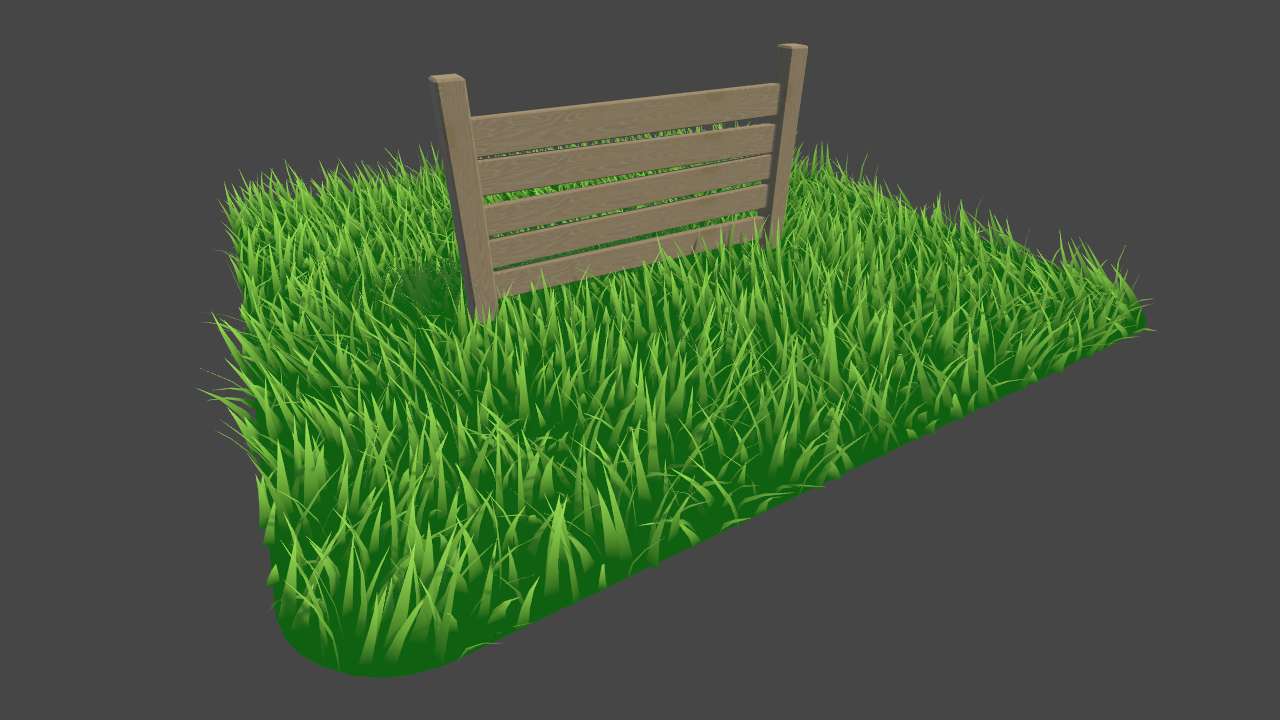
I'm using Roystan's grass shader which takes a base mesh and populates the surface with generated grass blades in a geometry shader
https://roystan.net/articles/grass-shader.html
Learn to write a grass shader for Unity engine. Generate grass from an input mesh using a geometry shader, and control the density using tessellation. The blades of grass use a random function for size and angle variation, and cast and receive shadows.
however the grass blades generated don't write to a depthnormals texture
slate patrol
Are there any defines for a surface shader that I can use to determine if the current pass is base forward or forward additive?
And no, multi_compile_fwdbase and the likes don't work. Splitting the surface shader into their own passes with custom tags doesn't work.
slate patrol
Anyone?
amber saffron
From this page :
- Maybe
exclude_path:deferred?
 brisk sequoia
I'm in need of a motion blur effect that works like a real camera. Accuracy is more of a factor than speed. It looks like HDRP doesn't have a grab pass, so any thoughts on how I should do this? I'd prefer to use shader graph if possible.
 delicate badger
hi all
on Radeon CG we have this error on HDRP build : ERROR: Shader Shader is not supported on this GPU
But I could not find in our project the shader "Shader"
amber saffron
@delicate badger Thats bad,. But this errors message doesn't help very much ? Could you check if you're using the latest version of HDRP, and try to identify more precisely the shader ?
delicate badger
we are on the last HDRP version
WARNING: Shader Unsupported: 'Hidden/Nature/Terrain/Utilities' - All passes removed
ERROR: Shader Shader is not supported on this GPU (none of subshaders/fallbacks are suitable)
WARNING: Shader Unsupported: 'Hidden/Nature/Terrain/Utilities' - Setting to default shader.
WARNING: Shader Unsupported: 'HDRP/Lit' - Pass 'IndirectDXR' has no vertex shader
WARNING: Shader Unsupported: 'HDRP/Lit' - Pass 'ForwardDXR' has no vertex shader
WARNING: Shader Unsupported: 'HDRP/Lit' - Pass 'VisibilityDXR' has no vertex shader
WARNING: Shader Unsupported: 'HDRP/Lit' - All passes removed
the entire log 😄
not very helpfull xD
amber saffron
Can you tell me the Unity version number and HDRP version number ?
delicate badger
I investigate few hours before coming there to ask :/
Unity 2019.1.10f1
HDRP 5.16.1
amber saffron
@brisk sequoia Your question doesn't really make sense.
- We don't have grabpass in HDRP (and anyway, you don't want to write shader code in HDRP ... seriously), but in ShaderGraph you can use the SceneColor node on a transparent shader to get the color that was rendered behind the object.
- Even this would be enough to do a proper motion blur effect, as you would also need motion vectors to have proper object motion blur.
- This kind of effect is more a PostProcess effect then a shader applied to an object, and for the moment, we don't support custom post process, either from shader code or shader graph.
- The post process included with HDRP already contain a motion blur effect, isn't it enough ?
@delicate badger Are you by any chance targeting the DX12 api ?
delicate badger
we let AutoGraphics API for Windows to On
amber saffron
Are those messages preventing you to play the build properly ?
Also, could you maybe enable full stack trace logging for errors ? This might help with the "Shader Shader is not supported" line
delicate badger
it's not a problem for playing, but I don't like letting error on a release ^^
We already have the full stack activate
amber saffron
I'm poking the devs.
As for the "DXR" warnings, you can ignore them. We won't be able to fix it, but it has no impact.
devout quarry
Remy, why don't you want to write shader code in hdrp?
With 'you' being a 'general someone' not you specifically
amber saffron
I was more talking for writing a HDRP PRB compatible shader. Just look at the lit shader case, it's ... huge
 dark flare
what shader level is supported on the nintendo switch?
i see 5.0 is supported for ps4/xb1
(@ me if you know, please)
 foggy falcon
should be whatever matches vulkan 1.0
dark flare
does unity only support vulkan on switch?
- is it more stable than the standalone vulkan? on desktop vulkan just randomly crashes for my project :/
foggy falcon
I have no idea
also do you have updated drivers for your graphics card
I've had weirdness in the past with drivers working fine and other times a specific version one flies off the handle
shakes fists meekly in Nvidia's direction
dark flare
oh maybe related, guess i havent updated in a while lol
ornate blade
does anyone have any good resources for gaussian blur in LWRP?
brisk sequoia
@amber saffron i'm trying to have a somewhat arcuate camera blur based on exposure time. the HDRP motion blur to my knowledge can not be configured to create a faithful enough result. One example is that when I have sufficient left right blur, the walking forward backward blur is insanely strong.
amber saffron
@brisk sequoia I can't find it right now on the asset store, but I saw an asset that does fully realistic motion blur / depth of field by using image accumulation technique.
This is maybe what you want
It's also this technique that was used for Sherman : https://blogs.unity3d.com/2019/06/11/introducing-sherman-part-2/

Unity Technologies Blog
Created by the Emmy-winning team that brought you Baymax Dreams, Sherman is a new real time Unity short that delivers the most advanced real time fur ever!...
brisk sequoia
Thats exactly what I want. But haven't had luck find such a thing on the asset store
amber saffron

EARLY ADOPTERS DISCOUNT 25% OFF
If you use Unity to make movies, or wan't to export a high quality animation of your project into a video - Deckard Renderer is for you! It is made to overcome most of the problems in realtime graphics.
-Render videos from your Unity project...
brisk sequoia
Outstanding! ill give it a try. Thanks so much
amber saffron
Just to be clear, it's for film, this will never work in realtime 😃
brisk sequoia
@amber saffron looks like it doesn't have solid support for HDRP at this time
amber saffron
Yep, it's stated it's experimental. Sorry, I nothing better right now ...
Or ...
Hey, you could grab the Sherman animation project with the filmic motion blur there : https://create.unity3d.com/sherman-unity-for-linear-animation
@brisk sequoia ↑
brisk sequoia
@amber saffron I'll give that a go. Thanks heaps for helping out again
fervent tinsel
would be lovely to get some nice looking real-time fur shader from Unity some day :/
brisk sequoia
@amber saffron The Sherman project is built on 2018.4, and the HDRP is modified. The problem specifically for me is that I need HDRP to render real time unless capturing the screen, at which point motion blur can be turned on for capture. Do you think the FilmicMotionBlur from the project could be modified to work with a more recent standard HDRP?
amber saffron
Can't be sure here ...
civic finch
@fervent tinsel
working on this atm
looks much better with the physics and a moving light source
slightly more exaggerated version of the kinds of shiny things i can do
and this can shimmer based on movement as each individual hair moves
fervent tinsel
can approve the animal choice 😄
civic finch
hehe
it's a combination of squirrel, red panda, lemur and nightmare
the main issue is the edge
need to actually do proper fur fin stuff
 neon parcel
Hey I've been having an issue with deferred shaders, maybe someone can help me out. If I use the deferred library to access light direction for a surface shader, I get some really ugly flickering with the resulting shader - it seems like there's disagreement somehow on the light direction depending on if the object in question is selected in the hierarchy or not, or other factors -- the flickering persists even in play mode. Has anyone else experienced this? is there any way to access light direction in a deferred shader without getting flickering?
steps to repro would be to create a surface shader, use #include "UnityDeferredLibrary.cginc" and somewhere in the surface function do something like
float3 halfDirection = normalize(IN.viewDir + _LightDir);
o.Emission += pow(dot(halfDirection, o.Normal), _SpecPower) * _LightColor;
(I've also tried this with a custom deferred lighting function and get the same flickering result)
dark flare
someone correct me if im wrong, but.. there's probably not a reliable way to get "where is the light?" in a surface shader outside of a lighting pass in deferred. deferred works by first rendering depth and normals and albedo to separate textures, then later doing a screen space pass per-light to apply lighting by combining light information with those textures
so a surface shader in deferred is really mostly a "what goes into my albedo, normals, metallic, etc" textures that later get passed into the lighting pass
if you really need light direction, i would manually pass the light positions in yourself and do math in the vert pass to get direction to them
although im betting you probably dont really want to do this, probably a misunderstanding of deferred
@neon parcel
my bet is your flickering is due to having multiple lights in the scene, and each pass you're just getting whatever happened to be the last light rendered last frame. so its randomish
 halcyon pulsar
Any one know if Render queue can be changed per pass?
narrow thorn
Hi there! Just have a simple question. A newbie to shader graphs
I wanted to modify the vertices of mesh. I wanted a simple formula : y = x^2 + z^2, (here : G = R^2 + B^2) how to connect the G node to this formula?
amber saffron
Can't you connect the output of the add node to the G input of the combine ?
amber saffron
You don't have to use it.
Your G output is only calculated from R and B, and you do nothing with the G input.
narrow thorn
Thanks a ton man. I was thinking each node should be mapped (input : output)
dark flare
@halcyon pulsar it cannot.
 grand jolt
Can anyone point me to a good basic general shader tutorial
halcyon pulsar
@dark flare Thanks
 ocean thorn
hey guys, I'm new to compute shader and might need a little help, I don't really understand why my code don't work properly ```
my C# function looks like that:
const int x = 64, y = 64;
    uint[,] points = new uint[x, y];

    ComputeBuffer buffer = new ComputeBuffer(x * y, 4);
    int kernelIndex = shader.FindKernel("Test");
    shader.SetBuffer(kernelIndex, "result", buffer);
    shader.Dispatch(kernelIndex, 2, 2, 1);
    buffer.GetData(points);
    buffer.Release();
and my compute shader like that:
#pragma kernel Test
RWStructuredBuffer<uint> result;
[numthreads(32,32,1)]
void Test(uint3 threadID : SV_DispatchThreadID, uint index : SV_GroupIndex)
{
result[index] = index;
}
I'd preferably use ComputeBuffer buffer = new ComputeBuffer( x * y, sizeOf(uint) );
ocean thorn
yes, that won't change my result though
I probably messed up somewhere in the number of thread or group thread but I'm not sure
even weirder than that I tryed result[index] = 1;
amber saffron
What's the result of that last one ?
ocean thorn
in my compute shader and from the first to the 1024 index I got only 1 after that I get number that count from 256 to 2079 and then only 0
I really don't understand that x)
amber saffron
Looking at this : https://miro.medium.com/max/666/0*crGVcpEi6jw1i_hx.png
I think that SV_GroupIndex is not what you want to use
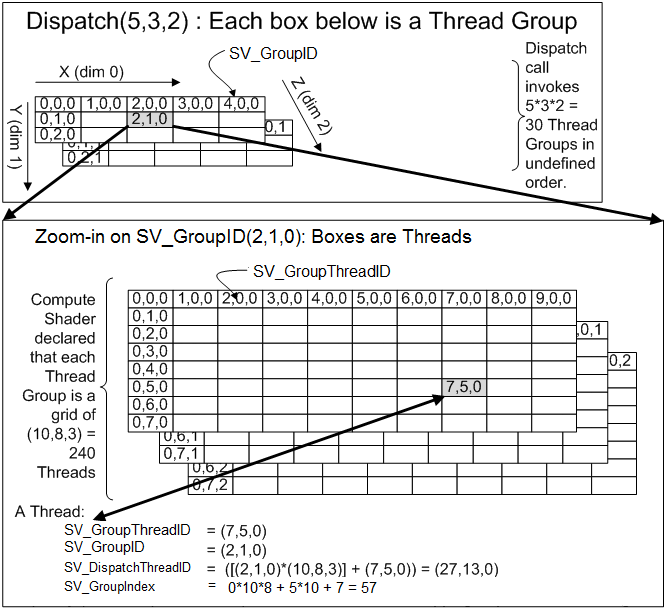
As it gives you the index inside the threadgroup. Because the size is 32*32, the index goes from 0 to 1024 : that would explain why after you have nothing "correct"
ocean thorn
oh right
amber saffron
As for the values of the data after 1024, in the second test : It's probably garbage from when the compute buffer was created. I think it doesn't "clean" the memory
ocean thorn
ok
so for what I want I would need to calculate my index using the group index and the group id
amber saffron
You could do
void Test(uint3 threadID : SV_DispatchThreadID )
{
    uint index = threadID.y*64+ threadID.x;
        result[index ] = index;
}```ok thanks 😃
amber saffron
Modified : you don't need z here.
ocean thorn
yes
amber saffron
And changed again because your array is 64 * 64 in size, not 32 * 32 😃
ocean thorn
that's were I was wrong so ^^ because before all that I already did something like what you said but always used 32 thinking it must be related to the numthreads
works perfectly thanks, I really need to understands a bit more all thoses threads things ^^
amber saffron
SV_DispatchThreadID returns you the thread id in the range that combines numthreads * dispatch values
So for numthread(8,8,1) and a dispatch of (8,8,1) the SV_DispatchThreadID goes from (0,0,0) to (63, 63, 0)
ocean thorn
oh ok think I got it thanks 😃
I will try to add another dimension and see what I can do 😃
well thanks a lot when you understand how this is all related it actually easy to do that ^^' just added a z axis to try and it all works fine
bleak zinc
what's the best image format for packing several B&W maps into channels
is there a better option than PNG?
I asked the artists on my team to start packing their bw maps and one of them is complaining about the amount of space PNGs take up on his computer
 royal scarab
If you pack grayscale maps into PNGs, beware of sRGB color space issues if the data was meant to be interpreted as linear (e.g. height maps, normal maps, etc.)
civic finch
i mean raw lossless files are always going to take up that space
you'd use a texture format eventually for better performance/storage etc, but surely the artists have to store their lossless source anyway
bleak zinc
@royal scarab oh thank you for that heads up! so i assume you should be able to export a png as linear then?
royal scarab
PNG supports it, but not all programs that use PNG do.
Some programs will always assume and output sRGB
It’s easy to get hard bugs because of this.
 ancient dragon
Hello, would any of you be willing to help me with what I'm trying to achieve in my project? i've looked on YouTube and Unity Documentation, but can't really find anything
This is what I'm trying to achieve:
- Create a white rounded rectangle background.
- Apply a second texture with transparency onto the background.
- Have the second texture scroll while also masking it to the white background so it doesn't show up outside the rounded parts.
Sorry for such a basic request, but any help would be appreciated.
bleak zinc
Thanks @royal scarab - so if the default is sRGB, but i do have options as in photoshop - what color profile should I use?
is Adobe RGB good?
royal scarab
I'm not 100% sure, but I think Photoshop might be one of those programs that will always output sRGB 😄
The alternative would probably be called "linear"
But I don't know if photoshop supports it.
bleak zinc
photoshop seems to allow you to change color profiles, but it's all named ones like Apple RGB and Adobe RGB etc
no Linear option
i might be able to define a custom one?
 worthy ridge
Any ideas how I could achieve this effect in unity?
https://youtu.be/Swx3nZrTtbc?t=447
I assume it isn't individual objects and is a single mesh?

Time to blow the dust off my Oculus Touch controllers and check out the latest First Contact VR update. In this new update you can watch a couple of mysterio...
ocean thorn
Hey guys is it possible to only by giving a 3d Size to a compute shader to createa voxel world so getting out of the compute shader an array of vector for the vertices and an array of floats for the triangle
civic finch
I mean
Yeah, depending on your algorithm
Not sure quite how this is working though
ocean thorn
the things I don't really get is that I'll need a first function to get all the vertices from some algorithm and then another function to actually make the triangles from these vertices but do I need to pass thoses vertices again to the gpu or is there a way that using only one compute shader I can get the vertices from the first function and then call the second function using the vertices that were calculated previously ?
civic finch
Wait you want to procedurally generate an entire voxel world on the GPU each frame
ocean thorn
not each frame but instead of doing all the heavy stuff on the cpu when I create a chunk of my world I want to create it on the GPU and then transfer those data back to my cpu to assign to a mesh
 flint steeple
Hey All, I'm looking for some help with shaders in asset bundles rendering everything white in the scene. A little information on my current setup, I'm using unity 2018.3.7f1, I've included all my custom shaders in the Graphics Array 'Always Included Shaders', I've built the asset bundles and build for the same platform and the asset bundles the shaders are contained in are loaded as soon as the game starts.
 pallid bluff
I'm stuck on trying to apply a postprocessing effect that i downloaded to 2d, ive tried applying it in different places but it never has any impact on the image that is being shown
any tips?
needless to say ive tried googling but i couldnt find a solution
worthy ridge
How could I scale each cube in this mesh independently using a shader? I want lots of cubes.
civic finch
You could create them with a geometry shader
Wait I can't remember if that's the right name
But create the vertices and faces procedurally
real basin
might depend on what input would scale them. If it's something like scale depending on distance from a point I think you could do it all in the vertex shader by dividing the vertex positions by the number of cubes, find the center point of each cube, and scale the vertex position of each cube relative to its corresponding center point
grand jolt
Why bother when you can just instance the same cube.
real basin
but yeah instancing is much simpler way to do it
grand jolt
Just write a custom shader and put scale into instance props, apply it to the mvp matrix in the vertex stage somehow.
If you don't even need outside acess to that scale, then you don't need to put it in instance props since you use it as a local.
gilded lichen
If you really want to do a mesh as above (one mesh with hundreds or thousands of cubes) store the "per-cube" coords into vertex color (e.g. each vertex has its relative-to-cube pos stored in vertex color) and use that as offset in the shader
bleak zinc
Has anyone had the experience that the unity stats window shows a significantly different number of draw calls/ batches than the frame debugger? esp. in VR
right now im using single pass stereo and all my materials have gpu instancing enabled, so though i expect the number to be the same as single camera, the stats window shows double expected draw calls, while the frame debugger shows the expected number of draw calls
i dont know who to trust haha
 shy cradle
Does anyone know how to fix that?
gilded lichen
Is that a custom shader (Amplify/ShaderGraph)? If so, try not using "_ShadowBias" as custom property (looks like it's an internally injected name)
shy cradle
It is a shader from a Tool that converts terrains into meshes. Just looked into the doc and it actually says that it is written with amplify. How do I get ShadowBias as a "non custom property"?
gilded lichen
Hm, sounds like you should contact the tool owner. Potentially it was working with an earlier lwrp/hdrp version - those tend to still change quite often - and their integration needs to be updated
If you own Amplify you could also try opening those shaders with the latest version and just re-saving
 vivid whale
anyone know of any free to use ripple shaders that works for 2D games? Tried to use this https://github.com/keijiro/RippleEffect but it won't work with the LWPR
GitHub
Water surface ripple effect for Unity. Contribute to keijiro/RippleEffect development by creating an account on GitHub.
 radiant night
Someone can tell me why the mask of a UI image doesn't work if you assign it a custom material (which contains a simple shader).
real basin
@vivid whale the shader is pretty simple it should work, but the script uses OnRenderImage which doesn't work on LWRP. people recommend using the post processing stack to to replace OnRenderImage, but I'm sure you could also do it manually with the renderpipeline commands if you don't want to use the stack https://github.com/Unity-Technologies/PostProcessing/wiki/Writing-Custom-Effects

GitHub
Post Processing Stack. Contribute to Unity-Technologies/PostProcessing development by creating an account on GitHub.
vivid whale
@real basin thanks man, I'll look into it
 maiden gull
Hey, all! I have a bit of a wacky query for an effect I'm trying to pull as a shader beginner
I'm basically trying to recreate the water from Wii Sports Resort as accurately as possible, and while I grasp the basics of scrolling UVs and adding them, I frankly can't get anything to look close to what they're doing.

This is a capture of me finding all 80 i Point locations in the Air Sports Island Flyover mode of Wii Sports Resort for the Wii. This was recorded directly f...
This is a capture of me finding all 80 i Point locations in the Air Sports Island Flyover mode of Wii Sports Resort for the Wii. This was recorded directly f...
Those are two different timecodes for references. Anyone have any ideas for how one could recreate this in Unity?
Thanks a ton!
dark flare
it just looks like a flat plane, but with a scrolling normal map
its a nice normal map tho
looks like they might be doing something like, sampling a noise texture and then using that value scaled to offset the normal map sample
@maiden gull
hard to tell because of the res of the video, they might just be sampling the normal map twice. once to use to pass into the offset for the second sample, which is actually used as the normal map
on top of that, looks like they're doing a little depth testing to add that wavey effect around things intersecting the water. looks like that is also using the offset uvs by sampling another texture style
they may have also painted the vertices and are using the vert colors to blend between orange/blue when going from outside to inside, probably nothing more fancy than that
maiden gull
There's no depth testing, that's just geometry with a "wavey intersection" texture on it
Other than that I think you might be spot on
Could you elaborate on what you mean by passing the sample of one normal map into another? How would that make the effect?
Thanks a ton for the analysis, by the way
@dark flare
dark flare
float4 secondSample = tex2D( _yourNormalMap, i.uv + firstSample * someScalar); ```would causing a rope-y distortion effect on the normals, looks like thats happening to a subtle degree in that vid. hard to tell from the low res tho
@maiden gull
maiden gull
Totally. I'm gonna give that a shot, thank you!
dark flare
does anyone know of a way to pass a texture to Internal-DeferredShading shader?
as in, replacing that shader is there an easy way to drop in textures to sample into the custom shader
royal scarab
If you're using a custom shader, you should be able to declare additional textures normally.
Either via properties, or just by declaring the textures and then using MaterialPropertyBlock.SetTexture or Shader.SetGlobalTexture
dark flare
Yeah but that uses a global texture slot which I'd rather avoid
And there doesn't seem to be a place for assigning a material property block for this @royal scarab
royal scarab
I don't know if there's a different way.
 sinful salmon
Helloo
 fluid peak
Hey, is there a way to get _CameraOpaqueTexture to generate mipmaps, for sampletextureLOD
 somber bolt
I thought I had fixed this issue when using LWRP and modified
ARKitLWRPShader.shader
changing
return mul(ycbcrToRGBTransform, ycbcr);
to
return pow(mul(ycbcrToRGBTransform, ycbcr),2.2);
But now using standard shaders and made the same change to ARKitShader.shader
Gamma mode background camera image appears fine but switching to Linear color space the background camera is washed out even with the Shader edits.
What is the solution?
Do I need a custom Camera material or?
 viscid pewter
Guys, how do you do a radial gradient? Or a blur? A feather? I'm trying to blur a circle to use as alpha mask.
real basin
radial gradient from center: distance(uv, float2(.5,.5))
add/subtract/multiply for different offsets and ramp
 mental verge
Not sure if this is the right place...
Anyone ever hook up a camera like this that culls mesh geometry that intersect a shape (in this case parabaloid)?
Half way down on this page - http://etodd.io/2017/11/28/poor-mans-3d-camera/
Just curious if something like this could be set up in Unity.
I believe this is the source code for it:
https://github.com/etodd/lasercrabs/blob/master/assets/shader/culled.glsl

GitHub
Launch your LASERCRAB at walls, ceilings, and enemy heads in this indie multiplayer shooter where "move" and "attack" are synonymous. - etodd/lasercrabs
uncut karma
Yea you'd want to use stencils most likely
You would need a combo of depth and stencil, discarding fragments in front of depth & matching stencil, but passing fragments behind depth and matching stencil
I think it could be setup in LWRP with the custom forward renderer
mental verge
@uncut karma Thank you very much for the info/advice. I'll look into it. Really appreciate it.
devout quarry
anyone else have this graphical issue where the inputs won't go a way
shader graph 6.9.0
updated all packages to 7.0.0 and it's fixed
 shell wadi
anyone know why DestroyImmediate isn't showing up as a real function in a PostEffectRenderer?
ah, found it
 fiery widget
I'm having difficulties figuring out how to blit the camera's depth buffer values into a rendertexture using commands... anybody know the best way to do this?
fluid peak
in shaderegraph use the scene depth node
real basin
you can access the depth texture in shaders without blitting it, make sure the camera depth mode is set to depth
fiery widget
nvm figured it out...my objects didnt have a shadow casting pass so they were not getting written to the depth buffer
 torpid prism
Hey guys, I have a question about shader graph and textures. I'm making a 2D game and I have my sprite sheet and I'm using a shader to overlay another sprite sheet texture over it, problem is because theyre not the same size, the overlay texture gets sort of warped and doesn't fit the frames correctly. Is there anyway to fix this without making the overlay sprite sheet the same size as the other one? I was hoping to reuse this shader for a lot of the objects in the game and having a bunch of the same sprite sheet just different sizes for the overlay seems super inefficient
 rotund tusk
are you just using the uvs from one spritesheet?
torpid prism
I'm not really sure, I'm all new to shader graph, not sure what any of it means still lol 😅
torpid prism
Wait, I think I might be able to do it with the flipbook node, but on every couple of tiles there will always be a blank tile, if theres only 4 frames on this sheet, I'd set the width to 4 right? but then on the 5th it will be empty until 6th where it loops back to 1
real basin
use a separate flipbook node for each sheet texture with different width?
 tranquil zephyr
Does anyone know if the stencil buffer is shared by all shaders being rendered, or if it's a separate buffer used per shader type?
tranquil zephyr
How about if it's shared by different passes on the same shader, or if it gets reset at the beginning of each pass?
real basin
it's shared, it's stored in the camera like the depth buffer
tranquil zephyr
@real basin Are you referring to the question about the passes in the same shader or the separate shaders?
real basin
it's shared between everything, there's a screen size texture on the camera that stores the stencil value for every pixel. every shader will read/write from the same place
tranquil zephyr
Alright, thanks~
uncut karma
Yes the stencil buffer is 8bits of the depthbuffer
There are ways to copy from it and use that data elsewhere but it would be custom/specific to rendering needs
fervent tinsel
@dark flare depends on the renderer
you can see here how HDRP uses it: https://github.com/Unity-Technologies/ScriptableRenderPipeline/blob/7.0.0/com.unity.render-pipelines.high-definition/Runtime/RenderPipeline/HDRenderPipeline.cs#L185
GitHub
Scriptable Render Pipeline. Contribute to Unity-Technologies/ScriptableRenderPipeline development by creating an account on GitHub.
they only got one free bit left atm
but they could still combine the existing items a bit more efficiently IMO
fervent tinsel
but this can be totally different situation on LWRP/URP or if you use built-in renderer
I have no idea how it's used on those (been on HDRP for a long time now)
dark flare
we might be switching to HDRP/scriptable render pipeline soon anyways
if its not a horrible jump
im doing a lot of weird custom stuff so maybe not
grand jolt
I seem to be having a problem with unity where all of the trees ive painted on a terrain turn black after i generate the lighting, what might be wrong here?
dark flare
Are they marked as static, is the light marked as baked?
grand jolt
ill check
the light was set as mixed and i cant find the static option for the tree
@dark flare
dark flare
probably related to that ¯_(ツ)_/¯
mixed lighting has never worked for me
i always just have two, one purely baked one purely realtime if i want mix
and things that read from baked data need to be marked as lightmap static
usually top right of gameobject inspector
not sure if trees are a special case
the static checkbox marks more than just lightmap, but if you're marking that static you probably want the rest static too
there's a little dropdown next to it for marking what exactly is static
@grand jolt
grand jolt
mmk, thanks
👌
yeah trees dont seem to have it for some reason, my other objects do but they dont
it might be because they are placed using the terrain tree painter
so they dont count as models on their own for some reason
dark flare
hmm yeah not sure, i havent used the tree stuff. i'd read up on the docs and look for if its possible to use light baking with the tree system
grand jolt
mmk
i think i found something interesting that might be the solution, Trees you create using Tree Editor must use the Nature/Soft Occlusion Leaves and Nature/Soft Occlusion Bark shader. To use those shaders, you have to place Trees in a specific folder named Ambient-Occlusion
otherwise the Trees don’t render correctly.
real basin
does anyone know why the profiler attributes performance to the wrong things sometimes? Like I'm experimenting with a geometry shader and when I increase the number of verts it creates, the GPU time goes up for completely unrelated renderers. First it caused "Meshskinning.render" to go up by 4ms (my geometry shader doesn't touch any skinned meshes). so I disabled all skinned meshes in the scene, and then "Camera.RenderSkybox" goes up by the same amount of 4ms
I don't know if this is only caused by geometry shaders, but it's the most noticeable example of it I've encountered
dark flare
Are you looking at the GPU profiler specifically?
I notice the CPU profiler seems to be wrong most of the time with GPU stuff
Also enable deep profiler if you have not yet
@real basin
real basin
I was only looking at GPU profiler
dark flare
I'd recommend just using an empty scene with only the thing you want to profile then
Or using an external GPU profiler
naive mural
Does anyone know of a good way to readback data to the CPU from the GPU via a buffer for bigger amounts? The only thing i've discovered is AsyncGPUReadback which is way faster than GetData, however, for sizes of data of around 1mb, it still produces 5ms for the transfer. The data transfer is also available only for 1 frame once it finishes processing. Are there any ways to reduce this lag besides reducing the amount of data required to transfer? What is the actual limiting factor for the speed at which data is transfered from the GPU to the CPU once the data has finished processing?
royal scarab
On the hardware side, the limiting factors are the speed of the PCI-E bus and the speed of the GPU block that is used to copy the data (could be either DMA or the main graphics pipe).
5 ms sounds to me like it's being bottlenecked somewhere else, since even the slowest PCI-E should be able to transfer something like 10-20 MB in 5ms.
naive mural
@royal scarab thanks for the info
royal scarab
Also, the transfer from the GPU doesn't cost any CPU time as such, because the GPU is writing that memory. If you're seeing CPU cost, that's caused by something else, like copying the data on the CPU side.
 dense sparrow
Hi, I'm using Amplify to author my shader but does anyone have any idea or a theory on how I might possibly create a shader where the user can mask a texture map based on a color
I'm just stuck on the math for it
Currently Im subtracting the target color from the texture map and feeding that into the alpha clip
 marble lance
anyone know how to transform from clip space to object space in shader graph?
amber saffron
The best would probably be to send the inverse of the projection matrix to shadergraph from a c# script
fervent tinsel
pretty sure I tried that in past
but I had issues on the shader otherwise so I could never verify the results
(it was related to the motion vector spoofing thing for spinning wheels)
marble lance
https://i.imgur.com/68pR28m.png I'm using lwrp and when i choose inverse projection in transformation matrix node i got this error

other transformation options is working
 quiet swallow
Hey everyone! I had a question about alembic streaming and motion vector data. I can't seem to generate the proper motion vectors for motion blur. I'm looking for a result similar to what Oats Studios achieved with their alembic data. Does anyone have experience with this? Thank you 😄
 heavy mango
Would anyone happen to know what would cause my fire shader to completely mess up it's vertex positions in play mode? it all works fine in editor, but then just breaks once I hit play. I'm using the latest versions of Unity with the HDRP and Shadergraph.
Here's what it looks like normally
and once I enter play mode
dark flare
are they being batched in play mode but not in edit mode?
if they're marked as static that could happen
could try going into the shader and adding Tags { "DisableBatching"="True" } and see if that fixes it
heavy mango
That was it!
dark flare
nice!
heavy mango
they were static
Thanks so much, I've been stuck on this for a good day
glad the problem was that simple
 simple quail
Hi guys, using unity 2019.1.11, i downloaded the built in shaders so i could edit the billboard grass double pass to make it bend when character walks on it. however, I can't get the terrains to use the new shader, they are still using the old built in shader. the only way for a terrain to use the shader is if it's created after the new shader was imported. in short, how do i update the already existing terrains to use the new shader? thank u
i have already assigned its path: "Hidden/TerrainEngine/Details/BillboardWavingDoublePass" but it only works for new created terrains not old ones
quiet swallow
oh wow.... all you have to do is add this to the sub shader: UsePass "Hidden/Alembic/MotionVectors/MOTIONVECTORS" 🤣
.... with no spaces! the manual online had spaces
 tender patio
I'm not sure if this is the right place and I don't want to break any rules, so I'll ask upfront: Can I put up a shader-programming offer? It would be paid, so not asking for freebies.
 surreal bone
Hey, I tried to import my Blender Cel shading into Unity but it doesn't work. I heard that it can only be done by doing it in Unity, any help?
Oh wait I found some tutorials, I will look at them later
devout quarry
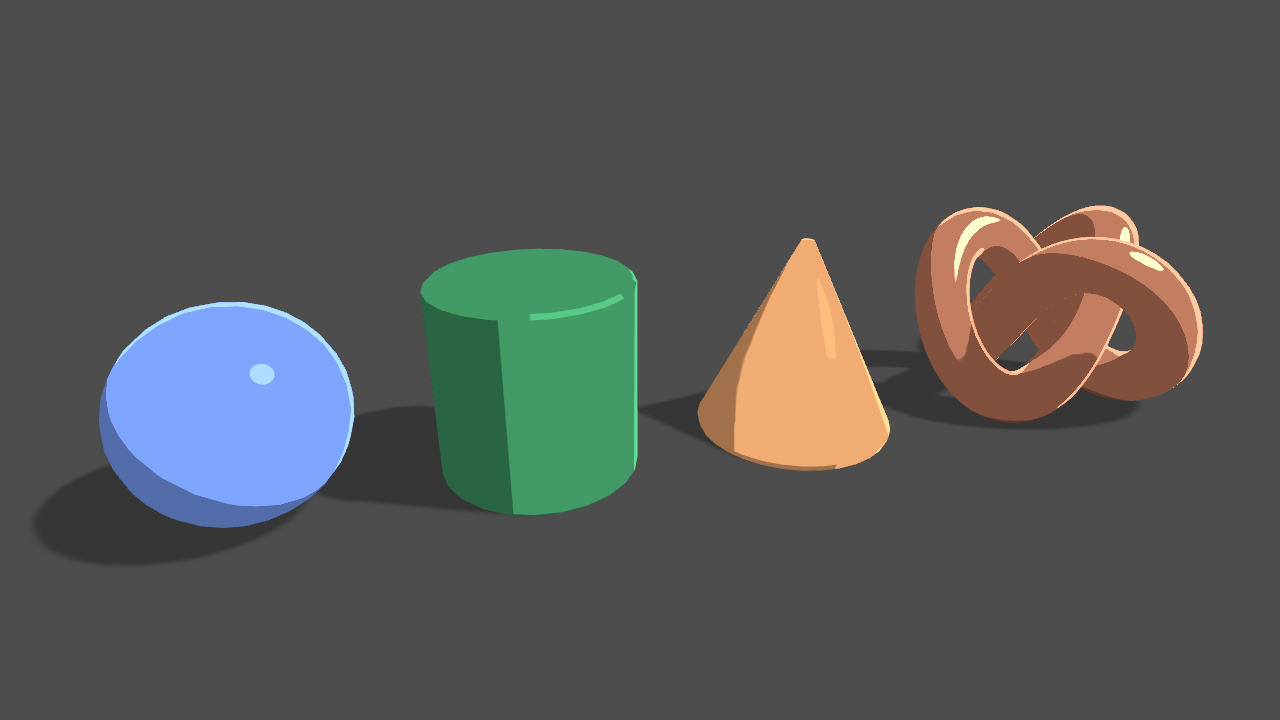
Learn to write a toon shader for Unity engine with specular reflections, rim lighting and shadow casting.
 kind juniper
Does anybody know if in some recent updates or with the new terrain tools the default grass shader name was changed?
I'm trying to use a replacement shader, but it doesn't seem to have any effect at all
 smoky flume
Say I have a sphere on the screen and I want to overlay it with a checkerboard image. The image covers the entire screen and let's assume I can't just put a transparent checkboard quad in front of the camera. How can I do this?
fierce dune
Looking for a HLSL/CG programmer than can produce a shader with this effect that is compatible with Unity Terrain & Texture Layer Paint System - Standard Unity Render Pipeline
 quasi quest
For terrain, just lower its resolution
 meager pelican
@smoky flume are you saying you want a screen-space checkerboard? (see unity shader's examples for one if that's what you're after)
What do you mean by full-screen but also a sphere? Just shading the sphere?
 rugged kernel
Hi. Is there any way to make outlines in HDRP?
devout quarry
GitHub
This project contains a collection of Custom Renderer examples. This will be updated as we refine the feature and add more options. - Unity-Technologies/LWRP-CustomRendererExamples
this is for hdrp but for sure it should work in HDRP as well
I haven't used HDRP but if you can add a 'renderer feature' to it, you can make an outline pass
and if you want to know how to make an outline shader, I can recommend this article
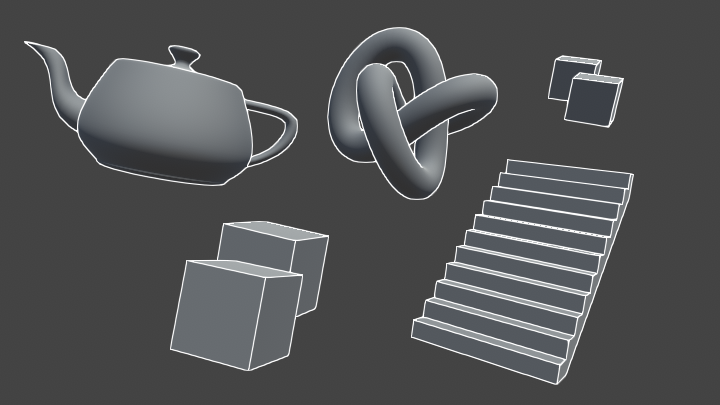
Learn to write an outline edge detection shader for Unity engine, integrated with the post-processing stack. This effect is especially popular as a compliment to toon shading, or in CAD and architectural rendering.
uncut karma
@rugged kernel it can be done but you'll have to be comfortable with getting your hands dirty and digging into HDRP code, at the very least a simple vertex-extrusion outline would be easiest, but it might require 2 passes, so you would have to see what ShaderTagId's HDRP uses and if you can simply hijack one for the outline pass
if it requires depth for determining edges (Edge detection) then it would be easier to just edit in your own edge detection pass in HDRP's main forward loop I think
but HDRP lacks the custom forward renderer editing that LWRP has.
Custom forward renderer isn't required to customize.. it just means that without that you edit the package code itself.
im not sure if 2019.1 has the ability to edit packages easily yet, but that is one thing coming soon
(i think it would just copies the package to more of a user-defined folder and removes readonly attributes)
@rugged kernel why not use LWRP for the project if there are outlines?
you could refine the effect and understand it in LWRP then do it in HDRP if you need all the other rendering features it has
 covert frost
Could someone tell me what UnityDistanceBasedTess takes in as an input? I can't find documentation for it anywhere
covert frost
for a surface shader
fervent tinsel
            float4 tessDistance (appdata v0, appdata v1, appdata v2) {
                float minDist = 10.0;
                float maxDist = 25.0;
                return UnityDistanceBasedTess(v0.vertex, v1.vertex, v2.vertex, minDist, maxDist, _Tess);
}```But what does it calculate the distance from? The camera?
covert frost
Okay, I put it in a shader and it's working for the scene camera, but won't work for any actual game object cameras I use. Is there anyway I can set the position to calculate the distance?
 white crow
A lil question about shaders - is it possible to change the frame rate of a specific shader, so, say, it only updates every other frame?
smoky flume
So you want it to flash on and off?
If so, you can pass an int that updates every frame into the material to tell it when it can discard
meager pelican
@white crow Nomy is correct, but I'll reiterate it would "flash".
When the game engine draws a frame, it draws the WHOLE frame, completely, basically, so you draw the object every time. BUT you could, if you had an expensive shader, draw to a render texture, then superimpose that in, and only update it every other frame, for example. Or just have a "dirty" flag in the shader sort of like nomy is saying., and skip a bunch of calcs on odd or even frames or whatever. Or split the work up other ways.
white crow
I was thinking more of a Spider-Verse effect where certain characters/objects are “animated on 2s” and the background is “animated on 1s” (or vice versa)
meager pelican
Well, unless you store stuff in a RT, you'll have to redraw it on the "ideally inactive" frame. Think of it as starting with a black/blank screen and drawing everything. It has to come from somewhere. How you animate and when...that's the code side, not shader side, if I understand you correctly. There's ways to do almost anything, but maybe not exactly like you're envisioning. Basically, it has to be drawn from somewhere. 😃
white crow
Yeah I think I get what you're saying
I think the best way to do it would just to be having two cameras/RTs - one for the full framerate and one for the half-framerate, and just combine them before you show them to the player
But only update the half-framerate one every other frame
smoky flume
Yep
simple quail
Hi guys, i'm trying to get my grass shader to override the old built in one but it doesn't work on exisiting terrain, only newer ones. any solutions?
meager pelican
Thinking about it more, Meorge, depending on what changes relative to each other between the two cameras, you might have shadow and/or depth clipping issues.
Try it, but if it messes up edge-cases where something wasn't clipped right...like missing a piece during compositing because that piece is now revealed this frame...even if you clip against the depth buffer when compositing the "old" frame it won't look right. I think.
You're better off figuring out how to not animate so you get that awkward-update feeling. And maybe do it on a timer tracking delta time. Because if you move from a slower card doing say 50 fps to one doing 100 fps it won't look the same.
So you'd still draw it every frame and it would clip correctly, and would be according to a timer rate rather than odd-even frames.
The spider-verse stuff is generating a movie at a fixed 24 fps not in real time. But if you're running on a desktop in realtime on a GPU your frame rate will vary.
Just some thoughts. 😃
real basin
as far as I know most people that do the low framerate effect do it on the animation and or camera movement, nothing to do with shaders
smoky flume
@meager pelican the samples has a checkerboard example but it's wrapped on the object. How can I get it to be overlayed on top of the screen?
meager pelican
Well, sounds like a post processing effect to me. Not sure what you're doing. There's two examples, one on the object and another on the object but using screen space.
Then there's full screen post processing too. Think of that like an overlay. Or you can generate a full screen quad and just shade that, but that's what a post processing shader basically does. Via blits. And there's different PP stacks. And someone said that PPv2 may be going away or soon obsolete or something. Maybe read it wrongly.
You'll need to pick a method and do some research. You could use command buffers and just blit a texture over it, with a compositing shader, I think. So that way you only have to change it if the screen res changes or something.
IDK rambling. Hard to say without more specifics. :/
white crow
Ok, I think doing it via animations is probably the best idea
I don't know if I'll ever actually try to build a project with this technique but if so I'll take all this into consideration, thanks!
dark flare
PPv2 is great I hope they don't deprecate
meager pelican
Yeah, I like it too. I hope I misunderstood what was said. Someone checking out the commits in ?bitbucket? said something. I think. I don't want to start rumors, so grain of salt on all this.
meager pelican
That makes more sense. Still relevant to what one he uses, if that's what he's even after. IDK
smoky flume
It's more complicated actually 😦 I want to use the newest ARkit with human occlusion but it doesn't provide the implementation.... The kit passes you an updated depth texture of your figure every frame and let's you decide how to use it. I think the only thing to do is create a render texture of the scene AND another of it's depth AND use the human figure depth texture. Put a quad mesh locked to the camera and use the textures to display the right stuff
surreal bone
I tried adding a toon shader but it made my textures white
and I cannot fix it, please help
devout quarry
What toon shader?
meager pelican
@smoky flume I still can't tell if you're putting the screen-space checkboard across the whole screen or just over objects, or maybe a wall at some "far plane". Please clarify, guess I'm dense. If you're concerned about depth buffers, you must be clipping against it right?
So what's different about this than, say, any other virtual object you put into AR?
smoky flume
Sorry, i shouldnt of said anything about a checkerboard. I didn't want to get into the specifics, that's why I said that. What I actually want is my real hand to occlude objects when it is close to me and for objects to occlude my hand when my hand is farther away.
Ideally, I think i'd like to be able to write to the depth buffer but keep it totally transparent so the shader would think it doesn't need to render anything behind it, but I don't think you can do that especially with mobile
meager pelican
Yeah, someone with more AR will be able to help you, but it's depth clipping you're talking about. "they" do it. You need to know both depths, like you're saying, and decide on what to draw. Mobiles or unity implement some form of depth buffer (optional). I don't think you have to manually write to it, but maybe that's an AR thing. If so, you do that with a render pass that writes to the depth buffer. As I understand it.
I'd better bow out before I look any more stupid. But before I go , I did find this neat article. I haven't cross-referenced it with the functions available in your AR kit, which I assume is designed to help with these things. Anyway:
https://hackernoon.com/why-is-occlusion-in-augmented-reality-so-hard-7bc8041607f9
 grand jolt
f
Hi guys
I am having trouble understanding how to access my shader cariables from the language of the C sharp
variables
here we go some images
here
the shader
the c sharp script i attach to ball
?>
help
usually I access those methods from the actual material not just the renderer.
can you
GetComponent<Renderer>().material.GetFloat4("_Color")
?
" 'Material' does not contain a definition for 'GetFloat4' "
maybe some assembly reference?
meager pelican
https://docs.unity3d.com/ScriptReference/MaterialPropertyBlock.SetColor.html
https://docs.unity3d.com/Manual/GPUInstancing.html
rotund tusk
@grand jolt try GetVector instead of GetFloat4
naive mural
has anyone done some mandelbrot fractals? I'm looking for a way to have decent detail at higher level zooms without doing a lot of iterations has someone come up with a way to do it? At 100+ iterations the shader begins to lag.
 oblique cosmos
I'm making a shader using shader graph and it's one of the first times I'm using it. I'm using step/smoothstep to lerp between two colors if a y position is below a certain value. I'm changing the y position of a vertex using Position but I suspect when it's running my step nodes, the Position isn't set yet? Either that or there's something I'm not seeing
I can post my nodes if needed
grand jolt
what is unity_StereoScaleOffset? I can't really find any documentation on it at all except an example which uses it here. https://docs.unity3d.com/Manual/SinglePassStereoRendering.html which doesnt actually explain what this constant is but just shows it being used
rugged kernel
@uncut karma @devout quarry
Thank you for your answers! I made outlines in lwrp with a few different methods but I have 1 huge problem with lwrp. 4 lights per object limit are not enough for my project. On the other hand, I can't create any outline in hdrp except primitive fresnel method.
I don't have enough skill and knowledge to get a satisfying effect digging in hdrp yet. I tried your links and I understand the basic idea but recreating this in hdrp seems to be impossible without major changes in pipeline code. It seems like I need to stay on the standard pipeline for now. Unless somebody has a simpler solution to outlines in hdrp or make higher light per object limit in lwrp?
amber saffron
@rugged kernel There is a PR in progress that increases the number of simultaneous lights per object in LWRP, to 8 : https://github.com/Unity-Technologies/ScriptableRenderPipeline/pull/4074
Is that enough for you ?
GitHub
Purpose of this PR
Increases light limits for UniversalRP.
New limits:
Per-object lights: 8, except in GLES2 that is 4.
Visible Lights: 1024 if not mobile, 32 otherwise.
Non-mobile path store light...
rugged kernel
@amber saffron
It should be enough. Thanks a lot! ❤
 onyx widget
Hey guys, i have a problem with shadergraph. I'm currently trying to create a water shader, with a foam effect.
To achieve this, i the scene depth node. It works fine, but it also creates foam objects which are not partially or fully submerged
I have noticed that removing vertex displacement fixes this problem, but i do want actual waves. Does anyone have a
solution for this?
amber saffron
I guess the issue here is that when you're comparing the water depth with the scene depth it's not using the position after vertex displacement.
IIRC, there is no fix for this at the moment, either by offsetting yourselft the water depth value.
 valid harness
or you could paint the foam of the water using a vertex color mask instead of using the scene depth.
onyx widget
I have never done that before, my island is randomly generated though. Would i need to generate that mask using C# when i generate the island?
valid harness
yeah, you could set the color to be white where the ground is close to the water.
You would have to check every vertex ideally
or possible you have a heightmap to use to check that
 forest hazel
recently I learned someone managed to come up with a shader capable of replicating the N64s unique bilinear filtering
stone sandal
yeah that water shader issue will be because of the vertex displacement, unfortunately the fix on our end is pretty complicated so it won't be out terribly soon. it is a known issue that we're working on though
grand jolt
@forest hazel ooohh hoho, that tickles me fancy, thank you for sharing ❤
narrow flint
I'm trying to write a good felt shader. I'd like to add edge lit texture decals for frizzy bits and I'd like to light them so that I can capture the backlit effect you see with hair. Does anyone have advice on an approach for this?
forest hazel
@grand jolt I might have to try it myself
oblique cosmos
ugh I ran into that same shader issue just a few posts above you @onyx widget
I'm really interested in this fix as well @stone sandal
I think in the meantime I'll try out Amplify again...
 warm gust
I'm trying to make a compute shader that uses Lighting.cginc, but it always fails because fixed4 (and fixed in general) is not a recognized variable type. Why doesn't the fixed variable type work for me?
Shader error in 'RaymarchComputeShaderV2.compute': unrecognized identifier 'fixed4' at kernel CSMain at UnityLightingCommon.cginc(4) (on d3d11)
real basin
@warm gust I don't think fixed is supported on all platforms, you could use "include HLSLSupport.cginc" that defines them or define them yourself
warm gust
I'll try that
real basin
it redefines fixed to half specifically
dark flare
might be easier to just write #define fixed half yourself instead of including a huge amount of code
mental verge
what's a cheap way one might go about changing the overall color/saturation (general appearance) of meshes that are outside a complex boundary or area? (Ideally, I'd like to make the inaccessible area look substantially different from the accessible area.)
Some of the meshes straddle the movable battle area and the outside of it, so I can't do a simple mat switch.
Although some of the materials are shared, most all the meshes have their own specific materials.
I'm thinking PP might be easiest, but this is for switch so PP might not be a good idea.
Like I want to change the appearance of everything outside of that asymmetrical wireframe shape.
meager pelican
Well, if you don't do a post processing pass, then you'll probably want to build it into the shaders OR change the materials on the objects and use standard shaders.
Are you using custom shaders?
Anyway, you can draw that funky shape with a stencil pass and then use PP. That's easiest IMO. Anything else gets more complex fast. Particularly the BG since the shaders have to know the overlap. That's true for objects too I suppose. What if an object is part in and part out of that wireframe shape?
Or maybe you can get clever and create a render texture that has a "hole" in it for that mesh, and draw it over the screen like a full screen quad that's just over everything. But that's pretty much what a PP pass does.
mental verge
@meager pelican
Thx a lot for the ideas. I'll look into using the stencil buffer and maybe a lightweight PP, or that full screen quad trick.
Yeah, we're using custom, stylized shaders. And there's at least 30+ mats we'd have to switch the material out on.
All of the ground is part in and part out of the shape. We could cut those meshes (like the ground) on that boundary so they don't straddle it, but it'd be a lot of work.
On a side, anyone know of any games that used some cool shaders to delineate play area boundary? Sorry, maybe I should ask this in general-unity.
 floral estuary
Hey guys, We're working on something and our artist is loving the LWRP for shader graph / VFX graph. However we're relying on a custom shader that is not playing nice with LWRP. I can see it just fine in the scene view but not the game view. How do I go about debugging this shader? I'm not really getting any feedback from Unity about what is not working on that shader
vocal narwhal
You can use the Frame Debugger (Window/Analysis/Frame Debugger) or use RenderDoc, which has configuration pinned to this channel
floral estuary
Thanks I'm gonna take a look at this!
grand jolt
Hi guys a question. I followed some docs and can now span a big bunch of spheres that all use the same material. In my shader I have defined the colour and smoothness of the material to be an instanced property, so I am either able to randomise or manually change the colour of each of the spheres while they use the same material.
I also followed another guide where I spawn a ton of meshes (cubes/spheres etc.) in large batches, I use Graphics.DrawMeshInstanced. This allows for a large number of very similar meshes on screen without too much fps loss.
I want to combine the two approaches. I want to spawn all the meshes in large batches but add some randomness (or could do a pattern) to the colour and smoothness. I understand that inside the inputs for Graphics.DrawMeshInstanced I need to somehow input elements from a material property block but I am not sure how. The two instanced properties as I have mentioned are colour and smoothness. I am unsure of the correct syntax and among other things whether I need to manually create a property block somehow.
shader
randomising/customising colours
batching
grand jolt
Update, have tried changing objMat using SetVector/SetFloat but it affects every instance
Maybe could use the index inside the batch to add variation
amber saffron
I think you need to use the properties parameter of the DrawMeshInstanced method.
meager pelican
@grand jolt They give you examples in the doco I gave you on Saturday 7:25 pm.
Unity gathers the material instance properties together, builds an instancing buffer, and that's where you get those macros in the shader that define the instanced data and break it out by instancing id.
You need to read and work to understand those examples. It should work for you. Remy is correct that you need to pass the properties
I think you should be using your props variable to set the color or whatever.
https://docs.unity3d.com/ScriptReference/MaterialPropertyBlock.SetColor.html
 hazy obsidian
I have a problem with the Shader Graph: when I create a Property from the Blackboard or rename an existing one, I can't do anything afterwards and I am forced to exit and re-open the Graph. Is it a bug? If so, did anyone else encounter it and know how to fix it?
stone sandal
that's a known issue, it's fixed in 19.3 versions but it hasn't been backported to 19.2 versions
hazy obsidian
I see, thanks for the info
I managed to create a Overwatch-styled Shield that can dissolve so this isn't much of an issue (Courtesy of Brackeys for the tutorial) ¯_(ツ)_/¯
 rustic dragon
Does anybody know with the shader graph 2D introduction, if they now support UI materials, and if not is that in the near future?
fluid peak
is this usefull or just cheesy looking? https://imgur.com/C3S7WwS
 real basin
cheese is useful
 sly breach
Just recently discovered that you can code shaders, still don't know anything about them but i did try create a curved UI following this link:

Game Development Stack Exchange
I'm really new in Unity.
I want to make a curved GUI by myself. How would I make one?
I'm using Unity 5.6.
This is what i got
And i used this shader from "ttesla"
https://answers.unity.com/questions/1155090/making-a-shader-for-an-inside-out-sphere-unlit.html
Unity is the ultimate game development platform. Use Unity to build high-quality 3D and 2D games, deploy them across mobile, desktop, VR/AR, consoles or the Web, and connect with loyal and enthusiastic players and customers.
When i set the camera to skybox it won't do that replicating effect. But it won't render anything else either. Not sure why "depth-only" won't work
fluid peak
@narrow flint I would be interested in where you end up with your felt I wanted to do something like that but haven't started yet
fluid peak
further explorations in shadergraph... kinda looks like a trippy topological map https://imgur.com/hYwh1Jf
even more so now
sly breach
nvm, i solved it by using an overlay blend shader on the texture material
 slender hedge
https://i.gyazo.com/5ccab75ccad7fdeb46751167a131db08.gif How could I tile this in shader graph? I'm using a texture atlas which will cover all sides of the block, but I need this block to tile instead of stretch without using extra vertices
 gilded lichen
@fluid peak mind sharing that shader for further exploration?
rugged kernel
@fluid peak
Hi! Could you share printscreen of your nodes you used to achieve this effect? 😃
amber saffron
@slender hedge You can use the scale of the object to control the tiling of the different faces.
And you can get the scale by transforming a the (1,1,1) vector from object to world space (direction transform, not position)
fluid peak
@rugged kernel @gilded lichen the noise block originally has another multiply by 0.16 after the adds to normalize out the set, but since i had to multiply it up later it got removed
the two images used for the things above
ooh i just noticed, one of the voroni isn't even connected anymore... derp it can go away as well
gilded lichen
Thanks!
gilded lichen
Ah man, why hasn't this been fixed for 6.9.1 ...
fluid peak
Trying to get the render texture. Try _CameraOpaqueTexture
 fluid peak
Or add texture asset to blackboard, set the reference to _CameraOpaqueTexture, and uncheck exposed works too
If you dont “have” to have it in a t2 format. Scene Color node spits out the same thing on a per pixel basis (like what you get after the sample texture node set to screen position uv)
proven sundial
I'm going to be looking into a topographic map-shader down the line, but not right now. Loving the look of that and the info as a place to start. There should be a bookmark function in Discord!
slender hedge
@amber saffron that wouldn't work because the mesh is procedural and the mesh is going to be batched into a large chunk mesh with other bricks
amber saffron
@slender hedge then you need to either : properly create you UVs when generating the mesh, or use the world space position as UV for mapping (that's how triplanar mapping works)
slender hedge
🤔 im considering just adding extra vertices for it but im not sure how well that would go
meager pelican
2cents: Well, you might do some funky calcs, but I haven't even approached this in S.G. spaghetti drawing tools. ;)
See post 8 here:
https://forum.unity.com/threads/tiling-textures-within-an-atlas-possible.44482/
Or just give up your atlas and calc from a regular texture using standard tiling/offsets.
Unity Forum
If one has tileable textures, and wants to take advantage of batching by putting them on an atlas (say 8 x 256 on a 1024) - Can you make your UV's tile...
amber saffron
Like I said, using world coordinates in the shade graph would be the easiest solution. Compatible with the atlas.
sly breach
is it possible to port vvvv to shader graph ?
slender hedge
Thanks @amber saffron I'll see if i can figure out how to do that
amber saffron
@sly breach What ... like, the game ?
sly breach

vvvv
Since I've been asked a lot about shaders from this video: https://vimeo.com/114882796 I've decided to upload them, they are pretty simple and completely amature though. Also I've added
there is a ton of good stuff if it would be possible to port
amber saffron
@slender hedge Here is the main logic : position.xz => frac (to make it tile from 0 to 1) => remap (to match the tile in the atlas) => sample atlas
@sly breach I guess it should be possible.
slender hedge
Thank you im going to get out of bed to try this out
@amber saffron what's sample atlas in shader graph?
I'm not very great with shaders
amber saffron
I meant, sample the atlas texture
slender hedge
amber saffron
"Sample texture 2D" node, with the atlas texture as input
slender hedge
oh thanks
amber saffron
note that for the remap, you probably want to split the input to have a remap for x, and one for y, and combine after for uv input in the sample node
And for the remaps nodes, inputs would be : remap in : (0,1) / remap out (coord in atlas min, coord in atlas max )
slender hedge
oh, thanks! i really appreciate this :))
slender hedge
I can't figure out how to repeat only the part of the atlas that i need
@amber saffron how can I get the area of my atlas? It seems no matter what I enter it doesn't map to where I need it
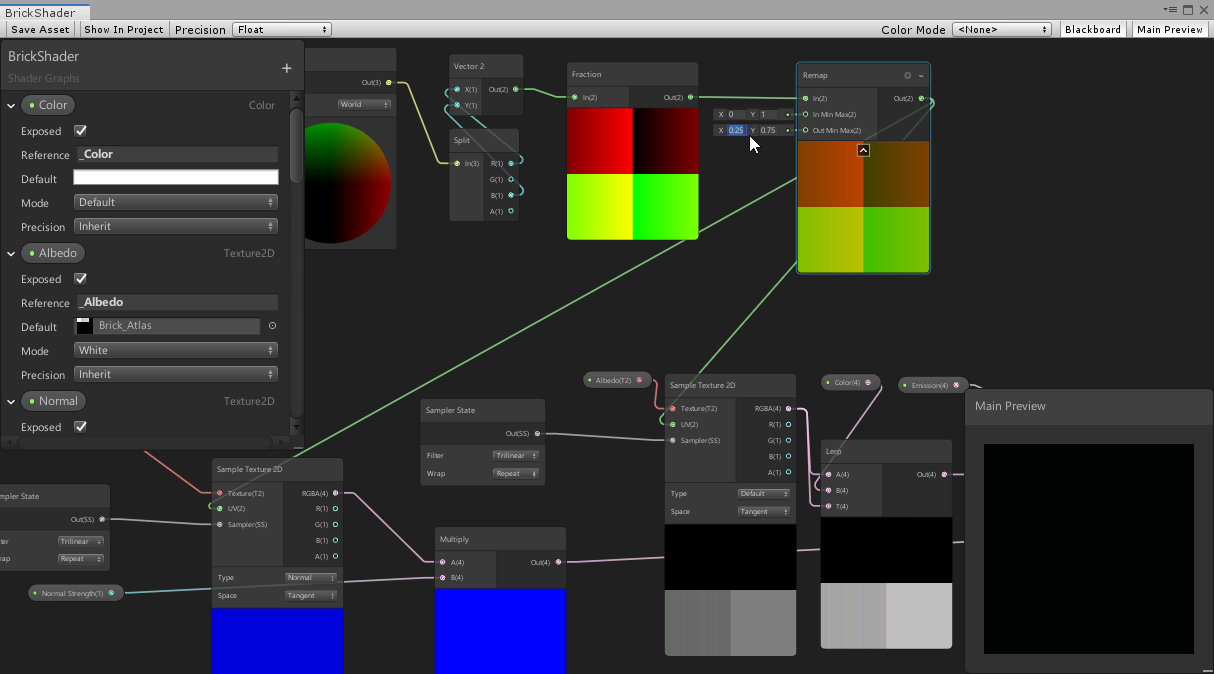
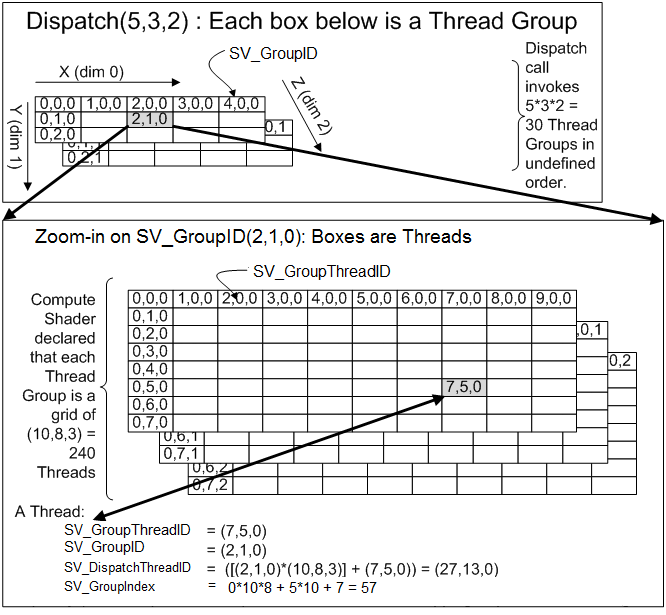



am i doing this wrong?
amber saffron
With the settings you're showing here, you are trying to display a tile that is half the size of the atlas, and in it's center. Is that what you want ?
slender hedge
this is my atlas, i need to repeat the top left one
amber saffron
ok
First, you can kind of simplify the node : position => fraction => split => 2x remap => vector2 => sample
This way, you can change the split value for X and Z
And from your texture, you want to remap X from 0,1 to 0, 0.25 and Y from 0,1 to 0.75, 1
slender hedge
I think i'm going to take a different approach to this
devout quarry

Unity Technologies Blog
With the release of Unity Editor 2019.1, the Shader Graph package officially came out of preview! Now, in 2019.2, we’re bringing even more features and fun...
useful blog post if this was not shared yet
 deep vigil
@floral stirrup thats the spirit
 floral stirrup
spirit ?
I mean look at my shadow it has holes in it somehow
And I'm pretty sure my model it's ok
deep vigil
you deleted the swear word
 turbid vault
Hi.. what exactly is the W component of the ScreenPosition node?
lime viper
the fourth component holds depth information I believe
 last robin
@turbid vault https://youtu.be/o1n02xKP138?t=60 this explains it pretty well

In this 2015 GDC tutorial, SMU Guildhall's Squirrel Eiserloh provides helpful tips on using Homogeneous Coordinates to drive the illusion of 3D space. Regist...
turbid vault
Thanks @lime viper , @last robin 😃
turbid vault
So what I was trying to wrap my head around was this:
i sort of get whats happening, but what would the difference between the camDepthBufferValue*camFarplane and ScreenPosition.W be
hm nvm i think i got it 😛
duh 🤦
But why not use position.z then if that's all ScreenPosition.W is
i assume there's a subtle difference i missed somewhere
amber saffron
@slender hedge I did some spaghetti, and made it for you. Feel free to analyse and ask questions if you don't understand what's happening :
slender hedge
thanks @amber saffron i really appreciate that. I switched to a different method since the shader graph can't accomplish what i truly need anyways but i'll definitely check that out sometime
amber saffron
The graph I send allows you to define one tile per normal of your cube, all of them alligned to world coordinates (not dependent of the object size/scale)
 paper oar
Could anyone point me out on how to get in shadergraph node/hlsl function (still in vertex part ) - shadow attenuation? (custom lighting)
Also, is there a forum on the hlsl scripting api part for LWRP/HDRP ? I know you can just go into script and find the right function, but they are all undocumented... Also, How to know if the node/hlsl function will be in Vertex or Fragment part, excluding the trial and error part ?
Is there is a way to force some of the function to execute in vertex part?
vocal narwhal
Is the latest blog not what you want? https://blogs.unity3d.com/2019/07/31/custom-lighting-in-shader-graph-expanding-your-graphs-in-2019/
paper oar
@vocal narwhal already worked on that, but it is not enough!
vocal narwhal
Mmmk, perhaps someone else can be of help 👍
amber saffron
The function node will be on what it is plugged in. If it's in the "position" input => vertex. Else, it's fragment
As for HLSL functions reference, go here : https://docs.microsoft.com/en-us/windows/win32/direct3dhlsl/dx-graphics-hlsl-intrinsic-functions

The following table lists the intrinsic functions available in HLSL. Each function has a brief description, and a link to a reference page that has more detail about the input argument and return type.
And finaly, for shadow attenuation, I'm not sure it can be used in the vertex shader ...
paper oar
@amber saffron Correction: shadow attenuation can be used in vertex (in Editor for sure) -use hlsl \n half4 shadowCoord = TransformWorldToShadowCoord(WorldPos);
Light mainLight = GetMainLight(shadowCoord); // will store .shadowAttenuation and .distanceAttenuation (multiply to get the value, multiply with LighColor to get the shadow)
amber saffron
Where does this code snipped come from ?
paper oar
@amber saffron https://blogs.unity3d.com/2019/07/31/custom-lighting-in-shader-graph-expanding-your-graphs-in-2019/ if you just use it without the ifdef Screen... it it will work in vertex
Unity Technologies Blog
With the release of Unity Editor 2019.1, the Shader Graph package officially came out of preview! Now, in 2019.2, we’re bringing even more features and fun...
or it is a bug in Editor - I have previousy created subgraph , connected it to position node and then enabled the custom function. Still works
amber saffron
I don't really se the point anyway in shadergraph, as everything not connected to the "position" node is fragment
Unless you want to do displacement of vertices that are shadowed ?
paper oar
is it? if you don't use Texture sampling (also is in Vertex part - Texture2DLOD) with texelsize or other function (list of only fragment functions is unknown) than it is alright + you don't need to worry about the compatibility issues with previous or older versions
Does anyone know how to categorize and place the subshaders into menus?