#archived-shaders
1 messages · Page 96 of 1
 low lichen
 potent coral
It's been working flawlessly for months now under forward+. If I've done anything different, it's run unity 6 yesterday
low lichen
This person reported the same issue, also with two directional lights.
https://discussions.unity.com/t/flickering-on-off-lights-when-movin-urp/920257
low lichen
potent coral
It's been working flawlessly for months now under forward+. If I've done anythin...
But not upgraded this project to Unity 6?
potent coral
Not this project, I started a new one
low lichen
potent coral
Not this project, I started a new one
Is it any different if you do not have both the scene and game view open at the same time?
potent coral
Nope. I even noticed the problem when playing a build
I just popped into the editor to verify the issue
low lichen
potent coral
I just popped into the editor to verify the issue
I see you have shadows enabled on the moon light. As I mentioned, Unity only supports one shadow casting directional light. Are you trying to have shadows on both?
 nocturne flint
@regal stag Just wanted to say thanks. I was going to post in the Unity discord for help with some Shader Graph stuff but I found your post of your URP custom lighting sub-graphs while searching to see if anyone else asked similar questions to me.
Just learning about shaders and wanted to mess around with changing how cast/received shadows look and this seems like it'll help.
potent coral
low lichen
I see you have shadows enabled on the moon light. As I mentioned, Unity only sup...
Yeah, in rare situations when I have the sun setting and the moon rising. I'll just look into it tomorrow I'm getting tired anyway. But before I head off, do you know what the best approach is for adding underglow to cars is? Having 20+ spot lights under your car to get the effects isn't ideal. It's a lot less because I'm using a cookie
low lichen
potent coral
Yeah, in rare situations when I have the sun setting and the moon rising. I'll j...
You could possibly make a simple transparent additive decal shader to fake the light, but it won't respond correctly to different surface types. Besides that, a single spotlight with a cookie would be best.
 vague pendant
Anyone have an idea what kind of shader/technique is likely used for this effect? The lines that fade in/out based on proximity of an obj (the hand in this case)
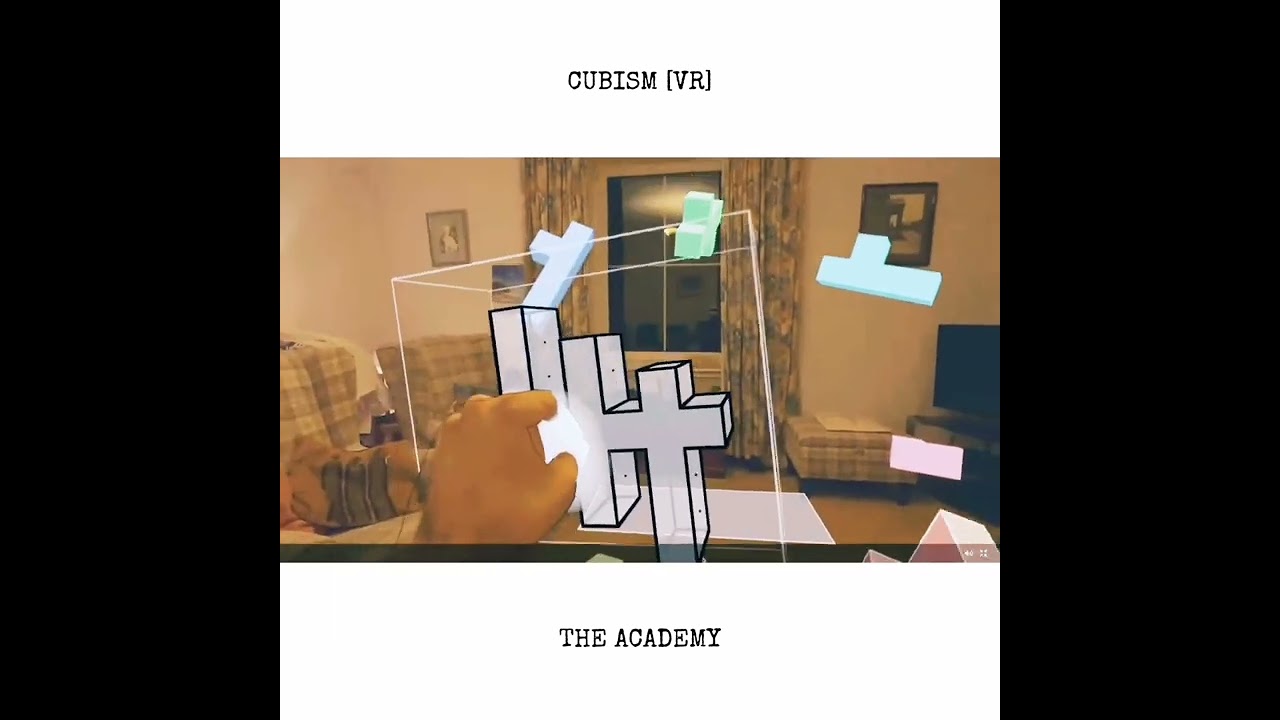
 kind juniper
No, it's fine to use them if you understand them completely. I for one, don't. You might need to go through all the source code to understand it.
For example, on the docs page, they seem to be using a different uv variable:
IN.positionHCS.xy
Looking at the full code in the docs reveals that they declare the variable in the input struct with the sv_position semantics:
struct Varyings
            {
                // The positions in this struct must have the SV_POSITION semantic.
                float4 positionHCS  : SV_POSITION;
            };
I don't see you doing the same in your code.
As well as using position variable in the vertex input struct with the corresponding semantic.
I don't know what that blit.hlsl is for,but the fact that they don't rely on it in the documentation example, probably means you shouldn't either. Unless you've went through all of it's code and code it depends on and confirmed it does exactly what you want it to do( including confirming what defines/keywords are actives)
 gaunt ice
Does anyone have a scroll texture shader?
 slender ore
I am making a cel shader and was wondering if it is possible to smooth out/blur a little bit transition between each grey color in last node preview

 topaz marsh
Hey, do anyone know any resources for Roughness only (no metalic) PBR that is cheap on mobile (quest). I use deferred so cant afford so many calculations.
only diffuse, specular and energy conservation needed (no fresnel unless cheap)
 rare wren
topaz marsh
Hey, do anyone know any resources for Roughness only (no metalic) PBR that is ch...
rare wren
topaz marsh
Hey, do anyone know any resources for Roughness only (no metalic) PBR that is ch...
Might I ask why you use deferred?
Usually this gives terrible performance. Forward+ is usually more solid for Quest, and allows you to still use MSAA.
Forward shaders are also easier to write, but in general the Simple Lit shader is recommended, but for PBR the Lit shader can optimize itself okay.
Shader Graph should also be fine for stuff like this
rare wren
slender ore
I am making a cel shader and was wondering if it is possible to smooth out/blur ...
I think you would need to write your own method that replaces floor with a method that does that. Kinda like a multi-step smooth step?
topaz marsh
rare wren
Might I ask why you use deferred?
Usually this gives terrible performance. Forwa...
because I use Vulkan (metal) exclusive RenderPasses. This alows subpasses to reuse the on tile memory from last subpass. this makes deffered almost as fast as Forward+ and because I have many many ligjts I went with deffered to skip on the light volume generation
This also enables MSAA because I can get memory from same sample
rare wren
Woah sick setup!
I wonder how this compares to Deferred+, which just released in 6.1
Then I think you're a few steps ahead of me haha. A custom shader is best, but I am not sure what exactly is needed and never really worked with deferred
topaz marsh
rare wren
Woah sick setup!
I wonder how this compares to Deferred+, which just released in...
I havent heard about the deffered+ since I use 2022.3 (most stable and before some feature changes), what does that do compared to regular deffered?
rare wren
topaz marsh
I havent heard about the deffered+ since I use 2022.3 (most stable and before so...
https://discussions.unity.com/t/deferred/1579636/3
This should be the best documentation available so far
 devout kayak
trying to make an edge outline effect based on normal vector node
how can I bake normal based coloring of a mesh into a texture
really new to coding with shaders can someone direct me to what I should learn
topaz marsh
rare wren
https://discussions.unity.com/t/deferred/1579636/3
This should be the best docu...
Ok, this is pretty smart. This is going on my potential performance uplifts bucket!
rare wren
topaz marsh
Ok, this is pretty smart. This is going on my potential performance uplifts buck...
If you give it a go let me know how it performs
topaz marsh
@devout kayak If you want good outlines you should do it in Post processing.

The second devlog about my yet to be named cozy creature collecting and management game. This one covers the initial implementation of screen space outlines.
Some amazing write ups that helped me a lot:
Erik Roystan Ross's tutorial on screen space outlines
https://roystan.net/articles/outline-shader.html
Ignacio del Barrio's tutorial on custom ...
Same guy also has Cell shading video if you need it and this resource is better for cell shading anti aliasing then smooth step:
https://www.ronja-tutorials.com/post/046-fwidth/
The partial derivative functions ddx, ddy and fwidth are some of the least used hlsl functions and they look quite confusing at first, but I like them a lot and I think they have some straightforward useful use cases so I hope I can explain them to you. Since I’m explaining straightforward functions you don’t have to know a lot of shader program...
devout kayak
topaz marsh
<@851013899646140457> If you want good outlines you should do it in Post process...
I noticed any outline effect that checks every pixel on the screen heavily affects performance
at this point I just want to experiment with it
just need to create a normal based color texture and save it but not sure how
like the same colors that you see when connecting normal vector node into base color but I want that baked in a texture
topaz marsh
devout kayak
like the same colors that you see when connecting normal vector node into base c...
you cant bake with shaders, that would need to be done on CPU or program like Substance painter/designer
slender ore
rare wren
I think you would need to write your own method that replaces floor with a metho...
I am trying different smoothstep-related things but nothing seems to quite work
rare wren
slender ore
I am trying different smoothstep-related things but nothing seems to quite work
It's gonna be multiple smoothsteps added together or a custom function
slender ore
rare wren
It's gonna be multiple smoothsteps added together or a custom function
I wouldn't mind custom function since the final goal is to implement it into HLSL but not sure where to start. And since replicating shader graph from Unity worked for me quite well so far I thought I could do it there first
 warm pulsar
slender ore
I am trying different smoothstep-related things but nothing seems to quite work
warm pulsar
slender ore
I am trying different smoothstep-related things but nothing seems to quite work
It's a bit awkward because you need to smoothstep it across the wrap-around point
You could just handle each side separately
ew this is becoming pretty long
 devout quarry
devout kayak
I noticed any outline effect that checks every pixel on the screen heavily affec...
devout quarry
devout kayak
I noticed any outline effect that checks every pixel on the screen heavily affec...
What will you then do with that normal based color texture? For outlines you’d still have to sample that texture right?
warm pulsar
well that was ickier to write than I expected!
warm pulsar
slender ore
I wouldn't mind custom function since the final goal is to implement it into HLS...
float val = i.world_pos.x;
float width = 0.02;
float interval = 0.1;

float whole = floor(val / interval) * interval;
float remain = val - whole;

if (remain < width) // we're past the edge
    remain = smoothstep(-width, width, remain);
else if (remain > interval - width) // we're approaching the edge
    remain = 1 + smoothstep(interval - width, interval + width, remain);
else // we're outside of the blend range entirely
    remain = 1;

float result = whole + remain * interval - interval;
check this out

interval is how large each step is, and width is the range over which the edges are smeared
If you use inverse_lerp instead of smoothstep and make the width exactly half of the interval, it gives you the original value

well, almost: it gives you the original value, minus the interval
since we're still doing a floor in there
slender ore
warm pulsar
```hlsl
float val = i.world_pos.x;
float width = 0.02;
float interval = 0.1;
fl...
thanks a lot
 high hamlet
I've found that the WebGPU compiler does this annoying thing where it marks a texture binding as read-only or write-only based on the usage in the shader kernel and then when you want to bind a RenderTexture thats RW you get this error in your browser console:
Binding type in the shader (texture) doesn't match the type in the layout (storageTexture).
I was able to fix it with some dummy reads and writes were needed but does anyone have a better solution? Is there a forced binding attribute or anything?
 smoky widget
Are shader graph shaders slower than normal hand written shaders?
low lichen
smoky widget
Are shader graph shaders slower than normal hand written shaders?
Not inherently. It ultimately generates shader code that gets compiled the same way. The code it generates is more verbose and more repetitive than human written shader code, but the compiler is smart and is able to optimize that away.
The main difference is lighting if you are making a lit shader in a forward renderer. With Shader Graph, you're encouraged to let it handle everything to do with lighting, so you don't get opportunities to optimize there. It's possible to do fully custom lighting in Shader Graph, but most don't do that.
Of course, you have to have some knowledge to know where you can optimize. Just the fact that you've written the shader code yourself doesn't mean it will be faster than what Shader Graph produces.
smoky widget
That's a really good answer, thank you
 granite prism
Hey fellas, how yall doin. I am confused as to why my shadergraph isn't working the way I intended. Its basically a sobel filter based on a normals texture of the scene. Im using it draw outlines(and also trying to show sharp edges!) but for some reason it doesnt appear to be working as intended. Im wondering at what step of the way I've done an error. Am I sampling the pixels wrong? Im not quite sure


 lucid creek
ive been working on faking transparency through rendering the internal object ontop of the external object but i have to render both the front and back faces of the meshes for it to work and was wondering if anyone knows of something similar that already exists that i can reference

 acoustic widget
Hi! I am really not familiar with the shader graph. I have a shader graph with the MainTex variable on a Sample Texture 2D.
Is there a way instead of have a MainTex to automatically get the texture the material is assigned on?
 kind juniper
acoustic widget
Hi! I am really not familiar with the shader graph. I have a shader graph with t...
kind juniper
acoustic widget
Hi! I am really not familiar with the shader graph. I have a shader graph with t...
- A material is not "assigned on a texture". That doesn't make sense. Textures can be assigned to a material via shader properties.
- MainTex is probably a texture property you have defined in your shader. You can create a new texture property and assign that instead if you want.
acoustic widget
kind juniper
1. A material is not "assigned on a texture". That doesn't make sense. Textures ...
Yes sorry I wrote that a bit tired. I want the texture of the object the material is attached on automatically assigned.
kind juniper
acoustic widget
Yes sorry I wrote that a bit tired. I want the texture of the object the materia...
An object doesn't have a texture. A material can have. Or what exactly do you mean?
acoustic widget
kind juniper
An object doesn't have a texture. A material can have. Or what exactly do you me...
Well again sorry I suck at explaining. The object I want to attach the material on has a sprite renderer.
So I am looking for a way to have the texture of the sprite renderer automatically assigned on the material
kind juniper
acoustic widget
Well again sorry I suck at explaining. The object I want to attach the material ...
Ah, a sprite renderer can have a sprite assigned, yes.
You'll need to check what texture name unity binds automatically to a sprite material and create a texture property with the same name in your shader. Then it should work.
acoustic widget
Awesome, I will look into it, thanks!
 hardy juniper
Probably _MainTex
 lucid gorge
Hello, from the front of my mesh everything looks like intended. But when I am starting to look from sides, the not transparent parts start to disappear through transparent parts, until they disappear completely from the back. I added screen shot of the shader, I have no idea what is causing this, since I am new to shaders.


 warm pulsar
Transparent rendering is prone to this kind of thing.
here's an example I made a few days ago
 lucid lodge
Hi friends, let me ask you a question, when I navigate the ready-made scene in unity time ghost, the grass is rendered in the whole terrain, but in my own projects, the grass is not rendered in my scene, is there a setting for the grass to be rendered in all of the large plots, just like in Time Ghost?

or a shader
lucid gorge
warm pulsar
Transparent rendering is prone to this kind of thing.
What could I do then?
warm pulsar
What kind of mesh are you trying to render?
It looks like a box with a bunch of internal faces
lucid gorge
warm pulsar
What kind of mesh are you trying to render?
Like just voxels
And I would really like them ability to be transparent
warm pulsar
Non-overlapping transparent meshes can render decently, since they get rendered from back to front
warm pulsar
lucid gorge
Hello, from the front of my mesh everything looks like intended. But when I am s...
I'm just confused by the shape of this mesh
lucid gorge
warm pulsar
I'm just confused by the shape of this mesh
It's an example
lucid gorge
warm pulsar
Non-overlapping transparent meshes can render decently, since they get rendered ...
So if I have opaque vertices inside of transparent ones does it considered overlapping?
warm pulsar
lucid gorge
So if I have opaque vertices inside of transparent ones does it considered overl...
A transparent shader does not modify the depth buffer, so Unity cannot figure out whether one surface is in front of or behind another surface.
So, if you can see multiple faces at once, the exact order that they render in becomes very important
Hence why it looks right from one side and looks like a mess from another
lucid gorge
warm pulsar
A transparent shader does not modify the depth buffer, so Unity cannot figure ou...
Well, what can I do to fix that?
warm pulsar
don't try to render a mesh with a bunch of weird internal faces!
An alternative to transparency is to use dithering on an opaque shader
you skip half of the pixels, which makes the object somewhat see-through
Opaque rendering is much more reliable. Unity can figure out if one surface is behind another
lucid gorge
warm pulsar
you skip half of the pixels, which makes the object somewhat see-through
Would it be noticeable?
warm pulsar
Yes, it's not going to look as nice as transparency
lucid gorge
warm pulsar
Yes, it's not going to look as nice as transparency
But does that mean, if I have more transparent faces overlapping, I would need to skip like quarter pixels for one, quarter for another and etc.?
warm pulsar
Each one would render independently
 arctic oar
Guys, does anyone have a maskable blur shader that works with UI?
I've really looked everywhere on the internet, but they are either unmaskable or don't work at all.
Closest one I found was this: https://stackoverflow.com/a/51139685 but it hides all of the elements except the first one.

Stack Overflow
I'm trying to create a blur effect on the background of a UI window for my game in Unity3D.
One of the best examples I can think of right now is Heroes Of The Storm, notice how the background of the
if anyone could help I would really appreciate it, I've been looking for days
warm pulsar
that's a question I need to answer :p
 warm pulsar
That is not the correct name for that shader.
warm pulsar
But I see that you had it right in the original code
One important thing is that Unity doesn't just include every single shader in the built game
It only includes shaders that it knows are being used by a material
 winter talon
i changed shader stripping
warm pulsar
If this works in the editor, but not in the build, that's the issue
Shader variant stripping is a different topic
Each shader has many variants, for different combinations of settings.
I think your problem is that the shader isn't getting included at all
You can tell Unity that it must include a shader in the Project Settings
winter talon
i did that now thanks
warm pulsar
it'll be the "Always Included Shaders" list, in the Graphics section
 winter talon
 winter talon
warm pulsar
it'll be the "Always Included Shaders" list, in the Graphics section
winter talon
warm pulsar
it'll be the "Always Included Shaders" list, in the Graphics section
i actually did have a material using that shader it just wasnt assigned to any script or object so unity must have known that
warm pulsar
Yep.
Unity takes all of the scenes in the build list and goes through all of their objects
It finds every asset that's used by those objects (and then finds assets they use, and so on)
It also includes everything in a Resources folder
winter talon
it works now thanks man
warm pulsar
nice! no problem (:
 marsh flicker
Hey guys! I am working on a PSX style game for a game jam. I'm using a custom shader I've used in the past but I'm having issues in Unity 6. All the actually rending stuff is good until I get to the Post Processing. Unity keeps giving me this error:
The render pass PSX.FogPass does not have an implementation of the RecordRenderGraph method. Please implement this method, or consider turning on Compatibility Mode (RenderGraph disabled) in the menu Edit > Project Settings > Graphics > URP. Otherwise the render pass will have no effect. For more information, refer to https://docs.unity3d.com/Packages/com.unity.render-pipelines.universal@latest/index.html?subfolder=/manual/customizing-urp.html.
This is the shader I've implemented: https://github.com/Math-Man/URP-PSX-FORKED/releases
I'm trying to figure it out myself but am having a lot of difficulty as I can't seem to find the render pass information (I don't know shader stuff very well T_T )
Could someone help and point me in the right direction?

GitHub
PSX retro graphics plugin for URP with Shadergraph in Unity - Math-Man/URP-PSX-FORKED
Again sorry if I'm being dumb about this. I get super confuse with shader stuff I just want my funny little post processing
marsh flicker
omg I might be a dummy nvm
high hamlet
Is there a good way to unify struct defintions in multiple shaders? I have one struct thats used for buffers in 3 shaders now so its getting annoying changing it
kind juniper
high hamlet
Is there a good way to unify struct defintions in multiple shaders? I have one s...
Define it in a separate file and just include it in your shader files.
 inland ibex
I'm posting this here because I believe a shader might be the solution to what I'm trying to achieve, but I'm not entirely sure.
I'm currently using the Sprite Mask component on my player character to hide part of its body when it's in water. However, instead of completely hiding that portion, I want to lower its opacity so it looks like you can still see the body through the water. The Sprite Mask component doesn't seem to support this functionality, so I'm wondering if there's a way to accomplish it. Any advice or suggestions would be greatly appreciated!

 wide plank
Hey guys, I am a newbie to shader development. I am basically a game dev and making my way into shader development using shader graph. I have successfully created a shader that samples hte original texutre 8 times and displaces it on an offset and gives me this effect. I want to create a soft shadow. How can I make these hard edges soft as a blended soft shadow to acheive something like the next photo

 low lichen
wide plank
Hey guys, I am a newbie to shader development. I am basically a game dev and mak...
low lichen
wide plank
Hey guys, I am a newbie to shader development. I am basically a game dev and mak...
It seems like what you're missing is the kernel, to add different weights to each sample and combine them together.
https://blog.innogames.com/shader-exploration-the-art-of-blurring/
wide plank
low lichen
It seems like what you're missing is the kernel, to add different weights to eac...
This is basically how I am making the samples. Can you suggest me the process to add weights and combine them?
 wide plank
@low lichen ?
low lichen
wide plank
<@153952447516114944> ?
It's not trivial to implement blurring purely with nodes. I would recommend against doing that. Here's an example of gaussian blur implemented with a custom function node.
https://discussions.unity.com/t/urp-sprite-gaussian-blur-customer-subshadergraph/892367
wide plank
low lichen
It's not trivial to implement blurring purely with nodes. I would recommend agai...
looking into it
 stoic flint
can someone tell me why is this see through? (im using unity's standard-doubleSided shader)
 low lichen
stoic flint
can someone tell me why is this see through? (im using unity's standard-doubleSi...
low lichen
stoic flint
can someone tell me why is this see through? (im using unity's standard-doubleSi...
It looks like what you're seeing is the screenspace ambient occlusion drawing on top of your shader, likely because it isn't properly writing to depth or is being drawn at the wrong time.
Or actually might be shadows instead of AO.
stoic flint
low lichen
It looks like what you're seeing is the screenspace ambient occlusion drawing on...
i thought so, until i disabled it, still same result
low lichen
stoic flint
i thought so, until i disabled it, still same result
Have you tried disabling shadows?
stoic flint
on who? the garment ?
low lichen
Completely, in settings
stoic flint
i disabled it in garment and it worked. seems like it was AO + shadows.
why
how do i get rid of it without disabling neither
low lichen
stoic flint
how do i get rid of it without disabling neither
Is this a hand written shader or Shader Graph?
 low lichen
Can you show the properties as well?
stoic flint
its opaque
 low lichen
I don't see this shader in Unity's built-in shader library. Are you sure it's not a custom shader you imported?
stoic flint
wait yeah... it is
thanks
do you know any decent double sided shader by chance?
nvm
 dim yoke
low lichen
It's not trivial to implement blurring purely with nodes. I would recommend agai...
dim yoke
low lichen
It's not trivial to implement blurring purely with nodes. I would recommend agai...
Btw that's box blur, nothing to do with gaussian. Shame that's the first thing that pops up on everyone's search
 low gate
Hello, I am trying to use an RGB Shift effect for my 2D game, but I don´t generally work with 3D lighting and I have found only one video on the internet providing a free asset to achieve this effect. Sadly the asset isn´t working with URP in Unity 6 and I don´t have enough knowledge to rewrite all the code myself. Is there anyone that could perhaps make this asset work for URP because I need URP for other lighting effects as well in the future.
Here's the link to the video for reference, the asset package is linked for download in the description of the video:
https://www.youtube.com/watch?v=YYNMGq50d5g

Recently the indie game industry has been flooding with Retro PS1 and VHS style horror games, Its become a Iconic Look to the Indie game Market and Today we'll be taking a Look at how u can set up a Scene in Unity to Look like A Old Retro VHS Style Horror game
The Assets that are used are fully Open Source and the Entire tutorial is Very Begi...
 signal tide
Looking for help with planet Shaders I've watched alot tutorials i am still confused Most all of them is outdated or repeats of Originals just adding Colors.. I am trying to texture planets i tried Chat-AI and yeah i think i made it worse
I am going to look at TimCoster tutorial maybe that might help
 echo flare
I'm trying to color fragments on a shader when it's visible from another camera. My solution was to render depth from the other camera to a texture, then convert the world position of a fragment to uv coordinates to sample that depth texture and check if it's <= to the depth of the world position relative to the other camera and return 1. I am not getting the results I expected from this code though.
float4x4 _ProjectionMatrix;
float4x4 _WorldToCameraMatrix;

void GetOverlap_float(float3 worldPos, UnityTexture2D renderTex, out float value)
{
    float4 cameraSpace = mul(float4(worldPos.xyz, 1), _WorldToCameraMatrix);
    float4 clipSpace = mul(cameraSpace, _ProjectionMatrix);
    float3 ndc = clipSpace.xyz / clipSpace.w;
    float2 uv = (ndc.xy + 1.0f) * 0.5f;
    float depth = SAMPLE_TEXTURE2D_LOD(renderTex.tex, renderTex.samplerstate, uv, 0).r;
    value = cameraSpace.z <= depth ? 1 : 0;
}
Are you sure the depth values in the texture have the same range as cameraSpace.z? Maybe try outputting the depth and checking the resulting render target what values you get.
Then output the cameraSpace.z and check again.
 tiny bane
Im copying a tutorial and its supposed to look like this (1st image) but it looks like this (2nd)


 digital gust
tiny bane
Im copying a tutorial and its supposed to look like this (1st image) but it look...
digital gust
tiny bane
Im copying a tutorial and its supposed to look like this (1st image) but it look...
Did you setup the URP Asset correctly?
digital gust
You might wanna look into unity learn tutorials tho. In project settings => Graphics, there is a default render pipeline asset which needs to be assigned and inside that another asset to check
digital gust
yw. If something is purple, it usually means, material not supported. Then check why not supported, probably the shader is nto working at all or the render pipeline is not set
tiny bane
right okay cool
digital gust
tiny bane
right okay cool
also good to know website: https://unity.huh.how/

Unity troubleshooting wiki
tiny bane
whys it doing this 😭
when its above it looks like its below and when tis below it looks like its above
tiny bane
digital gust
also good to know website: https://unity.huh.how/
do you have any idea?
digital gust
tiny bane
do you have any idea?
Could be the sorting order on your material. Does your shader write to depth?
tiny bane
digital gust
Could be the sorting order on your material. Does your shader write to depth?
do they need to be different layers?
 thin crown
Hey hi! i had a question regarding animated shaders:
My shader is playing at 10 fps or smth in that range half of the time, i wanted to fix this bc its becoming very distracting, i tried to look up a fix but the option they had wasnt there (smth with the stack icon and then animated shader option or in that region)
Im using unity 6
if u need more info just ping
digital gust
tiny bane
do they need to be different layers?
It might also be, that you are moving your mesh visually in the shader but the original vertices are below so considered "behind" the other object
tiny bane
digital gust
It might also be, that you are moving your mesh visually in the shader but the o...
Do you know how I could check that?
digital gust
tiny bane
Do you know how I could check that?
check your shader if it does something to the position node
tiny bane
the x,y,z in the inspector?
digital gust
You made a shader in shadergraph, ddidnt you?
digital gust
So there are nodes you can assign like the BaseMap and what not, and above, there is a position node
Show your whole shadergraph. Just klick F while not selecting any node to focus on everything in that shadergraph

 digital gust
Oh well, maybe check unity learn about shader graph. Just following a tutorial blindly on youtube will lack a lot of basic knowledge
tiny bane
digital gust
Oh well, maybe check unity learn about shader graph. Just following a tutorial b...
i will
but can you see anything that might be the problem?
digital gust
It could be the transparency, it could be the other material. I can only help on the surface of those issues and I guess, it might just be some sorting order issue here.
tiny bane
its just weird that the base plane is rendering over top of the plane with the shader, regardless of if its below or above
 azure geyser
When drawing with Graphics.DrawProceduralNow() and MeshTopology.Lines is there a way to increase the thickness of the lines rendered in the shader?
This is my shader:
Shader "Unlit/CustomLineShader"
{
    Properties
    {
        _Color("Color", Color) = (1,1,1,1)
    }
    SubShader
    {
        Tags { "RenderType"="Opaque" }
        LOD 100

        Pass
        {
            CGPROGRAM
            #pragma vertex vert
            #pragma fragment frag
            #include "UnityCG.cginc"

            StructuredBuffer<float3> lineBuffer;

            struct v2f
            {
                float4 pos : SV_POSITION;
                float4 color : COLOR;
            };

            float4 _Color;

            v2f vert (uint id : SV_VertexID)
            {
                v2f o;
                float3 vertex = lineBuffer[id];
                o.pos = UnityObjectToClipPos(vertex);
                o.color = _Color;
                return o;
            }

            fixed4 frag (v2f i) : SV_Target
            {
                return i.color;
            }
            ENDCG
        }
    }
}
 undone perch
azure geyser
When drawing with `Graphics.DrawProceduralNow()` and `MeshTopology.Lines` is the...
undone perch
azure geyser
When drawing with `Graphics.DrawProceduralNow()` and `MeshTopology.Lines` is the...
I don't believe there is a way to render thicker lines directly. When rendering "wires" like this, GPUs typically only render single-pixel thick lines, so one way to circumvent this could be to render the lines at a lower resolution, upscale it, and then use some sort of smoothening effect like what some use for smoothening pixel art? Alternatively, you can look into rendering thicker lines using triangle strips that always face the camera, or even very simple 3D "tubes".
Another idea actually, you could render the wires multiple times with tiny one-pixel offsets, that should make them look thicker.
azure geyser
undone perch
I don't believe there is a way to render thicker lines directly. When rendering ...
That's what I was afraid of, thanks for the reply!
azure geyser
undone perch
Another idea actually, you could render the wires multiple times with tiny one-p...
That's actually really smart, I'm gonna try this.
I'm assuming I'll need to calculate the offsets in screen space in the vertex function?
undone perch
Probably yeah. You can use _ScreenParams.xy to get the width and height of the viewport that is being rendered, or _ScreenParams.zw for "1 + 1/width" and "1 + 1/height". With those you can get how big a pixel is in screen-space and such :P
azure geyser
undone perch
Probably yeah. You can use `_ScreenParams.xy` to get the width and height of the...
Thanks, I really appreciate it!
undone perch
np
Now for my query 👁️👁️
Are there any Projector wizards that can tell me if it's possible to get the near/far clip values inside a projector shader?
Specifically the clip values that you set inside the projector component. I've been able to find float4x4 unity_Projector and float4x4 unity_ProjectorClip, but I've also found one that is called unity_ProjectorDistance, I just don't know what type it is or what it actually does.
 gilded ether
Can someone tell me why my materials look like that that's blue brick can I have hel p

I just want to make it smaller
warm pulsar
please take a proper screenshot; it's hard to see what's going on through all of the Moiré patterns on your screen
gilded ether
How
warm pulsar
It kind of looks like the texture is being stretched over a very large area
warm pulsar
gilded ether
How

Learn how to take screenshots on many major platforms.
warm pulsar
warm pulsar
It kind of looks like the texture is being stretched over a very large area
If that's the case: how did you create this model? It may have a bad UV map.
 gilded ether
What does that mean
warm pulsar
Try increasing the "Tiling" value in the material's inspector.
This will make it repeat more rapidly.
gilded ether
To?
warm pulsar
gilded ether
What does that mean
A UV map tells you where to look on the texture for each point on the model
gilded ether
What do I put it for
warm pulsar
gilded ether
To?
idk, 10? try different values; your computer won't explode :p
gilded ether
It worked thanks
gilded ether
warm pulsar
idk, 10? try different values; your computer won't explode :p
Do u know how to make it so it only puts the material to sentan parts because I made it on blender so it's one big part
warm pulsar
Create multiple material slots in Blender and assign the diferent surfaces accordingly
(pro tip: to select all floor faces, pick one, then hit F3 and search for "select similar normal")
 river anchor
Hi, I have some problems with a dissolve shader.
The shader work but it's the "scaling" of the effect that need constant remap depending on the scale of the object, but I can't figure out how it should be done.
For now I'm doing it by hand but I want it to scale automatically.
The dissolve does not goes out completely, there is still a little bit of mesh visible, thus the manual remap of the slider.


 warm pulsar
instead of using the object-space position, you could use the world-space position
this will give you a consistent dissolve scale (although it'll look very weird on moving objects)
You can also measure your object's scale by transforming a vector from object-space to world-space, although that'll only help you figure out if you've been scaled up
it won't tell you that your mesh is inherently very big
river anchor
Thank you, but unfortunately I need it to be independant of the world position, since the mesh is generated by the spline I can mesure out how big it is
I'm relatively new to shader so I think I'm missing on something, I don't understand why the effect is not doing thing like 0->alpha clip = 0 and 1 -> alpha clip = 1
warm pulsar
I'm not clear what the problem is right now
river anchor
warm pulsar
I'm not clear what the problem is right now
The main issue is that the alpha clipping is not getting fully to 0 or 1, I need to manually remap the value, to overshoot it. But I don't know why I need to do that
warm pulsar
Oh, that’s because the noise functions only rarely produces the minimum or maximum possible value
river anchor
Oh I understand now, do you have an idea to make that happend? so that I can have a value of 0-1 to hide or show the mesh?
 tropic crow
Hello all! Quick question, I would like to do some conditional compilation within ShaderGraph, like how you would have something like #IF UNITY_STANDALONE in a script. From what I have seen, it is possible using keywords, but I have no idea how to use them correctly, any help would be appreciated !
 serene condor
hey, what kind of nodes would i need to play with to get the following. i want the "led" to scroll from the back of the ship to the front on either side.
i imagine its something like tiling the offset to run from one end to the other and use time node to scroll it
 karmic hatch
river anchor
Oh I understand now, do you have an idea to make that happend? so that I can hav...
karmic hatch
river anchor
Oh I understand now, do you have an idea to make that happend? so that I can hav...
Not easy to do with object space but if you paint on UVs for the mesh it's easy since UVs go from 0 to 1 by default, so UV+noise goes from 0 to 2
(i think rarely the noise goes outside the 0-1 bound; you could try adding a Saturate() if that's a problem but it probably isn't)
Or if you're meaning it should take more time for a larger object and less for a smaller one, you could multiply the object space positions by the object scale vector (in the object node)
river anchor
I’ll try with uv, the issue is that the mesh is generated from a mesh template. So I don’t know if that will work
But thank you for the help
 dapper heath
            float getEyeDepth(float2 uv)
            {
                float depthRaw = SAMPLE_TEXTURE2D(_CameraDepthTexture, sampler_CameraDepthTexture, uv);

                return lerp(_ProjectionParams.y, _ProjectionParams.z, depthRaw);
            }

            void GetCrossSampleUVs_float(float2 UV, float2 TexelSize,
                float OffsetMultiplier, out float2 UVOriginal, out float2 UVTopRight,
                out float2 UVBottomLeft, out float2 UVTopLeft, out float2 UVBottomRight)
            {
                UVOriginal = UV;
                UVTopRight = UV.xy + float2(0.0, TexelSize.y) * OffsetMultiplier;
                UVBottomLeft = UV.xy - float2(0.0, TexelSize.y) * OffsetMultiplier;
                UVTopLeft = UV.xy + float2(TexelSize.x * OffsetMultiplier, 0.0);
                UVBottomRight = UV.xy - float2(TexelSize.x * OffsetMultiplier, 0.0);
            }

            float4 frag(v2f i) : SV_Target
            {
                float4 maskCol = SAMPLE_TEXTURE2D(_MainTex, sampler_MainTex, i.uv);
                clip(-(0.5 - maskCol.a));

                float2 pixelPosition = float2(i.vertex.x, (_ProjectionParams.x > 0) ? (_ScaledScreenParams.y - i.vertex.y) : i.vertex.y);
                float2 screenPos = pixelPosition.xy / _ScaledScreenParams.xy;

                float eyeDepth = getEyeDepth(screenPos);

                float2 texelSize = float2(_ScreenParams.z, _ScreenParams.w);
                float2 uvOg;
                float2 uvTr;
                float2 uvBl;
                float2 uvTl;
                float2 uvBr;
                GetCrossSampleUVs_float(screenPos, texelSize, 1, uvOg, uvTr, uvBl, uvTl, uvBr);

                float depthOg = getEyeDepth(uvOg);
                float depthTr = getEyeDepth(uvTr);
                float depthBl = getEyeDepth(uvBl);
                float depthTl = getEyeDepth(uvTl);
                float depthBr = getEyeDepth(uvBr);
                float diffTr = depthTr - depthOg;
                float diffBl = depthBl - depthOg;
                float diffTl = depthTl - depthOg;
                float diffBr = depthBr - depthOg;

                float cross = 2;
                float comb = sqrt(diffTr + diffBl + diffTl + diffBr) * cross;

                float result = step(depthOg * 0.01f, comb);

                return float4(result, result, result, 1);
            }
heya, I'm trying to translate my outline shader graph to just an ordinary shader, and I'm having some trouble- I'm almost positive I'm not retrieving the screen position per pixel correctly, and it's possible my depth sampling method is wrong too. I'm using an orthographic camera if that helps. below the top orb is what the shader looks like when the outline works correctly

 vital spoke
Hey there! I'm doing a procedural material in Shader Graph. I'm connecting a height map to a normal from height node, however the result looks jagged / aliased. Anyone knows why this may be?

 devout quarry
dapper heath
```C#
float getEyeDepth(float2 uv)
{
flo...
devout quarry
dapper heath
```C#
float getEyeDepth(float2 uv)
{
flo...
This is edge detection? This might help as inspiration
dapper heath
oh hey it's you again, the dude with super helpful articles
thanks, I'll take a look
 dapper sundial
hi! im trying to use grab pass shader in Canvas with "Screen Space - Camera" render mode and it doesnt work(everything is black), shader for some reason only works with "Screen Space - Overlay" canvas render mode. is there anything i can do to make it work with "Screen Space - Camera"(its necessary for me)
dapper sundial
dapper sundial
hi! im trying to use grab pass shader in Canvas with "Screen Space - Camera" ren...
i actually found solution rn(randomly lol), setting plane distance here to 1 fixes it
 dapper heath
```C#
float getEyeDepth(float2 uv)
{
flo...
dapper heath
dapper heath
```C#
float getEyeDepth(float2 uv)
{
flo...
i've gotten it to this point where they now at least show the outlines of things behind them

bizzarely, considering they do write to the depth buffer? I can see them visibly in the frame debugger's depth texture

i'm not quite sure why, they're using alpha clipping + I can see them here in the depth texture. do I need a depth pass..?
dapper heath
dapper heath
apparently drawmeshinstancedindirect doesn't draw to depth with just zwrite on, so i'm not sure how to resolve that
echo flare
kind juniper
Are you sure the depth values in the texture have the same range as cameraSpace....
You were right that the depth values sampled from the render texture are different than I expected. I switched to comparing against clip space but I can't figure out how to do the conversion. It seems like they are both non-linear and one is reversed, but not quite the same scale. This is the closest I got. See the bar disappears on the projected quad sooner than expected
void GetOverlap_float(float3 worldPos, UnityTexture2D renderTex, out float value, out float depth)
{
    float4 cameraSpace = mul(_WorldToCameraMatrix, float4(worldPos.xyz, 1));
    float4 clipSpace = mul(_ProjectionMatrix, cameraSpace);
    float3 ndc = clipSpace.xyz / clipSpace.w;
    float2 uv = (ndc.xy + 1.0f) / 2;
    depth = SAMPLE_TEXTURE2D_LOD(renderTex.tex, renderTex.samplerstate, uv, 0).r;
    value = 1 - ndc.z <= depth + 0.001 ? 1 : 0;
}
Did you try just rendering the depth and looking at the values in the render texture?
serene condor
i can't figure out how to get this to go from back to front on the progress bar mode

tried flipping all the inputs around and nothing seems to get it right.
echo flare
kind juniper
Did you try just rendering the depth and looking at the values in the render tex...
Yes, the depth sampled from the render texture is in range [0,1] with 1 being closest to the camera. Here I sampled a gradient (black, red, blue) and the result is like logarithmic
kind juniper
echo flare
Yes, the depth sampled from the render texture is in range [0,1] with 1 being cl...
Assuming this page is still relevant, the depth you get seems to be in "eye space".
And you can convert it to a linear 0-1 value with Linear01Depth(i) it seems.
https://docs.unity3d.com/2020.1/Documentation/Manual/SL-DepthTextures.html?utm_source=chatgpt.com
warm pulsar
You can also use LinearEyeDepth to get a linear depth in world units
dapper heath
dapper heath
apparently drawmeshinstancedindirect doesn't draw to depth with just zwrite on, ...
I further understand my issue, it's not drawing these meshes in the DrawDepthNormalPrepass, now I just need to figure out how to correctly make it do that with a DepthNormalsOnly pass
echo flare
@kind juniper @warm pulsar appreciate the help guys, I mostly got it working now
devout kayak
does multiplying your colors with a big number adds bloom to it ?
also how to add bloom to particles ?
devout quarry
devout kayak
does multiplying your colors with a big number adds bloom to it ?
also how to ad...
You'll need to use HDR colors
devout kayak
devout quarry
You'll need to use HDR colors
I am using an unlit transparent shader (shader graph) and when I tried multiplying it adds bloom
not sure how to add the same effect to the other shaders
 devout kayak
nvm used hdr but just wondering
is it possible to render stuff on top of other stuff by using an overlay shader changing vertex positions relative to the camera ?
slender ore
Does anyone knows if I have bunch of functions in an #include .hlsli file, in VS code, like on the screenshot, is it possible to put them in a class or something similar to be able to collapse them so that is it easier to find things in document

 viscid root
hello I have a question
I am familiar with shaders using a vertex and a fragment function
But I sometimes see shaders with neither of those and only a surface function.
Can someone explain to me what a surface function is, when it is called, what sort of data it takes and returns?
 flint yew
viscid root
hello I have a question
I am familiar with shaders using a vertex and a fragment...
flint yew
viscid root
hello I have a question
I am familiar with shaders using a vertex and a fragment...
 viscid root
yeah I found that after asking here
this kinda sucks
I know it's supposed to make things more simple, but it's honestly just less legible
and it gives less control over at which step of the rendering pipeline your code is executed
devout kayak
Is it possible to allow specific objects to render even if inside the near clipping distance
Or just remove near clipping entirely (not just setting it to a small value)
warm pulsar
devout kayak
to clarify one thing here -- "bloom" is just a post-processing effect that smears out very bright pixels
You were getting a bloom effect because you were outputting very bright colors
warm pulsar
devout kayak
Is it possible to allow specific objects to render even if inside the near clipp...
No. Halving the near clip plane's distance means your depth buffer becomes half as precise. You can't move the near clip plane to 0.
warm pulsar
viscid root
I know it's supposed to make things more simple, but it's honestly just less leg...
I used to feel this way, but after doing a little reading, it's actually pretty nice
it's a lot like writing a lit Shader Graph shader
Having manually implemented a lit shader without a surface shader...it's nice to be able to just let Unity generate everything for you 😉
viscid root
warm pulsar
Having manually implemented a lit shader without a surface shader...it's nice to...
I see, i'll keep that in mind
also on the topic of lit shaders, I have a question
when making toon shaders that only have lit areas and dark areas without a smooth gradient between them, on meshes with hard edges I run into a problem where as soon as the diffuse passes the light threshold, the entire face becomes lit. And the light "turning on / off" on individual faces like that is pretty distracting and looks a bit cheap.
I was wondering if there would be a way do get something where only part of the face lights up first. But I don't know how that would work, you would probably have to do some weird normals averaging things or something
warm pulsar
Yeah, that's a hassle.
viscid root
hang on I'll record what I mean
warm pulsar
Neither the vertex nor fragment stages have access to neighboring triangles
(i'm not sure you could even coherently define what a "neighboring triangle" is when the faces don't share vertices)
Smooth shading works because two or more faces share the same vertex, so the normals smoothly blend as you move across the face
If all three vertices of a face have the same normal vector, the face will be lit up flatly, and there's no way to smooth that out
viscid root
you seem to have understood what I meant but just in case,
 warm pulsar
oof, that's particularly bad on a cube
flint yew
yeah
warm pulsar
You could, at the least, make the entire face light up a bit more slowly
so rather than having a hard edge, you'd add a small gradient between dark and light
 grizzled bolt
viscid root
when making toon shaders that only have lit areas and dark areas without a smoot...
grizzled bolt
viscid root
when making toon shaders that only have lit areas and dark areas without a smoot...
The way to do that would be smooth normals or a smooth light ramp
grizzled bolt
Without either of the two it's giving you exactly what you're asking, basically
warm pulsar
The most basic "toon" shader would be a binary on/off
flint yew
i see
viscid root
yeah it's something like that
warm pulsar
You could replace that with a gradient
use the dot product to sample a texture
-1 samples from the left, 1 samples from the right
flint yew
or more thresholds? idk. just depends on what u want
warm pulsar
You could also do basic math there
grizzled bolt
So a light ramp
Or the "smooth gradient" I assume you wanted to avoid
grizzled bolt
Still, with a hard normal or otherwise totally flat surface the transition will always happen over time rather than over distance, visually
warm pulsar
Yeah, the entire face will be evenly lit
You could do some Stupid Hacks (tm) to try and warp the normals
e.g. you could bend them a little bit towards a sphere's normals, with the center of the sphere at the object's origin
but I imagine that would usually look bad
viscid root
grizzled bolt
Still, with a hard normal or otherwise totally flat surface the transition will ...
I see, yeah I was suspecting what I had in mind wasn't possible
warm pulsar
I just had a brilliant idea
Compute smooth normals and store them in one of the UV streams (encoded in tangent space)
...obviously, you could just use smooth normals
but I kind of like the idea of using the normal vector to decode a normal vector
I guess that would be useful if you wanted both flat and smooth normals for different effects
viscid root
I am not sure I got everything, can you explain it in a bit more detail?
warm pulsar
It's probably a bad idea :p
viscid root
It's ok, I like bad ideas
warm pulsar
In short, you would compute the smooth normals (by averaging the normals of overlapping vertices)
and then store that in the vertex data
I mean...it might actually be useful
i might try that out
viscid root
I get the idea conceptually, but in practice I don't know how to do actually do either
viscid root
warm pulsar
and then store that in the vertex data
how do you compute smooth normals ? how do you know which vertices are overlapping? and how do you store that in the vertex data?
warm pulsar
You can write custom asset postprocessors to modify assets as they get imported
So, you could add one that gets run on every imported model
viscid root
oh I've never heard of this, that sounds brilliant
grizzled bolt
It's also possible to do it the other way around, store smooth normals and calculate flat
In either case you'll have both types of normals to do whatever with
 viscid lark
Hello, I have a Lightning Problem With a shader for my skybox
I made a urp unlit (and lit) shader Graph With a Cube map as Color
In the scene it Looks Fine but if I Build it i some how Seems to be black shadows in shadow areas
Any idea what Could be wrong?
warm pulsar
grizzled bolt
It's also possible to do it the other way around, store smooth normals and calcu...
That would actually be a lot easier -- you'd just average together the vertex normals of each triangle
rather than having to dig through the entire model to look for overlapping vertices
viscid root
I'm doing some extra research on asset post processors and stuff
this is really interesting
I can feel my brain expanding
I'm seeing some C# syntax that feels like black magic
warm pulsar
It's a bit funky. You're handed a GameObject and told to go nuts with it
viscid root
warm pulsar
It's a bit funky. You're handed a GameObject and told to go nuts with it
actually, once I get the path of a .fbx that got imported, how do I go nuts with it? how do I access the mesh to store things in its vertex data for example
warm pulsar
You can grab the renderers out of the object and modify their meshes.
viscid root
AssetDatabase.LoadAssetAtPath doesn't seem to work
I get no error, but the script just gets stuck there
warm pulsar
viscid root
Ah I see, I wasn't going the write way about this at all
viscid root
warm pulsar
<https://docs.unity3d.com/6000.0/Documentation/ScriptReference/AssetPostprocesso...
I can't seem to be able to access the gameobject's mesh
warm pulsar
the mesh renderer can be on any child object
notably, if there is more than one object, or if you have "preserve hierarchy" checked, the root object won't have a renderer on it
viscid root
this prints "null"
what am I missing

it does print null for each child of the object though, so your last advice did help
 regal stag
viscid root
this prints "null"
what am I missing
regal stag
viscid root
this prints "null"
what am I missing
You access the mesh via .mesh or .sharedMesh properties on the MeshFilter object, not using GetComponent
https://docs.unity3d.com/6000.0/Documentation/ScriptReference/MeshFilter.html
grizzled bolt
viscid root
weird that I didn't get an error for using getcomponent
Component has a GetComponent method, which looks for it on the GameObject
So it's a valid method to call, and the compiler won't know if it can succeed or not
viscid root
oh I see
ok so I think I did the easy part, now the question is how the hell do I calculate vertex normals or set vertex data
 cobalt mist
Long shot here, been banging my head against the wall for months. I was wondering how one would go about creating TRS in shader graph given a forward vector for rotation (the position will always be zero)? I'm assuming you'd have to convert this vector into a Quaternion to store it in a custom matrix representing TRS, tho this I struggle on.
echo flare
cobalt mist
Long shot here, been banging my head against the wall for months. I was wonderin...
Matricies are property types you can pass via script mat.SetMatrix("_ProjectionMatrix", cam.projectionMatrix); so you could maybe use the built in script helper and then assign it to a shader prop: https://docs.unity3d.com/6000.0/Documentation/ScriptReference/Matrix4x4.TRS.html
warm pulsar
Yeah, you can just pass it in
dim yoke
cobalt mist
Long shot here, been banging my head against the wall for months. I was wonderin...
More context to what you are actually trying to achieve might be useful. The question alone sounds bit odd given that direction vectors and rotations are in no way interchangeable. I cannot think of many situations where generating a matrix in shader code/graph would be hugely beneficial to begin with since a lot of math can be done on vectors themselves.
warm pulsar
Yeah, the question is a bit odd
I have definitely wanted to construct transform matrices in shaders before
(And I've also passed them in via material properties in other cases)
cobalt mist
echo flare
Matricies are property types you can pass via script `mat.SetMatrix("_Projection...
Trying this rn!
cobalt mist
dim yoke
More context to what you are actually trying to achieve might be useful. The que...
Hi! Sorry, just getting back to this now but I can definitely add more context! First off, I am using Amplify Shader Editor tho I do know that there is a lot of similarities between Amplify and Shader Graph. So, my game is an isometric pixel game using 3D models and 2D sprites. So, my current task is making a shader that snaps 2D sprites to a grid to make the game pixel perfect, that is to avoid sprites with pixels that swim. I am basing this logic off of a script I wrote for snapping in C#, where I take the cameras rotation and create a matrix transformation to get the properly aligned snapped grid values.
(attatched photo is refereing the logic I'm attempting to recrerate in shader graph)

Currently my shader looks like this. Pixel perfect offset snaps these assets to a grid, but it's the standard world space axes.

Green is how the asset should look when snapped, red is one that is not snapping correctly.
 warm pulsar
Ah, yeah, then just throw that matrix into the shader and you should be good
I'm not familiar with Amplify, but I think it actually has an "apply transform matrix" node
otherwise you just multiply it with the point to transform
or, if you're transforming a vector, you can cast it down to a float3x3 (from a float4x4)
since the last row and column don't matter there
cobalt mist
thank you! unfortunately i’m still getting the issue, despite it using the proper transforms now. i’ll probably be back with more questions tomorrow lol
 crisp vale
Is there a way I can add pixel depth offset to a shader that will allow me to get rid of harsh lines on an object when intersecting with others? I basically have dirt piles I need to place around on terrains and also on other meshes that aren’t terrain. I want to add PDO to my prop shader that allows this option. Is there a way to do this on a shader graph level?
warm pulsar
In the same manner as writing to a float with the SV_Depth semantic? Not that I'm aware of
 civic lantern
I used this recently for an unlit HLSL shader but no idea how to do it in shadergraph
https://docs.unity3d.com/6000.0/Documentation/Manual/SL-Offset.html
stoic flint
where do i put this texture in the standard shader to get this metallic look?


im kind of confused
grizzled bolt
stoic flint
where do i put this texture in the standard shader to get this metallic look?
What exactly is "this texture"
What do its color channels represent
stoic flint
packed metallic / roughness

 grizzled bolt
It's not packed in Standard shader configuration
Metallic map field expects metallicness in the red channel
Smoothness should be in albedo alpha or metallic map alpha, whichever Source is set to
Smoothness is inverted roughness
stoic flint
huh? so i do a metallic map with R=metallic and then jump to A=smoothness ?
grizzled bolt
stoic flint
huh? so i do a metallic map with R=metallic and then jump to A=smoothness ?
Yea
cobalt mist
@echo flare @warm pulsar @dim yoke
Sorry for pinging you all but I just wanted to personally thank you for helping me yesterday figure out a solution to an issue that has plagued me for some time now. Cleaned up the final issues, works like a charm. Ya'll are AWESOME!
 fringe karma
So Shader Graph has several functions that will process either a single float or a vector, based on the input value, and return an appropriate output. How do I make a subshader that does the same thing? I have custom stepping code that uses a float input and output, but I want to be able to step vectors in the same way. Can I modify my subgraph to change the output type based on the input, or do I have to make a separate subgraph with the inputs and outputs changed?
alright I tried doing the latter anyway and it seems to produce the same results as if I split the values and applied my float step function to each axis individually, which produces errors I don't want
I guess I need to figure out how to directly set a vector's magnitude
oh hang on I could save the magnitude, then normalise said vector and multiply it by the stepped version of the magnitude
oh yeah that did it
 marsh mirage
Hi Everyone!, i want to improve performance and prevent game stutters which happen due to shader compilation, how can i compile shaders before hand e.g. loading screen using some kind of asyncrounous operation, i have seen this happening in Asphalt Legends unite, it says compiling shaders on the loading screen, Currently my game has stutters at points like spawning a new player, and many other places while looking around.
marsh mirage
would be glad if anyone can help out!
regal stag
marsh mirage
Hi Everyone!, i want to improve performance and prevent game stutters which happ...
I think you can use a ShaderVariantCollection to prewarm shaders
https://docs.unity3d.com/6000.0/Documentation/ScriptReference/ShaderVariantCollection.html
marsh mirage
regal stag
I think you can use a ShaderVariantCollection to prewarm shaders
https://docs.un...
i tried however it isn't asyncrounous is it?
plus it does require you to add shaders or play through every single place of your game which would take ages
 shell wadi
marsh mirage
i tried however it isn't asyncrounous is it?
shell wadi
marsh mirage
i tried however it isn't asyncrounous is it?
Unity also asynchronously prewarms shader variants using multiple background threads, if your application runs on a platform that supports it. Unity uses as many threads as it can. In your built application, you can use the -max-async-pso-job-count command line argument to set the number of threads Unity uses.
marsh mirage
shell wadi
https://docs.unity3d.com/6000.0/Documentation/ScriptReference/Experimental.Rende...
bruh experimental stuff
and anyone who would do it for every shader lol
dim yoke
not sure you have lot of better options though
marsh mirage
dim yoke
not sure you have lot of better options though
☹️,
civic lantern
stoic flint
huh? so i do a metallic map with R=metallic and then jump to A=smoothness ?
G and B are used for AO and Detail mask
https://docs.unity3d.com/Packages/com.unity.render-pipelines.high-definition@13.1/manual/Mask-Map-and-Detail-Map.html
At least in HDRP. I don't see your material accepting a mask map though

 mortal osprey
How can I make the texture fade to transparent in the borders? I want to make the caustic object mix with the water texture

Is it possible to do a fade in and fade out so that the texture appears from the transparent and disappears into the transparent?
 civic lantern
mortal osprey
Is it possible to do a fade in and fade out so that the texture appears from the...
civic lantern
mortal osprey
Is it possible to do a fade in and fade out so that the texture appears from the...
You can multiply the alpha with a value that you calculate from the UV. Get the distance to the nearest edge
Or sample a grayscale mask texture that is black at the edges and white in the middle and multiply the alpha with that
 civic lantern
mortal osprey
how can I create the grayscale mask?
civic lantern
mortal osprey
how can I create the grayscale mask?
In gimp, photoshop or similiar
warm pulsar
mortal osprey
How can I make the texture fade to transparent in the borders? I want to make th...
So you want to smoothly blend this seam?

The only way the caustic shader could know about this is by looking at the depth buffer.
You could have it fade out with depth.
ah, wait, but the transparent water won't provide that information
I'd have to see how this effect works.
mortal osprey
I'm using two objects
the caustics is in a separate object, the fade effect works fine I guess
serene condor
Is it at all possible to make a shader that updates based on editor data? Basically I’m setting up my game to use a scene template to create enemy formations. I’d like the shader to show the weights of different enemy units being assigned to each tile, like green 50%, red 25%, blue 25% of the user sets 3 enemies with those probabilities of appearing on that tile. This is only for the editor, during game time the scenes are loaded from a pool at the start of a zone and all the editor related stuff isn’t visible
civic lantern
serene condor
Is it at all possible to make a shader that updates based on editor data? Basic...
You can expose parameters from the shader to the material and tweak them from the inspector of from C#
serene condor
civic lantern
You can expose parameters from the shader to the material and tweak them from th...
Yeah but I need it to react to properties on a component script and they only execute at runtime right? Is there a way to make a monobehavior that only runs in edit mode?
civic lantern
Yes there is ExecuteAlways/ExecuteInEditMode for Monobehaviours
serene condor
Ah! Perfect
civic lantern
You can also do stuff in OnValidate which gets called when something is changed in the inspector
And of course you can write a custom editor for the monobehaviour if you want to
serene condor
I just need the shader values to update relative to the weights being assigned to the tiles
civic lantern
civic lantern
You can also do stuff in OnValidate which gets called when something is changed ...
^This is probably the simplest option for you, if you just need to update the material params when you change something in the inspector
civic lantern
(To be clear, you don't need the ExecuteX attributes for that)
serene condor
Not at my desk :p. Appreciate it
mortal osprey
https://paste.ofcode.org/35ef2mj3MMBA88G6uUkbG47 I kinda of did but the sand still very tiled, how can I make it more seemless?


and this shader have I problem, it is not tiling
Idk how to fix this
(the water shader)
warm pulsar
Stochastic sampling comes to mind for breaking up patterns, but I'm not sure how I'd approach that
it looks to me like the sand texture isn't very uniform
civic lantern
A naive way is to sample the texture twice at different UV coordintes and Lerp between those sampled colors based on some noise
 lean phoenix
Hey, how do you do something like this?
 hardy juniper
lean phoenix
Hey, how do you do something like this?
hardy juniper
lean phoenix
Hey, how do you do something like this?
9 slice sprite?
warm pulsar
haven't you asked this question at least three times now?
if you don't know how to use the answers you got, ask about them
 celest fiber
2D game, using URP and ShaderGraph, my shader is rendered in front of the UI, even though the UI is on deeper sorting layer. It only happens when I use my custom shader, how can I make sure my shader doesn't ignore sorting layers?
lean phoenix
warm pulsar
haven't you asked this question at least three times now?

I got it that way, somehow it's not bright.
 steel notch
Not sure if this should be in the particle or shader channel so I'll just put it here.
I have a particle that's set to stretched billboard. When I rotate the particle along the Y axis, the particle completely flips on it's head. Is there a way to make sure it flips in a way where it always appears like it's upright? I assume I can use a shader to flip the texture if the angle between the camera and the normal changes enough. Is there a better way?
 mystic sable
Hoping someone with a big brain can give me some advice on how to go about achieving this effect with a renderTexture https://www.shadertoy.com/view/wdtyDH
I understand the buffer is important here but I'm not really sure how that translates into Unity, if it means i should be using multiple passes or shaders or something else entirely? I've spent hours trying to recreate this effect to no avail :[

 glacial lantern
Hey yall, does anyone know if its possible to create a ComputeShader at runtime from a string of text? This is a hard requirement of my project.
#pragma kernel CSMain

struct ExampleData
{
    int type;
    float value;
};

// World data
RWStructuredBuffer<ExampleData> exampleDataBuffer;
uint width;
uint height;
uint frameIndex;

[numthreads(32, 32, 1)] void CSMain(uint3 id : SV_DispatchThreadID)
{
    if (id.x >= worldWidth || id.y >= worldHeight)
        return;

    int index = id.y * width + id.x;
    ExampleData data = exampleDataBuffer[index];
    data.value += 1;
    exampleDataBuffer[index] = data;
}
The ComputeShader string would look something like this (actually would look more complex but this is for testing)
dapper heath
is anyone aware of a decent method to keep depth-based foam outlines on water from doing this when the surface below them is very close?
 glacial lantern
dapper heath
is anyone aware of a decent method to keep depth-based foam outlines on water fr...
glacial lantern
dapper heath
is anyone aware of a decent method to keep depth-based foam outlines on water fr...
you mean like keep the foam around the edge the same thickness and not spreading out like that? I don't know how but is that what you mean?
dapper heath
yeah, i’d like it to be a consistent thickness
glacial lantern
is this procedural terrain?
if not then could you not just move the vertices down in those areas
 tacit parcel
dapper heath
is anyone aware of a decent method to keep depth-based foam outlines on water fr...
tacit parcel
dapper heath
is anyone aware of a decent method to keep depth-based foam outlines on water fr...
it's depth based, so, yeah, it cant be helped.
you can incorporate normal into the thickness calculation if you can sample the normal, but finding the exact formula might need some trial and error
tacit parcel
lean phoenix
I got it that way, somehow it's not bright.
well, why dont you try to increase the brightness? 🤷♂️
tacit parcel
mystic sable
Hoping someone with a big brain can give me some advice on how to go about achie...
well, unless you are using compute shader which can do randomwrite into rendertexture (read and write into the same rendertexture), you'll need to ping-pong between two render textures (read from rendertextureA, write the result to rendertextureB, and then on the next frame, do the otherwise).
 upbeat briar
Working on a portal like shader without using stencils and using ShaderGraph 
glacial lantern
upbeat briar
Working on a portal like shader without using stencils and using ShaderGraph <:U...
damn! looking good
lean phoenix
tacit parcel
well, why dont you try to increase the brightness? 🤷♂️
how do I do that?
tacit parcel
lean phoenix
how do I do that?
if you havent use emission channel, its a good time to start to use it.
if you have already use it, try multiplying the value by anything above 1
 hollow wolf
upbeat briar
Working on a portal like shader without using stencils and using ShaderGraph <:U...
hollow wolf
upbeat briar
Working on a portal like shader without using stencils and using ShaderGraph <:U...
without stencil damn? how do you do that?
lean phoenix
tacit parcel
if you havent use emission channel, its a good time to start to use it.
if you ...
where do you do it here?
 upbeat briar
hollow wolf
without stencil damn? how do you do that?
upbeat briar
hollow wolf
without stencil damn? how do you do that?
In short, I use a base shader for all the materials inside the portal clipped based on a box-line projection
Reddit
Explore this post and more from the Unity3D community
I've shared here part of the code
and node setup
The only thing missing there is how to get the outline and custom shaped (non squared) portal but in short you have to get the local coordinate of that face the frag belongs and use it as a UV reference for the additional clipping
lean phoenix
lean phoenix
where do you do it here?
UP gyuys help please
hollow wolf
lean phoenix
UP gyuys help please
default unity unlit doesnt have emission, except maybe particle unlit
need to use lit or make your own custom shader
lean phoenix
hollow wolf
need to use lit or make your own custom shader
where do I start in Shader Graph?
hollow wolf
lean phoenix
where do I start in Shader Graph?
you can mult color, with float to create emission or change the color to HDR instead of default
kind juniper
hollow wolf
default unity unlit doesnt have emission, except maybe particle unlit
emission is basically adding unlit color on top of the lit shader. So an unlit shader already acts as an emission color
hollow wolf
kind juniper
emission is basically adding unlit color on top of the lit shader. So an unlit s...
yeah ok, but now tell us how to enable emission using unity default unlit materials?
you cant right?
kind juniper
There's no such thing as "enable emission". Emission is just setting a certain color to the pixel without it being affected by lights and shadows. This is exactly what an unlit shader does
You're probably confusing with hdr colors or bloom
Or emission in global illumination
kind juniper
lean phoenix
UP gyuys help please
You'll need to explain what exactly you're trying to achieve. It's not clear just from the screenshot.
lean phoenix
kind juniper
You'll need to explain what exactly you're trying to achieve. It's not clear jus...
I'm trying to make a dotted line for the shelving unit.
but, uh, it's kind of dull.
kind juniper
lean phoenix
I'm trying to make a dotted line for the shelving unit.
If it's using an unlit shader, just make the color brighter
lean phoenix
lean phoenix
Hey, how do you do something like this?
here's the reference I'm trying to copy
lean phoenix
lean phoenix
that's my option
lean phoenix
kind juniper
If it's using an unlit shader, just make the color brighter
I can't find a function like that here?
 kind juniper
lean phoenix
that's my option
kind juniper
lean phoenix
that's my option
- Do you have post processing effects enabled?
- Take a screenshot of the texture inspector.
kind juniper
lean phoenix
I can't find a function like that here?
If it doesn't have a tint it's already as bright as the texture.
lean phoenix
- no
kind juniper
lean phoenix
1) no
What are you using to render that material? Take a screenshot of the object.
 kind juniper
lean phoenix
can't you make it stand out more like the reference?
kind juniper
lean phoenix
can't you make it stand out more like the reference?
Assuming that's already (1,1,1,1) color, only with hdr colors. And then you'll need a different material.
but it seems like you have some kind of issue with lighting or color space. It should be brighter.
kind juniper
lean phoenix
Take a screenshot of the texture inspector
lean phoenix
 kind juniper
lean phoenix
kind juniper
lean phoenix
Why is it a sprite? Change it to default texture type.
Then try toggling srgb on/off
Also, are you using a 2d renderer? What render pipeline are you using?

 kind juniper
lean phoenix
kind juniper
lean phoenix
Is that changing the texture type? Or the srgb?
 lean phoenix
you think?
kind juniper
I mean, you can use a color picker and see the numbers
lean phoenix
 kind juniper
it's probably (1,1,1,1). Or close to it.
 kind juniper
Totally different if you ask me


 kind juniper
Can you speak in full sentences? We don't need to solve riddles here.
 tropic sandal
Hi everyone, I want to create a wireframe shader for a low poly ship but when I import the model to unity it triangulates it and I get this ugly edges
 lean phoenix
kind juniper
Can you speak in full sentences? We don't need to solve riddles here.
lean phoenix
kind juniper
Can you speak in full sentences? We don't need to solve riddles here.

there was post-processing enabled
kind juniper
Ok, then your post processing is modifying the color.
lean phoenix
got it, how do I fix it?
kind juniper
lean phoenix
got it, how do I fix it?
Disable or adjust the post processing settings in your scene🤷♂️
kind juniper
tropic sandal
Hi everyone, I want to create a wireframe shader for a low poly ship but when I ...
Not quite sure what the issue is. How do you expect it to look?
high hamlet
This is the result of that compute shader stuff I was asking about btw https://lower-third.itch.io/godpest

131k simulated agents in the browser
560+ fps with the desktop build on my machine
Compute shaders are great
tropic sandal
kind juniper
Not quite sure what the issue is. How do you expect it to look?
So for the bottom part in blender I have just one face, but when I import that to unity it makes a lot of triangles from it and the wireframe captures them all

 kind juniper
tropic sandal
So for the bottom part in blender I have just one face, but when I import that t...
kind juniper
tropic sandal
So for the bottom part in blender I have just one face, but when I import that t...
I don't think unity(or any game engine for that matter) can render quads.
It's always triangles
tropic sandal
Is there a way to render unity's edges black so they are not visible and the original ones white?
kind juniper
Well, there's no "original edges". I don't think the quads data is even kept in the exported file(assuming it's an fbx or some other common format)
What you could do is:
- Create and map a texture of the desired wireframe.
- Create a custom shader that would render only some edges according to some algorithm.
tropic sandal
I already tried using an algorithm from a video but it was rendering things incorrectly
And I don't think I'm advanced to create my own
so probably I'll follow the first way
Thanks anyway 🙂
warm pulsar
kind juniper
Well, there's no "original edges". I don't think the quads data is even kept in ...
Unity can preserve quads, but I'm pretty sure they still get triangulated by the time you get to the vertex stage of a shader
Quads are better for tesselation, apparently
 lean lotus
if I have more than 1 kernel in a compute shader, is there ANY way to do #pragma __multi_compile (or something similar) for just ONE of those kernels? its mostly cuz I want to be able to change/modify #defines from CPU, but these #defines only affect some of the kernels in a shader, not all
low lichen
lean lotus
if I have more than 1 kernel in a compute shader, is there ANY way to do #pragma...
lean lotus
so you cant do per-kernel, only per-file?
low lichen
lean lotus
so you cant do per-kernel, only per-file?
Yes
lean lotus
and theres no way around that or alternatives other than seperating the files?
low lichen
lean lotus
and theres no way around that or alternatives other than seperating the files?
The thread I linked you has a Unity employee saying as much.
lean lotus
fair enough alright thanks
 calm crystal
does anyone know if SurfaceLit.hlsl is still included in URP?
Trying to include it in my shader but it complains that it can't open it (I checked and it's not present in the projects PackageCache) so makes sense
serene condor
why is there a SetVectorArray method but no Vector Array property type?
i'm trying to take an array of vector2 containing an ID and a weight value and need to iterate over that collection in a shader, is that possible or do i just have to hardcode a series of inputs and cap it at some number?
 vapid heart
Hello. I am trying to make shader that shows grid with lines that look with a same width independently from their distance to camera. I don't really know about shaders, ChatGPT created me this:
https://gist.github.com/uzername/57b7d70859223b94360e607284c4f3f2

It blames that ComputeScreenPos
is not found
how do I use it?
warm pulsar
ComputeScreenPos is a function from UnityCG.cginc
vapid heart
So, do I need to somehow reference to that file?
I have found some notes here: https://teodutra.com/unity/shaders/urp/graphics/2020/05/18/From-Built-in-to-URP/
Teo Dutra's portfolio
It mentioned: Include "Packages/com.unity.renderpipelines.universal/ShaderLibrary/ShaderVariablesFunctions.hlsl"
Here's what I get when I follow that advice:
 warm pulsar
oh, you're doing URP here
I believe trying to include UnityCG will break your shader in that case
warm pulsar
You commented out the line that includes the ShaderVariablesFunctions.hlsl file
vapid heart
I replaced it with #include "UnityCG.cginc"
now it is not showing red text and errors
Okay, with ChatGPT we managed to create shader that draws grid like this

https://gist.github.com/uzername/57b7d70859223b94360e607284c4f3f2 . here is edited text
real incantatum
no idea how does that thing work
warm pulsar
You can return various values to visualize them
e.g. return float4(gridUV, 0, 1) to see red and green for the U and V coordinates
I kind of prefer float4(0, gridUV, 1) because I'm very bad at seeing red colors
one of the more mysterious parts is these lines:
float fixedThickness = _LineWidth * pixelSize;

// Anti-aliasing fix: Use fwidth to ensure smooth transitions
float2 lineAA = fwidth(gridUV);
float2 smoothThickness = max(lineAA, fixedThickness);
2x2 blocks of pixels get rendered together
you can ask for the derivative of any value in the X and Y directions with ddx and ddy
you wind up comparing your value to your neighbors' values
fwidth checks both derivatives and tells you how quickly the value is changing
The faster the UV is changing, the more rapidly the grid pattern is repeating
you can use that to adjust how you render the lines
This is a really good blog post about rendering grids
serene condor
how would i get this to draw gradient 1 on one half of the material and gradient 2 on the other half? split right down the middle?
 warm pulsar
pick between the two gradients based on the UV coordinate
assuming that the UV map is set up in such a way, at least
you could use the object-space position, depending on where the origin of the model is
you need to communicate to the shader what is on the left and what is on the right
serene condor
its a quad
i guess i just dont know the nodes to use to "combine" the two. the uv part makes sense but when i get to putting them both on the surface i'm not sure
OH think im getting it
thx
 verbal lily
Hello there! I just made this height map texture shader for my terrain but my textures stretch

they should instead tile
how can I achieve that?
(I'm kinda new to shaders)
 tacit parcel
verbal lily
tacit parcel
verbal lily
you can either multiply the uv0 input with large number, or use worldposition xz a input instead
fringe karma
What's the difference between 'color' and 'base color' outputs when creating a shader in Shader Graph?

oh nvm I think one's for built in and the other's for urp
actually I don't know
grizzled bolt
fringe karma
What's the difference between 'color' and 'base color' outputs when creating a s...
The graph type (or "material" in graph settings) determines which block nodes it utilizes
Normally you don't need to add or remove any of them manually
I don't know of any graph type that uses Color for anything
fringe karma
@grizzled bolt neat thanks
 stray orbit
Is the code below correct to convert the normals from the G-buffer from world to view space?
float3 N_world = SAMPLE_TEXTURE2D(_GBuffer2Texture, sampler_GBuffer2Texture, input.texcoord).rgb;
float3 N_view = normalize(mul((float3x3)UNITY_MATRIX_V, N_world));
The world-to-view conversion looks correct, but I believe the normals in the G-buffer are packed in some way. For example, they may have been packed from a range of -1 to 1 into a range of 0 to 1, and would need to be unpacked from that. IDK whether you are using URP or HDRP and there might be a difference in how they handle G-buffer normals, but regardless, I believe you can find more info on the packing functions by looking into the DepthNormals pass shader code.
stray orbit
undone perch
The world-to-view conversion looks correct, but I believe the normals in the G-b...
I am using URP, the normals look like they are in world space to me. i am actually not sure if they go from 0 to 1 or -1 to 1. i'll see if i can find info on that. but i feel like how they are right now they seem correct when i output them.
undone perch
stray orbit
I am using URP, the normals look like they are in world space to me. i am actual...
That makes sense then. As far as I can tell via this code from URP, they ought to be mapped -1 to 1 in world space, except when _GBUFFER_NORMALS_OCT is defined, in which some packing occurs. https://github.com/needle-mirror/com.unity.render-pipelines.universal/blob/master/Shaders/DepthNormalsPass.hlsl
GitHub
The Universal Render Pipeline (URP) is a prebuilt Scriptable Render Pipeline, made by Unity. URP provides artist-friendly workflows that let you quickly and easily create optimized graphics across ...
stray orbit
ok, thanks, so what i have now should not require any extra steps?
I am not very familiar with shaders so this is all a bit abstract still.
undone perch
The relevant code that outputs the normals to the buffer is at line 46 to 54 in the link above.
undone perch
stray orbit
ok, thanks, so what i have now should not require any extra steps?
I am not very...
I believe all should be good yeah!
stray orbit
yeah how does this keyword work here exactly? _GBUFFER_NORMALS_OCT is it if you use a specific camera? like an orthographic one?
undone perch
stray orbit
yeah how does this keyword work here exactly? ```_GBUFFER_NORMALS_OCT``` is it i...
As far as I can tell, it is for the deferred rendering path and is for when you want "accurate" or higher quality normals saved into the gbuffer, by dedicating more bits of the 32 bit buffer to each of the 3 normal components, I think it'd be 10 bits per component (per pixel).
stray orbit
oh ok, so if you turned that setting on you need to add that #if and do the extra math to make the normals back to a value between -1 and 1
undone perch
Yep
stray orbit
ok so that's just doing each component of the vector * 2 - 1 right
undone perch
Well that'd be for converting the ranges, but the "oct" packing is a bit more complex, and I'm not entirely sure what it actually does to the normal data. But I am certain that there are corresponding functions to unpack the normals. Regardless, as long as you don't enable "Accurate G-buffer Normals" right under where you set which rendering path to use, all should be good.
You can read more about the G-buffer normal packing here: https://docs.unity3d.com/Packages/com.unity.render-pipelines.universal@12.0/manual/rendering/deferred-rendering-path.html
stray orbit
ok thanks, yeah i don't think i need it but it's good to know it does require more code to get the normals correctly
undone perch
Does anyone know the reason behind _ScreenParams.zw being set as 1 + 1/n instead of just 1/n? Why add one to the reciprocal?
warm pulsar
i've wondered the same
I googled "_ScreenParams.z" to find some examples. The first one I found immediately throws out the +1
...as does the second, and fourth, and fifth

 low lichen
I searched for usages in built-in shaders and in all the SRP shaders. I see the same thing, always -1 or frac to get rid of the plus one.
The only reason I can think of it being set to +1 is that it saves an instruction for a common operation, but I've only been able to find the opposite to be true.
warm pulsar
I commonly add 1 when taking a logarithm
undone perch
Yeah IDK what use-case there is for that +1. Using it for some scaling thing (either by multiplying or dividing) would yield a TINY change to texture coordinates.
warm pulsar
but I've never taken the logarithm of the reciprocal of the screen width
It's possible that the answer is "Because It Just Does"
it made sense to someone at some point and now it's frozen
warm pulsar
I have enough trouble making breaking changes for packages that I'm the only user of
 remote tartan
Why do I have 83000 shaders 😦

 warm pulsar
The number of shader variants can get enormous very quickly
each multi_compile keyword will at least double the number of variants
Note that the number of variants you see in the first image is just how many have been actually used
Unity has to compile every variant that could plausibly be required at runtime
remote tartan
warm pulsar
The number of shader variants can get enormous very quickly
but I spent 51 minutes to compile 4000 variants
undone perch
😳
stray orbit
For screen space reflections is it best to do them in view space or world space?
I have a working version in world space and trying to convert to view space but i can't seem to correctly convert it.
I somehow somewhere mess up some conversions i think
 hushed urchin
If I want to output some data for each object with a shader to later do a full screen pass with URP. Are the three options I can do this?
- Write everything in non shader graph, e.g. hlsl.
- Do two passes on each object, one for color, one for custom data.
- Do it with shader graph, but modify the generated code to support additional render target.
remote tartan
remote tartan
but I spent 51 minutes to compile 4000 variants
wtf why do I have 905m variants of one shader
undone perch
hushed urchin
If I want to output some data for each object with a shader to later do a full s...
Sounds like you want to do a similar thing to the Deferred rendering path. Either you can have a look at the deferred shader implementations and try to copy those and write your own deferred shaders, or you could look at adding custom Scriptable Render Passes, which can be injected anywhere in the render pipeline.
undone perch
remote tartan
wtf why do I have 905m variants of one shader
905m... as in million??
undone perch
yall are doing next-next-gen graphics in here meanwhile I'm doing lowpoly retro stuff lmao
hushed urchin
undone perch
Sounds like you want to do a similar thing to the Deferred rendering path. Eithe...
Yeah. It's some custom data for some custom post effect. But I understand it correctly that those were my options as there is no such support right now in shader graph?
undone perch
I'm not big on Shader Graph, I do my shader stuff "manually" :P
But my best solution would be to do a custom render pass, include a custom render tag ID to filter the specific pass you need in your shaders, and remember to bind a buffer with the format you need, then just output the data in in the fragment part.
hushed urchin
undone perch
I'm not big on Shader Graph, I do my shader stuff "manually" :P
But my best solu...
Thank you for the input 🙂
undone perch
np
 foggy bison
how can i add a sun to a skybox shader with shader graph?
or just, how can i make an ellipse rotate based on the main light direction node
 obtuse mist
@rich vineDid you ever figure out why your shader preview was all white? I'm having the same issue.
 simple sage
Is there any way to make a sprite inner outline shader like this in Shader Graph? I've been looking for hours but I can't find anything like this. I can't figure out how to get a smooth edge detection with controllable width.

 ebon moss
hey I'm writing a basic urp shader derived from the unlit template in urp 17 (unity 6). Its fine in game view, but invisible in scene view for some reason. Has anyone had this problem before?
remote tartan
remote tartan
wtf why do I have 905m variants of one shader
Ok I've fixed it
 remote tartan
Ok I've fixed it
remote tartan
remote tartan
Ok I've fixed it
"Strip shaders" was set off
 lament karma
simple sage
Is there any way to make a sprite inner outline shader like this in Shader Graph...
lament karma
simple sage
Is there any way to make a sprite inner outline shader like this in Shader Graph...
if you're talking about a border that aligns with general shapes (circles, polygons) then you can create those by hand. Procedurally drawing contours and adding depth is very difficult to do using the Shader Graph though. Drawing your own SDF-texture and adjusting step on it might be another (more manual) way.
 neat orchid
Any reason why a shader might not work in UI? (2d webgl game).
I've got a very basic sine time -> texture shader which works in shader graph but doesn't in game
now it works in scene view but not game view...strange
dim yoke
neat orchid
Any reason why a shader might not work in UI? (2d webgl game).
I've got a very ...
What type of shader is it? Shader graph (which type)? Shader code (of what kind again)?
neat orchid
dim yoke
What type of shader is it? Shader graph (which type)? Shader code (of what kind ...
shader graph unlit built in
dim yoke
neat orchid
shader graph unlit built in
That's not UI shader is it? The UI shader graph type was added in unity 2023.2 alpha release
The default unlit shader does not have the relevant code to make UI sorting, masking etc. work.
neat orchid
tbh I've only done 3d shaders so far and nothing in the UI
I don't see a UI shader selection
I made it standard unlit
dim yoke
neat orchid
I don't see a UI shader selection
Which unity version are you on?
neat orchid
unity 6
dim yoke
Then there should be an UI shader graph type available
I assume it is there for the built in renderer too but I'm not sure
neat orchid
dim yoke
Then there should be an UI shader graph type available
I googled it an it seems to work with camera space canvas
karmic hatch
simple sage
Is there any way to make a sprite inner outline shader like this in Shader Graph...
For smooth shapes you could do a threshold based on dot(normal, view direction) and for more evenness you could try squaring it and comparing the value you get to the derivatives (so d = dot(normal, view direction; lx = d/ddx(d); ly = d/ddy(d); l = sqrt(lx*lx + ly*ly) and then threshold based on l)
this won't work for e.g. cubes or flat-shaded objects in general
stray orbit
Is there a good resource or detecting if a ray is intersecting? I would like to try raymarching completely in screenspace for ssr.
I have seen some articles talking about raymarching completely in 2D space which would get rid of all the conversions to NDC each step.
As far as i understand it the basic idea is to calculate the reflection ray and calculate the slope for the Z i think which you would compare with the sampled depth at each position you sample.
stray orbit
I also have a question about a function:
I am trying to convert my shader from world space calculations to view space but i feel like the ComputeViewSpacePosition function is not working correctly.
The code below works, so i get the world space position using the depth and my shader works with a result that looks correct.
float3 posWS = ComputeWorldSpacePosition(input.texcoord, depth, UNITY_MATRIX_I_VP);
float3 posVS = mul(UNITY_MATRIX_V, float4(posWS, 1.0)).xyz;
When using the function below to replace the conversion from world to view space the result is very different.
float3 posVS = ComputeViewSpacePosition(input.texcoord, depth, UNITY_MATRIX_I_P);
I have copied the function inside common.hlsl and left out the line to reverse the z and that seems to actually give a correct result. or else everything else maybe needs to have a inverted z?
warm pulsar
stray orbit
I also have a question about a function:
I am trying to convert my shader from w...
ComputeViewSpacePosition flips the Z axis, which you aren't doing in the first block of code
oh, right, that's what you said :p
I thought you meant there was something in there that dealt with a reversed depth buffer. I was confused, since I could see no such thing..
warm pulsar
stray orbit
I have copied the function inside common.hlsl and left out the line to reverse t...
It's possible that something else in your code is also missing this Z flip
stray orbit
No, i just wonder why this is done exactly?
If i copy the function without the z part everything works correctly in view space too compared to world space
Below is the basic code i have for my raymarching where i calculate all the vectors in world space. i just use the data Unity gives to me like this
float4 gBuffer2Info = SAMPLE_TEXTURE2D(_GBuffer2Texture, sampler_GBuffer2Texture, input.texcoord);

float reflectiveness = gBuffer2Info.a;
if (reflectiveness <= 0.2) return float4(0.0, 0.0, 0.0, 0.0);

float depth = SampleSceneDepth(input.texcoord);

float3 posWS = ComputeWorldSpacePosition(input.texcoord, depth, UNITY_MATRIX_I_VP);
float3 camWS = GetCameraPositionWS();

float3 N_world = normalize(gBuffer2Info.rgb);
float3 V_world = normalize(posWS - camWS);
float3 R_world = normalize(reflect(normalize(V_world), normalize(N_world)));

float3 rayposWS = posWS + R_world * 0.001;
this code works but when i wanted to make everything in view space instead of world space i had the problem with the z not being correct.
For custom rendering effects it's probably not neccesary to flip the z axis in view space right?
warm pulsar
show me the code that uses ComputeViewSpacePosition and that's giving you incorrect results
stray orbit
This is how i use it.
posVS = ComputeViewSpacePosition(input.texcoord, depth, UNITY_MATRIX_I_P);
To convert the normal to view space i do:
mul((float3x3)UNITY_MATRIX_V, N_world);
You didn't flip the Z axis when calculating the view-space normal. That's the issue.
Although, I am a little unclear why that's necessary in the first place
presumably you'd just include that flip in the view matrix...
stray orbit
i do not think it is, i feel like this is maybe a function used by Unity internally. in the comment of that ComputeViewSpacePosition function it says unity uses a right-hand coordinate system for view space.
so i assume it's not actually required?
if i just copy that function into my shader and leave out the Z flipping it all works
warm pulsar
As long as your coordinate space is consistent, it'll work out
stray orbit
yeah, for this specific usecase i think it's allowed to just not flip it
otherwise i have to flip everything else
dim yoke
neat orchid
I googled it an it seems to work with camera space canvas
I don't know what you are referring to
Proper UI shader should work with any canvas type
neat orchid
dim yoke
I don't know what you are referring to
I used a normal standard shader, no UI. When I changed the canvas to camera space, it started working (I read as much on google)
I get no option to make a UI shader graph shader
dim yoke
neat orchid
I get no option to make a UI shader graph shader
Canvas Shader Graph it seems to be called
 blissful rune
Hello, I'm a beginner shader-wise, and wanted to create an outline for an object in my project. I found this tutorial https://www.youtube.com/shorts/FyEiPibJuRU
despite doing everything shown in the video, the objects in the "outline" layer dont have the glow effect. Can anyone help me?

Adding a simple Outline effect in Unity in 60 seconds using a custom shader and a Render Object Feature in URP 👾🔲😎
#unitytips #unity3d #shorts
hollow wolf
blissful rune
Hello, I'm a beginner shader-wise, and wanted to create an outline for an object...
glowing effect? can you send the screenshoot side by side, but probably it's bcs of post processing
blissful rune
hollow wolf
glowing effect? can you send the screenshoot side by side, but probably it's bcs...
Wdym
Screenshot of what
hollow wolf
" the objects in the "outline" layer dont have the glow effect."
dim yoke
neat orchid
well it works without it, seems like
Highly suggest against that. It may work in some canvas mode and in some cases but UI masking for example will not work at all with the default shader. Changing to Canvas shader doesn't cost you anything so I would definitely go for that
Doing things in a sketchy way that works in some case by miracle is definitely not something you should do when a tool for exactly that exists
neat orchid
dim yoke
Highly suggest against that. It may work in some canvas mode and in some cases b...
I assumed it would break by changing it but ok, it's a simple shader anyway
dim yoke
neat orchid
I assumed it would break by changing it but ok, it's a simple shader anyway
I'm surprised if it does but definitely do a backup before changing it if you are afraid (like duplicating the shader alone should do)
blissful rune
hollow wolf
" the objects in the "outline" layer dont have the glow effect."
I will send you screenshot once I get home (if I remember)
But imagine just the default cube when you make a new one
hollow wolf
glowing default cube? except you are using post processing i am not sure you can achieve that
warm pulsar
hollow wolf
glowing effect? can you send the screenshoot side by side, but probably it's bcs...
you're probably thinking of bloom here
VirtualGab is trying to create an outline effect
hollow wolf
i mean i cant think anything that "glow" except bloom
warm pulsar
"glow" isn't a great descriptor, yes :p
hollow wolf
yeah, that's why i am asking the screenshoot, since i didnt see "glow" in the video as well
blissful rune
warm pulsar
VirtualGab is trying to create an outline effect
If you see the tutorial I put with my text it’s what I’m trying to do
blissful rune
hollow wolf
yeah, that's why i am asking the screenshoot, since i didnt see "glow" in the vi...
It’s an outline in the video
warm pulsar
blissful rune
Hello, I'm a beginner shader-wise, and wanted to create an outline for an object...
pay very close attention to the settings on the renderer feature(s)
blissful rune
I recon checking every single setting, but when you make an urp asset it’s settings automatically apply or do you need to add it somewhere
warm pulsar
Are you trying to switch a project from the built-in render pipeline to URP..?
but yes, you'd need to assign a URP Asset to a quality level for it to do anything
just creating one doesn't do anything
warm pulsar
warm pulsar
Are you trying to switch a project from the built-in render pipeline to URP..?
if this is the case, I would suggest creating a new project with a URP template and seeing how the outlines work out there
blissful rune
warm pulsar
Are you trying to switch a project from the built-in render pipeline to URP..?
Yes I switched from built in to urp…
blissful rune
warm pulsar
but yes, you'd need to assign a URP Asset to a quality level for it to do anythi...
How do I do that?
warm pulsar
I would suggest copying the assets from a project created from the template
you'd then just need to plug them in in the Quality section of the project settings
blissful rune
Can I assign the urp asset without making a new project? If it’s the only way I’ll comply but I would prefer avoiding that
warm pulsar
blissful rune
Can I assign the urp asset without making a new project? If it’s the only way I’...
Yes, that's what I'm describing
You'd create a new project just to get those assets
otherwise you'd need to create the URP asset (along with the renderer asset) and set them up properly
I could copy these assets into another project to use the exact same render pipeline settings

(this is HDRP, not URP, but it's the same ideA)
blissful rune
warm pulsar
otherwise you'd need to create the URP asset (along with the renderer asset) and...
And how should I set em up? Is there a reliable guide online or YouTube?
warm pulsar
you want exactly whatever the 3D URP template gives you
hence just copying them from that template
I don't know exactly how the default URP Asset settings differ from what you get from the project template
blissful rune
warm pulsar
I don't know exactly how the default URP Asset settings differ from what you get...
I guess when I have time I will look up on how to set up the URP asset. Thanks for helping me troubleshoot and I’ll let you know if it works
ebon moss
I have this shader code that allows me to fold/bend the scene at a certain axis, the issue is that even if made it a shader include file I would have to copy and paste some code into all of my shaders to give them this functionality. Is there anyway around that?
foggy bison
foggy bison
how can i add a sun to a skybox shader with shader graph?
i have no idea how to get this working 

i've been trying to use a hlsl shader as a reference but nothing is working
 minor remnant
foggy bison
i have no idea how to get this working <a:woe:935186559702032414>
minor remnant
foggy bison
i have no idea how to get this working <a:woe:935186559702032414>
simpler method is to
get a vector3 for the direction, connect it to a dot product node and then connect that to a compare node
the value in the compare node will give you a radius
oh yeah forgot also connect a normal node to the dot product
my bad
minor remnant
if it worked without it then keep it that way
didnt actually check to see if it worked I did the setup in my head and thought it might've needed it
foggy bison
foggy bison
oh yeah, that worked perfectly.
small issue. the sun is mildly distorted. i have an idea of why but i have no idea how to fix it
the same thing happens on the preview sphere when zoomed in


 warm pulsar
Shaders aren't portable between different applications
Nothing you do in Blender will really matter in Unity
oh, you had a screenshot of a similar shader in Unity
oops 🤦♂️
let's see..
can you send a proper screenshot of the shader graph in Unity? it's quite hard to make out
kind juniper
foggy bison
What are you trying to achieve by getting a dot product of position with direction?
foggy bison
trying to recreate a skybox shader. this part is supposed to be the sun
warm pulsar
you should probably normalize that position first
the dot product of two vectors is only contained in the [-1..1] range if both inputs have a length of 1
kind juniper
What are you applying that shader to?
foggy bison
warm pulsar
you should probably normalize that position first
just tried this, it slightly fixed it but its still pretty distorted
foggy bison
kind juniper
What are you applying that shader to?
the skybox material in the lighting settings (URP)
kind juniper
In this cas you would also probably need to negate the dot product value, since the light direction would be opposite to the object position vector where you expect the sun to be.
foggy bison
oh yeah thats true. i just swapped around the greater than to a less than in the comparison node to get the same thing. i'll try swapping it for that though
kind juniper
Also, it kinda feels like it's snapping to vertex positions and doesn't interpolate them. Or the logic runs in the vertex shader.🤔
foggy bison
yeah thats what i initally thought too. i have no idea how to fix that though
for reference, the shader now looks like this
 kind juniper
foggy bison
for reference, the shader now looks like this
kind juniper
foggy bison
for reference, the shader now looks like this
Fen meant that you need to normalize the position vector. Not the light direction. Light direction is already normalized.
foggy bison
oh kk, my bad
that fixed it!
thanks guys. now i can finally get back to the other parts of the skybox lol
 umbral cargo
Hey all, I am having an issue with the default HDRP/Lit shader and nobody in the HDRP channel seems to know what is going on.
Any ideas here?
This behavior does not happen with the HDRP/Unlit shader, nor does it happen at all in URP with Lit or Unlit
ebon moss
ebon moss
I have this shader code that allows me to fold/bend the scene at a certain axis,...
anyone have advice on this?
kind juniper
ebon moss
I have this shader code that allows me to fold/bend the scene at a certain axis,...
Can you provide more details? What code would you need to copy paste?
ebon moss
kind juniper
Can you provide more details? What code would you need to copy paste?
if I packaged everything into a shader include file, I'd prob need to copy and paste one line which converts worldspace coordinates into foldedspace coordinates. My concerns are more in terms of scalability/management. As I have more and more effects that may or may not require their own shader extensions, copying and pasting lines into each shader seems inefficient and messy
warm pulsar
ebon moss
if I packaged everything into a shader include file, I'd prob need to copy and p...
I don't understand why this would be necessary at all
are you manipulating unity_ObjectToWorld or something like that?
ebon moss
warm pulsar
are you manipulating `unity_ObjectToWorld` or something like that?
no right now I just have essentially a worldToFolded() method
warm pulsar
ah
I'd rather have to explicitly call a method than to do some kind of evil hack
(like rewriting unity_ObjectToWorld so that it takes you to "folded sdpace" instead of world space)
ebon moss
so you're saying just stick with how i have it
warm pulsar
yeah
ebon moss
ok I guess i just need to keep better documentation
warm pulsar
i've done the latter before to try and save a marginal amount of work
it just winds up making things unmaintainable
ebon moss
thx
 prime coyote
Hiya everyone, i’m having a bit of an issue within unity shadergraph URP. I wish to project a sampled texture onto a mesh using the position > world node as it maps the texture according to both the view and the mesh making it look deform to the mesh which is intended. However, when i move the item box or camera side to side, the texture is repeating and scrolling which i do not intend. How might i go about making it so the texture does not scroll and I can only show the intended part of the sampled texture in a specific way, regardless if the object is moving in screen space. Here’s the node graph so far as well


i welcome any and all suggestions, i’m basically trying to recreate how the mariokart Wii item box worked!
 queen vortex
Hi everyone, I've just started making compute shaders, however my compute shader is taking a long time to "compile compute variants". Is this a bug or am I doing something wrong?
kind juniper
prime coyote
Hiya everyone, i’m having a bit of an issue within unity shadergraph URP. I wish...
You should use object space position if you want it to be relative to the object and not the world.
kind juniper
queen vortex
Hi everyone, I've just started making compute shaders, however my compute shader...
How complex is your shader? Are you using multicompile or some other keywords in it? Does it include other files?
queen vortex
kind juniper
How complex is your shader? Are you using multicompile or some other keywords in...
I'm not using multi compile or pragmas or anything like that, what could be causing it is that I'm using a lot of for loops, when I remove some of the for loops the compile goes faster, is it bad practice to use for loops in a compute shader?
kind juniper
queen vortex
I'm not using multi compile or pragmas or anything like that, what could be caus...
Indeed. The compiler might be trying to optimize the shader by unrolling the loops. Typically, loops in shaders are not great, but if you have to use them, you have to use them.
Maybe share the shader so that we could have a look
queen vortex
kind juniper
Indeed. The compiler might be trying to optimize the shader by unrolling the loo...
I saw that there are some [unroll] and [loop] options, specifying the loops might help?
prime coyote
kind juniper
You should use object space position if you want it to be relative to the object...
that causes it to no longer draw the rainbow the way i intended unfortunately
 thorny owl
Greetings,
I had a break working on Unity, and now I am comming back to solve old problem I had. Maybe someone could give me ideas what I could do?
In short I want to transparent meshes to render not in order of their creation, but in order of distance to camera. As I generate mesh via code from array, and it is displayed all correctly from one side, but when I rotate object I see the same side of the object, as other side just becomes invisible. I have a forum entry, that shows images and video how it looks like.
Note, that I want to make it work on webgl, so computing shaders are qutie out of question.
Any ideas would be greatly appreaciated.
kind juniper
queen vortex
I saw that there are some [unroll] and [loop] options, specifying the loops migh...
Yes. If you specify [loop] it might avoid unrolling, but that might drastically increase the time it takes to process.
kind juniper
prime coyote
that causes it to no longer draw the rainbow the way i intended unfortunately
Well, you'll have to adjust it then. Object space just provides local position values relative to the object, so it's not that different from world space position.
queen vortex
kind juniper
Yes. If you specify [loop] it might avoid unrolling, but that might drastically ...
https://hastebin.com/share/ecahapahuh.csharp
This is my shader
prime coyote
kind juniper
Well, you'll have to adjust it then. Object space just provides local position ...
how would i go about that? so that the rainbow projects onto the mesh like gif a, but doesn’t scroll incorrectly like gif b
queen vortex
queen vortex
https://hastebin.com/share/ecahapahuh.csharp
This is my shader
Basically I'm creating data for a model for a voxel engine that I'm making in Unity, I've heard that building everything on the GPU and rendering is the best practice, I've already achieved it, my problem is the compile time
But like I said, since I'm new to compute shaders, I might be doing something wrong
kind juniper
prime coyote
that causes it to no longer draw the rainbow the way i intended unfortunately
Both a and b are caused by world space. If you want to sample based on rotation,then use rotation, instead of position.
Or maybe rotate objects position values by local rotation.
kind juniper
queen vortex
https://hastebin.com/share/ecahapahuh.csharp
This is my shader
That's pretty heavy for a shader imho. Especially if you do that every frame. Might want to test it with jobs and burst compiler and see if it produces better results.
For now try using [loop] attribute to prevent it from unrolling the loops.
queen vortex
kind juniper
That's pretty heavy for a shader imho. Especially if you do that every frame. Mi...
Yes, I thought that too, that using burst + jobs would perhaps be a better option, but I see people saying that using a compute shader is better for this type of thing, when would I use the compute shader? for noise calculations?
kind juniper
Or somehow flatten the processing and spread it out over threads? Maybe several passes/shaders too?
queen vortex
I have a lot of difficulty interpreting when something is better on the GPU and when it is better on the CPU
kind juniper
queen vortex
Yes, I thought that too, that using burst + jobs would perhaps be a better optio...
Shaders are good for simple processing over a lot of data. Heavy processing is gonna kill the GPU.
Since it runs many many small threads that execute your shader at the same time.
prime coyote
kind juniper
Both a and b are caused by world space. If you want to sample based on rotation,...
that’s not a bad idea
i’ll try it
tacit parcel
prime coyote
Hiya everyone, i’m having a bit of an issue within unity shadergraph URP. I wish...
You can try to screenpos subtracted by object position transformed into screenspace
prime coyote
tacit parcel
You can try to screenpos subtracted by object position transformed into screensp...
unfortunately that removes the projection to mesh and just makes it a regular flat projection to the camera
steel notch
Imagine that the box is the camera view looking at a sphere.

I know how to get the red vector (it's just the camera's normal/facing direction).
How do I get the green vector in world space?
Not sure what it would be called honestly. Camera's tangent vector?
kind juniper
Probably tangent, yes. You should be able to get it with cross product. You do need another direction though: camera up vector.
steel notch
kind juniper
Probably tangent, yes. You should be able to get it with cross product. You do n...
Wouldn't this work?
 kind juniper
It probably would
steel notch
So I'm having an issue with Stretched Billboard particles and shader tomfoolery. In this video I have a sprite as a particle set to stretched billboard, and the same sprite just facing upward. I want to make sure that the sprite flips in the Y if it would ever look upside down from the camera's perspective.
This is the math I'm doing to achieve that.

Problem is if I rotate the sprite, it correctly behaves (I think), but the particle seems to not care about rotation.
steel notch
Ok so for some reason the particle tangent space doesn't change if I rotate the system?


 steel notch
Anyone know what's up?
steel notch
Okay so the Tangent is not updated because it's not passed in by default into the shader.
but you can tell it to be passed in using the vertex streams
So it works now.

 sharp moat
so i was trying to create an outline shader and it works perfectly on the unity cube but when i apply it to a basic pillar blockout, it doesnt work as good


thought it could be that i needed to reapply the scale and such back in blender but that didnt work. if its something i need to do in unity i have no idea, first time really using shaders in unity and kinda just want a quick solution for now
grizzled bolt
sharp moat
thought it could be that i needed to reapply the scale and such back in blender ...
Quickest you can hope for is to apply the transform origin to the center of the pillar heightwise
Object space outlines expand the mesh away from the origin, so it's imperfect with any mesh where geometry is at varying distances from the origin
azure geyser
My understanding might be wrong here and what I'm trying to do might not be possible.
I'm trying to write line data to a structured graphics buffer and render lines with DrawProceduralNow and MeshTopology.Lines
Here is my shader code, what I don't understand is how can I set the color vertex of the end position of the line here.
StructuredBuffer<LineData> lineBuffer;

struct LineData
{
    float3 startPos;
    float3 endPos;
    float4 color;
}

struct v2f
{
    float4 pos : SV_POSITION;
    float4 color : COLOR;
};

v2f vert (uint id : SV_VertexID)
{
    v2f o;
    LineData ld = lineBuffer[id];
    o.pos = UnityObjectToClipPos(ld.startPos);
    o.color = ld.color;
    return o;
}

fixed4 frag (v2f i) : SV_Target
{
    return i.color;
}
I guess I can instead change the struct to only have one position and color and add the start position to one index and the end position to the next index. I'm wondering if there is a way to do it without that though
sharp moat
grizzled bolt
Quickest you can hope for is to apply the transform origin to the center of the ...
ah well rip, no idea what to do :/ already applied transforms in blender and still doesnt work, ill try a different mesh and see if it does the same
grizzled bolt
sharp moat
ah well rip, no idea what to do :/ already applied transforms in blender and sti...
I do not mean you apply the transforms without moving it relative to origin
Or just move the origin instead, that's also possible
sharp moat
so ive moved the origin to the bottom of the mesh instead of the middle in the first image of the mesh and thats fixed the bottom of it in unity but the top is still borked


ive got a feeling its a unity issue but not 100% sure
like something i need to do in unity
grizzled bolt
sharp moat
like something i need to do in unity
Yeah you need a better outline shader in unity
Or live with the fact that your current method can't deal with elongated meshes
https://ameye.dev/notes/rendering-outlines/
sharp moat
honestly fair, ill look more into it, i appreciate it
 frigid jay
azure geyser
My understanding might be wrong here and what I'm trying to do might not be poss...
frigid jay
azure geyser
My understanding might be wrong here and what I'm trying to do might not be poss...
Line consists of two points. So you need to distinct these points in your shader. So for a line event indices will correspond to start points, and odd vertices to the end line points. Modified shader will look like:
v2f vert (uint id : SV_VertexID)
{
    v2f o;
    //  Because line consist of two points, you must divide 'id' by 2 to get index for given line
    uint lineId = id >> 1;
    LineData ld = lineBuffer[lineId];

    // Start or end point?
    bool isEndPoint = id & 1;
    float3 vertexPos = ld.startPos;
    o.color = ld.color;
    if (isEndPoint)
    {
        //  Modify properties for end line point (color for example)
        vertexPos = ld.endPos;
        o.color *= 0.5f;
    }

    o.pos = UnityObjectToClipPos(vertexPos);
    return o;
}
So to be clear, the buffer needs to have the start positions at even indices of the buffer and the end positions at the odd indices of the buffer?
frigid jay
azure geyser
So to be clear, the buffer needs to have the start positions at even indices of ...
No. You have one entry per line in your buffer
One buffer element corresponds to two line vertices
azure geyser
frigid jay
No. You have one entry per line in your buffer
Right, but doesn't the id correspond to one entry in the buffer? I am not understanding how id will ever correspond to the end positions
frigid jay
azure geyser
Right, but doesn't the id correspond to one entry in the buffer? I am not unders...
You need to do DrawProceduralNow with as twice number of vertices as lines you have in the buffer
Or, you can do double buffer elements of course. Even indices will correspond to the start vertex positions, odd indices - to the ends
azure geyser
frigid jay
You need to do `DrawProceduralNow` with as twice number of vertices as lines you...
Without doubling the elements in the buffer and I call DrawProceduralNow with twice the length, it will just know to use the struct twice every other index?
frigid jay
azure geyser
Without doubling the elements in the buffer and I call `DrawProceduralNow` with ...
"It" will know nothing 🙂 You are the developer who are responsible for the correct data interpretation
Vertex shader is executed for each vertex in input mesh
azure geyser
What I meant is, if I have the buffer with just normal length (not doubled), but I call with twice the length. Will it pass the struct at index 0 to both id 0 and id 1, index 1 to both id 2 and 3, etc?
I also have no mesh just graphics buffer
frigid jay
azure geyser
What I meant is, if I have the buffer with just normal length (not doubled), but...
Of course. You can access your buffer any way you want. Read it twice, read only even/odd elements, do a fancy iteration over it. It is your algorithm and you decide how to access data in the buffer. Buffer is a just a memory region with handy access interface in shader.
So for current task (line rendering) it is better to have one element in data buffer per line.
In shader you are using the mathematics to calculate proper index of current line data structure from your input buffer. For this you need only to divide vertexID (remember, you have twice vertices count as lines) by two
frigid jay
azure geyser
I also have no mesh just graphics buffer
There is mesh, but you don't have input vertex data for it. DrawProcedural* function is like telling "Hey, GPU, draw bunch of primitives (lines, triangles) and I calculate proper vertex positions (and other data) for them in vertex shader"
azure geyser
frigid jay
In shader you are using the mathematics to calculate proper index of current lin...
Ohh I get it, by providing the length it is just giving me indices in the shader. It knows nothing about the buffer.
frigid jay
azure geyser
Ohh I get it, by providing the length it is just giving me indices in the shader...
Exactly
azure geyser
frigid jay
Exactly
I thought it had to match the buffer length. Thank you for you detailed explanation, I really appreciate it!
frigid jay
azure geyser
I thought it had to match the buffer length. Thank you for you detailed explanat...
No, it had not 🙂 You are welcome.
azure geyser
Just want to say thanks again, I got it working correctly 🙂
ebon moss
sharp moat
honestly fair, ill look more into it, i appreciate it
if u are making an inverted hull outline you will see the best results by using a solidfy modifer in blender, inverting normals via the modifier, and applying some black outline material to the modifier. There are videos out there if you want a quick and simple but basic and expensive inverted hull shader
devout quarry
sharp moat
so i was trying to create an outline shader and it works perfectly on the unity ...
Yeah extrude in clip space and smooth the normals, should help
 dark totem
Hey, guys! Does anybody know how to upgrade materials? I really can't remember
warm pulsar
that's a bit vague
You're probably talking about switching from the built-in render pipeline to either URP or HDRP
Both pipelines come with conversion tools.
dark totem
Yes I just found it
I found the converter but there are errors and I cant convert
Where it says upgrade materials
 warm pulsar
There should be an explanation (possibly in the console)
It only knows what to do with some shaders.
notably, anything custom won't be converted
dark totem
I have just imported some assets in the scene and that's it
I saw it pink
There is nothing in the console but I double click it and it has opened

Anyway I got the my answer thanks!
 sharp moat
ebon moss
if u are making an inverted hull outline you will see the best results by using ...
sharp moat
ebon moss
if u are making an inverted hull outline you will see the best results by using ...
i did do this but a model i had appeared invisible in unity when doing that which was strange :/
sharp moat
devout quarry
Yeah extrude in clip space and smooth the normals, should help
oh, and what does this mean, sorry pretty new to unity, not sure what you mean by clip space
and when you say smooth normals, im assuming thats just applying a smooth modifier to the model etc
just looked up clip space and everything is programming :😰
 teal igloo
is this alright?
teal igloo
teal igloo
is this alright?
anyone???
sharp moat
was hoping to be able to do everything i wanted with nodes
sharp moat
using a different tutorial and thought it was going better, it is not :/
why cant some things be straight forward lol
steel notch
https://fxtwitter.com/Dadrake95/status/1886427811260321822
How do you think effects like these are done? (This is a fan recreation, not even official)

I tried to create the immersive card of Arceus for a brand new Pokémon Pocket expansion! What do you think? (I've done the pack, the name of the expansion and the animation) 😌
#Pokemon #PokemonPocket #PokemonTCG #pokemontcgpocke
Specifically the transition from the card art to the "inner world".
Stencil?
warm pulsar
That would be a classic place to use stenciling, yeah
In a UI, this would be done with a mask
(...which, under the hood, uses stencils)
teal igloo
after i added all of these, why does it not mask


 reef grove
i think they need to be the right type
warm pulsar
The shader would need to actually use these properties to set up the stencil settings
You can't do that in the shader graph, notably
Newer versions of Unity have a mode for shader graphs for UI rendering
teal igloo
warm pulsar
Newer versions of Unity have a mode for shader graphs for UI rendering
so what do i do now
warm pulsar
reef grove
i think they need to be the right type
amusingly, float IS the correct type for these!
reef grove
oh lol
warm pulsar
teal igloo
so what do i do now
well, you can give us some more information
teal igloo
all i wanted was just to make a gradient
warm pulsar
like where you're using this shader
reef grove
teal igloo
so what do i do now
learn hlsl 😣
teal igloo
for image
teal igloo
reef grove
learn hlsl 😣
no 😭
warm pulsar
what version of unity are you using?
teal igloo
warm pulsar
what version of unity are you using?
2021.3.30f1
reef grove
teal igloo
no 😭
its really not that bad
warm pulsar
warm pulsar
The shader would need to actually use these properties to set up the stencil set...
e.g.
 teal igloo
warm pulsar
e.g.
teal igloo
warm pulsar
e.g.
that looks scary
reef grove
but if its static just make a texture right
teal igloo
could u help me translate it?
 kind trench
Is there a way to change the transparency of an image? like a black rectangle?
reef grove
kind trench
Is there a way to change the transparency of an image? like a black rectangle?
alpha of the color
teal igloo
warm pulsar
ah, okay, that's not going to have the Canvas type
yeah it doesnt
warm pulsar
warm pulsar
e.g.
(poiyomi toon jumpscare)
kind trench
reef grove
alpha of the color
Do I need to write a script to change that?
teal igloo
hey fen
warm pulsar
teal igloo
yeah it doesnt
Unity does some mildly cursed stuff when you use a UI mask
it creates a copy of the material that uses a modified shader
(which is set up to be stenciled)
teal igloo
warm pulsar
it creates a copy of the material that uses a modified shader
dont confuse me further 😭
could u help me just make this shader graph into written shader? @warm pulsar
kind trench
warm pulsar
if you want to do it from a script, i guess
Ok thanks
teal igloo
its kinda simple but i guess it would be hard in shader
 warm pulsar
i don't think i've ever actually done a UI-compatible shader in HLSL
teal igloo
warm pulsar
i don't think i've ever actually done a UI-compatible shader in HLSL
ah dang
warm pulsar
although -- I'm also not sure what's actually necessary
teal igloo
warm pulsar
although -- I'm also not sure what's actually *necessary*
yeah
just add the stencil proprieties and it would work?? or is there a easier way?
warm pulsar
warm pulsar
e.g.
My understanding is that Unity sets this up for you (by creating a new material with a tweaked shader)
teal igloo
warm pulsar
My understanding is that Unity sets this up for you (by creating a new material ...
huh
so what do i do
to make it mask
warm pulsar
Beyond upgrading to a version of Unity where you can use the Canvas material type in the shader graph, I'm not sure
teal igloo
warm pulsar
Beyond upgrading to a version of Unity where you can use the Canvas material typ...
ouch
but how did people do it in the old times?
warm pulsar
I don't see a lot of information about writing UI shaders in general
https://www.reddit.com/r/Unity3D/comments/1ajcvag/need_help_writing_ui_shaders/
one example contains...an AI spam reply
splat
teal igloo
warm pulsar
<https://www.reddit.com/r/Unity3D/comments/1ajcvag/need_help_writing_ui_shaders/...
😭
warm pulsar
I'm actually kind of curious about what's unique about the Canvas material mode
teal igloo
warm pulsar
I'm actually kind of curious about what's unique about the Canvas material mode
i have a problem...
i hit this button and the unity is just loading...

while in play mode..
warm pulsar
Shader Graph shaders can get pretty large
teal igloo
warm pulsar
Shader Graph shaders **can** get pretty large
oh my
warm pulsar
they generate a huge amount of HLSL
teal igloo
how long could it take
warm pulsar
(which then gets crunched back down by the compiler)
I wouldn't expect it to freeze for very long though
teal igloo
its been like 8 minutes
regal stag
teal igloo
i hit this button and the unity is just loading...
You want the "generated code" if you're converting a graph to a .shader file, not the "compiled code". It's a different button, one at the top of the inspector
teal igloo
regal stag
You want the "generated code" if you're converting a graph to a .shader file, no...
yeah wrong button 😭
 rain scaffold
can someone explain me why the noise in the skybox streches like this here, how can i fix it
 reef grove
need more info