#💻┃code-beginner
1 messages · Page 835 of 1
 long jacinth
 night raptor
Rb.linearVelocity is at least framerate independent (and other speeds in general). It’s literally velocity in units per second. In conceptual level, you need to understand that the Update will run faster with faster framerate and consider the results of that. If you want to move or rotate something by X units per second, you don’t want to do a fixed change every frame. By doing X timed deltaTime, the delta times will cumulate to 1 each second and the speed therefore will be X.
The special thing about ”Mouse X/Y” is that it gives the amount your mouse has moved since the last frame. If you move your mouse at constant speed, higher framerate will result in lower mouse delta and therefore lower ”Mouse X/Y”. This makes it a special case where you don’t want to multiply by deltaTime.
There is no automatic list of things where you use and where you don’t use deltaTime. If you want to rotate the player exactly 90 degrees every time they press certain key, you wouldn’t multiply by deltaTime, you want to rotate that 90 degrees in a single frame no matter how long that frame is. It is more so a case of actively thinking what the values you are using represent and how differing framerates could affect the outcome. One way to spot framerate independence problems is to take your game and cap the fps to something silly low like 10 or even lower and see if something in your game gets way too slow or way too fast. The game may become horrible to look at but it might reveal you these problems, this is actually the way I originally figured out I had been misled by some tutorials earlier regarding the mouse axes and deltaTime.
With physics things may get bit tricky. Although FixedUpdate as the name suggests is already framerate independent, you should sometimes multiply by Time.fixedDeltaTime to ensure your units make sense (like speed in X units per second) and to prevent issues if you ever change the physics update rate later. The documentation page is usually your best friend when you don’t know how some unity API feature works exactly. Enough for today, I’ll get some sleep now.
 serene hatch

 unborn trellis
Trying to figure out how to set up a way for a trail renderer to change color by player picking a color through ui buttons, I'm trying to figure it out on my own but any tips for creating a script that does that?
unborn trellis
unborn trellis
Trying to figure out how to set up a way for a trail renderer to change color by...
https://paste.ofcode.org/x8hi3LVKnhRPk8j2ULynDV Ok im almost done with what im trying to do but running into the small issue of the alpha being set to 0 when a color is selected. I'm trying to figure out how to fix it but im not understanding a lot of the alpha key stuff im reading online, does anyone know a simple way i could set it so its always at full opacity? thank you
 keen dew
Did you set the alpha to 1 in the colors in the list? If so, it's something else that's changing it
unborn trellis
keen dew
Did you set the alpha to 1 in the colors in the list? If so, it's something else...
Sorry realized a better way to do it so I'm shifting to that, but yeah now that I'm looking at it the colors were set to 0 opacity at default for some reason. Didn't occur to me cause I thought they would default to full
 ionic zealot
Hi, y'all, can you help me please, I dont understand why the camera doesnt take the highest priority as soon as its created
using UnityEngine;

public class Weapon : MonoBehaviour
{
    public PlayerMovement _player;

    public GameManager gm;
    public GameObject _bullet;
    public float _bullet_velocity;
    public Camera _main_camera;

    [SerializeField] Transform _shoot_point;
    [SerializeField] ParticleSystem bloodPrefab;


    public void FireWeapon()
    {
        if (!_player.ShootCooldown)
        {
            RaycastHit hitInfo;

            if (Physics.Raycast(_shoot_point.position, _shoot_point.forward, out hitInfo))
            {
                GameObject hitObject = hitInfo.collider.gameObject;

                EnemyAI enemy = hitInfo.collider.GetComponentInParent<EnemyAI>();

                Vector3 pos = hitInfo.point + hitInfo.normal * 0.02f;

                if (bloodPrefab != null)
                {
                    Instantiate(bloodPrefab, pos, Quaternion.LookRotation(hitInfo.normal));
                }

                if (enemy != null)
                {
                    // 💀 LAST ENEMY CHECK (FIXED)
                    if (enemy._last_enemy)
                    {
                        gm.Execution();
                        Instantiate(_bullet, _shoot_point.position, Quaternion.identity);
                        _main_camera.enabled = false;
                        _bullet.GetComponent<Rigidbody>().AddForce(_shoot_point.forward.normalized * _bullet_velocity, ForceMode.Impulse);
                    }

                    if (hitObject.CompareTag("Head"))
                    {
                        Debug.Log("HEADSHOTTT!");
                        enemy.GetShot(500);
                    }
                    else if (hitObject.CompareTag("Enemy"))
                    {
                        enemy.GetShot(1);
                    }
                }
            }
        }
    }
}```

It has priority set to 100fHow is this code related to the issue? What priority do the other cameras have?
ionic zealot
0 and 1, and i posted the code cause the cam is attatched to the bullet prefab
keen dew
Is the camera actually a part of the prefab? Just referencing it doesn't make it instantiate. Did you confirm that the camera exists in the hierarchy when the bullet is instantiated?
ionic zealot
Huh, i thought it wouldve automatically instantiated if it was a part of the prefab.. Is there a way i can make it do that?
ionic zealot
This is itin the hirearchy
 keen dew
and what is its priority when it spawns?
 naive pawn
 toxic spoke
how do i make my capsule move
toxic spoke
how do i make my capsule move
several ways, try googling some
toxic spoke
if im using this code ```using UnityEngine;
public class Example : MonoBehaviour
{
Rigidbody m_Rigidbody;
public float m_Thrust = 20f;
void Start()
{
    //Fetch the Rigidbody from the GameObject with this script attached
    m_Rigidbody = GetComponent<Rigidbody>();
}

void FixedUpdate()
{
    if (Input.GetButton("Jump"))
    {
        //Apply a force to this Rigidbody in direction of this GameObjects up axis
        m_Rigidbody.AddForce(transform.up * m_Thrust);

    }
}
}``` then how to make it so i cannot hold space and fly
naive pawn
toxic spoke
if im using this code ```using UnityEngine;
public class Example : MonoBehavio...
- check if you're on the ground
- use
GetButtonDown, so you only jump when you press the button down, not continuously while the button is held down- this necessitates checking
GetButtonDowninUpdate, otherwise it will not be consistent- you can have a state variable for this, or you could move the entire check to
Update, but you'd have to use an impulse force (force modeImpulseorVelocityChange)
- you can have a state variable for this, or you could move the entire check to
- this necessitates checking
- you'd probably want an impulse force for a jump anyways, rather than a continuous force (and you probably would not call it thrust)
are you not following a tutorial or something? this is code that seems to not be what you need at all
!learn
 radiant voidBOT
naive pawn
!learn
radiant voidBOT
naive pawn
!learn
:teacher: Unity Learn ↗
Over 750 hours of free live and on-demand learning content for all levels of experience!
naive pawn
consider using unity learn
toxic spoke
i copied from the unity documentation
naive pawn
those are examples of usage, not proper guides
use proper guides
unity learn has some
 fathom zenith
anyone familiar with il2cpp games becuase i downgrade a version of a game and i want to make it usable like have my own servers dm me if u have any experience in c++ and c#
naive pawn
fathom zenith
anyone familiar with il2cpp games becuase i downgrade a version of a game and i ...
we don't do DMs here, please do not solicit DMs
we also don't help with modding #📖┃code-of-conduct
toxic spoke
naive pawn
those are examples of usage, not proper guides
i like learning from examples
except for when my sprint script makes me phase through objects
 deft nymph
Hi
toxic spoke
deft nymph
Hi
hello
naive pawn
toxic spoke
i like learning from examples
those examples are of usage of the method in a vacuum, they are not particularly useful code
tutorials will have plenty of examples, and they're actually meant you to follow
please do not crosspost.
ionic zealot
Hello, my bullet spawns in the middle of nowhere and doesnt move, which beats me, please help!
if (enemy._last_enemy)
{
gm.Execution();
Instantiate(_bullet, _shoot_point.position, Quaternion.identity);
_main_camera.enabled = false;
_bullet.GetComponent<Rigidbody>().AddForce(_shoot_point.forward.normalized * _bullet_velocity, ForceMode.Impulse);
}``` frail hawk
the position might havea an offset because your shoot point has a parent gameobject
as for the AddForce you might want to multiply with a value instead of the velocity
ionic zealot
The offset was the problem, but it dont move at all, what do you mean value instead of velocity?
naive pawn
ionic zealot
Hello, my bullet spawns in the middle of nowhere and doesnt move, which beats me...
what's the rigidbody type on the bullet
 ruby python
Hi all, I'm hoping someone can help me out, cause this is giving me a headache. lol.
I'm manually setting my random seed (for now) in my GameManager Singleton as such.
        int mySeed = 12345;
        Random.InitState(mySeed);
With the idea that my hex grid system materials (see video) would stay consistent. But it doesn't and I'm very confused. I've tried putting the above lines of code into the hex controller (randomly selects a material from a list), but doing that doesn't randomise the materials at all. 😕
Would anyone have any points as to where I'm going wrong please?
HexTileController script for context.
using UnityEngine;
public class HexTileController : MonoBehaviour
{
    [SerializeField] Material[] worldTileMaterials;

    [SerializeField] GameObject newWorldTileVisual;

    private void OnEnable()
    {
        newWorldTileVisual.transform.localScale = Vector3.one * GameManager.Instance.globalDataManager.hexSize;
        MeshRenderer tileRenderer = newWorldTileVisual.GetComponent<MeshRenderer>();
        if (tileRenderer != null)
        {
            tileRenderer.material = worldTileMaterials[Random.Range(0, worldTileMaterials.Length)];
        }
        // Populate the tile with environmental features/details from object pools.
    }
}
 ionic zealot
naive pawn
what's the rigidbody type on the bullet
ionic zealot
naive pawn
what's the rigidbody type on the bullet
 naive pawn
that should respond to AddForce, so  i guess
 sour fulcrum
ruby python
Hi all, I'm hoping someone can help me out, cause this is giving me a headache. ...
sour fulcrum
ruby python
Hi all, I'm hoping someone can help me out, cause this is giving me a headache. ...
is tileRenderer not null? (eg. is the line of code running)?
also whats the list of materials
ruby python
sour fulcrum
is `tileRenderer` not null? (eg. is the line of code running)?
Yeah, as you can see in the video, the materials are randomised for each tile, it's just they don't stay consistent with the enabling/disabling etc (The tiles are being pulled from a pool.
sour fulcrum
is the order of the tiles the same
ruby python
At the moment it's just 3 simple materials (Desert/Grass/Water)
ionic zealot
naive pawn
that should respond to AddForce, so <:shrugsinjapanese:575689115018723339> i gue...
I hate it when unity is weird
naive pawn
ruby python
Hi all, I'm hoping someone can help me out, cause this is giving me a headache. ...
perhaps try debugging to make sure
- the InitState is being reached
- check if the output of Random.Range is consistent (extract it as a variable)
- make sure those 2 things happen in the right order
ruby python
No it pulls a random tile from the pool, but the materials are assigned to that specific tile when it is enabled.
sour fulcrum
eg. if you turn on three tiles and consistently roll [Red, Blue, Green] that would be inconsistent if the three tiles were not in the same order every time
ruby python
There is only a singular tile (pooled).
ruby python
naive pawn
perhaps try debugging to make sure
- the InitState is being reached
- check if t...
Will have a looksee. Thanks. Baffling cause I've had it working before now. lol.
sour fulcrum
I'm a little confused by what your explaining tbh, might be on me. "There is only a singular tile" seems to conflict with the mentions of pooling and multiple materials?
 slim solar
How do I make unity show errors in VS code (without clicking every single one in the editor first?)
sour fulcrum
Correct me if im wrong but the setup is
tile is in range of camera, onenable on the tile which triggers your random material assignment, right? then when tile is out of camera range ondisable is run?
slim solar
Like when unity has errors, I tab over to vs code and see them without having to manually trigger each one
ruby python
There is one tile that is pooled (50 versions of that tile at the moment). When enabled (grabbed from the pool) each grabbed tile 'chooses' a random material from the list of available materials and assigns it to the renderer, which is working perfectly. It's the 'consistency' of the material assignment that's bugging me. lol.
sour fulcrum
ok yes
if im understanding correctly, your random roll is consistent but it's in isolation of inconsistency
you would need to cache this kind of information and not re-roll it every time you clean up the pooled tile
or potentially have like a system.random instance per tile and set the seed based on it's coord/index? not 100% sure of that solution but i think that's a route
ruby python
Just thinking out loud, but at the moment the material list 'lives' on each individual pooled tile. So I guess the randomisation is happening 'locally' to the tile. Maybe I should have the materials as a 'global' list instead
sour fulcrum
to be specific the assignment is local right now, the randomisation already is not
seeded randomness gives you consistent rolls in order, thats it
ruby python
Okay, I've just debugged the seed and yeah, it's using a different seed every time. 😕
naive pawn
slim solar
Like when unity has errors, I tab over to vs code and see them without having to...
you can click file names in unity btw
slim solar
naive pawn
you can click file names in unity btw
that's literally what i was asking to fix lol
they should show up automatically. Instead I have to click each one and wait 10-20 seconds to open it into vscode
which adds up when you have 50-100 errors to fix (like changing a plugin)
naive pawn
automatically? that would be a terrible pain ngl
change something in a core system and you get 60 files popped up in your face
 slim solar
naive pawn
change something in a core system and you get 60 files popped up in your face
slim solar
naive pawn
change something in a core system and you get 60 files popped up in your face
lol it's not an issue if I could see them at once
naive pawn
it would be an issue in many workflows i know of
slim solar
sour fulcrum
this right?
Yup exactly. Would be nice to see this:

Then tab over and see this
 naive pawn
imagine breaking 2 things at once and having to fix them alternately instead of fixing one issue at a time
slim solar
instead I gotta click every single error in unity 1 by 1 for them to show in vscode
naive pawn
or if you accidentally break something that causes issues at use sites, where you'd just want to fix the callee
slim solar
which i assume isn't normal
naive pawn
that shouldn't be an automatic pop up
sour fulcrum
Chris i don't think they want what you mean
naive pawn
slim solar
Yup exactly. Would be nice to see this:
oh yeah vscode typically analyzes open files rather than the entire project - this is kind of a vscode issue, not a unity issue.
slim solar
If unity can send 1 error at a time to VScode, can it not send all of em?
naive pawn
sour fulcrum
Chris i don't think they want what you mean
idk why i continued that tangent ngl. i already mentally acknowledged that
slim solar
lol allg
naive pawn
slim solar
If unity can send 1 error at a time to VScode, can it not send all of em?
unity doesn't send errors to vscode
sour fulcrum
slim solar
If unity can send 1 error at a time to VScode, can it not send all of em?
it "can"
vscode isn't interested in listening
slim solar
It does
These errors do not show up unless I click them in unity first

and unity pops open VS code
naive pawn
slim solar
These errors do *not* show up unless I click them in unity first
have you tried opening the file without clicking the unity pop up?
(you can open files by name through ctrl+p btw, not a fix but might help a bit)
sour fulcrum
it's probably only listening in the context of you opening that single file
as a design intention
slim solar
Yeah exactly, is this normal behaviour?
Or is there some plugin "send all errors to vscode" at once"
naive pawn
unity provides info about the project setup, vscode (or any other ide) analyzes it on their own, with their own language server
vscode, as an editor and not a true ide, only analyzes open files rather than the entire project (not a direct cause but probably a contributing factor into the decision)
this is a design decision of vscode
naive pawn
slim solar
Or is there some plugin "send all errors to vscode" at once"
unity doesn't send errors mate
sour fulcrum
slim solar
Yeah exactly, is this normal behaviour?
I think so but I could be wrong
 fluid crow
 naive pawn
errors can show up without unity even being open
ruby python
Oh for the love of all that is holy, what in the every loving F is going on here?
Debugs show the seed for each tile......
And this is the script that is governing the tile material assigning. I'm manually setting the random seed to a fixed number, but it's completely ignoring it. I'm so confused.
using UnityEngine;

public class HexTileController : MonoBehaviour
{
    [SerializeField] Material[] worldTileMaterials;

    [SerializeField] GameObject newWorldTileVisual;

    int mySeed = 54321;

    private void Awake()
    {
        Random.InitState(mySeed);
    }

    private void OnEnable()
    {
        Debug.Log(Random.seed);

        newWorldTileVisual.transform.localScale = Vector3.one * GameManager.Instance.globalDataManager.hexSize;

        MeshRenderer tileRenderer = newWorldTileVisual.GetComponent<MeshRenderer>();
        if (tileRenderer != null)
        {
            tileRenderer.material = GameManager.Instance.datalistManager.worldTileMaterials[Random.Range(0, GameManager.Instance.datalistManager.worldTileMaterials.Length)];
        }

        // Populate the tile with environmental features/details from object pools.
    }

    private void OnDisable()
    {
        MeshRenderer tileRenderer = newWorldTileVisual.GetComponent<MeshRenderer>();
        if (tileRenderer != null)
        {
            tileRenderer.material = null;
        }
    }
}
 fluid crow
fluid crow
fluid crow
can anyone help me build a smooth camera follow script
slim solar
naive pawn
errors can show up without unity even being open
I mean project wide: For example I removed the LeanTween plugin to replace it with a better plugin
VSCode wouldn't know about that
and certainly isn't checking for it
sour fulcrum
ruby python
Oh for the love of all that is holy, what in the every loving F is going on here...
I'm not sure which part you misunderstood from my previous explanation but that wasn't your problem
sour fulcrum
slim solar
and certainly isn't checking for it
yes
slim solar
When I was in unreal angelscript (also VSCode), a single code change in 1 file would immediately display errors in all others
sour fulcrum
vs community is
naive pawn
slim solar
I mean project wide: For example I removed the LeanTween plugin to replace it wi...
vscode doesn't do project wide error checking as a rule, not an exception, in my experience
slim solar
unity is dead silent unless I run through the editor first
naive pawn
slim solar
VSCode wouldn't know about that
it can, from assemblies in the project, this doesn't have to go through unity
 verbal dome
fluid crow
verbal dome
fluid crow
Lerp should start from transform.position, not from player
slim solar
Okay just tell me is this normal behaviour or not lol
naive pawn
naive pawn
have you tried opening the file without clicking the unity pop up?
@slim solar have you tried this
slim solar
Does anyone elses show errors immediately/all at once
naive pawn
slim solar
Okay just tell me is this normal behaviour or not lol
me and batby have told you multiple times, it is
slim solar
Or do you need to play the easter egg hunt too
slim solar
naive pawn
<@571171741435428865> have you tried this
yeah the files are all open, what im actively working in
naive pawn
you could probably run like, dotnet or smth in a terminal and have it show similar info
ruby python
sour fulcrum
I'm not sure which part you misunderstood from my previous explanation but that ...
eh? sorry, really very confused. I genuinely am not understanding why the random.range line is completely ignoring the random.init state value.
sour fulcrum
ruby python
eh? sorry, really very confused. I genuinely am not understanding why the rand...
give me a second im making a little diagram
naive pawn
slim solar
yeah the files are all open, what im actively working in
to be clear, you have the files with errors, they don't show errors, even when focused, only when you open the (already-opened) file from unity console error does it show errors?
slim solar
naive pawn
to be clear, you have the files with errors, they don't show errors, even when f...
Yup exactly
naive pawn
ok that part doesn't seem normal
have you tried restarting the language server?
it may be working with cached packages, for example - that's something ive seen with other langauge servers
slim solar
slim solar
Yup exactly
Completely remove a plugin, all files will show it as fine until I open it through clicking the unity error. And when doing so, only that one file shows the error while others do not yet
slim solar
naive pawn
ok that part doesn't seem normal
yeah, so yours should show more right?
i might need to do a whole nuke of my extensions
naive pawn
also (probably not relevant to the issue at hand just curious) do the errors show up if you open a file from the project tab rather than the console?
slim solar
might have some old/outdated ones as unity extensions changed so much over the years
naive pawn
naive pawn
have you tried restarting the language server?
or restarting vscode, would probably also clear the relevant cache
slim solar
naive pawn
also (probably not relevant to the issue at hand just curious) do the errors sho...
like within vscode? Naw man. VS code is completely unaware of any unity errors unless unity opens that file through the editor first. Which is why it feels like they're being sent to the editor.
naive pawn
can you elaborate on "any unity errors"
we're still talking about compiler errors here, right?
 real thunder
wait am I just allowed to put my code in curly braces anywhere without any real effect?
naive pawn
real thunder
wait am I just allowed to put my code in curly braces anywhere without any real ...
am I just allowed to put my code in curly braces anywhere
yes
without any real effect?
no
curly braces are a block statement
they affect scoping
sour fulcrum
ok @ruby python
If you had just three tiles, and you ran this code when the game starts. every time you pressed play you would get
Green, Yellow, Blue, Blue, Yellow, Green
The rolls are consistent based on the order they are called in.
Your issue is that consistency is not relevant if your re-rolling those tiles randomly
 real thunder
naive pawn
they affect scoping
real thunder
naive pawn
they affect scoping
is that useful for C# Unity anywhere?
naive pawn
naive pawn
they affect scoping
void Start()
{
    {
        int x = 1;
    }
    Debug.Log(x); // error, `x` doesn't exist here
}
Okay I reinstalled leantween to show ya.
First: Unity has no errors
 real thunder
I can see it being useful for management but it looks like more clutter ultimately
naive pawn
real thunder
is that useful for C# Unity anywhere?
anywhere you see if () {}, else {}, while () {}, for () {}, foreach () {}, that's a block statement
sour fulcrum
sour fulcrum
ok <@224097581494566914>
If you had just **three** tiles, and you ran this cod...
you'd either need to
A: Randomly roll your tiles outside of your pooling concept and have that info somewhere for the tiles to grab on oneanble
B: or have a localised instance of random (System.Random) and use the tile's index for consistent seeding per tile location
naive pawn
real thunder
I can see it being useful for management but it looks like more clutter ultimate...
you could just use regions for managing sections/chunks of logic
real thunder
ain't regions just a visual thing?
naive pawn
yes
real thunder
real thunder
I can see it being useful for management but it looks like more clutter ultimate...
I meant you could be putting mroe railguards yourself this way basically
to not accidentally use something you did not mean to
naive pawn
you would be using methods for that
slim solar
slim solar
Okay I reinstalled leantween to show ya.
First: Unity has no errors
Then I uninstall LeanTween and get a bunch of errors in Unity, but VS code still shows clean.
Next I click an error in unity -> VS code opens and displays the errors for that file only.
Even when opening other files. I click another filein unity, VS code opens now also showing the errors in that other file.
Repeat
but it's cool im assuming that's not normal so ill just try redoing my extensions one day
ruby python
sour fulcrum
you'd either need to
A: Randomly roll your tiles outside of your pooling concep...
Okay, I think I get it. Still monumentally baffled as to why the seed is being randomised when I've explicity told it what the seed is.
naive pawn
slim solar
Then I uninstall LeanTween and get a bunch of errors in Unity, but VS code still...
i still don't know what you mean by "unity error". those are just compiler errors
slim solar
yeah compiler errors displayed in unity
slim solar
other game engines show them all in VScode immediately
but in unity I gotta dick around opening all the files and clicking on the errors in unity to properly display em
naive pawn
can you test this - if you have some situation where A uses B.field, try making B.field private, see if A starts reporting errors while it's unfocused
slim solar
maybe just shitty C# extensions
naive pawn
another thing might be that it starts not analyzing files if you have too many open
naive pawn
naive pawn
or restarting vscode, would probably also clear the relevant cache
have you done the thing i told you to do? you never said if they actually worked.
slim solar
naive pawn
can you test this - if you have some situation where `A` uses `B.field`, try mak...
Huh, that worked now. USUALLY it stays silent Unity yells at me lol. Maybe from all the dicking around I've done this morning it might have fixed something
slim solar
naive pawn
have you done the thing i told you to do? you never said if they actually worked...
yeah dude i've had this issue across multiple completed games over the years. Only in unity no other game engines. But prob related to old/conflicting extensions. It's no biggie i'll play around with em later
Thanks!
naive pawn
so did you restart the language server, or...
if you're not going to provide any more info then i'm inclined to say it's caching
 ripe oyster
A function does not appear in the 'onclick' of a ui button
the gameobject on which it is locating is set,
the method is set as a 'public'
using DefaultNamespace;
using UnityEngine;

public class StartPuzzleTrigger : MonoBehaviour,IInteractable
{
    [SerializeField]
    private Camera puzzleCam;

    [SerializeField]
    private GameObject _PuzzleCanvas;

    [SerializeField]
    private string objectInteractionMessage;
    public string InteractMessage => objectInteractionMessage;


    public void Start()
    {
        puzzleCam.enabled = false;

    }

    public void Interact(Camera PlayerCamera, FirstPersonController FirstPersonController)
    {
        switchCam(PlayerCamera, FirstPersonController);
        FirstPersonController.PlayerControllsEnabled = false;
        FirstPersonController.PlayerControllsPause = false;
        GetComponent<BoxCollider>().enabled = false;
        FirstPersonController.GrabberEnabled = true;

    }

    public void switchCam(Camera PlayerCamera, FirstPersonController FirstPersonController)
    {
        //PlayerCamera.enabled = false;
        //puzzleCam.enabled = true;


        PlayerCamera.enabled = !PlayerCamera.enabled;
        puzzleCam.enabled = !puzzleCam.enabled;
        Cursor.lockState = CursorLockMode.Confined;
        Cursor.visible = true;
        _PuzzleCanvas.SetActive(true);
    }

    public void ExitPuzzle(Camera PlayerCamera, FirstPersonController FirstPersonController)
    {
        FirstPersonController.PlayerControllsEnabled = true;
        FirstPersonController.PlayerControllsPause = true;
        GetComponent<BoxCollider>().enabled = true;
        FirstPersonController.GrabberEnabled = false;
        PlayerCamera.enabled = !PlayerCamera.enabled;
        puzzleCam.enabled = !puzzleCam.enabled;
        Cursor.lockState = CursorLockMode.Locked;
        Cursor.visible = false;
        _PuzzleCanvas.SetActive(false);

    }
}
 sour fulcrum
i don't think that can work with two params
ripe oyster
sour fulcrum
i don't think that can work with two params
you mean calling a function from the ui?
ripe oyster
one sec, let me try to place it in its own function instead in that case
alright. then i'll need to figure out how to deactivate it from a button instead. thank you. time to take a closer look
update, i updated the IInteractable interface to include an exit option which i can now call
 crystal hollow
Guys, how do you make retro fog with pixel particles?
 trail turret
guys how do i fix my movement script? (the capsule rotates, but does not move) using UnityEngine;
using UnityEngine.InputSystem;
public class PlayerController : MonoBehaviour
{
public float movementSpeed = 15f;
public float rotationSpeed = 200f;
private Rigidbody2D rb;

private void Start()
{
    rb = GetComponent<Rigidbody2D>();
    if (rb == null) Debug.LogWarning("PlayerController needs a rigidbody!");
}

private void FixedUpdate()
{
    Vector2 moveInput = Vector2.zero;

    if (Keyboard.current != null)
    {
        if (Keyboard.current.wKey.isPressed || Keyboard.current.upArrowKey.isPressed)
            moveInput.y = 1f;
        if (Keyboard.current.sKey.isPressed || Keyboard.current.downArrowKey.isPressed)
            moveInput.y = -1f;

        if (Keyboard.current.aKey.isPressed || Keyboard.current.leftArrowKey.isPressed)
            moveInput.x = -1f;
        if (Keyboard.current.dKey.isPressed || Keyboard.current.rightArrowKey.isPressed)
            moveInput.x = 1f;
    }

    moveInput = moveInput.normalized;

    rb.MovePosition(rb.position + moveInput * movementSpeed * Time.fixedDeltaTime);

    if (moveInput != Vector2.zero)
    {
        float angle = Mathf.Atan2(moveInput.y, moveInput.x) * Mathf.Rad2Deg;
        rb.rotation = angle;
    }
}
}
 rich adder
trail turret
guys how do i fix my movement script? (the capsule rotates, but does not move) u...
rich adder
trail turret
guys how do i fix my movement script? (the capsule rotates, but does not move) u...
!code 👇
radiant voidBOT
rich adder
!code 👇
Posting code
📃 Large Code Blocks
Use links to services like:
https://paste.mod.gg/, https://hastebin.skyra.pw/, https://paste.ofcode.org/, https://paste.myst.rs/
📃 Inline Code
Surround code with three backquotes. Not quotation marks.
To format as C#, add cs to the first line:
```cs
// Your code here
```
Add a comment with a line number if there is an error message.
trail turret
alr!
 wicked pulsar
trail turret
alr!
wicked pulsar
trail turret
alr!
Have you verified that Keyboard.current.wKey.isPressed has a value? A simple way to do so is with Debug.Log.
 mellow lance
have a bit of a complex question but wanted to ask here, with Object.GetHashCode(), typically in the editor/runtime will a hash be generated on every time it is called or looked up? or is this something that is generated once and doing that method call is just a simple lookup?
 grand snow
mellow lance
have a bit of a complex question but wanted to ask here, with Object.GetHashCode...
grand snow
mellow lance
have a bit of a complex question but wanted to ask here, with Object.GetHashCode...
Its a c# concept and ideally the "same object" will produce the same hash code but you wont ever get the same object for things like GameObject
https://learn.microsoft.com/en-us/dotnet/api/system.object.gethashcode?view=net-10.0
What are you trying to do?
mellow lance
grand snow
What are you trying to do?
nothing big, I just want to hold something lightweight that is persistent. I have a "socket" system which objects can be inserted into said socket. These objects can also be "ejected" from the socket. But there is a small issue there in that as soon as an object is ejected but its still within trigger bounds it will be "inserted" again so just to prevent an object from being inserted again I just need to hold a reference (or in this case I was thinking of using the hash code) to the previously inserted object.
grand snow
For that you can just compare object reference
as its the same instance
Long term identifiers for some object would need to be something you create and assign
wicked pulsar
mellow lance
have a bit of a complex question but wanted to ask here, with Object.GetHashCode...
Hashes aren’t “unique”, but they’re designed to be unique enough to avoid collisions. Their creation is meant to always deterministically give you a same result for any state.
mellow lance
wicked pulsar
Hashes aren’t “unique”, but they’re designed to be unique enough to avoid collis...
I know hashes are not intended to be unique, if I needed something with a long lifetime I'd use a GUID but in this case I just need something lightweight and was just curious about this small little nitpick case
grand snow
Main takeaway is they are not the best choice for this situation
if you are a beginner then dont use em, otherwise you probably already understand and should ask in #1390355039272439868 in future
wicked pulsar
mellow lance
I know hashes are not intended to be unique, if I needed something with a long l...
Yeah, using hashes with objects isn’t trivial, so doesn’t really apply to trivial problems. You might need to go deeper into what you are trying to do.
grand snow
this is such a simple thing to solve so no
wicked pulsar
Oh I didn’t read the use case. Yeah, that doesn’t require hash use.
mellow lance
trying to fully explain it but I know i can do this just simply using the object itself and holding a reference to it
this is more nitpicky in the sense i just wonder whats better perf/memory
grand snow
object reference
If its really just you needing to prevent re doing some logic via trigger enter/stay then this is it
wicked pulsar
Give the socket a list/array memory of things that it has held and the time they were released. Check against that when accepting new socketed objects.
Enforce a maximum size and knock an element off the beginning if the list gets to some length. Push new entries onto the end. (Or do the reverse)
grand snow
If its a trigger that controls this then and the problem is that on "disconnection" the object remains inside the trigger then you can use trigger exit to remove from this "ignore list"
Or make disconnection push said object further away right away
wicked pulsar
mellow lance
this is more nitpicky in the sense i just wonder whats better perf/memory
You.. ugh… disconnecting thousands of objects from sockets? I don’t think you need to be concerned about that.
mellow lance
wicked pulsar
You.. ugh… disconnecting thousands of objects from sockets? I don’t think you ne...
not at all, like I said this is just a small nitpicky case but I am using this socket system for a large number of objects
not within every frame of course
but with your answers ill just stick with object reference
wicked pulsar
mellow lance
not at all, like I said this is just a small nitpicky case but I am using this s...
Ah. I think with what I had mentioned earlier, a Dictionary actually has the functionality built in that supports your use case. That, or an array of tuple (float, GameObject) that you add to when an object becomes disconnected. Think of it like a conditional rejection list.
To check if a new object should be accepted, iterate through the dictionary/tuple list and drop out using ‘break’ when the timestamp is obviously outside the range of times that might be valid.
It’s O(X), where X is never more than the length of the collection, and will stop checking expired entries once any entry is too old. Always knock an element off the beginning if you’re pushing new entries onto the end if the length of the collection is at or exceeds the hardcoded limit.
First-in-first-out is what makes this efficient. Also, queues are not great for iteration in case you’re wondering why we wouldn’t use that.
mellow lance
wicked pulsar
First-in-first-out is what makes this efficient. Also, queues are not great for ...
noted thanks for the tips, some of it a little much but its alright I appreciate it
just for a bit of context I asked about hashes mostly because I remember hearing and even experiencing myself on a couple of instances in the past where when doing compares with multiple objects or such cases, it was better and more lightweight to just compare like the hash/ID of the object rather than try to compare the entire object itself. The actual use case I don't quite honestly remember and the details were hazy but I just remember the takeaway was that hash or some int/long number ID is better for certain operations than others
in this case I thought maybe it was applicable because I don't really need the object, just need to check at the end of the day was this object here before or not so figured for something simple, something lightweight would be fitting
but noted
object ref it is!
grand snow
mellow lance
just for a bit of context I asked about hashes mostly because I remember hearing...
In c# when we compare reference types we are just comparing if the references are the same (meaning if the pointers match). This is extreamly cheap.
Unity may override this for their types to also compare the native object its linked too (e.g. texture)
Comparing value types can be more costly as it does compare the objects themselves and their contents
C# even offers a function to let us explicitly compare reference equality only
https://learn.microsoft.com/en-us/dotnet/api/system.object.referenceequals?view=net-10.0
mellow lance
grand snow
C# even offers a function to let us explicitly compare reference equality only
h...
you know unironically you just made it click with me
I always saw that function on the native c# object and was curious why there was a seperate one
now I get why
thanks dude
grand snow
Unity does quite a lot in their Equals() override
but yea thats why that exists, so we have the option to bypass this
In this case i recommend you do not
wicked pulsar
Equals() is the kind of tool someone might build using GetHashCode() internally.
Maybe. I have no idea what Unity does.
grand snow
Unity adds in comparison of native object and also logic to return false if the native object was deleted
unity fake null
wicked pulsar
grand snow
Unity adds in comparison of native object and also logic to return false if the ...
@mellow lance You might find Unity nulls interesting actually, if you’re asking questions about efficiency and hashes. This is a topic people should get familiar with as Unity overrides C#’s use of null in comparison operations.
 eager spindle
I was just about to ask a question here about why my null checks weren't working, saw this message and went to remedy my code

 cosmic dagger
There are so many gotchas and caveats around Unity null checks. It's tough to remember all of them . . . 👇
 slender nymph
 feral plaza
Hi everyone, I am trying to program a script for movement. So far I have 3 heroes set as objects (future caterpillar system). I am trying to get them initialized. I have made the input manager for movement, input mapping for (zxcv), I seem to be having an issue with something called "Object reference not set to an instance of an object, line 102". I can't seem to figure out the issue. I have attached the script. So far I have added objects to the inspector ,4 objects, the 3 heroes and 1 object I plan to use as a autostarting event for like cut scenes. Thoughts?
eager spindle
feral plaza
Hi everyone, I am trying to program a script for movement. So far I have 3 heroe...
101: _playerInput = GetComponent<PlayerInput>();
102: _moveAction = _playerInput.actions.FindAction("Move"); //For Field Movement
Take reference to the following lines. There's a few possibilities:
_playerInputis null if it can't findPlayerInputcomponent on the current GameObjectactionsis null. This is more likely since I see that you've commented out code related toplayerInput.actions
In any case, you may append the following lines after line 101,
print("Player Input: " + _playerInput);
print("Player Input Actions: " + _playerInput.actions);
and it will let you know which is null.
sour fulcrum
did ai write that?
sour fulcrum
is print() a thing
eager spindle
yes apparently
it's now a method on GameObjectmonobehaviour and a shorthand for Debug.Log
might be a unity 6 thing
rich adder
sour fulcrum
is `print()` a thing
feral plaza
eager spindle
```cs
101: _playerInput = GetComponent<PlayerInput>();
102: _moveAction = _playe...
This kind of weird, this is the only script in the game so far but it now says, "Assets/Input/InputManager.cs(103,54): error CS1061: 'PlayerInput' does not contain a definition for 'action' and no accessible extension method 'action' accepting a first argument of type 'PlayerInput' could be found (are you missing a using directive or an assembly reference?)" I've added my controls input map as a picture.

 wintry quarry
feral plaza
This kind of weird, this is the only script in the game so far but it now says, ...
wintry quarry
feral plaza
This kind of weird, this is the only script in the game so far but it now says, ...
Your code is wrong. There's no property called action on PlayerInput
What's your code look like and why did you write that?
mellow lance
slender nymph
https://unity.huh.how/unity-null
looking into the TryGetComponent case that was mentioned in the garbage collection and allocation
the docs say that the regular GetComponent call is more efficent than the TryGetComponent
but reading further im seeing threads that are saying that TryGetComponent is slow and really should be used for editor only code?
slender nymph
that's backwards, TryGetComponent is the one that is more efficient, but that's really also only true in the editor
mellow lance
there is alot of conflicting information that im seeing online
slender nymph
i don't know what you are looking at, but you can just look at this:
https://docs.unity3d.com/6000.3/Documentation/ScriptReference/Component.TryGetComponent.html
The notable difference compared to GameObject.GetComponent is that this method does not allocate in the Editor when the requested component does not exist.

 mellow lance
slender nymph
i don't know what you are looking at, but you can just look at this:
<https://do...
mellow lance
slender nymph
i don't know what you are looking at, but you can just look at this:
<https://do...
my bad I was looking at the one on the bottom which had the type parameter
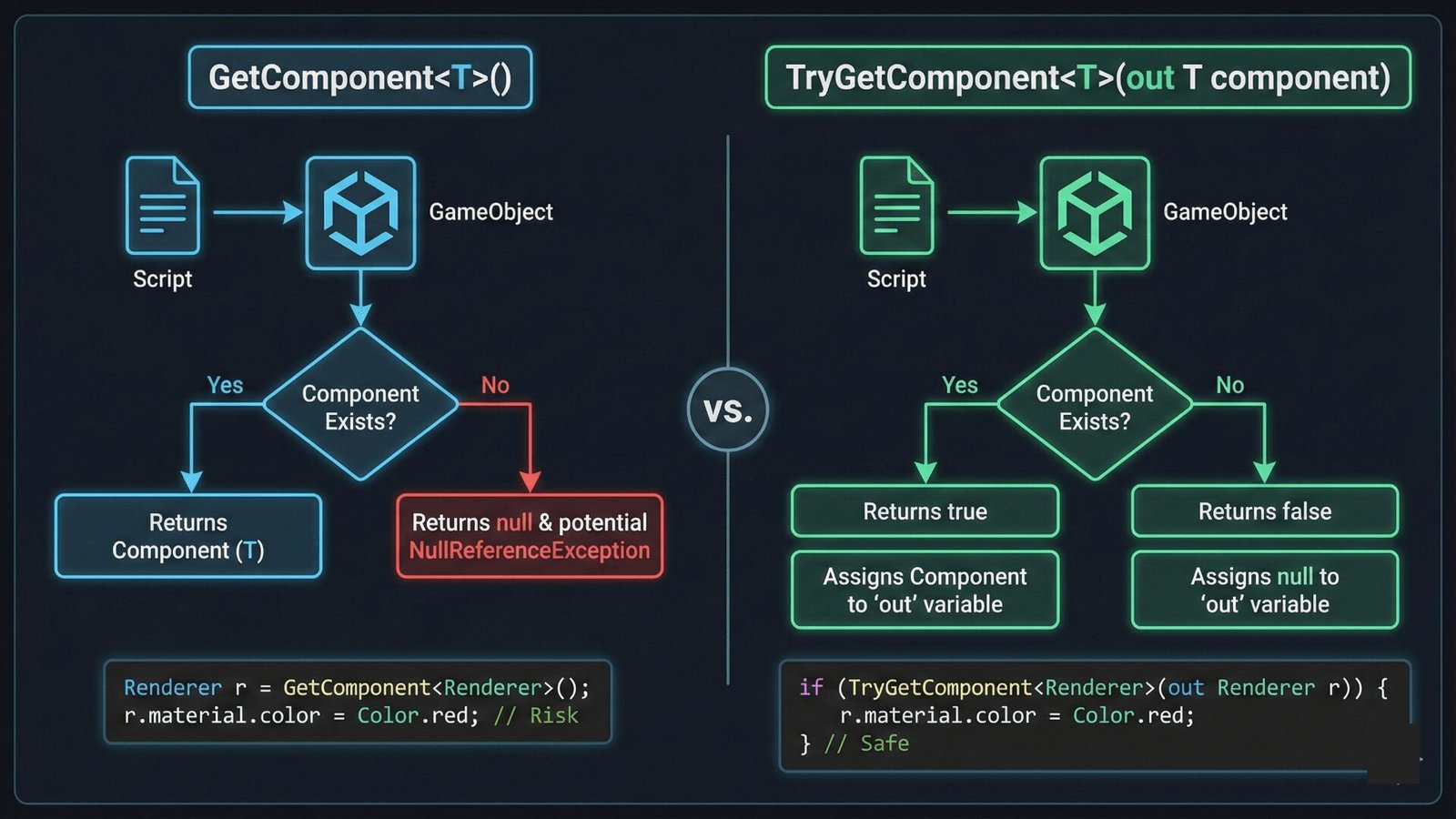
Discover how Unity’s TryGetComponent outperforms GetComponent with cleaner syntax and up to 20% faster performance. Learn best practices, benchmarks, and real-world examples to boost your Unity game development efficiency.
slender nymph
this article agrees that TryGetComponent is faster
mellow lance
it does indeed
slender nymph
then why link it when your confusion was regarding thinking that GetComponent was faster?
mellow lance
verification from someone like you
 timber tide
No reason to ever use GetComponent over Try
Maybe if you have a RequireType constraint
toxic spoke
Are LLMs good for unity C# code
naive pawn
Are LLMs good
no, not particularly
toxic spoke
Or are they like for every other coding language
naive pawn
they're a tool and they are not useful if you don't already have the expertise to actually use the tool properly
they're not good for much imo
 sage mirage
Hey, guys! You know, I have a problem. I have many events for my game and I am using Observer Pattern, but I am not sure how to store and in which data structure my game events?
{
    gameEvents.OnGameOver += ShowGameOver;
    gameEvents.OnP1Win += ShowP1Win;
    gameEvents.OnP2Win += ShowP2Win;
    gameEvents.OnDraw += ShowDraw;
    gameEvents.OnEnablePVEScore += EnablePVEScoreText;
    gameEvents.OnDisableRedLives += DisableRedLives;
    gameEvents.OnPVPExit += TriggerPVPExit;
    gameEvents.OnPVPStay += TriggerPVPStay;
    gameEvents.OnPVEExit += TriggerPVEExit;
    gameEvents.OnPVEStay += TriggerPVEStay;
    gameEvents.OnPVESelected += OnPVESelected;
    gameEvents.OnPVPSelected += OnPVPSelected;
}

private void OnDisable()
{
    gameEvents.OnGameOver -= ShowGameOver;
    gameEvents.OnP1Win -= ShowP1Win;
    gameEvents.OnP2Win -= ShowP2Win;
    gameEvents.OnDraw -= ShowDraw;
    gameEvents.OnEnablePVEScore -= EnablePVEScoreText;
    gameEvents.OnDisableRedLives -= DisableRedLives;
    gameEvents.OnPVPExit -= TriggerPVPExit;
    gameEvents.OnPVPStay -= TriggerPVPStay;
    gameEvents.OnPVEExit -= TriggerPVEExit;
    gameEvents.OnPVEStay -= TriggerPVEStay;
    gameEvents.OnPVESelected -= OnPVESelected;
    gameEvents.OnPVPSelected -= OnPVPSelected;
}```Seems fine to me?
sage mirage
no the problem was that I didn'tr split my game events I had everything on a single event liek UI events, Game Events
now I have created a new scriptable object called UIEvents and split it up
sage mirage
timber tide
Seems fine to me?
I was just wondering maybe its a bad practice/design
lets say my game has many many events
what I am supposed to do
timber tide
private void OnEnable()
{
  BindUIEvents();
  BindSelectEvents();
  BindTriggerEvents();
}```
Like that?Could make like a SelectEvents class, but that's just more fluff
Like ok, maybe you do have a bunch of UI events then having a middleman might be nice but I can't be bothered most of the time
 severe snow
toxic spoke
Or are they like for every other coding language
severe snow
toxic spoke
Or are they like for every other coding language
ive been using Claude a bit, I used to be a big poo pooer but its genuinely not bad.
if you dont have the skill to read, review and understand what it produces though then it will be wasted on you and you wont improve
theres no reason to use it on simple projects above learning to program yourself
timber tide
Claude does have probably the more powerful models just because each prompt will always try to fetch and cache newer, relevant data if it needs it. Which is why it takes quite a lot longer than most other LLMs out there. I'm convinced though that each prompt probably uses an ocean's worth of water ;p
Most LLMs will try to use that atomic data as much as possible, but Claude doesn't give a poop, which is also probably why it does have a stricter token system. You can actually hit a limit very easily with all their paid plans.
severe snow
yeah no doubt theres questions about sustainability, im not all for it. Really not sold on using AI for generating art, video and writing, it ruins the creative front end for players
i think saying "they're not good for much" is sort of insane though, some models are definitely quite capable, its hard because not long ago i thought like that too
 open crater
Gius is it suggested to put the main camera into the player for a simple 2d platformer? Considering the freezed Z axis (rotation)
keen dew
Not a code question but if it's good enough for what you want it to do then sure
open crater
Ok, sorry for the wrong channel buy ty for the answer
 hybrid gust
Is there no offline documentation for 6000.6?
https://docs.unity3d.com/6000.6/Documentation/Manual/OfflineDocumentation.html The link here keeps giving me an error and Unity Hub's logs are giving a 404

 verbal oxide
Hay guys would this be the best place to ask for programming help? I'd like to trade my art skills in 3d and help someone art side for some programming help.
feral plaza
wintry quarry
Your code is wrong. There's no property called `action` on PlayerInput
Thanks for the reply. My code is further up. The PlayerInput section has [Move, Examine, Dash, Jump, Menu, Test key]. When I replace "actions" with the above I still get errors. I believe you're speaking about lines 101 to 108? I was following tutorials and examples. But I seem to run into issues when I use one script to do everything as opposed to having a controls/playermovment script to just an Input Manager.
wintry quarry
feral plaza
Thanks for the reply. My code is further up. The PlayerInput section has [Move, ...
What is "the above"? I'm on a phone I'm not going to download text files. Just be specific about what code you have and what errors you get. !code
!code
radiant voidBOT
wintry quarry
!code
Posting code
📃 Large Code Blocks
Use links to services like:
https://paste.mod.gg/, https://hastebin.skyra.pw/, https://paste.ofcode.org/, https://paste.myst.rs/
📃 Inline Code
Surround code with three backquotes. Not quotation marks.
To format as C#, add cs to the first line:
```cs
// Your code here
```
Add a comment with a line number if there is an error message.
feral plaza
wintry quarry
What is "the above"? I'm on a phone I'm not going to download text files. Just b...
I guess the best way to state it, I am introducing my action set into code. On wake I want to enable the action map and in start I want to map them to corresponding variables for reading such as float and vector2. I don't know how to properly assign the action variable to the button map with the Find Action.
 solar hill
verbal oxide
Hay guys would this be the best place to ask for programming help? I'd like to t...
solar hill
verbal oxide
Hay guys would this be the best place to ask for programming help? I'd like to t...
if you need help you can just ask, but this isnt the place to find collaborative work if thats what you are looking for
radiant voidBOT
:loudspeaker: Collaborating and Job Posting
We do not accept job or collab posts on Discord.
Please, use Discussions to promote yourself as job-seeking, advertise commercial job offers, or look for non-commercial projects to participate in:
• ** Collaboration & Jobs**
toxic spoke
hi im trying to make the escape button to leave to the menu using this code attached to an empty gameobject. the code is ```using System.Collections;
using System.Collections.Generic;
using UnityEngine;
using UnityEngine.SceneManagement;
public class ESCToMenu : MonoBehaviour
{
// Start is called before the first frame update
void Start()
{
}

// Update is called once per frame
void Update()
{
    if (Input.GetButtonDown("escape"))
    {
        SceneManager.LoadScene(0);
    }
}
}
it says to go to edit>settings>input but i dont have any options like that
rich adder
toxic spoke
it says to go to edit>settings>input but i dont have any options like that
its Project Settings -> Input Manager
this is legacy input system
toxic spoke
thanks
rich adder
@toxic spoke since Escape key already exists you could just use the more safer Input.GetKeyDown(KeyCode.Escape)
I would suggest you learn the new input system though
toxic spoke
also now i move to the menu but my cursor does not reappear
rich adder
because if you disabled/hidden the cursor its a global setting it doesn't reset with scene changes, unless specifically told to do so
toxic spoke
how do i unlock the cursor then
rich adder
wdym how ? you just sent it how
rich adder
toxic spoke
do i just use the ! not operator on it
no
how did you veirfy the line is running
toxic spoke
i clicked escape and it went to menu
rich adder
toxic spoke
so i just do Cursor.lockState = CursorLockMode.Unlocked;?
https://docs.unity3d.com/6000.3/Documentation/ScriptReference/CursorLockMode.html
cursorlockmode.unlocked doesn't exists btw if you typed that then its a clear error
toxic spoke
rich adder
https://docs.unity3d.com/6000.3/Documentation/ScriptReference/CursorLockMode.htm...
i know that its an error
i tried it
rich adder
okay so use the proper one
and you should probably configure your code editor if its not suggesting the available option for CursorLockMode etc.
toxic spoke
rich adder
okay so use the proper one
whats the proper way
rich adder
toxic spoke
whats the proper way
I just sent it to you
did you actually click it and read it
radiant voidBOT
rich adder
!ide 👇
💡 IDE Configuration
If your IDE is not autocompleting code or underlining errors, please configure it.
Select one:
•  Visual Studio (Installed via Unity Hub)
• Visual Studio (Installed manually)
•  VS Code
•  JetBrains Rider
• :question: Other/None
toxic spoke
i do have vs code connected
rich adder
toxic spoke
i do have vs code connected
"connected" is vague , is it doing what it says above?
cause it should've suggested the lockmodes available when you typed it

if its not doing that you need to configure it
toxic spoke
i set it up but it gives wrong recommendations
rich adder
then its not setup
not properly at least
https://unity.huh.how/ide-configuration/visual-studio-code
if you did all the steps then check the **If you are experiencing issues **part
🤔 Unity, Huh, How?
If your IDE isn't providing autocomplete suggestions or underlining errors in red, then it needs to be configured.
toxic spoke
i did the steps
rich adder
if you did all the steps then check the If you are experiencing issues part
toxic spoke
how would i make grab logic
like look at an object click LMB and you can walk around with it
 gaunt cipher
I have a class savable which creates a singleton of itself on RuntimeInitialization. In a class that extends savable I have something like private static GetShard(int shardID) { return Instance.Data.Shards.FirstOrDefault... } so that I can do for example UpgradeData.GetShard(), is this a clever workaround or a principle violation? The method's not really static if it calls an Instance, right?
 shadow rain
Not code but why can't I add a texture to the sprite texture on my 2d material

 earnest wind
toxic spoke
like look at an object click LMB and you can walk around with it
earnest wind
toxic spoke
like look at an object click LMB and you can walk around with it
you could do something like this, which is the simplest imo, but there is one drawback
check for keybind -> do raycast -> make the collision obj child to the camera
the issue is that you can make the selected object go through other objects
search for docs for raycast and .SetParent
rich adder
shadow rain
Not code but why can't I add a texture to the sprite texture on my 2d material
if its not code related why are you posting in the code channel
shadow rain
rich adder
if its not code related why are you posting in the code channel
its just bc it said beginner mate I dont use this discord often
rich adder
shadow rain
its just bc it said beginner mate I dont use this discord often
I mean its in plain english, the word in it Code was ignored or
anyway read the channel descriptions if you're confused id:browse
shadow rain
its honestly not that deep I dont see why this matters so much I was just asking for help
rich adder
shadow rain
its honestly not that deep I dont see why this matters so much I was just asking...
I'm just correcting a simple mistake
don't you want to learn to navigate this server better
if you ask in the proper channel you might get better answers/help , or no?
 waxen adder
So I have this script for an input handler. I'm seeing a lot of code duplication and was wondering if there was an elegant way to improve this. Everything I think of right now, just leads to similar duplication issues.
Summary of script: Processes inputs from the new input system and manages their states. If you guys want to see the InputState class, just ask, but that class is mainly just deciding if the input is "active"/"triggered" or not.
Pastebin
Pastebin.com is the number one paste tool since 2002. Pastebin is a website where you can store text online for a set period of time.
The duplication issue in question is that I have a lot of callbacks doing the same thing: OnJump, OnDodge, OnGameAction1, OnGameAction2
rich adder
its either that or doing the generated C# class but you'd still have to have methods for the event of the action anyway (eg, performed, canceled etc.)
grand snow
I think this is using PlayerInput hence the magic functions called from somewhere
waxen adder
grand snow
I think this is using PlayerInput hence the magic functions called from somewher...
It is, yeah. Currently set to invoke unity events
grand snow
Id instead write a function to:
- make input state
- get input action
- sub to action activation to do something to state
Then you dont have to "repeat yourself"
If you really want player input for some reason then get the current action map from that and do the rest in code
waxen adder
Ah so manually handle input events, instead of PlayerInput?
grand snow
yes
then you can do all these setup tasks via a func call and keep the logic the same for each
waxen adder
Gotcha, thank you!
grand snow
If unsure then its a great time to learn about events in c#
 azure glade
I'm following this tutorial, and I have an issue.
At the moment, you don't need to code anymore the camera boundaries for the VirtualMouse to not go offscreen.
I believe they didn't adjusted the issue with the screen size (PC vs mobile). On mobile I get the little offset click where it should not be, similar to how you can see in the video.
So, I am adding the script as in the video but just for the scale part:
[SerializeField] private RectTransform canvasRectTransform;
void Start()
{
UpdateScale();
}
private void UpdateScale()
{
transform.localScale = Vector3.one * (1f/canvasRectTransform.localScale.x);
//transform.SetAsLastSibling();
}
}
The issue is that once this script is activated on the gameobject, I am no longer able to move the virtual mouse, and stays at its anchored position.
The weird little offset I get on mobile, I am not sure if its because I am using ScreenSpace-Camera and not Overlay as in the video.
Has anyone any advice?
Edit: in screen space camera I'm no longer able t move the cursor. On overlay, I am able. What is causing on Space - Camera to not be able to move the curson?
why on Overlay it detects the weird offset triggering buttons from the wrong location? Moreover, I am restricted to go all the way to the edge of the screen on mobile devices, when using Overlay.
verbal oxide
Whats the best way about implementing crouch jumping for a fps controller?
 valid heath
using Unity.Mathematics;
using UnityEngine;

public class raycastTest : MonoBehaviour
{
    // Start is called once before the first execution of Update after the MonoBehaviour is created
    void Start()
    {
        RaycastHit[] hits;
        hits = Physics.RaycastAll(transform.position, transform.forward, 100f);
        Debug.DrawRay(transform.position, transform.forward, Color.red, 10f);
        Debug.Log(hits.Length);
    }

    // Update is called once per frame
    void Update()
    {

    }
}
Any reason why this raycast wouldn't be hitting a tilemap collider?
I have a composite collider on it too

this is the tilemap im trying to hit
is it because I'm using 2d colliders in a 3d project?
idk if there's problems with that or not
 ivory bobcat
valid heath
```
using Unity.Mathematics;
using UnityEngine;
public class raycastTest : Mono...
ivory bobcat
valid heath
```
using Unity.Mathematics;
using UnityEngine;
public class raycastTest : Mono...
I'd consider using physics 2d when working with 2d
 twin cloak
verbal oxide
Whats the best way about implementing crouch jumping for a fps controller?
twin cloak
verbal oxide
Whats the best way about implementing crouch jumping for a fps controller?
depends on how you want the output to look like.
there isn't really a "best" way,
For a jam I once made a crouch which scales the player down by half on the y axis and lower the camera half way down.
That was super smooth and very fun to use (also added sliding to it which is just if you are moving and crouching, double the speed until you stop crouching)
so that was definitely the "best" solution for me at the time which fits a first person game
you can also lower just the collider and camera,
Have an animation where the character itself crouches and that should pretty much do it for third person / multiplayer games
valid heath
ivory bobcat
I'd consider using physics 2d when working with 2d
tried it, doesn't really change anything 🤷♂️
It's not a problem with the ray caster, i think its a problem with the tilemap
because I can raycast into a cube and it detects it just fine
 teal viper
valid heath
because I can raycast into a cube and it detects it just fine
teal viper
valid heath
because I can raycast into a cube and it detects it just fine
A cube is a 3d shape with a 3d collider. A tilemap is a 2d object using 2d physics.
So it would totally be a problem with the raycaster, if you were trying to use a 3d raycast against a 2d object.
valid heath
valid heath
tried it, doesn't really change anything 🤷♂️
nvm u right, im a dummy and forgot to save my file 💀
now, is there any way that I can get collisions to each individual tile on a tilemap?
I'm looking to do something like this

which probably isn't possible because i don't think each tile is individual
teal viper
Not with raycasts or physics, but you could calculate it with math probably.
wintry quarry
valid heath
I'm looking to do something like this
this is literally a line drawing algorithm: https://en.wikipedia.org/wiki/Line_drawing_algorithm
 magic slate
I Think My PC Was Too Fine...
 wicked pulsar
valid heath
I'm looking to do something like this
wicked pulsar
valid heath
I'm looking to do something like this
That’s not a good use for raycasts, because a ray that crosses a plane (your tilemap) isn’t penetrating it. Raycasts are meant for testing collision/penetration.
wicked pulsar
valid heath
which probably isn't possible because i don't think each tile is individual
One naive solution could be a raymarch, where you measure some position ahead of your origin along your direction, then raycast into the tilemap (down, maybe?), then do the same thing again starting from the last position that you sampled. This might be good enough depending on your needs.
The direct solution would be to use the line algorithm that PraetorBlue linked to get the cells you care about.
 hollow cradle
Can someone recommend me a good yt channel that practices good efficient codes and explains it clearly?
wicked pulsar
@hollow cradle (from #💻┃unity-talk ) can you give some examples?
hollow cradle
wicked pulsar
<@1246773576271401034> (from <#497872424281440267> ) can you give some examples?
Like when i was making item collection stuff and it took me quite a while because i was using such a cluttered system and i was even confused at what i was doing then a dude helped me and solved it in just a few minute
Also it lags my pc so much
wicked pulsar
It's hard to answer clearly with respect to what you need to learn without specifically knowing what it is that is causing you issues. C#, the language, doesn't really have a specification for what is or isn't the "best way" to design systems used in games. At least, that's not really within the scope of a C# course.
 burnt vapor
I can't suggest a video, but I can link articles on best practices. I can also code review your code on the syntax specifically and give suggestions where I find any. Can't really comment on what's "best" as a whole anyway considering it really depends on what you make.
wicked pulsar
Often you'll want to learn patterns, or self-contained building blocks of a program, and apply them wherever necessary. That's a broad topic that tends to differ from industry to industry, and you'll need to know certain things more than others depending on the kind of work or type of game that you're making.
hollow cradle
wicked pulsar
It's hard to answer clearly with respect to what you need to learn without speci...
It doesnt have to be the best like i want a channel that give good practices
Im still a newbie in unity
burnt vapor
hollow cradle
Im still a newbie in unity
I would suggest you use the resources Unity provides in general. Check the pinned messages. Or the bot message 👇
radiant voidBOT
:teacher: Unity Learn ↗
Over 750 hours of free live and on-demand learning content for all levels of experience!
hollow cradle
Ok thanks 🙏
wicked pulsar
hollow cradle
It doesnt have to be the best like i want a channel that give good practices
"Coding practices" is a bit fuzzy if you're new enough, because learning efficient design is a bit of a separate task from learning how to make stuff work. I'm not exactly sure of a good resource for newbies. Unity Learn is probably one of the better resources (what FusedQyou posted).
There are probably specific lessons you can extract from your item system if you analyze what you changed in correcting it.
 muted grove
would anyone know what version of unity dave / gamedevelopment (youtube) uses for his tutorials?
sage mirage
Hey, guys! What Yield Return New WaitUntil() does?
I mean I know it's like a loop but after the execution what happens
keen dew
Not quite clear what you're asking but it works the same way as all the other yield statements in coroutines. It stays there until the condition becomes true, then in continues the coroutine from the next line
sage mirage
I mean it stays where exactly below it or above it?
lets say I want to display a message until message limit hits 10 lets lets say I have a counter message limit
teal viper
sage mirage
I mean it stays where exactly below it or above it?
It stays at the yield line. And continues from the next line later.
keen dew
That question doesn't make sense. It essentially pauses the coroutine
sage mirage
yield return new WaitForSeconds first waits 3 seconds lets say and then execute code
keen dew
Yes and WaitUntil first waits until the condition is true and then executes code
sage mirage
oh ok
Make sense
You know, I have a problem. On my game, I have enemy tanks and the player shoots projectiles. The problem is that enemy tanks because they share the same bullet script with my player and I have an interface Idamageable, when enemy tanks are shooting projectiles to each other they are killing each other. What I want it to do is to only hit the player and to not be able to kill each other. I am not sure how to do it to tell you, I was thinking creating a new bullet script but it isn't a good practice if I already have a script for the bullet or maybe I was thinking to create a new interface because EnemyHealth and and PlayerHealth scripts both share IDamageable.
teal viper
sage mirage
You know, I have a problem. On my game, I have enemy tanks and the player shoots...
Just make your script more generic. Add a shooter field to the bullets that describes the source object and check that on collision. Or use layermasks on colliders/RBs to prevent bullets from colliding with the enemies in the first place(if they are shot by the enemies).
Could also use tags. There are many ways. Creating a separate script for enemies is probably the worst way.
Maybe not the worst, but far from being a good one.
sage mirage
teal viper
Just make your script more generic. Add a `shooter` field to the bullets that de...
Can I do it with Interface or its not a good practice?
or maybe it doesn't make sense to create a new interface in this case
I dont think it make sense because both of them must be damageable
teal viper
sage mirage
Can I do it with Interface or its not a good practice?
You can for sure. It can be a good idea.
Reuse an existing interface.
sage mirage
basically I can create an interface based on the IDamageable interface no?
teal viper
An interface is just a contract for implementation though. So the correct way to think of it is - logic change requires contract change - > modify the interface to require the new contract.
teal viper
sage mirage
basically I can create an interface based on the IDamageable interface no?
You mean interface inheriting a different interface? You can but I wouldn't rank it as a good solution for this specific problem.
sage mirage
I think I have to create an identity for the bullet basically.
probably enum
I think that also make sense
 compact sandal
_hitPlayer.PlayerCollision.excludeLayers |= (1 << LayerMask.NameToLayer("Ghostable"));

//some conditions later...
_hitPlayer.PlayerCollision.excludeLayers &= ~(1 << LayerMask.NameToLayer("Ghostable"));
Why does this not temporarily disable collisions with the specified layer, when i check the exclude layers value when the first line is triggered, it's in there but for some reason it still does not ignore that layer.
keen dew
What is "it"? Show a complete example
compact sandal
using UnityEngine;

public class GhostMushroomController : MonoBehaviour
{
    [SerializeField] private int _effectLength;
    private PlayerController _hitPlayer;

    private void OnCollisionEnter(Collision collision)
    {
        if (_hitPlayer != null) return;
        collision.gameObject.TryGetComponent<PlayerController>(out _hitPlayer);
        if (_hitPlayer == null) return;
        _hitPlayer.PlayerCollision.excludeLayers |= (1 << LayerMask.NameToLayer("Ghostable"));
        Invoke("Kill", _effectLength);
        gameObject.SetActive(false);
    }

    void Kill()
    {
        _hitPlayer.PlayerCollision.excludeLayers &= ~(1 << LayerMask.NameToLayer("Ghostable"));
        Destroy(gameObject);
    }
}
PlayerCollision is the correct hitbox and in the game i can see the exclude layer value getting set to Ghostable
keen dew
Put a debug log in one of the colliding objects that prints which colliders are involved and what their layers and layer overrides are
compact sandal
I cant even get the oncollisionenter to trigger
Is it because i have multiple colliders? (the rest of them are triggers)
keen dew
If OnCollisionEnter doesn't trigger, it means it's working correctly. There is no collision between the excluded colliders. The collision is between some other colliders
compact sandal
do i need a rigidbody for oncollisionenter to trigger?
night raptor
Yes you do, for one of the colliding objects
compact sandal
oh alr
muted grove
    {
        // ground check
        grounded = Physics.Raycast(transform.position, Vector3.down, playerHeight * 0.5f + 0.2f, whatIsGround);

        MyInput();
        SpeedControl();

        // handle drag
        if (grounded)
            rb.linearDamping = groundDrag;
        else
            rb.linearDamping = 0;
    } ```
im following a tutorial and i get no drag whatsoever, am i writing something wrong?Two things I would confirm:
- is the block within the if executed when you expect it to, in other words does the ground check work?
- is
groundDragwhat you expect it to be, non-zero at least?
muted grove
ground check does work!
grounddrag is public float which should be changeable in inspector but it doesnt change anything :/
night raptor
muted grove
ground check does work!
grounddrag is public float which should be changeable in...
You could confirm both by putting print(groundDrag) inside the if. If you think both work, my next guess would be that you are overriding the velocity in your movement logic. In that case the linearDamping doesn't do much since you are increasing the velocity next frame anyways
muted grove
night raptor
You could confirm both by putting `print(groundDrag)` inside the if. If you thin...
i will try to check it out, im really new to unity and everything is so confusing 😵💫
night raptor
muted grove
i will try to check it out, im really new to unity and everything is so confusin...
I feel you. If you send the rest of the code (SpeedControl is probably the interesting bit) and explain little more what you want to achieve with the ground drag, I can see if there is something obvious wrong. You should also link the tutorial you are following.
muted grove
https://www.youtube.com/watch?v=f473C43s8nE&t=42s
im following this one, its a bit outdated but nothing unfixable, my main issues is with drag and speed control
im not at the pc anymore so will get to this in few hours.

FIRST PERSON MOVEMENT in 10 MINUTES - Unity Tutorial
In this video I'm going to show you how to code full first person rigidbody movement. You can use this character controller as final movement for your game or build things like dashing, wallrunning or sliding on top of it.
If this tutorial has helped you in any way, I would really appreciate...
 stark helm
Guys, how could I get the down direction of a game object so I can raycast downward?I tried -transform.up but my ray goes to 0,0,0
night raptor
muted grove
https://www.youtube.com/watch?v=f473C43s8nE&t=42s
im following this one, its a b...
I don't see anything obvious being wrong here. Are you using the same drag and speed values as the tutorial does?
stark helm
muted grove
https://www.youtube.com/watch?v=f473C43s8nE&t=42s
im following this one, its a b...
I watched the same tutorial
I remember fixing some of the code
because it was old
muted grove
night raptor
I don't see anything obvious being wrong here. Are you using the same drag and s...
Drag in the tutorial is outdated, so it automatically changed it
night raptor
muted grove
Drag in the tutorial is outdated, so it automatically changed it
yeah the name of the variable changed ik but I meant the float variable values
night raptor
stark helm
Guys, how could I get the down direction of a game object so I can raycast downw...
-transform.up is the local down direction. What does ray going to (0, 0, 0) even mean?
muted grove
I’m pretty sure I did, again I will sit down with it later in the evening and try to figure it out
But thank you for help
stark helm
night raptor
`-transform.up` is the local down direction. What does ray going to (0, 0, 0) ev...
so it shoots from the character and it goes all the way to Vector3.zero
night raptor
stark helm
so it shoots from the character and it goes all the way to Vector3.zero
Can you show the code where you make the ray?
stark helm
night raptor
Can you show the code where you make the ray?
its just the same code as Reneraki
I used the same video
stark helm
night raptor
Can you show the code where you make the ray?
IsGrounded = Physics.Raycast(transform.position, Vector3.down, PlayerHeight * 0.5f + 0.2f, Ground);```it still prints false
Debug.Log(IsGrounded) -prints false
I think there is a problem with something
night raptor
stark helm
```cs
IsGrounded = Physics.Raycast(transform.position, Vector3.down, PlayerHeigh...
You can use Debug.DrawRay to confirm your ray is configured correctly: Debug.DrawRay(transform.position, Vector3.down * (PlayerHeight * 0.5f + 0.2f))
stark helm
night raptor
You can use Debug.DrawRay to confirm your ray is configured correctly: `Debug.Dr...
Thanks, now I will proceed to try this method of drawing rays
stark helm
night raptor
You can use Debug.DrawRay to confirm your ray is configured correctly: `Debug.Dr...
it does look how it should be, I will now try to correct the direction, that should be the problem
night raptor
I don't understand how the direction can be wrong if it looks as it should
stark helm
night raptor
I don't understand how the direction can be wrong if it looks as it should
It was the layer somehow
So it is fixed now
thanks
night raptor
That what I was coming to. If the ray points the right way and is the proper length to hit the object you want, it must be something with layers or colliders that make the hit not register
stark helm
 polar jackal
hey guys
polar jackal
hey guys
Hello sir, what might be the problem for which you have come here?
polar jackal
but i need like people to vote me
idk if its the right place to take this
🥲
i have to send a link for the votation
on MULERUN
stark helm
polar jackal
im participating of an give away, where i have to do a game on an IA
This might sound rude, but I dont understand what you just said there
stark helm
polar jackal
but i need like people to vote me
So like a president?
polar jackal
stark helm
This might sound rude, but I dont understand what you just said there
like im not english, i joined a giveaway on another server
a big giveaway
and like i created a game to join the giveaway
stark helm
polar jackal
a big giveaway
ok and you need us to vote you ?
stark helm
polar jackal
on my game
What is your game about?
polar jackal
stark helm
What is your game about?
its like a copy of pokemon inspired on GAMESIR, the server where is the give away
stark helm
polar jackal
its like a copy of pokemon inspired on GAMESIR, the server where is the give awa...
I do think you need to go to #💻┃unity-talk
This is for code
polar jackal
but i need to send the link here
polar jackal
stark helm
I do think you need to go to <#497872424281440267>
ok thank u, just actually need like 100 votes
stark helm
polar jackal
ok thank u, just actually need like 100 votes
4 votes 🥀
post that on youtube
you might get more votes from viewers
polar jackal
stark helm
4 votes 🥀
at the moment i have just four
stark helm
polar jackal
at the moment i have just four
tho you made a game
I could not make a game yet
polar jackal
but for 100 members here win me the giveaway
night raptor
polar jackal
im participating of an give away, where i have to do a game on an IA
Asking for votes on unrelated servers is probably not the way the giveaway was supposed to work. This is not the server for that anyways. This is mostly a server where people might ask for help with their game development problems, not solicit votes or advertise their own stuff
polar jackal
night raptor
Asking for votes on unrelated servers is probably not the way the giveaway was s...
oh🙁
stark helm
night raptor
Asking for votes on unrelated servers is probably not the way the giveaway was s...
That also works instead of sending him to #💻┃unity-talk
stark helm
polar jackal
oh🙁
If you really need votes(4000 dollars is a lot) make a youtube video showcasing your game
it usually works
sour fulcrum
<@&502884371011731486>
stark helm
sour fulcrum
<@&502884371011731486>
you really did ping the moderators
That was the last resort man
Well I think you might be punished now
polar jackal
stark helm
If you really need votes(4000 dollars is a lot) make a youtube video showcasing ...
its a chair 900$ and 5 high end controllers
stark helm
polar jackal
its a chair 900$ and 5 high end controllers
I don't really care, I can't get the money
Unless you post a video and I see it
Then if I like the game I go vote it
The destroyers have been summoned
I will now dissapear(dont want to get banned or smth, because I am not involved🐱 )
polar jackal
i think im not publishing it, its like only 2 days the votation, a video on yt should not work
 strong wren
@polar jackal This doesn't seem related to Unity programming. Don't advertise on this server like this.
polar jackal
strong wren
<@1122866095519432784> This doesn't seem related to Unity programming. Don't adv...
ok
ill not do the same
real thunder
let's say I want to make all my mobs animations slower by 50% if it's under a debuff
is the best way to do that by adding modifier parameter to all animations?
solar hill
you can give all states a multiplier parameter
add a new float parameter name it speed or something
real thunder
yeah that's what I am talking about
I guess that will do it
wondered if there is something easier
 sharp drum
Hello. I am trying to make a simple moving platform. It is a 3D project and I am using character controller to move the player. I have seen that to make the player move with the platform, they make the player a child of the platform when the player lands on it. But since I am using character controller and I dont have a normal collider, I dont know how to detect the player object when it lands on the platform. Does anyone know of any simple way to solve this?
timber tide
childing the character is a meme
just inherit the velocity when touching it
oh yeah also you can use this:
https://docs.unity3d.com/ScriptReference/CharacterController.OnControllerColliderHit.html
To get other characters/bodies, otherwise just do some physic queries like raycasting/overlapsphere
 echo ruin
I'm very interested in some input regarding a bug I have. I have no clue why my code decides to mess up
I have a GridController script that manages what happens on my 2D grid. I can select areas in a rectangle or in a click-and-drag selection.. Good for future building. It works as intended
naive pawn
you should generally just send the question you have rather than leading with that as a separate message
you can include it, but have it as part of the same message
context will be lost
echo ruin

All good.
I then go on to write a debugging script and a basic stock/inventory script containing a dictionary that populates through some SOs. I choose to make this a static instance and a singleton, because why not. These are completely unrelated to my GridController script
Yet, after making the stock/inventory script, the features in the grid controller stops working.
I try to disable stuff and go back untill I single out what makes the grid features work again
And I end on this
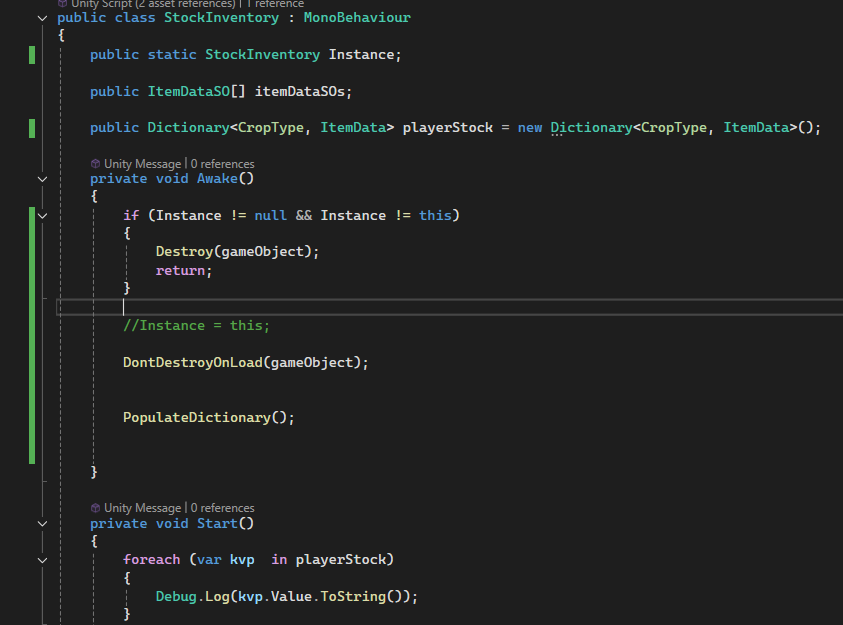
//Instance = this;
Commenting out this line makes it work again
wintry quarry
What features stopped working? In what way do they stop working?
What do stock and inventory have to do with your grid controller at all?
echo ruin
The selection tool, for example, that you see in the gif above. Pressing the button does nothing.
There are no references between the stockinventory and the gridcontroller script.
wintry quarry
echo ruin
The selection tool, for example, that you see in the gif above. Pressing the but...
"does nothing" is pretty vague - Start using basic ebugging techniques to see at what point the code "fails" and how
is there an error? Is certain code you expect to be running not running?
YOu need to dig into it
A wild guess based on the extremely limited information you've given so fart is some kind of UI interaction event blocking situation. Both of these things sound like they're potentially related to using event system events, and maybe the inventory UI is blocking the grid selection, for example
but you need to do some actual debugging to confirm that
echo ruin
It seems to have disabled the buttons completely. It wont even run a Debug.Log() when I press the buttons
wintry quarry
right that points even more strongly to some UI blocking stuff
 polar acorn
echo ruin
`//Instance = this;`
polar acorn
echo ruin
`//Instance = this;`
If commenting this line out fixes it, then either you're setting Instance somewhere else or you're never using it
Or you're getting errors and haven't mentioned them
wintry quarry
Commenting out the Instance assignment in the inventory code is probably breaking some code that displays the Inventory UI, leaving the grid selection stuff not blocked. That's my theory based on limited information
echo ruin
I'm not getting any errors at all.
wintry quarry
well you might not
for example if your code that shows the inventory ui has a guard clause it will just silently not work
Which is why guard clauses can sometimes be a bad idea
polar acorn
Where are you using StockInventory.Instance?
wintry quarry
Check your scene. Check your event system. See what is blocking the UI.
echo ruin
polar acorn
Where are you using `StockInventory.Instance`?
Nowhere as of yet.
polar acorn
echo ruin
Nowhere as of yet.
Then commenting it out literally should not affect anything at all
naive pawn
what if you uncomment it now? (in case it was just something that hadn't refreshed)
polar acorn
How about this, comment out the declaration of the variable
Do you have any errors then?
echo ruin
I'll try out a few things

This also makes it work again
Removing the /* makes it, once again, not work
polar acorn
So you probably have more than one of these
echo ruin
More than one singletons?
polar acorn
Yes
echo ruin
My GridController is also a singleton
wintry quarry
echo ruin
https://puu.sh/KLPWC/2108e92750.png
no you have more than one StockInventory object
polar acorn
Is your GridController a StockInventory?
echo ruin
wintry quarry
no you have more than one StockInventory object
YES
That's the culprit
It makes so much sense now
It works perfectly now
It even says so in the screenshot I posted. I must've gotten tunnel vision.
Thanks for the inputs and suggestions. It doesn't make me feel any less stupid, but I thought it might be some trivial issue or oversight, as it often is 😄
sharp drum
timber tide
just inherit the velocity when touching it
Thank you!
 noble rover
Hey, I’m working on recreating the Kingdom Hearts lock-on system in Unity and I’ve got pretty much everything working smoothly.
The only issue I’m stuck on is target switching. Right now, switching left/right works correctly based on the current setup, but when the player moves to the opposite side of the target, the controls end up flipping.
So for example:
In one position, pressing right correctly cycles targets in the expected direction
But once the player moves to the other side of the target, pressing right now cycles in the wrong direction (it feels reversed)
I’m pretty sure this is happening because the system is using target-relative orientation, so when the player crosses to the other side, the reference flips.
What I’m trying to achieve is:
Direction should always feel consistent from the player/camera perspective
It should dynamically adjust when the player crosses around the target
I was thinking maybe detecting this with something like a dot product, raycast, or spherecast and then flipping the input direction based on orientation, but I’m not 100% sure what the best approach is.
Has anyone implemented something similar or have a good way to handle this?


 quasi citrus
heyy could anyone help me out with this? I would like to add a jump action but dont how
 timber tide
your Move method there takes in a velocity
you're basically saying input direction * speed for your walking, but now you want to apply a y velocity along with it
https://docs.unity3d.com/6000.3/Documentation/ScriptReference/CharacterController.Move.html
The API actually has some hints to give you an idea
 elfin yoke
You also need a new InputActionReference for the jump
quasi citrus
timber tide
https://docs.unity3d.com/6000.3/Documentation/ScriptReference/CharacterControlle...
so could I just copy that
and thank you guys for the help
timber tide
well, copy the jump and yeah ya need to add the jump InputAction as mentioned
on your input map or if you're using the component
quasi citrus
okay okay I will try it thank you so much
 fossil lava
YO
 thorny merlin
Hello everyone, need some help. so i try to reference the player_control script on player object to a script present on a gameobject outside of the scene that player is in. to fix this i set player's parent to DontDestroyOnLoad. When the gameover scene loads, it seems to be able to get the player_control script on void start and hence is able to display playerscore on gameover. but i keep getting these error messages saying a reference to player is not assigned when gameover scene loads.

No idea how i could possibly fix this
polar acorn
thorny merlin
Hello everyone, need some help. so i try to reference the player_control script ...
There exists an object with that tag that doesn't have that script on it
 queen vale
thorny merlin
Hello everyone, need some help. so i try to reference the player_control script ...
queen vale
thorny merlin
Hello everyone, need some help. so i try to reference the player_control script ...
Feels like an OnSceneLoaded() scenario
thorny merlin
polar acorn
There exists an object with that tag that doesn't have that script on it
well i checked and that doesnt seem to be the case. only one object in the entire game has a tag
thorny merlin
queen vale
Feels like an OnSceneLoaded() scenario
what do you mean?
polar acorn
thorny merlin
well i checked and that doesnt seem to be the case. only one object in the entir...
According to your error, you do. This is a reason not to use Find by the way
Just drag in the reference directly
thorny merlin
but i cant drag it. player doesnt exist in that scene until the game is actually running and loads that gameoverscene, due to DontDestroy on load
thorny merlin
polar acorn
According to your error, you do. This is a reason not to use `Find` by the way
i'll try to see if i can find anything again
polar acorn
You could try logging the object after you get it, before trying to get the component
Oh, actually, check player too
player could also be null
Or player.score
Log all of those and find out which
thorny merlin
i am sry i dont know what you mean by log. debug.log?
queen vale
^ also sidenote, out of curiousity why is there menu score, then menu score manager both with the same script?
thorny merlin
queen vale
^ also sidenote, out of curiousity why is there menu score, then menu score mana...
God i have no idea, thanks for pointing it out. so embarassing
Holy shit that was problem
queen vale
Hah, no worries. The "manager" one has the text object populated, the other doesn't.
queen vale
The more time spent on a problem, the better you remember the fix (kinda)
elfin yoke
hm you could also use a scriptable object to save your score 🤔 So it's scene independent
queen vale
True, or a static singleton, or playerprefs.
polar acorn
elfin yoke
hm you could also use a scriptable object to save your score 🤔 So it's scene in...
Not a good idea. ScriptableObjects behave differently in editor and in build. In the editor it'll save permanently any time it changes. In a build, it'll reset when you close the program
Best to never modify a ScriptableObject
elfin yoke
polar acorn
Not a good idea. ScriptableObjects behave differently in editor and in build. In...
of course you have to write a score/highscore to a file. You could load it in while starting the game
polar acorn
The operative issue is that it always saves permanently in editor.
 shy mist
hopefully right channel for this, I'm having an issue where I'm running gameObject.SetActive(false) on an object through a script, a debug log statement shows both activeSelf and activeInHierarchy as false, but in the editor itself the object never goes inactive (not in the hierarchy, not in the inspector, not in the actual game). A different script in the same project had no issue with setActive. I can include relevant scripts if needed
polar acorn
You test your game in the editor before a build and permanently alter the default score
polar acorn
shy mist
hopefully right channel for this, I'm having an issue where I'm running gameObje...
Seems like the object you're disabling and the one you're logging the active state of are two different objects
slender nymph
honestly that wouldn't really be a problem provided you always overwrite what is stored in the SO on game launch
elfin yoke
polar acorn
You test your game in the editor before a build and _permanently_ alter the defa...
so best to initialize the so on start 🙂
polar acorn
slender nymph
honestly that wouldn't really be a problem provided you *always* overwrite what ...
Yeah, but why give yourself the rope to hang yourself with? Better to copy data from an SO to a runtime-owned variable instead
That way your SO can be the source of the starting data that you copy from, instead of having a script re-initialize it using data hard-coded into a script
shy mist
polar acorn
Seems like the object you're disabling and the one you're logging the active sta...
It's a reference through a public variable, and a debug statement logging the gameObject also displays the name of the object I'm checking.
polar acorn
shy mist
It's a reference through a public variable, and a debug statement logging the ga...
Show the code of where you're disabling it, and where you're checking it
queen vale
gameObject != referencedObject
slender nymph
polar acorn
That way your SO can be the _source_ of the starting data that you copy from, in...
i mean, it's high score data, presumably the source of truth for that on game launch is going to be the saved data. if none exists, assign 0. and that's really it
polar acorn
slender nymph
i mean, it's high score data, presumably the source of truth for that on game la...
Right, for this specific case, the issues are easily mitigated, but it's best not to get in the habit of using SOs to store scene-persistent data
shy mist
polar acorn
Show the code of where you're disabling it, and where you're checking it


Here is a different script in the same project that worked fine
 radiant voidBOT
polar acorn
!code
radiant voidBOT
polar acorn
!code
Posting code
📃 Large Code Blocks
Use links to services like:
https://paste.mod.gg/, https://hastebin.skyra.pw/, https://paste.ofcode.org/, https://paste.myst.rs/
📃 Inline Code
Surround code with three backquotes. Not quotation marks.
To format as C#, add cs to the first line:
```cs
// Your code here
```
Add a comment with a line number if there is an error message.
polar acorn
shy mist
https://paste.ofcode.org/Ef4EQVFDemTLYAje4SHu3M
Okay, and where do you assign rightClickMenu?
queen vale
First screenshot
polar acorn
Are any of these objects prefabs? Or do they all exist in the scene before starting?
shy mist
All exist before starting
polar acorn
shy mist
All exist before starting
Put a script on the object you're toggling that has this code in it:
void OnEnable() {
  Debug.Log($"{gameObject.name} has been enabled", this);
}
void OnDisable() {
  Debug.Log($"{gameObject.name} has been disabled", this);
}
Check if something else is re-enabling it after you disable it with your click.
shy mist
Tysm!! I found the issue with that. Another script was calling SetActive(true) on Update
 west pelican
Guys, should i never try to move a character by his transform.position or by his Velocity attribute (rigidbody)? Are there exceptions?
I'm making a infinity runner where my character has a collider to detects hits so he can die from obstacles that goes from the right to the left side of the screen. When I was researching for previous games that i was developing, I saw a lot of posts saying we should only use Rigidbody2D.AddForce so we don't "override unity's physics engine". I also recall the docs advising against setting velocity directly. But if I have a very simple movement mechanic (my character just move vertically, to 2 specific points, medium jump and high jump, since the obstacles that moves towards him) should I still use a RigidBody2D.AddForce function or its okay to move by its transform.position or by his RigidBody2D.velocity.
polar acorn
west pelican
Guys, should i never try to move a character by his transform.position or by his...
If it has a rigidbody, you should never move it with transform.position. Even if you want teleportation, you should use rigidbody.position instead. Moving an object via transform will desync its position from the rigidbody and it can have issues trying to catch up (such as breaking collisions)
Setting velocity directly should be avoided if you want realistic physics, since it completely ignores momentum, friction, and mass, but if you want unrealistic motion then you can modify it just fine.
Basically, transform.position is bad for functional reasons, rigidbody.velocity is bad for realism reasons.
west pelican
polar acorn
If it has a rigidbody, you should never move it with `transform.position`. Even ...
Tysm!
 iron python
is there a general chat where i can hang and like meet people who code round here?
Lovely, very useful 😄
queen vale
iron python
Lovely, very useful 😄
Outside of #🔎┃find-a-channel.
I'd maybe say #💻┃unity-talk
iron python
good to know thank you oz!
 eternal needle
queen vale
Outside of <#531961806646935564>.
I'd maybe say <#497872424281440267>
eternal needle
queen vale
Outside of <#531961806646935564>.
I'd maybe say <#497872424281440267>
none of the channels are meant for hanging around
iron python
well, my issue is i want to meet people who do this stuff, but not because i asked a question, simply because i rarely have questions to ask xD
so this server is pretty much not useful for anything but needing something? if i got that right. anywho! not the point of this channel so have a wonderful day XD
queen vale
eternal needle
none of the channels are meant for hanging around
Fair, but if we don't know the goal, they're not bad places to reference or hover in.
hybrid gust
Is there anyway to check if an animation hash exists? I'm uisng Animator.StringToHash() and storing the results and would like to do some kind of validation check .
nvm, just found animator.HasState();
ruby python
Sooo, I'm trying to come up with a culling system. I have an idea, that I think will work, but I'm struggling with how to do a certain 'bit'.
I'm generating my world with a simple grid, and storing the data in a list of Data Classes which holds the Tile ID (based on col, row) and other various data (the idea is to use object pooling for the tiles and the tile contents). The idea of my culling system is to keep as much as humanly possible out of the Update Loop.
So, my idea is to use a Dictionary to store the Tile ID (As the key) and the list indexID as the tileData is generated and then use the player position to run the query to turn on/off tiles. But I'm struggling to figure out how to get the players position in terms of the row/column of my grid.
Bit of pseudo-ish
playerPosition  ((Do some funky maths)) playerPosition is within cell(col, row)
Grab the cell from the dictionary
  (Also grab the surrounding cells
    currentcell(col, row +1) (above)
    currentcell(col, row -1) (below)
    currentcell(col +1, row) (right)
    currentcell(col -1, row) (left)
    currentcell(col -1, row+1) (Above left)
    currentcell(col -1, row-1) (Below left)
    currentcell(col +1, row+1) (Above right)
    currentcell(col +1, row-1) (below right)
  )

  grab the tile data from the Class list
  Do pool enabling/position etc. etc. based on data from the selected Class(es)
I guess firstly, is this a feasible method?
And would anyone have a clue on the maths involved in 'converting' the players position to correspond with the ground tile positions in terms of cols/rows?
muted grove
night raptor
yeah the name of the variable changed ik but I meant the float variable values
Sorry for late reply, but no everything seems fine...
thorny merlin
queen vale
~~True~~, or a static singleton, or playerprefs.
just saw this after waking up, its so much better than whetever mess i was trying;
real thunder
I have to be doing something really silly if I get issues with that but anyway can't figure out
        freeze_koeff -= freezing_on_hit;
        Mathf.Clamp(freeze_koeff, freeze_koeff_min, freeze_koeff_norm);
        Debug.Log(freeze_koeff + " " + freeze_koeff_min + " " + freeze_koeff_norm);
it still keep decreasing, what how

aaaaagh
clamp doesn't clamps it is a value itself
keep forgetting
naive pawn
real thunder
clamp doesn't clamps it is a value itself
primitives are immutable 
gotta have a mental separation between mutation and transformation
sage mirage
Hey, guys! I would like to try saving my highscore on JSON instead of using Player Prefs. Could you please explain to me how it works?
I have some values to be saved like Highscore and afterwards Leaderboard scores
keen dew
The Internet is full of tutorials for that
sage mirage
ok now I have another question
Does it make sense for ScoreManager to live in both TitleScene and MainScene, because I have to calculate score and highscore. So, the score will be calculated at runtime when the player is playing in the Main Scene and the highscore will be calculated as a result of the player performance in Title Scene. I was thinking to create a Score Manager in Title Scene and then just do DDOL like I do with my other Managers I have because highscore will be located in title scene
What do you think probably it has to be a Singleton right?
I always think about Architecture
naive pawn
if it needs to persist (sounds like it does) then it could be a singleton
if it's a DDOL singleton, you could have it in both scenes for ease of testing
if it's a additive scene singleton, you would have it in the additive scene
sage mirage
First time I hear about Additive Scene Singleton what does it mean?
Its when you create a singleton on an additive scene?
Oh I think you mean if I have created my own Additive scene and using Singleton
instead of the built in way with DDOL right?
naive pawn
this is also built-in
you can have stuff in a persistent additive scene that doesn't get unloaded and you can keep singletons there
sage mirage
so its the bootstrap scene we were talking about a few days ago or its not the same because bootstrap is an additive scene no?
naive pawn
no clue what you're referring to, i don't remember every convo
you could have the additive scene be both for the bootstrapping and for persistent objects
these are different jobs that can be solved by the same idea
 acoustic maple
Vector3 direction = Vector3.Reflect(b_Rigidbody.linearVelocity, collision.contacts[0].normal);
b_Rigidbody.linearVelocity=direction*10;
trying to get it to get it to just move in the opposite direction. but it does this
naive pawn
acoustic maple
Vector3 direction = Vector3.Reflect(b_Rigidbody.linearVelocity, collision.contac...
have you tried debugging the collision normal? perhaps the geometry isn't as expected?
acoustic maple
naive pawn
have you tried debugging the collision normal? perhaps the geometry isn't as exp...
How do I debug it?
 undone rampart
acoustic maple
trying to get it to get it to just move in the opposite direction. but it does t...
undone rampart
acoustic maple
trying to get it to get it to just move in the opposite direction. but it does t...
Probably because you add velocity on the Y as well
acoustic maple
undone rampart
Probably because you add velocity on the Y as well
Ok where am I doing that?
undone rampart
linearVelocity is a vector 3
naive pawn
acoustic maple
How do I debug it?
perhaps draw the arrow and see if it's expected
naive pawn
undone rampart
linearVelocity is a vector 3
they're in 3d
undone rampart
when you reflect it, it's going to give you a Y value as well
ruby python
ruby python
Sooo, I'm trying to come up with a culling system. I have an idea, that I think...
Anyone? Please? Don't mean to be impatient. Just a stumbling block that i need to get past before I can move on. lol.
undone rampart
and you multiply that Y value by 10 which makes the ball shoot upwards
naive pawn
ruby python
Sooo, I'm trying to come up with a culling system. I have an idea, that I think...
is the grid just simple cartesian or is it isometric or something?
acoustic maple
undone rampart
and you multiply that Y value by 10 which makes the ball shoot upwards
How would I fix that
ruby python
naive pawn
is the grid just simple cartesian or is it isometric or something?
It's a simple flat grid (x/z), top down game.
naive pawn
undone rampart
when you reflect it, it's going to give you a Y value as well
this would be intended behavior
naive pawn
acoustic maple
How would I fix that
you would not
acoustic maple
naive pawn
you would not
? I don’t want it to launch in the air
naive pawn
acoustic maple
? I don’t want it to launch in the air
doesn't mean you wouldn't want a Y component
your board is angled
you should have a Y component
acoustic maple
Ok. How would I stop ti from launching in the air then
naive pawn
ruby python
It's a simple flat grid (x/z), top down game.
for the second question, it's mainly just converting the world pos into cell pos
this could involve doing ±0.5, dividing by the cell size (in world units), and/or applying an offset (to set the origin properly), depending on how the grid is set up
naive pawn
acoustic maple
Ok. How would I stop ti from launching in the air then
debug the normal, see why it's launching first
undone rampart
acoustic maple
How would I fix that
Vector3 velocity = direction * 10f;
b_Rigidbody.linearVelocity = new Vector3(velocity.x,
b_Rigidbody.linearVelocity.y, velocity.z);
you aren't showing the side with the collision, but given that there's a visible lip here, i would guess that you're hitting the lip instead of the inner bouncer
 acoustic maple
naive pawn
debug the normal, see *why* it's launching first
acoustic maple
naive pawn
debug the normal, see *why* it's launching first
how do I debug the normal?
undone rampart
personally I would just use the AddForce function rather then modifying the velocity directly
naive pawn
naive pawn
you aren't showing the side with the collision, but given that there's a visible...

this is probably what's happening
you can debug the normal to confirm or deny
this would be fixed by fixing the geometry, not a code fix
ruby python
naive pawn
for the second question, it's mainly just converting the world pos into cell pos...
Yeah, in my head I should be able to 'convert' the player.transform.position to a col, row coordinate system. (ie. playerPosition -> some maths -> col/row) Just struggling to figure out the maths. lol.
acoustic maple
naive pawn
that was it I moved it down
naive pawn
ruby python
Yeah, in my head I should be able to 'convert' the player.transform.position to ...
consider this - the 2 coordinate systems are already in the same shape, so it's relatively simple, you just have to match the scaling and offset, and then turn it into an integer
if the grid cells are each 1 world unit in size (as the probably should be?) then the scaling is already handled
for offset you'd probably want 0,0 of the grid at the world origin as well but i don't remember how Grid handles that (if that's what you're using)
the one that might be harder to wrap your head around would be the integer thing, as you might have to do ±0.5 then consider if it's ceil/floor/trunc, for example
for that last part i'd recommend drawing out both grids overlaid, and then draw a few sample points to figure out how you want the positions to map exactly
acoustic maple
naive pawn
I want it to go back but it does the red arrow
 naive pawn
acoustic maple
I want it to go back but it does the red arrow
naive pawn
acoustic maple
I want it to go back but it does the red arrow
debug the normal
check if it's as expected first
ruby python
My tile size is currently 20x20 units (but that's easy multiplication really).
So, and just thinking 'out loud', I'd be looking at something like playerPosition.x + mathf.floor (or toInt) + 10 = col
ruby python
naive pawn
why are your tiles so large
gimme a sec. Might be easier to post a pic of the world.
naive pawn
acoustic maple
I want it to go back but it does the red arrow
also debug the incoming velocity, if you're doing this on OnCollisionEnter then that's after the physics tick, so it mightve already changed direction.
iirc there's a contact filter thing that you can use to intercept this, but i don't remember if that's for 2d or 3d
acoustic maple
Thanks I will check when I can
ruby python
Sorry, forgot to change the map size and takes a while to generate atm (Instantiating currently until I figure some other bits out).
First Image - Scene view of the map ( I use a biome map image to assign materials to the tiles.
Second Image, Game view. Large tiles so that I can have a large map with fewer tiles and large-ish biome chunks. If that makes sense?
@naive pawn

 ruby python
naive pawn
i see
ruby python
naive pawn
i see
At it's center.
 ruby python
Well, lol. At the moment I'm generating the grid and then moving the Tile parent so that the tile grid is centered in the world. So the Tile parent (with these settings) is at -2000,0,-2000


 ruby python
Oh sorry, col1, row1 is at bottom left corner.
naive pawn
that also doesn't answer my question
ruby python
Hastebin is a free web-based pastebin service for storing and sharing text and code snippets with anyone. Get started now.
naive pawn
naive pawn
as in something like this
is the tile that's closest to 0,0 in world space positioned like this
sage mirage
GHey, guys! I have a question. Is it possible to do DDOL without creating a Singleton?
naive pawn
those are completely separate concepts, yes
sage mirage
Like just DDOL
naive pawn
ruby python
https://hastebin.com/share/oquyeritas.csharp
i'm not going to run this in my head to figure it out, man
go to your world origin and see if the tile is positioned like how i described, or with a corner at 0,0
sage mirage
naive pawn
those are completely separate concepts, yes
That goes for my question?
naive pawn
sage mirage
Like just DDOL
DDOL and Singleton are unrelated concepts. you can have one without the other.
sage mirage
ok
ruby python
naive pawn
is the tile that's closest to 0,0 in world space positioned like this
Oh crap, sorry, misunderstood what you meant. My bad. Yeah the center most tile is at world 0,0,0
sour fulcrum
dontdestroyonload is just an additive scene thats always loaded
ruby python
naive pawn
go to your world origin and see if the tile is positioned like how i described, ...
The center of the tile I mean. Sorry, bit cabbaged. lol.
sage mirage
naive pawn
DDOL and Singleton are unrelated concepts. you can have one without the other.
So if I want to only use DDOL I will do just DontDestrouOnLoad(game object) without even writing Instance = this right
naive pawn
you use DDOL to use DDOL, yeah
naive pawn
ruby python
The center of the tile I mean. Sorry, bit cabbaged. lol.
alright and how do you want the origin of the tile coordinates to work? is it at the center, at a corner, is there negative 0, etc
ruby python
naive pawn
alright and how do you want the origin of the tile coordinates to work? is it at...
The origin of the tiles/tile coordinates should be the center.
naive pawn
what should the tile directly next to (0,0) in the negative direction be
ruby python
naive pawn
what should the tile directly next to (0,0) in the negative direction be
-20,0,0
naive pawn
in tile coordinates, not world coordinates
sage mirage
naive pawn
you use DDOL to use DDOL, yeah
Also, you can do DDOL on any object right doesn't matter if it is a Manager or not or a parent class or child or whatever right?
naive pawn
sage mirage
Also, you can do DDOL on any object right doesn't matter if it is a Manager or n...
the description says how it behaves for various inputs.
sour fulcrum
also pretty much the same thing as
https://docs.unity3d.com/6000.4/Documentation/ScriptReference/SceneManagement.SceneManager.MoveGameObjectToScene.html
naive pawn
(though notably-ish, DDOL accepts Object rather than GameObject)
ruby python
It should be -20 units on the x from from the 'current' tile. If that's what you mean? (Just realised I added an extra ,0 lol.)
sage mirage
naive pawn
https://docs.unity3d.com/6000.4/Documentation/ScriptReference/Object.DontDestroy...
Yes I mean we don't use it only for Managers, but for anything we want to keep persistent across our scenes right? And yes that what I was about to say, it takes only Object not Game Object and what is the difference?
naive pawn
ruby python
It should be -20 units on the x from from the 'current' tile. If that's what yo...
that's -20 units worldspace. i'm asking in tile coordinates
your target output
naive pawn
sage mirage
Yes I mean we don't use it only for Managers, but for anything we want to keep p...
read the description
ruby python
naive pawn
that's -20 units worldspace. i'm asking in tile coordinates
Oh, do you mean in terms of cols/rows, then it'll be -1,0
naive pawn
the math should be quite straightforward then, no offset needed
round(worldPos/20) or floor(worldPos/20+0.5) or ceil(worldPos/20-0.5)
depending on which tile (10,-10) worldPos should be on (tile closest to 0, tile in positive direction, tile in negative direction?) (not in order)
ruby python
naive pawn
the math should be quite straightforward then, no offset needed
round(worldPos/2...
Aaaah okay. Sorry was being a bit dense. Really appreciate the help, if nothing else it's a starting point, that's where I was struggling. lol.
So, just so I have it clear in my own head, rounding should (when I get which method to use down) basically give me my column/row coordinate, and then I can query my Dictionary?
naive pawn
i get it, sometimes it gets much more obvious once it clicks lol
ruby python
Yeah it was just knowing where to start. lol.
naive pawn
round/trunc/floor/ceil are methods that can map reals onto integers
so from the real plane you can map to grid cells
you would probably have a dict of Vector2Ints for that yeah
(though, i haven't put much thought into that part of the question, i was mainly focusing on the coordinates thing, so can't say if there's a better way)
ruby python
Yeah I've used a couple of those before 🙂 And yeah, the idea is Vector2Ints to store all my tiles coords (use that as the key), and then the index of the tile in the tile list. And then do my pool 'spawning' based on that index.
hollow cradle
Why do some people use like myNum myName myThing instead of mynum or num?
polar acorn
camelCase is considered the standard form for naming variables.
https://learn.microsoft.com/en-us/dotnet/csharp/fundamentals/coding-style/identifier-names

Learn the rules for valid identifier names in the C# programming language. In addition, learn the common naming conventions used by the .NET runtime team and the .NET docs team.
sage mirage
Hey, guys! I would like to have some feedback on my UIEventsSO script. Specifically, I would like to know how to clean up my code and if it's the right way I did it with Actions. Can I use a Data Structure maybe for Actions to make it cleaner. What do you recommend?
https://paste.myst.rs/wg45azr0
a powerful website for storing and sharing text and code snippets. completely free and open source.
acoustic maple
naive pawn
also debug the incoming velocity, if you're doing this on OnCollisionEnter then ...
Was just able to check it is OnCollisionEnter
sage mirage
sage mirage
Hey, guys! I would like to have some feedback on my UIEventsSO script. Specifica...
I know Scriptable Object actually is a Data Structure but I am really not sure if I have to write my action fields this way.
 near wadi
@cedar geode !code
 cedar geode
using UnityEngine;
public class Collectible : MonoBehaviour
{
public float rotationSpeed;

// Start is called once before the first execution of Update after the MonoBehaviour is created
void Start()
{

}

// Update is called once per frame
void Update()
{

    transform.Rotate(0, rotationSpeed, 0);

}

private void OntriggerEnter(Collider other){
  // destroy the collectible

 }

private void Ontriggerenter(Collider other) {


    Destroy(gameObject);

}
!code
radiant voidBOT
near wadi
!code
Posting code
📃 Large Code Blocks
Use links to services like:
https://pastes.dev/
https://paste.yunohost.org/
https://share.sidia.net/
https://paste.ofcode.org/
https://paste.myst.rs/
📃 Inline Code
Surround code with three backquotes. Not quotation marks.
To format as C#, add cs to the first line:
```cs
// Your code here
```
Add a comment with a line number if there is an error message.
sage mirage
cedar geode
using UnityEngine;
public class Collectible : MonoBehaviour
{
public float...
Bro I would really recommend this one
https://paste.myst.rs/
a powerful website for storing and sharing text and code snippets. completely free and open source.
sour fulcrum
dont laugh react to beginners stuff
cedar geode
sorry im like a begginener and dont have a lot of basic knowledge and im just a k*d trying to become a programmer
sage mirage
No I dont react for the code I am laughing because people don't know about these links.
sour fulcrum
cedar geode
sorry im like a begginener and dont have a lot of basic knowledge and im just a ...
Your fine, the other person is just being rude
sage mirage
And they just drop the text here like imagine if there are 500 lines of code and soemone just copy paste here XD
btw I think there is a limit
sage mirage
cedar geode
sorry im like a begginener and dont have a lot of basic knowledge and im just a ...
Sorry bro I don't laugh about the code.
Here we are all beginners I am a beginner as well
near wadi
for the small amount of code they posted, surrounding in backquotes is fine. it is the same key as ~ on US keyboards
cedar geode
ah ok thx
sage mirage
I dont think myself experienced I always want to improve and grow like I think you all do 🙂
 near wadi
then, that is your end.. i can't help you there. can you see the bot message?
cedar geode
'''cs Code goes here '''
near wadi
'''cs
code goes here
'''
but use the backquote, instead of the single quote. it is on the same key as ~ on US keyboards
cedar geode
fuh
polar acorn
!code
radiant voidBOT
polar acorn
!code
Posting code
📃 Large Code Blocks
Use links to services like:
https://pastes.dev/
https://paste.yunohost.org/
https://share.sidia.net/
https://paste.ofcode.org/
https://paste.myst.rs/
📃 Inline Code
Surround code with three backquotes. Not quotation marks.
To format as C#, add cs to the first line:
```cs
// Your code here
```
Add a comment with a line number if there is an error message.
sage mirage
cedar geode
sorry im like a begginener and dont have a lot of basic knowledge and im just a ...
The fact that you started with Unity and actually want to learn is a good sign. From what I know a lot of kids start with Roblox Studio and there are many of them. You are the one who will differ from them because you are trying to learn Industry Standard tools here just keep learning and I would really recommend Unity Learn as a starting point and of course C# fundamentals as the starting point right.
near wadi
yeah, seems they either cannot see the bot message, or it is not making sense to them
cedar geode
sage mirage
The fact that you started with Unity and actually want to learn is a good sign. ...
thx
```cs hello ````
i understand it now thanks for the help you guys gave me
near wadi
go ahead and post your original code snippet in this same way
cedar geode
oki
public class Collectible : MonoBehaviour
{

    public float rotationSpeed;

    // Start is called once before the first execution of Update after the MonoBehaviour is created
    void Start()
    {

    }

    // Update is called once per frame
    void Update()
    {

        transform.Rotate(0, rotationSpeed, 0);

    }

    private void OntriggerEnter(Collider other){
      // destroy the collectible

     }

    private void OnTriggerEnter(Collider other) {


        Destroy(gameObject);

    }


} ```new line after the ```cs
near wadi
slender nymph
new line after the ```cs
how did you make the backquotes show?
polar acorn
near wadi
how did you make the backquotes show?
Escape characters. \`\`\`
near wadi
Ah! makes sense. thanks
slender nymph
you can use \ to escape things, but actually i hadn't had a chance to do it there because i fat fingered enter before the \ when i went back to add it. in this case though it just displayed like that since there was no closing ```
near wadi
😄 Cool deal, thanks 🙂
acoustic maple
acoustic maple
Was just able to check it is OnCollisionEnter
Bump
slim solar
acoustic maple
Bump
Was your issue that the ball was jumping into the air when hitting the bouncer?
I tried going up and reading your previous msgs
 lone sable
Typically, how are Hitbox Colliders handled on attacks? Are they toggled via Animation Events? This seems cumbersome to setup using the Import Settings -> Animation.
wintry quarry
lone sable
Typically, how are Hitbox Colliders handled on attacks? Are they toggled via Ani...
I wouldn't be targetting colliders on or off. Generally you would use direct physics queries and yes from an animation event often.
naive pawn
near wadi
how did you make the backquotes show?
(btw you can right click > copy text to see the markdown for any message in discord)
lone sable
wintry quarry
I wouldn't be targetting colliders on or off. Generally you would use direct phy...
Sorry, what do you mean by Direct Physics Queries in this case?
naive pawn
Physics[2D].OverlapX/XCast
sour fulcrum
(and yes, animation events do suck even if they are common)
acoustic maple
slim solar
Was your issue that the ball was jumping into the air when hitting the bouncer?
I fixed that. I was told there is filter to fix my OnCollisionEnter happening after the physics
wintry quarry
lone sable
Sorry, what do you mean by Direct Physics Queries in this case?
As Chris said Cast/Overlap/Check functions in the Physics class
lone sable
Why would I be using Physics Overlap/Casts? Assuming I want a giant troll swinging a giant mace, I'd have to do that every frame and track the position I want it + rotation + scale etc no?
Would it not be easier to just have a child collider on the club and toggle it via animation events?
lone sable
sour fulcrum
(and yes, animation events do suck even if they are common)
-# Its mostly that they suck to implement through the Import Animation window... if I could do it on the normal Animation Timeline I wouldn't hate it as much.
acoustic maple
Btw I am coming from game maker how do I update a variable from another script?
naive pawn
lone sable
Why would I be using Physics Overlap/Casts? Assuming I want a giant troll swingi...
would it not be easier to have a child collider on the club and discard/keep events via internal state?
!collab
radiant voidBOT
naive pawn
!collab
:loudspeaker: Collaborating and Job Posting
We do not accept job or collab posts on Discord.
Please, use Discussions to promote yourself as job-seeking, advertise commercial job offers, or look for non-commercial projects to participate in:
• ** Collaboration & Jobs**
naive pawn
acoustic maple
Btw I am coming from game maker how do I update a variable from another script?
🤔 Unity, Huh, How?
Choose the best way to reference other variables.
that was not an invitation to fr me.
sour fulcrum
lone sable
Why would I be using Physics Overlap/Casts? Assuming I want a giant troll swingi...
There's no single ideal approch to this kind of thing but there can be value in handling more stuff via code directly than relying on specific gameobject setups
wintry quarry
lone sable
Why would I be using Physics Overlap/Casts? Assuming I want a giant troll swingi...
Well for one - most of the time attacks only have one or two "attack" frames in the first place.
For two - yes you could cast every frame or over several frames. It really depends on the characteristics of the attack you want.
For three - using colliders makes it COMPLICATED. You need to basically build a state machine. Because you need to wait for physics callbacks. It also gets complicated with tracking rigidbody states, different collision handling modes and you miss out on "realism" in some ways because a collider moved via animation isn't going to be playing that well with the physics engine. In contract the direct queries give you immediate feedback.
But then if you are - say - making a physics-based combat, then maybe you want to use real colliders. It all depends how your game works
acoustic maple
naive pawn
https://unity.huh.how/references.html
I was looking at getComponent but I don’t understand. I am trying to take the Points Var from my Score_Manager script in my Controller object
naive pawn
then you need a reference to Score_Manager in Controller
GetComponent is one of the ways to achieve that
lone sable
wintry quarry
But then if you are - say - making a physics-based combat, then maybe you want t...
I'm in the learning/prototype phase so. Deff still just trying to figure out what the best approach would be.
slim solar
lone sable
Why would I be using Physics Overlap/Casts? Assuming I want a giant troll swingi...
I would suggest a collider on the troll itself in the shape of a half-cylinder, or whatever it's attack swing is. You turn it on/off with the attack. This is the cleanest for both sanity and gameplay and is how many/most games are done.
Attaching it to the actual troll weapon means your swing animation needs to be perfect or the club will miss most of the time.
Basically if you are in front of the troll when it swings, you get hit. That's the half-cyllinder collider
acoustic maple
naive pawn
then you need a reference to Score_Manager in Controller
The Controller is not where I want to move it to. It is where the points script is used
near wadi
naive pawn
(btw you can right click > copy text to see the markdown for any message in disc...
Nice! Thanks 🙂
naive pawn
also, you said in your previous message that you had a points variable, now you're saying it's a script?
lone sable
slim solar
I would suggest a collider on the troll itself in the shape of a half-cylinder, ...
This is essentially what I have currently as shown in this clip. But, the enabling/disabling is all handled via animation events, and I'm not a huge fan of this.
acoustic maple
naive pawn
also, you said in your previous message that you had a points *variable*, now yo...
I ment var. I have a point manager script
naive pawn
so you need a reference to that component, in the place you want to use it
acoustic maple
So point_manager.getComponent?
naive pawn
no, GetComponent is one of the ways to get that reference
did you go through any of the "learn more" links
you'd probably be using serialized references here anyways
also, have you gone through any unity learn courses?
slim solar
lone sable
This is essentially what I have currently as shown in this clip. But, the enabli...
That looks good, it might miss smaller enemies if you end up having them.
I haven't done this in unity but in Unreal engine their animation event system was really good.
Is unity's animation even system hard/annoying to use?
There might be a plugin that simplifies it in that case
Tends to be a plugin for everything in unity lol
lone sable
slim solar
That looks good, it might miss smaller enemies if you end up having them.
I have...
Its very annoying 🙂 When you import an animation, there doesn't appear to be a way to view it by frames unless you duplicate the animations into your project.
 timber crag
I haven't even touched scripting outside of roblox studio yet, can somebody please tell me what langauge Unity runs on? I want to start working outside of roblox due to their trashy updates for publishing:)
acoustic maple
naive pawn
also, have you gone through any unity learn courses?
Yes
naive pawn
lone sable
Its very annoying 🙂 When you import an animation, there doesn't appear to be a...
the animation pane..?
(notably, not the animator pane)
naive pawn
timber crag
I haven't even touched scripting outside of roblox studio yet, can somebody plea...
c#, this is something you can google. consider doing that for similarly simple questions
timber crag
naive pawn
c#, this is something you can google. consider doing that for similarly simple q...
Google was gatekeeping it from me for some reason
lone sable
naive pawn
the animation pane..?
Animation Tab on the Import Settings.
 timber crag
but thank you^^
slim solar
lone sable
Its very annoying 🙂 When you import an animation, there doesn't appear to be a...
https://youtu.be/pBD-Nuqf3EY?t=52
It looks like it should be viewable by frames and scrubbing the timeline

Copy code from here-
https://u3ds.blogspot.com/2023/07/animation-events-event-functions.html
Feel free to Like and Share to show support for this channel.
Don't forget to leave a comment if anything comes to mind.
Have a nice day :)
#unity #AnimationEvent #EventKeys
naive pawn
timber crag
Google was gatekeeping it from me for some reason

googling well is also a skill
timber crag
naive pawn
Why does it show for you 
naive pawn
lone sable
Animation Tab on the Import Settings.
this isn't what i'm referring to
lone sable
slim solar
https://youtu.be/pBD-Nuqf3EY?t=52
It looks like it should be viewable by frames ...
It is, but with imported animations via an FBX. Its marked as "Read Only" so you can't add events.
 slim solar
lone sable
It is, but with imported animations via an FBX. Its marked as "Read Only" so you...
slim solar
lone sable
It is, but with imported animations via an FBX. Its marked as "Read Only" so you...
https://www.youtube.com/watch?v=XEDi7fUCQos
First few seconds tells me this might help you 😄
Unity Animation Events are useful but can be cumbersome to manage manually. In this video, we’ll show you how to enhance Unity's Animation Event system for better control and flexibility. You’ll learn how to use StateMachineBehaviour to trigger UnityEvents directly from animations, and how to preview animations in real-time within the Unity ...
lone sable
naive pawn
this isn't what i'm referring to
I know, but it is the only way to add them unless there is a way to mark an FBX as not read only without duplicating out the animations.
naive pawn
im confused, i said "animation pane" in response to this
there doesn't appear to be a way to view it by frames
polar acorn
timber crag
Why does it show for you <:painGnome:1156018186416820324>
What does yours show when you search it
lone sable
naive pawn
im confused, i said "animation pane" in response to this
> there doesn't appear...
Correct. But you can't apply events to a read only animation that way.
naive pawn
there wasn't even a mention of that in the message i replied to, you're just moving the goalposts lmao 😆
lone sable
Sure thing.
slim solar
lone sable
Correct. But you can't apply events to a read only animation that way.
check the vid i linked, it fixes your exact issue 😉
lone sable
slim solar
check the vid i linked, it fixes your exact issue 😉
I did. If anything, it overly complicates it based on what I'm seeing. Doesn't make it any easier then doing it the same way I'm doing it currently. :/
slim solar
lone sable
I did. If anything, it overly complicates it based on what I'm seeing. Doesn't m...
These might help, first one looks like it was designed after the unreal engine's animation events
they prob also remove the read only frustrations
acoustic maple
public Point_Manager Score_Manager;
// Start is called once before the first execution of Update after the MonoBehaviour is created
void Start()
{
    Score_Manager.points=0    what am I doing wrong?
Posting code
📃 Large Code Blocks
Use links to services like:
https://pastes.dev/
https://paste.yunohost.org/
https://share.sidia.net/
https://paste.ofcode.org/
https://paste.myst.rs/
📃 Inline Code
Surround code with three backquotes. Not quotation marks.
To format as C#, add cs to the first line:
```cs
// Your code here
```
Add a comment with a line number if there is an error message.
acoustic maple
nvm it was a captliztion issue
acoustic maple
naive pawn
you tell us, what's the issue currently?
btw do you have any more info on that filter for the OnCollisionEnter?
hollow cradle
polar acorn
camelCase is considered the standard form for naming variables.
https://learn.mi...
Thabjs bro
It all finallymadesense
 fervent yew
hi guys, i need some help, running through the unity essentials stuff to get to grips of unity, in this ss he writes the instantiate line, iv written it myself personally aswell as copied and pasted his snippet, but its erroring

also doesnt show the "destroy" or "instatiate" as yellow like his
polar acorn
fervent yew
hi guys, i need some help, running through the unity essentials stuff to get to ...
How about you show your code that has the error and also what the error is
slender nymph
!ide
radiant voidBOT
slender nymph
!ide
💡 IDE Configuration
If your IDE is not autocompleting code or underlining errors, please configure it.
Select one:
• Visual Studio (Installed via Unity Hub)
• Visual Studio (Installed manually)
• VS Code
• JetBrains Rider
• :question: Other/None


 slender nymph
that error isn't even on that line
fervent yew
it goes if i delete that line tho
polar acorn
fervent yew
This error has nothing to do with the code you've shown
fervent yew
oh wait it doesnt now
slender nymph
fervent yew
it goes if i delete that line tho
here's a tip for you: that (2, 30) tells you the line number and column that the error starts. it's on line 2
fervent yew
anyone wanna help instead of take the piss?
toxic spoke
py import
fervent yew
slender nymph
here's a tip for you: that (2, 30) tells you the line number and column that the...
ty
polar acorn
fervent yew
anyone wanna help instead of take the piss?
Start by showing the actual line the error is on and we could try
slender nymph
fervent yew
anyone wanna help instead of take the piss?
how about instead of being a jackass and ignoring what people are telling you then asserting things that are incorrect, you actually pay attention
 next yarrow
fervent yew
anyone wanna help instead of take the piss?
next yarrow
fervent yew
anyone wanna help instead of take the piss?
they're asking you to show what's above so that they can help you lol
fervent yew
digi is full of cockiness lmao
polar acorn
toxic spoke
```py import```
This is a Unity server
fervent yew
this is literally my first ever attempt at coding
next yarrow
take a screenshot of the whole script, not just that piece
slender nymph
fervent yew
this is literally my first ever attempt at coding
then you should stop what you are doing and learn the basics first. there are beginner c# courses pinned in this channel start there instead of diving in to coding a game
"this is my first ever attempt at driving. i'm going to drive a formula 1 car"
fervent yew
slender nymph
then you should stop what you are doing and learn the basics first. there are be...
this is literally beginner unity path
slender nymph
and it's too advanced for you at this point
next yarrow
you still need basics in programming
rich adder
Unity courses assume some basic level of c#
polar acorn
Learning how to read an error message should be step 0. There are intro to C# courses in the pins of this channel
fervent yew
i dont really want to do it if im honest, im a 3d artist lol, but i have to hit a certain xp on this unity learning to enroll onto a scholarship
slender nymph
my opinion is that if you don't want to even attempt to learn, then you don't want help. 🤷♂️
fervent yew
apologies digi, it seemed you just jumped at the opportunity to take the piss out of a noob haha
rich adder
how can someone help someone who won't help themselves
fervent yew
i didnt say i dont wanna learn
rich adder
you literally just did
next yarrow
lol
fervent yew
im doing it for that reason
naive pawn
acoustic maple
btw do you have any more info on that filter for the OnCollisionEnter?
what are you referring to
naive pawn
fervent yew
configure your ide btw.
rich adder
step 1. Configure IDE
step 2. take at least basics of c#