#💻┃code-beginner
1 messages · Page 726 of 1
 raw shore
 radiant voidBOT
 rich adder
!code
rich adder
!code
Posting code
📃 Large Code Blocks
Use links to services like:
https://paste.mod.gg/, https://hastebin.skyra.pw/, https://paste.ofcode.org/, https://paste.myst.rs/
📃 Inline Code
Surround code with three backquotes. Not quotation marks.
To format as C#, add cs to the first line:
```cs
// Your code here
```
Add a comment with a line number if there is an error message.
raw shore
oh sorry
rich adder
we don't need wall of texts here
raw shore
so how do I use !code
radiant voidBOT
Posting code
📃 Large Code Blocks
Use links to services like:
https://paste.mod.gg/, https://hastebin.skyra.pw/, https://paste.ofcode.org/, https://paste.myst.rs/
📃 Inline Code
Surround code with three backquotes. Not quotation marks.
To format as C#, add cs to the first line:
```cs
// Your code here
```
Add a comment with a line number if there is an error message.
rich adder
raw shore
so how do I use !code
did you read any of it ?
rich adder
why is it all commented out lol
rich adder
nah that was an example for snippets , very small blocks like 5-6 lines
rich adder
link the video as well as explaining what exactly is happening or not happening on your end
 silver fern
unity has a recorder package
raw shore
how do I acces it ?
rich adder
thats cumbersome for just capturing
use something like Snip or whatever is called on windows
didnt they add a recorder now ?
silver fern
mine only does screenshots
rich adder
w11 i think they added
silver fern
ah I have w10
rich adder
if you have Nvidia you can also use nvidia capture
or windows + G you get the recorder
rich adder
raw shore
I dont have obs to record
screenshots will probably do for now while you figure it out.. more important you show the other stuff


 raw shore
what do you mean
rich adder
raw shore
what do you mean
where is the PlayerAnimationEvents
did you remove a screenshot?
rich adder
alright then so whats supposed to happen again vs whats happening
raw shore
so you should be in idle and be anle to jump with 2 animation jump and fall but the player starts as a falling animation or jump based on where it was under map or up and you cant jump, also the animation is blocked
rich adder
raw shore
so you should be in idle and be anle to jump with 2 animation jump and fall but ...
okay so its stuck in a pose ?
rich adder
are the transitions setup correctly
rich adder
did you check it during runtime and seeing what animator is doing while its not working
you have to select gameobject with animator running to see the transitions working / params moving
 rich adder
raw shore
rich adder
raw shore
yes I mean observing this during runtime while the gameobject is selected so you can see what happens from Air to Ground again
raw shore
nothing its stuck
raw shore
 silver fern
is the grounded check working right?
rich adder
should is not the same as verified
raw shore
 rich adder
have you seen the animator variable goes back to isGrounded?
raw shore
no
rich adder
so you cannot make assumptions its working, at least not fully
raw shore
the problem is that the tutorial gets new scripts from 4 hour but a lot was made before so its hard to rewatch
isGrounded true
no exit time
silver fern
then check if isGrounded is actually true
rich adder
raw shore
isGrounded true
ok so thats where you start your search for debugging
as mentioned, you look at the animator and see what happens when you fall from jump
raw shore
the Grounded is not checked
rich adder
then you never go into grounded
raw shore
 rich adder
there ya go, that tells you where the issue is
silver fern
wait a minute
isGrounded = Physics2D.Raycast(transform.position, Vector2.down, groundCheckDistance, whatIsGround);
is that meant to be that way because raycast returns cast results
rich adder
it should.. afaik Raycast has implicit cast on the collider to bool
raw shore
yes Raycast is meant
raw shore
silver fern
make the raycast visible in the gizmos section
how do I do that
silver fern
oh right, you have to draw a debug ray
Debug.DrawRay(position, direction * distance, Color.green);
rich adder
looks like it already has somewhat of an attempt
but its DrawLine
I dont see it tho
 raw shore
idk why it should been
rich adder
raw shore
idk why it should been
which object has this script on it
silver fern
Gizmos.DrawLine(transform.position, transform.position + new Vector3(0, -groundCheckDistance));
isnt the vector missing a coordinate
rich adder
-groundCheckDist should in theory be the Vector2.down * dist
raw shore
rich adder
which object has this script on it
the Player
silver fern
groundCheckDistance is declared as a float
rich adder
yea inside Vector3
rich adder
raw shore
the Player
show it selected in the scene view with gizmos
rich adder
usually something wrong you copied / missed something when following a video
raw shore
yeah
rich adder
those 1+ hours videos are the worst too
rich adder
yiikes..its better watching those types of videos a couple of times before copying so you're kinda familiar with the process you will be doing
6hours is rough tho..too long man.. make the shit quick. get to the point lol
"Make Entire Minecraft in 7 hours"
raw shore
he has a server so maybe but a little maybe he will be able to help
he is a 8k followers youtuber
not indian lol
rich adder
sadly followers dont equate to quality
rich adder
showing a quick feature or alternative approach to a problem is one thing..making those entire long session of "make x game in 5 hrs" or whatever is poor quality
rich adder
easier game + start with small building blocks to learn
you will be able to make your own thing in no time
do you know even 5 % of what your current code does? or what some functions do ?
raw shore
I learned a little C# from 12 hours video from CodeMonkey
I did C++ math
like Fibbonaci
bubble sort
so I know what things are quick
rich adder
okay so at least you know the familiar cs concepts
raw shore
yeah
rich adder
unity is an API . so once you are comfortable with reading any API type with C# knowledge you're set.
rich adder
the basics of unity concepts to know play into it too . What are gameobjects? components? lifecyle of them etc..
rich adder
yeah most people want to jump to their personal project / the next big thing right away but that usually leads to failure
raw shore
I like the b cart 3D videos but I am NOT ready for 3D lol
raw shore
rich adder
yeah most people want to jump to their personal project / the next big thing rig...
ik
rich adder
raw shore
I like the b cart 3D videos but I am NOT ready for 3D lol
3D is just as easy tbh
unity is already 3D engine, the only 2D components you been working with are physics
raw shore
I was in some projects in Roblox same big idea and they failed
rich adder
well keep at it, you will get to your big idea soon enough
raw shore
Unreal is good on 3D but I dont like how it looks
its like a kidder version then Godot
rich adder
raw shore
Unreal is good on 3D but I dont like how it looks
really ? thats the whole gimmick is the quick AAA look
raw shore
yeah the UI is weird
of buttons
can you give me some ideas for 2D games to make ?
like other then clicker
or flappy bird
or catch thing
silver fern
2d factory game
rich adder
the usual ones like you mentioned. A lot of those old school games, you know atari era
things where you can make a quick gameloop
rich adder
silver fern
2d factory game
thats not a simple game
raw shore
yeah maybe I should go to GMTK 2025 games
the theme was loop
soo what I need a simple game
raw shore
silver fern
2d factory game
I am not making factorio lol
rich adder
angry bird, flappy bird, simple platformer, breakout, any inifinte runner
raw shore
what is breakout ?
rich adder
 rich adder
those can be fun you can put your own spin to it once the initial game loop is done. Bonuses etc
raw shore
and bouncy
yeah
Itch has good games in game jams other then that only horror
and they are the same
a night at a shop place
lol
rich adder
lol I have an old project i was cleaning up and its quickie mart store owner sim lol occasionally you get robbed or ported into another world
raw shore
cool
rich adder
but ya it has become a tired genre since so meh
raw shore
Itch should be the place for cool indie games but you can see only 20 that are popular
you need to dig for cool games
silver fern
shame desura shut down
rich adder
raw shore
you have youtube ?
ya but we kinda steering offtopic of #💻┃code-beginner though..
whatever is on there is pretty old..
raw shore
oh yeah
silver fern
how do I debug collider collisions?
 polar acorn
silver fern
how do I debug collider collisions?
polar acorn
silver fern
how do I debug collider collisions?
What information are you trying to find out
 slow blaze
So this collider is set OnTrigger and while calling
OnTriggerEnter2D(){
}
I get no response back

(The checkmark is the player, does have a collider too)
silver fern
polar acorn
What information are you trying to find out
it's related to the question I asked here #⚛️┃physics message
I can't explain the results I'm seeing at all and I'm not sure where to start figuring it out
rich adder
slow blaze
So this collider is set OnTrigger and while calling
OnTriggerEnter2D(){
}
I get ...
depends how you're moving them too
and which one has rigidbody2d
slow blaze
rich adder
depends how you're moving them too
I use rigidbody's linear velocity to move the enemy and player
slow blaze
rich adder
and which one has rigidbody2d
they both have rigidbody
not rigidbody2d
since rigidbody2d refuses to have a collider with it
now that you mention rigidbody2d I might have screwed up lmao
polar acorn
slow blaze
So this collider is set OnTrigger and while calling
OnTriggerEnter2D(){
}
I get ...
The three commandments of OnTriggerEnter2D:
- Thou shalt have a 2D collider on both objects.
- Thou shalt tick
isTriggeron at least one of them. - Thou shalt be moving at least one of them via
Rigidbody2D
slow blaze
polar acorn
The three commandments of OnTriggerEnter2D:
1. Thou shalt have a 2D collider on ...
ah the 3rd commandment
rich adder
slow blaze
they both have rigidbody
not rigidbody2d
since rigidbody2d refuses to have a co...
were the colliders also 3D ? I dont see how else it would let you put a rigidbody on 2d cols
polar acorn
3D rigidbodies call 3D collision events on 3D colliders
slow blaze
rich adder
were the colliders also 3D ? I dont see how else it would let you put a rigidbod...
no the colliders were 2d
I'll try again holon
rich adder
im sure it wouldnt let you
slow blaze
I might have lapsed my judgement
I indeed tried to put 3d colliders thinking they were 2d lmao
rich adder
yeah you prob want 2D then lol 3D colliders / rigidbody not work with OnTrigger2D
slow blaze
OnTrigger without 2D trollemoji
rich adder
 stuck current
Is there anyway to play in the insect or with a Mac
stuck current
Is there anyway to play in the insect or with a Mac
wat?
polar acorn
silver fern
it's related to the question I asked here https://discord.com/channels/489222168...
Try this package to make your overlap calls visible and see if they match up with what you expect:
https://github.com/vertxxyz/Vertx.Debugging
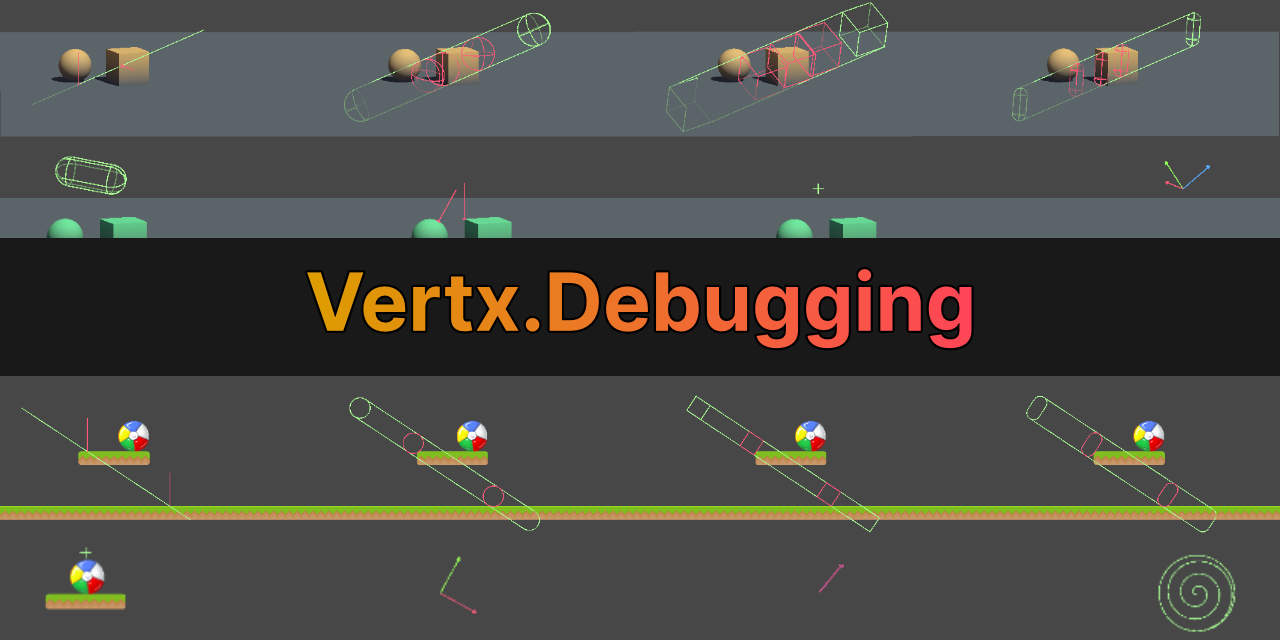
GitHub
Debugging utilities for Unity. Contribute to vertxxyz/Vertx.Debugging development by creating an account on GitHub.
rich adder
whats "in the insect"
stuck current
rich adder
wat?
Meta dosent have a Mac version for their desktop app so you can’t link your headset I’m asking if there’s any alternative ways
rich adder
stuck current
Meta dosent have a Mac version for their desktop app so you can’t link your head...
whats that got to do with unity coding question
stuck current
rich adder
whats that got to do with unity coding question
There was nowhere else to put it
rich adder
stuck current
There was nowhere else to put it
if its unity related somehow then #🥽┃virtual-reality
polar acorn
rich adder
whats "in the insect"
I think they meant "inspector"
rich adder
ah ok
polar acorn
By which they probably actually meant "Editor"
But if your headset just isn't compatible with your OS, you aren't going to get far. You should consider getting an actual computer instead of a computer-shaped cellphone.
 grand snow
I presume this app exists for desktop vr and windows is the major platform for this
mac desktop gaming is dead or half dead and well linux is a second thought only some consider
 subtle bronze
ive only just started with unity, how come a public inputsystem doesnt show up in the editor for the script its in and then whines that not even enable is a real function?
subtle bronze
grand snow
perhaps share some code? !code
using UnityEngine.InputSystem; // required

public class NewPlayerController : MonoBehaviour
{

    public InputAction playerControlsNew;
    void OnEnable()
    {
        playerControlsNew.enable();
    }
case sensitive
subtle bronze
what a pain in my ass this whole engine is, thank you for helping me
rich adder
grand snow
I presume this app exists for desktop vr and windows is the major platform for t...
arm chips seem promising in growth for a decent market, about vr probably not any time yet unless you count vision, dropping games like cyberpunk for mac recently
grand snow
subtle bronze
what a pain in my ass this whole engine is, thank you for helping me
hate to brake it to you but basically every programming lang that exists is like this, you were lazy or your IDE is not setup correctly to let you catch this simple error right away.
!ide
radiant voidBOT
grand snow
!ide
💡 IDE Configuration
If your IDE is not autocompleting code or underlining errors, please configure it.
Select one:
•  Visual Studio (Installed via Unity Hub)
• Visual Studio (Installed manually)
•  VS Code
•  JetBrains Rider
• :question: Other/None
grand snow
@subtle bronze ^ ensure its configured properly using the above
rich adder
subtle bronze
what a pain in my ass this whole engine is, thank you for helping me
not fault of the engine lol
grand snow
rich adder
arm chips seem promising in growth for a decent market, about vr probably not an...
true but the amount of games that have native mac releases is super low and shows why apple are also trying to make their own version of proton
silver fern
polar acorn
Try this package to make your overlap calls visible and see if they match up wit...
thanks. They don't match up at all and I have no idea why
it's detecting a ground collision here but ground is only the white stuff at the bottom
 rich adder
grand snow
true but the amount of games that have native mac releases is super low and show...
rich adder
grand snow
true but the amount of games that have native mac releases is super low and show...
true true. I'm just being hopeful in a bigger market xD
rich adder
silver fern
it's detecting a ground collision here but ground is only the white stuff at the...
what is?
silver fern
rich adder
what is?
the collisions list from Physics2D.OverlapCollider(bulletCollider, collisions);
rich adder
is it set to ignore self / player and all that?
silver fern
yes but why does it detect ground collision
rich adder
are you talking about the green line on the character?
silver fern
rich adder
are you talking about the green line on the character?
no the collider on the yellow shape
rich adder
the function returns collider so print name of what is capturing
silver fern
rich adder
the function returns collider so print name of what is capturing
it does print the name of the white ground object, but why
they're not even close
they're obviously not touching
rich adder
are you passing in the correct collider ?
silver fern
rich adder
are you passing in the correct collider ?
it has to be, its type PolygonCollider and it's the only PolygonCollider I'm using rn
bulletCollider = GetComponent<PolygonCollider2D>();in Start()
rich adder
silver fern
`bulletCollider = GetComponent<PolygonCollider2D>();`in Start()
if thats the only collider then should be fine..how many results are you returned with collisions.Count/Length
silver fern
rich adder
if thats the only collider then should be fine..how many results are you returne...
3, two of them are as expected
being the background and player
rich adder
is this thing a moving object ?
rich adder
silver fern
being the background and player
collider background?
silver fern
rich adder
is this thing a moving object ?
no it just appears, checks collision and disappears, but stays stationary
silver fern
rich adder
collider background?
yeah I use that to remove bullets that leave the playing field
rich adder
its not parented to mouse or anything
silver fern
the collider?
rich adder
yea
checks collision and disappears, but stays stationary
like rotation with mouse or any of that
silver fern
it goes in the direction of the mouse yeah but it shouldn't be parented
it just gets a direction vector
rich adder
its like an instantiated object ?
silver fern
yep, its instantiated in the attack script, but it appears in the scene hierarchy on the top level so I don't think it's parented to it in any way
I certainly didn't parent it explicitly
 languid pagoda
i got it working but I definitely need to find the non existent artist in me to make it look good 😂 .
How do I make it so the particles live longer before being destroyed?

 main grove
Hi sorry can i ask questions about game here?
silver fern
main grove
Hi sorry can i ask questions about game here?
about game code
languid pagoda
main grove
i need an help for a meccanics
ask your question
main grove
I’m making a 3D Unity game. It’s not my first, but I’m not very good yet, so I’m asking for help from more experienced people.
I want a “magnet” mechanic: the player has a sphere collider around them that detects objects (by tag or script). If they’re inside, the player attracts them. If I click the left mouse button, the effect inverts and the player repels them, like a real magnet.
I already made a script for attraction/repulsion (pasted at the end), but the result isn’t what I expected. I’d love some guidance — not full code from scratch, but maybe how to structure functions, or a simple customizable tutorial so I can learn for the future.
My idea:
Objects inside the trigger collider are attracted.
Left click repels them with opposite force.
Close to the player, they should orbit or stop on contact with a smaller inner collider, so they don’t push into the player or cause bugs (like flying away).
Maybe later I’ll add object switching or animations, but that’s secondary.
This is my concept. Any help would be greatly appreciated.
SCRIPT:
Attached file.
this
is big i know
silver fern
languid pagoda
https://streamable.com/y3h50v
i got it working but I definitely need to find th...
go to particle system properties and change lifetime
languid pagoda
silver fern
go to particle system properties and change lifetime
ok this worked but the trail of smoke moves with the car. is there a way to make it so the particles de child themselves in the system
silver fern
languid pagoda
ok this worked but the trail of smoke moves with the car. is there a way to make...
set particle system simulation space to world
languid pagoda
silver fern
set particle system simulation space to world
Hmm so that makes it kinda stay still. Is there like a good resource for learning the particle system? There are way too many options in here to just goof around with .
https://streamable.com/k9spr5
 silver fern
I suppose you gotta decrese the lifetime again then
Unity Learn
Free tutorials, courses, and guided pathways for mastering real-time 3D development skills to make video games, VR, AR, and more.
languid pagoda
10 seconds is about how long it takes for the smoke from burning out takes
is there like a setting for a natural dispersion?
silver fern
look at velocity over lifetime
 rocky canyon
languid pagoda
10 seconds is about how long it takes for the smoke from burning out takes
rocky canyon
languid pagoda
10 seconds is about how long it takes for the smoke from burning out takes
in this example you'd want ur Duration to be 10 as well..

that way ur Lifetime of the particle has the time it needs to last for 10 sec
then for dispersion it a combo of color over lifetime -> alpha 0
size over lifetime -> towards zero etc
yea theres alot there to unpack.. but its not too bad (theres only a few that really matter all that much)
if ur doing it as a burnout u probably wouldnt need to be looping..

also nice to use the little gizmo 👇 (makes testing it alot easier)
languid pagoda
rocky canyon
how do I edit the shape of the curve lol\
like i can click it but the curve editor doesn't pop up
 languid pagoda
lol thanks
 languid pagoda
had it scrolle ddown
rocky canyon
yup yup 👍
languid pagoda
appreciate it!
rocky canyon
np, and it just takes fiddling with it to learn.. you kinda get the hang of it as u work with it
for me the duration was the most confusing.. b/c u have the main duration.. and u have the start lifetime
which is a little different
but just for a simple example..
think of it like this
if ur Main Duration is 10
and you have it set to Loop
and ur particle Lifetime is 5..
then (2) sets of particles would exist within that (10) second timeframe
https://www.youtube.com/watch?v=0HKSvT2gcuk
https://www.youtube.com/watch?v=FEA1wTMJAR0
heres a couple of crash-course rundowns @languid pagoda
languid pagoda
rocky canyon
but just for a simple example..
think of it like this
if ur Main Duration is 10
...
huh thats a pretty odd way to make it but thanks for clarifying for me!
im going to give those videos a watch
rocky canyon
ya, i wouldnt make it like that.. but it kinda shows the difference
if u set ur start lifetime to 10.. it wouldnt make sense for ur main duration to be anything less
thats kinda the point i was trying to make
mine are ususally the same...
 rocky canyon
main grove
I’m making a 3D Unity game. It’s not my first, but I’m not very good yet, so I’m...
rocky canyon
main grove
I’m making a 3D Unity game. It’s not my first, but I’m not very good yet, so I’m...
for a stable magnet mechaic i'd keep the player responsible only for detecting and applying forces
and let hte objects just be "magnetizable" rigidbodies.. use a normalized direction vector and scale that force by distance (clamped so its not too week far away or explosive up close).. switching between attraction and repulsion would be as simple as just inverting the force when input is pressed (-force)
to stop objects from clipping into the player you could add a smaller inner trigger zone where you either zero out their velocity once they enter... to make them stick or.. add a sideways force so they orbit..
handle all the phyics in FixedUpdate() and give the objects some drag so they dont fling uncontrollably.. start simple and work ur way up to the full mechanic
if it were me i'd just start with attraction.. get all the behaviour worked out.. (like the clipping and all that crap)
then it'd be easy enough to refactor it to add repulsion as well.. then if u wanna go all out u could use falloff Curves to refine how exactly it would feel..
what exactly does the mechanic do?
like whats the purpose of this mechanic? it might clear up some things
instead of Stay()
i'd use Enter and Exit
    void OnTriggerEnter(Collider other)
    {
        if (other.CompareTag("Magnetizable"))
        {
            Rigidbody rb = other.attachedRigidbody;
            if (rb != null && !magnetizedObjects.Contains(rb))
                magnetizedObjects.Add(rb);
        }
    }

    void OnTriggerExit(Collider other)
    {
        Rigidbody rb = other.attachedRigidbody;
        if (rb != null) magnetizedObjects.Remove(rb);
    }``` and I'd have a "Collection" of these objects
in the rest of the code you could loop thru the list applying the logic to each onei rememeber not too long ago i did a 2D black-hole mechanic.. and i believe thats how i did it as well..
just adding the objects to a List<> and removing them once they exited
 chilly vigil
rich adder
chilly vigil
chilly vigil
rich adder
chilly vigil
wdym "as an text object"
chilly vigil
rich adder
wdym "as an text object"
instead of an [serilzedField] priavte Tranform
 rich adder
chilly vigil
instead of an [serilzedField] priavte Tranform
rich adder
chilly vigil
instead of an [serilzedField] priavte Tranform
i don't understand what you want to do..
if you already serializefield the other TMP_Text why do you want to write name like that
main grove
rocky canyon
i rememeber not too long ago i did a 2D black-hole mechanic.. and i believe that...
thx tomorrow i try if i have time and let you know
chilly vigil
rich adder
i don't understand what you want to do..
if you already serializefield the other...
instead of an [serilzedField] private Tranform, basicly my highscore won't work with find and so i used gpt and it pointed me to [selized] tmp_pro.
rich adder
chilly vigil
instead of an [serilzedField] private Tranform, basicly my highscore won't work ...
[SerializeField] TMP_Text myText was correct
you just have to drag the text you want to change into it
the gameobject that holds it works too
chilly vigil
code monkey alway says thst you should use [serlizeField] for string intead of find()
rich adder
its often better to link it through the inspector, sure
rocky canyon
the correlation is bad tho..
- you shouldn't ever want to use
Find()for anything unless you need to.. - you should assign mostly everything you can in the inspector when possible edit: until you get familiar with coding.. then you can assign things via code to exclude that step too, assigning things in the inspector makes it easier to change those things
- to do step 2 you should always lean on using
[SerializeField] privaterather than apublicfield
3a.publicfields are for fields you wan't to access publicly from elsewhere (other scripts)
also.. might wanna tighten up on your keyboard control as well..
coding is gonna be a bad time for you if you make typical spelling and grammar mistakes
rich adder
3a I'd prefer a Method or Property over a public field ever, much better options too
gives you flexibility to invoke react to change or run some logic
rocky canyon
also very true
rich adder
chilly vigil
instead of an [serilzedField] private Tranform, basicly my highscore won't work ...
you should probably be careful with that gpt shit
languid pagoda
rich adder
you should probably be careful with that gpt shit
gpt can write some pretty advanced code
it wrote this multiline playable graph for me i just gotta feed the slip angles of the tires in, it can be used for lots of stuff and all I gotta do to use it drop it on an empty gameobject inside a canvas.
https://streamable.com/gvao61
 rich adder
languid pagoda
gpt can write some pretty advanced code
rich adder
languid pagoda
gpt can write some pretty advanced code
ohh this old song and dance i heard hundreds of times
writing code isnt even the main issue
languid pagoda
whats the issue?
i use it to write code I can probably write myself but cant be bothered doing
ie the graph
 crimson fable
so, im new here, and i have a problem
rich adder
languid pagoda
whats the issue?
too many to list..
languid pagoda
rich adder
too many to list..
ok
languid pagoda
to say it doesn't have use is ignorant though
its a tool no different than visual studio or unity
 slender nymph
let's keep the AI discussion where it belongs: https://discord.com/channels/489222168727519232/1352599815770341479
crimson fable
for the experienced, its super simple
but im working on a thirdpersongame and i nailed idle and running animations, but i have no idea wtf im doing, and for the life of me i cant get jumping/in air animations
ive tried many resources, and i cant get it to work
slender nymph
show relevant code
crimson fable
slender nymph
show relevant code
thank you
rich adder
languid pagoda
to say it doesn't have use is ignorant though
nowhere did i even say that.. but yes this is offtopic anyway
rich adder
crimson fable
for the experienced, its super simple
but im working on a thirdpersongame and i...
👇
radiant voidBOT
rich adder
👇
Posting code
📃 Large Code Blocks
Use links to services like:
https://paste.mod.gg/, https://hastebin.skyra.pw/, https://paste.ofcode.org/, https://paste.myst.rs/
📃 Inline Code
Surround code with three backquotes. Not quotation marks.
To format as C#, add cs to the first line:
```cs
// Your code here
```
Add a comment with a line number if there is an error message.
slender nymph
 alpine crystal
Bro can anyone help me
alpine crystal
Oh I might have been doing that because I've been needing help so bad
@rich adder
 frosty hound
alpine crystal
Oh I might have been doing that because I've been needing help so bad
frosty hound
alpine crystal
Oh I might have been doing that because I've been needing help so bad
As you were told, ask a question. Stop pestering.
rich adder
if you needed help so urgently you'd actually ask the question in detail
alpine crystal
frosty hound
As you were told, ask a question. Stop pestering.
Ok
alpine crystal
frosty hound
As you were told, ask a question. Stop pestering.
I didn't know I'm not really used to being here it's just a simple question but okay
#💻┃unity-talk for some reason it's blocked for this when you try to say help me please
frosty hound
A simple question you have refused to ask for some odd reason.
rich adder
lol true you been blabbin everything but the question
alpine crystal
frosty hound
A simple question you have refused to ask for some odd reason.
What are you talking about
frosty hound
What is your question?
alpine crystal
frosty hound
What is your question?
So I made something on blender and I've been trying to figure out how to paste it in until unity project and I've been trying to switch for so many tutorials and nothing helps because it's so old
rich adder
export to fbx -> drag into unity. done
frosty hound
First of all, not a coding question.
Secondly, export it as an FBX and drag it into Unity.
alpine crystal
Okay cuz I might even use it differently but I couldn't find where I can ask the question the general doesn't allow you to say what I need which is stupid but yeah I guess I can go back and replace it and then do it again I'll grab my PC but thank you
rich adder
alpine crystal
Okay cuz I might even use it differently but I couldn't find where I can ask the...
you were typing just fine in UnityTalk...You probably tried to spam multiple messages and got bot blocked
alpine crystal
rich adder
you were typing just fine in UnityTalk...You probably tried to spam multiple mes...
Oh
rich adder
next time open up with a question to your problem giving all the context and details in one message, no need to spam multiple "help" sentences, it does nobody any good just delays the help process..
alpine crystal
Ok now could you explained export it as an FBX and drag it into Unity. Like how do you fully do that cuz I'm going on unity right now to my project
rich adder
alpine crystal
Ok now could you explained export it as an FBX and drag it into Unity. Like how ...
You can just look up how to export fbx from blender, surely you exported a model before if you used blender to any capacity ? there is nothing different to it..
Put into unity project window / assets folder, if you used a computer you know how to drag a file into a program..
alpine crystal
rich adder
You can just look up how to export fbx from blender, surely you exported a model...
How do you change a project name
rich adder
alpine crystal
How do you change a project name
you should google these basics things.
close project. Rename the folder. Add it to Unity hub once more.
delete any .csproj/.sln files to regenerate them to new name
rich adder
alpine crystal
Okay but for the AI probably when you give me a full example
I have no idea what you are talking about here..also again this is a code channel you should move it to approriate channel if its related to unity..
subtle bronze
why does the capsule collider from a character controller module make the object slowly sink into the floor? also why does .Move choke up with 3 arguments when its a vector3? do people even use this garbage script? horrible to work with
rich adder
subtle bronze
why does the capsule collider from a character controller module make the object...
you should not be adding a capsule collider to character controller
subtle bronze
no i mean the one that it makes
rich adder
then idk what you mean slowly sink into floor. there shouldn't be anything sinking it unless you coded something wrong
subtle bronze
i figured it out, i tried setting up a rigidbody for the player bc i didnt think a character controller natively had movement
alpine crystal
rich adder
I have no idea what you are talking about here..also again this is a code channe...
I good now thx
 upper tendonBOT
That command does not exist. Use =help to see all the commands.
 worn bay
Why don't these add up, like where did the remaining 7.35ms came from?

 north kiln
TryGetValue itself
worn bay
oh :v
 lilac wave
I really need hell wkth a game im making!
 gentle bone
!learn
radiant voidBOT
gentle bone
!learn
:teacher: Unity Learn ↗
Over 750 hours of free live and on-demand learning content for all levels of experience!
lilac wave
Please I would greatly appreciate help! I have the whole game premise and stuff in there if you wanna help!
!learn
radiant voidBOT
lilac wave
!learn
:teacher: Unity Learn ↗
Over 750 hours of free live and on-demand learning content for all levels of experience!
gentle bone
you should check this out.. https://learn.unity.com/course/3d-stealth-game-haunted-house
lilac wave
gentle bone
you should check this out.. https://learn.unity.com/course/3d-stealth-game-haunt...
Me?
gentle bone
yes..
lilac wave
gentle bone
yes..
What do you keep adding a ".." to the end of your sentences?
gentle bone
just a habit.. from IRC times^^
lilac wave
Oh okau
lilac wave
gentle bone
just a habit.. from IRC times^^
Do you mind helping me a bit now?
gentle bone
just check the learn site with the ghost haunt game...
as ive read you try doing some stealth game reaching from point a to b.. with guards etc..
lilac wave
lilac wave
Do you mind helping me a bit now?
I can't im on mobile rn it's dying when I use mobile
lilac wave
gentle bone
as ive read you try doing some stealth game reaching from point a to b.. with gu...
Yeah
gentle bone
thats mostly what the ghost game is..
lilac wave
Now that I think of it, it was more like 2 years ago
lilac wave
gentle bone
thats mostly what the ghost game is..
Oh alr but like can you help with coding still like rn?
gentle bone
just check the site.. its a complete tutorial with codes etc..
lilac wave
I did I don't know what im looking at lol cuz my browser his bananas when I use my phone for no reason
gentle bone
then check out on a desktop environment..
lilac wave
I can't it's 4:00AM
gentle bone
then do it later^^..
lilac wave
gentle bone
then do it later^^..
Okay so, you just don't wanna help rn besides that okay
gentle bone
im not here to do your coding... i gave you a hint for what you search...
 near wadi
lilac wave
Okay so, you just don't wanna help rn besides that okay
near wadi
lilac wave
Okay so, you just don't wanna help rn besides that okay
you were literally directed to a resource that covers most, if not all, of what you mentioned. you can also do the already mentioned learning portal learning. there is a tutorial there called John Lemon's Haunted Jaunt which covers many things too. Put In The Effort. and read the already linked to you #📖┃code-of-conduct
 fading barn
Is their some way that I make a new class that is inherited from a class that also is a component and the new class can also be a component. Can classes that inherit from class other than monobehaviour be used as components
 naive pawn
fading barn
Is their some way that I make a new class that is inherited from a class that al...
naive pawn
fading barn
Is their some way that I make a new class that is inherited from a class that al...
yes because they are also components
that's the point of inheritance
MonoBehaviour isn't even Component
Component is Component, and stuff extending MonoBehaviour are also components because they inherit Component
fading barn
So a class named component exist and monobehaviour and components (like rigidbody or collider) inherit from component class?
naive pawn
yes
worn bay
north kiln
TryGetValue itself
How do I know where did the rest of the time ms came from? I know it came from the method call itself, but I wanna know the specific intensive part within it if possible :')

(this is also in deep profiling)
 keen dew
What's visible there adds up to 41 ms (and probably more in the part that's not shown) so in this case the cause is the sum of multiple small things instead of one big thing
worn bay
keen dew
What's visible there adds up to 41 ms (and probably more in the part that's not ...
well here is the entire stack, and it left with remaining 11.52ms
 grand snow
worn bay
How do I know where did the rest of the time ms came from? I know it came from t...
grand snow
worn bay
How do I know where did the rest of the time ms came from? I know it came from t...
I think you can enable it showing GC alloc as well in the profiler which may also account for some of this time, not 100%
id make sure those optional things are enabled and then check again
worn bay
grand snow
I think you can enable it showing GC alloc as well in the profiler which may als...
the one on the side?
 grand snow
I think its in the call stacks dropdown button, someone correct me if wrong
 teal viper
worn bay
the one on the side?
teal viper
worn bay
the one on the side?
You need to expand it more. There's something pretty heavy happening on your object getting activated and you're activating a lot of them too.
worn bay
teal viper
You need to expand it more. There's something pretty heavy happening on your obj...

 teal viper
worn bay
teal viper
worn bay
What kind of objects are you activating? What components do they have?
Also, because of the cropped screenshots, it's not clear, but do you have deep profiling enabled?
worn bay
worn bay
(this is also in deep profiling)
Already stated here
teal viper
OK.
Another thing is that 900ms are coming from the editor, so might want to profile a build instead.
Or profile in the editor mode if you want to debug it.
worn bay
teal viper
What kind of objects are you activating? What components do they have?
Lanes and hitobjects
Respectively one dynamically pushes a mesh from vertices calculation in list, and the other is just 3D objects
Have been thinking about pooling the hitobjects but it's too tangled to do it atm
teal viper
worn bay
Lanes and hitobjects
Respectively one dynamically pushes a mesh from vertices c...
Well, whatever they're doing in Awake/Start/Enabled is probably quite heavy.
It's hard to say because of the editor noise. I'd suggest profiling a build.
worn bay
teal viper
Well, whatever they're doing in Awake/Start/Enabled is probably quite heavy.
It...
Building it now
grand snow
worn bay
Building it now
(must be dev build to support profiling)
worn bay
grand snow
(must be dev build to support profiling)
whoops, that was close 😅
Overlooked the build settings
grand snow
il2cpp may change perf a bit too but this should result in cleaner profiling
worn bay
grand snow
il2cpp may change perf a bit too but this should result in cleaner profiling
Are you implying I should switch to Mono, if I'm being pedantic?
grand snow
well no because if you plan to use il2cpp for prod then why profile with mono?
i wouldnt change it and i presume a built wont take more than 20 mins anyway
worn bay
ah crud it doesn't take mouse input
How do I simulate a touch input on a build?
@grand snow if you don't mind
grand snow
worn bay
<@123135850560225282> if you don't mind
Is this for mobile? If using input system you can have mouse input on your actions too or you need to add support for mouse explicitly for desktop.
Old input system makes touch work like mouse input but Input.touches is ofc only touch.
teal viper
worn bay
How do I simulate a touch input on a build?
If the target platform is mobile, you're probably better of profiling on mobile anyway.
worn bay
Yeah we're using the new one
worn bay
teal viper
If the target platform is mobile, you're probably better of profiling on mobile ...
Fair enough
grand snow
worn bay
Yeah we're using the new one
profiling does work on mobile dev builds. android can be done over the network and usb, ios I think is network only.
Try adding mouse input to your actions if using them instead of enhanced touch.
worn bay
teal viper
If the target platform is mobile, you're probably better of profiling on mobile ...
Generally I would be against it because I would presume it would be hell to do, constantly having to build the entire thing, update through apk, connect debugger, make changes, repeat
(I've never done mobile debugging before)
teal viper
worn bay
Generally I would be against it because I would presume it would be hell to do, ...
Incremental builds should be pretty fast. And your environment should be configured to get into profiler in a minute.
At least, if you're serious about releasing the game on that platform.
grand snow
mobile builds (especially with il2cpp) arent that fast
but to profile accurately its the only way
worn bay
I don't mind waiting, it's just the cumbersome work to update the changes on the target device
teal viper
If you built once already, a lot of stuff should be reused from the cache. Especially around assets and shader compilation, that is usually what's taking most of the time.
grand snow
yea and with android build and run will install the app for you via adb and then open it
worn bay
worn bay
Generally I would be against it because I would presume it would be hell to do, ...
So no manual update cycles required?
grand snow
you have to rebuild and update your app each time but it should build faster when little has changed
 jade elm
where can i find a developer or programmer, i want to commission for ai chatbot using 3d model in unity
grand snow
!collab
radiant voidBOT
grand snow
!collab
:loudspeaker: Collaborating and Job Posting
We do not accept job or collab posts on Discord.
Please, use Discussions to promote yourself as job-seeking, advertise commercial job offers, or look for non-commercial projects to participate in:
• ** Collaboration & Jobs**
grand snow
not here buddy
 ashen girder
Couldn't create 'C:\Program Files\Unity 6000.0.54f1\Editor\Data\Resources\PackageManager\BuiltInPackages\com.unity.modules.unityanalytics/~UnityDirMonSyncFile~e0dd5c6f5e53c6a4bac68e47894e86c2~'
I knoy this is a common error but is there a FAQ for how to solve it ? (i downloaded unity from the archive rather than unity hub)
I also tried to set the editor folder to full control
 raw sonnet
hey everyone! can someone please help me fix a scipt?
naive pawn
!ask
radiant voidBOT
naive pawn
!ask
:thinking: Asking Questions
:mag: Search the internet for your question!
:book: Use the API Scripting Reference and User Manual and this troubleshooting site for commonly posted issues.
:wrench: Attempt to debug your issue.
:thought_balloon: Find an appropriate channel by reading the name and description in #🔎┃find-a-channel
:grey_question: And don't ask to ask, ask a full question illustrating with screenshots if needed.
-# For more posting guidelines, go to #🌱┃start-here
naive pawn
@raw sonnet we can't help without info about your issue 😉
 tidal shuttle
is ts code viable for camera switching https://pastebin.com/VzupdYFr
Pastebin
Pastebin.com is the number one paste tool since 2002. Pastebin is a website where you can store text online for a set period of time.
raw sonnet
naive pawn
<@297734243768074241> we can't help without info about your issue 😉
can i send the error and the code?
radiant voidBOT
naive pawn
!code
Posting code
📃 Large Code Blocks
Use links to services like:
https://paste.mod.gg/, https://hastebin.skyra.pw/, https://paste.ofcode.org/, https://paste.myst.rs/
📃 Inline Code
Surround code with three backquotes. Not quotation marks.
To format as C#, add cs to the first line:
```cs
// Your code here
```
Add a comment with a line number if there is an error message.
naive pawn
tidal shuttle
is ts code viable for camera switching https://pastebin.com/VzupdYFr
well, does it work?
tidal shuttle
naive pawn
well, does it work?
yes
naive pawn
then it's "viable", yes
tidal shuttle
alright thank you
worn bay
grand snow
yea and with android build and run will install the app for you via adb and then...
update, I found this on build profiling
 teal viper
worn bay
update, I found this on build profiling
teal viper
worn bay
update, I found this on build profiling
Well, 22k calls to an indexer is a lot, but it might also be the deep profiling mode that adds a lot of overhead to it.
worn bay
this is definitely not adding up
 teal viper
It does. Self time means that it's the code inside the method itself that is taking all the time. Not one of the children in the profiler

I'd suggest putting several profiler markers in your UpdateMesh method to see what parts of it are heavy.
worn bay
teal viper
I'd suggest putting several profiler markers in your `UpdateMesh` method to see ...
never heard of that
teal viper
worn bay
never heard of that
grand snow
Good god yea 2 seconds is bad.
Markers will help increase the detail of this data
You can also use stopwatch to time async things
worn bay
grand snow
You can also use stopwatch to time async things
whats that
worn bay
grand snow
Good god yea 2 seconds is bad.
Markers will help increase the detail of this dat...
in deep profiling btw
grand snow
worn bay
whats that
Stopwatch is a type to let you measure time passed
slow blaze
Application.persistentDataPath how can I send this data on github?, also is it kept on build?
 tall heart
did anybody learn by making games with unity tutroials
silver fern
yeah
 warm magnet
following code monkey course, can someone explain why this doesnt work?

 strong wren
warm magnet
following code monkey course, can someone explain why this doesnt work?
strong wren
warm magnet
following code monkey course, can someone explain why this doesnt work?
You most likely missed something
silver fern
warm magnet
following code monkey course, can someone explain why this doesnt work?
afaict you're trying to initialize getScoreMultiplier at a time when scoreMultiplier does not have a value yet
warm magnet
silver fern
afaict you're trying to initialize getScoreMultiplier at a time when scoreMultip...
ahhh ok thx 👍
 hexed terrace
That's (probably going to be) a property - they've just missed a symbol
silver fern
I noticed something weird about my projectile collider. When it's pointed to the right, it detects collision with the white ground object, and when it's pointed to the left it does not, regardless of it actually touching the ground or not. Anyone have any ideas why it would do that?

this thing is driving me crazy
I tried Collider2D.Overlap, Physics2D.OverlapCollider and PhysicsScene2d.OverlapCollider and they all give me the same results
 silver maple

Trying to make vs recognize the movement crap. ( ie :MonoBehaviour) It's not having it. Any advice
grand snow
silver maple
update visual studio editor package in your project
make sure unity has visual studio set to the external editor
otherwise follow the !ide guides
!ide
radiant voidBOT
grand snow
!ide
💡 IDE Configuration
If your IDE is not autocompleting code or underlining errors, please configure it.
Select one:
• Visual Studio (Installed via Unity Hub)
• Visual Studio (Installed manually)
• VS Code
• JetBrains Rider
• :question: Other/None
silver fern
or does anyone have any ideas on how to debug the collisions beyond printing out the colliding object names?
or do I have to write my own collision logic somehow
grand snow
the unity physics debugger will help you out and may be better incase you are using the gizmos incorrectly
silver fern
thanks I'll have a look at that
is meshcollider the same as polygoncollider?
because it doesn't have an option for polygon colliders
silver fern
yeah
grand snow
That should be pretty good but if you are getting colissions that dont make sense then you probably did something wrong
more likely your gizmo is wrong than physics 2d
You can try things like using Debug.Break() to pause the game when a collision happens so you can check what state things are in
silver fern
gizmo being the collider?
using break here right as the collisions are detected, and everything looks the way it should be, but it's still detecting the ground collision when pointed to the right side

the purple box is what vertx is showing me, so the colliders are definitely in the right location afaict
silver fern
grand snow
how can it collide if its not anywhere close?
that is exactly my question. I can't explain the results I am seeing
grand snow
do what i suggeted use Debug.Break() to pause the game when this bad collision happens so you can check the game state
silver fern
grand snow
do what i suggeted use Debug.Break() to pause the game when this bad collision h...
I did, afaict the state is as it should be
ashen girder
Is the 3d mobile template good if i wanted to make something for android ? Or is 3d universal still the best
 silver fern
except for that collision
grand snow
silver fern
I did, afaict the state is as it should be
try greatly simplifying the collider to just have 4 verts or use another collider type.
grand snow
ashen girder
Is the 3d mobile template good if i wanted to make something for android ? Or is...
might as well use 3d mobile, it surely uses urp anyway
ashen girder
Alright thanks
silver fern
grand snow
try greatly simplifying the collider to just have 4 verts or use another collide...
I'm using a normal CapsuleCollider2D now and it has the exact same issue
how is this even possible
grand snow
i wonder if its how you move the object when you look left/right
silver fern
it doesn't actually move, it gets instantiated with a rotation, checks collisions once, and then disappears
wait a minute, is it possible that it checks collision before rotation
grand snow
hmm yea that sounds a bit sus
silver fern
bullet = Instantiate(ultimateAttackPrefab, projectileSpawnerTransform.position, gunHandTransform.rotation); but it's instantiated with the rotation so that shouldn't happen right
grand snow
do you change its parent or anything like that after?
silver fern
no not at all
silver fern
I just realized something weird
if i put Debug.Break(); in the line before instantiate, it will still show the projectile on the break
shouldnt it stop before that?
I think I just saw the projectile very briefly appear in a wrong rotation before correcting itself for like 1 frame and I'm trying to capture that but no luck
is there any way to make sure the rotation happens before anything else?
naive pawn
silver fern
shouldnt it stop before that?
it pauses at the end of the frame
silver fern
I fixed it in a really stupid way
instead of applying rotation in code I edited the sprite to be pre rotated and now it works
thanks for help rob
 west sonnet
Is using "Resources.Load<GameObject>("PathToPrefab")" bad game design?
silver fern
for some reason, it checked collision before rotation even when I apply a rotation in Awake()
silver fern
west sonnet
Is using "Resources.Load<GameObject>("PathToPrefab")" bad game design?
depends on what are you doing exactly
I'd say that line by itself is not game design
naive pawn
it's probably a bad practice but it's unrelated to gamedesign, yeah
more about architecture
if it's a constant string, just.. use a serialized reference, this is arguably more work
rich adder
silver fern
instead of applying rotation in code I edited the sprite to be pre rotated and n...
dang i knew it had to do with rotation just couldnt put my finger on it..
silver fern
rich adder
dang i knew it had to do with rotation just couldnt put my finger on it..
it was really hard to tell
rich adder
silver fern
it was really hard to tell
hah yea.. at least its finally fixed 😮💨
 patent wedge
LerpAngle's values aren't in 360 range?
Vector2 Vel = (LastMousePos - UIMousemove.action.ReadValue<Vector2>()) * Time.deltaTime;

bool moving = UIMousemove.action.ReadValue<Vector2>() != LastMousePos;
float angle = Mathf.Atan2(Vel.x, -Vel.y) * Mathf.Rad2Deg;

var AngleSpeed = moving ? (MovingSpeed * Vel.sqrMagnitude) : StillSpeed;
currentAngle = Mathf.LerpAngle(currentAngle, moving ? angle : 45, Time.deltaTime * AngleSpeed);

Quaternion val = Quaternion.Euler(new Vector3(0, 0, currentAngle));

transform.rotation = val;
``` i've debugged angle and that appears to be in 360 range but not LerpAngle? (ps should velocity be divided or multipied by deltaTime)multiplied
silver fern
patent wedge
LerpAngle's values aren't in 360 range?
```
Vector2 Vel = (LastMousePos - UIMous...
"Description
Same as Lerp but makes sure the values interpolate correctly when they wrap around 360 degrees.
This method returns the shortest path between the specified angles. This method wraps around values that are outside the range [-180, 180]. For example, LerpAngle(1.0f, 190.0f, 1.0f) returns -170.0f. To find the longest path use Lerp."
patent wedge
silver fern
"Description
Same as Lerp but makes sure the values interpolate correctly when t...
yeah i know that but the values's im getting aren't in that range. i'm getting values like -2834.33
silver fern
patent wedge
yeah i know that but the values's im getting aren't in that range. i'm getting v...
what's your value for t?
 cunning bramble
Yo guys i need help so i have an plant and i want so see it from an diff ancle so i made an script and wenn i press E it gets me there but i want it so that it only works if i am near by any ideas?
A tool for sharing your source code with the world!
patent wedge
silver fern
what's your value for t?
you can see it in the code?
rich adder
cunning bramble
Yo guys i need help so i have an plant and i want so see it from an diff ancle s...
distance check or overlap
cunning bramble
overlap?
silver fern
patent wedge
you can see it in the code?
whats the actual value
rich adder
cunning bramble
overlap?
yes like OverlapSphere to grab all colliders within a radius.
distance check could suffice too..
patent wedge
silver fern
whats the actual value
i have it 1440.
silver fern
patent wedge
i have it 1440.
it has to be between 0 and 1
patent wedge
silver fern
it has to be between 0 and 1
time.deltaTime isn't always between 0 - 1? and also remember i'm multiplying the value by velocity also.
silver fern
patent wedge
time.deltaTime isn't always between 0 - 1? and also remember i'm multiplying the...
make sure it ends up between 0 and 1
after multiplication
patent wedge
silver fern
make sure it ends up between 0 and 1
so...
Mathf.LerpAngle(currentAngle, moving ? angle : 45, Time.deltaTime * Mathf.Clamp01(AngleSpeed));
silver fern
0 is the start point, 1 the end point
subtle bronze
how am i intended to transform another game object? my code looks something like this and it says object reference not set to instance of an object
    void Awake()
    {
        GameObject playerCamera = GameObject.Find("PlayerCam");
    }
    void Update()
    {
        playerCamera.transform.Rotate(0, 0, lookInput.y * mouseSens, Space.World);
}```I might have got it https://paste.ofcode.org/TZP3ZcCTyE4M6emDvrFCUL
@grand snow
 patent wedge
silver fern
make sure it ends up between 0 and 1
patent wedge
silver fern
make sure it ends up between 0 and 1
ok... that's just made it slow not actually fixing my problem.
rich adder
subtle bronze
how am i intended to transform another game object? my code looks something like...
ur storing playerCamera locally, not assigning the field
whatever is assigned, is only done within Awake()
silver fern
patent wedge
ok... that's just made it slow not actually fixing my problem.
you can think of t like a progress bar for your lerp, 0 is 0%, 1 is 100% aka the end of your lerp
subtle bronze
rich adder
ur storing playerCamera locally, not assigning the field
whatever is assigned, i...
what, in awake? am i supposed to have it in update? i thought finding it would be a massive performance hit if its done every frame
silver fern
subtle bronze
how am i intended to transform another game object? my code looks something like...
try making camera a serialized field and dragging in the camera object in the inspector
rich adder
subtle bronze
what, in awake? am i supposed to have it in update? i thought finding it would b...
no you would just store it once in awake... no need to keep assigning in Update.
Anyway, its also better to just assign it in the inspector if its possible
you have to distinguish between Local variables and Fields, need to refresh on c# basics
grand snow
worn bay
I might have got it https://paste.ofcode.org/TZP3ZcCTyE4M6emDvrFCUL
<@1231358505...
Are you sampling animation curves for these? currentLaneStep.StartEaseX.Get(x)
and what is f_addLine(), a member func or a delegate?
rich adder
@subtle bronze
void Awake(){
int myNumber = 3;}

void Method(){
myNumber = 2; // error because myNumber only exists in Awake
}```that made it work, thank you
worn bay
grand snow
and what is f_addLine(), a member func or a delegate?
a method to push vertices data into a list (inefficient, I know)
void f_addLine(Vector3 start, Vector3 end)
{
    // No AddRange here because the alloc overhead adds up
    _Verts.Add(start);
    _Verts.Add(end);

    if (_Verts.Count > 2)
    {
        _Tris.Add(_Verts.Count - 4);
        _Tris.Add(_Verts.Count - 2);
        _Tris.Add(_Verts.Count - 3);
        _Tris.Add(_Verts.Count - 2);
        _Tris.Add(_Verts.Count - 1);
        _Tris.Add(_Verts.Count - 3);
    }
}
-# disclaimer I didn't wrote this so idk the numbers here
rich adder
subtle bronze
that made it work, thank you
okay but do you understand why previously it didn't work ? thats more important
grand snow
worn bay
a method to push vertices data into a list (inefficient, I know)
```cs
void f_ad...
well apart from whatever that Add() stuff is, do you create these lists with a good size?
cunning bramble
@rich adder thank you got it but now is there an problem so my player is blocking the view and i cant deaktivate him bc the camera is at the player so what could i do guys?
subtle bronze
rich adder
okay but do you understand why previously it didn't work ? thats more important
because once it got set in awake, no other void could see the value that awake set
silver fern
cunning bramble
<@968604165150507078> thank you got it but now is there an problem so my player...
make player transparent when camera is close?
worn bay
grand snow
well apart from whatever that Add() stuff is, do you create these lists with a g...
I set the capacity to the lists
        private static readonly List<Vector3> _Verts = new(2048);
        private static readonly List<int>     _Tris  = new(1024);
i dont understand wdym? @silver fern
rich adder
subtle bronze
because once it got set in awake, no other void could see the value that awake s...
only because it was Local (you declared another camera in the method)
private GameObject playerCamera;
    void Awake(){
        playerCamera = GameObject.Find("PlayerCam");
    }
    void Update(){
        playerCamera.transform.Rotate(0, 0, lookInput.y * mouseSens, Space.World);
    }```
this would work..
but again, most times you want to assign inspector and avoid Find.the player is blocking the view when the camera is right on the player?
cunning bramble
Wait i show you
naive pawn
patent wedge
LerpAngle's values aren't in 360 range?
```
Vector2 Vel = (LastMousePos - UIMous...
this is wronglerp btw
https://unity.huh.how/lerp/wrong-lerp
🤔 Unity, Huh, How?
Applying lerp so that it produces smooth, imperfect movement towards a target value.
rich adder
cunning bramble
<@968604165150507078> thank you got it but now is there an problem so my player...
blocking it in what way ? what do you want to do change the angle or hide the player?
if latter just disable the mesh momentarily
 silver fern
cunning bramble
silver fern
cunning bramble
move camera in front or make player invisible maybe
rich adder
ok so what do you want to do..
Hide the player or change the angle
rich adder
then you just reference the mesh component and disable it
no need to shut down entire gameobject for just visuals..
cunning bramble
okay let me try it out
rich adder
[SerializeField] Renderer r
r.enabled = isPlayerVisisble
cunning bramble
Okay
So i made this but the codilor is still active but i think i deactivated it 🙁
A tool for sharing your source code with the world!
silver fern
whats the issue with the collider
cunning bramble
i cant click trouhg
rocky canyon
u can really easily check the inspector and see if its enabled or not during playmode

 rich adder
btw why are these MBs instead of just their component/script name
public MonoBehaviour cameraScript;
rocky canyon
should correspond to ur debug too..
rocky canyon
rich adder
btw why are these MBs instead of just their component/script name
`public Mo...
ive done that before.. as a list... so i could enable / disable multiple scripts at one ;D
cunning bramble
rocky canyon
Yes let me check
rocky canyon
shame on me.. lol
rich adder
ohh.. but if they're all MBs/components they should still have .enable no ? or is the list for like a "generic" @rocky canyon
rocky canyon
then its most likely some other issue besides that collider
naive pawn
cunning bramble
this is my problem guss
use mp4 to have it embed in discord
silver fern
cunning bramble
Yes so the capsule colider gets deactivaded
I think you should be able to set the collider to ignore raycast
cunning bramble
oh okay let me change it
rocky canyon
rich adder
ohh.. but if they're all MBs/components they should still have .enable no ? or i...
thats why I've done it in the past... so i can access .enable on diff scripts
dont know their excuse tho
rich adder
gotcha
rocky canyon
for a single script... i wouldnt see why u wouldnt use the class type
just for clarity
naive pawn
rich adder
ohh.. but if they're all MBs/components they should still have .enable no ? or i...
(Component doesn't have enabled, it's from Behaviour/Renderer/Collider/Collider2D)
cunning bramble
Urrmmm i cant keep up so what are my options now? xD
rocky canyon
👀 👓 CLARITY
cunning bramble
naive pawn
use mp4 to have it embed in discord
rocky canyon
cunning bramble
Urrmmm i cant keep up so what are my options now? xD
its probably not the collider thats the issue
rich adder
naive pawn
(`Component` doesn't have `enabled`, it's from `Behaviour`/`Renderer`/`Collider`...
oh yeah thats behaviour.. im buggin
rocky canyon
thats where we at
cunning bramble
rocky canyon
its probably *not* the collider thats the issue
hmm okay
rocky canyon
rich adder
oh yeah thats behaviour.. im buggin
good to bug from time to time
rocky canyon
cunning bramble
hmm okay
maybe some context
like the setup...
what are u trying to click thru..
and how
rocky canyon
yea but how u clicking? is it a raycast? are u using the eventsystem?
ahh its a raycast i see now
debug the hit of the raycast and see whats blocking it
cunning bramble
okay let me add it
rocky canyon
 topaz elbow
hii
rocky canyon
nav.. ur up
rich adder
topaz elbow
hii

please don't say just hello in chat
silver fern
cunning bramble
okay let me add it
https://docs.unity3d.com/ScriptReference/Physics.Raycast.html you want to use the layerMask for it so it ignores the player
 silver fern
yea
topaz elbow
yo gng, ive always been putting off learning c# because im scared that theres a massive difference if i watch a tut that uses smth like v2022, and im using unity 6 (v6000). is there acc a big diff in the coding part or am i just dumb?
cunning bramble
is there an easy way to do that?
silver fern
cunning bramble
is there an easy way to do that?
look at the link I posted
 sour fulcrum
topaz elbow
yo gng, ive always been putting off learning c# because im scared that theres a ...
sour fulcrum
topaz elbow
yo gng, ive always been putting off learning c# because im scared that theres a ...
pretty much none
topaz elbow
sour fulcrum
pretty much none
fr?
fading barn
naive pawn
yes because they are also components
I made a class that inherit from rigidbody but i cant add it as component on dragging it to a gameobject it says the script needs to derive from monobehaviour.
topaz elbow
damn, ive been putting it off since june
cunning bramble
So i deactivate the player layer
silver fern
topaz elbow
waiting for a unity 6 tut
!learn
radiant voidBOT
silver fern
!learn
:teacher: Unity Learn ↗
Over 750 hours of free live and on-demand learning content for all levels of experience!
topaz elbow
silver fern
!learn
I JS WATCHED AN HOUR OF THIS "CODEMONKEY" TUT, THIS IS WAY COOLER! (i understood barely anything)
tyyy
rocky canyon
codemonkey is more on the beginner -> novice side of things
topaz elbow
rocky canyon
codemonkey is more on the beginner -> novice side of things
so what should i use?
rocky canyon
unity's learn
rocky canyon
topaz elbow
codemonkey or !learn
 topaz elbow
and if i only wanna learn 3d, should i still watch the 2d section or is it not important?
rocky canyon
this is my suggestion
topaz elbow
rocky canyon
https://www.youtube.com/playlist?list=PLFt_AvWsXl0fnA91TcmkRyhhixX9CO3Lw
whats the difference?
cunning bramble
okay i dont understand nothing anymore bro like what do i need to do @rich adder @silver fern @rocky canyon
rocky canyon
2d and 3d work the same in terms of coding... u just use different components..
topaz elbow
rocky canyon
2d and 3d work the same in terms of coding... u just use different components..
oh, makes sense
😅
rocky canyon
cunning bramble
okay i dont understand nothing anymore bro like what do i need to do <@968604165...
create a layermask..
[SerializeField] LayerMask whatShouldRaycastHit;
topaz elbow
real
rocky canyon
plug that into the Raycast using the overload that takes the layermask
topaz elbow
rocky canyon
https://www.youtube.com/playlist?list=PLFt_AvWsXl0fnA91TcmkRyhhixX9CO3Lw
im js gonna do the unity one, ty!
rocky canyon
put the player on a layer called Player or something. and exclude that from the layermask
cunning bramble
I dont get it @rocky canyon
silver fern
cunning bramble
I dont get it <@317141358894645248>
you know what a layermask is?
cunning bramble
I got it guys @silver fern @rich adder @rocky canyon i really appricate it I THANK YOU ❤️

 rocky canyon
if its the correct project should be in this little Readme thing

or Tutorial folder check that
silver maple
Trying to make vs recognize the movement crap. ( ie :MonoBehaviour) It's not having it. Any advice
Have already updated visual studio editor package, set vs to the external editor in unity, and followed the ide guides but still got the issue
 grand snow
!ide
radiant voidBOT
grand snow
!ide
💡 IDE Configuration
If your IDE is not autocompleting code or underlining errors, please configure it.
Select one:
• Visual Studio (Installed via Unity Hub)
• Visual Studio (Installed manually)
• VS Code
• JetBrains Rider
• :question: Other/None
grand snow
silver maple
Trying to make vs recognize the movement crap. ( ie :MonoBehaviour) It's not hav...
its ide configuration time!
silver maple
ye I've followed all of that but not managed to get it going
silver fern
does serialize field actually prevent overwriting a value in code
grand snow
no
its just saved to the scene/prefab and applied on load
after that you can do what you want to it, but only AFTER Awake (well when Awake is executed its safe)
silver fern
this is really weird, I'm trying to change the value of a speed variable via a method but it keeps changing back to its original value when moving
silver maple
Trying to make vs recognize the movement crap. ( ie :MonoBehaviour) It's not having it. Any advice
Have already updated visual studio editor package, set vs to the external editor in unity, and followed the ide guides but still got the issue
Have already configured as per the guide
 grand snow
silver fern
this is really weird, I'm trying to change the value of a speed variable via a m...
grand snow
silver fern
this is really weird, I'm trying to change the value of a speed variable via a m...
animators can do this if the value is changed by an animation state
silver fern
ohh
grand snow
silver maple
Trying to make vs recognize the movement crap. ( ie :MonoBehaviour) It's not hav...
clearly not
 silver maple
I have done what the guide says to do, but yes that still claims to be compatable
grand snow
go to edit > preferences, make sure visual studio is the editor selected and THEN press "regenerate solution"
remember that vs code is not the same as visual studio
silver fern
thanks rob
silver maple
grand snow
clearly not
I have just done this again, but still it hasn't worked
grand snow
is your vs updated and has the unity tools feature added? Check in visual studio installer
 silver maple
yep have both installed
 topaz elbow
rocky canyon
or Tutorial folder check that
topaz elbow
rocky canyon
or Tutorial folder check that
nun there
silver maple
grand snow
is your vs updated and has the unity tools feature added? Check in visual studio...
I'd really appreciate any other ideas 🙁
grand snow
time to delete all sln and .csproj files in your project and try again
silver maple
grand snow
time to delete all sln and .csproj files in your project and try again
so delete those files and then regenerate them through unity?
grand snow
yea it will re make them for you
 hot wadi
Do u use abstract class or interface for state machines?
topaz elbow
topaz elbow
it aint here
could someone help?
silver maple
grand snow
yea it will re make them for you
That didn't work. but I restarted pc and then it allowed me to reload the 2 fucked up projects at the top which has now fixed my problem. Thank you for help 🙂
tall heart
After how many small games do you guys learn how to make a game without any help mostly
rocky canyon
topaz elbow
it aint here
did you even extract the zip and open it thru the hub?i dont see any of these folders in there

Step 3.. <--- launching the project

it 💯 is there..
both ways work... extracting the zip download from the website..
or launching it thru the hub 👇
 main grove
rocky canyon
i rememeber not too long ago i did a 2D black-hole mechanic.. and i believe that...
main grove
rocky canyon
i rememeber not too long ago i did a 2D black-hole mechanic.. and i believe that...
thanks you very much i made a fully functional script for literally what i've looking for if you wan't the code in dm to see if i did it right or i can change somethings or help for other questions just let me know. really thanks you. CatLick
 topaz elbow
rocky canyon
did you even extract the zip and open it thru the hub?i dont see *any* of these ...
topaz elbow
rocky canyon
did you even extract the zip and open it thru the hub?i dont see *any* of these ...
its a zip?!
my bad 😔
slender nymph
!collab
radiant voidBOT
slender nymph
!collab
:loudspeaker: Collaborating and Job Posting
We do not accept job or collab posts on Discord.
Please, use Discussions to promote yourself as job-seeking, advertise commercial job offers, or look for non-commercial projects to participate in:
• ** Collaboration & Jobs**
rocky canyon
topaz elbow
its a zip?!
its either or.. #💻┃code-beginner message theres (two) ways to open it.. both work
rocky canyon
main grove
thanks you very much i made a fully functional script for literally what i've lo...
nice 👍 glad u got it workin
 random lodge
Bug?
 hexed terrace
probaly with your project, not Unity
random lodge
All I did is remove a script and add an empty one
Restarted, did the same thing, same error
hexed terrace
If that prefab had the script you removed in it, then "all you did" was break your project
random lodge
How is removing a script from a prefab breaking the project
If that's so that's bad
They are made to change
hexed terrace
random lodge
All I did is remove a script and add an empty one
I took this to mean, from the project, not from the prefab
random lodge
Yea I removed the prefab script that was an empty script and re-created a new empty one
hexed terrace
Read the full console, rather than that tiny bit at the bottom
hexed terrace
random lodge
Yea I removed the prefab script that was an empty script and re-created a new em...
remove the prefab script
From where..
random lodge
from the prefab
hexed terrace
Ok, show a screenshot of the full console error

 hexed terrace
random lodge
hexed terrace
random lodge
That isn't saved
 hexed terrace
Compilation can sometimes not finish or whatever, the fix is usually just to force another recompile
chilly vigil
 ivory bobcat
chilly vigil
ivory bobcat
chilly vigil
Is this code related? Is it something to do with code you've written? What's in the project? You need to provide more context.
random lodge
If the animation of a sprite is larger than the sprite prefab that animates what would be the best way to have the animation sprites set to the same size as the prefab sprite? (animation results in it "expanding" size since they are different).
Guess I can pickup the prefab size and use it to resize the animation before playing in entry or so
chilly vigil
ivory bobcat
Is this code related? Is it something to do with code you've written? What's in ...
yes, it is i Added a C# to HighscoreTable (Game object) with same name.
Drag in the highscoreEntryContainer , highscoreEntryTranforms and then the following (Text Mesh Pro UGUI) elements (PosText, scoreText and nameText.
Underneath the transform add Drag in the highscoreEntryContainer , highscoreEntryTranforms and then the following (Text Mesh Pro UGUI) elements (PosText, scoreText and nameText
Press play this is all i did, plus tryed to make the [Field] text objects in one c#, were as gpt had me make an c# for Tmp text ojbects
silver fern
chilly vigil
does it still happen after restarting unity
chilly vigil
silver fern
does it still happen after restarting unity
it happen late last night and today after i turn on my pc
silver fern
chilly vigil
it happen late last night and today after i turn on my pc
what code do you have?
chilly vigil
silver fern
what code do you have?
also i sent an bug report about it
silver fern
!code
radiant voidBOT
silver fern
!code
Posting code
📃 Large Code Blocks
Use links to services like:
https://paste.mod.gg/, https://hastebin.skyra.pw/, https://paste.ofcode.org/, https://paste.myst.rs/
📃 Inline Code
Surround code with three backquotes. Not quotation marks.
To format as C#, add cs to the first line:
```cs
// Your code here
```
Add a comment with a line number if there is an error message.
chilly vigil
A tool for sharing your source code with the world!
silver fern
thx
chilly vigil
np
silver fern
at a glance this looks like it shouldn't crash
do you have the newest version of unity?
chilly vigil
2021 and no it is 6.2 or 6.1
silver fern
2021?
chilly vigil
yes 2021.3.24
silver fern
you're using a version from 4 years ago?
chilly vigil
i have 6.1 in my OneDrive, 2023.2.16f1 in my program files, 2022.3.3f in my OneDrive, 2021.3.2f1 in my OneDrive
silver fern
and which one are you using?
chilly vigil
2021 for this project
silver fern
try using 6.1 or 6.2
chilly vigil
ok should i store it in my onedrive or nah use my portable hardrive
chilly vigil
silver fern
but I don't use onedrive so idk
it fills it up with unity game engine files.
silver fern
yeah on harddrive is probably easier
naive pawn
yeah don't put unity projects in onedrive
chilly vigil
i have an hardrive with 1Tb
silver fern
thats fine
 hoary spade
random question what is called when you have like final fantasy 2.5d sprite but then during battle you see a detailed character model like you would see in an anime
polar acorn
I don't think that's really called anything in particular
hoary spade
i figured i though it would ahve a name but you know what i mean right
 minor pier
Does anyone have tips on some good baseline values for 2D Metroidvania-style movement? Right now my movement feels a bit off - I stay in the air too long and the speed doesn’t feel quite right. I’m just starting out, so I don’t have animations yet, but while testing and playing around it already feels off. Any advice would be appreciated!
(its just a capsule w/ rigid body and collider + camera)
naive pawn
!code
radiant voidBOT
naive pawn
!code
Posting code
📃 Large Code Blocks
Use links to services like:
https://paste.mod.gg/, https://hastebin.skyra.pw/, https://paste.ofcode.org/, https://paste.myst.rs/
📃 Inline Code
Surround code with three backquotes. Not quotation marks.
To format as C#, add cs to the first line:
```cs
// Your code here
```
Add a comment with a line number if there is an error message.
languid pagoda
idk how much of a coding question this is I imagine it has to be done via code but im not really sure, but how do racing games make it so the car engine sounds different when the camera is inside the car in first person view? I actually opened up the game files and there are not seperate sounds for inside vs outside view.
minor pier
minor pier
Does anyone have tips on some good baseline values for 2D Metroidvania-style mov...
using UnityEngine;
using UnityEngine.InputSystem;

public class PlayerMovement : MonoBehaviour
{
    GameObject player;
    Rigidbody2D rb;

    [Header("Player States")]
    public bool isGrounded = true;
    public bool isHoldingKey = false;

    [Header("Player Stats")]
    public float moveSpeed = 3f;
    public float jumpForce = 5f;
    public float stoppingSpeed = 0.5f;

    void Start()
    {
        player = this.gameObject;
        rb = player.GetComponent<Rigidbody2D>();
    }

    void FixedUpdate()
    {
        if (Input.GetKey(KeyCode.A))
        {
            rb.AddForce(Vector2.left * 3f, ForceMode2D.Impulse);
        }
        if (Input.GetKey(KeyCode.D))
        {
            rb.AddForce(Vector2.right * 3f, ForceMode2D.Impulse);
        }
        if (Input.GetKey(KeyCode.A) == false && Input.GetKey(KeyCode.D) == false)
        {
            rb.linearVelocity = new Vector2(rb.linearVelocity.x * stoppingSpeed, rb.linearVelocity.y);
        }

        Vector3 currentVelocity = rb.linearVelocity;
        currentVelocity.x = Mathf.Clamp(currentVelocity.x, -moveSpeed, moveSpeed);
        rb.linearVelocity = currentVelocity;

        // Jump
        if (Input.GetKey(KeyCode.Space) && isGrounded == true)
        {
            rb.AddForce(Vector2.up * jumpForce, ForceMode2D.Impulse);
            isGrounded = false;
        }
        if (Input.GetKey(KeyCode.Space) == false && rb.linearVelocityY > 0)
        {
            rb.linearVelocity = new Vector2(rb.linearVelocity.x, rb.linearVelocity.y * stoppingSpeed);
        }
    }

    private void OnCollisionEnter2D(Collision2D collision)
    {
        if (collision.gameObject.tag == "ground")
        {
            isGrounded = true;
        }
    }
}```^ this was the request right?
naive pawn
languid pagoda
idk how much of a coding question this is I imagine it has to be done via code b...
could be spatial audio
languid pagoda
naive pawn
could be spatial audio
I dont really think so because colliders are solid, wouldn't none of the sound waves get in?
naive pawn
minor pier
Does anyone have tips on some good baseline values for 2D Metroidvania-style mov...
perhaps check out gmtk's platformer toolkit demo thing - you might need higher down gravity for example, or to tweak acceleration
minor pier
naive pawn
perhaps check out gmtk's platformer toolkit demo thing - you might need higher d...
stronger gravity could work ye
silver fern
languid pagoda
I dont really think so because colliders are solid, wouldn't none of the sound w...
using audio effects probably
naive pawn
languid pagoda
I dont really think so because colliders are solid, wouldn't none of the sound w...
colliders are part of the physics system. the sound system may or may not care about the physics system, and there could also be extra processing
keep in mind sound waves don't exist in the game engine - that's not what spatial audio is
languid pagoda
naive pawn
keep in mind sound waves don't exist in the game engine - that's not what spatia...
idk i haven't really touched it and when I did steam audio was what you had to use to use it in unity and it litteraly just did pathfinding and played the audio from the opened doorway for example instead of through the wall. I am very aware the sound waves dont exist in the game but my point was colliders would stop the sound from entering as that is the entire point of spatial audio or am I mistaken?
naive pawn
spatial audio is a concept, that's one possible implementation
silver fern
spatial audio usually means you can hear from which direction a sound is coming
naive pawn
(also solid objects don't fully block sound irl)
 deep warren
can i ask something here?
languid pagoda
silver fern
using audio effects probably
hmm i guess I could look into an audio library to add some sort of effects on top of the existing clips that is probably the better idea
naive pawn
deep warren
can i ask something here?
 silver fern
languid pagoda
hmm i guess I could look into an audio library to add some sort of effects on to...
silver fern
languid pagoda
hmm i guess I could look into an audio library to add some sort of effects on to...
https://docs.unity3d.com/6000.0/Documentation/Manual/AudioMixerOverview.html you can apply some effects in the mixer
naive pawn
@languid pagoda in any case i think you should ask #🔊┃audio
it might be related to code but the folks there will know more about it
deep warren
What do I need to learn on Unity Learn to get the Unity Professional certification?
languid pagoda
deep warren
What do I need to learn on Unity Learn to get the Unity Professional certificati...
everything
naive pawn
deep warren
What do I need to learn on Unity Learn to get the Unity Professional certificati...
please don't crosspost
deep warren
naive pawn
please don't crosspost
okey. sorry.
deep warren
languid pagoda
everything
you are Meaning All of Path Way?
keen dew
You don't get the certification from Unity Learn. To get the Professional cert you need several years of work experience
 hollow flare
i have an odd error with building in Xcode. is this a good place to ask?
hollow flare
its for MacOS, im not porting to a mobile platform
keen dew
#💻┃unity-talk then
deep warren
keen dew
You don't get the certification from Unity Learn. To get the Professional cert y...
thanks
 balmy vortex
hey so like how do you do ledge grabs in unity? I assume it has smth to do with raycasts but I'm not sure what the specifics are
silver fern
break it down into steps that the character needs to execute and do the appropriate checks
 smoky ruin
https://streamable.com/n0me2i Well, my movement system has a small problem, every time it goes to a slope, and stays there, its vertical speed is not reset as it should be, causing it to have a residue of vertical speed, and when it leaves the slope, either from the sides or from above, it jumps by itself, simply by itself, could someone help me with this?

I'm using Kinematic Character Controller
slender nymph
show code
smoky ruin
slender nymph
!code
radiant voidBOT
slender nymph
!code
Posting code
📃 Large Code Blocks
Use links to services like:
https://paste.mod.gg/, https://hastebin.skyra.pw/, https://paste.ofcode.org/, https://paste.myst.rs/
📃 Inline Code
Surround code with three backquotes. Not quotation marks.
To format as C#, add cs to the first line:
```cs
// Your code here
```
Add a comment with a line number if there is an error message.
slender nymph
at no point do you appear to be resetting the vertical velocity, so unless the asset does that internally (which you'd have to consult its documentation and any relevant support channels to determine that) you should consider resetting the vertical velocity when it is on stable ground
smoky ruin
The KCC engine already does this task automatically and, for some reason, it does not reset the Vertical when on slopes, only on flat terrain.
slender nymph
then either reset it manually like i suggested, or if you think this is a bug in the asset then you need to report it to the asset developer through whatever support channels they have
cunning bramble
yo guys i need help i have an world text but i want it to be like XRAY so i can see it trouhg walls any ideas?
languid pagoda
Why is this code making the rotation rotate in the shortest path?
 void Update()
 {
     if (!needle) return;


     float t = (maxRPM <= minRPM) ? 0f : Mathf.InverseLerp(minRPM, maxRPM, engine.engineRPM);

     Quaternion target = Quaternion.Slerp(qMin, qMax, t);


    current = target;

     if (useWorldRotation) needle.rotation = current;
     else needle.localRotation = current;
 }

 // Keep your original signature but return eulers derived from quaternion slerp
 public Vector3 GetAngleFromRPM(float rpm)
 {
     float t = (maxRPM <= minRPM) ? 0f : Mathf.InverseLerp(minRPM, maxRPM, rpm);
     return Quaternion.Slerp(qMin, qMax, t).eulerAngles;
 }

 vital otter
languid pagoda
Why is this code making the rotation rotate in the shortest path?
```csharp
vo...
vital otter
languid pagoda
Why is this code making the rotation rotate in the shortest path?
```csharp
vo...
i could try and take a guess and say the Lerp is incorrect or something? the min and max might be reversed
im not too good at scripting, i only started learning on tuesday
i hope its helpful though!
silver fern
languid pagoda
Why is this code making the rotation rotate in the shortest path?
```csharp
vo...
slerp always gives the shortest path
vital otter
silver fern
slerp always gives the shortest path
do they need to use Lerp instead?
languid pagoda
silver fern
slerp always gives the shortest path
rip what would be a good alternative?
silver fern
animation tween I'd say
languid pagoda
yuck
any other alternative?
I hate messing with those
lol
Thank you both for your intput tho none the less!
cunning bramble
yo guys i need help i have an world text but i want it to be like XRAY so i can see it trouhg walls any ideas?
vital otter
languid pagoda
any other alternative?
set the rotation to a variable thats a lerp from the starting value to the max value it my guess
then it shouldnt take the shortest path because the lerp variable is taking the longest path
silver fern
that could work
silver fern
cunning bramble
yo guys i need help i have an world text but i want it to be like XRAY so i can ...
what

 silver fern
I don't know how to do this, you will probably have to use a shader
cunning bramble
okay but still thanks
grand snow
Or you draw it in overlay UI which is the correct way to do this
 true raft
how to make a game with multiplayer and also move with hands
languid pagoda
languid pagoda
Why is this code making the rotation rotate in the shortest path?
```csharp
vo...
still struggling with this if anyone has some suggestions, I tried making an animation but when I press play its doing a similar thing where it takes a shorter path on a different axis
 timber tide
Better question is why do you slerp but return as eulers
either case slerp will always rotate shortest anyway
languid pagoda
timber tide
either case slerp will always rotate shortest anyway
so what is the alternative?
rocky canyon
languid pagoda
so what is the alternative?
i think ive had success doing MoveTowards
silver fern
looks like just using lerp like rebuild said is easiest

GitHub
A speedometer UI system for Unity. Contribute to DreddDev/UnityUISpeedometer development by creating an account on GitHub.
rocky canyon
languid pagoda
so what is the alternative?
my switches did that originally.. or maybe it was a door.. (but they both use the same script)
it would rotate around backwards b/c the new angle was closer
languid pagoda
rocky canyon
I think the problem im having is in the editor I have to rotate it on 3 axis when I should really only have to on one too
 rocky canyon
languid pagoda
I think the problem im having is in the editor I have to rotate it on 3 axis whe...
rocky canyon
languid pagoda
I think the problem im having is in the editor I have to rotate it on 3 axis whe...
theres options u can chose in the Animator to help sort that out too

try changing these options ^
languid pagoda
rocky canyon
oh yeah i tried that that didn't work either
im going to try movetwards
rocky canyon
languid pagoda
im going to try movetwards
gud luck
    private void Update()
    {
        float targetAngle = isOn ? max : min;
        currentAngle = Mathf.MoveTowards(currentAngle, targetAngle, speed * Time.deltaTime);
        ApplyRotation(currentAngle);
    }

    private void ApplyRotation(float _angle)
    {
        Vector3 euler = axis.normalized * _angle;
        transform.localRotation = Quaternion.Euler(euler);
}``` this is the setup in the video ^ i senti have lots of things that require only a single axis to be rotated.. so i use the same script for everything that pivots..
Switches, Doors, Levers, Turntables, etc
i like doing it in code b/c i can easily reuse the code as well
ohh and i forgot to mention.. the axis is just a vector.. so i can easily swap which axis i want to use
0,1,0 1,0,0 or 0,0,1
 languid pagoda
I dont have the option, like yeah I should be able to rotate it on one axis, but when I use the rotate gizmo in unity it changes rotation on all 3 axis so I wrote this.
 float t = Mathf.InverseLerp(minRPM, maxRPM, engine.engineRPM);

 var tarX = Mathf.MoveTowards(qMin.x, qMax.x, t* Time.deltaTime);
 var tarY = Mathf.MoveTowards(qMin.y, qMax.y, t * Time.deltaTime);
 var tarZ = Mathf.MoveTowards(qMin.z, qMax.z, t* Time.deltaTime);

 needle.localEulerAngles = new Vector3(tarX, tarY, tarZ);
not exactly sure what I did wrong but now the needle points out toward the driver.
rocky canyon
languid pagoda
I dont have the option, like yeah I should be able to rotate it on one axis, but...
theres a Vector3 MoveTowards if u wanna clean that up a bit 😉
i used the Mathf b/c i only use a single axis
languid pagoda
Ill try that now but its probably going to result in same behavior.
I also tried needle.localRotation = Quaternion.Euler(new Vector3(tarX, tarY, tarZ));
rocky canyon
ahh ur running into Gimbal lock situations
is it a speedo needle?
why would u need to do anything more than a single axis? (Z) ?
languid pagoda
yep
idk why I need to but the 3d model is forcing me
i guess its a bad 3d model
but it looks good everything else about it is good so I am going to have to figure out a work around. I am about to just use a canvas ui and give it a digital dash 😂
rocky canyon
languid pagoda
i guess its a bad 3d model
if its a bad 3d model.. u can use EMPTY gameobjects and organize it inside of that..
making sure the EMPTY is orientated the correct way
and rotate the EMPTY instead of the model
timber tide
Doesnt look like you need slerp here anyway. Just clamp and lerp between the new and old
angle^
https://docs.unity3d.com/6000.2/Documentation/ScriptReference/Quaternion.AngleAxis.html
Can use that to get a rotation with the up being its local up
languid pagoda
timber tide
angle^
angles* the 3d model requires rotation on all 3 axis to rotate the way I need it to
timber tide
we're talking about the speedometer here right
languid pagoda
rocky canyon
if its a bad 3d model.. u can use EMPTY gameobjects and organize it inside of th...
im uploading a video now even putting it in an empty gameobject results in weird rotation
timber tide
looks like it's just rotating a single axis to me
languid pagoda
timber tide
looks like it's just rotating a single axis to me
and thats the way it should be but watch the end of the video in the inspector
 timber tide
changing the values on the inspector is eulers
this is why you use quaternions
if the pivot is correct you should not have a problem with angleaxis
languid pagoda
I dont understand how I am meant to get the min/max angles if the inspector values arent relevant
also what axis should I rotate on if I cant look in the inspector to determine it
timber tide
depends how it's all imported
ideally you import it y-up, z-forward
which in that case means angle 0 here is 4 on the speedometer, and y would be its rotational axis
I'd make yourself an editor executable script with angle axis and mess with those values instead of touching the inspector values
timber tide
timber tide
which in that case means angle 0 here is 4 on the speedometer, and y would be it...
Well, this is under the assumption you're childing to the car that's also imported as z-forward. But in any case you know the range so all you need to do is find a min/max angle if it doesn't sit nicely
rocky canyon
languid pagoda
https://streamable.com/mxvsm7
ohh i see.. i was thinking more along the lines that it was an Overlay.. or something like a HUD
ya those rotations are gonna be influenced by all its parent objects.. bit of a sticky situation
languid pagoda
im trying the angle axis suggestion from Mao now and if that doesnt work it will be a UI Digital dash
rocky canyon
probably could put a gameobject a parent of the dial.. (rotate it so the dial aligns with it's axis) and use local rotations for the "Dial"..

could eliminate that awkward rotations
from the video im guessing that "tach" object has some odd scaling/rotations and isn't zero'd out
tried it myself.. lmao i forgot how much of a pain it is to get smooth values when doing speedometers
needs moar smoothing!! 🫠
languid pagoda
rocky canyon
from the video im guessing that "tach" object has some odd scaling/rotations and...
Its just an empty object


 languid pagoda
 rocky canyon
need clean values like 0,0,0
so if u rotate the Z.. then only the Z changes
i mean the gizmo makes it obvious..

that blue axis is not.. aligned with that needle 😅
languid pagoda
ok i figured it out now
need zeroed out
adjust parent to make it visualy correct
then rotate the child
rocky canyon
mmhmmm!
zero'd rotation
and 1,1,1 scaled
makes a happy 🌍
its always nice to test on things isolated too...
if ur working on scripting and logic.. best to use a simple object..
basic as can be.. zero rotation.. 1 scale.. no parents..
get the script working with that.. and u know the script is fine
 nimble oracle
does anyone have some good videos/papers on world generation with perlin noise? im trying to get into it but the stuff ive made so far doesnt involve erosion, octaves etc
and trying to implement them myself has resulted in not much
rocky canyon
https://www.youtube.com/watch?v=wbpMiKiSKm8&list=PLFt_AvWsXl0eBW2EiBtl_sxmDtSgZBxB3
sebastian lague has a good series on it..
altho its not 💯 complete.. theres a few things he leaves out or assumes u know / find urself..
but overall its pretty decent

Creating even a modest world for a video game is a huge undertaking. However, games like Minecraft, Factorio, Terraria, Valheim and many more serve up fresh worlds with the click of a button. How do they do this? In this video, you’ll learn the inner workings of one of the foundational pillars of procedural world generation: Perlin Noise.
—
...
and heres another.. i haven't watched this one yet.. but the comments seem to give it praise
nimble oracle
rocky canyon
https://www.youtube.com/watch?v=wbpMiKiSKm8&list=PLFt_AvWsXl0eBW2EiBtl_sxmDtSgZB...
i think i kind of idled my way through most of them without paying attention, i guess ill have to go back and watch them and actually listen this time