#💻┃code-beginner
1 messages · Page 666 of 1
 boreal cradle
 copper jasper
its on dx12
copper jasper
boreal cradle
dx11 is probably the default
can i send u the games build and u test if u get it
boreal cradle
not a chance
boreal cradle
are your GPU drivers up to date
boreal cradle
copper jasper
i had my friend test it on his pc he got it too
go into your monitor settings
show the info for it
 acoustic belfry
Mmm but now realizing, maybe this is more a script issue or smt, maybe how it handles files?
boreal cradle
Windows -> Display -> Advanced display settings
copper jasper
 boreal cradle
hdmi or displayport
copper jasper
hdmi i think
but i dont think its my pc its the unity project cause my friend installed a build of the game too
he got the same issue
copper jasper
@boreal cradle It was direct x 12
I removed dx12 from here so it can only use dx11

now to sleep im dying
OMG ITS SOOO SMOOTHHHHHHHH
FINNALY
 lilac cape
What kind of monitor do you have@copper jasper
copper jasper
Wdym
lilac cape
What's the model
copper jasper
Btw i fixed it but theres still a tiny screen tear like a slice could be my cam code idk
copper jasper
lilac cape
What's the model
Samsung
lilac cape
Ahh is the screen tear like right at the end of the screen or view?
 cinder sinew
Hello , I have this in my code
using Steamworks;
#endif```
now how can create a build without using Steamworks ? rocky gale
https://pastebin.com/msLUcTpP hello i am trying to make a stale multiplier like in super smash bros and it works fine until the queue is full and you use another move and the lastindex jumps from 0 to 8 which is bad. it should go 0, 1, 2, 3, etc. any help is appreciated
Pastebin
Pastebin.com is the number one paste tool since 2002. Pastebin is a website where you can store text online for a set period of time.
copper jasper
lilac cape
Ahh is the screen tear like right at the end of the screen or view?
Its on something like the cubes i have in the scene
 frigid sequoia
What does this mean? I just moved a parameter from the subclass to the superclass....

It's not repeated as far as I know
 proper moth
does anyone know why my game is using 100% of my gpu?
frigid sequoia
Limit fps
proper moth
thanks
 wintry quarry
frigid sequoia
What does this mean? I just moved a parameter from the subclass to the superclas...
wintry quarry
frigid sequoia
What does this mean? I just moved a parameter from the subclass to the superclas...
Show the code?
frigid sequoia
Not much to show I just move those 2 there. From there

 wintry quarry
frigid sequoia
Not much to show I just move those 2 there. From there
wintry quarry
frigid sequoia
Not much to show I just move those 2 there. From there
seeing the full scripts (not with screenshots) would be the most useful. But you need to double check that:
- both scripts are saved
- you haven't duplicated the fields in either script or across the two.
just based on these partial screenshots it's not clear what's wrong.
 teal viper
cinder sinew
Hello , I have this in my code
```#if UNITY_STANDALONE_WIN || UNITY_STANDALONE_...
teal viper
cinder sinew
Hello , I have this in my code
```#if UNITY_STANDALONE_WIN || UNITY_STANDALONE_...
You need to use && with the steamwork definitions((PLATFORMDEFS) && STEAMWORKS), otherwise this would be true even if steamworks is not defined/false.
cinder sinew
teal viper
You need to use && with the steamwork definitions(`(PLATFORMDEFS) && STEAMWORKS`...
And after that how a build a non steam build ?
teal viper
cinder sinew
And after that how a build a non steam build ?
Just build a normal standalone build.🤷♂️
cinder sinew
I have to remove all steam sdk package ?
teal viper
Perhaps. Check if there's a way to exclude plugins or sdks from a build.
 thorn holly
i forgot, whats the best practice for retrieiving a reference to a game object when you can't pass it directly? ik theres numerous diff methods but which is the best practice
 sour fulcrum
Depends on the context
 main current
im trying to make an object that on collision rotates the player's gravity by 180 degrees. I have done this by setting gravityScale = -1 and this works well. the only problem is that i cant jump when my gravity has been rotated
how do i do that?
 keen dew
You'll have to do the same to the jump force
main current
just set it to a negative value?
but then my sprite will be upside down
could i flip it using transform.rotate(180,0,0)?
that would invert the controls

keen dew
What does the sprite have to do with jumping?
main current
nothing, im rotating the gravity so my player will be on the ceiling
if i set the jump force to negative then my player sprite will be wrong
keen dew
Why would the jump force have anything to do with the sprite
main current
it doesnt
keen dew
So what's the problem then?
main current
ignore the sprite stuff
the jump still isnt working
when the gravity is inverted pressing jump does nothing
the jump force is -400
keen dew
You need to show the code
main current
public float reverseGravityStrength = -2f;
public CharacterController2D controller;
private void OnCollisionEnter2D(Collision2D collision) {
if (collision.gameObject.CompareTag("Player")) {
collision.gameObject.GetComponent<Rigidbody2D>().gravityScale = reverseGravityStrength;
controller.m_JumpForce = -400;
}
}
keen dew
the jump code
main current
if (coyoteTimeCounter > 0f && jumpBufferCounter > 0f)
{
m_Grounded = false;
m_Rigidbody2D.AddForce(new Vector2(0f, m_JumpForce));
coyoteTimeCounter = 0f;
jumpBufferCounter = 0f;
}
keen dew
just show the whole code instead of small snippets. Use a bin site, !code 👇
 eternal falconBOT

Posting code
📃 Large Code Blocks
Use links to services like:
https://paste.mod.gg/, https://hastebin.skyra.pw/, https://paste.ofcode.org/, https://paste.myst.rs/, https://scriptbin.xyz/
📃 Inline Code
Surround code with three backquotes. Not quotation marks.
To format as C#, add cs to the first line:
```cs
// Your code here
```
Add a comment with a line number if there is an error message.
keen dew
Save and copy the URL here
keen dew
I'm guessing the ground check doesn't work if you're up in the ceiling
main current
oh yeah
so if i flip the character using transform.rotate, shouldnt that flip the ground check too bc it is a child object
keen dew
probably
keen dew
Also the jump force should be m_Rigidbody2D.AddForce(new Vector2(0f, m_JumpForce), ForceMode2D.Impulse); and it should be much smaller to compensate
main current
ok ill do that
keen dew
It won't fix this problem though
main current
i think the ground check is just rotating
it isnt going to the top of the player
maybe rotatearound
main current
i tried using chat gpt in desperation, it said this:
groundCheck.localPosition = new Vector3(
groundCheck.localPosition.x,
-groundCheck.localPosition.y,
groundCheck.localPosition.z
);
it works
main current
keen dew
Also the jump force should be `m_Rigidbody2D.AddForce(new Vector2(0f, m_JumpForc...
btw what benefit does this give
keen dew
Now the jump height doesn't change if you ever need to change the fixed time step
 burnt vapor
thorn holly
i forgot, whats the best practice for retrieiving a reference to a game object w...
burnt vapor
thorn holly
i forgot, whats the best practice for retrieiving a reference to a game object w...
Pick the best solution for your use case: https://unity.huh.how/references
🤔 Unity, Huh, How?
Choose the best way to reference other variables.
 quiet epoch
Hello everyone, I am currently working on my final year project and we are creating a game in Unity. So, I have to make a 2D action-adventure game and I have a small problem that I don’t exactly know how to fix. Basically, my enemy’s attack is a dash: it dashes towards me, and if I attack it simultaneously while it’s dashing at me with the next attack, my player gets a knockback for no reason.
Knowing that normally, when I attack my enemy, there is a base knockback, but for testing and to fix the bug I removed those lines and it still happens.
burnt vapor
quiet epoch
Hello everyone, I am currently working on my final year project and we are creat...
Please share relevant !code and possibly a video of the issue to make it clear.
eternal falconBOT
Posting code
📃 Large Code Blocks
Use links to services like:
https://paste.mod.gg/, https://hastebin.skyra.pw/, https://paste.ofcode.org/, https://paste.myst.rs/, https://scriptbin.xyz/
📃 Inline Code
Surround code with three backquotes. Not quotation marks.
To format as C#, add cs to the first line:
```cs
// Your code here
```
Add a comment with a line number if there is an error message.
quiet epoch
in this chanel ?
burnt vapor
Yes
quiet epoch
using UnityEngine;
using UnityEngine.InputSystem;
public class Movement_P : MonoBehaviour
{
public float moveSpeed = 5f;
public Rigidbody2D rb;
public Animator animator;
private Vector2 movementInput;
private Vector2 lastMoveDirection;

public InputActionAsset inputActions;
private InputAction moveAction;

// Nouveau bool pour bloquer le mouvement sans désactiver le script
public bool canMove = true;

private void OnEnable()
{
    var PlayerInput = inputActions.FindActionMap("Gameplay");
    moveAction = PlayerInput.FindAction("Move");
    moveAction.Enable();
}

private void OnDisable()
{
    moveAction.Disable();
}

void Update()
{
    if (!canMove)
    {
        movementInput = Vector2.zero;
    }
    else
    {
        movementInput = moveAction.ReadValue<Vector2>();

        if (movementInput != Vector2.zero)
        {
            lastMoveDirection = movementInput;
        }
    }

    animator.SetFloat("Horizontal", movementInput.x);
    animator.SetFloat("Vertical", movementInput.y);
    animator.SetFloat("Speed", movementInput.sqrMagnitude);

    animator.SetFloat("LastHorizontal", lastMoveDirection.x);
    animator.SetFloat("LastVertical", lastMoveDirection.y);
}

void FixedUpdate()
{
    if (!canMove) return;

    rb.MovePosition(rb.position + movementInput * moveSpeed * Time.fixedDeltaTime);
}
}
here is my three codes.
1 for my movement
1 for my ennemy
1 for my attack of my player
burnt vapor
Please share your !code properly using a paste site because Discord formats the code into an unreadable state
eternal falconBOT
Posting code
📃 Large Code Blocks
Use links to services like:
https://paste.mod.gg/, https://hastebin.skyra.pw/, https://paste.ofcode.org/, https://paste.myst.rs/, https://scriptbin.xyz/
📃 Inline Code
Surround code with three backquotes. Not quotation marks.
To format as C#, add cs to the first line:
```cs
// Your code here
```
Add a comment with a line number if there is an error message.
 spark berry
Plz help, why my character can only dash with W↑D→ and A←S↓ 😭

 eager elm
spark berry
Plz help, why my character can only dash with W↑D→ and A←S↓ 😭
eager elm
spark berry
Plz help, why my character can only dash with W↑D→ and A←S↓ 😭
because movement is zero if you don't press any of these
spark berry
But i press them together
eager elm
you mean you can't dash by just pressing Space + W?
You should add some Debug.Log() in there to see if the Dash Coroutine gets called or not
spark berry
only W+A+Space and S+D+Space cannot dash
eager elm
I think the problem might be that the movement variable in your Dash Coroutine is not local. That means as soon as you let go of the WASD keys movement will go to 0. You might want to add a parameter for your coroutine of Vector2 and use that as your movement variable.
Otherwise the player could change the dash direction while he is dashing, not sure if that is how you want it to be.
spark berry
eager elm
I think the problem might be that the movement variable in your Dash Coroutine i...
ah thx for answer, I want the character could dash all direction there is no gravity
 naive pawn
spark berry
Plz help, why my character can only dash with W↑D→ and A←S↓ 😭
naive pawn
spark berry
Plz help, why my character can only dash with W↑D→ and A←S↓ 😭
please share your !code properly
eternal falconBOT
Posting code
📃 Large Code Blocks
Use links to services like:
https://paste.mod.gg/, https://hastebin.skyra.pw/, https://paste.ofcode.org/, https://paste.myst.rs/, https://scriptbin.xyz/
📃 Inline Code
Surround code with three backquotes. Not quotation marks.
To format as C#, add cs to the first line:
```cs
// Your code here
```
Add a comment with a line number if there is an error message.
spark berry
https://paste.mod.gg/ojcjsfxrruqn/0 I used chat gpt and changed some lines it could now dash with AW+space and SD+space, but arrow keys ←↑+space and ↓→+space didnot work the debug log didnot appear too
A tool for sharing your source code with the world!
spark berry
naive pawn
please share your !code properly
here is my code
naive pawn
(you should not use chatgpt or any generative ai in general, as a beginner)
spark berry
i get it, how can i change now TAT
naive pawn
spark berry
https://paste.mod.gg/ojcjsfxrruqn/0 I used chat gpt and changed some lines it co...
i see you have a log in the dash conditional, does that show the movement value you expect?
oh wait i didn't read your full message sorry
try putting a log outside the if to see if the values are what you expect, log out the values you're checking in the conditional
 north kiln
Also if you can't figure it out check a keyboard rollover site to ensure your keyboard supports pressing many keys in a combo like that
naive pawn
quiet epoch
using UnityEngine;
using UnityEngine.InputSystem;
public class Movement_P : Mon...
it's kinda unclear what the issue is; what are you expecting to happen (that isn't), or what is happening (that isn't supposed to)?
spark berry
naive pawn
try putting a log outside the `if` to see if the values are what you expect, log...
Thx i'll try!
spark berry
north kiln
Also if you can't figure it out check a keyboard rollover site to ensure your ke...
Thx!
I found that! i got something wrong with my keyboard rollover my keyboard cant press ←↑+space and →↓+space, my keyboard can only press ↑→and ↓← with space.
 grand snow
Oof shit keyboards have this problem
quiet epoch
naive pawn
it's kinda unclear what the issue is; what are you expecting to happen (that isn...
Basically, I just need to be able to hit my enemy and have them get knocked back. That part works.
My problem is that when I attack the enemy at the same time as they're dashing towards me (attacking), afterwards, when I try to attack again and press the attack input, my character gets knocked back — but they shouldn't. They should just stay in place and not move.
 fair shore
void Awake()
    {
     Piecesinventoryscript   piecesinventory = FindObjectOfType<Piecesinventoryscript>();
        piececlones = piecesinventory.piececlones;
        inventories = piecesinventory.inventories;
        slots = piecesinventory.slots;
        tiles = FindObjectOfType<Tilespawnner>();
        GameObject[,] tilearray = tiles.spawnners;
        Dictionary<GameObject, List<int>> maindict = piecesinventory.piecedictionary;

    }
  public void OnBeginDrag(PointerEventData eventData)
  {
      List<List<int>> keys = maindict.Values.ToList();
      Debug.Log("Begin Drag");
             for (int j = 0; j < keys.Count; j++)
        {
            for (int k = 0; k < tilearray.GetLength(0); k++)
            {
                if (tilearray[k, 1].value == keys[j][2])
                {
                    tilearray[k, 1].tag = "Closed";
                }
            }

        }
  }
``` any comments or alternatives that i can approach to solve the problem of tilearray[k, 1](2d array which contain gameobject as an array comprised of 2 ints) = keys[j][2](list inside a list int)Sorry what's your actual problem? What is this code attempting to solve?
fair shore
The problem is in the if statement.
wintry quarry
What problem are you running into with the if statement?
 proud moth
Is it possible to use XInputController with an ESP32 ?
fair shore
wintry quarry
What problem are you running into with the if statement?
how to get the second int inside an 'array' (which is considered a game object) in the 2d array and check if it is equals to the int inside keys (a 2d list)
wintry quarry
fair shore
how to get the second int inside an 'array' (which is considered a game object) ...
Your question doesn't make sense. What do you mean by array which is considered a GameObject?
Also your keys list thing makes no sense because Dictionaries are not ordered
fair shore
wintry quarry
Your question doesn't make sense. What do you mean by array which is considered ...
by that i mean there is a game object that was like this (x,y) and i want to get the int y
wintry quarry
So there's no rhyme or reason to the order of the List you are creating from it
You mean you want to know where in the 2D array your GameObject is
wintry quarry
You would have to either do a linear search of the 2D array, or store that info in a dictionary or a component on the GameObject ahead of time
 cunning narwhal
I feel really stupid asking this but I made my Unity project which has spaces in the folder name and I dont know how to get it into a git repo. I'd like to put the project on a git repo which doesnt allow this and I cant just initialize into the unity project folder because of the spaces. What can I do to start using git with unity like this?
keen dew
When you say that the git repo doesn't allow it, do you mean that you get errors? Or the repo maintainers don't allow it? Git has no problems with spaces in folder names
naive pawn
cunning narwhal
I feel really stupid asking this but I made my Unity project which has spaces in...
are you using the CLI?
it sounds like maybe you're just getting problems with the shell
cunning narwhal
Thisll be a brand new repo and I'm trying to use GitHub Desktop
naive pawn
cat My file -> tries to find files "My" and "folder"
cat My\ file, cat 'My file' -> tries to find a single file "My file"
naive pawn
cunning narwhal
Thisll be a brand new repo and I'm trying to use GitHub Desktop
can you show what you're trying to do exactly, and what issue you're encountering?
cunning narwhal
You can sort of see it here how it's forcing me into the dashes
 naive pawn
cunning narwhal
You can sort of see it here how it's forcing me into the dashes
naive pawn
cunning narwhal
You can sort of see it here how it's forcing me into the dashes
oh that's fine, the repo name can't have spaces (along with some other symbols)
it's not an issue, it's just telling you that the repo name won't exactly match the folder name
cunning narwhal
Oh ok, so if I created a repo then, whatever name. Do I move the entire project into that repo folder and begin pushing initial file and changes? If so, any issues with references breaking or anything?
naive pawn
no, the project folder is the repo folder
wait you have a project already, right?
seems like you're in the wrong menu
cunning narwhal
Yeah I have a Unity project already made and working on it and decided I'd like to put it into a repo
naive pawn
you have to "add repository", choose the project folder that isn't a repository, and then make a repository there
it's kinda confusing in github desktop unfortunately
wintry quarry
cunning narwhal
Yeah I have a Unity project already made and working on it and decided I'd like ...
You just CD into the folder and git init there
Also the name doesn't matter
naive pawn
yeah the workflow in this scenario is much easier with git cli lol
cunning narwhal
wintry quarry
You just CD into the folder and `git init` there
Ah that seemed to do the trick! Thanks for maneuvering around this question, it's hard to describe when youre not too familiar with the quirks of git and such.
So if I were to push this repo then and pull on a new pc, references should be ok to go?
wintry quarry
wdym by "references"
naive pawn
what do you mean by "references" here exactly? there's a lot of things called that lol
sour fulcrum
or just making the repo via github site, pulling it from desktop and manually populating the folder
naive pawn
sour fulcrum
or just making the repo via github site, pulling it from desktop and manually po...
tbh i usually find this ends up being slightly messier
wintry quarry
you're really going to want to make sure you added a Unity-centric .gitignore before you make your first commit btw
cunning narwhal
naive pawn
what do you mean by "references" here exactly? there's a lot of things called th...
I guess this is partly my confusion of past issues where I tried pushing a project to a repo, then hen pulling on another pc the entire project sort of blew up from a bunch of missing files. Sounds like from here though I think I may be able to get going
wintry quarry
cunning narwhal
I guess this is partly my confusion of past issues where I tried pushing a proje...
that means you didn't set up the repo properly
naive pawn
fyi @cunning narwhal see #💻┃unity-talk message for initializing an existing project to git via github desktop
wintry quarry
i.e. didn't add all the appropriate files etc.
cunning narwhal
Gotcha, anyways thanks all I appreciate the help. I'll continue to read up on more docs and tutorials on this and hope I can get it all sorted :) Thanks all!
naive pawn
naive pawn
fyi <@105163791209111552> see https://discord.com/channels/489222168727519232/49...
(also fyi to everyone else in case someone asks about it because it really just isn't intuitive lmao)
 red ravine
i forgot how to move player by the direction....
help pls.
i used sin cos, but it doesnt work
naive pawn
that's... very little info to go off of
 naive pawn
X is cos, Y is sin
naive pawn
that's how they're defined
sin is displacement from the X axis, aka Y displacement
though make sure you're in radians for that method, or you convert to them
wintry quarry
red ravine
Also make sure your angles are in radians. These functions expect radians not degrees.
naive pawn
or you could use a quaternion
or maybe you could use a vector to begin with, depending on where dashAngle comes from
then you could avoid all this
red ravine
LOL THIS IS DONT WORK XD
wintry quarry
Quaternion.Euler(0, 0, dashAngle) * Vector2.right;``` will do it (with 0 degrees being straight right)that could be due to lots of things. YOu would need to show your full code. !code
eternal falconBOT
Posting code
📃 Large Code Blocks
Use links to services like:
https://paste.mod.gg/, https://hastebin.skyra.pw/, https://paste.ofcode.org/, https://paste.myst.rs/, https://scriptbin.xyz/
📃 Inline Code
Surround code with three backquotes. Not quotation marks.
To format as C#, add cs to the first line:
```cs
// Your code here
```
Add a comment with a line number if there is an error message.
naive pawn
red ravine
LOL THIS IS DONT WORK XD
was it in radians
see the "Large Code Blocks" section
red ravine
naive pawn
see the "Large Code Blocks" section
sorry
thats not loading....
a powerful website for storing and sharing text and code snippets. completely free and open source.
how use this
lol
naive pawn
red ravine
thats not loading....
uhh which one, the embed is kinda outdated and some of them are broken last i remember
red ravine
red ravine
https://paste.myst.rs/5sjc152j
@naive pawn this is work?
naive pawn
yeah
naive pawn
red ravine
https://paste.myst.rs/5sjc152j
where is OnAttack called?
red ravine
in melee script
naive pawn
show that call please
red ravine
    private void AttackAnim()
    {
        transform.position = Player.transform.position;
        Vector3 diference = Camera.main.ScreenToWorldPoint(_lookInput) - transform.position;

        if (timer > cooldown & !_attack)
        {
            ZROT = Mathf.Atan2(diference.y, diference.x) * Mathf.Rad2Deg;
            transform.rotation = Quaternion.Euler(0f, 0f, ZROT);
        }

        if (timer > cooldown)
        {
            if (_attack)
            {
                SwingEffect();
            }
        }

        if (timer > cooldownCOMB)
        {
            combocount = 0;
        }
        timer += Time.deltaTime;
    }

    private void SwingEffect()
    {
        Player.GetComponent<PlayerMovement>().OnAttack(ZROT);
        combocount++;
        if (combocount == 1)
        {
            animator.Play("Attack1");
        }
        else if (combocount == 2)
        {
            animator.Play("Attack2");
            combocount = 0;
        }
        timer = 0f;
    }
yeah ZROT is in degrees, but math functions typically work in radians
naive pawn
this doesn't really have anything to do with how unity works
you could:
- store
ZROTas radians, and only do theRad2Degin the rotation setting - convert
ZROTback to radians - store
differenceand just use that (normalized) instead of using the angle - use
Quaternion.EulerinOnAttack, which does expect degrees
naive pawn
red ravine
uuh... i dont know how to do that
i dont understand radians and degrees...
just think of them as different units of angles
some things expect one unit, some things expect a different unit
you can't put in the wrong unit and expect everything to work, you have to convert to the right unit
red ravine
    private void AttackAnim() //TODO: optimize and simplify code
    {
        transform.position = Player.transform.position;
        Vector3 diference = Camera.main.ScreenToWorldPoint(_lookInput) - transform.position;

        if (timer > cooldown & !_attack)
        {
            ZROT = Mathf.Atan2(diference.y, diference.x);
            transform.rotation = Quaternion.Euler(0f, 0f, ZROT * Mathf.Rad2Deg);
        }

        if (timer > cooldown)
        {
            if (_attack)
            {
                SwingEffect();
            }
        }

        if (timer > cooldownCOMB)
        {
            combocount = 0;
        }
        timer += Time.deltaTime;
    }
like this?
naive pawn
that would be the first option, yeah
red ravine
    public void OnAttack(float dashAngle)
    {
        ROT = dashAngle * Mathf.Rad2Deg;
        rb.AddForce(Quaternion.Euler(0, 0, ROT) * Vector2.right, ForceMode2D.Impulse);
    }
ok, and thats in player script
naive pawn
uh.. ok, i guess this works, but why would you do it like this lol
that's mixing the 1st and 4th options i listed
red ravine
how to make it better
naive pawn
don't mix the options i listed lol
red ravine
naive pawn
don't mix the options i listed lol
i dont get it at all
To make matters worse, I don't know English that well.
thats so bad
im sorry
naive pawn
naive pawn
you could:
- store `ZROT` as radians, and only do the `Rad2Deg` in the rotation ...
praetor's example was my 4th option here;
choose one of the options i listed, and only one
if you choose the 4th one, you could use the quaternion thing
but you don't need it for the other 3
red ravine
uh...
this is options,
not the steps...
red ravine
naive pawn
i couldve made that more clear sorry
nevermind
red ravine
naive pawn
yeah
bruuh, player doesnt moving...
naive pawn
like... the normal movement, or the movement from the attack?
red ravine
naive pawn
like... the normal movement, or the movement from the attack?
from attack
    private void Move()  //works
    {
        rb.MovePosition(rb.position + new Vector2(_moveInput.x, _moveInput.y) * speed * Time.fixedDeltaTime);
    }

    public void OnAttack(float dashAngle) //doesnt works
    {
        ROT = dashAngle;
        rb.AddForce(Quaternion.Euler(0, 0, ROT) * Vector2.right, ForceMode2D.Impulse);
    }
why this is doesnt work...
wintry quarry
red ravine
```cs
private void Move() //works
{
rb.MovePosition(rb.position...
your code is doing MovePosition presumably every frame
that's going to override and replace anything you're doing with forces
red ravine
thats makes sense
naive pawn
fwiw you probably shouldn't use MovePosition if you want it to collide with stuff
red ravine
but it doesnt works, or i made a mistake
naive pawn
have some state or bool to check if you're doing anything else that would require movement to be fixed (like attacking)
red ravine
wintry quarry
you need to redo your movement system
bruuuh 🔥
wintry quarry
also consider turning off the normal movement code while you are dashing
or using forces for everything
naive pawn
you could set velocity instead of calling MovePosition to get the same movement effect except obeying collisions
red ravine
wintry quarry
or using forces for everything
i can use this,
but this makes the remaining velocity
red ravine
naive pawn
you could set `velocity` instead of calling `MovePosition` to get the same movem...
oh
thanks
    private void Move()
    {
        //rb.MovePosition(rb.position + new Vector2(_moveInput.x, _moveInput.y) * speed * Time.fixedDeltaTime);
        rb.linearVelocity = new Vector2(_moveInput.x, _moveInput.y) * speed * Time.fixedDeltaTime;
    }

    public void OnAttack(float dashAngle)
    {
        ROT = dashAngle;
        rb.AddForce(Quaternion.Euler(0, 0, ROT) * Vector2.right, ForceMode2D.Impulse);
    }
thats doesnt work anyway...
character moves,
but doesnt dashes
wintry quarry
same problem
you are overwriting velocity constantly
how do you expect the AddForce to do anything
red ravine
aaaaaaaaaa
wintry quarry
Also: speed * Time.fixedDeltaTime; it doesn't make any sense to be multiplying deltaTime or fixedDeltaTime here
get rid of that
(and reduce the speed to something normal)
naive pawn
also you should probably use normalized on that vector
naive pawn
naive pawn
have some state or bool to check if you're doing anything else that would requir...
you could have something like this
proud moth
For questions about esp32 x Unity do I have to state it in "input-system" ? (or it's fine here)
naive pawn
i don't think it's gonna easily get answers, not sure many people would know about it
have you tried just googling for "esp32 xinput"
xinput isn't a unity-specific thing
proud moth
Yeah I did, but I was wondering if it's possible to use XInputController only Instead of using my Cpp code to print in serial and reading the serial in c#, then assigning into variable by reading it and converting string to int
naive pawn
well, are you outputting in xinput? that's all it takes
if the esp32 says it's an xinput controller and gives valid data in that format then unity should pick it up just fine
 fathom echo
Hi everyone, I'm working of flappy birds and the only issue I'm fighting with is that pipes spawn too much high for me. I aldready tried to readjust the minimum y and maximum y and to reset the position of the prefabs itself but nothing. Glad if someon helps me
proud moth
I can't understand how to connect ESP32 and use it with XInputController (readed the doc but still can't understand)
wintry quarry
fathom echo
Hi everyone, I'm working of flappy birds and the only issue I'm fighting with is...
you would have to show your code and what you tried to change.
fathom echo
wintry quarry
you would have to show your code and what you tried to change.
using System.Collections;
using System.Collections.Generic;
using UnityEngine;
public class SCRIPTTUBI : MonoBehaviour
{
public float tempodispawn=3f;
private float timer=0f;
public GameObject tubi;
public float minY = -0.45f;
public float maxY = 0.47f;
// Start is called before the first frame update
void Start()
{

}

// Update is called once per frame
void Update()
{
    timer += Time.deltaTime;

    if (timer > tempodispawn)
    {
        timer = 0f;
        PipeSpawner();
    }
}

void PipeSpawner()
{
    float yrandom= Random.Range(minY, maxY);
    Vector3 posizionetubo= new Vector3(1.4f, yrandom,0f);
    Instantiate(tubi, posizionetubo, Quaternion.identity);

}
}
sorry if the variable names are in italian
naive pawn
proud moth
I can't understand how to connect ESP32 and use it with XInputController (readed...
well you likely aren't going to get help with it here
you'll just have to find how to make an esp32 act as an xinput controller
naive pawn
fathom echo
using System.Collections;
using System.Collections.Generic;
using UnityEngine;
...
!code
eternal falconBOT
Posting code
📃 Large Code Blocks
Use links to services like:
https://paste.mod.gg/, https://hastebin.skyra.pw/, https://paste.ofcode.org/, https://paste.myst.rs/, https://scriptbin.xyz/
📃 Inline Code
Surround code with three backquotes. Not quotation marks.
To format as C#, add cs to the first line:
```cs
// Your code here
```
Add a comment with a line number if there is an error message.
fathom echo
naive pawn
!code
I'm sorry
naive pawn
and how are you changing the min/max Y values?
fathom echo
naive pawn
and how are you changing the min/max Y values?
from the editor
fathom echo
unity editor, but I've aldready tried both
proud moth
naive pawn
well you likely aren't going to get help with it here
you'll just have to find h...
I see, thanks tho
naive pawn
fathom echo
unity editor, but I've aldready tried both
setting the value in the code wouldn't work as it's serialized and controlled by unity once you add it as a component; that's why i asked
have you tried debugging the values to see if they're what you expect?
maybe check if anything else is modifying the Y position
fathom echo
naive pawn
maybe check if anything else is modifying the Y position
it looks like i have problem only with maxY value because the min works fine
and only the upper pipe spawns outside the camera
 polar acorn
fathom echo
it looks like i have problem only with maxY value because the min works fine
polar acorn
fathom echo
it looks like i have problem only with maxY value because the min works fine
Try making the variable private and see if that gives you any compile errors anywhere
That'll let you know for sure if another script is modifying it
grand snow
or R click the var in vs and select "Find All References"
presuming your ide is set up correctly
fathom echo
Just done what you gays said but nothing
polar acorn
Try logging the value you get from random and see if it's ever outside of the range you expect
fathom echo
I solved, it was just the entire scene with weird coordinates, i had to set up the maxy to -0.9
 cosmic quail
did you fix it already? if not then one more thing you did incorrectly was not putting the camera movement in LateUpdate
 raven wedge
im using fastscriptreload currently but it wont update variables from script
like if i change the public float's name it wont update it
does anyone know how to fix it
ive tryed to reset but that wont fix it
copper jasper
cosmic quail
did you fix it already? if not then one more thing you did incorrectly was not p...
i put cam in late update
I fixed the issue in editor by deleting dx12 but when i build the game it still screen tears
raven wedge
but relaunching the unity project updates it
cosmic quail
copper jasper
i put cam in late update
I fixed the issue in editor by deleting dx12 but when ...
is your fps capped in the build?
copper jasper
yep
60 fps
i made my own script to cap fps
and show fps
I just got a fully clean unity install
but now the tearing is back in editor
so its even worse
cosmic quail
copper jasper
so its even worse
i guess its your nvidia app or something, did you try turning that off completely?
cosmic quail
copper jasper
wdym
you said you had some app
copper jasper
its not opened
making the editor use dx11 fixes the issue but only in the editor
i put dx11 above dx12

but that only fixes it in the editor
if i build the game it happens again
cosmic quail
copper jasper
its not opened
isnt it still always active in the background?
 hallow acorn
https://paste.ofcode.org/38fvf5Q9in8rRNe8MynTg2j hey im searching help on this mesh generator im working on which should generate a plane but i cant figure out how to automatically generate the triangles from my vertices. also i dont know if im doing the vertices generation correct
cosmic quail
copper jasper
but it happens to anyone who installs my game
are you sure they are seeing the same tearing as you? theres a difference between an incorrectly programmed rigidbody/camera movement and screen tearing
in your video i did not see screen tearing for example
copper jasper
Im gonna send a build to my dads pc to see if its only me but when i gave it to my friend he had it too but it may have been bad code
cosmic quail
because it depends on the monitor
copper jasper
Alr im gonna go test on my dads pc gimme like 5-10 mins by the way thank you so much for helping
@cosmic quail IDK WHAT HAPPENED BUT ITS FIXED
FINNALY ITS BEEN 2 DAYS
OMG
I fr have no clue how its fixed but i prob broke unity while installing it
oh wait i js remembered i enabled vsync in nvidia lemme try without it
@cosmic quail It only fixes when i enable vsync from nvidia control panel
but that would mean everyone needs it
alr ima test on my dads pc js to be sure
 opaque minnow
Hi is it alright to ask here for help on a errors i'm experiencing on my compiler?
copper jasper
ye
opaque minnow

what do u guys think might be the problem here?
the only thing that shows up on the axes is the size
 sour adder
hallow acorn
https://paste.ofcode.org/38fvf5Q9in8rRNe8MynTg2j hey im searching help on this m...
sour adder
hallow acorn
https://paste.ofcode.org/38fvf5Q9in8rRNe8MynTg2j hey im searching help on this m...
You never set triangles to anything?
cosmic quail
opaque minnow
what do u guys think might be the problem here?
can you show the code causing the error and a full view of the input manager window?

 polar acorn
opaque minnow
polar acorn
opaque minnow
So, you have no buttons defined
Your input manager is empty
That's why it can't find anything, you have none
 rocky canyon
vs

 opaque minnow
where can i find it?
cosmic quail
opaque minnow
where can i find it?
type a number into the Size where it says 0
rocky canyon
its right there in the first window ^
opaque minnow
oh
opaque minnow
rocky canyon
vs
should i copy this?
rocky canyon
wonder how they got emptied out 🤔
hallow acorn
sour adder
You never set triangles to anything?
yeah i added them manually before to test and i deleted it but i dont know how to do it automatically
rocky canyon
opaque minnow
should i copy this?
its the default setup afaik
opaque minnow
rocky canyon
wonder how they got emptied out 🤔
idk i just imported some assets
rocky canyon
hit up digi's link ^
opaque minnow
i'm in total panic mode cause i need to make a full on game in 6 hours for our final project 
sour adder
Well, without triangles there is nothing...
hallow acorn
sour adder
Well, without triangles there is nothing...
i know i justed wanted to know how i could add them automated using e.g for loop(s)
copper jasper
@cosmic quail I tested on my dads pc and it was fine so its only on my pc
rocky canyon
sounds about right.. im glad you finally found that bit of information.. from the git-go me and almost everyone else thought it was something to do with ur monitor/ graphics/ and or drivers
opaque minnow
rocky canyon
vs
is it alright if i can get all the details of each one?
rocky canyon
which one do u need? ill send some screenshots i dont mind
dont have time to do em all unfortunately 😦
cosmic quail
opaque minnow
is it alright if i can get all the details of each one?
luckily you dont need all of them
copper jasper
rocky canyon
sounds about right.. im glad you finally found that bit of information.. from th...
was that directed to me also what can i do then
opaque minnow
cosmic quail
luckily you dont need all of them
well that's a relief 
rocky canyon
copper jasper
was that directed to me also what can i do then
to be honest im actually not sure..
 eternal needle
opaque minnow
i'm in total panic mode cause i need to make a full on game in 6 hours for our f...
eternal needle
opaque minnow
i'm in total panic mode cause i need to make a full on game in 6 hours for our f...
Sounds like a good lesson in why you shouldn't leave things to the last minute
eternal needle
opaque minnow
is it alright if i can get all the details of each one?
Digiholic sent a link showing how to get them back, did you try it
rocky canyon
 copper jasper
rocky canyon
to be honest im actually not sure..
copper jasper
rocky canyon
to be honest im actually not sure..
😭
rocky canyon
 opaque minnow
eternal needle
Sounds like a good lesson in why you shouldn't leave things to the last minute
opaque minnow
eternal needle
Sounds like a good lesson in why you shouldn't leave things to the last minute
we had tons of things to do i couldn't find time to do this project
we had 6 website/application projects on other subjects beforehand 🫠
cosmic quail
copper jasper
😭
maybe its happening because of some setting you've turned on in the nvidia control panel at some point
copper jasper
cosmic quail
maybe its happening because of some setting you've turned on in the nvidia contr...
could be ima check
rocky canyon
@opaque minnow found in Project folder/ProjectSettings
opaque minnow
eternal needle
Digiholic sent a link showing how to get them back, did you try it
on it
opaque minnow
rocky canyon
<@1156585495015460897> found in Project folder/ProjectSettings
thankss
rocky canyon
altho.... hopefully u dont have to do it by hand lol
 opaque minnow
yoo the inputmanager was fixed
 winter plover
any idea why this is happening?
basically when i try to click play it doesnt play, it makes my cursor disappear and then i gotta click esc to bring it back
opaque minnow
but i have a new problem now
 twin pivot
I have a button that runs a method that has Debug.Log("test"), anyone know why it wouldnt work?
opaque minnow
winter plover
opaque minnow
make it an mp4
twin pivot
opaque minnow
!code
opaque minnow
oh mb
eternal falconBOT
Posting code
📃 Large Code Blocks
Use links to services like:
https://paste.mod.gg/, https://hastebin.skyra.pw/, https://paste.ofcode.org/, https://paste.myst.rs/
📃 Inline Code
Surround code with three backquotes. Not quotation marks.
To format as C#, add cs to the first line:
```cs
// Your code here
```
Add a comment with a line number if there is an error message.
polar acorn
twin pivot
I have a button that runs a method that has ``Debug.Log("test")``, anyone know w...
Because it's not being called
twin pivot
polar acorn
Because it's not being called
Im clicking the button, its just not getting clicked
Ive tried disabling every other object on the scene
opaque minnow
polar acorn
twin pivot
Im clicking the button, its just not getting clicked
Do you have an event system in the scene
opaque minnow
opaque minnow
idk why some of the geometry looks the way it is
console says some of them are forced to become positive values
polar acorn
opaque minnow
idk why some of the geometry looks the way it is
console says some of them are f...
Because you can't have negative size colliders
So, it's inverting any negative scales which is probably making your stuff look different than you were expecting
twin pivot
polar acorn
Do you have an event system in the scene
Yes I do
Nevermind
Sleep deprived me deleted the event system component for some reason
opaque minnow
polar acorn
So, it's inverting any negative scales which is probably making your stuff look ...
any idea how to fix it?
for some context, i imported two assets, one is for terrain and another is for an fps controller
polar acorn
Don't use negative scales for anything?
opaque minnow
idk where to look for that
i think one of the assets inverted some of them cause if I run them separately they work just fine
 placid island
huh
using System;
using UnityEngine;
public class Mouvement : MonoBehaviour
{
public float speed = 5f;
private float speedDash = 5f;
// Start is called once before the first execution of Update after the MonoBehaviour is created
//void Start()


// Update is called once per frame
Void Update()
{
    if (Input.GetKey(KeyCode.Z))
    {
        transform.position += speed * Time.deltaTime * transform.forward;
    }

    if (Input.GetKey(KeyCode.S))
    {
        transform.position -= transform.forward * speed * Time.deltaTime;
    }

    if (Input.GetKey(KeyCode.D))
    {
        transform.position += transform.right * speed * Time.deltaTime;
    }

    if (Input.GetKey(KeyCode.Q))
    {
        transform.position -= transform.right * speed * Time.deltaTime;
    }


    }

}
}
wintry quarry
placid island
using System;
using UnityEngine;
public class Mouvement : MonoBehaviour
{
...
!code
eternal falconBOT
Posting code
📃 Large Code Blocks
Use links to services like:
https://paste.mod.gg/, https://hastebin.skyra.pw/, https://paste.ofcode.org/, https://paste.myst.rs/
📃 Inline Code
Surround code with three backquotes. Not quotation marks.
To format as C#, add cs to the first line:
```cs
// Your code here
```
Add a comment with a line number if there is an error message.
Posting code
📃 Large Code Blocks
Use links to services like:
https://paste.mod.gg/, https://hastebin.skyra.pw/, https://paste.ofcode.org/, https://paste.myst.rs/
📃 Inline Code
Surround code with three backquotes. Not quotation marks.
To format as C#, add cs to the first line:
```cs
// Your code here
```
Add a comment with a line number if there is an error message.
 placid island
huh?
wintry quarry
What part is confusing you?
 tidal tide
Void should be lowercase void
placid island
 wintry quarry
Yes we explained how to fix that twice now
placid island
oh sorry its french
tidal tide
It is but the error clearly states the same issue above
placid island
tidal tide
Void should be lowercase void
oh okay
naive pawn
wintry quarry
"Void" is not a thing
-# well it is, just not the thing needed here
wintry quarry
It's not a thing in the world of beginner coding 😛
 scarlet skiff
https://paste.ofcode.org/vhkvrG2JdmSza24xeUjbtt
so i have this custom bouncing method because the normal physics material has the same bouncing effectiveness no matter if the collision happened against something vertical or horizontal, but the issue im facing is that i get infinite bouncing sometimes. I could after a certain amount of bounces change the material to a material that has low bounciness (right now its at 1, which is basically 100%, i need it to retain full force cuz i handle the bounce in my custom logic), but thats an ineffective solution, havign to create an extra material just for this, i dont like this solution. I tried setting the y velocity to 0 both before and after my custom logic (which runs on collision btw), still it bounces too much, does anyone have any suggestion on how i can approach this?
wintry quarry
scarlet skiff
https://paste.ofcode.org/vhkvrG2JdmSza24xeUjbtt
so i have this custom bouncing ...
- when does this code run?
- What is the desired behavior?
scarlet skiff
also, it seems i cant modify the global speed threshold
wintry quarry
wdym by "global speed threshold" and how are you trying to modify it?
scarlet skiff
wintry quarry
1. when does this code run?
2. What is the desired behavior?
runs when the object collides (with ground/wall etc)
desired behaviour is for it to not bounce too much after reaching low speeds, it does very short vertical bounces
wintry quarry
"not bounce too much" is much too vague to actually write code for
scarlet skiff
wintry quarry
wdym by "global speed threshold" and how are you trying to modify it?
like, at some point if the velocity is a super low numbe,r like 0.000001 i assume unity stops it completely, i trried looking for such a value in the physics 2d tab
i will show example
wintry quarry
scarlet skiff
like, at some point if the velocity is a super low numbe,r like 0.000001 i assum...
That would be the Sleep Tolerance
scarlet skiff
wintry quarry
scarlet skiff
check if the velocity is below a certain threshold and do something different then
scarlet skiff
wintry quarry
That would be the Sleep Tolerance
physics 2d doesnt seem to have it
wintry quarry
scarlet skiff
physics 2d doesnt seem to have it
I pulled that straight out of the 2D settings
 scarlet skiff
oh it starts with "Linear" i was looking for tsuff that start with S
scarlet skiff
wintry quarry
check if the velocity is below a certain threshold and do something different th...
i tried this but didnt help

ill try out that linear sleep tolerance
wintry quarry
sleep tolerance isn't really for this kind of thing
it's a performance optimization for objects that have stopped moving
scarlet skiff
i dont see any other way out of thhis
wintry quarry
wintry quarry
check if the velocity is below a certain threshold and do something different th...
well I suggested this
scarlet skiff
i mean, i tried setting the bounciness factor to like 0.95 or something, but it still continues
scarlet skiff
wintry quarry
well I suggested this
is that not almost the same thing as shown in the screenshot, after so many bounces, i set the y speed to 0
wintry quarry
not really - and why would you bother calling your function after that anyway?
scarlet skiff
wintry quarry
not really - and why would you bother calling your function after that anyway?
if bounciness worked properly it would only get called one extra time, cuz its in collision enter and not on collision stay, no?
but also, how would it be different
polar acorn
scarlet skiff
i tried this but didnt help
Why does this zero out the velocity, then do a function, then zero the velocity again
scarlet skiff
wouldnt all those micro bounces trigger oncol enter
wintry quarry
scarlet skiff
if bounciness worked properly it would only get called one extra time, cuz its i...
every time it bounces there's a new collision
scarlet skiff
polar acorn
Why does this zero out the velocity, then do a function, then zero the velocity ...
i threw it just in case
wintry quarry
how would it be different
In my proposal you wouldn't be messing with the velocity and thus causing extra bounces after it dies down
scarlet skiff
wintry quarry
every time it bounces there's a new collision
yea, so we easily reach 7+ bounces, and once we reach that, we set the y speed to 0, yet we keep bouncing
wintry quarry
scarlet skiff
yea, so we easily reach 7+ bounces, and once we reach that, we set the y speed t...
if you hold a ball 2 inches above the ground and let it go, will it bounce?
scarlet skiff
oh sorry i misread your proposal
wintry quarry
it has 0 y velocity, right?
scarlet skiff
wintry quarry
if you hold a ball 2 inches above the ground and let it go, will it bounce?
i guess so
scarlet skiff
wintry quarry
it has 0 y velocity, right?
well at the start yea, but gravity makes it pick up velocity
wait
are you suggesting i set the gravity to 0 after x amount of bounces
wintry quarry
No
I never said that
I said simply stop calling your function which messes with things if the velocity gets too small
scarlet skiff
but the method simply multiplies the y velocity with a decimal less than 1
so like 0.6
but ill try that
wintry quarry
scarlet skiff
but the method simply multiplies the y velocity with a decimal less than 1
Actually most of the time it looks like it does this: rb.velocity = rb.velocity * normal;
you should probably do some debugging and make sure that's not the one that's happening
I can't imagine you want that happening almost ever.
Doing == with your vectors is pretty dangerous
scarlet skiff
hmm true, i should have like a 0.05 off factor
naive pawn
wintry quarry
Doing `==` with your vectors is pretty dangerous
(is it though? it uses an epsilon)
wintry quarry
naive pawn
(is it though? it uses an epsilon)
the epsilon is way smaller than most practical uses call for
scarlet skiff
i was planning to use like tile map, but i assume even then maybe somethign could go wrong
this didnt work
 naive pawn
wintry quarry
the epsilon is way smaller than most practical uses call for
naive pawn
wintry quarry
the epsilon is way smaller than most practical uses call for
what's a typical epsilon? Mathf.Epsilon is much smaller and Mathf.Approximately uses a smaller one for values less than 10
naive pawn
scarlet skiff
this didnt work
y would be negative when going downwards
wintry quarry
naive pawn
what's a typical epsilon? Mathf.Epsilon is much smaller and Mathf.Approximately ...
This is the epsilon V2 uses: https://github.com/Unity-Technologies/UnityCsReference/blob/master/Runtime/Export/Math/Vector2.cs#L427
naive pawn
ah, yeah forgot about it being squared
wintry quarry
squared it's effectively 1e-12
naive pawn
(you mean 1e-10?)
scarlet skiff
naive pawn
y would be negative when going downwards
yea so we would astop calling this method when we are going down to touch the ground, when our speed is too little
scarlet skiff
also i changed the if statements to this, no visible change in bouncing behaviour
 naive pawn
scarlet skiff
yea so we would astop calling this method when we are going down to touch the gr...
naive pawn
scarlet skiff
yea so we would astop calling this method when we are going down to touch the gr...
your method would never be called when going down towards the ground
wintry quarry
scarlet skiff
also i changed the if statements to this, no visible change in bouncing behaviou...
uhhh that logic is fried
naive pawn
wintry quarry
tiny
point taken
scarlet skiff
wintry quarry
uhhh that logic is fried
well, idk, im not the best 🤷♂️
wintry quarry
better to use Vector2.Angle and/or the dot product
scarlet skiff
it works for my set up and it has its reasons
scarlet skiff
wintry quarry
better to use Vector2.Angle and/or the dot product
uhh ill have to look into that, not familiar
so like
Vector2.Angle(normal, vector.up) and check if the deg diff is bigger than like 10deg or something
wintry quarry
check if it's less than, if you're checking for it being the "ground"
scarlet skiff
wintry quarry
check if it's less than, if you're checking for it being the "ground"
the bomb would be above the ground so it touched the top of the ground, it would count as up
wintry quarry
exactly
naive pawn
the normal is an arrow pointing out perpendicularly from the surface
wintry quarry
so the angle between the normal and the world up vector should be smaller than a threshold
scarlet skiff
 scarlet skiff
yea
wintry quarry
that's a huge wrench in the system
scarlet skiff
does tend to be that way a little
im not sure if i included that orignally
that i use networking
i might have forgotten
shoot
wait
no it does have all the correct networking components
network transform, rb and object
 flint rivet
!code
eternal falconBOT
Posting code
📃 Large Code Blocks
Use links to services like:
https://paste.mod.gg/, https://hastebin.skyra.pw/, https://paste.ofcode.org/, https://paste.myst.rs/
📃 Inline Code
Surround code with three backquotes. Not quotation marks.
To format as C#, add cs to the first line:
```cs
// Your code here
```
Add a comment with a line number if there is an error message.
 earnest wind
why would something like this freeze the game? 😭??
Vector2 NewSize = new(texture.width, texture.height);
        while(NewSize.x > MaxTextureWidthForShowcase || NewSize.y > MaxTextureHeightForShowcase)
        {
            NewSize.x /= 0.1f;
            NewSize.y /= 0.1f;
        }
Because the loop never ends
polar acorn
Because the while condition is never false
polar acorn
Also, I'm wondering what's the point of this
earnest wind
polar acorn
Also, I'm wondering what's the point of this
dont worry it would take too much to explain this 😭
but yeah i can change it for something else now that im thinking
polar acorn
You do know that the entire loop will happen at once right?
If you're trying to get NewSize to reach MaxTextureWidthForShowcase, you can just... set the variable to that
polar acorn
scarlet skiff
maybe they want something to gradually shrink
Exactly, which a while loop does not do
earnest wind
polar acorn
If you're trying to get `NewSize` to reach `MaxTextureWidthForShowcase`, you can...
wait i got it dw
scarlet skiff
and update method is dependant on like frame rate, no? so u should either use a timer or fixed update i believe
earnest wind
no im not trying to make it shrink gradually
i was just trying to make a image fit inside a box
scarlet skiff
earnest wind
no im not trying to make it shrink gradually
yea use fixed update
naive pawn
earnest wind
i was just trying to make a image fit inside a box
why not just set it to the size of the box then
earnest wind
naive pawn
why not just set it to the size of the box then
cause then i would strech the image
scarlet skiff
is the script a monobehavior
naive pawn
earnest wind
cause then i would strech the image
you could set it to whichever size is shorter. is the image square?
polar acorn
earnest wind
cause then i would strech the image
Get the ratio between one side and the target, then scale both by the smaller of the two ratios
earnest wind
polar acorn
Get the ratio between one side and the target, then scale both by the smaller of...
yes, thats what im gonna do
polar acorn
Which does not require a while loop
scarlet skiff
scarlet skiff
does anyone know how to stop this bounciness
 high summit
Howdy, Wondering the best way to code this, I'm making 2 elevator doors that constantly go in and out (broken elevator) I know how to tween the doors to move to their positions, but i'm unsure on how to like deal with the looping logic? like I want them to keep doing it, Closing, opening, closing, opening etc

I'm using dotween
I can't put it in update because it's going to try to fire the tween to open it every tick
When it should
-scene starts-
Tween to open (takes 1 second)
Then tween to close (takes 1 second)
(repeat)
Maybe a looping inumerator with a 1 decond delay?
grand snow
I would have done this with an animation tbh
also those appear to be some very tall doors
 paper kernel
hi can anyone help me with a very annoying error popping up to me please
high summit
    private IEnumerator MoveDoors()
    {

            //tween the right door open (2 seconds)
            rightdoor.transform.DOMove(new Vector3(2, 3, 4), 2);

           //tween the right door open (2 seconds)
           leftdoor.transform.DOMove(new Vector3(2, 3, 4), 2);


        yield return new WaitForSeconds(2);

        //tween the right door closed (2 seconds)
        rightdoor.transform.DOMove(new Vector3(2, 3, 4), 2);

        //tween the right door closed (2 seconds)
        leftdoor.transform.DOMove(new Vector3(2, 3, 4), 2);


        yield return new WaitForSeconds(2);

        //somehow loops this.

    }
Need to loop this coroutine
paper kernel
the error saying me that i am using unity input in code but i assigned it to the input manager can anybody help me please ?
naive pawn
high summit
Need to loop this coroutine
then use a loop lol
wrap the entire thing in a while (true) if you want it to keep looping forever
polar acorn
paper kernel
the error saying me that i am using unity input in code but i assigned it to the...
Do you want to use the old input manager or the Input System
naive pawn
paper kernel
the error saying me that i am using unity input in code but i assigned it to the...
inputmanager is the old input system
paper kernel
polar acorn
Do you _want_ to use the old input manager or the Input System
i want to use unity input how can i switch it to that
 worldly frost
uh im pretty sure pascal and fortran are but im not sure if theyre case insensitive on both variables and functions
variables almost definitely
naive pawn
paper kernel
i want to use unity input how can i switch it to that
then set it to use inputmanager?
paper kernel
naive pawn
then set it to use inputmanager?
how ??
polar acorn
paper kernel
i want to use unity input how can i switch it to that
The error message tells you where you can go to change it
It's in the Player settings
paper kernel
polar acorn
It's in the Player settings
how can i access player setting ??
if u need i can screen share
polar acorn
You could just plug the error message into google and get tons of screenshots of exactly where to find it
paper kernel
polar acorn
You could just plug the error message into google and get tons of screenshots of...
really let me see
rocky canyon
paper kernel
how can i access player setting ??
Edit > Project Settings -> Player
 ripe ginkgo
hello guys
flint rivet
Hey,
Issue:
I'm having some trouble with enemy/projectile sprites "shaking" when the main camera is moving (it follows the player). The sprites appear to split into 3 different sprites even though there is only one sprite. It also appears to be most obvious when both the player (therefore camera) and the enemy/projectile is moving, but it still occurs when the enemy/projectile is stationary. If anyone one has any ideas I'm more than willing to try them.
Furthermore , when I try to screen record it happening it doesn't show as three different sprites just one jumping back and forth. I attached the video and a recreation of what it looks for me.
Relevant Code:
https://paste.mod.gg/ieslszpsdanz/0
Other Info:
- I'm just using a regular camera with perspective view, I've tried to use a target cinemachine camera but same thing still happened.
- I tried different ways of doing the player movement, such as using the old input system.
- It's a 2d universal project.
- I've tried it on different computers and it looks about the same.
- I've also tried to build the project and it still occurs.

A tool for sharing your source code with the world!
rocky canyon
now thats how u say Hi
 ivory bobcat
earnest wind
why would something like this freeze the game? 😭??
```cs
Vector2 NewSize = new(...
ivory bobcat
earnest wind
why would something like this freeze the game? 😭??
```cs
Vector2 NewSize = new(...
Normalize the new Vector and multiply it by the side that is smaller, relative to the box. You'll get an object that'll fit within your wanted box - with black bars.
paper kernel
rocky canyon
now *thats* how u say Hi
i came to player setting now where
 polar acorn
Now look for the option it tells you to change.
earnest wind
ivory bobcat
Normalize the new Vector and multiply it by the side that is smaller, relative t...
ah i just did it like this
var scaleX = MaxTextureWidthForShowcase / texture.width;
        var scaleY = MaxTextureHeightForShowcase / texture.height;
        var scale = Mathf.Min(scaleX, scaleY, 1f); // Clamp to 1 so it never upscales
        Debug.Log($"{scaleX}, {scaleY}, {scale}");

        ShowcaseTextureRect.sizeDelta = new Vector2(
            texture.width * scale,
            texture.height * scale
        );
i forgot they come collapsed like that.. mine are all exposed
polar acorn
It doesn't seem to be related to Icons, Resolution, or a Splash Screen, so you can deduce which section it's in
paper kernel
rocky canyon
i forgot they come collapsed like that.. mine are all exposed
thanks a lot
rocky canyon
thank digi.. i just threw u some spoonfed instructions 😅
rocky canyon
flint rivet
Hey,
Issue:
I'm having some trouble with enemy/projectile sprites "shaking" whe...
is it possible to get a screen recording of this happening?
earnest wind
also is it expensive to call these first 2 lines?
CancelButton.onClick.RemoveAllListeners();
AcceptButton.onClick.RemoveAllListeners();
oh im blind ignore me
ripe ginkgo
heloo can someone help me to learn unity and make my first game !!
rocky canyon
embeds were cut off on the botom of the screen
eternal falconBOT
:teacher: Unity Learn ↗
Over 750 hours of free live and on-demand learning content for all levels of experience!
ripe ginkgo
naive pawn
!learn
yes !!
rocky canyon
flint rivet
Hey,
Issue:
I'm having some trouble with enemy/projectile sprites "shaking" whe...
thats odd never seen things jittering around that much
whats moving the spikey thing?
paper kernel
eternal falcon
## :teacher: [Unity Learn ↗](<https://learn.unity.com/>)
Over 750 hours of free ...
this course good i will look into it tmr
 flint rivet
@rocky canyon its this https://paste.mod.gg/fyicozvsklpp/0, I didn't include it as it happens when it is stationary too, just less.
A tool for sharing your source code with the world!
rocky canyon
flint rivet
<@317141358894645248> its this https://paste.mod.gg/fyicozvsklpp/0, I didn't in...
are these UI elements or 2D Sprites?
flint rivet
2D sprites
rocky canyon
hmm.. 🤔 they gone bonkers lol
i would think if it was camera related the things in the center would jitter around too
flint rivet
I would think so too but when I stop the camera from moving it doesn't do that jittering anymore
rocky canyon
dont know the answer yet.. ^ but having the extra video really helps visualize whats happening
it was hard to tell from that first one
so the middle blue circle is the player.. and its moving.. and the screens following.. (keeping it centered)
flint rivet
yep
rocky canyon
gotcha 👍 im skimmin thru the code rn
flint rivet
The script I use that move the camera to the player's position, but I've tried to remove the script and make the camera a child instead or use cinemachine targeted camera but it keeps happening.
rocky canyon
it may just be lack of interpolation.
i wouldn't think it'd be like this tho.. more like this if it was interpolation issues


since the bullet isn't really ever going anywhere but straight
rocky canyon
flint rivet
The script I use that move the camera to the player's position, but I've tried t...
when u tried the cinemachine target did you try adjusting any of the brain's settings?
like the update vs late update/ smartupdate stuff
flint rivet
No, I'll try that now
rocky canyon
and from the looks of hte projectile code ur only adding force just 1 time..
soo that doesn't seem that it'd be that either 🤔
unless some of ur TriggerCollisions are firing
ya, what about those collisions? they arent being spammed or anything are they?
i tend to simplify things piece by piece when i have issues like this..
flint rivet
yeah, makes sense
flint rivet
I'll check the collisions in a sec
rocky canyon
but the conditions u listing off dont sound like anything corresponds with anything i know of lol
Camera and camera code is my instinct atm
flint rivet
For the cinemachine camera with smart/late update the projectile seems fine, but the player goes crazy and then with fixed update the player is fine but the projectile goes crazy lol
rocky canyon
ahhh.. thats progress believe it or not
how are u moving the player?
now im going to guess with Translation..
transform.position =
flint rivet
This is with late update
rocky canyon
i think its sync issues..
player moving 1 way, camera moving 1 way, projectile moving 1 way..
and u combine that all together to get jitter pie
if it were my project.. id set the camera to have the projectile work as it should.. and then i'd try to tune the player movement to work in that setup
b/c the projectile code seems fine.. (ur using forces.. and its a rigidbody.. makes sense)
flint rivet
That would make sense, as now that I'm looking at it I'm moving each with a different technique:
Camera is transform.position = ...
Player is rigidbody2d.linearvelocity = ...
Projectile is rigidbody2d.AddForce(...)
rocky canyon
flint rivet
That would make sense, as now that I'm looking at it I'm moving each with a diff...
the camera code may be fine if u do that in FixedUpdate
or LateUpdate rather

called after all the Update functions run
may be the trick. but i got a migraine.. and i cant be sure of anything right now 😦
flint rivet
When I was trying to find a solution I did find that LateUpdate was recommended, unfortunately it doens't help
The weird thing is that I did try to follow a tutorial series (https://www.youtube.com/watch?v=xZe8m2ujoig) which used different techniques but somehow I ran into the same problem.

In this beginner-friendly series, we're going to create an Action RPG in the style of Zelda: A Link to the Past. In this first video, we'll setup our project and sprites, and then get our player character moving.
Next up we will add animation for walking and idle states.
Planned Release of Video #2: June 2, 2024
I'm planning to release one vi...
rocky canyon
wonder what would happen if u put ur player movement in update but kept it as rb.linearVelocity as it is now..
rocky canyon
flint rivet
The weird thing is that I did try to follow a tutorial series (https://www.youtu...
hmmm lol cant capture this on screen recording can you? isnt that wat u said earlier?
i wonder if its a refresh rate / vsync type issue.. ben seeing alot of those lately for w/e reason
rocky canyon
if OBS cant catch it either.. im gonna guess its a refresh rate/ screengraphic/monitor type issue
especially since u following a different tutorial resulted in it as well 🤔
flint rivet
Yeah, OBS doesn't pick up what I'm seeing either. At the end when the enemy looks like its jittering in the video for me it just looks blurred.
naive pawn
-# use mp4 so discord can embed it
flint rivet
The weird thing is that, I have tried it on 2 different computers and it occurs on both and the specs of the computers are totally different
ivory bobcat
Are all of your objects moving with physics?
flint rivet
Okay, so I downloaded the unity 2d platformer example project and while the enemies and background isnt jittering the player is
So, there is a chance it isnt due to my code but something else
rocky canyon
flint rivet
So, there is a chance it isnt due to my code but something else
https://www.testufo.com/ u see any blurring or ghost images on this test page?
rocky canyon
flint rivet
The weird thing is that, I have tried it on 2 different computers and it occurs ...
ah, just reading this..
flint rivet
The the bottom strip definitely (36fps) and perhaps a tiny bit on the middle strip (72fps) but not on the top one (144fps)
rocky canyon
just for shts and giggles i wonder if u cap ur framerate in ur game if you still have the problem?
void Awake()
{
    Application.targetFrameRate = 30;
}```Okay, the jittering is still happening but now I'm seeing what I was able to screen record
rocky canyon
lol.. pandora's box we're in right now
flint rivet
i.e. I see it jump about but there arent multiple copies
rocky canyon
it does sound like code and sync issues then
with a lower frame rate u can capture it
not sure why the 2d example has the player jumpin about tho
flint rivet
Weirdly it was only doing it some of the time and it was much less noticable then in my game
 rocky canyon
flint rivet
Weirdly it was only doing it some of the time and it was much less noticable the...
rocky canyon
flint rivet
Weirdly it was only doing it some of the time and it was much less noticable the...
u monitored ur frame-rate during all this?
what if its dropping frames
a lack of frames would mean it'd have to move farther on the next..
could be an explaination for it
could peep the in-gameview statistic menu
 flint rivet
I'll check that in a sec.
rocky canyon
ive run out of ideas unfortunately 😦
flint rivet
I managed to record what I actually see by changing OBS to record 144fps
rocky canyon
flint rivet
I managed to record what I actually see by changing OBS to record 144fps
this atleast confirms its not a hardware/display issue
flint rivet
yeah
 lavish tinsel
hey i'm new to unity and I'm trying to find the localization text from an IL2CPP unity game that I'm playing. I'm not trying to modify the files, just extract the text for a project I'm working on.
I'm using AssetStudio and I can see all the files. However all of the TextAsset resources are just UTF-8 encoded files that seem like they aren't related to the localization. Does anyone have some guidance they could provide me?
P.S.: I don't see any relevant .json or .txt files in the directory at all
ivory bobcat
Set objects who have rigid bodies and that are moving in the scene (within camera range if performance is an issue) to interpolate
They'll all be smooth thereafter (plus/minus Unity delta time issues)
lavish tinsel
they just look like this

 rocky canyon
yea, dalph.. i mentioned that earlier.. along w/ trying different updates w/ his cinemachine..


both these responses seemed important to me
pizzaparty, if ur modding or not.. this dances on the line.. and im pretty certain you wont get help from here
lavish tinsel
is there a better channel to ask this?
this doesnt break the EULA of the game I'm playing
rocky canyon
not from this channel. as its forbidden..
yea its a channel rule.. not a unity rule
eternal needle
no, it's not discussed in this server at all
rocky canyon
^ you'll have to take it to google unfortunately 😦
eternal needle
it definitely falls under decompiling/asset ripping
lavish tinsel
what's the violation just so i know, is it assetstudio or the concept of modding?
i see
ivory bobcat
lavish tinsel
hey i'm new to unity and I'm trying to find the localization text from an IL2CPP...
I don't believe this discord allows such discussions (decompiling of third party projects) #📖┃code-of-conduct
rocky canyon
good luck tho 🍀
lavish tinsel
if it's possible that these data are just stored in a text file, but i'm too naive to know that - is that advice allowed?
rocky canyon
might be in the appdata
lavish tinsel
im just kind of shooting in the dark to see if i can see a character
i see. That's like c:user/appdata?
rocky canyon
yeap
lavish tinsel
i just kind of want to grep for a chinese character or something
 frosty hound
Not allowed here, no.
lavish tinsel
ah so maybe locallow
rocky canyon
who knows ¯_(ツ)_/¯
ivory bobcat
rocky canyon
yea, dalph.. i mentioned that earlier.. along w/ trying different updates w/ his...
It should work according to this (seems to be what we're dealing with here)
https://discussions.unity.com/t/how-to-properly-fix-camera-and-rigidbody-stutter-jitter-lag/874587/16
I'm not on my PC so I'm not able to test but it'd make sense.
- rb objects set to interpolate mode
- camera teleporting in late update
rocky canyon
i completely agree with u
flint rivet
rocky canyon
u monitored ur frame-rate during all this?
My fps isn't dropping when I play it. I was getting a stable 800fps and it was jittering but surprisingly when I put on V-Sync in the display it no longer jittered. Putting in V-Sync in my game doens't change anything though.
rocky canyon
ya, i mentioned getting his projectile working smoothly w/ the camera and once thats set (which is the more important) he can fine-tune use different methods to get his player to look okay.. but it'd be harder to do it the other way around..
his player.rb.linearVelocity= is being updated in FixedUpdate.. i suggested just trying it in Update..
when i have these issue i just grind and grind trying this and that until i get something close enough to what i desired inthe first place
flint rivet
ivory bobcat
It should work according to this (seems to be what we're dealing with here)
<htt...
I'll try this now
rocky canyon
flint rivet
My fps isn't dropping when I play it. I was getting a stable 800fps and it was j...
👻s, got it
lol
flint rivet
Okay, you guys are awesome. By changing my players rb to interpolate it fixed everything (projectile already was interpolating).
flint rivet
I spent the last three days trying to fix this and it turns out all I had to do was change a single setting lol
Thanks a whole lot
rocky canyon
happens to the best of us 💪
flint rivet
I don't think I would have found this
flint rivet
True, this is one thing I'll never forget
rocky canyon
if it were a fixed camera.. it'd been loads faster to solve
since u had a camera trackin the player.. and the rigidbody/projectile seemed to be what was being affected. etc it made a bit more difficult.. (muddied the waters)
big thanks to Dalphat 🙂 to emphasizing interpolation
flint rivet
Yeah, I wish I had time to dive into things worked in Unity on a deeper level (these issues would probably be less common) rather than just hack and throw together things from random tutorials I find. Unfortunately, its for a school project and I'm on a time crunch.
 lone nexus
before i start coding, will it make me suicidal?
teal viper
Not if you learn properly and build the correct mindset
 crystal wedge
quick question can someone explain the difference between a GameObject and a gameObject to me pls
eternal needle
crystal wedge
quick question can someone explain the difference between a GameObject and a gam...
GameObject is the Type and has all the members listed here
https://docs.unity3d.com/6000.1/Documentation/ScriptReference/GameObject.html
the .gameObject is just a field on a component, to let you access the GameObject the component is on
https://docs.unity3d.com/6000.1/Documentation/ScriptReference/Component-gameObject.html
gameObject is a GameObject
teal viper
*Is an instance of
wintry quarry
crystal wedge
quick question can someone explain the difference between a GameObject and a gam...
GameObjects are the things you see in the hierarchy window.
The second thing you mentioned, gameObject is just the name of a property that refers to a particular GameObject (the one your script is attached to)
 hallow rock
Hey! Im trying to connect photon to my Gorilla Tag Copy, and my servers are down. How can this be fixed?
lone nexus
can anyone tell my why this has all of a sudden stopped working, the player no longer moves


🤐

 worldly wasp
If I have a very large script, is it better to have helper functions and define structs (for structured binary file parsing) within the script doing the work or called from separate scripts?
lone nexus
worldly wasp
If I have a very large script, is it better to have helper functions and define ...
as in //... ?
notes?
worldly wasp
Oh, maybe I’m confused about what a helper function is. I’m talking about functions that do things for me. Like a function to decode certain messages in the file I’m parsing
Or like a function to convert the bytes to a string or an int32 while also moving the data forward for further parsing or something like that
It looks kinda untidy having two different classes in the script that is controlling the data being parsed
lone nexus
oh im not sure lmao
wintry quarry
lone nexus
can anyone tell my why this has all of a sudden stopped working, the player no l...
your code is setting angular velocity not linear velocity
angular velocity is rotation
lone nexus
wintry quarry
your code is setting angular velocity not linear velocity
ohhh
i didnt see that loll
lone nexus
wintry quarry
your code is setting angular velocity not linear velocity
thank you
thorn holly
alr so im making an item system and trying to figure out how to do it. I was thinking instead of each individual item being a prefab i could make each item just be a normal class so that item data can be passed around between the item in an inventory, thrown on the ground, held in the players hand, etc. However, i cant serialize a normal class so assigning things like icons or 3d models would be difficult or even impossible, im not sure. Is my method a good idea? are there work arounds to serialize the class? I did think of using scriptable objects for items but each item is so vastly different in how it works that i dont think it would work very well.
sour fulcrum
you can serialize base classes
via [System.Serializable] on the class in question
but scriptableobjects sound like they might wanna be involved in some aspect of that kinda system
thorn holly
sour fulcrum
but scriptableobjects sound like they might wanna be involved in some aspect of ...
so maybe a scriptable object for each item for things that are consistent between each item and that arent affected at runtime (3d models, icons, names, etc) and then that scriptable object is stored in a base class for each item that also holds things to do take effect at runtime (on use functions, etc)
sour fulcrum
Sounds like a route you might want yeah, Although you may just want a straight up instanced prefab rather than a base class but depends on your usecase
 copper wind
thorn holly
so maybe a scriptable object for each item for things that are consistent betwee...
copper wind
thorn holly
so maybe a scriptable object for each item for things that are consistent betwee...
have a base class named item which has common properties. then child classes that inherit it and do custom fuctionality because idk what your game is but you will probably have different items. it's also good for OOP because you can make lists etc on the base class. And usually what the player is 'holding' and what they have equipped are usually two different things. You'll have some item manager or something tell your player model to hold the item, and an inventory class to 'equip' the item. Two separate things that sync
thorn holly
copper wind
have a base class named item which has common properties. then child classes tha...
ok what if i go a completely different route and make every item a scriptable object and give each one an overridable on use method and give the items a ref to the player through a static var thats assigned by a game state manager or something
then i make a item database script that has a list of every item and can return it based on name
sour fulcrum
stuff shouldn't be based on name
thorn holly
sour fulcrum
stuff shouldn't be based on name
how should i do it then
ig i could make the item database have a unique variable for every single scriptable object item but that would become long and ugly
sour fulcrum
public abstract class ContentBehaviour : MonoBehaviour
{
    public abstract ScriptableContent ScriptableContent { get; }
    public abstract Initialize(ScriptableContent content);
}

public abstract class ContentBehaviour<T> : ContentBehaviour where T : ScriptableContent
{
    [field: SerializeField] public T Content { get; private set; }
    public override ScriptableContent ScriptableContent => Content;

    public override Initialize(ScriptableContent content)
    {
      if (content is T castedContent)
        Content = castedContent;
    }
}
public abstract class ScriptableContent : ScriptableObject
{
    public abstract ContentBehaviour ContentPrefab { get; }
}

public abstract class ScriptableContent<T> : ScriptableContent where T : ContentBehaviour
{
    [field: SerializeField] public T Prefab { get; private set; }
    public override ContentBehaviour ContentPrefab => Prefab;

    public T Spawn(Vector3 worldPosition) => Spawn(true, worldPosition);

    public T Spawn(bool usePosition = false, Vector3 worldPosition = default)
    {
        T instance = GameObject.Instantiate(Prefab);
        instance.Initialize(this);

        if (usePosition)
            instance.transform.position = worldPosition;
        return (instance);
    }
}
This is really basic but this foundation can be used to create a sibling based relationship between data for a piece of content and an instance of content that I've found to be a solid start to stuff like this
You don't need to use generics for this if you haven't messed with them yet but overall the point here is to have a system where your scriptableobject has the templated data and can be used to spawn a prefab, and the prefab is initialized with that scriptableobject which it can reference the values from and the scriptableobject itself
being able to compare the scriptableobject itself is a massive gain because instead of seeing if the item is a dirtblock based on name eg. you can just see if its the dirtblock SO
thorn holly
sour fulcrum
being able to compare the scriptableobject itself is a massive gain because inst...
cant i just do the same with my idea
wait sorry im confuse
with ur idea
can u walk me thru it
sour fulcrum
Same kind of idea just an example of an implementation of it,
Ideally you would have your overridable functions on the prefab though rather than the scriptableobject
thorn holly
sour fulcrum
Same kind of idea just an example of an implementation of it,
Ideally you would...
how come?
and why do i need a prefab?
im trying to store every item as a type and a number not its own object
so like a specific slot in ur inventory just has some base Apple data (the scriptable object) and a num representing the amount of apples there are
sour fulcrum
Which you can and should do yes, but where do you want the actual object of the apple to live. if we use Minecraft for example and your holding 64 seeds, ideally you probably want the code that lets you plant the seed not on the piece of itemdata (seperating data and logic)
(i get that you don't want 64 instances of the seed object to exist just because your holding it ofc)
sour fulcrum
Yeah fair, that might have been abit sauced up from the getgo, apologies
thorn holly
all good
sour fulcrum
You'll probably want some instance of an object to do the functionallity of your stuff, and I usually choose prefabs because Unity doesn't really support the ability to pick a specific Type in editor very well.
The example above is basically just a way to make a MonoBehaviour class rely on a ScriptableObject asset and the ScriptableObject asset relying on the prefab that spawns that MonoBehaviour
so you might have like
ScriptableItem : ScriptableObject

public ItemBehaviour ItemPrefab
public Sprite ItemTexture
etc.

  public ItemBehaviour SpawnItem()
    ItemBehaviour instance = Instansiate(ItemPrefab)
    instance.Initialize(this);
    return (instance)
ItemBehaviour : MonoBehaviour

public ScriptableItem ItemData

public void Initialize(ScriptableItem item)
  ItemData = item;

public virtual bool CanPrimaryUse() { return false; }
public virtual void OnPrimaryUse() { }
then
SeedBehaviour : ItemBehaviour

public override bool CanPrimaryUse() {return true;}
public override void OnPrimaryUse()
{
  //Planting stuff
}
but then (depending on the items in your game) you might only need this one ItemBehaviour to cover multiple scriptableobjects, so again using Minecraft we could have a ScriptableItem for Potatoes, Carrots, Wheat, Beetroot etc. that all point to a generic seedbehaviour prefab
and then in your inventory you can use the scripableobjects like you said, and have maybe some <ScriptableItem, int> dict
thorn holly
ok i think i sorta get the general concept
so the so handles inventory data
oh so wait a lot of this is the same as my idea
only adding the prefab
sour fulcrum
so handles inventory data and provides your items with default information
thorn holly
im just not sure why it needs to be split between a prefab and an so
like why cant i put those primary use functions and stuff in the scriptable object
sour fulcrum
ok so another minecraft example
your holding your pickaxe as a scriptableobject right
and you mine a block
and now your pickaxe needs to modify it's durability
who owns that durability variable
thorn holly
oh thats the thing in my game theres no item specific vars
every gold sword is the exact same gold sword
every apple is the same apple
no durability, enchanting, etc
unless im missing something real obvious lol
still maybe i should still have a prefab for stuff like animations
sour fulcrum
If that's the case then you can avoid something like this but i'm not too familiar with many games like that 😛
thorn holly
sour fulcrum
If that's the case then you can avoid something like this but i'm not too famili...
muck
i think
ill prolly do the prefab thing tho safer in the long run
so just to confirm
every item consists of a scriptable object and a deactivated prefab with its own script\
the scriptable object holds item data shared between every instance of the item
the prefab's monobehavior script stores item specific data and on use functions
ok thank you so much for explaining this to me
sour fulcrum
more or less yeah 😄
and then a more accurate / nitpicky answer regarding inventory,
the scriptableobject doesnt handle inventory, but the inventory is handled using the scriptableobjects
thorn holly
sour fulcrum
more or less yeah 😄
and then a more accurate / nitpicky answer regarding inven...
yes got it
thorn holly
sour fulcrum
more or less yeah 😄
and then a more accurate / nitpicky answer regarding inven...
except wait for the durability thing wouldnt the inventory need a specific instance?
sour fulcrum
Yeah, there's a couple more hurdles that would probably be involved there.
If you asked me on the spot how i'd handle a Minecraft inventory in Unity i would probably use ScriptableObjects and such as we've mentioned but probably also have 1 instance of that item per stack.
eg. maybe with
(ScriptableItem,int)[] inventorySlots = new (ScriptableItem,int[36];
ItemBehaviour[] inventoryInstances = new ItemBehaviour[36];
and then you'd need to handle stuff like those pickaxes having a max stack size of 1 and all that jazz
thorn holly
oh that makes sense
thorn holly
sour fulcrum
Yeah, there's a couple more hurdles that would probably be involved there.
If y...
k i made it specific to my game and wrote it down so i dont forget:
every item consists of a prefab and monobehaviour script with a ref to an so. so holds shared data, monobehaviour holds item specific data and runtime funcs (onuse). items in inventory are a prefab called stack data, which holds a single instance of the item prefab and a value corresponding to amount there is, and disiplays the icon from the items prefab's scriptable object and number of items in the stack. Inventory slots and the mouse (when grabbing a stack) hold a stack data instance. Dropping an item simply makes an instance of a generic dropped item prefab which just holds an so corresponding to its type and displays the icon.
ill implement this tmr.
Thanks for all your help!
 solemn tundra
hey I was just wondering if i could get someones opinion on how im creating my first game. Im a somewhat beginner, i can navigate unity desently but if you handed me a blank visual studio document i wouldnt be able to do much. So far in my 2d top down game my process for adding things is: "i need an inventory system..." search a video on yt and add it. i try to really engage with the videos instead of mindlessly adding code i dont understand at least a bit. But i want to eventually be able to code mostly by myself and im learning things from watching videos bit by bit and debugging helps too but should i pivot into learning true fundamentals of C#? i wouldnt consider this "tutorial hell" which ive experienced in the past b/c i feel progress but is it the right kind of progress?
copper wind
solemn tundra
hey I was just wondering if i could get someones opinion on how im creating my f...
data structures and OOP are super useful. learning about things like design patterns are useful, especially like publisher-subscriber for game events. so if this is what you mean by true fundamentals then yes. and a lot of people reference tutorials or ask chatgpt things even in there 2nd, 3rd game etc. You just slowly get better at simple things and start looking up more advanced stuff, then learn to do more and more stuff on your own. practice makes perfect
solemn tundra
copper wind
data structures and OOP are super useful. learning about things like design patt...
thanks bro, what can i search to find info on what data structures, and OOP is?
copper wind
those are computer science concepts, independent of any specific coding language. you can google them, they are commonly taught in cs education. for OOP (object oriented programming) you will need more structured info / teaching since that's important so maybe look up like a free codecademy course or just watch some youtube videos. same for data structures, which are things like linked lists, hash tables, etc. Design patterns are super useful, but you learn this after data structures since they use data structures in their implementation. The best way to learn those is to probably just look it up then learn by implementing it yourself as practice
eternal needle
solemn tundra
hey I was just wondering if i could get someones opinion on how im creating my f...
definitely learn some c# outside unity if you want to not struggle with syntax or basic logic. there is a beginner c# course pinned in the channel, "intro to c#". if you want to understand input/output or problem solving then there are lots of challenges online like leetcode or whatever sites are popular these days. itll get you pretty familiar with data structures.
there is not much you need to understand for what "OOP" is. it will mean nothing to you at the moment and you most likely aren't going to find a way to use c# in a non OOP way.
 blissful vessel
Yo, I'm having an issue between Unity and Github where when my project mates pull the project from Github there's messed up 3d models and all the references done in the editor get messed up, so a Game Object will show that it's supposed to have a script but it will say missing script. I tried to google it and didn't quickly find anything that helped me so I was hoping to get some ideas in here. The Gitignore isn't set to stop .meta being pushed so people who pull should be getting my .meta, which is an issue I saw coming up a few places.
Sry if this is the wrong channel for this
eternal needle
blissful vessel
Yo, I'm having an issue between Unity and Github where when my project mates pul...
are u using the standard unity git ignore? you shouldnt have to worry about that file at all
also you can clone the project yourself to a different directory, open it up and see whats affected.
blissful vessel
eternal needle
are u using the standard unity git ignore? you shouldnt have to worry about that...
https://i.gyazo.com/b1e1ca7f0a9be6dbd57e199decf4f279.png
I'm not rly sure what the standard gitignore is or how it works entirely tbh. The one I found starts like this?
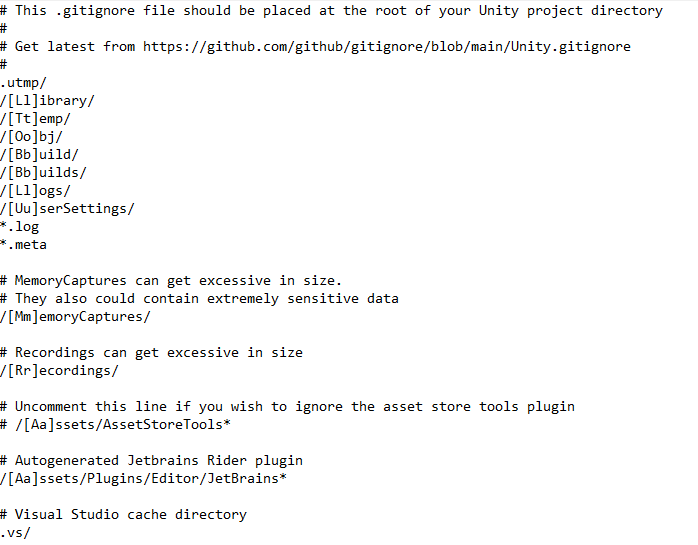 eternal needle
blissful vessel
https://i.gyazo.com/b1e1ca7f0a9be6dbd57e199decf4f279.png
I'm not rly sure what t...
eternal needle
blissful vessel
https://i.gyazo.com/b1e1ca7f0a9be6dbd57e199decf4f279.png
I'm not rly sure what t...
yea thats the unity git ignore. im assuming its in the same folder where your Assets, Library, Logs, etc are located?
🤔 wait a second, you have *.meta right there in the git ignore
blissful vessel
eternal needle
yea thats the unity git ignore. im assuming its in the same folder where your As...
Yea, it works I just wanted to amke sure I wasn't missing something in ti
eternal needle
your git ignore IS ignoring meta files
blissful vessel
Wait... Let me double check, I stg I had meta in our repo
eternal needle
its possible someone updated it, so any meta files that were previously in the repo are still tracked. hard to really say here but you are using git, so you can see if that was always there
the 3rd line in that file is the link to the latest version of it
Not sure if github is slow right now, i cant really load anything to take a screenshot. But if you go to github and find your git ignore file, you can swap to the Blame tab and see who edited it
blissful vessel
Okok, we do have .meta files in the git repo. I think we added it to the gitignore after the initial push to try to fix the issue of 3d models not working after cloning the repo the first time. As far as I understand it, having it in the git ignore won't actually stop it from pushing on Github if there's already a commit of that file type present, like I'd have to remove the .meta files already present in the repo for that gitignore to ignore .meta. But am I understanding it wrong? Are the script references getting messed up because we never removed the .meta from the git ignore again thinking it wasn't doing anything?
eternal needle
blissful vessel
Okok, we do have .meta files in the git repo. I think we added it to the gitigno...
if the file is already in the repo, gitignore wont change that. it will stop future files though
try it, make a new empty script and unity will generate a meta file. then see whats available to be committed
yes you need the meta files so thats why things are not working
blissful vessel
eternal needle
yes you need the meta files so thats why things are not working
🤦♂️ Ok, silly mistake then. I didn't realize it would keep the .meta files but not push anymore. That's prob the issue, I'll test it in a bit. tysm
eternal needle
blissful vessel
🤦♂️ Ok, silly mistake then. I didn't realize it would keep the .meta files but...
should be fixed if you remove the *.meta part then push. pretty easy to test if you just clone the repository to a different folder. Push from your working version, pull to the cloned version and open it in unity
 full kite
I have a problem that I dont know how to handle. I have a project that has a camera movement, a player movements and some other scripts. In Game Editor once I pressed play, the sensivity was the same with the one that I have in the build app. But after some changes in another script, nothing about the camera settings or player movement, nor camera movement, the sensivity on the game editor became very very slow, but in the build it was the same. Luckily, I had a backup and once I loaded the new scene and the new assets, everything became good again. So its not from the scripts, neither the scene. It's not my first time I encountered this type of problem and a resolve to it would be very helpful. Thanks in advance!
blissful vessel
full kite
I have a problem that I dont know how to handle. I have a project that has a cam...
I'm pretty amateur so I prob won't be able to help you myself, but you might have more luck if you posted some screenshots for people to see 🙂
full kite
blissful vessel
I'm pretty amateur so I prob won't be able to help you myself, but you might hav...
Ill post a video with 2 povs asap
But its something inside of project settings ig even if I didnt change anything
But its not from the code because on another project with the same scripts and scene, everything is back to normal
naive pawn
blissful vessel
Yo, I'm having an issue between Unity and Github where when my project mates pul...
not sure what you mean, meta files should be commited afaik?
blissful vessel
naive pawn
not sure what you mean, meta files should be commited afaik?
It's fixed, I made a stupid mistake 🙂
Ty tho
naive pawn
blissful vessel
It's fixed, I made a stupid mistake 🙂
yeah im asking for clarification
meta files should be commited, were they not?
it sounds like you're trying to remove the meta files from the repo
blissful vessel
We were having some issues w/ one of the people who cloned the init repo where a bunch (but not all of them, strangely enough) of the 3d model assets were returning a "GUID not found" issue or something like that. Looking it up we saw somebody saying it had to do w/ the meta files on the assets so we started to try to remove them from the repo so that the person w/ the issue could remake them on their own end, but then we learned you shouldn't do that and we stopped but I forgot to take the .meta out of the gitignore still. My friend still has that GUID issue w/ some of the 3d models but it isn't causing any real problems other than that 1 person not being able to see everything we pulled from the asset store.
In short, you are supposed to commit your meta files
naive pawn
gotcha
 thick spoke
yall i need suggestions, so i am kinda lost, lets say i wanna link a class from anoher script to the other, what way do you sgugest i link them, i was thinking of inheritance, and another question, can i have multiple inheritances on the same class, like class name and monobehaviour
naive pawn
you can't, no
but if that other class already inherits monobehaviour you could just extend that other class
though unity tends to lean more towards composition than inheritance
 brazen crescent
thick spoke
yall i need suggestions, so i am kinda lost, lets say i wanna link a class from ...
brazen crescent
thick spoke
yall i need suggestions, so i am kinda lost, lets say i wanna link a class from ...
what do you mean by link? Do you want script A to communicate with script B? or do you want script B to have same functionality from Script A?
 cosmic dagger
thick spoke
yall i need suggestions, so i am kinda lost, lets say i wanna link a class from ...
cosmic dagger
thick spoke
yall i need suggestions, so i am kinda lost, lets say i wanna link a class from ...
You'd have to further explain what you mean by link. That could mean using inheritance (which you speak of in your question), but you describe it like having a reference (to the object) . . .
full kite
I have a problem that I dont know how to handle. I have a project that has a camera movement, a player movements and some other scripts. In Game Editor once I pressed play, the sensivity was the same with the one that I have in the build app. But after some changes in another script, nothing about the camera settings or player movement, nor camera movement, the sensivity on the game editor became very very slow, but in the build it was the same. Luckily, I had a backup and once I loaded the new scene and the new assets, everything became good again. So its not from the scripts, neither the scene. It's not my first time I encountered this type of problem and a resolve to it would be very helpful. Does anyone have a clue? Thanks in advance!
naive pawn
full kite
I have a problem that I dont know how to handle. I have a project that has a cam...
are you perhaps using deltaTime on mouse input
full kite
naive pawn
are you perhaps using deltaTime on mouse input
I think, yeah. Ill look trought it but mostly yeah
The idea is on another project but exactly the same movement script its working perfectly
And only on running on game in editor I got this problem. On build I dont have any problem on any project
full kite
naive pawn
are you perhaps using deltaTime on mouse input
I saw that time.delaTime is fps dependent and since unity editor might be slower it can be slower sensivity but now its not this case because its like 10 times slower. If it would be a small difference, probably but a huge difference like 10 times, i dont think its possible
sour fulcrum
its possible
full kite
And how to make it non dependant on frame rate?
full kite
And why on another project with the same script and deltaTime, its working?
naive pawn
mouse input is already movement per-frame
deltaTime is used to convert per-second stuff to per-frame
mouse input shouldn't use deltaTime
full kite
So shouldnt be multiplied with deltaTime if it is basically
naive pawn
yeah
full kite
Ill look through it but tho, why on a project the sens in the game editor is the same as in the build and on another project with the same files is 10 times slower.
sour fulcrum
is the fps different
full kite
I mean shouldnt be everytime the same, if its the same script if its a problem with the script?
naive pawn
sometimes when things go wrong a very specific way it can look like nothing went wrong at all
full kite
sour fulcrum
is the fps different
I dont think so
sour fulcrum
can't go off thinks
naive pawn
naive pawn
sometimes when things go wrong a very specific way it can look like nothing went...
there are a ton of things that factor into that
full kite
Thinking at what u said. Maybe in the script that I updated I made a mistake and the fps dropped alot between those 2
While running, i think u could see the fps somewhere right?
teal viper
full kite
Thinking at what u said. Maybe in the script that I updated I made a mistake and...
Use the profiler
thick spoke
@brazen crescent
@cosmic dagger
what i meant by connect is i want script b have the same functionality from script a that can be edited, i know how to manage variables, i am talking about accessing the full class from script B. let me give you a example
lets say i have a OOP script and i got couple classes without monobehaviour, just classes, each one dedicated for something. i want to take the player movement class. how can i call it from script B, which is teh script thats going to get attached to the player
full kite
teal viper
Use the profiler
If I ask u what that is, would I look dumb? ))
naive pawn
thick spoke
<@266688199307296778>
<@134945562473529344>
what i meant by connect is i want...
consider using composition
naive pawn
full kite
If I ask u what that is, would I look dumb? ))
try googling first
if you don't understand it then ask
teal viper
full kite
If I ask u what that is, would I look dumb? ))
No, but do research it.
naive pawn
(just as a general tip)
full kite
Once I have the script in my face, ill come back
thick spoke
naive pawn
consider using composition
what about inheritance? i am still learning about that, but would that work, from what i understood that, instead of monobehaviour, you can remove monobehaviour and call that other class name thats in another script(if class is public ofcourse)
but if i remove monobehaviour i wont be able to attach the script to gameobjects
thats why i am asking. or can i have multiple inheritances?
naive pawn
yeah that's the problem lol
naive pawn
thick spoke
thats why i am asking. or can i have multiple inheritances?
didn't i already answer this
thick spoke
naive pawn
didn't i already answer this
bro mb i didnt read this, cause i usually read pinged or replied mesages, MB
i am gonna read on composition then if i have any questions iw ill come back to you, many thianks
 median mortar
Hi guys, think this was asked hundreds of times now but I can't find a good solution for this.
I'm using the KCC from Philippe St-Amand, which offers a groundcheck via spherecast.
This works great so far but getting onto 90° ledges gives me back an unstable ground (angle above stable slope angle) and I'm sliding off of the platform. Has anyone an idea how to properly avoid this behavior?
I could put all my slopes onto its own layer and put the stable angle at 89° which would help a lot, but I want to avoid the manual labor if possible
red ravine
bruuuh, i have problems with new Input Action Maps...
i want to press key once, not hold,
i dont know how to do that
naive pawn
red ravine
bruuuh, i have problems with new Input Action Maps...
i want to press key once,...
use a button type action? anyways try #🖱️┃input-system and give more info about what's going wrong
red ravine
naive pawn
use a button type action? anyways try <#763502300781477948> and give more info a...
thanks,
but i dont know how to use type actions
naive pawn
yeah no clue what you're trying to say there
red ravine
naive pawn
yeah no clue what you're trying to say there
i trying to use,
but it doesnt works
 naive pawn
ok so it's already button type and you've added a press interaction?
you don't necessarily need the press interaction though, a button will work as-is
red ravine
oh
median mortar
@red ravine Doing it manually like this
public void SetInputs(PlayerInputs inputs)
{
  JumpPressed_q = JumpPressed;
  ActionPressed_q = ActionPressed;
  CrouchPressed_q = CrouchPressed;
  JumpPressed = inputs.JumpPressed;
  ActionPressed = inputs.ActionPressed;
  CrouchPressed = inputs.CrouchPressed;
  CreateInputEvents();
}
void CreateInputEvents()
{
    if (JumpPressed && !JumpPressed_q)
    {
        OnJumpRising?.Invoke();
    }
    else if (!JumpPressed && JumpPressed_q)
    {
        OnJumpFalling?.Invoke();
    }

    if (ActionPressed && !ActionPressed_q)
    {
        OnActionRising?.Invoke();
    }
    else if (!ActionPressed && ActionPressed_q)
    {
        OnActionFalling?.Invoke();
    }

    if (CrouchPressed && !CrouchPressed_q)
    {
        OnCrouchRising?.Invoke();
    }
    else if (!CrouchPressed && CrouchPressed_q)
    {
        OnCrouchFalling?.Invoke();
    }
}
button works,
but i need it press only,
not holding.
red ravine
median mortar
<@881177552041938944> Doing it manually like this
```
public void SetInputs(Play...
uhhh ...
naive pawn
red ravine
button works,
but i need it press only,
not holding.
ok, so.. just use it as a button?
what's the actual issue you're encountering
go to #🖱️┃input-system and explain there
red ravine
naive pawn
go to <#763502300781477948> and explain there
ok
naive pawn
median mortar
<@881177552041938944> Doing it manually like this
```
public void SetInputs(Play...
please don't spoonfeed
red ravine
naive pawn
go to <#763502300781477948> and explain there
i writed

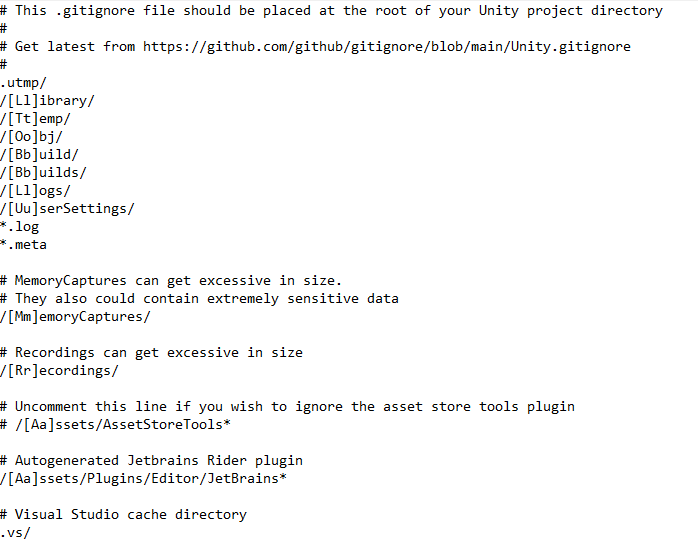 brazen crescent
 sand fox
Can someone help me out pls
sand fox
Can someone help me out pls
You should ask specific questions, then people will guide you, if you have absolutely no idea what to do with Unity, I advise a youtube video "Unity Tutori beginner"
sand fox
brazen crescent
You should ask specific questions, then people will guide you, if you have absol...
Ye lol
I did do that but there is definitely a long way to what im dreaming on making
It’s for a competition u see
brazen crescent
I think the other unity server has a recruitment channel that you can try if you want to find someone to make the game for you
red ravine
I have one more problem in my game.
i have 2d 8-directional player sprite.
and i use blend tree for each direction, and controlling it with this parameters(check image)
thats a vector.
this vector are set with player movement(from keys)
but i need when i attack - player turns to mouse.
how to calculate this to a vector, when i have angle or mouse position?
i checked in google, but i dont find anything thats will be works.


 thick spoke
what are public abstract classes?
naive pawn
thick spoke
what are public abstract classes?
they are classes that are abstract and public
try googling those terms if you aren't familiar with one
these are c# concepts rather than unity concepts, so google with "c#" as the keyword, not "unity"
naive pawn
red ravine
I have one more problem in my game.
i have 2d 8-directional player sprite.
and ...
a few options
- you could get the difference between the character position and the mouse position (mapped to world space) and then just normalize that vector
- you could get the angle from the character to the mouse and the convert that into a vector via trig or a quaternion
red ravine
naive pawn
a few options
- you could get the difference between the character position and ...
thanks
bruuh, i just needed to search "from angles to vector".
i am stupid
naive pawn
the first option where you don't go through angles would generally be easier though fyi
red ravine
naive pawn
the first option where you don't go through angles would generally be easier tho...
no, second just a sin cos calculations...
i like sin
red ravine
maybe
thick spoke
naive pawn
they are classes that are abstract and public
try googling those terms if you ar...
from what i read, basically abstract can be used like a core, and when written in other classes, they can be easily overidden
sour fulcrum
thick spoke
from what i read, basically abstract can be used like a core, and when written i...
Not can, have to
virtual is can
thick spoke
ah is ee
alright
but i am kinda lost on a point, how can i call multiple classes from another script :/
i still dont get composition
keen dew
If you're still trying to just call methods from other classes then you're going way off in the wrong direction
thick spoke
keen dew
If you're still trying to just call methods from other classes then you're going...
i am still trying, but i am trying to call classes to other scripts
can someone gimme a script example
keen dew
It's not clear what you mean by "call classes to other scripts"
Maybe if you give an example of what you're trying to do then someone can show how to do it
thick spoke
keen dew
Maybe if *you* give an example of what you're trying to do then someone can show...
So Basically i got my OOP Script Filled with classes and all good, no problems(this is all theoritical i didnt start with a actual oop script yet) so i got couple classes, lets say attack, player movment.
lets move on to my other script, it will be called "playerScript" still brand new, its attached to my player game object.
now to the main problem.is it possible to attach couple of my classes in my OOP script to the "playerScript"
keen dew
It's still difficult to know what "attach" means there but you can use the other classes wherever you want
AttackClass attack = new AttackClass();
Having your OOP script filled with classes is confusing. What do you mean by that?
thick spoke
keen dew
It's still difficult to know what "attach" means there but you can use the other...
would that.. just work?
thick spoke
cosmic dagger
Having your OOP script filled with classes is confusing. What do you mean by tha...
multiple classes, diffrent stuffs
keen dew
I don't know what the end goal is so maybe? Components are attached to gameobjects but that's Unity-specific terminology. The rough equivalent for plain classes is just making new instances with new
thick spoke
keen dew
I don't know what the end goal is so maybe? Components are attached to gameobjec...
can there be a class heirachy? like multiple classes inside of each other