#💻┃code-beginner
1 messages · Page 665 of 1
 wintry quarry
 jaunty trellis
oh, a = a or b?
jaunty trellis
oh oh oh ye right
wintry quarry
it's so when you say like "was the button pressed this frame"? we don't reset to false if you haven't consumed the previous button press yet
jaunty trellis
I'm not quite sure how to implement that. I was thinking of, in my Update(), to read the values and then look.x += ReadValue<Vector2>().x and then after my Replicate (when its consumed) I set look.x = 0;
is that inferior in any way?
wintry quarry
jaunty trellis
I'm not quite sure how to implement that. I was thinking of, in my Update(), to ...
that's the same thing I'm talking about (although why not just look += ReadValue<Vector2>()
but I'm referring to button inputs vs joystick
jaunty trellis
button vs value type thing?
wintry quarry
joysticks vs buttons
jaunty trellis
does mouse delta count as a button or joystick
wintry quarry
more analgous to joystick
jaunty trellis
how and when would you use this? If you pressed W but it hasnt moved the char yet? (might be a waste of time trying to explain it, mbmb)
wintry quarry
jaunty trellis
*how* and when would you use this? If you pressed W but it hasnt moved the char ...
if you're reading button inputs in Update but jumping in FixedUpdate, for example
jaunty trellis
using "wasPressedThisFrame"?
wintry quarry
bool userWantsToJump = false;

void Update() {
  userWantsToJump |= jumpAction.WasPressedThisFrame();
}

void FixedUpdate() {
  if (userWantsToJump) {
     Jump();
     userWantsToJump = false;
  }
}```simple example
jaunty trellis
so userWantsToJump |= jumpAction.WasPressedThisFrame();
means, either he already wants to jump, or he asked to
I get it 😄
Well, new knowledge, new attempts. Let's hope it works this time, thank you very very much anyhow!
 pliant abyss
Filtering collision.Contacts
 undone thicket
Mb for not being specific. Yes, codemonkey did a video on that topic, but it didn’t help me at all as with most of the Unity forums. I get something like this at the end, but it still didn’t do anything for me.

 rich adder
undone thicket
Mb for not being specific. Yes, codemonkey did a video on that topic, but it did...
rich adder
undone thicket
Mb for not being specific. Yes, codemonkey did a video on that topic, but it did...
which object you placed the component on ?
undone thicket
rich adder
which object you placed the component on ?
Main Camera
 rich adder
undone thicket
Main Camera
rich adder
undone thicket
Main Camera
are you certain this is the exact scene in your Build Settings? Also send the code not as screenshot so I can double check it
jaunty trellis
@wintry quarry So, I decided to Debug.Log() both when I was Updating (but not accumulating) and when the inputs where consumed. Here are the results. This is my earlier code running at 120 ticks/s (you were very right)

one last question, was this an issue or not? (yaw = x, pitch = y)
undone thicket
rich adder
are you certain this is the exact scene in your Build Settings? Also send the c...
Shure bout the first one, also about unchecking DXGI flip model
jaunty trellis
@wintry quarry ILYILYILYILYILYILYILYILY ❤️ ❤️ ❤️ <3< 3< 3
activated free nitro just to send this
this is the smoothest it has EVER looked. Although I have to greed just a tad bit more
jaunty trellis
wintry quarry
if you're reading button inputs in Update but jumping in FixedUpdate, for exampl...
There is a BIG difference between Cinemachine Damping and not. Is this because my code sucks otherwise, or it is because thats how it is?
I mean, a damping of 0.05 (which is nothing I would assume) basically completely fixes it. But I'm afraid that there might still be something I'm fundamentally NOT understanding
rich adder
undone thicket
Shure bout the first one, also about unchecking DXGI flip model
where did you get the code btw ?
undone thicket
rich adder
where did you get the code btw ?
rich adder
undone thicket
discussions.unity.com/t/solved-transparent-window-in-unity-2020/859769/3
oh alright, looks slightly different from one I seen on CodeMonkey, which version of unity are you using btw ?
undone thicket
rich adder
oh alright, looks slightly different from one I seen on CodeMonkey, which versio...
Yeah, Ive gone through at least 4 variations of TransparancyManager
rich adder
undone thicket
Yeah, Ive gone through at least 4 variations of TransparancyManager
can you show your camera inspector rq
undone thicket
rich adder
can you show your camera inspector rq

 eternal falconBOT

Posting code
📃 Large Code Blocks
Use links to services like:
https://paste.mod.gg/, https://hastebin.skyra.pw/, https://paste.ofcode.org/, https://paste.myst.rs/, https://scriptbin.xyz/
📃 Inline Code
Surround code with three backquotes. Not quotation marks.
To format as C#, add cs to the first line:
```cs
// Your code here
```
Add a comment with a line number if there is an error message.
jaunty trellis
how do i delete that bot emssage i sent
 nimble apex
u cant
wintry quarry
it will go away on its own eventually
jaunty trellis
i wanted to see how to do
a | b
😮
i wanted to see how to do
a | b
is that and or then?
no
rich adder
undone thicket
did you make sure you had 0 transparency when exporting?
just tested your code and it worked for me..
 jaunty trellis
wintry quarry
it will go away on its own eventually
jaunty trellis
wintry quarry
it will go away on its own eventually
Praetor can I ask you two more things (three including this)
undone thicket
rich adder
did you make sure you had 0 transparency when exporting?
just tested your code ...
Where i should check it?
rich adder
undone thicket
Where i should check it?
seems like it is from your camera screenshot you sent here #💻┃code-beginner message
im saying did you change that recently , ie before the build ?
undone thicket
Nope
rich adder
are you exporting a windowed build? ~~not fullscreen window, just "windowed" ~~(actually fullscreen windowed should be fine)
undone thicket
rich adder
are you exporting a windowed build? ~~not fullscreen window, just "windowed" ~~(...
Yep, windowed. It completely empty on screenshot, but it rapidly flashes with black, and sometimes get stuck for 1-2 second on object that i needed. 2nd screenshot


 thorn holly
Is it true that I should handle inputs in update and handle the action the inputs do in fixed update if said action is physics related?
undone thicket
rich adder
are you exporting a windowed build? ~~not fullscreen window, just "windowed" ~~(...
fullscreen windowed gives me that (just fullscreen version of the same problem)
 wintry quarry
thorn holly
Is it true that I should handle inputs in update and handle the action the input...
wintry quarry
thorn holly
Is it true that I should handle inputs in update and handle the action the input...
It depends on the details of what you're trying to do
rich adder
undone thicket
fullscreen windowed gives me that (just fullscreen version of the same problem)
so it does get transparent but when exactly does it not ? what are those images and what do you do to make them appear?
are these sprites or meshes btw..
thorn holly
wintry quarry
It depends on the details of what you're trying to do
Well let’s say I want do make it so when the player presses down space they jump, can I just put in fixed update
      jump();
}```
Or do I have to do some shenanigans where the input is recorded in update then handled in fixed updateYou definitely don't want to do GetButtonDown(“Jump”) in FixedUpdate
that will result in inconsitent responsiveness
Depending on the details of what is in the jump(); function, you may be able to do it all in Update
for example if it's just adding a one-time force with AddForce, you can do that in Update
thorn holly
Say it’s just an rb.addForce straight up
So when are times you need to handle it in fixedupdate?
wintry quarry
ideally -best practice- with physics is to do everything in FixedUpdate
you can get away with doing one-off things in Update
for everything else physics related you must use FixedUpdate
input handling on the other hand usually needs to go into Update except things that are "continuous" like - taking the current joystick actuation, for example
they're kind of opposites.
thorn holly
Ok makes sense
So for something like sprint being held down I can just stick that in fixed update
wintry quarry
yes usually
assuming you're using something like Input.GetButton(..) or equivalent
undone thicket
rich adder
so it does get transparent but when exactly does it not ? what are those images ...
It's not visible in the recording, but every time I move my cursor, it flashes especially when I'm dragging it.
jaunty trellis
thorn holly
Ok makes sense
if you have time, you should read the help I got form Praetor above, it's really informing about how character manipulation works in at least 3d space, and probably 2d except for rotating methods*
starts here
rich adder
undone thicket
It's not visible in the recording, but every time I move my cursor, it flashes ...
vids need to be mp4 to embed, if its too big use streamble.com
rich adder
undone thicket
well that was...uneventful..
kinda odd that it doesnt show it on recording though
gpu issue or something local ?
I am using the same code and moving the window around doesn't do anything weird to bg, (I'm also running it on windows ARM in VM)
undone thicket
From phone
undone thicket
rich adder
gpu issue or something local ?
Idk
rich adder
undone thicket
From phone
yeah thats pretty strange...
- Restart Pc or something ?
- Try a brand new project and put a simple sprite ? ( try the 3D project/renderer )
undone thicket
rich adder
yeah thats pretty strange...
1. Restart Pc or something ?
2. Try a brand new pr...
- Nope, i have that problem for 2 days straight, so reboot wont help
- Thats already brand new project... But ill do 3d for test
undone thicket
rich adder
yeah thats pretty strange...
1. Restart Pc or something ?
2. Try a brand new pr...
Anyway, thanks for help
rich adder
undone thicket
1. Nope, i have that problem for 2 days straight, so reboot wont help
2. Thats ...
3d same result?
undone thicket
rich adder
3d same result?
ye
jaunty trellis
what computer do you have? drivers up to date? (grasping at straws)
 frigid sequoia
This singleton setup would destroy the script on the object, not the object itself right?


Supposing I make a new one
 sour fulcrum
correct
frigid sequoia
Well, shit now I have to change it for all objects lol
Should not even come the case that 2 Instances can be on the same Scene together how I am doing it, but destroying just the script is pointless
rich adder
frigid sequoia
Well, shit now I have to change it for all objects lol
IDE rename all instances should at least simplify it
rich adder
undone thicket
ye
for me it worked with HDR on, but you tried without HDR on in the renderer asset?
frigid sequoia
What I am doing is placing all the main, ddol items on the scene 0, and loading that one before anything else if it was not done already, then loading the actual scenes I want, but that's actually pretty annoying to do testing. So I was wondering how could I run directly on a specific scene with that setup
rich adder
frigid sequoia
What I am doing is placing all the main, ddol items on the scene 0, and loading ...
maybe use a prefab instead?
undone thicket
rich adder
for me it worked with HDR on, but you tried without HDR on in the renderer asset...
Just adds new layer of bugs to it...
rich adder
well shit..
sour fulcrum
frigid sequoia
What I am doing is placing all the main, ddol items on the scene 0, and loading ...
you might want [RuntimeInitializeOnLoad] stuff?
frigid sequoia
rich adder
maybe use a prefab instead?
Probably what I should do, ye, but I kinda like just having it as an object in the scene, and not having to Instantiate it each time
frigid sequoia
sour fulcrum
you might want [`RuntimeInitializeOnLoad]` stuff?
Which stuff?
rich adder
frigid sequoia
Probably what I should do, ye, but I kinda like just having it as an object in t...
I meant the bootstrapper could be a prefab, also prefabs dont need to be instantiated only in code, you can also just drop one in any scene and it will do the bootstrap / DDOL warmup
sour fulcrum
you can use [RuntimeInitializeOnLoad] on a static function in order to run code before the first scene is run
frigid sequoia
rich adder
I meant the bootstrapper could be a prefab, also prefabs dont need to be instant...
Ye, I mean, I kinda like just having a single one that is not destroyed onload ever and it's not making the scene load a bunch of stuff a bunch of singleton stuff that is gonna be destroyed anyways
That way I am 100% sure it's the same object with the same values
frigid sequoia
sour fulcrum
you can use `[RuntimeInitializeOnLoad]` on a static function in order to run cod...
So I would... load the scene 0 on the RunTimeInitializeOnLoad?
sour fulcrum
or perhaps a scene just full of your managers or whatever you prefer
the idea is in general you can run setup code that will run regardless of the scene your pulling up
frigid sequoia
Yeah, that would have worked if I have a gameManager on scene to even trigger with that
I guess I need to place that on executeAlways script lol
frigid sequoia
So... this should work? Even if there is no instance?
 sour fulcrum
Yes, although for your needs you may be looking for beforesceneload?
frigid sequoia
Oh, ye, I think so
sour fulcrum
Oh actually
astrisk on that
so you probably want beforesceneload which runs this code before the first scene load, but that first scene load is still going to happen non additvely
so anything you want to preserve will need to be dontdestroyonload
unless im just wrong
frigid sequoia
Eveyrhing on scene 0 is ddol
sour fulcrum
easy then
frigid sequoia
Mmmm... so, beforeSceneLoad should... call the scene to be loaded, but this will always happen after the initial scene is loaded anyways right? Cause, well, it doesn't finish the frame until the first scene is loaded and the load call happens at the end of the frame, am I wrong?
I think doesn't matter at which point of the load I call that actually
sour fulcrum
if you call a scene load that isn't async in RuntimeInitializeOnLoadMethod(BeforeSceneLoad) that "injected" scene load should finish before the original one does
frigid sequoia
Ok, then I think scene 0 is getting a free frame somwhere, cause is doing weird stuff that wasn't doing before
sour fulcrum
a free frame?
frigid sequoia
Yeah, basically checks if there is anything on the current "level/scene" and since there is nothing cause it's not loaded yet, is basically considering it a finished scenario
Wasn't doing that before
 static flint
how do I open this gizmos thing shown in the unity essentials pathway I have the Icon but idk how to open this


 burnt vapor
static flint
how do I open this gizmos thing shown in the unity essentials pathway I have the...
burnt vapor
static flint
how do I open this gizmos thing shown in the unity essentials pathway I have the...
This is a channel for coding related questions
 void kestrel
!learn
eternal falconBOT
:teacher: Unity Learn ↗
Over 750 hours of free live and on-demand learning content for all levels of experience!
 twin sky
Hey i'm trying to do a script that i can place on a gameobject (a container) with a tilemap, a grid, and the tiles i wanna place
using UnityEngine;
using UnityEngine.Tilemaps;
using UnityEngine.EventSystems;

public class RuntimeTilePainter : MonoBehaviour
{
    [Header("Tilemap à peindre")]
    public Tilemap tilemap;

    [Header("Tile à placer")]
    public TileBase tileToPlace;

    [Header("Grille associée (parent de la Tilemap)")]
    public Grid grid;

    private bool paintingMode = false;

    void Update()
    {
        if (!paintingMode) return;

        if (Input.GetMouseButtonDown(0))
        {
            if (EventSystem.current != null && EventSystem.current.IsPointerOverGameObject()) return;

            Vector3 worldPos = Camera.main.ScreenToWorldPoint(Input.mousePosition);
            worldPos.z = 0;

            Vector3Int cellPos = tilemap.WorldToCell(worldPos);
            Debug.Log($"Placing tile at {cellPos}");
            tilemap.SetTile(cellPos, tileToPlace);
        }
    }

    public void TogglePaintMode()
    {
        paintingMode = !paintingMode;
        Debug.Log("Mode peinture : " + (paintingMode ? "ACTIVÉ" : "DÉSACTIVÉ"));
    }
}
now with this i can place the script on the gameobject, and with a button using onclick i can call it to place my tiles, but i want to be able to choose multiple tiles, how should i do it ? thanks
 timid salmon
Im Trying To Make A RayCast Script In 3D But I Want It To Be A Set Amount Of Length What Do I Change?

All It Dose Is Make A Recurring Line Until It Comes Into Contact With An Object

 keen cargo
timid salmon
All It Dose Is Make A Recurring Line Until It Comes Into Contact With An Object<...
keen cargo
timid salmon
All It Dose Is Make A Recurring Line Until It Comes Into Contact With An Object<...
Have you tried changing the float value in the raycast?
5f
 north kiln
You can't use hit.distance in the else clause
It is undefined, because it hit nothing
 thick spoke
quick question guys, so i am learning about OOP, i am going to implement it rn, but i got a question before i start. is OOP basically a script that holds my classes? the way i think of oop is that i make a script, put the classes i need, categorize and arrange them, and i could add variables outside of the classes, then i connect this OOP script to my other script, like lets say i have a script connected to a capsule called player, its still fresh. i first open this script. then i attach my oop script. then do i call the class that i want in update and thats it? if i am wrong please correct me, thank you
if i am missing anything please ping me
wintry quarry
thick spoke
quick question guys, so i am learning about OOP, i am going to implement it rn, ...
No, I don't think you understand OOP at all
Whatever you just described is completely unrelated to OOP
thick spoke
wintry quarry
No, I don't think you understand OOP at all
yeah i guessed so thats why i came to ask, i guess iw ill redo my research many thanks
https://www.youtube.com/watch?v=Jvss8fb1LdA
i was thinking of watching this series

This tutorial series is for those who are experienced with Unity's & C#'s basics and are willing to know about the principles of object-oriented programming.
All scripts and project contents used in the tutorial can be found on GitHub: https://github.com/danqzq/unity-principles-of-oop-tutorial
In this video I cover the two main aspects of OOP ...
 night raptor
OOP just means Object Oriented Programming. It's just a paradigm of organizing the code into classes (logical units that contain data and methods). It does not specifically address what type of classes and how you should use them.
thick spoke
night raptor
OOP just means Object Oriented Programming. It's just a paradigm of organizing t...
so smth like this

and it contains the base, if i wanna link it i can basically call it from another script. after calling it i can assign the name and string and yeah
night raptor
thick spoke
so smth like this
That is a class and hence OOP, yes. Then there is SOLID and such guidelines to figure what is good and what is bad way to practise OOP but that sure is a class
thick spoke
night raptor
That is a class and hence OOP, yes. Then there is SOLID and such guidelines to f...
ah yeah so i am on the right path i guess at the moment, i was trying to explain this exact picture in my text, anyways thank you, iw ill be back in like tmr hopefully a better understanding
timid salmon
thick spoke
ah yeah so i am on the right path i guess at the moment, i was trying to explain...
WHCould You Help Me Wit Something
PLzz
thick spoke
timid salmon
WHCould You Help Me Wit Something
i am not the best but i can try a bit. i think @night raptor would be much better
night raptor
timid salmon
WHCould You Help Me Wit Something
Do not ask specific people for help. Just ask the question and someone might help
timid salmon
timid salmon
Im Trying To Make A RayCast Script In 3D But I Want It To Be A Set Amount Of Len...
Could You right code to help me understand
thick spoke
timid salmon
Could You right code to help me understand
pretty sure you need to change the 5f in there, its now set to 5 units only, make a serialized field name it like "maxDistance" and replace with the 5f, and try tweaking that to find what you need
jaunty trellis
hey, was wondering if games play better in builds or in the unity project window?
deltaTime was:0,1022872
UnityEngine.Debug:Log (object)
PredictedCharacterController:Update () (at Assets/__Scripts/PredictedCharacterController.cs:145)
im getting some very annoying frame lag, this for example, where delta time was 0.1 s
north kiln
jaunty trellis
hey, was wondering if games play better in builds or in the unity project window...
In builds, where there is no editor overhead
timid salmon
thick spoke
pretty sure you need to change the 5f in there, its now set to 5 units only, mak...
So The f in 5f means how long the raycast will be?
north kiln
No, that indicates the number is a float
jaunty trellis
north kiln
In builds, where there is no editor overhead
well, i guess we pray then
jaunty trellis
timid salmon
So The f in 5f means how long the raycast will be?
not the f, but the 5 might
north kiln
Or profile it and fix the issue
jaunty trellis
north kiln
Or profile it and fix the issue
I dont know what you mean
how do I do that?
jaunty trellis
I think thats too advanced, my game is literally just a CC. Wondering why it freezes on me
thick spoke
timid salmon
So The f in 5f means how long the raycast will be?
no 5f is float. just create a serialized field with float and call it maxdistance, and replace the 5f with maxdistance, and then tweak it as you like
`[SerializedField] float raycastLength = 5f; // Declare this at the top of your script outside of any methods
void Update()
{
if (Physics.Raycast(transform.position, transform.TransformDirection(Vector3.down), out RaycastHit hitInfo, raycastLength))
{
Debug.Log("Hit Ground");
Debug.DrawRay(transform.position, transform.TransformDirection(Vector3.down) * hitInfo.distance, Color.red);
}
else
{
Debug.Log("Hit Nothing");
Debug.DrawRay(transform.position, transform.TransformDirection(Vector3.down) * raycastLength, Color.green);
}
}`
it should go along the lines of smth like this @timid salmon
timid salmon
thick spoke
`[SerializedField] float raycastLength = 5f; // Declare this at the top of your ...
Ty Sm
thick spoke
did it work?
timid salmon
Yess
Your acc A Life Saver🙏
Im New To Scripting And This Also Helps Me Understand Raycasts
Lengend
frigid sequoia
Let's say I have a struct that hold the base stats, another that holds the bonus/temporal ones and a other one that holds the ones comming just from items. Is there a quick way to just summ them all for a final value of each stat or manually one by one is the way?
jaunty trellis
Okay, I have a strange issue now. I'm building the game to simulate multiplayer with it + unity editor. However, the instance that doesn't open the server and only connects via client has altered rotational movement. Is this a common issue? What could cause it?
It has lowered Yaw, but increased Pitch. Super strange
 steel smelt
frigid sequoia
Let's say I have a struct that hold the base stats, another that holds the bonus...
steel smelt
frigid sequoia
Let's say I have a struct that hold the base stats, another that holds the bonus...
You need a way to identify respective stats across all structs.
It could be an enum, a string or even an int. Then you need to store them in a way that you can fetch the stat by identifier.
frigid sequoia
How?
steel smelt
Which part?
jaunty trellis
I have a strange issue. I'm "building" an instance of the game to simulate multiplayer with "the build" + unity editor. However, the instance that doesn't open the server and only connects via client has altered rotational movement. Is this a common issue? What could cause it?
It has lowered Yaw, but increased Pitch. Super strange
timid salmon
thick spoke
did it work?
But I Do Need To Ask What Is A [serialisedFeild]
frigid sequoia
steel smelt
Which part?
Like how wold I set up an identifier
steel smelt
frigid sequoia
Like how wold I set up an identifier
It could be as simple as a Dictionary<SomeTypeUsedToID, Value>
e.g. you have an enum with HitPoints, Damage, MoveSpeed, you can store those in the dict with their respective values. You then can provide a method for other classes to fetch the values from the dict by providing the identifier
 brazen crescent
timid salmon
But I Do Need To Ask What Is A [serialisedFeild]
brazen crescent
timid salmon
But I Do Need To Ask What Is A [serialisedFeild]
serialize fields exposes the variable in the inspector, so you select your gameobject with the specific script in the scene and then edit that value in the inspector. It makes it easy to change (mostly) private values without hardcoding them inside the script
timid salmon
okay ty
 cerulean vapor
hello i've been trying to make a simple incremental game by myself but i don't know how to code a text box to show the currency
cerulean vapor
but i don't know how to make a text with my currency appear
 slender nymph
did you google it? this is like the simplest thing to put in the UI
cerulean vapor
yes but im having a hard time with coding it
slender nymph
then show the code and explain what isn't working
cerulean vapor
this is all i got 😦
 slender nymph
well you need to start by getting your !IDE configured. then go actually pay attention to the relevant search results instead of staring blankly at your screen and expecting other people to make your game for you
eternal falconBOT
💡 IDE Configuration
If your IDE is not autocompleting code
or underlining errors, please configure it.
Select one:
•  Visual Studio (Installed via Unity Hub)
• Visual Studio (Installed manually)
•  VS Code
•  JetBrains Rider
• :question: Other/None
 tiny musk
I have a dout i have a cube i place camera inside i use raycast to spawn the object where the ray is hit how to do that please any one explain me
steel smelt
there's a setting so rays can hit backfaces iirc
tiny musk
steel smelt
there's a setting so rays can hit backfaces iirc
Oh ok bro what is the solution bro
I cannot figure that
Anyone know about it please tell me
steel smelt
edit -> project settings -> physics
tiny musk
steel smelt
edit -> project settings -> physics
Ok
steel smelt
wording makes me believe it doesn't apply to primitives though
tiny musk
What i want to do there

Disabled everything
Player body only detect
Camera and player is same layer
steel smelt
nevermind, I was mistaken. Can't hit cube from the inside, applies only to mesh colliders.
tiny musk
steel smelt
nevermind, I was mistaken. Can't hit cube from the inside, applies only to mesh ...
I tryed it bro
steel smelt
If you were to make your cube a mesh collider, it'd work. Depends on your needs, cubes are much much faster to deal with in a sim than a mesh collider
tiny musk
It is also not working
tiny musk
steel smelt
If you were to make your cube a mesh collider, it'd work. Depends on your needs,...
Do you know how to slove that
steel smelt
Maybe depending on your needs you could flip your ray. Cast from cam pos + dir * max dist, flip dir
 astral flame
Okay, I'm here now. Yes, I can help you with that.
 short quest
how to i get my AI to work i think the code is done but i have not a clue how nav mesh and stuff works
 polar acorn
short quest
how to i get my AI to work i think the code is done but i have not a clue how na...
polar acorn
short quest
how to i get my AI to work i think the code is done but i have not a clue how na...
Do not crosspost
astral flame
If you're wondering why I said that, it's because I was talking to someone else.
short quest
polar acorn
Do not crosspost
id love to know what that means
 naive pawn
short quest
id love to know what that means
naive pawn
short quest
id love to know what that means
don't spam the same question over multiple channels
 warped wolf
Hello, i want to ask about Profiler, does this channel help? If not, which channel should i ask?
 rich adder
warped wolf
Hello, i want to ask about Profiler, does this channel help? If not, which chann...
rich adder
warped wolf
Hello, i want to ask about Profiler, does this channel help? If not, which chann...
 warped wolf
okay then:
Semaphore.WaitforSignal is high every time I test shaders, from simple to complex shaders, are there any ways to improve this?
// Define shader variants
#pragma shader_feature _USE_CUSTOM_HDR
#pragma shader_feature _USE_CUSTOM_ADDTOAPB
#pragma shader_feature _USE_CUSTOM_GRAYSCALE
#pragma shader_feature _USE_PANUV_MAINTEX
#pragma shader_feature _USE_CUSTOMPANUV_MAINTEX
#pragma shader_feature _USE_FLIPBOOK
#pragma shader_feature _USE_SUB_TEX
#pragma shader_feature _USE_PANUV_SUBTEX
#pragma shader_feature _USE_DISSOLVE_TEX
#pragma shader_feature _USE_CUSTOM_DISSOLVE
#pragma shader_feature _USE_DISTORT_TEX
#pragma shader_feature _USE_MASK_TEX
#pragma shader_feature _USE_SOFTPARTICLE
i'm creating shader that containt variants shaders (sorry for my bad english), so i can disable/enable those variants by using [Toggle] on Properties, does this costly and affected render perfomance?
thick spoke
so in OOP, am i supposed to remove the "monobehaviour" or not? i think i read somewhere thats its preffered to remove it, but i would like to double check
rich adder
warped wolf
okay then:
Semaphore.WaitforSignal is high every time I test shaders, from simp...
https://discussions.unity.com/t/semaphore-waitforsignal-causing-performance-issues/775762
check this thread maybe
rich adder
thick spoke
so in OOP, am i supposed to remove the "monobehaviour" or not? i think i read so...
you don't have to, no
naive pawn
thick spoke
so in OOP, am i supposed to remove the "monobehaviour" or not? i think i read so...
what do you mean by "in OOP"?
rich adder
OOP means everything is an Object, Your class that inherits MB is still an Object and you're doing Object based
the only difference in Unity itself is MonoBehaviours are Components and must be on a gameobject to do anything
warped wolf
rich adder
https://discussions.unity.com/t/semaphore-waitforsignal-causing-performance-issu...
Looks like not just shader, then i have to check animations as well.
rich adder
it also mentions In another thread I think that you can use GPU analyzer or something
warped wolf
Thanks, i will take a look 💪
rich adder
goodluck 🫡 If I knew a bit more on profiling I'd help more lol I just profiled scripts so far
 harsh haven
I need help with a music on/off toggle
i have most of it working, but i only want the toggle to show in the main menu scene
and the music player is present in all scenes, so when i load a new scene, the music player does not know what toggle to reference anymore
So i tried using GameObject.Find becuase i usually just make everything public and then drag in the inspector
rich adder
harsh haven
and the music player is present in all scenes, so when i load a new scene, the m...
why not just make a DDOL
harsh haven
however i keep getting the error "Cannot implicitly convert type 'UnityEnginge.GameObject' to 'MusicToggle'"
And i dont know why and can't find anything online
What is that
sour fulcrum
DontDestroyOnLoad
harsh haven
Oh
rich adder
 harsh haven
I thought then the music toggle will stay in other scenes tho
thats what im using for the musicplayer so it stays
currently
harsh haven
Like the button for turning music on and off
that should only exist in the main menu
rich adder
yes show more of the setup
including screenshots of the components / objects in scene
harsh haven
void Start()
    {
        if (GameManager.notFirstTime)
        {
            n = Random.Range(0, 3);
            PlaySong(n);        }
        else
        {

        }
        mtoggle = GameObject.Find("MusicToggle");
    }
This is in the music player script
the mtoggle = is throwing the error
rich adder
yes because GameObject.Find returns a GameObject type
harsh haven
public class GameMusicPlayer : MonoBehaviour
{

    public AudioSource song1;
    public AudioSource song2;
    public AudioSource song3;
    MusicToggle mtoggle;

    private int n;
    private int newSong;
This is at the top of it
rich adder
harsh haven
```cs
public class GameMusicPlayer : MonoBehaviour
{
public AudioSource son...
again, why does the music Player care about a toggle ?
it should just have a Toggle function that gets called from Toggler itself
harsh haven
the toggle contains the variable for if the volume should be on or not
using UnityEngine;
using UnityEngine.UI;

public class MusicToggle : MonoBehaviour
{

    public Button musicToggle;
    public Sprite spriteOff;
    public Sprite spriteOn;
    public bool musicOn = true;

    public void ChangeSprite()
    {
        if (musicOn)
        {
            musicToggle.image.sprite = spriteOff;
            musicOn = false;
        }
        else
        {
            musicToggle.image.sprite = spriteOn;
            musicOn = true;
        }
    }

}
this is the music toggle script
Its a button
and the music player is trying to access the musicOn part
rich adder
musicPlayer should be the one tracking the bool not the toggler
you have it backwards
rich adder
yes the musicPlayer should not be coupled that tight to somethig external that controls it
harsh haven
rich adder
yes because GameObject.Find returns a GameObject type
what even is a GameObject type lol i get this issue everytime ive tried doing stuff like this
Just for future knowledge
sour fulcrum
gameobject
harsh haven
like how do i replace that line to get it to do what i want
polar acorn
harsh haven
what even is a GameObject type lol i get this issue everytime ive tried doing st...
The stuff in the hierarchy
rich adder
its the basic type for the gameobject you see in the scene
rich adder
so normally you would GetComponent on that to find any scripts / components on it
rich adder
harsh haven
so isn't musictogger a button, so it is a gameobject
no musictogger, is MusicToggle type
Button just controls the visuals / sets bool
sour fulcrum
harsh haven
so isn't musictogger a button, so it is a gameobject
its on a gameobject
rich adder
the type itself , aka the component is of MusicToggle type
polar acorn
harsh haven
so isn't musictogger a button, so it is a gameobject
Button is a component on a game object. So is MusicToggle.
rich adder
so you would technically do
mtoggle = GameObject.Find("MusicToggle").GetComponent<MusicToggle>();
but in this case no reason for musicPlayer do find this thing at all
 final forge
If I'm using a linked list to describe something in my game, does it mean that I've gone wrong somewhere
harsh haven
polar acorn
`Button` is a component on a game object. So is `MusicToggle`.
so is the canvas the original gameobject?
polar acorn
harsh haven
so is the canvas the original gameobject?
Everything in your hierarchy is a GameObject
harsh haven
 polar acorn
harsh haven
polar acorn
harsh haven
Yes those are all GameObjects
rich adder
GameObjects are basically "containers" for components
Button is a component, Canvas is a component etc.
slender nymph
final forge
If I'm using a linked list to describe something in my game, does it mean that I...

is there a specific reason you're using a linked list instead of a normal List<T>?
thick spoke
rich adder
you don't have to, no
but is it suggestvily better, incase i accidetly attach it to a object, so its better to remove it
sour fulcrum
The MonoBehaviour components on the GameObject are not GameObjects however
harsh haven
Hmm okay
rich adder
thick spoke
but is it suggestvily better, incase i accidetly attach it to a object, so its b...
what give you that assumption?
final forge
slender nymph
<:itdepends:1108023708695662672>
is there a specific reason you're using a link...
well I was trying to make a basic farming game, and some crops can be repeat harvested, and others one time only, so I thought a repeat harvest can just have a cycle in the list, and the one time crops have no loop
thats bad right
rich adder
they both serve different purposes, if it doesnt need to be a component sure you can remove the MB inheritance @thick spoke
thick spoke
rich adder
what give you that assumption?
i had a little course, when i created a node script, he removed monobehaviour, i forgot the reason, but i thought it might relate to oop for some reason
rich adder
but technically they are both Objects, nothing to do with OOP
thick spoke
rich adder
they both serve different purposes, if it doesnt need to be a component sure you...
ah i see, then i will prob keep it removed and maybe in the end add it if needed
thank you
rich adder
thick spoke
i had a little course, when i created a node script, he removed monobehaviour, i...
probably because it doesnt need to be a component , aka be on a gameobject
slender nymph
final forge
thats bad right
i mean . . . if it works, it works, right? it definitely doesn't sound ideal but first priority is making something that works before focusing on making it good
thick spoke
rich adder
probably because it doesnt need to be a component , aka be on a gameobject
same ig, i would prefer not to have my oop script on a gameobject
final forge
i guess
rich adder
thick spoke
same ig, i would prefer not to have my oop script on a gameobject
you are confusing POCOs here... as I said, everything you're doing in C# is object based..That includes monobehaviours
POCO is when you have ```cs
public class Foo {}
this is a Component
```cs
public class Foo :  MonoBehaviour{}
Both are Objects
MonoBehaviour are also UnityEngine.Object but they are still Objects at the end of the day they just have extra logic unity implemented
so all you're doing is still OOP based
you put a integer in MB, guess what? thats still an Object inside another Object
harsh haven
Hmm okay another issue
that i dont understand at all yet
I turn the music off, i go back and forth between the game and the main menu
rich adder
harsh haven
I turn the music off, i go back and forth between the game and the main menu
so then whats the issue?
harsh haven

This is before

And this is after i go back to the main menu
Another gamemusicplayer is being created, and this one is connected to the toggle
rich adder
yes make a singleton
harsh haven
However music is still playing from the first, so this 2nd music player is useless
Whats that
rich adder
harsh haven
Whats that
its a programming pattern, it ensures only 1 type of this object should exist (if properly cleanedup)
check example here
https://unity.huh.how/references/singletons
rich adder
harsh haven
and why is another one being created anyway?
because you're going back to the scene that has one ?
and both are DDOL so they live in the same DDOL scene
harsh haven
actually the toggle isnt' ddol rn
rich adder
the toggle has nothing to do with anything here
harsh haven
yea i didn't think so
But anyway so going back to the scene creates all the game objects that are supposed to exist in it?
But one of them was never deleted, so its just creating it again, in addition to the one that wasn't deleted?
rich adder
normally when you switch scenes all objects in other scene are deleted , then new one loads with new objects
because its a DDOL its not destroying the original one because DDOL scene objects dont get destroyed unless you explicitly tell it to
rich adder
harsh haven
But anyway so going back to the scene creates all the game objects that are supp...
thats what a scene is , a collection of objects that should exist
if you have no way of check if ObjectA already exists and delete new one, it will create a copy as many times as you load that scene (cause of DDOL)
harsh haven
Ok cool so basically what i was saying i thought was happening
Ahh i swear ive seen people do this singleton thing on tutorials without explaining and i never understood what it did
so i just ignored it
rich adder
yes so if you load old scene with a Singleton implemented properly (shown in link)
It will see "oh this already exist, delete new gameobject with this component we dont need"
harsh haven
Yep
Alr will lyk in 2 minutes if this works
Hmm not yet
but ima try to debug this myself real quick and if i dont know ill send
ok i got the singleton part of it working
but when i load back into the main menu, even tho the right musicplayer stays now, the toggle no longer does anything to the musicOn boolean
rich adder
harsh haven
but when i load back into the main menu, even tho the right musicplayer stays no...
what you need to do is instead Find the singleton , thats why we made it a singleton for easy access from other scenes and their objects
so if you had a bool inside MusicPlayer for MusicOn and its public you could do for example
MusicPlayer.Instance.MusicOn = value
or better to make a method, public fields are kinda ugly
with a method you can put an event or something inside to notify if something changed, much neater than just changing a field value and not know about it
eg MusicPlayer.Instance.ToggleMusic(true)
harsh haven
rich adder
so if you had a bool inside MusicPlayer for MusicOn and its public you could do ...
in the toggle script?
yea methods are better
rich adder
harsh haven
in the toggle script?
the toggle scripts only cares about calling the method on MusicPlayer for example.
the method itself is implemented in the MusicPlayer script
harsh haven
okay i can do that
but im a little confused even with my original implemtation still
rich adder
harsh haven
but im a little confused even with my original implemtation still
what are you confused on ?
harsh haven
Im thinking
i guess i want to understand the core issue a bit more
because its a singleton, the toggle doesn't know how to access the musicplayer anymore?
rich adder
harsh haven
because its a singleton, the toggle doesn't know how to access the musicplayer a...
when did MusicToggle ever touch MusicPlayer
you originally had it MusicPlayerlooking for MusicToggle for some reason
harsh haven
Ah yea this is wahts happening
 harsh haven
rich adder
you originally had it `MusicPlayer`looking for MusicToggle for some reason
harsh haven
rich adder
you originally had it `MusicPlayer`looking for MusicToggle for some reason
yea cause im a beginner and didn't know the best way of implementing
So when i load back into the main menu]
rich adder
harsh haven
Ah yea this is wahts happening
yes you cannot link a component thats going to go into a DDOL scene
that would be called "Cross Scene Referencing" which cannot happen through a Serialized Field
thats why we now can simply get rid of the Field for it and just access it through the Singleton
harsh haven
okay, ill change to a method
 ivory bobcat
Your music player should be a Singleton object as well or you ought to register your available scene music player after loading. Or as suggested, do not reference your music player etc
harsh haven
is there a way to fix this not using method implementation?
harsh haven
ivory bobcat
Your music player should be a Singleton object as well or you ought to register ...
My musicplayer is the singleton object
not the toggle
rich adder
harsh haven
is there a way to fix this not using method implementation?
wdym fix this without using method implementation
harsh haven
Like is there a way to fix this while still trying to access the singleton through the toggle
rich adder
the method is so you can toggle musicON from toggler to MusicPlayer
ivory bobcat
harsh haven
My musicplayer is the singleton object
You no longer need the music player reference then (on the button).
You'd simply access the music player through code using the instance field
ivory bobcat
harsh haven
Ah yea this is wahts happening
Can you show an update of your !code for the music player toggle component?
eternal falconBOT
Posting code
📃 Large Code Blocks
Use links to services like:
https://paste.mod.gg/, https://hastebin.skyra.pw/, https://paste.ofcode.org/, https://paste.myst.rs/, https://scriptbin.xyz/
📃 Inline Code
Surround code with three backquotes. Not quotation marks.
To format as C#, add cs to the first line:
```cs
// Your code here
```
Add a comment with a line number if there is an error message.
harsh haven
SURE
oops caps lock
using UnityEngine;
using UnityEngine.UI;

public class MusicToggle : MonoBehaviour
{

    public Button musicToggle;
    public Sprite spriteOff;
    public Sprite spriteOn;
    public GameMusicPlayer musicplayer;

    void Update()
    {
        if (musicplayer.musicOn)
        {
            musicToggle.image.sprite = spriteOn;
        }
        else
        {
            musicToggle.image.sprite = spriteOff;

        }
    }
    public void ChangeSprite()
    {
        if (musicplayer.musicOn)
        {
            musicplayer.musicOn = false;
        }
        else
        {
            musicplayer.musicOn = true;
        }
    }

}
sorry im having long responses cause this is quite confusing for me
so im trying to think of a productive question first
rich adder
harsh haven
```cs
using UnityEngine;
using UnityEngine.UI;
public class MusicToggle : MonoB...
you don't need musicplayer anymore
harsh haven
rich adder
the method is so you can toggle musicON from toggler to MusicPlayer
I guess im confused about, how to do i toggle a method in MusicPlayer without having to create a reference to it anwyay?
rich adder
harsh haven
I guess im confused about, how to do i toggle a method in MusicPlayer without ha...
because now you have the singleton
crude example
public class MusicPlayer : MonoBehaviour
{
    public static MusicPlayer Instance { get; private set; }
    public bool IsMusicOn { get; private set; }
    void Awake()
    {
        if (Instance != null)
        {
            Destroy(gameObject);
            return;
        }
        Instance = this;
    }
    public void ToggleMusic(bool isOn)
    {
        IsMusicOn = isOn;
        if(isOn)
        {
            //do stuff
        }else
        {
            //do other stuff
        }
    }
}
public class MusicToggle : MonoBehaviour
{
    public void ToggleMusic()
    {
        MusicPlayer.Instance.ToggleMusic(true);
    }
}```singletons are new to me so i dont understand how this fixes anything yet
how do i toggle the method in the singleton then?
Okay
makes a little more sense when i see it like that
rich adder
if this is going to be a button you could potentially just make it a switch On/Off thing without passing a bool
 shadow moss
howdy yall! What do i do when i get an ambiguity error when i only have one version of each script in my project? is it just Visual Studio Code freaking out?
rich adder
shadow moss
howdy yall! What do i do when i get an ambiguity error when i only have one vers...
show screenshot maybe ?
ivory bobcat
shadow moss
howdy yall! What do i do when i get an ambiguity error when i only have one vers...
You'd get better suggestions by showing the actual error
rich adder
ambiguity could be from another Unity class conflicting with your own or a System one etc.
namespaces are very important for that reason
ivory bobcat
Or conflicting directives (System Random vs Unity Random etc)
shadow moss
wait i just realized-
i cleaned up my hard drive to make space for a big download, and i accidentally put a bunch of files in my projects assets folder instead of my general game dev assets folder 😭
i just tabbed over to the games assets folder and saw a bunch of random shit including some backups of my scripts, lol
harsh haven
Still hella confused ngl sorry
I feel like i want to access the boolean in musicplayer from the toggle
becuase i want the toggle to display the right image based on that boolean
And i know you said i could just not use a boolean, but for the sake of my learning im sure ill have to access variables in singletons later in my life
Like idk how do you want me to have this code still working?

I know this doesnt make sense as code but like
i can make that method run but i still want that variable accessed somehow
ivory bobcat
harsh haven
Like idk how do you want me to have this code still working?
Show your music player script.
harsh haven
Its hella long and has stuff thats not that relevant to this
ill just send the methods that matter
polar acorn
harsh haven
Like idk how do you want me to have this code still working?
What is musicplayer
ivory bobcat
Just send the Instance reference field
sour fulcrum
harsh haven
ill just send the methods that matter
.. or the variables
harsh haven
using UnityEngine;
using System.Collections;
using Mono.Cecil.Cil;

public class GameMusicPlayer : MonoBehaviour
{

    public AudioSource song1;
    public AudioSource song2;
    public AudioSource song3;
    public bool musicOn = true;
    public static GameMusicPlayer instance;


    private int n;
    private int newSong;
...

public void ToggleMusic()
    {
        if (musicOn)
        {
            song1.volume = 0.1f;
            song2.volume = 0.1f;
            song3.volume = 0.1f;
        }
        else
        {
                song1.volume = 0;
                song2.volume = 0;
                song3.volume = 0;
        }
    }
.....

 void Awake()
    {
        if (instance != null)
        {
            Destroy(gameObject);
            return;
        }
        DontDestroyOnLoad(this.gameObject);
        instance = this;
    }
}
GameMusicPlayer.Instance.musicOn
harsh haven
polar acorn
What is `musicplayer`
It was a reference to the musicplayer but i deleted it cause they said i dont need it anymore
but then im like Idk how to get that variable still
without it
polar acorn
harsh haven
It was a reference to the musicplayer but i deleted it cause they said i dont ne...
So you would replace it with the static variable that references your instance of GameMusicPlayer

static modifier - C# Reference
ivory bobcat
harsh haven
Like idk how do you want me to have this code still working?
It should be in this pattern to be a Singleton:cs ClassName.Instance.fieldNamewhere in your case you should have had something similar tocs MusicPlayer.Instance.IsOn = ...
harsh haven
sour fulcrum
`GameMusicPlayer.Instance.musicOn`
 sour fulcrum
i mean yeah you have to use it
ivory bobcat
harsh haven
```cs
using UnityEngine;
using System.Collections;
using Mono.Cecil.Cil;
public...
Yeah, you're missing all of the other details to be a Singleton
I suggest you check back on this message #💻┃code-beginner message
harsh haven
Oh lol mb
damn i got the whole server helping me with this easy ass shit 😭
this is like my first month of unity
YOOOOO TS WORK NOW
ivory bobcat
harsh haven
So.. you need to do something with that.. like suggested by the IDE, assign it something or whatever
harsh haven
THANK U ALL LMAOOO
harsh haven
sour fulcrum
`GameMusicPlayer.Instance.musicOn`
I think most of my confusion for the last 10 minutes has been that
i didn't know i could do that
sour fulcrum
ye thats the appeal
harsh haven
Very grateful
sour fulcrum
the rough idea is that because we're ensuring that only 1 instance of GameMusicPlayer exists, we don't have to go around trying to find it
harsh haven
now just gotta make an online highscore leaderboard and my games done
 copper jasper
How do i fix this the whole word just screen tears glitches jitters etc
I started using unity yesterday
 rocky canyon
its usually b/c your camera is moving in update but ur character is moving in fixed update..
Update is every frame.. Fixed Update runs on the physics tick (50fps) default..
its a sync problem..
rocky canyon
thats what i said...
rocky canyon
 rocky canyon
copper jasper
mb
rocky canyon
copper jasper
mb
no worries
you can search google.. its a very common issue with multiple fixes
cant say which one is quite right for you..
copper jasper
i have been searching since yesterday
copper jasper
isnt there another fix i saw this vid and tried what he done but it didnt work

The third part of my Rigidbody FPS Controller series. In this video, I covered slope handling, fixing the weird jitter, and improving the ground detection. In the next one, we will start working on the wallrunning *yay. Make sure to subscribe so you don't miss it :)
Discord Server Invite: https://discord.gg/6ASySnPVXB
GitHub Repository: https:/...
copper jasper
i saw that vid too
 copper jasper
this looks like jibrish to me since i started yesterday 😭
https://discussions.unity.com/t/character-controller-jittering-while-moving/257889/2
rocky canyon
ya, i understand that..
this may be a problem u need to sort out after becoming a bit more familiar and comfortable with unity and coding
copper jasper
btw i dont think the vid is showing it but the issue isnt really like a jitter its like screen tearing
rocky canyon
if its screen tearing it could possibly be VSync issue
copper jasper
ye the vid doesnt show it
sour fulcrum
rocky canyon
https://www.youtube.com/watch?v=hsoJLJ22GVA&pp=0gcJCdgAo7VqN5tD
this vid looks cooked
copper jasper
how do i fix it
sour fulcrum
ngl
rocky canyon
ya, lol i noticed that after i posted it..
copper jasper
prob vsync is causing it cause in my view the screen is tearing
copper jasper
this
 rocky canyon
or another option is to cap ur framerate
copper jasper
turning off the vsync count didnt change anything
i even tried to put the movement part in update instead of fixed update same issue
rocky canyon
🤔 hmmm
copper jasper
I feel like its smthn else maybe thats why the vids dont work
rocky canyon
u try building it to see if its in the build as well
 full latch
Hello
copper jasper
hello there
copper jasper
rocky canyon
u try building it to see if its in the build as well
Ye its in build as well
why doesnt it show in the video
wth
on my screen the whole screen is breaking
like idk how to explain it
its tearing and it looks like the world is a titkok filter
the thing one waves one
 grand snow
screen tearing is common when the framerate is above the monitor refresh rate, not unique to unity: https://www.displayninja.com/what-is-screen-tearing/
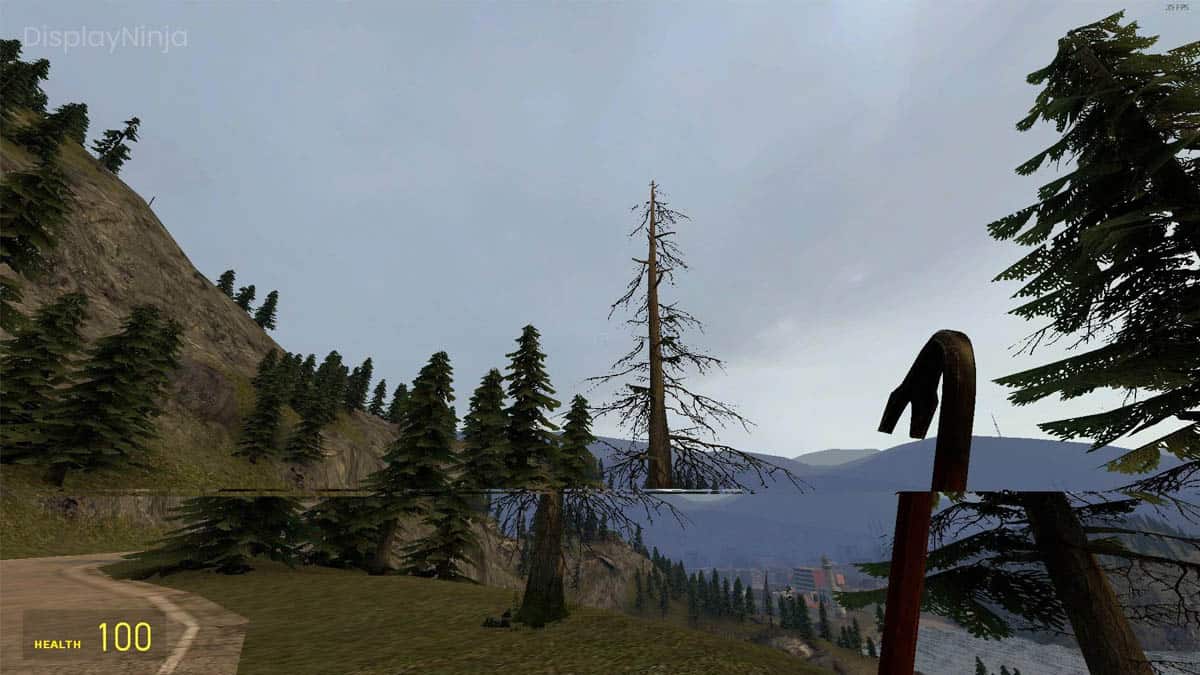
Display Ninja
Screen tearing occurs when your refresh rate and frame rate are not synchronized. There are a few different ways to fix this, with different drawbacks.
copper jasper
Can u test my game and see if u get it too
copper jasper
I already did
copper jasper
copper jasper
this
this right?
grand snow
Yes. Is that on the correct quality setting thats the default for the build target?
copper jasper
wdym
First day in unity btw 😭
grand snow
copper jasper
wdym
First day in unity btw 😭
Check you changed it on the default quality level for the platform (so its actually doing what you want)

otherwise it will be using a different quality with different settings
copper jasper
mine looks like this
 grand snow
double check its set in "Ultra" then
grand snow
I've had windows be stupid with games before. Windowed and fullscreen windowed games dont tear but exclusive fullscreen will. Check player settings for what mode its using.
copper jasper
player settings?
Im sorry for being dumb its js that its my first day using unity
and i have had to spend my whole time trying to fix the issue instead of learning unity 😭
grand snow
Fullscreen mode: https://docs.unity3d.com/6000.1/Documentation/Manual/playersettings-windows.html#Resolution
I dont think its your fault but learning about this stuff helps in the long run!
vsync should be fixing this though so ideally we would verify the fps of the game in the build
grand snow
tearing happens when the framerate is too high so as your display "shows" the new frame, the data keeps changing causing visual tears in the image.
vsync should fix it as it caps the framerate to the monitor refresh rate (e.g. 60 hz)
copper jasper
where do i enable vsync
dont i already have it enabled
the vsync count
i have that
but it still doesnt work
not only that but i have tried other peoples codes and theirs work but mine doesnt
grand snow
yea which is why this is strange and i wanted you to verify it was using the correct quality level in a build.
(you want it to be ON)
 grand snow
is vsync set to "every vblank"?
copper jasper
yes
copper jasper
 grand snow
that affects game builds. The editor game window has its own setting:

@copper jasper ^
grand snow
show stats, what is the fps?
copper jasper
 grand snow
HA clearly its not on
copper jasper
 ivory bobcat
copper jasper
ivory bobcat
copper jasper
You've got a fast monitor
grand snow
copper jasper
yea something is bugged, restart the editor maybe?
copper jasper
ivory bobcat
You've got a fast monitor
60hz 😭
copper jasper
grand snow
yea something is bugged, restart the editor maybe?
alr ima try that
grand snow
welcome to development, shit breaks randomly
copper jasper
ye 😭
I miss working on roblox now
but its filled with idiots that play trash games over good games
grand snow
its a jump from that to a full game engine
copper jasper
grand snow
welcome to development, shit breaks randomly
Still not working after restarting it
fps isnt being capped
grand snow
You dont have any code changing Application.targetFrameRate do you?
copper jasper
nope
copper jasper
grand snow
You dont have any code changing ``Application.targetFrameRate`` do you?
like this?
using UnityEngine;
public class FPS : MonoBehaviour
{
void Awake()
{
Application.targetFrameRate = (int)Screen.currentResolution.refreshRateRatio.value;
QualitySettings.vSyncCount = 1;
}
}
grand snow
yes EXACTLY THAT
copper jasper
didnt work 😄
oh do i make a game object for
i js made the script only XD
oopsies
grand snow
!learn
eternal falconBOT
:teacher: Unity Learn ↗
Over 750 hours of free live and on-demand learning content for all levels of experience!
grand snow
Think you need to follow some tutorials
copper jasper
ye 😄
grand snow
some core knowledge missing there! dont worry about this tearing stuff for now
copper jasper
I thought it would be easy cause i was a master at roblox
grand snow
In a game engine you have to do everything but means you can do everything!
ofc there are pre made things you can add and use but at its base unity can do a lot but needs you to do it
copper jasper
how many years have u been on unity
@grand snow So a lil issue even the frame limmiter didnt work
I added the script into a empty object
and still got 1k fps
 cosmic quail
copper jasper
and still got 1k fps
cosmic quail
copper jasper
and still got 1k fps
try clicking the vsync button here https://europe1.discourse-cdn.com/unity/original/4X/1/9/1/191596e9e4b989cb04a83789bf4a22627275a5a0.png
 copper jasper
cosmic quail
try clicking the vsync button here https://europe1.discourse-cdn.com/unity/origi...
copper jasper
cosmic quail
try clicking the vsync button here https://europe1.discourse-cdn.com/unity/origi...
Already done that
cosmic quail
copper jasper
Already done that
are you checking the fps here during play mode? https://i.sstatic.net/sKnxl.png
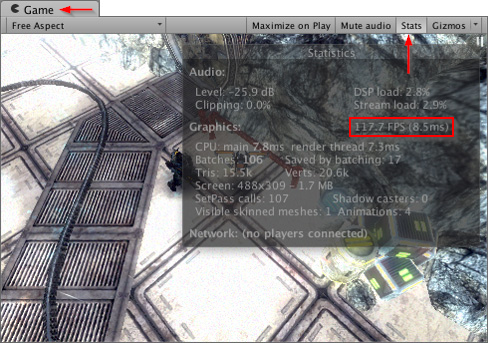 copper jasper
yep
pretty evident that its correct cause im getting screen tearing
YES IT FINNALY WORKED
But now my camera is broken...
and the screen tearing is not fixed
I wanna quit unity 😭
rocky canyon
typical roblox dev
copper jasper
cosmic quail
try clicking the vsync button here https://europe1.discourse-cdn.com/unity/origi...
so enabling this stops my fps cap from working but then when it does work my whole game breaks
grand snow
you should prefer vsync over changing target frame rate (except on mobile platforms where vsync does nothing)
copper jasper
neither fixes anything
and target frame js makes it worse
I dont get it why cant it just work
it should when capping my fps to 60 but still doesnt
at this rate i dont even know what the issue is
is my code wrong or smthn
    void HandleLook()
    {
        // Get mouse input and apply sensitivity and frame-rate independence
        float mouseX = Input.GetAxis("Mouse X") * mouseSensitivity * Time.deltaTime;
        float mouseY = Input.GetAxis("Mouse Y") * mouseSensitivity * Time.deltaTime;

        // Update rotation values based on mouse movement
        xRotation -= mouseY; // Subtract because Unity's rotation is inverted
        xRotation = Mathf.Clamp(xRotation, -maxX, maxX);  // Limits looking left/right

        camTransform.localRotation = Quaternion.Euler(xRotation, 0f, 0f); // Camera transform
        transform.Rotate(Vector3.up * mouseX); // The players transform
    }
without deltatime the cam is snappy and broken
ivory bobcat
You don't need delta time as mouse input is already a rate
cosmic quail
copper jasper
is my code wrong or smthn
```
void HandleLook()
{
// Get mouse ...
why are you multiplying mouse movement with deltaTime?
ivory bobcat
decrease mouse sensitivity
copper jasper
and as always i still have screen tearing
copper jasper
ivory bobcat
decrease mouse sensitivity
no like its slow but teleports it just snaps into place
ima record it 1 sec
and the video isnt showing all of the screen tearing
looks wayyy worse on my screen
ivory bobcat
If you're moving your character with physics but moving the camera outside of physics, you'll get some strange snapping etc
copper jasper
but i wasnt even walking
and it wasnt happening when i had 1k fps
and was using delta time
cosmic quail
copper jasper
dont parent camera to rigidbody
astral flame
The mistake here is that you are not using the inputs as they should be.
copper jasper
cosmic quail
dont parent camera to rigidbody
tried that before
copper jasper
astral flame
The mistake here is that you are not using the inputs as they should be.
wdym
astral flame
If you want to see how you have your inputs configured?
In the code
In my case I use the horizontal and vertical and putting the speed variable and from there I put the time.deltatime and everything works out fine.
rocky canyon
astral flame
In my case I use the horizontal and vertical and putting the speed variable and ...
correct.
copper jasper
im gonna loose my mind
using 60fps doesnt fix the tearing
the cam is broken now
everything is getting worse instead of being fixed
i had so much planned today like learning unity but i spent the whole day tryna fix this bs
rocky canyon
that happens when your learning 🤔
there may be a chance u have to scrap and rebuild complete things
astral flame
It's better that you use that like I do so you won't have teleports anymore because yes
copper jasper
I js wanna fix this
rocky canyon
i think ur in over ur head already.. and need to step back and learn/experiment some more
the screen tearing issue needs to be sorted out first..
if it were me i'd build a new project.. and i'd try simple animations. maybe even import a mp4 and use the VideoPlayer component.. see if the screen tearing is still ther...
copper jasper
it doesnt even make sense cause 60fps cap and vsync should fix the tearing
astral flame
Well, use the one I told you and it will be fixed.
copper jasper
astral flame
Well, use the one I told you and it will be fixed.
where
astral flame
Put the horizontal and vertical inputs first
ivory bobcat
astral flame
In my case I use the horizontal and vertical and putting the speed variable and ...
Just a reminder that you wouldn't want to include delta time as the mouse delta per frame is already relative to time (an issue with brackeys and a bunch of older tutorials)
astral flame
For rotation
copper jasper
Is my cam script even correct
    void HandleLook()
    {
        // Get mouse input and apply sensitivity and frame-rate independence
        float mouseX = Input.GetAxis("Mouse X") * mouseSensitivity;
        float mouseY = Input.GetAxis("Mouse Y") * mouseSensitivity;

        // Update rotation values based on mouse movement
        xRotation -= mouseY; // Subtract because Unity's rotation is inverted
        xRotation = Mathf.Clamp(xRotation, -maxX, maxX);  // Limits looking left/right

        camTransform.localRotation = Quaternion.Euler(xRotation, 0f, 0f); // Camera transform
        transform.Rotate(Vector3.up * mouseX); // The players transform
    }
can u js fix it i cant do nothing at this rate
like its been a whole day and my dumb ah still hasnt fixed it
sour fulcrum
copper jasper
can u js fix it i cant do nothing at this rate
We don’t do that here
ivory bobcat
copper jasper
Is my cam script even correct
```
void HandleLook()
{
// Get mo...
X rotation is a float right?
copper jasper
ye
float xRotation = 0f; // Horizontal rotation (looking up/down)
wanna see my whole code to see how crap it is 😄
sour fulcrum
You won’t gain much from beating yourself up like that
ivory bobcat
copper jasper
It would seem you've got some weird camera jittering going on rather than screen tearing.
sour fulcrum
Code is hard, physics is hard, learning is hard
copper jasper
but its been a day
keen cargo
also don't do transform on a rigidbody, you are doing that in HandleLook()
copper jasper
and i want to atleast do the basics before school starts again i have mocks 😭
grand snow
you dont learn a new skill in 1 day
rocky canyon
its been a day
5-year Noob laughin his ass off over here
sour fulcrum
copper jasper
but its been a day
You’ve done a lot in a day
copper jasper
but i have years in roblox it should have been easy and nothing i do works even when i took other peoples code to test if it would work
keen cargo
no it shouldnt be easy lol
grand snow
You lack the understanding on how to use their code or what it even does
rocky canyon
u cant make this stuff up
copper jasper
but now that im using a 60 fps cap the cam is broken and i have tearing so computer wise it doesnt make sense
capping my fps 60 should work
keen cargo
it's highly highly likely because you're doing transform on the rigidbody
i had similar camera issues because of that
rocky canyon
test an animation or video like i mentioned earlier
sour fulcrum
keen cargo
it's highly highly likely because you're doing transform on the rigidbody
Why
copper jasper
keen cargo
it's highly highly likely because you're doing transform on the rigidbody
but i need that so that i can make the player face where the cam is
keen cargo
use the physics rotation, like MoveRotation()
tell the physics of Unity to rotate it not transform
copper jasper
also rn i can only look up and down not only that but since i unparented the camera from the player its not following the player
copper jasper
keen cargo
use the physics rotation, like `MoveRotation()`
This?
rb.MoveRotation(rb.rotation * Quaternion.Euler(0f, mouseX, 0f));
copper jasper
but i can only look up and down
should i make the camera child of the player
or leave it outside
keen cargo
I have the camera separately
and the camera's position is tied to an empty gameobject on the player
copper jasper
HOLD UP I FIXED THE SCREEN TEARING
I stopped using the max fps thing
and js used this again

Only jitters left
well moving my cam fast ends up creating wave like effects
keen cargo
and how's the camera being moved?
copper jasper
well for the left and right its working cause i placed the cam under the player capsule
and up and down is this
    void HandleLook()
    {
        // Get mouse input and apply sensitivity and frame-rate independence
        float mouseX = Input.GetAxis("Mouse X") * mouseSensitivity;
        float mouseY = Input.GetAxis("Mouse Y") * mouseSensitivity;

        // Update rotation values based on mouse movement
        xRotation -= mouseY; // Subtract because Unity's rotation is inverted
        xRotation = Mathf.Clamp(xRotation, -maxX, maxX);  // Limits looking left/right

        camTransform.localRotation = Quaternion.Euler(xRotation, 0f, 0f); // Camera transform
        rb.MoveRotation(rb.rotation * Quaternion.Euler(0f, mouseX, 0f));
    }
did u see
rn its working wayyy better
but theres tiny jitters
and if i move cam around fast then the thing tears
like wave effect on tiktok
keen cargo
so the jitters is probably because of it being a child of the player's capsule (or rigidbody in this case)
copper jasper
but then it doesnt go left and right and doesnt follow the char
keen cargo
well you'd place an empty gameobject on the player for the camera to follow using a following script i imagine
i myself use cinemachine so i don't have to worry about the following
copper jasper
I made the cam follow the player like this
camTransform.localPosition = transform.localPosition;
But still no left and right
keen cargo
what's confusing me in your HandleLook() is that you're telling yourself that xRotation is limiting left/right, when in fact it's handling up/down
and you don't have anything in there that specifically handles left/right movement
well, specifically the xRotation = Mathf.Clamp(xRotation, -90f, 90f); part
that one is what prevents you from looking too up or down, or at least it should be
copper jasper
im js as confused as u are
keen cargo
but that's besides the point, you don't have anything that handles left/right
copper jasper
I made a new script
using UnityEngine;
public class CamMover : MonoBehaviour
{
public Transform CamPosition;
// Update is called once per frame
void Update()
{
    transform.localPosition = CamPosition.localPosition;
    transform.localRotation = CamPosition.localRotation;
}
}
Then i made a cam positon empty object in the player
moved the cam holder out of the player
keen cargo
don't put it in Update, it's FixedUpdate
copper jasper
But the looking on this is messed up
    void HandleLook()
    {
        // Get mouse input and apply sensitivity and frame-rate independence
        float mouseX = Input.GetAxis("Mouse X") * mouseSensitivity;
        float mouseY = Input.GetAxis("Mouse Y") * mouseSensitivity;

        // Update rotation values based on mouse movement
        xRotation -= mouseY; // Subtract because Unity's rotation is inverted
        xRotation = Mathf.Clamp(xRotation, -maxX, maxX);  // Limits looking left/right
        yRotation -= mouseY; // Subtract because Unity's rotation is inverted
        yRotation = Mathf.Clamp(xRotation, -maxX, maxX);  // Limits looking left/right

        camTransform.localRotation = Quaternion.Euler(xRotation, yRotation, 0f); // Camera transform
        rb.MoveRotation(rb.rotation * Quaternion.Euler(0f, mouseX, 0f));
        camTransform.localPosition = transform.localPosition;
    }
because you're following a physics object
copper jasper
keen cargo
because you're following a physics object
my cam direction is messed up though
lemme record it 1 sec
always goes in the same direction
keen cargo
why do you have yRotation calculated like that?
copper jasper
like what
keen cargo
that's not how you calculate yRotation
polar acorn
Why is your left/right rotation controlled by the mouse up/down? And why is yRotation created by clamping the X rotation?
copper jasper
polar acorn
Why is your left/right rotation controlled by the mouse up/down? And why is `yRo...
Idk man im loosing my mind i went from trying to fix screen tearing to now this and more
polar acorn
When you're rotating, you give it an axis to rotate about. Imagine a stick stabbed through the object at that axis, then you grip the pole and spin it in place.
Rotating about the X axis is up/down motion for the object, and rotating about the Y axis is left/right
(rotating about the Z axis is rolling sideways)
 copper jasper
I have no clue what allat means
first day in unity
i just want to fix it so i can learn properly
copper jasper
i dont get it
keen cargo
do you have a pencil?
polar acorn
copper jasper
how is x up and down
Please read the messages again
I explained how in both words and pictures
X is red
keen cargo
it's not that x is up and down
it's that you're moving it about the x axis
polar acorn
Y is green
polar acorn
polar acorn
Why is your left/right rotation controlled by the mouse up/down? And why is `yRo...
keen cargo
you could also just take a break
keen cargo
do you think you're going to accomplish much with your brain being fried, by your own words
polar acorn
Then we don't have time to keep repeating the explanation until you decide to read it
keen cargo
like literally take a walk for 15 minutes
copper jasper
so X axis is up/down and Y axis is left/right
but what i dont get is why is my camera moving like this
polar acorn
copper jasper
so X axis is up/down and Y axis is left/right
To be more accurate, X axis is Pitch, Y axis is Yaw
polar acorn
copper jasper
but what i dont get is why is my camera moving like this
Becase you're telling it to do so
You've set yRotation to the same value as xRotation
keen cargo
yeah that's not what digi said
copper jasper
dont u mean cause i was doing xRotation -= mouseY; for both
polar acorn
copper jasper
yRotation -= mouseX;
okay what does the line after this look like
polar acorn
copper jasper
dont u mean cause i was doing xRotation -= mouseY; for both
I mean, that was a problem
but you weren't even using that value for yRotation before you just overwrote it the very next line
So it didn't matter anyway
polar acorn
Probably
keen cargo
well you don't want to CLAMP it, because that would lock you from doing a 360 spin
copper jasper
keen cargo
well you don't want to CLAMP it, because that would lock you from doing a 360 sp...
ye XD
keen cargo
you SHOULD limit it somehow though
polar acorn
but you definitely shouldn't set the yRotation to the clamped value of the X rotation variable
copper jasper
so that worked but my movement is messed up
polar acorn
 copper jasper
ima add a cube to see my direction rq
copper jasper
polar acorn
ye im blind
is this wrong then
using UnityEngine;
public class CamMover : MonoBehaviour
{
public Transform CamPosition;
// Update is called once per frame
void FixedUpdate()
{
    transform.localPosition = CamPosition.localPosition;
    transform.localRotation = CamPosition.localRotation;
}
}
keen cargo
ignore that for now, focus on your movement
copper jasper
def wrong
 keen cargo
so now show what the camera look script looks like
copper jasper
    void HandleLook()
    {
        // Get mouse input and apply sensitivity and frame-rate independence
        float mouseX = Input.GetAxis("Mouse X") * mouseSensitivity;
        float mouseY = Input.GetAxis("Mouse Y") * mouseSensitivity;

        // Update rotation values based on mouse movement
        xRotation -= mouseY; // Subtract because Unity's rotation is inverted
        xRotation = Mathf.Clamp(xRotation, -maxX, maxX);  // Limits looking left/right
        yRotation -= mouseX; // Subtract because Unity's rotation is inverted

        camTransform.localRotation = Quaternion.Euler(xRotation, yRotation, 0f); // Camera transform
        rb.MoveRotation(rb.rotation * Quaternion.Euler(0f, mouseX, 0f));
        camTransform.localPosition = transform.localPosition;
    }
so you still have the issue of yRotation being calculated incorrectly
keen cargo
no, nothing has to be removed, just one little thing has to be changed
copper jasper
this works better i think
yRotation = mouseY;
keen cargo
nope
copper jasper
but it looks correct
only issue i see is the cam is not going where the cam postion object is
 keen cargo
it looks correct but does it work correctly?
 polar acorn
- Make camera child object of player at position you want.
- When move mouse X, rotate player about Y-axis.
- When move mouse Y, rotate camera object about X-axis, clamped if you want it to be
copper jasper
so i make the cam a child of the player
polar acorn
Or the virtualCamera if you're using Cinemachine but it doesn't look like you are
keen cargo
naw cinemachine would've solved the following without anything extra
 lilac cape
I wish there was a vector3.side struct. My OCD doesn't like just using Vector3.right or left with the HorizontalInput lol:
 polar acorn
lilac cape
I wish there was a vector3.side struct. My OCD doesn't like just using Vector3.r...
polar acorn
lilac cape
I wish there was a vector3.side struct. My OCD doesn't like just using Vector3.r...
What would a "Vector3.side" even mean
What value would it hold?
copper jasper
I have never been so confused in my life
polar acorn
Which side?
polar acorn
copper jasper
I have never been so confused in my life
Everything except the three steps I gave you is unnecessary and should be removed
lilac cape
It's just weird to put vector3.right and the player can move left and right
polar acorn
lilac cape
It's just weird to put vector3.right and the player can move left and right
Because left is negative right
lilac cape
Are the boxesoverlapping?
ivory bobcat
lilac cape
I wish there was a vector3.side struct. My OCD doesn't like just using Vector3.r...
I think you can just use a single translate without the if statement
sour fulcrum
vector3.right does not exist for player movement or any movement. It just exists to be right of 0,0,0
copper jasper
polar acorn
Everything except the three steps I gave you is unnecessary and should be remove...
How do i fix the jitter
lilac cape
Yeah I could just have one. This movement finally clicked for me and I thought it was weird lol
polar acorn
copper jasper
How do i fix the jitter
Are you moving the camera in LateUpdate
polar acorn
copper jasper
no
Fix that
copper jasper
lemme try again
didnt fix it

oops
Im so happy that atleast the tearing is fixed
rocky canyon
well now you've come full circle back to the jitter we were thinkin was the original issue
sour fulcrum
Just wanna say, the learning does get easier. Can’t be expecting magic in a single day but the early part of learning this stuff is the hardest
Takes a lot of effort to force yourself to troubleshoot with strangers online for so long, glad your making progress
copper jasper
js gotta fix the annoying jitter then im done
rocky canyon
sour fulcrum
Takes a lot of effort to force yourself to troubleshoot with strangers online fo...
ya, it takes alot of effort for the strangers to help for so long when they say things like
"i wanna quit Unity" and "just fix this for me"... sooo props to you and the other guys as well 👍
copper jasper
How do i fix this 😭😭😭
sour fulcrum
rocky canyon
ya, it takes alot of effort for the *strangers* to help for so long when they sa...
I do not like you and I do not think you’ve provided nearly enough help to justify such a elitist attitude. This comment helps nobody.
rocky canyon
okie doke.. i take my props back..
copper jasper
so anyone know how to fix it 😄
keen cargo
ok this is a long shot, but this might just be your monitor
do you have anywhere else to try your game?
keen cargo
maybe you could try limiting your fps again
copper jasper
bet
only works when i turn this off

I also got someone to test it and they got the same issue @keen cargo
lilac cape
Anyone by chance know why my prefab pizza is going backwards when I instantiate it?
Script attached to pizza prefab
public class MoveForward : MonoBehaviour
{
  [SerializeField] float speed = 40.0f;

  // Start is called once before the first execution of Update after the MonoBehaviour is created
  void Start()
  {

  }

  // Update is called once per frame
  void Update()
  {
    transform.Translate(Vector3.forward * speed * Time.deltaTime);

  }
}
Instantiate on playercontroller script:
void Update()
  {

    if (Input.GetKeyDown(KeyCode.Space))
    {
      Instantiate(projectilePrefab, transform.position, projectilePrefab.transform.rotation);
    }
  }
It's going forwards
Translate uses the object's local space by default
lilac cape
oooo, so I need to rotate the prefab. The prefab is currently facing the way the pizza is flying in the video
wintry quarry
Since it's facing down (relative to the screen), it's going down
lilac cape
Rotated it 180 and it's working now, thank you!
copper jasper
copper jasper
How do i fix this 😭😭😭
how do i fix this 😭
lilac cape
Did you use snipping tool to make video? I don't see a preview and didn't want to download a file lol
 acoustic belfry
Hey, what i did wrong? For an odd reason when i talk with an NPC and end its dialogue, when i try to do so with another, this one only displays it first message and thats it 😦
A tool for sharing your source code with the world!
copper jasper
lilac cape
Did you use snipping tool to make video? I don't see a preview and didn't want t...
I recorded on my phone
@lilac cape Not a file now
grand snow
dear god no
copper jasper
idk whats going on bro
i try to fix one thing then the next breaks
its getting worse and worse
grand snow
im shocked at the video being a screen recording of a video which is a phone video
copper jasper
its cause on obs it doesnt show the video
so i had to use my phone to show the tearing
grand snow
is it recorded at 60fps?
grand snow
do other games act like this?
grand snow
does this happen in a new scene if you rotate the camera back and forth via the inspector?
copper jasper
wdym
btw it even happens in the editor
like without going in game
so its unity
but its js way worse in game
I must be doing this wrong right
    void HandleLook()
    {
        // Get mouse input and apply sensitivity and frame-rate independence
        float mouseX = Input.GetAxis("Mouse X") * mouseSensitivity;
        float mouseY = Input.GetAxis("Mouse Y") * mouseSensitivity;

        // Update rotation values based on mouse movement
        xRotation -= mouseY;
        yRotation = mouseY;

        xRotation = Mathf.Clamp(xRotation, -maxX, maxX);  // Limits looking left/right

        camTransform.localRotation = Quaternion.Euler(xRotation, yRotation, 0f); // Camera transform
        rb.MoveRotation(rb.rotation * Quaternion.Euler(0f, mouseX, 0f));
    }

    void LateUpdate()
    {
        HandleLook();
    }
I think i just made the code worse
how come this guy dont got ithttps://www.youtube.com/watch?v=E5zNi_SSP_w&t=110s
grand snow
im gonna blame your pc


 green karma
using
navMeshAgent.SetDestination(Player.transform.position);
in update causes the enemy to just stay still and keep recalculating
 eternal needle
green karma
using
navMeshAgent.SetDestination(Player.transform.position);
in update cause...
eternal needle
green karma
using
navMeshAgent.SetDestination(Player.transform.position);
in update cause...
https://docs.unity3d.com/6000.1/Documentation/ScriptReference/AI.NavMeshAgent.SetDestination.html
Note that the path may not become available until after a few frames later
so recalculating it every frame means it is never completing
eternal needle
don't calculate it every frame
green karma
whats the optomized one
after specifc seconds causes it to jerk
everytime it recalculates
eternal needle
the docs I linked also says in the next sentence
While the path is being computed, pathPending will be true
rocky canyon
firstly you'd only set a new destination if the destination was changed from the previous one.. or they've reached the destination.. (conditional)
no need to set a destination everyframe.. or even more often than u need to
green karma
okay, ill try this
rocky canyon
theres also navagent gizmo's and overlays in Unity that can really help vizualize whats going on.. where its going, when it changes all that good stuff
eternal needle
when its the players position, id assume its likely changing every frame. I'd really either just set it every X seconds, or if they moved far enough from the agents destination
either one would solve the issue. your agent isnt going to take seconds to calculate the path ever. if it does, you shouldnt be calculating such a large path
rocky canyon
good point.. i also feel it adds a bit of organic feels/randomness when its not updating instantly every single step u take
copper jasper
copper jasper
<@477161850396737536> Not a file now
how do i fix this 😭
yes
happens in editor and game
all of unity not only in unity
i even made another project empty still happened
and in game it happens to others too i let people install the game happend to them too
how 😭
acoustic belfry
acoustic belfry
Hey, what i did wrong? For an odd reason when i talk with an NPC and end its dia...
Somebody knows how to use Ink?
or what channel is better for stuff like that
green karma
thanks guys 🙂 it worked @rocky canyon @eternal needle
copper jasper
green karma
thanks guys 🙂 it worked <@317141358894645248> <@119616167894712320>
what version of unity do u use
eternal needle
acoustic belfry
Somebody knows how to use Ink?
or what channel is better for stuff like that
you'd have to see if they have some discord or forums. or start debugging and figure out what exactly your issue is
green karma
using 6
lilac cape
Using 6.1
copper jasper
how come i have screen tearing bro 😭
lilac cape
is it your monitor? What's your monitor hz set to?
copper jasper
60
polar acorn
Some combination of GPU, monitor, and drivers
copper jasper
it happens to everyone that installs my game and not only that but it happens in the editor without even playing the game
rtx 4070 ti
amd ryzen 7 9800x3d
as i said it happens to anyone who installs my game too
 teal viper
copper jasper
it happens to everyone that installs my game and not only that but it happens in...
teal viper
copper jasper
it happens to everyone that installs my game and not only that but it happens in...
Could be a broken editor installation
lilac cape
Do you manually set the frameRate in a script? Does graphics card have sync settings enabled? Does the stutter happen in URP and HDRP
teal viper
copper jasper
as i said it happens to anyone who installs my game too
Or something you're using in the project. Try a new empty project
teal viper
copper jasper
<@477161850396737536> Not a file now
This is definitely lack of vsync.
copper jasper
teal viper
Or something you're using in the project. Try a new empty project
I tried a empty project too
Ima try using unity 2022
Maybe unity 6 is bugged
Im also gonna try the lts version of unity 6
teal viper
Vsync is likely off
copper jasper
Ig u could say my pc is so powerful it cant even be stopped by vsync 😭
rocky canyon
i have 3 versions of Unity6.. no screen tearing on any of my projects.. new or older ported ones.. soo thats not it
teal viper
You should make sure vsync is enabled and test in a build
teal viper
copper jasper
Ig u could say my pc is so powerful it cant even be stopped by vsync 😭
Take a screenshot of your quality settings. With he platforms and vsync visible
copper jasper
copper jasper
Here
teal viper
copper jasper
Is this quality settings actually being used? Take a screenshot of the top of the page.


 teal viper
copper jasper
<@209684227720085505>
teal viper
copper jasper
<@209684227720085505>
Okay. And if you build and run now, does it still screen tear?
copper jasper
yes
acoustic belfry
eternal needle
you'd have to see if they have some discord or forums. or start debugging and fi...
Ok, well, thanks
teal viper
copper jasper
MP4 please
copper jasper
its an mp4
lemme use obs to record the vid
its cause i recorded it on my phone
1 sec
overlay?
not working idk why

thats js great
even with this

pretty sure ye
ye i did
it says 1
I tried to use this for capping fps at 60 it worked but made the screen tear even worse and laggy as hell
using UnityEngine;

public class fps : MonoBehaviour
{
    // Start is called once before the first execution of Update after the MonoBehaviour is created
    void Start()
    {
        Application.targetFrameRate = 60;
    }
}
are u using unity 6 and is it on dx12
ye i tried without vsync
 boreal cradle
I dont use unity 6 and I use dx11
do you have a gsync monitor
monitor plugged into GPU and not motherboard right?
copper jasper
boreal cradle
monitor plugged into GPU and not motherboard right?
ye
copper jasper
boreal cradle
I dont use unity 6 and I use dx11
how do i use dx11