#💻┃code-beginner
1 messages · Page 534 of 1
 rocky canyon
 sweet laurel
the coroutine is not active when the object is destroyed
rocky canyon
thats fine, but something is trying to reference Gun

when it no longer exists..
just gotta walk thru the code and figure out what
sweet laurel
rocky canyon
just gotta walk thru the code and figure out what
Okay. Thanks for your help!
 low rover
whats the best way to make destructable/physics affected tiles
afaik regular TileMap wont help, since tiles are just purely for rendering purposes
unless im wrong
 wintry quarry
low rover
whats the best way to make destructable/physics affected tiles
wintry quarry
low rover
whats the best way to make destructable/physics affected tiles
destructable/physics affected tiles
This is pretty vague
You'd have to get into details about what kind of interactions you want.
low rover
wintry quarry
> destructable/physics affected tiles
This is pretty vague
oh
my bad
let me elaborate
@wintry quarry have you played Space Station 13 by any chance?
wintry quarry
no
low rover
oh, its ok, they just have the mechanic im looking to replicate
Basically a 2D game, Players can interact with tiles and objects on them
Construct/Deconstruct (Changes tile/object texture)
UnWeld - Make tile draggable around the map
Weld - Set tile to the desired grid position
Other mechanics work around it, like explosions making tiles unweld and apply force and stuff
wintry quarry
low rover
oh, its ok, they just have the mechanic im looking to replicate
Basically a 2D g...
This would definitely be done with a tilemap
low rover
wintry quarry
This would definitely be done with a tilemap
Oh, then i dont know that much about tilemaps then
wintry quarry
like explosions making tiles unweld and apply force and stuff
As for localized individually moving tiles, those you would replace with GameObjects at least temporarily.
low rover
sooo, remove the tile from grid and spawn the GameObject on that spot?
wintry quarry
low rover
oh okay, what about tiles that deal damage
Can be done several different ways:
- Have a separate tilemap for that layer with a trigger collider
- Just check which tile is at a particular place and if it's the damaging one you do damage
- Use GameObjects for that particular interaction
low rover
wintry quarry
Can be done several different ways:
- Have a separate tilemap for that layer wit...
well, first one isnt gonna work for me, since there is will be different tiles, with different interactions. (could probably make it more abstract)
Second one works, but idk how flexible is that, having to add different functionality for each tile with if/else chaind doesnt sound good to me.
No idea how third one works, I assume you mean just the same case with my original problem
wintry quarry
low rover
well, first one isnt gonna work for me, since there is will be different tiles, ...
you don't need if/else chains.
low rover
wintry quarry
you don't need if/else chains.
yeah, my bad
I can just store functions
alr, thanks!
 upbeat steppe
can someone help get out off this and back to the original set up
 rocky canyon
upbeat steppe
can someone help get out off this and back to the original set up
rocky canyon
upbeat steppe
can someone help get out off this and back to the original set up
top right of the screen
press Layout > Reset
it could be that Scene view is just maximized.. Double Click the tab where it says "Scene"
Shift + Space (while hovering a window toggles it from minimized to maximized btw)
upbeat steppe
@rocky canyon thanks
rocky canyon
ur also i ISO metric view..
click the little square (in the middle of the directional gizmo in the top right corner)
to toggle from Perspective to Isometric
 stuck monolith
It keeps saying that the template checker is having an error and it doesn’t let me add items
rocky canyon
can you show a screenshot of this error?
 mossy iris
heyo so ive been messing with the particle system for a bit, and it seems everything other than the actual color & shape of my particles seem to work just fine

it seems to just be stuck on this purple square texture
rocky canyon
have to pick a material that works w/ the particle system
rocky canyon
mossy iris
heyo so ive been messing with the particle system for a bit, and it seems everyt...
scroll down and open Renderer you'll find the material there
mossy iris
rocky canyon
scroll down and open *Renderer* you'll find the material there
oh thank u!!
stuck monolith
rocky canyon
can you show a screenshot of this error?
if (!playFabSettingsValid)
{
if (EditorUtility.DisplayDialog(
"PlayFab Settings Warning",
"You are currently not logged into PlayFab.\n\n" +
"Please open the PlayFab EdEx window and log in to update your settings.",
"Open PlayFab EdEx",
"Cancel"))
{
OpenPlayFabEdExWindow();
}
}
}
private static void OpenPlayFabEdExWindow()
{
    EditorApplication.ExecuteMenuItem("Window/PlayFab/Editor Extensions");
}

private static void OnPlayModeStateChanged(PlayModeStateChange state)
{
    if (state == PlayModeStateChange.ExitingEditMode)
    {
        CheckSettings();
    }
}

private static void OnBuildPlayer(BuildPlayerOptions options)
{
    if (PlayerSettings.companyName == "Company Name" || PlayerSettings.productName == "Game Name")
    {
        EditorUtility.DisplayDialog(
            "Build Error",
            "Cannot build the project. Your player settings are still set to the default values.\n\n" +
            "Company Name: \"Company Name\"\n" +
            "Product Name: \"Game Name\"\n\n" +
            "Please update these values in the Player Settings.",
            "OK");
        throw new BuildPlayerWindow.BuildMethodException();
    }

    if (string.IsNullOrEmpty(PlayFabSettings.staticSettings.TitleId))
    {
        EditorUtility.DisplayDialog(
            "Build Error",
            "Cannot build the project. You are currently not logged into PlayFab.\n\n" +
            "Please open the PlayFab EdEx window and log in to update your settings.",
            "OK");
        throw new BuildPlayerWindow.BuildMethodException();
    }

    BuildPlayerWindow.DefaultBuildMethods.BuildPlayer(options);
}
}
#endif
rocky canyon
!code
 eternal falconBOT

Posting code
📃 Large Code Blocks
Use links to services like:
https://gdl.space/, https://paste.ofcode.org/, https://hatebin.com/, https://paste.myst.rs/, https://hastebin.com/
📃 Inline Code
Surround code with three backquotes. Not quotation marks.
To format as C#, add cs to the first line:
```cs
// Your code here
```
Add a comment with a line number if there is an error message.
stuck monolith
rocky canyon
use an appropriate method to share code ☝️
also, i was just referring to a screenshot of the actual error..
(like is it in the console?)
(was it a pop-up?)
etc
i've never heard of the error, is why i ask
rocky canyon
use Window key + Shift + S
stuck monolith
it a vr
rocky canyon
can take a smaller, little pic of it instead of a big screenshot
ya, but it still should appear in the console in the editor (in the pc)
or is the error happening only on the VR headset?
stuck monolith
Build completed with a result of 'Failed' in 97 seconds (96610 ms)
TaskCanceledException: A task was canceled.
UnityEditor.BuildPlayerWindow/DefaultBuildMethods:BuildPlayer (UnityEditor.BuildPlayerOptions)
TemplateDefaultChecker:OnBuildPlayer (UnityEditor.BuildPlayerOptions) (at Assets/Editor/TemplateDefaultChecker.cs:89)
no in utiyt
rocky canyon
oh okay.. so its a Build Error
stuck monolith
yes
rocky canyon
🫡 gotcha.. thats what i was confused about.. and the direct wording of it
stuck monolith
rocky canyon
🫡 gotcha.. thats what i was confused about.. and the direct wording of it
do you see it
rocky canyon
ya.. im just lookin into something.. (i thought files in /Editor/ didn't matter as they dont get built into the final build) but it appears that they can matter..
and secondly.. thats not a script You made im guessing...
looks like something Unity would include itself.. soo it makes me question why it isnt working..
im thinking something along the lines of corruption
are you signed into Unity Hub?
stuck monolith
@rocky canyon dms so i can give you tae link i use forme github
rocky canyon
also looks like something that could happen due to a network timeout..
stuck monolith
one sce it wrek
stuck monolith
rocky canyon
also looks like something that could happen due to a network timeout..
GitHub
A Gorilla Tag Fan Game Template by Glitched Cat Studios! - Glitched-Cat-Studios/GTag-Fan-Game-Template
@rocky canyon
rocky canyon
ahh, ya, third party asset then
stuck monolith
waht how do i fix
rocky canyon
did you ever change ur Company and Product name?
- "You are currently not logged into PlayFab.\n\n" +
- if (PlayerSettings.companyName == "Company Name" || PlayerSettings.productName == "Game Name")
these are the only two things i see in that code that would cause an error
the line number is this

so maybe check that function as well
all the code seems to imply that it would log errors if any of that fails but idk.. im not the asset's creator
stuck monolith
Ye I did
 stuck monolith
rocky canyon
the line number is this
stuck monolith
rocky canyon
the line number is this
Can you fix it pls
 night mural
 humble forum
what is this?
humble forum
what is this?
 mortal spade
does oncollisionenter and ontriggerenter get called from children and parent object or just the parent
humble forum
night mural
https://unity.huh.how/unity-null
but how much does it actually matter ?\
 languid spire
mortal spade
does oncollisionenter and ontriggerenter get called from children and parent obj...
languid spire
mortal spade
does oncollisionenter and ontriggerenter get called from children and parent obj...
they get called on the object which has the Rigidbody
night mural
well there are situations where it matters a lot, but for the most part if you just use == you can probably not worry about it
humble forum
cuz like != looks cleaner to me and the first option you see nothing
 mortal spade
languid spire
they get called on the object which has the Rigidbody
mortal spade
languid spire
they get called on the object which has the Rigidbody
okay thats my problem then ,,, thank ya
humble forum
night mural
well there are situations where it matters a lot, but for the most part if you j...
what about in my case cuz it makes the code look worse imo
night mural
just do what makes sense to you
 slender nymph
humble forum
cuz like != looks cleaner to me and the first option you see nothing
slender nymph
humble forum
cuz like != looks cleaner to me and the first option you see nothing
did you bother reading the page? because using the == operator (or implicit cast to bool) is very important with objects deriving from UnityEngine.Object
humble forum
slender nymph
did you bother reading the page? because using the `==` operator (or implicit ca...
my comparison is different?
slender nymph
huh?
languid spire
humble forum
my comparison is different?
is not null is very different to != null, yes
humble forum
languid spire
is not null is very different to != null, yes
but less readable
slender nymph
you shouldn't be using is not null with unityengine.objects
languid spire
like I give a shit, do what works not what looks nice
humble forum
languid spire
like I give a shit, do what works not what looks nice
it works  also what looks nice also does matter for readability and code structure
languid spire
rubbish
slender nymph
"it works"
yet comparing with the is operator is bound to lead to exceptions being thrown
languid spire
and, no, it does not work with Unity objects
humble forum
my game works fine 🤷♂️
slender nymph
until it doesn't 😉
languid spire
you do you, just dont come back when it does not work
humble forum
slender nymph
until it doesn't 😉
but do i really have to use is not null cuz loks ugly compared to != and what is the advantage
slender nymph
holy shit, have you not bothered reading any of what was said?
humble forum
slender nymph
holy shit, have you not bothered reading any of what was said?
im not a native englisch speaker 🤷♂️
slender nymph
go read the information that was presented to you again.
humble forum
slender nymph
go read the information that was presented to you again.
alr guess i will keep it like != for now then 🙂
slender nymph
again, that is what you have to use with unityengine objects
 latent glade
why am i getting this error


 humble forum
i don t understand the difference used to using != in ue5
slender nymph
latent glade
why am i getting this error
humble forum
slender nymph
https://discord.com/channels/489222168727519232/497874004401586176/1312889711412...
doesn t get me much further 🤷♂️
languid spire
latent glade
why am i getting this error
myinput is null or the Find("up") returns null
slender nymph
humble forum
doesn t get me much further 🤷♂️
it would if you would fucking read it
that page explains exactly why you need to use the == operator over the is operator and other null operators
humble forum
slender nymph
that page explains *exactly why* you ***need*** to use the `==` operator over th...
but what has that to do with =! never use is if not needed
languid spire
humble forum
i don t understand the difference used to using != in ue5
why would you expect C++ in Unreal to be the same as C# in Unity?
humble forum
languid spire
why would you expect C++ in Unreal to be the same as C# in Unity?
not saying that just saying what i know
slender nymph
humble forum
but what has that to do with =! never use is if not needed
read what is being said to you
latent glade
languid spire
myinput is null or the Find("up") returns null
yeah I know but they both look like they would make sense
-
Player is the name of the input actions map
-
Up is exactly what the action is called
humble forum
slender nymph
*read what is being said to you*
whatever arguing about pointless things isn t worth it
languid spire
latent glade
yeah I know but they both look like they would make sense
1. Player is the name ...
null ref is a run time error. the DATA is not what you expect it to be, nothing wrong with the code
latent glade
so what do I do to fix it?
languid spire
check what is null and why
slender nymph
humble forum
whatever arguing about pointless things isn t worth it
my guy, you are the one arguing pointlessly. this whole time you've apparently been on the side of using != when that is what everyone and everything is telling you to use
read the information on that page that was linked to understand why
 zenith cypress
humble forum
i don t understand the difference used to using != in ue5
zenith cypress
humble forum
i don t understand the difference used to using != in ue5
For reference, is null/is not null/?./?? do raw null checks, which bypass overrides that are available for equality. Unity has an overload for equality of UnityEngine.Objects since they live in C++ land, but are exposed to C#. So the C# object can be perfectly fine and not null, while the internal one is invalid (hence the custom equality that checks lifetime), so using it in the api will throw exceptions.
You can easily see this in action with this example:
// assign in inspector
[SerializeField] private GameObject _obj;

private void Start() {
  Debug.Log(_obj); // _obj/true, C# not null
  Debug.Log(_obj != null); // true, C# not null
  Debug.Log(_obj is not null); // true, C# not null

  DestroyImmediate(_obj);

  Debug.Log(_obj); // internal null/false, C# not null
  Debug.Log(_obj != null); // false, C# not null
  Debug.Log(_obj is not null); // true, C# not null
}
if you let air out of a baloon does it only go from one side?
latent glade
when I do Debug.Log(my_input);
or if (my_input is null)
still nothing debugs in the log
 hybrid finch
Im trying to make it so that if this object is over 5 away from target it walks towards it, any ideas on why it doesnt stop?
 slender nymph
latent glade
when I do `Debug.Log(my_input); `
or `if (my_input is null) `
still nothing debu...
slender nymph
latent glade
when I do `Debug.Log(my_input); `
or `if (my_input is null) `
still nothing debu...
where are you logging that?
slender nymph
hybrid finch
Im trying to make it so that if this object is over 5 away from target it walks ...
- !code 👇
- where do you tell it to stop?
eternal falconBOT
Posting code
📃 Large Code Blocks
Use links to services like:
https://gdl.space/, https://paste.ofcode.org/, https://hatebin.com/, https://paste.myst.rs/, https://hastebin.com/
📃 Inline Code
Surround code with three backquotes. Not quotation marks.
To format as C#, add cs to the first line:
```cs
// Your code here
```
Add a comment with a line number if there is an error message.
hybrid finch
slender nymph
1. !code 👇
2. where do you *tell* it to stop?
i dont really know can u help?
slender nymph
have you looked at the documentation for the navmeshagent?
 steep rose
hybrid finch
Im trying to make it so that if this object is over 5 away from target it walks ...
steep rose
hybrid finch
Im trying to make it so that if this object is over 5 away from target it walks ...
tell it to stop if it is closer https://docs.unity3d.com/ScriptReference/AI.NavMeshAgent-isStopped.html
 hybrid finch
ty
hybrid finch
steep rose
tell it to stop if it is closer https://docs.unity3d.com/ScriptReference/AI.NavM...
after i move away it is standing still how do i make it move again?
steep rose
hybrid finch
after i move away it is standing still how do i make it move again?
read the documentation
if(Targetfurtherawayfromplayer){
   //set destination and allow movement
}
else{
  //do not allow movement
}
Doesn't it just log to the console
slender nymph
i meant where in the code
slender nymph
if it is after the line that is throwing the exception, then it is no wonder it isn't logging since that line would not run
slender nymph
yes, i already pointed that out. what is InputSystem.actions and are you sure it has an action map called Player
latent glade
they are both under the name Player, the one in the code and the actionmap itself is named Player
slender nymph
show it.

 slender nymph
okay and is this the input action asset you've actually assigned in the input system settings?
latent glade
Yes
 slender nymph
that is not the input system settings, that is the Player Input component
you should make sure you actually read the documentation for the properties you use https://docs.unity3d.com/Packages/com.unity.inputsystem@1.11/api/UnityEngine.InputSystem.InputSystem.html#UnityEngine_InputSystem_InputSystem_actions
 glad quiver
My player’s IsGrounded boxcast is ticking true at the apex of his mini jump which seems to be causing the state machine to switch from the jump state to the running state momentarily. I checked the boxcast size and location and distance and it all seems correct, is there anything else it might be that I’m not considering?
wintry quarry
latent glade
Yes
You shouldn't be using PlayerInput at all if you're using InputSystem.actions
wintry quarry
glad quiver
My player’s IsGrounded boxcast is ticking true at the apex of his mini jump whi...
Very simple to figure out why with a couple Debug.Log statements.
Just log the object it's hitting
or otherwise log why the bool is becoming true.
latent glade
wintry quarry
You shouldn't be using PlayerInput at all if you're using `InputSystem.actions`
Should I just remove it or replace it with something else
wintry quarry
latent glade
Should I just remove it or replace it with something else
Pick one or the other
latent glade
ok
ok the error is gone
(PraetorBlue was right - it was linking only the main action maps and not the new one)
and ty BoxFriend for checking everything else
glad quiver
wintry quarry
Just log the object it's hitting
or otherwise log why the bool is becoming true.
Sorry, I didn’t explain it well, it’s colliding with the ground underneath the player. I just can’t figure out why, because it shouldn’t be.
wintry quarry
glad quiver
Sorry, I didn’t explain it well, it’s colliding with the ground underneath the p...
A bug in your code
glad quiver
I’m definitely missing something obvious but I can’t tell what
wintry quarry
Share your code !code
eternal falconBOT
Posting code
📃 Large Code Blocks
Use links to services like:
https://gdl.space/, https://paste.ofcode.org/, https://hatebin.com/, https://paste.myst.rs/, https://hastebin.com/
📃 Inline Code
Surround code with three backquotes. Not quotation marks.
To format as C#, add cs to the first line:
```cs
// Your code here
```
Add a comment with a line number if there is an error message.
wintry quarry
glad quiver
Sorry, I didn’t explain it well, it’s colliding with the ground underneath the p...
How did you verify the ground is what the boxcast was hitting?
glad quiver
@wintry quarry I have a few debug.logs that print whether the player is grounded and what the collision is and what state they are leaving and entering
The log says they are grounded, then running, then jump state, then colliding with the ground, then running again (in mid air), then not grounded, null collision, falling state (finally)
This doesn’t happen with stationary jumps it only happens when the jump has a running start.
glad quiver
@wintry quarry Holy crumbs, I googled my problem and clicked a link that looked related from a couple years ago and YOU were the person that replied to help them, what a coincidence! Are you a Unity employee or just a really helpful person?
 ember tangle
I'm noticing that I can get a direction vector3 by subtracting the origin from the destination, but I have to multiple it by -1 in order for it to point in the right direction. Am I doing this right?
slender nymph
if you have to multiply it by -1 that means your direction is backwards. remember, direction is (endPosition - startPosition) in that order
ember tangle
ooh that makes sense
 exotic turtle
How do I procedurally generate terrain? I have tried looking it up but all I got was links to github repos that I can't figure out how to use.
 teal viper
exotic turtle
How do I procedurally generate terrain? I have tried looking it up but all I got...
teal viper
exotic turtle
How do I procedurally generate terrain? I have tried looking it up but all I got...
Then maybe it's too early for you. Start with something simpler.
exotic turtle
I figured that would be the case but I have no idea how to do anything in my project without terrain to do it on
 timber tide
many youtube videos out there you can follow
teal viper
exotic turtle
I figured that would be the case but I have no idea how to do anything in my pro...
You could make a non procedural terrain. Or start with a simpler project.
 normal turret
Hey guys, what's up...? Just a quick question, for the "new" Unity Input System how can I use the equivalent of GetKeyDown if I use the Invoke Unity Events method...?
I have to jump but when I press and hold space my character jumps on the ground as long as I hold the jump button
Same thing with wall-jump, I just want it so that the player jumps only when you press the button and not hold it
exotic turtle
teal viper
You could make a non procedural terrain. Or start with a simpler project.
Ok then can you explain how meshes work and how I can manipulate them so I can create terrain or is there something important that im missing
teal viper
normal turret
Same thing with wall-jump, I just want it so that the player jumps only when you...
There must be a callback that corresponds to a key press or release. Check the documentation or ask in #🖱️┃input-system
steep rose
exotic turtle
Ok then can you explain how meshes work and how I can manipulate them so I can c...
use the terrain system built into unity or use polybrush to create terrain
exotic turtle
where do I find the terrain system? should I just look it up
 fierce badger
exotic turtle
Ok then can you explain how meshes work and how I can manipulate them so I can c...
fierce badger
exotic turtle
Ok then can you explain how meshes work and how I can manipulate them so I can c...

Generate a landscape through code!
Check out Skillshare! http://skl.sh/brackeys11
This video is based on this greatwritten tutorial by Catlike Coding:
https://bit.ly/2Qd1o1d
● Perlin Noise: https://youtu.be/bG0uEXV6aHQ
● More on generating terrain: https://youtu.be/wbpMiKiSKm8
● Singleton: http://wiki.unity3d.com/index.php/Singleton
❤️...
steep rose
exotic turtle
where do I find the terrain system? should I just look it up
https://docs.unity3d.com/Manual/terrain-UsingTerrains.html, https://docs.unity3d.com/Manual/script-Terrain.html yes you should
fierce badger
its math and code
steep rose
steep rose
https://docs.unity3d.com/Manual/terrain-UsingTerrains.html, https://docs.unity3d...
tutorials would also help to learn the terrain system
exotic turtle
fierce badger
https://www.youtube.com/watch?v=64NblGkAabk
the video isnt available
it says
teal viper
exotic turtle
Ok then can you explain how meshes work and how I can manipulate them so I can c...
This is a huge topic that is difficult to explain properly in discord.
A simple and insufficient explanation is:
Meshes are made of vertices that compose triangles or faces. To modify a mesh, you need to modify or add vertices.
fierce badger
exotic turtle
the video isnt available
on youtube?
exotic turtle
fierce badger
on youtube?
yes
fierce badger
prob geo locked for u or something me no know
exotic turtle
Why is the terrain object immune to scaling
 void notch
exotic turtle
Ok then can you explain how meshes work and how I can manipulate them so I can c...
void notch
exotic turtle
Ok then can you explain how meshes work and how I can manipulate them so I can c...
You can find more on our docs as well: https://docs.unity3d.com/ScriptReference/Mesh.html (For meshes). A terrain is nothing more than a bigger mesh, however, it's easier to modify this "mesh" using Unity.
rocky canyon
exotic turtle
Why is the terrain object immune to scaling
b/c all its scaling and stuff is done thru the Terrain component and its settings..
similar to how u can't change the Field of View on a Camera when its being controlled w/ a Cinemachine brain. (it needs to be done thru the Cinemachine Camera's instead)
exotic turtle
what is cinemachine
rocky canyon
its just a Camera supplement plug-in for unity..
was just an example.. not important to know really
 formal escarp
https://pastebin.com/1dAqwAwJ
I have this code but i cant assingn from the hereachy the text nor the name to the manager.
Pastebin
Pastebin.com is the number one paste tool since 2002. Pastebin is a website where you can store text online for a set period of time.
rocky canyon
but the Terrains scaling, and positioning, and all that stuff is done thru its component
ember tangle
exotic turtle
Ok then can you explain how meshes work and how I can manipulate them so I can c...
I have a bit of a janky way I made a terrain have hills using perlin noise. You want to get the terrain in a Monobehavior class like this: Terrain terrain = GetComponent<Terrain>();
rocky canyon
^ yup, that proves my point.. ur actually modifying the Terrain Component
not the transform component
exotic turtle
there is no scaling option here
 rocky canyon
its not really a scale.. its *terrain size, terrain height etc
steep rose
formal escarp
https://pastebin.com/1dAqwAwJ
I have this code but i cant assingn from the her...
you don't assign things via hierarchy, you assign via inspector. Did you Drag and Drop a text component into the field?
formal escarp
steep rose
you don't assign things via hierarchy, you assign via inspector. Did you Drag an...
Yes.
ember tangle
ember tangle
I have a bit of a janky way I made a terrain have hills using perlin noise. You ...
then I fed it a function like this: terrain.terrainData = MakeTerrain(terrain.terrainData); which looked like ```TerrainData MakeTerrain(TerrainData terrainData)
{
terrainData.heightmapResolution = width + 1;
terrainData.size = new Vector3 (width, depth, height); // set terrain size

terrainData.SetHeights(0, 0, GenerateMesh()); //starting x and y, and a grid of floats

return terrainData;
}```
formal escarp
I tried dragging and dropping
ember tangle
The generate mesh function adds noise: ```private float[,] GenerateMesh() // generates height based on
{
float[,] mesh = new float[width, height]; // create grid based on wanted size.
for(int x = 0; x < width;  x++)
{
    for (int y = 0; y < height; y++)
    {
        //create perlin noise based on the coordinates, offset randomly.
        mesh[x, y] = Mathf.PerlinNoise( (float)x / width * scale + PerlinOffsetX, (float)y / height * scale + +PerlinOffsetY);
    }
}
return mesh;
}```
rocky canyon
 ember tangle
youll have to play with it a lot to make it work in your usecase
steep rose
formal escarp
I tried dragging and dropping
show me the inspector for the script
formal escarp
 steep rose
are you dragging a TMP text into it or just the default
formal escarp
steep rose
are you dragging a TMP text into it or just the default
Yea.
formal escarp
oooohhh
steep rose
you would use TMPtext(I think it was) for your type
formal escarp
i thought they would be the same
rocky canyon
TMP_Text and you'll need the using TMPro; using statement
steep rose
that does not mean they are the same, its like saying an apple and orange are the same because they are fruits
rocky canyon
formal escarp
like, at the end of the day they are both text.
they both have a .text parameter.. soo yea at the end of hte day.. they can function the same..
but u must have the correct type to reference it
formal escarp
steep rose
that does not mean they are the same, its like saying an apple and orange are th...
Fair enough.
 timid quartz
I have a network transform with a network rigidbody for Mirror networking, but it doesn't appear to be affected by gravity. Am I missing something obvious? Gravity is checked in the rigidbody component.

 rocky wyvern
all 'child' rigidbodies in the network I believe are made kinematic
and just move with the authorative rb
timid quartz
is there a way to make the authoritative RB have gravity?
I am using the authoritative RB from Mirror
timber tide
#archived-networking or ask in the Mirror discord
timid quartz
ok, ty!
 hollow zenith
https://i.gyazo.com/3568aa2ec5bec875b04ca413a66e0722.png
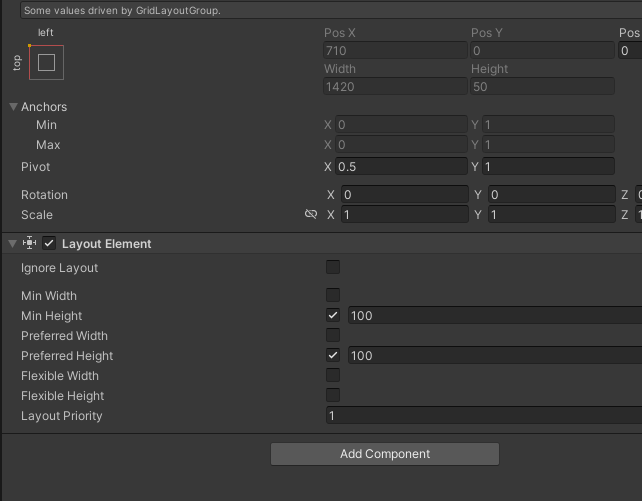
Is there a way to force layout element to work with Grid layout?
It works fine for Vertical Layout group, but when I swapped it to Grid Layout it no longer accepts min height.
 pure drift
!code
eternal falconBOT
Posting code
📃 Large Code Blocks
Use links to services like:
https://gdl.space/, https://paste.ofcode.org/, https://hatebin.com/, https://paste.myst.rs/, https://hastebin.com/
📃 Inline Code
Surround code with three backquotes. Not quotation marks.
To format as C#, add cs to the first line:
```cs
// Your code here
```
Add a comment with a line number if there is an error message.
timber tide
hollow zenith
https://i.gyazo.com/3568aa2ec5bec875b04ca413a66e0722.png
Is there a way to force...
Eh, Gridlayout is just junk tbh. Use a combination of both horizontal and vertical to make a pseudo GridLayout
or grab a better GridLayout off the asset store ;p
hollow zenith
Tbh I need a vertical layout, the reason I picked grid layout was for an easy way to resize all objects
Except the one I want to override
I might do just that.
I had to redo it a bit to make it work with scrollview, which now forces me to do the above
Because I want a vertical list with header which is larger.
wintry quarry
glad quiver
<@179367739574583296> Holy crumbs, I googled my problem and clicked a link that ...
Not a Unity employee
pure drift
https://paste.ofcode.org/D352jpHmBPM6PXH4MFcRVA does anybody know why the playerscore doesnt update properly when the bullet collides with the player ive tried fixing it so much but nothing comes to mind
hollow zenith
pure drift
https://paste.ofcode.org/D352jpHmBPM6PXH4MFcRVA does anybody know why the player...
// playerScoreTextUpdater.text = $"your score is {playerScore}";
This part is commented out
so it won't update UI
pure drift
even the debug.log is not updating gets stuck at 1
hollow zenith
that means you are not colliding
pure drift
it does debug when it hits the player but the actual variable doesnt go up in value
hollow zenith
you can manually place a bullet and drag it around in play mode to see if it works
oh
thats probably because you store a variable on a bullet script
but you destroy the bullet
so each bullet holds "playerScore"
you'd need to update your player object score or something, depends on how u want to handle that
pure drift
ohhh ok thank you
hollow zenith
You can look into Singleton pattern, its very simple and could work here(you'd create Score script and make it static so you can do Score.Add(1); etc)
pure drift
i have a question how does destroying a gameobject affect variables updating that makes no sense to me
slender nymph
you increment the variable on the object being destroyed. that variable is an instance variable so each Bulletscript object has its own playerScore with the values being entirely separate from each other. it's typical to store the score on a separate object that isn't being destroyed and just update that when necessary. you could even make it a public property that updates the displayed text when the score is assigned to as well
teal viper
pure drift
i have a question how does destroying a gameobject affect variables updating tha...
Maybe I missed some context from earlier, but there's not enough info to answer your question. Normally, destroying an object is not related to updating variables in any way. If there is a correlation in your project, that must be due to your code or setup.
slender nymph
i think their confusion stems from their misunderstanding of how instance variables work, as their previous issue was the common "update instance variable's value and immediately destroy object" issue where they expect them to act more like a static variable
teal viper
Ah, I see.
pure drift
oh ok thank you i see
 cosmic dagger
25
pure drift
https://paste.ofcode.org/34vkXuGXPT2GHWLFHUSPYvy for this code does anybody know why the debug.log isnt triggering when i collide with an enemy parent
slender nymph
don't use string equality to check a tag, make sure to use the CompareTag method instead. it will actually throw relevant errors when a tag doesn't exist instead of failing silently
also give this a read: https://unity.huh.how/physics-messages
pure drift
thank you
 sleek sparrow
Where can I ask for help
slender nymph
!ask
eternal falconBOT
:thinking: Asking Questions
:mag: Search the internet for your question!
:book: Use the API Scripting Reference and User Manual and this troubleshooting site for commonly posted issues.
:wrench: Attempt to debug your issue.
:thought_balloon: Find an appropriate channel by reading the name and description in #🔎┃find-a-channel
:grey_question: And don't ask to ask, ask a full question illustrating with screenshots if needed.
-# For more posting guidelines, go to #854851968446365696
:thinking: Asking Questions
:mag: Search the internet for your question!
:book: Use the API Scripting Reference and User Manual and this troubleshooting site for commonly posted issues.
:wrench: Attempt to debug your issue.
:thought_balloon: Find an appropriate channel by reading the name and description in #🔎┃find-a-channel
:grey_question: And don't ask to ask, ask a full question illustrating with screenshots if needed.
-# For more posting guidelines, go to #854851968446365696
 naive pawn
oh that's just there now isn't it
naive pawn
we can't help when you don't tell us what you need help with...
slender nymph
sleek sparrow
I have an error with my engine
hint: read the bot message
#💻┃code-beginner message
sleek sparrow
naive pawn
we can't help when you don't tell us what you need help with...
I am atempting to make a flappy bird to to learn about unity. I created a pipe object with two child object Pipe Bottom and pipe top. Both of them have psrite renderers with the Jpeg that they need put inside. Neither will render into the game scene.

 slender nymph
not a code question. your camera is likely too close to the object to see it. make sure your camera is at or behind -10 on the Z axis, that is the convention for orthographic camera placement
sleek sparrow
It is at -10 and I can move the pipes onto the bird and they will still not render
slender nymph
check the Pipe object and make sure it isn't behind the camera
sleek sparrow
How to I do that
slender nymph
click it and look at its position
pure drift
i used the other keyword but it still doesnt track if i hit the enemy properly could someone check if i messed up something with the tag please
 slender nymph
what do you mean by "the other keyword"?
slender nymph
what component is this code on?
steep rose
has VSC been buggy for anyone? I can't even declare a string 🤔
 slender nymph
also just fyi, other is not a keyword, you've just changed the name of the parameter to other but it was perfectly fine as collision
naive pawn
pure drift
i used the other keyword but it still doesnt track if i hit the enemy properly c...
you're using OnTriggerEnter2D but enemy isn't a trigger
naive pawn
steep rose
has VSC been buggy for anyone? I can't even declare a string 🤔
!configure
what was it
steep rose
naive pawn
!configure
!ide
eternal falconBOT
💡 IDE Configuration
If your IDE is not autocompleting code
or underlining errors, please configure it.
Select one:
•  Visual Studio (Installed via Unity Hub)
• Visual Studio (Installed manually)
•  VS Code
•  JetBrains Rider
• :question: Other/None
naive pawn
oh i thought that was for a different snippet
pure drift
oh i should change it back one sec
naive pawn
steep rose
yes I know, I already have everything
clearly not, it's autocompleting words instead of... anything else
have you at least restarted the language server?
pure drift
slender nymph
what component is this code on?
sorry for the late response but it was on an empty object in the hierachy i attached this script on
slender nymph
so it was not attached to any collider or rigidbody involved in the trigger overlap/collision?
naive pawn
why would it collide with anything then
steep rose
naive pawn
clearly not, it's autocompleting words instead of... anything else
have you at l...
yup that worked 😅
sorry for the inconvenience
pure drift
slender nymph
so it was not attached to any collider or rigidbody involved in the trigger over...
i guess not i will try to fix that
slender nymph
OnTriggerEnter2D and OnCollisionEnter2D (and the other variants) are called on objects involved in the collision. unrelated objects will not receive those messages
glad quiver
Anyone know why this code correctly returns false for isGrounded during freefall but true for GroundCheck()? Debug.Log says GroundCheck returns true every frame no matter what, yet isGrounded returns correctly every frame. If I use "if(!GroundCheck())" elsewhere, nothing happens but "if(!isGrounded)" works fine. The boxcast and collisions are correct and nothing overwrites the values elsewhere. It's probably something obvious and fundamental -_-
cs
public bool GroundCheck()
{
RaycastHit2D hit = Physics2D.BoxCast(capsuleCollider2d.bounds.center, capsuleCollider2d.bounds.size, 0f, Vector2.down, 0.02f, groundLayer);
if(hit.collider !=null)
{isGrounded = true;}
else
{isGrounded = false;}
return hit != null;
hit cannot be null because it is a struct. but hit.collider can be, which is what you are checking in that if statement
also you can just return hit, it's got an implicit cast to bool that just checks if its collider property is null (which is also what you are doing in the if statement)
glad quiver
slender nymph
hit *cannot* be null because it is a struct. but hit.*collider* can be, which is...
So if(!GroundCheck) { insert FallingState transition here} can’t ever work? Or it could work if I return hit instead?
slender nymph
huh? i was referring to the last line of that method where you attempt to compare something that can never be null to null and how you are doing something entirely different in the if statement that is inside the method
glad quiver
Sorry for being confusing, I meant if I return hit in the last line instead of hit != null, can I use !GroundCheck() elsewhere in the code (my FallingState example was just an example)
 split dragon
Hi. I have this question: I have 10 objects, and half of them are turned off. I want to turn off the disabled objects through the script, but I do not know which ones are on and off. Would it be better to check whether the object is turned off through the for loop and through if, or turn on all objects immediately through the for loop? For example:
 slender nymph
what do you mean by "turned off"? because if you mean that they are disabled then that if statement will never be true because that is how you check if an object is destroyed or null, not if it is inactive.
but the second option would be just fine if you wanted to just make sure all of the objects in the list are enabled
split dragon
slender nymph
what do you mean by "turned off"? because if you mean that they are disabled the...
Well, it's just that he was noticed, that is, he found out if he was noticed, and he was noticed, that is, he noticed (I put if"!")
glad quiver
Sorry, to be clear I’m asking this stuff because it still doesn’t work, not because I am not trying. IsGrounded() just returns true always. I tried returning hit instead but I must be doing it wrong.
slender nymph
split dragon
Well, it's just that he was noticed, that is, he found out if he was noticed, an...
i have no idea wtf you are trying to say
slender nymph
glad quiver
Sorry, to be clear I’m asking this stuff because it still doesn’t work, not beca...
show the full !code. use a bin site that the bot links to do so 👇
eternal falconBOT
Posting code
📃 Large Code Blocks
Use links to services like:
https://gdl.space/, https://paste.ofcode.org/, https://hatebin.com/, https://paste.myst.rs/, https://hastebin.com/
📃 Inline Code
Surround code with three backquotes. Not quotation marks.
To format as C#, add cs to the first line:
```cs
// Your code here
```
Add a comment with a line number if there is an error message.
split dragon
slender nymph
i have no idea wtf you are trying to say
I don't care. Option 2 is better, as you said. Thanks)
slender nymph
okay?
glad quiver
slender nymph
show the full !code. use a bin site that the bot links to do so 👇
Can I just clarify what you meant by return hit? Do you literally mean replace “return hit != null” with “return hit” in the above code?
slender nymph
yes
glad quiver
Well then the new code is exactly what is above except with that one change lol
slender nymph
great! now show the full code
 nimble apex
can u visualize enum property on UI button OnclickEvent?
nimble apex
then i guess i gonna do this instead
public directionOffset direction;
public void DirectionUp() => direction = directionOffset.Up;
public void DirectionDown() => direction = directionOffset.Down;``` summer stump
steep rose
yup that worked 😅
summer stump
steep rose
yup that worked 😅
Vsc, specifically, needs to be reconfigured periodically in my experience.
 upper prawn
Hi, I'm a C++ dev and new to Unity and C# for the most part. I am trying to find a GameObject in a list that is directly in front of my Player GameObject.
What I can't figure out is how to clone the Player's transform. What I'm doing is something like
var targetTile = player.transform;
targetTile.Translate(new Vector3(1.0F, 0.0F, 0.0F));
I know that C# uses reference based semantics so it makes sense that this mucks with my Player object, but I don't know how to make a copy of the transform. From some googling it looks like I should Instantiate another GameObject from it?
summer stump
upper prawn
Hi, I'm a C++ dev and new to Unity and C# for the most part. I am trying to find...
You want to query a space. This is often accomplished with things like Raycasting (or sphere/capsule/box casting), or CheckBox (and other shapes) or other spatial queries like that
https://docs.unity3d.com/ScriptReference/Physics.Raycast.html
https://docs.unity3d.com/6000.0/Documentation/ScriptReference/Physics.CheckBox.html
Ah, the edit changes the question a bit
upper prawn
Yeah sorry, I hit enter too quickly
summer stump
Why are you needing to clone the transform?
upper prawn
I don't necessarily want to, I just want to use a transform that is 1.0 units in front of the player to lookup the tile in my list that is closest to that point
summer stump
So, a transform is a component, not a position in Unity
So targetTile IS player.transform (meaning the component attached to the player)
If you want a POSITION that is 1 unit in front, use a Vector3
player.transform.forward happens to be shorthand for 1 unit forward (on the Z axis)
upper prawn
Yep. And I found out when I tried using Instantiate that it clones the whole game object, e.g. the Player haha
Oooo ok, that makes sense. As someone who works in the robotics space it seems weird that the transform itself isn't a plain-old-data structure like Vector3, but yeah, this makes sense
summer stump
Yeah, I can totally understand that confusion.
upper prawn
Cool, thanks for the quick help!
wintry quarry
upper prawn
Hi, I'm a C++ dev and new to Unity and C# for the most part. I am trying to find...
You're thinking of a Transform as just a bit of data but it's a full fledged Component on the GameObject
(I see you figured that out now)
 gaunt sandal
anyone available to help me with using LeanTween with Unity 2022.3.47? I can't get it to compile to save my life
it's cursed or something
night mural
nobody can help you if the only information you provide is 'it's cursed or something'
gaunt sandal
I can jump into a call and stream my setup. I'm just not sure what information is needed to help me
Anytime I've attempted to use 'LeanTween', i get the 'type/namespace could not be found' error
so far, i've tried:
- re-importing LeanTween
- re-downloading LeanTween
- adding any files related to 'DentedPixel' and 'LeanTween' to the Script Execution Order
- added/removed 'using DentedPixel;'
teal viper
gaunt sandal
Anytime I've attempted to use 'LeanTween', i get the 'type/namespace could not b...
Does it use assembly definitions? If so, you'll probably need to use them as well and reference the assembly properly.
gaunt sandal
teal viper
Does it use assembly definitions? If so, you'll probably need to use them as wel...
not sure. I haven't ever messed with assembly definitions so I don't know
teal viper
The other way around might also be an issue. If you use assembly definitions and the asset doesn't, and it's code happens to be outside your assembly, that would make issues like you have now.
teal viper
gaunt sandal
not sure. I haven't ever messed with assembly definitions so I don't know
Before we get into more complex stuff, are there any compile errors aside from the namespace not being found?
gaunt sandal
teal viper
Before we get into more complex stuff, are there any compile errors aside from t...
if I don't use the namespace 'DentedPixel' i get the compilation error I had earlier. If I do use the namespace 'DentedPixel', then I get the same but for 'DentedPixel'
those are the only errors
teal viper
Also, did you do this?
To use LeanTween move the included Plugins folder into the root of your project (or move LeanTween.cs directly into any pre-existing Assets/Plugins folder).
First, fix all the errors in your code, let unity recompile with the plugin and try again.
gaunt sandal
teal viper
Also, did you do this?
```
To use LeanTween move the included Plugins folder int...
I couldn't find any 'Plugins' folder (i could just be blind):
 teal viper
gaunt sandal
I couldn't find any 'Plugins' folder (i could just be blind):
teal viper
gaunt sandal
I couldn't find any 'Plugins' folder (i could just be blind):
You're supposed to create one.
gaunt sandal
teal viper
You're supposed to create one.
🤦♂️
thank you dlich
let me try that and see if it fixes it
teal viper
Did that work? It might just be confusing wording tbh
gaunt sandal
I'll try creating a 'Plugins' folder and moving the 'LeanTween.cs' file there
gaunt sandal
teal viper
Did that work? It might just be confusing wording tbh
doesn't look like it did:

 teal viper
First of all, it's not just lean tween. All of these files are related to the plugin. Taking the script out of the files and moving around is not gonna help.

And 2: comment out the erroring code and let it compile once. Then try again.
gaunt sandal
so I need to stuff the whole 'LeanTween' folder into the folder?
I will try commenting out the code first
teal viper
gaunt sandal
so I need to stuff the whole 'LeanTween' folder into the folder?
Yes. And the script needs to go back where you moved it out from.
gaunt sandal
I'll move it back then put the 'LeanTween' package into 'Plugins'

this is what I interpreted it as
gaunt sandal
teal viper
Yes. And the script needs to go back where you moved it out from.
it's still not quite working
teal viper
What is dented pixel?
A namespace? It doesn't seem like you need to use it. Looking at the code from GitHub, it's commented out.
GitHub
LeanTween is an efficient animation engine for Unity - dentedpixel/LeanTween
gaunt sandal
teal viper
https://github.com/dentedpixel/LeanTween/blob/master/Assets/LeanTween/Framework/...
this is at the bottom of 'LeanTween.cs' (and the reason I added 'DentedPixel' as a using directive)

I removed said using directive and still this:

i'm going to bed. I'll figure this out later
Feel free to keep suggesting stuff and I might pop back in if I think of an idea
teal viper
gaunt sandal
this is at the bottom of 'LeanTween.cs' (and the reason I added 'DentedPixel' as...
This seems to be purely for unit tests if I'm not mistaken.
teal viper
gaunt sandal
Feel free to keep suggesting stuff and I might pop back in if I think of an idea
You'll need to provide all the errors in your console as well as the code that throws them when you come back.
gaunt sandal
teal viper
You'll need to provide all the errors in your console as well as the code that t...
I can do that rq

ill link my github rq

GitHub
Recreating the classic Atari game "Pong" in my own way! - MaximumBloop/atlas-unity-pong
teal viper
gaunt sandal
https://github.com/MaximumBloop/atlas-unity-pong/tree/main/pong-two/pong-two/Ass...
It looks like you're using assembly definition in your project, so you'll need to do some setup changes as I mentioned earlier
 gaunt sandal
teal viper
It looks like you're using assembly definition in your project, so you'll need t...
gaunt sandal
teal viper
It looks like you're using assembly definition in your project, so you'll need t...
I've never messed with assembly definitions so I'm gonna need to learn how. I'm assuming Unity has manuals for it
teal viper
gaunt sandal
I've never messed with assembly definitions so I'm gonna need to learn how. I'm ...
It does, yes.
Or you could just remove it if you don't specifically need it
 gloomy cosmos
Hello, I get a bunch of warnings and even errors cause I have cyclical serialization. However in my case I pretty much need it. Is there a way to set a limit on how many times it can serialize itself within itself? Cause I doubt I'd ever need more than 3 self containments ever.
any tips are appreciated.
 burnt vapor
gloomy cosmos
Hello, I get a bunch of warnings and even errors cause I have cyclical serializa...
burnt vapor
gloomy cosmos
Hello, I get a bunch of warnings and even errors cause I have cyclical serializa...
Depends on your serializer. I doubt JSONUtility has a solution because it sucks. Newtonsoft has it configurable and STJ probably does too
teal viper
gloomy cosmos
Hello, I get a bunch of warnings and even errors cause I have cyclical serializa...
Decouple the data. Use IDs into a data storage. You can even do that during serialization and keep your current code structure as is.
Basically flatten your serialized objects.
 jovial granite
Where do I find input settings in? For exampe, there's Input.GetAxisRaw("Horizontal");, where do I add new axes and button bindings?
gloomy cosmos
teal viper
Decouple the data. Use IDs into a data storage. You can even do that during ser...
Not sure what this means but I'll research it later today, thanks
 willow scroll
jovial granite
Where do I find input settings in? For exampe, there's `Input.GetAxisRaw("Horizo...
willow scroll
jovial granite
Where do I find input settings in? For exampe, there's `Input.GetAxisRaw("Horizo...
Under Edit > Project Settings > Input Manager > Axes
This is for the old input system
jovial granite
I see. Yeah I guess I want to use the new system
I searched it on YT and there's a video from 5 years ago for the new system
And then the author has

But I don't have that in my interface

Sign up for the Level 2 Game Dev Newsletter: http://eepurl.com/gGb8eP
In this Unity tutorial you'll learn how to use a feature of Unity's new input system called Input Action Assets.
📦 Example Project: https://www.patreon.com/posts/25093570
#unity3d #unitytips #gamedevelopment
👨💻 Join our community: https://discord.gg/NjjQ3BU
❤️ Support the ...

And it's completely different to what he has
 clever idol
I just opened a new project and without doing anyting i got this error...
 teal viper
clever idol
I just opened a new project and without doing anyting i got this error...
teal viper
clever idol
I just opened a new project and without doing anyting i got this error...
Seems like a dependency file is missing. Try deleting your library folder and letting unity regenerate it. And/or check the package manager to see if the used package is compatible with your unity version.
 keen dew
Collab hasn't existed for years, you can just uninstall the package. And if you're starting a new project you shouldn't be using such an old editor version anyway that includes Collab
 rain ginkgo
private void OnTriggerEnter(Collider other)
 {
     if (other.transform == player)  // Ensure it's the player colliding
     {
         // Apply knockback force
         Vector3 knockbackDirection = (transform.position - player.position).normalized;  // Direction away from player
         m_Agent.isStopped = true;
         m_Rigidbody.isKinematic = false;
         m_Rigidbody.linearVelocity = knockbackDirection * knockbackForce;

         // Temporarily disable movement for the knockback duration
         StartCoroutine(ApplyKnockback());
     }
 }

 private IEnumerator ApplyKnockback()
 {
     isKnockedBack = true;

     while (m_Rigidbody.linearVelocity.magnitude > 3f) // Continue until velocity is less than 3
     {
         m_Rigidbody.linearVelocity *= 1-knockbackRes;
         m_Agent.velocity = Vector3.zero;
         m_Agent.destination = transform.position;

         yield return null; // Wait for the next frame
     }

     // Re-enable NavMeshAgent to continue movement towards the player
     m_Agent.isStopped = false;
     isKnockedBack = false;
     m_Rigidbody.isKinematic = true;
 }
this is for a navmesh agent, for some reason in the corutine, the y value keeps decreasing, cause the linear velocity to be (0,-3,0) and making its magnitude bigger then 3.
why is the y velocity decreasing while its on the ground?
teal viper
rain ginkgo
```cs
private void OnTriggerEnter(Collider other)
{
if (other.transform ==...
What y value? And how are you confirming it? Add some logs.
rain ginkgo
teal viper
What y value? And how are you confirming it? Add some logs.
I was using breakpoints
yea i should really get into the habit of creating logs
the linearVelocity's Y value is decreasing for some reason
-# im gonna add logs rn actually that would help a lot
teal viper
rain ginkgo
I was using breakpoints
yea i should really get into the habit of creating logs
...
You are multiplying it by 1-knockbackRes, so it's probably fluctuating rather than decreasing.
Assuming the result is negative
rain ginkgo
I figured it out
thanku lots though
 rough bough
how can i decrease the time my Capsule needs to reach the highest point of one Jump?
naive pawn
rough bough
how can i decrease the time my Capsule needs to reach the highest point of one J...
increase velocity and gravity
rough bough
ah ok thanks
naive pawn
(assuming you want to keep the highest point the same)
rough bough
yeah
naive pawn
from v'^2 = v^2 + 2as
v' = 0 (apex)
s is constant (height)
a=g is negative (gravity)
-1/2 • v^2/g = s
to maintain the same jump height you have to keep the ratio v^2/g constant
@rough bough
 thorny basalt
To tweak my gravity I use Demos with the formula y = vt - gt^2 given v and g :)
It helps visualize the changes.
rough bough
but where do i need to add this ? 😅
 thorny basalt
Yeah. It’s a useful tool for double checking math
naive pawn
try plugging these in and playing with s and v
s=1
v=1
g=\frac{v^{2}}{2s}
y=vx-gx^{2}\left\{y\ge0\right\}
```(you can copy these straight into desmos)alright thanks for your help 🙂
naive pawn
naive pawn
try plugging these in and playing with s and v
```
s=1
v=1
g=\frac{v^{2}}{2s}
y=...
(keep in mind the x axis is time, not distance)
rough bough
ok
 marble hemlock
Question about raycast. Lets say I was trying to do a system where you could pick up items. I still have an issue with occasional camera snapping but it got noticebly worse when I added more scripts, and one of them was a raycast script, and I'm wondering if (for any of you that may use raycasts) when you have an item you want the player to be able to interact with, do you think it would be better if I had it where the player raycast wouldn't be sent unless I clicked a specific key, and then tried to make the item have some sort of distinction (whether it be a glow or something) for the player, or do you just let it run in void update, and work around it?
wintry quarry
marble hemlock
Question about raycast. Lets say I was trying to do a system where you could pic...
I still have an issue with occasional camera snapping but it got noticebly worse when I added more scripts, and one of them was a raycast script
What does "camera snapping" mean, and why would it have anything to do with raycasts.
marble hemlock
Idk I just assumed it could be a performance thing, since it seemed to get worse when I enabled the rest of the scripts
wintry quarry
do you think it would be better if I had it where the player raycast wouldn't be sent unless I clicked a specific key, and then tried to make the item have some sort of distinction (whether it be a glow or something) for the player, or do you just let it run in void update, and work around it?
You would typically be doing it every frame because you want to be able to do things exacrtly like that selection glow
marble hemlock
Sometimes the camera would just sort of jump while turning
wintry quarry
marble hemlock
Idk I just assumed it could be a performance thing, since it seemed to get worse...
Doing a single raycast every frame is absolutely miniscule in terms of performance
wintry quarry
marble hemlock
Sometimes the camera would just sort of jump while turning
Likely a bug in your code
nothing to do with raycasts
marble hemlock
wintry quarry
> do you think it would be better if I had it where the player raycast wouldn't ...
No I mean like having it glow so the player knows they can interact with it, and then only having it send the raycast to interact with the item once they've clicked on it
wintry quarry
The typical reason for something like that is improperly factoring Time.deltaTime into mouse input, which is not correct.
wintry quarry
marble hemlock
No I mean like having it glow so the player knows they can interact with it, and...
I know exactly what you mean
marble hemlock
ah
wintry quarry
That's what I'm talking about
marble hemlock
wintry quarry
The typical reason for something like that is improperly factoring Time.deltaTim...
so... Time.deltaTime bad in this situation
wintry quarry
If you're multiplying it into your already-framerate-independent mouse input, yes it's bad
Very common mistake.
wintry quarry
Nothing
you don't need any time-based adjustment for mouse input
How would Time.time make sense>
Think about what the code is doing.
naive pawn
when you're trying to do something per unit time, you design it in per second, but you implement it per frame or per physics tick. deltaTime/fixedDeltaTime lets you do that conversion, from per second to per frame or per tick
when you aren't doing something per unit time, all of that goes out the window, because you don't have to factor time into anything
marble hemlock
I'm going to be entirely honest, I still don't properly understand all of the properties of the Time. I mean some of it I understand from the documentation but most of it kind of just goes over me.
wintry quarry
Mouse input is already "how much the mouse moved during the last frame
So it doesn't need to be adjusted
wintry quarry
marble hemlock
I'm going to be entirely honest, I still don't properly understand all of the p...
Try to understand. They're not that complicated.
marble hemlock
I will do my best
wintry quarry
Time.deltaTime is simply "the number of seconds that have passed since the previous frame"
marble hemlock
wintry quarry
Nothing
Thank you, it actually worked. Its been bugging me for weeks, so I was just ignoring it and trying to work around it on other things.
I gotta understand this time. class a bit better because I constantly see it in tutorials but i never really questioned why it was there.
naive pawn
Time is just a central spot for time-related stuff. you need to understand deltaTime specifically, and when to use or not use it
thorny basalt
It’s typically better just to update your game on a fixed frame rate
wintry quarry
thorny basalt
It’s typically better just to update your game on a fixed frame rate
not if you want your game to feel smooth and responsive.
Also reading input in FixedUpdate results in missed input
thorny basalt
wintry quarry
Also reading input in FixedUpdate results in _missed_ input
Not for input polling, no.
languid spire
thorny basalt
Not for input polling, no.
depends on the kind of polling you are doing
thorny basalt
languid spire
depends on the kind of polling you are doing
Yeah fair enough
thorny basalt
wintry quarry
not if you want your game to feel smooth and responsive.
If it updates 60 times per second it should not matter
wintry quarry
thorny basalt
If it updates 60 times per second it should not matter
it does
languid spire
oh, it will matter a great deal, many events only fire on one specific frame, miss that frame and you are fucked
naive pawn
thorny basalt
If it updates 60 times per second it should not matter
what if you have more than 60 fps
wintry quarry
thorny basalt
If it updates 60 times per second it should not matter
It will completely break the experience of your game. Try it and see.
 balmy jetty
languid spire
oh, it will matter a great deal, many events only fire on one specific frame, mi...
balmy jetty
languid spire
oh, it will matter a great deal, many events only fire on one specific frame, mi...
Hello
thorny basalt
languid spire
oh, it will matter a great deal, many events only fire on one specific frame, mi...
Wdym?
languid spire
balmy jetty
Hello
and why would you ping me?
languid spire
thorny basalt
Wdym?
exactly what I wrote
thorny basalt
naive pawn
what if you have more than 60 fps
The rendering logic is decoupled from the game logic, so it’ll still run
thorny basalt
wintry quarry
It will completely break the experience of your game. Try it and see.
My current project uses this method and I haven’t ran into problems yet.
balmy jetty
languid spire
and why would you ping me?
Nothing
wintry quarry
thorny basalt
My current project uses this method and I haven’t ran into problems yet.
good luck ¯_(ツ)_/¯
naive pawn
thorny basalt
Wdym?
inputs are frame-bound. if you're checking for pressed/released events in fixedupdate, you might miss the frame where pressed/released was true.
wintry quarry
That won't survive someone else playing it on a different machine.
languid spire
balmy jetty
Nothing
then don't #📖┃code-of-conduct #854851968446365696
naive pawn
thorny basalt
The rendering logic is decoupled from the game logic, so it’ll still run
what happens if you update position 60 times a second when you render 120 times a second?
wintry quarry
Likewise if you're handling mouse input in FixedUpdate you are missing frames which will result in stuttery/jagged motion.
balmy jetty
languid spire
then don't <#497867528488484864> <#854851968446365696>
Okay
thorny basalt
naive pawn
inputs are frame-bound. if you're checking for pressed/released events in fixedu...
A press is held till the end of the frame once it is polled.
thorny basalt
wintry quarry
Likewise if you're handling _mouse input_ in FixedUpdate you are missing frames ...
I don’t use mouse input.
naive pawn
thorny basalt
A press is held till the end of the frame once it is polled.
right.. so if you update slower than fps, it's gonna miss that frame
wintry quarry
thorny basalt
I don’t use mouse input.
That's one reason you haven't noticed an issue yet then.
balmy jetty
How are you doing there
For your information I have someone that can make an avatar from the scratch if you don't mind
thorny basalt
naive pawn
right.. so if you update slower than fps, it's gonna miss that frame
Wouldn’t that happen regardless? I am still recording the inputs in update just processing them at a fixed tine stamp
naive pawn
thorny basalt
Wouldn’t that happen regardless? I am still recording the inputs in update just ...
not if you update when you receive the input
wintry quarry
thorny basalt
Wouldn’t that happen regardless? I am still recording the inputs in update just ...
You said you were using FixedUpdate only
so that's not true
naive pawn
balmy jetty
How are you doing there
https://nohello.net/en/ please

please don't say just hello in chat
naive pawn
balmy jetty
For your information I have someone that can make an avatar from the scratch if...
this is not a place to advertise #📖┃code-of-conduct
burnt vapor
balmy jetty
For your information I have someone that can make an avatar from the scratch if...
This is a coding channel
thorny basalt
wintry quarry
You said you were using FixedUpdate only
No. For the game logic.
wintry quarry
"game logic" is really vague, but yes you need to process things in the correct places, that's the entire point.
naive pawn
it's a bit misleading to say "update your game on a fixed frame rate" then imo
since "update your game" is incredibly broad
thorny basalt
That is why I clarified “#💻┃code-beginner message”
balmy jetty
burnt vapor
This is a coding channel
Oh sorry
naive pawn
thorny basalt
That is why I clarified “https://discord.com/channels/489222168727519232/4978740...
that clarification just sounds like you're denying that input gets missed lmao
but aight, makes a bit more sense now
thorny basalt
naive pawn
that clarification just sounds like you're denying that input gets missed lmao
Oh, my apologies then.
I just used the fixed time stamp for progressing game time, physics calculations, etc.
wintry quarry
Yes, physics calculations are explicitly what FixedUpdate is for.
balmy jetty
burnt vapor
This is a coding channel
Oh sorry
 keen cargo
Hey yall, I'd like some advice for a 2D shooter-
I'm recreating Gun Smoke for a class project. Gun Smoke's shooting system allows the player to shoot left, right or middle
So i've placed some empty gameobjects for where I want the bullets to instantiate from, but i'm stuck on how to approach accessing the "left", "middle" OR "right" gameobjects
lets say the player clicks both left and right mouse, this would have the player shoot from the "forward" points (refer to image)
The only idea that I've gotten is creating a for-loop within the shooting script, and then just accessing the specified indexes in an array of transforms, so for this example it'd be firepoint[2] and firepoint[3]
with some plans to bringing in powerups like a shotgun, which will shoot more bullets from the same points, is this a good idea or is there a way better way to deal with this?
 wintry quarry
keen cargo
Hey yall, I'd like some advice for a 2D shooter-
I'm recreating Gun Smoke for a...
wintry quarry
keen cargo
Hey yall, I'd like some advice for a 2D shooter-
I'm recreating Gun Smoke for a...
It depends how you want to access them, but if you want to be able to, in your code, spefically specify one of them, just make a field for each one.
if you want to write a for loop and shoot all of them at once, for example, then put them in an array
and there's nothing that says you can't do both
e.g.
public Transform leftFirepoint;
public Transform rightFirepoint;

Transform[] allFirepoints;

void Awake {
  allFirepoints = {leftFirepoint, rightFirepoint};
}```and for this purpose it'd be a lot better to have one PlayerShooting script instead of a GunShoot script for each firepoint object?
wintry quarry
keen cargo
and for this purpose it'd be a lot better to have one PlayerShooting script inst...
Why would each firepoint have its own script?
It's not really a question that can be answered in general
keen cargo
ah you're right
 slim lark
Hey guys, student currently extremely delirious and losing his mind due to lack of sleep.
I have a presentation in a couple hours and it seems I managed to break my buttons and reverting isn't fixing them. Zero clue how, even tried doing it from scratch in a new project.
It's in VR on an HTC vive. They were working PERFECTLY before I tried to add a new button. I reverted the change but they're STILL BROKEN.
Yes, I did reimport all, I deleted Library, and I started a fresh project and went piece by piece there but maybe the sleep deprivation is getting to me because nope still nothing.
 languid spire
!code, please use a paste site
eternal falconBOT
Posting code
📃 Large Code Blocks
Use links to services like:
https://gdl.space/, https://paste.ofcode.org/, https://hatebin.com/, https://paste.myst.rs/, https://hastebin.com/
📃 Inline Code
Surround code with three backquotes. Not quotation marks.
To format as C#, add cs to the first line:
```cs
// Your code here
```
Add a comment with a line number if there is an error message.
slim lark
I can't use the basic "button" component, because I need it to be "do function while button held"
ah sorry
languid spire
Right now explain what is 'broken'
slim lark
languid spire
Right now explain what is 'broken'
So it's supposed to (while held) raise a table, and then at max table height it extends a tray until max tray extension.
There's also a button for the inverse.
And a button that makes it go to the "table all the way up, tray fully retracted" state
VRHoldButton.cs is for the first two
VRHomeButton.cs is for the bottom one
languid spire
So why is there absolutely no evidence of debugging in your code?
slim lark
because I send it directly to an htc focus 3 and don't get logs
languid spire
oh yes you do, add debugs and do a developemt build then look at the player log
slim lark
I'm also incredibly sleep deprived right now and this is my first project in Unity... or C#... let alone VR
 hexed terrace
still haven't said what's broken
languid spire
then sleep/ Inexperience+Tierd == incompetent
hexed terrace
Steve, shut up.. you're not helping at all 😄
slim lark
hexed terrace
still haven't said _what's broken_
oh right, so uhh it used to work but now it doesn't at all. I didn't mess with the buttons I only tried to add a different new button.
The ray interactions still work properly from the controller, as there are other things that are still working in the scene. But even though I didn't change anything about the controllers or how they trigger on the buttons... they stopped working
hexed terrace
so, still not telling us what's not working
slim lark
I tried going from scratch just setting up the controllers (just the sample xr interaction setup) and then setting up the canvas with those scripts.
hexed terrace
"not working" and "its broken" are not discriptions of what is/ isn't happening
slim lark
NOTHING is happening. I click at the button and nothing happens. It used to complete the, as I explained earlier, "moving the table" task
hexed terrace
so.. you need to troubleshoot it
slim lark
it's literally just supposed to be translating a table along the y-axis, and if at max then it translates the tray that is a child of the table instead
hexed terrace
Look at the inspector, make sure everything that needs assigning is still assigned.
Add debug logs all over the place to make sure the various things are being called when you expect them to.
 runic lance
are you able to move it in the editor? do you have GraphicRaycaster components in your canvas?


 languid spire
Man, just debug your damn code
slim lark
as I said before I don't know how????????
This is literally my first time ever touching unity or vr
languid spire
And I told you how
slim lark
no you vaguely mentioned a path. Idk what you're talking about or where to see the logs
languid spire
you know how to write a Debug.Log statement, right?
hexed terrace
Debug.Log("enter some useful text so you know where it's coming from");
slim lark
yes but if I'm building directly to a VR headset idk how to check its logs
hexed terrace
so don't build directly to the headset, run it in editor..
languid spire
!logs, look at the Documentation link
eternal falconBOT
📝 Logs
Editor logs
Windows: %LOCALAPPDATA%\Unity\Editor\Editor.log
MacOS: ~/Library/Logs/Unity/Editor.log
Linux: ~/.config/unity3d/Editor.log
Unity Hub
Windows: %UserProfile%\AppData\Roaming\UnityHub\logs
Mac: ~/Library/Application support/UnityHub/logs
Linux: ~/.config/UnityHub/logs
languid spire
you want player log
timber tide
dev build has a console btw so logging works
hexed terrace
slim lark
these are the two children of the canvas, Button_Up and Button_Down
IPointer's don't work on colliders, they're for UI
why did you add box collider and rigidbody?
slim lark
hexed terrace
why did you add box collider and rigidbody?
throwing everything that makes sense at it at this point bc im barely maintaining consciousness
slim lark
I got it to work with arrow keys in editor and it moves
 polar acorn
It ain't gonna run away from you overnight
hexed terrace
remove those, re-enable the image components - make sure 'raycast target' is enabled
slim lark
steep rose
why code when sleep deprived, it literally doesn't make sense
I'm a student who broke his project the night before the presentation
my presentation is in a few hours and this is important
keen cargo
keen cargo
Hey yall, I'd like some advice for a 2D shooter-
I'm recreating Gun Smoke for a...
I got the directional shooting pinned down basically, though now there's the issue of the left + right click not registering consistently
so if i were to spam left + right, i'm expecting the player to shoot from the middle, but they're shooting from left & right simultaneously
now I understand that this is because of how Update is handled, it's checking every frame so the chances of mouse clicks lining up is very small, but even with some timing handlers I'm still getting inconsistent results, even tried adjusting the buffer to higher values
Hastebin is a free web-based pastebin service for storing and sharing text and code snippets with anyone. Get started now.
slim lark
hexed terrace
remove those, re-enable the image components - make sure 'raycast target' is ena...
wait that might be literally it
slim lark
hexed terrace
remove those, re-enable the image components - make sure 'raycast target' is ena...
Thank you I love you I hope you win the lottery
hexed terrace
You couldn't have had this issue on Friday when the euro lotto was £170+ mil 😄
 devout flume
hexed terrace
You couldn't have had this issue on Friday when the euro lotto was £170+ mil 😄
devout flume
hexed terrace
You couldn't have had this issue on Friday when the euro lotto was £170+ mil 😄
Ngl that sucks 😭
slim lark
I had accidentally disabled the image component while I was copying it around without remembering raycast target was in it
I had set the alpha values to 0 so it made no difference to the screen
hexed terrace
slim lark
throwing everything that makes sense at it at this point bc im barely maintainin...
just fyi - adding something that wasn't there before to try and fix what once worked, doesn't make sense
slim lark
sleep deprivation goes crazy, but thanks to you I might get to get a nap in ❤️ ❤️ ❤️
runic lance
it's also a good time for learning git and not waiting until the last minute possible to finish your tasks 🙃
slim lark
hexed terrace
just fyi - _adding_ something that wasn't there before to try and fix what once ...
nah those were there before thanks to the desperate attempt at asking gpt for help
hexed terrace
runic lance
it's also a good time for learning git and not waiting until the last minute pos...
ah, we've all been there as students
never go to GPT
steep rose
slim lark
nah those were there before thanks to the desperate attempt at asking gpt for he...
gpt will most likely lead you into the wrong direction
slim lark
runic lance
it's also a good time for learning git and not waiting until the last minute pos...
oh no, it was all fine yesterday. I just wanted to add an extra button
hexed terrace
anyway, stop chatting in here now.. and go finish what you need to / sleep
steep rose
it will give you the most common second idiots answer
slim lark
also for some reason our project hates git
every time we pull we need to fully rebuild library and often everything gets unlinked or loses textures
 rich adder
are you commiting the .meta files?
hexed terrace
it's not your project that hates git.. sounds like you've got it setup incorrectly
 echo crater
!code
eternal falconBOT
Posting code
📃 Large Code Blocks
Use links to services like:
https://gdl.space/, https://paste.ofcode.org/, https://hatebin.com/, https://paste.myst.rs/, https://hastebin.com/
📃 Inline Code
Surround code with three backquotes. Not quotation marks.
To format as C#, add cs to the first line:
```cs
// Your code here
```
Add a comment with a line number if there is an error message.
slim lark
Yes, but it's easier to say it's the project because there are 3 of us
slim lark
rich adder
are you commiting the .meta files?
... I uhh... we might be I gotta fix thaaaaat
rich adder
slim lark
... I uhh... we might be I gotta fix thaaaaat
if you are then its fixed.
look for something else
steep rose
look for your bed
keen cargo
hey yall, having issues with implementing simultaneous button presses
https://hastebin.com/share/yehidohoza.csharp
I want the player to be able to spam-click to shoot in any of the three directions (which is why i'm using getbuttondown instead of getbutton)
However i'm having great issue with triggering the forward shooting, even while raising the buffer timer, it's very inconsistent and activates about 10% of the time
Hastebin is a free web-based pastebin service for storing and sharing text and code snippets with anyone. Get started now.
 stuck palm
if i want to get the children from OnlineButtonToggle, will it also get the children of its children?

I just want to get backToMenu and Rematch
keen cargo
stuck palm
if i want to get the children from OnlineButtonToggle, will it also get the chil...
it should be just the first layer of children
so back to menu and rematch
but not the image from backtomenu
you'd need to use recursion to get children of children
 long jacinth
i have different cities i want it so thats its buildable in each city and if u upgrade one city it doesnt upgrade in others i know what im doing is wrong but is there a way to do something like this
 rich adder
long jacinth
i have different cities i want it so thats its buildable in each city and if u u...
rich adder
long jacinth
i have different cities i want it so thats its buildable in each city and if u u...
as long as you keep them as seperate instances it should be fine.
stuck palm
keen cargo
you'd need to use recursion to get children of children
cool, i dont want the children of children so thats fine
long jacinth
rich adder
as long as you keep them as seperate instances it should be fine.
i left unity for a while so i forgot what instance means
do u mean like seperate scripts for each type of building
rich adder
long jacinth
do u mean like seperate scripts for each type of building
it means each time you put this script on a gameobject it creates a new instance for you.
so each one has their own copy of the values
long jacinth
rich adder
so each one has their own copy of the values
ohhh
but i want it so that its easy to add buildings and players can mod it
rich adder
so write the code clean
long jacinth
rich adder
so write the code clean
what does that mean
rich adder
long jacinth
what does that mean
write code that is easy to do what you want it to do
devout flume
long jacinth
but i want it so that its easy to add buildings and players can mod it
This part indicates that you need to transform everything you write into a usable API that people will need later on to build on top of it
long jacinth
long jacinth
i have different cities i want it so thats its buildable in each city and if u u...
ok but my question rn is how i can do something like this
rich adder
long jacinth
ok but my question rn is how i can do something like this
have an instance of each , i told you
devout flume
Design things in such a way that it allows extensibility, specifically since others may need to use the features you want to implement, so they need to understand what's going on, how it works, & why it works
long jacinth
so players will be able to make new prefabs if i make an api or something like varonex said
rich adder
yeah sure , you'd probably need to look into asset bundles or something like that to insert the asset. the data is easy cause it can just be Json ,CSV etc. ? whichever
long jacinth
rich adder
yeah sure , you'd probably need to look into asset bundles or something like tha...
so right now im gonna make a script called building stats and make different building gameobjects and instances
rich adder
long jacinth
so right now im gonna make a script called building stats and make different bui...
I mean sure you can make it a separate class too. It just needs to live on an instance so you can change the data
keen cargo
How do I improve consistency for the ShootForward function? https://hastebin.com/share/yehidohoza.csharp
I've been stuck on this for hours now, in the video you can see I'm trying to get it to trigger with very little success
Hastebin is a free web-based pastebin service for storing and sharing text and code snippets with anyone. Get started now.
 cosmic quail
keen cargo
How do I improve consistency for the ShootForward function? https://hastebin.com...
cosmic quail
keen cargo
How do I improve consistency for the ShootForward function? https://hastebin.com...
what do you mean by consistency?
keen cargo
basically i'm trying to get the player to shoot forward (or from the middle), by clicking left & right mouse
but it's only doing the shooting left and right
maybe around 10% of the time I get what i need
cosmic quail
keen cargo
but it's only doing the shooting left and right
unrelated but i dont think you should use rigidbodies for your bullets unless you want them to have physics
if they just go straight then they can just raycast for collisions, rigidbody is worse for performance and will not register collisions sometimes when its a fast moving bullet
languid spire
keen cargo
maybe around 10% of the time I get what i need
pretty sure you were already advised to add some debugging to your code which you do not appear to have done
steep rose
cosmic quail
if they just go straight then they can just raycast for collisions, rigidbody is...
rigidbodies are fine, and if set to continuous detection will work fine
keen cargo
no, i haven't had anyone respond, it was for the other person in chat at the same time
steep rose
steep rose
rigidbodies are fine, and if set to continuous detection will work fine
it solely depends on what you are looking for, raycast bullets are not the only one you should do
languid spire
well your logic in update looks very suspect so I advise start adding debugs there
cosmic quail
steep rose
rigidbodies are fine, and if set to continuous detection will work fine
it's not fine, especially with continuous the performance will be even worse and will still tunnel through colliders. raycasting is just far better
keen cargo
i'll look into raycasting later, it's just this one issue that's been incredibly frustrating to figure out
steep rose
cosmic quail
it's not fine, especially with continuous the performance will be even worse and...
you shouldn't be putting any type of object up to speeds of which the collision system cannot register collisions, it is fine. As for performance look into pooling objects and other performance options. Rigidbodies are fine
besides as I stated before it depends on what style of bullets you actually want, and moving objects via transforms is horrid so rigidbodies will work fine
cosmic quail
steep rose
you shouldn't be putting any type of object up to speeds of which the collision ...
these bullets look fast enough for them to tunnel through stuff, dont they?
steep rose
no
unless you are working with a paper thin collider which most of the time you wouldn't be
cosmic quail
steep rose
unless you are working with a paper thin collider which most of the time you wou...
like every mesh collider? 😄 what's wrong with moving objects with transforms btw?
steep rose
They would most likely clip through walls
of which you would need to make your own collision detection, which rigidbodies do and are probably optimized for the physics engine
cosmic quail
steep rose
of which you would need to make your own collision detection, which rigidbodies ...
but with bullets isnt a single raycast enough? or boxcast if you want it to be more precise
steep rose
it depends on what type of bullet you want
if you want a hitscan bullet sure use raycasts, if you want a projectile use a rigidbody.
cosmic quail
steep rose
if you want a hitscan bullet sure use raycasts, if you want a projectile use a r...
i always thought a bullet moving via transform and raycasting forward every frame was better than a rigidbody bullet though
steep rose
it probably depends on how fast you want this projectile to be, but this argument is arbitrary anyway as none are greater than the other
most of the time, rigidbodies would be fine but it depends on what you actually want as a bullet
keen cargo
tried some debugging and it's just made me even more confused
I'm using Mathf.Abs to get a comparable value to the buffer timer
the only time the shootforward goes through is if the mathf.abs results in a 0
rocky canyon
i tend to use a combo of both rigidbody and hitscans for my projectiles
rigidbody one is more as a graphical thing.. doesn't really hit exactly everytime..
with a raycast i can have better detections.. w/ the fancy projectile as fluff
hybrid finch
hii how do i make it so that 10 damage will be taken away every 2 seconds in this else statement
 polar acorn
hybrid finch
hii how do i make it so that 10 damage will be taken away every 2 seconds in thi...
polar acorn
hybrid finch
hii how do i make it so that 10 damage will be taken away every 2 seconds in thi...
"Every 2 seconds" and "in this else statement" seem to be contradictory
Unless this is a condition that runs every 2 seconds
hybrid finch
how do i make a condition? pls
hybrid finch
ooh how do i run it every a seconds?
wintry quarry
hybrid finch
ooh how do i run it every a seconds?
To run something at a regular interval you would either use a coroutine or use a timer in Update which you decrement each frame and check to see if 2 seconds has elapsed.
 sage mirage
Hello, guys! I have a question. How to play infinitely a sound effect or a music?
What I mean is that I don't want my sound effect to loop but instead to play this sound effect infinitely
polar acorn
sage mirage
Hello, guys! I have a question. How to play infinitely a sound effect or a music...
 sage mirage
What I mean is that I don't want my sound effect to loop but instead to play thi...
sage mirage
sage mirage
What I mean is that I don't want my sound effect to loop but instead to play thi...
@polar acorn
polar acorn
So, what you're saying is you don't want it to loop, you want it to loop
sage mirage
I mean I want it to loop but infinitely bro
 sage mirage
Yes I have it checked
polar acorn
So it'll loop.
sage mirage
Maybe the issue is with my clip?
polar acorn
When it reaches the end, it'll go back to the beginning
sage mirage
Because it is 1.20 in duration
when it arrives at 1.20 it stops
It loop sorry
So, I hear the reset sound
That's not cool
Do I really have to worry about it ?
polar acorn
That's what you want isn't it?
polar acorn
Then what do you want
sage mirage
If I am disabling the loop checkbox it just stops when the time comes
 nocturne kayak
polar acorn
Then what _do_ you want
nocturne kayak
polar acorn
Then what _do_ you want
8 hours of sleep and a BMI of 18.5
keen cargo
Do you mean you want a seamless transition
polar acorn
nocturne kayak
8 hours of sleep and a BMI of 18.5
And have you been a good boy this year? 🎅
keen cargo
Like that you don't want to notice the music or clip is resetting
nocturne kayak
polar acorn
And have you been a good boy this year? 🎅
Don't talk to me that way.
It makes my knees weak
sage mirage
keen cargo
Like that you don't want to notice the music or clip is resetting
I am noticing bro that's the problem it is a detail to tell you the truth but the player shouldn't notice that detail
keen cargo
Then the clip should be built in a way that it seamlessly loops
steep rose
nocturne kayak
Don't talk to me that way.
It makes my knees weak
sleep at 3pm to get full hours of sleep 
 viral vine
I have a project, based on a grid of cubes, that change state - whether you can walk through them or not, Occasionally I am able to walk through a cube that visually seems as though I should not be able to walk through.
keen cargo
I assume you want the clip to be like this:
Blahlahlahlahlahlahlah
sage mirage
yes
nocturne kayak
Anyway- i have a problem of my own, and no, it's not my ammount of sleep per night:
Hopefully this should be quick.
I'm trying to make a raycast return true or false, and am debugging it per frame, but it only ever returns true
Debug.Log(Physics.Raycast(rayOrigin.position, rayOrigin.transform.TransformDirection(Vector3.forward), maxDistance));
keen cargo
But it's going blahblahblahblah (noticing the b's)
polar acorn
sage mirage
yes
Sounds like a loop to me
nocturne kayak
Not as in it returns true EVERY frame, it`s just that when i'm not hitting anything, it simply doesn't show anything in the log
polar acorn
nocturne kayak
Anyway- i have a problem of my own, and no, it's not my ammount of sleep per nig...
Show the full !code for this function
eternal falconBOT
Posting code
📃 Large Code Blocks
Use links to services like:
https://gdl.space/, https://paste.ofcode.org/, https://hatebin.com/, https://paste.myst.rs/, https://hastebin.com/
📃 Inline Code
Surround code with three backquotes. Not quotation marks.
To format as C#, add cs to the first line:
```cs
// Your code here
```
Add a comment with a line number if there is an error message.
viral vine
viral vine
I have a project, based on a grid of cubes, that change state - whether you can ...
Grid manager: https://pastebin.com/F8MbU4mf
Player movement: https://pastebin.com/VkeTRcB1
Pastebin
Pastebin.com is the number one paste tool since 2002. Pastebin is a website where you can store text online for a set period of time.
Pastebin
Pastebin.com is the number one paste tool since 2002. Pastebin is a website where you can store text online for a set period of time.
nocturne kayak
polar acorn
Show the full !code for this function
I don't think that's at all relevant, but here you go:
steep rose
literally just do TAF = Physics.Raycast(rayOrigin.position, rayOrigin.transform.TransformDirection(Vector3.forward), maxDistance) as a raycast returns boolean if all you want is a true or false
sage mirage
polar acorn
Sounds like a loop to me
I think I got my answer. Thanks!
 polar acorn
nocturne kayak
I don't think that's at all relevant, but here you go:
polar acorn
nocturne kayak
I don't think that's at all relevant, but here you go:
Needed to make sure that it's not inside a condition. Do you have any errors in the console? If you do, the function ends and the log won't run
nocturne kayak
polar acorn
Needed to make sure that it's not inside a condition. Do you have any errors in ...
No errors, no
there's a warning that i'm not using a certain variable but i'll get to that bit of the code later on
Like i said, it never returns false
keen cargo
sage mirage
yes
A semi ghetto way you could do it is making 2 clips, one that starts with the correct Blah, and another that can continue with the rest lah's
So it goes like:
Clip 1 play normally, no loop
Clip 2 starts immediately after, which should loop
So it goes clip 1 > clip 2 > clip 2, etc
polar acorn
sage mirage
I think I got my answer. Thanks!
I mean, if you loop the sound, it loops the sound. If your sound isn't ending on the same sample as it starts, you're going to hear a difference. This isn't a Unity problem
sage mirage
polar acorn
I mean, if you loop the sound, it loops the sound. If your sound isn't ending on...
Yes probably audio file issue
polar acorn
nocturne kayak
Like i said, it never returns false
Then it seems like it's just never false
nocturne kayak
That makes no sense
when i point it up at the skybox, shouldn't it return false?
Like i said, it's not that it always returns true, it's that when it's supposed to return false, the log doesn't update
 inland perch
So added lives to my game and every time u die u get 1 life off with a picture of a pingiun getting of the screen. I made a game data but the lives go down it but the pictures always go back to 3 even when i restart
nocturne kayak
so it's more like:
Frame 1: true
Frame 2: true
frame 3:
frame 4:
frame 5: true
that is assuming i point at the skybox during frames 3 and 4
polar acorn
nocturne kayak
Like i said, it's not that it always returns true, it's that when it's supposed ...
Try storing the result and logging which object it hits
polar acorn
nocturne kayak
so it's more like:
Frame 1: true
Frame 2: true
frame 3:
frame 4:
frame 5: true
...
Do you have Collapse enabled in the logs
polar acorn
Try disabling it and see
nocturne kayak
same behavior
polar acorn
Can you send a screenshot of your Unity window with the console open after you've been pointing at the sky for a while?

 viral vine
Grid manager: https://pastebin.com/F8MbU4mf
Player movement: https://pastebin.co...
viral vine
viral vine
Grid manager: https://pastebin.com/F8MbU4mf
Player movement: https://pastebin.co...
Is anyone able to help me please?
polar acorn
nocturne kayak
The whole window so I can check a bunch of stuff at once

 polar acorn
Yeah that's what I was expecting
 steep rose
what are the runtime errors
nocturne kayak
nocturne kayak
https://hatebin.com/ivijozgmlj
null reference exception on line 55 of this script
i didn't check if it was hiting something before checking if that something had a certain component
polar acorn
nocturne kayak
null reference exception on line 55 of this script
rayOrigin is null
 lapis veldt
Hello. I have a problem that I am confronting for a long time. I know how to make the character move, but I am not able to make a jump function to work properly. Any advice on how to do that?
nocturne kayak
nocturne kayak
how is it null? right here you can see a reference to it
rich adder
lapis veldt
Hello. I have a problem that I am confronting for a long time. I know how to mak...
what is "not working properly"
polar acorn
nocturne kayak
how is it null? right here you can see a reference to it
On this instance at least
lapis veldt
rich adder
what is "not working properly"
either it doesn't work unless I use a condition that checks the ground (in wich the case, it only does the jump animation) or it jumps to infinity by spamming the jump button
humble forum
is this func alr made it for dynamically loading different scnes for the levels
 nocturne kayak
polar acorn
On _this_ instance at least
nocturne kayak
polar acorn
On _this_ instance at least
that didn't seem to be the problem
i just added an hit.collider != null to the if statement on the 55th line
and not everything works as intended
huh.
keen cargo
lapis veldt
either it doesn't work unless I use a condition that checks the ground (in wich ...
Post the code
!code
eternal falconBOT
Posting code
📃 Large Code Blocks
Use links to services like:
https://gdl.space/, https://paste.ofcode.org/, https://hatebin.com/, https://paste.myst.rs/, https://hastebin.com/
📃 Inline Code
Surround code with three backquotes. Not quotation marks.
To format as C#, add cs to the first line:
```cs
// Your code here
```
Add a comment with a line number if there is an error message.
rich adder
lapis veldt
either it doesn't work unless I use a condition that checks the ground (in wich ...
ground check is always needed if you dont want infinite jumps. Perhaps show your setup like code and everything else that helps others help you
lapis veldt
one sec
 short hazel
nocturne kayak
i just added an ` hit.collider != null` to the if statement on the 55th line
short hazel
nocturne kayak
i just added an ` hit.collider != null` to the if statement on the 55th line
Raycasts may not hit anything, so Physics.Raycast() returns a bool indicating whether something was hit or not, you should use it
if (Physics.Raycast(...))
{
    // code
}
CharacterController characterController;
Animator anim;
Rigidbody rb;
int isWalkingHash;
int isRunningHash;
int isJumpingHash;


[SerializeField] float speed = 5f;
[SerializeField] float jumpSpeed = 5f;
[SerializeField] float gravity = 10f;
[SerializeField] float speedH;
[SerializeField] float speedV;
string _currentDirection;

private float yaw = 0.0f;
private float pitch = 0.0f;

// Start is called before the first frame update
void Start()
{
    rb = GetComponent<Rigidbody>();
    anim = GetComponent<Animator>();
    characterController = GetComponent<CharacterController>();
    isWalkingHash = Animator.StringToHash("isWalking");
    isRunningHash = Animator.StringToHash("isRunning");
    isJumpingHash = Animator.StringToHash("isJumping");
}

// Update is called once per frame
void Update()
{
    //Vector3 forward = transform.TransformDirection(Vector3.forward);
    //float curSpeed = speed * Input.GetAxis("Vertical");
    //gameObject.GetComponent<CharacterController>().SimpleMove(forward * curSpeed);

    bool isRunning = anim.GetBool(isRunningHash);
    bool isWalking = anim.GetBool(isWalkingHash);
    bool isJumping = anim.GetBool(isJumpingHash);
    bool forwardPress = Input.GetKey("w");
    bool runningPress = Input.GetKey("left shift");
    bool jumpingPress = Input.GetKey("space");

    Vector3 moveDirection = new Vector3(Input.GetAxis("Horizontal"), 0.0f, Input.GetAxis("Vertical"));
    moveDirection = transform.TransformDirection(moveDirection);
    moveDirection = moveDirection * speed;


    // Handle walking animation
    if (!isWalking && forwardPress)
    {
        anim.SetBool(isWalkingHash, true);
    }
    if (isWalking && !forwardPress)
    {
        anim.SetBool(isWalkingHash, false);
    }

    // Handle running animation
    if (!isRunning && (forwardPress && runningPress))
    {
        anim.SetBool(isRunningHash, true);
    }
    if (isRunning && (!forwardPress || !runningPress))
    {
        anim.SetBool(isRunningHash, false);
    }

    if (jumpingPress && characterController.isGrounded)
    {
        moveDirection.y = jumpSpeed;
        anim.SetBool(isJumpingHash, true);
    }

    // Check if jump animation has ended
    AnimatorStateInfo stateInfo = anim.GetCurrentAnimatorStateInfo(0); // Assuming layer 0
    if (stateInfo.IsName("Jump") && stateInfo.normalizedTime >= 1.0f) // Animation has completed
    {
        anim.SetBool(isJumpingHash, false);
    }


    // Apply gravity
    moveDirection.y = moveDirection.y - (gravity * Time.deltaTime);

    // Move the controller
    characterController.Move(moveDirection * Time.deltaTime);
it's a mess and I need to clear it a bit more
steep rose
what's the reason for the RB when you are using a CC 🤔
humble forum
humble forum
is this func alr made it for dynamically loading different scnes for the levels
caecpr is this code alright?
lapis veldt
steep rose
what's the reason for the RB when you are using a CC 🤔
to use the animations?
nocturne kayak
humble forum
caecpr is this code alright?
Im the wrong person to ask, my brains as smooth as a raw chicken breast, but just so i have context, what are you trying to achieve here?
thorny basalt
lapis veldt
```
CharacterController characterController;
Animator anim;
Rigidbody rb;
int is...
Make your script control animation… not the other way around.
steep rose
lapis veldt
to use the animations?
why would you need a RB for animations
nocturne kayak
steep rose
what's the reason for the RB when you are using a CC 🤔
...Collisions?
Supposedly you do want your character to collide with stuff
humble forum
nocturne kayak
I`m the wrong person to ask, my brain`s as smooth as a raw chicken breast, but j...
basically dynamically loading secnes when buttons are pressed on my loading screen and i love chicken breast 🧟
polar acorn
nocturne kayak
Supposedly you do want your character to collide with stuff
Which the CharacterController does
steep rose
nocturne kayak
Supposedly you do want your character to collide with stuff
character controllers provide collisions?
steep rose
you literally do not need a rb for animations
nocturne kayak
like i said, brain's smooth as a baby's bottom
polar acorn
You shouldn't have a Rigidbody and CharacterController on the same object
lapis veldt
oh, I see
lapis veldt
steep rose
why would you need a RB for animations
can I use animations with something else that's not rb?
 swift crag
these are unrelated concepts
steep rose
animation clips do not require RB or CC
I suggest you use the animator as the animation component is legacy
swift crag
perhaps you are thinking specifically of root motion?
(but I don't see any sign of that in your code)
lapis veldt
steep rose
I suggest you use the animator as the animation component is legacy
animator as in puting the animations there?
humble forum
fen can you rate my code? (it is for dynamically loading scenes
lapis veldt
 nocturne kayak
humble forum
fen can you rate my code? (it is for dynamically loading scenes
nocturne kayak
humble forum
fen can you rate my code? (it is for dynamically loading scenes
I took a look into it
Are you setting your button texts based on the names of the buton's GameObject name?
humble forum
nocturne kayak
Are you setting your button texts based on the names of the buton's GameObject n...
yeah
swift crag
steep rose
I suggest you use the animator as the animation component is legacy
They already are.
keen cargo
alright, so i've been doing some debugging for the past hour or so regarding my input detection
I still can't figure out why the ShootForward is being very inconsistent, only ShootLeft and ShootRight are being triggered most of the time
Hastebin is a free web-based pastebin service for storing and sharing text and code snippets with anyone. Get started now.
steep rose
swift crag
They already are.
yup I see that
swift crag
keen cargo
alright, so i've been doing some debugging for the past hour or so regarding my ...
You have to click both buttons on the same frame
That sounds challenging.
swift crag
Perhaps you meant to use GetButton
keen cargo
that i understand yeah, though i've tried implementing a buffering system
steep rose
lapis veldt
so your suggestion is to change to either rb or cc
yes, you must choose only 1
swift crag
GetButtonDown only returns true on the frame that you press the button
keen cargo
I'd like the player to be able to spam-click said button, which is why it's buttonDown and not just button
humble forum
humble forum
is this func alr made it for dynamically loading different scnes for the levels
this is the code btw if you wanna take a look at the code it works good
swift crag
      if (fire1Pressed && fire2Pressed && (clickTime < fireBufferTime))
        {
            ShootForward();
            fire1Pressed = fire2Pressed = false;
        }
        else if (fire1Pressed && !fire2Pressed)
        {
            ShootLeft();
            fire1Pressed = false;
        }
        else if (fire2Pressed && !fire1Pressed)
        {
            ShootRight();
            fire2Pressed = false;
        }
This will not give you a "grace period" -- it will immediately fire the left side and reset fire1Pressed
So if you right click one frame later, fire1Pressed is already false again
Perhaps you meant to do this?
      bool bufferOver = (clickTime >= fireBufferTime);
      if (fire1Pressed && fire2Pressed)
        {
            ShootForward();
            fire1Pressed = fire2Pressed = false;
        }
        else if (fire1Pressed && !fire2Pressed && bufferOver)
        {
            ShootLeft();
            fire1Pressed = false;
        }
        else if (fire2Pressed && !fire1Pressed && bufferOver)
        {
            ShootRight();
            fire2Pressed = false;
        }
This would only fire the left or right sides after enough time has elapsed
I bet that wouldn't feel very good, though.
keen cargo
i'll try this real quick
humble forum
swift crag
```cs
bool bufferOver = (clickTime >= fireBufferTime);
if (fire1Pres...
oh no imagene that sort of stuff with chess moves
swift crag
But if the buffer period is very short (maybe 50ms or 100ms), it will feel..decent enough
keen cargo
that's actually exactly what i've been looking for i think
because it's working a lot better now
ahhh thank you so much
inland perch
 public void ResetPlayerState()
    {
        currentLives = maxLives;
        Color Color3 = Pinguin3.color;
        Color.a = 1f; // Set alpha to 1 (not transparent)
        Pinguin3.color = Color3;
        Color Color2 = Pinguin2.color;
        Color2.a = 1f; // Set alpha to 1 (not transparent)
        Pinguin2.color = Color2;

        Color Color1 = Pinguin1.color;
        Color1.a = 1f; // Set alpha to 1 (not transparent)
        Pinguin1.color = Color1;
    }

what's wrong with this?
rocky wyvern
you've accessed the non static property a of the static class color
swift crag
because you typo'd a variable name
rocky wyvern
because you put Color.a instead of Color3.a
inland perch
oooh
swift crag
as advised in #archived-code-general, you should really be using a loop to do this
you're doing the same operation many times
wintry quarry
inland perch
```cs
public void ResetPlayerState()
{
currentLives = maxLives;
...
Look at all the time you're wasting with copy and paste errors
humble forum
humble forum
this is the code btw if you wanna take a look at the code it works good
fen is this code ok 🙃
slender nymph
inland perch
```cs
public void ResetPlayerState()
{
currentLives = maxLives;
...
make sure that your !IDE is configured so you can easily see and fix these mistakes and so that you are less likely to actually make them due to autocorrect and other useful features
eternal falconBOT
💡 IDE Configuration
If your IDE is not autocompleting code
or underlining errors, please configure it.
Select one:
• Visual Studio (Installed via Unity Hub)
• Visual Studio (Installed manually)
• VS Code
• JetBrains Rider
• :question: Other/None
nocturne kayak
inland perch
```cs
public void ResetPlayerState()
{
currentLives = maxLives;
...
Do you speak portuguese by any chance?
keen cargo
humble forum
fen is this code ok 🙃
i think you should explain a bit more on what "dynamic loading" means
inland perch
nocturne kayak
Do you speak portuguese by any chance?
dutch
humble forum
inland perch
dutch
hallo
inland perch
humble forum
hallo
hallo
humble forum
keen cargo
i think you should explain a bit more on what "dynamic loading" means
it binds the scenes to the levels by name
 keen cargo
and does it work?
humble forum
keen cargo
and does it work?
yeah but i wonder if the code looks good
keen cargo
if it works then it's good
rich adder
getting the name from the button isn't very modular
you're doing the opposite, instead of buttons from list of levels/names available
then linking each created button to that name or index
humble forum
rich adder
then linking each created button to that name or index
yeah?
but is it bad then 🥲 ?
rich adder
yes its bad
keen cargo
basically if you want to make more levels then it's not good
rich adder
you should have the list of level names in an array of string, then you can loop each one to create button for it / linked to it
or use index/integer if just level1,level2,etc
keen cargo
so if you want to add more levels later then it's easier for you
rich adder
humble forum
because it is scalable right?
not the way you do it
humble forum
rich adder
not the way you do it
i mean i make a new scene and give the text of the button the same name and it works
rich adder
you're grabbing the level name to LoadScene from the button/ui text, that is silly
your code should as functional as possible even without a UI.
humble forum
rich adder
your code should as functional as possible even without a UI.
but don t understand your suggestions how you bind it to a scene
swift crag
So here's how I do it in my game!
rich adder
humble forum
but don t understand your suggestions how you bind it to a scene
based on the number of levels you loop through them to create a button for each level.
swift crag
Each of my levels (I call them "scenes", how confusing!) is defined by a scriptable object
 humble forum
rich adder
based on the number of levels you loop through them to create a button for each ...
humble forum
rich adder
based on the number of levels you loop through them to create a button for each ...
but why do i want to cuz it needs to fit in the ui will have 5 levels max max but prob 3
swift crag
The object stores information like the name and description, plus the actual scene to load and a thumbnail
I have a Scene Button component that takes a single scene definition and sets itself up
well, actually, I used to -- now I have a more complex scene-selection menu
swift crag
swift crag
Each of my levels (I call them "scenes", how confusing!) is defined by a scripta...
I love doing this kind of thing. It turns a bunch of random pieces of data into a single object
rich adder
SOs are goat
swift crag
So now I'm not juggling four different things and making sure they're not getting out of sync
humble forum
🙆♂️
rich adder
humble forum
but why do i want to cuz it needs to fit in the ui will have 5 levels max max bu...
not a big deal now but I'm telling you its not going to scale well to create a button first and put the name of the level there instead of tracking it in a levelmanager
swift crag
It's impossible for the "Level 3" button to accidentally take me to Level 4
I removed the possibility of that happening
I already make enough mistakes 😛
cosmic quail
swift crag
Each of my levels (I call them "scenes", how confusing!) is defined by a scripta...
wow that's cool. what's guid and what type are the label and description?
swift crag
cosmic quail
wow that's cool. what's guid and what type are the label and description?
The label and description are localized strings
My game is almost exclusively only playable in English, but I use localized strings everywhere
so that once I do some translating, it'll be easy
I use almost no plain strings
cosmic quail
swift crag
The label and description are localized strings
oh is that part of the unity's localization package?
swift crag
Yeah
humble forum
rich adder
not a big deal now but I'm telling you its not going to scale well to create a b...
will keep it in mind atleast it is intresting for me to work with c# for the first time and wokring with a new engine a lot to learn never made multiple levels with ue5 just big open world games 🙂
swift crag
Guid is part of my "object registry" system. You can read about the idea here
https://bronsonzgeb.com/index.php/2021/09/11/the-scriptable-object-asset-registry-pattern/
I use this everywhere, too
Each setting in my game is a scriptable object asset. Saved settings data is a bunch of key-value pairs where the keys are GUIDs
swift crag
humble forum
will keep it in mind atleast it is intresting for me to work with c# for the fir...
It's a good habit to get into early (:
cosmic quail
gonna be reading that, thank you! 👍
swift crag
swift crag
Each setting in my game is a scriptable object asset. Saved settings data is a b...
I use almost no strings (except for string representations of GUIDs 😛 )
so when I rename settings, nothing breaks
humble forum
swift crag
It's a good habit to get into early (:
yeah but also wanna release a game everything can eb better at the end but at some point something has to be made
swift crag
there is such a thing as too much foresight, haha
humble forum
swift crag
It's a good habit to get into early (:
time will learn ig just happy c# feels natural and unity has a decent ui (still not a nice as ue5 tho 😏 )
rich adder
or sometimes you end up digging yourself deep then go, phew should've done it this other way.. lol and waste more time fixing mistake than redoing it properly
humble forum
swift crag
there *is* such a thing as too much foresight, haha
not really have 2 weeks for it
humble forum
rich adder
or sometimes you end up digging yourself deep then go, phew should've done it th...
yeah but not planning to make it a big game and should be pretty easy to fix then
rich adder
it can be tiny you just have to understand your codebase so you can easily fix it / extend it
humble forum
but happy with all the help feels like im learning the engine quite quick 🙂
rich adder
you eventually come up with your own system that works for you, there usually never one sepcific way to do something (solve problem)
 untold ether
rich adder
or sometimes you end up digging yourself deep then go, phew should've done it th...
untold ether
rich adder
or sometimes you end up digging yourself deep then go, phew should've done it th...
At the same time constantly overhauling things when it isn't totally necessary can waste a lot of time.
A lot of it just goes for life and engineering in general
The best part is no part, and don't optimize something that shouldn't exist anyway
swift crag
simply do the right thing, and not the wrong thing 😉
you develop a sense for this over time
sort of
hybrid finch
i would like to reduce damage with a delay, does anyone know how to do this?
 wintry quarry
hybrid finch
i would like to reduce damage with a delay, does anyone know how to do this?
wintry quarry
hybrid finch
i would like to reduce damage with a delay, does anyone know how to do this?
- Don't share code with screenshots. Use !code
eternal falconBOT
Posting code
📃 Large Code Blocks
Use links to services like:
https://gdl.space/, https://paste.ofcode.org/, https://hatebin.com/, https://paste.myst.rs/, https://hastebin.com/
📃 Inline Code
Surround code with three backquotes. Not quotation marks.
To format as C#, add cs to the first line:
```cs
// Your code here
```
Add a comment with a line number if there is an error message.
wintry quarry
Second,
i would like to reduce damage with a delay
What does that actually mean?
As I mentioned to you earlier: #💻┃code-beginner message there are two basic ways to do something at a regular interval. Use one of those.
hybrid finch
wintry quarry
Second,
> i would like to reduce damage with a delay
What does that actually mea...
in the if statement damage is being taken away instantly , i want a 2 second pause every time
wintry quarry
no it's not "instantly"
it happens when the code runs
which is every frame, since you're in Update
wintry quarry
wintry quarry
As I mentioned to you earlier: https://discord.com/channels/489222168727519232/4...
Like I said, use one of these.
hybrid finch
alr tyy
 frosty field
does anybody know where i can learn just the basics? idk, i try using documentation, doing my own scripts and trying everything and i couldnt even get player movement to work. Finally i had to google the right script but there is no fun for me doing that, i would really like to get any help.
wintry quarry
frosty field
does anybody know where i can learn just the basics? idk, i try using documentat...
!learn
eternal falconBOT
:teacher: Unity Learn ↗
Over 750 hours of free live and on-demand learning content for all levels of experience!
 fading mountain
When I make an enum, should it be outside the monobehaviour class, above the variable declaration in the class, or under the variable declaration in the class? Assuming I only have one class in the script and the enum doesn't need to be accessed anywhere else. This is mostly a question on best practice and not necessarily function. I'm new and just learned about enums but I'm not sure about this
short hazel
If it's only accessed inside the class, then it can be declared inside that class
Otherwise enums are types like others, the best practices recommend to put them in their own file
fading mountain
okay. but the class will be able to access it if it is outside of it in the same file, or in a different file and made public, right?
wintry quarry
fading mountain
When I make an enum, should it be outside the monobehaviour class, above the var...
Yeah it depends on the usage. If used only within the calss, you can define it within.
If used otherwise, then you could either define it in the same file or in a separate file depending on how closely coupled it is to the other class in the file
wintry quarry
fading mountain
okay. but the class will be able to access it if it is outside of it in the same...
Which file you define it in has no bearing on where you can access it from
as long as the two files are in the same assembly
fading mountain
Okay so it needs to be made public in both situations
wintry quarry
All the usual rules about access modifiers apply
short hazel
Not ncessarily public
wintry quarry
if it's public it can be accessed from anywhere
If it's internal it can be accessed from the same assembly
short hazel
Inside classes they can be made private
fading mountain
got it, thanks guys
swift crag
wintry quarry
Which file you define it in has no bearing on where you can access it from
🤓☝️ there is the file access modifier
(basically only relevant for code-generation)
 queen adder
if working on a game like hearthstone, where there are thousands of cards each with a special characteristics and effects. How do you like design the card's code?
I've seen approaches where each card have their own c# class (inheriting from scriptable object BaseCard class), but is that approach good?
latent glade
Is there a way to have a key only register once every time you hold it down or tap
for context I'm making the pause menu, and every time you press esc, it registers like 10-20 times and if you hold it for a second like 500 times
slender nymph
how are you detecting these key presses
latent glade
the new input system, in an action map
slender nymph
okay but how
latent glade
what do you want me to show you? my code? my action map?
slender nymph
mate, this is a code channel. i am asking about your code and how you are detecting the key presses in your code
latent glade
didn't see the input channel sorry
slender nymph
okay but it's clearly something you are doing wrong in the code. so share the code if you want help
swift crag
It will still be useful to see what you're actually doing, yes
slender nymph
there are like half a dozen ways to use the input system, you've shared almost no information about how you are using it
swift crag
latent glade
the new input system, in an action map
An InputActionMap is just a list of InputActions; it's not how you actually receive input!
we need to know how you are actually receiving this input
 foggy crypt
Is it better do everything in 1 singular script, or make multiple and connect them together?