#💻┃code-beginner
1 messages · Page 506 of 1
 polar acorn
You can ship-of-theseus that brackeys character controller into something halfway decent with enough uses
 low wasp
Right on, those were my thoughts on it. I just kind of felt like a cheater or imposter.
 echo mountain
I'd say it's bad not to reuse. Just remember that if "the only tool you have is a hammer, everything looks like a nail". The danger is that you might find yourself using the same solution again and again for many different problems, even if often times better or easier solutions can and should be custom-made.
polar acorn
echo mountain
I'd say it's bad not to reuse. Just remember that if "the only tool you have is ...
If you hit a screw hard enough with a hammer it becomes a nail
 paper nexus
 wintry quarry
paper nexus
wintry quarry
paper nexus
Can you show the inspector of the enemy object?
Can you show your logs when this happens?
 slender nymph
this was effectively resolved in #💻┃unity-talk
wintry quarry
Before I loook - my guess is this script was attached to the enemy
paper nexus
Yeah, that seemed to be the issue. Thanks Boxfriend.
wintry quarry
yep
paper nexus
So I know that I needed to remove the script from the enemy, but can I get an explanation of why logically, the enemy was just disappearing? Was it cause the OnTriggerEnter script was being ran by the enemy as well?
slender nymph
yes
polar acorn
paper nexus
So I know that I needed to remove the script from the enemy, but can I get an ex...
OnTriggerEnter runs whenever the object this script is on has a trigger interaction (something's rigidbody touches something's trigger collider).
This function runs Destroy(gameObject) no matter what. Whenever this object touches a trigger, it dies
wintry quarry
paper nexus
So I know that I needed to remove the script from the enemy, but can I get an ex...
because your code in that script's OnTriggerEnter said Destroy(gameObject);
so if that script is on the enemy, the enemy gets destroyed
    void OnTriggerEnter(Collider other)
    {
        Debug.Log("Bullet collided with: " + other.gameObject.name);
        Life life = other.GetComponent<Life>();

        if (life != null)
        {
            life.amount -= damage;

            Debug.Log("Damage dealt: " + damage);
            Debug.Log("Remaining health: " + life.amount);

            if (life.amount <= 0)
            {
                Destroy(other.gameObject);
            }
        }
        Destroy(gameObject);
}``` See the last line^^code does what you tell it to do 🙏
without complaint or argument
Instead of directly having the VR hand move the hand rigidbody, create a layer of indirection:
- VR hardware moves an empty "hand target" object
- The hand itself with the Rigidbody on it has a script that follows the hand target in FixedUpdate with
rb.Move(handTarget.position, handTarget.rotation);
that will make the joint behave properly
 fervent abyss
okay
fervent abyss
wintry quarry
Instead of directly having the VR hand move the hand rigidbody, create a layer o...
thanks
i have memory loss
 tribal python
Hi, does anyone have any idea why this simple code is returning wrong delta values?
private void Update()
{
        Vector2 mousePos = Mouse.current.position.ReadValue();
        Vector2 mouseDelta = Mouse.current.delta.ReadValue();
        if(mouseDelta.magnitude > 0f)
            Debug.Log($"Mouse pos: {mousePos}, Mouse delta: {mouseDelta}");
}
 polar acorn
tribal python
Hi, does anyone have any idea why this simple code is returning wrong delta valu...
polar acorn
tribal python
Hi, does anyone have any idea why this simple code is returning wrong delta valu...
What's wrong about it
tribal python
polar acorn
What's wrong about it
delta values are not matching the difference of mouse pos
polar acorn
https://discussions.unity.com/t/mouse-delta-input/736095/40
Seems like it's related to how the input system handles polling. There's apparently multiple times per frame that the mouse position is "updated" and the delta is only the last one?
Seems like an oversight, but I think it's meant to be used for event based rather than polled in update
tribal python
polar acorn
https://discussions.unity.com/t/mouse-delta-input/736095/40
Seems like it's rel...
Thank you for the response! Actually I Initially tested on event based approach, but the results are the same with update one..
 proven matrix
Why is my code not associating with unity? intellisense doesnt work and the public walkspeed var doesnt show up in my inspector?
 slender nymph
for intellisense, you need to get !vscode configured 👇
 eternal falconBOT

Visual Studio Code guide
If your IDE is not underlining errors in red or autocompleting code,
please configure it using the link below:
slender nymph
as for the variable not appearing in the inspector, you either have compile errors or you need to save your code and make sure it compiles
proven matrix
Ooo okay ty
 dim yew
where would i change the language version?

i can't open the csproj properties for some reason
 steep rose
you can check this out if you are using VS, oh nevermind I thought you mean actual language 😅
https://learn.microsoft.com/en-us/visualstudio/install/modify-visual-studio?view=vs-2022#modify-language-packs
slender nymph
dim yew
where would i change the language version?
just use collection initializer syntax instead of a collection expression.
the only way to change the language version to anything higher than c# 9 is to go through and patch the roslyn compiler which is not supported. and even then you'd only get syntax sugar, you wouldn't be able to use anything that requires a .net version higher than what unity currently supports. it's not worth the effort of doing all that
dim yew
slender nymph
just use collection initializer syntax instead of a collection expression.
the ...
is there somewhere i could read up on collection initializers? i'm not privy
also thanks both of you
slender nymph
dim yew
thanks 👍
proven matrix
How come does my gameobject dissapear when i try to load my game, it also cant be seen in the game scene
 slender nymph
without any useful info, we could only make random guesses

 slender nymph
it's z position is -21 so i imagine it's probably behind the camera
 sterile sable
Hi i have this gun script that i want when the rotation is more then 90 it will flip the y and its not working
wintry quarry
sterile sable
Hi i have this gun script that i want when the rotation is more then 90 it will ...
If you're relying on reading back euler angles or local euler angles from a Transform, that's not a good idea, as you are seeing.
sterile sable
im using the sprite renderer
wintry quarry
Using a sprite renderer doesn't have anything to do with what I just said
sterile sable
you want to see the code?
wintry quarry
That would be a good start, yes.
sterile sable
using System;
using UnityEngine;
public class GunScript : MonoBehaviour
{
public Transform bulletSpawnPoint; // Assign in Inspector
public GameObject bulletPrefab; // Assign in Inspector
public float bulletSpeed; // Set bullet speed
public float bulletSpread; // Set bullet spread (optional)
public float fireRate; // Set fire rate (shots per second)
public AudioSource shootSound; // Assign audio source for shooting sound
private SpriteRenderer spriteRenderer;
private float nextFireTime;

void Start()
{
    spriteRenderer = GetComponent<SpriteRenderer>();
    nextFireTime = 0f;
}

void Update()
{
    RotateGun();

    if (Input.GetButton("Fire1") && Time.time >= nextFireTime)
    {
        Shoot();
        nextFireTime = Time.time + 1f / fireRate;
    }
}

void RotateGun()
{
    Vector3 mousePosition = Camera.main.ScreenToWorldPoint(Input.mousePosition);
    Vector2 direction = (mousePosition - transform.position).normalized;

    float angle = Mathf.Atan2(direction.y, direction.x) * Mathf.Rad2Deg;
    transform.rotation = Quaternion.Euler(new Vector3(0, 0, angle));

    if (angle > 90 || angle < -90)
    {
        spriteRenderer.flipY = true;
    }
    else
    {
        spriteRenderer.flipY = false;
    }
}

void Shoot()
{
    // Play shooting sound
    shootSound.Play();

    // Instantiate bullet
    GameObject bullet = Instantiate(bulletPrefab, bulletSpawnPoint.position, bulletSpawnPoint.rotation);

    // Calculate bullet direction with spread
    float randomAngle = Random.Range(-bulletSpread, bulletSpread);
    float bulletAngle = transform.rotation.eulerAngles.z + randomAngle;
    Vector3 bulletDirection = Quaternion.Euler(0, 0, bulletAngle) * Vector3.right;


    bullet.GetComponent<Rigidbody2D>().velocity = bulletDirection * bulletSpeed;
}
}
wintry quarry
sterile sable
using System;
using UnityEngine;
public class GunScript : MonoBehaviour
{
p...
POlease share your code properly
!code
eternal falconBOT
Posting code
📃 Large Code Blocks
Use links to services like:
https://gdl.space/, https://paste.ofcode.org/, https://hatebin.com/, https://paste.myst.rs/, https://hastebin.com/
📃 Inline Code
Surround code with three backquotes. Not quotation marks.
To format as C#, add cs to the first line:
```cs
// Your code here
```
Add a comment with a line number if there is an error message.
sterile sable
wintry quarry
So you want to know what exactly? You said "when the rotation is more than 90"
I think you're actually asking if the object is facing left?
sterile sable
yes
wintry quarry
all you need is this:
float x = direction.x;
if (x > 0) {
  // facing right
}
else {
  // facing left
}```you don't need any of the trigonometry etc
sterile sable
ok thanks!
 hard mist
Hi guys, i have problem and i dont know how to solve it. I am working on a student car racing game with proper RC radio (Futaba T4PM) as an input. I have a functional trasmitter to USB adapter (works fine in VRC PRO - rc racing simulator), but i cannot find a way how to make it work in my project when using the old or the new input system. Any help would be appriciated!
P.S.: I posted this message to input system thread before, but i am absolute beginner so will post it here instead.
 bold saffron
If I use public enum Enemies {TestEnemy1, TestEnemy2} and I want to use their index number (e.g if TestEnemy1 is selected, and its index is zero), how would I do that?
 languid spire
cast to int
bold saffron
languid spire
cast to int
enemyPrefabs[enemyToSpawn.castToInt]?
languid spire
do you not know how to cast a variable?
bold saffron
tbh idk what that means
languid spire
enemyPrefabs[(int)enemyToSpawn];
the (int) is a cast to int
 silk gale
how would i call a script whenever i change a tilemap in the editor? like just pretend that i want to Debug,Log("tile map has changed")
languid spire
silk gale
how would i call a script whenever i change a tilemap in the editor? like just p...
 river schooner
Hi, I'm new to Unity and I'm trying to make a first-person 3D game. For movement, running, jumping and crouching I've used a starter asset and now that I want to add animations to my character I can't find any tutorial on how to do it. I don't know if anyone could help me.
 fickle plume
@river schooner Don't cross-post please. And not a code question
 austere crypt
Collider not working, I tried with rigid body but nothing work


 short hazel
Please post screenshots from your computer. Pictures of screens are hard to read
Discord can run in a browser
Code should also be posted correctly
!code
eternal falconBOT
Posting code
📃 Large Code Blocks
Use links to services like:
https://gdl.space/, https://paste.ofcode.org/, https://hatebin.com/, https://paste.myst.rs/, https://hastebin.com/
📃 Inline Code
Surround code with three backquotes. Not quotation marks.
To format as C#, add cs to the first line:
```cs
// Your code here
```
Add a comment with a line number if there is an error message.
wintry quarry
austere crypt
Collider not working, I tried with rigid body but nothing work
What are you expecting the collider to do that it isn't doing?
austere crypt
short hazel
Please post screenshots from your computer. Pictures of screens are hard to read
Wait
austere crypt
wintry quarry
What are you expecting the collider to do that it isn't doing?
Just simple trigger/collision
wintry quarry
austere crypt
Just simple trigger/collision
what do you mean by simple trigger/collision
you mean running your code like OnCollisionEnter?
Or something else.
austere crypt
Yep
wintry quarry
OnCollisionEnter requires a dynamic Rigidbody
And it requires your object to touch another object
austere crypt
I tried that also
wintry quarry
show what you tried and what happened
because this is a really basic thing, so 99% chance the reason is you just didn't set it up properly.
polar acorn
austere crypt
Collider not working, I tried with rigid body but nothing work
I think the issue might be that your Unity Editor is drunk
it can't even stand up straight
austere crypt


 queen adder
hi, im putting together a script that plays a melee attack animation, im using the new input system.
i keep getting this error, but i dont know what to do to fix it
"NullReferenceException: Object reference not set to an instance of an object
PlayerController.OnDisable"
here is the code

everything else about it is fine, it should be working but i think ive missed something?
austere crypt
queen adder
hi, im putting together a script that plays a melee attack animation, im using t...
2nd statement should be Attack.action.cancled
queen adder
oh? its effecting both lines, 1 error for each of the lines
short hazel
queen adder
here is the code
Attack or Attack.action did not have a value (it was null). Therefore attempting to access anything with the . operator on a null reference throws that exception
austere crypt
trigger also not working
 wintry quarry
austere crypt
wintry quarry
austere crypt
you made your Rigidbody kinematic
remember I mentioned it needs to be dynamic for OnCollisionEnter
wintry quarry
austere crypt
trigger also not working
as for the trigger not working, you still need a Rigidbody for that
queen adder
short hazel
`Attack` or `Attack.action` did not have a value (it was null). Therefore attemp...
Attack is one of the inputs i set up with the input system, how would i make it call the input?
austere crypt
wintry quarry
remember I mentioned it needs to be dynamic for OnCollisionEnter
so i need to check kinematic box?
wintry quarry
austere crypt
so i need to check kinematic box?
no... you have that now
you need to UNCHECK it
short hazel
austere crypt
trigger also not working
Two trigger colliders won't detect each other
wintry quarry
two trigger colliders will work, as long as one of them has a Rigidbody
austere crypt
my bad but i tried without kinematic but same problem
wintry quarry
austere crypt
my bad but i tried without kinematic but same problem<:atwhatcost:10681140919877...
show what you tried altogether
so far you haven't shown a single valid combination of settings
Once you have a valid combination, it will work
austere crypt
wintry quarry
two trigger colliders will work, as long as one of them has a Rigidbody
with kinematic ,without kinematic , one trigger , two trigger , with rigidbody , rigidbosy with trigger , both with rigid body so on
wintry quarry
austere crypt
with kinematic ,without kinematic , one trigger , two trigger , with rigidbody ,...
For OnTriggerEnter kinematic doesn't matter one way or another. You just need:
- One Rigidbody
- Two colliders
- At least one trigger collider
FOr OnCollisionEnter you need:
- One dynamic Rigidbody,
- Two colliders
- neither collider trigger
austere crypt
wintry quarry
For OnTriggerEnter kinematic doesn't matter one way or another. You just need:
-...

 short hazel
queen adder
Attack is one of the inputs i set up with the input system, how would i make it ...
short hazel
queen adder
Attack is one of the inputs i set up with the input system, how would i make it ...
Make sure you've put a value in Attack at some point. In the Inspector or from the code
wintry quarry
austere crypt
ok... so now those two objects need to actually collide with each other, while the game is running
I'm noticing you put "Floor Collision" script on one of the cubes, that seems odd.
austere crypt
austere crypt
wintry quarry
I'm noticing you put "Floor Collision" script on one of the cubes, that seems od...
that script on had oncollision and ontrigger method
with debug log
i also tried with .moveposition()
i think unity is broken
wintry quarry
austere crypt
i think unity is broken
make sure the Rigidbody isn't asleep
moving via the Trnsform gizmos in the editor won't wake it up afaik
or jsut let the Rigidbody drop onto the other thing
rather than moving it via the gizmo
austere crypt
wintry quarry
moving via the Trnsform gizmos in the editor won't wake it up afaik
i already used moveposition and moverotation functions
wintry quarry
other things to check:
- The collision matrix in your physics settings
 wintry quarry
Do you have Time.timeScale set to 0 or something?
IDK i've never seen an issue with this
austere crypt
checked too many blog and forum pages
austere crypt
wintry quarry
Do you have Time.timeScale set to 0 or something?
its 1
thanks guys , bye
good night
 valid needle
hey there, so i'm making a top down shooter as a test project, and everything is working, except the point in which the bullets shoot from, and the bullets constantly firing after i press the input once. the code and inspector are both shown below, aswell as my player prefab, just in case that helps. can anyone help with this?


The game object named "GunOffset" is supposed to be the fire point, but it just doesnt shoot from there whatsoever, rather it shoots from its prefab's position
 acoustic sequoia
Is it possible for someone to inpliment a minimax algorythim for my game if i provide the nodes and their relationships? i need help starting this project up and i need some kind of Ai to help me determin best moves. I have been reading up on the minimax algo, and i can't seem to understand how to apply it to my game board. help please lol idk what to do
steep rose
acoustic sequoia
Is it possible for someone to inpliment a minimax algorythim for my game if i pr...
you can !collab with someone to make it or use fiverr but I dont think someone will just make it for you
eternal falconBOT
:loudspeaker: Collaborating and Job Posting
We do not accept job or collab posts on Discord.
Please, use Discussions to promote yourself as job-seeking, advertise commercial job offers, or look for non-commercial projects to participate in:
• Collaboration & Jobs
acoustic sequoia
steep rose
you can !collab with someone to make it or use fiverr but I dont think someone w...
Before i do that, do you know if there is a way to figure out the fastest languages for the minimax algo ? more accuratly, i want to know if c# is a good one to creeate it in
 eternal needle
acoustic sequoia
Before i do that, do you know if there is a way to figure out the fastest langua...
eternal needle
acoustic sequoia
Before i do that, do you know if there is a way to figure out the fastest langua...
This is a unity server. You're gonna be using c# if you're using unity.
And trust me, abandon the idea of using other languages purely for speed
acoustic sequoia
eternal needle
This is a unity server. You're gonna be using c# if you're using unity.
is there a good discord server that is focused around CS or Nodetree and stuff liek this?
eternal needle
acoustic sequoia
is there a good discord server that is focused around CS or Nodetree and stuff l...
 and I have no clue what Nodetree is
acoustic sequoia
eternal needle
<:google:1068113782599065660> and I have no clue what Nodetree is
are you familiar with a Tree ? an abstract data type full of nodes?
acoustic sequoia
eternal needle
<:google:1068113782599065660> and I have no clue what Nodetree is
I remember when I used to be a smart ass lmao
 ivory bobcat
acoustic sequoia
is there a good discord server that is focused around CS or Nodetree and stuff l...
ivory bobcat
acoustic sequoia
is there a good discord server that is focused around CS or Nodetree and stuff l...
!csds
eternal falconBOT
Join the C# Discord server, a programming server aimed at coders discussing everything related to C# (CSharp) and .NET. https://discord.com/invite/csharp
eternal needle
acoustic sequoia
are you familiar with a Tree ? an abstract data type full of nodes?
Well usually people just call that a tree. You dont call an apple "fruit food". Also why would there be a discord about a data structure..?
eternal needle
acoustic sequoia
I remember when I used to be a smart ass lmao
Not sure if that's meant to be an insult. CS could mean many things. Computer science or c sharp to give 2 examples
acoustic sequoia
eternal needle
Not sure if that's meant to be an insult. CS could mean many things. Computer sc...
well it's good to know that you can't figure out what a node tree is and either can google. lmao thanks for the help. i'm done here
eternal needle
acoustic sequoia
well it's good to know that you can't figure out what a node tree is and either ...
? I know what a tree is, which shouldve been clear from my message. But 🤷♂️ if you feel the need to randomly be rude I'll just block you
acoustic sequoia
eternal needle
? I know what a tree is, which shouldve been clear from my message. But 🤷♂️ if...
you're gaslighting isn't working. you made the rude comment. block me idc haha
i'm just going to leave this server. no one ever gives me good advice no matter how nice i am. this community is not for me.
steep rose
what is going on, i suggested something now there is division, im not sure how what bawsi was saying is gaslighting, we gave you advice from above so use it
 teal viper
If you feel like everyone around you is wrong,maybe that's a clue that something is wrong with you.
queen adder
when watching videos i notice that for a lot of people the specific pieces of code that highlight for them, dont highlight for me, i aslo dont get red error lines under mistakes ive made, is there some sort of setting i can change? i use C#
eternal needle
queen adder
when watching videos i notice that for a lot of people the specific pieces of co...
!ide
eternal falconBOT
💡 IDE Configuration
If your IDE is not autocompleting code
or underlining errors, please configure it.
Select one:
•  Visual Studio (Installed via Unity Hub)
• Visual Studio (Installed manually)
•  VS Code
•  JetBrains Rider
• :question: Other/None
eternal needle
Follow those steps and you'll have the same highlighting and error messages
queen adder
ah thank you!
polar acorn
acoustic sequoia
i'm just going to leave this server. no one ever gives me good advice no matter ...
I mean, you don't seem to be coding in Unity, so I'm unsure why you joined this server in the first place
steep rose
i cant tell if he was a troll or not
 ripe shard
maybe just annoyed that he couldn’t BS anyone
 faint agate
Hello,
goal : I want the screen to turn red with full screen pass renderer as the player does a 180. The screen effect(it turning red) percent will be connected as the player turns around so it wont be at 100% unless the player has done a full 180.
I have a full screen pass renderer set up and tested in code, I made the red effect a float I can control in code but how Ill approch this goal. I'm not sure, I know what I want and need to do but Im not good enough at coding to execute and the internet is not helping on this one.
queen adder
eternal needle
Follow those steps and you'll have the same highlighting and error messages
i have, but nothing seams ot have changed, i dont need to make a whole new project do i?
steep rose
did you regenerate the project files?
queen adder
how do you regeneratr project files
faint agate
faint agate
Hello,
goal : I want the screen to turn red with full screen pass renderer as ...
 zenith cypress
faint agate
Hello,
goal : I want the screen to turn red with full screen pass renderer as ...
zenith cypress
faint agate
Hello,
goal : I want the screen to turn red with full screen pass renderer as ...
Sounds like you want the dot product.
var dot = Vector3.Dot(_currentDirection, _180Direction);
// if dot is > 0 it is nearing 180
// if dot is 1 it is the same direction
edit -> preferences -> external tools -> regenerate project files
in unity
queen adder
how long does this take?
steep rose
shouldnt take to long, well it depends on your project size
queen adder
thanks!
 pure crest
Hey guys, I have an interesting problem, I'm working on a simple mechanic to pick up an object and old it in front of the player and right now I just have it to left click. It's mostly working, except the fact that it doesn't pick up when you just click once, it picks up only when you hold the LMB for like 0.5 seconds. It's a little annoying just because it doesnt feel as snappy and I was wondering if anyone might know why. I'll post the code below
wintry quarry
pure crest
Hey guys, I have an interesting problem, I'm working on a simple mechanic to pic...
&& GameObject.FindWithTag("InteractOnly") this part doesn't make sense
faint agate
zenith cypress
Sounds like you want the dot product.
```cs
var dot = Vector3.Dot(_currentDirect...
var dot = Vector3.Dot(Camera.main.transform.forward, transform.forward * -1);
would this work
wintry quarry
Nor this part && GameObject.FindWithTag("PickUp")
pure crest
wintry quarry
`&& GameObject.FindWithTag("InteractOnly")` this part doesn't make sense
I'm just familiarizing myself with how tags work, its for some objects in scene that are interact only
pure crest
wintry quarry
Nor this part `&& GameObject.FindWithTag("PickUp")`
and a tag applied to only objects that can be picked up
wintry quarry
pure crest
I'm just familiarizing myself with how tags work, its for some objects in scene ...
Yeah but you should be checking the tag of the object your raycast hit. This code is not doing that
this code is just seeing if such an object exists in the scene
pure crest
Oh! Ok I didn't understand that, thats helpful!
wintry quarry
if (hit.collider.CompareTag("Pickup")) < notice how we're actually using the hit object here
pure crest
wintry quarry
`if (hit.collider.CompareTag("Pickup"))` < notice how we're actually using the h...
Oooooh ok I see, thank you! Could that be the issue im having then?
wintry quarry
No I don't think this is related to the wait .5 seconds problem
i don't see anything in here that would cause that
It's probably in the Interact function itself on the object
faint agate
zenith cypress
Sounds like you want the dot product.
```cs
var dot = Vector3.Dot(_currentDirect...
var dot = Vector3.Dot(Camera.main.transform.forward, transform.forward * -1);
if (dot < 0) {
_fullscreeneffect.SetActive(true);
}
when I do this, the screen effect happens immediately but if I do dot > 0, nothing happens no matter where I look
wintry quarry
you should add Debug.Log there and make sure it's being called immediately
pure crest
wintry quarry
you should add Debug.Log there and make sure it's being called immediately
the pickup actually doesnt use the interact function, it only uses the pickUp
wintry quarry
faint agate
Hello,
goal : I want the screen to turn red with full screen pass renderer as ...
You would need to record an initial "forward" direction before the 180 is performed
and compare your player's facing direction with that recorded forward direction
it's unclear what would trigger it being recorded initially though
or if there's some hardcoded or scene-determined direction that should be
or maybe you want something like "if they do a 180 within a certain amount of time" or something
pure crest
wintry quarry
you should add Debug.Log there and make sure it's being called immediately
Also it actually does trigger the "PickUp" method, but it just moves the object to the holdPosition briefly and doesn't keep it held by the player (when its just clicked and not held down) it just only actually follows the holdPosition when I click and hold for roughly 0.5 seconds and then I can freely let go and it will stay
wintry quarry
pure crest
Also it actually does trigger the "PickUp" method, but it just moves the object ...
Well none of that would be related to the code you've shared here
This code only handles the initial click and initial interaction
pure crest
wintry quarry
Well none of that would be related to the code you've shared here
"pickUp" method sets the parent of the object to "holdPosition" on GetMouseButtonDown(0)
wintry quarry
pure crest
"pickUp" method sets the parent of the object to "holdPosition" on GetMouseButto...
If the object you're picking up has a dynamic Rigidbody, this won't do all that much
pure crest
it doesnt
wintry quarry
well what scripts does it have
wintry quarry
well again this code doesn't do anything except on the intiail mouse click
so the behavior of holding etc has to be coming from elsewhere
unless you've modified the script
faint agate
wintry quarry
You would need to record an initial "forward" direction before the 180 is perfor...
I tried Camera.main.transform.forward = startPos; but its no good
i did look online for awhile before asking
wintry quarry
faint agate
I tried Camera.main.transform.forward = startPos; but its no good
What do you expect that to do?
that's going to aim your camera in the direction of startPos.
wintry quarry
yes, that will do the opposite
it will save the camera direction in the startPos variable
although it's not a position
it should probably be called startDirection
faint agate
okay thank you
 copper orbit
what happens if the value in serializefield differs from the one initialized in c# script? it always takes serializefield's value right?
 deft grail
copper orbit
what happens if the value in serializefield differs from the one initialized in ...
deft grail
copper orbit
what happens if the value in serializefield differs from the one initialized in ...
the inspector takes priority
ivory bobcat
copper orbit
what happens if the value in serializefield differs from the one initialized in ...
Your default value during initialization would be the default value when creating a new instance. The new instance that you've created in the scene would have the default values when first added to the object/scene. Modifying the values from the inspector would change the value for that instance.
copper orbit
are you saying that the code takes priority if the object was like a prefab that was instantiated into scene?
ivory bobcat
copper orbit
are you saying that the code takes priority if the object was like a prefab that...
A prefab would be an instance right?
copper orbit
is it? I dont know
ivory bobcat
https://docs.unity3d.com/Manual/Prefabs.html
Unity’s Prefab system allows you to create, configure, and store a GameObject complete with all its components, property values, and child GameObjects as a reusable Asset. The Prefab Asset acts as a template from which you can create new Prefab instances in the Scene.
So a component instance would be attached to the game object prefab. And you'd create prefab instances in the scene ect - my interpretation of it.
faint agate
wintry quarry
and compare your player's facing direction with that recorded forward direction
how would I go about doing this?
wintry quarry
faint agate
how would I go about doing this?
Dot product
faint agate
var dot = Vector3.Dot(startDirection, _180Direction);
how would I print this so I can see the direction of 1 - 180 live as I turn ?
_180Direction = Camera.main.transform.forward * -1;
I did this for the 180 the same way I did start direction, I hope that should be fine
I just did * -1 so its behind the cam
 drowsy oriole
Hi, I need some assistance with this code. It is supposed to disable an object and enable another 2-5 seconds after it is enabled https://hastebin.com/share/urojukuzux.csharp
Hastebin is a free web-based pastebin service for storing and sharing text and code snippets with anyone. Get started now.
 eager spindle
drowsy oriole
Hi, I need some assistance with this code. It is supposed to disable an object a...
eager spindle
drowsy oriole
Hi, I need some assistance with this code. It is supposed to disable an object a...
Your code doesn't wait until the ienumerator has finished.
In one ienumerator, disable the object then wait a few seconds, then enable it again.
All the code should be kept in the ienumerator rather than the onenable function. The only thing the onenable function should do is call the ienumerator
Additionally, you cannot just call Delay() like that, you'll need to use StartCoroutine(Delay())
Spoilers: the final code may look something like
||```
void OnEnable() {
StartCoroutine (ToggleItem());
}
public IEnumerator ToggleItem() {
// Toggle Parents here
yield return new WaitForSeconds(3)
// Toggle Parents here
}
 near wadi
was this removed from 2022.3, or should i just use the older docs?
https://docs.unity3d.com/ScriptReference/Callbacks.OnOpenAssetAttribute.html

 near wadi
interesting.. 2020.1 supposedly had it too (different source).. maybe just a doc reference error. i will see if i can test it in 2022.3, thanks
near wadi
Ok, so far, so good. seems to be working in 2022.3. So, seems a doc reference error :/
        [OnOpenAssetAttribute(1)]
        public static bool OnOpenAsset(int instanceID, int line)
        {
            Dialogue dialogue = EditorUtility.InstanceIDToObject(instanceID) as Dialogue;
            if (dialogue != null)
            {
                Debug.Log("OpenDialogue");
            }
            return true;
        }
 languid rivet
quck question.. what will Vector3.project give?
v1 vector is projected along direction vector d1.
will I get the pink line or the green line. my assumption pink line..(which would mean direction of vector d1 doesn't matter.. just the line matters)

 misty breach
using System.Collections.Generic;
using Unity.VisualScripting;
using UnityEngine;
using UnityEngine.Tilemaps;

public class A_1 : MonoBehaviour
{
    // Start is called before the first frame update
    void Start()
    {
        TileBase a_1 = share_data.keep_1_1;

        if (a_1 == "Hill_11"){
            print(a_1);
        }


    }

    // Update is called once per frame
    void Update()
    {

    }
}
i dunno how to do this but
i wanna print a_1 if the value inside it is Hills_11
 night valve
Debug.Log(a_1);
misty breach
night valve
Debug.Log(a_1);
a_1 is a tileBase so the string argument is wrong i wanna ask how to correct that
 rocky canyon
misty breach
a_1 is a tileBase so the string argument is wrong i wanna ask how to correct tha...
rocky canyon
misty breach
a_1 is a tileBase so the string argument is wrong i wanna ask how to correct tha...
a_1.ToString();
misty breach
rocky canyon
`a_1.ToString();`
not working
teal viper
languid rivet
quck question.. what will Vector3.project give?
v1 vector is projected along dir...
Try it and see for yourself. It's really easy.
languid rivet
teal viper
Try it and see for yourself. It's really easy.
ya.. already did 😅 and makes sense
night valve
misty breach
a_1 is a tileBase so the string argument is wrong i wanna ask how to correct tha...
But what exactly do you want it to print? Type name? Gameobject name? According to docs tile base has .name property
misty breach
night valve
But what exactly do you want it to print? Type name? Gameobject name? According ...
so basically ive made the tiles in the tilemap as scriptable objects and am calling them them acc to their grid location and storing them in a script which through a static script im calling into another script to do this
night valve
So you need a scriptable object name
misty breach
night valve
But what exactly do you want it to print? Type name? Gameobject name? According ...
without the if statement it prints this
Hills_11 (UnityEngine.Tilemaps.Tile)
UnityEngine.MonoBehaviour:print (object)
A_1:Start () (at Assets/pic_dat/scripts/A/A_1.cs:20)
misty breach
night valve
So you need a scriptable object name
yes
night valve
Then you'll need to map it the other way, like having tile base as a key to dictionary with scriptable object or string values
misty breach
night valve
Then you'll need to map it the other way, like having tile base as a key to dict...
could ya write the general code for it, please
misty breach
night valve
Then you'll need to map it the other way, like having tile base as a key to dict...
i'm new to c# so my words to code interpretation is bad
night valve
var dict = new Dictionary<TileBase, string>()
Then you access it like an array but instead of integer index use TileBase object. But this is hardly a good solution. Probably it's best to set the .name of TileBase gameobject to the desired string and then access it like tile.name ig
night valve
misty breach
without the if statement it prints this
There is probably a typo there because in the if statement you compare "Hills_11" to "Hill_11" btw
 cunning raven
hi is there a way to keep the text characters withing the box field?


TextMeshProUGUI
 astral falcon
cunning raven
astral falcon
cunning raven
within the boxfield, you mean autowrap words?
languid spire
cunning raven
does the word 'overflow' mean nothing to you?
cunning raven
astral falcon
within the boxfield, you mean autowrap words?
yes i think, i tried all enum settings but "Linked" mode is nearest to what i want but it does not wrap to the lastest character
astral falcon
cunning raven
yes i think, i tried all enum settings but "Linked" mode is nearest to what i w...
Did you read steves answer?
cunning raven
astral falcon
Did you read steves answer?
sorry no as that does nothing to help
languid spire
oh, it does
cunning raven
ok my bad formulate of question, i'll try again, how do i keep text in the box field and have the autowrap thingy when it gets too long
night valve
Over-flow so like text flowing over the rect border
astral falcon
you could use the autosize feature
or autofit I think its called
Or you let the user enter as long as he wants while masking it and when done editing, replace the visual text with some predefined length + "..." or something.
 runic lance
I think there's a wrapping option with ellipsis builtin with TMPro already
astral falcon
Ah, how convenient if so 🙂
runic lance
the easiest way would be to fiddle with the settings in the inspector until it's how you want it, then just copy the properties over to the code
cunning raven
the ellipisis mode is showing "..."

i want it to show the lastest character and hide the first ones, dunno how to explain
astral falcon
you want the elipsis to be at the start
 drifting geode
!code
eternal falconBOT
Posting code
📃 Large Code Blocks
Use links to services like:
https://gdl.space/, https://paste.ofcode.org/, https://hatebin.com/, https://paste.myst.rs/, https://hastebin.com/
📃 Inline Code
Surround code with three backquotes. Not quotation marks.
To format as C#, add cs to the first line:
```cs
// Your code here
```
Add a comment with a line number if there is an error message.
cunning raven
    TextMeshProUGUI textField;
    textField.rectTransform.SetUIParent(inputField.transform);
    textField.rectTransform.AnchorToStretchInParent();
    textField.font = Bundle.FontAssetFor(BundleFont.myriad);
    textField.fontSize = largeFontSize;
    textField.alignment = TextAlignmentOptions.Left;
    textField.color = ThemeColor.neutralTitle;
    textField.overflowMode = TextOverflowModes.Ellipsis;
not unless you actually ask a question about it
drifting geode
It just always creates new instances instead of incrementing the item amount by 1
languid spire
So you need to Debug the conditions in your if statement
runic lance
very likely you're adding a different instance of the Item class, even though it has the same properties
drifting geode
languid spire
So you need to Debug the conditions in your if statement
Yes but I've been trying to for some time
languid spire
drifting geode
Yes but I've been trying to for some time
how? I see no evidence of debugging in your code
drifting geode
Is it better to comment it out rather than remove it completely and try something new?
runic lance
if the Item is something like a MonoBehaviour and it's just laying around the scene, you're probably collecting a different one than the previous
languid spire
no, just debug it
drifting geode
runic lance
if the `Item` is something like a `MonoBehaviour` and it's just laying around th...
It's a scriptable object
languid spire
Debug.Log($"{item.itemName} {inventory.Contains(item)} {item.isStackable} {item.amount} {item.maxAmount}");
Oh that's what you mean sorry I'm dumb
languid spire
debugging 101. If your code is not doing what you expect. Print the values to the console
 neon ivy
is there an easy way to do x amount of raycasts in every direction?
runic lance
neon ivy
is there an easy way to do x amount of raycasts in every direction?
what do you mean by every direction?
something like a SphereCast?
neon ivy
runic lance
what do you mean by every direction?
something like a [SphereCast](https://docs....
no, my first idea was to get a UV sphere and raycast from every vertex into the direction of the normal. so from points on a sphere to directions away from it
night valve
I assume the list is part of the MonoBehavior so you'd need to call DontDestroyOnLoad on this object. Or make that list static
night valve
neon ivy
no, my first idea was to get a UV sphere and raycast from every vertex into the ...
Why not use sphere cast then?
 vernal thorn
night valve
I assume the list is part of the MonoBehavior so you'd need to call DontDestroyO...
vernal thorn
night valve
I assume the list is part of the MonoBehavior so you'd need to call DontDestroyO...
how do i make the list static?
night valve
static List<some type> list;
 hexed terrace
Making things static just to have them available across scenes isn't a good solution, you need to tidy it up yourself when it needs to go away.
vernal thorn
Thanks !
night valve
Right, was about to say this. Probably better idea would be singleton pattern or DDOL
hexed terrace
For Singleton, it depends on the use of the class - again, you don't want to just make everything a singleton for cross scene
neon ivy
night valve
Why not use sphere cast then?
because I don't need a sphere cast?
night valve
Well yeah, making a singleton only for holding a single list wouldn't be good. But if you actually need such persistent list, most likely it could be placed in some more complex singleton like GameManager or smth. However such manager could be just a regular gameobject with DDOL
neon ivy
a sphere cast is just a raycast that uses a sphere instead of a point. if I didn't need a direction I'd use an overlap sphere but I do need a direction
night valve
Then probably it would be sufficient to just construct an array of direction vectors and raycast them
Or your UV solution
runic lance
neon ivy
a sphere cast is just a raycast that uses a sphere instead of a point. if I didn...
can't you get this information from the RaycastHit from the SphereCast? you have the contact point and the normal
otherwise you just need to do a bunch of raycasts, no way around it
neon ivy
well yea I am trying to do a bunch of raycasts, but I need to equally space them around the player
night valve
Right, uv sphere won't give you even distribution. But googling helps. You may consider looking at Fibonacci sphere algorithm
neon ivy
I think I'll try to generate an Ico sphere of x amount of vertices
 night raptor
neon ivy
I think I'll try to generate an Ico sphere of x amount of vertices
night raptor
neon ivy
I think I'll try to generate an Ico sphere of x amount of vertices
As tyrr mentioned, Fibonacci sphere is often used to solve just this problem. That way you should have much greater freedom to choose any number of rays you want. With ico sphere I believe you can only choose resolutions from the exponents of 4 (triangle count of 20 * 4 ^ resolution if I'm not mistaken) so you are very limited in that regard
 rustic maple
does anyone know a possible reason why my game completely freezes when i look in the direction of the ai?
ivory bobcat
rustic maple
does anyone know a possible reason why my game completely freezes when i look in...
Does the editor freeze/stop-responding?
If so, perhaps there's an infinite loop else we'd need to know more information.
Also check your console logs in the case that there's an error.
At a closer look, it seems as though you've simply paused the game or it has paused for some reason.

 white rune
https://paste.ofcode.org/sufg3eQEmEGE9LmgLbLrJu
I've been tryina code up a neat lil platformer and it seems like there is a flaw with how I've created the walljump functions with the logic or something, and I cant for the life of me figure out what the problem with it can be
wintry quarry
rustic maple
does anyone know a possible reason why my game completely freezes when i look in...
Probably due to error pause
ivory bobcat
white rune
https://paste.ofcode.org/sufg3eQEmEGE9LmgLbLrJu
I've been tryina code up a neat ...
Can you describe the unwanted behavior?
wintry quarry
You got an error so the game paused because of error pause being turned on.
white rune
ivory bobcat
Can you describe the unwanted behavior?
Basically the character slides up the wall when you try to scale it with jumping, occasionally the counter force does something but its incredibly inconsistent
ivory bobcat
white rune
Basically the character slides up the wall when you try to scale it with jumping...
Place some logs and see what your velocity is and your gravity scale. I'm assuming your gravity scale is zero and your velocity in the y axis is positive.
 tulip nimbus
Why does this script not change the Scene? Im using UnityEngine.SceneManagement
 languid spire
tulip nimbus
Why does this script not change the Scene? Im using UnityEngine.SceneManagement
languid spire
tulip nimbus
Why does this script not change the Scene? Im using UnityEngine.SceneManagement
do you have a scene called Mainmenu ?
tulip nimbus
I do, and with UI Elements like Buttons changing the scene works
 languid spire
show the build settings
tulip nimbus
 languid spire
Also, why is there no debugging in your code?
tulip nimbus
I originally had Debug.Log codes but i removed them after the rest worked, except for the Scene changing
Putting the SceneManager.LoadSceneAsync("Mainmenu") as the first line in the if statement in the first pic it works, but any other position does not
languid spire
then, at a guess, you are getting a null ref exception in the code
put the debugs back and then show the console
tulip nimbus
okay so i figured that everything after the second line in AybarsTap() does not work anymore, it also displays this error message. I put the other code into a comment and after the first two, GameOver(); is never called.
What do i have to do to fix this nullRefrence?

 languid spire
tulip nimbus
okay so i figured that everything after the second line in AybarsTap() does not ...
languid spire
tulip nimbus
okay so i figured that everything after the second line in AybarsTap() does not ...
make sure instanceSM is not null
tulip nimbus
instanceSM is static, do i just give them any value?
languid spire
of course not, I presume you are using the singleton pattern which you should know how it works if you are using it, so I'm guessing you have a script execution order problem
or you are not setting up the singleton pattern in StatsManagerScript correctly
tulip nimbus
I see, its probably null and it could be that i didnt set it up correctly. Im not fully aware of all the functionalities since i wanted a quick way to access variables from diffrent scripts so i have to read myself into that more.
This is how i set up my two static instances: instance and instanceSM
public static StatsManagerScript instanceSM;

private void Awake()

{
instanceSM = this
}
And the same for GameManager and instance without the SM
languid spire
odd, missing ; there
tulip nimbus
there are ofc lines of code between but this is how i did it
tulip nimbus
languid spire
odd, missing ; there
Oops i have that, just forgot to write out
languid spire
ok, so you need to debug.log that to see if/when it is being executed
tulip nimbus
languid spire
ok, so you need to debug.log that to see if/when it is being executed
Running out of time so im going to do that later today and read myself into this topic more. You saying that my instance is null really showed me the problem and now i know what to focus on because this seems to be the issue. Thank you for your time!
languid spire
tulip nimbus
Running out of time so im going to do that later today and read myself into this...
you should never ignore a null ref exception which, I presume, is what you were doing
dim yew
getting a null reference exception here. i have no idea why because i have no idea what its trying to access


could this be related to the raycasting i'm doing?
languid spire
So, if nothing is hit then MouseHovering().collider will be null
languid spire
RaycastHit is a struct so cannot be null, collider will only be not null if something is actually hit
languid spire
collider.gameObject. if collider is null gameObject cannot be accessed
 neon lynx
I have some weird error. I have only yellow errors on the console and when I start playing after a while some specific scripts stop working until I press a key that make the player jump, then the specific scripts work again.
So maybe I should fix the yellow errors on the console? Or I should make a new script to solve this particular error?
slender nymph
yellow errors
Those are called warnings, not errors. And you need to be more specific about the issue if you want help solving it
neon lynx
slender nymph
> yellow errors
Those are called warnings, not errors. And you need to be more s...
I noticed something, the specific scripts are related to the tag Ground that's why when the player jumps and collide with the tag Ground the specific scripts work again.
polar acorn
neon lynx
I noticed something, the specific scripts are related to the tag Ground that's w...
You're going to need to actually provide context. Remember, we can't actually see your screen
You're going to need to say what warnings you're getting, what the code looks like, what you're expecting to happen versus what actually is happening, etc.
languid spire
neon lynx
I noticed something, the specific scripts are related to the tag Ground that's w...
have you actually debugged any of this or are you just making assumptions?
neon lynx
languid spire
have you actually debugged any of this or are you just making assumptions?
It's what I've noticed while playing, but I have to debug it. But I think It is possible that the ground collision detection is temporarily failing due to issues with Colliders or with the logic that determines when the player is on the ground. It is surely for that reason that the error happens.
Is there a better way to detect collisions than the OnCollision events?
languid spire
neon lynx
It's what I've noticed while playing, but I have to debug it. But I think It is ...
go away and debug it properly and when you have come back with more, relevant information
neon lynx
Yeah, I will do it.
 turbid robin
    private IEnumerator Spin()
    {
        float spinDuration = 1f;
        float totalRotation = 360f;
        float elapsed = 0f;

        while (elapsed < spinDuration)
        {
            float angle = (totalRotation / spinDuration) * Time.deltaTime;
            transform.Rotate(0, angle, 0);
            elapsed += Time.deltaTime;
            yield return null;
        }

        transform.Rotate(0, totalRotation - (elapsed / spinDuration * totalRotation), 0);
    }```
when this get called i see the "spin" as an animation of a flip of a page. why? it should be a spin aroundBecause you're rotating it around the Y axis.
You can select the object in the inspector and change the rotation values to see which axis you actually want
 tender breach
The problem I had was that either clones or child objects can't be detected via collision. Is there anyway I can make it so that they can?
polar acorn
tender breach
The problem I had was that either clones or child objects can't be detected via ...
 tender breach
That didn't work.
 verbal dome
tender breach
The problem I had was that either clones or child objects can't be detected via ...
verbal dome
tender breach
The problem I had was that either clones or child objects can't be detected via ...
The OnCollisionEnter message will be sent to the rigidbody (if it has one) object, not the child collider object
I wish the docs pointed this out..
polar acorn
tender breach
That didn't work.
Then you should consider doing it right
turbid robin
polar acorn
Because you're rotating it around the Y axis.
whit the z axist i get something similar, i think that the error is now the pivot. is it possile?
polar acorn
turbid robin
whit the z axist i get something similar, i think that the error is now the pivo...
Did you change both rotates
turbid robin
because i get the rotation from the bottom left point, i want it to rotate from the center
polar acorn
turbid robin
because i get the rotation from the bottom left point, i want it to rotate from ...
Then yes, you probably need to change the pivot
tender breach
polar acorn
Then you should consider doing it right
That's my code.
AND YES I FORMATTED IT
tender breach
polar acorn
Then you should consider doing it right
Forgot to ping
turbid robin
polar acorn
Then yes, you probably need to change the pivot
thx i will try
polar acorn
tender breach
https://pastecode.io/s/qjnem61f
- You really need to learn how to use logical operators like
&&and|| - Please don't use a paste site that fills my browser with full screen LL Bean advertisements, there are plenty of options in the bot message from !code
- Please show the inspectors of both objects involved in the collision that you're not detecting
eternal falconBOT
Posting code
📃 Large Code Blocks
Use links to services like:
https://gdl.space/, https://paste.ofcode.org/, https://hatebin.com/, https://paste.myst.rs/, https://hastebin.com/
📃 Inline Code
Surround code with three backquotes. Not quotation marks.
To format as C#, add cs to the first line:
```cs
// Your code here
```
Add a comment with a line number if there is an error message.
neon lynx
polar acorn
You're going to need to actually provide context. Remember, we can't actually se...
Man, also, there's other error, I think this is more related to Unity, maybe...
Why when I repeat the use (for two enemies for example) of an AudioSource who's in a Gameobject, sometimes it stops playing? Is it always better to have a specific gameobject with the AudioSource for each Gameobject (e.g: enemy) that uses it?
polar acorn
neon lynx
Man, also, there's other error, I think this is more related to Unity, maybe...
...
Is the object with the AudioSource component on it being destroyed or disabled
neon lynx
polar acorn
Is the object with the AudioSource component on it being destroyed or disabled
No. I'm talking about SFX, so it's better for short AudioSources like SFX, that the script momentarily creates the Gameobject with the AudioSource and then when it finishes playing destroy it?
polar acorn
neon lynx
No. I'm talking about SFX, so it's better for short AudioSources like SFX, that ...
When an object is destroyed or deactivated, all AudioSources on it will stop. If you want an AudioSource to play, make sure it is on an object that will continue to exist long enough for the sound to play. Whether that's a separate object or not is a design decision that's entirely up to you
neon lynx
polar acorn
When an object is destroyed or deactivated, all AudioSources on it will stop. If...
Thanks. I think I'll create Gameobjects with the AudioSources for each situation, it's basically the same than the Gameobject with the AudioSource being created then destroyed after playing the AudioSource.
 haughty reef
Hey! How could I make a mouse sensivity slider, or atleast 3 buttons for sensivity?
wintry quarry
haughty reef
Hey! How could I make a mouse sensivity slider, or atleast 3 buttons for sensivi...
Use a UI slider to set a float variable which you multiply into your mouse input
 fallen mirage
How can i make a weapon that aims at the mouse?
 cosmic quail
fallen mirage
How can i make a weapon that aims at the mouse?
cosmic quail
fallen mirage
How can i make a weapon that aims at the mouse?
theres a bunch of tutorials on youtube for that
fallen mirage
I cant find any for unity 6
 rich adder
fallen mirage
How can i make a weapon that aims at the mouse?
rich adder
fallen mirage
How can i make a weapon that aims at the mouse?
break down into smaller easy to solve steps.
- Finding mouse world position
- create a direction from target-origin
- assign the rotation / forward to face the direction created
cosmic quail
fallen mirage
I cant find any for unity 6
you can watch a tutorial from 2015 and it will likely still work
rich adder
yes the API stays the same more or less with a few methods changing names, only be mindful of the js-like syntax ones those aren't valid for c# but the logic is the same
fallen mirage
Hm ok Thank you im going to try my best. Freakbob out...
rich adder
 inland perch
https://hatebin.com/qrnqfyhzik
inland perch
https://hatebin.com/qrnqfyhzik
so the enemy doesn't move?
inland perch
 rich adder
look how the player moves, its not that much different to do on enemy except the input comes already in code
inland perch
this is my enemy and i want it to walk like the 6 blocks from the left to the right
rich adder
inland perch
this is my enemy and i want it to walk like the 6 blocks from the left to the ri...
I get the goal
inland perch
and that he always keep running forward
rich adder
You need to push it with .velocity
use the horizotnal speed on x axis, keep the rb.velocity.y on y axis
eg
horizontalInput = 1 // goes right , -1 goes left
rb.velocity = new Vector2 (horizontalInput * moveSpeed, rb.velocity.y)
later you can add raycast for easy detection of edges

make it kinematic if you don't want player to push it
inland perch
ooh alright
rich adder
 exotic terrace
hey
exotic terrace
hey
dont just randomly post your code and actually make an effort to formulate a question that makes sense with description
slender nymph
exotic terrace
I need help with 3d player movement with animations ill post my code here
!ask
eternal falconBOT
:thinking: Asking Questions
:mag: Search the internet for your question!
:book: Use the API Scripting Reference and User Manual and this troubleshooting site for commonly posted issues.
:wrench: Attempt to debug your issue.
:thought_balloon: Find an appropriate channel by reading the name and description in #🔎┃find-a-channel
:grey_question: And don't ask to ask, ask a full question illustrating with screenshots if needed.
-# For more posting guidelines, go to #854851968446365696
rich adder
ah and of course you say the same thing 3 times instead of stating what's actually wrong with it
slender nymph
read the entire bot message
slender nymph
you can skip the 5 minutes of pointless back and forth by just asking your question.
exotic terrace
its not pointless i want you to think im not a newbie or smth acting like this by confirming ill follow the rules
slender nymph
then ask your fucking question instead of doing this whole pointless back and forth that enforces the belief that you have no idea what you are doing
exotic terrace
no cussing
slender nymph
as i said in the first channel you were doing this in, if you refuse to actually read the information presented to you, then you are not going to have a good time getting help
exotic terrace
slender nymph
then *ask your fucking question* instead of doing this whole pointless back and ...
no u
dont cuss at me
slender nymph
yeah i'm not helping you now. good luck
 frosty hound
@exotic terrace Just ask your question, stop spamming this noise.
exotic terrace
he cussing at me for no reason report him
frosty hound
If your next post isn't a proper question, you'll be muted.
 outer wadi
I was just about to ask something but I got it already so nvm
exotic terrace
frosty hound
If your next post isn't a proper question, you'll be muted.
dont mute me i want help without ppl cussing at me
 prime pier
hey. ive got some code for moving platforms and i need the player to be able to move without jumping on the platforms. im thinking i need something to check if the player is moving and if they are, dont let the platforms move the player, but if they arent the player should move with the platform. anyone know how i would get to doing that?
polar acorn
exotic terrace
dont mute me i want help without ppl cussing at me
then ask a question with all relevant information
frosty hound
!mute 397878993686364160 1d You can try again tomorrow. When you return, start with asking your question with the relevant details.
eternal falconBOT
 kiryu0122 was muted.
slender nymph
prime pier
hey. ive got some code for moving platforms and i need the player to be able to ...
your input and/or the velocity of the player can be used to "check if the player is moving"
frosty hound
You don't need to fuel it @outer wadi, thanks.
polar acorn
prime pier
hey. ive got some code for moving platforms and i need the player to be able to ...
You could have the platform do a checkbox or some other physics query to see if the player is above them. If they are, check if they're grounded. If that is also true, move the player whenever you move the platform
prime pier
polar acorn
You could have the platform do a checkbox or some other physics query to see if ...
ive already got some code for checking if the players grounded. how would i do a physics query?
polar acorn
prime pier
ive already got some code for checking if the players grounded. how would i do a...
depends on if you're in 2D or 3D
prime pier
polar acorn
depends on if you're in 2D or 3D
im in 2d
polar acorn
prime pier
im in 2d
Then probably something like this - https://docs.unity3d.com/ScriptReference/Physics2D.OverlapBox.html
Check if the collider that overlaps a box slightly taller than the height of the platform is a player, and if they're grounded.
slender nymph
prime pier
ive already got some code for checking if the players grounded. how would i do a...
that code very likely includes a physics query if you're doing it the smart way. physics queries are those methods on the Physics (or Physics2D in your case) class that check for colliders in a given space like Raycast and OverlapBox
in other words they "query" the current state of physics, hence why they are called physics queries
 wispy wraith
Hi, can anyone tell me how to send code in the proper format?
 cosmic dagger
wispy wraith
Hi, can anyone tell me how to send code in the proper format?
cosmic dagger
wispy wraith
Hi, can anyone tell me how to send code in the proper format?
!code
eternal falconBOT
Posting code
📃 Large Code Blocks
Use links to services like:
https://gdl.space/, https://paste.ofcode.org/, https://hatebin.com/, https://paste.myst.rs/, https://hastebin.com/
📃 Inline Code
Surround code with three backquotes. Not quotation marks.
To format as C#, add cs to the first line:
```cs
// Your code here
```
Add a comment with a line number if there is an error message.
wispy wraith
thank you🙏
fallen mirage
Whats wrong with this Code
I want my weapon to follow the mouse:
The weapon rotates towards the mouse only when it is positioned on the right side of the player
void Update()
{
Vector3 mousePos = Input.mousePosition;
 Debug.Log(mousePos.x);
 Debug.Log(mousePos.y);

 //Vector3 MousePosition2 = new Vector3(mousePos.x, mousePos.y, 0 );

 Vector3 rotation = mousePos - transform.position;

 float rotZ = Mathf.Atan2(rotation.y, rotation.x) * Mathf.Rad2Deg;

 transform.rotation = Quaternion.Euler(0, 0, rotZ);
}
slender nymph
- !code 👇
- unless this object that is following the mouse is in screen space, then you need to convert your mouse position from screen space to world space using Camera.ScreenToWorldPoint
eternal falconBOT
Posting code
📃 Large Code Blocks
Use links to services like:
https://gdl.space/, https://paste.ofcode.org/, https://hatebin.com/, https://paste.myst.rs/, https://hastebin.com/
📃 Inline Code
Surround code with three backquotes. Not quotation marks.
To format as C#, add cs to the first line:
```cs
// Your code here
```
Add a comment with a line number if there is an error message.
slender nymph
also the atan2 is unnecessary, once your mouse position is correct you can just set the object's transform.up (or transform.right depending on its resting rotation) to the direction (which you've named rotation in your code)
rich adder
Input.mousePosition is the pixel coordinate of the mouse. It would not make sense to use that in the 3D world
fallen mirage
When I use ScreenToWorldPoint, the weapon follows the camera and not the mouse.
 autumn gull
im pretty new to C# coding and i have this error and idk whats the issue?
Assets\Scripts\PlayerController.cs(31,34): error CS0029: Cannot implicitly convert type 'UnityEngine.Quaternion' to 'UnityEngine.Vector3'
fallen mirage
and my game is 2D
slender nymph
fallen mirage
When I use ScreenToWorldPoint, the weapon follows the camera and not the mouse.
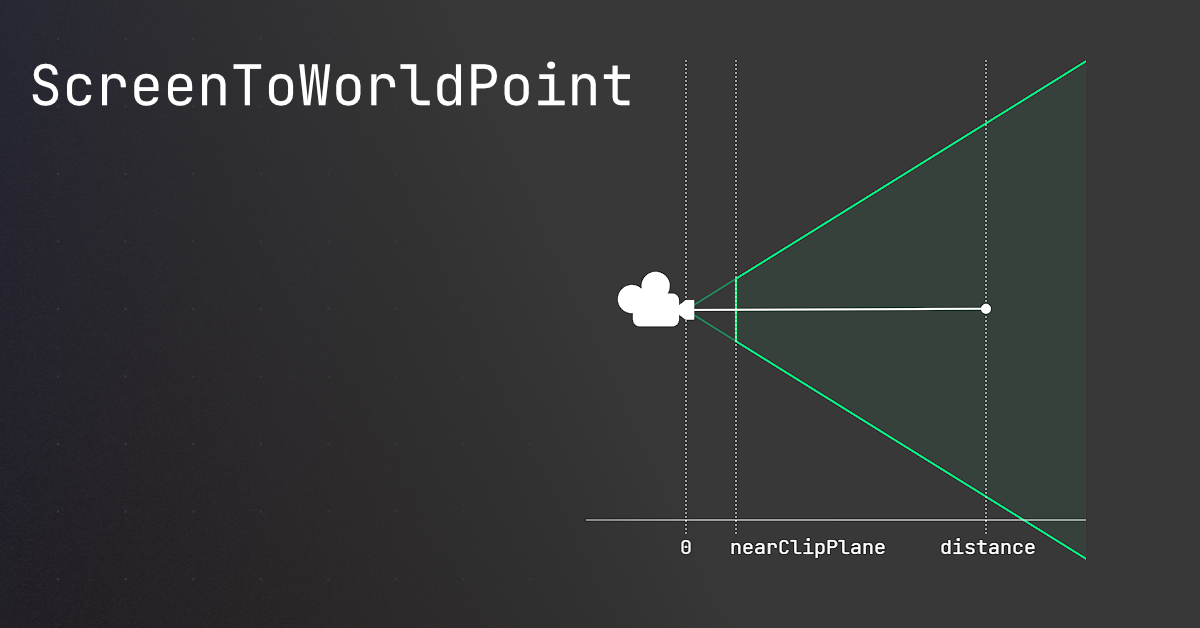
🤔 Unity, Huh, How?
Common ScreenToWorldPoint issues, and similar alternatives that may be better.
rich adder
fallen mirage
When I use ScreenToWorldPoint, the weapon follows the camera and not the mouse.
what?
also make sure to 0 out the Z or put whatever z position ur sprites are
slender nymph
autumn gull
im pretty new to C# coding and i have this error and idk whats the issue?
Asset...
seems like you're trying to use a quaternion in something that expects a Vector3. you need to show relevant code though
autumn gull
slender nymph
seems like you're trying to use a quaternion in something that expects a Vector3...
this is the code that im stuck on
 slender nymph
start by configuring your !IDE
eternal falconBOT
💡 IDE Configuration
If your IDE is not autocompleting code
or underlining errors, please configure it.
Select one:
• Visual Studio (Installed via Unity Hub)
• Visual Studio (Installed manually)
• VS Code
• JetBrains Rider
• :question: Other/None
rich adder
autumn gull
im pretty new to C# coding and i have this error and idk whats the issue?
Asset...
you probably wanted transform.rotation on line 31
but do configure your IDE asap , this would underline red
fallen mirage
rich adder
what?
also make sure to 0 out the Z or put whatever z position ur sprites are
The Red thing is the weapon. it follows the camera constantly and not the mouse if i use ScreenToWorldpoint
 rich adder
fallen mirage
The Red thing is the weapon. it follows the camera constantly and not the mouse ...
rich adder
fallen mirage
The Red thing is the weapon. it follows the camera constantly and not the mouse ...
show your current new script btw
fallen mirage
 autumn gull
rich adder
you probably wanted `transform.rotation` on line 31
autumn gull
rich adder
you probably wanted `transform.rotation` on line 31
oo im kinda dum
slender nymph
fallen mirage
is your camera orthographic or perspective
rich adder
fallen mirage
mousePos.z = 0
try that
fallen mirage
perspective
fallen mirage
why
slender nymph
fallen mirage
perspective
for future reference, do not ignore information provided to you: #💻┃code-beginner message
rich adder
cause of nearClipPlane
fallen mirage
slender nymph
for future reference, do not ignore information provided to you: https://discord...
sorry
rich adder
rich adder
cause of nearClipPlane
@slender nymph wait that is because of depth that messes w / z giving not nearCliplane ?
fallen mirage
I changed it to this, but it still does not work.
 slender nymph
rich adder
<@175082927862841344> wait that is because of depth that messes w / z giving no...
slender nymph
rich adder
<@175082927862841344> wait that is because of depth that messes w / z giving no...
i don't know what you are referring to by that. both perspective and orthographic cameras have a near clip plane. their issue is that without providing a depth for the z axis for the position, a perspective camera will always give the camera's position when using ScreenToWorldPoint whereas with an orthographic camera you just need to specify a z position in front of the camera
slender nymph
fallen mirage
I changed it to this, but it still does not work.
if the object you are rotating is further than the near clip plane then the distance you are using is likely incorrect
why are you using a perspective camera anyway?
rich adder
slender nymph
i don't know what you are referring to by that. both perspective and orthographi...
ohh right okay that makes sense . I confused the nearClipPlane with something else 😅
yeah strikes me odd to use Prospective for 2d lol I never used that
2D sprites don't need depth
fallen mirage
slender nymph
if the object you are rotating is further than the near clip plane then the dist...
idk i think that the perspective camera looks better than orthographic
doesnt hollow knight use a perspective camera?
slender nymph
define "looks better" because that's subjective but also if you are just using a bunch of flat sprites and don't need depth anyway, then it's also just wrong
rich adder
much easier to use plane.raycast then if you really want prospective
but yeah for 2D sprites just weird, it makes more sense 2.5d with some meshes
(gta 2)
fallen mirage
slender nymph
define "looks better" because that's subjective but also if you are just using a...
it feels like 3D
slender nymph
alright. well you've already got your solution on that page i linked earlier so just read it 🤷♂️
also that's called depth, because it's all 3d still
fallen mirage
 slender nymph
you know there's more than just one thing on that page
slender nymph
fallen mirage
and i already told you why this doesn't work
slender nymph
you'll want a plane representing the plane that the object you want to rotate is moving on
fallen mirage
i switched to orthopgraphic and changed the code. it works. Thanks for the answers
 runic urchin
hey, could someone help me figure out whats wrong with this?

 wintry quarry
runic urchin
hey, could someone help me figure out whats wrong with this?
wintry quarry
runic urchin
hey, could someone help me figure out whats wrong with this?
just what it says
you can't write arbitrary code like that outside of a method
you can't call randomizer.Next(..) in a field initializer, which is what you're trying to do
int funcToChoose is the field
int myField = blahblah is a field initializer
The error is telling you quite straightforwardly that you can't call a non-static method in a field initializer (.Next(..) is the method in question)
You should put this code in Awake, or Start, or OnEnable
runic urchin
oh, i see. thank you so much lol, im new to coding so i didnt know what any of it ment lmaoo
neon lynx
prime pier
hey. ive got some code for moving platforms and i need the player to be able to ...
Bro, I recently coded that script for my game lol
Ok, in the script, make the platform the parent of the player but only when the player collides with the platform
Use the tag Player to check if the player collides with the platform
Use empty gameobjects for the positions that the platform have to go
Use public Transform PositionA and public Transform PositionB
runic urchin
ok, so i have been trying to do different things for the last two hours but i have had no luck with figuring out how i could choose one of these options randomly lol. can anyone help out?
 polar acorn
runic urchin
ok, so i have been trying to do different things for the last two hours but i ha...
polar acorn
runic urchin
ok, so i have been trying to do different things for the last two hours but i ha...
Use Random.Range to get a random number, and then use a series of if statements to check if that number is within a specified range
runic urchin
alright, lemme try that out
rocky canyon
runic urchin
ok, so i have been trying to do different things for the last two hours but i ha...
  {
        int randomChoice = Random.Range(0, 4);

        switch (randomChoice)
        {
            case 0:
                MoveDown(ref currentTile);
                break;
            case 1:
                MoveLeft(ref currentTile);
                break;
            case 2:
                MoveRight(ref currentTile);
                break;
            case 3:
                MoveUp(ref currentTile);
                break;
        }
    }```
a switch statement is what'd I use in that situation most likely.@runic urchin and are u aware u have two MoveLeft functions in ur screen-snip, just curious
runic urchin
yeah lol, i just had it there so i would remember which one i wanted a higher chance to happen
polar acorn
rocky canyon
```cs
{
int randomChoice = Random.Range(0, 4);
switch (random...
Switch statement, unless you plan on having non-uniform probabilities. If you want to check if something is, say, between 0-10, 11-50, 51-100, a series of ifs might be better
rocky canyon
oh okay.. just making sure wasnt a typo u missed
runic urchin
yeah lol, mb
rocky canyon
polar acorn
Switch statement, unless you plan on having non-uniform probabilities. If you wa...
true true.. just figured id throw out the other option since its what first came to mind for me
mediocre coding flex lol
runic urchin
i actually tried to use a switch statement earlier but i guess i did it wrong or smth lol
rocky canyon
i asked chatgpt too.. it seems to think a list of delegates is a better solution
polar acorn
runic urchin
i actually tried to use a switch statement earlier but i guess i did it wrong or...
Switch statements only work if every condition is ==
rocky canyon
    void Start()
    {
        // Array of movement functions
        MovementFunction[] movements = new MovementFunction[]
        {
            MoveDown,
            MoveLeft,
            MoveRight,
            MoveUp
        };

        // Choose one function randomly and call it
        int randomIndex = Random.Range(0, movements.Length);
        movements[randomIndex](ref currentTile);
}``` this is the pasta vomit it createdthey're a good thing to know if u ever wanna take a shot at them again.
once u write enough if/else chains u tend to see them as a better alternative
slender nymph
they could alternatively not make their methods use a reference parameter and instead return the desired tile and use a switch expression which can do pattern matching if they wanted to support ranges and stuff
rocky canyon
but ya, ranges and approximations and stuff still better for if else then i guess
Many paths lead to the same destination
thats what i adore about game-dev
runic urchin
yeah i cant wait till i learn enough to be able to write my own code for stuff lmao, im at that point where im tasking existing code and stringing it with other stuff to get stuff to work. not that using other code is bad ofc lmao
rocky canyon
runic urchin
yeah i cant wait till i learn enough to be able to write my own code for stuff l...
ur on course then.
that was my 2nd step..
first was wrapping my little brain around coding in general..
then it was robbing and stitching together codebases
and then it was experimenting on my own and creating my own code
here lately.. ive written my own editor scripts to replace the need for NaughtyAttributes.. (thats my peak) lol
for now 😈
runic urchin
yeah i have always wanted to make my own game and id always start but give up. now im really trying to work on this one project till the end, that way i can prove to myself that i can actually do this lol
runic urchin
rocky canyon
*for now* 😈
the sky is the limit!
slender nymph
rocky canyon
here lately.. ive written my own editor scripts to replace the need for NaughtyA...
oh that reminds me, i still need to see if i can figure out how to replace NA's Button attribute for UITK
rocky canyon
runic urchin
yeah i have always wanted to make my own game and id always start but give up. n...
the best tip i can give you is... decrease ur scope.
keep things smaller than u think u can manage
the last 20% of building a game takes 80% of all the time
rocky canyon
slender nymph
oh that reminds me, i still need to see if i can figure out how to replace NA's ...
i did that exact thing if u care to peek
slender nymph
yes, that would be helpful
 frozen plaza
I have a planet object and a small vehicle.. I put some gravity on the vehicle but the collision doesn't really work, the vehicle just falls into the planet..
It works with a different vehicle, but not with this one.. anyone know why?
slender nymph
not really enough info, but at a guess i'd say your collider is a trigger which means no physical collisions
rocky canyon
slender nymph
yes, that would be helpful
its not elegant but it works..cs [SpawnButton("SPAWN ALPHA")] public void SpawnAlpha() { // spawn a random alpha type. Index between 0 - amount of Alpha types Instantiate(typeAlpha[Random.Range(0, typeAlpha.Length)], transform.position, Quaternion.identity); }
https://paste.myst.rs/ju80tyw2
- SpawnButtonAttribute.cs
- SpawnButtonEditor.cs

a powerful website for storing and sharing text and code snippets. completely free and open source.
@slender nymph sorry, i didnt notice u said UIToolkit until after i started pasting 😭
it is infact not the UIToolkit. but figured u might wanna look anyway.. sorry
works for what i need it for tho..
just SpawnButton[] w/ a boolean for whether its playmode only.. or both editor/play mode
i just wanted to get rid of NaughtyAttributes since i've been seeing editor issues that I can't really pinpoint.. and my most extensive editor manipulations come from NA
slender nymph
a lot of issues i've had with NA is due to the custom inspector applied to all MBs to make some of their attributes work. The problem I've run into with making the button attribute work with UITK is doing it without creating a custom inspector for all monobehaviors, but since property drawers don't work for methods that may be the route i have to go
rocky canyon
ya, im not too savvy when it comes to reflection.. i looked thru NA's code.. and asked some of my friends to help me get this working.. so far soo good
no performance issues as of yet
the only real issue i have is if i update the buttons while the inspector is open The styles get all messy and colors get inverted or something odd like that
just toggle to collapse and reopen, and the buttons fix themselves
im sure thats a simple fix.. but beyond me for now
slender nymph
actually, thinking about it i might be able to use a source generator to only create custom inspectors for the types that actually use the button attribute. i imagine that would end up more convoluted than just a custom inspector for MB, but might at least reduce the number of potential issues caused by the super generalized custom inspector. i'll have to do some tinkering with the two options to see which works better
or see if there is just a better solution than either of those
rocky canyon
welp, Unity makes a liar out of me like normally
its probably b/c buttons are already drawn there.. but its usually not this smooth..
rocky canyon
slender nymph
actually, thinking about it i *might* be able to use a source generator to only ...
soo.. what ur trying to avoid is what im doing correct?
slender nymph
yeah pretty much lol
rocky canyon
is that what im gathering?
 rocky canyon
slender nymph
yeah pretty much lol
rocky canyon
slender nymph
yeah pretty much lol
aight just making sure lmao
if u do bite the bullet and build ur own.. HMU if thers anything that could improve mine
i'd greatly appreciate it.. and the learning better alternatives of it all
rustic maple
wintry quarry
You got an error so the game paused because of error pause being turned on.
alr imma check it out
rustic maple
ivory bobcat
Also check your console logs in the case that there's an error.
yeah i mostly get the error: "SetDestination" can only be called on an active agent that has been placed on a NavMesh. but i don’t understand it because it works just fine until the ai is even in a pixel of the camera
rocky canyon
rustic maple
yeah i mostly get the error: "SetDestination" can only be called on an active ag...
typically means ur NavMeshAgent is too far from the MeshSurface to link em
near wadi
Argh!
EditorGUILayout.LabelField("Node:", EditorStyles.whiteBoldLabel); remains black color text, but bold.
EditorGUILayout.LabelField("Node:", EditorStyles.whiteLabel); works as expected
Bug report has been filed
 restive nacelle
does anyone have any good tutorials for how to make a slot machine in unity, my game takes place in las vegas so i felt it was neccesary to make one
cosmic dagger
restive nacelle
does anyone have any good tutorials for how to make a slot machine in unity, my ...
that's very specific. your best bet is google and youtube . . .
restive nacelle
cosmic dagger
that's very specific. your best bet is google and youtube . . .
i cant find any
all the ones i can find are from many years ago
I know how to make one in other langauges besides c# but then idk how to implement it
cosmic dagger
most tutorials are years+ old. that shouldn't matter . . .
wintry quarry
restive nacelle
does anyone have any good tutorials for how to make a slot machine in unity, my ...
you'd have to start with explaining what your requirements are for this slot machine
at a basic level, it's just a static 3d model
restive nacelle
wintry quarry
at a basic level, it's just a static 3d model
its a 3d game
cosmic dagger
did you try it and check if it worked?
polar acorn
restive nacelle
does anyone have any good tutorials for how to make a slot machine in unity, my ...
Random.Range three times
rich adder
restive nacelle
of a slot machine gui
so which part are you struggling with cause its even easier being 2D
restive nacelle
rich adder
so which part are you struggling with cause its even easier being 2D
thers no tutorials
and this is my first project
 meager gust
theres tutorials all over the internet for basic unity stuff
rich adder
restive nacelle
thers no tutorials
well maybe there are but the trick is never to look for a specific thing , rather break down the problem into smaller and easier to solve ones
restive nacelle
so heres what i decided to do now
rich adder
same concepts can usually be always applied thorough diff project types
restive nacelle
i made a slot mcahine in html
and im wondering how to import that into unity
idk how
meager gust
yeahhhhhhh
dont do that. you'll need to redo it in unity. those are two completely different concepts.
restive nacelle
especially because like i would have to port variables over
atp im considerign switching to a js framework
rich adder
html by itself does nothing useful you mean JS ?
restive nacelle
rich adder
html by itself does nothing useful you mean JS ?
yeah
i made a slot machine in there
with a tutorial
rich adder
if you are able to write in JS c# wont be that much different
restive nacelle
rich adder
if you are able to write in JS c# wont be that much different
i used a tutorial i cant do JS on my own
rich adder
the concept is the same, esp if you choose a Random like class
deft grail
restive nacelle
i made a slot machine in there
so just do the same thing but in Unity, shouldnt be complicated at all
restive nacelle
only language im good at is python
deft grail
its all basically the same anyway, the language doesnt matter for basics much
rich adder
restive nacelle
i used a tutorial i cant do JS on my own
oh okay well you mind as well learn c# then, its not that much more difficult. if anything JS is harder cause its not statically typed / no compiler telling you if you write something wrong etc.
restive nacelle
rich adder
oh okay well you mind as well learn c# then, its not that much more difficult. i...
so learn c# and make my own slot macchine
rich adder
start with the basics types, operations, and whatnot. Go on from there
(imo start without a GUI and use console app from .NET )
https://docs.microsoft.com/dotnet/csharp/tutorials/intro-to-csharp/index

In this tutorial, you'll use your browser to learn C# interactively. You write C# code and see the results of compiling and running your code directly in the browser.
Learn C# in your browser, and get started with your own development environment
 wicked pulsar
Hey guys! Is anyone here familiar with Timeline and Playables? I'm trying to create a basic system to write subtitles to a TextMeshProUGUI component, but the API seems to have changed so much over the past 4 years, that I'm not sure how to make heads or tails of it. Here is a sample of my controller that I use to affect changes to the on-screen visuals. How can I control this from Timeline?
{
    public static ClosedCaptions I { get; private set; }
    public static event ClosedCaptionsHandler onNarration;
    public static event ClosedCaptionsHandler onDescribedAudio;

    public delegate void ClosedCaptionsHandler(string source, string text, float duration);

    public NarrationLabelMode narrationLabelMode = NarrationLabelMode.Header;
    public enum NarrationLabelMode
    {
        Header,
        Inline,
        InlineCapitalized
    }

    private void Awake()
    {
        I ??= this;
    }

    public void Narration(string source, string text, float duration)
    {
        switch (narrationLabelMode)
        {
            case NarrationLabelMode.Header:
                onNarration?.Invoke(source, text, duration);
                break;

            case NarrationLabelMode.Inline:
                onNarration?.Invoke(null, $"[{source}] {text}", duration);
                break;

            case NarrationLabelMode.InlineCapitalized:
                onNarration?.Invoke(null, $"[{source.ToUpper()}] {text}", duration);
                break;
        }
    }
}```not sure too much about Timeline but if you want to run code you need signals
https://youtu.be/fQzKJO-0dS8
https://youtu.be/X4Mbk54XqNk this guy has good videos on playables btw
wicked pulsar
rich adder
not sure too much about Timeline but if you want to run code you need signals
ht...
Okay, I did come across that, along with some outdated tutorials that never made use of signals. Are signals a relatively new thing?
rich adder
wicked pulsar
Okay, I did come across that, along with some outdated tutorials that never made...
as far as I know signals have been around since timeline 2019 if not sooner, not sure I got into unity late 2020
wicked pulsar
rich adder
as far as I know signals have been around since timeline 2019 if not sooner, not...
Okay, thanks a lot!
wicked pulsar
rich adder
https://unity.com/blog/engine-platform/how-to-use-timeline-signals
We’ve built Signals to establish a communication channel between Timeline and outside systems. But what does that mean? Why did we decide on this approach?
Sounds like this is what I needed. Thanks!
rich adder
also in the docs they have more stuff https://docs.unity3d.com/Packages/com.unity.timeline@1.8/manual/wf-signals.html
queen adder
Can 2D physics queries (circles) be rotated so that it lays flat in the XZ plane?
rich adder
dont think so because 2D colliders are only XY
wicked pulsar
queen adder
Can 2D physics queries (circles) be rotated so that it lays flat in the `XZ` pla...
No; the 2D physics system only lives in XY and ignores the Z plane. If your game has no use for physics depth, it should be built in XY, otherwise, a lot of people choose to use the 3D physics system for 2.5D games. There is no way to use the 2D physics system at any angle outside of Y being up and X being right.
cosmic dagger
queen adder
Can 2D physics queries (circles) be rotated so that it lays flat in the `XZ` pla...
nope, that's essentially using 3d physics . . .
 primal flare
using System.Collections;
using System.Collections.Generic;
using UnityEngine;
using UnityEngine.InputSyetem;
public class GameMenuMaganer : MonoBehaviour
{
public GameObject menu;
public InputActionProperty showButton;
// Start is called before the first frame update
void Start()
{

}

// Update is called once per frame
void Update()
{
    if (showButton.action.WasPressedThisFrame())
    {
        menu.SetActive(!menu.activeSelf);
    }
}
}
Y IS THIS WRONG
i was watching this vid
https://www.youtube.com/watch?v=yhB921bDLYA&list=PLpEoiloH-4eP-OKItF8XNJ8y8e1asOJud&index=8

The episode 7 of the tutorial series that will teach you everything about VR interaction.
❤️ Support on Patreon : https://www.patreon.com/ValemVR
🔔 Subscribe for more Unity Tutorials : https://www.youtube.com/@ValemTutorials?sub_confirmation=1
🌍 Discord : https://discord.gg/5uhRegs
🐦Twitter : https://twitter.com/valemvr?lang=en
👍 Main Channel :...
rich adder
primal flare
using System.Collections;
using System.Collections.Generic;
using UnityEngine;
u...
why is what wrong ?
primal flare
rich adder
why is what wrong ?
thats the thing idk whats wrong
rich adder
primal flare
thats the thing idk whats wrong
how about explain what exactly is supposed to happen and what is happening instead
primal flare
rich adder
how about explain what exactly is supposed to happen and what is happening inste...
O nvm
i fix
near wadi
primal flare
i fix
for future reference, Code goes in code rooms, such as #💻┃code-beginner <-- lol, my mistake. i thought i was in unity-talk
also, you'll need to properly !ask a question
eternal falconBOT
:thinking: Asking Questions
:mag: Search the internet for your question!
:book: Use the API Scripting Reference and User Manual and this troubleshooting site for commonly posted issues.
:wrench: Attempt to debug your issue.
:thought_balloon: Find an appropriate channel by reading the name and description in #🔎┃find-a-channel
:grey_question: And don't ask to ask, ask a full question illustrating with screenshots if needed.
-# For more posting guidelines, go to #854851968446365696
 limber remnant
I was wondering if someone could help me with something. So I am using cinemachine to create a dolly track and Camera. I then want to move the camera to each of the way points by a button press. But for some reason I can't seem to get it to work properly. I think the code itself should work but when I go to attach the dolly track it just won't let me do it. And only keep saying that there's none available.

 wintry quarry
limber remnant
I was wondering if someone could help me with something. So I am using cinemachi...
wintry quarry
limber remnant
I was wondering if someone could help me with something. So I am using cinemachi...
What are you actually trying to drag in there
The track wouldn't go there
A dolly would
queen adder
Does unity support multi language ? For example, can "using UnityEngine" instead be written in japanese ?
or it is strict latin and english ?
short hazel
queen adder
Does unity support multi language ? For example, can "using UnityEngine" instead...
C# has English keywords, and the base library is in English, but you're free to name variables in your own language.
queen adder
short hazel
C# has English keywords, and the base library is in English, but you're free to ...
Okay thank you
queen adder
short hazel
C# has English keywords, and the base library is in English, but you're free to ...
does "base library" include unity library ? (UnityEngine, Unity, UnityEditor, etc)
short hazel
Yes
queen adder
Okay thanks
limber remnant
wintry quarry
What are you actually trying to drag in there
I guess I am confused on how to create a dolly then. There's no option for that as far as I can see. Just create the camera and track or create track and cart
Because I tried to putting the camera in there which is a dolly camera but that didn't work
 static cedar
[ExecuteInEditMode]
public class InvertMaskingImage : UIBehaviour, IMaterialModifier
{
    [NonSerialized] private MaskableGraphic? graphic;
    private MaskableGraphic? CheckedGraphic
    {
        get
        {
            if (graphic == null) graphic = GetComponent<MaskableGraphic>();
            return graphic;
        }
    }

    public Material GetModifiedMaterial(Material baseMaterial)
    {
        if (CheckedGraphic == null) return baseMaterial;
        if (CheckedGraphic is MaskableGraphic image && !image.maskable) return baseMaterial;

        int id = baseMaterial.GetInstanceID();
        if (id >= 0)
        {
            Debug.LogError("Material is not an instance. Gonna oof ur project if this continues. Not bothering to copy either.");
            return baseMaterial;
        }

        if (isActiveAndEnabled) baseMaterial.SetFloat("_StencilComp", (float)CompareFunction.NotEqual);
        else baseMaterial.SetFloat("_StencilComp", (float)CompareFunction.Equal);
        return baseMaterial;
    }

    protected override void OnEnable() => CheckedGraphic?.SetMaterialDirty();
    protected override void OnDisable() => CheckedGraphic?.SetMaterialDirty();
}
Am i playing with fire with this script? 
I'm asking if this is enough checks so as to not inadvertently make the entirety of ui invisible.
What i really wanna check if the parent is a Mask and it's active.
So it's more decently full proof.
autumn gull
how do i fix?
MissingComponentException: There is no 'Animator' attached to the "Player" game object, but a script is trying to access it.
You probably need to add a Animator to the game object "Player". Or your script needs to check if the component is attached before using it.

 keen dew
You probably need to add a Animator to the game object "Player"
autumn gull
keen dew
You probably need to add a Animator to the game object "Player"
ye i know that but then the player anims dont work so im thinking how do i access the actual playermodel that has the animator
autumn gull
keen dew
You probably need to add a Animator to the game object "Player"
so it works then
but im not sure how
keen dew
Remove the getcomponent call, use [SerializeField] private Animator animator; instead and drag the animator you want into the field in the inspector
autumn gull
keen dew
Remove the getcomponent call, use `[SerializeField] private Animator animator;` ...
i didnt understand the end, wdym by that?
autumn gull
keen dew
Remove the getcomponent call, use `[SerializeField] private Animator animator;` ...
i have it like this
 keen dew
Right, drag that object into the field
autumn gull
keen dew
Right, drag that object into the field
the player model?
keen dew
Yes, the one that has the animator you want to use
autumn gull
keen dew
Yes, the one that has the animator you want to use
ok i did that
but it gives me an error
autumn gull
keen dew
Yes, the one that has the animator you want to use
Assets\Scripts\PlayerController.cs(19,26): error CS0106: The modifier 'private' is not valid for this item
keen dew
You put it in the wrong place
autumn gull
keen dew
You put it in the wrong place
i replaced animator = GetComponent<Animator>(); with the thing u told me
keen dew
No, replace line 14 with it. Delete line 19
autumn gull
keen dew
No, replace line 14 with it. Delete line 19
oohh mb bro
autumn gull
keen dew
No, replace line 14 with it. Delete line 19
now it works but do u know why it stops the animations in place?
its on loop time
ok i made run work somehow
frozen plaza
when I save my file, unity reloads the domain. when I then enter play mode it reloads again.. can I change this so it does not refresh on save but only on window activation (and going straight into play mode with one reload if possible)?
teal viper
frozen plaza
when I save my file, unity reloads the domain. when I then enter play mode it re...
Disable auto refresh. Though you'll still need to refresh manually before going into play mode.
Also, you can disable domain and scene reload on play in the editor preferences(or was it project settings🤔)
frozen plaza
I think at some point I enabled it to refresh on save but now with more stuff going on that really slows down iteration times
I need it to refresh before going into play ofc and also when activating the window in case some changes in editor space happened
teal viper
frozen plaza
I think at some point I enabled it to refresh on save but now with more stuff go...
You can't have both. Either you refresh manually, or let unity refresh whenever an asset file is updated(like a script change saved).
frozen plaza
unfortunate.. but ok, thanks
verbal dome
You could maybe write an editor script that recompiles scripts when entering playmode, though.
frozen plaza
yea, been thinking about ways to make this happen but at this point in time I don't want to spend too much effort in setting up dev environment when the time save isn't significant enough
astral falcon
I guess, making your own play button would be the most simple solution
 uncut lantern
Hi I am kinda new can someone help me with making my 2d player move?(I have the code for movement) I can't figure out how to connect it to my player
astral falcon
uncut lantern
Hi I am kinda new can someone help me with making my 2d player move?(I have the ...
maybe show your code then and what you have tried to connect the script to the player gameobject?
uncut lantern
astral falcon
maybe show your code then and what you have tried to connect the script to the p...
I can send the code if it's helpful
astral falcon
uncut lantern
I can send the code if it's helpful
well, its a coding channel, how else should we help you here 😄 !code
eternal falconBOT
Posting code
📃 Large Code Blocks
Use links to services like:
https://gdl.space/, https://paste.ofcode.org/, https://hatebin.com/, https://paste.myst.rs/, https://hastebin.com/
📃 Inline Code
Surround code with three backquotes. Not quotation marks.
To format as C#, add cs to the first line:
```cs
// Your code here
```
Add a comment with a line number if there is an error message.
uncut lantern
astral falcon
well, its a coding channel, how else should we help you here 😄 !code
True ty 😅
autumn gull
Guys i made a movement that works perfectly but theres a problem. idk how to make it jump when i press space (and make it do an animation) or when i press shift i go faster. how do i do that?
i can show the code in dms
or here
 upper egret
I know this is a very rookie question but what is the difference between var and float
languid spire
var can represent any type and is resolved by the compiler
hexed terrace
autumn gull
Guys i made a movement that works perfectly but theres a problem. idk how to mak...
There are literally tonnes of tutorials online for jumping
I like this guys youtube, this is a decent vid on jumping https://www.youtube.com/watch?v=h2r3_KjChf4
upper egret
languid spire
var can represent any type and is resolved by the compiler
Ok got it thanks
queen adder
Is it possible to load new scene at runtime without building it to assetbundle ? I mean load the new scene from .unity file at runtime
autumn gull
hexed terrace
There are literally _tonnes_ of tutorials online for jumping
I like this guys y...
but i dont want to get rid of mine i want to add the jum into it
hexed terrace
autumn gull
but i dont want to get rid of mine i want to add the jum into it
ok? No one suggested to get rid of yours..
Watch the video and learn how they did jump.. then use that information to add it to yours...
Or use one of the other billion "how to jump" tutorials available..
wintry quarry
limber remnant
I guess I am confused on how to create a dolly then. There's no option for that ...
The cart is the dolly
 burnt vapor
autumn gull
how do i fix?
MissingComponentException: There is no 'Animator' attached to the ...
burnt vapor
autumn gull
how do i fix?
MissingComponentException: There is no 'Animator' attached to the ...
Your editor is not configured
Instead of fixing your issue, focus on configuring your !ide first. Then continue your issue. It will be much easier for you and others when your editor is configured.
eternal falconBOT
💡 IDE Configuration
If your IDE is not autocompleting code
or underlining errors, please configure it.
Select one:
• Visual Studio (Installed via Unity Hub)
• Visual Studio (Installed manually)
• VS Code
• JetBrains Rider
• :question: Other/None
 cedar prairie
Whenever my object collides with another object it then starts moving in a random direction forever and i dont know why
verbal dome
cedar prairie
Whenever my object collides with another object it then starts moving in a rando...
How are you moving the object?
 silk night
cedar prairie
Whenever my object collides with another object it then starts moving in a rando...
silk night
cedar prairie
Whenever my object collides with another object it then starts moving in a rando...
What i think happens:
- Rigidbody is dynamic
- Either no gravity or a physics material without drag which could stop your object
cedar prairie
verbal dome
How are you moving the object?
With transform.translate
verbal dome
I'm assuming you have a rigidbody?
verbal dome
This is why you should not use transform to move a RB
Use rb.velocity/AddForce instead
cedar prairie
I tried using addForce but it just fucks me because it wont stop unless i do an opposite force and it sucks
verbal dome
Like Sidia said, if there's no external forces (drag, gravity, friction) then it will indeed keep moving "forever"
silk night
is it sliding across a floor or are you "in space"?
cedar prairie
silk night
is it sliding across a floor or are you "in space"?
In space
cedar prairie
verbal dome
Like Sidia said, if there's no external forces (drag, gravity, friction) then it...
So just do addforce but add drag?
silk night
then why would it slow down? if you throw something in space it wont stop either 😄
cedar prairie
silk night
then why would it slow down? if you throw something in space it wont stop either...
Well not literally in space just in the air
wintry quarry
cedar prairie
I tried using addForce but it just fucks me because it wont stop unless i do an ...
Welcome to how physics works 😁
verbal dome
cedar prairie
So just do addforce but add drag?
Sure, although I also mentioned rb.velocity
cedar prairie
wintry quarry
Welcome to how physics works 😁
Gah
verbal dome
You could directly edit the velocity if you want precise movement
night valve
silk night
then why would it slow down? if you throw something in space it wont stop either...
Afaik it will... Eventually ;p
silk night
Simulating air drag is not just a checkbox sadly, you will have to write a script that slows objects
cedar prairie
verbal dome
Sure, although I also mentioned rb.velocity
Whats the difference between that n regular rb.addforce ?
verbal dome
silk night
Simulating air drag is not just a checkbox sadly, you will have to write a scrip...
Hmm? There's rigidbody.drag
verbal dome
cedar prairie
Whats the difference between that n regular rb.addforce ?
Basically AddForce just adds to the velocity
silk night
night valve
Afaik it will... Eventually ;p
yeah when it hits the next object 😄 Rabbithole incoming
silk night
verbal dome
Hmm? There's ``rigidbody.drag``
Uhh oops, not sure what i thought of then
verbal dome
Brainfart 🤷♂️
@cedar prairie If you want you can manually set the velocity in each FixedUpdate
Or just use AddForce if that suits you better
night valve
silk night
yeah when it hits the next object 😄 [Rabbithole incoming](https://www.reddit.co...
There is some super tiny million times thinner than air drag in space, but I'm picking on just for the sake, nvm
verbal dome
cedar prairie
Oh wait so insted of add force its rb.velocity?
What are you asking? velocity and AddForce are different things
velocity is a Vector3 (or Vector2 in 2D) property and AddForce is a method
cedar prairie
verbal dome
What are you asking? velocity and AddForce are different things
Right, but does velocity work in the same way as AddForce?
limber remnant
wintry quarry
The cart is the dolly
That's what I thought as well. But for whatever reason it's not letting me put the cart in there. So I wasn't sure if there's some sort of setting I need to do or something.
silk night
cedar prairie
Right, but does velocity work in the same way as AddForce?
if you set velocity you just override its speed, if you add a force it takes current movement into account
cedar prairie
Right so since im utilizing the camera for its movement ill prolly want AddForce
silk night
uhh ok now might be the time you describe what you are trying to do, this got way too confusing with just a general problem description 😄
cedar prairie
So right its a little space ship thats floating at a set/locked Y coord. Im makin a game that's based around destruction n like physics so i might move the ship through other objects. Its supposed to be moved with w,a,s,d but the camera controlls the direction forwards is
silk night
ok then you have multiple possibilities:
- Make the ship kinematic and move it on FixedUpdate loop, that way other objects cant move your ship
- Add a drag or script way to slowly break from any collision events
- Let the user figure out how to recover from a collision via controls
if you just want to break your other objects in the scene the drag option should be sufficient
cedar prairie
silk night
ok then you have multiple possibilities:
- Make the ship kinematic and move it o...
Oh thanks
Yah ill prolly try em n see what i prefer thanks for the help
queen adder
im trying to save some data to a json object. the structure looks something like..
public class savedata {
//save info here
public scriptableobject referenceToSOHere;
}
the problem however, is that the scriptable object holds a reference to a prefab and throws the following error
JsonSerializationException: Self referencing loop detected for property 'gameObject' with type 'UnityEngine.GameObject'.
what would be the best way to prevent this from happening?
wintry quarry
queen adder
im trying to save some data to a json object. the structure looks something lik...
Serializing a ScriptableObject directly is not advised
you either need to:
- Make a custom serializer for your SO
- Serialize some kind of identifier you can use to look up the SO instead
It's also not clear which serialization framework you're using here. Newtonsoft?
queen adder
yeah newtonsoft in this case
wintry quarry
You need to carefully think about what your intention is here. Presumably your ScriptableObject is an asset in the project right? So even if you properly manage to serialize it to JSON, you're not going to have that actual reference back when you deserialize
queen adder
yeah im storing general stat related information of an item in the scriptableobject, so things like, name, description, icon, stats of that item, and then the prefab directly related to it.
wintry quarry
right so - is the SO something that changes over the course of the game? Or is it basically a reference object that contains unchanging data
queen adder
unchanged data.
wintry quarry
if it's the former, you will want to fully serialize it here.
If the latter, you will want to serialize only a reference to it
queen adder
the refrence to the save data will change over the course of the game, but the data inside of the so is static and never changes.
wintry quarry
You could either use the Addressables package, or index them by some kind of ID so you can look them up yourself
and then basically your JSON should contain only that identifier
queen adder
addressable package isnt something i have used before, but based on looking it up, is it basically a database of assets, and instead of referencing the scriptable object, in my case, i would instead use an assetreference which can be serialized?
wintry quarry
In a nutshell, yes.
queen adder
i'll take a peak and see if i can easily change how things are loaded/saved/referenced.
thanks
wintry quarry
queen adder
thanks
You might need something like this btw, to convince newtonsoft to work with Addressables properly: https://www.reddit.com/r/Unity3D/comments/l3saxh/comment/gkixwhq/?utm_source=share&utm_medium=web3x&utm_name=web3xcss&utm_term=1&utm_content=share_button
Reddit
Explore this conversation and more from the Unity3D community
queen adder
wintry quarry
You might need something like this btw, to convince newtonsoft to work with Addr...
yeah i see that, sadly not as simple as i was hoping.
 polar acorn
Do you have the package installed
burnt vapor
 rancid tinsel
whats this about?
rancid tinsel
whats this about?
Are you using assembly definitions?
polar acorn
and is this an error in Unity or just in the IDE?
rancid tinsel
burnt vapor
Are you using assembly definitions?
oh yes i am
 rancid tinsel
burnt vapor
Make sure to reference TMP as a dependency, then it works
rancid tinsel
burnt vapor
Make sure to reference TMP as a dependency, then it works
i have it set up for unit testing, would that be a dependency in the script folder one?
so here?
 burnt vapor
Sorry, haven't used Unity in a while
TextMeshPro should have an assembly definition of its own. Drag its reference into your assembly definition
dim yew
unsure why the ray is still getting the layout object here. i tried to mask it out and it doesn't seem to work


raycasts are really causing me issue right now
polar acorn
dim yew
unsure why the ray is still getting the layout object here. i tried to mask it o...
Why shouldn't it? It looks like it does have the layer you're looking for
 stiff birch
Your mask should exclude layout if you want to ignore this layer
polar acorn
Yes, those are the layers you want to interact with
dim yew
is there an easy way to do that? or shoudl i read up on them
stiff birch
dim yew
is there an easy way to do that? or shoudl i read up on them
I suppose you can read this https://docs.unity3d.com/Manual/use-layers.html
Does not say much. LayerMask are the layers you actually care about.
dim yew
thanks a bunch
rancid tinsel
is there a way to find a gameobject by its transform position?
polar acorn
Does it have a collider?
rancid tinsel
yes a box collider
polar acorn
Do an OverlapSphere at that area, with as much radius as you want to account for "fuzziness" in the position (it'll almost never be exactly at the location you expect due to floating point shenanigans)
https://docs.unity3d.com/ScriptReference/Physics.OverlapSphere.html
rancid tinsel
how would this work though, like if it hits multiple colliders how would i know which is which
polar acorn
Which one do you want
rancid tinsel
im making a mine sweeper clone, so i want to check the 8 colliders around a block
but im prob doing it super inefficiently
polar acorn
In that case, you should have an array or grid instead, and then just get the objects at the bordering coordinates
position should not be a factor here
slender nymph
 rugged gulch
my bad
queen adder
wintry quarry
You might need something like this btw, to convince newtonsoft to work with Addr...
was looking into this a bit more, but, how unsafe would it be to do the following? the saving would happen maybe once every X min and the loading would really only happen when triggered by the player. at max i would assume the player would be loading around 20~ assets on load, give or take.
public void LoadData() {
        string json = SaveAndLoadUtil.LoadJson(DATA_FILENAME);
        if (json == "") {
            return;
        }
        data = SaveAndLoadUtil.LoadObject<Data>(json);
        data.scriptableObject= AssetDatabase.LoadAssetAtPath<ScriptableObject>(data.scriptableObjectPath);
    }

    [Button]
    public void SaveData() {
        data.scriptableObjectPath = AssetDatabase.GetAssetPath(data.scriptableObject);
        SaveAndLoadUtil.SaveJson(DATA_FILENAME, data);
    }
Yeah this is more or less the idea.
queen adder
cool, ill just go this route then. the addressables sound cool in theory but im just unfamiliar with them/cant figure out how to do it in a simple way without having to recode a bunch of extra stuff.
slender nymph
queen adder
was looking into this a bit more, but, how unsafe would it be to do the followin...
I would recommend using string.IsNullOrWhiteSpace rather than checking if the string is equal to ""
queen adder
slender nymph
I would recommend using string.IsNullOrWhiteSpace rather than checking if the st...
thats valid i just had it there as a simple check when testing and was planning on moving over to that
and then in my data object i'm also using [JsonIgnore] on the actual references to the scriptable object.
and doing [HideInInspector] for the paths.
rustic maple
rocky canyon
typically means ur NavMeshAgent is too far from the MeshSurface to link em
how does that come when the ai is always walking on my terrain?
it only gives the error when the ai is in a frame of the camera
queen adder
queen adder
was looking into this a bit more, but, how unsafe would it be to do the followin...
oh, a problem with this, is if i change the asset location in the future, and push an update for my game, then save files break... so, this wont work...
slender nymph
wait was that supposed to be for runtime? because the AssetDatabase does not exist in a build
languid spire
queen adder
oh, a problem with this, is if i change the asset location in the future, and pu...
wouldn't work anyway, AssetDatabase is editor only code
queen adder
ah, well then, time to find a new altenrative/look into addressables again then
tulip nimbus
So this is kind of confusing me. My code works perfectly FINE, however i constantly keep getting this null reference message that i just cannot fix nor do i know what causes this, since the code runs perfectly fine and returns all values flawlessly

 wintry quarry
tulip nimbus
So this is kind of confusing me. My code works perfectly FINE, however i constan...
wintry quarry
tulip nimbus
So this is kind of confusing me. My code works perfectly FINE, however i constan...
most likely you have an extra copy of whatever script this is in the scene where that reference is not populated
 sleek notch
Hi, I'm sending messages between scripts and it is giving me an error: nameOfItem has no receiver. But as you can see, there is string. Can someone helo me?
 wintry quarry
sleek notch
Hi, I'm sending messages between scripts and it is giving me an error: nameOfIte...
wintry quarry
sleek notch
Hi, I'm sending messages between scripts and it is giving me an error: nameOfIte...
I'm sending messages between scripts
How?
sleek notch
 wintry quarry
Why are you using SendMessage
why not just call the function
.GetChild(...).GetComponent<MyScript>().nameOfItem(itemName)
wintry quarry
sleek notch
anyway if you're getting that error here, the logical conclusion is that the child you're getting doesn't have that script attached to it
sleek notch
oh
polar acorn
sleek notch
That would mean there's no script on that object that has a function called nameOfItem. One of the reasons you shouldn't use SendMessage, it has no compile-time checking of this
polar acorn
sleek notch
Actually I do
Not according to that error you don't
sleek notch
wintry quarry
`.GetChild(...).GetComponent<MyScript>().nameOfItem(itemName)`
But nvm I can try this method thanks
sleek notch
polar acorn
Not according to that error you don't
I do. Really I do. I checked it more than 5 times
polar acorn
sleek notch
I do. Really I do. I checked it more than 5 times
Errors don't lie. The last child of inventoryCollumTransform does not have any components with a function named nameOfItem on them at the time this line runs.
sleek notch
I don't lie. I have everything linked right. The Transform is linked right and then I Instantiate the object that really has the script where is the reference
I can give you screenshots
polar acorn
sleek notch
I don't lie. I have everything linked right. The Transform is linked right and t...
When the options are either a human mistake or a machine mistake, it is 100% the human's fault
sleek notch
Okay. I'm gonna give you all screenshots
So. First is name of the script, second is where it is spawned and as you can see there is transform and third is linked script in the object that is being spawned


 polar acorn
sleek notch
So. First is name of the script, second is where it is spawned and as you can se...
polar acorn
sleek notch
So. First is name of the script, second is where it is spawned and as you can se...
Take a screenshot of the full Unity window, after the error occurs, with the final child of RightPanelPlayerInv selected
sleek notch
 polar acorn
sleek notch
polar acorn
sleek notch
This doesn't have itemPanel(clone) selected
sleek notch
wdym?
polar acorn
I said to select the last child of RightPanelPlayerInv
sleek notch
 polar acorn
sleek notch
polar acorn
sleek notch
Show the full !code of inventoryItemManagement (can also take a look at that null reference while we're at it)
eternal falconBOT
Posting code
📃 Large Code Blocks
Use links to services like:
https://gdl.space/, https://paste.ofcode.org/, https://hatebin.com/, https://paste.myst.rs/, https://hastebin.com/
📃 Inline Code
Surround code with three backquotes. Not quotation marks.
To format as C#, add cs to the first line:
```cs
// Your code here
```
Add a comment with a line number if there is an error message.
 amber nimbus
Hello, unity suggests this design pattern in one of their blogs. Now I am wondering how do I actually implement this? My only idea would be using a ton of events for each of the systems I make. I am not sure if this is a good idea or if I should stay away from making my whole code structure event based.
 polar acorn
amber nimbus
Hello, unity suggests this design pattern in one of their blogs. Now I am wonder...
polar acorn
amber nimbus
Hello, unity suggests this design pattern in one of their blogs. Now I am wonder...
You would have a Player object with Components that each do one individual thing, rather than a monolithic "everything" script for the player
So, you would have an Input component that passes data to Movement, so now you can re-use that Movement script for things that aren't the player by changing which things call which functions
sleek notch
polar acorn
sleek notch
https://paste.ofcode.org/QZk8qddQMP3ZXkLC9ypwTv
Okay, so your NRE is that there is no TextMeshProUGUI component on whatever object itemName is assigned to.
How are you calling nameOfItem now since the update? Share the code of that script as well.
amber nimbus
polar acorn
You would have a `Player` object with Components that each do one individual thi...
Yes, this is what I do already, but this image suggests having it even more modular, my normal approach would be a PlayerMovement script, a PlayerCamera script and so on. But this suggests I have Input and Movement handled in their own class. I am not sure if I am taking this picture too literally.
polar acorn
amber nimbus
Yes, this is what I do already, but this image suggests having it even more modu...
What you've just described you're doing and what you've said it suggests you do are the same thing.
Scripts contain classes
sleek notch
polar acorn
Okay, so your NRE is that there is no `TextMeshProUGUI` component on whatever ob...
since that I have changed the code so I'm not already using sendMessage. I'll paste you the segment that you need to see
polar acorn
sleek notch
since that I have changed the code so I'm not already using sendMessage. I'll pa...
Yeah, let me see it and I can devise a log of some sort to show why the send message failed. It's also possible that the NRE was causing the function to abort and thus not completing the message call
sleek notch
polar acorn
sleek notch
https://paste.ofcode.org/3RssRPEf8KhcyBRyHYe7fU
Ah, you're calling it immediately after spawning it. Start hasn't run yet
item hasn't been set
(Also if you're trying to call a function on the thing you just made, you should just use that object instead of getting the last child of the column)
amber nimbus
polar acorn
Scripts _contain_ classes
yeah i understand, but my PlayerMovement would have an if statement that checks an Input and if the input exists it would handle how the player should move. But I thought this picture wanted me to have a separate Input class and a separate Movement class meaning I would have the Input class fire events and the other classes subscribe to them I just dont know how events are performance wise, and if it is good pracitce to have a tone of events
sleek notch
polar acorn
(Also if you're trying to call a function on the thing you just made, you should...
I'm sorry I'm just tired this day. I don't understand this section
can you describe it more?
polar acorn
sleek notch
I'm sorry I'm just tired this day. I don't understand this section
Instantiate returns a reference to the object it just created. Call the function on that and skip the Getchild
polar acorn
amber nimbus
yeah i understand, but my PlayerMovement would have an if statement that checks ...
If you have different scripts for input movement, they are different classes. This diagram is suggesting you have different components for Audio, Input, and Movement.
polar acorn
sleek notch
https://paste.ofcode.org/QZk8qddQMP3ZXkLC9ypwTv
Also why make a public GameObject that exists entirely to get a TextMeshProUGUI from instead of just making the TextMeshProUGUI public and assigning that
sleek notch
polar acorn
Instantiate returns a reference to the object it just created. Call the function...
Do you mean this?
 polar acorn
sleek notch
Because there are more gameobjects for name or for kgs
polar acorn
sleek notch
Because there are more gameobjects for name or for kgs
Right now, if you deleted the public GameObject itemName and made the TextMeshProUGUI item field public, it would do the exact same thing
polar acorn
sleek notch
Do you mean this?
If you are instantiating something solely to get a component from it, make the variable referencing the prefab of that type. Then Instantiate will return a reference to that component directly.
Basically, there's almost never a reason to have a variable of type GameObject. Use the type you actually want
 polar acorn
sleek notch
the exact error still
polar acorn
sleek notch
the exact error still
itemCollum should be of type inventoryItemManagement. Not GameObject.
And you'll want to assign it's item variable directly
sleek notch
There is something wrong with TextMeshPro reference
or idk what is wrong. It will find the script but something went wrong...
 rich adder
sleek notch
or idk what is wrong. It will find the script but something went wrong...
rich adder
sleek notch
or idk what is wrong. It will find the script but something went wrong...
whatever component you tried using at line 26 its missing
rancid tinsel
does this essentially mean it works like a singleton but for a variable/function?

or am i misunderstanding it
short hazel
rancid tinsel
or am i misunderstanding it
It's a bit less permissive than public. So if you declare something that's internal, other assemblies (= projects, DLLs when compiled) will not be able to access or use the thing
From least to most restrictive in order: public, internal, protected, private
rancid tinsel
im not sure i understand then
this might be a bad example but would cheatengine not be able to access internal, but could access public?
i know it reads memory but just for the sake of the example
languid spire
generally if you are using Unity then Internal is of no consequence as all Types will be inside the same dll
short hazel
rancid tinsel
i know it reads memory but just for the sake of the example
CE works at a lower level so it's not really a good example here
rancid tinsel
i guess instead of cheatengine substitute just any external program
short hazel
If you used C# out of Unity, you may have created multiple projects in a single VS solution, each of them will be compiled to their own assembly
rancid tinsel
short hazel
If you used C# out of Unity, you may have created multiple projects in a single ...
oh and those cant communicate between eachother if internal?
but could communicate if public?
short hazel
Something declared as internal in project A cannot be accessed from project B.
 strong wren
rancid tinsel
this might be a bad example but would cheatengine not be able to access internal...
strong wren
rancid tinsel
this might be a bad example but would cheatengine not be able to access internal...
Access modifiers are for programmers and don't bring memory protections. Even programmers within a project can bypass access modifiers if they really want to.
rancid tinsel
short hazel
Something declared as internal in project A cannot be accessed from project B.
i see
so i guess maybe a better comparison would be that its like protected but instead of the inheritance hierarchy, its like a project hierarchy?
short hazel
Yep
You may use it without knowing btw, when you create types (classes, structs, etc.) that don't have any access modifiers eg. class Sample { }, they're internal by default.
rancid tinsel
short hazel
You may use it without knowing btw, when you create types (classes, structs, etc...
oh interesting i had no idea
short hazel
Like members without any mods are considered private
rancid tinsel
i was curious how that was handled actually because i assumed it would throw an error
short hazel
It's purely compile-time verifications. With Reflection you can access stuff that you're not meant to anyway
 gusty cave
Hello. I'd like to make my game have different behavior when button V is pressed and when it is not.
The problem is that I don't know how to get the value of the button, as what I'm using bellow does not work.
private void OnFreeCameraPerformed(InputAction.CallbackContext context)
{
    bool buttonValue = context.ReadValue<bool>();
}
 wintry quarry
gusty cave
Hello. I'd like to make my game have different behavior when button V is pressed...
wintry quarry
gusty cave
Hello. I'd like to make my game have different behavior when button V is pressed...
bool buttonValue = context.ReadValueAsButton();```however - depending on how you assigned thawt listener to the action - it may always be true.
like if you did freeCameraAction.performed += OnFreeCameraPerformed;
in that case you could also do:
freeCameraAction.canceled += OnFreeCameraPerformed;``` and it should work properly.
Or just write separate listeners:
```cs
freeCameraAction.started += _ => buttonValue  = true;
freeCameraAction.canceled += _ => buttonValue = false;```p.s. #🖱️┃input-system exists for further questions.
gusty cave
Thank you.
rustic maple
does anyone know the issue of this happening with my ai? i didnt make anything about the ai to stop when looking at it, it just happens through error, and it also happens when the ai is on the other side of the map
wintry quarry
rustic maple
does anyone know the issue of this happening with my ai? i didnt make anything a...
shwo the full stack trace of the error
steep rose
are you trying to set a destination outside of the current navmesh?
rustic maple
wintry quarry
shwo the full stack trace of the error
it only sais this the seconds you look at the ai
 wintry quarry
rustic maple
it only sais this the seconds you look at the ai
wintry quarry
rustic maple
it only sais this the seconds you look at the ai
you need to click on one of those
it will show the full error message at the bottom
 wintry quarry
Please use a paste site 🙏
languid spire
rustic maple
was doing it
now read the message and read this
ai.enabled = false; //Slender's Nav Mesh Agent component will be disabled
            ai.speed = 0; //Slender's speed will equal to 0
            ai.SetDestination(transform.position);
            ai.enabled = false; //Slender's Nav Mesh Agent component will be disabled
            ai.speed = 0; //Slender's speed will equal to 0
ai.SetDestination(transform.position);```seems pretty clear
yeah
you're disabling the agent here
wintry quarry
why what
How should we know why your random tutorial script is doing something 🤷♂️
they must have made a mistake
rustic maple
why in the script the agent needs to be disabled
rustic maple
wintry quarry
How should we know why your random tutorial script is doing something 🤷♂️
lol youre right
so change the false vallue to true?
and the speed to 1
languid spire
just remove the line
wintry quarry
maybe?
Maybe double check your tutorial and make sure you copied it properl;y
or check the comments on the youtube video
people will have run into the same problem and fixed it.
rustic maple
alright ill let ya know
rustic maple
languid spire
just remove the line
the 3 of them in your screenshot or just the first one?
languid spire
omg. please engage your brain. the setting to false is causing the problem so that is the line to remove
polar acorn
rustic maple
why tho? because i got this script from a tutorial i was following
Show the tutorial
rustic maple

This is part 9 of my tutorial series where I teach you guys how to make a Slender-like horror game in Unity. Be sure to stay tuned for part 10 which will most likely be the last part!
#Unity #Unity3D #gamedev
For more Unity tutorials like this or more videos in general - be sure to like, comment, and subscribe for more! 👍
Scripts:
https://dr...
he added a "better" script to his ai