#💻┃code-beginner
1 messages · Page 467 of 1
 steep rose
 terse spindle
I have both bro
steep rose
both??
terse spindle
but I stil need gravity
 polar acorn
terse spindle
I have both bro
polar acorn
terse spindle
I have both bro
You can't
terse spindle
how I make my own
 rocky canyon
if u need gravity.. just add it into the Move() function of the CC
steep rose
terse spindle
how I make my own
look up a brackeys tut
terse spindle
thats what iit mae
rocky canyon
 polar acorn
terse spindle
but I dont fall
polar acorn
terse spindle
but I dont fall
You need to do the math yourself
terse spindle
3rd person character basic tutorial from brackeys
polar acorn
CharacterControllers don't have gravity built in
terse spindle
physics.gravity?
steep rose
brackey's
steep rose
reset velocity when on ground
terse spindle
how do I know Im ground
rocky canyon
nah, u need a little bit of gravity to keep u good on slopes
when grounded (little constant gravity)
when airborne (bigger accumulative gravity)
steep rose
rocky canyon
nah, u need a little bit of gravity to keep u good on slopes
no, the character controller will just go up the slopes just fine without gravity
polar acorn
terse spindle
how do I know Im ground
 steep rose
besides it will move the character controller down slightly
rocky canyon
steep rose
no, the character controller will just go up the slopes just fine without gravit...
but it wont go down w/o gravity 😉
polar acorn
steep rose
no, the character controller will just go up the slopes just fine without gravit...
Correct but that's also not the reason to have a small downward force even when grounded
steep rose
rocky canyon
but it wont go down w/o gravity 😉
if its in the air it should be applying gravity
polar acorn
isGrounded is only true when you attempt to move into the ground
If you don't have a downward force when grounded, you'll switch between grounded and not every frame
rocky canyon
   private void ApplyGravity()
    {
        if (characterController.isGrounded && gravitySim < playerSettings.gravity)
            gravitySim = playerSettings.gravity;

        gravitySim += playerSettings.gravity * Time.deltaTime;
    }
``` heres my gravity..dont use the built in isgrounded then, its much better being able to adjust it
rocky canyon
works delightful on slopes and stairs
terse spindle
controller.Move(tform.position += Physics.gravity);
heres my gravity
 cosmic quail
gotta make your own isgrounded method
terse spindle
terse spindle
```c#
controller.Move(tform.position += Physics.gravity);
```
heres my gravity
should that work
steep rose
johnsmith got it right
rocky canyon
terse spindle
```c#
controller.Move(tform.position += Physics.gravity);
```
heres my gravity
you probably need to scale it w/ time.deltaTime if ur running that in update
terse spindle
okay sheck wes
polar acorn
steep rose
dont use the built in `isgrounded` then, its much better being able to adjust it
It works fine if you actually use CharacterController properly. As long as you have exactly one call to Move every frame and make sure to have gravity even when standing still, it handles almost all cases
If you need more precise ground checking, you almost definitely need more precise movement and would be using a Rigidbody instead
rocky canyon
ive been using my CC's is grounded w/o problems
it even runs , slides, crouches, flys, and all that stuff
terse spindle
hey sheck wes
I tried and
I couldnt see my character just void
it flew away so fast
I think that didnt work
steep rose
a checksphere ground detection method would work wonders, both ways are fine but one is preffered by the user over the other
imo
rocky canyon
true.. im not debating not using a custom check
terse spindle
Screen position out of view frustum (screen pos 123.000000, 397.000000) (Camera rect 0 0 274 398)
UnityEngine.SendMouseEvents:DoSendMouseEvents (int)
rocky canyon
yea, ur player went WEeeeeeeEeeeEEEeeee
terse spindle
Assertion failed on expression: 'IsNormalized(ray.GetDirection())'
UnityEngine.SendMouseEvents:DoSendMouseEvents (int)
steep rose
terse spindle
Assertion failed on expression: 'IsNormalized(ray.GetDirection())'
UnityEngine.S...

Let's see how to get an FPS Character Controller up and running in no time!
REGISTER with APPTUTTI: https://www.apptutti.com/partners/registration.php?utm_source=brackeys&utm_medium=social&utm_campaign=brackeyssponsor1
LEARN MORE: https://www.apptutti.com/corporate/?utm_source=brackeys&utm_medium=social&utm_campaign=brackeyssponsor1
● Ultimat...
please follow this
rocky canyon
it doesnt matter.. bro
steep rose
it has gravity
rocky canyon
they move the same
rocky canyon
well obviously u skipped some steps
ive done the third person one and it works fine
terse spindle
with gravity?
rocky canyon
yes
 rotund hull
how do I get the point of collision of an object in Collision2D
polar acorn
rotund hull
how do I get the point of collision of an object in Collision2D
https://docs.unity3d.com/ScriptReference/Collision2D-contacts.html
You get a list of em in 2D
rotund hull
polar acorn
https://docs.unity3d.com/ScriptReference/Collision2D-contacts.html
You get a lis...
alright
 willow scroll
terse spindle
it better work now
willow scroll
terse spindle
it better work now
"I better do it correctly now"
rocky canyon
ya, tbh i just skimmed it and it doesnt look like he addresses gravity in that tutorial 🤔
steep rose
terse spindle
Im watching it second time it better I skip
please watch this from 14:50
https://www.youtube.com/watch?v=_QajrabyTJc&t=5s
Let's see how to get an FPS Character Controller up and running in no time!
REGISTER with APPTUTTI: https://www.apptutti.com/partners/registration.php?utm_source=brackeys&utm_medium=social&utm_campaign=brackeyssponsor1
LEARN MORE: https://www.apptutti.com/corporate/?utm_source=brackeys&utm_medium=social&utm_campaign=brackeyssponsor1
● Ultimat...
he explains the formulas
terse spindle
willow scroll
"I better do it correctly now"
what is wrong with you
terse spindle
steep rose
please watch this from 14:50
https://www.youtube.com/watch?v=_QajrabyTJc&t=5s
thanks wes
polar acorn
steep rose
https://www.youtube.com/watch?v=_QajrabyTJc&t=5s
Honestly Brackeys does basically everything wrong with the Character Controller. He calls Move multiple times, clobbers jump velocity with input, multiplies mouse input by deltaTime, basically all of the things that are going to cause major problems down the line
terse spindle
is that so
steep rose
im just giving him a tutorial hes already following
terse spindle
that got me thignking
steep rose
if you have any other content creator to suggest please suggest them
polar acorn
Honestly, I'd suggest documentation, not content creators
rocky canyon
polar acorn
Honestly Brackeys does basically everything wrong with the Character Controller....
lmao.. sooooo true
steep rose
polar acorn
Honestly, I'd suggest _documentation_, not content creators
im not sure complete beginners even know where documentation is and how to use it. im also not sure if it would even help them ngl
rocky canyon
he should stick to gadot
steep rose
as seen here
polar acorn
steep rose
im not sure complete beginners even know where documentation is and how to use i...
Then that is what they should be learning. Not "how to add gravity" but "how to read documentation and learn through experimentation"
terse spindle
as seen where sheck wes
rocky canyon
here, i believe he said
https://www.youtube.com/watch?v=f473C43s8nE first person
https://www.youtube.com/watch?v=UCwwn2q4Vys third person
these are good imo
steep rose
polar acorn
Then _that_ is what they should be learning. Not "how to add gravity" but "how t...
what you are saying is true but most beginners wouldnt want to look through documentation and learn through experimentation even though its great for learning.
rocky canyon
https://www.youtube.com/watch?v=xCxSjgYTw9c running/ slopes
steep rose
i used tutorials when i was first starting
terse spindle
where you are now
steep rose
rocky canyon
https://www.youtube.com/watch?v=f473C43s8nE first person
https://www.youtube.com...
these are a gem
polar acorn
rocky canyon
https://www.youtube.com/watch?v=f473C43s8nE first person
https://www.youtube.com...
Yes, I'd definitely suggest these over Brackeys, although they're Rigidbody.
rocky canyon
steep rose
these are a gem
as a beginner i can't think of a better one
rocky canyon
goooo Dave! ❤️ ya if ur in here somewhere
terse spindle
hes not
rocky canyon
... rekt lmao
rocky canyon
rigidbodies are better than CC anyway
you'll learn CC and then eventually you'll want a RB
either way u go. u got to customize the logic to get what u want
Player Controller Feel is the most important thing for a game
terse spindle
I came from unreal
rocky canyon
i came from my mother..
polar acorn
The reason it's hard to find a complete tutorial for Character Controllers is that by the time you get to the point where you actually care about how a character moves you've discovered you actually want a rigidbody
rocky canyon
pretty much
terse spindle
why man why
 wanton hare
using UnityEngine;

[RequireComponent(typeof(CircleCollider2D))]
[RequireComponent(typeof(Rigidbody2D))]
[RequireComponent(typeof(SpriteRenderer))]

public class Ball : MonoBehaviour
{

     [Header("Variables")]

     [SerializeField] private float _throwSpeed;

     [Header("Ball components")]

     public Rigidbody2D _rb2D;


     void OnCollisionEnter2D(Collision2D collision)
     {
         bool hasHitPlayer = collision.gameObject.CompareTag("Player");
         bool hasHitOpponent = collision.gameObject.CompareTag("Opponent");

         if(hasHitPlayer)
         {
           ThrowBall(1);  // Throw the ball to the right.
         }
         if(hasHitOpponent)
         {
           ThrowBall(-1); // Throw the ball to the left.
         }
     }

     void ThrowBall(int direction)
     {

        /* If direction = -1 => left
           If direction = 1 => right */

       float xVelocity = _throwSpeed * direction;
       float yVelocity = _rb2D.velocity.y;

       Vector2 ballVelocity = new Vector2(xVelocity, yVelocity);

       _rb2D.velocity = ballVelocity;

     }
}
no meme'in my man
wanton hare
Hello, im a Unity newbie and im trying to recreate the Pong game, can I get some feedback on my ball script?. And are there any changes I can make to the ball movement? (i.e. ThrowBall() method)
rocky canyon
whats the issue?
terse spindle
XxNabilMasri99xX
rocky canyon
polar acorn
The reason it's hard to find a complete tutorial for Character Controllers is th...
by the time u get to that point ur pretty well versed in how the work.. and u should start creating ur own logics and stuff
polar acorn
wanton hare
Hello, im a Unity newbie and im trying to recreate the Pong game, can I get some...
Do you have any issues with it? What are you trying to change about it?
rocky canyon
its simple af.. i dont see any issues
steep rose
wanton hare
Hello, im a Unity newbie and im trying to recreate the Pong game, can I get some...
you can put it in #1180170818983051344 and make it an itch page if you want feedback of the game
rocky canyon
looks pretty well structured too, its readible.. u dont smash everything into 1 function
wanton hare
The ball is moving at a constant speed in the x and y directions, here is a preview of the ball's movement, (I've also added physics so it can bounce through walls)
 steep rose
grainy
rocky canyon
lol u can trace the balls trajectory
wanton hare
I posted my script on reddit to get feedback as well but I have a downvote I don't know why : (
rocky canyon
thru the grain lol
rocky canyon
wanton hare
I posted my script on reddit to get feedback as well but I have a downvote I don...
reddit is harsh
wanton hare
maybe
rocky canyon
just the way they be
steep rose
but true in some cases
rocky canyon
ur best posting ur BESTEST stuff
wanton hare
so my script is well structured and readable??
rocky canyon
stuff that people hadnt seen before
steep rose
they will bash you down and then give you the answer
rocky canyon
wanton hare
so my script is well structured and readable??
very much so
wanton hare
thank you very much : D
rocky canyon
great choice as a starter game too!
more people should start with pong... instead of angry birds or flappy birds
idle clickers dont teach u nothing
well i guess they teach u infinite scrolling
thast about it
steep rose
I was kind of adventurous and stubborn so I just tried to make a 2d and 3d game off the bat
not the best idea
wanton hare
rocky canyon
more people should start with pong... instead of angry birds or flappy birds
I actually started with Flappy Bird first but it was pretty straightforward, would you like to try it?
steep rose
rocky canyon
i actually find 2d harder
yikes
rocky canyon
(b/c u gotta make all the art and stuff look good)
rocky canyon
wanton hare
I actually started with Flappy Bird first but it was pretty straightforward, wou...
the pong game?
if u put it up on itch i'll give it a shot
the flappy bird tho, i'll pass
i played enough of the original to actually despise it
lmao
wanton hare
I can send you the link to my github repo and download the zip file from there, if u want
steep rose
put it on itch
rocky canyon
nah, ill pass.. i dont download exe's very often.. but i'll play a WebGL build
thats how ur gonna grow ur audience anyway..
most people are the same.. they'd rather play online in the browser until they determine ur legit
 zenith cypress
put on itch then people can play it via the itch desktop app which has a sandbox you can enable, or make a webgl build on itch.
wanton hare
alright, I'll put it on itch, brb
rocky canyon
brb he sed... 🍀
ˢᵗᵃʳᵗˢ ᵀᶦᵐᵉʳ
wanton hare
btw, Pong is not done yet
rocky canyon
booooo..
wanton hare
but i'll put it anyway
 craggy lava
Hello i can only find tutorials on how to make full inventory systems i just need a hotbar where you can select items and check holding items and drop item and use items
wanton hare
I posted it on the Unity Play site instead , are we allowed to post links here??
wanton hare
rocky canyon
the pong game?
i posted it on the Unity Play site, try it : https://play.unity.com/en/games/3a9ef49b-3796-470d-a0ed-e3c8052eefda/neon-pong
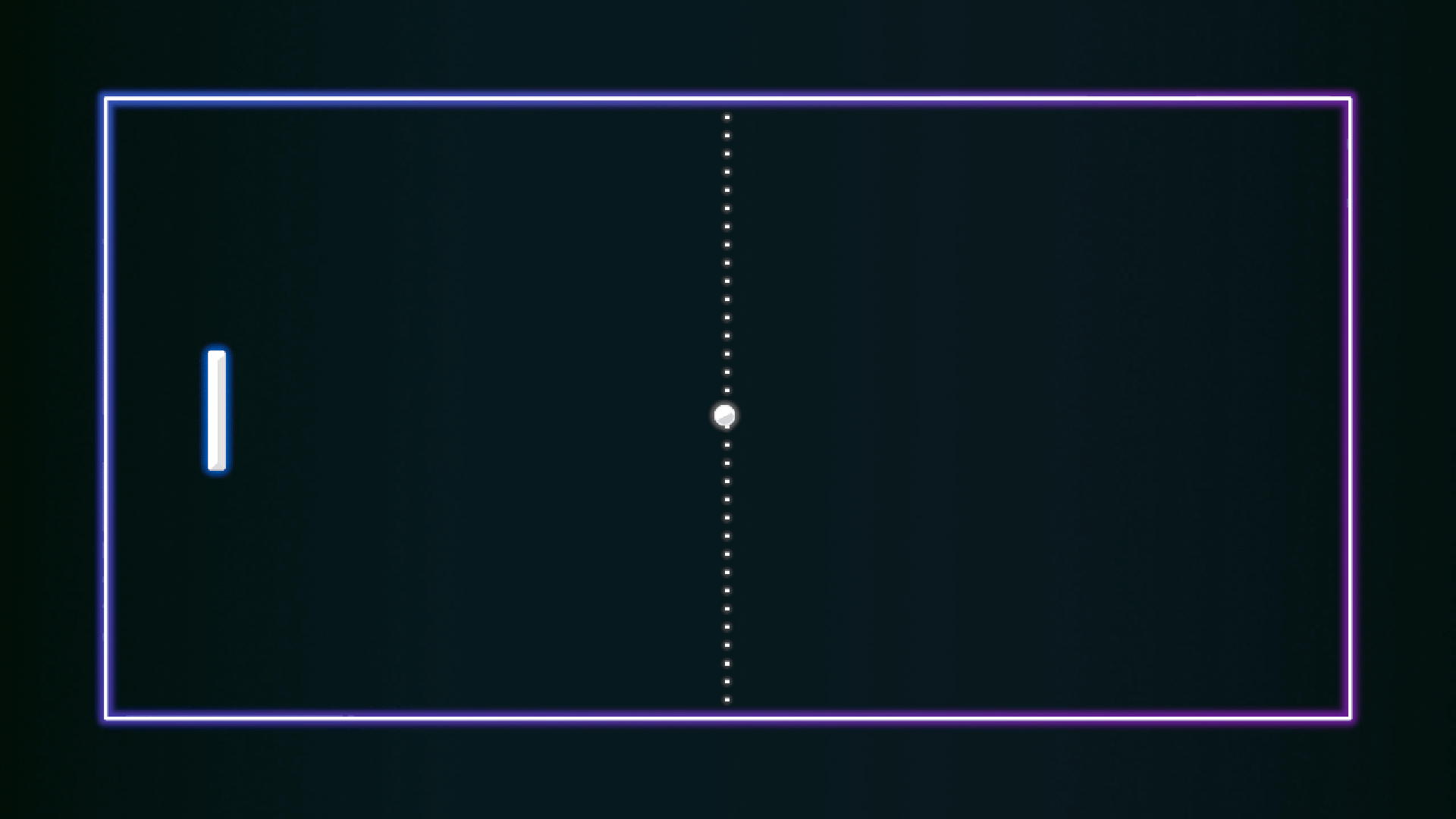
Use the keys "W" and "S" to move the paddle.
 modest dust
craggy lava
Hello i can only find tutorials on how to make full inventory systems i just nee...
modest dust
craggy lava
Hello i can only find tutorials on how to make full inventory systems i just nee...
A hotbar is pretty much also a full inventory system, just with fewer slots and with less/different functionalities. Watch one tutorial, get a basic idea on how the system works and adapt it to your needs.
Break down the problem into separate steps and do them one by one. If a step is too complicated then divide it into even smaller sub-steps. If that doesn't help, do some research or ask here.
 mint remnant
Been working on inventory myself, thought it would be simple, now it's a hot complicated mess that is hard to debug
 weak cedar
wanton hare
```csharp
using UnityEngine;
[RequireComponent(typeof(CircleCollider2D))]
[Req...
weak cedar
wanton hare
```csharp
using UnityEngine;
[RequireComponent(typeof(CircleCollider2D))]
[Req...
my advice would be counting hits, you could make it so that ball gets faster each hit
weak cedar
mint remnant
Been working on inventory myself, thought it would be simple, now it's a hot com...
I advice you to use scriptableobjects if ur already not, it makes everything a lot easier
wanton hare
weak cedar
I advice you to use scriptableobjects if ur already not, it makes everything a l...
I have used _rb2D.velocity to move the ball, should i use _rb2D.AddForce() instead??
modest dust
mint remnant
Been working on inventory myself, thought it would be simple, now it's a hot com...
If it's your first time doing something bigger then, in most cases, it's probably a good idea to grab a pen and pencil and plan out the structure beforehand, think of how it will be used, what needs access to it, think of some edge cases that might happen and how to handle them. Few years ago I went into my first inventory system blind, spent a week coding it and applying band aid fixes to things that didn't work and ended up scraping it after realizing that adding a new feature to it would break half of it. Better to spend a few minutes to an hour making even a basic plan than to struggle later.
rotund hull
how do i get the contacts in a OnTriggerEnter2D Collision2D
mint remnant
weak cedar
I advice you to use scriptableobjects if ur already not, it makes everything a l...
THe hard part has been traversing the UI heirarchy, finding the image to set and enable. Have yet to try scriptable objects, but maybe it would be wise to switch to
weak cedar
wanton hare
I have used _rb2D.velocity to move the ball, should i use _rb2D.AddForce() inste...
if u want the ball to travel at a constant speed, use velocity
 languid spire
rotund hull
how do i get the contacts in a OnTriggerEnter2D Collision2D
languid spire
rotund hull
how do i get the contacts in a OnTriggerEnter2D Collision2D
try reading the Collision2d documentation
rotund hull
languid spire
try reading the Collision2d documentation
I did, and I don't know how it works
rotund hull
languid spire
try reading the Collision2d documentation
I tried collision2D.GetContacts() but it isn't working
mint remnant
modest dust
If it's your first time doing something bigger then, in most cases, it's probabl...
that describes this attempt, went in blind, adjusted as I thought about edge cases haha, what a mess
wanton hare
weak cedar
if u want the ball to travel at a constant speed, use velocity
yeah i already did, but which one is a good choice?
languid spire
rotund hull
I did, and I don't know how it works
weak cedar
wanton hare
yeah i already did, but which one is a good choice?
ideally for a pong game you would want the ball to travel at a constant speed, but increse that constant speed each time it hits a border
rotund hull
languid spire
seriously? https://docs.unity3d.com/ScriptReference/Collision2D-contacts.html
I need it to work on Trigger not collision
wanton hare
weak cedar
ideally for a pong game you would want the ball to travel at a constant speed, b...
Here is the method responsible for the movement of the ball, what changes can I make? ```csharp
void ThrowBall(int direction)
{
    /* If direction = -1 => left
       If direction = 1 => right */

   float xVelocity = _throwSpeed * direction;
   float yVelocity = _rb2D.velocity.y;

   Vector2 ballVelocity = new Vector2(xVelocity, yVelocity);

   _rb2D.velocity = ballVelocity;

 }
then why say collision2d and not collider2d
weak cedar
rotund hull
I need it to work on Trigger not collision
check the isTrigger checkbox in the inspector
rotund hull
languid spire
then why say collision2d and not collider2d
sorry
rotund hull
weak cedar
check the isTrigger checkbox in the inspector
I can't run the code
weak cedar
is ur ide set correctly
weak cedar
send the code then lets troubleshoot
 eternal falconBOT

Posting code
📃 Large Code Blocks
Use links to services like:
https://gdl.space/, https://paste.ofcode.org/, https://hatebin.com/, https://paste.myst.rs/, https://hastebin.com/
📃 Inline Code
Surround code with three backquotes. Not quotation marks.
To format as C#, add cs to the first line:
```cs
// Your code here
```
Add a comment with a line number if there is an error message.
weak cedar
wanton hare
Here is the method responsible for the movement of the ball, what changes can I ...
I mean it looks all good idk what else can I add
rotund hull
wanton hare
weak cedar
I mean it looks all good idk what else can I add
Should I set the ball speed on the y axis to the throwing speed variable as well? or it doesnt matter
float yVelocity = _throwSpeed;
did you read the error?
weak cedar
wanton hare
Should I set the ball speed on the y axis to the throwing speed variable as well...
your choice
rotund hull
no I thought the syntac what just wrong
Assets/Scripts/World/Building Part.cs(13,49): error CS1501: No overload for method 'GetContacts' takes 0 arguments
that is the error in unity
 wanton hare
weak cedar
your choice
wanton hare
weak cedar
your choice
alright, thanks for the help, one last question, even though the game is not finished yet how would you rate it out of 10?
rotund hull
I tried to replace that with GetContacts and the same thing happened
weak cedar
ok so what does the error mean
"Assets/Scripts/World/Building Part.cs(13,49): error CS1501: No overload for method 'GetContacts' takes 0 arguments"
weak cedar
wanton hare
alright, thanks for the help, one last question, even though the game is not fin...
10, looks pretty cool
rotund hull
does it take an argument
rotund hull
idk
weak cedar
moreover, you should be seeing the error in your code editor
is that line of the code red?
rotund hull
just the getcontacts part
public int GetContacts(ContactPoint2D[] contacts);
that is what the documentation says
 verbal dome
rotund hull
that is what the documentation says
verbal dome
rotund hull
that is what the documentation says
You know what the doc also says?
 weak cedar
rotund hull
that is what the documentation says
weak cedar
rotund hull
that is what the documentation says
"You should pass an array that is large enough to contain all the contacts you want returned. This array would typically be reused so it should be of a size that can return a reasonable quantity of contacts. No allocations occur in this function which means no work is produced for the garbage collector."
verbal dome
It doesn't work with triggers.
weak cedar
This theoratically should work

I said '3' but you could make it larger as the docs say
 main quarry
hey i actually fixed my first problem that wasn't just a simple typo! (I had placed my code under void start rather then void update like a dummy) so i was very confused why i wasn't getting error's but nothing was working. I can't wait to stop making big oversights like that (it stops.. eventually.. right?)
 sleek gazelle
Hey, I'd need help, those 2 colors have the same hexadecimal, but are not equals in script, how can I fix that? Is there a way to get the hexa code of a color (like color.hexa maybe)?

 polar acorn
Don't use hexadecimal ¯_(ツ)_/¯
sleek gazelle
polar acorn
Don't use hexadecimal ¯\_(ツ)_/¯
I don't
polar acorn
So why does it matter they have the same color hex?
sleek gazelle
polar acorn
So why does it matter they have the same color hex?
Cause they are the same color
polar acorn
sleek gazelle
Cause they are the same color
Yes
 rich adder
sleek gazelle
Hey, I'd need help, those 2 colors have the same hexadecimal, but are not equals...
rich adder
sleek gazelle
Hey, I'd need help, those 2 colors have the same hexadecimal, but are not equals...
wdym not equal in script ?
sleek gazelle
rich adder
wdym not equal in script ?
if I do color1 == color2, it returns false
verbal dome
sleek gazelle
Hey, I'd need help, those 2 colors have the same hexadecimal, but are not equals...
polar acorn
sleek gazelle
if I do color1 == color2, it returns false
Well, yeah, because they aren't
rich adder
sleek gazelle
if I do color1 == color2, it returns false
its probably not the values you think they are?
polar acorn
They're the same hex
and they look the same on any RGB display
but as far as the values are concerned, those aren't the same color
sleek gazelle
polar acorn
but as far as the values are concerned, those aren't the same color
But how can I fix that? In RGB (0-255 ) they're the same too
verbal dome
What are you doing though? Why do you need to compare colors?
polar acorn
sleek gazelle
But how can I fix that? In RGB (0-255 ) they're the same too
Right, but in the 0-1 numeric space you're using, they aren't the same
So, why does it matter?
sleek gazelle
verbal dome
https://docs.unity3d.com/ScriptReference/ColorUtility.html
Thanks! This worked
verbal dome
It works, but you will end up comparing strings
I would make a helper function that approximately compares the floats instead
sleek gazelle
verbal dome
What are you doing though? Why do you need to compare colors?
The first one is a preset (in a menu), and the second one is the color of a customizable object, I want to check if they're equal so I can grey out the preset
verbal dome
If you care about performance, that is. Maybe it won't matter
polar acorn
If you want to detect for "close enough" colors, you'll need to define how enough counts as "enough" enough
 rustic wasp
sleek gazelle
Hey, I'd need help, those 2 colors have the same hexadecimal, but are not equals...
rustic wasp
sleek gazelle
Hey, I'd need help, those 2 colors have the same hexadecimal, but are not equals...
those are the same color
colors are displayed on screen between 0-255
when you use floats
sleek gazelle
rustic wasp
those are the same color
But unity doesn't think the same
rustic wasp
0.2001 and 0.2 are going to be the same color
oh
my bad, i thought your problem was that
verbal dome
Using Color32 (0-255 range) and comparing those would work too
sleek gazelle
verbal dome
Using Color32 (0-255 range) and comparing those would work too
I can do image.Color32?
polar acorn
rustic wasp
0.2001 and 0.2 are going to be the same color
They're going to look the same on a 32-bit display, but they aren't actually the same data
rustic wasp
are colors the same as vector4's when storing?
polar acorn
If you want to check for colors to be "close enough" then you want to define what counts as close enough. If you want to check the hex or the 32-bit color, convert them both
rustic wasp
what if you multiply by 255 and round?
verbal dome
sleek gazelle
I can do image.Color32?
Ah you are grabbing it from an Image, well you could always cast the color to Color32cs var color32 = (Color32)image.color; // Or this should work too Color32 color32 = image.color;
rich adder
rustic wasp
are colors the same as vector4's when storing?
yes color is just fancy Vector4
polar acorn
rustic wasp
are colors the same as vector4's when storing?
Yes, and hypothetically, if you had a display with a higher color range than standard and a GPU that supports it, those would look different too
verbal dome
But I'd personally just make an approximate comparison function
Meh, not sure actually. Pick whatever lol
sleek gazelle
verbal dome
Ah you are grabbing it from an Image, well you could always cast the color to Co...
Thanks!
polar acorn
Very very slightly different, but still different
sleek gazelle
verbal dome
Ah you are grabbing it from an Image, well you could always cast the color to Co...
Operator '==' cannot be applied to operands of type 'Color32' and 'Color32'
sleek gazelle
verbal dome
But I'd personally just make an approximate comparison function
Meh, not sure a...
I'll do that
Thanks!
rich adder
must be using different color32
verbal dome
.Equals could work
rich adder
yup just found same answer on unity discussions
https://discussions.unity.com/t/operator-cannot-be-applied-to-operands-of-type-color32-and-color32/192927/6
sleek gazelle
verbal dome
``.Equals`` could work
Yes, it works
verbal dome
It produces a bit of garbage though, because it uses the object type
rustic wasp
is garbage collecter a c# thing or a unity thing?
rich adder
c#
weak cedar
you don't usually see memory leaks in IL languages
rustic wasp
but i remember having to free textures when coding renderer features
weak cedar
because they have built in garbage collectors
rich adder
You can create one, is just more rare
very rare cause of GC does its job, most of the time
rustic wasp
i somehow managed to do it one time
 ivory bobcat
rustic wasp
so thats why you dont see memory leaks in c#
ivory bobcat
rustic wasp
so thats why you dont see memory leaks in c#
Memory leak during the applications life time can still occur but normally only if you've got some circular dependencies.
rustic wasp
is garbage collecter really slow or something?
why is it not implemented in every language
like c++
i know it is low level but
 eternal needle
rustic wasp
is garbage collecter really slow or something?
eternal needle
rustic wasp
is garbage collecter really slow or something?
Yes it is relatively slow
rustic wasp
it prevents memory leaks
 queen adder
you can test it, create a load of garbage and watch the profiler and the frame drop when gc kicks in
verbal dome
ivory bobcat
Memory leak during the applications life time can still occur but normally only ...
Hmm, so if A and B reference each other, but nothing else references them, they stay in memory?
rich adder
GC comes with the tradeoff ofc
verbal dome
Or something else?
ivory bobcat
rustic wasp
like c++
You'd just release memory yourself in C++
It isn't much faster.. you'd simply get to choose when it's released rather than wait for the compound hiccup.
eternal needle
verbal dome
Hmm, so if A and B reference each other, but nothing else references them, they ...
Iirc (I could be wrong) it only keeps track if something is current referencing the object. Not how many or what specifically
main quarry
"Severity Code Description Project File Line Suppression State
Error (active) CS0619 'Component.camera' is obsolete: 'Property camera has been deprecated. Use GetComponent<Camera>() instead. (UnityUpgradable)' Assembly-CSharp C:\Users\Brennon\First game 1\Assets\Scripts\Worker.cs 22"
Uhhh im sorry what? what does it mean it's deprecated? (this is an error im getting)
rich adder
main quarry
"Severity Code Description Project File Line Suppression State...
google the word deprecated
are you doing myScript.camera ?
main quarry
rich adder
are you doing `myScript.camera` ?
Vector3 mousePos = camera.main.ScreenToWorldPointInput(Input.mousePosition); thats the code in question
rich adder
yea you're using the property of the MB which is old
verbal dome
It's so cute that they used to think that every component needs a camera, light etc properties
rich adder
use Camera.main
main quarry
MB? i dont know what that means
polar acorn
main quarry
MB? i dont know what that means
MonoBehaviour
polar acorn
main quarry
`Vector3 mousePos = camera.main.ScreenToWorldPointInput(Input.mousePosition);` t...
You really need to double check your capitalization before coming here
rich adder
verbal dome
It's so cute that they used to think that every component needs a ``camera``, ``...
soo annoying every time I want to make a light referencenew Light light
main quarry
polar acorn
You _really_ need to double check your capitalization before coming here
I love the fact every time i come here becuase I cant figure it out it's a capitalization error, i went over it about 10 or so times trying to figure it out. but the few times i have actual issues that aren't capitlization i figured it out on my own, what is about capital letters that I can't figure out? i guess ill never know
rich adder
main quarry
I love the fact every time i come here becuase I cant figure it out it's a capit...
is your IDE even configured?
even though its technically not wrong syntax here just wrong component
main quarry
rich adder
is your IDE even configured?
even though its technically not wrong syntax here ...
As far as i can tell it's configured, i've gone over the link i got sent multiple times and think i did it how do i know if its done?
rich adder
mine automatically want to correct it to Camera
but yeah this one is a confusing one since its a property already
 verbal dome
rich adder
soo annoying every time I want to make a light reference`new Light light`
verbal dome
rich adder
soo annoying every time I want to make a light reference`new Light light`
I think that's the only way I have used new for fields/properties/other members
rich adder
yeah exactly lol
verbal dome
Hiding seems meh to me
rich adder
I wonder how many projects would break if they finally got rid of those properties
eternal needle
I dont even know why they cant get rid of it. It's literally an error to use it
rich adder
isn't it deprecated since 5?
main quarry
rich adder
mine automatically want to correct it to `Camera`
but yeah this one is a confusi...
okay yeah im configured then, but it didn't bring up camera once for me until i erased it and rewrote it about 3 times and THEN it brought up Camera
rich adder
main quarry
okay yeah im configured then, but it didn't bring up camera once for me until i ...
are you on VS or VSCode. I also have mine automatically replace stuff, that can be toggled off
main quarry
rich adder
are you on VS or VSCode. I also have mine automatically replace stuff, that can ...
VS i was on code but moved to Vs community, it doesn't auto fill for me i have to press enter of tab for that
rich adder
oh yeah tab or spacebar for me too
but yeah just keep that in mind just those few things are depracted really, not much else.. unity decided to make properties camel case so, capitlization is also important there lol
steep rose
spacebar is the way to autofill 💯
craggy lava
modest dust
A hotbar is pretty much also a full inventory system, just with fewer slots and ...
Ohhh yea i see now
ivory bobcat
verbal dome
Hmm, so if A and B reference each other, but nothing else references them, they ...
I recall the early days of Java and C# having issues but maybe not (anymore, if ever). Apparently this isn't true as they only ever care if a root object isn't destroyed/freed. It would require a live object referencing this chain to keep them alive. Good catch.
eternal needle
That might not be hard to test using the memory profiler also. Just create 2 poco which reference each other. I think if you do it from a unity object itll be destroyed later though. That's what I noticed in some testing which realllllly confused me
Not on my pc or I'd love to test this myself
 brazen jolt
hello, i want to make a UI square where i can cut it as much as i want from the point i want but idk how to do it
can i send a vid to show an example

Simple mesh slicing script, for the moment only for 2d meshes (works on any topology). Allows multiple slices of the same mesh, each slice at any direction
 wintry quarry
brazen jolt
hello, i want to make a UI square where i can cut it as much as i want from the ...
wintry quarry
brazen jolt
hello, i want to make a UI square where i can cut it as much as i want from the ...
You wouldn't do this with UI
brazen jolt
wintry quarry
You wouldn't do this with UI
u mean i cant?
ok then i will do it with normal objects i though i can with UI
i still want an answer
rich adder
lookup catlike coding has good series on making custom mesh
You can see in the video you're just basically making more triangles as you slice
 flat gale
Is there a way to get a script off a imstantiated object. I have a turn based battle system and am trying to call the script in a attack function but am not sure how to reference the script on the active enemy
rich adder
flat gale
Is there a way to get a script off a imstantiated object. I have a turn based ba...
what is " a script off a imstantiated object."
you want to access a script on an instantiated object ?
 muted wadi
why is it that when i fire a raycast at a child object, it always returns the name of the parent object?
rich adder
flat gale
Yes
Instantiate method returns you that object
rich adder
muted wadi
why is it that when i fire a raycast at a child object, it always returns the na...
probably because the parent collider is above/covering it?
muted wadi
rich adder
probably because the parent collider is above/covering it?
the parent's collider is on the IgnoreRaycast layer
verbal dome
muted wadi
why is it that when i fire a raycast at a child object, it always returns the na...
If the collider is part of a rigidbody, then hit.transform/hit.gameObject returns that rigidbody's object
If you want to make sure you get the child, use hit.collider
rich adder
muted wadi
the parent's collider is on the IgnoreRaycast layer
does that actually do anything if you dont specify layermask
but yeah I usually just go for hit.collider to avoid issues
muted wadi
im not sure, but i have specified the layermask as such
if (Physics.Raycast(rayOrigin.position, rayOrigin.forward, out hitInfo, rayMaxDist, ~ignoreLayer))
verbal dome
Docs say
This can be used in the layermask field of Physics.Raycast and other methods to select the "ignore raycast" layer (which does not receive raycasts by default).
Seems like it should be ignored by default unless you add it to the mask
rich adder
try changing it to .collider if you didnt already
verbal dome
muted wadi
im not sure, but i have specified the layermask as such
```if (Physics.Raycast(r...
Is ignoreLayer a layer mask or a layer?
 rare elm
I bought a kit on Unity Store, but I can't find any getting started instructions inside. It feels like I'm just expected to know what to do, here. When that's the case, there's usually a tutorial online somewhere that I can read, but I can't find one. Can any of you recommend a "how to use a kit" sort of blog article or video or something?
muted wadi
verbal dome
Is ``ignoreLayer`` a layer mask or a layer?
a layerMask that i specify the layer of in the editor
rich adder
rare elm
I bought a kit on Unity Store, but I can't find any getting started instructions...
not really a code question
rare elm
yeah, it is. i'm going to have to do something like placing the first scene, or whatever.
rich adder
placing scenes has nothing to do with coding questions
rare elm
i see that you're a former irc user.
rich adder
wut
rare elm
at any rate, if someone has a tutorial that could be helpful, i'd appreciate it
muted wadi
rare elm
i see that you're a former irc user.
scenes are not coding. That is a design element
rich adder
!learn
eternal falconBOT
:teacher: Unity Learn ↗
Over 750 hours of free live and on-demand learning content for all levels of experience!
rare elm
ok then i guessed wrong.
muted wadi
i'm more confused about why you immediately pulled out attitude when you clearly guessed about something you didn't know
rare elm
because i had been given three non-helpful non-responses in a row.
if the response is by design not actionable, it's basically just telling someone to shut up and go away.
rich adder
have you tried reading the #854851968446365696 and #📖┃code-of-conduct
No because your question is very vague
but not code related, there are other channels that may fit depending on what it is.. Art assets? #🔀┃art-asset-workflow
etc
muted wadi
@rich adder i have an object that has a script which has an IIinteractable interface. I want to get the script which has this interface without referencing the script itself. This doesn't work, and I'm stuck.
interactable = hitInfo.collider.GetComponent<IInteractable>;
rare elm
if someone had the kind of tutorial i asked for, it sure would be helpful.
muted wadi
rare elm
if someone had the kind of tutorial i asked for, it sure would be helpful.
its almost like if you clicked the Learn Unity link that was posted a few minutes ago you would have stumbled upon this handy menu made for beginners, outlining all the lessons available.

 rich adder
muted wadi
<@968604165150507078> i have an object that has a script which has an IIinteract...
rich adder
muted wadi
<@968604165150507078> i have an object that has a script which has an IIinteract...
it should work
rare elm
ya, those actually don't address what i'm asking for, is the problem.
muted wadi
they do actually
each one of those is a tutorial on how to use the unity editor (including how to create scenes)
rare elm
i didn't ask how to use the editor.
with respect, i've already gone through them, and they do not. i'm not being a jerk, i'm not refusing resources that are offered to me, and i did click the link. there's no reason to talk down to me in this fashion.
muted wadi
rich adder
it should work
forgot to add the brackets at the end
rich adder
rare elm
i didn't ask how to use the editor.
so what are you asking cause it sure didn't come off clear
"how to use a kit"
muted wadi
he's asking how to use a kit, but its not that simple
muted wadi
you need to know how to use the editor to use a kit
muted wadi
rich adder
whats a kit ?
like a paid asset that comes with a bunch of stuff premade
rare elm
that's actually not what i'm asking for. please don't try to explain on my behalf. thanks.
 deft grail
muted wadi
you need to know how to use the editor to use a kit
deft grail
muted wadi
you need to know how to use the editor to use a kit
well maybe he knows how to do that
deft grail
rare elm
that's actually not what i'm asking for. please don't try to explain on my beha...
and also your question isnt very detailed
rare elm
it cannot be. i'm a rank amateur. i don't know how to give detail.
rich adder
" a kit " is very vague
rare elm
please have sympathy. this borders on a bad episode of the IT crowd.
muted wadi
💀
rich adder
every asset is different.. no one can give a specific answer to how a kit works
rare elm
i asked a very simple, very straightforward question, which puts 99% of the burden on me to do the work
i am literally just asking for a link.
rich adder
clearly its not
deft grail
rare elm
i am literally just asking for a link.
a link to what
rich adder
a link to a kit that we know nothing about, logical
rare elm
any kind of tutorial that has to do with getting started with kits and templates that are sold on the unity store.
deft grail
rare elm
any kind of tutorial that has to do with getting started with kits and templates...
every "kit" and asset is different
 slender nymph
rare elm
any kind of tutorial that has to do with getting started with kits and templates...
slender nymph
rare elm
any kind of tutorial that has to do with getting started with kits and templates...
that would literally just be reading the documentation that comes with it, if it has any, and understanding how to use the unity editor and make a game
rare elm
you know, if someone came to one of my communities, they'd get a helpful and supportive answer. this is not actually a generic question.
muted wadi
rare elm
any kind of tutorial that has to do with getting started with kits and templates...
as navarone already said, every kit is different. It should come with a manual or documentation that explains how the kit works and crucial information about its components. Other than that, if you still don't understand it, then you probably don't know how to use the editor itself.
rare elm
i feel like maybe i should go somewhere where people don't spend all their time showing their channel friends the emoji they can use
what a pity.
verbal dome
I thought all assets are required to have some sort of docs/instructions, or is that just for code?
slender nymph
rare elm
you know, if someone came to one of my communities, they'd get a helpful and sup...
just repeating "how to use a kit" is not a question that would garner helpful responses other than "learn how to use the engine"
rich adder
👋
deft grail
rare elm
i feel like maybe i should go somewhere where people don't spend all their time ...
maybe ask a specific question holy
rare elm
osmal: i mean, they might? i did my best to look for some. i might not be looking in the right place
i found a readme.txt but it's pretty bare
there's a support link but it basically just goes to a gumroad store
but if you didn't know what you were doing in node, you woudln't know to look for the host block in package.json
rich adder
dont use a shitty kit thats poorly documented
rare elm
so i might just not be looking in the right place
slender nymph
also there's never one singular answer to how to use an asset because there is no standardisation in how the assets are created or meant to be used
rare elm
ya you guys keep saying that
rich adder
careful you might get blocked too for saying the right thing
slender nymph
one "complete game template" could have entirely different methods of doing things than another
rich adder
this kids a 🤡
 midnight meteor
Hello , can update method be IEnumerator and not void ?
slender nymph
rare elm
ya you guys keep saying that
yes because it's correct.
verbal dome
If the kit only has visual assets like models, textures, materials, then maybe it doesn't need manuals. At that point you should just know how to use the editor
But I don't know what the kit includes
rare elm
okay, no need to keep repeating it
slender nymph
midnight meteor
Hello , can update method be IEnumerator and not void ?
no, why would you want it to be?
deft grail
rare elm
okay, no need to keep repeating it
then dont ask the same question 15 times and we wont answer it 15 timies, SIMPLE
rare elm
@verbal dome - it's a complete game. you're meant to swap out the images and sounds, the ad id, and publish.
@verbal dome - when i build it, you can see the wrong scene come up, and it's scaled wrong.
deft grail
rare elm
<@136926228341850112> - when i build it, you can see the wrong scene come up, an...
ah here we go, so iis the question "wrong scene in build and scaled wrong"?
muted wadi
rare elm
<@136926228341850112> - when i build it, you can see the wrong scene come up, an...
wow its almost like those are both editor functions that you probably don't know to use
 frosty hound
rare elm
<@136926228341850112> - it's a complete game. you're meant to swap out the imag...
frosty hound
rare elm
<@136926228341850112> - it's a complete game. you're meant to swap out the imag...
If you haven't found a tutorial or support for someone's asset, then you've likely hit the point of all this where it simply doesn't exist.
rare elm
honestly, i'm just looking for some advice, but these neckbeards are obsessed with saying "it can be anything" over and over again, instead of giving helpful practical advice like "there are usually instructions here, you usually need to start by doing x, there's probably something named y," etc.
frosty hound
If you insist on continuing to bring it up, at least make a thread.
verbal dome
If you have specific questions about stuff like wrong scales, then ask in #💻┃unity-talk or other appropriate channel
frosty hound
Don't get upset that people are telling you the truth. If you are going to start insulting people, you may as well leave now.
slender nymph
rare elm
<@136926228341850112> - when i build it, you can see the wrong scene come up, an...
if you'd bothered asking about this instead of insisting upon a "tutorial for how to use a game kit" then we could have provided answers to your questions. but if you want to be an ass and insult people attempting to help, then you're unlikely to receive help
frosty hound
Don't waste my time or I'll mute you as well.
frosty hound
Make a thread if you're going to continue on this.
deft grail
rare elm
it would have been easy to be supportive if someone had actually wanted to.
just go to #💻┃unity-talk and say you have scaling issues and scene issues, simple
iif you said that from the beginning the problem would be solved by now
muted wadi
If my raycast hits the red object's collider, and i do this interactable = hitInfo.collider.GetComponentInParent<IInteractable>(); to find the IIinteractable interface in a parent object, how come when I press the button that is supposed to called the Interact() method which the interface incorporates, nothing happens?

sorry if thats confusing
rich adder
muted wadi
If my raycast hits the red object's collider, and i do this ```interactable = hi...
how did you verify the method is running
slender nymph
yeah make sure the code that actually invokes whatever method on that object is running, and make sure it has actually found the correct object
muted wadi
print("Can interact with " + hitInfo.transform.name); + a bool when canInteract is true
rich adder
muted wadi
```print("Can interact with " + hitInfo.transform.name);``` + a bool when canInt...
this is inside Interact? nd how do you call interact
verbal dome
Show a bit more of your code
muted wadi
oh no no
    {
        if (scopeViewActive)
        {
            scopeViewActive = false;
        }
        else
        {
            scopeViewActive = true;
        }
}``` this is Interact, every script that has the IIinteractable interface needs this method in itright but show the code where you are calling this method
muted wadi
{
    CheckForInteractables();

    if (Input.GetKeyDown(objectInteract) && canInteract)
    {
        if (interactable != null)
        {
            interactable.Interact();
        }

    }
}``` the interactables check is the raycastNeed to see CheckForInteractables too
muted wadi
verbal dome
Need to see ``CheckForInteractables`` too
{
    //check if the object the player is looking at is an interactable.
    if (Physics.Raycast(rayOrigin.position, rayOrigin.forward, out hitInfo, rayMaxDist, ~ignoreLayer))
    {
        //Cosmetic effect for the crosshair when object can be interacted with. Makes it change size when
        //looking at interactable and when not.
        //crosshair.rectTransform.localScale = new Vector3(0.20f, 0.20f, 0.20f);
        //interactionText.gameObject.SetActive(true);
        interactable = hitInfo.collider.GetComponentInParent<IInteractable>();
        canInteract = true;
        print("Can interact with " + hitInfo.transform.name);
    }
    else
    {
        //crosshair.rectTransform.localScale = new Vector3(0.14f, 0.14f, 0.14f);
        //interactionText.gameObject.SetActive(false);
        interactable = null;
        canInteract = false;
    }

}```You should still check if interactable is null or not, before setting canInteract to true.
But if it is truly hitting the object you marked in red, then it should work
I would print the hitInfo.collider.name instead/also
muted wadi
verbal dome
I would print the ``hitInfo.collider.name`` instead/also
when i do print transform it gives me the name of the parent object
verbal dome
Right but have you confirmed which collider your ray is actually hitting?
verbal dome
Okay, put a log inside Interact and see if it prints
muted wadi
so by the laws of coding it should now get the parent object that has IInteractable
yup, it prints right after interactable.Interact();
but still nothing happens
verbal dome
So you put the log inside the Interact method? If it prints, then it is indeed getting called
muted wadi
verbal dome
So you put the log _inside_ the Interact method? If it prints, then it is indeed...
yep
verbal dome
All we can see is that you are toggling a bool inside the method
Your problem is somewhere else then - wherever you use scopeViewActive I assume
Btw you can invert a bool with cs scopeViewActive = !scopeViewActive;
muted wadi
oh i didn't know that
muted wadi
verbal dome
Your problem is somewhere else then - wherever you use ``scopeViewActive`` I ass...
{
    if (scopeViewActive)
    {
        mainScopeViewport.enabled = true;
        interiorCamera.enabled = false;
        HandleInputs();
        HandleFiring();
    }
    else
    {
        mainScopeViewport.enabled = false;
        interiorCamera.enabled = true;

        //Reset the vertical rotation of the lewisGun and puteaux to the default
        lewisGunPivot.transform.localRotation = Quaternion.Euler(0, 0, 0);
        puteauxPivot.transform.localRotation = Quaternion.Euler(0, 0, 0);
    }
}``` interiorCamera has the script that is doing the interaction checksIs this object or script inactive by any chance?
Update won't get called on an inactive object/disabled script
In any case - keep using Debug.Log to see what's getting called and if the variables are what you expect them to be
muted wadi
verbal dome
Update won't get called on an inactive object/disabled script
interiorCamera holds the interaction script, and the mainScopeViewport is just a standalone camera, the scope view script is never disabled
 main karma
Hello, I've been trying to make this work but I got stuck
 void BakeMirror()
    {
        cam.targetTexture = PortalTexture;
        PortalMaterial.mainTexture = blackTexture;
        cam.Render();
        PortalMaterial.mainTexture = PortalTexture;
    }
Basically, I got a number of portals in the same room, trying each to render the room to a texture. Now, when I look through a portal, all of the other portals should have a black texture because I'm too dumb to handle recursion. Unfortunately for me, this script only works when I look at the portal through itself, it does nothing for the rest of them for some reason. I think it has to do with the order at which the action happen. I need a way to set the texture to ALL of the cameras to black, then render the portals, then change it to the rendered one then render the Main Camera
I'll attach some images to understand what I mean

 main quarry
well i have spent about an hour+ on this and can't figure out why it won't work even redoing the script entierly
"Severity Code Description Project File Line Suppression State
Error (active) CS0029 Cannot implicitly convert type 'Resources' to 'UnityEngine.ResourceRequest' Assembly-CSharp"
Im getting this error for this code
currentRessource = col.GetComponent<Resources>(); and i don't know why and i can't figure out any issues as to why it's giving me this error, as far as i can tell i copied the tutorial directly
polar acorn
main quarry
well i have spent about an hour+ on this and can't figure out why it won't work ...
What type is currentRessource?
main quarry
polar acorn
What type is `currentRessource`?
EVERY SINGLE TIME! every time i struggle for hours and can't fix it myself before coming here it's a typo? well less a typo this time and i miss clicked and let it auto fill in an extra part. so it turned Resource currentRessource to ResourceRequest currentRessource i can not figure out why i am in capable of finding this, i scoured the code and the tutorial back and forth i rewatched it mulitple times, i litterally redid everything from scratch and i missed it both times that it auto added that request to it.
but the funny thing? every time i have an actual complicated fix mess up with no errors or anything to guide me i can fix it withint 10 minutes?
like this isnt a joke im legit mad at myself why im struggling so badly with typos and making myself look like an actual idiot but i work just fine with everything else so far!
polar acorn
There's a reason Rubber Duck Debugging is a term
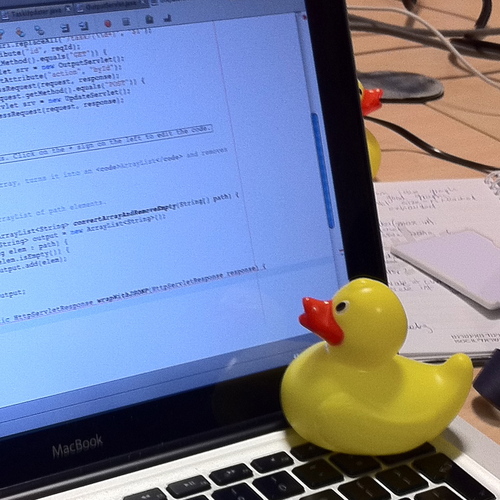
In software engineering, rubber duck debugging (or rubberducking) is a method of debugging code by articulating a problem in spoken or written natural language. The name is a reference to a story in the book The Pragmatic Programmer in which a programmer would carry around a rubber duck and debug their code by forcing themselves to explain it, l...
Just gotta give the lines throwing errors a real close once-over. Those error messages are important.
eternal needle
Not the best idea to also make a class with the same name as a unity class. Resources already exists by unity
polar acorn
Cannot implicitly convert type 'Resources' to 'UnityEngine.ResourceRequest'
This means you're trying to store a Resources in a variable that can only hold UnityEngine.ResourceRequest. Then you just gotta think: "Which one of these did I really want? Where'd the other one come from?"
main quarry
polar acorn
Just gotta give the lines throwing errors a _real_ close once-over. Those error ...
I really wish i could say i didn't give them a real close once over, i went through every line one by one multiple times and could not FIND IT as i said i rewrote the whole thong both scripts that matter from the start rewatching the tutorial im going through to figure out what was wrong, and some how both times i ended up with the same issue of getting that request stuck in there
mint remnant
tried using VS debuger?
main quarry
anyway ill try the rubber duck stuff to the best of my abilities next time maybe it will help me, but with my track record with typos
main quarry
mint remnant
tried using VS debuger?
didnt work as the code it was saying was the issue was just fine, the issue was the code it was trying to go off of had a whole extra word but had nothing to error off of. so debuger didn't help (if i even used it properly)
mint remnant
you can single step line by line and inspect variables
this of course only helps if you fully understand what should happen on a line of code
main quarry
I did step by step, i just seem incapable of seeing typos
slender nymph
the debugger of course would not be helpful for compile errors because you can't even enter play mode if you have a compile error. however you should be seeing red underlines in your code for compile errors, and if you are not then your !IDE is not configured 👇
eternal falconBOT
💡 IDE Configuration
If your IDE is not autocompleting code
or underlining errors, please configure it.
Select one:
•  Visual Studio (Installed via Unity Hub)
• Visual Studio (Installed manually)
•  VS Code
•  JetBrains Rider
• :question: Other/None
main quarry
slender nymph
the debugger of course would not be helpful for compile errors because you can't...
I have looked through the IDE again and again and again as far as i can tell i have it on as i get those autofill with a button click options and such, if that isnt proper IDE config then i have no clue what to do even with the help
slender nymph
do you see red underlines in your code when you've got a compile error?
main quarry
yes I do
slender nymph
if the answer to that is no, then your IDE is not configured
mint remnant
so what's the issue? you see the errors and yet can't find them???
main quarry
okay ill lay it out
eternal needle
main quarry
anyway ill try the rubber duck stuff to the best of my abilities next time maybe...
Honestly this is just an issue of not understanding the errors you're coming across. Mostly you can solve with just google. the one you shared is quite straightforward
main quarry
currentRessource = col.GetComponent<Resources>(); this was the issue i was getting underlined, the code is fine and works just fine exactly as it should, the issue is it couldn't find currentRessources
Resources currentRessource; should have read like this but due to a mistake on my part it was ResourcesRequest currentRessource; or something like that, but debug wasn't telling me that was an issue and wasn't giving it a red underline it was only giving a red underline under the first part. none of this is helped that i went through the code mulitple times over, multiple google searches that didnt help (i did try) for over an hour and every time i missed that request was added extra, i went as far as to delete the script and redo it all and i STILL miskicked again adding another request to it when it shouldn't have been there. but still no red underlines it only had red underlines for the first part.
TLDR: ResourcesRequest currentRessource; wouldn't underline for some reason despite needing only Resources currentRessource;
mint remnant
sounds like you just need more debugging experience is all, compiler will let you declare any type you want, but it will throw up if you try to assign it wrongly
 teal viper
main quarry
`currentRessource = col.GetComponent<Resources>();` this was the issue i was get...
teal viper
main quarry
`currentRessource = col.GetComponent<Resources>();` this was the issue i was get...
Perhaps just hovering over the underline and reading the error message would've been enough..?
slender nymph
main quarry
`currentRessource = col.GetComponent<Resources>();` this was the issue i was get...
well the variable declaration wasn't the error so naturally that wouldn't be underlined in red. the error was you trying to assign a completely different type of object to the variable. the compiler assumes you are smart enough to declare the correct type of variable, so it will tell you when you try to assign the wrong type of object to that variable because how would it know you actually wanted the variable to be a different type rather than your assignment just being wrong?
main quarry
slender nymph
well the variable declaration wasn't the error so naturally that wouldn't be und...
YES that is what i was trying to say
mint remnant
contrary to some book titles you can't learn C# in 21 days
main quarry
i've been doing this for 2 days about (all on a tutorial video, im quite slow at watching it but im doing a lot today)
teal viper
The error would probably say something like "invalid assignment of instance of type X to a variable of type Y".
Or that it can't cast implicitly or something
main quarry
teal viper
The error would probably say something like "invalid assignment of instance of t...
'CS0029 Cannot implicitly convert type 'Resources' to 'UnityEngine.ResourceRequest' ' but it was giving me this error. truthfully i didn't and still don't udnerstand what the error is trying to tell me and googling it didn't help as it was kind of just specific questions people had about specific code nothing general
slender nymph
The error says that there is no conversion available from the type Resources to the type ResourceRequest which means you are likely trying to assign an object of type Resources to a variable of type ResourceRequest
eternal needle
These kind of errors are probably a lot easier to learn outside of unity, when you come across them doing basic c#.
queen adder
how would I change the rotation of an object to face another object in 2d
teal viper
main quarry
'CS0029 Cannot implicitly convert type 'Resources' to 'UnityEngine.ResourceRe...
It says that it can't convert one type to another. Implicitly just means automatically(without any additional code).
mint remnant
one of C#'s biggest helpful things is that it's type safe, it prevents you fron assigning wrong types
main quarry
okay i get it now and if i udnerstood what the error meant i could have figured it out a lot faster now i realize.
slender nymph
queen adder
how would I change the rotation of an object to face another object in 2d
assign either its transform.up or transform.right (whichever direction the object faces with no rotation) to the direction from that object to the other. direction is defined as (endPoint - startPoint).normalized
teal viper
main quarry
okay i get it now and if i udnerstood what the error meant i could have figured ...
Errors usually have 90% of the information you need to fix them.
So read and understand them. And if struggling, ask in the community
queen adder
slender nymph
assign either its transform.up or transform.right (whichever direction the objec...
transform.right = (firePos.position - transform.position).normalized;
Like that?
main quarry
teal viper
Errors usually have 90% of the information you need to fix them.
i just didn't know how to read the error was all. yeah ill just ask next time i just figured if i could get it done myself that woudl be best for learning first.. and i didnt want to humilate myself again with another type (how long until the next typo? find out next time on noonehere coding!)
mint remnant
btw when google searchign an error message, often best to leave out insignificant details like the variable names. Them can vary from person to person
main quarry
mint remnant
btw when google searchign an error message, often best to leave out insignifican...
i did, didn't help
slender nymph
queen adder
transform.right = (firePos.position - transform.position).normalized;
Like tha...
the name of your variable here indicates this is probably for a projectile, in that case why not just use the fire position's rotation? or is it not rotated with your object?
teal viper
Well, to understand this one you do need to understand the types system to a degree
Which is basically the C# basics
main quarry
don't worry I don't know c# basics besides what im learning in the tutorial (which is supposed to help with it, ish) wait thats not a good thing!
main karma
main karma
Hello, I've been trying to make this work but I got stuck
```c++
void BakeMirro...
took me 3 hours but I did it, if anyone wonders how,
void OnPortalPreRender(ScriptableRenderContext context, Camera cam)
    {
        if (cam != PlayerCam)
        {
            if (PortalMaterial != null)
            {
                PortalMaterial.mainTexture = blackTexture;

            }
        }
    }
    void OnPortalPostRender(ScriptableRenderContext context, Camera cam)
    {
        if (cam != PlayerCam)
        {
            if (PortalMaterial != null)
            {
                PortalMaterial.mainTexture = PortalTexture;
            }
        }
    }
I took the black texture and put it on prerender and the portal texture afterwards and it works like a charm, the function BakeMirror() now only has the cam.Render();
Took a while to figure this out because aparently Camera.OnPreRender and Camera.OnPostRender have been deprecated and so when I used the previously trying this approach I didn't know the delegate wasn't doing anything

works like a charm
if I could figure out how to use this to handle recursion it would be even better but idk how to do that yet
main quarry
oh my gosh i actually did it, i fixed mulitple typos on my own!
it's a Christmas miracle! (wait it's august)
muted wadi
quick question, why doesn't this work?

 pulsar forum
well obviously the type taken in by Play isn't the type that is provided.
rich adder
muted wadi
quick question, why doesn't this work?
what is sounds array of
muted wadi
audioclip
rich adder
you prob want PlayOneShot
rich adder
https://docs.unity3d.com/ScriptReference/AudioSource.Play.html
play does not take clips
muted wadi
yeah that makes sense
its late and i completely forgot about playoneshot
unity's sound system is kinda bad im ngl
rich adder
why's that?
muted wadi
difficult to use as well as just being vastly inferior to something like wwise
the problem is wwise is a whole other nightmare to install
i still have flashbacks of when some team members tried to install it for one of our university projects
rich adder
have only messed with it a little bit , I've seen people use fMod as an alternative
muted wadi
yeah thats true, i've never tried fmod but i've seen a lot of indie games use it
maybe its actually good
rich adder
its free, worth trying
muted wadi
true
 amber spruce
when making a enemy spawner script is it better to make a gameobject variable for each enemy i wanna spawn or a array of them all
deft grail
amber spruce
when making a enemy spawner script is it better to make a gameobject variable fo...
an array, theres no reason for individual ones
amber spruce
alright thanks i thought that i just wanted another opinion
can someone send me the link thing to set up visual studio with unity
because i dont think i set it up right
 deft grail
amber spruce
because i dont think i set it up right
deft grail
amber spruce
because i dont think i set it up right
why are you doing a timer like that
dont start that couroutine in Update first of all
and if you want a timer in Update then add a float by Time.deltaTime
amber spruce
deft grail
dont start that couroutine in Update first of all
i wasent gonna keep it there i was just trying to figure out why it wasent showing up correctly
like i couldnt auto complete IEnumerator
deft grail
amber spruce
like i couldnt auto complete IEnumerator
!ide
eternal falconBOT
💡 IDE Configuration
If your IDE is not autocompleting code
or underlining errors, please configure it.
Select one:
• Visual Studio (Installed via Unity Hub)
• Visual Studio (Installed manually)
• VS Code
• JetBrains Rider
• :question: Other/None
deft grail
because its not setup
amber spruce
everything is setup right though
deft grail
amber spruce
everything is setup right though
i mean i can see just from the screenshot it isnt setup even before you said it doesnt auto complete
was it working before?
amber spruce
no i just got a laptop and am setting up unity with it
deft grail
amber spruce
no i just got a laptop and am setting up unity with it
then how do you know everything is setup right?
amber spruce
 deft grail
thats not the only step to it
amber spruce
because everything that the link said to do is done already
deft grail
amber spruce
because everything that the link said to do is done already
did you restart your computer and unity?
amber spruce
no but that was already set up i didnt change that
and i have restarted since i installed unity
deft grail
amber spruce
no but that was already set up i didnt change that
huh
so you did everything in the link or not
did you install Unity in the visual studio installer?
amber spruce
everything in the link was done already
amber spruce
deft grail
did you install Unity in the visual studio installer?
yeah
i checked unity tools
should i click attach to unity
 deft grail
amber spruce
should i click attach to unity
deft grail
amber spruce
should i click attach to unity
dont have to
thats just for debugging things
my only suggestion is restart your laptop, or you didnt do everything in the link/missed something
amber spruce
is there a way to check that i installed unity in the visual studio installer
deft grail
amber spruce
is there a way to check that i installed unity in the visual studio installer
open visual studio installer
 deft grail
amber spruce
yeah so i have it checked
deft grail
amber spruce
yeah so i have it checked
what about the visual studio editor package in the package manager IN Unity?
is it up to date
or even installed
 deft grail
amber spruce
deft grail
amber spruce
i think it was this unless im wrong.
do you have this installed? https://dotnet.microsoft.com/en-us/download
get that then restart your laptop
steep rose
did you install visual studio via unity?
amber spruce
deft grail
get that then restart your laptop
k i will do that i will let you know in a few minutes
seems to work now

thanks
deft grail
amber spruce
seems to work now
nice
amber spruce
is this a good way to do a gametimer

 summer stump
Why not just a while loop? Instead of the recursion
amber spruce
summer stump
Why not just a while loop? Instead of the recursion
wdym
deft grail
amber spruce
is this a good way to do a gametimer
i would just do
float timer;
void Update()
{
  timer += Time.DeltaTime;
  if(timer > 1)
    timer = 0;
}
while (timerActive) {
Timer++;
Wait
}
 amber spruce
deft grail
i would just do
```cs
float timer;
void Update()
{
timer += Time.DeltaTime;
...
amber spruce
deft grail
i would just do
```cs
float timer;
void Update()
{
timer += Time.DeltaTime;
...
what does this do exactly?
because im trying to make a timer that tracks how long you have been playing for
deft grail
amber spruce
what does this do exactly?
in the if statement where you reset it, you can call some method or whatever you wanna do
summer stump
 desert bough
Absolute complete beginner here boys
desert bough
Absolute complete beginner here boys
#🤝┃introductions is best for that. Unless you had a question?
deft grail
amber spruce
because im trying to make a timer that tracks how long you have been playing for
aha, then just dont use the if statement
just keep the float += Time.deltaTime
that tracks your time played im pretty sure
try it out with a Debug.Log
amber spruce
alright i will try that
desert bough
summer stump
<#497875120556081172> is best for that. Unless you had a question?
im sure i'll have a lot of questions soon
steep rose
you probably will
amber spruce
desert bough
im sure i'll have a lot of questions soon
i can confidently say unless you are a coding prodigy you will have plenty of questions lol i know from experience
summer stump
amber spruce
wdym
Also to be clear, in case the word recursion caused the confusion, that means calling method from INSIDE that same method
void Foo() {
Foo();
}
desert bough
amber spruce
i can confidently say unless you are a coding prodigy you will have plenty of qu...
I'm a developer on roblox, already have a game that brings in a lot of revenue monthly. They just tax cashouts way too much for my liking lol
steep rose
desert bough
I'm a developer on roblox, already have a game that brings in a lot of revenue m...
you will love steam then
deft grail
desert bough
do they tax a lot.....
30% i think?
amber spruce
summer stump
Also to be clear, in case the word recursion caused the confusion, that means ca...
ah ok yeah i did that alot in my previous game lol
deft grail
desert bough
lol that is way better than roblox
its like 60 isnt it? dont remember
summer stump
amber spruce
ah ok yeah i did that alot in my previous game lol
You generally don't want to do it
summer stump
desert bough
roblox takes 70%
#💻┃unity-talk
This is not code questions
desert bough
How to code in unity
deft grail
desert bough
How to code in unity
you open a !ide after creating a script in Unity and start slamming your keyboard 👍
eternal falconBOT
💡 IDE Configuration
If your IDE is not autocompleting code
or underlining errors, please configure it.
Select one:
• Visual Studio (Installed via Unity Hub)
• Visual Studio (Installed manually)
• VS Code
• JetBrains Rider
• :question: Other/None
desert bough
Do i need to stomp my keyboard if i run into an error
deft grail
desert bough
Do i need to stomp my keyboard if i run into an error
errors are usually pretty easy to fix in beginner code
desert bough
Yeah ill throw myself into the thick of it most likely
summer stump
desert bough
Yeah ill throw myself into the thick of it most likely
Don't do that.
Do !learn
eternal falconBOT
:teacher: Unity Learn ↗
Over 750 hours of free live and on-demand learning content for all levels of experience!
desert bough
I appreciate it, but I learn better via forcing myself to think critically
mint remnant
Critical thinking "How to code in Unity?"
steep rose
use docs then
summer stump
desert bough
I appreciate it, but I learn better via forcing myself to think critically
Be aware that this method will alienate the helpers here and depending on if you ask questions covered by the link I sent, will cause people to get very upset and refuse to help
So be sure to at least google things before asking here
Best of luck!
desert bough
mint remnant
Critical thinking "How to code in Unity?"
That was just a joke 😂
desert bough
summer stump
Be aware that this method will alienate the helpers here and depending on if you...
I usually look at dev forums and documentation extensively before asking for help in discord server for sure!
amber spruce
how do i set a tmp text to a number?
steep rose
can you not write numbers in TMP text?
 mint remnant
try .ToString()
 mint remnant
add .text
steep rose
ah i misread then i guess.
amber spruce
mint remnant
add .text
where?
mint remnant
on the TMP_text part
mint remnant
well I mean on the object, gameTimer.text =
 shell sorrel
gameTimer.text = Timer.ToString();
amber spruce
mint remnant
well I mean on the object, gameTimer.text =
yeah that was it lol thanks
mint remnant
let the compiler help you, it will tell you the types when you hover over htem
amber spruce
amber spruce
yeah that was it lol thanks
also i want it in this format how would i achieve this
 shell sorrel
consider what things are your gameTimer is not a string its the whole component that shows the text, so gameTimer.text is the text on the timer
mint remnant
.ToString() has overrides available for formatting
shell sorrel
TimeSpan.FromSeconds(secs) then use that to format and display the time how you want
mint remnant
String.Firmat() has many options too
shell sorrel
yes but it is not aware that float is repersenting seconds
if they want mm:ss then it would need to be aware its a time span
 native thorn
does figuring out how to handle game logic go in here too or is this just strictly for how to convert logic into code
mint remnant
native thorn
does figuring out how to handle game logic go in here too or is this just strict...
depends, but you can always ask and get redirected if needed
native thorn
Im somewhat lost on having an efficient way to handle quests without running an update each frame to check if theyve been completed
I figure this would be an inefficient way to handle it when most of the quests are completed based on a trigger occuring within the game world
shell sorrel
events is prolly what you want @native thorn
deft grail
native thorn
Im somewhat lost on having an efficient way to handle quests without running an ...
just use an event when that "trigger" occures?
mint remnant
Update could work, or you could try using events
native thorn
So my issue with events is
shell sorrel
though update would work fine, checking a few flags is not costly
native thorn
Other than having a list of events relitive to the quest for that specific game object, which would otherwise never be called or used outside of the quest how do I do this
shell sorrel
would not worry about its performance at this stage unelss you know its a issue
native thorn
ahhh ok
so is this something more times than not a modern computer will just breeze through?
mint remnant
yes, early optimization can be a killer
native thorn
ahh ok, thats good to hear lol
shell sorrel
yeah would jsut do what gets you to your end goal and makes sense to you
native thorn
My biggest issue with moving from art to development is I have no clue how far you can really push anything or how much performance anything takes up ;
shell sorrel
you will figure it out from experience
deft grail
native thorn
My biggest issue with moving from art to development is I have no clue how far y...
make an fps counter / check profiler.
most things you do wont affect anything much really though at a beginner stage
shell sorrel
though for a lot of things best to not worry till you hit a issue, then use the profiler and tests to learn why its a problem
deft grail
if somethings a problem then you will know
native thorn
deft grail
make an fps counter / check profiler.
most things you do wont affect anything mu...
yea, as expected rendering the world map itself takes up pretty much 85-90% of the profiler
shell sorrel
even that 90% is not a true number btw
since if you are not taxing it yet, most of that time will be waiting for vsync
native thorn
deft grail
if somethings a problem then you will know
Ahh, with art i'm used to having a budget that slowly fills up over time and having to optimize everything at the present time
native thorn
shell sorrel
since if you are not taxing it yet, most of that time will be waiting for vsync
oh ok
mint remnant
if things get really tight, you can always switch to threading, but that is more advanced topic
shell sorrel
so there is no 1 budget with art, like its possible for something to be more optmized by having more polygons in some cases for example
its really balancing of concerns
native thorn
shell sorrel
so there is no 1 budget with art, like its possible for something to be more opt...
that ones a little confusing to me, what situation would having a higher polycount increase performance?
shell sorrel
native thorn
that ones a little confusing to me, what situation would having a higher polycou...
like i said many concerns to consider, but gave this example because on a game i was working there was fillrate becauise of a ton of overdraw when rendering foliage
so having meshes that more tightly fit the content on the foliage cards resulted in less overdraw in that case
native thorn
Oh I getcha, not so much an inherent performance gain than just removing a necessity to render certain parts by view
shell sorrel
there are tons of similar cases, where you can trade higher memory usage for hitting less cpu/gpu or vice versa
native thorn
Yea, I understand ya now
shell sorrel
it really depends on your needs at the time, and where issues are which is why everyone says to keep it simple till you hit a issue
then use tools like the profiler to learn what is going on
native thorn
Guess I'll just keep working away until I hit the play button and my fps tanks to 15 lol
Thanks for the help anyway, it's nice to know I havn't screwed myself over this early on
shell sorrel
over time you will learn to make more educated decisions from past experience
but in games its very hard to set rules that work in all cases
native thorn
Yea they're very very dynamic but that's the best part about game dev im finding
you cant really get as creative hanging sheets of drywall 🤣
shell sorrel
like art budgets for example, it so heavily depends on what you game is and what is important to it
look at characters in a game like the last of us, hundreds of thousands of polygons, with advanced blend shapes and complex rig
native thorn
yea, I've got everything atlassed atm into a simple pallet texture, its all flat shaded low poly anyway, hopefully a lot of the budget can go to giving me leeway on my spaghetti code lol
shell sorrel
works fine there because the focus is on a small number of characters
try using those as units in a rts game and it will be like 5 fps
amber spruce
shell sorrel
`TimeSpan.FromSeconds(secs)` then use that to format and display the time how yo...
like this??
gameTimer.text = TimeSpan.FromSeconds(Timer).ToString("mm:ss");
I remember 15 years ago when there was a huge workflow difference on creating third person assets and first person assets as well
we're not so constrained by polycounts these days but I getcha
its all materials now
shell sorrel
amber spruce
like this??
```cs
gameTimer.text = TimeSpan.FromSeconds(Timer).ToString(...
might need to escape the : gameTimer.text = TimeSpan.FromSeconds(Timer).ToString("mm\:ss")
shell sorrel
native thorn
its all materials now
well overdraw, and fill rate, shader complexity, draw calls and if things are batching properly and memory
amber spruce
shell sorrel
might need to escape the `:` `gameTimer.text = TimeSpan.FromSeconds(Timer).ToStr...
 shell sorrel
amber spruce
shell sorrel
amber spruce
yeah i have not test it, just said it might be needed
TimeSpan.FromSeconds(Timer).ToString("mm\\:ss")
amber spruce
THAT WORKS THANKS SO MUCH!!!
 crimson plover
Hello, I am new to programming and I wanted to know how I could make the button larger when I pass the mouse over a button.
rich adder
crimson plover
Hello, I am new to programming and I wanted to know how I could make the button ...
EventTrigger component or IPointer interface, link some type of Animation / Tween or Lerp
if you're new might want to start !learn
eternal falconBOT
:teacher: Unity Learn ↗
Over 750 hours of free live and on-demand learning content for all levels of experience!
crimson plover
rich adder
EventTrigger component or IPointer interface, link some type of Animation / Twee...
thank you
 sour fulcrum
If im making a class has a variation per value type whats the kinda standard way to name it? eg.
ScriptableSettingString, ScriptableSettingInt
StringScriptableSetting, IntScriptableSetting
ScriptableStringSetting, ScriptableIntSetting
i kinda like the third option but it doesn't feel standard
polar acorn
ScriptableSetting<T>
https://learn.microsoft.com/en-us/dotnet/csharp/fundamentals/types/generics

Learn about generics. Generic types maximize code reuse, type safety, and performance, and are commonly used to create collection classes.
 flint barn
Hey guys, I'm having issues with collisions whenever I walk into the cube it moves but when I freeze the x and y the character goes through the cube. I want the character to completely stop and not move the cube.
 teal viper
flint barn
Hey guys, I'm having issues with collisions whenever I walk into the cube it mov...
teal viper
flint barn
Hey guys, I'm having issues with collisions whenever I walk into the cube it mov...
Freeze the what x and y? And why?
flint barn
teal viper
Freeze the what x and y? And why?
I assumed doing so would make it not move when I walk into it.
Trying to make a wall.
slender nymph
does the character perhaps have its rigidbody set to kinematic?
also if that wall is supposed to be a static object, why does it have a rigidbody?
teal viper
Is the wall supposed to move or not?
flint barn
No
flint barn
slender nymph
does the character perhaps have its rigidbody set to kinematic?
yes its kinematic
Should it not be?
slender nymph
kinematic bodies are not affected by outside forces like collisions or gravity
slender nymph
flint barn
slender nymph
kinematic bodies are not affected by outside forces like collisions or gravity
When I change it to Dynamic, the player stops moving but the camera still moves.
slender nymph
that's not enough info to determine what the issue is
though I'm guessing you perhaps mean that the player stops when hitting a wall but the camera keeps moving? if that is the case then you're probably controlling the camera separately from the player rather than using something like cinemachine (or your own following script) to specifically follow the player
flint barn
slender nymph
though I'm guessing you perhaps mean that the player stops when hitting a wall b...
I apologize, I think the issue is that the character is moving fine but the sprite isn't.
slender nymph
huh? is your sprite not literally attached to the character?
wintry quarry
flint barn
I apologize, I think the issue is that the character is moving fine but the spri...
Show how you set up your GameObjects
flint barn
 wintry quarry
Uhuh but we need to see which components are attached to which objects
Also your camera setup seems wrong
slender nymph
yeah camera and vcam shouldn't really be a child of the player. vcam will have a reference to the player as its follow target
flint barn
Every tutorial I've seen online had the camera as a child within the player
slender nymph
and you'll also find dozens (if not hundreds) of tutorials that teach you to multiply your mouse input by deltaTime. that doesn't make it correct
flint barn
So it would just be outside the player and each time the player "spawns" it would search for the VCam object and make its follow target them?
slender nymph
yeah that is one way to handle it. although if you are respawning by destroying and instantiating a new copy of your player, you could instead just disable it temporarily, teleport it back to the spawn point, and reset any relevant variables (like health) so that you don't need to keep finding the reference and you put a little less burden on the garbage collector
main quarry
I can't click this button, theres no errors in the code this time, it's all set up to the correct button. in face none of my button's are working but i have no errors so i don't even know where to begin looking. like what am i missing to click the icons? i was told i needed some ui event system but the tutorial doesn't explain it or bring it up again
{
public Ghosts worker;
public Ghosts villiage;
public Ghosts tree;
public Ghosts crystal;
public Ghosts trap;
// Start is called before the first frame update
void Start()
{
}
// Update is called once per frame
void Update()
{
}
public void OnShopClick(string whatItem)
{
if (whatItem == "worker")
{
Instantiate(worker);
}
if (whatItem == "villiage")
{
Instantiate(villiage);
}
if (whatItem == "tree")
{
Instantiate(tree);
}
if (whatItem == "crystal")
{
Instantiate(crystal);
}
if (whatItem == "trap")
{
Instantiate (trap);
}
}
}``` slender nymph
do you have an event system in the scene?
main quarry
I do but idk what to do with it as it isn't ever explained, its just sitting a 0,0,0
slender nymph
it has an EventSystem component on it, right?
main quarry
it does
slender nymph
also is that a collider on a button? 🤔
main quarry
idk what that means. and also wait where is the event system supposed to be? its just sitting in the heirarchy, i still dont know what it's supposed to do
slender nymph
that is exactly what you do with it. it handles your interactions with your UI. show the hierarchy because this eems like a weird setup if your button has a collider on it
main quarry

 grand badger
main quarry
I can't click this button, theres no errors in the code this time, it's all set ...
grand badger
main quarry
I can't click this button, theres no errors in the code this time, it's all set ...
I answered this same question on another discord, hope you don't mind the copy-pasta 😄 It goes like this:
[...]
Your design isn't ideal here. It'd be much straightforward, scaleable, and maintainable if you did something like:
[SerializeField] Transform classesLayoutParent;
[SerializeField] List<ClassData> classDatas; // ClassData : ScriptableObject
[SerializeField] ClassButtonPrefab buttonPrefab;

void Awake() {
    foreach (var classData in classDatas) {
        var newButton = Instantiate(buttonPrefab, classesLayoutParent);
        newButton.Initialize(classData); // assign sprite, Texts, etc
        newButton.onClick.AddListener(() => SelectClass(classData));
    }

    SelectClass(classDatas[0]; // initialize with the first class
}

void SelectClass(ClassData classData) {
    PlayerData.Class = classData.Class;
    // SkillsDisplay.SetDisplay(classData.Skills);
    // ..etc (just a demonstration of how it's more scaleable)
}
looks like the button objects have children, those children are likely blocking the raycast from the mouse to the buttons. make sure that any graphic objects (like text or image components) on the child objects are not raycast targets
grand badger
in your case, List<ClassData> classDatas would be List<ShopItem> shopItems, but the design applies perfectly
main quarry
grand badger
I answered this *same* question on another discord, hope you don't mind the copy...
it's a tutorial is why it's not ideal, its getting me into the basics
slender nymph
also what Lyrcaxis pointed out is important, but not really related to the issue you are experiencing.
main quarry
im trying to figure out what im doing wrong now so i can learn for the future
slender nymph
main quarry
it's a tutorial is why it's not ideal, its getting me into the basics
tutorials shouldn't actively teach you bad code/design though
grand badger
ah it's fine if you're learning the absolute basics of UI, but for learning code I don't recommend that code you have for any reasons
main quarry
this is a tutorial for learning how to make a game at all, from 0 to basics anyway, as someone who doesn't know how to do C# it's been extremly helpful so far
grand badger
main quarry
I can't click this button, theres no errors in the code this time, it's all set ...
as for your actual issue, the issue most likely is that your text is raycastable, blocking the click on the button.
main quarry
I dont have anything covering the buttons so idk what's wrong
slender nymph
the buttons have children. those children draw above the button
what children do they have
grand badger
the text transform is separate -- it seems to be in front of the button to me. Click on it and check its rect in scene view to find out
 main quarry
I can't click this button, theres no errors in the code this time, it's all set ...
main quarry
main quarry
I can't click this button, theres no errors in the code this time, it's all set ...
the children are the number and icon besides the button, i moved their boxes away from the buttons as to not cover them at all
 slender nymph
did you make sure that they are not raycast targets like you've been instructed?
main quarry
okay idk what raycast means
grand badger
main quarry
I can't click this button, theres no errors in the code this time, it's all set ...
also, post the full inspector, please, instead of just the small snippets
main quarry
i also have no clue what that means
slender nymph
then you should probably start with learning the absolute basics of using the editor. start with the unity essentials pathway on the unity !learn site
eternal falconBOT
:teacher: Unity Learn ↗
Over 750 hours of free live and on-demand learning content for all levels of experience!
 sick storm
Hi I want my dash to instead of being just a normal dash i want it to give me a normal dash but afterwards I maintain my velocity and slowly go back down to my normal max speed here is my whole player movement script can someone help me im pretty lost when it comes to momentum and velocity https://hastebin.com/share/osubigekax.csharp
Hastebin is a free web-based pastebin service for storing and sharing text and code snippets with anyone. Get started now.
grand badger
sick storm
Hi I want my dash to instead of being just a normal dash i want it to give me a ...
- Flip logic should be in
Update, not `FixedUpdate
- AddForce/velocity logic should be in
FixedUpdate, not `Update
- Might wanna separate your conditional functionality to smaller methods. Your
Updatemethod is longer than 200 lines and it's not great
slender nymph
You also dash by applying force, but your normal movement is capped at a specific velocity which means when you switch to that again you start capping the velocity and overwrite the faster speed (line 300)
main quarry
grand badger
as for your actual issue, the issue *most likely* is that your text is raycastab...
wait im confused raycasting seems to be a 3d thing and this is 2d/what does that even yhave to do with clicking a button when nothings covering it? and what collider?
grand badger
Now, regarding your issue, I propose this solution:
- Store and modify a single
targetVelocityvariable instead of calling multiplybody.velocity =calls. - To make it gradually reduce, use a conditional
Mathf.MoveTowards(), like so:
if (!dashing && Mathf.Abs(targetVelocity.x) > walkVelocityX)) {
    targetVelocity.x = Mathf.MoveTowards(targetVelocity.x, walkVelocityX, slowDownForce * Time.deltaTime);
    // or without the targetVelocity it becomes 3 lines:
    //   var tempVel = body.velocity;
    //   tempVel.x = Mathf.MoveTowards(tempVel.x, walkVelocityX, slowDownForce * Time.deltaTime);
    //   body.velocity = tempVel;
}
the EventSystem does the raycasting. stop focusing that specific word, and look at the inspector for the child objects. you'll find a Raycast Target property on them
grand badger
main quarry
wait im confused raycasting seems to be a 3d thing and this is 2d/what does that...
there are no "actual colliders" involved in UI components. I see from your picture you have an actual box collider on it, which is wrong
this is part of why I asked you to post the full inspector, so we can see what else might be wrong
sick storm
grand badger
Now, regarding your issue, I propose this solution:
1) Store and modify a single...
thanks will look into this and thanks for the other fedback i have taken note of this
grand badger
grand badger
there are no *"actual colliders"* involved in UI components. I see from your pic...
to be more correct on a technical level, there actually ARE colliders, but they're just the RECTS themselves, and they're not Physics colliders like Box Collider.
main quarry
okay don't worry im just a blubbering idiot as alwasy and have learned to hate myself more
i figured out the issue
grand badger
nice
main quarry
there was a canvas group button on
grand badger
take it easy
 ruby python
Mornin' all, please forgive the potential idiotic question, not long got up and still half asleep. lol.
But, am I right in thinking that
i = i + 10;
is the same as
i += 10;
yes it's the same if i is an integer/float
ruby python
Thanks 🙂 Got an error in my Maths somewhere and just wanted to double check lol.
grand badger
np
 abstract flicker
how do i toggle a certain script thats on another object in code?
i tried googling but didnt find an answer
grand badger
abstract flicker
how do i toggle a certain script thats on another object in code?
[SerializeField] MyOtherObjectType myObject; // assign via inspector

void CallOtherMethod() {
    myObject.myMethod1();
    myObject.myMethod2(myParameters);
}
Could also check out this tutorial: https://www.youtube.com/watch?v=_4xNz23Wlfo

Here's a tutorial on how to have one script interact with another in unity, using c#.
The 3 main methods I use are:
- Triggering a function in a script, from another script
- Querying variables in a script, from another script
- Setting new values to a script's variables, from another script
Hope it helps!
Please support my channel if you'd l...
abstract flicker
grand badger
Could also check out this tutorial: https://www.youtube.com/watch?v=_4xNz23Wlfo
alright thank yuo so much
grand badger
np
 cosmic dagger
abstract flicker
grand badger
Could also check out this tutorial: https://www.youtube.com/watch?v=_4xNz23Wlfo
cosmic dagger
abstract flicker
grand badger
Could also check out this tutorial: https://www.youtube.com/watch?v=_4xNz23Wlfo
but how do i toggle a script?
deft grail
abstract flicker
but how do i toggle a script?
disable/enable it or its GameObject
grand badger
abstract flicker
but how do i toggle a script?
wdym toggle it?
there's myObject.enabled = true/false; and myObject.gameObject.SetActive(true/false);
abstract flicker
grand badger
wdym `toggle` it?
i have script X on the camera and i want to toggle it when i do something
grand badger
right, .enabled then 👍
the first way disables the SCRIPT/COMPONENT, and the second way disables the whole GameObject (including all its scripts/components, and hierachy (including any visuals)
 rough orbit
Probably an easy question. I created a script in the Scenes folder, but to clean things up I created a new folder called Scripts in the Asset folder and moved the script there. When attempting to access the script I get an error now and can't do anything. How do I fix this without screwing up my new, clean directory path?
deft grail
rough orbit
Probably an easy question. I created a script in the Scenes folder, but to clean...
cant access it how?
how are you accessing it
rough orbit
deft grail
how are you accessing it
Double clicking it from the Scripts folder in Unity. I get this in VS
deft grail
rough orbit
Double clicking it from the Scripts folder in Unity. I get this in VS
restart unity and vs
rough orbit
Thank you 🙂
weak cedar
abstract flicker
i have script X on the camera and i want to toggle it when i do something
cameraObject.GetComponent<X>().enabled = true;
abstract flicker
weak cedar
cameraObject.GetComponent<X>().enabled = true;
yeah i figured it out but thanks
weak cedar
You would want to disable it from the inspector first
abstract flicker
rn i have other things to figure out
weak cedar
U can ask if u have questions
 faint fractal
Hi. Does anyone have any experience with running multi displays from the editor?
Multi display works in the build but displays are always seen as 1 when running on play mode in the editor.
languid spire
faint fractal
Hi. Does anyone have any experience with running multi displays from the editor?...
If you add another Game tab, you can select which game tab is which Display
faint fractal
languid spire
If you add another Game tab, you can select which game tab is which Display
Thanks, and actually i need the second display to run full screen. It's a projection mappings application. Is this possible?
I don't want to see windows task bar, and the windows menu bar.
rough orbit
If I was to enable player controls through:
X Axis movement (left and right):
float xValue = Input.GetAxis("Horizontal");
Z Axis movement (forwards and backwards):
float zValue = Input.GetAxis("Vertical");
How would I enable the player to go up and down? What would the string ref be?
craggy lava
rough orbit
If I was to enable player controls through:
X Axis movement (left and right):
...
2D or 3D?
rough orbit
craggy lava
2D or 3D?
3D
craggy lava
rough orbit
3D
What do you mean go up and down?
languid spire
faint fractal
Thanks, and actually i need the second display to run full screen. It's a projec...
you would need to check this out
https://docs.unity3d.com/ScriptReference/Screen.SetResolution.html
rough orbit
craggy lava
What do you mean go up and down?
Currently this little block can go left/right, forward/backwards using the code above. But let's say I want it to be able to fly up and down freely as well...what then?
 craggy lava
rough orbit
Currently this little block can go left/right, forward/backwards using the code ...
craggy lava
rough orbit
Currently this little block can go left/right, forward/backwards using the code ...
up and down is more tricky since as i know there is no axis for up and down and you would need to use keybinds like space and CTRL (default keys in alot of games to fly up and down ) or other keys
rough orbit
craggy lava
up and down is more tricky since as i know there is no axis for up and down and ...
Perhaps I'd have to use some other method to implement the controls then, cus while Jump is available in Input Manager there doesnt seem to be one for "descend" from what i can tell
craggy lava
rough orbit
Perhaps I'd have to use some other method to implement the controls then, cus wh...
Well you could make custom keys in the script
 steel stirrup
rough orbit
If I was to enable player controls through:
X Axis movement (left and right):
...
steel stirrup
rough orbit
If I was to enable player controls through:
X Axis movement (left and right):
...
just define a new axis in project settings -> Input
There's nothing 'special' about the predefined horizontal/vertical axes, you can define your own here by just increasing the size value at the top and adding your own keys and settings. Just look at one of the predefined ones to get a handle on it

 final dune
ik it's a channel for coding, but what options should i choose if i want to make a game on mobile? (android and iphone)
 abstract flicker
final dune
ik it's a channel for coding, but what options should i choose if i want to make...
abstract flicker
final dune
ik it's a channel for coding, but what options should i choose if i want to make...
that
 short hazel
final dune
abstract flicker
that
short hazel
final dune
abstract flicker
that
the options that i already choose?
languid spire
final dune
ik it's a channel for coding, but what options should i choose if i want to make...
if you know this is a code channel, why post here?
abstract flicker
final dune
the options that i already choose?
yeah
final dune
languid spire
if you know this is a code channel, why post here?
im new
also thanks @abstract flicker for responding
abstract flicker
but fr next time not here
final dune
i undrestood. I didn't know what channel was for that, but thanks for saying.
languid spire
final dune
i undrestood. I didn't know what channel was for that, but thanks for saying.
thar is why #🔎┃find-a-channel exists
 hasty tundra
I could swear ive used this exact code before and it has worked, any ideas what im doing wrong?


 teal viper
Did you init/assign the dictionary?
 neon ivy
I'm making a chat system to use for testing and debugging in-game. so I'm making a dict of commands.
auto complete says this but I'm wondering why it says that, I don't understand what the error means. why is .Add not correct here?

 keen dew
The syntax for Add is .Add(key, value)
neon ivy
oh
keen dew
not sure why you're creating a key-value-pair manually
 rare basin
Dictionary<float, float> test;
test.Add(10,10);
 languid spire
btw you donit ititialize your Dictionary so it will throw a null ref exception
 neon ivy
I mean just making a new dict will clear it anyway
languid spire
yes
languid spire
you need to implement a singleton pattern for that gameobject
 hidden iris
could someone help me in my game
deft grail
hidden iris
could someone help me in my game
if you say whats wrong... yes
hidden iris
Okay, just a minute
wintry quarry
Yep, because there's the preserved one from the previous scene and the new one loaded in.
main karma
So I have this piece of code in Unity
 void CheckDeceleration(ref Vector3 moveDir3D, Vector2 inputVector)
    {
        float decelerationRatePerSecond = 0.0000001f;
        float decelerationFactor = Mathf.Lerp(0.80f, decelerationRatePerSecond, Time.deltaTime);
        moveDir3D *= decelerationFactor;

        if (gravity_Check)
        {
            moveDir3D += ((inputVector.y * transform.forward) + (-inputVector.x * transform.right)) * 2;
        }
        else
        {
            moveDir3D += ((inputVector.y * transform.forward) + (inputVector.x * transform.right)) * 2;
        }

        Debug.Log(moveDir3D);
    }
I am trying to make it independent of the frame rate but can't quite get it right, right now it's close but not there
this runs in update and works on a character controller
ivory bobcat
How to post large !code blocks (follow the large code blocks guide and not the online guide for large code blocks)
eternal falconBOT
Posting code
📃 Large Code Blocks
Use links to services like:
https://gdl.space/, https://paste.ofcode.org/, https://hatebin.com/, https://paste.myst.rs/, https://hastebin.com/
📃 Inline Code
Surround code with three backquotes. Not quotation marks.
To format as C#, add cs to the first line:
```cs
// Your code here
```
Add a comment with a line number if there is an error message.
ivory bobcat
main karma
So I have this piece of code in Unity
```c++
void CheckDeceleration(ref Vector3...
You'd integrate delta time otherwise it's frame dependent.
And by the looks of it, you're already doing so relative to the deceleration factor.
 timber galleon
Hi! I don't understand what is wrong with this code.. I need an enemy attack with animation
main karma
ivory bobcat
And by the looks of it, you're already doing so relative to the deceleration fac...
yes, but it still does not work exactly right
if I add it relative to the input as well has the same issue but inverted
steep rose
So what's your issue then
teal viper
timber galleon
Hi! I don't understand what is wrong with this code.. I need an enemy attack wit...
Debug
wintry quarry
main karma
So I have this piece of code in Unity
```c++
void CheckDeceleration(ref Vector3...
Anything involving a second order operation like "deceleration" will not be completely consistent in a dynamic framerate system. That's why the physics engine uses a fixed framerate
 grave forge
what does this mean "NullReferenceException: Object reference not set to an instance of an object"
frosty hound
It means you're trying to reference something that doesn't exist, so the code doesn't know what you want to do.
terse spindle
is there any active ragdoll tutorial website or videos that you can recommend me
main karma
wintry quarry
Anything involving a second order operation like "deceleration" will not be comp...
then would you recommend that I cap my game at a fixed framerate like 144?
deft grail
main karma
then would you recommend that I cap my game at a fixed framerate like 144?
Application.TargetFrameRate
wintry quarry
main karma
then would you recommend that I cap my game at a fixed framerate like 144?
No, there's no way to make your game run at a fixed framerate
You should run your simulation at a fixed framerate, for example by using Unity's physics engine or running your own fixed framerate simulation in a similar way
 raw robin
Hi all, I've got a general question around Scriptable object(?) structuring. In the game Im making, the player can hold onto to these items(artifacts), and they each have a special effect, (think artifacts in Slay the spire), and they trigger at different time slots (e.g. Before an attack, After an attack, after taking damage).
public abstract class Artifact : ScriptableObject
{
    public EffectFreq artifactFreq;

    public abstract void ApplyEffect(Character character);
}
I extended from this abstract scriptable object script to create a specific artifect
[CreateAssetMenu(fileName = "BonusAttack", menuName = "Artifacts/BonusAttack")]
public class BonusAttack : Artifact
{
    public int everyNthAttack;

    public override void ApplyEffect(Character character)
    {
        if (character.attackCount % everyNthAttack == 0)
        {
            character.BonusAttack();
        }
    }
}
So that I can drag and drop the artifect into the List<Artifact>() that the character script
public List<Artifact> artifacts;
my question is with this approach, each new artifact will be a new ScriptableObject script by itself, and an extra ScriptableObject. Does this sound correct? Or is it redundant and there's a better way of doing it?
mint remnant
Is there some weird rule for wether an object uses enabled/disabled vs. SetActive()? seems kinda inconsistant. Also strange that I can't get the componets from an inactive item, but once gotten I can SetInactive and the scripts on them still work fine for like updating UI elements data
raw robin
mint remnant
Is there some weird rule for wether an object uses enabled/disabled vs. SetActiv...
If i recall correctly, enabled/disabled is for components while activeSelf is for the game object
Each component you can individually set to disable/enable
mint remnant
seems like a panel is an object while an image is a component, yet they are damn near the same thing
https://gyazo.com/eee7aa7058a3c0d23d67b869da94ced0
Did I gain anything my making an image a child of the panel? Maybe I should have just made the panel's image that image?
 raw robin
Is the image like a background image?
mint remnant
it's the inventory image (think minecraft inv)
raw robin
Like the grids..?
mint remnant
like the entire thing lol, using this as a learning approach https://gyazo.com/bacefbdb0ddcd1c92ad6a9e41552e737
 raw robin
If so, I'd keep it the way you have it, just looks a bit clearer in the Hierarchy
I normally use a panel to block out areas I wanna work on, for example, the crafting area could be a second panel with more UI elements in it
mint remnant
then I have sub panels for hte various sections and a prefab slot that goes into grid layouts
raw robin
Correct
mint remnant
This has been very adhoc, but good to know I'm half on the right path 🙂
Keeping the bottom row in sync with hte main in game toolbar was quite a challenge
raw robin
How are you currently handling that?
mint remnant
an update call that first checks was any slot modified, if so it essentially blast copies hte elements to hte main toolbar