#💻┃code-beginner
1 messages · Page 446 of 1
 twilit iris
 quiet pilot
You could try using this https://docs.unity3d.com/ScriptReference/TextAnchor.html

that might help
twilit iris
how do u cs for C# again??
quiet pilot
Debug.Log("test");
 rich adder
twilit iris
how do u ```cs
for C# again?```?
rich adder
twilit iris
how do u ```cs
for C# again?```?
 quiet pilot
oh yeah cs
i was thinking you'd type just c# 😭
Yeah it shows the correct upward force

(don't ask about the number that was a random one I was trying)
 mystic flower
hello i have simple ray intersect to do functions, but if i click on UI button, it also run the function of any object that was behind the button, anyone know how to stop this?
Physics2D.GetRayIntersection(camera.ScreenPointToRay(Input.touches[0].position));
(also it still sends me up like 20 feet)
 wintry quarry
mystic flower
hello i have simple ray intersect to do functions, but if i click on UI button, ...
wintry quarry
mystic flower
hello i have simple ray intersect to do functions, but if i click on UI button, ...
Physics is for physics only
UI is not physics
If you want to handle clicking on things and get UI blocking behavior, you should not be doing your own manual raycasts at all
you should use the event system
in this case - IPointerDownHandler
quiet pilot
physics on text makes me immediately think of like There is No Game or something lol
wintry quarry
Physics2D.GetRayIntersection
mystic flower
thanks! will look up about event system!
quiet pilot
LMAO I THINK I JUST PUT THE VALUE IN THE WRONG SPOT
I'VE BEEN WORKING ON THIS FOR DAYS 😭
wait
no
no I didn't

twilit iris
Im confused what to do with the anchor... I'm so dumb
 quiet pilot
wait that's an awesome emoji
quiet pilot
twilit iris
Im confused what to do with the anchor... I'm so dumb
ok so on the top right you click on the corner
see the box
the square thing
twilit iris
Actually maybe time to change my question, maybe my question was the one that dumb
How this code end up spawning my text on -910x, -480y
T_T
 rocky canyon
y are you doing this dynamically?
couldnt u just premake the highscore gameobject.. and just enable it (set its text value) when u need to
twilit iris
rocky canyon
couldnt u just premake the highscore gameobject.. and just enable it (set its te...
thought of this but I kinda want to learn how to spawn dynamic things for future project
rocky canyon
cool cool.. i'd start w/ gameobjects and stuff.. UI is the hardest thing u coulda started w/ lol
w/ all the anchors and noise
twilit iris
eh? it is ? T_T
rocky canyon
ya, some of it is easy
 cosmic quail
twilit iris
thought of this but I kinda want to learn how to spawn dynamic things for future...
cosmic quail
twilit iris
thought of this but I kinda want to learn how to spawn dynamic things for future...
ui positions are different, after instantiating it you gotta set the text's recttransform's anchored position to what you want
rocky canyon
positioning stuff on the screen dynamically.. (getting resolutions, setting anchors, and all that stuff) can make it a bit more difficult
i like to set up my UI in the editor.. and then just enable them
cosmic quail
twilit iris
eh? it is ? T_T
does this work? temp.GetComponent<RectTransform>().anchoredPosition = new Vector3(50, 160 - i * 100, 0);
twilit iris
I'll try
rocky canyon
ya ^ u need to be using RectTransforms for Images/UI elements
its probably mixxing up worldspace coords w/ screenspace
 twin bolt
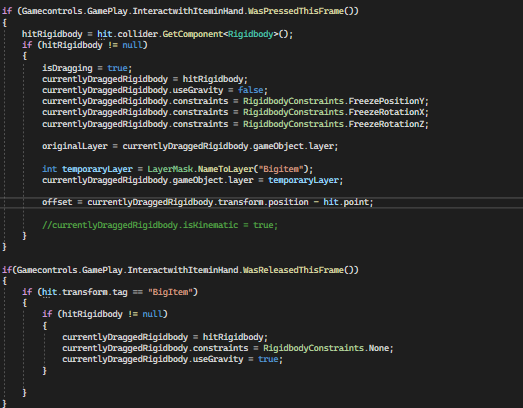
Does anyone know why this code isn't working properly? https://i.imgur.com/jLWp1SD.png Releasing the Input enables gravity and removes constraints, but pressing the input only freezes the y rotation and disables gravity.
 quiet pilot
If I remember correctly there's a bug that prevents this from working properly
or maybe it was something similar
Idk I'm probably wrong
twin bolt
I'm lost, im not sure why this wont work, so it may be a bug.
quiet pilot
I'm taking a unity class right now and I think they said something like that a while ago
so they might know
 raw token
twin bolt
Does anyone know why this code isn't working properly? https://i.imgur.com/jLWp1...
raw token
twin bolt
Does anyone know why this code isn't working properly? https://i.imgur.com/jLWp1...
You're overwriting the constraints with each line, for one - though I would have thought that should freeze Z, not Y
twin bolt
raw token
You're overwriting the constraints with each line, for one - though I would have...
sorry thats what i meant, it only freezes the z position.
How am i overwriting it?
Oh wait, is it not setting them one by one?
raw token
twin bolt
How am i overwriting it?
The same way in which
int foo;
foo = 5;
foo = 3;
foo = 1;
ultimately sets foo to 1
.constraints is a bit flag - so you need to bitwise OR the subsequent values
twin bolt
raw token
The same way in which
```cs
int foo;
foo = 5;
foo = 3;
foo = 1;
```
ultimately s...
How would i set multiple constraints
twin bolt
raw token
`.constraints` is a bit flag - so you need to bitwise OR the subsequent values
Oh i see
raw token
.constraints = RigidbodyConstraints.FreezePositionY | RigidbodyConstraints.FreezeRotationX | RigidbodyConstraints.FreezeRotationZ;
or
.constraints = RigidbodyConstraints.FreezePositionY;
.constraints |= RigidbodyConstraints.FreezeRotationX;
.constraints |= RigidbodyConstraints.FreezeRotationZ;
 devout flower
let's just say i wanted to disable a sprite, and the gameobject that the sprite is on only has a sprite renderer
if i were worrying about the code optimization, should i disable the gameobject, or use GetComponent and disable the spriterenderer component?
 languid spire
devout flower
let's just say i wanted to disable a sprite, and the gameobject that the sprite ...
languid spire
devout flower
let's just say i wanted to disable a sprite, and the gameobject that the sprite ...
if you are worried about optimization you should be using the renderer in the first place and not the gameobject
twin bolt
raw token
```cs
.constraints = RigidbodyConstraints.FreezePositionY | RigidbodyConstraints...
Thanks
quiet pilot
Does anyone know why
if (!(Mathf.Abs(transform.rotation.y * 360) < (181) && Mathf.Abs(transform.rotation.y * 360) >= (180)))
        {
            _bumper.transform.Rotate(0f, (-1 * _retRotModifier) * _rotationSpeed, 0f);
        }
makes the object (_bumper) rotate until it's at approximately -60 degrees?
languid spire
this
Mathf.Abs(transform.rotation.y * 360) < (181) && Mathf.Abs(transform.rotation.y * 360
is nonsense, rotation is NOT euler angles
rocky canyon
float yRotation = transform.eulerAngles.y; convert it to euler first -> then run ur comparison
raw token
Quaternion components are something which most of us may never hope or find motivation to understand 😅. Don't touch the x/y/z/w components of a quaternion.
rocky canyon
Quaternions are X,Y,Z,W
 languid spire
rocky canyon
`float yRotation = transform.eulerAngles.y;` convert it to euler first -> then r...
languid spire
rocky canyon
`float yRotation = transform.eulerAngles.y;` convert it to euler first -> then r...
you've given that advice before and I've told you before, that wont work
languid spire
it's simple, when you convert a Quaternion to Euler you have absolutely no guarantee what you will get back
mystic flower
i found a solution to my problem on some obscure forum where it is confirmed that it was a bug with unity itself, but some guy remade their function and that worked , god bless forum people
rocky canyon
what if we normalize it first? is that possible?
languid spire
what? normalize a Quaternion
rocky canyon
no the euler
languid spire
that makes no sense
quiet pilot
(also the reason the 181 and 180 were in parentheses was from an old thing I tried but ended up removing)
raw token
quiet pilot
Does anyone know why
```cs
if (!(Mathf.Abs(transform.rotation.y * 360) < (181) &...
What is this condition testing exactly? It seems like "if abs(y rotation) is greater than 0.5028f"
rocky canyon
i mean.. what do u mean theres no guarantee what you'll get back? its going to be an equivilent to the starting angle.. either on one side of the extreme or the other
couldn't that be made to be a 0 -360 result.. everytime
 polar acorn
rocky canyon
no the euler
polar acorn
rocky canyon
no the euler
Euler angles aren't directions. Normalizing them doesn't make sense. You'll just end up at an orientation somewhere near 0,0,0
languid spire
rocky canyon
i mean.. what do u mean theres no guarantee what you'll get back? its going to b...
try this
transform.rotation = Quaternion.Euler(90,90,90)
Vector3 v3 = transform.eulerAngles
And see what v3 ends up with
quiet pilot
raw token
What is this condition testing exactly? It seems like "if abs(y rotation) is gre...
I thought that the decimal that was shown in the output was on a scale of 0 to 360 degrees, so I tried to multiply it by 360 in order to find the angle the object was at, and make sure it was somewhere in between 180 and 181 degrees.
 keen dew
rocky canyon
i mean.. what do u mean theres no guarantee what you'll get back? its going to b...
keen dew
rocky canyon
i mean.. what do u mean theres no guarantee what you'll get back? its going to b...
As a concrete example, (180, 0, 0) and (0, 180, 180) are the exact same rotation in Euler angles. You can see how it's a problem trying to check one component of the Euler angle if the conversion from a quaternion can return either of those (or any other value that's also equivalent)
 toxic yacht
quiet pilot
Does anyone know why
```cs
if (!(Mathf.Abs(transform.rotation.y * 360) < (181) &...
toxic yacht
quiet pilot
Does anyone know why
```cs
if (!(Mathf.Abs(transform.rotation.y * 360) < (181) &...
This looks like you're just trying to do y rotation, in which case using eulerAngles shouldn't cause any problems (and will be easier to think about). EulerAngles are using degrees. Quaternions are scaled differently and its some math magic. In general stick to using the Quaternion methods for comparing and transforming them.
raw token
quiet pilot
I thought that the decimal that was shown in the output was on a scale of 0 to 3...
As discussed above, you generally don't want to use .eulerAngles as an input to things, as a rotation can be expressed as multiple different euler representations so there too, you may not get the values you would expect without additional work 👀
toxic yacht
For this there are a lot of different options. For example, if you're trying to control the direction the bumper car is facing, it might even be easier to ignore rotation entirely, and use the transform's forward vector instead
bumper.transform.forward = directionVec3
quiet pilot
Well I'm not trying to move it
because it's like a pinball flipper
(while writing the script I forgot the name for it lol)
toxic yacht
Ah mb. Yeah if you're just rotation in a single axis then eulerAngles will serve you just fine. They start breaking down when you start working with multiple degrees of rotation.
quiet pilot
See I'm trying to make it rotate, bounce the player, and return to the original position (slightly slower)

I really should move this to a separate scene so I don't have to wait 5 minutes every time I have to test something lol
wintry quarry
quiet pilot
See I'm trying to make it rotate, bounce the player, and return to the original ...
You need to be moving this thing with physics anyway
touching the Transform is a mistake that won't work
wintry quarry
(assuming this is pinball)
wintry quarry
gotta move via the Rigidbody, yea
 rich adder
infinite loop?
quiet pilot
actually i should probably close photoshop
because that'd probably slow it down anyway
(but it still takes this long either way lmao)
 willow scroll
rich adder
infinite loop?
willow scroll
rich adder
infinite loop?
"Waiting for Unity's code to finish executing"
I think they tell you when it's your code
quiet pilot
    float _yRot = transform.eulerAngles.y;
    Debug.Log((Mathf.Abs(_yRot) < 181 && Mathf.Abs(_yRot) >= 180));
    Debug.Log(_yRot);
    if (!(Mathf.Abs(_yRot) < 181 && Mathf.Abs(_yRot) >= 180))
    {
        _bumper.transform.Rotate(0f, (-1 * _retRotModifier) * _rotationSpeed, 0f);
    }
did end up working
thanks
(although the bouncing is still weird)
toxic yacht
wintry quarry
gotta move via the Rigidbody, yea
Its because of this
wintry quarry
you can't move your object via the Transform if you want physics to work
toxic yacht
Changing transform values happens separate from the actual physics simulation
quiet pilot
Ohh
I did have a different idea that might work
so I'll try that
because I think I might be trying to do something slightly different
but idk
willow scroll
quiet pilot
```cs
float _yRot = transform.eulerAngles.y;
Debug.Log((Mathf.Abs(_yRot)...
float rotY = Mathf.Abs(rotY);

if (Mathf.Clamp(rotY, 180f, 181f) != rotY)
{
    _bumper.transform.Rotate(Vector3.down * _retRotModifier * _rotationSpeed);
}
Alright, no Approximately required here
 errant solar
why i can't call this function i made it static what should i do to call it?
 willow scroll
errant solar
why i can't call this function i made it static what should i do to call it?
willow scroll
errant solar
why i can't call this function i made it static what should i do to call it?
The parameter required
Try reading the error first
polar acorn
errant solar
why i can't call this function i made it static what should i do to call it?
What does the error say
errant solar
 quiet pilot
errant solar
why i can't call this function i made it static what should i do to call it?
quiet pilot
errant solar
why i can't call this function i made it static what should i do to call it?
You forgot the boolean parameter
 summer stump
Why does it need to be static if you are calling it in the same class?
errant solar
summer stump
Why does it need to be static if you are calling it in the same class?
I need to call this function in other script
polar acorn
errant solar
Looks like there is no argument given that corresponds to the required parameter Sprinted of PlayerMovement.SprintingFunction(bool)
errant solar
so i made it static
quiet pilot
Yeah I'm pretty sure that's your error
summer stump
errant solar
I need to call this function in other script
Still not a good reason for static 90% of the time
quiet pilot
you need to call it with the parameter
wintry quarry
errant solar
why i can't call this function i made it static what should i do to call it?
that function isn't going to work anyway if the goal is to change the parameter
basically you actually want to delete the parameter and remove static
willow scroll
summer stump
Why does it need to be static if you are calling it in the same class?
It can be when no class' variables used inside of the method, but we cannot see the full method
wintry quarry
errant solar
I need to call this function in other script
no you definitely don't based on what's in it lol
that's not something to call from another script
summer stump
willow scroll
It can be when no class' variables used inside of the method, but we cannot see ...
Well yeah, can be. But this case looks like classic static abuse. Even if calling it from other classes
quiet pilot
errant solar
why i can't call this function i made it static what should i do to call it?
in the method, add bool Sprinted and remove it as a parameter
and remove static like they're saying
willow scroll
quiet pilot
in the method, add ```bool Sprinted``` and remove it as a parameter
Outside of the method
Inside of the class
willow scroll
quiet pilot
actually yeah that'd work better
Surely, because the variant you've suggested won't
quiet pilot
because they'd probably need it in multiple places
quiet pilot
willow scroll
Surely, because the variant you've suggested won't
wait what
oh
(can you explain why not?)
willow scroll
You can see the warning on the bool Sprited
Which tells them the variable is not used inside of the method and is redundant
willow scroll
They seem to be redundantly updating this variable inside of the method, which does not affect the class at all
They either have to make this method non-static and update the global variable, or return this variable, making the method's return type bool
 late burrow
are jobjects bad for using like array
 frosty hound
No
Given what you've considered bad in the past (including the ridiculous belief that you'll make "the lag" from size of scripts), I'm going to just get ahead of this and say stop over thinking it.
 vocal wharf
I'm kind of new to coding and I need help.
I'm working on a "test project," just a project made for exploring new things and learning about coding (it's not like a finished game or anything). I want to be able to spawn in a prefab and destroy it when I click with the mouse button. I have the spawning part done and it works great but unity will not let me destroy the prefab. It keeps giving me an error: "Destroying assets is not permitted to avoid data loss." Can you help? Here is my code so far:
 sweet sierra
            string outputPath = Path.Combine(Application.streamingAssetsPath, "LevelAvailibility.txt"); ;
            System.IO.File.WriteAllText(outputPath, modifiedContent);
Can't seem to write to the file. Reading takes place fine.
I need to have a file that stores the data of what levels are accessible
polar acorn
vocal wharf
I'm kind of new to coding and I need help.
I'm working on a "test project," just...
A prefab is a file on disk. Destroying it would mean deleting the file permanently. Pretty sure that's not what you want to do
vocal wharf
polar acorn
A prefab is a file on disk. Destroying it would mean _deleting the file permanen...
Is there a way I can delete the cloned prefab somehow?
during runtime
polar acorn
vocal wharf
Is there a way I can delete the cloned prefab somehow?
Instantiate returns a reference to the object it creates. You can store that in a variable and use that
sweet sierra
vocal wharf
Is there a way I can delete the cloned prefab somehow?
Umm... access it through parent and destroy?
Or just attach script to it
sweet sierra
polar acorn
Instantiate returns a reference to the object it creates. You can store that in ...
this
vocal wharf
polar acorn
Instantiate returns a reference to the object it creates. You can store that in ...
hmm how can I find that reference?
polar acorn
sweet sierra
```cs
string outputPath = Path.Combine(Application.streamingAssetsPa...
Does it actually give you an error that it can't write, or is the file just unchanged?
summer stump
vocal wharf
hmm how can I find that reference?
Instantiate GIVES it to you
polar acorn
vocal wharf
hmm how can I find that reference?
It returns a value. You can create a variable and do thatVariable = Instantiate(...
sweet sierra
polar acorn
Does it actually give you an error that it can't write, or is the file just unch...
An error...
DirectoryNotFoundException: Could not find a part of the path "F:\Unity Projects\animal-hoop\Assets\StreamingAssets\LevelAvailibility.txt".
System.IO.FileStream..ctor (System.String path, System.IO.FileMode mode, System.IO.FileAccess access, System.IO.FileShare share, System.Int32 bufferSize, System.Boolean anonymous, System.IO.FileOptions options) (at <51fded79cd284d4d911c5949aff4cb21>:0)
System.IO.FileStream..ctor (System.String path, System.IO.FileMode mode, System.IO.FileAccess access, System.IO.FileShare share, System.Int32 bufferSize, System.IO.FileOptions options) (at <51fded79cd284d4d911c5949aff4cb21>:0)
(wrapper remoting-invoke-with-check)
and it'll store the result in that variable
vocal wharf
polar acorn
and it'll store the result in that variable
hmm ok thanks I'll try it
polar acorn
sweet sierra
An error...
```txt
DirectoryNotFoundException: Could not find a part of the pa...
Well, first thing's first as a sanity check, plug F:\Unity Projects\animal-hoop\Assets\StreamingAssets into your file explorer and see if that can find it
sweet sierra
vocal wharf
hmm ok thanks I'll try it
just use var address = Instantiate(prefab) i guess
But I usually destroy through the object itself
vocal wharf
polar acorn
It returns a value. You can create a variable and do `thatVariable = Instantiate...
can you show an example with my code? Sorry I'm a dumb beginner 🙂
polar acorn
vocal wharf
can you show an example with my code? Sorry I'm a dumb beginner 🙂
That was the example
Make a variable, and set that variable to the return value of instantiate
Just plug in whatever you decided to name that variable instead of thatVariable
vocal wharf
do I put that in the top where I put my references?
summer stump
vocal wharf
do I put that in the top where I put my references?
No
vocal wharf
I'm so confused
summer stump
You MUST call instantiate somewhere if you have your prefab being added to the scene, right?
vocal wharf
yes in the if statement in the update method
summer stump
vocal wharf
yes in the if statement in the update method
Then THAT is where you write what digi showed you ....
vocal wharf
ok
summer stump
All you are doing is adding var instance = in front of it
Or whatever type it is, and whatever name you want to use
polar acorn
summer stump
No
Actually, yes. Assuming you want to reference it across multiple frames @vocal wharf
Make a field variable, set that variable to the thing when you instantiate it
then you destroy that object
summer stump
Sorry, I meant that the Instantiate does not go up there.
Yeah, the cached variable can be a class member, and does make sense to be one
vocal wharf
polar acorn
Make a field variable, set that variable to the thing when you instantiate it
um how do I do that?
here is what I have
 polar acorn
vocal wharf
here is what I have
polar acorn
vocal wharf
here is what I have
Create a variable destroyableItem
Just like you have made your other three variables
vocal wharf
polar acorn
Just like you have made your other three variables
I feel so stupid rn that I don't know how to that
it's probably so simple
 summer stump
vocal wharf
I feel so stupid rn that I don't know how to that
summer stump
vocal wharf
I feel so stupid rn that I don't know how to that
See how you wrote three variables at the top of the class?
item, meshRenderer, and canDestroy?
Make one like that, but called destroyableItem
summer stump
 queen vapor
Remove using System.Numerics from your class
As for MoveDirection, is it a Vector? That one may clear after fixing the others
queen vapor
using System.Collections;
using System.Collections.Generic;
using System.Numerics;
using Unity.VisualScripting;
using UnityEngine;
using UnityEngine.EventSystems;
public class PlayerMotor : MonoBehaviour
{
private CharacterController controller;
private Vector3 playerVelocity;
public float speed = 5f;
// Start is called before the first frame update
void Start()
{
controller = GetComponent<CharacterController>();
}
// Update is called once per frame
void Update()
{

}
//recive the inputs for our InputManager.cs and apply them to our character controller.
public void ProcessMove(Vector2 input)
{
    Vector3 moveDirection = Vector3.Zero;
    moveDirection.x = input.x;
    MoveDirection.y = input.y;
    controller.Move(transform.TransformDirection(moveDirection) * speed * Time.deltaTime);
}
}
this is the code
i was following a tutorial im a beginner
summer stump
queen vapor
this is the code
Ok so... just do what I said
Remove
using System.Numericsfrom your class
You made a typo. It is supposed to be moveDirection, not MoveDirection
 vocal wharf
summer stump
See how you wrote three variables at the top of the class?
item, meshRenderer, a...
vocal wharf
summer stump
See how you wrote three variables at the top of the class?
item, meshRenderer, a...
Like this? It's giving errors
 queen vapor
and these are still here XD
queen vapor
summer stump
You made a typo. It is supposed to be moveDirection, not MoveDirection
ohhh okay
summer stump
vocal wharf
Like this? It's giving errors
No, not like that. Look at the other three variables you have
You need to make it like those. With a type
You cannot just write a random word somewhere
vocal wharf
like public or something?
summer stump
vocal wharf
like public or something?
No
queen vapor
@summer stump thank u so much u a real one fam
summer stump
The type
summer stump
vocal wharf
like public or something?
Which in this case is the same type as item, because that is what you are instantiating
vocal wharf
ohhh gameobject
summer stump
That is a type, yes
vocal wharf
I hate myself
summer stump
vocal wharf
well it's the truth lol
I will not help you again if you don't stop with that
You are learning, it is absolutely wild to "hate yourself" over being in a learning process. Don't
 stray wraith
anyone know how I could mimic unity's scene view camera rotation? I want to make a perfectly accurate camera rotation script so that if I press right click on a small dot in the camera's view and start moving my mouse and rotating my camera the camera would move perfectly with the mouse, and the cursor would always stay above the dot
queen vapor
btw aethenosity why my player goes up to the sky when i press w and goes down when i press s but a and d buttons work @summer stump
vocal wharf
vocal wharf
however it only destroys the last object that I spawned
so if I spawn 2 objects and aim at the 1st object, it destroys the second one. I want to destroy the object that I am aiming at
summer stump
queen vapor
btw aethenosity why my player goes up to the sky when i press w and goes down wh...
Because you are setting Y, which is up in 3d
queen vapor
summer stump
Because you are setting Y, which is up in 3d
ohhh but why does he sets it on y in the tutorial too
and it works
summer stump
queen vapor
ohhh but why does he sets it on y in the tutorial too
Is it 2d?
vocal wharf
@summer stump when I spawn 2 crates and aim at the first one it deletes the second one because it only destroys the one that I last instantiated. I have a sphere in front of my character that follows the camera movement and has a trigger collider. I want to delete a crate when it is inside that sphere and when I press the mouse button. Is there a way to do that?
 sweet sierra
polar acorn
Well, first thing's first as a sanity check, plug `F:\Unity Projects\animal-hoop...
sweet sierra
polar acorn
Well, first thing's first as a sanity check, plug `F:\Unity Projects\animal-hoop...
Kinda got caught up in smth but... in my file explorer?

I feel kinda dum dum but I'm new to unity so ig it's fine 🌝
sweet sierra
vocal wharf
<@349017582105526273> when I spawn 2 crates and aim at the first one it deletes ...
I guess use a List or a Queue and delete the first element?
To store the instances that you created
vocal wharf
sweet sierra
I guess use a List or a Queue and delete the first element?
But I wish I could detect the object that enters the trigger and destroy only that one
I've done it before but for some reason my project that had that code got deleted
sweet sierra
vocal wharf
But I wish I could detect the object that enters the trigger and destroy only th...
Ahh so like... What's the logic? You have to be close to the object and press mouse button, that's it?
 short hazel
sweet sierra
I feel kinda dum dum but I'm new to unity so ig it's fine 🌝
short hazel
sweet sierra
I feel kinda dum dum but I'm new to unity so ig it's fine 🌝
If your file explorer can't find it, your code won't either. Hence why you're getting the DirectoryNotFoundException.
Make sure this path exists or have it ensured by code, by using Directory.Create(path)
vocal wharf
sweet sierra
Ahh so like... What's the logic? You have to be close to the object and press mo...
yeah there's a trigger sphere out in front of my character that follows the camera movements. Basically a big round cursor out front
I want to delete the crate when it's inside that sphere and when the mouse button is clicked
polar acorn
sweet sierra
Kinda got caught up in smth but... in my file explorer?
Then that path doesn't exist and the error was correct to say as such
sweet sierra
short hazel
If your file explorer can't find it, your code won't either. Hence why you're ge...
Aghh ok so...
My textfile is in resources folder. I am reading it from there correctly but... what about writing?
How do I write the same file I've read from
 string filePath = "Data\\LevelAvailibility";
 string fileContents = Resources.Load<TextAsset>(filePath).text;

 int currentLevel = int.Parse(SceneManager.GetActiveScene().name[5..]);

 string modifiedContent = fileContents + "\nLevel" + currentLevel++;

 string outputPath = Path.Combine(Application.streamingAssetsPath, "LevelAvailibility.txt"); ;
 System.IO.File.WriteAllText(outputPath, modifiedContent);
Your path shows StreamingAssets, which means you've probably piped Application.StreamingAssetsPath to it
Yep
The StreamingAssets folder might just not exist under your project directory
Hence the needed usage of Directory.CreateDirectory(Application.StreamingAssetsPath) beforehand, which will ensure it exists (and do nothing if it's already the case)
sweet sierra
short hazel
Hence the needed usage of `Directory.CreateDirectory(Application.StreamingAssets...
Ahh okie... so that will overwrite the ACTUAL file in the Resources\Data\ folder?
I sound so dumb but your help is much appreciated! 🙌
short hazel
No, that will make the outputPath actually exist on your computer, so File.WriteAllText() can actually locate it
The reading from Resources works fine, it's the writing to StreamingAssets that fails
sweet sierra
Ohh. Okie I'll try that
vocal wharf
vocal wharf
I want to delete the crate when it's inside that sphere and when the mouse butto...
Can someone let me know how to do this?
sweet sierra
vocal wharf
Can someone let me know how to do this?
When I'm done, surely. Kinda caught up
sweet sierra
short hazel
The reading from Resources works fine, it's the *writing* to StreamingAssets tha...
Yes that resolved the issue. But like...
Now I have one file in Resources, and one in Streaming Assets. How do I load level information from it? 💀
short hazel
From the one in StreamingAssets? With the File.ReadAllText() method
summer stump
vocal wharf
Can someone let me know how to do this?
!learn
 eternal falconBOT
:teacher: Unity Learn ↗
Over 750 hours of free live and on-demand learning content for all levels of experience!
summer stump
Using a trigger area is covered in the pathways
vocal wharf
wdym pathways
short hazel
sweet sierra
Yes that resolved the issue. But like...
Now I have one file in Resources, and...
As I understand it, the file in Resources serves as a template from which you create those "level files" elsewhere, correct?
It's read-only
summer stump
vocal wharf
wdym pathways
If you click into that link and look for the word, you will understand
vocal wharf
ok
vocal wharf
vocal wharf
I want to delete the crate when it's inside that sphere and when the mouse butto...
This was my original idea for this to work, but it's not destroying the object. Can someone point out any obvious flaws or things that make this not work?
languid spire
Damn silly to check for input in a trigger or collision method
vocal wharf
what why?
languid spire
you would need to hit the key on the exact same frame as the trigger goes off
vocal wharf
💀
no freakin wonder
Is there a way in the update method to reference the object that entered the trigger?
summer stump
vocal wharf
Is there a way in the update method to reference the object that entered the tri...
That is incredibly trivial
languid spire
only if you make it so, why not the other way round?
summer stump
I really recommend you stop and do the guide I sent
Perhaps even do a beginner c# course as well
https://www.w3schools.com/cs/index.php
vocal wharf
languid spire
only if you make it so, why not the other way round?
wdym
vocal wharf
summer stump
That is incredibly trivial
ok?
vocal wharf
summer stump
Perhaps even do a beginner c# course as well
<https://www.w3schools.com/cs/index...
I came here to ask questions not be put into school
languid spire
vocal wharf
wdym
hmm, save the fact the the input was triggered and check for that in the trigger method
sweet sierra
short hazel
As I understand it, the file in Resources serves as a template from which you cr...
Umm no. I'm just using it to store what levels I can access. That's it
summer stump
vocal wharf
I came here to ask questions not be put into school
You are required to do research before asking here
#📖┃code-of-conduct
#854851968446365696
This is not a server for teaching you. You need to have SOME understanding of unity and c# when asking
sweet sierra
See
 vocal wharf
summer stump
You are required to do research before asking here
<#497867528488484864>
<#8548...
vocal wharf
summer stump
You are required to do research before asking here
<#497867528488484864>
<#8548...
I do have some
short hazel
sweet sierra
Umm no. I'm just using it to store what levels I can access. That's it
You can't write to files in Resources. Once the game is built, they're baked into a single file and cannot be written to anymore
vocal wharf
I have googled many things and searched many forums already and I'm so done with this mess
sweet sierra
short hazel
You can't write to files in Resources. Once the game is built, they're baked int...
Alright. So, what would you recommend then?
Like, all I need is read and write from a file. The file simply stores text.
Also, what should I watch videos on? Like, I have no idea rn about this.
Like see here

I'm checking If I can access a level
 thick dove
I'm trying to have two different trigger colliders on this gameobject. I tried using .Istouching but that didn't seem to work, is there a simpler way to detect which trigger collided with the object?
 short hazel
sweet sierra
Alright. So, what would you recommend then?
Like, all I need is read and write...
short hazel
sweet sierra
Alright. So, what would you recommend then?
Like, all I need is read and write...
You can both read and write from Application.persitentDataPath, which is made for data that needs to be kept in-between play sessions.
sweet sierra
short hazel
You can both read and write from `Application.persitentDataPath`, which is made ...
Interesting... I'll research on that. Thank you sooo much! ⭐
 tulip cipher
@thick dove where is the other collider?
thick dove
in a child
sweet sierra
So, to sum it up:
- Resources for reading
- Streaming for writing
- Persistent for both
Or I hope 😂. I'll search on this
thick dove
Oh, do I have to do this in the child and then send that to this main script?
tulip cipher
@thick dove can you explain me what are you trying to do?
summer stump
thick dove
I'm trying to have two different trigger colliders on this gameobject. I tried u...
Generally best to have the triggers on separate children each with their own script and OnTrigger method. Then pass that information to the parent as needed
Otherwise you need to check some difference, like maybe the shape of the colliders, or radius/size. It gets annoying
thick dove
Alright, thanks
tulip cipher
Another thing you could do is to set the Ontrigger on the parent's script and then call childs
but the answer above is better
 wide raven
I need help about making my parallax can anyone help me?
https://paste.myst.rs/c2cyp564
This is the one I did
a powerful website for storing and sharing text and code snippets. completely free and open source.
vocal wharf
vocal wharf
This was my original idea for this to work, but it's not destroying the object. ...
I FIGURED IT OUT LEZGO
wide raven
And this is what I wanted to do
wintry quarry
wide raven
I need help about making my parallax can anyone help me?
https://paste.myst.rs/c...
it looks fine to me
what's the issue?

 vast vessel
yo guys!
any ideas on how i can automatically correct the location of these portals after placing them via code, so they dont get placed on weird places, like half outside of the world, or being half placed on non portal-ableworld geometry?(black metal walls are non portal-able) (also already have code for detecting if the material that a Raycast hit is portal-ableor not)
here is my current code.
pretty simple


just checks if the raycast hit a portallable surface then rotates and moves the portal
wintry quarry
vast vessel
yo guys!
any ideas on how i can automatically correct the location of these port...
well I certainly wouldn't place them then correct the location,. I would just disallow placement in a bad spot
vast vessel
wintry quarry
well I certainly wouldn't place them then correct the location,. I would just di...
the game Portal, moves them and corrects them like you can see me manually doing in the video and thats what i want to achive.
i also want to PREVENT placing portals on surfaces too small
wintry quarry
vast vessel
the game Portal, moves them and corrects them like you can see me manually doing...
yeah but it does that as it's placed and as part of the "is this a valid spot" check it doesn't place them then correct it
like, the "is this a valid spot" check should also be doing the "can I fudge this slightly to be in a valid spot thing
And it's probably doing something like a capsule cast
vast vessel
how do i know where to move the portal do so it dosnt overlap anything, or dosnt have any overhangs?
wintry quarry
probably something like:
- capsule cast
- if capsule hits on top or bottom (instead of on its side), try another capsulecast from the hit location along the tangent of the surface with a limited distance until finding a spot where the side of the capsule hits
definitely not a one-liner
there's probably a lot of edge cases as well
you probaly also will want to sample the wall at at least a few points within the projected oval area to make sure the material is correct everywhere
 crisp token
what is the c# naming convention for abstract classes
wintry quarry
crisp token
what is the c# naming convention for abstract classes
the same as regular classes
wide raven
wintry quarry
what's the issue?
The issue is that I cannot make it look like the second video that I sent I want it to resize based on the ortho size so i can fit it
wintry quarry
wide raven
The issue is that I cannot make it look like the second video that I sent I want...
that would be unrelated to parallax itself
but, it doesn't look to "fit" in either video
wide raven
Watch this
wide raven
wintry quarry
but, it doesn't look to "fit" in either video
Owh it is bcs It is bugged out in the second video but if you give the bg a look
you can see it is resizing
In the original one
wintry quarry
wide raven
you can see it is resizing
ok well there's nothing in your script that seems to attempt to do any resizing
wide raven
wintry quarry
ok well there's nothing in your script that seems to attempt to do any resizing
Yea bcs I don't know what way I should go
like have a seperate camera that renders it
so It fits like that
or
Idk
Resize sprites?
wintry quarry
so then you shouldn't need to do any resizing etc
just only zoom the game camera
leave the separate camera alone
wide raven
Currently I use solo camera
So you say that I should use seperate cameras to achieve that?
wintry quarry
that's certainly an option
wide raven
But as far as you can see they kinda get closer like squish a little to fit but I feel like it is a seperate camera that squishes on the x axis to give the illusion i guess
This is non bugged one
This is one variation too
 eternal flame
I can't get my unity app to receive data over udp
using UnityEngine;
using System.Net;
using System.Net.Sockets;

public class UDPListener : MonoBehaviour
{
    private UdpClient clientData;
    private int portData = 50505;
    private IPEndPoint ipEndPointData;
    private System.AsyncCallback AC;
    private byte[] receivedBytes;

    void Start()
    {
        InitializeUDPListener();
    }

    public void InitializeUDPListener()
    {
        ipEndPointData = new IPEndPoint(IPAddress.Any, portData);
        clientData = new UdpClient(portData);

        Debug.Log($"UDP client listening on port {portData}");

        AC = new System.AsyncCallback(ReceivedUDPPacket);
        clientData.BeginReceive(AC, null);
    }

    void ReceivedUDPPacket(System.IAsyncResult result)
    {
        receivedBytes = clientData.EndReceive(result, ref ipEndPointData);
        ParsePacket();
        clientData.BeginReceive(AC, null);
    }

    void ParsePacket()
    {
        Debug.Log($"Received packet from {ipEndPointData}. Length: {receivedBytes.Length} bytes");
        // Here you can add code to process the receivedBytes as needed
        // For example, converting to a string:
        string message = System.Text.Encoding.UTF8.GetString(receivedBytes);
        Debug.Log($"Message: {message}");
    }

    void OnDestroy()
    {
        if (clientData != null)
        {
            clientData.Close();
        }
    }
}```i can receive the data with a similar script if i don't run it in unity, but as soon as i try to use it in unity it won't receive the data
so unity must be blocking it somehow i just can't figure it out
 polar acorn
queen vapor
polar acorn
queen vapor
Use variables that exist
languid spire
!code
eternal falconBOT

Posting code
📃 Large Code Blocks
Use links to services like:
https://gdl.space/, https://paste.ofcode.org/, https://hatebin.com/, https://paste.myst.rs/, https://hastebin.com/
📃 Inline Code
Surround code with three backquotes. Not quotation marks.
To format as C#, add cs to the first line:
```cs
// Your code here
```
Add a comment with a line number if there is an error message.
queen vapor
but i dont know how to im a beginner and i was following a tutorial
polar acorn
The first error says there's nothing called lerpCrouch and your code confirms
queen vapor
he didnt show me how to
wintry quarry
queen vapor
but i dont know how to im a beginner and i was following a tutorial
Seems like you need to start over from the beginning and take it more slowly
polar acorn
queen vapor
he didnt show me how to
Show the tutorial
queen vapor
can i send links here?
polar acorn
yes
queen vapor

The first video in a series where we are creating a First Person game!
In this video we look at setting up our characters movement.
I've setup a Discord!!! and I would love to have you help me start up a friendly community where we can all help each other grow as game developers!
Discord invite link:
https://discord.gg/xgKpxhEyzZ
Can't wait t...
and im at 21.18
polar acorn
queen vapor
and im at 21.18
You mean the "Here's what future videos are going to cover" section
Did you actually watch the future videos?
polar acorn
queen vapor
no he said try to do this by yourself
Okay, so try to do that.
polar acorn
You're supposed to actually attempt to write the code yourself not just copy verbatim small snippets of someone else's code
polar acorn
Well, you're 20 minutes into the tutorial, have you actually been attempting to learn what the code is doing or just copy-pasting what they've done without taking any attempt at understanding what it means
polar acorn
queen vapor
wdym write the code yourself
Whenever you open Visual Studio, keystrokes on your keyboard get translated into letters in the code. Letters can combine to form things called "Words" which can be used to convey meaning
queen vapor
polar acorn
Well, you're 20 minutes into the tutorial, have you actually been attempting to ...
i am trying but its my first time trying to make a game and i couldnt understand that well
polar acorn
queen vapor
i am trying but its my first time trying to make a game and i couldnt understand...
Then you shouldn't be doing this tutorial
You should be learning the language first
There are guids linked in the pins, or on !learn
eternal falconBOT
:teacher: Unity Learn ↗
Over 750 hours of free live and on-demand learning content for all levels of experience!
polar acorn
Code isn't magic. Those words all mean things. Learn what they say and you can combine them in literally infinite ways
queen vapor
k thanks so do i just close this project...
polar acorn
You should at the very least remove the code you were never supposed to copy-paste
Examples are meant to be instructive, not to do it for you
languid spire
queen vapor
k thanks so do i just close this project...
why dont you study the code to see where you went wrong.
I shall give you a hint, concentrate on
IsGrounded and controller
then see why they are different from, for example
crouchTimer
queen vapor
languid spire
why dont you study the code to see where you went wrong.
I shall give you a hint...
okay thank you for the hint i will take a look rn
queen vapor
languid spire
why dont you study the code to see where you went wrong.
I shall give you a hint...
thanks for your help so much i made it
eternal flame
@polar acorn I can't get my unity app to receive data over udp
using UnityEngine;
using System.Net;
using System.Net.Sockets;
public class UDPListener : MonoBehaviour
{
private UdpClient clientData;
private int portData = 50505;
private IPEndPoint ipEndPointData;
private System.AsyncCallback AC;
private byte[] receivedBytes;
void Start()
{
    InitializeUDPListener();
}

public void InitializeUDPListener()
{
    ipEndPointData = new IPEndPoint(IPAddress.Any, portData);
    clientData = new UdpClient(portData);

    Debug.Log($"UDP client listening on port {portData}");

    AC = new System.AsyncCallback(ReceivedUDPPacket);
    clientData.BeginReceive(AC, null);
}

void ReceivedUDPPacket(System.IAsyncResult result)
{
    receivedBytes = clientData.EndReceive(result, ref ipEndPointData);
    ParsePacket();
    clientData.BeginReceive(AC, null);
}

void ParsePacket()
{
    Debug.Log($"Received packet from {ipEndPointData}. Length: {receivedBytes.Length} bytes");
    // Here you can add code to process the receivedBytes as needed
    // For example, converting to a string:
    string message = System.Text.Encoding.UTF8.GetString(receivedBytes);
    Debug.Log($"Message: {message}");
}

void OnDestroy()
{
    if (clientData != null)
    {
        clientData.Close();
    }
}
}
i can receive the data with a similar script if i don't run it in unity, but as soon as i try to use it in unity it won't receive the data
so unity must be blocking it somehow i just can't figure it out
languid spire
eternal flame
<@153950686088921088> I can't get my unity app to receive data over udp
using Un...
!code
eternal falconBOT
Posting code
📃 Large Code Blocks
Use links to services like:
https://gdl.space/, https://paste.ofcode.org/, https://hatebin.com/, https://paste.myst.rs/, https://hastebin.com/
📃 Inline Code
Surround code with three backquotes. Not quotation marks.
To format as C#, add cs to the first line:
```cs
// Your code here
```
Add a comment with a line number if there is an error message.
summer stump
Use a paste site
eternal flame
I can't get my unity app to receive data over udp
using UnityEngine;
using System.Net;
using System.Net.Sockets;

public class UDPListener : MonoBehaviour
{
    private UdpClient clientData;
    private int portData = 50505;
    private IPEndPoint ipEndPointData;
    private System.AsyncCallback AC;
    private byte[] receivedBytes;

    void Start()
    {
        InitializeUDPListener();
    }

    public void InitializeUDPListener()
    {
        ipEndPointData = new IPEndPoint(IPAddress.Any, portData);
        clientData = new UdpClient(portData);

        Debug.Log($"UDP client listening on port {portData}");

        AC = new System.AsyncCallback(ReceivedUDPPacket);
        clientData.BeginReceive(AC, null);
    }

    void ReceivedUDPPacket(System.IAsyncResult result)
    {
        receivedBytes = clientData.EndReceive(result, ref ipEndPointData);
        ParsePacket();
        clientData.BeginReceive(AC, null);
    }

    void ParsePacket()
    {
        Debug.Log($"Received packet from {ipEndPointData}. Length: {receivedBytes.Length} bytes");
        // Here you can add code to process the receivedBytes as needed
        // For example, converting to a string:
        string message = System.Text.Encoding.UTF8.GetString(receivedBytes);
        Debug.Log($"Message: {message}");
    }

    void OnDestroy()
    {
        if (clientData != null)
        {
            clientData.Close();
        }
    }
}```
i can receive the data with a similar script if i don't run it in unity, but as soon as i try to use it in unity it won't receive the data
so unity must be blocking it somehow i just can't figure it outAlso, this belongs in #archived-networking
summer stump
eternal flame
i thought this was code
It is networking code
Basically no networking stuff EVER belongs in the beginner section though haha
Also, be sure to use a paste site. That is way too long for just a code block
polar acorn
eternal flame
<@153950686088921088> I can't get my unity app to receive data over udp
using Un...
why are you pinging me
eternal flame
fair
 ember gate
if Im creating a small pick up system like coins I have to create a script for the coin itself and when its touched it deletes itself and adds to some ui at the top but like how can I make it so the ui text is raised when coin is picked?
I don't want an indepth explanation just where to write that code the one that adds 1 everytime coin is touched so I can figure out myself from there
 deft grail
ember gate
if Im creating a small pick up system like coins I have to create a script for t...
deft grail
ember gate
if Im creating a small pick up system like coins I have to create a script for t...
you can animate it or tween it or something
ember gate
the ui?
deft grail
ember gate
the ui?
yes
ember gate
im pretty new so I won't go into tweening just yet tbh
other way? cause like I know what to write for the coin but idk how to add a score when its picked
idk if it should be done in the same script or a different one
deft grail
ember gate
other way? cause like I know what to write for the coin but idk how to add a sco...
you would use OnTriggerEnter2D usually
on the coin or player
ember gate
that for destroying it or for adding it to the score?
deft grail
ember gate
that for destroying it or for adding it to the score?
everything, and animating it
if you trigger it, means you collected it, means you should add score > animate it > destroy it
ember gate
ok lemme try and i'll say if I managed to do that
deft grail
ember gate
ok lemme try and i'll say if I managed to do that
its like one of the easiest things, so im sure you will be able to do it
ember gate
deft grail
its like one of the easiest things, so im sure you will be able to do it
it does seem really easy but im not too good at coding
deft grail
ember gate
it does seem really easy but im not too good at coding
its pretty much just english with a few dots and () ; lol
at least for something like this coin collection
ember gate
deft grail
its pretty much just english with a few dots and () ; lol
at least for something...

i get this now
idk why I cant acces totalcoins value from the coins script into the counter script
ember gate
an object reference is required for the non static field
deft grail
ember gate
an object reference is required for the non static field
so, its saying totalCoins isnt static, therefore you need a reference to it
ember gate
what does that mean?
deft grail
ember gate
first of ill say the idea of this line seems weird and pointless anyway
deft grail
ember gate
what does that mean?
a reference would be for example
public Coin myCoin; then assign that in the inspector
then you can access myCoin.totalCoins
ember gate
im checking if the coin amount is different than the one that is on the text and if it is it should change it
oooh
deft grail
ember gate
im checking if the coin amount is different than the one that is on the text and...
you should change the text when you change the coin amount
because checking that line in Update isnt the most efficient
probably would still run perfectly fine in your game, but its still not the best practice
ember gate
its still just so I can learn so its alright atm ig
deft grail
ember gate
its still just so I can learn so its alright atm ig
best to learn properly the 1st time though, but up to you
if you look back at this code in a future project for example, you might copy this
it also just doesnt really make sense to check "if the text and coin is different > update text"
when you can just do "on collect coin > update text and coin"
ember gate
ye but idk how to update the text through the same coin script
so i have a script for the text ui
deft grail
ember gate
ye but idk how to update the text through the same coin script
the same way as you do in the other script
the scripts are no different between eachother
ember gate
so in the same coin script I can manipulate the ui text?
ember gate
for some reason it seems so complicated for me
how can you do that
wait
I think i know how
one sec
what library I need for TMP text?
deft grail
ember gate
what library I need for TMP text?
to use it in your project? or access it in code?
ember gate
in code
 slender nymph
if your IDE is properly configured you can just use the quick actions to import the correct namespace
ember gate
slender nymph
if your IDE is properly configured you can just use the quick actions to import ...
probably it isnt
deft grail
ember gate
in code
its just what tmp is called
deft grail
ember gate
probably it isnt
!ide
eternal falconBOT
💡 IDE Configuration
If your IDE is not autocompleting code
or underlining errors, please configure it.
Select one:
• Visual Studio (Installed via Unity Hub)
• Visual Studio (Installed manually)
• VS Code
• JetBrains Rider
• Other/None
late burrow
i kinda want use everything in json now
its nice to not need define every new variable i want to use
ember gate
for some reason I cannot drag my text to the coin inspector
like it does not want to go in the box
slender nymph
either you've used the wrong variable type or you're trying to drag a scene object into a prefab
 slender nymph
TextMeshPro is not the UI one, it is the world space text object. you want to use either the parent class TMP_Text which is the parent of both of them or use the correct derived class TextMeshProUGUI
ember gate
oh
ok ye
thanks
good the counter works as well
thanks guys
oh btw would you guys know why the text is a bit blurry?
deft grail
ember gate
thanks guys
np, also to say if you WERE to access your coins in another script
its private and wouldnt even BE able to access in another script
ember gate
deft grail
np, also to say if you WERE to access your coins in another script
its `private`...
I did put it on public at that time to be able to acces it
but thanks
deft grail
ember gate
oh btw would you guys know why the text is a bit blurry?
some of the settings on the text in the inspector, not sure what ones exactly from memory though
usually TMP isnt blurry on creation though
ember gate
no problem its not a big deal atm
i wanna make a small puzzle game sort of
idk don't got any ideas atm but ill come up with sum tomorrow
thanks for the help ❤️
crisp token
is this the correct way to use base class constructor in c#?
 short hazel
crisp token
is this the correct way to use base class constructor in c#?
short hazel
crisp token
is this the correct way to use base class constructor in c#?
Looks correct, it would report errors if you weren't using base correctly or at all
crisp token
short hazel
Looks correct, it would report errors if you weren't using `base` correctly or a...
base is just like super() from java right?
short hazel
Yes
Do note that since you use custom constructors, any of these cannot inherit from MonoBehaviour. Unity doesn't like the constructors, since it can't know what to pass when you attach the component onto an object. For other uses, it's fine
crisp token
short hazel
Do note that since you use custom constructors, any of these *cannot* inherit fr...
yeah I just plan on instantiating these in my state manager : MonoBehavior class and any other movement classes as a means of keeping track of active abilities
short hazel
Huh?
crisp token
idk on my screen my text is red, nvm
short hazel
In Discord, means the message failed to send
crisp token
"I should just be able to apply any monobehavior stuff from there right?"
 primal trench
how would i check if a mouse is hovering over a button?
short hazel
crisp token
"I should just be able to apply any monobehavior stuff from there right?"
I need an example, "stuff" is not precise enough
A lot of features will not work if your class doesn't inherit from MonoBehaviour. You won't get Unity messages like Start and Update
crisp token
short hazel
I need an example, "stuff" is not precise enough
like in my monobehavior class, I could have a queue of active abilities, and then methods that read the queue and it's objects and, accordingly, apply desired effects
short hazel
Yes that's not tied to specific MonoBehaviour features, so it will work
crisp token
well it could be as long as I access the monobehavior features through the monobehavior class I thought
crisp token
primal trench
how would i check if a mouse is hovering over a button?
im not familiar with UI or if unity has something built in but I'd try screen position + 2d colliders
short hazel
Yes they're only available there, unless you pass them around. If your abilities need to access the script that queues them, you can inject it: someAbilityVariable.DoStuff(this)
In ability: public abstract void DoStuff(YourScript context); and override in children
rich adder
primal trench
how would i check if a mouse is hovering over a button?
use the IpointerEnterHandler
https://docs.unity3d.com/2019.1/Documentation/ScriptReference/EventSystems.IPointerEnterHandler.html
for the inspector only without script, you can use an Event Trigger
crisp token
short hazel
Yes they're only available there, unless you pass them around. If your abilities...
why would a variable call a method?
vast vessel
to guys.
i have no idea how these bitwise operations work. can someone tell me what exactly this piece of code is doing?
 crisp token
and equals would be my guess idk
rich adder
its bitwise AND
vast vessel
rich adder
its bitwise AND
so like... what does it do?
rich adder
vast vessel
so like... what does it do?
it does the AND bitwise and assigns it
 gusty scaffold
a variable like an int or a char is ultimately stored in binary
rich adder
usually when dealing with bitmasks
gusty scaffold
so it's something like 1101
if you do bitwise "and" with 1101 and 0111
the first digit is 1&0 = 0
vast vessel
rich adder
it does the AND bitwise and assigns it
is this it in simpler terms?:
IsOverlapping = IsOverlapping && RandomBool
gusty scaffold
second digit is 1 & 1 = 1
third digit is 0 & 1 = 0
fourth is 1&1=1
so the result is 0101
polar acorn
vast vessel
to guys.
i have no idea how these bitwise operations work. can someone tell me w...
gusty scaffold
it's easier to see if you line them up vertically
1101
0111
----
0101
will these be the resaults of the operations shown below?
False&=True =>False
False&=False => False
True&=True =>True
gusty scaffold
it depends how a bool is stored in bits
which i'm not sure of
theoretically, you only need one bit to represent a bool
polar acorn
vast vessel
will these be the resaults of the operations shown below?
False&=True =>Fals...
&= is not a boolean operation
gusty scaffold
but computers aren't designed to handle single bits
so a bool is probably stored in 8 bits or something
vast vessel
polar acorn
`&=` is not a boolean operation
so what is this doing then?
how is it working on bools??
https://cdn.discordapp.com/attachments/497874004401586176/1268698490310234233/image.png?ex=66ad5f0b&is=66ac0d8b&hm=9f6d5a67302cdbee4fc75eb8b2247e3b9916bb481ee31086e169e1c42890f202&
 gusty scaffold
my guess is it would be the same as a regular "and" operation
but to know for sure...
vast vessel
vast vessel
is this it in simpler terms?:
`IsOverlapping = IsOverlapping && RandomBool`
so this?
vast vessel
yea
rich adder
vast vessel
so what is this doing then?
how is it working on bools??
https://cdn.discordapp....
it loops through all of them while assigning the value of overlapping
vast vessel
can someone just tell me if this is what that line is doing pleaseee
IsOverlapping = IsOverlapping & RandomBool
gusty scaffold
vast vessel
can someone just tell me if this is what that line is doing pleaseee
`IsOverlapp...
ah well that's a slightly different question
rich adder
vast vessel
can someone just tell me if this is what that line is doing pleaseee
`IsOverlapp...
if its hitting something overlapping will be true
its not that complex
true & true = true
vast vessel
wow thanks
 vast vessel
rich adder
its not that complex
vast vessel
rich adder
its not that complex
brother i littleraly asked this and nobody answered
vast vessel
vast vessel
is this it in simpler terms?:
`IsOverlapping = IsOverlapping && RandomBool`
here
rich adder
vast vessel
brother i littleraly asked this and nobody answered
you know what && is ? since its 2 bools its doing the same & while assigning . so yes you would conclude thats the answer
vast vessel
rich adder
you know what && is ? since its 2 bools its doing the same & while assigning . s...
it was a mistake in that one message.
i asked the same thing later but corrected && to &
whatever dude
rich adder
the first one was also correct
gusty scaffold
yes x &= y is equivalent to x = x & y except that x is only evaluated once (which only matters if x has side-effects)
source: https://learn.microsoft.com/en-us/dotnet/csharp/language-reference/operators/boolean-logical-operators?redirectedfrom=MSDN#compound-assignment
 orchid zinc
does it matter what version of visual code studio i use with unity? for example can i use vcs 2019 with the latest lts unity
gusty scaffold
and someone said & is equivalent to && when the operands are bools, which makes sense to me
rich adder
orchid zinc
does it matter what version of visual code studio i use with unity? for example ...
there is no vsc 2019
vsc and vs are not the same program

 eternal needle
It doesnt matter what IDE you use at all, as long as you can configure it. Though you might as well use the latest
rich adder
a bit faster since its 64 bit app, and you have nice addition like intellicode
orchid zinc
alr thanks
gusty scaffold
gusty scaffold
yes `x &= y` is equivalent to `x = x & y` except that x is only evaluated once (...
in the code you posted you don't have to worry about side effects
orchid zinc
when installing what happens if u dont select game development with unity? does it not work properly?
just curious
rich adder
orchid zinc
when installing what happens if u dont select game development with unity? does ...
it will not work with unity properly no

those two features you see .Underline red and showing the classes / and functions etc.
 timid quartz
say I've got a Vector3 representing the offset I'd like the camera to be at in regards to the player - something like (0, 10, 10) or something to keep it simple. and I want the camera to follow the back of the player. if the player were literally always facing forwards, I could just add the offset to the player position, but what am I missing to make it so that the camera is offset in the direction of the player's transform?
orchid zinc
rich adder
those two features you see .Underline red and showing the classes / and function...
ok so thats why i was having issues lolll
 teal viper
timid quartz
say I've got a Vector3 representing the offset I'd like the camera to be at in r...
teal viper
timid quartz
say I've got a Vector3 representing the offset I'd like the camera to be at in r...
Transform the offset vector from local to world space.
teal viper
timid quartz
ah, wait, https://docs.unity3d.com/ScriptReference/Transform.InverseTransformPoi...
That's the opposite of what you need.
"Transforms position from world space to local space"
timid quartz
oops you're totally right
you totally nailed it, that was exactly what I needed. thanks other lich!!
 thick swift
If I want to use the Tunnelling Vignette prefab from the samples folder, how do I make my own version of it? When I copy the folder into my Assets/Prefabs folder, then drag the prefab over my camera, it creates Tunnelling Vignette_1 in the scene.
 copper orbit
when enemy is hit, it moves the enemy 2 meters back based on shot direction. That's what i am trying to do with this code anyway. Not sure why the enemy is not moving on hit. No errors or null references
 rich adder
copper orbit
when enemy is hit, it moves the enemy 2 meters back based on shot direction. Tha...
rich adder
copper orbit
when enemy is hit, it moves the enemy 2 meters back based on shot direction. Tha...
MoveTowards should probably be in a coroutine or update , spanning across frames
orchid zinc
ok so i got vs 2022 and i checked the unity box while downloading but it doesnt see any of the unity functions

no MonoBehaviour, no start, no update
rich adder
orchid zinc
ok so i got vs 2022 and i checked the unity box while downloading but it doesnt ...
close VS go back to External Tools in unity click Rgeen Project Files button, open script again from unity.
If this doesnt work, go in Solution Explorer in VS and if it says on the assembly missing or something, right click and Reload/Reimport with dependecies
orchid zinc
wheres external tools
rich adder
orchid zinc
wheres external tools
did you not follow the steps?
its there one of the steps
orchid zinc
well i just installed vs and unity just opened it on its own
rich adder
well go back n do the steps
 ivory bobcat
orchid zinc
well i just installed vs and unity just opened it on its own
ivory bobcat
orchid zinc
well i just installed vs and unity just opened it on its own
During installation, did you make sure to select the Unity workload? !vs
!vs
eternal falconBOT
Visual Studio guide
If your IDE is not underlining errors in red or autocompleting code,
please configure it using the link below:
• Visual Studio (Installed via Unity Hub)
• Visual Studio (Installed manually)
orchid zinc
yes i selected the unity workload
ivory bobcat
Make sure the external tools are setup correctly and regenerate the project
 sleek marten
I'm using this code to prevent my player from moving to a UI element when it's clicked on
            if (EventSystem.current.IsPointerOverGameObject())
            {
                // Do nothing
                return;
            }```
and that's working fine when I'm in Game display. When I switch to Simulator and I click on a button I move to its location. If I keep clicking on a UI element I won't move to those areas anymore. Why is this happening?Probably because you don't have a cursor in the simulator, so the event system doesn't know what you're hovering until you click it.
teal viper
On mobile you'll need to handle it differently. For example, each time you click, make a check if the click is over the UI before executing whatever logic you want.
sleek marten
so something like(?)
       {
           // Do nothing
           return;
       }
else{}```I don't see how that is different to the previous code.
You'd probably need to implement some method to check if a point is within the bounds of any of your ui.
sleek marten
I was thinking of throwing in an else statement but that didn't work
sleek marten
teal viper
You'd probably need to implement some method to check if a point is within the b...
oh good idea
I really don't understand what the problem is with how I've set it up
{
// Check if the click is over a UI element
if (EventSystem.current.IsPointerOverGameObject())
{
// Do nothing
Debug.Log("Clicked on the UI");
return;
}```
I check for mouse input and then it checks for any UI right after. Works perfectly fine in Game mode and the manual says it should work in Sim too keen sonnet
Is there a chart of all of the main codes
Like "if"
And that stuff to make coding easier
keen sonnet
Thanks
 misty remnant
i have a question how can i rotate an object around another object to a certain degree so if i put transform.RotateAround(Vector3.zero, Vector3.up, 20) in void update it would not just keep spinning it would just stay at that angle around that object
 fathom timber
misty remnant
i have a question how can i rotate an object around another object to a certain ...
fathom timber
misty remnant
i have a question how can i rotate an object around another object to a certain ...
probably the easiest way to do this is to just stop the rotation after the amount of time it takes to rotate the degrees that you want. You could even calculate the duration if you want different rotation speeds ( DesiredRotation / RotationPerSecond).
raw token
Not a bad idea for an extension method... RotateAroundTowards()
gusty scaffold
if you put that line in Update(), it will keep getting executed
misty remnant
fathom timber
probably the easiest way to do this is to just stop the rotation after the amoun...
i am trying to create procedural leg animation and i need the feet to rotate to a certain degree when they are to far back the i am done but the on issue is i need it to rotate around a point to that angle
fathom timber
misty remnant
i am trying to create procedural leg animation and i need the feet to rotate to...
do you know how to get the angle between your points? If so, you can just say "if this angle > desired angle, set to desired angle and stop rotating". Does that make sense?
 ancient rampart
what would you guys recommend for importing and exporting yaml data? looking to read a yaml file and then assign gameobjects based on the info in there
I saw yamldotnet was an option, but not sure if that's the standard
 graceful crystal
can someone explain how to fix this
 deft grail
graceful crystal
can someone explain how to fix this
deft grail
graceful crystal
can someone explain how to fix this
try restarting
summer stump
graceful crystal
can someone explain how to fix this
Not from your code. It is from something using the graph view (animation, shader-graph, etc). So close all those windows and restart again, if just restarting alone like gr4ss suggested doesn't work
 warm surge
Im trying to simulate audio waves, but I'm not sure of how to go about it. I've thought about raycasting, but im not sure if it would be the most performant. I need to be able to detect when sounds collide with walls in particular.
rich adder
warm surge
Im trying to simulate audio waves, but I'm not sure of how to go about it. I've ...
raycasting is very performant
warm surge
But in large quantities with maybe 1,000+ rays each frame will it still be performant?
up to 1,000*
rich adder
why do you need 1000 rays
it would probably make more sense using a bigger query like overlap that grows then do raycast on hit items you're interested to check walls
warm surge
what do you mean by "bigger query like overlap"
rich adder
like overlap sphere / circle for example
warm surge
thats what i was thinking about, but then how would that work? The sphere grows and hits something end keep expanding, but where do I cast the rays from? The sphere has a continuous surface so how would i cast rays several times on one surface from a sphere
rich adder
 warm surge
oh wait i had an idea
warm surge
wait no i didnt
so what happens when the sphere collides with a wall or something. how does the wave bounce off
rich adder
warm surge
so what happens when the sphere collides with a wall or something. how does the ...
if you want to use bouncing you mightbe better of raycasts maybe in a 360 circle
or spherecasts
warm surge
whats a spherecast?
rich adder
throw a ball of certain radius, whatever it hits, thats a spherecast
just a fancy raycast that is thicc
rich adder
what are you trying to accomplish with these waves?
warm surge
i want to highlight the areas the waves are hitting. so if theres a wall next to a speaker or something, the wall is highlighted red because its close, while a wall across the room is highlighted blue because its far
and waves can bounce off walls and add onto eachother if they land on spots that are already highlighted
teal viper
This kind of a simulation would require a lot of computation
warm surge
thats what im worried about
teal viper
Might need to write a compute shader for that.
warm surge
i was thinking about shaders, and have known i'll probably need to write one, but my only problem is idk how to highlight walls and stuff.
The more i think about it the more complicated it gets
 cedar bone
Is it a good idea to have every feature for the player in one giant script, or split it up to different scripts?
i mean features that directly address the player, not every feature for the game
raw token
cedar bone
Is it a good idea to have every feature for the player in one giant script, or s...
It's really a personal preference, buuuut...
The sort of prevailing wisdom is that "monolithic scripts" are unwieldy and difficult to work with... The more atomic a script is, then all of the code related to that part/feature are in a nice condensed package such that you're less likely to overlook a necessary change or get lost in the implementation. Plus, you can easily leverage the strengths of OOP and inheritence such can easily create subclasses for unique variants.
In a monolith you often end up hunting around for all of the places which touch and implement that functionality, and it's easier to miss something if you make a change or decide to revamp or replace the implementation... let alone creating some variant of it.
This is some small portion of the reasoning behind the "Single Responsibility Principle" facet of SOLID, which asserts that a class should only have a single reason to be changed. More or less, a class should only be responsible for one thing only.
Personally, I'm not great at adhering to that principle out of the gate. But I often find I'll prototype in larger chunks of code and refactor into separate classes when the discrete behaviors become more defined.
 tiny plaza
why does my chracter keep moving left when i jump?
cedar bone
raw token
It's really a personal preference, buuuut...
The sort of prevailing wisdom is t...
hmm got u
is it a good idea to make variables in one script
and then make everyother script on the palyer change that variable from that script?
because main thing im worried about when using different scripts is having to getComponent 3 times to get a couple variables
warm surge
cedar bone
Is it a good idea to have every feature for the player in one giant script, or s...
its mostly preference, but its generally more scalable to split each idea into its own 'module'. If you need to change the players inventory, you wont accidentally break sprinting, if you need to change sprinting, you want accidentally break interactions, and if you need to add a new feature, just make a new module the incorperate it into the main player script
raw token
tiny plaza
why does my chracter keep moving left when i jump?
Hard to say based on that video alone. If you suspect your code could be responsible, you should share that code. It might also be an input issue - if you're using a controller or have one attached, that could easily be like a joystick hanging out outside of the deadzone
cedar bone
warm surge
its mostly preference, but its generally more scalable to split each idea into i...
wdym by module?
is it those things in the particle system component?
where u can see different settings?
warm surge
cedar bone
wdym by module?
module is an arbitrary name for each script. you have your movement module, your inventory module, your interactions module. you dont need to call them module, but the fact that each idea is broken up into different scripts makes the parts of the player modular, which is why its called a module
tiny plaza
raw token
Hard to say based on that video alone. If you suspect your code could be respons...
here's my code
 cedar bone
warm surge
module is an arbitrary name for each script. you have your movement module, your...
cedar bone
warm surge
module is an arbitrary name for each script. you have your movement module, your...
oh ok, so its basically a synonym to scripts?
warm surge
cedar bone
oh ok, so its basically a synonym to scripts?
yes, exactly, it just gets the point across a bit better that they come together to make the player work
and also the fact theyre easily changable
cedar bone
This was really helpful 👍
warm surge
youre welcome
warm surge
maybe, i'll think and let you know if theres anything i can think of
raw token
tiny plaza
here's my code
Okay, cool. That all looks fine - that code shouldn't be responsible, unless the cube isn't sitting directly aligned with the world axes... You could test that real quick - temporarily swap out transform.up with Vector2.up
tiny plaza
raw token
Okay, cool. That all looks fine - that code shouldn't be responsible, unless the...
i tried it and it's still doing the same
warm surge
cedar bone
it seems important for keeping code clean
theyre a special class that lets you create assets that can hold data. Unlike MonoBehaviours, they dont need to be attacthed to game objects and dont exist in the scene. theyre saved as assets in your project and can resued on different scenes and prefabs
cedar bone
warm surge
theyre a special class that lets you create assets that can hold data. Unlike Mo...
so its like a template?
warm surge
not necessarily, but you can use it like one
raw token
tiny plaza
i tried it and it's still doing the same
Alright - change that back to transform.up before we forget 👀
Does the yellow platform have any z rotation? Failing that, I think there's there's an input system debugger... somewhere 🤔
cedar bone
warm surge
not necessarily, but you can use it like one
whats a use-case for scriptable objects?
warm surge
one example i can think of would be a dialogue system
tiny plaza
raw token
Alright - change that back to `transform.up` before we forget 👀
Does the yello...
this is the transform of the player and the floor before hitting play

 cedar bone
whats a use-case for scriptable objects?
cedar bone
cedar bone
whats a use-case for scriptable objects?
like having a scriptable obejct for guns and then attaching it to any new guns made?
tiny plaza
wait
warm surge
cedar bone
like having a scriptable obejct for guns and then attaching it to any new guns m...
yes, actually
tiny plaza
raw token
Alright - change that back to `transform.up` before we forget 👀
Does the yello...
i hadn't saved when i tried vector 3 the first time i tried it again it's not going left
cedar bone
warm surge
yes, actually
but why is it better to use scriptable objects, than making a script that can be applied to every gun
where settings can be changed
raw token
tiny plaza
i hadn't saved when i tried vector 3 the first time i tried it again it's not go...
Hmmm... that's super strange 🤔
warm surge
cedar bone
but why is it better to use scriptable objects, than making a script that can be...
keeps data and logic separate, easy to reuse and update data across the game, easy to edit data in the unity editor without coding, more memory efficient, prevents unintended changes and maintains consistency
cedar bone
so a scriptable object is just a script that stores data?
tiny plaza
raw token
Hmmm... that's super strange 🤔
i tried changing the gravity scale to 10 then back to 1 and now it's doing it even when it's just falling on both vect and trans
cedar bone
and scripts can access it to do logic?
cedar bone
cedar bone
is it a good idea to make variables in one script
so basically this?
raw token
tiny plaza
i tried changing the gravity scale to 10 then back to 1 and now it's doing it ev...
Does Player show any z rotation while jumping?
warm surge
cedar bone
so a scriptable object is just a script that stores data?
yea pretty much. you can use it to store weapon stats, character attributes, etc. your code takes the data from your scriptable object and uses it however necessary
tiny plaza
raw token
Does Player show any z rotation while jumping?
not when jumping but it does for a short time when the player hits the ground then comes back to normal
cedar bone
sorry for the ton of questions
warm surge
cedar bone
and it doesn't do any logic?
thats correct. and no it doesnt store functions
and its fine ur asking lots of questions
i dont mind
cedar bone
 raw token
tiny plaza
not when jumping but it does for a short time when the player hits the ground th...
raw token
tiny plaza
not when jumping but it does for a short time when the player hits the ground th...
What do your Devices look like in Window > Analysis > Input Debugger?
 toxic yacht
The way I've thought about scriptable objects is as unity's all-in-one do to data driven. Its common to want to serialize data, like say the possible moves for a pokemon, in something like a json file. But in order to make that work, you need to do file parsing, and if you want type safety feed the dict that comes out of parsing to builder for your own class. Scriptable objects wrap all of that in a single feature for you.
cedar bone
cedar bone
but what about this?
raw token
tiny plaza
Have you written any code for horizontal movement?
cedar bone
cedar bone
but what about this?
seems kinda useless if it doesn't save
tiny plaza
raw token
Have you written any code for horizontal movement?
nothing
tiny plaza
raw token
Have you written any code for horizontal movement?
the only other script i have is an fps limiter
warm surge
cedar bone
but what about this?
while youre running the project, changes to the scriptable object arent saved
toxic yacht
cedar bone
seems kinda useless if it doesn't save
I'm not sure what they're referring to, but the serialized values on scriptable objects aren't intended to change at runtime
cedar bone
cedar bone
that makes sense
yeah thats fine
warm surge
yea that reddit comment didnt make much sense to me
didnt quite understand what they were getting at
 mint remnant
tiny plaza
the only other script i have is an fps limiter
mint remnant
tiny plaza
the only other script i have is an fps limiter
what's Rigidbody look like in inspector?
tiny plaza
mint remnant
what's Rigidbody look like in inspector?

i tried going back to default gravity scale and it does nothing
raw token
My mind is boggled 😕
mint remnant
Angular drag defaults to 0.05, curious why or if that was changed if would impact it
cedar bone
are materials scriptable objects?
tiny plaza
i did this and it solved it
 cedar bone
tiny plaza
i did this and it solved it
cedar bone
tiny plaza
i did this and it solved it
I always do this for my RBs
warm surge
cedar bone
are materials scriptable objects?
no
mint remnant
tiny plaza
i did this and it solved it
at least it solves it, but definately strange that you need to
tiny plaza
cedar bone
I always do this for my RBs
do you know why it does a small z rotaion when it hist the ground?
warm surge
materials are not derived from the scriptable object class
toxic yacht
cedar bone
are materials scriptable objects?
They're their own asset type, but stuff like the URP render pipeline file are
tiny plaza
mint remnant
at least it solves it, but definately strange that you need to
i know right?
cedar bone
tiny plaza
do you know why it does a small z rotaion when it hist the ground?
I have no clue
cedar bone
toxic yacht
They're their own asset type, but stuff like the URP render pipeline file are
alright 👍
toxic yacht
A lot of frameworks/pipelines/libraries use scriptable objects for their settings
tiny plaza
btw do i need to use Time.deltaTime on addforce?
raw token
tiny plaza
btw do i need to use Time.deltaTime on addforce?
Nope! Already factored in
tiny plaza
raw token
Nope! Already factored in
perfect!
mint remnant
tiny plaza
btw do i need to use Time.deltaTime on addforce?
guessing if you increaed that angular drag it would reduce it, but freezing it seems to stop it completely
raw token
tiny plaza
perfect!
(For completeness' sake, it depends on your ForceMode... ForceMode.Force is default. But you usually don't want it at all if you're using one of the modes which doesn't already include it)
 toxic yacht
I'm catching up on the jump doing a slight shift bug. One alternative is instead of using addforce, set the rigidbody's velocity. This isn't a one to one since add force takes into account the rb's mass tho.
tiny plaza
raw token
(For completeness' sake, it depends on your `ForceMode`... `ForceMode.Force` is ...
thanks and do you think i should use Velocity, addforce Force or addforce VelocityChange if i want to have a jump like this one? (or something else)
raw token
tiny plaza
thanks and do you think i should use Velocity, addforce Force or addforce Veloci...
Probably an Impulse - though the reference there likely isn't really using any real physics 👀
That would immediately propel it into the air without needing to constantly apply force
warm surge
tiny plaza
thanks and do you think i should use Velocity, addforce Force or addforce Veloci...
'this feel' has more to do with the animations than anything else. you can probably get the same results using any of those, but to get the same feel you'll need to have some specific animations to go along with it
tiny plaza
warm surge
'this feel' has more to do with the animations than anything else. you can proba...
thanks i'll save this message for when i get to animating!
toxic yacht
Yeah I a fighting game id guess the jump is balanced based on height, and speed. Also can point out that the jump there has a higher gravity scale when falling.
tiny plaza
toxic yacht
Yeah I a fighting game id guess the jump is balanced based on height, and speed....
i feel like 10 is giving me the best result
raw token
tiny plaza
thanks i'll save this message for when i get to animating!
Looking back at your code, the force mode is why you're having to use such a large force to achieve your current jump - the force is only applied for one frame, but since ForceMode.Force is scaled by time, you're having to use that large multiplier. If you switch to Impulse it'll just dump the entire force at once.
In short, when using a time-dependent force mode, the force value you give it represents "force per second." When you use a time-independent mode, it just represents direct force
toxic yacht
tiny plaza
i feel like 10 is giving me the best result
This is a pretty good short about it https://youtube.com/shorts/uCrHFjR6qzg?si=E9WcRk0KujSTKdik
Wishlist Isadora's Edge on Steam: https://store.steampowered.com/app/3125320/Isadoras_Edge/
(My actual fast fall value is about 47.5% but that felt too wordy to use in the video)
The game that I'm developing an an indie game dev is called Isadora's Edge! A 2D Pixel Art platformer game, that I'm developing in the Godot Game Engine! If you're ne...
And in general this channel is goated
tiny plaza
toxic yacht
And in general this channel is goated
I'll check it out since he explains stuff really well from what i'm seeing
tiny plaza
raw token
Looking back at your code, the force mode is why you're having to use such a lar...
it works really well thanks!
tiny plaza
what does the "!" do? it came when i tabed
 mint remnant
negator for booleans
tiny plaza
mint remnant
negator for booleans
does it means that the code work if it's false?
mint remnant
depends on what you want it to do, that code says return the result of isGrounded() then make it opposite of that value before it goes into the && check
tiny plaza
mint remnant
depends on what you want it to do, that code says return the result of isGrounde...
the isGrounded is a bool already can i not use it directly?
mint remnant
tiny plaza
the isGrounded is a bool already can i not use it directly?
you certainly can, just read it like english and see if it is what you want. if something performed and not grouned then do this
the fact that hitting tab auto added it is beyond me though
tiny plaza
mint remnant
the fact that hitting tab auto added it is beyond me though
it's probably because my default value is false
also should i use fixedupdates or updates?
mint remnant
in general you want anything physics in fixed update
though adding a force I don't think matters as much
tiny plaza
is there a way to do something when not in collision with something?
because this doesn't work

 formal sable
I have a problem. Yesterday I faced the problem that the pause is removed from the space bar, that is, I click on the button to press "continue the game", then pause, press the space bar and the game is removed from the pause. After deleting the EventSystem, it is no longer removed, but the buttons stop clicking
raw token
formal sable
I have a problem. Yesterday I faced the problem that the pause is removed from t...
How are you hiding the pause menu?
mint remnant
tiny plaza
because this doesn't work
Add soem debug.log statements, verify things you think are occuring vs. what's really occuring
formal sable
raw token
How are you hiding the pause menu?
After I deleted the eventsystem using escape
raw token
tiny plaza
is there a way to do something when not in collision with something?
There's not like an OnNoCollision() - but you can OnCollisionExit2D().
It is possible to check if a collider is touching something, but it's probably not a great solution for this
 topaz mortar
I'm currently using FixedUpdate to send a raycast to find my target.
Is it ok to call my attack logic from FixedUpdate as well? Or should I use Update for that?
raw token
formal sable
After I deleted the eventsystem using escape
Sure, I mean like visually... Are you SetActive(false)ing the game object, or just making it transparent or something?
formal sable
raw token
Sure, I mean like visually... Are you `SetActive(false)`ing the game object, or ...
Yes, SetActive(false), I can send the code of pause_menu here
There is no such problem on version 2021 🙂
I choose the 2022
raw token
formal sable
Yes, SetActive(false), I can send the code of pause_menu here
Hmmm. I see what you're saying - the button's still selected when you close the menu. That definitely seems strange if you're disabling it 🤔
formal sable
raw token
Hmmm. I see what you're saying - the button's still selected when you close the ...
Should I send you a code or something? It's just a very strange situation, and the EventSystem turned out to be guilty 😦
 raw robin
Hi all, I have a fairly generic question on pros and cons of prefabs vs scenes
Currently Im using prefabs for different levels, and I destroy and instantiate the levels. Now Im aware scene is something usually to handle level changes, but if prefabs does most things I currently want to, is there a reason I should change to using Scenes?
Thansk
 raw token
formal sable
Should I send you a code or something? It's just a very strange situation, and t...
raw token
formal sable
Should I send you a code or something? It's just a very strange situation, and t...
Sure you could send the code. I'm not very experienced with input stuff, but I'll take a look 👀.
Can you share a screenshot when the menu's disabled as well? I want to see the pause menu in the hierarchy, and it's inspector
formal sable
raw token
Sure you could send the code. I'm not very experienced with input stuff, but I'l...
Sure... Can I send the code as a file?
raw token
formal sable
Sure... Can I send the code as a file?
Use one of the paste sites listed below 👇 !code
eternal falconBOT
Posting code
📃 Large Code Blocks
Use links to services like:
https://gdl.space/, https://paste.ofcode.org/, https://hatebin.com/, https://paste.myst.rs/, https://hastebin.com/
📃 Inline Code
Surround code with three backquotes. Not quotation marks.
To format as C#, add cs to the first line:
```cs
// Your code here
```
Add a comment with a line number if there is an error message.
teal viper
raw robin
Hi all, I have a fairly generic question on pros and cons of prefabs vs scenes
...
You might want to use scenes instead if memory is an issue, as using one scene with many prefabs is gonna keep all the prefabs loaded into the memory. On the other hand, when you unload a scene it releases all the memory it references.
It's a bit more complicated than that and there are ways to tackle the issue, but that's the gist of that. Also, it's just a different development workflow.
formal sable
raw token
Use one of the paste sites listed below 👇 !code
Okay...
formal sable
raw token
Use one of the paste sites listed below 👇 !code
https://hatebin.com/botvtqwhmo
Here code of pause_menu, but I can send the code of moving player, because I put the space bar on the jump, but it's not about it at all, because I was removing the code from the player, and still the pause was removed from the space bar
raw token
formal sable
https://hatebin.com/botvtqwhmo
Here code of pause_menu, but I can send the code...
Huh! Very strange. I don't understand why it would be doing that... You might be able to fix it by adding
EventSystem.current.SetSelectedGameObject(null);
to Resume() though
formal sable
raw token
Huh! Very strange. I don't understand why it would be doing that... You might be...
I can try
formal sable
raw token
Huh! Very strange. I don't understand why it would be doing that... You might be...
Yes!!! It can be work 🙂
raw token
Woot woot!!
formal sable
Thank you very much
 limpid plinth
Hey,
I wrote a script for my prefab.
Created 500 game object with different positions. (Clones)
How to link them back to blue link prefab? I have to more modifications and don't want to make.them manually for each
raw token
limpid plinth
Hey,
I wrote a script for my prefab.
Created 500 game object with different posi...
As in, update the clones with the changes you've made to the asset? Are they still instances of the prefab, or did you unpack them?
copper orbit
has anyone ever tried utilizing navmesh with spriterenderer in 3d?
limpid plinth
raw token
As in, update the clones with the changes you've made to the asset? Are they sti...
So i had to execute runtime for Awake to trigger for loops to crrate them, now they are name(clones) , but i want to have blue link connection back with prefab
topaz mortar
Does Physics2D.Raycast always return just a single target? The first one hit?
The docs are a bit confusing
raw token
limpid plinth
So i had to execute runtime for Awake to trigger for loops to crrate them, now t...
I'm still not sure I follow... If you mean that you want the prefab clones to be linked to the prefab asset during runtime, you can't - prefabs don't really exist at runtime... You also shouldn't be modifying a prefab asset during runtime, as I don't think that's possible in a build
 north kiln
topaz mortar
Does `Physics2D.Raycast` always return just a single target? The first one hit?
...
north kiln
topaz mortar
Does `Physics2D.Raycast` always return just a single target? The first one hit?
...
It has overloads that do different things
tiny plaza
i'm trying to make my character jump without it's original horizontal velocity but it doesn't work
 limpid plinth
@raw token No,
I just created them to position by script logically 500 objeects.
Now they exist in editor mode too.
But i want to LINK them BACK with prefab. Now they are grey. In editor. In editor i want blue link

i want this
blue hex, not gray hex
mint remnant
topaz mortar
Does `Physics2D.Raycast` always return just a single target? The first one hit?
...

Many of us kind of jumped into gamedev without a solid understanding of these Physics APIs such as Raycast and Spherecast. In this video I aim to make it really clear how each of the Ray, Sphere, Box, and Capsule casts work, look, behave, and how you can use each one of them to achieve your "casting" goals!
In this tutorial video you can see t...
limpid plinth
how to link gray Hex to be blue hax @solemn loom
but i have 500 of them
all same, just different pos
raw token
limpid plinth
but i have 500 of them
I don't think unity has a built-in faculty for restoring a relationship between a game object and a prefab asset...
If you need to instantiate a prefab within the editor, you should be using PrefabUtility.InstantiatePrefab(); which maintains the relationship.
There might be some hack to restore the relationship by editing the scene file by hand... but that seems sketchy, to me. If you decide to try that, definitely make backups 👀
Maybe use another editor script to iterate through all of the clones you've instantiated, instantiate new copies with InstantiatePrefab(), copy their values over, then delete the unlinked clones, I guess? 😦
raw token
In editor playmode, I think? But not in a build
limpid plinth
letme try
OMG
it works
jesus christ
thank you
god bless you +1 life
i spend 4 h on this
 raw token
Momentarily - but I'll be headed to bed shortly
limpid plinth
sent dm
raw token
tiny plaza
i'm trying to make my character jump without it's original horizontal velocity b...
"Doesn't work" as in you've still got horizontal velocity? Perhaps your code for horizontal movement is still running and overriding that code?
tiny plaza
raw token
"Doesn't work" as in you've still got horizontal velocity? Perhaps your code for...
it tried this way thinking it would solve my problem but it doesn't
 languid spire
tiny plaza
it tried this way thinking it would solve my problem but it doesn't
languid spire
tiny plaza
it tried this way thinking it would solve my problem but it doesn't
tbh the chances of velocity.x being exactly zero are very small
tiny plaza
what i want to do is to have a set jump for each direction that isn't controlled by the initial speed
tiny plaza
languid spire
tbh the chances of velocity.x being exactly zero are very small
i use it for when my character doesn't move (i'm stealing street fight 3 movement)
languid spire
still, change you test to 0.01f
 pulsar shuttle
Trying to implement pinch gesture zooming, but having trouble. I need to limit the zooming, just call the function when the fitting gesture is made, instead of directly passing the difference to camera's size. currentMagnitude and prevMagnitude almost feel random, i can literally hold two fingers in place and it will tell me the difference is 100 pixels sometimes.
{
Touch touch1 = Input.GetTouch(0);
Touch touch2 = Input.GetTouch(1);
if (touch1.phase == TouchPhase.Moved || touch2.phase == TouchPhase.Moved)
{
Vector2 touchOnePrev = touch1.position - touch1.deltaPosition;
Vector2 touchTwoPrev = touch2.position - touch2.deltaPosition;
float prevMagnitude = (touchOnePrev - touchTwoPrev).magnitude;
float currentMagnitude = (touch1.position - touch2.position).magnitude;
float difference = currentMagnitude - prevMagnitude;
if (Mathf.Abs(difference) < 50f) return;
bool zoomOut = currentMagnitude > prevMagnitude;
textMesh.text = $"{zoomOut} {difference}\n {prevMagnitude} {currentMagnitude}";
if (zoomOut)
{
//zooming out
}
else
{
//zooming in
}
}
}``` astral falcon
pulsar shuttle
Trying to implement pinch gesture zooming, but having trouble. I need to limit t...
astral falcon
pulsar shuttle
Trying to implement pinch gesture zooming, but having trouble. I need to limit t...
It might be an issue, that depending on the device, its registering one touch moving even when you think, you are holding it still. You should debug log your phases to see, that its behaving the way you think it should and if not, adapt your code to also cover starting and ending/canceling of the inputs.
And for sure you need more logs than just a result of multiple calculations to figure out, whats going on or going wrong
I would also store those toucheoneprev and stuff in a persistent value so you can log that values all the time and also can 0 them out when cancelled, just to make things clean and controllable
pulsar shuttle
astral falcon
It might be an issue, that depending on the device, its registering one touch mo...
that's why i've put the if (Mathf.Abs(difference) < 50f) return; line, as a failsafe against little finger moving.
Debugging would've been nice, but i'm testing it on web and builds take such a long time to make.
Is it possible that touch delta position is stored from the previous instance of the touch?
languid spire
touch can be extremely sensitive, even a slight roll of a finger can be seen as a move. You might want to put a minimum on your touch delta
pulsar shuttle
astral falcon
I would also store those toucheoneprev and stuff in a persistent value so you ca...
but don't those two get overwritten anyway?
pulsar shuttle
languid spire
touch can be extremely sensitive, even a slight roll of a finger can be seen as ...
is checking the difference not enough?
astral falcon
pulsar shuttle
but don't those two get overwritten anyway?
Its just for debugging and not creating new references on every frame. So you can also see and answer your own question, what happens to deltaposition when you let go, or holding one finger, see if the touch count updates accordingly.
astral falcon
pulsar shuttle
is checking the difference not enough?
Thats something for you to test. As said, only one text field as debug is not enough to see if your code works. And if build times take long, try using unity remote or something to fake touches.
pulsar shuttle
astral falcon
Its just for debugging and not creating new references on every frame. So you ca...
i see, i'll try that. thanks
astral falcon
pulsar shuttle
i see, i'll try that. thanks
apart from that. You could easily store a start value when touches began and then just check for their positions in move and zero out all values when cancelled.
pulsar shuttle
still pretty frustrating it acts so odd, wonder if my understanding of how it works is wrong
astral falcon
pulsar shuttle
still pretty frustrating it acts so odd, wonder if my understanding of how it wo...
https://stackoverflow.com/questions/72375631/converting-pinch-to-zoom-to-new-inputsystem that seems to cover what you need in KiynLs answer

Stack Overflow
I am trying to convert pinch to zoom from old input to new Input system using EnhancedTouch.Touch. Unfortunately I am clueless as to how to move forward from here? I am getting error as Operator '=='
pulsar shuttle
astral falcon
apart from that. You could easily store a start value when touches began and the...
oh damn, i should definetly try that, didn't think of that
 ruby python
Mornin' all,
In the attached image I have a bunch of 'connection points' that I'm using for a simple building system and I'm trying to figure out how to make it so that only the point facing the camera is visible (the player uses A and D currently to rotate the camera around the 'core' of the station) and clickable. I've gotten the clickable/building 'extra' bits all working, I just need to hide/deactivate any points that aren't facing the camera.
Anybody have any ideas? (the 'cross' is just for 'center screen' reference.)

Video for Reference
 topaz mortar
Alright, so my bunnies were perfectly walking from right to left, I changed something (dunno what) and now they won't move
They still have their RigidBody, the velocity is set to Vector2(-3, 0),
rb.constraints only returns that the z axis is locked, which is intentional
when I unlock it, my bunnies start rolling forward instead of walking
Are they somehow stuck in my ground? Or is something else going on? Even if I manually move them out of the ground, they won't move forward, they do fall back down
languid spire
if you don't know what you changed (not sure I can understand how that is even possible) roll back to a previous commit when things did work
topaz mortar
I changed a lot of things, but nothing that seemed relevant
and I don't want to roll back, it would probably just cause the same issue again
just not sure what I'm looking for
teal viper
topaz mortar
just not sure what I'm looking for
Start from looking at the physics debug info. See if their velocity is changing at all.
Additionally, confirm that your code executes at all and is applying velocity to the correct objects.
Additionally, when debugging issues like that, make sure you have gizmos enabled.
topaz mortar
ah, found it thx 🙂
I changed it so the velocity is set in Awake, but the drag cancels it out within a few frames
pulsar shuttle
astral falcon
apart from that. You could easily store a start value when touches began and the...
thanks, this worked, you're a savior
topaz mortar
So I set both linear and angular drag to 0, but my velocity is still being cancelled out
 sick cloud
Hello everyone, is this the right channel to ask for help?
pulsar shuttle
sick cloud
Hello everyone, is this the right channel to ask for help?
if its related to coding yes
topaz mortar
sick cloud
Hello everyone, is this the right channel to ask for help?
for coding questions yes, #854851968446365696
teal viper
topaz mortar
So I set both linear and angular drag to 0, but my velocity is still being cance...
Drag is not the only thing that stops velocity. There's friction too.
sick cloud
pulsar shuttle
if its related to coding yes
good, cause I'm gonna smash my table to pieces if this code won't start working 👍
so should I just post everything about my problem in?
teal viper
topaz mortar
So I set both linear and angular drag to 0, but my velocity is still being cance...
If you want your objects to keep moving, you need to keep on setting the velocity or applying forces.
topaz mortar
I guess that's why ppl set the velocity in fixedupdate and not awake 😛
languid spire
sick cloud
so should I just post everything about my problem in?
here is good, please read this first !code
eternal falconBOT
Posting code
📃 Large Code Blocks
Use links to services like:
https://gdl.space/, https://paste.ofcode.org/, https://hatebin.com/, https://paste.myst.rs/, https://hastebin.com/
📃 Inline Code
Surround code with three backquotes. Not quotation marks.
To format as C#, add cs to the first line:
```cs
// Your code here
```
Add a comment with a line number if there is an error message.
sick cloud
So I'm working on this application, in which you can choose a folder with DICOM files and the program makes a 3D model with it. I have already achieved to load a folder using a button and then removing the volume again with another button.
However, if I want to choose another folder or the same one again with the first button then no model will be created, which is not good and I don't know how to solve this :(
Here are the 2 scripts that include the folder dilemma.
"DataStore" Code 1:
https://paste.ofcode.org/hDK5Tjg82ZCH2HdjHtDVuD
"Vtk Volume render Load Control Script" Code2:
https://paste.ofcode.org/3PwawxqdNgjYNU64Y88Bbu
Here is a Picture of how the Program looks rn:
 pulsar shuttle
sick cloud
So I'm working on this application, in which you can choose a folder with DICOM ...
pulsar shuttle
sick cloud
So I'm working on this application, in which you can choose a folder with DICOM ...
which function does the first button call?
sick cloud
should be OnSelectFolderButtonClick()
second one is OnClearFolderButtonClick()
anyone who can help please just ping me, so I won't miss anything
pulsar shuttle
sick cloud
So I'm working on this application, in which you can choose a folder with DICOM ...
So it acts normally the first time and then after clicking the clear button it stops working, right?
sick cloud
pulsar shuttle
So it acts normally the first time and then after clicking the clear button it s...
yeah
languid spire
sick cloud
second one is OnClearFolderButtonClick()
this OnClearFolderButtonClick( makes little sense as ClearVolume does it all
sick cloud
languid spire
this OnClearFolderButtonClick( makes little sense as ClearVolume does it all
yeah I know, haven't changed it yet
but it's not really a problem rn
if any of the //comments are in german and you need them translated I'm ready to help
languid spire
why is ImageDataFolders even an array?
sick cloud
I work with the VtkToUnity Plugin and some of the code was already existing, so idk but it propably has to do with how the DICOM files are listed I guess
 round mirage
how can i get a child GameObject by his name in a script ?
sick cloud
Also to be completely honest I'm a C# noob and actually wanted to make this in Python but the necessary libraries didn't like each other so I had to switch to Unity
pulsar shuttle
round mirage
how can i get a child GameObject by his name in a script ?
  if (child.gameObject.name == "some name")
    //your code
}```thank you 🙂
pulsar shuttle
sick cloud
I work with the VtkToUnity Plugin and some of the code was already existing, so ...
im unfamiliar with this library so i'm not sure what this all means, but here it removes the prop, does it get recreated every time you load a folder?
 sick cloud
pulsar shuttle
im unfamiliar with this library so i'm not sure what this all means, but here it...
sick cloud
pulsar shuttle
im unfamiliar with this library so i'm not sure what this all means, but here it...
It should, but I also tried running it without this piece of code, however it didn't change a thing :/
pulsar shuttle
Im not sure then, try rechecking everything in the clear method, you might be resetting some conditions or destroying some needed object
but if it doesn't give any errors it should be something to do with the conditions
round mirage
Bouchon = child.gameObject.Find("Bouchon");```
why it dont work ?game object isn't a collection
round mirage
but why i can use it without "child."
pulsar shuttle
round mirage
but why i can use it without "child."
you're thinking about GameObject the class, gameObject starting from lowercase is an object of that class
languid spire
sick cloud
It should, but I also tried running it without this piece of code, however it di...
this
yield return base.StartImpl();
is not going to work
round mirage
pulsar shuttle
you're thinking about GameObject the class, gameObject starting from lowercase i...
but what can i do
sick cloud
languid spire
this
yield return base.StartImpl();
is not going to work
thank you for pointing it out
could you elaborate on this?
pulsar shuttle
round mirage
but what can i do
what are you trying to do exactly
languid spire
sick cloud
thank you for pointing it out
could you elaborate on this?
should probably be a StartCoroutine
round mirage
pulsar shuttle
what are you trying to do exactly
i want destroy a part of my gameObject if i click
sick cloud
languid spire
should probably be a StartCoroutine
so should I try running it with the "yield return base.StartImpl();" part cut out?
languid spire
no add StartCoroutine to the call
sick cloud
theres a startCoroutine right above yield return base.StartImpl();
or should I add another?
languid spire
ffs
yield return StartCoroutine(base.StartImpl());
sick cloud
oh that's what you meant sorry
didn't fix it sadly :/
but I'll leave it like that for now
pulsar shuttle
round mirage
i want destroy a part of my gameObject if i click
ok lemme type out an example of that
{
  if (child.gameObject.name == "some name")
  {
    Destroy(child.gameObject);
  }
}```I don't see where this
protected override IEnumerator StartImpl()
{
is ever invoked
cedar bone
Anyone know why the decal particle is starting so late?
round mirage
pulsar shuttle
ok lemme type out an example of that
```foreach(Transform child in obj.transform...
ty
cedar bone
cedar bone
Anyone know why the decal particle is starting so late?
nvr mind, fixed it
sick cloud
languid spire
I don't see where this
protected override IEnumerator StartImpl()
{
is ever invo...
It's invoked in other scripts of the Plugin developer
 celest jay
What's the closest we can get to run method like Update() in the edit mode?
late burrow
why jtoken.toobject uses constructor? it already has all data in text
celest jay
like always running a method without relying on any editor changes/window open
languid spire
celest jay
What's the closest we can get to run method like Update() in the edit mode?
celest jay
almost close, just a little faulty


 sick cloud
languid spire
I don't see where this
protected override IEnumerator StartImpl()
{
is ever invo...
sick cloud
languid spire
I don't see where this
protected override IEnumerator StartImpl()
{
is ever invo...
Hey man I have a quick question,
what if I write it like that:
     private void OnDataFolderChanged()
    {
        if (DataStore.Instance == null || string.IsNullOrEmpty(DataStore.Instance.ImageDataFolder))
        {
            Debug.LogError("DataStore or ImageDataFolder is invalid.");
            return;
        }

        StartCoroutine(base.StartImpl());
    }
- in DataStore OnSelectFolderButtonClick() has VtkVolumeRenderLoadControl.Instance.OnDataFolderChanged();
Then I need to remove the "protected" from protected override IEnumerator StartImpl()
Will that even work?
languid spire
sick cloud
Hey man I have a quick question,
what if I write it like that:
```cs
privat...
without knowing anything about the plugin I could not say, perhaps you should contact the plugin pubisher for support
sick cloud
languid spire
without knowing anything about the plugin I could not say, perhaps you should co...
I did but sadly they haven't answered yet
anyways thx for the help until now
languid spire
sick cloud
I did but sadly they haven't answered yet
tbh we are not here to provide support for 3rd party code
The only thing I can say is your code seems horrendously overcomplicated for what it appears to be doing
sick cloud
languid spire
The only thing I can say is your code seems horrendously overcomplicated for wha...
it's because of the 3D model process and my custom code for UI mixing with each other :/
languid spire
sick cloud
it's because of the 3D model process and my custom code for UI mixing with each ...
I see no reason for this
public string[] ImageDataFolders = new string[0];
to be an array
which makes these
public int IDataFolder = -1;