#💻┃code-beginner
1 messages · Page 426 of 1
 wintry quarry

 rocky canyon
yes.. u can add them together.. at that point i'd just scale them together too..
Controller.Move((vector1 + vector2) * Time.deltaTime);
thats how I do mine, but up to you

https://www.spawncampgames.com/paste/?serve=code_478 sample controller w/ basic movement + jump
but still needs a custom ground detection solution (and normalized directional vectors)
 zenith crown
Yeah im gonna make a custom ground detection solution
i might just use the one i already had and fix it
rocky canyon
sounds good to me.. i use raycasts in an array but ive seen people use trigger sphere colliders, ive seen OverlapSphere physics calls, https://docs.unity3d.com/ScriptReference/Physics.CheckSphere.html, and sometimes even regular Collisions..
 nova swift
I looked into how Geometry Dash handles input. They use the second method, pooling input every frame, and executing it in one of its physics steps. GD has 240 physics steps, so playing above 240 fps doesn't do anything other than make the game look smoother. Though interestingly, if a tool assisted run is recorded at say 120 fps, it can't be played back at a lower frame rate if an input happens at an uneven point in the lower frame rate, which makes sense, so it's not entirely deterministic per say.
 smoky granite
hey guys, is there a way i can reference transform in a script? i have no idea where to start and i have no code so far... all i want to do is say if a game object is below 25 on the y axis then do this
 summer stump
smoky granite
hey guys, is there a way i can reference transform in a script? i have no idea w...
summer stump
smoky granite
hey guys, is there a way i can reference transform in a script? i have no idea w...
public Transform myTransformReference
You should definitely go through the !learn pathways
Because this is basically one of the most basic things you should know
 eternal falconBOT
:teacher: Unity Learn ↗
Over 750 hours of free live and on-demand learning content for all levels of experience!
 frigid quartz
So I'm googlin' like crazy but I can't find the answer... does it make sense to store a few frequently referenced gameobjects as variables within my gameManager?
wintry quarry
frigid quartz
So I'm googlin' like crazy but I can't find the answer... does it make sense to ...
Why not
summer stump
frigid quartz
So I'm googlin' like crazy but I can't find the answer... does it make sense to ...
Sure. Better to store a component type rather than GameObject itself though.
But your question is waaaaay too vague to answer substantially
smoky granite
summer stump
public Transform myTransformReference
yeah but how can i call that in a script? would i have my puiblic transform be a camera
i do have code so far i lied
hold on
if (Input.GetKeyDown(KeyCode.B))
frigid quartz
summer stump
Sure. Better to store a component type rather than GameObject itself though.
Bu...
Like a Transform?
frigid quartz
wintry quarry
Why not
Thanks guys
summer stump
smoky granite
yeah but how can i call that in a script? would i have my puiblic transform be a...
If you want the camera's transform, then sure
smoky granite
smoky granite
`if (Input.GetKeyDown(KeyCode.B))
`
but then i also so && camera is below -25 on the y axis
or something
wintry quarry
frigid quartz
Like a Transform?
Like whatever component you're actually interested in
summer stump
frigid quartz
Like a Transform?
That is usually better, but you could also use any component (like scripts you have attached)
summer stump
smoky granite
but then i also so && camera is below -25 on the y axis
So drag the camera object into a field like the one I wrote above 🤷♂️
frigid quartz
Okay, yeah transforms in my case. Thank you both!
smoky granite
but now what?

 queen adder
why is my my score not adding 1 when i go through the pipes? It works when i use the context menu but not when i hit the trigger collider.


 summer stump
Definitely go through some basics. This is just standard dot notation. Access the position from the transform if that is what you want. You should absolutely know how to do this before touching unity (as well as how to look up the documentation for properties provided by the Transform component, which I will link in a second)
https://www.w3schools.com/cs/index.php
And then
https://learn.unity.com/pathways
summer stump
smoky granite
but now what?
Here is the transform documentation
https://docs.unity3d.com/ScriptReference/Transform.html
queen adder
summer stump
Definitely go through some basics. This is just standard dot notation. Access th...
me?
summer stump
queen adder
me?
No
rocky canyon
nova swift
I looked into how Geometry Dash handles input. They use the second method, pooli...
ahh cool, good research! 👍
summer stump
queen adder
me?
For you, check out the "laws" according to digiholic
The Three Commandments of OnTriggerEnter2D:
- Thou Shalt have a 2D Collider on each object
- Thou Shalt tick
isTriggeron at least one of them - Thou Shalt have a 2D Rigidbody on at least one of them
Could also be the reference though.
Not enough info to say
 cosmic dagger
queen adder
why is my my score not adding 1 when i go through the pipes? It works when i use...
cosmic dagger
queen adder
why is my my score not adding 1 when i go through the pipes? It works when i use...
You don't have an instance of a Logic script (component) assigned to your PipeMiddleScript . . .
queen adder
cosmic dagger
You don't have an instance of a `Logic` script (component) assigned to your `Pip...
Yes i know but that is what the code in the first image under void start does
 polar acorn
queen adder
why is my my score not adding 1 when i go through the pipes? It works when i use...
polar acorn
queen adder
why is my my score not adding 1 when i go through the pipes? It works when i use...
Are you getting any errors in the console?
queen adder
i think i found the issue, let me have a go at fixing it rq.
fixed it, i didnt have a 2d box collider i just had a box collider, silly mistake.
 cinder crag
so i got a WeaponsSO scriptableObject that yk acts as the weaponstats and the weaponprefab etc , but im really unsure on how to instantiate the weaponPrefab , i tried it like in the third ss but it didnt work and i tried searching on yt or google but nth so im just stuck tbh , if anyone can help that would be great


 rich adder
cinder crag
so i got a WeaponsSO scriptableObject that yk acts as the weaponstats and the we...
rich adder
cinder crag
so i got a WeaponsSO scriptableObject that yk acts as the weaponstats and the we...
didnt work in what way?
cosmic dagger
cinder crag
so i got a WeaponsSO scriptableObject that yk acts as the weaponstats and the we...
Check the inspector for a new GameObject, or assign the inatantieted object to a variable and log it . . .
 verbal dome
And check for errors in the console, firingPoint could throw a null reference exception
cinder crag
rich adder
didnt work in what way?
it doesnt instantiate the weapon at all
rich adder
cinder crag
it doesnt instantiate the weapon at all
check the above suggestions
cinder crag
tried UnityInvaders suggestion , doesnt work

 young lava
Hi! I had a question about scene management for my game. I am making a roguelike dungeon crawler. Pretty much I am splitting the main dungeon into separate regions, where each region will have 3 floors, which each will have a randomly generated layout. I was wondering if it would be better to have a separate scenes for each floor, or to have a separate scene for each region and simply clear and then regenerate each floor, rather than switching scenes. I'm assuming that there isn't a clear cut answer and that the answer will depend on my needs, but I guess I am wondering if there is an industry standard or better practice as a general rule for scene management situations like this one.
rich adder
cinder crag
tried UnityInvaders suggestion , doesnt work
what do you mean doesn't work ? also screenshot the console
log the instantiation
var instantiatedWeapon = Instantiate(etc..
Debug.Log(instantiatedWeapon, this)
cinder crag
this fixed the weapon not instantiating but it doesnt spawn under weaponHolder
 rich adder
cinder crag
this fixed the weapon not instantiating but it doesnt spawn under weaponHolder
rich adder
cinder crag
this fixed the weapon not instantiating but it doesnt spawn under weaponHolder
how would this "fix it" its the same exact code
the main difference is storing what you actually spawned and logging
oh i see what happened
cinder crag
rich adder
how would this "fix it" its the same exact code
i guess the code wasnt running cause of the firingpoint not being found so i switched the instantiate and firing point places
rich adder
Weapon tag is on the prefab isnt it
cinder crag
yeah
rich adder
yeah thats not a good way to do this imo. You should've stored that on the weapon itself as a public transform, and retrieve it
but anyway you would need to check the pivot points to ensure they're all correct
cinder crag
but what if i wanna make multiple weapons? how do i get the firingPoint of the other weapons
rich adder
cinder crag
but what if i wanna make multiple weapons? how do i get the firingPoint of the o...
you store them on the Wapons class
 eternal needle
young lava
Hi! I had a question about scene management for my game. I am making a roguelike...
eternal needle
young lava
Hi! I had a question about scene management for my game. I am making a roguelike...
How large do you expect these areas to be? Also what is separating a region? If you expect there to be a seamless transition going between regions, scenes might introduce some noticeable lag.
rich adder
dont you have a Weapons class that you load the data for ?
cinder crag
rich adder
you store them on the Wapons class
in the weapons SO?
rich adder
cinder crag
in the weapons SO?
no on the weapon that holds the SO
cinder crag
weaponShooting script is on the player not on a weapon
rich adder
cinder crag
weaponShooting script is on the player not on a weapon
well I would change the Weapon prefab from GameObject to a WEAPON which has other specific things like firepoint etc.
since all weapon will have a firepoint/origin of sorts, even melee can have an origin of a cast
the way you have it works, but its very fragile
young lava
eternal needle
How large do you expect these areas to be? Also what is separating a region? If ...
If I were to compare it to a top down roguelike, a floor would be around the same size as an enter the gungeon chamber. As for scene transitions between regions I wouldn't really need a very smooth transition, I was planning on adding like a loading screen in between each region.
rich adder
cause with a class you can just dofirePoint = weapon.Firepoint
cinder crag
rich adder
well I would change the Weapon prefab from GameObject to a WEAPON which has othe...
so create another script that holds a public Transform firingPoint and put that on any weapon prefab that i make then use that firingPoint from that script and use it as the firingPoint in the WeaponShooting
rich adder
cinder crag
so create another script that holds a ``public Transform firingPoint `` and put ...
yes
that should be what holds the SO in the fire place
eternal needle
young lava
If I were to compare it to a top down roguelike, a floor would be around the sam...
Havent played that game myself, but yea scenes could be useful then.
If everything is similar enough to the current scene yea you could even just regenerate everything but you'd have to make sure everything resets
cosmic dagger
cinder crag
weaponShooting script is on the player not on a weapon
I would move the weapon script to the weapon prefab. It should take care of its own behavior, like shooting, reloading, etc . . .
 safe radish
for a fluidsystem i'm working on, i also want to add some flowdirections ( seen as red lines between cells here ) theyre pretty easy to figure out if they fall down. but how could i calculate the flow directions on even planes? for now the only info i have is where a plateau starts and where it ends ( ends meaning found a place where water flows down again )
 young lava
eternal needle
Havent played that game myself, but yea scenes could be useful then.
If everyth...
young lava
eternal needle
Havent played that game myself, but yea scenes could be useful then.
If everyth...
Alrighty sounds good! Thank you very much! ^^
 mint remnant
should flow equally in all cardinal directions no?
cinder crag
rich adder
yes
i got a question , lets say i make another weapon like a pistol , do i have to make another public SO and put the pistols SO in there or how could i make it so i dont have to make more public SO variables and just use one
safe radish
mint remnant
should flow equally in all cardinal directions no?
i was thinking from where a plateau starts to where it ends. it could ignore the rest as fluids there should be mostly stagnant. but even with A* i dont think i can set the flowdirections over the width of a river
rich adder
cinder crag
i got a question , lets say i make another weapon like a pistol , do i have to m...
yoou create a new SO asset yes but you do not create a new SO class
thats the point of SOs is they are datacontainers that can sit on your project as assets
cinder crag
but how i go and instantiate that new weapon whenever i buy it?
mint remnant
I guess think of it how real water works, it doesn't know its destination in advance, it just says, can I flow east, west, noth south, if so I flow there, then decide from there if I can flow in them directions next step
rich adder
cinder crag
but how i go and instantiate that new weapon whenever i buy it?
create the weapon as you did now
just swap out the data SO on it, its up to you really
or make the prefabs already have Weapon class hold its appropriate SO
cinder crag
rich adder
just swap out the data SO on it, its up to you really
i know that , but how do i get the Pistols data SO so i can instantiate the pistols prefab?
rich adder
cinder crag
i know that , but how do i get the Pistols data SO so i can instantiate the pist...
wdym store them inside the script that gives you the said weapon
thats why I just have the weapon prefab already have the SO data inside, either way works.
eg
Weapon[] or WeaponSO[]
this might be harder to figure out with index. You could even use Dictionary to get specific weapon by name
cinder crag
ik how to use indexes so i can use an array
rich adder
you have to somehow know which index is what weapon
unless you have ofc some field on it you can loop through
safe radish
mint remnant
I guess think of it how real water works, it doesn't know its destination in adv...
i want to use the flowdirections for a flowmap. so flowing directly into its neighbours isnt really an option. it should ( loosely) follow the path from the highest to the lowest point
cinder crag
rich adder
you have to somehow know which index is what weapon
i know the first index in an array is 0 so the bow will go there and 1 will be pistol then i will just do Instantiate(WeaponStuff[0].weaponSO.weaponPrefab)
rich adder
cinder crag
i know the first index in an array is 0 so the bow will go there and 1 will be p...
yup, like I said it works, but imo its better to just put the SO data inside the prefabs of weapon already and spawn that instead which includes the whole data
cinder crag
weaponStuff is the script that holds the SO and firingpoint btw
 cinder crag
rich adder
yup, like I said it works, but imo its better to just put the SO data inside the...
cinder crag
rich adder
yup, like I said it works, but imo its better to just put the SO data inside the...
i alr have it , do i make it into an array orrrr?
 mint remnant
safe radish
i want to use the flowdirections for a flowmap. so flowing directly into its nei...
mint remnant
safe radish
i want to use the flowdirections for a flowmap. so flowing directly into its nei...
as long as it's not a huge area, you could probably precalculate it's entire flow in the same manor and in less than a single frame
 hybrid tapir
How do I make my android keyboard pop up? (this ss is from unity remote app)
 rich adder
cinder crag
i alr have it , do i make it into an array orrrr?
rich adder
cinder crag
i alr have it , do i make it into an array orrrr?
imo you're doing extra class for no reason. i'd make WeaponStuff be the one that does the shooting and had the firerate etc..
cinder crag
rich adder
imo you're doing extra class for no reason. i'd make WeaponStuff be the one that...
oh true and also do the instantiating there as well orrr wherever i wanna instantiate that said weapon
rich adder
hybrid tapir
How do I make my android keyboard pop up? (this ss is from unity remote app)
rich adder
cinder crag
oh true and also do the instantiating there as well orrr wherever i wanna instan...
WeaponSpawner/Store -> Weapon -> WeaponSO
Weapon doesnt need to instantiate anything but the bullets or whatever projectile u got
cinder crag
for some reason it doesnt let me drag the WeaponHolder transform into the weaponHolder variable , the weaponHolder is a child of the player
 rich adder
where did you put WeaponShooting on
if its a prefab you cannot drag scene objects in the weaponholder
weapon holder should already be a transform part of the Weapon prefab
cinder crag
did that but my weapon doesnt instantiate for some reason

or should i instantiate it in a diff script?
wintry quarry
cinder crag
did that but my weapon doesnt instantiate for some reason
What do you see in the console when you run this?
hybrid tapir
rich adder
try this
https://docs.unity3d.com/ScriptReference/TouchScreenKeyboard.Open.html
thank you
cinder crag
wintry quarry
What do you see in the console when you run this?
nothing , seems like the code doesnt run even tho referenced it in the start method
wintry quarry
cinder crag
nothing , seems like the code doesnt run even tho referenced it in the start met...
If the code isn't running then you didn't attach this script to any active object in the scene
hybrid tapir
does unity allow you to put comments on enum selections? im putting one in the inspector window
cinder crag
wintry quarry
If the code isn't running then you didn't attach this script to any active objec...
the script is on the object that needs to be instantiated
wintry quarry
hybrid tapir
does unity allow you to put comments on enum selections? im putting one in the i...
I think you would have to write a custom property drawer
wintry quarry
cinder crag
the script is on the object that needs to be instantiated
That doesn't make any sense
wintry quarry
cinder crag
did that but my weapon doesnt instantiate for some reason
this script??
cinder crag
yeah
wintry quarry
This script is the one that is calling Instantiate
if it's not in the scene
it's not going to run obviously
hybrid tapir
wintry quarry
I think you would have to write a custom property drawer
ok
how do i mark an enum option as obsolete in a void
or like conditionally preventing it from being selected
wintry quarry
hybrid tapir
how do i mark an enum option as obsolete in a void
A void? You mean a method?
If you don't want a particular option to show in the dropdown you would also write a custom property drawer
Or just remove that option from the enum
cinder crag
wintry quarry
it's not going to run obviously
moved the initvariables method on a script on the player but not sure how to reference the WeaponShooting script from a weapon when its not even instantiated yet
wintry quarry
cinder crag
moved the initvariables method on a script on the player but not sure how to ref...
Simple example:
public WeaponShooting weaponPrefab; // assign in the inspector to your prefab

void SpawnWeapon() {
  WeaponShooting weaponInstance = Instantiate(weaponPrefab);
  weaponInstance.Whatever();
}```Instantiate returns the thing it creates
hybrid tapir
wintry quarry
If you don't want a particular option to show in the dropdown you would also wri...
im making an enum selection for my method but i wanna make it so when the project platform isnt IOS you cant select one time code
eternal needle
hybrid tapir
im making an enum selection for my method but i wanna make it so when the projec...
what do you mean an enum selection? is this for the user at runtime where they select it?
because in that case theres nothing here about making it obsolete, you just simply dont show them that enum as an option
cinder crag
wintry quarry
Simple example:
```cs
public WeaponShooting weaponPrefab; // assign in the inspe...
that works nicely but if i want to instantiate another weapon prefab like lets say a pistol , do i have to make another public WeaponShooting weaponPrefab orr
 teal viper
cinder crag
that works nicely but if i want to instantiate another weapon prefab like lets s...
teal viper
cinder crag
that works nicely but if i want to instantiate another weapon prefab like lets s...
You could have a list/array of prefabs and instantiate from it by index.
cinder crag
teal viper
You could have a list/array of prefabs and instantiate from it by index.
ooo thats a good idea thank you
hybrid tapir
eternal needle
what do you mean an enum selection? is this for the user at runtime where they s...
didnt know putting an enum as a parameter wasnt a thing i could to

why tho
breh the chat suddenly died
 steep rose
it does that sometimes, dont worry about it to much
steep rose
dunno
hybrid tapir
i wish this wasnt the only good place to ask for help
unity gives me the most false sense of freedom cuz i can never do anything i think about doing
teal viper
hybrid tapir
didnt know putting an enum as a parameter wasnt a thing i could to
Because parameters that you can select there have specific editor code written for them.
hybrid tapir
oh
teal viper
You could write your own editor tool that would display whatever parameters you want, though that's a topic for #↕️┃editor-extensions
hybrid tapir
ooo sounds good ig ill check that out
eternal needle
hybrid tapir
whyd it have to die the moment i asked a question that has no answer online
chat didnt "die". people just tend not to answer questions that dont make a lot of sense because it becomes a game of trying to figure out what you actually want.
if that unity event was on a script you made, you could also just make a field for the enum on the same script. then use that value selected in inspector rather than making one visible under the unity event.
 lilac ocean
first time using classes was yesterday, so im still a bit confused. are all variables that arent put in the constructor shared between all instances of a class?
lilac ocean
ok
 frosty hound
Whether you set a public or private variable's value in the constructor or not doesn't determine whether its shared. You can skip using a constructor entirely and set the public variables after creating the instance, for example, and it would only be for that instance.
lilac ocean
alright thanks
completely unrelated, is there a way you could create a variable through script conditionally and with a name that changes every time one of these variables is created? how would i go about that?
frosty hound
What is the actual usecase you're trying to do?
lilac ocean
i have a class, every time the user creates a certain type of object in the scene (a 2d circle for example, thats what im using), an instance of this class is created
i just said variable because instances are stored as variables (i think(?))
eternal needle
sounds like you just wanna store this in a list/array somewhere
lilac ocean
ok yeah, that's a good idea
 ember garden
I don't get it... pretty much the same thing as this was working yesterday and now suddenly it doesn't.
fireStatus is set to true in OnFire() and the debug message is visible in the log when the event is fired, but it is never read as true in FixedUpdate().... I don't understand this... what am I missing here? This is driving me up the wall.
using UnityEngine;
using UnityEngine.InputSystem;

public class Cannonizer : MonoBehaviour {

    private float rotation = 0f;
    private bool fireStatus;

    void FixedUpdate() {
        if (fireStatus) Debug.Log("HELLO FOR THE LOVE OF F#CK WHYYYYYYY");
    }

    public void OnFire(InputAction.CallbackContext context) {
        if (context.performed) {
            fireStatus = true;
            Debug.Log("OnFire: " + fireStatus);
        }
    }
}
try to use update and go in debug mode and see if the bool is true
fixed update is used for physics objects, and since this is the only code you provided i can only say this much
also use parentheses for if(fireStatus) in fixed update and you could also test if if(fireStatus == true){Debug.Log("Debugging!")} also helps as well
mint remnant
code looks ok to me, add a comment in the code to force a recompile?
steep rose
im just suggesting answers i dont have a solution for
frosty hound
Which are not helpful
Are you setting your fireStatus to false anywhere, or is this your whole script? (Not trimmed down?)
ember garden
It is true, that's what I don't get.
 eternal needle
then you shouldnt be suggesting anything, what Gindipple said could be valid too. This code simply might not be saved
Or it could be that theres more code we havent seen
ember garden
I removed all the other logic, and it's just.. doing this... at least it sounds like there isn't something glaringly apparent
argh
This is kinda crazy
        get { return _fireStatus; }
        set {
            Debug.Log("Setting fireStatus to: " + value);
            _fireStatus = value;
        }
    }```

I think I'm going to call it a night though, because I am pretty much out of patience lol
 ashen trail
The collision detector is not working, I want the red ball to get destroyed when it makes contact with the players collider but it doesn't.


 deft grail
ashen trail
The collision detector is not working, I want the red ball to get destroyed when...
deft grail
ashen trail
The collision detector is not working, I want the red ball to get destroyed when...
are your colliders and rigidbody 2D?
you need to use the 2D Method then
ashen trail
my ball has a box collider 2D and a rigidbody 2D
steep rose
OntriggerEnter2D
deft grail
ashen trail
my ball has a box collider 2D and a rigidbody 2D
then you should use what dec_ves said ^
steep rose
not OntriggerEnter
ashen trail
why doesn't this Instantiate work?
 deft grail
ashen trail
why doesn't this Instantiate work?
deft grail
ashen trail
why doesn't this Instantiate work?
whats the error
ashen trail
 eternal needle
ashen trail
why doesn't this Instantiate work?
eternal needle
ashen trail
why doesn't this Instantiate work?
after you look at the error, look at the docs for what it expects
https://docs.unity3d.com/ScriptReference/Object.Instantiate.html
there are examples
deft grail
ashen trail
you need to use new Vector3(0, 6, 0) instead of directly passing 0, 6, 0
ashen trail
THank you, I thought I had tried that earlier but I guess I didn't
cosmic dagger
ashen trail
why doesn't this Instantiate work?
Does the method take floats as arguments? 🤔
ashen trail
i'm not sure
cosmic dagger
ashen trail
i'm not sure
I would check the Unity docs for how to use the method instead of guessing. All the info is there . . .
ashen trail
gr4ss already helped me figure out the problem but I will refer to the docs in the future
mint remnant
also take advantage of what intellisense shows you
cosmic dagger
ashen trail
gr4ss already helped me figure out the problem but I will refer to the docs in t...
I know, but learning how to search and find the answer is more important . . .
ashen trail
True, I will take a llok at the docs
I first looked at the docs of this but couldn't find an answer, maybe I just don't know how to find answers on the docs or something but I can't find a solution for this.
 mint remnant
are you sure you're using UnityEngine.Random and not System.Random?
ashen trail
how would I know which I'm using?
mint remnant
specifically call it out to check, put UnityEngine.Random in place of it
also check your using statements at the top, if you have both used, you'll need to tell it which one you want
ashen trail
oh, it works, thank, sorry I'm really new to coding

how would I permanently change it to unityengine.random?
mint remnant
you cant really, if you have both using statements required above
teal viper
You can do using Random = UnityEngine.Random
mint remnant
there might be soem using naming magic you can do, but I don't know it off the top of my head
there, what he said
ashen trail
okay thanks
cosmic dagger
If you aren't using the System namespace then you don't need the using System statement at the top of the script file . . .
 toxic frigate
hello all, how do i fix VS compiling issues in unity? in VS i can save changes to scripts fine (as seen here there are intentional errors)


but in unity the compiling loading bar screen doesnt show up anymore and none of the changes carry over
 mint remnant
tried something as simple as saving and restarting unity?
 devout flower
Or maybe your computer?
toxic frigate
tried both already, but i guess doing it again wouldnt hurt
mint remnant
nah probably won't help if didn't the first time
toxic frigate
well it did something different this time, which is weird
devout flower
Oh weird
toxic frigate
i got kicked into safe mode and it looks like the errors got caught by unity along with some other weird ones

but i fixed the code in question and i am still in safe mode, it still doesnt compile
devout flower
Is it the last two errors
mint remnant
try reimpoting assests, as the error seems to point there
toxic frigate
devout flower
Is it the last two errors
i dont know
toxic frigate
mint remnant
try reimpoting assests, as the error seems to point there
how do i reimport assets?
oh uh
 mint remnant
shot in the dark hree, maybe try uninstall/reinstall Unity as it doesn't look good
toxic frigate
that wont delete my project right
mint remnant
project would be saved seperately
but if your project file is somehow corrupeted, you might re-encounter the issue
toxic frigate
if it is corrupted how would i fix it
mint remnant
that I haven't a clue, but try the reinstall would be my first thought. Oh and in the assests panel right click and there is options for reimpot and reimport all, if it ends up to be a bad assest
toxic frigate
that would do it
 muted narwhal
I have a prefab with script in it, and I also have 2 parents to prefab generate in it. Basically, when prefab generates, in parent one (InventoryPanel) Context Menu script is set up, but in parent two (HotbarPanel) it's not set up, giving me NullReferenceException


Why is this happening?
mint remnant
isolate the line that has the null reference with debug statements, check each item in any item.subitem.whatever progressively, that will at least tell you exactly what part it is finding as null
muted narwhal
It's finding Context Menu null
it setups in Inventory Panel:

But not in Hotbar Panel:

 spiral glen
Is there a way to consolodate a RPS based thing without having 7 if conditionals?
            if (inter.value == random){
                Debug.Log("tie");
            }
            if (inter.value == 1 && random == 3){
                Debug.Log("win");
            }
            if (inter.value == 2 && random == 1){
                Debug.Log("win");
            }
            if (inter.value == 3 && random == 2){
                Debug.Log("win");
            }
            if (inter.value == 1 && random == 2){
                Debug.Log("lose");
            }
            if (inter.value == 2 && random == 3){
                Debug.Log("lose");
            }
            if (inter.value == 3 && random == 1){
                Debug.Log("lose");
}```Why 7 conditions? You only need 3
spiral glen
I got it
mb
var result = (inter.value, random) switch {
(1,3) or (2,1) or (3,2) => "win",
(1,2) or (2,3) or (3,1) => "lose",
_ => "tie"
};
👍
I even learnt what a tuple was
wintry quarry
if (a > b)
else if ( b < a)
else```looks like chatgpt
spiral glen
eternal needle
looks like chatgpt
the top one or my second result
wintry quarry
spiral glen
var result = (inter.value, random) switch {
(1,3) or (2,1) or (3...
Nope this is overcomplicated too
eternal needle
the one with the switch
spiral glen
aw
I asked on a different discord for advice to condense it and they said to try tuples
wintry quarry
wintry quarry
```cs
if (a > b)
else if ( b < a)
else```
All you need is something like this @spiral glen
spiral glen
wintry quarry
```cs
if (a > b)
else if ( b < a)
else```
also this wouldn't work since 1 is rock, 2 is paper, 3 is scissor
it's not that bigger number == win
I prolly should of specified mb
wintry quarry
Probably better to use an enum then for readability
Also your first example should have been else ifs
spiral glen
I know I fixed that after I put it up
what's enums?
couroutines?
how does that help
 raw token
no one mentioned coroutines 👀
spiral glen
I googled enumerator unity
 void thicket
enum is different thing
wintry quarry
spiral glen
I know I fixed that after I put it up
Also this would work mathematically with no switches or tuples
int rock = 0;
int paper = 1;
int scissors = 2;

// return 1 for a win, 0 for tie, -1 for loss
public int EvaluateGame(int me, int you) {
    if (you == me) return 0;
    else if (you == ((me + 1) % 3)) return -1;
    else return 1;
}```I feel like that's complicating it more then the tuple
wintry quarry
feels simple to me, definitely more efficient
eternal needle
you should definitely go with a solution that you understand, and i highly doubt you fully understand switch statements
void thicket
You could use pattern matching to be fun 😄
spiral glen
eternal needle
you should definitely go with a solution that you understand, and i highly doubt...
I kinda understand the switch statements
or atleast it looks like it would make sense
eternal needle
unless you've learned them outside of here, no you dont
spiral glen
                (1,3) or (2,1) or (3,2) => "win",
                (1,2) or (2,3) or (3,1) => "lose",
                (1,1) or (2,2) or (3,3) => "tie"
            };```
for each of my (x,y)
x is equal to the inter.values value
and y is equal to the random value.
the => is just making it so all of the values selected are equal to the selected result (which is a string)isn't it just that
teal viper
Honestly, that's more convoluted than what praetor shared.
spiral glen
fair
void thicket
eternal needle
https://discord.com/channels/489222168727519232/497874004401586176/1262649621814...
Oh I missed because it’s non-formatted 
spiral glen
although I'm using 1 as rock, 2 as paper and 3 as scissor with 0 being undecided
eternal needle
spiral glen
```var result = (inter.value, random) switch {
(1,3) or (2,1) or...
i feel like you're just looking at the (1,3) pointing at the "win" and going entirely based off that. Pattern matching is more than just that
spiral glen
eternal needle
i feel like you're just looking at the (1,3) pointing at the "win" and going ent...
I am 100% ngl
void thicket
I mean if you make rock-scissors-paper-lizzard-spock you’d think different way
spiral glen
I would but I'm not so it's all good
I can't really find any resources on tuples so I'm just assuming off what someone else told me btw
eternal needle
exactly why you should stick to the solution that you fully understand
raw token
For overly verbose funsies with a dictionary of questionable utility,
public enum Strategy {
  Rock,
  Paper,
  Scissors
}

private Dictionary<Strategy, Strategy> strategyCounters {
  { Rock, Scissors },
  { Paper, Rock },
  { Scissors, Paper }
};

public int EvaluateGame(Strategy me, Strategy you) {
  if (me == you) return 0;
  if (strategyCounters[me] == you) return 1;
  return -1;
}
So? are you printing your code out and this so happens to use an extra page?
it makes 0 difference, and you know that the other solution is above what you know
spiral glen
eternal needle
So? are you printing your code out and this so happens to use an extra page?
it ...
It makes me sad 
but fine, I get what you're saying
muted narwhal
muted narwhal
I have a prefab with script in it, and I also have 2 parents to prefab generate ...
Bump
raw token
muted narwhal
Bump
It's really not clear what you're describing... I don't understand what you mean by "I also have 2 parents to prefab generate in it." A picture of the relevant hierarchy might help
muted narwhal
 muted narwhal
Scene
These are two parent, the prefab generates in InventoryPanel 'n HotbarPanel
The problem: prefab has no script set up when generating in hotbar panel
but it has script set up when generating in inventory panel
raw token
Just to be absolutely clear, I think you're saying you instantiate two clones of the prefab, one as a child of the InventoryPanel GO, and the other as a child of the HotbarPanel GO?
raw token
An empty GO is still a GO 🙃 . But noted 👍
raw token
muted narwhal
Yup
I'd think to verify that inventoryPanel is assigned to what you think it is in the script which instantiates the prefab into the HotbarPanel... it seems like inventoryPanel.GetComponentInChildren<ContextMenu>() may be failing to find a component and returning null as a result
muted narwhal
You see, when I'm making it like this it works, so there's definitely something wrong with parent, but what exactly? 🤔 It is exactly the same as Inventory Panel


Hotbar Panel and Inventory Panel


 raw token
Is the code which instantiates the prefabs in the same method/class?
raw token
Is the hotbar one called first?
muted narwhal
Yup
raw token
That's the problem. It's trying to lookup that ContextMenu component within InventoryPanel - but it doesn't exist yet
muted narwhal
Oh, thank you!
hybrid tapir
keyboard = TouchScreenKeyboard.Open("", TouchScreenKeyboardType.NumberPad);
only opens up default on my android

 topaz mortar
{
    await CloudCode.SaveGame(Character, InventoryData);
}```
Would this actually wait for SaveGame before closing the application?Okaj so I have one script that is calling OnApplicationQuit and another script that is not calling it?
Both are in my scene? Copy/pasted the function from one to the other and it works in the 2nd one?
wintry quarry
topaz mortar
```private async void OnApplicationQuit()
{
await CloudCode.SaveGame(Charact...
I don't think there's any indication in the docs that OnApplicationQuit is allowed to be async
It seems quite unlikely to me that it could be...
teal viper
Even if it was, since it's async, the app wouldn't wait for it to finish and just quit before the save is complete.
 edgy forge
I'm having a weird problem. I have a gameobject that I've SetActive(false) to hide it, but after I show it again it can't be found. also, it doesn't show it again.
    public static IEnumerator ShowBlocker()
    {
        Debug.Log("Blocking screen");

        GameObject.Find("Blocker")?.SetActive(true);
        yield return new WaitForEndOfFrame();
    }```
```cs
    private static IEnumerator DownloadDependenciesAndLoadScene(string storyName)
    {
        yield return Blocker.ShowBlocker();
        var textMeshProComponent = GameObject.Find("ProgressText").GetComponent<TMPro.TextMeshProUGUI>();
progressFillObject is a child gameobject of Blocker but it's null


is it maybe my yields? the blocker isn't reactivating and becoming visible again
topaz mortar
edgy forge
I'm having a weird problem. I have a gameobject that I've `SetActive(false)` to ...
Find() only returns active gameobjects
edgy forge
aha
so I should find it once and store it?
is there a way to find inactive objects?
topaz mortar
that is an option
edgy forge
FindObjectsOfType should do it
topaz mortar
edgy forge
is there a way to find inactive objects?
https://docs.unity3d.com/ScriptReference/Resources.FindObjectsOfTypeAll.html
But probably not a great idea
 eternal needle
edgy forge
I'm having a weird problem. I have a gameobject that I've `SetActive(false)` to ...
eternal needle
edgy forge
I'm having a weird problem. I have a gameobject that I've `SetActive(false)` to ...
ideally you shouldnt even be using find, and i dont think GameObject.Find specifically can find inactive objects (from a quick look at the docs).
also you shouldnt be using ? on unity objects, https://docs.unity3d.com/ScriptReference/Object.html
This class doesn't support the null-conditional operator (?.) and the null-coalescing operator (??).
topaz mortar
edgy forge
FindObjectsOfType should do it
possible, but probably not a good idea
just store it somewhere if u need it again later
edgy forge
cheers
findobjectsbytype is just going to return literally all gameobjects isn't it
so yeah I'll just save it in a static
 lost hamlet
edgy forge
findobjectsbytype is just going to return literally all gameobjects isn't it
lost hamlet
edgy forge
findobjectsbytype is just going to return literally all gameobjects isn't it
It's pretty useful for a few things (mostly modding but there are some uses for your own game)
Especially once you couple it with LINQ
Tho it's only useful if you call it once
Or only at specific times
topaz mortar
I have an Inventory script with a private _itemSlots Dictionary that tracks which item is in which itemslot
For dragging and dropping, my ItemSlot script needs access to the ItemSlots variable
What's the best way to make this available?
ItemSlot is a script on a prefab, so I can't make a direct reference to my inventory gameobject
I could search for the Inventory script in parent Inventory inventory = droppedItem.GetComponentInParent<Inventory>(); on Start and just save Inventory for each ItemSlot?
Or I could just set the Inventory when creating the ItemSlots, which happens in my Inventory script
 gleaming kraken
why would anyone use c# events over unity events?
-
Unity Event: Make the event, connect it to a function in the editor, and then fire the event.
-
C# Event: Make the event, choose a delegate, create a class for EventArgs (if any), connect the event to a function, then fire the event.
it just seems more complicated than Unity Events honestly
topaz mortar
gleaming kraken
why would anyone use c# events over unity events?
- Unity Event: Make the event...
because you want events on things not yet in the editor?
like items being instantiated at runtime from a prefab?
gleaming kraken
topaz mortar
because you want events on things not yet in the editor?
like items being instan...
fire an event when instantiating the item.
if that's what you mean
 timber comet
Hey guys, it’s better (for optimisation) to check if you are near a certain type of object, by: saving their position at the start of the game with some delegate or something like that and then check it by using .Distance every 0.5s in a Courutine or do a physics.SphereCast (or BoxCast) and do this physics every 0.5s in a courutine (in the player script)? Context: I need that when the player get near some objects (I have an interface and a raycast that works when I press “E”), some Ui element needs to appear near that object (they can be more than one near each other, but they shouldn’t change position during the game)
eternal needle
topaz mortar
I could search for the Inventory script in parent `Inventory inventory = dropped...
It sounds odd that your items are children of an inventory. Tbh the above is hard to answer without knowing the relationship between item slot and inventory. ItemSlot also needing a reference to the dictionary sounds backwards. Maybe reconsider the structure here.
eternal needle
gleaming kraken
why would anyone use c# events over unity events?
- Unity Event: Make the event...
EventArgs typically isnt used in unity, and listing "choose a delegate" as a step is really kinda silly. It's about the same effort as choosing which data type to store a number in. This being listed makes me think you got this list of steps from chatgpt tbh
Anyways you typically use unity events if you want something serialized in inspector. C# delegates do let you pass in a lot more parameters though tbh I've rarely ever used more than 4.
gleaming kraken
Understood, thanks.
 sage mirage
Hello, guys! So, I have a small issue here with my character rotation. So, I have made a respawn system for my player and when I click home button it's respawning at the position I want it to respawn. The only issue is that when it's respawning, it doesn't rotate my character and camera to view the center when I replay the game. Check the video!
I have tried to use Quaternion on my Respawn Function but it doesn't work.
    {
        transform.position = spawnPoint.position;
        transform.rotation = spawnPoint.rotation;

        if (characterController != null)
        {
            characterController.enabled = false;
            characterController.enabled = true;
        }

        if (animator != null)
        {
            animator.Rebind();
            animator.Update(0f);
        }
}```spawn point has the rotation that I want my player to have, so that's why I am using the spawn point rotation
I have tried also this one but didn't work.
transform.rotation = Quaternion.Euler(0, -90f, 0f);
I have tried also to respawn my player with SceneManager like to reload the scene but I am not sure if it's an efficient way to make respawn system, but that way my character is respawning properly and rotated properly.
timber comet
sage mirage
spawn point has the rotation that I want my player to have, so that's why I am u...
There’s only one spawn point or there are multiple of them?
sage mirage
timber comet
There’s only one spawn point or there are multiple of them?
No there is only one spawn point and my player is respawning at the position.
I want my character when I click play to see the computer from the camera not like you saw in the video
timber comet
sage mirage
Hello, guys! So, I have a small issue here with my character rotation. So, I hav...
Got it, the rotation of your spawn point may be different from the rotation of your player
At the start, your player is already spawned in, so it is using its own rotation
After respawning its using spawn point rotation
topaz mortar
this works but ... eh? any better suggestions?
droppedItem.DragStartParent.parent.GetComponent<Inventory>().ItemSlots[droppedItem.ItemData.InventorySlot].GetComponent<InventorySlot>().CurrentItem = null;
timber comet
You should check the rotation of your spawn point during runtime
sage mirage
timber comet
Got it, the rotation of your spawn point may be different from the rotation of y...
Alright!
topaz mortar
I only use it once though, so probably not an issue?
timber comet
topaz mortar
this works but ... eh? any better suggestions?
`droppedItem.DragStartParent.pare...
It’s burning my eyes
sage mirage
timber comet
At the start, your player is already spawned in, so it is using its own rotation
I am pretty sure it's not that because I ve checked it right now and spawn point rotation doesn't change at all.
It's 0, -90 and 0
timber comet
sage mirage
I am pretty sure it's not that because I ve checked it right now and spawn point...
Yeh, I mean maybe the initial rotation is wrong?
timber comet
sage mirage
I want it to be at the values
Try changing some values
Just to test
So you can see if your initial rotation is correct at least
timber comet
timber comet
Hey guys, it’s better (for optimisation) to check if you are near a certain type...
Anyone that have a solution for this?
 copper matrix
what does that mean
 wintry quarry
copper matrix
what does that mean
wintry quarry
copper matrix
what does that mean
You're trying to call SetActiveScene on the DDOL scene
which isn't allowed
copper matrix
whats a ddol scene
wintry quarry
It's the scene that DDOL objects live in
You might have done SceneManager.SetActiveScene(someObject.scene); where someObject was DDOL


 wintry quarry
copper matrix
wintry quarry
copper matrix
I mean, seems like you're just guessing
why not just look at the full stack trace of your error
it will tell you the source of the problem right there
wintry quarry
copper matrix
what does that mean
this screenshot screams to me that you don't even have your console window open?
- Open the console window
- click on the error
- observe the full stack trace and see where it's originating
wintry quarry
likely an error in a Unity editor script
reading the full stack trace if it reappears will tell you
sage mirage
timber comet
Try changing some values
Btw, I found the solution to the problem. It was related with how I am rotating camera on my other script, so it's fine now.
 iron steeple
Okay im a bit confused i made a jump using character control but it seems that the initial jump its make the jump look kinda weird but when it goes down it just curved how is it like that
public class test : MonoBehaviour
{
    CharacterController CC;
    float gravity = 9;

    private void Start()
    {
        CC = GetComponent<CharacterController>();
    }

    private void Update()
    {
        // Jump isnt arc curved
        float Ymove = gravity * Time.deltaTime * 10;
        float Xmove = Input.GetAxis("Horizontal");
        float Zmove = Input.GetAxis("Vertical");
        Vector3 CombineMovement = new Vector3(Xmove + 1, -Ymove, Zmove);

        Debug.Log(CombineMovement);
        // when player jump
        if (Input.GetKeyDown(KeyCode.Space))
        {
            CombineMovement.y = 100;
        }
        else
        {
            CombineMovement.y =- gravity * Time.deltaTime * 10;
        }
        //note -2 in the new vector is gravity it constantly make it go down + 1 is when it move forward

        CC.Move(CombineMovement * Time.deltaTime * 10);

    }
}
 iron olive
    void Health()
    {
        if (Input.GetKeyDown(KeyCode.V))
        {
            animator.SetBool("Damaged", true);
            health = health - damage;

            animator.SetBool("Damaged", false);
        }
    }
damaged is a bool that is linked to an animator. when the bool is true, the hurt animation plays. how could i make a wait so the animation stays for half a second?
 silk night
iron steeple
```c
public class test : MonoBehaviour
{
CharacterController CC;
float ...
silk night
iron steeple
```c
public class test : MonoBehaviour
{
CharacterController CC;
float ...
Do you have a rigidbody on your character that drags it down through gravity?
silk night
iron olive
```
void Health()
{
if (Input.GetKeyDown(KeyCode.V))
{...
2 ways:
- Make a coroutine with
yield return new WaitForSeconds(0.5f) - Add an event to your animation that triggers a function that sets the bool to false
iron steeple
No rigidbody only charactercontrol
silk night
But as it sounds like damaged is a looping animation shorter than 0.5s?
iron olive
silk night
But as it sounds like damaged is a looping animation shorter than 0.5s?
its 2 frames
repeating
wintry quarry
iron steeple
```c
public class test : MonoBehaviour
{
CharacterController CC;
float ...
You're always stating with some constant value basically for y velocity... not maintaining any of the velocity frame to frame
float Ymove = gravity * Time.deltaTime * 10;```do i use IEnumerator?
wintry quarry
See^
silk night
iron olive
do i use IEnumerator?
Yes, that would be the Coroutine function definition, look up coroutines and the WaitForSeconds stuff, its easy to understand
iron olive
silk night
Yes, that would be the Coroutine function definition, look up coroutines and the...
alr
 languid spire
iron steeple
```c
public class test : MonoBehaviour
{
CharacterController CC;
float ...
languid spire
iron steeple
```c
public class test : MonoBehaviour
{
CharacterController CC;
float ...
I'm guessing this should be -= not =-
CombineMovement.y =- gravity * Time.deltaTime * 10;
wintry quarry
This^ but also yMove needs to be a field not a local variable, so it can store information between frames
iron steeple
CharacterController CC;
float gravity = 9;

private void Start()
{
    CC = GetComponent<CharacterController>();
}

private void Update()
{
    // Jump isnt arc curved
    float Xmove = Input.GetAxis("Horizontal");
    float Zmove = Input.GetAxis("Vertical");
    Vector3 CombineMovement = new Vector3(Xmove + 1, -gravity, Zmove);
    CC.Move(CombineMovement * Time.deltaTime);
    Debug.Log(CombineMovement);
    // when player jump
    if (Input.GetKeyDown(KeyCode.Space))
    {
        CombineMovement.y = 10;
    }
    else
    {
        CombineMovement.y =- gravity * Time.deltaTime * 10;
    }
    //note -2 in the new vector is gravity it constantly make it go down + 1 is when it move forward

    CC.Move(CombineMovement * Time.deltaTime * 10);

}
``` still the same resultbecause you're still doing the same thing:
Vector3 CombineMovement = new Vector3(Xmove + 1, -gravity, Zmove);```you're not storing any information between frames
iron steeple
wintry quarry
you're not storing any information between frames
how do i do that
wintry quarry
in a variable
float yVelocity = 0;

void Update() {
  yVelocity -= Time.deltaTime * gravity;
  Vector3 CombineMovement = new Vector3(Xmove + 1, yVelocity, Zmove);
}``` for exampleAlso you should only be calling CC.Move ONE time
not twice
iron steeple
didn't that do that?
wintry quarry
iron steeple
didn't that do that?
no you didn't do that
You did this Vector3 CombineMovement = new Vector3(Xmove + 1, -gravity, Zmove);
-gravity is always the same number
-9
iron steeple
isnt this the same as well?
float Ymove = gravity * Time.deltaTime * 10;
wintry quarry
no
it is not the same
none of your examples have even attempted to try to store the y velocity between frames
again you need a member variable/field to do that
iron steeple
man its been 1 day of coding why is it so hard
wintry quarry
you're not thinking through what your code is doing step by step
Think about what the values of all the variables will be at each step, and do that exercise over the course of a couple of frames
then it will make sense
iron steeple
bro i even drew why is it like having the problem but couldnt figure out how to make it like the one i sketch
wintry quarry
and/or you're not understanding one or more bits of the code
not sure what you mean by sketch
but your code doesn't match how gravity works naturally
wintry quarry
frustration is extremely common when learning to code
some people get over that hump, many do not
coding is not for everyone
¯_(ツ)_/¯
iron steeple
i have been coding python for 3 years and i still get it but this
this is just a whole nother lvel
languid spire
there is no difference between logic in Python and logic in C#
iron steeple
languid spire
there is no difference between logic in Python and logic in C#
yeah but we talking about in c# in unity
c# it self i get it
languid spire
no difference C# is C#
iron steeple
but in unity is weird
iron steeple
languid spire
no difference C# is C#
but its in unity
languid spire
so what, Unity is an API just like .Net or anything else
wintry quarry
iron steeple
but in unity is weird
nope it's normal C#
iron steeple
your telling me c# normally i use is the same c# in unity bro i dont even know half of the stuff in unity
wintry quarry
if you get C# you will understand the difference between a local variable and a field
languid spire
iron steeple
your telling me c# normally i use is the same c# in unity bro i dont even know h...
that is because you have made little attempt to understand the API, Python exists on external libraries, the concept is identical
iron steeple
languid spire
that is because you have made little attempt to understand the API, Python exist...
that means c# in visual studio is not the same c# in unity because it uses an api for unity to connect to c#
languid spire
not at all, the Unity API extends C# in the same way that the ,Net API extends C#
also the same way you can extend C# by writing your own libraries, exactly like Python
iron steeple
not sure this will help me in my current state of coding a projct in unity tho
languid spire
I don't see where your problem is, Python has the concept of scope (using indentation) C# also has scope (Using {}), Different syntax but the concept is identical
 vital terrace
Hi I am making a VR game and I am using XR toolkit and I want to make it so that when the user points to an object and clicks the A button, some text will show up but I have no idea how to do it and I couldnt figure it out
teal viper
Truth is most people bragging about coding X years in programming language Y, yet struggling with new language basics, probably never actually gained any expertise in that Y language. For whatever reason.
queen adder
iron steeple
that means c# in visual studio is not the same c# in unity because it uses an ap...
using UnityAPI

void Function()
{
    Destroy(gameObject) <--- A part of Unity API
}
void Function()
{
    Destroy(gameObject) <--- Not using Unity API so this function doesnt exist
}
btw
the jump still weird
when the objeect goes up
its instantly goes up there but as in not making a curve
 stuck palm
anyone know if it is possible to do something like this with debug gizmos?

like adding dots and numbers
wintry quarry
iron steeple
its instantly goes up there but as in not making a curve
you'd have to show your new code
 zenith cypress
Dots can be Gizmos.DrawSphere and numbers can be Handles.Label and you would need them in one of these functions to render https://docs.unity3d.com/ScriptReference/MonoBehaviour.OnDrawGizmos.html
wintry quarry
^ exactly what I was going to say
cinder crag
so im trying to switch the sprite so it switches rotation based on what direction its looking but for some reason it doesnt switch the sprite and it goes to the other way so im not sure what to do tbh

 willow scroll
cinder crag
so im trying to switch the sprite so it switches rotation based on what directio...
willow scroll
cinder crag
so im trying to switch the sprite so it switches rotation based on what directio...
You should consider using the SpriteRenderer.FlipX and FlipY methods, first of all
 hexed terrace
cinder crag
so im trying to switch the sprite so it switches rotation based on what directio...
hexed terrace
cinder crag
so im trying to switch the sprite so it switches rotation based on what directio...
You would also need to flip Y, not just X.
Though look into what sashok suggested
cinder crag
hexed terrace
You would also need to flip Y, not just X.
Though look into what sashok suggest...
seems like i only had to flip Y
cinder crag
willow scroll
You should consider using the `SpriteRenderer.FlipX` and `FlipY` methods, first ...
that worked but it only flipped my sprite so i jsut used transform.DOScaleY() from DoTween since it looks funny lol
queen adder
Invoke("ResetGun", shootCooldown); //Sets CanShoot bool to true
Is this sort of approach to cooldowns bad?
queen adder
frosty hound
What if you want to reset it immediately, or adjust the cooldown at any point?
Well is there any other issues to that, like frame rate dependecy or whatever
    public void DoRecoil()
    {
        targetRot += new Vector3(recoil_X, Random.Range(-recoil_Y, recoil_Y), Random.Range(-recoil_Z, recoil_Z));
        targetPos -= new Vector3(0, 0, zKickBack);
    }
Should I be deltaTiming these? The recoil is more intense with VSync off
timber comet
timber comet
Hey guys, it’s better (for optimisation) to check if you are near a certain type...
Anyone?
polar acorn
timber comet
Hey guys, it’s better (for optimisation) to check if you are near a certain type...
The Physics check and cast methods are stupidly cheap. You should basically never worry about using them for performance reasons, and if you do, there's NonAlloc methods that get rid of the only thing of theirs that does take time, the allocation of new variables
raw token
queen adder
```cc
public void DoRecoil()
{
targetRot += new Vector3(recoil_X...
Then it sounds like "yes," but we'd need to know where/when you're calling this method.
In general, anything which should occur over time should factor in time
queen adder
raw token
Then it sounds like "yes," but we'd need to know where/when you're calling this ...
DoRecoil is called one time per shot, the Lerps are handled in Update with proper deltatime
With 0 shot cooldown, its very noticable, not so much with proper cooldowns
timber comet
polar acorn
The Physics check and cast methods are _stupidly_ cheap. You should basically ne...
Ok, Thank you
stuck palm
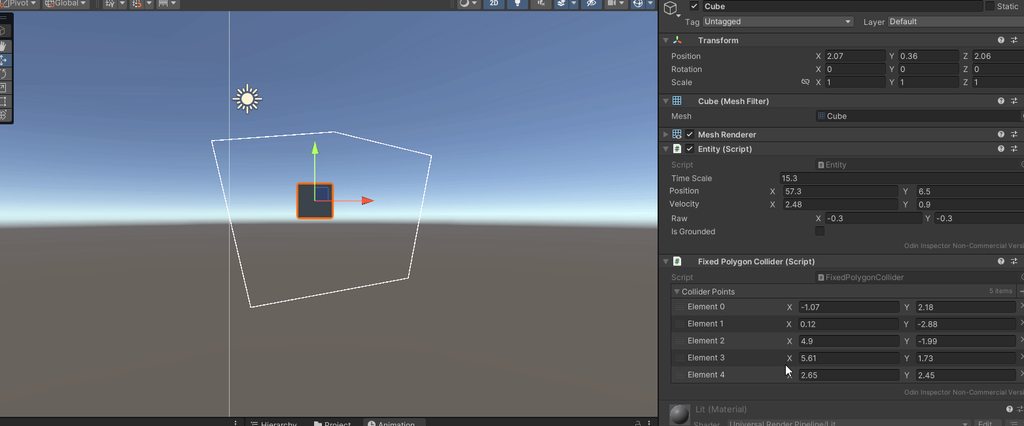
for (int i = 0; i < colliderPoints.Count; i++)
        {
            if (i == colliderPoints.Count - 1)
            {
                Gizmos.DrawLine(colliderPoints[i], colliderPoints[0]);
                continue;
            }
            Gizmos.DrawLine(colliderPoints[i], colliderPoints[i+1]);
        }
how can i make this render the points in a clockwise way? right now its rendering them coutner clockwise.

 fluid kiln
how do i make in a 2d game a specific tileset block not passable by the player ?
polar acorn
stuck palm
```cs
for (int i = 0; i < colliderPoints.Count; i++)
{
if (i...
Loop backwards
willow scroll
fluid kiln
how do i make in a 2d game a specific tileset block not passable by the player ?
Are you referring to UnityEngine.Tilemaps?
stuck palm
polar acorn
Loop backwards
for (int i = colliderPoints.Count - 1; i >= 0; i--)
        {
            if (i == 0)
            {
                Gizmos.DrawLine(colliderPoints[i], colliderPoints[colliderPoints.Count - 1]);
                continue;
            }
            Gizmos.DrawLine(colliderPoints[i], colliderPoints[i - 1]);
        }
idk if i did this right but
fluid kiln
willow scroll
Are you referring to `UnityEngine.Tilemaps`?
yessir!
willow scroll
fluid kiln
yessir!
There is a TilemapCollider2D component, does this information help you?
stuck palm
its still rendering them in a counter clockwise way
actually, i think the problem is where i've placed the points themselves
fluid kiln
willow scroll
There is a `TilemapCollider2D` component, does this information help you?
uhmm how do i acess it? i can only find normal tilemaps
willow scroll
fluid kiln
uhmm how do i acess it? i can only find normal tilemaps
It appears when adding component in the Inspector
fluid kiln
willow scroll
It appears when adding component in the Inspector
tysm!
my character isn't colliding, is it an issue with my movement script?
using UnityEngine;

public class PlayerMovement : MonoBehaviour
{
    public Stat speed;
    public Rigidbody2D rb;
    public Animator animator;
    public bool canMove = true;

    Vector2 movement;
    Vector2 lastMovement;

    void Update()
    {
            movement.x = Input.GetAxisRaw("Horizontal");
            movement.y = Input.GetAxisRaw("Vertical");

            if (movement.magnitude > 0.1f) // Player is moving
            {
                lastMovement = movement; // Update last movement only when moving
            }

            animator.SetFloat("Horizontal", movement.x);
            animator.SetFloat("Vertical", movement.y);
            if(canMove){
                animator.SetFloat("Speed", movement.magnitude);
            }
            if(!canMove){
                animator.SetFloat("Speed", 0);
            }
            animator.SetFloat("IdleHorizontal", lastMovement.x);
            animator.SetFloat("IdleVertical", lastMovement.y);

            if (canMove)
        {
            Vector2 currentPosition = transform.position;

            currentPosition.x += movement.x * speed.GetAmount() * Time.deltaTime;
            currentPosition.y += movement.y * speed.GetAmount() * Time.deltaTime;

            transform.position = currentPosition;
        }
    }

}
When dealing with physics, you do not changing the Transform.position properly directly
willow scroll
Instead, this whole code in FixedUpdate and use a suitable Rigidbody method
fluid kiln
tysm!
willow scroll
Note that not all Rigidbody methods detect collisions properly
fluid kiln
ill try ! i remember not liking fixed update because it made the camera following the player "shaky" and less smooth
idk how to explain it
willow scroll
fluid kiln
ill try ! i remember not liking fixed update because it made the camera followin...
Just note that everything related to physics goes in FixedUpdate
rocky canyon
you could couple ur movement w/ cinemachine (it has interpolation methods built in) that can help
fluid kiln
tysm! if i have more to ask ill do here <3
stuck palm
does a polygon have equal sides as vertices?
frosty hound
Take a pen and paper, draw some points, connect the dots, count?
fluid kiln
i did everything you guys told me but now when i press play my tilemaps disappear
if i turn of isSimulated from my player it doesn't disappear anymore but i can't WASD
willow scroll
fluid kiln
i did everything you guys told me but now when i press play my tilemaps disappea...
Any errors? Code? More information required.
fluid kiln
willow scroll
Any errors? Code? More information required.
can i dm?
willow scroll
fluid kiln
can i dm?
No, you cannot. Please, continue the conversation here.
fluid kiln
uhm how did you compact code again?
i asked to dm to not flod chat here with code
willow scroll
fluid kiln
uhm how did you compact code again?
i asked to dm to not flod chat here with cod...
Use a suitable site !code
eternal falconBOT

Posting code
📃 Large Code Blocks
Use links to services like:
https://gdl.space/, https://paste.ofcode.org/, https://hatebin.com/, https://paste.myst.rs/, https://hastebin.com/
📃 Inline Code
Surround code with three backquotes. Not quotation marks.
To format as C#, add cs to the first line:
```cs
// Your code here
```
Add a comment with a line number if there is an error message.
fluid kiln
willow scroll
Use a suitable site !code
https://paste.ofcode.org/34zK4PBYCHLhNkUg7LxrhLY
This is my player movement, i created a tilemap, drew the borders of my map and attached a tilemap collider to it
willow scroll
fluid kiln
https://paste.ofcode.org/34zK4PBYCHLhNkUg7LxrhLY
This is my player movement, i c...
Are any errors thrown?
fluid kiln
willow scroll
Are any errors thrown?
no, just when i hit play my tilemap disappears
willow scroll
fluid kiln
no, just when i hit play my tilemap disappears
Any Tilemap references in your code?
fluid kiln
nope! its just there for deco/ colliding purposes
willow scroll
fluid kiln
nope! its just there for deco/ colliding purposes
Please, show the console when the issue happens
fluid kiln
oh, its throwing me this error now
UnityEditor.Graphs.Edge.WakeUp () (at <77f789c2593a4c2f85795e0341a2e4f5>:0)
UnityEditor.Graphs.Graph.DoWakeUpEdges (System.Collections.Generic.List`1[T] inEdges, System.Collections.Generic.List`1[T] ok, System.Collections.Generic.List`1[T] error, System.Boolean inEdgesUsedToBeValid) (at <77f789c2593a4c2f85795e0341a2e4f5>:0)
UnityEditor.Graphs.Graph.WakeUpEdges (System.Boolean clearSlotEdges) (at <77f789c2593a4c2f85795e0341a2e4f5>:0)
UnityEditor.Graphs.Graph.WakeUp (System.Boolean force) (at <77f789c2593a4c2f85795e0341a2e4f5>:0)
UnityEditor.Graphs.Graph.WakeUp () (at <77f789c2593a4c2f85795e0341a2e4f5>:0)
UnityEditor.Graphs.Graph.OnEnable () (at <77f789c2593a4c2f85795e0341a2e4f5>:0)
Pretty sure it was being thrown before too.
fluid kiln
i think i just noticed then sorry x.x
willow scroll
fluid kiln
```NullReferenceException: Object reference not set to an instance of an object
...
This looks like a Unity bug, consider reloading Unity
willow scroll
Still errors?
fluid kiln
no errors but when i play and the player rigidbody "is simulated" is on the tilemap disappears

and if its off i can't wasd
 fading seal
using System.Collections;
using System.Collections.Generic;
using UnityEngine;

public class bedScript : MonoBehaviour
{
    public GameObject inticon, bed, bedText, sleepText, gotosleepText;

    void OnTriggerStay(Collider other){
        if(other.CompareTag("MainCamera")){
            inticon.SetActive(true);
            if(Input.GetKey(KeyCode.E) || Input.GetMouseButton(0)){
                bedText.SetActive(true);
                bed.SetActive(true);
                inticon.SetActive(false);
            }
        }
    }
    void OnTriggerExit(Collider other){
        if(other.CompareTag("MainCamera")){
            bedText.SetActive(false);
            inticon.SetActive(false);
        }
    }
}``` is there a way for "sleepText" to only appear when i interact with the bed and if "gotosleepText" is active?And errors are not disabled by you, right? Please, show the whole Console
Also, please, show your Rigidbody
willow scroll
fading seal
```cs
using System.Collections;
using System.Collections.Generic;
using UnityEng...
Yes, make a condition out of it
if this is the bed AND gotosleeptext is active
im a little confused
willow scroll
fading seal
im a little confused
What exactly confuses you?
fluid kiln
willow scroll
And errors are not disabled by you, right? Please, show the whole Console

 fading seal
willow scroll
```
if this is the bed AND gotosleeptext is active
```
fading seal
willow scroll
```
if this is the bed AND gotosleeptext is active
```
is this supposed to equal what you said above?
willow scroll
fading seal
is this supposed to equal what you said above?
Not sure what you mean
fading seal
willow scroll
Not sure what you mean
nevermind lol ill figure it out
willow scroll
fluid kiln
And this thing becomes not simulated?
fluid kiln
willow scroll
And this thing becomes not simulated?
no but if i turn it not simulated it stops the movement from working and also makes tilemap not disappear
willow scroll
fluid kiln
no but if i turn it not simulated it stops the movement from working and also ma...
Please, show the full player
 dusty hull
public float rotationSpeed;
public Transform Camera;

void Update()
{


    float horizontalInput = Input.GetAxis("Horizontal");
    float verticalInput = Input.GetAxis("Vertical");

    Vector3 movementDirection = new Vector3(horizontalInput, 0, verticalInput);


    transform.Translate(movementDirection * 0 * Time.deltaTime, Space.World);

    if (movementDirection != Vector3.zero)
    {

        Quaternion toRotation = Quaternion.LookRotation(movementDirection, Vector3.up);
        transform.rotation = Quaternion.RotateTowards(transform.rotation, toRotation, rotationSpeed * Time.deltaTime);
    }


}
``` hello i am trying to rotate the player towards the direction they are moving in but i cant get it to be relative to the camera. For example whenever the player moves forwards the player will always look in the same direction no matter what direction the camera is facing. I've tried looking this up but haven't found anything that worksunfortunately after uninstalling and reinstalling this issue still persists
i honestly have no idea what is going on, this is quite frustrating for me, does anyone know how to uninstall and reinstall visual studio for unity
 river quiver
when checking for input should i put the if statement in the Update() or FixedUpdate()
or it doesnt really matter
polar acorn
Input should always be in Update
stuck palm
how can i make it so the entity position updates the actual unity transform in the editor while im not in play mode?
 river quiver
polar acorn
Input should always be in Update
river quiver
polar acorn
Input should always be in Update
ty
frosty hound
stuck palm
how can i make it so the entity position updates the actual unity transform in t...
You can use the ExecuteAlways attribute so that code runs in editor:
https://docs.unity3d.com/ScriptReference/ExecuteAlways.html
stuck palm
frosty hound
You can use the ExecuteAlways attribute so that code runs in editor:
https://doc...
couldnt that possibly be unsafe?
frosty hound
In what sense?
stuck palm
frosty hound
In what sense?
like if the update code has some sort of simulation it just does the simulation anyway
frosty hound
And why would that be "unsafe"?
stuck palm
i dont want it to simulate, i just wnat to chagne positions
and i just realised i can do application.isplaying for editor specific thigns
frosty hound
So just change the position in the Update function when in edit mode.
Yes, the example in the docs shows exactly that
Otherwise, if you don't want it to run all the time, you could make an editor button for SyncTransform that just aligns it with the position property.
stuck palm
frosty hound
Otherwise, if you don't want it to run all the time, you could make an editor bu...
this seems to work fine. thanks!
private void Update()
    {
        if (Application.isPlaying)
        {
            return;
        }
        transform.position = fTransform.position;
    }
is there any way to override the actions of the arrows?

 wanton kraken
getting the problem of "not all code paths return a value" but i don't want the method to work under certain conditions, how do i avoid this?
    public GameObject AddBullet(GameObject NewBullet)
    {
        if(Bullets[0] == null){
            Bullets[0] = NewBullet;
        } else if(Bullets [1] == null){
            Bullets[1] = NewBullet;
        } else if (Bullets [2] == null){
            Bullets[2] = NewBullet;
        } else{
            return null; //I want this to not work if all three slots are occupied
        }
    }
you need to define what you mean by "not work"
that's why the compiler needs you to write some code there
what does "not work" mean
wanton kraken
this method is for checking if there's room to add a new bullet to the list. if all slots are occupied, i don't want it to do anything
wintry quarry
wanton kraken
this method is for checking if there's room to add a new bullet to the list. if ...
Why does your function have a return type
since you have given your function a return type, you must return something (a GameObject reference specifically)
do you need that return value? Are you doing something with it?
If you don't need your function to return anything, you should be using void as the return type instead of GameObject
wanton kraken
i see, that gameobject NewBullet is supposed to be a parameter. so on collision, the powerup can call this method, and if it clears out, the bullet can be added by the list (bullet is selected by RNG in the powerup's code so it's a parameter when calling it)
ahhh i see
wintry quarry
wanton kraken
i see, that gameobject NewBullet is supposed to be a parameter. so on collision,...
The parameter is on the right in the parentheses.
The first GameObject you have here is a return type
 wanton kraken
that should solve it then
wintry quarry
it should be void if you don't want to return anything
 sleek marten
I've got this code here that shoots at the position of my enemy object
    {
        // Instantiate the bullet prefab at the player's position
        GameObject bullet = Instantiate(bulletPrefab, transform.position, Quaternion.identity);

        // Set the direction of the bullet towards the target enemy
        Vector2 direction = (targetEnemy.position - transform.position).normalized;
        bullet.transform.right = direction;  // Assuming bullet moves along its local right direction

        // Optionally, you can set the bullet's speed in its own script
}```I tried altering the code so it fires 3 bullets in a fixed pattern
    {
        // Calculate the direction to the target enemy
        Vector2 direction = (targetEnemy.position - transform.position).normalized;

        // Fire three bullets in a spread pattern
        for (int i = 0; i < 3; i++)
        {
            // Calculate the angle offset for each bullet
            float spreadAngle = (i - 1) * bulletSpreadAngle;

            // Calculate the rotated direction for each bullet
            Quaternion bulletRotation = Quaternion.Euler(0, 0, spreadAngle) * Quaternion.LookRotation(Vector3.forward, direction);
            GameObject bullet = Instantiate(bulletPrefab, transform.position, bulletRotation);

            // Optionally, set the bullet's speed or any other properties here
        }
}```it does the spread correctly, but it's not shooting at the enemy object
it tries to aim anywhere BUT the enemy and I really don't understand why
I've gone down my scripts and I've isolated the problem to this section. does anyone have ideas what I'm doing wrong?
river quiver
is there a way to round a number to the second decimal place? cause in Mathf() docs i only found .Round() which gives you number rounded to the nearest integer
languid spire
river quiver
is there a way to round a number to the second decimal place? cause in Mathf() d...
nothing built in, you would need to code it yourself
 upper forge
Is anyone avaliable to get in call and help me with collecting an abject and spawing it, then being able to drag it in a position and if its the correct position it stays and if not it returns bad to orginal positiion?
Im getting so twisted and turned around on this...
rich adder
upper forge
Is anyone avaliable to get in call and help me with collecting an abject and spa...
not likely someone is going to take the time to be in a voicechat call.
Read the #854851968446365696 to how to post your issue
wintry quarry
river quiver
is there a way to round a number to the second decimal place? cause in Mathf() d...
For what purpose? Just for displaying?
 desert temple
Working on a Brick Breaker game for a class. Running into an issue, where I'm trying to have the ball reset at the paddle when it goes out of bounds. From my Debug, I know it is triggering the box collider below, so that's not the problem. The problem is that it won't respawn at the empty game object I've got atop the paddle. Not sure what I'm doing wrong.
using System.Collections;
using System.Collections.Generic;
using UnityEngine;

public class BallScript : MonoBehaviour
{
    //We need to interact with the rigidbody, to have it bouncing.  Thus, this variable.
    public Rigidbody2D rb;
    //This variable is to set up when the ball is and isn't in play.
    public bool inPlay;
    public Transform paddle;
    // Start is called before the first frame update
    void Start()
    {
        rb = GetComponent<Rigidbody2D>();
        //Then we're adding some initial force...
        rb.AddForce(Vector2.up * 500);

    }

    // Update is called once per frame
    void Update()
    {
        //Checking the bool variable to see if the ball is in play.
        if (inPlay == false)
        {
            transform.position = paddle.position;
        }

    }

    //We're going to be setting up here, what happens when the ball goes out of bounds.
    private void OnTriggerEnter2D(Collider2D other)
    {
        if(other.CompareTag("Bottom"))
        {
            Debug.Log("Ball hit the bottom of the screen.");
        }
    }
}

 wintry quarry
sleek marten
I've got this code here that shoots at the position of my enemy object
``` void ...
wintry quarry
sleek marten
I've got this code here that shoots at the position of my enemy object
``` void ...
well you're making a direction vector toward the enemy and then you're applying an offset to the angle
so won't it always miss?
 midnight meteor
where do i ask for help about installation ?
wintry quarry
desert temple
Working on a Brick Breaker game for a class. Running into an issue, where I'm t...
well:
- You're never setting inPlay to false
- I don't see the point of the Update function at all, why not just reset the position directly in OnTriggerEnter2D?
raw token
midnight meteor
where do i ask for help about installation ?
#💻┃unity-talk, most likely
midnight meteor
thanks
river quiver
wintry quarry
For what purpose? Just for displaying?
yeah
wintry quarry
river quiver
yeah
Then you just do string displayStr = myFloat.ToString("F2");
sleek marten
wintry quarry
well you're making a direction vector toward the enemy and then you're applying ...
Oh my god
bro 😔 my brain might be melted
 winter tinsel
hey i just wanna know how making the controls of my game changable would work? not gonna implement it know just curious how that accesability feature would work
i have soemthing in mind but it uses alot of if statements...
wanton kraken
anyone know what the main issue is here? it's not setting itself to inactive, nor is it prompting the method. getting error "NullReferenceException: Object reference not set to an instance of an object", not sure why though
private void OnCollisionEnter2D(Collision2D collision)
    {
        if (collision.gameObject.CompareTag("Player"))
        {
            Debug.Log("Got Collision!");
            BulletToAdd = RandomRoll();
            InventoryP1 playerInventory = collision.gameObject.GetComponent<InventoryP1>();
            playerInventory.AddBullet(BulletToAdd);
            gameObject.SetActive(false);

        }
which line
sleek marten
wintry quarry
well you're making a direction vector toward the enemy and then you're applying ...
is there an easy way to fix this or do I need to rewrite?
wanton kraken
rich adder
which line
my bad. this one. also hi navarone!
playerInventory.AddBullet(BulletToAdd);
seems playerInventory is null then
are you sure the collided object has a InventoryP1 script
wanton kraken
well. the InventoryP1 script is on BulletSpawn, which is a child of the actual Player that collides with it
rich adder
wanton kraken
well. the InventoryP1 script is on BulletSpawn, which is a child of the actual P...
if its on a child of collider, use GetComponentInChildren
wanton kraken
i'll give that a try, thank you :)
winter tinsel
wintry quarry
https://docs.unity3d.com/Packages/com.unity.inputsystem@1.9/api/UnityEngine.Inpu...
thanks
wintry quarry
winter tinsel
thanks
I believe the input system comes with an an example rebinding ui too
winter tinsel
wintry quarry
I believe the input system comes with an an example rebinding ui too
oh btw do you want to know how far i got with my game?
ive decided to develop it fully lol
cause its simple and i can use it to learn the rest of unity while still making a game, its not the game i want to make but it grew on me
desert temple
wintry quarry
well:
1. You're never setting inPlay to false
2. I don't see the point of the Up...
I'm not wanting to diverge from the tutorial I'm following for homework, lest I get lost later on. But the thing I need to do is having it set to false via...OnTriggerEnter2D, I think?
wintry quarry
desert temple
I'm not wanting to diverge from the tutorial I'm following for homework, lest I ...
Well if you're following a tutorial... just follow it!
desert temple
I am, and I'm doing something wrong, which was the initial reason I came here.
Since I can't figure out what.
stuck palm
for (int i = 0; i < colliders.Count; i++)
        {
            if (FixedCollisions.IntersectPolygons(colliders[i].GetPoints(), colliders[(i + 1) % 0].GetPoints()))
            {
                print("collision found!");
            }
            else
            {
                print("no collision");
            }
        }
why am i getting a dividebyzero exception on the if statement?
wintry quarry
stuck palm
```cs
for (int i = 0; i < colliders.Count; i++)
{
if (FixedC...
because you're doing % 0 😱
that means "divide by zero and tell me the remainder"
queen adder
    public void DoRecoil()
    {
        targetRot += new Vector3(recoil_X, Random.Range(-recoil_Y, recoil_Y), Random.Range(-recoil_Z, recoil_Z)) * deltaMultiplier * Time.deltaTime;
        camRecoil.DoCameraRecoil();
        targetPos -= new Vector3(0, 0, zKickBack / 10) * deltaMultiplier * Time.deltaTime;
    }
Im trying to ensure that the recoil stays the same on all frames, however its still affected by the frames. That script is called each shot
Do i gotta use fixedDeltaTime...?
wintry quarry
queen adder
```cc
public void DoRecoil()
{
targetRot += new Vector3(recoil_X...
unless you:
- Have perfectly linear motion that doesn't accelerate (change velocity) at any point
- Use FixedUpdate or a similar fixed timestep approach
There will always be differences depending on framerate
Also it's unclear in your example - is this code running in Update or something
queen adder
No that function only gets called each shot, so often but not update
The Lerping is done in update and there doesnt seem to be issues with that
queen adder
wintry quarry
unless you:
- Have perfectly linear motion that doesn't accelerate (change veloc...
So wait cant I use FixedDeltaTime then
 lethal elbow
Currently have an issue where im trying to get my character (Just a capsule) to look towards the mouse cursor (3D space), I have a function that I found online but not having much luck. Was wondering if someone could help me out as the issue is the camera is now moving with the mouse instead of the player looking towards it. This happens when I assign the ground with a layermask
 private void GetMousePosition()
  {

      bool success;
      Vector3 Position;
      Ray ray = mainCamera.ScreenPointToRay(Input.mousePosition);

      if (Physics.Raycast(ray, out var hitinfo, Mathf.Infinity, groundMask))
      {

          success = true;
          Position = hitinfo.point;

      }
      else
      {

          success = false;
          Position = Vector3.zero;

      }

      if (success == true)
      {

          Vector3 direction = Position - transform.position;
          direction.y = 0;

          transform.forward = direction;

      }


  }
This is unnecessarily complicated. Forget the physics and use ScreenToWorldPoint on the mouse position
 mossy willow
I have a problem
in my game
I want a camera to be the main one
and I have it tagged as main camera
and the other one is untagged


but when I start the game
it starts on cam2
rich adder
you can finish a thought before hitting send
Depth will tell you which one will be rendered above
polar acorn
All the tag does is determine which camera is returned by Camera.main. You'll need to manually deal with enabling or disabling them to control which ones are live.
Or you could just use cinemachine
mossy willow
polar acorn
All the tag does is determine which camera is returned by `Camera.main`. You'll ...
ok thanks
polar acorn

Unity
Learn how Unity's Cinemachine makes complex camerawork – including target tracking, composing, blending, and cutting – easy and intuitive.
lethal elbow
languid spire
This is unnecessarily complicated. Forget the physics and use ScreenToWorldPoint...
Still a Ray or Vector3?
languid spire
Vector3. Your Position variable
zenith crown
Can i store inputs in a variable and if so should i switch the if and elif inputs to switches?
languid spire
you can store anything in a variable
queen adder
zenith crown
Can i store inputs in a variable and if so should i switch the if and elif input...
Do you mean Input.GetAxis()?
zenith crown
queen adder
Do you mean Input.GetAxis()?
Nope i mean inputs of singular keys
rich adder
zenith crown
Can i store inputs in a variable and if so should i switch the if and elif input...
switches?
queen adder
Thats a keycode, an enum, which can be selected with ints
So yes you can do something like
int sprintKey = 304
or
KeyCode sprintKey = KeyCode.LeftShift
Oh i was thinking more of something like this

I saw it in my course im taking
and thought i could use it
if i do it correctly
rich adder
a switch is simply a fancy if else chain
queen adder
Yeah
queen adder
the only reason I used it (Last time I remember) is for practice lol
rich adder
zenith crown
how bad is it to use a if else chain?
nothing bad about it all
without them you couldn't do much
polar acorn
It's just messy
queen adder
Switches look messier to me
zenith crown
Im fine with messy cause i organize my code with comments
queen adder
Wait till it gets bigger
polar acorn
The real solution is to try to engineer code to not need either switches or if-else chains
rich adder
ya if you have a giant monolith if else chain / switch , Your design is wrong
zenith crown
Im a indie dev and im trying the quicker way usually
languid spire
queen adder
Switches look messier to me
Switches are a damn sight more difficult to break when you change them than if else chains are
queen adder
Yeah but doing that will ruin it for you
rich adder
quicker != best necessarily
queen adder
languid spire
Switches are a damn sight more difficult to break when you change them than if e...
Idk man cant say much, I used it like once in my life I think
zenith crown
rich adder
quicker != best necessarily
Yeah i know but i feel like for what im doing it wont be bad
it will still be under 150 lines of code
queen adder
What are you even doing
rich adder
zenith crown
it will still be under 150 lines of code
the lines of code dont really have relevance to how good the code is or performance
zenith crown
queen adder
What are you even doing
Currently changing speeds and getting it to work

Im gonna add the polish later
rich adder
this is horrid, you need a switch with a enum state
dusty hull
dusty hull
```cs
public float rotationSpeed;
public Transform Camera;
void Update()
{
...
anyone know what to do?
languid spire
zenith crown
Currently changing speeds and getting it to work
ok, so that is just wrong. Use Enums
zenith crown
rich adder
this is horrid, you need a switch with a enum state
Ok im gonna take a look at enums in that case
polar acorn
zenith crown
Currently changing speeds and getting it to work
Set them all to false, then do one-liners for the individual buttons
 warm raptor
do you know why my mesh deform when I raise my camera ? Is it coming from my script ?
using System.Collections;
using System.Collections.Generic;
using UnityEngine;

public class CamRotation : MonoBehaviour
{
    [SerializeField] private float mouseSensitivity = 2.0f;
    private float rotationX = 0f;

    void Update()
    {
        float mouseY = -Input.GetAxis("Mouse Y") * mouseSensitivity;
        rotationX += mouseY;
        rotationX = Mathf.Clamp(rotationX, -90f, 90f);

        transform.localRotation = Quaternion.Euler(rotationX, 0f, 0f);
    }
}
Non-Uniform scalling
rich adder
warm raptor
do you know why my mesh deform when I raise my camera ? Is it coming from my scr...
child of non-uniform parent
queen adder
whatever the gun is parented to doesnt have the same size on all axis
3, 3, 3 - Uniform
3, 1, 3 - Nonuniform
rich adder
never have root objects scaled other than 1,1,1 . Seperate your mesh from logic / holder objects
queen adder
rich adder
never have root objects scaled other than 1,1,1 . Seperate your mesh from logic ...
I dont think it matters what number it is as long its all 3 is the same
rich adder
queen adder
I dont think it matters what number it is as long its all 3 is the same
Having something to parent to have a larger scale will cause issues with other things, i keep my scaling strictly on the graphics itself
even physics dont play the same if you have large scales
queen adder
Yeah, well this is the usual gun setup for me

Thank GOD I can make parents inside of the gun models, for lerping reason, it would be so messy if it was all under the cam
timber comet
If(GameObject.TryToGetComponent(…)(out … var)) <——- how do I check if the collided object has an interface without saving it into a variable?
zenith crown
rich adder
managing 6 bools for a state is madness
I just read this and realized i can simply store it as a int 1-5 which and write a comment for what every number represents
rich adder
timber comet
If(GameObject.TryToGetComponent(…)(out … var)) <——- how do I check if the collid...
TryGetComponent(out MYInterface _)
timber comet
rich adder
`TryGetComponent(out MYInterface _)`
Yeah, but I don’t want the out
queen adder
timber comet
If(GameObject.TryToGetComponent(…)(out … var)) <——- how do I check if the collid...
    private void OnCollisionEnter(Collision collision)
    {
        if (collision.transform.TryGetComponent(out IInterface inter))
        {
            inter.CallFunction();
        }
    }
Theres nothing wrong with the out
warm raptor
how can I do, because the thing that doesn't have Uniform scale is my main caractère/colider , because I wanted the capsule to be higher but not larger (sry for my bad english)

 rich adder
timber comet
Yeah, but I don’t want the out
rich adder
timber comet
Yeah, but I don’t want the out
thats why i put _ discard symbol
languid spire
zenith crown
I just read this and realized i can simply store it as a int 1-5 which and write...
that is a [Flags] Enum, which does not seem to be necessary in your use case
timber comet
rich adder
thats why i put `_` discard symbol
Ok ok, thanks
rich adder
zenith crown
I just read this and realized i can simply store it as a int 1-5 which and write...
thats literally what enums are... Ints with human readable labels...kinda
zenith crown
Im currently reading about enums give me a sec ill try to understand what you mean when im done
safe radish
is there a way i can check how many instances of a certain script are made?
rich adder
zenith crown
Im currently reading about enums give me a sec ill try to understand what you me...
there is nothing complex about them
queen adder
warm raptor
how can I do, because the thing that doesn't have Uniform scale is my main carac...
have a camera holder, make that camera holder follow the player. Then you dont have to worry about size problems
 zenith crown
rich adder
there is nothing complex about them
zenith crown
rich adder
there is nothing complex about them
Ohh they work like dictionarys in godot
you store an int for a string
languid spire
no
rich adder
zenith crown
you store an int for a string
there are no strings involved
upper forge
So im trying to make a puzzle game where you collect words in the world and once you collect them they go to the "TV' (the place where they will put the puzzle together, which is all in the same scene) once they are in the tv they cans be collected anymore and you are able to drag them around and put the words in specific points on the TV if it is the correct point it will stay if not it will return to the original place inside the TV
What would be the best way to go about this as there will be many different words
zenith crown
oh it looked like it from what i see
zenith crown
rich adder
there are no strings involved
alright
rich adder
zenith crown
oh it looked like it from what i see

Learn about C# enumeration types that represent a choice or a combination of choices
queen adder
safe radish
is there a way i can check how many instances of a certain script are made?
FindSceneObjectsOfType maybe
rich adder
var items = FindObjectsOfType<MyComponent>()
https://docs.unity3d.com/ScriptReference/Object.FindObjectsOfType.html
items.length
queen adder
Yes thats better
safe radish
nice ty
warm raptor
queen adder
have a camera holder, make that camera holder follow the player. Then you dont h...
Ok thx 😁
rich adder
safe radish
nice ty
careful how many times you call this
safe radish
does that work for tracking a pure class? or only if it has mono?
rich adder
dont put it in update or anything
this only finds Object from unity
FindObject would make no sense on a POCO
since POCOs are typically embedded inside another MB otherwise they are just files
languid spire
safe radish
does that work for tracking a pure class? or only if it has mono?
if you want to track these things a simple static int Count which you increment and decrement will do the job so much better
safe radish
languid spire
if you want to track these things a simple static int Count which you increment ...
static int will be shared by all instances of the pure class?
languid spire
exactly
safe radish
nice ill try that, ty
languid spire
increment in the constructor, decrement in the destructor
 raw orchid
im having this issue with my movement whenever i click the left button to move left it moves right. please help
safe radish
languid spire
increment in the constructor, decrement in the destructor
that did the trick
 summer stump
zenith crown
Ohh they work like dictionarys in godot
summer stump
zenith crown
Ohh they work like dictionarys in godot
I get what you are saying here, but as they said, that is not accurate
For one, dictionaries in godot (and c# for that matter) hold a key value pair. The key COULD be an int or string, but it does not have to. (Same with the value). The key could be a gameObject reference and the value could be a list of vector3s if you wanted
On the flip side, an enum IS an int basically. Each value of the int just happens to have a name. It is not a string type though (which is an important difference for how it works)
zenith crown
summer stump
I get what you are saying here, but as they said, that is not accurate
For one,...
Thank you for the explanation it cleared up my confusion
i get it now
Uhh why does this not work?


 dusty ember
how do I detect if a player holds down a key
summer stump
zenith crown
Uhh why does this not work?
It tells you exactly what to do instead
Movement is a reference. You do not use references for that
dusty ember
instead of tapping it
summer stump
dusty ember
how do I detect if a player holds down a key
GetKey, GetAxis, etc
As long as it is not down or up, it will be for holding
dusty ember
summer stump
As long as it is not down or up, it will be for holding
But i did this
        Input.GetKeyDown(KeyCode.W);
        {
            transform.Translate(Vector3.back * Time.deltaTime * carSpeed);
        }
and it just autodoes it
regardless
summer stump
No idea what "autodoes" means
dusty ember
If i dont touch it it still moves it
summer stump
Then there is some other code moving you, or your keyboard is faulty
Debug it with some logs
dusty ember
Okay
polar acorn
dusty ember
But i did this
```js
Input.GetKeyDown(KeyCode.W);
{
...
What about this code are you expecting to prevent your movement from happening every frame?
summer stump
That is not how you write an if statement in c#. Look closely at the end of the condition before the body
polar acorn
summer stump
That is not how you write an if statement in c#. Look closely at the end of the ...
what if statement
summer stump
Oh yeah huh. I am blinded by everything wrong with this I guess
summer stump
dusty ember
But i did this
```js
Input.GetKeyDown(KeyCode.W);
{
...
I recommend a basic c# course
https://www.w3schools.com/cs/index.php
dusty ember
im doing the unity one
using System.Collections;
using System.Collections.Generic;
using UnityEngine;

public class carMoveForward : MonoBehaviour
{
    public float carSpeed = 15f;
    // Start is called before the first frame update
    void Start()
    {

    }

    // Update is called once per frame
    void Update()
    {
        Input.GetKey(KeyCode.W);
        {
            Debug.Log("ree");
        }

    }
}
``` I dont see anything wrong with it but it spams itDo the one I linked first
polar acorn
dusty ember
```js
using System.Collections;
using System.Collections.Generic;
using UnityEng...
Tell me, what are you expecting to prevent the log from happening every frame
dusty ember
polar acorn
Tell me, what are you _expecting_ to prevent the log from happening every frame
I need it to only do it If i press W
summer stump
There is A LOT wrong with this. A significant error that knowledge about the basics of c# would point you tk
polar acorn
dusty ember
I need it to only do it If i press W
So you should probably actually check if you press W
languid spire
dusty ember
```js
using System.Collections;
using System.Collections.Generic;
using UnityEng...
because there is nothing conditional about this
Input.GetKey(KeyCode.W);
        {
            Debug.Log("ree");
        }
Google "c# if statement" at least @dusty ember
dusty ember
I forgot the if
languid spire
more than just that
dusty ember
i needed the )) Aswell
summer stump
Not only
summer stump
Well yes, but still not everything
summer stump
Did you google "c# if statement" yet?
Look between the parentheses and the first curly brace
dusty ember
using System.Collections;
using System.Collections.Generic;
using System.Security.Cryptography;
using UnityEngine;

public class carMoveForward : MonoBehaviour
{
    public float carSpeed = 15f;
    // Start is called before the first frame update
    void Start()
    {

    }

    // Update is called once per frame
    void Update()
    {
        if (Input.GetKey(KeyCode.W))
        {
           transform.Translate(Vector3.forward * Time.deltaTime * carSpeed);
        }
;

    }
}
``` But my code works perfectlyyeah
polar acorn
dusty ember
```js
using System.Collections;
using System.Collections.Generic;
using System.S...
Why's there just a random floating semicolon at the start of a line though
summer stump
You have another random semicolon in there for no reason though
 polar acorn
dusty ember
this one?
polar acorn
dusty ember
this one?
Is that a semicolon?
dusty ember
polar acorn
Is that a semicolon?
I mixed it up
zenith crown
Why cant i open up project settings?
 dusk musk
Hi everyone! Is this the right place to ask about GitHub? I recently picked up an older project, did some experimenting, and concluded what I did was crap. Now I want to restore my commit from 3 months ago, but I don't exactly remember how to do that. Can someone help? I want the circled one back.
 polar acorn
dusk musk
Hi everyone! Is this the right place to ask about GitHub? I recently picked up a...
polar acorn
dusk musk
Hi everyone! Is this the right place to ask about GitHub? I recently picked up a...
Copy this value, checkout that commit
 languid spire
dusk musk
Hi everyone! Is this the right place to ask about GitHub? I recently picked up a...
languid spire
dusk musk
Hi everyone! Is this the right place to ask about GitHub? I recently picked up a...
rightclick, checkout commit
dusk musk
Thanks both! Here's a funny thing...
 languid spire
you have uncommited changes
dusk musk
Ah I see. Thanks.
Where do I go from now? I have a detached HEAD.
Figured it out, thanks!!!
 bold plover
If I were to pass states that are specific to a certain player state, would I pass that info to update or fixed update? I'm thinking fixed update because updating that information dependent on frame sucks yeah?
Though a tutorial I use that seems rather reputable but hasn't done state machines checks for player input in update.
Mostly want to know which is better practice.
 eager elm
player inputs should be checked in Update
 ember tangle
Does anyone have any resources about C# lambda functions? I'm looking for a cleaner way to check if one bool in a list of objects is true rather than a bunch of if statements.
 burnt vapor
ember tangle
Does anyone have any resources about C# lambda functions? I'm looking for a clea...
burnt vapor
ember tangle
Does anyone have any resources about C# lambda functions? I'm looking for a clea...
Sounds like something for Linq instead
Specifically the Any and Count method
ember tangle
ok i will look into that
raw token
bold plover
If I were to pass states that are specific to a certain player state, would I pa...
I'm not entirely certain that I follow. But in broad terms, unless the data is pertinent to a specific frame or physics update, I'd generally move it around through events such that my functionality reacts as soon as it's updated... That is, any computed data is up-to-date as soon as the inputs change, and independent of frames or physics updates.
But yeah, for player input specifically - if you're not using Input System's event-based interfaces - I think you'd generally just handle player input in sync with wherever the Input Manager/Input System performs it's updates. Which is Update() for Input Manager, and also the default setting for Input System. Anything else might introduce some timing issues.
queen adder
lads, how much general C# should i learn before i get into the unity specific stuff?
wanton kraken
that didn't format well lol
wanton kraken
queen adder
lads, how much general C# should i learn before i get into the unity specific st...
i'm shit at coding but started anyways with basic knowledge. i still suck but i learn more each day, and i enjoy learning via doing it rather then videos (though that's just me). i'd say do your best, and read documentation!
 forest mist
dusty ember
```js
using System.Collections;
using System.Collections.Generic;
using UnityEng...
forest mist
dusty ember
```js
using System.Collections;
using System.Collections.Generic;
using UnityEng...
and the if
xd
queen adder
alr alr fair
im grinding my way through a 4 hour course on the fundamentals like if statements and for loops etc and tbh im having quite a bit of fun learning it. I'll probably finish this course then learn the unity specific code after i finish the course 🙏
eternal needle
queen adder
lads, how much general C# should i learn before i get into the unity specific st...
At the minimum id say you should understand classes and what instances are. But theres not really a proper answer without listing every single keyword or topic because people skip stuff that I assumed theyd do before classes.
General things, what data types are, methods/functions, classes and instances, loops, arrays/lists
queen adder
alrighty thanks lads
forest mist
queen adder
lads, how much general C# should i learn before i get into the unity specific st...
just learn to program
it isn't learn "c#" in specific
eternal needle
queen adder
im grinding my way through a 4 hour course on the fundamentals like if statement...
The best way to learn also make sure you're not just reading/watching someone else code. You need to actually write it yourself, change values, see what happens when it changes. Try doing something the course didnt
raw token
Sounds like you've declared Move() as a method which is called and operates on an instance of the PlayerRuler class, but where you're calling it in your code, PlayerRuler is not a variable containing a PlayerRuler instance, but rather the class itself.
Consider the class:
class FooBar {
  public void BazBaq() {}
}
Totally cool:
FooBar foo = new FooBar();
foo.BazBaq();
Error, attempting to call an instance method statically (directly on the type):
FooBar.BazBaq();
thank you, this helps a lot
spiral glen
I needed i = 0
eternal needle
forest mist
then OOP and clean code
Do you realize how vague this could be for someone who's not done coding before? You've basically told them to learn to code which was their question on what to learn
wanton kraken
spiral glen
I needed i = 0
yeah
spiral glen
mb
forest mist
eternal needle
Do you realize how vague this could be for someone who's not done coding before?...
I told fundamentals
then OOP
then clean code
eternal needle
Exactly, which means nothing to a beginner
queen adder
eternal needle
The best way to learn also make sure you're not just reading/watching someone el...
yeah what im doin is im watching the guy explain the concepts and then mixing what ive learned together into one program
forest mist
eternal needle
Exactly, which means nothing to a beginner
what I have to say lol
raw token
wanton kraken
thank you, this helps a lot
In short, if the method is supposed to work sort of "globally," and independendently of any singular instance of the class, then you'd declare it as static and it would let you call it as PlayerRuler.Move().
But otherwise, you need to set up a variable containing a reference to the specific PlayerRuler you want to operate on, and call the method on that instead
wanton kraken
queen adder
yeah what im doin is im watching the guy explain the concepts and then mixing wh...
avoid those tutorials that tell you how to do each individual step on how to do something, you'll never learn. that's fine for specific stuff, but to learn broad concepts and how to use the engine check out the documentation and whatnot. those videos, like brackeys, aren't it
forest mist
learn variables, operators, if/else, for/while, functions...
wanton kraken
raw token
In short, if the method is supposed to work sort of "globally," and independende...
yep, gonna try that now
forest mist
that? @eternal needle
eternal needle
forest mist
what I have to say lol
You dont have to say anything if u feel u cant provide anything more detailed or different than what I said above.
queen adder
wanton kraken
avoid those tutorials that tell you how to do each individual step on how to do ...
yeah im learning the broad concepts, im not watching a step by step on making a whole program or whatever, im just learning how to use if statements and for loops
concepts that can be used in a whole load of different situations
forest mist
eternal needle
You dont have to say anything if u feel u cant provide anything more detailed or...
I told the basis to start in unity lol
fundamentals, oop and clean code

Learn to Code — For Free
queen adder
forest mist
<@456226577798135808> https://www.freecodecamp.org/learn/foundational-c-sharp-wi...
tyty
eternal needle
forest mist
I told the basis to start in unity lol
I used to tutor people for a decently long time. I fully understood what you wrote and yes it makes sense to learn those. But a beginner would google "OOP", read a bunch of buzzwords they dont understand and then immediately close the tab. Fundamentals also means nothing, how is someone who knows nothing supposed to know what's fundamental. Clean code honestly can be skipped too if we're just talking about knowing enough to just open unity
forest mist
eternal needle
I used to tutor people for a decently long time. I fully understood what you wro...
well the point is
he has to google c# fundamentals first
I literally googled that
 queen adder
eternal needle
I used to tutor people for a decently long time. I fully understood what you wro...
queen adder
eternal needle
I used to tutor people for a decently long time. I fully understood what you wro...
i'd assume fundamentals means basic syntax and formatting of the specified language
anyways imma get back to this course
have a good one lads
wanton kraken
@raw token the error has disappeared in VSC, but still appears in unity when i try to use the method
public class Player1Movement : PlayerRuler
{
    public PlayerRuler PlayerRuler;

    // Start is called before the first frame update
    void Start()
    {
        PlayerRuler PlayerRuler = new PlayerRuler();
    }

    // Update is called once per frame
    void Update()
    {
        if (Input.GetKey(KeyCode.W) == true) {
            PlayerRuler.Move(Speed, KeyCode.W, PlayerRB, gameObject);
        }
        if (Input.GetKey(KeyCode.S) == true) {
            PlayerRuler.Move(Speed, KeyCode.S, PlayerRB, gameObject);
        }
    }
}
not sure if what's in start() is needed, but i tried it anyways to no avail
raw token
wanton kraken
<@1097950947369562187> the error has disappeared in VSC, but still appears in un...
Oh alright, this class extends PlayerRuler - so any instance of Player1Movement is also an instance of PlayerRuler. Move() is member of the parent class, so it's accessible in the same manner as this class's own members (assuming it has an appropriate access modifier - public or protected).
public class Player1Movement : PlayerRuler
{
    // Update is called once per frame
    void Update()
    {
        if (Input.GetKey(KeyCode.W) == true) {
            Move(Speed, KeyCode.W, PlayerRB, gameObject);
        }
        if (Input.GetKey(KeyCode.S) == true) {
            Move(Speed, KeyCode.S, PlayerRB, gameObject);
        }
    }
}
The second two are a rabbit hole that will hinder their learning. Especially the quite subjective topic of "clean code"
Amd they already said they are learning fundamentals
stuck palm
if (colliderA is FixedCircleCollider circleA && colliderB is FixedPolygonCollider polygonB)
            {
will this check for classes that inherit FixedPolygonCollider?
raw token
stuck palm
```cs
if (colliderA is FixedCircleCollider circleA && colliderB is FixedPolygonC...
Yeah 👍
stuck palm
i see
raw token
Though, if you need to access functionality specific to a child class, you'll still need to cast to that type
cinder crag
i need help with deleting my current held weapon whenever i buy/instantiate a new one , since rn i have a bow and a pistol in the shop , i go to buy the pistol , it doesnt replace the bow and its just there so both bow and pistol are instantiated and im not sure how to delete the last equipped weapon like delete the bow when buying the pistol for example

 rustic valve
Hi, I'm having some problems with the DontDestroyOnLoad objects, i'm trying to get the component "Unit" that is in: party -> Teammate1 -> Unit, but when I assign it, it doesn't refer to the actual object, I think it is creating a new "unit" component to reference
https://pastebin.com/svcBNAK8
i think the problem is in line 20-24, but I can't find a way to fix it
Pastebin
Pastebin.com is the number one paste tool since 2002. Pastebin is a website where you can store text online for a set period of time.
raw token
cinder crag
i need help with deleting my current held weapon whenever i buy/instantiate a ne...
You need a reference to your current weapon, then you can Destroy() it's game object (or disable it)
cinder crag
raw token
You need a reference to your current weapon, then you can [`Destroy()`](<https:/...
and how can i reference my current weapon?
polar acorn
cinder crag
and how can i reference my current weapon?
Well, how do you identify your current weapon? What makes something your current weapon?
cinder crag
polar acorn
Well, how do you identify your current weapon? What makes something your current...
i dont have something to identify my current weapon
polar acorn
cinder crag
i dont have something to identify my current weapon
So then what even is a current weapon
raw token
rustic valve
Hi, I'm having some problems with the DontDestroyOnLoad objects, i'm trying to g...
Is this script on the DDOL game object?
cinder crag
polar acorn
So then what even _is_ a current weapon
the player starts with the bow so that the player current weapon and when you go buy the pistol , you delete the bow then the player will have the pistol as its current weapon
polar acorn
cinder crag
the player starts with the bow so that the player current weapon and when you go...
So then store a reference to the bow, and destroy that when you get a new one
cinder crag
polar acorn
So then store a reference to the bow, and destroy that when you get a new one
yeah but how can i make it so it works with the future weapons so if you buy an AR , the pistol must get destroyed then the AR will be the current weapon , do i have to store another reference other than the bow or how can i do it?
polar acorn
Store the new weapon in the current weapon variable when you get one
cinder crag
polar acorn
Store the new weapon in the current weapon variable when you get one
okay got a way to get the currentequippedweapon but now im not sure how to destroy the current equipped weapon since well it cant be destroyed cuz of data loss

 strong wren
cinder crag
okay got a way to get the currentequippedweapon but now im not sure how to destr...
strong wren
cinder crag
okay got a way to get the currentequippedweapon but now im not sure how to destr...
Destroy the instantiated object instead of the prefab asset. Store the instantiated weapon in a separate field.
cinder crag
strong wren
Destroy the instantiated object instead of the prefab asset. Store the instantia...
how can i store the instantiated weapon in a separate field?
polar acorn
cinder crag
how can i store the instantiated weapon in a separate field?
Instantiate returns a reference to the object it creates
cinder crag
polar acorn
Instantiate returns a reference to the object it creates
im sorry but my brain just stopped , wdym by that?
raw token
cinder crag
im sorry but my brain just stopped , wdym by that?
Within EquipWeapon(), what does the variable weaponInstance contain?
cinder crag
raw token
Within `EquipWeapon()`, what does the variable `weaponInstance` contain?
well the Instantiated weapon prefab
instantiating n such
raw token
Sounds an awful lot like the thing you eventually want to Destroy, no?
cinder crag
i tried doing this but it just destroys the weapon so im not sure on what to do
 raw token
So it's achieving the right effect, but at the wrong time. You don't want to destroy the weapon which was just equipped - you want to destroy the weapon which was equipped prior to the new weapon, if any
cinder crag
basically i want to destroy the current equipped weapon , i have a bow and when i buy the pistol i want the bow to be destroyed
raw token
You currently have a reference to the weapon which was just instantiated within the current call to EquipWeapon(), but you need a reference to weapon instance which was instantiated in the previous call to EquipWeapon(). So you need to persist a value between calls to EquipWeapon(). Local variables within a method die when the method ends, but class fields don't...
If this still doesn't quite add up, it might help to write out a bullet point list of what should happen when a weapon is equipped
cinder crag
raw token
You currently have a reference to the weapon which was just instantiated within ...
so create a class inside the EquipWeapon() methoh then destroy the weaponInstance in there , i think thats what u mean
raw token
No new classes or class instances are required
The sequence of events is as such:
- Player picks up a new weapon
- If the player currently has a weapon, Destroy it
- Create the new weapon
- The current weapon is now the newly created weapon
cinder crag
raw token
The sequence of events is as such:
- Player picks up a new weapon
- If the playe...
how can i check if the player already has a weapon?
raw token
The current weapon variable will be null. Though if your player is never without a weapon you don't necessarily need to worry about that case
polar acorn
cinder crag
okay got a way to get the currentequippedweapon but now im not sure how to destr...
Why is currentlyEquippedWeapon an int and not a WeaponShooting
cinder crag
polar acorn
Why is `currentlyEquippedWeapon` an int and not a `WeaponShooting`
cause i have a weaponType in my WeaponsSO script and i just set the currentlyEquippedWeapon to the index of that array so the bow is 0 and pistol is 1
 polar acorn
cinder crag
cause i have a weaponType in my WeaponsSO script and i just set the ``currentlyE...
polar acorn
cinder crag
cause i have a weaponType in my WeaponsSO script and i just set the ``currentlyE...
So how do you go from an int to a WeaponShooting
 polar acorn
cinder crag
polar acorn
cinder crag
So, how do you go from an int to a WeaponShooting
cinder crag
polar acorn
So, how do you go from an int to a `WeaponShooting`
im not sure what you mean
polar acorn
cinder crag
im not sure what you mean
The WeaponShooting object you want to destroy
How do you plan on getting it from an int
cinder crag
well as i said the Bow is 0 in the array and Pistol is 1 so thats how i get it from an int
polar acorn
Okay and how does that get you a reference to a WeaponShooting you want to destroy
Since you've decided to use an int instead of referencing the object, what is your plan to get to the object from that int
cinder crag
i have the weaponShooting as an array
 polar acorn
cinder crag
i have the weaponShooting as an array
polar acorn
cinder crag
i have the weaponShooting as an array
Okay, are those prefabs or are they objects in the scene?
cinder crag
polar acorn
Okay, are those _prefabs_ or are they objects in the scene?
they are prefabs
polar acorn
cinder crag
they are prefabs
So then the question remains: How do you intend to use this int to get a reference to the WeaponShooting that you want to destroy
Maybe it shouldn't be an int at all
maybe the variable for holding your current weapon should hold the current weapon
raw token
Prefabs are templates - they describe the shape or concept of something. Your currentlyEquippedWeapon variable holding a reference to the prefab (or some value on it) is sort of like saying "my current weapon is the idea of an AK47" rather than "my current weapon is this specific AK47 which is in my hands"
cinder crag
polar acorn
So then the question remains: How do you intend to use this int to get a referen...
now i realized it was stupid to use an int so i jsut changed it to a WeaponShooting but when i want it to be desstroyed it says it cant be destroyed to avoid data loss
 eternal needle
look at the error closely, it should say more than just that (its a prefab)
dont paraphrase or skim through when it comes to errors, the full thing should be "Destroying assets is not permitted to avoid data loss". It being an asset matters because this means you're trying to destroy something in your folders and not an object in the scene
cinder crag
eternal needle
dont paraphrase or skim through when it comes to errors, the full thing should b...
mb mb , didnt mean to
but how do i destroyed the current weapon equipped that is in the scene?
summer stump
cinder crag
mb mb , didnt mean to
What you call currentlyEquippedWeapon is actually NOT the currently equipped weapon, it is the prefab you instantiate the in scene object from
That object you instantiate is the currently equipped weapon
 summer stump
See the character right after 500?
raw token
 round plover
anyone know why theres error
round plover
anyone know why theres error
Yes, but read the error 🙃