#💻┃code-beginner
1 messages · Page 377 of 1
 swift crag
 rich adder
UnityThings ™️
 wintry quarry
Ah maybe that
swift crag
actually, that might not even work either
If you want to continuously rotate a rigidbody use MoveRotation instead, which takes interpolation into account.
wintry quarry
for some reason, this works in Update to make smooth rotation.
I agree the docs disagree
but this is Unity
swift crag
It will be a lot better than trying to set the transform's rotation when the rigidbody is set to interpolate
since that causes you to fight with the rigidbody
 summer shard
uhhh it works now
private void HandleMouse()
{
    float mouseX = Input.GetAxis("Mouse X") * mouseSensitivity * Time.fixedDeltaTime;
    float mouseY = Input.GetAxis("Mouse Y") * mouseSensitivity * Time.fixedDeltaTime;

    cameraLook.y += mouseX;
    cameraLook.x -= mouseY;

    cameraLook.x = Mathf.Clamp(cameraLook.x, -85f, 85f);

    cameraHolder.localRotation = Quaternion.Euler(cameraLook.x, cameraLook.y, 0);
}

private void Update()
{
    HandleMouse();
}
well that's just wrong
rich adder
you should still not have deltaTime on inputs
swift crag
you're using fixedDeltaTime in a method you called from Update
and it's still wrong to use delta time at all
just get rid of it and divide your sensitivity by 50
also, note that this is exclusively rotating the camera holder
it's not rotating the rigidbody at all
so your player isn't going to turn to face the direction you are looking
summer shard
swift crag
so your player isn't going to turn to face the direction you are looking
yuh ik
swift crag
i can only do so much to stop you from doing objectively wrong things here
wintry quarry
summer shard
uhhh it works now
```cs
private void HandleMouse()
{
float mouseX = Input.Ge...
remove fixedDeltaTime and adjust your sensitivity
summer shard
i did that
 spice pendant
hi i have wierd issue, i am using TextMeshPro i added font, when i create new material from default shader and color it green it works, but when i rename that material cuz i dont want to hav SDF 1 2 3 45 i want to have greenOutlineFontShader, when i rename it i cant select it as mterial in textMeshPro in inspector, wtf? it all works until i rename it
rich adder
I love Unity's "Do as I say not as I do" approach

 sonic mango
Any noobs in USA timezone interested in teaming up with other noobs for a small project?
 languid spire
sonic mango
Any noobs in USA timezone interested in teaming up with other noobs for a small ...
languid spire
sonic mango
Any noobs in USA timezone interested in teaming up with other noobs for a small ...
!collab
 eternal falconBOT

📢 Collaborating and Job Posting
We do not accept job or collab posts on discord.
Please use the forums:
• Commercial Job Seeking
• Commercial Job Offering
• Non Commercial Collaboration
sonic mango
languid spire
!collab
ty!!
 ruby flower
anyone tips to learn coding in unity i find that most tutorials write the code and let you copy it and i want to learn how to do it
languid spire
ruby flower
anyone tips to learn coding in unity i find that most tutorials write the code a...
!learn
eternal falconBOT
:teacher: Unity Learn ↗
Over 750 hours of free live and on-demand learning content for all levels of experience!
 halcyon geyser
Roll-a-ball tutorial
ruby flower
halcyon geyser
Roll-a-ball tutorial
yeah same problem
rich adder
ruby flower
anyone tips to learn coding in unity i find that most tutorials write the code a...
also some https://www.w3schools.com/cs/index.php goes a long way

W3Schools offers free online tutorials, references and exercises in all the major languages of the web. Covering popular subjects like HTML, CSS, JavaScript, Python, SQL, Java, and many, many more.
ruby flower
i followed the roll a ball tutorial but they give you the code
and you can't figured it out on your own if you try
rich adder
some of the vids are bad at explaining the code
ruby flower
yeah but had it with some unity learn things to
rich adder
check the stuff pinned in this channel
rich adder
Imo this one is really good
https://learn.unity.com/project/beginner-gameplay-scripting
Unity Learn
Learn about programming for game development, from the very beginning with these easy to follow video tutorials.
explains both Unity - specific functions and regular c# stuff
halcyon geyser
Theres plenty of simple and easy ideas which you can code to ur own imagination
rich adder
np. All you need is the very basics on how to read c# code, the rest is literally reading the documentation
docs explains(usually) what each function in the API does
ruby flower
yeah i checked visual scripting out to see some functions to XD
and other things
didn't knew before it stood in the docs
does someone recommend some good books to learn from?
ruby flower
but i can read the code i find that simple but to make it yourself idk where to start
rich adder
hey mention a few books. But these are probably stuff you should worry after you learned how to do 2+2 on the computer
to make it yourself you think of what you want to do then lookup the functions you need through the docs/googling
 rigid tundra
I dont understand whats wrong
 ruby flower
rich adder
to make it yourself you think of what you want to do then lookup the functions ...
ruby flower
rich adder
to make it yourself you think of what you want to do then lookup the functions ...
never thought of that really but now you say it it is really dumb of me
rich adder
rigid tundra
I dont understand whats wrong
!cs
eternal falconBOT
Join the C# Discord server, a programming server aimed at coders discussing everything related to C# (CSharp) and .NET. https://discord.com/invite/csharp
rich adder
this is a unity coding channel
rigid tundra
ty
 woven crater
is this look wrong?
 rich adder
ruby flower
never thought of that really but now you say it it is really dumb of me
rich adder
ruby flower
never thought of that really but now you say it it is really dumb of me
in the beginning it feels overwhelming and you have to like "memorize" stuff but its not like that
ruby flower
rich adder
this is a unity coding channel
i installed the unity plugin on visual studio code but i still dont see like the recommendations idk how to explain i am dutch XD
wintry quarry
woven crater
is this look wrong?
what are you trying to do?
it doesn't look inherently right or wrong - although those variable names are pretty bad
rich adder
oops
rich adder
ruby flower
i installed the unity plugin on visual studio code but i still dont see like the...
did you follow the setup steps ?
languid spire
ruby flower
i installed the unity plugin on visual studio code but i still dont see like the...
Geeft niet. Microsoft hebben ook instrukties in het Nederlands
woven crater
rich adder
maybe ?
im having a player manager that couple with PlayerStat/playerweapon/playerinventory/etc. and when a script that needd value from another script i get it through player manager just afraid its gonna be a noddle of coupling 😅
ruby flower
languid spire
Geeft niet. Microsoft hebben ook instrukties in het Nederlands
i can understand english a little bit ;D
woven crater
wintry quarry
`Stat6`??
placeholder for testing stuff
ruby flower
but makes it more difficult
 polar acorn
woven crater
im having a player manager that couple with PlayerStat/playerweapon/playerinvent...
polar acorn
woven crater
im having a player manager that couple with PlayerStat/playerweapon/playerinvent...
Why is it named Stat6 instead of what that stat actually is
rich adder
numbering stats 
woven crater
just placeholder ill define each one when im theree
woven crater
woven crater
im having a player manager that couple with PlayerStat/playerweapon/playerinvent...
just want to know if this is a good practice or i can do something else better
rich adder
woven crater
im having a player manager that couple with PlayerStat/playerweapon/playerinvent...
simplify it with scriptable Object and you dont have to worry about coupling much
accessing something many layers deep isn't necessarily coupling
just high level abstraction
 past lichen
If anyone has a tutorial on implementing Steam achievements using Unity VS, can you ping me?
woven crater
does SO only to contain data do i want to define method in there for anyreason?
rich adder
SO can have methods
think of them as a fancy static class that unity treats as an asset of sorts
ruby flower
rich adder
simplify it with scriptable Object and you dont have to worry about coupling muc...
i get this message should i install this for unity?
 rich adder
ruby flower
i get this message should i install this for unity?
rich adder
ruby flower
i get this message should i install this for unity?
ah yes, absolutely
when you install .NET SDK restart your PC (very Important)
woven crater
rich adder
think of them as a fancy static class that unity treats as an asset of sorts

hmm it does make a whole lot clearer to think them as static class
thank you
rich adder
ruby flower
x64?
well do you have a 64 bit os lol
rich adder
nah you gotta do it iirc
ruby flower
iirc?
rich adder
if i recall correctly
 brave pecan
hi everyone. i made a quiz game. everything works without problem when i run game in unity. But after i builded my game, game doesnt work correctly. (questions are not showed when game started). What should i do i dont know what could be problem is? As i said i can still play in unity. but build not working right.
rich adder
brave pecan
hi everyone. i made a quiz game. everything works without problem when i run gam...
Is it just UI ?
but first I would check any console errors in build, you can use onscreen console or devmode
 slow hollow
brave pecan
hi everyone. i made a quiz game. everything works without problem when i run gam...
slow hollow
brave pecan
hi everyone. i made a quiz game. everything works without problem when i run gam...
I think the question must be showing but in it must be behind the background
wintry quarry
brave pecan
hi everyone. i made a quiz game. everything works without problem when i run gam...
Yeah check the player log file in a development build.
brave pecan
thanks guys i will try it
slow hollow
Try to add ur phone resolution in the editor and try playing in that
 final kestrel
When actually does OnAfterDeserialize work? I was watching something and the dude switched the item on a database scriptable object and it updated itself?
I read the docs I did not understand why it happened
swift crag
https://docs.unity3d.com/ScriptReference/ISerializationCallbackReceiver.OnAfterDeserialize.html
It executes immediately after Unity finishes writing serialized values into the object. This means that Unity has created the object and filled in its fields.
swift crag
final kestrel
When actually does OnAfterDeserialize work? I was watching something and the dud...
I'm guessing it's being used to set some non-serialized fields
rich adder
this also explains https://docs.unity3d.com/ScriptReference/ISerializationCallbackReceiver.html
swift crag
private int currentHealth;
[SerializeField] int maxHealth;
you might want to write maxHealth into currentHealth after deserialization
and yes, the page for ISerializationCallbackReceiver explains what happens
languid spire
It's a good way of rebuilding Dictionaries without using 3rd party tools
final kestrel
Yeah he is using dictionaries inside
swift crag
OnAfterDeserialize is the very first moment you can safely use the serialized lists to build the dictionary
Doing that in a constructor would be too early.
languid spire
so onbeforeserialze splits the Dict into 2 Lists and onafterdeserialize reconstitutes the Dict from the Lists
final kestrel
all right thanks.
ruby flower
rich adder
well do you have a 64 bit os lol
if i write Co i should get console but it doesnt stand here
 rich adder
ruby flower
if i write Co i should get console but it doesnt stand here
rich adder
ruby flower
if i write Co i should get console but it doesnt stand here
did you actually make a Console application?
just making a cs files does nothing
rich adder
You need the assemblies and such
languid spire
ruby flower
if i write Co i should get console but it doesnt stand here
no you shouldn't Console is invalid at that point in the script
rich adder
create a script from unity then double click it, you will find all the Unity ones (hopefully)
make sure its all setup in External Tools
rich adder
nicee
ruby flower
nvm XD
rich adder
regen project files too , it might
ruby flower
i had 2 visual studios on XD
i see it thank you so much this is going to make it easier
rich adder
it really does
rich adder
nahh that just means your brain unlocked a new achievement 
ruby flower
XD
damn i am learning so much now so quick XD
asked chatgpt what void meant now i am reading his code and trying to understand it what you said earlier
i learned about recalling an event to idk how to explain it
rich adder
ruby flower
asked chatgpt what void meant now i am reading his code and trying to understand...
oh god learning through chatgpt is pretty bad
rich adder
at least as beginner is not a good way to start, it will mislead you
or show bad habits
ruby flower
oh okay i wil not use it 😄
well for learning
trying to make smth simple so i am asking for a really simple game idea
rich adder
yeah use it for other stuff , learning aint one of them
 barren vapor
languid spire
Geeft niet. Microsoft hebben ook instrukties in het Nederlands
barren vapor
languid spire
Geeft niet. Microsoft hebben ook instrukties in het Nederlands
Are you dutch?
damn
ruby flower
barren vapor
Are you dutch?
no he answered to me i am XD
languid spire
barren vapor
Are you dutch?
Nope
barren vapor
ruby flower
no he answered to me i am XD
oh leuk om een nederlander tegen te komen
ruby flower
zeker XD
rich adder
ruby flower
trying to make smth simple so i am asking for a really simple game idea
here some simple game ideas.
Pong, breakout, Angry Birds, Flappy Birds, Spelling Game etc.
rich adder
make a 3d version of them
 cosmic dagger
Flappy bird is always a great first project . . .
ruby flower
then i am going to start with flappy bird
i learned blender so i can make a cool model 😄
rich adder
angry birds gets no more love 😦
 magic pagoda
I have this function connected to an Input Field, but the input doesnt change when I hit enter... what am I doing wrong?


 slender nymph
magic pagoda
I have this function connected to an Input Field, but the input doesnt change wh...
cosmic dagger
slender nymph
magic pagoda
I have this function connected to an Input Field, but the input doesnt change wh...
cosmic dagger
I'd say do that, then Galaga or Gradius clone . . .
magic pagoda
thank youu!
ruby flower
rich adder
angry birds gets no more love 😦
they removed the first game and are making bad sequels 😦
and i need to make multiple maps and a physics engine
rich adder
ruby flower
they removed the first game and are making bad sequels 😦
its still fun to make in unity, all you're doing is playing with physics
playing w/ physics never get boring
ruby flower
yeah true
i can go make angry birds to
is procedural generation hard in unity
prob yeah XD
because otherwise you need to make a lot of levels
 jovial forge
Quaternion.Euler(x, y, z) Appears to be setting rotation in world space. Looking through the API I'm not finding how to change the rotation based on the parent
ruby flower
or 1 level XD
magic pagoda
magic pagoda
thank youu!
ohhh okay... I hadnt picked it from the dynamic part ^^;
rich adder
ruby flower
or 1 level XD
just make 3-4 levels but harder on each one lol
languid spire
jovial forge
```Quaternion.Euler(x, y, z)``` Appears to be setting rotation in world space. L...
world or local space will depend on where you are assinging the result to
rich adder
jovial forge
```Quaternion.Euler(x, y, z)``` Appears to be setting rotation in world space. L...
use transform.Rotate
ruby flower
rich adder
just make 3-4 levels but harder on each one lol
im going to make one model and that is the red one XD
oh really simple models just a sphere XD
rich adder
ruby flower
oh really simple models just a sphere XD
use primitive shapes in the beginning, put graphics later
jovial forge
rich adder
use transform.Rotate
I'm trying to assign the rotation within the Instantiate method
rich adder
jovial forge
I'm trying to assign the rotation within the Instantiate method
then you want the yourTransform.localRotation ?
rich adder
ruby flower
should i make a first person angrybird game xD
this is more question of #archived-game-design
well going to be diffcult to include the main mechanic which is swiping / holding left to charge a shot . how would one even do that in fpv
ruby flower
yeah okay XD
jovial forge
rich adder
then you want the yourTransform.localRotation ?
But localEulerAngels() can't be used as a method
swift crag
yes, beacuse it's not a method
it's a property of Transform, and you read and write it
magic pagoda
is there any way to round numbers into a small decimal instead of an int? like, rounding down 3.14 to 3.1 instead of just 3
slender nymph
unity's Snapping.Snap method can do that
rich adder
jovial forge
But ```localEulerAngels()``` can't be used as a method
also eulerangles is not a quaternion
which is what instantiate wants
polar acorn
magic pagoda
is there any way to round numbers into a small decimal instead of an int? like, ...
Do you need to actually change the number, or do you just want to display it with less digits?
magic pagoda
I want to change it yeah
magic pagoda
slender nymph
unity's Snapping.Snap method can do that
lemme try that!
cosmic dagger
ruby flower
should i make a first person angrybird game xD
Start with a simple idea and create a to-do list of the games' features. Don't feature creep or do anything big
I got stuck working on a custom inspector for a package and haven't touched Unity in months. Now I'm (trying to) learn C++ . . .
 night owl
Hi! (im back ;,)) I've been trying to make the attack point for my player character to be shaped to a polygon collider but it keeps saying that "no overload for method OverlapCollider takes 2 arguements and I've gone thru so much documentation and trial/error but am still very stuck.
code: https://gdl.space/ikabidarid.cs
thanks for any help in advance!
rich adder
night owl
Hi! (im back ;,)) I've been trying to make the attack point for my player charac...
documentation? doubt
night owl
please i swear
polar acorn
night owl
Hi! (im back ;,)) I've been trying to make the attack point for my player charac...
https://docs.unity3d.com/ScriptReference/Physics2D.OverlapCollider.html
There isn't any form of OverlapCollider that takes only two parameters
 jovial forge
rich adder
also eulerangles is not a quaternion
jovial forge
rich adder
also eulerangles is not a quaternion
I want to tryQuaternion.AngleAxis(180, Vector3.up) but I have a feeling this will be in world space and not local
rich adder
did you look at docs of Physics2D.OverlapCollider
rich adder
jovial forge
I want to try```Quaternion.AngleAxis(180, Vector3.up)``` but I have a feeling th...
I mean idk that has nothing to do with what I suggested lol
rich adder
night owl
yes
You mean now that digiholic linked you
rich adder
night owl
no
so where did you see it takes 2 parameters
also is IDE even configured?
pretty sure it shows you what signature is
jovial forge
rich adder
I mean idk that has nothing to do with what I suggested lol
But what you suggested doesn't work with the Instantiate method
rich adder
jovial forge
But what you suggested doesn't work with the Instantiate method
yes it does
night owl
rich adder
also is IDE even configured?
yeah i got it working
cosmic dagger
night owl
yesterday i looked at it
So, if you looked, then you know that it doesn't have a definition with two parameters. Why are you trying to input only two parameters . . .
magic pagoda
slender nymph
unity's Snapping.Snap method can do that
how... would I do that with snapping? the scripting API isnt really helping and there is literally nothing else online q.q
rich adder
night owl
yeah i got it working
I have my doubts lol it shows you inside the code editor what the 3 parameters are.
so you either are not paying attention or its not configured to help you
night owl
cosmic dagger
So, if you looked, then you know that it doesn't have a definition with two para...
im very new to this, i didnt know what that meant
night owl
rich adder
I have my doubts lol it shows you inside the code editor what the 3 parameters a...
im trying really hard to pay attention i didnt understand
rich adder
night owl
im very new to this, i didnt know what that meant
if you dont know something look it up.
"what is parameters in function" etc
cosmic dagger
night owl
im very new to this, i didnt know what that meant
Try breaking down the error message. It says no overload for OverlapCollider takes two arguments
You can lookup c# overload and c# arguments if you don't know what they are . . .
night owl
ok thats fair
i really didnt mean to ask pointless questions i thought i was genuinely stuck
small part of yesterdays search history
 magic pagoda
is there any way to round numbers into a small decimal instead of an int? like, ...
magic pagoda
magic pagoda
is there any way to round numbers into a small decimal instead of an int? like, ...
either Snapping.Snap didnt work or Im dumb... any other suggestions, guys..?
found a way I think.
jovial forge
rich adder
yes it does
Quaternion.Euler(Transform.localEulerAngles + new Vector3(0, 90,0)); I'm guessing this is more of what you were talking about?
rich adder
jovial forge
```Quaternion.Euler(Transform.localEulerAngles + new Vector3(0, 90,0));``` I'm g...
not at all
nowhere did i mention eulerAngles
i said Instantiate takes Quaternion instead of eulerAngles, not sure why you keep insisting on using that lol
transform.localRotation gives you the local rotation as Quaternion
slender nymph
magic pagoda
either Snapping.Snap didnt work or Im dumb... any other suggestions, guys..?
show what you tried
magic pagoda
I found another way
jovial forge
rich adder
`transform.localRotation` gives you the local rotation as Quaternion
transform.localRotation = startWall I think I got it now lol
Where private Quaternion startWall = Quaternion.Euler(0, 0, 0);
polar acorn
jovial forge
Where ```private Quaternion startWall = Quaternion.Euler(0, 0, 0);```
Protip: Quaternion.Euler(0, 0, 0) can be written shorter as Quaternion.identity if you wanna clean up your code a bit
 twin bolt
Question, how would i go by adding a portal like pick-up system, where the object floats in front of the player, but the item kinda sways to the players camera, not just following. So its kind of delayed?
 ionic zephyr
is it better to check if the inventory is full in Update or everytime I add an object??
wintry quarry
twin bolt
Question, how would i go by adding a portal like pick-up system, where the objec...
lots of ways - for portal though it'd involve something like setting the Rigidbody velocity towards the "holding point" in order to allow realistic physics interaction
 willow scroll
ionic zephyr
is it better to check if the inventory is full in Update or everytime I add an o...
willow scroll
ionic zephyr
is it better to check if the inventory is full in Update or everytime I add an o...
Surely, every time you add an object. It's better for the performance.
ionic zephyr
willow scroll
Surely, every time you add an object. It's better for the performance.
Okay, thanks a lot
wintry quarry
ionic zephyr
is it better to check if the inventory is full in Update or everytime I add an o...
Ideally you won't even have an Update function for most scripts
twin bolt
wintry quarry
lots of ways - for portal though it'd involve something like setting the Rigidbo...
Okay i'll try that. Something like movetowards?
wintry quarry
twin bolt
Okay i'll try that. Something like movetowards?
No, setting velocity.
MoveTowards isn't a way of moving things anyway, it's a math function to calculate a position
twin bolt
Oh ok
willow scroll
ionic zephyr
Okay, thanks a lot
Update is called every frame, so this will decrease your performance if you do all these things there. Aditionally, it's much more readable
ionic zephyr
willow scroll
`Update` is called every frame, so this will decrease your performance if you do...
thanks for this advice!
polar acorn
Doing nothing is always more performant than doing something. The more often you can manage to do nothing instead of something, the better
ionic zephyr
Im planning on making a crafting system similar to little alchemy (with drag-and-drop events) does anyone know how to check if the place where my object lands is in an specific area?
wintry quarry
IPointerEnterHandler/ExitHandler and just store whatever the most recent object was?
swift crag
ionic zephyr
is it better to check if the inventory is full in Update or everytime I add an o...
one more thing: if you only check if your inventory is full in Update, anything that adds more than 1 item to your inventory in one frame will overfill your inventory
jovial forge
Somehow this Instantiate(walls[0], transform.TransformPoint( -2, 0, 2), transform.localRotation = leftWall); is causing the left wall to be spawned with a world position of (-10, 0, -2). The object that is spawn this wall has a world position of (0, 0, 0)
swift crag
checking if it's full in Update is just flat-out wrong
ionic zephyr
wintry quarry
IPointerEnterHandler/ExitHandler and just store whatever the most recent object ...
Im using the IBeginHandler, IDragHandler interfaces but I dont really get if the object I drag should be an special class of objects that can be mixed or something
ionic zephyr
swift crag
one more thing: if you only check if your inventory is full in Update, anything ...
Okay, I see, thanks!
wintry quarry
jovial forge
Somehow this ```Instantiate(walls[0], transform.TransformPoint( -2, 0, 2), trans...
- Scale and rotaiton also affect
TransformPoint transform.localRotation = leftWall< you sure you want to be doing this inside the Instantiate call?
jovial forge
wintry quarry
1. Scale and rotaiton also affect `TransformPoint`
2. `transform.localRotation =...
Seemed like the cleaner way to do it. Instead of instantiating it and then transforming it. Their weird thing is it only effects the objects rotated at 90 or 270. The objects at 0 and 180 have the proper positions
languid spire
jovial forge
Somehow this ```Instantiate(walls[0], transform.TransformPoint( -2, 0, 2), trans...
Have you actually looked at the Instantiate documentation?
wintry quarry
jovial forge
Seemed like the cleaner way to do it. Instead of instantiating it and then trans...
but you're setting the rotation of the object the script is attached to as well as the one you're instantiating with this
is that intended?
I doubt it
 late burrow
can i make interface which requires index input
 faint agate
Hello, I ran into a problem I dont understand why it wont destroy the game object, I even put a log to see if I hit a wall and it prints when I do hit a wall but it doesnt destroy the game object.
- script to detect hitting a wall https://gdl.space/ujeqarajay.cpp
- script to destroy gameobject upon hitting a wall https://gdl.space/awexosivuq.cpp
jovial forge
wintry quarry
is that intended?
Wait, so the transform.LocalRotation is changing the object the script is attached to and not the object that is being instantiated?
languid spire
faint agate
Hello, I ran into a problem I dont understand why it wont destroy the game objec...
how do expect the HitWall varaible to be filled with anything ?
jovial forge
wintry quarry
but you're setting the rotation of the object the script is attached to as well ...
How am I setting the rotation of the object the script is attached to?
languid spire
faint agate
Hello, I ran into a problem I dont understand why it wont destroy the game objec...
wait. This code wont even compile. is your IDE configured
slender nymph
jovial forge
How am I setting the rotation of the object the script is attached to?
transform.localRotation = leftWall assigns this object's localRotation to leftWall
or rather it assigns the value of leftWall to this object's localRotation
 spiral rain
Hello, I am using https://github.com/CMDRSpirit/RollercoasterDesigner this package to make my one roller coaster. Sadly it is not very polished but I have one problem with it. When I set the StartSlope Variable it sets its own. (See Attached video https://drive.google.com/file/d/1CJEgclQS7Q3JbD32qIymqrm9aiU7Gspt/view?usp=sharing) Also when you try to make a vertical loop or any other loop it glitches out at makes it so you are not inverted.
I tried to get Chat GPT do help me fix it but that didn't work. I came to the conclusion that this line might be the source of the problem float3 startSlope = lengthsq(StartSlope) != 0 ? StartSlope : float.NaN; Here is the scipt https://pastebin.com/j957ybX3 and the GitHub project https://github.com/CMDRSpirit/RollercoasterDesigner

GitHub
A toolset for creating and operating realistic rollercoasters in Unity. Includes per car simulation of forces, like rolling resistance and acceleration through gravity with full integration into th...
Google Docs
Pastebin
Pastebin.com is the number one paste tool since 2002. Pastebin is a website where you can store text online for a set period of time.
languid spire
and then passes that as the world rotation for the instantiated object
jovial forge
I don't understand what I'm missing here with the rotations
Should I just instantiate the object and then transform the rotation?
slender nymph
do you want the object with this component on it to be rotated whenever you instantiate something?
late burrow
i wondered whats the proper way of getting something like that, i have big array of interfaces, and these have some field in them which i want make array of, do i just loop through each of them
jovial forge
slender nymph
do you want the object with this component on it to be rotated whenever you inst...
No, I just want to rotate the object that is being instantiated
slender nymph
then why are you doing transform.localRotation = leftWall
ionic zephyr
Does anyone know how to do a drag and drop system like in Little Alchemy? (I reckon it creates a copy of the object that can be mixed right?)
rich adder
ionic zephyr
Does anyone know how to do a drag and drop system like in Little Alchemy? (I rec...
you should prob explain for someone not familiar with the game
what makes it so special?
ionic zephyr
Oh okay sorry
jovial forge
slender nymph
then why are you doing `transform.localRotation = leftWall`
Because I was trying to set the local rotation of the object that is being instantiated
slender nymph
as has already been pointed out, that sets this object's rotation, not the instantiated object. and then it passes that as the instantiated object's world rotation
ionic zephyr
rich adder
what makes it so special?
the thing is it is a game in which you have an inventory with different items. Also you have a big space in which those items are manipulated. Whenever two items are mixed they are converted in something else (crafting)
 ionic zephyr
rich adder
you should prob explain for someone not familiar with the game
ionic zephyr
rich adder
you should prob explain for someone not familiar with the game
this is how it looks
jovial forge
slender nymph
as has already been pointed out, that sets *this object's* rotation, not the ins...
Yup, I see that. So how do I get this objects local rotation?
slender nymph
you cannot assign the local rotation in the Instantiate call, you have to do it after it is instantiated. so pass Quaternion.identity for the rotation, then on the following line assign the returned object's localRotation
rich adder
ionic zephyr
this is how it looks
I still dont understand how it works by looking at a still picture lol
Ill look it up hold on
wintry quarry
jovial forge
How am I setting the rotation of the object the script is attached to?
Because you wrote transform.localRotation = leftWall
That's what that does
jovial forge
Yup, I got the answer now. Thanks
languid spire
jovial forge
Yup, I got the answer now. Thanks
next time please read the docs and save yourself a lot of effort
ionic zephyr
rich adder
I still dont understand how it works by looking at a still picture lol
Ill look ...
 rich adder
ionic zephyr
rich adder
ionic zephyr
ohh this is pretty simple in terms of UI
jovial forge
languid spire
next time please read the docs and save yourself a lot of effort
I searched the docs first and when I can't find the answer or don't understand I come here.
rich adder
@ionic zephyr just use the event trigger basically to do an OnDrop or OnEndDrag
languid spire
jovial forge
I searched the docs first and when I can't find the answer or don't understand I...
So you read the Instantiate documentation and did not see that rotation could not be set in local space?
ionic zephyr
rich adder
ohh this is pretty simple in terms of UI
Ive already created this inventory system I am stuck with the drag and drop stuff
rich adder
ionic zephyr
Ive already created this inventory system I am stuck with the drag and drop stuf...
well first thing to know is it UI or SpriteRenderer
ionic zephyr
rich adder
well first thing to know is it UI or SpriteRenderer
you mean UI Images?
ionic zephyr
rich adder
well first thing to know is it UI or SpriteRenderer
My inventory is made up of slots that have an Image and a quantity text
ionic zephyr
rich adder
well first thing to know is it UI or SpriteRenderer
I used Grid Layout Group
jovial forge
languid spire
So you read the Instantiate documentation and did not see that rotation could no...
https://docs.unity3d.com/2022.3/Documentation/ScriptReference/Object.Instantiate.html I don't see in here where is says that it can't be set in local space
rich adder
ionic zephyr
I used Grid Layout Group
so UI then. Canvas
ionic zephyr
Yeah, sorry
rich adder
You can use methods such as these for example
https://docs.unity3d.com/2018.2/Documentation/ScriptReference/EventSystems.EventTrigger.OnDrop.html
ionic zephyr
rich adder
so UI then. Canvas
I started using the IBeginHandler interfaces
rich adder
yea
those are pretty much the way through event system
or just get raycast hits from the Raycaster directly , thats also an option
languid spire
jovial forge
https://docs.unity3d.com/2022.3/Documentation/ScriptReference/Object.Instantiate...
' If the position and rotation are specified, they are used as the object's position and rotation in world space.'
ionic zephyr
rich adder
or just get raycast hits from the Raycaster directly , thats also an option
Maybe. The thing is that I dont really know how to program it since I dont understand if I should create a clone of the object in the inventary evertime I drag it?
It is difficult to explain sorry
jovial forge
languid spire
' If the position and rotation are specified, they are used as the object's posi...
Then that would mean that I can't set the local position either
rich adder
ionic zephyr
Maybe. The thing is that I dont really know how to program it since I dont under...
only you know how your setup is and how an object is created
you said you already got the recipe part ?
languid spire
jovial forge
Then that would mean that I can't set the local position either
not using that method overload, no
ionic zephyr
rich adder
only you know how your setup is and how an object is created
you said you alread...
Not the receipt but the UI and the inventory collecting items system
but I dont know how to do this, I thought of making a DraggingItem component and make also a CraftableComponent for the objects in the crafting area but Im really lost
rich adder
ionic zephyr
but I dont know how to do this, I thought of making a DraggingItem component and...
do you have a way to determine if its craftable or not etc.
the basic gist of it, I use scriptable objects to check recipies. I use the object being dropped on to call a "TryCraft" function or something
 tulip tendon
hi, i have a horror gave and i need the monster to shoot object, but i tried codes from youtube last few hours and nothing works, can someone help me please
rich adder
tulip tendon
hi, i have a horror gave and i need the monster to shoot object, but i tried cod...
"nothing works" are you sure you just didn't mess it up by copying wrong.
very unlikely multiple videos and "nothing works"
 lost wasp
Hello there. I wanted to make my own little 2D Pixel Game for quite a while but im more like a designer rather then a programmer but im willing to learn C#. The Problem is, there are to many courses and guide and im not really sure, whats the best content for me to start this journey. For some more informations. I want to make like a basic demo of an 2D Pixel RPG and there for I want to make my own scripts with C#. Like an Inventory system and so on. Does anyone has a clue what content I could use of does anyone can recommend a C# course for a beginner? Greetings! 🙂
rich adder
lost wasp
Hello there. I wanted to make my own little 2D Pixel Game for quite a while but ...
!learn
eternal falconBOT
:teacher: Unity Learn ↗
Over 750 hours of free live and on-demand learning content for all levels of experience!
rich adder
start with pathways ^^
this goes for you too @tulip tendon
ionic zephyr
rich adder
do you have a way to determine if its craftable or not etc.
I thought of making the sprites of the objects draggable and if when I stop dragging the image it is located within the crafting area, Ill create an object with the Crafting component, which can be mixed with other objects
tulip tendon
rich adder
"nothing works" are you sure you just didn't mess it up by copying wrong.
very u...
i edited some parts of the code, becose it gave me few errors, then th bullets just came out of nowere
ionic zephyr
rich adder
start with pathways ^^
this goes for you too <@984498411107647488>
does it sound logical?
lost wasp
rich adder
!learn
Thank you but is it just about C#? I feel pretty good in the usage of Unity itself.
ionic zephyr
rich adder
do you have a way to determine if its craftable or not etc.
Also, do you know a way in which I could make sure a certain object is located within a certain area??
languid spire
lost wasp
Thank you but is it just about C#? I feel pretty good in the usage of Unity itse...

Microsoft
Free courses, tutorials, videos, and more to learn to program in C#. Resources from the .NET team, .NET community, and training companies.
rich adder
lost wasp
Thank you but is it just about C#? I feel pretty good in the usage of Unity itse...
ok they have both but do look at the microsoft site linked
rich adder
tulip tendon
i edited some parts of the code, becose it gave me few errors, then th bullets j...
idk what that means, you have to show the problem and what you tried to resolve it along with what exactly you're going for
rich adder
ionic zephyr
I thought of making the sprites of the objects draggable and if when I stop drag...
are the objects just UI representation of inventory items you have ?
lost wasp
@languid spire @rich adder Thank you guys aswell. I will take a look! 🙂
ionic zephyr
yes
rich adder
Im confused on that part
ionic zephyr
rich adder
are the objects just UI representation of inventory items you have ?

as you can see, the slot has an image, which is the thing I want to make draggable
rich adder
oh ok so you dont know how to make it draggable ?
just set its position to Input.mousePosition in the OnDrag method or use Update
ionic zephyr
rich adder
just set its position to Input.mousePosition in the OnDrag method or use Update
I do, with the interfaces, but I dont understand if I should make a Clone of the object
whenever it touches the crafting area
rich adder
what do you need a clone for ?
ionic zephyr
because the images are just that, they dont have the function of being mixed with other objects
rich adder
they don't have to, they can just be placeholders
but you do need some scripts to determine its craftable
ionic zephyr
rich adder
but you do need some scripts to determine its craftable
so the sprite images and the crafting objects should be the same?
rich adder
ionic zephyr
so the sprite images and the crafting objects should be the same?
if the sprites do stuff they are no longer just sprites but part of the logic/mechanic
ionic zephyr
Okay, maybe its simpler that way
rich adder
not a fan of working with UI myself but yeah you have to have a way to determine what you dropped on is a craftable object
I typically just have UI invoke an event to a manager of sorts
instead of dealing with the logic directly
ionic zephyr
rich adder
I typically just have UI invoke an event to a manager of sorts
could you explain this? Maybe its better of what I am thinking
rich adder
ionic zephyr
could you explain this? Maybe its better of what I am thinking
so basically If I have a script on the UI image you can drag onto. this script just says "Hey something was dropped on me , Invoke this event with this value (the object that was dropped on it)
then the manager that was subscribed to this event does the logic, because each spawned item has this event so on creation just subscribe to it when Instantiated
ionic zephyr
So the crafting should be done on a separate manager?
rich adder
Its mainly preference / workflow . I personally would do so
ionic zephyr
rich adder
Its mainly preference / workflow . I personally would do so
Okay really helpful
rich adder
ionic zephyr
Okay really helpful
when chain stores get money , they count it (through machines that ring you up) but whos the one that does processing and payrolls pays everyone is the company that owns those stores
ionic zephyr
rich adder
so basically If I have a script on the UI image you can drag onto. this script j...
I also have a doubt, how can you check if an object is located within a certain area?
ionic zephyr
rich adder
when chain stores get money , they count it (through machines that ring you up) ...
oooh, okay
ionic zephyr
rich adder
when chain stores get money , they count it (through machines that ring you up) ...
thanks for the metaphore
rich adder
ionic zephyr
I also have a doubt, how can you check if an object is located within a certain ...
I would just make a dropzone be an Image set to opacity to 0
this way all the UI event system work, like OnDrop
and you can resize it how you want through Canvas
 lusty nest
Hello, is there a way to reset the entire scene without stopping play mode from within a script? Alternatively it would take longer but I would have to reset all the position, rotation, velocity, angular velocities of multiple gameobjects so
ionic zephyr
rich adder
I would just make a dropzone be an Image set to opacity to 0
this way all the UI...
but what if I want to move the objects freely in the dropzone?
and also
how can I ensure the object is located in that zone
within those "borders"
rich adder
ionic zephyr
within those "borders"
You can check for example PointerExit the dropzone image if its holding an item already to "drop it" where it is
I think you might be jumping 20 steps ahead already 😛
ionic zephyr
oh okay
but what I am saying is
if I drop the object in the crafting area it stays there wating for it to be mixed
but if I place it outside i want to destroy that object
rich adder
you can use OnEndDrag on the Sprite you're dragging
ionic zephyr
how do I ensure it stays there
rich adder
if its not dropped on anything you destroy or whatever
ionic zephyr
but how do I know what "anything" is?
rich adder
the Canvas Raycaster is always raycasting from your cursor, you can for example check if the raycast pointer is not on any UI elements of interest
ionic zephyr
how?
rich adder
ill show you an example rq gotta load up unity 🕚
 hasty sleet
IDropHandler has a parameter that tracks PointerData which contains the object dropped onto
rich adder
basically this
hasty sleet
I haven't used it in a while but PointerData should contain all the information you need
rich adder
indeed
ionic zephyr
rich adder
ill show you an example rq gotta load up unity 🕚
okay thanks dont worry
rich adder
ionic zephyr
how?
if I drop what Im holding onto "nothing" it returns where it was for example
 ionic zephyr
hasty sleet
I haven't used it in a while but `PointerData` should contain all the informatio...
ionic zephyr
hasty sleet
I haven't used it in a while but `PointerData` should contain all the informatio...
How can I access it?
hasty sleet
ionic zephyr
okay thanks dont worry
Check out docs here: https://docs.unity3d.com/2018.3/Documentation/ScriptReference/EventSystems.PointerEventData.html
ionic zephyr
rich adder
if I drop what Im holding onto "nothing" it returns where it was for example
this is just what i need
hasty sleet
You access it by implementing IDragHandler, IDropHandler, and other interface classes for pointer data.
Check out IDropHandler here: https://docs.unity3d.com/2019.1/Documentation/ScriptReference/EventSystems.IDropHandler.html
ionic zephyr
hasty sleet
You access it by implementing `IDragHandler`, `IDropHandler`, and other interfac...
yeah, I already implemented those
rich adder
ionic zephyr
this is just what i need
yes exactly I use EventData
like ```cs
public void OnEndDrag(PointerEventData eventData)
{
var obj = eventData.pointerCurrentRaycast.gameObject;
Debug.Log(obj);
if (obj != null)
{
    if (obj.TryGetComponent(out UISlot uiSlot))
    {

        SetUISlot(uiSlot);
        belongsTo = BelongsTo.Slot;
        image.raycastTarget = true;
        return;
    }```
 robust kelp
for rigidbody 3d transform.position = new Vector3(transform.position.x, transform.position.y + 0.5f, transform.position.z); is it better to put it in update or fixedupdate?
languid spire
neither. dont mix rigidbody and transform movement
robust kelp
languid spire
neither. dont mix rigidbody and transform movement
how do i crouch then
just change hitbox height?
languid spire
wtf has crouching got to do with movement?
polar acorn
robust kelp
how do i crouch then
Not sure what this code you've shown has to do with crouching or why the suggestion would preclude implementing a crouching system
hasty sleet
robust kelp
for rigidbody 3d `transform.position = new Vector3(transform.position.x, transfo...
It is not clear what you are asking
This teleports the object up 0.5 units.
You didn't state your requirements or goals, so there is no way you can be helped.
robust kelp
mb again but i think i solved it on my own 👍
 zinc kite
I have both the shoot and movement script follow the cursor they both dependent on a variable named rotaionZ. First where should I put the script that gets mouse cursor rotation and how can I update it in both scripts?
polar acorn
zinc kite
I have both the shoot and movement script follow the cursor they both dependent ...
It doesn't matter that both have a variable with the same name, they're two different variables
zinc kite
polar acorn
It doesn't matter that both have a variable with the same name, they're two diff...
I have the gun follow the mouse cursor and check it the location is more that 90 degrees to slip the sprite. So it is the same variable but used in both the sprite slipping and updateing the direction of the gun
ionic zephyr
eventData.pointerCurrentRaycast.gameObject doesn´t return the object in which I dropped my dragged object correctly
polar acorn
zinc kite
I have the gun follow the mouse cursor and check it the location is more that 90...
They're different variables with the same name. They both might even end up representing the same value, but they'd each need to be set independently. They don't "share" variables
ionic zephyr
ionic zephyr
eventData.pointerCurrentRaycast.gameObject doesn´t return the object in which I ...
does anyone know how to know where the object has been drop?
 ivory bobcat
ionic zephyr
eventData.pointerCurrentRaycast.gameObject doesn´t return the object in which I ...
ivory bobcat
ionic zephyr
eventData.pointerCurrentRaycast.gameObject doesn´t return the object in which I ...
What did it return instead?
ionic zephyr
the object I was dragging
ivory bobcat
So it returned the object which was dragged
ionic zephyr
the same object I was dragging yeah
ivory bobcat
ionic zephyr
does anyone know how to know where the object has been drop?
Get the objects position and it would be where the object is atm
rich adder
ionic zephyr
the object I was dragging
you have raycast target still enabled on what ur dragging ?
thats prob why
ivory bobcat
I'm not sure what the issue is
ionic zephyr

this is the code
_clothBackground is the background of the interface
whenever I drop the object, the Raycast returns the object itself
rich adder
did you see what I wrote?
ionic zephyr
yeah
rich adder
do you have Raycast Target enabled on the thing you're dragging
if you don't turn it off, of course the first returned object is what you're holding onto
zinc kite
polar acorn
They're different variables with the same name. They both might even end up repr...
I have both the gun rotation updated and character flip in the same player controller script. But I want to separate the gun rotation from the player controller script to the shooting script


 ionic zephyr
rich adder
if you don't turn it off, of course the first returned object is what you're hol...
ionic zephyr
rich adder
if you don't turn it off, of course the first returned object is what you're hol...
Oh my god, thanks
ionic zephyr
rich adder
do you have Raycast Target enabled on the thing you're dragging
and when interacting (mixing as I explained befor) with other objects is it better to do it with RayCast or with Colliders and Triggers?
polar acorn
zinc kite
I have both the gun rotation updated and character flip in the same player contr...
Okay, so they're the same script currently, but you want to split them. You'll keep this variable in whichever script the CursorRotation function ends up in, and have the other script reference that one to read its rotationZ variable
ionic zephyr
rich adder
if you don't turn it off, of course the first returned object is what you're hol...
Now I cant drag the object
rich adder
ionic zephyr
Now I cant drag the object
what I do is toggle it on and off
ionic zephyr
rich adder
what I do is toggle it on and off
on when start draggin?
zinc kite
polar acorn
Okay, so they're the same script _currently_, but you want to split them. You'll...
Okay I will try that. Thanks a lot ❤️
ionic zephyr
And what if I use Colliders and Triggers?
rich adder
if they are UI why are you using colliders?
ionic zephyr
rich adder
if they are UI why are you using colliders?
Maybe Its better to create this system not UI?
ionic zephyr
rich adder
if they are UI why are you using colliders?
Are crafting systems commonly created with UI? I really don´t know
rich adder
ionic zephyr
Are crafting systems commonly created with UI? I really don´t know
depends on your game
ionic zephyr
In my case is it convenient?
ionic zephyr
rich adder
depends on your game
Also, speaking about recepies, how are they programmed?, I don´t think it is writting a bunch of "if´s" right?
rich adder
ionic zephyr
Also, speaking about recepies, how are they programmed?, I don´t think it is wri...
I use scriptable objects
polar acorn
ionic zephyr
Also, speaking about recepies, how are they programmed?, I don´t think it is wri...
Probably ScriptableObjects
ivory bobcat
ionic zephyr
Also, speaking about recepies, how are they programmed?, I don´t think it is wri...
It depends entirely on how or what you'd want to do with it. For example, you could evaluate combinations using a bunch of if statements, flags or whatnot. It's open ended.
swift crag
or plain old C# objects that you serialize into a scriptable object
you might want to be able to handle recipes without needing an asset
I mean, I guess you can create non-asset ScriptableObject instances, but,
ionic zephyr
swift crag
or plain old C# objects that you serialize into a scriptable object
In my case in which objects combine forming another when interacting each other?
maybe "if´s" are okay?
ivory bobcat
Just make what you can
swift crag
you don't want to implement the actual recipes directly in code
you want to write code that reasons about recipes
(which are just data)
rich adder
ionic zephyr
Also, speaking about recepies, how are they programmed?, I don´t think it is wri...
not a big code monkey fan but this video kinda summarizes the whole process with Crafting using SOs
ionic zephyr
rich adder
not a big code monkey fan but this video kinda summarizes the whole process with...
the thing is my items are objects
of a class
I didn´t use Scriptable Objects
rich adder
they are just for the recipe not the item itself
ionic zephyr
rich adder
they are just for the recipe not the item itself
oh so those drag and drop objects should be Scriptable Objects?
rich adder
just the crafting system and recipes, helps matching
the output can just be a GameObject or whatever u got
look over it and you will see
ionic zephyr
Okay, thanks a lot guys
rich adder
Lerp in coroutine
for rotation you can prob use Slerp
https://unity.huh.how/lerp/coroutines
shows how to implement duration for example
slender nymph
or use a tweening library (if you already have a need for one or could use one in other situations as well, don't just download an entire tweening library for a single rotation)
rich adder
ah yes Dotween can do this in one line lol
twin bolt
rich adder
ah yes Dotween can do this in one line lol
Oh ok
ionic zephyr
rich adder
ah yes Dotween can do this in one line lol
navarone, Im thinking of making the Image as a placeholder from which you generate the objects that go into the crafting area
and cloning from it
 amber spruce
what is the 2d version of physics.CheckSphere
ionic zephyr
rich adder
ah yes Dotween can do this in one line lol
See how i get many instances of the "Earth" object? I think I´m going to make the image of the slot a "generator" of instances of a class "Craftable Object"
rich adder
amber spruce
what is the 2d version of physics.CheckSphere
since 2D only has circle and not spheres..
rich adder
ionic zephyr
See how i get many instances of the "Earth" object? I think I´m going to make th...
You need to make a manager of Item amount
like quantity
amber spruce
rich adder
since 2D only has circle and not spheres..
i looked for any that sound like checksphere but for circles and stuff and there arent any that seem to check they just return either a list of colliders or the first collider
slender nymph
OverlapCircle
amber spruce
alright thanks
slender nymph
it still returns a collider, but you just null check that and that tells you if anything at all was found there
 void seal
I have my VSC Configured for Unity but it appears my Quick Actions and Refactoring is no longer showing up! Any reason that may be? The only thing I can think of is variables that aren’t being referenced properly rather than an issue with VSC.
Or a mistake in proper inheritance?
slender nymph
i don't understand what you mean when you say you think it is "variables that aren't being referenced properly", but if your quick actions and other IDE related features are not working, then try regenerating project files and restart vs code. if that doesn't work, try reconfiguring it. and if that doesn't work then consider switching to a real IDE that isn't liable to break every 5 minutes
 winter spade
i want to start dev. games in unity, does it make sense to build projects wiht c+ first to have an understanding of the p language or should i just go straight unity engine
void seal
I appreciate it but not sure what is gained by that last part. One could at least specify alternatives.
ivory bobcat
winter spade
i want to start dev. games in unity, does it make sense to build projects wiht c...
Unity uses c# not c+
winter spade
ivory bobcat
Unity uses c# not c+
i meant c#* 😅
swift crag
void seal
I have my VSC Configured for Unity but it appears my Quick Actions and Refactori...
what are you actually trying to do that isn't pulling up Quick Actions properly?
slender nymph
void seal
I appreciate it but not sure what is gained by that last part. One could at leas...
there are three code editors that are supported by unity. one is jsut a code editor with plugins that make it act like an IDE (vs code), the other two are fully featured IDEs and a simple google search, or even just looking at #854851968446365696 would have told you they are Rider and Visual Studio
wintry quarry
winter spade
i want to start dev. games in unity, does it make sense to build projects wiht c...
I think it will give you a great advantage in Unity to understand C# first. Yes
winter spade
wintry quarry
I think it will give you a great advantage in Unity to understand C# first. Yes
alright so i think ill start learning c# first, thanks
ivory bobcat
If you know the basics and are simply moving to the unity platform, you may be able to get away with just some !learn tutorials - api, workflow etc. Else you'll really struggle if you're trying to learn to program and use Unity at the same time.
eternal falconBOT
:teacher: Unity Learn ↗
Over 750 hours of free live and on-demand learning content for all levels of experience!
 rich adder
oh yeah never noticed
 void seal
swift crag
what are you actually trying to do that isn't pulling up Quick Actions properly?
void seal
swift crag
what are you actually trying to do that isn't pulling up Quick Actions properly?
Trying to generate override methods for a state machine. Just to save time. Nothing crazy. Don’t want to type them for each state but will if I need to.
rich adder
add missing cases you mean? make sure you're doing it on the variable in the switch
void seal
slender nymph
there are three code editors that are supported by unity. one is jsut a code edi...
Unity code chat help will tell you about how they know better and answer a question last.
swift crag
if you're talking about implementing abstract methods, that should be a code action on the type name.

 short hazel
You can also type override and the start of the method name whil in the class, and it should provide you with a list of available methods to override
slender nymph
void seal
Unity code chat help will tell you about how they know better and answer a quest...
Unity code chat will completely misunderstand a problem, not bother doing any research, then get mad when someone else tells them something that they don't want to bother researching at all
 swift stream
anyone know how to fix failed to update android sdk package list?
 summer stump
void seal
Unity code chat help will tell you about how they know better and answer a quest...
summer stump
void seal
Unity code chat help will tell you about how they know better and answer a quest...
You HAVE been answered. The very first reponse gave you an answer
There have also been questions to help clarify what you mean, which you ignored
amber spruce
hey so i want to use math.lerp to lerp a gameobjects rotation from where its at to 0 on all rotation axis how would i do that exactly
slender nymph
also check out this page for info on how lerping (or slerping) works: https://unity.huh.how/lerp/overview
it even has a link to a page that explains how to do it in a coroutine
amber spruce
aight thanks
twin bolt
Why isn't this working, It seems to not be getting past the if statements. https://i.imgur.com/B6lMjlb.png
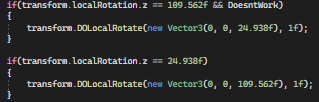
The second if statement is the one with the issue
slender nymph
why are you comparing floats like that? you should pretty much never compare floats for equality, use something like Mathf.Approximately. but also why the magic numbers
ivory bobcat
twin bolt
Why isn't this working, It seems to not be getting past the if statements. https...
What do you mean by getting past the if statement? Are there any errors or are you referring to the statements never being true?
twin bolt
ivory bobcat
What do you mean by getting past the if statement? Are there any errors or are y...
Nope no console errors. The object just isn't rotating. Without the if statement they rotate just fine.
rich adder
unless you set something to 24.938 aint no way thats gonna happen. Ah yess you're using quaternion as they were euler
ivory bobcat
Rotation would be a quaternion, so consider not to even bothering evaluating it.
slender nymph
oh yeah those numbers are way off for a quaternion, which is normalized
twin bolt
rich adder
unless you set something to 24.938 aint no way thats gonna happen. Ah yess you'r...
The object starts at 24.938
twin bolt
slender nymph
oh yeah those numbers are way off for a quaternion, which is normalized
Oh ok
rich adder
yes eulerangles and quaternions are different
slender nymph
and even if they were the values you see in the inspector for its euler angles, you should never base your logic on the euler angles like that since they are interpreted from the quaternion at the time you read them. and rotations can be expressed in a very large number of ways using euler angles
amber spruce
ivory bobcat
Maybe consider using quaternion slerp for rotations
any idea how i can make it so it does that but rotates to look at the player?
rich adder
amber spruce
any idea how i can make it so it does that but rotates to look at the player?
https://gamedevbeginner.com/the-right-way-to-lerp-in-unity-with-examples/#lerp_rotation
just replace it with slerp
amber spruce
ok thanks
late burrow
how i make class with lists that doesnt start as null
wintry quarry
use a field initializer
late burrow
i added = new List<string> to them next to class but they still output as null
i dont want manually activate each of them
wintry quarry
late burrow
i added = new List<string> to them next to class but they still output as null
wdym by "they output as null"? Show your code.
wintry quarry
show your code
late burrow
wwhen i create new followdata i want lists to already be done
 slender nymph
that's what will happen there. the lists will not be null when you create an instance of that class
late burrow
they are null
slender nymph
show where you are seeing that they are null
wintry quarry
late burrow
they are null
What makes you think that?
 dense root
How do you setup dialog for multiple characters? Right now I have it ghetto rigged as a string in a script but what if if I want to reuse the same dialog system for other characters?
    private string[] dialog =
        { "こんいちは",
        "The poor bell is jammed, it's like the heart of the town has stopped beating.",
        ""};
ok it was because i was confusing i with ii
 frosty hound
Don't hardcode the array of strings, serialize it to the inspector and add it there for each NPC
wintry quarry
dense root
How do you setup dialog for multiple characters? Right now I have it ghetto rigg...
Dialogue systems are complicated. A good first step is maybe make a ScriptableObject where you can store dialog and reference it from a character.
dense root
Oh smart, smart.
frosty hound
(though architecturally speaking, this isn't the greatest method, but just to answer your question)
late burrow
also how can i make array of that class to autofill itself
dense root
That's a fairly simple way to go about doing it, thank you so much
wintry quarry
late burrow
also how can i make array of that class to autofill itself
define "autofill"
late burrow
new followdata[] to have all in array not null
wintry quarry
Assuming it's an array of a class, you have to populate it
for(int i = 0; i < followdata.Length; i++) {
  followdata[i] = new Something();
}``` for exampleso regular way
wintry quarry
yes, the regular way
late burrow
thought i maybe can add [notnullable] something
wintry quarry
if it's an array of a struct, it will already bne filled with the default version of the struct, since structs cannot be null
slender nymph
but you should also note that structs cannot have field initializers
late burrow
so struct will make it both autofilled and lists autofilled
slender nymph
so reference types stored in the struct, like lists will default to null
late burrow
aw
wintry quarry
late burrow
so struct will make it both autofilled and lists autofilled
arrays are always autofilled with the default value for the type
For classes, the default value is null
For structs, it's a zeroed-out version of the struct
late burrow
oh i realized i dont want go by adds but by exact indexes
can i for example access 1000 index of list and it will auto extend to that range?
late burrow
hmm so whats the best way for array of unknown length which i want to fill out with nulls in middle in some cases
wintry quarry
wintry quarry
Consider either a large enough array, or a `Dictionary<int, MyClass>`
answered here
late burrow
isnt dictionary just list but double?
late burrow
ah right using ints in non index way
wintry quarry
the int would be an index in the example of Dictionary<int, MyClass>
technically called a "key" but it serves the same purpose
dense root
Hmm I'm stumped, my dialog system works for one character's interaction but when I apply the same thing to another character they refuse to speak lol
https://gdl.space/lifekeseni.cs
The problem is that it won't set canvasDialog.SetActive(true) for some odd reason
Oh here we go, I'm getting an error message now
 wintry quarry
dense root
Oh here we go, I'm getting an error message now
wintry quarry
dense root
Oh here we go, I'm getting an error message now
read the full error - it will give you a filename and line number
on that line, you are trying to access a GameObject that has been destroyed
dense root
But I'm not destroying anything as far as I understand. I mean obviously I am destroying something but I don't get where that could possibly take place
wintry quarry
wintry quarry
read the full error - it will give you a filename and line number
Start with this
filename and line number
Read it, or you're flying blind and guessing
dense root
I'm setting it to false at the beginning manually but other than that there's no reference to it being destroyed
 wintry quarry
dense root
I'm setting it to false at the beginning manually but other than that there's no...
wintry quarry
dense root
I'm setting it to false at the beginning manually but other than that there's no...
DID you do what I mentioned yet
read the error
you seem to be ignoring that part
and trying to skip ahead
you need to know the filename and line number where it's taking place. Without that, you're wasting your time.
 teal viper
There should be an error thrown every time someone doesn't read the error properly
slender nymph
but they would need to read that new error too which probably won't happen
 slender bridge
Also do a find all for "Destroy" in your project files
slender nymph
it's likely due to a scene change not an actual Destroy call
slender bridge
true but you never know lol
slender nymph
sure, but i am also pretty familiar with their project at this point. but they still need to read the stack trace for the error to see where it is actually coming from
dense root
The error disappeared
teal viper
slender nymph
but they would need to read that new error too which probably won't happen
A recursion that would result in a crash. A worthy punishment.🧌
slender nymph
dense root
The error disappeared
don't worry. if you did nothing to fix it, it will be back
dense root
Yeah I cannot replicate the aforementioned console error
I'm really confused how it's working for another character but not the one that was duplicated. I made some adjustments to address the null error but i'm pretty sure that won't fix it
    private void OnTriggerExit2D(Collider2D collision)
    {
        hasEntered = false;

        if (canvasDialog != null)
        {
            canvasDialog.SetActive(false);
        }
        dialogInt = 0;
    }
have you actually confirmed this is the source of the issue?
wintry quarry
dense root
I'm really confused how it's working for another character but not the one that ...
have you looked at the filename and line number of the error yet?
dense root
Yeah I double clicked the console error and checked the offending line
wintry quarry
and which line was that
dense root
canvasDialog.SetActive(false);
wintry quarry
the one in OnTriggerExit2D?
dense root
Yeah
slender nymph
and how is canvasDialog assigned
dense root
 wintry quarry
Ok what oyu shoudl do then is this:
        if (canvasDialog == null)
        {
            Debug.Log($"CanvasDialog was null on {name}!", this.gameObject);
}```is this object perhaps a DontDestroyOnLoad object?
dense root
slender nymph
is this object perhaps a DontDestroyOnLoad object?

If I'm reading this correctly, no
dense root
This is a screenshot of the game running
wintry quarry
anyway you may simply have a copy of this script on an object in the scene which is referring to an object you destroyed
dense root
I don't get how I'm destroying something when I don't have that call anywhere in my scripts
slender bridge
dense root
I'm really confused how it's working for another character but not the one that ...
You say it works on the primary object and then doesn't on the duplicated one, have you checked the inspector to make sure everything is still referenced correctly ? and that the game object is active when you need it again ?
slender nymph
you should pause execution when that variable is null so you can inspect wtf is happening. you can use Debug.Break() to pause play mode. or just don't null check and enable error pause on the consoel
also, unrelated to the issue (probably) but you don't need separate components for "Girl Dialog" and "Boy Dialog" and stuff if it's just to display dialog. you can reuse the same component
dense root
Oh okay, let me go back to the drawing board and see what I can come up with, i'll try that Debug.Break() trick technique
slender bridge
As boxfriend said, you just need to create a prefab that you can instantiate when you need it and just update the text if its a simple dialog with no uniqueness
slender nymph
i mean, it doesn't need to be a prefab. just reuse the same component type, the copy with a different name does exactly the same thing just uses different values for its serialized variables
dense root
So I figured it out, because of the way I've implemented dialog system I actually need to have an empty string so that it can iterate upon it
slender nymph
huh?
dense root
I think the way I did this line
https://gdl.space/laxahizemo.cs
            // When it reaches end of dialog/array, set dialog canvas to inactive.
            if (dialogInt >= dialog.Length)
            {
                canvasDialog.SetActive(false);
                // Reset dialogInt to 0 so you can speak to them again
                dialogInt = 0;
            }
i don't see how any of that would cause the error you were experiencing
dense root
Yeah I'm confuddled too
slender nymph
did you bother doing what i suggested and actually look at what is happening in your scene at the time the error occurs? or are you just taking wild guesses about what is causing it? because it seems like you are doing the latter
dense root
I can't, because the error refuses to reproduce
slender nymph
well yes, you're specifically preventing the error now. put the debug.break in the else statement with that debug.log call
slender nymph
what did you do before when it was throwing the error? do exactly that
slender nymph
don't tell me . . . was it throwing the error when you left play mode? and not during play mode?
dense root
Yes
slender nymph
maybe say that next time so that we don't have to go through all of this pointless debugging
OnTriggerEnter2D will be called when exiting play mode or leaving a scene when there is a trigger overlap happening in the scene at the time you do that
dense root
Oh that makes sense, well I'm glad we fixed it
slender nymph
so if you were exiting play mode while within the trigger that caused that OnTriggerEnter2D then it will call that method and because everything is in the process of being destroyed at that time you get that error.
for some reason unity said this is expected behavior and not a bug
 high walrus
I'm trying to make it so that I can pause and unpause the game using the escape key, right now pausing does not work but unpausing does, I don't understand why
this is the code
it doesn't even do the debug
This is the correct image

if I manually set gamepaused to true and the pause menu to active escape does work to unpause the game, but pausing does not work
I tried to just have the if gamePaused == true (for unpausing which does work) and placing the pausing code in else, same result
nvm I'm an idiot I fixed it, I'll explain how. The script was linked to the main menu, which is DISABLED by default. that's why the script didn't work. I attached it to Canvas instead not which is active. Might not be the best place to link it but it seems to work now
wintry quarry
high walrus
This is the correct image
But also look at your logic
You set it to true right before checking if it's true
high walrus
Yeah I noticed that right after, changed it into an else
I've got a fun new issue to deal with now 😂
Pausing using the escape key now works fine, but in ever level except the first I can't click my buttons
I didn't have EventSystem gameObjects in those scenes, seems to work fine now
Though I don't really understand what the eventSystem does, that it's needed for buttons but not other scripts
wintry quarry
high walrus
Though I don't really understand what the eventSystem does, that it's needed for...
It handles all the UI interaction events
high walrus
Gotcha, thanks!
 violet glacier
How do I sync runtime frames with animation frames? For example, I have an animation that shoots a bow at frame 50 (in the animation controller) and I want to do something. However, this code executes faster than the animation
int frame = 0;
while (true) {
  if (frame == 50) {
    // do something
    break;
  }
  frame++;
  yield return null;
}
How do I do this without using animation events?
 zenith cypress
Without Animancer (paid asset), probably not easily without animation events 
 faint sluice
Does Time.UnscaledTime or Time.RealtimeSinceStartUp work on application's internal clock or uses System's time as reference?
faint sluice
violet glacier
How do I sync runtime frames with animation frames? For example, I have an anima...
~~You're using a while outside of coroutines, this will cause the entirety of this codeblock to run within single frame.
Idk if animation frames are in sync with application's frame rate or not but just in case you can try to execute this inside a coroutine, and use yield return null; to seperate each frame inside the while loop~~
violet glacier
faint sluice
~~You're using a while outside of coroutines, this will cause the entirety of th...
yep, thanks that was a typo I forgot to include it. However, the do something actually executes much earlier than animation frames, seems like they are not in sync
faint sluice
violet glacier
yep, thanks that was a typo I forgot to include it. However, the do something ac...
Yeah, i guess animation events would be the way to go then
violet glacier
I can't use animation events because if I have more "do something" (e.g. 1000), I would need to create 1000 animation events which is not feasible
teal viper
violet glacier
I can't use animation events because if I have more "do something" (e.g. 1000), ...
You only need one generic "do something" event and the logic would be based on what animation/state fired it and what object receives the event.
Unless you have 1000 different animations that need different events..?
 olive lintel
hey all, having some trouble right now with an editor window I'm trying to make, I have the MenuItem attribute set up correctly, as it works with my other editor window I've made before, but for some reason this one doesn't seem to appear in the window tab?
the "MarcLerp" editor window is my own custom tool I've made earlier and been using for a couple months, however my new one doesnt seem to appear :/


both inherit from editor window
faint sluice
olive lintel
the "MarcLerp" editor window is my own custom tool I've made earlier and been us...
Not a topic in familiar with but does #if unity editor have anything to do with it maybe?
Also on GUI
olive lintel
faint sluice
Not a topic in familiar with but does #if unity editor have anything to do with ...
I have
using UnityEditor;
#endif```
at the start of each of themYou also don't need to wrap your stuff in that if you put your editor window/editor specific code in an /Editor/ folder
olive lintel
zenith cypress
You also don't need to wrap your stuff in that if you put your editor window/edi...
the reason I dont have it in an editor folder is because when I originally built the tool I was a lot less experienced, and now theres ~800 lines of code that can't be called from another monobehaviour if its inside the editor folder 🥲
faint sluice
faint sluice
Does Time.UnscaledTime or Time.RealtimeSinceStartUp work on application's inter...
Bumping cuz got scrolled up. If anyone knows answer much helpful
 eternal needle
violet glacier
I can't use animation events because if I have more "do something" (e.g. 1000), ...
eternal needle
violet glacier
I can't use animation events because if I have more "do something" (e.g. 1000), ...
if you can declare somewhere when you want this event to happen, like at 50% or 0.5 through the animation, then you can just try checking the normalized time https://docs.unity3d.com/ScriptReference/AnimatorStateInfo-normalizedTime.html
Or have a timer which runs at the same time you start the animation.
I use my own timer and it works well, assuming you arent taking into consideration stuff like transitioning which may cause your animation to not play fully. I define a total length which is how long the animation should play, then use another value (0 to 1), which indicates how long into the animation an event should happen.
faint sluice
olive lintel
the reason I dont have it in an editor folder is because when I originally built...
That's why you seperate editor scripts and gameplay scripts 
olive lintel
faint sluice
That's why you seperate editor scripts and gameplay scripts <:sadok:106811422362...
problem is its an editor monobehaviour
like it only executes code in the editor
its for like positions and stuff
its super janky
eternal needle
faint sluice
Does Time.UnscaledTime or Time.RealtimeSinceStartUp work on application's inter...
https://docs.unity3d.com/ScriptReference/Time-unscaledTime.html
time in seconds since the start of the game
olive lintel
its made of sellotape
but instead of rebuilding it I kept adding to it and now its like a bomb inside my computer
eternal needle
olive lintel
problem is its an editor monobehaviour
well clearly not, if you said another monobehaviour is calling code on it
faint sluice
eternal needle
<https://docs.unity3d.com/ScriptReference/Time-unscaledTime.html>
> time in seco...
So if i blackout and change the system's time, and come back, it will say whatever time has physically passed regardless of what my system's time says?
 river pecan
I'm trying make line of sight in a 3d space. I'm trying to use a mesh at runtime to get a cone shape, however I don't understand the problem that is happening when setting the vertex positions. When the player moves, the origin vertex moves in a different direction than the player, the rotation of the mesh also does not follow the players rotation. I have very little experience with making meshes this way so I'm coming here to ask what I'm doing wrong with the meshes positions.

 olive lintel
eternal needle
well clearly not, if you said another monobehaviour is calling code on it
olive lintel
eternal needle
well clearly not, if you said another monobehaviour is calling code on it
theres a monobehaviour that basically calls a function in the editor window when saving/updating data basically
eternal needle
faint sluice
So if i blackout and change the system's time, and come back, it will say whatev...
i have no clue what "blackout" means in this case. Its literally just the time since the start of the game
faint sluice
eternal needle
i have no clue what "blackout" means in this case. Its literally just the time s...
Blackout as in don't close the game but just put it in background or minimize
Onapplicationpause = true if you will
river pecan
river pecan
I'm trying make line of sight in a 3d space. I'm trying to use a mesh at runtime...
I've noticed the first vertex will follow the player if I set it to Vector3.zero
So I thought it was using localPosition since the object is a child of the player
faint sluice
eternal needle
i have no clue what "blackout" means in this case. Its literally just the time s...
I get that by documents as well, question is does the time since start of the game get calculated via internal clock? Or does it refer the system's clock for calculation
eternal needle
olive lintel
theres a monobehaviour that basically calls a function in the editor window when...
why? maybe try doing it in reverse, have the editor window grab what it needs rather than being given the data. That'll be an easy way to not rely on such editor scripts.
Just curious, can you even build the game? EditorWindow is under UnityEditor
river pecan
river pecan
So I thought it was using localPosition since the object is a child of the playe...
But using every conversion to world position I found online for the vertex didn't work when setting the position to the position of the object
eternal needle
faint sluice
I get that by documents as well, question is does the time since start of the ga...
im not sure how its calculated honestly or how it is affected in such case
Theres more information here but you might just wanna test that case you're asking about
https://docs.unity3d.com/Manual/TimeFrameManagement.html
faint sluice
eternal needle
im not sure how its calculated honestly or how it is affected in such case
There...
It sounds like it's calculated internally, but yeah I guess I'll need to actually test this first. Thanks!
olive lintel
eternal needle
why? maybe try doing it in reverse, have the editor window grab what it needs ra...
yeah I dont have it in the editor folder but the game runs fine
river pecan
My only thought was that it was using local position, however even this code doesn't fix the issue
        Vector3[] verticies = new Vector3[3];
        Vector2[] uv = new Vector2[3];
        int[] triangles = new int[3];
        verticies[0] = transform.TransformPoint(transform.position);
        verticies[1] = transform.TransformPoint(transform.position + transform.forward);
        verticies[2] = transform.TransformPoint(transform.position + transform.right);
        uv[0] = new Vector2(0, 0);
        uv[1] = new Vector2(0, 1);
        uv[2] = new Vector2(1, 1);
        triangles[0] = 0;
        triangles[1] = 1;
        triangles[2] = 2;
        mesh.vertices = verticies;
        mesh.uv = uv;
        mesh.triangles = triangles;
 eternal falconBOT
Posting code
📃 Large Code Blocks
Use links to services like:
https://gdl.space/, https://paste.ofcode.org/, https://hatebin.com/, https://paste.myst.rs/, https://hastebin.com/
📃 Inline Code
Surround code with three backquotes. Not quotation marks.
To format as C#, add cs to the first line:
```cs
// Your code here
```
Add a comment with a line number if there is an error message.
Posting code
📃 Large Code Blocks
Use links to services like:
https://gdl.space/, https://paste.ofcode.org/, https://hatebin.com/, https://paste.myst.rs/, https://hastebin.com/
📃 Inline Code
Surround code with three backquotes. Not quotation marks.
To format as C#, add cs to the first line:
```cs
// Your code here
```
Add a comment with a line number if there is an error message.
Posting code
📃 Large Code Blocks
Use links to services like:
https://gdl.space/, https://paste.ofcode.org/, https://hatebin.com/, https://paste.myst.rs/, https://hastebin.com/
📃 Inline Code
Surround code with three backquotes. Not quotation marks.
To format as C#, add cs to the first line:
```cs
// Your code here
```
Add a comment with a line number if there is an error message.
 scenic burrow
New to scripting so bear with me. I am making a simple game where the player is controlling a plane that is constantly moving forwards, which they have to guide through hoops without crashing. The plane is also meant to be restricted to certain boundaries so they cannot go off screen. I was able to get that portion right, but because of that I cant make it move forwards which should be simple. How can I fix this?
 scenic burrow
To move the plane forward, I use a simple one line code which works, but since I am using a new Vector3 to add the restrictions, I am forced to set the value to 0 based on my understanding.

 charred spoke
You are not forced to set it to 0 you can store the result of your transfrom.forward calc in a variable and put that as the z value of your clamped transform
 abstract finch
I need to send a raycast x degrees from a transform forward. What would be the best approach to get the direction? I would like to add that I plan on doing subsequent raycasts all the way to the back of the transform.
 eternal needle
scenic burrow
New to scripting so bear with me. I am making a simple game where the player is ...
eternal needle
scenic burrow
New to scripting so bear with me. I am making a simple game where the player is ...
you should configure your !ide
eternal falconBOT
💡 IDE Configuration
If your IDE is not autocompleting code
or underlining errors, please configure it.
Select one:
• Visual Studio (Installed via Unity Hub)
• Visual Studio (Installed manually)
• VS Code
• JetBrains Rider
• Other/None
eternal needle
abstract finch
I need to send a raycast x degrees from a transform forward. What would be the b...
You can rotate a vector with a quaternion, scroll to the 2nd description
https://docs.unity3d.com/ScriptReference/Quaternion-operator_multiply.html
though im not sure what direction you're trying to get from the question
scenic burrow
Actually I had another thought. My goal is to have the player fly towards rings which they need to fly through and not hit. Would it be smarter to make the player be stuck on the z axis and have the rings come towards me?
abstract finch
eternal needle
You can rotate a vector with a quaternion, scroll to the 2nd description
<https...
Thanks, I think this is it.
Actually I'm not sure I need to fire a ray towards this direction so it needs to be a v3
eternal needle
scenic burrow
Actually I had another thought. My goal is to have the player fly towards rings ...
depends entirely on the type of game this is. Like an infinite scroller, then yea this could be a possibility
scenic burrow
I think Im going to go that route. Thank you!
eternal needle
abstract finch
Actually I'm not sure I need to fire a ray towards this direction so it needs to...
public static Vector3 operator *(Quaternion rotation, Vector3 point); guess what it returns 😛
abstract finch
eternal needle
`public static Vector3 operator *(Quaternion rotation, Vector3 point);` guess wh...
Ahhh
 nova swift
I ran into a bug in a game of mine (platformer with similar physics to sonic), where a particular aspect of the physics appeared to be frame dependent. I attempted to replicate it in a new project in a much simpler manner to make debugging easier, and it seems the frame dependency carried over, but I don't really understand why there is frame dependency, or if that's actually what the issue is.
To me it looks like the issue is frame dependency, as the blue cube goes faster and higher the lower the frame rate, shown in the video. I also don't believe Time.fixedDeltaTime is ever getting changed, only the target frame rate, and I don't think the two are related. If the issue is frame dependency, could anyone point out what the issue is in the code? The code is pretty simple and short, as seen in the video, though a particular if statement is pretty specific to this physic sticking.
eternal needle
nova swift
I ran into a bug in a game of mine (platformer with similar physics to sonic), w...
from a quick glance, i see rotation is frame rate dependant. Try getting this value in fixedupdate from the rb.rotation.
also with transform.position, replace that with rb.position
nova swift
will give it a try
It looks to me as if the issue still persists
Here is what I changed in the code, perhaps I still left something unchanged: https://paste.ofcode.org/yt2Wi5FbSUyww4yYV9AzQ9
eternal needle
nova swift
Here is what I changed in the code, perhaps I still left something unchanged: ht...
unless im missing something else, it could be because of still using stuff like transform.right and all that. You could calculate it from the rb rotation with Quaternion * Vector3.
like Vector3 forward = rb.rotation * Vector3.forward, and similar with the others.
nova swift
Could give that a try, I do wonder if any of the maths is frame dependent, tho I've been told that may only be the case if Time.fixedDeltaTime was to change
eternal needle
One sanity check you could do is print out some info from fixed update, save that somewhere (maybe even just write to file) and compare the 2 tests. You could see stuff like at which time they actually have a difference, maybe one is considered sloped or grounded while the other isnt
nova swift
Fair enough, I did remove all the ground there was, and it seems the issue was just based around the slope bit, as the blue sprite would go around the circle much faster at 60fps compared to 240fps
eternal needle
there is something im unsure of so i will test something, that it may even just be related to those ground checks and how it is using groundCheck.position.
nova swift
alright, I'm quite confused as to why there appears to be frame dependency so I could assume I'm missing something that may be obvious
eternal needle
hm these shouldnt even really be issues cause its being called from fixedupdate but i also am not sure if theres a difference in 2d objects
nova swift
yea I find it quite strange
in my original project I thought the issue would relate to how I retrieve inputs or even just something in the Update() function messing it up, but here with all those potential problems seemingly gone, I'm quite lost
eternal needle
nova swift
in my original project I thought the issue would relate to how I retrieve inputs...
im willing to bet its because of the child object, or the transform.right/those directions being used at least
were u able to change those?
from a quick test, at decent speeds and interpolate turned on there is actually a significant difference
nova swift
currently trying to change the transform.right stuff into rb.rotation things
would
Vector3 rightDirection = new Vector3(Mathf.Cos(rb.rotation * Mathf.Deg2Rad), Mathf.Sin(rb.rotation * Mathf.Deg2Rad), 0);
            Vector3 upwardDirection = new Vector3(Mathf.Sin(rb.rotation * Mathf.Deg2Rad), Mathf.Cos(rb.rotation * Mathf.Deg2Rad), 0);
be a correct way of getting the directions with rb.rotation?
eternal needle
eternal needle
unless im missing something else, it could be because of still using stuff like ...
nah just this, unity does the math for you already
 bold osprey
using UnityEngine;
using UnityEngine.InputSystem;
using UnityEngine.VFX;
public class Domain : MonoBehaviour
{
[SerializeField] private VisualEffect vfx;
[SerializeField] private InputActionReference vfxSpawnKey;

[SerializeField] private InputActionReference WarpSpawnKey;

[SerializeField] private VisualEffect Warp;
private void Awake()
{
    vfxSpawnKey.asset.Enable();
    vfxSpawnKey.action.performed += OnVfxKeyPressed;
    WarpSpawnKey.asset.Enable();
    WarpSpawnKey.action.performed += OnVfxKeyPressed;
}

private void OnDestroy()
{
    vfxSpawnKey.action.performed -= OnVfxKeyPressed;
    WarpSpawnKey.action.performed -= OnVfxKeyPressed;
}

private void OnVfxKeyPressed(InputAction.CallbackContext obj)
{
    if (vfx != null)
        vfx.Play();
    else
        Debug.Log("There is no vfx attached to this component");
    if (Warp != null)
        vfx.Play();
    else
        Debug.Log("There is no vfx attached to this component");
}
}
using a Reinit(); how do i stop warp vfx after 15 seconds
nova swift
eternal needle
nah just this, unity does the math for you already
So if I'm in 2d and I want to get the right direction of the transform, I would do
Vector3 right = rb.rotation * Vector3.right
?
eternal needle
nova swift
So if I'm in 2d and I want to get the right direction of the transform, I would ...
ye doesnt matter if ur in 2d or not. transform.right is a vector3 anyways. theres a conversion done for you from Vector3 to Vector2 that allows you to use it anyways
we can make a thread for this also, might take some more messages
nova swift
Do I have to convert rb.rotation into something else first? Am I not multiplying Vector3.right by 0 if the player is flat on the ground, thus making a Vector3.zero?
nova swift
eternal needle
we can make a thread for this also, might take some more messages
That's fine by me, thanks for your help this far :)
 simple furnace
Hey, can anyone please help with getting a decent rotation camera going? Been searching for hours on YouTube for a script and found almost nothing..
 burnt vapor
bold osprey
using UnityEngine;
using UnityEngine.InputSystem;
using UnityEngine.VFX;
public...
burnt vapor
bold osprey
using UnityEngine;
using UnityEngine.InputSystem;
using UnityEngine.VFX;
public...
!code
eternal falconBOT
Posting code
📃 Large Code Blocks
Use links to services like:
https://gdl.space/, https://paste.ofcode.org/, https://hatebin.com/, https://paste.myst.rs/, https://hastebin.com/
📃 Inline Code
Surround code with three backquotes. Not quotation marks.
To format as C#, add cs to the first line:
```cs
// Your code here
```
Add a comment with a line number if there is an error message.
bold osprey
burnt vapor
!code
ty
burnt vapor
bold osprey
ty
I was pointing out that you should format your code? Is there an issue?
scenic burrow
When setting up a spawn manager, should the function of the object be done in the spawn manager script or should I make it a seperate script? I am just trying to make them move in a certain direction until they pass the player
burnt vapor
scenic burrow
When setting up a spawn manager, should the function of the object be done in th...
What do you mean with function of the object?
The actual spawning?
abstract finch
```float angleSection = 180 / _numberOfRays; Create Radial ````
Is there a reason why I'm unable to produce a ray behind the transform?
{
Quaternion rotation = Quaternion.AngleAxis(angle, Vector3.up);
Vector3 rotatedPoint = rotation * transform.TransformDirection(0, 0, length);
return rotatedPoint;
}``` scenic burrow
burnt vapor
What do you mean with `function of the object`?
scenic burrow
burnt vapor
What do you mean with `function of the object`?
Like the thing they are meant to do. Simply wanting them to fly towards player while they need to dodge them. Would I set that up in the spawn manager script or make the script the child of the object
I pretty much got them to spawn but haven’t done the actual movement part so they come towards player
 storm dove
im having this problem where in vs some of my code that should be color coded just isnt, is there a setting that i need to change in vs or something that i need to do to get the colors back?
 languid spire
storm dove
im having this problem where in vs some of my code that should be color coded ju...
languid spire
storm dove
im having this problem where in vs some of my code that should be color coded ju...
!ide
eternal falconBOT
💡 IDE Configuration
If your IDE is not autocompleting code
or underlining errors, please configure it.
Select one:
• Visual Studio (Installed via Unity Hub)
• Visual Studio (Installed manually)
• VS Code
• JetBrains Rider
• Other/None
storm dove
cool, that worked thanks 🙂
simple furnace
Hey so like, is there a code out there to decide spawn points like something with coordinates?
halcyon geyser
sure
languid spire
simple furnace
Hey so like, is there a code out there to decide spawn points like something wit...
what does that question even mean? If you are, again, asking for a code handout, you have been told on more than one occasion that this server does not work like that
simple furnace
languid spire
what does that question even mean? If you are, again, asking for a code handout,...
I am just asking if theres actually a code out there in Unity which makes things spawn in a certain place based on coordinates.
languid spire
why dont you read the documentation on Instantiate
 green ether
simple furnace
I am just asking if theres actually a code out there in Unity which makes things...
simple furnace
green ether
https://docs.unity3d.com/ScriptReference/Object.Instantiate.html
green ether
simple furnace
I am just asking if theres actually a code out there in Unity which makes things...
simple furnace
green ether
https://docs.unity3d.com/ScriptReference/Object.Instantiate.html
Yeah just read it, still making little to no sense to me.
late burrow
i want make custom string type which holds variables of different variations of same string, which thing is best
languid spire
late burrow
i want make custom string type which holds variables of different variations of ...
you mean between a struct and a class ?
 queen adder
should i start by learning general c# or unity specific c#
languid spire
queen adder
should i start by learning general c# or unity specific c#
general, at least the very basics
queen adder
alrighty thanks
languid spire
queen adder
alrighty thanks
Microsoft
Free courses, tutorials, videos, and more to learn to program in C#. Resources from the .NET team, .NET community, and training companies.
languid spire
late burrow
so between class and interface
interface is not going to work for you. So that leaves class
 rare basin
Anyone can help me fixing my IDE? 0 errors in the console, can enter playmode and build just fine

yet i have a lot of errors in the IDE itself
a lot of namespaces cannot be found like using TMPro; using UnityEngine.UI;
languid spire
rare basin
open Solution Explorer, Right click on solution, reload with dependencies
languid spire
what IDE ?
rare basin
vs 22
languid spire
should work. Screenshot complete window
 buoyant meteor
hey I have some code that im using to give 2d objects a fake height. my issue is when i give the object im testing on a rotation of any kind and want my x position to
move based on the objects rotation, it still goes off its world position of x. Also how do I type my code in chat properly?
 verbal dome
buoyant meteor
hey I have some code that im using to give 2d objects a fake height. my issue is...
verbal dome
buoyant meteor
hey I have some code that im using to give 2d objects a fake height. my issue is...
!code
eternal falconBOT
Posting code
📃 Large Code Blocks
Use links to services like:
https://gdl.space/, https://paste.ofcode.org/, https://hatebin.com/, https://paste.myst.rs/, https://hastebin.com/
📃 Inline Code
Surround code with three backquotes. Not quotation marks.
To format as C#, add cs to the first line:
```cs
// Your code here
```
Add a comment with a line number if there is an error message.
buoyant meteor
!code private void BodyPosition()
        {
            if (onGround)
            {
                return;
            }

            if (!onGround || body.transform.position.y > shadow.transform.position.y)
            {
                parentObj.transform.rotation = new Quaternion(0,0,rotation,1);
                // body.transform.rotation = new Quaternion(0,0,rotation,1);

                verticleVelocity += gravity * Time.deltaTime;
                body.transform.localPosition += new Vector3(0, verticleVelocity, 0) * Time.deltaTime;

                parentObj.transform.position += new Vector3(horizontalVelocity, 0, 0) * Time.deltaTime;
                // shadow.transform.localPosition += new Vector3(horizontalVelocity, 0, 0) * Time.deltaTime;
            }

            if (body.transform.position.y <= shadow.transform.position.y)
            {
                onGround = true;
                verticleVelocity = 0;
                horizontalVelocity = 0;
                body.transform.position = new Vector3(shadow.transform.position.x, shadow.transform.position.y, 0);
                // gameObject.transform.position = body.transform.position;

                transform.rotation = Quaternion.identity;
            }
        }
Posting code
📃 Large Code Blocks
Use links to services like:
https://gdl.space/, https://paste.ofcode.org/, https://hatebin.com/, https://paste.myst.rs/, https://hastebin.com/
📃 Inline Code
Surround code with three backquotes. Not quotation marks.
To format as C#, add cs to the first line:
```cs
// Your code here
```
Add a comment with a line number if there is an error message.
verbal dome
Don't do the command, read the bot's message instead ^
rare basin
languid spire
should work. Screenshot complete window
updating vs22 version didn't work, im installing english language now and i'll send a screenshot
there is no such thing as reload with dependencies

 night mural
rare basin
night mural
rare basin
try regenerating project files?
Edit->Preferences->External Tools->Regenerate Project Files
halcyon geyser
you need the csproj files
rare basin
ik
that's not the issue

my IDE just doesnt recognize some unity namespaces
but i have 0 errors in the console and can enter playmode and build etc
 teal viper
rare basin
teal viper
rare basin
Try regenerating project files
rare basin
I did try that several times
teal viper
What checkboxes do you have ticked there?
teal viper
What can you tick?


 teal viper
Try deleting the csproj and sln files and regenerating
rare basin
all of them?
teal viper
Yes
rare basin
worked partially
for some namespaces

now it doesnt only recogznice DOFade on canvas group component
from DOTween asset
but it works, no errors etc
teal viper
Is is an extension method or something?
 weak grove
hello my loverlies, did my first bit of c# without an example to follow yesterday , its silly its noob but honestly it made me so happy LOL
 burnt vapor
weak grove
burnt vapor
weak grove
Welcome to C#
weak grove
😄 😄 😄
 summer creek
guys do you have any similar enemy AI code like the horror game granny?
patrolling and smart Ai thing
 whole lark
Hi, in the following asset I made the mistake, that I built it and when I opened the menu of the game, I changed the resolution from 1920x1080 to 800x600. It was now a small window and it looked pixelated. I tried to undo it, but it doesnt work. after a lot of searching I gave up and deleted the project and imported the asset to a new project. I built it and opened the game. It is still 800x600... does anyone know how to fix that? (Here the link to the asset: https://github.com/DevionGames/inventory-sytem)

 silent bone
need some help on how to start dm me
burnt vapor
silent bone
need some help on how to start dm me
!learn
eternal falconBOT
:teacher: Unity Learn ↗
Over 750 hours of free live and on-demand learning content for all levels of experience!
burnt vapor
Alternatively see the pinned messages, check https://unity.huh.how/ or use 
whole lark
whole lark
Hi, in the following asset I made the mistake, that I built it and when I opened...
btw here is the script for the resolution:
languid spire
whole lark
btw here is the script for the resolution:
!code
eternal falconBOT
Posting code
📃 Large Code Blocks
Use links to services like:
https://gdl.space/, https://paste.ofcode.org/, https://hatebin.com/, https://paste.myst.rs/, https://hastebin.com/
📃 Inline Code
Surround code with three backquotes. Not quotation marks.
To format as C#, add cs to the first line:
```cs
// Your code here
```
Add a comment with a line number if there is an error message.
languid spire
whole lark
is that right?
yes, the next question is, why is there absolutely no debugging in your code?
whole lark
... its not my code 👀 its just an asset
burnt vapor
whole lark
https://gdl.space/carefaxeba.cs
What happens when you log width and height just before calling Screen.SetResolution? What does this log?
Also, does it possible skip the if statements? You could also log these
whole lark
burnt vapor
Also, does it possible skip the if statements? You could also log these
oh okay... ill try it
languid spire
whole lark
... its not my code 👀 its just an asset
what has that go to do with anything, you have access to the source so you can debug it
 karmic kindle
Hey, I just wanted to check, do I need to use the line 'pTimer = timer' or is that irrelevant because the IEnumerator has already started etc..? ```cs public void DotEffect(string spell, float timer, float damage)
{
switch (spell)
{
case "Poison":
pTimer = timer;
pDamage = damage;
StartCoroutine(Poison(pTimer, pDamage));
Debug.Log("I've chosen poison > d = " + pDamage + ". t = " + pTimer);
return;
        default:

        return;
    }
}```
!code
eternal falconBOT
Posting code
📃 Large Code Blocks
Use links to services like:
https://gdl.space/, https://paste.ofcode.org/, https://hatebin.com/, https://paste.myst.rs/, https://hastebin.com/
📃 Inline Code
Surround code with three backquotes. Not quotation marks.
To format as C#, add cs to the first line:
```cs
// Your code here
```
Add a comment with a line number if there is an error message.
languid spire
karmic kindle
Hey, I just wanted to check, do I *need* to use the line 'pTimer = timer' or is ...
the assignment is irrelevant in the context of the coroutine but pTimer is a class scope variable so maybe it's being used elsewhere
karmic kindle
languid spire
the assignment is irrelevant in the context of the coroutine but pTimer is a cla...
Awesome, thanks. I'm moving my Dots into a new class, so I only added it to the class scope because I thought it was needed, I use it here for readability so wanted to check I'm not doing more than I should 🖖 - public IEnumerator Poison(float pTimer, float pDamage)
languid spire
if you are using class scope variables no need to pass them as parameters
karmic kindle
Unless I'm going the wrong direction, I plan to use the switch command for other things like "burn" etc.. so I'm thinking I do need to pass them?
languid spire
no, not at all
you may need to pass them into the coroutine so it has fixed values not affected by other processes
green ether
simple furnace
Yeah just read it, still making little to no sense to me.
How is that? It takes an object and instantiates it on the coordinates you specify
karmic kindle
languid spire
you may need to pass them into the coroutine so it has fixed values not affected...
That was part of my testing but my logic is hoping that "Tower > DotEffect(Poison, 4, 4)" > [2 second wait] > "Tower > DotEffect(burn, 5,2)" are not going to be effected by each other because the coroutine for poison has already been started?
languid spire
karmic kindle
That was part of my testing but my logic is hoping that "Tower > DotEffect(Poiso...
correct, if you pass the values as parameters. Value type paramaters have a fixed value at the time of the call
karmic kindle
languid spire
correct, if you pass the values as parameters. Value type paramaters have a fixe...
Thank you very much! (Again) Really appreciated 🖖 😇.
jovial forge
Dude, Unity learn is a great resource
 swift vessel
How do I make a moving platform without using the setparent method? in 2d
languid spire
swift vessel
How do I make a moving platform without using the setparent method? in 2d
why would you even need Setparent for a moving platform. Platforms dont have parents
 eager spindle
swift vessel
How do I make a moving platform without using the setparent method? in 2d
eager spindle
swift vessel
How do I make a moving platform without using the setparent method? in 2d
for your platform theres a part of the code where you add to its transform, smth like transform.position += moveDirection
you can then track if your player is in contact with the platform with OnCollisionEnter or OnCollisionExit. if the player is in contact with the platform when the platform is moving, you can also move the player
public bool inContanct
void Update() {
  transform.position += moveDirection;
  if(inContact) PlayerController.instance.transform.position += moveDirection
}
void OnCollisionEnter() {
  if(other.CompareTag("Player")) {
    inContact = true;
  }
}

void OnCollisionExit() {
  if(other.CompareTag("Player")) {
    inContact = false;
  }
}
not tested do not copypaste in
 timber tide
moving platform/elevator logic makes me cry
eager spindle
its not horrible unless you're using something else besides hardcoding to move your stuff
some days I use an animator because funni effects
but nowadays I just have a state machine and transform.position += moveDirection
timber tide
I'm not really sure the right way to go about it using rigidbodies. It's never smooth no matter what I try
timber tide
yeah unfortunately.
eager spindle
you can also track position delta
but still a bitch to use
idk how breath of the wild does it
AAA magic goes crazy
timber tide
It works for elevators since you can add that illusion, but moving platforms to jump between is a pain
eager spindle
eager spindle
```
public bool inContanct
void Update() {
transform.position += moveDirection...
this code works ok for jumping
just that it doesnt carry the velocity onto the player
swift vessel
@eager spindle Thanks, this worked great, but if I want the player to jump according to the speed of the platform while jumping, should I use rigidbody?
eager spindle
no
when collision exit, you can check the direction of the platform. use the direction of the platform to push the player
does your player have rigidbody?
swift vessel
yes
swift vessel
okay ı will try
 sonic dome
I'm using webgl platform unity
Is there any way I can make it so that let's say I use pun2
And I want to make it so that when I go to the link
And roomcode can be a I'd i have given and can I get that roomcode of the url and use in my code?
Ping me on reply
summer creek
guys do you have an enemyAI script patrolling around the map and if the player seen it will chase you
Reply to me or dm if u have one thank you!
summer creek
summer creek
guys do you have an enemyAI script patrolling around the map and if the player s...
unity 3d btw
eager spindle
sonic dome
I'm using webgl platform unity
Is there any way I can make it so that let's sa...
you cant really communicate from the webpage to your unity game. the dumb solution would be to host an external server, say in Flask.
the external server will serve your game at root. the external server will serve any extensions to your game as well, while attributing the device's MAC address to the game. when the game launches, it checks your external server to see if theres a room code cached for it
eager spindle
summer creek
guys do you have an enemyAI script patrolling around the map and if the player s...
i do but we won't code for you 😴
sonic dome
eager spindle
you cant really communicate from the webpage to your unity game. the dumb soluti...
I asked my lord and savior chatgpt he did send some interesting solutions
eager spindle
the approximate solution is to make a Frustrum raycast that's the same size as the camera, or a spherecast or whatever
when the raycast hits the enemy, activate the enemy, and turn on the enemy AI
sonic dome

 eager spindle
sonic dome
I asked my lord and savior chatgpt he did send some interesting solutions
eager spindle
sonic dome
I asked my lord and savior chatgpt he did send some interesting solutions
chatgpt 🤮
ill review it onesec
sonic dome
This one line makes me believe it
 summer creek
guys do you have an enemyAI script patrolling around the map and if the player s...
summer creek
summer creek
guys do you have an enemyAI script patrolling around the map and if the player s...
i have the enemy ai code but the prjblem is when i build the game, instead of the enemy patrolling the whole map it just spins around in one place😭
sonic dome
sonic dome
This one line makes me believe it
Application.externaleval()
summer creek
run i mean
summer creek
yes
eager spindle
which one
wintry quarry
sonic dome
I'm using webgl platform unity
Is there any way I can make it so that let's sa...
sonic dome
wintry quarry
Read this https://docs.unity3d.com/Manual/webgl-interactingwithbrowserscripting....
Thanks so much
lusty nest
Hi guys, I was trying to reset the scene using a script (as seen below) since I have to reset the positions, rotations and velocities of many gameobjects but my unity crashes everytime I execute the code. Do any of you have any alternatives to reset the scene ?
public override void OnEpisodeBegin()
{
SceneManager.LoadScene(SceneManager.GetActiveScene().name);
}
summer creek
eager spindle
navmesh? a*?
navmesh agent
navmeshsurface
wintry quarry
lusty nest
Hi guys, I was trying to reset the scene using a script (as seen below) since I ...
wdym by "crashes"?
lusty nest
wintry quarry
wdym by "crashes"?
By "crashes" I mean that the entire game engine freezes and i can't click on the window anymore
wintry quarry
lusty nest
By "crashes" I mean that the entire game engine freezes and i can't click on the...
Sounds like maybe you're doing something like reloading the scene as soon as the scene starts. That will make it reload the scene infinitely and crash Unity.
The solution is - don't do that
lusty nest
wintry quarry
Sounds like maybe you're doing something like reloading the scene as soon as the...
Ok I think I understand the problem now tysm👍
summer creek
summer creek
navmesh agent
navmeshsurface
and navmeshsurface
 dim wharf
Does add listener in buttons put it into a list of listeners of the button or does it replace the current listener?
languid spire
dim wharf
Does add listener in buttons put it into a list of listeners of the button or do...
what does the word 'add' suggest to you?
dim wharf
so it does add another listener. i was overthinking it too much
languid spire
good guess
wintry quarry
adds, yes
 tough trench
I am working on a idle game and I cant get number higher than 10,000,000,000,000,000,000 in my code for number notations does anyone if I can bypass this number?
wintry quarry
tough trench
I am working on a idle game and I cant get number higher than 10,000,000,000,000...
what datatype are you using to represent the number?
tough trench
a float
wintry quarry
tough trench
a float
welll that's a huge problem
you know there are precision limitations to simple datatypes like float right?
Most idle games use something like https://github.com/Razenpok/BreakInfinity.cs
swift crag
you'll get a much wider range if you use doubles instead of floats
polar acorn
wintry quarry
Most idle games use something like https://github.com/Razenpok/BreakInfinity.cs
Dang I was just about to post that library, you beat me to it
swift crag
but "BigNumber" data types are appropriate for completely ridiculous sizes
tough trench
Ok thank you
swift crag
It looks like this just uses a long for the exponent and a double for the mantissa
so it's conceptually similar to a 128-bit float
slender nymph
you know, recent versions of c# have a 128 bit integer now. where's my 128 bit float. I demand a System.Quadruple
 quick pollen
@hollow dawn first of all, you shouldnt have multiple controller.Move() calls in update, you should only have a single one which handles all of them