
#💻┃code-beginner
1 messages · Page 365 of 1
 dense root
 timber tide
with what method
timber tide
honestly, if you're not shooting projectiles at 50+ units a second you can use either
 shy ruin
I was changing the transform of the player, which held the camera, and then I set the camera to the correct rotation. They conflicted with each other it seems.
Someone gotta write that down.
 queen adder
anyways, is there a way i can have a float[] with multiple slider like this?

in editor
timber tide
shy ruin
I was changing the transform of the player, which held the camera, and then I s...
Usually late update solves those issues, but perhaps you were also rotating more in late update
shy ruin
I also got a lighting problem that only occurs in the Build.
timber tide
so then you probably* had some race conditions on the execution ordering
timber tide
shy ruin
oop
 eternal needle
queen adder
anyways, is there a way i can have a `float[]` with multiple slider like this?
eternal needle
queen adder
anyways, is there a way i can have a `float[]` with multiple slider like this?
Yea if you create or find an asset which does this
 lavish magnet
How should i modify this alpha value?

 glossy turtle
lavish magnet
How should i modify this alpha value?
glossy turtle
lavish magnet
How should i modify this alpha value?
renderer.material.color = new Color(renderer.material.color.r, renderer.material.color.g, renderer.material.color.b, newAlpha);
 lavish galleon
Is anyone available for like 3 min? that knows about A* Pathfinding, Ill share screen to make this faster, but I am having an issue where if i have multiple units, and they collide (40 units) they start floating, Im also usin a rigidbody for the colliders
dense root
How do I avoid using a RigidBody2D for my TileMap?
private void CheckForEncounters()
{
    if (Physics2D.OverlapCircle(transform.position, 0.2f, grassLayer))
    {
        if (Random.Range(1, 101) <= 10)
        {
            Debug.Log("Encountered a wild pokemon");
        }
    }
}

So I can run through the grass as intended, instead of being blocked by the RigidBody
lavish magnet
glossy turtle
renderer.material.color = new Color(renderer.material.color.r, renderer.material...
This works, it changes the alpha but the zombie material itself doesnt actually become transparent?
glossy turtle
lavish magnet
This works, it changes the alpha but the zombie material itself doesnt actually ...
the alpha value 0 means transparent.
lavish magnet
Yes the code works gbut the zombie doesnt become trasnaprent
Alpha is 0 but its still visible
 glossy turtle
lavish magnet
Alpha is 0 but its still visible
glossy turtle
lavish magnet
Alpha is 0 but its still visible
post the code so that others can try too.
eternal needle
lavish magnet
Alpha is 0 but its still visible
Could you not just disable the mesh renderer?
lavish magnet
I want a smooth fade out
lavish magnet
glossy turtle
post the code so that others can try too.
But even in the inspector, changing the alpha does nothing
eternal needle
It would have to be transparent but there are other issues if you make it transparent. Like you'll see the arm render through the body
 eternal needle
lavish magnet
eternal needle
lavish magnet
Well yea there are issues with making it transparent, as I said. Look into other methods like possibly dithering
This would be more of a shader solution
lavish magnet
Its really this hard just to make something fade out 😭
eternal needle
I wouldnt call this hard, considering it's just the first thing you tried that didnt work.
glossy turtle
lavish magnet
But even in the inspector, changing the alpha does nothing
what is the rendering mode.
lavish magnet
eternal needle
I wouldnt call this hard, considering it's just the first thing you tried that d...
Tried a shader graph too
lavish magnet
glossy turtle
what is the rendering mode.
Transparent
glossy turtle
lavish magnet
Transparent
change it to fade.
lavish magnet
Rendering Mode? Thought you meant surface type
eternal needle
lavish magnet
Tried a shader graph too
🤷♂️ well dithering is a common technique. Try again then. Cant really say much based off so little information
lavish magnet
i dont know where rendering mode is
glossy turtle
apply a standard shader and change it to fade
lavish magnet
im in URP
 rocky gale
is 20-30k batches a lot
eternal needle
rocky gale
is 20-30k batches a lot
This is a coding channel
 void seal
Would a coyote timer best be put into void Update()?
 willow scroll
void seal
Would a coyote timer best be put into `void Update()`?
willow scroll
void seal
Would a coyote timer best be put into `void Update()`?
Coyote timer is when the player still is able to jump for a few milliseconds after falling from a cliff?
Then yes, you can put it into Update
void seal
Gotcha. Still getting acclimated to the Unity API again. Been a hot minute.
 summer stump
void seal
Would a coyote timer best be put into `void Update()`?
summer stump
void seal
Would a coyote timer best be put into `void Update()`?
it could also be a coroutine
Update makes the most sense though for something like that imo
eternal needle
void seal
Would a coyote timer best be put into `void Update()`?
Shouldnt really matter what you do as long as the solution works. You could even have a float which you store a time which is last valid for a jump.
willow scroll
void seal
Gotcha. Still getting acclimated to the Unity API again. Been a hot minute.
Actually, I would
- Start a
Coroutinewhen falling from a cliff, which waits for the specific period of time. Once the time has passed, thebool canJumpis updated tofalse - When the player enters the ground, the
Coroutineis stopped andcanJumpis updated totrue
void seal
Gotcha. Yeah doing something simple. 0.0 on ground with += Time.deltaTime and then a check for amount of time passed.
eternal needle
I really wouldnt go with a coroutine here. You're likely checking if the player is grounded anyways, during this same check you can just store a float saying what time is still valid to jump. Like Time.time + someAmount.
void seal
Ye. I like that approach because it's pretty universal and not spaghetti.
willow scroll
Coroutines are never spaghetti 
 viral shadow
hey can someone please help?

 wintry quarry
viral shadow
hey can someone please help?
wintry quarry
viral shadow
hey can someone please help?
It's a static method
void seal
Wasn't referring to courtines specifically. I respect what they bring to the table.
viral shadow
wintry quarry
It's a static method
meaning?
wintry quarry
viral shadow
meaning?
so you just do Color.HSVToRGB(...)
new Color() is to create a Color object
you don't want to do that
you just want to call a static method
viral shadow
ohh so no new needed
wintry quarry
new is only for creating objects
viral shadow
hmm im getting this error now
 wintry quarry
viral shadow
hmm im getting this error now
wintry quarry
viral shadow
hmm im getting this error now
() ?
willow scroll
viral shadow
meaning?
Static methods don't have an instance of the class created. Instead, reference the class to access them directly
wintry quarry
wintry quarry
so you just do `Color.HSVToRGB(...)`
I showed example here
viral shadow
sorry im very very new
willow scroll
viral shadow
hmm im getting this error now
Now you're kinda stuck between accessing a static and non-static variable
void seal
I'm mostly rubber-ducking here but I think this would be the spot where I run the check for the coyote timer, yeah? Not currently worrying about double jumps at the moment for it, just my jump count leaving a ledge. If jump count = 0 and coyote timer is not equal or greater than "insert value here"?

 solar agate
 ruby flower
Im new what is the difference between if and boolean
ruby flower
Im new what is the difference between if and boolean
if is a control flow statement for making decisions based on conditions, while boolean is a data type representing true or false values.
summer stump
ruby flower
Im new what is the difference between if and boolean
An if statement evaluates a condition. That evaluation returns a bool (true or false value). if it is true, it executes the code in its body. If not, it does not
 stray pivot
in other words boolean is a variable if is a statement
eternal needle
ruby flower
Im new what is the difference between if and boolean
you should do some c# basics tutorial, outside of a unity context. Theres good resources out there like the microsoft learn site or really anything free. This is stuff you'd really wanna do hands on work with to experiment what they do
ruby flower
eternal needle
you should do some c# basics tutorial, outside of a unity context. Theres good r...
Yeah i was looking at some Code Tutorials haven’t really got experience with unity
But i want to become Game dev
I learned Blender past 2 months
Now coding 💀
eternal needle
ruby flower
Yeah i was looking at some Code Tutorials haven’t really got experience with uni...
theres a decent amount of learning that needs to come before just doing unity, yet a lot of people skip the basics and suffer the same. Id say once you're familiar with classes and can solve basic data problems, you probably have enough of the basics.
just so i can put it into perspective, a blender comparison would be giving someone whos never used a computer blender and told them to make a full character model.
ruby flower
eternal needle
theres a decent amount of learning that needs to come before just doing unity, y...
Which. Videos do you recommend
For starting
I know the ui and Where i Can find all the stuff
Know some of the small basics
ruby flower
eternal needle
just so i can put it into perspective, a blender comparison would be giving some...
That’s Hard XD first thing i tried and then i realised you Need to start small
And That’s how i started
eternal needle
ruby flower
Which. Videos do you recommend
Havent seen a beginner tutorial in probably 8 years by now. for c#, microsoft has a lot of videos but i havent seen them, they are recommended a lot. https://dotnet.microsoft.com/en-us/learn/csharp
w3 schools is decent and has an interactive website. Very small "lessons" per page too https://www.w3schools.com/cs/index.php
otherwise for unity specific, there is the !learn site
 eternal falconBOT
:teacher: Unity Learn ↗
Over 750 hours of free live and on-demand learning content for all levels of experience!
ruby flower
Oh really?!
Didn’t Even know that
I am going to take a look but it is early so i am first going to eat lmao
The Junior programmer coarse:O
 quasi sparrow
Hey guys , what's the best free course for unity LTS
 fossil drum
Just start with the courses pinned in the top right.
 burnt vapor
viral shadow
hey can someone please help?
burnt vapor
viral shadow
hey can someone please help?
Color does not have an empty constructor. https://github.com/Unity-Technologies/UnityCsReference/blob/master/Runtime/Export/Math/Color.cs#L36
You want to use the static method like they specified: https://github.com/Unity-Technologies/UnityCsReference/blob/master/Runtime/Export/Math/Color.cs#L303
Alternatively use a constructor that takes the correct arguments. This does not work properly for your use case due to convertion, though.
Next time you encounter an error when you expect it to work, you can often Google Unity's source code like with this
Doesn't apply to everything, though
 tulip edge
i'm following Brackey's tutorial on the first person camera movement, this Mathf.Clamp here is setting my camera rotation to 90 whenever i start the game, this means that the camera will look down.
If i start moving my mouse then the script will work as intended but i need a way for the camera rotation to start on 0 and not 90

 deft grail
tulip edge
i'm following Brackey's tutorial on the first person camera movement, this Mathf...
deft grail
tulip edge
i'm following Brackey's tutorial on the first person camera movement, this Mathf...
you want it to not move at all?
tulip edge
i need the x rotation to START on 0, sorry
deft grail
tulip edge
i need the x rotation to START on 0, sorry
ok then just change that in the inspector? also remove the * Time.deltaTime
tulip edge
nope, won't do, because in the very first frame the rotation gets set from 0 to 90
deft grail
tulip edge
nope, won't do, because in the very first frame the rotation gets set from 0 to ...
try removing the deltaTime and see if that changes anything
tulip edge
didn't change anything
deft grail
tulip edge
i'm following Brackey's tutorial on the first person camera movement, this Mathf...
ah actually, maybe its that line where you set the rotation do = Quaternion.Euler(0, 0, 0); instead
in Start
tulip edge
i added it hoping it would fix it, but no, it's useless actually, because even if the rotation gets set to 0 in start, t will be set to 90 in the first update loop
 void thicket
Does your object have parent?
deft grail
tulip edge
i added it hoping it would fix it, but no, it's useless actually, because even i...
code looks fine i guess, how is the hierarchy setup? maybe something wrong with that
void thicket
I don’t think that will clamp to 90
eternal needle
tulip edge
i'm following Brackey's tutorial on the first person camera movement, this Mathf...
Maybe just look into using cinemachine which is a premade camera controller and will be miles better than anything any of us write. Brackeys code is very.. not good.
tulip edge
ok, found the solution... this might be an editor only issue, if you start the game in the editor and keep the mouse pointer above the game windows, then the rotation will be ABOVE 0
this means that the starting rotation of the camera is dependant on the mouse cursor position
eternal needle
Theres definitely more issues than just that, if what you described is one.
tulip edge
eternal needle
Maybe just look into using cinemachine which is a premade camera controller and ...
alright, sounds like a solid idea
eternal needle
Just a side note, mouse input shouldnt be multiplied by delta time. And same as what gr4ss said above, you shouldnt be directly setting values xyzw of a quaternion (which was done in start) These arent euler angles, so the quaternion you had there was actually invalid
tulip edge
alright, i see
 idle elk
Hi my name is ikmal .. can you help me solve this problem ? im using playerprefs to save and load stoned to others scene .. this game have 5 level and need to collect 1 stone from each level before can colllect the stone player must collect all the calorie then the stone can be collect and go to next level .. after collecting the stone player can see all the stone at others scene name "pyramid stoned" the problem is only 1 stone level 1 save and appear at scene pyramid stoned the rest dont appear .. in debug say the state is same for all stone ..how to solve this?
You can see the script below
Pastebin
Pastebin.com is the number one paste tool since 2002. Pastebin is a website where you can store text online for a set period of time.
Pastebin
Pastebin.com is the number one paste tool since 2002. Pastebin is a website where you can store text online for a set period of time.
 ivory bobcat
idle elk
Hi my name is ikmal .. can you help me solve this problem ? im using playerprefs...
ivory bobcat
idle elk
Hi my name is ikmal .. can you help me solve this problem ? im using playerprefs...
Can you show the logs?

 ivory bobcat
Put a comma and the variable stone after the logs in set stone visibility.cs Debug.Log("...", stone);//Example
Then click on the messages in the console and see which objects in the scene are highlighted.
Single click
void thicket
idle elk
FYI PlayerPrefs persists across your levels
It’s not like they have separate save per scene
idle elk
Do i need to separate save each level so they can display all collected stone?
void thicket
idle elk
Do i need to separate save each level so they can display all collected stone?
If you want to save per-level per-stone then you need unique key as combo of those
Or make proper save file system
PlayerPrefs are not for savefiles in the first place
 blissful spindle
hi, I want to ask for help I am trying to add some kind of recoil to my script so the bullets dont travel in the same direction, any ideas on how to add random offset to the bullet so it goes a little bit to the right or left(that would depend on randomization) https://hatebin.com/aadainnaea
 keen dew
You have to fix all compiler errors before it appears
Find what?
Open the console

The script is missing the using UnityEngine.SceneManagement; statement
Configure the !IDE so that it shows the errors while you're writing the script
eternal falconBOT

💡 IDE Configuration
If your IDE is not autocompleting code
or underlining errors, please configure it.
Select one:
• Visual Studio (Installed via Unity Hub)
• Visual Studio (Installed manually)
• VS Code
• JetBrains Rider
• Other/None
 upper forge
hi guys, i have this script which is attached to my coin prefab which gets spawned with my "Spawner" empty GameObject, which is executed every two seconds, the script is meant to destroy the Coin everytime it collides with an object with the tag "Player" but does not work.
using System.Collections.Generic;
using Unity.VisualScripting;
using UnityEngine;

public class collisionCheck : MonoBehaviour
{
    public GameObject coin;
    private void OnTriggerEnter2D(Collider2D collision)
    {
        if (collision.CompareTag("Player"))
        {
            Destroy(coin);
        }
    }
}
nevermind, turns out isTrigger wasn't on
works now
keen dew
If this script is on the coin you can just do Destroy(gameObject)
upper forge
keen dew
If this script is on the coin you can just do `Destroy(gameObject)`
it gives me an error everytime i do that, so i just did what i did instead
 trail gull
I have a 2d enemy sprite navmesh, how would i make them jump over a gap instead of just gliding over the gap? No special animations, just up and down
I want to see them go up and down rather than just 'walking' over the gap
 teal viper
trail gull
I have a 2d enemy sprite navmesh, how would i make them jump over a gap instead ...
teal viper
trail gull
I have a 2d enemy sprite navmesh, how would i make them jump over a gap instead ...
What's a sprite navmesh?🤔
teal viper
What? A character is a navmesh??🤯
Do you mean a "navmesh agent" perhaps? Because navmesh is the thing that it walks on.
trail gull
Yeah
teal viper
Ok, well, you could use trigger colliders to detect when you character gets close to the gap and execute a jumping animation.
 lost summit
its possible to change size of cube to match camera viewport size? what I want to cube always be inside viewport facing only one side
match size of face 1 with camera viewport on 2

 halcyon shard
Hey guys! Trying out the unity beginner course and decided to mess around with the prototypes given, but I keep coming into some clipping issues with the boxes. I was just wondering why this happens and how to avoid it in future endeavors.


Apologies for the lack of a gif or video, I have no idea how to record, fit and upload that onto discord
fossil drum
My guess is that you move the truck without the Physics methods, but without code its hard to tell.
Can you post the !code?
eternal falconBOT
Posting code
📃 Large Code Blocks
Use links to services like:
https://gdl.space/, https://paste.ofcode.org/, https://hatebin.com/, https://paste.myst.rs/, https://hastebin.com/
📃 Inline Code
Surround code with three backquotes. Not quotation marks.
To format as C#, add cs to the first line:
```cs
// Your code here
```
Add a comment with a line number if there is an error message.
halcyon shard
I did indeed, I just put a simple transform script without a physics method since I didn't know how to use one and wasn't shown on the course. I shall go ahead and look up how to do that! Thanks a bunch
fossil drum
halcyon shard
I did indeed, I just put a simple transform script without a physics method sinc...
Transform scripts don't work well with physics. You need to use the physics methods otherwise you get things like this. Or bullets that go through walls, stuff like that.
halcyon shard
Gotcha, I have no idea on where to start understanding physics methods but I shall try my best! Any advice on where I can start learning them?
deft grail
halcyon shard
Gotcha, I have no idea on where to start understanding physics methods but I sha...
just look at the documentation for Rigidbody.velocity/Rigidbody.AddForce
fossil drum
https://learn.unity.com/tutorial/intro-to-the-unity-physics-engine# for some background info. But yeah, those Add Force/Impulse etc methods are what I meant.
halcyon shard
Thanks a bunch!
 molten dock
is it super hard to add a save game function
willow scroll
lost summit
its possible to change size of cube to match camera viewport size? what I want t...
Yes, it's possible to change the size of the GameObject to match the camera's viewport size.
Orthographic
For an orthographic camera simply calculate the height by multiplying the orthographicSize by 2, as this is the camera's half-height. Then calculate the width by multiplying the height by the camera's aspect ratio.
As you may notice from using the orthographicSize, this won't work properly with a perspective camera.
float height = camera.orthographicSize * 2,
    width = height * Screen.width / Screen.height;

transform.localScale = new(width, height);
Orthographic & Perspective
To calculate the perspective camera's size, which also works properly for an orthographic one, you have to simply calculate the difference between the world space points and use some mathematical multiplication formula you should have learned at school, which tells you a - b | x - y => a = b * x / y. In our case a is the world space scale you want to get, and the division by y is not required, as this is simply Vector2.one - Vector2.zero = Vector2.one in space coordinates.
float cameraDis = transform.position.z - camera.transform.position.z;

Vector2 dis = GetPoint(Vector2.one) - GetPoint(Vector2.zero);

value.localScale = new(dis.x * Screen.width * sizeMutliplier.x,
    dis.y * Screen.height * sizeMutliplier.y);

Vector2 GetPoint(Vector2 value) =>
    camera.ScreenToWorldPoint(new(value.x, value.y, cameraDis));
You can also create a static method in some Extension class in your script, and access it when required.
SetCameraSize(transform, Camera.main, Vector2.one * .5f);
In this case, transform's localScale is modified according to the Camera.main's viewport, and it fits 50% of it. In your case, it should be 100%. You can also extend the method by adding overloads.
 languid spire
molten dock
is it super hard to add a save game function
languid spire
molten dock
is it super hard to add a save game function
it's as hard as you make it. At a minimum it's 2 lines of code
molten dock
herm
trail gull
    private void Update()
    {
        float distance = Vector3.Distance(target.position, transform.position);

        if (!isJumping && distance <= lookRadius)
        {
            if (!NeedsToJump())
            {
                StartCoroutine(JumpAcrossGap());
            }
            else
            {
                agent.enabled = true;
                agent.SetDestination(target.position);
            }
        }
    }

    private bool NeedsToJump()
    {
        RaycastHit hit;
        bool isGroundBelow = Physics.Raycast(transform.position, Vector3.down, out hit, groundCheckDistance, whatIsGround);

        return isGroundBelow;
    }
what in this code would cause my enemy to continously jump?
languid spire
trail gull
```cs
private void Update()
{
float distance = Vector3.Distance(...
show code for JumpAcrossGap
trail gull
languid spire
show code for JumpAcrossGap
    private IEnumerator JumpAcrossGap()
    {
        isJumping = true;
        agent.enabled = false;

        Vector3 startPos = transform.position;
        Vector3 endPos = startPos + transform.forward * jumpDistance;

        float elapsedTime = 0f;

        while (elapsedTime < jumpDuration)
        {
            float progress = elapsedTime / jumpDuration;
            float height = Mathf.Sin(Mathf.PI * progress) * jumpHeight;
            transform.position = Vector3.Lerp(startPos, endPos, progress) + new Vector3(0, height, 0);

            elapsedTime += Time.deltaTime;
            yield return null;
        }

        transform.position = endPos;
        isJumping = false;
        agent.enabled = true;
        agent.SetDestination(target.position);
    }
I don't know if it's just bad naming, but now it reads "if the enemy doesn't need to jump, jump across gap"
trail gull
keen dew
I don't know if it's just bad naming, but now it reads "if the enemy doesn't nee...
It is bad naming, needstojump returns whether there is ground below and !NeedsToJump is if there is no ground below
Poor naming
 cosmic dagger
trail gull
It is bad naming, needstojump returns whether there is ground below and `!NeedsT...
cosmic dagger
trail gull
It is bad naming, needstojump returns whether there is ground below and `!NeedsT...
how about calling it IsGrounded?
if (!IsGrounded()) {
  // Jump!
}```Just did that now
But still need to figure out why its constantly jumping
cosmic dagger
you can mix them. performance depends on how the code or visual script is written/setup and its complexity. you won't know until it happens. then you profile and optimize when needed . . .
keen dew
trail gull
But still need to figure out why its constantly jumping
What exactly is the situation where it's jumping when it should not? The code tells it to keep jumping as long as it's within lookRadius and there's no ground below
cosmic dagger
trail gull
But still need to figure out why its constantly jumping
so it's constantly jumping across gaps?
trail gull
keen dew
What exactly is the situation where it's jumping when it should not? The code te...
Im just writing code to make it jump across a gap, so when there isnt ground below it should be jumping across the gap
trail gull
cosmic dagger
so it's constantly jumping across gaps?
Just constantly jumping, not just across gaps its just bouncing
keen dew
Have you checked what NeedsToJump returns when it's not on a gap?
 sleek pond
Why it is throwing this error??
 languid spire
please do not post photos, use screenshots
sleek pond
Ok
cosmic dagger
sleek pond
Why it is throwing this error??
this is terribly hard to see or read. please use a screenshot . . .
sleek pond
Okk
willow scroll
sleek pond
Why it is throwing this error??
Because there is even no condition
is not a condition
Use at least true or false
 swift crag
ifn't
sleek pond
It's error about )
swift crag
yes, because that's bogus syntax
you are not permitted to write an if statement with no expression inside of it
cosmic dagger
sleek pond
It's error about )
look at a tutorial for "c# if statement" and you'll learn why . . .
swift crag
the compiler sees if followed by a (, so it's now expecting an expression, like true or 3 < 5. but you just gave it a ), which is not a valid expression.
sleek pond
I have written

 frosty hound
sleek pond
I have written
frosty hound
sleek pond
I have written
As people been telling you if() isn't valid code. You need to learn how to do if statements in C#.
cosmic dagger
sleek pond
I have written
did you read any of the messages that everyone responded with? they explained what the problem is . . .
sleek pond
Sorry
frosty hound
sleek pond
Sorry
You can always look at the documentation to see examples too:
https://docs.unity3d.com/ScriptReference/Input.html
 cosmic dagger
sleek pond
Ookk
cosmic dagger
sleek pond
Ookk
but the screenshot is great. very acceptable over a phone grab . . .
sleek pond
Ok I got this now
trail gull
Im gonna switch to using colliders instead of raycasts, feel it'll be easier
swift crag
if you want to check for ground colliders in a volume, use a Check* query
like Physics.CheckBox
this will be significantly simpler than responding to collision or trigger messages
trail gull
swift crag
if you want to check for ground colliders in a volume, use a Check* query
Could you explain a bit? I dont understand
trail gull
Nevermind there is a far easier way to do this jump thing
willow scroll
trail gull
Nevermind there is a far easier way to do this jump thing
Which you haven't even explained
trail gull
willow scroll
Which you haven't even explained
Well.. I got it working
queen adder
i want to make it so when im dragging a object it can build momentum and would get flung when let go any ideas?
 hollow dawn
My player has some animations. When I move or run or crouch the animations affect the camera as well. How can I make it so the camera still follows the player but isn't affected by the animations? My game is a FPS btw some one please help.
queen adder
i dont know hookes law
i thought that was for like suspension
im a bit confused on k
im going to send my code so you know what im working with
!code
eternal falconBOT
Posting code
📃 Large Code Blocks
Use links to services like:
https://gdl.space/, https://paste.ofcode.org/, https://hatebin.com/, https://paste.myst.rs/, https://hastebin.com/
📃 Inline Code
Surround code with three backquotes. Not quotation marks.
To format as C#, add cs to the first line:
```cs
// Your code here
```
Add a comment with a line number if there is an error message.
swift crag
A spring applies more force as you stretch it further
If you double the stretch, you double the force
swift crag
queen adder
i want to make it so when im dragging a object it can build momentum and would g...
Does this object have a rigidbody on it?
ah, it does, given the code
queen adder
yes
swift crag
                rb2d.AddForce((mousePos - heldObject.position) * 6f);
                rb2d.velocity = ((mousePos - heldObject.position) * rb2d.mass);
Just get rid of the velocity assignment and this should be fine
This applies more and more force as the object gets further away
you're currently setting the velocity every frame (using the mass for some reason?)
so the force you apply doesn't do very much
Also, consider moving this into FixedUpdate.
queen adder
swift crag
Also, consider moving this into FixedUpdate.
wait should i move all the code into fixed update?
swift crag
queen adder
wait should i move all the code into fixed update?
At least the part that is applying forces.
I would keep the part where you check if the mouse is clicked in Update, so that it runs every frame.
queen adder
ok will this work even with me moving the held object to the cursor
swift crag
Physics2D.Raycast(mousePos, mousePos);
this doesn't make any sense
this is shooting a ray from mousePos...in the direction of mousePos
so it'll shoot a ray away from the center of the screen
Use Physics2D.OverlapPoint to check if your mouse is over something.
Also, this code checks for the object every frame, so you'll lose your grip on the object if your mouse goes off of it
You can use Input.GetMouseButtonDown(0) to check if the mouse was clicked this frame
queen adder
swift crag
`Physics2D.Raycast(mousePos, mousePos);`
i dont really know to make it head towards the center
swift crag
you shouldn't be using a raycast at all
 young fossil
Hello, I am looking for advice on programming a capture-the-flag, strategy type AI. Been researching into behavior trees, FSMs, utility AI and a couple of others, any advice on which the "best" or generally most accepted one is? thx
swift crag
You will want to give the rigidbody some drag, yes
Otherwise it'll oscillate back and forth forever
young fossil
young fossil
Hello, I am looking for advice on programming a capture-the-flag, strategy type ...
I guess there isn't a best, but could you please review these
Have you used them before?
How did you implement them?
swift crag
Unity doesn't have a behavior tree system
young fossil
Animator?
swift crag
I imagine there are third party packages, though
languid spire
young fossil
I guess there isn't a best, but could you please review these
I, not so long along made a capture the flag RTS using Unity ML agents. The results were amazing
young fossil
languid spire
I, not so long along made a capture the flag RTS using Unity ML agents. The resu...
ML agents? Sorry I don't know what that is
swift crag
The first thing that comes to mind is a state machine to control high-level ideas (going for the enemy flag, attacking the enemy flag carrier, defending the flag) and then behavior trees to implement those ideas
languid spire
young fossil
ML agents? Sorry I don't know what that is
It's the Unity Machine Learning system
young fossil
swift crag
Unity doesn't have a behavior tree system
Also how would I implement behavior trees?
swift crag
I haven't done them in Unity (yet). I am actually looking at that right now though.
queen adder
swift crag
you shouldn't be using a raycast at all
what should i do instead of a raycast to find the object to hold
young fossil
languid spire
It's the Unity Machine Learning system
Didn't know that existed, cool. How long did it take you to cover the API and program it?
swift crag
swift crag
Unity doesn't have a behavior tree system
actually, this is wrong
i forgot about Muse Behavior!
(which is only loosely tied to Unity's generative-AI Muse ecosystem)
the name is very unclear
swift crag
swift crag
Use `Physics2D.OverlapPoint` to check if your mouse is over something.
use Physics2D.OverlapPoint
languid spire
young fossil
Didn't know that existed, cool. How long did it take you to cover the API and pr...
honestly, 5 minutes. To get it to 'learn' what I wanted it to learn in the way I wanted, months
swift crag
a raycast is unnecessary to detect if you have clicked on an object in 2D physics
young fossil
languid spire
honestly, 5 minutes. To get it to 'learn' what I wanted it to learn in the way I...
Super cool, I'll look into it thanks
swift crag
you aren't shooting a ray from the camera at the object. it's a 2D system.
queen adder
yeah
young fossil
swift crag
i forgot about Muse Behavior!
What is Muse Behaviour?
Can't find info on it
swift crag
young fossil
What is Muse Behaviour?
It's pretty new.
young fossil
Is it an extension?
swift crag
(and it's remarkably hard to find it when searching...)
queen adder
so uhhh
swift crag
the thing is that it's barely tied to Muse
you can just ask it to (try to) generate tree elements
swift crag
queen adder
how do i build momentum
by not setting the velocity every frame...
young fossil
That's cool, thanks. As for the behaviour trees, how do you implement the pattern?
swift crag
queen adder
and it just falls faster downward
if you don't want gravity, turn off gravity
 cosmic quail
swift crag
a raycast is unnecessary to detect if you have clicked on an object in 2D physic...
cosmic quail
swift crag
a raycast is unnecessary to detect if you have clicked on an object in 2D physic...
wait really? physics2d.overlappoint should be used instead? what is the difference?
queen adder
i kinda want it to be like the potioncraft drag system
young fossil
Is it switches/if statements
swift crag
cosmic quail
wait really? physics2d.overlappoint should be used instead? what is the differen...
a 2D raycast is not fired from the camera into the scene
queen adder
swift crag
if you don't want gravity, turn off gravity
no i like the gravity i mainly want it so i can like fling it across the screen
swift crag
queen adder
no i like the gravity i mainly want it so i can like fling it across the screen
Increase the amount of force you apply.
swift crag
young fossil
That's cool, thanks. As for the behaviour trees, how do you implement the patter...
A behavior tree is basically a sequence of operations
The tree is evaluated from left to right.
queen adder
but what im doing is im setting it to a position over and over?
young fossil
swift crag
A behavior tree is basically a sequence of operations
Yep, this is what worries me, sounds like it would be unreadable by the end of it
swift crag
so a very simple tree could be:
- move to target
- attack target
The first action runs until it succeeds, then the second action runs
cosmic quail
swift crag
a 2D raycast is not fired from the camera into the scene
but is there any benefit to using one over the other? either functionaility or performance wise
young fossil
At least with a FSM or Utility system it's very organised in a sense
swift crag
queen adder
but what im doing is im setting it to a position over and over?
Show your current code.
swift crag
cosmic quail
but is there any benefit to using one over the other? either functionaility or p...
they're two completely different concepts
a OverlapPoint finds all of the colliders that touch a point
Raycast2D is finding all colliders along a line
queen adder
swift crag
I don't know how Raycast2D behaves if you give it a length of zero
swift crag
queen adder
https://gdl.space/iganalevan.cs
heldObject.transform.position = mousePos;
well, don't do that
swift crag
queen adder
but i want a simalar effect to where its on the mouse
which is why you're applying force
to move the rigidbody
 ionic plank
Hello, i have a script in ZoneTime and I want to collect the boolean in the scrpit in Paterne Hole & Enemy 1. Do you know how to do ?
 swift crag
ionic plank
Hello, i have a script in ZoneTime and I want to collect the boolean in the scrp...
swift crag
ionic plank
Hello, i have a script in ZoneTime and I want to collect the boolean in the scrp...
You need to reference the component on ZoneTime
cosmic quail
swift crag
Raycast2D is finding all colliders along a line
i always thought to click on objects in 2d you just fire a 2d raycast from the camera like you would in 3d. what if your objects have different z values, does overlappoint get the one in the front like a raycast would?
swift crag
cosmic quail
i always thought to click on objects in 2d you just fire a 2d raycast from the c...
How would you fire a 2D raycast from the camera?
a 2D raycast has no Z direction
the raycast is entirely in the XY plane in which 2D physics is being simulated
queen adder
swift crag
which is why you're applying force
its not going directly to the mouse tho
swift crag
queen adder
its not going directly to the mouse tho
sure, because you have gravity turned on
so it falls down
young fossil
@summer stump You reacted to my message, so anything to add to what I said? Truthfully I don't really understand how to implmenent a clean, behaviour tree in Unity, asking here before I delve to research. Any advice?
queen adder
swift crag
sure, because you have gravity turned on
wait what happends if i turn off gravity
cause like i like the falling
young fossil
Pretty much nothing comes up when I search Unity behaviour tree
queen adder
i want the gravity tho
hollow dawn
My player has some animations. When I move or run or crouch the animations affect the camera as well. How can I make it so the camera still follows the player but isn't affected by the animations? My game is a FPS btw some one please help.
swift crag
queen adder
i want the gravity tho
then don't turn it off
summer stump
young fossil
<@349017582105526273> You reacted to my message, so anything to add to what I sa...
Behaviour trees can be organized cleanly, and one of the issues with FSMs is that when you increase the number of states it gets very complex fast with all the transitions.
swift crag
That is a reasonable idea.
queen adder
swift crag
then don't turn it off
it doesn't work even with 0 gravity
young fossil
summer stump
Behaviour trees can be organized cleanly, and one of the issues with FSMs is tha...
Yep, agreed. They are very finite indeed xD
swift crag
queen adder
it doesn't work even with 0 gravity
You're going to need to be much more specific than "it doesn't work"
cosmic quail
swift crag
How would you fire a 2D raycast from the camera?
Physics2D.Raycast(Camera.main.ScreenToWorldPoint(Input.mousePosition), Vector2.zero);
swift crag
cosmic quail
``
Physics2D.Raycast(Camera.main.ScreenToWorldPoint(Input.mousePosition), Vector...
this does not fire a raycast from the camera
a 2D Raycast does hit colliders that it starts inside of
so this will probably work
cosmic quail
swift crag
this does not fire a raycast from the camera
oh, i thought it did because it looks almost exactly like the 3d raycast function, which does 🤯
swift crag
cosmic quail
oh, i thought it did because it looks almost exactly like the 3d raycast functio...
both of them fire a ray from wherever you ask them to
queen adder
swift crag
cosmic quail
oh, i thought it did because it looks almost exactly like the 3d raycast functio...
notice how you're not using the camera's direction at all here
cosmic quail
swift crag
notice how you're not using the camera's direction at all here
yeah you're right, in 3d it would be transform.forward or something instead of vector2.zero
swift crag
queen adder
you're immediately dropping the object
as I said earlier: you should use GetMouseButtonDown to check for an object when you click
queen adder
im holding the mouse button tho
swift crag
by getting rid of it
queen adder
done its gone
young fossil
https://ktmarine1999.medium.com/behavior-trees-in-unity-20a738b5508c
Opinions on this implmentation?
queen adder
how would i do that
young fossil
Seem complicated and an effort to learn, so making sure it's worthwhile
cosmic quail
swift crag
notice how you're not using the camera's direction at all here
wait so if your objects can have different z values in 2d, do neither methods work? because they both check z 0 only?
swift crag
queen adder
how would i do that
Collider2D hit = Physics2D.OverlapPoint(mousePos);
that's it.
swift crag
cosmic quail
wait so if your objects can have different z values in 2d, do neither methods wo...
2D physics mostly ignores the Z position of objects
I know that you can use depth to do filtering
I haven't used that before.
Although the Z axis is not relevant for rendering or collisions in 2D, you can use the minDepth and maxDepth parameters to filter objects based on their Z coordinate. If more than one Collider overlaps the point then the one returned will be the one with the lowest Z coordinate value. Null is returned if there are no Colliders over the point.
cosmic quail
oh ok, so by default it always returns the object with the lowest z like i expected it to, thats good
glossy turtle
young fossil
Seem complicated and an effort to learn, so making sure it's worthwhile
yeah making a behaviour tree is worthwhile for any game.
queen adder
okay so ive changed the raycast to the overlap point
and changed where i use the raycast collider to overlappoint
young fossil
glossy turtle
yeah making a behaviour tree is worthwhile for any game.
Any advantages to the other apporaches?
queen adder
but i like the gravity
young fossil
FSM, Utility AI
queen adder
fine
glossy turtle
young fossil
Any advantages to the other apporaches?
it depends upon how you will make that tree.
queen adder
so when its being held
young fossil
glossy turtle
it depends upon how you will make that tree.
Well that's the point of me asking here. I was asking about implementation, never done this pattern before and I would like suggestions on how to achieve a good implementation
swift crag
glossy turtle
it depends upon how you will make that tree.
do you know what a behavior tree is
summer stump
young fossil
FSM, Utility AI
Don't forget Goap and HTNs, if you're gonna include Utility
glossy turtle
swift crag
do you know what a behavior tree is
i know fen. its used for Enemy AI.
swift crag
summer stump
Don't forget Goap and HTNs, if you're gonna include Utility
GOAP mentioned 🗣️
queen adder
how do i enable gravity when its done being held
 radiant frigate
hi! how do i make a reference to a prefab on a script which isnt instantiated at the start of playtime?
glossy turtle
young fossil
Well that's the point of me asking here. I was asking about implementation, neve...
it depends upon your programming thats what i can say.
swift crag
radiant frigate
hi! how do i make a reference to a prefab on a script which isnt instantiated at...
You need to store that reference when you instantiate the prefab
then give it to whoever needs it
summer stump
radiant frigate
hi! how do i make a reference to a prefab on a script which isnt instantiated at...
By dragging it in? A prefab can be referenced by another prefab
swift crag
summer stump
By dragging it in? A prefab can be referenced by another prefab
or if you're trying to reference the original prefab, then yeah
just drag it in
radiant frigate
summer stump
By dragging it in? A prefab can be referenced by another prefab
the script isnt on a gameobject either, both are just chilling in assets
young fossil
glossy turtle
it depends upon your programming thats what i can say.
I believe my programming is fine, especially when I have a good idea of what I am supposed to be programming; hence my question and purpose of why I am here
queen adder
i know how i just think i need to move some things
swift crag
summer stump
Don't forget Goap and HTNs, if you're gonna include Utility
I haven't heard of HTNs before. It looks like GOAP with some extra finesse
 eager spindle
now that I think about it why doesn't unity discern between prefab and gameobject?
swift crag
Ooh, I like the look of this
eager spindle
they should make prefab inherit from gameobject
swift crag
eager spindle
they should make prefab inherit from gameobject
prefabs are game objects
they're an asset that stores a game object
prefabs don't exist in the built game at all
young fossil
Because I find very little resources on Behavior Trees in my searches, it's supposed to be "the most versatile" solution yet it seems no information I can find is credible and no one here really knows much about it either
radiant frigate
radiant frigate
the script isnt on a gameobject either, both are just chilling in assets
what i mean by this is that i cant drag it in because this is how the inspector looks
 eager spindle
prefabs aren't attached to a scene, gameobjects are
swift crag
radiant frigate
what i mean by this is that i cant drag it in because this is how the inspector ...
This is not a prefab
This is a script asset.
eager spindle
which is a difference
summer stump
young fossil
Because I find very little resources on Behavior Trees in my searches, it's supp...
It is not the most versatile solution
eager spindle
so perhaps prefabs aren't fully gameobjects and could be abstracted
 golden ermine
Hello guys I need help, I have this patrolling script in which enemy will go from point to point and when it comes to last point it will just stop. I want my enemy to go back to the first point and start looping and I also want my enemy to face where the point is because now he will just walk backwards to the point that is at the back of him for example. This is script: https://hastebin.com/share/abuwegolov.csharp
Hastebin is a free web-based pastebin service for storing and sharing text and code snippets with anyone. Get started now.
swift crag
eager spindle
so perhaps prefabs aren't fully gameobjects and could be abstracted
Prefabs are literally an asset that contains a game object, so...
young fossil
summer stump
It is not the most versatile solution
I'd agree, I read that on a reddit post comparing them. Again, rubbish source of info
summer stump
eager spindle
so perhaps prefabs aren't fully gameobjects and could be abstracted
The .prefab asset file contains a gameobject
radiant frigate
swift crag
This is a script asset.
i know, i want to make a reference to a prefab inside this script asset that isnt in a prefab, thats what i meant, srry if i explained it wrong
eager spindle
it would reduce confusion for many if prefabs were different from gameobject
swift crag
eager spindle
it would reduce confusion for many if prefabs were different from gameobject
You shouldn't be assigning anything here at all
summer stump
eager spindle
it would reduce confusion for many if prefabs were different from gameobject
That makes no sense honestly
Prefab is a file extension
eager spindle
a lot of people I helped kept trying to change the position of a prefab rather than the gameobject they instantiate
swift crag
radiant frigate
i know, i want to make a reference to a prefab inside this script asset that isn...
The default values here are strictly used to give default references when adding a component
young fossil
@summer stump @swift crag Thanks both of you still, for giving me leads like GOAP and HTN
If you have any other buzzwords lmk
eager spindle
plus I don't understand why someone would instantiate an object already in a scene
swift crag
eager spindle
plus I don't understand why someone would instantiate an object already in a sce...
because you want to copy it?
you can instantiate any unity object
queen adder
ima go
radiant frigate
swift crag
The default values here are strictly used to give default references when adding...
what do you mean by default values?
swift crag
radiant frigate
what do you mean by default values?

You are inspecting the script asset itself. This is not an actual component. It's the blueprint your components are made from.
summer stump
young fossil
I'd agree, I read that on a reddit post comparing them. Again, rubbish source of...
Behaviour tree is simpler than the others, but a bit more versatile than an fsm.
Once you get to utilitit, goap, htn, it is a lot more complex and difficult to set up.
That is what I would say about it. Behaviour tree has the benefit of simplicity but still quite versatile and allowing complex behaviour
swift crag
summer stump
Behaviour tree is simpler than the others, but a bit more versatile than an fsm....
GOAP took me several tries to "get"
I am very interested in this HTN idea now...
radiant frigate
swift crag
oh i just totally missed the bubble reference, i dont know how i didnt see it
swift crag
swift crag
I am very interested in this HTN idea now...
so instead of every task being a primitive, atomic thing, you can have tasks that expand into several sub-tasks
radiant frigate
ty fen and aethenosity!
swift crag
swift crag
so instead of every task being a primitive, atomic thing, you can have tasks tha...
Currently, most of my atsks are just activities you can perform
like, literal one-to-one correspondence with buttons the player can push to trigger actions
save for "move to entity" and "move to position"
young fossil
summer stump
Behaviour tree is simpler than the others, but a bit more versatile than an fsm....
Utility AI seems more simple, relies a lot of having numerical values to determine the priority of tasks. I feel like that could work well with an overarching FSM, so you have States like "Fleeing", "Engaged", "Advancing", then Utility AI inside those states to priorities tasks
glossy turtle
swift crag
I am very interested in this HTN idea now...
goap was lot interesting few years ago.
swift crag
young fossil
Utility AI seems more simple, relies a lot of having numerical values to determi...
yeah, it's what I was using previously
I decided to try GOAP beacuse of a very obnoxious situation
I accidentally made it so that the enemy was more interested in approaching the player than attacking the player
So they'd just get up in your face and...stand there.
with GOAP, the enemy approaches you as part of a plan to hurt you
young fossil
Lmao, so basically it didn't work, GOAP is the solution I should look for?
did you use GOAP with the FSM/Utility or rewrote it
golden ermine
Hello guys I need help, I have this patrolling script in which enemy will go from point to point and when it comes to last point it will just stop. I want my enemy to go back to the first point and start looping and I also want my enemy to face where the point is because now he will just walk backwards to the point that is at the back of him for example. This is script: https://hastebin.com/share/abuwegolov.csharp
Hastebin is a free web-based pastebin service for storing and sharing text and code snippets with anyone. Get started now.
 hollow zenith
Hey, is there a way to create preset for textmesh font settings? Such as size.
I want to make few for Header/body/footer for example
summer stump
young fossil
Utility AI seems more simple, relies a lot of having numerical values to determi...
It is definitely not hahaha. I promise you
Edit: oh, missed the thread.
languid spire
hollow zenith
Hey, is there a way to create preset for textmesh font settings? Such as size.
I...
just make prefabs
hollow zenith
I guess that kinda makes sense, but I found that there is a setting menu with default font size, but it seems to be per font file.
young fossil
summer stump
It is definitely not hahaha. I promise you
Edit: oh, missed the thread.
Come join us!
golden ermine
I just followed tutorial
hollow zenith
languid spire
just make prefabs
https://i.gyazo.com/a1d89836b73a0ddd9297c930b521cf49.png
Do you know how to use those?
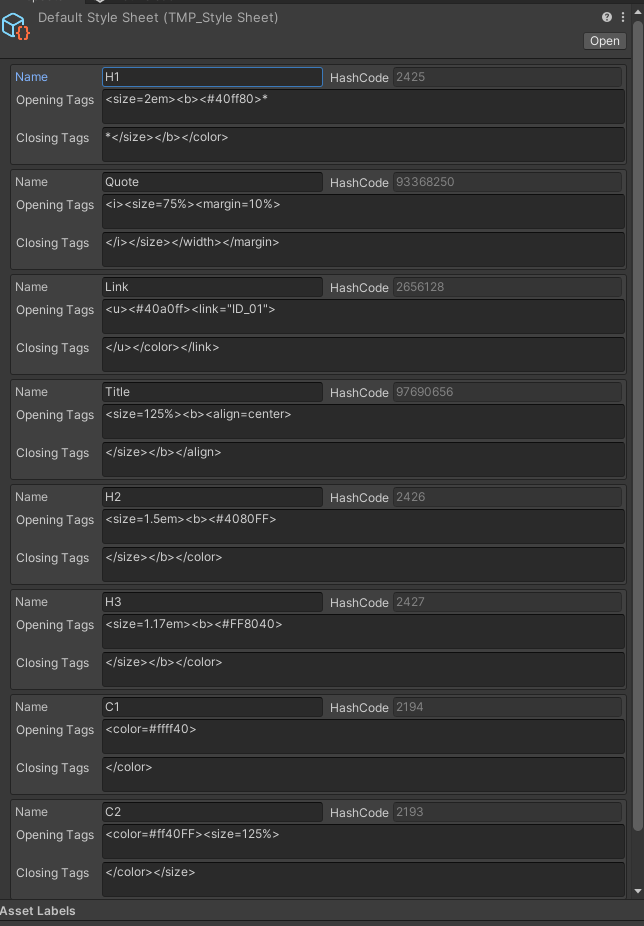
It's basically what I want, without having to make prefabs
ah its a dropdown under text field
languid spire
hollow zenith
https://i.gyazo.com/a1d89836b73a0ddd9297c930b521cf49.png
Do you know how to use ...
not used them but they are obviously scriptable objects so you use them that same way
 glossy turtle
hollow zenith
https://i.gyazo.com/a1d89836b73a0ddd9297c930b521cf49.png
Do you know how to use ...
glossy turtle
hollow zenith
https://i.gyazo.com/a1d89836b73a0ddd9297c930b521cf49.png
Do you know how to use ...
it looks like a scriptable object.
languid spire
you are missing a class declaration
where does the word class normally appear in a script?
 rich adder
have you tried actually putting these methods inside a class 😐
time to do basic c#
methods belong in classes/structs
glossy turtle
did anyone tried goap before other than @swift crag
radiant frigate
im trying to make a reference to a prefab inside of a script asset that isnt atached to anything at the start of runtime but whenever i try to instantiate it, it says that the object is null


the left screenshot is for reference of what it looks like, completely different to this scripts for example
 glossy turtle
radiant frigate
im trying to make a reference to a prefab inside of a script asset that isnt ata...
glossy turtle
radiant frigate
im trying to make a reference to a prefab inside of a script asset that isnt ata...
you can do something bubble =instantiate(someprefab);
in start
rich adder
glossy turtle
did anyone tried goap before other than <@118467312197042182>
don't randomly tag someone not in active conversation
radiant frigate
rich adder
don't randomly tag someone not in active conversation
hi navarone!
glossy turtle
rich adder
don't randomly tag someone not in active conversation
right novarone.
radiant frigate
glossy turtle
you can do something bubble =instantiate(someprefab);
what do you mean by this?
rich adder
radiant frigate
what do you mean by this?
dont change the values on original Prefab
change the copy you get from Instantiate
rich adder
but you are
radiant frigate
where?
glossy turtle
radiant frigate
what do you mean by this?
make a gameolbject for prefab also.
radiant frigate
glossy turtle
make a gameolbject for prefab also.
i alr have it
 glossy turtle
radiant frigate
i alr have it
glossy turtle
radiant frigate
i alr have it
i mean in code.
 rich adder
@queen adder <@&502884371011731486> is spamming nsfw invite links, but it got deleted might want to keep an eye on this account though
glossy turtle
[serializedfield] private gameobject prefab;
 fickle plume
Yep, bot autodeletes them. Just not always as fast.
radiant frigate
rich adder
you got a copy of this script somewhere
i think i dont since its a script that should get added to the player once certain ifs are met
rich adder
radiant frigate
did you read what I wrote
rich adder
radiant frigate
i think i dont since its a script that should get added to the player once certa...
search the hierarchy to make sure
t:BubbleScript
rich adder
glossy turtle
[serializefield] private gameobject bubble;
hows this change anything?
glossy turtle
and use bubble for instantiate
rich adder
they literally instantiating a Null object
more likely its a copy with prefab not assigned
radiant frigate
rich adder
search the hierarchy to make sure
`t:BubbleScript`
what is t:BubbleScript
glossy turtle
its like you are not instantiate null but using the object for instantiating prefabs
radiant frigate
i checked and i didnt found a copy of the script nowhere
swift crag
searching for t:foo finds everything with a foo component on it
 ember gate
hi could anyone help me, how do I delete an enemy when I run over them for context my game is a small car that is drifting and waves of enemies come but only way to kill them is by getting them ran over
rich adder
radiant frigate
i checked and i didnt found a copy of the script nowhere
show where you put this script on, the object
glossy turtle
it will not give null refence
rich adder
glossy turtle
it will not give null refence
instantiating a prefab that isn't assigned should surely give a Null ref
rich adder
ember gate
hi could anyone help me, how do I delete an enemy when I run over them for conte...
first define what it means to be "inMotion" to kill enemy
radiant frigate
rich adder
show where you put this script on, the object
on the player
glossy turtle
rich adder
instantiating a prefab that isn't assigned should surely give a Null ref
yea thats the difference making the object not null in start and using the object for instantiation thats what i mean did you understood.
radiant frigate
but only after this:
 rich adder
radiant frigate
on the player
rich adder
radiant frigate
on the player
screenshot it
ember gate
rich adder
first define what it means to be "inMotion" to kill enemy
for now I only want the enemies to get killed when the car hits their collision box
rich adder
ember gate
for now I only want the enemies to get killed when the car hits their collision ...
so whats the problem ?
radiant frigate
rich adder
screenshot it
 rich adder
seriously lol
ember gate
rich adder
so whats the problem ?
did this but does not work
 rich adder
radiant frigate
rich adder
radiant frigate
You dont see anything wrong here?
 radiant frigate
i see that bubble is none
but thats my problem since the start
i dont know how to reference it
 polar acorn
ember gate
did this but does not work
polar acorn
ember gate
did this but does not work
The Three Commandments of OnCollisionEnter2D:
- Thou Shalt have a 2D Collider on each object
- Thou Shalt not tick
isTriggeron either - Thou Shalt have a 2D Rigidbody on at least one of them
rich adder
 rich adder
radiant frigate
i dont know how to reference it
rich adder
radiant frigate
i dont know how to reference it
drag n drop the reference in the slot
aint that diffcult
radiant frigate
but i can only do that in run time
polar acorn
why
rich adder
why
swift crag
why are you doing anything other than trying to drag the reference in
radiant frigate
because it isnt atached to anything until some ifs are met in runtime
swift crag
what isn't "attached to anything"?
radiant frigate
the script
swift crag
the prefab that Bubble Script is on?
polar acorn
radiant frigate
because it isnt atached to anything until some ifs are met in runtime
A prefab always exists
swift crag
so what? prefabs can reference other prefabs, as you've been told already
polar acorn
You're trying to reference a prefab, right?
radiant frigate
no, the script nor the bubble
yes
inside a script that isnt atached to anything
glossy turtle
radiant frigate
because it isnt atached to anything until some ifs are met in runtime
if you want it to be done runtime then create a gameobject with find search tag.
polar acorn
radiant frigate
inside a script that isnt atached to anything
So then how is it doing anything at all
rich adder
youcan put prefabs inside, they are just assets that live on your HDD
swift crag
You need to show us exactly what "a script that isnt attached to anything" means, because I don't understand what you're talking about
ember gate
polar acorn
The Three Commandments of `OnCollisionEnter2D`:
1. Thou Shalt have a 2D Collider...
love this explanation thanks only problem now is that the object that gets destroyed is my car not the enemies but imma fix that in a sec and come back if im dumb and did not manage that
radiant frigate
polar acorn
So then how is it doing anything at all
because it gets atached to a gameobject when certain ifs are met
polar acorn
glossy turtle
if you want it to be done runtime then create a gameobject with find search tag.
You cannot find a prefab with a tag
rich adder
glossy turtle
if you want it to be done runtime then create a gameobject with find search tag.
please refrain from giving random suggestions that have nothing to do with the problem at hand
radiant frigate
polar acorn
So then how is it doing anything at all
 polar acorn
radiant frigate
polar acorn
radiant frigate
Ah, okay. So then you'd want this script to reference the prefab you want, and pass that to the script you've just added
swift crag
Right.
That makes sense now.
You'll be instantiating the prefab with the BubbleScript on it (and parenting it to the player)
radiant frigate
srry im not english native so i may not use the best words to formulate my phrases
radiant frigate
swift crag
You'll be instantiating the prefab with the BubbleScript on it (and parenting it...
the prefab has a script that makes it destroy after 10 seconds
swift crag
You will have two prefabs.
radiant frigate
 swift crag
- A prefab with a BubbleScript on it
- The bubble prefab
rich adder
also why are you calling BubbleProtect with a string
radiant frigate
rich adder
also why are you calling BubbleProtect with a string
isnt it a coroutine name?
swift crag
(you can just do StartCoroutine(BubbleProtect()))
radiant frigate
ohhh
glossy turtle
rich adder
please refrain from giving random suggestions that have nothing to do with the p...
its like i am lazy of typing entire code.
polar acorn
radiant frigate
This script should have a public field for the bubble prefab.
When you add the BubbleScript component to the player, also set that component's bubble to the prefab you assigned in the previous step.
swift crag
Calling BubbleProtect() does nothing on its own. It just gives you an object that you can then run as a coroutine.
polar acorn
glossy turtle
its like i am lazy of typing entire code.
No one's asking you to type code they're asking you to just stop vomiting alphabet soup that has nothing to do with the problem at hand
rich adder
glossy turtle
its like i am lazy of typing entire code.
no one needs entire code, nor to they need to be led astray with irrelevant suggestions. Its counter-productive
swift crag
polar acorn
This script should have a public field for the bubble prefab.
When you add the `...
This is also a good idea.
 weary egret
Is this how to link an anonymous account? Getting an error
await UnityServices.InitializeAsync();
await AuthenticationService.Instance.SignInAnonymouslyAsync();
var token = AuthenticationService.Instance.AccessToken;
await SignInWithUnityAsync(token);
okay i can try that, it makes sense
rich adder
weary egret
Is this how to link an anonymous account? Getting an error
```
await UnityServic...
You dont sign in with the Anonymous token
weary egret
rich adder
You dont sign in with the Anonymous token
What do you mean?
rich adder
SignInWithUnityAsync gets the Token from the browser response
glossy turtle
fistly assifn something to that gameobject in the start and use it generate instantiation.
weary egret
swift crag
well, what's the error?
[Authentication]: Request failed: 401, {"detail":"unable to validate token","details":[],"status":401,"title":"PERMISSION_DENIED"}, request-id: 786fb2e8-193d-4b97-b5c8-47ee1db55f26
rich adder
exactly
weary egret
rich adder
SignInWithUnityAsync gets the Token from the browser response
So what do I do instead?
polar acorn
glossy turtle
fistly assifn something to that gameobject in the start and use it generate inst...
Please just stop saying random things
You're only confusing people
rich adder
and that is def against the rules
rich adder
weary egret
So what do I do instead?
do it properly ?
polar acorn
It's okay to throw out a guess when you don't know as long as:
A) You acknowledge it's a guess
B) They're not actively being helped by someone who does know
rich adder
where did you follow this wrong instruction from @weary egret
weary egret
rich adder
do it properly ?
Yes, that's what I'm asking. What is doing it properly?
I didn't know where it was pulling the token from.
glossy turtle
polar acorn
Please just stop saying random things
i am lazy in typing.
 buoyant knot
synnergy
polar acorn
glossy turtle
i am lazy in typing.
Then why type unrelated things at all instead of just not typing
swift crag
glossy turtle
i am lazy in typing.
then be even lazier and don’t post
rich adder
weary egret
Yes, that's what I'm asking. What is doing it properly?
https://docs.unity.com/...
I have a video on this exact login mode if you want to use that
buoyant knot
teamwork
hegemony
core competencies
Am I helping yet?
weary egret
rich adder
I have a video on this exact login mode if you want to use that
Sure, that'd be great.
glossy turtle
swift crag
then be even lazier and don’t post
thought of helping that guy.
polar acorn
glossy turtle
thought of helping that guy.
Then why post something that has absolutely nothing to do with the problem and is not even remotely a solution
glossy turtle
it will give null refence untill you assign something in the start.
weary egret
rich adder
https://youtu.be/XVqYIFcjhLE
Oh I started using that tutorial, but I couldn't get my setup to recognize PlayerAccountService and I couldn't add using Unity.Services.Authentication.PlayerAccounts at the top. I have the latest version of the Authentication package.
summer stump
glossy turtle
thought of helping that guy.
You did not
rich adder
weary egret
Oh I started using that tutorial, but I couldn't get my setup to recognize Playe...
interesting, which version of Unity and Auth are you using ?
weary egret
rich adder
interesting, which version of Unity and Auth are you using ?
Auth 3.3.1, Unity 2022.3.20f1
rich adder
also is your IDE properly configured
glossy turtle
polar acorn
Then why post something that has _absolutely nothing to do with the problem and ...
ok.
radiant frigate
polar acorn
This script should have a public field for the bubble prefab.
When you add the `...
something like this worked

 weary egret
rich adder
also is your IDE properly configured
weary egret
rich adder
also is your IDE properly configured
As far as I know. I'm pretty deep into a project and we are just implementing a persistent log in on top of an existing game.
radiant frigate
radiant frigate
something like this worked
Thanks to everyone that helped me!
ember gate
good now I kill the enemies but i sometimes get stuck in them
glossy turtle
radiant frigate
something like this worked
i think i was telling you this.
radiant frigate
and ty for your patience!
rich adder
weary egret
As far as I know. I'm pretty deep into a project and we are just implementing a ...
Oh okay because it should recognize PlayerAccountService
radiant frigate
glossy turtle
i think i was telling you this.
i dont know, what you were writting sounded very ambiguous
but still ty for helping!
polar acorn
glossy turtle
i think i was telling you this.
No, you were saying some random waffle about using findWithTag to reference a prefab
glossy turtle
summer stump
You did not
i think he understood and found a solution. its not the way all others understand but if have that thinking you can understand.
rich adder
he understood after digi has explained it to them
glossy turtle
polar acorn
No, you were saying some random waffle about using findWithTag to reference a pr...
you didnt understood.
polar acorn
glossy turtle
i think he understood and found a solution. its not the way all others understan...
They understood other people despite your nonsense, not because of it
glossy turtle
anyways. thats it. someone got a solution
summer stump
glossy turtle
you didnt understood.
No one could understand. It was ambiguous to the point of nonsense
polar acorn
glossy turtle
you didnt understood.
because it was nonsense.
glossy turtle
i really dont like typping. i mean typing the entire code for explaining.
polar acorn
glossy turtle
i really dont like typping. i mean typing the entire code for explaining.
Then don't
ember gate
how do I take the velocity from the carcontroller and check in another code if the velocity is above a certain number to kill monsters or else to not kill
rich adder
then refrain from doing so by giving incorrect suggestions
summer stump
glossy turtle
i really dont like typping. i mean typing the entire code for explaining.
Please please stop then
polar acorn
ember gate
how do I take the velocity from the carcontroller and check in another code if t...
You can get the Rigidbody component from the object, and check the magnitude of its velocity
weary egret
rich adder
Oh okay because it should recognize PlayerAccountService
Yeah, VS2022 didn't like it. VS Code is cool with it. Getting a new error.
WebRequestException: {"detail":"external token not provided","details":[],"status":400,"title":"INVALID_PARAMETERS"}
rich adder
weary egret
Yeah, VS2022 didn't like it. VS Code is cool with it. Getting a new error.
WebR...
seems you haven't provided the token now
did you get the Web browser prompt ?
glossy turtle
polar acorn
Then don't
i will type.
glossy turtle
summer stump
Please please stop then
i will not.
frosty hound
Yes, you will, thanks.
polar acorn
glossy turtle
i will type.
Stop trying to answer questions you don't understand when someone is currently being helped. You just make things more confusing for them because they haven't been here long enough to know that you have no idea what you're talking about
ember gate
polar acorn
You can get the Rigidbody component from the object, and check the magnitude of ...
this seems right to you?
 rich adder
ember gate
how do I take the velocity from the carcontroller and check in another code if t...
rich adder
ember gate
how do I take the velocity from the carcontroller and check in another code if t...
~~if you're using OnCollisionEnter you can use other.relativeVelocity to find the hit velocity. ~~
Oh nvm you're using Trigger
glossy turtle
radiant frigate
but still ty for helping!
nevermind it kid just understand the concept behind.
polar acorn
ember gate
this seems right to you?
You need to get the Rigidbody component from the collided object, but if you're specifically checking on OnCollisionEnter then navarone pointed out the shortcut to getting that speed that'll also take this object's speed into account, you should use that instead ^
summer stump
glossy turtle
i will not.
Why do you insist on harming others?
ember gate
ight lemme try that out
rich adder
  if(other.attachedRigidbody.velocity.magnitude > minAmount)
        {
            // do stuff
}```if you need trigger i guess

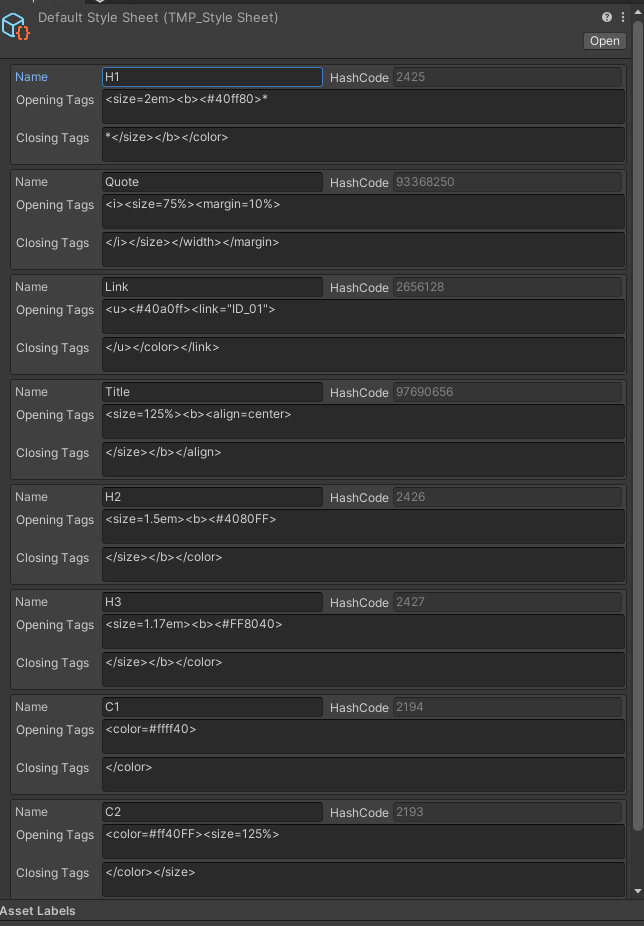
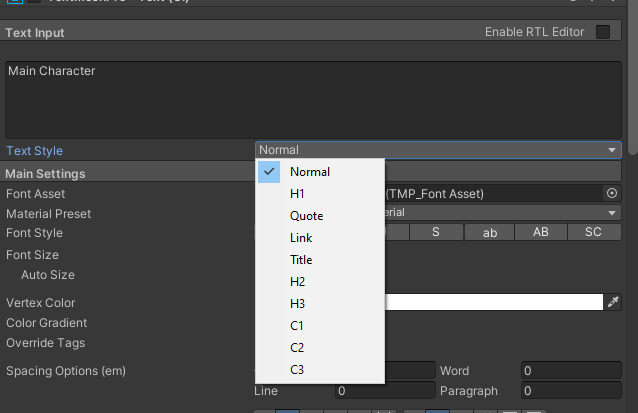 rich adder
🥳
radiant frigate
glossy turtle
nevermind it kid just understand the concept behind.
idk what is happening here but just stop the beef, i understand both points of view since Ninja_dude just wants to help (or so it seems), and i can understand the point of navarone digi aethenosity and fern because he just confuses the matter more, either way i think there is no real benefit on getting so defensive Ninja_dude to the point where you are just saying childish things like i will type or i dont like to type. besides everything thanks to you all for the help and think about the fact that there is no point in being childish or rude
ember gate
just gotta change the value from 10 to like 15 or something
the enemies can jump on me and throw the car away xD when I stay still
rich adder
ember gate
just gotta change the value from 10 to like 15 or something
don't use magic numbers, make a variable in the insector so you can change it at runtime
ember gate
or move me around
ember gate
rich adder
don't use magic numbers, make a variable in the insector so you can change it at...
ye ur right
rich adder
ember gate
or move me around
are they Navmesh agents?
rich adder
how do they move though ?
ember gate
wanna see their code?
rich adder
sure, just seeing if they move with transform
ember gate
photo or code
ember gate
ok
rich adder
but if they move transform , they will inherently push rigidbodies out of the way
ember gate
{
    public GameObject car;
    public float speed;

    private float distance;

    // Start is called before the first frame update
    private void Awake()
    {
        car = GameObject.FindGameObjectWithTag("Player");
    }

    // Update is called once per frame
    void Update()
    {
        distance = Vector2.Distance(transform.position, car.transform.position);
        Vector2 direction = car.transform.position - transform.position;

        direction.Normalize();

        float angle = Mathf.Atan2(direction.y, direction.x) * Mathf.Rad2Deg;

        transform.position = Vector2.MoveTowards(this.transform.position, car.transform.position, speed * Time.deltaTime);

        transform.rotation = Quaternion.Euler(Vector3.forward * angle);
    }
}
yea MoveTowards will just kinda bulldoze its way through anything
glossy turtle
radiant frigate
idk what is happening here but just stop the beef, i understand both points of v...
no its not childish but i think i should not help over here probably. just watch.
rich adder
Maybe use a rigidbody so you can make them be hit /stopped by the car
ember gate
they got one
rich adder
then don't use transform.position = to move
radiant frigate
glossy turtle
no its not childish but i think i should not help over here probably. just watch...
i dont know, its your choice!
ember gate
or wait nvm
 hushed hinge
https://gdl.space/qonibakecu.cpp the player seems to be still moving when i presses something or when i jump even though i have the time scale on 0
 ember gate
mb they only have a box collider within the inspector
rich adder
hushed hinge
https://gdl.space/qonibakecu.cpp the player seems to be still moving when i pres...
timescale 0 doesn't stop Update nor does it Stop key Presses or would it affect any of that
ember gate
ive added a rb to every mob
ivory bobcat
hushed hinge
https://gdl.space/qonibakecu.cpp the player seems to be still moving when i pres...
You may need to show where you're flipping the character
rich adder
You need to just disable the movement script @hushed hinge
ideally you make GamePaused a static event
 merry spade
My Movement is extremly stuttery, I use the character Controller to move in Update() and My camera updates in LateUpdate()
rich adder
merry spade
My Movement is extremly stuttery, I use the character Controller to move in Upda...
we cannot know for sure why if you don't provide the rest of the info. How is the character moved
hushed hinge
rich adder
ideally you make GamePaused a static event
PauseGame to become a static event?
swift crag
Events can call methods when they're invoked
So you could have an event called OnGamePaused.
You could then add things to it to have them run when the game pauses
A static event would just be..static!
rich adder
hushed hinge
PauseGame to become a static event?
I mean have an event so your movement script can be disabled/enabled on pause/unpause
swift crag
public class GameController : MonoBehaviour {
  public static event System.Action<bool> OnGamePaused;
}
then...
summer stump
hushed hinge
PauseGame to become a static event?
Sure
merry spade
rich adder
we cannot know for sure why if you don't provide the rest of the info. How is th...
character Controller this is the Code:
The function gets called every frame in Update
https://pastecode.io/s/1bfxzb4n
summer stump
That is a nice way to do it
swift crag
public class Something : MonoBehaviour {
  private bool moving = true;

  void Awake() {
    GameController.OnGamePaused += HandlePause;
  }

  void HandlePause(bool paused) {
    moving = !paused;
  }
}
something like this
hushed hinge
summer stump
Sure
 rich adder
merry spade
character Controller this is the Code:
The function gets called every frame in U...
rich adder
merry spade
character Controller this is the Code:
The function gets called every frame in U...
have you tried using Cinemachine instead ?
summer stump
hushed hinge
What is this?
rich adder
hushed hinge
wait no why are you turning everything static
swift crag
swift crag
```cs
public class GameController : MonoBehaviour {
public static event System...
You would then invoke the event like so:
merry spade
rich adder
have you tried using Cinemachine instead ?
whats cinemachine?
swift crag
public void SetPaused(bool paused) {
  OnGamePaused?.Invoke(paused);
}
(this would go in GameController)
summer stump
merry spade
whats cinemachine?
A package from unity
rich adder
merry spade
whats cinemachine?
its a Much better Camera package
swift crag
Every method that has been added to the event will run
polar acorn
merry spade
whats cinemachine?
A package that basically makes cameras "Just Work™️" with very little effort:
https://unity.com/unity/features/editor/art-and-design/cinemachine

Unity
Learn how Unity's Cinemachine makes complex camerawork – including target tracking, composing, blending, and cutting – easy and intuitive.
merry spade
rich adder
its a Much better Camera package
But its not the camera that stutters its the player you can see this stuttery thing also in the scene window
rich adder
how do you know?
swift crag
merry spade
But its not the camera that stutters its the player you can see this stuttery th...
It could be either, since the camera is moving around
rich adder
also you should only call .Move once
hushed hinge
swift crag
```cs
public class Something : MonoBehaviour {
private bool moving = true;
...
uhh.. is this a separate script?
merry spade
swift crag
It could be either, since the camera is moving around
Yeah but I mean the scene view is a static camera
swift crag
hushed hinge
uhh.. is this a separate script?
I showed you two different classes, yes.
GameController decides when to invoke the event.
Something is a class that subscribed to the event.
rich adder
Something can be your player movement script for example
summer stump
merry spade
character Controller this is the Code:
The function gets called every frame in U...
You may want to combine the two Move calls, and the lerp is not really how you would want to write it. Keeping a static t parameter is just the same as looking at an offset, but if that's what you want it's fine
merry spade
summer stump
You may want to combine the two Move calls, and the lerp is not really how you w...
but that doesnt explain why it stutters so much does it?
hushed hinge
swift crag
`GameController` decides when to invoke the event.
but it's red underline on gamecontroller
swift crag
hushed hinge
but it's red underline on gamecontroller
well, yes, you'd have to actually have a GameController class
summer stump
merry spade
but that doesnt explain why it stutters so much does it?
The two move calls might be a contributing factor
swift crag
you can't just copy random chunks of my example into your game
rich adder
Oh god tell me you're pasting stuff without understanding it
merry spade
summer stump
The two move calls might be a contributing factor
Ok I will try to combine them
hushed hinge
rich adder
Oh god tell me you're pasting stuff without understanding it
no, I always had this pause script
summer stump
hushed hinge
but it's red underline on gamecontroller
The same as always, you cannot ever copy paste from here
rich adder
hushed hinge
no, I always had this pause script
You cannot do that every time we show you an example, you have to attempt to adapt it to your use case
summer stump
hushed hinge
no, I always had this pause script
Then what is gamecontroller?
rich adder
if pause is your pausing script then put the event in there, simple as that
the other scripts just "subscribe" if they need to know game was paused
hushed hinge
rich adder
if `pause` is your pausing script then put the event in there, simple as that
Pause is my pausing script
merry spade
summer stump
The two move calls might be a contributing factor
Ok I combined them and nothing changed
rich adder
hushed hinge
Pause is my pausing script
alright so put the static event in there
look at the examples Fen wrote
GameController is pause
Something is your PlayerMovement script for example
weary egret
rich adder
did you get the Web browser prompt ?
Now I did. It goes through and logs me in. The final piece - it asks me to log in every time in Unity editor. Is this okay (like is it an editor only thing) or do I need to check to see if I'm logged into Unity Player Accounts first? If so, how do I do so?
summer stump
merry spade
Ok I combined them and nothing changed
Ok, well, I don't see much of an issue from the code. Can you share a video of it? .mp4 embeds here
rich adder
weary egret
Now I did. It goes through and logs me in. The final piece - it asks me to log i...
when you sign in a player for the first time, their Token and Cached data is stored inside PlayerPrefs
merry spade
merry spade
My Movement is extremly stuttery, I use the character Controller to move in Upda...
I allready did here:
rich adder
You can sign in an already Cached user without signing in again if they already signed in @weary egret
merry spade
summer stump
Ok, well, I don't see much of an issue from the code. Can you share a video of i...
I can make the camera to follow the player without lerping so one can see better if its the camera or the playe
rich adder
merry spade
Ok I combined them and nothing changed
it should still be something you should do, regardless.
Did you use cinemachine yet
weary egret
rich adder
You can sign in an already Cached user without signing in again if they already ...
public async Task InitSignIn()
{
    await UnityServices.InitializeAsync();
    await PlayerAccountService.Instance.StartSignInAsync();
}
Would I do this instead of StartSignInAsync?
merry spade
no i didnt because I cant imagine that it cant work with the normal camera
summer stump
merry spade
I allready did here:
I see it, just the slight hiccups every so often.
rich adder
merry spade
no i didnt because I cant imagine that it cant work with the normal camera
it can be if camera follow wasnt poorly coded
hushed hinge
rich adder
look at the examples Fen wrote
`GameController` is `pause`
`Something` is your P...
hmm... the Player2D script do havet he movement script,
Something = Player2D?
rich adder
hushed hinge
hmm... the Player2D script do havet he movement script,
Something = Player2D?
the movement script only care about the event
its static so you dont need any references, you can directly subscribe to it
like pause.OnGamePaused += GamePaused
weary egret
@rich adder
public async Task InitSignIn()
{
    await UnityServices.InitializeAsync();
    if (!AuthenticationService.Instance.SessionTokenExists)
    {
        // if not, then do nothing
        return;
    }
    await PlayerAccountService.Instance.StartSignInAsync();
}
If I understand right, this covers what you're talking about here?
rich adder
weary egret
<@968604165150507078>
```
public async Task InitSignIn()
{
await UnityServi...
from the docs
If a cached player exists on the SDK, you can link the cached player to the Unity Player Account.
Sign into the cached player's account using SignInAnonymouslyAsync.
Link the cached player's account to the Unity Player account with LinkWithUnityAsync.
For more information about cached players, refer to Sign In a Cached User.
ops here
hushed hinge
rich adder
the movement script only care about the event
hang on, i was doing something, what do you think?
 summer stump
Show OnGamePaused
rich adder
hushed hinge
hang on, i was doing something, what do you think?
first of all did you add OnGamePaused inside pause script ?
also you dont need public pause Pause
static members live on the class itself not any instances
weary egret
rich adder
from the docs
> If a cached player exists on the SDK, you can link the cached pl...
Yes, but how do I check if they are connected to Unity Player Accounts or not first?
rich adder
weary egret
Yes, but how do I check if they are connected to Unity Player Accounts or not fi...
pretty sure you can use the token already found to use that
so if token was found use that inside SignInWithUnityAsync
hushed hinge
rich adder
first of all did you add OnGamePaused inside pause script ?
hmmm... no? (i've been searching it up) I have the PauseGame
rich adder
hushed hinge
hmmm... no? (i've been searching it up) I have the PauseGame
searching what up
hushed hinge
rich adder
searching what up
about OnGamePaused
rich adder
there is nothing to search, you're literally adding 2 things
rich adder
hushed hinge
about OnGamePaused
You can literally call it Waffles
names dont matter
did you add a STATIC event inside your pause script
what did you call it
hushed hinge
rich adder
what did you call it
this is when pausing the game when you press P. PauseGame
 rich adder
i dont care about that
did you add the event to invoke first
#💻┃code-beginner message
 tranquil hollow
how can i fix that?
rich adder
tranquil hollow
how can i fix that?
fix what , what am i looking at
summer stump
hushed hinge
about OnGamePaused
This is ongamepaused
It is something YOU make. There is nothing to search
If you want to search something, look up events
tranquil hollow
rich adder
fix what , what am i looking at
the spawn its so random at axle y
hushed hinge
summer stump
https://discord.com/channels/489222168727519232/497874004401586176/1246128530467...
right now
 weary egret
rich adder
pretty sure you can use the token already found to use that
so if token was foun...
weary egret
rich adder
pretty sure you can use the token already found to use that
so if token was foun...
I guess what I am asking is, if I wanted to conditionally have a "Link" button, how do I determine whether the current user is actually linked to Unity Player Accounts or not yet.
summer stump
hushed hinge
right now
Why are you showing me this?
That is not how you do it at all
rich adder
hushed hinge
right now
why are you putting the event inside the movement script
summer stump
Put the event in the pause script
rich adder
you only SUBSCRIBE to it from the movement
hushed hinge
rich adder
why are you putting the event inside the movement script
isn't Something = Player2D?
rich adder
you dont Define it inside the movement script
summer stump
hushed hinge
isn't Something = Player2D?
What does that even mean?
frosty hound
@hushed hinge make a thread
rich adder
seriously how did you get this far and dont know you're obviously missing it inside the pause script
thats why its red..
hushed hinge
Pause
 stuck palm
anyone know how to do jump through platforms?
 stuck axle
I'm using an existing project as a template to get started, and I'm at a loss for why they have basically 3 different coordinates/locations stored for entities. the built in transform.location, then another separate Vector3, and then worldX/worldY ints. Is this just straight up bad code or is there a possible reason why? It's a paid asset so I dont think I can share the code. Its simple though, nothing crazy going on.
rich adder
stuck palm
anyone know how to do jump through platforms?
i was working on an example I can show you idk if its the best way to do it though
polar acorn
stuck palm
anyone know how to do jump through platforms?
https://docs.unity3d.com/ScriptReference/Physics.IgnoreCollision.html
Ignore platform colliders above you, un-ignore platform colliders below you
rich adder
stuck palm
anyone know how to do jump through platforms?

interesting method digi suggested, should try that. (oh actually I had it in the code but for some reason commented out lol)
I'm basically using Dot product though, so might not be the most reliable
swift crag
polar acorn
https://docs.unity3d.com/ScriptReference/Physics.IgnoreCollision.html
Ignore pla...
Do you use a physics query to look for "relevant" colliders?
i guess i'd check a sphere that's a bit larger than the player
rich adder
thats what I do, but my method is not good now that I think about it. it makes whole platform trigger which is bad for others standing on it
 if(currentPlatform == null)
 {
     var hits = Physics.OverlapSphereNonAlloc(transform.position + headOffset, radiusCheck, hitCols, platformLayers);

     if (hits == 0) return;

     currentPlatform = hitCols[0];
     currentPlatform.isTrigger = true;
}```I wonder what the cost of IgnoreCollision is. It can't be as fast as a layer mask!
(not that it's a problem; i'm just curious)
stuck palm
rich adder
thats what I do, but my method is not good now that I think about it. it makes w...
 public bool IsColliderValidForCollisions(Collider coll)
    {
i feel like i could use this from the kinematic character controller
polar acorn
swift crag
Do you use a physics query to look for "relevant" colliders?
Since it's for a Smash-like, I actually had the Stage object that had a list of all of it's pass-through colliders and their bounds. After the character moves, I just ran a check that looped through the list of pass-throughable platforms for ones whos tops were below the player's bottom and enabled collision, and vice-versa for ones whos bottoms are above the player's bottom
rich adder
stuck palm
```cs
public bool IsColliderValidForCollisions(Collider coll)
{
```
i feel...
i feel like KCC has an example on jump through platforms no ?
stuck palm
rich adder
i feel like KCC has an example on jump through platforms no ?
actually maybe, i havent checked
how can i check what layer a collider is on?
swift crag
grab the layer property from its gameobject
note that this is a layer index, not a layer mask
stuck palm
swift crag
note that this is a layer index, *not* a layer mask
thats fine
stuck palm
rich adder
you can check if certain layer on collider matches a certain layermask
oh thats good actually i have a ground layermask on this script anyway
i'll just use that
how do they turn a layermask into an int
 magic panther
Update Function --> https://hatebin.com/piwccqgoqu
So the trampoline is not getting detected, even with is Trampoline and other things gpt and intelli suggested. What am I getting wrong here?
 polar acorn
magic panther
Update Function --> https://hatebin.com/piwccqgoqu
So the trampoline is not get...
polar acorn
magic panther
Update Function --> https://hatebin.com/piwccqgoqu
So the trampoline is not get...
Try logging onGround and what object the raycast hit to find out what isn't happening that you're expecting to happen
magic panther
ok, one sec
ooooh

it detects the literal object
not the wrapper
so TrampolineObj. Do I just change the name?
how would I even check if that got detected
 swift crag
a Collider can never be a TrampolineObj
the is operator is used to check if an object could be assigned to a variable of a specific type
magic panther
do I just give the trampoline object itself a collider??
swift crag
TrampolineObj isn't even a type here. It's the name of an object in your scene
magic panther
what's the best way to do this
swift crag
magic panther
do I just give the trampoline object itself a collider??
you would still have the same problem, since this code doesn't make sense
polar acorn
magic panther
what's the best way to do this
What is the relationship between the object with the collider and the object with the component you want
swift crag
what you can do is check if the object you hit has a component
magic panther
swift crag
you would still have the same problem, since this code doesn't make sense
+ change the code
stuck palm
Does on Trigger Enter require a rigidbody
magic panther
swift crag
what you **can** do is check if the object you hit has a component
apply the script to the trampoline obj, yes?
swift crag
stuck palm
Does on Trigger Enter require a rigidbody
It requires one somewhere
swift crag
magic panther
apply the script to the trampoline obj, yes?
If you put the collider on the same object as the Trampoline component, you can do this:
if (groundHitInfo.collider.TryGetComponent(out Trampoline trampoline)) {
  // do stuff with the trampoline variable
}
if i have one rigidbody on the root object, do i need one for the colliders of children in that object?
swift crag
stuck palm
if i have one rigidbody on the root object, do i need one for the colliders of c...
No. A Rigidbody makes use of all of the colliders on objects that are parented to it.
stuck palm
okay, thank you
swift crag
Note that for triggers, OnTriggerEnter is sent to both the object with the collider and the object with the rigidbody
This isn't the case for collisions. OnCollisionEnter is sent to only the object with the rigidbody
stuck palm
swift crag
Note that for triggers, OnTriggerEnter is sent to **both** the object with the c...
thats fine, thank you
magic panther
alright, worked. Thanks guys
cosmic dagger
might help to have an explanation in case people can't see what the problem is . . .
rich adder
z fighting maybe?
 fervent abyss
rich adder
z fighting maybe?
fervent abyss
rich adder
z fighting maybe?
huh
cosmic dagger
i see moving back and forth while trying to look at a screen?
rich adder
fervent abyss
huh
try putting the text slightly more forward than screen
fervent abyss
rich adder
try putting the text slightly more forward than screen
same thing unless i look at certain angle
summer stump
Can you show the hierarchy?
rich adder
whenever you pop that multiplayer image thats when issue occurs
fervent abyss
rich adder
whenever you pop that multiplayer image thats when issue occurs
oh yes
when i disable it everything works fine
but i need the image
:(
rich adder
well now you know where to check for problem area, narrow down the issue
rich adder
wouldn't it just be easier to use World Canvas ?
fervent abyss
huh
summer stump
With panels and the image on it
summer stump
fervent abyss
huh
A canvas set to worldspace
fervent abyss
it is
rich adder
its not , at least not the text you have selected there
that looks like a sprite/mesh
fervent abyss
the image is a sprite.....
rich adder
then why are you mixing Sprite Renderer sprite and UI
ui uses Image component
sprite renderer uses meshes with sprite
cosmic dagger
fervent abyss
the image is a sprite.....
if you're creating any type of UI, use a canvas . . .
fervent abyss
cosmic dagger
if you're creating any type of UI, use a canvas . . .
i have a canvas
fervent abyss
rich adder
ui uses Image component
i am using that
rich adder
fervent abyss
i am using that
let me see the inspector
fervent abyss
i kinda deleted it already and made a plane with image :3
too late!!!!
but thanks!!!
stuck palm
i made it so there are colliders in each limb. problem is now, each limb detects their own hit, so how can i stop this from happening?
 wintry quarry
stuck palm
i made it so there are colliders in each limb. problem is now, each limb detects...
wintry quarry
stuck palm
i made it so there are colliders in each limb. problem is now, each limb detects...
Hit from what
fervent abyss
stuck palm
i made it so there are colliders in each limb. problem is now, each limb detects...
if you mean colliders hitting each other use layers
make so same layers dont collide
wintry quarry
Well if they're part of the Same Rigidbody they won't collide with one another no matter what
stuck palm
wintry quarry
Hit from what
from another player,
stuck palm
fervent abyss
if you mean colliders hitting each other use layers
they arent hitting each other
wintry quarry
stuck palm
from another player,
Use a separate collider for inter-player interaction
Use layers to separate everything
And layer based collisiona
stuck palm
wintry quarry
Use layers to separate everything
wdym? the colliders arent hitting each other, the problem is collisions from another players move hitbox. I seperated out the colliders into seperate limbs to make the collisions feel more accurate and tight
wintry quarry
stuck palm
wdym? the colliders arent hitting each other, the problem is collisions from ano...
Yes and you need to use layers to make those things not interact
The move hotboxes and these colliders should go on different layers and not be set to collide in the matrix
void thicket
stuck palm
i made it so there are colliders in each limb. problem is now, each limb detects...
If you have single rigidbody it should report collision once tho?
wintry quarry
Maybe I'm not understanding the problem
Is the problem that you're getting multiple collisions? Or is it that you're getting any collisions on these at all
You'll get one OnCollisionEnter per collider pair that touch
void thicket
Rigidbody pair no?
stuck palm
wintry quarry
Maybe I'm not understanding the problem
hold on i'll get a screenshot, unity just crashed
swift crag
I don't know what happens if you have multiple trigger colliders under a rigidbody
void thicket
You'd get additional info in contacts in Collision if multiple contact between same rigidbodies
Not sure if that triggers event methods, hm
swift crag
oh, wait, that's the problem :p
so I dealt with something like this while working on a soulslike
stuck palm
wintry quarry
Is the problem that you're getting multiple collisions? Or is it that you're get...
problem is im getting multiple collisions under one rigidbody, i just want one
swift crag
You can't avoid multiple collisions. You can change how you respond to them, though!
wintry quarry
void thicket
You'd get additional info in `contacts` in `Collision` if multiple contact betwe...
That's for multiple contact points in the same Collider pair. Otherwise how would this work https://docs.unity3d.com/ScriptReference/Collision-collider.html
swift crag
I made Hitbox and Hurtbox components that report impacts to the entity
wintry quarry
stuck palm
problem is im getting multiple collisions under one rigidbody, i just want one
Then disambiguate it in your code
If you are already touching the Rigidbody ignore the collision
swift crag
the entity would ignore hits that were not stronger than a previous hit
wintry quarry
Just track which bodies you're touching.
swift crag
er, or did I do that on the weapon side? I might have done that on the weapon side
stuck palm
unity crashed again bruh
eternal needle
I did it from the weapon side, and you can simply store the rigidbody in a hashset to know if you've already hit the object.
Clear the hashset everytime you want a new instance or tick of damage
swift crag
eternal needle
I did it from the weapon side, and you can simply store the rigidbody in a hashs...
yep, that's what I was doing
the weapon knew "hey, I already got a hit of quality 0.75, so this new 0.5 quality hit shouldn't even do anything"
and a 1.0 quality hit would produce another 0.25 damage
that way, clipping an enemy's "weak" hurtbox before whacking their "strong" hurtbox wouldn't make you deal more or less damage than just hitting the "strong" hurtbox
stuck palm
basically imagine a move hitbox that was about this size. all the overlapping body colliders recognise it and all tick the same damage
 swift crag
lest you wind up with a dog that deals 11,640 damage per second
stuck palm
i just want it to tick the damage once
swift crag
stuck palm
basically imagine a move hitbox that was about this size. all the overlapping bo...
yeah, so you need to abstract this
Each collider should not be directly causing damage to be taken
stuck palm
swift crag
Each collider should **not** be directly causing damage to be taken
public class LimbCollider : MonoBehaviour
{
    [SerializeField] private PlayerHit _hit;
    private void Awake()
    {
        _hit = transform.root.GetComponentInChildren<PlayerHit>();
    }

    private void OnTriggerEnter(Collider other)
    {
        _hit.HandleCollision(other);
    }
}
each collider has this script on it
eternal needle
stuck palm
basically imagine a move hitbox that was about this size. all the overlapping bo...
Read the convo slightly above that image on a solution. Your colliders shouldnt be looking for things that damage it. It should be told it's taking damage
void thicket
wintry quarry
That's for multiple contact points in the same Collider pair. Otherwise how woul...
Seems right, got confused since each contact also has Collider info
Looks like that is in fact just duplicated info lol
stuck palm
wintry quarry
Then disambiguate it in your code
what does disambiguate mean in this context?
void thicket
Just ref-count your collisions
swift crag
to get rid of an ambiguous situation
if you get four trigger overlaps, it's unclear how much damage should actually be taken
the individual LimbColliders cannot make this decision
 golden blade
hello, if I make a new scene in unity and have a camera displayed for that scene in a different scene through a render texture would this work ?
 formal venture
can anyone explain to me what that thing means and does exactly?
 void thicket
formal venture
can anyone explain to me what that thing means and does exactly?
void thicket
formal venture
can anyone explain to me what that thing means and does exactly?
() => is lambda expression and += is subscribing to the event
stuck palm
swift crag
the individual LimbColliders **cannot make this decision**
what makes this decision then? should it be like a collision manager in this object, or should it be the other player making that damage decision?
formal venture
void thicket
`() =>` is lambda expression and `+=` is subscribing to the event
okay thanks
swift crag
stuck palm
what makes this decision then? should it be like a collision manager in this obj...
see the above conversation
stuck palm
okay
shouldnt be too hard to refactor
this whole time cus i had a single collider i was making the decision from the victim
wintry quarry
stuck palm
what does disambiguate mean in this context?
Alleviate the uncertainty that comes from multiple collision callbacks
 short hazel
formal venture
okay thanks
short hazel
formal venture
okay thanks
For completeness, lambda expressions are methods (like void Start()) which don't have a name and can be declared in-place.
Your code is an equivalent of:
button_exit.clicked += ExitGame;
// later...
void ExitGame()
{
    SceneManager.GameExit();
}
thanks now im slightly less stupid :>
 karmic kindle
I'm trying to move the camera forward the direction it's facing, but when it's tilted up/down, it will move on the Y axis - how can I get that to stop happening? I found a forum that said to use Normalize()
transform.Translate(Vector3.Normalize(new Vector3(Camera.main.transform.forward.x, 0f, Camera.main.transform.forward.z)));
willow scroll
formal venture
thanks now im slightly less stupid :>
So, you can subscribe to the event only if the method you're subscribing has the same number and type of parameters as the event.
public Action OnSomething;
OnSomething += Update; // works

public Action<string> OnSomething;
OnSomething += Update; // error
OnSomething += _ => Update(); // works

public Action<string, string, string> OnSomething;
OnSomething += Update; // error
OnSomething += _ => Update(); // error
OnSomething += (_, _, _) => Update(); // works
Note that the lambda subscriptions cannot be unsubscribed.
eternal needle
karmic kindle
I'm trying to move the camera forward the direction it's facing, but when it's t...
Normalizing just scales the vector so it's magnitude is 1. The forward should already be normalized. Add some debug drawrays to see where it's trying to move because this code looks fine if you want 0 y movement
Oh actually you might need to use Space.world in the 2nd paramter, I believe it might be using local space here
willow scroll
karmic kindle
I'm trying to move the camera forward the direction it's facing, but when it's t...
transform.forward moves the transform in the forward direction they're currently facing. Yes, if it's tilted up/down, your forward is going to be up / down.
If you want to move the camera forward regardless of their direction, use Vector3.forward
 lusty nest
hey guys i was wondering, how do i detect the force applied to a gameobject?
void thicket
karmic kindle
I'm trying to move the camera forward the direction it's facing, but when it's t...
Normalizing without Y is fine, though not in readability wise.
However Transform.Translate is local space by default but you are dealing with world space coords