#💻┃code-beginner
1 messages · Page 250 of 1
 wintry quarry
 rancid tinsel
wintry quarry
It Checks for colliders that overlap a circle
rancid tinsel
wintry quarry
It Checks for colliders that overlap a circle
ah i see
 last basin
Hi guys, i Have a problem the OnDrop() func, im trying to make a little tower defense in 2D for learn Unity, but impossible to catch this func on my plots where i want to build a turret.
I made a post in the forum : https://forum.unity.com/threads/problem-with-ondrop-for-a-tower-defense-2d.1557701/
If anyone can help, thanks a lot 🙂
 frigid sequoia
Why is this causing my object to wiggle when it gets close to the target?
 wintry quarry
frigid sequoia
Why is this causing my object to wiggle when it gets close to the target?
wintry quarry
frigid sequoia
Why is this causing my object to wiggle when it gets close to the target?
because it's overshooting
do this instead:
transform.position = Vector3.MoveTowards(transform.position, objectToFollow.transform.position, speed * Time.deltaTime);
frigid sequoia
wintry quarry
because it's overshooting
I though so but I have used it in many objects before and none of them did wiggle
frigid sequoia
wintry quarry
do this instead:
`transform.position = Vector3.MoveTowards(transform.position, o...
Oh, that does work much smoother thxs
Why is that?
wintry quarry
Because it doesn't overshoot
also - you're using transform.Translate wrong
you're using world space positions and Translate works in local space by default
frigid sequoia
wintry quarry
you're using world space positions and Translate works in local space by default
What's the difference?. I mean, isn't world space basically the local space of the... world, sorta say
wintry quarry
frigid sequoia
What's the difference?. I mean, isn't world space basically the local space of t...
yes but your object is not the world
your object is itself
once you translate, rotate, or scale your object away from the origin, they are completely different coordinate spaces
frigid sequoia
So... why is that .MoveTowards does not overshot?
wintry quarry
because it was written not to
they programmed it not to
It says so right in the documentation https://docs.unity3d.com/ScriptReference/Vector3.MoveTowards.html
the new position does not overshoot target
 ember tangle
Oh nice I have a similiar question
wintry quarry
ember tangle
Oh nice I have a similiar question
!code
 eternal falconBOT

Posting code
📃 Large Code Blocks
Use links to services like:
https://gdl.space/, https://paste.ofcode.org/, https://hatebin.com/, https://paste.myst.rs/, https://hastebin.com/
📃 Inline Code
Surround code with three backquotes. Not quotation marks.
To format as C#, add cs to the first line:
```cs
// Your code here
```
Add a comment with a line number if there is an error message.
frigid sequoia
I am kinda asking it more in depth cause I was trying to avoid the overshoot my self by applying a direct transform directly when being very near the target and couldn't make it work
wintry quarry
frigid sequoia
I am kinda asking it more in depth cause I was trying to avoid the overshoot my ...
Well your main issue is using Translate in local space with world space inputs
that's throwing EVERYTHING off
You can certainly replicate the MoveTowards behavior manually if you want
it's not complicated
but you do need to be using the correct inputs and working in the correct coordinate space
 sterile moon
How could I allow something to freely flop around on the z axis based on movement around it, like gravity. Think antennas, or, towing arm that needs to be able to pivot loosely
wintry quarry
``` not '''
frigid sequoia
Ok, I will try avoidind tranlate in world space, and... kinda in general actually, MoveTowards looks way more usefull
ember tangle
I'm trying very modestly to make a game object rotate to an angle.
Vector3 to = new Vector3(0, 0, 18);
transform.eulerAngles = Vector3.Lerp(transform.rotation.eulerAngles, to, Time.deltaTime);
works fine
Vector3 to = new Vector3(0, 0, -18);
transform.eulerAngles = Vector3.Lerp(transform.rotation.eulerAngles, to, Time.deltaTime);
spins forever. I do not understand why.
wintry quarry
ember tangle
I'm trying very modestly to make a game object rotate to an angle.
```cs
Vector3...
because euler angles are cancer
don't use them
 teal viper
sterile moon
How could I allow something to freely flop around on the z axis based on movemen...
teal viper
sterile moon
How could I allow something to freely flop around on the z axis based on movemen...
Joints. Not sure which one exactly. You'll need to research that.
wintry quarry
ember tangle
gimbal lock doesnt matter to me
Quaternion to = Quaternion.Euler(0, 0, -18);
transform.rotation = Quaternion.Slerp(transform.rotation, to, Time.deltaTime);```the problem of euler angles transcends beyond gimbal lock
you're seeing it now
ember tangle
Ok I believe you
sterile moon
teal viper
Joints. Not sure which one exactly. You'll need to research that.
Okay, and how do I keep my towing arms attached to my truck when I give my towing arms rigid bodys and shit?
wintry quarry
the joint
sterile moon
its all parented, but if i add rigid body, it falls off the truck when game starts. If i turn off gravity, it wont mvoe with truck
teal viper
sterile moon
Okay, and how do I keep my towing arms attached to my truck when I give my towin...
With joints. The joint is what tries to keep it attached. The free movement is what's coming from the rb. And the combination is what makes it wobble.
sterile moon
I see
 whole idol
using System;
using System.Collections.Generic;
using System.Linq;
using System.Text;
using System.Threading.Tasks;

namespace Beginning_CSharp
{
    class Program
    {
        static void Main(string[] args)
        {
            Console.WriteLine("Hello World");
        }
    }
}
this might sound like a stupid question but why do you need to import all these frameworks and assets if the program works fine just like this:
namespace Beginning_CSharp
{
    class Program
    {
        static void Main(string[] args)
        {
            Console.WriteLine("Hello World");
        }
    }
}
???
wintry quarry
whole idol
```c#
using System;
using System.Collections.Generic;
using System.Linq;
using S...
you don't need to
any other questions?
also this isn't a Unity question
whole idol
I know you dont have to but why?
whole idol
the program works fine without it yeah but the IDE automatically loads these assets everytime right?
wintry quarry
It's very simple.
In your example you are using Console.WriteLine
that's a function in the Console class
the full name of the Console class is System.Console
the only thing that using System; does is let you write Console instead of the full System.Console
that's it
it does nothing else
you're not using the rest of them at all so you don't need them
 fierce geode
Hey, how would you combine a camera's rotation along side the player's rotation. To do the whole camera-directed player. Like it goes in the direction the camera is rotated.
I did like
Quaternion yaw_rot = Quaternion.Euler(0, cam.transform.rotation.eulerAngles.y, 0);
move_vector = yaw_rot * move_vector;
and it worked fine for flat surfaces, but it caused issues when travelling up slopes, Like I needed the character to travel through a loop and the movement would always stuff itself up
wintry quarry
whole idol
the program works fine without it yeah but the IDE automatically loads these ass...
Whatever you're using that's adding those is using some C# template file that includes them all
wintry quarry
fierce geode
Hey, how would you combine a camera's rotation along side the player's rotation....
Vector3 surfaceNormal = // get the surface normal through a raycast or something??
Vector3 camForward = Vector3.ProjectOnPlane(cam.transform.forward, surfaceNormal);
Quaternion desiredRotation = Quaternion.LookRotation(camForward, surfaceNormal);
move_vector = desiredRotation * move_vector;```
Something like thisThanks man, been banging against this loop for like a week
 young wren
Hi i start to work with scriptable object's and i wanted to use them as keeper of state of objects but im curious if thats possible to make it run an function or make script that would watch changes in attached value and then call funcion for example like active or disactive GameObject by value of that ScriptableObject
public class BoolValue : ScriptableObject, ISerializationCallbackReceiver
{
    public bool initialValue;

    [NonSerialized]
    [HideInInspector]
    public bool value;

    public void OnBeforeSerialize() { }

    public void OnAfterDeserialize()
    {
        value = initialValue;
    }

    public void Togglevalue()
    {
        value = !value;
    }

    public void Setvalue(bool newState)
    {
        value = newState;
    }
}
You will need a MonoBehaviour to coordinate things
ember tangle
wintry quarry
the problem of euler angles transcends beyond gimbal lock
Is this still okay to use or does the conversion mess things up still?
gameObject.transform.rotation.eulerAngles.z
euler angles are cyclical and your math is going to be all messed up by that
the fact that -5 and 355 are the same angle
your code doesn't account for it
I don't recommend euler angles and I especially don't recommend reading them back from a Transform like this
you never know if you'll get -15 or 345
ember tangle
alright I'll just learn to read them from the Quaternion although it scares me
young wren
wintry quarry
You will need a MonoBehaviour to coordinate things
Any idea what function or somthing i would need to use
wintry quarry
ember tangle
alright I'll just learn to read them from the Quaternion although it scares me
you don't ever need to read euler angles
you shouldn't
that's the dangerous thing
ember tangle
Im trying to pull the z rotation value for some if statements
wintry quarry
young wren
Any idea what function or somthing i would need to use
For what specifically? Your question was really vague
wintry quarry
ember tangle
Im trying to pull the z rotation value for some if statements
You don't need it. What are your if statements trying to check? There's a better way to do whatever you're trying to do than reading the angle
young wren
To call an function when value of exact ScriptableObject changes
wintry quarry
young wren
To call an function when value of exact ScriptableObject changes
use events
ember tangle
private bools in the object that toggle based on the rotation angle.
wintry quarry
ember tangle
private bools in the object that toggle based on the rotation angle.
show the code
I assure you, you don't need the angle, and there's a better more reliable way.
 tall delta
ember tangle
I'm trying very modestly to make a game object rotate to an angle.
```cs
Vector3...
tall delta
ember tangle
I'm trying very modestly to make a game object rotate to an angle.
```cs
Vector3...
I find this question intriguing, because I remember dealing with this same 'eulerAngles' shit when I just started learning unity. I'll try my best to give a simple answer: when you try to set rotation to -18 degrees using vector.lerp, unity internally interprets this as +342 degrees (since 360 - 18 = 342) due to how it handles angle normalization. during the lerp process, instead of moving directly to the intended angle, unity recalculates the target as a positive angle. and so when you try to to "subtract" towards -18 degrees each frame, the interpolation actually "adds" a small increment towards 342 degrees due to unity's internal conversion to quaternions and back to Euler angles... so you spin ad infinitum.
that took waaay too long to write and I see that you have moved on 😄
ember tangle
tall delta
that took waaay too long to write and I see that you have moved on 😄
Well I've learned a ton already and your messages adds to it so dont worry
 near wadi
are these not valid?
            EnableDebugView(true);
            SetDebugView(DebugView.Normals);
 supple night
Hi.
I'm trying to make a rigidbody move based on the movement of another rigidbody.
I'm using this logic:
_rb.velocity = attachedRigidbody.velocity;
But the rigidbody doesn't move at all. He just moves forward and back. I would like him to follow the other.
wintry quarry
supple night
Hi.
I'm trying to make a rigidbody move based on the movement of another rigidbo...
follow is different from matching velocity
what do you actually want
supple night
I want him to follow
But not in the same velocity, honestly
I want to do something like MoveTowards
But using the rigidbody physics
wintry quarry
supple night
I want to do something like MoveTowards
Well you can give it a vbelocity towards the object
Vector3 diff = attachedRigidbody.position - _rb.position;
Vector3 velocity = diff.normalized * speed;
_rb.velocity = velocity;``` as a basic starting point for example dusky hazel
I am trying to use visual scripting for the first time, and this might be a dumb question but how do you move around in the editor? All I can do is scroll up and down and add nodes.
dusky hazel
thank you!!
tall delta
#763499475641172029 might be a better place to ask, but it also sounds like you should maybe watch / read a few 'how to unity' tutorials
dusky hazel
it works
dusky hazel
tall delta
<#763499475641172029> might be a better place to ask, but it also sounds like y...
I am using a tutorial on unity learn
supple night
wintry quarry
```cs
Vector3 diff = attachedRigidbody.position - _rb.position;
Vector3 velocity...
This looks like much more promising...
I tried something like this before, but using Add Force with Velocity Change and the result was kind of different
wintry quarry
if you want to do it with actual forces it's much harder. You'll basically need to write a PID controller for that
supple night
Honestly, the result is a bit "strange". Could it be because I changed the object position using transform.position?
supple night
If i drawline to see vector, they always are in the same position
supple night
How i "teleport"?
wintry quarry
rb.position = newPosition
supple night
The same for rotation?
supple night
wintry quarry
There's also MovePosition/MoveRotation
I thought these methods would be for kinematic rigidbody
supple night
supple night
I thought these methods would be for kinematic rigidbody
Well, in the moment that i teleport, they are kinematic... Maybe make sense use
supple night
wintry quarry
what are you trying to do?
I want to simulate inertia physics 😄
Is for a test
wintry quarry
Good news, the physics engine does that automatically
supple night
supple night
Is for a test
I need to calculate with code
wintry quarry
I don't understand, nor do I understand why you're using Rigidbodies then
supple night
Without rigidbody i thought that not going to be possible
supple night
supple night
Without rigidbody i thought that not going to be possible
I have already achieved several promising results. But, the "stopping force", I still haven't been able to replicate
supple night
wintry quarry
I don't understand, nor do I understand why you're using Rigidbodies then
It's for a job test
wintry quarry
supple night
It's for a job test
I don't understand if you're allowed to use Rigidbody or not
you seem to be saying you're not allowed to but then you're using it anyway
supple night
No
Honestly, i think i can..
I'm not allowed to use joints, for example
Anyway, i don't understand why what i'm doing doesn't work
wintry quarry
well you've barely shared any details about it so nobody else is going to be able to understand either.
supple night
If i apply the same speed, shouldn't they at least move?
var velocityChange = attachedRigidbody.velocity - enemyCharacter.Rigidbody.velocity;
velocityChange = velocityChange.normalized * 10.0f;

enemyCharacter.Rigidbody.MoveRotation(attachedRigidbody.rotation);
enemyCharacter.Rigidbody.velocity = velocityChange;
that's not applying the same speed
also this assumes either object is actually moving via Rigidbody velocity
supple night
Yes
var currentVelocity = _rigidBody.velocity;
var targetVelocity = direction * speed;

var force = targetVelocity - currentVelocity;
force = Vector3.ClampMagnitude(force, maxForce);

var lookRotation = Quaternion.LookRotation(direction);
lookRotation = Quaternion.Slerp(transform.rotation, lookRotation, speed * Time.fixedDeltaTime);

_rigidBody.MoveRotation(lookRotation);
_rigidBody.AddForce(force, ForceMode.VelocityChange);
The other rigidbody movement
If i do this:
enemyCharacter.Rigidbody.AddForce(attachedRigidbody.velocity, ForceMode.VelocityChange);
enemyCharacter.Rigidbody.MoveRotation(attachedRigidbody.rotation);
Nothing happens
Except for the rotation 🤣
supple night
supple night
If i do this:
```c#
enemyCharacter.Rigidbody.AddForce(attachedRigidbody.velocity...
This is not my final goal. But i hoped this would work
 minor patio
I just thought I'd drop in to say I'm back on track
minor skill issue concerning properties vs fields XD
rancid tinsel
how would I make this instantiate as a child of the object holding the script: GameObject bulletObj = Instantiate(bulletPrefab, firingPoint.position, Quaternion.identity);
supple night
rancid tinsel
how would I make this instantiate as a child of the object holding the script: G...
bulletObj.transform.parent = transform
rancid tinsel
supple night
bulletObj.transform.parent = transform
thank you
minor patio
rancid tinsel
how would I make this instantiate as a child of the object holding the script: G...
there were som people in yesterday talking about bullet objects & instantiating vs ray-casts with a delayed event, if your goal is like a first or third person shooter...
rancid tinsel
minor patio
there were som people in yesterday talking about bullet objects & instantiating ...
tower defence game in my case
fierce geode
Do you guys ever go back and refactor your code mid-problem? Thinking about going back and restarting my character movement code; starting from scratch with what I've learnt to maybe overcome and find out whatever rotation is doing to my movement code.
teal viper
supple night
If i do this:
```c#
enemyCharacter.Rigidbody.AddForce(attachedRigidbody.velocity...
Debug. Assuming attached rb velocity is not 0, enemy character should move.
teal viper
fierce geode
Do you guys ever go back and refactor your code mid-problem? Thinking about goin...
You should understand the problem entirely before refactoring anything, as you're risking falling into the same problem.
fierce geode
I'm 50/50 on understanding the problem
supple night
teal viper
Debug. Assuming attached rb velocity is not 0, enemy character should move.
This is another doubt. How to debug? Any recommendations? I was using DrawLine
fierce geode
Honestly the second reason I'm refactoring, is doing a test where basically I'm removing elements of the code and breaking it down to it's bare essentials
and seeing if the problem still occurs or if it's affected by another area I didn't consider
teal viper
supple night
This is another doubt. How to debug? Any recommendations? I was using DrawLine
Draw debug lines/rays, debug logs, attach the debugger and use breakpoints. There are many debugging methods.
 warm condor
Hey. I am having a problem where the animations that I want to play are overlapping. I can I stop this from happening?
        ChangeAnimationState(playerAnimations.AccelerationBeforeRunning.ToString());//the playerAnimations is an enum containing all of the animation                                                                                          //names
        if (playerAnimator.GetCurrentAnimatorStateInfo(0).IsName(playerAnimations.AccelerationBeforeRunning.ToString())){
            ChangeAnimationState(playerAnimations.Run.ToString());
        }
}```You don't need to refactor for that. Just comment out code temporary to help you understand the issue. Once you understand it 100%, you can refactor the code.
teal viper
warm condor
Hey. I am having a problem where the animations that I want to play are overlapp...
Wdym by "overlapping"?
warm condor
meaning one animation is trying to play, but the other is trying to play as well. So they are both trying to take priority.
 primal turtle
Can someone explain this to me?
why does it not work if I add the code>
and spam clones?
teal viper
warm condor
meaning one animation is trying to play, but the other is trying to play as well...
Then don't start them both at the same time(or when one is already playing)..?
Sounds like a logic issue.
teal viper
primal turtle
Can someone explain this to me?
Share the video as an mp4
primal turtle
here's an mp4 version
primal turtle
teal viper
Share the video as an mp4
was just doing that :)
warm condor
teal viper
Then don't start them both at the same time(or when one is already playing)..?
S...
but idk how without making it too complicated
teal viper
warm condor
but idk how without making it too complicated
Then make it complicated first and simplify from there if possible. Or share the working code and we might be able to help you.
primal turtle
primal turtle
here's an mp4 version
Why does it spam clones when I add the update with some code?
teal viper
primal turtle
why does it not work if I add the code>
Share the !code properly too
eternal falconBOT
Posting code
📃 Large Code Blocks
Use links to services like:
https://gdl.space/, https://paste.ofcode.org/, https://hatebin.com/, https://paste.myst.rs/, https://hastebin.com/
📃 Inline Code
Surround code with three backquotes. Not quotation marks.
To format as C#, add cs to the first line:
```cs
// Your code here
```
Add a comment with a line number if there is an error message.
primal turtle
why does the update code affect the clone spawning? Before you ask, logic.deleteSegment isn't used in the instantiate process
 summer stump
Are you gonna show the logicscript?
primal turtle
and deletion is only used in this script
primal turtle
summer stump
Are you gonna show the logicscript?
sure
the bottum is the spawning
and a trigger tells it when to activate, but it should automatically stopped as soon as it's called as I do that before the cloning/spawning
summer stump
SegmentCreation
primal turtle
summer stump
SegmentCreation
what did I do wrong with it?
warm condor
teal viper
Then make it complicated first and simplify from there if possible. Or share the...
the thing is, I wanted to try to use the Animation Event Manager, but it just seems way to complicated
I want to be able to transition from the accileration animation to the running animation
teal viper
warm condor
the thing is, I wanted to try to use the Animation Event Manager, but it just se...
What's an Animation Event Manager? Doesn't something like something included in unity by default.
teal viper
warm condor
I want to be able to transition from the accileration animation to the running a...
Then maybe define the transitions in the animator?
primal turtle
https://hatebin.com/duhhupglvi Clone Script
https://hatebin.com/qjuiqzuuvg Logic Script
https://hatebin.com/aquunybeig Trigger Script
primal turtle
primal turtle
here's an mp4 version
video
summer stump
primal turtle
what did I do wrong with it?
That is what is creating the clone.
Looks like the trigger script has no validation in the OnTriggerEnter
Which is a big issue
primal turtle
summer stump
That is what is creating the clone.
Looks like the trigger script has no validat...
wdym by validation?
summer stump
Like checking what you are colliding with
Right now if ANYTHING hits the trigger you create that segment
I don't like the way everything is controlling varioua things in different scripts either
primal turtle
summer stump
Right now if ANYTHING hits the trigger you create that segment
but why does it work if I don't have the Update() ??
summer stump
The architecture is pretty dangerous
primal turtle
true
how would I make it only collide with a tag or smt?
cause you're right, that'd probably fix it.
 silver timber
check the tag in OnTriggerEnter collider's gameobject and return early if it's not the right one
primal turtle
documentation?
summer stump
primal turtle
cause you're right, that'd probably fix it.
if (collision.CompareTag("TagName"))
teal viper
primal turtle
but why does it work if I don't have the Update() ??
Start from the end that is the closest to the issue. That being the instantiation. If it runs then the if condition is being true. Investigate where that bool is set to true. Eventually you'll get to how the update is related to it.
primal turtle
summer stump
if (collision.CompareTag("TagName"))
thx
primal turtle
teal viper
Start from the end that is the closest to the issue. That being the instantiatio...
it's just confusing as they don't share any same variables which is usually what goes wrong
warm condor
teal viper
Then maybe define the transitions in the animator?
ohh right I just got an idea from that. Thanks.
primal turtle
what's the difference between start and awake
teal viper
primal turtle
it's just confusing as they don't share any same variables which is usually what...
Well, then they do and you just don't realize the connection. They don't need to be sharing vars to affect each other. Var a affects var b, which affects var c, which affects var d. Even if var a never affects var d directly, it ends up affecting it indirectly.
Ever heard of butterfly effect?
summer stump
primal turtle
what's the difference between start and awake
Awake runs before Start
For objects that exist before the scene starts, no start will run before every awake has completed
silver timber
primal turtle
what's the difference between start and awake
you gotta at least read the documentation my dude
 supple night
teal viper
Debug. Assuming attached rb velocity is not 0, enemy character should move.
supple night
teal viper
Debug. Assuming attached rb velocity is not 0, enemy character should move.
Everything alright with velocity. Checked using vector zero comparation...
I think there may be something "holding" the rigidbody.
I'm using ragdoll, but his rigidbodies are kinematic at the moment
fierce geode
wintry quarry
```cs
Vector3 surfaceNormal = // get the surface normal through a raycast or som...
didn't work, but I managed to find a solution. by multiplying my inputs by the right and forward of the camera's transform but with the Y's removed.
` Vector3 right = cam.transform.right;
right.y = 0;
Vector3 forward = cam.transform.forward;
forward.y = 0;
    //The horizontal and vertical speed values if accelerating/deccelerating.
    Vector3 hor_speed = (player_input.x * right) * (is_hor_accel ? accel_speed : deccel_speed);
    Vector3 ver_speed = (player_input.y * forward) * (is_ver_accel ? accel_speed : deccel_speed);`
Wdym by "vector zero comparison"? Share the updated code.
Also, try actually setting it's velocity or adding force normally in fixed update. Does it move in that case?
wintry quarry
fierce geode
didn't work, but I managed to find a solution. by multiplying my inputs by the r...
gonna be messed up unless you normalize it. But this is identical to ProjectOnPlane with Vector3.up
it won't work for a loop though
you mentioned a loop and inclines so I mentioned using a surface normal
silver timber
supple night
Everything alright with velocity. Checked using vector zero comparation...
I thi...
rigidbodies are kinematic at the moment
I'm out of the loop, but is that not the problem? If it's kinematic forces/velocity changes won't do anything
wintry quarry
yep - might as well not have a Rigidbody if they're kinematic
(other than for collision detection callbacks)
supple night
silver timber
> rigidbodies are kinematic at the moment
I'm out of the loop, but is that not t...
I actually using multiples rigidbodies(because ragdoll). I turned in kinematic only the ragdoll rigidbodies
silver timber
Kinematic = no physics movement
So kinematic ragdoll rigidbodies won't fall or do anything.
supple night
Even though I have another rigidbody that is normal?
fierce geode
wintry quarry
gonna be messed up unless you normalize it. But this is identical to ProjectOnPl...
well it solved my biggest problem of being able to get up the loop in the first place, the problem I think you're mentioning is that I need to reverse my controls when my character goes upside down
silver timber
supple night
Even though I have another rigidbody that is normal?
Yes
They should all be non-kinematic if they should all have active physics
wintry quarry
fierce geode
well it solved my biggest problem of being able to get up the loop in the first ...
Well you said my method "didn't work" I assume you didn't actually provide a currect surface normal or made some other error. What you are showing here is almost identical except it doesn't take the slope of the ground into account at all. And no you don't just want to reverse when upside down, there's so much more to it than that.
supple night
silver timber
They should all be non-kinematic if they should all have active physics
I only need physics in the parent one
The body parties could be in kinematic
silver timber
supple night
I only need physics in the parent one
The body parties could be in kinematic
If you want the body parts to not move due to physics then sure, but assuming the parent rigidbody is connected to the body parts via joints it wont be able to move since it's connected to kinematic rigidbodies which themselves cannot move
teal viper
supple night
I only need physics in the parent one
The body parties could be in kinematic
At this point you'll need to share more details on your setup, as it's really unclear of what's going on.
supple night
Sure
teal viper
Preferably showing the issue and all the details at runtime.
supple night
I have this structure:
EnemyBoy have the rigidbody that is in non-kinematic
mixamorig have the ragdoll rigidbodies that is in kinematic
 silver timber
do you want the ragdoll to fall like a ragdoll? then make them all non-kinematic
teal viper
Wasn't the issue being that enemy doesn't follow the player or something?
 rich adder
supple night
They fall, then they get up
rich adder
supple night
They fall, then they get up
do you have animator ?
supple night
rich adder
do you have animator ?
Yes
supple night
teal viper
Wasn't the issue being that enemy doesn't follow the player or something?
Yes
rich adder
supple night
Yes
you have to turn that off when you want to ragdoll
fierce geode
wintry quarry
Well you said my method "didn't work" I assume you didn't actually provide a cur...
It was probably just some other error from the weird ass way I've written my code, Like a comparison between moving forward between your solution(1st one) and mine. Also the white line sticking up is a line pointing in the direction of the ground normal so I'm like 10% sure its not me getting the ground normal wrong.
supple night
    public void SetKinematic(bool isKinematic)
    {
        _collider.enabled = isKinematic;
        foreach (var bodyPart in _bodyParts)
        {
            bodyPart.isKinematic = isKinematic;
        }
    }

    public void SetOnStack()
    {
        foreach (var ragdollCollider in GetComponentsInChildren<Collider>())
        {
            ragdollCollider.enabled = false;
        }

        Rigidbody.isKinematic = false;
        _collider.enabled = true;
        _animator.enabled = true;
        _animator.SetTrigger(OnStackHash);
    }
This peace of code make the logic. Before i apply physics, i call:
enemyCharacter.SetKinematic(true);
enemyCharacter.SetOnStack();
Then the ragdoll is unrelated. Share more details on the root object as I suggested
supple night
teal viper
Then the ragdoll is unrelated. Share more details on the root object as I sugges...
 teal viper
supple night
teal viper
supple night
- Expand components
- Record the object at runtime when the issue occurs
teal viper
supple night
Like seriously, what kind of info am I supposed to get from that screenshot?
supple night
teal viper
Like seriously, what kind of info am I supposed to get from that screenshot?
I dont know 🤣 I thought you could ask to expand on something in specific
wintry quarry
fierce geode
It was probably just some other error from the weird ass way I've written my cod...
Your camera doesn't follow behind the player as it flips
my code assumed it would
what you actually want to do then is project the player's forward direction along the surface normal, not the camera forward
teal viper
supple night
I dont know 🤣 I thought you could ask to expand on something in specific
Expand everything. And there's no use in showing the prefab, as the runtime object could be vastly different
You could keep the collider collapsed. That's about it
Everything else could be related.
supple night
silver timber
Are you disabling the animator after making it enter the ragdoll state?
supple night
The enemy that i catch, should follow player
supple night
silver timber
Are you disabling the animator after making it enter the ragdoll state?
No...
fierce geode
wintry quarry
what you actually want to do then is project the player's forward direction alon...
but wouldn't that remove the camera relative part of the movement?
supple night
I turn on
wintry quarry
fierce geode
but wouldn't that remove the camera relative part of the movement?
only if your player is regularly facing a different direction as the camera
teal viper
supple night
I don't see the inspector in that video...
supple night
To use the "falling" anim
teal viper
Here's a tip: when debugging something, don't maximize the game view...
silver timber
Falling anim? is that different than the ragdoll state?
supple night
Yes
silver timber
Can you just breakdown in simple steps what you expect to happen so we're all on the same page?
Like
- Player touches enemy
- Enemy ragdolls
- Enemy gets back up and chases player
supple night
fierce geode
wintry quarry
only if your player is regularly facing a different direction as the camera
so i'd have to set my player to always face the same direction as the camera?
wintry quarry
I guess it really boils down to what you want
you will probably end up needing some special handling when the player gets on the loop
teal viper
supple night
- Try disabling root motion on the animator and see if that helps.
wintry quarry
you want to be able to just hold W and go through the loop I suppose?
fierce geode
Well I just want the character to be able to move around relative to the camera and go through loops.
wintry quarry
"go through loops" is super vague though
that's a complex interaction that you need to define in concrete terms
teal viper
supple night
Same
Okay, share you current code then.
fierce geode
I want the player character to run along the edge of a spiral, whilst sticking to the floor of said spiral until exiting the spiral.
wintry quarry
still vague
there's user input involved
and camera angles
how should those things interact with how the player moves through the loop
that's what you need to ask and answer before you can solve it
What happens when I'm halfway up the loop and I start pressing A instead of W
do I go right or left according to the camera?
If I hold W the whole way through what happens?
These all need to be defined
 cosmic dagger
right, is it a spiral staircase, or a vertical loop (loop-the-loop) like sonic?
fierce geode
cosmic dagger
right, is it a spiral staircase, or a vertical loop (loop-the-loop) like sonic?
like Sonic
supple night
supple night
https://hatebin.com/hgojjvvdoa
The "problem" is in line 54
teal viper
supple night
https://hatebin.com/hgojjvvdoa
Take a screenshot of the stack manager component in the scene. What does it reference in attached rigidbody?
fierce geode
wintry quarry
What happens when I'm halfway up the loop and I start pressing A instead of W
I am going to program it so that when upside down, only up and down are inverted. So if you press A, you'd still go left despite it being the player's right. And that would also mean if you press W the entire time, you'd just go through the entire loop if you followed the curve.
supple night
teal viper
Take a screenshot of the stack manager component in the scene. What does it refe...
 fierce geode
I'm pretty satisfied with what I have now
I'm just happy I can go through the loop with minimal problems
teal viper
supple night
Can you show the full rb inspector of the enemy? In the video the bottom part of it is clipped.
sterile moon
I feel like this was way to easy of a solution for what I need to do, so, someone tell me its wrong, won't work, and theres another/better way
    void Start()
    {
        foreach (Transform child in gameObject.transform)
        {
            Physics.IgnoreCollision(gameObject.GetComponent<Collider>(), child.GetComponent<Collider>());
        }
    }
 teal viper
supple night
teal viper
supple night
I'm particularly interested in constraints at runtime when the issue happens. Are they the same?
supple night
teal viper
I'm particularly interested in constraints at runtime when the issue happens. Ar...
Yes
Well
teal viper
supple night
Yes
Okay. Share the script that's on the enemy
teal viper
Can you write a full sentence in one message? What start moving? Is the issue fixed? What does the player have to do with it?
supple night
Barely fixed. The enemy is moving now. Slowly but moves.
teal viper
After disabling root motion on the player?
supple night
Yes
teal viper
That would imply that the animator was overriding the player velocity. And if you debugger the velocity properly, you'd see that a long time ago.
supple night
teal viper
That would imply that the animator was overriding the player velocity. And if yo...
Understood
teal viper
Is the player rb kinematic?
supple night
I "debuged" with an if (velocity == Vector3.zero) Debug.Log("Is zero");
supple night
teal viper
Is the player rb kinematic?
No. Never
teal viper
Well, that's not gonna help. What if it's a very small number, but not zero?
What if it's fluctuating back and forth?
If you were to debug the actual value, that would've been seen
supple night
teal viper
Well, that's not gonna help. What if it's a very small number, but not zero?
I don't know how I see it, honestly
With breakpoints?
teal viper
In the console. Debug logs print to the console.
supple night
Sometimes, i miss dd function of php codes
teal viper
Debug.Log("velocity: " + velocity);
Or
Debug.Log($"velocity: {velocity}");
supple night
I didn't know the log showed vectors
teal viper
It can show many things. And if it didn't, you could print each of it's components separately. Surely it would at least show floats.
supple night
teal viper
It can show many things. And if it didn't, you could print each of it's componen...
Yes
My bad
teal viper
Well, now you know.
sterile moon
alright @teal viper, now that you got a second, think you can help my dumb ass? lol
teal viper
To be correct, the debug log is showing strings. The above snippets just convert vector to a string(use it's ToString method under the hood)
 carmine turret
I have a weird issue where I built my game, and now either in editor or ingame the space bar just randomly isnt doing anything for a solid few seconds.
sterile moon
I'm clashing with colliders like its WWII, but this time I think the Germans are winning lol
supple night
teal viper
Well, now you know.
So, thanks for the help. I appreciate. I think I can move forward on my own from here.
carmine turret
carmine turret
I have a weird issue where I built my game, and now either in editor or ingame t...
It was working PERFECTLY prior to building though thats the weird thing
sterile moon
    void Start()
    {
        foreach (Transform child in gameObject.transform)
        {
            Physics.IgnoreCollision(gameObject.GetComponent<Collider>(), child.GetComponent<Collider>());
        }
    }
This was my attempt at taking my vehicle, and all of its movable towing arm parts and making sure none of them can collide with eachother
It does not work it appears, the arm falls, and stops at a floating point before it hits the terrain layer
Now I know for a fact I'm f'ing stupid, so save me the lecture and just tell me how stupid I am, I'm sure there is a smarter way to do this lol
carmine turret
Ehh weirdf. nevermind, the spacebar isnt the issue. as it prints when I press ahaha.
teal viper
carmine turret
I have a weird issue where I built my game, and now either in editor or ingame t...
Are you checking it in fixed update?
carmine turret
teal viper
Are you checking it in fixed update?
Yes
teal viper
carmine turret
Yes
Don't. Move it to update.
carmine turret
Oh sorry no
the sapcebar check is in update
but the movement is in fixedUpdate
the sparebar check seems to work fine though. Im just making the jump bool public so I can see it in editor
teal viper
sterile moon
```C#
void Start()
{
foreach (Transform child in gameObject.tran...
Can you just have a composite collider?
Do each of those colliders need a separate rb?
sterile moon
Im unaware of that component and how it works could you enlighten me?
I think they will need s eperate RBs because its going to be moving based on physics
teal viper
sterile moon
Im unaware of that component and how it works could you enlighten me?
It's not a component. It's a behaviour of colliders when they are all parented to 1 rb.
Google composite colliders.
sterile moon
Will do some looking. In the mean time, do you know a quick script for "if you hit somethings collider, tell me what you hit"
teal viper
sterile moon
Will do some looking. In the mean time, do you know a quick script for "if you h...
OnCollisionEnter provides a Collision parameter that contains info about the collision. You can print the the other colliding object contained inside.
carmine turret
Ehhh im very confused
Sometimes it works sometimes it doesnt, yet it ALWAYS prints regardless...
It was perfectly fine before building the game though
    void Update()
    {
        if(Input.GetKeyDown(KeyCode.Space) == true)
        {
            _jump = true;
            print("Jump");
        }
        else{
            _jump = false;
        }
    }
the print ALWAYS prints
but the bool doesnt always change
I built the game, got one error in an entirely unrelated file, fixed that errot then this started happening
teal viper
How do you know that?
carmine turret
How do I know what?
teal viper
That the bool doesn't change
carmine turret
I set it to public and Im watching it on the editor
teal viper
That's unreliable
teal viper
And print where you expect it to be true too
teal viper
carmine turret
As in, print in the section where jumping checks if its activated?
That's what the last message is about.
teal viper
teal viper
And print it when it goes off
By this I mean when it's set to false
carmine turret
nah if I print false, then ill never see the other prints since its printing every frame 😛
carmine turret
Oke
The jump script just sometimes isnt activating

Even when it absolutely should
wintry quarry
carmine turret
```c#
void Update()
{
if(Input.GetKeyDown(KeyCode.Space) == true...
I'm guessing you're reading this in FixedUpdate to actually do the jump?
If so you should NOT have that else statement
delete this whole part:
        else{
            _jump = false;
}```If I do that, then _jump will always be triggered no?
wintry quarry
no
only when you press the key
FixedUpdate should consume it and then set it to false
carmine turret
Why would it?
wintry quarry
because that would be the right way to program it
carmine turret
I see okay.
teal viper
Damn, I wanted them to empirically learn that updates can run several times between fixed updates...
teal viper
Praetor spoiling the learning process 
carmine turret
but this error only happened after building
it never ever happened in 7 hours of building and testing 🥲
wintry quarry
carmine turret
but this error only happened after building
yeah because this is more prevalent at higher framerates
framerate dependent code issue
wintry quarry
it does explain why it happens everywhere
carmine turret
I see okay. well it IS fixed, so I appreciate it
just gonna test it out a bit then buildd
Yup works in every situation where spacebar is needed! Thank you
teal viper
carmine turret
If you were to print where you expect it to be true(in the fixed update), your log would look like that:
Space
No Space
Check the bool
Sometimes it would look like
Space
Check the bool
No space
Your code would only work correctly in the latter case.
carmine turret
ahh I see.
Oh, as a side question, if I want to make a button that basically just moves the player to the starting location (reset button), does the teleport need to be in fixedupdate, or is update fine
teal viper
Depends
Depends on how you teleport the player.
Also, it might not need to be in any of the updates.
And on your player controller as well.
carmine turret
Are there other ways to check input?
currently Im just putting it next to the space check and instead of going through the bool stuff and fixed update check, Im just calling the reset function immediately.
teal viper
Well, does it work?
carmine turret
Its mainly for testing, But i wanted to know for future referall
Perfectly
But I mainly want to know for code etiquette, I imagine in multiplayer you would want it to be fixedUpdate though?
teal viper
Then keep it as is. If it doesn't work, debug it.
teal viper
carmine turret
But I mainly want to know for code etiquette, I imagine in multiplayer you would...
Again, depends. Multiplayer would add a lot more factors into that question
sterile moon
I dont think its collisions doing this actually. I wonder why its stopping at this position
 carmine turret
Alrighty
sterile moon
if I manually put the arm lower than that then hit play, it sends the arm 180 degrees into the cab on the hinge rotation point
teal viper
sterile moon
I dont think its collisions doing this actually. I wonder why its stopping at th...
At this point you should share more details on the issue and your setup. Start with a video of the issue.
sterile moon
i dont even know how to describe whats happening at this point. getting this damn tow truck working sucks lol
 acoustic sun
I am having issues with my game
For some reason its not showing the ground and it is not working properly
rich adder
acoustic sun
not sure where the code question is, looks like your player is not on any ground
acoustic sun
Its not when I play and I am trying to figure it out how to fix the issue
rich adder
what is " not working properly" then
acoustic sun
So when the I am playing the game, the character is falling through the terrian. I had added box collider but it is not working
rich adder
acoustic sun
So when the I am playing the game, the character is falling through the terrian....
box collider where
and where is the player collider
acoustic sun
rich adder
box collider where

It should be attached to the ground, but when I press play it is now showing
rich adder
acoustic sun
cant tell anything thats going on here
why does the ground have a rigidbody
acoustic sun
rich adder
cant tell anything thats going on here
The ground does not have a rigidbody
rich adder
you're showing the ground selected and I see Box collider + Rigidbody
acoustic sun
I am not sure what I should do then. I have the both added on the ground and its still making the character fall into the ground
rich adder
acoustic sun
I am not sure what I should do then. I have the both added on the ground and its...

 radiant frigate
yo navarone whenever you are finished helping him can i also get some help? (dont want you to feel forced so say no if you dont want to, there is no prob with it)
rich adder
dude just ask your question, there are prob other people
acoustic sun
So it waas supposed to be for the wall but its on the ground instead
Thats interesting
rich adder
ground and walls should not have rigidbodies
why are you putting physics objects on walls / ground ?
radiant frigate
okay, so how can i make a script instantiate a gameobject a certain amount of times?
rich adder
radiant frigate
okay, so how can i make a script instantiate a gameobject a certain amount of ...
a for loop
radiant frigate
oki! ty!
 wild fox
i need some help with understanding and making changes in the template from unity asset store, can anyone help me with that?
rich adder
wild fox
i need some help with understanding and making changes in the template from unit...
 acoustic sun
I was told that I had to add a rigid body for the ground. "This will now include the Ground object in any physics simulation, however, we don't want to have the Ground object be moved by the simulation, instead it is a solid, unmoving, object. To do that in the Rigidbody component check the IsKinematic property so it doesn't move with gravity or collision."
rich adder
acoustic sun
I was told that I had to add a rigid body for the ground. "This will now include...
told by whom?
acoustic sun
rich adder
told by whom?
My professor
rich adder
acoustic sun
My professor
and show me the rigidbody on your ground
acoustic sun
rich adder
and show me the rigidbody on your ground
The rigidbosy should be shown there
 wild fox
rich adder
https://dontasktoask.com
wild fox
rich adder
https://dontasktoask.com
can you send me a dm? it will be a bit complicated to explain it here
rich adder
acoustic sun
The rigidbosy should be shown there
why is debug mode on?
anyway that mesh collider has a mesh inside?
acoustic sun
rich adder
why is debug mode on?
I am not sure tbh
acoustic sun
rich adder
anyway that mesh collider has a mesh inside?
I added another mesh collider because I did not see the other one
teal viper
acoustic sun
I was told that I had to add a rigid body for the ground. "This will now include...
It is included in a simulation as a static collider without an rb. You only need the rb if you're planning to move the object.
rich adder
acoustic sun
I added another mesh collider because I did not see the other one
you'd have to see where the gizmos lines for box collider are placed, also mesh collider would have no outlines unless convex
acoustic sun
Oh so like something touching it?
radiant frigate
i cant manage to make it spawn enemies, is there something im missing?

i think the for loop is written correctly
radiant frigate
 keen dew
`0 >= enemies` is never true if `enemies` is positive
keen dew
`0 >= enemies` is never true if `enemies` is positive
maybe im comfusing things but if enemies is = difficulty (which is 1 for example ) + 1
that makes enemies = 2
0 mus be more or the same as enemies to stop
and each loop i take 1 from enemies
keen dew
The condition in the for loop tells it when to continue, not when to stop
 next ledge
hello i need help. how i can make hold mechanic button in rythm game?
 radiant frigate
next ledge
hello i need help. how i can make hold mechanic button in rythm game?
radiant frigate
next ledge
hello i need help. how i can make hold mechanic button in rythm game?
im a newbie so maybe im just wrong completely but maybe with getkey instead of getkeydown
does someone know why the code seems to hate number 4? i dont know if its possibilities but i have let the code loop for more than 100 times and unless i write at the start choosenSpawner = Random.Range(4 , 4); it seems to just not use it
 keen dew
because Random.Range is max exclusive, i.e. 1, 4 chooses 1, 2 or 3
radiant frigate
ty!
 fringe plover
I send big code yesterday, some people recommend me to change it and use await, is it good this time?

 burnt vapor
fringe plover
I send big code yesterday, some people recommend me to change it and use await, ...
burnt vapor
fringe plover
I send big code yesterday, some people recommend me to change it and use await, ...
If you want to use async code then I suggest you look into using Awaitable from Unity 2023, assuming you work with that version
fringe plover
but, is it enough to work?
burnt vapor
I generally don't advice using async void unless there is no other choise, but I would advice you wrap it in a try-catch block to avoid having an silent exception possibly breaking your game
burnt vapor
fringe plover
but, *is it enough to work?*
There's not much to say about that. You'd have to share more of the code. The only thing I can say is that writing async-awaitable code is better over Coroutines, if that's your question.
But even then this heavily depends on use case
The main question would be what the old code was and why async would be better? It's not like Coroutines are bad
fringe plover
it was just bunch of ifs yesterday
burnt vapor
So what is the reason all those methods used to take in a callback?
Is it some IO operation that is blocking?
Would be nice if you shared at least one method
Async code is definitely a solution to fix the callback hell you introduced initially, to answer your actual question
fringe plover
i wanted to use return value;, but because of API that i use (GameJolt) i didnt, ofc i was able to but i was lazy
 burnt vapor
Right so DataStore fetches data from a file or database?
fringe plover
GameJolt.API.DataStore, idk tbh, it gets and sets data on GameJolt account
ofc its online operation and i had bugs with it... when i stop runing while entering code, i didnt recorded use promo and etc stuff
burnt vapor
So how did you fix this particular method to be asynchronous? Did you wrap it in a Task?
burnt vapor
What does it look like?
 burnt vapor
fringe plover
i wanted to use return value;, but because of API that i use (GameJolt) i didnt,...
burnt vapor
fringe plover
i wanted to use return value;, but because of API that i use (GameJolt) i didnt,...
To make this take a Task, do something like this
public Task<bool> CheckForPromoUses(string promo)
{
    return Task.Run(() =>
    {
        var taskCompletionSource = new TaskCompletionSource<bool>();
        DataStore.Get("PROMO" + promo + "Uses", true, (string value) => {
            taskCompletionSource.TrySetResult(value != 0)
        });
        return taskCompletionSource.Task;
    });
}
ah ye i did same
 burnt vapor
C# like this is a little rusty. This might also work:
public Task<bool> CheckForPromoUses(string promo)
{
    var taskCompletionSource = new TaskCompletionSource<bool>();
    DataStore.Get("PROMO" + promo + "Uses", true, (string value) => {
        taskCompletionSource.TrySetResult(value != 0)
    });
    return taskCompletionSource.Task;
}
Ah yep, exactly
Anyway this is definitely better off as a Task, even if the method you use takes a callback. The whole callback hell issue is avoided and it just makes the code more readable
If you expect these methods to pass positively, you could even have it return an exception on them. Rather than checking for positive return values you can just throw an exception and have a main try-catch block in UsePromoCode to catch any issues
It would make it all a lot more readable and it ensures the code doesn't silently fail in general
 stuck jay
keen dew
because Random.Range is max exclusive, i.e. 1, 4 chooses 1, 2 or 3
stuck jay
keen dew
because Random.Range is max exclusive, i.e. 1, 4 chooses 1, 2 or 3
So Random.Range(1, 3) actually only has two possibilities?
radiant frigate
does someone know how i could make a timer in time ( seconds,not frames) between each instance?

 halcyon geyser
Time.deltaTime
burnt vapor
radiant frigate
does someone know how i could make a timer in time ( seconds,not frames) between...
You want to invoke things in an interval? Combine Time.time with a modular comparison. For example, Time.time % 5 spawns something every 5 frames.
radiant frigate
yea i know that but i cant manage to think of the way of doing it
radiant frigate
burnt vapor
You want to invoke things in an interval? Combine [Time.time](https://docs.unity...
exactly
burnt vapor
An easier way could also be using a Coroutine
This way you can specify seconds specifically, and generally it reads easier
radiant frigate
i think i will go with couroutine since i remember having used that
coroutine was a ienumerator right ?
burnt vapor
Yes, it returns that
radiant frigate
that had yields inside
burnt vapor
Every yield takes an operator specifying how long it should wait before stepping into the next piece of code
radiant frigate
yeah i will do it with taht
and just call the courutine the amount of times i need
right ?
 neon ivy
I've been using transform.rotation = Quaternion.Euler(0f, angle, 0f); to rotate my player but now that my gravity isn't always down I don't know how to set the rotation from this "local" rotation to the correct rotation based on the gravity direction.
anyone know?
teal viper
neon ivy
I've been using `transform.rotation = Quaternion.Euler(0f, angle, 0f);` to rotat...
How are you setting the gravity direction?
Share the relevant code.
neon ivy
to rotate the player's down to the gravity's direction I'm doing transform.up = usingPlanetGravity ? planetGravityDirection.normalized * -1 : finalGravityDirection.normalized * -1;
trying to find it xD
so I have a vector3 in the direction of gravity and multiply it by some variables to get the final vector and then to apply it I do
if (finalMovementVector.magnitude > terminalVelocity)
            {
                finalMovementVector = finalMovementVector.normalized * terminalVelocity;
            }
            velocity = finalMovementVector.magnitude;
            rb.velocity = finalMovementVector;
sorry I'm confusing myself let me rephrase
this is my movement code
private void Move()
    {
        Vector3 direction = new Vector3(moveDir.x, 0f, moveDir.y).normalized;
        if (direction.magnitude >= 0.1f)
        {

            float targetAngle = Mathf.Atan2(direction.x, direction.z) * Mathf.Rad2Deg + cam.eulerAngles.y;
            float angle = Mathf.SmoothDampAngle(transform.eulerAngles.y, targetAngle, ref turnSmoothVelocity, turnSmoothTime);
            transform.rotation = Quaternion.Euler(0f, angle, 0f);
            Vector3 moveDir = (Quaternion.Euler(0f, targetAngle, 0f) * Vector3.forward);
            playerMovementVector = moveDir * movementSpeed; //WIP accelerate
            playerMovementVector.y = rb.velocity.y;
        }
        if (direction.magnitude < 0.1f)
        {
            playerMovementVector = new Vector3(0f, rb.velocity.y, 0f); //WIP decelerate
        }
}``` and I need to change it so I can move in the correct direction now that I have a different "down".Where do you apply the movement?
neon ivy
private void FixedUpdate()
    {
        rb.velocity = playerMovementVector;
    }```
just in fixed updateOkay. One thing you could do is get a quaternion from the new up direction, and rotate the moveDir with it before applying it to playerMovementVector
Quaternion representing rotation from old up to new one
Or down
neon ivy
do I just multiply the 2 quaternions then?
 visual hedge
can I ask like really stupid question?
I watched like 6 guides about this one and still got no proper answer.
Say I have system that bans player for using certain "actions" here:
[System.Flags]
public enum BannedActions
{
    CAN_ACT = 1,
    CAN_MAGIC = 2,
    CAN_MELEE = 4,
    CAN_ITEM = 8,
    CAN_COUNTER = 16
}
very long time ago I can definitely remember I was using this system in setting up some private gameserver and to determine the enums from the list I would simply use the sum of the numbers:
Like 16+8+1 = 25.
Anyways... I haven't found a really elegant solution to determine which enum values are used.
Let's say I choose 1, 8 and 16 values. How shall the code determine which actions are banned? in elegant way...
neon ivy
how do you rotate a rotation xD
teal viper
neon ivy
do I just multiply the 2 quaternions then?
2 quaternions..?
teal viper
neon ivy
how do you rotate a rotation xD
Wat?
burnt vapor
visual hedge
can I ask like really stupid question?
I watched like 6 guides about this one an...
<flags> & <expectedFlag> == <expectedFlag>
Iterate flags and use this
& operator filters them out
Also, HasFlag is a thing on enums that consist of flags, which does the same thing
neon ivy
I have the local rotation which is quaternion.euler(0,angle,0);
and the rotation from gravity
teal viper
visual hedge
can I ask like really stupid question?
I watched like 6 guides about this one an...
Bitwise operations🪄
visual hedge
is it a huge rabbit hole? 🙂
burnt vapor
No, I just explained it
teal viper
Not really if you know binary math.
visual hedge
burnt vapor
`<flags> & <expectedFlag> == <expectedFlag>`
okay... that sounds easy and understandable for you but not for me sadly... 😦
sterile moon
Im working on getting a configurable joint made into a 3d slider joint set up for a part on the tow truck, but when I start the game it moves the highlighted part to a totally different position.

 teal viper
That's usually the first thing you learn in computer science, so should be pretty simple to most people
visual hedge
I will try to find some documentation about this though, at least got good direction, tyhank you
burnt vapor
visual hedge
okay... that sounds easy and understandable for you but not for me sadly... 😦
What is the confusing part?
teal viper
neon ivy
I have the local rotation which is quaternion.euler(0,angle,0);
and the rotation...
You want to align the movement with the gravity, right?
visual hedge
burnt vapor
What is the confusing part?
I don'y understand that: <flags> & <expectedFlag> == <expectedFlag> and where should I put that. But I will dig into documentation using this line, thank you
neon ivy
teal viper
You want to align the movement with the gravity, right?
yes
alligning the transform.up is easy, any other rotation I have no clue
teal viper
neon ivy
yes
Then you just need to multiply it by the rotation representing the change in gravity direction.
visual hedge
burnt vapor
What is the confusing part?
public class PlayerController : MonoBehaviour
{
    [System.Flags]
    public enum BannedActions
    {
        CAN_ACT = 1,      // 0001
        CAN_MAGIC = 2,    // 0010
        CAN_MELEE = 4,    // 0100
        CAN_ITEM = 8,     // 1000
        CAN_COUNTER = 16  // 10000
    }

    public BannedActions bannedActions;

    void Start()
    {
        // Assume the player can perform magic and use items
        bannedActions = BannedActions.CAN_MAGIC | BannedActions.CAN_ITEM;

        // Check if the player can perform magic
        if ((bannedActions & BannedActions.CAN_MAGIC) == BannedActions.CAN_MAGIC)
        {
            Debug.Log("Player can perform magic!");
        }

        // Check if the player can use items
        if ((bannedActions & BannedActions.CAN_ITEM) == BannedActions.CAN_ITEM)
        {
            Debug.Log("Player can use items!");
        }
    }
}
is this how it should be done? 🙂
burnt vapor
visual hedge
I don'y understand that: ```<flags> & <expectedFlag> == <expectedFlag>``` and wh...
The binary AND operator works on the binary level.
Take this example:
4 corresponds to 0100
5 corresponds to 0101
If I were to assume I have the flags CAN_ACT | CAN_MELEE from your example, this corresponds to 5 (1 + 4)
Now check if I have CAN_ACT. Assuming you names the flags to check "flagsToCheck" this comparison is flagsToCheck & CAN_ACT == CAN_ACT.
What this does is it checks 0101 against 0001 and it basically returns the equality of the two binary numbers
So 0001
And I check if 0001 == CAN_ACT, and CAN_ACT is also 0001
0001 is 1 in this case, hence the equality
@visual hedge https://i.ytimg.com/vi/sXxwr66Y79Y/maxresdefault.jpg

This is how you can check it. Notice every jump doubles
visual hedge
burnt vapor
The binary AND operator works on the binary level.
Take this example:
4 correspo...
yeah, I understand the binary part of this thing. I watched like 6 videos and I learned how this works on binary level 🙂
burnt vapor
You also have binary OR which returns the opposite, which in my example would have been 0100
Does this make sense then?
visual hedge
yeah, makes sense
burnt vapor
One nice thing worth learning is also bitshifting
0001 << 1 is 0010
So 4 (0100) << 1 is 8 (1000)
Also works in reverse (>>)
Not as useful, it's mostly for writing efficient networking code because it allows you to fit data in small containers
visual hedge
I will try to put this a bit differently:
This is the "frontend"
Kinda easy, I just check the values I need.
Basically have none, all, and singles... now I am asking here cause I need to put some code on the backend so I can turn those flags into some logic.
And here's where I struggle.

but I guess this is how it should be on backend:
    void Start()
    {
        // Assume the player can perform magic and use items
        bannedActions = BannedActions.CAN_MAGIC | BannedActions.CAN_ITEM;

        // Check if the player can perform magic
        if ((bannedActions & BannedActions.CAN_MAGIC) == BannedActions.CAN_MAGIC)
        {
            Debug.Log("Player can perform magic!");
        }

        // Check if the player can use items
        if ((bannedActions & BannedActions.CAN_ITEM) == BannedActions.CAN_ITEM)
        {
            Debug.Log("Player can use items!");
        }
    }
and I guess that's what you suggested, right?
I just use same approach for each case, right?
burnt vapor
Pretty much
visual hedge
okay, so it's how it works. I just thought there might be a more elegant way
teal viper
That's bit masks for you. There's not any more elegant than that.
burnt vapor
You can also do this
if ((bannedActions & BannedActions.CAN_ITEM) != 0)
Perhaps more readable
teal viper
If you feel fancy, you could use a list of enums instead.
burnt vapor
But back to my initial point, HasFlag is a thing you know
teal viper
Unless you write a utility/extension method.
burnt vapor
if (bannedActions.HasFlag(BannedActions.CAN_ITEM))
visual hedge
teal viper
If you feel fancy, you could use a list of enums instead.
that would kinda make things more complicated, wouldn't it? 🙂
 timber tide
HasFlag is only one case though and if all bits are set right
visual hedge
burnt vapor
`if (bannedActions.HasFlag(BannedActions.CAN_ITEM))`
a ye, this is better. Thank you verey much
teal viper
visual hedge
that would kinda make things more complicated, wouldn't it? 🙂
Not really. More resource demanding, yes.
timber tide
wonder why there's not more utility for bit checking
burnt vapor
That would be up to .NET devs because everything useful in enums is internal
Just check HasFlag implementation
visual hedge
timber tide
wonder why there's not more utility for bit checking
altho I am noob, I was hoping there would be more to it, true.
because at this point it looks pretty much like passing a list of enums... and other side has to kinda determine which one is present in there which I thought is silly and somehow clunky so I came here... just to hear that it's the only way
sterile moon
sterile moon
Im working on getting a configurable joint made into a 3d slider joint set up fo...
Anyone have some intel on this?
 eternal needle
visual hedge
that would kinda make things more complicated, wouldn't it? 🙂
eternal needle
visual hedge
that would kinda make things more complicated, wouldn't it? 🙂
I opt for a list of enums sometimes because really idc about the performance differences. Also flags are gonna be limited to what you can store in a int (32 bits)
visual hedge
eternal needle
I opt for a list of enums sometimes because really idc about the performance dif...
I don't have huge 'lists' of enums anyways so 32 bits should be enough
timber tide
public enum BannedActions
{
    CAN_ACT = 1,      // 0001
    CAN_MAGIC = 2,    // 0010
    CAN_MELEE = 4,    // 0100
    CAN_ITEM = 8,     // 1000
    CAN_COUNTER = 16  // 10000
    CAN_MELEE_AND_MAGIC = CAN_MELEE | CAN_MAGIC //would be the combine bits
}
can do stuff like that too
but probably better to just use flags at that point
burnt vapor
To avoid having to count your enums:
public enum BannedActions
{
    CAN_ACT = 1 << 0,
    CAN_MAGIC =  1 << 1,
    CAN_MELEE = 1 << 2,
    CAN_ITEM = 1 << 3,
    CAN_COUNTER = 1 << 4,
    CAN_MELEE_AND_MAGIC = CAN_MELEE | CAN_MAGIC,
    CAN_ALL = CAN_ACT | CAN_MAGIC | CAN_MELEE | CAN_ITEM | CAN_COUNTER,
}
Could still use some help is anyone has a free moment : #💻┃code-beginner message
visual hedge
anyways that's how I implement this, right?
    [SerializeField]
    protected BannedActions bannedActions;

    public virtual void Activate(UnitStateMachine target)
    {
        if ((bannedActions & BannedActions.CAN_MAGIC) == BannedActions.CAN_MAGIC)
        {
            target.canUseMagic = false;
        }
        if ((bannedActions & BannedActions.CAN_ACT) == BannedActions.CAN_ACT)
        {
            target.canAct = false;
            target.canFlee = false;
        }
        if ((bannedActions & BannedActions.CAN_MELEE) == BannedActions.CAN_MELEE)
        {
            target.canUseMelee = false;
        }
        if ((bannedActions & BannedActions.CAN_ITEM) == BannedActions.CAN_ITEM)
        {
            //target.canUseItems = false;
        }
        if ((bannedActions & BannedActions.CAN_COUNTER) == BannedActions.CAN_COUNTER)
        {
            target.counterAttack = false;
        }
    }
and selecting the node "Everything" would mean that all those if's would 'fire', right?

yeah... gonna try that 🙂 thanks 🙂 time to get to testing part 😄
btw am I missing something maybe?
Sometimes inspector jumps right to the file folder I click on... and then it's some sad time going thru the folders to the folder I was working in before that... so if someone knows how or where to submit that suggestion: would be great to have that BACK button so it would get me to the previous folder.
And MAYBE I am missing something and such a thing actually exists?
 timber tide
You can also make the enum type long for 64 entries over 32
 stark marsh
im new to unity and have a question. how to i tag something multiple times? example. i have fruit. and want to tag them by their actual names, like apple oranage etc. but also want them to be tagged at fruit. how do i do this?
 north kiln
burnt vapor
But back to my initial point, `HasFlag` is a thing you know
north kiln
burnt vapor
But back to my initial point, `HasFlag` is a thing you know
HasFlag also boxes in Mono
burnt vapor
north kiln
HasFlag also boxes in Mono
Lame, is that exclusive to Mono?
north kiln
Modern .NET has solved the problem for a while
burnt vapor
Oh I guess they updated that in newer .NET versions, I remember how the code was very different
Yeah
Ok don't use HasFlag
visual hedge
stark marsh
im new to unity and have a question. how to i tag something multiple times? exam...
I am also noob but I guess you want to do that in the code and not to use tags. Search by tags is slow if I am not mistaken
stark marsh
im not understanding how i would edit a png image, to have code x.x
eternal needle
visual hedge
anyways that's how I implement this, right?
```cs
[SerializeField]
prote...
Tbh you could just change this enum to be some struct with all the bools. Then read the data from the struct to target. I'm not sure you actually need an enum here
sterile moon
stark marsh
im new to unity and have a question. how to i tag something multiple times? exam...
Your going to want to create a helper class to manage what KIND of fruit it is, and then use the layer fruit to generally specify its a fruit
timber tide
public enum BannedActions: long
{
  ...
  CAN_COUNTER = 1000000000000000000000000000000000000000000000000000000000000000,
}
;)
may more may not be the right amount
visual hedge
eternal needle
Tbh you could just change this enum to be some struct with all the bools. Then r...
this is exactly what I was thinking... maybe I should just use 5 bools instead of enum... kinda gets same outcome 🙂 and this is why I was wondering about why the hell system.flags is a thing if one could simply use bunch of bools
sterile moon
stark marsh
im not understanding how i would edit a png image, to have code x.x
public class FruitData : MonoBehaviour
{
  private String fruitName;

  public String getFruitName()
  {
    return fruitName;
  {
{
Something like that, and then this script would go on each and every fruit object in your scene
visual hedge
how about making a Fruit class : Monobehaviour and that would mean something is actually a fruit?
And naming gameObject.name by their names? 🙂
just a silly idea
stark marsh
i appriciate the ideas, cause, idk how to approach that thought, me being a baby dev, what comes to mind first is just a simple tag
sterile moon
You may also want to
public class FruitData : MonoBehaviour
{
  [SerializeField] //So you can view it in the inspector
  private String fruitName;

  public String getFruitName()
  {
    return fruitName;
  {
{
You can expand on this too, for further data if you ever need it, for example
public class FruitData : MonoBehaviour
{
  [SerializeField]
  private String fruitName;
  [SerializeField]
  private float restorativeHP;

  public String getFruitName()
  {
    return fruitName;
  {

  public float getRestorativeHP()
  {
    return restorativeHP;
  {
{
like im doing a snake game off a tutorial, and im now building it to where im expanding on it on my own, and i got fruit to spawn, but i wanna make it to where some of the fruit give speed buffs while others, (like a watermelon) will make them go slower
eternal needle
visual hedge
this is exactly what I was thinking... maybe I should just use 5 bools instead o...
I think bools would be nicer here because adding a new check would be 1 line
Target.something = struct.something;
You could even make a method which copies the data from the struct inside target. This way theres one central implementation of it
visual hedge
eternal needle
I think bools would be nicer here because adding a new check would be 1 line
Tar...
can you remind me why would I want to use struct instead of class here please?
burnt vapor
visual hedge
can you remind me why would I want to use struct instead of class here please?
I would not worry about this and just use a class
visual hedge
I could also use list of bools? 🙂
burnt vapor
Yes
timber tide
visual hedge
this is exactly what I was thinking... maybe I should just use 5 bools instead o...
Well, think of it this way, how many operations do you need to do to check if the bannedAction is NOT CAN_COUNTER, NOT CAN_ITEM, NOT CAN_MELEE, ect, ect, with bools compared to just using a mask to flip bits against? It's useful for when you need specific bits flips without going through 64 bools to check against each one.
but otherwise for small cases like this bools would be fine
burnt vapor
The whole point is having the data available already, so a struct/class/list/array all do this
visual hedge
I guess list of bools is what I ahve to go for. Especially nicely will be just looping thru the lsit at the end and setting the ones which are true to true
great, than kyou for the ideas
burnt vapor
In my opinion you should just use an enum because in terms of what your code does it's really no difference. An enum would even be more readable.
Do whatever you want, this really only matters with networking or when your code execute very (very!) often
eternal needle
visual hedge
can you remind me why would I want to use struct instead of class here please?
You could use a class or struct, doesnt matter really here. The thing about using a list of bools is you'll need to associate an index with the target.thingy you want to assign. Itll just become another thing similar to your enum, your enum is basically checking an index right now
sterile moon
stark marsh
like im doing a snake game off a tutorial, and im now building it to where im ex...
So you could do the helper class like this then:
using UnityEngine;

public class FruitData : MonoBehaviour
{
    [SerializeField]
    private string fruitName;
    [SerializeField]
    private float speedBuff;

    public string getFruitName()
    {
        return fruitName;
    }

    public float getSpeedBuff()
    {
        return speedBuff;
    }
}
If you're going to use methods that grab a private field, just use a property with a getter
public string FruitName => this.fruitName;
No difference, just generally expected.
visual hedge
eternal needle
You could use a class or struct, doesnt matter really here. The thing about usin...
In few hours I will get to really test each of the approaches. Gonna see which is the best one
stark marsh
cool, thanks for the help @sterile moon @visual hedge and @burnt vapor , i did copy that last code snippet from you hailey and ill work on that when i get back from work today
burnt vapor
visual hedge
In few hours I will get to really test each of the approaches. Gonna see which i...
Note that if you want to use a struct, you should make sure that you don't end up changing the values inside. One key difference is that a struct is passed by value, which means other methods using the data from the struct might not reflect changes.
The benefit would be less allocation, and therefore I doubt this is something you should look into at this stage.
sterile moon
Your welcome to it, since you plan to have water melon give slow speed (which in snake might actually be a positive buff, more time to think, think about that), you can just use a negative float value to dictate a negative buff
stark marsh
the reason i was thinking a watermelon would actually slow it down, is because a watermelon is a lot larger, and weighs more than an orange, or apple
sterile moon
Understandable, I'm just thinking in terms of the mechanics of Snake, the big challenege is quick reaction times to get those narrow misses, and a slower movement speed would be a benefit way more than a hindrance, so you may want to make watermelons a good object, versus a bad one, and maybe use things like lolipops (sugar rush) to speed the snake up, thus making it more challenging because you have less time to think about your movements
stark marsh
private void HandleInput()
{
if (Input.GetKeyDown(KeyCode.W) && direction != Vector2.down)
{
direction = Vector2.up;
}
else if (Input.GetKeyDown(KeyCode.S) && direction != Vector2.up)
{
direction = Vector2.down;
}
else if (Input.GetKeyDown(KeyCode.A) && direction != Vector2.right)
{
direction = Vector2.left;
}
else if (Input.GetKeyDown(KeyCode.D) && direction != Vector2.left)
{
direction = Vector2.right;
}
}
thats my movement code. i also have a variable called public float updateSpeed = 0.15f;
the lower i go with update speed, the faster the snake goes
 sterile moon
I dont know that I would run all those with else ifs as its not needed, could clean it up a bit
could even potentially run that as a switch case
stark marsh
so use switch instead of else if?
sterile moon
I would at least remove else if for just stacked ifs, less extra to read
        if (Input.GetKeyDown(KeyCode.W) && direction != Vector2.down)
        {
            direction = Vector2.up;
        }

        if (Input.GetKeyDown(KeyCode.S) && direction != Vector2.up)
        {
            direction = Vector2.down;
        }

        if (Input.GetKeyDown(KeyCode.A) && direction != Vector2.right)
        {
            direction = Vector2.left;
        }

        if (Input.GetKeyDown(KeyCode.D) && direction != Vector2.left)
        {
            direction = Vector2.right;
        }
I don't know if you can switch case over key press, but it would clean up WASD style games. You could also use input manager for this, but personally I still like hard coding my key interactions like your doing too
stark marsh
thanks again, lots to learn it seems XD
 modest dust
Direction check everywhere is kinda wasteful, you could just do
Vector2 newDirection = ...;
if (newDirection != -direction) {
  direction = newDirection;
}```To check if it's the opposite of the previous one or not
sterile moon
I tend to stay away from the else statement unless I absolutely need to stop code from continuing the code, but even then I can just C# return: out of an if to prevent the code from continue for that frame loop
eternal needle
visual hedge
In few hours I will get to really test each of the approaches. Gonna see which i...
Thinking of it more, I think a struct is better here than enum by a lot. Your unitstatemachine can store the struct itself instead of each bool. Right now you have this artificial link between enum and bool. Selections in the inspector for the enum are parsed, then bools in another class are assigned based on this. It just so happens that these bools have the same name as the enum values.
With a struct, you dont need this artificial link because you can just copy the values over. A struct is better than a class here because you dont need a specific instance, you just care about the data only. Same like for vector3, you dont care about it being a certain instance
sterile moon
modest dust
Direction check everywhere is kinda wasteful, you could just do
```cs
Vector2 ne...
Thats a good idea, I was thinking of a way to clean that up myself, looks like you beat me
stark marsh
as a new dev i have no idea how to read "vector 2 newDirection = ...;" @modest dust what is ... supposed to represent?
visual hedge
eternal needle
Thinking of it more, I think a struct is better here than enum by a lot. Your un...
A yeee, that's an amazing idea actually. Thank you!
sterile moon
vector2 just takes 2 coordinate positions on the game screen
modest dust
stark marsh
as a new dev i have no idea how to read "vector 2 newDirection = ...;" <@3259291...
That's just a placeholder for whatever logic you'd implement for deciding the value of newDirection
stark marsh
i do get the vector2 part just not the rest
ah ok, i thought maybe it was a internal thing like int float bool etc
i only have a week maybe at C# - so i appriciate all the help
sterile moon
What type of variable is your direction
modest dust
stark marsh
private void HandleInput()
{
if (Input.GetKeyDown(KeyCode.W) && dire...
In your if/else, you seem to prioritize up/down movement, so it could just be:
Vector2 axisInput = new Vector2(Input.GetAxisRaw("Horizontal"), Input.GetAxisRaw("Vertical"));
Vector2 newDirection = axisInput.y switch {
    > 0 => Vector2.up,
    < 0 => Vector2.down,
    _ => axisInput.x switch {
        > 0 => Vector2.right,
        < 0 => Vector2.left,
        _ => direction
    }
};

if (newDirection != -direction) {
  direction = newDirection;
}

// Now the rest
Damn, throwing Lambdas at the new kid?
modest dust
Ah, right, we're in the beginner channel
sterile moon
lol
modest dust
Well, maybe he'll learn something new
sterile moon
Lambdas are fucking clean tho, I love how much they clean up code
stark marsh
vector2 is the variable type
sterile moon
im stuck on physics bullshit so I'm happy to find someone who needs help that I know how to do lol
stark marsh
ill copy it and put it my code for later
sterile moon
As a note, from someone who was once new to code, never just copy it and put it in
stark marsh
naw this is so i can look at it with more depth later
i dont know how active this channel is, and dont wanna be scrolling for 15 minute trying to find it in 9 hours
sterile moon
modest dust
Ah, right, we're in the beginner channel
its funny you went lambdas because I was thinking switching over an enum for it
stark marsh
question, what is lambdas?
visual hedge
sterile moon
im stuck on physics bullshit so I'm happy to find someone who needs help that I ...
Wait untill I tell you what I am stuck on )))
sterile moon
A lamda is essntially an anonymous function
modest dust
stark marsh
naw this is so i can look at it with more depth later
If you're gonna use the thing I wrote, then look up and read about lambdas and switch expressions to get a better grasp on it
sterile moon
Enumerable.Range(2, 100).ToList().ForEach(n => Console.WriteLine(n))
This is a good basic example of a lambda right here
stark marsh
im not gonna "use" it per say, i copied it along with your name so i can look at it later, and know who posted it
visual hedge
I am working on a turn-based game. Very advanced one (it feels like this to me). And there are vaarious things I need to implement and I haven't figured out how do I enable passive skills that have a certain moments where they kick in.
sterile moon
My entire game is going to need physics to a high level because its designed to be an intensive simulator involving hydraulic equipment
stark marsh
sounds intresting
sterile moon
I hope it will be, but Physics makes me 🍺
modest dust
visual hedge
I am working on a turn-based game. Very advanced one (it feels like this to me)....
The best way to deal with this kind of thing is to divide your problem into smaller pieces and solve them one by one
sterile moon
modest dust
The best way to deal with this kind of thing is to divide your problem into smal...
The best way I have found to divide your problems, is to divide them up among your employees
visual hedge
The game I want to make is way more advanced than my skills. And My skill level increases based on how advanced mechanics in my game are getting :)) It's like digging into sand and then hitting harder layer. One has to get oit, bring more advanced equipment to dig further. Rinse and repeat
sterile moon
lol, kidding, kindof, I run my own business, so, I essentially do that
visual hedge
modest dust
The best way to deal with this kind of thing is to divide your problem into smal...
Yeah that is a good advice. I am doing it like this. Plus if I really hit something damn hard, I switch to something I can actually manage. Then return.
sterile moon
visual hedge
The game I want to make is way more advanced than my skills. And My skill level ...
yep, same. I just started with unity and I'm building high level mechanical physic simulations because I dont have the guts to just shoot myself lol
modest dust
sterile moon
The best way I have found to divide your problems, is to divide them up among yo...
Lmao, well, that's also some sort of a good solution
sterile moon
id rather die slowly, with pain and anguish through Physics
visual hedge
sterile moon
yep, same. I just started with unity and I'm building high level mechanical phys...
I am not so well aware... but I've heard that unity is not the best engine for advanced physics simulations. Not without highcost plugins / assets. Might be wrong, I have no idea
sterile moon
ive thought about taking the project to unreal, but idk
unity has better support groups imo
By the time Im finished with this I think ill need a few different support groups too, tired dev support group, hates the world support group, why the fuck do I do this to myself support group
im not intested in making things unless it challenges what I already know, and in doing that, I remember why I hate that about myself lol
modest dust
sterile moon
ive thought about taking the project to unreal, but idk
As much as I like the freedom which C++/Unreal gives, I prefer Unity since it actually has a normal documentation (and a lot of support from people)
sterile moon
Hey caesar, are you good at Physics?
modest dust
Not one bit, thinking of physics gives me flashbacks of my high school teacher
modest dust
lol
sterile moon
bastards, ruined my joke
modest dust
You're in the no fun zone
sterile moon
check your dms. That meme is getting delivered dammit
modest dust
Meme received and approved by the fun council
sterile moon
chkkk Mission success, I repeat mission success, joke has landed
modest dust
Well, either way we're getting out of track here, I need to go back to my actual job before my boss notices that I'm suspiciously dormant for a while now
sterile moon
lol
 queen adder
hey im still confused on how i would make the cube move to where i want it to
 ivory bobcat
queen adder
hey im still confused on how i would make the cube move to where i want it to
ivory bobcat
queen adder
hey im still confused on how i would make the cube move to where i want it to
Describe what you've tried
visual hedge
eternal needle
Thinking of it more, I think a struct is better here than enum by a lot. Your un...
public class SealEffect : StatusEffect
{
    [SerializeField]
    protected bool BanMelee = false;
    [SerializeField]
    protected bool BanMagic = false;
    [SerializeField]
    protected bool BanItemUse = false;
    [SerializeField]
    protected bool BanFlee = false;
    [SerializeField]
    protected bool BanCounterattack = false;
    [SerializeField]
    protected bool BanEverything = false;

    public override void Activate(UnitStateMachine target)
    {
        AllowedActions allowedActions = new();
        allowedActions.canUseMelee = !BanMelee;
        allowedActions.canUseMagic = !BanMagic;
        allowedActions.canAct = !BanEverything;
        allowedActions.canFlee = !BanFlee;
        allowedActions.canCounterattack = !BanCounterattack;
        allowedActions.canUseItems = !BanItemUse;

        target.AllowedActions = allowedActions;
    }
}
decided to go with class for now
thank you, that was a great suggestion
gonna set up some things and will test that today 🙂
 warped ginkgo
Library\PackageCache\com.unity.test-framework@1.1.33\UnityEditor.TestRunner\UnityTestProtocol\UnityTestProtocolStarter.cs(18,36): error CS0246: The type or namespace name 'UnityTestProtocolListener' could not be found (are you missing a using directive or an assembly reference?)
What is this.
 hexed terrace
a compile error!
wintry quarry
warped ginkgo
Library\PackageCache\com.unity.test-framework@1.1.33\UnityEditor.TestRunner\Unit...
- If you're not using the test framework package feel free to remove it from your project
- It's probably a good idea to go into package manager and update all your packages that have new updates, then delete your library folder and restart unity - should clear stuff like this up
hexed terrace
Which you wouldn't expect from a Unity package
tall delta
warped ginkgo
Library\PackageCache\com.unity.test-framework@1.1.33\UnityEditor.TestRunner\Unit...
iirc the test package in unity uses the assembly definition stuff, so it can be a bit of a pain to set up. that might be the issue since you get a 'are you missing a using directive or an assembly reference' error
 finite sorrel
Hello, I’m playing around with inputs and have a question that might seem very simple..
Does the code in green achieve the same as cyan, but without the need for extra function?
 wintry quarry
finite sorrel
Hello, I’m playing around with inputs and have a question that might seem very s...
wintry quarry
finite sorrel
Hello, I’m playing around with inputs and have a question that might seem very s...
Yes but the problem with it is you will not be able to unsubscribe an anonymous function
Best practice here would be unsubscribing in OnDisable():
void OnDisable() {
  blahblahblah.performed -= ChangeTarget;
}```So it’s not “free” and I’m better off using proper function
wintry quarry
Yeah I would say best practice is using a proper function
finite sorrel
Thank you
 honest vault
i have got a problem with my code whenever i shoot the enemy he hust starts circling around and doesnt take any damage or die.
 rocky canyon
well first off he's wobbling around because u apply forces to it w/ the bullet impact..
if u dont want that to happen on the rigidbody u need to uncollapse the Constraints section and lock it so it doesn't
shouldnt need to rotate on the x and z axis
honest vault
Yeah but whenever i shoot it i dont want it to go away i just want it to die after it's health is 0
whenever i shoot it just doesnt take any damage
 sterile loom
any help? Getting this error message "Assets\Scripts\PlayerController.cs(13,26): error CS0266: Cannot implicitly convert type 'UnityEngine.KeyCode' to 'float'. An explicit conversion exists (are you missing a cast?)"
 languid spire
sterile loom
any help? Getting this error message "Assets\Scripts\PlayerController.cs(13,26):...
languid spire
sterile loom
any help? Getting this error message "Assets\Scripts\PlayerController.cs(13,26):...
what do you think it means?
sterile loom
honestly no idea, new to unity. i think it's saying that I can't make the binds a float property? but I just wanna be able to have public display bind that can be changed on the inspector
languid spire
what it is saying is that you are trying to change a KeyCode into a float but C# cannot do that automatically for you. But you can ask it specifically to do so with a cast
wintry quarry
sterile loom
any help? Getting this error message "Assets\Scripts\PlayerController.cs(13,26):...
you've done something quite wrong if you're trying to convert a keycode to a float.
Start by looking at line 13 of PlayerController.cs
Always look at the mentioned line of code when you have an error (and the surounding context)
to make a public KeyCode field it would simply be:
public KeyCode myKeyCode;``` sullen rock
Hello! can somebody please help me optimize this https://gdl.space/ipidoyofus.cs
the script is basically supposed to recognize if a shape drawn (and displayed by a line renderer) is a T, U or something entirely different. T works, U isnt implemented yet. Before doing the U I would like to see if I can make the recognition any faster, since this feels a little slow
Edit: I have just realized that the last check makes no sense and I need to rewrite that
sterile loom
wintry quarry
you've done something quite wrong if you're trying to convert a keycode to a flo...
Is there a way to set a default value for that float?
wintry quarry
sterile loom
Is there a way to set a default value for that float?
for what float?
There's no float involved
If you share your code maybe we could be on the same page here
sterile loom
1 sec
wintry quarry
right now all you shared was an error message
sterile loom
Basically what I'm trying to do is this, I need to have an animation for all 8 directions Idle1 -> 8, and I'd like to set a sprite anim for each of those directions when the player presses a direction. I'd like to have those keys be rebindable in the unity inspector. The code is a mess as I used youtube tutorials and chatgpt to string it together
Pastebin
Pastebin.com is the number one paste tool since 2002. Pastebin is a website where you can store text online for a set period of time.
wintry quarry
sterile loom
https://pastebin.com/iL6PTwDP
Basically what I'm trying to do is this, I need t...
there's no need for the casts e.g. Input.GetKey((KeyCode)KeyLeft)
You can just write Input.GetKey(KeyLeft)
other than that - the code as you shared would not give the error you shared
did you change something since then?
sterile loom
no that's about it other than putting in what you guys said to put at the start
wintry quarry
anyway it should generally "work" this way
wintry quarry
sterile loom
no that's about it other than putting in what you guys said to put at the start
You still have the error? What line does it say?
sterile loom
but I am getting a new error saying "Direction does not exist"
but the character does move
just doesnt cycle through the animations
wintry quarry
sterile loom
but I am getting a new error saying "Direction does not exist"
the full error messge says more than that. Sounds like you didn't create the "Direction" parameter in your animator state machine
there's a bunch of stuff you'd need to do in the animator state machine to make the animator work with this
sterile loom
sec lemme try and figure it out
warped ginkgo
Bruh, what the hell is this: JSON parse error: Invalid value. (Packages/com.unity.ads/Tests/Runtime/Advertisement/UnityEngine.Advertisements.Tests.asmdef)
Im getting back to unity after 6 months of break, and they are throwing me the most out of place errors ever lol, its really frustrating.
i probably need this package though, since that game is using advertisements (legacy)
but idk where this thing comes from
also the file they are referencing is a very weird file, im not sure what its called... maybe hex
wintry quarry
it's an assembly definition
when are you seeing this?
Have you tried updating your packages?
warped ginkgo
wintry quarry
when are you seeing this?
its just there when the project is open, and it doesnt allow me to run it...
warped ginkgo
wintry quarry
Have you tried updating your packages?
i tried, im not sure how exactly to do that though
wintry quarry
warped ginkgo
i tried, im not sure how exactly to do that though
in the package manager
warped ginkgo
wintry quarry
in the package manager
How exactly? There doesnt seem to be any option to do that
Also I should just update the package which causes problems, or all of them?
wintry quarry
warped ginkgo
How exactly? There doesnt seem to be any option to do that
Also I should just up...
Start with the problematic one
To update a package you select it from the list (from the "In Project" tab) and it will have an Update button (and a little arrow) if there's an update available
warped ginkgo
And what if theres no such button there
wintry quarry
then there's no update for that particular package, or the package version is locked due to being part of a collection
 twilit pilot
sullen rock
Hello! can somebody please help me optimize this https://gdl.space/ipidoyofus.cs...
twilit pilot
sullen rock
Hello! can somebody please help me optimize this https://gdl.space/ipidoyofus.cs...
fwiw this is a known hard problem in the general case, especially if your plan is to add recognition support for more characters down the line - code like this will inevitably approve drawings that don't really look like T's or U's at all. I'd suggest looking up some tried and tested methods of general recognition if you need to go that route (Tesseract OCR maybe, or some other unity friendly CNN)
As for optimisation I imagine you'll only analyse drawings infrequently like this, and the number of points for each one wont be too high, so iterating through them several times really shouldn't be a big deal. Computers are fast.
 pulsar creek
Unsure if this should go to code beginner or code general, but when using GetComponentsInChildren the parent object itself counts as a component.
Is there any way to avoid that?
wintry quarry
pulsar creek
Is there any way to avoid that?
either skip the one in the parent when you iterate, or iterate over the children and do it on each
pulsar creek
How would I do that without LINQ?
wintry quarry
which one
pulsar creek
The first one
wintry quarry
foreach (Example x in GetComponentsInChildren<Example>()) {
  if (x == myOwnInstance) continue;
}```no you can't depend on any ordering
pulsar creek
ah, right
sterile loom
wintry quarry
no you can't depend on any ordering
Hey man, could you take a look at this video? https://www.youtube.com/watch?v=NQN3rYGqqP8 so he's using a public to input the sprites but is it possible to tell the code to reference the animator state instead of it being a public drop down?

Heya Pals!
This is a followup video to the previous pixel art class series on isometric and top-down animations that will let you bring your pixel art creation to life in Unity in just 30 mins!
Enjoy :)
Chapters:
0:00 - Intro
0:47 - Importing Your Sprites into an Empty Unity Project
5:30 - Setting Up the Character Object
10:00 - Setting Up th...
wintry quarry
sterile loom
Hey man, could you take a look at this video? https://www.youtube.com/watch?v=NQ...
I really don't have 33 minutes to spare. Distill your question down for me.
sterile loom
so he's using "public List<Sprite> nSprites" (for north facing sprites) and then dropping the sprites on the inspector. basically referencing that telling the game to use those sprites when player faces north. is it possible to instead of using that, can I tell the game to look for the name of the animation through the animator instead? Like say I have an animation that is is called "Idle1" for north facing
 polar acorn
sterile loom
so he's using "public List<Sprite> nSprites" (for north facing sprites) and then...
wintry quarry
sterile loom
so he's using "public List<Sprite> nSprites" (for north facing sprites) and then...
polar acorn
sterile loom
so he's using "public List<Sprite> nSprites" (for north facing sprites) and then...
wintry quarry
sterile loom
so he's using "public List<Sprite> nSprites" (for north facing sprites) and then...
sure but wouldn't you call it something reasonable like "Idle_North"?
sterile loom
its just a placeholder for now as I drop all the sprites in
sterile loom
polar acorn
https://docs.unity3d.com/ScriptReference/Animator.Play.html
ffff that's it the "private animator" is what im looking for -.- thanks man
polar acorn
sterile loom
ffff that's it the "private animator" is what im looking for -.- thanks man
private animator?
That's just a variable
If you don't know how variables work you should really be doing !learn to pick up the basics
eternal falconBOT
:teacher: Unity Learn ↗
Over 750 hours of free live and on-demand learning content for all levels of experience!
polar acorn
Also you are literally already doing that in the code you shared earlier
 polar finch
Any idea what's going on here? Just started to happen and I have no idea why.
 polar acorn
polar finch
Any idea what's going on here? Just started to happen and I have no idea why.
polar acorn
polar finch
Any idea what's going on here? Just started to happen and I have no idea why.
Does that console give you access to the full stack trace? It looks like you've got a check to throw a warning if distanceForSort is infinite, and it seems it is
What file is throwing the error?
polar finch
polar acorn
Does that console give you access to the full stack trace? It looks like you've ...
sec just restarting. Clicking the log entry did not reveal any stack. That's why I was confused
it's gone now 
power of questioning
 desert flume
!code
eternal falconBOT
Posting code
📃 Large Code Blocks
Use links to services like:
https://gdl.space/, https://paste.ofcode.org/, https://hatebin.com/, https://paste.myst.rs/, https://hastebin.com/
📃 Inline Code
Surround code with three backquotes. Not quotation marks.
To format as C#, add cs to the first line:
```cs
// Your code here
```
Add a comment with a line number if there is an error message.
desert flume
desert flume
https://gdl.space/jaboxutasi.cpp
basically nothing works as expected
W moves you to the right/down direction
instead of up
wintry quarry
desert flume
W moves you to the right/down direction
Add logs. See what the value of position and direction are when it moves
desert flume
ill just use the properties window
polar acorn
desert flume
ill just use the properties window
No, use logs
Logs tell you what it is at the moment the log is executed, not what it is when you look at it later
desert flume
oh
wintry quarry
desert flume
ill just use the properties window
no because those things won't be shown in the inspector nor will transform.position ever be shown in the inspector
ivory bobcat
desert flume
W moves you to the right/down direction
Well, your directions aren't really relative to the target
ivory bobcat
desert flume
basically nothing works as expected
Consider explaining what works. For example, are the directional values correct?
Was input properly acquired?
Is there a consistent pattern?
desert flume
now it works!
desert flume
ivory bobcat
Consider explaining what works. For example, are the directional values correct?
everything works now
Changed nothing afaik 💀
 spring storm
Hey is there someone I can talk to for some help? I spend 5 hrs yesterday on a tutorial just to get this error code I spent hours trying to figure out and havent gotten anywhere
wintry quarry
spring storm
Hey is there someone I can talk to for some help? I spend 5 hrs yesterday on a t...
don't ask to ask. Just share your code and the full error message if you need help.
spring storm
okay sorry had to figure out how to share the code.
polar acorn
!code
eternal falconBOT
Posting code
📃 Large Code Blocks
Use links to services like:
https://gdl.space/, https://paste.ofcode.org/, https://hatebin.com/, https://paste.myst.rs/, https://hastebin.com/
📃 Inline Code
Surround code with three backquotes. Not quotation marks.
To format as C#, add cs to the first line:
```cs
// Your code here
```
Add a comment with a line number if there is an error message.
spring storm
Theres 4 scrips so here. https://gdl.space/sujoyexebu.cs, https://gdl.space/sexumatuye.cs, https://gdl.space/mezuwumati.cs, https://gdl.space/besucikifo.cs. Error Code: NullReferenceException: Object reference not set to an instance of an object
KeySystem.KeyItemController.ObjectInteraction () (at Assets/My Assets/My Scripts/KeyItemController.cs:28)
KeySystem.KeyRaycast.Update () (at Assets/My Assets/My Scripts/KeyRaycast.cs:43)
polar acorn
spring storm
Theres 4 scrips so here. https://gdl.space/sujoyexebu.cs, https://gdl.space/sexu...
Something on line 28 of KeyItemController is null but you're trying to do something with it anyway
doorObject is null
ivory bobcat
spring storm
Theres 4 scrips so here. https://gdl.space/sujoyexebu.cs, https://gdl.space/sexu...
It's complaining that the referenced door is null cs doorObject.PlayAnimation();
spring storm
how would I fix that, cause I know what line but I can't figure out how to fix it. I followed a tutorial and triple checked everything so
ivory bobcat
Make it not null either through the inspector or code
polar acorn
spring storm
how would I fix that, cause I know what line but I can't figure out how to fix i...
Where do you set doorObject
spring storm
i guess it didnt set doorObject anywhere
ivory bobcat
A minor concern: Capitalization is important - name case sensitive
Where start isn't referring to Unity's Start
ivory bobcat
spring storm
i guess it didnt set doorObject anywhere
Maybe.. but better not to guess and just look.
 ivory bobcat
A minor concern: Capitalization is important - name case sensitive
ivory bobcat
ivory bobcat
A minor concern: Capitalization is important - name case sensitive
This is an important concern
Not really a code question (looks like a build question). Try #💻┃unity-talk (delete the message/post here to not cross post)
 fleet breach
okok thank you
ivory bobcat
ivory bobcat
Where **s**tart isn't referring to Unity's **S**tart
Did you consider this? @spring storm
spring storm
I genuinely dont know what you mean by it. the class im taking is a very poorly done online class so they dont really explain anything
ivory bobcat
spring storm
I genuinely dont know what you mean by it. the class im taking is a very poorly ...
Which part of my single sentence?
spring storm
was it really just the lowercase s?
ivory bobcat
I'm assuming the problem has been resolved
ivory bobcat
Yes, the Unity callback method is Start and not start
spring storm
okay ill be sure to keep that in mind next time, thank you so much again
honest vault
anyway i can make it dies to the bullets not when it collides with the player?
ivory bobcat
honest vault
anyway i can make it dies to the bullets not when it collides with the player?
I'm assuming you put the script on the player and not bullets
Where the script in question would have the OnCollisionEnter callback method
honest vault
ivory bobcat
I'm assuming you put the script on the player and not bullets
no i have it on the gun itself
ivory bobcat
Where it'd destroy the target
honest vault
ivory bobcat
Where the script in question would have the OnCollisionEnter callback method
u wanna see the code?
ivory bobcat
So it isn't on the bullet though. Consider sharing code.
You've got to provide it if you need help with it not working properly
honest vault
public class Health : MonoBehaviour
{
    public int maxHealth = 100;
    private int currentHealth;

    void Start()
    {
        currentHealth = maxHealth;
    }

    public void TakeDamage(int damage)
    {
        currentHealth -= damage;

        if (currentHealth <= 0)
        {
            Die();
        }
    }


    public void Heal(int amount)
    {
        currentHealth = Mathf.Min(currentHealth + amount, maxHealth);
    }


    void Die()
    {

        Debug.Log(gameObject.name + " has died.");
        Destroy(gameObject);
    }


    public int GetCurrentHealth()
    {
        return currentHealth;
    }


    public int GetMaxHealth()
    {
        return maxHealth;
    }
}
thats the health code i have it on both the enemy and the player
honest vault
ivory bobcat
You've got to provide it if you need help with it not working properly
Yeah i dont mind that
ivory bobcat
So where is your script for the physics interaction and where you call the take damage method on the target?
queen adder
honest vault
``` using UnityEngine;
public class Health : MonoBehaviour
{
public int max...
Nice clean code 
honest vault
queen adder
Nice clean code <:UnityChanThumbsUp:885169594808029275>
haha thanks
ivory bobcat
So when the gun touches the enemy, they'll lose life.
honest vault
ivory bobcat
So when the gun touches the enemy, they'll lose life.
is that what its supposed to be?
queen adder
I suggest ya using some kind of code sharing website for not to block other's questions
honest vault
queen adder
I suggest ya using some kind of code sharing website for not to block other's qu...
sure able to provide a link?
queen adder
Uh !code one of those links would be okey
eternal falconBOT
Posting code
📃 Large Code Blocks
Use links to services like:
https://gdl.space/, https://paste.ofcode.org/, https://hatebin.com/, https://paste.myst.rs/, https://hastebin.com/
📃 Inline Code
Surround code with three backquotes. Not quotation marks.
To format as C#, add cs to the first line:
```cs
// Your code here
```
Add a comment with a line number if there is an error message.
ivory bobcat
honest vault
is that what its supposed to be?
Unless the code is on the bullet, it'll make whoever has this script deal damage to the other target with a Health component
honest vault
Hastebin is a free web-based pastebin service for storing and sharing text and code snippets with anyone. Get started now.
heres the gun script
honest vault
ivory bobcat
Unless the code is on the bullet, it'll make whoever has this script deal damage...
i have the gun script only on the gun atm
ivory bobcat
The On...Enter method needs to be on the bullet

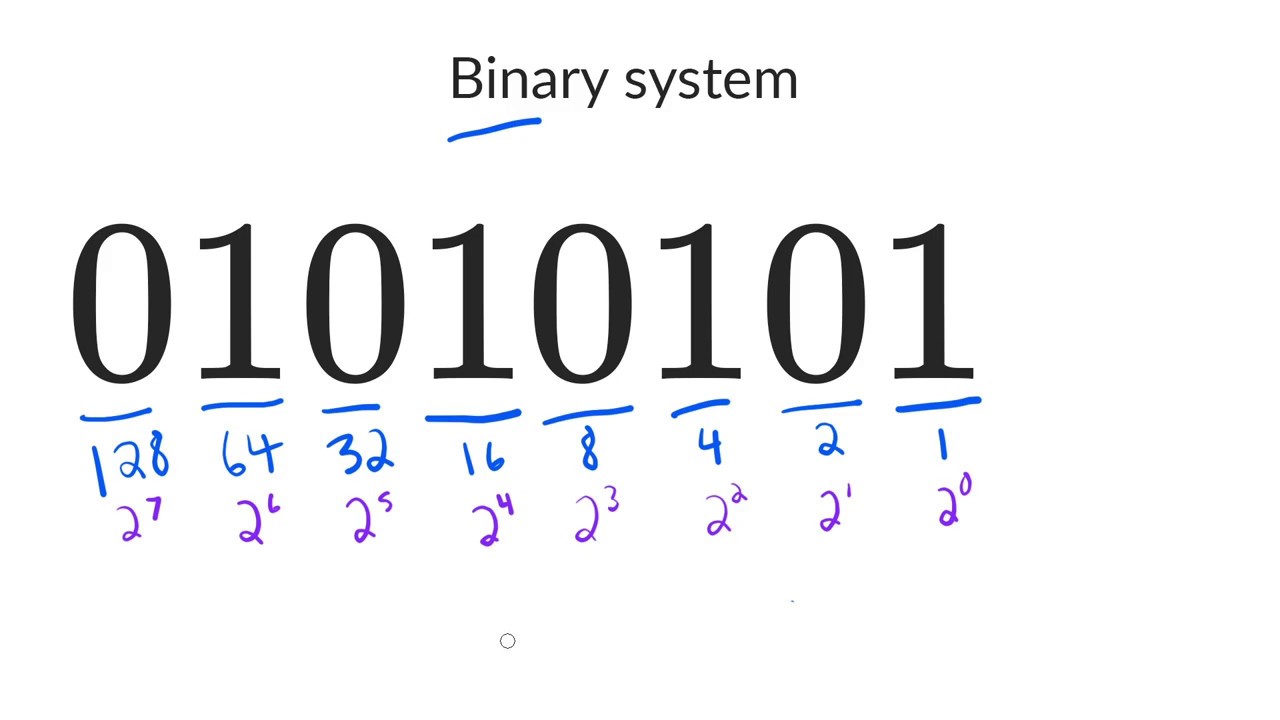 wintry quarry
honest vault
i have also created public variables soo i can attach the bullet
wintry quarry
honest vault
i have also created public variables soo i can attach the bullet
Those should be things on the bullet
cosmic dagger
honest vault
the gun checks if a collider that enters its trigger has a Health component, then attempts to damage it. a bullet is what does the damage, not a gun. the bullet should check if it collides with a game object that has a Health component . . .
honest vault
wintry quarry
Those should be things on the bullet
i have added the gun script to the bullet, it now spawns soo many bullets and djust does the same pushes the enemy away
honest vault
cosmic dagger
the gun checks if a collider that enters its trigger has a `Health` component, t...
Yeah but i did try and it just didnt work the way i wanted it to
cosmic dagger
honest vault
Yeah but i did try and it just didnt work the way i wanted it to
well what did you try?
honest vault
i put the gun scipt on the bullet prefab and removed it off the gun model
cosmic dagger
honest vault
i have added the gun script to the bullet, it now spawns soo many bullets and dj...
no, the bullet should have its own script. why place the script for the gun on the bullet? the bullet does not shoot itself. think about the responsibilities of the gun. it should shoot, reload, change fire mode, etc. it does not damage anything . . .
honest vault
im sorry ifs its a silly question but if i have only been learning for like 2days.
honest vault
cosmic dagger
no, the bullet should have its own script. why place the script for the gun on t...
yea but when the bullet collides it should damage whatever it collided with right?
not the gun
ivory bobcat
honest vault
i have added the gun script to the bullet, it now spawns soo many bullets and dj...
Consider decoupling some stuff. The bullet needs the physics callback method OnxxxEnter.
cosmic dagger
honest vault
yea but when the bullet collides it should damage whatever it collided with righ...
the responsibilities of a bullet is to move/travel and damage an object it collides with . . .
ivory bobcat
The gun needs the spawn bullet logic
If you just put the script on the bullet as well, you'll get the bullet firing bullets
honest vault
ivory bobcat
The gun needs the spawn bullet logic
isnt this what spawns the bullet? GameObject bullet = Instantiate(bulletPrefab, firePoint.position, firePoint.rotation);
honest vault
ivory bobcat
If you just put the script on the bullet as well, you'll get the bullet firing b...
thats what happened
ivory bobcat
But it'll destroy the enemy like the gun does so, at the very least 
honest vault
ivory bobcat
But it'll destroy the enemy like the gun does so, at the very least <:UnityChanT...
i did try a min ago it didnt destroy the enemy for some reason
ivory bobcat
honest vault
isnt this what spawns the bullet? ``` GameObject bullet = Instantiate(bulletPref...
Aye. Consider decoupling the gun stuff from the bullet stuff
honest vault
will do
wintry quarry
honest vault
i have added the gun script to the bullet, it now spawns soo many bullets and dj...
Why lol
A bullet is not a gun
Gun should have gun script
Bullet should have bullet script
Make things simple and logical
ivory bobcat
Note that OnTriggerEnter only occurs if the interaction should be a trigger interaction. Use OnCollisionEnter if it isn't a trigger interaction.
honest vault
Hastebin is a free web-based pastebin service for storing and sharing text and code snippets with anyone. Get started now.
got it working
ivory bobcat
ivory bobcat
Note that `OnTriggerEnter` only occurs if the interaction should be a trigger in...
The parameters differ
honest vault
it was easier than i thought it was
 modern smelt
Hello everyone. How would you code a jump as Mario in 3d ?
Using forces ?
ivory bobcat
modern smelt
Hello everyone. How would you code a jump as Mario in 3d ?
Using forces ?
Depends on what you're wanting
modern smelt
With using unity input manager i Can détect when player triger thé jump and cancel it,but how Can i apply the stop jumping and instant fall
Classic Mario jump that go higher depend of the time that the Burton is pressed
ivory bobcat
You'd use rigid body physics if you want your system tied to the rigid body physics system.
Character controller or Transform/Physics-casting would be your other alternatives
 keen bramble
I learnt roblox coding during lockdown for 2 years, and I have grown up and roblox is out my interest however coding still is, I learnt coding with the Roblox LUA Documentation however I cant find a documentation for unity step by step from start to finish
cosmic dagger
keen bramble
I learnt roblox coding during lockdown for 2 years, and I have grown up and robl...
!learn
eternal falconBOT
:teacher: Unity Learn ↗
Over 750 hours of free live and on-demand learning content for all levels of experience!
ivory bobcat
keen bramble
I learnt roblox coding during lockdown for 2 years, and I have grown up and robl...
I don't know much about Roblox api but in Unity you would be interacting with mono behavior callback methods. Consider looking at the official or YouTube tutorials.
keen bramble
eternal falcon
## :teacher: [Unity Learn ↗](<https://learn.unity.com/>)
Over 750 hours of free ...
Ok, but as a beginner should I start with this
honest vault
keen bramble
Ok, but as a beginner should I start with this
this would also help https://youtu.be/aB9LJ9oHGOs?si=f8Gx7soAegdscgzx
Xsolla: https://xsolla.pro/Blackthornprod
Olobollo on Steam: https://store.steampowered.com/app/1592650/Olobollo/
0:00 - Intro
0:50 - Xsolla Promo
1:24 - Variables
4:17 - GetComponent()
6:08 - Instantiate()
7:52 - Destroy()
9:27 - Loops
13:35 - If/else
16:04 - Input.GetAxisRaw()
18:59 - Vector2.M...
keen bramble
honest vault
this would also help https://youtu.be/aB9LJ9oHGOs?si=f8Gx7soAegdscgzx
Most of these I know maybe like 2-3 I don't as programming is somewhat similar so I have a deep understanding in Lua + Python
Ill give it a watch
ivory bobcat
keen bramble
I learnt roblox coding during lockdown for 2 years, and I have grown up and robl...
Make sure not to cross post next time though, it's against the server rules. (Referring to #archived-code-general message )
keen bramble
ok sorry
summer stump
keen bramble
Most of these I know maybe like 2-3 I don't as programming is somewhat similar s...
There is going to be a significant hurdle making the switch from lua and python to c#
I do kinda recommend going to Microsoft's course or https://www.w3schools.com/cs/index.php just to get the foundation. Unity's course goes over coding, but I think a pure c# course could benefit you
Just an option
modern smelt
ivory bobcat
You'd use rigid body physics if you want your system tied to the rigid body phys...
this is what i'm trying to do , but if i do a impulse for exemple , i cant cancel the jump force to make my player fall quicker , so what method can i use ?
keen bramble
summer stump
There is going to be a significant hurdle making the switch from lua and python ...
Not trying to do pure C# trying to do game development, and software development however software will be my next step after game
summer stump
keen bramble
Not trying to do pure C# trying to do game development, and software development...
Unity uses c#
keen bramble
Yeah I know
summer stump
So if you want to use unity, you use c#. Not sure what you are saying then
It uses pure c#
keen bramble
What I mean is like, in python u can script in just lines as in it only has an output or u can make 2d/3d which is somewhat different
Its fine I get u
summer stump
I recommended those courses for the benefit you would gain in game development
keen bramble
Ok
ivory bobcat
modern smelt
this is what i'm trying to do , but if i do a impulse for exemple , i cant cance...
If you just want to cancel or decrease vertical (jump) force, just maybe decrease the value by a factor if positive.
modern smelt
yeah to start , cancel the jump could be a first step
ivory bobcat
For example, if the value is greater than zero.. divide it by five or something.
 red scarab
why does this code not run in FixedUpdate? it works fine within Update, but since its physics I thought I should put it in fixed

to be clear the debug does print
modern smelt
ivory bobcat
For example, if the value is greater than zero.. divide it by five or something.
so i have to use rb.velocity ? And no more addForce to do it ?
wintry quarry
red scarab
to be clear the debug does print
If the thing prints, then the code is running
what makes you think it's not running?
red scarab
wintry quarry
If the thing prints, then the code is running
yeah I meant it doesnt work
nothing happens
meanwhile in update, it does
wintry quarry
red scarab
yeah I meant it doesnt work
maybe your force amount is too small, or maybe some other code is overwriting the velocity
wintry quarry
red scarab
meanwhile in update, it does
yeah probably too small of a force
moveSpeed isn't a great name for what that is either
more like - forceAmount or thrustAmount
red scarab
why does being in update vs fixedupdate change the required force? also, that worked, thanks
wintry quarry
red scarab
why does being in update vs fixedupdate change the required force? also, that wo...
Well by default FixedUpdate runs 50 times per second. Your game is probably running at much higher than 50 frames per second, so you were calling AddForce many more times when it was in Update
so you needed less force
Also doing it in FixedUpdate guarantees that your force is properly expressed in Newtons and that it will be consistent regardless of framerate