#💻┃code-beginner
1 messages · Page 219 of 1
 timid quartz
 hybrid gust
If I have multipler player's in my game, and each has a PlayerController slapped on em. How can i get references to each player's input in other scripts?
 ivory bobcat
hybrid gust
If I have multipler player's in my game, and each has a PlayerController slapped...
ivory bobcat
hybrid gust
If I have multipler player's in my game, and each has a PlayerController slapped...
Depends on your setup but they would always be able to inform others about themselves when they're started.
hybrid gust
ivory bobcat
Depends on your setup but they would always be able to inform others about thems...
A minigame that has references to an array of PlayerControllers
Is my setup
Each player controller has a PlayerInput attached if that helps
 lusty girder
hi, is there a way to write this so that it only rotates GameObject on the Y axis?
transform.rotation = Quaternion.FromToRotation(Vector3.forward, -hit.normal);
currently this code allows the GameObject to flip on the x and z axis as well which is creating unwanted interactions
 timber comet
lusty girder
hi, is there a way to write this so that it only rotates GameObject on the Y axi...
timber comet
lusty girder
hi, is there a way to write this so that it only rotates GameObject on the Y axi...
Replace Vector3.forward with Vector3.up
Just one thing tho, after all of that, do you want to clamp the y rotation?
lusty girder
timber comet
Replace Vector3.forward with Vector3.up
Yes, to like 180
how might that be done?
timber comet
lusty girder
Yes, to like 180
Then you can do something like this:
You need to make a Vector3, store the transform.eulerAngles in Start, after that you need to apply the rotation to that Vector3
In the end do a Math.Clamp on the y of that Vector, and apply it to transform.eulerAngles
lusty girder
timber comet
In the end do a Math.Clamp on the y of that Vector, and apply it to transform.eu...
All right, I'll try that. Thank you!
timber comet
lusty girder
All right, I'll try that. Thank you!
Np
timber comet
timber comet
Then you can do something like this:
You need to make a Vector3, store the trans...
Remember to add the desired rotation, do not use =, otherwise you won’t rotate
timber comet
timber comet
Remember to add the desired rotation, do not use =, otherwise you won’t rotate
So use +=
 hybrid wagon
im trying to debug my code

data tips are not working
i should be in debug mode properly, ive got the step in out and over stuff

adding stuff to watch doesnt seem to work

locals is completely empty
 sour fulcrum
can't figure it out based on what the docs say. Does GetComponentInParent go through all parents in the given hierarchical chain? or just the first parent
sour fulcrum
im inclined to agree but parents isn't a function that exists and considering you can only have 1 parent it seems abit odd to have a dedicated function to do just the parent when you could just do .parent in every context yknow
hence why im sus
hybrid wagon
chatgpt it is!
sour fulcrum
nah im good
hybrid wagon
i dont expect to get a response for a couple hours, anyway
 night mural
sour fulcrum
im inclined to agree but parents isn't a function that exists and considering yo...
night mural
sour fulcrum
im inclined to agree but parents isn't a function that exists and considering yo...
https://docs.unity3d.com/ScriptReference/Component.GetComponentInParent.html
This method checks the GameObject on which it is called first, then recurses upwards through each parent GameObject, until it finds a matching Component of the type T specified.
hybrid wagon
ok so it just goes up recursively until it finds one
sour fulcrum
thank you
sorry i did look!
might be a little fried aha
the function name does kinda seem inconsistent with the children functions
seems to want to be Parents
night mural
I agree
but maybe some folks just aren't ready to be Parents yet
we gotta give it time
sour fulcrum
it says no parents not no parent, we're allowed one
 nimble apex
due to project infrastructure (base code / design), i need to follow an unusual way to do this
basically, im now trying to modify a function that updates a 3D coin object and place it on certain UIs, the function :
- receive an integer from other functions, the integer is the value of the coin
- assign a spawn point for the token to spawn
- instantiate token
- modify the material of the token base on the value received
nimble apex
nimble apex
due to project infrastructure (base code / design), i need to follow an unusual ...
just like if the value is 50, then i will map material that is for $50 coin
the problem is , i need to change the texture of the material on top of existing features
 lavish gate
Can i destroy an object from a static class
nimble apex
is dictionary good for this?
dictionary<int,texture>```or you guys have better idea
 lavish gate
Damn thats crazy, didnt work but was there another way around?
 charred spoke
nimble apex
or you guys have better idea
charred spoke
nimble apex
or you guys have better idea
Put the textures in a atlas and just apply uv offset
 wintry quarry
lavish gate
Can i destroy an object from a static class
wintry quarry
lavish gate
Can i destroy an object from a static class
Why not? Destroy is a static function.
 acoustic crow
I need help with the gun script. I've written the script in a way that only one shot is possible before the reload, but the problem is, in my mobile game, there is a button, and when it is spammed, I get 10 bullets before the reload kicks in. Can someone please help me?
https://github.com/Just1n12354/MyGameProblems/blob/main/GunScript.cs

GitHub
I make this for Problems. Contribute to Just1n12354/MyGameProblems development by creating an account on GitHub.
acoustic crow
I dont know im a beginner :>
 craggy oxide
 coarse shore
How is this beginner 😭
coarse shore
How is this beginner 😭
yeah, if you are, you need to do some research of your own first before using this place
the people in here are very very careful not to help anyone who doesn't know their stuff already
coarse shore
Icl
craggy oxide
you need to get started on your own, take some tutorials, learn the basics, and only then, if YOUR CODE isn't working, you come here
coarse shore
The unity tutorials dont acc help
craggy oxide
thats what this place is for
craggy oxide
well, however you choose to learn unity is up to you
coarse shore
Yh
coarse shore
How did u learn unity
craggy oxide
they won't help you with basics, they'll just send you to some tutorials
coarse shore
Or c#
craggy oxide
coarse shore
How did *u* learn unity
a mixture of different tutorials really.
i watched some tutorials on basic C#
i watched some tutorials on Unity Learn website
i watched some third-party tutorials on YouTube
took me a few weeks but i got the basics and now im qualified to ask questions here
but in all honesty, most of the time I don't need help anymore
once you learn the basics your guess is as good as theirs
craggy oxide
🤷♂️
coarse shore
Damn
craggy oxide
if I was in charge of this place i'd create a new channel for COMPLETE beginners and i'd be more than willing to help you
coarse shore
Its prob single letters to revent spam
craggy oxide
but the rules are rules, you gotta do some of the legwork yourself unfortunately
to be honest that's what separates the game devs from the quitters, being able to get past that first step, trying things alone
coarse shore
craggy oxide
if I was in charge of this place i'd create a new channel for COMPLETE beginners...
Tbh im not a complete beginner, im js confused on how they see all of the different commands
Like there should be a dictionary
 eternal falconBOT
 craggy oxide
there is the complete list of commands lmao
coarse shore
Damn
craggy oxide
if you mean basic C# stuff, take some tutorials on that
coarse shore
Alr
craggy oxide
im gonna be honest i wouldn't bother reading the documentation in order to learn the basics
coarse shore
Do u have a yt channel that teaches the basics?
craggy oxide
too many commands, 99% of them you'll never need (for now)
coarse shore
Like a yt channel recommendedation
craggy oxide
coarse shore
Do u have a yt channel that teaches the basics?
the best people are probably just the biggest ones
Dave GameDevelopment
CodeMonkey
Brackeys
theres others
depends on how much patience you have
coarse shore
Do they have a playlist or do they teach while they make codes
coarse shore
craggy oxide
the best people are probably just the biggest ones
Dave GameDevelopment
CodeMon...
When i was learning lua (the code for roblox games), i watched a rlly unpopular dude
And he helped me a ton
craggy oxide
coarse shore
When i was learning lua (the code for roblox games), i watched a rlly unpopular ...
B Ricey?
coarse shore
craggy oxide
depends on how much patience you have
I have alot of patience
craggy oxide
coarse shore
I have alot of patience
ah thats great, well you'll be fine then, if you've got patience just switch between the three i suggested
there are others too, but those are my main guys so maybe they can be yours too
coarse shore
Alr ty
craggy oxide
i highly recommend watching Dave GameDevelopment's series on player movement
coarse shore
But do they have a playlist dedicated to teaching the basics of c#?
acoustic crow
coarse shore
How did *u* learn unity
I started by watching tutorials on game programming and simply copied the code for about 14 hours over 2 days, just to get familiar with the engine. Then I continued watching until I had about 23 hours, exploring various tutorials, including ones on C+ and Unity. After that, I began creating my own games, with the goal of making a cube that moves and has enemies. I kept working on it until it functioned properly. If I didn't know something, I looked it up, but as soon as I understood it, I deleted it and rewrote it from scratch as a learning exercise. For example, I wrote the movement script about 20 times until I grasped it, lol. You can't really copy because everyone writes their scripts differently, but you can get inspired and then try to rewrite your script. Don't copy too much, try to learn, so you understand when an error occurs, and it gets easier every day. I'm still a beginner myself, with only 65 hours of practice in Unity, but there's so much more I can achieve than I thought
craggy oxide
coarse shore
Alr
you may never use the swinging or sliding but you will learn a lot about C# from it
watch it anyway, even if you never use the end product you can get a lot of value from seeing how its done
coarse shore
Yh
craggy oxide
i know you said you don't like the Unity tutorials
have you tried the Unity Learn website
coarse shore
acoustic crow
I started by watching tutorials on game programming and simply copied the code f...
DAMN
coarse shore
craggy oxide
have you tried the Unity Learn website
What !learn ?
eternal falconBOT
:teacher: Unity Learn ↗
Over 750 hours of free live and on-demand learning content for all levels of experience!
coarse shore
Bc im pretty sure i have
craggy oxide
yup, the beginner scripting course is very boring but the junior programmer course actually makes a lot of sense
coarse shore
Its the voice that annoys me 💀
craggy oxide
i learnt a LOT from the junior programmer course because it shows you the basics of actual small games you could make
coarse shore
Should i do juniot programmer instead?
 burnt vapor
Can you guys make a thread if you use this channel for general chatter?
craggy oxide
like I said, if you try learning Unity C# by just reading the documentation thats a waste of time because theres way too much to cover
craggy oxide
burnt vapor
Can you guys make a thread if you use this channel for general chatter?
"Code-Beginner - Ask questions and discuss anything related to beginner coding concepts in Unity"
coarse shore
burnt vapor
Can you guys make a thread if you use this channel for general chatter?
Imma stop talking then ig
craggy oxide
coarse shore
Imma stop talking then ig
stay.
coarse shore
Im in skl 💀
craggy oxide
lmao if you need to go, go, but otherwise i'd stay
burnt vapor
craggy oxide
"Code-Beginner - Ask questions **and discuss anything related to beginner coding...
This channel is for asking questions specific to coding issues, not for chatting with beginner coders
craggy oxide
for a few more secs
coarse shore
I mean i conpleted my work
craggy oxide
burnt vapor
This channel is for asking questions specific to coding issues, not for chatting...
its not solely for asking questions
its discussion
burnt vapor
So pelase make a thread if you want to just chat with eachother
burnt vapor
craggy oxide
we're discussing
Stop arguing and just make a thread
coarse shore
Alr i have a coding question
craggy oxide
burnt vapor
Stop arguing and just make a thread
if you want to consult a mod be my guest but im going to say nothing further and continue what i'm doing
you're not a mod
coarse shore
Wait whats the thingy to do the format code in c# in discord
craggy oxide
coarse shore
Alr i have a coding question
ask away
burnt vapor
coarse shore
Wait whats the thingy to do the format code in c# in discord
!code
eternal falconBOT

Posting code
📃 Large Code Blocks
Use links to services like:
https://gdl.space/, https://paste.ofcode.org/, https://hatebin.com/, https://paste.myst.rs/, https://hastebin.com/
📃 Inline Code
Surround code with three backquotes. Not quotation marks.
To format as C#, add cs to the first line:
```cs
// Your code here
```
Add a comment with a line number if there is an error message.
craggy oxide
coarse shore
Wait whats the thingy to do the format code in c# in discord
its three of those ` in a row
coarse shore
Please check the bot message which has an example
coarse shore
Yk what imma js ask my question
craggy oxide
coarse shore
``` hello
you have to specify the type of code
you need to close it with another three ` as well
so its six ` in total
craggy oxide
alr best of luck
i'd try the junior programmer course if i was you
coarse shore
Alr ty
acoustic crow
Hello Guys i need help, the button that i have is a On Click() how i can change that when i klick on the button that is like getkey and not getkeydown i hope you know what i mean
when i press the button the action shoot is active when i dont press the button the action shoot is not active
ivory bobcat
What have you tried so far?
 chrome veldt
ok
eternal falconBOT
Posting code
📃 Large Code Blocks
Use links to services like:
https://gdl.space/, https://paste.ofcode.org/, https://hatebin.com/, https://paste.myst.rs/, https://hastebin.com/
📃 Inline Code
Surround code with three backquotes. Not quotation marks.
To format as C#, add cs to the first line:
```cs
// Your code here
```
Add a comment with a line number if there is an error message.
chrome veldt
 {
     if (grounded)
     {
         rb.velocity = new Vector3(rb.velocity.x, 0f, rb.velocity.z);
         rb.AddForce(transform.up * jumpForce, ForceMode.Impulse);
     }
 }
finally
chrome veldt
it says not all paths of code returns a value, what?
nvm, somehow fixed itself
its not even calling it
 tawdry rock
Hi. 1-2 days ago i was complaining that my ragdoll does wierd stuff when activated (like doing little jump in the air, spinning around like a ballerina, or straight catapulting into the void) however sometimes they behave exactly as i wanted. I noticed that they start to behave wierd after one of my game mechanism (slow motion). I did a little test now without the slow mo and all ragdoll were 100% good, not a single one glitched. Can somebody explain why this happens?
!code
eternal falconBOT
Posting code
📃 Large Code Blocks
Use links to services like:
https://gdl.space/, https://paste.ofcode.org/, https://hatebin.com/, https://paste.myst.rs/, https://hastebin.com/
📃 Inline Code
Surround code with three backquotes. Not quotation marks.
To format as C#, add cs to the first line:
```cs
// Your code here
```
Add a comment with a line number if there is an error message.
tawdry rock
here is my slow mo script: https://paste.ofcode.org/4T8HBNZray4CYJHSCmg57R
 shy rain
hello!ive got a question ,
i had an idea that when the player character approaches an object/NPC , it would trigger an event wich in it would show a simple UI telling to press a button on the keyboard, after pressing the Button it would
Either A : Play an Video of a Animation dedicated for that object
Or B :The camera would transfer to a different place in the world and play the animation in game
my question being , wich would be better
the option A or B
and how would i execute the entire event
i thought at first to just create a simple hitbox around the object that would trigger the UI pop up and then just wait for the player to hit the button, im asking if this is a good way of doing it or if theres a smarter way of doing it
 hexed terrace
A or B depends on your game, B allows for a dynamic cutscene that takes into account the current state of the game, A allows for the scene to play out exactly how you want with no intereference from the current game setup.
hexed terrace
shy rain
i thought at first to just create a simple hitbox around the object that would t...
Yes, this is one way to do it and is fine
 buoyant knot
that really depends
shy rain
hexed terrace
A or B depends on your game, B allows for a dynamic cutscene that takes into acc...
i think ill execute the animation through A , it seems like it gives me more freedom to mess around i think
 twin ibex
hi chat
its not a dump problem (;
I just want to know how to change the rotation here --->

what should I code?
to change my rotation
charred spoke
What do you want to happen?
charred spoke
180 on what axis
twin ibex
the z axis
twin ibex
bro (:
charred spoke
Yes?
charred spoke
I did tell you
 queen adder
LOL
twin ibex
? what dis ?
shy rain
buoyant knot
that really depends
depends on what?
timber comet
twin ibex
just tell me
I have something, but I need to find my old messages
charred spoke
twin ibex
? what dis ?
 timber comet
Then you can do something like this:
You need to make a Vector3, store the trans...
timber comet
timber comet
Then you can do something like this:
You need to make a Vector3, store the trans...
This
twin ibex
hhhh
queen adder
twin ibex
i dont waanna read
Why would people want to help you if you don't want to help yourself
charred spoke
twin ibex
i dont waanna read
You are going to find it very difficult to do any programming with that attitude
twin ibex
thx for helping me alot
queen adder
People can put you on the right path but if u don't want to read, maybe game dev (or anything difficult in life for that matter) isn't for you
 frosty hound
twin ibex
thx for helping me ***alot***
frosty hound
twin ibex
thx for helping me ***alot***
You are in the wrong discord if you think people will spoonfeed you here. If that's what you're expecting, you may as well leave now.
twin ibex
i know but now i have no time
frosty hound
Sarcasm and tantrums will be shut down here as well.
Your time is not more important than anyone volunteering their free time, here.
timber comet
timber comet
This
Salata use this
twin ibex
frosty hound
Your time is not more important than anyone volunteering their free time, here.
b ru h
buoyant knot
shy rain
depends on what?
depends on what you want to do lol
twin ibex
buoyant knot
depends on what you want to do lol
i just want i single word
timber comet
timber comet
Then you can do something like this:
You need to make a Vector3, store the trans...
Read this
buoyant knot
twin ibex
i just want i single word
i’m not replying to you
twin ibex
i thought its the first page
 twin ibex
buoyant knot
i’m not replying to you
twin ibex
buoyant knot
i’m not replying to you
i am sorry 🙂
ivory bobcat
What if every iteration does an i++ and --i?
It should still yield though and not freeze
Maybe you've got something else going on as well in the method called?
Comment stuff out and see if the freeze goes away. The method call lines, specifically.
You've got a few: choose next platform, spawn platform, and backtrack platform.
 languid spire
yes, and your loop will never end
 rare basin
your loop is infinite
 hallow iris
can any one tell me how to add acceleration and deceleration in to this

 languid spire
so log i and prove it
hallow iris
any suggestions or docs to read would be appriciated
languid spire
that is what you think will happen, what actually happens is an infinite loop
well that, obviousluy is not happening
ivory bobcat
hallow iris
can any one tell me how to add acceleration and deceleration in to this
You could probably accumulate velocity, use smooth step or slerp/lerp to interpolate towards the final expected velocity.
languid spire
logic dictates that the only way that loop can be infinite is if i-- is executed more than i++, so it's up to you to find out why
ivory bobcat
Ignoring that, you're probably freezing the editor because of one of your method calls
hallow iris
ivory bobcat
You could probably accumulate velocity, use smooth step or slerp/lerp to interpo...
i dont know am new just goi in to game dev OwO
ivory bobcat
Comment out the stuff in the coroutine and slowly add lines from the top back
languid spire
looking at your code
            if (platforms.Count > 0)
            {
                BacktrackLastPlatform();
I presume BacktrackLastPlatform should remove entries from platforms, my guess is this is not happening
ivory bobcat
ivory bobcat
You've got a few: choose next platform, spawn platform, and backtrack platform.
What's causing you to freeze has likely got to do with these method calls though
 stoic spear
hey, im attempting to make an FPS character controller. ive used rigidbody and when i apply horizontal force it makes my character bounce like crazy. does anyone know why this could be happening?
 private void CalculateGroundMovement()
 {
     //Vector3 wishDir = inputMovement * transform.forward;
     Vector3 wishDir = Vector3.Normalize(inputMovement.y * transform.forward + inputMovement.x * transform.right);

     float wishSpeed = wishDir.magnitude * maxSpeed / 100; // will turn into variable depending on crouch/sprint status

     float currentSpeed = Vector3.Dot(velocity, wishDir);
     float addSpeed = wishSpeed - currentSpeed;
     float accelSpeed = Mathf.Min(accel * Time.deltaTime * wishSpeed, addSpeed);
     velocity += accelSpeed * wishDir;


     float speed = velocity.magnitude;
     float drop = speed * friction * Time.deltaTime;

     float newSpeed = Mathf.Max(speed - drop, 0);
     if (speed > 0) newSpeed /= speed;
     velocity *= newSpeed;
     //characterController.Move(velocity);
rb.velocity += velocity;```Have the scene view visible too and see what your object is doing
You can place them side-by-side
stoic spear
ivory bobcat
Have the scene view visible too and see what your object is doing
it doesnt reveal much
stoic spear
maybe. would a default physic material have friction built in?
maybe ill add a custom pmat with 0 friction
ivory bobcat
If you've got a sphere and are adding velocity in a single direction, it'll roll/hop.
stoic spear
collider is a box
well changing to capsule collider and adding the pmat have made it slightly better, but im still vibrating up and down a bit
also it seems to completely ignore my own friction calculation
ivory bobcat
Log the values
stoic spear
which ones?
ivory bobcat
Speed and friction
stoic spear
well friction is a constant, do you mean drop?
ivory bobcat
If any are zero, drop will have a value of zero regardless of the value of the other
ivory bobcat
So if you're staying still the drop will have a value of zero, is that what's to be expected?
stoic spear
not sure what you mean, sorry
ivory bobcat
There really isn't enough info to determine what's going on. My initial assumption was that your object was rolling around while the camera had some fixed orientation. My second assumption was that your calculation above applies too much downwards force, requiring the object to have a large directional velocity to escape the resistance from friction.
I'm not really sure anymore. I suggest playing around with the values and seeing if reducing gravity (I'm assuming drop is gravity) affects the resulting behavior.
stoic spear
im only doing calculation on X and Z, thats the bit that confuses me
drop is the friction
it was working perfectly when i was using CharacterController, however that made it difficult to do jumping
wintry quarry
stoic spear
hey, im attempting to make an FPS character controller. ive used rigidbody and w...
which object is this script attached to?
and does that object tilt up/down when you look up/down?
hallow iris
how to add acceleration to my movement code so that the player doesn't just out right start with the top speed
wintry quarry
because you're using transform.forward for your wishDir
hallow iris
hallow iris
how to add acceleration to my movement code so that the player doesn't just out ...
this code is shit i know it cuz it is my first time making a game
have never made any thing befor
stoic spear
wintry quarry
and does that object tilt up/down when you look up/down?
camera vertical movement is done on the camera only but horizontal is the whole character
wintry quarry
stoic spear
hey, im attempting to make an FPS character controller. ive used rigidbody and w...
Wait also you seem to have a CharacterController AND a Rigidbody?
stoic spear
well yeah the character controller is commented out
and it doesnt even exist on the object so it defnintely isnt doing anything
wintry quarry
stoic spear
and it doesnt even exist on the object so it defnintely isnt doing anything
it does exist on the object
it's there in your screenshot, er... video
hallow iris
hallow iris
how to add acceleration to my movement code so that the player doesn't just out ...
any sugestions?
ivory bobcat
hallow iris
any sugestions?
Some of us can't see embedded text files on discord
hallow iris
ivory bobcat
Some of us can't see embedded text files on discord
oooo i can tale screen shots
stoic spear
wintry quarry
it's there in your screenshot, er... video
i changed it just after
ivory bobcat
hallow iris
oooo i can tale screen shots
The proper way to share !code for reviewing would be:
eternal falconBOT
Posting code
📃 Large Code Blocks
Use links to services like:
https://gdl.space/, https://paste.ofcode.org/, https://hatebin.com/, https://paste.myst.rs/, https://hastebin.com/
📃 Inline Code
Surround code with three backquotes. Not quotation marks.
To format as C#, add cs to the first line:
```cs
// Your code here
```
Add a comment with a line number if there is an error message.
ivory bobcat
Anything more than 8 lines would be considered large imo
ivory bobcat
Your previous link was fine
hallow iris
 cosmic dagger
hallow iris
```cs https://gdl.space/nibawipicu.cs ```
cosmic dagger
hallow iris
```cs https://gdl.space/nibawipicu.cs ```
Send the link as regular text so people can click on it . . .
 stoic spear
i think for now im just going to forget about jumping and revert to the charactercontroller method
it works much smoother
 radiant sail
unimportant question, why does this not work
if (rawZ !> 0)
but this does
if (rawZ <= 0)
 gaunt ice
not valid c# syntax
 oblique gale
what exactly is the best IDE for unity?
languid spire
anything except VS Code
wintry quarry
radiant sail
unimportant question, why does this not work
`if (rawZ !> 0)`
but this does
`if ...
this would work:
if (!(rawZ > 0))``` but why write that when you can just write `<=`?! negates a boolean expression. The entirety of (rawZ > 0) is a boolean expression. But > itself is an operator, not an expression. That's why !> doesn't work
radiant sail
wintry quarry
this would work:
```cs
if (!(rawZ > 0))``` but why write that when you can just ...
i was just wondering because i tried !> and it didnt work when it looked to me like it should have
oblique gale
languid spire
anything except VS Code
why? what's wrong with vscode?
oblique gale
oh... is the default VS fine?
languid spire
VS is very good
 elder basin
ummm, can i set up hand tracking with xr interaction toolkit without the headset?
 static bay
languid spire
VS is very good
static bay
languid spire
VS is very good
Feels like you're driving a semi, but ya it's pretty good.
languid spire
static bay
Feels like you're driving a semi, but ya it's pretty good.
that is down to you, I have 90% of the options turned off because I don't need them. I also have my OS tuned for performance and only run concurrent programs/processes that I actually need for development
 rich adder
languid spire
no decent debugger just for starters
rich adder
languid spire
no decent debugger just for starters
the VSCode debugger exists and its pretty decent
languid spire
that with the new C# extension?
rich adder
not sure if its because of the c# devkit, but it was pretty good compared to what it used to be
languid spire
I'd still prefer MonoDevelop for MacOS and Linux though
I see no reason to run VS Code on Windows
rich adder
am on MacOs i still us VS on windows
 calm coral
languid spire
I see no reason to run VS Code on Windows
calm coral
languid spire
I see no reason to run VS Code on Windows
Thanks, a lot of people I meet online praise VS Code and I have no idea why, I've been using Visual Studio for years and I see no reason to change  before Visual Studio I've been using Code::Blocks but that was for C++
cosmic dagger
languid spire
I see no reason to run VS Code on Windows
Steve, who hurt you? 😢
rich adder
vscode is catching up in terms of being close to VS
 languid spire
cosmic dagger
Steve, who hurt you? 😢
languid spire
cosmic dagger
Steve, who hurt you? 😢
I don't get you, why use a jumped text editor when you can use a fully fledged IDE?
cosmic dagger
calm coral
Thanks, a lot of people I meet online praise VS Code and I have no idea why, I'v...
Most people use(d) it bc its a lightweight editor; great for old PCs . . .
languid spire
just use an older version of VS, I've still got VS 2003 on my machine, works just fine
rich adder
mans really has a grudge against vscode
cosmic dagger
languid spire
I don't get you, why use a jumped text editor when you can use a fully fledged I...
No worries, I was being funny, though, I do use VSCode as well . . .
calm coral
cosmic dagger
Most people use(d) it bc its a lightweight editor; great for old PCs . . .
Aight  I'm a PC master race player, can't wait for Intel's 15th gen to upgrade
cosmic dagger
I'd recommend VS, especially for beginners. It's much easier to configure and doesn't break as often, if at all . . .
rich adder
VS is gone for macos :\
languid spire
cosmic dagger
I'd recommend VS, especially for beginners. It's much easier to configure and do...
and them's as good a reason's as you can get
calm coral
rich adder
VS is gone for macos :\
Download Windows 
rich adder
yuck
languid spire
calm coral
Download Windows <:Windows11:854706007854546944>
I actually do, I run Windows VM's on both MacOS and Linux just for the VS support
 grand badge
So i am making a lil player verses player for my game but i have a small issue. The player goes around the map, getting Guns, when a gun is collected it will disappear. The issue is if the player picks up another gun, or leaves, the gun that they picked up disappears. How can I get the Gun back? I dont want it to spawn back after a certain amount of time as that would lead to the rarity of guns not mattering. How can i do this?
calm coral
languid spire
I actually do, I run Windows VM's on both MacOS and Linux just for the VS suppor...
Aight, I'm using Windows all the time
languid spire
calm coral
Aight, I'm using Windows all the time
I do a lot of cross platform development so I need all the options
rich adder
grand badge
So i am making a lil player verses player for my game but i have a small issue. ...
we dont know how you setup your pick up system , need more info
cosmic dagger
Initially, I used VSCode bc it was the first tutorial I found and it configured properly
When it finally broke, I just coded manually. It helped with learning the C# and Unity API without autocomplete and intellisense . . .
static bay
cosmic dagger
Initially, I used VSCode bc it was the first tutorial I found and it configured ...
jesus
hallow iris
hallow iris
https://gdl.space/nibawipicu.cs
should i give up on implemeting accelartaion and decellaration in my movement i cant seem to find any helpful docs or unity guids on iy
languid spire
hallow iris
should i give up on implemeting accelartaion and decellaration in my movement i ...
perhaps you are searching incorrectly, acceleration and deceleration are simple mathematical formulas
hallow iris
languid spire
perhaps you are searching incorrectly, acceleration and deceleration are simple ...
do u have any sources i can read or watch to get relevent info from
cosmic dagger
hallow iris
should i give up on implemeting accelartaion and decellaration in my movement i ...
That's not a Unity-specific concept. What are you searching for? Also, where do you implement it in your code?
rich adder
hallow iris
should i give up on implemeting accelartaion and decellaration in my movement i ...
look animation curves if you want easy accelerations
hallow iris
cosmic dagger
That's not a Unity-specific concept. What are you searching for? Also, where do ...
i want to implemet it in movement so that the player dose not starts from its top speed and can stop quickly like in celest
languid spire
hallow iris
do u have any sources i can read or watch to get relevent info from
google?
 hallow iris
languid spire
google?
hallow iris
languid spire
google?
OwO f me
rich adder
languid spire
google?
flash banged 😵💫
 low path
i'd just say though that you should consider whether unity's physics system (e.g,. forces, gravity, mass) already provides what you need
rich adder
hallow iris
i want to implemet it in movement so that the player dose not starts from its to...
forget the diffcult math.. Use this 🙂
hallow iris
rich adder
forget the diffcult math.. Use this 🙂
thanks
low path
you can also use things like AddForce() (https://docs.unity3d.com/ScriptReference/Rigidbody.AddForce.html) to control velocity
like if you add force constantly based on input, it will have a smooth velocity change rather than achieving instant top speed
 tired nebula
So what may be hapenning to my code?


Wizard is inheriting from Player, but it's giving me an error I don't know how to solve
buoyant knot
Wizard does not derive from monobehaviour. Update will never be called
languid spire
public Wizard(string name, float health) : base(name,health)
buoyant knot
being a monobehaviour and defining a constructor are effectively mutually exclusive
 summer stump
buoyant knot
Wizard does not derive from monobehaviour. Update will never be called
summer stump
buoyant knot
Wizard does not derive from monobehaviour. Update will never be called
That's just left over from creating the script in Unity
tired nebula
buoyant knot
Wizard does not derive from monobehaviour. Update will never be called
I just erased update
 polar acorn
Also you can just call Update on things. It's just a function like any other
buoyant knot
summer stump
That's just left over from creating the script in Unity
we can’t take that for granted because we are in #💻┃code-beginner
even if it is likely true
tired nebula
languid spire
public Wizard(string name, float health) : base(name,health)
Thanks! It solved my problem
polar acorn
Steve has the answer though, you need this thing's constructor to call the base
summer stump
buoyant knot
we can’t take that for granted because we are in <#497874004401586176>
It has nothing to do with the question, and it was empty style police
buoyant knot
how is saying that monobehaviour and calling constructor are mutually exclusive considered style policing lmao
polar acorn
summer stump
It has nothing to do with the question, and it was empty style police
I mean, we do do that a lot.
polar acorn
buoyant knot
how is saying that monobehaviour and calling constructor are mutually exclusive ...
It's not a MonoBehaviour
buoyant knot
polar acorn
It's not a MonoBehaviour
i know, but if he intended for it to be monobehaviour vs not makes a difference
because you rarely see Update outside of monobehaviour
summer stump
polar acorn
I mean, we _do_ do that a lot.
Yes, they just do it constantly all the time
Usually in a harmful way compared to others
buoyant knot
you can’t just say advice you think is unwarranted is style policing
summer stump
buoyant knot
you can’t just say advice you think is unwarranted is style policing
This wasn't style policing.
buoyant knot
summer stump
It has nothing to do with the question, and it was empty style police
then explain this comment
summer stump
buoyant knot
then explain this comment
It's your nickname. Because of the constancy you do it
Like here
#💻┃code-beginner message
buoyant knot
lol
 abstract marlin
Hello Guys im New to Unity and Coding! I have big troubles solving a kinda random problem thats occuring.
Im Using a Complete Guide to Creating Flappy Bird from Zigorous.
I Did install Unity and Visual Studios and made my Way through the Video until 46:44 / 1:06:46.
I Followed every Step until there and had no compiling Errors until a Big yet seemingly unsolvable Issue.
I Already Redid my Whole Project and Coded it from Scratch again until 46:44 and i think maybe its an guide issue as i get the same Error again.
My Current Problem is that my Player refuses to Collide with my Objects ( Pipes) and Scoring ( Middle Part) . Even with Debug Information given and applied to the Code the Console wont give me out any information whats going wrong. My Game Manager Script also not Counting the Given Score when Flying through the Obstacles.
I know u need more Information or Code or Pictures, my Question now is if anyone can help me solve that Problem and what u need from me to help u helping me ^^
Thanks in Advance. I overdid all my codes with chatgpt , went through solving steps from layers to rigidbody to collider scaling through code checkup etc etc. nothing seems to work and chatgpt is just recalling the same steps now over and over and i pretty much fixed and did every step i got called.
polar acorn
abstract marlin
Hello Guys im New to Unity and Coding! I have big troubles solving a kinda rando...
Show code
rich adder
"I Followed every Step " we shall come back to this
buoyant knot
summer stump
It's your nickname. Because of the constancy you do it
Like here
https://discord...
are you seriously digging through post history to justify name calling? stop being immature
abstract marlin
From all my Scripts ? i have 5 running Player Script , Game Manager , parallax , pipes and spawner
polar acorn
buoyant knot
are you seriously digging through post history to justify name calling? stop bei...
That was this conversation
It was like, eight posts before the one with the link
polar acorn
abstract marlin
From all my Scripts ? i have 5 running Player Script , Game Manager , parallax ,...
Where you're doing the collision, and where you're expecting the logs to occur
rich adder
abstract marlin
Hello Guys im New to Unity and Coding! I have big troubles solving a kinda rando...
also
chatgpt is just recalling the same steps now over and over
Don't be surpised that spambot is no help 
buoyant knot
🤷♂️
summer stump
Right? Talk about immature jfc.
But I will no longer respond to them, again.
buoyant knot
also, you’re following the guide from zigorous, and not game maker’s toolkit?
abstract marlin
this is the player skript , i send the settings of player and obstacles too


 rich adder
abstract marlin
this is the player skript , i send the settings of player and obstacles too
rich adder
abstract marlin
this is the player skript , i send the settings of player and obstacles too
man you should configure your IDE before anything..
buoyant knot
idk why this man is beefing, but I’m just blocking him. i didn’t come to start shit, but I am ending it
polar acorn
abstract marlin
this is the player skript , i send the settings of player and obstacles too
The Three Commandments of OnTriggerEnter2D:
- Thou Shalt have a 2D Collider on each object
- Thou Shalt tick
isTriggeron at least one of them - Thou Shalt have a 2D Rigidbody on at least one of them
rich adder
lets move on guys #📖┃code-of-conduct
buoyant knot
we have both blocked each other. it’s done
 eternal falconBOT
💡 IDE Configuration
If your IDE is not autocompleting code
or underlining errors, please configure it.
Select one:
• Visual Studio (Installed via Unity Hub)
• Visual Studio (Installed manually)
• VS Code
• JetBrains Rider
• Other/None
buoyant knot
eternal falcon
@abstract marlin
abstract marlin
this is Pipes , and the kids are set as following pictures


oh i will set that up was busy making the photos
rich adder
yes before anything you shouldconfigure your IDE
buoyant knot
if your visual studio isn’t set up properly, it will make your life miserable
rich adder
its a requirement for help here @abstract marlin
polar acorn
abstract marlin
this is Pipes , and the kids are set as following pictures
I don't see a collider on your player
abstract marlin
oh dang , where do i set it up if installed manually ?
polar acorn
abstract marlin
oh dang , where do i set it up if installed manually ?
!ide click the link for "installed manually"
eternal falconBOT
💡 IDE Configuration
If your IDE is not autocompleting code
or underlining errors, please configure it.
Select one:
• Visual Studio (Installed via Unity Hub)
• Visual Studio (Installed manually)
• VS Code
• JetBrains Rider
• Other/None
buoyant knot
eternal falcon
follow links
buoyant knot
tired nebula
So what may be hapenning to my code?
@abstract marlin your code (and the colors of text) should look kind of like this when set up right
abstract marlin
polar acorn
I don't see a collider on your player
yea you can see im beginner here as i thought using that rigidbody kinematic counts as a collider..
 young warren
abstract marlin
yea you can see im beginner here as i thought using that rigidbody kinematic cou...
young warren
abstract marlin
yea you can see im beginner here as i thought using that rigidbody kinematic cou...
colliders and rigidbodies are 2 separate components
colliders define the bounds, rigidbodies deal with the physics part
polar acorn
Confusingly, CharacterControllers are colliders, but Rigidbodies are not
rich adder
yeah CC is special physics obj + collider
abstract marlin
Well should have done the visual studio setup beforehand , now looks way more than the tutorial video
buoyant knot
just in general, a gameobject has like a list of different components. each component does different things. some are built in, and some are written by you.
Colliders handle an object maintaining a shape(s) to interact with physics system.
Rigidbody handles moving the object while respecting physics, AND sending callbacks when you hit stuff
tired nebula
buoyant knot
<@945043429459652618> your code (and the colors of text) should look kind of lik...
Like what?
buoyant knot
tired nebula
Like what?
sry, didn’t mean to ping you. I meant to show this guy who has their IDE set wrong what it looks like when it is right
rich adder
keep in mind Shoyguer is using VSCode , and Hi is using VS
so the colors may not exactly match
abstract marlin
I was kinda in a bad mood starting using flappy bird tutorial. my plan was to start with the unity learn thing but i gotta be a student or on a school to unlock the unity learn feature , i was bit pissed about having to pay 2000 dollars for the learning part and went straight into a yt tutorial xD
tired nebula
buoyant knot
sry, didn’t mean to ping you. I meant to show this guy who has their IDE set wro...
No prob
buoyant knot
flappy bird is a better start than unity learn
rich adder
abstract marlin
I was kinda in a bad mood starting using flappy bird tutorial. my plan was to st...
no you dont..
all the lessons are free
abstract marlin
it says Unity Personal doesnt Support Unity Learn u have to switch Memberships to use em
and all the other that have it built in are need to pay or be student
rich adder
abstract marlin
it says Unity Personal doesnt Support Unity Learn u have to switch Memberships t...
nah
where are u seeing this
whos "it says"
buoyant knot
unity learn starts by blowing smoke up your ass, followed by theory, before you get to anything functional.
The flappy bird tutorial goes through the basics of getting everything set up, and you’ve seen the basic pieces that you will use all the time. Even if you don’t have the full knowledge
Then afterwards, Unity learn can help, because you’ve effectively had a tour of unity already
abstract marlin
when i click unity learn it says my membership doenst support this. when i go to the official unity websites and look up the plans it only gives me the 2000 dollar ones or the student version which i am not
rich adder
buoyant knot
Then afterwards, Unity learn can help, because you’ve effectively had a tour of ...
not really because when people follow a tutorial they're just mindlessly copying, and not learning anything
buoyant knot
rich adder
not really because when people follow a tutorial they're just mindlessly copying...
a bit, but the first tutorial is just like a tour of the facilities
from start to end
rich adder
abstract marlin
when i click unity learn it says my membership doenst support this. when i go to...
nah bro it works fine
abstract marlin
buoyant knot
a bit, but the first tutorial is just like a tour of the facilities
yea
buoyant knot
you might not remember where the bathroom is, or how to flush, but you at least know there is a bathroom
abstract marlin
rich adder
nah bro it works fine
why isnt it working on my personal unity licence then ? wait i screen it
 eternal falconBOT
:teacher: Unity Learn ↗
Over 750 hours of free live and on-demand learning content for all levels of experience!
rich adder
those are just templates
buoyant knot

rich adder
and you need 2021 for those
buoyant knot
unity learn is like an actual class
cosmic dagger
buoyant knot
flappy bird is a better start than unity learn
Flappy Bird was my first game . . .
buoyant knot
flappy bird was my first, and I think it was a good start
hallow iris
@languid spire thanks for the acceleration formula i fianlly fixed just need to tweek it now
buoyant knot
very simple, small scope, see everything quick, and get everything set up so you don’t stress over installs etc again.
abstract marlin
rich adder
and you need 2021 for those
small things... im so happy i finally made my way to join this discord... i wasted like my last 3 days of freetime for workarounds but not using the correct keywords ^^
 fickle plume
abstract marlin
fickle plume
abstract marlin
You are in the new project dialogue and this installed version selected doesn't have learning templates for it.
Return to main screen there and you can select learning projects from there.
But really should start with courses on Learn
buoyant knot
i recommend your second project also not be a passion project. do another small thing at least first
something small where you don’t care if it sucks
abstract marlin
fickle plume
You are in the new project dialogue and this installed version selected doesn't ...
Yea after implementing collider on my player my score and game over finally get shown correctly... thanks dudes
Still have 20 mins left on the tutorial if i get anything done i work my feet through unity learn... i have time and i want to know as much as poss !
thanks u all ❤️
sry for my decent english , as u may saw at my comments in my code im from germany 😄
cosmic dagger
For custom projects, I'd start with Flappy Bird, Galaga, Brick Breaker, and a 2d Mario level . . .
rich adder
Angry Birds getting no love 😦
buoyant knot
i would start with flappy bird, then think about what sort of game you actually want to make. Pick simple games that help build up to that skillset
like if your dream is to make an FPS, I would pick a simple first person 3D game or something for my second game
if you dream of making a sidescroller, go for a 2D platformer second
if you prefer the abstract, go for 2D galaga or brick break, as randomUnityInvader said
buoyant knot
rich adder
Angry Birds getting no love 😦
coding that slingshot would piss me off if it were my second project
abstract marlin
My Dream is Creating a 3D World with Charakters with AI
polar acorn
cosmic dagger
For custom projects, I'd start with Flappy Bird, Galaga, Brick Breaker, and a 2d...
Or just do what I did and make your first project a sprawling, moddable, mechanically intensive fighting game, fail to finish it, restart it, fail to finish it again, then make a mario party minigame clone just to feel something
buoyant knot
abstract marlin
My Dream is Creating a 3D World with Charakters with AI
then 2nd game should be some 3D platformer. Try something like super mario 64
(but way smaller obvs)
abstract marlin
Yeah anything 3D , 2D is for my start but i absolutely do not like them ^^ but i have like 0 knowledge and cant just skip it 😄
buoyant knot
do know that 3D math is more complex
rotation in 2D is just one number: angle (potentially a mirror flip)
rich adder
buoyant knot
coding that slingshot would piss me off if it were my second project
its not so bad lol. 1 simple func
buoyant knot
rotation in 3D is quaternion math etc
static bay
buoyant knot
do know that 3D math is more complex
It's one more number how hard can it be?
polar acorn
buoyant knot
rotation in 3D is quaternion math etc
You never actually use quaternions
 rocky canyon
1/3 harder
buoyant knot
rich adder
its not so bad lol. 1 simple func
i’m just saying that’s the time at which you are most vulnerable
polar acorn
You just let the engine handle it. If you ever find yourself doing quaternion math you're doing something wrong
buoyant knot
polar acorn
You never actually _use_ quaternions
yeah, but it is a bit harder to conceptualize, even if you aren’t the one doing the math
abstract marlin
Well 3D is still far away for me , first i finish my flappy bird , then i go through unity learn , program languages besides and maybe new 3D project afterwards
rich adder
buoyant knot
i’m just saying that’s the time at which you are most vulnerable
gotta soften those cheeks some time
abstract marlin
buoyant knot
yeah, but it is a bit harder to conceptualize, even if you aren’t the one doing ...
yeah i watched alot of guides already before starting , the math is definetely something else in 3D
summer stump
abstract marlin
Well 3D is still far away for me , first i finish my flappy bird , then i go thr...
It's really not more complex. Don't get the wrong idea
Many people start with 3d and do fine. Then they find 2d harder haha
buoyant knot
camera is also a lot harder in 3D
rocky canyon
debateable
 shell sorrel
as somoene who started in 3d and work for a studio doing 2d. i think 3d is easier
rich adder
rocky canyon
tbh 3d was easier for me than 2d
Luckily unity made them seamless , being that its a 3D engine and all But all the 2D functions have 3D counter part
shell sorrel
less weird edge cases to solve since you can just do stuff for real
static bay
I don't need to worry about my camera going INTO shit in 2D
rich adder
true, much easier to edit a model than a drawing imo
buoyant knot
rocky canyon
debateable
it took the whole N64 era with devs struggling with 3D cameras, for people to learn how to make it not suck
static bay
simple bounds and you're usually good
abstract marlin
I enjoy every of your comments , just finally having people around to talk about all that and not 100% self learning . god feels good
summer stump
static bay
I don't need to worry about my camera going INTO shit in 2D
Common issue in 2d is having sprites too close and getting culled, so kinda haha
rocky canyon
buoyant knot
it took the whole N64 era with devs struggling with 3D cameras, for people to le...
cinemachine has me covered
rich adder
buoyant knot
it took the whole N64 era with devs struggling with 3D cameras, for people to le...
and now we have a cinemachine camera collider component.
polar acorn
Neither one is harder than the other, they're different. Some things are harder in 3D, some things are harder in 2D
rich adder
technology moves on
shell sorrel
camera clipping, or sorting issues
polar acorn
But they have so much overlap learning one practically learns both
shell sorrel
take your pick since you get either or
buoyant knot
point being, first order of business to learn 3D is to learn camera and basic 3D movement/physics.
flappy bird should teach the baics of “how the hell do i open unity”
static bay
Why would I learn a 3D camera when I simply point it down at a 45 degree angle and NEVER change it?
static bay
rocky canyon
thats a 3d camera holmes
IMPOSSIBLE
rich adder
buoyant knot
flappy bird should teach the baics of “how the hell do i open unity”
or how do variables even work..
buoyant knot
once you got that basic shit down, then try doing some basic 3D
abstract marlin
rich adder
or how do variables even work..
im on it mister ! gimme some time 😄
rocky canyon
no! now
polar acorn
static bay
Why would I learn a 3D camera when I simply point it down at a 45 degree angle a...
Yeah that's the thing. "3D Camera" isn't really a concept because it would encapsulate Halo, Paper Mario, and Starcraft, which are not in any way similar
rich adder
abstract marlin
im on it mister ! gimme some time 😄
Start making c# Console apps, you will be a 4D chess player in no time
polar acorn
Saying "3D Cameras" are hard is leaving behind a lot of the nuance that you simply do not have to do a hard camera system to make a 3D game
rocky canyon
i skipped console apps.. #unpopularopinion
summer stump
abstract marlin
im on it mister ! gimme some time 😄
I recommend checking out a pure c# course for that
https://www.w3schools.com/cs/index.php
Or tutorials point
abstract marlin
rich adder
Start making c# Console apps, you will be a 4D chess player in no time
Sure Thing Rank 1 Incoming
😄
rich adder
galaxy brain moment
rich adder
rocky canyon
i skipped console apps.. #unpopularopinion
thats actually blasphemy in .net
buoyant knot
it would probably make sense to get experience in C# if you don’t already
probably between flappy bird and 2nd project
abstract marlin
buoyant knot
it would probably make sense to get experience in C# if you don’t already
im an absolute beginner , i did buy a c++ book 2 years ago and went over hello world program and like first 30 pages , thats all knowledge i had before this morning when jumping into flappy bird
abstract marlin
summer stump
I recommend checking out a pure c# course for that
<https://www.w3schools.com/cs...
saved and gonna look through , thanks buddy
buoyant knot
shit you must absolutely know:
- access modifiers (private/public)
- property vs field, and their syntax
- for/foreach loops
- serialization (serialized fields vs not)
- arrays
- basics of how types work
Do not continue onto a second project before understanding this stuff
rich adder
abstract marlin
im an absolute beginner , i did buy a c++ book 2 years ago and went over hello w...
c++ is vastly more difficult than c#
its why I stopped modding Source SDK and just used Unity instead 😛
phys X sucks tho, wish we could get havok on personal account
buoyant knot
C# just has a GC, and doesn’t really require pointers
abstract marlin
buoyant knot
shit you must absolutely know:
1) access modifiers (private/public)
2) property ...
after flappy bird my steps should be unity learn -> aethenosity c# tut there and if youre points aint in it looking for them loup and then 3d project yes ?
buoyant knot
i wouldn’t say C++ is harder, but that you need to take care of that extremely menial and tedious crap yourself. And if you don’t, you seg fault or memory leak like crazy
low path
c++ is much more verbose, syntactically complex, and has way more stuff in it, and has poorer documentation
and it has lots of outdated non-modern stuff in it
rich adder
buoyant knot
i wouldn’t say C++ is harder, but that you need to take care of that extremely m...
its not hard starting from scratch in comparison to editing a premade code, like source SDK engine
buoyant knot
abstract marlin
after flappy bird my steps should be unity learn -> aethenosity c# tut there and...
flappy bird => first bit of unity learn => basic C# => 2nd project
unity learn will cover some of the core concepts of C#
rich adder
this one covers both, kinda
https://learn.unity.com/project/beginner-gameplay-scripting
gaunt ice
leetcode isnt for training coding skill on specify language ,it trains your understanding of algorithm (note that you can implement algorithm in any language you know)
low path
i think doing a bunch of leetcode easy's is a decent way of just getting used to the basic syntax and semantics of any language
buoyant knot
oh, and for second project, I recommend following a tutorial, but going more freestyle off the path
like easing off training wheels
i would not have learned unity tilemaps as quickly as I would have without following a tutorial because the tutorial is going to use all the critical functions and settings.
cosmic dagger
polar acorn
Or just do what I did and make your first project a sprawling, moddable, mechani...
Aw man, that's definitely starting on God mode . . .
buoyant knot
rocky canyon
but thats because they intimidate me
a tilemap is just like a Dictionary<Vector3, TileData>, where you read/write tiles at specific positions, and then TilemapCollider2D and TileRenderer handle the physics and rendering to make the object complete
abstract marlin
Just a Quick Question , the setting up IDE is up to date ?
buoyant knot
if your IDE has the right colors etc, it should be good
there is no in between. it either looks right, or totally very wrong
abstract marlin
Im missing a lot ill just check the other " installed by unity guide" too and if it still doesnt work as planned ill come back with a question ^^
summer stump
abstract marlin
Im missing a lot ill just check the other " installed by unity guide" too and if...
They go to the same page
 dreamy fulcrum
im trying to independently disable/enable two components of the same type that are on several child objects, any idea how i can do this? looked on the internet and couldnt find any answers
summer stump
The unity one is just scrolled down a bit
buoyant knot
try writing:
int x = int y + 2;
The IDE should instantly tell you that this is wrong. if it does not, then it is not set up right
abstract marlin
yea i just got that , its just 1 more step before that 😄
summer stump
dreamy fulcrum
im trying to independently disable/enable two components of the same type that a...
Have the components referenced.
.enabled = false
buoyant knot
dreamy fulcrum
im trying to independently disable/enable two components of the same type that a...
you want separate references
rocky canyon
buoyant knot
a tilemap is just like a Dictionary<Vector3, TileData>, where you read/write til...
https://spawncampgames.github.io/archive/Fliplite/ yea, i figured it out once
rich adder
abstract marlin
yea i just got that , its just 1 more step before that 😄
things to check :
Unity workload installed In VS Installer,
VS is set inside External Tools of Unity
Open script from VS
Regeen Project files in External Tools
Check the Solution Explorer , make sure solution is not set to Incompatible, Missing or anything like that
buoyant knot
either a reference to each individual child object, so you can GetComponent to access the specific component that is relevant.
Or a reference to the specific components directly.
but if you don’t have a way to tell each obj appart, you will be SOL. Which is why you should get references
dreamy fulcrum
how do i separately reference two components with the same name?
summer stump
dreamy fulcrum
how do i separately reference two components with the same name?
By dragging them in to fields via the inspector
abstract marlin
rich adder
things to check :
Unity workload installed In VS Installer,
VS is set inside Ex...
ill do check those in my open project , right ?
rich adder
rocky canyon
https://spawncampgames.github.io/archive/Fliplite/ yea, i figured it out *once*
idk wtf im doing but I enjoy just clicking around
buoyant knot
do you want to store a ref to it on the script instance?
rocky canyon
rich adder
idk wtf im doing but I enjoy just clicking around
its like lights out.. when u click adjacent squares change either on or off.. depending on what they were...
rich adder
abstract marlin
ill do check those in my open project , right ?
In Unity yes, last step check in VIsual Studio
rocky canyon
goal is to make all the lights go out
 icy sluice
how do i calculate final bullet velocity after penetrating an armor plate?
buoyant knot
because then you can use
[SerializeField] private MyComponentType first;
[SerializeField] private MyComponentType second;
and drag in inspector
rocky canyon
rich adder
idk wtf im doing but I enjoy just clicking around
its not laggy?
rich adder
rocky canyon
goal is to make all the lights go out
neat! the gamefeel is good
rich adder
rocky canyon
its not laggy?
na
rocky canyon
thanks! it is on my machine 😢
rocky canyon
yea webGL is always an issue for me
rich adder
im on a macbook from 2014
dreamy fulcrum
buoyant knot
because then you can use
[SerializeField] private MyComponentType first;
[Serial...
but these are components in several children, how will that work?
rocky canyon
im probably just using the wrong settings
buoyant knot
dreamy fulcrum
but these are components in several children, how will that work?
inspector view lets you drag or directly reference specific instances of that thing in the scene
rich adder
rocky canyon
im probably just using the wrong settings
or browser 😈
buoyant knot
do the children exist in the scene? or do they appear at runtime?
rocky canyon
rich adder
or browser 😈
what browser u using?
dreamy fulcrum
they're in the scene
rocky canyon
safari? 😬
rich adder
rocky canyon
what browser u using?
🦊
rocky canyon
ahhh, yea im chromer
rich adder
ahh
rich adder
I use it occasionally to test my web apps in diff browsers
buoyant knot
dreamy fulcrum
they're in the scene
then first put down the code I described with SerializeField
in scene view, look at the script where you defined it in inspector
dreamy fulcrum
ohhh alright
buoyant knot
then drag and drop from child to the little field you just made
rocky canyon
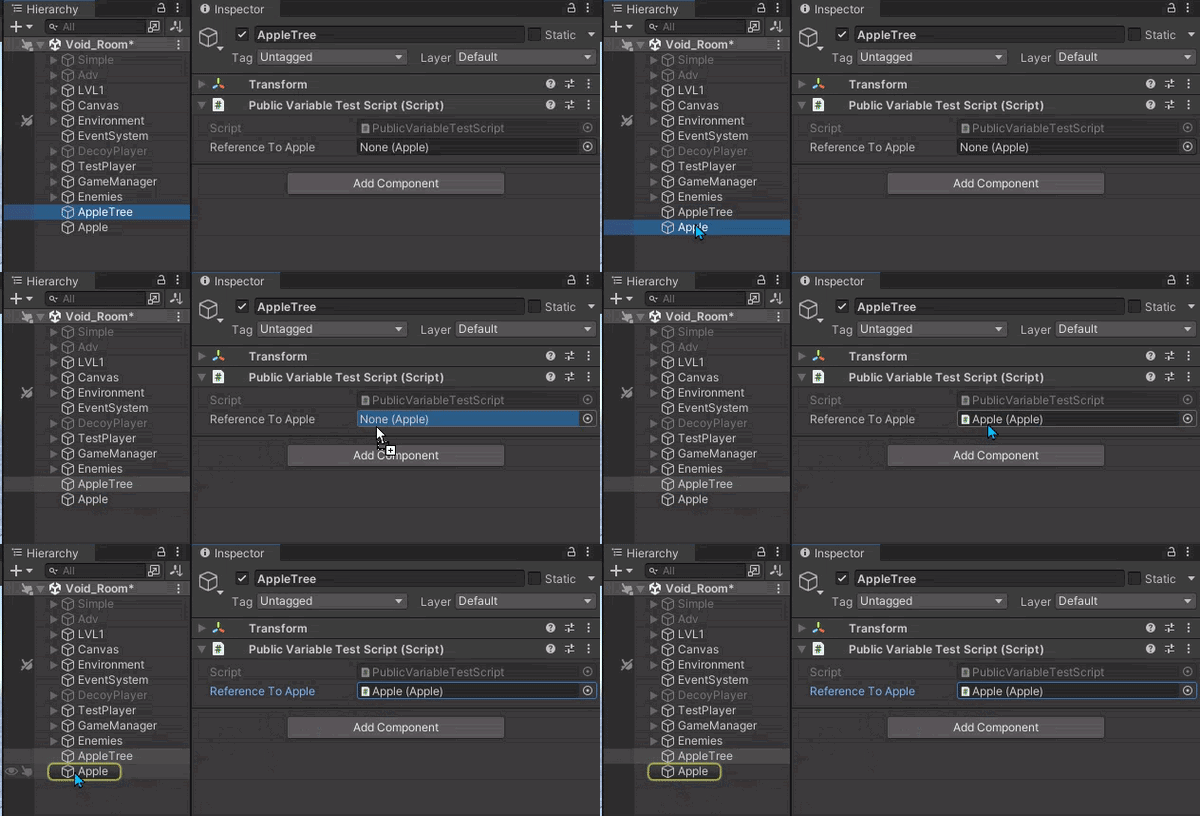 dreamy fulcrum
wait wont this work on just one child
rich adder
rocky canyon
im probably just using the wrong settings
Oh you mean fullscreen ? cause it does lag in full screen
rocky canyon
apple drop 🍎
buoyant knot
keep in mind that if you don’t write [SerializeField], private fields do NOT get serialized by default!
rocky canyon
rich adder
Oh you mean fullscreen ? cause it does lag in full screen
nah, i ususally have problems building to webGL.. i usually have to go in there and change the compression.. sometimes more stuff
for it to even boot correctly
summer stump
dreamy fulcrum
wait wont this work on just one child
No, why would it?
You can have as many fields as you want
buoyant knot
dreamy fulcrum
wait wont this work on just one child
just drag each child to a different variable’s little box in inspector
rich adder
rocky canyon
nah, i ususally have problems building to webGL.. i usually have to go in there ...
yeah I always find my webgl runs kinda crappy compared to my native os versions. Always wondered if im just using wrong settings lol
dreamy fulcrum
wont it have to be a list then?
summer stump
dreamy fulcrum
wont it have to be a list then?
No, why?
rocky canyon
rich adder
yeah I always find my webgl runs kinda crappy compared to my native os versions....
somtimes i have to change this
 dreamy fulcrum
cant only one component fit in a regular field at a time?
buoyant knot
depends. do you want to make a list, or do you want specific individual variables to call out to specific object’s components?
summer stump
dreamy fulcrum
cant only one component fit in a regular field at a time?
public ScriptName variableOfChildX
public ScriptName variableOfChildZ
You COULD make a list of course
buoyant knot
if i am making a gundam, I might want separate fields for leftArm, rightArm, leftLeg, rightLeg.
but if I’m making a menu where I just need to turn everything in a list On/Off, then I probably want a list
rich adder
rocky canyon
somtimes i have to change this
Interesting, gotta give that a try.
dreamy fulcrum
ok wait let me explain my confusion
buoyant knot
i don’t understand the issue.
If you write a field that is serialized, inspector gives you a single one box to put a reference to ONE thing of that type to go into it.
if you make a list, then you get a whole list
which can have a variable number of entries
rocky canyon
rich adder
Interesting, gotta give that a try.
and sometimes this too
 dreamy fulcrum
this script has a SerializedField, if i drag a new component (or GameObject in this case) onto the serialized field it will be replaced right? i want to be able to affect every component of these several children
 rocky canyon
but i have no clue what either of those settings do @rich adder hence why i dont do WebGL very often
buoyant knot
dreamy fulcrum
this script has a SerializedField, if i drag a new component (or GameObject in t...
draging it into the box just writes the reference to what you are dragging in to that variable
timber comet
dreamy fulcrum
this script has a SerializedField, if i drag a new component (or GameObject in t...
Yes, its like putting a public variable
buoyant knot
that variable is one thing. you can’t have two things
summer stump
dreamy fulcrum
this script has a SerializedField, if i drag a new component (or GameObject in t...
As said multiple times, make more than one field
rich adder
rocky canyon
but i have no clue what either of those settings do <@968604165150507078> hence ...
yeah same, time for me to do some research 🥼
buoyant knot
it doesn’t make the other object disappear, if that’s what you mean
buoyant knot
then maybe you want to structure this differently
summer stump
dreamy fulcrum
thats going to be a lot of fields
Yes, which is fine
Or make a list 🤷♂️
At this point it feels like we're at an XY problem
buoyant knot
dreamy fulcrum
im lost man
so you understand you need a lot of fields if you have a lot of components to specify.
so you are not lost. you know what that entails
buoyant knot
if you go for a list, but want to tell the different things apart, then you probably want a component to be able to ID them
abstract marlin
rich adder
things to check :
Unity workload installed In VS Installer,
VS is set inside Ex...
all the steps until the solution explorer , this is it right ?
 buoyant knot
such as
    public enum BoneID { Hip, Belly, Arm }
     [SerializeField] private BoneID boneID;
}```looks like it loaded
dreamy fulcrum
i just want to turn a entire row of HingeJoints off when i flip my character rig
buoyant knot
then your parent script has a List<BoneIdentifier>, and each bone has a BoneIdentifier on it, where you fill out its BoneID field with the value the represents what you care about
summer stump
dreamy fulcrum
i just want to turn a entire row of HingeJoints off when i flip my character rig
Then a list of joints is fine. You can just toggle everything in the list
buoyant knot
dreamy fulcrum
i just want to turn a entire row of HingeJoints off when i flip my character rig
that is not the question you initially asked
dreamy fulcrum
i mean all of my children have two HingeJoint components
buoyant knot
buoyant knot
then your parent script has a List<BoneIdentifier>, and each bone has a BoneIden...
this method will let you keep track of a bunch of gameobjects, and identify which object corresponds to what
then give each BoneIdentifier 2 HingeJoint fields
and label them differently
dreamy fulcrum
cant i just create two different SerializeField lists and disable/enable one of them when i flip my character
is the ID-ing necessary?
buoyant knot
listen, man. I gave you some ideas. If you don’t like them for your specific use case, don’t use them
rocky canyon
you can use two lists.. and change which one ur reading / writing / using..
u wouldn't necessarily disable em
buoyant knot
you asked how to reference multiple components individually when they are the same type, but on different children.
that is what you were given, in 3 different ways
dreamy fulcrum
alright man thanks
dreamy fulcrum
real quick how do i make a list
wintry quarry
dreamy fulcrum
real quick how do i make a list
define "make"?
Declare a list?
Initialize a list?
This may help https://www.c-sharpcorner.com/article/c-sharp-list/
cosmic dagger
dreamy fulcrum
real quick how do i make a list
you know you can google that right?
dreamy fulcrum
liked a serialized field?
abstract marlin
When Doing this in VS all i get is a Message in my output " Ctrl Alt M has being pressed , waiting for second Click blabla... im not getting the menu shown in the picture below the guide
 dreamy fulcrum
yeah google isnt helping
wintry quarry
dreamy fulcrum
liked a serialized field?
yes you can use lists as serialized fields
no problem
dreamy fulcrum
how
wintry quarry
same way as every other variable
declare it, mark it [SerializeField] or public
there's nothing special about a List in that sense
rich adder
abstract marlin
When Doing this in VS all i get is a Message in my output " Ctrl Alt M has being...
ctrl + . works fine or alt + enter
dreamy fulcrum
guess ill figure it out on my own
buoyant knot
as long as the type in the list is serializable, it should work
wintry quarry
dreamy fulcrum
guess ill figure it out on my own
I've given you all the info you need. Maybe if you explained what part you are still confused/unclear about you could get better help.
or perhaps you've tried something that didn't work
share that attempt here and we can help explain why
dreamy fulcrum
why does this not work
 wintry quarry
dreamy fulcrum
why does this not work
wintry quarry
dreamy fulcrum
why does this not work
Because you didn't type it correctly
buoyant knot
List<MyType>
wintry quarry
look at list examples as per https://www.c-sharpcorner.com/article/c-sharp-list/
abstract marlin
rich adder
`ctrl + .` works fine or `alt + enter`
Guide shows this , if ill do ctrl + . or alt + enter the menu i get is the second picture

 dreamy fulcrum
oh word that worked
rich adder
abstract marlin
Guide shows this , if ill do ctrl + . or alt + enter the menu i get is the secon...
oh nvm thought you wanted something else
summer stump
dreamy fulcrum
oh word that worked
Yes, because it is the correct syntax
May wanna do a basic c# course
https://www.w3schools.com/cs/index.php
It wl go over all that
rich adder
abstract marlin
Guide shows this , if ill do ctrl + . or alt + enter the menu i get is the secon...
so its just cntrl + shift + m
you can just like type those methods you know lol its not big deal
dreamy fulcrum
fuck that noise im trial and erroring this
wintry quarry
dreamy fulcrum
fuck that noise im trial and erroring this
you could just look at examples and follow them
summer stump
dreamy fulcrum
fuck that noise im trial and erroring this
You are literally coming here asking for help...
abstract marlin
rich adder
so its just `cntrl + shift + m`
you can just like type those methods you know lo...
my stupid buttcheeks perma went for cntrl alt m instead of cntrl shift m , due to the step before this... BRUH small things... sorry
buoyant knot
dreamy fulcrum
fuck that noise im trial and erroring this
i am confused as to why you keep asking questions if you are only going to ragequit every time someone answers the question that you asked
cosmic dagger
hmm, seems shady . . .
dreamy fulcrum
alright fine i'll look
 spark ravine
Can I search for all GameObjects in A scene, which have a specific Component(Script) and have a specific side(enum) selected?
 cosmic quail
spark ravine
Can I search for all GameObjects in A scene, which have a specific Component(Scr...
cosmic quail
spark ravine
Can I search for all GameObjects in A scene, which have a specific Component(Scr...
via a script? yes
spark ravine
cosmic quail
via a script? yes
How?
cosmic quail
spark ravine
How?
https://docs.unity3d.com/ScriptReference/Object.FindObjectsOfType.html use this and then iterate over the objects and check if the enum is selected
spark ravine
cosmic quail
https://docs.unity3d.com/ScriptReference/Object.FindObjectsOfType.html use this ...
Tried that but somehow can't get it to work
enemies = GameObject.FindObjectsByType<AIScript>();
enemies is a array of GameObjects and I need thejm to be put into an array
charred spoke
Enemies should be of type AIScript
cosmic quail
spark ravine
Tried that but somehow can't get it to work
```csharp
enemies = GameObject.FindO...
shouldnt it be OfType not ByType?
 slender nymph
cosmic quail
shouldnt it be OfType not ByType?
slender nymph
cosmic quail
shouldnt it be OfType not ByType?
no. FindObjectsOfType is the old, now-deprecated version. the preferred method to use if using one of them would be FindObjectsByType
https://docs.unity3d.com/ScriptReference/Object.FindObjectsByType.html
cosmic quail
slender nymph
no. FindObjectsOfType is the old, now-deprecated version. the preferred method t...
Oh looks like the first result when I googled it is wrong
cosmic quail
spark ravine
ty
anyways if you still haven't fixed it then create a new empty list, then iterate over this one and if the enum is selected then add it to the new list
polar acorn
cosmic quail
Oh looks like the first result when I googled it is wrong
It's a recent change
The new function does have some behavioral differences, so they gave it a new name in case those changes broke games using the old one
rich adder
there is also FindAnyObjectByType, that's new isn't it ?
slender nymph
yeah all of the ByType methods were introduced in 2022 iirc
rich adder
sweet
oh and another one 😵💫
FindAnyObjectOfType
Note: The object that this function returns isn't guaranteed to be the same between calls, but it is always of the specified type. This function is faster than Object.FindFirstObjectOfType if you don't need a specific object instance.
FindFirstObjectOfType
 fading rapids
Hi, i have a camera that follow my player trough the cinemachine, how do i make it so text, such as score stay in place on the camera.
slender nymph
if your canvas is in screenspace then there isn't anything special you need to do in regards to your code. you do have to learn how to anchor and scale your UI properly to support different resolutions and aspect ratios though
rich adder
fading rapids
Hi, i have a camera that follow my player trough the cinemachine, how do i make ...
make it overlay ?
fading rapids
slender nymph
if your canvas is in screenspace then there isn't anything special you need to d...
OH wait sorry, the text was the same color as my background
xD
abstract marlin
IDE Setup Should be Correct now y ?
 languid spire
abstract marlin
IDE Setup Should be Correct now y ?
languid spire
abstract marlin
IDE Setup Should be Correct now y ?
looks good
queen adder
Horsepork!!
 wind raptor
I'M BACK BABEE
wind raptor
Buckle up, I don't even know how to ask what I'm asking.
low path
lol
wind raptor
Is there a way for an object besides a mouse or keyboard to interact with a Selectable UI element?
queen adder
You mean like a controller?
Or like an eye tractor or vr?
Or do u mean a gameobject that's in the game?
wind raptor
Yes, some gameobject.
queen adder
Don't make it UI
wind raptor
For context, this is a faux computer terminal that players in an escape room interact with using a mouse and keyboard. Only I don't want them to have access to an actual mouse and keyboard, so I'm sending HID codes via a microcontroller that Unity processes to determine keypresses and the mouse lcoation. That side of things is done
queen adder
Or actually there's world space UI
wind raptor
So I have my faux mouse object which has an x and y dimension. It would be really convenient if said mouse could interact with a UI just like a regular mouse
wind raptor
USB mouse sends HID codes to micrcontroller as USB host which sends them via Serial to Unity after some processing/error checking
queen adder
Is this a IRL escape room?
wind raptor
Point being, I have an object with an X and Y that I would like to be able to interface with UI elements
yes
low path
you want to manually trigger UI events?
wind raptor
Yeah, and have the visual effects that come prebuilt in the UI elements, like highlighting on mouseover
queen adder
This is confusing from my perspective
wind raptor
And, if I'm testing, I'd like to be able to use an actual mouse rather than be forced to use my in-room mouse
queen adder
If u already have a mouse and keyboard that the players use why then also have a fake mouse and keyboard under the hood
I might just be misunderstanding
On the players side how do they interact with the game?
wind raptor
Players do not have access to a real mouse and keyboard. Only the fake one that prevents them from exiting the program or moving the cursor into a different screen which is displaying something unrelated to their terminal.
queen adder
But it's a mouse and keyboard? theyre just custom made to prevent them from exiting the program
wind raptor
Sorta. It's a generic mouse and generic keyboard. But there is the "buffer" of my microcontroller in between the two so that the Unity application doesn't treat them like an actual mouse and keyboard.
queen adder
Right that makes sense
slender nymph
you can raycast from the event system to see what it is hovering and manually activate that stuff
https://docs.unity3d.com/Packages/com.unity.ugui@1.0/api/UnityEngine.EventSystems.EventSystem.html#UnityEngine_EventSystems_EventSystem_RaycastAll_UnityEngine_EventSystems_PointerEventData_System_Collections_Generic_List_UnityEngine_EventSystems_RaycastResult__
queen adder
You could just hard code that the mouse doesn't exit a certain bounds
 winged meadow
guys... can i backup an old save that have been replaced of a visual studio script ?
rich adder
winged meadow
guys... can i backup an old save that have been replaced of a visual studio scri...
use version control
if you didn't make backups prior, maybe try Ctrl Z in the script otherwise you're out of luck
queen adder
wind raptor
Sorta. It's a generic mouse and generic keyboard. But there is the "buffer" of m...
And there's prolly a way to influence the mouse position via some Vector2
So whenever the fake mouse moves just get the Vector2s direction and add that to the real mouses position. If that's possible
wind raptor
queen adder
You could just hard code that the mouse doesn't exit a certain bounds
The overarching program does more than just handle the player-facing terminal though. There is also an employee-facing interface where they can send clues, override puzzles, see room progress, etc. So they need acess to the real mouse and keyboard
low path
so the biggest issue is mostly that you have unity UI elements and you want them to use your custom inputs?
wind raptor
And, unless I've missed something, I can't find a way to have multiple actual USB mice, one of which is limited to a specifc application or space.
wind raptor
low path
so the biggest issue is mostly that you have unity UI elements and you want them...
yep
slender nymph
queen adder
So whenever the *fake* mouse moves just get the Vector2s direction and add that ...
modifying the mouse position is only possible if using the Input System, there's a Warp method for it
queen adder
Sounds good!! I had feeling you would have to use the new input system
wind raptor
In addition to standard inputs for testing/override purposes
slender nymph
but that isn't even necessary when you can just raycast against the canvas manually
low path
can you send key presses into the UI event system using the Input System?
wind raptor
Like, could I? Or could someone who knows stuff?
low path
i was asking boxfriend
like it would suck to have to write a translation layer over unity's ui system... it would be best ify ou could just trigger like... "move mouse" and "press key..."
i'm not sure how that would be done if it's possible
queen adder
I don't think it's that hard tbh
Just have the fake mouse influence the real one
And you can just check what ur hovering
low path
what about clicks?
wind raptor
queen adder
Just have the fake mouse influence the *real* one
But I don't want the real mouse to be influenced. I want that to be functional elsewhere
low path
like it'd be nice if you could say "UnityEvent.Execute (RightClick)" or something like that
slender nymph
you just raycast from the event system and do what you need to with whatever is returned on whatever button press you'd like
low path
oh well then maybe that's the answer. is that what box is saying?
slender nymph
no, because the interfaces are mostly irrelevant to what i'm saying except for when you want to call those interface methods
queen adder
If u want to check for multiple usbs u have to use the new input system I'm pretty sure
He's talking about raycasting to the canvas which is different
I prefer just using the interface
Also horsepork I don't really understand what u want?
low path
So what you can just call "mouse.warp(position)" and "PointerDown()" or something?
queen adder
You have ur class inherit from IPointerDown
It should make a method like OnPointerDown()
You define what u want to happen inside the method which will be called when the Right mouse click happens
low path
i think that's the opposite of what horsepork wants, no?
like "onpointerdown" will still respond to the actual mouse?
what he wants is a way to trigger onpointerdown with his hardware device?
queen adder
I thought you wanted help Hambones my apology
low path
sorry i'm not trying to be a jerk, just trying to figure this out
queen adder
No ur not a jerk lmao. I was the one confused. It's my fault senpai
wind raptor
low path
what he wants is a way to trigger onpointerdown with his hardware device?
yes. if by hardware device you mean my fake mouse
low path
lol
queen adder
If u want ONE mouse to be constructed to unity
low path
so... i think what box might be saying is... do the ray cast and that will give you the appropriate unity ui element. then you can just call the function on that element based on the input that happens.
so like... just find the element with the ray cast and then call "onmousedown()" or something?
queen adder
That seems like something you have to do on a OS level
wind raptor
...sorry, I hope I'm tracking. I want one REAL mouse, actually connected via USB and fully functional, but not accessible by the player. I want one FAKE mouse, constrained to a specific window, used by the player, which for all intents and purposes, UI-wise, acts like a mouse for that given window/canvas.
Sounds like raycasting may be what I need to do
And I guess same for a keyboard object.
queen adder
The real mouse can influence the game and outside the game
queen adder
Then just have the fake mouse in the game?
low path
i think making a fake cursor is pretty easy
wind raptor
queen adder
Then just have the fake mouse in the game?
...yes? Sorry what are you asking?
queen adder
Have the fake mouse constrained to the window
wind raptor
Yes
low path
so yeah i guess you have to manually call methods like this: OnPointerClick(PointerEventData pointerEventData)... and manually construct your pointerEventData...https://docs.unity3d.com/Packages/com.unity.ugui@2.0/api/UnityEngine.EventSystems.html
queen adder
I don't understand the problem lmao
low path
sounds like a cool project, horsepork
queen adder
If the mouse is already in the game view it will pick up any mouse events
low path
the mouse doesn't pick up the events, it generates them
it's not being touched, though, it's physically hidden
so you're just "mocking up" these events for a separate device
so you're just separately generating the events programmatically
wind raptor
Yes
queen adder
Then just listen for any mouse clicks via the new input system
wind raptor
I don't know how to make my fake mouse object , which presently just contains x and y data and boolean click states, simulate a "real" mouse click, albeit with some contraints imposed. That's what I'm working to figure out.
cosmic dagger
goodbye . . .
queen adder
how to make fps?
wind raptor
queen adder
Are all the mouses connected to the same machine?
"real" , employee-accessible mouse is. Faux mouse goes through the microcontroller buffer and gets its data sent to unity in Serial packets which then have to be processed to get the mouse position and click states
Unity/Windows has no idea that faux mouse is a faux mouse. Unity thinks it's a game object with a couple floats and booleans
polar acorn
queen adder
how to make fps?
 queen adder
Whatever data you send to unity should contain some X,Y / Vector2 information so it can influence the fake mouse
wind raptor
Correct. And it does.
And it is processed into my fake mouse object so that it knows its x and y positions and whether or not it is clicking
queen adder
So unity already picks up all of the player mouse events already
I'm just asking to make sure I completely understand. Because this shouldn't be hard
wind raptor
Sure, and I really do appreciate you taking the time to help.
queen adder
If it's a gameobject instead of a actual mouse cursor you can check the gameobjects screen coords maybe? And see if the UI is on those coords or something like that.
wind raptor
public class FakeMouse : MonoBehaviour
{
    public float x, y;
    public bool
 leftClickPressed;
    public bool rightClickPressed;

    private void Update()
    {
        // process incoming data to update coordinates and click state
        // this is "solved", just assume x, y and click bools will reflect
        // what the actual physical mouse is doing
    }
}
This is my first idea
wind raptor
I want it to interact with the UI elements in the same way that an actual mouse does. So onenter, onexit, onpointerdown, etc.
queen adder
Also box was probably right
Just shoot a raycast to the canvas from the gameobjects position
polar acorn
wind raptor
I want it to interact with the UI elements in the same way that an actual mouse ...
You'll need to raycast from the screen through that point and manually call the functions
You can freely call things like OnPointerEnter like normal functions in addition to the Event System doing it
queen adder
You can probably just make a fake cursor for unity
NOW I UNDERSTAND UR PROBLEM
It's because u don't have a real cursor
wind raptor
polar acorn
You can freely call things like `OnPointerEnter` like normal functions in additi...
What is making that function call then? My "mouse" object or a script attached to my canvas, or..?
queen adder
Ur using a gameobject
wind raptor
Right
polar acorn
wind raptor
What is making that function call then? My "mouse" object or a script attached t...
the Event System
Or do you mean what should be doing it in the new system?
The Fake Mouse script should be fine
Raycast from the camera, look for things that implement IPointerWhateverHandler and if you find them, call the function on em
queen adder

Unity Discussions
Hello! I’m trying to recreate (What I thought would be a very easy system). I simple want to have multiple cursor controlled by multiple players using either the keyboard and mouse or gamepads. A reference is the system in Ultimate chicken horse. I’ve so far managed to be able to move two UI objects using a mouse to control one and a gamepad to...
wind raptor
Thanks so much for the help team
queen adder
I think what u want is a virtual mouse

✅ Get the Project files and Utilities at https://unitycodemonkey.com/video.php?v=j2XyzSAD4VU
🎮 Play my Steam game! https://cmonkey.co/dinkyguardians
🌍 Get my Complete Courses! ✅ https://unitycodemonkey.com/courses
👍 Learn to make awesome games step-by-step from start to finish.
🔴 RELATED VIDEOS 🔴
How to use NEW Input System Package! (Unity Tuto...
wind raptor
Man I wish I didn't hate that guy's voice so much
wind raptor
But yeah this I think might be exactly what I want.
queen adder
Jesus christ sorry that took so long
wind raptor
Ha, no worries!
But I do expect you back here at 2 pm sharp tomorrow for my next convoluted problem
 tender stag
so im making rigidbody movement, how do i make sure player doesnt slide off slopes as much
low path
0 code
shrug
https://docs.unity3d.com/Packages/com.unity.inputsystem@1.1/api/UnityEngine.InputSystem.UI.VirtualMouseInput.html ok you might need to connect it to your false mouse class but seems pretty straightforward
wintry quarry
tender stag
so im making rigidbody movement, how do i make sure player doesnt slide off slop...
you could add an opposing horizontal force in FixedUpdate based on the slope normal. Or just try adding more friction
 supple citrus
If a line in my text file is "a" and i want it to be "ab" is there a way to add on "b" without rewriting the entire line? Im using StreamWriter
This isnt a unity question actually sorry
rich adder
supple citrus
If a line in my text file is "a" and i want it to be "ab" is there a way to add ...
 icy junco
i have accidently removed a important prefab and its a lot of work to remake this but i still have the build with everything intact is it possible to go back to the unity version and edit this in unity
polar acorn
icy junco
i have accidently removed a important prefab and its a lot of work to remake thi...
You've learned a very valubalbe lesson about Version Control. Consider using git in the future
icy junco
yes
low path
you want to extract a prefab from a game build?
icy junco
yes if possible?
low path
i don't know if that's directly possible...
you might be able to get an in game inspector and recreate it that way...
something like this maybe https://github.com/yasirkula/UnityRuntimeInspector
icy junco
with this tool i can recreate prefabs that are in my build?
low path
well at the very least it will let you see the contents of the prefab and then you can recreate it manually...
um... not sure if you can directly see the prefab itself, just instances of it
i don't k now if it lets you actually extract a prefab automatically
if you just have a build, not a project, this might not work? i'm not sure, sorry
i guess if you had the project, you'd also have th eprefab...
icy junco
i have the project and the build of before when i still had the prefab i just deleted it out of my own project
low path
i'm not sure, sorry
 slender nymph
switch statements do not work like that
hybrid gust
Could you elaborate?
slender nymph
hybrid gust
Maybe I am missing something but this explains HOW a switch statement works, but doesn't explain why I can't do what i wrote
I guess I'm confused cause If I look at the docs, I'm doing the exact same thing the docs are doing, except instead of case < int, I'm doing case == InputActionMap.
 lofty sequoia
hybrid gust
Could you elaborate?
lofty sequoia
hybrid gust
Could you elaborate?
 hybrid gust
Gotcha, yeah I just now noticed that and removed the == and got this
 low path
yeah um... you can't just use cases with any expression...
hybrid gust
I'm not stuck on the switch thing I was just wondering
low path
you can have it equal a constant or you can do pattern matching, and pattern matching has rules
hybrid gust
The more you know
lofty sequoia
there are restrictions on switch cases. If you're going to run something based on the type you'd have to compare the type with an if statement
if you're basing it on the index of controls action map, you could say if index is 1, 2, 3, 4 etc
hybrid gust
lofty sequoia
there are restrictions on switch cases. If you're going to run something based o...
Yeah this was me just trying to clean up my code, I thought a switch woulda been the answer to that and thought I was going crazy or smth
Thanks though, learning something new everyday
 wintry quarry
Start with explaining what you're trying to do
summer stump
 grim pecan
like bro idk even know what to do from here
grim pecan
like bro idk even know what to do from here
That is just a blank project
wintry quarry
Go here !learn
eternal falconBOT
:teacher: Unity Learn ↗
Over 750 hours of free live and on-demand learning content for all levels of experience!
summer stump
grim pecan
ik
Then that is not a question that works here
You should do what praetor said, and beyond that it is up to you what you want to do
polar acorn
grim pecan
like bro idk even know what to do from here
Make the rest of the game
grim pecan
polar acorn
Make the rest of the game
Bro thank you so much for your help
polar acorn
grim pecan
Bro thank you so much for your help
No thanks needed pleasure's all mine 
tender stag
is it possible to modify a physics material through code when a game is running?
or will the values only take effect on awake?

just tested it
works

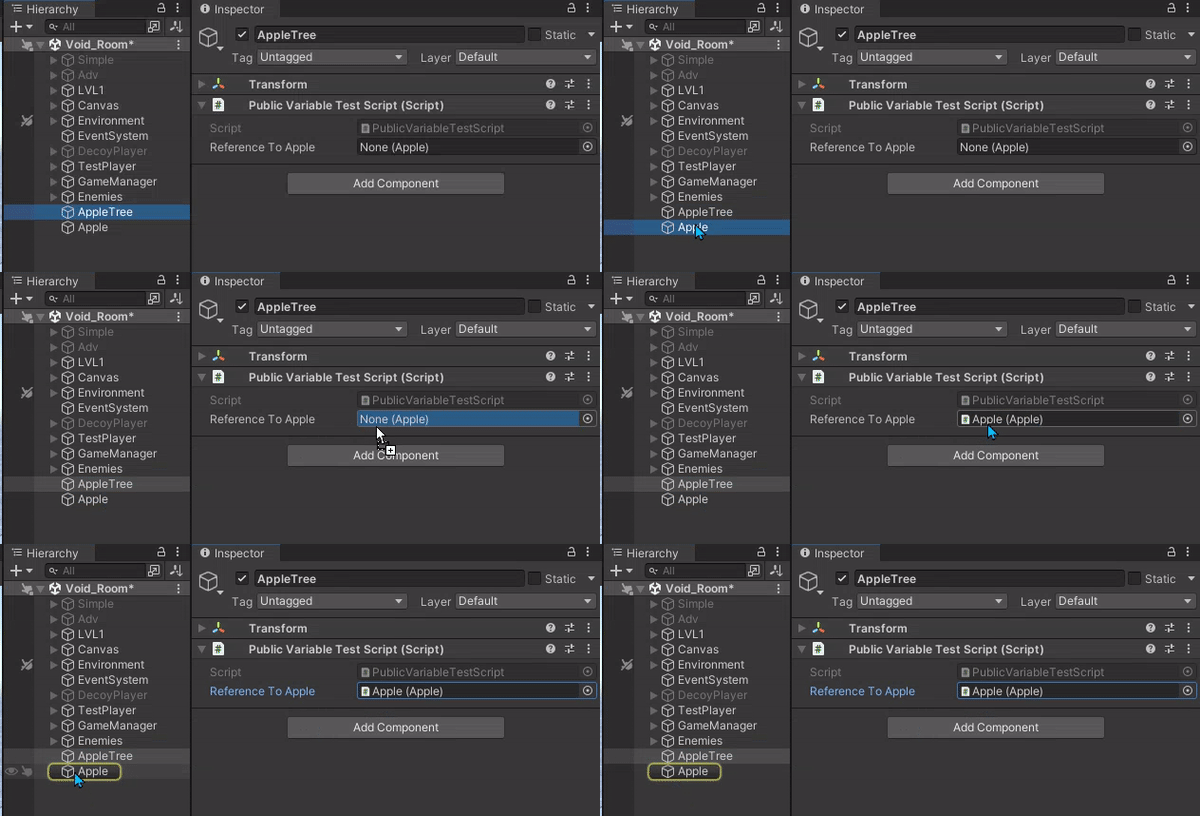 wintry quarry
grim pecan
im trying to install visual studio but it keeps saying this
wintry quarry
grim pecan
im trying to install visual studio but it keeps saying this
is your hard drive out of space?
 worldly jolt
this is what happens currently and i want the plane to fall more when the angle gets too high and ive tried for about 10 mins now cant figure out does anybody know what i could do. Also this is my code: https://paste.ofcode.org/L2yGNu2M3QGNxS9HQMYmnv
It is extremely simple and the whole thing heavely relys on the unity physics system.
 quaint crystal
hey so im looking for a second opinion:
i have a file structure for my textures:
Resources/Textures/<Theme>/<Wall, Floor, Ceiling etc.>/
and ive decided to cache the file structure on build so i can load textures selectively at runtime.
would it be reasonable to make a multi-dimensional array like this rather than loading it all into a single array? alternatives would be appreciated
pseudo:
string[,,]
string["theme", "surface", "texture"]

this foreach loop isn't working as intended
because the properties are the same for each set that it outputs
which means its just doing the same planet over and over again
whats the correct way to do this?
I just want to go through every planet currently in the scene
or maybe this is the correct method and im just doing it wrong
 frigid sequoia
If I instantiate an object and give it a component with an awake method, does the awake method trigger immidiatly?
grim pecan
no matter what i do this file wont download and i dont know what to do
