#💻┃code-beginner
1 messages · Page 166 of 1
 rare basin
 thorn holly
- Configure your ide
- Do you know the basics of c#?
 radiant glen
Sort of but really like this is my first game
thorn holly
Alr
Well I’d reccomend learning the basics, it makes writing your own code and debugging much easier
Also, instead of following an online tutorial, I’d reccomend using unity learn, cause in online tutorials you don’t really learn anything, cause ur just copying whoever’s in the video
That’s what I’d personally do but if an online tutorial works for you, than go ahead, do what’s right for you
radiant glen
Okay that makes sense I have been trying to use unity learn when possible but for specific things I have been using youtube
 long scarab
I made it work by sort of hack
thanks for your help nonetheless
I shifted two vertices out of the plane and made the collider convex, resulting in unfortunately not precise collider mesh, since it overlaps in places, but at least the ray hits it.
Technically I made the mesh collider 3D
 verbal dome
Hmm okay so it didn't like a flat mesh?
long scarab
If anyone would know a better way how to bypass this, please let me know, it would be greatly appreciated as the current sollution is kinda meh.
long scarab
verbal dome
Hmm okay so it didn't like a flat mesh?
I think it is more about the new mesh having volume due to the 3d dimension
verbal dome
Yeah that's what I mean
long scarab
then yes haha
verbal dome
It's not a problem with imported meshes but maybe there's something different when you generate it yourself
long scarab
yeah
I thought about using sprite
SVG or something
but then I want users to be able to draw two shapes, arrow and a complex line, and the sizing and stuff would be worse than generating it 😄
actually now I think about it and it sucks because the complex shape, when having convex collider, would occupy also the empty space 😐
 faint sluice
Just a tip, in case you want to see in real time where your raycast is being blocked, you can see it in inspector of "Event System"
Helps me a lot when I feel like some raycast should detect an object but turns out something else was blocking the ray
It shows the name of object your mouse is hovering over (if it blocks raycast)
long scarab
faint sluice
It shows the name of object your mouse is hovering over (if it blocks raycast)
may I know where? 😄 is it the selected object?

cause I dont see the thing I hover over
faint sluice
long scarab
may I know where? 😄 is it the selected object?
Uh it's like the bottom of the inspector, try pulling the "line" up
Can't describe what it's called
And it shows up only in play mode
 pale jetty
Hi everyone, i wanted to know if any of you can see where the problem is, i want that when i click on the button, a panel close for another to open, so here is my code, but the problem is that when i click on the button nothing happen. You can see that the button named 'BoutonOutils' in the TableCraft GameObject don't work, normally when i do that, it should close the 'TableCraft' GameObject and open the 'OutilsCategory' GameObject'. Here is the code :

void Start()
    {
        isOpen = false;

        OutilsBouton = CraftingScreen.transform.Find("BoutonOutils").GetComponent<Button>();
        OutilsBouton.onClick.AddListener(delegate
        {
            OpenOutilsCategory();
        });

        //Hache
        HacheBesoin1 = OutilsScreen.transform.Find("Hache").transform.Find("besoin1").GetComponent<TextMeshProUGUI>();
        HacheBesoin2 = OutilsScreen.transform.Find("Hache").transform.Find("besoin2").GetComponent<TextMeshProUGUI>();

        HacheBouton = OutilsScreen.transform.Find("Hache").transform.Find("Construire").GetComponent<Button>();
        HacheBouton.onClick.AddListener(delegate
        {
            Construire(PlanHache);
        });
    }


    void OpenOutilsCategory()
    {
        CraftingScreen.SetActive(false);
        OutilsScreen.SetActive(true);
}```Does it detect the button click at all? As in when you are debugging, via some Debug.Log or IDE debugging?
Also a hint, you you can nest hierarchy finds and use OutilsScreen.transform.Find("Hache/besoin1").GetComponent<TextMeshProUGUI>();
 raven igloo
!code
 eternal falconBOT

Posting code
📃 Large Code Blocks
Use links to services like:
https://gdl.space/, https://paste.ofcode.org/, https://hatebin.com/, https://paste.myst.rs/, https://hastebin.com/
📃 Inline Code
Surround code with three backquotes. Not quotation marks.
To format as C#, add cs to the first line:
```cs
// Your code here
```
Add a comment with a line number if there is an error message.
pale jetty
when i do this : void OpenOutilsCategory() { Debug.Log("Ouverture de la catégorie Outils"); CraftingScreen.SetActive(false); OutilsScreen.SetActive(true); } It doesn't detect the button and i don't know why
long scarab
So it does not output the log, correct?
long scarab
Can I see the button in the unity? Is it interactable and enabled?
Well I see its enabled
pale jetty
yes it's interactable
 long scarab
And the rest of the inspector interface? 😄
raven igloo
Hello, my sprite is not flipping, the code and i dont know why but ive seen something a bit odd and i really dont know why, the sprite renderer in the scrip is not the same as the sprite renderer
 long scarab
Also, are EventSystem and Input Modules present?

 long scarab
I am afraid I have to leave the answering to others then
And you have Input Module correct?
pale jetty
are you talking about the input system ? if it's that then no:


 wintry quarry
raven igloo
Hello, my sprite is not flipping, the code and i dont know why but ive seen some...
wintry quarry
raven igloo
Hello, my sprite is not flipping, the code and i dont know why but ive seen some...
As far as I can tell the FlipSprite script is not even attached
raven igloo
wintry quarry
As far as I can tell the FlipSprite script is not even attached
oh might be a good thing to do
pale jetty
ah no i don't have this
raven igloo
wintry quarry
As far as I can tell the FlipSprite script is not even attached
but the flipsprite is in the movement sprite tho
 polar acorn
pale jetty
there is an evensystem
polar acorn
pale jetty
there is an evensystem
If you open the event system while you're running the game, it'll tell you on the bottom window of it what object you're hovering over or interacting with. See what it says when you're trying to click the button, there might be something in front of it taking that click event before it can hit the button
long scarab
pale jetty
ah no i don't have this
try add it and check if the button works
radiant glen
I am getting this error code for my code, any help would be amazing
 pale jetty
when i click on it, the eligibleForClicl become true
 raven igloo
wintry quarry
As far as I can tell the FlipSprite script is not even attached
raven igloo
wintry quarry
As far as I can tell the FlipSprite script is not even attached
ok yea i have separated the flip script to the movements script and it works juste fine thx a lot man !
long scarab
pale jetty
when i click on it, the eligibleForClicl become true
and does the debug fire the debug message?
"Ouverture de la catégorie Outils"
wintry quarry
raven igloo
but the flipsprite is in the movement sprite tho
What? I have no idea what that means. You mean you put the code in the file for the other script? It doesn't work like that
raven igloo
wintry quarry
What? I have no idea what that means. You mean you put the code in the file for ...
i copy paste the flip class that was on the movement script in antoher script (named flip) with only the flip class on it and it worked just fine
 languid spire
raven igloo
i copy paste the flip class that was on the movement script in antoher script (n...
languid spire
raven igloo
i copy paste the flip class that was on the movement script in antoher script (n...
Did you actually have 2 monobehaviour classes in the same script file?
raven igloo
languid spire
Did you actually have 2 monobehaviour classes in the same script file?
yea that was the dumb thing
languid spire
ah, yes, that's a no-no, only one Monobehaviour class per script but you can have other POCO's there as well
languid spire
this is a Unity specific thing not C# in general
pale jetty
long scarab
and does the debug fire the debug message?
no the message dosn't show up
long scarab
Yeah, something must be off with the listeners or something else, unfortunately I am not sure what else I could do to help for now
raven igloo
languid spire
this is a Unity specific thing not C# in general
yea yea i guess not in c# liek all the langages u can put multiples fonctions in it
pale jetty
thank you for your help
 swift crag
languid spire
this is a Unity specific thing not C# in general
swift crag
languid spire
this is a Unity specific thing not C# in general
indeed -- this is because Unity references the script asset when you attach a component. it doesn't actually care about the C# class name
pale jetty
i even desactivated the raycast of the image there was on the button but nothing change
swift crag
That's also why you can freely rename your class without breaking existing components -- as long as you don't rename the script file outside of unity
languid spire
swift crag
indeed -- this is because Unity references the **script asset** when you attach ...
no, it's because when the Unity devs developed this system they didn't have a fucking clue what they were doing
swift crag
you can interpret it that way, if you'd like
languid spire
too many bad design decisions to take it any other way
swift crag
there's nothing special about script assets; they're just like any other kind of asset
long scarab
pale jetty
i even desactivated the raycast of the image there was on the button but nothing...
have you tried to check if the button listeners are assigned correctly?
swift crag
you reference the asset, and the asset is identified by its GUID
long scarab
as in if nothing is null, sometimes when using Find and other hierarchy stuff I make the mistake of getting nulls
but that'd throw Null Pointer Exception anyway
languid spire
yep, the whole asset database concept is a pigs ear reminiscent of the windows registry
swift crag
when you enter debug mode, you can change which script asset a component references. you don't reference a C# class, just like you don't reference the literal data in a PNG or the literal audio data in a wave file
pale jetty
long scarab
as in if nothing is null, sometimes when using Find and other hierarchy stuff I ...
i don't have any null exception error and i did verify this multiple times and it was good
 ashen coral
Guys, please help me find the error in the code (this code is needed to control the player’s movement using a controller)

 long jacinth
swift crag
ashen coral
Guys, please help me find the error in the code (this code is needed to control ...
long jacinth
swift crag
ashen coral
Guys, please help me find the error in the code (this code is needed to control ...
you have not provided any information.
languid spire
ashen coral
Guys, please help me find the error in the code (this code is needed to control ...
what error. add some debugs
 fickle plume
ashen coral
Guys, please help me find the error in the code (this code is needed to control ...
fickle plume
ashen coral
Guys, please help me find the error in the code (this code is needed to control ...
Did you check the link I provided? https://unity.huh.how/debugging
verbal dome
long jacinth
https://gdl.space/oqohopiqoj.cpp
Ok so you still didnt convert the angle to the correct -180...180 range
long jacinth
i swapped it
verbal dome
You didnt use the code example of DeltaAngle I gave you.
Im not saying to use -180 and 180 in your if-statement. It should be -90 and 90
 amber nimbus
Hello, I was wondering If I call a Method inside a method like this:
  // some code here
  if (true) {
    DoThis();
  }
  // other code here
}```
Would the "other code here" run if there was actual code after `DoThis()` is done?The angle you use in the if statement should be the one you get from DeltaAngle @long jacinth
wintry quarry
amber nimbus
Hello, I was wondering If I call a Method inside a method like this:
```void DoS...
of course
code runs top to bottom, in order.
amber nimbus
Aight, thanks
ashen coral
swift crag
you have not provided **any** information.
Unity gives this: NullReferenceException: Object reference not set to an instance of an object
wintry quarry
ashen coral
Unity gives this: NullReferenceException: Object reference not set to an instanc...
there's more to it than that
you are ignoring the filename and line number of the error
long jacinth
verbal dome
The angle you use in the if statement should be the one you get from DeltaAngle ...
so i swap the -90 with the Angle variable
verbal dome
long jacinth
so i swap the -90 with the Angle variable
No, swap the eulerAngles.z with that
wintry quarry
BTW I have no idea how this https://cdn.discordapp.com/attachments/497874004401586176/1201205614928478380/image.png?ex=65c8f8e7&is=65b683e7&hm=fbc8ebb9576711aef9400878fbea6476da34fb9abfadb4c742d4a4fb69a4be6c& could even compile. Seeing as it is accessing variables that don't exist. Is your code editor configured @ashen coral ?

 verbal dome
Judging by the colors it is not configured
 young smelt
https://paste.ofcode.org/34EQzyZPNQJsSfNxQiwkBun
Exception: Cannot add more triangles than the size of the triangles array.
MeshData.AddTriangle (System.Int32 a, System.Int32 b, System.Int32 c) (at Assets/Scripts/MapGeneration/MeshGenerator.cs:69)
MeshGenerator.GenerateTerrainMesh (System.Single[,] heightMap) (at Assets/Scripts/MapGeneration/MeshGenerator.cs:28)
MapGenerator.GenerateMap () (at Assets/Scripts/MapGeneration/MapGenerator.cs:57)
MapGeneratorEditor.OnInspectorGUI () (at Assets/Scripts/Editor/MapGeneratorEditor.cs:23)
UnityEditor.UIElements.InspectorElement+<>c__DisplayClass72_0.<CreateInspectorElementUsingIMGUI>b__0 () (at <97436df440ca462884c5332c1d8ebbe7>:0)
UnityEngine.GUIUtility:ProcessEvent(Int32, IntPtr, Boolean&)
Saw a land mass generation video with indepth explanation and all but now I am getting this. when it comes to adding triangles to the mesh
languid spire
young smelt
https://paste.ofcode.org/34EQzyZPNQJsSfNxQiwkBun
Exception: Cannot add more tr...
Exactly this
 wintry quarry
Yep seems pretty clear where things are going wrong:
    public void AddTriangle(int a, int b, int c)
    {
        if (triangleIndex >= triangles.Length)
        {
            throw new Exception("Cannot add more triangles than the size of the triangles array.");
}```I added an exception to break it once it reaches the lmax length of the triangle
wintry quarry
yes and you have reached the limit
 noble folio
hey im trying to make a ball shoot system like in mini soccer star but whitout the aiming arrow can someone help me make the script?
also its gonna be a mobile game so mobile input
young smelt
Oh it writes exceptions like errors.!!! I fucking forgot
wintry quarry
young smelt
Oh it writes exceptions like errors.!!! I fucking forgot
note that you're adding TWO triangles for every x/y coordinate.
Not only that but every coordinate uses up THREE spaces in the triangle array.
But when you allocated the triangle array you only gave this much space:
triangles = new int[(meshWidth - 1) * (meshHeight - 1)];
young smelt
Thought my code was wrong
wintry quarry
I'm pretty sure that array is at least 6x too small
verbal dome
young smelt
I added an exception to break it once it reaches the lmax length of the triangle
I think your triangle array size is ~~ 2x~~ 6x? too small
wintry quarry
i think it should be new int[meshWidh*meshHeight*6]
since you need 3 spots per triangle and you're doing two triangles for every x/y
young smelt
Won't it be something like new int[(meshWidh-1)*(meshHeight-1)*6] then. So that it doesn't take count of the externalmost point
long jacinth
in the if statement i swapped out the eulerangles.z
wintry quarry
young smelt
Won't it be something like new int[(meshWidh-1)*(meshHeight-1)*6] then. So that ...
only one of them should be -1
since you're only doing one check of if (x < width - 1)
so new int[(meshWidth - 1) * meshHeight * 6]
long jacinth
Operator '<' cannot be applied to operands of type 'method group' and 'int'
 swift crag
long jacinth
Operator '<' cannot be applied to operands of type 'method group' and 'int'
swift crag
long jacinth
Operator '<' cannot be applied to operands of type 'method group' and 'int'
Quaternion.Angle is a static method on the Quaternion class
 tender hound
i started with entities so i created a new project downloaded entities package after this i create a sub scene and a cube but if i press play i dont see the cube at all in the game window do i need to change a setting in the camera or something?
swift crag
therefore, you're getting this error because you're trying to use the < operator with a method on the left side
verbal dome
long jacinth
Operator '<' cannot be applied to operands of type 'method group' and 'int'
I meant replace the whole variable
wintry quarry
long jacinth
Operator '<' cannot be applied to operands of type 'method group' and 'int'
what is rotation.Angle? That's not a thing friend.
swift crag
I presume you wanted to just use your Angle variable.
(which shouldn't be capitalized, since it's a local variable)
verbal dome
if(Angle < -90 || Angle > 90)
Notice || instead of &&
Try to understand what you are doing
If you would use &&, it would have to be both <= -90 and >= 90 at the same time
That's not possible now is it
rare basin
long jacinth
Operator '<' cannot be applied to operands of type 'method group' and 'int'
gunText.GetComponent<SpriteRenderer>().flipY = !(Angle < -90 || Angle > 90);
Fixed it changed this
if (x < width - 1 && y < height - 1)
{
meshData.AddTriangle(vertexIndex, vertexIndex + width + 1, vertexIndex + width);
meshData.AddTriangle(vertexIndex + width + 1, vertexIndex, vertexIndex + 1);
}
and this
triangles = new int[meshWidth * meshHeight * 6];
tnks
paetroblue and the gang. thnks
long jacinth
verbal dome
``if(Angle < -90 || Angle > 90)``
ohh i got it
ashen coral
wintry quarry
BTW I have no idea how this https://cdn.discordapp.com/attachments/4978740044015...
I realized the mistake. Thank you
long jacinth
thank you guys for helping the gun rotation works perfectly now
i was stupid and didnt realize what i did wrong
verbal dome
Heres a bonus for you to make sense of the angles:
 long jacinth
thanks so much
 stark flint
Hello i am trying to make a script for OpenXR Unity game. How do i make it so if a specific game object is picked up then a different specific game object dissapeared. Also if the object is let go off the object that disappeared comes back.
languid spire
!code
eternal falconBOT
Posting code
📃 Large Code Blocks
Use links to services like:
https://gdl.space/, https://paste.ofcode.org/, https://hatebin.com/, https://paste.myst.rs/, https://hastebin.com/
📃 Inline Code
Surround code with three backquotes. Not quotation marks.
To format as C#, add cs to the first line:
```cs
// Your code here
```
Add a comment with a line number if there is an error message.
languid spire
stark flint
Hello i am trying to make a script for OpenXR Unity game. How do i make it so if...
Get the Renderer components for both objects and then you can enable/disable them as you please
stark flint
languid spire
Get the Renderer components for both objects and then you can enable/disable the...
however how do i check if an item is being grabbed
 cinder spruce
how can i prevent all methods to be called at the same time inside the RandomlyChooseAttack function? Line 104
languid spire
stark flint
however how do i check if an item is being grabbed
that is up to how you code it, collitions, triggers, other, take your pick
languid spire
cinder spruce
how can i prevent all methods to be called at the same time inside the RandomlyC...
did you not read the bot message
cinder spruce
languid spire
did you not read the bot message
i used gdl paste
languid spire
no you didn't you posted the original code back here
stark flint
languid spire
that is up to how you code it, collitions, triggers, other, take your pick
ill be honest. i am pretty bad at programming in c#. idk how that works
languid spire
stark flint
ill be honest. i am pretty bad at programming in c#. idk how that works
time to start learning
!learn
eternal falconBOT
:teacher: Unity Learn ↗
Over 750 hours of free live and on-demand learning content for all levels of experience!
cinder spruce
cinder spruce
how can i prevent all methods to be called at the same time inside the RandomlyC...
languid spire
cinder spruce
how can i prevent all methods to be called at the same time inside the RandomlyC...
to start with they are not all called at the same time but..
Update -> EnemyLogic -> RandomlyChooseAttack
So once this has been done you need a bool or something to stop it until the next time you want to do it
 grizzled pagoda
hi, im having trouble with a boolean not turning true when i want to ``` public bool ZombieStop = false;
public float speed = 10f;
public float HealthPoints = 5f;
private bool PlantCollide = false;
// Start is called before the first frame update
void Start()
{
}
// Update is called once per frame
void Update()
{
    if(ZombieStop == true){
        speed = 0f;
    }
    else{
        speed = 10f;
    }
    transform.Translate(Vector3.forward * Time.deltaTime * speed);
    if(HealthPoints <= 0){
        Destroy(gameObject);
    }
    if(HealthPoints <= 0){
        Destroy(gameObject);

    }
}
void OnCollisionStay(Collision other){
    Debug.Log(other.gameObject.layer);
    if(other.gameObject.layer == 7){
        HealthPoints = HealthPoints - 1;
        Debug.Log("Zombie HealthPoints: " + HealthPoints);
    }
    if(other.gameObject.layer == 6){
        ZombieStop = true;
        speed = 0f;
        Debug.Log("Zombie should stop");
    }
}
void OnCollisionExit(Collision other){
    ZombieStop = false;
}
}
i'll create a bool called inRange and turn that bool to true in line 81 instead of calling the RandomlyChooseAttack(); method. Then i'll call RandomlyChooseAttack(); method in an if statement like if(inRange). Something like that? And where should i enter that if statement?
 wind raptor
Coming back to this, is there a particular framework you'd recommend? If I'm just building a single, locally-hosted webpage would it be worth just skipping the framework?
Edit: and is there a framework that could provide a visual means of creating the UI, instead of having to hardcore everything?
tender hound
why canti see the cube in the game window?
 wintry quarry
tender hound
why canti see the cube in the game window?
wintry quarry
tender hound
why canti see the cube in the game window?
the camera isn't pointing at it
languid spire
cinder spruce
i'll create a bool called inRange and turn that bool to true in line 81 instead ...
soemthing like that, put it in update. also this
if (cooling)
        {
            CoolDown();
            anim.SetBool("DownSlash", false);
            anim.SetBool("SideSlash", false);
            anim.SetBool("UpSlash", false);
        }
doesnt make sense. CoolDown() should be called outsilde of the if
tender hound
wintry quarry
the camera isn't pointing at it
the camera is on point

 queen adder
Anyone know why the UI is doing this? it fixes itself after resizing the editor?
wintry quarry
tender hound
the camera is on point
why is it "entities test scene"? Is this ECS/DOTS?
tender hound
wintry quarry
why is it "entities test scene"? Is this ECS/DOTS?
i wanna work with entities for the first time
wintry quarry
tender hound
i wanna work with entities for the first time
#1062393052863414313 is the place to ask about it.
cinder spruce
languid spire
soemthing like that, put it in update. also this
```cs
if (cooling)
{
...
it needs to call the CoolDown(); method when the cooling flag is true. It's the cooldown system which prevent the enemy from spamming the attack
@languid spire also it sets the attack animation bools to false otherwise animations get stuck
 ionic zephyr
Hey guys, do kinematic objects interact or overlap one and other?
and static
or do only dynamic objects (rigidbody) collide with each other?
languid spire
cinder spruce
<@556797857584381953> also it sets the attack animation bools to false otherwise...
problem is it can still do it whilst cooling is true
so you're turning off the animation immediately
wintry quarry
ionic zephyr
Hey guys, do kinematic objects interact or overlap one and other?
kinematic objects are unstoppable forces/immovable objects
they don't react to any other objects in the scene or forces at all
ionic zephyr
but they are overlaped by each other?
wintry quarry
they're overlapped if you place them in overlapping positions
not really sure how to answer that
they go wherever you tell them to go
ionic zephyr
okay, what about static?
cinder spruce
languid spire
so you're turning off the animation immediately
yes on the last frame. I use an animation event to call the TriggerCooldown method
wintry quarry
ionic zephyr
okay, what about static?
Static Rigidbody2Ds are placed in the scene and should never move
languid spire
cinder spruce
yes on the last frame. I use an animation event to call the TriggerCooldown meth...
no, look at this
if (cooling)
        {
            CoolDown();
            anim.SetBool("DownSlash", false);
            anim.SetBool("SideSlash", false);
            anim.SetBool("UpSlash", false);
        }
even if cooling is still true the bools are set to false
wintry quarry
ionic zephyr
so what is the point of placing a Rigidbody on them?
to group a bunch of colliders under one physics object
ionic zephyr
okay, thanks!
cinder spruce
languid spire
no, look at this
```cs
if (cooling)
{
CoolDown();
...
yes, animation bools should turn false when cooling bool is true. Bool is turned to false when cooldown method is called. It is intended to work that way
swift crag
ionic zephyr
but they are overlaped by each other?
are you asking about when trigger and collision messages occur?
https://unity.huh.how/physics-messages/trigger-matrix-2d
https://unity.huh.how/physics-messages/collision-matrix-2d
these pages show when the events fire
languid spire
cinder spruce
yes, animation bools should turn false when cooling bool is true. Bool is turne...
ok, gotcha so this is the problem
else if (attackDistance >= distance && cooling == false)
        {
            RandomlyChooseAttack();
        }
cooling does not get set to true until the anim if finished so RandomlyChooseAttack gets called multiple times
cinder spruce
languid spire
ok, gotcha so this is the problem
```cs
else if (attackDistance >= distance && c...
hmm makes sense. Lemme check that
languid spire
you need to control that wilh another bool set to true in RandomlyChooseAttack and set to false in CoolDown when the timer expires
 shell herald
still dont undestand why this code is not working. i have this script on my button prefab and want the sound to play every time the button is selected

am i not getting something here?
 rich adder
shell herald
still dont undestand why this code is not working. i have this script on my butt...
rich adder
shell herald
still dont undestand why this code is not working. i have this script on my butt...
probably missing an interface for it
also why not just use Event Trigger component
shell herald
i tried it with event trigger, but couldnt get it to work with mouse and controller input. do you perhaps mean the "Select(BaseEventData)"?
wintry quarry
shell herald
still dont undestand why this code is not working. i have this script on my butt...
yeah you need to implement the ISelectHandler interface
also ISelectHandler will work exactly the same as EventTrigger btw
languid spire
shell herald
still dont undestand why this code is not working. i have this script on my butt...
f.y.i. this tells you it isn't being used
 rich adder
languid spire
f.y.i. this tells you it isn't being used
rich adder
languid spire
f.y.i. this tells you it isn't being used
to be fair it would still show that with the interface too
shell herald
yeah, now everything works
 tawdry totem
i tryed to create a solution to weapons clipping thru wall and other objects, by rendering then on another camera, but that shows them thru wall as well, any idea how to fix this?

 rare basin
that is a code related channel
tawdry totem
rare basin
that is a code related channel
this is a code related channel
rare basin
so ask a code related question 🙂
rich adder
tawdry totem
i tryed to create a solution to weapons clipping thru wall and other objects, by...
indeed wrong channel, also you have to switch layers between pickedup and not picked up
tawdry totem
rich adder
indeed wrong channel, also you have to switch layers between pickedup and not p...
oh sorry then,where is rightchanel then?
rich adder
tawdry totem
oh sorry then,where is rightchanel then?
well #💻┃unity-talk but looks like you need code to solve your issue, unless you make 2 separate objects
eg weapon is in Default layer and then on pickup you do weaponObj.gameObject.layer = LayerMask.NameToLayer("WeaponRenderer");
tawdry totem
rich adder
eg weapon is in Default layer and then on pickup you do `weaponObj.gameOb...
thx
 quick ruin
need to set it back to none is there a code
 rich adder
quick ruin
need to set it back to none is there a code
rich adder
quick ruin
need to set it back to none is there a code
afaik 0 should work
 icy quail
hi, can anyone tell me what is the difference between purple and pink filed in unity object explorer?

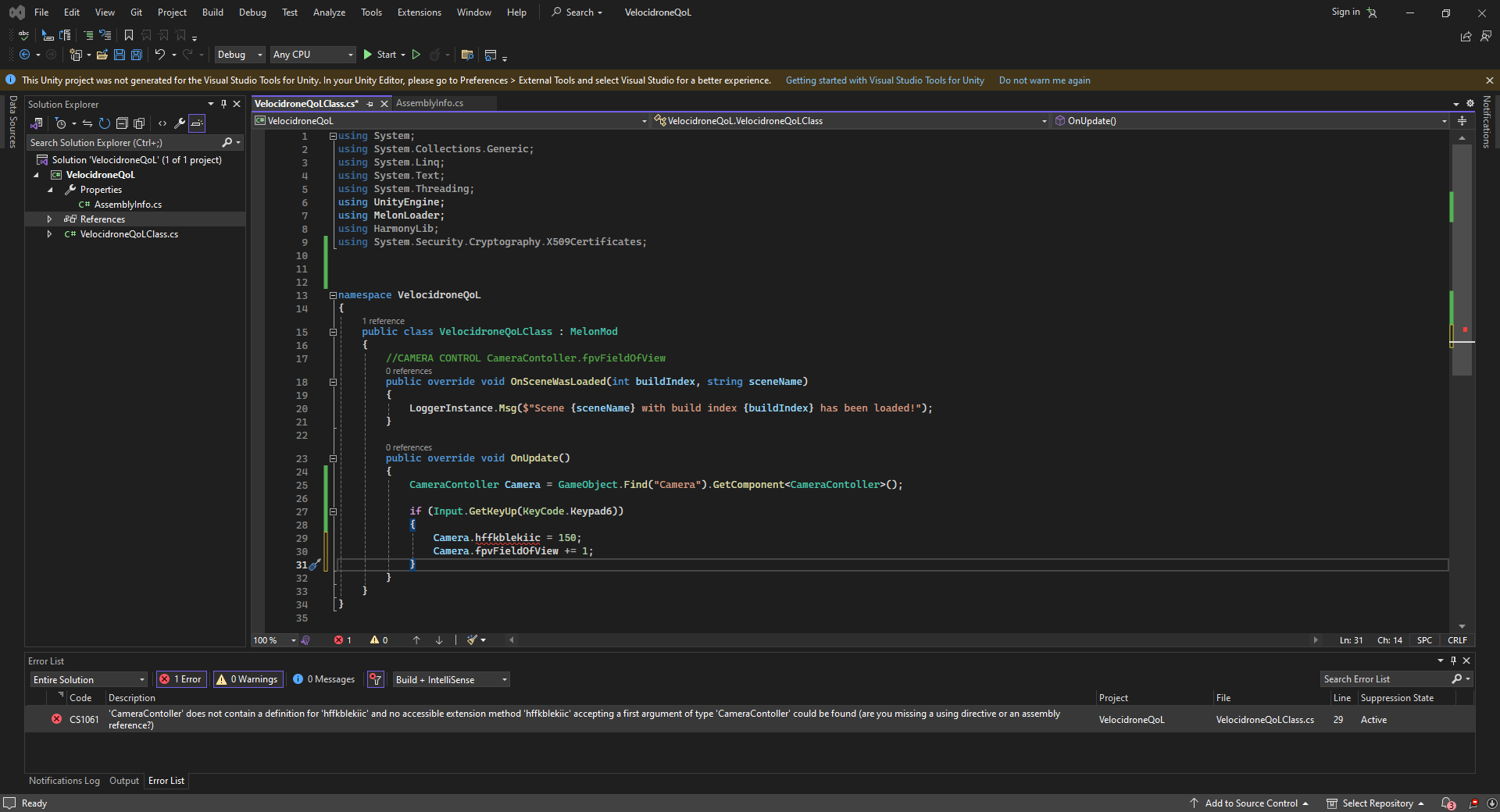
i hve to use that hff.... but the code doesnt see it, i can use other fields but not that one
languid spire
!ide
eternal falconBOT
💡 IDE Configuration
If your IDE is not autocompleting code
or underlining errors, please configure it.
Select one:
• Visual Studio (Installed via Unity Hub)
• Visual Studio (Installed manually)
• VS Code
• JetBrains Rider
• Other/None
 rancid tinsel
thanks
@grizzled pagoda do the visual studio one
so you can see the errors
in visual studio while typing
 short hazel
icy quail
i hve to use that hff.... but the code doesnt see it, i can use other fields bu...
short hazel
icy quail
i hve to use that hff.... but the code doesnt see it, i can use other fields bu...
Not familiar with the window, but that might be because it's private?
icy quail
as you can see i can select "fpvfieldofview"
 polar acorn
icy quail
polar acorn
icy quail
Can you show the code for hffkblekiic (which is a mouthful by the way. Is there a reason these variables are keyboard mashes?)
 smoky mauve
what does this error mean?
type is not a supported string value
UnityEditor.RetainedMode:UpdateSchedulers ()
polar acorn
smoky mauve
what does this error mean?
type is not a supported string value
UnityEditor.Ret...
Check the stack trace and see if any of it is in code you write. If not it's probably a unity editor error and you can probably fix it with a restart
languid spire
icy quail
as you can see i can select "fpvfieldofview"
what is this, it doesn't look like a Unity project
short hazel
icy quail
https://i.imgur.com/8P0DUp4.png
Oh, modding. Can't talk about that here
icy quail
short hazel
Oh, modding. Can't talk about that here
really? ah sorry
short hazel
You'll have to find the official discussion channel of the game, wherever it is
And yeah the garbled variable names is probably because of an obfuscator on the source code
 terse raven
Can entities have colliders on them or would that decrease performance
smoky mauve
polar acorn
Check the stack trace and see if any of it is in code you write. If not it's pro...
restarted and gone, ty
icy quail
short hazel
And yeah the garbled variable names is probably because of an obfuscator on the ...
alright, thanks for help <33
rare basin
terse raven
Can entities have colliders on them or would that decrease performance
what
 cunning locust
Are while loops actually used by anyone? I mean i always use either if statements or for loops
 rocky canyon
yes
cunning locust
is there an example where you must use a while loop instead of for or if?
languid spire
cunning locust
Are while loops actually used by anyone? I mean i always use either if statement...
while loops are extremely common, yes
wintry quarry
cunning locust
Are while loops actually used by anyone? I mean i always use either if statement...
All the time
cunning locust
I've been programming for 2 years and i only tried to use it once, my game crashed, now i never use them and im okay
wintry quarry
cunning locust
is there an example where you must use a while loop instead of for or if?
You can use for and while for all loops interchangeably, it's just awkward sometimes
cunning locust
Okay so while loop doesnt have special usage that a for loop cant do
rocky canyon
        if(drag)
        {
            //enable elsewhere
            lineSystem.SetActive(true);
            currentMousePosition = Input.mousePosition; // start updating currentPosition
            float dragDistance = Vector3.Distance(initialMousePosition,currentMousePosition);

            if(dragDistance > dragThreshold)
            {
                initialMousePosition = currentMousePosition; // reset new position for next drag check
            }

            if(Input.GetMouseButtonUp(0))
            {
                lineSystem.SetActive(false);
                drag = false;
                initialMousePosition = currentMousePosition;
            }
}``` heres an example of one of my if loopsi have exit conditions like drag = false..
now if i was a better coder id use a while loop instead
cunning locust
this seems fine to me
languid spire
how is that a loop?
cunning locust
languid spire
how is that a loop?
happens every frame doesnt it?
rocky canyon
ya
languid spire
then the if is irrelevant, the Update is the loop
cunning locust
yes but the if breaks out of the loop.
languid spire
if is not a looping statement
rare basin
you said one of my if loops
rocky canyon
okay steve
cunning locust
Anyway, just proving my point that while loops are not neccessary
languid spire
ok, try that in a Coroutine
rocky canyon
i could make it a coroutine 🤔
languid spire
go on then
cunning locust
What is a coroutine?
polar acorn
cunning locust
Anyway, just proving my point that while loops are not neccessary
Technically no loops are ever necessary because goto exists
cunning locust
i dissagree
wintry quarry
while loops are just cleaner than for loops in some circumstances @cunning locust . For example:
Queue<int> queue = new() { 1, 3, 4, 5, 6 };

while (queue.Count > 0) {
  int next = queue.Dequeue();
  print(next);
}```

A for loop would be a but less elegant here...
```cs
for ( ; queue.Count > 0; ) {
  int next = queue.Dequeue();
  print(next);
}```a for loop is extremely neccessary sometimes
polar acorn
cunning locust
a for loop is extremely neccessary sometimes
But you could just use goto statements.
languid spire
cunning locust
a for loop is extremely neccessary sometimes
foreach, yes, for no
polar acorn
They're tools to have in your toolbox, and discounting one because you can massage another into the same use case isn't relevant
You should still learn how to use them
wintry quarry
List<int> list = new() { 1, 2, 3, 4, 5 };

IEnumerator<int> enumerator = list.GetEnumerator();
while (enumerator.MoveNext()) {
  int current = enumerator.Current;
  print(current);
}```
^ Here's how to write `foreach` as a `while` loopDoes visual studio have a snippet shortcut?
Like when I press a shortcut key, it instantly pastes a for loop
or a switch
short hazel
They appear in the completion list as you type
short hazel
for, then Tab to complete
short hazel
For enums, it does
languid spire
don't worry about using shortcuts, learn how to write code yourself
short hazel
Else, it cannot decide for you
cunning locust
languid spire
don't worry about using shortcuts, learn how to write code yourself
Yeah i know all of these, i just can't bother to type them out all of the time
 cyan pollen
does system.random still work?
languid spire
cunning locust
Yeah i know all of these, i just can't bother to type them out all of the time
apparently you don't
rocky canyon
public Update()
{
  if (Input.GetMouseButtonDown(0))
    {
        // Set drag to true when the mouse button is pressed
        drag = true;

        // Start the coroutine
        StartCoroutine(DragCoroutine());
    }

    if(Input.GetMouseButtonUp(0))
    {
        drag = false;
    }
}

IEnumerator DragCoroutine()
{
    // Enable the line system when starting the drag
    if (!lineSystem.activeSelf)
    {
        lineSystem.SetActive(true);
    }

    while (drag)
    {
        currentMousePosition = Input.mousePosition;
        float dragDistance = Vector3.Distance(initialMousePosition, currentMousePosition);

        if (dragDistance > dragThreshold)
        {
            // Update LineRenderer during drag
            UpdateLineRenderer();

            // Reset new position for the next drag check
            initialMousePosition = currentMousePosition;
        }

        yield return null;
    }

    // Disable the line system when releasing the mouse button
    lineSystem.SetActive(false);
    initialMousePosition = currentMousePosition;
}```coroutine 🤔
cyan pollen
what happened to system.random?
cunning locust
languid spire
apparently you don't
Where did I give you this impression?
languid spire
now you have a while
short hazel
cyan pollen
what happened to system.random?
Still exists, and will always exist
rare basin
cyan pollen
what happened to system.random?
what would happen to it
languid spire
cunning locust
Where did I give you this impression?
in just about everything you have said
rocky canyon
but i dont want a coroutine.. so ill just use my if() conditionals until it isnt feasible
cyan pollen
rare basin
what would happen to it
im tryna use it and it isnt working
rare basin
then you are using it wrong
cunning locust
languid spire
in just about everything you have said
I just got curious if a while loop is even needed, and it turns out it's not. So i was correct
rocky canyon
its debateable as noticeable
if you dont need to use a while loop, dont use one.
but they aren't unneeded in no form
 dawn juniper
Hello, I'm making a 2d game and in a level I want to see nothing that everything looks black, all black and when the character puts a torch you can see around the torch, you can see what is the map, what I mean is that everything looks black and the light of the torch let you see the map, but I've been trying things and I can not do it, anyone knows how it could be done?
rocky canyon
you can make fortnite? 👀
wintry quarry
while is the most flexible type of loop. All the other loops are built on top of it
rocky canyon
this sounds accurate ^
wintry quarry
You can also write English sentences without the letter "e" but there's not good reason to do so.
rare basin
cunning locust
I mean.. you can make fortnite with 0 while loops
what you are saying makes absolutely 0 sense
you can make fortnite without any for loop aswell
cunning locust
All im saying, if while loop wen't extinct, it wouldnt limit me in any way
languid spire
you can make anything without using any looping construct other than label: goto label. Should you? NO
rare basin
for you != useless
wintry quarry
You will look back at yourself saying this in 5 years and laugh
short hazel
Wrong, because most loops in C# compile to while loops
cunning locust
rare basin
you can make fortnite without any `for` loop aswell
I doubt it? Loops are necessary
short hazel
Your code wouldn't compile at all lol
rocky canyon
not really.. u can emulate loops with if conditionals and booleans
rare basin
cunning locust
I doubt it? Loops are necessary
why do you need a for if you can make the same logic in while
thinking in your logic
for sounds unneeded to me
cunning locust
i mean techinally.. ye
languid spire
As I said earlier, there are several well known languages which have no loop constructs at all
cunning locust
its one or the other.
A for loop automatically can set a limit to the loop
which while loop can't
i mean it can, but
rare basin
while loop can put a bool inside the brackets
languid spire
of course it can
rocky canyon
- i dont use while loops b/c im not good enough to use em yet *
i get tired of locking up my project
cunning locust
I think a for loop is more advanced than a while loop
polar acorn
cunning locust
which while loop can't
Yes so when you have an unknown number of iterations that's why you would use while loops
rare basin
cunning locust
I think a for loop is more advanced than a while loop
why is it more advanced
wintry quarry
rocky canyon
not really.. u can emulate loops with if conditionals and booleans
you can emulate a loop with goto. You can't emulate a loop with if
cunning locust
rare basin
why is it more advanced
it looks more confusing XD
rare basin
it looks more confusing to you = its more advanced?
cunning locust
wintry quarry
you can emulate a loop with `goto`. You can't emulate a loop with `if`
this is just c#, goto doesn't exist in other languages as far as i know
rocky canyon
wintry quarry
you can emulate a loop with `goto`. You can't emulate a loop with `if`
ya, i meant more *with the use of it being nested in a Unity loop (like update)
cunning locust
rare basin
it looks more confusing to you = its more advanced?
I mean is it not? Lets be fr here
rocky canyon
i dont code outside of unity unfortunately
 eternal needle
Yea I feel the same about multiplication, why is it so confusing. We should just use addition, remove multiplication since it is clearly bloat
wintry quarry
rocky canyon
ya, i meant more *with the use of it being nested in a Unity loop (like update)
well yeah but then there's still al oop, it's just inside the Unity engine and not in your code.
rare basin
cunning locust
I mean is it not? Lets be fr here
no its one of the basic things you learn
languid spire
cunning locust
this is just c#, goto doesn't exist in other languages as far as i know
goto exists in ALL languages, loops don't
rocky canyon
facts! lol idk i just jumped in
rare basin
cunning locust
this is just c#, goto doesn't exist in other languages as far as i know
okay you just proved its kinda ponitless talking to you now 😄
wintry quarry
cunning locust
this is just c#, goto doesn't exist in other languages as far as i know
goto is the basis of all loops. Loops are built on jmp style assembly instructions which are just goto
polar acorn
cunning locust
this is just c#, goto doesn't exist in other languages as far as i know
Goto exists in literally every language and is one of the most fundamental control flow commands which all other kinds of loops and conditionals eventually compile to
cunning locust
languid spire
goto exists in ALL languages, loops don't
I would strongly dissagree as i have years of experiance in gamemaker
languid spire
idiot
rare basin
he's trolling
rocky canyon
🤣 i cant
rare basin
at this point xd
eternal needle
This is clearly a kid
cunning locust
I was hoping to have a nice discusion over a topic, yalls reaction is not it.
I'm just debating.
rare basin
can't have a nice discusion if you are closed to answers
and can't take facts as a.. facts lol
eternal needle
dawn juniper
Hello, I'm making a 2d game and in a level I want to see nothing that everything...
Likely more of a #archived-lighting question
cunning locust
Well it was a calm friendly debate on my end.
rare basin
I would strongly disagree, i have years of experience in psychology
 vapid vector
hey guys, I just started out with unity and I was following this udemy course I got, I'm trying to make one of these hyper casual games just to learn the basics, here's a tiny bit of the player animation code. It works fine between idle and running, but I wanted to also make the player walk based on the "intensity" of the joystick, based on how far off it is, if just a tiny bit, he'd walk. I did alter the code for that but the value I was checking wasn't perfectly consistent so most of the time he'd jigger between run and walk when just pulling the joystick to a half point, if I do an if for lets say magnite > 0.5, usually walking is 0 to 0.5 and running is 0.5 to 1, but there would be odd values in between, running could have a random .4 and walking could have a random .6
any advice on what value I should be checking (I'm starting to think the vector magnitude isnt the correct one xd) or how I can get the speed to do this?

 languid spire
cunning locust
Well it was a calm friendly debate on my end.
languid spire
cunning locust
Well it was a calm friendly debate on my end.
except in a debate both sides need to know what they are talking about, you very clearly do not
eternal needle
cyan pollen
im tryna use it and it isnt working
Look at the #854851968446365696 on how to ask. No one can help by just this alone
cunning locust
polar acorn
Goto exists in literally every language and is one of the most fundamental contr...
Ah okay this wasnt exactly what i was talking about, but now i get your point. I only wanted to say that gamemaker doesnt have a built in function goto for us users to use.
languid spire
cunning locust
Ah okay this wasnt exactly what i was talking about, but now i get your point. I...
gamemaker is not a computer language, it is a system
polar acorn
vapid vector
hey guys, I just started out with unity and I was following this udemy course I ...
I'm guessing you're getting that move vector from input somewhere, which means it might have smoothing on it
cunning locust
languid spire
gamemaker is not a computer language, it is a system
Yes therefor i withdraw my previous statements regarding the goto
little missunderstanding on my part
polar acorn
cunning locust
Ah okay this wasnt exactly what i was talking about, but now i get your point. I...
Game maker uses a scripting language and is not a compilable programming language. Internally, the code game maker compiles your GML to does have goto
languid spire
cunning locust
Yes therefor i withdraw my previous statements regarding the goto
three fundamentals of loops
jmp
jnz
jz
every piece of looping code you ever write will boil down to one of these asm goto instructions
cunning locust
That's why gamemaker shouldnt be a starting point in programming games, this type of information is extremely helpful now that i've moved to unity
Neved heard of goto before yesterday 🤣
languid spire
then your education has been sorely lacking
eternal needle
cunning locust
That's why gamemaker shouldnt be a starting point in programming games, this typ...
It's not like you would hear about in doing unity solo anyways, you only hear about it because these people told you
You dont really use goto directly yourself in c#
cunning locust
I mean when you learn programming, someone tells you the information that you want to learn
cunning locust
eternal needle
You dont really use goto directly yourself in c#
that just confuses me now.
Thought it's commonly used by unity developers
eternal needle
You dont explicitly type goto in your code
rocky canyon
ive only ever seen Goto: logic in memes (relating to Unity)
 frosty hound
Goto isn't commonly used at all in Unity
languid spire
one of the reasons that C# has so many different loop constructs is so that you dont need to use gotos yourself.
In fact if you follow strict OOP JSP principles goto should never be used by an application programmer
cunning locust
languid spire
one of the reasons that C# has so many different loop constructs is so that you ...
If i recall correctly, when i was talking to someone here about switch statements, they said that goto should be used for some sort of flow yadda yadda
languid spire
the break statement is technically a goto
polar acorn
cunning locust
Thought it's commonly used by unity developers
No, people are bringing it up because it'd be absurd to write all of your loops in gotos, just like it's absurd to try to write all of your loops in only for
rocky canyon
complicated switch statements if its goto'ing around and about but yea, breaks, returns, etc
cunning locust
languid spire
the break statement is technically a goto
but it does not specify the "where"
it just breaks out of the switch
short hazel
You can actually goto case n in switch statements
rocky canyon
thats why u structure ur logic in a coherent way
languid spire
the where is implicit. end of scope
rocky canyon
u shoudn't need to tell it specifically where to go
cunning locust
short hazel
You can actually `goto case n` in switch statements
Yea that's what i ment
While i cannot imagine a case where this would be usefull for me, it sounds like a neat feature which might be usefull
rocky canyon
i need to write more switch statements.. my logic never gets that robust, hopefully someday ill transcend
languid spire
people dont realize. case is the same as label. that is why it terminats with a :
rocky canyon
cunning locust
While i cannot imagine a case where this would be usefull for me, it sounds like...
the more tools in ur toolchest is the important part
even if u dont use it.. knowing something is available to u puts u ahead of the ones that dont
languid spire
absolutely, you dont need to know the exact signature of all API's you just need to know they exist
rocky canyon
imagine before the internet was what it is now.. u'd have to have a bookshelf at ur ready 😄
now u can just "beep: boop:" what ur hunting
languid spire
look at my bookshelfs
languid spire
I have hundreds of coding and sdk manuals
cunning locust
when people coded before internet their books were already read 100 times before
rocky canyon
any that u would swear by?
cunning locust
languid spire
I have hundreds of coding and sdk manuals
in which field do you specialize?
languid spire
today, no, much better info on the net if you know how to search
rocky canyon
im always on the lookout for an extra ebook i can store
languid spire
cunning locust
in which field do you specialize?
All of them
eternal needle
What a wild difference in times, during my time in university I seriously never bought a single textbook.
cunning locust
languid spire
All of them
So like.. networking, front end, back end, discord bots
cyber hacking
languid spire
yep and much much more
rocky canyon
pretty sure he can do it all
rocky canyon
cyber security
languid spire
50 years is a long time to learn this shit
languid spire
cunning locust
Which one brings the most money?
Finance and Banking
rocky canyon
selling ur soul
languid spire
it's also more fun than game dev
cunning locust
languid spire
Finance and Banking
That must be country specific.. in my country the money is alright in banking, but making a successful game >>>
rocky canyon
Capitalism! Hoorah!
languid spire
cunning locust
That must be country specific.. in my country the money is alright in banking, b...
I'm international, I'll work for anyone who pays me enough
rocky canyon
..and he's bilingual 👀
languid spire
multilingual if you please
rocky canyon
i knew it!
cunning locust
is Steve Smith Steve Jobs by any chance
languid spire
my mate Jobs is dead, I'm not
rocky canyon
if you say so
cunning locust
whatever you say Jobs..
 void dawn
Does anyone have a hard time on YouTube tutorials
rocky canyon
very very rarely
languid spire
void dawn
Does anyone have a hard time on YouTube tutorials
never
rocky canyon
if i do, the solution is in the comments
the trick to youtube tutorials is to follow it exactly pay attention to what they click (they might not narrate every click they make)
dont be afraid to pause, and rewatch
usually they wont post a video that doesnt work..
languid spire
no, the trick with YT tutorials is NOT TO WATCH YT TUTORIALS because most of them are crap
void dawn
languid spire
no, the trick with YT tutorials is NOT TO WATCH YT TUTORIALS because most of the...
You can't just generalize like that
languid spire
bet
rocky canyon
imo youtube tutorials are best at exposing you to ideas, mechanics, and etc
eternal needle
rocky canyon
usually they wont post a video that doesnt work..
Well itll work for the 10 seconds of gameplay shown, then you realize its impossible to develop this further
rocky canyon
its up to you to take those and research and fill in the blanks
languid spire
99% of YT turorials are made by people to make money or self promote, nothing else. They generally know nothing
rocky canyon
if u dont.. ur just copying what they make.
cunning locust
So what? Should i just read the whole c# manual to learn something?
rocky canyon
eventually yes, but thats an extreme..
no ones asking u to read the entire manual to figure out what a transform is
You dont get dropped off in mexico and learn the entire mexican language on the first encounter with a local..
cunning locust
What about the 10+ hour full course tutorials?
eternal needle
void dawn
You can't just generalize like that
The youtubers that actually know what they're talking about, dont really make step by step guides that you'll be able to learn from. They will briefly mention an entire concept, because they're just telling you how they implemented a feature. If you dont understand the existing tutorials you're looking at who show you the code line by line, you 100% will not understand the few good tutorials that exist
rocky canyon
same with learning a computer language..
rocky canyon
eternal needle
The youtubers that actually know what they're talking about, dont really make st...
Tarodev!
rocky canyon
cunning locust
What about the 10+ hour full course tutorials?
never tried any of those.. u mean the payed ones?
like Udemy courses?
cunning locust
Not necessarily, but sure. For example rn im watching a free one on youtube, 7 hours long full course
languid spire
Take Brackey, heralded as the king of Unity YT tutorials by many, his code is so full of errors it's untrue and what he 'teaches' is rubbish
rocky canyon
cunning locust
Not necessarily, but sure. For example rn im watching a free one on youtube, 7 h...
you'll learn alot of concepts from it.. but they all wont just click
you'll still have to do some follow-up on ur own
cunning locust
To be fair, 4 hours in i just got over the loops, which are basically the same in any language
My bad, 2 hours in.
rocky canyon
basics aren't all that exciting
queen adder
where can i get help for scripting errors?
rocky canyon
here
 cunning locust
I'm sure there's a debugger in unity
queen adder
rocky canyon
here
oh lol
 hexed ginkgo
rocky canyon
you'll learn alot of concepts from it.. but they all wont *just click*
hexed ginkgo
rocky canyon
you'll learn alot of concepts from it.. but they all wont *just click*
I feel like the best way to learn stuff is to try using it in a project yk
rocky canyon
absolutely correct.. you learn the most by doing
hexed ginkgo
like a lot of stuff just doesn't make sense if you don't do it yourself
rocky canyon
i never watch anything without a project opened up lol
 hexed ginkgo
yeah but I mean
you don't learn stuff by blindly copying it
you learn it by applying it yourself
cunning locust
hexed ginkgo
you don't learn stuff by blindly copying it
I could dissagree with this
rocky canyon
hexed ginkgo
you learn it by applying it yourself
thats the step where you get those click moments..
cunning locust
When you are in school all you do is copy from the board.
rocky canyon
"eureka moments" is a better term
queen adder
i have like 2 scripts, one script checks if the player is touched and then uses the method of another script to show a game over ui
everytime i reference the method, i get this error: Object reference not set to an instance of an object
 rocky canyon
gameManager is not assigned
queen adder
 wintry quarry
queen adder
i have like 2 scripts, one script checks if the player is touched and then uses ...
wintry quarry
queen adder
i have like 2 scripts, one script checks if the player is touched and then uses ...
You didn't assign this variable

it needs to be assigned in the inspector - or elsewhere
queen adder
oh damm
rocky canyon
u just told Unity that you have a GameManager class u want to be named gameManager.. but u never assigned it so unity doesn't know which one
hexed ginkgo
queen adder
i have like 2 scripts, one script checks if the player is touched and then uses ...
that means that gameManager is not assigned
cunning locust
Yeah refferencing stuff was confusing to me at first for sure
hexed ginkgo
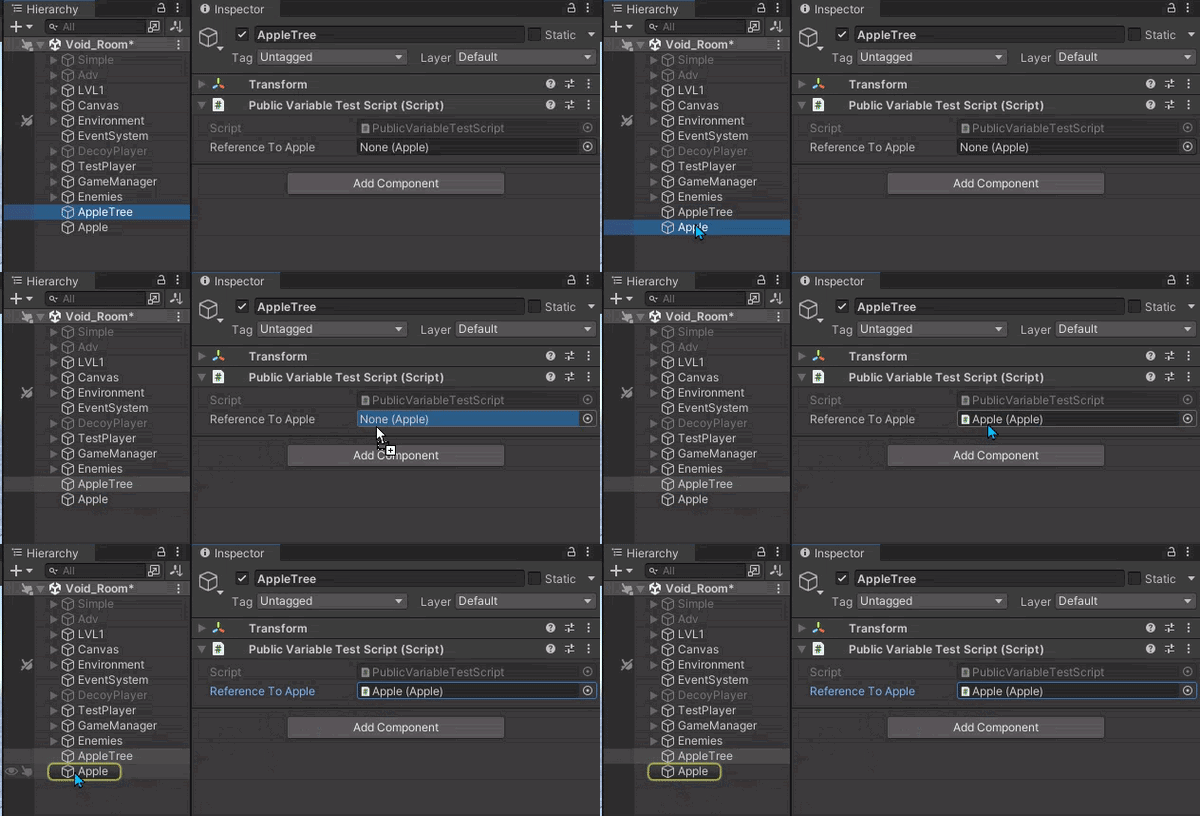
go to the player object
and drag the game manager object into the slot provided under your player script component
rocky canyon
 queen adder
hexed ginkgo
and drag the game manager object into the slot provided under your player script...
queen adder
hexed ginkgo
and drag the game manager object into the slot provided under your player script...
the scripts are in the assets
 modest dust
cunning locust
When you are in school all you do is copy from the board.
modest dust
cunning locust
When you are in school all you do is copy from the board.
Sure, you can memorise stuff by copying, but to use it effectively in your own projects requires some amount of practice
queen adder
do i have to tie it with a script?
rocky canyon
queen adder
the scripts are in the assets
like a prefab asset?
queen adder
i mean game Object
hexed ginkgo
queen adder
the scripts are in the assets
yes, but if you have a script component on your player the public properties of te script will be exposed
rocky canyon
yea u drag the gameobject containing the "GameManager" script
queen adder
so i just create a gameObject for the sole purpose of storing the script?
rocky canyon
it has to be in the scene to run properly since its a monobehaviour
queen adder
ok
rocky canyon
so ya, just make an empty gameobject name it something relateable, drop the gamemanager on it
and use that to get ur reference
queen adder
my KillBlock script is in a prefab tho
cunning locust
Does c# have variables with different scopes? Can i make an enum or a macro which could be accessed in any script for example?
cunning locust
I thought public just means i can edit it via the unity editor
rocky canyon
queen adder
my KillBlock script is in a prefab tho
if u need that script from somewhere outside the prefab ull have to instantiate it first and then use a GetComponent<> or something similar to grab the reference from it once its in the scene
cunning locust
the components tab
rocky canyon
cunning locust
I thought public just means i can edit it via the unity editor
it means that and what i said..
queen adder
and the game Manager is inside the ui
rocky canyon
a private field can be shown in the inspector.. if u use
[SerializedField] private float myFloat;
cunning locust
Interesting, maybe i shouldnt overuse public variables then.
rocky canyon
rocky canyon
a private field can be shown in the inspector.. if u use
`[SerializedField] pri...
and that wont be accessable outside the class u wrote it in
BUT will be visible in teh inspector
cunning locust
that's usefull to know, thank you!
rocky canyon
cunning locust
Interesting, maybe i shouldnt overuse public variables then.
absolutely not.. u should get into the rhythm now of only using public variables that u want to use externally..
if not and u still want to assign it via the inspctor use [SerializedField] private
cunning locust
On a different topic, im learning about coroutines and i dont see the difference between them and functions..
StartCoroutine(ExecuteSomething());

IEnumerator ExecuteSomething()
{
    yield return new WaitForSeconds(2f);
    print("Executed.");
}
well for starters you can't Wait in a regular function
so that code would never work in a regular function
cunning locust
I see, alright, is there more to it?
queen adder
since my game manager and kill block scripts are both in parts, i can get the Game manager script from finding its path?
and how would i find this path?
rocky canyon
i only use them for Delays.. but theres alot more to them
cunning locust
it's kinda weird that you can't wait outside the coroutine.
rocky canyon
queen adder
since my game manager and kill block scripts are both in parts, i can get the Ga...
https://docs.unity3d.com/ScriptReference/Object.FindObjectsOfType.html
you can use this to find specific components/scripts
 cunning locust
Hmm so what about structs and arrays?
can I make a custom Wait() function by passing in a function as a parameter of a coroutine?
IEnumerator ExecuteSomething( int func, int time)
{
    yield return new WaitForSeconds(time);
    func();
}
u can use a coroutine just like a function in the sense of passing in variables yea
yea u can do that, not sure about the func() part.. but i know u can pass in ints and stuff
wintry quarry
cunning locust
can I make a custom Wait() function by passing in a function as a parameter of a...
yes
but func would need to be a delegate type
for example Action
queen adder
rocky canyon
https://docs.unity3d.com/ScriptReference/Object.FindObjectsOfType.html
you can ...
ye but the script is inside GameOverScreen, is there no way of just Canvas.GameOverScreen.getcomponnent<GameManager>?
 cunning locust
Yeah im particuraly interested in passing a function as an argument
 scarlet skiff
if an animaiton has "loop" ticket off and has finished playing/is at last frame, would this method still return true?
 rocky canyon
queen adder
ye but the script is inside GameOverScreen, is there no way of just `Canvas.Game...
rocky canyon
queen adder
ye but the script is inside GameOverScreen, is there no way of just `Canvas.Game...
ya u can do that.. if u know exactly what object its on.. and its GetComponent btw
punctuation matters
queen adder
rocky canyon
ya u can do that.. if u know exactly what object its on.. and its `GetComponent`...
how do i reference the object path?
rocky canyon
u still need a reference to that tho.. u cant just type out the name's
cunning locust
wintry quarry
but `func` would need to be a delegate type
delegate type?
rocky canyon
same as u did earlier.. u pass it into a variable.. but if ur gonna do that why wouldnt u just pass in the GameManager directly
wintry quarry
cunning locust
```gml
IEnumerator ExecuteSomething( int func, int time)
{
yield return new ...
IEnumerator WaitThenExecute(float delay, Action a) {
  yield return new WaitForSeconds(delay);
  a();
}

// Use it like this:
StartCoroutine(WaitThenExecute(2.5f, () => Debug.Log("Done waiting")));```like that?
 wintry quarry
cunning locust
delegate type?
wintry quarry
cunning locust
delegate type?
yes delegates are C#'s version of function pointers. A delegate type is.. a type of delegate

A delegate in C# is a type that refers to methods with a parameter list and return type. Delegates are used to pass methods as arguments to other methods.
rocky canyon
queen adder
like that?
if the gameManager is attached to that exact objecct (the same one the script is on)
wintry quarry
System.Action aka Action is a delegate type that returns void and takes no parameters
queen adder
rocky canyon
if the gameManager is attached to that exact objecct (the same one the script is...
the kill block is actually in the prefab
do i need to do gameObject.Parent?
it that a thing?
rocky canyon
.parent is a thing yes
cunning locust
wintry quarry
`System.Action` aka Action is a delegate type that returns `void` and takes no p...
Makes sense
I thought i could just pass an array as an argument
to do the same
but i realised I can't even get arrays to work in c# 💀
 Array arr = [ 1, 2 ,3]

  struct struc {1 , 2 }
Well yea that's not the syntax,  it. It's all there on the docs
languid spire
that aint even close to c#
wintry quarry
cunning locust
```cs
Array arr = [ 1, 2 ,3]
struct struc {1 , 2 }
```
you could actually look up the syntax 😉
I don't see how an array would do the same as a delegate though
cunning locust
languid spire
that aint even close to c#
struct one should work..
languid spire
not even close
wintry quarry
Are you a Python user by chance?
 north kiln
The collection initialiser may make confuse things if you looked it up
The array initialisation is honestly almost correct in modern c#
cunning locust
wintry quarry
Are you a Python user by chance?
im used to gamemaker language
wintry quarry
it's almost correct except that the type is wrong
queen adder
i did this
 cunning locust
public struct struc
{
  int i = 1;
}
Apparently gamemaker is like javascript and c? I was assuming C from how you tried to declare the struct
 mild osprey
guys, how do I get the rb.velocity.magnitude in 3D? I was used to get this value on 2D but it is not working on 3D
queen adder
but i cant drag the gameObject to the script
 meager steeple
would it be possible to include time.deltatime into this? or would it still run equally no matter the performance?
cunning locust
eternal needle
Apparently gamemaker is like javascript and c? I was assuming C from how you tri...
yeah
rancid tinsel
!code
eternal falconBOT
Posting code
📃 Large Code Blocks
Use links to services like:
https://gdl.space/, https://paste.ofcode.org/, https://hatebin.com/, https://paste.myst.rs/, https://hastebin.com/
📃 Inline Code
Surround code with three backquotes. Not quotation marks.
To format as C#, add cs to the first line:
```cs
// Your code here
```
Add a comment with a line number if there is an error message.
rancid tinsel
@grizzled pagoda
north kiln
meager steeple
would it be possible to include time.deltatime into this? or would it still run ...
It uses Time already, there's no need for delta time
hexed ginkgo
meager steeple
would it be possible to include time.deltatime into this? or would it still run ...
it runs equally because it takes time into account
meager steeple
👍
hexed ginkgo
Mathf.Sin(Time.time)
eternal needle
mild osprey
guys, how do I get the rb.velocity.magnitude in 3D? I was used to get this value...
Show what you tried/more context. Magnitude exists on the Vector3 so this should be fine
cunning locust
eternal needle
Apparently gamemaker is like javascript and c? I was assuming C from how you tri...
Trust me that code was not how i WANTED to declare the struct 💀
mild osprey
eternal needle
Show what you tried/more context. Magnitude exists on the Vector3 so this should...
I just tried
"return Mathf.Abs(rb.velocity.magnitude);"
but is returning zero
eternal needle
Then the value is 0
mild osprey
the obj is moving
north kiln
You don't need to abs a magnitude, it's always positive.
polar acorn
mild osprey
the obj is moving
How are you moving it
grizzled pagoda
https://gdl.space/simatudizu.cpp hi could anyone help me with wave spawning? the wave starts out at 2, the wavecount however is set to 0 at the start though
mild osprey
I'm moving the transform
polar acorn
mild osprey
I'm moving the transform
So you're nver changing velocity
mild osprey
the rigidbody does not count this way?
mild osprey
oh, that's the problem
north kiln
Also, please don't cross-post
queen adder
rocky canyon
if the gameManager is attached to that exact objecct (the same one the script is...
i solved it, i had to change something from my kill block spawner to attach the game Manager to the public var in the killblock script
rocky canyon
sounds like ur getting it
grizzled pagoda
grizzled pagoda
https://gdl.space/simatudizu.cpp hi could anyone help me with wave spawning? the...
could anyone look at this
 calm coral
Hey I have this error when trying to build my game, no issues when running in edit mode

What does it mean it has a different serialization layout?
calm coral
rare basin
but more like error from builded game
Yeah, when I run the built game
rare basin
what is Card
calm coral
rare basin
what is `Card`
My script
 rare basin

well, as the pre-prorocesor directive saying
anything under Auxiliary will work only in the editor
calm coral
rare basin
Yeah, I just added it, was having this error without this if as well
rare basin
yea cuz it's something related to the editor
calm coral
rare basin
anything under `Auxiliary` will work only in the editor
Yeah, it contains only editor runtime methods
rare basin
some kind of asset, i dint know what it is
rare basin
calm coral
Yeah, it contains only editor runtime methods
yea so obviously
calm coral

rare basin
you cannot use this in build xd
calm coral
rare basin
you cannot use this in build xd
But I don't want to
I can even delete this Auxiliary class completely and try bulding my game again
rare basin
then do it

 wintry quarry
calm coral
Hey I have this error when trying to build my game, no issues when running in ed...
wintry quarry
calm coral
Hey I have this error when trying to build my game, no issues when running in ed...
Usually this means you did something like:
#if UNITY_EDITOR
public int SomeField;
#endif```what is Auxiliary?
calm coral
wintry quarry
what is `Auxiliary`?
Contains a few helpful methods during development but it's not needed in the final build, even when I commented it out the build still didn't work
wintry quarry
calm coral
Contains a few helpful methods during development but it's not needed in the fin...
What is IAmGood?
Where are things like displayName and username coming from?
calm coral
wintry quarry
What is `IAmGood`?
public interface IAmGood
{
    public bool IsGood { get; }
}
```An interface, nothing specialWhy I can't send a file here? You can open it in full view or scroll on Discord
wintry quarry
I can't download files on this computer
it's a work computer
Discord truncates it
calm coral
wintry quarry
I can't download files on this computer
There's no need to download it, you have this icon to view it
 wintry quarry
It doesn't show all
eternal needle
calm coral
There's no need to download it, you have this icon to view it
totally can see the entire file...
 wintry quarry
 eternal needle
and forget mobile, who just sees "download attachment" and thats all
calm coral
eternal needle
totally can see the entire file...
Really? I don't see that
 wintry quarry
Anyway I want to see the Card script
calm coral
Aight, hold on
eternal needle
short hazel
Just hit the arrows aside? Shows all
ah didnt even realize that was a thing, that looked like decoration to me lol
calm coral
!code
eternal falconBOT
Posting code
📃 Large Code Blocks
Use links to services like:
https://gdl.space/, https://paste.ofcode.org/, https://hatebin.com/, https://paste.myst.rs/, https://hastebin.com/
📃 Inline Code
Surround code with three backquotes. Not quotation marks.
To format as C#, add cs to the first line:
```cs
// Your code here
```
Add a comment with a line number if there is an error message.
wintry quarry
calm coral
https://gdl.space/ifedequfow.cpp
Possibly due to OnValidate being inside a preprocessor?
calm coral
wintry quarry
Possibly due to OnValidate being inside a preprocessor?
It's commented out
 wintry quarry
Try restarting the editor maybe? I'm not immediately seeing any issue
 cosmic dagger
calm coral
Why I can't send a file here? You can open it in full view or scroll on Discord
cosmic dagger
calm coral
Why I can't send a file here? You can open it in full view or scroll on Discord
Not everyone can. It doesn't work on mobile, and if the file is too large, it cuts off . . .
calm coral
cosmic dagger
Not everyone can. It doesn't work on mobile, and if the file is too large, it cu...
Alright, got it
calm coral
wintry quarry
Try restarting the editor maybe? I'm not immediately seeing any issue
Still the same, restarted editor and rebuilt it and the same issue

Maybe should I get rid of [SerializeField] attributes? Will that solve the issue?
polar acorn
You're using Visual Studio, right? or VSCode?
 tender breach
Yeah
short hazel
Horrendous code style btw
frosty hound
@tender breach
#💻┃code-beginner message
#💻┃code-beginner message
polar acorn
tender breach
Yeah
Please press Ctrl+A, Ctrl+K, Ctrl+D in that order then post the code again
frosty hound
You're not going to post code here if you're going to continue to refuse to format.
Your post is deleted until you do so.
 covert wyvern
I'm trying to create an interaction with my player and NPC capsule but no output in the console to show I touched the capsule.
using System.Collections;
using System.Collections.Generic;
using UnityEngine;

public class PlayerInteract : MonoBehaviour
{

    private void Update() {
        if (Input.GetKeyDown(KeyCode.E)) {
            float interactRange = 5f;
            Collider[] colliderArray = Physics.OverlapSphere(transform.position, interactRange);
            foreach (Collider collider in colliderArray) {
                Debug.Log(collider);
            }
        }
    }
}
so Debug.log is not printing anything ?
eternal needle
covert wyvern
I'm trying to create an interaction with my player and NPC capsule but no output...
have you confirmed that this code is even running?
covert wyvern
Right, debug is not printing and the code is placed onto my player
wintry quarry
covert wyvern
Right, debug is not printing and the code is placed onto my player
Either the code isn't running at all or there are no colliders within 5 units of the player.
rich adder
covert wyvern
Right, debug is not printing and the code is placed onto my player
can you screenshot the object you placed this script on
full scene view no crop pls
short hazel
Or the code is running but you're not pressing E
rich adder
is your keyboard even plugged in?
covert wyvern
Nvm, I got the code working. Second time it's happen where i had to restart Unity
Maybe it reverted to different save and it fixed it. idk.
 candid gorge
{
    _isGrounded = Physics.Raycast(groundCheck.position, Vector3.down, 0.05f, _groundLayerMask);

    Vector2 moveDir = _moveAction.ReadValue<Vector2>();
    Vector3 vel = _rigidBody.velocity;
    vel.x = moveDir.x;
    vel.z = moveDir.y;
    Vector3 a = transform.right * vel.x;
    Vector3 b = transform.forward * vel.z;
    Vector3 c = new Vector3(0f, 1/100000000, 0f);
    _rigidBody.velocity = (a + b + c) * speed;
    //_rigidBody.velocity = vel;

private void OnJump(InputAction.CallbackContext context)
{
    if(_isGrounded)
        _rigidBody.AddForce(Vector3.up * jumpForce, ForceMode.Impulse);
}
Hey guys, could someone help me real quick? I'm trying to make a fps character controller but I can't manage to get the jump and movement to work together.
If I use the velocity that is commented out the player can jump but his movement doesnt follow the camera's direction, and if I use the line on top, the player moves fine but doesnt jump
rocky canyon
rich adder
is your keyboard even plugged in?
👀 lol low blow
rich adder
rocky canyon
👀 lol low blow
idk maybe OP forgot and was typing through discord phone 😆
north kiln
candid gorge
```private void FixedUpdate()
{
_isGrounded = Physics.Raycast(groundCheck.po...
weird way to write 0 lol
candid gorge
north kiln
weird way to write 0 lol
yeah im going crazy atp, I think it has something to do with the Y coordinate being 0 but idk I've been stuck for 8 hours already
north kiln
1/100000000 is 0 btw; you are using integer division
covert wyvern
Actually it wasn't restart. My E key got stuck. I realised this after changing the key in the code to different letter. I need to clean my keyboard XD
north kiln
you also never seem to keep the y velocity, and just discard vel.y
covert wyvern
Thank you for help!
rich adder
covert wyvern
Actually it wasn't restart. My E key got stuck. I realised this after changing t...
I feel the pain, my keyboard usb insert is broken if i wobble cable it stops working my unity character starts indefinitely walking
candid gorge
north kiln
you also never seem to keep the y velocity, and just discard `vel.y`
I'm just trying different things to see if a miracle occurs, this is what happens when I use one line or the another
rich adder
candid gorge
I'm just trying different things to see if a miracle occurs, this is what happen...
velocity overrides AddForce
if you wanna jump with velocity you have to well, assign y velocity
rare basin
Well AddForce modifies the velocity
rich adder
it does but if you force velocity directly it barely does anything, only 1 frame cause of impulse prob
hence the tiny hop in vid
candid gorge
i see
do you have any suggestion on how could I approach it? I'm trying another thing rn imma see if it works
rich adder
are you set on building your own controller?
there are also premade ones like KCC or the unity regular CC
candid gorge
i was just trying to build it my self because I didnt find any that workds properly on the asset store
rich adder
in what sense ?
candid gorge
I downloaded a few from there and there was editor errors
so I just tried to make one myself
rich adder
the unity one is good to start with and easy to extend, if you want a solid one premade with features use the Kinematic CC.
guaranteed those have no errors lol
 rich adder
calm coral
Why do I have this error
rich adder
calm coral
Why do I have this error
just clear it
calm coral
rich adder
just clear it
And it comes back each time I play
candid gorge
im going to try it then
candid gorge
rich adder
the unity one is good to start with and easy to extend, if you want a solid one ...
whats the unity one¿
rich adder
candid gorge
whats the unity one¿
rich adder
calm coral
And it comes back each time I play
you tried restart unity ?
or reset layout
candid gorge
rich adder
https://assetstore.unity.com/packages/essentials/starterassets-firstperson-updat...
oh i see thx, I saw that one but i thought it was for mobile games
rich adder
seems the window took a poo
candid gorge
I'm going to try the KCC
rich adder
candid gorge
oh i see thx, I saw that one but i thought it was for mobile games
its compatible with mobile
grizzled pagoda
https://gdl.space/simatudizu.cpp could anyone look at this real quick? It automatically spawns 2 zombies even though it should only spawn one at the start
 slender nymph
you call SpawnZombie every frame for a quarter of a second
north kiln
and only increment the counter after a delay
candid gorge
what's up with the reloading domain thing taking 15 mins to load
rich adder
grizzled pagoda
https://gdl.space/simatudizu.cpp could anyone look at this real quick? It automa...
also if you want a specific Zombie from the prefab itself, have the Zombie be its own script and spawn sprefab as Zombie.
Put like an enum that you change on instantiation to determine what zombie it will be, or maybe use scriptable objects (cleaner but more advanced)
 rich adder
seems to be , I dont have it 😮
rocky canyon
candid gorge
what's up with the reloading domain thing taking 15 mins to load
restart ur unity
when domain reloading gets super slow good to restart the machine (even) and it'll speed back up
rich adder
also if it is or getting progressevily worse might be worth deleting and rebuilding library
rocky canyon
^ this too.. but usually a good restart will help ya out..
library getting full of nonsense
rich adder
yeah lots of cache xD
I could be wrong but feels like , even when the assets are no longer there or packages the cache still present from b4
 rich adder
Playmode without Domain Reload is amazing
its how the engine Should be by default imo
rocky canyon
ya, but u have to remember to manually trigger it
rich adder
but static ruins it ig
rocky canyon
right?
rocky canyon
lol okay, i was confused there a minute 😄
rich adder
soo much clutter now
rocky canyon
ohh snap
 rocky canyon
rich adder
soo much clutter now
rocky canyon
rich adder
soo much clutter now
u sir are correct
rich adder
every other table like UI has disable/enabling columns, Wtf is up with this bs
eternal needle
rocky canyon
ohh snap
🤔 is unity vc really this shit? 3 people for free?
rich adder
gotta remake that money back somehow for buying out Plastic
rocky canyon
also this cloud stuff now

not sure thats just for version control, or if we can store our projects in the cloud now
that'd be a SSD saver for real
rich adder
also when you make a new project you have to like select an account which is annoying when you have 3 for example
why no permanent option
they have monkeys designing this hub fr
eternal needle
rocky canyon
that'd be a SSD saver for real
you would still want the project on your pc. Its the same as uploading a project to git then deleting it from your pc
basically, just use git. its always better
rocky canyon
ya, the only problem i have with git is understanding the LFS
rich adder
you just enable it, anything else is normal from there
rocky canyon
i think thats the abbreviation, but ive had one project break my repo, b/c it had lots of audio files
not sure how or what i did
but i would get some weird error it would get stuck on 99%
rich adder
are you using a GUI or commandline
rocky canyon
Fork
to do the LFS setup i think u have to use the terminal
i had to look it up everytime
eternal needle
you dont even need to understand it, you can get away with just sharing the files through other means. Unless you have assets that are really up there in the GB
rich adder
iirc its the best way yea through CLI
rocky canyon
eternal needle
you dont even need to understand it, you can get away with just sharing the file...
i removed all the audio and made a new repo
the old one wont allow me to change anything on it
eternal needle
audio files individually shouldnt be that large
rocky canyon
it gets hung up on 99%, if i get around to it ill try to read what it was
rich adder
how big are these audio files individually
🤔
rocky canyon
eternal needle
audio files individually shouldnt be that large
thats what i was thinking too
b/c the way i understand it its big single files
is what cant be over 100mb
rocky canyon
rich adder
how big are these audio files individually
🤔
they're just basic wav files for gunfire and stuff
not any over 5mb i bet
rocky canyon
OR it possibly could be a PSD thats hidden in there
rich adder
they are uncompressed
rocky canyon
but i dont think any of those are over 100mb either
rich adder
hmm it usually tell you which file failed
 stuck palm
is there a scriptableobject equivalent of getcomponent?
like can i get an array of all SOs of type level for example
slender nymph
what exactly are you expecting that to do? SOs are not attached to any other objects
stuck palm
im storing my level data in scriptable objects and i just wanna grab all the SOs and put them in a list
slender nymph
just drag them into a serialized list in the inspector
otherwise you could put them into a Resources folder and use Resources.Load or addressables or something
 wanton canyon
trying to look at tutorials for randomly generated 3D terrain but I noticed every tutorial I look at creates a new mesh instead of using Unitys' built in terrain features. Is there an explanation for this? I'm worried about creating my own mesh because of the work that would entail going forward (creating UVs, randomly placed vegetation, etc) that are simple to use with Unitys' built in terrain features.
 rich adder
thats weird, no logs?
rocky canyon
im pretty sure its still broken b/c i have zipped files of this repo now on my HD
thats all i would get.. it would hang up on 99% and that same fatal error
rich adder
have you tried GitHub Desktop , for a GUI its pretty decent
no tree/timeline view though 😦
rocky canyon
i used to use Github Desktop but fork is really good
its only this repo thats broken
and i thought it was all the audio.. fun fact i finally got it updated by pushing every folder individually
rich adder
I bet there is a log somewhere with more info
rocky canyon
yea, this was dated last year.. i'll try to push it again later for shits and giggles
rocky canyon
wanton canyon
trying to look at tutorials for randomly generated 3D terrain but I noticed ever...
not sure ive ever seen it done using unity's terrain
rich adder
You can with heightmaps and all that
wanton canyon
rocky canyon
not sure ive ever seen it done using unity's terrain
the one I currently use uses terrain, but it only generates small hills and I wanted to do more lol
rich adder
but I bet generating your own mesh is ofc always more flexible and you can cut it in chunks for performance
rocky canyon
 rich adder
rocky canyon
rich adder
rocky canyon
that urs?
rocky canyon
doesnt unity allow u to use heightmaps with their terrain component?
might be a way to do it
rich adder
rocky canyon
doesnt unity allow u to use heightmaps with their terrain component?
they do
rocky canyon
rich adder
that urs?
it once was.. ive deleted it since
b/c i really dont understand how it works
i kinda just copied it 😄
rich adder
oh haha still nice to use in stuff other then open world
i bet for static map gameplay would be nice
rich adder
aren't those just meshes? so like mesh collider no?
prob kill perfomance tho
unless its static prob gets as one big mesh
idk how that works with runtime gen tho
rare basin
What
rich adder
stuck palm
how do you change scriptable objects data when you load?
you should probably not be using it for mutable data
stuck palm
levels is a scriptable gameobject
 rare basin
Unless you know what you are doing
But i doubt it
Since you ask such thing
Don't use SO for saving system
That is not a way to go
stuck palm
im just using it cus it makes it easier for me to set level data on the fly
 rich adder
jesus store your path in a variable at least
rare basin
Don't ever use SO for save&load system
rich adder
stuck palm
im just using it cus it makes it easier for me to set level data on the fly
if you change one you change all instances
think of it like a static class/vars
rocky canyon
i mean, if ur using JSON u could just make a class/struct


 queen adder
How to properly make this script on editor only monobehaviour? https://gdl.space/vedufademi.cs
 rare basin
Like Dictionary<Level, LevelSavedStatistics>
rare basin
Then you can map each statistics to each level
stuck palm
rare basin
Like Dictionary<Level, LevelSavedStatistics>
yeah i think that makes more sense, thank you!
rare basin
Even better if you make the dictionary serializable
stuck palm
yeah i be doing that with json stuff i think
i have an idea on what to do now
thanks
cosmic dagger
queen adder
How to properly make this script on editor only monobehaviour? https://gdl.space...
Place it in an editor folder . . .
rich adder
queen adder
How to properly make this script on editor only monobehaviour? https://gdl.space...
just encapsulate the editor namespace/methods
no need to encapsulate the whole class
queen adder
cosmic dagger
Place it in an editor folder . . .
that blocks you from adding itto any gameobject
rich adder
with the ifeditor
queen adder
editor folder and monobehaviour are quite not friendly with each other
 timber tide
can just compile it out too be using one of those directives
rich adder
if its on gameobject unity serialized it and it expects it to be there
but you put #if editor on the whole class
queen adder
rich adder
just encapsulate the editor namespace/methods
hmm turnin it into an empty class if!Editor?
cosmic dagger
queen adder
that blocks you from adding itto any gameobject
Then just use the if editor directive . . .
queen adder
that looks ugly, but ig better
rocky canyon
the scene camera isnt the same thing s the game camera is it?
Im using a render feature for outlines and they're displayed in the gameview but not the sceneview,
its not a big issue or problem, im just being curious
 rich adder
queen adder
hmm turnin it into an empty class if!Editor?
rich adder
queen adder
hmm turnin it into an empty class if!Editor?
    #if UNITY_EDITOR
using UnityEditor;
    #endif
using UnityEngine;

[ExecuteInEditMode]
public class DisconnectPrefab : MonoBehaviour
{
    public string RenameTo;
#if UNITY_EDITOR
    void Update()
    {
        gameObject.name = RenameTo;

        if (PrefabUtility.GetPrefabType(gameObject) == PrefabType.PrefabInstance)
            PrefabUtility.DisconnectPrefabInstance(this.gameObject);
        DestroyImmediate(this);

    }
#endif
}```or just the whole update method
queen adder
hmm, even if i dont need the whole file?
rich adder
then dont put it on a gameobject
unity expects it there
that's why serialization error, dont match
queen adder
did it, it feels itchy that there's no better way for it though 🥹
stuck palm
if i have a dictionary and try and add to the same key twice, does it override they value for the key?
 turbid path
Intellisense worked yesterday in vscode, but today it's not. Also, when I type [ctrl + shift +p] >omnisharp no commands for omnisharp pops up and no omnisharp logs are present. My dotnet version is 6.0.412. I installed the latest mac mono version, tried regenerating unity project files, setting omnisharp.useModernNet to false, and uninstalled and reinstalled c# and unity extensions.
Any ideas? My C# log:
Using dotnet configured on PATH
Dotnet path: /usr/local/share/dotnet/dotnet
Activating C# + C# Dev Kit + C# IntelliCode...
waiting for named pipe information from server...
[stdout] {"pipeName":"/var/folders/m6/kv19br757x316_pn4twdxn7h0000gn/T/451100eb.sock"}
received named pipe information from server
attempting to connect client to server...
client has connected to server
[Info  - 3:35:33 PM] [Program] Language server initialized
it will error
rich adder
queen adder
did it, it feels itchy that there's no better way for it though 🥹
what is purpose of this script exactly does it need to be on gameobject?
cosmic dagger
rocky canyon
the scene camera *isnt* the same thing s the game camera is it?
Im using a rende...
No, they are different . . .
queen adder
rich adder
what is purpose of this script exactly does it need to be on gameobject?
it breaks prefab instance for prefabs as you spawn it on scene
helpful for buttons
rocky canyon
cosmic dagger
No, they are different . . .
ill just use a custom gizmo on things that use the Outline renderer 👍
that'll be sufficient
rich adder
queen adder
it breaks prefab instance for prefabs as you spawn it on scene
not sure what you mean by "breaks"
sounds like it can just be an Editor script or Editor window script
 potent garnet
Does anyone know why I keep getting this error? "Assets/Resources/Scripts/Utility/AudioManager.cs(45,11): error CS1061: 'Sound' does not contain a definition for 'source' and no accessible extension method 'source' accepting a first argument of type 'Sound' could be found (are you missing a using directive or an assembly reference?)"
 queen adder
rich adder
not sure what you mean by "breaks"
sounds like it can just be an Editor script ...
queen adder
rich adder
not sure what you mean by "breaks"
sounds like it can just be an Editor script ...
when you place it from project folder, it automatically is black, instead of blue (prefab connected)
rocky canyon
potent garnet
Does anyone know why I keep getting this error? "Assets/Resources/Scripts/Utilit...
Sound doesn't have a source
potent garnet
my good btw

 potent garnet
rocky canyon
`Sound` doesn't have a `source`
potent garnet
rocky canyon
`Sound` doesn't have a `source`
ik that's what it means, but im confused, because I specified a source variable for Sound
rocky canyon
how do you assign source?

if its hidden in the inspector how have you assigned it to a valid audiosource?
potent garnet
I assigned source in the other script, in the foreach loop
queen adder
why would this not change the animation curve value?

just for extra info, here is the debug, you can clearly see there is a weight value
 cosmic dagger
stuck palm
if i have a dictionary and try and add to the same key twice, does it override t...
cosmic dagger
stuck palm
if i have a dictionary and try and add to the same key twice, does it override t...
It depends how you add. Calling the Add method results in an argument exception. If accessing the key to assign the value, this will override the previous value or assign the value if the key doesn't exist: dictionary[key] = value . . .
potent garnet
rocky canyon
how do you assign source?
alr i just removed HideInSpector
the errors got removed
rocky canyon
i have no clue why
potent garnet
yea i have no idea why either
rocky canyon
using UnityEngine;
public class AudioManager : MonoBehaviour
{
    public static AudioManager Instance { get; private set; }
    private AudioSource audioSource;

    private void Awake()
    {
        if(Instance != null && Instance != this)
        {
            Destroy(this);
        }
        else
        {
            Instance = this;
            audioSource = GetComponent<AudioSource>();
            DontDestroyOnLoad(gameObject);
        }
    }

    // Play a single audio clip
    public void PlayClip(AudioClip clip,float volume = 1f)
    {
        audioSource.volume = volume;
        audioSource.PlayOneShot(clip);
    }
}```thought it would jsut hide it in the inspector, i wanted it public so other scripts could access it easily but I didn't want it to be accessed from the inspector
rocky canyon
heres my audiomanager.. i just pass in a clip and a volume and play it. ive never seen a class called Sound like u have, interesting to me lol
rocky canyon
potent garnet
thought it would jsut hide it in the inspector, i wanted it public so other scri...


i use NaughtyAttributes and the ReadOnly attribute
rocky canyon
it helps sometimes esp when debugging
cosmic dagger
I like using a ReadOnly attribute as well. It's good to have . . .
cosmic dagger
rocky canyon
heres my audiomanager.. i just pass in a clip and a volume and play it. ive neve...
Some people create a Sound class to assign settings to a specific sound, or a Sound array with configured sounds to use . . .
An SO is even better . . .
rocky canyon
ya, but did u see his setup? i dont see why the error
#💻┃code-beginner message
#💻┃code-beginner message
grizzled pagoda
rich adder
also if you want a specific Zombie from the prefab itself, have the Zombie be it...
The problem I’m having is that the spawning and wave count isn’t updating accordingly
eternal needle
potent garnet
yea i have no idea why either
does the error come back if you add the attribute back? could just be that unity didnt recompile when you tested it
rich adder
grizzled pagoda
The problem I’m having is that the spawning and wave count isn’t updating accord...
You should learn events btw
grizzled pagoda
rich adder
You should learn events btw
How would those help btw
rocky canyon
im not very familiar with the HideInInspector attrib but i dont understand why it would say sound doesnt have a source when it appears it does
and then work when its removed
potent garnet
eternal needle
does the error come back if you add the attribute back? could just be that unity...
yea it does
rich adder
grizzled pagoda
How would those help btw
But regardless when you remove the item cal method on spawned that sets the spawneras references . When you destroy an enemy you cal method on spawner/counter to remove entry from list