#💻┃code-beginner
1 messages · Page 159 of 1
 rich adder
 shell herald
idk what im doing wrong, but im getting a positive hit even though there cant possibly be anything between the player position and the posChange transform

Hastebin is a free web-based pastebin service for storing and sharing text and code snippets with anyone. Get started now.
 polar acorn
shell herald
idk what im doing wrong, but im getting a positive hit even though there cant po...
polar acorn
shell herald
idk what im doing wrong, but im getting a positive hit even though there cant po...
Have you tried logging the object you hit instead of just saying that it's not null?
Also, why are you using a position as a direction for your raycast?
shell herald
because i tried using Vector2.right and Vector2.left and it didnt make a difference so i just tried to do that, which also didnt work
polar acorn
Those would make sense, since they're directions
A position is not a direction, and treating it as such is going to give you odd behavior
Imagine drawing a line from 0,0,0 to the position of poschange, then grabbing that whole line and scooching it so the start point is on top of player. That's what you're checking
That doesn't really make a lot of sense
shell herald
how would i be able to get a direction between those 2 points then?
 ionic zephyr
hey guys, I wanna add a cooldown for an attack in my game, should I use delta.Time, a corroutine?? any ideas?
polar acorn
shell herald
how would i be able to get a direction between those 2 points then?
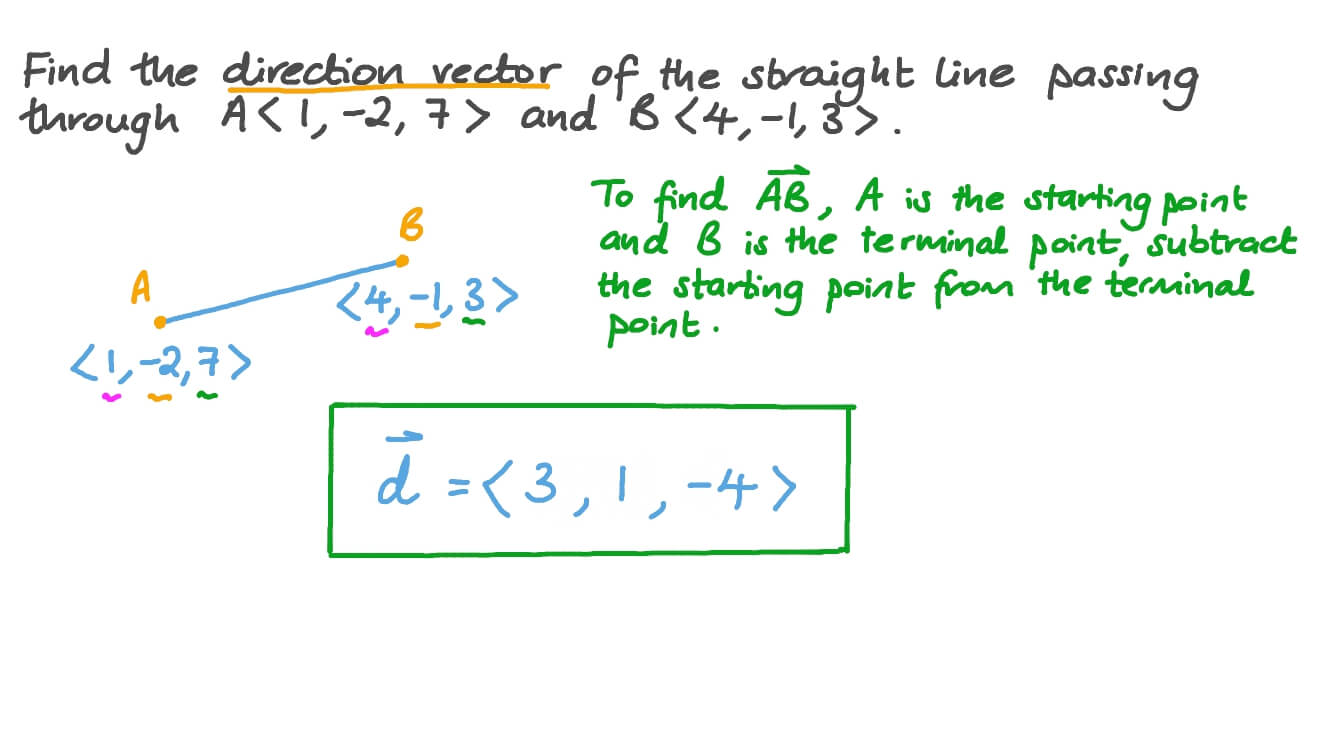
Nagwa
Find the direction vector of the straight line passing through 𝐴 (1, −2, 7) and 𝐵 (4, −1, 3).
Actually that thumbnail is pretty much all you need honestly
 languid spire
omg a video just to say
direction = target - origin
polar acorn
languid spire
omg a video just to say
direction = target - origin
Like I said, the thumbnail basically covers it
shell herald
i just debug logged the tag of the collider, turns out, the raycast collides with the player its a child of. so i guess instead of "if (hit.collider != null)" i do "if(hit.collider != hit.collider.CompareTag("player") || hit.collider != null )" ?
polar acorn
shell herald
i just debug logged the tag of the collider, turns out, the raycast collides wit...
Probably, but also it'd help to make sure your Raycast is going the right direction
languid spire
best check null first
polar acorn
Also that
 solemn summit
Also probably use a LayerMask so you aren't just hitting yourself
 timber tide
that's the fun part
 eternal falconBOT

Posting code
📃 Large Code Blocks
Use links to services like:
https://gdl.space/, https://paste.ofcode.org/, https://hatebin.com/, https://paste.myst.rs/, https://hastebin.com/
📃 Inline Code
Surround code with three backquotes. Not quotation marks.
To format as C#, add cs to the first line:
```cs
// Your code here
```
Add a comment with a line number if there is an error message.
 keen hill
Hi i get this error whenever my character gets close to the item so gets in contact with the collider the boll registeres and the debug message "Player in range" shows correctly but the another message player not in range shows all the time how can i fix it? if you want some more info let me know heres the code: https://gdl.space/getikunicu.cs thirdpersonmovement is my script so it registeres whenever a gameobject with that script collides
 trim gulch
Hello, I'm quite new and I'm having a bit of a problem. I'm making a Top-down 2D game, however I have this problem where my movement is not constant, and sometimes the character accelerates more or goes slower than it should
 polar acorn
keen hill
Hi i get this error whenever my character gets close to the item so gets in con...
polar acorn
keen hill
Hi i get this error whenever my character gets close to the item so gets in con...
So, if the overlap strikes any object that does not have a ThirdPersonMovement component, you want to run that second block of code?
languid spire
keen hill
Hi i get this error whenever my character gets close to the item so gets in con...
obviously you are getting multiple results, some have the controller some dont
 summer stump
ionic zephyr
hey guys, I wanna add a cooldown for an attack in my game, should I use delta.Ti...
summer stump
ionic zephyr
hey guys, I wanna add a cooldown for an attack in my game, should I use delta.Ti...
Either work. DeltaTime may be slightly more simple if you aren't used to coroutines
ionic zephyr
okay, thanks
polar acorn
trim gulch
Why are you multiplying your input by speed twice
keen hill
polar acorn
So, if the overlap strikes any object that does not have a `ThirdPersonMovement`...
oh so it registers ground for example?
should i compare the tag? maybe
so if it collides with something that has the tag only?
how can i fix it easly
trim gulch
polar acorn
Why are you multiplying your input by speed twice
Didn't notice
polar acorn
keen hill
oh so it registers ground for example?
You're looping through all objects the sphere overlaps with, then checking if each of those objects has the ThirdPersonMovement component on it or not. That doesn't seem like what you want to do, so what is it you're actually trying to check for
keen hill
im trying to check if the player ONLY is in the radius so then i can enable the item name and image
im trying to get it to work so i can advance later
polar acorn
keen hill
im trying to check if the player ONLY is in the radius so then i can enable the ...
So you should probably do a CheckSphere instead of an overlap, and use a layermask so the only thing it looks for is the player
shell herald
does a layermask ignore that specific layer or only focus on it? and if its the latter, can i use more than one layermask on a raycasthit2d?
polar acorn
shell herald
does a layermask ignore that specific layer or only focus on it? and if its the ...
A layermask shows which layers are permitted. There is no reason to need to use more than one layer mask just put more layers in the mask
keen hill
polar acorn
So you should probably do a CheckSphere instead of an overlap, and use a layerma...
oh yeah had no clue there even is something like a check sphere ima try that and let you know if it works
 buoyant knot
keen hill
oh yeah had no clue there even is something like a check sphere ima try that and...
buoyant knot
keen hill
oh yeah had no clue there even is something like a check sphere ima try that and...
also, you really don’t want to do this in Update()
 static bay
buoyant knot
just use if else
static bay
buoyant knot
just use if else
no else
only guard clause 😠
buoyant knot
he wants a debug log to know the first if evaluated false
either way, this should be handled by OnTriggerEnter
also no if statements are actually needed in his code at all
keen hill
buoyant knot
either way, this should be handled by OnTriggerEnter
i tried to work with on trigger enter but i was struggling a lil
so i just decided to go the hard way
but code it myself
to learn stuff
 drowsy basin
I can't find a way to make it work Why?
 polar acorn
drowsy basin
I can't find a way to make it work Why?
polar acorn
drowsy basin
I can't find a way to make it work Why?
Do you get an error in unity or just in the IDE
 short hazel
drowsy basin
I can't find a way to make it work Why?
short hazel
drowsy basin
I can't find a way to make it work Why?
Seeing the lack of syntax highlighting on the right file, seems like Unity hasn't registered that the class is there
Moving the file somewhere else and back in Unity usually solves it
drowsy basin
polar acorn
Do you get an error in unity or just in the IDE
just in the IDE
polar acorn
drowsy basin
just in the IDE
Then you probably need to regenerate project files
 buoyant knot
keen hill
i tried to work with on trigger enter but i was struggling a lil
buoyant knot
keen hill
i tried to work with on trigger enter but i was struggling a lil
yeah, but you are checking a physics query many times every frame, which is very expensive. OnTriggerEnter only gets called on the one frame where the trigger happens
what you are doing is probably easily 100x more expensive
drowsy basin
polar acorn
Then you probably need to regenerate project files
Thanks
keen hill
buoyant knot
yeah, but you are checking a physics query many times every frame, which is very...
how can i get it to work with the on trigger enter function then?
couse it would've been 100x times easier too
i could use on trigger exit after
to disable the ui
ionic zephyr
Do you guys know any way to check if an animation has finished? (I want to uncheck the characterMovement while animation is playing)
shell herald
updated my code to this. it now detects the hits properly, however the hit.transform.position is not where i d expect it to . instead of setting the position to be right before the collider, it is miles away

 hexed granite
good evening I need help please I tried to make a script to make movements for a 2d rpg game but I can't correct myself and I would like to know if someone could correct me which is what don't go please
using System.Collections;
using System.Collections.Generic;
using UnityEngine;

public class player : MonoBehaviour
{
    // Start is called before the first frame update
    void Start()
    { public float moveSpeed;

    private bool isMoving;

    private Vector2 input;

    private void Uptade().
    {
        if (!isMoving)
        {
            input.x = Input.GetAxisRaw("Horizontal");
            input.y = Input.GetAxisRaw("vertical");

            if (input != Vector2.zero)
            {
                var targetPos = transform.positition;
                targetPos.x += input.x;
                targetPos.y += input.y;
        StartCoroutine(Move(targetPos));
            }

        }
    }
}

    IEnumerator Move(Vector3 targetPos)
    {
        isMoving = true;

        while (targetPos - transform.position).sqrMagnitude > Mathf.Epsilon)
            {
                transform.position = Vector3.MoveTowards(transform.position, targetPos, moveSpeed * Time.deltaTime);
                yield return null;
            }
        transform.position = targetPos;

        IsMoving = false;
    }
why not use an Animation Event
your method is outside the class
short hazel
I see some syntax errors and misspellings
languid spire
hexed granite
```c#
using System.Collections;
using System.Collections.Generic;
using UnityEng...
this is the third time you have posted this rubbish. Have you configured your IDE?
rich adder
yeah not likely this whole script is riddled with erros
ionic zephyr
rich adder
why not use an Animation Event
its just the attack animation, i want it not to move while attacking, do you think I have to use an animation event anyway?
summer stump
ionic zephyr
its just the attack animation, i want it not to move while attacking, do you thi...
"Have to" no
Should and is the easiest yes
rich adder
ionic zephyr
its just the attack animation, i want it not to move while attacking, do you thi...
you can also check the current state from animator and use that in some sort of IEnumerator with a waitwhile / waituntil
ionic zephyr
rich adder
you can also check the current state from animator and use that in some sort of ...
Okay, thanks a lot
summer stump
True, that would probably be as easy
keen hill
buoyant knot
and use the argument, which is a collider
can u help me on pv?
i understand if not just asking 😉
hexed granite
languid spire
this is the third time you have posted this rubbish. Have you configured your ID...
I'm not it's what is an idea it's the first time I've done this I watched a video and I'm sorry to ask again but I'm French and translate each one and very complicated sorry
polar acorn
hexed granite
I'm not it's what is an idea it's the first time I've done this I watched a vide...
!ide
eternal falconBOT
💡 IDE Configuration
If your IDE is not autocompleting code
or underlining errors, please configure it.
Select one:
• Visual Studio (Installed via Unity Hub)
• Visual Studio (Installed manually)
• VS Code
• JetBrains Rider
• Other/None
languid spire
hexed granite
I'm not it's what is an idea it's the first time I've done this I watched a vide...
not idea !ide
eternal falconBOT
💡 IDE Configuration
If your IDE is not autocompleting code
or underlining errors, please configure it.
Select one:
• Visual Studio (Installed via Unity Hub)
• Visual Studio (Installed manually)
• VS Code
• JetBrains Rider
• Other/None
hexed granite
languid spire
not idea !ide
I have already watched everything I don't understand
short hazel
Integrated Development Environment
Also called your code editor
hexed granite
Sorry🫤
short hazel
Which one of these are you using?
 languid spire
hexed granite
I have already watched everything I don't understand
languid spire
hexed granite
I have already watched everything I don't understand
look at it again and again until you do understand because without it you cannot get help here
 cosmic quail
rich adder
🥲
cosmic quail
rich adder
🥲
someone a couple days ago made the exact same mistake here lol
uptade
maybe its the same guy
 long scarab
Hello, a simple question. How to handle closing app by X in either OS? Because I handle saving on exit in custom function on clicking proper exit button...
However when I tried OnApplicationExit handling and it does not manage to save stuff in time before the process/threads ends and therefore ends up in a mess.
rich adder
long scarab
Hello, a simple question. How to handle closing app by X in either OS? Because I...
 hexed granite
languid spire
look at it again and again until you do understand because without it you cannot...
hexed granite
languid spire
look at it again and again until you do understand because without it you cannot...
I don't understand anything about the C# language, that's why I'm asking for help, I've never done anything with it, I just stupidly copied a video but he clicks on launch the game and it doesn't launch for me
long scarab
Must've missed than in my google research, thanks
timber tide
hexed granite
I don't understand anything about the C# language, that's why I'm asking for hel...
sounds like you need to learn your c# first before touching Unity then
long scarab
Working on Win/macOS tho? Not just phones?
rich adder
long scarab
Working on Win/macOS tho? Not just phones?
its actually the other way around if you read it
languid spire
hexed granite
I don't understand anything about the C# language, that's why I'm asking for hel...
this is not about C# this is about preparing your coding environment correctyl, do that first
rich adder
long scarab
Working on Win/macOS tho? Not just phones?
Important: The return has no effect on iOS or iPadOS. Application can not prevent termination under iOS or iPadOS.
hexed granite
languid spire
this is not about C# this is about preparing your coding environment correctyl, ...
ok but how to do it on the links it talks about line of code and debugging
rich adder
long scarab
in my googling I found out most people wanted to know this for phones
seems ios limitation only 🤷♂️
polar acorn
hexed granite
ok but how to do it on the links it talks about line of code and debugging
!ide
eternal falconBOT
💡 IDE Configuration
If your IDE is not autocompleting code
or underlining errors, please configure it.
Select one:
• Visual Studio (Installed via Unity Hub)
• Visual Studio (Installed manually)
• VS Code
• JetBrains Rider
• Other/None
timber tide
ah, so you can't prevent ios from preventing terminating your program or something?
polar acorn
At no point do these guides have you writing code
timber tide
in that case you may want to save concurrently throughout
long scarab
timber tide
ah, so you can't prevent ios from preventing terminating your program or somethi...
this for me?
Well yeah, I am autosaving automatically, but also wanted to save something on exit
hexed granite
polar acorn
!ide
Which one should I go to?
languid spire
long scarab
Well yeah, I am autosaving automatically, but also wanted to save something on e...
for mobile you should use Pause not Exit
polar acorn
hexed granite
Which one should I go to?
Whichever IDE you are using
hexed granite
Sorry i am french i dont good understand
hexed granite
polar acorn
Whichever IDE you are using
what is the ide 😭😭
 swift crag
what program are you using to edit your code?
polar acorn
hexed granite
what is the ide 😭😭
the thing you write code in
hexed granite
polar acorn
the thing you write code in
oh yes in Microsoft Visual Studio
ionic zephyr
sorry, its me again how can I wait until an animation stops to continue my characters movement
polar acorn
hexed granite
oh yes in Microsoft Visual Studio
so that is what you click
ionic zephyr
ionic zephyr
sorry, its me again how can I wait until an animation stops to continue my chara...
because is a corroutine necessary
polar acorn
ionic zephyr
sorry, its me again how can I wait until an animation stops to continue my chara...
Use an animation event to re-enable movement
rich adder
ionic zephyr
because is a corroutine necessary
only if you don't want to use animation event
hexed granite
polar acorn
so that is what you click
I looked at it and it tells me how to configure it and how to update it but all of it I have already done where it blocks it is when Try to launch the game on unity
rich adder
ionic zephyr
because is a corroutine necessary
coroutine is still pretty simple to do
Animator anim;
    IEnumerator WaitAnim()
    {
        anim.SetTrigger("Attack");
        //or anim.SetBool("Attacking", true);
        var animPlaying = anim.GetCurrentAnimatorStateInfo(0).IsName("AttackAnimation");
        yield return new WaitWhile(() => animPlaying);
        //do something else after attack
        //anim.SetBool("Attacking", false)
}```If you had configured it, you would have red underlines in the code where your errors are. Do you?
shell herald
so, i logged the hit.transform. position.x and its 0, it shouldnt tho. why is that?
https://hastebin.com/share/uwonodufeb.csharp
Hastebin is a free web-based pastebin service for storing and sharing text and code snippets with anyone. Get started now.
ionic zephyr
rich adder
coroutine is still pretty simple to do
```cs
Animator anim;
IEnumerator Wai...
Okay, thanks
ionic zephyr
polar acorn
Use an animation event to re-enable movement
thanks!
languid spire
hexed granite
I looked at it and it tells me how to configure it and how to update it but all ...
post a screenshot of your code editor
hexed granite
okay
swift crag
polar acorn
If you had configured it, you would have red underlines in the code where your e...
It is possible that they just installed the Visual Studio Editor package, but it's not able to start working because of the outstanding compile errors.
polar acorn
shell herald
so, i logged the hit.transform. position.x and its 0, it shouldnt tho. why is th...
You're logging player.transform.position.x, not hit.
swift crag
that's a fun x-factor
polar acorn
And if it's logging 0, then it's 0
hexed granite
languid spire
post a screenshot of your code editor
 languid spire
hexed granite
languid spire
hexed granite
so you have NOT done it
shell herald
polar acorn
You're logging `player.transform.position.x`, not `hit`.
im logging both
rich adder
hexed granite
this should say assembly
 shell herald
but i figured it out. i use hit.point.x and it works
polar acorn
You should probably put some sort of label in there and see which one is which
hexed granite
rich adder
this should say assembly
I'm not that's what I forgot
languid spire
@hexed granite
https://learn.microsoft.com/fr-fr/visualstudio/gamedev/unity/get-started/getting-started-with-visual-studio-tools-for-unity?pivots=windows#install-unity-support-for-visual-studio
In french

Connectez Unity et Visual Studio et utilisez les outils Visual Studio pour Unity afin de prendre en charge l’écriture et le débogage du développement multiplateforme.
hexed granite
Thanks i see
hexed granite
languid spire
<@603315300091428867>
https://learn.microsoft.com/fr-fr/visualstudio/gamedev/un...
I follow the tutorial and I'll tell you what it gives, thank you very much
 warm maple
Heya, so just curious about Time.deltaTime. In this code piece should i time the staminaDrain with Time.deltaTime?
{
playerStamina -= staminaDrain;
playerStamina = Mathf.Round(playerStamina);
staminaSlider.value = playerStamina;
movementSpeed = sprintSpeed;
}```
My taught process was that the stamina should be framerate independent, but when using Time.deltaTime the stamina doesn't decrease rocky canyon
if a higher framerate is running that code.. their stamina is gonna drop much faster
timber tide
lol
polar acorn
warm maple
Heya, so just curious about Time.deltaTime. In this code piece should i time the...
You're rounding the value. Unless deltaTime is a whole number it's not gonna do anything
languid spire
hexed granite
I follow the tutorial and I'll tell you what it gives, thank you very much
post another screenshot of your code editor when you are done
 wintry quarry
warm maple
Heya, so just curious about Time.deltaTime. In this code piece should i time the...
wintry quarry
warm maple
Heya, so just curious about Time.deltaTime. In this code piece should i time the...
Mathf.Round here is a bad idea. And yes you should be using deltaTime
timber tide
I like to bring up that one of the Dark Souls games tied weapon durability to framerate so those with expensive monitors at the same ran into situations where smacking a sword at a wall instantly broke it,
swift crag
staminaDrain is measured in units of stamina per second. Multiply it by deltaTime to figure out how much stamina to subtract in this frame.
warm maple
Ah that makes sense yeah, I was already thinking that I should use deltaTime here. Rounding up isn't that necessary I guess?
rocky canyon
then the round.. not sure about it
swift crag
Why are you rounding?
If you want to display a nice whole number, do that when you display the number.
hexed granite
languid spire
post another screenshot of your code editor when you are done
Okay
 ivory bobcat
If anything, you can round before you use the value. Don't round what's stored.
warm maple
swift crag
If you want to display a nice whole number, do that when you display the number.
That makes more sense
swift crag
did you read the warning message
polar acorn
What's the IDE say
 warm maple
I saw a general rule of using deltaTime is whenever you move an object. But from what I've seen and read it's more where you indeed want it to be frame rate independent. So I assume that if you were to shoot a gun you would want to * it with deltaTime too so someone doesn't shoot faster with a better pc, am I correct?
wintry quarry
keen hill
exactly what it says. You are using the wrong method signature. Specifically you have Collider instead of the correct Collision parameter.
rich adder
keen hill
well did you look at the correct signature then ?
Check the docs for the function
swift crag
warm maple
I saw a general rule of using deltaTime is whenever you move an object. But from...
I would not describe it like this.
rocky canyon
look up the correct OnCollisionEnter()
swift crag
You should think about it from a units perspective.
keen hill
rich adder
well did you look at the correct signature then ?
Check the docs for the functio...
i dont know how to use the OncollisionEnter function so im kinda confused
ivory bobcat
Consider "what is the correct signature?"
rocky canyon
it doesn't use a "collider"
ivory bobcat
Google Unity On Collision Enter
wintry quarry
warm maple
I saw a general rule of using deltaTime is whenever you move an object. But from...
a general rule of using deltaTime is whenever you move an object
This would be incorrect. It has to do with converting per-frame quantities to per-second.
 trail fox
im tryna make a gun for a first person game but when i look up and down the gun model just goes further out and if i move my camera to the center its good again is this a feature or am i stupid https://gdl.space/uhipisivus.cpp
timber tide
warm maple
I saw a general rule of using deltaTime is whenever you move an object. But from...
I have to say a lot of information about what to use deltaTime is very inconsistent, but the goal is to keep the collisional / physics related logic seperate from the visual logic.
rocky canyon
trail fox
im tryna make a gun for a first person game but when i look up and down the gun ...
bad scales i would guess
wintry quarry
trail fox
im tryna make a gun for a first person game but when i look up and down the gun ...
sounds like you parented the gun to a non-uniformly scaled parent object
keen hill
polar acorn
It looks like the Unity message `OnCollisionEnter` has an incorrect signature
so what should go instead the "collision" word
rich adder
trail fox
im tryna make a gun for a first person game but when i look up and down the gun ...
input is wrongly using time.deltaTime
rocky canyon
did u even click the link ^ ?
rich adder
spoiler alert: no
keen hill
yes and im confused the same as i ware earlier
warm maple
timber tide
I have to say a lot of information about what to use deltaTime is very inconsist...
I understand, so as I said if I were to make a pistol that shoots a projectile. You'd want to * the force its going to as someone with a faster PC would shoot faster, correct?
rocky canyon
BUT.. with a different ( )
ivory bobcat
rich adder
spoiler alert: no
Or maybe but overwhelmed (maaaybe 😅)
rich adder
keen hill
yes and im confused the same as i ware earlier
thats because you lack c# basics and dont even know what to look for, example what is a method signature?
swift crag
warm maple
I understand, so as I said if I were to make a pistol that shoots a projectile. ...
no, this is wrong: you would use an instantaneous impulse
which is time-independent
let me type something out here...
rocky canyon
public class ExampleClass : MonoBehaviour
{
    public Transform explosionPrefab;

    void OnCollisionEnter(Collision collision)
    {
        ContactPoint contact = collision.contacts[0];
        Quaternion rotation = Quaternion.FromToRotation(Vector3.up, contact.normal);
        Vector3 position = contact.point;
        Instantiate(explosionPrefab, position, rotation);
        Destroy(gameObject);
    }
}```

here is the function on the page.. that u said u looked at.deltaTime
rich adder
ivory bobcat
Or maybe but overwhelmed (maaaybe 😅)
true the terms are esp confusing prob
rocky canyon
||Colliders are not Collisions||
rich adder
but they need to understand why the signature is important
rocky canyon
look at ur void method.. and look at the correct one. and see whts different..
ya, after they discover Spot the difference then it can be elaborated on
ivory bobcat
keen hill
yes and im confused the same as i ware earlier
As shown by the link, the callback function used by Unity requires a signature with the type Collision as the parameter but your using Collider instead - Collider would be valid for On Trigger Enter but not On Collision Enter where we'd care about a bit more than just the other colliding object.
rich adder
especially when unity auto-calls those methods
rocky canyon
the signature? isn't it a method as well?
languid spire
lol, the way a method is declared is called it's signature
rocky canyon
this goes over signatures ^
well not really..
"The signature is the combination of the methods name and its parameter list"
languid spire
and the return type
rocky canyon
ahh yes AND the return type..
 strange granite
can somone help me to start my journey on game dev... what to learn first how to make game egine and after that game development?... i know cpp... what to learn first
rocky canyon
languid spire
and the return type
wait a minute
 keen hill
rich adder
thats because you lack c# basics and dont even know what to look for, example wh...
keen hill
rich adder
thats because you lack c# basics and dont even know what to look for, example wh...
i dont lack c# basic
rich adder
strange granite
can somone help me to start my journey on game dev... what to learn first how t...
!learn
eternal falconBOT
:teacher: Unity Learn ↗
Over 750 hours of free live and on-demand learning content for all levels of experience!
rocky canyon
this java source is telling otherwise
rich adder
keen hill
i dont lack c# basic
yes you do, believe you me
swift crag
keen hill
when it comes to programming and stuff
swift crag
C# includes the return type.
rocky canyon
keen hill
when it comes to programming and stuff
well just straight up.. ur method ur trying to call returns a Collision
rich adder
keen hill
im just getting confused cuz english is my second language
same but if you learned c# then the errors are universal
rocky canyon
the method u wrote. and why its an error.. u have it trying to return a Collider
ivory bobcat
I've found that people become more aware about the terminology "signature" when attempting to overload but assume that the return type is a part of a functions signature - it's not.
If they did not really know the definition of signature before, they'd know it thereafter.
swift crag
Methods are declared in a class, struct, or interface by specifying the access level such as public or private, optional modifiers such as abstract or sealed, the return value, the name of the method, and any method parameters. These parts together are the signature of the method.
you'll have to take it up with Microsoft if you disagree in the context of C#
rocky canyon
some of unity's methods do return a collider.. but not OnCollision
swift crag
rocky canyon
some of unity's methods do return a collider.. but not `OnCollision`
this has nothing to do with returning anything. the method had the wrong parameters.
ivory bobcat
keen hill
im just getting confused cuz english is my second language
Regardless, you'll pick it up now or after several more incidents with it 👍
rocky canyon
sorry i was getting confused.. i always think of that as returning a Collision you can then access within the code...
but its not. b/c the void is the return type
swift crag
it receives a Collision object.
languid spire
no
swift crag
an out parameter passes a variable by reference to the called function and demands that something be assigned to it.
rocky canyon
ohh okay.. hang on im writting some of this down in a notepad doc
rocky canyon
swift crag
an `out` parameter passes a variable by reference to the called function and dem...
thanks for wording it that way.. that makes sense to me now
i think i found a decent source https://imran-momin.medium.com/defining-methods-unity-c-19feeefbf8fa
Medium
In the previous article, we briefly touched on the role methods play in our programs; namely, that they store and execute instructions…
ohh okay, so they are Arguments when Calling a function, and the arguments are wats used for the Parameters of the method beign called
swift crag
yes
rocky canyon
phew..
swift crag
arguments are what you actually pass in
parameters are what the funciton declares that it wants
rocky canyon
yea, okay i think i got those two.
ivory bobcat
Passed with arguments
Defined with parameters
swift crag
This probably varies from language to language
rocky canyon
alright.. so im solid on those.. its the outs, refs, and the receiving part i still need to freshing up on
ivory bobcat
rocky canyon
alright.. so im solid on those.. its the outs, refs, and the receiving part i st...
special modifiers with the type
rocky canyon
i get the receiving part like this functions brings in this variable to use within the body..
languid spire
and dont get started on params
rocky canyon
i can just work around that.. but refs and outs. always kinda confuse me still
swift crag
ref is the most general form. It allows you to share a variable with the function.
in is like ref but is read-only, and out is like ref but write-only
(and also demands assignment)
 sage mirage
@rich adder Thanks for giving again the idea of Game States I was able to fix my problem and handle game flow properly. It is just like I see more organised way to handle game states rather than having bools everywhere and when something strange occurs to not know what you have to change in your bool values.
rocky canyon
ohh okay.. so i guess ref is shorthand for reference
swift crag
There are some other intricacies. For example, in allows you to pass non-lvalues (things you can't assign to, like a literal number)
hence ref readonly showing up in C#12
rocky canyon
swift crag
There are some other intricacies. For example, `in` allows you to pass non-lvalu...
omg theres an "in" too?!
i doubt ill need that anytime soon 😅
swift crag
yes. it shows up a lot in ECS code
it's useful if you need to share a large value type with a function
but you don't want it to be allowed to mutate the value type
buoyant knot
but aren’t value types not modified when going into a function, without a ref keyword?
swift crag
buoyant knot
but aren’t value types not modified when going into a function, without a ref ke...
Right. Hence in
You want to share, like with ref
But you don't want any modification to happen
rich adder
sage mirage
<@968604165150507078> Thanks for giving again the idea of Game States I was able...
exactly after a while so many bools gets difficult to track, much easier to be in a singular state. Once you work events in there like public static event Action<GameState> OnGameStateChanged
Power is unstoppable
rocky canyon
what function am i familiar with that uses ref.. Isn't there a MoveTowards or some lerp type function that uses ref
swift crag
rocky canyon
what function am i familiar with that uses ref.. Isn't there a MoveTowards or so...
SmoothDamp.
rocky canyon
i wanna practice with some of these
swift crag
It needs to be able to update the velocity argument.
rocky canyon
swift crag
`SmoothDamp`.
thanks thats it!
rich adder
rocky canyon
what function am i familiar with that uses ref.. Isn't there a MoveTowards or so...
also GetRotationAndPosition
swift crag
that uses out
rocky canyon
imma practice these today..
rich adder
wait there was another one
rocky canyon
just realized how bad i am at them
swift crag
ref is used when the function must be able to read from and write to the reference
buoyant knot
would the compiler just know to effectively do the same thing as “in” if it already applies?
ivory bobcat
buoyant knot
but aren’t value types not modified when going into a function, without a ref ke...
All three of the keywords give access to the variable with different constraints. I'm assuming they're all references to the value under the hood (I'd do that with other languages to reduce copying values)
swift crag
buoyant knot
would the compiler just know to effectively do the same thing as “in” if it alre...
maybe, if it could prove that you never modify the parameter
rocky canyon
IDE's are pretty good at that already arent they/
buoyant knot
i guess it would make a difference with threads, right?
rocky canyon
hence why i get the "Never used" grey variables
swift crag
rocky canyon
hence why i get the "Never used" grey variables
Some forms of static analysis are reasonably easy! I did that exact analysis back in grad school..
ivory bobcat
If you're writing code for others where you don't know what they'll be doing with it, you'll want to consider placing the correct constraints - it's no different from making everything public.
rocky canyon
ivory bobcat
If you're writing code for others where you don't know what they'll be doing wit...
makes sense, what if u didn't and used the wrong constraints.. i could image how much trouble that might cause if someone needs to change one to be accessed in other ways 😐
could be a big ole refactor for sure
languid spire
rocky canyon
makes sense, what if u didn't and used the wrong constraints.. i could image how...
that is why we design software not just throw it together
rocky canyon
lol.. looks around curiously
id have ALOT of work going from solo to a team
thats all i know
unless i was the Team Lead! "Do as I do!"
swift crag
(:
languid spire
Solo dev -> Team lead. A marriage made in hell
ivory bobcat
If you're just writing for yourself, it's probably fine as long as nobody has to read it (or maintain it in the future) - it's not good practice though (my ocd kicks up)
 scarlet hull
why there isnt SetSelectedTower(int) in buttons funtions?

 rocky canyon
ya, im not gonna pretend im the best coder.. but i try to keep it as legible as possible
its a private function
its not gonna show on that list
scarlet hull
alright
 edgy prism
Would anyone mind giving me some advice on animations currently calling an idle animation I want to be doing any time I'm not playing another like this:
void Update()
    {
        if(playerUnit.IsPlayingAttack == false && playerUnit.IsPlayingIdle == false)
        {
            StartCoroutine(playerUnit.PlayIdleAnimation());
        }
    }
The problem is as soon as I call my other animations im not actually stopping the idle animation and they're both trying to set sprites at the same time is there a way I can easily manage this?
public IEnumerator PlayIdleAnimation()
    {
        isPlayingIdle = true;

        float frameDuration = 0.0417f;

        foreach (Sprite sprite in Capta.Base.IdleSprites)
        {
            image.sprite = sprite;
            yield return new WaitForSeconds(frameDuration);
        }

        isPlayingIdle = false;
    }
This is the current idle function
rocky canyon
why are you not using the animation state machine w/ transitions?
couldnt u set those on a bool.. (bool true -> idle) (bool false -> transition to other)
edgy prism
rocky canyon
why are you not using the animation state machine w/ transitions?
Im not sure what you mean by animation state machine, like Unitys built in animator window?
rocky canyon
yes
edgy prism
rocky canyon
yes
Idk honestly seemed simpler to just hard code it quickly
 shell sorrel
if hard coding it would not use coroutines since its a continious thing
like starting coroutines from a update is kinda weird
edgy prism
shell sorrel
if hard coding it would not use coroutines since its a continious thing
My bad I just meant do it in code since im not familiar with the animator at all
swift crag
Sounds like you should store the current coroutine
you can add a Coroutine field and store the return value from StartCoroutine into it
rocky canyon
its always a good time to learn.. but yea theres code alterations u can do ^ also
swift crag
You can then pass it to StopCoroutine to cancel the existing coroutine
shell sorrel
or use Update for it, count time, and keep track of the current frame index
swift crag
I'd add a method whose job is to look for an existing coroutine, kill it, start a new coroutine, and save the resulting Coroutine
call it PlayAnimation
edgy prism
Am I better off carrying on as I am than using animator?
Your idea sounds like a fix Fen
rocky canyon
it would be simpler to use the animator in the long run.. esp if u have add any more states/animations (imo)
but i aint gonna say if its better 1 way or the other..
edgy prism
rocky canyon
it would be simpler to use the animator in the long run.. esp if u have add any ...
If I use the animator I still have to call it in my scripts right?
rocky canyon

yea but you can set parameters
and change those.. the animator just takes over
and does the transitions and stuff on its own
u basically just let teh animator animate.. and u tell it what data to use to figure out how to animate
shell sorrel
rocky canyon
could always just pull from Any State instead of needing every combo of transitions
hexed granite
I need help with a step it tells me to the Common7/IDE directory then select become.exe where is it? @languid spire
rocky canyon
shell sorrel
could always just pull from Any State instead of needing every combo of transiti...
and this too
i havent done one with the anystate node yet
 fluid remnant
What is the minimal approach to Serializing dictionary in the inspector ?
I'd like not to use any plugins like Odin
rocky canyon
i should do that too
languid spire
hexed granite
I need help with a step it tells me to the Common7/IDE directory then select bec...
What? Where?
shell sorrel
fluid remnant
What is the minimal approach to Serializing dictionary in the inspector ?
I'd l...
jsut use a list of structs that have a key and a value field, then on Awake build a Dictionary with it
fluid remnant
shell sorrel
jsut use a list of structs that have a key and a value field, then on Awake buil...
the tricky part is I need to inspect this dictionary and its values changing at realtime
hexed granite
languid spire
What? Where?
the 2
 fluid remnant
shell sorrel
jsut use a list of structs that have a key and a value field, then on Awake buil...
fluid remnant
shell sorrel
jsut use a list of structs that have a key and a value field, then on Awake buil...
right now I'm doing struct that makes new list every change of value
edgy prism
rocky canyon
u basically just let teh animator animate.. and u tell it what data to use to fi...
Hmm you make a compelling argument can I duplicate it and have two of the same running independently if im animating more than once character at once?
shell sorrel
fluid remnant
the tricky part is I need to inspect this dictionary and its values changing at ...
same idea then with https://docs.unity3d.com/ScriptReference/ISerializationCallbackReceiver.html
rocky canyon
edgy prism
Hmm you make a compelling argument can I duplicate it and have two of the same r...
absolutely.. u'd have a seperate reference to a seperate instance of hte same animator
fluid remnant
shell sorrel
same idea then with https://docs.unity3d.com/ScriptReference/ISerializationCallb...
Look like this is what I needed to look into. Thanks!
languid spire
hexed granite
the 2
Got it. Ignore that, just select the correct visual studio from the drop down
edgy prism
rocky canyon
absolutely.. u'd have a seperate reference to a seperate instance of hte same an...
Ok thanks for your help ill try it out
rocky canyon
just look into it
hexed granite
languid spire
Got it. Ignore that, just select the correct visual studio from the drop down
Okay thanks
edgy prism
rocky canyon
see if its something u may wanna start using..
Ok will do, although honestly im not planning on having real complex animation trees so im not sure it will make much difference
hexed granite
languid spire
Got it. Ignore that, just select the correct visual studio from the drop down
I'm done send screen ?
languid spire
'yes
rocky canyon
well say u just have 2 animations.. walk and idle.. instead of stopping the walk and starting the idle
you could just set 1 boolean for example.. isWalking = false;
hexed granite
Okay
rocky canyon
even with small states it can still be an improvement
hexed granite
languid spire
'yes
 rocky canyon
😦
hexed granite
WHY?
ivory bobcat
Haven't we been seeing this code all day?
rocky canyon
hes trying to get his editor fixed at this point i assume
languid spire
yep, still no configured IDE
edgy prism
ivory bobcat
Haven't we been seeing this code all day?
Its from big GameDevExperiments youtube channel
rocky canyon
and he speaks French
hexed granite
Sorry 😭
rocky canyon
lmao, dont apologize for ur nationallity 👀
edgy prism
rocky canyon
even with small states it can still be an improvement
Oh ok now I see the value
hexed granite
languid spire
yep, still no configured IDE
Why
ivory bobcat
It's required to get help here
rocky canyon
VSCode is always more difficult to get set up than VSCommunity
languid spire
he said he was using VS not VSCode
hexed granite
why is it so hard in the tutorial it's simple
rocky canyon
ohh than not sure why? VSCommunity is usually really easy to set up
languid spire
screenshot Unity Preferences->External tools
hexed granite
rocky canyon
ohh than not sure why? VSCommunity is usually really easy to set up
Really ?
languid spire
hexed granite
Really ?
yes, really
rocky canyon
hexed granite
Really ?
Visual Guide ^
see if that helps u understand what u missed
hexed granite
I'm not much away from abandoning everything even though I've already done everything
rocky canyon
not the attitude that will garner much help tbh
rocky canyon
Step 1 Uninstall Visual Studio
Step 2. Reinstall Through the Unity Hub
most straight forward way I've seen it done..
ivory bobcat
ivory bobcat
It's required to get help here
#854851968446365696 @hexed granite
 hexed granite
in the video what he shows at 1 minute I don't
hexed granite
ivory bobcat
<#854851968446365696> <@603315300091428867>
I never ask for someone to do it to me, I want someone to tell me where it's going wrong, but given that I'm French, I have no problem

 gaunt harbor
I need your ideas.
I need to find a method, I have a point/crosshair in the center of the canvas, I want to detect when the point is aimed at an enemy/block/etc.
rocky canyon
wintry quarry
gaunt harbor
I need your ideas.
I need to find a method, I have a point/crosshair in the ce...
use a raycast
gaunt harbor
wintry quarry
use a raycast
The problem is that it passes through a wall and I don't know how I am going to prevent it from passing through
rocky canyon
you need to install the Unity Game Development Kit, after that you can restart and u should be able to select in as Unity as your IDE in the Project Settings > External Tools
 polar acorn
gaunt harbor
The problem is that it passes through a wall and I don't know how I am going to ...
polar acorn
gaunt harbor
The problem is that it passes through a wall and I don't know how I am going to ...
Layermask
wintry quarry
gaunt harbor
The problem is that it passes through a wall and I don't know how I am going to ...
Use a layermask
ivory bobcat
hexed granite
I never ask for someone to do it to me, I want someone to tell me where it's goi...
The intellisense will highlight everything that's invalid or strange. It'll save you and the people helping you a lot of headache. If you get stuck after the ide is properly setup, folks will help point you to your solution. No one said anyone was doing it for you but the server rule states that we need to get people to properly configure their ide first before doing anything else.
rocky canyon
Yea, everyones actually just trying to help.. B/c once you have it set up It will help you a lot
 rocky canyon
ctrl + Z to undo
rocky canyon
may have to remake it then
ivory bobcat
Can you show the console window?
rocky canyon
you only have (1) clip so far.. shouldnt be too hard to remake it
but ive never seen that error
ivory bobcat
This looks like a runtime error and not the something that you're showing us.
scarlet hull
 rocky canyon
You have an Animator component that is being referenced.
At some point, you are destroying the Animator component.
Any scripts trying to reference the Animator component no longer can, because it has been destroyed.
An error occurs.
You need to prevent the Animator component from being destroyed.```unity forums thinks it may be that ur destroying an animator
ivory bobcat
If you double click the error, does it take you anywhere?
rocky canyon
but yea im on the fence.. if it were me i'd save what i got and restart
if its still there.. then id look into it a bit more
unless u know that ur destroying an animator somewhere and not telling us about it

this doesnt look like a "Controller"
it looks like u put an animation Clip
where an animator is supposed to go
scarlet hull
rocky canyon
```That likely wouldn't solve the issue.
You have an Animator component that is ...
i havent ureferenced animation in scripts
rocky canyon
read my last post ^
oh wait
thats not it.. just testing and that is what it looks like if u Animated a GameObject
@scarlet hull ^ yea ignore that last post.. i thought they may be it but it looks the same on my project
scarlet hull
alr
rocky canyon
 rocky canyon
scarlet hull
i havent ureferenced animation in scripts
rocky canyon
scarlet hull
i havent ureferenced animation in scripts
do u have any other animators in the scene?
besides the one on "GameObject"
scarlet hull
i have 2 on it
rocky canyon
ohhh
scarlet hull
rocky canyon
do u have any other animators in the scene?
not on any other game objects
ivory bobcat
I'm guessing that the object was destroyed but they're still trying to access it
ivory bobcat
(code is likely necessary to solve this issue)
 cinder lynx
Hi guys!! Quick question! I was following a Code Monkey tutorial when I got stuck into an error that probably the solutions is right in front of me. Basically I was implementing the asset "Input Actions" manually like he does on the video, then my C# code does not recognize the class "PlayerInputActions" could you help me? The video is Learn Unity Beginner/Intermediate 2023 (FREE COMPLETE Course - Unity Tutorial) - Code Monkey || Time of the video: 10:45:00
MY GAMEINPUT CODE:
using System.Collections;
using System.Collections.Generic;
using Unity.VisualScripting;
using UnityEngine;

public class GameInput : MonoBehaviour
{

    private PlayerInputActions playerInputActions
    private void Awake()
    {
        playerInputActions = new PlayerInputActions();

        playerInputActions.Player.Enable();
    }
    public Vector2 GetMovementVectorNormalized()
    {
        Vector2 inputVector = new Vector2(0,0);
        if(Input.GetKey(KeyCode.W))
        {

            inputVector.y = +1;

        }

        if(Input.GetKey(KeyCode.S))
        {
            inputVector.y = -1;
        }

        if(Input.GetKey(KeyCode.A))
        {
            inputVector.x = -1;
        }

        if(Input.GetKey(KeyCode.D))
        {
            inputVector.x = +1;
        }

        inputVector = inputVector.normalized;

        return inputVector;
    }

}
yea, im lost
rocky canyon
ivory bobcat
(code is likely necessary to solve this issue)
any clues? do u think he destroys one?
wintry quarry
cinder lynx
Hi guys!! Quick question! I was following a Code Monkey tutorial when I got stuc...
PlayerInputActions is the generated C# script from your input actions asset
Make sure you used the same name for your input asset
and that you have it generating the C# class
(and that you set it up in the first place)
scarlet hull
rocky canyon
you have 2 "Animators" ?
like this
 warm condor
Hey, I have this jumpSliding method that, well will allow th player to jump slide. The problem I have is that one of the if statments (the very first if statment), is being called repeatatly and then stopes, wehn it is only supposed to be called once and wait till it does it again. Here is the code:
        if (allowJumpSliding && Input.GetKey(KeyCode.S)){
            Debug.Log("dasdsadsadsa");
            rb.velocityX += direction * horizontalSpeedToJumpSlide;
            slide(direction);
        }
        else if (bottomCollider.IsTouchingLayers() == true && Input.GetKey(KeyCode.S) && Math.Abs(rb.velocityY) > verticleSpeedLimitToAllowJumpSlide && allowJumpSliding == false){
            allowJumpSliding = true;
            Invoke("setJumpSlidingToFalse", jumpSlidingTimeLimitValue);
        }```
How do I fix this issue?
If you mean to change out the animator, then you need to reassign it when the one it references is destroyed.``` rocky canyon
the other error on the forums seems to think that one gets destroyed. but the reference is still there..
scarlet hull
i accedentally
ivory bobcat
cinder lynx
Hi guys!! Quick question! I was following a Code Monkey tutorial when I got stuc...
Did you setup the input action?
rocky canyon
so its causing an error
wintry quarry
scarlet hull
those are Animation Clips, not animators
cinder lynx
wintry quarry
PlayerInputActions is the generated C# script from your input actions asset
I'll check that again
cinder lynx
ivory bobcat
Did you setup the input action?
yes
ivory bobcat
If you've skipped some steps, it'll not work.
scarlet hull
lemme ttry
cinder lynx
ivory bobcat
Did you setup the input action?
 wintry quarry
cinder lynx
wintry quarry
cinder lynx
you need to show the name of the asset
and the settings of it in the inspector
you cut off too much in this screenshot
rocky canyon
@scarlet hull it wont even let me delete my base layer
scarlet hull
rocky canyon
<@923613033929011272> it wont even let me delete my base layer
i fixedd itt
 ivory bobcat
rocky canyon
any clues? do u think he destroys one?
ivory bobcat
rocky canyon
any clues? do u think he destroys one?
Likely they've called destroy on the object with the component but are still doing stuff with it.
wintry quarry
cinder lynx
looks fine
so what error are you getting?
And where did you put your code?
rocky canyon
i think they somehow deleted the base layer of an animator.. by having a 2nd animator?
thats what he said caused the error.. and i can't seem to delete mine.. i get a catch

maybe his editor didn't stop him?
cinder lynx
wintry quarry
looks fine
"The type or namespace name 'PlayerInputActions' could not be found (are you missing a using directive or an assembly reference?)",
ivory bobcat
rocky canyon
i think they somehow deleted the base layer of an animator.. by having a 2nd ani...
Likely not, just a missing reference error
wintry quarry
cinder lynx
"The type or namespace name 'PlayerInputActions' could not be found (are you mis...
Where did you put your script?
rocky canyon
ivory bobcat
Likely not, just a missing reference error
well they "fixed it"
hexed granite
rocky canyon
you need to install the Unity Game Development Kit, after that you can restart a...
I don't have the right one, that's why I think but I can't go back to it
rocky canyon
guess we'll never know.. like a tootsie pop
 warm condor
hey can someone help me here? #💻┃code-beginner message
wintry quarry
cinder lynx
not where did you attach it. I mean where is the script itself?
What folder is it in?
Also I thought it was the GameInput script
not the Player script
cinder lynx
wintry quarry
not where did you attach it. I mean where is the script itself?
Folder Script
wintry quarry
where is the GameInput script file itself?
wintry quarry
cinder lynx
Folder Script
ok and what else is in there? Can you show that folder?
ivory bobcat
warm condor
Hey, I have this jumpSliding method that, well will allow th player to jump slid...
GetKeyDown
 rocky canyon
warm condor
Hey, I have this jumpSliding method that, well will allow th player to jump slid...
rocky canyon
warm condor
Hey, I have this jumpSliding method that, well will allow th player to jump slid...
the if condition is going to run how-ever mayn times u call the function thats wrapped around it
if u only want the if statement to run once.. ur gonna have to probably set a flag
wintry quarry
cinder lynx
where's your console window?
hexed granite
rocky canyon
you need to install the Unity Game Development Kit, after that you can restart a...
guess we'll never know.. like a tootsie pop
rocky canyon
or yea GetKeyDown (registers on just the frame its pushed)
so swapping that out may be sufficient
 wintry quarry
cinder lynx
wintry quarry
cinder lynx
ok so this is just a problem with your IDE
not with Unity/the code itself
regenerate project files I guess?
cinder lynx
wintry quarry
ok so this is just a problem with your IDE
How do I do that
wintry quarry
cinder lynx
How do I do that
Preferences -> External Tools
warm condor
ivory bobcat
GetKeyDown
oh yea you were right
rocky canyon
cinder lynx
How do I do that
 warm condor
rocky canyon
if u only want the if statement to run once.. ur gonna have to probably set a fl...
warm condor
rocky canyon
if u only want the if statement to run once.. ur gonna have to probably set a fl...
a flag, whats that?
wintry quarry
warm condor
a flag, whats that?
boolean variable
rocky canyon
it just means like a boolean or something.. like
if(running && canRun)
//do ur stuff
canRun = false;}
rocky canyon
so at teh end of the first loop thru u set a boolean to say.. dont try again
cinder lynx
lmao
I just had to put vscode there again
idk why it's always putting vs2022 insted of vscode
Thanks
rocky canyon
^ yea its easy.. lol i really feel bad when someone can't get theirs set correctly..
rocky canyon
cinder lynx
idk why it's always putting vs2022 insted of vscode
maybe its listing them by Superiority 😉
rocky canyon
Praetor is the real MVP
 faint osprey
List<List<int>> roomMatrix =
{
{0, 0, 0},
{0, 0, 0},
{0, 0, 0}
};
why is visual studio not liking this
faint osprey
im trying to make a list of a list of ints
rocky canyon
yea 😄 someone smarter has to chime in
 brave compass
faint osprey
List<List<int>> roomMatrix =
{
{0, 0, 0},
{0, 0, 0},
...
brave compass
faint osprey
List<List<int>> roomMatrix =
{
{0, 0, 0},
{0, 0, 0},
...
That syntax can only be used with arrays. You can do this instead:
List<List<int>> roomMatrix = new()
{
    new() {0, 0, 0},
    new() {0, 0, 0},
    new() {0, 0, 0}
};
Nevermind
 short perch
OnTriggerEnter doesn't work for me
is the thing itself supposed to be set to is trigger?
short perch
or is the thing it's colliding with supposed to be set to is trigger?
polar acorn
short perch
OnTriggerEnter doesn't work for me
The Three Commandments of OnTriggerEnter:
- Thou Shalt have a 3D Collider on each object
- Thou Shalt tick
isTriggeron at least one of them - Thou Shalt have a 3D Rigidbody on at least one of them
short perch
polar acorn
The Three Commandments of `OnTriggerEnter`:
1. Thou Shalt have a 3D Collider on ...
thanks you very muches you dear sir
 void dawn
system.badimageformatexception:format not executable (.exe) or library (.dll) is invalid
How do I fix
 hexed terrace
this is a code channel, that's not code related (also... just google that exact error)
polar acorn
Context?
void dawn
hexed terrace
this is a code channel, that's not code related (also... just google that exact ...
Where do I ask then ?
hexed terrace
void dawn
Where do I ask then ?
Where you asked it last time.. #💻┃unity-talk (crossposting isn't allowed either 😉 )
keen hill
what type of a raycast should i do when doing third person pickup system i was thinking about a beam but thicker
so like a normal raycast but thicker
should i use a square cast?
hexed terrace
You mean box cast?
Why not just do a ray cast?
keen hill
cuz the way my cinemachine camera works
it would make it very awkward to have a small ray
right now im testing it

and thats how im casting my ray
 cosmic dagger
keen hill
what type of a raycast should i do when doing third person pickup system i was t...
cosmic dagger
keen hill
what type of a raycast should i do when doing third person pickup system i was t...
Look at the different (shape) XXXCast methods and pick the one that best fits your situation . . .
keen hill
okay thanks 🙂
hexed terrace
The image doesn't really show why a raycast wouldn't work, but its neither here nor there.. use ☝️
rocky canyon
Whoop whoop, got the first step of my (Drag to drop waypoints) mechanic
        dragging = Input.GetMouseButton(0);
        objectToTrackMousePosition.SetActive(dragging);
        float dist = Mathf.Infinity;

        //update mouse position
        Ray ray = Camera.main.ScreenPointToRay(Input.mousePosition);
        RaycastHit hit;

        if(Physics.Raycast(ray,out hit,dist))
        {
            lastMousePosition = hit.point;
        }

objectToTrackMousePosition.transform.position = lastMousePosition;``` nice and simple so farnow, every x amount of distance (i was debating on distance vs time) it'll drop a waypoint on the position.. then i'll draw the shape
i need to make some states now, i have a camera script that moves the camera around when i click and drag. or maybe a simple bool will do it
if a unit is selected i'll just disable the camera script
buoyant knot
@timber tide for some reason, my OnBeforeSerialize gets called whenever I enter play mode. 😦
buoyant knot
idk
I just want a method to be called when I'm done making edits in inspector
and I can't make a custom editor script for this without screwing up the ruletile editor
timber tide
Maybe make your own method that finds all method implementations of InspectorDebug()
 real merlin
hello so i'm getting nullreferenceexception on line 22 (second image) and i do not know what that means or how to fix it can anyone help ?

 timber tide
and make big button that you press
rocky canyon
means ur trying to do something with something that isnt assigned..
it knows theres a spellmanager.. but its not assigned.. its null
rocky canyon
it means telling it what instance of that script
that ur using
and also.. dont use the exact same name as the name of the class
real merlin
rocky canyon
and also.. dont use the exact same name as the name of the class
tried doing so but the ide didn't like it
rocky canyon
its gonna get confused if the name and the type are the same name.. as u have spellmanager forboth
well the type has to be exactly the same as the file name..
change the name.. not the type.
spellmanager mySpellManager;
mySpellManager.cast()
rocky canyon

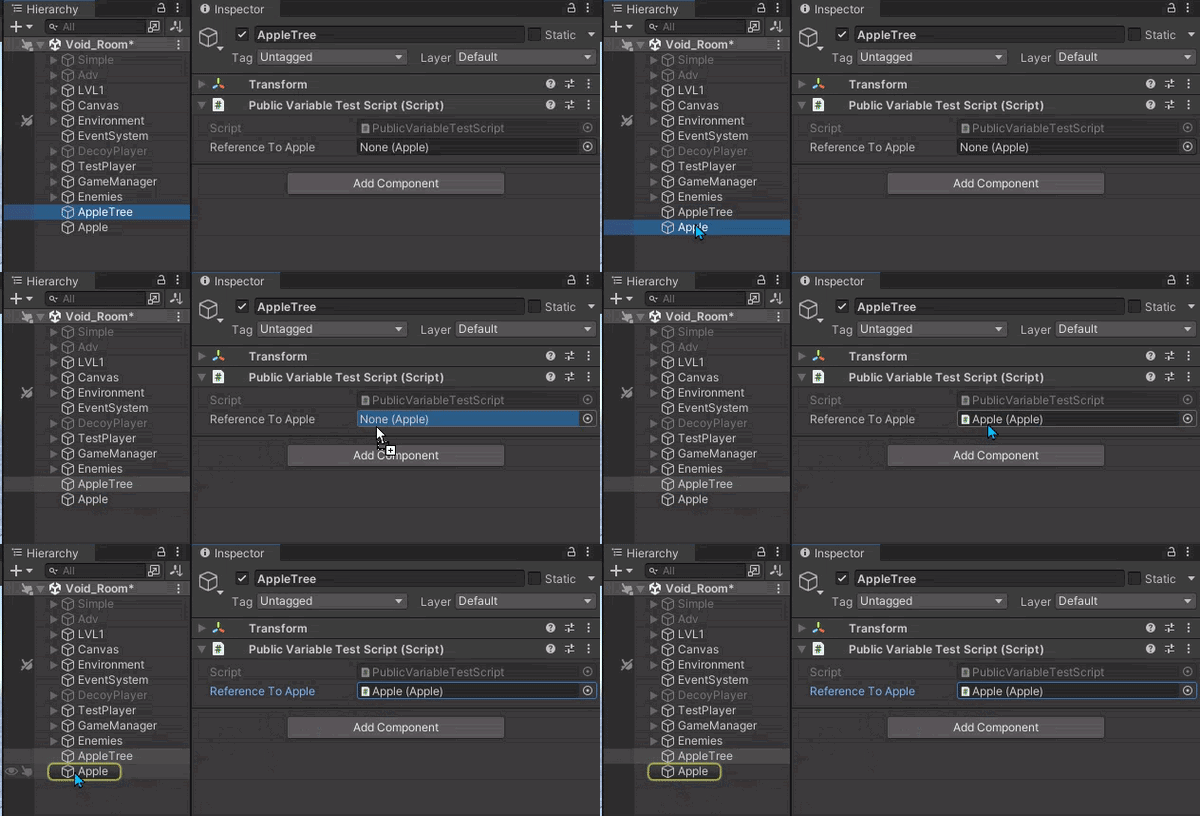 buoyant knot
actually, I forgot I already have a custom editor lmao
 olive lintel
hey guys, I have a question in regards to network RPCs. I've tried to RPC an array of different "gun shot info" structs, however I have received the error message shown below. Is the only way to RPC this information by using a series of individual RPCs for each gun shot info in sequence? many thanks.
 real merlin
i need a way to reference my class inside a function that is inside that class, i tried using the code in the image bellow but unity doesn't like it

 real merlin
yeah..
rocky canyon
unless u need a new version of it

either way, the IDE doesn't yell at me. maybe u shouldn't use a var b/c u already know its a spellmanager
spellmanager s = new spellmanager();
real merlin
i did not know the this thing existed
real merlin
i can't use it inside a static function tho
rocky canyon
ya, b/c a static function can only exist once..
real merlin
what does that mean ?
rocky canyon
if its a static function inside of that class.. and u try to make a (new) one.. you now have (2) static functions ** of the same function **
which u cant do

Unity Discussions
I know its not necessarily a Unity question, but I’ve googled a bit what static is, but can’t find an explanation that I can easily comprehend… anyone got an explanation on static variables in layman’s terms?
real merlin
rocky canyon
https://discussions.unity.com/t/what-exactly-is-static/39694
i'll read that thank you
faint osprey
        for(int i = 0; i < roomCount; i++)
        {
            horizontalChoice = Random.Range(0, 2);
            verticalChoice = Random.Range(0, 2);
            if (i > 0)
            {
                while(horizontalChoice != leftCheck || horizontalChoice != rightCheck)
                {
                    horizontalChoice = Random.Range(0, 2);
                }

                while (verticalChoice != upCheck || verticalChoice != downCheck)
                {
                    verticalChoice = Random.Range(0, 2);
                }
            }
            upCheck = verticalChoice - 1;
            downCheck = verticalChoice + 1;
            leftCheck = horizontalChoice - 1;
            rightCheck = horizontalChoice + 1;
            roomMatrix[verticalChoice][horizontalChoice] = 1;
}``` i dont understand how this is giving me an infinite loopWhat are leftCheck and rightCheck
faint osprey
integers
polar acorn
faint osprey
integers
Are they the same number
faint osprey
polar acorn
Are they the same number
well there being randomly assigned in a very small range so they should reach that number
polar acorn
faint osprey
well there being randomly assigned in a very small range so they should reach th...
But there is a possibility they are different numbers, right?
polar acorn
Then I don't know how you think this could end:
while(horizontalChoice != leftCheck || horizontalChoice != rightCheck)
                {
                    horizontalChoice = Random.Range(0, 2);
                }
If it's not equal to left check OR its not equal to right check, you loop
If left check and right check are different numbers, it is impossible to be equal to both to get out of this loop
faint osprey
yeah and each time im changing its values which could make it the same as left or right
faint osprey
polar acorn
If left check and right check are different numbers, it is _impossible_ to be eq...
no its not cause its OR not and
polar acorn
faint osprey
yeah and each time im changing its values which could make it the same as left o...
And if it's the same as left, it is no longer the same as right, so the loop continues again
faint osprey
oh wait
polar acorn
faint osprey
no its not cause its OR not and
Let's assume left check is 0, and right check is 1, okay?
faint osprey
no it does need to be and
polar acorn
If horizontalChoice randoms into 1
faint osprey
i was getting them mixed up
polar acorn
it is no longer equal to left check so it loops
 shy rain
Hello , ive wanted to ask how can i make a transition from a 3D-scene to a 2D-scene?
I'm mainly asking because ive had an idea that upon interacting with an Object/NPC , it would trigger an transition from the 3D-Space to 2D-Space to play an An Animated interaction with the object/converstation with the NPC.
this is short visualization of the transition in my mind
 buoyant knot
look at mario
Paper Mario and Mario Odyssey both did that
in terms of physics, that is going to be rough, because 2D and 3D physics systems are totally different
shy rain
oh nuts
i am aswell an absolute begginer , i got into unity since last week or so
i just thought making something like this would be fun but no idea where i could start so ee
rich adder
the original scene becomes still image and rips to reveal 2d game?
shy rain
rich adder
the original scene becomes still image and rips to reveal 2d game?
yeah something like that
rich adder
I would start getting the 2 scenes working first then worry about the transition effect later
timber tide
there is like a transition in a split frame where you do notice of it happening
shy rain
rich adder
I would start getting the 2 scenes working first then worry about the transition...
oh alrighty! ill be getting to it then
polar acorn
shy rain
this is short visualization of the transition in my mind
You could have the camera output to a render texture, put that texture on a Quad that has this tearing-in-half animation, and behind it have your new scene. When you need to change scenes, you have the active camera take a snapshot and then additively load the 2D scene, drop in the animated ripping quad, and then quietly unload the original scene. Actually a pretty involved system, but it'll make for a cool effect.
Things to learn:
- How to output a camera to a render texture
- Spawning an object with the render texture as it's material's main map
- Asynchronous scene loading, including having a "transition scene" (that is normally used for a loading screen)
But definitely work on getting the scenes on either end working first before you make the transition effect. It won't do much good unless there's stuff to load on either end
shy rain
alrighty!
shy rain
shy rain
this is short visualization of the transition in my mind
actually when i think about it , it doesnt have to be a 2d scene
I could pull it off by making it look 2d within the 3d space by changing the cameras and having the animation scene out of players view
and i bet it would be an easier time
and even better i could mix both 3d and 2d objects withing the same space giving me more stuff to mess around
faint osprey
ive been trying to wrestle with this for a while so any thoughts on the matter would be appreciated i know its probably not the best method of going about it but i wanna try and finish it``` public List<List<int>> roomMatrix = new List<List<int>>
{
new List<int> {-1, -1, -1},
new List<int> {-1, -1, -1},
new List<int> {-1, -1, -1}
};
public List<List<bool>> roomsVisited = new List<List<bool>>
{
    new List<bool> {false, false, false},
    new List<bool> {false, false, false},
    new List<bool> {false, false, false}
};

// Start is called before the first frame update
void Start()
{
    roomCount = Random.Range(3, 6);
    for(int i = 0; i < roomCount; i++)
    {
        horizontalChoice = Random.Range(0, 2);
        verticalChoice = Random.Range(0, 2);
        if (i > 0)
        {
            while (roomsVisited[verticalChoice][horizontalChoice] == true)
            {
                while (horizontalChoice != leftCheck && horizontalChoice != rightCheck)
                {
                    horizontalChoice = Random.Range(0, 2);
                }

                while (verticalChoice != upCheck && verticalChoice != downCheck)
                {
                    verticalChoice = Random.Range(0, 2);
                }
            }
        }
        upCheck = verticalChoice - 1;
        downCheck = verticalChoice + 1;
        leftCheck = horizontalChoice - 1;
        rightCheck = horizontalChoice + 1;
        roomsVisited[verticalChoice][horizontalChoice] = false;
        roomMatrix[verticalChoice][horizontalChoice] = i;
    }``` im trying to make a loop that will choose a starting point in my list of lists of ints and lable that 0 then choose an adjacent point (either above or below or left and right) then lable that 1 and so on until i reach the required amount without going back on myself
What are leftCheck, rightCheck, upCheck, and downCheck? If any of them are 0 or 1, these loops cannot end
faint osprey
polar acorn
What are `leftCheck`, `rightCheck`, `upCheck`, and `downCheck`? If _any_ of them...
there integers that get updated based on what the random choice is here upCheck = verticalChoice - 1; downCheck = verticalChoice + 1; leftCheck = horizontalChoice - 1; rightCheck = horizontalChoice + 1;
polar acorn
faint osprey
there integers that get updated based on what the random choice is here ```upChe...
What do they start at
faint osprey
there not assigned at start
faint osprey
well no cause they get updated before the loops even happen
polar acorn
Oh, there's an i > 0 check there
So, let's think this through. They're at 0 to start. Let's just focus on horizontalChoice and leftCheck and rightCheck
faint osprey
right ok
polar acorn
If horizontalChoice randoms into 0, then leftCheck becomes -1 and rightCheck becomes 1.
If horizontalChoice randoms into 1, then leftCheck becomes 0 and rightCheck becomes 2.
Actually, hang on, are you still getting an infinite loop or is your issue that it's not doing anything
because that outer while loop should never run. At no point are you ever setting any value in roomsVisited to true
faint osprey
polar acorn
Actually, hang on, are you still getting an infinite loop or is your issue that ...
no im not getting an infinite loop
roomsVisited[verticalChoice][horizontalChoice] = false; omg im setting it to false
ugh
ok so now it sometimes works perfectly
and sometimes goes into an infinite loop
polar acorn
faint osprey
and sometimes goes into an infinite loop
You should probably learn how to use the debugger so you can step through the logic
You have a situation where you have no possible choices that result in a roomsVisited of false
 polar acorn
Try reinstalling the package
faint osprey
polar acorn
You have a situation where you have no possible choices that result in a `roomsV...
wdym sorry?
polar acorn
faint osprey
wdym sorry?
You have hit a situation where roomsVisited[0][0], [0][1], [1][0], and [1][1] are true and those are the only possible values you can get
so it's always true
 small helm
Hi guys, I have two scenes loaded at the same time with LoadSceneMode.Additive, each scene has a camera in it but i want each camera to only see the things in its respective scene, right now everything is visible at the same time to all cameras. How can I fix this? I am very new to unity
 stable lagoon
polar acorn
Try reinstalling the package
stable lagoon
polar acorn
Try reinstalling the package
got it thanks 
faint osprey
polar acorn
You have hit a situation where `roomsVisited[0][0]`, `[0][1]`, `[1][0]`, and `[1...
but then shoudnt it look at [0][2] or [1][2] or [2][0] as there adjacent
polar acorn
faint osprey
but then shoudnt it look at [0][2] or [1][2] or [2][0] as there adjacent
how
horizontalChoice and verticalChoice can literally only be 0 or 1
faint osprey
how
polar acorn
Because int Random.Range is max eclusive
faint osprey
ohhh right
polar acorn
 faint osprey
so i need to change them all to 3 then
small helm
am I allowed to ask my question in more than one channel if it's an appropriate channel
faint osprey
its still running infinitely tho
polar acorn
faint osprey
its still running infinitely tho
So, once again, learn to use the debugger and step through it to find out what situation is going infinite
you are in a position where all possible values for your roomsVisited are true
faint osprey
polar acorn
you are in a position where all possible values for your `roomsVisited` are true
ok i got it working with the debugger
so its not infinite looping now
however on odd occurances the path is not adjacent tiles
i think the issue is
is that technically say my starting point is [1][1]
that means vertically [0] is valid and horizontally [2] is valid making the next point [0][2] which is not adjacent
but i wouldnt know how to fix that
timber tide
What are some ideas to keep a large script with numerous members clean from your header space? I've been just cramming them all into structs even though I'm not exactly passing them anywhere. A lot of my methods act directly on the member variables without parameters for the sake of simplicity. Only problem I dislike is it does create more line space as I've gotta use another dot operation to access it all.
As much as I may dislike setting up header files, it does keep your scripts pretty shiny
shell sorrel
what do you mean by header files?
like its not C
if you are just talking about all your fields and stuff and keeping it organized
i tend to try to not have 1 class handle too many different things, and when i need it to i will just keep fields used by sets of methods close to those methods and use regions to group
buoyant knot
@timber tide I solved it. I just made a custom editor, where I only defined an override for OnInspectorGUI, to call a public method. It still calls way too many times, but at least it only calls when I’m editing it.
 young anvil
would anyone be willing to kind of "teach me unity" and how to get started with c# for unity on a 1 on 1? i have slight knowledge of c++ if that helps any
timber tide
shell sorrel
i tend to try to not have 1 class handle too many different things, and when i n...
Ah, I forgot about regions. That's probably something I should consider using more
shell sorrel
Also nothing wrong with just using composition, can just have a few other objects in your thing for handle different features of it
If lines start getting long a few getter props can handle that
buoyant knot
young anvil
would anyone be willing to kind of "teach me unity" and how to get started with ...
there is too much to learn for a voluntary 1 on 1 apprenticeship. You’ll need to travel around and learn
 rich adder
small helm
rich adder
small helm
orange is the selected camera
small helm
why does one of the cameras not have a small icon above it
timber tide
I cache all my values
when you think of modifiers from like hundreds of items, it's hard to just get item stats each time you do like an attack
 queen adder
Im quite doing that, just updating parameters at certain times
but im quite doing the hardcoded for everything
like if i got a double damage buff, i update recalculate the strength fully
timber tide
namespace Stats
{
    public enum StatValueType
    {
        Flat = 0,
        PercentAccumulate = 100,
        PercentMulti = 200,
    }

    [Serializable]
    public abstract class StatValue<T> where T : Enum
    {

        public StatValue(T statType, StatValueType valueModType, float value)
        {
            StatType = statType;
            StatValueType = valueModType;
            Value = value;
        }

        [field: SerializeField] public T StatType { get; private set; }
        [field: SerializeField] public StatValueType StatValueType { get; private set; }
        [field: SerializeField] public float Value { get; private set; }
    }
}```
I stick to mostly a flat, percent accumlative, and multi for the majority of formulationsthat's neat
so like it's smart to autodecide how it handle the stat update
rather than you manually handling how you plug in the extra buff you add
timber tide
mods are like blocks where you shove one in and recalculate on one specific method
ivory bobcat
Well, you'd normally have:
- some base value
- some stacking multipliers
- some non-stacking multipliers
- some constants
etc
queen adder
i love the fact that a lot of rpg did this very nicely
shell sorrel
i tended to just implement buffs and debuffs as just a stack of objects, that all have various methods for the stats they effect that each accept and return a value to modify
ivory bobcat
Yeah, just loop through them and evaluate then later combine - possibly many different stacks as well.
timber tide
buffs have been tricky to implement because snapshotting stat references is a pain (think of abilities still lingering on the scene)
I'm not sure how I want to handle that
 mental grail
im having trouble making my bullet damage the player because when i hit the enemy it takes damage but when i get rid of all its helth there in an error Destroying assets is not permitted to avoid data loss. If you really want to remove an asset use DestroyImmediate (theObject, true); UnityEngine.Object:Destroy (UnityEngine.Object) Enemy:TakeDamage (int) (at Assets/Scripts/Enemy.cs:19) Bullet:OnTriggerEnter2D (UnityEngine.Collider2D) (at Assets/Scripts/Bullet.cs:20)
and also even though i have in my start function health = 100 it doesnt update and i just has negitive health
ivory bobcat
mental grail
im having trouble making my bullet damage the player because when i hit the enem...
The error said you're trying to destroy an asset.
Likely you're referencing an asset instead of an instance in the scene.
rich adder
mental grail
im having trouble making my bullet damage the player because when i hit the enem...
are you trying to destroy the prefab itself?
queen adder
https://gdl.space/iyisefahip.cs My old buff system, trying to do something better
mental grail
rich adder
are you trying to destroy the prefab itself?
yes
rich adder
mental grail
yes
well something like this basically is wrong
 public GameObject myPrefab;
    void Method()
    {
        Destroy(myPrefab);
}```but now im just trying to redo my main parameter handling
mental grail
rich adder
you have to destroy the copy
how? im new to unity 🥲
ivory bobcat
mental grail
im having trouble making my bullet damage the player because when i hit the enem...
Replace enemy.TakeDamage(20) inside the physics callback function with other.GetComponent<Enemy>().TakeDamage(20)
Likely your referenced enemy was the prefab and not the enemy in the scene
rich adder
mental grail
how? im new to unity 🥲
oh nvm you got it sorted 🙂
ivory bobcat
Also, this would imply you've only got one.
The error occurred because you told the prefab to go destroy itself.
mental grail
ivory bobcat
Replace `enemy.TakeDamage(20)` inside the physics callback function with `other....
omg thank you this worked 😀
mental grail
ivory bobcat
The error occurred because you told the prefab to go destroy itself.
that makes sense now lol
ivory bobcat
Because the referenced enemy was a prefab
mental grail
i see my mistake lol
faint osprey
i dont understand how i can get an infinite loop sometimes but then it work normally other times
    {
        new List<int> {-1, -1, -1},
        new List<int> {-1, -1, -1},
        new List<int> {-1, -1, -1}
    };

    public List<List<bool>> roomsVisited = new List<List<bool>>
    {
        new List<bool> {false, false, false},
        new List<bool> {false, false, false},
        new List<bool> {false, false, false}
    };

    public List<List<bool>> roomsValid = new List<List<bool>>
    {
        new List<bool> {false, false, false},
        new List<bool> {false, false, false},
        new List<bool> {false, false, false}
    };

// Start is called before the first frame update``` {
roomCount = Random.Range(3, 7);
for(int i = 0; i < roomCount; i++)
{
horizontalChoice = Random.Range(0, 3);
verticalChoice = Random.Range(0, 3);
if (i > 0)
{
while (true)
{
if (roomsValid[verticalChoice][horizontalChoice] == true && roomsVisited[verticalChoice][horizontalChoice] == false)
{
break;
}
else
{
horizontalChoice = Random.Range(0, 3);
verticalChoice = Random.Range(0, 3);
}
}
}
upCheck = verticalChoice - 1;
downCheck = verticalChoice + 1;
leftCheck = horizontalChoice - 1;
rightCheck = horizontalChoice + 1;
for(int a = 0; a < 3; a++)
{
for (int b = 0; b < 3; b++)
{
roomsValid[a][b] = false;
}
}
if (upCheck > -1)
{
roomsValid[upCheck][horizontalChoice] = true;
}
else if (downCheck < 3)
{
roomsValid[downCheck][horizontalChoice] = true;
}
else if (leftCheck > -1)
{
roomsValid[verticalChoice][leftCheck] = true;
}
else if (rightCheck < 3)
{
roomsValid[verticalChoice][rightCheck] = true;
}
roomsVisited[verticalChoice][horizontalChoice] = true;
roomMatrix[verticalChoice][horizontalChoice] = i;
}``` teal viper
faint osprey
i dont understand how i can get an infinite loop sometimes but then it work norm...
teal viper
faint osprey
i dont understand how i can get an infinite loop sometimes but then it work norm...
Get to the infinite loop state and break with the debugger. Then inspect where it is looping and why.
faint osprey
teal viper
Get to the infinite loop state and break with the debugger. Then inspect where i...
i put in a break point then go in with the debugger and its always like the breakpoint is unable to be hit
so idk what to do
teal viper
faint osprey
i put in a break point then go in with the debugger and its always like the brea...
Don't put a breakpoint. Just got the break button
It looks like the pause button and should be on your toolbar at the top.
faint osprey
                {
                    if (roomsValid[verticalChoice][horizontalChoice] == true && roomsVisited[verticalChoice][horizontalChoice] == false)
                    {
                        break;
                    }
                    else
                    {
                        horizontalChoice = Random.Range(0, 3);
                        verticalChoice = Random.Range(0, 3);
                    }
}``` its cause its not getting to the break inside the ifbut idk why it should
teal viper
faint osprey
but idk why it should
Well, if it doesn't, then the conditions are not satisfied. And you can confirm why that happens by stepping through the code.
roomsValid is always true or roomsVisited is always false. Check the values of the vertical and horizontal choice and the elements inside these arrays. It's really a simple thing to debug.
ivory bobcat
Combinations can repeat so this could take a while stepping through the code 🥹
 gaunt ice
Prove that there are always valid choices after i > 0
ivory bobcat
Just to eventually determine that none were valid and not visited
faint osprey
gaunt ice
Prove that there are always valid choices after i > 0
there are always valid choices
its the adjacent tiles
ivory bobcat
I'm assuming this is a grid maze generation where there are corner cases with valid rooms that have been previously visited though.
faint osprey
ivory bobcat
I'm assuming this is a grid maze generation where there are corner cases with va...
yes it checks if the room going to next is adjacent or valid and if that room is the room we've been to before
ivory bobcat
So how many times should it try if there are no more valid/non-visited rooms?
teal viper
ivory bobcat
Just to eventually determine that none were valid and not visited
You can check that by looking at the array in the debugger.
faint osprey
ivory bobcat
So how many times should it try if there are no more valid/non-visited rooms?
well at the start of the code it generates how many rooms there will be and after that many rooms are spawned the code will stop
teal viper
faint osprey
yes it checks if the room going to next is adjacent or valid and if that room is...
What do you actually see in the debugger?
ivory bobcat
Unless you've got something prior that escapes if no neighbors are valid/un-visited
faint osprey
teal viper
What do you actually see in the debugger?
i saw that some of the valid rooms werent be turned to true even if they were valid
teal viper
faint osprey
i saw that some of the valid rooms werent be turned to true even if they were va...
Then you need to investigate the place where you expect them to be set to valid.
faint osprey
teal viper
Then you need to investigate the place where you expect them to be set to valid.
            downCheck = verticalChoice + 1;
            leftCheck = horizontalChoice - 1;
            rightCheck = horizontalChoice + 1;

            for(int a = 0; a < 3; a++)
            {
                for (int b = 0; b < 3; b++)
                {
                    roomsValid[a][b] = false;
                }
            }

            if (upCheck > -1)
            {
                roomsValid[upCheck][horizontalChoice] = true;
            }
            else if (downCheck < 3)
            {
                roomsValid[downCheck][horizontalChoice] = true;
            }
            else if (leftCheck > -1)
            {
                roomsValid[verticalChoice][leftCheck] = true;
            }
            else if (rightCheck < 3)
            {
                roomsValid[verticalChoice][rightCheck] = true;
}``` which is here but that should work fineYeah. Maybe have a condition where after 100 attempts, it enters a section of code with the break point - couldn't imagine how many times he'd have to traverse before getting to the rooms with unwanted behavior.
gaunt ice
There is only one true valid room after each iteration
teal viper
faint osprey
``` upCheck = verticalChoice - 1;
downCheck = verticalCho...
Add an else in the end and put a breakpoint there. It's really simple...
teal viper
ivory bobcat
Yeah. Maybe have a condition where after 100 attempts, it enters a section of co...
Isolate the condition that causes the issue and break in it. Easy.
Also what ティナsaid.
ivory bobcat
I'm guessing they're randomly picking rooms though and that the unwanted behavior occurs when no rooms meet the conditions to continue 
faint osprey
gaunt ice
There is only one true valid room after each iteration
what how
teal viper
You set all the rooms to false there. But only set to true one of them.
faint osprey
oh should they not be else if's
ivory bobcat
faint osprey
``` while (true)
{
if (roomsV...
Instead of randomly picking two sets of three numbers an unknown amount of times, maybe add the selectable rooms to a pre allocated list and randomize the order. You could then remove the first element until a valid element was found or escape when no more is available.
Note: to avoid allocation, just have a list with a capacity of 9 and clear it before adding the next set of rooms for testing.
 rotund vapor
how would i make a trigger teleport an object to that trigger's y position when the object goes into that trigger?
timber tide
can use OnTriggerEnter or Spherecast an area
polar acorn
rotund vapor
how would i make a trigger teleport an object to that trigger's y position when ...
Basically, like that. Set the object's Y position to the trigger's Y position in OnTriggerEnter
rotund vapor
ok, thanks! 🙂
 vestal ether
faint osprey
``` upCheck = verticalChoice - 1;
downCheck = verticalCho...
vestal ether
faint osprey
``` upCheck = verticalChoice - 1;
downCheck = verticalCho...
is this java or c#
wintry quarry
vestal ether
is this java or c#
From this context alone impossible to tell. it's valid in both languages. Seeing as we're on the Unity server, very good chance it's C#.
 eternal siren
does anyone have good documents on raycasting?
eternal siren
 frosty hound
https://docs.unity3d.com/ScriptReference/Physics.Raycast.html
frosty hound
https://docs.unity3d.com/ScriptReference/Physics.Raycast.html
thx
frosty hound
eternal siren
thx
Next time you can just use google, it will give you the official Unity docs.
eternal siren
frosty hound
Next time you can just use google, it will give you the official Unity docs.
👍
 plush chasm
EDIT: FOUND THE ANSWER ... Preferences -> Asset Pipeline -> Auto Refresh -> Enabled
(original problem.. I am not sure if this is the right place but... I just updated project to Unity Version 2022 and I noticed if I save a sprite in paint.net unity will not show the changes anymore until I run the game. Is there a way to see sprite changes even if the game isn't running again?)
 bold mica
Anyone know why my SceneManager.LoadScene() isn't working in a built version of my game?
Pressing the start button works in the unity editor as expected, but once I build the project, that button just not longer works anymore. It seems to affect the buttons with a certain script onclick? as the other buttons work but i have no idea. Anyone have any pointers or possible fixes?


 wintry quarry
bold mica
Anyone know why my SceneManager.LoadScene() isn't working in a built version of ...
wintry quarry
bold mica
Anyone know why my SceneManager.LoadScene() isn't working in a built version of ...
in what way does it not work
does it respond to the mouse at all (tinting etc)? HAve you checked the log files?
putting a Debug.Log in there and seeing if it shows in the logs would be a good start
bold mica
cant check if it responds to the mouse because i disabled that
i will try a debug log real quick
vestal ether
wintry quarry
From this context alone impossible to tell. it's valid in both languages. Seeing...
What i was thinking, but I've never used c# so couldn't tell. Seems like java and c# r really similar though
bold mica
wintry quarry
putting a Debug.Log in there and seeing if it shows in the logs would be a good ...
I have figured out the issue thanks for the response
 winter prawn
What was the issue?
bold mica
basically
i was trying to save data and read data right
and i did that by writing and reading to a txt file
but on the built version, something was different I guess, and an exception was getting thrown whenever I tried to write to the file, because it didn't exist according to unity.
then because of that it didnt run the line under it, which was to load the next scene.
 magic fern
Hello, I am new to unity and new to C#, I am trying to do simple first person movement and so far it was going good with a youtube tutorial using unity's imput system, the problem is that tho the video said it could also be used for 1st person games, the tutorial only focused on third person, and I dont know how to implement the 1st person camera and mouse imput into the script. Everything else works fine (jumping, moving and gravity)
these are immages of my code ^ (sorry for the mess)
and here an image of the imput actions
thank you in advance
teal viper
Look up a tutorial for a first person controller and switch between the 2 modes.
magic fern
so redo the whole thing?
cause I tried implementing the camera from a different video into my script and it didnt work
teal viper
No need to redo everything. Just add the first person logic additionally(maybe even in different script) and switch between them.
magic fern
Got it thanks
gaunt harbor
if (Physics.Raycast(Cam.transform.position, Cam.transform.TransformDirection(Vector3.forward), out hit, Range) && hit.transform.tag == "Enemy")
Does anyone know which of each code I can expand the detection area?
summer stump
gaunt harbor
```
if (Physics.Raycast(Cam.transform.position, Cam.transform.TransformDirectio...
Range is the length of the ray. But a ray is infinitely thin, so if you want to expand it outwards you want a different cast type
Like SphereCast
teal viper
I don't get what I want
Is very deep.🤯
teal viper
I mean that's fine. It's a common problem in this channel anyway
The "don't get what I want" part
gaunt harbor
summer stump
Like SphereCast
I'm curious about that code but I'll have to see.
gaunt harbor
teal viper
The "don't get what I want" part
It's super embarrassing when something thinks about something else, lol...
teal viper
gaunt harbor
It's super embarrassing when something thinks about something else, lol...
That's fine. If you feel like you're not able to convey your thoughts, just use Google translate or something.
gaunt harbor
yeah : (
 dusty coral
why

 dusty coral
how to ignore it?
 north kiln
Don't ignore it. Physics.Raycast returns a boolean, act on the boolean and don't read hit if it's false
also, understand the value of stack traces and everything else in the troubleshooting section of that site, so you can see how obnoxious it is to provide an exception without showing the line numbers
dusty coral
dusty coral
how to ignore it?
but the raycast should only work if it hits an entity
gaunt harbor
gaunt harbor
```
if (Physics.Raycast(Cam.transform.position, Cam.transform.TransformDirectio...
I have a problem, simply when I paste the SphereCast code and it gives me errors, but I don't want to ruin all the codes.
 vital lintel
Hello, Everyone. I was curious on what the best methods for saving, accessing, and modifying large amounts of text for a text based game would be. In this case, player makes a choice in the beginning of the game, and later down the line it'll display a certain text if the player chose option A, or a different one if they chose option B, etc. The game will be filled with such choices and differences. From what i found, hard coding it is probably not the best method and i was curious if there was a better way?
 undone rampart
dusty coral
but the raycast should only work if it hits an entity
undone rampart
dusty coral
but the raycast should only work if it hits an entity
you are trying to access the hit variable which is null because the raycast was false, simply put the raycast function on an if statement
dusty coral
there's no errors anymore but it still cant recognize that the object is an entity


 north kiln
dusty coral
there's no errors anymore but it still cant recognize that the object is an enti...
north kiln
dusty coral
there's no errors anymore but it still cant recognize that the object is an enti...
How are you defining entity in your code
dusty coral
its just a layer mask
north kiln
A LayerMask is not a layer https://unity.huh.how/bitmasks
You'll have to use a plain int to represent a single layer


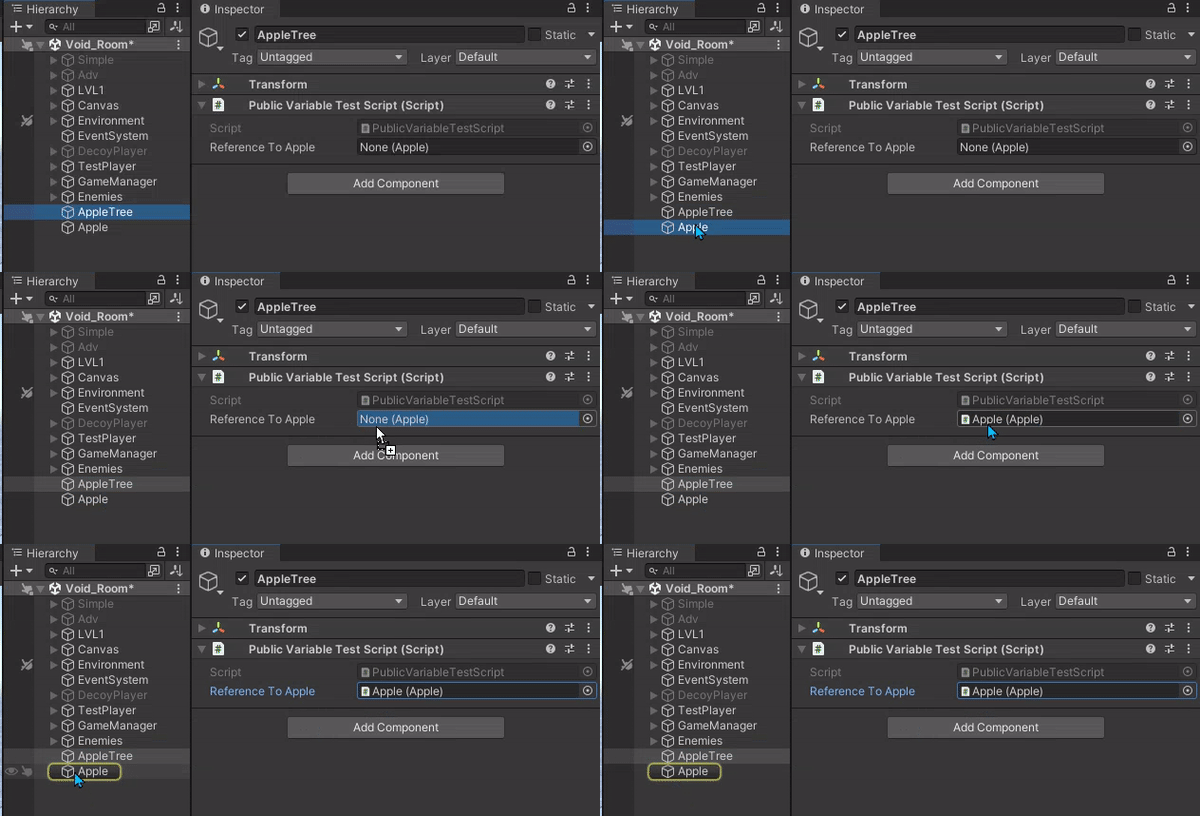


 undone rampart
dusty coral
its just a layer mask
undone rampart
dusty coral
its just a layer mask
there is actually no point of detecting the layer mask in that if, you can just put a mask on the raycast directly and it will only become true if hits the specified layer
undone rampart
dusty coral
why is the ui not snapping to the top left when i full screen?
you didnt anchor it
 eternal needle
undone rampart
there is actually no point of detecting the layer mask in that if, you can just ...
eternal needle
undone rampart
there is actually no point of detecting the layer mask in that if, you can just ...
There definitely are reasons, like if you dont want to interact with something through a wall
undone rampart
eternal needle
There definitely are reasons, like if you dont want to interact with something t...
thats a good point, but checking for a tag would be better in this case
eternal needle
undone rampart
thats a good point, but checking for a tag would be better in this case
A tag wouldnt do anything here, not really sure what you mean by that.
undone rampart
put a tag on the enemy and compare the tag of the gameobject hit by the raycast
eternal needle
undone rampart
put a tag on the enemy and compare the tag of the gameobject hit by the raycast
Well yes I understood that part, but theres no difference in checking vs a layer here. I find using both layers and tags for the same purpose is awkward. since you are forced to use layers for physics, it's better to just stick with them
rich adder
undone rampart
its a lot cleaner to compare a tag then compare a layer
using tags and layers are different.
Also Using tags at all is ugly (working with strings)
eternal needle
I feel they're just talking about the logic being simpler? Not really a good justification for mixing the 2 systems
undone rampart
its basically
if (hit.collider.CompareTag("Enemy") {}
vs
if (hit.gameObject.layer == 3) { }
if(hit.collider.TryGetComponent(out Enemy enemy))
undone rampart
and if you accidentally change the order of a layer that whole thing can break
undone rampart
rich adder
`if(hit.collider.TryGetComponent(out Enemy enemy))`
thats also valid
rich adder
undone rampart
and if you accidentally change the order of a layer that whole thing can break
both are very fragile imo
remembering to put tags on things is a pain
eternal needle
undone rampart
and if you accidentally change the order of a layer that whole thing can break
The same can be said about the tags, if you change the string. But its insanely easy to just write one piece of code which stores the values for either. Regardless, you're talking about how the code looks which imo shouldnt even be a factor. You now mix 2 systems and anyone that helps on the project has to wonder what will use a tag and what will use a layer. When you want to use physics stuff for the object as well, are you gonna create a tag and a layer?
The GetComponent code as well works, but layer based is much faster.
undone rampart
personally, i use layers as filters and tags for detection
eternal needle
A raycast has both a filter and is used for detection, again mixing the systems
Or just any physics function in general like overlap or any cast
undone rampart
eternal needle
A raycast has both a filter and is used for detection, again mixing the systems
in that case i use both
¯_(ツ)_/¯
i filter the object hit by the cast with layers, then check whats what with tags
rich adder
that makes no sense, the tag check relies on the hit from raycast.
Also raycasts are def not expensive lol
 jaunty heath
oh it doe not make any sense, i missed the using of HIT in the 2nd if.. facepalms hard nevermind me 😐
ill just delete that to be sure :p
rich adder
allgud just thought I'd point that out lol
jaunty heath
rich adder
allgud just thought I'd point that out lol
yea thank you, quite the blunder and might have caused a lot of confusion 😛
what is this "thinking first" y'all been talkin about? sigh 😛
rich adder
jaunty heath
what is this "thinking first" y'all been talkin about? sigh 😛
oh god too many drivers like this i deal with daily 😆
jaunty heath
rich adder
oh god too many drivers like this i deal with daily 😆
SHAME! 🔔
 restive ore
what do i do with unity, im completely new to coding not even a single time i code before
not my first time i tried Godot before it was easy man
rich adder
restive ore
what do i do with unity, im completely new to coding not even a single time i co...
!learn
eternal falconBOT
:teacher: Unity Learn ↗
Over 750 hours of free live and on-demand learning content for all levels of experience!
north kiln
There are resources pinned to this channel
 kindred halo
playerVelocity.x = Mathf.Sqrt(hit.normal.y * playerSpeed);
I'm basically performing a wall jump
Whenever I press jump I want to jump on the wall's normal direction
But required argument is a float
Is while the normal is a vector
is this how I should be doing it?
teal viper
Hit normal y would be 0 for a vertical wall.
Wdym by "jump on the wall's normal direction"? If you just want to use the normal as the direction then set your velocity to it * speed.
kindred halo
you mean like this?
jumpVector = hit.normal * speed;
idk why the player just jumps up
kindred halo
kindred halo
you mean like this?
``` jumpVector = hit.normal * speed; ```
lmao It works now
kindred halo
I have this timer which should give me air movement once it reaches 0
but It doesn't seem to happen
full code https://paste.ofcode.org/zqiyecMWszDDBN4LdfLvqc
 rich adder
kindred halo
I have this timer which should give me air movement once it reaches 0
but It doe...
rich adder
kindred halo
I have this timer which should give me air movement once it reaches 0
but It doe...
debug your values, also don't use == on floats
dusty coral
how to adjust animation loop interval?
kindred halo
rich adder
debug your values, also don't use `==` on floats
what should I use?
rich adder
dusty coral
how to adjust animation loop interval?
clip the ending ?
not sure where the code question is
 flint estuary
hello someone can help me i dont know i make the state machine for the enemy can someone can help me i need the enemy patrol the area after 5 secons the enemy make the animation of idle and patrol again when he see you chase after the player someone can help me with that?
rich adder
flint estuary
hello someone can help me i dont know i make the state machine for the enemy can...
use an enum and Update and you're pretty much done
or coroutine is easier for timer
flint estuary
rich adder
use an enum and Update and you're pretty much done
how i do that?
rich adder
flint estuary
how i do that?
you need a script
 late bobcat
Hello there everybody, i've a question. I wanted to play the game i created in unity with my friends online. How should i do that? I can host the server on my pc if needed. Just wanted to try the game out with some friends
frosty hound
late bobcat
Hello there everybody, i've a question. I wanted to play the game i created in u...
If you didn't make it multiplayer, it can't just be played multiplayer.
rich adder
late bobcat
Hello there everybody, i've a question. I wanted to play the game i created in u...
its not that trivial
flint estuary
rich adder
you need a script
yep and i have that script but the idle state is only start and i have the walk but only the idle is start
 tepid summit
Can i please get some help?
The issue/problem: 'GameObject' does not contain a definition for 'canMove' and no accessible extension method 'canMove' accepting a first argument of type 'GameObject'.
My Code (watch out its a long one):
    public GameObject CoilyBoily;
    public float speed = 20f;
    float xRotation = 0f;


    public LayerMask layerMask;

    void Start()
    {
        Cursor.lockState = CursorLockMode.Locked;
        CoilyBoily = GameObject.GetComponent<CoilyBoily>();
    }

    void Update()
    {
        float xAxis = Input.GetAxis("Mouse X") * speed * Time.deltaTime;
        float yAxis = Input.GetAxis("Mouse Y") * speed/2f * Time.deltaTime;
        xRotation -= yAxis;
        xRotation = Mathf.Clamp(xRotation, -90f, 90f);
        Mathf.Clamp(yAxis, -90, 90);
        player.Rotate(0f, xAxis, 0f);
        transform.localRotation = Quaternion.Euler(xRotation, 0f, 0f);
    }
    void FixedUpdate()
    {
        RaycastHit hit;
        if (Physics.Raycast(transform.position, transform.TransformDirection(Vector3.forward), out hit, Mathf.Infinity, layerMask))
        {
            CoilyBoily.canMove = false;
        }
        else
        {
            CoilyBoily.canMove = true;
        }
}```show script. use links
flint estuary
rich adder
show script. use links
can i show you images
rich adder
tepid summit
Can i please get some help?
The issue/problem: 'GameObject' does not contain a ...
GameObject doesn't have canMove property init
tepid summit
its a bool on my script
rich adder
pretty sure you wanted CoilyBoily not GameObject
late bobcat
frosty hound
If you didn't make it multiplayer, it can't just be played multiplayer.
mm, what am i missing. It's a simple 2d soccer game, what do i need to do in order to make it multiplayer?
frosty hound
tepid summit
Can i please get some help?
The issue/problem: 'GameObject' does not contain a ...
You've declared your CoilyBoily variable as type GameObject. You probably want it to be of type CoilyBoily considering that's what you GetComponent<> in your Start function.
tepid summit
rich adder
pretty sure you wanted `CoilyBoily` not `GameObject`
correct
rich adder
so declare it properly
rich adder
flint estuary
can i show you images
use links from !code
eternal falconBOT
Posting code
📃 Large Code Blocks
Use links to services like:
https://gdl.space/, https://paste.ofcode.org/, https://hatebin.com/, https://paste.myst.rs/, https://hastebin.com/
📃 Inline Code
Surround code with three backquotes. Not quotation marks.
To format as C#, add cs to the first line:
```cs
// Your code here
```
Add a comment with a line number if there is an error message.
frosty hound
late bobcat
mm, what am i missing. It's a simple 2d soccer game, what do i need to do in ord...
The entire multiplayer framework. There is no magic button to just add "what you're missing". You need to integrate multiplayer from the very start. Unity has their Netcode for GameObjects you can use.
tepid summit
frosty hound
You've declared your `CoilyBoily` variable as type `GameObject`. You probably wa...
ok now its
An object reference is required for the non-static field, method, or property 'GameObject.GetComponent<CoilyBoily>()'
flint estuary
rich adder
use links from !code
 late bobcat
@frosty hound https://www.youtube.com/watch?v=stJ4SESQwJQ that's what i'm looking for i think?

Netcode for Unity is an amazing real-time multiplayer solution, which is part of the wider Unity Gaming Services.
Checkout Netcode: https://on.unity.com/3blzOy3
In this video you'll learn:
How to get started with Netcode
The different between server & client authority and when to use each
How to write performant network code
How to use Networ...
tepid summit
late bobcat
<@140305629238657025> https://www.youtube.com/watch?v=stJ4SESQwJQ that's what i'...
personally i use Alteruna
flint estuary
thats the scripts because i dont know how i put links
tepid summit
its free
rich adder
flint estuary
what editor is that...also what did i say about using link
rich adder
flint estuary
thats the scripts because i dont know how i put links
copy n paste it
its not rocket science
late bobcat
@tepid summit do you have some sort of tutorial to set it up?
frosty hound
late bobcat
<@140305629238657025> https://www.youtube.com/watch?v=stJ4SESQwJQ that's what i'...
That's a start, yes
rich adder
no dude, click the links in the bot message
tepid summit
late bobcat
<@429573104960798720> do you have some sort of tutorial to set it up?
alteruna?
late bobcat
tepid summit
alteruna?
yep sir
tepid summit
late bobcat
yep sir
i can help you
flint estuary
idk
late bobcat
tepid summit
i can help you
would be great
tepid summit
frosty hound
That's a start, yes
my error message changed
rich adder
tepid summit
my error message changed
the error tells you whats wrong
hexed terrace
tepid summit
ok now its
An object reference is required for the non-static field, method, or ...
GameObject is the type/ class
gameObject is the property
However, you can just do CoilyBoily = GetComponent<CoilyBoily>();
rich adder
they just told you..