#💻┃code-beginner
1 messages · Page 158 of 1
 eternal needle
 west obsidian
the rotating part is what Ive been trying to get this server to help me with this past afternoon
basically, I need to rotate the points so that the gravity vector, is equal to vector3.down
which is what I tried describing to you earlier
eternal needle
I think you can still just use Quaternion.LookRotation for that, then apply the inverse of that rotation to your other vectors. You dont actually need to rotate the gravity, just treat it as a float for the calculation.
west obsidian
yea, thats what I end up doing, what are the params for look rotation?
 timber tide
look would give you give you a forward
eternal needle
If I was on my pc I could test, I'm thinking FromToRotation and then Inverse should be fine to shift the vectors to work in this calculation.
You could also do the change of basis formula but that might be harder to implement for you
 small mantle
What's a simple but powerful top down 2D shooting mechanic. I am using the Cursor to rotate the player
 rich adder
small mantle
What's a simple but powerful top down 2D shooting mechanic. I am using the Curso...
rich adder
small mantle
What's a simple but powerful top down 2D shooting mechanic. I am using the Curso...
raycast
hitscan weapons
west obsidian
eternal needle
If I was on my pc I could test, I'm thinking FromToRotation and then Inverse sho...
alright thank you
I figured it out using the docs, I didnt end upt using the fromto thing but thats alright, thank you for your help
 frigid sequoia
Ok so maybe I am crazy, I was talking about this before, but why do my proyectiles only detect collision with colliders nested under the Player EmptyObject? Like collision between all layers are enabled
 rich adder
frigid sequoia
Ok so maybe I am crazy, I was talking about this before, but why do my proyectil...
rich adder
frigid sequoia
Ok so maybe I am crazy, I was talking about this before, but why do my proyectil...
what else are they supposed to detect
not enough info given here
 buoyant knot
can you not serialize an array of tuples of ints?
rich adder
don't think tuples are supported
gotta use some type of wrapper prob
u not want to use struct?
buoyant knot
I'm just irrirtated, because I think the solution is to define a silly little struct
rich adder
if you got a struct why use tuple at all
buoyant knot
I can just do that right? [Serializable] public struct
 polar acorn
buoyant knot
I'm just irrirtated, because I think the solution is to define a silly little st...
polar acorn
buoyant knot
I'm just irrirtated, because I think the solution is to define a silly little st...
You could also make a custom inspector
buoyant knot
no, now I need to MAKE a struct
polar acorn
but a struct is easier
buoyant knot
for a value tuple
rich adder
polar acorn
You could also make a custom inspector
ya
frigid sequoia
Player is the general Empty that has all the player components; PlayerManual Transform is another empty that is just used to do simple transform stuff with ease; Test 1 and Test 2 are 2 colliders that I am using to test what the heck is failing; LookDirection is a like a ring around the player with an arrow that points and shoots towards the look direction (this is where the proyectiles are been instanciated); PlayerBody os the player character, this is the only component that has a tag other than default, it is tagged as "Player", PointLight is just a visual indicator for abilities he can use and the gather collider is a collider barely bigger than the usual one just to gather pickups
 buoyant knot
I'm just going to define a struct, and take a shit in the unity feedback bin
frigid sequoia
When I shoot I get always a collision with the GatherCollider, which is fine, I sometimes get it with the playeBody if I am moving towards the proyectile direction, which is also fine; and I can get it to collide with Test2 BUT with anything else; Test 1 can never be collided with even though it is exactly the same as test 2
buoyant knot
This should work, right?
[SerializeField, HideInInspector] protected AnswerKeyResult[] answerKey;
[Serializable] public struct AnswerKeyResult { int rule; int matrix; }```Why is this happening?
frigid sequoia
buoyant knot
does player have a rigidbody
PlayerBody has, anything else
buoyant knot
so I expect Test1 and Test2 to not see each other
rich adder
buoyant knot
This should work, right?
```//Old: [SerializeField, HideInInspector] protected (...
are those meant to be private ?
buoyant knot
rich adder
are those meant to be private ?
I was having issues with serializing when private, but I can see if changing to struct shows it.
rich adder
this one i mean int rule; int matrix;
rich adder
ya
frigid sequoia
buoyant knot
so I expect Test1 and Test2 to not see each other
I am checking for a instantiated proyectile with a triggerCollider, no rb, default tag and layer to detect test 1 AND test 2
buoyant knot
 timber tide
I actually prefer structs over tuples anyway especially if they're going to reassign them since they are immutable
buoyant knot
does it satisfy these?
timber tide
are you using trigger methods
 stuck palm
how can i make this work if it is parented to something? it wont work if its parented to the player, for example
 frigid sequoia
Walls and floor are normal colliders, playeBody is a normal collider AND a RigidBody, everything else is a trigger collider
timber tide
If you're using OnTriggerEnter and similar Trigger methods you need at least 1 thing with rigidbody and 1 thing with IsTrigger on the collider
frigid sequoia
frigid sequoia
Player is the general Empty that has all the player components; PlayerManual Tra...
But for example, test 2 should not be detected here cause is just a trigger collider just like everything else, but since it is nested under something that has a rigid body it can be detected; why does that work that way? IS SO FREAKING CONFUSING!! >.<
timber tide
Ah, could be more related to childing rigibodies. I've not really created anything that required that yet though
try breaking it up and checking it all without childing
frigid sequoia
I literally just nested all walls under a empty with a kinematic RB and it works perfectly -.-
So stupid
Thx though
 small dagger
Is there a way to get all XY coordinates of a plane? For example, I am trying to make a game where balls will spawn randomly around the arena, so I want to try to get the range of those random numbers based on how big the plane I'm using for the floor is
polar acorn
frigid sequoia
But for example, test 2 should not be detected here cause is just a trigger coll...
A rigidbody contains all colliders on it or any child objects
timber tide
small dagger
Is there a way to get all XY coordinates of a plane? For example, I am trying to...
float randomX = Random.Range(-width / 2.0f, width / 2.0f);
float randomY = Random.Range(-height / 2.0f, height / 2.0f);
Brainfart but that's probably it
buoyant knot
frigid sequoia
I literally just nested all walls under a empty with a kinematic RB and it works...
rigidbodies are the main component for handling collision callbacks
is there a lighter way to serialize an array of 2 ints? I am getting
  - rule: 15
    matrix: 0
  - rule: 13
    matrix: 0
  - rule: 12
matrix: 0```x512
polar acorn
 supple citrus
How do I reference a Scene Gameobject in an asset
supple citrus
How do I reference a Scene Gameobject in an asset
You don't
supple citrus
im gonna explain the situation and hopefully theres an easy way that i just am not doing
i have a planet asset, by default there are no planets in the scene. When a planet is clicked on i want the UI to change so i have need to reference the UI document. But since the Planet isnt in the scene yet, its just an asset
polar acorn
supple citrus
i have a planet asset, by default there are no planets in the scene. When a plan...
Set the reference after you spawn it
supple citrus
So in OnEnable ?
small dagger
timber tide
```cs
float randomX = Random.Range(-width / 2.0f, width / 2.0f);
float randomY =...
that's not what I meant, I meant like how can I get the coordinates that would be on the mesh?
Like say I have an L shaped mesh, how would I be able to find random points on that mesh to spaawn
timber tide
math
small dagger
that's not helpful
 fickle swallow
Hi Unity server. I'm nowhere near "alienated" with coding, however, I'm totally unexperienced to the object oriented paradigm. I write a lot of C and (sometimes) C++ code (C style) because I'm interested in embedding - i have a whole custom OS project and custom data structure applications, but I'm totally lost in the C# paradigm. (I know JS exists, but let's be frank, JavaScript is a tool from the depths of hell). I wanted to branch out to actual useful applications instead of reinventing the wheel, however, any introduction seems to feel.. not right to me. I don't need to learn again how variables are boxes or what an int or a boolean data type is, i just think I digest a lot of boilerplate. Is there any resource that intends to develop this coding style for a more technical viewer?
 north kiln
small dagger
Like say I have an L shaped mesh, how would I be able to find random points on t...
north kiln
small dagger
Like say I have an L shaped mesh, how would I be able to find random points on t...
expensive manual mesh evaluation; or... use a navmesh and evaluate that
small dagger
thanks
timber tide
oh yeah navmesh idea pretty good
small dagger
actually I had another idea that might work, basically I would create a separate object floating above my object, then cycle through random points, for each random point I would shoot a raycast downwards, and if it hit the desired mesh, it would trigger a spawn
but maybe that was what you meant with expensive manual mesh evaluation
polar acorn
fickle swallow
Hi Unity server. I'm nowhere near "alienated" with coding, however, I'm totally ...
Well, for one, JS no longer exists. If you already know programming and don't need to start from the beginning of C# then you can probably just skip into learning Unity itself. You can probably skip some of the early stuff on !learn and move on to the stuff more editor-related
 eternal falconBOT
:teacher: Unity Learn ↗
Over 750 hours of free live and on-demand learning content for all levels of experience!
fickle swallow
I see. However, is there any crucial early step that might need my attention?
north kiln
just configuring your IDE !ide
eternal falconBOT

💡 IDE Configuration
If your IDE is not autocompleting code
or underlining errors, please configure it.
Select one:
• Visual Studio (Installed via Unity Hub)
• Visual Studio (Installed manually)
• VS Code
• JetBrains Rider
• Other/None
fickle swallow
Thanks a lot
buoyant knot
idk why ruletile editor doesn't let you modify private serialized fields
polar acorn
From a code perspective, not really. You'll learn what a GameObject and MonoBehaviour are when you start to learn the engine
That's the most Object-Oriented stuff you'll need to know
and the rest is easily picked up on the way
fickle swallow
I'm assuming that every script in game gets linked directly into one file right?
polar acorn
fickle swallow
I'm assuming that every script in game gets linked directly into one file right?
Yes, at least the ones that go on GameObjects
One file to one class, and the names need to match
fickle swallow
I'm glad.
Question, since I saw structs existed
Are classes essentially, for a gross estimation, the equivalent of a reference to a struct?
polar acorn
Classes are objects passed by reference. Structs are objects passed by value
fickle swallow
I see, so It'd be like having a "struct pointer" where you can dereference and change inside different functions, for a C programmer like myself
Okay i think that's all i need to know
 warm depot
is it possible to change a game object's scale with script
warm depot
is it the transform localscale thing
polar acorn
That would indeed be the way to change the transform's local scale
 clear seal
where can i find raycast in unity learn?
eternal falconBOT
:teacher: Unity Learn ↗
Over 750 hours of free live and on-demand learning content for all levels of experience!
supple citrus
polar acorn
Set the reference after you spawn it
Im still confused lol
polar acorn
supple citrus
Im still confused lol
Did you look at the link
supple citrus
Yeah I dont understand whats going on
timber tide
well, if unity's site would load I'd check
supple citrus
What does Initialise() do
polar acorn
clear seal
in unity learn
There's not a whole course dedicated to using one function. You can always look it up in the !docs
eternal falconBOT
 polar acorn
supple citrus
What does Initialise() do
polar acorn
supple citrus
What does Initialise() do
It's a function you make
polar acorn
it does what you want it to do
supple citrus
So if i want prefab to have reference to object2:
object1 spawns prefab and object1 has reference to object2.
object1 calls a function defined in prefab, with the object2 as its parameter?
timber tide
clear seal
ik but where can i find the raycast explaination
https://learn.unity.com/search?k=["q%3Araycast"]
You can always search topics from the search bar. Some resources there, though not part of Unity's Learn modules.

Unity Learn
Free tutorials, courses, and guided pathways for mastering real-time 3D development skills to make video games, VR, AR, and more.
supple citrus
because I cant tell whats going on in this example
polar acorn
supple citrus
So if i want prefab to have reference to object2:
object1 spawns prefab and obje...
object1 spawns the prefab and stores the instance in object2
object1 passes the reference to object3 along to the new object2
supple citrus
Man
My brain
I have an object called GameManager that has a script that spawns the planet prefab. The planet prefab has its own script that will change the UI on OnMouseDown(). I wanna reference the UI Doc in the planet script
So when I spawn the planet with the GameManager script
I dont understand what object3 is
polar acorn
supple citrus
I have an object called GameManager that has a script that spawns the planet pre...
So then GameManager should set the new planet's UI variable
polar acorn
supple citrus
I dont understand what object3 is
The thing you want to reference
in this case, your UI Doc
 polar acorn
Yes, store it in a variable
supple citrus
Is that bad if i have alot of these planets
polar acorn
then set the reference you want on the new instance
 quaint terrace
I dont know what I am doing wrong. I want TargetExp to be a reference of the corresponding Variable but it is just making a new variable and updating that:
{
switch (monster.Task)
{
case "Searching":
TargetExp = monster.SearchingExp;
TargetLevel = monster.SearchingLevel;
break;
case "Mining":
TargetExp = monster.MiningExp;
TargetLevel = monster.MiningLevel;
break;
default:
break;
}
TargetExp += 1;
float tempReq = 100 * (float)Math.Pow(1.1, TargetLevel);
if (TargetExp >= tempReq)
{
TargetExp -= (int)tempReq;
TargetLevel += 1;
}
}``` ivory bobcat
quaint terrace
I dont know what I am doing wrong. I want TargetExp to be a reference of the cor...
ivory bobcat
quaint terrace
I dont know what I am doing wrong. I want TargetExp to be a reference of the cor...
Primitives are value type
 teal viper
quaint terrace
I dont know what I am doing wrong. I want TargetExp to be a reference of the cor...
teal viper
quaint terrace
I dont know what I am doing wrong. I want TargetExp to be a reference of the cor...
Sounds like expected behavior 😅
supple citrus
polar acorn
then set the reference you want on the new instance
If i want to reference 2 different things will i need 2 different initialise functions
Because ill have 2 different targets
polar acorn
supple citrus
If i want to reference 2 different things will i need 2 different initialise fun...
Or just pass both in one function
or just set the variables directly
polar acorn
quaint terrace
I dont know what I am doing wrong. I want TargetExp to be a reference of the cor...
Where are you using TargetExp
quaint terrace
teal viper
Sounds like expected behavior 😅
yes the TargetExp = monster.SearchingLevel; doesnt seem right. i guess i could just change the argument from Monster monster to the direct reference itself and do public void EarnExp(int TargetLevel, float TargetExp) and just send the monster data that i want instead of trying to figure it out in the function.
polar acorn
quaint terrace
yes the TargetExp = monster.SearchingLevel; doesnt seem right. i guess i could j...
If your intention is to change monster.SearchingExp or monster.SearchingLevel then you're going to need to actually change those values
quaint terrace
polar acorn
If your intention is to _change_ `monster.SearchingExp` or `monster.SearchingLev...
yes, but i wanted TargetExp to be a Reference for which ever one needed to be updated, so there was only one function that would deal with all cases.
teal viper
quaint terrace
yes the TargetExp = monster.SearchingLevel; doesnt seem right. i guess i could j...
Calling a method on the object who's field you want to change is a good option too.
teal viper
quaint terrace
yes, but i wanted TargetExp to be a Reference for which ever one needed to be up...
Use inheritance then. You would not need several methods if you make it generic.
supple citrus
polar acorn
then set the reference you want on the new instance


first image on spawner, second image on prefab
teal viper
Not generic generic, but inheritance generic.
teal viper
Or interfaces.
supple citrus
polar acorn
https://discord.com/channels/489222168727519232/497874004401586176/1199506773682...


dyk why the instantiate would cause a CastException error
ive never assigned an instance to a variable before so I dont know
I just instantiate() on its own
polar acorn
supple citrus
dyk why the instantiate would cause a CastException error
What error
 celest mortar
Hey guys, I struggle a lot with positioning and such. I just wanted to know how could I place an "Obj2" from an Obj1, at the same rotation, 0.6m towards its right no matter the rotation. I don't really know how to position with directions and it would be really helpful if someone could help me with this
 supple citrus
polar acorn
What error
supple citrus
polar acorn
What error

When the instantiate runs, The object is instantiated but theres an error that causes all lines thereafter to not run
polar acorn
supple citrus
What line

 polar acorn
Does your prefab actually have a planet script on it
supple citrus
yeah thats how it moves
polar acorn
Show the inspector of this script where you set the planet prefab

 ocean gull
who can help me? my enemy is standing still
polar acorn
supple citrus
Is this during play mode?
polar acorn
Try it during play mode, when the error occurs
supple citrus
i changed literally nothing and theres no error anymore
i actually dont know what just happened
 rare basin
ocean gull
who can help me? my enemy is standing still
rare basin
ocean gull
who can help me? my enemy is standing still
No one will help you with such info
supple citrus
wtf
everything just works
LOL
thanks I think maybe it will come to bite me in the future
but this is a win for present-me
celest mortar
ocean gull
who can help me? my enemy is standing still
"my enemy is standing still" is no info, you need to provide your code or something, this server does not have psychics lmao
polar acorn
supple citrus
i actually dont know what just happened
You probably didn't save
So it was running old code with new values
rare basin
celest mortar
Hey guys, I struggle a lot with positioning and such. I just wanted to know how ...
Calculate the second object position, by adding a offset to your first object position
celest mortar
rare basin
Calculate the second object position, by adding a offset to your first object po...
How would I calculate this position?
rare basin
Read again
Just add a offset
firstObjectPos + offset
offset as a vector 3
And this is your 2nd object spawn position
celest mortar
yeah
but then if the object is at a different rotation it would match
since it would only work at a specific axis
should i multiply the offset with the obj rotation?
teal viper
celest mortar
should i multiply the offset with the obj rotation?
You can calculate the offset from obj1 transform.right * distance this would make it always be to the right.
 ionic zephyr
Hey guys, do you know that effect in which if you collide constantly with an object it starts twitching(going back and forward fast) ? How can I evade that?
I thought of setting my movement vector to zero everytime it collide
but I dont know if it is correct
ionic zephyr
ionic zephyr
Hey guys, do you know that effect in which if you collide constantly with an obj...
the player starts twitching*
quaint terrace
fixed it, i just passed the 2 variables i wanted to use as arguments and then just used ref and it works great now.
{
    TargetExp += 1;
    float tempReq = 100 * (float)Math.Pow(1.1, TargetLevel);

    if (TargetExp >= tempReq)
    {
       TargetExp -= (int)tempReq;
       TargetLevel += 1;
    }
}```Shouldn't happen normally. If it does, you're not doing your movement correctly.
ionic zephyr
let me share my scripts
Hastebin is a free web-based pastebin service for storing and sharing text and code snippets with anyone. Get started now.
Hastebin is a free web-based pastebin service for storing and sharing text and code snippets with anyone. Get started now.
 radiant sail
can anybody help me with my time.deltatime position in my code, i cant seem to figure out where to put it so that it fixes my slow camera interpolation
float mouseX = Input.GetAxis("Mouse X") * sensitivity;
        float mouseY = Input.GetAxis("Mouse Y") * sensitivity;

        mouseXSmooth = Mathf.Lerp(mouseXSmooth, mouseX, 1.0f / smoothness);
        mouseYSmooth = Mathf.Lerp(mouseYSmooth, mouseY, 1.0f / smoothness);

        rotationX -= mouseYSmooth;
        rotationX = Mathf.Clamp(rotationX, -80f, 80f);
        rotationY += mouseXSmooth;

        float moveDirectionX = Input.GetAxis("Horizontal");
        currentRotationZ = moveDirectionX * sensitivity;

        // Apply the rotation to the player's body around the y-axis
        playerBody.rotation = Quaternion.Euler(0f, rotationY, 0f);

        // Calculate smooth camera shake
        float time = Time.time * shakeSpeed;
        float smoothShakeX = Mathf.PerlinNoise(time, 0) * 2 - 1;
        float smoothShakeY = Mathf.PerlinNoise(0, time) * 2 - 1;
        float smoothShakeZ = Mathf.PerlinNoise(time, time) *
2 - 1;

        smoothShakeX *= shakeIntensity;
        smoothShakeY *= shakeIntensity;
        smoothShakeZ *= shakeIntensity;

        // Update currentRotationZ before setting local rotation
        currentRotationZ = Mathf.Lerp(currentRotationZ, moveDirectionX * 1, Time.deltaTime * 2);

        // Set the local rotation with added camera shake
transform.localRotation = Quaternion.Euler(rotationX + smoothShakeX, 0f + smoothShakeY, currentRotationZ + mouseXSmooth + smoothShakeZ);```Moving via transform doesn't comply with physics, so you would see issues like the one you have and many more.
ionic zephyr
okay so even if I only need precise collisions I should move My character with RigidBody?
teal viper
radiant sail
can anybody help me with my time.deltatime position in my code, i cant seem to f...
The issue is that you're not using lerp correctly.
The third parameter needs to go from 0 to 1.
teal viper
ionic zephyr
okay so even if I only need precise collisions I should move My character with R...
Rb or CharacterController. I recommend rb.
timber tide
If you're going to grab code from chat gpt you might as well look up what methods its using
 white pelican
Hey guys, I'm doing a 2d game with a background currently, I have a 3d plane with the image on as my background and I want to make the background follow the player which the camera follows, but I have tried for like an hour now and I seriously don't know how this would be done... I know it probably is pretty basic but I'm pretty new to unity 😅 .
ionic zephyr
teal viper
Rb or CharacterController. I recommend rb.
should I use moveposition, addforce?
teal viper
ionic zephyr
should I use moveposition, addforce?
Whatever fits you. Either is fine if done correctly.
eternal needle
Move position is meant for kinematic rb
ionic zephyr
but kinematic doesnt detect collisions right?
eternal needle
Yea kinematic means it's basically excluded from the physics system
timber tide
white pelican
Hey guys, I'm doing a 2d game with a background currently, I have a 3d plane wit...
You need to update the position similar to how you're probably using the camera. You probably only want to move it on the x axis though
radiant sail
teal viper
The issue is that you're not using lerp correctly.
thats not where my issue occurs tho, its because the smoothness value is whats only working at high fps, i want to make it stay the same smoothness no matter what fps im at but its not because the smoothness value dosent use time.deltatime and i dont know where to put it
teal viper
radiant sail
thats not where my issue occurs tho, its because the smoothness value is whats o...
Wat? What makes you think that lerp is not causing the issue? And regardless of wether it does or not, it is not a correct way to use lerp.
radiant sail
are you talking about this line?
currentRotationZ = Mathf.Lerp(currentRotationZ, moveDirectionX * 1, Time.deltaTime * 2);
because this isnt handling my camera movement
this part of the code works
 summer stump
radiant sail
this part of the code works
summer stump
radiant sail
this part of the code works
It may not be the issue with cam movement. But it is not working correctly. It is written incorrectly
Never multiply t by deltaTime in lerp
teal viper
radiant sail
are you talking about this line?
currentRotationZ = Mathf.Lerp(currentRotationZ,...
Okay, then what lerp were you talking about in your original question?
radiant sail
summer stump
It may not be the issue with cam movement. But it is not working correctly. It i...
how can i get my camera to work like this regardless what fps then
radiant sail
teal viper
Okay, then what lerp were you talking about in your original question?
im pretty sure this is where the issue is
mouseXSmooth = Mathf.Lerp(mouseXSmooth, mouseX, 1.0f / smoothness);
mouseYSmooth = Mathf.Lerp(mouseYSmooth, mouseY, 1.0f / smoothness);
    rotationX -= mouseYSmooth;
    rotationX = Mathf.Clamp(rotationX, -80f, 80f);
    rotationY += mouseXSmooth;
can someone explain to me why ITilemap is a class?
timber tide
InteractiveTileMap
buoyant knot
I'm still mad
ionic zephyr
teal viper
Okay, then what lerp were you talking about in your original question?
Hastebin is a free web-based pastebin service for storing and sharing text and code snippets with anyone. Get started now.
what is the problem here?
teal viper
radiant sail
im pretty sure this is where the issue is
mouseXSmooth = Mathf.Lerp(mous...
Yes, the lerp you're using here is also not really correct. But try multiplying mouseYSmooth by delta time before subtracting it.
radiant sail
ok
ionic zephyr
ionic zephyr
https://hastebin.com/share/eyoqaseriz.csharp
Hastebin is a free web-based pastebin service for storing and sharing text and code snippets with anyone. Get started now.
teal viper
ionic zephyr
what is the problem here?
You tell me..!😅
ionic zephyr
Sorry, my player now lags
teal viper
What is the problem?
teal viper
ionic zephyr
Sorry, my player now lags
Lags how?
ionic zephyr
when i moved it with logic the movement is fluid
now the collision detection is correct
which I am really thankful for
but the movement starts going faster or slower randomly
teal viper
- As bawsi mentioned, MovePosition should only be used with a kinematic rb.
- Physics relevant stuff should be in fixed update.
summer stump
radiant sail
how can i get my camera to work like this regardless what fps then
You can USE deltaTime, but multiplying it a constant by it makes no sense for it. See these pages for more
https://unity.huh.how/lerp
radiant sail
teal viper
Yes, the lerp you're using here is also not really correct. But try multiplying ...
is this what you meant because it made the camera not interpolate and the sensitivity is super low now
mouseXSmooth = Mathf.Lerp(mouseXSmooth * Time.deltaTime, mouseX, 1.0f / smoothness);
mouseYSmooth = Mathf.Lerp(mouseYSmooth * Time.deltaTime, mouseY, 1.0f / smoothness);
ionic zephyr
teal viper
1. As bawsi mentioned, MovePosition should only be used with a kinematic rb.
2. ...
- When I try addforce it turns into an accelerated movement
teal viper
radiant sail
is this what you meant because it made the camera not interpolate and the sensit...
No. Not that.
radiant sail
where did you mean to put it then? im pretty new to c#
teal viper
ionic zephyr
1. When I try addforce it turns into an accelerated movement
There are different force types. Also, you could just set velocity.
teal viper
radiant sail
where did you mean to put it then? im pretty new to c#
Outside of the lerp. Generally if you see delta time inside lerp it's incorrect. Check the link that Aethenosity shared.
teal viper
ionic zephyr
.velocity you mean=
Yes.
ionic zephyr
okay thanks now it works
the only thing is that my speed value has to be VERY big for it to move more or less at a good pace
why?
teal viper
ionic zephyr
why?
Hard to say without seeing your code.
ionic zephyr
Hastebin is a free web-based pastebin service for storing and sharing text and code snippets with anyone. Get started now.
teal viper
Don't multiply movement by delta time.
radiant sail
teal viper
Outside of the lerp. Generally if you see delta time inside lerp it's incorrect....
rotationX -= mouseYSmooth * Time.deltaTime;
if this is what you meant then idk because this just freezes the camera
ionic zephyr
but isnt that the way to make sure that my movement is independent of GPU?
teal viper
ionic zephyr
but isnt that the way to make sure that my movement is independent of GPU?
GPU?🤔
You mean frame independent?
Yes, if it's in normal update, but fixed update is called at fixed intervals, so there's no need for that. Also, generally logically thinking, you usually don't want your velocity to fluctuate. Velocity is a constant value unless acceleration/deceleration is involved.
teal viper
radiant sail
rotationX -= mouseYSmooth * Time.deltaTime;
if this is what you meant then idk b...
Yes, that would make it frame Independent. The reason it freezes is probably due to a very low value.
Which goes back you how you're using lerp too.
ionic zephyr
teal viper
GPU?🤔
You mean frame independent?
Yes, if it's in normal update, but fixed upda...
okay I got it, thanks a lot!
white pelican
timber tide
You need to update the position similar to how you're probably using the camera....
ty I made it work :)
ionic zephyr
it works! thanks @teal viper
buoyant knot
I'm getting a weirdly incomplete stack trace. It just doesn't include everything that calls the method
LoupRuleTiles.CustRuleTileBasic.RuleMatchCoordinate (System.Int32 neighbor, UnityEngine.Vector3Int currentTileCoord, UnityEngine.Vector3Int targetTileCoord, UnityEngine.Tilemaps.ITilemap map) (at Assets/Scripts/ScriptObj/LevelEditor/CustRuleTileBasic.cs:26)

LoupRuleTiles.RuleTileSwitch`1[TNeighbor].GetMatchingRule (UnityEngine.Vector3Int pos, UnityEngine.Tilemaps.ITilemap map, UnityEngine.Matrix4x4& transform) (at Assets/Scripts/ScriptObj/LevelEditor/RuleTileSwitch.cs:138)

LoupRuleTiles.RuleTileSwitch`1[TNeighbor].GetTileData (UnityEngine.Vector3Int position, UnityEngine.Tilemaps.ITilemap tilemap, UnityEngine.Tilemaps.TileData& tileData) (at Assets/Scripts/ScriptObj/LevelEditor/RuleTileSwitch.cs:305)```there are 3 stack frames, but idk wtf is calling the standard GetTileData
teal viper
Could be the darkC++ side.
buoyant knot
oh
also, I'm getting a call for UnityEditor.EditorPreviewTilemap
but it's when I startup my game, and then the exception fucks up the whole game
teal viper
Just make sure the null reference doesn't occur.
buoyant knot
this is a method that gets called like 80,000 times in a single load. I want to stop it from getting called in the first place, instead of adding 80,000 null checks
teal viper
Why would you need 80k null checks? It's the same code that throws it, is it not?
buoyant knot
it's a rule tile
every single rule tile has to check its neighbors, and there's a lot of tiles
teal viper
As for stopping it, it might not be possible. It might be an important step in how tilemaps work.
Assuming the engine calls it.
west obsidian
is there a way to have all calculations with rotations and trigonometric functions use just one unit for angles? I dont know which functions use which and I keep getting stacks of mistakes from doing things like adding pi to 90 degrees
teal viper
west obsidian
is there a way to have all calculations with rotations and trigonometric functio...
You check the documentation.
west obsidian
lmao ... is blocked
alright I guess, is there a general guide for what uses what?
like a rule of thumb
west obsidian
what does that mean
teal viper
Application Programming Interface. Basically, on the unity methods that you're using and how they are implemented.
Which is why you read the documentation.
summer stump
teal viper
Wat?
I think they meant the regex blocker that prevented them from writing just lmao.
Which, of course it did. How is writing lmao helpful?
teal viper
Ah, I see.
 north kiln
 stable lagoon
!ide
eternal falconBOT
💡 IDE Configuration
If your IDE is not autocompleting code
or underlining errors, please configure it.
Select one:
• Visual Studio (Installed via Unity Hub)
• Visual Studio (Installed manually)
• VS Code
• JetBrains Rider
• Other/None
radiant sail
teal viper
Ah, I see.
bro i cannot figure out at all how to get the camera working at different fps...
teal viper
radiant sail
bro i cannot figure out at all how to get the camera working at different fps...
Didn't the latest code work?
radiant sail
no and ive been trying to figure out how to make it work for ages but everything i tried just broke it even more
so ive reset my camera script to how it was before i messed with it because that was the only version that even worked at all
but i still really want my camera to work at different fps
i can send my entire camera script if that makes it easier
teal viper
radiant sail
no and ive been trying to figure out how to make it work for ages but everything...
The latest code should work.
teal viper
radiant sail
no and ive been trying to figure out how to make it work for ages but everything...
Share the new code then.
radiant sail
heres what i have after i reset it, the last thing you said was i was using lerp wrong but you never rlly showed me how to solve it
teal viper
Share properly
!code
eternal falconBOT
Posting code
📃 Large Code Blocks
Use links to services like:
https://gdl.space/, https://paste.ofcode.org/, https://hatebin.com/, https://paste.myst.rs/, https://hastebin.com/
📃 Inline Code
Surround code with three backquotes. Not quotation marks.
To format as C#, add cs to the first line:
```cs
// Your code here
```
Add a comment with a line number if there is an error message.
radiant sail
teal viper
Well, you're back to where you started and the issue is still the same: you're not multiplying the delta value by delta time, so it behaves differently on different frame rate
radiant sail
whats the delta value
teal viper
Delta means change over time or between frames.
radiant sail
i know that but the whole reason im in here is cuz i dont know where to put the Time.deltaTime into the code to make it work how i wanted
teal viper
I told you where to put it before.
radiant sail
teal viper
Yes, that would make it frame Independent. The reason it freezes is probably due...
this is all you said
you never explained how to fix the way im using lerp
teal viper
radiant sail
this is all you said
you never explained how to fix the way im using lerp
I did like an hour ago or so.
I even confirmed when you showed the new code.
teal viper
radiant sail
this is all you said
you never explained how to fix the way im using lerp
As for lerp, you were given a link that explains it in detail.
summer stump
radiant sail
this is all you said
you never explained how to fix the way im using lerp
You were given this link
https://unity.huh.how/lerp
Read through every sublink. It explains a lot really well
radiant sail
i still cant figure it out...
im super new to c#
and after reading that im pretty sure what i want is to make the interpolation duration shorter based on the time.deltatime
heres a few things i tried that didnt work
"mouseXSmooth = Mathf.Lerp(mouseXSmooth, mouseX, 1f * Time.deltaTime / smoothness);"
"mouseXSmooth = Mathf.Lerp(mouseXSmooth, mouseX, -Time.deltaTime / smoothness);"
"mouseXSmooth = Mathf.Lerp(mouseXSmooth, mouseX, 1.0f / smoothness - Time.deltaTime);"
"rotationX -= mouseYSmooth * Time.deltaTime;"
"rotationX -= mouseYSmooth * -Time.deltaTime;"
"// Set the local rotation with added camera shake
transform.localRotation = Quaternion.Euler(rotationX * Time.deltaTime + smoothShakeX, 0f + smoothShakeY, currentRotationZ + mouseXSmooth + smoothShakeZ);"
 cosmic dagger
radiant sail
i still cant figure it out...
im super new to c#
and after reading that im pret...
cosmic dagger
radiant sail
i still cant figure it out...
im super new to c#
and after reading that im pret...
!code
eternal falconBOT
Posting code
📃 Large Code Blocks
Use links to services like:
https://gdl.space/, https://paste.ofcode.org/, https://hatebin.com/, https://paste.myst.rs/, https://hastebin.com/
📃 Inline Code
Surround code with three backquotes. Not quotation marks.
To format as C#, add cs to the first line:
```cs
// Your code here
```
Add a comment with a line number if there is an error message.
radiant sail
teal viper
Your lerping is still wrong. And the math you're doing is so convoluted it's hard to say what it results in. Try simplifying it down. Start from simple frame independent rotation and add smoother when it works.
radiant sail
im confused now? the rotation of the camera is working completely fine, if i wait long enough at low fps then my camera ends up in the right position but thats the issue. the part that interpolates the cameras smooth movement from point A to B isnt changing depending on the time.deltatime so if my fps is low then it thinks that im just in slow motion and interpolates it slowly but if my fps is fine then it interpolates how i want, basically i want the smoothness value to go down when time.deltatime is a higher value and make the smoothness go up when time.deltatime is a lower value.
like ive said im new to c# and most of the stuff you are saying is alien language to me.
teal viper
radiant sail
im confused now? the rotation of the camera is working completely fine, if i wai...
Let's make things clear. Do you understand what "interpolate" means?
radiant sail
ive been told it means making something go from 1 point to a second point over a set time
teal viper
Okay. And where in your code exactly does that happen? Can you point to the line of code?
summer stump
radiant sail
ive been told it means making something go from 1 point to a second point over a...
I mean, that will happen even without lerp. Just rotate using deltaTime
radiant sail
Lerp(mouseXSmooth, mouseX, 1.0f / smoothness);
Lerp(origin, destination, elapsedTime / duration);
teal viper
radiant sail
Lerp(mouseXSmooth, mouseX, 1.0f / smoothness);
Lerp(origin, destination, elapse...
Okay, let's break down these 2 lines then. Explain what they do.
radiant sail
the mouseX is the base movement for my camera, without the smoothing
the mouseXSmooth is the current position of the camera
the smoothness value is set to 50
and for the elapsed time part is just what i was told to put there
but fps wasnt put into consideration when it was made
i wanted to make my game play at 24 fps to mimic camera framerate but then found out my issue where its slower at low fps
teal viper
So, according to the first line, what happens every frame?
radiant sail
float mouseX = Input.GetAxis("Mouse X") * sensitivity;
teal viper
..?
What does the first line return. Can you make quick calculation in your head? Let's say mouseXSmooth is 0 and mouseX is 10. What would be the results over let's say 3 frames?
summer stump
Lerp(mouseXSmooth, mouseX, 1.0f / smoothness);
This will return a value 2% of the way between mouseXSmooth and mouseX... every time it is called.
So, basically no different from just using mouseXSmooth directly
Edit: oh, sorry dlich. Kinda ruined your thing lol
radiant sail
well idk. its just code that someone else helped me with i barely even know how most of it works
all i knew was that the code worked fine when i looked at it but when i added a slider for fps i found out that it only works when the fps is high
teal viper
Ok, so that's the greatest problem.
Here's one pro tip: don't use code that you don't understand.
Especially from random people online.
Because we don't understand it either, and there's a high chance the one who wrote it doesn't understand it as well.
radiant sail
oh.. i thought you already knew how to solve it and you were just quizzing me or smth
teal viper
Well,it was both. The thing is, we don't understand what the intention is behind your code logic and why it was written like that. It looks clearly wrong to me in it's entirety.
That's why the best I can recommend is to start over simpler and write code that does make sense.
radiant sail
this is what the camera does
 last pagoda
quick question. I'm trying to code some sort of teleportation pad to teleport the player to the position of an empty game object.
Currently I have an OnTriggerEnter method within the teleporter and it checks the tag of the collider then I have the line
other.transform.position = Destination.transform.position
with other being the player that's collided and Destination being a reference to a Transform
radiant sail
float mouseX = Input.GetAxis("Mouse X") * sensitivity;
it has like a flashlight that moves normal based on the mouse movement but the camera is smooth so it makes the flashlight move before the camera
i wanted it to move exactly the same no matter what fps im at
like so that the smoothness goes down when the fps is lower
thats where the idea of trying this line came but it didnt work
mouseXSmooth = Mathf.Lerp(mouseXSmooth, mouseX, 1.0f / smoothness - Time.deltaTime);
teal viper
last pagoda
quick question. I'm trying to code some sort of teleportation pad to teleport th...
So what's the problem? Does it not work?
north kiln
!docs
eternal falconBOT
north kiln
Also you can see what maths it performs by looking at the source code https://github.com/Unity-Technologies/UnityCsReference
last pagoda
teal viper
So what's the problem? Does it not work?
yeah it doesn't work for some reason. It's colliding with the player correctly since I have a Debug.Log thats printing, but it's not changing the player's transform to the destination position
polar acorn
It gets the magnitude
north kiln
last pagoda
yeah it doesn't work for some reason. It's colliding with the player correctly s...
are you using a CharacterController?
teal viper
radiant sail
float mouseX = Input.GetAxis("Mouse X") * sensitivity;
Aight, so I'm getting tired of this, so I'm gonna give this straight answer again(as I already did):
rotationY += mouseXSmooth * Time.deltaTime;
If you understand the maths, what's confusing? The docs clearly say what it does
last pagoda
north kiln
are you using a CharacterController?
yeah. ahh I think I may see my problem I think the character controller might be overwriting the transform for some reason after it's changed depending on how I programmed it. I'll come back if I don't find anything
north kiln
last pagoda
yeah. ahh I think I may see my problem I think the character controller might be...
teal viper
teal viper
Aight, so I'm getting tired of this, so I'm gonna give this straight answer agai...
@radiant sail just edited the previous message as there was a mistake.
last pagoda
north kiln
https://unity.huh.how/character-controller/teleportation
thanks!!
polar acorn
what
north kiln
But what on earth is "this" of a vector3
polar acorn
Yes that is what has magnitude
north kiln
okay, and did you read the documentation for magnitude
polar acorn
It's the magnitude of the vector
teal viper
Depends
north kiln
that is the distance between two points
there is no magnitude of two points
have you tried googling "vector magnitude"
and clicking on images
teal viper
That would depend on the use case. Outside of context it's just a number.
warm depot
how do I make Coinflip1 an integer in this "var Coinflip1 = Random.Range(1.0, 3.0);"
teal viper
Define the type explicitly instead of using var
radiant sail
teal viper
Aight, so I'm getting tired of this, so I'm gonna give this straight answer agai...
oh sorry i wasnt at my pc 😓
teal viper
warm depot
how do I make Coinflip1 an integer in this "var Coinflip1 = Random.Range(1.0, 3....
As well as not use decimal numbers.
 tropic halo
Im having a bit of trouble with sound manager and audio clips. The clip wont play on death and gives me this error:
NullReferenceException: Object reference not set to an instance of an object
Health.TakeDamage (System.Single _damage) (at Assets/Scripts/Health/Health.cs:44)
Enemy_Sideways.OnTriggerEnter2D (UnityEngine.Collider2D collision) (at Assets/Scripts/Enemies/Enemy_Sideways.cs:44)
its my first time doing gamedev and i couldnt find anything about it
ill send the code
radiant sail
tropic halo
Im having a bit of trouble with sound manager and audio clips. The clip wont pla...
in the inspector set your audio player to the thing
polar acorn
tropic halo
Im having a bit of trouble with sound manager and audio clips. The clip wont pla...
Something on line 44 of Health.cs is null but you're trying to use it anyway
tropic halo
polar acorn
Something on line 44 of `Health.cs` is null but you're trying to use it anyway
line 44 of health.cs is SoundManager.instance.PlaySound(deathSound); currently
polar acorn
tropic halo
line 44 of health.cs is `SoundManager.instance.PlaySound(deathSound);` currently
Then SoundManager.instance is null
warm depot
How do I unload and load a scene? I tried searching it up but nothing works
polar acorn
warm depot
How do I unload and load a scene? I tried searching it up but nothing works
Really?

 warm depot
yea I get the public is invalid error
eternal falconBOT
Posting code
📃 Large Code Blocks
Use links to services like:
https://gdl.space/, https://paste.ofcode.org/, https://hatebin.com/, https://paste.myst.rs/, https://hastebin.com/
📃 Inline Code
Surround code with three backquotes. Not quotation marks.
To format as C#, add cs to the first line:
```cs
// Your code here
```
Add a comment with a line number if there is an error message.
polar acorn
Ah, actually, it looks like UnloadScene is depracated, but the documentation for it has a link to what you should use instead
warm depot
error CS0106
public static AsyncOperation UnloadSceneAsync(string "MainScene");
public static AsyncOperation LoadSceneAsync(string "MainScene", LoadSceneMode.Additive);
 slender nymph
warm depot
public static AsyncOperation UnloadSceneAsync(string "MainScene");
public static...
slender nymph
warm depot
public static AsyncOperation UnloadSceneAsync(string "MainScene");
public static...
why are you just copying the signature of the methods
warm depot
I don't know what that means
polar acorn
warm depot
public static AsyncOperation UnloadSceneAsync(string "MainScene");
public static...
That's not how you call a method
slender nymph
and then also adding in your string there too
slender nymph
warm depot
I don't know what that means
do you understand how c# works?
polar acorn
warm depot
I don't know what that means

A method in C# is a code block that contains a series of statements. A program runs the statements by calling the method and specifying arguments.
warm depot
no
slender nymph
there are beginner c# courses pinned in this channel. start there
 cursive viper
Im trying to randomly generate a maze using a 3darray by assigning every cell within the array a value of 0-6 with 0 being empty and 1-6 being one of 6 different rooms to spawn in. ignoring the fact that the rooms will have to be rotated in specific ways and that they will have to click in certain ways, how would I go about just assigning every cell within the array a value of 0-6
Im assuming im going to use a for loop I just cant seem to visualize how in my head
slender nymph
cursive viper
Im trying to randomly generate a maze using a 3darray by assigning every cell wi...
you should consider changing your name to something more appropriate #📖┃code-of-conduct
but you would have 3 nested for loops to loop over the entire array
 lavish gate
Anyone competent with events in here? I have a game manager that should listen to objects in the scene. When objects in the scene call an event I want the game manager listen to it and run its own method. The objects in the scene may be destroyed and instantiated at any time too.
slender nymph
make sure that your objects are unsubscribing from events when they are destroyed
cosmic dagger
lavish gate
Anyone competent with events in here? I have a game manager that should listen t...
When the object is instantiated, does it subscribe the game manager to its event or is the game manager notified when an object is instantiated, so it can subscribe itself to the object's event?
 fleet willow
Guys should I buy an FPS Engine for my games?
lavish gate
fleet willow
Guys should I buy an FPS Engine for my games?
yo nice name
 keen ember
heyya! 'build and run' is greyed out what am i meant to do?
 fleet willow
lavish gate
yo nice name
fleet willow
lavish gate
yo nice name
Thx, should I buy it tho
lavish gate
fleet willow
Thx, should I buy it tho
I mean if you have the money, or a competent computer for DCS
lavish gate
keen ember
heyya! 'build and run' is greyed out what am i meant to do?
Can you build it and run it anyway?
cosmic dagger
fleet willow
Guys should I buy an FPS Engine for my games?
That's up to you. Either code it or buy and learn the asset. Depends on your time and interest/skill about creating your code . . .
keen ember
lavish gate
Can you build it and run it anyway?
im able to build it, but im not sure how to run the file
lavish gate
keen ember
im able to build it, but im not sure how to run the file
Uh, go to the build location and run the exe
slender nymph
keen ember
heyya! 'build and run' is greyed out what am i meant to do?
- not a code question. #💻┃unity-talk
- if you untick Create Visual Studio Solution does it work?
keen ember
lavish gate
Uh, go to the build location and run the exe
none of the folders had the .exe file. unticking visual studio solution worked though thanks @slender nymph @lavish gate
 lavish gate
cosmic dagger
When the object is instantiated, does it subscribe the game manager to its event...
lavish gate
cosmic dagger
When the object is instantiated, does it subscribe the game manager to its event...
How do I subscribe the game manager to the objects?
cosmic dagger
lavish gate
How do I subscribe the game manager to the objects?
The objects need access — a reference — to the game manager. When created, they access the game manager and subscribe its method to the object's event . . .
lavish gate
cosmic dagger
The objects need access — a reference — to the game manager. When created, they ...
Mm I see, doesn’t that cause dependency problems thogh
 hybrid tapir
how do you do setActive(false) to a sprite
cosmic dagger
hybrid tapir
how do you do setActive(false) to a sprite
The same way you do for a GameObject. A sprite is just a component attached to a GameObject . . .
hybrid tapir
 slender nymph
reference the SpriteRenderer. Sprite is the asset
cosmic dagger
hybrid tapir
You're not referencing the component, that looks like the actual asset. Oops, too late . . .
hybrid tapir
lol
cosmic dagger
lavish gate
Mm I see, doesn’t that cause dependency problems thogh
Not really. There is always some type of dependency. The script instantiating the object can have a reference to the game manager and pass it to the object by calling a method from it
Most likely, the game manager is a singleton, which you can access from anywhere. Access the instance to subscribe to the object's event when instantiated
When the object is instantiated, call an event. Have the game manager subscribe to that event (wherever it's located). Then, it can execute its method when that event is invoked . . .
There are many ways to skin a cat . . .
lavish gate
cosmic dagger
Not really. There is always some type of dependency. The script instantiating th...
can i make the script im using a static class?
I still needs to reference something in the scene though
 potent nymph
I'm procedurally generating a mesh, and it's quite large
However, I noticed that even though there are about 100k vertices in the mesh, there's over a million indices

adding up the number of triangles doesn't even come close to that number—
could anyone explain why this could be the case? I'm not getting any errors, and the mesh looks fine, but I'm still concerned
cosmic dagger
lavish gate
can i make the script im using a static class?
I'm not sure what script you're making and what its responsibility is, but I don't think you'd need a static class . . .
teal viper
potent nymph
could anyone explain why this could be the case? I'm not getting any errors, and...
Depends on the mesh, but there could be infinite amount of triangles per vertex, so it's not impossible to have 10 times more indices than vertices.
potent nymph
that's true I suppose
teal viper
Maybe not infinite in the real sense. Unless there are duplicates. But that could be part of it.
north kiln
difficult to say anything not knowing what the geometry is meant to be
if it was a plane with shared vertices you would expect roughly 6x the amount of indices than vertices
if that's two-sided (sharing the same vertices again), double it
potent nymph
most of it are strips of polygons, like this
 north kiln
is it single-sided?
potent nymph
yeah
north kiln
if they're just strips you would expect fewer indices than that; but I might be missing something
potent nymph
changing from UInt32 to 16 halved the size, but the indices are still over a million
 surreal pasture
can someone help? in this script if they see a murder, they are supposed to play a scared animation and also show a little witness portrait, but for some reason its just..REALLY bugged.
potent nymph
maybe I'm using mesh.SetIndices wrong
for the indices parameter, I'm just passing in the triangles array
never thought too much about it since it worked, but the documentation doesn't have any examples on how to actually use the method
warm depot
is there ever a reason to not use public variables?
eternal needle
warm depot
is there ever a reason to not use public variables?
yes, the reason is about code cleanliness and just overall code structure. It has 0 affect gameplay wise (what the user sees) but has massive changes in how you code and what other scripts do to your code. You arent supposed to use public often really at all. A public variable is basically like having a value that anyone anywhere can change, without telling you, and to something that makes no sense. You have no way of enforcing anything done to the public value, (unless we are talking about properties).
Small example: imagine you're writing a health script, it works perfectly. One day your friend works on the game, wants to test something without dying. From another script they modify the health to be infinite. You now open your project and have to solve why your health script isnt working
teal viper
potent nymph
for the indices parameter, I'm just passing in the triangles array
That sounds correct. If there is an issue it's probably when you generate that array. You can actually confirm it easily by printing the array length before passing it in, and if it matches the indices count you see in the mesh details, then that's the issue.
 brisk escarp
wondering if anyone knows why my prefab wont connect to my script?
 potent nymph
teal viper
That sounds correct. If there is an issue it's probably when you generate that a...
potent nymph
teal viper
That sounds correct. If there is an issue it's probably when you generate that a...
got it, thanks
warm depot
I'm having trouble understanding transform.eulerAngles
I'm trying to change the z euler angle of an object using a variable called FinalRotation, but I don't really get where I'm supposed to plug everything in. This is my current code:
Vector3 Rotation;
transform.eulerAngles.z = FinalRotation;
EndRoomInstantiated.eulerAngles.z = transform.eulerAngles.z;
Is this right?
teal viper
No. You need to assign the vector to a temporary variable, modify it and assign it back as a whole.
teal viper
Is it not?
teal viper
But in the code you shared you never use it, so I don't see how it's relevant.
slender nymph
warm depot
im a little confused on what you mean by assigning it to a temp var
they are referring to this: https://unity.huh.how/compiler-errors/cs1612
warm depot
so should I do Vector3 Rotation = RotationVector;
teal viper
warm depot
im a little confused on what you mean by assigning it to a temp var
eulerAngles is a property that returns a copy of a vector(since vectors are value types). That's why there is no point in modifying it(it wouldn't affect the original, that it stored in transform).
teal viper
warm depot
so should I do Vector3 Rotation = RotationVector;
No..? The problem is with how you try to modify the transform property.
warm depot
oh ok let me get back with new ver
is it like this?
Vector3 Rotation = RV;
RV = new Vector3(0, 0, FinalRotation);
teal viper
No... Unless RV is an abbreviation for something else..?
teal viper
Where did the transform go?
warm depot
I was going off of this
 teal viper
It was a key concept in the issue.
teal viper
warm depot
I was going off of this
But in your code there's no transform..?
warm depot
Vector3 Rotation;
Rotation = new Vector3(0, 0, FinalRotation);
transform.eulerAngles = Rotation;
teal viper
That would work, but making the Rotation variable is unnecessary.
Just assign the new Vector directly
warm depot
ok let me try
EndRoomInstantiated = new Vector3(0, 0, FinalRotation);
transform.eulerAngles = EndRoomInstantiated;
like so?
teal viper
You don't need the EndRoomInstantiated. Unless you used for something else afterwards.
warm depot
well EndRoomInstantiated is what I'm trying to rotate with FinalRotation
am I going about this wrong
warm depot
this is what I have directly before
GameObject EndRoomInstantiated = Instantiate(EndRoom, new Vector3(X, Y, 0), new Quaternion(0, 0, 0, 0));
Debug.Log("FINAL ROTATION: " + FinalRotation);
I'm looking to rotate the instantiated object
teal viper
But you're rotating the object that the current script is on. Not the instantiated object.
warm depot
the script is on an empty object so that is not intended
how would I go about rotating the instantiated object in that case?
teal viper
Access it's transform and set the rotation of that transform.
slender nymph
btw creating a quaternion using new Quaternion(0,0,0,0) is not a valid quaternion. you should consider using Quaternion.Euler(0,0,FinalRotation) instead since you want to set that object's rotation using that value anyway
slender nymph
and for future reference, you would use Quaternion.identity if you want to pass a quaternion that represents no rotation
warm depot
gotcha
so my new line is
Instantiate(EndRoom, new Vector3(X, Y, 0), new Quaternion.Euler(0, 0, FinalRotation));
slender nymph
configure your !IDE so you stop making these basic syntax errors too
eternal falconBOT
💡 IDE Configuration
If your IDE is not autocompleting code
or underlining errors, please configure it.
Select one:
• Visual Studio (Installed via Unity Hub)
• Visual Studio (Installed manually)
• VS Code
• JetBrains Rider
• Other/None
slender nymph
add the project to the hub and open it. also not a code question
cursive viper
slender nymph
you should consider changing your name to something more appropriate <#497867528...
anyway I could do that without actually changing my discord name like a /nick?
lavish gate
Using particle system
When objects collide play particle system at collision point
High chance of particle system needing to be played at same time in different locations
Solutions?
slender nymph
pool some particle systems, then when a collision happens move one of them to the collision point, enable it and start playing it. after desired amount of time disable it and return it to the pool
 nocturne phoenix
uh i just cameback to unity after 4 years and i cant even print test :/
void Start()
{
Debug.Log("Test");
}
// Update is called once per frame
void Update()
{
}``` slender nymph
Please fix any compile errors and assign a valid script
lavish gate
Whats the class name called in vs studio or whatever ide
nocturne phoenix
slender nymph
> Please fix any compile errors and assign a valid script
there are no errors tho
slender nymph
screenshot your entire console window. and share the full class
lavish gate
What is the class name
 nocturne phoenix
lavish gate
What is the class name
nocturne phoenix
lavish gate
What is the class name
Oh my bad
its for some reason
different then the name of script
i didnt look at it
Thank you!
lavish gate
Yeah when you change the name of the file in unity it doesnt actually change the class name
nocturne phoenix
lavish gate
Yeah when you change the name of the file in unity it doesnt actually change the...
I didnt know that
slender nymph
nocturne phoenix
different then the name of script
do note that only really matters in unity 2021 and older
nocturne phoenix
slender nymph
do note that only really matters in unity 2021 and older
i am using unity 2021
lavish gate
I like my profits, so using 2021 too 🔥
nocturne phoenix
Yep it works now
thank you
i didnt know unity didnt realize classname wasnt updated
slender nymph
use the refactor tools in your IDE to rename the class and filename at the same time next time
nocturne phoenix
slender nymph
use the refactor tools in your IDE to rename the class and filename at the same ...
yeah i guess
cursive viper
is it valid to handle randomly generating a dungeon by creating a 2d array, defining the value of a cell in the middle of the array that will be used to indicate thats where a room should be spawned, then create two "exits" randomly along the border of the array, and a few more cells in between the exits and the middle room, then "pathfinding" somehow in between all the rooms and exits and generating rooms along the path?
sorry if that doesnt make a lot of sense
nocturne phoenix
is there a or for if statements in c#?
i want to check 2 statements and if either are true then do something
slender nymph
there are beginner c# courses pinned in this channel, i suggest you go through those
nocturne phoenix
slender nymph
there are beginner c# courses pinned in this channel, i suggest you go through t...
Alright thank you!
also why is my console spammed by this
 slender nymph
because you have Collab enabled in your project but it was replaced nearly 2 years ago. turn it off in the settings and update/remove the Version Control package
nocturne phoenix
slender nymph
because you have Collab enabled in your project but it was replaced nearly 2 yea...
ah
fleet willow
nocturne phoenix
i am using unity 2021
I’m using the version where finding the 2D vector is harder than finding my dad 😭
warm depot
I'm getting error CS0426: The type name 'identity' does not exist in the type 'Quaternion'
slender nymph
you probably have the wrong namespace imported or something. do you see red underlines in your code where the error is?
warm depot
I checked the highlight errors box but I don't see redlines anywhere
slender nymph
#💻┃code-beginner message
get your IDE configured like i said before. it is a requirement to get help with your code here
then share the full !code for the class where the error is located
eternal falconBOT
Posting code
📃 Large Code Blocks
Use links to services like:
https://gdl.space/, https://paste.ofcode.org/, https://hatebin.com/, https://paste.myst.rs/, https://hastebin.com/
📃 Inline Code
Surround code with three backquotes. Not quotation marks.
To format as C#, add cs to the first line:
```cs
// Your code here
```
Add a comment with a line number if there is an error message.
slender nymph
actually wait, this isn't an incorrect namespace issue. this is still caused by basic syntax errors because you are probably still throwing new onto the beginning of that expression
you do still need to get your tools configured though
nocturne phoenix
fleet willow
I’m using the version where finding the 2D vector is harder than finding my dad ...
😭
 queen adder
I have just import this project into my unity and i got these errors. Whenever I try to change something on code I'm getting Unity Bug Screen. What Should I do as first to run this project?

How can I change the speed when I walk behind?
nocturne phoenix
why do we have to declare a component variable (like rigidbody) outside void start but we can declare a string inside start
north kiln
You can declare whatever you want in Start
nocturne phoenix
north kiln
You can declare whatever you want in Start
why does it not work if i declare a rigidbody variable in void start then
it gives me redlines wherever i used that variable then
north kiln
I don't know, you have provided no information
nocturne phoenix
using System;
using System.Collections;
using System.Collections.Generic;
using Unity.VisualScripting;
using UnityEngine;

public class PlayerMovement : MonoBehaviour
{

    int speed;

    // Start is called before the first frame update
    void Start()
    {
        Rigidbody rb;
        rb = GetComponent<Rigidbody>();

        speed = 5;

    }

    // Update is called once per frame
    void Update()

    {
        if (Input.GetKeyDown(KeyCode.Space))
        {
           rb.velocity = new Vector3(0, speed, 0);
            Debug.Log("Jumped!");
        }

        if (Input.GetKey(KeyCode.W))
        {
            rb.velocity = new Vector3(0, 0, speed);
            Debug.Log("Walked!");
        }

        if (Input.GetKey(KeyCode.A))
        {
            rb.velocity = new Vector3(-speed, 0, 0);
            Debug.Log("Walked! Side A");
        }


        if (Input.GetKey(KeyCode.D))
        {
            rb.velocity = new Vector3(speed, 0, 0);
            Debug.Log("Walked! Side B");
        }

        if (Input.GetKey(KeyCode.S))
        {
            rb.velocity = new Vector3(0, 0, -speed);
            Debug.Log("Walked Backwards !");
        }

    }
}
in this thing it gives me error that rb doesnt exist in current context
while if i declare rb above void start it works fine
north kiln
You declared the variable in Start, that's only where it exists
 languid spire
I'm guessing you do not know the concept of scope in a C# context
nocturne phoenix
north kiln
You declared the variable in Start, that's only where it exists
Oh it wont carry over to update?
nocturne phoenix
languid spire
I'm guessing you do not know the concept of scope in a C# context
I dont
north kiln
Things only exist in the scope they're declared in
nocturne phoenix
north kiln
Things only exist in the scope they're declared in
so basically Void is a scope declaration?
north kiln
The braces define a scope
languid spire
no { } is a scope declaration
north kiln
nocturne phoenix
ty
cursive viper
Ive made some code that outputs different 2d arrays like this
0 0 0 0 0 0 0 0 0 0 0 0 0 0 0 0 0 0 0 0 0
0 0 0 0 0 0 0 0 0 5 0 5 0 0 0 0 0 0 0 0 0
0 0 0 0 0 0 0 0 0 0 0 0 0 0 0 0 0 0 0 0 6
0 0 0 0 0 0 0 0 0 0 0 0 0 0 0 0 0 0 0 0 0
0 0 0 0 0 0 0 0 0 0 0 0 0 0 0 0 0 0 0 0 0
0 0 0 0 0 0 0 0 0 0 0 0 0 0 0 0 0 0 0 0 0
0 0 0 0 0 0 0 0 0 0 0 0 0 0 0 0 0 0 0 0 0
2 0 0 0 0 0 0 0 0 0 0 0 0 0 0 0 0 0 0 0 0
0 0 0 0 0 0 0 5 0 0 0 0 0 0 0 0 0 0 0 0 0
0 0 0 0 0 5 0 0 0 0 0 0 0 0 0 0 0 0 0 0 0
0 0 0 0 0 0 0 0 0 0 1 0 0 0 0 0 0 0 0 0 0
0 0 0 0 0 0 0 0 0 0 0 0 0 0 0 0 0 0 0 0 0
0 0 0 0 0 0 0 0 0 0 0 0 0 0 0 0 0 0 0 0 3
0 0 0 0 0 0 0 0 0 0 0 0 0 0 0 0 0 0 0 0 0
0 0 0 0 5 0 6 0 0 0 0 0 0 0 0 0 0 0 0 0 0
0 0 0 0 0 0 0 0 0 0 0 0 0 0 4 0 0 0 0 0 0
0 0 0 0 0 0 0 0 0 0 0 0 0 0 0 0 0 0 0 0 0
0 0 0 0 0 0 0 0 0 0 0 0 0 0 0 0 0 0 0 0 0
0 0 0 0 0 0 0 0 0 0 0 0 0 0 0 0 0 0 0 0 0
0 0 0 0 0 0 0 0 0 0 0 0 0 0 0 0 0 0 0 0 0
0 5 0 0 0 0 0 0 0 0 0 0 4 0 0 0 0 0 0 0 0
with each number representing a room, 2 and 3 are entrances to the level, and 1 is the goal as this is a multiplayer game. I am thinking of looping through this array and generating the rooms one by one in a "grid" as the code loops through this array. do you guys think this is a good way to go about this?
then I will pathfind through the generated rooms and generate the hallways
 royal garden
Like there will be 21x21 rooms?
royal garden
I mean in this case you've shown
eternal needle
cursive viper
Ive made some code that outputs different 2d arrays like this
```
0 0 0 0 0 0 0 ...
You are definitely jumping into multiplayer too quickly
ivory bobcat
So is this a single large room or many small rooms?
cursive viper
eternal needle
You are definitely jumping into multiplayer too quickly
damn is my approach that bad lol
but yeah I know
royal garden
Or can rooms occupy those space
cursive viper
ivory bobcat
So is this a single large room or many small rooms?
many small ones
 gaunt ice
GeeksforGeeks
A Computer Science portal for geeks. It contains well written, well thought and well explained computer science and programming articles, quizzes and practice/competitive programming/company interview Questions.
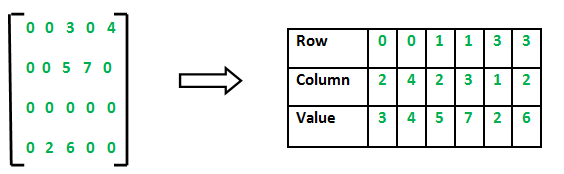
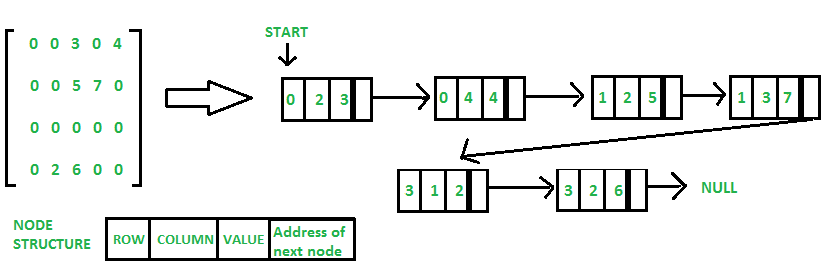 cursive viper
royal garden
Or can rooms occupy those space
cursive viper
royal garden
Or can rooms occupy those space
rooms will only occupy the spaces with values, with 1 being the main room in the center and 2 and 3 being exits from the level for each corresponding team, and 4-7 being values for other rooms
royal garden
cursive viper
damn is my approach that bad lol
I didnt start with multiplayer in the beginning, so I have no idea if it's a good thing
But I know the disadvantages of not starting with multiplayer
cursive viper
nah I meant my approach to generating the level was so bad that he could tell I was pretty new at programming
well Ive been doing it for a while Im just very slow to learn probably because Im too lazy
gaunt ice
if you are lazy to learn then our opinions wont help you much?
cursive viper
gaunt ice
if you are lazy to learn then our opinions wont help you much?
not really what I meant but ok
royal garden
Like this?
 cursive viper
royal garden
Like this?
cursive viper
royal garden
Like this?
yeah exactly
royal garden
or this
 eternal needle
cursive viper
damn is my approach that bad lol
eternal needle
cursive viper
damn is my approach that bad lol
In reality what you do for this grid wont really matter, however you want to store or generate it is fine. Even in your current way, itd be a decent amount of numbers to sync but it's just something youd sync once anyways. For your question, a lot of this depends on what your gameplay should look like. Like sure you can get this working, map the ints to some room. But theres a whole leap from "I have an int" to "I'll generate rooms, pathfind, add hallways"
cursive viper
no more like the other one
royal garden
okay
I guess it would be pretty easy then, each index in the array would be mapped to a certain space, and you can just loop through the array and place stuff in the corresponding space
eternal needle
I assume this is a 2d game as well
cursive viper
eternal needle
In reality what you do for this grid wont really matter, however you want to sto...
obviously, I mean it took me like 30 minutes to whip this up its not gonna turn into a game overnight lol especially with the multiplayer aspect, but I wanted to know if in you guys' opinion it'd be a good idea to continue with this approach or if I should scrap it
cursive viper
eternal needle
I assume this is a 2d game as well
no, but it will only have one floor so I think the process for creating the layout would be the same in 2d or 3d, just actually generating it would change
ivory bobcat
cursive viper
rooms will only occupy the spaces with values, with 1 being the main room in the...
As is, there's quite some gap in between - I'm assuming 0 would be considered the unoccupied spaces.
Maybe  some maze generation tutorials to avoid having unnecessary isolated rooms and non functional mazes (does not connect to the finish).
 cursive viper
ivory bobcat
As is, there's quite some gap in between - I'm assuming 0 would be considered th...
cursive viper
ivory bobcat
As is, there's quite some gap in between - I'm assuming 0 would be considered th...
well, yes this is a sample I used to show the concept, I can edit how many rooms generate. However the point of the game is to race against the enemy team to reach the middle "1" room and get the "flag" inside and bring it back to your team's exit. So it is beneficial for the gameplay to have lots of useless rooms to get lost in. However I want to put weapons or health items, maybe powerups in those rooms to not make it completely a waste of time visiting them
eternal needle
Yea definitely look at algorithms for generation before considering how you're gonna store these tbh.
And mapping an int to your room is fine, you just need to sync this once for multiplayer (assuming rooms dont change once generated) so it doesnt really matter what you do.
You can always profile later on if its sending too much data, then try to compress. Realistically you could compress a lot of the data since you probably only have a few room types
cursive viper
what do you mean store these?
cursive viper
oh right right
ivory bobcat
After you've designed or acquire the algorithm to generate the wanted pattern, should you then want to consider the data type to hold the information.
 stark girder
what is this error? and what caused it
 slender nymph
editor error likely related to having the animator or shader graph window open
ivory bobcat
stark girder
what is this error? and what caused it
It's likely a false positive. Often clearing the console window or rebooting will make it go away.
lavish gate
yall im back for help, I have an audiosource. when i click "play on awake" and spawn it makes the sound, but when i do audioSource.Play();, i hear no audio
ivory bobcat
lavish gate
yall im back for help, I have an audiosource. when i click "play on awake" and s...
Maybe it's to do with where you're calling play?
ivory bobcat
We're practically blind here without further code/context
lavish gate
Alright
    AudioClip audioClip;
    AudioSource audioSource;

    private void Awake()
    {
        audioSource = GetComponent<AudioSource>();
        audioSource.clip = audioClip;
    }
    void PlaySFX()
    {
        Debug.Log("Test");
        audioSource.Play();
}```That should be it
north kiln
lavish gate
yall im back for help, I have an audiosource. when i click "play on awake" and s...
Go through this resource and follow the links https://unity.huh.how/audio/silence/muted-audio let me know if it's not one of the answers if you figure it out
nocturne phoenix
i hate day 1 of learning anything
it just makes you so mad
i know it will get better but iam so annoyed on myself rn
lavish gate
north kiln
Go through this resource and follow the links https://unity.huh.how/audio/silenc...
Would you believe me if i said none
Nvm nvm
Its being destroyed too early
north kiln
lavish gate
Would you believe me if i said none
Well, let me know when you figure it out
Ah cool
lavish gate
yep, i read it. i just figured that it didnt matter because i could see the debug happen
ah crap shouldnt have done that
 cursive viper
eternal needle
Your current method of storing is in the 2d array
cursive viper
eternal needle
Your current method of storing is in the 2d array
ok so I messed with what I had so far and got this

ignore the terrain type mesh in the left thats unrealated
 split dragon
Hi. How to create a component using a script: "Text Mesh Pro - Test(UI)"? I tried to find it on the internet, but it only says how to access this component.
gaunt ice
you are not using the script but the namespace
cursive viper
but I was able to spawn cubes for every cell that had a value higher than 0 and then spawn them within 5 meters of each cell
so now Im going to replace the cubes with room prefabs according to their integer value
languid spire
split dragon
Hi. How to create a component using a script: "Text Mesh Pro - Test(UI)"? I trie...
AddComponent<TMP_Text>
split dragon
languid spire
AddComponent<TMP_Text>
Thanks
cursive viper
and then I was thinking of using something like the delaunay algorithm from this tutorial https://www.youtube.com/watch?v=rBY2Dzej03A to create paths in between every room

This video describes an algorithm for procedurally generating 2D and 3D dungeons.
Read the original blog post here: https://vazgriz.com/119/procedurally-generated-dungeons/
Github repo: https://github.com/vazgriz/DungeonGenerator
0:00 Intro
1:03 2D Algorithm
3:40 2D Dungeon Example
4:17 3D Algorithm
8:39 3D Dungeon Example
#gamedev #unity3d
and then just adding the hallways in between the rooms
north kiln
split dragon
Thanks
It's TextMeshProUGUI, iirc TMP_Text is the base for both versions
split dragon
Oh, oh. That's not how I explained my problem. I want to create this component right in the script. To change the settings of this component in the Inspector immediately. Screenshot of the example:


To have this component right in the script
languid spire
if you mean to embed another component within your Monobehaviour, that cannot be done
split dragon
languid spire
if you mean to embed another component within your Monobehaviour, that cannot be...
Sadly. Thanks
teal viper
It could be done with a custom editor😬
languid spire
you would still need to have the TMP_Text as a separate component though which would be very confusing
teal viper
Yeah
 long kestrel
using System.Collections;
using System.Collections.Generic;
using UnityEngine;
using UnityEngine.XR;

public class Fracture : MonoBehaviour
{
    public GameObject fractured;

    public static InputFeatureUsage<bool> triggerButton;  //this?

    // Update is called once per frame
    void Update()
    {
        if (triggerButton.  )  //y no work
        {
            Vector3 oldPos = transform.position;
            Instantiate(fractured, oldPos, Quaternion.identity);
        }

    }
}
how do i activate it when i use the vr controller trigger
using the openxr toolkit
idk why it's not working, and yes. i did check out the documentiation but i don't get it
languid spire
split dragon
Sadly. Thanks
Actually there is one thing you could try. Instead of your class inheriting from MonoBehaviour inherit from TextMeshProUGUI
you would still need a custom inspector though
 tight needle
The error I encounter:
ArgumentException: Input Axis Vertical is not setup.
slender nymph
do you have an input axis set up called Veritcal? also !code 👇
eternal falconBOT
Posting code
📃 Large Code Blocks
Use links to services like:
https://gdl.space/, https://paste.ofcode.org/, https://hatebin.com/, https://paste.myst.rs/, https://hastebin.com/
📃 Inline Code
Surround code with three backquotes. Not quotation marks.
To format as C#, add cs to the first line:
```cs
// Your code here
```
Add a comment with a line number if there is an error message.
slender nymph
oh and for future reference, you should copy/paste the errors instead of typing them out manually 😉
 slender nymph
right and do you have an input axis called Veritcal set up in your input manager?
slender nymph
project settings
tight needle
which tab?
 slender nymph
input manager . . .
slender nymph
yes
nocturne phoenix
using System.Collections;
using System.Collections.Generic;
using UnityEngine;

public class Aim : MonoBehaviour
{
    float yAxis;
    GameObject player = GameObject.Find("Player");
    float xAxis;
    [SerializeField] float Sens;


    // Start is called before the first frame update
    void Start()
    {
        Cursor.lockState = CursorLockMode.Locked;
    }

    // Update is called once per frame
    void Update()
    {
        Vector3 rotate;

        yAxis = Input.GetAxis("Mouse Y");
        xAxis = Input.GetAxis("Mouse X");

        rotate = new Vector3(yAxis, xAxis * Sens, 0);
        transform.eulerAngles = transform.eulerAngles - rotate;
        player.transform.Rotate(transform.eulerAngles);
    }
}
why does it not rotate the player
nocturne phoenix
there are no errors
like if i walk forward while looking sideways
it doesnt go sideways
slender nymph
nocturne phoenix
there are no errors
i don't believe that
nocturne phoenix
wait
is this error related to this script?
UnityException: Find is not allowed to be called from a MonoBehaviour constructor (or instance field initializer), call it in Awake or Start instead. Called from MonoBehaviour 'Aim'.
its this script
fuc
slender nymph
yes. and so are the NullReferenceExceptions you got as a result of that first one
slender nymph
because the null reference exception happens on the last line of your Update method
nocturne phoenix
ah
can i put the variable in update method
OH GOD
yeah
i shouldnt have done that
it fucked up bad
slender nymph
that's not a result of you getting the player object inside of Update. that's because your code is scuffed
slender nymph
player.transform.Rotate(transform.eulerAngles)
explain, using your own words, what you think this does
split dragon
languid spire
Actually there is one thing you could try. Instead of your class inheriting from...
Thanks
nocturne phoenix
slender nymph
`player.transform.Rotate(transform.eulerAngles)`
explain, using your own words, ...
i was messing around and i thought it rotates the player as much as the degree rotation in transform
slender nymph
yes, that is exactly what it does. each time you call it
nocturne phoenix
oh
what shall i do instead then
i need the player to rotate so the movement happens in the direction i am looking
slender nymph
i'd recommend watching a tutorials for this. there are literally hundreds that will cover what you are trying to do
nocturne phoenix
i have a question tho
what is the transform.eularAngles changing rotation of
because if not the player (which the script is attached to)
how is the camera moving
slender nymph
is the camera a child of the player
nocturne phoenix
yes
slender nymph
so if this component is attached to the player, it rotates the player which means the camera's rotation will change along with it because it is a child of the player. also if this is attached to the player, then why are you trying to find the player with GameObject.Find? transform refers to the player's transform
nocturne phoenix
so why does it like
not change player's move direction
if the player is being rotated anyways
slender nymph
probably because this code has nothing to do with moving the player
nocturne phoenix
thats another script
using System;
using System.Collections;
using System.Collections.Generic;
using Unity.VisualScripting;
using UnityEngine;

public class PlayerMovement : MonoBehaviour
{
    [SerializeField] int speed;
    Rigidbody rb;
    // Start is called before the first frame update
    void Start()
    {

        rb = GetComponent<Rigidbody>();

        speed = 5;

    }

    // Update is called once per frame
    void Update()

    {

        float verticalInput = Input.GetAxis("Vertical");
        float horizontalInput = Input.GetAxis("Horizontal");


        if (Input.GetButtonDown("Jump"))
        {
           rb.velocity = new Vector3(rb.velocity.x, speed, rb.velocity.z);
            Debug.Log("Jumped!");
        }

        rb.velocity = new Vector3(horizontalInput * speed, rb.velocity.y, verticalInput * speed);

    }
}
there you go, the rotation of the object is not going to affect how it moves based on this code. you need to create a Vector3 from your input and use transform.TransformDirection to turn that input from local space to world space since Rigidbody.velocity is in world space
nocturne phoenix
slender nymph
there you go, the rotation of the object is not going to affect how it moves bas...
whats local space and world space
that was written in docs too
slender nymph
you should do the beginner pathways on the unity !learn site so you can learn what you are actually doing
eternal falconBOT
:teacher: Unity Learn ↗
Over 750 hours of free live and on-demand learning content for all levels of experience!
nocturne phoenix
ig
ivory bobcat
nocturne phoenix
whats local space and world space
Just for clarity:
Local space would be the values relative to a parent.
World space would be the values relative to the world.
nocturne phoenix
ivory bobcat
Just for clarity:
Local space would be the values relative to a parent.
World sp...
oo
ivory bobcat
They can both yield the same values if there's no parent
nocturne phoenix
ivory bobcat
They can both yield the same values if there's no parent
ah
ivory bobcat
But normally what you'd see in the inspector would be the local values. If you equate all of the offsets done by parents and whatnot, the resulting value would then be the world space.
nocturne phoenix
ah
nocturne phoenix
ivory bobcat
But normally what you'd see in the inspector would be the local values. If you e...
wait so
does vector 3 use world space
or transform?
ivory bobcat
nocturne phoenix
does vector 3 use world space
Vector 3 is just a data type.
nocturne phoenix
i read the wiki a little and all i figured was it transforms from local space to world space
ivory bobcat
For instance, if there was an object (A) at (10, 0, 0) and it had a child (B) at (12, 0, 0):
- A would have a world position of (10, 0, 0) and a local position of (10, 0, 0).
- B would have a world position of (12, 0, 0) and a local position of (2, 0, 0).
The local position would be what you'd see in the inspector though.
In your case, you'd be working with directions instead and transforming the values from local to world.
The inverse function would do the opposite if you're wanting to convert something from world to local.
All of this information is of no use if you don't know why you're needing to do what you're doing though 
nocturne phoenix
ivory bobcat
All of this information is of no use if you don't know why you're needing to do ...
yesh ig
 stuck turret
Hi first time back to Unity in years so I’m super rusty. I’ve been following one of the millions of Minecraft clone terrain generator tutorials and in this particular tutorial they use a ScriptableObject which holds a heap of data in an array of texture locations to a tilemap. It works fine but it really doesnt seem scalable at all.
I have two questions regarding this-
- This system generates a mesh using two materials. Water and the default. Is it a bad idea to have a separate material for every single block type? I understand calculating uvs and loading shaders is costly and stacks up with multiple unique materials. But it really seems way more scalable long term.
- Is generating Materials programmatically costly? I want to make this easy as possible. My vision is to just have a folder full of images and some sort of data object to keep track of block types and texture mappings. Making an individual material for each item seems useless when the only thing changing is the texture. Is it a bad idea to generate it programmatically?
My main concern is having one gigantic tilemap for when I have 40+ blocks and want to avoid that
Apologies for the long question
radiant sail
can someone tell me why when i use "Application.targetFrameRate = fpsLimit;" it works in the unity editor but once i build the game and play it outside the unity editor it dosent work?
ivory bobcat
radiant sail
can someone tell me why when i use "Application.targetFrameRate = fpsLimit;"...
How are you determining that it isn't working?
radiant sail
ivory bobcat
How are you determining that it isn't working?
i have an fps slider that works completely fine in the unity editor but when i build the game it dosent do anything
ivory bobcat
radiant sail
i have an fps slider that works completely fine in the unity editor but when i b...
How are you verifying that it isn't doing anything?
radiant sail
ivory bobcat
How are you verifying that it isn't doing anything?
how can i verify it then? because it dosent have a console to debug anything
ivory bobcat
I'm not sure what you're asking. I'm asking you how you know it isn't working.
radiant sail
want a video?
ivory bobcat
Maybe you can just explain how you know it isn't working.
A video couldn't hurt though but without an explanation, we'll not know what to look for - what you've identified as it not working.
radiant sail
ivory bobcat
Looks like it's running faster than you're expecting.
Without code no one really knows though
radiant sail
using UnityEngine;
using UnityEngine.UI;
using System.Collections;
using System.Collections.Generic;
using TMPro;
public class FPSLimitSlider : MonoBehaviour
{
public Slider fpsSlider;
public TextMeshProUGUI fpsValueText;
public int defaultFPS = 60;
public int minFPS = 30;
public int maxFPS = 240;
public int currentFPS;
public void Start()
{
// Set the default value and initialize the slider
fpsSlider.minValue = minFPS;
fpsSlider.maxValue = maxFPS;
fpsSlider.value = defaultFPS;
// Display the default FPS value
UpdateFPSValueText();
// Listen to the slider value change event
fpsSlider.onValueChanged.AddListener(OnFPSValueChanged);
// Set the initial frame rate limit
OnFPSValueChanged(defaultFPS);
}
void OnFPSValueChanged(float value)
{
// Round the value to the nearest integer
int roundedValue = Mathf.RoundToInt(value);
currentFPS = roundedValue;
// Update the frame rate limit
SetFrameRateLimit(roundedValue);
// Display the selected FPS value
UpdateFPSValueText();
}
void UpdateFPSValueText()
{
fpsValueText.text = Mathf.RoundToInt(fpsSlider.value).ToString();
}
void SetFrameRateLimit(int fpsLimit)
{
Application.targetFrameRate = fpsLimit;
}
}``` verbal dome
Vsync could be messing with your targetframerate
 topaz mortar
I have a script that I can run from my editor (without the game running)
that pulls values from a .csv file and updates a list of scriptable object assets
It works fine, but on restarting unity all the values are back to their old ones
How do I make them persistent?
radiant sail
radiant sail
QualitySettings.vSyncCount = 0;
but this worked to fix my issue :)
split dragon
Hi. To access the Legacy text data in GetComponent<>(), you need to write "FontData". What should I write in GetComponent<>(), but already for TMP_Text?

 hexed granite
hello I need help please I made a script in python to develop a 2d game I made the script to make a character move up down right left but when I want to try on unity it doesn't work can't anyone tell me how to do it
using System.Collections;
using System.Collections.Generic;
using UnityEngine;
public class player : MonoBehaviour
{
// Start is called before the first frame update
void Start()
{ public float moveSpeed;
private bool isMoving;
private Vector2 input;
private void Uptade().
{
if (!isMoving)
{
input.x = Input.GetAxisRaw("Horizontal");
input.y = Input.GetAxisRaw("vertical");
if (input != Vector2.zero)
{
var targetPos = transform.positition;
targetPos.x += input.x;
targetPos.y += input.y;
StartCoroutine(Move(targetPos));
}
}
}
}
IEnumerator Move(Vector3 targetPos)
{
isMoving = true;
while (targetPos - transform.position).sqrMagnitude > Mathf.Epsilon)
{
transform.position = Vector3.MoveTowards(transform.position, targetPos, moveSpeed * Time.deltaTime);
yield return null;
}
transform.position = targetPos;
IsMoving = false;
}
```c keen dew
You still need to configure the IDE like you were already told
ivory bobcat
And Unity doesn't use python (relative to your comment about making a script in python)
hexed granite
but I'm not doing it, it's my first time I copied it from a tutorial
keen dew
copy it correctly
hexed granite
How
keen dew
by looking at the tutorial and typing with the keyboard
ivory bobcat
Ah, just realized this was a cross post #archived-code-general message
You need to configure your IDE.
It's required to get help here.
If it's configured, you ought to see a lot of squiggly red lines indicating invalid statements.
 warm sleet
Is there any difference between Physics.Raycast y Physics2D.Raycast applied to a 2D space?
 charred spoke
As far as I know one will work against regular colliders and the 2d version will work against the 2d version
Ie you cant hit a 2d collider with a Physics.Raycast and vice versa
buoyant knot
warm sleet
Is there any difference between Physics.Raycast y Physics2D.Raycast applied to ...
Completely different. The 2D and 3D physics systems are totally separate
the 2D physics system contains all Collider2D. The 3D physics system contains all Colliders. Physics2D.Raycast only queries 2D colliders. Physics.Raycast only queries 3D colliders. The two are totally separate.
radiant sail
hey, is there a simple way to get half of a value similar to how you can do "!=" for not equal to or "-Value" for reverse? i assumed it would be "/value" but that dosent work
keen dew
uh... / 2?
buoyant knot
or >> 1
gaunt ice
only for integer and "not work" if that integer <0
buoyant knot
depends on what he’s doing
 late bobcat
guys does anybody knows what that warning could be? https://gyazo.com/ec4b68f125cf5fac30c228077b863d27
 languid spire
generally, you changed a script whilst in Play mode
 dusty coral
wut
 late bobcat
languid spire
generally, you changed a script whilst in Play mode
late bobcat
languid spire
generally, you changed a script whilst in Play mode
oh i see
probably i didn't save right? @languid spire
because now i saved scripts in vs and it's not giving any warning
timber tide
dusty coral
wut
go back to the documentation
languid spire
dusty coral
wut
where do you see here
https://docs.unity3d.com/ScriptReference/Physics.Raycast.html
a signature that only takes a Vector3?
 timber tide
there's a bunch of overloads so scroll down the page
dusty coral
i dont get it
buoyant knot
late bobcat
guys does anybody knows what that warning could be? https://gyazo.com/ec4b68f125...
This usually happens when you change the name of a class/file, and the new class / file names don’t match, and that file is tied to something as a script
late bobcat
ye as steve said i probably changed script or didn't save it
dusty coral
ooh nvm
buoyant knot
you can usually change the script. The issue is usually with name
languid spire
If you are in play mode and you change, for example, the serialized varaibles of a script, you will get this warning. It goes away once you exit play mode
buoyant knot
languid spire
If you are in play mode and you change, for example, the serialized varaibles of...
that normally throws me a bunch of NRE
NRE as far as the eye can see
dusty coral
wot
 buoyant knot
range does not exist
languid spire
do you have a varialbe called range?
dusty coral
ah
buoyant knot
because it sounds like not
languid spire
dusty coral
ah
man, I think you need to !learn some basic c# and Unity
eternal falconBOT
:teacher: Unity Learn ↗
Over 750 hours of free live and on-demand learning content for all levels of experience!
late bobcat
https://gyazo.com/3ceab21e16804905b905ad827b287be5 I've a question. As you can see i'm trying to replicate "haxball" for those who know the game. My question right now is. I'd like the player to collide only with the ball but now with walls. Ball on the other hand, has to collide with both the player and the walls.

I'm super new to C# don't judge this piece of art 
languid spire
dont put a collider on the player?
late bobcat
But then he doesn't move the ball no?
languid spire
you said you dont want the ball and player to collide
late bobcat
nono, i want the player to collide with the ball only. Ball has to collide both with walls and players
Now it should be clearer
languid spire
make the wall colliders triggers and handle the collision with the ball yourself
 spark yoke
I think there are physics settings that configure which layers collide
I forget where, probably in project settings under physics or physics 2d
languid spire
good point, yes the layer matrix
spark yoke
Then just keep objects in the correct layer
late bobcat
mm i'll try and see tysm
languid spire
stuck palm
can you pass a method as a parameter?
timber tide
delegate
stuck palm
right
can you track when a coroutine is completed?
i want to do something like, when fade to black coroutine is completed, complete certain task
late bobcat
languid spire
https://docs.unity3d.com/Manual/LayerBasedCollision.html
It worked, tysm 🙏
ty to @spark yoke too
dusty coral
how to find the game object that the ray hit?
 timber tide
that's what you can access from the hit
remember, if it's a gameobject it also has some sort of transform
https://docs.unity3d.com/ScriptReference/Transform.html
And if you go to Transform, you'll notice you can access a gameObject property
 shrewd swift
stuck palm
can you track when a coroutine is completed?
shrewd swift
stuck palm
can you track when a coroutine is completed?
no, use a callback or a variable declared outside the coroutine
stuck palm
shrewd swift
no, use a callback or a variable declared outside the coroutine
how do u use a callback?
stuck palm
aight thanks :)
dusty coral
why does he get stuck mid animation?

 timber tide
something along the lines of not setting up your animator correctly
dusty coral
its the code for sure
timber tide
and then doing some weirdness with your positioning while you should just let the animator do it
dusty coral
i had to retype the code and i broke something
it was working fine until visual studio crashed and i lost the code
 radiant glen
I am getting this error after following a tutorial on getting a enemy to patrol, anyone have an idea?

 gaunt ice
!ide
eternal falconBOT
💡 IDE Configuration
If your IDE is not autocompleting code
or underlining errors, please configure it.
Select one:
• Visual Studio (Installed via Unity Hub)
• Visual Studio (Installed manually)
• VS Code
• JetBrains Rider
• Other/None
languid spire
) in the wrong place, twice
radiant glen
Thank you!


 silk night
dusty coral
the sword gets parented properly now but it only lets me swing once
silk night
dusty coral
the sword gets parented properly now but it only lets me swing once
Please debug.log the timers in this case as it is the most likely error source

 wintry quarry
dusty coral
y is the number so big the cooldown is only 6
wintry quarry
dusty coral
y is the number so big the cooldown is only 6
because you're doing Time.time + swingcooldown
wintry quarry
dusty coral
the sword gets parented properly now but it only lets me swing once
btw this looks like you should be using a Trigger for isswinging
not a bool
and you only need to set the trigger, not unset it.
dusty coral
oh yea
 zinc osprey
Hello everybody. I'm having problems with objects stuttering when I move around. I've read forums and it seems to be a common issue but none of the solutions work for me.
Do any of you have an idea what might be the issue?
https://www.youtube.com/watch?v=84sYt9zuM_U


 rich adder
zinc osprey
Hello everybody. I'm having problems with objects stuttering when I move around....
rich adder
zinc osprey
Hello everybody. I'm having problems with objects stuttering when I move around....
btw dont multiply your mouse with Time.deltaTime
languid spire
Dont use AddForce in update. Also rotate the player rigidbody not the transform
zinc osprey
Ok I need to learn how to use MoveRotation, but it seems to have worked.
buoyant knot
deltaTime has units of seconds. So now your mouseX has units of seconds. And then rot += mouseX has units of seconds instead of degrees
zinc osprey
It works, thanks everybody.
dusty coral
why

 sage mirage
Hey, guys! I have a problem that I can't solve already 2-3 days. I have made a GameOver screen and I want to enable pause menu screen whenever the game is not over with an escape button but when it is over to not interact with that button and not set the pause menu screen to active. I think I have everything fine in code, but I just don't know what is happening maybe I set a bool to a value that is not appropriate?
Here I give the input for my pause menu screen, I have tried to put debug messages to break the problem to subproblem:
{
    Debug.Log("Game is over: " + gameIsOver);

    if (!gameIsOver)
    {
        if (Input.GetKeyDown(KeyCode.Escape))
        {
            if (pauseIsActive)
            {
                pauseIsActive = false;
                pauseMenuScreen.SetActive(false);
                audioManager.mainGameMusicAudioSource.UnPause();
                audioManager.PressButtonSound();
                Time.timeScale = 1f;
                Debug.Log("Pause menu screen is disabled after delay!");
            }

            else
            {
                pauseIsActive = true;
                pauseMenuScreen.SetActive(true);
                audioManager.mainGameMusicAudioSource.Pause();
                audioManager.PressButtonSound();
                Time.timeScale = 0f;
                Debug.Log("Pause menu screen is enabled after delay!");
            }
        }
    }
}```First thing I would do is make a game manager with enum representing gameState
polar acorn
sage mirage
Hey, guys! I have a problem that I can't solve already 2-3 days. I have made a G...
Okay that was like, a septuple negative. Can you rephrase what you're trying to happen in a few more sentences
sage mirage
polar acorn
Okay that was like, a septuple negative. Can you rephrase what you're trying to ...
I thought I was clear XD
 trail fox
it is for me
sage mirage
I want to interact with the escape button whenever the game is not over and not interact with that button to open the pause menu screen when the game is over. Is that better?
@polar acorn
rich adder
still think my suggestion would help ya
trail fox
agreed
sage mirage
So, I have to make enum and add there the game states?
rich adder
if you press escape in the Game state then you cannot possibly trigger the one in GameOver state
etc
polar acorn
sage mirage
I want to interact with the escape button whenever the game is not over and not ...
So, escape opens menu, but when game is over, it should not open that menu
sage mirage
polar acorn
So, escape opens menu, but when game is over, it should _not_ open that menu
Yeah!
 cosmic quail
or just if player == dead then dont open the menu, thats also possible
but having game states looks better
sage mirage
rich adder
if you press escape in the `Game` state then you cannot possibly trigger the one...
Can you show me an example if it's not a hassle?
rich adder
so many bools can be solved with enum 🤷♂️
rich adder
sage mirage
Can you show me an example if it's not a hassle?
for example your gamestate has different states (enum)
based on which state you're in , Esc key does different things
in gamemode it pauses, in gameover does whatever, and so forth
i can give you a quick example for code ill hop on my pc rq
cosmic quail
and the gamestate is preferably inside a singleton right?
rich adder
in the beginning esp sure thats a good place
generally only my gamestate manager can change itself
it listens to particular events but that gets complex quick
so a switch statement would do here in a singleton
cosmic quail
rich adder
in the beginning esp sure thats a good place
only in the beginning? where do you put it afterwards
rich adder
cosmic quail
only in the beginning? where do you put it afterwards
depends entirely on the project tbh.
Sometimes I make them scriptable objects
and the states grow within the game for example
polar acorn
sage mirage
Yeah!
Okay, yeah, sorry. I'm incredibly undercaffeinated right now but it looks like Nav has you covered on a solution
cosmic quail
oh, interesting
 crisp gate
guys halp why doesnt this work? :<
 polar acorn
crisp gate
guys halp why doesnt this work? :<
polar acorn
crisp gate
guys halp why doesnt this work? :<
What doesn't work
crisp gate
i tried so many different methods but none of em work
crisp gate
polar acorn
What doesn't work
can i stream?
polar acorn
crisp gate
can i stream?
no
 verbal dome
Any errors in console?
polar acorn
crisp gate
the enemy health and speed isnt changing
Probably integer division. Cast the divisor and quotient to float before dividing or it'll get rounded to the nearest int
sage mirage
@rich adder I have watched some tutorials in working with Game States and it seems to be very handy and easy to control every state of your game. Cool thanks for the idea!
trail fox
how do i fix this im trying to keep the weapon on a point on the screen and not go up and down so much
crisp gate
polar acorn
Probably integer division. Cast the divisor and quotient to float before dividin...
like dat?
 rich adder
sage mirage
Can you show me an example if it's not a hassle?
rich adder
sage mirage
Can you show me an example if it's not a hassle?
  private void Update()
  {
      if(Input.GetKeyDown(KeyCode.Escape))
      {
          switch (gameState)
          {
              case GameState.Playing:
                  SetState(GameState.Pause);
                  break;
              case GameState.Pause:
                  SetState(GameState.Playing);
                  break;
          }
      }
  }````
Just a small exampleYeah try that
crisp gate
polar acorn
Yeah try that
thank u i shall die for u
polar acorn
crisp gate
WHAT
If you divide an integer by an integer, the result is also cast as an integer, meaning the decimals get rounded. Your fraction was never high enough to reach the next whole number, so it just kept generating the same result
crisp gate
ahhh
dusty coral
i get this error when my ray hits the enemy
 polar acorn
dusty coral
i get this error when my ray hits the enemy
polar acorn
dusty coral
i get this error when my ray hits the enemy
Something on that line is null but you're trying to use it anyway
 rich adder
you're accessing transform without checking if ray hit
therefore can be null aka hit not have a transform to acces .name
Raycast returns a bool
 solemn summit
Yeah, turn your raycast into an If statement and put anything you want it to do in there
polar acorn
dusty coral
What did you expect to happen there if your ray hits nothing
rich adder
dusty coral
but it is hitting something
clearly its not at some points..
computer don't lie
sage mirage
@rich adder Hey! I have a question for Game States. Now, that I am going to use those Game States they will act as bools before?
dusty coral
everytime i look at the husk it gives the error 🤣
 sage mirage
So, I have actually to get rid of the bool variables that I have declared?
polar acorn
dusty coral
but it is hitting something
How do you know
rich adder
sage mirage
So, I have actually to get rid of the bool variables that I have declared?
you can cleanup most of the bools
 neon ivy
if I want to charge a jump like in jumpking, should I increase the jump force in update or fixed update?
rich adder
if you want a respnsive charge force in Update
 dusky bay
rich adder
if you want a respnsive charge force in Update
dusky bay
rich adder
if you want a respnsive charge force in Update
ur dms were closed but just wanted to let u know the door worked in the end. thx for u help.