#💻┃code-beginner
1 messages · Page 154 of 1
 short hazel
 rich adder
did you read about Large Code Blocks
rich adder
yes
 normal smelt
yeaa, so as i said i get this error everytime
rich adder
which error? i missed that
normal smelt
is the "not loaded"/"is loading" an error?
rich adder
maybe, I never seen it .
do you have actual errors in console ?
normal smelt
no there is no errors, but its takes way too longer to load scenes
rich adder
normal smelt
no there is no errors, but its takes way too longer to load scenes
is the loading working tho or just hangs?
normal smelt
the loading is working but for example is make other script not working properly during the loading
like, cinemachine confiner2D not working during the loading
 vernal minnow
is there a way to move the camera relative to the player? so that if the player is so far a certain way, camera moves to show more of a map? currently ive only gotten it to move with the player directly or only the camera moving
normal smelt
no the camera just ignore bounds
and after the loading is finished, everything become norlam
 vale karma
i think cinemachine can help
add your player to the follow target part of the cinemachine component
normal smelt
vale karma
add your player to the follow target part of the cinemachine component
thats what i just, i just say that the confiner2d is like disabled during the loading
and thats why i want to get rid of the "not loaded" "is loading" bug
vernal minnow
vale karma
add your player to the follow target part of the cinemachine component
ill try it, i was honestly hoping that i could run code similar to my enemy follow and just using the x position of the player but i have no idea how to limit how far the object can go...
vale karma
theres a ton of features that allow what your lookin for, a simple tutorial about the cinemachine would help too. I mainly do 2D rn tho
vernal minnow
im using 2d so if cinemachine would work, then thx man
normal smelt
so can anyone help me?
vernal minnow
not loaded/not loading error?
normal smelt
yea
 swift crag
vernal minnow
why is your scene dont destroy on load?
swift crag
vernal minnow
why is your scene dont destroy on load?
DontDestroyOnLoad moves an object into the "DontDestroyOnLoad" scene.
vernal minnow
i am, im guessing ya are reffering to the not loaded scene
vernal minnow
swift crag
`DontDestroyOnLoad` moves an object into the "DontDestroyOnLoad" scene.
oh
swift crag
the scene is special: it's never unloaded
vernal minnow
swift crag
the scene is special: it's never unloaded
so i can use it on a game controller then?
interesting
swift crag
That's one application, yes.
I load a few singletons into that scene when my game starts
game controller, main menu...
vernal minnow
stupid question, but did you try opening the nonloaded scene?@normal smelt
normal smelt
huh no but i will try
ok its just freeze the editor during the loading so i can't open it
vernal minnow
hmn...
 limpid shoal
I have a problem, I made a script so that whenever my enemy square touches the red lava or dies it destroies the enemy game object so that it is gone, and when it dies for some reason this error spams my console. Idk what I added or didnt add to my script that it happens so yeah. Could someone help, thank you!


 rich adder
limpid shoal
I have a problem, I made a script so that whenever my enemy square touches the r...
rich adder
limpid shoal
I have a problem, I made a script so that whenever my enemy square touches the r...
first things !ide
 eternal falconBOT

💡 IDE Configuration
If your IDE is not autocompleting code
or underlining errors, please configure it.
Select one:
• Visual Studio (Installed via Unity Hub)
• Visual Studio (Installed manually)
• VS Code
• JetBrains Rider
• Other/None
limpid shoal
ik
limpid shoal
rich adder
you seem to be destroying the same thing over and over
oh
vernal minnow
i have a similar error where a script checks for an object even after it is destroyed
 eternal needle
vernal minnow
<@700633437576495135> first collapse the console
eternal needle
vernal minnow
<@700633437576495135> first collapse the console
Dont collapse the console if you want to actually debug what's happening.
You should turn on error pause though
 true pasture
how do I use transform.forward if im reading a vector3. Not sure how to combine the information (so i can move accounting for rotation)
 vernal minnow
he could replace the object after it is destroyed in a new location if the object needs to be out of the players way or return it to where it was
rich adder
true pasture
how do I use transform.forward if im reading a vector3. Not sure how to combine ...
transform.forward * myDirection.y * speed * time.deltaTime
vale karma
im getting an error randomly saying i cannot reparent window to suggested parent. Window will not automatically close. So i the issue is i am trying to click on the text input field of a button and its not letting me
nvmd reloaded scene and fixed it
 winter prawn
true pasture
how do I use transform.forward if im reading a vector3. Not sure how to combine ...
winter prawn
true pasture
how do I use transform.forward if im reading a vector3. Not sure how to combine ...
Transform.forward moves on the Z axis so it moves in the direction the object is facing
eternal needle
true pasture
how do I use transform.forward if im reading a vector3. Not sure how to combine ...
is this what you want?
https://docs.unity3d.com/ScriptReference/Transform.TransformDirection.html
You could also multiply the transform.rotation * yourVector. Quaternion * vector3.
This will rotate the vector
true pasture
eternal needle
is this what you want?
<https://docs.unity3d.com/ScriptReference/Transform.Trans...
i dont know, the docs aren't helping. Would that do something that accounts for rotation?
like I don't understand what the docs say that does
 rocky canyon
it deals with world vs local space
eternal needle
true pasture
i dont know, the docs aren't helping. Would that do something that accounts for ...
Right now your direction is just in local space, you want it in world space
true pasture
okay and world space accounts for rotation youre saying
i still dont understand what the function does. Does it return something?
rich adder
I think what i sent should work
transform.forward * myDirection.y * speed * Time.deltaTime
true pasture
rich adder
`transform.forward * myDirection.y * speed * Time.deltaTime `
why am i multiplying by the y value?
eternal needle
Yea it returns the vector in world space. Or just do the other equation I sent and rotate the vector. This will have the same affect
rocky canyon
the signature tells ya everything..
 rich adder
true pasture
why am i multiplying by the y value?
rich adder
true pasture
why am i multiplying by the y value?
you want W/A keys ? moving forward back?
rocky canyon
it takes in a vector3 and spits out a vector3
 sullen zealot
hello!
why is this always logging the size of the array instead of the index of the button in the array?

 paper rover
Hey everyone, i have gc allocation each frame from my camera, even though i deleted all other cameras. why is this happening?
rich adder
true pasture
why am i multiplying by the y value?
Your inputs seems to be a vector3
swift crag
true pasture
like I don't understand what the docs say that does
imagine pointing forwards. no matter how your body is rotated, you'll always move your arm in the same way, right?
but, to an outside observer, the direction your arm is pointing depends on how your body is rotated
eternal needle
rich adder
`transform.forward * myDirection.y * speed * Time.deltaTime `
This wont work for sideways movement and then to account for that you have to add the transform.right * blah. It's much more concise to just rotate the vector
swift crag
TransformDirection converts from your point of view to the world's point of view.
 languid spire
sullen zealot
hello!
why is this always logging the size of the array instead of the index of ...
languid spire
sullen zealot
hello!
why is this always logging the size of the array instead of the index of ...
thats the way lambdas work. make a local variable for nr in the loop
rocky canyon
North is always North.. thats world but if u think of ur facing direction as being north no matter how your facing thats local
swift crag
sullen zealot
hello!
why is this always logging the size of the array instead of the index of ...
You are capturing the nr variable in each of those anonymous functions.
rich adder
eternal needle
This wont work for sideways movement and then to account for that you have to ad...
good point
swift crag
It's a common error. As Steve said, you can fix this by creating a new local variable inside of the loop that you assign nr to
and then capturing that variable
eternal needle
sullen zealot
hello!
why is this always logging the size of the array instead of the index of ...
The term for this is "closure" as well
swift crag
the function itself, plus references to any in-scope variables the function uses!
sullen zealot
it worked thanks
 eternal needle
paper rover
Hey everyone, i have gc allocation each frame from my camera, even though i dele...
eternal needle
paper rover
Hey everyone, i have gc allocation each frame from my camera, even though i dele...
Use the deep profiler to see what is actually allocating, there is no way to help based on this information. How do you know it is the camera allocating?
true pasture
I guess I dont understand how to call it. I can't just call TransformDirection as a function. I have to have a transform.TransformDirection(myDirection) but what transform do I use?
if it returns a vector why does it need to be called that way?
swift crag
true pasture
if it returns a vector why does it need to be called that way?
I don't understand what you mean by this.
TransformDirection is a method on Transform.
normal smelt
i guess its a dead end for my game...
swift crag
It uses the position, rotation, and scale of the transform to decide how to convert from the transform's local space to world space.
It takes in a direction and returns a direction.
eternal needle
true pasture
I guess I dont understand how to call it. I can't just call TransformDirection a...
It has to use the transforms rotation to know where the world space direction would point. You use the transform you are moving
swift crag
A direction is represented as a Vector3.
Vector3 worldVec = transform.TransformDirection(localVec);
okay that makes sense
swift crag
swift crag
It uses the position, rotation, and scale of the transform to decide how to conv...
(well, actually, TransformDirection only cares about the rotation (: )
 rugged aspen
Hey, I have a gameobject with 2 components
One is the logic component and the second is the rendering component
On the renderer's Awake I initialize a variable as the first component by using board = GetComponent<Board>(); and I do get the object
Then I added a OnPointerMove event but on the first frame of the game, the board is null.
Does anyone know why this happens?
swift crag
make sure the error is coming from the component you think it's coming from
after the error is thrown, click once on the error in the console. this will take you to the object that caused the error.
rugged aspen
Ah thanks, it's not the first component lol
true pasture
okay thanks guys that cleared it up and its working.
eternal needle
paper rover
Hey everyone, i have gc allocation each frame from my camera, even though i dele...
You also dont need to dm me for help. Read the rules, and keep the conversation in here
paper rover
apologies

im just trying to figure out why this is causing gc alloc. I have only one camera in the scene
swift crag
i don't think having multiple cameras would be very relevant
eternal needle
from seeing online, apparently this was an issue with multiple cameras at one point a year ago
swift crag
ah
eternal needle
maybe depends on the version you're on?
paper rover
id read up on this issue before and it says it happens with multiple cameras
short hazel
A string is created to store the render target's name. It's 184 bytes and very negligible
Why do you even worry about that
swift crag
I could believe that, with several cameras, they'd need to pick different render targets or something
paper rover
yeah maybe, but even after deleting the extra cameras its still causing gc alloc
eternal needle
hm they said this was every frame
swift crag
short hazel
A string is created to store the render target's name. It's 184 bytes and very n...
well, unity is usually pretty conservative with allocations, so it is weird to see

profiler from my HDRP game
paper rover
hm. thats what i would expect from my URP project
but for some reason its 470B lol
every ~15 seconds my game would force garbage collect
and freeze up
eternal needle
do you have incremental gc on? mine wasnt on by default but that should fix the freezing
swift crag
uh oh

my game controller is creating 5KB of garbage per frame. oops.
I had a very weird problem: on the Steam Deck, IMGUI text didn't work
paper rover
i do have incremental gc on, but wouldnt everything get messed up if i dont?
swift crag
apparently the default font asset was busted on linux for some reason
my solution was to set GUI.skin.font = font; (amongst other things) in OnGUI every frame
i...think i'll make that happen once
swift crag
paper rover
i do have incremental gc on, but wouldnt everything get messed up if i dont?
Incremental GC can help smooth out GC pauses
It does have a bit of a performance impact, iirc
paper rover
maybe i can manually set GC times, i can try that out
eternal needle
it does really help against those freezes, im surprised you have them with it turned on
paper rover
where in unity do i turn off incremental gc?
eternal needle
paper rover
where in unity do i turn off incremental gc?
i wasnt saying turn it off, but its under Player in Project settings
paper rover
ah, i think i can manually turn it off and on during runtime too
eternal needle
i dont think thats something you would want to do if you can
You might need to profile more to see whats really causing the issue. if you have it on, you shouldnt be getting freezes like that
paper rover
ill look into it more. i appreciate the insight
 tacit estuary
Yep that would be correct
 lusty girder
Would anyone know why my gwh.WaterHeightAtPosition(floaters[i].position); in https://pastebin.com/gqgzUiyf keeps returning 0 instead of returning different values based on floaters[i].position?
Other script: https://pastebin.com/S74k33Li public float WaterHeightAtPosition(Vector3 position) is the block of interest there
 frosty hound
Probably because your raycast to determine the wave height isn't hitting anything. Or the position you have your water plane is 0.
And seeing as you're making water/waves, it's probably important to mention that displacing the vertices to make waves will not physically move the mesh, it's just visual.
 sharp wyvern
^ assuming your using a vertex-displacement shader to make the waves, I agree. If not, tell us more about the water/waves mesh- esp. does it have a collider? what kind? @lusty girder
 noble axle
Guys I imported a fbx model from sketchfab and it doesn't come with any textures and is just a plain grey color,
im a beginner so i dont know how to give my model colors
rich adder
noble axle
Guys I imported a fbx model from sketchfab and it doesn't come with any textures...
not a code question.
You extract the material and the sketchfab FBX usually come with texture so just apply that to material.
#🔀┃art-asset-workflow
noble axle
oh okay sorry and thank you for the info
vale karma
Im trying to make a point light not light up the inside of a wall. I want it just to affect the ground and ceiling for shadows
I see a shadow component but its not doing anything at 1 intensity
swift crag
You may be able to use Light Layers to control which renderers are affected by the light.
What render pipeline are you using, and is this 2D or 3D?
vale karma
URP 2d
swift crag
ah, I'm not familiar with the 2D renderer, if you're using that
vale karma
yea brackeys vid is 4 years old
 fast compass
Hello, can someone help me on a call with a interactive game, because after pressing play button the scene is black
thank you so much
normal smelt
guys does anyone even know how to fix "not loaded" "is loading" error? even chat gpt or unity forum doesn't know
like pls
 potent nymph
is there a way to set a default value for an optional Vector3 parameter?

 brave compass
potent nymph
is there a way to set a default value for an optional Vector3 parameter?
brave compass
potent nymph
is there a way to set a default value for an optional Vector3 parameter?
You can use default, which is shorthand for default(Vector3).
But that's only if you're fine with all zeros
 tawdry totem
it refuses to load properly


 undone rampart
tawdry totem
it refuses to load properly
undone rampart
tawdry totem
it refuses to load properly
include the file extension
tawdry totem
undone rampart
include the file extension
on the code?
 shell sorrel
you are loading a sprite, the stuff you show in resources looks like prefabs
tawdry totem
shell sorrel
you are loading a sprite, the stuff you show in resources looks like prefabs
so instead of saying <sprite> i call for a prefab? or do i change prefab to sprite?
undone rampart
tawdry totem
so instead of saying <sprite> i call for a prefab? or do i change prefab to spri...
preferably change the prefab to sprite
tawdry totem
undone rampart
preferably change the prefab to sprite
ok ill try
swift crag
You can load a prefab by the type of any component that's on the root of the prefab.
shell sorrel
swift crag
You can load a prefab by the type of any component that's on the root of the pre...
not with a sprite though since a sprite is a asset type not component
swift crag
Right.
So you could load it as a GameObject (that's what the prefab actually is), as a Transform (because every game object has a transform), or as any component on the root object.
You could not load a Sprite because that's not a component type.
If you want to load a Sprite, you must put sprite assets in the Resources folder, rather than prefabs that happen to use the sprites
this prefab uses a mesh, but it's not literally a Mesh
 rocky canyon
wouldnt u need to snapshot the prefab to create a texture from it
tawdry totem
swift crag
You could not load a `Sprite` because that's not a component type.
i tryed this way but it cloned the icons on the play area
how do i put the here properly?
swift crag
tawdry totem
i tryed this way but it cloned the icons on the play area
So you want to instantiate a copy of these prefabs?
 tawdry totem
swift crag
So you want to instantiate a copy of these prefabs?
tawdry totem
swift crag
So you want to instantiate a copy of these prefabs?
yeah basicly
swift crag
in that case, GameObject would be a valid type to load them as.
If you actually care about the components on the prefabs, use something more specific.
but if you're literally just creating a copy and sticking it on the screen, GameObject is fine
I think it would be better to just load a Sprite and display that in your UI, though.
rather than creating a whole new object that shows a sprite
rocky canyon
^ i was gonna say why is this so complicated
weapon -> sprite that goes with weapon
etc
 low drum
can someone help me im having an issue with my code ?
rocky canyon
dont ask to ask
swift crag
just ask (:
low drum
oh excuse me, its just that i just set the animation for my sprite and when i do that i can't even move it just play the animation
rocky canyon
u want to use a parent container to move around the object,
- the animation happens on its own object within the parent container..
- you move around the root object (the parent container)
- the graphics will follow along and animate within its own container
low drum
excuse me but i don't really understand.. what do i have to do ?
 steep thistle
how would i call another script from another? for example, I want to call Connect(); on onCollisionEnter(); but Connect(); is in another script. How would I gain access to this?
vale karma
@Fen found it, its a Shadow script you need to add to your objects and then check shadow on the light.
swift crag
low drum
oh excuse me, its just that i just set the animation for my sprite and when i do...
a sprite animation will not make the game object move around
you have to move the object yourself
rocky canyon
low drum
excuse me but i don't really understand.. what do i have to do ?
your animation is Nested within a different object.. that way the animation doesn't affect the outer object at all..
 fast moon
My player glitches through objects can someone have a look at my code
rocky canyon
you move that outer object around (using code or w/e) and the animation just follows along
fast moon
fast moon
My player glitches through objects can someone have a look at my code
using System;
using System.Collections;
using System.Collections.Generic;
using UnityEngine;
using UnityEngine.UIElements;

public class Player : MonoBehaviour
{
    Vector3 velocity;
    public float speed = 6;

     Rigidbody myRigidBody;
    // Start is called before the first frame update
    void Start()
    {
        myRigidBody = GetComponent<Rigidbody>();
    }

    // Update is called once per frame
    void Update()
    {
        Vector3 input = new Vector3(Input.GetAxisRaw("Horizontal"), 0, Input.GetAxisRaw("Vertical"));
        Vector3 direction = input.normalized;
        velocity = direction * speed;
    }

    private void FixedUpdate()
    {
        myRigidBody.position += velocity * Time.deltaTime;
    }
}
this should be the same as from Sebastian Lague tho it doesnt seem to work
 rose galleon
hey, anyone knows what this means? "Assets\Scripts\MC_Movement.cs(39,10): warning CS8321: The local function 'OnCollisionEnter2D' is declared but never used"
Heres the code:
void OnCollisionEnter2D(Collision2D collision)
{
if(collision.gameObject.layer == 6)
{
Debug.Log("Passou");
}
}
shell sorrel
rose galleon
hey, anyone knows what this means? "Assets\Scripts\MC_Movement.cs(39,10): warnin...
you declared a function inside a other function
short hazel
rose galleon
hey, anyone knows what this means? "Assets\Scripts\MC_Movement.cs(39,10): warnin...
This method is inside another one! "local function". Take it out
low drum
rocky canyon
you move that outer object around (using code or w/e) and the animation just fol...
no i think you misundertand (or its me) the problem is the object its the player i can move the player with arrows key when i launch the game but when i set up his animation when i click on the arrow its just play the animation and doesnt move anymore its like the code program for he can walk has been deleted
short hazel
Adjust the { } so they're correct
rocky canyon
low drum
no i think you misundertand (or its me) the problem is the object its the player...
ya, thats what im saying.. dont move ur character
move an object around the character
the character animates on its own object, u move the parent... the character then has to follow even if it is animating..
rose galleon
short hazel
Adjust the `{ }` so they're correct
oh, I forgot to close the update brackets, thanks
rocky canyon
and another thing.. if u want to move the character with code.. like ur script.. u need to make sure that Root Motion is turned off
Root motion means that the animation controls the movement.. it will override ur movement code
low drum
rocky canyon
ya, thats what im saying.. dont move ur character
oh sorry im french and im not easy with english, but i think i see what you mean
low drum
rocky canyon
and another thing.. if u want to move the character with code.. like ur script.....
where can i turn off on the component ?
rocky canyon

In this video I look at what Root Motion is, how it works, and whether or not you should consider using it for your game.
I also demonstrate how i've set up my own rig to animate for Root Motion in Blender, as this is something I have found very little information on online and thought others might find it helpful.
If you want to find out more...
check out this video, should show u where it is.. and why/what it does what it does
low drum
rocky canyon
check out this video, should show u where it is.. and why/what it does what it d...
ok thank you
rocky canyon
low drum
ok thank you
basically this is the difference..
most game animations are done the first way..
- the character is actually animating (in place)
- then you move the parent around
when these are combined it makes it appear the character is actually walking.
if you use root motion
- the animation actually controls the movement
- your script will be overwritten by the root motion
swift crag
i'm trying to use root motion for all movement at the moment
it's a pain in the arse to get it feeling good lol
rocky canyon
swift crag
i'm trying to use root motion for all movement at the moment
oof, i feel ya pain
low drum
rocky canyon
basically this is the difference..
thank you very much
rocky canyon
swift crag
i'm trying to use root motion for all movement at the moment
why?
whats the advantage to that?
rocky canyon
i would actually guess the opposite..
when you move with scripting, you can get better/ accurate feeling..
swift crag
rocky canyon
i would actually guess the opposite..
as in, the movement matches the animation
but yes, it's relatively clunky feeling
rocky canyon
only the animation may not match the movement as well
if ur trying to get the visuals looking the best.. i guess root motion is the way to go tho
swift crag
swift crag
I might try a motion matching package. That'll be fun
You give it a big pile of mocap data and ask it to find a part that best matches your current movement
rocky canyon
ya, i see what ur saying
swift crag
instead of having small clips that you explicitly blend between
rocky canyon
i prefer having that finite control, even if my animations dont match exactly
but again "arcade" prefix 😈 lol
rocky canyon
swift crag
You give it a big pile of mocap data and ask it to find a part that best matches...
have you seen that GDC talk about procedural animations?

In this 2014 GDC session, indie developer David Rosen explains how to use simple procedural techniques to achieve interactive and fluid animations using very few key frames, with examples from indie games like Overgrowth, Receiver and Black Shades.
GDC talks cover a range of developmental topics including game design, programming, audio, visual...
guy literally uses singular frames to interpolate between and make some really good looking animations
swift crag
haven't seen that one, no!
rocky canyon
its interesting, i havent been able to use it for anything myself.. but the premise is just cool to know about
 open sierra
what's the difference?
 rocky canyon
open sierra
what's the difference?
rocky canyon
open sierra
what's the difference?

Stack Overflow
What is the difference between doing
transform.Translate(offset);
and
transform.position += offset;
Is there any smoothing or stuff in the background that the method is doing or is it just
public...


 honest haven
hello i was speaking earlier about Singletons is this a better verion of loading them ```public class EssentialsLoader : MonoBehaviour
{
// Assign your player prefab, camera prefab, and Cinemachine prefab in the Unity Editor
public GameObject playerPrefab;
public GameObject CinemachineFreeLook;
public GameObject gameManger;
private void Awake()
{
    if(PlayerController.instance == null)
    {
        PlayerController.instance = Instantiate(playerPrefab).GetComponent<PlayerController>();
    }

    if (GameManager.instance == null)
    {
        GameManager.instance = Instantiate(gameManger).GetComponent<GameManager>();
    }

    if (CheckCameraTargets.instance == null)
    {
        CheckCameraTargets.instance = Instantiate(CinemachineFreeLook).GetComponent<CheckCameraTargets>();
    }
}
}```
using System.Collections;
using System.Collections.Generic;
using UnityEngine;
using UnityEngine.SceneManagement;

public class CheckCameraTargets : MonoBehaviour
{
    public static CheckCameraTargets instance;

    void OnEnable()
    {
        Debug.Log("OnEnable called");
        SceneManager.sceneLoaded += OnSceneLoaded;
    }
    private void Awake()
    {
        // Ensure there is only one instance of the GameManager
        if (instance == null)
        {
            instance = this;
            DontDestroyOnLoad(gameObject); // Keep the GameManager when loading new scenes
        }
        else
        {
            // If an instance already exists, destroy this one
            Destroy(gameObject);
        }
    }

    void OnSceneLoaded(Scene scene, LoadSceneMode mode)
    {
        Cinemachine.CinemachineFreeLook freeLookCamera = GetComponent<Cinemachine.CinemachineFreeLook>();

        // Check if the Follow target is null
        if (freeLookCamera.Follow == null && PlayerController.instance.transform != null)
        {
            freeLookCamera.Follow = PlayerController.instance.transform;
        }

        // Check if the LookAt target is null
        if (freeLookCamera.LookAt == null && PlayerController.instance.transform != null)
        {
            freeLookCamera.LookAt = PlayerController.instance.transform;
        }
    }

    // called when the game is terminated
    void OnDisable()
    {
        Debug.Log("OnDisable");
        SceneManager.sceneLoaded -= OnSceneLoaded;
    }
    private void Start()
    {

    }
}
 frosty lily
 unkempt maple
Make sure you don't have another class called PlayerController
rocky canyon
unkempt maple
System:collections. means nothing
 honest haven
rocky canyon
`System:collections.` means nothing
honest haven
rocky canyon
`System:collections.` means nothing
Is that not needed any more?
honest haven
i think i had it from another class on another project i copied over
rocky canyon
!ide your IDE shuld highlight errors like that
eternal falconBOT
💡 IDE Configuration
If your IDE is not autocompleting code
or underlining errors, please configure it.
Select one:
• Visual Studio (Installed via Unity Hub)
• Visual Studio (Installed manually)
• VS Code
• JetBrains Rider
• Other/None
honest haven
oh it needs to be lowercase?
 rocky canyon
ahh, ^ its right in that screenshot
shell sorrel
honest haven
its greyed because its not used
rocky canyon
right
 honest haven
yh ill delete them other then that are the two scripts ok?
 honest haven
am i using it correctly
shell sorrel
caps and the :
frosty lily
Holy Llama was the person with the incorrect using statement
rocky canyon
System.Collections.Generic
frosty lily
not ginja ninja
honest haven
rocky canyon
`System.Collections.Generic`
I deleted them
rocky canyon
frosty lily
Holy Llama was the person with the incorrect using statement
ahh ur right i got confused lol
shell sorrel
either way they need to setup the editor correctly, and the error would havve been obvious
rocky canyon
honest haven
I deleted them
i got mixed up. i didnt mean to tell u it was wrong.. but yea it was grey cuz it was unused.. so deleting it was the right thing to do
 polar acorn
unkempt maple
polar acorn
unkempt maple
!ide
eternal falconBOT
💡 IDE Configuration
If your IDE is not autocompleting code
or underlining errors, please configure it.
Select one:
• Visual Studio (Installed via Unity Hub)
• Visual Studio (Installed manually)
• VS Code
• JetBrains Rider
• Other/None
honest haven
rocky canyon
i got mixed up. i didnt mean to tell u it was wrong.. but yea it was grey cuz it...
Thank understand. Am i using the singleton and instatiating correctly between the two scipts
 frigid sequoia
How do I tell a child class to extend their parent's update method?
rocky canyon
@unkempt maple once u get the IDE configured, it makes life alot easier..
 rocky canyon
honest haven
Thank understand. Am i using the singleton and instatiating correctly between th...
rocky canyon
honest haven
Thank understand. Am i using the singleton and instatiating correctly between th...
there's ways to do error checking.. like if its not assigned, assign it.. if its already assigned set it, and delete the unused one etc..
but the basics of it.. if you have this instance assigned to this in that enable or awake.. then it should be fine..

should be able to call CheckCameraTargets.instance.DoFunction(); from any other script
make sure that ur structure is good tho, you want that assigned before anything else tries to access it, or you'll get an error
honest haven
rocky canyon
there's ways to do error checking.. like if its not assigned, assign it.. if its...
Thank for you help
rocky canyon
frigid sequoia
How do I tell a child class to extend their parent's update method?
? not sure what u mean
frigid sequoia
rocky canyon
? not sure what u mean
Make the subclass do more stuff than their parents in their update method
shell sorrel
frigid sequoia
Make the subclass do more stuff than their parents in their update method
make it a virtual method in the base class, and override it in the child class
rocky canyon
you'll need a higher-level developer to answer that, sorry
shell sorrel
then in the override you can call base update
 scarlet skiff
i have set up logic for my animations, basically only one of the animations bools will be able to be true at a time due to how the game works, so i want to see which one is true and play that aniamtion, however idk how to solve this, í was thinking a foreach loop, but like.. how can i make a foreach loop go through an animations boolean value?
fast moon
what kind of method is this where does it get its parameters from?
 shell sorrel
fast moon
what kind of method is this where does it get its parameters from?
shell sorrel
fast moon
what kind of method is this where does it get its parameters from?
what do you mean, its parameters are right there
fast moon
ik but like where do they get initalized
 timber tide
reflection
rocky canyon
get the parameter count animatorReference.parameterCount
then use a for loop to loop thru it
AnimatorControllerParameter parameter = animator.GetParameter(i);
check if its a bool and whether its true
if (parameter.type == AnimatorControllerParameterType.Bool && animator.GetBool(parameter.nameHash))
shell sorrel
if you mean how its called, its implicitly called by unity using reflection
rocky canyon
i dont know if any of that is correct, just looking at random stack pages where people try the same thing
shell sorrel
Update and Awake etc work the same way
 mental palm
@hybrid vine add a debug to your button if statements and cehck if the sprint function is actually triggered
fast moon
its weird because i dont just call an object per say but its a method i create myself
mental palm
btw why would one have to press w and shift to run
 hybrid vine
thats for sprint i was working on the stamina system haha
rocky canyon
void LoopThroughBooleanParameters()
    {
        int parameterCount = animator.parameterCount;

        for (int i = 0; i < parameterCount; i++)
        {
            AnimatorControllerParameter parameter = animator.GetParameter(i);

            if (parameter.type == AnimatorControllerParameterType.Bool && animator.GetBool(parameter.nameHash))
            {
                Debug.Log($"Animator bool parameter {parameter.name} is true");
            }
        }
}```not sure this works.. i'd have to test it out.. and i dont have any animators in my project atm
fast moon
fast moon
what kind of method is this where does it get its parameters from?
why is this method already like a standard does OnTriggerEnter mean something by itself? or is it just common
hybrid vine
mental palm
<@613947754384719914> add a debug to your button if statements and cehck if the...
okay i did that and unity seems to continuously read the code that is responsible for walking, completely skipping the if loop somehow
rocky canyon
fast moon
why is this method already like a standard does OnTriggerEnter mean something by...
Unity Magic.
timber tide
fast moon
why is this method already like a standard does OnTriggerEnter mean something by...
Similar applies to Update(), Awake(), Start(), ect
fast moon
rocky canyon
Unity Magic.
xD alr... i wont question it. just weird comming from just programming without a game engine/java
mental palm
hybrid vine
okay i did that and unity seems to continuously read the code that is responsibl...
wait also the lower one? that wouldnt make sense
timber tide
you don't override them from Monobehaviour if you've not noticed
mental palm
you are checking for get button down the buttons would have to pressed at the exact same frame to be activated
rocky canyon
Unity's physics engine continuously checks for collisions and interactions between colliders. It uses algorithms like bounding volume hierarchies (BVH) or other spatial partitioning techniques for efficient collision detection.
When a trigger event occurs, Unity calls the appropriate method, such as OnTriggerEnter, OnTriggerStay, or OnTriggerExit, depending on whether the objects just entered, are staying inside, or just exited the trigger zone.
The collider information of the other GameObject is passed as a parameter to the callback method (Collider other). This allows you to access information about the colliding GameObject, such as its name, tag, or other components attached to it.
fast moon
timber tide
you don't override them from Monobehaviour if you've not noticed
mhm its like calling objects
 covert wyvern
Is it possible to convert a texture to a Rendered texture? I have created a map for my minimap and I want to use that as rendered image when the camera captures it.
scarlet skiff
i have set up logic for my animations, basically only one of the animations bools will be able to be true at a time due to how the game works, so i want to see which one is true and play that aniamtion, however idk how to solve this, í was thinking a foreach loop, but like.. how can i make a foreach loop go through an animations boolean value?
tawdry totem
undone rampart
preferably change the prefab to sprite
almost forgot to thank you, it worked thx!
 hybrid vine
here i put two debug lines to see what it outputs in the console:
@mental palm
if (Input.GetKeyDown(KeyCode.LeftShift) && Input.GetKeyDown(KeyCode.W))
{
Debug.Log("SPRINTING!!!"); // <-------------------------------------------------------------------
controller.Move(move * sprintSpeed * Time.deltaTime);
}
else
{
Debug.Log("WALKING!!!"); // <-----------------------------------------------------------
controller.Move(move * speed * Time.deltaTime);
}

that is outputted even when I dont press anything
could it be that the code is triggered by the mc just standing on the terrain?
mental palm
yeah because you are checking if the butons are pressed and if there not the lower if statement gets called makes sense
rocky canyon
hybrid vine
if (Input.GetKeyDown(KeyCode.LeftShift) && Input.GetKeyDown(KeyCode.W))
...
if (Input.GetKey(KeyCode.W))
{
    // Now check if Left Shift is also pressed
    if (Input.GetKey(KeyCode.LeftShift))
    {
        Debug.Log("SPRINTING!!!");
        controller.Move(move * sprintSpeed * Time.deltaTime);
    }
    else
    {
        // Only W is pressed without Left Shift
        Debug.Log("WALKING!!!")
        controller.Move(move * speed * Time.deltaTime);
    }
}```this would make more sense to me
mental palm
youd have to put a "else if" to still check for the walking button
rocky canyon
first check if ur even press W.. (if you are.. then check if the shift is pressed along with it)
teh structure of the if conditional and the usage of the && would make it so just a single else isnt enough, you'd atleast need a else if and another conditional to capture just the W being pressed w/o the shift
hybrid vine
omg it works!!!
thanks my guy unbelievable how simple reordering of code changes the syntax
rocky canyon
don't brush that off..
its really really really important..
the order of code, and how its nested matters a great deal
hybrid vine
okay
rocky canyon
good luck 🍀
hybrid vine
do you know why my png of a running man (which i turned into a 2D sprite) doesnt show up in the game view? I put it under a canvas UI component and have the event system too, yet it doesnt show up
 hot sky
hybrid vine
do you know why my png of a running man (which i turned into a 2D sprite) doesnt...
hot sky
hybrid vine
do you know why my png of a running man (which i turned into a 2D sprite) doesnt...
If it's a UI image, then use the UI image component rather than a normal SpriteRenderer
hybrid vine
ah all works now thx
vale karma
transform.position = new Vector3(player.transform.position.x + offset, player.transform.position.y, player.transform.position.z);
I have this code that is an offset for a flashlight for a player. I made the player flip using the .Rotate. How do i get the flashlight to stay in front of the player?
rocky canyon
why not parent the flashlight to the player as opposed to setting the position each frame?
vale karma
with the Heirarchy?
vale karma
I tried that, i dont think it moves with the player
rocky canyon
unless it has a rigidbody on it, it should
paper rover
is post-processing supposed to be causing a lot of GC alloc per frame?
 gritty notch
anyone know why i am able to drag the item from one cell to the left like that?
code:
public void OnBeginDrag(PointerEventData eventData)
{
    parentAfterDrag = transform.parent;
    transform.SetParent(transform.root);
    transform.SetAsLastSibling();
    image.raycastTarget = false;
    canvasGroup.blocksRaycasts = false;
}
going to go with you setting references to similar slots
but why guess when you can debug.log()
you should be able to see it though being parented on the canvas so why dont you expand that
gritty notch
yea ive expanded the canvas, the parent is being set correctly but wdym by setting reference to similar slots?
rose galleon
how do I make a float be the value of another float?
timber tide
gritty notch
yea ive expanded the canvas, the parent is being set correctly but wdym by setti...
name the slot gameobjects then in eventData debug the name of the gameobject
 safe barn
can anyone tell me why this code makes the object turn 90 degrees on the Y axis?
using System.Collections;
using System.Collections.Generic;
using UnityEngine;

public class TelehandlerController : MonoBehaviour
{
    public float speed = 1f;
    public float startAngle, endAngle;
    private float startRot, stopRot, lerpAlpha, currentRot;
    private bool animate, isRotated;

    void Update()
    {
        if (Input.GetKey(KeyCode.Z ) || Input.GetKey(KeyCode.X))
        {
            if (!animate)
            {
                animate = true;
                startRot = isRotated ? startAngle : endAngle;
                stopRot = isRotated ? endAngle : startAngle;
                currentRot = startRot;
            }
        }

        Rotate();
    }

    private void Rotate()
    {
        if (!animate) return;

        currentRot = Mathf.Lerp(currentRot, stopRot, Time.deltaTime * speed);
        transform.rotation = Quaternion.Euler(Vector3.back * currentRot);

        if (Mathf.Abs(currentRot - stopRot) <= 0.1f)
        {
            animate = false;
            isRotated = !isRotated;
        }
    }
}```yea ive done that so lets say the apple is in slot 2 and i drag from the left, it logs slot2 which is the correct one
short hazel
rose galleon
how do I make a float be the value of another float?
With =.
a = b; copies the value of b into a. Note that a copy is made, so changing either afterwards does not affect the other
rose galleon
ok thx
 static bay
Where's the Visual Studio Code setup tutorial for Unity? I could have sworn it was pinned somewhere in this discord.
timber tide
gritty notch
yea ive done that so lets say the apple is in slot 2 and i drag from the left, i...
Instead of doing all this transform stuff with setting parent, what I like to do is have a dummy slot object that I unhide when I drag a slot and I basically copy the sprite from the slot into this dummy gameobject
this way I only need to enable/disable this dummy slot object without touching anything else
short hazel
static bay
Where's the Visual Studio Code setup tutorial for Unity? I could have sworn it w...
!vscode
eternal falconBOT
Visual Studio Code guide
If your IDE is not underlining errors in red or autocompleting code,
please configure it using the link below:
short hazel
Bot command now
rose galleon
how do I activate a gameObject through my script?
gritty notch
timber tide
Instead of doing all this transform stuff with setting parent, what I like to do...
so what you make a prefab with an image component and add that to every slot or something?
short hazel
short hazel
Bot command now
They're listed in #854851968446365696
static bay
short hazel
They're listed in <#854851968446365696>
Ah ty
timber tide
gritty notch
so what you make a prefab with an image component and add that to every slot or ...
yeah, basically another identical slot not attached by any UI component that hangs in UI space, but only is enabled when dragging slots
short hazel
rose galleon
how do I activate a gameObject through my script?
Try asking Google first, these are very basic questions you'll have an answer in no time
Always research before asking here
gritty notch
timber tide
yeah, basically another identical slot not attached by any UI component that han...
the thing with that is what happens if i drag 2 items in the same slot
timber tide
so
Start drag -> copy image to dummy gameobject and hide current slot image then enable dummy slot object
End drag -> copy data over to new index which shows new item sprite, disable dummy object
gritty notch
also do u have a grid layout component in each slot as well?
gritty notch
timber tide
so
Start drag -> copy image to dummy gameobject and hide current slot image then...
hm ok let me try that
gritty notch
yea me neither the way i have it setup is a prefab which gets instantiated when an item is added to inventory and that is then whats being dragged and dropped
so everytime an item is added, iteminslot is instantiated under the slot with the sprite and count. is that also how urs was setup?
 timber tide
you can basically do drag and drop without the OnDragging() event. That's purely for visual context for the user for dragging
what the interfaces care is where you pressed your mouse, and where you unpressed it
gritty notch
hm ok ill try that thanks
timber tide
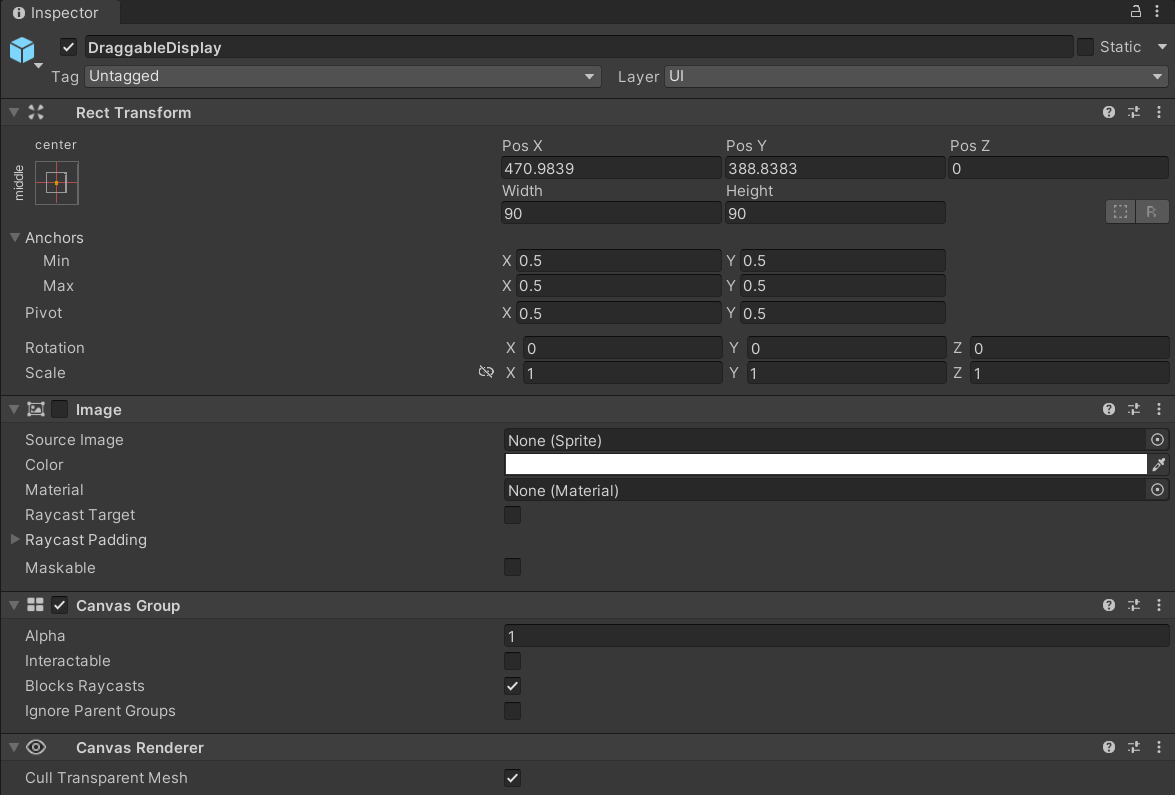
ive a text component childed to it, but other than that it's just an image on a gameobject
 nova frigate
I've been implamenting a fortnite building system that is nearly complete. I'm now having trouble with the preview object only showing when the player is on a building but not on the ground
any Ideas?
timber tide
if not snapped to any vertices why not just force it back in front of the player
nova frigate
I did that in my code.
timber tide
your video shows it getting stuck
nova frigate
I'll post it in a second
hybrid vine
guys can you pls help me find syntax errors with my movement/ stamina code
nova frigate
timber tide
your video shows it getting stuck
here's my code https://pastebin.com/jzgqDu6n
Pastebin
Pastebin.com is the number one paste tool since 2002. Pastebin is a website where you can store text online for a set period of time.
frosty hound
If you have a syntax error, it would highlight. If it's not, then configure your !ide
eternal falconBOT
💡 IDE Configuration
If your IDE is not autocompleting code
or underlining errors, please configure it.
Select one:
• Visual Studio (Installed via Unity Hub)
• Visual Studio (Installed manually)
• VS Code
• JetBrains Rider
• Other/None
frosty hound
It's not anyone's job here to comb through your stuff line by line to find it.
timber tide
nova frigate
here's my code https://pastebin.com/jzgqDu6n
at 20 seconds into your second video the preview gets stuck. Beyond checking if you're snapping to verts, add a range comparison so if you're far enough a way then the preview will always be forced back to you.
hybrid vine
it says identifier expected on staminaIncreaser staminaDecreaser lines, i just dont know what it means by that
is it because i am not passing in the parameters correctly?
polar acorn
hybrid vine
it says identifier expected on staminaIncreaser staminaDecreaser lines, i just d...
If that's not highlighted in your IDE, you need to configure it
rocky canyon
its a rule to have it configured to receive help, might as well get it done..
it will show u all the syntax errors in real-time
hybrid vine
okay doing it now, sorry guys didnt know about it
rocky canyon
may want to decide whether you want to continue using VSCode or to swap over to VSCommunity... VSCommunity is more robust and a better ide for Unity imo
nova frigate
timber tide
at 20 seconds into your second video the preview gets stuck. Beyond checking if ...
add a range float that counts how far way the player is from the nearest point?
timber tide
nova frigate
add a range float that counts how far way the player is from the nearest point?
to fix the sticking preview, yes. As for not showing the preview on the ground, I'm not sure what's wrong unless the preview is in fact in the ground
steep thistle
how would i call another script from another? for example, I want to call Connect(); on onCollisionEnter(); but Connect(); is in another script. How would I gain access to this?
polar acorn
steep thistle
how would i call another script from another? for example, I want to call `Conne...
steep thistle
polar acorn
https://unity.huh.how/references
thanks
nova frigate
timber tide
to fix the sticking preview, yes. As for not showing the preview on the ground, ...
problem is the ground preview I'm more worried about
 rigid robin
hey guys, am working on a challenge system for my game, and Im having a problem with serializing an array of a custom class.
code: https://pastebin.com/KxvDJTzD
basically, GenTemperature is added to a prefab, and within it I want to define several TemperatureConfigs inside an array, but I can only pass them, but not serialize (screenshot 1).
Im guessing it might have something to do with GenTemperature inheriting from a GeneralBase which is a generic, and maybe Unity doesnt really want to deal with serializing the TConfig or something? I don't think that I missed any [SerializeField] or [Serializable], so I doubt that its the problem...
It's not that any of the individual config fields are at fault either, since its the whole class that is refusing to serialize.
I've tried to outline the structure here (screenshot 2).


Pastebin
Pastebin.com is the number one paste tool since 2002. Pastebin is a website where you can store text online for a set period of time.
timber tide
public class GenTemperature : GeneralBase<TemperatureConfig>
The prototype, even though has generic constraints, is still explicitly set as TemperatureConfig so I'm not sure why this wouldn't serialize
swift crag
rigid robin
hey guys, am working on a challenge system for my game, and Im having a problem ...
GenTemperature needs to be marked as serializable
timber tide
oh, problem solved
swift crag
Also, it MUST be a unity object if you want to drag it into a serialized field like that
swift crag
swift crag
`GenTemperature` needs to be marked as serializable
oh, wait, I misunderstood. that's not what's failing here
💥
let's try this again!
timber tide
is this all in one script?
swift crag
okay, ConfigBase is a MonoBehaviour, and GeneralConfigBase is a ConfigBase, and GeneralBase is a MonoBehaviour parameterized by a GeneralConfigBase
So the problem is that GenTemperature is a unity object
This means that you're going to serialize references to GenTemperature instances.
If you want GenTemperature to be "directly" serialized (i.e. not as a reference to something else), it can't be a monobehaviour
GeneralBase is a MonoBehaviour, and GenTemperature is a GeneralBase.
rigid robin
timber tide
is this all in one script?
nah, spread across several files, I've just put it in one thing for convenience
swift crag
swift crag
If you want `GenTemperature` to be "directly" serialized (i.e. not as a referenc...
every monobehaviour must be attached to a game object, so it would be bogus to let you just have a list of orhapened MonoBehaviours
gah, I misunderstood your problem again -- but at least I see the fix now, haha
it's TemperatureConfig that you're talking about
god, I'm not on the ball tonight
    public abstract class ConfigBase : MonoBehaviour
    {
        public Difficulty difficulty;
    }
it sounds like this should just be a plain old class
not one that derives from MonoBehaviour
this isn't something you attach to a game object; it's just a bag of data
rigid robin
swift crag
gah, I misunderstood your problem again -- but at least I see the fix now, haha
Im still learning some stuff from your messages, so no worries xD
timber tide
yeah would probably better off with a scriptable object
 edgy fox
is there a way to hide the walls when the camera is on the rear side of them? The white line still shows
 swift crag
timber tide
yeah would probably better off with a scriptable object
swift crag
timber tide
yeah would probably better off with a scriptable object
a scriptable object would be appropriate if you wanted multiple things to be able to reference the same data
rigid robin
swift crag
not one that derives from MonoBehaviour
yeah, that was the issue!
swift crag
edgy fox
is there a way to hide the walls when the camera is on the rear side of them? Th...
what is the line created by?
is it part of the model?
edgy fox
swift crag
what is the line created by?
the orange bit is extruded back, the white part is facing up rather than inwards
yeah part of the model
it's the bright part that the light under the orange bit catches on
swift crag
you can disable the renderer if the angle between the camera and the wall's forward direction is too high
rigid robin
timber tide
yeah would probably better off with a scriptable object
I thought about it, but in this case the configs are individual to every class, so it doesnt make much sense imo to remake it now, since the benefit of scriptableobjects wouldnt really be there
edgy fox
swift crag
you can disable the renderer if the angle between the camera and the wall's forw...
how do I do that?
swift crag
rigid robin
I thought about it, but in this case the configs are individual to every class, ...
yeah, I came to the same conclusion when figuring out how to configure items for a game
One caveat.
rigid robin
thanks a lot by the way! :D
edgy fox
and if I do that will light pass through it?
swift crag
If you want to serialize a parent type, then things get a bit more complex
say you have Parent with Child1 and Child2
If you serialize a List<Parent>, you'll only get the properties in the parent class.
This is where [SerializeReference] comes in. It lets you correctly serialize parent types -- it remembers which actual type you have stored
However, [SerializeReference] doesn't provide any inspector UI. You have to implement it yourself or use a package that provides one.
timber tide
Really I've been fine with single asset SOs for items/abilities. It's fallback for when later on I decide they will become reusable.
rigid robin
swift crag
This is where `[SerializeReference]` comes in. It lets you correctly serialize p...
ohh I see, that's convenient
swift crag
edgy fox
how do I do that?
check how large Vector3.Angle(Camera.main.transform.forward, wallTransform.forward) is
rigid robin
timber tide
Really I've been fine with single asset SOs for items/abilities. It's fallback f...
yeah not saying its a bad approach or anything, moreso that I didnt consider it initially and then jut didnt feel a need to rewrite it haha :> if it ain't broken...
swift crag
swift crag
check how large `Vector3.Angle(Camera.main.transform.forward, wallTransform.forw...
(also, I should say if the angle is too SMALL)
if the angle is less than 90, you must be looking at the back side of the wall
edgy fox
swift crag
check how large `Vector3.Angle(Camera.main.transform.forward, wallTransform.forw...
I assume I would have to just add all walls to an array and iterate through that every frame? How performance intensive would that be?
edgy fox
true but there will likely be hundreds or thousands of walls in the game scene
would that still be impactful?
swift crag
(gotta run, so will be back later)
edgy fox
ah alright
 abstract hedge
im having an issue with movement
whenever i playtest the player is sliding left, can anyone help
nova frigate
timber tide
to fix the sticking preview, yes. As for not showing the preview on the ground, ...
maybe it does need to check the distance
granted i changed the code to this
if (StandingPlatform == null)
{
PreviewBuildObj.transform.position = BuildMuzzle.position;
PreviewBuildObj.transform.rotation = BuildMuzzle.rotation;
}
else if (StandingPlatform != null)
{
PreviewBuildObj.transform.position = ClosestCorner.position;
PreviewBuildObj.transform.rotation = ClosestCorner.rotation;
}
frigid sequoia
Guys, I have a player which is a ball with like some kind of "armor" around it; the ball moves through players' axis input and a AddForce method, to make it feel more dinamic the ball also adds a torque in the opposite direction (this may cause that when in friction with the floor, it moves a bit faster, that's alrigth, I am counting with that). The issue I have is that the ball moves like, significantly faster when the play window is maximized and I have literally no idea what might be causing that cause I am not using any screen reference for anything, but it is like 3-4 times faster for some reason. Any idea of why is this happening?
static bay
Might not be the best place to ask this but I prefer using Visual Studio Code over Visual Studio. I've got most of the Unity integration setup, but I get a weird formatting issue.
When I highlight a region of code and copy it, example:

and paste it

VS Code doesn't get rid of those leading tabs.
abstract hedge
i just need help with my player moving when im not touching any keys
edgy fox
    public static void RemoveElement(GameObject[] array, GameObject toRemove)//removes GameObject from an Array
    {
        array = array.Where(i => i != toRemove).ToArray();
    }```
this code works to remove a gameObject from an array correct?it's setting off some warning bells in my head but idk what looks wrong about it
 white apex
Hey I have a question, I have very small knowledge on C#. I want to make a game like ADOFAI, where you have 2 planets, they rotate around each other, and on a key click it switches which planet is rotating around which one, and where on a key click it fixes to the center of the next tile. I've been looking around all day and trying things, I'm not sure what to do haha
 north kiln
edgy fox
it's setting off some warning bells in my head but idk what looks wrong about it
north kiln
edgy fox
it's setting off some warning bells in my head but idk what looks wrong about it
the array would have to be passed in as ref.
Also, just use a List
static bay
edgy fox
```cs
public static void RemoveElement(GameObject[] array, GameObject toRemo...
It should, yes, but you're generating a brand new array and filling it with the remaining elements. Does this need to be an array? Lists are usually what you want to use if you're resizing the collection a lot.
abstract hedge
can someone pls help me because my player slides left and idk how to fix it.
edgy fox
brain shut down... forgot lists existed
 fresh lintel
hello ,will this allocate garbage? should i use StringBuilder ? or i should use it only when i combine 2 or more strings like "1"+"2"+"hello"? can't comprehend idea

or this

thx in advance
static bay
fresh lintel
hello ,will this allocate garbage? should i use StringBuilder ? or i should use ...
Stringbuilder is for many modifications to a string. Here though you're not even doing that. You're doing math and then converting it to a string.
Aka this is fine.
fresh lintel
thank you❤️ 🙌
rocky canyon
white apex
Hey I have a question, I have very **small** knowledge on C#. I want to make a g...
start basic, have a script that stores the selected planet..
click planet -> select it
click another planet -> check if theres one already selected, then select a new one
then you can move on the orbit stuff, make the one u want to orbit the other..
as you work on it you'll find things you need to work out.. like maybe repositioning the planet so the other one can orbit it properly, or w/e
use keywords like "orbit"
youtube has lots of stuff on that mechanic
"faux gravity" is another buzzword
north kiln
fresh lintel
hello ,will this allocate garbage? should i use StringBuilder ? or i should use ...
But yes, the first allocates, the second doesn't
white apex
rocky canyon
"faux gravity" is another buzzword
Yeah, I can get one planet to orbit the other just fine, it's when I go to get them to switch orbits that I'm not sure. To clarify, I can make planet1 orbit planet2, but can't get planet2 to orbit planet1 on a key click, while making sure the orbit starts from the last position of said planet
rocky canyon
3d or 2d?
white apex
2d
rocky canyon
ahh, even easier then
white apex
(Also I want to apologize in advance, I am like super new to C# lmfao)
edgy fox
this is ugly as fuck
 rocky canyon
what do you have so far? do you have any code working at all?
!code
eternal falconBOT
Posting code
📃 Large Code Blocks
Use links to services like:
https://gdl.space/, https://paste.ofcode.org/, https://hatebin.com/, https://paste.myst.rs/, https://hastebin.com/
📃 Inline Code
Surround code with three backquotes. Not quotation marks.
To format as C#, add cs to the first line:
```cs
// Your code here
```
Add a comment with a line number if there is an error message.
rocky canyon
edgy fox
this is ugly as fuck
are u specifically trying to get the grand parent object? or is it the Root?
edgy fox
rocky canyon
are u specifically trying to get the grand parent object? or is it the Root?
grandparent
rocky canyon
GameObject rootGameObject = wall.transform.root.gameObject;
edgy fox
I assume there's an easier way?
rocky canyon
if it was jsut the root u could use that ^
edgy fox
nah I got a whole family tree
 teal viper
Also,you can just transform.parent.parent
north kiln
all your .gameObject calls are redundant
edgy fox
OMG I thought I always had to call .gameObject before .transform
rocky canyon
nah, u only need to use gameObject if you actually want the GameObject
teal viper
Transform is a fundamental component, so it's accessible from any other component
edgy fox
so I've realized
white apex
rocky canyon
what do you have so far? do you have any code working at all?
!code
Right now I have one planet orbiting the other planet
edgy fox
if I disable an object's renderer, does it disable child renderers?
rocky canyon
you would probably need to narrow down your question to something more specific..
like <i have this code so far, and i want to know how to keep the position the planet was last before it begins the new rotation> or something like that.
you'll get more answers when people are trying to solve a particular problem, vs brainstorming a system for you
rocky canyon
edgy fox
if I disable an object's renderer, does it disable child renderers?
no, each child object should have its own renderer
edgy fox
ah ok
rocky canyon
white apex
Right now I have one planet orbiting the other planet
i could think of a way that may work..
having an empty gameobject on the planet thats being orbited.
when you want the other planet to orbit it you could parent it to the empty object
that objects (center/pivot would be in the right position as to just rotate it and the planet would follow..
then w/e position it were at when u parented it (it would retain that offset)
white apex
rocky canyon
you'll get more answers when people are trying to solve a particular problem, vs...
Gotcha, thank ya for the advice <3
gritty notch
im working on a top down 2d game and when the player walks in water, i want the bottom half of the body to be hidden by the water. how can i achieve this?
rocky canyon
white apex
Gotcha, thank ya for the advice <3
something like this.. 🍀
but, could also be done many different ways, since you're new, just play around with it.. find a good method that works for you and try to go with it
if it doesn't work out you can always try something else, and just take the knowledge you learned as a bonus
edgy fox
can I just have a file with a class without a monobehaviour in it or will the code not be ran? I have a script with only a class with a List but when other scripts try and access wallList it reads as null (Debug.Log(ArrayDict.wallList) returns null)
public class ArrayDict
{
    public static List<GameObject> wallList;//list of all rendered walls
}
 dusky matrix
Pardon my noobness. I am trying to help my son with an avatar he is creating and seems some bones are not connected correctly i.e. "LowerLeg is not first child of upperleg or foot.... blah blah." been running in circles like an idiot. How do I actually display bones? I don't see anything in the inspector section after I selected the Avatar. Thank you in advance!
apologies if I am in advance if I am in the incorrect channel
north kiln
edgy fox
can I just have a file with a class without a monobehaviour in it or will the co...
you never initialize the list
white apex
rocky canyon
if it doesn't work out you can always try something else, and just take the know...
Gotcha, I think I understand what ur saying but I'm not too sure how to code it. If you want I can send what I have for the one planet rotating around the other just so show where I'm at
edgy fox
north kiln
you never initialize the list
realized that right as you sent that... somehow make that mistake every single time I use a list
static bay
edgy fox
this is ugly as fuck
woah
white apex
rocky canyon
I copied your hierarchy, and I can't get the outer planet to move when clicking on the gravity field, it just rotates the inner planet
rocky canyon
are you sure? screenshot it
 rocky canyon
u would rotate the Gravity Field..
theres no way the PlanetOne wouldn't rotate around PlanetTwo
example:
using UnityEngine;

public class SimpleRotation : MonoBehaviour
{
    public float rotationSpeed = 45f;

    void Update()
    {
        // Rotate the GameObject on its Z-axis
        transform.Rotate(Vector3.forward * rotationSpeed * Time.deltaTime);
    }
}
``` the rotation script im using on Gravityyou mean this one ?
 rocky canyon
the reason I used a child object for the gravity is so the main planet doesn't rotate with it
north kiln
fresh lintel
you mean this one ?
ToString allocates, yes
rocky canyon
but the gravity would follow around the planet this way, and it should be scaleable.. as if i attached it to another planet..
fresh lintel
north kiln
ToString allocates, yes
can it be avoided by using StringBuilder or other methods?
at moment i'm trying to use ZString https://github.com/Cysharp/ZString/releases?page=1
and don't know how to get rid of all this string garbages

GitHub
Zero Allocation StringBuilder for .NET and Unity. Contribute to Cysharp/ZString development by creating an account on GitHub.
white apex
It really is haha. Should I restart Unity? I pasted your script in and added it to the gravity, but I don't even have an option to adjust the rotation speed
rocky canyon
🤔 really? is the script name the same as the class name?
white apex
Ah you know what you right xD
rocky canyon
meaning is it named SimpleRotation.cs
 north kiln
fresh lintel
can it be avoided by using StringBuilder or other methods?
at moment i'm trying ...
north kiln
fresh lintel
can it be avoided by using StringBuilder or other methods?
at moment i'm trying ...
No. You are creating a string, it must be allocated. What you're doing is the cheapest way to allocate a string from a single object.
The alternative is to have a cached dictionary of numbers to strings that you look-up. Trading memory overhead for no allocations.
rocky canyon
if not u'll get a compile error and the variable wont be displayed
white apex
Yep lmaooo
rocky canyon
as long as the gravity gameobject is a child of the planet

and it's position is 0,0,0 (meaning center of the parent)
it should all work like the video clip
all you gotta do is parent something to the Gravity child.. and it should rotate with it
fresh lintel
north kiln
No. You are creating a string, it must be allocated. What you're doing is the ch...
ok i see, i'll try to somehow create dictionary ,because here 12 strings created 10 times in second, i assume it is a lot
thank you very much. for explanation
white apex
Kk, yeah I got planet2 rotating around planet1 now. So my question now is how do I get planet1 to rotate around planet2 on a key press? All I have right now script wise is just your provided rotate script
north kiln
fresh lintel
ok i see, i'll try to somehow create dictionary ,because here 12 strings created...
It can be. I have had a game with constantly changing health numbers and just allocated a readonly dictionary of numbers 0->100 to avoid allocating the strings; but garbage collection can be bearable with small, short-lived allocations at times, so it's situational whether it really matters
white apex
Wait you said parenting earlier, if I wanted planet1 to rotate around planet2, id do this (img) and swap planet1 and 2 around if I wanted planet2 to orbit planet1 right?

 tough lagoon
That's the easy way yup
Although planets are tricky, and you may end up not parenting them at all and doing it all via code
rocky canyon
white apex
Wait you said parenting earlier, if I wanted planet1 to rotate around planet2, i...
- Planet
- Gravity (with rotation script)
- Planet that will rotate around the "Planet" parent
- Gravity (with rotation script)
white apex
Bet, so for the next question then. On a key press (say the space bar for now), how would I change which one rotates, or which one is parented, based on the key press?
rocky canyon
rocky canyon
- Planet
- Gravity (with rotation script)
- Planet that will rotate aroun...
 edgy fox
how do I make an asset with parents and components
explained better: I have a program that instantiates a blank GameObject with a child object and I don't want that object to exist within a scene
and I would rather have it be in the assets folder
rocky canyon
white apex
Bet, so for the next question then. On a key press (say the space bar for now), ...
not sure exactly.. but all you have to do for this setup to work (since it doesn't care wats parented to it) is:
- parent the planet to the gravity (of the planet it will orbit)
- unparent the planet from the gravity (it will stay where it was last positioned while it was rotating)
now if that planet also has the same setup... u could parent the one that was once being orbited to the other planet..
and it will just swap roles..
the child planet will just start rotating where it is relative to the center of the Root planet
eternal needle
edgy fox
explained better: I have a program that instantiates a blank GameObject with a c...
This doesnt really make sense. Why do you instantiate a GameObject if you dont want it? What's its purpose? If you say what it's for, gameplay wise, its easier to suggest.
rocky canyon
transform.parent = (planets gravity object);
transform.parent = null;
^ attach / unattach @white apex thats really all there is to this system..
edgy fox
eternal needle
This doesnt really make sense. Why do you instantiate a GameObject if you dont w...
I use code to create a room, the walls of that room have children objects
rocky canyon
thats why i like it
edgy fox
and the walls run code when they spawn but the Start() function of the walls runs for the first one as well
fresh lintel
north kiln
It can be. I have had a game with constantly changing health numbers and just a...
and the last question if you don't mind , Does this (array) also create garbage? never thought about it
 edgy fox
Essentially I want it as a parameter for a script

but I don't want it in the scene itself
north kiln
fresh lintel
and the last question if you don't mind , Does this (array) also create garbage?...
No, it's referencing a pre-existing string. Unless that's a string from a GameObject's name or something, which I think might allocate every time it's called? I honestly don't remember, because Object names are icky
eternal needle
edgy fox
but I don't want it in the scene itself
Are you just trying to make a prefab? Drag it from the scene to asset folder to make one. Otherwise I dont know what you're trying to do, I said describe it gameplay wise. Not code wise
What purpose is this in your game
edgy fox
eternal needle
Are you just trying to make a prefab? Drag it from the scene to asset folder to ...
oh yeah amke a prefab
I got it now
fresh lintel
north kiln
No, it's referencing a pre-existing string. Unless that's a string from a GameOb...
yes it is from transform
north kiln
edgy fox
oh yeah amke a prefab
Also, reference the script you care about on the object instead of GameObject. Ie, If you care about Transform, just reference that.
edgy fox
north kiln
Also, reference the script you care about on the object instead of GameObject. I...
did you mean to respond to me?
north kiln
Yes
rocky canyon
he was just pointing it out in case..
for example if it had a script on it that you needed you can just Instantiate using that
it'll save an extra getcomponent call you wouldn't necessarily need
rocky canyon
GameObject newObject = Instantiate(prefab, Vector3.zero, Quaternion.identity);
MovementScript movementScript = newObject.GetComponent<MovementScript>();
movementScript.MoveForward();

//vs

MovementScript movementScriptInstance = Instantiate(movementScriptPrefab, Vector3.zero, Quaternion.identity);
movementScriptInstance.MoveForward();
Posting code
📃 Large Code Blocks
Use links to services like:
https://gdl.space/, https://paste.ofcode.org/, https://hatebin.com/, https://paste.myst.rs/, https://hastebin.com/
📃 Inline Code
Surround code with three backquotes. Not quotation marks.
To format as C#, add cs to the first line:
```cs
// Your code here
```
Add a comment with a line number if there is an error message.
 thorn holly
bc delegates occur synchronously, if i have a parameter that passes through the delegate, can i modify that parameter? For example, if i have MyDelegate(myParameter) and func1 and func2 are subscribed to that delegate in that order, can func1 modify the myParameter that is passed to func2?
 ivory bobcat
thorn holly
bc delegates occur synchronously, if i have a parameter that passes through the ...
ivory bobcat
thorn holly
bc delegates occur synchronously, if i have a parameter that passes through the ...
Are the methods asynchronous?
thorn holly
nope
teal viper
thorn holly
bc delegates occur synchronously, if i have a parameter that passes through the ...
By modify the parameter, do you mean modify it's fields?
thorn holly
just normal methods
ivory bobcat
They aren't synchronous then
thorn holly
teal viper
By modify the parameter, do you mean modify it's fields?
? No, I mean literally change the parameter to a different value
teal viper
thorn holly
? No, I mean literally change the parameter to a different value
Then that wouldn't do a thing. You'd just be changing the local reference.
References are bot pointers, so reassigning a parameter reference isn't gonna affect anything outside the method.
thorn holly
yeah, so i was saying, is there a way to change the parameter that is passed to func2 after func1 occurs
teal viper
thorn holly
yeah, so i was saying, is there a way to change the parameter that is passed to ...
You could wrap the actual parameter in a reference type and change the reference inside.
thorn holly
How would that work?
teal viper
Or maybe use ref keyword, though I'm not sure of that would work with delegates
teal viper
thorn holly
How would that work?
Well, you make your thing that you actually want to change a field of the type that is passed as a parameter.
 gaunt ice
you can if the type of parameters are reference or pointer by changing its content
but i remeber c# not guarantee func1 must be called before func2
thorn holly
i think if func1 is subscribed first then it will be called first right?
teal viper
That too. Avoid relying on the order of the delegates.
ivory bobcat
What's the actual problem? The solution you're wanting to use seems unnecessary.
teal viper
It might be different on different hardware/environment.
ivory bobcat
gaunt ice
you can if the type of parameters are reference or pointer by changing its conte...
Should be for most
thorn holly
ivory bobcat
What's the actual problem? The solution you're wanting to use seems unnecessary.
well basically i have the delegate takeDamage(float damageAmount) that does a number of different things, damaging the player, making a message pop up that says the player was damaged, etc. There are some items in the game that reduce the damage the player takes when equiped, so i figured this would be a good way to do it , essentially have all of those items subscribe first, then reduce the damageAmount float before it gets passed to the method that actually reduces the players health
ivory bobcat
thorn holly
well basically i have the delegate `takeDamage(float damageAmount)` that does a ...
Don't evaluate the damage immediately but place them in stacks and resolve them when completely done?
thorn holly
ivory bobcat
Don't evaluate the damage immediately but place them in stacks and resolve them ...
hm? wdym place them in stacks?
teal viper
thorn holly
well basically i have the delegate `takeDamage(float damageAmount)` that does a ...
It might be better to add all the modifying items to a list, loop through it to calculate the final damage, then dispatch it as an event.
thorn holly
add them manually?
thorn holly
teal viper
It might be better to add all the modifying items to a list, loop through it to ...
and out of curiosity, why would it be better?
teal viper
thorn holly
add them manually?
Manually?
The same way as you subscribe them now. But instead add them to a list(register them for evaluation if that sounds cooler).
teal viper
thorn holly
and out of curiosity, why would it be better?
Because then you'd have better control over the order of damage evaluation.
And in general
It would be easy to, for example, add additional conditions or modifiers into the calculation.
thorn holly
teal viper
Manually?
The same way as you subscribe them now. But instead add them to a list...
oh right
 final elm
Why happens when a class derives from both the base interface and derived interface?
interface BaseInterface {}
interface DerivedInterface : BaseInterface {}
class SomeClass : BaseInterface, DerivedInterface {}
As long as it abides by the contract, there shouldn't be any issue 
https://learn.microsoft.com/en-us/dotnet/csharp/language-reference/language-specification/interfaces
An interface defines a contract. A class or struct that implements an interface shall adhere to its contract. An interface may inherit from multiple base interfaces, and a class or struct may implement multiple interfaces.
vale karma
can i make a Raycast for IsGrounded() apply to two layers instead of just 1?
public bool IsGrounded()
{
    if(Physics2D.BoxCast(transform.position, boxSize, 0, -transform.up, castDistance, groundLayer))
    {
        return true;
    }
    else
    {
        return false;
    }
}
Sure. A raycast would hit any layers that are included in the layermask that you pass into it.
vale karma
how do i go about adding more layermasks than just groundLayer?
polar acorn
vale karma
how do i go about adding more layermasks than just groundLayer?
How are you setting groundLayer?
gaunt ice
by bitmask
teal viper
vale karma
how do i go about adding more layermasks than just groundLayer?
A layermask in itself includes data about what layers would be hit. It's not just data about one layer.
You probably have the mask set such that it only includes one layer.
vale karma
 [SerializeField] LayerMask groundLayer;
 [SerializeField] LayerMask interactableObject;
these are two different layers I would be asking to allow IsGrounded to jump on both a object and the ground. I dont know how these can be used in the same raycast. your right, i only have the groundLayer in there
teal viper
These are 2 different layermasks, not layers
polar acorn
vale karma
```cs
[SerializeField] LayerMask groundLayer;
[SerializeField] LayerMask inter...
Just add the other layer to the groundLayer layermask in the inspector
 wintry quarry
vale karma
```cs
[SerializeField] LayerMask groundLayer;
[SerializeField] LayerMask inter...
wintry quarry
vale karma
```cs
[SerializeField] LayerMask groundLayer;
[SerializeField] LayerMask inter...
Use one layermask
And don't confuse layers with layer masks
vale karma
ill have to read up on that, raycasts and layermasks and such are a new topic ot me
wintry quarry
vale karma
how do i go about adding more layermasks than just groundLayer?
Just select them both in the inspector for the single LayerMask
teal viper
But if for some reason you want them defined separately, you can combine them with binary or operator.
wintry quarry
don't call it groundLayer. Bad variable name. This would be your groundCheckLayerMask or something along those lines
vale karma
yea thats how i had it, just both in there, but an interactable object didnt set right to me labeled as a ground Layermask
ill change it, utube tutorial :p
lol that fixes my issue
I kept thinking that id need to make another one, i just had an apifery
wintry quarry
vale karma
I kept thinking that id need to make another one, i just had an apifery
epiphany?
vale karma
yes
teal viper
API ferry
 open apex
So I have this code and for a while I have been trying to get the game to output "We hit something" when it collided with the ground, it did not happen for some reason. I then realised that I write "OncCollisionEnter" instead of "OnCollisionEnter". Why didn't I get any errors when I wrote "OncCollisionEnter" even though it's an error? I did not adress as a variable or anything, but why hasn't the code realised it's fault and just let me do my thing?

 gaunt ice
why it is an error, you can name the method to whatever you like
your compiler is not LLM
open apex
Sorry, what is LLM?
gaunt ice
large language model
teal viper
From the perspective of the compiler, it's just another method.
wintry quarry
open apex
So I have this code and for a while I have been trying to get the game to output...
You are allowed to name your methods anything you want in C#
Unity just happens to be looking for certain special method names
but it's 100% valid to have a method named absolutely anything you want.
open apex
wintry quarry
You are allowed to name your methods anything you want in C#
isn't loop and method the same thing?
I am a total beginner
wintry quarry
open apex
isn't loop and method the same thing?
not even close, no
open apex
you answered so quickly I got scared
wintry quarry
open apex
you answered so quickly I got scared
I recommend following this stuff to learn the basics of C# if you are confused or lost:
https://dotnet.microsoft.com/en-us/learn/csharp
abstract hedge
can someone help with my movement stuff, i playtest and the player slides, im on the old input system
open apex
wintry quarry
I recommend following this stuff to learn the basics of C# if you are confused o...
I am currently following a series of tutorials created by Brackeys
wintry quarry
that's unity focused though, not C# focused
open apex
I will watch those aswell
open apex
wintry quarry
that's unity focused though, not C# focused
But I want to develop games, isn't that better?
wintry quarry
open apex
But I want to develop games, isn't that better?
Learning C# will make it much easier for you to develop games
frigid sequoia
abstract hedge
can someone help with my movement stuff, i playtest and the player slides, im on...
If you are using Rigid Body, the player will slide, this depends of the surface friction; if you want it to stop it immidiatly make it so when the input is low rb.velocity = vector.zero; but take care cause you need to modify this further if you want it no stop mid air when the player stops the input
abstract hedge
frigid sequoia
If you are using Rigid Body, the player will slide, this depends of the surface ...
im not
using a rigid body
wintry quarry
abstract hedge
can someone help with my movement stuff, i playtest and the player slides, im on...
You're using GetAxis probably, which has some built in smoothing/momentum
switch to GetAxisRaw if you don't want that
abstract hedge
wintry quarry
You're using GetAxis probably, which has some built in smoothing/momentum
ok thanks
open apex
wintry quarry
Learning C# will make it much easier for you to develop games
I watch 1 video of 10 minutes everyday in order to make it a habbit, do you think it would confuse me if I follow 2 series at the same time?
thorn holly
should i be concerned about overusing delegates? Like will it cause performance issues or something?
in the sense of multicast delegates
wintry quarry
thorn holly
should i be concerned about overusing delegates? Like will it cause performance ...
You just need to watch out for orphaned subscriptions and recognize that delegates generate garbage.
thorn holly
What are orphaned subscriptions?
and what do i do about the garbage?
@wintry quarry ?
teal viper
I assume they mean a destroyed object still being subscribed to a delegate/event is what they mean by orphaned subscription.
As for the garbage, you live with it.😎
thorn holly
does garbage affect performance?
teal viper
In extreme cases, yes
thorn holly
rut row
teal viper
What they mean by garbage is simply memory allocation. If you don't handle memory allocations correctly, you would be allocating new memory, while making the GC(garbage collector) dispose of the old allocated memory that is not used anymore. Allocating/disposing of memory can be performance heavy if there is a lot of it every frame.
thorn holly
oh i dont have a lot every frame
i just have a lot of delegates
but on different frames
so thats okay right?
teal viper
Probably. Hard to say without seeing your project. Anyways, if performance is a concern,you should use the profiler to pinpoint the cause.
thorn holly
alr
well im just making a small battle system and im using a lot of delegates for it to do small things. For example, at one point theres one of three options you have to select, so i made a delegate that triggers at the start of that to make the three options have a red highlight when you hover over then, and then i have a delegate after you select something that turns off that option
 echo pendant
does anyone know how to change the controls for a second player in a kart game based of the one in unity website
abstract hedge
wintry quarry
You're using GetAxis probably, which has some built in smoothing/momentum
it started doing the same thing again after i saved the project and reopened bcs power went out and i checked and it still said GetAxisRaw
open apex
Can an object have multiple tags?
open apex
thanks
abstract hedge
does someone know why my player still has smoothing/sliding on the old input system without a rigidbody and using GetAxisRaw
wintry quarry
abstract hedge
does someone know why my player still has smoothing/sliding on the old input sys...
Not without you showing your code
abstract hedge
should i send my playermovement script here then?
wintry quarry
Yes. !code
eternal falconBOT
Posting code
📃 Large Code Blocks
Use links to services like:
https://gdl.space/, https://paste.ofcode.org/, https://hatebin.com/, https://paste.myst.rs/, https://hastebin.com/
📃 Inline Code
Surround code with three backquotes. Not quotation marks.
To format as C#, add cs to the first line:
```cs
// Your code here
```
Add a comment with a line number if there is an error message.
abstract hedge
//using System.Collections;
using System.Collections.Generic;
using UnityEngine;

public class PlayerMovement : MonoBehaviour
{
    private CharacterController controller;

    public float speed = 12f;
    public float gravity = -9.81f * 2;
    public float jumpHeight = 3f;

    public Transform groundCheck;
    public float groundDistance = 0.4f;
    public LayerMask groundMask;

    Vector3 velocity;

    bool isGrounded;
    bool isMoving;

    private Vector3 lastPosition = new Vector3(0f,0f,0f);


    void Start()
    {
        controller = GetComponent<CharacterController>();
    }


    void Update()
    {

        isGrounded = Physics.CheckSphere(groundCheck.position, groundDistance, groundMask);

        if (isGrounded && velocity.y < 0)
        {
            velocity.y = -2f;
        }


        float x = Input.GetAxisRaw("Horizontal");
        float z = Input.GetAxisRaw("Vertical");


        Vector3 move = transform.right * x + transform.forward * z;


        controller.Move(move * speed * Time.deltaTime);

        if (Input.GetButtonDown("Jump") && isGrounded)
        {

            velocity.y = Mathf.Sqrt(jumpHeight * -2f * gravity);
        }


        velocity.y += gravity * Time.deltaTime;


        controller.Move(velocity * Time.deltaTime);

        if (lastPosition != gameObject.transform.position && isGrounded == true)
        {
            isMoving = true;

        }
        else
        {
            isMoving = false;

        }

        lastPosition = gameObject.transform.position;
    }
}
Did you save your code?
abstract hedge
yes
wintry quarry
Is this actually the script being used?
abstract hedge
yes
wintry quarry
Any errors in console?
abstract hedge
no
wintry quarry
There won't be any smoothing with this code
Show a screenshot of your player object inspector
echo pendant
does anyone know why my controls for my kart is moving for the second kart (I used the unity demo so the code is exact)
abstract hedge

 patent belfry
hey can anyone help me with a simple sprite turns to face direction script?
can't figure it out bc I can't use axis inputs for reasons. so I am trying to figure out how to make my sprite angle up when I press w; asd etc
If anyone wants to call or smth
abstract hedge
wintry quarry
Show a screenshot of your player object inspector
i sent it
wintry quarry
I don't see any issue here. My suspicion is you're either not seeing momentum but you think you are for some reason, or your script changes haven't been picked up for whatever reason, or there's something else going on entirely that isn't visible in these screenshots
abstract hedge
ok
i kinda want to try a differant movement script to see if thats the issue, do you have one?
teal viper
Maybe record a video of the issue.
abstract hedge
i mean i start it and im sliding without touching anything
teal viper
Sliding where? How? It's not clear just from that explanation.
teal viper
A video would demonstrate the problem and tell us where to look at.
wintry quarry
abstract hedge
i mean i start it and im sliding without touching anything
Sounds like just the gravity sliding you
If you're not touching anything it's not an input issue
abstract hedge
wintry quarry
Sounds like just the gravity sliding you
how would i fix that?
teal viper
abstract hedge
how would i fix that?
Don't apply gravity when grounded
abstract hedge
teal viper
Though that might mess up the character controller grounded detection.
patent belfry
jesus christ simulator
abstract hedge
dont question
so change this if (isGrounded && velocity.y < 0) to if (isGrounded && Gravity < 0)
teal viper
abstract hedge
Ok, well that's totally different from what I've(and probably everyone else) imagined.
teal viper
Can you share your code in a paste site?
!code
eternal falconBOT
Posting code
📃 Large Code Blocks
Use links to services like:
https://gdl.space/, https://paste.ofcode.org/, https://hatebin.com/, https://paste.myst.rs/, https://hastebin.com/
📃 Inline Code
Surround code with three backquotes. Not quotation marks.
To format as C#, add cs to the first line:
```cs
// Your code here
```
Add a comment with a line number if there is an error message.
abstract hedge
yea
Hastebin is a free web-based pastebin service for storing and sharing text and code snippets with anyone. Get started now.
abstract hedge
teal viper
Can you share your code in a paste site?
!code
i sent it
eternal needle
abstract hedge
https://hastebin.com/share/xewijayele.csharp
not really related, but u dont wanna do 2 moves per frame. it messes things up with the CC. try to combine it to 1
otherwise just try to constantly view what the move vector is and see why its sliding
abstract hedge
ok
teal viper
abstract hedge
https://hastebin.com/share/xewijayele.csharp
I don't see anything that might be the issue in this code.
Can you share the other script?
abstract hedge
the mousemovement one?
teal viper
Yes
abstract hedge
ok
teal viper
And are there any other scripts in the scene?
abstract hedge
Hastebin is a free web-based pastebin service for storing and sharing text and code snippets with anyone. Get started now.
abstract hedge
teal viper
And are there any other scripts in the scene?
no
i have only done these 2
teal viper
abstract hedge
https://hastebin.com/share/xovosutaku.csharp
Does the issue happen if you lock the x rotation to 0? Or just comment it out.
abstract hedge
i dont think so
because i disabled mousemovement on accident and it did it then 2
teal viper
Wat?
abstract hedge
like i removed the script from my playermodel
teal viper
And that didn't fix the issue?
abstract hedge
no
teal viper
Can you take a screenshot of your plane object inspector?
 teal viper
Yes. Although, b
Nevermind. I already checked it in the video.
What are the other objects parented to the player?
What components do they have?
abstract hedge
 teal viper
What do they have?

 teal viper
abstract hedge
heres body
teal viper
abstract hedge
heres body
Can you remove the capsule collider from the body?
abstract hedge
yea
teal viper
Does that fix anything?
 shut pivot
Use our artificial intelligence website powered by ChatGPT to code in any programming language such as: Python, C#, C++, CSS, Excel Formula, HTML, Java, SQL.
teal viper
abstract hedge
no
Hmmm... What if you set velocity to Vector3.zero in the start of the update?
 teal viper
No. At the very top of update, velocity = Vector3.zero.
 teal viper
Obviously, you need a semicolon at the end, not a dot...
teal viper
The issue?
teal viper
Ok. Gotta do thorough testing/debugging then.
white apex
So I have some code that makes the planets orbit around each other. If I want PlanetOne to orbit Planet2, then I swap PlanetOne and PlanetTwo in the Heirarchy. If I want PlanetTwo to orbit PlanetOne, then I swap them to how it is currently in the image. I want them to swap with each other (swap orbiting each other) on a key click. Meaning I need to change the hierarchy with a button click. How do I do this? (I've been trying to do this all day and I can't seem to get it haha) [Pls ping me if you do help, thanks in advance <3]

 tender wren
If there an obvious reason why two different vector3s with the same x y z would produce different hashs?
This is Via .GetHashCode()
tender wren
white apex
So I have some code that makes the planets orbit around each other. If I want Pl...
I know very little about populating the hierarchy a specific way, but could you just have two of each planets moving the ways you want and hide one set of them unless button is clicked, then swap?
teal viper
tender wren
This is Via .GetHashCode()
Floating point error perhaps🤔
 charred spoke
tender wren
This is Via .GetHashCode()
charred spoke
tender wren
This is Via .GetHashCode()
Are you sure they are the exact same vectors ?
teal viper
white apex
So I have some code that makes the planets orbit around each other. If I want Pl...
You can set parents with transform.parent =
eternal needle
white apex
So I have some code that makes the planets orbit around each other. If I want Pl...
you would simply just change the .parent, but i dont think doing this system via parenting is the best idea. An obvious example is you dont want size changing, but also some rotations might not make sense
white apex
What would be the best way to do this?
tender wren
I have tried also by checking x,y,z converted as ints as well.
teal viper
tender wren
I have tried also by checking x,y,z converted as ints as well.
That kinda sounds sus. What exactly did you try?
eternal needle
white apex
What would be the best way to do this?
i guess it depends on the gameplay, parenting might work in your case but in complex cases maybe not. I would just have the objects store a list of objects which they affect, then remove any parenting stuff
tender wren
int sum = ((int) v.x + (int) v.y + (int) v.z);
sum.GetHashCode();
Example of what I tried, also the output for a vector float shows the same, but is everything after the 0 obfuscated by unity? like could 1.0 actually be 1.00001 or something
teal viper
casting to int discards the decimal part
So, if sum hash code is the same, but vector isn't, then the decimal part of the 2 vectors is not the same.


 teal viper
I really feel like you should avoid hashcodes with Vectors/floating point numbers and specifically in your case.
tender wren
I am essentially trying to determine if the edge of different meshs are the same reguardless of how many edges are in the list of edges.
teal viper
You can do simple Vector equality or get the distance between them
white apex
!code
eternal falconBOT
Posting code
📃 Large Code Blocks
Use links to services like:
https://gdl.space/, https://paste.ofcode.org/, https://hatebin.com/, https://paste.myst.rs/, https://hastebin.com/
📃 Inline Code
Surround code with three backquotes. Not quotation marks.
To format as C#, add cs to the first line:
```cs
// Your code here
```
Add a comment with a line number if there is an error message.
tender wren
I think it has something to do with the edge itself as with the unity default cube when looking at all verts there are only 8 unique, but with my edges they are not.
Vector3 v = new(1.0f, 1.0f, 1.0f);
Vector3 y = new(1.0f, 1.0f, 1.0f);
if (v.equals(y)){
//do something
}
Something like this?
white apex
using UnityEngine;

public class PlanetSwapHandeler : MonoBehaviour
{
    public KeyCode switchKey = KeyCode.Space;

    public GameObject CenterPlanet;
    public Transform PlanetOne;
    public Transform PlanetTwo;
    private bool isSwitched = false;

    public GameObject CenterPlanet2;

    void Update()
    {
        // Check if the switch key is pressed
        if (Input.GetKeyDown(switchKey))
        {
            SwitchHierarchy();
        }
    }

    void SwitchHierarchy()
    {
        if (!isSwitched)
        {
            CenterPlanet.transform.SetParent(PlanetTwo);
            CenterPlanet2.transform.SetParent(PlanetOne);
        }
        else
        {
            CenterPlanet.transform.SetParent(PlanetOne);
            CenterPlanet2.transform.SetParent(PlanetTwo);
        }

        isSwitched = !isSwitched; // Toggle the switch state
    }
}
Does this look right?

 tender wren
When iterating through the edges it will only take the direction into account, but not the mirror or reverse of the edge.
teal viper
Especially with geometry, you can be almost entirely sure that you'll have huge floating point deviations, so even if 2 points were originally the same, the wouldn't be in the final mesh.
teal viper
tender wren
I think it has something to do with the edge itself as with the unity default cu...
No. Use == to make approximate comparison. Equals would fail due to floating point error just like your hash.
tender wren
ok I think I figured part of it out, alteast im not getting random hashes every time I can the same edge now its the same, but some of them are producing 0, which I assume is because they are local verts are 0


    public int HashEdges(List<Edges> faceedges)
    {
        int hash = 0;
        foreach (Edges e in faceedges)
        {
            hash += e.pointOne.GetHashCode() + e.pointTwo.GetHashCode();
        }

        return hash;
    }
If the mesh is four verts are y=0 though it seems to be generating the same hashes for negative and positive values.
teal viper
I don't think adding up hashcodes is a good idea
You're gonna end up with a lot of false positives
tender wren
You think this would be easier if I made my own vector3 class that uses int's and converts them to floats when I need to draw them?
All edges are on a 4x4 grid
so I shouldnt ever need a float
gaunt ice
hash table basic:
the basic idea is to separate some elements by grouping them (so why you can see some people call it bucket) eg
1 2 3 4 5 and we have bucket 1 2 3, you can group them by
bucket 1: 1 4
bucket 2: 2 5
bucket 3: 3
by grouping them with hash function val%number of buckets= val%5, (ofc the most efficient way of grouping them is to have 5 buckets so that each bucket only contain 1 element)
ok now dealing with floating point value, since 1 and 1.000001 are considered to be the same (with threshold<0.000001 and 1.000001 and 1.000002 are the same and so on, by induction hash code for all floating points are all the same......
hash table is not solution for all lookup stuff, please learn before you use it
teal viper
tender wren
All edges are on a 4x4 grid
Maybe use Vector3Int then?
tender wren
It should work without having to use ints though, I am just not sure why they don't equal the same thing. It has something to do with my Edge class
        Vector3 v = new(1.0f, 1.0f, 1.0f);
        Vector3 y = new(1.0f, 1.0f, 1.0f);
        Edges x = new Edges(v, y);
        Edges t = new Edges(v, y);

print(v.GetHashCode() == y.GetHashCode()); <<<<This is true.
print(x.GetHashCode() == t.GetHashCode()); <<<<This is false.
you can have 16 different vertices and the edge just store the index of vertex
you can quickly determine if one or more vertices overlapped
 abstract finch
if I want to set a variable from of a class from another should I make that variable public or is it better practice to create a function instead called SetVariable(float Vector2){} instead?
gaunt ice
google c# property
short hand for get set stuffs
abstract finch
alright thanks
 bold atlas
abstract finch
if I want to set a variable from of a class from another should I make that vari...
bold atlas
abstract finch
if I want to set a variable from of a class from another should I make that vari...
Yes you should use getters and setters
Does i5 4th gen, 4 gb ram, GT 610 support Unity 3D?
teal viper
tender wren
It should work without having to use ints though, I am just not sure why they do...
Well, what's in the Edges class? Can you share the code?
But generally I think it's just a floating point error when you copy the vectors around.
tender wren
using System.Collections;
using System.Collections.Generic;
using UnityEngine;

public class Edges
{
    public Vector3 pointOne;
    public Vector3 pointTwo;
    public Edges(Vector3 pOne,Vector3 pTwo)
    {
        pointOne = pOne;
        pointTwo = pTwo;

    }
    public override string ToString()
    {
        return "{ " + pointOne.ToString() + " : " + pointTwo.ToString() + " }";
    }

    public bool CompareEdge(Edges edge)
    {
        if (((edge.pointOne == this.pointOne) && (edge.pointTwo == this.pointTwo)) || ((edge.pointTwo == this.pointOne) && (edge.pointOne == this.pointTwo)))
        {
            return true;
        } else
        {
            return false;
        }
    }

    public override int GetHashCode()
    {
        return this.pointOne.GetHashCode() + this.pointTwo.GetHashCode();
    }
}
Previously the override of gethashcode was not there
The override changed nothing.
teal viper
Yep, probably a floating point error, but also the way you add up hash codes isn't gonna result in anything good.
tender wren
yeah I just wanted to see if I wrote over the hash function if the previous set of code would be true. It was, but still didnt resolve my issue.
gaunt ice
use vector3 int instead, also did you read my comment?
tender wren
Yeah, I am not using hash tables though. Just the int hash produced by the c# function.
https://learn.microsoft.com/en-us/dotnet/api/system.object.gethashcode?view=net-8.0
gaunt ice
get hash code is just a way to determine which bucket it should go
vale karma
whats the code that determines a trigger enter event when the player enters the collider?
private void OnTriggerEnter2D(Collider2D other)
{
    GameObject.FindGameObjectWithTag("Player");
}
try debug.log the other properties or google to see what it is
vale karma
im trying to make it pop up a game over menu when it hits the trigger. but i dont know how to search for the player and use an if statement with it
vale karma
okay that helped! i should be able to get it now thankyou
 supple needle
https://gdl.space/hexogisuhi.cs
This is for turning a steering wheel when i press horizontal button. The wheel does not turn back when i dont press the horizontal
vale karma
I couldnt fix it, but it had something to do with how i searched for the player tag. I just took it out since that was the only other collision happening.
vale karma
Im trying to look for a video/documentation about using raycasts to give the player a blindspot. does unity already have documentation or do i have to look on utube?
also i cant figure out why the flashlight is able to shoot thru the wall

 rare basin
this is a code related channel
 frank flare
How do copy and paste the first person game and where do I copy and paste?
Finally I have found it out
 lofty gazelle
What would cause Update() to suddenly not be called?
 upbeat stream
lofty gazelle
What would cause Update() to suddenly not be called?
upbeat stream
lofty gazelle
What would cause Update() to suddenly not be called?
gameobject being destroyed or disabled, or script component being disabled
lofty gazelle
upbeat stream
gameobject being destroyed or disabled, or script component being disabled
i restarted the editor and it went back to working -_- Never had that happen before where update just takes a vacation
 kindred halo
I'm making my player model not to rotate when that bool is true
would giving return when it's true work?
 ivory bobcat
kindred halo
I'm making my player model not to rotate when that bool is true
would giving ret...
ivory bobcat
kindred halo
I'm making my player model not to rotate when that bool is true
would giving ret...
if(player.wallRunning)
    return;
RotateBody();```Wouldn't that call the rotate function?
ivory bobcat
Only if the player isn't wall running.
kindred halo
ic thx
 shy marlin
I am trying to get Unity connect to a BLE sensor on my meta quest.
Has anyone done this before?
scarlet skiff
how do i use foreach to go through all the animation boolean parameters and do somethign when one of em is true
languid spire
scarlet skiff
how do i use foreach to go through all the animation boolean parameters and do s...
Assuming you mean Animator not Animation
https://docs.unity3d.com/ScriptReference/Animator-parameters.html
 scarlet skiff
languid spire
Assuming you mean Animator not Animation
https://docs.unity3d.com/ScriptReferenc...
scarlet skiff
languid spire
Assuming you mean Animator not Animation
https://docs.unity3d.com/ScriptReferenc...
well i mean like you can set a boolean parameter to true or false, like
animator.SetBool("animation name", true);
what i wanted is to find a way to go through all the animations/parameters that i have and play the one that is set to true
languid spire
why not just use Transitions?
scarlet skiff
i already made all the logic in thew code, my game is such that only one animation boolean can be true at once due to how the logic works, so i might as well js make it via code instead of making cobweb liek transitions in the animator
languid spire
well then, the link I sent is what you want
timber tide
Vector3 newDir = newPos - oldPos;
transform.rotation = Quaternion.LookRotation(newDir);
transform.position = newPos;
prefered methods to tackle zero direction vectors to keep it consistent?
 neon ivy
if I have a coroutine that has a loop with a WaitForEndOfFrame in it, will it go back to the start of the loop the next frame or the frame after?
kindred halo
I'm giving collided object's rotation to the player
Is this how I should be doing it?
 languid spire
that is the wrong way round, that gives the player rotation to the collided object
kindred halo
then how am i supposed to get my collided object's rotation?
languid spire
what? you have it there in your code
kindred halo
you said it gives my player rotation to the object
languid spire
it does, read your code
btw if you posted code correctly it would be easier to help you
kindred halo
should I send a full pic?
eternal falconBOT
Posting code
📃 Large Code Blocks
Use links to services like:
https://gdl.space/, https://paste.ofcode.org/, https://hatebin.com/, https://paste.myst.rs/, https://hastebin.com/
📃 Inline Code
Surround code with three backquotes. Not quotation marks.
To format as C#, add cs to the first line:
```cs
// Your code here
```
Add a comment with a line number if there is an error message.
languid spire
ok, so this
collision.gameObject.transform.rotation = player.rotation;
Sets the collided object rotation to the player rotation.
Now what do you think you need to do to do it the other way round?
kindred halo
languid spire
ok, so this
```cs
collision.gameObject.transform.rotation = player.rotation;
```...
player.rotation = collision.gameObject.transform.rotation;
do it like this?
languid spire
exactly, now that wasn't difficult was it?
 sleek radish
i have a planetary gravity system where i have a vector for the gravity that is being set to the planet's world position that the player is currently on, the player becomes a child of the planet that it's on.
public void SetGravityVector(Vector3 newGravityVector) // setting the newGravityVector to the planet's transfrom.position
{
     gravityVector = newGravityVector.normalized;
}
i encountered a problem where when i set the gravity vector, it barely moves in world space (i am drawing a gizmo) the first image is the gravity vector at (0, 0, 0) and the second one is at (-641, 632, -1811).
you can see that it barely even moved, also this is just really zoomed in. why is the vector not being set correctly? could it be that the player is a child of the planet or is it that the planets' scales are a thousand units?


 lean basin
how to check if an object inherits from something?
object obj = EditorUtility.InstanceIDToObject(id);
if (obj inherits MonoBehavior) {
  DoThis();
}
else {
 DoThisInstead();
}
(obj.GetType().IsAssignableFrom(typeof(MonoBehaviour))) this doesn't work. It's always returned false regardless if it is MonoBehavior or not.
rare basin
why do you need to check that
is that inehrited class a MonoBehaviour?
you can just do TryGetComponent
or GetComponent and null check
public class Dog : Animal
then if oyu have in other class
public Dog myDog
lean basin
Debugging purpose.
I tried to pass MonoBehavior and not. But it returned false regardless.
rare basin
you can check if myDog.GetComponent<Animal>() != null
lean basin
rare basin
you can just do TryGetComponent
I can't do that. I got the object from EditorUtility.InstanceIDToObject(id);
I only know the InstanceID's integer.
rare basin
you are making your custom inspecor?
lean basin
rare basin
you are making your custom inspecor?
ehm no. I had a List<int> with a list of item's InstanceID. I want to show what Component those InstanceID belong to. But sometimes they are just random integer, not an InstanceID that belong to anything.
I wanted to tell the difference between the two.
lean basin
because it's not always a gameobject
rare basin
what is it then sometimes
lean basin
just an integer.
 hexed terrace
If there's no object, why is it being stored?
lean basin
you can read my question again.
It's a List of integer.
But some of these integer is belong to a component. Some are not
rare basin
that makes no sense
lean basin
I'm using EditorUtility.InstanceIDToObject(id); to check if it does belong to a component.
rare basin
what do you mean by integer belonging to a component
lean basin
OHH.. the integer is InstanceID that belongs to a component
rare basin
sure but why are you storing the instanceID instead of the object
lean basin
lean basin
because it's not always a gameobject
because it's not always a gameobject. sometimes it's just a generated integer
rare basin
then instances of what do you have then?
hexed terrace
Object != just GameObject
How is the list created?
If there's just an int .. why is it being stored at all ?
rare basin
yea i dont get it aswell
i guess he is storing objects by instance ids
then he wants to check if that objects inherits from any particular class
lean basin
No i don't want to store objects. I want to store key, identifier, index, or whatever you call.
lean basin
It doesn't matter if it's an object or not in the game logic.
But I'm writing a debugging tool that try to figure out if those integers in the list has any relation to a component. Because some of those integer is Component's InstanceID.
but that doesn't mean everything is InstanceID.
lean basin
correct
rare basin
that doesn't seem liek a correct approach
how do you populate the list
and why do you add incorrect ints in there
so what are the other ints
that arent instanceID's
lean basin
oops wrong way to post the code.
ehhmm its just an ordinary integer that doesn't mean anything
rare basin
so why do you add it to the list then
lean basin
because it does something!!
hmm my bad. it does mean something. but it's not instance ID
rare basin
then why is it inside the list of instanceID's