#💻┃code-beginner
1 messages · Page 128 of 1

 languid spire
 hollow zenith
https://i.gyazo.com/b1ca96b21f3b9770921b8f1995cc1531.png
hollow zenith
https://i.gyazo.com/b1ca96b21f3b9770921b8f1995cc1531.png
yes, that
you are using build and run so the port number used is not fixed
languid spire
yes
hollow zenith
It doesnt
 rich adder
add another line for PlayerPrefs and try
languid spire
ok, does your browser clear cache?
hollow zenith
no
languid spire
you still didn't answer what is 'Game Saved 0' ?
hollow zenith
Game Saved 0 is how much "gold" is saved
Because it didnt load in this case so it just keeps saving fresh state
languid spire
try loggging the length of the save string
hollow zenith
I can log the whole save string?
languid spire
also after save, read it back straight away
languid spire
hollow zenith
I can log the whole save string?
you can log anything, just make sure you are actually saving something
hollow zenith
Is it weird that build can take few minutes, but if I restart windows explorer the build takes 1 second?
build.js(wasm) is where I am stuck at building most of the time, but if I cancel it then restart windows explorer and try to build again it will be instant.
On Save:
/idbfs/0634cbebe13ad9e3d93ee318fd86dd00/Gold.json
{"Gold":8.0}
Game Saved 8
{"Gold":8.0}
show code
hollow zenith
Load:
FILE PATH ON LOAD: /idbfs/0634cbebe13ad9e3d93ee318fd86dd00/Gold.json
    private void SaveGame()
    {
        GameSave save = new();
        save.Gold = Gold;
        string saveData = JsonUtility.ToJson(save);
        string filePath = Path.Combine(Application.persistentDataPath, "Gold.json");
        Debug.Log(filePath);
        Debug.Log(saveData);
        File.WriteAllText(filePath, saveData);
        Debug.Log($"Game Saved {Gold}");
        Debug.Log(saveData);
    }
    private void LoadGame()
    {
        string filePath = Path.Combine(Application.persistentDataPath, "Gold.json");
        Debug.Log($"FILE PATH ON LOAD: {filePath}");
        if (File.Exists(filePath))
        {
            string saveData = File.ReadAllText(filePath);
            Gold = JsonUtility.FromJson<GameSave>(saveData).Gold;
            Debug.Log($"Game Loaded {Gold}");

        }
    }

[Serializable]
public class GameSave
{
    public float Gold;
}
Unity warning:
Saving has no effect. Your class 'UnityEditor.WebGL.HttpServerEditorWrapper' is missing the FilePathAttribute. Use this attribute to specify where to save your ScriptableSingleton.
Only call Save() and use this attribute if you want your state to survive between sessions of Unity.
UnityEngine.GUIUtility:ProcessEvent (int,intptr,bool&)
Debug.Log(filePath);
        Debug.Log("saved:"+saveData);
        File.WriteAllText(filePath, saveData);
        Debug.Log($"Game Saved {Gold}");
        string saveData1 = File.ReadAllText(filePath);
        Debug.Log("read:"+saveData1);
Debugging 101
hollow zenith
/idbfs/298968e364427a4a676ea38764ef47c3/Gold.json
saved:{"Gold":6.0}
Game Saved 6
read:{"Gold":6.0}
ok, so the file is saved
hollow zenith
Maybe it really is the cors issue
even tho it has something to do with Unity cloud
languid spire
which means your browser is clearing the cache
hollow zenith
I dont know how
It doesnt delete anything when firefox is closed
But I never had issues with online games not saving
languid spire
that is default behaviour for the browser unless you tell it different
hollow zenith

then this is the worst solution for save/load system 😄
There is no way I can force players to change their hidden browser settings just for my game.
languid spire
yes, that's why online games dont save to browser but to backend storage
hollow zenith
So how come playerprefs work?
languid spire
no idea, I dont use them
hollow zenith
So what do I use in order to have a working save/load system in webGL that also works on other platforms?
languid spire
you'll need a backend server
hollow zenith
I dont believe that...there has to be a way to save it locally.
languid spire
not in WebGL, you are not given access to the local file system
hollow zenith
There is localstorage, indexedDB, playerprefs(those actually work without backend server)
afaik playerprefs use indexedDB too
languid spire
but indexdb is what you are using now
hollow zenith
well thats the issue.
languid spire
if you are sure PlayerPrefs will work for you why not just save your json string to playerPrefs and have done with it?
hollow zenith
We might do that, there were some reasons against it but if nothing else works we will do it.
 keen dew
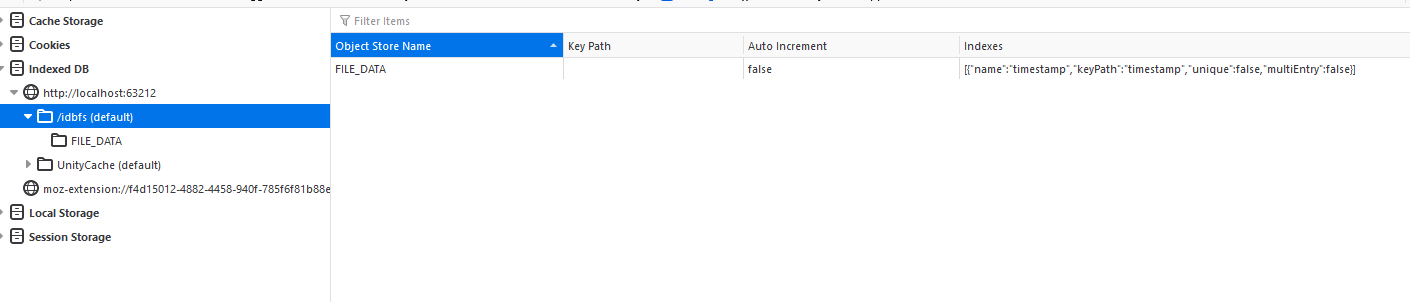
I'm pretty sure it does save the file to IndexedDB. The contents are saved as an Int8Array to FILE_DATA.
hollow zenith
Nothing I tried allowed me to load the data
It fails at:
string filePath = Path.Combine(Application.persistentDataPath, "Gold.json");
if (File.Exists(filePath)) // Fail
Do you restart the game with build & run in the editor?
persistentDataPath changes for every build
hollow zenith
I build + run then I refresh the page after playing for a bit + saving the data
but the path stays the same
keen dew
Don't build, just refresh
keen dew
no
hollow zenith
Even loading simple string doesnt work, it just fails at "File.Exists"
Fails = nothing happens since it fails to go through if statement.
 gilded sinew
guys how should i edit 2nd dictionary so that it works, first one is correct but obsolete and needs to be changed

 keen dew
hollow zenith
Even loading simple string doesnt work, it just fails at "File.Exists"
keen dew
hollow zenith
Even loading simple string doesnt work, it just fails at "File.Exists"
You could try this: https://gamedev.stackexchange.com/a/184370

Game Development Stack Exchange
Our game includes an in-game level editor. When the user saves a custom level, the level is serialized and written to a file:
public void SaveFile<T>(T obj, string path) {
if (!typeof(T).
languid spire
logically PlayerPrefs.Save should do the same thing as it's a generic function in JS
gilded sinew
anybody?
 lament portal
Hello, im trying to make a simple fps controller for a school project. I have these 2 scripts to control the lateral movement, it seems like it should be fine but the capsule is not responding to my imputs at all. I get no errors in the debugger, just no reaction from the object. Any idea what is going wrong there?

 gaunt ice
whst is fixeedupdate?
btw the text is so small, next time !code
 eternal falconBOT

Posting code
📃 Large Code Blocks
Use links to services like:
https://gdl.space/, https://paste.ofcode.org/, https://hatebin.com/, https://paste.myst.rs/, https://hastebin.com/
📃 Inline Code
Surround code with three backquotes. Not quotation marks.
To format as C#, add cs to the first line:
```cs
// Your code here
```
Add a comment with a line number if there is an error message.
 faint lark
guys
        Debug.Log("Set Resistances of all Levels");

        string[] _resault = AssetDatabase.FindAssets("Level", new[] {"Assets/Scenes/Levels"});

        GameObject _obj;
        Level _lvl;
        for (int i = 0; i < _resault.Length; i++) {
            Debug.Log(AssetDatabase.GUIDToAssetPath(_resault[i]));

            _obj = AssetDatabase.LoadAssetAtPath<GameObject>(_resault[i]);

            if (_obj != null) {
                Debug.Log($"We have an Object folks [{_obj.name}]");

                _lvl = _obj.GetComponent<Level>();

                if (_lvl != null) {
                    Debug.Log("We have a Level folks");
                }
            }
        }
    }```
doesnt print the "We have an object" and the "we have a level" logs. so _obj is null basicly and am not sure whyI have been staring at it for like half an hour and didnt see it. Thanks! works perfectly now
languid spire
lament portal
I have been staring at it for like half an hour and didnt see it. Thanks! works ...
note the 0 references above it, a dead giveaway
lament portal
ill try to keep an eye on it next time. thanks for the tip
languid spire
faint lark
guys
``` private static void MenuItem() {
Debug.Log("Set Resistances ...
is your FindAssets returning anything?
 languid spire
string path = AssetDatabase.GUIDToAssetPath(_resault[i])

            _obj = AssetDatabase.LoadAssetAtPath<GameObject>(path);
_resault[i] is a Guid not a path
faint lark
languid spire
```cs
string path = AssetDatabase.GUIDToAssetPath(_resault[i])
_obj...
so now it works fine, it gets to "We have an Object" debug log, but _lvl is null, it doesnt seem to find the component
        Debug.Log("Set Resistances of all Levels");

        string[] _resault = AssetDatabase.FindAssets("Level", new[] {"Assets/Scenes/Levels"});

        string _path;
        GameObject _obj;
        Level _lvl;
        for (int i = 0; i < _resault.Length; i++) {
            _path = AssetDatabase.GUIDToAssetPath(_resault[i]);
            Debug.Log(_path);

            _obj = AssetDatabase.LoadAssetAtPath<GameObject>(_path);

            if (_obj != null) {
                Debug.Log($"We have an Object folks [{_obj.name}]");

                _lvl = _obj.GetComponent<Level>();

                if (_lvl != null) {
                    Debug.Log("We have a Level folks");
                }
            }
        }
}```AssetDatabase.FindAssets("t:Level", new[] {"Assets/Scenes/Levels"});
Level is a component in the prefab
faint lark
languid spire
```cs
AssetDatabase.FindAssets("t:Level", new[] {"Assets/Scenes/Levels"});
```
like this it doesnt return anything
languid spire
then you may want to use GetComponentInChildren
faint lark
ok
languid spire
without the t:
faint lark
yeah
same thing
as before
doesnt get to Level component
the Level component is in the gameobject itself, not in a child
languid spire
show the inspector of one of the prefabs
 languid spire
that's not what I asked for
 languid spire
the Inspector of the prefab. like LevelTitan
 hollow zenith
keen dew
You could try this: https://gamedev.stackexchange.com/a/184370
hollow zenith
keen dew
You could try this: https://gamedev.stackexchange.com/a/184370
I will try that, based on what I read so far this was supposed to be done internally in new Unity version, but maybe not 😐
languid spire
faint lark
I cant see why that is not working, I would suggest getting all components from _obj and looping through them to see what comes back
faint lark
ok
faint lark
languid spire
I cant see why that is not working, I would suggest getting all components from ...
like this it works

 wooden minnow
how do i get XR inputs with pure code? (new unity input system)
 ripe shard
wooden minnow
how do i get XR inputs with pure code? (new unity input system)
ripe shard
wooden minnow
how do i get XR inputs with pure code? (new unity input system)
you have two options (examples):
Quaternion rightHandOrientationValue = default;

// Option A: action map created via code
InputActionMap xrmap = new InputActionMap ("My XR Input Map");
InputAction rightHandOrientation = xrmap.AddAction ( "Right Hand Orientation" );
rightHandOrientation.AddBinding ( "<XRController>{RightHand}/orientation" );
xrmap.Enable ();
rightHandOrientationValue = rightHandOrientation.ReadValue<Quaternion> ();

// Option B: Hard coded via Static API
rightHandOrientationValue = XRController.rightHand.deviceRotation.ReadValue ();
you gotta figure these out yourself, there is no list
wooden minnow
ah.....
ripe shard
wooden minnow
ah.....
 deep bear
!code
eternal falconBOT
Posting code
📃 Large Code Blocks
Use links to services like:
https://gdl.space/, https://paste.ofcode.org/, https://hatebin.com/, https://paste.myst.rs/, https://hastebin.com/
📃 Inline Code
Surround code with three backquotes. Not quotation marks.
To format as C#, add cs to the first line:
```cs
// Your code here
```
Add a comment with a line number if there is an error message.
deep bear
Hi all, I have a question regarding how I'm handling something in my game. I have a hand of cards and currently when I include this code in the Card's script, it behaves like the 1st video:
https://gdl.space/silesinina.cpp
But when I add this code to have it appear in front of the other cards, it behaves like the 2nd video:
https://gdl.space/jayawebane.cpp
In the 2nd video, the cards aren't rising at all, but when the pointer leaves the card, it still drops down. And there's also just weird behaviour going on.
wooden minnow
ripe shard
you have two options (examples):
```cs
Quaternion rightHandOrientationValue = de...
what does AddAction() do?
like what's the difference between AddAction and AddBinding
deep bear
Does anyone know what I could be doing wrong with my code? I've also tried using stuff like transform.localPosition = new Vector3(transform.localPosition.x, transform.localPosition.y + 20, transform.localPosition.z); instead of cardTransform.anchoredPosition = new Vector2(cardTransform.anchoredPosition.x, cardTransform.anchoredPosition.y + 20); but none of it works
ripe shard
wooden minnow
what does AddAction() do?
AddAction creates an action, i.e. an abstract input event you want to query, AddBinding defines how that action is triggered specifically (button presses, joystick movement etc.)
ripe shard
they key to understanding InputSystem is to understand that it is designed to make input fully abstract and do away with the idea of a button press
so yes, you need a binding
you need to define what a given action is
if you use the static API (example B above) the common inputs you'd expect from a simpler input system (like the old one) are premade for you
wooden minnow
does the name of the action matter?
ripe shard
no
you can however search for actions by name (but you should avoid that, just for sanity's sake)
wooden minnow
ripe shard
no
is there any way to know if a binding does something? or what that binding outputs?
 small hill
I wanted to make a timer with this code
private void Update()
{
if(timerRunning)
{
timerMs += (int)(Time.deltaTime * 1000);
UpdateTimerUI(timerMs);
}
}```
but if I start the timer on a different pc then put a recording of my and the other pc ontop of each other so that they start at the exact same time, after 19 sec I have a difference of about 1 sec is this normal? And if so how should I do it then? silver cobalt
using System.Collections;
using System.Collections.Generic;
using Unity.VisualScripting;
using UnityEngine;
using System;

public class PlayerHealth : MonoBehaviour, IDamagable
{
    [SerializeField] private PlayerStats stats;
    public static event Action OnPlayerDeath;

    private void Start()
    {
        stats.CurrentHealth = stats.MaxHealth;
    }

    private void Update()
    {
        if (Input.GetKeyDown(KeyCode.P))
            TakeDamage(1);

    }

    public void TakeDamage(float damageAmount)
    {
        if (stats.CurrentHealth >= damageAmount)
            stats.CurrentHealth -= damageAmount;
        else
            Death();
    }

    private void Death()
    {
        OnPlayerDeath();
    }
}
ive got a question to this code snippet:
as you can see i have this static Action which every script can subscribe their methods to.
is this considered bad code? and if so can you tell me an alternative to create a loosely coupled connection between different class (except for the observer pattern
keen dew
small hill
I wanted to make a timer with this code
```cs
private void Update()
{
if(ti...
Yes, it's expected – you're truncating the milliseconds each frame so the error compounds quickly
it should be
timerMs += Time.deltaTime * 1000;
UpdateTimerUI((int)timerMs);
you need to know the type, but you can figure it out if you make a input action assset in the editor, it basically has all the possible values/types
the "real" way to use InputSystem is through such an input action asset anyway
you use the code-api only if you want to make a convenient default config for prototyping or quickstart or if you wrap the whole thing into your own tooling for special needs of a complex project
 hidden sleet
actually, different question, I've got two types of items that can be displayed in an inventory slot, so I basically copied over the display inventory script and adapted it to fit this structure item slot, but this doesn't feel at all right. Is there a way to just have one class that can accept any type so they aren't both duplicated?


 signal narwhal
faint lark
signal narwhal
faint lark
chance is written with an c not an s
faint lark
signal narwhal
chance is written with an c not an s
lol
hidden sleet
hidden sleet
actually, different question, I've got two types of items that can be displayed ...
If I just made an interface for these different types of Ui slots, would that work do you think?

 wooden minnow
ripe shard
you need to know the type, but you can figure it out if you make a input action ...
wooden minnow
ripe shard
you need to know the type, but you can figure it out if you make a input action ...
what would joystick click be called?
in binding
 delicate pewter
Is there any simple and very quick way to add some sort of graphic on a gameobject so I can indicate direction?
Im working on a simulator for school and need to know which way my cylinder is facing
While its running
Dont wanna spend a bunch of time on unnecessary stuff, its just for me
 wintry quarry
delicate pewter
Is there any simple and very quick way to add some sort of graphic on a gameobje...
wintry quarry
delicate pewter
Is there any simple and very quick way to add some sort of graphic on a gameobje...
Slap a cone on it as a child object?
Draw some gizmos?
lots of ways
delicate pewter
wintry quarry
Slap a cone on it as a child object?
What would be the easiest way to slap a triangle graphic on the top of the cylinder?
just a random triangle of some different color so that i can see which way its facing
without adding more objects, just the graphic
wintry quarry
I shared the easiest way I can think of
delicate pewter
The axes on gameobjects, do they turn with the object? So for instance the blue arrow (forward) does that rotate with the rotation of the object?
In Scene view
Or is it locked as some sort of global axis
wintry quarry
delicate pewter
The axes on gameobjects, do they turn with the object? So for instance the blue ...
you can toggle it with the X key
 delicate pewter
Ah cool ty!
hidden sleet
Got the Ui slot script attached to the slotPrefab, and I want to change the value before instantiating it, but it's not letting me access it. What might I be doing wrong here?


 opaque kettle
Hey, can someone help me, i have a Raycast that should, when it hits an objects with a collider set as a trigger Destroy the object, yet the Ray just goes through the Trigger, any ideas? https://hastebin.com/share/vekekupubu.csharp
Hastebin is a free web-based pastebin service for storing and sharing text and code snippets with anyone. Get started now.
wintry quarry
hidden sleet
Got the Ui slot script attached to the slotPrefab, and I want to change the valu...
mouse over the underlined red text and read the error message
wintry quarry
opaque kettle
Hey, can someone help me, i have a Raycast that should, when it hits an objects ...
is the first Debug.Log printing? If so what does it say?
hidden sleet
just says slotPrefab could not be found, but I've got the variable up top with it assigned in the inspector too
opaque kettle
wintry quarry
is the first Debug.Log printing? If so what does it say?
yes, it hits the object behind the Trigger
wintry quarry
hidden sleet
just says slotPrefab could not be found, but I've got the variable up top with i...
show the code
wintry quarry
opaque kettle
yes, it hits the object behind the Trigger
show the inspector for the object with the trigger collider?
hidden sleet
wintry quarry
show the code
what I've got so far
 wintry quarry
opaque kettle
yes, it hits the object behind the Trigger
wintry quarry
opaque kettle
yes, it hits the object behind the Trigger
Also note "Queries Hit Triggers" in the physics settings.
https://docs.unity3d.com/Manual/class-PhysicsManager.html

 opaque kettle
wintry quarry
Also note "Queries Hit Triggers" in the physics settings.
https://docs.unity3d.c...
opaque kettle
wintry quarry
Also note "Queries Hit Triggers" in the physics settings.
https://docs.unity3d.c...
ive got it activated, i think
 wintry quarry
hidden sleet
what I've got so far
wintry quarry
hidden sleet
what I've got so far
you're missing a semicolon on that line and also... it's just not a valid line of code at all
since it's not doing anything
wintry quarry
opaque kettle
That's a 2D collider
You're using a 3D raycast
You would want to use Physics2D.GetRayIntersection
hidden sleet
I know there's no semicolon, but the issue is that it isn't filling out the CorrespondingInventoryItem, and I'm not sure why
wintry quarry
hidden sleet
what I've got so far
btw since this is UI stuff why are you using SpriteRenderer and colliders in the first place?
opaque kettle
wintry quarry
You would want to use `Physics2D.GetRayIntersection`
thanks!
wintry quarry
hidden sleet
I know there's no semicolon, but the issue is that it isn't filling out the Corr...
because you forgot the () in your GetComponent call
you need () to call a function in C#
hidden sleet
wintry quarry
btw since this is UI stuff why are you using SpriteRenderer and colliders in the...
where does it say I'm using those? don't know what spriterenderer even is
wintry quarry
opaque kettle
Right here in your screenshot
You have SpriteRenderer, Rigidbody2D, Collider2D on this object
hidden sleet
wrong reply
delicate pewter
How can I shift the transform.forward vector a certain amount of x to the right or left?
Say I want a raycast a little to the left of the forward direction
hidden sleet
Can't believe I didn't spot the brackets though
wintry quarry
hidden sleet
that's why I was confused
yeah sorry my bad
wintry quarry
delicate pewter
How can I shift the transform.forward vector a certain amount of x to the right ...
you mean you want to rotate it by a certain number of degrees around some rotation axis?
hidden sleet
i've not used too many methods that need the <> so I guess I assumed that replaced the brackets
delicate pewter
wintry quarry
you mean you want to _rotate it_ by a certain number of _degrees_ around some ro...
Well I mean i am shooting a raycast like this
Ray rayForw = new Ray(RVOAgents[i].transform.localPosition, RVOAgents[i].transform.forward);
But I also want to shoot one abit to the left and a bit to the right
wintry quarry
right and I'm asking you to clarify what you mean
when we're talking about a direction vector generally you mean you want to rotate that vector
delicate pewter
Not looking to rotate anything, i just want to shoot a raycast to the left and right of the forward vector
wintry quarry
shifting it to the right or left might mean moving the position, not changing the direction
delicate pewter
I want the forward to stay as it is. Just want to based on the forward, shoot to the left and right of it
wintry quarry
delicate pewter
I want the forward to stay as it is. Just want to based on the forward, shoot to...
Do you want to change grewen to red?
Or change blue to magenta?

blue to magenta is a rotation of the direction
green to red is moving the origin of the ray
delicate pewter
Yes blue to magenta
wintry quarry
so yes you want a rotation
delicate pewter
but i dont want the gameobjects actual forward vector to rotate
But yes i do want an "imaginary" one to rotate that i can use
 royal ledge
Lool, i was 100% sure he meant green to red
gaunt ice
you can rotate the copy of forward vector
delicate pewter
Yeah i figured that was the case with praetors reply
makes sense
Ill try it
Yeah worked, ty peeps
With raycast hits, I need to check after each raycast right, I cant cast 3 raycasts and then do stuff based on the hits?
Since it doesnt differentiate the hits ? probably just writes over them?
gaunt ice
use 3 different variable to store the raycasthit result
delicate pewter
Yeah was just about to write that, but i have to store between each cast that is
Yeah i understand now ty
 misty obsidian
Hello! How to make it visible?

That square which is an image
(Im using a Scroll Rect component)
delicate pewter
Physics.Raycast lets you ignore certain layers, is there a way to do the opposite, make it only HIT certain layers?
Or rather, just one layer i need it to hit
wintry quarry
delicate pewter
With raycast hits, I need to check after each raycast right, I cant cast 3 rayca...
I mean, you can do whatever you want as long as you understand how to store information and process it in C#
wintry quarry
delicate pewter
Physics.Raycast lets you ignore certain layers, is there a way to do the opposit...
invert the layermask
actually the normal behavior is to only HIT the layers in the mask
delicate pewter
A little vague wording i guess but sounds to me like its specifying which i want it to ignore
I mean I guess I can just let it hit everything and then check whether the object hit is in a certain layer
Tho it will mean that the ray is cut short in the event of ignored layers but whatever maybe its fine
Ah nvm i understand it now, my bad. Been a while since using Unity, a layermask is a layermask, not just one layer lol
 cunning rapids
Is there a difference?


Is there a difference between using a parent game object for movement logic and a childed capsule for collision and just simply using a capsule for it all?
I've seen some tutorials do systems differently and I just wanted to know if I should bother look into it
wintry quarry
cunning rapids
Is there a difference?
Are you asking if it matters if the collider is on the same object as the Rigidbody or a child? It doesn't really matter no
cunning rapids
wintry quarry
Are you asking if it matters if the collider is on the same object as the Rigidb...
Oh alright. Can I ask why some people do these systems differently though? Isn't it just easier to use a single game object for the collision and the movement logic? I thought it might help with interpolation or something
wintry quarry
cunning rapids
Oh alright. Can I ask why some people do these systems differently though? Isn't...
Wdym by "single capsule"? It's a single capsule either way.
cunning rapids
I meant that a single game object has both collisions and rigidbody movement
wintry quarry
There are many advantages to having the collider on a child object.
- It can be animated separately from the parent
- It can have custom scripts on it that for example have collision callbacks that apply ONLY to that collider (and not other colliders on the body)
- It can have a different layer and/or tag than its parent
- It can be scaled/rotated/positioned relative to the parent
cunning rapids
Understood
But I'm having trouble with using the collider as a child
Because I created this simple script for teleportation
For some reason it messes up with crouching and collisions
wintry quarry
you'd have to share details of the script and the trouble you're having
cunning rapids
using UnityEngine;

public class Teleporter : MonoBehaviour
{
    public Transform destination;
    public GameObject objectToTeleport;

    private void OnTriggerEnter(Collider other)
    {
        if (other.gameObject == objectToTeleport)
        {
            TeleportObject(objectToTeleport);
        }
    }

    private void TeleportObject(GameObject objectToTeleport)
    {
        if (destination != null)
        {
            objectToTeleport.transform.position = destination.position;
        }
    }
}
But since the parent game object doesn't have a collider, I decided to teleport the child
But it messes up the position of the parent I'm guessing
wintry quarry
if you want the parent you can just do other.tranform.parent.gameObject
Or perhaps the safest thing assuming these are all root objects in the scene is other.transform.root.gameObject
Though I'd probably just use Transform directly instead of needlessly involving the GameObject, since you're only just accessing the Transform again
cunning rapids
Makes sense
 ancient island
lmao
hidden sleet
I wanted to have it so that clicking one spawns an item in the scene, which is what I was resolving earlier, but removing it from the UI isn't working as expected.
Currently got another issue when trying to remove a UI element from the screen. In this case I have a dictionary that uses an inventorySlot to point to a GameObject, the slot in the Ui that displays that item, which is assigned here as expected.
In the code screenshot, I can see that when the next scene loads it is correctly assigned as a pair in the dictionary


But then when I click on '2' and watch the execution, the value suddenly becomes null, and get this error


But I'm not sure why it just becomes null when the dictionary had the gameobject stored properly when the scene first loads
wintry quarry
hidden sleet
But I'm not sure why it just becomes null when the dictionary had the gameobject...
That last image tells you exactly why
"The object of type GameObject has been destroyed"
Which is exactly what happens to all GameObjects in a scene when the scene is unloaded
You still have a stale reference to a GameObject in the previous scene
Unity overrides the ToString() on destroyed objects to say "null", it's not actually null
hidden sleet
in this case the scene isn't unloaded, from what I see here in the first screenshot it adds it to the dictionary when the scene loads

so i would have thought the gameobject it references is the one currently existing
wintry quarry
You are somewhere destroying the object, either by unloading the scene or manually calling Destroy on it
hidden sleet
I'm not calling destroy anywhere else bar the method shown a few messages above, but can't destroy it cause there isn't a gameobject in the value.
I've got no clue why else the objects would be unloading though
wintry quarry
hidden sleet
I'm not calling destroy anywhere else bar the method shown a few messages above,...
which method has Destroy? You should add Debug.Log statements to check if and when that's running
or use the debugger
wintry quarry
hidden sleet
But then when I click on '2' and watch the execution, the value suddenly becomes...
you can also drill down into the thing here instead of trusting that "null" string there to see if it's actually null or a Destroyed object
hidden sleet
just this one
 wintry quarry
it's bugging me btw that you write this whole thing itemsDisplayed[Inventory.InvContainer[i]] instead of just obj which is the same object in that earlier screenshot lol
wintry quarry
hidden sleet
just this one
yeah this looks like it's probably the culprit
hidden sleet
but it's not actually destroying anything since there's nothing to destroy
since the dictionary value inside is always null for me
wintry quarry
maybe you're looking at a completely different dictionary
a different inventory reference, different co[py of the script, etc.
hard to tell from these limited screenshots
hidden sleet
hang on, think I may have an idea
 distant robin
hi can someone help me please?
wintry quarry
upload as mp4 to get embedded in discord
hidden sleet
so in this case, my inventorySlot consists of a custom Item object alongside a count. At the start I add an item to the dictionary with that slot as the key and the object as the gameobject. i reduce the count by 1 in a script outside of this one, then I want displayInventory to change to reflect that. But if I reduce the count by 1, then use that as a key, will the fact that the count isn't the same mean that It can't find the gameobject and returns null?
wintry quarry
I'm having a hard time following your explanation
your setup seems a little overcomplex
distant robin
can someone explain me why my animation does this? i'm using first person starter pack by unity, loop time is turned off
hidden sleet
wintry quarry
your setup seems a little overcomplex
probably is, I really don't know the best methods to do this sort of stuff since I'm brand new to all this
wintry quarry
distant robin
can someone explain me why my animation does this? i'm using first person starte...
looks like it's doing exactly what you told it to do? What's the issue exactly, the fact that it's looping?
 coarse compass
Hey this code makes no sense but I'm curious. How do you access different components of same type on an object?
I assumed GetComponent would return an array but it does not apparently.
 wintry quarry
coarse compass
Hey this code makes no sense but I'm curious. How do you access different compon...
wintry quarry
coarse compass
Hey this code makes no sense but I'm curious. How do you access different compon...
GetComponents returns an array
the singular version only returns the first one
you can also do:
[SerializeField]
Collider myCollider;``` and drag a specific collider into the slot in the inspectorOften if you have multiple colliders, putting them on child GameObjects can be best practice though
distant robin
wintry quarry
looks like it's doing exactly what you told it to do? What's the issue exactly, ...
yes looptime is off, and its too fast even if i set the speed at 0.1 . why does it spin like this?
wintry quarry
distant robin
yes looptime is off, and its too fast even if i set the speed at 0.1 . why does ...
well for one you have defined the animation as taking only 0:04 which is 4 60ths of a second.
or about 66 milliseconds total, which is very fast
As for looping, can you show the inspector for the animation clip
distant robin
wintry quarry
well for one you have defined the animation as taking only 0:04 which is 4 60ths...
lol
distant robin
wintry quarry
As for looping, can you show the inspector for the animation clip
yea wait a sec

it is actually not doing what im telling him to, look at this it looks like a washing machine 
wintry quarry
distant robin
can someone explain me why my animation does this? i'm using first person starte...
perhaps your code is explicitly running this animation
distant robin
sorry wrong vid
distant robin
wintry quarry
perhaps your code is explicitly running this animation
i dont have a code mentioning it
cool washing machine
its slow at the start and its faster every time it repeats itself
 heady grove
why this code for make footsound is wrong?
 wintry quarry
heady grove
why this code for make footsound is wrong?
wintry quarry
heady grove
why this code for make footsound is wrong?
Use https://docs.unity3d.com/ScriptReference/AudioSource.Play.html and https://docs.unity3d.com/ScriptReference/AudioSource.Stop.html to start and stop an audio source.
Also if you play every frame it's not going to work properly, it will restart every time you call play
 buoyant knot
do you mean .Play()?
wintry quarry
so you'll want to do it only when you start and stop moving, not every frame
hidden sleet
had a look through all my other classes and set up some debug log messages, but I still can't find why it's setting it to null. Is it possible that the key has changed so it can't find the object rather than the object not existing?
buoyant knot
i would make a custom property for this
use a custom setter, that gives a Debug.Log every time it is called
wintry quarry
hidden sleet
had a look through all my other classes and set up some debug log messages, but ...
You would get a KeyNotFoundException if the key doesn't exist in the Dictionary
buoyant knot
IndexOutOfRange/KeyNotFound mean the array/list/dict are not null, but the entry is not in there
NullReferenceException => list/array/dict is null
hidden sleet
what if the dictionary key is the slot but a custom int count inside is different to what I pass in? Here for instance the actual count for the item slot will be 1, but the itemsDisplayed dictionary will still have 2 since it's been reduced by 1
 wintry quarry
I don't really know what "count" is referring to here
hidden sleet
the number of items in an inventory slot
buoyant knot
i think you want TryGetValue
wintry quarry
what does the number of items in the slot have to do with this though
what is itemsDisplayed exactly? A map of what to what?
Some internal inventory object to a UI GameObject?
hidden sleet
wintry quarry
what does the number of items in the slot have to do with this though
Was wondering if the fact that the count that is stored in the key I'm passing in is different to what is stored in the dictionary that maybe it isn't finding the right value
wintry quarry
hidden sleet
Was wondering if the fact that the count that is stored in the key I'm passing i...
It's hard to say because I have no idea what the key is
is the key a struct?
If it's just a reference to a reference-typed object, the data inside doesn't matter
in fact the data will always be the same everywhere you look at it because you're referencing the same object
if it's a struct, then yes you have issues here
hidden sleet
wintry quarry
what is `itemsDisplayed` exactly? A map of what to what?
it's supposed to map an InventorySlot to a gameobject, so an inventory here would be made up of inventory slots, so I thought I could use the dictionary to easily delete the gameobject by passing in the inventory slot it relates to


 wintry quarry
But I think it's pretty clear form your earlier screenshot that there exists an actual mapping int he Dictionary to something that is showing as null
wintry quarry
hidden sleet
it's supposed to map an InventorySlot to a gameobject, so an inventory here woul...
it's a class, so it's a reference type
the only thing that matters is the actual reference.
hidden sleet
so the count being different doesn't matter, gotcha
wintry quarry
hidden sleet
so the count being different doesn't matter, gotcha
it can't be different
as long as you're referring to the same object
hidden sleet
i see
wintry quarry
it will have the same count, because they're the same object
that's how reference types work
your variable stores basically a pointer to the object, not the object itself.
buoyant knot
i assume the dictionary maps Item key to int value?
i’m very confused by your code tbh
hidden sleet
cause essentially all I wanted to do here was have it so that I can use the inventory slot as the key and change the details of the game object that way
 wintry quarry
so Item is.. .a GameObject?
wintry quarry
wintry quarry
what is `itemsDisplayed` exactly? A map of what to what?
Still kinda looking to the answer to this question
buoyant knot
we’d need to know the types at play here to do anything
hidden sleet
and for adding to the count in the slot it works, as the previous scene. These ui elements would be the gameobject in the dictionary, and the inventoryItemSlot is the actual item in the inventory

 wintry quarry
what type is the dictionary 😵💫
hidden sleet
did I not post it above?
buoyant knot
no
hidden sleet
hidden sleet
it's supposed to map an InventorySlot to a gameobject, so an inventory here woul...
it's here
public Dictionary<InventoryItemSlot, GameObject> itemsDisplayed = new Dictionary<InventoryItemSlot, GameObject>();``` in case the image isn't loadingSo when this second scene loads, it should look at all the items in the inventory and create UI elements for them, adding them to the dictionary. Then when the Ui element is clicked it will remove it from the inventory, and then perform this method to change the UI number or destroy it outright depending on how it changes in the inventory. but here is where the gameobject ends up as null


 desert elm
layer mask should mask a layer when a doing a raycast, right?
wintry quarry
desert elm
layer mask should mask a layer when a doing a raycast, right?
the layer mask is the set of layers that are included in the raycast
only the layers in the mask will be included
gaunt ice
it is some sort of filter
desert elm
oh- thats
a bit confusing, right, thats why its not working
wintry quarry
buoyant knot
LayerMask is a bit mask. 32 ones and zeros, where 0 at position X means to ignore layer X.
Layer is the index (X) in that layer mask.
wintry quarry
hidden sleet
So when this second scene loads, it should look at all the items in the inventor...
again you can drill down on those 0 and 1 elements where it's null to see what's up - but I think it's pretty clear those objects were destroyed somehow
buoyant knot
so 0011 means include 1/2 and exclude 3/4
hidden sleet
what do you mean by drill down?
wintry quarry
hidden sleet
what do you mean by drill down?
 hidden sleet
oh I see what you mean
it's been taking longer and longer to load up which is strange
right then, so upon loading up the scene it's picked it all up properly. oh, and it's all just gone when I run the update


the gameobjects still exist in the scene which is the most confusing part for me
wintry quarry
hidden sleet
right then, so upon loading up the scene it's picked it all up properly. oh, and...
What scripts are on those objects? I suspect they're being destroyed somewhre else
BTW this definitely means it's a destroyed object

and not real null
hidden sleet
got this one that handles clicking the UI, this one for actually removing the item, then it fires the event that runs the display update one


 desert elm
buoyant knot
so 0011 means include 1/2 and exclude 3/4
desert elm
buoyant knot
so 0011 means include 1/2 and exclude 3/4
wait so- what if I write something like 2 or 3?
and is layer zero included?
gaunt ice
2=0b10
3=0b11
buoyant knot
i think it’s offset to be 0-31 actually
so 0011 would be 0/1 on and 2/3 off
i think
 stiff birch
isn't layer 0 = none ?
desert elm
gaunt ice
2=0b10
3=0b11
what does that b mean?
buoyant knot
0b means representing a number in binary
0b01 means the number corresponding to 0000000000000…0001 in binary
gaunt ice
binary format, fyi 0x = hexadecimal
wintry quarry
desert elm
wait so- what if I write something like 2 or 3?
you shouldn't even really worry about htis. To define a layermaskj do this:
public LayerMask myMask;``` and you can set it up in the inspectoroh right thanks
buoyant knot
you can also add/subtract layer masks, fyi
0010 + 0100 = 0110
there are good extensions to just automatically make consts for individual layers and layer masks
gaunt ice
| bitwise or operator
hidden sleet
I've looked just about everywhere and there definitely is not a moment where I delete the gameObject that inventory slot should relate to
wintry quarry
hidden sleet
I've looked just about everywhere and there definitely is not a moment where I d...
what scripts are on the object?
hidden sleet
on the UI element, just this which only does this

 wintry quarry
What does RemoveItem do
hidden sleet
 wintry quarry
and InvContainer.Remove does?
languid spire
cannot remove an element in a foreach
hidden sleet
inv container is just a list so it'll remove it from that

 sterile radish
how can i check if my player has bought an item and if so, make it non-interactable next time they visit the shop?
https://hastebin.com/share/pujuxowoge.csharp
Hastebin is a free web-based pastebin service for storing and sharing text and code snippets with anyone. Get started now.
languid spire
hidden sleet
inv container is just a list so it'll remove it from that
not in a foreach it wont, also if you want to remove itterate in reverse
wintry quarry
sterile radish
how can i check if my player has bought an item and if so, make it non-interacta...
you';d want to save the data about which items the player has bought in some kind of persistent state
sterile radish
wintry quarry
you';d want to save the data about which items the player has bought in some kin...
so like some kind of bool? and everytime the go the shop the game checks that bool?
wintry quarry
that's underselling it
Probably not a bool
maybe more like a list of item names or ids
hidden sleet
Looks like it did on my end, there were 2 cardboard items before the remove method is called

 wintry quarry
like itemsOwned: ["dagger", "cat", "lamp"] in some list somewhere proably belonging to a broader "game state" object
sterile radish
oh okay
and i would append the bought item to the list you mentioned whenever the player buys it correct?
wintry quarry
yep
sterile radish
alright thanks!
hidden sleet
I just think it's odd how adding items to it works in every other scene, it's just removing that isn't working
wintry quarry
tbh I don't understand why this is happening in Update anyway? Why not immediately remove the things when you remove the item
THough I'm a bit unclear if this is running in Update or not
Actually now that I'm thinking about it, isn't it clear this code is the very thing destroying the object? Then you're looking next frame and you see a destroyed object there, naturally

You never actually remove it from the dictionary, right?
don't you also want itemsDisplayed.Remove(inventory.InvContainer[i]);?
hidden sleet
nothing runs from the Update method specifically, I just use an event when the item is removed from the inventory
wintry quarry
wait also if that thing is null, aren't you just destroying nothing? Why would there be a null key in the dictioanry in the first place? That's really odd
this is just... weird overall the more I think about it
hidden sleet
wintry quarry
Actually now that I'm thinking about it, isn't it clear this code is the very th...
If it's a list then actually yeah the index won't be pointing to the right place, that's fair enough. But even if I tries to destroy the object below it, the itemsdisplayed thing is already all null
If I run it through from the start I can see that before removing there are two cardboard items, which are then removed in the script that handles someone clicking the UI slot. Then since the inventory has been changed, it goes to update the display. and i can see that the container has the current slots and totals. The dictionary is pointing to the right key but then of course it's just null. And it's never ran the destroy method, these lines are the only two it runs through


I suppose the only other way I could try it is if destroy the object this script belongs to after removing the item from the inventory?
Is that possible?
might put a pin in this one. Spent 5 hours already trying to resolve it but i just can't seem to amend it
I can see now why people say to start off with smaller projects, if I tried doing a large one now I'd be so burdened by my awful script structure that I'd never be able to make anything work on a large scale
sterile radish
yeah
sterile radish
wintry quarry
like `itemsOwned: ["dagger", "cat", "lamp"]` in some list somewhere proably belo...
the system works great thank you btw! 🙏 however i think i messed something up as it only works while the game is running. whenever i quit and come back the items reset back to not being bought, why is that?
https://hastebin.com/share/onulacatuy.csharp
Hastebin is a free web-based pastebin service for storing and sharing text and code snippets with anyone. Get started now.
sorry for the ping btw
wintry quarry
sterile radish
the system works great thank you btw! 🙏 however i think i messed something up ...
well sure I mean, you would have to share your ItemManager code but I presume you aren't storing this data anywhere except in memory
you would need some kind of saved game system to persist between play sessions
sterile radish
hmm okay
sterile radish
wintry quarry
well sure I mean, you would have to share your ItemManager code but I presume yo...
here is the item manager script
https://hastebin.com/share/evipilarab.csharp
Hastebin is a free web-based pastebin service for storing and sharing text and code snippets with anyone. Get started now.
and the saving system
https://hastebin.com/share/fomajitale.csharp
Hastebin is a free web-based pastebin service for storing and sharing text and code snippets with anyone. Get started now.
 mellow elbow
Im coding a bullet but it doesnt seem to move when I shoot it
The way its setup is that when its instantiated It gets shot and then moves along the local position forward until it hits something, but it isnt moving forward and just stuck in the air, another thing is that it doesnt instantiate every time I press my mouse button
This is the setup

I'm very rusty so idk what im doing wrong
 barren vapor
mellow elbow
I'm very rusty so idk what im doing wrong
barren vapor
mellow elbow
I'm very rusty so idk what im doing wrong
You have to put the transform.position part in the update or lateupdate method.
it only triggers once now
mellow elbow
This method is in fixedupdate, does that not work?
barren vapor
mellow elbow
This method is in fixedupdate, does that not work?
Did you put a method in fixed update?
hidden sleet
sterile radish
and the saving system
https://hastebin.com/share/fomajitale.csharp
by making this static does that just mean you can get the manager without needing to look at the gameobject that has attached?
 golden otter
fixedupdate doesn't take count of frame drops
 swift crag
Down/Up methods only return true for one frame
barren vapor
mellow elbow
is that bad
If you put the script of the method in fixed update, then it won't work. It's not bad. Everyone learns from his mistakes. Fixedupdate is a method on it's own, so you're putting a method in a method now.
you could better do smt like:
... fixedUpdate() {
if (input...) {
script
}
}```also this
wintry quarry
sterile radish
and the saving system
https://hastebin.com/share/fomajitale.csharp
you're only saving click count and clickadder
mellow elbow
swift crag
Down/Up methods only return true for *one frame*
ah ok
barren vapor
The transform should be appart of the spawning method or if check
mellow elbow
thats why it didnt shoot all the time
hidden sleet
wait how come it's moving to the else part when they are both the same

 desert elm
wintry quarry
you shouldn't even really worry about htis. To define a layermaskj do this:
```c...
desert elm
wintry quarry
you shouldn't even really worry about htis. To define a layermaskj do this:
```c...
and this will hide the layer I set up, right?
sterile radish
hidden sleet
by making this static does that just mean you can get the manager without needin...
by making it static, the version of my itemID'S list remains the same in all scripts and instances of it.
hidden sleet
sterile radish
by making it static, the version of my itemID'S list remains the same in all scr...
oh so if there is another gameManager object on another scene it won't have all it's values reset?
sterile radish
wintry quarry
you're only saving click count and clickadder
oh okay, whats the difference between saving the id in GameManager instead of BuyItem?
swift crag
hidden sleet
oh so if there is another gameManager object on another scene it won't have all ...
Normally, members (fields, methods, properties, etc.) of a type exist on each instance of the type.
So each object will have its own data.
A static member doesn't live on an instance
There is always exactly one copy of it, and you access it with the type name, rather than accessing it from a specific instance
swift crag
hidden sleet
oh so if there is another gameManager object on another scene it won't have all ...
in this case, every time a GameManager's Awake method runs, gameManager is set to this
so, when a GameManager wakes up, it writes itself into that static gameManager field
If no GameManager has woken up yet, GameManager.gameManager will be null. Otherwise, you'll get the most recent GameManager to have woken up.
hidden sleet
gotcha
swift crag
This is a pretty common pattern for "manager" types. It's usually called the singleton pattern.
hidden sleet
I've used static variables a fair bit in the past but the way unity deals with stuff just has me confused at times
wintry quarry
sterile radish
oh okay, whats the difference between saving the id in GameManager instead of Bu...
I mean you want a centralized place to know all the items you have right? Isn't BuyItem just a single item?
hidden sleet
but I could use that approach for my inventories perhaps
swift crag
The main thing to keep in mind is what happens if a Unity object is destroyed
If the object stored in gameManager is destroyed (e.g. by a scene unload), the variable will return true if you check if it equals null
(because all unity objects do that)
if (GameManager.gameManager == null) {
  Debug.Log("No game manager has woken up OR the latest game manager has been destroyed");
}
 swift crag
static fields live for as long as the program does, so the value will only change if you write a new one
 queen adder
What version of Unity should I install?
swift crag
By default, pick the latest LTS (Long-Term Support) release.
Should be 2022.3.x
2022.3.16f1 right now, I think?
 swift crag
If you're following a tutorial that calls for a specific Unity version, pick that instead. You can generally just match the first two numbers.
sterile radish
wintry quarry
I mean you want a centralized place to know all the items you have right? Isn't ...
well buyitem is on every single one of my items however it isn't centralized like GameManager correct? so would that cause it to lose it's values once i restart the game?
swift crag
year.minor.patch
queen adder
swift crag
If you're following a tutorial that calls for a specific Unity version, pick tha...
Nop, just starting by myself
wintry quarry
sterile radish
well buyitem is on every single one of my items however it isn't centralized lik...
when you retart your game your entire program stops running
nothing in memory will survive.
only files
hidden sleet
although i believe 2021 is the only one that has example projects you can try out
wintry quarry
or PlayerPrefs which uses the registry
swift crag
hidden sleet
although i believe 2021 is the only one that has example projects you can try ou...
Right. They're not available for 2022
queen adder
hidden sleet
although i believe 2021 is the only one that has example projects you can try ou...
I could try out 2021 first then
hidden sleet
could do I suppose. I've had a lot of fun working through them
queen adder
This one?
 swift crag
These projects, specifically.
 queen adder
Is it necessary for me to download any module?
queen adder
swift crag
These projects, specifically.
I remember the FPS one
It was kinda futuristic
hidden sleet
I didn't expect them all to have full on tutorials in them
sterile radish
wintry quarry
or PlayerPrefs which uses the registry
oh okay i think i understand now. BuyItem is no good since although it exists in multiple places, it is just a single thing. with GameManager, it acts as a centralized hub for storing data. what i said about restarting the game doesnt matter as everything in memory goes away once i stop the game. the only thing that remains are files or playerprefs correct?
okay, thank you praetor! 🙏
swift crag
You need a way to turn the game's state (which items you've bought) into data you can store
and then a way to turn that data back into game state
hidden sleet
finally got it working my word. brute forced it in an ugly way but it functions at least. Thanks for helping out, Praetor, this is a lot harder than I thought

 west sonnet
Trying to make a shooting system using a particle system. I want to receive different debug messages depending on what's hit using layers. Can anyone help me on why my Collision If Statement isn't working?

Nevermind, figured it out!!
hidden sleet
should just need to be other.layer shouldn't it?
west sonnet
hidden sleet
should just need to be other.layer shouldn't it?
Yup! Thanks anyway!
hidden sleet
talking about statics and whatnot, at the moment I have my inventories saved as scriptable objects, first of all - is that a common thing to do? And secondly, using that static method would it be easier to change how this here works so instead there is a static inventory object between scenes?
 west sonnet
Making a 2D game where the player will have a shotgun, and I want the shotgun to push the player back with the recoil. This is my code at the moment but it's not moving the player at all when right clicking. Can anyone help me figure out why please?
 mellow elbow
How do I trigger an animation parameter bool with script
mellow elbow
west sonnet
Making a 2D game where the player will have a shotgun, and I want the shotgun t...
Maybe do += on the third if
swift crag
west sonnet
Making a 2D game where the player will have a shotgun, and I want the shotgun t...
you're setting the velocity in all three cases
Although, hm, you are keeping the X component in the first two cases
mellow elbow
Yeah += is adding iirc
west sonnet
Yeah, sorry. Meant left clicking
The first 2 if's affect Y axis, the third affects X
so not sure why it wouldn't work
swift crag
Check that your code is actually running with a Debug.Log statement.
Then make sure nothing else is setting the velocity of the rigidbody
oh, one other thing
Check the inspector to make sure GunKickBack isn't zero
If you didn't have = 500f when you first wrote the script, and only added that later, the inspector would keep the zero
west sonnet
Debug.Log works, and I also tried putting GunKickBack on the Y part, and it shot me upwards like it should
But for some reason, on X, it doesn't do anything
and I've checked inspector and script, both have 500f
mellow elbow
Did you try what I told you
west sonnet
Yeah, also didn't work
mellow elbow
damn
west sonnet
Could it be this that's affecting it?

But surely that's just to control the speed?
Actually it works now that's I've disabled that part, so it must be that somehow interfering
gaunt ice
ofc the velocity of rb get overwritten
queen adder
UR setting the velocity in Update and FixedUpdate
U should on be setting it in FixedUpdate
rich adder
west sonnet
I want the player to be pushed backwards
use addforce
make bool for the .velocity part
swift crag
west sonnet
How can I create recoild in a 2D game?
Two options.
One: Don't set the velocity directly. Just apply forces to move the player.
Two: Store recoil velocity separately. Add it on top of the movement velocity.
The latter will be easier to control, at the expense of physical accuracy.
 cosmic quail
@swift crag hey did you miss this message from me?
swift crag
oh right, I forgot to reply
west sonnet
swift crag
One: Don't set the velocity directly. Just apply forces to move the player.
Two:...
How could I add it on top of the movement velocity?
swift crag
west sonnet
How could I add it on top of the movement velocity?
store a separate Vector2 for recoil velocity
then add it to the Vector2 you're creating in FixedUpdate
(and have it rapidly decrease to zero, too)
cosmic quail
swift crag
You won't find UnityEvent<bool>. It's a generic type that works with *any* type
oh ok but doing multiple parameters is impossible? what would you recommend for functions that need multiple parameters?
swift crag
there are variants for 2, 3, and 4 parameter functions
cosmic quail
swift crag
there are variants for 2, 3, and 4 parameter functions
oh they're on the left i see them now. does that mean i need to do make a custom script for each? I can't just jump into my script and add this?
public UnityEvent<string, int> myEvent;
i must always make a custom script first where i override the class type?
 twin bolt
How do i fix my yaw constantly resetting back to 0? ``` yaw = transform.localEulerAngles.y + Input.GetAxis("Mouse X") * mouseSensitivity;
            if (!invertCamera)
            {
                pitch -= mouseSensitivity * Input.GetAxis("Mouse Y");
            }
            else
            {
                // Inverted Y
                pitch += mouseSensitivity * Input.GetAxis("Mouse Y");
            }

            // Clamp pitch between lookAngle
            pitch = Mathf.Clamp(pitch, -maxLookAngle, maxLookAngle);

            playerCamera.transform.localEulerAngles = new Vector3(pitch, yaw, 0);
            Debug.Log("Controller Yaw: " + yaw);```
What you wrote looks fine to me.
cosmic quail
swift crag
What you wrote looks fine to me.
but this part in the documentation confuses me "If you wish to use a generic UnityEvent type you must override the class type."
swift crag
cosmic quail
but this part in the documentation confuses me "If you wish to use a generic Uni...
Oh! right, I forgot
Unity can't serialize a generic type properly (except in specific cases, like List)
So yeah, you just do a one liner class
public class StringIntEvent : UnityEvent<string, int> { }
That's all
It does not need its own script file.
 ivory bobcat
twin bolt
How do i fix my yaw constantly resetting back to 0? ``` yaw = tra...
ivory bobcat
twin bolt
How do i fix my yaw constantly resetting back to 0? ``` yaw = tra...
Comment out the line yaw = ...
swift crag
twin bolt
How do i fix my yaw constantly resetting back to 0? ``` yaw = tra...
reading and writing eulerAngles can cause problems, since they might change (internally, the rotation is always a Quaternion).
twin bolt
ivory bobcat
Comment out the line `yaw = ...`
Now i can only look up and down.
swift crag
I wouldn't expect it to be resetting to 0 all the time, though
 robust condor
Any idea why I can't call Camera.main anymore, it says there is no instance
swift crag
When is it resetting to zero? Sounds like you could look up and down at the start..
cosmic quail
swift crag
It does not need its own script file.
ok, thanks! never knew about this whole multi parameter thing being possible before so its gonna be super useful
ivory bobcat
twin bolt
Now i can only look up and down.
That line was an issue. Replace that line with something better.
swift crag
robust condor
Any idea why I can't call Camera.main anymore, it says there is no instance
The object with your camera needs the MainCamera tag
rich adder
robust condor
Any idea why I can't call Camera.main anymore, it says there is no instance
Camera.main only works if there is camera with MainCamera tag
twin bolt
swift crag
When is it resetting to zero? Sounds like you could look up and down at the star...
Its resetting to zero when i move my yaw.
queen adder
Check the tag on ur Camera
You could also Just do [SerializeField] Camera _cam;
Its better than doing Camera.Main anyway
 split raft
Hey, does anybody know what could cause that the walls are "shaking", it is also visible on ground, but not as much.
robust condor
Ah makes sense
rich adder
oh caching it nvm I saw ur message
swift crag
split raft
Hey, does anybody know what could cause that the walls are "shaking", it is also...
this might be the same issue being talked about in #archived-code-general right now
twin bolt
swift crag
When is it resetting to zero? Sounds like you could look up and down at the star...
When i disable camera movement all together and manually rotate my camera , it doesnt reset.
swift crag
split raft
Hey, does anybody know what could cause that the walls are "shaking", it is also...
a few things to look at:
- don't use deltaTime with mouse input
- are you moving and rotating the camera in different places? FixedUpdate vs. Update, for example
robust condor
I have been fiddling around and now this stopped working, it does not hit any raycast and I have a plane on the ground:
Vector2 mousePos = InputActions.mousePosition.ReadValue<Vector2>();
if (Physics.Raycast(Camera.main.ScreenPointToRay(mousePos), out RaycastHit _hit, 1000f)) {
mousePos gets updated every frame
I have an ortho camera
twin bolt
I found the issue, in the yaw =, i was adding the players rotation with the mouse, instead of the cameras rotation.
eternal falconBOT
Posting code
📃 Large Code Blocks
Use links to services like:
https://gdl.space/, https://paste.ofcode.org/, https://hatebin.com/, https://paste.myst.rs/, https://hastebin.com/
📃 Inline Code
Surround code with three backquotes. Not quotation marks.
To format as C#, add cs to the first line:
```cs
// Your code here
```
Add a comment with a line number if there is an error message.
swift crag
twin bolt
I found the issue, in the ```yaw =```, i was adding the players rotation with th...
Ah, that'll do it
Sometimes I wish you could make using transform an error for a component
robust condor
@queen adder3D It's just this: ```cs
if (Physics.Raycast(Camera.main.ScreenPointToRay(mousePos), out RaycastHit _hit, 1000f)) {
Debug.Log("hit " + _hit.point);
} else {
Debug.Log("Raycast missed"); // Called every frame
}
And this stuff fixed all of my jitter completely. Thanks for the help. The main issue was rotating the player instead of only the camera.
split raft
swift crag
a few things to look at:
- don't use deltaTime with mouse input
- are you movin...
Thanks for reply. I don´t use deltaTime with mouse input and I also just update the camera rotation in the Update() method, which is in player script, when I tried using FixedUpdate() it got even worse.
queen adder
Does the plane have a collider on it?
swift crag
split raft
Thanks for reply. I don´t use deltaTime with mouse input and I also just update...
How do you move the player?
queen adder
If u can see the plane and click on it should work
Make sure the collide is turned on
Are u using a rigidbody or CharacterController to move ur player?
robust condor
It has something to do with cinemachine
swift crag
robust condor
It has something to do with cinemachine
Did you set the object with the Camera on it to have the MainCamera tag?
You shouldn't do that to a Cinemachine virtual camera
Those aren't real cameras. They just control where the real camera goes.
robust condor
Camera and brain on same object with the tag
queen adder
Also sorry the Rigidbody or characterController question was for 84muu3l
twin bolt
Question: Why is the player moving on its own, while the camera is moving, it moves right a few steps. ``` float horizontalInput = Input.GetAxis("Horizontal");
float verticalInput = Input.GetAxis("Vertical");
        // Calculate the movement direction relative to the camera's rotation
        Vector3 forward = playerCamera.transform.forward;
        Vector3 right = playerCamera.transform.right;
        forward.y = 0f; // Ensure no vertical movement
        right.y = 0f;   // Ensure no vertical movement
        forward.Normalize();
        right.Normalize();

        Vector3 desiredMoveDirection = forward * verticalInput + right * horizontalInput;

        // Apply the movement to the rigidbody
        rb.velocity = desiredMoveDirection * playerSpeed;```
Then I have another object with cinemachine camera. They changed the components in the latest update
queen adder
Couple things RGT theres no reason to set the y axis on the forward and right variables
Vector3.forward literally returns a Vector3 (0,0, current_z_axis)
swift crag
that's not Vector3.forward
misty obsidian
Hi! I'm trying to animate my button but... After 2 hours I still don't know what am I doing wrong. Could sb help me?


 swift crag
they're cam.transform.forward and right
swift crag
misty obsidian
Hi! I'm trying to animate my button but... After 2 hours I still don't know what...
well, you haven't assigned anything to the animation field
You probably wanted a field that holds an Animator, though. Animation is a really old component.
queen adder
transform.forward still returns 0 on the x and y axis
west sonnet
I've decided to go with AddForce, but my player still isn't moving with left click. Can anyone help please?
 swift crag
queen adder
transform.forward still returns 0 on the x and y axis
swift crag
queen adder
transform.forward still returns 0 on the x and y axis
no, it returns the world-space forward vector
which will have non-zero X and Y components if the transform is rotated at all
rich adder
west sonnet
I've decided to go with AddForce, but my player still isn't moving with left cli...
i said you need a boolean at least if you doing this, velocity overrides add force
west sonnet
rich adder
i said you need a boolean at least if you doing this, velocity overrides add for...
How could I use a bool to enable the force?
swift crag
west sonnet
I've decided to go with AddForce, but my player still isn't moving with left cli...
if you set a rigidbody's velocity, none of the forces you applied matter anymore
split raft
swift crag
How do you move the player?
In FixedUpdate() method, but I don't think that the result was different when I used Update().
I get input like this (with Player Input component):
private void OnMove(InputValue inputValue)
{
    moveInput = inputValue.Get<Vector2>();
}
My movement method is a bit messy, so it might be, that the values are going up and down, so rounding them or something may solve the issue:
private void HandleMovement()
{
    if (moveInput != Vector2.zero)
    {
        if (moveState == MoveState.Standing)
        {
            moveState = MoveState.Walking;
        }

        velocityChange = (transform.forward * moveInput.y + transform.right * moveInput.x) * maxSpeed - velocity;

        if (positionState == PositionState.InAir)
        {
            velocityChange *= inAirMultiplier;
        }

        velocity += velocityChange * acceleration * Time.deltaTime;

        rb.velocity = new Vector3(velocity.x, rb.velocity.y, velocity.z);
    }
    else if (rb.velocity.magnitude != 0)
    {
        if (positionState == PositionState.InAir)
        {
            velocity -= velocity * inAirMultiplier * Time.deltaTime;
        }
        else
        {
            velocity -= velocity * acceleration * 4 * Time.deltaTime;
        }

        rb.velocity = new Vector3(velocity.x, rb.velocity.y, velocity.z);
    }
}
OOOOF
swift crag
swift crag
if you set a rigidbody's velocity, none of the forces you applied matter anymore
notably, you're applying force vertically
queen adder
I shouldve done more research
swift crag
then overwriting the vertical velocity
misty obsidian
swift crag
You probably wanted a field that holds an `Animator`, though. `Animation` is a r...
All right I fixed it and the animation doesn't work and this appears
 west sonnet
swift crag
then overwriting the vertical velocity
west sonnet
swift crag
then overwriting the vertical velocity
Is there any way I can apply a force while setting the RB's velocity?
swift crag
misty obsidian
All right I fixed it and the animation doesn't work and this appears
well, does the Sword_lv1 animator controller have a state named "SwordAnimation"?
rich adder
west sonnet
How could I use a bool to enable the force?
StartCoroutine(RecoilAddForce());
if(recoil) return;
rb.velocity = etc.
or something
swift crag
west sonnet
Is there any way I can apply a force while setting the RB's velocity?
Looking closer, this is probably fine. You only overwrite the Y velocity if you press or release the jump key.
You're not adding a ton of force, though
AddForce's default mode interpretes the vector as...a force
you're pushing with 50 newtons of force for 0.02 seconds
this is equivalent to using ForceMode.Impulse with transform.up for the first argument
I would suggest using that. It's appropriate for an instant force
rb.AddForce(transform.up * GunKickBack, ForceMode.Impulse);
 plucky vapor
@rich adder I did try assign it in the teleport class #archived-code-general message

I think i did it wrong
west sonnet
swift crag
Looking closer, this is probably fine. You only overwrite the Y velocity if you ...
I increased the force to 500 and now it's working but only with every 3rd click
swift crag
oh, that's 'cos you're checking in fixedupdate
misty obsidian
swift crag
well, does the Sword_lv1 animator controller have a state named "SwordAnimation"...
Uh I don't understand 😅. Sorry I am a beginner in Unity
 swift crag
misty obsidian
Uh I don't understand 😅. Sorry I am a beginner in Unity
swift crag
misty obsidian
Uh I don't understand 😅. Sorry I am a beginner in Unity
Double click the "Sword_lv1" field in the Animator's inspector.
show me that.
swift crag
swift crag
oh, that's 'cos you're checking in fixedupdate
the Down/Up methods only return true for one frame
rich adder
plucky vapor
<@968604165150507078> I did try assign it in the teleport class https://discord....
assign it in the inspector then to be sure
GetComponent only works if the character controller is on same object
swift crag
Check for input in Update, then act upon that input in FixedUpdate
(or just do this in Update. should be fine for the Impulse mode)
 small cypress
hi everyone. i have problems with connecting my unity to sql. someone please text. its very important
swift crag
don't cross-post.
rich adder
small cypress
hi everyone. i have problems with connecting my unity to sql. someone please tex...

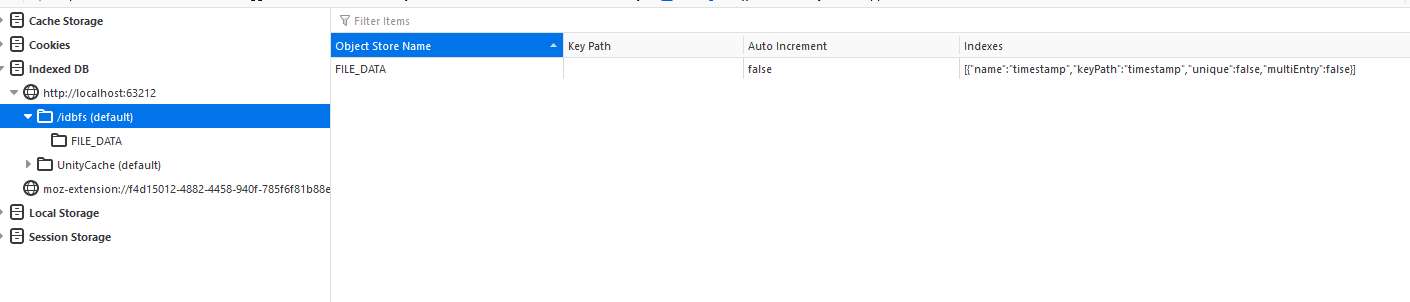
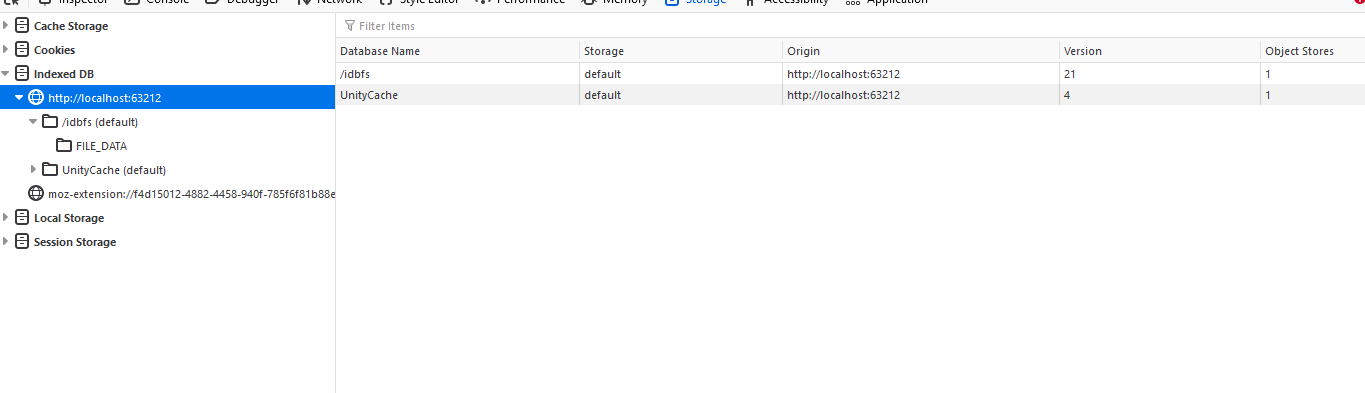
 misty obsidian
swift crag
show me that.
misty obsidian
swift crag
show me that.
 west sonnet
It's working!!! Thank you everyone who helped! 🙂
misty obsidian
This?
swift crag
misty obsidian
SwordButton is not SwordAnimation
When you call Play on an Animator, it looks for a state with that name
Each rectangle in the animator controller editor (except for those special Entry/Any State/Exit ones) is a state.
small cypress
rich adder
https://dontasktoask.com
i got u
plucky vapor
rich adder
assign it in the inspector then to be sure
GetComponent only works if the charac...
Its already assigned on the player
Theclass PlayerMovement is the one making use of that controller: https://paste.myst.rs/uzp6dk43

a powerful website for storing and sharing text and code snippets. completely free and open source.
swift crag
you probably want to have two states:
- Idle, the default state
- SwordSwing, the state your script plays
rich adder
plucky vapor
Its already assigned on the player
Theclass PlayerMovement is the one making us...
the error you showed earlier isnt even coming from this script

does NPC have a character controller? otherwise no point on doing this
plucky vapor
rich adder
the error you showed earlier isnt even coming from this script
Thats true, I thought I could put the disable controller text you sent me in the Teleport script
https://paste.myst.rs/n0n246fu
a powerful website for storing and sharing text and code snippets. completely free and open source.
plucky vapor
rich adder
does NPC have a character controller? otherwise no point on doing this
No, but I am not able to teleport my player
rich adder
plucky vapor
No, but I am not able to teleport my player
which one are you trying to teleport mate
queen adder
Why do NPCs have a CharacterController and a NavMeshAgent?
rich adder
agent doesnt use character controller
plucky vapor
rich adder
which one are you trying to teleport mate
Trying to teleport the Player to one of the chosen locations
queen adder
I believe you should only be using one of them
plucky vapor
I want the player to be teleported when getting close to that npc
rich adder
plucky vapor
Trying to teleport the Player to one of the chosen locations
so then why is it inisde the NPC script
plucky vapor
rich adder
so then why is it inisde the NPC script
I am not thinking well at the moment 😅
rich adder
plucky vapor
I am not thinking well at the moment 😅
put the distance check on the player then
twin bolt
Question: Why is the player moving on its own, while the camera is moving, it moves right a few steps.
            float verticalInput = Input.GetAxis("Vertical");

            // Calculate the movement direction relative to the camera's rotation
            Vector3 forward = playerCamera.transform.forward;
            Vector3 right = playerCamera.transform.right;
            forward.y = 0f; // Ensure no vertical movement
            right.y = 0f;   // Ensure no vertical movement
            forward.Normalize();
            right.Normalize();

            Vector3 desiredMoveDirection = forward * verticalInput + right * horizontalInput;

            // Apply the movement to the rigidbody
rb.velocity = desiredMoveDirection * playerSpeed;```I see 😅 1 sec I will try and fix that with what Nav told me
twin bolt
queen adder
RGT are u making a FPS game?
No
twin bolt
queen adder
RGT are u making a FPS game?
First Person Story Rich, Puzzle and Mystery game
queen adder
Right
I believe u dont need to get the Cameras transform
U should be getting the forward of the player controller transform
twin bolt
queen adder
U should be getting the forward of the player controller transform
I'm rotating the camera without the player. Which caused my Movement to not know what forward is.
queen adder
So ur camera rotates the player correct?
 amber spruce
Collider2D[] hitEnemies = Physics2D.OverlapCircleAll(AttackTarget.position, AttackRange, enemyLayer);
foreach (Collider2D enemy in hitEnemies)
{
    EnemyHealth enemyHealth = enemy.GetComponent<EnemyHealth>();
    //int enemyHealth = enemy.GetComponent<EnemyController>().currentHealth;

    if (enemyHealth != null)
    {
        enemyHealth.TakeDamage(Damage);
    }
    enemy.GetComponent<Animator>().SetTrigger("Hurt");
}
how do i make sure thats not hitting itself
twin bolt
queen adder
So ur camera rotates the player correct?
No the player doesnt rotate at all, i noticed that the player rotating is whats causing my player movement jitter.
queen adder
Oh thats....strange
misty obsidian
swift crag
SwordButton is not SwordAnimation
I fixed it ty
twin bolt
queen adder
Oh thats....strange
Yeah i know, this seems to be the only method i can find without completely redoing my First Person Controller, which causes more issues..
 strange peak
whats wrong with this? its supposed to fill the tilemap from (1,1) to (5,5) but all it does is crash
 queen adder
RGT im guessing it has something to do with setting the velocity of the Rigidbody
languid spire
look at your second for
twin bolt
queen adder
RGT im guessing it has something to do with setting the velocity of the Rigidbod...
Yea, i'll eventually find it.
strange peak
crashed 3 times cuz of that
queen adder
twin bolt
Question: Why is the player moving on its own, while the camera is moving, it mo...
I mean this
plucky vapor
queen adder
Ur changing the position of the NPC not the player
@queen adder@rich adderHow about this?


Gives me this error
 twin bolt
queen adder
I mean this
twin bolt
queen adder
I mean this
Yeah i know, it must be something with the Forward and Right vectors.
queen adder
I would say just use a character controller
Jittering in my experience comes from setting a camera on a rigidbody
Your also doing work arounds for what should be a simple system
@plucky vapor show the whole code
plucky vapor
queen adder
<@241658055098368000> show the whole code
For both classes?
queen adder
SI
twin bolt
Yeah i used a character controller, which worked, but removed my ability to interact with rigidbody objects.
plucky vapor
queen adder
SI
a powerful website for storing and sharing text and code snippets. completely free and open source.
a powerful website for storing and sharing text and code snippets. completely free and open source.
twin bolt
Yea, there were objects that had rigidbodys, and if i walked into them, they wouldnt budge.
queen adder
CharacterControllers have a collider? There shouldnt be a reason that didnt work?
Again abdullah
Why does ur NPC have a character controller
plucky vapor
queen adder
Why does ur NPC have a character controller
Wait, I thought I removed it?
1 sec
misty obsidian
misty obsidian
I fixed it ty
Oh no when I start the game, the animation plays once. How to fix it???
west sonnet
When I have "transform.up", my player gets pushed upwards. But when it's "transform.right", nothing happens. Anyone know why?
 ivory bobcat
plucky vapor
Gives me this error
ivory bobcat
plucky vapor
Gives me this error
It says playerMove was null
rich adder
west sonnet
When I have "transform.up", my player gets pushed upwards. But when it's "transf...
what is your gizmo set at for forward
 verbal dome
west sonnet
When I have "transform.up", my player gets pushed upwards. But when it's "transf...
verbal dome
west sonnet
When I have "transform.up", my player gets pushed upwards. But when it's "transf...
You are probably overriding your X velocity somewhere?
rich adder
FixedUpdate
opaque kettle
Is there any way for me to have a simple save system that saves all the scene?
queen adder
plucky vapor
Wait, I thought I removed it?
And like what Dalpat said ur playerMove field isnt set to anything
west sonnet
verbal dome
You are probably overriding your X velocity somewhere?
I'm new to Unity, but I think in FixedUpdate??
 ivory bobcat
opaque kettle
Is there any way for me to have a simple save system that saves all the scene?
ivory bobcat
opaque kettle
Is there any way for me to have a simple save system that saves all the scene?
What do you mean by save all the scenes?
west sonnet
rich adder
what is your gizmo set at for forward
It's a 2D game. The red arrow points to the right
verbal dome
west sonnet
I'm new to Unity, but I think in FixedUpdate??
Yeah thats it
ivory bobcat
Usually you'd have some specific data that you would want to be saving from each scene, if any.
west sonnet
verbal dome
Yeah thats it
Is it possible for me to add force while having the X velocity there in FixedUpdate?
rich adder
maybe use a bool
plucky vapor
queen adder
And like what Dalpat said ur playerMove field isnt set to anything
How do I fix that?
west sonnet
rich adder
maybe use a bool
Okay, I remember you sent this to me earlier
StartCoroutine(RecoilAddForce());
if(recoil) return;
rb.velocity = etc
I will try that
swift crag
west sonnet
Okay, I remember you sent this to me earlier
StartCoroutine(RecoilAddForce());
...
Yeah, that's a reasonable option
west sonnet
I'm not sure where to add it tho
queen adder
U set it in the inspector....
opaque kettle
ivory bobcat
Usually you'd have some specific data that you would want to be saving from each...
i have lots of Instantiated objects that i would need to save and later load.
swift crag
That will prevent you from changing your horizontal velocity until the coroutine is done and sends recoil back to false
rich adder
west sonnet
I'm not sure where to add it tho
make the bool = true while its doing AddForce impulse in coroutine
swift crag
Another option is to just move your velocity towards what the player wants, instead of instantly setting it
rb.velocity = Vector2.MoveTowards(rb.velocity, new Vector2(Horizontal * speed, rb.velocity.y), Time.deltaTime * acceleration);
MoveTowards moves from the first vector to the second vector
but only goes as far as the third argument
swift crag
You could also reduce acceleration right after shooting
so you have a brief moment of low control
plucky vapor
queen adder
U set it in the inspector....
Did that, still error @ivory bobcat @queen adder

 west sonnet
Essentially, I want to make a force that will push the player backwards from whereever their gun is facing to simulate recoil
queen adder
Read what the error says
plucky vapor
1 sec
queen adder
Whos throwing the Null exception
 summer stump
plucky vapor
1 sec
summer stump
plucky vapor
1 sec
NPCTeleporter on line 47 has an unassigned reference you're trying to use
queen adder
You gotta read what the error is saying
robust condor
I have a top down camera, but I need to dynamically bind it to a max area so the player can not pan away too far. How can I set a bounding box where it cannot escape? And this needs to be expanded in all directions during runtime
plucky vapor
queen adder
You gotta read what the error is saying
I am trying to, my migraine is just very strong 🥲
plucky vapor
summer stump
NPCTeleporter on line 47 has an unassigned reference you're trying to use
I thought I set it correctly
 swift crag
robust condor
I have a top down camera, but I need to dynamically bind it to a max area so the...
swift crag
robust condor
I have a top down camera, but I need to dynamically bind it to a max area so the...
Is it gonna' be a rectangular area?
queen adder
U have to set it in the Inspector of the NPC
robust condor
@swift cragYeah
swift crag
If so, consider Bounds. https://docs.unity3d.com/ScriptReference/Bounds.html
You can ask for the closest point, and also grow it to include new points.
queen adder
Cinemachine^^
misty obsidian
misty obsidian
Oh no when I start the game, the animation plays once. How to fix it???
@swift crag ?
swift crag
Oh yeah, Cinemachine has components for this, doesn't it?
misty obsidian
I can record it if you don't understand what do I mean
swift crag
misty obsidian
Oh no when I start the game, the animation plays once. How to fix it???
Because the default state plays your sword animation.
west sonnet
rich adder
StartCoroutine(RecoilAddForce());
if(recoil) return;
rb.velocity = etc.
Sorry, but I'm not sure I understand how I can implement this code?
queen adder
The main camera might have a method for bounds?
But i know cinemachine has a Component for it
swift crag
swift crag
west sonnet
Sorry, but I'm not sure I understand how I can implement this code?
RecoilAddForce would be an IEnumerator method.
plucky vapor
@summer stump@queen adderYESSS IT WORKS NOW!! Thank you guys a LOT for the help with this!
queen adder
@misty obsidian you only have one animation
So the Animation player plays that one animation
swift crag
IEnumerator Shoot() {
  recoil = true;
  yield return new WaitForSeconds(0.5f);
  recoil = false;
}
something like that
Have you ever used coroutines before? I don't know if I'm using words you don't know about here :p
west sonnet
swift crag
Have you ever used coroutines before? I don't know if I'm using words you don't ...
Nope, but I'm learning a lot haha
swift crag
swift crag
```cs
IEnumerator Shoot() {
recoil = true;
yield return new WaitForSeconds(0...
When you do StartCoroutine(Shoot()), you run the Shoot method
It runs until it hits a yield, then it pauses and returns an enumerator
StartCoroutine tells Unity that you want it to check on this enumerator every frame (by default)
So every frame, it asks the enumerator to please continue
west sonnet
What's an enumerator?
swift crag
swift crag
```cs
IEnumerator Shoot() {
recoil = true;
yield return new WaitForSeconds(0...
and the method resumes until it hits a yield
swift crag
west sonnet
What's an enumerator?
It's something that can give you a sequence of values, one at a time.
queen adder
Haha
swift crag
Have you ever used foreach? If so, you've used enumerators.
Just with some nice pretty syntax on top.
west sonnet
Oh yeah
queen adder
you could alternatively just do Invoke("Method Name")
west sonnet
I've used invoke before
swift crag
queen adder
you could alternatively just do Invoke("Method Name")
that sends a message. different story.
queen adder
Invoke("Method Name" , 0.5f)
swift crag
Ah, I see what you mean
queen adder
If ur just doing a timer Invoke is fine
swift crag
You could achieve the same goal, yeah
queen adder
Just so its simpler to understand for D&M
swift crag
swift crag
```cs
IEnumerator Shoot() {
recoil = true;
yield return new WaitForSeconds(0...
So this method produces an enumerator. It gives you a WaitForSeconds as its first value. When you ask for a second value, it signals that it's done.
queen adder
Coroutines are confusing to learn at first
swift crag
When Unity gets a WaitForSeconds, it waits for however long you say before asking for another value.
strange peak
queen adder
Coroutines are confusing to learn at first
can agree
west sonnet
I'm not sure what I'm meant to put here now. I tried putting AddForce but it didn't work
 swift crag
I think they're pretty simple if you don't treat them like magic
I used to think they were magic
multi-threaded, running concurrently, ...
west sonnet
queen adder
Coroutines are confusing to learn at first
Yes, very haha
swift crag
Bah. My internet went out
sterile radish
how can make sure my items in my shop can't be bought after i buy them even after restart the game?
https://hastebin.com/share/wamijizixu.csharp (BuyItem)
https://hastebin.com/share/ufewusujib.csharp (GameManager)
queen adder
You would have to save the state of the Shop
swift crag
west sonnet
I'm not sure what I'm meant to put here now. I tried putting AddForce but it did...
I think the idea was to use those three lines of code in various places. The recoil variable is used to stop you from setting the velocity based on player input if you just shot
opaque kettle
Can someone help me understand the fundementals of a saving/loading system, in my game i have lots of prefabs that get spawned, and each have different variables and positions that would need to get saved, how would i be able to even start to go about such a thing.
queen adder
Welcome to one the worst parts of Game Development Save systems @sterile radish
swift crag
Serialization can be a real bugbear
west sonnet
swift crag
I think the idea was to use those three lines of code in various places. The rec...
Oh I see, so I wasn't meant to use those 3 lines together like that?
sterile radish
queen adder
https://docs.unity3d.com/2020.1/Documentation/Manual/JSONSerialization.html
is there any other way besides using .json?
queen adder
opaque kettle
Can someone help me understand the fundementals of a saving/loading system, in m...
Its complicated just start with a tutorial on youtube
Theres a bunch @sterile radish but they each have there own benefits and disadvantages
swift crag
west sonnet
I'm not sure what I'm meant to put here now. I tried putting AddForce but it did...
I think the code given to you was meant to be used in a few different places.
sterile radish
queen adder
Theres a bunch <@559023969169047563> but they each have there own benefits and d...
ah alright, the way im doing it now is adding all of my bought items into some "boughtItems" list and saving and loading that each time i go to the shop
west sonnet
swift crag
I think the code given to you was meant to be used in a few different places.
Okay
queen adder
That sounds fine?
west sonnet
This is what I've got now. It's not working 😦
 swift crag
I’ll be back in a few minutes. Fighting Comcast right now
queen adder
I dont know how list get serialized actually?
sterile radish
queen adder
That sounds fine?
i think i might be doing something wrong tho cuz it works when im running the game but when i close it and open it again it goes back to its unsaved state
queen adder
You should check if the recoil bool is true before starting the Coroutine @west sonnet
Do u have an actual save system?
If not then ofc the scene is going back to its default state
queen adder
Ofc
swift crag
yaaay, working internet
queen adder
Nice welcome back
swift crag
west sonnet
This is what I've got now. It's not working 😦
This code will start the coroutine, which will set recoil to true
then it'll immediately return by recoil is true
so that's definitely not it!
queen adder
I shouldve explained it more detail ^^^ but yeah
swift crag
You should move if (recoil) return to the FixedUpdate line. That will prevent your velocity from being set while recoil is true
west sonnet
I defined the recoil bool to be false. Then when left click, it starts to coroutine which turns the bool true
swift crag
So the coroutine sets recoil to true, waits half a second, and sets recoil to false
west sonnet
Right?
swift crag
west sonnet
I defined the recoil bool to be false. Then when left click, it starts to corout...
Right. And your current code is then refusing to apply force if recoil is true
hence, no force
queen adder
Ur setting it to true then saying if it is true then dont addforce
west sonnet
Wait, where should " rb.AddForce(transform.right * GunKickBack, ForceMode2D.Impulse); " be?
swift crag
west sonnet
Wait, where should " rb.AddForce(transform.right * GunKickBack, ForceMode2D.Impu...
Wherever you want to apply the force.
I think it's in a reasonable place right now.
You want to apply the force when the player clicks the left mouse button.
 knotty gust
is there code to clear all text from a json file?
queen adder
Cant u just write to it and do file.text = " "
rich adder
File.WriteAllText
west sonnet
So this is my code right now, and I still don't get why it's not working 😦

 visual hedge
are these expressions the same?
public List<GameObject> SummonList = new();
and
public List<GameObject> SummonList = new List<GameObject>();
swift crag
west sonnet
So this is my code right now, and I still don't get why it's not working 😦
follow it line by line
Explain to me what FixedUpdate does.
sterile radish
queen adder
Ofc
i can send the script for buying items too if you want
https://hastebin.com/share/zidijuyeqa.csharp
Hastebin is a free web-based pastebin service for storing and sharing text and code snippets with anyone. Get started now.
 slender nymph
west sonnet
So this is my code right now, and I still don't get why it's not working 😦
slender nymph
west sonnet
So this is my code right now, and I still don't get why it's not working 😦
you are overwriting the velocity in FixedUpdate so your knockback force is getting canceled out
knotty gust
rich adder
File.WriteAllText
im trying this but sometimes when i do it it adds the new data that i want to overwrite on top
rich adder
west sonnet
So this is my code right now, and I still don't get why it's not working 😦
also use the bool for startcoroutine too
so. you dont start it twice while its busy
swift crag
visual hedge
are these expressions the same?
```public List<GameObject> SummonList = new();``...
Yes. C# can infer the type for new().
queen adder
I would NOT use playerprefs for a shop system
visual hedge
swift crag
Yes. C# can infer the type for `new()`.
thank you, good to know
sterile radish
queen adder
I would NOT use playerprefs for a shop system
oh okay, what would you suggest?
rich adder
knotty gust
im trying this but sometimes when i do it it adds the new data that i want to ov...
how so ? code only does what you tell it to
queen adder
How many items are in the shop?
sterile radish
queen adder
How many items are in the shop?
six items
knotty gust
rich adder
how so ? code only does what you tell it to
so does the function always overwrite all the data in the file?
queen adder
Share the whole class
sterile radish
okay
rich adder
knotty gust
so does the function always overwrite all the data in the file?
it writes whatever you pass inside
File.WriteAllText(path, "");
sterile radish
queen adder
Share the whole class
Hastebin is a free web-based pastebin service for storing and sharing text and code snippets with anyone. Get started now.
west sonnet
swift crag
Explain to me what FixedUpdate does.
Fixed update sets the X velocity value?
swift crag
west sonnet
Fixed update sets the X velocity value?
That's what the first line does, yes.
And what does the second line do?
queen adder
On line 29 roshi you dont set anything to what playerprefs returns
west sonnet
swift crag
And what does the second line do?
It stops the code from running unless recoil is true? Otherwise it'll repeat setting the X velocity value?
swift crag
west sonnet
It stops the code from running unless recoil is true? Otherwise it'll repeat set...
No. It returns from the function if recoil is true.
If recoil is false, the second line does nothing. The function then exits, since we've reached the end anyways.
The second line does nothing.
west sonnet
swift crag
No. It returns from the function if `recoil` is true.
The RecoildAddForce function?
swift crag
west sonnet
The RecoildAddForce function?
It returns from the function it's inside of.
You sound confused about what code is running when.
west sonnet
I am lol
rich adder
west sonnet
The RecoildAddForce function?
why would return affect another function its not inside of?
sterile radish
queen adder
On line 29 roshi you dont set anything to what playerprefs returns
oh oops didnt notice that lol. idk if this is the best way to do it but should i just split the bought items array again since i joined it when i was saving it? then check if it contains that same item id?
queen adder
Personally i would use a dictionary
Just for simplicity sake
Dictionary<Item, bool>
Just request the item from the dictionary and check the bool to see if its been bought or not
You can set the bool in playerprefs by using ints because for some shortsighted reason it isnt in playerprefs
sterile radish
oh okay and would this replace the boughtitems list in my itemmanager script?
queen adder
I know i threw alot at u and im sorry for that
sterile radish
queen adder
I know i threw alot at u and im sorry for that
nah all good bro
sterile radish
no but i could try
queen adder
Save systems are complicated
You could just try ur original method of getting and settings strings
knotty gust
rich adder
it writes whatever you pass inside
`File.WriteAllText(path, "");`
figured out the problem thanks
rich adder
knotty gust
figured out the problem thanks
what was it
amber spruce
Collider2D[] hitEnemies = Physics2D.OverlapCircleAll(AttackTarget.position, AttackRange, enemyLayer);
foreach (Collider2D enemy in hitEnemies)
{
if (enemy != gameObject.GetComponent<Collider2D>())
{
    MultiplayerHealth enemyHealth = enemy.GetComponent<MultiplayerHealth>();
    //int enemyHealth = enemy.GetComponent<EnemyController>().currentHealth;

    if (enemyHealth != null)
    {
        enemyHealth.TakeDamage(5f);
    }
    enemy.GetComponent<Animator>().SetTrigger("Hurt");
}
}
why does this still damage me instead of the other player
rich adder
amber spruce
```csharp
Collider2D[] hitEnemies = Physics2D.OverlapCircleAll(AttackTarget.posi...
are the layer setup correct?
queen adder
Check that
knotty gust
rich adder
what was it
i messed up my editor script and accidentally collected all the data in the game twice
swift crag
amber spruce
```csharp
Collider2D[] hitEnemies = Physics2D.OverlapCircleAll(AttackTarget.posi...
Perhaps you have multiple colliders.
hidden sleet
Since a scriptable object is an asset, how are you to save a list of them to files to read later on?
queen adder
The player is in the enemyLayer?
 hybrid tapir
is there any way to make an input listener that gets the name of the input you press?
amber spruce
queen adder
The player is in the enemyLayer?
its in that layermask yeah
the layermask consists of 2 layers player and enemy
queen adder
Check the Gameobject instead of the collider
if (enemy.gameobject != this.gameobject)
hybrid tapir
in risk of rain 2 when i changed the binding of a couple things the name went to ???
how do i get the input like that where it displays the name of the controller button i pressed
queen adder
hybrid tapir
in risk of rain 2 when i changed the binding of a couple things the name went to...
 hybrid tapir
thanks
queen adder
This works for Keyboards apparently if u have controller support youre gonna have to do some more research sorry lol
Oh right no gifs
I actually have no idea
That only happens when ur next to and edge?
amber spruce
queen adder
Check the Gameobject instead of the collider
still does the same thing
it only does it though if it hits the other person
hybrid tapir
im gonna try adding unity as a non steam game to see if steam will put the input on it
queen adder
Share ur code pancake
verbal dome
Seems like you are only setting isGrounded to false when you jump
You should at least do it when you exit collision with ground
amber spruce
queen adder
Share ur code pancake
Collider2D[] hitEnemies = Physics2D.OverlapCircleAll(AttackTarget.position, AttackRange, enemyLayer);
foreach (Collider2D enemy in hitEnemies)
{
if (enemy.gameObject != this.gameObject)
{
    MultiplayerHealth enemyHealth = enemy.GetComponent<MultiplayerHealth>();
    //int enemyHealth = enemy.GetComponent<EnemyController>().currentHealth;

    if (enemyHealth != null)
    {
        enemyHealth.TakeDamage(5f);
    }
    enemy.GetComponent<Animator>().SetTrigger("Hurt");
}
}
@queen adder Or use Physics.CheckSphere or some other physics query to check if you are grounded instead
queen adder
Share the entire class
amber spruce
amber spruce
```csharp
Collider2D[] hitEnemies = Physics2D.OverlapCircleAll(AttackTarget.posi...
public void TakeDamage(float damage)
{
    if (playerController.isBlocking)
    {
        damage = damage / 4;
    }
    currentHealth.Value -= damage;
    animator.SetTrigger("Hurt");
    Debug.Log(damage);
    if (currentHealth.Value <= 0)
    {
        Die();
    }
}
this is the other function thats called
swift crag
hybrid tapir
how do i get the input like that where it displays the name of the controller bu...
You can ask for a display string for the control that triggered an input action.
context.control.displayName for example
You can also ask for the display string for an input binding
amber spruce
queen adder
Share the entire class
it aint pretty but here
https://pastebin.com/YwQMktJ3
Pastebin
Pastebin.com is the number one paste tool since 2002. Pastebin is a website where you can store text online for a set period of time.
queen adder
Are any of the attack methods you have called ?
amber spruce
yeah
queen adder
Is the player actually taking damage or is the animation just playing
amber spruce
they take damage
queen adder
Does the enemy get hurt?
amber spruce
i print it as a debug 1 i have a health bar go down aswell
amber spruce
queen adder
Does the enemy get hurt?
no
queen adder
This just gets more confusing
Add a debug.log in the foreach
Does any other Gameobject have the ability to attack?
amber spruce
queen adder
Does any other Gameobject have the ability to attack?
the thing im trying to deal damage to
queen adder
Put a debug.log in the foreach loop
amber spruce
what should it log
amber spruce
before or after the if
amber spruce
queen adder
It doesnt matter where
so it hits the other thing then itself then deals damage
amber spruce
yeah
queen adder
That means the enemy is calling the Attack Method as well
hidden sleet
I keep getting serialise and deserialise confused, which one is which?
swift crag
serialize -> turn your objects into data
deserialize -> turn your data into objects
serialize to save, deserialize to load
queen adder
@amber spruce any luck?
swift crag
To "serialize" is to turn something into a series of bytes
amber spruce
queen adder
<@553986224000598026> any luck?
yep i fixed it thanks
queen adder
Was it what i said or was it something else?
coarse compass
What's the correct way to access a component existing on another object? Because this doesn't work 😅
