#💻┃code-beginner
1 messages · Page 82 of 1
 wintry quarry
 buoyant knot
yeah, foreach will mess you up if you do edit the ienumerable
 topaz mortar
wintry quarry
Alternatively instead of GetValue use.a specific get function that takes a strin...
topaz mortar
wintry quarry
Alternatively instead of GetValue use.a specific get function that takes a strin...
like this? myDic.Add("level", (int) reader.GetValue(reader.GetOrdinal("level")));
 ruby python
@rich adder no I didn't mean that at all. I meant something close that I could look at and adapt to what I want, but everything I've seen is about creating a 'linear' level etc.
 gaunt ice
the way of your generation should be quite similar to this
https://www.youtube.com/watch?v=BIa_gqc93ok

Hate the classic box dungeons? I re-imagined the classic Minecraft Dungeons using jigsaw blocks to add custom structures to Minecraft with no mods using datapacks! And this video is a complete guide from the basic concepts to the technical details of how to make custom structures to Minecraft for yourself!
Data Pack Template - https://drive.go...
 amber spruce
i figured it out thanks now my game has somewhat functional multiplayer
wintry quarry
topaz mortar
like this? `myDic.Add("level", (int) reader.GetValue(reader.GetOrdinal("level"))...
sure
or the alternative I mentioned
 queen adder
so im trying to spawn prefabs in but its not showing but it is spawning?
topaz mortar
wintry quarry
or the alternative I mentioned
is one better than the other? or can I just choose?
 rich adder
queen adder
so im trying to spawn prefabs in but its not showing but it is spawning?
rich adder
queen adder
so im trying to spawn prefabs in but its not showing but it is spawning?
2D ? is it infont of cam?
wintry quarry
topaz mortar
like this? `myDic.Add("level", (int) reader.GetValue(reader.GetOrdinal("level"))...
e.g. myDic.Add("level", reader.GetInt32("level"));
gaunt ice
take a look on the camera position, scale of prefabs
rich adder
queen adder
so mabey lol
check Z position of camera
it must be smaller than the scene objects
queen adder
-10
rich adder
ok and how about spawned objects
queen adder
1370.9
ruby python
view dsitance?
 polar acorn
queen adder
1370.9
polar acorn
queen adder
1370.9
That's pretty far away for 2d
queen adder
when i drag the prefab in i can see them but when they spawn in they dont show up
ruby python
look at your cameras view distance. it defaults to 1000
rich adder
queen adder
when i drag the prefab in i can see them but when they spawn in they dont show u...
yes but what is their X and Y position
polar acorn
queen adder
when i drag the prefab in i can see them but when they spawn in they dont show u...
Compare the positions
ruby python
ah my bad, missed that
gaunt ice
maybe the camera is perspective, it is extremely small
rich adder
yeah maybe
polar acorn
rich adder
since Orthographic has no depth
But it does still have a clipping plane, right?
rich adder
polar acorn
But it does still have a clipping plane, right?
oh yeah ur right
shite could be clipped
topaz mortar
wintry quarry
e.g. `myDic.Add("level", reader.GetInt32("level"));`
thanks ❤️ did quite a bit of searching for this but couldn't find it 🙂
works perfectly
rich adder
yeah wheels are weird man yu have to set them up in a certain axis
queen adder
ok so now its not even showing up in the scene view
rich adder
queen adder
ok so now its not even showing up in the scene view
can you like show the setup or something, I'm personally not trying to play 20 question lol
ruby python
What's your cameras far clipping plane?
queen adder
is there a vc i can join to show?
polar acorn
queen adder
ok so now its not even showing up in the scene view
What is the position of the object when you can see it, and what is the position of the object when you cannot
ruby python


 ruby python
Show the camera settings
polar acorn
queen adder
That's a prefab show the object in the scene
queen adder
whats that mean
 modest barn
Tried like 5 times to update VS22 from 17.8.0 to 17.8.2 but keep getting this. Anyone experiencing the same?
 queen adder
 rich adder
VS installer is shite
queen adder
polar acorn
That's a prefab show the object in the scene
whats this mean
rich adder
had to reboot my whole system one time cause it kept telling me couldn't install VSredC++
and another VS installer was in use
total shite show from Microsoft @modest barn
ruby python
 polar acorn
queen adder
whats this mean
polar acorn
queen adder
whats this mean
Show the object that actually exists not the prefab
ruby python
Change that 1000 to 2000 or something
polar acorn
ruby python
Change that 1000 to 2000 or something
No, fix the position of the object
queen adder
i did now my player wont show uo lol
polar acorn
it should not be that far from the camera
rich adder
queen adder
i did now my player wont show uo lol
show us where the Pipe is spawning when yu spawn it
 rich adder
that aint the pipe you spawned. try again
polar acorn
queen adder
the pipe
queen adder
thats where the pipes spawn
polar acorn
queen adder
thats where the pipes spawn
show a pipe
rich adder
also You are configure things with Center pivot mode. guaranteed your Pivot is wayyyy further than you thought
queen adder
 rich adder
hate that Unity defaults it to that..
polar acorn
queen adder
Yeah the Z axis is massive
modest barn
rich adder
had to reboot my whole system one time cause it kept telling me couldn't install...
Yeah I mean it still works for Unity but trying to make a normal project will probably become a real pain. It's a school computer and I only use it there so I don't really care 😂
polar acorn
Why is it that far away
 grim eagle
queen adder
grim eagle
queen adder
flappy bird?
rich adder
modest barn
Yeah I mean it still works for Unity but trying to make a normal project will pr...
yeah its a small update but still..annoying af it does that
polar acorn
queen adder
so how do i change that
Don't spawn it at that position
 sonic remnant
Thankyou ❤️
polar acorn
You define the position you spawn it at
ruby python
Your spawner is at z5, so that should be at z5 too imo
rich adder
I still think the pivot is probably not where thy think it is
Unity is putting it on Center which looks ok
but when yu spawn it it uses the Pivot point
queen adder
how do i change the pivot
rich adder
which is probably not where Center is showing
rich adder
queen adder
how do i change the pivot
first switch pivot from Center to Pivot
polar acorn
queen adder
how do i change the pivot
 rich adder
so we can see
queen adder
ok i clicked pivot
rich adder
drag pipe prefab in and press F
queen adder
ok i did'
rich adder
ss
queen adder
 rich adder
oh well its that one is good then
queen adder
it still not showing up and idk why lol
rich adder
so lets see the code that spawns it @queen adder
queen adder
using System.Collections;
using System.Collections.Generic;
using UnityEngine;
public class PipeSpawnScript : MonoBehaviour
{
public GameObject pipe;
// Start is called before the first frame update
void Start()
{

}

// Update is called once per frame
void Update()
{
    Instantiate(pipe, transform.position, transform.rotation);
}
}
rich adder
also when you spawn it with code you could also Press F on it and see where it went
polar acorn
queen adder
using System.Collections;
using System.Collections.Generic;
using UnityEngine;
...
!code
 eternal falconBOT

Posting code
📃 Large Code Blocks
Use links to services like:
https://gdl.space/, https://paste.ofcode.org/, https://hatebin.com/, https://paste.myst.rs/, https://hastebin.com/
📃 Inline Code
Surround code with three backquotes. Not quotation marks.
To format as C#, add cs to the first line:
```cs
// Your code here
```
Add a comment with a line number if there is an error message.
queen adder
i followed a tut
rich adder
shouldnt this be like crashing at some point
wintry quarry
queen adder
i followed a tut
This is putting the pipes at the z position of the spawner. what's the z location of the spawner?
queen adder
first game lol
wintry quarry
also yes you're spawning a new pipe every single frame
which is defintiely not what the tutorial did lol
queen adder
yea i havent fixed it yet
polar acorn
This is spawning a pipe every frame so the reason you don't see anything it's probably because you're getting like, minutes per frame
queen adder
i wasent done yet i just needed to see rthem spawning
polar acorn
queen adder
yea i havent fixed it yet
So fix that
queen adder
ok
amber spruce
so im trying to make a double jump for my character how would i check for when they land to reset the jump counter
wintry quarry
amber spruce
so im trying to make a double jump for my character how would i check for when t...
Use your grounded check
queen adder
using System.Collections;
using System.Collections.Generic;
using UnityEngine;

public class PipeSpawnScript : MonoBehaviour
{
    public GameObject pipe;
    public float spawnRate = 2;
    private float timer = 0;

    // Start is called before the first frame update
    void Start()
    {

    }

    // Update is called once per frame
    void Update()
    {
        if (timer < spawnRate)
        {
            timer =+ Time.deltaTime;
        }
        else
        {
            Instantiate(pipe, transform.position, transform.rotation);
            timer = 0;
        }

        Instantiate(pipe, transform.position, transform.rotation);
    }
}
fixed
polar acorn
queen adder
```
using System.Collections;
using System.Collections.Generic;
using UnityEngin...
Why do you still have a spawn every frame
wintry quarry
Nobody can help without knowing details about what and how you're doing what you're doing currently
queen adder
the delta time fixes that
oh wait
dont mind that
i accidently left it lool
ok now its fixed
amber spruce
wintry quarry
Use your grounded check
well i have a OnLandEvent that i made but that triggers when i leave the ground aswell so doesnt work well
queen adder
using System.Collections;
using System.Collections.Generic;
using UnityEngine;

public class PipeSpawnScript : MonoBehaviour
{
    public GameObject pipe;
    public float spawnRate = 2;
    private float timer = 0;

    // Start is called before the first frame update
    void Start()
    {

    }

    // Update is called once per frame
    void Update()
    {
        if (timer < spawnRate)
        {
            timer =+ Time.deltaTime;
        }
        else
        {
            Instantiate(pipe, transform.position, transform.rotation);
            timer = 0;
        }

    }
}
great now #💻┃code-beginner message
wintry quarry
amber spruce
well i have a OnLandEvent that i made but that triggers when i leave the ground ...
Sounds broken. Use your grounded check
queen adder
wym?
amber spruce
wintry quarry
Sounds broken. Use your grounded check
problem is the grounded check is in another script
queen adder
the z is 5
polar acorn
queen adder
the z is 5
So now run the game, and send a screenshot of the spawned pipes
rich adder
did yu follow the guide provided to you
#💻┃code-beginner message
its not that difficult
queen adder
its not even spawningthem at all
wintry quarry
amber spruce
problem is the grounded check is in another script
You should focus on the basics of Unity to master inter-script communication
rich adder
wdym isn't right? do you see you have to configure the vehicle with axis of wheels on Z
thats how wheels work
queen adder
yea its not doing anything
 craggy lava
Hi i have this code here it zooms in but not out again
        if (Input.GetAxis ("Mouse ScrollWheel") > 0)
        {
            if (cam.fieldOfView <= defaultFov && cam.fieldOfView > maxZoom)
            {
                cam.fieldOfView--;
                crossHair.SetActive(false);
            }
        }
        if (Input.GetAxis("Mouse ScrollWheel") < 0)
        {
            if (cam.fieldOfView > defaultFov)
            {
                cam.fieldOfView++;
                crossHair.SetActive(false);
            }
        }
Use Debug.Log, start investigating which bts of code are running and not running and why
queen adder
ok so they are spawning and i can hit them but i still cant see them @rich adder
amber spruce
wintry quarry
Sounds broken. Use your grounded check
so i used the grounded check but it still doesnt work the first jump gets deleted
queen adder
i can see them in scene view but not game view
rich adder
queen adder
i can see them in scene view but not game view
select one of the spawned pipes at runtime and press F
screenshot it
craggy lava
wintry quarry
Use Debug.Log, start investigating which bts of code are running and not runnin...
True i will do that
queen adder
 wintry quarry
queen adder
wintry quarry
queen adder
well where's your camera?
queen adder
 rich adder
WHY is the clipping plane like that
queen adder
someone said to change it to that
rich adder
no you put it back how it was
wintry quarry
no way did anyone say that
queen adder
what do i change it to
wintry quarry
the default, like 0.3 or whatever
craggy lava
wintry quarry
Use Debug.Log, start investigating which bts of code are running and not runnin...
Thanks it helped for me to debug it because i found out my error it was at if (cam.fieldOfView > defaultFov) where it had to be if (cam.fieldOfView < defaultFov)
queen adder
whats the defalt
rich adder
yes 0.3 - 1000
wintry quarry
craggy lava
Thanks it helped for me to debug it because i found out my error it was at `if (...
yep that's what debugging is for
polar acorn
queen adder
someone said to change it to that
- No they didn't, they said 2000 not 20
- Don't change it anyway you shouldn't have done that in the first place
queen adder
no someone private messaged me
polar acorn
queen adder
no someone private messaged me
This is why you don't take problems into DMs because then there's no one to double check when you get stupid advice
polar acorn
We have a system of checks and balances here, we are all dying to correct each other on bad advice so if it's a public answer someone will call it out
rich adder
queen adder
now what
what do you think next step is ?
 quiet pasture
how can i make my gameobject the be on top of the ui when hovering with the mouse over,
queen adder
testing
rich adder
quiet pasture
how can i make my gameobject the be on top of the ui when hovering with the mous...
use screenspace camera
queen adder
same thign they are in scene view and i can hit them but cant see
polar acorn
queen adder
same thign they are in scene view and i can hit them but cant see
What are the z positions of pipe top and pipe bottom
quiet pasture
rich adder
use screenspace camera
What do You mean?thats the camera im using
rich adder
quiet pasture
What do You mean?thats the camera im using
if you're using a screenspace camera then it should be as simple as changing the Sorting Order
put the gameobjects one higher
if they're not sprites then it gets more tricky
youd have to change the Plane distance and make sure it correct
quiet pasture
They are empty game objects that have sprites and text(a card)i've tryed sorting layer and it didnt work for me,also,the gameobjects are somehow seetru in scene but not in game
 quiet dune
(Quick?) question: I'm using Resources.Load<X>("Something") to load a Prefab. At some later stage i want to check wheter a given GameObject is instantiated from the same Prefab (or is of the same type or whatever way is the best). Any ideas?
rich adder
quiet pasture
They are empty game objects that have sprites and text(a card)i've tryed sorting...
they might be behind the camera, for the second part
rich adder
quiet pasture
They are empty game objects that have sprites and text(a card)i've tryed sorting...
this isn't really code related, move convo to #💻┃unity-talk . Show the setup of your canvas and your gameobject sprite /
quiet pasture
Oke,thank you
rich adder
quiet dune
(Quick?) question: I'm using Resources.Load<X>("Something") to load a Prefab. At...
store it in a variable? not sure what youre asking exactly
can you elaborate the use case
 woven crater
i set my bulletpf with the z axis of 90 but when instantiate it reset to 0?

 slender nymph
you're assigning this object's rotation to the bullet when you instantiate it
woven crater
i thought it would adding to the object rotation
slender nymph
no, it assigns exactly the rotation you pass
woven crater
i see
slender nymph
plenty of tutorials for that if you google it

please see #854851968446365696 for what to include when asking for help
rich adder
go from vague to only slightly less vague, nice
slender nymph
guess they don't want help 🤷♂️
 tiny vault
slender nymph
guess they don't want help 🤷♂️
tiny vault
slender nymph
guess they don't want help 🤷♂️
yeah not anymore
ruby python
Okay, so would anyone be willing to take me step by step (not code, just 'steps') in getting this map generator idea working please?
slender nymph
well we can't help you without useful information
amber spruce
slender nymph
plenty of tutorials for that if you google it
how would i make just a check if they collide into anything?
slender nymph
huh?
rich adder
Especially in a code channel, we'd have to see the code @tiny vault
we're not mind readers we don't know your exact setup
tiny vault
i have an idea i will give you the code if it doesnt work
amber spruce
slender nymph
huh?
i thought about it and reaslised for double jumps it would be better for just if they collide with anything because if you land on a enemy or smth then you still cant jump
tiny vault
okay it doesnt
slender nymph
amber spruce
i thought about it and reaslised for double jumps it would be better for just if...
well have you googled how to do a ground check? because if you had, you'd find plenty of tutorials for how to detect ground using physics queries like raycasts
tiny vault
would it matter if i just send a part of the code right here
rich adder
tiny vault
would it matter if i just send a part of the code right here
!code
eternal falconBOT
Posting code
📃 Large Code Blocks
Use links to services like:
https://gdl.space/, https://paste.ofcode.org/, https://hatebin.com/, https://paste.myst.rs/, https://hastebin.com/
📃 Inline Code
Surround code with three backquotes. Not quotation marks.
To format as C#, add cs to the first line:
```cs
// Your code here
```
Add a comment with a line number if there is an error message.
quiet dune
rich adder
store it in a variable? not sure what youre asking exactly
Yeah, thanks. Not sure how to formulate. I'm filling a Dictionary<GameObject, int> using Resources.Load to get the GameObjects and incrementing the int for every Resource. Later I'll get a (random) GameObject and want to get the associated int from the Dictionary.
Lets say I have Prefab "Red" and Prefab "Green" => Dictonary([Red, 1], [Green, 2].
Now i get GameObject go which might have been instantiated from the Prefabs "Red" or "Green". I can't throw go at the Dictionary, because that specific GameObject won't be in the Dictionary.
rich adder
send link
buoyant knot
i don’t understand how collision gets factored into this
tiny vault
rich adder
!code
Hastebin is a free web-based pastebin service for storing and sharing text and code snippets with anyone. Get started now.
rich adder
tiny vault
https://hastebin.com/share/etifaqacir.bash
mate the whole script
this alone isn't helpful
anyway if youre using one of the OnCollision/OnTrigger methods @tiny vault
https://unity.huh.how/programming/physics-messages
tiny vault
Hastebin is a free web-based pastebin service for storing and sharing text and code snippets with anyone. Get started now.
 obsidian parcel
i made a simple camera lerp script
[SerializeField] GameObject player;
    [SerializeField] Vector3 cameraOffset;
    [SerializeField] float cameraSpeed;

    void Start()
    {

    }

    // Update is called once per frame
    void LateUpdate()
    {
        Vector3 NewPosition = new Vector3(player.transform.position.x + cameraOffset.x,
            cameraOffset.y,
            player.transform.position.z + cameraOffset.z);

        transform.position = Vector3.Lerp(transform.position, NewPosition, Time.deltaTime * cameraSpeed);
    }
this smoothly follows the player in editor but when i make a build it sometimes feel jitery any idea why its happening
tiny vault
tiny vault
https://hastebin.com/share/deyahawuze.csharp
so with this it doesnt work on the object that has the tag "Special" but it works on the object that has "Money"
buoyant knot
quiet dune
Yeah, thanks. Not sure how to formulate. I'm filling a Dictionary<GameObject, in...
if (myDict.ContainsKey(redObject) {
myDict[redObject] = 1;
} else myDict[redObject]++;
 dense root
So I've created a simple breakout game, any thoughts on what to build next for learning?
 rich adder
tiny vault
so with this it doesnt work on the object that has the tag "Special" but it work...
rich adder
tiny vault
so with this it doesnt work on the object that has the tag "Special" but it work...
does this object have a rigidbody on it or the other one that works?
tiny vault
rich adder
does this object have a rigidbody on it or the other one that works?
both of them only have box colliders with "is trigger" on
rich adder
dense root
So I've created a simple breakout game, any thoughts on what to build next for l...
depends what you want to learn
buoyant knot
obsidian parcel
i made a simple camera lerp script
```cs
[SerializeField] GameObject player;
...
i expect this to be a bit jittery
obsidian parcel
but not feeling jittery at all in editor
quiet dune
buoyant knot
if (myDict.ContainsKey(redObject) {
myDict[redObject] = 1;
} else myDict[redObje...
Sorry, my problem is not filling the Dictionary, its getting the corrent type/component or whatever of any given GameObject that would fit the Dictionarys Key, if you know what i mean?
rich adder
you made the game play stuff,
are you interesting in doing the non-gameplay stuff thats annoying but also important ?
like a Menu and a full game loop / high score saving, with all that other junk that goes with simple game states @dense root
buoyant knot
obsidian parcel
but not feeling jittery at all in editor
probably just not as obvious with the smaller screen
i would give camera a kinematic rigidbody, and tell it to lerp toward player position every fixed update frame
tiny vault
rich adder
you made the game play stuff,
are you interesting in doing the non-gameplay st...
nah not actually
 dry tendon
hey, does anyone how could i choose net4? is needed that one for firebase
 tiny vault
i only need to make this object work in the next 40 minutes
rich adder
tiny vault
i only need to make this object work in the next 40 minutes
you need at least 1 rigidbody between the two when u want trigger to work
slender nymph
dry tendon
hey, does anyone how could i choose net4? is needed that one for firebase
.net framework is .net framework 4.x
tiny vault
rich adder
you need at least 1 rigidbody between the two when u want trigger to work
the character has the rigidbody
dry tendon
slender nymph
.net framework is .net framework 4.x
oh, thanks
tiny vault
the objects dont
obsidian parcel
buoyant knot
i would give camera a kinematic rigidbody, and tell it to lerp toward player pos...
lemme me try this
buoyant knot
quiet dune
Sorry, my problem is not filling the Dictionary, its getting the corrent type/co...
no i do not know
rich adder
tiny vault
the objects dont
and which one is the one that doesnt work
tiny vault
rich adder
and which one is the one that doesnt work
object with the "Special" tag
buoyant knot
obsidian parcel
lemme me try this
just remember to use rigidbody.MovePosition
that should smooth everything out
ruby python
The basic idea I have is that I have a 'starter/spawn' room (blue in the image) which has four doors, one on each 'face' which I'd like to iterate through and spawn new rooms onto each 'door' (this happens every time there's a new door that has a free spot next to it. I had a method that sort of worked, but it's wrong, so looking for another solution but I'm at a bit of a loss on how else to do it. All I need is the steps, I can work out the code myself. 😕
 rich adder
tiny vault
object with the "Special" tag
rich adder
tiny vault
object with the "Special" tag
so what is supposed to happen that isn't?
tiny vault
rich adder
so what is supposed to happen that isn't?
the object doesnt get destroyed and doesnt give any points
gaunt ice
ruby python
The basic idea I have is that I have a 'starter/spawn' room (blue in the image) ...
google wave function collapse algorithm
rich adder
ruby python
The basic idea I have is that I have a 'starter/spawn' room (blue in the image) ...
thre isn't a cookie cutter answer to this. There are a lot of devblogs you have to swift through, big part of why they're devlogs and not tutorials.. each has their own methodology
buoyant knot
you mean you want a dictionary where you input a string, and it spits out the prefab gameobj associated with it?
i just don’t understand your goal here
quiet dune
Simplyfied rephrase:
GameObject prefab1 = Resources.Load<GameObject>("Test1");
GameObject prefab2 = Resources.Load<GameObject>"Test2");
GameObject instance = Instantiate(prefab1);
What comparison can i do to get a "true" out of prefab1 and instance, but a "false" out of prefab2 and instance?
buoyant knot
you mean you want to know you have a running instance of prefab1?
amber spruce
amber spruce
i thought about it and reaslised for double jumps it would be better for just if...
void OnCollisionEnter2D(Collision2D collision)
{
if (collision.gameObject.tag == "Ground" || collision.gameObject.tag == "Enemy")
{
grounded = true;
Debug.Log("Grounded");
}
}
would this check if you collide with the ground or the enemy??
slender nymph
if you're going to ask for advice in here, why not actually take the advice instead of ignoring it and implementing your own (worse) thing?
buoyant knot
Give all the gameobjects a component to communicate with an entity-ledger system. This component can hold different types of info, and in this case holds a ref to the relevant prefab.
When this component has its Start(), it tells an EntityLedger singleton to log a new instance (itself) under prefab1. When it is destroyed, it tells entity ledger to delist itself.
amber spruce
slender nymph
if you're going to ask for advice in here, why not actually *take* the advice in...
you said look up a tutorial i did
rich adder
they advised something like raycast, this isn't even close to raycast lol
slender nymph
amber spruce
you said look up a tutorial i did
i also specifically mentioned using physics queries which would be so much better than relying on collision messages.
buoyant knot
then you can query entity ledger, to see how many of each instance you have, or even to control everything associated with a given prefab
amber spruce
slender nymph
i also specifically mentioned using physics queries which would be so much bette...
alright i will watch a tutorial on those now
slender nymph
you're also not even checking the tags correctly so whatever tutorial you followed is garbage
buoyant knot
entity ledger can maintain a Dictionary<GameObject, HashSet<EntityDataHolder>>,
where the key is the prefab, and EntityDataHolder is whatever component we’re putting on the gameobject to keep tabs on it.
polar acorn
ruby python
The basic idea I have is that I have a 'starter/spawn' room (blue in the image) ...
Put a script on the room that has a list of doors on it. Give the doors a script that lets you know if a door has something on the other side of it. When you spawn a room, call a function on it that checks each door, if it's empty, spawn a room there (which will itself call this "door checking" function when it is spawned). If a room spawns and all of its doors are occupied, you can just return from the function without spawning anything else, which serves as your escape condition from the recursion
buoyant knot
i do this sort of pattern a lot, and it’s very helpful to just keep tabs on things
quiet dune
buoyant knot
you mean you want to know you have a running instance of prefab1?
That sounds awfully complicated for what I'm trying to archieve, but maybe there isnt a way around it in Unity. In general OOP i would do a typeof check and thought there should be an easyer way here
buoyant knot
prefabs are all of type gameobject
meaning you need to give the gameobejct a way to identify itself
ruby python
Thanks guys, looking at Wave Function Collaps atm. but will have a look at what you suggested @polar acorn 🙂
buoyant knot
Tags can work, but that can break any other uses for tags that you have
like, I do a similar system for reference frames, entity ledger, and physics movers. All of these have singletons that need to keep track of ALL active instances
so I usually have the one Singleton class that holds a collection of all the individual instances. And the individual instances have a monobehaviour to communicate to it. To tell the singleton “include me now.” and “i’m gone now”
otherwise, you need to do fancier things to make sure you keep perfect track of things that enter/leave your records
which is a giant pain in the ass
it’s better to have a monobehaviour just automatically take care of registering/deregistering itself from a common place.
if you don’t care if it has been destroyed, and just want to count “total active ever made, including destroyed”, then you don’t need the extra monobehaviour
it’s like a hotel, and making sure each guest signs in and checks out, so that the hotel’s ledger can tell you exactly who is in the hotel at any time
if you don’t ask for checkout, you’re more like a movie theater, who just wants to count total tickets sold ever
understand?
quiet dune
@buoyant knot Thanks for all the ideas! I think using the tags should work. They are already tagged differently anyway.
 timber tide
Wave Function Collapse sounds like it would make a great band name
dense root
So I'm trying to make a Galaga style projectile spawner, how do I go about spawing the SpriteRenderer and any other components necessary?
// Projectile spawner
if (Input.GetButtonDown("Fire1"))
{
    // Instantiate projectile at the position and rotation
    Rigidbody clone;
    clone = Instantiate(projectile, transform.position, transform.rotation);

    // Give the cloned object an initial velocity along the current object's z-axis
    clone.velocity = transform.TransformDirection(Vector3.forward * 10);
}
Put them on the projectile prefab
quiet dune
@buoyant knot Jep, tags did the trick 🙂 I've been using tags to identify the instances already anyway, so this is acutally a straigt forward solution to that problem. If I'm running into problems with the tags in gerenal at a later time, I'll have to find another solution to identifying them. Thanks again!
buoyant knot
sure. make sure to use a plugin to avoid using tags as plain strings
wintry quarry
dense root
So I'm trying to make a Galaga style projectile spawner, how do I go about spawi...
you seem confused. If the projectile prefab has those components, then what you are doing now spawns the whole prefab including all those components
you don't need to separately spawn different components
dense root
I see
buoyant knot
there are several. I have one that just autogenerates a static class with public constants. So I can use Tags.PLAYER, instead of “Player” and misspelling it
dense root
Let me do some tinkering and I'll get back to you with any issues that might arise
quiet dune
buoyant knot
sure. make sure to use a plugin to avoid using tags as plain strings
Thats a good idea as well. I hate using strings for anything for that reason 😏
buoyant knot
openupm has several different plugins
quiet dune
buoyant knot
there are several. I have one that just autogenerates a static class with public...
The plugin auto generates a new tag constant whenever you create a new tag via the editor?
buoyant knot
you have to click on a menu, then it autogenerates the class
quiet dune
That sounds convenient enough
buoyant knot
the biggest time cost is setting up openupm, which you’ll probably want for other things anyway
OpenUPM
Welcome to OpenUPM, your solution for open-source Unity Package Manager (UPM) packages. OpenUPM is a user-friendly service that hosts, manages, and automates the building of UPM...
it’s a curated list of open source packages. and openupm lets you quickly add packages to unity, and grab any dependencies
amber spruce
rich adder
https://youtu.be/LEUhxe9vUOM
so im following the video and mine is the exact same as his but mine is giving me a error
polar acorn
amber spruce
so im following the video and mine is the exact same as his but mine is giving m...
show code show error
amber spruce
private bool IsGrounded()
{
    return Physics2D.BoxCast(boxCollider2D.bounds.center, boxCollider2D.bounds.size, 0f, Vector2.down, 0.1f, jumpableGround);
}
Severity Code Description Project File Line Suppression State
Error CS0103 The name 'boxCollider2D' does not exist in the current context Assembly-CSharp C:\Users\vinny\gravity brawl\Assets\PlayerMovementSinglePlayer.cs 116 Active
Severity Code Description Project File Line Suppression State
Error CS0103 The name 'boxCollider2D' does not exist in the current context Assembly-CSharp C:\Users\vinny\gravity brawl\Assets\PlayerMovementSinglePlayer.cs 116 Active
private BoxCollider2D boxCollider2d;
 private void Start()
 {
     boxCollider2d = GetComponent<BoxCollider2D>();
 }
"I did it exactly like the tutorial so why does theirs work and mine doesn't" counter:
Number of times it wasn't exactly like the tutorial: 138
Number of times it was exactly like the tutorial: 4
Number of times the code literally did not exist: 1
2022-07-19 to 2023-11-29
you spelled it wrong
buoyant knot
yes. caps
wintry quarry
amber spruce
```csharp
private bool IsGrounded()
{
return Physics2D.BoxCast(boxCollider2D...
boxCollider2D
boxCollider2d
buoyant knot
you probably want a simpler name, like boxCol, or mainCollider
amber spruce
yeah probably
dense root
Got it! Thanks @wintry quarry
 amber spruce
wintry quarry
is your IDE configured?
amber spruce
wintry quarry
is your IDE configured?
yeah
 summer stump
dense root
Got it! Thanks <@179367739574583296>
summer stump
dense root
Got it! Thanks <@179367739574583296>
Pong turned into brickbreaker! For a second I thought you were giving one player a huge advantage haha
dense root
summer stump
Pong turned into brickbreaker! For a second I thought you were giving one player...
Pong turned to brickbreaker now into Galaga!
It's a lot of fun just 'morphing' the game into another game. Learning ALOT too
amber spruce
slender nymph
i also specifically mentioned using physics queries which would be so much bette...
so with that i still have the same problem so i have a jump counter and the first jump it sets it to 0 instantly after it sets it to 1
so it never goes above 1
dense root
timber tide
pong while breaking blocks and defeating aliens
That's in due time 😂
amber spruce
amber spruce
so it never goes above 1
if (Input.GetButtonDown("Jump"))
{
    if (jumpcounter < 1)
    {
        jumpcounter++;
        jump = true;

        if (jumpcounter == 0 && IsGrounded())
        {
            animator.SetTrigger("Jump");
        }
        if (jumpcounter == 1)
        {
            animator.SetTrigger("DoubleJump");
        }

    }
}
this is my jump code
public void OnLanding()
{
    if (IsGrounded())
    {
        animator.SetTrigger("Land");
        jumpcounter = 0;
        Debug.Log("Landed");
    }
}
and thats my land code
summer stump
amber spruce
```csharp
if (Input.GetButtonDown("Jump"))
{
if (jumpcounter < 1)
{
...
Show IsGrounded()
amber spruce
private bool IsGrounded()
{
    return Physics2D.BoxCast(boxCollider2d.bounds.center, boxCollider2d.bounds.size, 0f, Vector2.down, 0.1f, jumpableGround);
}
How do I go about making my prefab originate from the player position?
timber tide
There's like 6 different overloads for instantiate go look em up
buoyant knot
is there an easy way to make coroutines that just execute at a specific time within a given frame?
I find myself wanting to do things like: yield return new WaitForEndOfThisFrame() or WaitForEarlyFixedUpdate()
polar acorn
buoyant knot
is there an easy way to make coroutines that just execute at a specific time wit...
If this is something that you need to do you've probably got a fundamental problem with your code structure somewhere. It's nearly impossible to have that sort of fine control over the update order because it never should matter
buoyant knot
so, for things like pausing, I want to be able to receive a pause command at any point of a frame, then basically wait for everything going on in the frame to resolve, then execute the pause
polar acorn
buoyant knot
so, for things like pausing, I want to be able to receive a pause command at any...
yield return null
summer stump
amber spruce
```csharp
private bool IsGrounded()
{
return Physics2D.BoxCast(boxCollider2d...
BoxCast returns a RaycastHit.
So the bool is checking if it exists..
Not sure that should matter if you have the layermask set up right.
But you could debug that raycasthit to see what you actually are hitting
buoyant knot
doesn’t that wait until next frame?
buoyant knot
meaning i could have a fixedupdate frame in the middle sometimes
rich adder
summer stump
BoxCast returns a RaycastHit.
So the bool is checking if it exists..
Not sure th...
technically it return a bool 😅
rich adder
dense root
How do I go about making my prefab originate from the player position?
pass the transform.postion
summer stump
rich adder
technically it return a bool 😅
Proxy bool haha
buoyant knot
early fixed update is a bigger deal imo, because WaitForFixedUpdate executes after collision callbacks
rich adder
summer stump
Proxy bool haha
2Dboxcast is weird af it doesn't have out param but it puts results in array if you pass it as param
buoyant knot
so if I try to move something in coroutine that does WaitForFixedUpdate, then there are potentially many normal Update frames where things can change before we get to the FixedUpdate that actually plans to evaluate that call
but I wanted to issue the move command on the same fixed update frame where I know it plans to go off (before physics sim)
does this all make sense for why I want that level of control?
dense root
rich adder
pass the transform.postion
How do I pass the transform position of the player to the prefab?
amber spruce
summer stump
BoxCast returns a RaycastHit.
So the bool is checking if it exists..
Not sure th...
so i might just not be understading you but my problem isnt that its not hitting it its that it hits it to much
buoyant knot
i think my pausing affects how that coroutine interacts with my physics system because pausing happens in Update loop, and stops everything.
amber spruce
amber spruce
so i might just not be understading you but my problem isnt that its not hitting...
after the first jump its still hitting the floor it says
rich adder
public int BoxCast(Vector2 origin, Vector2 size, float angle, Vector2 direction, float distance, RaycastHit2D[] results, [DefaultValue("Physics2D.DefaultRaycastLayers")] int layerMask = -5)
{
ContactFilter2D contactFilter = ContactFilter2D.CreateLegacyFilter(layerMask, float.NegativeInfinity, float.PositiveInfinity);
return BoxCastArray_Internal(this, origin, size, angle, direction, distance, contactFilter, results);
}``` 😵💫 @summer stump the version with colliders2D[] returns an int. welpi guess thats colliders hit amount
buoyant knot
mostly use Cast in 2D
rich adder
dense root
How do I pass the transform position of the player to the prefab?
the same way we pass other data xD
reference it
pass it as a variable , it's a property inside the Transform player.transform.position
buoyant knot
for simple shapes, I ran some benchmarks, and it is almost as fast as a raycast, but it has obviously a lot more accuracy to the shape
like, Physics2D.Raycast and BoxCollider2D.Cast are similar speed
rich adder
mindblowing that They have an overlap for 3D in phyx for Mesh Collider but not in unity
buoyant knot
spamming a fan of raycasts is a lot more expensive and innaccurate than .Cast for a shape
rich adder
PxScene::overlap() query searches a region enclosed by a specified shape for any overlapping objects in the scene. The region is specified as a transformed box, sphere, capsule or convex geometry.
😢
Physics.OverlapConvex
buoyant knot
ouch
rich adder
would be neat
buoyant knot
they are losing a ton of market share now to Godot, so we’ll see how that changes the stream of new toys
rich adder
its weird cause doesn't OnTriggerEnter use that?
You can technically make a convex shape and mark it as isTrigger
and use OnTriggerEnter and it works
buoyant knot
unity does a lot of black box things, where they get to use a tool, but we don’t
one really annoying part is how classes get sealed. so you can’t easily make wrappers to add fields etc
rich adder
closed source nonesense this would've been added ages ago, its literally in the script somewhere surely we can turn it into a Physics. class method
buoyant knot
that’s why I think Godot will flourish, once it gets its shit together
it is obnoxious to code and not be able to change basic things
rich adder
they have lot of YEARS of R&D to catchup to
they are friendly with other things that are nice (newer .net) but still their game engine tech is very primitive
amber spruce
amber spruce
after the first jump its still hitting the floor it says
anyone got some ideas of how to fix this issue
buoyant knot
you know CustomCollider2D? no reason that should be a sealed class. It is literally perfectly designed to allow you to make your own parametrized collider classes
instead, I need to do awkward dictionary bullshit to couple a wrapper class to it
which leads to a lot of issues in Awake and Start
queen adder
is it possible to make a thing move towards shadows
like if its in light it will go towards dark areas
rich adder
queen adder
is it possible to make a thing move towards shadows
like if its in light it will...
not an easy task
ofc anything is possible
you'd have to determine some way , what shadow area would be
light probes maybe
rich adder
amber spruce
anyone got some ideas of how to fix this issue
wdym still hitting the floor ?
amber spruce
so basically the instant you make the first jump the counter gets reset
rich adder
amber spruce
so basically the instant you make the first jump the counter gets reset
ok what about the script can you show inspector for this script, screenshot
how do you call OnLanding
amber spruce
 amber spruce
rich adder
how do you call OnLanding
amber spruce
rich adder
how do you call OnLanding
OnLanding is called in the update
public void OnLanding()
{
    if (IsGrounded())
    {
        animator.SetTrigger("Land");
        jumpcounter = 0;
    }
}
but it has the if to make sure it only happens when your touching the ground
rich adder
amber spruce
```csharp
public void OnLanding()
{
if (IsGrounded())
{
animator...
Debug.Log(IsGrounded());
above if()
jump and try again
 wraith wadi
is there a way to delay part of the function by 10 seconds or 20 seconds without using coroutine and invoke.
the part i want to delay is within multiple if statements so if i use script method it doesn't work.
time += Time.deltaTime. it doesn't work either
rich adder
wraith wadi
is there a way to delay part of the function by 10 seconds or 20 seconds without...
why wouldn't it work ? whats the use case, they can also be coroutine functions and they can each be yielded
amber spruce
rich adder
`Debug.Log(IsGrounded());`
no difference only it spams my console with true and false
rich adder
amber spruce
no difference only it spams my console with true and false
why would a debug.log make any differences?
it doesnt change any functionality
amber spruce
idk
rich adder
you have to observe the log when you jump
wraith wadi
rich adder
why wouldn't it work ? whats the use case, they can also be coroutine functions ...
i don't know why it's not working
i want the enemy character to move in a direction after 10 seconds
rich adder
amber spruce
idk
pause the game if you must as soon as you jump
rich adder
wraith wadi
i don't know why it's not working
i want the enemy character to move in a direct...
whats "not working"
idk what that means in this context
very least share the code you currently have
wraith wadi
rich adder
whats "not working"
when i use
timer += Time.deltaTime
then it should increase the timer value by 1 every second but instead it increases its value by 0.01 something
amber spruce
rich adder
pause the game if you must as soon as you jump
is there a way to do that via code so it pauses the instant i press space
rich adder
amber spruce
is there a way to do that via code so it pauses the instant i press space
Debug.Break()
in jump code
amber spruce
so the problem seems to be it adds to your jump counter before you even have a chance to move
because it ends with true
rich adder
wraith wadi
when i use
timer += Time.deltaTime
then it should increase the timer value by 1 ...
show current code
rich adder
amber spruce
so the problem seems to be it adds to your jump counter before you even have a c...
wdym
rich adder
amber spruce
because it ends with true
you're grounded midair ?
amber spruce
no but i increase jumpcounter the instant i hit space
rich adder
amber spruce
no but i increase jumpcounter the instant i hit space
yeah thats what the code you wrote is doing, what does that have to do with it going to 0
 rich adder
dense root
How do I convert the `transform` to a `Vector3`?
rich adder
dense root
How do I convert the `transform` to a `Vector3`?
you don't
amber spruce
rich adder
yeah thats what the code you wrote is doing, what does that have to do with it g...
well if your still grounded technically it auto sets it to 0
polar acorn
dense root
How do I convert the `transform` to a `Vector3`?
You don't. Those are two entirely different things
rich adder
transform contains more than just a vector3
amber spruce
 public void OnLanding()
 {
     Debug.Log(IsGrounded());
     if (IsGrounded())
     {
         animator.SetTrigger("Land");
         jumpcounter = 0;
     }
 }
this is called via the Update()
 charred spoke
dense root
How do I convert the `transform` to a `Vector3`?
charred spoke
dense root
How do I convert the `transform` to a `Vector3`?
transform.position
dense root
charred spoke
transform.position
thanks
rich adder
dense root
thanks
🫠
 charred spoke
But keep in mind that is not converting it simply using the position property of the transform
dense root
Hmm this bit of code still puts the projectile dead center in the screen
// Projectile spawner
if (Input.GetButtonDown("Fire1"))
{
    // Instantiate projectile at the position and rotation
    Instantiate(m_projectile, m_paddle.transform.position, Quaternion.identity);
}
thats what Im saying.. your Grounded is being set before you even lift off the ground
which makes sense since you're only doing animation
if (jumpcounter == 0 && IsGrounded())
        {
            animator.SetTrigger("Jump");
        }
        if (jumpcounter == 1)
        {
            animator.SetTrigger("DoubleJump");
}```nothing here is actually moving the transorm maybe the animation? even so then its too slow for update
polar acorn
dense root
Hmm this bit of code still puts the projectile dead center in the screen
```c#
/...
Then m_paddle.transform.position is likely dead center of the screen
polar acorn
rich adder
```cs
if (jumpcounter == 0 && IsGrounded())
{
animator.SetTr...
!code
eternal falconBOT
Posting code
📃 Large Code Blocks
Use links to services like:
https://gdl.space/, https://paste.ofcode.org/, https://hatebin.com/, https://paste.myst.rs/, https://hastebin.com/
📃 Inline Code
Surround code with three backquotes. Not quotation marks.
To format as C#, add cs to the first line:
```cs
// Your code here
```
Add a comment with a line number if there is an error message.
polar acorn
😛
rich adder
polar acorn
😛
pasted in a rush myb 😛
dense root
polar acorn
Then `m_paddle.transform.position` is likely dead center of the screen
It's not
polar acorn
dense root
It's not
Try logging the value of it, and compare it to where it ends up in the scene
ruby python
Oookay, more adventures in Map Generation.
Playing around with Wave Function Collapse, and I understand a good chunk of it (followed a simple tutorial). Now the issue is that I need to 'convert it' from using X,Y in 2D space to using X,Z in 3d Space, and I'm struggling to understand what I need to change etc.
This is the entire thing (3 seperate scripts, Tile, Cell and WaveFunction.
The only place that I can see with my novice eyes that would change from 2d to 3d space is the Instantiate command, so I changed that but then I get an error. Would anyone more knowledgable be able to poke the right places please? 🙂
Pastebin
Pastebin.com is the number one paste tool since 2002. Pastebin is a website where you can store text online for a set period of time.
amber spruce
rich adder
which makes sense since you're only doing animation
so it moves me up i just forget where i have it do that i made these scripts a while ago they just today stopped working
rich adder
amber spruce
so it moves me up i just forget where i have it do that i made these scripts a w...
surely Jump is being called somewhere then
amber spruce
void FixedUpdate()
{
    // Move our character
    controller.Move(horizontalMove * Time.fixedDeltaTime, crouch, jump);
    jump = false;
}
found it
amber spruce
im gonna be honest i have absolutly no clue all i know is if i comment it out you cant jump
 modest stag
Can someone help me with my little test game im making?
amber spruce
rich adder
is Move a custom method?
oh yeah
rich adder
modest stag
Can someone help me with my little test game im making?
you have to post an actual problem..
amber spruce
amber spruce
oh yeah
https://pastebin.com/kZQ5fEPp thats the Move
Pastebin
Pastebin.com is the number one paste tool since 2002. Pastebin is a website where you can store text online for a set period of time.
i forgot i for some weird reason split my character controller stuff into 2 different things
dense root
NullReferenceException: Object reference not set to an instance of an object
What does this error refer to in this code?
// Projectile spawner
if (Input.GetButtonDown("Fire1"))
{
    // Instantiate projectile at the position and rotation
    Instantiate(m_projectile, m_paddle.transform.position, Quaternion.identity);

    Debug.Log(m_paddle.transform.position);
}
What am I not setting to an instance here?
amber spruce
amber spruce
https://pastebin.com/kZQ5fEPp thats the Move
i also put way to many comments in that one
wintry quarry
dense root
**NullReferenceException: Object reference not set to an instance of an object**...
first thing to look at is the line number
wihch line is it?
polar acorn
dense root
**NullReferenceException: Object reference not set to an instance of an object**...
What line has the error
dense root
Instantiate(m_projectile, m_paddle.transform.position, Quaternion.identity);
rich adder
dense root
**NullReferenceException: Object reference not set to an instance of an object**...
polar acorn
dense root
`Instantiate(m_projectile, m_paddle.transform.position, Quaternion.identity);`
m_paddle is null
wintry quarry
The only thing here that could cause this is m_paddle being null
rich adder
amber spruce
i also put way to many comments in that one
not the greatest but should move it fine. maybe make that jump be Impulse force instead of gradual addforce in update?
you can't have it there with impulse tho cause it will keep calling it (unless the grounded is working ok in there ig)
modest stag
Well here is my script first of all https://paste.ofcode.org/VSjU6M5YZDTp9s3i8b9vLz
I have a player and this player can pick up blocks and place them on the ground again. This mechanic works perfectly, but i also have some block plates where when a block is touching it and its being held by a player it will be dropped on the position of the block plate. I can also pick up the block from the block plate. The problem is me being able to place more than 1 block one 1 plate, and when i have more than 1 plates in the scene it also gets weird. Can someone help me? i use prefabs for the blocks and for the plates fyi.
rich adder
modest stag
Well here is my script first of all https://paste.ofcode.org/VSjU6M5YZDTp9s3i8b9...
is possible you can make video so can easily tell whats the setup too
amber spruce
honestly i think today im gonna spend the day remaking my whole player movement now that i know more that way i can make it way better
rich adder
amber spruce
honestly i think today im gonna spend the day remaking my whole player movement ...
yeah that sounds smarter
amber spruce
because it is extremly scuffed rn
 runic dome
Hi guys ! simple question. How do I reset the position of my camera, i'm lost in my scene
 polar acorn
runic dome
Hi guys ! simple question. How do I reset the position of my camera, i'm lost in...
polar acorn
runic dome
Hi guys ! simple question. How do I reset the position of my camera, i'm lost in...
Select an object from the hierarchy and press F
rich adder
amber spruce
because it is extremly scuffed rn
also you already a had groundcheck there so adding another was redundant and prob harmful
since one is inside Update and the other FixedUpdate
idk that might be ones more accurate then the other, but I think they both are on physics timeloop anyway actually..
 pure crown
    private void FixedUpdate()
    {
        Ray ray = Camera.main.ScreenPointToRay(Input.mousePosition);

        if (Physics.Raycast(ray, out RaycastHit hit, 1000, layerMask) && isPlacingObject)
        {
            if (pendingObjectContoller.inFloor)
            {
                addedY += 0.1f;
            }
            else if (pendingObjectContoller.aboveFloor)
            {
                addedY -= 0.1f;
                Debug.Log(addedY);
            }


            pos = new Vector3(hit.point.x, hit.point.y + addedY, hit.point.z);
        }
    }

Hey there having an issue with this part of the code for some reason going up works, however I can't seem to get the going down to work the bools do change too so thats wierd.```!code
eternal falconBOT
Posting code
📃 Large Code Blocks
Use links to services like:
https://gdl.space/, https://paste.ofcode.org/, https://hatebin.com/, https://paste.myst.rs/, https://hastebin.com/
📃 Inline Code
Surround code with three backquotes. Not quotation marks.
To format as C#, add cs to the first line:
```cs
// Your code here
```
Add a comment with a line number if there is an error message.
summer stump
amber spruce
so i might just not be understading you but my problem isnt that its not hitting...
No, I got what you meant. Debugging what you hit is the first step of finding why it's hitting too much
rich adder
pure crown
```float addedY;
private void FixedUpdate()
{
Ray ray = Cam...
addedY is printing ?
summer stump
@pure crown Show how pendingObjectController.aboveFloor is set
pure crown
using System.Collections.Generic;
using UnityEngine;

public class ObjectContoller : MonoBehaviour
{

    RaycastHit hit;
    float distanceToGround = 100f;
    public LayerMask groundLayer;
    [HideInInspector] public bool inFloor;
    [HideInInspector] public bool aboveFloor;
    private float distanceFromFloor;


    // Update is called once per frame
    void Update()
    {
        if (Physics.Raycast(transform.position, -Vector3.up, out hit, distanceToGround))
        {
            transform.rotation = hit.collider.gameObject.transform.rotation;


        }


    }


    private void OnCollisionEnter(Collision collision)
    {
        if (collision.gameObject.layer == groundLayer)
        {
           inFloor = true;
        }
    }

    private void OnCollisionExit(Collision collision)
    {
        if (collision.gameObject.layer == groundLayer)
        {
            inFloor = false;
        }
    }

    private void OnTriggerEnter(Collider other)
    {

            aboveFloor = false;
            //Debug.Log(aboveFloor);

    }

    private void OnTriggerExit(Collider other)
    {

            aboveFloor = true;
           // Debug.Log(aboveFloor);

    }
}
I tried doing it with raycsts but I been running into issues so i thought maybe a trigger can solve it quickly
it does print however
modest stag
rich adder
is possible you can make video so can easily tell whats the setup too
I have a youtube link is that ok?
You able to take dm's?
@rich adder
rich adder
negative
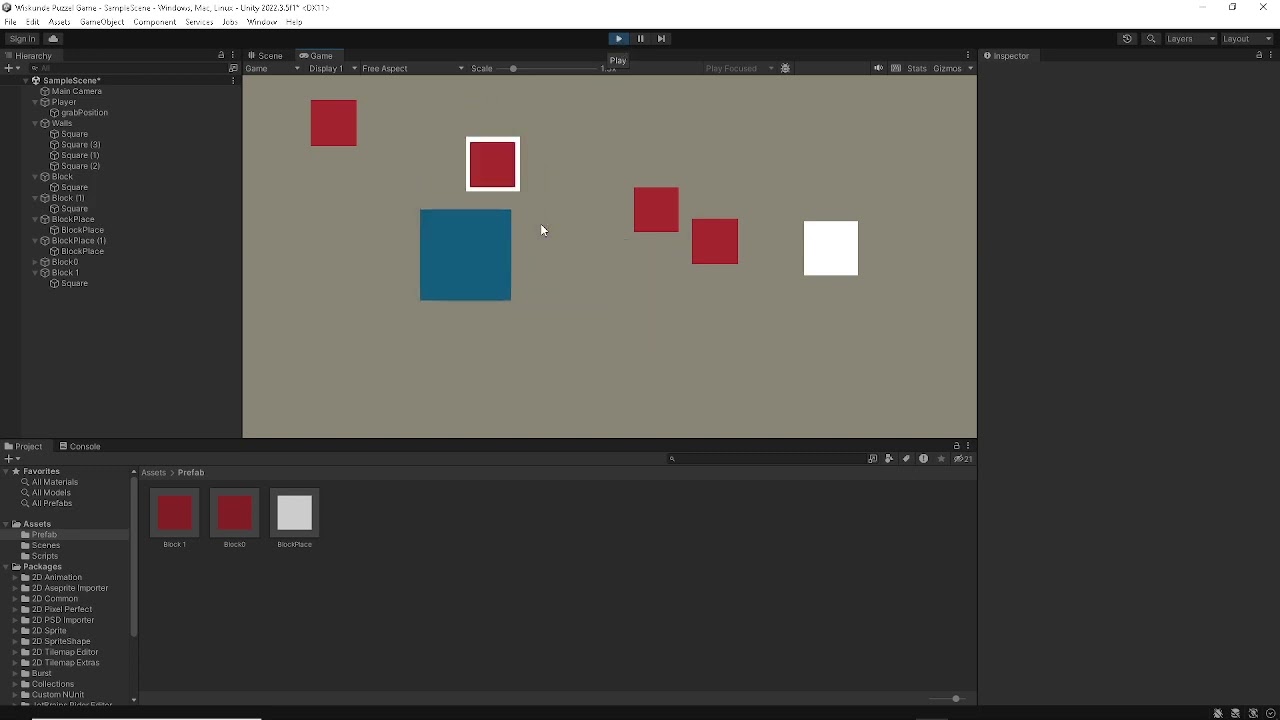 modest stag
i think i say in the video
pure crown
rich adder
`addedY` is printing ?
both printing btw
rich adder
modest stag
i think i say in the video
gotcha
first I would clean your script a bit, also those white blocks should be their own script
name.Equals("BlockPlace") using name is a big no
rich adder
there is only 1 player so it is acceptable (still bad practice to use strings/names)
but for multiple cubes not ideal
You make a script a nd make them a component
so you only check component
modest stag
for the player or the blockplates?
rich adder
all of them
modest stag
so i dont check if the object im touching has the name Player, but i check if the gameObject has a component that is the movement script or something else?
dry tendon
does someone knows why do i get this both logs when i try to use google firebase I'm just doing it for android and it say something about IOS
 rich adder
modest stag
so i dont check if the object im touching has the name Player, but i check if th...
rich adder
modest stag
so i dont check if the object im touching has the name Player, but i check if th...
collision.gameObject.TryGetComponent(out Grabbable grabable )){
heldObject = grabable
for example
modest stag
what does the (out Grabbable grabable do?
rich adder
modest stag
what does the (out Grabbable grabable do?
it looks for a component Grabbable , just a script lest say you make.. if it find it then it outputs that into a variable called grabbable
same as doing GetComponent with null check
modest stag
so if the script has been found it outputs the grabable as true
rich adder
modest stag
so if the script has been found it outputs the grabable as true
the code inside brackets is the true part that gets run
grabbable is just the particular component you found yes from that object
this way your Whitesquares can have their own slot for Grabbable lets say
and you can check if that slot is alreaady occupied, you can't place one again
modest stag
so should i now make a script for the white squares and make it so if it collides with a block it grabs it, and if its already holding one it wont.
rich adder
modest stag
so should i now make a script for the white squares and make it so if it collide...
yup exactly
or you can manually placre it from your hand
modest stag
but i still want to pick them back up from the white squares
 thick igloo
does transform.Translate work weird in 2D core?
modest stag
is that still possible?
rich adder
and you can check the closest white squre
rich adder
modest stag
is that still possible?
yes ofc
rich adder
thick igloo
does transform.Translate work weird in 2D core?
"work weird" ?
modest stag
im gonna try
summer stump
thick igloo
does transform.Translate work weird in 2D core?
No
thick igloo
OK so I am trying to make a Pacman clone and while I will do things differently, I decided to make the pacman controls first but for some reason (1,0) and (-1,0) make it go left while (0,1) and (0,-1) vectors make it go right
summer stump
Show !code
eternal falconBOT
Posting code
📃 Large Code Blocks
Use links to services like:
https://gdl.space/, https://paste.ofcode.org/, https://hatebin.com/, https://paste.myst.rs/, https://hastebin.com/
📃 Inline Code
Surround code with three backquotes. Not quotation marks.
To format as C#, add cs to the first line:
```cs
// Your code here
```
Add a comment with a line number if there is an error message.
rich adder
modest stag
im gonna try
dont copy just an example
public class WhiteSquare : MonoBehaviour
{
public RedSquare CurrentHeldRedSquare;
public void SetSquare(RedSquare sq)
{
if (CurrentHeldRedSquare != null) return;
CurrentHeldRedSquare = sq;
}
public void OnTriggerEnter2D(Collider2D other)
{
if(other.TryGetComponent(out RedSquare red))
{
SetSquare(red);
}
}
}
public class RedSquare : MonoBehaviour{}``` supple zealot
hi everyone, any idea why i might not be hearing my audio with this code? using System.Collections;
using System.Collections.Generic;
using UnityEngine;
public class CoinCol : MonoBehaviour
{
[SerializeField]
public GameManager GameManager;
private AudioSource audioSource;
public AudioClip collectSound;

void Start()
{
    audioSource = GetComponent<AudioSource>();
}

private void OnCollisionEnter(Collision collision)
{
    if (GameManager != null)
    {
        GameManager.totalCoinsCollected++;
        Debug.Log("Coin collected! Total coins: " + GameManager.totalCoinsCollected);


        if (audioSource != null && collectSound != null)
        {
            audioSource.PlayOneShot(collectSound);
        }


        Destroy(gameObject);
    }
    else
    {
        Debug.LogError("GameManager is not assigned in CoinCol script.");
    }
}
}
thick igloo
summer stump
Show !code
transform.Translate(moveDirection * moveSpeed * Time.deltaTime);
This is the transform.Translate part
moveSpeed is a float
moveDirection is vector2 (and I tried vector3 as well)
modest stag
rich adder
dont copy just an example
```cs
public class WhiteSquare : MonoBehaviour
{
...

the red squares have a grabScript so does this work?
rich adder
modest stag
the red squares have a grabScript so does this work?
you have to switch the logic then a bit
supple zealot
i just want a coin sfx to sound when i collect a coin lol
rich adder
just put a method on the white square to send/check itself from red square then @modest stag
thick igloo
thick igloo
`transform.Translate(moveDirection * moveSpeed * Time.deltaTime);`
This is the t...
I am printing moveDirection * moveSpeed * Time.deltaTime part as well and it seems to be working as I intended
summer stump
supple zealot
hi everyone, any idea why i might not be hearing my audio with this code? using ...
rich adder
modest stag
public class WhiteSquare : MonoBehaviour
{
    private RedSquare currentHeldRedSquare;
    public void TrySetHeld(RedSquare sq)
    {
        if (currentHeldRedSquare!= null) return;
        currentHeldRedSquare= sq;
    }
}
public class RedSquare : MonoBehaviour
{
    public void OnTriggerEnter2D(Collider2D other)
    {
        if (other.TryGetComponent(out WhiteSquare white))
        {
            white.TrySetHeld(this);
        }
    }
}
ah sorry
summer stump
thick igloo
`transform.Translate(moveDirection * moveSpeed * Time.deltaTime);`
This is the t...
Hmm, that is odd for sure. Could you paste the whole script in a paste site?
From what you showed alone, it shouldn't work like that
modest stag
rich adder
```cs
public class WhiteSquare : MonoBehaviour
{
private RedSquare currentHe...
When you do the if (other.TryGetComponent(out WhiteSquare white)) what does the 'white' mean
summer stump
modest stag
When you do the if (other.TryGetComponent(out WhiteSquare white)) what does the...
It is the name of the variable you are declaring
rich adder
modest stag
When you do the if (other.TryGetComponent(out WhiteSquare white)) what does the...
it doesnt mean anything, is just a name for the variable of that component found
"If you find this component store it as 'white' "
thick igloo
summer stump
Hmm, that is odd for sure. Could you paste the whole script in a paste site?
Fr...
modest stag
 void OnTriggerEnter2D(Collider2D collision)
{
        if (collision.gameObject.TryGetComponent(out WhiteSquare white))
        {
            white.TrySetHeld(this);
        }
!code
eternal falconBOT
Posting code
📃 Large Code Blocks
Use links to services like:
https://gdl.space/, https://paste.ofcode.org/, https://hatebin.com/, https://paste.myst.rs/, https://hastebin.com/
📃 Inline Code
Surround code with three backquotes. Not quotation marks.
To format as C#, add cs to the first line:
```cs
// Your code here
```
Add a comment with a line number if there is an error message.
modest stag
What is the WhiteSquare refering to ?
something the gameObject your colliding with has?
polar acorn
modest stag
What is the WhiteSquare refering to ?
A component
modest stag
So a script for example?
thick igloo
thick igloo
https://pastecode.io/s/djinvdk5
Even the AI says that it should allow movement in 4 directions (also apparently the AI explaining the code is a thing now. Didn't know that. Woah)
polar acorn
modest stag
So a script for example?
thick igloo
thick igloo
Even the AI says that it should allow movement in 4 directions (also apparently ...
as we all know, AI is never wrong
modest stag
polar acorn
https://docs.unity3d.com/ScriptReference/Component.TryGetComponent.html
ty
amber spruce
is it bad to use a character controller that has custom physics so no rigidbody and no colldier
rich adder
modest stag
So a script for example?
script = components
modest stag
yep
modest stag
ok
rich adder
components are Unity specific
modest stag
theyre only components when they are attached to a gameobject?
rich adder
normally classes are objects
rich adder
modest stag
theyre only components when they are attached to a gameobject?
when its Monobehavior
so yea pretty much
thick igloo
Vector3.right or Vector2.right are global directions right? not local? The Unity Documentation says that they are global
world space*
summer stump
thick igloo
`Vector3.right` or `Vector2.right` are global directions right? not local? The U...
Yes they are. The are (1,0,0) and (1,0) respectively. If you use transform.right it is (1,0) locally, translated to some world space vector depending on the transforms rotation.
I'm opening unity to check out your code you sent earlier. Easier to do hands on sometimes.
thick igloo
thanks


 faint sluice
thick igloo
`Vector3.right` or `Vector2.right` are global directions right? not local? The U...
faint sluice
thick igloo
`Vector3.right` or `Vector2.right` are global directions right? not local? The U...
Vector3.Right is just a constant, just like how Color.Red is a constant
modest stag
@rich adder how do i make it so when they touch the red square actually goes to the position?
faint sluice
Predefined values
rich adder
modest stag
<@968604165150507078> how do i make it so when they touch the red square actuall...
under currentHeldResSquare
currentHeldResSquare.transform.localPosition = Vector3.zero;```or you dont even need to parent, up to u
amber spruce
hey so i have noticed a bunch of really advanced character controlelrs and stuff have speed called m_Speed why is that
modest stag
@rich adder now when i pick up a block and let it collide with a white square nothing happens, but when i place it again it goes back to localPosition, how do i make it so when i let it touch the white square it has the same position as the white square
faint sluice
amber spruce
hey so i have noticed a bunch of really advanced character controlelrs and stuff...
Just naming convention for variables
amber spruce
ok
rich adder
amber spruce
hey so i have noticed a bunch of really advanced character controlelrs and stuff...
m_ for member variable
rich adder
modest stag
<@968604165150507078> now when i pick up a block and let it collide with a white...
lets make a thread, and send both script you did with pastelink site
summer stump
thick igloo
thanks
If I completely remove HandleRotation it works perfectly.
Then I remembered that transform.Translate has a second (default/optional) parameter that says it is local space
so change that second parameter
transform.Translate(moveDirection * moveSpeed * Time.deltaTime, Space.World);
https://docs.unity3d.com/ScriptReference/Transform.Translate.html
wintry quarry
thick igloo
`Vector3.right` or `Vector2.right` are global directions right? not local? The U...
If you really think about it philosophically, they aren't inherently global or local. They don't take on such a meaning until they are used somehow. For example if you do transform.forward = Vector3.forward; it is "global" but if you use it like transform.rotation = someObject.TransformDirection(Vector3.forward) then it's "local" to someObject.
summer stump
thick igloo
thanks a lot
Btw, the rotation seems messed up a bit. I redid the code in my testing, and this is what I came up with:
https://pastecode.io/s/mhfte3hx
Oh, and I didn't do it, but you may want to reverse HandleInput and HandleMovement so it responds on the same frame, but not a big deal
 novel shoal
what's the input method used to capture the movement of the mouse?
wintry quarry
novel shoal
what's the input method used to capture the movement of the mouse?
depends on which input system you are using
sonic remnant
I'm facing a challenging issue in Unity where my constructable objects are incorrectly allowed to be placed through 'Tree' tagged objects, despite having collision detection logic in place. Here's a brief overview:
I have a script attached to my constructable objects to control their placement in the game world.
The script includes an OnTriggerEnter method intended to prevent these objects from being placed through other objects, particularly those tagged as "Tree" or "pickable".
Despite the logic, the constructable objects are still being placed through the 'Tree' objects. I'm using tags to differentiate between 'Ground', 'Tree', 'pickable', and 'ghost' objects.
i have a problem with the object going through the ground and is set to valid to build aswell.
added a detection logic to my constructable script.
Constructable script:
https://gdl.space/oweqofizil.cs
ConstructionManager script:
https://gdl.space/capatonuku.cs
GhostItem script:
https://gdl.space/eqegaqulop.cpp
faint sluice
novel shoal
what's the input method used to capture the movement of the mouse?
As in current position?
novel shoal
faint sluice
As in current position?
i want to rotate the camera if the mouse is moved
and i was wondering if there was an input.getmouse or something like that
 rocky canyon
yes,
faint sluice
I believe input.getaxis? I might be wrong haven't used that in a while
rocky canyon
GetAxis or GetAxisRaw
novel shoal
faint sluice
I believe input.getaxis? I might be wrong haven't used that in a while
does it work for mouse too?
rocky canyon
(Mouse X) Mouse Y
novel shoal
input.getaxis("Mouse X")?
rocky canyon
actually theres probably not a axis and a raw axis.. but yea Mouse X
its in ur input settings in the preferences or w/e if u wanna see the correct names
wintry quarry
sonic remnant
I'm facing a challenging issue in Unity where my constructable objects are incor...
I wouldn't use a "ghost collider" for this - just use OverlapBox directly. Note that the collider itself won't ahve its position updated every frame, only during the physics sim. This makes it unsuitable for any purpose here - including determining the position for the OverlapBox
faint sluice
Yeah, you can check in project settings which keywords you can use with input
thick igloo
summer stump
Btw, the rotation seems messed up a bit. I redid the code in my testing, and thi...
I've wanted to break the code into pieces as small as possible, assumed that would be the better practice
novel shoal
mouseAxisX = Input.GetAxis("MouseX");
thick igloo
thick igloo
I've wanted to break the code into pieces as small as possible, assumed that wou...
In the end I won't be using these controls anyway, I will be using a grid map for the AI and move both the character and the mobs from tile to tile.
I have found this article while researching about the AI, it is amazing really.
https://www.todayifoundout.com/index.php/2015/10/ghosts-pac-man-work/
summer stump
thick igloo
I've wanted to break the code into pieces as small as possible, assumed that wou...
It can be, but at a certain point it can become bloated and less performant. There is a balance
Yours was fine. The main change to look at is what I changed the rotations to correspond to
the ones you had for left and right I put as up and down (and vice versa)
novel shoal
{
mouseAxisX = Input.GetAxis("Mouse X");
mouseAxisY = Input.GetAxis("Mouse Y");
transform.Rotate(mouseAxisY, mouseAxisX, 0);
}
is this right?
summer stump
Mouse X not MouseX
novel shoal
mb
summer stump
and may as well put those directly in the Rotate call if you don't use them anywhere else
rocky canyon
ya, that'll work (may need modified a little to get the outcome u expect)
summer stump
transform.Rotate(Input.GetAxis("Mouse Y"), Input.GetAxis("MouseX"), 0);
(if that is the order you wanted)
thick igloo
summer stump
the ones you had for left and right I put as up and down (and vice versa)
Yeah, I noticed. The directions are like that due to the prefab I made.
summer stump
thick igloo
Yeah, I noticed. The directions are like that due to the prefab I made.
Ahhh, ok. Was it a model from blender?
thick igloo
nah, just basic sprites
summer stump
Oh ok. Well, if you had it the way that worked, then keep on with it!
thick igloo
Will do. Thanks again
novel shoal
summer stump
`transform.Rotate(Input.GetAxis("Mouse Y"), Input.GetAxis("MouseX"), 0);`
(if th...
i thought if you wanted to rotate something horizontally you would have to use the Y axis, if you wanted to rotate it vertically you would have to use the X axis, this is what i used
summer stump
novel shoal
i thought if you wanted to rotate something horizontally you would have to use t...
Not sure what you mean. I did it exactly the same as you had it, just compressed it
novel shoal
summer stump
Not sure what you mean. I did it exactly the same as you had it, just compressed...
yeah
but you asked me if that was the order i wanted to use
so i used first the x axis to rotate it vertically, then the y axis to rotate it horizontally
summer stump
novel shoal
but you asked me if that was the order i wanted to use
I didn't ask, I stated. But no biggie. I understand
novel shoal
i have to invert the value for the y axis, but why?
novel shoal
novel shoal
i have to invert the value for the y axis, but why?
(if i scroll to the left, the camera srolls to the right)
rocky canyon
novel shoal
i have to invert the value for the y axis, but why?
just multiply it by -1
iono.. why tho
novel shoal
rocky canyon
just multiply it by -1
that's what i did
but why do i have to inver those values?
rocky canyon

idk, for sure.. debug the values that those variables return.. and compare that to ur logic
im sure u'll figure out why
novel shoal
rocky canyon
ik what x and y are in maths and physics
it's just odd that i have to inver the value for the x axis
rocky canyon
well in math, moving right would be Positive and moving left would be Negative (as far the x axis goes)
this also depends on where the origin is.. is it on the bottom left corner? is it in the middle? is it dependent on where the movement starts? not totally sure, but thats why i said to debug the values.. visual confirmation always helps understanding
could also be dependent on the thing ur moving.. does the object start upside down perhaps?
lots of variables
novel shoal
why is the camera rotation so strange?
novel shoal
rocky canyon
well in math, moving right would be Positive and moving left would be Negative (...
i am not talking about moving, but about rotating around the x axis, that fells strange, i don't get why do i have to invert it and only for the x axis
summer stump
novel shoal
i am not talking about moving, but about rotating around the x axis, that fells ...
They meant moving the mouse
rocky canyon
you should look at examples / tutorials / etc and see how they do Mouse Look movement..
usually ur rotating a child object one way and the parent another way.. so 1 object only moves in 1 dimension..
this helps prevent odd movements, and gimbal lock etc
in this example the camera is parented to the capsule.. the camera only moves up and down... it's the character (capsule) that moves on the X (horizontal)
novel shoal
rocky canyon
you should look at examples / tutorials / etc and see how they do Mouse Look mov...
and it only rotates when the main object rotates?
rocky canyon
left and right (yes)
novel shoal
yeah mb
rocky canyon
the camera up and down moves the child (inside the capsule)
"Mouse Look" is the terminology if u wanna look up some tutorials or something
novel shoal
i am gonna make a bad example, but when i used to play fortnite i remember i could use the camera and the movement in 2 different ways
 austere monolith
would i make multiple gun containers for multiple guns?
 novel shoal
rocky canyon
"Mouse Look" is the terminology if u wanna look up some tutorials or something
novel shoal
rocky canyon
"Mouse Look" is the terminology if u wanna look up some tutorials or something
ty
rocky canyon
and in ur example make sure ur moving the correct way, theres local movement and global movement.. say u rotate ur camera to the left.. and then up and down.. if ur moving it (globaly) the axis never changes.. up is always towards the sky.. so if it rotates to the left or right first (like roll on an airplane) and then you rotate it upwards.. the side of the camera facing the sky would get rotated upwards.. (not the camera's original up)
if that makes sense
novel shoal
it does
 dusk hornet
i have script to turn on light when im near lightswitch and press e but idk why i can switch the light whereever i want and it only works normal after my first contact with the lightswitch
using UnityEngine;
using UnityEngine.InputSystem;
public class lightSwitch : MonoBehaviour
{
public GameObject inttext, light;
public bool toggle = true, interactable;
public Renderer lightBulb;
public Material offlight, onlight;
public AudioSource lightSwitchSound;
public Animator switchAnim;
// Animator parameter name for controlling the press animation state
private static readonly int PressHash = Animator.StringToHash("press");

void OnTriggerStay(Collider other)
{
    if (other.CompareTag("MainCamera"))
    {
        inttext.SetActive(true);
        interactable = true;
    }
}

void OnTriggerExit(Collider other)
{
    if (other.CompareTag("MainCamera"))
    {
        inttext.SetActive(false);
        interactable = false;
    }
}

void Update()
{
    if (interactable && Keyboard.current.eKey.wasPressedThisFrame)
    {
        toggle = !toggle;

        // Set the boolean parameter in the Animator to control the animation state
        switchAnim.SetBool(PressHash, toggle);

        // Optionally play a sound here: lightSwitchSound.Play();
    }

    // Update light and material based on toggle state
    light.SetActive(toggle);
    lightBulb.material = toggle ? onlight : offlight;
}
}
this is the script
austere monolith
dusk hornet
i have script to turn on light when im near lightswitch and press e but idk why ...
use hastebin
rocky canyon
you'll learn the caveats of it as u work on it
dusk hornet
austere monolith
use hastebin
what is hastebin
novel shoal
i am not a native english speaker (as you've seen) but i could understand what you said so far
polar acorn
dusk hornet
i have script to turn on light when im near lightswitch and press e but idk why ...
!code
eternal falconBOT
Posting code
📃 Large Code Blocks
Use links to services like:
https://gdl.space/, https://paste.ofcode.org/, https://hatebin.com/, https://paste.myst.rs/, https://hastebin.com/
📃 Inline Code
Surround code with three backquotes. Not quotation marks.
To format as C#, add cs to the first line:
```cs
// Your code here
```
Add a comment with a line number if there is an error message.
rocky canyon
^ its a copy-paste website.. it'll give u a link to send
austere monolith
dusk hornet
what is hastebin
go to hastebin, put the code in, save, and share url
dusk hornet
oh ok sec
rocky canyon
novel shoal
i am not a native english speaker (as you've seen) but i could understand what y...
your english is plenty good enough for us to understand you 👍
novel shoal
rocky canyon
your english is plenty good enough for us to understand you 👍
i am gonna improve it i promise
lol
rocky canyon
good good 🍀
austere monolith
would i make multiple gun containers for multiple guns?
 dusk hornet
austere monolith
use hastebin
dusk hornet
austere monolith
use hastebin
Hastebin is a free web-based pastebin service for storing and sharing text and code snippets with anyone. Get started now.
rocky canyon
then disable and enable the child object that represents the gun
then u only need to move around the parent object
novel shoal
is there the camera movement in the junior programmer pathway in learn.unity? i am currently at unit 3 and it would help to have it there
rocky canyon
or u can even get more complex and instantiate and destroy the guns, but its cheaper to enable/disable than to spawn and destroy
dusk hornet
i have script to turn on light when im near lightswitch and press e but idk why i can switch the light whereever i want and it only works normal after my first contact with the lightswitch
https://hastebin.com/share/okafepagoh.csharp
Hastebin is a free web-based pastebin service for storing and sharing text and code snippets with anyone. Get started now.
cant find the problem
rocky canyon
novel shoal
is there the camera movement in the junior programmer pathway in learn.unity? i ...
almost positive it would be covered somewhere in the learn material
novel shoal
okk ty
rocky canyon
dusk hornet
i have script to turn on light when im near lightswitch and press e but idk why ...
why do you use Stay? wouldn't it be simpler to just use Enter and Exit?
dusk hornet
rocky canyon
why do you use Stay? wouldn't it be simpler to just use Enter and Exit?
i mean i can but does it fix the problem
rocky canyon
not sure.. it could
but even if it doesn't its better for triggers like that
if u have an exit might as well use a Enter.. rather than a Stay
stay runs every frame..
dusk hornet
rocky canyon
but even if it doesn't its better for triggers like that
i see yeah noted im gonna change it now
novel shoal
@rocky canyon how did you learn unity?
rocky canyon
i don't have unity open so i can't test but i'll fire it up in a min
rocky canyon
novel shoal
<@317141358894645248> how did you learn unity?
- unity learn
- youtube tutorials
- installing sample projects and checking out the code on my own
- making small demo's
- this channel
- friends
rocky canyon
dusk hornet
why i can switch the light from anywhere
maybe you need ur boolean to start as false or true or w/e you need it to be
it should be off Until you enter teh trigger.. if it starts as on or w/e state is needed to enable the light, you'll be able to flip the light on until u enter and exit the trigger
(my guess w/o looking into it too deeply)
dusk hornet
rocky canyon
maybe you need ur boolean to start as *false* or *true* or w/e you need it to be
oh truu
thats the probleeem
i fixed it
thaank you
rocky canyon
no prob 👍
rocky canyon
yup, thats a common mistake. the inspector will override the values u have in the script
dusk hornet
for him interactble was tru so pressing e activtes the light
rocky canyon
rocky canyon
- unity learn
- youtube tutorials
- installing sample projects and checking out ...
its been a journey for sure.. it doesn't happen all at once.. im getting close to 2 years w/ unity
austere monolith
rocky canyon
its been a journey for sure.. it doesn't happen all at once.. im getting close t...
ok i did the thing you said for the containers, how can i make it so it doesnt follow my camera? i have the pick up controller make it not equipped
 digital lynx
so im trying to export my model from Maya to Unity using FBX but the model always lacks textures despite exporting with "embed media". How do i fix this?
 solemn fractal
Hey guys, if I create an IEnumerator like that it should make it true and 1sec later false right? because it is not working
    private IEnumerator loadSuccessText(float wait){
        loadSuccess.gameObject.SetActive(true);
        yield return new WaitForSeconds(wait);
        loadSuccess.gameObject.SetActive(false);
} ```it turns into true but never false
 eternal needle
solemn fractal
Hey guys, if I create an IEnumerator like that it should make it true and 1sec l...
eternal needle
solemn fractal
Hey guys, if I create an IEnumerator like that it should make it true and 1sec l...
What debugging steps have you taken to see if this runs
wintry quarry
solemn fractal
it turns into true but never false
Sounds like either:
- the object the coroutine is running on was destroyed/deactivated
- Timescale is 0
rocky canyon
austere monolith
ok i did the thing you said for the containers, how can i make it so it doesnt f...
umm, if its a child it will always follow around the parent (container)
to not make that happen you could
- set its position manually every frame.. transform.position = (place you want it) and then you'd have to have logic to set it to the parent's position and then stop manually changing its position
or - you can set its parent to null in the code (that will unattach it from the parent) - it will no longer follow it around
then when you need to - you can set its parent to be the player or gun holder or w/e (set its position to the place you want it)
then it'd follow it around as a child normally would
not exactly sure why you wouldn't just keep it where it is.. (if you have no guns you can just disable all the guns)
when you DO have a gun you just enable it.. and it will already be parented and where it neeeds to be
the weapons you pickup should not be the same as the weapons your character has..
(that'd be the only reason i can think of as to why u wouldnt want them just to be attached all the time)
the pickup gets destroyed.. then ur script just does some logic to let the player have the weapon (be able to enable it)
 neat smelt
What are all the ways I could use to repeat a certain part of code a certain amount of times?
for context, I am making a spawn point for enemies, where the game repeats the same line of code multiple times via calling the same private void in the script multiple times.
my problem is that I don't know the proper way of doing it, since using a while loop often freezes Unity itself when it gets called via the player touching an object that tells the enemy spawnpoint to activate the spawning code lines (unless I get rid of the enemy-counting code which is in Update).
polar acorn
neat smelt
What are all the ways I could use to repeat a certain part of code a certain amo...
for loop
wintry quarry
Yep just a for loop
wintry quarry
neat smelt
What are all the ways I could use to repeat a certain part of code a certain amo...
using a while loop often freezes Unity itself when it gets called
This just means you messed up and wrote an infinite loop
 fleet patio
why my CC .isGrounded is returning true and false rapidly? How this check works, why when CC is on ground it returns false
 polar acorn
fleet patio
why my CC .isGrounded is returning true and false rapidly? How this check works,...
polar acorn
fleet patio
why my CC .isGrounded is returning true and false rapidly? How this check works,...
You're probably calling .Move twice in one update
a.k.a. The Brackeys Error
wintry quarry
fleet patio
why my CC .isGrounded is returning true and false rapidly? How this check works,...
isGrounded becomes true when the most recent Move call pushed the CC into the ground
austere monolith
polar acorn
You're probably calling `.Move` twice in one update
why is it called the brackeys error
fleet patio
polar acorn
You're probably calling `.Move` twice in one update
once
polar acorn
austere monolith
why is it called the brackeys error
Becasue Brackeys did it in a video like six years ago and basically every tutorial ever since has just copied his code
neat smelt
wintry quarry
> using a while loop often freezes Unity itself when it gets called
This just me...
ahhhh ok, well I guess I never truly figured out how to edit a template of a for loop so I just went for an option that sounded better (simpler) in my head...
its been a while since I made loops anyway.
fleet patio
wintry quarry
`isGrounded` becomes true when the most recent `Move` call pushed the CC into th...
so it will be better to make own groundcheck?
polar acorn
fleet patio
once
show code
fleet patio
I am already refactoring it and that's why I noticed that my cc isGrounded returns true and false
    private void FixedUpdate()
    {
        if (!IsOwner) return;

        isSlopeTooStep = CheckTooStepSlope(); // This should be in GroundMove or something...

        if (WantToCrouch())
            CrouchMove();

        print(_controller.isGrounded);

        if (_controller.isGrounded)
            GroundMove();
        else
            AirMove();

            if (CheckCeilingHit())
            {
                Debug.Log("HItted Ceiling!");
                playerVelocity.y = -0.5f;
                AddGravity();
            }


        /* Calculate top velocity */
        Vector3 udp = playerVelocity;
        udp.y = 0.0f;
        if (udp.magnitude > playerTopVelocity)
            playerTopVelocity = udp.magnitude;


        playerVelocity += baseVelocity;
        _controller.Move(playerVelocity * Time.fixedDeltaTime);
        playerVelocity -= baseVelocity;
Show the full script. !code
eternal falconBOT
Posting code
📃 Large Code Blocks
Use links to services like:
https://gdl.space/, https://paste.ofcode.org/, https://hatebin.com/, https://paste.myst.rs/, https://hastebin.com/
📃 Inline Code
Surround code with three backquotes. Not quotation marks.
To format as C#, add cs to the first line:
```cs
// Your code here
```
Add a comment with a line number if there is an error message.
fleet patio
polar acorn
Show the full script. !code
Pastebin
Pastebin.com is the number one paste tool since 2002. Pastebin is a website where you can store text online for a set period of time.
polar acorn
In GroundMove, you set the player's Y velocity to 0 if they're grounded. This means your next call to .Move doesn't touch the ground, and thus sets isGrounded to false. Instead of setting it to 0, set it to a small negative number so it touches the ground
fleet patio
polar acorn
In `GroundMove`, you set the player's Y velocity to 0 if they're grounded. This ...
works, thanks!
ok, it's not
woven crater
i got an prefab object and i want to intantiate a gun object as child of this prefab so i get the gun to move with the prefab but got this error
 rocky canyon
u got to set its transform to the Instantiated prefab in the world..
not the actual prefab
amber spruce
rich adder
not the greatest but should move it fine. maybe make that jump be Impulse force ...
m_Rigidbody2D.AddForce(new Vector2(0f, m_JumpForce), ForceMode2D.Impulse);
would that be how i do ImpulseForce
polar acorn
woven crater
i got an prefab object and i want to intantiate a gun object as child of this pr...
You should set the parent of an object that exists, instead of a prefab file
woven crater
instance of the prefab rather than the prefab itself?
rich adder
amber spruce
m_Rigidbody2D.AddForce(new Vector2(0f, m_JumpForce), ForceMode2D.Impulse);
would...
yea
woven crater
polar acorn
Making a prefab a child of an object in the scene doesn't really make sense
im making an instance of an objectt as a child of a prefab
polar acorn
woven crater
im making an instance of an objectt as a child of a prefab
why
That also doesn't make sense
that's a scene object being a child object of a file on disc
woven crater
to have follow movement?
polar acorn
A prefab doesn't move
because it doesn't exist
Having a scene object be a child of a prefab makes no sense
woven crater
worked, thank

 zealous oxide
https://youtu.be/v1UGTTeQzbo?t=28 hey friends, im having a gander at this vid and in it, the person is giving his enemies each thier own canvas so they can display thier own health bars. I was under the impression giving individual objects their own canvas was poor practise? can someone please advise
In this video we cover 2D enemy health bars for Unity and C#
This video is part of our "In 5 minutes" series where we show you exactly what you want to know.
SUPPORT GREAT CONTENT
https://www.patreon.com/DistortedPixelStudios
$3 = Coffee with P...
polar acorn
Actually, the bad practice is putting everything on the same canvas
rocky canyon
i believe it is. (UIs being updated and redrew all the time is why it would be taxing)
also I believe games recycle UI panels for in world characters and stuff like a pooling system where it only uses what it needs
i haven't seen many games with a huge amount of healthbars.. altho one game comes to mind specifically and its a simple 2d game with a huge amount of enemies and stuff going on.. and theres tons of healthbars
its a top down point and click battle shooter type game
zealous oxide
I'm guessing this only becomes a problem when you have hundreds/thousands of canvas' and elements on at the same time?
rocky canyon
id guess lower but ya, and ur logic..
how ur updating them
plays a role also
instantiate 100s of ur prefab with an empty canvas and see what the performance does.. go from there, same with a smaller number
zealous oxide
ok thanks for the advice!
queen adder
whats a good way to learn unity coding
polar acorn
queen adder
whats a good way to learn unity coding
!learn
eternal falconBOT
:teacher: Unity Learn ↗
Over 750 hours of free live and on-demand learning content for all levels of experience!
rich adder
queen adder
is it just following tuts till you learn
lots of practice
queen adder
ok i wanna get good at it so i can make games with out looking at tutd
 fierce shuttle
queen adder
ok i wanna get good at it so i can make games with out looking at tutd
fierce shuttle
queen adder
ok i wanna get good at it so i can make games with out looking at tutd
My personal advice, after getting familiar with the basics and maybe making some of the Unity Learn projects or your own small projects, you could look into programming patterns and S.O.L.I.D architecture - its a bit more of an advanced topic, but I found just getting familiar with a few patterns helped bridge the abstract "I wanna make this cool thing" and "where do I begin in making this cool thing?", then maybe try to apply that to something like pong, breakout, small projects like that, though through trial and error you may find an approach that works well for your understanding and workflow
 covert cairn
Is there a good reason why this math isn't working?
The code being print to console is this:
print("ammoInClip: " + ammoInClip + "\nclipCapacity: " + clipCapacity);
print(ammoInClip / clipCapacity);
 eternal needle
covert cairn
Is there a good reason why this math isn't working?
The code being print to cons...
eternal needle
covert cairn
Is there a good reason why this math isn't working?
The code being print to cons...
if you want a float as the result, you'll have to cast the ints to float
covert cairn
so convert the ints into floats beforehand?
 static cedar
Yes.
dense root
So I'm trying to reference my Paddle position to this Projectile script so I can get it's position... where am I going wrong?

I'm getting a null reference to the m_paddle but m_paddle does in fact exist
wintry quarry
dense root
So I'm trying to reference my `Paddle` position to this `Projectile` script so I...
you never assigned the variable to anything. in fact it's readonly
wintry quarry
to the paddle I would assume
make it public, not readonly, and drag+|drop
you know this by now
dense root
awesome, thanks

how do I "shoot" the projectiles?
Like grant them movement shooting up
 teal viper
Set velocity or apply force🤷♂️
polar acorn
Put a script on them that moves it
dense root
So I'm trying to apply force however I'm getting that null reference error again despite having a RigidBody2D attached to it. Oddly enough it disappears during play. What am I doing wrong here?


Oh I think I need to give my prefab a rigidbody not the spawner
if (Input.GetButtonDown("Fire1"))
{
    // Instantiate projectile at the position and rotation
    Instantiate(m_projectile, m_paddle.transform.position, Quaternion.identity);

    rb2D.AddForce(transform.up * thrust);
}
So I'm trying to apply force upwards but what's happening is that it's dropping down, any ideas?
 modern oxide
If you didn’t do it you need a public rigid body save it in your script and drag that rigid body onto your script
dense root
Gravity is set to zero
 dense root
I'm having trouble with AddForce now
summer stump
dense root
I'm having trouble with `AddForce` now
Use Impulse mode. And what is thrust set to?
dense root
What's impulse mode? And thrust is set to 1, but I tried 10 with the same result of it just dropping down
teal viper
dense root
```c#
if (Input.GetButtonDown("Fire1"))
{
// Instantiate projectile at the p...
Is that in the projectile script?
dense root
Yes
teal viper
Are you sure about that? Why are you spawning a projectile in the projectile script then?
dense root
Well this is the projectile spawner
It just generates projectiles upon click
Then I want to apply a force to it
teal viper
dense root
Well this is the projectile spawner
So it's not the projectile script..?
dense root
teal viper
So it's not the projectile script..?
Nope it's the spawner
summer stump
dense root
What's impulse mode? And thrust is set to 1, but I tried 10 with the same result...
It's the second parameter of AddForce.
1 for thrust is pretty low too
https://docs.unity3d.com/ScriptReference/Rigidbody2D.AddForce.html
Oh yeah, you aren't adding the force to the projectile
teal viper
dense root
Nope it's the spawner
Ok, then what does the rb2D reference?
summer stump
Instantiate returns a reference. Get the rigidbody from that
 abstract finch
        while (true)
        {
            transform.LookAt(target.position);
            transform.position += transform.forward * _followSpeedCurve.Evaluate(followSpeed / timeElapsed);
            timeElapsed += Time.deltaTime;
            yield return null;

        }```
How would I be able to get the followspeed to ramp up based on the curve of this coroutien?what you have is fine but you do need to multiply the speed by deltaTime
abstract finch
wintry quarry
what you have is fine but you _do_ need to multiply the speed by deltaTime
ok ill try it out thanks
wintry quarry
abstract finch
ok ill try it out thanks
Although this makes no sense:
followSpeed / timeElapsed
it should be timeElapsed / duration
abstract finch
the thing is I dont have a duration in this case
wintry quarry
it would be the duration over which you want the acceleration to happen
abstract finch
I just want there to be a set speed rather than reach a destination wihtin x speed
abstract finch
what about this? _followSpeed * _followSpeedCurve.Evaluate(timeElapsed)
wintry quarry
abstract finch
what about this? _followSpeed * _followSpeedCurve.Evaluate(timeElapsed)
this is equivalent to timeElapsed / duration where duration is 1 second
wintry quarry
it's also unclear what the followSpeed variable is in that example
abstract finch
thats the speed of which the transform will move, well the base speed.
it gets modified based on the animationcurve
wintry quarry
so the curve is supposed to be a speed multiplier?
abstract finch
yes
oh i forgot to mention as to why i didnt use duration here but i see what it means, duration is the max value. I want the coroutine to keep going.
        float maxCurveValue = 1;
        while (true)
        {
            transform.LookAt(target.position);
            transform.position += transform.forward * (followSpeed * _followSpeedCurve.Evaluate(timeElapsed / maxCurveValue));
            timeElapsed += Time.deltaTime;
            yield return null;
}```seems to be working, i want it to keep following until it collides to the target
wintry quarry
abstract finch
``` float timeElapsed = 0;
float maxCurveValue = 1;
while...
this is just duration of 1 second
the coroutine is going to keep going forever because you have while(true)
abstract finch
yea i want it to keep going until it collides
wintry quarry
the duration in my example does nothing besides decide how long it takes to accelerate
that's what the duration is for
it's the time it takes to go from followSpeed to whatever the max at the end of the curve is
abstract finch
ahh i see
 bright nexus
Hi, I had this issue yesterday, and I thought I could fix it by clamping the fall speed, although it is persisting. I would appreciate any help or information as to why this is occurting. Please ask if you need more information. Here is my current code https://paste.myst.rs/hi3j0h3a Thank you.
a powerful website for storing and sharing text and code snippets. completely free and open source.
dense root
summer stump
Instantiate returns a reference. Get the rigidbody from that
How do I get the reference from that?
slender nymph
put the Instantiate call on the right side of an assignment operator
summer stump
dense root
How do I get the reference from that?
GameObject go = Instantiate(prefab);
https://docs.unity3d.com/ScriptReference/Object.Instantiate.html
 ivory bobcat
var instance = Instantiate(prefab);``` normal slate
how would you get the rigidbody from that
normal slate
how would you get the rigidbody from that
GetComponent
wintry quarry
normal slate
how would you get the rigidbody from that
Same way you get any COmponent from anything. GetComponent
normal slate
Oh yeah component
summer stump
or spawn based on the rigidbody
public Rigidbody prefab;
Rigidbody newRB = Instantiate(prefab);
unless of course prefab IS a Rigidbody reference already
dense root
if (Input.GetButtonDown("Fire1"))
{
    // Instantiate projectile at the position and rotation
    var instance = Instantiate(m_projectile, m_paddle.transform.position, Quaternion.identity);
    instance.GetComponent<Rigidbody2D>().AddForce(transform.up * thrust);
}
Hmm no dice...
summer stump
normal slate
GameObject i think
no, var is fine
normal slate
oh okay
summer stump
dense root
```c#
if (Input.GetButtonDown("Fire1"))
{
// Instantiate projectile at the p...
What isn't working?
doesn't look like you DO anything with it
dense root
summer stump
What isn't working?
doesn't look like you DO anything with it
It's not shooting my projectil up
summer stump
dense root
It's not shooting my projectil up
Show where you try, nothing there shoots it up
slender nymph
is the rigidbody kinematic
summer stump
dense root
`transform.up * thrust`, no?
Oh, I totally misread it
normal slate
doesnt kinematic just make it not detect collisions?
summer stump
normal slate
doesnt kinematic just make it not detect collisions?
No
slender nymph
dense root
RB is dynamic
then make sure they aren't perhaps colliding with something
polar acorn
normal slate
doesnt kinematic just make it not detect collisions?
Kinematic makes a rigidbody not respond to forces, but can still exert them
normal slate
oh so like it self will exert force on the object but wont be effecte by them?
summer stump
dense root
`transform.up * thrust`, no?
is thrust still 1?
0,1,0 * 1 is 0,1,0....
dense root
It might have something to do with it spawning directly on top of my player object
slender nymph
put it on a layer that does not collide with the player object
dense root
Thrust is 10f
slender nymph
also you probably want to use ForceMode2D.Impulse
summer stump
I was gonna say, you didn't do that yet
summer stump
normal slate
what does that do?
See the different force modes here:
https://docs.unity3d.com/ScriptReference/Rigidbody2D.AddForce.html
normal slate
so adds the force instantly
summer stump
Oh ok, good good
summer stump
dense root
Turned off my RB and my collider no dice
Turning off the rb would DEFINITELY make it not work
dense root
No no, on the player object.
normal slate
do both objects have colliders?
dense root
In case it was colliding with the projectile to test
summer stump
dense root
In case it was colliding with the projectile to test
Did you do Impulse mode yet?
What happens right now? Do they just fall?
dense root
Yeah
normal slate
if its falling then just set gravity to 0 no?
slender nymph
do not multiply your forces by deltaTime
summer stump
dense root
I haven't tried impulse mode yet
Do that, and make thrust like 100
Just to test
What is the MASS of the projectile?
And yeah, definitely do NOT do deltaTime here
normal slate
if its falling down... then it might be because thurst.up?
isnt that on y axis?
could thrust be making it negative somehow?
if you are working on 2d it would be forward i think right? but on 3d it would go up and down
sorry if i am making this worse lol i am trying to learn as well.
dense root
All good we're trying
summer stump
That actually is a good point about direction.
@dense root
Try this just in case:
instance.GetComponent<Rigidbody2D>().AddForce(Vector2.up * thrust);
That uses the world coordinates and wont be affected by any transform rotation
normal slate
might as well do Input.GetAxis("Vertical")?
summer stump
normal slate
might as well do Input.GetAxis("Vertical")?
No. They aren't using input for this.
They are shooting a projectile
normal slate
Ohh i see
but then vector2.up wouldnt help no? isnt that just (0,1,0)?
i mean 0,1
dense root
It might help if I shoot a video of it all
summer stump
normal slate
but then vector2.up wouldnt help no? isnt that just (0,1,0)?
correct.. it is "up" which is the way they want to shoot it
This is a galaga game. They hit a button and it shoots a projectile up from wherever they are
dense root
normal slate
wait no
you need to grab the ridgid body of the instantiated object no?
line 23
on start you are setting it to the original object
wintry quarry
dense root
why are you adding a Rigidbody to the spawner?
normal slate
wait i am so confused
wintry quarry
and what ahppened to your instance variable?
summer stump
dense root
What happened to the code we've been working on? This is not what you want at all
wintry quarry
And everything that was discussed above lol
normal slate
yeah lol
dense root
This?
if (Input.GetButtonDown("Fire1"))
{
    // Instantiate projectile at the position and rotation
    var instance = Instantiate(m_projectile, m_paddle.transform.position, Quaternion.identity);
    instance.GetComponent<Rigidbody2D>().AddForce(transform.up * thrust);
}
Yeah. Why was that not the code in the video?
wintry quarry
it should be an Impulse force too