#💻┃code-beginner
1 messages · Page 58 of 1
 wintry quarry
 tepid cobalt
Fixed update better for rigid active and Update for passive?
 ruby python
Okay cool. I do get confused with the different updates if honest, so many different 'opinions' about it out there. lol.
wintry quarry
There's a pretty broad consensus that physics goes in FixedUpdate but it's definitely nuanced
ruby python
wintry quarry
There's a pretty broad consensus that physics goes in FixedUpdate but it's defin...
Okay cool. Thanks for the help (and the patience. lol.)


 eternal needle
 frozen dagger
how to make words move to another line?
frozen dagger
how to make words move to another line?
Escape sequence \n for a new line
frozen dagger
thx
 scarlet skiff
ok so one problem i have rn is that the rockSpawner is not following everything else like it should

the parent has a movement script that moves the whole thing when certain buttons are pressed but the rockSpawner is still stationary
 solemn fractal
hey guys if I have that code here, when the time gets lower it will start a bunch of coroutines.. how can I or where can I place that piece of code to ensure that this happens only 1 time? start method?

 gaunt ice
what is currentTime
solemn fractal
i create a countdown.. that starts at 1200 seconds
i want it when it arrioves in 1150 it start a coroutine
but on update it will start it multiple times no? i just need it to start once
should I craetae a bool and control it?
and say if bool yes and _uimanager.currentTime 1150 ?
gaunt ice
you may not need to check it in update depends on how the variable is updated
scarlet skiff
scarlet skiff
it doesnt have a rigidbody
this is the spawner

 halcyon geyser
show ur movement script
scarlet skiff
i assume it is cuz addforce only works on rigidbodies
as someone mentioned earlier
but idk what to do then, i need the catapult as a rigidbody.. but also i need the spawner
unless... i just spawn rocks based on the catapults local cords and make the catapult itself spawn the boulders?
 hexed terrace
If Catapult_1 is moving around, all the children will move with it
The children do not need a rigidbodie as well
scarlet skiff
well idk
i did add the rockSpawner to the parent
but it still didnt move
i am thinking now to just use the catapult as a spawner too
i am trying to make the spawnPosition follow the catapult
 hexed terrace
Quaternion.Identity is the short hand way of doing a new one at 0,0,0
also, you haven't given that instantiate a parent, so it's going to spawn in the world at that pos, not as a child
frozen dagger
upgrades.SetActive(false); turning off object right?
hexed terrace
frozen dagger
upgrades.SetActive(false); turning off object right?
Try it and see!
 languid spire
scarlet skiff
i am trying to make the spawnPosition follow the catapult
languid spire
scarlet skiff
i am trying to make the spawnPosition follow the catapult
new Quaternion(0,0,0,0) is an invalid Quaternion value
 buoyant knot
pretty sure he wants Quaternion.Identity
languid spire
yes, which is new Quaternion(0,0,0,1)
also why you never use default when initializing a Quaternion
scarlet skiff
something like this..?
 languid spire
scarlet skiff
something like this..?
languid spire
scarlet skiff
something like this..?
what is the result if you multiply anything by zero?
 rancid tinsel
any idea why this doesn't do anything?

the idea is to make the object move towards it's rotation (so if y rotation is 45 then move in top right direction) but im not sure i understand the syntax
wintry quarry
rancid tinsel
any idea why this doesn't do anything?
do you happen to be in 2d?
rancid tinsel
yes
rancid tinsel
ohh i see
rancid tinsel
is there a similar thing for 2D at all?
languid spire
rancid tinsel
any idea why this doesn't do anything?
very probably transform.forward * ballSpeed generates a value too low to overcome inertia
rancid tinsel
wintry quarry
try `transform.right` or `up`
is there nothing that would be able to just move the object in the direction its facing? im rotating the object in the script a lot
wintry quarry
rancid tinsel
is there nothing that would be able to just move the object in the direction its...
literally what I told you will do that
scarlet skiff
languid spire
what is the result if you multiply anything by zero?
well 0
i didnt want aby rotation
idk anymore
rancid tinsel
wintry quarry
literally what I told you will do that
ohh the .up one works like i wanted it to, sorry i misunderstood what it does
thanks
scarlet skiff
i feel like im missing so much, gotta find a tutorial or something before i continue
wintry quarry
rancid tinsel
ohh the .up one works like i wanted it to, sorry i misunderstood what it does
yep, it depends on whether "up" or "right" is "forward" for your sprite
rancid tinsel
wintry quarry
yep, it depends on whether "up" or "right" is "forward" for your sprite
yeah i just assumed up would move it up the y axis lol
so id have to do a mix of up right up left etc
 eager elm
scarlet skiff
i feel like im missing so much, gotta find a tutorial or something before i cont...
eager elm
scarlet skiff
i feel like im missing so much, gotta find a tutorial or something before i cont...
you can also set up an invisible object that already has the correct rotation you want to apply to the spawned bolder and then set the bolders rotation equal to that invisible's object rotation.
wintry quarry
rancid tinsel
yeah i just assumed up would move it up the y axis lol
Vector3.up is just the general "up" direction. transform.up is up relative to the object's orientation
rancid tinsel
hmm it works but the ball shoots really fast initially and then slows down, and doesnt seem to move at the same speed, any idea why thats the case? i ended up multiplying by deltaTime as well
 wintry quarry
rancid tinsel
hmm it works but the ball shoots really fast initially and then slows down, and ...
wintry quarry
rancid tinsel
hmm it works but the ball shoots really fast initially and then slows down, and ...
multiplying by deltaTime is definitely wrong
rancid tinsel
am I meant to divide?
wintry quarry
neither
velocity is velocity
If I say what's your velocity you would just say "5 m/s"
rancid tinsel
oh its not affected by framerate?
wintry quarry
The physics engine will move it the appropriate amount each simulation frame
velocity is expressed in meters per second
there is no framerate adjustment you need to do
rancid tinsel
i see, thank you! i got it to work 🙂
rancid tinsel
why is it returning some weird number instead of "135"? im trying to debug an issue im having but this is really confusing me


 topaz mortar
rancid tinsel
why is it returning some weird number instead of "135"? im trying to debug an is...
topaz mortar
rancid tinsel
why is it returning some weird number instead of "135"? im trying to debug an is...
I think you are rotating by 90 instead of setting the rotation to 90
rancid tinsel
thats what its meant to do, i want it to rotate by 90 or -90 depending on the angle its moving at
or at least i think thats what i want but sometimes it rotates in the opposite direction, and thats what im trying to debug but its giving me weird decimals 😭
eager elm
rancid tinsel
thats what its meant to do, i want it to rotate by 90 or -90 depending on the an...
are you reading transform.rotation or transform.eulerAngles?
rancid tinsel
eager elm
are you reading transform.rotation or transform.eulerAngles?
transform.rotation, i assumed it would give me the value it shows in the inspector on the debug
am i meant to be using the other one?
eager elm
ah nvm, I see it, you need to use transform.eulerAngles

 polar acorn
rancid tinsel
why is it returning some weird number instead of "135"? im trying to debug an is...
polar acorn
rancid tinsel
why is it returning some weird number instead of "135"? im trying to debug an is...
Rotation is a quaternion. A four dimensional normalized vector. The x, y, and z components of which have nothing to do with the axes of normal euclidian space
 vast yoke

polar acorn
The issue with using a vector3 to represent rotation is that there are an infinite number of them that represent the same orientation. So unity stores it as a quaternion and converts it as needed
.eulerAngles returns one such conversion, and changes to it are applied back to the internal quaternion
rancid tinsel
polar acorn
.eulerAngles returns one such conversion, and changes to it are applied back to ...
i see, so is it just any time i want to debug rotation, or are there other things i need to watch out for with this?
polar acorn
But there's no promise that it's going to behave. If you add a 90 degree rotation to x, next time you call eulerAngles it might have 0 rotation in x, but have values for y and z that produce the same orientation.
Basically, if you want to be dealing exclusively with angles and not 4D wizard numbers, you should only ever set eulerAngles, don't try to read from it. Make your own internal variables for what the rotation on a specific axis should be
polar acorn
rancid tinsel
i see, so is it just any time i want to debug rotation, or are there other thing...
If you just want to log it, then it's fine. It only becomes a problem when you're trying to directly manipulate the values of eulerAngles instead of using methods like .Rotate
rancid tinsel
polar acorn
If you just want to log it, then it's fine. It only becomes a problem when you'r...
i see
im finding it difficult mathing the rotation right now because obviously if you add 90 to 315 its going to not do what i want lol
buoyant knot
are you in 3d?
rancid tinsel
2D
buoyant knot
2D rotation is easy af
rancid tinsel
this is what I have so far
 polar acorn
rancid tinsel
im finding it difficult mathing the rotation right now because obviously if you ...
polar acorn
rancid tinsel
im finding it difficult mathing the rotation right now because obviously if you ...
.rotate should handle that case just fine.
buoyant knot
do you have a rigidbody? i assume so
rancid tinsel
it just did this meaning the ball changed direction from top right to top left
 buoyant knot
and is it dynamic or kinematic
buoyant knot
ok, so you want to give it torque to rotate then
rancid tinsel
buoyant knot
you can’t ensure a specific angular velocity with dynamic rbs
but… you can do a lot of things
buoyant knot
myRigidBody.angularVelocity = 5f;
rancid tinsel
would that do the same as this?
 buoyant knot
if your object is moving, you want a rigidbody, and you don’t want to move the transform
buoyant knot
rancid tinsel
would that do the same as this?
yes, but angular velocity
angular velocity controls rotation
do you kind of understand?
rancid tinsel
not really
buoyant knot
do you understand linear velocity
rancid tinsel
i did this instead and its rotating very slowly so i definitely dont understand 😭
 buoyant knot
velocity is a vector. every frame, you will move by velocity * deltaTime
velocity controls position (x, y, z)
angular velocity controls rotation
rancid tinsel
oh so it would go instead of the rotates not the one i changed
buoyant knot
2D angular velocity is just a float. like degrees to spin per second
rancid tinsel
i wouldnt want it to rotate over time though
i want it to snap to a different rotation
buoyant knot
oh, i thought you wanted it to rotate
ah, hmmm that’s more challenging with a dynamic rigidbody
rancid tinsel
well its a pong clone so when it hits a wall, i want it to change directions by 90
or player
rancid tinsel
yes
buoyant knot
rigidbody.rotation i think
rancid tinsel
would it not do the same thing as the current code i have though?
buoyant knot
you are moving with the physics system
rancid tinsel
the only issue i currently have is when it goes above 360 or below -360
buoyant knot
moving transforms can be dangerous when you move with physics
you’ll have shit break as you add features and have no idea why
it is generally prefered to make modifications via rigidbody API
rancid tinsel
but if i was changing the movement wouldn't i just override the current if statements
as in add a bool likke
if (movementDifferent) do this
buoyant knot
i’m just telling you how to set it to a specific angle
the logic around that is your responsibility
but i would do something like rigidbody.rotation = (rigidbody.rotation + 90f) % 360;
or something. not sure if % operator works on floats the same, but something like that
make sense?
rancid tinsel
not really 😭
 faint sluice
Today I learned that in firebase
Databasereference.child(0).valuechanged += doSomething;
Databasereference.child(0).valuechanged -= doSomething;
Does not actually subscribe and unsubscribe to same references
DB = databasereference.child(0)
DB.valuChanged += doSomething;
DB.valueChanged -= doSomething ;
To properly sub and unsub 
Wasted 2 damn hours after this crap
 final kestrel
https://hatebin.com/qjkrgwjtch Why do you think i cannot see the effects of fall multiplier in my script? Its inside the JumpAction method.
wintry quarry
final kestrel
https://hatebin.com/qjkrgwjtch Why do you think i cannot see the effects of fall...
you're only calling JumpAction one time per jump, right at the start of the jump.
naturally at the beginning of the jump, your y velocity will be positive
so only if (_rigidbody.velocity.y > 0) will happen
(btw you can just use else instead of the whole opposite condition)
final kestrel
Ahh so I have to keep calling while falling as well
final kestrel
How do I do that?
wintry quarry
but it kinda sounds like you're also letting "normal" gravity affect things at the same time?
final kestrel
Yes.
wintry quarry
so this is all just very weird
wintry quarry
final kestrel
How do I do that?
in FixedUpdate or with a coroutine
final kestrel
Ah yes I use normal gravity and also changing fall speed and jump speed
 private void FixedUpdate()
 {
     //Vector3 newVelocity = transform.forward * _moveSpeed;
     //newVelocity.y = _rigidbody.velocity.y;
     //_rigidbody.velocity = newVelocity;
     //_rigidbody.velocity = transform.forward * _moveSpeed;


     Move();


     if (canJump)
     {
         JumpAction();
         if (_rigidbody.velocity.y > 0)
         {
             _rigidbody.velocity += Vector3.up * Physics.gravity.y * (_lowJumpMultiplier - 1) * Time.deltaTime;
         }

         else
         {
             _rigidbody.velocity += Vector3.up * Physics.gravity.y * (_fallMultiplier - 1) * Time.deltaTime;
         }
         canJump = false;
     }

 }
``` you mean like this?ah no it does not work
wintry quarry
you'll want to track if you're in the air currently
if you are then do this logic
that's separate from initiating the jump
final kestrel
Okay I put it outside if in fixed update
wintry quarry
so separate them
final kestrel
my bad
It seems to be working now thanks a lot.
But its bad that I use both gravity and applying some on my character as well?
wintry quarry
no it's fine
though it might be simpler if you disabled normal gravity on this Rigidbody and just managed it entirely in your script
final kestrel
Hmm I will look into it then. Thanks for your time.
wintry quarry
If this is working though, probably fine
buoyant knot
in general, I’m a fan of setting rigidbody gravity scale to zero. unless you need constant force that scales to that global variable
logic generally goes something like:
if grounded, gravity = 0; (avoids slope problems)
else gravity = other value;
You can also tune gravity at different stages of a jump to land/rise differently
 desert elm
I have a question- How could I find the Vector3 coordinates of the mouse?
buoyant knot
are you using the new inputsystem?
new inputsystem allows you to make an input for MousePosition, which you can then read
also, you can’t get Vector3 coordinates. only Vector2 coordinates that exist in screen space
desert elm
buoyant knot
also, you can’t get Vector3 coordinates. only Vector2 coordinates that exist in ...
oh right, that was a typo-
buoyant knot
if you are using old inputsystem, it is probably worth changing if you want to eventually make something involved
desert elm
buoyant knot
new inputsystem allows you to make an input for MousePosition, which you can the...
and pretty sure no, I do not use the new input system
buoyant knot
but it does take effort to learn
desert elm
Then no I probably do not have the time to learn even more about coding
buoyant knot
are you comfortable with events / delegates?
i can’t help then. i don’t know enough about manipulating the old inputsystem
 stable portal
hi everybody i need help i have my prefab and i have attatched my script to it and in that script i want to put a reference in my public GameObject and my another script but if i try to do so it says Type mismatch. anybody knows how to fix it?
 teal viper
stable portal
hi everybody i need help i have my prefab and i have attatched my script to it a...
teal viper
stable portal
hi everybody i need help i have my prefab and i have attatched my script to it a...
Please follow my advice and read #854851968446365696
desert elm
buoyant knot
i can’t help then. i don’t know enough about manipulating the old inputsystem
is there really no function to just find the current coordinates of the mouse
buoyant knot
stable portal
hi everybody i need help i have my prefab and i have attatched my script to it a...
please don’t post the same question in multiple channels
 undone juniper
guys i am using ridgedbody movement but its very slippery when i let go specially after run any idea how i can fix this
    private void HandleMovement()
    {
        float horizontalInput = Input.GetAxis("Horizontal");
        float verticalInput = Input.GetAxis("Vertical");

        float currentSpeed = Input.GetKey(KeyCode.LeftShift) ? runSpeed : walkSpeed;

        Vector3 move = transform.forward * verticalInput + transform.right * horizontalInput;
        Vector3 moveVelocity = move.normalized * currentSpeed;

        if (!isDashing)
        {
            rb.velocity = new Vector3(moveVelocity.x, rb.velocity.y, moveVelocity.z);
        }
    }
there probably is. but i’m not that well versed in the old inputsystem
teal viper
desert elm
is there really no function to just find the current coordinates of the mouse
There are. Check the Input class docs.
buoyant knot
the main advantage of the new inputsystem is that buttons call events, so you can avoid a bunch of Update() scripts that all check “is A button pressed?” every single frame
desert elm
teal viper
There are. Check the Input class docs.
found it
buoyant knot
undone juniper
guys i am using ridgedbody movement but its very slippery when i let go speciall...
so… what happens when move is Vector2.zero
which is when the controller is dead center
undone juniper
buoyant knot
so… what happens when move is Vector2.zero
nothing
buoyant knot
right. and if move = (0.0000001, 0) ?
your new x speed is move.normalized.x * speed
which is… max speed
the result is the same as (1,0)
and is actually faster in x than (1,1)
undone juniper
wait wait
buoyant knot
you understand what you did wrong now?
desert elm
What does calling something awake mean?
buoyant knot
Awake gets called the moment a script gets instantiated
undone juniper
buoyant knot
you understand what you did wrong now?
so i need to add if magnitude > 0.1 ?
buoyant knot
if I call:
MyScript script = AddComponent<MyScript>();
Debug.Log(“hi”);
What happens in order is:
- A new MyScript is added
- script.Awake() is called
- script.OnEnable() is called
- Debug.Log(“hi”) is called
- script.Start() is called
buoyant knot
undone juniper
so i need to add if magnitude > 0.1 ?
ok. so you still want (1,1) to have slower x speed than (1,0), right?
desert elm
Right so-
I just need to call awake before this script in question?
 buoyant knot
at any rate, you would want to define in the class:
private const float CONTROLLER_DEADZONE = 0.1f;
so when you want to change it (and you will) it is very clear how/where to change the number
undone juniper
buoyant knot
ok. so you still want (1,1) to have slower x speed than (1,0), right?
the issue i have when i dont press anything the character moves a bit and stops its like a soap
buoyant knot
desert elm
Right so-
I just need to call awake before this script in question?
you don’t call anything . Unity calls these methods the first time a component enters the scene
buoyant knot
undone juniper
the issue i have when i dont press anything the character moves a bit and stops ...
well, at what point does x velocity become zero?
teal viper
desert elm
Right so-
I just need to call awake before this script in question?
You shouldn't use constructors with MonoBehaviours.
undone juniper
buoyant knot
well, at what point does x velocity become zero?
yeah
buoyant knot
the answer is only when the controller is pointed straight up/down
desert elm
teal viper
You shouldn't use constructors with MonoBehaviours.
So, what am I supposed to do?
buoyant knot
which is wrong
teal viper
desert elm
So, what am I supposed to do?
Use Awake and Start to initialize your components.
buoyant knot
you need to watch some basic tutorials, dude
otherwise you’ll be guessing your way through, and will have a bad time
desert elm
buoyant knot
you need to watch some basic tutorials, dude
I wonder how I haven't thought of that yet-
Uh, right- any recommendations?
 unique stump
Hello, is anyone familiar with this error and know how to fix this?
PPtr cast failed when dereferencing! Casting from GameObject to Renderer!
It will be from 3rd asset, because I don't have any scripts by myselft, only empty project with asset
how to find where this error is?
desert elm
buoyant knot
try gamemaker’s flappy bird tutorial for starters
got it
unique stump
and this error lead me to this prefab withous any scripts

 rich adder
unique stump
Hello, is anyone familiar with this error and know how to fix this?
PPtr cast fa...
rich adder
unique stump
Hello, is anyone familiar with this error and know how to fix this?
PPtr cast fa...
screenshot the full error
wintry quarry
unique stump
and this error lead me to this prefab withous any scripts
Try reassigning the renderer in that Renderers list?
unique stump
 teal viper
Yeah, unless there are any scripts on the child objects, I'd guess it's just a weird unity bug.
Might be solved with what Praetor recommend.
unique stump
ok I will try and I have one more bug

when i selected the reflection probe on scene the engine slows down
and now I don't understand if this is problem from a reflaction probes in unity
or from 3rd asset Zibra
and this is how refl probe looks like. On scene its ok but in inspector is white

 merry spade
Why is my snowboarder bugging around?
Code:
  void Update()
  {
        if(activeGame)
        {

            if(Input.touchCount == 1)
            {
                Touch touch = Input.GetTouch(0);
                if(touch.phase == TouchPhase.Began)
                {
                    if(touch.position.x < (Screen.width / 2))
                    {
                        skidirection = 0;
                    }
                    else if (touch.position.x >= (Screen.width / 2))
                    {
                        skidirection = 2;
                    }
                }
                else if(touch.phase == TouchPhase.Moved)
                {
                    if (touch.position.x < (Screen.width / 2))
                    {
                        skidirection = 0;
                    }
                    else if (touch.position.x >= (Screen.width / 2))
                    {
                        skidirection = 2;
                    }
                }
                else if(touch.phase == TouchPhase.Ended)
                {
                    skidirection = 1;
                }
            }
            switch (skidirection)
            {
                case 0:
                    transform.Translate(-0.5f * Time.deltaTime * speed, 0, 0.5f * Time.deltaTime * speed, Space.World);
                    break;
                case 1:
                    transform.Translate(0, 0, 0.5f * Time.deltaTime * speed, Space.World);
                    break;
                case 2:
                    transform.Translate(0.5f * Time.deltaTime * speed, 0, 0.5f * Time.deltaTime * speed, Space.World);
                    break;
            }
}
I hope this code is enough to find the problem
so basically the code checks if you press left or right and then if you press left (case 2) you go left and if you press right(case0) you go right and if you press nothing( case1) you go straight
but the player is buggy
 fringe pollen
merry spade
Why is my snowboarder bugging around?
Code:
```cs
void Update()
{
if...
fringe pollen
merry spade
Why is my snowboarder bugging around?
Code:
```cs
void Update()
{
if...
What exactly is the problem? The way that the character jumps a little?
merry spade
yes
maybe it is the camera
code of the camera:
using System.Collections;
using System.Collections.Generic;
using UnityEngine;

public class CameraScript : MonoBehaviour
{

    [SerializeField] private GameObject player;
    void Start()
    {

    }


    void Update()
    {
        gameObject.transform.position = new Vector3(player.transform.position.x + 0.408f, player.transform.position.y + 2.726f, player.transform.position.z - 2.723f);
    }
}
Put it in LateUpdate
fringe pollen
The camera is following along fine
wintry quarry
merry spade
code of the camera:
```cs
using System.Collections;
using System.Collections.Gen...
you can simplify this as transform.position = player.transform.position + new Vector3(0.408f, 2.726f, -2.723f); btw
or even make the vector a public field and set it in the inspector
merry spade
polar acorn
Put it in LateUpdate
thats weird lateupdate worked but why? thank you
wintry quarry
then it's just transform.position = player.transform.position + offset;
merry spade
wintry quarry
you can simplify this as `transform.position = player.transform.position + new V...
ok i will do this
polar acorn
merry spade
thats weird lateupdate worked but why? thank you
The order objects move in update is not always the same. Sometimes, the camera moves first, then the player moves, then next frame, the player moves before the camera, causing the camera to cover twice the distance in one frame, half the distance another.
LateUpdate ensures that the camera only moves after all the stuff it's supposed to follow
merry spade
yeah that seems to be the problem thank you!
 woeful hedge
public class InputHandler : MonoBehaviour
{
    Vector3 iHateQuaternion = new Vector3(0,0,0);
    float input;
    // Start is called before the first frame update
    void Start()
    {
        transform.rotation = Quaternion.Euler(0, -180, 0);
    }
}```So I just made this and added to sprite and It dosent work now
polar acorn
woeful hedge
So I just made this and added to sprite and It dosent work now
What doesn't work about it
woeful hedge
transform.rotation is not setted to (0,-180,0)
wintry quarry
woeful hedge
transform.rotation is not setted to (0,-180,0)
how do you know?
What is it set to?
woeful hedge
 wintry quarry
woeful hedge
wintry quarry
woeful hedge
180 is the same thing as -180
polar acorn
woeful hedge
Looks like it is
wintry quarry
0 and 360 are the same and 180 and -180 are the same
 strange shale
ugh... I don't know why is not working right...
I want to make a simple script to move a ball left, right or jump
when I have the jump in the script, everything works smoothly,
but when the move left/right is included... it feels like that the ball is moving through tar

That is the entire script
polar acorn
strange shale
You're overwriting the velocity with your horizontal movement
You want to keep the Y value so you aren't resetting it to 0 every frame
strange shale
so... I gotta change the 0f for something else, right?... but what?
wintry quarry
strange shale
so... I gotta change the 0f for something else, right?... but what?
why not just the existing y veloicity?
but also - be careful because you don't want to do that before multiplying by speed
strange shale
so what you're saying is... I need to make a new command to make the velocity ignore Y?
wintry quarry
I have no idea what that means
I'm saying you need to "replace that 0" as you said, with the existing y velocity
but also you need to make sure only the x part is multiplied by speed because right now you're multiplying the whole vector by speed
strange shale
I think... I get it
Changed to this

Now its working fine
I could probably refine it better but... for a college project, this should do
 sullen wraith
Does anyone know why I am having a problem with collision on a box in a very specific rotation. When i rotate the cube that way the line goes through, but not if i rotate it any other directions.

 strange shale
Wait... something went wrong...
now the ball is being yeeted so hard that I have no idea why is doing that
wintry quarry
sullen wraith
Does anyone know why I am having a problem with collision on a box in a very spe...
It's a bit unclear to me:
- Which two objects we're talking about
- What components are on the two objects
- How the two objects are moving
wintry quarry
strange shale
now the ball is being yeeted so hard that I have no idea why is doing that
because you weren't careful about multiplying speed in as I warned you about 😉
make sure you're only multiplying speed into the x value you are setting. Not the whole velocity vector (which now includes the y part)
strange shale
Even the jump command is yeeting the ball, and that is a completely different command
wintry quarry
wintry quarry
because you weren't careful about multiplying speed in as I warned you about 😉
same answer, this is your problem
strange shale
I think I see the problem...
Speed is being applied every tick, when it should only be applied when I'm moving
wintry quarry
wintry quarry
make sure you're only multiplying speed into the x value you are setting. Not th...
this is the issue
sullen wraith
wintry quarry
It's a bit unclear to me:
- Which two objects we're talking about
- What compone...
Yeah that could have been better described haha 😄 Although i thought that the images showed it quiet good. Anyway i fixed it. Turned out that having a child components attached with their own colliders created the issue due to Unity auto converge colliders when creating a prefab....
strange shale
ohhh
 vital tangle
Hello I need help
strange shale
placed it here

it seem that it worked
only the X is now getting the speed
Now I need to find out why only sometimes the jump works
pretty sure that its caused by running the same command twice in the function
vital tangle
can anyone help me with this
{
    // Start is called before the first frame update
    void Start()
    {
        m_Bones bones = new m_Bones();
        Data dat = new Data();
        dat.Array.Add(1);
        bones.Array.Add(dat);

        string j = JsonConvert.SerializeObject(bones);
        Debug.Log(j);
    }
}
public class m_Bones
{
    public List<Data> Array { get; set; }
}
public class Data
{
    public List<int> Array;
}```when I access the list or the array
it says object reference not set
polar acorn
vital tangle
it says object reference not set
Where do you create those lists
vital tangle
polar acorn
Where do you create those lists
wdym?
polar acorn
vital tangle
wdym?
Where do you create the lists that m_Bones and Data contain
vital tangle
polar acorn
Where do you create the lists that `m_Bones` and `Data` contain
I cant understand what you are trying to say?
polar acorn
vital tangle
I cant understand what you are trying to say?
Where do you create the lists that those variables hold
Those are empty boxes. Variables that can hold a list
but you have never put a list in them
vital tangle
polar acorn
but you have never put a list _in_ them
wait let me add them
 cinder sinew
Hi how can move my origine/main at the top of the branch ?

 keen dew
You don't seem to have any local branches for some reason
Right click on the latest commit, choose "New branch..." and name it "main", then push to origin
cinder sinew
keen dew
Right click on the latest commit, choose "New branch..." and name it "main", the...
Like that?
 strange shale
It seems to work fine now but... I don't couldn't figure out why the Jump only work sometimes...
 cinder sinew
keen dew
Right click on the latest commit, choose "New branch..." and name it "main", the...
cinder sinew
keen dew
Right click on the latest commit, choose "New branch..." and name it "main", the...
Ok i made a new branch , but how push to origin ?
Like that ?
 keen dew
Yes, "push main to origin" does indeed push main to origin
I don't know if it starts to track origin/main automatically, I've never done it with Fork
cinder sinew
Do you think i have to check one of these checkbox?
 keen dew
Those selections should be correct
cinder sinew
I get that error
 keen dew
Well that's quite self-explanatory (and unrelated.) You've exceeded the free limits of the LFS service
strange shale
lets try a check using axis instead of key...
final kestrel
  if (_rigidbody.velocity.y > 0)
  {
      _rigidbody.velocity += Vector3.up * Physics.gravity.y * (_lowJumpMultiplier - 1) * Time.deltaTime;
  }

  else
  {
      _rigidbody.velocity += Vector3.up * Physics.gravity.y * (_fallMultiplier - 1) * Time.deltaTime;
  }
Can someone explain why it is subtracting 1 instead of initializing the multipliers from the beginning?
If i have 5 then its gonna be 4 and I do not get it
Why not just initialize it 4
 trail gull
private void OnTriggerEnter(Collider other)
    {

        if (other.TryGetComponent<Wall>(out Wall wall))
        {
            Debug.Log("ended");
        }
I have lots of walls with a script called 'Wall' attached to them, why isnt this doing anything in my player script?
When my player collides with the walls with the script 'Wall' on them, nothing happens
languid spire
trail gull
```cs
private void OnTriggerEnter(Collider other)
{
if (other.TryGe...
you could start by checking that the method is actually being executed
wintry quarry
trail gull
```cs
private void OnTriggerEnter(Collider other)
{
if (other.TryGe...
PS you don't need the <Wall> here - the compiler can infer that.
wintry quarry
final kestrel
Why not just initialize it 4
What are you talking about exactly? subtracting 1 from what?
polar acorn
final kestrel
```
if (_rigidbody.velocity.y > 0)
{
_rigidbody.velocity += Vector3.up...
I have absolutely no idea what you're talking about here. Nothing's initialized here, and what "multipliers from the beginning" do you mean?
 ember fractal
trail gull
```cs
private void OnTriggerEnter(Collider other)
{
if (other.TryGe...
ember fractal
trail gull
```cs
private void OnTriggerEnter(Collider other)
{
if (other.TryGe...
Make sure you've got one of your colliders set as a trigger
final kestrel
polar acorn
I have absolutely no idea what you're talking about here. Nothing's initialized ...
Sorry I should give the whole script
 errant violet
yo guys
I want to modify the audio of the game for real airplane alarms, I have the files but I don't know how to modify it, can you help me?...
(im new with unity fr)
languid spire
errant violet
(im new with unity fr)
do not cross post
final kestrel
wintry quarry
What are you talking about exactly? subtracting 1 from what?
https://hatebin.com/oqdtyjnaju The two if statements in the fixed update handling the vertical velocity. Code subtracts -1 from both low jump and fall multiplier. I am trying to understand why the -1.
wintry quarry
final kestrel
https://hatebin.com/oqdtyjnaju The two if statements in the fixed update handli...
didn't you write the code?
polar acorn
final kestrel
https://hatebin.com/oqdtyjnaju The two if statements in the fixed update handli...
Well, why did you put it there?
If you don't want the -1, don't put it?
final kestrel
Yes I did. I was using just the multipliers. But a friend told me to use -1 to better handle the gravity without much explaining.
wintry quarry
Maybe ask your friend
final kestrel
I thought it was just common practice to do that thats why im here.
wintry quarry
But I guess... they wanted to be able to express something as a number like 1.2 but then actually use 0.2 in the calculation?
wintry quarry
final kestrel
I thought it was just common practice to do that thats why im here.
no
final kestrel
Ah okay sorry then.
Because it did not make sense at all. If i have to subtract 1 from the value i set then why not directly use that value instead.
ember fractal
final kestrel
Because it did not make sense at all. If i have to subtract 1 from the value i s...
Is the value used somewhere else in the code in a context where you'd want the original (+1) value used?
wintry quarry
why not just get rid of the -1
and just define the value as 1 lower in the inspector
e.g. if it was 1.2 you can make it 0.2
I guess that's the reason
if you want to consider it as a "multiplier" you'd do 1.2 (aka 1.2x gravity)
but since regular gravity is still in effect, the 1 is already accounted for
so your code only should be adding the 0.2: hence you subtract 1.
final kestrel
Yes thats what I thought but im only a beginner so i thought it would not work.
 delicate portal
Hey why do I get this error???

 slender nymph
not a code question. and maybe just take a look in #💻┃unity-talk where that question belongs and you'll see that there's currently server issues
delicate portal
Ah alright
 nova bluff
hello guys
i made a small system of weapons, player can get weapon from ground attach it to a objects that it's in his camera view. the problem it's i can't reset the rotation of the weapon to 0 0 0, it seems like the user position it's changing the actual rotation. for example, if i position the player in the left side of the weapon will cause rotation values to be different from the values of right side. this is my code so far. any suggestions, please?
ViewModel.cs:
    public void GiveWeapon(GameObject worldObject)
    {
        worldObject.tag = "Weapon";
        DeployWeapon(worldObject);
    }

    public void DeployWeapon(GameObject weapon)
    {
        weapon.transform.SetParent(m_ActiveWeaponHolder.transform, true);

        weapon.transform.localPosition = new Vector3(-0.18f, -0.03f, -0.6f);
        weapon.transform.rotation = Quaternion.identity;

        m_CurrentWeapon = weapon;
    }```

PlayerLookAt.cs
```cs
    void Update()
    {
        GameObject weaponObject = LookinAtWeapon();

        bool pressedAttachButton = Keyboard.current.eKey.wasPressedThisFrame;

        if(pressedAttachButton)
        {
            GameObject player = GameObject.FindGameObjectWithTag("Player");
            player.GetComponent<ViewModel>().GiveWeapon(weaponObject);
        }
}```thanks in advance
wintry quarry
nova bluff
hello guys
i made a small system of weapons, player can get weapon from ground ...
use localRotation, not rotation
 soft scarab
How do I access a script from another game object again?
slender nymph
soft scarab
But how do I access the other game object?
rich adder
soft scarab
But how do I access the other game object?
depends how you plan on interacting with it?
slender nymph
soft scarab
But how do I access the other game object?
you get a reference to it . . .
soft scarab
How do I get a reference again?
slender nymph
soft scarab
I am instantiating it, so I can't just drag it
slender nymph
Instantiate returns the reference to the instantiated object
from there you can pass it to any object that needs a reference to it
or if you only need access to it in a collision or raycast, well those both provide the reference
soft scarab
How do I get the reference to the instantiated object?
rich adder
they just told u lol
wintry quarry
slender nymph
Instantiate returns the reference to the instantiated object
did you read this part @soft scarab ?
soft scarab
It returns the reference, but where does it return the reference to.
slender nymph
do you know what it means when a method returns something?
wintry quarry
It... returns it
wintry quarry
It means when you call the function MyFunction() you can use that in any expression and it acts as the value returned
for example you can store the result in a variable:
var myVar = myFunction();
Or pass it into another function:
SomeOtherFunction(MyFunction());```probably should start some c# courses 😅
soft scarab
rich adder
probably should start some c# courses 😅
Yeah, I am taking a Unity course right now, but I am going a bit off the course to try and add some things myself
rich adder
soft scarab
Yeah, I am taking a Unity course right now, but I am going a bit off the course ...
well hopefully its a structured course that actually teaches you about basics of the language you're working with
soft scarab
It is, but I am going off track, and I just didn't realize that you could store Instantiate in a variable. That is why I was confused
soft scarab
rich adder
well hopefully its a structured course that actually teaches you about basics of...
This is the course btw https://www.gamedevrocket.com/
The Game Dev Rocket is a 60+ hours program, taught by Blackthornprod, to turn your passion and dream of becoming a profitable game developer into a reality.
rich adder
soft scarab
This is the course btw https://www.gamedevrocket.com/
Ohh I see, Im familiar with some of their YT tutorials. They do have their own art style which is good
soft scarab
Yeah, the course also comes with art tutorials. I am making a top down shooter, but I was running into the problem that the enemies were spawning on top of me, so I was trying to make indicators as to where they would spawn
 edgy prism
Potentially maddeningly stupid question but the rect transform of one of my gameObjects has a "Height" value and ive googled but I cant for the life of me figure out how to access this value in code
wintry quarry
edgy prism
Potentially maddeningly stupid question but the rect transform of one of my game...
whether it shows "height / width" or "left / right/ bottom / top" etc depends on what anchor preset you have chosen. But all of that data is encapsulated by the sizeDelta and anchoredPosition of the RT
edgy prism
Ahh right thankyou very much
edgy prism
rich adder
have you looked at the docs?
I did have a look but I wasn't sure what actually included the height
buoyant knot
if class A contains a field of reference type class B (with no auto-initialization), and I call A’s constructor, does this constructor allocate memory to :
- hold an instance of class B, + a reference to it?
- hold a reference to an instance of class B?
- neither?
slender nymph
it allocates the like 4 bytes that a reference takes as part of its own heap allocation. it does not allocate all of the memory that class B would take on the heap
buoyant knot
ty
sullen wraith
Hey is there a way i can have multiple trigger colliders on the same object without having unity convert all the colliders into one? I have tried to following setup. The black shape on the image (parent) have a box collider 2d and have two child objects with their own colliders. the two child object is linked to the parent and saved as a prefab. doing it this way the collisions tend to break. Any ideas how i can possible detect when something hits the two smaller colliders? 🙂 Thanks long question i know
 wintry quarry
sullen wraith
Hey is there a way i can have multiple trigger colliders on the same object with...
wintry quarry
sullen wraith
Hey is there a way i can have multiple trigger colliders on the same object with...
without having unity converge all the colliders into one
What do you mean by this?
Unity doesn't do this unless you're using a CompositeCollider2D
 barren terrace
Hi! I'm trying to use collision.contacts, but it tells me that collision does not contain a definition for contacts. The line i wrote I took it right from unity's documentation: ContactPoint contact = collision.contacts[0];
wintry quarry
barren terrace
Hi! I'm trying to use collision.contacts, but it tells me that collision does no...
what type is collision?
barren terrace
Collision
wintry quarry
Well there's your answer
barren terrace
oh
wintry quarry
Note that if this is OnTriggerEnter, contacts are not generated for triggers
wintry quarry
Also - collision is a poor name for a Collider variable! See how confusing that was?
sullen wraith
wintry quarry
> without having unity converge all the colliders into one
What do you mean by t...
I might mistake what's happening to my prefab with this post : https://forum.unity.com/threads/physics-shape-bool-to-prevent-childs-collider-being-merged-with-parents-on-convert.1310672/

Unity Forum
I'm requesting a bool on PhysicsShape to prevent ECS entity colliders on children, being merged down into a composite collider on the parent during...
wintry quarry
sullen wraith
I might mistake what's happening to my prefab with this post : https://forum.uni...
that question is about ECS Physics and PhysicsShape
not related to normal Unity colliders at all
sullen wraith
wintry quarry
> without having unity converge all the colliders into one
What do you mean by t...
Anyhow, i am really lost on what options i have in this case. I need to register when a line hits one of the two colliders. The colliders needs to be a child object and should be detected in the script attached to the parent
wintry quarry
sullen wraith
Anyhow, i am really lost on what options i have in this case. I need to register...
Put scripts on the children
have the scripts call a function on the parent
"Hey parent, I got hit!"
public class Slot : MonoBehaviour {
enum Position {
Top, Left, Right, Bottom
}
public Position MyPosition; // set in the inspector
void OnTriggerEnter(Collider other) {
GetComponentInParent<ParentScript>().RegisterTrigger(MyPosition);
}
}``` Just a quick and dirty example cunning rampart
Assets are not downloading. Even after creating a new empty project I see 3 errors. help 😦


 summer stump
cunning rampart
Assets are not downloading. Even after creating a new empty project I see 3 erro...
summer stump
cunning rampart
Assets are not downloading. Even after creating a new empty project I see 3 erro...
Servers are down
cunning rampart
summer stump
Servers are down
Isn't my mistake?
 short hazel
Ah we found who did it
summer stump
cunning rampart
Isn't my mistake?
The package manager part, no.
The NullRef maybe
As the error itself says, it is likely from the server
sullen wraith
wintry quarry
Put scripts on the children
@wintry quarry Yeah i tried that earlier but no luck. I might have set it up wrong. I will try that again 🙂 . Btw having child colliders messes the parent collider up. The white line coming from the bottom should be stopped by the boxcollider on the parent (line 1 ) but it gets stopped by the child line 2 when rotated like that. Any idea why?

No problem when it is like this
 cunning rampart
summer stump
The package manager part, no.
The NullRef maybe
As the error itself says, it is ...
cunning rampart
summer stump
The package manager part, no.
The NullRef maybe
As the error itself says, it is ...
how to fix this? o-o
summer stump
cunning rampart
how to fix this? o-o
Wait until the server is no longer down? What do you mean fix?
wintry quarry
sullen wraith
<@179367739574583296> Yeah i tried that earlier but no luck. I might have set it...
You'd have to show how you set everything up 🤔
like what components are on each object
and how they are configured
presumably if the child collider is a trigger this doesn't make sense
cunning rampart
summer stump
<https://status.unity.com/>
Sorry, I just recently started learning English. It’s just that you seemed to say that it was a silent mistake, but also mine? In short, all I have to do is wait?
sullen wraith
@wintry quarry parent

child

i tried one child with two colliders, and two child objects with one collider each
wintry quarry
sullen wraith
child
why does the child have two colliders
yeah I would make each a separate object
also you can put kinematic rigidbody2Ds on the children to make them separate physics objects
sullen wraith
my last hope after i have tried the latter https://discussions.unity.com/t/differentiate-between-colliders/235508/4
Unity Discussions
By calling GetComponents(), you’ll get a list of your circle colliders in the order they’re attached to the game object. private void Awake() { colA = GetComponent(); var colliders = GetComponents(); // Assuming this is the order you've put them in on your game object: colB = colliders[0]; colC = colliders[1]; colD = colliders[2];...
wintry quarry
sullen wraith
my last hope after i have tried the latter https://discussions.unity.com/t/diffe...
this person is just making a dumb mistake of putting them all on the same object


 wintry quarry
sullen wraith
<@179367739574583296> I am clearly missing something important. i does not work
wintry quarry
sullen wraith
<@179367739574583296> I am clearly missing something important. i does not work
Aren't you in 2D?
You need to use OnTriggerStay2D
and Collider2D
sullen wraith
@wintry quarry Yeah i am in 2d, still nothing, tried triggerstay, trigger enter, trigger exit...
wintry quarry
sullen wraith
<@179367739574583296> Yeah i am in 2d, still nothing, tried triggerstay, trigge...
show what you tried
 weary moss
i put a for loop inside my code and now it doesn't work(the code is for a background effect), now when i play it the fps goes to 2 and the textures become weird and stretched.
 wintry quarry
weary moss
i put a for loop inside my code and now it doesn't work(the code is for a backgr...
wintry quarry
weary moss
i put a for loop inside my code and now it doesn't work(the code is for a backgr...
why did you put a for loop here
that's not going to do anything
other than be really slow
weary moss
so that it goes up only to 0.8
wintry quarry
wintry quarry
that's not going to do anything
Let me repeat^
weary moss
and increases
wintry quarry
for loops don't magically make your Update take more than one frame to complete
Update always takes one frame
your ENTIRE LOOP is running in a single frame
weary moss
oh
wintry quarry
and that's why your frame is taking half a second to run
wintry quarry
void Update() {
  render.material.mainTextureOffset = Vector2.MoveTowards(render.material.mainTextureOffset, new Vector2(0.8f, 0), Time.deltaTime * velocidade);
}```this is what you want for example
summer stump
cunning rampart
Sorry, I just recently started learning English. It’s just that you seemed to sa...
So, the package manager cannot be accessed. That has nothing to do with you. You have no control over it nor can you affect it.
The errors are resulting from that. I didn't see your second picture when I looked before, but those are also because of the server being down
In short, none of it is your fault
sullen wraith
@wintry quarry Could it be that my LineRenderer used to "trigger" the trigger is not correctly setup?. It hax a collider and also a rigidbody
 wintry quarry
sullen wraith
<@179367739574583296> Could it be that my LineRenderer used to "trigger" the t...
wintry quarry
sullen wraith
<@179367739574583296> Could it be that my LineRenderer used to "trigger" the t...
i have no idea - again you'd have to show the code you tried
so far all I saw was the 3d version of OnTriggerEnter
soft scarab
What does this error mean?
 eternal needle
soft scarab
What does this error mean?
eternal needle
soft scarab
What does this error mean?
It's an editor error most likely, you should be able to ignore it unless you wrote editor stuff
wintry quarry
soft scarab
What does this error mean?
hard to say without seeing the full error
soft scarab
ArgumentNullException: Value cannot be null.
Parameter name: _unity_self
UnityEditor.SerializedObject.FindProperty (System.String propertyPath) (at <582c35e8f45345d395e99f8e72e3c16d>:0)
UnityEditor.UIElements.Bindings.SerializedObjectBindingContext.BindPropertyRelative (UnityEngine.UIElements.IBindable field, UnityEditor.SerializedProperty parentProperty) (at <af95451922f042e9a8d1a10956fb36a2>:0)
UnityEditor.UIElements.Bindings.SerializedObjectBindingContext.BindTree (UnityEngine.UIElements.VisualElement element, UnityEditor.SerializedProperty parentProperty) (at <af95451922f042e9a8d1a10956fb36a2>:0)
UnityEditor.UIElements.Bindings.SerializedObjectBindingContext.ContinueBinding (UnityEngine.UIElements.VisualElement element, UnityEditor.SerializedProperty parentProperty) (at <af95451922f042e9a8d1a10956fb36a2>:0)
UnityEditor.UIElements.Bindings.DefaultSerializedObjectBindingImplementation+BindingRequest.Bind (UnityEngine.UIElements.VisualElement element) (at <af95451922f042e9a8d1a10956fb36a2>:0)
UnityEngine.UIElements.VisualTreeBindingsUpdater.Update () (at <d293f45b4ec64e6c9e762fe89794e7a5>:0)
UnityEngine.UIElements.VisualTreeUpdater.UpdateVisualTreePhase (UnityEngine.UIElements.VisualTreeUpdatePhase phase) (at <d293f45b4ec64e6c9e762fe89794e7a5>:0)
UnityEngine.UIElements.Panel.UpdateBindings () (at <d293f45b4ec64e6c9e762fe89794e7a5>:0)
UnityEngine.UIElements.UIElementsUtility.UnityEngine.UIElements.IUIElementsUtility.UpdateSchedulers () (at <d293f45b4ec64e6c9e762fe89794e7a5>:0)
UnityEngine.UIElements.UIEventRegistration.UpdateSchedulers () (at <d293f45b4ec64e6c9e762fe89794e7a5>:0)
UnityEditor.RetainedMode.UpdateSchedulers () (at <af95451922f042e9a8d1a10956fb36a2>:0)
wintry quarry
Yeah it's an editor ui bug
soft scarab
so how do I fix it?
soft scarab
ok, thank you
 swift crag
restart the editor and see if it goes away
 calm osprey
why does setting a float called startSize to = transform.localScale = 0.2;
not work? I thought floats work with decimals. is this not the proper way to scale stuff in code?
slender nymph
0.2 is a double not a float. 0.2f is a float though
also transform.localScale is a Vector3
rich adder
calm osprey
why does setting a float called startSize to = transform.localScale = 0.2;
not w...
if scale was 1 value it would not be very useful would it 😛
swift crag
A double won't automatically change to a float because you might lose precision, and a float won't automatically change to a Vector3 because they're just completely unrelated types
You may want to use Vector3.one times something.
Vector3.one * 0.5f is equivalent to writing new Vector3(0.5f, 0.5f, 0.5f)
see also: Vector3.zero and the various directions, like Vector3.right
calm osprey
(0.2f, 0.2f, 0.2f) doesnt work either though
calm osprey
private  float startSize;
// Start is called before the first frame update
void Start()
{
    startSize = transform.localScale = (0.2f, 0.2f, 0.2f);
}
that is not the correct syntax.
polar acorn
calm osprey
```
private float startSize;
// Start is called before the first frame update
v...
localScale is not a 3-tuple either
It's a Vector3
swift crag
(0.2f, 0.2f, 0.2f) creates a "tuple".
polar acorn
If you want to set it to something that something has to be a Vector3
slender nymph
and you cannot assign a Vector3 to a float variable
swift crag
which is an ordered, fixed size bundle of three items. It has nothing to do with Vector3
That is why I wrote new Vector3(0.5f, 0.5f, 0.5f), not (0.5f, 0.5f, 0.5f)
and yes, Vector3 cannot convert to float, beacuse those are two unrelated data types.
Perhaps you want to do this.
startSize = 0.2f;
transform.localScale = Vector3.one * startSize;
what's the difference between Vector3 and Vector3.one?
swift crag
Vector3 is a type.
It is a kind of thing.
Vector3.one is a property that gives you a vector where all three values are 1
Vector3 foo = Vector3.one;
foo is a variable that holds a Vector3.
calm osprey
so it's like vector3 but for when I know all 3 values will scale together?
swift crag
It's not "like vector3"
Vector3.one is a vector
just like writing new Vector3(1, 1, 1)
polar acorn
calm osprey
so it's like vector3 but for when I know all 3 values will scale together?
Vector3.one is identical to new Vector3(1, 1, 1)
Kind of like how 3 is not "like a" number, it is a number
swift crag
swift crag
just like writing `new Vector3(1, 1, 1)`
Both of these give you an object whose type is Vector3
float x = 1.5f;
Vector2 y = new Vector2(1, 2);
Vector3 z = Vector3.right;
x is a float, and 1.5f is a literal float value
We call it a "literal" because it's...literally a value
y is a Vector2, and new Vector2(1, 2) returns a Vector2
float w = new Vector3(1, 2, 3);
This is bogus. w is a float, and new Vector3(1, 2, 3) returns a Vector3
There is no automatic way to convert a Vector3 to a float
Thus, you get an error.
 spiral narwhal
    [CreateAssetMenu(fileName = "StarterDeckDefinition", menuName = "Data/New StarterDeckDefinition", order = 0)]
    public class StarterDeckDefinition : ScriptableSingleton<StarterDeckDefinition>
    {
        [SerializeField] private List<Card> _starterDeck;
    }
Why is this field always reset automatically? It doesn't really behave like a ScriptableObject at all
polar acorn
spiral narwhal
```
[CreateAssetMenu(fileName = "StarterDeckDefinition", menuName = "Data/Ne...
What do you mean by "reset automatically"? What are you expecting it to do that it's not doing?
spiral narwhal
The field is reset from the asset without me removing the references myself
 polar acorn
spiral narwhal
The field is reset from the asset without me removing the references myself
polar acorn
spiral narwhal
The field is reset from the asset without me removing the references myself
Does anything else modify _starterDeck? Did you fill the list with asset files, or something ephemeral like scene objects?

 polar acorn
spiral narwhal
No just a ScriptableObject
polar acorn
spiral narwhal
No just a ScriptableObject
Does anything modify the list at run time
spiral narwhal
No there is just a getter
using System.Collections.Generic;
using UnityEditor;
using UnityEngine;

namespace main.entity.Card_Management
{
    /// <summary>
    /// This entity represents the deck that the player starts with once the game is loaded.
    /// It is a scriptable singleton, there can only be one instance of this entity in the editor.
    /// </summary>
    [CreateAssetMenu(fileName = "StarterDeckDefinition", menuName = "Data/New StarterDeckDefinition", order = 0)]
    public class StarterDeckDefinition : ScriptableSingleton<StarterDeckDefinition>
    {
        /// <summary>
        /// The starter deck as it will be assigned in the editor.
        /// Note that there can only be a single instance of this field.
        /// </summary>
        [SerializeField] private List<Card> _starterDeck;

        /// <summary>
        /// Retrieves the starter deck as it is defined in the editor
        /// </summary>
        /// <returns>The starter deck as a list of cards</returns>
        public List<Card> Get() => _starterDeck;
    }
}
(entire class)
polar acorn
spiral narwhal
No there is just a getter
...which gets a list that could be modified
Do you?
spiral narwhal
No it just returns the field
polar acorn
spiral narwhal
No it just returns the field
Show the code that actually interacts with _starterDeck
Whatever code calls Get()
spiral narwhal
using System.Linq;
using main.entity.Card_Management;
using UnityEngine;

namespace main.service.Card_Management
{
    public class DeckService : Service
    {
        /// <summary>
        ///     Contains the deck of the player at all points in the game.
        ///     This is created automatically once the service is instantiated, and loads the starter deck as it is
        ///     defined in the editor in a random order (shuffled).
        /// </summary>
        private readonly CardPile _deck;

        /// <summary>
        ///     Creates the singleton of this service if it does not exist and then starts the game
        /// </summary>
        public DeckService()
        {
            Instance ??= this;
            LogInfo("Successfully set the DeckService's singleton instance");

            LogInfo("Now retrieving starter deck definition");
            _deck = new CardPile(StarterDeckDefinition.instance.Get(), true);
            LogInfo("Deck has been set and shuffled");

            LogInfo("Deck consists of these cards:");
            if (debugMode) _deck.Pile.ToList().ForEach(card => Debug.Log($"\t-{card}"));
        }

        /// <summary>
        ///     The non-thread-safe singleton of the service
        /// </summary>
        public static DeckService Instance { get; private set; }
    }
}
Okay, so, you now have a CardPile that you pass this object's list to, can you show CardPile?
spiral narwhal
        /// <summary>
        ///     Provides a way to create a new card pile and instantly fill it with a set amount of cards
        /// </summary>
        /// <param name="cardsToFill">The non-null, non-empty list of cards to fill it with</param>
        /// <param name="shuffle">Determines if the content added to the pile should be randomly added or not</param>
        public CardPile([NotNull] List<Card> cardsToFill, bool shuffle)
        {
            Assert.IsTrue(cardsToFill.Count > 0, "Should not try to fill card pile with an empty list.");

            if (shuffle)
                while (cardsToFill.Count > 0)
                {
                    var indexToAddNext = Random.Range(0, cardsToFill.Count);
                    Pile.Push(cardsToFill[indexToAddNext]);
                    cardsToFill.RemoveAt(indexToAddNext);
                }
            else
                cardsToFill.ForEach(Pile.Push);
        }
Sure
polar acorn
spiral narwhal
```csharp
/// <summary>
/// Provides a way to create a new c...
So, this has a reference to the _starterDeck list, and it removes things from it
spiral narwhal
Does it refer to the actual Singleton field when I use RemoveAt?
Ah
So I should never return the field directly, just a copy?
polar acorn
What you could do is change Get() to always return a copy:
public List<Card> Get() => new List<Card>(_starterDeck);
Just don't use Get() over and over or you'll make a ton of garbage. It doesn't look like you are anywhere, just make sure to call Get() once and cache that reference
spiral narwhal
Ahh thanks! :)
polar acorn
This is actually a quite well compartmentalized design, so it's a very quick fix
soft scarab
I have an instantiated object, how do I instantiate a prefab from that?
polar acorn
soft scarab
I have an instantiated object, how do I instantiate a prefab from that?
Do you want to instantiate that object or a prefab
soft scarab
A prefab
polar acorn
Then call instantiate with that prefab as the first argument
soft scarab
I have an enemy, that I want to spawn more enemies
polar acorn
soft scarab
I have an enemy, that I want to spawn more enemies
So that enemy should have a reference to a prefab, and it should Instantiate them
soft scarab
I feel stupid. I already had references to other prefabs, but for some reason I didn't realize I could do that
thank you
 wind void
if i have 2022.3.1f1 and my friend has 2022.3.12f1 will that cause issues working on something together
 strong wren
wind void
if i have 2022.3.1f1 and my friend has 2022.3.12f1 will that cause issues workin...
strong wren
wind void
if i have 2022.3.1f1 and my friend has 2022.3.12f1 will that cause issues workin...
Odds are it will work, but downgrading is unsupported and I wouldn't be surprised if something would eventually go wrong. This isn't a code question.
wind void
strong wren
Odds are it will work, but downgrading is unsupported and I wouldn't be surprise...
yeah i didnt know where else to post but thanks
soft scarab
My code is randomly stopping for long periods of time and then the cylinder is not accurate. Does anybody know what is wrong? if(Vector3.Distance(transform.position, targetPosition) < 1f) { if(Time.time>nextSpawnTime) { Destroy(tempSpawnCylinder); Instantiate(enemies[Random.Range(0, enemies.Length)], spawnPoint.position, spawnPoint.rotation); spawnPoint.position = new Vector3(Random.Range(minX, maxX), 5, Random.Range(minZ,maxZ)); tempSpawnCylinder = Instantiate(spawnCylinder, spawnPoint.position, spawnPoint.rotation); nextSpawnTime = Time.time + timeBetweenSpawns; Console.Write(nextSpawnTime); } }
 silk night
That is not nearly enough code to know why your game is randomly stopping 😄
also what do you mean by stopping, does it freeze, does it not do certain stuff anymore?
soft scarab
This is supposed to have a spawn location randomly move around and spawn enemies, with a cylinder indicating where they are about to spawn, but the spawn location just freezes and stops moving or spawning anything, and then the cylinder is completely off
The enemies still move though
 open vine
Hey so I'm trying to get all colliders in the overlapsphere but how do I check for which one has the shortest distance?
 verbal dome
Collider.ClosestPoint + Vector3.Distance
open vine
It says I cant add those since one returns vector3 and the other a float
summer stump
open vine
It says I cant add those since one returns vector3 and the other a float
Well, you can use those, you just have to do it right
verbal dome
I didnt mean you should literally add them together
Loop the colliders, get their closest point to the overlapsphere origin and chheck the distance to that point
If that distance is less than current best distance, store that distance and collider
If that is confusing, maybe google something like 'minimum distance for loop c#'
 twin bolt
How do i remove the PM and AM from the time?
Text.text = DateTime.Now.ToShortTimeString();
slender nymph
twin bolt
How do i remove the PM and AM from the time?
Text.text = DateTime.Now.T...
 azure zenith

 tacit sapphire
For some reason my "tank" moves and rotates incredibly quick when V-Sync is disabled, is that because i havent used that "Delta-time" thing?
swift crag
If you move by a constant amount every frame, then your movement speed will depend on your framerate
tacit sapphire
thats what im thinking
but whats the difference between "DeltaTime" and "Fixed DeltaTime"
swift crag
so if you move by 3 every frame, that's 3 meters per frame
slender nymph
tacit sapphire
For some reason my "tank" moves and rotates incredibly quick when V-Sync is disa...
you're moving using transform.Translate without accounting for deltaTime, so yes. also #763499475641172029
swift crag
if you move by 3 * Time.deltaTime every frame, that's 3 meters per second
tacit sapphire
swift crag
so if you move by `3` every frame, that's 3 meters per frame
and im assuming V-Sync is limited to 60 fps?
tacit sapphire
so mine would be 75 fps max
swift crag
If you move by 1 meter per frame, you'll move at 60 meters per second with v-sync enabled
and some unknown, but probably higher, number of meters per second with it disabled
tacit sapphire
ill learn delta time, thanks
swift crag
Use deltaTime in Update.
wintry quarry
(and faster on a different monitor with a higher refresh rate)
swift crag
fixedDeltaTime is the length of the physics timestep
which would be more relevant in FixedUpdate
but Time.deltaTime will be equal to Time.fixedDeltaTime in FixedUpdate anyway
 sour fulcrum
Also worth noting by default fixedeltatime is at 50fps
swift crag
I wouldn't say it's at "50 fps", exactly
I guess it will be equivalent to deltaTime if your game happens to be running at 50 frames per second
silk night
Is there a way to create a reference to a script in the inspector?
I have a powerup scriptable object and for different powerups I want to drop an inheritor of "IPowerupCondition" to have a code check if that powerup can spawn, just doing public IPowerupCondition Condition; gives me a field but I cant drop the script in there
slender nymph
silk night
Is there a way to create a reference to a script in the inspector?
I have a po...
the script itself is not an instance of that object so of course that wouldn't work. You could use something like SerializeReference and some editor scripting to create an instance and serialize the reference to it.
or you can grab an asset that does that for you like this one made by vertx https://github.com/vertxxyz/Vertx.SerializeReferenceDropdown
if the powerup is a monobehaviour or scriptable object though, you'd want to use an actual base class rather than an interface since the editor does not serialize interface references (except for with something like that asset i sent)
silk night
Well odin seems to include that by default, the serializereference already did the job
thanks
silk night
slender nymph
if the powerup is a monobehaviour or scriptable object though, you'd want to use...
To give some context:
https://img.sidia.net/ZEyI5/CAxUDAsE49.png/raw
It is a scriptableobject and i created a class through that interface for the check

var category = _contexts.config.powerup.PowerupCategories;
var testPowerup = category[0];
Debug.Log(testPowerup.Condition.Check());
namespace InfinityShooter.Powerup.PowerupScripts
{
    public class ChainPowerup : IPowerupCondition
    {
        public bool Check()
        {
            return true;
        }
    }
}
Perfect, works like a charm, was just missing that SerializeReference 😄

 sick star
Hey, here I have a script that randomly chooses a windowPoint from an array
I'd like to know how to reference which windowPoint has been chosen randomly
For example:
Destroy(windowPoint chosen by the Random.Range)
 slender nymph
instead of doing it all in one line like that, you can choose the random object from the array on one line and assign it to a field. then use that when setting the destination. then your chosen point is conveniently stored in a variable accessible throughout the entire class
teal viper
Or cache the index.
sick star
slender nymph
instead of doing it all in one line like that, you can choose the random object ...

something like that?
 vital sage
Hey, this is more of an editor problem but I only see beginner sections for scripting so I'll put it here.
I'm a noob to Unity and I have this camera in this open source game that i'm modifying, and currently, theres a 3d camera that renders to the middle of the screen. Is there a way for me to shift it to the right in the editor? I tried moving the viewport rect, but it seems to cut off some of the camera on the sides more and more when I modify the Viewport X coord.
I made an image to explain what i mean. the white part is the original positon of the camera, and the red part is where I want it to be.
 slender nymph
summer stump
Probably want to do 0 to windowPoints.length
slender nymph
summer stump
Probably want to do 0 to windowPoints.length
this, but no +1 since it is max exclusive
slender nymph
vital sage
Hey, this is more of an editor problem but I only see beginner sections for scri...
modding discussions are not allowed in this server
summer stump
slender nymph
this, but no +1 since it is max exclusive
Yeah, I was thinking because it was max exclusive, but taking a second to think about it you're right lol. Quick mafs
summer stump
vital sage
im porting it to mobile
Which is a modification
slender nymph
vital sage
modding?
yes, modifying a game that is not your project
summer stump
Irrelevant whether it is open source. It's just a rule for the server
sick star
slender nymph
this, but no +1 since it is max exclusive
I tried it out and I can access the component now. Thanks for the idea!
vital sage
well damn sorry
slender nymph
it's also not a code question anyway
 harsh marsh
If I am correct, occlusion culling only disables renderers (e.g., meshrenderers) if they are not visible to the camera. So, in theory, since I have very tight and small rooms, could I manually disable/enable objects/renderers/lights based on the player's location (using collider triggers for detection) and achieve the same effect (performance-wise)? Or am I missing something obvious?
slender nymph
occlusion culling also takes into account what the camera can see. sure you can enable/disable stuff based on where the player is, but if you want the same actual behavior you'd then need to take into account the direction the player faces and its field of view, as well as what objects are being obscured by other objects
now, if we're just talking frustrum culling then yeah you can basically just take into account the player's position and rotation. and use a dot product to determine what is within its fov
harsh marsh
I have quite small corridors and rooms attached with a door, so it is quite easy to define what the player is "supposed to see". I am having some problems with occlusion culling, so I had the idea of doing it manually via code instead. I just started to wonder if I missed any magic tricks that I could not achieve with the previously explained system.
That said, thank you for the reply, got better understanding what to look for.
 hollow axle
How do you make screen edge collider? I tried using Box collider on ScreenEdge object but it didn't work. Ball object currently has only rigidbody 2d component
 teal viper
hollow axle
How do you make screen edge collider? I tried using Box collider on ScreenEdge o...
teal viper
hollow axle
How do you make screen edge collider? I tried using Box collider on ScreenEdge o...
Better constraint the object programmatically. You can get object position in screen/view space and reflect/stop it if it's exiting the bounds of the screen.
 topaz gorge
private void UpdatePlayerLocations()
        {
            foreach (var kvp in playerLocaterMap)
            {
                PlayerManager player = kvp.Key;
                GameObject locater = kvp.Value;

                if (player != null && locater != null)
                {
                    int distance = Mathf.RoundToInt(Vector3.Distance(gameObject.transform.position, player.gameObject.transform.position));

                    locater.GetComponent<Locater>().characterDistance.text = distance + " M";
                }
            }
        }
Might someine be able to diagnose the reason why the characterDistance.text isnt being set properly as i have put in debug logs for the locations and for the distance viriable and it was all correct, and the GetComponent is also right
now i know i shouldnt be getting the component each time but that will be changed
hollow axle
teal viper
Better constraint the object programmatically. You can get object position in sc...
turns out I just need to put ScreenObject on the same parent as Ball object. Thanks anyway

 feral ice


right now when I want to rotate the player around itself, it rotates around the y axis instead. is there a way to make an object change the direction of its xyz axises?
slender nymph
feral ice
you seem to be lacking syntax highlighting for unity types. you'll need to get your !IDE configured 👇
 eternal falconBOT

💡 IDE Configuration
If your IDE is not autocompleting code
or underlining errors, please configure it.
Select one:
• Visual Studio (Installed via Unity Hub)
• Visual Studio (Installed manually)
• VS Code
• JetBrains Rider
• Other/None
feral ice
yeah the intellicode doesnt work either
 arctic parcel
hi i am having issue using GetComponent<> on another game object. It seems to be creating a new instance of it rather then getting the original instance
 cosmic dagger
arctic parcel
hi i am having issue using GetComponent<> on another game object. It seems to be...
cosmic dagger
arctic parcel
hi i am having issue using GetComponent<> on another game object. It seems to be...
GetComponent doesn't create an instance. show your code . . .
eternal falconBOT
Posting code
📃 Large Code Blocks
Use links to services like:
https://gdl.space/, https://paste.ofcode.org/, https://hatebin.com/, https://paste.myst.rs/, https://hastebin.com/
📃 Inline Code
Surround code with three backquotes. Not quotation marks.
To format as C#, add cs to the first line:
```cs
// Your code here
```
Add a comment with a line number if there is an error message.
cosmic dagger
that's a lot for one line . . .
i don't see how this creates an instance. it calls Respawn from the PlayerController component on the "Player" child of said parent . . .
arctic parcel
beats me too
cosmic dagger
how do you know it creates an instance?
does the method work correctly?
is it being called?
arctic parcel
because in the function it calls i do Respawning = true;
but in the PlayerController update function if i do Debug.Log(Respawning) its false
cosmic dagger
after the method is called, Respawning is still false?
arctic parcel
yes
cosmic dagger
do you have more than one Player GameObject?
cosmic dagger
do the two logs appear?
arctic parcel
yes
arctic parcel
it shows true
cosmic dagger
what is the code that checks in Update?
and this log never shows in console (after calling Respawn)?
Debug.Log("player is respawning. Timer is: " + respawnTimer);
no
im calling respawn from a script attached to an animator
override public void OnStateExit(Animator animator, AnimatorStateInfo stateInfo, int layerIndex)
cosmic dagger
arctic parcel
im calling respawn from a script attached to an animator
that's fine, as long as you have access to the script and method you want to call . . .
cosmic dagger
arctic parcel
dont get why its not working though
is the component enabled or disabled when Respawn is called?
cosmic dagger
that's why . . .
arctic parcel
damn was just one line
cosmic dagger
Update methods don't run on disabled components . . .
 vast vessel
arctic parcel
whats a way to hide it without disabling it
vast vessel
arctic parcel
whats a way to hide it without disabling it
Put the code on something else. Like a game manager
arctic parcel
ok
also how do i have an animation play just once
i got this die animation but the guy keeps dieing over and over
he only needs to die once
im using the inbuilt animator thing
 silver dock
arctic parcel
also how do i have an animation play just once
silver dock
arctic parcel
also how do i have an animation play just once
i think you can turn off loop
arctic parcel
in the animator?
 south dune
any able to give me a hand? i'm an artist that knows very little about code but trying to create a power jump
i got the jump working but i can't figure out how to reset the value of the power jump after he lands
 ivory bobcat
south dune
any able to give me a hand? i'm an artist that knows very little about code but ...
ivory bobcat
south dune
any able to give me a hand? i'm an artist that knows very little about code but ...
Just post what you have attempted and explain what works, doesn't etc #854851968446365696 for how to post questions.
south dune
ivory bobcat
Just post what you have attempted and explain what works, doesn't etc <#85485196...
ok gotchya sorry, https://gdl.space/ozuwucagaz.cs here's the sorce i'm using for character movement, I have the Jumpnow/jumpforce in but i want it to do something simular to thishttps://imgur.com/35MfBCr, i've tried it and it doesn't work for me
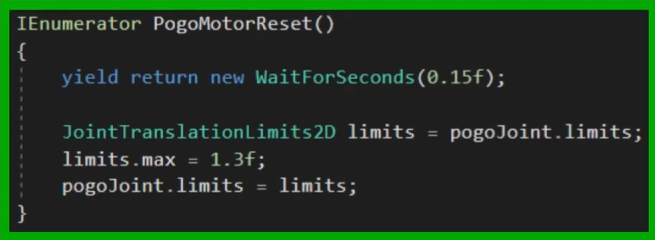
 round scaffold
this might be something stupid but im having a problem with my player where i want them to build up speed as they run which works perfectly fine,
but as i was trying to make a basic jump script for some reason it kept altering the height of the jump, --going faster would make the jump lower and slow down the player--
is there anything in here thats messing around with the players Y speed that could be messing with the jump??

this is the player movement script
 gilded sinew
hi all, i am using few text fields to see what lines of code run and what doesnt, and this highligted line of code doesnt run for some reason any idea why?

learning cloud save and i am stuck on this
languid spire
gilded sinew
hi all, i am using few text fields to see what lines of code run and what doesnt...
Is CloudSaveService your own script?
gilded sinew
languid spire
Is CloudSaveService your own script?
no, i installed cloud save package and using that code

this is what i am getting

its strange because i took this code from tutorial 2-3 weeks old shouldnt be outdated or something
silver dock
how can i make a scrollrect go down automatically when new content gets filled using code?
like i want it to stay at the bottom, and mask the top content instead
gaunt ice
Attach content size filter to the content gamobject and set the scroll rect normalized position to 1 or 0 (i forgot which one)
silver dock
gaunt ice
Attach content size filter to the content gamobject and set the scroll rect norm...
which one of the three options?
 languid spire
gilded sinew
no, i installed cloud save package and using that code
languid spire
gilded sinew
no, i installed cloud save package and using that code
Looks like that method is obsolete in CloudSave v.3.0. So switch to the one specified in the error message
silver dock
gaunt ice
You should ask it in ui ux , more experienced people there
i dont think that channel is very active, plus i was told it needed code
gaunt ice
Now see if the height of content rect tf get increased after new gamobject added to this rect tf, if yes then success
gilded sinew
languid spire
Looks like that method is obsolete in CloudSave v.3.0. So switch to the one spec...
ah i see i understand. i am kinda beginner in this, could you tell me quickly how should my line of code look like? dictionary that i want to save is called "data") ty for help Steve!
i tried how they said and it gets error again 
my syntacs in c# is not the best 😄
languid spire
gilded sinew
ah i see i understand. i am kinda beginner in this, could you tell me quickly ho...
the error message is telling you exactly what you need to change it to
silver dock
gaunt ice
Now see if the height of content rect tf get increased after new gamobject added...
in my setup, there arent new gameobjects added. im using it for a history log thing, and the script adds the event to the same textmeshpro gameobject as they happen
gaunt ice
I remember for this setup my previous approach wont work, you need to fixed the text size and calculate the size of text rendered in the tmpro and manually change the rect tf size delta of gameobject
teal viper
silver dock
in my setup, there arent new gameobjects added. im using it for a history log th...
I'm a bit skeptical about that approach.
Regardless, you should be able to set the normalizedPosition property of the ScrollRect component to change the scroll position.
teal viper
silver dock
which one of the three options?
I don't think content size fitter is relevant to your question. I think you have been misunderstandood.
silver dock
teal viper
I'm a bit skeptical about that approach.
Regardless, you should be able to set t...
how can i set the normalizedPosition? i dont see it
 teal viper
silver dock
how can i set the normalizedPosition? i dont see it
teal viper
silver dock
how can i set the normalizedPosition? i dont see it
Via code... If you don't want to do it via code, you're in the wrong channel.
gaunt ice
You may need this GetPreferredValues(String)
https://docs.unity3d.com/Packages/com.unity.textmeshpro@3.0/api/TMPro.TMP_Text.html
teal viper
They just want to scroll the scroll rect. Not change it's size.
Unless I'm misunderstanding?
silver dock
teal viper
Via code... If you don't want to do it via code, you're in the wrong channel.
well then whats the code for it? guide me a bit here
silver dock
teal viper
Unless I'm misunderstanding?
sorry im bad at explaining
teal viper
silver dock
well then whats the code for it? guide me a bit here
Google "unity ScrollRect normalizedPosition API". Look at the docs page. And maybe some examples.
silver dock
teal viper
Google "unity ScrollRect normalizedPosition API". Look at the docs page. And may...
okay
 burnt vapor
gilded sinew
its strange because i took this code from tutorial 2-3 weeks old shouldnt be out...
burnt vapor
gilded sinew
its strange because i took this code from tutorial 2-3 weeks old shouldnt be out...
The warning message is pretty clear; that method is considered obsolete and you should replace it as specified.
A deprecation warning suggests you start migrating your code to an updated version. Deprecated code can still be used, and will continue to work until it is completely removed in a future version (or maybe it's never removed, it depends on the product).
So your code not working is not a result of the deprecation warning. Does the code reach this part of the code at all?
silver dock
teal viper
Google "unity ScrollRect normalizedPosition API". Look at the docs page. And may...
i dont think we need to work with normalizedPosition here?
Lemme reexplain what i wish to achieve
Like imagine discord, if you open a channel which doesnt have unread messages, it loads the bottom of it, and it stays at the bottom when new messages are recieved, unless you scroll up yourself. I want exactly that
gaunt ice
You need it
silver dock
gaunt ice
You need it
its not doing anything, i tried setting it to 0 and 1 both
gilded sinew
burnt vapor
The warning message is pretty clear; that method is considered obsolete and you ...
ty my man no error anymore i am building now and will test it. I just got cought by surprise bcs i legit copied code from youtube video 3 weeks old, it was strange to me that it would be patched in meantime, but turns out it is and guy was using older cloud save pack
silver dock
gaunt ice
Is your content rect tf height changed?
nope
gaunt ice
It has to be increased by your code
burnt vapor
gilded sinew
ty my man no error anymore i am building now and will test it. I just got cought...
This is why you don't copy paste code and understand what code is supposed to do.
gilded sinew
burnt vapor
This is why you don't copy paste code and understand what code is supposed to do...

teal viper
silver dock
its not doing anything, i tried setting it to 0 and 1 both
Then your ScrollRect setup is incorrect. Or the timing of setting the property is wrong.
Can you scroll it manually?
silver dock
teal viper
Can you scroll it manually?
yeah
ill try moving the transform of the text itself
gilded sinew
guys i have code written for cloud save and now it runs without errors in logcat but when i go to UGS under LiveOps i am not getting anything saved there that i want to for testing purposes. Any Idea why?


Saved texts get displayed (did it to see if code breaks somewhere)
@burnt vapor
burnt vapor
gilded sinew
<@191282187016863744>
I'm sorry but this is neither something for this channel nor the Unity server in general. This is something you should be asking the developers or in a server where people use this service as you have much better luck getting a proper answer here
If the text is displayed, and there is no error, then it's something that most likely must be fixed outside of Unity. Maybe you use the wrong credentials?
gilded sinew
oh sorry
 quaint thicket
I'm trying draw a debug ray from one GameObject to another GameObject but as you can see in the picture the ray doesn't appear in the game view, just the scene view. ```cs
public static void DebugRay(GameObject startObject, GameObject endObject, Color lineColor)
{
if (startObject != null && endObject != null)
{
Vector3 direction = endObject.transform.position - startObject.transform.position;
Debug.DrawRay(startObject.transform.position, direction, lineColor);
Debug.DrawLine(startObject.transform.position, endObject.transform.position, lineColor);
}
}
 gaunt ice
turn on the gizmos
quaint thicket
Thanks
 hollow pier
When I import a image import settings window shows me size of a result asset in bytes which is very handy when we experimenting with settings. However import settings of a 3D fbx model doesn't show result size information. Is there known common ways to get this information rather then produce build every time to manually test it overall size?
solemn fractal
hey guys. I have a boss in my game, and i wish that around him minions would just rotate around him, trying to do like that, but it seems they are rotation around it self and not the boss. What is wrong here?

public class BossMinions : MonoBehaviour
{

    private Boss _boss;

    private float _orbitSpeed = 5.0f;
    private float _orbitRadius = 5.0f;
    private Vector3 originalPosition;

    void Start()
    {
        _boss = FindObjectOfType<Boss>();
        originalPosition = transform.position;

    }

    void Update()
    {
        float angle = Time.time * _orbitSpeed;
        float x = Mathf.Cos(angle) * _orbitRadius;
        float y = Mathf.Sin(angle) * _orbitRadius;

        transform.position = new Vector3(_boss.transform.position.x + x, originalPosition.y + y, _boss.transform.position.z);

    }
}```
 slender sinew
solemn fractal
hey guys. I have a boss in my game, and i wish that around him minions would jus...
slender sinew
solemn fractal
hey guys. I have a boss in my game, and i wish that around him minions would jus...
This looks like a 2D game, yes?
solemn fractal
yes
 fossil drum
solemn fractal
```cs
public class BossMinions : MonoBehaviour
{
private Boss _boss;
...
fossil drum
solemn fractal
```cs
public class BossMinions : MonoBehaviour
{
private Boss _boss;
...
_boss.transform.position.x + x, originalPosition.y + y, _boss.transform.position.z this seems strange to me. Like Nephren says.
solemn fractal
Yeah omg that was the prob. thank you very much
If I have an object and 4 childs of this object, is there a way to control individually the childs position?
slender sinew
If you use the .localPosition, you can control its position relative to the parent
solemn fractal
but how can I say which child I am controlling?
because noiw all the 4 circles are rotating above each other
and I want to control their position so they move like in the SS above
slender sinew
You could create a list or array of GameObjects, or make 4 individual GameObject variables that you assign in the inspector
slender sinew
You would probably have a script on the boss itself which controls all 4 minions
and rotates them around itself
solemn fractal
and would u recommend having just 1 script for the boss? or separated for the mininos? because now I have 2 scripts.. 1 for the boss
and one for the minions
solemn fractal
slender sinew
You would probably have a script on the boss itself which controls all 4 minions
hmm ok u just answered my question while i was asking 😛
slender sinew
I would recommend 2 scripts but it's up to you. If you need a lot of communication between the scripts then it is probably easier to put them into 1 for now
You can have more than 1 script on the boss object
solemn fractal
hmm got it, thank you again
 vital cargo
Does anyone know this extension?. I've been developing a game for 3 month and just watched a tutorial and found this
 gaunt ice
!ide
eternal falconBOT
💡 IDE Configuration
If your IDE is not autocompleting code
or underlining errors, please configure it.
Select one:
• Visual Studio (Installed via Unity Hub)
• Visual Studio (Installed manually)
• VS Code
• JetBrains Rider
• Other/None
solemn fractal
Hey guys I have this piece of code that is working fine. ```cs
void Update()
{
float angle = Time.time * _orbitSpeed;
float x = Mathf.Cos(angle) * _orbitRadius;
float y = Mathf.Sin(angle) * _orbitRadius;
    minionOne.transform.position = new Vector2(transform.position.x + x, transform.position.y + y);

    minionTwo.transform.position = new Vector2(transform.position.x + x, transform.position.y + y);

    minionThree.transform.position = new Vector2(transform.position.x + x, transform.position.y + y);

    minionFour.transform.position = new Vector2(transform.position.x + x, transform.position.y + y);
} ``` I have 4 circles around 1 big circle.. and I want them to go around the middle circle.. they are going around but all on top of each other.. and of course as they have same position being updated.. but I tried to change the values there and stop going around the middle big circle.. what Am I missing here?


Using a boss.script on the boss and that is it
eager elm
wouldn't it be easier to have an empty GameObject as the parent of the minions and rotate that rather than all 4 individually?
hexed terrace
eager elm
to make it work with your solution, you should create a list for your minions and than loop through it, each time increasing the angle by 360 / numberOfMinions.
solemn fractal
hmm ok guys thank you for your input, I will try what you guys said.
solemn fractal
hexed terrace
Just use
<https://docs.unity3d.com/ScriptReference/Transform.RotateAround.html>
with this method it rotates on its own axis.. even passing the first parameter and the other object axis
solemn fractal
eager elm
wouldn't it be easier to have an empty GameObject as the parent of the minions a...
what do u mean? empty object being the parent for all minions? but the boss is doing that already no ?
the middle object boss will be moving all the time so they need to stick to him and rotate around
hexed terrace
solemn fractal
with this method it rotates on its own axis.. even passing the first parameter a...
I use this for basic planetary orbits ¯_(ツ)_/¯
solemn fractal
hmm.. for me is rotating on its own axis.. and not the axis from the object I am passing in the parameters
hexed terrace
show ya code
 hexed terrace
yup
solemn fractal
yes that is what I am doing
minionOne.transform.RotateAround(transform.position, Vector3.up, 30 * Time.deltaTime); ```transform.position is like that as it is the boss script and its in the boss object, so it should be getting the boss position
hexed terrace
it's 2d, don't you want it to rotate around Vector3.forward ?
solemn fractal
oh, i thought that I could use up in 2d too.. let me check
hexed terrace
you can, but Vector3.up is ALWAYS up in 3d space
solemn fractal
oh yeah now works. ok easier way for sure, now I will try to make all 4 rotate in dif position. thank you
solemn fractal
hexed terrace
you can, but `Vector3.up` is _ALWAYS_ up in 3d space
got it, thank you
hexed terrace
solemn fractal
oh yeah now works. ok easier way for sure, now I will try to make all 4 rotate i...
Just put them in the 4 positions you want, no code change required
solemn fractal
omg, that was the most amazing most simple solution ever works like a charm
thank you !!
 olive lintel
hey guys, is there any function that can check if I have changed the pixelwidth/pixelheight of my Camera?
ideally a boolean variable akin to something like "Camera.ifPixelHeightChanged()"
hexed terrace
If you're changing the pixel width/ height, you can just have your own event that you call after doing the change
swift crag
otherwise, compare the current value to the old value every frame and then do your work when you notice a difference
spiral narwhal
Assert.IsFalse(LocalizationSettings.SelectedLocale is null, "There is no locale selected");
Why is the selected locale null if I have the specific locale selector set to "en"? In the docs, it says that that selector determines the language if all other selectors fail, so it should be set to English

For more context, I'm starting the application from a unit test:
        [Test]
        [SetCulture("en")]
        public void Sample()
        {
            new GameService();
        }
what happens if you wait one frame before doing this
spiral narwhal
That seems to work!
Actually, just using [UnityTest] instead of [Test] works already
 neon fractal
code ``` [SerializeField] private Transform headPoint;
private void FixedUpdate() {
    transform.position = new Vector3(headPoint.position.x, headPoint.position.y, headPoint.position.z);
}
how to make the camera follow, but not as badly as shown in the video?Put it in LateUpdate to make it better, or use Cinemachine to make it best
neon fractal
polar acorn
Put it in LateUpdate to make it better, or use Cinemachine to make it best
I changed it, it doesn't feel like anything has changed, I'll look at the Cinemachine guides
verbal dome
Since you were changing the camera in FixedUpdate (don't do that), I suspect your code has more problems regarding execution order
headPoint is probably not rotated or moved in sync with the rest of the rig
wintry quarry
neon fractal
code ``` [SerializeField] private Transform headPoint;
private void Fixed...
why not just transform.position = headPoint.position;?
verbal dome
It kinda looks like it's just a rotation problem tbh
Not sure if it jitters positionally
neon fractal
wintry quarry
why not just `transform.position = headPoint.position;`?
I don't think there is any difference
verbal dome
Exactly, so type it simpler 😄
wintry quarry
neon fractal
I don't think there is any difference
exactly
other than it being a lot faster and simpler
 hollow zenith
How can I do [Range(1.01f, 2f)] and make it step at 0.01?
verbal dome
True, currently it does three transform.position position calls which is not exactly free
wintry quarry
hollow zenith
How can I do `[Range(1.01f, 2f)]` and make it step at 0.01?
round it to nearest 0.01 in OnValidate
neon fractal
😈
 wintry quarry
do note that 0.01 is not actually a number that can be represented in a floating point with perfect precision though
hollow zenith
I will probably not use Range then 😄
wintry quarry
Maybe make cs [Range(101, 200)] public int hundredths;
hollow zenith
Can I limit the input instead?
wintry quarry
and then just do division in your code
gilded sinew
guys pls help i am losing braincells. since morning trying to figure out what is wrong.
When i use anonimous authentication i am able to save some data to UGS cloud save but if i use google play authentication i cant and i am getting this error

 hollow zenith
yeah I think that might work too
slender sinew
gilded sinew
guys pls help i am losing braincells. since morning trying to figure out what is...
I have never used UnityServices, but I can only assume that you have to await the UnityServices.InitializeAsync() call
wintry quarry
gilded sinew
guys pls help i am losing braincells. since morning trying to figure out what is...
Looks like you need to do UnityServices.InitializeAsync();
slender sinew
you are currently calling it like an normal method
wintry quarry
yeah you're not waiting for it to finish
gilded sinew
wintry quarry
Looks like you need to do `UnityServices.InitializeAsync();`
but it is at the top of the code guys
look
wintry quarry
we know
hollow zenith
maxExperience = (int)((float)maxExperience * (float)(characterSO.expGrowth / 100));
This looks ugly :c
slender sinew
do you know what async is?
slender sinew
https://docs.unity3d.com/Packages/com.unity.purchasing@4.4/manual/UnityIAPInitializeUnityGamingServices.html
Refer to their example of how they use it inside an async method
gilded sinew
okay guys ty ❤️ ill try
verbal dome
hollow zenith
```
maxExperience = (int)((float)maxExperience * (float)(characterSO.expGrowth /...
If you have intA * intB, it's enough to cast just one side to a float: (float)intA * intB instead of (float) intA * (float) intB
hollow zenith
I just reaized, I used int
Range works fine
I need to use more floats in my code 😄
Yes the above I had to cast it back to int tho
(int)((float)intA * intB) which is still ugly
so I changed my variabes to floats and I will convert them to ints when I have to display them.
round scaffold
im having a problem with my player where i want them to build up speed as they run which works perfectly fine,
but as i was trying to make a basic jump script for some reason it kept altering the height of the jump, --going faster would make the jump lower and slow down the player--
is there anything in here thats messing around with the players jump?
https://gyazo.com/589800d6f4e17e3bb47035403bc55ee2
the script for the movement
slender sinew
round scaffold
im having a problem with my player where i want them to build up speed as they r...
Seems like you are clamping the magnitude of your velocity when moving horizontally, which includes your vertical velocity
What you should do is cache your vertical velocity in a float variable at the top of FixedUpdateMovementHandler, then do your horizontal movement calculations, then at the very end set your vertical velocity back to that variable you cached (so that your horizontal movement code doesn't affect your vertical velocity)
gilded sinew
slender sinew
I have never used UnityServices, but I can only assume that you have to await th...
while i am waiting for build to be done so i can test it, what saving you using, using firebase?
round scaffold
aighty
eager elm
or don't use Vector2 in your MovementHandler method, instead only work with a float
round scaffold
thank u mr cat man
wintry quarry
yep it's rigidBody.velocity = Vector2.ClampMagnitude(rigidBody.velocity, mData.topRunningSpeed);
gilded sinew
how u save data in your app/game?
hexed terrace
gilded sinew
how u save data in your app/game?
very common requirement, have a google
eager elm
gilded sinew
how u save data in your app/game?
The same way you would save a physical game. For chess, you would write down a list containing each unit, their position and to which player it belongs.
ruby python
!code
eternal falconBOT
Posting code
📃 Large Code Blocks
Use links to services like:
https://gdl.space/, https://paste.ofcode.org/, https://hatebin.com/, https://paste.myst.rs/, https://hastebin.com/
📃 Inline Code
Surround code with three backquotes. Not quotation marks.
To format as C#, add cs to the first line:
```cs
// Your code here
```
Add a comment with a line number if there is an error message.
ruby python
Oookay, I seriously don't know why I have such a blind spot when it comes to rotations in Unity. lol. But they're giving me grief again.
I have a ship(space) that has engine pods that I want to rotate based on the direction of travel....
if (Input.GetKey(KeyCode.W))
  {
    thrusterFLCurrentRotation = new Vector3(thrusterFL.rotation.x, 0, 0);
    if (thrusterFLCurrentRotation.x < forwardRotation)
    {
    thrusterFL.localEulerAngles = Vector3.Lerp(thrusterFLCurrentRotation, new Vector3(forwardRotation, 0, 0), thrusterRotationSpeed * Time.deltaTime);
    }
    shuttleRigidBody.AddForce(transform.forward * maxForce, ForceMode.Acceleration);
  }
At the moment the thruster that I'm trying to rotate 'snaps' to about 18degrees. (forward rotation angle is 90, 'base' rotation is 0)
Please help. lol.
 sage mirage
Hello, guys! I have a question. When I am pausing my game, I want it to freeze and when unpausing I want it to unfreeze. I know basically how to achieve that but I don't know how to make that, when I have also IEnumerators in my script. So, What I did was I wanted with a specific key to pause and unpause game with a delay. So, when I am trying to pause my game with Time.timeScale it pauses but never unpauses the game because it stuck on freeze.
Check my code here
 {
     if (Input.GetKeyDown(KeyCode.Escape) && pauseIsActive == true)
     {
         StartCoroutine(ResumeGameAfterDelay());
     }
 }


 IEnumerator ResumeGameAfterDelay()
 {
     yield return new WaitForSeconds(resumeDelay);
     pauseIsActive = false;
     pauseMenuScreen.SetActive(false);
     Debug.Log("Pause menu screen is disabled!");
 }


 public void PauseGame()
 {
     if (Input.GetKeyDown(KeyCode.Escape) && pauseIsActive == false)
     {
         StartCoroutine(PauseGameAfterDelay());
     }
 }


 IEnumerator PauseGameAfterDelay()
 {
     yield return new WaitForSeconds(pauseDelay);
     pauseIsActive = true;
     pauseMenuScreen.SetActive(true);
     Debug.Log("Pause menu screen is enabled!");
 }```

and I have putted those 2 methods on my ``Update()``

```void Update()
{
    PauseGame();
    ResumeGame();
}```Lerp goes from 0 to 1, what is thrusterRotationSpeed?
Also you never want to multiply the third parameter of lerp by deltaTime
The value is supposed to increment, deltaTime goes up and down (or stays the same)
This site has good explanations of lerp
https://unity.huh.how/lerp
delicate portal
I'm checking if the player can move by a capsuleCast. The problem is, I want to be able to go up on slopes, but I cant because if the capsuleCast detects something, I cant move. How can I go up for examples on a staircase? Or just a little little slope?
bool canMove = !Physics.CapsuleCast(transform.position, transform.position + Vector3.up * playerHeight, playerRadius, moveDir, moveDistance, obstacleMask, QueryTriggerInteraction.Ignore);
ruby python
summer stump
Lerp goes from 0 to 1, what is thrusterRotationSpeed?
Also you never want to mu...
thrusterRotationSpeed is how fast it rotates. It's weird cause I'm using pretty much the extact same code on another aspect of the thing and it works fine. lol.
summer stump
ruby python
thrusterRotationSpeed is how fast it rotates. It's weird cause I'm using pretty...
Lerps third parameter is a fraction value, not a speed
It returns a SINGLE value between the first two parameters, at the fraction given by the third
ruby python
summer stump
Lerps third parameter is a fraction value, not a speed
It returns a SINGLE value...
Well this is the code I'm using for the other rotation thing I've got and it works perfectly........
if (currentRot.x > openAngle)
            {
                currentPos = Vector3.Lerp(currentPos, new Vector3(currentPos.x, currentPos.y, openPosition), smallRampSpeed * Time.deltaTime);
                currentRot = Vector3.Lerp(currentRot, new Vector3(openAngle, currentRot.y, currentRot.z), doorSpeed * Time.deltaTime);
            }
And you see how that is significantly different, right?
Still not a great way to lerp, but it would actually work at least
ruby python
Yeah, tbh I just noticed my error.
 fair steeple
Hey! I'm looking to make this pattern.
I have this code here
https://pastebin.com/rN2j2BTS
https://pastebin.com/kHEpjsRS
It turns on and off emission in a blink pattern across a Game Object array and then I trigger that from a manager script. The problem is that no matter what combination of numbers I use in LevelManager I never get it right.
Anyone knows how to do this right?
 slender nymph
instead of doing it like that where you start 3 coroutines, just have a loop inside 1 coroutine that loops through your array and calls the StartBlink method on the right object in sequence then just waits until it's time for the next one to proceed
 naive lion
Im going to have enemies in my game
I am currently setting up a health system for my player
Should I do this in the player controller or have a script that just handles the health attribute called 'HealthAttribute' so I can reuse it for enemies?
I am just unsure how this may eventually interact with healing the player with pickups and auras
Or should I have a player health script and then a seperate Enemy health script
delicate portal
Hey! I'm checking if the player can move by a capsuleCast. The problem is, I want to be able to go up on slopes, but I cant because if the capsuleCast detects something, I cant move. How can I go up for examples on a staircase? Or just a little little slope?
bool canMove = !Physics.CapsuleCast(transform.position, transform.position + Vector3.up * playerHeight, playerRadius, moveDir, moveDistance, obstacleMask, QueryTriggerInteraction.Ignore);
 solemn bobcat
naive lion
Im going to have enemies in my game
I am currently setting up a health system fo...
solemn bobcat
naive lion
Im going to have enemies in my game
I am currently setting up a health system fo...
It's a good practice to split components when possible. If you separate the controller from the rest of the logic, you will be able to easily swap it with aother kind of controller (e.g. AI controller, network controller, etc.). If you separate health from the rest of the logic, you will be able to easily assign it to any objects you want (e.g. enemies, chests, buildings, etc.), even if some of those don't have any controller.
twin bolt
How do i check if a string contains a integer higher than 20?
short hazel
twin bolt
How do i check if a string contains a integer higher than 20?
I don't like where this is going - why are you storing numerical data in strings?
solemn bobcat
delicate portal
Hey! I'm checking if the player can move by a capsuleCast. The problem is, I wan...
If you move the capsule slightly above the player's feet level, it will no longer detect small height differences.
twin bolt
short hazel
I don't like where this is going - why are you storing numerical data in strings...
I'm making a platform in my game, that requires a object that weighs over 30 pounds, and i wanted to store the weight of each item in the name.
solemn bobcat
short hazel
Use a script attached to that object
polar acorn
twin bolt
I'm making a platform in my game, that requires a object that weighs over 30 pou...
Jesus christ how horrifying
 modest dust
Whenever I think that nothing will ever surprise me anymore, a guy like this comes up and proves me wrong
twin bolt
short hazel
Use a script attached to that object
ok
short hazel
Something truly horrifying would be to display the weight on the object with a Text component, then get its value using OCR
delicate portal
solemn bobcat
If you move the capsule slightly above the player's feet level, it will no longe...
Well I want thats you can literally walk on upon that
summer stump
In what way? You could call a public method from the other object
Not really enough details to say though
Then reference a script on that other gameobject and call a public method on it
otherObjectScript.StartAnimation()
Call it whatever you want
modest dust
This anwser kinda feels like:
- I want to trigger something
- Provide some details
- I want to do a dance and then trigger something
Kinda feels unrelated. A better answer would be to tell us what is the relation between the first and second object
But yeah, a public method is one way of doing that
Reference the door in the pressure switch and call the public method
short hazel
That's a good candidate for events! Especially if the pressure switch can activate various things
 white crag
im having a problem with figuring out shooting bullets in 2d
i cast raycasts for deducting health and then instantiate a bullet prefab for show
i then check the distance between the bullet and hit object for determining when to destroy the bullet
but this method seems to be a little inconsistent
im guesing its due to the bullet speed any solutionss?
sage mirage
Hey, guys! If I want to click for example a pause button on my user interface and to pause the game with that. How to interact with that button? Is there a prebuilt method that I can use to do that?
white crag
sage mirage
Hey, guys! If I want to click for example a pause button on my user interface an...
do you know how to hook up a UI button with a function through script?
rich adder
sage mirage
Hey, guys! If I want to click for example a pause button on my user interface an...
You can hook into the OnClick event
sage mirage
white crag
do you know how to hook up a UI button with a function through script?
Of course I know!
modest dust
Nothing much. You trigger whatever you want to happen through the pressure switch, the door itself does nothing, it's just being controlled
You could hook up the door to an event in this way tho
rich adder
are you making pressure switches?
rich adder
https://youtu.be/KahTBQ_vwq0
this might help out its basic but works
yeah iphone mic
stinks
 shadow shale
quick mask question, trying to protype a very simple text effect, text scrolls up and disappears, I've just slapped a Mask component on the panel; it works like I want it to when the alpha of the Image on the panel is 1, but everything disappears when the alpha is 0. For the effect I need the alpha to be 0. Just want to do it in the fastest dumbest way for the moment and do it right later.

so that's with alpha set to 1 on the panel container, but if i put it my game the alpha of 1 still creates a visible rectangle around the text, so i need it to be 0
swift crag
Well, yeah: if the image's alpha is zero, it's opaque nowhere
so the mask hides everything
If you don't want to see the image, you can uncheck "show mask graphic" on the mask componnet
 rare basin
you can do it with upgrading text mesh pro to newest, experimental version
then use the RectMask2D component
if i understand correctly what are you trying to achieve
 pliant oyster
I added this script and now my button doesn't work anymore. Does anyone know why? All I did was add a "OnButtonPress" like the tutorial I read says.
using System.Collections;
using System.Collections.Generic;
using UnityEngine;

public class ButtonPlay : MonoBehaviour
{
    // Start is called before the first frame update
    void Start()
    {

    }

    public void OnButtonPress()
    {
        Debug.Log("Button pressed.");
    }

    // Update is called once per frame
    void Update()
    {

    }
}
Where do you call OnButtonPress

 polar acorn
Does the button react to being pressed? Does it change color or animate as you move your mouse around it?
pliant oyster
Nope. I have a custom animation which worked before adding the script.
polar acorn
pliant oyster
Nope. I have a custom animation which worked before adding the script.
Is there an event system in the scene
pliant oyster
I had one, but deleted it because I ended up not using Visual Scripting because the screen for it didn't pop up.