#💻┃code-beginner
1 messages · Page 45 of 1
 weary crystal
Done. So if I build, will they be able to install like an Android apk file?
 ivory bobcat
 weary crystal
ivory bobcat
weary crystal
ivory bobcat
It's a different question... Not related to the one I asked before...?
 uncut dune
its in the wrong channel tho
 gaunt ice
i think you need mac to build it
weary crystal
And I didn't "Cross-posted it" Can you check #💻┃unity-talk Please?
ivory bobcat
weary crystal
It's a different question... Not related to the one I asked before...?
Cross post and off topic misuse of channel.
weary crystal
ivory bobcat
Cross post and off topic misuse of channel.
Well, I'm afraid I've been asking all type of questions in this channel and helpers never hesitated to help, I'm sorry if you didn't wanted me to ask here but as said the other channel is inactive.
 zenith cypress
So ask then wait? Inactivity doesn't dictate using other channels for unrelated questions. This isn't a coding question.
weary crystal
Got it, thank you and I'm sorry.
ivory bobcat
weary crystal
Well, I'm afraid I've been asking all type of questions in this channel and help...
Make sure to provide more info as well. Not doing so will likely yield you less response https://dontasktoask.com/ (some won't bother to request for details)
weary crystal
ivory bobcat
Make sure to provide more info as well. Not doing so will likely yield you less ...
Alright
 swift stag
Turns out I do have assets that need URP lol, but thanks
 silent obsidian
I'm trying to animate my player, i've added some checks for the character's movement state (if he is running or jumping). I got the jumping animation right but the character keeps running even if in theory should not pass the checks.
Am I missing something here? I am sure the problem has to do with the timing of the code execution but I can't seem to be able to find a solution on my own.
void Update() {
        hzInput = Input.GetAxis("Horizontal");
        if (Input.GetKeyDown(KeyCode.Space)) {
            jumpKeyWasPressed = true;
        }
    }

    private void FixedUpdate() {
        Move();
        Rotate();
        CheckGrounded();
        CheckRunning();
        AnimationBrain();
        if (jumpKeyWasPressed && isGrounded)
        {
            Jump();
            jumpKeyWasPressed = false;
        }
    }

     private void CheckGrounded() {
        isGrounded = Physics.CheckSphere(groundCheckTransform.position, 0.15f, groundMask);
    }

// Player should be able to play the running animation only if he has velocity on the X axis and he is grounded
    private void CheckRunning() {
        isRunning = rb.velocity.x != 0f && isGrounded;
    }


    private void AnimationBrain() {
        // Jump animation brain
        if (isGrounded) {
            animator.SetBool("isJumping", false);
        } else {
            animator.SetBool("isJumping", true);
        }

        // Running animation brain
        if (isRunning) {
            animator.SetBool("isRunning", isRunning);
            Debug.Log("Rb.velocity.x: " + rb.velocity.x);
            Debug.Log("isGrounded: " + isGrounded);
        }
    }
 uncut dune
how do I put a layer in my script without having to create a field for it
can I just do "LayerName"?
 polar acorn
silent obsidian
I'm trying to animate my player, i've added some checks for the character's move...
polar acorn
silent obsidian
I'm trying to animate my player, i've added some checks for the character's move...
Well, you only set the animators isRunning to true. Nothing ever sets it to false again
So once you're running once, the animator's parameter is always true
polar acorn
uncut dune
how do I put a layer in my script without having to create a field for it
Do you need a layer, a layer index, a layer name, or a layer mask
 eager elm
uncut dune
can I just do "LayerName"?
eager elm
uncut dune
can I just do "LayerName"?
LayerMask.NameToLayer()
polar acorn
These are all different things
uncut dune
polar acorn
Do you need a _layer_, a layer _index_, a layer _name_, or a layer _mask_
layermask its for a raycast
polar acorn
uncut dune
layermask its for a raycast
 silent obsidian
polar acorn
Well, you only set the animators `isRunning` to true. Nothing ever sets it to fa...
silent obsidian
polar acorn
Well, you only set the animators `isRunning` to true. Nothing ever sets it to fa...
hm, shouldn't it return false if the character is not changing it's position?
isRunning = rb.velocity.x != 0f && isGrounded;
polar acorn
silent obsidian
hm, shouldn't it return false if the character is not changing it's position?
is...
The boolean in this script is changing just fine
But you only ever set it in the animator when that bool is true

The animator's parameter is never set to false
uncut dune
polar acorn
https://docs.unity3d.com/ScriptReference/LayerMask.GetMask.html

something like this works?
silent obsidian
Ohhhhh okey i see. thank you a lot
 unreal phoenix
if I add 'vector.x' to the the Y component of that vector that I'm adding, the Z value is getting affected somehow
    private void MoveCamera(InputAction.CallbackContext context) {
        var vector = context.ReadValue<Vector2>();
        var cameraRotation = cameraObject.transform.localRotation;
        var quaternion = new Quaternion {
            eulerAngles = cameraRotation.eulerAngles + new Vector3(vector.y * -1, 0, 0) * 0.1f
        };
        cameraObject.transform.localRotation = quaternion;

    }
There are an infinite number of euler angles that can represent one specific Quaternion. You are likely seeing a different Vector3 that represents the same orientation you gave it
You should never expect that getting the .eulerAngles of a rotation follows any sort of rules. It doesn't have any sort of "memory". If you apply a rotation on one axis, all it's going to know is the result. When you do .eulerAngles it's going to return whatever Vector3 represents that orientation it happens to compute first
unreal phoenix
Ah
 heady nimbus
Just to confirm, if I have a prefab, I can't reference something in the scene to that prefab until that prefab exists in the scene right? (holy hell I'm not even sure that made sense to me...)
 quiet dune
I have a question about understanding the connection between a game object (go1) and attached scripts (sc1): If i set a variable of type sc1 in a random script, can i drag any game objects that have sc1 attached to it into the variables field in the unity editor?
polar acorn
heady nimbus
Just to confirm, if I have a prefab, I can't reference something in the scene to...
A prefab is an object that lives in a folder instead of in a scene. Scenes only exist when that scene is loaded, but your file system always exists. So, a prefab cannot reference an object in a scene because the prefab always exists while the scene only sometimes exists.
heady nimbus
polar acorn
A prefab is an object that lives in a folder instead of in a scene. Scenes only ...
Thank you. I'm just trying to figure out a way to "link up" these zone transition points without all zones needing to be in the scene at once...
silent obsidian
polar acorn
The animator's parameter is never set to false
Another quick question if you don't mind, should the player state checkers be called in Update or FixedUpdate. I am quite confused, my intuition tells me that they should stay inside the FixedUpdate method as they're using physics.
unreal phoenix
polar acorn
You should never expect that getting the `.eulerAngles` of a rotation follows an...
Suggestion then for adding rotation to a game object?
This works perfectly
    private void MoveCamera(InputAction.CallbackContext context) {
        var vector = context.ReadValue<Vector2>();
        cameraObject.transform.localEulerAngles += new Vector3(vector.y * -1, vector.x, 0) * 0.1f;
    }
 signal tide
Can anyone help me configuring me IDE I am not able to do it. Does anyone know any tutorial or some video??
heady nimbus
!ide
 eternal falconBOT

💡 IDE Configuration
If your IDE is not autocompleting code
or underlining errors, please configure it.
Select one:
• Visual Studio (Installed via Unity Hub)
• Visual Studio (Installed manually)
• VS Code
• JetBrains Rider
• Other/None
signal tide
heady nimbus
!ide
I tried to follow all the steps but the intelisense is not working idk why..
 subtle veldt
Is there a way to have a 2D joint with constant pulling force and affected by gravity ?
I tried with the Spring Joint 2D but the force is proportional to the distance of the 2 Rigid Bodies.
I also tried with a Distance Joint 2D but I cannot control the pulling force and it seems to change the gravity a bit because the object I've attached to it is slowed down although it's going into the same direction as the pulling of the Distance Joint 2D.
 subtle yacht
Hi, i have a little problem on my project. I'm sure it's very easy but i don't know how to do it x)
I have this Sound and I want to drag it into a component in my player.
But when i'm going in my Player to acces my component, the hierarchy changes and i can't access my sound anymore.
Can someone know how to do it ?
(Sorry for my english)


 slender nymph
subtle yacht
Hi, i have a little problem on my project. I'm sure it's very easy but i don't k...
slender nymph
subtle yacht
Hi, i have a little problem on my project. I'm sure it's very easy but i don't k...
prefabs cannot reference in-scene objects. you would need to get the reference to that object at runtime when you spawn the prefab
https://unity.huh.how/references/prefabs-referencing-components
subtle yacht
Oh okay so i need to create my Sound into my player ?
slender nymph
or you just need to pass it to the player when the player is spawned
subtle yacht
slender nymph
or you just need to pass it to the player when the player is spawned
Ok thx you very much 👌
 dawn sparrow
I know this isn't coding but not sure where else to ask:
I have a model which uses a texture with transparent pixels (area not circled in red), but when I tick "Alpha is Transparency" after converting the texture to a sprite, I get the second image, where the previously uncircled areas just seem to randomly sample a non-transparent part of the texture. Anyone know why this happens?


 buoyant knot
 hidden bone
What would be a simple code for changing a Text Gameobject to whatever is in a txt file? i have gotten explanations before but i still cant get it to work
polar acorn
hidden bone
What would be a simple code for changing a Text Gameobject to whatever is in a t...
.text = File.ReadAllText(...)
https://learn.microsoft.com/en-us/dotnet/api/system.io.file.readalltext?view=net-7.0

Opens a text file, reads all the text in the file into a string, and then closes the file.
 twin bolt
I'm using Ontriggerenter, for a script that forces the player to crouch while inside of a trigger, but if the players collider, even somewhat exits the trigger, the function is called. How do i make it so that the function is only called when the player is fully in or fully out of the trigger?
hidden bone
How do i convert a string to a gameobject? I get this error when trying mygameobject = mystring, the gameobject being the Text Gameobject and the string being the data retrieved from the txt file

trying to put the string into this
 polar acorn
hidden bone
How do i convert a string to a gameobject? I get this error when trying ```mygam...
polar acorn
hidden bone
How do i convert a string to a gameobject? I get this error when trying ```mygam...
You can't
 eternal needle
hidden bone
How do i convert a string to a gameobject? I get this error when trying ```mygam...
eternal needle
hidden bone
How do i convert a string to a gameobject? I get this error when trying ```mygam...
You dont convert a string to a gameobject. You instead populate a string field on a component (which is your Text on a gameobject)
polar acorn
Strings are not game objects and "converting" one to the other is patently absurd
hidden bone
ok, how should I do it then?
polar acorn
hidden bone
ok, how should I do it then?
I have no idea what you're even trying to do
Setting a gameobject to a string makes no sense
eternal needle
You want to first get a reference to the Text component instead of the gameobject, then assign its .text field to your string
hidden bone
I want to get text from a .txt file and make this text object display the text from the .txt file
 eternal needle
You probably want to use text mesh pro instead also
polar acorn
hidden bone
I want to get text from a .txt file and make this text object display the text f...
So you want to change a property on a text component on an object
hidden bone
yes
polar acorn
I told you how to do that
hidden bone
i must have not understood
polar acorn
hidden bone
yeah i have seen that
i have a string
i just dont know how to put that in the text component of the gameobject
polar acorn
hidden bone
i have a string
So set your Text component's .text to that string
hidden bone
how?
polar acorn
hidden bone
```thegameobject = thestring.text```?
what?
No
You're setting .text to something
not setting an object to something's .text
twin bolt
How could i go by forcing the player to be unable to uncrouch, when there inside of something that is to small to stand up in?
polar acorn
And strings don't have a .text property
hidden bone
public GameObject TheText;so turn this into text instead of gameobject?
polar acorn
twin bolt
How could i go by forcing the player to be unable to uncrouch, when there inside...
Whenever you want to uncrouch, raycast up the distance you'd gain by standing up. If that hits something, don't uncrouch.
Or spherecast, or boxcast, or whatever shape fits your character
twin bolt
polar acorn
Whenever you want to uncrouch, raycast up the distance you'd gain by standing up...
Ok, so kind of like checking if grounded?
polar acorn
hidden bone
```public GameObject TheText;```so turn this into text instead of gameobject?
Yes, if you want to reference a Text component, use that type
polar acorn
twin bolt
Ok, so kind of like checking if grounded?
Yeah, a ceiling check is kind of just an upside-down ground check
hidden bone
im not getting any compiling errors but nothing seems to be happening
polar acorn
hidden bone
im not getting any compiling errors but nothing seems to be happening
Show code
 bitter carbon
hey, is there a simpler way of writing this:
also, si this correct
 polar acorn
bitter carbon
hey, is there a simpler way of writing this:
also, si this correct
polar acorn
bitter carbon
hey, is there a simpler way of writing this:
also, si this correct
Not sure how you expect that to simplify
Well, actually
there is
bitter carbon
polar acorn
Not sure how you expect that to simplify
idk, in some languages u can use %
polar acorn
playerZ == 5
hidden bone
Pastebin
Pastebin.com is the number one paste tool since 2002. Pastebin is a website where you can store text online for a set period of time.
bitter carbon
polar acorn
`playerZ == 5`
no because i wanna see if it is a multiple of 5
polar acorn
bitter carbon
no because i wanna see if it is a multiple of 5
Then why are you using division instead of modulo
bitter carbon
polar acorn
Then why are you using division instead of modulo
thats why i asked if there is simpler way, idk how to do that
whats modulo
 spiral oak
bitter carbon
idk, in some languages u can use %
spiral oak
bitter carbon
idk, in some languages u can use %
In C# too
polar acorn
bitter carbon
whats modulo

Learn about C# operators that perform multiplication, division, remainder, addition, and subtraction operations with numeric types.
spiral oak
bitter carbon
whats modulo
Modulo is the rest of the division (%)
polar acorn
hidden bone
https://pastebin.com/ve4PpEJn
- You're getting the Text component from itself. You have the component already. You don't need to get it again.
- You immediately overwrite the text again with the file name of the object you're opening
- Does the log print anything?
 hidden bone
yeah it logs
polar acorn
hidden bone
yeah it logs
So it would change the text of that element to this:

 spiral oak
bitter carbon
so this better?
spiral oak
bitter carbon
so this better?
Yep
hidden bone
oh
bitter carbon
i remeber using in python i just sorta forgot what it did exactly but ik now
spiral oak
bitter carbon
i remeber using in python i just sorta forgot what it did exactly but ik now
It just checks if the rest of the division is 0, which means that the number is multiple of 5
bitter carbon
spiral oak
It just checks if the rest of the division is 0, which means that the number is ...
yea, for some reason m,y script still doesnt work which leads me to a seconf question
twin bolt
polar acorn
Yeah, a ceiling check is kind of just an upside-down ground check
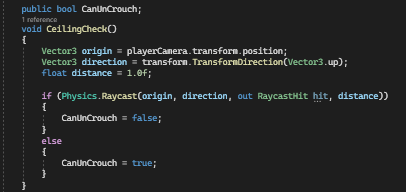
Is this the proper way to do it? https://i.imgur.com/Usbou1g.png
 hidden bone
polar acorn
So it would change the text of that element to this:
hidden bone
polar acorn
So it would change the text of that element to this:
I cant convert the List variable Filelines to text either
polar acorn
twin bolt
Is this the proper way to do it? https://i.imgur.com/Usbou1g.png
Well, first off, no need to do TransformDirection(Vector3.up) you can just use transform.up. And if the distance is 1 that should work
bitter carbon
will the z go to 5 ever or will it just go to only floats as i need it to detect when 5 happens
 polar acorn
hidden bone
I cant convert the List variable Filelines to text either
polar acorn
hidden bone
I cant convert the List variable Filelines to text either
Because a list is also not a string
bitter carbon
as the player is running i mean)
polar acorn
bitter carbon
will the z go to 5 ever or will it just go to only floats as i need it to detect...
It's unlikely to hit exactly a multiple of 5
twin bolt
polar acorn
Well, first off, no need to do `TransformDirection(Vector3.up)` you can just use...
For the distance do i just subtract my crouch height from my standing height?
polar acorn
5.00000001 % 5 is not 0
polar acorn
twin bolt
For the distance do i just subtract my crouch height from my standing height?
Yes
bitter carbon
polar acorn
It's unlikely to hit _exactly_ a multiple of 5
oh, so i gotta round it to int ig
twin bolt
polar acorn
Yes
Okay thanks.
hidden bone
polar acorn
Because a list is also not a string
Would it be possible to store the data from the .txt file in a string instead of a list?
polar acorn
hidden bone
Would it be possible to store the data from the .txt file in a string instead of...
Yes, using the function I sent you
hidden bone
ok
polar acorn
twin bolt
polar acorn
Yes
Thanks, that was easier than i thought.
bitter carbon
anyone know the word for like rounding in c# so i can search in unity api website
polar acorn
bitter carbon
anyone know the word for like rounding in c# so i can search in unity api websi...
rounding
 polar acorn
 bitter carbon
oh i just went to unity API website
 unkempt locust
Guys, I wanted to know, how can I improve my programming knowledge, I wanted to make a boss batte, can anyone help me?
hidden bone
Im getting compiling error "Access to the path '...' is denied
polar acorn
hidden bone
Im getting compiling error "Access to the path '...' is denied
Then access to path ... is probably denied
hidden bone
fixed it, i forgot to add the .txt
 upper yoke
Hey I think I already asked but what is the best way to do that without pattern matching in a MonoBehavior again?

 short hazel
if (a == null || b == null)
    return false;

return a.Name == b.Name;
using == would recursively call the current method
short hazel
You can't, then
 ripe shard
upper yoke
using == would recursively call the current method
ripe shard
upper yoke
using == would recursively call the current method
.Equals(null)
upper yoke
short hazel
I'd implement the standard `IEquatable<EffectInfo>` interface
ah that's a good idea indeed
My Equals call == but I guess it shouldn't then
hidden bone
        TheText.text = readText;
        Debug.Log(readText);
TheText.text = readText;``` the program successfully logs the contents of the .txt file but the Text component is not changing to the contents of the .txt file. im not getting any compiling errorsFirst off why are you setting it twice. Second, if the log is happening then you are changing the text of TheText. What object did you assign it to?
hidden bone
oh thats a typo i forgot to remove the bottom one
upper yoke
ripe shard
not value equality
I'm don't really know much about this but example in the documentation seems to say the opposite, would you have example on how to implement it?
 hidden bone
i assigned TheText to this Text gameobject
 polar acorn
hidden bone
i assigned TheText to this Text gameobject
polar acorn
hidden bone
i assigned TheText to this Text gameobject
Show a screenshot of your full Unity window, with the object that has this script selected so you can see the inspector, where TheText is set
ripe shard
upper yoke
I'm don't really know much about this but example in the documentation seems to ...
yes, that way then, if you do that you can solve the recursion
hidden bone
 polar acorn
hidden bone
polar acorn
hidden bone
Okay, now show the same screenshot but after hitting play
upper yoke
ripe shard
yes, that way then, if you do that you can solve the recursion
ah okay, I was just a bit confused by the difference between value and reference equality in C#, not sure how these work
but yeah I'll do that thanks!
hidden bone
 polar acorn
Oh, wait, this is an input field
you haven't changed the value of the input field, so it's overwriting the text
It sets the text to whatever the value of the input field is, so it can be typed into and show up on the screen
Change .text on the InputField, not the Text component
short hazel
upper yoke
ah okay, I was just a bit confused by the difference between value and reference...
Value equality is "are these values identical?"
Reference equality is "do these two variables point to the same place in memory?"
hidden bone
so public InputField inputfield; inputfield.text = readText;?
short hazel
short hazel
Value equality is "are these values identical?"
Reference equality is "do these ...
object.ReferenceEquals(object, object) can be used to perform reference equality
hidden bone
thx for all the help, it works
polar acorn
It's been so long since I've used non TMP, it just looked wrong to me but that's my bad
hidden bone
also sry for being so slow and bad
upper yoke
short hazel
`object.ReferenceEquals(object, object)` can be used to perform reference equali...
oh interesting, thanks
 junior seal
if anyone could help that would be great
So im trying to make a project in Unity using assets from the unity store and included were some sliding doors that had code along with it. Im trying to make that code work with my player object but im having a hard time understanding what the code is doing. Code: https://paste.ofcode.org/NuPjadE2j8x3FW3RBVvHwh
 silk night
junior seal
So im trying to make a project in Unity using assets from the unity store and in...
silk night
junior seal
So im trying to make a project in Unity using assets from the unity store and in...
What part do you not understand?
junior seal
silk night
What part do you not understand?
The trigger events really. Like i attached the script to the doors and assigned the transform thing to it but it still isnt opening when the player gets close to the door.
and I dont understand what its doing or what i need to do to make it work
silk night
Does your character have a Rigidbody?
junior seal
no but it has a collider
silk night
To trigger a trigger you need a rigidbody on one of the objects
preferably the player
junior seal
i do? can you explain why? im quite new
polar acorn
Rigidbody is literally the thing that calls OnTrigger
silk night
Look at the matrix at the bottom: https://docs.unity3d.com/Manual/CollidersOverview.html
junior seal
polar acorn
Rigidbody is literally the thing that calls OnTrigger
i didnt know-
okay so how exactly would i set up the rigidbody? i just kinda added it and pressed play and it went crazy
silk night
turn kinematic on
junior seal
ah okay cool!
Okay so i did all that and the doors still arent opening when the player gets close
silk night
what layer does your character have?
junior seal
characters
silk night
with a capital C?
junior seal
yes
 harsh owl
 if (Input.GetKey(KeyCode.A))
 {

     Vector3 currentSteeringAngle = tireTransformLeft.localEulerAngles;
     currentSteeringAngle.y = Mathf.Clamp(currentSteeringAngle.y, -45, 45);


     if (currentSteeringAngle.y < maxSteeringAngle)
     {
         float rotationAmount = -steeringSpeed;
         Quaternion newRotation = Quaternion.Euler(currentSteeringAngle);

         tireTransformRight.rotation *= Quaternion.Euler(0, rotationAmount, 0);
         tireTransformLeft.rotation *= Quaternion.Euler(0, rotationAmount, 0);


         Vector3 clampedRotationL = tireTransformLeft.localEulerAngles;
         Vector3 clampedRotationR = tireTransformRight.localEulerAngles;

         clampedRotationL.y = Mathf.Clamp(clampedRotationL.y, -45, 45);
         tireTransformLeft.localEulerAngles = clampedRotationL;

         clampedRotationR.y = Mathf.Clamp(clampedRotationR.y, -45, 45);
         tireTransformRight.localEulerAngles = clampedRotationR;
     }
 }
 else if (Input.GetKey(KeyCode.D))
 {

     Vector3 currentSteeringAngle = tireTransformLeft.localEulerAngles;
     currentSteeringAngle.y = Mathf.Clamp(currentSteeringAngle.y, -45, 45);


     if (currentSteeringAngle.y < maxSteeringAngle)
     {
         float rotationAmount = steeringSpeed;
         Quaternion newRotation = Quaternion.Euler(currentSteeringAngle);

         tireTransformRight.rotation *= Quaternion.Euler(0, rotationAmount, 0);
         tireTransformLeft.rotation *= Quaternion.Euler(0, rotationAmount, 0); //


         Vector3 clampedRotationL = tireTransformLeft.localEulerAngles;
         Vector3 clampedRotationR = tireTransformRight.localEulerAngles;

         clampedRotationL.y = Mathf.Clamp(clampedRotationL.y, -45, 45);
         tireTransformLeft.localEulerAngles = clampedRotationL;

         clampedRotationR.y = Mathf.Clamp(clampedRotationR.y, -45, 45);
         tireTransformRight.localEulerAngles = clampedRotationR;

     }
 }
can you add a Debug.Log("test") in OnTriggerEnter to check if it even triggers at all? Like first line of that function
junior seal
yea sure
slender nymph
harsh owl
```cs
if (Input.GetKey(KeyCode.A))
{
Vector3 currentSteeringAngle = tire...
so you're still operating on the eulerAngles which i explicitly suggested not doing. and for this exact reason
harsh owl
why it working for steering right tho
i can steer left and right like i want to, but just between 0 and 45
but not between -45 and 0
junior seal
silk night
can you add a `Debug.Log("test")` in OnTriggerEnter to check if it even triggers...
how do i check if it triggered?
polar acorn
harsh owl
but not between -45 and 0
Because it's probably not -45 it's probably 315
silk night
junior seal
how do i check if it triggered?
Walk into it and check if your console shows a "test" line
silk night
yes
junior seal
then no it doesnt
silk night
Can you show me a screenshot of your character inspector with all components?
junior seal
yes!
 slender sinew
harsh owl
but not between -45 and 0
slender sinew
harsh owl
but not between -45 and 0
the values it shows you in the inspector are not what they actually are in code
in the inspector, the eulerAngles are able to go negative
harsh owl
yea i figured that out now
slender nymph
it's almost like someone warned you not to rely on eulerAngles for this exact reason
slender sinew
if you want to do what you are doing, you should create your own variables to keep track of the angle
junior seal
@silk night
 slender sinew
then just set the eulerAngles equal to your custom values at the end
harsh owl
slender nymph
it's almost like someone warned you not to rely on eulerAngles for this exact re...
bro im trying okey 
silk night
junior seal
<@183382329400623104>
How are you moving your character right now?
junior seal
the character controller and the script. you want to see the code?
silk night
yeah, ill test something, give me a minute 😄
junior seal
using System.Collections.Generic;
using UnityEngine;

public class characterController : MonoBehaviour
{
    [Header("----- Components -----")]
    [SerializeField] CharacterController controller;

    [Header("----- Player Stats -----")]
    [Range(-10, -40)][SerializeField] float gravityValue;
    [Range(2, 8)][SerializeField] float playerSpeed;

    private Vector3 move;
    private Vector3 playerVelocity;

    void Start()
    {

    }

    // Update is called once per frame
    void Update()
    {
        move = Input.GetAxis("Horizontal") * transform.right +
              Input.GetAxis("Vertical") * transform.forward;
        controller.Move(move * Time.deltaTime * playerSpeed);

        playerVelocity.y += gravityValue * Time.deltaTime;
        controller.Move(playerVelocity * Time.deltaTime);
    }
}```Ok, can you show me a screenshot of your door too?
silk night
junior seal
```using System.Collections;
using System.Collections.Generic;
using UnityEngine...
This looks alright, just one thing, class names should be Capitalized
junior seal
oh okay
twin bolt
I have a structure in my scene that causes a decrease in performance even when culled, or not being looked at, mostly because of the lights. I want to use ontriggerenter and exit to disable it, when in a area that you cant see it in. My problem is that the structure isnt just a square or rectangle, meaning i need to use multiple colliders, but that wont work since multiple colliders on one object, doesn't work all as one big collider. how do i fix this?
silk night
twin bolt
I have a structure in my scene that causes a decrease in performance even when c...
One child-object per collider
OnTriggerEnter should bubble up in the hierarchy
twin bolt
silk night
One child-object per collider
I dont understand, so if i use child objects colliders, it will look as one whole collider?
silk night
It wll trigger a OnTriggerEnter on the child, if your child does not catch that event it should bubble to the parent
 cosmic dagger
twin bolt
I have a structure in my scene that causes a decrease in performance even when c...
cosmic dagger
twin bolt
I have a structure in my scene that causes a decrease in performance even when c...
if the parent object has a rigidbody, collision methods will propagate up to the closest GameObject with a Rigidbody component . . .
polar acorn
unkempt locust
How do I improve my knowledge of Unity programming?
Do more programming in Unity
silk night
unkempt locust
How do I improve my knowledge of Unity programming?
Think of a small scale project, a game you like, a mechanic of a game you like, and recreate it
and dont start too big
unkempt locust
Yes, but for example, now I wanted to do a boss battle, but I don't know how to do it, I tried looking on YouTube and I couldn't find any that were in 3D
unkempt locust
silk night
and dont start too big
hm
silk night
unkempt locust
Yes, but for example, now I wanted to do a boss battle, but I don't know how to ...
Then think of what a boss battle consists of, recreate it piece by piece, a "boss battle" is way to broad to be covered in one tutorial
junior seal
silk night
This looks alright, just one thing, class names should be Capitalized
is capitalizing the name supposed to make it work?
unkempt locust
Yes, thank you
cosmic dagger
unkempt locust
How do I improve my knowledge of Unity programming?
keep programming every day, even for a small amount of time. create a bunch of different systems and mechanics. re-do them by memory or attempt to refactor them . . .
polar acorn
unkempt locust
Yes, but for example, now I wanted to do a boss battle, but I don't know how to ...
Why would the concept of "Boss battle" even have dimensions? It's not graphics, 2D and 3D are not applicable to the concept of fighting a large thing
silk night
junior seal
is capitalizing the name supposed to make it work?
No, its just clean code, c# classes should be capitalized
unkempt locust
cosmic dagger
keep programming every day, even for a small amount of time. create a bunch of d...
yes, I program every day in unity
junior seal
silk night
No, its just clean code, c# classes should be capitalized
gotcha. you said you were gonna test something?
cosmic dagger
junior seal
is capitalizing the name supposed to make it work?
it's suggested, to fit standard code guidelines (naming convention) for c# . . .
unkempt locust
I have a certain fear of not getting a Game Developer job.
silk night
junior seal
gotcha. you said you were gonna test something?
Yeah, went nowhere, thought transform.position might not trigger but it did
junior seal
hek. I dunno what im doing wrong
silk night
junior seal
gotcha. you said you were gonna test something?
Can I get a screenshot of the door with all components?
junior seal
 silk night
also just to test, create a cube, set its collider to trigger and add following script:
using UnityEngine;

public class Testscript : MonoBehaviour
{
    private void OnTriggerEnter(Collider other)
    {
        Debug.Log("test");
    }
}
then walk into it with your player
junior seal
i dunno if im doing it right lol
junior seal
OHHHHHHH do i need to do that with the player one too??
silk night
No, the one that should trigger your door when you step in it, needs to have "is trigger" checked
cosmic dagger
unkempt locust
yes, I program every day in unity
typically, you improve as you create different mechanics and refactor old code based on new things you learned. a great practice is answering others' questions here or online in the forums/discussions . . .
silk night
trigger = does not block walking into it, just triggers OnTriggerEnter
no trigger = blocks walking into it, does OnCollisionEnter instead of OnTriggerEnter
junior seal
okay so my capsule needs to have Is Trigger activated?
junior seal
okay so how do i do that?
silk night
does your door have any children?
unkempt locust
cosmic dagger
typically, you improve as you create different mechanics and refactor old code b...
thank you
silk night
size it to the area you want the door to open, and set trigger to true
unkempt locust
But lately my fear is not getting a job
cosmic dagger
unkempt locust
thank you
i learned a LOT from answering questions on unity answers, the forums, and in here . . .
junior seal
silk night
size it to the area you want the door to open, and set trigger to true
can i set the other half of the door as the child?
so that i dont have to add 2 empty children?
unkempt locust
cosmic dagger
i learned a LOT from answering questions on unity answers, the forums, and in he...
I will follow your advice
unkempt locust
unkempt locust
But lately my fear is not getting a job
.
twin bolt
cosmic dagger
if the parent object has a rigidbody, collision methods will propagate up to the...
I tried making two child objects with collider and adding a rigidbody to the parent, but it still doesnt work, right.
eternal needle
unkempt locust
But lately my fear is not getting a job
if you're a beginner and havent gone through school (or anything that'd provide validation that you learned how to code) then you 100% should not be relying on getting a game dev job soon.
silk night
junior seal
can i set the other half of the door as the child?
are the two door sides in different parent objects?
unkempt locust
eternal needle
if you're a beginner and havent gone through school (or anything that'd provide ...
I'm still 14 years old, but I'm afraid I won't get a job
junior seal
no? they dont have parents they are just their own objects
cosmic dagger
twin bolt
I tried making two child objects with collider and adding a rigidbody to the par...
what isn't working right? is the collision method on the parent or child?
twin bolt
cosmic dagger
what isn't working right? is the collision method on the parent or child?
Not sure, I'm trying to make a render system where if the player is not within a trigger, than a region is disabled.
eternal needle
unkempt locust
I'm still 14 years old, but I'm afraid I won't get a job
a lot of the people here are gonna be like 2-3 times older than you. You got A LOT of time for now, just keep learning. In a lot of places, you arent even legally able to work yet
polar acorn
unkempt locust
I'm still 14 years old, but I'm afraid I won't get a job
I wouldn't worry about it. Chances are good that by the time you'd be looking for one, society will have utterly collapsed and devolved into a primitive state of subsistence farming in a nuclear-scarred hellscape
unkempt locust
polar acorn
I wouldn't worry about it. Chances are good that by the time you'd be looking fo...
I'm happy that it's not long before Jesus returns, but remember, we don't know when he will return, and there are still some signs left and the appearance of the Anti Christ
silk night
junior seal
no? they dont have parents they are just their own objects
I would suggest following:
Parent: Door Script
- Door side left
- Door side right
- Trigger object
unkempt locust
polar acorn
I wouldn't worry about it. Chances are good that by the time you'd be looking fo...
I want a job bro
 summer stump
unkempt locust
I want a job bro
summer stump
unkempt locust
I want a job bro
You're 14 bro...
Now, if you need code help, certainly ask. Otherwise you should find another server for all this
unkempt locust
summer stump
You're 14 bro...
Now, if you need code help, certainly ask. Otherwise you should...
I just wanted to know, how much does a game developer earn per week and if it is difficult to find a job
summer stump
unkempt locust
I just wanted to know, how much does a game developer earn per week and if it is...
And this is a channel for helping solve code problems, so that would be off-topic.
There is no off-topic for the whole server.
I'm sure there ARE servers that could give you an estimate. But it would depend on so many things. The first question would be a WIDE range, and the earnings would almost definitely not be weekly
junior seal
silk night
I would suggest following:
Parent: Door Script
- Door side left
- Door side righ...
I did that. And it still hasnt worked im so confused on why this isnt working
silk night
junior seal
I did that. And it still hasnt worked im so confused on why this isnt working
Can you check with a Debug.Log if the trigger now works?
junior seal
oh sure
silk night
maybe the doors just dont move or something
junior seal
nothing
silk night
so you have a child that has a trigger box collider?
summer stump
junior seal
nothing
This is an OnTrigger not working?
As told by Digiholic:
The Three Commandments of OnTriggerEnter:
- Thou Shalt have a 3D Collider on each object
- Thou Shalt tick
isTriggeron at least one of them - Thou Shalt have a 3D Rigidbody on at least one of them
junior seal
silk night
so you have a child that has a trigger box collider?
yes
junior seal
summer stump
This is an OnTrigger not working?
As told by Digiholic:
The Three Commandments o...
w a t
summer stump
junior seal
w a t
What?
silk night
junior seal
yes
Just as a test, add a rigidbody to the door parent too please
summer stump
Is the issue that you are not receiving an OnTriggerEnter message?
If so, those are the three main rules for getting it
junior seal
so news, as soon as i pressed play, it activated and lifted itself on the y axis into the sky, and then i got the test message, but i wasnt even near the door

but they opened
silk night
Oh yeah, the doors themselves trigger the trigger 😄
summer stump
junior seal
so news, as soon as i pressed play, it activated and lifted itself on the y axis...
If this is still the code, then nothing checks WHAT collides with them before opening
void OnTriggerEnter(Collider other) {

        if (status != DoubleSlidingDoorStatus.Animating) {
            if (status == DoubleSlidingDoorStatus.Closed) {
                StartCoroutine ("OpenDoors");
            }
        }

        if (other.GetComponent<Collider>().gameObject.layer == LayerMask.NameToLayer ("Characters")) {
            objectsOnDoorArea++;
        }
    }
i didnt like, set them to trigger tho
silk night
Oh yeah, wait it checks for the layer
junior seal
summer stump
If this is still the code, then nothing checks WHAT collides with them before op...
i didnt write this code. it came with a prefab pack i got off the unity store. this is why im having trouble
summer stump
There are NO triggers touching the doors? OnTrigger is sent to both of the colliding objects. So maybe it's from something else?
junior seal
exactly?
summer stump
junior seal
exactly?
What?
silk night
junior seal
i didnt write this code. it came with a prefab pack i got off the unity store. t...
Can you log the other.name in OnTriggereEnter?
summer stump
silk night
Oh yeah, wait it checks for the layer
It looks like it only checks that to increment an int too
silk night
with that you can find out what triggers it
junior seal
like theres not triggers on the doors-
junior seal
okay so you want me to debug.log on what?
silk night
Did you write the layer check yourself?
or was it in the asset?
this line: if (other.GetComponent<Collider>().gameObject.layer == LayerMask.NameToLayer ("Characters")) {
 silk night
Yes
junior seal
so do i need to remove the door frame collider?
or just add the box collider to the doorframe?
silk night
    void OnTriggerEnter(Collider other) {
        if (other.GetComponent<Collider>().gameObject.layer != LayerMask.NameToLayer ("Characters")) return;

        if (status != DoubleSlidingDoorStatus.Animating) {
            if (status == DoubleSlidingDoorStatus.Closed) {
                StartCoroutine ("OpenDoors");
            }
        }

        objectsOnDoorArea++;
    }
try with this
junior seal
it works sorta
like if my player moves towards it, the doors open and close and such, but they moved to rise in the air again
 unborn veldt
How's that possible guys?

the main thread, with an async function, is blocked for 90% of the time just waiting
silk night
junior seal
like if my player moves towards it, the doors open and close and such, but they ...
what is the position of either door when nothing has happened yet, like what you see in inspector
unborn veldt
unborn veldt
How's that possible guys?
Seems like the worker 2 is blocking the main thread.. how?
 silk night
unborn veldt
Seems like the worker 2 is blocking the main thread.. how?
silk night
unborn veldt
Seems like the worker 2 is blocking the main thread.. how?
Show your code

 unborn veldt
silk night
Show your code
unborn veldt
silk night
Show your code
That's not my code, that's Unity's function
Called there (that's a thread created by me)
 silk night
junior seal
this is before
silk night
junior seal
this is before
Your doors should be on 0, 0, 0 when starting out, only move the parent
unborn veldt
unborn veldt
Called there (that's a thread created by me)
Changing jobWorkers to more than 1 worsen the problem
junior seal
silk night
Your doors should be on 0, 0, 0 when starting out, only move the parent
but then id have to move everything to go around the doors? plus im gonna have multiple sets of doors so how it that gonna work?
junior seal
the parent is the script
silk night
yeah, if you type 0, 0, 0 they will be on the same position as the parent
junior seal
they move tho
silent obsidian
How can I listen for an input inside an OnTriggerStay?
 private void Update() {
        if (Input.GetMouseButtonDown(0)) {
            isMouse1Pressed = true;
        } else {
            isMouse1Pressed = false;
        }
    }


    private void OnTriggerStay(Collider other) {
        if (other.gameObject.layer == 8) {
                Debug.Log("i'm in first if");
            if (isMouse1Pressed) {
                Debug.Log("i'm in 2nd if");
            //     player.DamageObject(other);
            }
        }
    }
If i left click it never gets to the 2nd debug.log.
 silk night
junior seal
they move tho
silk night
junior seal
they move tho
just put 0, 0, 0 for both, then move the parent with the script to where you want your doors
junior seal
OHH
okay yea they stay in place, but now they move forward and backward instead of in and out
short hazel
silent obsidian
How can I listen for an input inside an OnTriggerStay?
```
private void Update(...
Try with GetMouseButton. There might be more than 1 Update executions than OnTriggerStay executions over the same time span, as Update usually runs faster than the physics engine
junior seal
for example
 short hazel
Try with `GetMouseButton`. There might be more than 1 `Update` executions than `...
short hazel
short hazel
Try with `GetMouseButton`. There might be more than 1 `Update` executions than `...
GetMouseButtonDown returns true for the first frame it was held down only, so like 16 milliseconds
at 60 fps
silk night
junior seal
for example
did you rotate them?
junior seal
nope
junior seal
if i do that, the door will be flat instead of up and down. thats the way the asset is for some reason. everything that is vertical has that x rotation
silk night
alright, then make it flat 90 atleast
junior seal
okay
silk night
one min, ill change something in the script for you again
        leftDoorClosedPosition    = new Vector3 (0f, 0f, 0f);
        leftDoorOpenPosition    = new Vector3 (slideDistance, 0f, 0f);

        rightDoorClosedPosition    = new Vector3 (0f, 0f, 0f);
        rightDoorOpenPosition    = new Vector3 (-slideDistance, 0f, 0f);
And remember, dont drag the doors, only the parent, or you will have the same problems 😄
junior seal
thank you so much for the advice. this helped sooo much
silent obsidian
short hazel
Try with `GetMouseButton`. There might be more than 1 `Update` executions than `...
That solved it, thank you a lot
twin bolt
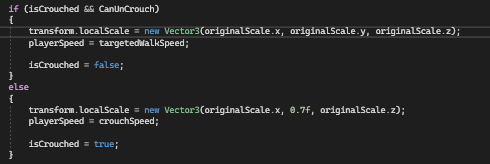
How do i change this: https://i.imgur.com/cxMQXlK.png To make crouching smoother, and not snapping to a certain scale
 fair steeple
Evening. I'm getting these errors when trying to build my game. No idea how to fix them.

 swift crag
twin bolt
How do i change this: https://i.imgur.com/cxMQXlK.png To make crouching smoothe...
swift crag
twin bolt
How do i change this: https://i.imgur.com/cxMQXlK.png To make crouching smoothe...
use Vector3.MoveTowards, perhaps
twin bolt
swift crag
use `Vector3.MoveTowards`, perhaps
Okay
swift crag
fair steeple
Evening. I'm getting these errors when trying to build my game. No idea how to f...
You are trying to compile code that uses the UnityEditor namespace
All code that references UnityEditor must not make it into a build. That namespace does not exist in builds.
In this case, "GUITools" sounds like something that's editor-only anyway
Any folder named "Editor" will be excluded from builds
polar acorn
fair steeple
Evening. I'm getting these errors when trying to build my game. No idea how to f...
You cannot include any code that uses UnityEditor. Put it in a folder named Editor so it is not included
swift crag
You can also use #if UNITY_EDITOR to conditionally exclude chunks of code, if you need more fine-grained control
swift crag
twin bolt
Okay
or Vector3.SmoothDamp
note that smooth damp never quite reaches the destination. I often combine both MoveTowards and SmoothDamp
fair steeple
Like, I should move all the with "using UnityEditor" to Editor?
fair steeple
fuck I have like 30 files lol
twin bolt
swift crag
or `Vector3.SmoothDamp`
How would those work with local scale?
swift crag
twin bolt
How would those work with local scale?
just transform.localScale = Vector3.MoveTowards(transform.localScale, target, Time.deltaTime * changeSpeed)
i kinda wish you could just do transform.localScale.MoveTowards(...)
but, alas, struct returned from a property...
I set target in the if/else if/else statements, then just move towards the target unconditionally.
twin bolt
I'm setting my own values, so it keeps saying "cannot convert from floaat to Vector3"
swift crag
twin bolt
I'm setting my own values, so it keeps saying "cannot convert from floaat to Vec...
Construct a vector and store it in a variable, then move towards that
you could always do it inline, but it'll get ugly
transform.localScale = Vector3.MoveTowards(transform.localScale, new Vector3(1, whatever, 1), Time.deltaTime);
That's why I like to do it this way.
I'd be repeating myself if I included the MoveTowards in every single branch, after all
MoveTowards is very reliable. It will exactly reach the target if you're close enough
I confidently do stuff like this all the time
thing = Mathf.MoveTowards(thing, 1, Time.deltaTime);

if (thing == 1) {
  ...
}
No wiggle room required. MoveTowards methods return their second argument if the first argument is close enough to it
SmoothDamp never quite reaches the target
twin bolt
Now it doesnt fully crouch, it goes down like half an inch.
twin bolt
swift crag
That's why I like to do it this way.
Would animation work?
fair steeple
Hey, I tried moving the files over to a Editor folder and now the game is broken and I can't just drag all the files over to their Game Object. Can I make Unity find those files or is there another way to build the game?
 wintry quarry
fair steeple
fuck I have like 30 files lol
wintry quarry
fair steeple
fuck I have like 30 files lol
from the error above you only had one file that used UnityEditor
that's the only one you need to move
oh and your AUdioManager you need to just remove the editor stuff from
or wrap it in a preprocessor directive
swift crag
twin bolt
Now it doesnt fully crouch, it goes down like half an inch.
Show your code.
swift crag
twin bolt
Would animation work?
Sure, but I prefer to use code, not animation. Notably, animators will always write values to every field they control, even if you're not currently playing an animation that controls that field
So they can be very heavy-handed
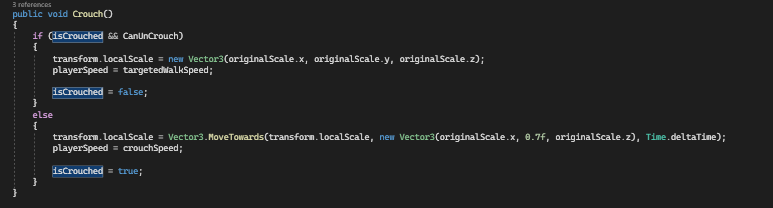 swift crag
You should be running MoveTowards every frame
All of the Vector3 methods just take some inputs and produce a result. You aren't starting a coroutine or something here
twin bolt
swift crag
You should be running `MoveTowards` every frame
How would that work with crouch though?
swift crag
You would set a target value in Crouch
twin bolt
Do i enable a bool when the player presses a key?
swift crag
then use that target value in Update
Or you could do that, yes
You could set a crouched bool, then use it to decide what to move towards in Update
twin bolt
Then have it keep going until the height equals what i want?
swift crag
You can just do it forever
But yes, that's what'll happen
void Update() {
  var bar = toggled ? Vector3.one : Vector3.zero;
  foo = Vector3.MoveTowards(foo, bar, Time.deltaTime);
}

void Toggle() {
  toggled = !toggled;
}
If you want to be able to just set the value once and have it work automatically, then you need something like DOTween, which handles all of that for you
I've always just done things myself.
silent obsidian
How do you guys handle the logic for health/attack systems where there are multiple types of enemies? Should I just create a base class like "CombatEntity" where i can store all the shared methods and properties?
swift crag
that's a common approach if everyone works roughly the same
you can also go with interfaces, e.g. Damageable
cosmic dagger
silent obsidian
How do you guys handle the logic for health/attack systems where there are multi...
'Combat' implies these types are only used in combat. is that true?
silent obsidian
Yes
swift crag
that interface would contain a TakeDamage metho
cosmic dagger
silent obsidian
Yes
so you have separate enemies apart from combat?
 hoary citrus
silent obsidian
How do you guys handle the logic for health/attack systems where there are multi...
hoary citrus
silent obsidian
How do you guys handle the logic for health/attack systems where there are multi...
You could use the component approach, where you have a "HealthAndDamage" class that you can attach to any object and it handles the health and damage aspects
cosmic dagger
silent obsidian
How do you guys handle the logic for health/attack systems where there are multi...
a common method i've seen —i'm writing a blog about now — is having a base class with an IDamageable interface like Fen suggested, or separate classes that implement the interface. either way works . . .
silent obsidian
Correct me if I'm wrong please, I'm not really familiar with strong typed languages. That approach would allow to handle modifiers? For example if one type of enemy is rather a prick and requires different/more properties and methods than the base class can provide?
 timber tide
silent obsidian
How do you guys handle the logic for health/attack systems where there are multi...
timber tide
silent obsidian
How do you guys handle the logic for health/attack systems where there are multi...
CombatEntity that takes in a ScriptableObject of CombatEntitySO
swift crag
silent obsidian
Correct me if I'm wrong please, I'm not really familiar with strong typed langua...
You could either derive from a common base class
or go with composition
Composition is often the better approach.
For example, you could give each entity a list of damage modifiers
a damage modifier would be an object that you hand a damage instance to, and get a new damage instance back
so you could slap a 50% damage reduction on an enemy by just adding an object to that modifier list
I've been building games recently by making a very bare-bones Entity class, then adding features through composition
timber tide
Ye, OOP is kinda hard for this type of stuff
swift crag
an entity gets a Grabbable component if it can be grabbed by a larger entity
for example
timber tide
because you can dig yourself a hole pretty easily if you thin out the classes
silent obsidian
Composition in this case refers to @hoary citrus's proposal?
swift crag
Yes -- it's where you combine things
rather than inheritance, where you make a more specific version of an existing thing
 swift crag
twin bolt
https://i.imgur.com/o2LYMY2.png
swift crag
twin bolt
https://i.imgur.com/o2LYMY2.png
Well, yes, you set Crouching to false
MoveTowards is going to return a vector that's a little bit closer to the target value
You have to do that over and over to reach the target
swift crag
swift crag
```cs
void Update() {
var bar = toggled ? Vector3.one : Vector3.zero;
foo = ...
Just do this.
swift crag
swift crag
Yes -- it's where you *combine* things
Unity naturally pushes you towards composition thanks to how it's architected
Every "thing" in your game is a GameObject with components on it
swift crag
swift crag
Just do this.
If you are crouching, this moves towards [0,0,0]. If you are not crouching, it moves you towards [1,1,1].
It moves towards that target every frame
I don't bother trying to "stop" the movement when you reach the destination. x = MoveTowards(x, 1, Time.deltaTime); simply does nothing if x already has a value of 1.
twin bolt
swift crag
Well, yes, you set `Crouching` to false
i'ts working after removing "crouching = false"
swift crag
Right. It now moves towards the crouched scale every frame as long as Crouching is true
You will also want to move towards the uncrouched scale every frame when Crouching is false
swift crag
swift crag
```cs
void Update() {
var bar = toggled ? Vector3.one : Vector3.zero;
foo = ...
Hence why this makes sense. Just pick the target and then unconditionally move towards it.
twin bolt
swift crag
Right. It now moves towards the crouched scale every frame as long as `Crouching...
only issue, is when pressing c again, it resets back to the standing position, and back down
swift crag
Sure. You aren't moving towards the standing scale.
You're just setting it, presumably
There is no "magic" here. The C# is doing exactly what you tell it to. If you want to smoothly approach a value, you must write code that smoothly approaches the value.
buoyant knot
you guys talking about a Grabbable component?
swift crag
i just mentioned the idea offhand
silent obsidian
swift crag
rather than inheritance, where you make a more specific version of an existing t...
As a webdev, the paradigm shift is rather confusing. Thank you a lot guys, but just to make sure.
Let's say that I have a Player and multiple types of enemies.
The recommended approach (composition?) would be to have multiple scripts that I can attach to those entities? such as:
HealthManager
MovementController
but if i want to add an item pickup system to the player and to one specific type of enemy I would only attach that script to the player and to that specific enemy type?
swift crag
Right.
I might do something like this
public class Entity : MonoBehaviour {
  public Brain brain;
  public Locomotion locomotion;
}
the Brain's job is to respond to questions, like "Which way do you want to move?"
PlayerBrain uses inputs to answer those questions. EnemyBrain has some basic AI logic in it.
buoyant knot
I use a GrabbingHandler on something that grabs. it checks for being able to grab.
When an entity hits trigger, we look into its EntityDataHolder for a flag to see if it is grabbale.
If grabbing, it puts an EntityAttachmentHandler onto the thing we grabbed.
swift crag
then the Locomotion's job is to look at what the Brain wants and make it happen
Things can get messy super quickly, of course
You can have trouble with 'leaky abstractions'
buoyant knot
EntityAttachmentHandler is used for various types of attachements, and I use an interface: IEntityAttacher, so the EntityAttachmentHandler can communicate with the script being used to attach it
I hope this whole system makes sense
swift crag
You will need some time and practice to make sense of these ideas.
I have prototyped a lot of games.
And I'm still footgunning myself
buoyant knot
the better you get, the less inheritance you use. But then you reach a point where every time you use inherittance, it’s really good
swift crag
buoyant knot
the better you get, the less inheritance you use. But then you reach a point whe...
Yeah.
I've been using a ton of state machines recently
buoyant knot
better said; novices trap themselves into shitty unnecessary inheritance patterns more than they need to
swift crag
public class Flyer : Enemy { }
public class Shooter : Enemy { }
public class FlyingShooter : ??? { }
meanwhile, with composition
a Flyer is just an enemy that uses a flying locomotion
a Shooter is just an enemy with a ShootingBehaviour attached to it
 static cedar
swift crag
You can have trouble with 'leaky abstractions'
static cedar
swift crag
You can have trouble with 'leaky abstractions'
Wdym by that?
swift crag
and thus a FlyingShooter is an enemy with both
timber tide
silent obsidian
As a webdev, the paradigm shift is rather confusing. Thank you a lot guys, but j...
"but if i want to add an item pickup system to the player and to one specific type of enemy I would only attach that script to the player and to that specific enemy type?"
Another way instead of checking interface/components is to just use flags. I'm not that big of a fan of changing prefabs up and checking components between similar types. I rather just have all enemies drop items, but if an enemy has nothing in their loot table then they wouldn't drop anything anyway.
swift crag
static cedar
Wdym by that?
It's when you start having to punch holes in your abstractions
https://en.wikipedia.org/wiki/Leaky_abstraction has some examples
I've written code where it casts the entity's brain to PlayerBrain and does some special stuff if that's the case
twin bolt
swift crag
Right. It now moves towards the crouched scale every frame as long as `Crouching...
I got it working (thank you), my only issue is speed of uncrouching and crouching.
swift crag
twin bolt
I got it working (thank you), my only issue is speed of uncrouching and crouchin...
You'll want to adjust the third argument to MoveTowards
static cedar
swift crag
It's when you start having to punch holes in your abstractions
Public override MyMethodThatINeedToInheritButDontWanna() => throw new InvalidOperationException();
Stuff like that?
swift crag
static cedar
Public override MyMethodThatINeedToInheritButDontWanna() => throw new InvalidOpe...
This too
AAAAAAA
you reminded me
[Serializable]
public class InventoryMeleeWeapon : InventoryItem
{
    public WeaponSpec spec;

    [JsonIgnore]
    public override ItemSpec Spec => spec;

    [JsonIgnore]
    public override bool Stackable => false;

    [JsonIgnore]
    public override int StackCount {
        get => throw new InvalidOperationException();
        set => throw new InvalidOperationException();
    }
...
"Time.DeltaTime * speed" ?
static cedar
So far, I think I'm winging this fine. 
swift crag
swift crag
```cs
[Serializable]
public class InventoryMeleeWeapon : InventoryItem
{
pub...
I gotta redesign this
swift crag
swift crag
```cs
[Serializable]
public class InventoryMeleeWeapon : InventoryItem
{
pub...
This is a violation of the Liskov substitution principle.
static cedar
I never had a method that I need to inherit but don't wanna. Even if I did, I squashed those.
swift crag
twin bolt
"Time.DeltaTime * speed" ?
Right. Time.deltaTime * 5 will move by 5 units per second, assuming you call MoveTowards every frame
If you're going from [1,1,1] to [1,0.7,1], a speed of 1 would make you crouch in 0.3 seconds
silent obsidian
And there lies my next question. If i have a weapon system in which each gun has the same properties but different values, are there other ways to set that up instead of creating a separate script for each gun type?
timber tide
Same idea
swift crag
Instead of having separate scripts, you just configure the values differently.
Two common ways to do this:
- ScriptableObjects let you create assets that store data. You can then reference these assets.
[SerializeReference]lets you serialize a parent class, but then store any object that derives from the parent
swift crag
swift crag
```cs
[Serializable]
public class InventoryMeleeWeapon : InventoryItem
{
pub...
WeaponSpec is a scriptable object that holds lots of data in [SerializeReference] fields
[CreateAssetMenu(menuName = "Item/Consumable Spec", fileName = "New Consumable")]
public class ConsumableSpec : ItemSpec
{
    public Consumable prefab;
    public int stackCount;

    [SerializeReference]
    public List<Effect> effects = new();
}
here's a nice terse example, actually.
timber tide
Composition is prone to edge cases, but trying to squash all the bad combinations is simply just testing what assets you're going to add and as the programmer, not make your weapons completely overpowered by shooting ricocheting explosive shotgun shells. (Actually that sounds pretty badass)
swift crag
Effect is an abstract class.
using UnityEngine;
using UnityEngine.Localization;

[System.Serializable]
public abstract class Effect : Animancer.IPolymorphic
{
    public abstract string Label { get; }
    public abstract string Description { get; }
    public abstract string Magnitude { get; }
    public abstract void Apply(Entity entity, float magnitude = 1f);
}
Each deriving class implements Apply in its own unique way
A healing item might thus be configured like this.

(yes, even my stats are, themselves, scriptable objects)
turtles all the way down, baby!
it can be kind of annoying if you can't be sure that every entity will even have a health stat
but it's also wildly flexible
You have to put your foot down at some point and add some constraints
The more you hard-code, the easier it is to reason about your game
but the less room you have to play around
silent obsidian
I'm a little bit sleep deprived. Am I correct if I see scriptableObjects as being fixed (I'm thinking fixed as in interfaces) containers which stores data? If so I think that's what I was looking for in regards to my weapon system.
static cedar
Me: broke down every part of my weapon system at every last bit. 
swift crag
I would not relate scriptable objects and interfaces
A scriptable object is just an object that you can store as an asset.
They work very well as data containers, though.
swift crag
swift crag
You have to put your foot down at *some point* and add some constraints
e.g. I mandate that every entity has animation layers for locomotion and for actions
and that they all have states for flinching
and I mandate that they all have humanoid IK. huh.
...I think I should refactor this...
me from 6 months ago was a real dingus
static cedar
I think ScriptableObjects are more like JSON with some QoL.
swift crag
but hey -- programming is an iterative process
timber tide
JSON with types
swift crag
you discover where you over-constrained and where you under-specified
and you make adjustments
one funny thing I've noticed is that I've used very similar architectures for vastly different games: a horror game, a platformer game, and a soulslike game
static cedar
timber tide
JSON with types
And automatically adapts to the layout of the script.
But does SO adapt when you change to a closely related type like int to long? Would that cause the stored data to default?
silent obsidian
@static cedar with that i can very well relate to huh 
swift crag
It's a serializable object. That's it.
timber tide
well, that's up to how unity serializes
swift crag
there's nothing really special there
that's the magic
I used to use SOs entirely for configuration data, but now I'm branching out
I'm currently using them for a settings system. I store the current setting value in a non serialized field (loading it in when the game boots up)
timber tide
I was actually using JS for webgl and hated the whole no type aspect of it all and then my friend told me im an idiot for just not using typescript
swift crag
Everyone who references the SO can see the value.
swift crag
timber tide
I was actually using JS for webgl and hated the whole no type aspect of it all a...
TS is a godsend
swift crag
It is! It adds lots of constraints.
Adding static type checking will, by definition, make some programs impossible to express
silent obsidian
As I just started learning C# I am actually starting to appreciate strong typed languages more. Perhaps I should just start doing typescript aswell
swift crag
and make others very annoying to express
but, in return, you can reject many kinds of invalid programs
and also make it more clear what your valid programs do
I've written some big pages in both JS and TS
Coming back to an old JS project is miserable. Zero idea of what's going on.
static cedar
swift crag
Adding static type checking will, by definition, make some programs impossible t...
No, I think it feels bulkier than other languages with static typing.
swift crag
It does feel pretty unique compared to a lot of other langs
silent obsidian
swift crag
Coming back to an old JS project is miserable. Zero idea of what's going on.
@swift crag we're using JSDoc at work 
static cedar
And type checking is a pain or just weirder in TS and JS. 
 opal fossil
how to move gameobject to the next steering location without them having the navmeshagent component?
swift crag
i don't know what a "next steering location" is
 teal viper
opal fossil
how to move gameobject to the next steering location without them having the nav...
teal viper
opal fossil
how to move gameobject to the next steering location without them having the nav...
Move the transform or apply forces/velocity to a rigidbody.
opal fossil
swift crag
i don't know what a "next steering location" is
pretty much making gameonbejcts go to a destination smartly without the navmeshagent. the navmeshagent doesnt move the character in the way I want it to (using rigidbody velocity)
opal fossil
teal viper
Move the transform or apply forces/velocity to a rigidbody.
yh thats simple, but i want them to get to a destination with pathfinding
teal viper
opal fossil
yh thats simple, but i want them to get to a destination with pathfinding
Then you'll need to combine navagent and rb "smartly"
teal viper
Generate the path with a navmesh agent, but don't let it control the movement. Instead move along the path manually with an rb.
opal fossil
teal viper
Generate the path with a navmesh agent, but don't let it control the movement. I...
that sounds like a good idea. why didnt i think of that 😭
swift crag
teal viper
Generate the path with a navmesh agent, but don't let it control the movement. I...
You can even let it "control" the movement if you want
by just reading its desired velocity and using that to move the object
Although, I just realized that it would probably be more reliable to just look at its path and move the object accordingly
I'll have to play with that
opal fossil
swift crag
Although, I just realized that it would probably be more reliable to just look a...
yeah i think thats the better option
swift crag
teal viper
Generate the path with a navmesh agent, but don't let it control the movement. I...
actually, omg, i can't believe i didn't think of this lol
i've been telling the agent to move, then snapping its simulated position back to the actual position of the object every frame (since it will otherwise run off ahead of the object)
lmao
 limber laurel
I'm currently using the following code to rotate my camera in LateUpdate, but it causes the camera to rotate faster sideways when looking up or down. I'm assuming it has something to do with using quaternion multiplication, does anybody know how I should fix this?
//Get mouse input
mInput = new Vector3(Input.GetAxis("Mouse Y"), Input.GetAxis("Mouse X"), 0);
//Multiply current rotatation by all the mouse input stuff
actualCamera.transform.rotation *= Quaternion.Euler(Input.GetAxis("Mouse Y") * Time.deltaTime * vertSens * -1f, mInput.y * Time.deltaTime * mouseSens, 0);
//Lock Z axis
actualCamera.transform.localEulerAngles = new Vector3(actualCamera.transform.localEulerAngles.x, actualCamera.transform.localEulerAngles.y, 0);
you are multiplying mouse input by deltaTime, which is incorrect
The other problem is the use of reading back euler angles to try to lock the z axis
The typical foolproof approach is to use two separate objects. The parent object rotates on the y axis, the child (the camera) rotates on the local x axis only
opal fossil
swift crag
actually, omg, i can't believe i didn't think of this lol
i've been telling the...
yh that could lead to some issues. though how r u going to process when to jump, climb ladders, etc? i just thought of that
limber laurel
wintry quarry
The typical foolproof approach is to use two separate objects. The parent object...
That was my original approach, but due to using rigidbodies for the character controller, I had to separate the camera from the player
Removing deltaTime definitely helps the camera feel less jittery, but doesn't fix the main issue
wintry quarry
limber laurel
That was my original approach, but due to using rigidbodies for the character co...
Separating the camera from the player makes this approach easier not harder
although I don't see why the camera can't be a child of a Rigidbody
limber laurel
Cameras on rigidbodies always lead to some jitter when moving and rotating, and a couple of reddit/unity forum threads told me the best way to fix it was to separate the two and do things in lateupdate
junior seal
Hey! im trying to build a basic fps game. I have made the level and one of the things you have to do to get into another room is destroy some glass. now, i already have a barrier up, but i was wondering if there was a way to replace the asset with another one once that one gets damaged. like for example, say you shoot a window, once the bullet goes through the window, the glass shatters. how do i do that in unity with low poly assets?
teal viper
junior seal
Hey! im trying to build a basic fps game. I have made the level and one of the t...
The simple way would be to replace the intact glass mesh/prefab with the broken one.
wintry quarry
limber laurel
Cameras on rigidbodies always lead to some jitter when moving and rotating, and ...
That's not true. If you have interpolation on the Rigidbody and you rotate the Rigidbody on the Y axis rather than the Transform then it is fine
junior seal
and how would i do that in code?
or would i even do that in code? how would i do that in general lmao
teal viper
junior seal
and how would i do that in code?
Deactivate the intact object and activate or instantiate the broken one.
junior seal
okay ill try a few things and if i have trouble ill come back. thank you!
limber laurel
wintry quarry
That's not true. If you have interpolation on the Rigidbody and you rotate the R...
Huh, interesting, I'll try to redo the camera to work that way
junior seal
hey so how would i instantiate something? like how would i even get access to the thing im trying to make appear? two different scripts?
wintry quarry
junior seal
hey so how would i instantiate something? like how would i even get access to th...
junior seal
thank you
 empty radish
i am having a problem where if you dash in a different direction as when you jump it dashes than goes back to jumping in the direction of the original jump
here is my dash and jump stuff
wintry quarry
empty radish
i am having a problem where if you dash in a different direction as when you jum...
you'd have to show all your code
share it in a paste site
empty radish
Pastebin
Pastebin.com is the number one paste tool since 2002. Pastebin is a website where you can store text online for a set period of time.
wintry quarry
empty radish
https://pastebin.com/CCvTGg6j
you're not disabling your normal movement during the dash are you?
Also you're using GetAxis, which has momentum to it
wintry quarry
empty radish
also what would an alternative to getaxis be?
GetAxisRaw
wintry quarry
empty radish
not sure how to disable it
a bool and an if statement
empty radish
i got that part
empty radish
wintry quarry
a bool and an `if` statement
but like how do you just disable that current movement
wintry quarry
empty radish
but like how do you just disable that current movement
put it in an if statement
or return early with an if statement
i.e.
if (!dashing) {
  // do normal movement stuff
}```
or
```cs
if (dashing) return;

// do normal movement stuff
would yield return null work since its an IEnumerator
as in like the yield part of it wont cause any problems
wintry quarry
empty radish
would yield return null work since its an IEnumerator
what?
yes you can use yield return null in Dash since it's a coroutine. You're already doing this.
you can't use it in Update
not sure what that has to do with what we were just talking about though
 unreal imp
My freinds,how i could make that if my object fall like 30 meters or more and then collides with the floor or another transform it's destroyed?
empty radish
wintry quarry
you can't use it in Update
alright i still cant really see exactly where you want this if statement to go
wintry quarry
unreal imp
My freinds,how i could make that if my object fall like 30 meters or more and th...
Record the position at which you left the ground
record the position at which you hit the ground again
subtract the y parts
wintry quarry
empty radish
alright i still cant really see *exactly* where you want this if statement to go
where your movement code is
empty radish
do you mean by where the PlayerMovement() is called in update
because that just pauses all movement
unreal imp
wintry quarry
subtract the y parts
Do you have any script reference?
wintry quarry
empty radish
because that just pauses all movement
you're doing moement in the Dash coroutine
you dont want the normal movement while that's happening
unreal imp
wintry quarry
Record the position at which you left the ground
Why record to part which left the ground?
Ah yes,this is referenced to Y coordinates
wintry quarry
unreal imp
Why record to part which left the ground?
you wanted to know if you fell 30 meters
empty radish
wintry quarry
you dont want the normal movement while that's happening
i think you may be misinterpreting what im asking for, the issue i have is like this (if you can understand it lol)
 wintry quarry
you have to know where you fell from
wintry quarry
empty radish
how do i make it so it stays falling in the dash direction
As far as I can tell from your code your movement comes entirely from your input
so it's going to go in whatever direction you're holding your input in
I see your Jump is also a coroutine for some reason?
that's really odd
empty radish
it was from the tut i watched for it ik theres other ways to do it
wintry quarry
Watch a better tutorial
empty radish
tbh
wintry quarry
that's pretty awful
especially combined with the SimpleMove that's happening all the time
and the fact that it's having you call Move like 3-5 times per frame
It doesn't work properly on obstacles if it's called more than once per frame
empty radish
does FixedUpdate only call once per frame then?
wintry quarry
FixedUpdate gets called once per physics update
I don't see how that matters or is relevant here
empty radish
it was just a question
im trying to use what information i know compared to what im working with, im sorry if its not "relevant"
just trying to learn
junior seal
okay so i can figure out how to make the intact glass disappear but i cant figure out how to replace it. i followed the code the website provided but its not working for some reason?
wintry quarry
junior seal
okay so i can figure out how to make the intact glass disappear but i cant figur...
wdym by not working
what happens when you try
what code did you write
junior seal
so ill "shoot" the glass, the glass disappears but the new broken glass prefab does not appear
wintry quarry
junior seal
so ill "shoot" the glass, the glass disappears but the new broken glass prefab d...
right so
what code did you write
is the code actually running
are there any errors?
have you looked in the hierarchy for the newly spawned object?
etc
teal viper
Also what "website" are you talking about?
wintry quarry
I assume the unity manual page I linked earlier to them
junior seal
wintry quarry
I assume the unity manual page I linked earlier to them
yea that
using System.Collections.Generic;
using UnityEngine;

public class DamagedFullyObjects : MonoBehaviour, IDamage
{
    [SerializeField] int HP;
    public GameObject myPrefab;

    void Start()
    {

    }

    void Update()
    {

    }

    public void takeDamage(int dmg)
    {

        Debug.Log(gameObject.name);
        HP -= dmg;

        if (HP <= 0)
        {
            Destroy(gameObject);
            Instantiate(myPrefab, new Vector3(-3, -2, 11), Quaternion.identity);

Debug.Log("Spawning Broken Glass");
        }

    }
}```thats the code
junior seal
wintry quarry
are there any errors?
no errors and it doesnt spawn but the code runs just not that line
wintry quarry
that says like "Spawning Broken Glass"
wintry quarry
junior seal
no errors and it doesnt spawn but the code runs just not that line
Debug.Log to make sure
and check your console for errors
junior seal
i have one in there-
wintry quarry
junior seal
i have one in there-
you have one before the if statement
we need to know if you got inside the if
junior seal
ahhh okay
wintry quarry
also kinda odd to hardcode a position like that new Vector3(-3, -2, 11)
junior seal
and theres no errors
wintry quarry
my guess is either:
- you didn't assign the prefab and you're getting an error
- the broken glass is spawning just in a different place than you think
junior seal
wintry quarry
also kinda odd to hardcode a position like that `new Vector3(-3, -2, 11)`
well is there another option?
wintry quarry
junior seal
well is there another option?
of course...
why not use the position of the unbroken glass object?
junior seal
okay well what is it? this is my first time in unity so imi sorry
that is the position of the unbroken one, but it wouldnt necesarily work if i access the unbroken object directly because the item gets destroyed before i try and spawn the broken glass
wintry quarry
junior seal
that is the position of the unbroken one, but it wouldnt necesarily work if i ac...
I doubt it. That's probably the local position from the inspector
which is not a world position
transform.position to get your own position
junior seal
 wintry quarry
which I assume this script is attached to the unbroken glass
junior seal
the message showed up, show its literally fine
 junior seal
thats a different prefab
wintry quarry
that's not a prefab, since it's in the scene
prefabs only live in the asset folder
junior seal
thats for the window on the wall, im trying to spawn proken glass in the big gap
dude its a different asset
see

 sour wren
Guys, i imported an Revuelto with an Door animation, but i wanna redo this animation for my door returns to the original place, how i can solve it?
 wintry quarry
junior seal
thats for the window on the wall, im trying to spawn proken glass in the big gap
wintry quarry
junior seal
thats for the window on the wall, im trying to spawn proken glass in the big gap
ok so show the inspector of the destroyable glass, and show the prefab you're trying to spawn
summer stump
junior seal
dude its a different asset
It's in the scene, so not an asset. It's an instance. That's all they're saying
Also, it is not a prefab instance, which would be blue
junior seal
summer stump
It's in the scene, so not an asset. It's an instance. That's all they're saying
...
well i got it from an asset list is what i was trying to say lol
summer stump
wintry quarry
ehhh - in playmode/at runtime they're not blue
Ohh, missed it was at runtime
junior seal
wintry quarry
ok so show the inspector of the destroyable glass, and show the prefab you're tr...

this is for the broken one
 teal viper
junior seal
teal viper
junior seal
Is that actually the object in the scene?
junior seal
no
junior seal
teal viper
Is that actually the object in the scene?
its in the prefab list
yee im confused
polar acorn
Dunno what the original problem is but here's something that might clear things up:
Prefabs only exist in the file system. Once you put it in a scene, it is no longer a prefab, it's an object. When someone says "Did you set this to a prefab" they mean specifically a file in the project folder. Not an object in the scene.
summer stump
Trying to catch up, you want to destroy a glass... wall? And then spawn a broken glass wall from a prefab?
And the wall is being deleted, but the broken model is not spawning, even though the debug is popping up?
junior seal
summer stump
And the wall is being deleted, but the broken model is not spawning, even though...
exactly right
junior seal
polar acorn
Dunno what the original problem is but here's something that might clear things ...
i mean yea the prefab is in the project folder
polar acorn
junior seal
```using System.Collections;
using System.Collections.Generic;
using UnityEngine...
This is the current code?
And the log is happening?
junior seal
i added the debug part to it but yes
both logs are happening
but the broken glass wall is not spawning
polar acorn
junior seal
i added the debug part to it but yes
GameObject newObject = Instantiate(...)
Debug.Log($"Spawning in new object {newObject.name}", newObject);
It'll have the name of the new object. Click on the log, and it'll highlight the thing in the scene that it created
junior seal
someone said something about world position?
polar acorn
junior seal
someone said something about world position?
Well, yes, you are spawning it at exactly -3, -2, 11. Did you look at that position?
junior seal
yea thats where the other glass is
 nocturne parcel
Does RefreshAllTiles() refresh all the tiles at the same time or does it so one by one?
polar acorn
junior seal
yea thats where the other glass is
Can you show the inspector of this object?
And try out that updated log, it should show you an object in the hierarchy when you click it. Show the inspector of that as well
junior seal
polar acorn
Can you show the inspector of this object?
so the actual object that has te script is the Glass_Barrier_001 thats a child of the barrier in general. thats the position of the barrier but if i click on the glass its 0, 0, 0 bc it is the child of the barrier
 polar acorn
junior seal
so the actual object that has te script is the Glass_Barrier_001 thats a child o...
polar acorn
junior seal
so the actual object that has te script is the Glass_Barrier_001 thats a child o...
Is Room 2 also at 0,0,0?
junior seal
WAIT
its spawning
just the scale and rotation is incorrect. how do i make it spawn with the correct rotation and scale?
polar acorn
junior seal
just the scale and rotation is incorrect. how do i make it spawn with the correc...
It'll take the scale of the prefab
And you're passing in a position and rotation
So give it the values you actually want
junior seal
how do i pass in the correct rotation bc the rotation passed in isnt correct
polar acorn
junior seal
how do i pass in the correct rotation bc the rotation passed in isnt correct
Instead of giving it Quaternion.identity, give it the value you actually want
junior seal
okay thank you
summer stump
junior seal
how do i pass in the correct rotation bc the rotation passed in isnt correct
Assuming the wall being destroyed is the rotation you want (dunno why it wouldn't be), use that for the newly created broken glass wall
polar acorn
If the intention is to replace the one that has this script on it, why are you even using hard-coded values instead of just using the values from the object spawning them
 tiny kiln
I have this prefab, which is a UI button to display different selectable avatars. I want the parent (Avatar) button Image to act as a container, that way when selected, the background shows a different color. And the child (Sprite) Image to display the actual avatar sprite.
Here is my current code:
GameObject avatar = Instantiate(avatarPrefab, avatarListContainer);
Button avatarButton = avatar.GetComponent<Button>();
Image avatarButtonImage = avatar.GetComponent<Image>();
Image avatarImage = avatar.GetComponentInChildren<Image>();

avatar.name = avatarSprite.name;
avatarButtonImage.color = defaultColor;
avatarImage.sprite = avatarSprite;
however Image avatarImage = avatar.GetComponentInChildren<Image>(); isn't selecting the child (Sprite) Image component, but is selecting the parent (Avatar) Image component. How do I correctly select the child Image component?

 wild silo
Lowkey at this point im just planning on restarting, making a new script and trying harder to plan things out... There's just so much wrong with my first movement script and so many things depend on one another
For movement, given I want these functionalities, is a Rigidbody or CharacterController "better" or "easier"
MovementController
In charge of all physics of a gameobject, this will handle movement
1 - In air
1.1 - Velocity maintained from when the ground was left (player archs)
1.2 - No jumping
1.3 - Air strafing
2 - Grounded
2.1 - Not sliding
2.1.1 - Walking
2.1.1.1 - If neither run or crouch button pressed
2.1.2 - Running
2.1.2.1 - If run button pressed, even if crouch button is already pressed
2.1.3 - Crouching
2.1.3.1 - If crouch button pressed, given run isnt already pressed
2.2 - Sliding
2.2.1 - If crouch button pressed while run butten held down, or when player is moving faster than a certain threshhold
2.2.2 - Player starts at whatever speed they were at at start of slide, then decelerates. (Ie if coming from a slope the player can slide very fast)
2.3 - Steep Sliding
2.3.1 - If player is on top of a steep slope beyond a certain angle, they will slide down it
2.3.2 - The player should be able to jump off slope, but not up the slope
2.3.3 - The player can strafe left and right going down the slope
3 - All
3.1 - Gravity
I understand you can theoretically use either, but a time limit is approaching and I sort of have to make the right choice here
cosmic dagger
problem is, there is no 'right' choice. with a CharacterController you're beholden to its Move methods and how it checks for collision, and Rigidbody has multiple ways to move a GameObject — which is its own discussion . . .
teal viper
I'd say rigidbody regardless
Never seen a point in the character controller.
That being said, there are many approaches with an rb as well. The main branching being between kinematic and dynamic.
cosmic dagger
Rigidbody will give you the most control if using velocity for movement, but you need to consider *and * incorporate outside forces into your calculations to apply it correctly . . .
eternal needle
wild silo
For movement, given I want these functionalities, is a Rigidbody or CharacterCon...
non-kinematic rigidbody is fine for most of those except slopes. For ex: when you add force against a slope and start going up it, you don't suddenly lose all that velocity and start falling when you reach the end of the slope. your character will go off it more like you rolled a ball up it instead of walked up it
wild silo
The main reason I was leaning towards character controllers when I started the project is a lot of people were talking about having to "fight" with the rigid body to ge the physics you want. But 4 months into the project and I still cant get fking sliding to work properly
eternal needle
everything else you listed is quite simple with rb and forces
wild silo
Yeah, that was the other thing is most articles/tutorials to learn these, 90% use rigidbodies lol
teal viper
wild silo
The main reason I was leaning towards character controllers when I started the p...
In the simplest cases, perhaps. But I wouldn't call it "fighting with it". It's more about knowing how the underlying systems work and adjusting your implementation accordingly.
People that say that they had to fight with the rb, probably didn't spend enough time to learn how it works. Or misunderstand something about physics in general.
wild silo
Yeah, that makes sense. Either way switching to a completely different system is going to be rough, tbh I kinda get it done by next Tuesday... Which has got me wondering if its better to just leave sliding out for now and work with the character controller for the deliverables
teal viper
Deliverables?🤔
 sour fulcrum
Right now I do it super grossly and cache the transform, enable a character controller, use it's Move(), disable the character controller and add the difference the cc added. works pretty well so far for super jank
wild silo
and we gotta launch a "beta" version next week
teal viper
Up to you. It's probably not impossible to implement whatever features you need with the current setup. Might be really messy though.
One thing to consider is what exactly that college task requires you to do.
wild silo
then polish it for the "final" deliverable in December
Well the requirements are kind of set by us
I think the idea is to sort of let us manage our own projects to get a feel for it.
I ended up doing Movement, Inventory, and Weapon controllers for scripting
so I have a gun script that more or less lets us make any type of gun from it
I have an inventory script with a bunch of item types using Scriptable objects
and the movement I had everything except slopes working, but I put it on the backburner for a while in favour of the other systems
teal viper
In which case it's totally viable to leave out a feature or two. Developers in the industry do that constantly.
eternal needle
wild silo
Yeah, that makes sense. Either way switching to a completely different system is...
Since this doesnt sound like a specific game dev course, id say you could definitely leave out a lot of real features. Your entire mark is gonna be based on what's showcased, since no marker will go through your entire project to see what features you coded.
This is like the hackathon advice, you can essentially hardcode the whole thing as long as it looks cool enough lol
wild silo
I guess, but I also lowkey wanted to work on this past capstone, and have it for a portfolio
wild silo
eternal needle
This is like the hackathon advice, you can essentially hardcode the whole thing ...
Bro I wanted to do the halloween game jam but it literally happened right in the middle of midterm week T_T
teal viper
Nothing prevents you from rewriting it afterwards.
Should have enough time to polish it.
wild silo
Hopefully... I might just leave out sliding for now then... Its really dissapointing cause I feel like I was so close in so many regards, but it just kept getting messier and messier
eternal needle
wild silo
Hopefully... I might just leave out sliding for now then... Its really dissapoin...
you could always keep the code but just leave it unused in the showcase, like comment it out/remove any input that would cause you to slide. I remember doing projects similar in school, so I assume yours is gonna be similar to mine. You probably wont have that long to showcase this to the marker, the code wont be read, and you'll be marked on stuff like meetings, documents (requirements and such). So having like 5 seconds of your showcase being sliding probably wont help your mark
 unique violet
How would I make a script to scale this text objects corners to each of those dots?

im aiming to recreate the transform gizmo at runtime so the user can edit and make there own things
eternal needle
unique violet
How would I make a script to scale this text objects corners to each of those do...
text mesh pro has an auto size feature
timber tide
the transform scale?
unique violet
yup
cosmic dagger
a UI object is different from any object. it would work different in 3d . . .
cosmic dagger
i believe they just want to resize the UI in-game . . .
wild silo
eternal needle
you could always keep the code but just leave it unused in the showcase, like co...
Yeah for sure, honestly this is prolly a lesson of biting off more than we could chew
The whole concept of the game was an FPS Roguelike
we initially went with 5 levels, 4 classes, and 10 items with all systems finished
now we are at 1 level, 1 class, and atp "most" features finished
With a team of 4 fyi
 queen adder
Guys, does anyone know the best way to get started when making a game like Simulacra and Emily Is Away?


 modest dust
- Open Unity and your IDE of choice
- Work
That's usually the best way people go for
Simply plan out your project and implement one thing after another
queen adder
I know, but i'm trying to figure out the logic of the coding. Like the chat bubbles, how to make it move up when a new message comes in. That's the thing that's holding me back, the rest is simple, like making a button that opens a new ui etc.
modest dust
Then ask how to make chat bubbles, not an entire game - be specific and you're more likely to get a valuable answer
 copper pumice
queen adder
I know, but i'm trying to figure out the logic of the coding. Like the chat bubb...
copper pumice
queen adder
I know, but i'm trying to figure out the logic of the coding. Like the chat bubb...
- Make scroll rect
- Scroll to bottom on event
- Profit
modest dust
^
queen adder
Thank you 🙂
copper pumice
queen adder
Thank you 🙂
As for the code itself a quick search gave me this:
scrollRect.normalizedPosition = new Vector2(0, 0);
``` Havent tested it tho.kk, i'll look into it, thank you! 🙂
 solemn fractal
Hello friends, why cant I use the random method here?

 verbal dome
solemn fractal
Hello friends, why cant I use the random method here?
verbal dome
solemn fractal
Hello friends, why cant I use the random method here?
Read the error
solemn fractal
I read but I didnt understand that is why I am asking 😄
 solemn fractal
How to fix?
copper pumice
You can type: UnityEngine.Random, or System.Random depending on the one you need.
Or configure the using statements at the top of the file
verbal dome

 verbal dome
Is it a different script
verbal dome
You want to use UnityEngine.Random here. But you have using System; so it doesn't know which Random class to use, UnityEngine.Random or System.Random
solemn fractal
float randomNumber = UnityEngine.Random.Range(-8.2f, 8.2f);
Like that worked thank you
verbal dome
👍
If you use it a lot in a file, it can be cleaner to just type using Random = UnityEngine.Random at the top of the file
solemn fractal
got it, thank you!
teal viper
solemn fractal
I read but I didnt understand that is why I am asking 😄
You're using Mathematics here. I don't think you need that namespace...
Don't keep unnecessary usings.
solemn fractal
Hey guys. I have a small piece of code where I spawn some stuff, and it works, but after getting 1..2.. or 3. It gives me an error. saying I want to access somethin I already destroyed. But yes When I pick it up I destroy it and eventually i spawn another one.. so why would it say I am trying to access something I already destroyed? ``` public IEnumerator PowerupSpawnRoutine(){
     while (true)
        {
            yield return new WaitForSeconds(2.0f);
            int randomPowerup = UnityEngine.Random.Range(0, 3);
            Instantiate(_powerups[randomPowerup], new Vector3(randomPowerup, 5.8f, 0), Quaternion.identity);
        }

}```

I use the same code to spawn some ships and work fine but for mypower ups doesnt work and its just the same.
my ships that work fine ``` public IEnumerator EnemySpawnRoutine(){
     while (true)
        {
            yield return new WaitForSeconds(2.0f);
            float randomNumber = UnityEngine.Random.Range(-8.2f, 8.2f);
            Instantiate(_enemyShipPrefab, new Vector3(randomNumber, 5.8f, 0), Quaternion.identity);
        }

}```
You'd have to show what it is you're destroying exactly
 ruby python
!code
eternal falconBOT
Posting code
📃 Large Code Blocks
Use links to services like:
https://gdl.space/, https://paste.ofcode.org/, https://hatebin.com/, https://paste.myst.rs/, https://hastebin.com/
📃 Inline Code
Surround code with three backquotes. Not quotation marks.
To format as C#, add cs to the first line:
```cs
// Your code here
```
Add a comment with a line number if there is an error message.
wintry quarry
Presumably you're destroying something from that list you're spawning things from though
wintry quarry
solemn fractal
https://paste.ofcode.org/GBHf4XPPHS4E9mxnqv6Ytr
You're destroying the object that the coroutines are running on. That will stop the coroutines
solemn fractal
So why for my enemy works fine? https://paste.ofcode.org/GPp4GuwkrcsFt4EGm766cL
if I am also deleting it
wintry quarry
Anyway what's in the list you're spawning power ups from? Are they prefabs or scene objects
solemn fractal
and I am following a course I am doing code and everything is 100% iqual and for me doesnt work.
wintry quarry
There's a difference between a prefab and an instance of a prefab in a scene
solemn fractal
this?
 wintry quarry
solemn fractal
and I am following a course I am doing code and everything is 100% iqual and for...
wintry quarry
solemn fractal
and I am following a course I am doing code and everything is 100% iqual and for...
99% of the time people say this they're mistaken
solemn fractal
wintry quarry
99% of the time people say this they're mistaken
I agree
wintry quarry
solemn fractal
this?
Why do you have copies of the prefabs in the scene?
Delete the ones from the scene
solemn fractal
because i didnt have the spawn so far
so to test things
I had to just leave it there
to hit play and test if it was working
wintry quarry
Now you have it
So delete them
Basically I bet you are referencing those rather than the actual prefabs
solemn fractal
OH i know I think. i assigned to the spawn manager on my last SS the prefabs from the hierarch and not from the project folder
let me test
wintry quarry
Yes that's what I said
 mystic oxide
im still new to this, how do you access gameobject from another scene?
wintry quarry
mystic oxide
im still new to this, how do you access gameobject from another scene?
There are many ways, it depends on the circumstances.
Singleton pattern
GameObject.FindWithTag
Opportunistic referencing
 trail halo
Hey, i want to acces this float value via script so that i can change the rotation speed of the hdri sky. How do i access this float?

 young warren
trail halo
Hey, i want to acces this float value via script so that i can change the rotati...
young warren
trail halo
Hey, i want to acces this float value via script so that i can change the rotati...
Please google "how to access rotation value of hdri sky unity"
You'll find answers
trail halo
young warren
Please google "how to access rotation value of hdri sky unity"
You'll find answe...
Haha instantly found something. Tried googling before but didnt seem to use the right words, thanks
ruby python
Mornin' all, I was just wondering if there was a more 'elegant' way to do this.
Idea is that it's a 'Super Soaker' type water pistol (ie, needs water and air pressure to operate), so trying to figure out the best way to 'detect' whether the pistol has both of these elements etc.
if (Input.GetKey(KeyCode.Space))
        {
            GameManager.instance.AdjustAir(1f);
            GameManager.instance.AdjustWater(1f);

            if (GameManager.instance.playerAir <= 0)
            {
                DisableLineRenderer();
                //do crappy spurt  -- maybe show message
            }
            else if (GameManager.instance.playerWater <= 0)
            {
                DisableLineRenderer();
                //Do 'dry fire' -- maybe show message
            }
            else if (GameManager.instance.playerAir <= 0 && GameManager.instance.playerWater <= 0)
            {
                DisableLineRenderer();
                //Do Nothing  -- maybe show message
            }
            else
            {
                lineRenderer.SetPosition(0, gunMuzzle.position);

                RaycastHit hit;
                if (Physics.Raycast(gunMuzzle.transform.position, gunMuzzle.transform.TransformDirection(Vector3.forward), out hit, weaponRange, weaponImpactMask))
Blah blah blah, you should get the idea. 🙂
 languid spire
ruby python
Mornin' all, I was just wondering if there was a more 'elegant' way to do this.
...
languid spire
ruby python
Mornin' all, I was just wondering if there was a more 'elegant' way to do this.
...
Read your code
else if (GameManager.instance.playerAir <= 0 && GameManager.instance.playerWater <= 0)
            {
                DisableLineRenderer();
                //Do Nothing  -- maybe show message
            }
will never happen
ruby python
Ah I think I see my mistake. That should be first no?
languid spire
yes
ruby python
Okay, thanks. 🙂
solemn fractal
Hey guys.. I have the using UnityEngine.UI; at the top. Is I just use the variable type as Image it doesnt allow me and I need to use as it is in the image below. is there a way that I can just write Image instead of the way it is now?
 static cedar
I think it's because UnityEngine defines an Image class too.
mystic oxide
wintry quarry
There are many ways, it depends on the circumstances.
Singleton pattern
GameObj...
i tried findwithtag before asking the question, still return null, other ways is still very confusing to me, is there like a keyword for looking up for that problem on google/youtube?
i was trying to store username to other scene's script
eternal needle
mystic oxide
i was trying to store username to other scene's script
is this username for like multiplayer? if its singleplayer then an easy way would be a singleton and make some game manager script. Then put a public string in there for your username and anything can access it as long as the object exists
wintry quarry
mystic oxide
i tried findwithtag before asking the question, still return null, other ways is...
It won't return null when done properly
But yeah some central manager Singleton is the typical way to go here
static cedar
Is there any way to enforce singleton on a monobehaviour script?
 pseudo sable
public static Singleton Instance { get; private set; }
private void Awake()
{
    // If there is an instance, and it's not me, delete myself.
    if (Instance != null && Instance != this)
    {
        Destroy(this);
    }
    else
    {
        Instance = this;
    }
}
from https://gamedevbeginner.com/singletons-in-unity-the-right-way/, some good info there too
 sand glen
static cedar
Is there any way to enforce singleton on a monobehaviour script?
sand glen
static cedar
Is there any way to enforce singleton on a monobehaviour script?
What you mean
// Singleton
static SomeClass _instance;
public static SomeClass Instance {
    get => _instance;
}
private void Awake() {
    if(_instance != null && _instance != this) {
        Destroy(gameObject);
        return;
    }
    else _instance = this;
    DontDestroyOnLoad(gameObject);   // If you want it to persist through scenes
}
This proved to me as best version of singleton
 astral topaz
!code
eternal falconBOT
Posting code
📃 Large Code Blocks
Use links to services like:
https://gdl.space/, https://paste.ofcode.org/, https://hatebin.com/, https://paste.myst.rs/, https://hastebin.com/
📃 Inline Code
Surround code with three backquotes. Not quotation marks.
To format as C#, add cs to the first line:
```cs
// Your code here
```
Add a comment with a line number if there is an error message.
teal viper
The error says that the class doesn't contain a method called Interact. Read the error.
languid spire
This variable declaration has nothing to do with your error
ruby python
Not sure if in the right place, but is it possible to stretch an object dynamically along it's Z Axis so that it's end point is the same as the termination point of a raycast?
teal viper
This is inside the interface. Not your class.
languid spire
obviously not
InteractablePopup is not IInteractable which would be accessed as interactable anyway
what?
Do you see an Interact method in that script?
btw your code looks an awful lot like GPT garbage
 ionic elk
any info on whats going on?
modest dust
public class InteractablePopup : MonoBehaviour, IInteractable
{
// Implement IInteractable below
}
like is it a logic error or a compiler error?
languid spire
but even then you need an instance variable to call it not a class name
unreal phoenix
is there a way to do this without making the variable a method?
private bool myBool { if(SomeThing) {return true;} else {return false;} }
can shorten it to private bool myBool => SomeThing;
unreal phoenix
What
pseudo sable
functionally the same as the code you posted, since SomeThing is already a bool that you're using in your condition
young warren
Yeah. What you have is basically if SomeThing is true, return true. Else return false
So just return SomeThing?
unreal phoenix
Assume that (Something) is not simply a boolean variable, otherwise why would I even make a new bool?
young warren
If it's not a boolean variable, you could not have put it in the if statement like that
Please don't provide false examples and expect an accurate answer
pseudo sable
SomeThing can be replaced with any condition
private bool myBool => SomeThing && SomeThingElse == "Hello";
young warren
Whatever SomeThing is, it needs to have equated to a boolean
pseudo sable
private bool myBool => ThingThatsInTheIfCondition;
unreal phoenix
you can do this???
private bool playerOnGround => Physics.CheckSphere(transform.position - new Vector3(0, playerCollider.bounds.extents.y / 4, 0), 1f, layerMask, QueryTriggerInteraction.Collide);
Well, what does CheckSphere return
pseudo sable
yep, so long as CheckSphere returns a boolean
gaunt ice
lambda expression is still method...
unreal phoenix
But now I don't have to convert playerOnGround to GetPlayerOnGround()
queen adder
Does anyone know how to fix this? Basically, I have intergrated my Unity WebGL game into a site but the page that handles my build is on top of my navgiation bar
 unreal phoenix
That sounds completely like a html issue
queen adder
it is but it's the build file that unity provides
unreal phoenix
What is responsible for the nav bar?
can you not put the build into a div and conform it to a flex layout?
timber tide
scoot it down a bit


