
#💻┃code-beginner
1 messages · Page 21 of 1
 smoky ledge
 static cedar
I believe trying to set it on Euler angles can cause other values to change as well.
I had this happen and they certainly don't match the inspector.
 cosmic dagger
smoky ledge
This is what it looks like
static cedar
cosmic dagger
smoky ledge
This is what it looks like
static cedar
Unlike in the inspector where u just see the raw values, the Euler angles I guess let's say readapt the values. If I remember correctly, you won't see 360 degrees in Euler angles for example.
smoky ledge
cosmic dagger
<https://learn.unity.com/tutorial/set-your-default-script-editor-ide#>
Bad thing, I tried this already and it didn't work.
static cedar
I tried rotating something on the X axis and whenever it clocks to 180 or 360, y is somehow affect. -_-
 rich adder
smoky ledge
Bad thing, I tried this already and it didn't work.
rich adder
smoky ledge
Bad thing, I tried this already and it didn't work.
screenshot your External Tools in preferences inside unity
cosmic dagger
smoky ledge
Bad thing, I tried this already and it didn't work.
show us cuz when you change the default IDE, that IDE opens up when you double-click on the code . . .
smoky ledge
rich adder
screenshot your External Tools in preferences inside unity
How do I get there?
cosmic dagger
smoky ledge
How do I get there?
the link i sent you tells you how. did you even look or follow the tutorial at all?
rich adder
spoiler alert: they did not read
smoky ledge
Bits of it
cosmic dagger
smoky ledge
Bits of it
then don't say it didn't work if you "didn't" do it . . .
smoky ledge
Yes, let me go back and read it
 grim tulip
Me=code beginner
rich adder
fitting for channel
grim tulip
Ikr 🤓
Anywayyy
I shall set my stuff up until I Get a pc to actually start coding on 😃
cosmic dagger
you can code on a crappy pc . . .
rich adder
grim tulip
Yea but u can’t make a game on one
you can still learn to code meanwhile
cosmic dagger
you can, just not some fancy, shmancy, AAA graphics one . . . . . .
grim tulip
cosmic dagger
you can, just not some fancy, shmancy, AAA graphics one . . . . . .
That’s what all the hype is all about tho 🤓☝️
cosmic dagger
not really. you heard of indie games?
rich adder
a good game != good graphics
 eternal needle
grim tulip
Yea but u can’t make a game on one
eternal needle
grim tulip
Yea but u can’t make a game on one
ever heard of amongus, flappy bird, candy crush?
rich adder
grim tulip
That’s what all the hype is all about tho 🤓☝️
what about heartstone ?
grim tulip
rich adder
what about heartstone ?
Neva heard of it
rich adder
grim tulip
Neva heard of it
WHAT
grim tulip
eternal needle
ever heard of amongus, flappy bird, candy crush?
Candy crush was made by one person?
Oh wait
Wrong topic
rich adder
how you never heard of heartstone
grim tulip
Idk
 teal viper
RimWorld, terraria, Minecraft
rich adder
ig ur not into card games 😛
static cedar
rich adder
what about heartstone ?
I'm honestly not much of a card game fan. 
grim tulip
teal viper
RimWorld, terraria, Minecraft
OMG I LOVE RIMWOLRD
I love kenshi to 🙂 but idk if it was made from Unity
rich adder
static cedar
I'm honestly not much of a card game fan. <:UnityChanThink:885169594560544800>
but i suppose thats considered AAA cause its blizzard game, just thought it was neat it was in unity
static cedar
Aye.
teal viper
Oh, was the discussion about games made in unity?😅
grim tulip
teal viper
Oh, was the discussion about games made in unity?😅
Rimworld isn’t made in Unity?
BRUH
teal viper
I thought it was about good games != graphics.
grim tulip
Got my hopes up for nothin 😔
grim tulip
teal viper
I thought it was about good games != graphics.
No
teal viper
grim tulip
Rimworld isn’t made in Unity?
I don't think so, no.
grim tulip
Well jokes on you I already have a game that I wanna make
But I has no skills to make t
rich adder
time to get learnin
static cedar
Is ultra kill made in unity?
rich adder
yus
grim tulip
static cedar
Is ultra kill made in unity?
Wot dat
grim tulip
static cedar
I can't even pay for games. :P
It otay
I shall rant about my game idea
TOMORROW
bye people 🙂
cosmic dagger
grim tulip
I shall rant about my game idea
that's for #archived-game-design not here . . .
 violet topaz
public class LookAtMouse : MonoBehaviour
{

    // Update is called once per frame
    void Update()
    {
        var dir = Input.mousePosition - Camera.main.WorldToScreenPoint(transform.position);
        var angle = Mathf.Atan2(dir.x, dir.y) * Mathf.Rad2Deg;
        transform.rotation = Quaternion.AngleAxis(angle, Vector3.forward);
    }
} ```

how do I make the player look at the mouse. right now its looking the opposite wayBut today is a Zzzzzz
violet topaz
cosmic dagger
violet topaz
```cs
public class LookAtMouse : MonoBehaviour
{
// Update is called on...
i thought someone answered this earlier, no?
teal viper
Me😭
cosmic dagger
just flip it . . .
violet topaz
ok, sorry didnt see the message i wasnt at my comupter
smoky ledge
@cosmic dagger Thank you, I'm absolutely technologically bankrupt. I finally got it working
 topaz mortar
I have a Combat Script with a reference to my Character Script
While combat is happening and the character kills a monster the Combat Script will send experience to the Chracter Script
But on level up, I need the Character Script to tell the Combat Script to re-calculate damage
How would I go about this?
cosmic dagger
use an event . . .
topaz mortar
that's the Invoke thingie not?
cosmic dagger
try to keep the character and combat mechanic separate (non-dependent) from each other . . .
topaz mortar
so I should re-calc damage before every attack?
cosmic dagger
but why should the character script inform the combat system to re-calc after a level up?
topaz mortar
because the character script has the stats and the stats determine the damage
teal viper
Yeah, calculating the damage for each attack would be the most reliable way.
cosmic dagger
topaz mortar
because the character script has the stats and the stats determine the damage
doesn't the combat script have the stats of the character for the attack?
teal viper
You could use a cache and "isDirty" kind of system, but that might be over engineering.
topaz mortar
cosmic dagger
doesn't the combat script have the stats of the character *for* the attack?
yeah but it only gets it at the start of the script and never updates it
cosmic dagger
how are your stats stored? i figured it'd be a class or collection of stats which would be a reference type . . .
 summer stump
topaz mortar
because the character script has the stats and the stats determine the damage
summer stump
topaz mortar
because the character script has the stats and the stats determine the damage
The stats only change when you level up, right? So damage will be the same until level up? I second an event in that case. It could even be an event in the level property setter
topaz mortar
I calc damage in the Start() function on combat script
summer stump
topaz mortar
I calc damage in the Start() function on combat script
And never again?
topaz mortar
nope
cosmic dagger
topaz mortar
I calc damage in the Start() function on combat script
that doesn't seem right . . .
summer stump
topaz mortar
nope
So what does leveling up do?
cosmic dagger
damage should be calculated on every attack . . .
topaz mortar
cosmic dagger
that doesn't seem right . . .
why not? the damage never changes (unless you level up or equip new items)
teal viper
What about buffs or items?
cosmic dagger
what if a specific attack has a buff or debuff?
topaz mortar
haven't gotten that far yet 😛
it's an idle game, so damage really shouldn't change often
cosmic dagger
when you attack, you should call a method to calculate the damage and send that to the enemy . . .
topaz mortar
I think the event makes more sense
summer stump
It won't cost much at all, and that would be quite reliable.
Then you can just change the stuff your damage function uses to calculate damage from
topaz mortar
true
I'll just go with that for now 🙂
C# is not like JavaScript right?
If I do
DamageMonster();```
It will finish the 1st function before executing the second one right?this will proceed in order yes, although im unsure what the comparison of js is for. any language run these til completion in order
cosmic dagger
it just calls each line . . .
topaz mortar
yeah that
but it often results in the 2nd function getting called before the 1st one has finished
teal viper
topaz mortar
no javascript will execute them at the same time
Maybe with async it does. I'm not sure it would do that with normal code.
eternal needle
im super curious where you got this idea from, unless you were unknowingly using async
summer stump
There is also asynchronous code in C#
eternal needle
because literally nothing will run at the same time
topaz mortar
teal viper
Maybe with async it does. I'm not sure it would do that with normal code.
it 100% does lol
javascript is sync by default while c# seems to be async
rich adder
topaz mortar
it 100% does lol
javascript is sync by default while c# seems to be async
wrong
teal viper
Wat
summer stump
No
eternal needle
you 100% should not be throwing out definitive statements like that
cosmic dagger
topaz mortar
it 100% does lol
javascript is sync by default while c# seems to be async
no, c# has async code but it's not by default . . .
topaz mortar
eternal needle
im super curious where you got this idea from, unless you were unknowingly using...
I've made games in JS before and ran into the issue
you use async in JS to prevent it from executing the next part of the code before the previous part has finished
teal viper
It could've been the engine or the framework you were using that were working async by default. The language itself is not async by default.
eternal needle
🤔 even i am confused what you are now trying to claim. you used async, but are claiming regular functions will run at the same time
topaz mortar
I might have the terms backwards
rich adder
how did you code a game not knowing this?
summer stump
topaz mortar
I've made games in JS before and ran into the issue
you use async in JS to preve...
You seem to have a profound misunderstanding about what asynchronous code is, how JS works and even the issue you were having (sounds like a race condition from USING asynchronous code incorrectly?)
Not trying to be rude..
topaz mortar
eternal needle
🤔 even i am confused what you are now trying to claim. you used async, but are ...
not claiming they run at the same time
in my example:
DamageMonster();```
JS will not wait for the 1st function to finish before starting the 2nd function
so if the 1st function calculates the damage but takes too long
the damage will already be done before it is properly calculatedyou are still wrong on that
teal viper
It depends on the definition/implementation of your functions. If they are async, it will indeed work as you describe.
summer stump
But again, that is explictly telling them to work that way. It does NOT work that way by default.
I have used JS a LOT and yes, it will only work that way with async.
topaz mortar
my terminology might be wrong, but my point is valid
eternal needle
what no, its still wrong
topaz mortar
JS by default does not wait for that 1st function to complete
summer stump
topaz mortar
my terminology might be wrong, but my point is valid
No, it is not
topaz mortar
go try it
summer stump
topaz mortar
go try it
I have spent almost a decade using JavaScript
eternal needle
And i am not a fool 🤷♂️
topaz mortar
I'm looking at google on my 2nd screen and it supports my claim
and I've made games in Node.js and ran into this exact issue
 buoyant knot
gif of the funny black man walking into a burning appartment with a pizza
eternal needle
alright pack it up boys, google supports his claim
teal viper
topaz mortar
go try it
Just tried it. Not async by default.
eternal needle
topaz mortar
and I've made games in Node.js and ran into this exact issue
Im not trying to be rude, but with the people in here telling you otherwise, and you asking a question in #💻┃code-beginner, do you really feel this confident in your statements?
what you are saying is completely wrong and its taught in the very beginning of comp sci courses. you may have experienced a bug, then incorrectly assumed the cause.
or have been using functions that were async unknowingly
teal viper
Node js has promises, callbacks and other stuff that runs async. So maybe you're confusing with the framework implementation.
rich adder
seems legit
 summer stump
teal viper
Node js has promises, callbacks and other stuff that runs async. So maybe you're...
summer stump
teal viper
Node js has promises, callbacks and other stuff that runs async. So maybe you're...
Exactly what I was thinking. You ABSOLUTELY can get it to work as they said, and fairly easily, so I assume they just slapped some words in (or copied code) and made it asynchronous, then assumed that was the default.
It objectively is not though, or else a LOT more of my code would have been broken
rich adder
or people legit just say shit to cause a reaction xD
 frozen mantle
Im a bit embarrased that i can't seem to figure out the logic im trying to go for here, but what im trying to do is run through a list of gameObjects, and if their names are not "x" or "y", then go ahead and enable them. The issue i'm running into is that when i write this out in an if statement (child.gameObject.name != "x" || child.gameObject.name != "y") i get the issue that even if the gameObject name is x, it still gets enabled because its name is not y, so it passes the boolean.
in other words, i want to enable all objects except the two that are named "x" or "y". Is there a way to do it in 1 if statemnet, or do i have to use a nested if statement?
topaz mortar
pretty sure u just use && instead of ||?
summer stump
topaz mortar
I'm looking at google on my 2nd screen and it supports my claim
Just trying to be helpful, but this site explains it well:
https://www.freecodecamp.org/news/asynchronous-javascript-explained/
"By default, JavaScript is a synchronous, single threaded programming language. This means that instructions can only run one after another, and not in parallel."
Async is cool, and useful. C# can do it too.
Just trying to help.
Edit: also, Unity has "Jobs" which enables highly performant threading, and it is AWESOME. They aren't necessarily multithreaded, but it makes it easy to do
frozen mantle
topaz mortar
pretty sure u just use && instead of ||?
dammit, yeah that makes sense
buoyant knot
sync is usually the default. You normally need to explicitly ask for async, because it’s otherwise not clear how you split the work.
frozen mantle
topaz mortar
pretty sure u just use && instead of ||?
yeah that was it, thank you!
what you lack in JavaScript knowledge, you make up for in Boolean logic
nah i'm just teasin'
topaz mortar

 cosmic dagger
topaz mortar
cosmic dagger
topaz mortar
it's speaks of operations, not the entire language and it says "some" . . .
 rich adder
that page is nonense, they talk about async function but fetchData isn't marked as async
yet says the function is async
//DataFetching logic here is probably in the assumption some kind of async call is going on there to the API
summer stump
topaz mortar
Can you provide the link to this site?
topaz mortar
yeah because some behaviour in JS is async by default
maybe it's just API calls & database calls or something
but I've 100% run into this issue in the past, it's been years though
anyway, I'm done with this subject
 charred spoke
topaz mortar
charred spoke
topaz mortar
This is the worst tutorial/explanation page I have seen
topaz mortar
why would JS have async await if not for this exact issue?
summer stump
topaz mortar
why would JS have async await if not for this exact issue?
To make functions asynchronous
rich adder
summer stump
Can you provide the link to this site?
some type of gpt probably
cosmic dagger
topaz mortar
yeah because some behaviour in JS is async by default
maybe it's just API calls ...
it's not by default, it is a set of operations created specifically to run code asynchronously . . .
summer stump
topaz mortar
yeah because some behaviour in JS is async by default
maybe it's just API calls ...
Can you please provide the link to that page
frozen mantle
cosmic dagger
it's speaks of operations, not the entire language and it says "some" . . .
https://www.sitepoint.com/javascript-async-await/ @summer stump

Learn all the tricks and techniques for using the JavaScript async and await keywords to master flow control in your programs.
idk why i replied to you random, sorry
topaz mortar
here's a good example I think:
https://stackoverflow.com/questions/75564521/why-is-my-internal-api-call-not-waiting-for-response

Stack Overflow
I have an Express.js / Node.js API project where I am calling a endpoint that depends on an internal async function.
const express = require('express');
const fetch = require('node-fetch');
const r...
frozen mantle
but here's the site they were referencing, it seems
topaz mortar
ah no they use async
I don't remember this shit, it was years ago
I just know I ran into this issue
rich adder
topaz mortar
here's a good example I think:
https://stackoverflow.com/questions/75564521/why-...
#💻┃code-beginner message
still waiting on this link
summer stump
rich adder
https://discord.com/channels/489222168727519232/497874004401586176/1159708738169...
Carby found it
#💻┃code-beginner message
topaz mortar
yeah u were right, I probably used async in my function because I needed to wait for API or database
charred spoke
There I fucking typed js on my phone for this
JavaScript Playground Web App
Its not async
topaz mortar
charred spoke
There I fucking typed js on my phone for this
now write that with an API or database call 😉
or just stop talking about it, I really don't care
charred spoke
It still will mot by async u less I make it
summer stump
rich adder
https://discord.com/channels/489222168727519232/497874004401586176/1159708738169...
The article is pretty poorly written, imo, but it used fetch in that function
charred spoke
Api and db calls are MADE to be async because of the longer response time
rich adder
summer stump
The article is pretty poorly written, imo, but it used fetch in that function
yeah fetch def makes it async
topaz mortar
charred spoke
Api and db calls are MADE to be async because of the longer response time
yeah this is what I meant to say in my original point, but I didn't remember the exact context since it was years ago
rich adder
topaz mortar
yeah this is what I meant to say in my original point, but I didn't remember the...
originally you said games not databases
charred spoke
Guys guys I was saying this all along I just didn’t remember cause it was years ago right
topaz mortar
assholes ...
topaz mortar
I already did lol
 rich adder
🚔
cosmic dagger
frozen mantle
if a mod were here they would be peeved, ain't no JS gotta do with unity!
guess you missed out on unityscript . . .
rich adder
oh dont even offend JS like that xD
cosmic dagger
yep . . .
 summer stump
One of the MULTIPLE scripting languages unity used 
 frozen mantle
summer stump
One of the MULTIPLE scripting languages unity used <:notlikethis:106813455812344...
frozen mantle
summer stump
One of the MULTIPLE scripting languages unity used <:notlikethis:106813455812344...
when did they just settle on C#?
frozen mantle
rich adder
clearly c# won
what's this chart?
summer stump
frozen mantle
when did they just settle on C#?
Not sure the timeline. I started at like version 5.
Which, looking at the docs, looks about the time they were changing stuff from JS to C# on the backend?
https://unity.com/releases/editor/whats-new/5.0.0
It says "All built-in image effects were rewritten from JavaScript to C#." 
charred spoke
I started with 3. somethibg
frozen mantle
summer stump
Not sure the timeline. I started at like version 5.
Which, looking at the docs,...
what's wrong with built-in image effect being rewritten into C#?
charred spoke
The amount of js to c# translating from unity answers that I have done
summer stump
frozen mantle
what's wrong with built-in image effect being rewritten into C#?
Nothing?
charred spoke
I basically learned js by osmosis
frozen mantle
oh, you put a little squiting cat face with the name "at what cost"
summer stump
frozen mantle
oh, you put a little squiting cat face with the name "at what cost"
Exactly, cause it WAS js lol.
But yeah, probably wrong meme
frozen mantle
ah ok\
i thought you were saying that converting the code from JS to C# was too costly or something

rich adder
in the end it all turns into bytecode 
 silent vault
Hello, I'm using Unity 2022.3.9f1 and imported the Starter Asset Third Person Shooter with cinemachine. I've replaced the model by my own as explained in the video tutorial but my character is stuck in Falling animation despite being on the floor

Anyway to fix that ?
frozen mantle
random, but how come unity scripts don't define "System" as a name space?
frozen mantle
silent vault
Hello, I'm using Unity 2022.3.9f1 and imported the Starter Asset Third Person Sh...
what does the animator graph look like while your game is running?
silent vault
 frozen mantle
random, but how come unity scripts don't define "System" as a name space?
frozen mantle
frozen mantle
random, but how come unity scripts don't define "System" as a name space?
i calls in using System.Collections; using System.Collections.Generic; but not plain ol System? grrrrr
frozen mantle
did you change just the model? or did you mess with the collision box too?
 frozen mantle
is this a character controller?
silent vault
Yes

Oh I'm dumb... I forgot to change the "Ground" layer in the controller script like the documentation said. My bad. It's ok now
frozen mantle
ahh yeah that'll do it, lol
silent vault
Thanks 😉
 cunning rapids
Guys I have a problem with my weapon switching
cosmic dagger
cunning rapids
Guys I have a problem with my weapon switching
sad to hear . . .
charred spoke
cunning rapids
Guys I have a problem with my weapon switching
Bummer
summer stump
cunning rapids
Guys I have a problem with my weapon switching
Maybe... tell us more?
frozen mantle
cunning rapids
Guys I have a problem with my weapon switching
sorry to hear that, but if you're trying to look for help, perhaps you should go ahead and elaborate what the problem is? What are you trying to do, and what's actually going on instead?
cosmic dagger
i'd wait until you have everything ready before sending out a cryptic, open-ended message . . .
cunning rapids
When you switch weapons while reloading it disables the shooting for that weapon for some reason
rich adder
frozen mantle
i calls in `using System.Collections; using System.Collections.Generic;` but not...
maybe system might have some classes that by default conflict with UnityEngine, Random etc.
charred spoke
cunning rapids
When you switch weapons while reloading it disables the shooting for that weapon...
Well that is most definitely a problem yes.
cunning rapids
cunning rapids
When you switch weapons while reloading it disables the shooting for that weapon...
I can provide you with anything because I literally have no idea the source of this problem
frozen mantle
rich adder
maybe system might have some classes that by default conflict with UnityEngine,...
i suppose so, im trying to use TimeSpan, and i was wondering what it meant by it saying it was "not defined"
charred spoke
Perhaps care to share some relevant code
summer stump
cunning rapids
When you switch weapons while reloading it disables the shooting for that weapon...
I don't think that video really helps explain the issue. Some code would help though
Specifically the code where you reload and fire
rich adder
frozen mantle
i suppose so, im trying to use TimeSpan, and i was wondering what it meant by it...
Do you use Visual Studio ? mine already adds the namespace a certain class belongs to and you can scroll through them all
charred spoke
cunning rapids
I can provide you with anything because I literally have no idea the source of t...
My bet would be that you set a isReloading bool somewhere and when you switch you never reset it because you only reset it from a animation event but that event never fires
cosmic dagger
cunning rapids
When you switch weapons while reloading it disables the shooting for that weapon...
seems you disable shooting when switching. do you enable shooting for the active weapon?
frozen mantle
rich adder
Do you use Visual Studio ? mine already adds the namespace a certain class belon...
i use VSCode
rich adder
frozen mantle
i use VSCode
bummer, gotta use that Quick Refactor
summer stump
frozen mantle
i suppose so, im trying to use TimeSpan, and i was wondering what it meant by it...
Wait... so you want timespan, and when you add using System; is says system is not defined?
cosmic dagger
naw, it prolly says TimeSpan is not defined . . .
frozen mantle
summer stump
Wait... so you want timespan, and when you add `using System;` is says system is...
no sorry, i meant that before i added using System; it was saying undefined
cunning rapids
charred spoke
Perhaps care to share some relevant code
Sure. This is my update method
 cosmic dagger
cunning rapids
Sure. This is my update method
cosmic dagger
cunning rapids
Sure. This is my update method
!code
 eternal falconBOT

Posting code
📃 Large Code Blocks
Large code blocks should be posted as links to services like:
https://gdl.space/, https://paste.ofcode.org/, https://hatebin.com/
https://paste.myst.rs/, https://hastebin.com/
📃 Inline Code
Surround code with three backquotes. Not quotation marks.
To get C# formatting the first line should only contain cs or csharp.
Add a comment with a line number if there is an error message.
```cs
// Your code here
```
Do not share screenshots of code unless requested.
frozen mantle
summer stump
Wait... so you want timespan, and when you add `using System;` is says system is...
"The name 'TimeSpan' does not exist in the current context"
summer stump
frozen mantle
"The name 'TimeSpan' does not exist in the current context"
Ah, well yeah. It is in the System namespace
Can't use it without that using statement
cunning rapids
cosmic dagger
!code
    private void Update()
    {
        if (!isReloading)
        {
            if (Input.GetButtonDown("Fire1") && Time.time >= nextFireTime && currentAmmo > 0)
            {
                isShooting = true;
                Shoot();
                currentAmmo--;
                nextFireTime = Time.time + 1f / fireRate;
            }

            if (Input.GetButtonUp("Fire1"))
            {
                isShooting = false;
            }

            if (isShooting && Time.time >= nextFireTime && currentAmmo > 0)
            {
                Shoot();
                currentAmmo--;
                nextFireTime = Time.time + 1f / fireRate;
            }

        }

        if (Input.GetKeyDown(KeyCode.R) && !isReloading && currentAmmo < magazineCapacity && currentAmmo > 0)
        {
            animator.Play(reloadAnimationName);
            Reload();
        }

        if (Input.GetKeyDown(KeyCode.R) && currentAmmo == 0 && !isReloading)
        {
            animator.Play(noAmmoAnimationName);
            NoAmmoReload();
        }
    }
when it says It doesn't exist , you can press w/e shortcut quick refactor in vscode is, it adds namespace, should be the lightbulb icon
cosmic dagger
cunning rapids
```cs
private void Update()
{
if (!isReloading)
{
...
show the Reload method . . .
cunning rapids
Those are the respective reload coroutines and methods:
    private void Reload()
    {
        StartCoroutine(ReloadCoroutine());
    }

    private void NoAmmoReload()
    {
        StartCoroutine(NoAmmoReloadCoroutine());
    }

    private IEnumerator ReloadCoroutine()
    {
        isReloading = true;
        yield return new WaitForSeconds(AmmoSeconds);
        currentAmmo = magazineCapacity;
        isReloading = false;
    }

    private IEnumerator NoAmmoReloadCoroutine()
    {
        isReloading = true;
        yield return new WaitForSeconds(NoAmmoSeconds);
        currentAmmo = magazineCapacity;
        isReloading = false;
    }
and the method to switch weapons . . .
cunning rapids
cosmic dagger
and the method to switch weapons . . .
I use a seperate script for weapon switching
frozen mantle
summer stump
Ah, well yeah. It is in the System namespace
Can't use it without that using sta...
ye i know, but now that @rich adder bought up that it could cause come conflicts with UnityEngine, my game feels like, "weird" with it on... idk if it just in my head tho
summer stump
frozen mantle
ye i know, but now that <@968604165150507078> bought up that it could cause come...
What conflicts? Like namespace ambiguity? That is easy to solve and not a reason to avoid System
cosmic dagger
what's the problem? you can just add the namespace, done deal . . .
frozen mantle
ah ok
rich adder
frozen mantle
ye i know, but now that <@968604165150507078> bought up that it could cause come...
not what i said.. I said its maybe not in the file by default because some classes have same name and its ambiguous
charred spoke
cunning rapids
I use a seperate script for weapon switching
If you disable the entire gameObject that runs the Reload coroutine it will not finish the coroutine and thus isReloading will nver be set to false
frozen mantle
rich adder
not what i said.. I said its maybe not in the file by default because some class...
oh ok
cosmic dagger
cunning rapids
Those are the respective reload coroutines and methods:
```cs
private void ...
as @charred spoke mentioned, isReloading is never set back to false when you switch weapons . . .
frozen mantle
cosmic dagger
as <@292371456862584833> mentioned, `isReloading` is never set back to false whe...
use an elipses one more time, and i am going to react to your next message with an angry emote
cunning rapids
charred spoke
If you disable the entire gameObject that runs the Reload coroutine it will not ...
Oh yeah that's definitely the problem:
using UnityEngine;

public class WeaponSwap : MonoBehaviour
{
    public GameObject[] objectsToToggle;

    private void Update()
    {
        for (int i = 0; i < objectsToToggle.Length; i++)
        {
            if (Input.GetKeyDown(KeyCode.Alpha1 + i))
            {
                ToggleObjects(i);
            }
        }
    }

    private void ToggleObjects(int activeIndex)
    {
        for (int i = 0; i < objectsToToggle.Length; i++)
        {
            if (i == activeIndex)
            {
                objectsToToggle[i].SetActive(!objectsToToggle[i].activeSelf);
            }
            else
            {
                objectsToToggle[i].SetActive(false);
            }
        }
    }
}
coroutines stop running on a GameObject when it is disabled . . .
cosmic dagger
frozen mantle
use an elipses one more time, and i am going to react to your next message with ...
bruh, check all my messages, like, ever . . .
summer stump
cunning rapids
Oh yeah that's definitely the problem:
```cs
using UnityEngine;
public class W...
Make a CancelReload function that you call before disabling if isReloading is true. Just set isReloading to false, but don't do the ammo
cosmic dagger
yeah, fix those edge cases . . .
cunning rapids
Also I feel like the script is pretty messy
frozen mantle
summer stump
What conflicts? Like namespace ambiguity? That is easy to solve and not a reason...
nvm i misunderstood what nava meant
cunning rapids
What would you do for weapon-switching?
cosmic dagger
when you switch weapons, call the cancel method on the active weapon . . .
summer stump
cosmic dagger
bruh, check all my messages, like, ever . . .
I saw one like a week ago without one, and it was memorable 😆
cunning rapids
summer stump
Make a CancelReload function that you call before disabling if isReloading is tr...
What would CancelReload do?
"Just set isReloading to false, but don't do the ammo"
This?
summer stump
cunning rapids
"Just set isReloading to false, but don't do the ammo"
This?
Yep
Just don't add the additional ammo, and reset the bool
cunning rapids
And I can call the function using cs OnDisable
right?
cosmic dagger
cunning rapids
And I can call the function using ```cs
OnDisable```
right?
give it a try and let us know . . .
frozen mantle
cosmic dagger
bruh, check all my messages, like, ever . . .
off topic, but why do you end all your message with an elipses?
cunning rapids
frozen mantle
off topic, but why *do* you end all your message with an elipses?
Brand recognition 💀
cosmic dagger
summer stump
I saw one like a week ago without one, and it was memorable 😆
i have a few, depends on the context. questions and directing ppl to proper channels are final remarks that end any open-ended conversation . . .
cunning rapids
@summer stump what do you mean exactly by "but don't do the ammo"
frozen mantle
cosmic dagger
i have a few, depends on the context. questions and directing ppl to proper chan...
was that meant as a reply to me?
or were you replying to Aeth, and your reply just so happen to answer my question as well?
cunning rapids
cunning rapids
<@349017582105526273> what do you mean exactly by "but don't do the ammo"
.
cosmic dagger
frozen mantle
was that meant as a reply to me?
nope, i replied to their message . . .
frozen mantle
oh, funny, i think you answered my question as well lol
cunning rapids
    private void CancelReload()
    {
        isReloading = false;
        currentAmmo = currentAmmo;
    }
Something like this should cut it, right?
@cosmic dagger
charred spoke

cosmic dagger
frozen mantle
or were you replying to Aeth, and your reply just so happen to answer my questio...
if it answered it, then that's a twofer . . .
charred spoke
CurrentAmmo= currentAmmo does nothing
cosmic dagger
cunning rapids
```cs
private void CancelReload()
{
isReloading = false;
...
again, try it out. no one will know until it's tested . . .
frozen mantle
cosmic dagger
if it answered it, then that's a twofer . . .
so, you use an elipses to show that the conversation is still open ended/continueing? interesting... i guess i do the same thing sometimes

cosmic dagger
frozen mantle
so, you use an elipses to show that the conversation is still open ended/continu...
it has more than one meaning. i take the creative writing approach . . .
cunning rapids
charred spoke
CurrentAmmo= currentAmmo does nothing
How come? I want to set the ammo to it's current count rather than to the mag capacity that happens during reloading
cosmic dagger
cunning rapids
How come? I want to set the ammo to it's current count rather than to the mag ca...
if currentAmmo = 5, that's the same as saying:
5 = 5;
```it changes nothing . . .oh ok, i think i get it
(i do not)
cunning rapids
cosmic dagger
if `currentAmmo = 5`, that's the same as saying:
```cs
5 = 5;
```it changes noth...
Nevermind then, I guess that's what happens when you prgram in Python for 2 years
summer stump
cunning rapids
<@349017582105526273> what do you mean exactly by "but don't do the ammo"
You could cache the ammo as something like preReloadAmmo (which may or may not be 0) and in the cancel reload just set currentAmmo to that
And if not, then do a full magazine
cunning rapids
summer stump
You could cache the ammo as something like preReloadAmmo (which may or may not b...
Interesting idea
frozen mantle
cunning rapids
How come? I want to set the ammo to it's current count rather than to the mag ca...
the issue is that ammo's current count is the Mag capacity, so you're just setting it to itself, basically meaning it's being left at the mag capacity
cosmic dagger
cunning rapids
Doesn't work
you shouldn't change the ammo count until after the reload is done. if you switch weapons during reload, the current ammo should not change at all . . .
cunning rapids
I think that's what my coroutines are already doing ```cs
private IEnumerator ReloadCoroutine()
{
isReloading = true;
yield return new WaitForSeconds(AmmoSeconds);
currentAmmo = magazineCapacity;
isReloading = false;
}
private IEnumerator NoAmmoReloadCoroutine()
{
    isReloading = true;
    yield return new WaitForSeconds(NoAmmoSeconds);
    currentAmmo = magazineCapacity;
    isReloading = false;
}
so what's the problem with the ammo?
cunning rapids
Should I put the isReloading bool above the ammo set or will that change absolutely nothing?
 queen adder
#⚛️┃physics i asked a question in this channel not sure if it’s better suited for here if so lmk and i will move it
cunning rapids
cosmic dagger
so what's the problem with the ammo?
There's no problem with the ammo. When I swap weapons while the reload animation is playing, it disables shooting for my weapon
cosmic dagger
cunning rapids
There's no problem with the ammo. When I swap weapons while the reload animation...
yeah, that's the original issue. did you test what we said from earlier?
cunning rapids
cosmic dagger
yeah, that's the original issue. did you test what we said from earlier?
You mean making a CancelReload() function and calling it OnDisable?
Didn't work unfortunately
    private void OnDisable()
    {
        animator.Rebind();
        CancelReload();
    }
    private void CancelReload()
    {
        isReloading = false;
    }
did you check if those methods were called? place logs in cancelReload and OnDisable . . .
cunning rapids
What should I log specifically?
cosmic dagger
anything. you're just testing if the method runs. the log will inform us it does cuz that line of code was executed . . .
just log the method name or smth . . .
cunning rapids
    private void CancelReload()
    {
        isReloading = false;
        Debug.Log(isReloading);
    }
```? private void OnDisable()
{
animator.Rebind();
CancelReload();
Debug.Log(isReloading);
}
It should logically return false
cosmic dagger
yeah, but you should name it to know what value you're looking at . . .
 cosmic dagger
Debug.Log($"<color=magenta>CancelReload</color> | isReloading: <color=cyan>{isReloading}</color>");
Debug.Log($"<color=magenta>OnDisable</color> | isReloading: <color=cyan>{isReloading}</color>");
 cosmic dagger
well, it sets it to false . . .
cunning rapids
Maybe if I handle the shooting with a seperate method and call it in ```cs
OnEnable
it still won't allow you to shoot when you switch back to the weapon?
cosmic dagger
when you switch back is isReloading still false?
cunning rapids
How do I check that?
cosmic dagger
log the variable in OnEnable . . .
cunning rapids
Maybe I can just make my WeaponSwap script communicate with my Shooting script to disable itself while the animation is still playing?
 eternal falconBOT
Posting code
📃 Large Code Blocks
Large code blocks should be posted as links to services like:
https://gdl.space/, https://paste.ofcode.org/, https://hatebin.com/
https://paste.myst.rs/, https://hastebin.com/
📃 Inline Code
Surround code with three backquotes. Not quotation marks.
To get C# formatting the first line should only contain cs or csharp.
Add a comment with a line number if there is an error message.
```cs
// Your code here
```
Do not share screenshots of code unless requested.
frozen mantle
this is the nastiest, overly long line of code i've writen, but by jove it works:
||ScoreBoard.transform.GetChild(1).GetComponent<TextMeshProUGUI>().text = "Time:\t "+((int)TimeSpan.FromSeconds(currLevelStats.time).TotalMinutes).ToString()+":"+TimeSpan.FromSeconds(currLevelStats.time).Seconds.ToString("00");||
cunning rapids
cosmic dagger
log the variable in `OnEnable` . . .
Hastebin is a free web-based pastebin service for storing and sharing text and code snippets with anyone. Get started now.
This is the full code
rich adder
frozen mantle
||`ScoreBoard.transform.GetChild(1).GetComponent<TextMeshProUGUI>().text = "Time...

String interpolation using the $ token provides a more readable and convenient syntax to format string output than traditional string composite formatting.
cunning rapids
cunning rapids
https://hastebin.com/share/fasiziweba.csharp
@cosmic dagger
frozen mantle
rich adder
https://learn.microsoft.com/en-us/dotnet/csharp/language-reference/tokens/interp...
No
rich adder
frozen mantle
No
🥱 cs if(ScoreBoard.transform.GetChild(1).TryGetComponent(out TextMeshProUGUI text)) { text.text = $"Time: \t {(int)TimeSpan.FromSeconds(currLevelStats.time).TotalMinutes} : {TimeSpan.FromSeconds(currLevelStats.time).Seconds:00}"; }
frozen mantle
rich adder
🥱 ```cs
if(ScoreBoard.transform.GetChild(1).TryGetComponent(out TextMeshProU...
Wait wat
summer stump
Nope, it's too late. You said No, and now it can't be changed.
Stop looking at it!
cunning rapids
@cosmic dagger I found the problem
I fixed it
Thank you
It turns out we were looking at the wrong value
We thought there was something wrong with the isReloading bool
In reality our fix worked, but the currentAmmo was simply 0
 timber sundial
Hi! Is there a way to declare new variables for each enum? I have an enum of collectibles (coin, files etc.) and want to declare a new integer for each one but want to make it in a way where if I add a new enum it would automatically make a new integer for a counter of how many of those items are collected?
 gaunt ice
idk if there way to "add" new value to enum in run time, but you can use Enum.getname.length to see how many value in enum
and you may need array, use enum as the index
timber sundial
gaunt ice
idk if there way to "add" new value to enum in run time, but you can use Enum.ge...
ty!
cunning rapids
Guys
How do I handle grenade throwing when my grenade prefab explodes after a short delay
Which means after said short delay, Instantiating the object doesn't work anymore
 fossil drum
cunning rapids
Which means after said short delay, Instantiating the object doesn't work anymor...
fossil drum
cunning rapids
Which means after said short delay, Instantiating the object doesn't work anymor...
Why wouldn't it work anymore? You can instantiate prefabs an infinite amount.
cunning rapids
Because the prefab literally destroys itself
fossil drum
No, the prefab sits in your Assets folder, not in your scene.
It will never destroy it self.
cunning rapids
Guys, how do I anchor TMP to the bottom left of my screen
gaunt ice
no, since format is undefined
 ashen ferry
u can make ur own ig


 light moss
How can I make my camera not follow the player when the player falls into the void.
cunning rapids
gaunt ice
you have set pos x and y
I need it to anchor on all resolutions
gaunt ice
if(player not in void){
camera follows player
}
```now camera only follow pleyer if player is not falling into void woven cradle
hey, could someone tell me how I can make a path along which the Enemies should move, and what I mean here is not specifically about marking lines or points, but the entire path in which the Enemies would move randomly when it comes to their appearance, but they always went towards the end of the path and when Ally appears on their way in a certain area, they cancel their further progress on this path, they will just start attacking him, I'm asking because I don't really know how to go about it, I've heard something about navmesh but I don't know if it's a good solution and I'm not entirely sure how it's supposed to work.
cunning rapids
light moss
How can I make my camera not follow the player when the player falls into the vo...
Show us the camera script
light moss
cunning rapids
Show us the camera script
`using System.Collections;
using System.Collections.Generic;
using UnityEngine;
public class CameraFollow : MonoBehaviour
{
public float FollowSpeed = 2f;
public float yOffset = 1f;
public Transform target;
// Update is called once per frame
void Update()
{
    Vector3 newPos = new Vector3(target.position.x, target.position.y + yOffset, -10f);
    transform.position = Vector3.Slerp(transform.position, newPos, FollowSpeed * Time.deltaTime);
}
}`
cunning rapids
light moss
`using System.Collections;
using System.Collections.Generic;
using UnityEngine;
...
You can add a variable to stop following the target after he reaches a specific y level
light moss
yeah thats what I am trying to do right now
cunning rapids
It's easy
add this variable
public float stopFollowingYLevel = 10f;
and then the camera logic under this condition:
        if (target.position.y <= stopFollowingYLevel)
        {
            Vector3 newPos = new Vector3(target.position.x, target.position.y + yOffset, -10f);
            transform.position = Vector3.Slerp(transform.position, newPos, FollowSpeed * Time.deltaTime);
        }
another trick is you can add colliders under your map to define where the void starts
and if the camera triggers the colliders it stops following the player
eternal needle
light moss
yeah thats what I am trying to do right now
Doing it based on colliders is probably better. you can define areas where this happens so you arent limiting yourself to design around the Y value. Also itll allow you to have more complex level design.
You could have some event on the player, that the camera subscribes to, which happens when the player enters the kill area. Then another event for when it respawns to tell the camera to start following again
woven cradle
woven cradle
hey, could someone tell me how I can make a path along which the Enemies should ...
could someone help me please
 lethal relic
I have created a simple ScriptableObject. After doing some changes to the script, the .asset file no longer loads properly. How can I fix that?
Here's what it looks like:

Here's what it should look like;

 wintry quarry
lethal relic
I have created a simple ScriptableObject. After doing some changes to the script...
wintry quarry
lethal relic
I have created a simple ScriptableObject. After doing some changes to the script...
You changed the name of the file.
Did you also change the name of the class?
Do you have any compile errors?
queen adder
I want to know why unity does not included the Abs method of System.Numerics.Vector3 in UnityEngine.Vector3?
https://learn.microsoft.com/dotnet/api/system.numerics.vector3.abs?view=net-7.0
 quaint thicket
I'm trying to get my camera to rotate vertically without it becoming lopsided like in the picture. Any ideas?
        public static float rotationX = 0;
        public static Vector2 rotationLimits = new Vector2(80, -80); // Vertical rotation limits
        private static Vector3 offset = new Vector3(0f,0f,0f);

        void RotateCamera4(float x, float y)
        {
            Transform target = Object.PlayersMainObject[0].GameObject.transform;

            // Get the mouse input
            float mouseX = x * 2f;
            float mouseY = y * 2f;

            // Rotate the target horizontally
            Camera.main.transform.Rotate(Vector3.up * mouseX);

            // Rotate the camera vertically
            rotationX -= mouseY;
            rotationX = Mathf.Clamp(rotationX, rotationLimits.y, rotationLimits.x);
            // Camera.main.transform.Rotate(Vector3.left * mouseY);


            // Calculate the rotation quaternion
            Quaternion rotation = Quaternion.Euler(rotationX, target.eulerAngles.y, 0);

            // Calculate the new position of the camera based on the rotation and offset
            Vector3 newPosition = target.position + rotation * offset;

            // Apply the new position to the camera
            Camera.main.transform.position = newPosition;

            // Make the camera look at the target
            Camera.main.transform.LookAt(target);
        }```
 neon ivy
I want a scene wide tick speed I can call functions in, my best idea is to make a coroutine call an event every x amount of milliseconds and to then subscribe to this event from other scripts. does anyone have a better idea on how to implement tick speed?
charred spoke
neon ivy
I want a scene wide tick speed I can call functions in, my best idea is to make ...
Use this pattern https://blog.unity.com/engine-platform/10000-update-calls but call the MyUpdate when a timer hits your desired seconds

Unity Blog
neon ivy
thanks
 slender cargo
Does anyone know how this is supposed to work? Not sure why this grounded check isn't working..
 grim tulip
slender cargo
Does anyone know how this is supposed to work? Not sure why this grounded check ...
grim tulip
slender cargo
Does anyone know how this is supposed to work? Not sure why this grounded check ...
I think that’s a movement code
For such things as crouching
slender cargo
grim tulip
I think that’s a movement code
I know, I wrote it :)
slender cargo
What im saying, I don't know why the IsGrounded check isn't working
fossil drum
slender cargo
What im saying, I don't know why the IsGrounded check isn't working
Just DrawRay the Raycast you made. My guess its probably too short because you shoot it from the middle of your controller.
slender cargo
fossil drum
Just DrawRay the Raycast you made. My guess its probably too short because you s...
ahh right
I was unaware it comes from the middle
That works perfectly, Just increased the value
slender cargo
fossil drum
Just DrawRay the Raycast you made. My guess its probably too short because you s...
My next question is how would I get this to apply the force on the local axis?
 fossil drum
slender cargo
My next question is how would I get this to apply the force on the local axis?
fossil drum
slender cargo
My next question is how would I get this to apply the force on the local axis?
Instead of Vector3.forward, use transform.forward.
Vector3.forward is the forward in world space. transform.forward is the forward in local space of the transform.
fossil drum

 distant current
Is there a way in unity to pass a component of an object to another? I'm trying to assign an object that has collider on it and I want that object to be assigned inside one of the objects inside a prefab. So what I did is I created for each, one for a scene and one inside a prefab, I created a script to instantiate the one in a scene.
 final crystal
How to clear previous debug.drawray ?
 faint elk
So I have a coroutine that I am using try and make my game wait a frame before continuing to do check. The way I had it explain to me was that in the coroutine i needed to have everything that needed to happen before the wait above the yield return null; and then the game would wait a frame and then run everything after it. After looking at it through a debugger the code runs properly up until the yield statement which instead of pausing for a frame its exiting the coroutine instead of waiting. Does anyone have any idea what I am doing wrong? https://paste.ofcode.org/35D8a7gYttesrfHThbiHFcx
fossil drum
final crystal
How to clear previous debug.drawray ?
Give it a time.
https://docs.unity3d.com/ScriptReference/Debug.DrawRay.html
final crystal
but I want to see only the ones drawed this frame
fossil drum
Well, duration by default is 0
So it should clear it if you don't put anything higher then 0.
final crystal
mmm, ok
fossil drum
final crystal
mmm, ok
Can you perhaps show the code?
final crystal
I see it. I just wanna be sure that the green line wasn't drawed before.
 fossil drum
final crystal
I see it. I just wanna be sure that the green line wasn't drawed before.
fossil drum
final crystal
I see it. I just wanna be sure that the green line wasn't drawed before.
Yeah, then it's fine. By default it clears every frame.
fossil drum
distant current
Is there a way in unity to pass a component of an object to another? I'm trying ...
Sure, you can pass any component to another gameObject if you have a reference to the other script component.
You could also search for it. You could also make a gameManager that has all these references so you don't spend time searching. There are a bunch of options, don't know which one is best for you.
cosmic dagger
faint elk
So I have a coroutine that I am using try and make my game wait a frame before c...
This is a large method. You may want to specify where in the code you have the problem. Does it not continue the coroutine after any of the yield statements? Log the current frame before and after the yield. Also, you have if statements, do they evaluate to false to continue execution?
faint elk
cosmic dagger
This is a large method. You may want to specify where in the code you have the p...
from how it was explained to me the whole thing should have be a coroutine. The problems is on lines 28 and 51. There is no if statements that would continue execution as this is simple something that gets called to create things and shouldnt return anything. The code after the yield does execute on the next frame, but the problem is that the coroutine is called multiple times in the first frame and then all of them execute the code after the yield on the next one. What I am trying to achieve is having the game stop everything its doing once it hits the yield update the frame and then continue execution because the subsequent runs of the coroutine rely on information generated by the preivous run of it.
 rare basin
Why it doesn't change the parametr in Animator?
Debug.Log($"Index to set: {indexAnimator}, attack direction: {attackDirection}");
fallAnimator.SetFloat("Fall", indexAnimator);
Animator is referenced, this is the only place in code where im changing this float


 faint elk
from how it was explained to me the whole thing should have be a coroutine. The ...
faint elk
faint elk
from how it was explained to me the whole thing should have be a coroutine. The ...
i guess the best way to put this is that the routine is running 5 times and completing in 2 frames when what I need is for it to run 1 time for 2 frames and then run again doing that sequence 5 times
Worth pointing out I do have the execution in a for statement
 analog depot
is there a way to have unity editor load a specific scene when you hit play? I want to work on my scene, but hitting load runs the 'start' scene instead (to get to my scene fully setup)
 willow swift
hey gys newbie here can i ask some help on my code ?
fossil drum
willow swift
hey gys newbie here can i ask some help on my code ?
Yeah, that's exactly the point of this channel
gaunt ice
just throw your question
fossil drum
analog depot
is there a way to have unity editor load a specific scene when you hit play? I w...
Well, you either run the correct scene, or load your correct scene with a script. Not sure what the problem is.
!code
eternal falconBOT
Posting code
📃 Large Code Blocks
Large code blocks should be posted as links to services like:
https://gdl.space/, https://paste.ofcode.org/, https://hatebin.com/
https://paste.myst.rs/, https://hastebin.com/
📃 Inline Code
Surround code with three backquotes. Not quotation marks.
To get C# formatting the first line should only contain cs or csharp.
Add a comment with a line number if there is an error message.
```cs
// Your code here
```
Do not share screenshots of code unless requested.
willow swift
and that stack overflow thing
 swift crag
fossil drum
Well, you either run the correct scene, or load your correct scene with a script...
swift crag
fossil drum
Well, you either run the correct scene, or load your correct scene with a script...
the question is how to do the latter, then
fossil drum
And show the stack overflow error message.
swift crag
It should be a pretty simple editor script. It would enter play mode and then immediately load a scene.
fossil drum
swift crag
It should be a pretty simple editor script. It would enter play mode and then im...
swift crag
yes, but making that happen isn't exactly obvious -- putting an object in the scene that does it would throw you back to the start screen every time you tried to play the game
I think you could add a menu item that starts the game and loads the Start scene
willow swift
the line "neighbourTileScript = neighbours[i].GetComponent<scr_TileBehaviour>();" have been pointed out as the problem by unity in the stack overflow message, but sometimes it just crashes
 rich adder
willow swift
the line "neighbourTileScript = neighbours[i].GetComponent<scr_TileBehaviour>();...
rich adder
willow swift
the line "neighbourTileScript = neighbours[i].GetComponent<scr_TileBehaviour>();...
this dude put the script on binsite and didnt send the link but screenshot.. lel
gaunt ice
next time post your code in the website in !code
eternal falconBOT
Posting code
📃 Large Code Blocks
Large code blocks should be posted as links to services like:
https://gdl.space/, https://paste.ofcode.org/, https://hatebin.com/
https://paste.myst.rs/, https://hastebin.com/
📃 Inline Code
Surround code with three backquotes. Not quotation marks.
To get C# formatting the first line should only contain cs or csharp.
Add a comment with a line number if there is an error message.
```cs
// Your code here
```
Do not share screenshots of code unless requested.
willow swift
rich adder
this dude put the script on binsite and didnt send the link but screenshot.. lel
not cool man, im newbie here
gaunt ice
your code may create cycle then stackoverflow
rich adder
willow swift
not cool man, im newbie here
 analog depot
swift crag
It should be a pretty simple editor script. It would enter play mode and then im...
analog depot
swift crag
It should be a pretty simple editor script. It would enter play mode and then im...
editor script, as in code we write to add editor menus that do that?
swift crag
willow swift
not cool man, im newbie here
it was just a little funny to see
since people usually just screenshot their code editor
or is that just how your code editor looks?
it looks like a paste site
rich adder
yeah looks like gdl
gaunt ice
suppose you have two neigbhor tile and they are connected then when you call AltHUD on one of them it calls the other one AltHUD and call back to one, causes cycle
willow swift
thats why i used the bools oh i think i get it
cosmic dagger
faint elk
from how it was explained to me the whole thing should have be a coroutine. The ...
If the code does execute the next frame, then it's not exiting
If the other coroutines rely on a previous coroutine, then you need to ensure the first one runs until completion
If you want the game to stop everything, you may need to invoke an event that halts execution for the objects you want to stop . . .
gaunt ice
your guard doesnt block second call on the same instance i think
if(called){
  return;
}
called=true
for all neighbors=>call AltHUD
called=false;
why "called = false;" at the end ?
i was gonna make a list of all neighborsthat are already called
gaunt ice
just standard DFS, the called=false actually cant be inside the AItHUD method
swift crag
The idea would be to mark the tile as being visited already
You clear that mark at the end so that the next search can work.
willow swift
ok update
U made me understand the fact that in a loop it dont read the rest of the code ofc
now i dont have the overflow
(still dont work lol) Thanks tho
gaunt ice
static Stack<instance> path
bool called=false;
public void Method(){
  if(called){
    return;
  }
  called=true;
  path.push(this);
  call neighbors Method()
}
void CallMethod(){
  Method();
  foreach instance in path, reset called;
}
Hey guys I have this bit of code:
CurrentDay = System.DateTime.UtcNow.ToLocalTime().ToString("dd");
I need the script to just give me the current day, but the issue is that it gets it as a string while I need it as an Int. How can I change this?
gaunt ice
int.Parse
 solar tide
Do you guys have the problem where if you instantiate an object through code and immediately under that code tried to affect the instantiated object's components, that code will not read?
I did encounter this problem and I fixed it by invoking the component affecting method 0.2f second later. I was just wondering if there was a better fix.
swift crag
solar tide
Do you guys have the problem where if you instantiate an object through code and...
You probably have some code in Start that hasn't run yet.
When you Instantiate an object, Awake and OnEnable both run immediately (before Instantiate returns)
solar tide
I did all my instantiations on start
swift crag
Moving that code into Awake would fix the issue.
The rule of thumb is to set yourself up in Awake, and to then talk to other objects in Start (since they will also have had a chance to set themselves up)
Alternatively, if you need to do some configuration first, the best option is to write your own "init" method
 snow wyvern
static Stack<instance> path
bool called=false;
public void Method(){
  if(called){
    return;
  }
  called=true;
  path.push(this);
  call neighbors Method()
}
void CallMethod(){
  Method();
  foreach instance in path, reset called;
}
and to call that immediately
queen adder
gaunt ice
int.Parse
This isn't really helpful, where should I put it?
rich adder
queen adder
This isn't really helpful, where should I put it?
did you read the docs for it?
swift crag
queen adder
Hey guys I have this bit of code:
```
CurrentDay = System.DateTime.UtcNow.ToLoca...
swift crag
no need to round-trip that through a string
solar tide
swift crag
The rule of thumb is to set yourself up in `Awake`, and to then talk to other ob...
What if I wanted to instantiate objects as child of certain objects that are also going to be instantiated in Awake?
swift crag
if you did have to use the string, int.Parse would take it and return an integer
swift crag
solar tide
What if I wanted to instantiate objects as child of certain objects that are als...
Sounds fine. Awake will run immediately when you instantiate the object.
You can then access anything that was created in Awake
willow swift
gaunt ice
```cs
static Stack<instance> path
bool called=false;
public void Method(){
if(...
made me some time to understand, ill try it thx
 twin bolt
Why isnt the material being changed? https://i.imgur.com/q6Rotuz.png
 swift crag
twin bolt
Why isnt the material being changed? https://i.imgur.com/q6Rotuz.png
swift crag
twin bolt
Why isnt the material being changed? https://i.imgur.com/q6Rotuz.png
ah, this is an easy mistake
materials is a property that returns a new array containing all of the renderer's materials
gaunt ice
call CallMethod to start the dfs on each instance, after all instances AItHUD are called then it return from Method, and reset all instance
swift crag
Save the array in a variable, update the array, and assign it back to the materials property
rich adder
queen adder
This isn't really helpful, where should I put it?
use the code Fen sent you..
If you were to ever need parse it really is as simple as int myInt = int.Parse(CurrentDay);
although imo using TryParse would be more secure than Parse
swift crag
That will set all of the renderer's materials.
willow swift
yayy, what means DFS ? loop ?
swift crag
Depth-First Search
twin bolt
swift crag
That will set all of the renderer's materials.
Oh, ok thanks
swift crag
in a DFS, you immediately recurse on one of your children
so it goes all the way down first, before trying the next child
willow swift
you guys are the best
swift crag
compare this to a Breadth-First Search (BFS), where you check all of your children, then all of their children, and so on and so forth
queen adder
rich adder
use the code Fen sent you..
If you were to ever need parse it really is as simp...
Okay thanks
swift crag
I always find BFS more annoying to implement
gaunt ice
you can find some animation on youtube of DFS, better to understand
swift crag
DFS is dead simple. Check if your current tile is what you want. If not, check each child in sequence
swift crag
twin bolt
Why isnt the material being changed? https://i.imgur.com/q6Rotuz.png
note that renderer.materials[1].someField = 123 would work fine -- it doesn't return a new array of new material instances every time. It just returns a new array holding the renderer's materials
gaunt ice

Depth First Search (DFS) algorithm explanation
Source code:
https://github.com/williamfiset/algorithms#graph-theory
Video Slides:
https://github.com/williamfiset/Algorithms/tree/master/slides/graphtheory
0:00 Depth first search as an algorithm template
1:04 Simple DFS example
3:30 Depth first search pseudocode
5:10 Finding connected component...
swift crag
It does make a copy of the materials the first time you access it, though (and then assign those to the renderer)
so that you aren't editing the shared materials
twin bolt
swift crag
It **does** make a copy of the materials the first time you access it, though (a...
Do i do meshrender or renderer?
swift crag
either would work here
twin bolt
okay
swift crag
all Renderers have materials
Being specific might make your code more clear
I got footgunned by this once. I was doing GetComponentInChildren<Renderer> to grab a mesh renderer
Then I added a visual effect, and my code (only after a restart!!) started grabbing its renderer instead
that took a while to diagnose. it was breaking the visual effect.
willow swift
gaunt ice
https://www.youtube.com/watch?v=7fujbpJ0LB4
tysm
twin bolt
What am i doing wrong? https://i.imgur.com/zAqH3FF.png
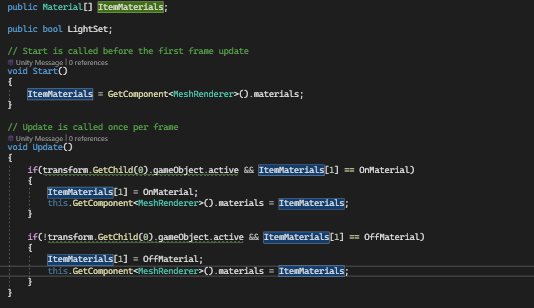 twin bolt
@swift crag
 brave compass
twin bolt
What am i doing wrong? https://i.imgur.com/zAqH3FF.png
brave compass
twin bolt
What am i doing wrong? https://i.imgur.com/zAqH3FF.png
You're checking if the second material is set to the right material, before assigning the same material, which doesn't make sense. That means that it will never assign OnMaterial unless OnMaterial is already assigned.
twin bolt
brave compass
You're checking if the second material is set to the right material, before assi...
OHHHHHHHHHHHHHHHH thanks, thats what i was trying to do instead.
It works now
 delicate portal
Why is this not working? The first picture's log is working, but then the Action does not invoke.

 swift crag
Presumably you aren't subscribing to OnNewOfferCreated.
Perhaps you're doing it too late.
summer stump
delicate portal
Why is this not working? The first picture's log is working, but then the Action...
Show where you subscribe the one on the right
delicate portal
 summer stump
I dunno, try putting that in awake?
Nah wait, do you serialize the reference to emptyPanel? Or capture at runtime?
swift crag
delicate portal
verify that this is actually running, and that it's referencing the correct emptyPanel
delicate portal
emptyPanel is a prefab which is instantiated
swift crag
prove that it's the right panel by including this as the second argument to Debug.Log so that you can click the log entry and see where this is
 swift crag
do this in CreateNewOffer (first image), in Start (last image), and wherefver it is you instantiate the panel
delicate portal
Works exactly right
 lilac crow
Hello good day!
I have a problem with intellisence of vs code can anyone help me?
 polar acorn
lilac crow
Hello good day!
I have a problem with intellisence of vs code can anyone help me...
polar acorn
lilac crow
Hello good day!
I have a problem with intellisence of vs code can anyone help me...
!vscode
eternal falconBOT
Visual Studio Code guide
If your IDE is not underlining errors in red or autocompleting code,
please configure it using the link below:
lilac crow
eternal falcon
I use this but its still not working.
swift crag
follow every step to the letter.
 wind raptor
My GPU usage is consistently at over 90% for an empty scene. I've tried lowering the target frame rate but have noticed no difference. Tips?
swift crag
show me a screenshot of your package manager window so I can see if it's configured correctly
along with your External Tools settings
delicate portal
@swift crag it is about listening to the event I guess. Because in start, I'm listening to a prefab's event
swift crag
wind raptor
My GPU usage is consistently at over 90% for an empty scene. I've tried lowering...
so you put Application.targetFrameRate = 60; somewhere?
swift crag
delicate portal
<@118467312197042182> it is about listening to the event I guess. Because in sta...
ah, well, that'll stop it from working.
listen to the instance's event
 soft lotus
What does the AABB a error mean?
 swift crag
Axis-Aligned Bounding Box.
It means something is positioned at infinity
this can be tricky to nail down.
lilac crow
swift crag
show me a screenshot of your package manager window so I can see if it's configu...
Sure I'll send you as soon my pc come up thank you.
wind raptor
swift crag
so you put `Application.targetFrameRate = 60;` somewhere?
Yes. And then 30. And then 5
swift crag
delicate portal
Make a static instance?
Give whoever's listening to the event a reference to the specific panel instance you need
swift crag
wind raptor
Yes. And then 30. And then 5
And did your framerate actaully go down?
click the "Stats" button in the game view
top right corner
delicate portal
swift crag
Give whoever's listening to the event a reference to the *specific panel instanc...
But I have 4
wind raptor
swift crag
And did your framerate actaully go down?
Yeah it did, looking at the profiler now
swift crag
well, surely you want to listen to a specific panel
not just a completely random one
Or is this code supposed to listen to all of the panels?
wind raptor
swift crag
click the "Stats" button in the game view
Oh, that's useful. Thanks
swift crag
swift crag
Or is this code supposed to listen to all of the panels?
If so, you need to tell it about each panel.
 analog yew
I use this to teleport the Player to a random spawn. I call the coroutine from the start method of my GameManager. However, the player only gets teleported when I start playmode directly from the scene, whenever I enter the scene from my Menu Scene it doesnt teleport the player at all, only the monster. What am I doing wrong?
 swift crag
well, does the GameManager get created in the menu scene?
delicate portal
swift crag
If so, you need to tell it about each panel.
Well what do you mean?
They have the same script
analog yew
swift crag
well, does the GameManager get created in the menu scene?
No, only in the game scene
swift crag
delicate portal
Well what do you mean?
if you want to be able to listen to the events of ten panels, you need to given references to all ten panels
swift crag
delicate portal
perhaps whoever spawns the panels can call a method on whatever this is
distant current
can anyone help me how to get a component of an object and pass it to another object?
i can't assign the object with component directly in the inspector since I will be assigning inside a prefab
polar acorn
distant current
can anyone help me how to get a component of an object and pass it to another ob...
summer stump
delicate portal
They have the same script
Same script, different INSTANCES of that script
Think of the script as the CONCEPT of a banana, and each of the objects as actual bananas
distant current
using UnityEngine;

public class PassCollider : MonoBehaviour
{
    public GameObject objectB;

    [SerializeField] public PolygonCollider2D polygonCollider;

    public static PassCollider Instance { get; private set; }

    private void Awake()
    {
        Instance = this;
        CopyColliderToOtherObject();
    }

    // Call this function when you want to copy the PolygonCollider2D.
    public void CopyColliderToOtherObject()
    {
        // Get the PolygonCollider2D component from Object A
        polygonCollider = GetComponent<PolygonCollider2D>();

        // Pass the PolygonCollider2D points to Object B
        GetBoundObject objectBScript = objectB.GetComponent<GetBoundObject>();
        if (objectBScript != null)
        {
            objectBScript.polygonColliderB = polygonCollider;
        }
    }
}```using UnityEngine;
public class GetBoundObject : MonoBehaviour
{
[SerializeField] public PolygonCollider2D polygonColliderB;
private void Update()
{
CopyPolygonCollider();
}
// Function to copy the PolygonCollider2D points.
public void CopyPolygonCollider()
{
var sd = PassCollider.Instance;
polygonColliderB = sd.polygonCollider;
}
}```I have to wonder what happens if you instantiate something with an event
distant current
is there something wrong my script?
swift crag
Does the event's delegate get copied too?
distant current
i need help
buoyant knot
i don’t understand what you are trying to do
you want gameobject B to get a component on gameobject A?
distant current
yes that's right
buoyant knot
you can call gameObjectA.GetComponent<>()
polar acorn
distant current
```cs
using UnityEngine;
public class PassCollider : MonoBehaviour
{
public...
If objectB solely exists to get a GetBoundObject from, just make the variable of type GetBoundObject then you don't need to use GetComponent or do a null check. Also I don't know why you're bothering to set this when you're overwriting polygonColliderB every frame in the other object
buoyant knot
you can normally write GetComponent because you are in a monobehaviour class, so the program automatically checks GetComponent in your gameobject
GetComponent normally actually calls gameObject.GetComponent
but you can call GetComponent on any specific gameobject from any other gameobject
idk if that is what is tripping you up
swift crag
well, it calls this.GetComponent (which is equivalent to gameObject.GetComponent)
analog yew
analog yew
I use this to teleport the Player to a random spawn. I call the coroutine from t...
I tried putting it in the update method, and while the enemy gets teleported around like crazy the player stays unaffected and can move freely. Any help?
polar acorn
analog yew
I tried putting it in the update method, and while the enemy gets teleported aro...
Does the player have a CharacterController on it
analog yew
Yes
swift crag
analog yew
I use this to teleport the Player to a random spawn. I call the coroutine from t...
Log the object your'e finding here. I wonder if you have multiple things tagged Player somehow.
analog yew
swift crag
Log the object your'e finding here. I wonder if you have multiple things tagged ...
I already did that, there is only 1 Player Object
swift crag
I'm curious about the behavior differing depending on whether you directly started the scene
I guess that could affect update order.
polar acorn
analog yew
Yes
Those things don't like to be teleported. They'll ignore movement that comes from other sources. You can add a Physics.SyncTransforms() after teleporting a CharacterController and it'll override their position with the new one from the transform
swift crag
Which could make the order between this component and the CharacterController unpredictable
That might be it
polar acorn
CharacterControllers keep their own internal state, including position, and modify that internal vector, then set the object's transform's position to that every frame. It only reads from the transform when it starts. SyncTransforms tells everything "Hey, read from those transforms again, something's changed" and it updates its internal position
analog yew
Oh that's it! I think I fixed it by disabling the CC before teleporting and enabling it afterwards again
distant current
using UnityEngine;

public class PassCollider : MonoBehaviour
{
    public GameObject objectB;

    [SerializeField] public PolygonCollider2D polygonCollider;

    public static PassCollider Instance { get; private set; }

    private void Awake()
    {
        Instance = this;

        polygonCollider = GetComponent<PolygonCollider2D>();
    }

}```

```cs
using UnityEngine;

public class GetBoundObject : MonoBehaviour
{
    [SerializeField] public PolygonCollider2D polygonColliderB;

    private void Update()
    {
        CopyPolygonCollider();
    }

    // Function to copy the PolygonCollider2D points.
    public void CopyPolygonCollider()
    {
        var passCollider = PassCollider.Instance;

        polygonColliderB = passCollider.polygonCollider.GetComponent<PolygonCollider2D>();
    }
}```
is this okay now?Use SyncTransforms instead, it's much lighter weight
analog yew
But I still wonder why it worked sometimes before
 tiny terrace
is there an advantage on using the EnhancedTouch class instead of using InputActions for joystick movement?
polar acorn
distant current
```cs
using UnityEngine;
public class PassCollider : MonoBehaviour
{
public...
polygonCollideris already a PolygonCollider2D, you don't need to get the component from itself.- If this is the use case why do you even have a field for
polygonColliderBat all? Just usePassCollider.instance.polygonCollider
swift crag
swift crag
Which could make the order between this component and the `CharacterController` ...
Yeah, that was almost it
If you have a script that calls Move every frame, the teleporation works if and only if you teleport after that script
distant current
using UnityEngine;

public class GetBoundObject : MonoBehaviour
{
    [SerializeField] public PolygonCollider2D polygonColliderB;

    private void Update()
    {
        CopyPolygonCollider();
    }

    // Function to copy the PolygonCollider2D points.
    public void CopyPolygonCollider()
    {
        var passCollider = PassCollider.Instance;
        polygonColliderB = passCollider.polygonCollider;
    }
}```

```cs
using UnityEngine;

public class PassCollider : MonoBehaviour
{
    public GameObject objectB;

    [SerializeField] public PolygonCollider2D polygonCollider;

    public static PassCollider Instance { get; private set; }

    private void Awake()
    {
        Instance = this;
    }

}
is this okay now?
polar acorn
distant current
```cs
using UnityEngine;
public class GetBoundObject : MonoBehaviour
{
[Ser...
polygonColliderB is still pointless
If you're gonna use the polygon from the singleton why bother copying it to a variable every frame
just use the singleton
Also objectB literally does nothing
distant current
I want to assign the PassCollider object into Cameramachine Confiner2D but that's inside a prefab object
polar acorn
distant current
I want to assign the PassCollider object into Cameramachine Confiner2D but that'...
Then do that
buoyant knot
you just want one gameobject to query another gameobject’s components?
distant current
I can't directly assign it since my camera is inside a prefab
polar acorn
distant current
I can't directly assign it since my camera is inside a prefab
So use the singleton you made
that's presumably why you made it a singleton
so you can use it
Just set the variable in the camera to the polygon collider in the singleton
You don't need to copy it to a variable every frame
distant current
how do I do that?
buoyant knot
What I normally do is I have EntityDataHolder : Monobehaviour which stores core information for a given gameobject, including its collider and SOs with specific flags about its behaviour.
Then I have EntityAttachmentHandler : Monobehaviour. This monobehaviour goes onto an object that is attached that keeps as a field a reference to the gameobject to which it is attached.
polar acorn
but do what you actually want with it instead of storing it in a variable
Just delete polygonColliderB and use PassCollider.Instance.polygonCollider when you need to use it
distant current
Im sorry for asking much, Im new to unity so I dont have much knowledge
ohh let me do that
using UnityEngine;

public class PassCollider : MonoBehaviour
{
    public GameObject objectA;

    [SerializeField] public PolygonCollider2D polygonCollider;

    public static PassCollider Instance { get; private set; }

    private void Awake()
    {
        Instance = this;
    }

}```
```cs
using UnityEngine;

public class GetBoundObject : MonoBehaviour
{
    [SerializeField] public PolygonCollider2D polygonColliderB;

    private void Update()
    {
        var passCollider = PassCollider.Instance;
        if (passCollider != null)
        {
            if (polygonColliderB != null)
            {
                Destroy(polygonColliderB);
            }
            polygonColliderB = passCollider.polygonCollider;

        }
    }
}
is this it?
it destroys the component of objectB but it doesn't use objectA's component
polar acorn
distant current
```cs
using UnityEngine;
public class PassCollider : MonoBehaviour
{
public...
What
Literally just get rid of polygonColliderB
that variable does not need to exist
It's completely pointless
gaunt ice
it will destroy the instance polygoncollider....
btw why you do it on update, or i miss some chats
polar acorn
gaunt ice
btw why you do it on update, or i miss some chats
Because they have no idea what any of this code means and they're coding by successive approximation
polar acorn
polygonColliderB does not need to exist
Just remove the variable and all uses and references to it
and use the polygonCollider from PassCollider instead
buoyant knot
and why is it a polygoncollider2D, and not a collider2D?
polar acorn
That's the least of the problems with this setup
buoyant knot
yeah, I think his class should be very simple
distant current
using UnityEngine;

public class PassCollider : MonoBehaviour
{
    public GameObject objectB;

    [SerializeField] public PolygonCollider2D polygonCollider;

    public static PassCollider Instance { get; private set; }

    private void Awake()
    {
        Instance = this;
    }

}```

```cs
using Unity.VisualScripting;
using UnityEngine;

public class GetBoundObject : MonoBehaviour
{

    private void Awake()
    {
        PassCollider.Instance.polygonCollider.GetComponent<PolygonCollider2D>();
    }
}
is this it?
buoyant knot
wait, is the whole goal here to get a collider into a singleton?
polar acorn
distant current
```cs
using UnityEngine;
public class PassCollider : MonoBehaviour
{
public...
Why are you getting a polygon collider from a polygon collider
And why are you getting a polygon collider and doing nothing with it
and why does this class even exist
buoyant knot
all of these questions
distant current
I just want to pass the component of an object to another object
buoyant knot
this whole class would just be holding one collider, right? and give you global access to that one collider?
this is not the way to do this
distant current
will you help me?
polar acorn
GetBoundObject seems to be completely pointless. You have the collider from PassCollider. It's accessible everywhere. That's why you made it a singleton
Just use that
buoyant knot
you are trying to make a singleton, which is a class of which there is only one instance
so you can only hold ONE collider, because there is only ONE instance of the singleton
but why do you even want that one collider to be accessible from everywhere?
distant current
I meant I want to assign that object that has PassCollider script attached on it into an inspector of one object inside a prefab
buoyant knot
i think we need to back up several steps
there are several layers of doing things wrong that we need to unpack here
distant current
Im so creating two object, one from the scene and one inside a prefab
polar acorn
buoyant knot
i think we need to back up several steps
I sent them the link on references, they didn't read it
buoyant knot
bro
polar acorn
buoyant knot
you need to know how references work
that’s like, programming 101
this is like trying to learn how to read without knowing the symbols used in the language
distant current
alright, i will figure it out myself
buoyant knot
you mean you will read the link that tells you how it works?
polar acorn
distant current
alright, i will figure it out myself
I've been spending almost an hour telling you what to do, you're just... not doing it
buoyant knot
one of these days, the next time someone doesn’t read a link that clearly answers their question, I’m just going to start copy pasting the text in that link bit by bit into discord
 stark ruin
Hi guys,i need to build a game on standalone and i need to see the errors in the console log,how can i print them inside the game?
summer stump
stark ruin
Hi guys,i need to build a game on standalone and i need to see the errors in the...
Make a debug UI where you print the text to
You can enable or disable that ui
stark ruin
summer stump
Make a debug UI where you print the text to
You can enable or disable that ui
yes but how can i access to the console messages?
Cause it is what i am trying to do
polar acorn
stark ruin
yes but how can i access to the console messages?
You can subscribe to this method:
https://docs.unity3d.com/ScriptReference/Application-logMessageReceived.html
It's called whenever anything goes to the log. You can add in a function that takes the string and prints it out on the UI somewhere
 stark ruin
Thanks
 final kestrel
https://hatebin.com/pnscqbdeof
The script is to change the glow when pointer enters. It all works fine till I press play and start the game. Then When I come back to main menu. Even though im not hovering over the last pushed button which is play. It still is glowing until I hover over and trigger pointer exit again. Anyone know why?
 polar acorn
final kestrel
https://hatebin.com/pnscqbdeof
The script is to change the glow when pointer ent...
polar acorn
final kestrel
https://hatebin.com/pnscqbdeof
The script is to change the glow when pointer ent...
I'm assuming the object is disabled some way rather than destroyed when you press play
Disabled objects stop all coroutines, so it doesn't finish its fade thing. You should probably have an OnDisable that instantly resets the glow back to normal with no timer
final kestrel
Hmm all right thanks.
Ahh I also need OnEnable too?
Can I just stuff them into my current script? Or could it be cleaner
Ahh I got it work. Thanks digiholic
 rocky canyon
so unreal has this variant manager.. its cool for things like day / night presets.. (as i build materials i like to switch around)
my question is how would be the best way to go about replicating something like this? (not including the drag and drop preset stuff)
i think i would use Scriptable Objects, and a class with a slot.. then i can loop thru the components and set them according to what SO i have assigned..
i could just use an editor function to swap in edit mode..
i'll give that a shot first and see how it works out
 autumn bough
Hello! I was wondering if anyone could point me to good resources about how to use the unity profiler (or some other thing!) in order to identify memory leaks / garbage collection issues and then pinpoint their location in my codebase?
rocky canyon
autumn bough
Hello! I was wondering if anyone could point me to good resources about how to ...
medium always has good articles to get u started.. / familiarize urself with
autumn bough
TYTY!
rocky canyon
- look for spike
- click the spike
- expand the call logs
- find the class / loop taking the most time to run
 merry nebula
Hey everyone, I am expiriencing a pretty weird issue where my collision doesn't work at all, basically I don't know what mistake exactly I'm making, or if I'm even being crazy, but if 2 objects who just have their own colliders get in contact they should collide somehow, even just crashing if one runs into the other, and mine just kinda ignore each other. Now the thing is that they the obstacle can kill my player on touch with it because of the script i used, but they never collide if i take out the script, so it's kinda as if collider is there but he doesn't work at all. I will gladly provide screenshots or videos if needed, if anyone is willing to help 🙂
 languid spire
merry nebula
Hey everyone, I am expiriencing a pretty weird issue where my collision doesn't ...
languid spire
merry nebula
Hey everyone, I am expiriencing a pretty weird issue where my collision doesn't ...
screenshot the inspectors of both objects


 summer stump
merry nebula
First 2 are for player
summer stump
merry nebula
First 2 are for player
You have isTrigger selected
So it won't collide
merry nebula
summer stump
You have isTrigger selected
So it won't collide
The reason is because I thought it might fix it but it didn't
summer stump
merry nebula
The reason is because I thought it might fix it but it didn't
Triggers simply don't collide. But you're saying it was an issue with it NOT selected?
merry nebula
Yes
summer stump
Both must have it deselected.
merry nebula
But then how will it react to my OnEnterTrigger2D() btw?
summer stump
Ok, so, what layer is the player on, and have you touched the collision matrix?
 keen dew
Does any of those have a rigidbody?
summer stump
merry nebula
But then how will it react to my OnEnterTrigger2D() btw?
It wont. You can use OnCollisionEnter. Or do a separate trigger in ADDITION to a non-trigger collider
summer stump
keen dew
Does any of those have a rigidbody?
Yes, player has dynamic
languid spire
OnEnterTrigger2D ??
summer stump
Oh yeah, that isn't what it's called btw. Just the enter and trigger part reversed
merry nebula
languid spire
OnEnterTrigger2D ??
I apologize OnTriggerEnter2D*
merry nebula
summer stump
It wont. You can use OnCollisionEnter. Or do a separate trigger in ADDITION to a...
Ok I'll be frank with you, I did do another project in the exact same way yesterday but I had to redo it because of some setup issues and it did work back then with this same code and trigger being enabled so now I was completely shocked
To see it
And I am also kinda shocked to realise am supposed to just not do it? Even tho it worked yesterday?
Idk I feel like there is a bigger issue to it, or just something i am missing out
summer stump
Something else caused it to collide. Triggers do not
You had a different setup if it worked
violet topaz
public class Shoot : MonoBehaviour
{
    public Transform firePoint;
    public GameObject bulletPrefab;

    public float bulletForce = 20f;
    public float timeBetweenShots = 1f;
    // Add Max ammo, reload, mag size

    // Update is called once per frame
    void Update()
    {
        if (Input.GetButton("Fire1"))
        {
            Shooting();
        }
    }

    public void Shooting()
    {
        GameObject bullet = Instantiate(bulletPrefab, firePoint.position, firePoint.rotation);
        Rigidbody2D rb = bullet.GetComponent<Rigidbody2D>();
        rb.AddForce(firePoint.up * bulletForce * timeBetweenShots, ForceMode2D.Impulse);

    }
}``` can someone help me make multiple bullets spawn in each otherhttps://docs.unity3d.com/Manual/CollidersOverview.html
"A collider configured as a Trigger (using the Is Trigger property) does not behave as a solid object and will simply allow other colliders to pass through. "
Like I said though, just use two colliders. One non-trigger to collide.
One a trigger that is slightly bigger if you want to get that OnTriggerEnter
Or just use OnCollisionEnter
merry nebula
summer stump
Like I said though, just use two colliders. One non-trigger to collide.
One a tr...
Can you explain "one a trigger that is slightly bigger"
summer stump
merry nebula
Can you explain "one a trigger that is slightly bigger"
A second collider component attached to the object that has a larger size (if circle, use radius, for example)
That is common for doing a "sight range"
summer stump
violet topaz
```cs
public class Shoot : MonoBehaviour
{
public Transform firePoint;
p...
You could do a coroutine and wait between each shot.
Or a timer in update
I assume you meant "can someone help me make multiple bullets NOT spawn in each other"? Because they seem to be spawning in each other already
violet topaz
oops my bad
 trim cedar
if anyone has knowledge about using color in scrpits, help would be apprichiated. heres my code:
foreach (SpriteRenderer pumpkin in pumpkinSprites)
  {
    pumpkin.color = Color.HSVToRGB(0f, 0f, 10f);
  }
and here is what it actually does (the V value previously being 100f):

No matter what value i enter for V in the script, it always just makes it 75 and i have no idea why
rich adder
trim cedar
if anyone has knowledge about using color in scrpits, help would be apprichiated...
hsv values only go from 0-1
trim cedar
ah, that makes sense, thank you
 edgy prism
This is probably a stupid question so apologies in advance but within my scripts I have a Dialog Manager and an NPC Controller doing what they say on the tin. Now my Dialog Manager is just a singleton with different methods to call different types of dialog however I want to add Character Sprites and names to my dialog window and Im not sure whether to do this in my NPC Controller (the option im leaning towards) and then doing so independent of the Dialog System or somehow try and get a reference in the Dialog Manager to what called the dialog and if its an NPC to set an image sprite and a name sprite
rich adder
edgy prism
This is probably a stupid question so apologies in advance but within my scripts...
dont you have a custom object for this?
edgy prism
rich adder
dont you have a custom object for this?
Unsure what you mean by custom object
rich adder
edgy prism
Unsure what you mean by custom object
object , like a class
wintry quarry
edgy prism
This is probably a stupid question so apologies in advance but within my scripts...
I'd probably just allow an optional Character speaker parameter in the dialog functions in the dialog manager
edgy prism
I do not, so far Ive just been trying to figure out the best way to do it
wintry quarry
the type of which is your ScriptableObject for a character or whatever
the character object should have:
- name
- speech color?
- maybe a font?
- portrait sprite
- whatever else you want
rich adder
yea SO for each character would be perfect
edgy prism
wintry quarry
the type of which is your ScriptableObject for a character or whatever
Is it a problem if my characters are not based on scriptable objects
wintry quarry
You will want to have some kind of class that describes a character
it doesn't have to be a ScriptableObject
though they are pretty convenient for this.
edgy prism
wintry quarry
though they are pretty convenient for this.
I can definitely see how it could be
See this is why I thought it a stupid question because I have a character class that right now just handles movement and things like a LookTowards function, My NPC Controller that I mentioned opens dialog on Interact and I just dont really know where best to put all this stuff
wintry quarry
edgy prism
See this is why I thought it a stupid question because I have a character class ...
that character class sounds like something completely different
I'm thinking of something more like an object that holds all of the necessary info to describe one of your story characters.
I would not combine those
If you don't have such a thing already, I recommend creating it.
 uncut dune
how do I get an int of a float without rouding the values
just using the first digits before decimal
edgy prism
wintry quarry
If you don't have such a thing already, I recommend creating it.
Yeah I would probably say I dont have one right now im not really sure what I would store inside it other than a name and sprite
wintry quarry
uncut dune
how do I get an int of a float without rouding the values
just cast it
int myInt = (int)myFloat;```so does that not round it
like
15.6 = 15
buoyant knot
edgy prism
Yeah I would probably say I dont have one right now im not really sure what I wo...
it is okay to add more to it later. Characters will need more info than just a name and sprite. You’ll probably add flags to them later, like IsPlayableCharacter, or IsNPC or whatever
wintry quarry
uncut dune
ok
When you convert a double or float value to an integral type, this value is rounded towards zero to the nearest integral value. If the resulting integral value is outside the range of the destination type, the result depends on the overflow-checking context. In a checked context, an OverflowException is thrown, while in an unchecked context, the result is an unspecified value of the destination type.
Learn about the implicit and explicit conversions between the built-in numeric types in C#
edgy prism
buoyant knot
it is okay to add more to it later. Characters will need more info than just a n...
I already do this via seperate controller calsses i.e. I have PlayerController and NPCController Im thinking based on what Praetor said im best off doing this in my Character class.
Ive just managed to confuse myself with the scope of everything, I never thought id have so much going on it would be hard to keep track of 😆
Would it be a better idea to create SO's and reference them in my class over just creating fields in my class and setting them in the inspector?
 muted wadi
im trying to implement a 3rd person camera into my game without the use of cinemachine and have it almost done, I just can't figure out why the camera isn't clamping.
{
    float horizontal = Input.GetAxis("Mouse X") * rotateSpeed;
    float vertical = Input.GetAxis("Mouse Y") * rotateSpeed;
    horizontal = Mathf.Clamp(horizontal, -90, 90);
    lookAt.transform.Rotate(vertical, horizontal, 0);

    float desiredAngleY = lookAt.transform.eulerAngles.y;
    float desiredAngleX = lookAt.transform.eulerAngles.x;
    Quaternion rotation = Quaternion.Euler(-desiredAngleX, desiredAngleY, 0);
    transform.position = lookAt.transform.position - (rotation * offset);

    transform.LookAt(lookAt.transform);
}```
 dry tendon
heey, does someone know why the print works but the var doesnt get false? ```
using System.Collections;
using System.Collections.Generic;
using UnityEngine;
public class PipesCollision : MonoBehaviour
{
public bool hasCollisioned;
private void Start()
{
    hasCollisioned = false;
}

//Check collision with player
private void OnTriggerEnter2D(Collider2D collision)
{
    if (collision.tag == "Player")
    {
        hasCollisioned = true;
        print("Te has chocado");
    }
}
}```
rich adder
edgy prism
Would it be a better idea to create SO's and reference them in my class over jus...
each character can have a field just for dialogue object / info SO
ideally you don't want this mixed with your Locomotion script etc.
cosmic dagger
dry tendon
heey, does someone know why the print works but the var doesnt get false? ```
us...
!CODE
eternal falconBOT
Posting code
📃 Large Code Blocks
Large code blocks should be posted as links to services like:
https://gdl.space/, https://paste.ofcode.org/, https://hatebin.com/
https://paste.myst.rs/, https://hastebin.com/
📃 Inline Code
Surround code with three backquotes. Not quotation marks.
To get C# formatting the first line should only contain cs or csharp.
Add a comment with a line number if there is an error message.
```cs
// Your code here
```
Do not share screenshots of code unless requested.
rich adder
muted wadi
im trying to implement a 3rd person camera into my game without the use of cinem...
your clamping input instead of angles ?
bit strange
cosmic dagger
dry tendon
heey, does someone know why the print works but the var doesnt get false? ```
us...
you set to false at the start of the GameObject and set it to true in the trigger (which you said runs) . . .
muted wadi
rich adder
your clamping input instead of angles ?
would that not work?
edgy prism
rich adder
ideally you don't want this mixed with your Locomotion script etc.
Yeah I saw Praetor said the same now im thinking that that I will just put it in my NPC Controller, I have the Player identifying information in my Player Controller so I feel like that makes sense
muted wadi
also i did try clamping the desiredAngleX but that didn't work
rich adder
edgy prism
Yeah I saw Praetor said the same now im thinking that that I will just put it in...
what if its Non-NPC player that needs dialogue ?
edgy prism
rich adder
what if its Non-NPC player that needs dialogue ?
Im not sure what you mean by Non-NPC player
dry tendon
cosmic dagger
you set to false at the start of the GameObject and set it to true in the trigge...
what?
 cosmic dagger
dry tendon
what?
cosmic dagger
dry tendon
what?
you said the variable doesn't get false but you set it to true . . .
dry tendon
sorry, i meant why it doesnt get true on the trigger
cosmic dagger
after the console prints, show is the variable from the inspector . . .
rich adder
edgy prism
Im not sure what you mean by Non-NPC player
ohh thought you said only NPC Controller have the identifying info for dialogue
it should tbh be something different like public class CharacterInfo or something
summer stump
dry tendon
sorry, i meant why it doesnt get true on the trigger
Do you set it false anywhere else? Could some code be immediately setting it back?
(In another script I mean)
edgy prism
rich adder
ohh thought you said only `NPC Controller` have the identifying info for dialogu...
Thats my bad Im just thinking in terms of NPC's right now and the info like names in the other scripts are not currently used for what im trying to do
dry tendon
summer stump
Do you set it false anywhere else? Could some code be immediately setting it bac...
could we talk on dm? or i tell it you right here
polar acorn
dry tendon
If that print happens then hasCollisioned is true
How do you know it's not
summer stump
dry tendon
could we talk on dm? or i tell it you right here
No sorry. I just pop in and out. If the conversation is here, others will be able to help if I leave or if they know more
edgy prism
rich adder
it should tbh be something different like `public class CharacterInfo` or someth...
So a new class rather than just fields and properties to expose them? How come?
rich adder
edgy prism
So a new class rather than just fields and properties to expose them? How come?
to encapusulate the info
and keep it separate from other logic/code
you don't want a monolith class full of fields
eg mixing movement / stats with other datainfo meant mainly for visuals
dry tendon
polar acorn
If that print happens then `hasCollisioned` _is_ true
cause the var is public and it doesnt get checked the box in the inspector
polar acorn
dry tendon
cause the var is public and it doesnt get checked the box in the inspector
Then you are looking at a different PipesCollision than the one that logged
edgy prism
rich adder
to encapusulate the info
Ah ok got you I will do that then, they'll be in the same prefab anyway so easy referencing, Thankyou for your help!
polar acorn
Or something else is changing the variable after it's set to true
dry tendon
polar acorn
Or something else is changing the variable after it's set to true
let me check it in one moment
dry tendon
polar acorn
Or something else is changing the variable after it's set to true
oh, i know what happens, but i dont know how to fixe it...
it gets true on the object

not in the prefab


 summer stump
dry tendon
it gets true on the object
summer stump
dry tendon
it gets true on the object
Why would you want it to change in the prefab?
Prefabs are files. They are not in the game, they are assets
polar acorn
the prefab has not collided with anything
dry tendon
cause the game is instantiating that prefab... so i need to change that in all instantiated objects
how could i do that?
polar acorn
dry tendon
cause the game is instantiating that prefab... so i need to change that in all i...
Once an object is cloned it has nothing to do with the prefab it was cloned from
it has no connection to it
If you don't want each individual instance of this script to have its own copy of the variable it probably shouldn't be on this class
dry tendon
oh, thanks... ill look for another way to do what i want
muted wadi
could someone explain to me what variable I'm supposed to be clamping on a 3rd person camera? Someone said I shouldn't be clamping the input values and that makes sense. But I'm still not sure which value exactly I should be clamping.
summer stump
grim tulip
Time to learn to code
This is a channel for getting help with code
Maybe try all that here:
https://discord.com/channels/489222168727519232/497875120556081172
And then after that, there is no off-topic channel on this discord
summer stump
muted wadi
could someone explain to me what variable I'm supposed to be clamping on a 3rd p...
Probably read the euler angles and set them to a float. Clamp that float and use it to write back to euler
I'm bad at rotations though, so maybe not.
rich adder
muted wadi
could someone explain to me what variable I'm supposed to be clamping on a 3rd p...
are you doing rotation? you would clamp the rotation ideally
muted wadi
rich adder
are you doing rotation? you would clamp the rotation ideally
this is what im working with right now, and I've tried clamping the rotation, but it doesn't work and i dont understand why
    inputX = Input.GetAxis("Mouse X") * rotateSpeed;
    inputY = Input.GetAxis("Mouse Y") * rotateSpeed;
    lookAt.transform.Rotate(inputY, inputX, 0);

    desiredAngleY = lookAt.transform.eulerAngles.y;
    desiredAngleX = lookAt.transform.eulerAngles.x;
    rotation = Quaternion.Euler(-desiredAngleX, desiredAngleY, 0);
    transform.position = lookAt.transform.position - (rotation * offset);

    transform.LookAt(lookAt.transform);
}```in my code desiredAngleX and Y are reading the euler angles of the lookAt transform
summer stump
You're calling LookAt after all that rotation setting...
Oh wait. You're setting the rotation OF lookAt... ok
rich adder
rewriting camera script when you have cinemachine, is like re-inventing the wheel
 slender nymph
muted wadi
this is what im working with right now, and I've tried clamping the rotation, bu...
slender nymph
muted wadi
this is what im working with right now, and I've tried clamping the rotation, bu...
- obligatory "just use cinemachine"
- there's no clamping happening here
- don't operate on the eulerAngles from the rotation. track your own float values that you add/subtract to after getting input
muted wadi
rich adder
rewriting camera script when you have cinemachine, is like re-inventing the whee...
for the sake of this project I'm not using cinemachine
muted wadi
slender nymph
1. obligatory "just use cinemachine"
2. there's no clamping happening here
3. do...
could you please explain that last part in a bit more detail
slender nymph
search "clamp camera" in this discord for many examples
 late burrow
if i run string.replace but string is not found does it still gets the string that would be used as replacement?
eternal needle
late burrow
if i run string.replace but string is not found does it still gets the string th...
https://learn.microsoft.com/en-us/dotnet/api/system.string.replace?view=net-7.0
A string that is equivalent to this instance except that all instances of oldChar are replaced with newChar. If oldChar is not found in the current instance, the method returns the current instance unchanged.
late burrow
ok more exactly
will script error out if string used as replacement will be from invalid index of array
if string to replace was not found at all
cosmic dagger
late burrow
if i run string.replace but string is not found does it still gets the string th...
if nothing is found, i don't see how it would get the new string to use since there is nothing to use it with . . .
late burrow
yeah i dont know if second part is executed or no
cosmic dagger
late burrow
if string to replace was not found at all
if oldChar was not found, it just returns the original string . . .
late burrow
i know it returns original string
cosmic dagger
there's no need to check newChar if the first part is false . . .
late burrow
but does script errors out if it has errorprone code in newchar
cosmic dagger
that's just my guess, you'd have to test it . . .
eternal needle
late burrow
but does script errors out if it has errorprone code in newchar
this question alone doesnt really make sense, "errorprone code in newchar". its a string
or a char
late burrow
array[-1]
eternal needle
yes that'll be an error..
languid spire
the string replace will not throw an error because Array will beat it to it
 gaunt swan
If you want the last element you need array[^1]
late burrow
gaunt swan
If you want the last element you need ``array[^1]``
time to replace 20 lines of my code with that
dont know what is even this operator but very useful
gaunt swan
I assume you are a python programmer 😅
lilac crow
swift crag
show me a screenshot of your package manager window so I can see if it's configu...
im so so so sorry somthing came up and i had to go , here are the screenshots.

 languid spire
which can still throw an error
late burrow
yes that was the point of question
gaunt swan
Yep, but -1 will never be valid
late burrow
array can be empty but i will be replacing using array
late burrow
but if found then it always be valid
late burrow
slender nymph
<https://learn.microsoft.com/en-us/dotnet/csharp/language-reference/operators/me...
thats fancy
usually you start array from 0
but when ^ then from 1
gaunt swan
It takes length-value
length is outside of the array
The compiler uses System.Index which is passed to the array
var lastItem = array[^1]; // array[new Index(1, fromEnd: true)]
slender nymph
although if you're still making stuff for vr chat you can't use that since vr chat uses unity 2019 which does not even support c# 8 where that operator was introduced
i'm pretty sure you have to be targeting .net standard 2.1 to use it at all. i could be wrong about this and it may work on 2021+ when targeting .net framework but it does not work on 2020 and below
swift crag
lilac crow
im so so so sorry somthing came up and i had to go , here are the screenshots.
This is not set up correctly.
The instructions tell you to update the Visual Studio Editor package to 2.0.20 or later
you will need to remove the "Engineering" feature to unlock the package, then re-install it
 lilac crow
swift crag
The instructions tell you to update the `Visual Studio Editor` package to 2.0.20...
lilac crow
swift crag
The instructions tell you to update the `Visual Studio Editor` package to 2.0.20...
oh okay Thank you sooooooo mush! yet again sorry for sending it late! 🙏 🌹
you saved me!!!!!
i was going crazy.
 fickle knoll
i need some help. im making my first game and i have made a platform with a car on it and some obstacles. But my car just drives thought the stuff also all the things just fall down, ive tried ading a ridgidbody but it dosent work
gaunt swan
fickle knoll
i need some help. im making my first game and i have made a platform with a car ...
It sounds like your objects are missing colliders?
gaunt swan
Add either a collider2d or collider3d, depending on what you are doing
fickle knoll
okay
gaunt swan
e.g. a BoxCollider
polar acorn
fickle knoll
how to add
The same way you've added all the other components you're using
fickle knoll
now things arnt falling down but i cant drive up things like rams i just drive through them
hello
polar acorn
How are you moving your player
slender nymph
typically when people ask how you are moving an object, they are not referring to the buttons you press but rather how you actually move it in your code
fickle knoll
 slender nymph
!code 👇
eternal falconBOT
Posting code
📃 Large Code Blocks
Large code blocks should be posted as links to services like:
https://gdl.space/, https://paste.ofcode.org/, https://hatebin.com/
https://paste.myst.rs/, https://hastebin.com/
📃 Inline Code
Surround code with three backquotes. Not quotation marks.
To get C# formatting the first line should only contain cs or csharp.
Add a comment with a line number if there is an error message.
```cs
// Your code here
```
Do not share screenshots of code unless requested.
slender nymph
also your !IDE is not configured
eternal falconBOT
💡 IDE Configuration
If your IDE is not autocompleting code
or underlining errors, please configure it:
• Visual Studio (Installed via Unity Hub)
• Visual Studio (Installed manually)
• VS Code*
• JetBrains Rider
• Other/None
*VS Code's debugger plugin is unsupported.
We recommend using VS or Rider instead.
slender nymph
a configured IDE is required to get help here
fickle knoll
can you help me configure it
slender nymph
follow the instructions
rich adder
fickle knoll
i've tried that
tried what exactly?
fickle knoll
to configure my ide
rich adder
how did you do it?
slender nymph
fickle knoll
dont work
if the instructions don't work, then you've either skipped something or followed the wrong instructions. because spoilers: ||they do work||
fickle knoll
dude ive tried like 5 times
 pearl coyote
But what exactly
fickle knoll
the guide
rich adder
which guide / which code editor
say useful answers, we're not here to play 20 question if you want help
fickle knoll
by code editor you talking about visuial studio or vs code?
pearl coyote
You are using Visual Studio