#💻┃code-beginner
1 messages · Page 19 of 1
 swift crag
 tight zenith
Thanks!
 polar acorn
One of them is world space, one of them is relative to the parent
 acoustic arch
oh
how would you have a eulerangle in the world space?
oh
is it like
the x,y,z of world space
instead of your player?
polar acorn
acoustic arch
how would you have a eulerangle in the world space?
The same way you have one relative to the parent, except relative to world origin
acoustic arch
so if my character moves forward on the x axis, and is always facing the x axis, yet it's not always on the world spaces x axis
idk if that makes sense
polar acorn
Position has nothing to do with orientation
If your character moves forward on the x axis that has nothing to do with euler angles
acoustic arch
i mean where it's facing
acoustic arch
polar acorn
The same way you have one relative to the parent, except relative to world origi...
can you give me an example
 ashen ferry
create 2 empty gameobjects rotate one and make second a child of it look what changes
polar acorn
acoustic arch
can you give me an example
If you have an object with euler angles of 0, 90, 0 it's looking to the right. That object then has a child object with a local euler angle of 0,0,0. It's still looking to the right, because its parent object is
acoustic arch
ashen ferry
create 2 empty gameobjects rotate one and make second a child of it look what ch...
and local is the child object rotating based on the parent
acoustic arch
ohhhhhhhh
ok
i got it better now
parent object with euler of 0, -57, 0 then the child with local euler 0,0,0 is 0, -57, 0
suppose the parent was 0,20,0 and the child's local euler was 0,10,0
polar acorn
world space would be 0, 30, 0
 gleaming steppe
Hi, do you think there's a way to affect meshes with code, like extruding at random positions?
maybe with probuilder ?
 timber tide
usually you'd use something like a vertex shader for that, but I guess you can edit the vertex data directly
gleaming steppe
with HLSL ?
timber tide
Ye, unless you can make them with shaderlab yet]
gleaming steppe
ok will dig that, thx
 zinc grove
Hey guys im playing around with coding a turret with a specific radius and I have the radius working how I want but I want to be able to show the radius in game. I use this for when the game isnt running and its correct
private void OnDrawGizmosSelected()
    {
        Handles.color = Color.white;
        Handles.DrawWireDisc(transform.position, transform.forward, baseTurret.targetingRange);
    }
I know this cant be used when the game is running and ive been trying to scale a circle sprite to the radius and a few other things but I just cant seem to get the correct size. This is probably a math thing I dont understand unless there is something similar to how the DrawWireDisc works that I dont know about.
 silent haven
how do i change the material
 timber tide
drag it on there
 brisk thicket
zinc grove
Hey guys im playing around with coding a turret with a specific radius and I hav...
brisk thicket
zinc grove
Hey guys im playing around with coding a turret with a specific radius and I hav...
I would do the circle sprite way on this
seems the most efficient
timber tide
zinc grove
Hey guys im playing around with coding a turret with a specific radius and I hav...
Haven't touched gizmos for a while, but isnt handles the editor debug tool?
brisk thicket
zinc grove
Hey guys im playing around with coding a turret with a specific radius and I hav...
Make the sprite 1 unit wide, so when u import it and u set the pixels per unit it has to be same width as that ,
and then if u set the scale to the radius of the turret it should be the same
 wary sable
hey, I'm looking for a way to write this method to avoid having to make a bunch of methods that are basically the same...
        foreach(Helmet h in inventory) {
            //show the item in inventory
            //There are no class specific fields or methods being called in this method
        }
    }```
Here inventory is a list<Item>; Item has children, like armor and weapon. Those children have children such as helmet, chestplate etc. Is there a good way to make this statement more dynamic so I don't have to make one for each child of Item?few draw methods in there
timber tide
wary sable
hey, I'm looking for a way to write this method to avoid having to make a bunch ...
Just make another outter loop, no?
wary sable
timber tide
Just make another outter loop, no?
sorry not following?
timber tide
You're trying to loop over a list, and for each item find a helmet?
wary sable
timber tide
You're trying to loop over a list, and for each item find a helmet?
sorry I completly forgot to add the part where I wanted to run this to find any specific child of Item. The method I show works, but only for the Helmet class. In the end I want to avoid having to make one of these for each armor piece and any other possible filters added in the future.
brisk thicket
wary sable
sorry I completly forgot to add the part where I wanted to run this to find any ...
can you give a working example of what it does so
is the loop looking for an item ?
timber tide
Like, at runtime you want a search box to filter out item names?
wary sable
basically condense:
  foreach(Helmet h in inventory){}
}```
```private void DispArms(){
  foreach(Gauntlets g in inventory){}
}```
```private void DispChest(){
  foreach(ChestPlate c in inventory){}
}```
into one methodProbably want to look into regular expressions
and some parsing methods, but c# has a lot of libraries for that stuff
brisk thicket
wary sable
basically condense:
```private void DispHelm(){
foreach(Helmet h in inventory)...
do you want it to return an item ?
or check whether you have something in ur inventory?
wary sable
no, just be able to tell it what kind of item it needs to show, then it will instantiate slots for all of the items it finds of that type
I dont need to know if its there I just need to grab all instances of them
ashen ferry
so those classes need to share something a parent or interface idk
wary sable
timber tide
Probably want to look into regular expressions
using reg expressions, would I be able to define a type for it too look for?
wary sable
ashen ferry
so those classes need to share something a parent or interface idk
they do
they are all children of the Item class, which is what the main list holds. All attributes that are needed to instantiate a new slot prefab are part of Item, so I dont need to make calls to any of the child's properties, I just need to grab all children of a certain type
ashen ferry
so u can have item type enum in Item class and loop through inventory grab all items with certain type and do stuff with them or I misunderstood
brisk thicket
he cant because the inventory has subcategories he would need to loop through
wary sable
if you click on any of the red slots it will bring up all items of that type in the green area
 timber tide
Honestly, if it's not much you're probably fine with what you got.
foreaching over a list is pretty quick since if it's empty it's just a 0(1) operation
wary sable
timber tide
Honestly, if it's not much you're probably fine with what you got.
yeah, it just hurts to write repeated code, it just always feels like there is a better way to do things lol
wary sable
timber tide
foreaching over a list is pretty quick since if it's empty it's just a 0(1) oper...
the list would be the entire inventory so its still O(n), but I dont think there will be that many items in this game so time complexity isnt a huge concern
timber tide
Oh so you're trying to scan an inventory for each type of item eh
brisk thicket
List<Item> screenShowList //Green part
void disp(searchTerm){
  foreach(Item i in inventory){
      List<Item> tempList = i.returnAsList;

        if(i is searchTerm){
            screenShowList = i.returnAsList
        }

   }
}
something of this kind would work
syntax might be wrong
but this is how i would do it
timber tide
Yeah, what you can do is make a flag enum
send that into your foreach loop of the inventory
timber tide
if item enum type is any bit of this bitwise enum then you add it to a list
brisk thicket
brisk thicket
```cs
List<Item> screenShowList //Green part
void disp(searchTerm){
foreach(It...
this would work, you would just need to make a method in your inventory class that returns a list per type
wary sable
brisk thicket
```cs
List<Item> screenShowList //Green part
void disp(searchTerm){
foreach(It...
correct me if Im wrong, but I believe searching for types like this wont work
timber tide

C# and Unity development
What are enum flags and how they can be used in Unity to simplify our code
brisk thicket
wary sable
correct me if Im wrong, but I believe searching for types like this wont work
i have no idea
this isnt correct code
timber tide
good utility if you havent used bit enums before
wary sable
timber tide
good utility if you havent used bit enums before
Ill look into it tyty
brisk thicket
enums like , armour, gauntlet, weapon
wary sable
would you suggest against using linq?
timber tide
way better than normal enums since you can check multiple types with one operation
and I don't really use linq but it's pretty powerful
wary sable
I just remember seeing someone say that its slow, especially for games but idk
ashen ferry
if u plan to have item to be helmet and chestplate at the same time that is 
timber tide
They don't need to be a combination, each bit would be what's required to be added to the list
ashen ferry
how would that work Ive used flagged enums like twice in my life
timber tide
im pretty sure I use it a lot in one of my projects like that
cause I had a weapon system that I needed to check weapon requirements for mods
hummm
Yeah, you make a bit field with the bits you want flipped, you bitwise AND with the item's field and if the value is > 0 then you add it to the list
ashen ferry
so https://hatebin.com/myyopdlpru what do I change here so DisplayRelatedItems could get two types of items at once making use of flags
timber tide

Determines whether one or more bit fields are set in the current instance.
there's this too
when you don't want to use bitoperations lol
ashen ferry
is ur profile pic from transformice btw?
timber tide
timber tide
https://learn.microsoft.com/en-us/dotnet/api/system.enum.hasflag?view=net-7.0
So this method will return back true if one or more enum flags are set, so for an example of the inventory scan, even if more than 1 item is flagged by different types, it should still be true and be added to the list Returns true if all flags are set it looks like
ashen ferry
I see
zinc grove
brisk thicket
Make the sprite 1 unit wide, so when u import it and u set the pixels per unit ...
Turns out I am dumb and I was only calcing half the size of the radius so I just had to multiply by 2 lol. Thanks for the help
ashen ferry
whats up with microsoft using food examples tho its always bread eggs or dessert
timber tide
https://i.imgur.com/n4dtGzU.png
Right so, 1010 would be the bitmask that you're looking for. 1101 would be the item enum type. Since the AND flipped and gave us back something greater than 0, we add it to the list.
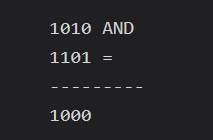
ideally, your item type should only have a single bit set
timber tide
timber tide
https://learn.microsoft.com/en-us/dotnet/api/system.enum.hasflag?view=net-7.0
I think I was wrong about has flags, it looks for all bits to be set
 livid jacinth
I haven't tested out anything yet, but I want to be prepared for it in case in happens: I have a boxcollider2d as a trigger in front of my player to check if there's something that is interactable. If I'm checking what the other tag is, what would happen if I ran into an instance where I have 2 different tags like NPC and Chest. When other.tag is called is it going to get the first one that entered or will the second one override it, or something else entirely?
timber tide
It will run each other's code I would assume
what order? Depends what one you collide with first.
livid jacinth
lol i left out an important part, I just have it there to change a bool whether there's something interactable in there and nothing else. but if there were 2 different ones in there and then I hit the button to interact, is it going to do both at one time?
timber tide
Yeah, probably if you're like standing near them using TriggerOnStay (I think that's the name?) and then you press a button, the next update will trigger one after another.
I'm not too sure if the trigger functions do any proximity checks on distance, but if needed you can sphere cast and do that yourself, thus making your own trigger detecting methods
So if you want something to trigger first based on distance when you're in proximity of both triggers
livid jacinth
ideally I'm only looking for one of them to happen
Hm, I guess I can have a variable to have the first one saved to, like a list that's only 1 item long and then have it get removed on the ontriggerexit
timber tide
In that case you'd want to set some type of member bool on your character probably
Yeah, there's a lot of extra logic here gotta think of
ashen ferry
upon pressing interact button box cast ahead of player and whatever is hit first with interactable script do stuff with it should be good
livid jacinth
alright, thanks for the help guys!
timber tide
That sounds like a good idea, if by chance it hit both, then do a distance check perhaps
ashen ferry
BoxCastAll I assume naturally returns array of who was hit first and last so u could just iterate and stop at first occurence of interactable element
idk tho
 rich adder
show setup for player/camera
 violet topaz
Ok I’m on my way home 15 minutes
violet topaz
@rich adder


 crisp token
If I have a variable that is being assigned a new struct every x frames, is that also changing the variable
variable's reference?
rich adder
violet topaz
<@968604165150507078>
do you spawn the player here? you have to bring all its components with you
violet topaz
i spawn it in the player select and put it in a DDOL
rich adder
violet topaz
i spawn it in the player select and put it in a DDOL
you have to bring all the dependencies it has with you then
violet topaz
What would be the easiest way
rich adder
violet topaz
What would be the easiest way
anything you need to carry over to next scene put them in a common parent and on that parent do DDOL
violet topaz
How would i carry over the camera
violet topaz
?
violet topaz
rich adder
anything you need to carry over to next scene put them in a common parent and on...
Why is the player turned off


 wintry quarry
crisp token
If I have a variable that is being assigned a new struct every x frames, is that...
wintry quarry
crisp token
If I have a variable that is being assigned a new struct every x frames, is that...
Structs are not reference types
But it's pretty unclear what you're asking
So you'd have to give a concrete example
rich adder
 queen adder
https://gdl.space/ranoqedezo.cs is doing this forbidden?
queen adder
https://gdl.space/ranoqedezo.cs is doing this forbidden?
not sure what ur asking, did you close the IF ?
crisp token
I have this code that reassigns a Struct value to latestInput every frame via assembleInput(). Does this mean that, every frame, latestInput is referencing a new object? I'm guessing no since you said that structs are not reference types, so does that mean they are value types?
 crisp token
wintry quarry
Structs are not reference types
crisp token
wintry quarry
Structs are not reference types
^
queen adder
rich adder
not sure what ur asking, did you close the IF ?
i only use #if Unity_Editor and havent really touched it any other way
rich adder
queen adder
i only use #if Unity_Editor and havent really touched it any other way
you have to close the if statement
queen adder
rich adder
you have to close the if statement
it's closed at line 77
if that's what you meant by close
rich adder
queen adder
if that's what you meant by close
yeah you did #endif ?
not sure what that error complaining about tbh
if you want to exclude the whole file can't you just put it in the Editor folder?
queen adder
for some reason, my editor folder cant communicate with other scripts outside it
ig cause of assemblies
rich adder
queen adder
i only use #if Unity_Editor and havent really touched it any other way
is the script on a gameobject?
queen adder
yea
rich adder
tht might be the issue
I think
its probably trying to serialize the script for build but then it has exluded if editor
unity prob dont like that
 teal viper
crisp token
I have this code that reassigns a Struct value to latestInput every frame via as...
teal viper
crisp token
I have this code that reassigns a Struct value to latestInput every frame via as...
Still not clear. We don't see any types here, nor what happens in the assembleInput method.
But to clarify about structs, yes they are value types, so when you assign one it is being copied to a new place in memory and this new assignment doesn't affect the old value in any way.
queen adder
maybe may be
crisp token
teal viper
Still not clear. We don't see any types here, nor what happens in the `assembleI...
okay, so lets say I had a struct that I passed as a parameter to a coroutine. That struct would be saved as a local variable in that coroutine, and any updates to the original struct variable would not affect the local variable because structs are a value type, correct?
queen adder
anyway, this doesnt usually happen in normal build, ig it only exist in the devt build
wintry quarry
crisp token
I have this code that reassigns a Struct value to latestInput every frame via as...
No, it's not referencing anything at all. It contains the actual struct data
Because it's a value type, not a reference type
crisp token
ok, ty!
wintry quarry
crisp token
okay, so lets say I had a struct that I passed as a parameter to a coroutine. Th...
Correct
swift crag
crisp token
okay, so lets say I had a struct that I passed as a parameter to a coroutine. Th...
Note that no matter what, you'd always have a local variable
Even if it was a reference type, doing theParam = new Whatever(); would just overwrite your local variable
(but, conversly, doing theParam.foo = 1; would, indeed, modify the object that both the coroutine and the coroutine's caller have references to)
crisp token
swift crag
(but, conversly, doing `theParam.foo = 1;` would, indeed, modify the object that...
what is the coroutine's caller ?
swift crag
whoever called the method
void Foo() {
  StartCoroutine(MyCoroutine(anArgument));
}
Foo called MyCoroutine
 eager oasis
Comparing Types
 flint ruin
Hello, I am attempting to use a custom GUI to update my Sound Manager Volume like so
public class SoundManagerEditor : Editor
{
    SoundManager soundManager;
    float desiredMusicVolume;
    float desiredSoundVolume;
    private void OnEnable()
    {
        soundManager = (SoundManager)target;
    }
    public override void OnInspectorGUI()
    {

        base.OnInspectorGUI();
        if (soundManager != null)
        {
            desiredMusicVolume = EditorGUILayout.Slider("Music Volume:", desiredMusicVolume, 0f, 1f);
            soundManager.MusicVolume = desiredMusicVolume;
            desiredSoundVolume = EditorGUILayout.Slider("Sound Volume:", desiredSoundVolume, 0f, 1f);
            soundManager.SoundVolume = desiredSoundVolume;
        }
    }
}```

The issue I am having is that I'm not sure how to save the data that I am changing in the inspector. Ideally I'd like to have persistent data between play mode and edit mode and be able to have the data saved after deselecting the object. I really do not know where to start. I looked around a fair bit on the forums and tried SetDirty() to no avail and I am struggling to figure out many other promising methods. Can someone point me towards some useful docs on the subject? I tried asking in [#↕️┃editor-extensions](/guild/489222168727519232/channel/533353544846147585/) but I didn't really see any response. Is anyone here able to help?I also looked into using serialized properties but the issue is that I am trying to access a value setup with getters and setters which makes the values non-serializable in the first place
teal viper
flint ruin
I also looked into using serialized properties but the issue is that I am trying...
Not entirely sure what setup you have, but if the values are not serializable, then they are not saved.🤷♂️
They would be reset as soon as the object is reloaded from disk(deserialized).
 ebon helm
How do I do 2D STG-type movement with the visual script editor?
 gaunt ice
I think you should ask it in visual scripting channel (server)
ebon helm
Ok, thanks.
 cunning rapids
Guys, I'm experiencing a bug where if you swap weapons while my pistol is reloading, it no longer shoots
I also logged the pistol's active state when switching weapons, it still stays active even though I made a script to specifically disable it's active state when swapping weapons
The pistol is a child of 2 game objects
The 1st parent of the hieracrchy handles the weapon switching
 graceful flicker
Hello, I am trying to save WorldSave to json but I get this weird text in json file. What is a proper way to save things like that to json?

I am generating tiles in my code and then I return chunk list to WorldSave
gaunt ice
I cant see your json but gameobject is not serializable
graceful flicker
Don't look at gameobject, I will delete it later. I'm having problems with tileList
graceful flicker
Yes
Oh wait
So I have to create a class that will store only values and then load values into tilescript script?
gaunt ice
Yes
graceful flicker
Ohh
Yeah now it sounds logical
I will try
Can I save scriptable object or do I have to create a new class?
gaunt ice
So is already saved in secondary memory?
graceful flicker
Can you explain?
gaunt ice
I dont know too much on SO but SO should be already stored in file system
I havent tried run time creating SO so idk much on it
 slate ingot
when do I need to remove listeners
let's say this
class ClassB {

  void Init() {
    ClassA.onEvent.AddListener(onEventTriggered);
  }

  void onEventTriggered() {
    // do something
  }
}
I know that if I destroy ClassB, I have to remove the listener to ClassA
but let's say ClassManager destroys ClassA
do I have to remove the listener from ClassB to ClassA using ClassManager before destroying ClassA?
class ClassC {

  void DestroyClassA() {
    ClassA.onEvent.RemoveListener(ClassB.onEventTriggered);
    Destroy(objClassA) // lets say there's an object for ClassA
  }
}
based on logic I don't need to remove the listener since the "data" is inside the onEvent class so when destroyed everything would be removed
but just wanted to ask if my assumption is correct
 burnt vapor
slate ingot
based on logic I don't need to remove the listener since the "data" is inside th...
burnt vapor
slate ingot
based on logic I don't need to remove the listener since the "data" is inside th...
With regular events you should unsubscribe the subscription you make when you dispose of an object. In the case of Unity you can use OnDestroy. I imagine this is the exact same with UnityEvent types, though these might unsubscribe under the hood when destroyed.
It doesn't hurt to just unsubscribe it.
cunning rapids
Why is the draw animation only playing once? Even though the active state is toggled back on?
 burnt vapor
cunning rapids
Why is the draw animation only playing once? Even though the active state is tog...
burnt vapor
cunning rapids
Why is the draw animation only playing once? Even though the active state is tog...
The Awake state only runs once
So I guess your object already exists
Or are you destroying it?
cunning rapids
But the active state is toggled off
cunning rapids
burnt vapor
Or are you destroying it?
No
slate ingot
yeah, no worries, I just want to ask to find out how the innerworkings of coding work, and that is it necessary to unsubscribe when the object that has the event is destroyed
burnt vapor
The Awake state does not run when you activate a gameObject
What you're looking for is OnEnable and OnDisable
I highly suggest you don't disable an object to simulate weapon switching. Give proper states that play the animation and only disable the object if it's no longer used.
Setting object activity should only be done if you actually don't use it and you should not use it for actual behaviour because you're just limiting yourself
cunning rapids
burnt vapor
I highly suggest you don't disable an object to simulate weapon switching. Give ...
Elaborate please
burnt vapor
See last message
cunning rapids
I use animation states only to play necessary animations depedning on an event
Whether it's weapon switching or reloading
How can you swap to an entirely different game object without disabling the first game object?
cunning rapids
burnt vapor
I highly suggest you don't disable an object to simulate weapon switching. Give ...
This is my animation controller
 topaz mortar
Is there a "simple" guide on a functional inventory system anywhere?
I'm currently following a 24 episode YT guide with each video 10-15 minutes, most of it works, but it's so complicated I can't fix the few things that don't work 😦
cunning rapids
burnt vapor
I highly suggest you don't disable an object to simulate weapon switching. Give ...
How do I do that?
 cunning rapids
topaz mortar
Is there a "simple" guide on a functional inventory system anywhere?
I'm current...
cunning rapids
topaz mortar
Is there a "simple" guide on a functional inventory system anywhere?
I'm current...
Depends what type of inventory you're looking to implement
burnt vapor
Create an abstract class that has an "OnSelect" and "OnDeselect" method to implement, and play the animation in there
cunning rapids
cunning rapids
Depends what type of inventory you're looking to implement
if it's a simple swip-swap it shouldn't be too hard to find one
But the style of Minecraft may be a little more complex
topaz mortar
cunning rapids
Depends what type of inventory you're looking to implement
Anything basic, like runescape like inventory, you have a bunch of slots where you can put items, some are stackable, some are edible, some equipable, ...
I can extend it further myself if I have the basics
burnt vapor
Then have a state on the weapon that indicates "UnSelected", "Raising", "Selected", "Lowering" and the OnDeselect class should specify when the state becomes "UnSelected". Then set the weapon on inactive
It's a very rough idea on what I would do
cunning rapids
burnt vapor
Create an abstract class that has an "OnSelect" and "OnDeselect" method to imple...
I'm terrible at animations may you please explain a little simpler?
burnt vapor
Just do what you do currently, it will probably work fine for now
cunning rapids
This is my hierarchy
 burnt vapor
I more or less exist to give tips and to fix bugs, not refactor projects 😛
cunning rapids
burnt vapor
I more or less exist to give tips and to fix bugs, not refactor projects 😛
I understand but I don't know what to do/what is recommended for weapon swapping
Why is disabling objects impractical?
cunning rapids
topaz mortar
Anything basic, like runescape like inventory, you have a bunch of slots where y...
I've never really worked with that type of inventory tbh
I'l try to find a tutorial
topaz mortar
the issue with most tutorials is that they work fine the first 3-4 hours you spend on them, but then later on something doesn't and since I'm a noob I can't figure it out
cunning rapids
https://www.youtube.com/watch?v=AoD_F1fSFFg
This doesn't look too bad

Inventory system is used in most of the games. If you need an inventory system in your game, this video is for you. In this video, I will teach you how to make an inventory system from scratch. Enjoy watching.
❤️Support me on Patreon: https://www.patreon.com/solo_gamedev
💙Subscribe to My Channel: http://www.youtube.com/c/SoloGameDev?sub_confirm...
topaz mortar
I spend like 8 hours building this one and now some of the functionality doesn't work and I just dunno lol
cunning rapids
cunning rapids
Why is disabling objects impractical?
@burnt vapor
burnt vapor
It seems like your flow is to just disable the object when you switch instead of having a proper state system. Works fine as a basic system but you're very limited.
It's something you'll learn as you learn more about game development probably
cunning rapids
I might change the system later on but for now I'd like to stick to the OnDisable/OnEnable system
Speaking of, how do I change my draw animation system to draw when it's enabked
Actually nevermind I'll try myself
I'll come back if I have any issues
 charred spoke
I believe https://docs.unity3d.com/ScriptReference/Quaternion.LookRotation.html is what you are looking for
 brisk thicket
topaz mortar
Is there a "simple" guide on a functional inventory system anywhere?
I'm current...
brisk thicket
topaz mortar
Is there a "simple" guide on a functional inventory system anywhere?
I'm current...
hey
i used this video as a base for my inventory system

In this course long Unity tutorial we will explore how to create an inventory system. You will be able to create multiple items quickly, pick up items, drop items, generate inventory ui and many more. During the whole tutorial I will do my best to share as much knowledge, skills, tips and tricks as I can. This is definitely not ‘complete beginne...
this course is really good
he explains it well as well
looks really nice, i tried it myself and failed massively
so good job
 noble rover
brisk thicket
looks really nice, i tried it myself and failed massively
noble rover
brisk thicket
looks really nice, i tried it myself and failed massively
Yea its so much work kind of insane to be honest, I've just got the bare minimum probably not even setup right haha, some god of a man made a outline edge asset using the same techniques t3ssel8r does which massively helped me get a start, I pretty much made the toon shaders and grass been lots of tinkering today to get the color palletes right haha
noble rover
Deleted the asset link not sure if I can post haha
But I used an asset called upixelator or something like that shit was a god send to make the outline system and its well optimized
The toon shaders though have been a nightmare to setup spent hours messing around with it managed to get it mosty working other than on the grass thats another days problem for me haha
brisk thicket
!code
 eternal falconBOT

Posting code
📃 Large Code Blocks
Large code blocks should be posted as links to services like:
https://gdl.space/, https://paste.ofcode.org/, https://hatebin.com/
https://paste.myst.rs/, https://hastebin.com/
📃 Inline Code
Surround code with three backquotes. Not quotation marks.
To get C# formatting the first line should only contain cs or csharp.
Add a comment with a line number if there is an error message.
```cs
// Your code here
```
Do not share screenshots of code unless requested.
 vital gust
Can someone explain to me why the move tool is at the bottom and not at the feet or on the body of the character? 😄

It is kinda weird to work like that
 restive badger
It's probably related to your model you might want to adjust it's pivot in blender and reimport it
 late sinew
So i am creating a painting images feature in an application for children, Can anyone suggest a tested approach to move in that way, also i need to have brushing the image like effect.
Not click and paint appears
vital gust
restive badger
It's probably related to your model you might want to adjust it's pivot in blend...
Oh, I got it from mixamo 😄
restive badger
You can also create an empty gameobject as a pivot then attach your character to that empty object then align it
This should also work
queen adder
what is the best class to use a static Instantiate method?

Monobehaviour.Instantiate?
oh Object is viable
 worn egret
UnityEngine.Object.Instantiate
timber tide
Just put it inside of the class youre instantiating
worn egret
yeah, you just need to have a MonoBehaviour class
 zealous oxide
https://hastebin.com/share/uduxuzidew.csharp i've got a script for enemy projectiles & and a script for my characters combat entity https://hastebin.com/share/ivesucosuh.csharp ; im trying to make the projectiles get reflected on hit but each time the character hits the projectile, rather than reversering the direction its going, the projectile just destroys itself
 vast yoke
zealous oxide
https://hastebin.com/share/uduxuzidew.csharp i've got a script for enemy project...
vast yoke
zealous oxide
https://hastebin.com/share/uduxuzidew.csharp i've got a script for enemy project...
are they definetly getting destroyed? not like refelcted down through the grown or somthing?
worn egret
zealous oxide
https://hastebin.com/share/uduxuzidew.csharp i've got a script for enemy project...
are you sure it is not going inside this condition?
 zealous oxide
on the debug log if i hit the projectile whilst attacking, it tells me the bools change but i dont get a debug log saying "enemy projectile hit", also the player doesnt take any damage when the bullet gets reflected so its working half way there
 zealous oxide
worn egret
are you sure it is not going inside this condition?
zealous oxide
worn egret
are you sure it is not going inside this condition?
let me double check this
zealous oxide
worn egret
are you sure it is not going inside this condition?
i'm guessing this should have probs said (lethalToPlayer == true) so i've updated that but its not fixed my issue
i've added this debug line but it never shows in the console so i dont think thats what is destroying the projectiles

 spare mountain
zealous oxide
i've added this debug line but it never shows in the console so i dont think tha...
spare mountain
zealous oxide
i've added this debug line but it never shows in the console so i dont think tha...
when you Destroy an object, it stops running its scripts
it's not going to print if you tell it to delete itself and stop running its scripts before it gets to the print statement
zealous oxide
i've moved the new debug line to before "destroy (game object)" and its still not showing when i "reflect/attack" the projectile
im going to take out the "destroy" line and see what happens
spare mountain
zealous oxide
i've moved the new debug line to before "destroy (game object)" and its still no...
so the first one is showing but the second one is not?
zealous oxide
it gets destroyed anyway
spare mountain
both should be printing if they're right next to each other
zealous oxide
spare mountain
so the first one is showing but the second one is not?
so whats happening is that when i attack/reflect the projectile, it says "projectile reflected", tells me the bools are changing, as per the previous screenshot, but theres no messages about the enemy projectile being destroyed or hitting the player if that makes sense. even when i've taken out the "destroy(gameObject)" line, the project still gets destroyed when reflected
spare mountain
is there any other destroy in your code?
also you mean the object gets destroyed not the project right
zealous oxide
 spare mountain
when you Destroy an object, it stops running its scripts
it's not going to print...
spare mountain
spare mountain
when you Destroy an object, it stops running its scripts
it's not going to print...
.
zealous oxide
the projectile is getting destroyed not the player
spare mountain
print before the destroy
zealous oxide
yeah i've just changed that, thanks
spare mountain
👍
 keen dew
It's not true though
spare mountain
it's not?
zealous oxide
"enemy projectile expired" doesnt come up when i "reflect" it
keen dew
Destroy happens at the end of the frame, and there is no language feature that could stop a method from running midway through
(except throw/catch)
spare mountain
I'd have to test that
teal viper
There is return👀
Language feature
teal viper
Yeah
In fact you can't call a method from outside the running method at all.
Unless multithreading is involved.
zealous oxide
right so the projectile isnt getting destroyed, its getting yeeted
i managed to find it after pausing the project right after i hit the proj
teal viper
Sounds like what projectiles do.😬
zealous oxide
right but the movement speed that gets set when theyre instantiated is slow af. for some reason on the reflect they get blasted the other way so quickly you cant tell it happened

ok what I think is happening is that the projectiles transform is somehow being reset because they all end up on the far left of the screen when I hit them
teal viper
The answer is probably in the Movement method.
Unless there's another place where you move the object.
zealous oxide
 teal viper
Note that you're subtracting the position under the first if and setting it in the second.
zealous oxide
best way to approach this? have a second method called ReverseMovement?
teal viper
Best approach would be to use physics. But if you really want to move them manually, implement a velocity vector field and just reverse it after collision.
timber tide
This is 2D right?
zealous oxide
yeah!
timber tide
When I do like reflection and chain, I just change its direction
and keep on adding a speed to it
zealous oxide
ok thats definately a much starter way to do it
keen dew
The movement method doesn't track position, it just calculates how far from the spawn point it has moved
gaunt ice
You cant just -movement…. It is not returning direction vector
keen dew
So when it changes direction it just swings to the opposite side of the spawn point
gaunt ice
You can change the spawn point to hit point and treat it as start, a bit weird but it should work
And rotate the transform too
zealous oxide
gaunt ice
You can change the spawn point to hit point and treat it as start, a bit weird b...
yeah this is what im trying to do now, indeed its rotating far from its spawn point
topaz mortar
Could someone explain this syntax to me please?
OnItemBeginDrag?.Invoke(this);
teal viper
topaz mortar
Could someone explain this syntax to me please?
`OnItemBeginDrag?.Invoke(this);`
? Is checking if the reference is null and if not, runs the part on the right,
Which looks like a delegate invocation.
worn egret
If OnItemBeginDrag is not null, it will call Invoke

In this blog, you will learn about Null Conditional Operator ?. in C#.
topaz mortar
it's from an inventory building tutorial and I just don't really get why it's done this way
at the top I have:
public event Action<InventoryItem> OnItemClicked, OnItemDroppedOn, OnItemBeginDrag, OnItemEndDrag, OnRightMouseBtnClick;
and then for each of those I have one of those invoke thingies:
{
    OnItemDroppedOn?.Invoke(this);
}```It's a very common way to invoke an event.
worn egret
It is just a shortcut for:
if(OnItemDroppedOn != null)
{
  OnItemDroppedOn.Invoke();
}
Might need to learn about delegates/Actions for better understanding.
 strong wren
topaz mortar
it's from an inventory building tutorial and I just don't really get why it's do...
strong wren
topaz mortar
it's from an inventory building tutorial and I just don't really get why it's do...
It would throw an exception without it if there were no listeners
topaz mortar
what is the difference between my OnDrop function and the OnItemDroppedOn event?
why not just directly "access" the event?
I don't really know how to explain my confusion lol
I understand what's happening, I just don't understand why it's with the extra step
worn egret
One of the reason could be cleaner code, or the function OnDrop could call some other events or methods or set some values in future.
Most of the time in big projects, the author might have modified the method numerous times but forgotten to refactor the code properly.
timber tide
topaz mortar
what is the difference between my OnDrop function and the OnItemDroppedOn event?...
Are these events being called outside of the class?
teal viper
Yeah, it's mainly for cleaner code. You don't want every class to reference every other class in your game. Events allow you to build a hierarchy of responsibilities and reverse dependencies
timber tide
Usually this approach is done on the view (UI elements) and passed into the logic portion (your inventory logic)
topaz mortar
timber tide
Are these events being called outside of the class?
that's what the guy in the video said, but I don't get it lol
yeah seems like that's what is happening
it just seems so complicated to me
worn egret
It is good idea to practice it in the early stages of the project. Because once the project gets big, it is really difficult to change even small things.
topaz mortar
but I understand it a bit better now, thx 🙂
timber tide
When you think about it, it's kinda weird to pass your inventory reference to every slot, but instead doing this way you just bind an event of each slot to your inventory
 keen musk
hi
so.... horse riding
i have been trying to implement a system for over a month now and i think like i might explode soon...
anyone has any ideas on how i could implement the system?
wintry quarry
keen musk
hi
so.... horse riding
i have been trying to implement a system for over a month...
"horse riding" is incredibly vague. You'd need to explain exactly what you want
Nobody knows anything about your game
keen musk
to be able to ride a horse using raycast when pressing f
when mounted, the player should follow the horses movement and control it
when f is pressed while being mounted, the player will get unmounted and "teleported" next to the horse
wintry quarry
Again nobody knows anything about your game so this is still extremely vague
You'd also have to explain which part you're struggling with
keen musk
what more do you need to know?
wintry quarry
The style of the game would be a good start
Is this a 2d side scroller?
First person 3d game?
keen musk
https://pastebin.com/ZfrMiQbg
this is my current script
when i mount the horse, the player stays on it and i can move in the scene view the horse and the player will move aswell
the problem is with the unmounting (will send a video in a min) but the problem is that the collider just goes wherever the frick it wants and just like deattaches from the player
Pastebin
Pastebin.com is the number one paste tool since 2002. Pastebin is a website where you can store text online for a set period of time.
its a 3d first person game
wintry quarry
keen musk
https://pastebin.com/ZfrMiQbg
this is my current script
when i mount the horse, ...
Is there a reason you're manually doing this?
player.position = playerMountPoint.position;
player.rotation = playerMountPoint.rotation;```Why not just make the player object a child of the mount point
Anyway if your player uses a dynamic rigidbody you'll need to make it kinematic for the duration of being mounted if you want it to actually follow its parent
keen musk
wintry quarry
Why not just make the player object a child of the mount point
didnt work
this is the vid i said ill send
look at the scene view in the right
wintry quarry
wintry quarry
Anyway if your player uses a dynamic rigidbody you'll need to make it kinematic ...
^^
You haven't explained yet how your player normally moves
keen musk
what do you want to know?
he uses rigidbody, a collider and scripts
need the scripts? the rigidbody settings?
what do you need to know?
@wintry quarry you here?
 gloomy timber
Hey, someone is working on RTS?
polar acorn
gloomy timber
Hey, someone is working on RTS?
Given the number of people working on games at any given moment and the breadth of genres people like to play, my guess is probably yes
gloomy timber
was an invite to talk about rts, digiholic ahah
cause it's my first attempt and want to know how to organize scripts
 silent valley
Hi. I am just wondering if anyone can see an issue to why the character doesnt rotate to where the mouse is.
it was working before which is why I'm confused
 hard yarrow
Hey does anyone know how to fix this?
 wintry quarry
silent valley
Hi. I am just wondering if anyone can see an issue to why the character doesnt r...
wintry quarry
silent valley
Hi. I am just wondering if anyone can see an issue to why the character doesnt r...
It was working before what?
I don't see anything in this code that would rotate a character at all
silent valley
It was. yes. I was following a series and it was working. I come back today. and it isnt
wintry quarry
Again - there is no code here at all that would rotate any object
I would guess that yesterday your code was different
I suggest following the tutorial again
wintry quarry
wintry quarry
Again - there is no code here at all that would rotate any object
^ seems something was skipped
¯_(ツ)_/¯
wintry quarry
hard yarrow
Hey does anyone know how to fix this?
The error explains what's happening pretty well. You have a broken script on the prefab
you can't save it until you fix that
you also have at least one compile error
that will need to be fixed before anything else
swift crag
        Vector2 aimDirection = mousePosition - rb.position;
        float aimAngle = Mathf.Atan2(aimDirection.y, aimDirection.x) * Mathf.Rad2Deg - 90f;
This computes a vector pointing from the player position to the mouse position.
It then computes an angle from that vector.
The function then ends.
Characters are not rotated by wishful thinking.
If it was working before, then your code must have previously done something with that angle variable.
silent valley
I need a vacation. fml
rb.rotation = aimAngle;
was needed. thats all
Thanks @swift crag & @wintry quarry . you're continued help is very appreciated ❤️
swift crag
That will do it.
One useful thing: your IDE should be highlighting unused variables.
Notice how the second myVar is gray.

An unused variable suggests that you forgot to do something.
silent valley
yup.....
 swift crag
in this case, it'll say "unnecessary assignment"
because, indeed, that assignment accomplished nothing
silent valley
trust me. I feel like a melon. :p
I need to configure it better. I struggle seeing the different blues
noble rover
Been working on creating a 3D Pixel Art system heavily inspired by t3ssel8r, Im very new to unity so pretty happy with what I've got so far, and wanted to share, struggling to get the toon lighting to apply to the grass though any tips https://youtu.be/o5xl6B5mrs0

Just wanted to share a 3D Pixel Art system heavily inspired by the all mighty t3ssel8r, I am very new to unity and kind of just threw stuff together give me any tips if you have any.
 tawdry mirage
i have two 3d objects, object A is behind object B, but i need A to render above B, how to do that? if i change renderer.material.renderQueue nothing changes
rich adder
maybe look into renderer features if you're in URP
tawdry mirage
rich adder
maybe look into renderer features if you're in URP
i'm in URP but i have no idea what to do
wintry quarry
tawdry mirage
i'm in URP but i have no idea what to do
A bit old but useful https://www.youtube.com/watch?v=szsWx9IQVDI

Let's learn how to render characters behind other objects using Scriptable Render Passes!
This video is sponsored by Unity
● Download Project: https://ole.unity.com/occlusiondemo
● More on Lightweight: https://ole.unity.com/lightweight
····················································································
♥ Subscribe: http://b...
rich adder
^ little note on this : LWRP is now URP Universal Render Pipeline
(if name confuses u or anything)
tawdry mirage
wintry quarry
A bit old but useful https://www.youtube.com/watch?v=szsWx9IQVDI
thank you, but it is not what i need. I need some kind of render order so ~10 objects will not clip through each other while being on same z in pseudo 2d
i believe you could do that with ZTest Always and setting material renderQueue for each object in built-in renderer
rich adder
why not use the order number on the sprite renderer then ?
 shadow flame
how do i make dont destroy so music will stay playing
tawdry mirage
rich adder
why not use the order number on the sprite renderer then ?
cannot use it with 3d, right?
rich adder
I thought you said 2D
rich adder
shadow flame
how do i make dont destroy so music will stay playing
literally dont destroy on load has an example just for this usecase
tawdry mirage
pseudo 2d, navigation is 2d but 3d models on zero Z
rich adder
tawdry mirage
pseudo 2d, navigation is 2d but 3d models on zero Z
huh if its 3D models then ur using the 3D render then look into the render feature ? i dont understand lol
it literally allows you to mess with render order so idk
tawdry mirage
you mean rendering layers? i'm complete noob so i don't understand what you mean by "render feature"
rich adder
tawdry mirage
you mean rendering layers? i'm complete noob so i don't understand what you mean...
did you look at the video ?
it explain its purpose
here is another example of renderer feature and what you can do @tawdry mirage
https://docs.unity3d.com/Packages/com.unity.render-pipelines.universal@12.1/manual/renderer-features/how-to-custom-effect-render-objects.html
wintry quarry
tawdry mirage
thank you, but it is not what i need. I need some kind of render order so ~10 ob...
if the objects are 3D why not just put them physically in the desired order
are you using an orthographic camera?
tawdry mirage
wintry quarry
are you using an orthographic camera?
yes
wintry quarry
then you are free to move the objects further/closer to the camera to achieve the desired ordering
tawdry mirage
wintry quarry
if the objects are 3D why not just put them physically in the desired order
i think point light will not look so great
 delicate portal
Hey, why cant I invoke this function?


 timber tide
noble rover
timber tide
noble rover
Thank you apologies
rich adder
delicate portal
Hey, why cant I invoke this function?
you invoking from wrong class
keen musk
I think I found a solution to my horse problem
will update
polar acorn
delicate portal
Hey, why cant I invoke this function?
Does the class you're calling Invoke on have a function named ChangePlayerStateToIdle?
delicate portal
polar acorn
Does the class you're calling `Invoke` on have a function named `ChangePlayerSta...
Yes it does, I even put nameof, to make sure
delicate portal
rich adder
you would need to do `player.Invoke()`
and then, strings?
polar acorn
delicate portal
Yes it does, I even put nameof, to make sure
Show the full !code of the class
eternal falconBOT
Posting code
📃 Large Code Blocks
Large code blocks should be posted as links to services like:
https://gdl.space/, https://paste.ofcode.org/, https://hatebin.com/
https://paste.myst.rs/, https://hastebin.com/
📃 Inline Code
Surround code with three backquotes. Not quotation marks.
To get C# formatting the first line should only contain cs or csharp.
Add a comment with a line number if there is an error message.
```cs
// Your code here
```
Do not share screenshots of code unless requested.
rich adder
delicate portal
and then, strings?
player.Invoke(nameof(ChangePlayerStateToIdle
delicate portal
rich adder
`player.Invoke(nameof(ChangePlayerStateToIdle`
Doesnt exist in the current context then
shadow flame
https://hatebin.com/lywwdjdtzo idk whats wrong
 rich adder
delicate portal
Doesnt exist in the current context then
rich adder
delicate portal
Doesnt exist in the current context then
is player a script / mono ?
send script #💻┃code-beginner message
polar acorn
shadow flame
https://hatebin.com/lywwdjdtzo idk whats wrong
Duplicate script
shadow flame
yes thanks
rich adder
delicate portal
Doesnt exist in the current context then
sorry because ur usingnameof instead of string, you would do instead
player.Invoke(nameof(player.MethodName
delicate portal
rich adder
sorry because ur using` nameof ` instead of string, you would do instead
`play...
ah okay let me try it
 gray crest
Are there any resources to better understand how to read the profiler. I have parts of my game that drops frames but I have so many objects doing their own thing I'm not sure what I need to try and optimise, going through them one by one will take ages.
delicate portal
rich adder
sorry because ur using` nameof ` instead of string, you would do instead
`play...
well, not really
wintry quarry
gray crest
Are there any resources to better understand how to read the profiler. I have pa...
You basically want to just look at the largest time-takers first.
rich adder
delicate portal
well, not really
wdym ? whats wrong? Just tested it and works..
gray crest
wintry quarry
You basically want to just look at the largest time-takers first.
Is that the tall spikes?
rich adder
@delicate portal also just use a coroutine lmao
wintry quarry
gray crest
Is that the tall spikes?
spikes imply you're looking at the chart at the top
that just tells you how long the whole frame took
delicate portal
rich adder
<@799943976295071784> also just use a coroutine lmao
I dont like the pattern
gray crest
wintry quarry
spikes imply you're looking at the chart at the top
Yeah I am
wintry quarry
gray crest
Yeah I am
when you are looking at an individual frame, the section at the bottom breaks down how much time is spent in individual scripts/functions etc
that's where you need to look to find your bottlenecks
rich adder
delicate portal
I dont like the pattern
Invokes suck because they can't be stored into variables / stopped.
also you can't yield them like coroutines can
polar acorn
delicate portal
I dont like the pattern
Get over it
rich adder
naa
gray crest
wintry quarry
when you are looking at an individual frame, the section at the bottom breaks do...
I'm just watching the spikes while the game runs but I have so many things spawning from object pool I'm not sure which one js cause the lag
wintry quarry
gray crest
I'm just watching the spikes while the game runs but I have so many things spawn...
I just told you how to identify the issue
wintry quarry
gray crest
I'm just watching the spikes while the game runs but I have so many things spawn...
Look at the bottom part:
It's a breakdown of how much time each function is taking

the biggest/widest things are the slowest
and need to be looked at
rich adder
delicate portal
With update
public void Timer(float time)
    {
        StartCoroutine(Timed(time));
    }
    private IEnumerator Timed(float time)
    {
        yield return new WaitForSeconds(time);
        //thing
}```myscript.Timer(3);
gray crest
wintry quarry
Look at the bottom part:
It's a breakdown of how much time each function is taki...
Right so is it colour coded or is it the length that I can gauge which script is the issue
delicate portal
rich adder
```cs
public void Timer(float time)
{
StartCoroutine(Timed(time));
...
Yeah thanks
tawdry mirage
tawdry mirage
i have two 3d objects, object A is behind object B, but i need A to render above...
just in case someone would do something similar: default URP Lit shader lack something that Shader graph generated URP Lit has. In Shader graph window set Depth Test to Always and then you can change material.renderQueue at runtime and it will work.
Copy-pasting default URP Lit and editing ZTest there didn't work.
rich adder
delicate portal
Yeah thanks
This can be very powerful, you can also pass functions inside as params
rich adder
tawdry mirage
just in case someone would do something similar: default URP Lit shader lack som...
So you solved it?
tawdry mirage
rich adder
So you solved it?
yep. But now i need to learn shader graph lol
delicate portal
rich adder
This can be very powerful, you can also pass functions inside as params
Nice
rich adder
tawdry mirage
yep. But now i need to learn shader graph lol
better than Shader code!
 manic shore
Where do you go to add the Nav Mesh Agent?
rich adder
manic shore
Where do you go to add the `Nav Mesh Agent`?
Are you in 2022?
polar acorn
manic shore
Where do you go to add the `Nav Mesh Agent`?
Add Component
manic shore
rich adder
Are you in 2022?
Yes
rich adder
You need the AI package
then you can Add Component

no clue why they decided to extract it out of the editor 🤷 maybe its just "clutter"
or easier to update
polar acorn
It lets the package be updated without needing to change editor versions
rich adder
yeah figured it was that , makes sense
manic shore
Where can I go to see the packages I need to download?
rich adder
manic shore
Where can I go to see the packages I need to download?
wdym? you see the screenshot
manic shore
Okay, nvm I got it
swift crag
It's nice that it's finally been moved entirely into a package
it was in a weird limbo state for a while
rich adder
yeah the AI "extras" was annoying have to install to get navmesh surface
glad its all unified
 sterile river
Hey 👋
So I imported a model from mixamo and followed a tutorial where I should extract the materials. Now I got this message in the console. The materials are in my folder though:

Will I face problems? 😅
rich adder
sterile river
Hey 👋
So I imported a model from mixamo and followed a tutorial where I should...
no its just edit window bugged out you can clear it and ignore it, also not a code question
 small otter
Does GameObject.Instantiate() set the relative position to 0,0,0 by default?
wintry quarry
small otter
Does `GameObject.Instantiate()` set the relative position to 0,0,0 by default?
It has a parameter for the position
polar acorn
small otter
Does `GameObject.Instantiate()` set the relative position to 0,0,0 by default?
It uses whatever the position of the thing you're instantiating has, unless you specify it
rich adder
small otter
Does `GameObject.Instantiate()` set the relative position to 0,0,0 by default?
yea default pos without specifying is vector3.zero world pos
rich adder
polar acorn
It uses whatever the position of the thing you're instantiating has, unless you ...
wait does it?
interesting..thought it spawned at 0
polar acorn
Pretty sure it does. I'm not actually able to test it at the moment
sterile river
rich adder
no its just edit window bugged out you can clear it and ignore it, also not a co...
Thank you! Yeah I didn't know where I should put the question into, my bad
rich adder
polar acorn
Pretty sure it does. I'm not actually able to test it at the moment
ahh Ok I guess I did remember correctly.
cause it could've sworn was one of my first unity mistakes few years back, was wondering why it wasnt spawning by spawner 😅 ..

I suppose if you just spawning object with scripts, world 0,0,0 is no big deal
delicate portal
Hey, how to really use EventArgs?
 wintry quarry
delicate portal
Hey, how to really use EventArgs?
wintry quarry
delicate portal
Hey, how to really use EventArgs?
I don't recommend using the EventArgs pattern in Unity
it leads to unecessary memory allocation/garbage collection
better to define your own delegate type or use Action and its derivatives
delicate portal
What I want is to Store the plant from the event, and that is a type of 'BasePlant'. So something like StorePlant(e.referenceToThatBasePlantFromWhereTheEventWasInvoked)

 wintry quarry
delicate portal
What I want is to Store the plant from the event, and that is a type of 'BasePla...
wintry quarry
delicate portal
What I want is to Store the plant from the event, and that is a type of 'BasePla...
right you want to pass the plant reference through the event
polar acorn

Learn how to connect scripts & objects using delegates, actions & Unity Events in my in-depth beginner's guide.
wintry quarry
delicate portal
What I want is to Store the plant from the event, and that is a type of 'BasePla...
do either of these:
public delegate void PlantEventHandler(Plant p);
public event PlantEventHandler OnHarvest;```
OR
```cs
public event Action<Plant> OnHarvest;```a simple EventHandler is not the greatest approach then I assume
wintry quarry
EventHandler is not simple
delicate portal
I can invoke actions the same right?
wintry quarry
EventHandler is a catchall pattern intended for use in standard .NET application
but it creates a bunch of extraneous objects
this is simpler than eventhandler
wintry quarry
delicate portal
I can invoke actions the same right?
you invoke them with whatever parameters the delegate type you are using requires
in this case, a Plant
delicate portal
Sure, for example like this:
I just cant figure out the correct synax with actions
 wintry quarry
delicate portal
Sure, for example like this:
I just cant figure out the correct synax with actio...
wintry quarry
delicate portal
Sure, for example like this:
I just cant figure out the correct synax with actio...
you're using the wrong parameters
you passed in this
which is not in the parameter list
delicate portal
My bad of course
wintry quarry
if you want to pass this in, you need to have whatever type that is as one of the parameters in the delegate type
delicate portal
Sorry, again, how can I liste to an action from another class and then pass it in pars?
delicate portal
wintry quarry
if you want to pass `this` in, you need to have whatever type that is as one of ...
Yeah Thank you
wintry quarry
the other class doesn't pass in parameters
it receives them
listen to an event with theEvent += MyListener;
MyListener must also match the delegate type
so for example
void MyListener(Plant p) {
p.Whatever();
}``` stiff stump
how to check if two trigger collider are overlapping?
delicate portal
So now I can StorePlant(obj)
wintry quarry
stiff stump
how to check if two trigger collider are overlapping?
OnTriggerEnter or direct physics queries
wintry quarry
oh sure
stiff stump
wintry quarry
OnTriggerEnter or direct physics queries
which physics method is needed?
delicate portal
 delicate portal
Thank you, you helped me a lot with this Action stuff
I'm gonna use theese a lot more
Well, EventHandlers are prefereable for me but still...
wintry quarry
what does event handler give you that you are missing?
If you want to pass the "source" object, you can do that just as easily here
wintry quarry
public delegate void PlantHarvestHandler(Player source, BasePlant plant);
public event PlantHarvestHandler OnHarvest;

OnHarvest += HarvestCallback;

void HarvestCallback(Player source, BasePlant plant) {
  // whatever
}```Hey, I am using Visual Studio 2022 and in the IDE itself it doesn't show me errors.
I intentionally wrote some errors but it doesn't say anything. In the Unity editor I get the errors but how do I enable them in Visual Studio?
polar acorn
sterile river
Hey, I am using Visual Studio 2022 and in the IDE itself it doesn't show me erro...
!ide
eternal falconBOT
💡 IDE Configuration
If your IDE is not autocompleting code
or underlining errors, please configure it:
• Visual Studio (Installed via Unity Hub)
• Visual Studio (Installed manually)
• VS Code*
• JetBrains Rider
• Other/None
*VS Code's debugger plugin is unsupported.
We recommend using VS or Rider instead.
sterile river
polar acorn
!ide
Thanks ❤️
silent valley
Error is ;expected and invalid expression term '}' ... I understand what the errors mean, all my "}" are good and my ";" are good. I'm guessing it's the way the code is put together

 short hazel
silent valley
Error is ;expected and invalid expression term '}' ... I understand what the e...
short hazel
silent valley
Error is ;expected and invalid expression term '}' ... I understand what the e...
Where the error is, you have the { and } swapped. Refer to the other if statements.
{ opens, } closes
 Not embarrasing at all. Thank you
rich adder
silent valley
<:Cry:1114385073446338590> Not embarrasing at all. Thank you
Not embarrasing at all. Thank you
rich adder
silent valley
<:Cry:1114385073446338590> Not embarrasing at all. Thank you
this is where something like if(gunheat >0 ) return;
clean up those nesting
silent valley
rich adder
this is where something like `if(gunheat >0 ) return;`
I need to read up on returns.
not too sure how to use them in something like this
rich adder
silent valley
I need to read up on returns.
just returns out of the function, in this case the function is void. so it doesnt do anything below it and doesn need to return a value
its like saying , dont do the rest of this code and leave early
silent valley
rich adder
its like saying , dont do the rest of this code and leave early
that. makes sense. i'll do some reading now. Thank youu
 dusky finch
eternal falcon
dusky finch
eternal falcon
i did this but vs code still isnt underlining code or autocompleting
rich adder
dusky finch
i did this but vs code still isnt underlining code or autocompleting
you did what exactly
dusky finch
went on the installer clicked modify on my install and checked game development

 summer stump
dusky finch
went on the installer clicked modify on my install and checked game development
summer stump
dusky finch
went on the installer clicked modify on my install and checked game development
There are more steps
short hazel
You're talking about VS Code but showing screenshots of the installer for Visual Studio 2019/2022??
dusky finch
ohh ye mb
short hazel
These are two different programs, although named similarly
dusky finch
im used to typing vs code
short hazel
Post a full screenshot of VS, with the Solution Explorer tab visible
If it's not there, select View > Solution Explorer
summer stump
Also, i didn't see earlier (just jumping in, sorry if that causes confusion), but did you get the package inside unity?
dusky finch
short hazel
If it's not there, select View > Solution Explorer
it says its incompatible

i just noticed it
short hazel
Right-click and select "Reload with dependencies"
dusky finch
seems like that fixed it
silent valley
Just curious about these errors. It'll happen. I'll comment what part of the script i think is bad. it'll work. I'll uncomment, It'll work once then spam this error again.
 short hazel
silent valley
Just curious about these errors. It'll happen. I'll comment what part of the scr...
short hazel
silent valley
Just curious about these errors. It'll happen. I'll comment what part of the scr...
Select the error to reveal the stack trace in the bottom half section of the Console. This contains information on where the exception occurred.
 tender stag
how would i make it so each process type displays its own information?
https://hastebin.skyra.pw/ajijuwenul.csharp
this is the wood item for example

what if i didnt want like process outcomes or temperature to show on a smelt process type
silent valley
short hazel
Select the error to reveal the *stack trace* in the bottom half section of the C...
I havent a clue how to debug that. I did look it up on my other project and couldnt find a solution
short hazel
Look at the stack trace, as I said
tender stag
silent valley
Just curious about these errors. It'll happen. I'll comment what part of the scr...
restart editor?
short hazel
Posting it here is an option
silent valley
tender stag
restart editor?
done that
silent valley
short hazel
Posting it here is an option
shall i just post it or but it in hatebin or something?
swift crag
Sure, if it's very long.
short hazel
Here in a code block if it's less than 10 lines
silent valley
short hazel
Okay, reading stack traces tutorial time
It's read from top to bottom. The first two lines are the error and the message
The following lines point to where in the code it happened
UnityEditor.SerializedObject.FindProperty (System.String propertyPath) (at <fe7039efe678478d9c83e73bc6a6566d>:0)
UnityEditor.SerializedObject.FindProperty (System.String propertyPath) : method in which the error occurred
at <fe7039efe678478d9c83e73bc6a6566d>:0 location and position in the code.
This one is special because there is no file name and the line number is 0, indicating it didn't happen in your code.
If all the lines don't point to any of your code, the error is internal to Unity and can be ignored
tender stag
tender stag
how would i make it so each process type displays its own information?
https://h...
anyone know if this is possible?
without editor scripts
polar acorn
tender stag
what if i didnt want like process outcomes or temperature to show on a smelt pro...
Custom inspectors
silent valley
short hazel
```
UnityEditor.SerializedObject.FindProperty (System.String propertyPath) (at <...
oh wow. Seems straight forward if I learned the meanings in it.
tender stag
polar acorn
Custom inspectors
could i like use SO's somehow?
like make a script called ProcessData
silent valley
So does this mean that unity is having a buggy moment. aka it working once then doing that?
swift crag
If it's persisting, I would suggest resetting your layout. Also, check if the error pops up when a specific object is selected
 late burrow
text component can run functions when clicked on right
swift crag
late burrow
text component can run functions when clicked on right
TextMeshPro can add "links" to the text, iirc
You can also detect clicks on any UI element
if you just want to click somewhere on it
silent valley
swift crag
If it's persisting, I would suggest resetting your layout. Also, check if the er...
I did notice it was random.
not aimed at any specific object
short hazel
silent valley
oh wow. Seems straight forward if I learned the meanings in it.
When it comes from your own code, you'll get a file path and a line number, like this
(at Assets/Scripts/MyScript.cs:32)
// File 'MyScript'             ^~ Line 32
every error like this I've gotten I havent gotten it like that. Even on my other project
maybe bad install of unity
short hazel
You'll get them once you start creating more scripts for sure
Unless you're really good and produce flawless code
Or you managed to squeeze through all the edge cases that would cause exceptions
silent valley
short hazel
You'll get them once you start creating more scripts for sure
gotcha. So they dont happen like that if for example, too many things in scripts are public and interferring with one another. That'll show the location like you showed?
silent valley
short hazel
Unless you're really good and produce flawless code
Or you managed to squeeze th...
nope
 eternal needle
you probably just dont notice when you do get the errors with your own code. try just writing something rn that'd result in an error and then look around in the console
itll always print the stack trace
shadow flame
why is it not coming
 silent valley
Thank you so much
polar acorn
shadow flame
why is it not coming
Does the class name match the file name
shadow flame
polar acorn
Does the class name match the file name
?
short hazel
silent valley
gotcha. So they dont happen like that if for example, too many things in scripts...
It really depends on the exception type and the error message, but exceptions always happen when the game runs (unless you make scripts that run in the Editor).
Compiler errors happen when the game does not run, when you modified the code but there is a syntax issue, or type check issue whatever. Compiler errors will prevent you from playing the game.
polar acorn
shadow flame
?
Does the class name match the file name
shadow flame
polar acorn
Does the class name match the file name
idk what that means
polar acorn
shadow flame
idk what that means
Does the name of the file match the name of the class inside it
 rich adder
wtf
polar acorn
shadow flame
yes
Do you have any compile errors
shadow flame
 silent valley
short hazel
It really depends on the exception type and the error message, but exceptions al...
silent valley
short hazel
It really depends on the exception type and the error message, but exceptions al...
Thank you. It would play for half a second then crash.
rich adder
if this is 2022, try to trigger a manual refresh / recompile @shadow flame
rightclick project window and hit Reimport (not all)
shadow flame
 swift crag
ah, but that suggests it is a MonoBehaviour
 short hazel
silent valley
Thank you. It would play for half a second then crash.
short hazel
silent valley
Thank you. It would play for half a second then crash.
You may have "Error Pause" option enabled if play mode pauses when you receive an error.
swift crag
ctrl-r or cmd-r will ask Unity to reload, or you can do what navarone suggested
(and make sure you've saved in the code editor, of course)
silent valley
short hazel
You may have "Error Pause" option enabled if play mode pauses when you receive a...
i do.
tender stag
whats a better way to make the process types?
https://hastebin.skyra.pw/idavevudeq.csharp
i dont really want all of the info on the item data
i was thinking of like a scriptable object for ProcessData
but im not sure how that would work

cause this looks really messy
 quaint lynx
I have an array of vectors that needs constantly updating basically every tick. is it okay to completely clear the array and remake it each time? I am wondering if that is very intensive
short hazel
Remaking it, as in doing = new Vector3[n] each frame? Yes expensive, especially if the array is large. Use the same array but replace the vectors in it instead
acoustic arch
how can i cap a variable
like i want it so that the players first person camera can't go completely upside down so how can i make it so the X can't go over 90/-90
short hazel
Use Mathf.Clamp()
acoustic arch
thanks
 empty juniper
i want to make my plane shoot, so i did an instantiate inside an if, and im not getting syntax errors but it doesnt work anyone got any tips
i have the bullet prefab as a child of the plane and it has a script that makes it move but it just dont work
rich adder
empty juniper
i want to make my plane shoot, so i did an instantiate inside an if, and im not ...
nice CC pfp
empty juniper
rich adder
nice CC pfp
thank you
rich adder
saw them recently
short hazel
Start debugging, place a log inside the if statement to ensure the code is running
empty juniper
short hazel
Start debugging, place a log inside the if statement to ensure the code is runni...
im jelous
late burrow
swift crag
TextMeshPro can add "links" to the text, iirc
no links just events
and on regular text component
late burrow
swift crag
if you just want to click *somewhere* on it
if i want only part of text to work for event i need make new component?
gray crest
I've found where the lag spike happens, but how do i work out what script or object it is?
 tender stag
do i need to include +1 at the end?
return UnityEngine.Random.Range((int)amount.x, (int)amount.y + 1);
swift crag
Vector2Int exists, btw
tender stag
if my number are like 1 and 3, it wont pick 3 if i dont add 1?
swift crag
and yes, if you want the range to be inclusive, add one to the upper bound
swift crag
no. it would, however, get rid of those (int) casts.
 fossil harness
gray crest
I've found where the lag spike happens, but how do i work out what script or obj...
fossil harness
gray crest
I've found where the lag spike happens, but how do i work out what script or obj...
At the bottom it shows you a breakdown of function calls eating performance. Player Loop represents the game itself, within it the one you have highlighted is all FixedUpdates you have
The drop-down arrow on the left will show more details
Try to reprofile with deep profiling enabled
(click the button at the top)
Shift the marker in the timeline around that little spike you're sitting on, see if there's any piece of code that's is ramping up or something
gray crest
fossil harness
At the bottom it shows you a breakdown of function calls eating performance. Pla...
Thanks, i got 16% RenderCameraStack, is that an issue?
 crisp pollen
Hey,
Is there a way to store multiple Vector2Int's in one List but in a List in a List.
So i want to save the positions of the Tiles from the Rooms in my game in a list but want all rooms have a own list so i can edit them later on per room and not general. So is there any way to save all Vector2Int's in one List but just Seperated.
Hope you guys understand what i mean
polar acorn
Like a List<List<Vector2Int>>?
crisp pollen
polar acorn
Like a `List<List<Vector2Int>>`?
Yea ty i was kinda lost sorry for the question xD
eternal needle
crisp pollen
Hey,
Is there a way to store multiple Vector2Int's in one List but in a List in ...
it does sound like you want some class (room) to hold the list of vector2int, then another object would hold a List<Room>. If you do it this way, its a little easier to separate what a room is but would basically be a List<List<Vector2Int>>. the room class can hold extra functionality if needed too
tender stag
instead of doing this```cs
FuelProcess fuelProcess = fuelItem.GetProcess(ProcessData.ProcessType.Fuel) as FuelProcess;
foreach(var outcome in fuelProcess.processOutcomes)
{
} how can i make it one line like below?cs
foreach(var outcome in fuelItem.GetProcess(ProcessData.ProcessType.Fuel).processOutcomes)
{
}```
this is GetProcess method```cs
public ProcessData GetProcess(ProcessData.ProcessType processType)
{
foreach(var processData in itemData.processDatas)
{
if(processData.processType == processType)
{
return processData;
}
}
return null;
}```
i need GetProcess to return as the process
so that i dont need to add as FuelProcess; or as CookProcess; or as SmeltProcess; and so on
 timber pelican
any advice on how I can make a snake like boss? I started out by separating the head and body sprits.
Anyone know of a tutorial that can help maybe?
 zealous oxide
https://hastebin.com/share/tamamekefe.csharp i'm trying to adjust/use/make a turret script to find the closest enemy projectile within circle collider 2d but it never seems to find any projectiles, consequently the rest of the script doesnt progress. the turret never turns. i've tried to set the list as public to see if it comes up with any results but if i make the object and list public, it gives me the error in the first screenshot. now I think the issue may stem in the second screenshot, I dont understand how the script is meant to be giving a component to a object within its circle collider? is it meant to be working as some kind of mark/tag? the script i'm using/adapting is at the bottom of here https://gamedevacademy.org/tower-defense-tower-unity-tutorial/ ultimately i'd like turret to fire a shader graph made laser on the cool down on the closest target but i've not gotten around to making that half of the script#


Hastebin is a free web-based pastebin service for storing and sharing text and code snippets with anyone. Get started now.

GameDev Academy
There's no question tower defense games are insanely popular - whether we're talking about the PC market, console market, or mobile game market. Defending a
zealous oxide
this debug message appears in the console but i then get an error message that "curProjectile" has no object assigned
 polar acorn
zealous oxide
this debug message appears in the console but i then get an error message that "...
polar acorn
zealous oxide
this debug message appears in the console but i then get an error message that "...
Where do you assign curProjectile
rich adder
zealous oxide
this debug message appears in the console but i then get an error message that "...
debug means that it reached that line, you aren't even debugging curProjectile
zealous oxide
polar acorn
Where do you assign `curProjectile`
 polar acorn
zealous oxide
polar acorn
zealous oxide
And can GetProjectile return null?
summer stump
zealous oxide
You should debug the curProjectilesInRange.Count
timber tide
Connect your IDE to unity and throw some break points around
zealous oxide
I think my IDE is already set up, has been for a while now
rich adder
zealous oxide
I think my IDE is already set up, has been for a while now
put breakpoints in GetProjectile and debug/inspect your count or the returned projectiles
summer stump
zealous oxide
I think my IDE is already set up, has been for a while now
They don't mean set it up. They mean use a feature of it.
Breakpoints and the debugger.
In VisualStudio, it should say "Attach to Unity" at the top, near the middle.
I also recommend that
zealous oxide
i've clicked attach to unity and im unsure what im meant to do from here
polar acorn
zealous oxide
i've clicked attach to unity and im unsure what im meant to do from here
I got some requests on how to use debugging for C# code in Unity projects and Visual Studio so here is an example project with a UI panel in which I show you how to use the debugger and breakpoints.
You can download the free community edition of Visual Studio 2019 here:
https://visualstudio.microsoft.com/de/downloads/
Debugging is essential wh...
 steep crown
zealous oxide
i've clicked attach to unity and im unsure what im meant to do from here
steep crown
zealous oxide
i've clicked attach to unity and im unsure what im meant to do from here
alt f4
timber tide
zealous oxide
i've clicked attach to unity and im unsure what im meant to do from here
That's it. Now run it in the editor
You can also attach it if your program is already running which is nice AND be able to set new break points as it's running
rich adder
well make sure you got some actual breakpoints lol
zealous oxide
ok, going through this bit by bit, i want to debug log count the list of "curProjectilesInRange" but what I thought would be the right debug log message for it doesnt seem to work : Debug.Log("Projectiles Found" + curProjectilesInRange.Count.ToString());
timber tide
You sure your code is reaching them? Make sure that your code flows through first because sometimes it may not print if you have errors beforehand.
queen adder
i want this object to disactivate it self when touching the player and activate after a few seconds

but it never activate itself again
why is that??
polar acorn
queen adder
i want this object to disactivate it self when touching the player and activate ...
When an object is destroyed or disabled all coroutines running on it stop
queen adder
so how to fix this?
polar acorn
Don't run the coroutine on the object that's going to be disabled
 tender stag
anyone know why my colors randomly dissepeared?

like the class used to be red

and most items arent in color anymore
polar acorn
Are you using VSCode?
tender stag
yup
polar acorn
Yeah it does that
tender stag
any way to fix it?
summer stump
tender stag
can u get themes on vs?
Yes
summer stump
But if you want. You can try regenerating the project files first
timber tide
I actually been liking vscode
summer stump
tender stag
what about the like smooth typing and that
VS can do everything vs code can do, but also more
timber tide
because between vs and unity, they both like to just freeze up and idle for hours and that's more than I can handle
 ruby elk
Has anyone ever experienced when you instantiate an object it automatically turns the triggers in its colliders off?
rich adder
no
tender stag
maybe the object you are instantiating already has its colliders off
ruby elk
I've like quadruple checked everything
rich adder
like what?
polar acorn
ruby elk
I've like quadruple checked everything
Show code
ruby elk
The prefabs colliders, my code that instantiates it, my codes within the prefab
Of which SummonEnemy is called by a button
 polar acorn
Okay, show the inspector for enemyPrefab

 polar acorn
Okay, now show the inspector of the one that gets spawned

 polar acorn
Keep going until it doesn't, keep the game running when you find it
ruby elk
Heres one that doesnt

 polar acorn
Those colliders aren't disabled
ruby elk
The trigger is
its the trigger thats the problem. It needs to be enabled on the first collider
polar acorn
Triggers don't just toggle. Something you're doing is toggling it
So look for anywhere in code you're changing isTrigger of anything
zealous oxide
i've managed to add a breakpoint! its telling me theres zero projectiles in range, even tho they all have the "projectile" tag. i've added a load of text debug messages. whilst the projectiles are colliding with the circle2d collider, theyre not getting added to the list
 polar acorn
zealous oxide
i've managed to add a breakpoint! its telling me theres zero projectiles in rang...
polar acorn
zealous oxide
i've managed to add a breakpoint! its telling me theres zero projectiles in rang...
That error looks like your problem
Seems ProjectileCurrent isn't a monobehaviour
ruby elk
polar acorn
So look for anywhere in code you're changing `isTrigger` of anything
I found a bit of code on a different object that had the same purpose of the one on the prefab, but had isTrigger. That should fix it, thanks
zealous oxide
polar acorn
Seems `ProjectileCurrent` isn't a monobehaviour
so i need to have a component (could be a script) in the object titled "ProjectileCurrent"?
polar acorn
zealous oxide
so i need to have a component (could be a script) in the object titled "Projecti...
The things you get with GetComponent have to be Components
zealous oxide
"ProjectileCurrent" i believe is an internal class? and on trigger enter this component is being assigned to any projectile within the 2d circle collider? or is that not how its working
polar acorn
Show the code for ProjectileCurrent
zealous oxide
its at the bottom of that screenshot?
zealous oxide
np!
violet topaz
how do i attach a camera to a player when loading a new scene
polar acorn
violet topaz
how do i attach a camera to a player when loading a new scene
Depends on what you mean by "attach"
 polar acorn
violet topaz
polar acorn
violet topaz
It doesn't look like you have any DontDestroyOnLoads or additive scene loadings you just didn't assign a camera
This has nothing to do with the scene changing
wary sable
would someone be able to explain why these two aren't the same?
(null ref exception when the latter is run)
gameObject.transform.Find("Item").GetComponent<Image>().sprite = item.Icon;
icon.sprite = item.Icon;
where
icon = gameObject.transform.Find("Item").GetComponent<Image>();```it doesnt really matter, its just something that I stumbled into while trying to make some code look nice and cant figure out why
rich adder
wary sable
would someone be able to explain why these two aren't the same?
(null ref except...
one is setting a sprite to something , the other just grabs the Image component from something
wary sable
rich adder
one is setting a sprite to something , the other just grabs the Image component ...
sorry the message is formatted weird, the first code block is the two lines that I am comparing, and the second block is context for the 2nd item in the first block
I tried to adjust it so its a bit easier to read
rich adder
wary sable
I tried to adjust it so its a bit easier to read
are they on different objects?
wary sable
same object
rich adder
careful with transform.find, it only looks for children objects name
wary sable
yeah, this is for a item slot that is instantiated when the inventory is opened
rich adder
wary sable
yeah, this is for a item slot that is instantiated when the inventory is opened
can you show the entire error null ref
wary sable
rich adder
can you show the entire error null ref
yeah, just one sec I need to rewrite the code
wary sable
rich adder
can you show the entire error null ref
well after putting it back in it works just fine 
crisp pollen
Hey,
For the past 2 hours i am trying to save my Vector2Int's from my room in the function List<List<Vector2Int>> RoomsPositionList = new List<List<Vector2Int>>(); with RoomPositionList[r].Add(position); but when i try to run the code its always saying me
ArgumentOutOfRangeException: Index was out of range. Must be non-negative and less than the size of the collection.
Parameter name: index
https://gdl.space/gizuvuxoke.cs
What is the problem?
rich adder
crisp pollen
Hey,
For the past 2 hours i am trying to save my Vector2Int's from my room in t...
!code
eternal falconBOT
Posting code
📃 Large Code Blocks
Large code blocks should be posted as links to services like:
https://gdl.space/, https://paste.ofcode.org/, https://hatebin.com/
https://paste.myst.rs/, https://hastebin.com/
📃 Inline Code
Surround code with three backquotes. Not quotation marks.
To get C# formatting the first line should only contain cs or csharp.
Add a comment with a line number if there is an error message.
```cs
// Your code here
```
Do not share screenshots of code unless requested.
crisp pollen
Sure sorry
rich adder
crisp pollen
Sure sorry
also which line is error
wary sable
correct me if I'm wrong but you are trying to call an index of an empty list
rich adder
crisp pollen
Oh sorry the line "RoomPositionList[r].Add(position);"
So line 23 in [GDL](https...
your current size for RoomsPositionList is 0 but you're trying to modify 1 ?
ohh wait this is a list of list
crisp pollen
Okay but how could i change it than with code? Because a List<List<T>> will not get shown in the Inspetor and as is know it should work beause its a List of an List
 neon wedge
does anyone know what im doing wrong?

 rich adder
crisp pollen
Okay but how could i change it than with code? Because a List<List<T>> will not ...
rich adder
crisp pollen
Okay but how could i change it than with code? Because a List<List<T>> will not ...
not sure what you're going for you can probably do RoomsPositionList = new(roomsList.Count);
crisp pollen
rich adder
not sure what you're going for you can probably do `RoomsPositionList = new(room...
Yea i also thought about this the problem is that RoomsList is and BoundsInt and i need it in Vector2Int so i can place items later on
crisp pollen
neon wedge
does anyone know what im doing wrong?
Could you copy the hole script in one of these?
https://gdl.space/, https://paste.ofcode.org/, https://hatebin.com/
https://paste.myst.rs/, https://hastebin.com/
rich adder
neon wedge
does anyone know what im doing wrong?
!vscode
eternal falconBOT
Visual Studio Code guide
If your IDE is not underlining errors in red or autocompleting code,
please configure it using the link below:
rich adder
crisp pollen
Yea i also thought about this the problem is that RoomsList is and BoundsInt an...
but you only want a size from it?
neon wedge
crisp pollen
Could you copy the hole script in one of these?
https://gdl.space/, https://past...
what do i do after i copy it?
crisp pollen
neon wedge
what do i do after i copy it?
Copy the Link and send it in here but first save it

 crisp pollen
rich adder
but you only want a size from it?
crisp pollen
rich adder
but you only want a size from it?
No i place the Tiles in the positions and than i want later on place random object of some of these positions this is why i need it in a List<List> because there should be diffrent types of Rooms
rich adder
crisp pollen
Okay but how could i change it than with code? Because a List<List<T>> will not ...
Btw you can also do this like so
[Serializable]
public struct ListOfList
{
    public List<Vector2Int> MyList;
}

public class MyClass: MonoBehaviour
{
    public List<ListOfList> rooms = new();
}
Try this
function = gameObject.GetComponent<PlayerMovement>();
crisp pollen
rich adder
Btw you can also do this like so
```cs
[Serializable]
public struct ListOfList...
i will try it one sec
rich adder
crisp pollen
Try this
function = gameObject.GetComponent<PlayerMovement>();
get them to configure their IDE first
its in the #854851968446365696
neon wedge
rich adder
get them to configure their IDE first
i alr tried to configure it but it doesnt work
rich adder
neon wedge
i alr tried to configure it but it doesnt work
what did you try exactly, b specific ? wdym doesn't work cause it does for everyone lese
neon wedge
crisp pollen
Try this
function = gameObject.GetComponent<PlayerMovement>();
now i got these errors
 neon wedge
rich adder
what did you try exactly, b specific ? wdym doesn't work cause it does for every...
neon wedge
rich adder
what did you try exactly, b specific ? wdym doesn't work cause it does for every...
i followed the !IDE instructions
eternal falconBOT
💡 IDE Configuration
If your IDE is not autocompleting code
or underlining errors, please configure it:
• Visual Studio (Installed via Unity Hub)
• Visual Studio (Installed manually)
• VS Code*
• JetBrains Rider
• Other/None
*VS Code's debugger plugin is unsupported.
We recommend using VS or Rider instead.
rich adder
eternal falcon
the VSCode one?
crisp pollen
rich adder
Btw you can also do this like so
```cs
[Serializable]
public struct ListOfList...
Should this get shown in the Inspector?
rich adder
crisp pollen
Should this get shown in the Inspector?
it should
actually no don't use that , that will just make clones of same list
mb
neon wedge
rich adder
the VSCode one?
yes
crisp pollen
rich adder
actually no don't use that , that will just make clones of same list
oh okay
summer stump
neon wedge
yes
You got the Unity extension from Microsoft in VS Code
and
the Visual Studio Editor package (not VS Code Editor) in the Unity package manager?
crisp pollen
rich adder
Btw you can also do this like so
```cs
[Serializable]
public struct ListOfList...
https://gdl.space/vuzokiyosi.cs
How can i now add in such a list things bc now i get the error error CS1061: 'ListOfList' does not contain a definition for 'Add' and no accessible extension method 'Add' accepting a first argument of type 'ListOfList' could be found (are you missing a using directive or an assembly reference?
neon wedge
summer stump
You got the Unity extension from Microsoft in VS Code
and
the Visual Studio Edi...
i dont understand
summer stump
neon wedge
i dont understand
What part? Those are the things the IDE guide tells you to do
They are required for it to work
neon wedge
summer stump
What part? Those are the things the IDE guide tells you to do
They are required ...
how do i doownload the package
summer stump
neon wedge
how do i doownload the package
Go to unity's package manager
Within unity, in the Window menu
neon wedge
and?
summer stump
neon wedge
and?
And what? Get the package I said.
Visual Studio Editor version 2.0.21
neon wedge
summer stump
And what? Get the package I said.
when i press window what do i do next
before installing the package
summer stump
neon wedge
when i press window what do i do next
Go.. to package manager....
Window > Package Manager > get the package
rich adder
crisp pollen
https://gdl.space/vuzokiyosi.cs
How can i now add in such a list things bc now ...
[Serializable]
public class ListOfList
{
    public List<Vector2Int> MyList = new();
}

public class Something : MonoBehaviour
{
    public List<ListOfList> rooms = new();
    void Method()
    {
        ListOfList list1 = new();
        list1.MyList.Add(new Vector2Int(3, 4));
        rooms.Add(list1);
}```k
 deep stream
I'm working on an FPS controller. I'm using the new input system and cinemachine. I'm noticing that when I move the mouse when I reach the edge of the screen I can't move the mouse any more in that direction so I can't rotate the view any more. Not sure if it matters but my curser is visible. I'm also using Mouse (Delta) for the mouse look input. How do I get it so I keep getting Mouse (Delta) values even if the mouse can't move any more on the screen?
wintry quarry
deep stream
I'm working on an FPS controller. I'm using the new input system and cinemachine...
You should lock your cursor
neon wedge
summer stump
Window > Package Manager > get the package
i alr have it downloaded
but i use vs code not vs
deep stream
wintry quarry
You should lock your cursor
That was it, thanks!
summer stump
neon wedge
but i use vs code not vs
Both editors use the Visual Studio package now, after Unity dropped support for VS Code in like May
If it still isn't working, go to Edit > Preferences > External Tools and click Regenerate Project Files
crisp pollen
rich adder
```cs
[Serializable]
public class ListOfList
{
public List<Vector2Int> MyLi...
Is there any way to see a List<List<T>> in the Inspector?
rich adder
crisp pollen
Is there any way to see a List<List<T>> in the Inspector?
this is the way lol
neon wedge
summer stump
Both editors use the Visual Studio package now, after Unity dropped support for ...
is this what im supposed to be seeing?
 crisp pollen
rich adder
this is the way lol
crisp pollen
rich adder
this is the way lol
oh haha
summer stump
@neon wedge No, MonoBehaviour and those other types should be a different color as far as I know...
rich adder
crisp pollen
oh haha
    public List<ListOfList> rooms = new();
    void Method()
    {
        var list1 = new ListOfList();
        list1.MyList.Add(new Vector2Int(3, 4));
        list1.MyList.Add(new Vector2Int(3, 4));
        list1.MyList.Add(new Vector2Int(8, 8));
        list1.MyList.Add(new Vector2Int(7, 7));
        rooms.Add(list1);
    }
    private void Start()
    {
        Method();
        Debug.Log(rooms[0].MyList[2]);
    }```
 crisp pollen
How could i remove all stats?
rich adder
crisp pollen
How could i remove all stats?
wdym by "stats"
crisp pollen
Remove everything out of the ist
rich adder
list1.MyList.Clear() //clears one list
or
rooms.Clear() //clears all
ofc just like adding you can also use indexes of list
rooms[0].MyList.Clear();
crisp pollen
ty
neon wedge
summer stump
<@679103425765441553> No, MonoBehaviour and those other types should be a differ...
can u hel me fix the error tho?
rich adder
crisp pollen
ty
hope that clears up a little 😅
rich adder
neon wedge
can u hel me fix the error tho?
did you fix your IDE? or else you will come back later with another syntax error
crisp pollen
Yea just one last question can i normaly check them so like "rooms[1]"?
neon wedge
rich adder
did you fix your IDE? or else you will come back later with another syntax error
ye i think i fixed it
rich adder
crisp pollen
Yea just one last question can i normaly check them so like "rooms[1]"?
like rooms[1].MyList.Count
or w/e else
summer stump
neon wedge
can u hel me fix the error tho?
I don't even know what the error was 😂
rich adder
crisp pollen
Yea just one last question can i normaly check them so like "rooms[1]"?
you always wanna check count before doing index
crisp pollen
rich adder
like `rooms[1].MyList.Count`
Ty you realy helped me
rich adder
summer stump
I don't even know what the error was 😂
they fixed first syntax error but has an NRE
#💻┃code-beginner message
summer stump
neon wedge
can u hel me fix the error tho?
rich adder
oh also using class instead of instance

 neon wedge
summer stump
https://unity.huh.how/runtime-exceptions/nullreferenceexception
neon wedge
summer stump
https://unity.huh.how/runtime-exceptions/nullreferenceexception
how do i use it?
wintry quarry
neon wedge
https://gdl.space/unapipipeg.cs
PlayerMovement.grounded == false < why are you using PlayerMovement here before the .? That's the class itself.
rich adder
oh wait second error is not NRE
summer stump
neon wedge
how do i use it?
Shows you how to understand and diagnose nullreferenceexceptions
rich adder
its Input class missing"jump" ig class is missing Jump() method being defined
summer stump
OOP, I was led astray!
rich adder
myb
this whole line is redundant function = gameObject.GetComponent<PlayerMovement>();
function is already public, just drag the component inside script , its on the same object
neon wedge
wintry quarry
`PlayerMovement.grounded == false` < why are you using `PlayerMovement` here bef...
i dont understand what you mean
wintry quarry
aand why is it called function? 😢
neon wedge
idk i just named it or smth
wintry quarry
neon wedge
i dont understand what you mean
you don't want to know if "the concept of PlayerMovement" is grounded. You want to know if the particular instance of that script that is attached to your player is grounded. Adjust your code as such
wintry quarry
neon wedge
idk i just named it or smth
do you even know what you are naming?
it's a reference to a particular instance of that script.
that's the thing you should be interacting with.
rich adder
^^ name should be clear what component it is you're using
if class is called PlayerMovement then ideally you would just name it playerMovement instead of function
wintry quarry
or player or anything reasonable
 lunar root
Hi! I am trying to make some walking and idle animations, but I don’t know how I can make it so that the player idle animation faces in the direction it was last moving in.
rich adder
lunar root
Hi! I am trying to make some walking and idle animations, but I don’t know how I...
2d or 3D ?
rich adder
lunar root
It’s a simple 2d top down game.
how are you currently rotating player? do you have script you can share
lunar root
Yes, I do. But let me get it first.
using System.Collections;
using System.Collections.Generic;
using UnityEngine;
using UnityEngine.InputSystem;

public class PlayerController : MonoBehaviour
{
    Vector2 movement;
    public float moveSpeed = 5f;
    public Rigidbody2D rb;
    public Animator animator;

    private void Update()
    {
        movement.x = Input.GetAxisRaw("Horizontal");
        movement.y = Input.GetAxisRaw("Vertical");

        animator.SetFloat("Horizontal", movement.x);
        animator.SetFloat("Vertical", movement.y);
        animator.SetFloat("Speed", movement.sqrMagnitude);
    }

    private void FixedUpdate()
    {
        rb.MovePosition(rb.position + movement.normalized * moveSpeed * Time.fixedDeltaTime);
    }
}
This rotates the player to wherever it's moving.
crisp pollen
rich adder
you always wanna check count before doing index
hey sorry to bother you again..
But how could i now get a Vector2Int out of it for example i want now a random Vector2Int
rich adder
lunar root
```csharp
using System.Collections;
using System.Collections.Generic;
using Unit...
ohh you're using a blend tree or something?
rich adder
crisp pollen
hey sorry to bother you again..
But how could i now get a Vector2Int out of it ...
int randomIndexOfRoom = rooms[0].MyList.Count;
Vector2Int randomCoordinate = rooms[0].MyList[randomIndexOfRoom];```you can do the same thing for rooms ofc
lunar root
rich adder
ohh you're using a blend tree or something?
Are blend trees not good for this?
rich adder
lunar root
Are blend trees not good for this?
i guess you could modify the floats only if you're moving
if(movement != Vector2.zero) { anim.SetFloat etc..
lunar root
rich adder
how are you currently rotating player? do you have script you can share
Thank you so much, the player now faces in the correct direction, and all I have to do is make the idle animations. I do have to go now, but thank you for the help.
wary sable
unity is giving me a warning when writing an awake method for a button class?
'EquipmentSlot.Awake()' hides inherited member 'Selectable.Awake()'. To make the current member override that implementation, add the override keyword. Otherwise add the new keyword.
Button inherits from mono so using Awake the same way as a mono script shouldn't be problem?
summer stump
wary sable
unity is giving me a warning when writing an awake method for a button class?
`'...
EquipmentSlot inherits from Selectable, and then THAT inherits from MonoBehaviour? Can you show the code of the two classes?
wary sable
selectable is a unity script
which according to the docs none of the children override Awake so idk
summer stump
I think that it is not quite the same as a MonoBehaviour Awake. Try just doing override and using base.Awake()
wary sable
I mean I can but
 summer stump
wary sable
I mean I can but
summer stump
wary sable
I mean I can but
Yeah, I saw that.
 frosty hound
Your parent Selectable class needs to be protected virtual void Awake(){} and so your child EquipmentSlot class can:
protected override void Awake()
{
  base.Awake();
  // Additional things this child class does
}
thanks!
 sacred zenith
Hi, given this line Debug.Log(wheel_velocity_LS + " -> " + wheel_velocity_LS.x + " == " + Vector3.Dot(wheel_velocity_LS, transform.right));
In my basic knowledge of vectors, wheel_velocity_LS.x and Vector3.Dot(wheel_velocity_LS, transform.right) should be the same value, however I am getting this:
(5.01, 0.34, 26.74) -> 5.01121 == 13.19427
Can someone explain to me whats going on please?
summer stump
sacred zenith
Hi, given this line `Debug.Log(wheel_velocity_LS + " -> " + wheel_velocity_LS.x ...
The formula for dot product is easy. Given Vector3 A and Vector3 B, it's just ((A.x * B.x) + (A.y * B.y) + (A.z * B.z))
You should log the transform.right vector and see what it comes up as and just do the math to understand more fully
I would expect it to ONLY be the same if the transform.right vector lines up perfectly with the Vector3.right WORLD vector (thus zeroing out y and z)
sacred zenith
Makes sense, thank you
 cosmic dagger
!code
eternal falconBOT
Posting code
📃 Large Code Blocks
Large code blocks should be posted as links to services like:
https://gdl.space/, https://paste.ofcode.org/, https://hatebin.com/
https://paste.myst.rs/, https://hastebin.com/
📃 Inline Code
Surround code with three backquotes. Not quotation marks.
To get C# formatting the first line should only contain cs or csharp.
Add a comment with a line number if there is an error message.
```cs
// Your code here
```
Do not share screenshots of code unless requested.
 random sand
mb