#🔀┃art-asset-workflow
1 messages · Page 74 of 1
 lapis elk
 ruby berry
oh okk so 256x256?
lapis elk
256 is quite small ^^
ruby berry
ok
1 more thing
to test it, should i also make 1080p canvas and check how my character will look like? or its just the case with ui designing?
lapis elk
Canvas is mostly used for UI
ruby berry
i meant photoshop canvas. new file with 1080p res
lapis elk
Doesnt matter.
ruby berry
i dont understand the character on screen thing sorry
lapis elk
Well, just think about the size of your screen. Its possibly 1920x1080 pixel ^^
when your character will fit like half of the screens height, it should be like 512px high.
lapis elk
np ^^
 carmine bane
I guess i need to set up avatar maybe im using different avatar in animations
 supple otter
how do I get started with creating a character
for 2D
like what software should I use
lapis elk
supple otter
how do I get started with creating a character
Depends on your favorite style and how you want to draw it. Mostly photoshop.
supple otter
is it free
lapis elk
No
 tired wedge
I'm trying to edit the bounds of this reflection probe, but the gizmos aren't showing up. I have all gizmos enabled

I was editing it a moment ago, but suddenly they disappeared

 slender kraken
tired wedge
I was editing it a moment ago, but suddenly they disappeared
slender kraken
tired wedge
I was editing it a moment ago, but suddenly they disappeared
save and restart unity? See if they appear?
tired wedge
oh, that worked. How strange
slender kraken
tired wedge
oh, that worked. How strange
I've had similar issue with occlusion gizmos, no idea why either
Because: Unity
is usually the reason lol
tired wedge
definitely haha
but thanks a lot, I've been going at this problem for about 20 mins and haven't even thought about restarting unity
slender kraken
tired wedge
definitely haha
but thanks a lot, I've been going at this problem for about 20 m...
You're welcome 🙂 and lol yeah, it's just an old IT thing, essentially a modified "turn it off and on again" 😛
 supple goblet
just finished rig unity/unreal engine.


 muted fjord
Hey, the animations/actions on my blender rig have stopped showing up in Unity. Anyone have any idea what could cause this?
 misty lantern
muted fjord
Hey, the animations/actions on my blender rig have stopped showing up in Unity. ...
misty lantern
muted fjord
Hey, the animations/actions on my blender rig have stopped showing up in Unity. ...
Having "force start/end keying" option in FBX export has made actions disappear for me
muted fjord
That doesn't seem to change anything
for some reason only the action I currently have open in blender is exported, and none of the others
misty lantern
muted fjord
for some reason only the action I currently have open in blender is exported, an...
Did you try marking them procted / fake user?
misty lantern
Hm, out of guesses for now
muted fjord
dang
I read that it could come from having keyframes for deleted constraints, but I don't think I have any...
hmmm ok so I tried making some new actions, and they seem to import. I guess it's a problem with the existing ones.
ahh yep, I found some deleted bones that still had keyframe data
 exotic yarrow

my 2500 x 2500 sprites come out pixelated whenever i zoom out
how can i show the linework i made on the drawings when zoomed out?
trying to make a fighting game like skullgirls
 dreamy osprey
Anyone know if You can paint terrains for unity on Adobe substance painter?
slender kraken
Max Vray to Unity is proving to be my worst nightmare... Hundreds of models I've made over the years and I can't get a single one of them to work properly in Unity. I can get the mesh no problem, but materials? Holy jeez.
Unity needs a Datasmith like tool like Unreal has, this is ridiculous
 lyric heron
Guys i'm starting thinking about making a simple first person exploration game, but what could be the best decision for things like volumetric lights and water, URP or HDRP?
 glacial vector
lyric heron
Guys i'm starting thinking about making a simple first person exploration game, ...
glacial vector
lyric heron
Guys i'm starting thinking about making a simple first person exploration game, ...
The render pipeline isn't decided based on the features you want necessarily, it's more important to ask yourself what hardware you want to be creating this game for. HDRP will limit you a lot more than URP
 wooden falcon
Is there any good toturials for making UI elements in Photoshop
 devout leaf
how come these appear in blender but look like this in unity and mixamo? https://cdn.discordapp.com/attachments/721957319335870506/968835315685007400/unknown.png


 sly urchin
I'm not finding anywhere in the Unity docs that talk about this checkbox in a Sprite's Import Settings:

Is this safe to uncheck for sprites used in the UI?
misty lantern
sly urchin
I'm not finding anywhere in the Unity docs that talk about this checkbox in a Sp...
https://docs.unity3d.com/Manual/CustomPhysicsShape.html
It only matters if you plan to use the sprites with polygon colliders
sly urchin
misty lantern
<https://docs.unity3d.com/Manual/CustomPhysicsShape.html>
It only matters if you...
Thank you
Another question: is there a general rule of thumb about how many texture assets to pack into a single Sprite Atlas? Is it a situation where the more you pack into a single atlas, the better? Or are there any drawbacks to having one big atlas?
Oh, apologies, I think I found the doc page that goes into this https://docs.unity3d.com/2018.4/Documentation/Manual/SpriteAtlasWorkflow.html nvm

 rigid pelican

 pastel prism
hi there
so yeah im a little stuck on this decision because im kinda bad at making decisions
we got
- a road mesh

- a texture atlas

i'm trying to figure out the best way to structure my model that hits a balance of modularity and performance
i want it to be extremely flexible with combining road markings of different types, but i want to have everything in the same texture atlas as much as possible
at the moment the textures in the atlas are designed to be split across the middle of the painted line
so here's how that would work

you can see that if we split the lane in the middle we can use a different type of marking on the other side of the lane
this has some downsides
it means the lanes have to have double the polygons because they require a split
it also means the other half of the painted line must be represented
for a situation such as this, that other half of the texture is not modular, it must come with a painted line or there must be a second variant without such line

in other words, if part of a painted line is included in the road edge section then there would need to be variants of that for every kind of marking and edge combination (grass / concrete / etc)
Here's another approach:

having isolated textures means you can drop any combination on any polygon and you save polygons, but it's also garbage for draw calls. I don't think this is the way but i put it here for contrast
Third approach: Seperating the asphalt from the painted line markings and including those painted markings as additional geometry
this means you still have more polygons then in the first approach and now there are seperate road and marking textures
but it's a lot more adaptable
fourth approach: keep the markings together with the road in the same texture atlas, and keep them combined in the same mesh, but organise the geometry like this:

- seperate polygons just for the markings, so the uvs can be swapped on only those polygons. still twice as many as otherwise, though
pastel prism
what are your thoughts on which is 'best'?
 midnight turret
I'm not sure if this is the right place to ask about this but games like Valheim and Cloud Gardens have a art style ive heard being called lofi. I was wondering if anyone had some tips on using / making this kind of art style in Unity. Thanks in advance
I get that it really is just pixel art but there's something about it that makes it special that I just cant put my finger on
specifically im trying to do terrain with this style, i could probably figure out more rigid models but getting smooth terrain to work is what's catching me atm
glacial vector
There is gonna be a cost anyhow @pastel prism, and if you ask me the cost of more vertices is the cheapest one to pay. The first option seems like a pretty good way to do it to me
misty lantern
midnight turret
I'm not sure if this is the right place to ask about this but games like Valheim...
"Lofi" could mean anything
In Valheim they simply turned off texture filtering on some very generic looking 3D assets and called that their artstyle
Cloud Gardens uses a specific technique often called "low poly pixel art" which has a great emphasis on pixel perfect snapping of vertices to texels to make them work together
Tools such as Pribambase are used to make this process easier
Terrains are notoriously difficult to do in this style because they often have a lot of stretching polygons, but terrain rarely needs to be perfect
As you can see Cloud Gardens has pretty flat terrains, often covered with clutter
slender kraken
Is there an efficient way to convert a Model Prefab to a regular Prefab? I've made changes to each Model Prefab (FBX import) in the scene and I want to resave them out to individual regular Prefabs... I can't seem to find the option in any right click or context menu...

each individual sub-object has even less options in the RC menu:
 pastel prism
what are the methods of reflection available in built-in renderer?
i know about SSRR in the post-processing stack and Reflection Probes, are there any others?
misty lantern
slender kraken
Is there an efficient way to convert a Model Prefab to a regular Prefab? I've ma...
Unpack and then drag to a prefab folder? if I understand what you mean
midnight turret
misty lantern
Tools such as Pribambase are used to make this process easier
Terrains are notor...
thank you!
midnight turret
misty lantern
Tools such as Pribambase are used to make this process easier
Terrains are notor...
how do you think valheim did their terrain? I'm not trying to get it prfect either but do you think they use the same workflow you described with primabase?
misty lantern
midnight turret
how do you think valheim did their terrain? I'm not trying to get it prfect eith...
What do you mean how did they do it?
They absolutely didn't use any pixel perfect techniques or as much give five seconds of thought about them
If that's your goal visually, you can use unity's terrain with pixelated textures and that's basically it
They also use detail grass heavily which you'll have to pixelate as well
But fundamentally none of it different from non-pixel (or "realistic") styles
devout leaf
Why does this object move down when played?


 mortal viper
hey all! finally managed to display a 3D object in my canvas using Raw Image, Render Texture & Camera ... however I was not able to remove the background. Any ideas? Already played with the Color Format of my Render Texture and my camera's Clear Flags.

 hazy plover
make sure your camera has a background color with transparency
mortal viper
if I set the alpha value of my camera's background to 0, the while 3D object disappears in my Raw Image
like this
 mortal viper
hazy plover
make sure your camera has a background color with transparency
mortal viper
hazy plover
make sure your camera has a background color with transparency
really strange behavior, might this be associated with the canvas where I put the Raw Image in?
hazy plover
it should definitely not be happening like that
canvas shouldn't matter
what happens when you change the color of the camera to something like blue
mortal viper
hazy plover
what happens when you change the color of the camera to something like blue
background color changes as well (see first picture (black) second one I changed it to white)
hazy plover
what's the clearflags set to?
mortal viper


 hazy plover
and changing the camera color to full transparency?
mortal viper
hazy plover
and changing the camera color to full transparency?
you mean Alpha to 0, right?
hazy plover
yes
mortal viper
hazy plover
yes
the texture remains like this, but the object in my raw image "disappears"

alpha to 20, that you see what happens
hazy plover
is this in play mode?
mortal viper
nope, scene
hazy plover
try it in play mode

 hazy plover
there's definitely something else going on
see how there's depth issues with the object itself?
mortal viper
thanks god I am an unity expert (not, lmao)
hazy plover
 mortal viper
hazy plover
see how there's depth issues with the object itself?
mortal viper
hazy plover
see how there's depth issues with the object itself?
let me try this with a cube real quick
mortal viper
hazy plover
see how there's depth issues with the object itself?
😦

game mode as well
hazy plover
congrats you've gotten me to open unity to attempt a repro 😄
mortal viper
material of my cube, but should not matter, right?
 mortal viper
hazy plover
congrats you've gotten me to open unity to attempt a repro 😄
mortal viper
hazy plover
congrats you've gotten me to open unity to attempt a repro 😄
now I am afraid that you get other results, lol
hazy plover
why is it a particle
mortal viper
oh wait
hazy plover
does your other model have a particle shader
mortal viper
with standard
 mortal viper
hazy plover
does your other model have a particle shader
mortal viper
hazy plover
does your other model have a particle shader
yes -.-
hazy plover
that explains the depth weirdness
mortal viper
you have no idea how long I've been looking for a solution haha
hazy plover
so with the standard unlit it works?
mortal viper
Standard Unlit is Particles? And with this one it does not work
hazy plover
no
mortal viper
However, if I change it to something else like "Standard", I get my model but without color
hazy plover
should be something like Unlit/Texture Transparent
hazy plover
or Unlit/Texture
mortal viper
 mortal viper
thank you so much, man!
mortal viper
hazy plover
maybe particle unlit is multiplicative with alpha or something
actually don't know, just happy that it works finally 😬 as I have already said ... thanks god I am a unity export (not)
slender kraken
misty lantern
Unpack and then drag to a prefab folder? if I understand what you mean
I'll give it a shot, thanks 👍
I was hoping there was a way to directly convert it so that I could do a lot of them at once.
Is it better to store the sub-models as separate prefabs? Each tree Model Prefab I've imported from 3DS has about 6 variations per max scene, which I've exported as FBX and rebuilt the textures in URP.
Then I've made LODs for them inside Unity which attach themselves to each sub model, I need to save those back out to be usable with scatter and such, but not sure if I should separate them into individual prefabs or not
e.g this LOD group only exists in the scene Model Prefabs and not in the original files that I dragged in from the project file browser, which are still linked to the FBX's and making these LODs in Unity doesn't update the original FBX

 dire flicker
We have people who use both DAZ and CC3 characters with UMA. UMA at it's base is a framework for compositing textures, rigs, and meshes (yes it composites rigs). Some of the UMA stuff is really amazing when you step outside of the sample models.
slender kraken
slender kraken
e.g this LOD group only exists in the *scene* Model Prefabs and not in the origi...
I've sort of figured out the best way to do this, I think
By highlighting all the sub models, right clicking them, and choosing this option, I can convert the Model Prefabs into regular Prefabs and have a separate .prefab for each variant. I think that's the best way to do it so I can instance the individual models instead of sub models, I don't mind the folder clutter but it seems too difficult to be able to choose a child model of a FBX Prefab Variant, I think Unity assume that you're only going to use 1 model/mesh inside the FBX Variant

this kind of answered my above questions but wasn't immediately obvious that the option was relevant because it sounds like it's for exporting it back to Maya when I have no need to do that https://docs.unity3d.com/Packages/com.unity.formats.fbx@4.0/manual/prefabs.html#:~:text=To generate the FBX Prefab,Convert To FBX Prefab Variant.
It's destructive to the scene though as you lose the original Model Prefab by using the Convert to FBX Prefab option, so I think backing up the scene file is probably a good idea before doing this too
 outer halo
16:9 is a pretty safe bet. Make sure you have your canvas to scale with it, and have your elements anchored correctly so they scale with other resolutions.
If you have things like backgrounds though, you need to make it for the largest size you'll support and just have the devices crop it out. Such as designing it for a tablet.
No, full background for the UI which covered the entire screen. But yeah, letterboxing works if it fits the style.
slender kraken
I've got a couple of duplicate materials on the mesh, probably because of the way VRay likes to split up the sub groups, but I have no idea what to do about it and it sounds like it will definitely affect performance

Also I've noticed that using that Convert to FBX Prefab Variant creates massive FBX files... Not sure what to do about this either...
The original model that the red arrow points to is 255mb and when I split it up into the 6 variants, they're insanely massive. I expected them to be larger than 1/6th of the original model size because of the added LOD levels, but this is ridiculous 👀
 lyric heron
Guys i wanted to make a 3d button of this window ui:

What is, for you, the best way? i just need something low poly but i'm trying recreating the button in 3D with probuilder but i'm wondering if there is a fastest way
 heady pelican
Hi there, got some issues with the Substance Painter to Unity workflow, baked textures integrated in Unity don't look like what they do in Substance. I'm actually trying to make a custom shade to use each maps (roughness, normal, albedo) but as a beginner I would gladly use some help 🙂
 harsh dagger
lyric heron
What is, for you, the best way? i just need something low poly but i'm trying r...
harsh dagger
lyric heron
What is, for you, the best way? i just need something low poly but i'm trying r...
I would recommend using a proper 3D modeling software like Blender or Maya if you want a fast pipeline.
 wary bloom
Hi, im terrible with art, i want to make like a UI card? to place my story on. pretty much like that. How can i draw those type of stuff? what software? can u guys give any information about that?
 harsh dagger
wary bloom
Hi, im terrible with art, i want to make like a UI card? to place my story on. p...
harsh dagger
wary bloom
Hi, im terrible with art, i want to make like a UI card? to place my story on. p...
Photoshop or any of the free alternative software for image editing
wary bloom
ok, i will try to learn it
 woven light
How can i inverted this one side?

 willow urchin
Can anyone fix a 3d model that has some issues with it
outer halo
willow urchin
Can anyone fix a 3d model that has some issues with it
As you were told before, you need to specify your problem so someone can help. This isn't the place to just hope someone will take your broken work and fix it for you.
 ivory widget

 eager mist
hum, hello, i seem to have this problem when I import a scene from blender to unity, I applied tranform all to everything, but the wall texture still wants to rampage over the window ^^

(also for some reason the wood piece under the window shrinks)
any idea of I did wrong? ^^ thanl you
misty lantern
eager mist
hum, hello, i seem to have this problem when I import a scene from blender to un...
If you rotate the scene view around the camera you may notice that the window frame is "inside out"
If that's the case that means its normals are inverted
eager mist
misty lantern
If you rotate the scene view around the camera you may notice that the window fr...
hum, recalculate normals would do the trick?
 celest thicket
why wont my material apply properly to my weapon
willow urchin
outer halo
As you were told before, you need to specify your problem so someone can help. T...
ill scroll up in the chat i asked questions in

and somehow all the bones are linked to 2 fingers,neck and the head
 misty zenith
Guys how i can make the transparent shader in blender to unity ?
 lime pollen
misty zenith
Guys how i can make the transparent shader in blender to unity ?
lime pollen
misty zenith
Guys how i can make the transparent shader in blender to unity ?
if you're asking how to transfer it, you can't. You need to recreate the material in unity
lyric heron
Guys if I make a model in blender then if I import it in unity will it be heavy? Because I'm afraid that blender models are not well optimized for unity games
lime pollen
lyric heron
Guys if I make a model in blender then if I import it in unity will it be heavy?...
your models performance will be based on how you model it, using blender isn't really a factor here
eager mist
recalculated the normals and got the same problem, even worse then before...haelp

 languid drift
hello can someone tell me how to apply alpha masks? I am trying to apply it on my character model so the skin won't clip through the clothes.
eager mist
or any means to make that damn wall to stick where it belongs cause I'm trying all possible means for 2 days now 😢
languid drift
eager mist
recalculated the normals and got the same problem, even worse then before...hael...
that wall....looks ugly
I can see what you are trying to do here
eager mist
Yes, terribly ^^ .
I didn't applied texture rightly on the last one cause I think I remade it about 50 times pasrt 48 hours -_-
languid drift
Me too
I've been siting here for the past two days working on my avatar only to get stuck on clothes not cowering things as they should......
eager mist
haha I guess it's better to know that you're not the one to suffer ^^
misty lantern
eager mist
recalculated the normals and got the same problem, even worse then before...hael...
Recalculate is not a magic solution if your mesh has too many openings
You need to use the face orientation overlay to see the inverted faces and flip them manually
eager mist
misty lantern
Recalculate is not a magic solution if your mesh has too many openings
You need ...
oh a thousand thanks, that worked. I'm not familiar with blender at all -_-. When I recalcuate normals now, most of the face flip in the worng direction again, should I avoid that?
misty lantern
eager mist
oh a thousand thanks, that worked. I'm not familiar with blender at all -_-. Whe...
Recalculate works if your mesh has no holes or otherwise exposed insides
Otherwise it can only make a mostly inaccurate guess
eager mist
So better to avoid that with planes that have their outside exposed in any case? thanks
misty lantern
eager mist
So better to avoid that with planes that have their outside exposed in any case?...
Generally yes, better to have the mesh continuous and manifold with no holes
But it's not always bad, you can leave out unneeded faces to save polycount as long as you know it doesn't cause issues
eager mist
Ok, thanks, seems to be all right now ^^
 trail stag
would anybody happen to know why saving the texture doesn't also save the texture lines?
 misty lantern
trail stag
would anybody happen to know why saving the texture doesn't also save the textur...
misty lantern
trail stag
would anybody happen to know why saving the texture doesn't also save the textur...
They're a part of the UI
You'll need to use "Export UV layour" from the UV editor
trail stag
misty lantern
They're a part of the UI
You'll need to use "Export UV layour" from the UV edito...
okay thanks
 pallid arch
i made 2 sprites but sprite at the bottom is low quality

how can i fix it
they have same quality
pls help
misty lantern
pallid arch
i made 2 sprites but sprite at the bottom is low quality
If the image is larger than max size defined in import settings, it will get downscaled
It's best to favor square shape for textures and sprite sheets
 elfin abyss
Excuse me, I want to ask something about isometric tilemap,
the image I imported is a simple pixel art image, why does this happen?

 azure oriole
elfin abyss
Excuse me, I want to ask something about isometric tilemap,
the image I imported...
azure oriole
elfin abyss
Excuse me, I want to ask something about isometric tilemap,
the image I imported...
Try putting extrude edges to 0 in your import settings
I think this happens if your sprites have no padding in your spritesheet
elfin abyss
I seem to have tried setting the extrude edges to 0 before heading out to school
It doesn't seem to work
I'll give it a try when I get back to my home
elfin abyss
azure oriole
Try putting extrude edges to 0 in your import settings
it doesn't work
misty lantern
Tile map sprite sheets basically must have padding between cells or the wrong cell gets sampled
padding/margins
elfin abyss
so I need to edit my PNG file directly?
misty lantern
elfin abyss
so I need to edit my PNG file directly?
Yes
Another option is to generate a texture atlas which has the option to add padding
elfin abyss
OK I will try the simplest way to make it work first
then learn about this another option.
THANKS!
 lapis thunder
Good morning. Any onw knows how to batch overlays on videos? (even better, batch overlay a video ontop of many videos) I have some videos of my characters for the website and would like to add overlays of different properties.
elfin abyss
@misty lantern I tried the simplest way already, it still didn't work just fine
The problem was solved after I changed the pixel per unit from 32 to 31.5 at the end
misty lantern
elfin abyss
<@166982635950702592> I tried the simplest way already, it still didn't work jus...
That's an unexpected solution!
eager mist
Hi ! I've been importing by just transferring .blend files and it seems to be working just fine, so is there any interest in converting to .fbx? Should we be doing this for bigger projects?
misty lantern
eager mist
Hi ! I've been importing by just transferring .blend files and it seems to be wo...
Unity needs to open blender and convert the .blend to .fbx, so the meshes can't be imported at all on machines which don't have blender installed and there's the conversion delay
FBX gives you more granular control over what to export and how, but also places that responsibility on you
 rough knot
How you guys animate pixel art?
Is it just like playing with bones or we have to create every animation scene by scene?
🤔
misty lantern
rough knot
How you guys animate pixel art?
Is it just like playing with bones or we have to...
Traditionally every frame is drawn individually
There are some tricks like animating parts separately so you can re-use and overlay animations
Or the body parts are moved with bones and then pixelated in some fashion
misty lantern
rough knot
It must be difficult right
It's definitely up there, but every type of animation has its challenges as well as advantages
rough knot
hmm
misty lantern
...except animating on paper which has no advantages whatsoever
rough knot
I never did any kind of animation so I don't have any idea whatsoever
rough knot
misty lantern
...except animating on paper which has no advantages whatsoever
More like flipbook
Ig
eager mist
misty lantern
Unity needs to open blender and convert the .blend to .fbx, so the meshes can't ...
thank you 🙂
eager mist
rough knot
How you guys animate pixel art?
Is it just like playing with bones or we have to...
I think that there are some pixel art applications that give you a bit more help than animating frame by frame. You can have a look at something like spine 2d, which lets you add bones to 2d images. I believe that the company who made dead cells rendered their animations in 3d first and than converted them to pixel art.
rough knot
eager mist
I think that there are some pixel art applications that give you a bit more help...
O
Thank you so much
 static zealot
Hello! I have a model made in Blender that I am attempting to import into unity. Everything works fine, but the model comes in looking very "shiny" and the material doesn't seem to apply consistently. All 3 objects in the picture are using the same material in unity, what do I need to do to make the middle character's material look more like the cube and the far right character. I have tried removing the UV and clicked the "auto smooth normals" checkbox in blender, neither of which seemed to affect the model after reimporting
 misty lantern
static zealot
misty lantern
static zealot
Looks like a normals issue
The geometry could be inverted in the mesh itself or as a result of messed up bone deformations
static zealot
@misty lantern hm, any ideas on how to go about fixing that? I figured that auto smooth normals property would help, but it doesn't seem to do anything no matter what I put the values at
static zealot
nvm I recalculated normals and its working now
eager mist
static zealot
Hello! I have a model made in Blender that I am attempting to import into unity....
The remesh modifier in blender might help for the little guy, his polygons look a bit warped on the arms.
misty lantern
rough knot
Is it necessary to use pixel perfect camera for 8 - bit retro games?
It solves a lot of problems that detract from the retro look
 normal tide

anyone know how to fix this?
the white humans are supposed to be with ping textures and black tshirts
im trying to import from blender to unity
 magic nest
I downloaded a FBX file from Mixamo and imported it into Blender. However, it gets imported with no colour. The same happens when I put the model into Unity. Can someone tell what should I do? It is urgent
 misty lantern
magic nest
I downloaded a FBX file from Mixamo and imported it into Blender. However, it ge...
misty lantern
magic nest
I downloaded a FBX file from Mixamo and imported it into Blender. However, it ge...
You seem to be viewing it in solid view mode which doesn't show textures or colors
@normal tide also, Unity uses its own materials so materials from other programs can't usually be imported well or at all
magic nest
misty lantern
You seem to be viewing it in solid view mode which doesn't show textures or colo...
Yes you were right. THough what should i do in case of unity any idea?
misty lantern
magic nest
Yes you were right. THough what should i do in case of unity any idea?
It's usually simple enough to make new materials in Unity, assign textures to them and assign the materials to the mesh
devout leaf
Why does my scene appear so dark when switched using script button vs manually starting the scene?

 misty lantern
rough knot
like?
misty lantern
rough knot
like?
Like sprite positions or rotations not matching the pixel grid and gaps in tilemaps
misty lantern
devout leaf
Why does my scene appear so dark when switched using script button vs manually s...
You must generate lighting for the scene
 simple sonnet
I have a question regarding UV texel density consistency. If say, I wanna follow a specific density in my scene, when I get to big objects like, let's say, the roof of a house, all of the sudden it might end up going outside the 0-1 UV space with the same density as smaller objects. What would you do in those situations? Do you half the density and use double sized texture? Or split it up into multiple pieces (surely not?)
Or does this just mean that the texel density given is too high to begin with?
misty lantern
simple sonnet
I have a question regarding UV texel density consistency. If say, I wanna follow...
Surely if you go outside of 0-1 UV space, the texture will simply repeat with no change in texel density?
simple sonnet
misty lantern
Surely if you go outside of 0-1 UV space, the texture will simply repeat with no...
That would mess up texturing though
misty lantern
simple sonnet
That would mess up texturing though
That's still exactly what happens if you go outside of the UV map
Perhaps I'm not understanding the situation fully
simple sonnet
Right, I'm aware what happens. I'm just trying to figure out what the industry standard is when it does end up going outside 0-1, but you can't have it do so. Seems the only option is for that specific object to receive less density to fit in that space and utilize a bigger texture resolution to compensate. Just always been slightly confused about that one
Well, or perhaps in those situations you're limited to using tiled textures
misty lantern
I don't think many games try to enforce a consistent texel density (assuming density per final surface area) because there are no inherent benefits to doing that, and tiling is used generously as it saves texture space
But if you do want/have to have consistent density with no tiling then bigger objects do need bigger textures
But generally a roof will do fine with a repeating texture, and it can be of lower texel density if you know it won't be viewed up close
It's also very common to have multiple different densities overlaid using techniques like detail mapping
simple sonnet
Right. I've just seen all this talk where you wanna keep the final density the same so that texture quality stays the same throughout your level.
Which always did confuse me because of the situations you mentioned above.
Surely more prominent and closely viewed objects in-game would benefit more with a higher overall res
misty lantern
It's not a hard and fast rule by any means
More of a piece of advice to beginners who don't pay attention to texel density at all between assets or within an asset
simple sonnet
Makes sense. It's tricky to figure out these little nuances on your own sometimes when you're just doing it as a hobby. Beginner info, all over the place. No problem. Slightly deeper industry theory, not as easy to find.
 amber condor
How to use an icon set like this (https://feathericons.com/ ) in Unity?
misty lantern
amber condor
How to use an icon set like this (https://feathericons.com/ ) in Unity?
SVG importer of the Vector Graphics package
rough knot
misty lantern
Like sprite positions or rotations not matching the pixel grid and gaps in tilem...
O Tysm
 fluid oak
@rough knot no, but it is a tool designed to make that sort of thing easier.
rough knot
fluid oak
<@564271529928556554> no, but it is a tool designed to make that sort of thing e...
Like
 plush tundra
Guys i need some help. I got a character FBX object in unity im trying to export into blender to make some modification (adding a UV map to some part of the character). I'm using the FBX Exporter from package manager. My FBX object in unity consist of all body part being separated into other fbx object, they all have skinned mesh renderer into the fbx. When i export it from blender back to unity, i got mesh renderer instead and none of my mesh got materials. Need some guidance
elfin abyss
Excuse me, I wanna ask some questions about isometric tilemap
I set the z position to 1 and tried to draw the map,but found that the picture in the scene window is not the same as the picture in the game window, I did not change any settings of the camera, why does this happen?

uhh...I figure out it after 10 mins
because it is 3d scene, so that is normal...
elfin abyss
under this situation, how do I make a tower or something has difference in height in 3d project?
devout leaf
How do I add bloom to materials with Emission?

 sour atlas
hey guys quick little question someone might know the answer to. Im new to unity and im trying to import a model I made in blender for a game character. My only issue is that some sides/faces of the model become see through when im looking at it but arent actually gone. Anyone know how to fix this
 fluid oak
devout leaf
How do I add bloom to materials with Emission?
fluid oak
devout leaf
How do I add bloom to materials with Emission?
Usually it isn't part of the shader, but rather in your postprocessing
fluid oak
sour atlas
hey guys quick little question someone might know the answer to. Im new to unity...
The normals of those faces are flipped; you'd want to fix that in Blender.
 fluid oak
Probably compression settings
 livid wadi
how do i change that
fluid oak
In the comprssion settings
livid wadi
i got it
@fluid oak how do i change the time between frames?
in libresprite i made it 400 but it's 250 in unity
too fast
 long hare
Hey guys quick question... Is there a way to mask Mesh Render Prefabs (i know how to use the sprite mask but im lost now that im using these mesh prefabs)
fluid oak
long hare
Hey guys quick question... Is there a way to mask Mesh Render Prefabs (i know ho...
Yes, though there's no way quite that easy. The way you do it depends on which render path you're using.
But generally speaking you'll need to use stencil buffers, either directly in your shader or though using a render feature.
misty zenith
just forgot to texture so the entire asset is garbage now

 sinful night
Hey, I am modelling a set of houses for a game I am creating in blender. What is the recommended poly count per house(planning to release on switch)? Some of these houses will be entered some won't, but what's a general rule of thumb, if there is one
misty lantern
sinful night
Hey, I am modelling a set of houses for a game I am creating in blender. What is...
There much isn't one
It depends on how many houses will be seen at once, how close will they be seen and how much of the polygon budget is spent elsewhere
sinful night
misty lantern
There much isn't one
It depends on how many houses will be seen at once, how clo...
Ah, I see. Thanks
sinful night
One more thing, in blender I am not able to get even topology on my models for sculpting

So when I have finished hard surface modelling like these
If I take it into sculpt mode(even after remitting) the brushes don't fuction normally and I get all kinds of weird outcomes
Anyway know how I can fix this?
 stiff willow
Anyone has any idea how to implement blend normal's based on character animation? Anyone know's about a good workflow for this?
misty lantern
sinful night
If I take it into sculpt mode(even after remitting) the brushes don't fuction no...
You'll have to use dyntopo or a remesh
Remeshing sucks with high difference in detail so dyntopo is probably the way to go
 devout leaf
why are these materials visible? (its a fade out/in panel)


 distant ember
 arctic edge
https://media.discordapp.net/attachments/673668910196981798/971410546287050792/W...
arctic edge
https://media.discordapp.net/attachments/673668910196981798/971410546287050792/W...
I think the legs look good so far. The speed of your animation seems a bit to slow for what would probably be a typical movement speed in a game unless you're going for reeall slow, so when you implement it you might wanna think about speeding it up a bit.
Now that you've done the legs, I think you should try making the torso and head bob down and up with the movement of the legs
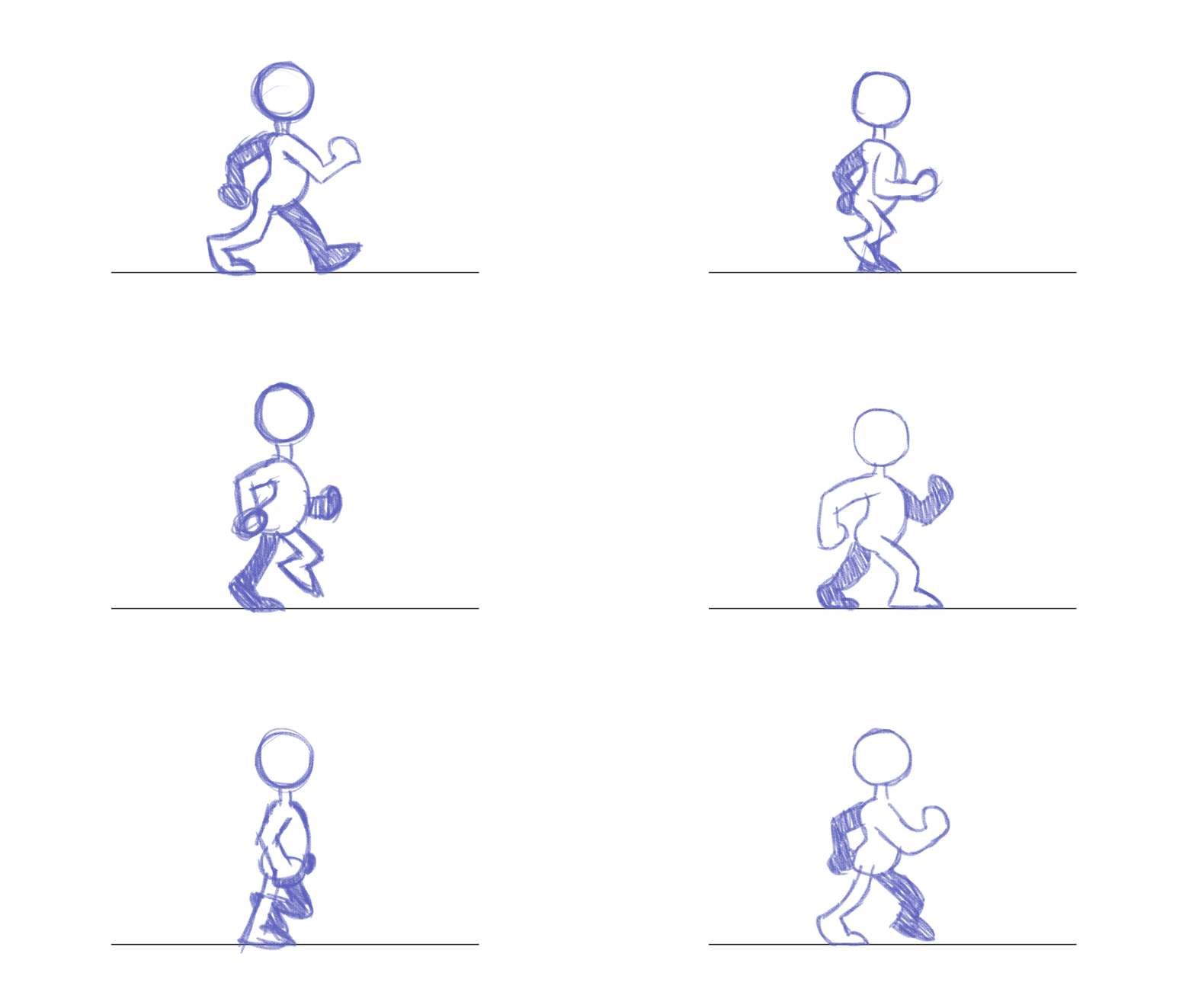
You can see in this gif how when the character puts a new foot forward, the rest of the body bobs down with the foot that gets placed down in the front, and goes up when the back leg pushes forward
Theres probably a better one that shows like a flow line or something ill see if i can find one

Saint11 is a fantastic resource, they have a lot of really cool gifs and images explaining how to do a variety of animations!
devout leaf
why does this material show through the UI?

 devout leaf
Hi ive majorly frigged up how do I go back in auto saves or something??
 languid frost
sup guys i have an awkward question yet pretty useful for me
what makes a character design charismatic? like hollow knight as an example
the character is simple but yet you feel some kind of empathic
or as a better example niko from the game oneshot
 frigid widget
devout leaf
why does this material show through the UI?
frigid widget
devout leaf
why does this material show through the UI?
looks like the render order of that shader is set to some extreme value
lime pollen
devout leaf
Hi ive majorly frigged up how do I go back in auto saves or something??
there aren't any. this why you should use version control
 rough tree
I am having trouble with my character rig. Currently, I am trying to work with Inverse Kinematics for my VR game
can somebody pls help
m,e
celest thicket
how do I detect that a key has been released
 manic coyote
celest thicket
how do I detect that a key has been released
manic coyote
celest thicket
how do I detect that a key has been released
GetKeyUp.
Look it up
celest thicket
thanks
pastel prism
devout leaf
Hi ive majorly frigged up how do I go back in auto saves or something??
consider using git and sourcetree in the future
 stoic crescent
anybody here uses substance designer and figured out a way to export bitmaps for URP? (especially interested in a way to combine the Metallic / Smoothness into one texture like substance painter does because it is extremely tedious to always go the extra mile and use painter just to export this map)
Solved it "mostly":
Create an Alpha Merge and feed it Metallic and Roughness/Smoothness and create your own output.
dreamy osprey
Anyone know if there is away to make a multiple part mesh into a single mesh?
 mystic relic
 misty lantern
Not really an art question 🤔
You seem to be missing a script or you have problems with naming the script/class
 cobalt sphinx
hey when I export from blender to unity as a FBX the model in unity on one side of a panel its just one side its not solid like it is in blender...What can I do to fix this.

 fluid oak
@cobalt sphinx fix the normals
 tidal jetty
cobalt sphinx
hey when I export from blender to unity as a FBX the model in unity on one side ...
tidal jetty
cobalt sphinx
hey when I export from blender to unity as a FBX the model in unity on one side ...
apply your solidify modifier it might not have been
wait its something different
celest thicket
why is my p90 teleporting to 0,0,0
using UnityEngine;

public class P90 : MonoBehaviour
{
    public float damage = 50;
    public float range = 100f;
    public Camera fpsCam;
    public bool shooting = false;

    // Start is called before the first frame update


    // Update is called once per frame
    void Update()
    {

        if (Input.GetButtonUp("Fire1")){
            shooting = false;
        }


        if (Input.GetButtonDown("Fire1")){
            shooting = true;
        }
        if (shooting == true){
            Shoot();
        }


    }
    void Shoot() {
        RaycastHit hit;
        if (Physics.Raycast(fpsCam.transform.position, fpsCam.transform.forward, out hit, range)){
            Debug.Log(hit.transform.name);

            enemy_death target = hit.transform.GetComponent<enemy_death>();
            if (target != null){
                target.TakeDamage(damage);
            }
        }
    }

}
This isn't art asset workflow related. Ask in #💻┃code-beginner
celest thicket
hehe oops
dreamy osprey
is this the right place to ask about issues with the package asset validator? It is baffling me and its been 2 days since I submitted my asset and been in "few days" with no response and is stressful since I need an answer.
 sacred grotto
Hi all, not sure if this is the right place
Is it viable to photogram(? basically making 3d models of a IRL furniture or house etc) manually nowadays? Or there's already a program for that, or maybe it's expensive?
How bout if the resulting 3d model is stylized?
 errant dirge
Hey guys, quick question. If I wanted to export this into Unity, how would I face it correctly?
 misty lantern
errant dirge
Hey guys, quick question. If I wanted to export this into Unity, how would I fac...
misty lantern
errant dirge
Hey guys, quick question. If I wanted to export this into Unity, how would I fac...
Blender treats negative Y as forward axis, but how it shows up in Unity depends on your import settings because the axes are different and arbitrary
 native inlet
errant dirge
Hey guys, quick question. If I wanted to export this into Unity, how would I fac...
native inlet
errant dirge
Hey guys, quick question. If I wanted to export this into Unity, how would I fac...
first of all apply the transforms
cobalt sphinx
fluid oak
<@756517896292663297> fix the normals
still not working
anyone who is a master at exporting to unity from blender if you can look at my model and tell me whats wrong would be greatly appreciated
outer halo
Show the face orientation of the model in blender.
 fierce quarry
I’ve been having an issue with assigning a material made from an image and assigning it to the main singlet part

It works almost everywhere

But it all turns a solid white on this one part
 misty lantern
fierce quarry
But it all turns a solid white on this one part
misty lantern
fierce quarry
But it all turns a solid white on this one part
The UV map of the mesh determines how textures show up on the surface
 waxen yoke
Rate my first human model XD. I'm going to lower his resolution for more poly-look

 amber brook
Can we use unity as 3d designing app?
amber brook
waxen yoke
Rate my first human model XD. I'm going to lower his resolution for more poly-lo...
Or is this blender?
waxen yoke
amber brook
Can we use unity as 3d designing app?
blender
what else would i use, maya?
thats wayy too expensive.
amber brook

errant dirge
So assuming that Blender treats Negative -Y as the Forward Axis, what should my Export Settings be for it to work as expected in Unity?

Currently it just points towards my face when picked up.
Seem to be getting mixed results regarding the issue, and with this code: transform.LookAt(Camera.main.transform.position, Vector3.forward); it doesn't work as intended.
 vast matrix
anyone here knows fbx and usdz file? im extremely sick of doing the convertion in between
so i got a fbx file with texture on, but when i converting it to usdz with thousands of methods in tutorials or any other 💩
THE TEXTURE JUST LOST
this is the most cursed file format throughout the whole planet
misty lantern
errant dirge
So assuming that Blender treats Negative -Y as the Forward Axis, what should my ...
It's always been difficult to find a clear answer to this question but what works for me is the settings you already have but with these axes

With the default import settings on unity side, whatever they were
The rotation or scale will be off when you drag the mesh into the scene, but if you reset the transform it flips to face exactly as it did in blender
I don't know why the mesh is created with transform overrides
errant dirge
Okay let me give that a shot
eager mist
object rotated by -90 degrees when imported

 errant dirge
That didn't seem to work.
WIth transform.LookAt(Camera.main.transform.position, transform.forward); as the pickup code.
eager mist
misty lantern
It's always been difficult to find a clear answer to this question but what work...
when i use this it rotates by -90 on the x axis
misty lantern
eager mist
when i use this it rotates by -90 on the x axis
And if you reset the transform?
 misty lantern
eager mist
it rotates by 90 degrees on the x axis
misty lantern
eager mist
it rotates by 90 degrees on the x axis
Hmm try positive Z forward instead of negative at export, and then reset in unity
I may have messed that up
errant dirge
Gun be like: not today.
 eager mist
misty lantern
Hmm try positive Z forward instead of negative at export, and then reset in unit...
eager mist
misty lantern
Hmm try positive Z forward instead of negative at export, and then reset in unit...
nope
same issue

it doesnt seem to change anything
changing the axis
 distant turtle
hello guys !
i had a problem with baking in blender.
that seems i do everything very well but it doesnt work.

 misty lantern
eager mist
same issue
misty lantern
eager mist
same issue
What if you check Apply Transform in export settings as well
eager mist
wait it does
misty lantern
and I notice you use Apply Scalings: FBX All
I used "All Local"
Now you've got -Y up instead of Y up
this combination?
 errant dirge
I'm just convinced my issue is coding-related now. Apply Transform made my model wonky/pieces out of place.
eager mist
misty lantern
this combination?
 distant turtle
hello guys !
i had a problem with baking in blender.
that seems i do everything...
distant turtle
distant turtle
hello guys !
i had a problem with baking in blender.
that seems i do everything...
.
eager mist
@misty lantern rotates on y axis by 90 deg
this fbx setting shoul work

👍

but Apply Transform is broken with armatures and animations
misty lantern
eager mist
this fbx setting shoul work
This also rotates it 90 degrees for me
But so do my settings which I somehow never noticed
eager mist
oof
misty lantern
And similar problems with each example I've found online
It'd be convenient if it just worked, but luckily the transforms don't practically matter
eager mist
so no reliable way to export stuff from blender 2.93
misty lantern
You can always put the mesh under a parent empty object and rotate the mesh
And usually this is what you'll do anyway to decouple the mesh from the "object"
eager mist
true
misty lantern
Not using Apply Transforms should stop it from messing up armatures, but tends to add a scale of 100 or something
That should be tweakable from the import settings but it never bothered me that much
 outer halo
@rough tree Just post your question in the relevant channel and if anyone help, they will.

 dense escarp
Does anyone know why these assets look so low res inside Unity? Photoshop file is pretty good


 fluid oak
The unity manual says that it can use lines and points in a mesh, but there doesn't seem to be further information about them and when I import such a mesh I am not seeing anything. Does anyone have any info on using them?
pastel prism
eager mist
object rotated by -90 degrees when imported
are you using blender?
 vestal hazel
 arctic edge
vestal hazel
arctic edge
vestal hazel
damn, that looks awesome
 burnt grove
Uhhh does anyone know what's happening here

In Maya I have 2 meshs
I've tried it in Blender too
exact same import
However in Unity it merges these 2 objects
and spits out this

instead it should be like this 

OK update, the issue was the name.....
Apparently unity doesn't like similar naming
fluid oak
No, it doesn't.
 turbid scarab
So i am trying to make a game and would need to stick an object to another Object with some Venom goop, kinda mallis looking strings or something. I think I have seen a Tutorial on how to do something like that but I can't find it anymore. Does someone know about what i Talk or how to do that? I would really appreciate it.
fluid oak
turbid scarab
So i am trying to make a game and would need to stick an object to another Objec...
Can you give an example?
eager mist
pastel prism
are you using blender?
yes
 weary comet
Hope I'm not breaking the rules by asking here specifically but does this gun look too detailed for the character?

I want to strip back some of the detail on characters but want to keep the guns looking good without looking out of place
pastel prism
@eager mist unity and blender use opposing co-ordinate systems, so some rotation is unavoidable
One is left handed and the other is right handed
fluid oak
weary comet
I want to strip back some of the detail on characters but want to keep the guns ...
I think that in isolation the character and gun don't look like they go together, but in a full scene you could develop an aesthetic that they work for.
Maybe beveling the cubes on the character so that the character looks simple without looking like 'a pile of default cubes'
(and also so the shading on the character and the gun are more similar, since the gun has bevels even on the simple parts of its geometry)
 wraith ridge
Q: I've imported a few assets now from the asset store, and it seems like a number of them have the default pivot points messed up (2/3 I've started with today had this issue), is this due to issues of older assets vs newer Unity, 3d software export issues, or laziness when building the models?
I've done the empty gameobject fix to set the pivot point to the empty object, but it definitely feels like a hack (on top of it not working exactly like normal, although that may be a code issue)
Attached are examples from this paid submarine pack I bought, z axis on the asset is on the wrong pivot point, with the empty object having the correct pivot point pointing towards the rear.

 outer halo
That would be laziness on part of the person who made it. However, also double check your scene window is in Pivot mode and not Center. You can toggle between them at the top of the window.
wraith ridge
outer halo
That would be laziness on part of the person who made it. However, also double c...
Thanks for the help!
vestal hazel

 turbid scarab
fluid oak
Can you give an example?
turbid scarab
fluid oak
Can you give an example?
it kinda looked like this
 rigid pelican
 dreamy osprey
I am having an issue with a fbx model. Unity keeps returning an error saying the vectors need to be correct but they are. I am not sure what else to do a this point because the model is in the right position
misty lantern
dreamy osprey
I am having an issue with a fbx model. Unity keeps returning an error saying the...
What's the error exactly?
dreamy osprey
misty lantern
What's the error exactly?

At least on my end they are correct and aligned. It only happens with FBX's.
misty lantern
Submission guidelines? Meaning asset store possibly?
Is it an error or just a note
dreamy osprey
misty lantern
Is it an error or just a note
It is asset store. Is a warning yet they using that stupid thing to reject my asset. So, I am trying to discover a way to fix that.
I even reimported to blender to fix the supposed vector issues I do and yet it wont take it. I create a prefab fbx alternate from within unity still same thing. Tried an empty object still same thing. so not sure what else to do.
Only thing I have left I can try is to "probuilderize" and see if creating a FBX from within Pro Builders it will fix it.
Either way thanks for trying to help. Really appreciate it.
misty lantern
I don't know anything about asset store publishing so I'm not much help here unfortunately
 dense herald
excuse me, my designer export a fbx file with 4 png, I export material from fbx file, it's gray by default, then I try to drag each png file into new material, everything is file, except the 2nd png, I don't know what is it :<
 frigid widget
dense herald
excuse me, my designer export a fbx file with 4 png, I export material from fbx ...
frigid widget
dense herald
excuse me, my designer export a fbx file with 4 png, I export material from fbx ...
the second one is probably the metailc map
you need to look at the name of the file
it depends on the shader you use if you can use the texture directly
weary comet
The soldier has been updated - now has some bevelled edges, more little details and night vision goggles
 fluid oak
weary comet
The soldier has been updated - now has some bevelled edges, more little details ...
fluid oak
weary comet
The soldier has been updated - now has some bevelled edges, more little details ...
I was thinking more like the tiny bevels along the edges of the gun, but that doesn't look bad.
 marsh loom
Any ideas for free plugins that scatter objects on other objects? Not terrain. Polybrush doesn't work.
 solar arch
marsh loom
Any ideas for free plugins that scatter objects on other objects? Not terrain. P...
solar arch
marsh loom
Any ideas for free plugins that scatter objects on other objects? Not terrain. P...
Define doesn't work?. either way for Polybrush to work on a mesh, it needs special shader that would work with Polybrush
plenty tutorials on youtube for this
 obsidian bison
hey guys, noob question here - every model I import into unity that has smooth normals shows some weird seams (pic1), but if you zoom in close enough they disappear and model looks like it's supposed to (pic2)
what am I doing wrong ?

 marsh loom
solar arch
Define doesn't work?. either way for Polybrush to work on a mesh, it needs speci...
marsh loom
solar arch
Define doesn't work?. either way for Polybrush to work on a mesh, it needs speci...
It attaches a script to all my prefabs, making them lose their mesh filter, and then corrupts them and I have to delete them and remake them.
Why would an object scattering plugin need a special shader?
errant dirge
I'm working with Light Cookies to make a grid-like light, but on this object (and a lot of the lighter objects) it seems to be going completely red. Any idea what's happening?

 lofty ice
for some reason the faces flip whenever i import the model from Blender to Unity. I flipped the faces and even the normals on the armature but nothing
 misty lantern
lofty ice
for some reason the faces flip whenever i import the model from Blender to Unity...
misty lantern
lofty ice
for some reason the faces flip whenever i import the model from Blender to Unity...
Are you totally sure there are no backfaces visible in blender before exporting? You can check with "face orientation" overlay
Armatures don't have normals, but I believe they can cause inverted normals if an animation inverts their scale or some other property of them
lofty ice
well i'm 100% sure
rigid pelican
 misty lantern
There's the #archived-art-asset-showcase specifically for showing off stuff
fluid oak
@lofty ice are you creating the second shoe via a mirroring or by copying and negative scaling?
 royal plaza
Hi, How can I add fur to the animated retort set we created in Marvelous Designer and run it in Unity? Or how can I transfer it by doing it in another program? I couldn't fur in Alembic. I searched but couldn't find the result. Can you help if you have any information? We are trying to make a cinematic video in HDRP mode, but since we cannot simulate it in Unity, we get alembic using the simulation in Marvelous Designer. We can't add fur this time, the outfit should be pretty fluffy like the Viking outfit but so is the physique of the outfit but we couldn't. Please help or guide. 😦
fluid oak
royal plaza
Hi, How can I add fur to the animated retort set we created in Marvelous Designe...
I can't actually understand the question.
 spark vigil
hey does unity or any plugin have similar feature?
Crocotile 3d is a tile-based 3d modeling editor that allows you to create 3d scenes using tiles from tilesets. Great for pixel-art style graphics or other low resolution styles. Designed to be simple without the bloated features of other complicated software, Crocotile 3d allows you to quickly create scenes and models without becoming lost in co...
something like this?
fluid oak
Yes. Crocotile. =p
glacial vector
It's compatible with Unity so why not just use it?
misty lantern
I guess the closest things are PolyBrush and ProBuilder, but they're pretty different from Crocotile
fluid oak
Yeah, exactly It works with unity
 oblique stump
wraith ridge
Q: I've imported a few assets now from the asset store, and it seems like a numb...
oblique stump
wraith ridge
Q: I've imported a few assets now from the asset store, and it seems like a numb...
laziness when building the models?
yes. also, do you have pivot point or center selected
oblique stump
royal plaza
Hi, How can I add fur to the animated retort set we created in Marvelous Designe...
you can't
you can definitely read an alembic cache
but they do not necessarily scale for realtime playback, because you'll notice those files are colossal
oblique stump
royal plaza
Hi, How can I add fur to the animated retort set we created in Marvelous Designe...
i think you may have bitten off more than you can chew on this gig
there's no shortcut for realtime cloth and fur, you simply cannot use pre-rendering tools for them
 young folio
hey everyone, looking for a quick tip here. I made an asset out of a bunch of separate meshes I got in a pack from the asset store, and they all use the same material. Is there anyway to batch them all together in 1 draw call? They seem really inefficient atm

I have dynamic batching enabled and it cut my draws calls in about half
also I am using material property blocks so players can recolor their avatars
frigid widget
young folio
what renderpipline do you use?
young folio
Default
frigid widget
ok
dynamic batching will only combine meshes that have the same material, no lightmap and are below 300 vertices.
 mint rune
Does the pivot point in a sprite dictate it's position or only it's rotation?
fluid oak
It is the point that is considered the origin for the transform..
 fickle halo
Hey! What's the best workflow for you when exporting blockout LD from Unity to your modeling software, and then modeling on top? I'm not sure how to approach this in the best way possible. I'm looking for advices on how to split files, how to export finished level (separate assets or all merged in one FBX with hierarchy), stuff like that!
 unique bone
how can i completely remove the anti aliasing of the render texture? i set the filter mode to point but its still not crisp enough
 eager mist
are multiple textures not recommended in unity?
i keep hearing to use single color palletes instead of textures
is it possible to load more than one uv map?
@zinc mesa bc i had to shrink everything down to get it on the colormap
 outer halo
If you need multiple, use multiple.
You can use a texture with various colours on it, if your art style suits it, sure.
eager mist
outer halo
You can use a texture with various colours on it, if your art style suits it, su...
i heard that unity isnt particularly great at handling multiple textures though
so people use "universal textures" instead
outer halo
Where did you hear that from?
 woven cradle
eager mist
i keep hearing to use single color palletes instead of textures
woven cradle
eager mist
i keep hearing to use single color palletes instead of textures
it can be nice for low poly, unity can then batch most of the models together when rendering
but if it doesn't work for you then don't do it
eager mist
outer halo
Where did you hear that from?
various source, i think
unity forum, video tutorial
i think its better if objects rendered together share such textures
otherwise there is no point
i can see how that would work
 compact summit
this is in substance painter, is this weird shading gonna be just grafted on in unity? don't think that's how lighting works
 eager mist
compact summit
this is in substance painter, is this weird shading gonna be just grafted on in ...
eager mist
compact summit
this is in substance painter, is this weird shading gonna be just grafted on in ...
is that ao?
compact summit
eager mist
is that ao?
haven't baked any mesh maps yet
 pallid stratus
Hello, I knoew this question is not really that much related to unity, however do you know a good Blender tutorial so I can create good models for Unity
compact summit
blender guru
unique bone
donut tutorial
 viral terrace
Not sure if this is the right place, but does anyone know what the number to the right side of the "Normal Map" is or does (within a material)? If I increase it it looks like the normal map is intensified. But I'm not sure.
 dire flicker
viral terrace
dire flicker
viral terrace
Yes - that's the factor that is used to scale the normal map.
viral terrace
dire flicker
Yes - that's the factor that is used to scale the normal map.
Thanks for the reply Jaimi! What does it do and what kind of affect on performance does it have? I can't seem to find any documentation on it.
 devout urchin
Having issues with emissive materials not being baked into my lightmap. Some emissive objects are baking fine, but others like this light ring do nothing. Texels are fine, object is static, materials are set to bake illumation, ect. I have a hundred or so emissive objects though, so idk if there's some sort of cap in Unity for baking
 glacial vector
viral terrace
Thanks for the reply Jaimi! What does it do and what kind of affect on performan...
glacial vector
viral terrace
Thanks for the reply Jaimi! What does it do and what kind of affect on performan...
It just increases the strength of your normals, easy enough to test if you have a normal map and just pull the slider. And it shouldn't make too much of an impact, but I reckon it's not insignificant, since it's disabled by default on android
viral terrace
glacial vector
It just increases the strength of your normals, easy enough to test if you have ...
Thank you for the info! I may ask you later on how to enable it. For now, I'm good. 🙂
glacial vector
Graphics settings -> Override default values. Android is low I think
spark vigil
pallid stratus
Hello, I knoew this question is not really that much related to unity, however d...
i suggest check imphenzia learn low poly modelling tutorial better than blender guru xD
dire flicker
viral terrace
Thanks for the reply Jaimi! What does it do and what kind of affect on performan...
It doesn't have any affect on performance. It just scales the normal map so the effect is either more or less pronounced. if you leave it at 1, the shader will just scale it by one (no effect).


 weary lily
eager mist
**nothing wokrs**
weary lily
eager mist
**nothing wokrs**
its probably because it isnt either split or something else
can I see the original image
 balmy hamlet
how do I get around image compression when my sprites are small? Basically, I want the small sprites to have the same quality as the big one you see behind it.

 finite shard
I want to make some 3D models of my own to input into my unity world, what programs could I use?
Im only thinking of trying to model some chairs and desks
 swift estuary
finite shard
I want to make some 3D models of my own to input into my unity world, what progr...
swift estuary
finite shard
I want to make some 3D models of my own to input into my unity world, what progr...
Blender
fluid oak
eager mist
i keep hearing to use single color palletes instead of textures
That art style doesn't need a texture at all, you could just use vertex colors.
fluid oak
balmy hamlet
how do I get around image compression when my sprites are small? Basically, I wa...
Enable mipmaps?
 pulsar palm
Hey, I installed the vector graphics package (in Unity 2019.4.10) and now I have a problem with self-made vector graphics from Photoshop.
So, downloaded svgs from the internet are working but not the ones from Photoshop. When I try to import them into the scene I don't see anything and I get this error message:
Incomplete mesh data in Sprite. Please reimport or recreate the Sprite.
UnityEngine.GUIUtility:ProcessEvent(Int32, IntPtr)
I can see them in my browser as it should look but not in Unity.
Here is a photo of it (on the left is the file in unity and on the right in the browser):
 eager mist
weary lily
can I see the original image
eager mist
weary lily
can I see the original image


 rare bobcat
fbx is importing strangely.

this is a simple matcap material
when imported as an obj it looks correct

normals seem to be fine in blender

any help? I really want to get this done today
misty lantern
@rare bobcat Does the character have an armature? I think bone transforms can cause lighting to flip in some situations
 burnt stone
Hey guys, I'm trying to figure out how to get the procedural shaders I make on my models in blender, into Unity properly. I've tried baking the texture maps, to the correct UV's but when I bring it into Unity I seem to get Issues with the UV mapping. IDK if it's something I'm doing in Blender, or something I need to do in Unity. But can anyone advise how to turn my nodes into texture maps that will work properly.
Sorry if this isn't the right channel to post this.
eager mist
Hey guys I'm using this plugin to make a gameboy look for my game, but the problem Is I can't figure out how to set the resolution to 1920 x 1080, does anybody know the fix? https://roguenoodle.itch.io/gbcamera-for-unity

itch.io
A camera setup and custom shader to emulate GameBoy visuals in Unity
 fluid oak
@eager mist probably should ask the plugin creator.
 wild dirge
how can I prevent this ki,d of offset when the sprites are not the same height ?
 fluid oak
@wild dirge place the pivots to the same part of the character each frame.
 errant kestrel
Hello everyone....Just a beginner kind of query....I was trying to make small character using pen tool in Photoshop, but for some reason its blurry.....As ik that pen tool makes lines in vector which doesnt get blurred......So i wanna know what am i doing wrong here....Why mine is blurry??
misty lantern
errant kestrel
Hello everyone....Just a beginner kind of query....I was trying to make small ch...
Vector lines can only be as sharp as the resolution they're displayed / stored in if stored as a pixel/raster image format, and for Unity they must be converted into rasters
The resolution of the saved image must be high enough that it doesn't need to be scaled above 100% when rendered in the game
errant kestrel
misty lantern
Vector lines can only be as sharp as the resolution they're displayed / stored i...
Okay....so what can i do to make it sharp??...Its blurry even while im drawing lines...
misty lantern
errant kestrel
Okay....so what can i do to make it sharp??...Its blurry even while im drawing l...
Draw it bigger or increase canvas resolution, I'd assume
errant kestrel
misty lantern
Draw it bigger or increase canvas resolution, I'd assume
Okay... thanks man...will try this then😌
 median cove
How well is Blender equipped to create low-poly/voxel art for Unity game assets? I'm a programmer who doesn't want to use the Asset Store any more than I have to.
misty lantern
median cove
How well is Blender equipped to create low-poly/voxel art for Unity game assets?...
Low-poly meshes perfectly well, high-poly likewise
It doesn't have voxel tools, but it can voxelize meshes
Voxels graphics may look simple but are actually quite the technical challenge
Since basically no game engines support voxel graphics, the voxel assets must be converted to meshes anyway which comes with its own hurdles
median cove
misty lantern
Low-poly meshes perfectly well, high-poly likewise
It doesn't have voxel tools, ...
Interesting. Would you say that for a first game using Unity 3D and Blender, low-poly art would be an overall better idea than Voxel art?
misty lantern
median cove
Interesting. Would you say that for a first game using Unity 3D and Blender, low...
Definitely
eager mist
 median cove
misty lantern
Definitely
median cove
misty lantern
Definitely
Thanks for your suggestion! I'm glad to be put on the right track.
compact summit
will weird shading like this in substance painter show up in unity?
 eager mist
compact summit
will weird shading like this in substance painter show up in unity?
eager mist
compact summit
will weird shading like this in substance painter show up in unity?
why dont you try it and see for urself
misty lantern
I'm not familiar enough with substance to recognize if that "weird shading" is something in the material or just how the program displays meshes, so indeed the best way to solve the mystery is to try it
 young sentinel
I've been trying to put the Romanian flag onto a sphere, by placing the Flag (2nd image) into the Albedo property, but it seems to appear like this (1st image).
Does anybody know a way to fix this?

 glacial vector
That's how the sphere is UV unwrapped @young sentinel. You'd need to change your texture accordingly
glacial vector
Just scale the texture down like this and see how it applies
 young sentinel
ok
just a sec
do you mean the whole image (as in changing the image size) or actually putting a small version in a black box?
Btw I do have a different solution (kind of), I've rotated the texture 90 degrees, but I need to find a way to rotate a material in a way.
Because when I rotate the texture 90 degrees, it fits correctly (Just you know: rotated 90 degrees)
I can't rotate the actual object because I have other things that the material would be changing to (eg. different flags)
glacial vector
Scale it down with black around it
You can't rotate without making a custom shader
misty lantern
Being able to UV map your models is very a important skill to have
The challenge is trivial if you know how, and doesn't require changing the textures at all
young sentinel
With that it looks like this
 young sentinel
misty lantern
Being able to UV map your models is very a important skill to have
The challenge...
young sentinel
misty lantern
Being able to UV map your models is very a important skill to have
The challenge...
yeah, I probably should try and learn how to do that.
eager mist
young sentinel
yeah, I probably should try and learn how to do that.
wouldnt it be better to use a 2d asset that always faces the camera for this?
and just make the eyes 3d
eager mist
why do me scenes look so different?
 fluid oak
eager mist
why do me scenes look so different?
fluid oak
eager mist
why do me scenes look so different?
You unchecked the light button in the scene view.
eager mist
fluid oak
You unchecked the light button in the scene view.
still looks different
 fluid oak
Which one is correct?
spark vigil
young sentinel
I've been trying to put the Romanian flag onto a sphere, by placing the Flag (2n...
just make use of decal painting or similar way of doing things
We have finally arrived at the last important trick in the Blender Texture Series. This one is pretty fun and simple. To everyone who stuck to the end of the series, thank you so much for being here~! As always, hope it helps and have a FANTASTIC day :)
Texture Painting Tutorial:
https://www.youtube.com/watch?v=PAXUnFGEJLI&list=PLZpDYt0cyiuu-s...
fluid oak
That is absurd overkill
 languid bloom
Hey do you know how to rearrange the hierarchy of fbx files when importing to unity? ( from Blender )
 dawn sentinel
languid bloom
Hey do you know how to rearrange the hierarchy of fbx files when importing to un...
dawn sentinel
languid bloom
Hey do you know how to rearrange the hierarchy of fbx files when importing to un...
Rearranging hierarchy inside Unity? You need to unpack the parent gameobject to move the children freely. Select the FBX parent gameobject > right click > prefab > unpack
languid bloom
Doesnt need to be inside Unity but when I do as you say I dont have a rearranged fbx file but a gameObject prefab xD
young sentinel
I've ended up using a system like this where when the material is changed, it shall rotate the character (The romania flag texture its self is rotated 90 degrees) and yeah it works.

This is probably a really stupid way of doing it lmao
eager mist
fluid oak
Which one is correct?
Scene view


 keen oasis
Hey can someone tell me why the keys on the right are behaving so weirdly with the light? I want it to look like it does on the left / how the cube on the right one behaves
I can't use the left one because the keys aren't individual objects so I cut them out, made them seperate objects and added more geometry
misty lantern
keen oasis
Hey can someone tell me why the keys on the right are behaving so weirdly with t...
Something wrong with the normals
Either with vertex normals or normal map
keen oasis
@misty lantern I tried to just create an empty material to rule out the maps and it's still the same. Also instead of importing the normals from the mesh I told unity to calculate them but still the same
The face orientation is alright too, is there anything else with the normals i can / should check?
misty lantern
keen oasis
<@166982635950702592> I tried to just create an empty material to rule out the m...
I don't see any obvious clues, but the kind of lighting that's "asymmetrically" off does suggest a normals problem
keen oasis
Hmm ok thank you 🙂
eager mist
a simple alpha gradient makes the material completely transparent, wtf??

it was because the alpha values of the colors werent set oof
 strong ibex
Hi Everyone, i want to ask that is SpriteAtlas overwrite its containing textures' import setting? so when i adjust import setting for sprite atlas, do i have to adjust for its containing texture as well
 lament kite
does anyone know the best way to store hand drawn assets in unity? like for larger assets should you be breaking it up into 2 ect files? like a sprite map I suppse.
lime pollen
lament kite
does anyone know the best way to store hand drawn assets in unity? like for larg...
unless you're making a tile based game you don't really need to break assets up unless they're enormous and you want to do some weird loading optimizations
 frail perch
I'm having an issue with sprites imported into unity. I want to have a 1x row of pixels to use as a palette to sample from in game. (attached image is x8 for visibility)

when I import it, it looks like this:
(sprite projected onto a rawimage UI element)

notice the colors are more washed out, and there are 8 instead of 10
I think it's blending neighboring colors but I can't figure out why
the filter mode is point

changing the resize algorithm (mitchell to bilinear) seems to adjust the colors a bit
lime pollen
try turning off mipmaps
frail perch
I believe I did already
I'll try again to make sure
turning off mipmaps did this

which is to say nothing
i should have led with that
sorry that was phrased really weirdly
anyway it did nothing
this is what it looks like in the editor if I turn it into a 2d array
 strong ibex
Hi Everyone, i want to ask that is SpriteAtlas overwrite its containing textures...
strong ibex
strong ibex
Hi Everyone, i want to ask that is SpriteAtlas overwrite its containing textures...
can anyone help me with this ? thanks in advance
lime pollen
frail perch
turning off mipmaps did this
you probably don't want to set the power of 2 scaling to nearest
spark vigil
wow took unity years to implement the feature to not download assets from unity store to c drive by default lol
now my poor c drive won't suffer no more xD
 hard kelp
does uma work with rigify?
 lapis sedge
Hi. I understand that its best practice to create texture atlas's for static objects, but should I be creating texture atlas's for dynamic game objects as well? Creating props for a VR game and trying save as much performance as possible. many thanks
 wraith talon
so what are the different 2D art styles? i know pixel vector and hand drawn are there any others?
misty lantern
lapis sedge
Hi. I understand that its best practice to create texture atlas's for static ob...
The benefit of texture atlasing is the same for both static and dynamic meshes
I believe they can use the same atlas all the same
lapis sedge
misty lantern
I believe they can use the same atlas all the same
Thank you for responding! Thats good to know, I thought this was the case but just wanted to be sure.
misty lantern
wraith talon
so what are the different 2D art styles? i know pixel vector and hand drawn are ...
Those are techniques rather than styles
There are virtually infite different techniques and tools, both digital and physical
Styles are kind of rules how to use techniques or even combine them in a specific way that results in a consistent artstyle
So there's more possible styles than there are techniques
wraith talon
misty lantern
Those are techniques rather than styles
There are virtually infite different tec...
what are the different techniques? like the main styles besides pixel vector and hand drawn
misty lantern
wraith talon
what are the different techniques? like the main styles besides pixel vector and...
Any technique that can produce digital art, including art that's made with digital brushes but not hand-drawn, or made with photographs, filters or algorithms
Also including all physical art which can be digitized
I think there's been games that use images of cut and folded paper as their graphics
Pixel art fundamentally is just low resolution digital art so it's not fundamentally different from other techniques
I guess it counts as a style
Vectors can be hand drawn so they're not mutually exclusive either
amber condor
How do I reset this to default in the editor? It's showing me some weird 2d view
 misty lantern
amber condor
How do I reset this to default in the editor? It's showing me some weird 2d view
misty lantern
amber condor
How do I reset this to default in the editor? It's showing me some weird 2d view
You cannot rotate the viewport camera? The gizmo is visible and showing perspective which implies that the weird 2d view mode is not active
misty lantern
amber condor
sorry I disabled the padlock now
Right, can you rotate the viewport camera now?
 hidden forum
Hey I wanted to ask, does it matter or improve performance by much if I deleted faces of objects that the player would never see? I have a bunch of super low poly rocks, so deleting faces removes around 2 - 10 faces depending on the model itself.
 amber condor
misty lantern
Right, can you rotate the viewport camera now?
amber condor
misty lantern
Right, can you rotate the viewport camera now?
nope, it still shuffles me between 2d views. It's fine though. I closed the scene and made a new window with the same scene
misty lantern
hidden forum
Hey I wanted to ask, does it matter or improve performance by much if I deleted ...
It would improve the performance, how much depends on the hardware and how many rocks you have on screen
If you have hundreds of rocks at once it'd be a good gain
hidden forum
Thanks, that makes sense. I will do that then! Appreciate your help
spark vigil
hey how to make this thunder effect


XP Crystals #KnightofExile
#gamedev #indiedev #indiegame #pixelart #art #gameart #gaming #games #unity #ドット絵 #madewithunity #animation
 Twitter
·
Twitter
·
 cloud lion
im struggling to understand how to size/scale/import/use art in a 2d game. so pretty much everything 😄
i downloaded https://kenney-assets.itch.io/tower-defense-kit which gives me a ton of 512x512 images
i import these images into a Sprites directory in my unity app
how do i figure out the desired Pixels Per Unit and Max Size of my Sprites?

the tutorials ive done usually provide some pre-made assets and just say to use a specific size
In 2D this scale is less important, but it’s still good practice to respect it if you’re using physics in your project. If you’re using a Tilemap, it might be nice to keep a scale of 1 tile = 1 unit, just for the sake of simplicity.
i am using 2D and a Tilemap ... how do i enforce that 1 tile is 1 unit?
gah math scares me
Pixels Per Unit is expressing how many pixels from your Sprite fit into a unit in the Unity scene when the GameObject is scaled 1,1,1.
 sullen plank
You don't have to. If you use default 100 pixel per unit setting assets have, just set correct scale in the grid component. i.e. if tile is 32x32 pixels set grid cell size to 0.32x0.32
tilemap has built-in methods returning correct coordinates corresponding to grid in world space and other tools.
cloud lion
in my tile palette, one tile is bigger than a grid square
 sullen plank
set cell size correctly according to asset to ppu relation
sullen plank
cloud lion
i have 512x512 tiles. setting the grid cell size to 0.512x0.512 cant be right
cloud lion
should i just quit now? lol
sullen plank
That's a huge tile...
cloud lion
which goes back to my original question, of wtf do i do with these sprites i downloaded
sullen plank
I'm not sure how to configure palette. But if you change ppu instead of cell size it would probably fit correctly in preview
misty lantern
You could keep grid cell size at 1 unit and set sprite PPU to 512 if your one tile is 512 wide
Or tall, not sure how isometric grids are measured
cloud lion
if i change PPU to 512

im expecting that tile to consume one grid square, but i dont even know that if my expectation is correct
on my scene grid it looks like that now so that cant be right lol

 sullen plank
ppu setting in the asset. By default it is 100, so you would multiply it on tile size proportion
cloud lion
ok so TLDR only number i should have to modify is PPU
sullen plank
For the 32x32 tile you do 100 * 0.32 to get correct PPU
Larger than 100 pixels tile throws me off
so just move the floating point if you need to
Oh, you can btw change the size of the grid on the palette
You set it when creating it or edit its asset, it has the same grid component.
sullen plank
So can just leave 100 ppu and resize the grid
cloud lion
...

For these reasons, as you are working on the art, consider using work files that are twice the resolution that you actually need or more, then scale them down before bringing them into Unity, or use import settings to reduce their size as they are imported into the engine.```so if i am trying to follow best practices, shouldnt i be using import settings to reduce their size as they are imported into the engine. ?
it doesnt seem like i would want my 2d game to use 512x512 tiles
sullen plank
Unless you are working with pixel art.
cloud lion
so its reasonable to make for eaxmple a tower defense game without doing any sort of manipulation on this image pack i got?
sullen plank
If you don't care about pixels, higher resolution art with smoothing works much better. Then you can use AA and do smooth things.
cloud lion
i have no idea what i care about right now 😄 i am total noob
sullen plank
Experiment.
cloud lion
if you want your tiles to take up exactly one Unity unit, set the Pixels Per Unit value in the tile import settings equal to their width in pixels
so i set my PPU to 512...,
In order to decide on the correct Y grid value for the tiles, take the height of the base (or cap) of a single tile, and divide it by the width. This will give you a Y value relative to the X, provided that X is 1. For the pixel art that we are using in this project, all tiles have a base height of 32 pixels, and are 64 pixels wide. Therefore, the grid size that we will be using is exactly 0.5 in Y.
since my tiles are 512x512, i want my grid size x and y to be 1,1
which results in....lol
 sullen plank
Yea, isometric tiles are 2:1 usually
cloud lion
i dont get it
https://kenney-assets.itch.io/tower-defense-kit
this looks pretty isometric to me
Works with Godot, Unity, Unreal Engine and more
sullen plank
The base of the tile is what's important
cloud lion
i think i figured it out

General Refrain from using OBJ unless it's the only supported file format. GLB (glTF 2.0) files have embedded textures, there’s no need to import texture files. FBX, GLB (glTF 2.0) and DAE files are equal in features but GLB are always smaller in size. You can open OBJ, FBX and DAE fi...
sullen plank
Not sure what you meant by your deleted message. Tile size is the tile base. In this case it's 512:256. And pivot point for tiles with a feature on it would be in the center of that base to sort drawing things around it properly. Floor tiles could have their own tilemap and be sorted under everything
cloud lion
Each of the included isometric sprites is 512 × 512 in size, a flat single tile is 128 × 64 in size. The transparent pixels around each of the tiles is margin for larger tiles, or tiles that don't fit within the usual tile size.

Tiled

Tileset properties: Set the drawing offset to X: -192 and Y: 170.
Map properties: Set tile width and height to 128 × 64.```🤦♂️
the sprite is 512x512, but the tile is 128x64
i dont understand the difference, but when i set PPU to 128 it seems to line up
sullen plank
Well we've talked about ppu you can leave it at 100 if you configure grid accordingly.
cloud lion
i tried to configure grid but that didnt make sense to me. for an isometric grid, the x and y have to be proportional
or it looks weird?
sullen plank
for isometric grid relation is 2 to 1 like I said
sullen plank
in this case your cell size would be x = 1.28 y= 0.64
if they are indeed 128x64
that is for ppu 100
cloud lion
ahhh i see
sullen plank
set ppu instead if that's easier for you
you can also configure default import settings so any future asset would apply that ppu
cloud lion
i just tried what you suggested and it seems to work the same
i assume there are trade offs somewhere
right. having to import lots of images
sullen plank
The only difference that matters is if you have a huge map and use physics, it will start breakup on 10k + coordinates
So you would want a more compact grid for that maybe
sullen plank
How to setup preset for import btw, set asset how you need it and find preset button top right in the inspector. Save it there. Then go to Project Setting > Presets Manager and create preset for texture importer using that preset.
So you don't have to reconfigure hundreds of assets individually if you change ppu
wraith talon
why is it so hard to find a free sprite creator program? any suggestions?
everything i see online is from 3years ago+
sullen plank
wraith talon
why is it so hard to find a free sprite creator program? any suggestions?
GIMP, Krita, Aseprite is free if you can figure out how to compile it (they provide instructions as well). There are also online pixel art authoring programs.
wraith talon
i thought aseprite only had a free trial like ps
sullen plank
It's open source and they specifically allow usage if you compile yourself. It is tricky to setup though.
wraith talon
sullen plank
It's open source and they specifically allow usage if you compile yourself. It i...
yea aesprites says its 20$
am i on the wrong site?
sullen plank
GitHub
Animated sprite editor & pixel art tool (Windows, macOS, Linux) - aseprite/INSTALL.md at main · aseprite/aseprite
Note the warning as well:
WARNING: Even though you can compile Aseprite and have full use of it without purchasing a commercial license, you are NOT allowed to use it commercially or publicly, such as by publishing a game that uses assets you created using an unlicensed, compiled version of Aseprite. Consider it an unlimited trial version. If you have the money to support the amazing developers, please do so. You pay once and have updates for life.
wraith talon
sullen plank
Note the warning as well:
```WARNING: Even though you can compile Aseprite and h...
ahh thank you
 strange flare
Can anyone tell me why its culling my planes when the camera is rotated at a certain angle?
spark vigil
wraith talon
yea aesprites says its 20$
krita can make pixel art too
its quite good
but then again its the skill of the user with the software not the software it self
 topaz sparrow
my player keeps getting stuck on edges in between tiles?
fluid oak
topaz sparrow
my player keeps getting stuck on edges in between tiles?
There is a composite collider that combines tilemap colliders into one, that might help
 candid gate
Looking for some advice from a newbie, I’ve been starting to work a lot on interiors and especially the correct ways to light it. So what is the best approach for importing into unreal or unity. Can I bake all my lighting in blender and then import or do I import the interior and then set up the lighting in unreal or unity. Btw I’m developing for VR so obviously all the lighting needs to be baked.
lime pollen
candid gate
Looking for some advice from a newbie, I’ve been starting to work a lot on inter...
If you do it in blender all the lighting will be baked to the textures, if it gives you the result you want go for it, otherwise do it in engine
cloud lion
i am a total noob with all things art. i need to create a sprite with dimensions that match the free art pack i downloaded.
how can i create an isometric tile in a 512x512 png that has a height of 128 and a width of 64?
this is one of my existing free assets i am trying to match

 crude mango
anyone got experienced using polybrush ?
recently i had problems with that tools, i cant do vertex paint on imported FBX from 3D software, but only able to do from polybuilder asset or unity primitive geometry
lament kite
hello, would anyone know how I should go about having levels in a hand drawn style? (example picture) this is a really rough sketch of what I'm trying to do.
I vaguely know gpus have trouble rendering single sprites beyond certain dimensions, wondering how cuphead did it. Anyway, I’m unsure what the best approach is? Because from what I understand now, I don’t think 8640 plus pixel sprites is going to be very wise approach… thanks!
 lime pollen
lament kite
hello, would anyone know how I should go about having levels in a hand drawn sty...
lime pollen
lament kite
hello, would anyone know how I should go about having levels in a hand drawn sty...
you can google rips of the cuphead sprites to see their sizes
misty lantern
lament kite
hello, would anyone know how I should go about having levels in a hand drawn sty...
There's a lot in your picture that you can slice up and reuse
Anything that's mirrored needs to be just one sprite which you can mirror in unity
Anything that's solid color can be cropped out and supplemented with a solid color sprite
Anything that's repeated needs to be just one sprite usually
 versed glen
hi when i use text mesh pro, it appears in the scene view
but not in the game view
how can i make it appear in the scene view?
thanks
fluid oak
versed glen
thanks
make sure it is inside the camera's visible area.
versed glen
fluid oak
make sure it is inside the camera's visible area.
that's within the white box right
versed glen
fluid oak
yes
yeah the camera z is - 10. the background and words z are 0
the word is within the white rectangle
so not sure why it's not showing
fluid oak
So the background might be in front of the text
versed glen
ya I oso tried making the text z - 4
so it's in front of the background
still not in the game view
versed glen
fluid oak
and what is the UI set to?
text mesh pro?
fluid oak
🤦♀️
Your textmesh pro is on a UI, not in the scene.
Did you mean to use the scene version of it?
versed glen
fluid oak
Did you mean to use the scene version of it?
i meant to put the text mesh pro in the scene?
fluid oak
As the manual says, ```There are two TextMesh Pro components available. The first TMP text component is of type <TextMeshPro> and designed to work with the MeshRenderer. This component is an ideal replacement for the legacy TextMesh component.
To add a new <TextMeshPro> text object, go to: �GameObject->3D Object->TextMeshPro Text�.
The second TMP text component is of type <TextMeshProUGUI> and designed to work with the CanvasRenderer and Canvas system. This component is an ideal replacement for the UI.Text component.
To add a new <TextMeshProUGUI> text object, go to: �GameObject->UI->TextMeshPro Text�.```
You seem to be using the latter
So if your UI isn't visible, the text won't be either
 obtuse oyster
Looking at the placement of the text in the above screenshot, it would be cut off in the very bottom corner of the screen
that is TextMeshProUGUI
versed glen
obtuse oyster
Looking at the placement of the text in the above screenshot, it would be cut of...
yeah i dont rly get for this
isnt it the camera
is the white box
fluid oak
No.
obtuse oyster
look under 3D Object to get the other one
fluid oak
That is the UI
obtuse oyster
Select the canvas and press F
fluid oak
Or rather, the camera will have a white box but it isn't the same.
obtuse oyster
then you will see where the UI is, it's in screen-space coordinates (represented as world space in the scene view)
versed glen
obtuse oyster
then you will see where the UI is, it's in screen-space coordinates (represented...
oh yeah
the 3d text mesh pro
appeared
versed glen
obtuse oyster
then you will see where the UI is, it's in screen-space coordinates (represented...
 fluid oak
Even though both appear in the same scene in the scene view, UI is on its own scale basically(1 pixel = 1 unit by default)
So IIRC the basic screenspace UI shows up as 800 meters wide by 600 meters tall.
(Based on reference resolution of 800x600 pixels)
Unless you change it
So to really get an idea of it you need to zoom out to the UI to make sure stuff is properly positioned. 😄
versed glen
fluid oak
So IIRC the basic screenspace UI shows up as 800 meters wide by 600 meters tall.
yeahh there was a rly big yellow canva box
that couldnt be edited
fluid oak
You can edit it, just not from there. You'd change the reference resolution for that.
versed glen
fluid oak
You can edit it, just not from there. You'd change the reference resolution for ...
i see
thanks!
versed glen
fluid oak
You can edit it, just not from there. You'd change the reference resolution for ...
can i ask a similar qn for input field
like i think input field uses UI too
so when i put it on the screen it doesnt appear

this is in game mode

oh
its like so weird
i see it when its in not in the box
of the camera
versed glen
obtuse oyster
Looking at the placement of the text in the above screenshot, it would be cut of...
yeah u were right its at the bottom corner
i dont get how the camera and the camera box works
how does this lead to this
 versed glen
fluid oak
Select the canvas and press 'f'
versed glen
fluid oak
Select the canvas and press 'f'
oh ya i got this

isit we imagine the scene is the outer box
fluid oak
The SCREEN is the outer box
The UI is on top of the scene
It is separate. Has its own rules.
vestal hazel
 vestal hazel
 glacial vector
@vestal hazel #archived-art-asset-showcase 😉
lapis sedge
Is it okay to have static and dynamic objects share the texture/material and get the batching benefits or am I best to keep static and dynamic textures/materials separate? Many thanks
fluid oak
Good question!
glacial vector
Static and dynamic objects will never get batched together @lapis sedge. But if they are usually viewed at the same time, then you could arguably save some texture memory by sharing textures. For batching purposes, only static objects OR dynamic objects should be sharing materials
 dapper pawn
Hello hello,
A question related to unity and blender. Any help is appreciated.
I have default fbx model that works fine on the unity. I am importing the already existing fbx model with blender and export it as fbx without any change from blender. After that, The existing animations break in unity. (I faced the same problem with maya)
The only difference that I can see is the convert units value in the inspector. (Working has 0.0254 inch, Broken has 0.01 cm)
Looks like there is an issue with the scaling. Anyone knows how to fix this issue?


This is porobably what you are looking for ^
lapis sedge
glacial vector
Static and dynamic objects will *never* get batched together <@35275513126531892...
Thanks Ole. I'm working on an office model pack for my VR game which contains both static and dynamics objects and I was going to put everything on one large texture atlas. The majority of my dynamic objects are below 300 verts so i was hoping that I could use dynamic batching for those items, but I didnt know if having static objects also sharing the same texture/material would break something lol? So best practice is to keep dynaimc and static texture atlas's/materials separate, gotcha 👍

Select all objects, right click and select join.
lapis sedge
dapper pawn
Hello hello,
A question related to unity and blender. Any help is appreciated.
...

In the next 60 seconds, you'll learn everything you need to know about exporting FBX animations to Unity 3D with Blender 2.8!
If you enjoyed this video, please don't forget to like and subscribe for more content!
You can find my entire Blender 2.8 Speed Tutorial series playlist here:
https://www.youtube.com/watch?v=f6vgICNCVxQ&list=PLZpDYt0cyi...
dapper pawn
lapis sedge
Try this https://www.youtube.com/watch?v=ysl0qYq5p9w
It didnt help :(
lapis sedge
dapper pawn
It didnt help :(
I have had a similar problem before where I have left on the Auto Keying while animating and scaled something by mistake which has recorded the scaling and then after importing my model it is all over the place. Sorry i couldnt be more help.
dapper pawn
I see, I dont have animation in the fbx, they are in the unity.
lapis sedge
dapper pawn
I see, I dont have animation in the fbx, they are in the unity.
Ah okay in that case try installing this addon in Blender. It is a FBX exporter specifically for Unity. It resets rotation and scale properly for all your models. https://github.com/EdyJ/blender-to-unity-fbx-exporter

GitHub
FBX exporter addon for Blender compatible with Unity's coordinate and scaling system. - GitHub - EdyJ/blender-to-unity-fbx-exporter: FBX exporter addon for Blender compatible with Unity&...
dapper pawn
I didnt know that, hope it helps; thanks!
now the model becomes huge while playing the animation.
and the shape is still not correct.
lapis sedge
That is because the animation you have done in unity is on the old model with different scale. Why do you need to export model from unity into Blender and then back?
dapper pawn
I bought an asset, I want to modify the meshes just a bit. I am not very into 3d modelling & rigging, I thought it will take much time to design from scratch.
lapis sedge
dapper pawn
I bought an asset, I want to modify the meshes just a bit. I am not very into 3d...
Then why dont you just export the mesh without the Armature from blender into unity and apply the mesh to your existing rig in Unity?
lapis sedge
dapper pawn
I thought it would break the connection between rig and mesh.
No it shouldnt. The mesh should contin vertex weight data.
dapper pawn
I see, thanks!
lapis sedge
dapper pawn
I see, thanks!
The only issue you might have is if you add geometry to the mesh. This new geo wont have any weight data so will not act properly. If you are adding geo using existing mesh i.e. adding edge loops then you should be okay because those new vert's will inherit the weight data from the existing mesh.
dapper pawn
Now I got an issue, the mesh gets "Mesh Renderer" instead of "Skinned Mesh Renderer" due to no armeture. and it gets wrong rotation and some errors when I try to add Skinned Mesh renderer.
But anyway I think I will watch some rigging tutorials, otherwise the modification I can do will be very limited. Thanks for your help.
eager mist
im trying to set up a gradient in unity shader graph
like a sphere mask
it is not workng
misty lantern
dapper pawn
Now I got an issue, the mesh gets "Mesh Renderer" instead of "Skinned Mesh Rende...
You'll probably want to change the mesh reference of your existing skinned mesh renderer to the new mesh
Instead of adding it as a wholly new mesh object
 misty lantern
dapper pawn
<@166982635950702592>
misty lantern
dapper pawn
<@166982635950702592>
Ah, I guess it strips the vertex groups if it finds no corresponding armature
Though I don't know why it would do so
I guess your best bet is finding the settings that work to for correctly exporting the imported mesh, which probably includes dividing the scale by 0.0254 at some point
It's tedious though
I'm just glad if I get a skinned mesh to export properly that I authored personally and even that tends to take trial and error
lapis sedge
dapper pawn
<@166982635950702592>
Why cant you export the FBX from Unity with the animation and then import back in from Blender with animation?
dapper pawn
@lapis sedge exported from unity via: https://docs.unity3d.com/Packages/com.unity.formats.fbx@2.0/manual/exporting.html , but animations are not working
lapis sedge
dapper pawn
<@352755131265318922> exported from unity via: https://docs.unity3d.com/Packages...
Is you character rig humanoid or generic? If humanoid, try changing it to generic before export.
dapper pawn
It is generic
lapis sedge
dapper pawn
It is generic
Why is it not working? Give us a clue what is actually happening. Just saying it doesnt work doesnt really help us try to help you.
 lapis sedge
Sorry no not right now I'm at work.
dapper pawn
oki, thanks
lapis sedge
dapper pawn
oki, thanks
When you export from unity with animation do you have animations in blender?
dapper pawn
I have the animations but the animaton is not correct.
I will try to record a short vid eo
@lapis sedge I show the original prefab in unity, and then what I see in blender.
lapis sedge
What settings are you using when importing FBX into Blender?
dapper pawn
 lapis sedge
have you tried adjusting primary bone axis in FBX armature import settings?
try automatic first and then if that doesnt work try adjusting primary bone to X or -X
you'll prob have to change secondary bone to something else
dapper pawn
It didnt help and I realzied the connection between rig and mesh is gone.
If I import existing fbx file in blender, I can rotate arms in blender after import.
unity fbx file :
importing the existing fbx file to blender:
(I forgot to stop background sound, sorry for the voice)
lapis sedge
dapper pawn
----
unity fbx file :
Sorry mate, I cant think of anything else. Good luck finding a solution
dapper pawn
thanks for all the effort. I appreciate.
 obtuse hound
Have you looked into ACT as an alternative tool for exports to Unity/EU @dapper pawn https://mrven.gumroad.com/l/hPXIh Perhaps it has some finer controls helpful for your use case

Gumroad
UPDATE Asset Creation Toolset 3.2 (Blender 3.1 and higher) (15 April, 2022):[New][Create Palette Texture] Baking PBR Palettes. Now you can bake Color, Roughness, Metallic, Emission and Alpha from Principled BSDF[New]Export FBX/OBJ] OBJ Export Support[New]Export FBX/OBJ] Triangulate meshes before Export[Improvement][Obj Name -> Data Name] "Obj Na...
dapper pawn
@obtuse hound I havent, I will try now, thanks!
dapper pawn
@obtuse hound Still have some minor problems, but it almost works. I think I can fix current problems myself. Thanks a lot!
eager mist
i have been trying to get the sphere mask node to work for the past day with noluck
eager mist
nvm
 obtuse hound
dapper pawn
<@158413201896243201> Still have some minor problems, but it almost works. I thi...
obtuse hound
dapper pawn
<@158413201896243201> Still have some minor problems, but it almost works. I thi...
I'm very happy to hear this. Unfortunately I wasn't going to be able to offer animation/rigging advice myself but I have had immense success using ACT for exporting for a couple years and I just have to recommend it any time I hear complaints or problems about scaling/transform flips and such from Blender. Good luck on the final tweaks 😄
eager mist
i have a issue
i dont see the sphere mask

why
i should be seeing this


i only get any kind of gradient after entering extrfeme values

wtf
 rough geyser
What is it called when you create a shader that does not stretch and squash depending on the shape of an object in urp?

is it called Triplanar?
wary bloom
i want to put a "border?" like that second image has inside that blue rectangle. How do i do it? How do i know the pixels of the height etc? and then i go to photoshop and do it? or should i draw a horizontal line a vertical one and the curve and then change sizes to fit it better? Sounds good idea because its a line so it wont get low quality i think... but how should i do it for like a button? how can i see the x and y in pixels of where my mouse is inside unity to make my UI element the size i want it ?


the game is not in full hd format so ye
outer halo
rough geyser
is it called Triplanar?
Yep
rough geyser
And how would I create that? All of unity's tutorials and threads are outdated due to unity updating.
outer halo
Shadergraph has a built in Triplanar node you could research an example for
rough geyser
At least ones that I could find.
Yes, I need to figure out how to get to the scripting area.

In the tutorial, he creates this.
but the method he uses to create it is outdated
outer halo
First, you need to change your profile banner. We have zero tolerance for hate here.
rough geyser
Scrolled up.
outer halo
Secondly, you would go here. Builtin, URP or HDRP depending on your pipeline.


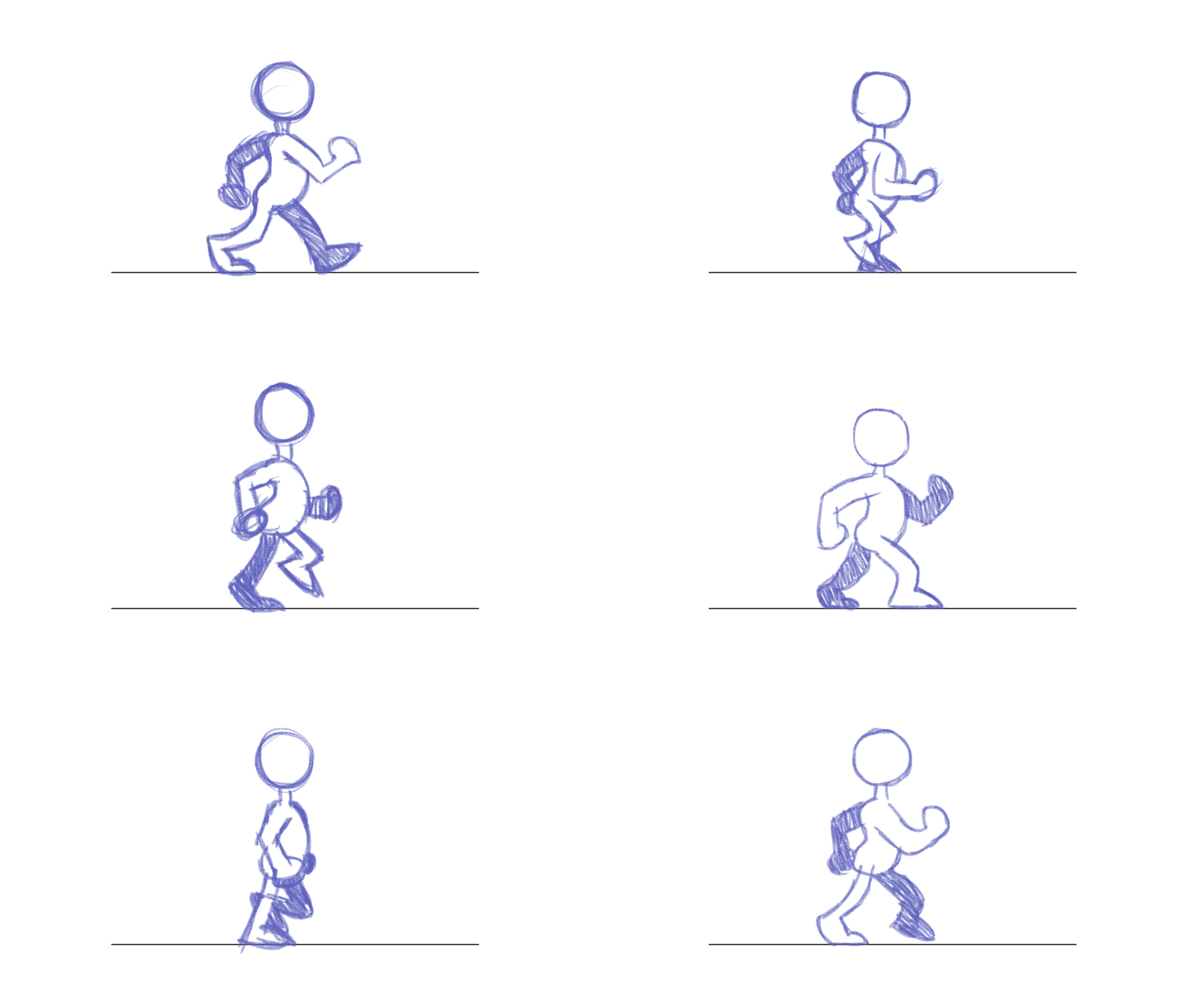

 outer halo
Install Shadergraph from the package manager
outer halo
Yep
rough geyser
Alright, much appreciated thank you.
 dusky topaz
I'm trying to learn unity to make VR things and I'm having a few issues.
- the model I imported from blender (as an fbx) rotates 90 degrees when I pick it up
- the model is very shaky when moving it even when making very smooth movements
- I can't find a place to use my roughness map
here is a video showcasing my issues
https://drive.google.com/file/d/1PW2-zhsWBexOomCyl5kfYVLZM77odxwx/view?usp=sharing
also if this isn't the place to ask this please let me know, I'm very new to unity
Google Docs
eager mist
how can i reduce shader editor gpu usage
 outer halo
eager mist
how can i reduce shader editor gpu usage
outer halo
eager mist
how can i reduce shader editor gpu usage
Why are you asking this, again. Same answer: what are you hoping people tell you to do? Nobody can "fix" how Unity manages the resources for it's editors.
cloud lion
im a really new unity dev and i'm really struggling to properly import some free to use art.
i'm trying to make a 2d isometric game with a tilemap and have tried a bunch of different free art packs
but everytime i import them and create a tilemap, they are always "offset"
when i try to connect them in my scene, the corner pieces dont connect cleanly

with this pack the 1x1 tile is like underneath the tile i have to click to select it
and the 2x1 is just sorta doing its own thing.
every different pack i download has variations of the same issue - i dont understand how i'm supposed to size things so everything lines up
in this other pack one of the road assets is just absolutely massive

i don't have an artistic bone in my body, i need to be able to use someone elses work lol
in a third pack i got, i instead got a "sprite map", which im supposed to slice into its various individual textures...but im even confused about how to do that 😄

 tawdry valley
@cloud lion is it a model?
cloud lion
is what a model
cloud lion
i have a png file of a tile