#🔀┃art-asset-workflow
1 messages · Page 72 of 1
 obtuse oyster
obtuse oyster
obtuse oyster
Makes sense :D
 flint verge
now we prevent hashing collisions
 elfin cedar
I have a problem with my PSD asset
When I try to import a sprite in PSD format to rig it in my unity file, if I have already all the images (the limbs and other details of my character), I have to select Multiple in the editor, right?
Well... When I do so and then I apply the changes, my sprite suddenly disappears
elfin cedar
(Nevermind, I solved ^^^ )
 sly dagger
Hello.
How do you avoid the texture quality becoming low quality when imported to Unity?

 fluid oak
sly dagger
Hello.
How do you avoid the texture quality becoming low quality when imported t...
fluid oak
sly dagger
Hello.
How do you avoid the texture quality becoming low quality when imported t...
There are lots of options in the texture import. You might have compression too high, or you might have the max size for your build platform set too low, or you might have mipmaps disabled.

 outer halo
#854851968446365696 on how to ask a proper question
 cobalt crest
how do i change colour?
outer halo
- Create a new material
- Assign the material to your mesh
- Change the colour of the material
Your issue is, you can't modify the default material of a mesh.
cobalt crest
my player is like this in the prefab folder

okay
ill try
if i add a new material shows this.
 outer halo
Make it 1 and replace the default material with the one you've made.
sly dagger
fluid oak
There are lots of options in the texture import. You might have compression too ...
can you help with where can I find this texture compression can be set?
 sacred bay
sly dagger
can you help with where can I find this texture compression can be set?
sacred bay
sly dagger
can you help with where can I find this texture compression can be set?
In the assets menu, just click on your texture

u can set the compression there
sly dagger
sacred bay
In the assets menu, just click on your texture
Thank you
 jade turtle
how do I make the color appear on both sides?
 obtuse oyster
Duplicate the faces and reverse them. You should turn on backface culling in your modelling program to see it there too
jade turtle
ok, i'll do that
 green latch
Backface culling off will work best
 scenic yarrow
is it weird that the textures of the ak47 model i made looks different in unity?
substance:

unity:
 fluid oak
Do you have one in specular and one in metallic? Ate you missing any channels?
 static goblet
How do I add a piece of 2D image into the 3D world?
It's a png image with transparent background
fluid oak
static goblet
It's a png image with transparent background
Add it as a sprite, usually.
scenic yarrow
does anyone know why is this happening?
static goblet
Hi, I'm trying to export a model with its texture into Unity. The model is made with Blenderkit materials. How exactly do I achieve this?
I tried exporting the object to a fbx file, but when I drop that fbx into unity, it only has the mesh
Ok I see I can take the .jpg images out and wrap them into material in unity
But that's very time consuming, for each model I'll need to do the same for albeido, normal, etc

Is there any quick way to export them all
 fringe frigate
scenic yarrow
static goblet
But that's very time consuming, for each model I'll need to do the same for albe...
fringe frigate
scenic yarrow
static goblet
But that's very time consuming, for each model I'll need to do the same for albe...
seriously? thats literally what i do
you can setup the material in blender
and you MUST have the textures in unity
scenic yarrow
scenic yarrow
unity:
can anyone help me with this?
 misty lantern
scenic yarrow
can anyone help me with this?
misty lantern
scenic yarrow
can anyone help me with this?
You need to make sure that the mask map from substance matches the mask map format in unity
And that it has functional data at all
scenic yarrow
i used the hdrp metallic export
 tender frigate
This happens when I try to import a sprite this show up

And the slicing has some problem

And when I open sprite editor again it became this

 rancid fable
Can someone look at this real quick? #💻┃code-beginner message
(links to the #💻┃code-beginner chat where I posted this)
 obtuse jay
very new to this but what software should i use for sprites/ ui elements
 dire wind
sly dagger
Hello.
How do you avoid the texture quality becoming low quality when imported t...
dire wind
sly dagger
Hello.
How do you avoid the texture quality becoming low quality when imported t...
when exporting export with smoothing on faces
 wicked bone
So I'm working on a 3D model that used to have multiple materials (now condensed into one png material)
When importing the png, the transparent parts were now turned to black and it causes the model to look like this
Any ideas here on how to fix this?


 lime pollen
wicked bone
So I'm working on a 3D model that used to have multiple materials (now condensed...
lime pollen
wicked bone
So I'm working on a 3D model that used to have multiple materials (now condensed...
check alpha is transparency in the texture import settings
 nimble iris
hi, is anyone around?
so I got image files but i've a feeling unity wants me to create a tileset first. I can't seem to find anything about creating a tileset in unity
misty lantern
nimble iris
hi, is anyone around?
so I got image files but i've a feeling unity wants me to...
https://docs.unity3d.com/Manual/Tilemap-CreatingTilemaps.html tried the manual?
Googling "unity tileset" immediately offers third party tutorials as well
Are those not what you're looking for?
 neat trout
when I use to draw my fbx files into my scene it would import at 100 for x y z, and would also import with mesh renderer
but now when I'm import them it imports at 1 for x y z, and only has transform in the inspector
idk what caused it to change but I did to undo it
fluid oak
neat trout
when I use to draw my fbx files into my scene it would import at 100 for x y z, ...
If you are talking scale, that is set in the import settings. Unity has a different default scale factor for each model type.
 devout leaf
Guys is there anyway to make my 3D or 2D building assets always appear far away?
Kinda like a skybox as I just need a distant city look with a fixed camera
fluid oak
Can't you just bake them to a skybox, then?
nimble iris
@misty lantern thanks. ya my issue was silly. I did it right but couldn't see the results because the preview window was hidden. I had to click drag it up from the bottom of the unity window.
 blissful mason
Why is the model inside out
 obtuse oyster
blissful mason
Why is the model inside out
obtuse oyster
blissful mason
Why is the model inside out
info relating that is pinned to this channel
 celest dock
Wondering if someone could help me
How do I update my prefabs and prefab variants if the model was changed
In my case an extra bit of geometry was added
 manic coyote
celest dock
How do I update my prefabs and prefab variants if the model was changed
manic coyote
celest dock
How do I update my prefabs and prefab variants if the model was changed
You might benefit from watching brackeys new prefab workflow video
 stoic harness
hi, how can i export my scene in unity into a png? preferably with transparency? i've been using the program to pose my 3d model and practice lighting/rendering. I'm not sure how to google it
celest dock
@manic coyote I didn’t find anything for his video that helped, maybe I missed something
manic coyote
celest dock
<@244756049637146625> I didn’t find anything for his video that helped, maybe I ...
Maybe I misunderstood your issue.. is there no option to apply the override to the prefabs?
Or maybe go into prefab mode and change the prefab there?
celest dock
@manic coyote so I have a model update eg a button was added to a shirt. In my project I have a ton of prefab variances with different shaders. Import the new shirt model didn’t propagate the new button to the variants
 tiny marten

 eager mist
Does anybody know a tool I can generate a material out of a set of textures

Like highlight all the textures and have them all set on the material properly, instead of having to do it manually
 solar arch
if you embed those materials into your 3d models, there's a chance the materials will be assigned correctly once extracted from the object
like... small chance
the common ones, such as mainTex and normal should be properly assigned once extracted from the model
 cedar burrow
Im new to unity, and I can't find UV mapping, cause i gotta fix the textures on a model; before you say anything yes, I have looked on google and have watched 6 tutorials

 spice onyx
i added a blender model with cell fracture but it still has the cracks but is just one big cube,cant edit all the smol cracks
 eager mist
cedar burrow
Im new to unity, and I can't find UV mapping, cause i gotta fix the textures on ...
eager mist
cedar burrow
Im new to unity, and I can't find UV mapping, cause i gotta fix the textures on ...
I think you need to do that in something like blender. I need to learn about UV mapping myself
 covert vector
best 3d modeling apps?
outer halo
covert vector
best 3d modeling apps?
Blender, Maya, 3DS Max
outer halo
They're not Unity applications, they're third party. Any can export models you can import into Unity.
Blender is free.
 bitter vine
How do I import my .fbx file without it looking like

Some parts look like they are glitching out
 novel inlet
covert vector
which one i can use with unity
novel inlet
covert vector
which one i can use with unity
blender; if ur into modelling i would suggest BlenderGuru's YouTube channel, he has tons of really good blender beginner tutorials (like the Blender donut tutorial).
solar arch
bitter vine
Some parts look like they are glitching out
those are overlapping faces, OR there was the time when the normals are too close but not overlapping. changing the angle of the normals on Import rarely help, but worth a try
bitter vine
i fixed it. the normals were flipped
 night palm
Having the most annoying issue ever that's been bugging me for months.
How does one make the texture constant even when editing the transform of a 3d object?
The textures tend to stretch and squeeze. I'd like them to stay relevant. I figured unity would have like an option for this but I can't seem to find it.
 zinc mesa
show examples of what you're seeing..
night palm

here.
I want the texture pattern to stay constant in size instead of constantly scaling to the object.
 oblique stump
eager mist
Does anybody know a tool I can generate a material out of a set of textures
oblique stump
eager mist
Does anybody know a tool I can generate a material out of a set of textures
for hdrp?
oblique stump
night palm
I want the texture pattern to stay constant in size instead of constantly scalin...
you can use a triplanar material, but for level building you're best off using UModeler / ProBuilder which is purpose built for these problems where you want the UV size to stay constant / tile when the geometry is scaled
night palm
what exactly is probuilder?
oblique stump
cedar burrow
you probably want to start with a model that is simpler
night palm
like an addon to unity?
oh, I see. is it in the package manager?
do you have a link or a source to a tutorial on how to use probuilder for textures?
ah, I think I found one. thank you so much for your help!
eager mist
oblique stump
for hdrp?
for built in
Yes it's in the package manager they bought it and incorporated it awhile ago, also progrids is good to have
@night palm
night palm
I see, thank you.
I'm assuming probuilder is like a do-it-yourself sort of 3d asset maker?
oblique stump
eager mist
for built in
there might be an asset, but generally you drop the things you have into slots and it all works 🙂
oblique stump
night palm
I'm assuming probuilder is like a do-it-yourself sort of 3d asset maker?
yeah. level modeling has a lot of traditions, it's best to use a tool specifically for it
Realtime CSG, UModeler, ProBuilder
night palm
thank you thank you
oblique stump
spice onyx
i added a blender model with cell fracture but it still has the cracks but is ju...
try using an asset for this instead, like rayfire or the nvidia one
oblique stump
why doesn't unity write what FBX settings to use for Maya 😦
like why not document what their importer does?
they obviously made some decisions here
like why would a model imported from an .mb file render tessellation differently than an .fbx of the same file?
it was a difference in scaling.
misty lantern
oblique stump
like why not document what their importer does?
I believe the question is more "what Maya's exporter does"
Every program exports to every format a bit differently
oblique stump
does anyone have assets to recommend for LOD generation? for example, to create billboards inside unity
oblique stump
or any experience exporting instanced geometry in FBXes? it's unusual that autodesk's converter has a checkbox for it, the history looks right in maya, but it's not indeed instanced
static goblet
Hi, I downloaded and imported a low-poly asset from the asset store, but I'm unable to drag & drop the prefabs into the scene, any idea why?
I can open the prefab to view them but am unable to drag them into the scene
solar arch
night palm
I want the texture pattern to stay constant in size instead of constantly scalin...
Then don't scale the mesh, if you need the custom scaling of the meshes, then use Triplanar shader instead or any shaders that take acount the WorldSpace
eager mist
Hi guys, I'm starting to integrate a character from blender to unity. And I run into an issue with the cloak.
So I made a small test with a simple subdivised plane, and the issue is the same.
Any idea why I end up from the first image (blender) to the second one (unity)?
The armature is a simple cross subdivided here with auto weight.

 oblique stump
static goblet
I can open the prefab to view them but am unable to drag them into the scene
oblique stump
static goblet
I can open the prefab to view them but am unable to drag them into the scene
should be easy peasy.
oblique stump
eager mist
Hi guys, I'm starting to integrate a character from blender to unity. And I run ...
this looks correct to me
oblique stump
eager mist
Hi guys, I'm starting to integrate a character from blender to unity. And I run ...
you probably want to make the edges soft
night palm
trying to add a PBR shading graph.
Though, it's not showing up when I do create > Shader >
where can I find where to add PBR graph
eager mist
oblique stump
you probably want to make the edges soft
Smooth doesn't correct the issue unfortunately. But why do you say it's correct? The corner are completely broken. It may be the only result possible though, but I couldn't find the answer.
oblique stump
eager mist
Smooth doesn't correct the issue unfortunately. But why do you say it's correct?...
i think try exporting to fbx
oblique stump
night palm
where can I find where to add PBR graph
shader graph doesn't support the legacy rendering pipeline
night palm
I'll just use the lit graph for a triplanar.
eager mist
oblique stump
i think try exporting to fbx
That's exactly what I'm doing ^^
oblique stump
eager mist
That's exactly what I'm doing ^^
there might be baking settings in the fbx export for blender
it's not clear why it's so glitchy
eager mist
So you think I should be able to have the right result anyway, okay I'll continue to search ^^ Thanks
Humm wait, when I upload on creator3d to check the fbx, it's not that broken

Something is different with unity rigging, it seems
I should ask on the animation channel if the problem is reduced to this
oblique stump
eager mist
Something is different with unity rigging, it seems
rigging?
is this rigged?
does your animation look correct in blender?
eager mist
yeah I said there is a simple cross armature ^^
oblique stump
if so, bake the animation
eager mist
oh, like the bake don't work on the export, let's try
oblique stump
i'm not sure if blender will correctly export what you need
hmm
are you sure you can't just use maya lol
eager mist
sure yeah xD but simply baking on the deform bones (because it was a quick test) destroy it
wait, but the animation is ok when I read the fbx, it's really just inside unity 👀
I'll try to share more stuff if people are curious
night palm

I put in a texture but it just comes out white.
does the texture have to be a certain texture type?
trying to make a triplanar shader.
eager mist
night palm
did you try with a default texture? but you got an error on the uv
try the texture with a simple shader if you think it's broken
fluid oak
@eager mistYou might have your maximum bone weights setting too low for an object like that.
fluid oak
night palm
does the texture have to be a certain texture type?
Unity expects a normal map type texture to go into normals, if that's what you mean? But yeah, your UVs seem to be incorrect.
night palm
got it fixed
eager mist
fluid oak
<@456226577798135808>You might have your maximum bone weights setting too low fo...
I tried with the exact number of bones if that's the settings you were speaking about.
Sorry if not, completely new on this ^^

 fluid oak
eager mist
I tried with the exact number of bones if that's the settings you were speaking ...
fluid oak
eager mist
I tried with the exact number of bones if that's the settings you were speaking ...
You also have to set it in your player quality settings
eager mist
fluid oak
You also have to set it in your player quality settings
Gosh, that was just that ! Thanks a lot, and I'll obviously try to keep it low. But now I know ^^
fluid oak
Unless you're targeting mobile/web you can usually leave that pretty high, especially if you only have a couple objects that actually use that many bones.
eager mist
I'll remember that ! But I would probably reduce it to at least 4 bones if I do the skin myself
fluid oak
Well, less is obviously better.
static goblet
Why do stuff look great in Blender
But much less appealing after importing into Unity
outer halo
Because you need to recreate the look development in Unity.
That means using equivalent or custom made shaders and of course deal with the lighting to closely match how you have it set up in Blender.
oblique stump
night palm
are you trying to use shader graph in a non URP or HDRP project? it's weird that it's pink
 strong ibex
if i have a sprite atlas that contains all my item icons and during runtime i use atlas.GetSprite to get those icon. Is is better to not use sprite atlas and use a prefab or scriptable object to store those sprites instead ?
since atla.GetSprite clones the sprite which breaks batching anyway. so for my case i couldnt think of a reason to use sprite atlas
fluid oak
strong ibex
if i have a sprite atlas that contains all my item icons and during runtime i us...
I'm having trouble seeing what exactly the problem is. Using GetSprite isn't supposed to break batching since it still uses the atlas texture and should still remain in the same draw call.
And if you use a prefab or scriptable object for your items, the sprite data can still be packed in an atlas.
strong ibex
fluid oak
I'm having trouble seeing what exactly the problem is. Using GetSprite isn't sup...
I see, i assume it breaks bathcing since it is cloned.
however for my case, i have a sprite manager which holds all my atlases reference. and im also caching all sprites get from using atlas.GetSprites into a dictionary. as time goes by the memory used by sprite manager will be doubled since most of the item sprite have been cloned
and according to my search on the internet it seems there is no way to get a sprite from atlas without cloning, so im thinking have a scriptable object to store those sprite to prevent the doubled memory
fluid oak
The 'cloning' is just the rect data; the actual texture remains a reference to the atlas. (at least, according to the docs)
from the docs, The clone will use the packed texture of this atlas.
Though I think you're starting a bit late into the process and not really explaining what you're trying to achieve so it is hard to make a good recommendation?
strong ibex
fluid oak
Though I think you're starting a bit late into the process and not really explai...
Im doing optimization for my project and im doing RAM optimization now. from Unity profiler i noticed my sprite manager is using quite a lot of memory (by comparing RAM usage with spriteManager preload on and off), so im debugging to see what could be the cause of it. After some investigation i suspect that is it due to spriteAtlas.GetSprite
spriteManager has 2 dictionary, one contains all my sprite atlas and another one contains all sprites get using spriteAtlas.GetSprite (more like a dictionary for sprite cache).
so i used to suspect it is atlas.GetSprite's clone design that might "doubled" my memory usage. thus im considering whether to shift my sprite atlas's item sprites into a scriptable object instead
 undone lance
Hi , quick question. I have this asset that is made of two parts , a bottle and the lid. When exporting to unity should I apply transform to all objects so that all parts are 0,0,0? doing so offsets the lids origin to the same origin as the bottle. I am just unsure what the correcct approach is
 oblique stump
undone lance
Hi , quick question. I have this asset that is made of two parts , a bottle and...
oblique stump
undone lance
Hi , quick question. I have this asset that is made of two parts , a bottle and...
it's really up to you. a good hierarchy is to place something like the lid as the child of a transform, so that the mesh itself is at 0,0,0 and the transform contains the positioning relative to the bottle
 tired wedge
can probuilder be used to edit the mesh of imported objects? I want to create an environment in Blender, but I may want to make adjustments in Unity
oblique stump
tired wedge
can probuilder be used to edit the mesh of imported objects? I want to create an...
yes, but you really shouldn't use blender to make environments unless you're using a tool in it specifically for game environments
you're better off creating the scaffolding directly in unity with probuilder/umodeler/realtimecsg
exporting to FBX, then round tripping to an appropriate editor for details and props
because level building dedicated tools will follow the right traditions for games, like how UV mapping should work, whereas blender will not
tired wedge
UV mapping shouldn't be a concern for me, but I'm curious what the "right traditions" are for games
I find probuilder very unintuitive
so I just want to use it to make small adjustments to the layout when I playtest
but again if you have an article or vid explaining why this would be incorrect I'd appreciate it
fluid oak
oblique stump
yes, but you really shouldn't use blender to make environments unless you're usi...
That's absolute madness. Probuilder isn't really designed for 'final game ready geometry.'
fluid oak
tired wedge
can probuilder be used to edit the mesh of imported objects? I want to create an...
It can be, but doing so requires converting the mesh to a probuilder object(and then optionally exporting back to FBX when you are finished)
You can also use polybrush to make small edits that are applied to the mesh filter instead of making a separate mesh.
oblique stump
fluid oak
That's absolute madness. Probuilder isn't really designed for 'final game ready ...
yeah i think umodeler is a better choice but i've gotten used to not recommending just paid assets 🙂
oblique stump
tired wedge
UV mapping shouldn't be a concern for me, but I'm curious what the "right tradit...
the leading level building tradition is hammer editor style stuff where you block out "brushes" of geometry and the UVs are even
i don't really know how to describe it but it's like it's triplanar before there was triplanar
so that you can paint with tiled textures
it's like Terrain texturing except for everything
unity doesn't really have this because it uses PhysX as the basis for stuff like FPS movement
which is also why it's sort of bad for FPSes
you can definitely use blender to build an environment
tired wedge
I did some research and most say doing terrain (like mountains, hills, trees...) would be better to do in Unity
oblique stump
umodeler also has really good fine editing tools
oh
do you mean you want to build a landscape
environment is kind of an abstract word
you definitely want to do natural landscapes in Unity
using the native terrain tools. gaia pro is good for shortcutting huge environment design
tired wedge
otherwise people say it doesn't really matter which program you use to model environments
tired wedge
I'm making a small town
today I shared it with my team and it worked fine in our project
by just adding a mesh collider
 oblique stump
tired wedge
oblique stump
tired wedge
looks cool
yeah it will all be alright doing it this way
i think if you know how to paint it great
you can use MeshSync (in pins) for a more interactive experience
tired wedge
I'm using trim sheets
fluid oak
tired wedge
I did some research and most say doing terrain (like mountains, hills, trees...)...
For terrain, it is usually better to use a terrain object rather than a mesh, but you can produce the height map and textures in other programs if you want.
Whenever you can get away with using primitive colliders(box, sphere, capsule) instead of meshes you will get an improvement in performance, though there are tradeoffs with how convenient mesh colliders are.
tired wedge
thanks for the tip
I'm not doing terrain right now, but I'll keep that in mind
fluid oak
Basically, the terrain object handles stuff like dynamic tessellation detail and stuff.
For small stuff or more fancy stuff, mesh terrain can be useful
 shrewd radish
Hey guys im confused about something. When i create a sprite in aseprite with the canvas size being 1920x1080 and then put it into unity. Its bigger than the camera, even tho the camera is set to the 1920x1080 option
Like if i just painted a big rectangle 1920x1080
oblique stump
shrewd radish
Like if i just painted a big rectangle 1920x1080
you have to set the pixels per unit in the importer
to make sense for your game
fluid oak
Yeah, the only thing in 1:1 pixel scale in unity is ui.
shrewd radish
Ohh right
Thanks
So if I set it to 1 rather than the default “100” it should work?
eager mist
hi i dont know anything about art. i do draw sand terrain on 2d sprite
sand, grass, dirt, concreate
eager mist
need advice on how to search for top down photos of real terrain
fluid oak
Have you tried google?
eager mist
fluid oak
Have you tried google?
Google image search is terrible, duckduckgo is better.
but the pics im trying to get are topdown photos of terrain
desert terrain, soil, field, winter, fall
eager mist
OMG either im searching incorrectly because i cant get top down photos, helicopter verticle down photos of terrain
 lofty geyser
eager mist
need advice on how to search for top down photos of real terrain
lofty geyser
eager mist
need advice on how to search for top down photos of real terrain
you mean satellite images?
eager mist
lofty geyser
you mean satellite images?
Yes
i types in "drone" "aerial view""top (+= down)" and "above"
nothing good came up. so im now using google images to take snipshots, which isnt technically adhering to policy.
lofty geyser
Use the USGS EarthExplorer
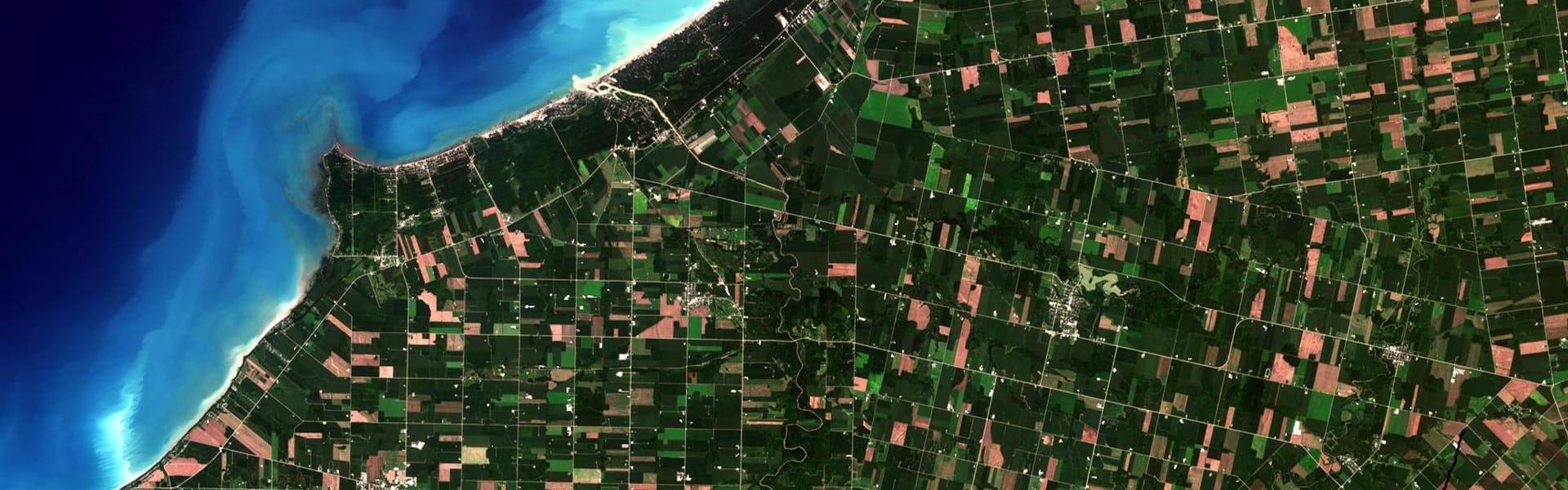
EARTH OBSERVING SYSTEM
Carry out your research or run a business with free satellite imagery. Find out how to share links or download recent and historical images for free.
and these
eager mist
lofty geyser
Use the USGS EarthExplorer
cool thanks
lofty geyser
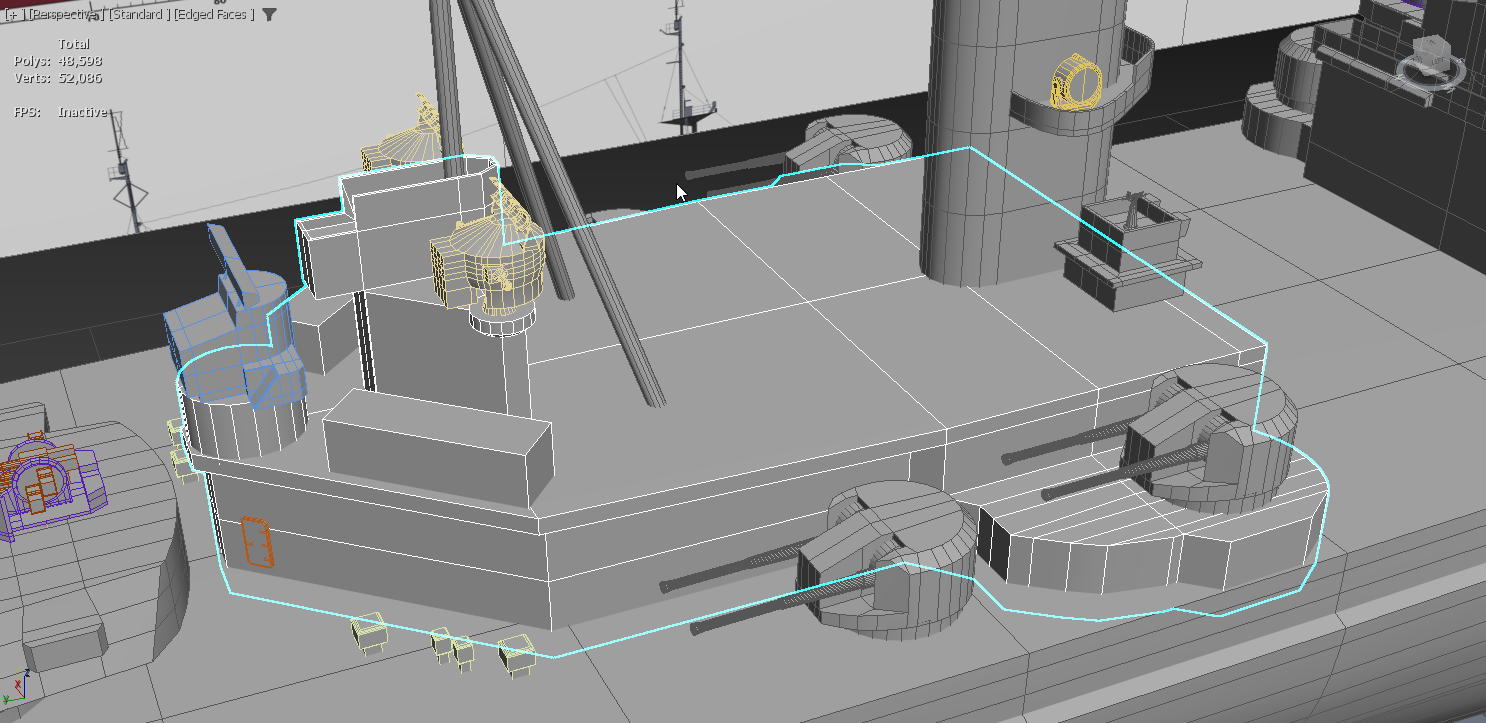
anyway, I was going to ask if Unity is ok with attached models, or if I have to boolean everything together
lofty geyser
eager mist
cool thanks
You can also install QGIS, add the QuickMapServices plugin to it
and add a satellite map layer like ESRI Satellite, then export that
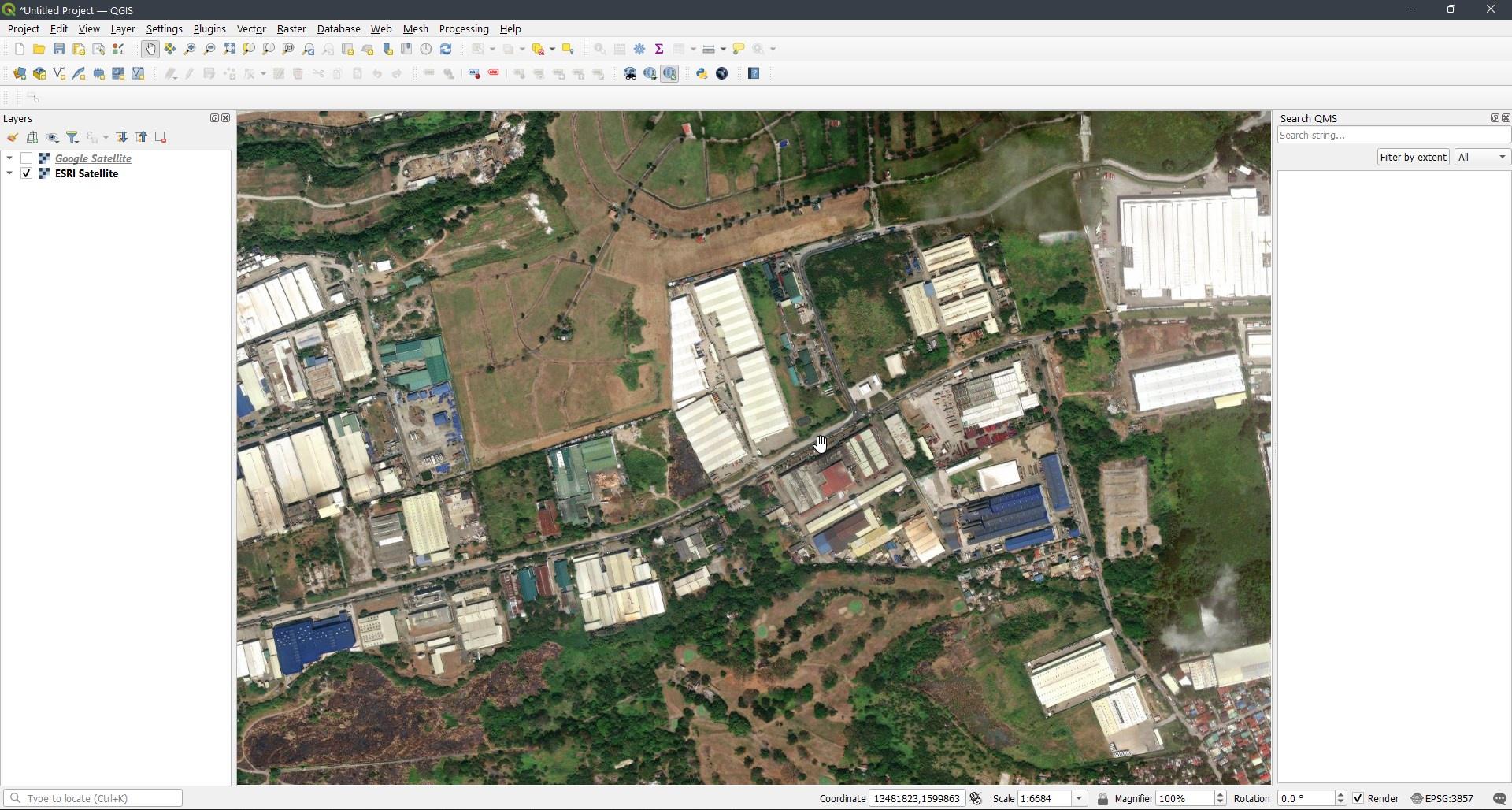 eager mist
lofty geyser
and add a satellite map layer like ESRI Satellite, then export that
eager mist
lofty geyser
and add a satellite map layer like ESRI Satellite, then export that
thanks this is great


 fluid oak
Turn off compression then, I suppose.
fluid oak
Check your settings for PC build?
 sage stone
same thing ?
 sage stone
i think the png is the problem

i found it !
my project settings was eighth res
thanks you for your help
 dense brook
Guys what 3d design software is the best?
I'm going to use blender, but is there any better one?
outer halo
dense brook
I'm going to use blender, but is there any better one?
Blender is free and powerful. Industry standards also include Maya and 3DS Max.
dense brook
Ok
So
If I want to make an RPG ALONE should I prefer 2d or 3d? Which will be better (and easier to animate)?
outer halo
Up to you. Don't let the internet make that decision for you.
dense brook
Right👍
Well I think I'll use 2d to make it classic style
And then remaster it to 3d when I can
So any good 2d software that can work with unity?
manic coyote
dense brook
So any good 2d software that can work with unity?
anything that gives you a jpeg or png?
paint works
dense brook
No. I want something that can animate.
Paint is good, but I'll need 200 projects for an animation
outer halo
dense brook
No. I want something that can animate.
Aesprite is a popular option.
dense brook
outer halo
Aesprite is a popular option.
Ok!
 tribal pivot
Help!
Textures have a normal map, right? But they ALSO have something called a roughness texture.
The problem is, the normal map can be assigned to a material, but there is nowhere to assign the roughness to.
Where is the roughness field?
outer halo
Unity uses a smoothness property instead for their default shaders.
tribal pivot
outer halo
Unity uses a smoothness property instead for their default shaders.
That's just a number though, I have an image
outer halo
Drag it onto the texture box as you would with albedo
tribal pivot
outer halo
Drag it onto the texture box as you would with albedo
There is no box for "smoothness".
tribal pivot
outer halo
Drag it onto the texture box as you would with albedo
There is a box for metallic though, do you mean that?
outer halo
Yes, the smoothness controls the Metallic or Specular properties of the shader. Hence why the slider is indented underneath.
tribal pivot
outer halo
Yes, the smoothness controls the Metallic or Specular properties of the shader. ...
What if I have both roughness and metallic images? Where do I put them
outer halo
You make a custom shader that supports the mappings you need
But they're kind of the same thing. What parts are smooth.
You can read about it here:
https://docs.unity3d.com/Packages/com.unity.render-pipelines.universal@13.1/manual/lit-shader.html
 brave gyro
does anyone know if I can somehow assemble my shapes in Aesprite?
at the moment i put them together in unity to assemble the full charecter, but those psd imports look cool, is eapsrite work in similar way so I can drag whole charecter in ? (and preview the charecter in aesprite!)
 weak nimbus
Dont know if this is the right channel but i have a problem with my blender materials
If i import materials to my unity project they just turn black, im currently using URP in unity
outer halo
Blender materials don't import into Unity. They just come in as basic lambert materials. You need to remake the look in Unity.
 hollow crescent
how do you even create textures
outer halo
You paint them in the modeling program, or you use something like photoshop.
 proper sandal
whats the general feeling on buying assets to make games with? are there ever any issues with that?
fluid oak
"Don't use that one spider head thing asset" I guess
proper sandal
looool
hollow crescent
why can i put a image in the thing below not the console the project
 potent wraith
hollow crescent
why can i put a image in the thing below not the console the project
potent wraith
hollow crescent
why can i put a image in the thing below not the console the project
Did you try just dragging the image file into your project tab?
hollow crescent
potent wraith
Did you try just dragging the image file into your project tab?
this is what happens
 potent wraith
What's the file format?
hollow crescent
it just shows that
potent wraith
extension?
 potent wraith
It doesn't show the extension
Check the file properties
I think. I don't know croatian
hollow crescent
ok
potent wraith
Is it JFIF?
hollow crescent
yes
potent wraith
I don't think that format is supported by unity
hollow crescent
 potent wraith
Yeah. You need to convert it to one of the compatible formats.
hollow crescent
potent wraith
Yeah. You need to convert it to one of the compatible formats.
i will just use a new image
hollow crescent
potent wraith
I don't think that format is supported by unity
tru tru tru
it works with another image thats not jfjf
 potent wraith
hollow crescent
potent wraith
hollow crescent
Increase the text box width. Or make your font size smaller.
hollow crescent
potent wraith
Increase the text box width. Or make your font size smaller.
but how(Increase the text box width.) what do i press
potent wraith
For starters open the scene view tab. How are you even editing the scene without it..?😅
hollow crescent
potent wraith
For starters open the scene view tab. How are you even editing the scene without...
 potent wraith
That's not what I mean
You seem to have skipped some of the basics of working with unity.
I suggest looking for some tutorials on unity UI/tabs and basic workflow
hollow crescent
potent wraith
I suggest looking for some tutorials on unity UI/tabs and basic workflow
can you just tell what to press to open up the text box
potent wraith
hollow crescent
can you just tell what to press to open up the text box
What text box? What do you mean by "open it"? As I said, you clearly don't understand how to work in unity. I can't help you if you don't understand my answers, can I?
hollow crescent
potent wraith
What text box? What do you mean by "open it"? As I said, you clearly don't under...
text box open it for the text i wrote
didnt write but
potent wraith
You can't "open it". You can select it to inspect in the inspector. These are basics of working with unity.
potent wraith
the text is a component on a gameobject.
If you view it in the scene view, you can see the gizmos that allow you to adjust it's size
you can also do that via the inspector. The component responsible for ui positioning and sizing is "RectTransform".
look at the manual to understand what each of each properties do.
hollow crescent
ok
 novel garden
Just a general question related to modelling. Let's say I have 2 completely different meshes. Completely different vertex counts as well. My goal is to have a way to smoothly morph one mesh into the other (probably through Blender's blendshapes). Is there any suggested way to go about this? I'd assume that a first step would be to equalize the vertex counts between the two meshes. Is there any way to automatically equalize the number of verts on two meshes?
devout leaf
fluid oak
Can't you just bake them to a skybox, then?
I know its been a while but I didn't see this. Ive gotten a free skybox how would I go about baking them together, I assume take the skybox file into photoshop and just layer city image ontop?
I was just thinking this way the cities would appear curved instead dead on
 obsidian moon
constructive criticism on sci-fi smg?

i know light a little grainy my pc isnt good enough to render really lots of samples
anything would be apreciated
 safe oriole
I don't know if I'm asking for help in the right spot, sorry but

Anyone know why all of this white stuff is appearing on the side of this model?
I don't know how to fix it-
lime pollen
safe oriole
Anyone know why all of this white stuff is appearing on the side of this model?
looks like the shader is broken
safe oriole
Any idea how I can fix that..?
lime pollen
safe oriole
Any idea how I can fix that..?
well first you have to look at the shader code or shader graph
safe oriole
...sorry but how do you do that? I'm a little new-
lime pollen
safe oriole
...sorry but how do you do that? I'm a little new-
oh boy, if you don't know how to do that I don't think you'll be able to fix this yourself. how did you get this model?
safe oriole
Alright, jeez...
I commissioned it
lime pollen
you should ask the person that you got it from to fix the shader then
safe oriole
Alright, thanks.
 orchid dust
Having trouble exporting to unity tried exporting as different files types but the mesh is getting distorted. There is some problem with the fbx and being exported. Any help is appreciated.

 feral nacelle
Is there a way to preserve this hierarchy? Preserve hierarchy setting does nothing.
I'm doing an FBX export / direct import from blender, same thing.


For Model files that contain only Animation, you can enable the Preserve Hierarchy option to prevent hierarchy mismatch in your skeleton.
Preserve Hierarchy is for animations hmm
It seems like collections are never exported to FBX
Does anyone know how to convert them into empties?
 barren carbon
hey is there someone who can help me with a texturing issue? it involves Substance painter and blender
outer halo
That's a stretch, if the issue is with Substance and Blender.
Anyway, just ask your question with details and anyone who knows can help.
barren carbon
what is the best way to remove this seam(they are the different objects but they work in a modular way)

like this
 barren carbon
nvm fixed it
 barren carbon
obsidian moon
https://media.discordapp.net/attachments/497873833043296277/950140874279518208/u...
barren carbon
obsidian moon
https://media.discordapp.net/attachments/497873833043296277/950140874279518208/u...
is it me or is there a little bit of texture stretch on the front of the gun and on the sight? besides that it looks really good
oblique stump
barren carbon
what is the best way to remove this seam(they are the different objects but they...
hard to say why the kit would have this seam in the first place. make a tiled texture
barren carbon
yea I am now in my testing fase and I was figuring out my textures and then I noticed that I had a seam so I change the UV so it would tile
obsidian moon
barren carbon
is it me or is there a little bit of texture stretch on the front of the gun and...
i forgor the trigger 🤦♂️
oblique stump
barren carbon
yea I am now in my testing fase and I was figuring out my textures and then I no...
there are utilities that creating tiling textures for you
it's tricky to make game ready UVs
obsidian moon
yeah im not making a AAA game to be fair so im sure it will be fine lol
oblique stump
does anyone have experience with the heretic asset?
obsidian moon
smoothed it a little and added a trigger, any more constructive criticism

 peak anvil
guys i made a simple house model, and i want to make the texture, how do i do that
 vocal otter
anybody know what happened

 ripe mist
how do you generate high poly objects? i tried to import Blenders sculpting sphere, but my shaders still treat it as one big vertex
 glad aspen
you probably need to apply modifiers though usually they get applied pre export
 devout aurora
Hey guys, can I get some help on weight painting? I'm having a really rough time trying to keep a limit of 4 bones per vertex on faces.
obtuse oyster
devout aurora
Hey guys, can I get some help on weight painting? I'm having a really rough time...
There is definitely a way in blender to restrict it to 4
devout aurora
Yeah I found this but it doesn't restrict the limit to 4, it just removes the lower weights and leaves me a lot of clean up work. then I'm left with vertices with more then 4 weights and have to repeat the process and it just seems really tedious.
or is that actually restricting? let me read it over. maybe I missed something.
obtuse oyster
Maybe it's just a thing you apply afterwards. I've never used it before
I've only done weight painting in Maya and Modo 😄
devout aurora
Should I not be using Blender for weight painting? Honestly I'm getting constantly frustrated with the weight painting workflow in Blender and might be worth spending money for something better if it saves me the headache. Is Maya or Modo better?
I've only used Blender so that's where my experience is
obtuse oyster
Blender should fine fine, switching to a whole other tool for weight painting seems pretty insane to me 😛
How are you managing to make it such a problem? Once you get something down you should lock it so you're not fiddling and adding new values
devout aurora
ahh. Yeah I guess it's really only my character's face that's giving me trouble. I have the rest of the body not exceeding 4 groups and it works fine, but her face is giving me a lot of trouble.
probably just cause I'm an amature and don't know what I'm doing 😅
obtuse oyster
If you're doing complex things with the face perhaps you are looking for blendshapes
devout aurora
That was what I was thinking about doing if I couldn't get weight painting down. I do wanna stick to good practices though and I don't know much about the performance impact of blend shapes.
I haven't been locking my groups though. Maybe that's my problem. I've been keeping them unlocked cause I always go back to them and make changes.
I guess I'll give it a few more attempts while locking groups and if I can't manage that then I'll use blend shapes hahah.
 celest cosmos
Guys I am a begginer and I am facing this issue where I cant see my object?

Please let me know the issue Thank you
solar arch
you're in wireframe mode
see those globes (for of them) on the right corner, then choose solid
celest cosmos
Oh ok thanks
 gray moat
Hey; I'm having a weird issue where I have a blender file w/ 4 objects: CharacterRig, TopMesh, BottomMesh, Helmet1
Top mesh and helmet 1 are similar, but they're all at the same level, so when the get imported into unity, I get an fbx prefab like
MyCharacter
| CharacterRig
| TopMesh
| BottomMesh
| Helmet1
When I drag my fbx prefab into the scene, I can unpack the prefab, and all my meshes are still visible. However, when I try to make a new prefab out of Helmet1, and delete it, I can no longer see the mesh when I drag it back into the scene. Even if I set the root bone to the correct instance of the character rig.
Any ideas? Using 2021.2.14f1 for unity and blender 3.0.0, I just have no idea why the skinned mesh component would cease to function when it works absolutely fine in the fbx prefab
Also if I toggle these objects in the hierarchy they show up just fine when I re-enable them, but I can't make or instance a prefab of them

 proper laurel
 Hey everyone!
for our current project, I want to use normal maps I generated in Substance Painter. I use OpenGL maps as a preset, but still at least one channel seems to be flipped. The shadows on the bricks are up, while the light comes from above. Does anyone have a right workflow for getting normal maps right in Unity? 

 glacial vector
Which export preset are you using @proper laurel? Painter can export both types regardless of your project settings
misty lantern
proper laurel
<:UnityChanHuh:885169594711539842> Hey everyone!
for our current project, I want...
Are you generating the maps in tangent space as well?
proper laurel
misty lantern
Are you generating the maps in tangent space as well?
The maps I'm using come from Textures.com.
proper laurel
glacial vector
Which export preset are you using <@!330272302065385472>? Painter can export bot...
My own, but very much copied from Unity HD Render Pipe
glacial vector
Then make sure you drag the correct output normal into the export output
proper laurel
glacial vector
Then make sure you drag the correct output normal into the export output
I'm using the Open GL Normal as in the original preset. Though I experimented with them: I must admit, that didn't change the rendered normal at all.
 flint sentinel
Hi, I imported my sword from blender to unity:


the problem is, I am not sure why I am getting that black little hole in my sword and how to make it look like it does in blender because lightning or something is completely different
outer halo
You have inverted normals on some faces of that sword. There's a link pinned in this channel that covers how to fix it.
flint sentinel
outer halo
You have inverted normals on some faces of that sword. There's a link pinned in ...
ok and what should I do about weird colors?
outer halo
Light your scene?
If you don't want to use any lights on your sword, use an unlit shader on it.
flint sentinel
this is with completely white light:

as you can see it's way different in blender
outer halo
Of course it's different than blender. You didn't match the lighting and look between the two programs.
flint sentinel
so I need to play with values to get it right?
outer halo
Sure, among other things.
Like exporting your texture from blender to use as the albedo in Unity
flint sentinel
outer halo
Like exporting your texture from blender to use as the albedo in Unity
I should use bake type Combined as my albedo right?
outer halo
I don't use Blender so I don't know.
 mossy garnet
How do you folks handle 2D Sprite Animations? Do you use the Animator? Any import scripts? Etc.
Specifically from Asepsrite
fluid oak
The black triangle looks like a baking error, likely caused by overlapping triangles
celest cosmos
Alt z lol
 cobalt lake
- How to manage the art resource project of large-scale games
- Google Play forcing 64-bit App related issues
- Questions about repackaging scattered AssetBundle resources
- The difference between API Compatibility Level .net 4.x and .NET Standard 2.0 in Unity
- SRP Batcher fails in Unity 2020 version OpenGL ES3
How to Manage the Art Resource Project of Large-scale Games
https://blog.en.uwa4d.com/2021/12/16/how-to-manage-the-art-resource-project-of-large-scale-games/

How to manage the art resource project of large-scale games? Google Play forcing 64-bit App related issues; Questions about repackaging scattered AssetBundle resources; The difference between API Compatibility Level .net 4.x and .NET Standard 2.0 in Unity; SRP Batcher fails in Unity 2020 version OpenGL ES3
This management process will be better for you to manage your art at the beginning of you projects
 high nest
Hi, can someone help me 🙂 I have a strange problem. I import multiple objects and their instances into unity from Blender. All objects are using one texture palette and are UV mapped. But for some reason 1 object and its instances are black. And 1 object is ok but their instance is black.
 fluid oak
high nest
Hi, can someone help me 🙂 I have a strange problem. I import multiple objects a...
fluid oak
high nest
Hi, can someone help me 🙂 I have a strange problem. I import multiple objects a...
You're using an instanced shader?
 storm bobcat
Does anyone know why my model looks (fairly) decent in unity's standard render pipeline but like crap in HDRP?
 high nest
fluid oak
You're using an instanced shader?
high nest
fluid oak
You're using an instanced shader?
1 material for all objects
fluid oak
high nest
1 material for all objects
And it supports instancing?
fluid oak
storm bobcat
Does anyone know why my model looks (fairly) decent in unity's standard render p...
Your textures might be in the wrong slots, for one thing. And material settings need a lot of tweaking between standard and hdrp.
high nest
fluid oak
And it supports instancing?
yes because my other objects are also set up this way in the scene and they are working fine btw thank you for trying to help me 
high nest
fluid oak
Your textures might be in the wrong slots, for one thing. And material settings ...

my material is setup as basic as it can be set up
fluid oak
That second one was replying to Majestijn 😛
But I do see that you have instancing disabled?
high nest
when I'm saying instancing I mean my other objects are using the same mesh but for some reason couple of them are black while others are working correctly.
 pine copper
So i have a bit of an art problem - I have a multi layered isometric y as z tilemap. but the top and bottom layers bleed together when a top edge meets a similar tile thats lower layer (like sand meeting sand). ill show a SS to show what i mean. My thought is to put a script on the camera that tweaks the lower layer opacity or something depending upon what layer your on, allowing you to iterate thru the layers and also simulating atmospherric perspective. thoughts?

its not as pronounced here, but when its a bunch of the same tiles its hard to differentiate between the layers, visually.
mossy garnet
pine copper
Shadows always help fix things like that
 outer halo
@eager mist Don't spam
oblique stump
pine copper
its not as pronounced here, but when its a bunch of the same tiles its hard to d...
the lines are flawed in the art here
do you want to make a clean isometric pixel art tile map?
oblique stump
high nest
Hi, can someone help me 🙂 I have a strange problem. I import multiple objects a...
the normals are wrong
see pins
oblique stump
storm bobcat
Does anyone know why my model looks (fairly) decent in unity's standard render p...
create a mask map
pine copper
oblique stump
the lines are flawed in the art here
Im trying to build a generatable tileset using perlin noise
its an adventure to say the least
Its going well ish tho
 static goblet
Hey is there any quick way exporting a Unity scene into Blender?
 swift estuary
 wide lava
static goblet
Hey is there any quick way exporting a Unity scene into Blender?
wide lava
static goblet
Hey is there any quick way exporting a Unity scene into Blender?
Yes
Wait no
I thought blender to unity
@static goblet https://www.reddit.com/r/Unity3D/comments/gx6yy0/how_do_i_export_a_unity_scene_to_blender/?utm_medium=android_app&utm_source=share
reddit
2 votes and 10 comments so far on Reddit
Found this on reddit
high nest
oblique stump
the normals are wrong
If the normals were wrong the objects would be transparent. It was the first thing I checked. I just needed to scale up all of my objects by like 900x XD. The person who worked on those objects prior to me made them on a microscopic scale.
fluid oak
high nest
If the normals were wrong the objects would be transparent. It was the first thi...
Different software uses different units. You can set a scale conversion in the importer
 supple fable
I have a model which has tentacles with cool animation. I would like to cut down just one tentacle but keep the animation but the model is not splitted into several parts so I need to cut down it in an external modeling software. How can I do that but I can keep the animation?
 smoky steeple
quick question, i have a 2d game with 3d elements sometimes, i usually just bake the lighting but here i'd like it to be dynamic however the light here doesnt work, the model is completely flat, why is it? very new to 3d in unity
 fluid oak
@supple fable that depends on your external software...
supple fable
fluid oak
<@189053355551752192> that depends on your external software...
Zbrush or Blender
 gusty folio
Hi guys, I just want to know what's the workflow for making a 3D model and then adding collision to it that will automatically work with the character collider?
Eg. I want to make kit peices, eg. a hallway segment, an interior room corner, etc. etc. and I want to add collision to them.
Last time I did this was in UDK (Unreal Engine 3) and you exported an FBX which had 2 separate meshes inside it, with a specific naming convention, eg. the one starting with the letters "COL_" was to be used as the collision mesh, the other was the visual mesh
Maybe I just make a prefab with 2 meshes, and set one of them to a layer that I'm using for collision?
oblique stump
 burnt dune
What is the best free app for making art things in games
burnt dune
What is the best free app for making art things in games
well "poopmaster" do you mean 2d or 3d art?
burnt dune
2d
burnt dune
oblique stump
well "poopmaster" do you mean 2d or 3d art?
I aready use blender for 3d
pine copper
depends on the style. i personally like aseprite for pixel art and affinity designer for higher fidelity 2d design
oblique stump
burnt dune
What is the best free app for making art things in games
can you personally draw in the style you like?
burnt dune
Ill just try diffrent ones
oblique stump
burnt dune
Ill just try diffrent ones
really depends how you're trained. mangaka use clip studio and krita. european / classical painters like corel
nobody trains on ipads so it's not like there's a program that is what everyone uses
does that make sense?
it sounds like you have mangaka style if you use krita
burnt dune
Ok
oblique stump
gusty folio
Last time I did this was in UDK (Unreal Engine 3) and you exported an FBX which ...
drag and drop the collider meshes into the collider's mesh slot
that's it.
oblique stump
smoky steeple
quick question, i have a 2d game with 3d elements sometimes, i usually just bake...
emissive materials do not emit realtime light. you must attach a light component to an object that should realtime light a scene
pine copper
So im using perlin noise to generate the below ground layers, and then trying to use rule tiles to place surface anatomy

but my rule tiles seem to be affecting all layers, regardless of sprites used in the generator
do rule tiles override similar tiles? its just a generic isometric rule tile
pine copper
nvm i think it was how i had some folders set up
gusty folio
oblique stump
drag and drop the collider meshes into the collider's mesh slot
Thanks :) I guess if it's static geometry Unity automatically does the appropriate optimisations?
fluid oak
gusty folio
Last time I did this was in UDK (Unreal Engine 3) and you exported an FBX which ...
This will let you use an automatic naming like unreal
But yes, you can just manually assign a collider to the second mesh
gusty folio
fluid oak
https://bronsonzgeb.com/index.php/2021/11/27/better-collider-generation-with-ass...
Ah that is very cool! Thank you!
oblique stump
gusty folio
Thanks :) I guess if it's static geometry Unity automatically does the appropria...
if you mark the game object as at least collider static, unity will ask PhysX to treat it as a static collider
 untold edge
Does anyone know the workflow for making an FPS gun these days? More specifically the materials/textures. Basically I see people uv/texture painting their weapons, and it creates these complex textures for albedo/ao/normals etc...but then you can only use those textures for that one gun.
So what I wanna know is, is that the normal thing? Have an albedo texture per gun. And then let's say you wanna add camos to your guns, you now need an extra albedo texture per gun per camo.
So 5 guns, 5 camos = 25 albedo textures??
As oppose to having great uvs on your model, and then you can just use any camo texture on any model and it would work fine
misty lantern
@untold edge usually yes, one albedo/whatever per weapon
Camos and skins on the other hand tend to use generic repeating textures overlaid on the gun by a shader
untold edge
misty lantern
<@!356857842344656897> usually yes, one albedo/whatever per weapon
Camos and ski...
how would that shader work then? I thought a camo would just be an albedo texture
misty lantern
untold edge
how would that shader work then? I thought a camo would just be an albedo textur...
It's possible to have another UV map for the pattern which the shader then blends with the albedo, or it could be one of countless ways for texture projection that's possible with shaders
Still, modern triple-A games relatively speaking don't give a damn about their disk size or asset load times so it wouldn't be surprising to find games with 25 albedos per weapon
untold edge
misty lantern
Still, modern triple-A games relatively speaking don't give a damn about their d...
I see....well then...
misty lantern
There are many ways to optimize this stuff, depending on what kind of weapons and skins you need to have
Planetside 2 had guns that were almost entirely composed of shared generic textures and parts
I'm sure someone does
untold edge
misty lantern
Planetside 2 had guns that were almost entirely composed of shared generic textu...
yeah, I'm just having so much trouble getting a textured gun, 1 texture 1 gun, that I can't even fathom adding more guns and textures rn
 shy fox
DM me if you can
outer halo
@shy fox You've been told already to just ask your question.
outer halo
Great, you can share your example and ask that very question. If anyone here can help, they'll reply.
 hasty hazel
hey everyone, sorry if this isnt the right channel, but is environment building better in tiles or hand drawn as a whole? I was never sure of how to create environments for games.
fluid oak
Define 'better.'
gusty folio
oblique stump
if you mark the game object as at least collider static, unity will ask PhysX to...
I guess it's all so unexpectedly easy that I didn't figure it out 🙂
gusty folio
hasty hazel
hey everyone, sorry if this isnt the right channel, but is environment building ...
Sounds like you're talking about 2D games specifically? If you keep learning about how it all works under the hood, you can marry that with your goals and get a performant game that looks good.
Talking about 2D games specifically, using tiles is one of those things that will save you development time and also be more efficient for the computer to manage, at the expense of flexibility and everything being on a grid.
Also a lot of the 2D games you're thinking of probably don't use "hand drawn" graphics directly but polygonal geometry with enough points to make curved terrain and textured to give it outlines etc. Graphics cards are focused on drawing polygons with textures on them so this can be very efficient too. Unity has level editing tools for creating your levels out of curved shapes like this (though I haven't used it yet)
Games that do use actual hand drawing look will have to manage the large textures required so as not to blow out the video memory on the video card and make everything run slow.
Actually if you post screenshots of what you're talking about that will help people answer.
pine copper
I used a perlin noise generator (check resources for the code) and a tileset to generate tilemaps
it looks like this
 pine copper
basically yeah
hasty hazel
very nice
pine copper
i used multiple generators and multiple tilemaps for multiple layers
but if you mess with the settings, particularly scale, you'll get nice distributions like that
hasty hazel
i like how its like a natural topography there
pine copper
ye eh
also you can throw in blank tiles into the tilelist that the generator pulls from
and keep scale near zero for plant like distibution
i also used an z as y tile map, and offset z by 0.125 for a slight height variation
hasty hazel
do you have a reference to the project you're working on?
pine copper
nah im just kinda building things as i go
hasty hazel
oh nice
pine copper
using different tutorials
the perlin noise generator code is in the resources channel tho
i posted it yesterday
it works perfectly
you just need 3 scripts
and all i had to do was change the one script to use monobehaviour, attach them all to a empty game object named generator, and plug in the variables
the editor generator script in the dev blog didn't work on my end
but its for seeing the heightmaps and is kinda useless anyway
hasty hazel
still a cool demonstration nonetheless
pine copper
👍
UI is really easy to do too
and its easy to implement lol
code and design wise
hasty hazel
Im working on a dialogue heavy game, ui for that using dialogue systems by pixel crushers right now actually
hasty hazel
everyone loves a stardew valley clone
pine copper
straight up
pine copper
I'm trying to make a boom town simulator
western genre
your the mayor
try to survive the various perils of the desert and of mayor life
but its very early still
hasty hazel
like a tycoon style game?
pine copper
yeah
leaning more management tho, less building
like simcity
you build infrastrucutre
allocate lots
etc
hasty hazel
i cant imagine the amount of scripting needed for that
hasty hazel
i just buy the frameworks from the asset store
pine copper
im probably gonna do a deep dive on ai soon enough
i want a simulator ya know?
but i can code a little
and i went to art school so i can do the assets
or buy them from itch.ios asset store (tons of 16 bit stuff)
hasty hazel
yeah its full of stuff
pine copper
ye eh
hasty hazel
you can always kitbash assets
pine copper
true
hasty hazel
combine them and make your own
pine copper
im animating everything by hand rn 😭

this is the base for a character
not even the full directional anims and idle
plus whatever else lol
hasty hazel
i actually finished 2 idles and walks for my game today, other than that and a dialogue test im not making much progress eithert
im so bad at walk cycles
 pine copper
does he have a duck hat hahaha? rad
 minor fern
How could I make this less claw like?
 pine copper
hmm
i think its the L shape in the fingers
if you straighten them out or extend them a bit i think itll look a bit less claw like
hard call tho
gusty folio
minor fern
How could I make this less claw like?
You need a gentler slope in the fingers, they turn the corner too sharply
minor fern
gusty folio
You need a gentler slope in the fingers, they turn the corner too sharply
Would Thiis Work?
 gusty folio
minor fern
Would Thiis Work?
gusty folio
minor fern
Would Thiis Work?
No now you're mixing resolutions, you've got smaller pixels in your outline than your actual artwork
It's good to look at examples of actual pixel art from the 90's to see how they dealt with this stuff
@minor fern you have something like what's on the left and you want something more like what's on the right
 minor fern
gusty folio
minor fern
gusty folio
ah ok, I will try that
gusty folio
minor fern
ah ok, I will try that
Yeah - what I did is not exactly what you want, but you actually have more to play with than you realise when you add or leave out "outline" pixels on the corners to suggest how sharp or gentle the curve is
minor fern
gusty folio
Yeah - what I did is not exactly what you want, but you actually have more to pl...
Forgot to mention why the hand looks the way it does. I want it to be able to look like its holding something
gusty folio
Oh ok that changes things. So you still need the fingers curled then, just not so sharp
minor fern
gusty folio
Oh ok that changes things. So you still need the fingers curled then, just not s...
Yea
gusty folio
I mean it doesn't change things entirely, the point still stands, but I was just focusing on straightening them entirely
These pixels make it look really angular, try replacing them with the outline colour, or a shading colour

and then you'll have to adjust the outline
maybe devote some more pixels to the tops of the fingers wrapping around
minor fern
gusty folio
I mean it doesn't change things entirely, the point still stands, but I was just...
Looks weird around the middle finger part but its coming together
 gusty folio
minor fern
Looks weird around the middle finger part but its coming together
gusty folio
minor fern
Looks weird around the middle finger part but its coming together
I agree, it looks a lot more relaxed now, in spite of the glitch in the middle
Also changes things if you're doing a piece of sprite art or an icon, I assume an icon with those heavy lines. If it's art you can do a lot more with shading colours to suggest things
With practice you can get a feel for adding slightly darker / transitory versions of the adjacent colour to suggest an edge that's halfway between pixels
minor fern
gusty folio
I agree, it looks a lot more relaxed now, in spite of the glitch in the middle
This looks way better and natural
 gusty folio
If you want it for an icon you want more "readable" over "aesthetic" anyway
You probably were ok sticking with 3 fingers for an icon too
But yeah it looks more like a natural hand than the claw for sure
minor fern
gusty folio
If you want it for an icon you want more "readable" over "aesthetic" anyway
You ...
This looks like It could better hold something
 gusty folio
You're definitely getting the hang of it, far cry from the claw 😄
 vast matrix
@uneven surge can u show me the hierachy of the model?
it looks like ur waifu is sparated to parts by cutting half lol
 uneven surge
vast matrix
<@!874697562706313236> can u show me the hierachy of the model?
uneven surge
vast matrix
<@!874697562706313236> can u show me the hierachy of the model?
how do i see the hierarchy.. this my first time using unity so im kind of slow
 strong wasp

The red one is the original
The coloured is the variant
When I deleted the red one the variant gets deletef as well
solar arch
proly bcos the coloured was parented to the original?
strong wasp
solar arch
proly bcos `the coloured` was parented to the original?
How do i unparent it?
solar arch
strong wasp
How do i unparent it?
 strong wasp
Ah not like that
strong wasp
solar arch
proly bcos `the coloured` was parented to the original?
The coloured one is saved as .prefab in assets
How do i make it like .fbx
solar arch
solar arch
https://docs.unity3d.com/ScriptReference/Transform.SetParent.html
I said that with assumption that the variant is an instance of the original.. if it's not, then just drag it somewhere in editor
solar arch
strong wasp
How do i make it like .fbx
wait, why you want an fbx now 😆
you can export it if you want with fbx exporter
i think what you're looking for is to make a new prefab instead
strong wasp
solar arch
i think what you're looking for is to make a new prefab instead
I am looking to make a fbx entirely separate from the parent fbx
 dry locust
sorry if I am on the wrong channel but I have ripped some textures from a game but I wanted to know what they are all about. I am start to learn modeling and wanted to know if somebody can tell what are these

base

this one
which is probably for the npr properties
like from here

PLAY THE PROTOTOYPE: https://raymondafcripps.itch.io/feline
Support on Patreon: http://patreon.com/raymondafcripps
Join the Community Discord: https://projectfeline.com/discord
In this indie game dev log episode, we will be continuing the development of Gabriella's in-game character model for Project: Feline! We will be learning how to create a...
and this one

which I don't know
I am here only because the game is in Unity
and maybe you guys know what it is
outer halo
They just look like specific colour channels of the main texture.
However, we don't allow discussing how to use ripped assets in this discord.
And really, without knowing how the asset was put together, it's impossible to say what those textures were used for.
dry locust
I am only ripping to study how the game textures work
I am not using to sell or things like that
but yeah ok thanks bye
 wild quest
How to edit atlas?
For example i draw new enemy and i added that to atlas, how to change old atlas with new one?
 grizzled magnet
Hey guys, I'm currently creating color palettes for my application and was wondering what would be the best approach to put them into unity so I can assign them in the inspector?
I know there is the possibility to add a color library, but that's a rather ugly solution as it can get quite confusing when adding multiple versions for a single color
 silent slate
Hiya, does anyone know how toscale a pixel art character properly? This skeleton here becomes all blurry as I try to enlarge him.
 fluid oak
Set the filtering of the image to point.
silent slate
that worked like a charm, thx ❤️
 feral mason
I'm trying to put these f%&$in' eyebrows onto this guys stupid head, and the alpha transparency is being annoying.
This is what it's supposed to look like, of course, without the white.

This is what happens when the actual texture is applied. With Alpha Transparency on, for some reason, instead of being transparent, it just fills in everything else with black? Am I missing something? Is there some obscure box that's un-checked?
 oblique stump
is there a way to have the photoshop importer create a UGUI layout instead of a sprite layout for the prefab output mode?
can i just replace the sprite renderers with a ugui image and the transforms with a recttransform somehow?
oblique stump
nah i can't
lime pollen
feral mason
This is what happens when the actual texture is applied. With Alpha Transparency...
are your eyebrows on separate geometry? could be a material/lighting issue
feral mason
@lime pollen The entire face is a single mesh : ^(

It's even all weird in the preview on the bottom right
lime pollen
feral mason
<@!350114533756502019> The entire face is a single mesh : ^(
post the material
feral mason
 lime pollen
feral mason
lime pollen
feral mason
change surface type to transparent
feral mason
I tried that before, but it just makes the entire thing black.
lime pollen
feral mason
I tried that before, but it just makes the entire thing black.
might want to tweak the setting on that then
feral mason
Tweak the transparency setting?
lime pollen
actually you should probably turn off alpha clipping
feral mason
Alpha Clipping ticked / unticked doesnt make a difference
lime pollen
tweak the transparency then, might be a blending issue
feral mason
Where can the transparency even be adjusted? I don't see a value anywhere
lime pollen
should be under blending mode
 compact summit
how do i get the lines to travel along the length of the pole and not in circles like this? using substance painter
 feral mason
Do you mean, under a shader graph?
lime pollen
no it should be there if you set surface type to transparency
feral mason
@lime pollen None of that did anything, but, I did realize, the texture was set to Detail Inputs only. It was missing the surface input. Now that the Base Map for both inputs is provided, it works accordingly. Thanks anyway, for your help
fluid oak
feral mason
This is what happens when the actual texture is applied. With Alpha Transparency...
Your alpha threshold is way too high, it will treat everything but pure black as opaque(and with texture compression that will lead to big chunks of opacity)
feral mason
It just happened to be that high when I took the screen shot. I was sliding it around, testing things out
Like I said, though, the primary issue was that the Surface Input had no Base Map. Only the Detail Input had one
fluid oak
Ah, yeah, that would do it too.
 sage talon
If I open 2 unity editors, and just drag things from to the other. Is that a bad way to do things?
fluid oak
Depends on the context.
sage talon
prefabs and scenes
fluid oak
You are probably better off exporting a package and importing that into the new scene. Less chance of breaking things.
misty lantern
sage talon
If I open 2 unity editors, and just drag things from to the other. Is that a bad...
I'm surprised if this works
Prefabs and scenes alone don't contain all the necessary data, rather storing much of it as internal IDs that point to other assets in the project
Exporting and and importing them as a package will consider these references
sage talon
misty lantern
Exporting and and importing them as a package will consider these references
ok. I guess its not a good idea then.
 thorny flint
compact summit
how do i get the lines to travel along the length of the pole and not in circles...
thorny flint
compact summit
how do i get the lines to travel along the length of the pole and not in circles...
Seems to be a UV or texture issue.
If the texture only has circular grain, you could minipulate the UVS to make the rings appear straight, but they may not line up, and you will also lose a lot of other detail (because you would have to squish the UVS alot to make a curved edge appear straight)
If your texture has both Circle grain AND straight grain, you just need to adjust the placement of the UV's for the pole.
 junior current
Hey guys, I have problem with my heightmaps when i'm looking my object with a specific angle (when i align my view with my model surface tangent). The borders appears very strangely, just like if another part of the texture (black here) was applied to my border
When i reduce the height map intensity, it lower this artifact (intensity of 0 make this problem disapear), and if my view is aligned with the normal of a face, i can't see this artifact neither.

Thanks a lot in advance !
 hot epoch
hi guys, just made an object and place the bones on it them in object mode i moved the bones and the object to the centre but when i press to select all objects (double a) i have what it seems 2 dot thing where the object was before ... what is that thing and what is that for ? how can i move it as well to the middle ?
fluid oak
@junior current that is a common problem with parallax mapping.
It depends on the shader you're using.
eager mist
ello! brand new to all of this so please bare with me. I'm trying to render/convert assets I have for a game called conan exiles and for hair, I'm stuck on what to do. if there's any tutorials on unity instead of blender that would be great, everytime I try to open my asset on blender it wont open.
lime pollen
eager mist
ello! brand new to all of this so please bare with me. I'm trying to render/conv...
we can't talk about ripping assets here unfortunately
eager mist
ripping assets?
eager mist
lime pollen
we can't talk about ripping assets here unfortunately
I'd ask what that means but I guess its not allowed but I'm just looking for any general help on what to do with this.
outer halo
As above, you'll have to look elsewhere to find help on how to take assets from other games (also known as ripping).
eager mist
oh no! sorry I didn't mean taking or ripping assets from the game! I meant being able to make this game ready, but quite frankly I just need to learn how to make the asset in unity before importing it into the game. sorry should have clarified
 fluid oak
That's well and good, but we also don't know anything about the game format here either >.>
silent slate
Is there a way to automically generate 2D animation (and animation controller) based on sprite sheets with identical layouts?
I just rigged one character, and don't want to have to rerig the entirety of the next character
compact summit
thorny flint
Seems to be a UV or texture issue.
If the texture only has circular grain, you c...
how do i check if i have both circle and strait grain?
lime pollen
silent slate
Is there a way to automically generate 2D animation (and animation controller) b...
junior current
fluid oak
<@119462804737490946> that is a common problem with parallax mapping.
thanks. I use the standard shader
junior current
junior current
Hey guys, I have problem with my heightmaps when i'm looking my object with a sp...
Edit : Heightmap seems to don't work at all on my objects in Unity, it always create this kinf of artifacts
 misty lantern
Can't say I recognize the issue
That material is probably fine without parallax height maps though
junior current
yea when i remove the height map everything is perfect except that there is not height simulation D:
I reproduced it on a new object.
On substance painter everything is okay (1) but on Unity, it's just like if the texture was bleeding (2)


I have put some padding between my UV shells but it doesn't change anything
misty lantern
It's not normally worth it to use height maps for ordinarily grainy surfaces, a normal map would be fine
You'll want it for stuff like deep cracks or grooves, or uniform surface patterns like scales or coins or something
It's very easy to run into distortion and visual artifacts with heightmaps, though it shouldn't be that significant
Can't say if there's a problem with the export process or if unity's height shading is just that different
junior current
Okay thanks for the info, my last screenshots were just for tests
Oh just found the problem ! It's coming from substance, during the exporting process i check "using dilation" so it was filling the blank spaces in my output textures with a combinaison of the color of the neightbout shells, so it killed my padding. I used no dillation to have my blank padding back and now everything is okay 😄
Thanks for your help anyway 😉
sage talon
SHould I use Unity cloth on my chracter, or something else?
 brittle rapids
Anyone know why these lines keep appearing on my game display?
 glad aspen
probably from neighboring tiles spilling over
misty lantern
@brittle rapids Add margins for the tiles on the tilemap texture, or pack them into a texture atlas which does that automatically
novel garden
If I have two meshes with equal vertex counts, what's the best way to have 1 morph into the other? Shrinkwrap + Shape keys in Blender? Is there a way to guarantee that each vertex on Mesh 1 gets matched with a vertex on Mesh 2?
 wooden wigeon
Hello, one question, is there a way to select the texture maps and based on that create a material to make everything easier?

 pulsar nebula
How do I fix this ? looks ok under shaded option in Blender


 woven cradle
pulsar nebula
How do I fix this ? looks ok under shaded option in Blender
woven cradle
pulsar nebula
How do I fix this ? looks ok under shaded option in Blender
in the import options select calculated normal
pulsar nebula
woven cradle
in the import options select calculated normal
like this? edit: Works!! amazing. thank you !
 woven cradle
\o/
fluid oak
sage talon
SHould I use Unity cloth on my chracter, or something else?
Depends on your needs, really.
fluid oak
wooden wigeon
Hello, one question, is there a way to select the texture maps and based on that...
You can write a script to do it. There is no built-in way because there is no universal naming scheme, so you'd need to pick a naming scheme and write a script to assign them to a material for you.
silent slate
Is there an easy way to import a sprite like this into a Unity animation? I having to drag each frame into the animator is pretty annoying, especially if I have several of these
 fluid oak
silent slate
Is there an easy way to import a sprite like this into a Unity animation? I havi...
fluid oak
silent slate
Is there an easy way to import a sprite like this into a Unity animation? I havi...
Select all the frames in one animation and drag them in
 wild dirge
Hello there , I have a spritesheet consisting of 8 8by8 pixels
The first raw is the water surface and the second is water itself
Top raw has the topmost pixel line missing but apart from that all other pixels are the same blue
Alpha is at 75%
Problem: I can set a custom physics shape for the top row but not the bottom. Any help or ideas is appreciated ❤️
outer halo
@eager mist Job postings belong on the forums, #📖┃code-of-conduct.
lime pollen
definitely a shader, you can ask in #archived-shaders
 shut halo
alright fair I'll delete this then and repost there^^
devout leaf
so uh something has clearly gone very wrong,


help?
blender fbx files are not have a very good time..
misty lantern
devout leaf
help?
There's something wrong with the geometry and/or topology of the mesh
Modeling programs are more tolerant to those errors than game engines
devout leaf
misty lantern
There's something wrong with the geometry and/or topology of the mesh
Modeling p...
cann i fix this??
another thing is the whole model is very smoothed? its very low poly in reality
misty lantern
If you can figure out what's wrong with it exactly then sure it's fixable
lime pollen
devout leaf
another thing is the whole model is very smoothed? its very low poly in reality
you might have accidentally turned on smoothing groups
check your import settings
 carmine wagon
Can someone help me in unity
I created a movement system for my capsule (first person movement ) I’ve set the speed and everything. It can jump and perform actions e.t.c
But now I want to replace the capsule
With a model how do I do that
 jaunty gorge
carmine wagon
With a model how do I do that
jaunty gorge
carmine wagon
With a model how do I do that
if you made the character controller in an empty object
you should find the capsule module in the children objects
then you can go to mesh renderer component and replace the capsule with any module you want
 paper nacelle
I'm having trouble importing animations from Mixamo. I create an avatar from the Mixamo model and I create avatars and configure the other animations as humanoid using the avatar I mentioned before as a reference, but the feet of my character do not seem to follow the path they should, however the animation is displayed correctly with the Mixamo model. What I can do?

In addition, the model is rotated and lifted off the ground
eager mist
Why does my material get distorted?

It's expected to look like this


But in Unity, it just looks slightly off (ignore the metallic thing)

 boreal mango
what are your poles looking like? (compared to the expectation)
eager mist
What do you mean by poles?
boreal mango
the very top/bottom


 boreal mango
ah, i guess your texture is just missing part of the poles
eager mist
So why does it show up in blender normally but in unity unusually?
This is the texture.
 boreal mango
you could try using a different one (in case that works for you)
boreal mango
ah, so it does work with the sphere in blender... give me a sec
eager mist
Alright
boreal mango
so, i think this is just a problem with unitys texture mapping, this is gonna be a bit annoying, but you will probably have to do the wrapping with a custom shader
i mean there is always another option ^^
 glacial vector
Are you exporting the sphere out of blender @boreal mango?
boreal mango
glacial vector
Are you exporting the sphere out of blender <@!507961237792096258>?
i tried applying the texture in unity and it looked exactly the same...
glacial vector
Try triangulating the sphere in blender before you export it
boreal mango
@eager mist ^ might work
glacial vector
My gosh I keep mistagging, my bad
 iron flame
hi ı was trying to import the map into unity from blender and even if my map is perfectly connected in blender, there are problems in unity

do you have any idea how to fix it
boreal mango
try recalculating normals
boreal mango
iron flame
hi ı was trying to import the map into unity from blender and even if my map is ...
if the underside of your map has holes where there are faces and faces where there are holes on the top, this should work
misty lantern
@eager mist Is it the same mesh? Blender's and Unity's default spheres have different UV maps
(Or rather you can't expect them to have the same UV mapping without veryifing it)
 empty inlet
Does anyone know any program to layout my application, before passing it to unity?
 brazen bluff
When I bake high poly details onto a low poly mesh, is there some way to use the normal map from that bake in a generic way? Like I have multiple generic tiling materials (think wood/metal/etc.) with their own base and normal maps and such. I know you can add multiple materials to a mesh renderer... can I like make a material that is just the normal map from the model bake and put that "under" the generic tiling material and have that actually work?
fluid oak
empty inlet
Does anyone know any program to layout my application, before passing it to unit...
Can you rephrase that?
fluid oak
brazen bluff
When I bake high poly details onto a low poly mesh, is there some way to use the...
If you are using the default shaders, there will be a second set of 'detail' inputs you'd use for additional tiling normals on top of the baked ones
 empty inlet
fluid oak
Can you rephrase that?
empty inlet
fluid oak
Can you rephrase that?
I have already found what I wanted
Justinmind_Prototype
brazen bluff
fluid oak
If you are using the default shaders, there will be a second set of 'detail' inp...
Oh! Interesting. So I still have to make a unique material for each combination of baked normal + tiling texture, but at least I don't have to have a unique normal map texture as well
That's certainly good enough 😛
Thanks 
fluid oak
brazen bluff
Oh! Interesting. So I still have to make a unique material for each combination ...
You could also use a trim sheet of baked normal maps
To use one material
solar arch
eager mist
So why does it show up in blender normally but in unity unusually?
you need to unwrap the uv then import into unity
eager mist
solar arch
you need to unwrap the uv then import into unity
But the source is already unwrapped..

 solar arch
I used to forget to apply scale when unwrapping in Blender thus messy textures... try that too
eager mist
solar arch
I used to forget to `apply scale` when unwrapping in Blender thus messy textures...
Where's that?
eager mist
I clicked Scale and it made no difference.
solar arch
then I've no idea, sorry 🥲
misty lantern
eager mist
But the source is already unwrapped..
UV map is stored in the mesh, not the texture
 wary frost
Hey could someone help me with exporting blender assets to unity?
 solar arch
why not just export it as fbx?
solar arch
that just a log? did you encounter any errors?
I mean, did blender export successfully or?
compact summit
anyone know how i can get rid of these lines on this SFM velociraptor i imported into blender?

 kindred zealot
I have created a model in blender and rigged it using Auto Rig Pro. I have downloaded free animation packs from unity store and they all come in .FBX files. How do i take their animations and apply it to my model in blender ?
wary frost
solar arch
I mean, did blender export successfully or?
no
eager mist
Can you put photoshops overlay blending effect into 2D Unity?
 delicate plover
Hey everyone! Happy Saturday!! A quick question my team couldn't figure out last night anywhere. We were trying to construct our collision boxes in blender, then use that mesh in unity as a mesh collision. Since we are building for Oculus (android), expensive processing is a big concern. We know that mesh collisions can be expensive but if those meshes are simple boxes, would be using the 'mesh collision' option still be more expensive than using unity's collision boxes?
lime pollen
eager mist
Can you put photoshops overlay blending effect into 2D Unity?
if you write a shader for it, sure
lime pollen
delicate plover
Hey everyone! Happy Saturday!! A quick question my team couldn't figure out last...
I would assume that unity would use different collision equations for meshes vs boxes/spheres. Its a tradeoff between how refined you want your collisions to be and performance, so it's really up to you to decide if its worth using mesh collisions
delicate plover
lime pollen
I would assume that unity would use different collision equations for meshes vs ...
Just to be clear, even though I'm using the same primitive cubes in my mesh collider as I would just simply adding box colliders in unity, it will still be more computationally expensive? By virtue of using the 'mesh collider', it is more expensive, whether the mesh is as simple as the box anyway.
lime pollen
delicate plover
Just to be clear, even though I'm using the same primitive cubes in my mesh coll...
why not just use primitives in the first place
delicate plover
Mainly because we have a lot ahead of us and the blender workspace is preferable for this sort of thing.
Also, just curious if using the mesh primitive option actually changes how the data is handled.
lime pollen
I assume unity treats mesh colliders differently, yes
delicate plover
Well shucks, we can stress-test it to see if it truly matters but all signs point to: use unity boxes.
 round crow
must a base sprite color not be black so that i could easily recolor it on editor?
welp
apparently i have to make sure they're no black colors
 jolly wraith
hi, not sure where to ask this, but is there a software that can turn part of a video into gif easily?
fluid oak
compact summit
anyone know how i can get rid of these lines on this SFM velociraptor i imported...
Add padding to the texture
fluid oak
eager mist
Can you put photoshops overlay blending effect into 2D Unity?
The formula for it is (Target > 0.5) * (1 - (1-2*(Target-0.5)) * (1-Blend)) + (Target <= 0.5) * ((2*Target) * Blend) if you want to put it into a shader.
fluid oak
round crow
must a base sprite color not be black so that i could easily recolor it on edito...
The default shader uses a multiplication to color sprites, so black always multiplies to black(multiplying by zero). You can write your own shader that applies color differently.
fluid oak
delicate plover
Just to be clear, even though I'm using the same primitive cubes in my mesh coll...
Box colliders are MUCH cheaper than a box mesh made of triangles. It might not matter for a simple game but if there's a lot then...
delicate plover
Yeah there will be a lot. Not the end of the world by any means, was just hoping to save a bit of time by doing them in blender.
round crow
fluid oak
The default shader uses a multiplication to color sprites, so black always multi...
._.
for simplicity reason i'd rather recolor all the sprite parts to white…
my sprite's a mere stick figure though
like, a simple stick figure?
fluid oak
So?
round crow
so?
compact summit
fluid oak
Add padding to the texture
how?, i've never done shading/texturing before
 patent tusk
nice
 crystal swift
hey!
i've got this problem where the FPS rig i've attached to the camera weirdly pops in/out as you move it. i've changed the near plane on the camera and tried to move it around but parts of the model dissapear randomly; changing materials doesn't seem to fix it either :/
here's how it looks in action; https://youtu.be/ZKKyiFPUc0Y
 misty lantern
crystal swift
hey!
i've got this problem where the FPS rig i've attached to the camera weirdly...
misty lantern
crystal swift
hey!
i've got this problem where the FPS rig i've attached to the camera weirdly...
Are the arms skinned mesh renderers?
 minor flicker
Hiii, would someone be able to help me fix my camera? Its weirdly running through object like this, it should rather zoom in to the player when it hits some object, but i dont really know how to do it and i couldnt find any tutorial for it :( (https://www.youtube.com/watch?v=9pPY_7UVLTM)

Im totally fine if you have tutorial or something, but i really didnt find anything
 fallow thorn
Hey I am having a surprisingly difficult time doing something that should really simple:
I am trying to make something like this... a perfectly tiling texture made of just soft brush dots.... photoshop does not have a tiling mode, and aseprite doesnt have a soft brush, so I am really struggling in figuring out how to do this

 frigid widget
fallow thorn
Hey I am having a surprisingly difficult time doing something that should really...
frigid widget
fallow thorn
Hey I am having a surprisingly difficult time doing something that should really...
you can use the offset filter in photoshop
offset by 50 % of the image pixels
then you can fix up the seams
 open oak
not sure if im right here but im gonna ask my question
how do you manage your repo/s if you want to include unity, documentation and artifacts/raw files of other programs(3dmodeling, Audiomixer etc.)
do you create one monolithic repo that includes it all or one per topic?
lets take blender for example..
the unityproject works with fbx files so i will include these in the unityproject itself, but i want to keep my blendfiles. should i create a new repo for these or just create a subfolder in the unityrepo?
crystal swift
misty lantern
Are the arms skinned mesh renderers?
yes!
sorry for the late answer-
misty lantern
crystal swift
yes!
The bounding box for frustum culling is being incorrectly calculated for whatever reason
The setting Update When Offscreen can stop the culling which should be okay for first person arms
Not recommend for objects you don't want rendered 100% of the time
static goblet
I'm using the color picker feature in the Unity inspector
How do I copy the color exactly?
Say I have obj A and obj B in the scene, and obj A has some material attached to it
I'm trying to copy a part of objA's color (exactly) over to obj B
Not being able to do that with the color picker because the rendered color in scene also has ligthing info encoded in it
flint sentinel
Hi, I was wondering how can I fix my textures something like Blender UV but I can't find anything:
 lime pollen
flint sentinel
Hi, I was wondering how can I fix my textures something like Blender UV but I ca...
flint sentinel
lime pollen
<https://www.youtube.com/watch?v=Y7M-B6xnaEM>
lime pollen
flint sentinel
Hi, I was wondering how can I fix my textures something like Blender UV but I ca...
flint sentinel
lime pollen
<https://www.youtube.com/watch?v=Y7M-B6xnaEM>
I know how to do it in blender I was wondering if there was a way to do it in unity and there is:
https://www.youtube.com/watch?v=7XSPwH7dOIw
In this part of the Unity ProBuilder tutorial series, I'll show how to use the "UV Editor" tool in the ProBuilder interface. This tool allows you to edit your UVs as well as unwrap the UV! Also check out How to Make a Bounce Game Series https://bit.ly/39HIYBU.
Contents:
0:00 Intro
0:33 What is the UV editor?
1:53 Adding a material to a face
2...
 prisma fulcrum
Exported my blender project, found out how to attach the texture files, but now the UVs are all wrong
They were correct in blender
But they're wrong in unity
Anyone know what the issue could be?
Some of the things that should cast shadows also aren't casting shadows, like planes
Fixed the issue with planes
 wise parrot
Hey can someone help me why is my model doing this it is and FBX, I've tried alot of suggestions online and couldn't find anything, all help would be appreciated
obtuse oyster
It's hard to tell what it's doing. Is it just skewing? If so, remove the non-uniform scaling in the object by applying scale in your modelling program
@wise parrot
compact summit
compact summit
how?, i've never done shading/texturing before
any help?
solar arch
google or youtube would proly the best for you
compact summit
solar arch
google or youtube would proly the best for you
can i still add padding if my UV looks like this?
 eager mist
compact summit
can i still add padding if my UV looks like this?
eager mist
compact summit
can i still add padding if my UV looks like this?
what the f#%#
the big circle is the eye i assume
 safe prairie
Hey guys, is there like a best practice for "cross-project" asset managment? Like for organizing and sharing 3D asset libraries and plugins and code utilities across projects and physical locations through the wire?
I am looking things like https://assetstore.unity.com/packages/tools/utilities/smart-library-200724 combined with something like https://assetstore.unity.com/packages/tools/utilities/symbolic-links-tool-179941 but it seems very ad-hoc and with a lot of gaps in the workflow and possible issues. I guess this is a common problem, there must be something I am missing.

Use the Smart Library from Bewildered Studios on your next project. Find this utility tool & more on the Unity Asset Store.

Use the Symbolic links tool from UsernameHed on your next project. Find this utility tool & more on the Unity Asset Store.
fluid oak
fallow thorn
Hey I am having a surprisingly difficult time doing something that should really...
Photoshop does have a tiling mode.

 nova fox
I'm trying to get textures on a model that I downloaded but I don't know why its not working. I have dragged in all of the png files and the fbx file, but the model is just white. Anyone know what I have done wrong?
 misty lantern
nova fox
I'm trying to get textures on a model that I downloaded but I don't know why its...
misty lantern
nova fox
I'm trying to get textures on a model that I downloaded but I don't know why its...
I believe it will look for the texture files under a "Textures" folder to try to find them automatically
But that's just for the embedded materials
Usually you'll want to recreate all those materials in unity and assign the textures to those new materials
As the material assets that are packed in the .fbx cannot be modified by the editor
compact summit
eager mist
the big circle is the eye i assume
yes
eager mist
Shrink it and put it on the eye I’m triggered XD
compact summit
eager mist
Shrink it and put it on the eye I’m triggered XD
it's already on the eye, i should mention there's 3 different materials for 3 body parts and their textures are all the same res
maybe that's why the UV looks so weird
eager mist
Oh okay
crystal swift
misty lantern
The bounding box for frustum culling is being incorrectly calculated for whateve...
i've got it working! thank you soo much
i couldn't have found it without you
 random garden
if someone could make a super awesome texture for this futuristic gun that would be amazing, thanks! (colors: black, neon aqua, stuff like that)
 deep imp
when i have a flat wall with windows, should i create two textures, eg one with concrete/brick texture and one with the window/glass texture and section them off in sketchup before importing, or should i create one texture that features everything already in it. i assume the first way might decrease performance, but might make it easier to apply different shaders for the glass material etc?
note that i am quite worried about performance, this is not about modeling a few houses, but modeling thousands of skyscrapers in late game, so i want to keep the buildings itself rather low poly.
fluid oak
For thousands, you'll probably want to not be using transparent windows at all except for the very closest ones.
 slow warren
hi is there a way to paint in polybrus vertex colors like on pic
i tried to select faces with pro builder but it's not compatible with polibrush
 slow warren
and why polybrush select two faces floor and wall from pro builder?

 toxic steeple
I have a very basic question -
I have a robot with a spinning saw wheel as a weapon made in Blender. The blade rotation animation is made in Blender.
The saw wheel is blunt so instead of cutting, it should kind of hit off objects tangentially.
How do I set collider for this? so that if it hits a cube, the cube gets force applied on the point of contact.
Also, should I animate this in Unity instead of Blender?
Like for eg. If I create this flipping bot, the flip animation in Blender, how do I apply force at the contact point of the other bot to make it "flip" from that particular point and not any axis
 misty lantern
toxic steeple
I have a very basic question -
I have a robot with a spinning saw wheel as a we...
misty lantern
toxic steeple
I have a very basic question -
I have a robot with a spinning saw wheel as a we...
Either you do the whole thing with physically spinning rigidbody using constraints, or you can use a non-spinning collider which upon contact detects the point and adds a force vector to hit object at that point https://docs.unity3d.com/ScriptReference/Rigidbody.AddForceAtPosition.html
But that's physics, not art asset stuff
Spinning animations are usually much cleaner to do with code, rather than keyframes in either unity or blender
toxic steeple
I read about ForceAtPosition, can it kind of define a particular point on the other object?
Say a corner point of a cube's face?
misty lantern
If you know what point it is, you can convert it to world space units for this method
toxic steeple
I also would like to spin it in Unity only, because speed of spinning should affect the hit force...
misty lantern
Sure
toxic steeple
misty lantern
If you know what point it is, you can convert it to world space units for this m...
How do I know which point it is? I am not sure if collider provides this data?
misty lantern
It does
toxic steeple
Maybe I am overthinking this. I should try this, the basic physics might be handling it right? :/ If you drop a cube it kind of falls like a ragdoll only..
toxic steeple
misty lantern
It does
Oh really? Could you help me to find it?
misty lantern
toxic steeple
Oh really? Could you help me to find it?
toxic steeple
Great, so I can use a mesh collider, get contact point, convert to world points and apply force?
Will that affect the object?
Thanks, I will try this out.
junior current
Hey, is anybody using substance Painter here ? I have problems when exporting my height datas from substance into an heightmap for my material, i don't have the same "depth effect" than in substance and I have many strange artifacts, i think i've missed something.
(at the moment i simply export my height channel inside substance as my heightmap for unity)
 torpid mica
Why is the wheel collider incorrectly rotated? All the objects have a rotation of 0 and their local axis are facing the global unity axis
 fluid oak
torpid mica
Why is the wheel collider incorrectly rotated? All the objects have a rotation o...
fluid oak
torpid mica
Why is the wheel collider incorrectly rotated? All the objects have a rotation o...
There are three axis.
deep imp
fluid oak
For thousands, you'll probably want to not be using transparent windows at all e...
i made some test models in sketchup, the goal is to create models that always use the same texture when importing, eg window/wall/roof colors, and then when playing you can choose the material for each from a list of materials, windows might be slightly reflective, but that depends on performance, maybe also just a little more shiny than walls.
 fluid oak
Then just a texture is probably more than fine
If you use separate meshes LODs will be trickier after all
deep imp
i have windows just flat on the facade, that was basically the question, if splitting a flat surface into several textures is bad
performance wise
i could probably test it by importing one building a few thousand times and see
deep imp
yeah, it's showing the same face with different materials as a lot of meshes:
 torpid mica
fluid oak
There are three axis.
torpid mica
fluid oak
There are three axis.
Yes and they're all aligned as you can see from the screenshot
fluid oak
torpid mica
Why is the wheel collider incorrectly rotated? All the objects have a rotation o...
Wheel colliders 'roll' along the z axis. Generally, you want the positive z facing 'forward' and x perpendicular to the direction of travel.
deep imp
using an image of windows on a wall instead reduces the mesh from 25000 triangles to 120 triangles. quality does suffer, but that's gotta be the better way to go. It's most likely also less work in the long term

actually it's not too bad, i increased the size of the image and it looks fine now
fluid oak
Also doesn't need nearly as much antialiasing
pine copper
looks at 300k tris and 400k verts from terrain nervously


 eager mist
hey guys, I'm trying to equip this robe on my character, the robe is from an asset store model. my character is custom (I modeled him in blender) and is using a mixamo rig. any tips?

I tried getting the asset store model to use the same mixamo rig, but no luck. goal is to apply that model's clothes and items to my model.
*How do I get the rig and bones to work with the skinned mesh renderer from one model to the other model?
 subtle mortar
hey guys, Does ArtEngine allow Camera Projection/Mapping? (I.E. it has tools?)
 jade furnace
 quaint raft
,
quaint raft
,
it's possible that your mesh faces are reversed.
if so, then reverse them again in Blender
Then again, it could also be your texture
scenic yarrow
quaint raft
why on unity some faces are invisible
normal issue?