#🔀┃art-asset-workflow
1 messages · Page 67 of 1
 eager mist
 errant plover
One thing that helped me is layers. Draw the basic shape. Then draw over it with better lines and better lines and then eventually colour and then shading. Draw up, if that makes sense lol.
eager mist
errant plover
One thing that helped me is layers. Draw the basic shape. Then draw over it wit...
So even if it takes me an hour or two to get the texture right, take that time? I guess I don't need to rush
 misty lantern
eager mist
So even if it takes me an hour or two to get the texture right, take that time? ...
misty lantern
eager mist
So even if it takes me an hour or two to get the texture right, take that time? ...
Only if it's a texture worth spending an hour or two into
I think it's better to learn by making lots of thing fast as you go through the whole process rather than spending most of the time on just one part
But if you rush too much, you have no time to think about what you're doing
eager mist
true
misty lantern
Anyway, "better" is always subjective
It's good to imitate work that you think is good
Try to pick it apart and understand what makes it good
Though a lot of it is groundwork, all the things the artist made to learn
Understanding anatomy, materials, design
If I want to learn to make houses, I'll look into how houses are built in real life, as purpose drives design
And how their materials are used and how those materials appear
Then I would pick houses that I like to use as inspiration
 loud cradle
how can I do this again in material properties?

 neon dock
Where is the armature deform in the ctrl p menu

nvm apparently i didnt select the objects in the correct order
 desert linden

 dire ermine
 wide quiver
oof
people on blender discord have no idea but i assume they don't always deal with exporting meshes
im sure someone here ran into this and can put some light on
somewhere between exporting and importing my mesh
.obj
the thing gets a 90' rotation value on X axis
i've no idea where is it from all the values are on 0 before i hit export
dire ermine
@wide quiver try to apply rotation in Blender.
wide quiver
yeah thats the thing
its all applied
all of the scale position and rotation values are 0 before i export
it happens either during exporting or importing but i've no idea where to look
dire ermine
You are using it in unity?
wide quiver
either, back in blender, rotation x 90 BUT the object appears to be positioned correctly, only the value shows up
importing into unity the object is rotated and the value is not there anymore, its xyz 0,0,0
but its rotated
this is some major mindfuck if you excuse my language lol
and i'd like to say that its not a single mesh im having this issue with, its a project with 17 meshes i all exported separately and i made sure they're all positioned in worlds origin, with all values zeroed. they ALL have that value x 90' when i put them back in
dire ermine
Blender ctrl - A apply rotation is only thing I can think about.
And if you try. Fbx?
dire ermine
Did you try. Fbx?
wide quiver
yeah same thing happens
 dire ermine
It is I think it's whitout experimental I'm using blender 2.9
dire ermine
Yes
errant plover
Vert count doesnt matter.
You need to set the anchor point in Blender and apply it to the object.
wide quiver
if by anchor point you mean pivot then how is that related to the issue im having
not this specific case but afaik i should be able to export an object with any arbitrary pivot location and it has nothing to do with mesh rotation lol
errant plover
Oh I read it wrong.
Click Apply Experimental Transform
Or something along those lines
errant plover
Remove and reload the mesh in unity?
wide quiver
in fact i can just open up a new blender proct select all delete, put a new mesh cube
errant plover
Sometimes it keeps a cache
wide quiver
export said cube out to obj and import it back in and it will have that 90 rotation on X
withou even touching ito nce
once*
errant plover
o.o
wide quiver
just did that yes
errant plover
I dont know. Thats weird.
wide quiver
talking to sinaj2018 in dms he seem to be having the very same issue with his 2.9 blender aaand i tested it on both 2.9 and some older build i had installed earlier
both give me the same result
misty lantern
@wide quiver Blender and Unity use different dimensional axes so there's always some confusion when exporting
I still don't know how to get it right, but it's not a significant issue
You can always put the mesh on a child gameobject that's rotated correctly
 wide quiver
A point?
 distant breach
errant plover
distant breach
errant plover
You can press Ctrl R for a looped cut. You can select an edge or face and subdivide it with W I believe. You can press K and click where you want a vert.
 dry gate
Hey -- so part of my code uses transform.up. The thing is, when I use transform.up, it's not the exact transform.up that I wanted axis-wise. (There's a good reason as to why I can't use transform.forward or transform.right, etc,)
Is there a way I can change the orientation of the axis for my 3d blender object?
very very new to blender
 ripe valley
Yeah so blenders axis is diferent to unity. Y is up in unity and Z is up in blender.
dry gate
 ripe valley
One sec i have a video to fix it
dry gate
ah okay
ripe valley
Actually does your knife have any children objects?
ripe valley
Ah ok you can do it the easy way then.
dry gate
oh lit ok
ripe valley
When you go to export as fbx, scroll to the bottom on the right and select "Apply Transform"
Then export and it should fix it
dry gate
ok one second i'll lyk if it worked
@ripe valley it worked ty :D
in the future though, are there a lot of videos on how to fix it?
i'm scared i'll pay for some of these models
and it'll do the same thing
and i wouldn't be able to simply just fix it
ripe valley
The Apply Transform this is pretty well known but if you have children objects its harder to fix
I can still give you that video if you want
ripe valley
Struggling to find it one second
dry gate
it's okay if u can't find it
i'll just solve it when it gets to the day i need it xD
but definitely not today
ripe valley
Its pretty simple. Before exporting, rotate your model on the x axis by -90. Select you model and apply rotation. Rotate the object back on the x axis by 90 so its upright again. As you go to export do not select apply transform. Instead select apply scalings and select FBX unit scale. Then export
ripe valley
All good. Im not even an artist. For some reason it pinged me when you posted your original question and i had this problem a couple days ago when making my own models
dry gate
ahahaha it was a calling
ripe valley
Something like that haha
 simple sonnet
@dry gate couldn't you rotate the knife to your preferred orientation, put it in an empty gameobject and get that gameobject's transform.up instead?
Either that, or in blender, rotate it to your preferred default orientation, then freeze its transforms. "To freeze your transformations in Blender go to the “Object” menu at the bottom of the viewport in Blender 2.79 and at the top of the viewport in Blender 2.8. Then go Apply>All Transforms to Deltas.". (Might differ from your version)
 minor sparrow
Posting another art after a loooong time.. again. But! I started working on a commercial game with a friend of mine. It's set in a Medieval time. So for the next couple of months I'm gonna be making and posting the all the models / my progress with the art of the game. So here is the first model from the game, it's a high-poly version of one of the benches that will be in the game! (Floor texture not made by me)
 dry gate
simple sonnet
<@!111994649412947968> couldn't you rotate the knife to your preferred orientati...
dry gate
simple sonnet
<@!111994649412947968> couldn't you rotate the knife to your preferred orientati...
oh waitzzz i might be stupid. that sounds a lot easier too
dry gate
simple sonnet
<@!111994649412947968> couldn't you rotate the knife to your preferred orientati...
putting it in an empty game object
 tiny marten
one of my cars for a traffic racer game


lmao groove home

a week ago it was a year I got friends with blender but never tried cars before. My first cars were disgusting shape. I tried rough shapes and now I can't stop making cars
dry gate
@tiny marten it looks really good lol
tiny marten
yes
embrace what you own - and you ll never feel unlucky
literally interpreted from chinese
take my money

 maiden tangle
I've got a tileset I'm importing from blender, very specific rotations needed
-90 on the x for example
it can't be changed in unity- because that messes with generation idk why..
anyway having to tweak a certain axis to line them up, I need all axis beyond X to be clear on export, why is it that I can't apply in blender a single axis? they all get reset on apply
simple sonnet
Can't you rotate it in blender +90, apply all, then rotate back -90 (in this case)?
That'll reset all except x
Sorry, I might be thinking of freezing transforms here
maiden tangle
simple sonnet
Can't you rotate it in blender +90, apply all, then rotate back -90 (in this cas...
yes that's what I initially tried, but it's always slightly off when rotating back after apply
simple sonnet
🤔 that's strange..
Hold up, you're rotating tilesets. What exactly does this tileset consist of?
Just a texture?
maiden tangle
it's a 3d tileset mind you
maiden tangle
simple sonnet
Just a texture?
so that's probably where the strangeness comes into play 😄
simple sonnet
maiden tangle
so that's probably where the strangeness comes into play 😄
Oh. Sorry I haven't heard that related to 3D before. Does that just mean like a modular set basically?
Could you put that in an 'Empty Gameobject' in Unity and rotate that instead by any chance?
maiden tangle
There's this whole hierarchy thing going on still in the early prototype phase so I can't say I can do that atm.. might have to I guess
maiden tangle
simple sonnet
Oh. Sorry I haven't heard that related to 3D before. Does that just mean like a ...
right so just like a corner piece connecting two walls, a wall, that sort of thing
nothing too complex at all just prototyping as I said
simple sonnet
Gotcha. Yea, I'm used to that as 'modular' levels or packs I suppose
maiden tangle
mb yep, just had the word "tileset" on the mind working on an autotiler (edges respect neighbors) for my dungeon gen haha
it's just a modular set
I'll figure out a way unity can respect blender's rotation instead though, something isn't lining up
just in my case in blender what is up in unity is.. like down I guess, could just offset ofc in the creation but that wasn't the original issue *eh actually it was lol I'll just do that.
simple sonnet
maiden tangle
just in my case in blender what is up in unity is.. like down I guess, could ju...
Do you set the up axis in your export settings?
maiden tangle
ahh Transform didn't even realize I could do that, apply and set the up to something else that's what I need thanks @simple sonnet
simple sonnet
Hopefully that works. I'm not that familiar with blender but, sounded like it was relevant to your issue.
 flat orbit
maiden tangle
just in my case in blender what is up in unity is.. like down I guess, could ju...
flat orbit
maiden tangle
just in my case in blender what is up in unity is.. like down I guess, could ju...

This is what I use when exporting FBX and it makes everything easier
flat orbit
I'm on 2.93
Idk if this or #⚛️┃physics is the best place to ask so I'll start here... At what point should I consider creating a separate collider mesh? Like if I have a model that's a pretty irregular shape and use it as the mesh for the mesh collider, when should I start worrying about how many faces there are and if I should make a simplified model to use as the mesh collider?
 onyx bridge
took 2 hours

 shut juniper

 whole crow
need urgent help
im getting a mesh and an avatar from my character in blender into unity
and it seems fine but something weird happens with the rig
in the avatar i found this

this is what it is SUPPOSED to look like
but

this is what it looks like in mine
why is it considering BabyPrefab and Baby to be related to the rig its weird
in blender it looks like this too, which it shouldn't:

it SHOULD look like this:

why does it consider Baby a rig??? and why is Baby.002 the start of the bones what
 obsidian moon
made a sci-fi low poly weapon. constructive criticism?

 cinder sun
Hey pretty good maybe a trigger would make it look better
misty lantern
obsidian moon
made a sci-fi low poly weapon. constructive criticism?
Looks very powerful, would shoot ^^
eager mist
Hello is 12k tris considered as large count for building?
 tulip fractal
Depends on target platform, assuming you mean average consumer hardware in the current year for that platform
eager mist
down to 8k what do you think?
 livid salmon
Hey guys, I'm probably in the wrong channel but I was wondering how to split different objects from a single object in Blender

 outer halo
livid salmon
Hey guys, I'm probably in the wrong channel but I was wondering how to split dif...
outer halo
livid salmon
Hey guys, I'm probably in the wrong channel but I was wondering how to split dif...
Select the objects in edit mode and his P to see the split options.
livid salmon
That makes it so much easier, thanks!
onyx bridge
VG-182 my original gun

and the concept art for it and the insperation was the scar h

 vital jetty
Don't know if this is a good place to ask this. I'm curious, would you consider 10,000 to 30,000 to be a reasonable amount of tris for PBR hair? It sounds like a lot to me.
errant plover
Depends how many heads of hair you are going to have in the scene. If it's just one for a cutscene, push it the best you want. If it's potentially 100 people on the screen 10k would be the cap. IMO
misty lantern
Depends on target platform, hardware requirements and the number of wigs in the scene, as mentioned
You certainly should use LOD meshes
vital jetty
Thank you. Confirms my suspicions.
I was looking at an art asset and it's advertised as "low poly" and also "pbr." Didn't seem at all optimized, so I don't know why they're calling it low poly....
 sinful night
Hey i am using the sapling tree gen add on in blender to create my trees, however I cant figure out a way to convert the leaves into mesh. Does anybody know how?
 hallow gulch
Still render from the HDRP with a custom shader for the Starfighter that allows customization of color, pattern, and logo. Weapons are mapped to an atlas.
 onyx bridge
hallow gulch
Still render from the HDRP with a custom shader for the Starfighter that allows ...
onyx bridge
hallow gulch
Still render from the HDRP with a custom shader for the Starfighter that allows ...
nice
hallow gulch
Still render from the HDRP. Using Three M's Creative's Expanse cloud plugin, I've pushed the limits of the volumetric rendering with 4 distinct layers of fully volumetric clouds.

 signal delta
my first pro builder car (it is supposed to be blocky)
 eager mist
Should I hand texture my models or make clean textures? So for example lets say I have uv unwrapped a radio, should I texture it in photoshop by hand, or just use the tools so that way the art is clean?
hallow gulch
I recommend texture atlas
misty lantern
eager mist
Should I hand texture my models or make clean textures? So for example lets say ...
I don't know what you mean by "hand textures" and "clean textures"
shut juniper
so I'm learning how to use IK in blender, and everytime I add the bone constraint, this happens

Anyone know what's happening or how I can fix it?
eager mist
misty lantern
I don't know what you mean by "hand textures" and "clean textures"
clean textures being strokes made by a pen tool or something and hand textures being "brush strokes drawn by hand"
hallow gulch
eager mist
Should I hand texture my models or make clean textures? So for example lets say ...
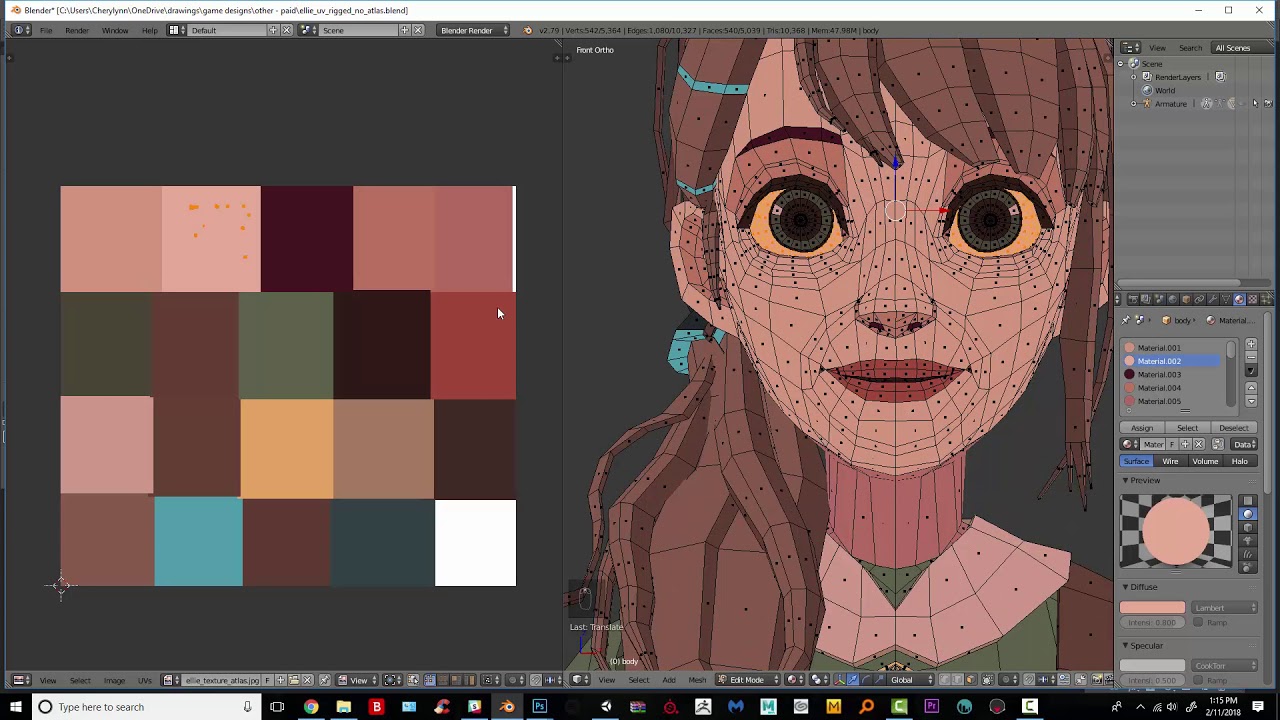
Since it looks like your going for a lowpoly look, I would recommend using an atlas. They are great for all types of projects. Here is an example of a large facility I did using a texture atlas. You also get better performance by consolidating draw calls.

ArtStation
This asset was created for the game Frontiers Reach. It uses an old texture atlas technique with every UV shell meticulously mapped to specific details on the mesh. This works quite well with Unity as Unity generates separate lightmap UV's for meshes that have it enabled.
misty lantern
eager mist
clean textures being strokes made by a pen tool or something and hand textures b...
So both are hand drawn, but with a different brush?
Texture atlasing a specific optimization techinque for when you are reusing generic texture maps for multiple objects
eager mist
no
hallow gulch
misty lantern
Texture atlasing a specific optimization techinque for when you are reusing gene...
Can use texture atlases for just about anything. Not just for optimization.
 eager mist
hand texturing -> stroking with drawing tablet. Clean texturing -> Stroking with pen tool @misty lantern
misty lantern
eager mist
hand texturing -> stroking with drawing tablet. Clean texturing -> Stroking with...
I don't see how pen tool and drawing tablet rule each other out 🤔
misty lantern
hallow gulch
Can use texture atlases for just about anything. Not just for optimization.
htt...
Yes
It's a very nebulous term when not used to describe texture atlas packing specifically
shut juniper
Is the IK Controller suppose to be in the same armature as the bone being connected to?
blender
hallow gulch
misty lantern
Yes
It's a very nebulous term when not used to describe texture atlas packing sp...
Yes, that's why I provided an example.
eager mist
@misty lantern ok I don't get what you're talking about. What do you think I'm asking?
misty lantern
eager mist
<@!166982635950702592> ok I don't get what you're talking about. What do you thi...
Well, first I assumed you were talking about drawing vs generated patterns as textures but now I don't know
The three texturing workflows I can think of are drawn, generic patterns and procedural
eager mist
no I was talking about rather I should do the textures with the pen tool so they appear clean, rather painting with my drawing pen
yea drawn or procedural
misty lantern
In case of hand drawn, pen tool is just another type of brush to the best of my knowledge
eager mist
The reason I want to know is because I am making a game based in the 1900s, but I want it to have a movie feel because spoiler alert, its all a movie, so black and white look
I didn't know if drawn or procedural textures would fit
misty lantern
Neither workflow is restricted to any one style
eager mist
so in other words, it really doesn't matter
misty lantern
Up to your artistic eye
You could draft a couple of examples and ask for opinions
Though even that is really subjective
eager mist
Ok may I ask another question? Has to do with drawing but not this specific thing
misty lantern
Sure
eager mist
So this is gonna be my first game, well not exactly true, my first real game I put effort into, if I do decided to draw the textures, how can I get better at being an artist? I know this guy whose been doing gamedev comics before gamedev, and uh, his artistic skills carried over
But I don't have that yet
misty lantern
eager mist
So this is gonna be my first game, well not exactly true, my first real game I p...
If your interest is in textures specifically, painting landscapes or such scenes with lots of surfaces is priceless practice
But it's also very helpful to pick apart textures that games use
eager mist
what do you mean "pick apart" Also you don't have to keep tagging me, I'm not being rude either so don't worry, I just have discord minimized on this channel
misty lantern
eager mist
what do you mean "pick apart" Also you don't have to keep tagging me, I'm not be...
I mean to look at texture files, if you can find some, and try to figure out what kind of techniques were used to make them
Usually up close you can see if there's brush strokes, sampled photographs or such that give it the look it has
 misty lantern
Also, before the textures, the first thing a player notices is color and light, so those are worth finding learning resources on
Painting scenes and landscapes forces you to examine color and lighting as well
eager mist
So wait
does that mean a black and white environment wont work?
Because it has no color?
misty lantern
Sure it can
Some games have no lighting either
But eventually you'll need that knowledge
That example texture has the distinct features drawn with a sharp inkish brush, as we can see
Then details drawn using a simple half-opacity brush that has pretty blocky edges from the looks of it
The details imitate how shadows gather in scratches and crevasses
So knowledge of lighting was used to make it, even though it doesn't exactly have lighting
misty lantern
The panels below the horizontal baseboard are subtly shadowed by the baseboard, which our brains pick up on, even if it may not perfectly match the lighting in the scene
misty lantern
eager mist
Oh so if I want light, I just add detail
Usually you emulate light so you know how to draw the details, but I guess it could work that way too
eager mist
Oh wait I think I get it. The baseboard is shadowing the panels as if the panels were extruding out, correct?
misty lantern
As if the baseboard was extruded over the panels, rather
eager mist
wait wahts the baseboard and what's the panels?
I thought the panels were the things on the bottom
misty lantern
I dubbed the thin horizontal bar the baseboard, panels the rectangular like things between the two baseboards
eager mist
OH
misty lantern
The eye for shadows and such develops with practice, which is why I recommend painting scenery
eager mist
I thought the baseboard was the background
misty lantern
Not all of the dark parts have to be shadows, it can be grime or paint or anything
Might not have to make sense if it looks good
misty lantern
I hope this is useful ^^
eager mist
it is thanks
misty lantern
Drawing is nice/tedious because there's not much to study, but you can't improve much just by studying
In 3D art you can skip some parts of it with bump maps and roughness maps and such, but if the art style is simple then the textures are basically just small 2D paintings
 calm oar
hallow gulch
calm oar
hallow gulch
The Pillars, rendered in the HDRP
 cinder sun
Wow looks great!
hallow gulch
cinder sun
Wow looks great!
Thanks!
 honest hill

made in blender
have an idea for a game
a mystery game
the flashlight could be a mechanic
errant plover
Damn, really like the mood you set there.
honest hill
thanks
 tropic zenith
errant plover
Damn, really like the mood you set there.
tropic zenith
errant plover
Damn, really like the mood you set there.
the lights do the work
tropic zenith
honest hill
thanks
pretty nice job
honest hill
thankyou
 hollow minnow
Super new to Unity and having trouble importing models. Textures are not being applied when downloading FBX from Sketchfab. Do I really have to go through blender to apply a UV map and stuff to get the model to work in Unity?
If I shouldn't use FBX, what is a better format to look for when it comes to importing into Unity easily.
outer halo
hollow minnow
Super new to Unity and having trouble importing models. Textures are not being a...
You'll need to create a new material in unity, assign the textures to it, then apply that material to the model.
hollow minnow
outer halo
You'll need to create a new material in unity, assign the textures to it, then a...
is there a tutorial on that? I see some mentions of that on Google but I don't see an Albedo box that they refer to.

Also the model I'm looking at has a ton of different textures. Does that mean I need to make a material for each one?
outer halo
Albedo is the base map in your screenshot.
No, the standard lit material should work with all the standard maps. Normals, emission, roughness etc.
misty lantern
@hollow minnow The best guide I've found for model importing process is the first chapter of this video https://youtu.be/nhJ8EJ_GtLI
vital jetty
I have a couple questions after spending some time learning things. FYI, I'm not an artist, just know a few basics.
- Are there bones in the fbx file?
- When a Unity model has a "tree" of transforms like spine 1, spine 2, etc. Are those somehow referncing the bones? What happens if you move one of these transforms to a different spot?
- Is that "tree" the "rig?" If not, does it have a name?
- Does Unity generate the above based off the bones with a commannd somewhere?
Thank you.
 craggy flume
Is there a "remove doubles" like option in Probuilder?
misty lantern
craggy flume
Is there a "remove doubles" like option in Probuilder?
https://docs.unity3d.com/Packages/com.unity.probuilder@4.0/manual/Vert_Weld.html
This seems to be the very same thing
"Remove doubles" is more descriptively called "merge by distance" these days
eager mist
when i import an obj file from blender into unity the textures dont show up, it just shows up as white? how do i fix this
outer halo
Create a new material, assign the textures and assign it to your mesh.
craggy flume
misty lantern
"Remove doubles" is more descriptively called "merge by distance" these days
Thank you
 tribal ravine
Hey guys how much more optimized is it to bake multiple textures and such into one UV Map rather than having them all individual?
i found this asset called UVPackmaster and apparently it does it automatically really well https://uvpackmaster.com/wp-content/uploads/Pre/1-Blender-simple0000.jpg

Also you have to use ProBuilder for this kind of stuff right?
vital jetty
tribal ravine
Hey guys how much more optimized is it to bake multiple textures and such into o...
Well, assuming you go from image 1 to image 2, you've gone from 35% to 65%. That means roughly a 55% reduction in texture size loaded into memory.
misty lantern
UV maps are always going to use pixel space more efficiently than separate textures
And it's always desirable to minimize texture file loading where possible
tribal ravine
Yeah obviously but wouldnt placing every UV Shape into the right texture for every object in your game be really time consuming?
i mean im sure it will be a lot more optimized but i wanna know just how optimized will it be by the end of development?
 harsh dagger
UVs can share the same space. That has way too many tiny little pieces.
If 20% of them look like wood, then you could have an area of your texture that has wood, and you UV map them to make use of that space properly, regardless if they are on top or not.
misty lantern
tribal ravine
i mean im sure it will be a lot more optimized but i wanna know just how optimiz...
You'll have to unwrap the model to apply textures to it, and at that point you're not really saving much if any effort if you're putting each UV island on its own texture
If I'm understanding correctly
If you're using generic textures or palettes, having them on a reusable UV map will save effort as well as space
tribal ravine
So say you make a Texture using the Texture Paint in blender, you export the object and you export just the texture of the object, in Unity you insert the object and then just insert the Texture by adding a material to the Object.
Doing the same thing but instead putting all the Textures into this Large UV Map like using that Plugin, wouldnt you have to Import Multiple Objects, Assign the UV Map Material to all of them, and then in pro builder Individually map each object to their own texture which is more optimized but wouldnt it take alot longer and take alot more effort for each texture in the whole game?
or maybe that plugin already maps all the Textures for you and then you just have to click them to assign them?
well it isnt just that plugin its using that UV Mapping technique in general
misty lantern
That sounds a bit like working backwards to ...get multiple objects on the same UV map? Are they using the same texture?
tribal ravine
misty lantern
That sounds a bit like working backwards to ...get multiple objects on the same ...
Lets say you make a medival house in blender, How would you personally texture it in Unity?
misty lantern
tribal ravine
Lets say you make a medival house in blender, How would you personally texture i...
I would texture it in Blender rather than in Unity
Is the scenario still relevant?
tribal ravine
Yeah but when you import the house into Unity it doesnt include the textures, Do you use Embed Textures or something?
harsh dagger
Texture is an image file
After you UV mapped a model, you can texture an image that will color the area that they are mapped to
You simply import the texture file into Unity like any other thing
tribal ravine
the question here is if you have multiple objects on that house like pillars, a roof and all that and they have different textures, You wouldnt import every single texture into unity individually right?
misty lantern
Well, I'd rather have them use the same texture
If they're made of the same material
harsh dagger
Depends, if it's a house everything in it can share the same texture
So it would be a single material needed
misty lantern
All wooden pillars could be UV mapped to use a generic wooden pillar texture, even in different objects
tribal ravine
Well in this case they arent, The pillars are made out of wood, The roof out of brick, The walls out of stone
harsh dagger
Then separate your texture logically and properly UV map your models
I'll show you an example
misty lantern
I might have one texture with pillars, bricks and stone
Then every part of the house and every separate house can use that one texture
tribal ravine
i think the real problem here is that i need to educate myself on UV Maps because i think what im asking doesnt make sense to you guys lol
ill look up some tutorials on youtube
harsh dagger
misty lantern
That's a good idea
Ideally UV mapping is something that saves you effort in the long run, rather than expends it
harsh dagger
Anyway, you could have an entire village that shares the same material / texture
tribal ravine
Yeah but when you UV Map multiple textures wouldnt it take alot of time to assign each UV to the object or is it done automatically between Blender and Unity?
tribal ravine
harsh dagger
Anyway, you could have an entire village that shares the same material / texture
Damn really?
misty lantern
Yep yep!
harsh dagger
You keep saying "assign each UV to the object", this is what throwing me off
tribal ravine
so if i were to make just 1 texture of a whole house with different textures, put them all in 1 UV Map would it automatically import them to the right location and everything in Unity?
harsh dagger
If you make assets for a game, you need to UV map it properly (also known as UV unwrapping). You don't do it in Unity
misty lantern
tribal ravine
so if i were to make just 1 texture of a whole house with different textures, pu...
The short description of what an UV map is that it's a data that points each vertex to a coordinate on the texture map, whatever the texture will be
It's built into the mesh data as you make the model
You can't change an UV map, but you can alter the vertices' position on the UV map any whichever way
It's a pretty abstract concept, but look into some guides and it won't be mysterious
It'll be a powerful tool at your disposal
tribal ravine
misty lantern
You can't change an UV map, but you can alter the vertices' position on the UV m...
Yep sorry i dont exactly know the terms but thats what i meant
ill try to replicate it in unity
harsh dagger
But if you do that, what is the point of having a texture?
tribal ravine
wdym
harsh dagger
Imagine you have a texture for a dice. It has 6 numbered sides and are displaying properly. If you mess with the UVs now it will look distorted or wrong
Because the texture is still the same, it's an image file.
Unless you want to mess with shaders, but then you don't really need to worry about UVs.
 slim dock
I made a model in blender and put the .blend file in my unity project. The materials' albedo values are correct but the metallic and roughness values didnt carry over. How can I fix that?
blender

unity

 bright olive
i created a model in blender but after importing it to unity the part of it that was made using planes is one way transparent. Any way to fix it?
errant plover
@slim dockyoull need to create a material in Unity for roughness and metallic. They are not transferable.
@bright oliveCheck the normals on your model. Edit mode > select all faces > Recalculate Normals Outside. Or use a double sided material if you need both sides.
bright olive
errant plover
<@!466200079125053442>Check the normals on your model. Edit mode > select all fa...
in blender?
bright olive
errant plover
Double sided material in Unity
how do i use double sided material?
eager mist
 feral cloud
Verify "backface culling" in the Blender viewport settings
By default Blender got it wrong
Too many users run into this issue.

 eager mist
feral cloud
Verify "backface culling" in the Blender viewport settings
eager mist
feral cloud
Verify "backface culling" in the Blender viewport settings
or flip the normals
feral cloud
The user first needs to see with Backface Culling turned ON to then know what polygon face needs to be flipped
 misty lantern
Face Orientation works too
 minor sparrow
Hey hey! Was working on the block out for this "house in a forest" scene. It's for a client and it just got approved! On to the next step now! (Made in Houdini)

 nimble cargo
bright olive
i created a model in blender but after importing it to unity the part of it that...
nimble cargo
bright olive
i created a model in blender but after importing it to unity the part of it that...
do you know how i can free fly in blender?
outer halo
nimble cargo
do you know how i can free fly in blender?
Don't tag random people, it's obnoxious.
Blender has docs, which you can find by asking your question in Google.
https://docs.blender.org/manual/en/latest/editors/3dview/navigate/walk_fly.html
nimble cargo
outer halo
Don't tag random people, it's obnoxious.
Blender has docs, which you can find ...
i ask in google but everything i tried didnt work i dont know if its up to date also im on mac so some of the stuff doesnt work also i only asked them cuz they said "they created" a model in blender keywords "model" "blender" so thats why and theres no need to come at me so aggressive i swear everyone i have talked to in this server is rude
and btw i went to that doc
and when i tried it
Guess what
||It DidNt WoRK||
outer halo
Maybe you should lead with your attempts and explanations next time you ask a question. It just wastes people's time to dig that information out of you.
Also, it doesn't matter why you thought you could ping someone randomly, it's against the #📖┃code-of-conduct which we strictly enforce. Reread it if you need a refresher.
Lastly, Blender has a few communities you could also try asking in.
https://www.blender.org/community/

Home of the Blender project - Free and Open 3D Creation Software
misty lantern
@nimble cargo "Fly Navigation" can be found in Blender's F3 menu among with all other commands
The keymap section of preferences window will tell you what the hotkey is and allow you to configure it
 glad aspen
As @misty lantern sez but shift + is the key by default iirc
ha, shift `
(then wasd)
 hollow shoal
Hello, does anyone know how you can export a blender building destruction simulation to unity?
hollow shoal
I know how i can make simulations in blender, but do you just bake it down to an animation and then throw it in unity and done or? Is there more to it?
 lime pollen
hollow shoal
I know how i can make simulations in blender, but do you just bake it down to an...
lime pollen
hollow shoal
I know how i can make simulations in blender, but do you just bake it down to an...
that's pretty much it, although you might have to do a bunch of cleanup depending on how your scene is set up
bright olive
I just made an animation for my character in blender ,but I want to make more. How should I export my animations so I can use them in the Unity Animator?
errant plover
Umm, you are probably going to end up with massive file sizes. Depending on your needs, you should be able to recreate what you want in Unity. @hollow shoal
bright olive
errant plover
Umm, you are probably going to end up with massive file sizes. Depending on you...
the animations aren't that big or complicated, but i don't want to make them again. How can I import them?
errant plover
@bright oliveSorry, I was speaking to Jochem. Select your model and then the Armature. Export FBX. Make sure you select Export Selected and Check off Armature and Mesh I believe.
bright olive
ok thanks
bright olive
errant plover
<@!466200079125053442>Sorry, I was speaking to Jochem. Select your model and th...
wait, now I have just a bunch of animation clip files. What do i do with all of those?
errant plover
Well play or stop them as you need.
bright olive
No i mean i imported one fbx file and now I have 40 animation clips
eager mist
How should I texture this, hmm
 hollow shoal
errant plover
Umm, you are probably going to end up with massive file sizes. Depending on you...
hollow shoal
errant plover
Umm, you are probably going to end up with massive file sizes. Depending on you...
But proffesonally they dont normally do it right in the engine, right, when i look at a game like uncharted everything is prerenderd. Thought that would be the better way to not give the physics engine such a load for some that doesnt need interaction
hollow shoal
lime pollen
that's pretty much it, although you might have to do a bunch of cleanup dependin...
Thank you
lime pollen
hollow shoal
But proffesonally they dont normally do it right in the engine, right, when i lo...
its pretty normal to do destruction in engine, modern hardware is usually capable of handling that
hollow shoal
lime pollen
its pretty normal to do destruction in engine, modern hardware is usually capabl...
Iam not sure, the levelution from battlefield are baked simulation that are able to trigger in realtime, but the sim is baked. Uncharded call of duty main campaings vfx is mostly baked. I think that hollywood explosion of a city and such are pretty heavy on a physics engine. Houdini is completely focussed on running simulation, then why would you make it in engine?
lime pollen
a hollywood explosion and a game explosion are on very different tiers of vfx 😅
but yes it does depend on various factors like how many objects are you simulating
hollow shoal
lime pollen
a hollywood explosion and a game explosion are on very different tiers of vfx 😅...
Fair point;) but then i know enough:) thank you!!!
misty lantern
hollow shoal
Hello, does anyone know how you can export a blender building destruction simula...
https://gamedev.stackexchange.com/questions/175925/blender-rigid-body-physics-animation-into-unity I haven't tested this, but the "bake to keyframes" route seems to be the most promising
There's more tools to bake unity physics simulations into animations, but really you only need one that works
 eternal cypress
why is my diamond so clear to see after i set the alpha to be low?
 misty lantern
eternal cypress
why is my diamond so clear to see after i set the alpha to be low?
misty lantern
eternal cypress
why is my diamond so clear to see after i set the alpha to be low?
Looks like it's not using a transparent material
eternal cypress
changed to transparent and it works. thank you @misty lantern !

 pliant patio
when I import blender 3d object to unity its broken why?
 young folio
Hey all, do you guys know if there is a way to edit the transform of an imported FBX file?

this is what I see on the model's settings. the transform is there and its got these random values
id like to just reset the transform
misty lantern
young folio
Hey all, do you guys know if there is a way to edit the transform of an imported...
Yes, import settings of the mesh have a scale factor, unit coversion and bake axis conversion options which may help with this
or might not
It's usually better to get the FBX export settings right so you need to tweak the import settings as little as possible to cut down unnecessary steps
hollow shoal
misty lantern
There's more tools to bake unity physics simulations into animations, but really...
Thank you! I think ill have enough guidelines to move along:) i think i can get to work what iam trying to do
 pulsar vine
I don't use unity but I need to import a character in it.
The question is:
Can you change the material of a fbx character inside unity?
 tropic timber
Hey Im looking for a recommendation for putting modular buildings together, in unity, any assets that are setup well to do that?
errant plover
@pulsar vine you can give it any material you want. Remapping the UV will need Blender/Maya/Etc
 vestal hazel
 feral cloud
@vestal hazel
Do you have an ArtStation?
Youtube channel or Twitch?
Nvm found it. You are a beast. Love your stuff.
 white torrent
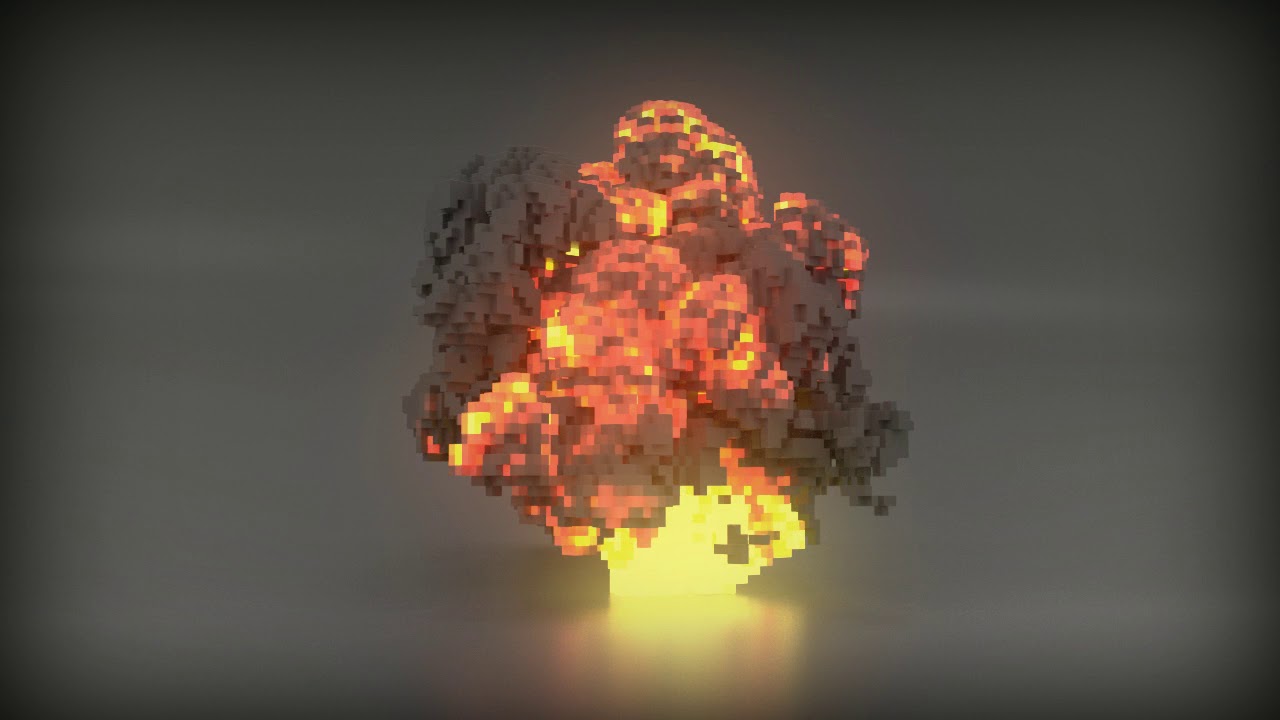
does someone know how I can make something like this? https://youtu.be/Ar3sSawyR1c
 misty lantern
white torrent
does someone know how I can make something like this? https://youtu.be/Ar3sSawyR...
misty lantern
white torrent
does someone know how I can make something like this? https://youtu.be/Ar3sSawyR...
I'm really not sure but I can think of some leads
That animation is made in Houdini, which can export animations to Unity, but how performant that would be I can't guess
VFX graph can render lots of geometry for a tiny cost, and can read volumetric data, such as an explosion simulation like that
Another option is to look into marching cubes and compute shaders for implementing that
Marching cubes is the method that's used in the modeling program to make that, and it's possible to implement that feature into Unity as well
Voxels are kind of a difficult area because game engines don't really use them
white torrent
misty lantern
I'm really not sure but I can think of some leads
That animation is made in Houd...
oh thank you. Right now I'm just following a normal explosion particle tutorial and replace the render with a 3d cube. I think that should work
misty lantern
white torrent
oh thank you. Right now I'm just following a normal explosion particle tutorial ...
While nowhere near as fancy, that's a good option as well!
white torrent
Thanks for trying to help! 🙂
misty lantern
I'm thinking it way too complexly
 astral snow
started makin wheeeeels

 lean matrix
astral snow
started makin wheeeeels
lean matrix
astral snow
started makin wheeeeels
That looks amazing what software do you use ?
And if anyone has a good software for making 3d models/art please suggest them as I have only worked with 2d and pixel art
lime pollen
lean matrix
And if anyone has a good software for making 3d models/art please suggest them a...
blender
lean matrix
lime pollen
blender
Alright thank you! I already have it but I thought that it was too complicated so I’ll watch a tutorial and see how I can work with it
lime pollen
3d modeling is complicated in of itself, just stick with it
lean matrix
lime pollen
3d modeling is complicated in of itself, just stick with it
Okay thank you Reo
feral cloud
If you want to just try a 3D app and get started, you can definitely use Blender. It's great and it's free.
If you want to make a career out of 3D modeling, try to get your hands on 3DS Max or Maya. Look at job offers.
But if you want to make it personal, have a hell lot of fun at home, then I recommend that you give a shot to Modo which is a 3D app specialized in Sub-D modeling.
Modo is cheaper than 3ds max and Maya and is more suited for sci-fi, environment, robotics, etc. Raw polygonal modeling. It's fast. The interesting thing about MODO is yes it looks expensive at first because the perpetual license costs 2K USD, but then it only costs $600 USD to jump to a latest version at any point in time in the future, again and again.

If you are more into 3D sculpting, then you should try to get Zbrush instead.
 ruby dune
pulsar vine
I don't use unity but I need to import a character in it.
The question is:
Can y...
ruby dune
pulsar vine
I don't use unity but I need to import a character in it.
The question is:
Can y...
The fbx import settings allow you to change up materials if you have material slots when you imported initially. If you meant runtime, it should probably be possible. But I do not know how off the top of my head.
lean matrix
feral cloud
If you are more into 3D sculpting, then you should try to get Zbrush instead.
Okay thank you for all of the suggestions I will try 3DS Max or Maya and see which one is more suitable I’ll still use blender as it’s the one downloaded but I will start working on the other two as well!!
 shrewd prairie
Just joined the server so I apologize if this isn't the correct channel, but I'm looking for tutorial recommendations (free or paid) that covers bringing PBR materials into Unity. I'm coming from a motion design background and use Cinema 4D as my primary 3D software, so IF there is something more aligned with C4D that would be awesome but I'm fairly comfortable in Blender too. Would love some links and/or advice. Thank you!
vital jetty
astral snow
started makin wheeeeels
Pretty sure cars have 4 wheels, but I don't remember seeing them all at once 
 brave ravine
Maya Indie is a good option too if it's available in your country and you're solo. They kinda try to hide it, but in the US for instance, it's $200/year and unlike Maya LT, Indie is the full version
hollow shoal
lean matrix
Okay thank you for all of the suggestions I will try 3DS Max or Maya and see whi...
Blender is used in the industry more and more. The tool is so powerfull and fast i think that would be your best bet. but choose what you think is morer suiteable for your needs:)
lean matrix
hollow shoal
Blender is used in the industry more and more. The tool is so powerfull and fast...
I’m currently actually trying to work on blender (: it’s very tricky but I figured it’s gonna be the best option for 3d animation as I’m still new
Should I start with low poly modeling or will it not make that much of a difference
hollow shoal
lean matrix
Should I start with low poly modeling or will it not make that much of a differe...
well i would suggest starting with low poly modelling, i myself am starting making tutorials using low poly modeling and simple pixel textures. that way you can easily get used to blender. Then starting to Highpoly modeling so you can solely focus on the techniques to highpoly modelling rather then how to actually model.
As they say, Start small get big?
lean matrix
hollow shoal
well i would suggest starting with low poly modelling, i myself am starting maki...
Okay thank you for the tips I’ll start with low poly and then build my way up (:
lean matrix
hollow shoal
As they say, Start small get big?
Yup very very true
hollow shoal
 hollow shoal
lean matrix
Okay thank you for the tips I’ll start with low poly and then build my way up (:
hollow shoal
lean matrix
Okay thank you for the tips I’ll start with low poly and then build my way up (:
i use this artstyle to help people understand the basic pipelinne
lean matrix
Oh wow it looks so pretty but it seems very hard
hollow shoal
ill link you the tutorial once its up if you are interested
lean matrix
hollow shoal
ill link you the tutorial once its up if you are interested
Yes please I would appreciate it a lot!
hollow shoal
lean matrix
Yes please I would appreciate it a lot!
cheers 🙂
feral cloud
Blender is really not a standard in the industry, at least at AAA and mobile studio.
It is 3ds max and maya all the way.
3ds max gor modeling and Maya for rigging + 3d animation.
Modo is used primarily by game companies specialized in scifi and hard surface work. Including Id Software (Doom), Machinegames (Wolfenstein), Neon Giant (The Ascent), Massive Entertainment(The Division), Gearbox Software (Borderlands 3), etc. Modo has been used also as a way to build game levels because of its powerful LXO file format.
misty lantern
Wouldn't it be fair to call Blender industry standard by now if you count indies and smaller companies as "industry"
Non-triple A developers and publishers are probably making billions by themselves
feral cloud
No.The workflow of Indie devs are not influencing the industry. It is the other way around. It is the big companies leading the industry and creating technological advancements.
Game development schools train people with zbrush, 3ds max, maya and substance for them to be job ready
Blender is used more and more,.but with the Add Ons Hard Ops and BoxCutter. Not vanilla Blender
And by specific artists within AAA studios.
The same way many individuals use Modo instead of 3dsmax or maya if allowed
misty lantern
feral cloud
No.The workflow of Indie devs are not influencing the industry. It is the other...
I hope you're not suggesting that self-publishing companies are not part of the "industry"
By indie I don't mean "hobbyist"
feral cloud
And I wrote...
Indie game studios arent leading art workflows

Part of the industry, yes.
Not leading it.
Companies such as Id Software, Epic Games, Pixologic(zbrush), Allegorithmic (Substance) and Naughty Dog have been pushing our workflows for decades now.
Well known AAA artists in recent years started to use Blender. But not for the reasons you might think.
HeavyPoly moved away from Modo to Blender. But he is a concept artist.
WarrenM moved away from Modo to Blender, but now he works as Art Director and doesnt do much poly work himself.
Other Youtubers it is NOT because Blender is good, it is because they can get more viewers. Because Blender is free, more indies use it.
feral cloud
--
All that said. Blender is still shaking the industry more than ever, because being free and open source ... that does make it more accessible. Hobbyist and aspiring 3d artists might end up being using Blender without even knowing that there are other 3d apps out there.
And Blender does have some powerful tools. By exemple it does 3d sculpting better than modo.
hollow shoal
where do you work?

Support core Blender development - https://fund.blender.org
ubisoft is making the transition to blender i read in articles
misty lantern
feral cloud
--
All that said. Blender is still shaking the industry more than ever, because ...
You're not wrong, but it's such a big topic that it's difficult to make any stricts statements about.
Not all people entering the workforce (triple-A or otherwise) come from the schools that teach only proprietary software.
You could say that triple-A is leading the workflows, but they're definitely not the only ones influencing it.
They're mainly preoccupied with the high-end realism, while indies and smaller companies are doing real and valuable work pioneering low-poly and lo-fi workflows and technology, stuff that the big companies are co-opting more and more as it's often profitable for them to try to appear "indie".
The whole industry is very collaborative
hollow shoal
"Solid experience with Maya and/or 3DS Max and/or Blender."
in the job skills required field of a apllication on Elite3D website. one of the leading 3D art producer of almost all Triple A games
i think from what i heard and red 3dmax and stuff is mostly used because they made inhouse pipeline tools for them. and have worked with them for decades. but you can argue if blender is also able to handle that. or that blender wont show as a fair competitor.
From my expierence and the talks that i have had with the "top" of the industry it really doesnt matter when modeling what you use..
but that will probably vary which company or artist you ask
as seen in the discussion above 😉
for example Trace studio https://www.artstation.com/trace_studio
Full on blender company

ArtStation
TRACE Studio creates art content for world-class video games. As experts in 2D and 3D art creation, and project management, we collaborate with Activision Blizzard, Sony, Deep Silver, CD Projekt Red, ZeniMax, Larian Studios and others to develop a unique gaming experience for millions of people. As professionals, we are passionate about what we ...
 stray stone
feral cloud
If you want to just try a 3D app and get started, you can definitely use Blender...
stray stone
feral cloud
If you want to just try a 3D app and get started, you can definitely use Blender...
Counter argument, If you earn less than $100k a year, you can get maya or Max for $250 a year.
In my industry, (High end animation).
You generally can use anything you want to model as long as it can get the final formats into Maya and Houdini.
We primarily use Alembics.
Blender fails to take a real chunk of the market is purely because of a lack of support. Up until the start of this year blender had no support for people, you wanted something fixed? You had to do it yourself or wait for an update, and larger companies don't want this.
They want a team of people they can contact that can then fix or work with them to fix the problem in as quick as time as possible.
This is why Maya and 3DSmax are still leaders in most industries.

Saints Row arrives February 25 2022. Witness the birth of the Saints.
In a world rife with crime, where lawless factions fight for power, a group of young friends embark on their own criminal venture, as they rise to the top in their bid to become Self Made.
Experience the biggest and best Saints Row playground ever created; the unique spra...
I other news, I helped make this trailer. 😎
hollow shoal
cool!
misty lantern
There's several factors that go into the decision of what modeling program a company will use
 rustic nova
hollow shoal
i use this artstyle to help people understand the basic pipelinne
rustic nova
hollow shoal
i use this artstyle to help people understand the basic pipelinne
so many people learn this basic pipeline and just stick with it, i'm sure that's partially because of good performance but i mainly suspect minimal effort, if you can spend less time on modeling 1 thing you can spend more time making the actual game... that said, do you have any tutorials for low effort but high quality modeling?
hollow shoal
rustic nova
so many people learn this basic pipeline and just stick with it, i'm sure that's...
Cheating your way they call that right;) send me a personal message with some examples of high quality moddeling you would like to see, maybe we can find something that works for you:)
And i can probably make a tutorial of that
feral cloud
For decades big companies built their production pipelines around 3ds max and maya. Those technical artist you hear about... many made tools for yhose apps.
When the company has an issue with 3dsmax or maya they can contact autodesk and get support
It is very different from indie devs in a basement.
Indie devs can use what works and suits their needs. No politics
astral snow
vital jetty
Pretty sure cars have 4 wheels, but I don't remember seeing them all at once <:L...
huehuehue
 tidal moss
hoy i have a small problem and want to ask for help c:
most things i import this model into end up with her eye missing


any idea what the cause of this could be ?
if i upload it for example to sketchfab tho the eye is there
misty lantern
@tidal moss Inverted normals, very likely
in blender Face Orientation overlay will reveal if that is the case
 tidal moss
ui thanks c:
 white torrent
Hey there. There is a green dot in my particles and I want to get rid of it. The last times I used Unitys particle system, I didn’t see these dots
 tidal moss
im sorry... i have another question. The model in the unity animation previewer shows the model with applied shape keys like this. the whole chin area is rather... screwed

the model in blender itself is rather smooth tho

is this just some preview error or is this an actual problem? i never really worked with unity till now. My main goal is simply to make her run and jump around and to idle
 unique bough
Hi there! I am having an inssue brining blender FBX into unity, and I can;t figure out how to ask google.
I have a file with multiple objects, and there are coming into unity at different sizes and rotations.
This is what it looks like in Blender

Anbd this is what it looks like in Unity

All of the transformations are applied to deltas in blender
misty lantern
@tidal moss I have not used shape keys before, but my advice is to check if that happens outside of the preview in scene view / play mode
And find some tutorial and follow it closely
Trial and error approach to unity is not worth the headache
misty lantern
unique bough
All of the transformations are applied to deltas in blender
Unity doesn't have blender's delta transforms
Any reason you need them?
harsh dagger
I think they meant they froze the transformation
vestal hazel
 astral snow
some lowpoly wheels for my game

 gritty reef
Those are some... Hot wheels
 balmy bough
little head big body
 errant plover
On your Mirror modifier check Clipping. Then grab those loose verts and push them along the X. @balmy bough
eager mist
Damn, there are 3d artists on this server! 
 vocal gale
little slim I made for learning purposes. took me 15 minutes to make.

 rapid echo
Made a garden environment in blender. Thanks for viewing!
.
https://twitter.com/FarrukhAbdur/status/1432943786632568836?s=20


I made a hydrangea flower garden environment. 🌸🌿
Artstation: https://t.co/WTuPzWPzjo
#b3d #gamedev #blender #indiedev #blender3d #polycount https://t.co/oRjsMG5LhL
 Twitter
·
misty lantern
rapid echo
Made a garden environment in blender. Thanks for viewing!
.
https://twitter.com/...
Twitter
·
misty lantern
rapid echo
Made a garden environment in blender. Thanks for viewing!
.
https://twitter.com/...
I like how the whole thing has a kind of flower basket shape!
eager mist
How can I learn how to make character models? I am making a fan game (since the devs are too lazy to update us on their official one) so I was going to make a woman character model for the main character
gritty reef
vocal gale
little slim I made for learning purposes. took me 15 minutes to make.
That's really cute
rapid echo
misty lantern
I like how the whole thing has a kind of flower basket shape!
Thank you very much for your comment! 😊
 glacial vector
eager mist
How can I learn how to make character models? I am making a fan game (since the ...
glacial vector
eager mist
How can I learn how to make character models? I am making a fan game (since the ...
Calling devs lazy is a great way to speak about others in a gamedev server
gritty reef
eager mist
How can I learn how to make character models? I am making a fan game (since the ...
Look up blender character sculpting, rigging, and animating tutorials on youtube. Getting good looking characters is difficult without a ton of practice. You may instead opt to purchase pre rigged characters from the various asset stores across the internet and customize them how you see fit.
Maybe the dev you are referencing is lazy, but the most helpful people here are devs and you will put them off from helping you by insulting others in the industry without meaningful context (this is not the channel for context or motivations, its for 3d).
Best of luck with your game!
eager mist
glacial vector
Calling devs lazy is a great way to speak about others in a gamedev server
I dont mean these devs, I mean a specific someone who is popular who has promised us a game for years on end now and kept on delaying it
the creator of bendy and the ink machine to be exact
eager mist
gritty reef
Look up blender character sculpting, rigging, and animating tutorials on youtube...
"Maybe the dev you are referencing is lazy, but the most helpful people here are devs and you will put them off from helping you by insulting others in the industry without meaningful context (this is not the channel for context or motivations, its for 3d). " ^
 atomic root
what he is saying is: "we dont care why you want to make character models"
eager mist
bruh
 frigid carbon
Anyone knows, where this weird shadows are coming from?

or rather said, how to improve the detail of it. Its a defualt shader and no flipped normals
I guess cascade count is doing what I need here
Looking better 🙂
 misty lantern
frigid carbon
Anyone knows, where this weird shadows are coming from?
misty lantern
frigid carbon
Anyone knows, where this weird shadows are coming from?
Looks like "shadow acne"
https://docs.unity3d.com/Manual/ShadowPerformance.html
frigid carbon
Yeah it was the cascades and planes being a bit to off, now its working 🙂 thanks for the link @misty lantern
 wary hawk
does anybody else have this problem when making a gun for a fps game that the perspective of the camera makes the gun look different
like some parts look wayy thinner
errant plover
Show us an example.
 raw surge
I've got a slight issue in Blender
No matter what cylinder I select the move/rotate/scale cursor remains in the middle and nothing properly can be edited
What can I do to fix it?
 wary hawk
raw surge
I've got a slight issue in Blender
No matter what cylinder I select the move/rot...
wary hawk
raw surge
I've got a slight issue in Blender
No matter what cylinder I select the move/rot...
prolly some option that you accidently enabled but idk which one have you tried restarting blender or your pc?
raw surge
I restarted Blender, not my pc tho, I'll try that too
wary hawk
ye
wary hawk
raw surge
I've got a slight issue in Blender
No matter what cylinder I select the move/rot...
ah I see what is wrong now I still don't know how to fix it lol
you are moving the 3d cursor
raw surge
I am? Restarted my pc and it's not fixed so Ig yk what's the issue here lol
Tho idk what causes the movement of the 3d cursor
wary hawk
raw surge
I am? Restarted my pc and it's not fixed so Ig yk what's the issue here lol
Tho ...
I have been searching through google about moving the 3d cursor but I have no idea how you did it this way lol
raw surge
Tbh same, I'm following a tutorial on ytb too, so I'm not sure what caused that, perhaps I should start all over, that would be a solution, the thing is that this is a problem that can be solved
Which means that by leaving it unsolved then I won't learn anything from this experience
errant plover
You can't. At least no way that I know of. You have to use Left-click. Might have changed in 2.8
wary hawk
@raw surge try to move the 3d cursor away by doing shift + right click somewhere else
and see if the move tool is locked on the 3d cursor
raw surge
errant plover
You can't. At least no way that I know of. You have to use Left-click. Might ha...
Do you know what caused the problem by any chance?
raw surge
wary hawk
<@!366554838177415169> try to move the 3d cursor away by doing shift + right cli...
yea seems like it moves, but it stays locked
 wary hawk
raw surge
yea seems like it moves, but it stays locked
wary hawk
raw surge
yea seems like it moves, but it stays locked
wtf
this is really weird
maybe go into the blender discord server and ask for more help
errant plover
Im not really sure what the problem is. Why do you want to move the cursor?
raw surge
I searched on google for the official blender discord server and couldn't find it
raw surge
errant plover
Im not really sure what the problem is. Why do you want to move the cursor?
oh, well I mean, if it stays locked then I can't properly scale other cylinders
wary hawk
errant plover
Im not really sure what the problem is. Why do you want to move the cursor?
ye he does not want to move the 3d cursor but his move tool is locked on it
for some reason
 raw surge
um nope, didn't work
atomic root
does the 2nd icon look like this for you?
 gritty reef
atomic root
what he is saying is: "we dont care why you want to make character models"
gritty reef
atomic root
what he is saying is: "we dont care why you want to make character models"
😂
atomic root
gritty reef
😂
Did I misinterpret the last part of your message? ^^
gritty reef
No, that was pretty spot on. I was just trying to be polite.
 tawdry valley
hello...
while using Blender i have a Rigidbody i used to make a sim and i try to convert them to keyframes and poof
some of the objects disappaer for no reason
 valid heron
 tawdry valley
some of the objects disappaer for no reason
sinful night
tawdry valley
tawdry valley
some of the objects disappaer for no reason
sinful night
Hey, I am trying to make trees in blender but when I convert the instancing to mesh to poly count skyrockets. How do I fix this? I need something that is 2000 polys or below to use in unity to create a forest. So does anybody know what to do here?
errant plover
@sinful night you could use a decimate modifier on it or Limited Dissolve or clean it up by hand.
 placid zealot
Do y’all have any good recommendations for 3D prototype packs for standard assets? (Low poly block weapons for example, terrain)
gritty reef
placid zealot
Do y’all have any good recommendations for 3D prototype packs for standard asset...
My boy @junior stone uses Synty assets in our project and they are crisp 👌
 junior stone
I can vouch for this, cuz they damn well are
shameless plug but also usecase I have for them xD
https://torbenvanassche.github.io/portfolio/
@placid zealot
misty lantern
@raw surge your pivot point is set to "3D cursor", so all transforms are based on its location and rotation

Try "median point" instead
raw surge
Oh yesss, it's probably that, I kept clicking random buttons on my keyboard and saw a wheel like that one
Ty mate
 low pasture
help how use blender it confuse me
lol
need to make tools for my survival game but idk how
misty lantern
low pasture
help how use blender it confuse me
It's not a program that's made to be used without tutorials and studying first
Some days I doubt if it's made to be used by humans at all
low pasture
oh ok lol
 sterile wraith
Im not a 3D artist but i can do little stuff but i always wondered how to archive a consistent art style... For example this Picture probably some people can tell from wich game it is because of it looks i wonder what makes it that we can tell and why does everything seem to "fit" with each other even tho its multiple people making these and every artist has their own "touch" but the models always look like its made by the same person 🤔
 sinful night
errant plover
<@!726698737845534760> you could use a decimate modifier on it or Limited Dissol...
sinful night
errant plover
<@!726698737845534760> you could use a decimate modifier on it or Limited Dissol...
Tried that, there are just too many leaves
 potent wraith
sterile wraith
Im not a 3D artist but i can do little stuff but i always wondered how to archiv...
potent wraith
sterile wraith
Im not a 3D artist but i can do little stuff but i always wondered how to archiv...
Perhaps the concept art is made by one person. A drawing is usually easier to get in a certain style. Then a model is made based on that concept art. Also, using a predefined color scheme and same methods and tools can contribute to similar style.
I'm not an artist myself, so that's just my assumptions.
sterile wraith
Yeah its a possibility 🤔
errant plover
@sinful night well why did you add so many leaves? lol
I am assuming you used some auto generated tree. Just do it by hand. You really only need to make one. The copy paste 3 more and adjust them by hand.
lime pollen
sterile wraith
Yeah its a possibility 🤔
also, the art director usually dictates the style of the game, so will try to ensure art assets from different artists match the intended style
sterile wraith
but just based on looks or is there some kind of "rules" they set that all assets must or should match? 🤔
lime pollen
its more guidelines than rules, they probably use the concept art as a reference for the artists to follow
then the artists will submit assets for review, and the art director or their manager will approve it
this process varies depending on studio of course
sterile wraith
i see.... makes sense ^^
 severe sorrel
The main features thats define a artstyle is shape language and color scheme. More stylized art need harder defined Rules to apply.
A good example are Mangas where several people Draw exactly the same Thing based on the mangakas concept
misty lantern
sterile wraith
but just based on looks or is there some kind of "rules" they set that all asset...
Inventing an art style does mean inventing a set of "rules" for the art to follow, though most of those rules artists don't think about consciously, rather they decide them intuitively
When drawing it could mean choice of colors, number and sharpness of distinct colors, size of detail, presence of painted lights and shadows, types of materials all surfaces mimic, presence and depth of bump maps, amount of noise or roughness, interaction with light such as light sharpness, translucency, self-illumination and rim lights
On the modeling side it matters a lot to be consistent in polygon density, the angles of polygon edges (the pinecone thing is a good example of polygon consistency), vertex normals, bevels, use of sprite cards
In animation you would strive for similar consistency
sterile wraith
🤔 mhm
misty lantern
You could take a few assets from one game, and a few from a game of some other style and put them all side by side and try to pick apart what makes them different
Usually these sort of rules make themselves apparent this way
severe sorrel
Another possibility are smart Materials that gets reused
 spring forge
Could somebody recommend a 3D course for absolute beginner that ties to unity and game development? (so it's not just about Blender)
misty lantern
I don't know of any that combine unity and blender
Game asset modeling principles are universal to almost all game engines, so it usually isn't necessary
hollow shoal
spring forge
Could somebody recommend a 3D course for absolute beginner that ties to unity an...
depends what you going for, art or practical use for developers?
spring forge
For developers, but more to understand the basics of 3d so I can better work with 3d artists and understand what they are talking about
 placid dust
Are there materials that I can add onto a gameobject to make all the textures of the children more transparent?
I need a transparentish version of lots of gameobject and instead of creating all the textures again and changing the alpha I want 1 that I can put on the transparentish verisons on the gameobject.
eager mist
Does anyone know any good tutorials for Blender character modeling?
misty lantern
You can find countless ones by searching with that, even paid courses
I wouldn't know which are particularly good or bad
Most of them are decent, I'm pretty sure
 undone bobcat
Hey having an issue here and wondering if anyone might be able to help. Have a project I am working on with an avatar and it requires specific versions of Unity (2019.2.4f for one, 2019.4.29f for the other) I an NOT a dev, just tinkering with 3D models here, but think the issue I am seeing has to be related to the different versions. In the older one, the model and textures all work as expected, with emission working. In the newer one, however, the emission isnt working (see photos) any thoughts on how to fix this in the newer version??

 hollow shoal
spring forge
For developers, but more to understand the basics of 3d so I can better work wit...
hollow shoal
spring forge
For developers, but more to understand the basics of 3d so I can better work wit...
My Tutorial series is almost edited. Its not the best yet but it might help you on the way. if you Direct Message me for an exact topic you want to learn. i can make a series about that:)
hollow shoal
placid dust
I need a transparentish version of lots of gameobject and instead of creating al...
Probably need to have a special shader for that, for as far as i know. Maybe someone else knows a better solution:)
hollow shoal
undone bobcat
Hey having an issue here and wondering if anyone might be able to help. Have a p...
I see, in the old version you have the emission color set to white. this way the color map you put on there works as expected.
Tho in the newer version you have set it to black. And as you might know an actually black colored light is not possible so is the fact for emmision.
Try putting the "emmision color" on white while leaving your Emmision texture in. The texture doesn't really overwrite the color. The emmision color is just to have control what you actually emit. so you could tweak the color a bit or the brightness.
And just to make sure. The question ain't Dumb. Hope this fixes your problem. Otherwise you can send me a DM and i can help you figure it out.


Pictures to illustrate what happends
placid dust
hollow shoal
Probably need to have a special shader for that, for as far as i know. Maybe som...
Would it be complicated?
misty lantern
@undone bobcat Don't crosspost
Wastes people's time solving problems that are already solved
hollow shoal
placid dust
Would it be complicated?
iam not really into shaders myself so i couldnt tell
 misty lantern
placid dust
I need a transparentish version of lots of gameobject and instead of creating al...
misty lantern
placid dust
I need a transparentish version of lots of gameobject and instead of creating al...
If I recall correctly you can change a single object's material color without making a new color using this
https://docs.unity3d.com/ScriptReference/Material.SetColor.htm
You would set them to a color with low alpha to make them transparent, if transparency is enabled in the material
With some coded logic you can get the materials of all child objects to apply the change to each of them
MaterialPropertyBlocks are another way to alter material properties at runtime which might be more optimized, but I haven't used that
 tulip shale
can someone walk me through somethin
misty lantern
Very unlikely
 woeful tree
why cant I extract materials again for my 3D model?
the button is not clickable
tried to restart Unity
tulip shale
why are my 3d models not showing up in the shading section?
 ionic zenith
umm how do u loop a texure i have it on repeat
 crisp terrace
how would i go about making my textures look good in unity?
outer halo
Import good looking textures.
crisp terrace
i see, and how would i go about making them look, not flat
 outer halo
Use a normal map.
crisp terrace
ah i see. Thanks 👍
placid dust
misty lantern
If I recall correctly you can change a single object's material color without ma...
but this would change all objects with that material when i want a specific object
lean matrix
so i actually managed to make my first 3d model! which was a couch but yeah (:
now i have a question
should every piece of art in a 3d game be a 3d model ?
lime pollen
lean matrix
should every piece of art in a 3d game be a 3d model ?
it doesn't have to be, completely depends on the style you're going for
you can stick a bunch of sprites on planes and put it in your game if you want
like paper mario
lean matrix
lime pollen
it doesn't have to be, completely depends on the style you're going for
Ah I see I’m gonna make my character a 3d animation I was just generally wondering about the level design
misty lantern
placid dust
but this would change all objects with that material when i want a specific obj...
Are you sure?
    private void SetTransparency()
    {
        foreach (MeshRenderer rend in meshRenderers)
        {
            List<Material> allMaterials = new List<Material>();
            rend.GetMaterials(allMaterials);
            foreach(Material mat in allMaterials)
            {
                mat.SetFloat("Float_DitherTransparency", transparency);
            }
        }
    }
I used this
for this result
 gusty sentinel
Hey all, I'm building modular assets in unity, and they're looking good. However when I zoom out, there appears to be a shader issue (possibly z-fighting) where the objects meet?

You can't see it when you're zoomed in, only when zoomed out
Does anybody know what could be causing this?
It seems to be related to the texture actually 🤷♂️
possibly filtering/mip-mapping.. Not sure I have a fair bit of padding for my UV islands in my textures too
placid dust
misty lantern
```cs
private void SetTransparency()
{
foreach (MeshRenderer ren...
why are you using foreach instead of for?
and wouldnt that code set that transparentcy to be the same for all of the obejcts containing that material?
misty lantern
placid dust
and wouldnt that code set that transparentcy to be the same for all of the obejc...
Evidently it doesn't, if you look at the video
misty lantern
placid dust
why are you using foreach instead of for?
My experience is that it's easier to run methods on each member of a collection with foreach
You can try my approach or materialpropertyblock approach, like I mentioned before
placid dust
misty lantern
```cs
private void SetTransparency()
{
foreach (MeshRenderer ren...
how would I make this function take in a specific gameobject?
misty lantern
placid dust
how would I make this function take in a specific gameobject?
Do you know how to make references to specific gameobjects in general?
what that's referring to is components in the child gameobjects
    public Component[] meshRenderers;
    void Start()
    {
        meshRenderers = GetComponentsInChildren<MeshRenderer>();
}```yes i do
placid dust
misty lantern
what that's referring to is components in the child gameobjects
```cs
public...
oh i see
thanks you
placid dust
@misty lantern the code doesnt seem to work for me
it gives the errror:

    private void SetTransparency()
    {
        float transparency = 70;
        foreach (MeshRenderer rend in ghostRenderers)
        {
            List<Material> allMaterials = new List<Material>();
            rend.GetMaterials(allMaterials);
            foreach (Material mat in allMaterials)
            {
                mat.SetFloat("_Color", transparency);
            }
        }
    }
}
I also made ghostRenderers a list instead of an array
    void Start()
    {
        foreach (GameObject ghostObj in ghosts)
        {
            ghostRenderers.Add(ghostObj.GetComponent<Renderer>());
            ghostRenderers.Add(ghostObj.GetComponentInChildren<Renderer>());
        }
    }
Well, which one of them is the null reference?
You might want to change the color's alpha with SetColor rather than SetFloat
placid dust
well whenever i add the foreach loop in start it messes with another part of my code for some odd reason so ima try to fix that first
 terse torrent
Hi!
tulip shale
how do you delete a section and make an fbx object turn into an obj.
lime pollen
tulip shale
how do you delete a section and make an fbx object turn into an obj.
you export it as an obj in whatever modeling software you're using
pliant patio
tulip shale
how do you delete a section and make an fbx object turn into an obj.
use blender
its pog
 oblique sleet
this is the closest channel i can think of, not sure which to put in
my mesh collider is doing this
 minor sparrow
Hey hey! If you saw the last blockout that I posted, here is the fully modeled house now. It's for a client's animated series. (Made in Houdini)
 hollow shoal
minor sparrow
Hey hey! If you saw the last blockout that I posted, here is the fully modeled h...
hollow shoal
minor sparrow
Hey hey! If you saw the last blockout that I posted, here is the fully modeled h...
Nice!!
minor sparrow
hollow shoal
Nice!!
Appreciate it man!
hollow shoal
minor sparrow
Appreciate it man!<:UnityChanExcited:531995629552009216>
You could maybe add some more displacement and veriety to the roof:)
hollow shoal
oblique sleet
this is the closest channel i can think of, not sure which to put in
my mesh col...
Hahaha that is so unexpected! Hahahaha, probably has to do something with the scale and rotation set by the core mesh, probably need to fix that inside of your modelling package and then reimport
 serene tundra
I see all your amazing 3d art and then theres me trying to model this hand. Cant tell if its photo or not 😏
 hollow shoal
THAT IS A PGOTO!!
 vapid bough
Photo I think
minor sparrow
hollow shoal
You could maybe add some more displacement and veriety to the roof:)
Got it! Appreciate the feedback!
Heyooos, 2nd post of the day! haha. So here is a shrub that I made for a client's animated series project. (If you don't know about the project, and would like to know about it, please take a look at my last 2 pieces) ♥️
 misty lantern
minor sparrow
Heyooos, 2nd post of the day! haha. So here is a shrub that I made for a client'...
misty lantern
minor sparrow
Heyooos, 2nd post of the day! haha. So here is a shrub that I made for a client'...
Very nice
The branches look a bit sparse at the ends though
In real life bushes have the most leaves on the tips of the branches and the inside of the bush is rather leafless
minor sparrow
misty lantern
Very nice
The branches look a bit sparse at the ends though
In real life bushes ...
Appreciate the feedback man!
oblique sleet
hollow shoal
Hahaha that is so unexpected! Hahahaha, probably has to do something with the sc...
i fixed it! thanks, the editor wouldnt export the rotations properly until i applied a few settings
balmy bough
hey guys, some critics?

 solid jay
balmy bough
hey guys, some critics?
solid jay
balmy bough
hey guys, some critics?
nice but the legs look a bit tiny compared to his body, like donkey legs with horse body
balmy bough
solid jay
nice but the legs look a bit tiny compared to his body, like donkey legs with ho...
something more like this?
 rapid echo
Made a design for Swordtember Glacial theme ⚔️
https://twitter.com/FarrukhAbdur/status/1434348594748956673?s=20

Made for theme Glacial 🧊 #swordtember
#b3d #gamedev #indiedev https://t.co/K8O85xnlby
Twitter
·
 obtuse oyster
 latent shard
Amazing
latent shard
Amazing
#763506960779051058 was not an appropriate channel for your question. Please read the description before posting there. This channel would have been appropriate.
Unity is not a modelling program and has limited modelling power. There are many other programs, like Blender that are dedicated to modelling. Blender is free and has its own discord
latent shard
im just confused on how to import and export the model to my game so it works properly with all the right animations and textures sounds etc
is there any video you would suggest watching?
obtuse oyster
Some of that is specific to whatever modelling package you're using
If you have specifics, search for them, and if you get stuck, ask a question here with appropriate detail
latent shard
ok thanks. Will do that.
 tender girder
@rapid echo well done 🤟
rapid echo
tender girder
<@!486932407447060508> well done 🤟
Thank you alot!!
feral cloud
BLENDER will do the job for 3d modeling.
For texturing, I strongly recommend Substance Designer & Substance Painter.
Until better alternatives come out
If you are more of a 3D sculpting fan...
Get your hands on Zbrush
 undone oriole
I have a really weird problem. So my process for 3D modelling is to model it inside of Blender, drag it into the project's assets panel, and then drag it from there into the game scene. Whenever I do that, though, a bunch of the objects get ridiculously distorted or something and I have no idea why. Can anyone help?
Also, whenever I export the file, one of the materials resets to being just white for some reason
I think it might have something to do with object hierarchy.
misty lantern
undone oriole
I have a really weird problem. So my process for 3D modelling is to model it ins...
https://youtu.be/nhJ8EJ_GtLI the first chapter of this video is a good guide how to export from blender to unity
Unity doesn't recognize blender's own object transforms or materials
 thick tide
@undone oriole for the materials u gotta bake them first
eager mist
hi i imported a 3d object i made in blender and it has textures but wrong colors
its shades of green instead of brown and green
.fbx
rapid echo
Made another sword design using theme tangle for swordtember ⚔️
https://twitter.com/FarrukhAbdur/status/1434906708569174024?s=20

Made for theme Tangle 🌿 #swordtember
#b3d #gamedev #indiedev https://t.co/mP31XpzCyO
Twitter
·
 ornate fern
Does anyone know how I can make a dynamic decay effect shader?, as a substance painter, bake a lot of textures assets its not viable for me... I would like a shader with rust parameter so I just change this on code on real-time, how can I implement it?

 spark vigil
is there a solid environment course for unity?
 distant hearth
I'd like to lower quality of assets downloaded for my crappy PC. Can you reference anything to help me understand how to do this?
or general terms to search
 chrome wing

What is this called where the background of a texture is being rendered like this?
Sorry, this is probably a 2d art thing.
misty lantern
chrome wing
What is this called where the background of a texture is being rendered like thi...
"Like this"?
 misty lantern
 carmine zodiac
how do you open this menu in belnder?
carmine zodiac
how do you open this menu in belnder?
Hold Z
carmine zodiac
thanks
honest hill
something i rendered
 feral cloud
Spicy
solid jay
are ya nauseous yet ?

 coral hemlock
ornate fern
Does anyone know how I can make a dynamic decay effect shader?, as a substance p...
coral hemlock
ornate fern
Does anyone know how I can make a dynamic decay effect shader?, as a substance p...
You can make take your shader and add a noise texture with a dark color, and blend that with the object's color based on a parameter.
If you want more control over where the rust is, you could use vertex colors on your mesh to paint 'damaged' areas and parameterize the strength of that in the shader. You could also do both so that you can paint where the noise shows up, for example.
(also, #archived-shaders)
 turbid ocean
thoughts on this concept

 misty lantern
turbid ocean
thoughts on this concept
misty lantern
turbid ocean
thoughts on this concept
It's very sleek and pleasing to look at as a design
Though what would sell the function of the device more I think would be some kind of "necessary" mechanical parts like controls, recharging sockets, a mainteanance hatch or seams from manufacturing process
Perhaps marks of use if you're so inclined
turbid ocean
feral cloud
it is curved just not that curved since it isnt a normal wheel skateboard
eager mist
question : is it better to design your level in blender and import it to unity, or design it in unity already?? if the answer is unity, one follow up question : is there a better library than pro builder?
outer halo
Pro builder is intended for blockouts. There are other, more advanced options on the assets store. But generally you want to import your artwork and put it together in unity.
 eager mist
does it bug anyone that the wheel texture is fucked

i dont rly want to spend more time on this model
eager mist
outer halo
Pro builder is intended for blockouts. There are other, more advanced options on...
sorry just saw your message, can you explain more... what do you mean by blockouts... and are you saying that importing maps is better?
outer halo
Blocks out is the term for prototyping level design. Quick and not pretty. You do it to get the layout figured out. Then from there you can use it to do a proper art workflow on it in blender or something.
misty lantern
eager mist
does it bug anyone that the wheel texture is fucked
Not me
The nice thing about wood textures is that stretching issues often look like grain ^^
 dim marsh
eager mist
does it bug anyone that the wheel texture is fucked
dim marsh
eager mist
does it bug anyone that the wheel texture is fucked
No, just add a color to the edge of the wheel
 hollow ibex
I have a question, I downloaded an fbx model to import into my unity scene, but in the single FBX they have 4 different characters (well variants of the same character). When I browse the object hierarchy I can't see any discernable way to split them apart, they appear to be be all in the same object? What is the best way to split them apart? Blender?
lime pollen
hollow ibex
I have a question, I downloaded an fbx model to import into my unity scene, but ...
you can right click and unpack the prefab
hollow ibex
lime pollen
you can right click and unpack the prefab
I did that, but it unpacks as 1 object, 1 mesh for 4 characters.
lime pollen
hmm, I suppose you need to do that in blender then
simple sonnet
hollow ibex
I did that, but it unpacks as 1 object, 1 mesh for 4 characters.
Is there an LOD component attached or something?
 thin flume
how do I separate groups of vertices into another object (say a wheel from a bike) without getting rid of the vertices that P→Selection does?
In blender
 golden dock
thin flume
how do I separate groups of vertices into another object (say a wheel from a bik...
golden dock
thin flume
how do I separate groups of vertices into another object (say a wheel from a bik...
you could copy before separating?
 brittle urchin
it's def not art but what do you think of my espion made just with 3d object ?
 thin flume
golden dock
you could copy before separating?
thin flume
golden dock
you could copy before separating?
Hmm is that how it works... imma try it later thx
 grim crypt
Good morning. I just finished some initial work on a biome test for my new unity game.

 proud rune
To use this car in Unity, I gotta have wheel per wheel or I can leave mirror mod?
 proud rune
grim crypt
Good morning. I just finished some initial work on a biome test for my new unity...
proud rune
grim crypt
Good morning. I just finished some initial work on a biome test for my new unity...
looking good
that is water? there are candles in the water?
vapid bough
proud rune
that is water? there are candles in the water?
It look like stone if you zoom in
grim crypt
proud rune
that is water? there are candles in the water?
Yeah they're stone stairs. I didn't add any lights around the candles to they just turned out super dark
proud rune
ohh I see
 south crater
could someone possibly help me, this issue is driving me mad
I have this propeller as a child of the engine in blender, I export to FBX, import into unity and the propellor is for some reason at 0.01 scale and returned to the center of the boat
Everything else seems fine, but this child object is randomly scaled & moved

 simple sonnet
south crater
simple sonnet
south crater
you might have to apply all its transforms to deltas for the propeller

Location and scale is enough probably
simple sonnet
south crater
still seems to do it
does it have any animations or anything?
raw surge
So I highlighted these upper parts of the sword on one side, but I forgot to one the other side as well (image below)
How can I highlight the other side's faces after all this


Ohh, nvm, had to click assign lol
south crater
simple sonnet
does it have any animations or anything?
not that I know of, its a basic model
 plucky juniper
Hello! I'm trying to import a model to Unity and I have no idea about how to do it.
It's an OBJ with a MTL and a PNG
I can also do it with a glTF if it's better
But I've been trying to do it for hours now
Unity doesnt seem to be able to read the glTF
And for the OBJ it gets the model right, but not the texture or the material
lime pollen
unity can't read gltf files without a plugin
you need to assign the material and texture manually
@plucky juniper
plucky juniper
lime pollen
you need to assign the material and texture manually
Finally one of my mates were able to do it
But ignoring the MTL file
Adding the OBJ model and then putting the png over it
 night socket
Testing out new skybox system with also some weather stuff
night socket
eager mist
question : is it better to design your level in blender and import it to unity,...
I use Blender and then import in Unity.
I also have stuff like custom asset post processors to make certain stuff easier, like being able to define where particle systems and audio sources should be placed in the world inside blender instead of having to do it manually in Unity.
rapid echo
Made a new sword design theme bioluminescence for swordtember!
https://twitter.com/FarrukhAbdur/status/1436275219262496770?s=20

Made this for theme Bioluminescence 🔹 #swordtember
#b3d #gamedev #indiedev https://t.co/DB8jgR4T4b
Twitter
·
misty lantern
rapid echo
Made a new sword design theme bioluminescence for swordtember!
https://twitter....
Ooh very inventive! I'm a big fan of deep sea stuff
Did you use some kind of trick for the dot patterns?
rapid echo
misty lantern
Ooh very inventive! I'm a big fan of deep sea stuff
Thank you! The dot patterns are actually a low poly sphere which I distributed through a geometry node. There is a random size in the setting which creates diffierent sizes also. Wherever there are edges on the mesh the spheres are generated. Then I applied emission shader to make it a bit glowly. The top part where the pattern is changing is due to edges not being straight but the edges are slightly up on one side so that creates a more interesting result.
misty lantern
That's a cool idea!
spark vigil
rapid echo
Made a new sword design theme bioluminescence for swordtember!
https://twitter....
looks pretty but is it optimized ?
game ready?
 misty lantern
Usually models are optimized for games only if they're made for a game
solid jay
night socket
Testing out new skybox system with also some weather stuff
nice! I suggest adding a shader that shows player if behind a wall
night socket
I have a raycasting system for hiding roofs and such. The camera is also rotatable
rapid echo
spark vigil
looks pretty but is it optimized ?
Thanks, it can be optimized if needed but as this is not designed for any game, it is more like a concept sword 3d designs I am making for swordtember month! 🙂 ⚔️
eager mist
brittle urchin
it's def not art but what do you think of my espion made just with 3d object ?
that looks awesome!
brittle urchin
eager mist
that looks awesome!
Thank you !
 wanton cypress
is there a method of getting a material (like a wall texture) to automatically tile based on the scale of the surface.
i dont really know what channel to put this in
 silver owl
can anyone tell me why the gun warps? and no, there isn't any distortion from post processing

256 colors lol
 muted fjord
well, if there's any interpolation on the gun's movement relative to the camera, it will move. It doesn't seem to be warping, just moving.
 rustic grove
hey, i was wondering how buildings are made in games? I'm making a realtime demonstration of my school building for a project and I'm not exactly sure on how to approach buildings that will be walked into, interacted with and will have to be LOD'd because of performance. Would i model the whole building in a modelling software? Use ProBuilder In unity? Which parts do i use unity for and which part modelling stuff?
 granite ingot
rustic grove
hey, i was wondering how buildings are made in games? I'm making a realtime demo...
granite ingot
rustic grove
hey, i was wondering how buildings are made in games? I'm making a realtime demo...
You can make them in blender, then import into unity, as long as it isn't super high poly I don't think you will have any problems
raw surge
How do I solve the mesh perturbation?

from what I found on google there's a way to solve this, but I can't find the connect button in the physics tab, pretty sure it's not there
 rustic grove
place the blender file into your assets dir
unity will recognise it
drag it into your scene
hm?
what do you mean
raw surge
u can change the color of the material in blender or in unity of the object u want
just create a double
and change its colour
or save individually
in unity u can ctrl d and change material
raw surge

This video will discuss a more practical way to add holes into curved surfaces. Although the more traditional techniques work fine, I believe this way is more efficient and will be more helpful in your casual workflow.
Instagram: https://www.instagram.com/josh.gambrell/
Twitter: https://twitter.com/josh_gambrell
Artstation: https://www.artstat...
there are multiple ways to make holes
So when I'm in sculpting mode it doesn't show the icing of the donut, but in object mode it does, any reason for that? I suppose that I hid the upper part by mistake?

oh lol, it was hidden
 raw surge
have you searched for other tutorials?
raw surge
https://www.youtube.com/watch?v=oFg367w5Cpo since u need to make holes there's another one

#b3d #blender #secrets #tutorial
Visit the Blender Secrets website: https://www.blendersecrets.org/book
e-Book bundle (20% Discount) : https://gumroad.com/l/IxofeY
raw surge
2d bit?
you mean convert 2d to 3d?
you can, tho it's not suggested from what I heard
and it's not a simple process
 woeful bloom
Hey everyone, does anyone know why this mountain range prefab shows up as blue in my scene?

It looks fine in other scenes
 spice stratus
woeful bloom
Hey everyone, does anyone know why this mountain range prefab shows up as blue i...
spice stratus
woeful bloom
Hey everyone, does anyone know why this mountain range prefab shows up as blue i...
check your fog setting?
 rapid echo
Made a new sword design for swordtember, the theme is warped.
https://twitter.com/FarrukhAbdur/status/1437265154438311942?s=20

Made this for theme Warped ✨ #swordtember
#b3d #gamedev #indiedev https://t.co/InSejjL87K
Twitter
·
 idle frost
 cerulean sail
don't wanna be a wet blanket, but the character blends in with the backround a little bit, especially on mobile. I think you should make the background have more contrast. imo.
south crater
raw surge
https://youtu.be/Ci1jBOm_5NY
There was also a similar technique I saw yesterday, where a guy keeps a little library of shapes to shrinkwrap onto his model using this technique, ones with 2 edges and 3 etc etc, so he just copies , pastes ,shrink wraps and then kinda joins it on
Although he did have a snap to face feature enabled, which made it possible for him to just drag it onto the existing mesh
 wild grail
Hi! Is there any way to blend 3 textures by mask in photoshop? I've got an RGB mask and I want to paint each channel of it with a different texture, can I do it in photoshop? Like Grass is R, Dirt is G and B is Sand, for example.
cerulean sail
idle frost
don't wanna be a wet blanket, but the character blends in with the backround a l...
i think your right, i was thinking of making him darker, his skin is far too light imo
 fierce acorn
No idea where to post this, but
I was baking lighting for my scene and some objects were insanely bright so i checked the errors on some of them and there were warnings that the models needed to have "Generate Lightmap UVs" checked. I did that to the gameobjets without reading what exactly that did, now allllll my gameobjects in the scene are enormous and the map layout is obsolete since the objects are enormous and all relocated to the 0,0,0 coordinates of the scene it looks like. Does anyone know what happened or able to help me repair this?
Here is a visual of the gameObjects being enormous and centered in the scene. The blue and red lines in the distance are the map game modes/objectives for players; the orange things in the center of it are suppose to be barrels that are knee-height on the player. They are now twice the size of the map play area. (im using Unity 2018.3.8)

Im not sure how checking the "Generate Lightmap UVs" wrecked everything and scaled everything so drastically (or scaled them at all). I Ctrl + Z'd to undo the checkboxes being checked and went through some of the objects individually to look for something scaling related, I'm not sure what to do to return them to normal size
fierce acorn
I'm looking at the transform tool and realizing the LOD level its showing me... it looks like the game object itself is still there where it should be its just the material thats upscaled
The blue outline is where i click to select it, but then i noticed the LOD is on 3 and i can zoom in and realize approximately where the object is suppose to be placed. So it looks like the object is still there, but only the UV map was scaled up maybe?
(The LOD 3 got my attention because with how close i am to the UV of the object where this blue selection outline is, it should be LOD 0 with how close up i am on it. Given that it's on 3 means that im far away which means that the original placement of the object must still be intact)

It must be a matter of restoring the UV back down? Since my last post a while ago i did try reimporting the gameobjects that are problematic. that might have reduced the model size but visually its still a wreck
ruby dune
From what i know, not if youre using a free acc tht comes with having an epic games login
Quixel mixer is free game though, as long as you make your own procedural mats/take your own source bitmaps
ruby dune
fierce acorn
It must be a matter of restoring the UV back down? Since my last post a while ag...
Shot in the dark. But in your mesh sources import options, is the scale factor larger than one? Or alternatively, maybe you set it smaller than one before and somehow reverted it?
I agree tht generating lightmaps should not cause this
raw surge
south crater
There was also a similar technique I saw yesterday, where a guy keeps a little l...
that's rly great for big projects, small ones don't rly need all that effort
 livid pebble
Would anyone have any recommendations on where I bought buy / pay for some to order, low poly character models. Fiverr has alot of options but im looking for more.
outer halo
Have you checked the asset store?
livid pebble
I'm looking for custom models
outer halo
Try searching art station for any artists available for hire, maybe?
outer halo
You can do whatever your heart desires, sure.
 meager veldt
Hey I'm looking for a hover effect, like if a cube is floating I'm looking for like a "force" effect to show that it's hovering and add force somewhere
does anyone happen to know of one or a better way to describe it? lol
livid pebble
outer halo
Try searching art station for any artists available for hire, maybe?
Thanks!
 covert bone
Hi everyone, I'm looking for a solution in order to create trees on Oculus Quest. Alphas kills the performances... there's a smart way to do it? Thanks
gritty reef
meager veldt
Hey I'm looking for a hover effect, like if a cube is floating I'm looking for l...
Are we talking in an animation? A still render? Just a cube floating in the void? To show a hover effect, you just need to put it in relation with other objects in the scene so that the viewer can see it is hovering.
meager veldt
Yeah I was looking for a specific effect rather than the actual act itself
gritty reef
I guess it depends on what is hovering and how. If it is hovering by use of an engine or something of that nature, adding heat distortions under the thrusters can indicate upward propulsion. If it's a sci-fi device of some variety, just having glowing pads on the bottom of it will probably get the point across. If it is in an animation, some gentle bobbing or sway will give the impression of hovering.
meager veldt
Gotcha, I have it hovering using the rigidbody and adding force so I used a small magic effect but it's a little big and I'm having trouble finding another
 thorn ridge
Hey guys, I'm bringing in a model from Blender and I'm getting this error in Unity... Next vertex not found in CheckWinding() UnityEditorInternal.InternalEditorUtility:ProjectWindowDrag(HierarchyProperty, Boolean) UnityEngine.GUIUtility:ProcessEvent(Int32, IntPtr)
Anyone know how to fix this? In Blender, it looks fine. All vertices are all connected and accounted for, however, Unity keeps giving me this error when I drag the .fbx into the project.
young folio
Hey all. I've been making low poly models in blender for my game, but I can't seem to get past the solid color phase. Does anyone know a decent workflow they can share with me for getting a texture onto a model?
lime pollen
young folio
Hey all. I've been making low poly models in blender for my game, but I can't se...
try https://www.youtube.com/watch?v=XeBUfMKKZDo and the video after
 fallen thorn
made a big boi enemy fer me game. Thoughts?
 idle frost
I like the style
it's like a starcraft model with hd gramphics
(I intentionally spelled a word wrong, please laugh)
idle frost
not a bad thing whatsoever
I love the look
something about it
I think it's all in the textures
ruby dune
fallen thorn
made a big boi enemy fer me game. Thoughts?
Its got evil greeblies 👀 definitely big boi tier
 rugged island
fallen thorn
made a big boi enemy fer me game. Thoughts?
rugged island
fallen thorn
made a big boi enemy fer me game. Thoughts?
woah nice
 slim jay
Hello, I want my character to be made of fire. how can I do that ?
 ivory mural
sup, im trying to add my glb model to unity, but it doesn't support that format. every glb - obj converter i try leaves my model without color. is there any converter that won't remove the color?
im sorry if this is obvious, im a complete newbie
young folio
can blender open glb? I know blender can export to FBX, which seems to work well in unity
@ivory mural
ivory mural
i cant drag the file to blender so i assume no
but thanks for trying to help
i tried a fbx converter, still removes color
glacial vector
ivory mural
i cant drag the file to blender so i assume no
You can't drag import anything into blender by default
There are assets and github repos out there for using glb in unity https://assetstore.unity.com/packages/tools/utilities/piglet-gltf-importer-173425
ivory mural
aight thanks
glacial vector
There is also a gltf addon in blender by default that lets you import if you would rather convert to fbx
minor sparrow
Finally done with the first scene of client's animated series. One down four more to go! (Tools used: Houdini, Speed tree and Photoshop)


And here are some of the objects from that scene isolated:


 mortal charm
Hi guys, this is a pine tree that I was working on for a game

The only issue is, the image above was rendered using Cycles in Blender, and the tree looks absolutely horrible when imported into Unity. I know that Unity does not render the same way as Blender, but I'm trying to find out how I can make it appear like this in game
somehow, this is what it turns out to be in Unity

Does anyone know how I can fix this
Please @ me if you do
 neat field
I made a watch on a low poly mesh using displacement only (Substance/Unity).
 mortal charm
woah nice
neat field
mortal charm
Does anyone know how I can fix this
You need a proper vegetation shader, with another transparency method (and alpha sorting).
The one you have is in cutout mode, you may need to increase the mask threshold and enable anti-aliasing.
edit : assuming these are textured leaves, not meshes.
mortal charm
the leaves are meshes
I used a tree generator add-on from Blender
this is how the texture appears on a cylinder in comparison to the tree
 mortal charm
neat field
You need a proper vegetation shader, with another transparency method (and alpha...
mortal charm
neat field
You need a proper vegetation shader, with another transparency method (and alpha...
I'm a newbie to Unity, so I don't entirely understand what you just said, but thank you lol
Yeah I'm thinking my issue is because I didn't UV unwrap the tree correctly
neat field
Oh you were talking about the trunk, yeah a simple unwrap will do.
I was talking about the leaves that look shrinked and aliased in Unity compared to fluffy Blender.
misty lantern
Blender and Unity shaders aren't directly compatible
The tree generator likely uses its own type of texture mapping
mortal charm
yeah
thankfully it was a super easy fix
I just went into the UV map and edited it
I'd say that it turned out alright, it just looks a little bare due to the 2D pine needles that the tree generator created and spread out using particles. Since they were 2D, the flipped normals don't entirely show

the wood looks decent at least

 brave parcel
Anyone here ever used the AnimationInstancing unity package?
 gilded lake
mortal charm
somehow, this is what it turns out to be in Unity
gilded lake
mortal charm
somehow, this is what it turns out to be in Unity
I'm guessing that you are using treeit addon in blender to make a pine tree. If so then to get better leaves in unity turn off culling for the leaves material in unity.
gilded lake
im trying to get a more stylized look using hrdp. i making progress but this still looks a bit off. i hope adding a gradient to the leaves will make it look better and not washed up :/

any tips for this?
also i found out unity doent have a filmic tonemapping setting and i know you can add your own tone mapper so id love if i could get any resources on that 😄
neat field
gilded lake
also i found out unity doent have a filmic tonemapping setting and i know you ca...
Depends on the pipeline you're using, HDRP and URP have tonemapping, Built-in needs the Post-Process package (from the package manager)
HDRP - check the GlobalVolume of your scene (or create one if missing)
gilded lake
Oh ye I know how to set up tone mapping. I'm using hdrp.
The thing is unity doesn't seem to include "filmic" tone mapping with it
neat field
by filmic you mean ACES maybe ?
gilded lake
Ahhhh so ACES and filmic are the same thing :O
gilded lake
I've been looking for filmic as blender calls it filmic XD
Tho if it's the same thing than noice!
And thanks btw
This resolves a bit of my confusion
:)
eager mist
gilded lake
im trying to get a more stylized look using hrdp. i making progress but this sti...
Stylized vegetation usually uses custom normals.
You just need to duplicate and join a bunch of spheres in the shape of your tree in Blender then use the transfer data modifier to transfer normals to the vegetation alpha cards I think.
golden dock
Trying to achieve the some stylized fluffy wheat

 covert bridge

 zinc rapids
how do i make it so that my armatur dose not mess with my mesh in blender fbx
eager mist
people
I can't find progrids in the unity regestry packages
any help on how can I get it?
does it have a new name?
ruby dune
eager mist
I can't find progrids in the unity regestry packages
Are you using 2021? You have to manually add it unfortunately. Add git URL and type com.unity.progrids
gritty reef
ruby dune
Are you using 2021? You have to manually add it unfortunately. Add git URL and t...
Thanks for the info. I recently tried to add progrids and it didn't show up in the registry.
Had no idea what the issue was.
ruby dune
If you are using stuff newer than 2020, it just isnt in the package manager list (yet??)
spark vigil
its on package manager
rapid echo
Made a new sword design for theme fungi (swordtember)
https://twitter.com/FarrukhAbdur/status/1439819546790088704?s=20

Made this for theme Fungi 🌿 #swordtember
#b3d #gamedev #indiedev https://t.co/qxKnUAxdaU
Twitter
·
 static vigil
 gritty reef
rapid echo
Made a new sword design for theme fungi (swordtember)
https://twitter.com/Farru...
gritty reef
rapid echo
Made a new sword design for theme fungi (swordtember)
https://twitter.com/Farru...
Wow, that's fantastic. Impractical, but fantastic :D
static vigil
spark vigil
that is just texture on plane?
Raw hand painted in photoshop.
 gritty berry