#🔀┃art-asset-workflow
1 messages · Page 60 of 1
 eager mist
 wispy knot
Hey, is there somebody that could please help me to figure out how to approach this task: I want to be able to Pet my characters. like ruffle through hair / over body... for example kinda like in Nintendogs
 amber walrus
@deft mountain We don't do collab posting on this server. There's a dedicated section on the Unity Forum.
 deft mountain
Oh fr
 icy mauve
Can anyone here create a simple character for me? I am struggling with a model. I have one already, I just need it to be changed.
 spark vigil
anyone making things for mobile games 3D
what are optimization u need to know
i was watching this

Before we make the map, it's extremely important to prepare the object properly. With these three simple guidelines, you'll be able to clear up 75% of all the wasted space on your UV map. Hope it helps!
If you enjoyed this video, please don't forget to like and subscribe for more content!
You can find my entire Blender 2.8 Speed Tutorial serie...
how can i get my props and models as low file size it gets w/o that much loss of quality?
is substance painter or designer suited for mobile games?
 supple osprey
Is anyone savvy in rigging a model for Unity? Im using Maya. but it should be the same workflow i guess.
icy mauve
supple osprey
Is anyone savvy in rigging a model for Unity? Im using Maya. but it should be th...
Wym "savvy"??
Does anyone here make models and rig them??? I have a model, that I need s to be re-shaped?


 lost rover
Hello ! Sorry to bother people but I don't know where to post this question and I supposed it was the best place to ! In a project I'm planning to use Draco 3D mesh format to store meshes, and I need these mesh to be stored in the browser cache. I've seen that Unity works well with Draco, except I cant create an asset bundle using a draco file, so I can't store my meshes in the browser cache. Anyone know if it's possible and I missed a step somewhere, or if Unity plan to add draco files to asset bundle supported formats ?
supple osprey
icy mauve
Wym "savvy"??
savvy means that you have knowledge about stuff. tech savvy, book savvy etc.
icy mauve
supple osprey
savvy means that you have knowledge about stuff. tech savvy, book savvy etc.
I'm savvy for being savvy😏
 rugged ember
Hey friends, I'm curious if anyone has some thoughts on working with really big environmental assets. Large buildings and what not. I'm blocking out a level design for a small game I am making. The main focal point is this large floating tower which is about 250m tall. The space itself is about half a mile wide.
My immediate thought is I should build it out of chunks which their own LODs and what not. I would love any input here
 swift estuary
rugged ember
My immediate thought is I should build it out of chunks which their own LODs and...
swift estuary
rugged ember
My immediate thought is I should build it out of chunks which their own LODs and...
probably a good idea, and use occlusion culling as well if possible
that will give Unity the best opportunity to cull as much of it as possible
of course on the flipside of that, the more unique meshes and materials you have, the more draw calls that will be. SO you'll need to find the right balance
reuse pieces wherever possible to take advantage of GPU instancing
 acoustic river

 night socket
I finally fixed the weird 'shading' issue I was having
for some reason, Unity was assigning different materials to those specific road pieces. I checked in Blender, and they all had the same material, but in Unity they either had a different road or asphalt texture
 opal sinew
Hi! am a beginner in unity and i watch some brakeys video tutorial to make my first game BUT why my 4k cube is in 360p on my Pc??

 ruby scroll
your game scale is scaled at 1.2, try to set it back to 1
 brave ravine
It might also have "Low Resolution" checked under that pulldown that says "Free Aspect"
 still isle
Anybody know how to transfer a UV from one object to another in unity?
 hearty finch
Hi guys, I am a beginner in unity, when I tried making a transition between two animations from pistol idle to walk backward from maximo, this happened:
hearty finch
hearty finch
Hi guys, I am a beginner in unity, when I tried making a transition between two ...

I am confused here, are there any clues?
swift estuary
what is "this"
what are we looking at?
What were you expecting to happen instead?
hearty finch
I am expecting a transition between two animations instead of it stuck in the ground
 next sundial
Okay, not sure where else to put this, for the artists here, especially character artists, can you please send me your best/favourite tutorials on character creation? I'm needing to make a 3D human character for use in Unity. I've spent weeks looking at assets and creator tools for making human creators and none get me even close to what I need so I need to (attempt to) make myself from scratch. Thanks!
brave ravine
hearty finch
That's just the "Humanoid Avatar" binding pose. It means no animation is currently active, but there is an animator.
At a guess, maybe the animation you're transitioning to needs to be looped, or it needs to transition to yet another thing when it's done.
next sundial
yeah, grabbed one or two from there so far...
brave ravine
If it's not in T-Pose you'd get that error in the avatar editor.
 tough flare
I am having an issue with probuilder and this was the best channel i could see to put it in. the drag select rectangle is completely horked. if i drag a box some random ammount down from the object it may or may not select pieces of what I want. it is an empty project, with just probuilder imported, and a single PB cube. unity: 2020.2.3f1 PB: 4.4.0
 balmy drift
does anyone have any tips on how to start with game dev
i have basic info
though want to get into much more deeper topics
tough flare
as a note it was just 4.4.0 that had the issue... 4.5.0 is better with the rect selection, but the griding of the buttons in the menu doesn't work unless they are a horizontal line... but that is solvable by docking it to the top of the window
spark vigil
@next sundial darrin lite ones are good
also the character creation v2 by game dev tv
but you need go step by step
opal sinew
why this code work when play it but its does work in full screne

(its on brakeys video)


 glacial vector
@opal sinew #💻┃code-beginner
opal sinew
ok
 distant raven
Should I be creating a scene for a single character and then add that scene to another scene or should a player just be in a scene
Because what I am doing is putting my player components in a gameobject inside of a test scene
But I'm not sure If it would be better to give the player it's own scene and then just put the player inside of any scene.
Is that even how it works?
Idk, godot did something like that
brave ravine
It sounds like what you're really looking for is a Prefab of your character
 heavy ibex
hey i need help, for some reason, my box collider isnt working..
 pastel steppe
heavy ibex
hey i need help, for some reason, my box collider isnt working..
pastel steppe
heavy ibex
hey i need help, for some reason, my box collider isnt working..
Is there box colliders on the other objects?
Are the colliders the right scale
What doesn't work?
swift estuary
heavy ibex
hey i need help, for some reason, my box collider isnt working..
Is it on strike? What do you mean?
 tender zinc
guys i am making a 3d platformer thingy game... i need someone know how to model i need character model
next sundial
spark vigil
but you need go step by step
Thanks! I'll check those out!
 whole wagon
Ok so here's my problem
I have a mesh I made in probuilder

I want to add vertices in the middle of that face
in order to make a lake
similar to the polygon shape

There's apparently this cut tool which seems like exactly what I want but I have no clue how to get to it. https://docs.unity3d.com/Packages/com.unity.probuilder@5.0/manual/cut-tool.html

wait
theres a different probuilder version
wtf
why is 4.5.0 default

5.0 doesnt even seem to be a preview version?
 viral cypress
Newer unity versions have more options
 lunar breach
How do i access a gameobject i created in a coroutine.
void Upate(){
 StartCoroutine(spawnEnemy());

//I want to access what was created in "spawnEnemy" here
}

   IEnumerator spawnEnemy(){
 GameObject clone = Instantiate(Enemy1, Enemy1.transform.position, Enemy1.transform.rotation);
 yield return new WaitForSeconds(5f);
}
use a member variable
however the way your code is written, I don't think you understand how coroutines work
The code with the comment will not wait for 5 seconds, or any time at all, before running
lunar breach
swift estuary
however the way your code is written, I don't think you understand how coroutine...
i changed it when i put it here
swift estuary
GameObject clone;

void Upate(){
  StartCoroutine(spawnEnemy());

//I want to access what was created in "spawnEnemy" here
  Debug.Log(clone.name);
}

IEnumerator spawnEnemy(){
  clone = Instantiate(Enemy1, Enemy1.transform.position, Enemy1.transform.rotation);
  yield return new WaitForSeconds(5f);
}```Anyway, something like this^
lunar breach
ok
lunar breach
swift estuary
```cs
GameObject clone;
void Upate(){
StartCoroutine(spawnEnemy());
//I want...
its creating multiple clones of a gameobject, and this only allows for one at a time
swift estuary
lunar breach
its creating multiple clones of a gameobject, and this only allows for one at a ...
you need a List or other collection then
List<GameObject> enemies = new List<GameObject>(); // outside the method
enemies.Add(clone); < when spawning a new enemy
lunar breach
swift estuary
```cs
List<GameObject> enemies = new List<GameObject>(); // outside the method
`...
Ok
 dusk carbon
When i import for some reason the face goes all weird, ive checked and its not an issue with the FBX, the thing is, it was fine beforehand until i needed to reimport it.

 buoyant tundra
Sorry for dumb question but In blender with the automirror addon, if I use auto mirror to make an edit symmetrical, how can I then turn off that mode?


 sullen plank
@ivory dove You need to configure VS properly, then it will tell you what's wrong. The guide is pinned in #💻┃code-beginner . Also where you should ask code questions.
 ivory dove
@sullen plank thanks
 verbal glacier
Hi I'm new and doing the HelloWorld Program but they tell me something is wrong
It tells me "Assets\Scripts\HelloWorldManager.cs(20,1): error CS1529: A using clause must precede all other elements defined in the namespace except extern alias declarations"

What should I do?
May be wring channel sorry
*wrong
swift estuary
verbal glacier
It tells me "Assets\Scripts\HelloWorldManager.cs(20,1): error CS1529: A using cl...
#💻┃code-beginner would be the right place and that error doesn't seem to correspond to the code you've shared. Make sure you've saved the changes to your file
and that this is the file mentioned in the error message
 outer halo
@eager mist No crossposting please.
amber walrus
@void thicket Please don't crosspost. You can drop your assets in #archived-resources in addition to some question related to them in some other channel.
eager mist
not a great model but it's my first 3d hand, making a vr game

quickly redid something, looks more decent

 ionic blade
I have been trying to import a 3d model into unity but in unity as well as in blender the eyes looked weird
https://media.discordapp.net/attachments/285639647567282179/838576675884761179/unknown.png

I have been able to fix this in blender by doing this
for all materials i set blend mode and shadow mode to alpha clip

now my question is how can i do the same for my model in unity?
i want it to look like this

but this is what it looks like in unity

i am on the built-in render pipeline btw
brave ravine
The pose is just the Humanoid Avatar's bind position, so that's probably fine. Dunno what's up with this textures though
ionic blade
in blender using alpha clip on all the materials fixes it
i am currently trying to somehow export that changed setting
brave ravine
Materials and their settings don't really export/import between 3D apps
ionic blade
that's what i thought
brave ravine
You'll need to see if you can find a similar setting on the Unity materials
ionic blade
i have no idea where to look though
brave ravine
Well, it's using some kind of material already or you wouldn't be seeing anything on the model
ionic blade
so what should i do?
take a look at the materials unity generated?
brave ravine
Yup
ionic blade
oh, i found the settting but unity does not let me change it

it forces it on opaque
@brave ravine any idea why it forces me to use opaque?
i guess i will have to make my own shader?
 brave ravine
I'm not sure why it won't let you
ionic blade
maybe you can ask around why this happens?
i need to go to bed, it's really late in my time zone
i would really appreciate that
i will try out other servers as well
it doesn't let me change any other settings of the materials as well
the materials were generated automatically when i imported the 3d model
brave ravine
Maybe that's why. Try creating your own material instead and then telling it to use that on import
I've never used/trusted auto created/imported materials
dusk carbon
Yo when i import the model for some reason the bones import moved and looks all weird. How i fix?

 blazing minnow
Anyone know how to change the opacity of overlay camera in unity
spark vigil
are you able to rig meshes inside unity

Unity Learn
Animation and rigging is a specialized craft in the development process. Creating animation rigs is a time consuming process and sometimes it takes several people to create a rig that meets all of the needs of a project. With Unity’s Animation Rigging tools, the amount of time and manpower is reduced because of the flexibility and robustness of ...
or it already needs to come with the skeleton or bones
i was wondering fi u can create the bones in unity itself
just like 2D skeletal animations
 stiff thicket
Quick fundamental question to which I don't seem to find an answer for on google, so Imma ask it here:
A face makes up three indices referring to vertices. Right? How do I know in which side the face is pointing at? Do I have to specify normals additionally? What about culling then? Is it front or back sided? Does the order of the indices for a face matter / impact the side its facing?
Sorry for potentially confusing gibberish, I am seeking for clarification..
sullen plank
stiff thicket
Quick fundamental question to which I don't seem to find an answer for on google...
Connecting clockwise creates a face normal looking at your general direction.
stiff thicket
sullen plank
Connecting clockwise creates a face normal looking at your general direction.
i just experimented with that and I added a face with indices [9, 10, 11] however unlike the other faces (also clockwise) this one was back sided.
sullen plank
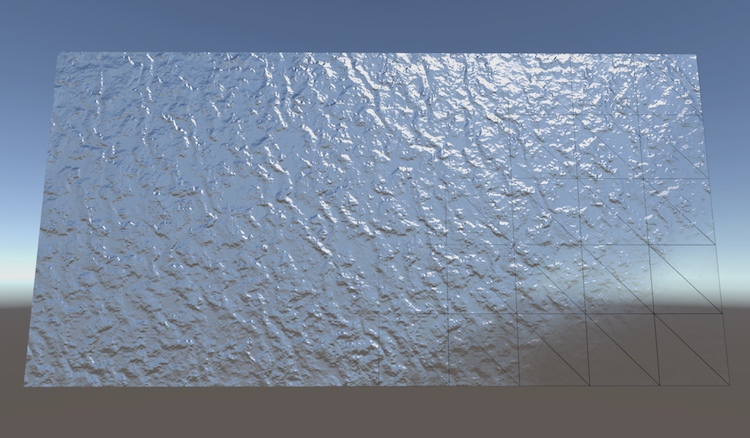
A Unity C# scripting tutorial in which we'll create a simple grid of vertices and triangles.
stiff thicket
thanks for the link, i ll read it 🙂
 late thistle
Anyone have experience with distance functions? I'm trying to calculate the points inside an sdf box however i feel i maybe be using the sdf incorrectly
or i'm using the wrong implmentation.
 long dragon
ionic blade
oh, i found the settting but unity does not let me change it
long dragon
ionic blade
oh, i found the settting but unity does not let me change it
Those materials are from the Model file, right?
All the assets inside a Model are Read-Only, you cannot edit them directly on Unity. In this case, you can either create a new material and assign the textures or you can just try Extracting this Material on the Model Import Settings > Material tab
ionic blade
Somebody else on this server already helped me. But still, thank you.
Yeah, extracting the materials helped
But interesting that opaque has this weird behavior on the model
long dragon
late thistle
Anyone have experience with distance functions? I'm trying to calculate the poin...
Dont know if it could help. But note that SDF works on 0.5 Alpha being the mid point. So if you want to reduce the shapes it goes to 0 and to increase it goes to 1. On Catlike Coding there is some more info about SDF, even a SDF Toolkit: https://catlikecoding.com/sdf-toolkit/docs/texture-generator/
How to use the SDF Texture Generator for Unity.
ionic blade
I'd have never found that out without help from the blender discord
changing it to literally anything else like cutout fixes it
late thistle
long dragon
Dont know if it could help. But note that SDF works on 0.5 Alpha being the mid p...
Thanks I was requiring help understanding the SDF returns from some shaders (math shape functions), i think i get it now.
late thistle
long dragon
Dont know if it could help. But note that SDF works on 0.5 Alpha being the mid p...
For reference this helped https://www.alanzucconi.com/2016/07/01/signed-distance-functions/#part3

This tutorial explains how to create complex 3D shapes in a volumetric shader, using signed distance functions. Unity tutorial and code provided.
buoyant tundra
Going from sketchup to Blender makes me feel like there has to be some tool or way in Blender to draw vertices simple like in Sketchup. Like draw vert lines, or a square (then you can extrude the face with E etc) or arcs and such.
Is it all done via select vertex or edge then extrude? Cant find any "draw/pen" tools. Anyone have any advice?
same with easy snapping, or like use the ctrl + R loop cut, get 2 lines then input space between them and how far away from edge or such
I am getting slightly overwhelmed trying to find out how to do these pretty simple things. :)
should I look into addons?
brave ravine
Can anyone explain (or point me at something that does a good job of explaining) how Models with multiple materials work? As in, how is it determined which materials applies to which part of the model? I have a prefab here that represents a "Wall" and you can give it two materials to have the inside and outside of the wall look differently. Both materials are using UV0, so I don't think it's to do with the UV mapping?
It's not causing me a problem and it's useful, but I'd like to understand how it works. Doesn't fit in with my current understanding of texturing 🙂
swift estuary
brave ravine
Can anyone explain (or point me at something that does a good job of explaining)...
It's based on submeshes
the first material applies to the first submesh
and so on
If you look at the Mesh API when you assign triangles, you do so with a submesh index:
https://docs.unity3d.com/ScriptReference/Mesh.SetTriangles.html
that means those triangles describe that specific submesh. And submeshes map 1:1 with materials
swift estuary
I don't know how Maya works but I don't think so
brave ravine
Is it something you can see in the inspector?
swift estuary
Unity is the ultimate game development platform. Use Unity to build high-quality 3D and 2D games, deploy them across mobile, desktop, VR/AR, consoles or the Web, and connect with loyal and enthusiastic players and customers.
swift estuary
brave ravine
Is it something you can see in the inspector?
not really it's part of the mesh data
that's for blender
brave ravine
Interesting.
swift estuary
for maya it's probably something similar
it might be called something different - like material ID or something in Maya
I struggled with this concept for a long time as well until Unity released this free materials pack:
https://www.youtube.com/watch?v=mHSZv75EQyA
I saw this and was like "How on earth do they get different parts of the model to use different materials"?
By downloading an investigating that pack I eventually figured it out haha
brave ravine
Yeah, I have "Sub meshes" with different materials in my characters, but they literally show up as a child that also is a mesh in both Maya and Unity
swift estuary
yeah that's not the right thing then
see if you can assign different materials to different parts of the mesh in Maya
that should get the mesh to have different submeshes
brave ravine
Sounds like you can assign as "Shading group ID" to individual faces
Which can then have different materials
brave ravine
So it sounds like this "Submesh" concept (that isn't a literal child mesh in the usual sense) is a Unity importer concept and there's just strategies you can use in various application to produce a condition that the importer will create a submesh out of
swift estuary
Sounds about right
brave ravine
Thanks for pointing that out. I guess that makes me feel less bad about missing some concept along the way too if it's largely a Unity invention
 woven tide
what would you expect a low poly tree face count to be?
 errant plover
Under 200
tough flare
If its a wizard of oz type tree... then one, norse mythology or other spiritual... more maybe 😉 But “low poly” more depends on if its an artistic choice, or a hardware limitation driving the need for low poly
errant plover
Do the best you can. Id worry more about texture size.
woven tide
so I'm guessing textures pose a problem
errant plover
If you over do it, yea. Stick to 512x512. A 2048x2048 texture will take up four times more ram than four 512x512 textures.
woven tide

atm im suffering with fps fluctuation
it's decreasing/increasing between 30-150
for such a basic scene
errant plover
Ahh, you'll need to run the debugger. Could be anything.
Safe to say its not your models.
woven tide
well I think it's the " scenery " ( the plane on the left and right with trees ) because if I remove those it runs at 400-500 fps
I am on a mac though which ofc is terrible for games
errant plover
That's weird. I would open the debugger so you can see whats actually going on.
woven tide
I'm relatively new to Unity, which debugger are you referring to?
maybe my approach to a endless runner is bad practice?
ruby scroll
woven tide
2041 batches is quite high, even for pc games, and I assume this is for mobile?
 raven reef

this is my model in unity

and this is the model in game
anyone know why?
I thought it was the model but the model is triangulated
yall can check for yourself
so I have no idea why its doing this
errant plover
@woven tide you can go to Window > Analysis > Profiler. Then play around with/click on the things on the side and see whats taking up all your CPU or causing spikes. Probably best to look up a tutorial on youtube for it. As for the game being an endless runner, I can already think of spawning and despawning your models as being a performance issue.
@raven reef something is up with the mesh. There is like a lot of unnecessary geometry. Trying to fix it now.
I don't know. I can't fix it. I'll need to go over the whole thing by hand. It's almost like someone ran a decimate on a higher resolution mesh and called it a day. Also not sure why its such a big difference once in game mode.
woven tide
@errant plover I'm pooling my objects to prevent instantiating and destroying reusable tiles, essentially I just spawn for example 10 tiles to begin with and then change there position to be ahead of my player upon passing the object.
errant plover
Sounds like the best way to do it.
ruby scroll
raven reef
https://cdn.discordapp.com/attachments/706966942266687551/838955221765980170/unk...
is it animated in this one and not in the previous one? might be some vertex weight problem
errant plover
Yea, I didnt check all the bones.
woven tide
hmm I'm just not sure whether replicating that process for the environment/scenery is ideal?
Example -
I have | which is a path tile
I then have [] which is a environment chunk
my process to create this scene is to spawn and/or reposition [] alongside | and [], resulting in []|[] x 10
if that makes sense?
this process is then just repeated based on distance from last tile
errant plover
Well its pretty much pointless to figure out whats wrong when you can use the profiler.
That'll tell you exactly whats wrong.
woven tide
hmm I guess I'll have to watch a tutorial on profiling as it seems as though the layout is different to the ones I've watched previously
 vague stream
maybe i can get some advice in here, hello i'm new to unity, i make vtube models and having an issue with exporting a vrm file to vrm file might have worded it wrong lol
in unity

exported out of unity

 proper wigeon
Does anyone know if there's a way /asset on the store to blend the textures of 2 intersecting meshes like shown on this video?
https://www.youtube.com/watch?v=cOBApMeeJEc
Note: this vid shows terrain + mesh blending. My goal is to do this with mesh + mesh
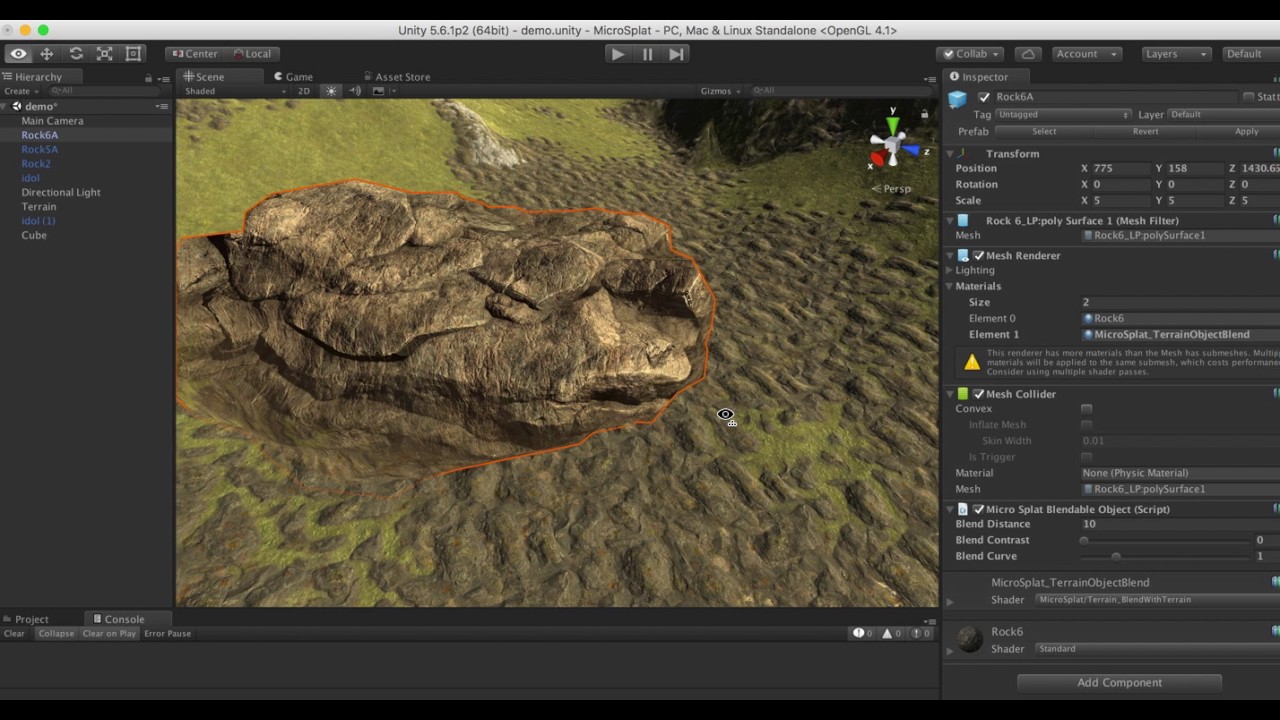
MicroSplat Demo showing of the Terrain Blending module, that allows you to easily blend meshes with the terrain.
eager mist
Hi! which sculpting program is the best for beginners, Zbrush or Blender(let's leave the money on the side) Greets!
 ionic harbor
Hey if anyone is using Armor Paint please pm me
 green steeple
 night smelt
hello, sorry to ask, I'm trying to study materials;
do you happen to have an example mesh object of a curtain, a cloth, something similar to share, or info where could i find a free one ?
woven tide
ruby scroll
2041 batches is quite high, even for pc games, and I assume this is for mobile?
any idea why there's so many batches?
it's not like I have a ton of objects to draw
 echo spade
Might be a dumb question but let's say you have a character model with a close up on their face. If I wanted to hide the jagged looking geometry created by vertices of the mesh, what would be the best method to smooth it out? A combination of having a higher polly mesh wish, normals map and smoothshading? Is there any other feature or technique that could be taken advantage of?
swift estuary
could also use a higher LOD face model for the closeup
echo spade
That's true. If the camera is going to transition or zoom in I can see that being pretty feasible to pull off
I guess would apply to textures as well.
I'm probably overthinking things though. Most character models do just fine.
 heavy bloom
If I have a mesh and I want to render is as a point cloud how do I go about that ? Wanna do something like this. https://youtu.be/A8QPFtS2_fE

Listen to the full album: http://bit.ly/38tkHvS
"Clove Cigarette" by Andy Shauf from the album 'The Neon Skyline,' available now
Order here: https://andyshauf.ffm.to/theneonskyline
Directed by Colin Medley and Jared Raab
Animation and Technical Direction by Luca Tarantini (AOK)
VFX Supervision by Tristan Zerafa with Cosette Schulz
Special Than...
brave ravine
proper wigeon
Does anyone know if there's a way /asset on the store to blend the textures of 2...
Microsplat has a "Mesh workflow" add-on that I believe allows nearly all of its features to work on meshes, not just terrain. I don't know for sure it'll do what you're looking for, but maybe shoot the author a quick note to ask
 opaque cloud
Hi i want to learn how i can combine some armature and make a new humanoid armature in unity ?
i want combine cloths with my character as a new humanoid character ( that i make in blender )
 wispy parcel
Not sure where's the best place to ask this question - I have an FPS with multiple players. Players need to see each other, but I'm trying to stop the player's camera from seeing their own head. Is there a way to do it without putting each player on a different layer?
ruby scroll
How about, show head = isLocalPlayer?
or if player is local player, show fps hand model, else show full body
brave ravine
@opaque cloud I don't understand what you mean by combine. Do you mean you have a piece of clothing as a mesh that you'd also like controlled by the skeleton?
 patent ferry
please ping me if any1 has any ideas!!
 maiden token
does anyone have this addon https://blendermarket.com/products/b2u and could he tell me if it still work ?

Blender Market
B2U is a Addon to Export Prefabs and Scenes from Blender To Unity
opaque cloud
brave ravine
<@!668960835527507978> I don't understand what you mean by combine. Do you mean ...
i can make characters with humanoid rig for unity
but i want make every part of cloths with uniqe bones and i want in unity combine those bones as same selection so every humanoid animation that exsit in unity and all unitypackage can work on my character even i change my mesh and cloths .
brave ravine
You can't change what a humanoid rig is. It exists to be a lowest-common-denominator. If you map your existing character to Humanoid Avatar then it already CAN use any animation setup against Humanoid, that's the point. But your extra joints will be stationary unless you animate them yourself, probably in a different layer.
opaque cloud
brave ravine
You can't change what a humanoid rig is. It exists to be a lowest-common-denomin...
so how other games make it ? how they import new cloth for characters like gta v or any other games ?
brave ravine
There's a few approaches to clothes depending on how many you intend to have and how much you care about clipping
If the item is weighted against the same skeleton as the character, all you should need to do it parent it appropriately
opaque cloud
how so ?
brave ravine
Well like, in my case I don't have a lot of outfits, so I just has submeshes:

I turn on of off streetClothes or clothes_C depending on what they're wearing. They're just child meshes, but they're skinned to the same bones as the character is so they animate with her
You could also look into UMA, they have a whole system for doing extensive clothing sets
Whoah, why did I not hear about Maya getting this?

I've been TRYING to figure out "Animation only" forever
opaque cloud
brave ravine
Well like, in my case I don't have a lot of outfits, so I just has submeshes:
hmm
so you put all your cloths to your model as different mesh and then export it . thanks for answering my question .
i still want to know how they made pubg like that 🥲
brave ravine
Yeah, that's how I'm doing it, but mostly because I only plan to have 2-3 outfits per character, and I wanted a lot of control to prevent clipping.
ionic blade
i made a custom texture and material and dropped it onto a 3d object, but it's not displayed correctly at the sides as you can see here, what should I do?

It's supposed to be grid like
i want the tiny stripes at the sides to disappear
eager mist
Anybody up for some 3d modeling here?
woven tide
what do you need @eager mist
eager mist
my cube falls down the map
woven tide
what's it falling through
eager mist

and it gets stuck on air
no

now i just falls though the ground without being stuck in the air
woven tide
oh wait my bad
remove box collider, add mesh collider leave convex unchecked
so basically ignore what i said previously
I meant does the dice have a collider
eager mist
box collider
 woven tide
hmm
eager mist
 woven tide
have you asked in #💻┃unity-talk and/or #archived-code-general
eager mist
no
woven tide
probably best asking in there since this is the 3d section and unfortunately I'm not sure what the issue is, I assumed it would be colliders as that's the go-to but obviously you have that covered
spark vigil
whenever i see 3D games first thing its an another FPS game with mindless shooting xD
is it easier to make and hence everyone makes one?
 maiden mortar
spark vigil
is it easier to make and hence everyone makes one?
maiden mortar
spark vigil
is it easier to make and hence everyone makes one?
its what is popular
and easiest to make, since almost anything else requires heavy scripting it seems
for events and other things
 fresh cloak
Can bugs be reduced at high altitudes?
stiff thicket
is there an algorithm that extracts the shape/outline vertices from a (flat/planar) mesh?
as well as the holes?
 copper solstice
Anyone do low poly pixel models? Would you recommend blender over Maya for it?
long dragon
eager mist
box collider
Did you added a Rigidbody for your falling object?
swift estuary
copper solstice
Anyone do low poly pixel models? Would you recommend blender over Maya for it?
You mean voxels?
Check out MagicaVoxel
eager mist
@long dragon fixed that already, new problem is my fixed timestamp is slow
long dragon
Generally the Fixed Timestamp is 0.0667 and it works fine for almost anything. What type of issue you are experiencing?
eager mist
it's slow
long dragon
If you are having a slow collision detection, you could check the rigidbody. By default it comes up with the Discrete one, with doesnt check for collision every frame.
 eager mist
long dragon
eager mist
long dragon
0.6 is not the default.* It is 0.0667, 10 times faster hauha
eager mist
still to slow
long dragon
That is it, change you fixed timestep to 0.0667 in order to have a more frequent Fixed Update.
it is showing 0.6 in your screen
BTW, your Time Scale is 0.2
change it for 1 to get normal speed results
eager mist
thanks
now when i run it it works but the dice jitters when hitting the bottom my code that makes it have Randomize Rotation https://pastebin.com/jvH2ugd3
long dragon
Probably the Bounce Physics Material is causing that
eager mist
 long dragon
First thing to try is to remove the material and see if it stop jittering. If it stops, then you will need to make some experiments with the bounciness and Friction values
until you find the ideal result
outer halo
This channel is for 3D art, please go back to #⚛️┃physics. I'm not sure why you moved here.
copper solstice
swift estuary
You mean voxels?
Not exactly, I mean low poly models with pixel art textures
woven tide
Hey just wondering whether anyone can help/direct me in the right path. I have a plane which is 1,1,2 - (x,y,z) in scale, I want to create a custom material that'll fill the base mesh, but I'm not sure how I would achieve my expectations.
Example of expectation -

rather than being a single base color, I wanted the effect of grass transitioning into dirt from the left/right of the tile
long dragon
@woven tide Hi!,
Your question seems more related to #archived-shaders channel. But what you are asking might be a Vertical Scrolling shader.
Maybe with a GIF or a Video reference would be better to make us understand it and give a clear direction.
woven tide
@long dragon To be honest I have nothing to show, I just have a empty plane atm, I just wanted a material/texture that would fit the base of the plain whilst giving the effect of grass on the sides and mud in the center
I'll ask in #archived-shaders though, thank you 🙂
long dragon
woven tide
I'll ask in <#497874081329184799> though, thank you 🙂
Cool, by re-reading. I made a misunderstand of the transitioning, I thought you meant movement. But what you need is probably the Terrain Editor
I mean, with the Terrain Editor you can paint different textures on a plane
and it blends automatically
Try checking the Terrain Editor and take a look if it could help you
woven tide
Thank you, I'll have a look, I'm guessing Terrain Editor is a packet/asset?
long dragon
No no, it is built-in on Unity

Let's learn some basics of new terrain system in Unity 2020.1. You will also learn how to use New Terrain Tools and Sample Assets for quick terrain creation.
👉Note :- Terrain Tools are only available for Unity 2019.1 and later.
👉No Preview Packages(Unity 2020)? Solution - https://youtu.be/sJIfWbrnahI?t=72
👉A,S,D Shortcut not working.Try this h...
woven tide
I'm guessing that would also work on a plane?
long dragon
It is a plane, but it is generated and managed by the Terrain component
To try it you can go to the Hierarchy and Create a New Game Object > 3D > Terrain
on Terrain Settings (the last option on the Terrain Component Toolbox), you can set its size. It starts by default with 1000x1000
woven tide
Thank you for the help 🙂
 nocturne maple

idk if this is the right channel. i imported a man in a suit from the asset store, drag and dropped the right material on it and know it looks like a stone statue. do you know what i am doing wrong?
fresh cloak
Hey, did somebody have an idea how to make something like atmposhere, I mean that on surface of planet (It's just a sphere wiyh mountains etc) we can see sky, but at higher altitudes it will disappear?
 serene coral
Hello I textured a model in substance painter and I exported it as a standard pbr metal (I think the textures were: color, height, metallic, roughness and normals). Then my teacher explained that there's a preset for unity that exports color, normals, ambient occlusion and a special texture that is metallic smoothness. I tried using both my pbr metallic texture and this metallic smoothness thing in a material applied to my model in unity but they look the same to me. Very glossy, to add. I also noticed that there is kinda no direct input of smoothness/glossiness (thats probably why metallic smoothness exists). But, if MS supposedly includes smoothness but the previous metal texture that i used does not how do they look the same? The smoothness is not accurate to what I painted, am I using the MS texture incorrectly?
 unique temple
I do not have much knowledge about Maya. But the characters which were made in Maya worked perfectly fine on it but when I am Importing its FBX on unity there is some skinning issue pop up which I am unable to sort out please help.


 brave ravine
unique temple
I do not have much knowledge about Maya. But the characters which were made in M...
brave ravine
unique temple
I do not have much knowledge about Maya. But the characters which were made in M...
If those are meshes clipping through each other because of how close they are, there's not a ton you can do directly. Two diffrent engines aren't going to do that exactly the same way. That's why in like, MMOs where there's a lot of clothing pieces involved they're usually oversized. But one thing you can do is have a cutout version of the body mesh where polys don't exist under where it's covered by clothes.
brave ravine
serene coral
Hello I textured a model in substance painter and I exported it as a standard pb...
What inputs are available/needed depends on which shader you're using. Like. the HDRP Lit shader certain does have a direct input for Smoothness, though it's preferred as part of a Maskmap with metalic and some other items in the color channels
 fickle birch
So I recently upgraded to 2021 unity after using 2019 for so long, and right after the update was finished and everything was re imported, certain blend files just stopped working and their UV's were completely broken.
I noticed that the models that are broken don't have the UV1 tag at all in their mesh directory

In blender it works fine

but in unity it just becomes this
 pastel steppe
fickle birch
but in unity it just becomes this
pastel steppe
fickle birch
but in unity it just becomes this
You need to make materials
The textures aren't exported with the model you need to bake them and then make a material

 cosmic matrix
 ornate ocean
Anyone else ever run into FBX distortion on models for animations?
ornate ocean
Anyone else ever run into FBX distortion on models for animations?
Did you export from blender?
 wispy surge
https://www.fiverr.com/share/l7lgky sharing my services if anyone wants thank you (OwO)/

Something in your behavior has triggered our protection systems - we apologise for any inconvenience this process may have caused.
 median siren

Timelapse of 3D modeling a Detailed Machine Gun in Blender!
● Instagram: https://www.instagram.com/polygamedev/
● Twitter: https://twitter.com/games_polygon
● Google Play (my games): https://play.google.com/store/apps/de...
#machinegun #blender #timelapse
 median plank
i downloaded a model and it has an mtl file but im not sure how to put it on the model
 jade raft
hello guys... I have this simple prefab with this mesh and texture:

and then i have this other one

both are made with the same exact mesh
why if i try to set the texture B in the first prefab this happens: ?

its like the texture doesnt fit well the mesh or something
but the mesh they are taken from should be identical
this is made with voxels and i have no idea about graphic stuff so if you would at least guide me with whats happening I would be thankful
 copper needle
I want to put spots on a sphere what should I do
 sour summit
hey all I was wondering if anyone had any resources on modeling interiors for games? I was wondering whether or not it is better to model the interior of a building as part of the whole model, or to make all the walls modular and "build" in unity
glacial vector
Depends on your project @sour summit. Modularity takes longer to set up, but is quicker when building large scenes. If there's room for a lot of reuse, go modular. If it's gonna need to be one set up modules for each interior, might not be wort it (depending on the size)
long dragon
jade raft
why if i try to set the texture B in the first prefab this happens: ?
Both meshes have different UVs. So the texture will be placed different on them
 slim pewter
long dragon
Both meshes have different UVs. So the texture will be placed different on them
slim pewter
long dragon
Both meshes have different UVs. So the texture will be placed different on them
If this doesn’t work try making sure texture b is set to “repeat” in the import settings.?
eager mist
Hi
dusk carbon
For some reason the bones are always importing all weird, anyone know a fix?
 ornate ocean
cosmic matrix
Did you export from blender?
ornate ocean
cosmic matrix
Did you export from blender?
Yep
jade raft
long dragon
Both meshes have different UVs. So the texture will be placed different on them
but the designer told me they are taken from the SAME mesh, is that possible?
seems he uses magica voxel and some sort of plugin ccalled magica voxel to unity
to import
 fluid oak
@dusk carbon Weird how?
dusk carbon
fluid oak
<@!178070340881219584> Weird how?
See on the right how the arm is bent? Its meant to be stagith like the other arm. This also happens with facial bones for some characters.
 hushed ibex
is this a good channel to ask about blender?
dusk carbon
hushed ibex
is this a good channel to ask about blender?
I cant send a link apparently, but there is an official Blender discord server if your question doesnt relate to Unity
hushed ibex
dusk carbon
I cant send a link apparently, but there is an official Blender discord server i...
alright
do u know anything about blender
jade raft
hushed ibex
do u know anything about blender

anybody using magicavoxel ? I have some problems when importing models to unity with the 'magicavoxel to unity' asset
like... sometimes for the same mesh I create different textures and seems the UV aren't the same
nocturne maple
idk what happened that the textures are messed up. i copied my whole assets folder from an old normal 3d project in to a 3d project with the extras and this happened

does anyone know a fix for this?
sorry if this isnt the right channel
sullen plank
if you imported from built-in render pipeline example to URP/HDRP you need to swap shaders.
nocturne maple
is there a simple solution to fix this?
sullen plank
There's a wizard in the menu that can convert. Won't work for custom shaders though
nocturne maple
i dont think i have any custom one
in which menu if im allowed to ask?
@sullen plank ?
sullen plank
@nocturne maple I don't have a project open right now, it takes a few seconds to lookup
nocturne maple
sullen plank
<@!547115495304724510> I don't have a project open right now, it takes a few sec...
okay thx for the help fogsight
 rancid hawk
My material is distorted (its on a quad) pls help this,, is how it should be:

this is how it is

 ivory tangle
hi , i've got a mesh (all it is is just a subdivided plane without smoothing on since the default plane is too low poly) and im using polybrush but the plane keeps turning black everytime i try sculpt on it ...... could someone help please ..... and could u ping me if u dont mind .... thanks
eager mist
Yo I have tried multiple times importing a 3d model to fbx from blender to my unity project and none of my textures have appeared I joined the sever wondering how to fix this issue?
outer halo
You have to create your own materials in Unity and assign the textures to them and to your model.
 delicate mason
Hey real quick, not sure if anyone can help me out here, but I hope the answer is yes
I have created a model with multiple animation keyframes for body shapes using bones

One such shape:

However, Unity is screwing this one up HARD

I really have no clue what could be the issue
It's worth noting that there is a higher density of vertices here, and it's comprised of three separate objects
At least in the chest region
I don't know if anyone would like to take a look and see what they can find out, but here's the FBX file for this mesh
Animation frames are 1-5
eager mist
outer halo
You have to create your own materials in Unity and assign the textures to them a...
Thank you so much man
and will do
 spice harness
I'm looking for some basic spaceship models of varying shapes, sizes and utility classes to be used as a reference.
They don't even need to be textured or anything, and they can (preferably) be rather poly / primitive in overall shape complexity and detail
The only design conformity I'm really looking for is (structurally) something you might expect from ship designs that trend towards near-future realism rather than strictly sci-fi (more expanse, less star wars; more hohmann transfer, less impulse / warp engines)
Does anybody know of any free or low-cost asset bundles that might contain those kinds of models?
 flint warren
anyone use subtance painter here?
 rigid pelican
 pastel steppe
Nice
 autumn python
Anybody know how I can select all the vertices in this case like you can in Maya?
In this example I can only select the two vertices facing me, not the ones in the back
Forgot to mention, this is ProBuilder
I tried X-Ray mode, but that only seems to work in the 3D viewport

 stark quarry
 spring pewter
its good
stark quarry
rigid pelican
nice
spring pewter
stark quarry
its good
thank you!
stark quarry
np mate
 languid robin
Hi team. Question. Any way to change the origin point of an FBX in Unity itself? I have two meshes that should be switchable on an object but one 'spawns' way too high so isn't in bounds of the mesh renderer...
outer halo
The only way to physical change the origin point of an FBX is to do it in a modeling program.
The workaround alternative is to child the model to an empty object in unity, and offset it manually.
languid robin
Ah ok. Thank you. Since I want the actual mesh, I'll have to do it in blender somehow. Thank you!
 ivory oyster
help because I accidentally clicked something and the left bar with the teeth will disappear. How to undo it?
help plis
woven tide
I'm not familiar with Unity's particle system, so I was wondering whether there'd be any change in performance if I used blender models to create particle effects over Unity's inbuilt particle system?
pastel steppe
You can use 3d objects in unity’s built in particle system
however if you did the simultaion in blender and exported that it might cause oerformance issues
woven tide
Yeh I was looking to do simulations in blender, but guess I'm better of learning particles
Thanks for informing me bt
btw*
 limber haven
Any good free arm rigs for unity/blender?
 drifting skiff
im trying to use a projector, and the image that i get projected onto the ground looks really bad compared to the input map... any idea how to up the quality?
 hallow ocean
limber haven
Any good free arm rigs for unity/blender?
hallow ocean
limber haven
Any good free arm rigs for unity/blender?
i think you use unity to free arm
hallow ocean
limber haven
Any good free arm rigs for unity/blender?
just send me problem and i send you arm
eager mist
Anyone know how to fix this? Its a FBX from Unity. The Triangles have been deleted but the mesh is very distorted


 split trail
rancid hawk
My material is distorted (its on a quad) pls help this,, is how it should be:
split trail
rancid hawk
My material is distorted (its on a quad) pls help this,, is how it should be:
Fix your scale to 1 on all axis ?
 stray stone
eager mist
Anyone know how to fix this? Its a FBX from Unity. The Triangles have been delet...
stray stone
eager mist
Anyone know how to fix this? Its a FBX from Unity. The Triangles have been delet...
Are you in vertex selection mode?
stray stone
delicate mason
I don't know if anyone would like to take a look and see what they can find out,...
Could it be perhaps because your joints on the chest area seem to have scaling effects. So this is carried through as a skinned mesh change, with the shape key added on top. That could lead to a disorted shape.
 sturdy falcon
Can someone tell me How Export scene with textures ? I use FbX but all White
stray stone
FBX files don't carry materials. So then you can't use textures, but it will carry the material slots.
So you can re-build your materials in unity and drag them onto the objects in the scene.
It's better to re-build them in unity anyway.
sturdy falcon
But i need export textures .. i dont understand because… i stream Binary file with 3D objects with textures
stray stone
Textures are usually images, which are seperate from geometry. So you would have to build a system that can grab the textures and then apply them.
sturdy falcon
stray stone
Textures are usually images, which are seperate from geometry. So you would have...
In unity Apply textures to objects?
stray stone
You need to make a unity material first, put the texture into the right slot within that, and then assign that material to the object.
stray stone
In what program?
sturdy falcon
I want whole scéne export with textures
stray stone
From unity - to another unity project?
sturdy falcon
Because i not Have 3D models
Man i Have BUN
Thats old stream binary file
With objects
And textures
stray stone
Where is the object? Is it in a unity scene, or is it like in blender or maya?
And are you wanting to move it to another unity scene/project?
stray stone
Okay, then no. You will have to rebuild your materials in blender to see them in there.
Materials don't carry between programs.
sturdy falcon
Man you not understand
 loud summit
Why does the bottom of my object change color? Right is the color it should be and left is the color it changes to. Maybe I have done something to the settings?
 stray stone
I guess I don't, I'm trying to by asking questions.
sturdy falcon
I Have 2 files
BINARY files
Not 3D
And i stream it
And make 3D objects with Shaders with everythibk
Textures too
stray stone
Your binary file will not contain any textures or materials.
Because it's just the 3D data.
 stray stone
You want to export that data from unity into blender?
sturdy falcon
Ye
stray stone
Using the FBX format, yes?
sturdy falcon
With textures
Yes
Alredy Have
But without textures
All White
FbX files before if i create race tracks for assetto i Have FBX and Texture folder
I try OBJ scéne exportér and not export
stray stone
Okay, so here's the thing.
The FBX format can't store image files, it only converts the 3D data into it's format.
This can be read as binary, or ascii.
The textures, will have to be exported separately.
sturdy falcon
I Have exported manualy with Binary editor but i must be manualy 3000 textures replace in blender scéne
But i want export from unity
stray stone
I don't know what to tell you man, It can't be done.
You have to manually move the textures over.
You could build a python tool to handle this for you, and assign the textures.
sturdy falcon
Ye but i thibk with OBJ or other formát can export
stray stone
OBj can support textures, but only with a MTL file.
and that's just colour data.
stray stone
loud summit
Why does the bottom of my object change color? Right is the color it should be a...
Is this the corner of a room or something?
loud summit
This is just the bottom and the side of an object that has the same material
stray stone
Yeah, this is just how unity lighting is. It's the same material but it only reflects back one colour unless there is a probe or soemthing.
All is normal.
loud summit
Is it possible to get rid of the discoloration?
stray stone
Set up your lighting, and add a texture?
 light robin
Also depends if this is in scene view with lights disabled or in game view
stray stone
^
loud summit
Ok ty
stray stone
👍
delicate mason
stray stone
Could it be perhaps because your joints on the chest area seem to have scaling e...
Nah, I figured it out. The issue turned out to be that the project settings were hard limiting the amount of bones that could be weighted to a vertex
stray stone
Ah makes sense, Good ol 4 bone limits. 😎
 normal pasture
Hi, This is a basic question, that I am having hard time dealing with. Can anyone tell me how to import FBX models where the fbx file is on one folder and the texture is on another. is there any way to automatically set the textures to the model after importing?
stray stone
@normal pasture You should be able to import them seperatly, and then you will need to make a new material to attach the textures to, Then you can attach that material to the object in unity.
eager mist
Hi sorry for joining just to ask a question but ive been trying to import a rigged character i made in blender onto unity, problem is it always breaks transforms and ends up looking like this: https://forum.unity.com/attachments/capture-png.851474/ I have tried already applying transforms but that doesnt seem to fix it, heres a thread on the forums with more details: https://forum.unity.com/threads/unity-completely-breaks-transforms-of-imported-model.1107653/ , any help please?


Unity Forum
The issue:
Whenever I import this specific model, independently of whether I import it as an FBX or drag-n-drop the .blend, I get the same results of...
 karmic marsh
Does anyone have a workaround to get CAD stuff into Unity without losing assembly hierarchy and materials but without using PIXYZ plug-in?
eager mist
i actually designed most of my character in fusion 360 and the hierarchy was kept intact for the most part when exported as fbx with exception of some weird normals @karmic marsh
karmic marsh
eager mist
i actually designed most of my character in fusion 360 and the hierarchy was kep...
I see, that's cool. Have you reduced the mesh resolution or did any retopology or any kind of pre-processing before bringing it into Unity? Or just straight away imported the fbx?
Just asking cuz I imported a full car CAD model as an fbx and it lagged the editor like hell.
eager mist
straight importing worked fine for me plus fusion 360 would act very nasty if i had a high poly object
what software are you using?
karmic marsh
I generally use solidworks but I also do some stuff with Fusion.
eager mist
oh as for solidworks i have no idea what could be causing it
are you importing bare meshes?
like not t splines or objects?
karmic marsh
This is what I'm doing:
I have a full actual car assembly made in solidworks. I import the .SLDASM file into 3DS Max to convert it into .fbx and then I import it into Unity.
After importing, I find that assembly hierarchy isn't preserved, material data is lost but I figured that same happens (materials not importing directly) with any fbx and there is a solution for that.
eager mist
cant you export fbxs directly from solidworks?
karmic marsh
Nope
eager mist
thankful with the sky that i couldnt afford solidworks
okay well let me think
was the hierarchy preserved into 3ds max?
karmic marsh
Well, if you say Fusion works well then I'll completely shift to that from now....
Been using solidworks cuz I'm a mech student and our team is sponsored by Dassault lol even I couldn't afford it
karmic marsh
eager mist
was the hierarchy preserved into 3ds max?
Yes 3DS Max can perfectly read every CAD format as if it's native
eager mist
okay try exporting to .3ds and then into blender then to fbx
or skip 3ds max and work in blender directly
karmic marsh
Well Blender doesn't read any CAD format. I think I'll just have to use Fusion now
Which I'm totally fine with
 fathom cosmos
how do i move the camera downward/upwards forward/backward to view my scenes in the editor
swift estuary
fathom cosmos
how do i move the camera downward/upwards forward/backward to view my scenes in ...
of particular interest may be Flythrough Mode
eager mist
eager mist
Hi sorry for joining just to ask a question but ive been trying to import a rigg...
shameless reeepost pls help waaa
eager mist
:<
stray stone
eager mist
:<
In your blender export settings there are a few things you should have enabled, or change so it works better with what unity expects. :)
eager mist
ive messed with them already
stray stone
It's generally these settings that should be used to ensure a consistent and correct export.
 stray stone
Also check your rig has applied transforms and such. :)
eager mist
okay i tried exporting it like you said however in 3d view it looks the same
stray stone
Hmm.
stray stone
Does any of your meshes have scales larger or smaller than 1?
From what I read, you are parenting your meshes to bones instead of using skinning?
stray stone
Yeah, okay so a great tip to keep in mind is that you should always have eveything at a scale of 1 in object mode.
If you want to scale things up, move to edit first.
However if you have irregular scales, when you export, it'll make that larger or smaller because it expects one.
You can fix this by selecting the mesh and pressing Ctrl + A, then select scale.
This will set your mesh scale to 1, which might move it away from it's original position. But once all fixed it'll export as expected. :)
Hope that helps. Let me know if it does. @eager mist
 stray stone
Dimensions you don't have to worry about.
stray stone
Even if un-parented?
eager mist
? ehh i dont know how to do that ;-;
other than crtl + a then all transforms i havent done anything else
stray stone
Select mesh, And then Alt + P .
eager mist
wouldnt that clear the parents and mess with my rig?
stray stone
You could then unparent, If you unparent then check the scale might reveal somethings.
I don't know if it'll work, I'm just doing some trouble shooting.
Well your rig is the bones/joints.
The parenting is just telling the mesh to follow said bone transforms.
You can unparent, check then re parent with Ctrl + P, with the bone selected in pose mode.
 stray stone
Do you mind letting me have your file and I can troubleshoot it myself and relay results that I find? :)
eager mist
stray stone
In your broken version in unity can you say what meshes are broke?
eager mist
sorry for using catbox but its what i had at hand ;-;
oh
no meshes are broken just the positions
a sec
 stray stone
Hoo wee that's a lot of polygons. 😅
255k tris.
The biggest games are only just breaking 100k on them now.
eager mist
oh yea i usually run limited dissolve before exporting
stray stone
Yikes. 😅
eager mist
i gave you the cleanest version i had
stray stone
When you accidently click Zbrush, instead of Unity. 🙃

Do you know what all these are about? 🤔
They are all empties.
eager mist
oh you can delete those empties
yea
its oart of the hierarchy that fusion 360 exports with
stray stone
Yeah, Probably be for how they do parenting.
Any idea what that is? 🤔

Only seen when selecting the top shin on the left side.
eager mist
no idea actually
stray stone
Okay, I think I have the problem.
Well not a problem, more of a solution.
When you were parenting to the rig, how did you do it?
stray stone
I assume all the more robotic parts get the ctrl + p?

I've tested it with 2 parts now, so this'll work.
@eager mist Alright, This'll be how to do it.
Unparent the mesh from the rig.
Then in pose mode select a bone, and then go back to object mode.
Select the mesh you want to parent, then the rig and go back into pose mode.
Making sure the bones you want the mesh to follow is selected, Ctrl + P and the parent to Bone, (Not bone relative)
Then it should work.
Bone relative is a blender specific thing so then it kind of doesn't work ouside of it.
I did the hair, but because I didn't unparent first i made an error with it, but it still shows you it working.
eager mist
unity just killed my gpu
stray stone
😎
stray stone
I recommend you retopologize the robotic parts as well.
Not limited dissolve, cause then you can have better toplogy.
Also, if you aren't going to see inside them, which Is what I suspect, They don't need to be hollow.
So you can get rid of the internal polygons. .
These are just some small things you can do to help optimise. :)
eager mist
oh i guess thats because of the way fusion 360 works
it thinks in an object manner rather than in a mesh manner so it exports everything without any optimization
stray stone
Yeah so F360 doesn't care about polygons. It's an engineering tool, so it only cares about making sure it looks like what you design.
It's not really designed for games development. 3D printing and manufacturing is it's domain.
But you can still use F360, just gotta make sure to optimise.
 stray stone
I would focus on optimising the mesh first. ;)
 wide yew
I'm really bad at art and want to know where I can find complete assets, so I can focus primarily on coding.+
stray stone
Sketchfab has a free section, and a paid section.
Unity asset store, Open Game art.
Plenty of places, However, Best focus on your prototype first before art.
You can build a whole game with just cubes and see how it all plays before adding art. and I recommend it. :)
I've made many games that are just cubes to start, cause it's all about getting the game feel and ideas working well first.
Then you make it look pretty. :)
@eager mist How I would suggest optimising. :)
The right is 110 faces (200 tris.)
Vs the Left which is 8262 tries.
 stray stone
And this would make it easier to UV it later, or make any additional model changes.
I've been working on a scene, this all total. (Some stuff offscreen) is 6660 tris.

And looks like this in unity, Still WIP.

Most of the polygons are in the window frames. XD
eager mist
anyone got an idea, why the animation breaks when it goes into the next loop cycle?
first things first
holy shit thats so fucking cool
second things, the Erlenmeyer flasks and the robotic arm are both in the same mesh?
they are not
maybe the animations desync
separate objects, and the flasks have a bone
oh
hm
I'm using a constraint
and I can't find anything about this when googling 😦
a bone constraint? like the ones in blender?
it does look like a sync issue, although I'm not sure why that would be happening
yeah, pose bone constraint
hmmmm
weight 0, when it's not in the robo hand, then weight 1 when it is etc.
does this show up too in the preview panel?
and again, everything works fine until the animation finishes
well in the preview panel, I can see two different animations
one for the hand, one for the flask
and they do work on their own
oh yeah thats def a sync issue
both have 310 frames too.
perhaps I'm going the wrong way about this?
maybe, I should try a different method then?
definitely, even if you tell the animator to play one animation right after the other you risk desync
can you show us your animator or your code?
yeah sure was about to

I have these two actions in two layers
same weight
but I guess, that's most likely where the downfall is.
does one of the layers have a mask for the Erlenmeyer flask
nope
try adding one
put it in the layer than animates the flask
thanks for the advice, I'll have to look into it, as I'm not really familiar with that concept yet
how do you think masking would solve the sync issue?
i think the two animations may be conflicting with each other
sometimes unity counts the "dont do anything with this bone" as a keyframe
eager mist
eager mist
sometimes unity counts the "dont do anything with this bone" as a keyframe
This... could actually be the reason then! 😮
@eager mist so, just opened the animator in parallel and switching between the Animation A and Animation B... looks like the clips are not the same length!
any empty keyframes at the end or start?
nope
so the animation just takes more than you thought it did?
can you show us your keyframes?
 tidal meadow
Im doing pipes for my game, currently making a three way pipe thing and wanted to ask, how much of a performance issue would be if I kept this like this? As in not connect the faces with the faces of the other way tube?
 eager mist
@stray stone haha it works great! just one issue, the face itself is missing any shape keys which it had in blender even though they do appear in blender
stray stone
eager mist
<@!66112756956270592> haha it works great! just one issue, the face itself is mi...
Hmm, I think they are actually on that mesh spefically within unity.
eager mist
i believe there is
 stray stone
Yeah. Should work then. 🤔
Are the other ones in Japanese as well?
From the working meshes?
eager mist
all of them are in japanese
stray stone
This is an odd one.
glacial vector
tidal meadow
Im doing pipes for my game, currently making a three way pipe thing and wanted t...
Not a performance issue
eager mist
welp at least i can get to work on replacing my old main character, thanks a lot justin!
 slim kestrel
Plz help, I am looking for a free 3d model of a road, pool, library, school and semi detached houses
eager mist

Sketchfab
With a community of over one million creators, we are the world’s largest platform to publish, share, and discover 3D content on web, mobile, AR, and VR.
slim kestrel
eager mist
https://sketchfab.com
Is this free?
slim kestrel
Thanks so much! I have to make a city for a project, I wanna make mine stand out
eager mist
eager mist
so the animation just takes more than you thought it did?
yeah, so both animations, 310 frames, 24fps... and weirdly enough, one is longer than other... in unity that is.
slim kestrel
Can I use the models from thongoverse?
eager mist

huh if they both have the same fps and frames they should have the same length


and in blender these are like related actions, 310 frames each... I mean it makes sense as I'm manipulating the weight on the constraint
hmmmmm weird
can you show us the timeline of the arm action one?
not the flask one?
as in blender?
no in unity
ah, sure

now the other one?
sec, cant get it on the drop down
snip

hmm, nothing there at the start!
could be the answer*
OHHHHH I KNOW THE ANSWER
try copying the last frame to 12.917 second
or the same position as the last frame of the arm action
it should work now
i hope
indeed
there is nothing at frame 310
you are most likely right
let me see.
we have a winner 😄
that worked! 🙂
YESSSSSSSSSS
LETS GOOO
damn, is there some kind of a commend system here? 😄
you deserve all the points, literally was smashing my head for hours on end with this, now I can sleep in peace 😄
i dunno but if you know why unity decided to collapse some of my faces in a weird way id appreciate it ;-;
what's the problem you're facing?
@eager mist here's the result, I can't believe I wasted 10 hours on something that won't be even that visible! But at least this will save me a lot of headaches in the future I think.
man thats so fucking cool looking
kudos to you
thanks, I'd be lying if I said I'm not putting a lot of effort in this shit. 🙂
share the screens of your problem btw, let's see if we can figure it out
its kinda like yours very subtle but annoys me a lot
the mouth faces do this weird thing

which isnt present in the mesh inside blender

oh it also lacks the shape keys which is weird
ah the line right?
did you triangulate the model?
before importing into unity?
ehhh theres an ever so slight issue with why i dont wanna triangulate
eager mist
stray stone
255k tris.
The biggest games are only just breaking 100k on them now.
.
its worth a shot at least
ACTUALLY WAIT WOT
 eager mist
ehhh theres an ever so slight issue with why i dont wanna triangulate
eager mist
eager mist
ehhh theres an ever so slight issue with why i dont wanna triangulate
you will have to, because otherwise you're going to run into all kinds of problems, e.g. most common one being missing faces alltogether.
i think i can see it too in blender too
ah, was a thing of angles 😄
so i think the reason is that this faces mess this the shape since they are connected to a way bigger shape

usually, when you have crevices like that, indicates that you need more edges
if you do a subdivide here or there and connect
that should flatten out.
subdivide? isnt that for edges?
eager mist
eager mist
subdivide? isnt that for edges?
yeah I mean, whichever process you use, just try do add more edges to that cheek
that should get rid of the dents.
hopefully 🙂
triangulate didnt work
any other ideas?
revert triangulate
as you have the problem in Blender too
and just try to add more edges
as in

something like that
oh so just with the good old knife tool?
you can but dont have to
as in
let me illustrate
well actually the knife tool worked lol
oh it most certainly would
but if you want more precision
and to not create additional verts
subdivide edge
fair enough
or not even
you can connect two existing vertices
I was just using this as an example
if you select vert 1 and then your vert 2
and press J
that will create the slice and connect
so, is the dent gone now? 🙂
did it work?
ehh
sorta
it also creates really flat surfaces

wel at least its less noticeable
maybe you can apply smoothen somehow?
oh good idea
or protrude it out?
then smoothen
as in move it out a bit.
hmm i think i have a workflow
improvement?
eh

a little
now just gotta do the rest for the rest of the weird dents
stray stone
slim kestrel
Can I use the models from thongoverse?
Be very careful with just grabbing assets from everywhere. There's lots of things to watch out for.
Polygon counts and that aside, gotta keep an eye on them.
The other thing is copyright, If it's CC-BY or any other, you will need to credit the artist.
The only time don't need to credit the artist is if it's CC-0.
eager mist
actually, can you share the topology of your mesh? Just for the head at least? @eager mist
i shared it already to mdjustin a sec
uhh
stray stone
There's more poblems with it than just the mouth. 😅
This mesh is not good.

So many N-gons.
stray stone
 eager mist
spy tf2
stray stone
You want to have some decent face topology, this will allow you to have some good blend shapes and such as you work on it.
stray stone
This might be why your shape keys don't work.
They expect a certain mesh, if you change it such as limit dissolve, It'll not work.
eager mist
oh no they do work
stray stone
The mesh the shape key is built with is gone.
stray stone
Another thing to keep in mind with faces, you ideally want to keep the mouth in a neutral pose.
So a stright line, you have a slight smile.
 stray stone
We immediatly send models back to modelling if they don't have the right settings at my work.
eager mist
mind you it's low-poly, hard edges not soft
but you can clearly see the net
i have a shape key for that so it should be a problem to change the basis to that
i gotta go but yea other than the weird dents, the bad optimisation and the shape keys not appearing everything works
ooh boy its gonna be a long day
good luck, and thanks for the help! 😉
stray stone

Retopology is a good skill to learn, This isn't as clean as I do because I was being quick to show.
 long isle
I wish I knew how topology works, I could never figure out how to create 3 or 5 star poles on the fly or get rid of them when I need to
the concept of creating loops is just too much for me
 eager mist
but yeah if you think its bad you just have to see how it was at the start
 long isle
this is the extent of my 3D modelling lol
 slim kestrel
stray stone
Be very careful with just grabbing assets from everywhere. There's lots of thing...
slim kestrel
stray stone
Be very careful with just grabbing assets from everywhere. There's lots of thing...
It is for a school project and I will credit the maker of course they worked hard
long isle
eggs.
 eager mist
alright im editing an avatar for vrchat and i keep getting this error, could someone help me?

this is the avatar btw
 stray stone
eager mist
but yeah if you think its bad you just have to see how it was at the start
stray stone
eager mist
but yeah if you think its bad you just have to see how it was at the start
Select all faces and go upto mesh > tris to quad. Then you could select edge loops and dissolve the edges. Try and keep it all a consistent size.
buoyant tundra
I know there are a lot of different ways to achieve this in blender, but I keep running into similar cases. When mirror modifier is not possible (already in use on parent), how can I simply rotate these 2 faces (top/bottom) towards the same axis?

tried a bunch of things and I get confused, feels like I am over-complicating it :p
(I did it by selecting edges instead and scaling on an axis)
 reef shard
when importing obj files i get this weird cut. its not a material
 eager mist
maybe the vertices are not welded
or the smoothing group is different than the rest of the surface
 muted falcon
my model looks correct in blender, but consists solely of single colors in unity

the materials have the correct textures and everything
long isle
muted falcon
my model looks correct in blender, but consists solely of single colors in unity
search for the materials, do you see two of the same material? *Use the search bar
muted falcon
no duplicate materials in both unity and blender
alright, after a bit of digging
it turns out, that for some reason, the uvs are way far away from the actual texture, having them render fine in blender, but not in unity
stray stone
buoyant tundra
I know there are a lot of different ways to achieve this in blender, but I keep ...
In the N menu. There should be a mirror option I can't remember which tab. But toggle it on, then there will be another toggle that appear you can toggle that on too.
stray stone
muted falcon
my model looks correct in blender, but consists solely of single colors in unity
That's a lot of materials for one object. I suggest trying to get as much into 1 as you can. Each material is a new draw call, which redraws the mesh and displays parts with the material.
muted falcon
That is a good idea indeed, I was working on getting them into about 2 textures
 wheat blaze
How can you change the shape of a mesh collider?
 elder spire
long isle
eggs.
elder spire
long isle
eggs.
yum
swift estuary
wheat blaze
How can you change the shape of a mesh collider?
by changing the shape of the mesh (in blender or whatever)
 swift estuary
go into edit mode
select all the vertices
and move/rotate the object until it's in the right place/orientation
With the translate/rotate tools
as far as what is the right orientation because Unity and Blender have different coordinate systems? < that's a little bit of a different question
Different people have different settings that work for them, but I could have sworn there was a pinned message in this discord somewhere with some reasonable approach
for me personally I do:
In Blender orient the object such that:
x is right
y is forward
z is up
Then export it with these settings:

 maiden siren
hey anyone know why, if I have render queue material at 100 vs 2000 the material with the 100 still wins and shows up over the material with 2000 render queue ? I am expecting it to render material 2000 over that of the 100 material
I double checked the two materials too at runtime just ensure I wasn't crazy
maiden siren
Essentially I have clothing, and inner clothes and I want to render something over it
eager mist
Regarding UV's and texture maps... I always start with a diffuse map after I have UV unwrapped my mesh. The trouble arises in creating other maps for the mesh. I've found the best solution to be to create the diffuse map, and then run it through Substance B2M3 (which will create normal maps, roughness etc.) and then to use those maps in adding the extra detail. Is there something wrong with this workflow? I've tried using a PSD network, but it's difficult because every time I make one change to any map, I have to -manually- reflect those changes in all of the other maps as well.
stray stone
eager mist
Regarding UV's and texture maps... I always start with a diffuse map after I hav...
Workflow is fine, but you need to go back and combine some of the maps into usable material maps.
You could also use the program called Materiallize that does the same thing for free. :)
wheat blaze
How can you change a box colliders sides symmetrically?
I know shift changes the whole box, but I just want two sides to change
 earnest pagoda
hi guys i want to get an unity asset into blender with its textures i am new to blender can someone please help me out ?
stray stone
earnest pagoda
hi guys i want to get an unity asset into blender with its textures i am new to ...
You can take the textures from unity and use them to build new shaders in blender. The material system is different for both programs so you'll have to rebuild them anyway.
earnest pagoda
stray stone
You can take the textures from unity and use them to build new shaders in blende...
ok thanks

 outer halo
Textures are not imported with the FBX.
You have to recreate materials in Unity and apply them
outer halo
No?
 gusty surge
dang I remember it being supported before
outer halo
Unity has their own shaders, Blender has it's own. There's no way it'll know how to convert them.
gusty surge
alr thanks
stray stone
I literally just said that same info on the message above. 😅
stray stone
Nope. Shaders are materials.
You'll have to reconstruct them in unity.
Oh wait. I read wrong
Yeah. In the materials tab on the prefab. You can adding materials there.
gusty surge
ok i did it
 eager mist
How do I fix the camera in the scene? Its gone weird after i focused on an object
 sullen plank
@eager mist Don't cross-post. Toggle off orthographic view.
eager mist
I need help importing sketchfab models to Unity
 twilit falcon
eager mist
How do I fix the camera in the scene? Its gone weird after i focused on an objec...
twilit falcon
eager mist
How do I fix the camera in the scene? Its gone weird after i focused on an objec...
Click the box ☺️👌🏼

 wide wolf
anyone knows how to avoid float point errors when importing a 3d model? (e.g. scale at 0.99999 instead than 1)
stray stone
wide wolf
anyone knows how to avoid float point errors when importing a 3d model? (e.g. sc...
What are you exporting with?
Is your mesh Scale 1 inside the modelling package.
Have you fixed your settings.
wide wolf
stray stone
What are you exporting with?
Is your mesh Scale 1 inside the modelling package....
Blender, and yes, i applied all transforms and even checked the !Experimental Apply Transform on export


 wide wolf
i set it to FBX units scale
that usually works, and that's what's suggested in mos blender>unity workflow guides... is that wrong? what is the difference?
stray stone
I don't really know, I just seem to have better results with these settings.
It's always different.
 gaunt laurel
is there any way to make it so this mesh is upright (x -90° relative to now) while also having all rotations be 0°?

kind of like applying rotation in blender
swift estuary
gaunt laurel
is there any way to make it so this mesh is upright (x -90° relative to now) whi...
Apply a rotation in blender
or
give it a parent
rotate the mesh itself to be correct, and then just deal with the parent only from then on
gaunt laurel
swift estuary
Apply a rotation in blender
applying rotation in blender results in this
 swift estuary
gaunt laurel
applying rotation in blender results in this
swift estuary
gaunt laurel
applying rotation in blender results in this
what's wrong with that?
also is that the local direction?
If that's local - you need to go back to blender again - it's not right yet
gaunt laurel
oh i thought that box was the hitbox or something
to be honest i started with unity like 2 days ago i have no idea what i'm doing
swift estuary
the box is the collider, yes
but you can fix the collider
it's just a box collider
you can set the hieght/width/etc to anything you want
gaunt laurel
alright i'll look into that, thanks
swift estuary
or just remove it/readd it
gaunt laurel
ah cool, it works now, thanks
ionic harbor
Hey, i want items to float pretty realistic on water. Anyone has experience with like boat / items on water shader?
The water shader has waves, so i kinda want the objects to float ontop of that
 frosty cedar
im not sure if this will show an image... but ill try it, i made a barrel a while back and I had to texture it manually lol
noope

I had to texture each part of it in the uv mapper and it was TEDIOUS
this is the result lol
 swift estuary
It looks alright but your unwrapping is a bit of a mess. I see some overlap.
Did you mark any seams?
ionic harbor
@frosty cedar i would highly recommend you to take a look qt Armor Paint
Costs like 20$ and is a cheaper alternative to substance painter
It wont help you with UV mapping but its a great painter
frosty cedar
swift estuary
It looks alright but your unwrapping is a bit of a mess. I see some overlap.
Di...
You see a LOT of overlapping... hehe
I have absolutely NO budget lol
im forced to use free stuff
stray stone
Overlapping is fine. Just make sure you don't paint the mesh.
If you are just using image textures like above then. Overlapping is ok, and this is useful if you want to use the same texture across many many assets.
ionic harbor
frosty cedar
im forced to use free stuff
If you are technical, version of Armor Paint is free, but it needs to be compiled by you. A compiled version is given for 20 dollars, buying it from itch.io, you can when a new version is posted.
Haha, yea, just incase you looking for something like that