#🔀┃art-asset-workflow
1 messages · Page 51 of 1
 thorn juniper
You can see the same on the border
This is the effect the normal map is getting on play
Raised Top, you can see the green highlight (Y+) Bottom sunken, you can see the green highlight in the bottom ( Y-)
This is the diffrence between OpenGL and DirectX normal mapping
 glacial vector
I know the difference
thorn juniper
Unity is using Direct X
glacial vector
Are you using the same quality settings in editor and the build target?
thorn juniper
Yes,
The thing is this map looks fine on the original objects, but the mirrored objects is getting the invertion. So half of my model looks good, the other half doesn't
glacial vector
Oh I see. then it's the vertex normals that are probably the issue
Are you using blender?
thorn juniper
No, 3DS max
And i applied the X-Form on it
Flipped the faces after applying it and checked the Tangent and Binormals option on FBX export
glacial vector
Did you use the mirror button or the modifier?
thorn juniper
The button, And i mirrored it as an instance
glacial vector
I've only used the mirror modifier and I haven't had this issue with that
thorn juniper
After that i grouped the building in case
Well, i've tested some cubes with normal details on it the same way. And those test cubes seem to look fine
glacial vector
did you collapse the stack after you reset XForm?
glacial vector
Then I don't know. I'd try the mirror modifier instead and see it it solves the problem
thorn juniper
But, what is the reason that in the editor everything looks good
And on Play it doesn't
Because in the editor window all my models look correct
No problems
glacial vector
Might be the way the meshes are packaged and compressed
thorn juniper
But as soon i play, it changes
I switched that off in the import settings and still does it
Do have to change Optimized mesh maybe as well?
glacial vector
I don't think it's something Unity is able to fix like that
Needs to be in the 3D package
thorn juniper
Will check it out
Maybe atach the instanced parts all together or something
Thanks for thinking with me on the problem Though 🙂
Much appreciated
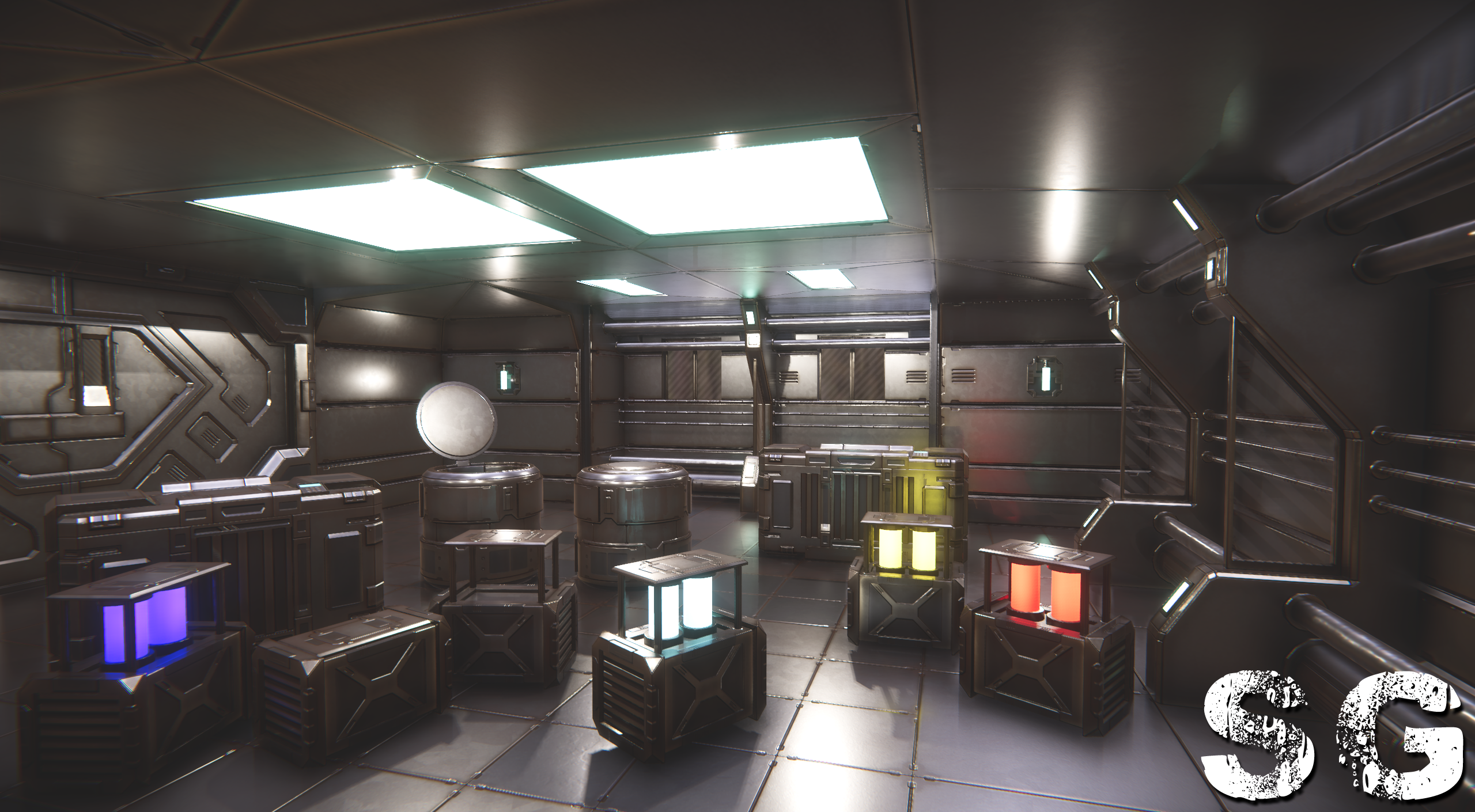
 rigid pelican
 limpid valve
@half citrus dang that looks sleeek
 half citrus
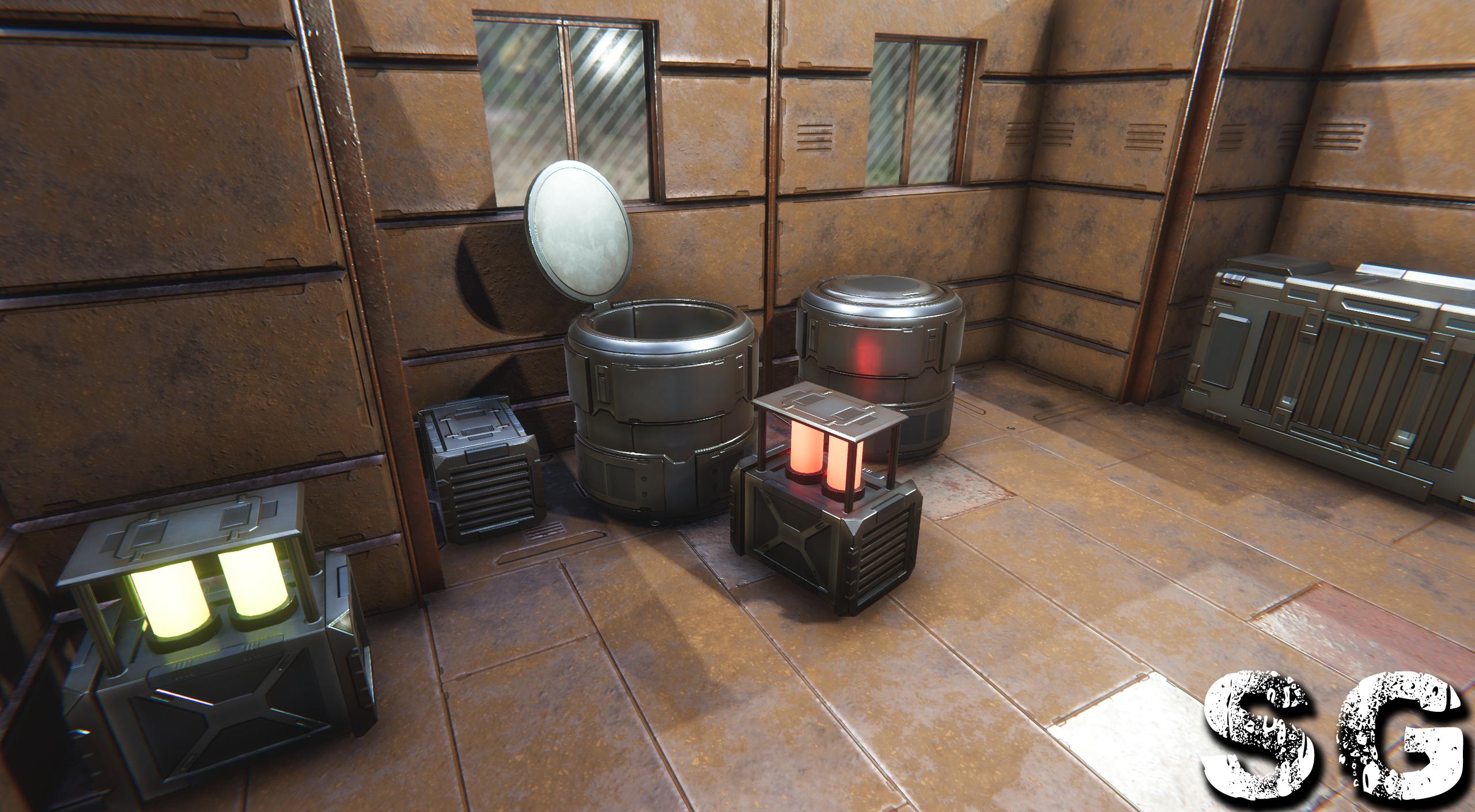
yeah, don't worry about their haphazard placement, I was just throwing them into one of my unity scenes to test them
once a make 2 or 3 more crate models to fill up this UV atlas, then I'll do some more textures on them and animate them
and in a different scene so you can see them better
https://i.imgur.com/8bUVYuC.jpg
 high yoke
So shit like this right
Would the outside of the slats be a skybox? Or would that earth and terrain be modelled?
half citrus
my guess would be skybox
you could fully model the earth and terrain, but really depends what it's for
if it's just a background = skybox... if it's a game, and you will end up going out there and interacting with it = modeled
 maiden widget
i've got a problem with unity changing or offsetting the uv's for my model, does anyone know how t fix this?
 crisp gate
I need help!
I'm programming a game where you can run the player around the object in a scene (the player has a form of capsule). And I want to do that when setting with the slider so that you can set it faster (also slowly) What definition does the object contain? Code:
using UnityEngine;
public class SpeedChanger: MonoBehaviour
{
// Start is called before the first frame update
public object player;
 private float moveSpeed = 1000f;
 void start ()
 {
     Object.Move ();
 }

 // Update is called once per frame
 void update ()
 {
     Object.speed = moveSpeed;
 }
 public void updateSpeed (float speed)
 {
     moveSpeed = speed;
 }
}
Is the code wrong or is it correct except for voidStart () and void Update ()?
half citrus
@maiden widget it looks like an ngon issue. unity will convert all ngons to triangles when you import the model. just triangulate all of the faces in blender. That way you're already modeling and doing your UVs in the same way that Unity will perceive them
maiden widget
thank you for the fix
crisp gate
And my Probleme?
half citrus
@crisp gate I'm not quite sure what issue you're having
is it just that you want your private float movespeed to be publicly available in the inspector?
just switch private to public
granted, that'll just make the number available in the inspector, but if you want it to be a slider bar, you need to set a range first
kind of like
[Range (800.0f, 1500.0f)]
public float moveSpeed = 1000f;```thx for the code and I have a scene where the player can move the object with the WASD and also think arrow keys. And I would like to do so that I can set the slider faster and less so that you change the speed of the player. The slider is left to right. if the slider is on the left the player is very slow and if the slider is on the right the player is faster. And I have created the code but my code has 3 errors and I cannot fix them. Do you understand? Sry for my english, am german.
(in case you didn't understand)
half citrus
I don't see where you are defining Move or Speed
so it probably doesn't know what those are
you'd probably be better to ask your question in a scripting section though, this section is more for 3d art and not scripting
head up to the scripting section and the general code channel, they'd probably do better at helping you
glacial vector
The appropriate channel is #💻┃code-beginner @crisp gate
crisp gate
Thx
 misty pier
damn didnt realise we were in the youtube comment section where people cant like stuff if you dont
half citrus
I don't know what is going on*
 errant plover
I think he doesnt like the game Five Nights at Freddies.
crisp gate
i like fnaf!FNAF IS LEGENDARY!!!
misty pier
ah @half citrus someone was being toxic to bunnybonnie but i think he deleted his msgs
PS
something
crisp gate
Guys where is the publish button in unity?
 maiden tangle
@crisp gate what are you referring to when you say publish
there isn't a unity game store you publish when finished, you build from file > build settings
where you publish from there is up to you
crisp gate
ok
misty pier
@crisp gate if you want to publish on steam you need 100 dollars, if you dont have the money you should go with itch.io
 limber quest
How is my new drawing?
crisp gate
@crisp gate if you want to publish on steam you need 100 dollars, if you dont have the money you should go with itch.io
@misty pier thx
 ancient locust
How is my new drawing?
@limber quest Awesome but could add animations to make it look cooler
limber quest
Ok
 dusk carbon
Hey, iunno if this is the right chat to ask. But im really struggling figuring out how to import character with their animations.
Basically, i dont know the process of doing so. I got few FBXs: character mesh with skeleton, few animations
But like...when i drag em into Unity...they just dont work with the character
 fleet pulsar
Can someone help me with my Collision glitch?
please?
 versed rampart
hello
versed rampart
I made this a while ago, do you guys think it is cool
versed rampart
I also made toothless symmetrical again
maiden tangle
hey that's pretty cool! 🙂
 rancid hatch
@mihaine#2424 how do you made that or you have lerned it from the youtube can you pls give me the youtube video in my dm pls
rigid pelican
rancid hatch
@rigid pelican frm which sftware did yu made his and the software is free or how much it take for a mnth
@rigid pelican and also where did you learn this pls
 coral hemlock
@rancid hatch That's Blender (it says at the top of the screenshot). It's free. You can find lots of tutorials on google. 👍
rancid hatch
@coral hemlock it is free i saw in gogle that we need to pay 19dollars per month for hat
coral hemlock
it's free, click 'download' https://www.blender.org/
rancid hatch
@coral hemlock can you pls say what is the storage of blender
coral hemlock
I'm not sure what you mean
rancid hatch
@coral hemlock means how much space did blender take like 30gb or 60gb etc.
coral hemlock
oh, no clue. I'm sure it says on their site somewhere
I doubt it's anywhere near that large
rigid pelican
blender and on my own
ancient locust
man i just love blender
rancid hatch
@rigid pelican didnt youleared using youtube?
@limber quest
I am studying computer-aided design and animators, I do lots of drawings and train it if you need a drawing I can give it for free
@limber quest sir i need the drawings can you pls give me
maiden tangle
@rancid hatch most of the people here will be "self taught" using google as their teacher. That includes youtube, but it boils down to dedication actually spending time in the software.
rancid hatch
@maiden tangle but why you are saying it to me
maiden tangle
@rancid hatch
You've been asking where people are learning, that's the general idea I was sharing for those who did not answer.
rancid hatch
@maiden tangle oh thanks man
 eager mist
why does unity 2020 do not have progrids?
half citrus
I think you have to enable preview packages in the package manager
rigid pelican
rigid pelican
maiden tangle
all da bloom 😎 👍
 fringe rover
 dusty ridge
how can I import a 3d model at runtime, made by Blender after the .exe has been built ?
errant plover
Have to write it yourself.
 loud token
Hey! Is there a way to "thicken" edges of a model? like make them extrude from the model
rigid pelican
you can use the tool in sculpting mode
it almost do that if you reverse it

this tool i don't remmeber the name lol
loud token
How do I make a model sculptable again? sorry, been a long time since I used blender
rancid hatch
@rigid pelican can yu pls make a video and send it to my dm on how you make the models i tried but can sclupt a model so pls
 tribal mist
Hi everyone. I'm very new to Unity and I'm just learning about the Asset Store and the assets there. Are they any other asset libraries? I'm looking for a few bits and pieces that aren't on the main store.
Also I'd like to make a sign which I can place on a build in Unity. Could anyone point me towards a YouTube or text tutorial on how to do that please? Just a small red sign with white text on it, so should be very straightforward I hope. Thank you! I'll be importing the build into a VR space, so I assume the sign needs to be 3d and mobile friendly.
 shrewd mortar
Hi guys, I have a question. I'm developing a mobile game with a scene that contains several buildings which has a high number of batches. does UV seems on those buildings have impact on batches?
glacial vector
UV seams has an impact on vertex count, but not on batches
 fervent tapir
How can I change the value of a slider depending on the rotation of an object?
glacial vector
You need a reference from one to the other and then you can just set the slider.value
fervent tapir
ok thankyou
shrewd mortar
another question, my textures are 2k does that impact on batches?
glacial vector
No
shrewd mortar
If I put all my buildings marked as static, what can cause the high number of batches? how can i reduce it?
errant plover
You want batching over draw calls. @shrewd mortar
glacial vector
There are many reasons why objects are not batched together @shrewd mortar, the best way to find out in your case would be to use the Frame Debugger, which literally has a section called "Why this wasn't batched with the last"
crisp gate
what can i do with an editor script???
glacial vector
Lots of stuff, youtube is your friend
crisp gate
:/
 lilac glade
does anybody know where i can find a model to fit this sign?
glacial vector
It would take way less time to make one than to find one
 craggy moss
Hello everyone!I've got a bike model that I've rigged and added drivers to. However, when I export it to unity, it seems like the empty object that's responsible for the drivers and animation isn't exported. Can't drivers be exported to unity aswell? Or do I have to export the animations/make the animations in unity?
glacial vector
Where are you exporting from? In most 3D packages you can choose to include animation or not. Also, if you're using an option like 'export selected' then you need to have the empty object selected as well
craggy moss
I've used the "active collection" option and the "export selected", neither include the empty object. The bike has no animations, just the drivers. And I'm using Blender.
glacial vector
Not familiar enough with blender to assist with that unfortunately
craggy moss
alright. There's no problem, I'll wait for someone that's familiar with it then 😄
glacial vector
There's also the #🏃┃animation channel
craggy moss
I don't think it would fit there, since it's an issue on exporting rigging more than animation so 🤷♂️
 dusk kernel
Hello
eager mist
Anyone ever use blender to make 2D sprite sheets from 3D poses? Could use any tips/advice on that.
errant plover
I did for a while. Never did find a tool for it. Had to do it all by hand.
rancid hatch
which version you are using and pls say how you are doing pls@rigid pelican
@rigid pelican and also do you sclupting he model or any wedsite pls say and if you are sclupting pls give me the video from where you have learned pls pls
maiden tangle
https://www.youtube.com/watch?v=A-Wq8K8icpQ
https://www.youtube.com/watch?v=IG1IEpU5VAw
https://www.youtube.com/watch?v=TAGWu08oWAM
@rancid hatch
He is using blender 2.8+, same as most.
How he did it is finding a reference image online, and practicing sculpting. there is no "one way" to make anything, it's like asking someone how they drew a picture- they learned the basics and did it themselves.
rancid hatch
@maiden tangle thanks man and and thanks for your explination this will help me a lot@rotund obsidian @rotund obsidian beter than me
 twin needle
I can't open any of my projects in Unity. I can open the Unity Hub or the version executable just fine but when I try to load a project then nothing happens. The window is closed out and the editor window never appears. Upon checking task manager, I can see that the Unity editor is running but nothing shows up anywhere else. If I try to open the project again then it informs me that the project is already open.
My operating system is Windows 10.
I have tried it with 2018.1.6, 2018.4.20, and 2019.2.17.
Reinstalling the Unity Hub as well as any of the following versions has not fixed the issue.
After some messing around I got it to open but it immediately says that it's not responding.
Now it's showing four sub-processes when it crashes.
glacial vector
@twin needle #💻┃unity-talk
twin needle
My appologies.
eager mist
@frozen cradle ur normal are SOO off
eager mist
 frozen cradle
I shaded smooth
eager mist
type f3
frozen cradle
sure
frozen cradle
I dont have that option tho
frozen cradle
ah thanks a lot man
eager mist
yeah let me know how it works
 oak pulsar
my weight-paint in blender is not letting me paint on certain areas? any ideas why thx.
errant plover
You have vertices to paint on to? You cant paint faces. @oak pulsar
 muted fjord
bruh
 brazen bronze
Hey I want to work on a fps game im making up ideas for the story an characters so i need a programmer a artist and someone to do the animations for characters so dm me to join the project i need about 5 more people
and ill friend you so we can make a group chat
or @me
 limber field
what does it pay?
muted fjord
inb4 "it pays in exposure"
 half wave
what issues would I be facing using mesh like this? the ears are a single sided mesh fused onto the body, which is normal geometry. My aim is to animate both the ears and the body with the same skeleton
muted fjord
it's a bit hard to tell without seeing the wireframe
 mystic robin
my first time attempting to make a character! His name is Werman Legsagirthy
errant plover
@half wave first issue is the mesh will only bend on the verts. So you already have very limited options with that ear. Second, you will need to use a double sided material or fill that ear in properly.
half wave
the limited geometry is a-ok, what I'm worried about is the double sided material I think
is that going to limit texturing options? i know there's an option in a shader for double sided but I don't know the ramifications of it
errant plover
Nothing really. If its just the one character.
half wave
yeah this is intended to be a protagonist
thanks for the warnings, I'm going to push forward and see what happens. cheers
 rotund obsidian
I tried
rancid hatch
@rotund obsidian better than me
 thick summit
Finally wrapped this up and submitted it.
 harsh steppe
Do you guys usually add materials in your 3d software or in unity? I’m trying to understand if I should invest time trying to mimic the lighting and post processing I do in unity in blender or just do all the materials in unity. (right now my materials are so off when I import from blender that they are useless)
 rough hornet
def make it in unity
harsh steppe
Thank you @rough hornet ! How is your workflow, do you make placeholder materials in your 3d software if multiple materials are used on the same object?
rough hornet
i do all the material and shading stuff inside of unity
harsh steppe
👍 👌
errant plover
All in Unity. Still have to bake your AO and other maps in Blender tho. Well, I prefer to.
harsh steppe
@errant plover do you script that somehow in your workflow or do you manually bake and save an image file with the AO?
errant plover
Manually. Depends on the asset too. Most times you dont even need it.
harsh steppe
👍
 faint ledge
How can I save triangles on making a vent grate?
because it just seems like a waste of triangles to make a subdivided grid
on a pretty small detail
 prisma kite
Depending on the crate, opacity map and use a shader with alpha clipping or normal maps, its hard to say without knowing exactly what youre trying to do
errant plover
@faint ledge you could just use planes. Even with 50 blades, you will only have 100 tris. Inset them inside the air duct.
There ya go. 56 Tris for the whole thing. Can't tell the different.
harsh steppe
I'm getting holes in my shadows in urp. Has this to do with incorrect normals or what is this?
tribal mist
Hello. I'm trying to make a 2d jpeg into a 3d object, and I'm running up against a problem.
I import the jpeg into Unity, to preserve the jpeg's size I go to Advanced Settings and turn off Power Of Two, this gives me the jpeg at the right size. I create a Material and apply that jpeg to the material. I then create a quad, set the scale to be the same size as the jpeg, apply the material to the quad, and in theory it should all work. But then I export the 3d object and the dimensions are all wrong - it's not as tall as the jpeg. No matter what size jpeg I import or what size quad I create, the same size 3d object seems to be the result. What have I done wrong?
Thanks!
glacial vector
You shouldn't be mixing 2D pixel measurements with 3D in my opinion... You should set up your 3D package with the appropriate units and then you'll know the scale is correct. You could use the jpg as a reference image in the 3D program as well
tribal mist
@glacial vector Great, thanks. How do I set up the 3d package with the appropriate units? Isn't that what I did when I created the quad and changed the scale? I'm a total beginner with Unity so forgive me for not understanding basic stuff.
glacial vector
What program are you modeling in?
tribal mist
I'm doing it all in Unity.
I'm importing a jpeg to Unity and then trying to convert that into a 3d model.
glacial vector
What do you mean when you say "export the 3D object"
tribal mist
I am building a 3d model for use in a VR space. So when I upload the 3d mode that I create with Unity, when I go into the VR space I can see that it isn't the right shape.
glacial vector
And you say the end result is always a quad of the same size? Is it around one meter?
tribal mist
In this instance they're always the same. I converted some square jpegs into 3d models and they worked perfectly. But with this - they are roughly A4 size posters that I am trying to turn into A4 size poster models to put on the wall of my space - they are not as tall as A4.
glacial vector
I'd recommend looking up ProBuilder so get some more control over shape and scale
tribal mist
Apparently ProBuilder can interfere with the uploader into the VR space. It doesn't accept anything containing scripts.
When you said "You should set up your 3D package with the appropriate units and then you'll know the scale is correct." - do I have to do that in ProBuilder? Or can I do it in regular Unity? How do I do that for a quad?
glacial vector
When I say 3D package I mean Maya, blender or other programs. That's how modelling is normally done
tribal mist
So I can't create a 3d model in Unity?
glacial vector
You can with ProBuilder
And you can use the primitives like the quad, but if that doesn't work with your plugin then you'll need to do something else
tribal mist
OK thanks. I'm totally new to 3d packages. I have 3d paint and Sketch Up on my PC. Could I do the conversion of jpeg to 3d model on either of those?
glacial vector
Probably, but I'm not familiar with them or how they translate into unity
tribal mist
The thing is I am creating 3d objects from my jpegs. It's just not working with any consistency. As I say, the square objects worked really well. The others seem to take their form from the jpeg, but snapped to the nearest shape Unity feels comfortable with. So a portrait will become a portrait, just not the exactly right dimensions. Same with a landscape. So I'm really close to this, I would have thought - just need to pin down those dimensions of the 3d object in Unity.
 junior harness
adjust the non square images in photoshop to be square with transparency, then map it to a quad, that should solve the problem
textures need to be power of 2 to work with mipmapping and downsize compression anyway
tribal mist
@junior harness Thanks for this. But then won't the images be square? I want them to be A4 shaped.
junior harness
the A4 shape is in the middle, the sides are transparent
tribal mist
Sorry, I don't understand.
junior harness
open the jpg in your image editor and expand the canvas horizontally
not the image, just the canvas, then on the sides of the image should be transparent space, save as png
turn on alpha clipping in the material, apply the texture
tribal mist
OK, thank you. I'll give that a try!
tribal mist
@junior harness Sorry, I can't work out how to turn on alpha clipping
junior harness
it should be a checkbox in the material
tribal mist
I've looked for it, but can't see anything that says that.
In order to work with the VR uploader I have to use an older version of Unity. 2019.4.2f
@junior harness So I went through the process without the alpha clipping to see what happened, and it created the usual shaped quad but the sides weren't transparent. The theory is great though - if those side bits were transparent in the object then it would work perfectly.
Actually sorry it created a square, but with white on the sides instead of transparent.
junior harness
did you save as png? a jpg won't work because it doesn't contain transparency. You may need to go into the texture asset and check on "alpha is transparency" and set Alpha Source to "input texture alpha"
tribal mist
OK, I've got alpha is transparency. I saved it as a png. Let's see what happens with that.
Well, this is weird. In Unity I can see that either side of the poster is transparent in the png. But for the resulting model in VR, the transparency has only been applied to the right hand side, the left hand side is showing up as a white panel.
In fact, looking at the quad in Unity I can see that the same thing has happened there. Transparency only on one side.
junior harness
that one's new to me, no idea
tribal mist
Fixed it. I'm generally a mac user so I did the png on my mac and transferred it over to the pc. I just did the png on the pc instead and it's worked fine. Quad looks great in Unity, just going to transfer it now, but fingers crossed!
Actually I spoke too soon - same problem.
I thought it was OK in Unity but no....I must have not quite seen it properly.
Right. I redid the png again, and have now got it looking perfect in Unity. But when I export, the quad is squashed down to the same shape as the others.
tribal mist
Right so I was wrong to say there was transparency only one side. It seems like it has stretched the image out to fill the space, but has only done it on one side. Maybe I need to find another way to create the 3d object and then import than into Unity.
 light snow
we are still looking for a modeler for a hobby MMORPG project.
Has been in development for 3 months with a 6Man team
errant plover
Are you using an mmo kit or your own in house option?
light snow
We are using an MMO kit 👍
 karmic narwhal
so far so good
needs to get retopologied then baked if it will go into a game tho
 arctic hornet
Hi , can someone tell me about basic 3d model costing? If I am making simple bed, chairs and real estate materials done how much would be a good price for each model?
glacial vector
You might wanna check out some sites like CGTrader, TurboSquid and Sketchfab
eager mist
@neat field are you a freelance artist? Is designing things what you do for a living?
 neat field
Yes sir !
eager mist
cool
mystic robin
first attempt at making a character. first attempt at animating. whadda ya think?
his name be Werman Legsagirthy!
eager mist
needs a bit more work but im really happy with it
 mighty hound
scene looks great. only thing i would suggest is working on the character model for the bad guy. needs more detail.
rigid pelican
https://gyazo.com/ed2755a6437adaf6757f69c193e7d08f finished modeling it and rigging time to import to unity and begin the test also sell it lmao
limpid valve
how can I add an on click to a canvas?
glacial vector
 cyan jolt
Nice!
limber quest
Thanks
 frosty steppe
I've been working on modular roads for my giant monster game.
Games about being the monster (reverse horror games) are a genre that interests me, and I love the idea of making one.
 wild hare
been getting into photogrammetry lately

ArtStation
Using my iphone XR and agisoft Metashape to get the scanned data from 118 shots, then taken to Blender for cleanup and rendered in Marmoset
eager mist
Does anyone want to chill in a discord call with eachother while we are making our own seperate games so that we can like ive eachother tips if one needs them
maiden tangle
@mystic robin first for both seriously? dumb good bro lol
it's simple enough sure but it's clean as hell 👍
mystic robin
thanks @maiden tangle 😄
eager mist
Does anyone have a clown character for me to use in my game?
 frozen cradle
hello ther
can someone help me fix my UVs? i want to change the direction of the projection
i want to project from top onto my terrain, not the front
glacial vector
Just do a planar projection but change the axis to y
frozen cradle
yes!
how do i change the axis?
@glacial vector
i showed you my mesh pls respond.
im really desparate
glacial vector
Where did you make the mesh?
glacial vector
Ok sure, in that case it's a code question
How are you setting your UVs at the moment
frozen cradle
        uvs = new Vector2[mesh.vertexCount];
        int texX = texture.width;
        int texY = texture.height;
        float meshSide = Mathf.Pow(mesh.vertexCount, 0.5f);
        //loop over every row then every column getting each vertex and assigning its position to the UV
        for (int i = 0; i < uvs.Length; i++)
        {
            Debug.Log("uv for i" + i.ToString());
            float xUV = (vertices[i].x / uvMod);
            float yUV = (vertices[i].y / uvMod);
            uvs[i] = new Vector2(xUV, yUV); //assign texture pixel the position on the mesh
        }
        mesh.uv = uvs;
basically setting each vertex a % of the texture
but i havent found a way to rotate the UV projection vector
glacial vector

Unity is the ultimate game development platform. Use Unity to build high-quality 3D and 2D games, deploy them across mobile, desktop, VR/AR, consoles or the Web, and connect with loyal and enthusiastic players and customers.
Have you looked at this?
frozen cradle
will do now thanks
oh boy i have a suspicion
ah cmon it was so easy.
there is no projection vector which you can rotate. instead you rotate the object in the UV.
I had used the x and y coordinate which is forward vector projection.
i changed it to x and z which is now projection along y axis
glacial vector
Awesome 👍
 timber sphinx
hey does anyone know a method to make the player rotate and adhere to any surface with natural reactions. i am not quite sure how to approach this
in simple wording i mean something like this
so like the player rotates to the angle of the wall
floor*
timber sphinx
f
glacial vector
When you raycast, you get a vector in the result called normal, this is the angle you would want to use for that @timber sphinx
timber sphinx
thanks dude!
 sand quiver
Hi! I'd really appreciate some help with this code I'm working on.
sand quiver
I'm building a 3D game, and I want the player object to have controls (WASD) relative to the way the camera is facing. Right now the player object moves on a global scale, so when I press "W" it move in a singular direction. Therefore, if I change the camera's direction and then press "W" it still moves in the same direction in moved in before. I have some code already put together on controlling the camera and player movement, and this is the final thing I need to make the gameplay feel pretty good.
Could anyone help me out?
limber quest
first person cameraman game
sand quiver
(its a 3D third person platformer by the way)
sand quiver
No problem, hopefully someone can help.
 sullen plank
@sand quiver This is an art channel. But you should use camera's transform.forward as a direction. For further questions try #💻┃code-beginner
sand quiver
Sweet! Sorry about that. I'll take my code questions to that chat instead.
 night socket
Spending some time retexturing my buildings and realized some of them looks pretty bland and awful
how can I make this look better?
and what would the best place to get references for building facades/exteriors OTHER THAN google images?
eager mist
what i do for my buildings i like to add a bit of grime / dust build up on the bottom and leakage at the top
anything that make the top and bottom blend better makes builidngs look good imo
night socket
not textures atm, it's mostly the actual geometry. I haven't changed the textures of that building yet
 night socket
This is one I've textured
eager mist
oh yeah that looks great
idk, maybe add some of those parts where the bricks stick out
columns?
i mean these
night socket
Hm. Alright. Thanks!
 desert pawn
videogame asset
 compact thistle
Someone please help
sullen plank
@compact thistle Not at all 3d related, install UI package
 waxen latch
Has anyone tried to do texture painting on 3D models in VR, like for content creation? Can anyone recommend any tools?
I've looked for tools a couple times, but always feel like I'm missing something.
Desired feature set:
- hard-ish brush
- lossless export
- at least 10 levels of undo
- either painterly brush option, or import custom brush texture
- trigger controls size
- layers
- couple color space options for the color picker
- eyedropper
nice to have:
- smooth setting for the stroke
- option to stretch the brush texture instead of stamping every frame
 keen steeple
Hello, I have a question, when I export a 3d blender model to unity some faces of some parts disappear, anyone knows why this happens?
sand quiver
comin' along pretty good if i do say so myself
@keen steeple yeah that happens to me too sometimes, have you tried exporting it as a .obj? that tends to work better for me
keen steeple
@sand quiver I tried but it doesnt work, its a very strange thing, from one side the face is showing, from the other not
sand quiver
Like it straight up doesn't export? or it still comes out wrong?
keen steeple
When I vusialize it from other programs is not a problem, but in unity it bugs, I m going to show it to you
Here the faces of the wheel disappears
from inside you can see the face
sand quiver
wow, thats really odd. I'm not too good at anything, really, so I'd suggest you wait from a response from someone else. (Cuz they'll probably know way more about what they are talking about than me) but the only idea I could think of would be to export the face separately and you can put the two together in unity.
keen steeple
ok, ill do that, but I think unity hates me :b
sand quiver
haha
waxen latch
The normals are getting flipped
keen steeple
And how I unflip them?
waxen latch
@keen steeple it may be that in Blender you're using a view setting that shows your mesh two-sided, instead of single-sided like most game engines do, including built-in Unity shaders. if that's the case, turn two-sided view off in Blender. that'd show you
you could also confirm this by viewing your normals in Blender
keen steeple
two sided view? In setting I supose
waxen latch
if some of your faces have flipped normals, the little line segments would point the other way
so my guess is they're actually flipped in Blender, you just don't notice
keen steeple
Ok ill try that
Ok it was the normals, now its fine :D.
Thank you so much @waxen latch
waxen latch
glad i could help!
 heavy gyro
So I have Maya LT, and there's no Render Settings option. There's not even an option to manage Rendering in the Preferences window
I just want to bake some AO 😦
On that note, does anyone have an invite link to a Maya Discord?
waxen latch
Yeah Maya LT is super locked down. There are definitely other ways to bake AO. Blender of course, XNormal. Even multiple Unity packages in the asset store
heavy gyro
I thought MayaLT had basic Turtle rendering?
That it just couldn't do the advanced stuff, or MR
waxen latch
What resolution you need?

Turtle uses a layer system to set up baking. Each bake operation you initiate operates on a specific bake layer, and each bake layer can hold different settings. This lets you separate different baking setups into different bake layers. See also Set up layers for baking with T...
You should be able to bring up the texture baking shelf, that has the button to bake
Depends on how much control you want and especially what res
heavy gyro
Ahh, gotcha. None of the tutorials I saw started with that. They started with "Open Render Settings...."
It really makes me worried that any Maya tutorials are like 4-6 years old
The Maya documentation.... "For more information on texture baking, see the Map Baking Techniques in Maya LT tutorial on Pluralsight. Select Help > Tutorials > 30-day Tutorial Trials to sign up for a Pluralsight account."
Get bent Autodesk
 neon terrace
Does unity have built in functionality for computing the transforms needed for orienting models so that they sit directly on the surface of a triangle of another model?
waxen latch
You mean with code, like built into the API? Yeah there are a handful of ways you could do it
Polybrush can snap objects to a surface, that can be installed via the Package Manager
neon terrace
I am window-shopping so to speak and was curious whether Unity would make such calculations in any particular fashion simpler.
Simpler than just doing the vertex arithmetic.
 solar current
why subdivide doesn't work on all faces?
 vague steeple
Hello people good day. Okay I will try to be as brief as possible.
I was locking for some recommendations about tools and things that I could use to make my own assets (2 and 3D) rather than using always the ones in the assets store.
I have been recommended Photoshop for the 2D (problem is that its not free xd) and blender (which is free :D ).
I wanted some advice and seconds opinions since I'm new and I have started in all the Unity world 5 days ago.
 thorn wadi
i just added a normal map to a rock and now its black, any fix?
frosty steppe
Background city.
frosty steppe
The sky and city background look good but sadly fog doesn't play well with it. I need to find a way to make fog appear on the models in the distance whilst ignoring the city background and sky dome.
 frank wren
currently working on a slanted roof and am running into this issue. pulling vertex corners on the left and on the right it's just the top surface. I need to make it solid so I can cut out "windows" later. It keeps giving me a black surface. Why would that be and how can I fix it ?
glacial vector
@heavy gyro better to work with other bakers either way, they will give you a better output with less effort
Blender is solid @vague steeple. For 2D some peer softwares are Gimp and Krita
frosty steppe
Imported some rubble too. It looks pretty good.
 umbral estuary
neon terrace
umbral estuary
neon terrace
@umbral estuary check your normals
vague steeple
Blender is solid @vague steeple. For 2D some peer softwares are Gimp and Krita
@glacial vector Thanks for the recommendations, I will check both of them. I'm currently more focused in 3D but I appreciate this.
 steel geode
hey guys, i have a messed up mask map that i need split into r,g, and b textures. can someone help me do that?
also, which of these do u think is ao, metallic, and roughness (screencapped from a shadergraph)
@azure ether
so i think i got the right textures in the right places, but it looks way too shiny, almost wet
what values do i need to change to remedy this?
 azure ether
@steel geode well it's likely something to do with the smoothness / roughness value anyway. i'd pull up the reference renders for the asset to compare to start
there's also some document about this texture packing in Unity if you haven't found it already. Some things are going to be subjective however and need answering from the artist that made the asset or another 3d artist who has made gun assets and knows what the surface and textures should look like to make short work of it
glacial vector
Inverting the roughness should do it
steel geode
it already is
without the one-minus the metalic parts turn white
well, not really white
but still wrong
multiplying metalic by .8 makes it looks good enough
smoothness*
still would rather find a way to split the texture into its rgb textures tho
is there a way to use shadergraph to tell it to save a sampletexture2d to the editor?
azure ether
@steel geode while there's probably some weird way by setting up render textures and writing scripts to copy those pixels to a file, etc it's a lot of work just to only need it one time... really a task better suited for image editing and 3d model texture editing software
other than Photoshop, Gimp, and other general purpose image editing software there is also Substance Designer which is geared towards textures for 3d models.. and I'm sure other software.
 winter steppe
im having a poblem with an FPS game
its not rotating
the characte
heres the script
pls I need answers
im going crazy
 fossil reef
turn the sens higher
maybe its too low
i followed the same tutorial
i have a sensitivity of about 700
in the script
mystic robin
made a lil plant boi and saw a tip on cell shading
frosty steppe
Bricks.
solar current
any suggestions to make it look better? graphics only exclude particle effects and post process, and yeah ignore the shitty player xD
 cursive pawn
from where I sit, everything looks like plastic -- you need textures
crisp gate
Hi guys, I'll show you some pictures of my game tomorrow! (I have not sent any pictures to Bissher on this channel)
 compact sun
Any commercial free rigged hands for VR available anywhere? Really hard to find anything.
cursive pawn
Blender exists -- you could always make your own
heavy gyro
I haven't used them, but they might be setup
Also, I think in OVR toolkit, there is rigged models and example code how to use it with Oculus's touch controllers
compact sun
I'm currently using those but I wasn't sure what the license on them is. I'm preparing to publish an asset store package. I see other assets using them though.
heavy gyro
The license should be included in the archive
I mean, it's also right there on the page as CC attribution 4.0 😛
The OVR SDK definitely has a license file in it
compact sun
Thx, must have misunderstood. I thought I had read somewhere that It couldn't be used commercially or had to be used in an oculus game or something like that.
heavy gyro
Noo
solar current
https://www.youtube.com/watch?v=qShjsxopbfQ
is there a newer tutorial for this? also does the texture sheet animation work on 3d? or only 2d

#JIMMYVEGAS In this mini unity tutorial we learn how to create a glowing fire.
✦ Subscribe: https://goo.gl/gidCM5
✦ Patreon: http://patreon.com/jimmyvegas/
✦ FREE Assets: http://jvunity.com/
✦ Facebook: https://www.facebook.com/jimmyvegas3d/
✦ Twitter: https://twitter.com/jim...
 cosmic matrix
How can I make blood sprites on ground/walls?
 wide elk
Hi guys. Question about workflow, is there any reason to bother with probuilder if I'm already comfortable with blender?
Importing .blend file will allow updates to the geometry on the fly, so I don't see the point of bothering to prototype with probuilder, but maybe I'm missing something?
crisp gate
hi guys I'll show you pictures of my game in a moment, but when I uploaded the new version yesterday the engine was out. Even when I press play, is it because I placed too many objects?
glacial vector
Not really @wide elk
wide elk
thanks @glacial vector thought as much
heavy gyro
Yeah, ProBuilder is about quickly blocking out things. You might save yourself just a bit of time, since the more tools you can keep in the editor, the more fluid working feels. For example... To adjust a wall or platform height, you don't need to tab away. Can do it right in the editor while in Play mode
But, if you're comfortable already with Blender as model everything, then stick with it
wide elk
Yeah I actually used probuilder in the past to mock up a level and then exported that geometry to blender for cleanup and detail
But didn't realise unity can update blend on the fly
In my experience, making anything non-trivial in probuilder is a pain
heavy gyro
Oh yah, definitely. Probuilder is for really rough blocking out, and it does it quickly though
It's all about iteration time: Do what's fastest for you
 real inlet
real inlet
real inlet
Inside City Skylines
cursive pawn
Blender 2.9 looks sick
 lusty urchin
whenever i hit play the sphere falls through the track, any tips?
i gave the sphere a rigidbody
 stone oak
@lusty urchin both objects need to have a collider
lusty urchin
@stone oak my friend messaged me and help me he said i could just put a box collider on the bottom half as i'm locking one axis so the ball can only move in two directions
up down, forward and backwards
stone oak
if that's your use case, then it's perfect. But if you need the ball to turn, you can just use a mesh collider on the track
lusty urchin
(trying to keep it simple)
i tried a mesh collider but the ball would fall, roll for a second and then come to a complete stop
maybe polygons are overlapping causing friction
stone oak
yeah, i suppose if the canal and the ball have the same radius it would break
the ball just needs to be ever slightly smaller, and it'd work
lusty urchin
yeah i'll give it a try (this is kinda fun trouble shooting)
yeah i just made the ball a little smaller and now it rolls perfectly
heavy gyro
Does Blender have a component model system? ie: Can I somehow take a model, then make a box or another mesh and "tag" it with a component and custom properties, so when it's imported into Unity I can post asset import script converting that to a collider with properties that I set in Blender?
cursive pawn
I don't think blender and unity are that "close"
 last ravine
for a mesh collider, is this allowed? https://media.discordapp.net/attachments/526756609528168448/750082394060619846/unknown.png?width=1243&height=911

or does it have to be like this? https://cdn.discordapp.com/attachments/526756609528168448/750082600772698242/unknown.png

 drowsy wadi
Hey there, I have a problem with an exported model's bones, their transforms are fricked and they keep increasing or decreasing
I've already rounded the bone tail and head transform values to 3 decimal places in Blender, but it didn't change anything
This happens with .dae, .fbx and .blend files
heavy gyro
I don't think blender and unity are that "close"
@cursive pawn It's more about - is there a way I can mark up models in the resulting FBX? I'm not expecting Unity to do that automatically, I know I need to write the tool
I just need an idea where to start in Blender to export meta-data that passes through into the FBX (an can be read by Unity)
glacial vector
There is a workflow for this in Unreal, but I haven't been able to find an equal alternative for Unity @heavy gyro which is a shame
heavy gyro
I want to make the workflow, I'm a developer. I just don't know the best way to "mark up" things in Blender that will make it through the FBX into Unity
glacial vector
UE4 does it just by naming conventions https://docs.unrealengine.com/en-US/Engine/Content/Importing/FBX/StaticMeshes/index.html
eager mist
So I've been reading the slides for a presentation that genDESIGN held a few years ago, and later in it they covered how they made fur in their games, and the "Shell method" piqued my interest.
Does anyone know what the workflow would be for making fur using the "Shell method"?
Is there a way to bake generated fur to layered polys? Or would it be manually texturing and offsetting UVs?
 true dew
need help with Blender fbx to Unity
can't find the options to remain texture in my Blender
 dire ermine
sand quiver
dire ermine
sand quiver
Hey, i have a question about Blender. How do I add two different texture to two different objects?
frozen cradle
i want to manipulate a texture of a material by code.
material.GetTexture and material.mainTexture only return Texture and not Texture2D. can i just cast the Texture into Texture2D so i can set pixels?
sand quiver
can somebody tell me the best way to export a file from blender into unity? I tried exporting one of my projects as a .obj but one of the eyes clipped out and got cut off
frozen cradle
you can drag and drop the complete blender file into unity
glacial vector
Alternatively the standard format for games is fbx. But sometimes you gotta pin some stuff down before you export, like in blender you can apply scale so that it’s at 1,1,1 scale in unity
But there are plenty of tutorials on this topic
sand quiver
.blender makes no difference for some reason :/
neither does fbx, could it be something wrong witht the project?
glacial vector
Probably not. Did you use the mirror modifier for the eye?
 near lotus
@eager mist Based on a quick google search, it seems like both of those methods are done on a shader level.
eager mist
I've seen it on a mesh though
near lotus
What do you mean?
eager mist
Can shaders be baked?
near lotus
?
eager mist
I went hunting on my own after these slides and found a model that had shell fur baked to layers of polys
Guess it was done by hand?
near lotus
You will have to figure out your own method for that, you can't "bake" a shader in that way
eager mist
Right
near lotus
It's an interesting concept, but I have no idea how you would do it
Sounds like doing it via shader makes much much more sense
eager mist
I'm incredibly unfamiliar with shaders but I guess I'll look into them
near lotus
I would look for a fur shader on the asset store
But you shouldn't discredit good old hair cards either.
eager mist
Of course not, they work fantastically, but the more methods I have the better!
And layered meshes for fur seems like it would be fun to procedurally animate
sand quiver
So what do you think I should do?
eager mist
Either way, thank you for the response @near lotus
near lotus
np good luck
glacial vector
I think you should watch some more tutorials to get more familiar with then blender>unity pipeline @sand quiver
sand quiver
alright
sand quiver
Okay, I've tried a bunch of stuff, but nothing seems to be working...
Could someone give me a pointer? I could really use it. It definitely has something to do with the import process between blender and Unity.
This is my 3D model in Blender
and this is it in Unity. I've tried using .fbx, .obj, and .blend but nothing has given me different results.
I've kinda run out of ideas haha
 cunning thistle
You might have to recreate the same materials in Unity itself.
sand quiver
Actually, I didn’t know how to transfer the textures, so I already put the materials in manually
I’m gonna be out for a bit, so anyone that can help me- please feel free to just vomit words at me. Give me every idea of how to fix it so when I get home I can try them all. Thanks.
cunning thistle
If the issue is the transparent eye: check if their face normals arent inverted
sand quiver
k i fixed it lol
i made one eye a parent of another, so it took priority ig...?
anyway i just detached them and remade the eye separately and now its good
cunning thistle
Nice!
night socket
Quick question about batching. If I have a bunch of individual objects like modular fences set to be static, when frustrum culling is done, will they still be individually culled or since they're essentially one mesh when marked static, if one is visible will they all be rendered?
 ocean pine
I am using Time of Day and Mirror for my networking, I was looking on the documentation of Time of Day to sync to time with the network and this is what is says. I'm pretty new so I have no clue what this means
To network cloud movement, synchronize the property TOD_Sky.Components.Animation.CloudUV of type Vector3``` solid kraken
This arm here is made of 4 different components as you all can see in next pic.
My question is, In Unity is there a way that allows for the scenario that I hit the arm only of the full humanoid and the arm tears off and then uh, shatters/ disassembles into the 4 component above ?
While the rest of humanoid is intact ?
eager mist
Hi, I have this problem where my camera can only see gameobjects in a range of about 400. Does anyone know how to solve this?
frozen cradle
@solid kraken just a wild guess but couldnt you hide the arm part and spawn a second mesh of the arm which its own gameobject ?
solid kraken
@frozen cradle
I will try that now. I was making other model atm, will try the method you told and get back to you.
 wide wasp
You could also have the model be armless and simply parent the pieces to the appropriate bones until they are hit.
solid kraken
Well, that is gonna be an issue cause the 4 parts are part of one arm and the arm is like 3 movement so the extra bone might cause issues.
 fathom blaze
Anyone would be interested in joining my project as a 3D modeller/texturer?
We cannot offer any money, were making this just to have something for our portfolios.
If you're interested then please DM me.
(for Unity discord mods: idk if it's a good place to ask, sorry if it's not)
errant plover
@eager mist you can change the clipping distance on the camera.
eager mist
My game needs a giant variation of characters so it's better to have some type of modularity than create model by model. My problem is, how games with character creation can swap body parts like the nose for example? I know how to do it with clothing/hair/etc but not with the body. There's a tool for that?
solar current
i have my player on the left, avatar, character which is the body and hair which is hair, and the rig is final, if i add box collider to bones now, can i like replace the whole model while keeping the colliders?
neat field
Non-english here, i'm making some pipes, how would you call the third one ? Bias ?
maiden tangle
eh diagonal?
 fluid crescent
Hey all! I am currently looking for new opportunities so if anybody is in need of a 3D Artist let me know! You can see some of my work here: https://www.artstation.com/thomaspasieka
Feel free to DM me!
A few clients I worked for:
Clients:
• Unity Technologies
• Disney
• Autodesk
• Spatial.io
• Daimler/Chrysler
• Marta (Bus/Rail Simulation)
• Nike (Sporting Goods Manufacturer)
• Warner Brothers
• Intel (edited)
 sand quiver
Hmm... I'm interested, I'll be sure to dm you with any questions or if I'm looking for something.
eager mist
Don't know if I'm asking in right place but if I add LOD group component to parent then it can find all LODs which might be deeper in hierarchy? I.e. I have a workshop trolley which has LOD for main part, some shelfs and handle. All of those LOD are hidden in respective game object which are children of the trolley, will it work properly?
Ok nvm, It will work. Chcecked it with quality tab and switched back and forth bewtenn low and high and it worked.
 elfin token
how can I test mip maps in game?
I can see them in the editor view but I want to do it in game view
rough hornet
why are the edges behaving weird?
 minor horizon
Not sure why but it seems this cape is ignoring the colliders on the tail. (this is a still frame going into play mode) i have all the colliders assigned in the mesh
it ends up here
 stoic hearth
 lone bough
Hey people, anyone know how to export a model from Unreal for use in Unity? I found a bunch of tutorials going the other way but not many from Unity to Unreal.
glacial vector
You said two different things haha
lone bough
@glacial vector Your right, I meant from Unreal to Unity
glacial vector
In Unreal you can right click on an asset and choose to export it, which will output an fxb @lone bough
 fluid oak
@minor horizon Do you have animate physics enabled? Is that picture you showed the starting position?
minor horizon
Turns out there’s a maximum of 16 colliders that it’ll register from what I can tell @fluid oak
lone bough
@glacial vector hey, yea I managed to figure it out, but you have to re-export all the textured manually. Which is a total pain. XD
glacial vector
Agreed
 wheat dragon
 oblique forum
is the property set to a material in properties?
wheat dragon
Where does one find that properties menu?
oblique forum
click on the texture
and in the right
the inspector window should show the properties
cunning thistle
DarkGamer did you set your mesh's faces to have two sides?
wheat dragon
No, I just have backface cull off
cunning thistle
all right
btw you are selecting the texture, you need to select the material
it should have a diffuse slot, drag and drop your texture to that slot
wheat dragon
cunning thistle
it's the albedo slot
wheat dragon
which the texture is in
cunning thistle
yeah
then to apply this material to your model just drag it and drop to your scene, or go to your model and apply a material from there
wheat dragon
drop the image or material?
wheat dragon
Because by doing that, I got the result you see above.
cunning thistle
what is the intended result?
 cunning thistle
did you UV map it properly?
wheat dragon
Yes
I am 100% certain of that.
it maps properly in Maya
And sketchfab for that matter
 cunning thistle
I don't know then what could be happening
wheat dragon
I probably have a wrong setting somewhere
cunning thistle
what is the range of your UV map?
wheat dragon
I don't know what you mean by that
Just so you know, I'm not a 3D modeller, I'm a programmer, just doing this for college as it was part of the summer task.
cunning thistle
when you mapped this in maya, did you use only the top right "square" or all the 4 "squares"
tweak the tiling setting in your material
I never had this type of problem when exporting so it's hard to help
would you mind uploading this model's fbx? I wanna check it
@wheat dragon
cunning thistle
you could try mediafire, google drive or any other option if you still wanna go through with it
 wheat dragon
Tbh, it was modelled "not the best", I have to use back face culling off to get it to display both sides
cunning thistle
dont worry
wheat dragon
Sent
sand quiver
@ me if you come up with anything
 fiery minnow
You need to use double sided textures. If you leave back face culling on it will hide the negative normal.
@wheat dragon
sand quiver
Hey, I'm trying to export my blender project into unity and keep the animation. I exported it as a .fbx and everything seemed fine, until i realized that the eyes weren't animating correctly. The blinking animation i made for the eyes was to flatten/squish them and make them super skinny so it looked like they were blinking. But in unity it doesn't animated correctly. They just stay the same size and move down slightly whenever they are supposed to blink. I sure it has something to do with the exporting out of blender/importing to Unity. Is there a setting I should toggle in one of the programs?
 nocturne marlin
Hey guys. Can I buy this asset from Unreal Engine and use it in Unity?? It should be only the models so I think I should be able right ?
https://www.unrealengine.com/marketplace/en-US/product/sci-fi-swords-pack

Unreal Engine
Half hand-painted and highly detailed, these high-quality swords & sheaths models wouldn't be out of place in your next sci-fi or fantasy game.
 tall heart
i have an unrigged model in blender, do i add bones in blender,n export it to unity, or do i add bones in unity??
 dusky plover
Hey guys! I'm building a game where the player will be constructing a really tall building.
The building is viewed like so (check screenshot) and I need to create a camera script that allows for the player to move up and down in that world, but not sideways.
This means I only need to move the camera y axis.
I can't find a guide that explains this.
I'm in orthographic mode.
Can someone point me in the right direction? Basically i just need to move the camera + or - on the y axis on touch input.
dusky plover
I have this script at the moment, and for some reason it scrolls diagonally through the world..
this is connected to the message above
sand quiver
@tall heart Add bones in Blender
tall heart
ok
wheat dragon
This is probably because of how bad my still-learning modelling skills are, but would anyone know why light is passing through planes? (They are not translucent.)
UPDATE: FIXED
dusky plover
Does anyone have any tips on how to create a camera that moves only up and down (on the y axis)?
by touch control.
 rare rover
cunning thistle
rare rover
cunning thistle
nice
 viscid garden
WIP Moba character.
https://twitter.com/rutzgroup/status/1301587067101564928?s=19


Magical fighter character for an multiplayer battle arena game.
#Blender3d #gamedev https://t.co/Q0iK3xhIAV
 Twitter
 round gale
Should I color my model in blender then import it into unity or import the model and then color it? I am just starting out, please @ me
maiden tangle
@round gale you want to do your coloring/texturing/painting etc in art programs like blender before importing yes
you can do a color tint once inside unity, but beyond that it's all taken care of in blender.
 tepid radish
@sand quiver might need to apply transforms
 fringe hinge
cyan jolt
fringe hinge
cyan jolt
@dusky plover
This your error:
You should set the X axis to the default X value of the camera...
dusky plover
@cyan jolt Yeah I figured that one out. Got a perfectly working Camera script now. Thanks for the help anyway ❤️
cyan jolt
No problem!
sand quiver
@tepid radish I’ll see what happens if I do
 indigo siren
I am having Problems with my Blender Objects in Unity, woud be realy nice if someone coud help, thx in advance https://blender.stackexchange.com/questions/193645/blender-unity-export-uv-coloring

Blender Stack Exchange
I I have struggles with Importing my Blend to Unity with the Colors i mapped it in Blender.
In Blender the Colors are the way I want them.
I can get the Object in to Unity, as an Object,
in Unity I
dusky plover
@indigo siren
you could just (in the future i guess) use unity materials to color them.
As far as I know that should be easier for you that way, since you have more control. Someone who knows more than me about this might come along. I only do low poly stuff in blender and i never really colored anything in there.
But I do recommend coloring in unity in general.
half citrus
anyone here use a non-wacom tablet?
heavy gyro
Yah, I have a Huion and an iPad with Apple Pencil
half citrus
I just ordered a Gaomon pd1560, as I didn't want to plunk down the money for a cintiq
not sure how it will be yet
I currently use a wacom intuos, and love it, but wanted one with a screen
reviews seem hit or miss, either people seem to love it or think they are junk
I'm trying to get more into sculpting instead of polymodeling everything, so wanted a better tablet
heavy gyro
Yah, I'm pretty comfortable working with a screenless one, so the Huion is great. It has all the features of a similar sized Wacom, but the cost of it and shipping was just the import costs alone for a Wacom
The iPad has been good, honestly. It's fun to noodle on, on the couch
I used to be a huge Wacom fanboy, but the world has moved on and Wacom forgot they need to be competitive
half citrus
yeah, I'm fine with the screenless until I started sculpting. just not as accurate as I want to be
undo is getting a workout
heavy gyro
I don't do much sculpting, but have been playing with VR modelling which has some sculpting tools
My current project is almost wholly hard surfaces too, so....
half citrus
and I agree about Wacom. I just could justify spending 1000 dollars for a cintiq that has the same features as a 300 dollar Gaomon
couldn't* justify
sand quiver
I asked something in animation, but i guess i put it here too since it still applys
'I'm trying to apply Transforms to an object thats already animated but it gives me this message
"Cannot apply to a multi user: Object "Cube.002", Mesh "Cube.001", aborting"
Any ideas?'
 still osprey
i imported fbx file from blender to unity but unity seems to redner all faces backwards (when you have a wall it renders the side of the wall you shouldnt see) any ideas on how to fix that?
windows 3d viewer shows the fbx file correctly
glacial vector
You need to invert the normals in blender before you export
still osprey
found some tutorial, trying to do it rn
 exotic storm
Is there any way to export a mesh with multiple materials attached and ensure that the order of these materials will be carried over into Unity upon import? I need to ensure that specific material will always be at certain index in materials array to be able to work with it reliably in code. Although exported fbx files from two different Maya scenes, even though with exact same material setup in use, do not have consistent material indexing in Unity. In one case, materials are ordered alphabetically just as in Maya, in other case they are ordered seemingly randomly, even with the same naming. Is there any way to set something like this in Maya? I've been googling this for hours and I couldn't really dig up any useful info
errant plover
@still osprey https://www.youtube.com/watch?v=lPvc65qK7ps
still osprey
can i somehow fill all the materials with double side lit?
the map im trying to import is huge and im not going to go face-by-face and flip every single normal because that would take ages
but the again dragging and dropping a material 421 times will take ages too
maiden tangle
reference the double lit material, for each of the indexed materials (421) assign the reference material @still osprey
still osprey
@maiden tangle you mean do it in a script?
still osprey
managed to get it working
errant plover
421 Materials? You are doing something wrong. What is your intended outcome? @still osprey
still osprey
if somebody wanders - this is titanfall 2 map ported to unity
421 Materials? You are doing something wrong. What is your intended outcome? @still osprey
@errant plover vpk tool doesnt export materials so they get replaced with unitys default simple lit material
but some faces were in the wrong direction so i decided to slap double side lit material on everything and not worry about invisible walls anymore
errant plover
... Your performance is going to take a bit hit for no real reason.
still osprey
idk its running smoothly
over 144 fps for sure
also this map is just for reference
i need it only to adjust player speed to reasonable values
and then it goes to trash
maiden tangle
haha another way I totally forgot is to just remove all materials except the one you want them all to be, and then set a number.. first material is what the new materials will be
solar current

anyone knows why the material is kinda messed up when i move stuff in pose mode? and how do i fix this?
 grave siren
@solar current maybe you don't have support loops for the curving parts
send a pic of your topology please
solar current
@grave siren i tried doing loop cuts but it wont loop, i also tried doing the remesh modifier but it crashes my pc :/
idk what to do anymore really
glacial vector
If you’re gonna animate it you should definitely look up some references for the topology @solar current
solar current
@glacial vector thanks you
glacial vector
There should be blender tutorials on modelling hands as well
errant plover
I wouldnt even model a hand. There are a lot of free resources out there. Import and adjust as needed.
grave siren
@solar current yeah the topology is pretty bad. thats why
cunning thistle
When modeling anything that has joints you need to give it extra faces around the joint to make it malleable. They also need to be modeled properly
 unkempt ingot
hello, here I am starting on unity but the problem being that after having made my ground I would like to add texture to it like grass but when I listen to nothing it is impossible to add anything.
I'm on the version; 2019.4.4.9f1
 sly moon
hello, trying to import these totems from the asset store https://assetstore.unity.com/packages/3d/elemental-magic-totems-59522#content
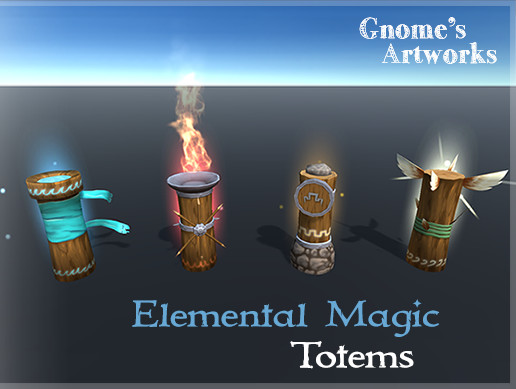
Elevate your workflow with Elemental Magic Totems asset from Gnome's Artworks. Find this & other great 3D options on the Unity Asset Store.
the materials are transparent, something with PSD files : /
anyone knows how to fix this?
ok got it, alpha clipping was the issue (no clue what it does, but it made the material complete alpha)
errant plover
Not really. Best to look up each individual system you want to make. Or start with an RPG kit from the store.
eager mist
https://www.youtube.com/watch?v=Ouu3D_VHx9o&t=307s
Okay so, I followed his whole tutorial and I have a question
How do I make it so all objects (or specific objects) are attracted to 1 sphere to make like a gravitational pull
Im trying to make it so an object can drive around a sphere
Let’s apply Newton’s law of universal gravitation to planets in Unity!
● Download the Project: http://bit.ly/2vrNxKo
● Simulation form "Forces" Video: http://bit.ly/2tmw8BA
● Download the Skybox: http://bit.ly/2uhShnv
● Download the Planet: http://bit.ly/2uIM2te
♥ Support Br...
 nocturne igloo
i have some questions about the software im using for 3d modeling its called sketchup its mostly for architecture
but im using it cause i know someone who knows it and teachs it
@everyone please
i dont know if it is compatible with unity
cunning thistle
You can export the models from there as .fbx so you are okay on that aspect, but I guess you should only use sketchup if you plan to only model architecture and things like that. You should still use blender or other modeling software for a clean-up.
eager mist
im trying to get my sphere to go at different speeds and i have different physic materials applied but it's not working?
could it be because my script is forcing the speed to be constant?
 wild owl
eager mist
wild owl
eager mist
Anyone here experienced in making level creators?
 silent jackal
Anyone know if I can make some kind of 3D skin and upload it to unity as a game object?
silent jackal
Create one and then upload it?
sullen plank
Look up Blender tutorials for Unity characters, there are quite a few of those. You can then export it as FBX for Unity
sullen plank
yep, if you use Unity specific tutorial like this one https://www.youtube.com/watch?v=h8oI0n5kAIg it will be explained
silent jackal
Nice! Thanks alot that's all I needed
sullen plank
Probably can find a more recent one as well (Blender got a new version UI has changed a bit)
eager mist
Can anyone help me with controlling movement of a cube on a sphere
 eager vale
Hi all. Is there any quick solution for this?
Here is an example. if you didnt get the idea from image:
If player is in the "House" , on the 1st floor and wants to go up to the 2nd floor, i want to change "House" model Y position and keep player on same height. So player only moves by X and Z, but i could simulate going upstairs. Thanks.
maiden tangle
@eager vale can I ask why you don't just use navmesh, set the destination to up the stairs?
Moving an entire house seems like it could break something
eager vale
i need to move house. i dont need navmesh in this case
i need to keep player in same height
maiden tangle
Alright so you would move the house down on the Y, while moving the player right for example, if the player reaches the "up stairs trigger" stop moving the house, stop moving the player?
But you probably already knew that
Unless you're wanting to avoid coding it
In which case.. Maybe animating but again you would need to trigger event anyway
eager vale
Unless you're wanting to avoid coding it
@maiden tangle Not at all. i can code. i need to understand principle.
For now i have one idea with casting ray under player, so if hit position value is lower then one constant, then i will move House down.
No no hit detect - then will move up.
I want to use this in AR.
Put House on floor, and when user move on stairs, model will go down 😉
harsh steppe
is setting "Bake axis conversion" supposed to make fbx files from blender show up right and have Rotation X as "0" inside unity? Because I still have "89.98" as x rotation.
 raven flare
Hello, @everyone I'm an indie game dev and I've been trying to make a model with the art style inspired by Untitled goose game and Inside by playdead studios, If someone could make a tutorial to model in that kind of low poly artstyle or make the model and send it to me(disclaimer: this is not a commision, I need art for my game and I'm crowdsourcing) if you are interested dm me and I will give you refence images and tell you the details
errant plover
It's more of a shader than the model itself. Standard poly count. Use any cartoon shader and adjust the settings as needed.
cunning thistle
I don't think there are tutorials for the low poly artstyle. There are just tutorials for modeling in general, low poly is just an aesthetic that you can achieve by lowering your poly count and knowing where to place hard and soft edges.
 tawdry valley
I don't think there are tutorials for the low poly artstyle. There are just tutorials for modeling in general, low poly is just an aesthetic that you can achieve by lowering your poly count and knowing where to place hard and soft edges.
@cunning thistle what?
well i mean thats kinda true.. cuz any model starts out low poly
its just how much more detail u add
cunning thistle
Exactly
tawdry valley
i see what ur saying
cunning thistle
So if you know how to model you know how to achieve that "low poly" aesthetic
tawdry valley
@cosmic schooner imma keep a tally of how many times i see that yoshi model from now on 😉
 night smelt
could someone help me with some basic info? i imported a model from mixamo, but this is the result
what am i missing here ?
night smelt
well... it's not backward, it's transparent 😄
 junior stone
also possible
night smelt
a guy on the internet said I found the answer. The texture setting was translucent so I switched it to Opaque
where could i find this option?
ok, I think i found it, but can't edit the imported model 😐
glacial vector
Make a new material in Unity with the same textures
night smelt
i solved by duplicating all materials, altough i'm a bit unsure on how to handle this in a production situation
glacial vector
Essentially you need to build the materials within Unity. You can extraqct the materials from the model and use that as a base, or create a new one
eager mist
Hello! I am a noob in 3D modeling(using 3dsmax) and i want to ask how to link bone to biped ><?(I want to add a tail)
 cobalt sierra
https://cdn.discordapp.com/attachments/650127431209844779/753992821546942594/2020-09-11_16-54-56_1.mp4 Recently learnt modeling and this is what i have been working on.
cyan jolt
@cobalt sierra Can I suggest to you to add more recoil? (Using hands rotation) So the game is a little bit more realistic...
 vital flint
I need help with making a script that make you move in the game.
sullen plank
@vital flint Tutorials are pinned on top in #💻┃unity-talk
vital flint
Alright.
 halcyon kite
My character keeps falling through the plane despite having a rigidbody and collider:
I remain unsure why this is happening
I have shown all the components there is interacting with the character and on the character
I need a solution to this problem
Please, if there is anyone that knows what is going on
 deep shadow
i think it's because it's a trigger
indigo siren
@eager vale U got my Curiosity now, why do you need to move the House and not the Player?
 prisma rune
Hi i have a problem with white lines on alpha images any one can help me ?
 solid iris
hey guys I am Importing an asset from blender to unity can I get some help here?
I am having a bug dont know what
when I import to unity some parts disapear
prisma rune
you are exporting everything from blender ?
prisma rune
check your normals
solid iris
can you give me some pointrs new to blender to
what am I lloking for=
I have none selected
prisma rune
send a print
solid iris
prisma rune
yha you have to flip the normals
when you export fbx file with inverted normls it apear transparent on unity
solid iris
ok thanks
cool it worked thanks man
but I dont get it why it got that way
I made all those faces at the same time
dont get it why some of them got fliped
 blazing canopy
Does anyone know why my scene camera has gone into this twisty weird perspective?
When I left click to fly the camera, I can move side to side but when I move backwards and forwards, it just moves the culling plane
solid iris
so I got a 3car, made him box coliiders for the body and wheel coliders, now I placed a rigid body and a terrain collider into the road but the car still falls trought with gravity, any help?
3d
ok just needed to add a meshcollider
cunning thistle
@blazing canopy That's because it's in orthographic mode.
If you don't want that just select your camera and change it
blazing canopy
@cunning thistle Thats my editor scene camera. I reset all the settings and it still wasnt resolved
cunning thistle
Oh
blazing canopy
I had to create a new project
cunning thistle
you see that little gizmo on the top right?
Click the cube
It will change your scene viewport camera's orthographic mode
blazing canopy
Oh I see!
Thank you
I must have accidently pressed a hotkey for it to toggle or something
cunning thistle
No problem! That is really handy when you need to preview something or align objects
blazing canopy
@slender owl is this your blog? https://cyangamedev.wordpress.com/
 slender owl
@blazing canopy Yeah, mostly a bunch of shader graph stuff.
blazing canopy
Nice, happy coincidence
 obsidian latch


 azure ether
out here flippin' normals like everyday
 covert sparrow
hi guys! I need some guidance regarding 3d modeling: I bought an asset called Clayxels, seems ok to use it, but a friend is trying to make me do it on Blender. I don't want to make anything with super textures and all, but he is bugging me a lot with it. what do you guys think?
maiden tangle
blender will give you a lot more freedom and creative options, blender will be more performant, blender has a larger community for support. @covert sparrow
I have clayxels as well as blender, I will say clayxels is convenient it in that it's in unity's editor
if you don't already know blender and it's capabilities, and just want a simple clay style world I'd stick with clayxels.
covert sparrow
thank you!
 boreal heron
hello everyone, i just started to learn unity one week ago, I want to know where the 3d models are made for the game. Are all the models are made in unity or Blender (and similar softwares) are used?
cunning thistle
You make the models outside of Unity like in Blender or Maya for example
boreal heron
@cunning thistle thanks
cunning thistle
Blender is free and has a big community
 thorny phoenix
how do i prefer an obj file for unity ?
i want to have the wheels as separate objects
eager mist
spent half the day redoing all my modular peices and their LODs. 😐
 cloud latch
It be like that sometimes
 proven portal
okay so im making this simple 3d game and i want to add a death counter and when it reaches 3 it restarts the whole game from level 1, but its not working can someone help me ?
proven portal
its okay i fixed it ty
 empty venture
Hello. Does someone know how to import Blender Shape keys into unity? I have the animations laid in an NLA track, however neither the animatons or shape key show in unity
 maiden charm
hey guys, can i safely use blender's drivers to change shapekeys during the animation and then
exporting animation to unity will be ok ?
deep shadow
bruh this is the first time i've had to touch weight painting to fix my rigging
and i just can't get it right
like i have an arm, and i rig it, rotate the lower arm bone and the whole arm rotates
and i fix all that and then it still doesn't work correctly :(
maiden tangle
Have u followed a youtube tutorial? That's how everyone learns these days @deep shadow
maiden tangle
I would suggest and animators tutorial, rather a beginners generalist
deep shadow
i do get the weight painting part
i just can't get the weights correctly cause the brushes are kinda hard to grasp
like i left click somewhere with the subtract brush and it just doesn't do anything
it's kinda counter-intuitive
maiden tangle
Yea I can't really know what's going on with "I did it right and its still not working" without being in your scene but im sure someone more knowledgeable will come around
I personally would keep watching tutorials to see any inconsistencies
deep shadow
probably something wrong with my mesh
cause like i rotate this one bone and it moves another part of the mesh than it's supposed to, i look at the weight painting for that and there's no weight there
i think i got it now
nvm
aight got it
maiden tangle
Awesome
 olive marsh
ArguementException: input button jump is not setup
Keep getting this error but have set it up any1 know a fix
 gusty dock
I have this node setup to get an ellipse mask, but the multiply node seems to cause the emissive materials to turn white. Any ideas why? (Using blender)
maiden tangle
@olive marsh #💻┃code-beginner
 livid cove
hi guys, have a question
is there anyway to invert my normal texture Y Channel directly in unity? from texture setting or material setting?
im using hdrp lit shader
didnt see any setting to invert y channel in hdrp lit material setting or should i make my own shadergraph just for that?
azure ether
@livid cove You need to either 1. edit the texture (in another software, typically) to invert that channel before import, or 2. you'd need a shadergraph / shader to flip the channel. The generally agreed best practice in most cases (and what Unity docs suggest) is option 1: edit the texture in an image / photo / texture editing software first. making custom shaders to make static adjustments to an improperly prepared asset is fine for a quick test or prototype, but it can add unnecessary complexity to your project, and even start to take a toll on GPU performance. Better to reserve custom shaders for something that needs to change dynamically real-time, not one-time at (or before) asset import.
@livid cove See this related documentation as well: https://docs.unity3d.com/Packages/com.unity.render-pipelines.high-definition@8.2/manual/Mask-Map-and-Detail-Map.html
livid cove
Oh so thats what mask Map is
Been wondering where do i put roughness map
Ok just either of those 2 option i guess. would be nice if we got option to flip y Norm in material setting by default
Dang, need to re export all those maps from substance again
azure ether
Ok just either of those 2 option i guess. would be nice if we got option to flip y Norm in material setting by default
@livid cove Yeah though at that point I would just like Unity to have a simple asset editor with import presets
livid cove
Thanks a lot @azure ether
Just Learned shadergraph just to flip normal 🤣
O yeah 1 more thing
Can we use shaders, shadergraph,material,assets etc from URP to HDRP project?
If not how much work needed to port URP assets to HDRP?
 thorny wasp
I cant 3D model in the slighest. can someone make me a super basic crator thing? i have the "tutorial" to do it, but i just cant do blender.
thorny wasp
Correct
 brave cloak
if i was doing it, i'd start by creating an UV sphere (shift + a => mesh)
then going to edit mode (press tab)
thorny wasp
https://youtu.be/YNHw4-DEpzE?t=2286 this is how i want it doin

Unity Shader Graph 2019 - Meteor Projectile VFX Tutorial
We are going to see how to create a Meteor effect and the respective impact as well!
We will use Unity Shader Graph to create the Meteor Shader and a Additive Particles HDR shader, and then we will use Particle System...
brave cloak
ohhhhh
thorny wasp
(time stamped)
thorny wasp
because i cant stand 3D modeling software
brave cloak
so what do you want us to say
thorny wasp
I cant 3D model in the slighest. can someone make me a super basic crator thing? i have the "tutorial" to do it, but i just cant do blender.
@thorny wasp
brave cloak
why not just... start learning blender?
start by watching blender guru's legendary donut tutorial
thorny wasp
theres a reason why studios have people doing different things. because they do what they can. I cannot do blender. i dont want to try. i dont want to learn
im not forcing anyone to help me, i simply asked. if not. thats fine.
tawdry valley
here ya go
brave cloak
well done!
tawdry valley
why thankya 🙂
if i was doing it, i'd start by creating an UV sphere (shift + a => mesh)
@brave cloak uv spheres are sooo many faces tho
duckduckgo.. noice
 dawn temple
Anyone know if it is better to combine a building with 40+ windows to a single window mesh or does it not matter if I keep them separate?
glacial vector
You want as few draw calls as possible, but it's a balance. If you merge them then they will no longer be frustrum culled as long as one part is finished. I would probably combine them, personally.
If you marked geometry as static it gets batched together at runtime.However I don't think that's the case with transparent geometry - you can use the frame debugger to check it