#🔀┃art-asset-workflow
1 messages · Page 44 of 1
 tall blade
 gritty reef
No problemo my dude
 cinder saddle
Cant change the scene tab FOV it seems.... 😦 That could be a way to fix this bug I guess? https://media.discordapp.net/attachments/497873833043296277/692965822905188422/13.gif

 eager tangle
I need help
 willow nebula
Better ask directly your question
gritty reef
@eager tangle Like Remy said, follow up your "I need help" with the problem (in detail), what you've tried to fix it, and any other specific info that might be relevant. People are far more inclined to answer a question than they are to ask what you need help with.
 scenic olive
Hi all - has anybody any experience with the the new cineware bridge to import cinema 4d r21 scenes into unity 2019.3?
pose morphs are meant to be imported as blend shapes. The skinned mesh renderer is importing correctly, and has the correct blend shapes listed,but the mesh is invisible.
There does not appear to be much in the way of documentation about workflow on this.... any insight would be greatly appreciated!
 wary eagle
Reworked pipes.
Also, all primitive Tunnel parts done.
Will start the props n' stuff tomorrow!
gritty reef
Hello peeps, hope you're having a lovely Friday. Here's something I whipped up during some down time at work :)
Modeled after this reference, the Boomstick from the game Deep Rock Galactic.
I shall maybe texture it tomorrow/monday 🙂
 jovial bay
these are two animations that are blended together in a blend tree (me adjusting the threshold)
https://gyazo.com/7023fea307149443dc75a5eb0aa6f0a7
but this is what shows up when I play the scene


can anyone help?
(this is just a concept model and animation so I can get used to the modeling/animating workflow)
 daring kettle
nice
 stray mortar
 glacial vector
You’re more likely to get an answer in #🏃┃animation @jovial bay
jovial bay
ok
 iron kindle
Hello, I'm having an issue with the position of my texture. No matter what I do, the pupils do not appear at the centre of the eyes which are two separate meshes joined together. I am currently using the baked texture but the unbaked single pupil results in the same problem. All textures are clamped.
I also cannot get the pupils to move like this https://twitter.com/minionsart/status/948235509825966080
I want the pupils to follow an empty. Instead, moving the empty brings the pupils closer together or further apart.


Using SetTextureOffset to animate a texture sheet, and track an object with eyes in #unity3d, like in Legend of Zelda - Twilight Princess #gamedev #unitytips #indiedev Sample code in first reply
More stuff > https://t.co/FqAsMb9Plg https://t.co/9ES4iBrsX1
Retweets
1513
Likes
5809
 Twitter
Also I am using the sample script in the twitter thread
Update: I fixed the positioning problem by adjusting the offset of the texture under tilling and I also used the same coordinates for the position of the empty. I still have an issue with the way the eyes follow my empty.
 spiral stump
I'm trying to find a simple cone shape or something that looks like an arrow or ">" . As a Mesh. The problem is they all are offset in the Transform and I cant make them at 0,0,0.
 thorn cairn
how can i get a camera angle on 2d textures in a 3d environment to make it look 2d?
kinda like this
 maiden tangle
that appears to be orthographic cam @thorn cairn
it removes that "depth" you don't want to have with sprites, try it though maybe I'm mistaken lots you can do to work with sprites.
ehh also that does not appear to be a sprite
that's one of those little voxel things, google "sprite to 3d" converter or something
gives you those nice shadows a sprite can't pull off in a 3d environment
 winter drum

 obtuse oyster
I assume these are sub-assets to an imported model
you can extract your materials in the materials tab of the model importer
cinder saddle
Hello ! Anyone using probuilder geo in prefabs? Im trying to enable thumbnail for these cant find anything 😒
 past solar
hey, so i made this arcade machine in blender but when i export it as an fbx into unity it looks very weird
the back faces are just missing
can anybody help me with this?
glacial vector
@past solar your normals are inverted. Select all faces and mesh>normals>recalculate outside
 main snow
Hi
How do I make some parts of object glow
Like I have a sphere and I want few parts to glow
I did it in blender but it doesn't show in unity
glacial vector
With an emissive material or emissive texture
 jagged sky
3D Artists of tomorrow, I come begging for assistance.
It seems the model, I'm exporting from blender, has wholes in its geometry in unity, but not in blender
glacial vector
Are the normals inverted? Does it show from the other side?
glacial vector
Try recalculating the normals anyway and see if it helps
Or actually
There is some weird stuff going on with the geometry there. Can you show the vertices in blender?
jagged sky
glacial vector
Is the triangle in the middle separated from the rest or are the edges connected?
glacial vector
Try connecting the edges coming in to the triangle so you don’t have an n-gon
main snow
With an emissive material or emissive texture
@glacial vector
Any tutorial
I found post processing
But tutorial are of v1
While I have v2
iron kindle
Update: I managed to fix my issue by flipping the UVs along the x axis https://answers.unity.com/questions/1364768/how-to-make-uv-maps-offset-the-same-way.html

Unity is the ultimate game development platform. Use Unity to build high-quality 3D and 2D games, deploy them across mobile, desktop, VR/AR, consoles or the Web, and connect with loyal and enthusiastic players and customers.
main snow
@jagged sky how do u make edges glow
jagged sky
In which application @main snow
main snow
As in?
jagged sky
Blender or Unity
jagged sky
In unity, i'm currently using 2019.3.7f1 with HDRP packages installed
so, if you create a HDRP based project or other pipe lines.
you want to make sure you have post processing features that allow bloom and glow effects
main snow
Wait a sec
jagged sky
Make sure you have an emissive texture, on an object of question
main snow
I have made tracks in unity
And I want some part of them to glow
Search google for impossible road game
Something on that lines
jagged sky
You need to make a model, that has the right slots for textures
And slot in the right material in unity
Example
main snow
Ya I dunno how to do that
Can't find any tutorial
Would u help
jagged sky
I'm live on my discord server, I can show you there if it helps?
main snow
Yes definitely
jagged sky
I really don't feel like typing it all out right now
 dusky quiver
Every time i try to make a HDRP DXR project unity crashes
even the example meeting room project crashes
 lost hemlock
Should I use Blender for simple level design? trying to recreate Peach's Castle from Super Mario 64
gritty reef
For simple designs like that, you can probably block out the map with Unity's default primitives
lost hemlock
So for a first time level creator learning to do it in Unity first would be easier?
gritty reef
I would say so. That being said, I haven't messed around too much in Unity's editor with respect to level design. I know that it's common workflow for developers to block out levels in unity using the primitives, and then add in detail models and such later after the gameplay is smoothed out and the map is correct.
lost hemlock
okay ill give it a go. thank you 🙂
gritty reef
No problemo!
glacial vector
Not sure about something as specific as the castle, I think you would get a better result quicker in blender
But level design in general, worth learning the editor tools
gritty reef
I'm kinda foggy on mario 64, I thought it was pretty limited. Like mostly corridors and chambers without an outward view.
glacial vector
I’m thinking of the outside haha. Either way you’ll get there with either tool
 lavish cave

gritty reef
Finished it up 🙂
 latent dome
nice @gritty reef !
 frozen cradle
can someone tell me why my 3d models scale seems to be off in unity. i export in millimeters from 3ds max into fbx and when i import that fbx into unity, the scale doesnt match anymore.
this ammo should be 1 m tall, the cube next to it is at scale 1 on all axis.
frozen cradle
yeah, i used a cylinder as comparison size, but forgot that a scale 1:1:1 cylinder is actually 2 m tall
my bad
gritty reef
lol nice
100% something I would have done
@latent dome Thanks!
Oops, accidentally pinged two people. Sorry to the second guy I didn't mean to ping
frozen cradle
also, i found out why i have to export in inches to get meters in unity. my 3ds max shows a meter grid but had its "units" set to inches.. sometimes the solution is easy
gritty reef
That seems kind of odd
I wonder why they don't change simultaneously when you change one or the other.
frozen cradle
yeah dont ask me. theres also nothing hinting that grid and units are different
gritty reef
I used 3ds for a solid five or six months and I never even realized it lol
 glacial thunder
Any suggestions for foliage poly counts etc for use in Unity? I'm currently modelling some simple grass in Blender, but the 122 vert count for one blade of grass (it's simple model as well, not overly complex imo) is throwing me off slightly.
gritty reef
Are you using a plane for your foliage or are you going full 3d? @glacial thunder
glacial thunder
atm, it's 3d, purely cuz I wanted a more solid feel as compared to billboard grass, but either way as means to an end I guess
gritty reef
Depending on the density and what other assets are in the scene, you can get away with a LOT with texturing to handle the depth/solid feel of your foliage.
Something as simple as a 6 quad piece of grass can be made to look round/realistic if you're good.
glacial thunder
Ok, so instead of 3d, a 2d plane with a double-sided texture might be the better option here
gritty reef
Then again, it'll be hard on your performance no matter what when you get away from using textured planes for your grass.
For pure performance, particularly if you're going to have a lot of grass, I would say the 2d option is probably more applicable.
If it's just some grass in a sidewalk that can be treated as its own asset rather than just some repeating texture, you could probably get away with an actual 3d model.
glacial thunder
Makes sense, thank you for clearing it up! I will try and use 3d sparingly as you mentioned, but only if I'm not entirely satisfied with 2d for areas with less foliage!
gritty reef
A good rule of thumb is to set a limit for a scene and then prioritize various assets based on that limit.
So for a village scene, I would want the houses, particularly the fronts, to be #1 priority, followed by any key objects like signs or notable landmarks (like the tree in Whiterun in Skyrim), and then secondary decor like wagons or barrels or whatever, and then probably the scrub around and ground litter.
If you feel that the foliage is considerably more important to the scene, you could simplify other assets so that you can go harder on the foliage
glacial thunder
Good point, I think I'm focused more on just making stuff than planning it out so Ima do some planning first
gritty reef
DEFINITELY plan a scene before you sit down and start modeling. I still make the mistake of getting way ahead of myself and start making stuff before I even know how the scene is going to look.
One little scene I made recently was a snippet of the place I work and is probably some of my better work when it comes to structuring a scene and prioritizing models by the level of importance.
https://media.discordapp.net/attachments/497873833043296277/687322176529104926/unknown.png?width=801&height=425

 eager mist
So many blender pros
gritty reef
The tanks are considerably higher poly than the shed or the structures because they're the biggest focus of the scene, followed by the cables and railings, and then the actual structural beams.
glacial thunder
Damn, looks great! I'm almost wondering what the best way to get a sense of scale is for this, I have a character controller that is capsule-shaped, do you think importing the capsule might be a good method?
gritty reef
With that one I scaled things based on the door of the building there. I assume a person's height would be about 6-10in shorter than the doorway and I kind of scaled things based on that.
I know Unreal has a default character model that the engine ships with that you can grab and import into a scene in Blender to get a sense of scale in relation to a person. I would definitely say do a rough mockup of your character size if you have an idea already but no model, then keep it in the scene to keep your sense of scale consistent.
And I'm sure there are plenty of freebie character models you can find on the unity store that you can just put in a scene just to get a sense of scale while working.
So best case scenario, get an actual character in the scene, but at the very least the capsule would help
I can say that I'm TERRIBLE with keeping to scale based on numbers. I know some people can just go "Oh, yeah, that's 6ft and I can model based on that now", but my stuff always ends up out of whack unless I have a physical object in the scene to keep my scale.
glacial thunder
Thanks for the ideas! :)
 compact moth
hi boys im trying to do a game like satisfactory, i will change the details later but can u give me an opinion of that?
i'm doing a storage container and later i will do some meshes
 woven temple
Hello ! I work on a project and i want to know if 3d is really more difficult as the 2d ?
 neat coral
can anyone tell about this image
does i have to use unity or cinema 4d for making that 3d woods
 fluid oak
You could do either
 nova panther
@woven temple 3d isn't harder than 2d unless you are getting into alot of rotations. Even then you can learn all that stuff.
maiden tangle
You're working with another dimension so it branches into a lot of things like 3d models for example are definitely more difficult to get going than if you were to use sprites
Physics, optimization etc etc it's definitely not on the same level
 silk flower
Looking for a level designer for a 3D game similar to Little Nightmares,revenue pay until we can get some good progress.
 heady mirage
Does anyone know of a good 3d class for blender describing creating a character (online or book)
gritty reef
@heady mirage Get on youtube and just search for character modeling tutorials. 100% more effective than buying a book or paying for a class. There are tons of free tutorials out there with resources and everything.
heady mirage
Ok, thank you!
 shell oxide
If i want the most realistic digital human (e.g like in the heretic) how do i get one into unity?
wary eagle

This is not 2D. This is not 3D. Haha
Working on an Underground asset; Subway, Sewers, Catacombs
All in 3D Low Poly + 2.5D
gritty reef
Workin' on a freehand gun 🙂
 molten escarp
can someone help me?
i'm trying to make a 3d game and i don't know how to make 3d objects
gritty reef
Are you talking GameObjects or just 3d models?
If you're just asking about making some models, the newest edition of Blender is pretty user friendly, has tons of tutorials, and best of all, is free.
Follow some youtube tutorials on it and you'll be a pro in no time.
molten escarp
thanks,im installing now
gritty reef
No problem. Feel free to share your progress here. It's always nice to see what others are working on 🙂
molten escarp
i'll do this!
eager mist
When I import an FBX some of my vertices/faces are missing, mostly the messy parts (e.g. hair where the triangles are all around the place), has anyone faced similar problems?
alternatively (instead of fixing the import) is it possible to edit meshes? are there such plugins?
 sturdy wyvern
how can i project a grid on to a sphere?
that can build on
and can be interacted with
like this
 wraith kettle
@sturdy wyvern easiest way would be to just create a mesh that is faceted that way and only show it when building/interacting. Otherwise youre going to get into a big world of math https://www.redblobgames.com/x/1640-hexagon-tiling-of-sphere/
 simple bridge
Woah that gun looks so realistic like I could actually touch it
 flint escarp
 normal ingot
I'm learning how to get first person movement in my game and Brackeys says to open a new 3d game and it doesn't look like a new one. Can someone tell me if this is a pre built level or somthing? Just @ me
eager mist
if a mesh has UV maps already provided do I have to switch which UV map it's using in import settings or does it use it's own by default?
 cloud nimbus
@normal ingot prebuilt,
normal ingot
where from
 heady kettle
Does anyone know what i am doing wrong here, the object is in obj format and having some weird lightmap baking issue i dont know how to fix (im relatively new to unity) but other objects which were created in unity and blender seem to be fine.
cloud nimbus
looks like the first person character controller?
or Brackeys might have built it to test the controller
normal ingot
Thats what i thought
eager mist
if a mesh has UV maps already provided do I have to switch which UV map it's using in import settings or does it use it's own by default?
glacial vector
Please don't cross post
And no, you don't need to swap the UVs unless you have made your own lightmaps and they are in UV0
This is also easy to test by just applying a texture to the model
eager mist
well, for a simple question I would have expected a faster answer, i've been asking for 2 days trying to avoid clogging up Unity Answers, and each channel I posted in was an appropriate channel, being a quite generalized question. That being said, thank you for the answer.
gritty reef
Despite the sheer number of people in the server, a vast majority joined looking for help, not looking to offer it. Of the people willing to help, someone who knows the answer to your question has to see your message. That's a very small minority of a minority that you're trying to get in contact with, so it can take some persistence sometimes to break through. No one here is being paid, we're all just here to chill and bond over common interests and maybe help some people with problems we've encountered.
wary eagle
Patience is key. 🤷♂️
eager mist
I'm aware of those points, dont get why everyone seems so agitated by my response, it's a low-level question so I dont agree that the percentage of people who can help is low. And please, "nobody gets paid" is a bit tired as an excuse, after all I dont get "paid" for saying please and thank you but perhaps I should be, that way I can use it as a shield to be selfish 🖖
 junior stone
@compact moth job offers are offtopic, and secondly this is the 3d channel
compact moth
i know
junior stone
than why?
junior stone
your english seems fine, not sure why you need an italian specifically but you do you
compact moth
i cant talk my tongue when i speak english is like bleh but i can write
eager mist
Your best bet is to try the General-Unity, General-Off-Topic and General-Code channels @compact moth , good luck! (see how easy it is to answer a question without coming across like an ass or asking irrelevant questions @junior stone )
compact moth
Ok thank you
eager mist
no worries 🙂
 hardy shadow
Alright peeps, no need to keep this going - let's nip this in the bud 🙂
Let's clean things up
 junior aurora
thanks chief
junior stone
aight, i ll put him on blocked and leave it at that 🙂
eager mist
bye then 🙂
hardy shadow
Sounds good 🙂 hope everyone is having a nice day
junior aurora
you too
gritty reef
Hey all, I just remembered I set up an Art Station account a while back. Give me a follow if you want and post a link to yours for a follow back 🙂
https://www.artstation.com/mj-raccoon

 humble forge
Hey everyone! I'm looking to pay a 3D artist for some basic work. I'm a developer/cofounder of a little indie studio called Ottercopter Studios llc. We have published a few games to steam already, but we're currently working on individual passion/side projects. I'm working on a customizable weapons system, which will be used in a unity store asset package, and maybe even in future games we'll release on steam or the google play store (or another platform tbd). I'm looking for a 3D artist to help me create some basic assets to demo the system, and maybe even use in games if you're willing.
I'm specifically looking for someone who can model, rig, and animate a character. Once I'm happy with the character, I may also be looking to commission weapons and props. Outside of a few requirements, you would have total creative freedom.
If you have the interest/know-how, please dm me, and we can talk details, including honest pay for honest work. I'm excited to collaborate with any artists of any skill level, and I'm also willing to share my development and Unity knowledge, if you are interested! Thanks!
eager mist
hi @humble forge , try that in the General-Off-Topic channel, you should get a better response 🙂
humble forge
Thanks! I don't discord very well 😅
eager mist
Neither do a lot of people, your in good company 😉 , good luck @humble forge !
 acoustic mesa
türk yok mu yahu 😦
junior stone
@humble forge have you considered commision based sites like fiverr? it sounds like those could be helpful, depending on the size of your requests
humble forge
I have, and I'll go there at some point. But I was more of trying to find someone on my level, who would want to do it more as a learning/portfolio project and some extra cash. I've been burned on fiver before, and just figured I'd try to find someone here. Plus I'd rather they get all the money for their work, vs a middle man if possible
junior stone
that reason works for me xD
humble forge
I dunno, just a whim idea I guess, sorry if that kinda thing is frowned upon here
junior stone
its not rly frowned upon, its just kinda uncommon tbh
happens from time to time, but not all that often with a positive outcome
eager mist
no it's all good @humble forge , your totally allowed to ask, some channels are better suited than others for responses 🙂
humble forge
cool!
glacial vector
Yeah and people are normally routed to Unity connect, but it's ok to have such a thought out and specific request :)
eager mist
to be honest i'm unsure why Unity didn't create a channel for commission requests, would be an idea..
although it's another channel to moderate, it would probably be worth it
junior stone
if there is anything people dont like here, its getting random dms from people xD
 hexed fiber
In what situations is it better to use pure geometry as opposed to normal maps? Also performance-wise?
glacial vector
Boring answer is that it depends on your target platform. But it's a pretty complicated topic, for me it's kind of a case-by case-basis. But these days, if you don't need too many polygons to get a similar result, it's worth the vertices to avoid the texture memory. Then there is the aspect of artistic quality, in which I'm limited by texture resolution as well as shader possibilities. I tend to go for extra geometry on beveled edges where I can, cause this gives a nice result without adding too much geometry. The other important thing is silhouette, where I tend to add more geometry now compared to letting the normal map do the heavy lifting.
It's not easy to set down hard rules though, if you have some specific assets in mind then we can discuss those @hexed fiber :)
hexed fiber
Thanks so much for your answer!
I’ll let you know if I got an edge case sometime! We were trying to establish kind of guidelines for when to use it and when not but as you say there’s so much to it it’s hard to make hard rules.
glacial vector
I think the best measurement to make a rule is the silhouette, personally. Hope you get some good guidelines 🌞
wraith kettle
Heavy agree with @glacial vector with the caveat to make sure that LOD's are used in conjunction with this, otherwise drawing potentially thousands of verts in a few pixels which can be a perf killer
 rigid pelican
eager mist
rigid pelican
eager mist
WoW
 edgy mortar
Wow
 normal elbow
that looks awesome 😮
 wispy surge

 eager mist
How would I highlight a character? Is changing each of his materials in the skinned mesh renderer to a highlighted material and changing it all back too complicated? Should i just instantiate for ex. a cube surrounding the player, having the highlighted material with some transparency?
 sullen plank
There are many ways to do that. You can swap material, integrate as a property in the shader, superimpose highlight object, stuff like that.
eager mist
Thanks! I'll have a look at shading!
cinder saddle
Fucking shit hell fuck this probuilder on 2018.4
Breaks every once in a while and weird stuff fix it or break it I don't get it at all. swapping material will fix it but erase my vertex painting (wtf?)
gritty reef
Introducing ModernArtBuilder 2020
cinder saddle
how do I prevent it from happening..?
maiden tangle
Export the mesh before this happens ?
maybe time to upgrade
cinder saddle
Yeah im stuck on this version for a mapping contest on a game. in the end there always are ways to deal with it and get it clear for good but theyre still very dark looks so fucking random lol.
 midnight cairn
Hello
How could i export a model with textures from unity?
I have the fbx exporter, but there seems to not be an option to export textures
junior stone
it just does that by default doesnt it?
midnight cairn
It doesnt, or at least when i import it into 3ds it doesnt show the diffuse in viewport
junior stone
it does export them for me tho
check the settings winow before you export, and the import settings in max
midnight cairn
Oh it does. But it seems that i have to transform the materials to vray or something because it seems that 3ds cant read them
Yep
Sorry for asking such a dumb question without seeing it myself
 hallow mural
mother of god 🧐
junior stone
If I wanted to make a low poly terrain, should I be using the unity terrain or use blender with a brush to paint height? it seems the unity terrain is pretty detailed when painted. can I make that lower poly or is that not a thing?
silk flower
Any 3D level designers for hire,Dm me with info(rev share)
Low poly can be made with unity
junior stone
@silk flower https://connect.unity.com/

Unity Connect
The first talent marketplace dedicated to the full spectrum of Unity creators — game developers, artists, programmers, VR/AR developers, and more. Find game dev jobs, source Unity talent, and post tasks to get help on your Unity projects.
 dense blaze
@cinder saddle blender 🙂
rigid pelican
 uncut kiln
Wow looked so nice! 👍
maiden tangle
really dig the fur / stylized design cool dude
 zenith cove
https://gyazo.com/ea3e340152ff048b5547f90d73906330 lil whimsical tree
 eager mist
i have a texture i made in quixel mixer. when i import it into a material, it has a blue tint.
the texture is red and black and looks like this on a material
the albedo map
 old snow

Snipping Tool is a Microsoft Windows screenshot utility included in Windows Vista and later. It can take still screenshots of an open window, rectangular areas, a free-form area, or the entire screen. Snips can then be annotated using a mouse or a tablet, stored as an image fi...
old snow
overpaint by accident ?
eager mist
?
old snow
is your albedo by any chance switched into a different color on the material ?
eager mist
does the albedo color picker thingy need to be a color on the albedo map?
old snow
white
old snow
take screenshot of the entire mat settings
old snow
maybe try lowering the smoothnes ? i dont really see anything else that could make it blue
old snow
dunno experiment with metallic and smoothness i guess
eager mist
hrm
old snow
Unity Forum
I'm having a strange problem that I never had before
When I import an heightmap (and only an heightmap, works fine with albedo, normals and ao) my...
@eager mist
eager mist
ok
eager mist
Thanks. That fixed it
 potent river
salam
 karmic thicket
there is nothing
eager mist
howd you get the custom discord background?
karmic thicket
enhanced discord
this is a custom software for discord but the design is from my friend
eager mist
Has anyone worked with MakeHuman? How do i export the model WITH the clothes?
Or generally what's your way of exporting a model into blender
eager mist
anyone know what order the elements are in for cubemaps? it's got a list from 0 to 5 for cubemap textures but im not sure what order to enter them in
@zenith cove that looks mad nice
zenith cove
@eager mist thank you 😄
eager mist
I am only getting into unity3d
trynna master it
@zenith cove can you design things for free with unity3d?
zenith cove
if you mean 3D models, no unless you get plugins. But you're probably better off getting blender for that, since it's free
(and Unity's not designed to do that)
but designing can mean a lot of things, like designing levels, designing light etc. so depends what you mean really
gritty reef
Like Rob said, your best bet for 3d is to just grab Blender and dive right in. Here's a link to their site. It's free, the new version is super user friendly, and there are tons of resources for it on youtube and elsewhere to help you get good fast :)

Home of the Blender project - Free and Open 3D Creation Software
eager mist
anyone know why this cubemap isnt working for my skybox?
https://i.ibb.co/Z19fbjy/Image2.png
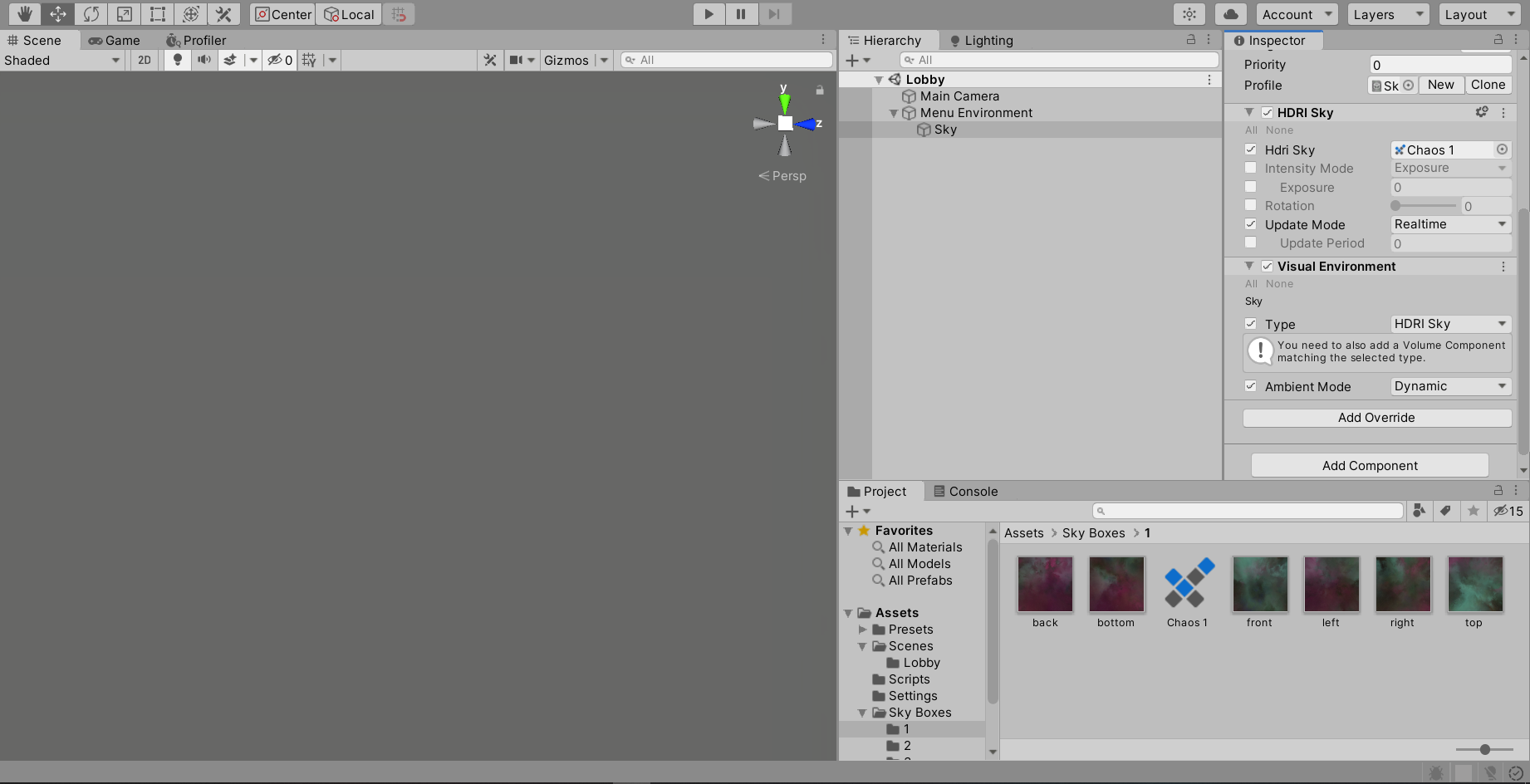 maiden tangle
@eager mist check ur lighting settings
most likely your skybox is empty so its rendering empty in editor
eager mist
ahhhh, 1sec
ok, in the environment tab I changed the profile to the sky profile, and changed Static Lighting Sky to HDRISky, no effect 😦
maiden tangle
I havent worked with hdri sky but it says something about needing a volume in the scene, is that something that was overlooked?
eager mist
oh I got that already, it's a global volume
maiden tangle
https://docs.unity3d.com/Packages/com.unity.render-pipelines.high-definition@5.3/manual/HDRI-Sky.html
https://www.youtube.com/watch?v=7g7DS-0cZ44
gone through the docs?

Support me on Patreon: https://www.patreon.com/SpeedTutor
In this tutorial I show you how to setup some HDRI, environment skyboxes in Unity 2018 or higher! This allows you to get more realism in your scenes because it's based on real world places and data!
HDRI Haven: https...
eager mist
ill give them another look in case i missed something
eager mist
i have a school that is made up of a bunch of cubes in my scene. i have a brick texture. i want to texture the cubes so that the texture lines up and looks nice. i made the tecture in quixel mixer and it is seamless. please ping me if you have a suggestion or answer. Thanks.
maiden tangle
@eager mist you will lose sanity trying to make a seamless building out of cubes, it's also not as efficient as it could be using a tool like probuilder(free), I would start with that
zenith cove
@eager mist what David said, or if you really wanna use cubes just grab a world projection/triplanar shader
https://gyazo.com/f27759650e7986aa7eee089e99829de8 this is what that would do
 undone lintel
Wow, it's like the Chowder art style but in 3D!
eager mist
@zenith cove where can i get that shader?
zenith cove
there should be a free one on the asset store
or you can make one yourself with node graph, there's a handy tutorial on youtube 😄
eager mist
ok. Thank you!
shell oxide
can anyone please tell me why this happen or what happened? i've exported this from one project to another and it looks like this now
 crisp charm
When it comes to animating melee weapons, is it generally a good idea to use hand bones to parent the weapon to?
gritty reef
@crisp charm The people in #🏃┃animation might be able to help you with that 🙂
 sullen totem
seaaaaaams
eager mist
does anyone know of a free online tool that will let me generate a cubemap from 6 seperate textures?
sullen plank
@eager mist Only procedural texture generators can do that. To create a custom cube map you can apply techniques for creating seamless textures to create it yourself. There are plenty of tutorials for them.
eager mist
@sullen plank im using http://wwwtyro.github.io/space-3d to create some space skyboxes, I can either click download (which provides the 6 textures) or right click the cubemap above the settings and save that, that creates a single texture but is apparently not a cubemap as Unity just repeats it 6 times, so I needed some way of either saving from that website as a cubemap, or a way to create the cubemap myself, are you saying I need to learn an image editing suite just to make a cubemap out of these textures?
sullen plank
@eager mist You can use this one to create space skybox https://sourceforge.net/projects/spacescape/
eager mist
ooooh thanks @sullen plank , i'll check it out
@sullen plank btw, totally new to GitHub, is there a tutorial on how to launch these programs?
sullen plank
It's a direct link to the already built version
eager mist
oh I see sorry, I saw in the comments he moved the repository so followed the link
shell oxide
@fluid oak nope, same shader is present in both projects
 bronze mango
I have this port scene, I'd like to add white and yellow lines on the gray surface as they have in most ports. What would be the best way to do this? Should I use decals? Should I model the lines and overlay them? I can't make a single texture for it since it would be way too big, I'm a bit lost here...
 pale spindle
Im thinking about buying a 3D model made in Zbrush for use in a Unity game. My questions are as follows:
- Can i export it to Blender while keeping all its attributes?
- Can i add a skeleton to it in blender and make animations with it?
sullen totem
hm. I am working with a set of cubes being Combined into a single mesh, and I just realized the seams that are appearing are 'square' shaped... that's significant because each cube side is being handled as six vertices, two triangles.
I guess that means that the seams I am seeing are based not on the vertices being drawn, but the position of my cubes?
zenith cove
@bronze mango decals are probably the way to go unless you can make yourself a modular kit of the gray pieces with the marks you need textured on them
@pale spindle yeah you can export zbrush models to blender and can rig and animate them. Just be mindful of polycount and topology
pale spindle
@zenith cove Thanks for clearing that up. Excatly what should i be mindful about regarding it?
zenith cove
@pale spindle polycount obviously shouldn't be too high, depending on the type of game. And on top of that paying attention to topology is important because that dictates how the mesh deform when animating so it's important that it's done correctly. If the model you're buying isn't game ready you might wanna be careful
pale spindle
@zenith cove so polycount shouldnt be to high, because of performance? How can i count the polygons and check the topology? As far as i understand, zbrush is for sculpting so i guess the polycount is probably ridicously high - more fit for printing.
zenith cove
@pale spindle yeah that's why I mentioned, unless the person that made it, did so specifically for game engine use in which case they might've optimize it in Zbrush, but that's usually not the case. And yeah for both performance and east of animation
pale spindle
If relevant, the 3d model is a character which is supposed to be a rigged ragdoll in unity. Blender counts 787,703 faces which supposedly is polygons - is this a high number? Iver only worked with built in 3d shapes in Unity so i dont have a clue.
zenith cove
@pale spindle that is an extremely high number yeah
@pale spindle something of this quality and detail is 95k tiangles https://www.artstation.com/artwork/OyENKe and that's still on the high end by quite a margin. Kratos from the latest God Of War should be around 32000 for example

ArtStation
I started this character long time ago, as the request of a friend of mine who wanted a real-time Character to animate. It's been a very long work because I wanted to take the opportunity to improve my skills and get out of my comfort zone, learning new things that I had never...
pale spindle
I see. Im trying to reduce the polycount now, but its so many that blender freezes for 10 sec for every iteration whiles it reducing 😛
 drowsy thicket
How's Asset Forget 2.0, would love to hear if anyone actively uses it
 marsh summit
@pale spindle giving you some rough numbers, a desktop or VR game we usually try to keep under 2 million total tris in the entire scene. Mobile we try and keep below 150k. That should help you budget and plan the graphics for the scene you are working on, batch calls you want below 500 but that’s for another day
Ymmv depending on the goals, but at a 1000 foot view, those are safe numbers to work under.
Regarding Zbrush to blender to unity:
- not all exports are equal, you may need to modify, you may need to retopo, you may need to replace the rigging to make it work
But yes you can export it, rig it, animate it, optimize it and put it into unity.
 crimson arch
Guys for a character controller is better to use the character controller class or implement one with rigid body?
pale spindle
Thanks for numbers and explanation. Ive reduced it to 7k now and it still looks good while the size is reduced drastically.
glacial vector
@marsh summit 150k triangles for quest? Or regular mobile?
marsh summit
@glacial vector we are doing 1.5m just fine on the quest, but we have an entire team that know show to optimize. I’d recommend most people stay below 250k on it.
But you can push it for sure
glacial vector
Cool. You working with any guidelines on batches on quest too?
We're still playing around with how much we can push the quest
marsh summit
Not really guidelines, we have an internal process for batching and graphics. But we are usually around 150 batch calls on quest ta most
If it is static geometry with shared materials and textures and baked lighting we’ve been able to hit 1.5m and keep it below 150 batch calls without any hiccups, definitely doable. It’s pretty powerful 🙂
I suspect if you went with the LWRP you could probably push it even further
glacial vector
Yes, we're only playing with that tangentially, still a bit unstable. I'm working on a scene now where I've baked my lightmaps at 2k, but it ends up with a large amount of lightmaps which disturbs the batching. I was gonna try 4k lightmaps to see how much of a difference it makes
Anyways thanks for sharing :)
eager mist
@sullen plank further to what you said yesterday, I just exported a .DDS from Spacescape and drag-and-dropped it into the HDRI Sky cubemap slot, but i'm getting the same problem as before, my sky isnt lining up 😦 do you have any idea why? the exported .DDS is set to clamp as the wrap mode:
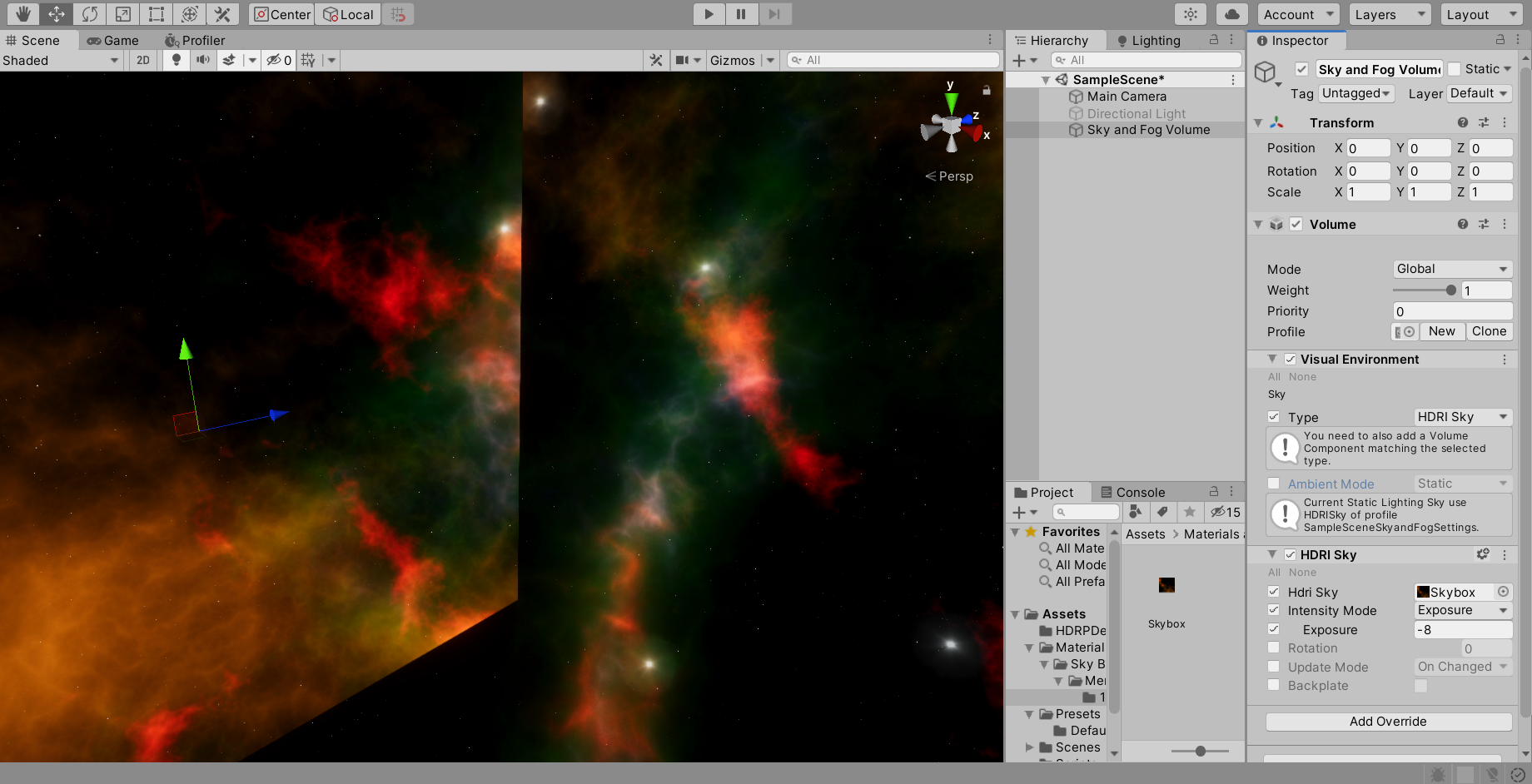 sullen plank
I've exported as png only. It works fine.
eager mist
let me try that..
fluid oak
Do you have the right projection?
eager mist
@sullen plank I exported as PNG, which gives me the 6 textures, used create-legacy-cubemap and dragged the textures into the textures list, but it doesnt show at all (this is the problem i've been having for days, i cant seem to create a cubemap with seperate textures like this)
@fluid oak You only need to select "cube" as the texture type if it's a single image i'm assuming?
texture shape*
fluid oak
I'm not sure of the correct setup for it, just that there are several wrong options 😄
And the way things aren't lining up looks like what you'd get if you used a projection not matching the texture
eager mist
eager mist
Procedural city generator - just need to generate some interesting rooftops
rigid pelican

 stiff stone
my portfolio if anybody wants to check it out to give me tips
https://www.artstation.com/swagmastre99
 rigid pelican

Gyazo
rigid pelican
 misty sable
Wow
eager mist
does Unity support gltf models?
eager mist
morbid question, anyone know of an 8k or 4k texture of a wall of skulls? the ones on textures.com are just images, no maps
even substance doesnt have any that I can see
 near lotus
Current project, WIP
@eager mist Wall of skulls is suuuuuper niche, you're gonna have a hard time finding that
If you want to get into that kind of art, you'll need to make it yourself or hire someone
eager mist
yeah thought so
near lotus
But fortunately that's a pretty easy texture to make, given you have a skull model to work with
maiden tangle
Hi
You buy them, using google to search
or you make them, using google to search for the right tool for you
gritty reef
@near lotus That's hella cool.
@eager mist Unity would prefer you use their asset store here https://assetstore.unity.com/
There are other markets for assets, but this one is "official" for unity.

Discover the best assets for game making. Choose from our massive catalog of 2D, 3D models, SDKs, templates, and tools to speed up your game development process.
I haven't looked into it much myself, but I'm sure there are plenty of independent unity asset shops. Just do a little research on the ol' google machine
near lotus
@gritty reef thanks!
stiff stone
would you guys buy a $35 asset pack with 20 guns, rigged, animated, and textured on the asset store?
zenith cove
depends on the quality of said guns, animations and rigs mostly. But that said yeah, I think it's fair, I'd probably get it if I needed it
gritty reef
Were I not interested in making my own assets, that seems like a fair price for that many guns, assuming they are of good quality.
 frail skiff
Im trying to reimport an asset. I have saved the asset in the same folder under the same name to when i first imported it but hitting reimport doesnt seem to do anything
junior stone
converting images to 3d is not really a thing. You would need to manually create the models based on that image @eager mist
gritty reef
@eager mist Fastest way would be to download Blender, watch a few tutorials, and recreate the scene in Blender.
Looks pretty simple, so it wouldn't be hard even if you don't have any experience yet.
Best of luck!
 mint bough
where can i go for help here
ill ask here just in case
Ive got a rigged model from blender and im having trouble importing it to my game in unity it looks like this in unity
and here in blender
 wheat apex
glacial vector
wheat apex
glacial vector
@frail skiff unity doesn’t keep a reference to external folders. You’ll need to reimport your asset directly into the unity folder to update it
marsh summit
I believe you do have a discord for that.
@mint bough it's most likely how you did your rigging
Try setting the rotations and scale (Alt+A, apply scale and rotatio), and check the painting of the bone rigs
 calm oracle
(Probuilder)
I have no idea how this happend, I was simply extruding walls to make an upstairs area and then everything but the stairs started looking super weird. I tried spamming CTRL Z, but nothing happend, restarted Unity. I tried comparing the stairs and the normal walls and floor.
The material on the stairs is the default probuilder material, but for some reason I can't select it on the other walls/ floors, it just doesn't show up. Not even in my project folder, but when I click on the stairs, the default material is clearly there.
 robust breach
If i will want to use post processing, should I use any of these?
or just go with basic 3D
someone give me a quick rundown please 😊
maiden tangle
yea I wasn't in any way supporting off-brand asset marketplaces, assuming he was asking for models, there are many many many other well known stores available.
@robust breach what kind of game are you going for ?
you can install these in-editor at a later time btw
this just sets everything up off the jump
robust breach
you can install these in-editor at a later time btw
thanks!
you reckon its worth the extra project size to start off with it?
maiden tangle
It entirely depends on what kind of project you're going for, but no to start I would not worry about it
robust breach
thanks buddy
maiden tangle
np gl
eager mist
Question guys for anyone familiar with Substance, if I subscribe and download some materials I take it I still get access to the materials even if my subscription runs out? surely they dont lock them as you technically paid for them?
eager mist
does anyone know why this happens?
all the pieces of the model are in incorrect places but look fine in blender
maiden tangle
@eager mist you can't use substance if your subscription runs out.. if you want to export your materials sure, but where you would use them is beyond me.
**substance files (smart materials etc)
regular materials yea those are still accessible,
if they are not needing to be exported from substance itself.
eager mist
I'm planning to use them in Unity, so i'm just clarifying that if my subscription runs out, I can still make use of the SBSAR materials I get from Substance Source
maiden tangle
I don't use source but I would imagine as long as you are not using their app you're fine.
eager mist
yeah, I think the subscription just converts to credits, which you then use to purchase from the source store, so they gotta let you use them even if the subscription runs out, looking at it now I think you can also just buy credits without subscribing, cheers for the reply
 sonic oyster
@eager mist make sure to apply your transforms in blender
 steady jackal
Hello, new guy who's having issues on Maya. :x
I tried using reversals from the Mesh Delay tab but I wasn't able to get it fixed.
eager mist
eager mist
nice car
maiden tangle
building looks great ahhm
great detail with the ac units / open windows etc very cool.
gritty reef
Are those your procedural buildings @eager mist ? Looks really nice!
eager mist
@gritty reef the buildings are models, but the placement is procedural
eager mist
i gotta make some fully procedural buildings now 😄
gritty reef
As someone who is still iffy on actually creating buildings, that sounds challenging hahah
eager mist
yeah, i was thinking about doing ac units as a particle system in blender to speed up my worflow
gritty reef
When doing random modular placement, would you be able to, say, make modular floors, stack them up randomly to a random height, and then apply modular windows/units/pipes/antennas on them to add variety and texture?
I apologize if the question is stupid, I'm just not familiar with procedural generation.
eager mist
@gritty reef Definitely, i haven't done much procedural stuff in unity outside of shaders, but in blender i use particle systems to distribute items quite often. Though you probably wouldn't want to vary the types of floors in your buildings as you would end up with an odd result
^ i prefer to stick to one floor type as it looks more blended together
gritty reef
Ahh yeah, that's understandable.
I look forward to progress pics. I'll definitely be pestering you for details if I ever reach a point to start on stuff like that lol
stiff stone
hi
i have a high poly m4a1 for sale
its rigged
idk if im allowed to put the turbosquid link
its only $6
dm if u want
 hexed dune
Guys, can you direct me to where the problem is?
It's probbably UV mapping, but on blender everything looks fine
latent dome
how it is in blender ? @hexed dune
hexed dune
I have 3 different materials, black stuff, lighter and darker wood
I then bake these into textures
Create materials in unity and apply them onto model
eager mist
ok it looks to me like the black stuff and the dark wood planes are intersecting on the x axis
@hexed dune
hexed dune
Oh. Could be. But then why it is not shown on blender?
eager mist
tbh i dont know
calm oracle
How can I stop my probuilder objects from being semi-seethrough, I don't want to see these lines.
 noble surge
@calm oracle That has nothing to do with probuilder
hexed dune
Guys, can you direct me to where the problem is?
@hexed dune ok. problem was that in blender somehow I had two uv maps created. unity would pick up wrong one.
 proud crane
well. found an asset that screws up your game when imported :(. Apparently the FPS Tutorial Sniper Rifle has a bad API messing it up
gritty reef
Haven't shown anything lately, but this is a speed model I did yesterday that I finished up today 🙂
zenith cove
looking nice Mike!
eager mist
woah nice i like the detail on the pipe holders, smooth shade the pipes tho haha
 white goblet
hey I'm following Brackey's first person tutorial and I made the script and this is what I see
but I should see two variables in the component for Mosue Look
but they aren't there
gritty reef
@eager mist I always model with flat shading and never bother turning it back on when I render lol
 chilly oracle
@white goblet Everyone seem to pick Brackey's old tutorials.
And the reason you are not seeing them is probably since they are not public but private or something.
 pallid fractal
@white goblet post the script you currently have
white goblet
I shared it in #💻┃code-beginner yesterday
eager mist
Is anyone here familiar with Blender and wouldn't mind me DMing a quick question?
white goblet
I'm trying to get billboards to work, but not sure of a tutorial for it. I tried searching for some but the results aren't relevant
like what term do I use for the effect in unity?
maiden tangle
Billboards for grass? It's a shader I believe
Particle system?
Different use cases
white goblet
I got it like this actually
maiden tangle
'Unity billboard" will come up with a few results
The particle flames?
You want them to face the camera yes?
white goblet
oh. I'm trying to make a doom like, but like, almost all objects are 2d sprites
ya I would want some facing scripts
maiden tangle
Well for the case of particles there is a renderer tab at the bottom of the particle script with option to face camera, world direction etc
white goblet
I'm using an empty object and sprite animations
maiden tangle
A 3d object, acting as a sprite is different case
Right ok
Google "sprite face camera" scripts in google should come up plenty
I'm almost certain there is a LookAt script in standard assets
eager mist
hey yall so im trying to import this models from blender and they have emission. How can I import it so that the emission still remains?
zenith cove
@eager mist is emission simply a separate material applied to certain faces?
eager mist
yup
zenith cove
alright, you want to avoid that in unity whenever possible
if the object are UVd you can simply make an emission map manually, where you color the islands of those faces white, and the rest black
so you can use it as an emission map inside of unity
eager mist
so i do an emission map in blender then export it to unity and make the emission in unity?
zenith cove
yep, depending how complex your uvs are you can even just make it quickly in photoshop or whatever
eager mist
okay thanks!
 quartz garnet
when i look up or down(FPS), my gun moves away from the camera
zenith cove
@eager mist you plug it in that emission slot on the left. You can see the small white represent one of the cube faces which will then be treated as emissive, while the rest stays non emissive
eager mist
oooh okay nice
zenith cove
https://gyazo.com/fba35a563947f26c14f76033274cd0ff and then you control color and intensity of emission
eager mist
thanks again!
zenith cove
no problem
rigid pelican
 strong edge
Can i have blender export ONLY the mesh to unity? I just want to see this in unity so that i can swap meshes at runtime
Or, is there a way to pull the mesh out so that it's a standalone file in Unity?
 empty star
Guys I'm looking for work if anyone has got something!
 eager mist
@zenith cove Hey just tried it worked perfectly you really saved me there!
zenith cove
@eager mist you're very welcome 😄
 pine trellis
may I ask a question about maya skeleton here?
eager mist
You can, but I've ben up since 12:00 waiting for an awnser in #archived-art-asset-showcase
So... Probably wait for the Americans to wake up.
pine trellis
I'm just trying to make a simple skeleton with the Quick Rig - Step by step mode
Problem is that it just generates spaghetti instead of bones
zenith cove
@eager mist your question seem more code related than 2D art, that's probably why
 burnt nimbus
Does anybody know: when i use fbx export plugin on 3d prefab, why do my materials in fbx are turned to dark? How to prevent that?
burnt nimbus
so, it is bcs materials from specular became standard. i think solution of this will not be easy. but maybe someone knows the way of smallest resistance?
 next marten
Hello guys i have an idea to make a wizard tactical "shooter", and i want to make you can cast spell just swinging your wand in the correct shape, and i know about you can do it with line renderers but how?
glacial thunder
I'm currently modelling a bed in Blender3D that I want to use within unity, and I'm planning on using Blender's cloth simulation.
What I'm unsure on is how performant it will be to use such a high-poly mesh within unity - should I just reduce the poly count of the mesh within Blender? Or is there another way to have a lower poly count but retain the majority of detail of the cloth mesh (it looks pretty terrible if I simply reduce the poly count)
maiden tangle
@glacial thunder you would bake high poly to a low poly, is what normally happens
So you get details on a more game engine friendly mesh
glacial thunder
Ahh ok, I'll search for some tutorials on it, thanks :)
maiden tangle
Thoughts? Tried avoiding earth tones
 stuck willow
hey guys, needed a little help with something
when i play my game while its minimized, the score text shows above the player, but when i enable "maximize on play" then the text disappears. any idea what i should do?
zenith cove
@stuck willow not the correct channel for that question. But anyway it's probably cause your Canvas isn't scaling with screen size
old snow
@maiden tangle where did you make those mats ?
eager mist
hey so im trying to do something like this in unity where a cube with an emissive material lights the scene instead of the skybox. I did this model in blender but when I add emission to a cube in unity it doesnt light the scene(second image)
eager mist
@eager mist You have to bake the lighting in the scene to see it, go to window - rendering - lighting then hit bake to see the effect - BEWARE, the more you have in your project the longer the bake, so reduce the resolution so save bake time, then just ramp it back up when you need a quality bake
"Generate Lighting" sorry, not bake
eager mist
Sorry to interrupt, can see meone help me in #archived-art-asset-showcase? No one's awnserng each other.
gritty reef
@eager mist Your question sounds more code related, so I suggest asking about it up in #💻┃code-beginner. Hope you get some answers 🙂
eager mist
@eager mist I tried to find it but I think we have different unity versions :( thks tho!
@eager mist it will be there somewhere, keep looking, im using HDRP
Oh my bad lmao i thought it said general
However i generated the lighting but still nothing changed. I was watchinbg this tutorial https://www.youtube.com/watch?time_continue=190&v=VnG2gOKV9dw&feature=emb_logo but it seems to have since changed?
In this video we’ll learn a bunch about lighting and use it to light a simple scene using the Progressive Lightmapper.
● Get a discount on The Complete Unity 3D Game Development Course: https://www.udemy.com/unity-developer-course/?couponCode=YTBRACKEYS999
● Download Room + M...
it looked very simiolar to what you suggested
make sure your emission is set to baked, other than that there may be several reasons, your better off asking someone whos familiar with it 😛
make sure your meshes have "receive global illumination" checked also
That did it! Thanks so much! I guess that doesnt come as a default
maiden tangle
@old snow substance painter, on a tablet with strange color display lol
stuck willow
@zenith cove the game is 3d so thats why i put it here. pls tell me where i should put it in the future. so i should just play around with the scaling of the canvas?
eager mist
Hey yall back for another round, so now i got the emission down but now when importing a quite simple object from blender it tells me it has overlapping uvs. I entered the overlapping uv preview to try and fix them by increasing resolution and such but it still doesnt work.
Am i just dumb or is this a pain in the ass
near lotus
If you aren't seeing visual artifacts, just ignore it
eager mist
I mean the object isnt emitting anylight when i bake it compared to the one with no error
is that being caused by it?
same material different shape
Also again thks for all the help yall
lmao
im also checking blenders forums in case its something from there
Hey guys, ive been working on my first game an its pretty simple. But there are some things i dont understand how to do or fix. Anyone in the mood to help a beginner out>
?*
While i fix my own sure!
ill see if i can help!
Nice! can you call so i can show you my problems?
dont got a mic that ok?
zenith cove
@stuck willow yeah but the channel is more about 3D art/models etc. Anyway if you click on your canvas there's gonna be a canvas scaler component
click on UI Scale mode and set it to scale with screen size
zenith cove
Make a gif of the issue the. Not sure what else it could be
 rapid echo
Made a new character artwork in Blender 3d. Thanks for viewing!
https://twitter.com/FarrukhAbdur/status/1249593763762225154?s=20


Did a new draw this in your style based on the art of @djamilaknopf Using Blender sculpting and real-time Eevee.
Artstation: https://t.co/psXkvu3Ea0
#b3d #blender3d #dtiys #blenderart #gamedev #indiedev #DrawWithDjamila #polycount https://t.co/08aPELXutB
Twitter
eager mist
@eager mist make sure "Emission" is checked on the cube?
@eager mist Also make sure the cube is close to the ground? looks like that cube may be a little ways off the floor.
stiff stone
Rigged, Animated, Textured Remington ACR on turbosquid:
https://www.turbosquid.com/FullPreview/Index.cfm/ID/1541045
Remington ACR 3D Models available on Turbo Squid, the world's leading provider of digital 3D models for visualization, films, television, and games.
gritty reef
Here's something I've been working on :)
https://cdn.discordapp.com/attachments/698261221987582053/698359413756526633/bullpup_ar_1.png
https://cdn.discordapp.com/attachments/698261221987582053/698359416994529370/bullpup_ar_2.png
(Colors are just placeholder until I can get some time to sit down and really grind out some solid textures)


 brazen anvil
that looks sick
eager mist
I got bored so colour graded my city like bioshock infinite
gritty reef
So golden, so pretty
near lotus
Really nice sky.
 blissful hinge
why are these objects so like
pixelated?
This is what it looks like in teh scene editor, no weird aliasing
I just realised the whole scene is pixellated
all the tutorials say it's an issue with this
But mine is set to 1x so it's not that
wraith kettle
@blissful hinge you can also set the resolution to a fixed resolution like 1920x1080
but generally you care less about how things look in editor and more about in game. Are you seeing the aliasing in game?
blissful hinge
So I managed to fix it by going to my LightweightRenderPipeline asst and enabling MSAA & HDR
wraith kettle
cool, glad you found a solution!
 valid wagon
3-D Apex artwork comment if u think it looks 3-D to me it does curves and stuff
jagged sky
 vivid pike

Welcome back, guys! Today we're modeling the Tesla Roadster 2!
- A Low poly 3D model
My free Blender Models on Discord :https://discord.gg/EHzbPbf
Lamburghuni Huracan Modeling Video :
https://youtu.be/lHVpZExJtYI
DISCLAIMER: You can use the models for free as long as you m...
 grizzled sorrel
Hiring someone to do some modeling and textures for me (cel shading)
 normal tulip
hey had a specific question detailed below:
background - i have an ipad + apple pen and want to make 3d game art for unity in it
question - whats the best application to do this?
my own research -
i looked into some suggestions, affinity designer seems to be a popular one? from what i can tell its however more suited for 2d game art, and does not seem to support 3d modeling, which i assume is important.
happy to fill in more details - appreciate any replies!
glacial vector
You'll want to do some research @normal tulip. You should check out this series from Riot https://www.youtube.com/watch?v=RqRoXLLwJ8g

In this video, we talk to game artists about the purpose art serves in games, as well as some of the foundational tools they use to achieve a desired experience: shape, color, and detail. These tools are leveraged across the full art pipeline, and this video provides a brief o...
normal tulip
i feel that video is a bit general to my question
from what i can tell the short answer is - no
https://www.youtube.com/watch?v=E_2UpAZYE1A

Part II: Graphic Design on the iPad
https://youtu.be/Wu5gKTT4rjE
With each new release the iPad is getting more and more powerful. In this new series we examine how possible it is to do creative work on the iPad. We're going to kick things off w...
other people in the comment section within youtube seem to give suggestions so ill try to look into them individually
the purpose i ask this question is so i can best focus my time learning these tools rather than blindly investing time (ex - blender) which is a great 3d modeling application but is not native to OSX
glacial vector
I linked that series because it gives a fundamental overview of the games pipeline, which you seem to be lacking.
Blender works perfectly fine with OSX btw
normal tulip
im not denying im a novice
glacial vector
But if you're looking for a short answer, then no, an iPad is not made for making game art, and there are really no apps for it to make it fill that role
normal tulip
thank you - i understand and was hoping that was not the truth
ideally in the future something will come along
ill try to find some work arounds with whats available
glacial vector
You have some 3D sculpting apps which might work nicely with the apple pencil but that's not for games
normal tulip
that makes sense - i have seen suggestions of some workflows like
procreate > adobe illustrator > spine
but it seems a bit convoluted
glacial vector
I don't see how that has anything to do with 3D
If you wanna make games using your iPad I'm sure you could make some awesome stuff in 2D with the tools available
normal tulip
Probably some wrong assumptions on what spine does - I’m going to try and watch some blender tutorials
I’ll come back here if more questions come up
fluid oak
@normal tulip Spine is basically a more extensive alternative to unity's 2d animation package. It isn't needed but it is apparently quite good. It is 2d, though.
 median siren
heyy guys
median siren
yes
place a vertex, and add the skin modidfier to it
And then u can just add subdivision surface
 lofty sleet
where can i find a vertex?
median siren
well u can just place a plane, and then u delete the 3 vertices in edit mode
junior stone
or make a spline
obtuse oyster
They haven't even mentioned what they're using, have they?
median siren
?
junior stone
good point xD
lofty sleet
im using blender
junior stone
I usually assume blender lol
median siren
oh lol
junior stone
well both actually.
lofty sleet
well u can just place a plane, and then u delete the 3 vertices in edit mode
@median siren and where can i find edit mode?
median siren
click tab
junior stone
press tab\
median siren
what do you guys think about this jungle I made?
median siren
xD
lofty sleet
ctrl C ctrl V
junior stone
rly? its obvious as fk xD
latent dome
yes but for me it is not a problem
median siren
its kinda obvious ye
latent dome
It is not annoying
junior stone
that doesnt make it a problem. if its background you might not see it
junior stone
if its a focused element, you might wanna put some variation
lofty sleet
and how can i delete the 3 vertices in my plane?
junior stone
select em in edit mode and press x
median siren
select them and hit DEL
junior stone
or that
lofty sleet
ohh i see
median siren
ye
median siren
blender
latent dome
nice
junior stone
all of it in blender? or did you make the scene in unity?
median siren
I made all of it in blender
junior stone
kk
lofty sleet
i have joined some objects together and i have some rough edges. how can i delete these?
gritty reef
I'm not sure what you mean by rough edges. You can select and delete edges/faces/vertices to clean up your model or you can bevel edges to soften them, or remodel the area to get the smooth look you're after. There's all kinds of options depending on what your issue is.
To get the best help possible, show a screenshot of what you've got and explain in detail what you're trying to achieve @lofty sleet
And please make it a screenshot, not a photo from a phone camera of your screen.
eager mist
Not sure if this is the right channel, but I was curious, is there any forseeable way to make a candle melt in real time? or any tutorials on it anywhere? was just curious.
gritty reef
I assume you can just light the wick and let it do its thing 🤔
In all seriousness, you could probably have the candle cap with melted wax and the wick w/ fire and have it slowly move down the candle, shrinking the actual candle as it goes. Depending on how detailed you want it to be, of course.
To illustrate quickly what I mean
eager mist
hmmm, I suppose they wont be "watching" it melt, that would be a boring game: "watching paint dry simulator" "watching a candle melt simulator" XD . I could ask someone to create 4 or 5 "stages" and just activate them as needed as the flame moves down, make sure it's off-camera when it updates or something....
but yeah, thats a good idea
gritty reef
I assume there's a way to have an item change in real time but I don't know the actual implementation of it.
eager mist
yeah thats the thing, I was unsure how to do it while on screen without using some sort of mesh-warping thing
gritty reef
A mask to make the top part of the candle transparent as the cap moves down?
So you're not changing the mesh, just what the player can see
Then the cap can move down slowly and fluidly
eager mist
thats an idea, use the same system that lets you see through walls and stuff in 2D games, forgot that was a thing LOL
gritty reef
Yeah 😄
eager mist
omg......OMG that gives me an idea...i'm planning to ask a 3d model artist to create a humanoid and add a system of veins inside him, using that I can add a Vital Signs filter to their helmets, so they can see peoples hearts and veins through walls....omg epic..
if I could give your comment a hundred upvotes I would..
gritty reef
😄 that sounds like an awesome feature
kind of like the Sniper Elite xray cam when you shoot people?
eager mist
oh I'm adding that anyway 😛 this is more of a battlefield feature, I'm going to have incredibly foggy battlefields, some pitch black, this could let people see each other in the dark, and considering i'm aiming for at least 1000 v 1000, can you imagine seeing 1000 vital sign systems running around in 4k? hooohoo!
I do want those bullet-time gory kills though, always loved those, and this is warhammer 40,000, if people think it's Disney then Mickey is in for a SHOCK 😄
gritty reef
That's hella ambitious dude, good luck!
eager mist
@gritty reef Thanks, to be honest I dont think it's outside the realm of possibility anymore, Planetside had 2000 and the lag there was primarily caused by the lack of decent GPU and game engine, i'm going to try and convert the lot to DOTS, if I can manage that I reckon it's a winner, then I just need a license and a decent server provider (probably battle.net) to counter the cheaters on PC....
I dont know if i'm overestimating the power of DOTS, but from what i've observed soon it will just be about how much hard drive space you have, not how powerful your GPU is lol
gritty reef
Someone's gotta push the envelope and whoever makes those kind of breakthroughs are usually well rewarded 🙂
 weary bloom
Guys I will be getting some free time coming this week, if anyone is looking for 3D Environmental models let me know. I will make it free for you. :)
Send me a message and I will get back to you as soon as I can.
gritty reef
If you get any takers, post caps of the models here, too, for us to oogle! 😄
 undone sparrow
Hey if anyone is able to work with blender i have a question iam currently making a model for my game but i really focus on something (the hand of my character) does anyone know if this is possible or how i can do it ?? i can't find it on the internet
undone sparrow
iam making a complete character @junior stone but the hand is out of the screen so i can't see it sorry im not english D:
junior stone
wut, just move the camera?
undone sparrow
well i think so but not the camera thats there the camera u are looking out of when making the model
gritty reef
If you use the scroll wheel on your mouse, you can zoom out. Hold ALT+Middle Mouse Button to rotate the camera and just hold the Middle Mouse Button to pan the camera
gritty reef
S'all good, we all start somewhere. I would recommend checking out a crash course tutorial on Youtube, though, to get you started.
undone sparrow
i will do 😄
near lotus
 tardy vapor
oh, nice! hadn't noticed.
actually, speaking of HDRP, could you perhaps give me a hand with something?
my skybox plain broke as soon as i upgraded and I've been unable to get it back.
I'm using the built in procedural skybox shader if that makes a difference.
near lotus
It's all part of the volume system. You need to set your global volume to use a procedural skybox.
tardy vapor
i've got a volume script on an empty gameobject and added the Sky>HDRI Sky override but it only takes cubemaps. am i missing something?
near lotus
Well because you don't want an HDRI. You want the procedural skybox.
tardy vapor
i didnt see a procedural sky as an override?
ahh, i'm dumb. procedural sky was deprecated in 2019.3(which i'm running)
i need to use the physically based sky
thanks!
fluid oak
What if you WANTED a nonphysical sky?
tardy vapor
well i do, but its better than having no skybox
strong edge
how the heck do I get this tiling working? I just want to show the Default-Checker pattern across my terrain, but I can't figure out how to do that?
 queen mulch
@strong edge click on the circle next to the "Albedo" map then select the default checker grey texture and set the tiling to your desired settings
strong edge
Hmm that's what I've done in the pic. Is it because I'm using a procedurally generated mesh?
 kindred ravine
Would anyone know why my shader is transparent (goes through my entire head) in vrchat?
should look like this
 lime loom
I need someone who is good at low poly to help me make my game, (sorry cant pay) please,
PM me if you can, you will be put in the credits of my game
kindred ravine
Is there a way to re-import an object without having to re-add all the components to it?
its an updated version of my model
maiden tangle
just swap out the model components
in the prefab
also wdym going through your entire head? I'm not seeing any transparency issues in either pic unless you mean the skin itself
@kindred ravine
kindred ravine
the glasses in the top pic
you can see straight through them to the wall behind me (looking in a mirror)
maiden tangle
oh I was seeing that as reflection
yea It might be something with the camera rendering
it's telling the camera it should be transparent so it just guns a hole through anything on the other side of it
kindred ravine
Yea I dont get it
maiden tangle
if it works fine in your unity editor, and then stops working in vrchat that'd be my best guess
maiden tangle
yea like you don't need a fancy glass shader just make it invis nobody can tell the difference
kindred ravine
yeah basically
 solar current
when u have a3d model of a tree, a house, and ground
and u make a scene in blender
and input it later to unity
does unity treat the file as one object?
because i wanna be able to make a scene on blender
but be able to control the trees, the house, as single objects in unity
or do you have to make the scene in unity to be able to do that
 amber walrus
If you can move them separately in object mode, Unity will consider them as separate objects
glacial vector
If they are separate objects in blender they will be separate objects in the scene in unity
solar current
ok now i dont know how to design, how do i tell the guy whos gonna design the terrain for me to do that, make them seperate objects?
in "designers language" so i wont sound stupid
lol
amber walrus
He should understand "keep the objects separate" and ask for early sample to confirm
"the opposite of joined objects" 8-)
solar current
i see,
also when it comes to like character models, from what i understood is u make a character then u create a texture for it, and that texture can be the skin
if someone designed a 3d character for me, and asked him to make different textures so i can like change the "skin color" in unity
i can do that right?
also i don't know how "changing clothes" are supposed to be done
do u design clothes alone and "clamp" them to the 3d object, or is there stuff like textures
for that specific purpose
eager mist
@solar current
You should let artists create separate objects
And create a scene in Unity where you place all those objects
You only build scenes in Blender if you intend to Render stuff in Blender
Only in some rare cases you'll see game studios make entire levels in a 3D application such as 3ds max, modo or maya
But that's because their Game Engine was designed to support 3ds max, Maya, modo, etc. files that contain entire Levels
Or they modified those 3D apps to turn them into their own Game Level Editor
solar current
@eager mist oh ok I see, thank you
are you familiar with textures and clothes?
cuz idk how that works also
eager mist
Opportunity to learn
Nobody here will do the work for you.
You'll need to put some efforts into learning game dev.
I read through all your comments. And you are eager to get results. But arent putting in the time and efforts to progress on your own
You need to learn how to do all those things before you start thinking about making games
And the more things you learn, the easier it will get to learn new stuff later on
It seems that you have not done yet a single thing yourself. You should start by that 1 thing.
 upper sand
Hey guys, I'm new-ish to 3D modeling. I was just wondering if there was a good standard for creating reference sheets?
I've been googling and I've gotten like zero answers, I was hoping one of you would be able to give me some advice maybe
The references I draw are either too big, too small, not lined up perfectly (somehow) and I have a sneaking suspicion that I'm just not good at doing this (I only do 2D art, but was asked to do a few 3D art things for awhile but I'd like to take it to the next step in beginner proficiency)
 wintry fog
Guys, can anyone explain me how to export from 3ds max with diffuse map AND ao map? Standart 3ds max materials doesn't seem to have a slot for AO map. Setting up materials manually is kinda tidious with +100 props
 vernal mirage
Is there a way to get the length of a single object? I have a single, very long object that I have to label every 200 X units, but I'm not sure how I can start that without getting the actual length first.
sullen plank
@vernal mirage https://docs.unity3d.com/ScriptReference/Renderer-bounds.html or similar if it's 2d.
vernal mirage
Okay I will start there, thank you
eager mist
is there any way to export a 3d model in unity & import into blender? (vrchat avatar)
glacial vector
Yes, there is an FBX exporter in the package manager @eager mist
vernal mirage
How comes I have a mesh with a vertexCount = 2000, but when I retrieve mesh.vertices, it's empty?
 bold lance
Anyone know a way to make decal projector (hdrp) ignore an object without using a custom shader ?
near lotus
@bold lance There's a checkbox in each material that says "Receive Decals"
bold lance
do you know how to expose this option when using a shader made with shader graph @near lotus ?
near lotus
nope
bold lance
i see it on the master node but not on my material
i'll ask in the shader channel
thank you !
eager mist
How do you make the animation auto legacy
 bold jungle
Anyone recommend a high poly asset pack that is on sale right now?
I'm looking to buy it and do some LOD work
 alpine niche
Not sure if I should be asking any questions about blender stuff in here, but i rigged my player model and the wrist bends in the wrong spot. No matter where I move the bone, it bends in the exact same place and I have no clue what to do
 coral hemlock
Can you repaint the weights to fix it?
 granite comet
 reef sundial
Hay i have a question.
How to get good graphics in unity.when i make an enviourment it does not look good how can i improve it?
maiden tangle
check out some example projects @reef sundial
gritty reef
@wary eagle Fantastic as always my dude.
wary eagle
Thanks mate!
eager mist
hey so when i export to fbx a vrchat avatar it just exports it partially such as a clothing piece but never the full body etc. any clue why?
i am using fbx exporter addon
wary eagle
Looks kinda high poly for a crate. You better reduce the polycount and use a smooth shading solution.
 barren moth
Aight thx it was one of my first projects
When I didn't know smooth shading was a thing
😂
tardy vapor
right, I've imported my character and I've set up a ragdoll for it, but the joints are kind of bouncy. they just keep swinging and some are kind of jittery. how would i fix this?
 sacred root
I have a double sided material on planes, but when the front face of the plane is looking away from the light source, it causes the entire object to turn black. How could I fix this?
Also, sorry if I posted this in the wrong spot
 calm crane


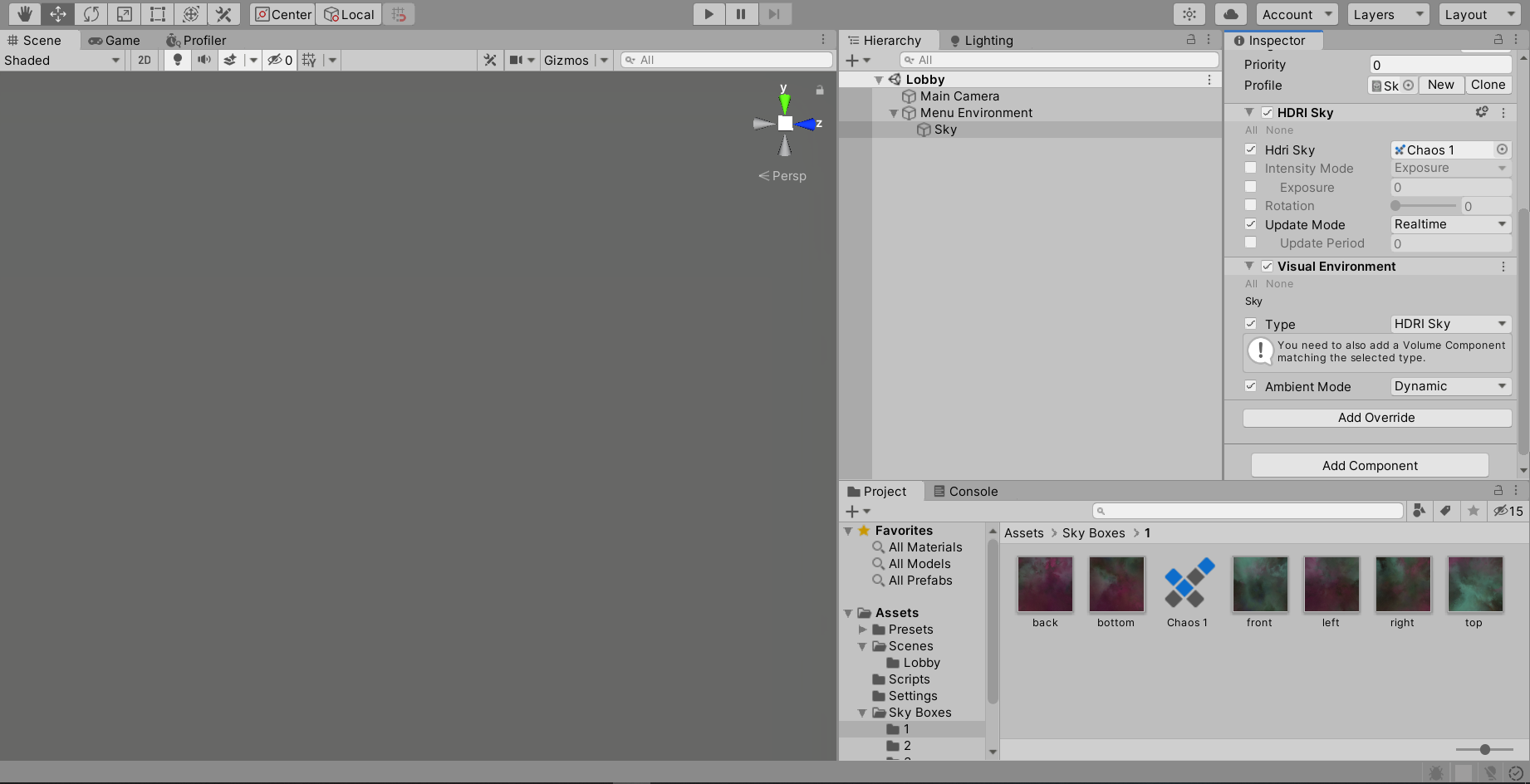
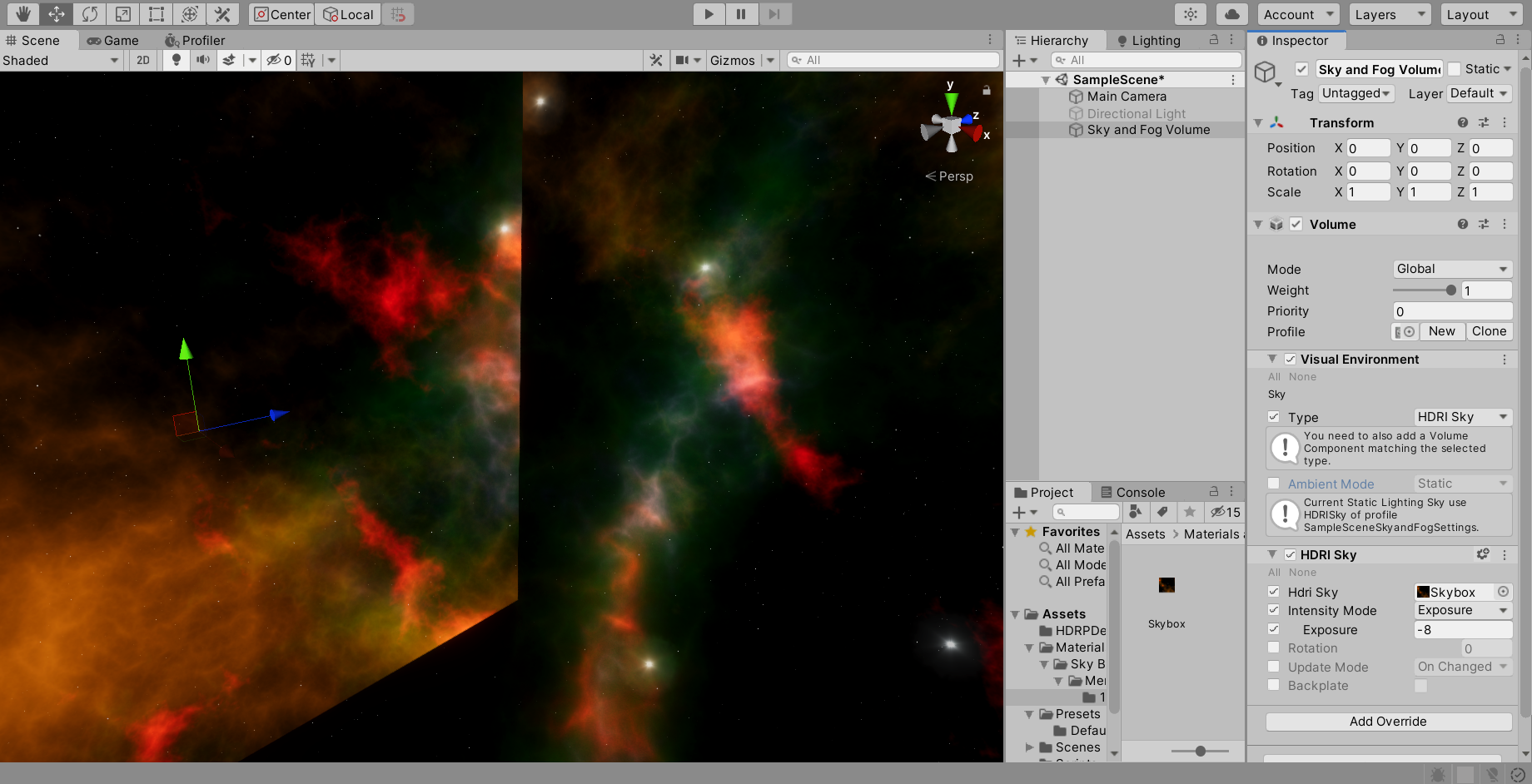

 wraith kettle
you might have to make sure the double-sided reflects normals
I think that might be a setting on the model?
 dreamy ether
@barren moth those cars are amazing man
barren moth
Thx dude
 muted falcon
my fbx model is transparent, whilst the shader is shown as opaque, the other parts of the model ARE correct and the normals are correct in blender
maiden tangle
A: lighten the shadows directly B: turn off shadows completely, either it's fully transparent and casts no shadows or semi-transparent with shadows from what I've seen
unity lighting won't know the level of transparency so you'll have to mess with the shadows
eager mist
heya guys, is there a tutorial on how to add surface imperfections to a SBSAR material in Unity?
near lotus
@eager mist If you're working with substance files, you need substance software, like Substance Designer or Substance Painter.
eager mist
ok, i'm trying my best to avoid designer and painter although I have a subscription, it seemed to be yet another software I would have to learn, but it's looking like I wont be able to get away with it 😛
near lotus
I've been avoiding Designer for years, I use Painter for everything, even making my own tiled textures from scratch.
It's pretty simple, I've been using it for a while so obviously I'm able to be like "oh yeah it's easy" but I know getting into it is easier said than done
but really, it's not hard software to learn
eager mist
At the moment i'm just downloading and using the materials from Source but tomorrow i'll start watching tutorials on painter, if I can nail down some of the basics I shouldn't have a problem, I imagine adding surface imperfections may be quite simple if you know how
near lotus
You can import Substance Source files directly into Painter from within Painter. It has a Source browser built right in.
Then it's just a matter of adding some procedural grunge maps over it
eager mist
cool, thanks!
also, i'm having trouble with the desktop app, the source filed I download are all the initial look, and not the color i select, any idea why that is?
files*
near lotus
You can set the look in the file itself using Painter/Designer/Player, then export
Those are presets built into the file
Not separate files
eager mist
ok, thanks
 true wren
Anyone here have 3DS MAX?
I have a .max file I need converting into FBX.
Would anyone be keen to assist?
junior stone
@stiff stone this is not a marketplace
willow nebula
The Autodesk® FBX® Converter Archive
gritty reef
Remy in with the save, @true wren
junior stone
@stiff stone but like. Don't you think that's a bit of a high price?
true wren
@willow nebula
Unfortunately it doesn't take in .max to FBX 😦
junior stone
Those look significantly higher quality tho.
I'm not saying you shouldn't make models. But I don't think that will sell. Just looking around the site there are quite a few similar models with better quality for about that price. Not ever model should be monetized tho I can't stop you from doing so.
@stiff stone
vernal mirage
Not sure if I should post this here or general code: I have an array of Vector3's. Is there a way to find the closest Vector in that array to another vector in the array for a given distance interval? For instance, I take the first Vector, and I want to find a vector in the array that is closest to ~100 units away
I feel dumb but right now I'm just looping through them all and doing Vector3.Distance
stiff stone
yea i put for $5 less
glacial vector
That's definitely a coding question @vernal mirage
vernal mirage
I will post it there 🙂 thank you
 reef lodge
Can anyone recommend a good video tutorial source for blender for absolute beginners in 3d modeling?
I'm trying to expand home education due to corona causing us to have to home school and everyone has showed an interest in it but I wanted to get a good tutorial series for them to work through
glacial vector
There was one posted in #archived-resources yesterday
But blender guru is the most used channel for beginners
junior stone
tutorials are one thing, but for me to fun lies in figuring it out. that might not necessarily be true for everyone tho
glacial vector
Yeah not from the very start though 😂 not with 3D applications. Need a foundation first
junior stone
true, I had classes about 3dsmax when i was taught pbr so yeaaaaah. I may alrdy have some knowledge
glacial vector
Quite so
gritty reef
I tried to wing it with Blender after using 3ds. After a few days I just looked up a beginner tutorial and things got soooo much easier
I still try to do my own thing and practice on my own rather than following a tutorial word for word, but having that foundation is so useful.
glacial vector
You will boost your learning so much if you go about it in that order 🙏
junior stone
learn the basics, watch tuto, learn shortcuts. have fun
reef lodge
I've got a ton of experience with 3d modeling tools, but blender is particularly hard to get started with
I have to look up quick start guides for it whenever I go to use it since I only use it a few time a year, I don't remember all the little things
glacial vector
Ok, in that case I have another one hang on

In this Blender 2.8 3D tutorial, we give advanced 3D artists a comprehensive introduction to Blender 2.8. This is the perfect tutorials for 3D artists who's already familiar with another software, like Maya or 3ds Max.
Navigation - 00:36
Adding Objects - 02:35
Deleting - 04:2...
junior stone
the power of blender lies in the shortcuts tbh
eager mist
Shortcuts are life, shortcuts are love
junior stone
I used to have a cheatsheet for 2.79 but I havent found one for the reworked 2.8
had that on second monitor while working, super useful for the more obscure ones I keep forgetting
eager mist
You could try writing one down right under your monitor
glacial vector
I have this one from a while ago https://pbs.twimg.com/media/EEAgcR3WsAAswxN.jpg:large
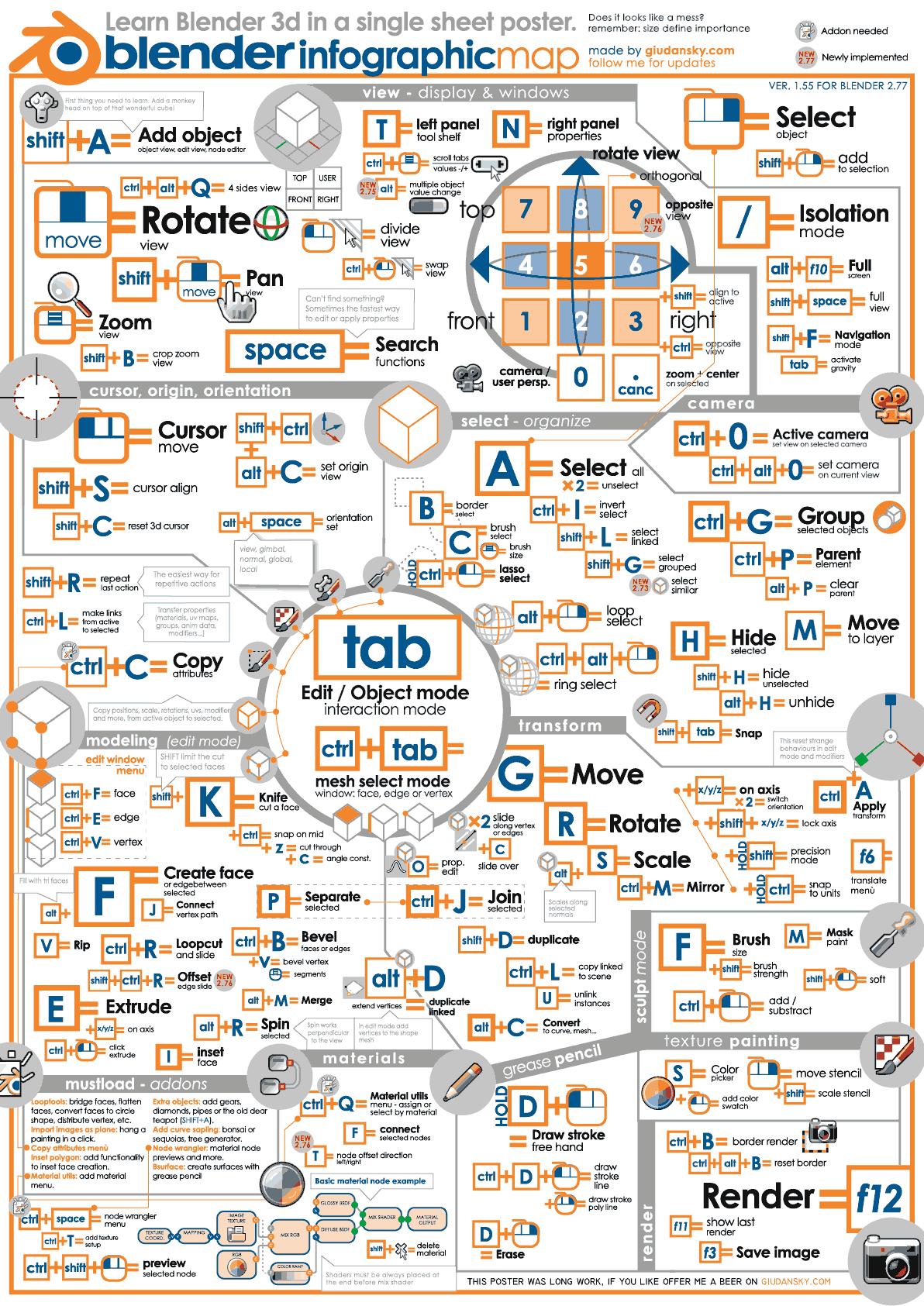
 junior stone
jeezus
eager mist
Reminds me of the sheet of reference you could bring into your university exams
reef lodge
superb, thank you
yeah, I know about the shortcuts, I think thats really true for all software
I just can never remember them
gritty reef
Ooh thanks for the new resource @glacial vector 😄
 untold axle
I got a question is it worth getting uModeler https://assetstore.unity.com/packages/tools/modeling/umodeler-80868 to build levels in unity or is it better to do it by hand in blocks or something? I tried ProBuilder but did not like it much as it was really buggy

Get the UModeler package from tripolygon and speed up your game development process. Find this & other Modeling options on the Unity Asset Store.
junior stone
@untold axle that looks promising, and better than probuilder to be honest. I dont use it but I can see it being a nice modeling tool
 arctic grotto
Can someone help me
Im making a 3D FPS game
And i need to make a katana slash enemy
I need a script
gritty reef
In that case you would need to ask in #💻┃code-beginner. This channel is for the model itself.
@arctic grotto
arctic grotto
Ok thx
zenith cove
@untold axle depends a LOT on the types of levels you need to build
the asset looks great, and it's currently 50% off so it might be worth it
blissful hinge
This file here is causing me to not build my game
That is the line that errors
it's an android build made for the Oculus Quest
Any help would be 🙏
gritty reef
@blissful hinge That seems like a #💻┃code-beginner or #archived-shaders question if I've ever seen one.