#🔀┃art-asset-workflow
1 messages · Page 25 of 1
 random hemlock
that was bad wording of me
I tried it
the screenshots above are from after I tried it
 misty lantern
Both of them?
The scale is not applied in the blender screenshot
And the unity screenshot is consistent with that
random hemlock
that's strange I clearly remember applying, let me try that again
I applied it without selecting the object
so it never got applied
finally fixed it thanks @misty lantern
misty lantern
random hemlock
finally fixed it thanks <@166982635950702592>
Next time don't crosspost
You don't need multiple people's time
random hemlock
misty lantern
Next time don't crosspost
You don't need multiple people's time
It wasn't my intention sorry I wasn't sure where to post
Which channel
 real wing
Hey, I have an issue where I am trying to make armour for my game, but everytime I export it into unity, it either is using the armature from blender so it wont go onto my character or when I import it into unity there isnt a skin mesh renderer for me to set for my current character. I'm not sure what I'm doing wrong as I've watched multiple videos trying to figure it out but nothing seems to work.
Steps I do:
Import my character model into blender using the fbx that is in my game folders
I then move and adjust the armour to fit around the model
I then click on a piece of armour (lets say the chestplate) which covers the chest, shoulder and a bit down the arms and then shift click the armature and press CTRL + P and select With Automatic Weights
Now this is where it all goes wrong
If I export the armour piece and the armature then It wont go onto the character I already have in my game but if I dont export the armature with it then there is no skin meshrenderer to do anything
 bright geyser
Hello! I made a cat with textures and animations in Blender, now I'm trying to get it into Unity. I export it as .fbx, here are my settings. Issue is that the result looks like this, with some UVs seemingly rotating for some reason, here's how it's supposed to look. I think some UVs are rotated and some aren't, which is the most confusing part. Any advice on what I'm doing wrong?


 bright geyser
This isn't funny guys XD (it's pretty funny)
 misty lantern
bright geyser
Hello! I made a cat with textures and animations in Blender, now I'm trying to g...
misty lantern
bright geyser
Hello! I made a cat with textures and animations in Blender, now I'm trying to g...
Did you use multiple UV maps? Did you use nodes to transform the texture coordinates?
misty lantern
 wet gyro
why is this happenening
wet gyro
why is this happenening
Wrong PPU on sprites
bright geyser
misty lantern
Did you use multiple UV maps? Did you use nodes to transform the texture coordin...
Only for the inner fleshy part of the ear, the rest was multiple UVs with texture coordinates, but I baked it as one.

Removing the coordinate from the ear didnt change anything, so that's not the issue
misty lantern
bright geyser
Only for the inner fleshy part of the ear, the rest was multiple UVs with textur...
Anything that's not the raw UV node output will be lost on export
So no Mapping
Unity's shaders will only use the first UV channel by default, so you may be working on the wrong one
bright geyser
Ah yes I was indeed, I had the pre-baking UV map still there which is what I was seeing in Unity. Thanks!
 misty lantern
wet gyro
how do i fix this
misty lantern
wet gyro
how do i fix this
Fix what?
misty lantern
Pink tiles means the reference to the tile asset has been lost
misty lantern
By erasing them I'd presume
misty lantern
Can't paint over them either? Is that the tile palette or a tile grid? Multiple tile grids?
 fluid oak
bright geyser
Hello! I made a cat with textures and animations in Blender, now I'm trying to g...
fluid oak
bright geyser
Hello! I made a cat with textures and animations in Blender, now I'm trying to g...
Very cute! If you do any uv transformation in nodes, you'll need to replicate them in the shader.
 placid gyro
Hello!
I am working with a model in Unity 6.1 that includes animation. I exported the model to FBX format for further editing in Blender 3D. However, upon importing the FBX file into Blender 3D, the animation is not preserved. Instead, the imported model appears as a static skeletal mesh positioned on the scene without any animation data. The animation functions correctly within Unity prior to export.
Could you provide guidance on resolving this issue to ensure the animation is correctly exported from Unity and imported into Blender?


 sterile hollow
I am having trouble with importing UnityPackage. I'm just meant to import 3 UnityPackages found on a server, placed there some time last year. Easy.
Problem is: The packages are meant to be colour variations of the same asset. Either different materials or textures. Each one is about 2GB, lots of stuff. The artist who put these together though just modified the same materials, and textures, then packaged, rinse/repeat. Now, when I import these packages, they overwrite the others files, but I need modified files to co-exist, not overwrite.
I've tried:
- Renaming files
- Moving files
- Duplicating files (this would work but there are THOUSANDS of components for me to have to update refs on)
- Re-exporting files
- Scripting a reshuffle of GUIDs and relinking references
I mostly get the same problem. Unity still finds a way to point my previous files to the new ones
I've resorted to keeping the 3 assets in separate AssetBundle branches which works but is a bit tedious. Any ideas for other stuff I can try? Ideally there'd be a way to tell Unity on import "hey if you find slightly modified files can you consider them separate and branch them to a new folder instead of overwriting?"
sterile hollow
placid gyro
Hello!
I am working with a model in Unity 6.1 that includes animation. I export...
You shouldn't need to use Unity's exporter to get an FBX out of Unity to Blender. The model will already have been an FBX to start with, no? Is the original FBX not usable?
placid gyro
sterile hollow
You shouldn't need to use Unity's exporter to get an FBX out of Unity to Blender...
So how?
sterile hollow
You will have dragged in an FBX to view the model to start with. Should just be able to use that
placid gyro
I even tried importing a Mixamo mannequin and applying an animation file to it, but when I export it, I get a broken model with animation, just like before.
placid gyro
sterile hollow
You will have dragged in an FBX to view the model to start with. Should just be ...
When importing the model, it is normal.
sterile hollow
Exactly, so just import that to blender instead of exporting another one from Unity
Unity's FBX exporter is not great, and not sure it really does animation
fluid oak
placid gyro
Hello!
I am working with a model in Unity 6.1 that includes animation. I export...
I noticed that 'animated skinned mesh' is disabled in the exporter?
placid gyro
fluid oak
I noticed that 'animated skinned mesh' is disabled in the exporter?
Yyesss? What i need enable in addition to this param?
fluid oak
Without that, it won't export an animated skinned mesh. You... wanted one, right?
 raven elm
Anyone here who know Houdini fairly well?
 crystal mortar
Hey all, not sure if this is the right place, but I'm having a real issue finding a solution/answer (probably my search term(s)).
Would anyone know of or have a method/tool for converting an equirectangular image (as attached) into a square image while 'fixing' the vertical distortion please?
 misty lantern
crystal mortar
Hey all, not sure if this is the right place, but I'm having a real issue findin...
misty lantern
crystal mortar
Hey all, not sure if this is the right place, but I'm having a real issue findin...
Depends what you mean by "square image"
Because it sounds like you're attempting what cartographers failed at for centuries before realising it's impossible
crystal mortar
misty lantern
Depends what you mean by "square image"
A flat square image. ie. 1024x1024 instead of 1024x512 but removing the distortion (squished) at the poles and stretched at the equator.
I want to use it to drive some other bits and pieces on a flat plane
misty lantern
crystal mortar
A flat square image. ie. 1024x1024 instead of 1024x512 but removing the distor...
Less squished? Possible
Less distorted? Not possible
crystal mortar
Yeah, literally just remove the squishiness at the poles etc.
 crystal mortar
Distortion was probably the wrong word.
And yes, that's perfect. I can deal with the blurryness elsewhere.
Well I say perfect, would need it to be square (1:1) and not 1:2 😕
misty lantern
It'll be twice as squished in the top and bottom if it's 1:1

Because we are mapping a sphere into a square
Geometrically not possible to do right
If it was correct it'd be basically infinitely tall in the end
That's why the craters at the poles get so much bigger, they're being zoomed into
crystal mortar
Okeydoke. Okay I'll think of something. Thank you for taking the time though, very much appreciate it.
misty lantern
crystal mortar
I want to use it to drive some other bits and pieces on a flat plane
What did you mean by this, drive?
crystal mortar
misty lantern
What did you mean by this, drive?
Use this as a base for visual 'stuff'
misty lantern
Then a better option may be to isolate some craters near the equator and compose a new repeating square texture from them
 gusty pasture
crystal mortar
A flat square image. ie. 1024x1024 instead of 1024x512 but removing the distor...
gusty pasture
crystal mortar
A flat square image. ie. 1024x1024 instead of 1024x512 but removing the distor...
Still somewhat deformed but…

 carmine burrow
what do i do if i build and run my game and the UI works but the 3d models arent showing up?
 outer halo
Make a dev build and check if there are errors being thrown.
 slate meadow
does anyone here have experience with BlockBench? I made an animated texture, but it's importing incorrectly...


 eager mist
Does anyone know free 3d manequinn for modelling human body with correct size?
 obtuse pilot
eager mist
Does anyone know free 3d manequinn for modelling human body with correct size?
obtuse pilot
eager mist
Does anyone know free 3d manequinn for modelling human body with correct size?
do you mean proportions? size is a pretty irrelevant problem in unity since you can just scale objects to whatever size you need.
you can also change it in the model settings directly, if you don't want to make it a prefab or change it for every object.

 iron hearth
I might just be very bad at googling but i cant manage to find any website or app where i can make a proper unity material with normal maps and heightmaps along with the painting
are there any good ones you guys could recommend?
iron hearth
Preferably free
 lapis elk
iron hearth
Preferably free
lapis elk
iron hearth
Preferably free
Textures.com is a website that offers digital pictures of all sorts of materials.
 tribal pivot
iron hearth
I might just be very bad at googling but i cant manage to find any website or ap...
tribal pivot
iron hearth
I might just be very bad at googling but i cant manage to find any website or ap...
substance designer but its like 200 dollars. i dont know of any website that lets you make textures for free
 azure cave
Hey im new at all of this and im attempting to make my first game, I made some game sprites using krita but when I import them into unity they all come out pixelated even when matching up the pixel count and setting it to bilinear and 2048
tribal pivot
azure cave
Hey im new at all of this and im attempting to make my first game, I made some g...
show us


 tribal pivot
azure cave
tribal pivot
azure cave
its pixelated because its too big, make it the same size as it appears on the screen
or you can go to advanced > enable mip maps
tribal pivot
azure cave
mip maps might make it look too blurry though, if that is the case then resize the image in your image editing software to be the same size as it is on your screen in-game
azure cave
that worked thank you
 random mountain
Hey people, for some reason I cant extract textures from my blender .fbx
I have pinned the export settings. Idk what could be wrong 🤷♂️. Thanks in advance for any help


For people non blender-y: I have path copying and turned on texture embedding
fluid oak
slate meadow
I'm not sure what you expect? You'd need a shader or script to handle the animation, if that is the issue. If you mean the compression artifacts, you'd need to set the texture to uncompressed.
misty lantern
There is an offset, but that's likely because the animation cannot be imported since it works by animating the offset
eager mist
Hey guys! I am kind of new to unity and this seems like a easy question but, how do I import textures from AmbientCG
misty lantern
eager mist
Hey guys! I am kind of new to unity and this seems like a easy question but, how...
I wish I knew
 nova fractal
Hello
I found a good 2D sprite that show make some perspective. But, for repeat it, I create many and many objects with the sprite below and put them right after each other. Is there a tool that can repeat it ? I tried TileMap or SpriteRenderer but it doesn't work because it also show the transparent sprite, so it's really weird.


 fallen dove
eager mist
Hey guys! I am kind of new to unity and this seems like a easy question but, how...
fallen dove
eager mist
Hey guys! I am kind of new to unity and this seems like a easy question but, how...
Is there anything special about the textures from there? They look like regular files to me. Just drag and drop them into your project.
misty lantern
nova fractal
Hello
I found a good 2D sprite that show make some perspective. But, for repeat ...
What do you mean by "tool to repeat it"
Do you mean something that makes them easier to place end-to-end in scene
Or something that makes them repeat infinitely during gameplay when moving
Or something that makes the graphics on the sprite repeat seamlessly with adjacent sprites when placed
We don't see how it "looks weird"
 dark gale
When importing PSBs, is there a way to have layers be padded up to the full canvas size?
I have a background I plan on making parallaxed. The foreground layers are shorter than the canvas size. After the layers are imported, the whitespace beyond the bounding box of the art itself on each layer is trimmed, leaving them all different heights, making layering them a nightmare 
 spare summit
Anyone know why my normal maps appear to be broken on just one axis? some kind of difference between local and global normals perhaps?
 misty lantern
spare summit
Anyone know why my normal maps appear to be broken on just one axis? some kind o...
misty lantern
spare summit
Anyone know why my normal maps appear to be broken on just one axis? some kind o...
Kinda looks like they're messed up in all axes
Sure you imported the normal map as type: normal map
spare summit
misty lantern
Kinda looks like they're messed up in all axes
Sure you imported the normal map ...
Definetaly a type map
Might be a blender to unity issue I've encountered before
misty lantern
spare summit
Definetaly a type map
Not just any map, normal map
Unity's materials typically use tangent space normal maps, not object space in case you've been baking those
spare summit
misty lantern
Not just any map, normal map

If I change normals from import to calculate I get this which fixes the texture but breaks the geometry.
 misty lantern
The mesh may have inverted normals
spare summit
Nope, just double checked in blender
Weirdly if I set smoothing angle from 60 to 30 in unity I get back my mesh sharp edges but it breaks the texture again
misty lantern
You should not recalculate normals if you've already baked normal maps, because baked normal maps already compensate for specific mesh normals
spare summit
This is not a baked map, I'm using a texture atlas so it doesn't compensate for local face angles
misty lantern
Can you show the material in Unity and the nodes from Blender?
spare summit

Though that bottom didn't work
so I just converted to a normal map using an online converter and put it in straight
So just imagine that bump node isn't there
 misty lantern
spare summit
misty lantern
spare summit
It's in "secondary map" normal map field, not the actual normal map field
May have an effect
spare summit
That's deliberate
I have a seperate UV unwrap for colour and normals
UV0 is completely different and the map wouldn't even show up due to the specifics of the unwrap
I recall there being something in unity to generate normals from a black and white bump map? Could be worth a shot if I could figure out how to do it.
misty lantern
spare summit
"Generate from greyscale"
misty lantern
spare summit
so I just converted to a normal map using an online converter and put it in stra...
I'm suspicious of this step
You're not meant to connect it directly, it should have a Normal node for it to be correct
And the Image Texture node should be as non-color
spare summit
This is what I have plugged into my normal texture in unity.

Just did it manually outside blender because the bump to normal node wasn't playing nice
That said using the original black and white texture and the greyscale to normal function did not solve the problem
misty lantern
The normal values on that texture look kind of wrong
I'd test the texture and mesh separately
Use this material on Unity's default meshes, and an external verifiably good normal map on your doohickey mesh
misty lantern
misty lantern
I'm suspicious of this step
You're not meant to connect it directly, it should h...
Normal Map node, not Normal node*
@spare summit Your normal map texture is in DX format rather than GL
spare summit
misty lantern
<@302840090961379329> Your normal map texture is in DX format rather than GL
Please explain
 spare summit
Ahhh
luckily unity has a flip green channel option
that does not fix it however
So it looks fine if I put it on a default unity cube
misty lantern
So there could be a different issue with the mesh
For that I'd try with the verifiably good (GL format) normal map
spare summit

Oh I found a default map and that also looks weird on the mesh
and only on the same specific side faces
I am using a funky Unity.fbx export addon for blender which is meant to solve the usual scale and rotation issue.
Could that be causing some kind of mesh format issue?
misty lantern
spare summit
Could that be causing some kind of mesh format issue?
Never heard of that happening, unless normals are totally lost and it'd look rather weird even without any normal map
Some have options to recalculate normals that may cause unexpected results but not one I'd expect to see here
So how does it look like with the non-messed up normal map
Next to some default meshes preferably
spare summit
Ok I re-unwrapped it to make the map less wonky and now it works fine with the test map

Which makes no sense as far as I can tell?
The map is fine on the test cube, the mesh is fine on the test map, but together they break
misty lantern
spare summit
The map is fine on the test cube, the mesh is fine on the test map, but together...
What does that look like in turn?
spare summit
misty lantern
What does that look like in turn?
 misty lantern
Note that your normal map's normal values are still not really correct, they're way too extreme and don't contain normalized vector values
spare summit
I'm aware its a janky map but it shouldn't randomly be turning into lines on this one specific object on one specific axis
Additionally replacing it with one generated by unity from a black and white map does not solve the problem
(or even change the output apperance in any way really)
misty lantern
spare summit
(or even change the output apperance in any way really)
It confounds me a bit so I can poke at it if you want to send the blend file, fbx and texture
spare summit
misty lantern
It confounds me a bit so I can poke at it if you want to send the blend file, fb...

 misty lantern
@spare summit The issue is somewhere in the FBX, even when imported back into blender rather than into unity
spare summit
misty lantern
<@302840090961379329> The issue is somewhere in the FBX, even when imported back...
Whats going on?
Works fine when I re-import it?
 misty lantern
Do that
Something's very fishy with the geometry
spare summit
I just did, the picture there is the result
re-imported the same files I sent you
And the geometry is super basic?

(face orientation is turned on here so backwards faces would turn red)
misty lantern
My guess is tangents were lost at some step
spare summit
So possibly my vaguely dubious addon?
misty lantern
Or there are multiple sets of normals somehow but that seems less likely
misty lantern
spare summit
So possibly my vaguely dubious addon?
Possibly
spare summit
I gotta go to a dentist appointment now but when I get back I will try a regular .fbx export rather than a unity.fbx export and see if it that fixes anything
eager mist
Anyone gotten much work out of Materialize? Atm I'm just having fun taking pictures of walls and floors and It's been pretty interesting
 compact summit
anyone know why some geometry of my metaballs is turning black?

 obtuse oyster
compact summit
anyone know why some geometry of my metaballs is turning black?
obtuse oyster
compact summit
anyone know why some geometry of my metaballs is turning black?
You must be outputting black, or it could be a NaN.
compact summit
obtuse oyster
You must be outputting black, or it could be a NaN.
NaN?
compact summit
obtuse oyster
You must be outputting black, or it could be a NaN.
okay so i now know that means not a number but how do i fix that?
obtuse oyster
Work forwards from the start of your code, outputting colors to the screen until you figure out what operation is incorrect
Look at your code and check if anything could be dividing by zero
compact summit
obtuse oyster
Work forwards from the start of your code, outputting colors to the screen until...
i don't know anything about programming
obtuse oyster
Then you're going to have to learn, because this seems like a mostly programming task? You haven't really described how you've created this
Usually metaballs would be a #archived-shaders problem, but maybe you're trying to import a model? It's not clear
compact summit
obtuse oyster
Then you're going to have to learn, because this seems like a mostly programming...
i'm testing out this asset https://assetstore.unity.com/packages/tools/particles-effects/dx11-metaballs-120711?srsltid=AfmBOoo3vOA27MEsrqH9nSnm0wj_IrqXhkQVG-PbOL-oAQMvFzrc1G4g

Use the DX11 Metaballs tool for your next project. Find this and more particle & effect tools on the Unity Asset Store.
 jagged kite
Hello everyone! I'm sketching my level in Blender, and I wanted to ask a question, for the city part I'm going to make modular Props, but for complex reliefs, should I try to make something modular too? Is there a place where I can study about this?
 obtuse oyster
compact summit
i'm testing out this asset https://assetstore.unity.com/packages/tools/particles...
obtuse oyster
compact summit
i'm testing out this asset https://assetstore.unity.com/packages/tools/particles...
Sounds like you need to contact their support then. Make sure you're familiar with everything they've mentioned in their overview and docs.
compact summit
obtuse oyster
Sounds like you need to contact their support then. Make sure you're familiar wi...
their email is dead
raven elm
I'm trying to make realistic buildings for my mobile racing game, but I have to keep them relatively low poly with no light/depth information (AKA no normal or metallic maps). I want to know how buildings are made for games like Asphalt
misty lantern
jagged kite
Hello everyone! I'm sketching my level in Blender, and I wanted to ask a questio...
If you want to use them in a modular way, it's up to you
If the level would be very big, you may want to slice or otherwise separate it into cullable parts, though then it doesn't really need to be properly modular, in the sense that the parts could be re-used in flexible ways
jagged kite
misty lantern
If you want to use them in a modular way, it's up to you
If the level would be v...
I actually didn't want to modulate, I wanted the modeling that I do in Blender. What worries me is that I'll have to use a mesh collider, is there a place where Unity talks about good practices with this component?
fallen dove
jagged kite
I actually didn't want to modulate, I wanted the modeling that I do in Blender. ...
You can also create a compound collider using multiple box, capsule and sphere colliders on your object.
tribal pivot
fallen dove
You can also create a compound collider using multiple box, capsule and sphere c...
sounds like a pain to manually add those, especially for the complex reliefs he's talking about
fallen dove
It depends. There are also tools to help you do it in Unity. I also have a custom blender setup using decimate, displace and shrinkwrap to automatically build a single mesh collider but this obviously has a lot more polys than primitives.
misty lantern
jagged kite
I actually didn't want to modulate, I wanted the modeling that I do in Blender. ...
Avoid mesh colliders, particularly non-convex mesh colliders
Decimating or otherwise reducing polygons is a good idea if you have to use them
But it obviously depends on how much colliders and how much accuracy you need
There's tools to generate primitive colliders for meshes as well
tribal pivot
misty lantern
There's tools to generate primitive colliders for meshes as well
how good are they with complex stuff though
and there are some things that can be pointy which no collider is appropriate for except mesh, right?
misty lantern
tribal pivot
how good are they with complex stuff though
https://assetstore.unity.com/packages/tools/modeling/boxed-convex-collider-198103
This one is quite "good", or at least taking the assignment to the heart
It can't deal with angled surfaces really so I'm not sure how efficient it is to have quite that many primitives compared to a few handcrafted mesh collider polygons
Collider editors like these may be a more reasonable option:
https://assetstore.unity.com/packages/tools/physics/easy-collider-editor-67880
https://assetstore.unity.com/packages/tools/utilities/simple-collider-generator-159019 (despite being called a generator)
But it always depends though
How much accuracy you need, how much contact checks you need at runtime, and how much performance there is to spare
tribal pivot
misty lantern
<https://assetstore.unity.com/packages/tools/modeling/boxed-convex-collider-1981...
holy, this looks like it would have way worse performance than a mesh collider

does this really give better performance over a mesh collider 😵💫
misty lantern
Couldn't tell you, it's a bit of an absurd use case
But shows what it can do, and how it performs for different varieties of objects
https://assetstore.unity.com/packages/tools/physics/concave-collider-4596
This constructs sort of concave colliders by splitting into multiple convex colliders
https://assetstore.unity.com/packages/tools/physics/technie-collider-creator-2-217070
And this one seems to have also have that functionality and more
All of these can be done manually, also
tribal pivot
misty lantern
But shows what it can do, and how it performs for different varieties of objects
wait but for static objects, a mesh collider is completely fine, right? it's just physics objects that would require this stuff?
misty lantern
tribal pivot
wait but for static objects, a mesh collider is completely fine, right? it's jus...
Not particularly
The reason you'd have a collider is for something to collide with or otherwise do a physics check against that collider
If there's no need for that, no collider is necessary
Iirc concave mesh colliders aren't even allowed to collide with each other
tribal pivot
misty lantern
Iirc concave mesh colliders aren't even allowed to collide with each other
usually the player is a capsule collider and the world is a mesh collider, i think. i dunno if the world would need to be turned into primitive colliders instead due to performance or something
misty lantern
When a mesh collider is being checked for collision, the engine has to check against every polygon
And it's a more expensive check when it's concave
Having the ground sliced into multiple chunks may help since only a chunk needs to be checked against at a time
It also allows the flatter parts to remain convex
But also static colliders need to be in some way baked by the physics engine at the start so having a whole lot of them can cause very long scene load times
#⚛️┃physics may know more than I
jagged kite
misty lantern
<https://assetstore.unity.com/packages/tools/modeling/boxed-convex-collider-1981...
this is amazing
jagged kite
misty lantern
When a mesh collider is being checked for collision, the engine has to check aga...
What would be the best way to create a collider for a shape like this? I believe I can make a good part of my map with this format
 misty lantern
jagged kite
What would be the best way to create a collider for a shape like this? I believe...
misty lantern
jagged kite
What would be the best way to create a collider for a shape like this? I believe...
One convex mesh and one primitive cube
Or just one convex mesh collider, which would have 8 more polygons instead of the extra cube
The difference isn't that significant
fluid oak
Also bear in mind that a cube collider is much cheaper than a mesh collider with a cube mesh in it.
 hoary kindle
Depends a lot on the specific use case. The type of collider often doesn't matter much due to how the bounding box/broad phase check eliminates most of the possible collision pairs
jagged kite
thanks guys
 midnight leaf
Dont know where to post this but how do i change material properties inside unity? I have imported a material from Blender but it doesn't seem to carry over the specifications of the material. I'm trying to change the smoothness of it in unity instead but I don't even have access to it. How can I change it?
 outer halo
midnight leaf
Dont know where to post this but how do i change material properties inside unit...
outer halo
midnight leaf
Dont know where to post this but how do i change material properties inside unit...
You can't modify imported materials. Instead, duplicate the material (CTRL+D) in the project folder, and use that one instead.
Alternatively, you can "extract" the materials in the import settings of the FBX.
midnight leaf
thank youuu
wait if I copy a material and delete the old one will all meshes that use the material replace it?
outer halo
You can't delete the imported material. But generally speaking, no, if you create a new instance of something, everything using the old one won't magically know to use the new one.
In the import settings of your FBX, in the material tab, you'll see slots for all the materials there. You can assign your newly created ones to that FBX, and it'll use those every time you add that FBX to your scene. It will also keep those materials even when you reimport the FBX if you made changes to it.
 polar spade
Sprite Atlas question
I packed my sprites into a Sprite Atlas but this immediately broke some shader related effects like wind - they are using UVs/sprite mesh and I understand that Sprite Atlas impacts those. What's the best way to deal with it? What's the usual way to make sure the sprites' UVs are still correctly mapped to 0 - 1, even though they are now part of a sprite sheet or a sprite atlas?
 karmic veldt
I'm new here and I was trying to learn channel packing but there are few problems. Where am I supposed to use Displacement.tiff and what is .mtlx file? Am I going to use my detail map on mask map?


 royal sage
tribal pivot
holy, this looks like it would have way worse performance than a mesh collider
royal sage
tribal pivot
holy, this looks like it would have way worse performance than a mesh collider
ive found that while tedious, making the colliders yourself is the best option
(have a bunch of gameobjects with colliders under an object and rotate them and place them best as you can)
 turbid iris
im working on a map in blender to import into unity later and want to add foliage like bushes and trees. is that something i should add in blender or add directly in unity afterwards?
 gusty pasture
turbid iris
im working on a map in blender to import into unity later and want to add foliag...
gusty pasture
turbid iris
im working on a map in blender to import into unity later and want to add foliag...
In general you should compose individual assets in Blender and the scene in Unity. Blender has no prefab support and keeps everything in one file so it’s not good for level design.
turbid iris
i see, that makes sense
is it okay to have my map as one big mesh or should i split it up?
would it make a big difference on performance
gusty pasture
It doesn’t necessarily matter but splitting up might have some advantages
 shadow bough
my sprite is 4096 by 4096 px
pixel per unit is set to 300
i getting these jagged edges
filtering mode is bilinear, no compression, max res is set to 4096
 outer halo
Your scale slider isn't all the way to the left, so you're zooming in.
shadow bough
outer halo
Your scale slider isn't all the way to the left, so you're zooming in.
Shouldn't it be at 1x
outer halo
Not unless your game window is the exact resolution of the camera, which it won't be.
shadow bough
Can you tell me what resolution should I use for my character if my target resolution is FHD and 4k
Currently I'm using 2048 px with 300 resolution in a .psb file
Camera is at 20 size set to orthographic
I want very smooth edges, I tried many things but I can't get rid of these jagged edges
 remote lava
i think i missed something in the onboarding experience but where do we post about shaders / shader graphs?
 woven dome
 crude hawk
I'm getting texture bleeding using the Tilemap 2D system and Bilinear/Trilinear filter mode. I can use Point, but the issue is that it causes rasterised edges. Any clue what I could do?
This is specifically what I mean by texture bleeding:
 misty lantern
crude hawk
This is specifically what I mean by texture bleeding:
misty lantern
crude hawk
This is specifically what I mean by texture bleeding:
Even with point filtering there is one pixel of potential inaccuracy when sampling pixels of the texture for the tile, for that you require padding in the form of color dilation for your sprites
crude hawk
misty lantern
Even with point filtering there is one pixel of potential inaccuracy when sampli...
point filtering has none of the lines, but results in bad quality image:

its not as visible zoomed out, but still causes a "blurry" look overall
misty lantern
It can be added manually, or with some external sprite editors, or the easiest way to use Unity's sprite atlas feature that allows you to specify padding during atlasing
If your sprites also use mip mapping, which they will need if you'll be viewing them zoomed in our out during gameplay, one pixel may not be enough, as mip map generation blurs colors significantly causing even more color bleed
crude hawk
misty lantern
It can be added manually, or with some external sprite editors, or the easiest w...
ill look into that, thank you!
 tidal warren
I have created this pistol in Blender

When importing it into Unity, the material seems to be off? Not sure why

Like it's not aligned properly
I have baked a diffuse and normal textures, added them to a material in Unity and applied that to the pistol
misty lantern
tidal warren
I have created this pistol in Blender
You may have used a different UV map from the first one in the list that Unity uses, or transformed the texture with nodes
crystal mortar
Soooo, there was a conversation with @misty lantern I think it was about reprojecting a spherical map.
Well I've been doing looooots of research and whatnot about different projections etc. and I managed to make myself a cool little tool.
While not absolutely perfect, it's about as close as I think I'm going to get, but tbh, I'm quite proud of myself on this one.
Seriously considering prettying it up, adding a few more options etc, and making it either a standalone thing or Unity addon and releasing it. Just wondering if anyone would be interested in that?
Video example 🙂

Another quick example.

 ashen whale
Hello, sorry if this is basic but I've spent 3 hours baking a few times and always get a result like this (or it's pink).
I already generated lightmap UVs from the importer. I'm not sure why it happens. I assume it has to do with the light intensities (it's URP). some light intensity values are around 512, but they appear just fine before the baking process. If I keep the light intensity values at 1, then they're practically invisible on these large meshes. the bottom one is about 2,500 meters wide for example. So I do need a spotlight that is high intensity so it shows up at all. I looked around online and nobody seems to mention light intensity anyway


for example, this is a red light with 512 intensity and 1 indirect intensity. it's barely visible at lower intensity values
 ashen whale
ya nvm it still happens with all the intensity values extremely low... so I don't know what causes it at all
 signal coral
There anything like GitHub but for asset storage? I got these gb blend files I’m worried about losing. I got a backup external HDD but asset version control would be nice
 wild thistle
why the tree sideways in the pic but when i drag into scene its fine
 misty lantern
wild thistle
why the tree sideways in the pic but when i drag into scene its fine
misty lantern
wild thistle
why the tree sideways in the pic but when i drag into scene its fine
Because you've exported the mesh with transform rotation and scaling, that are inversed on the object level
Terrain and other things that use the mesh directly lose those object transforms
If you're exporting from Blender you need to account for the different coordinate systems
https://polynook.com/learn/how-to-export-models-from-blender-to-unity
misty lantern
signal coral
There anything like GitHub but for asset storage? I got these gb blend files I’...
While GitHub supports and provides Large File Storage for non-code project files, they recommend "Arq, Carbonite, or CrashPlan" for tracking files just for backup purposes
signal coral
misty lantern
While GitHub supports and provides Large File Storage for non-code project files...
Neat I’ll check those out
tidal warren
misty lantern
You may have used a different UV map from the first one in the list that Unity u...
I've just reimported the model and rebaked the maps and it's still happening

 digital mantle
your uvs look completely borked on that image
tidal warren
This is my UVs


That should work, right?
When I import it into Unity, it goes weird like the image above
crystal mortar
tidal warren
This is my UVs
Are you sure you don't have more than one UV on the model?
tidal warren
The object in Blender is made of 3 different materials. When I import the model into Unity, it has 3 different materials so I've put the baked map into those 3 materials
It's worked with other objects
crystal mortar
I don't know enough about Blender to be 100% sure, but it's possible that each of those materials could have their own UV (I've seen it happen).
digital mantle
if the uvs aren't borked, the textures might be. You cropped them in the screenshot
tidal warren
digital mantle
if the uvs aren't borked, the textures might be. You cropped them in the screens...
These guys?
 crystal mortar
Okay, just based on those images (GlockEject, GlockLower, GlockTrigger) There are definitely 3 different UV Layouts in play.
digital mantle
all signs are pointing to wrong uvs at this point. That texture isn't mapping onto the gun correctly
digital mantle
oh there is another possibility, that something in the shader settings is wrong (tiling or offset)
crystal mortar
Actually, looking at the shader settings above, it looks to me like the shader is busted. Missing input fields etc.
tidal warren
What should it be on? I'm not sure
 crystal mortar
That should be fine 1/1 tiling is good. Yeah I'm definitely leaning towards multiple UV's tbh.
tidal warren
I'm not sure what you mean by multiple UV's. This is it in Blender, it has multiple materials
 crystal mortar
Especially as the ejection port looks fine in unity but the body and the trigger are messed up. (line at the top of the trigger)
I don't know enough Blender (I don't use it) to know how it deals with UV's
misty lantern
tidal warren
I'm not sure what you mean by multiple UV's. This is it in Blender, it has multi...
UV map list can be seen under mesh data (the green triangle)
You should show it and also the material properties in blender's side
 crystal mortar
tidal warren
I'm not sure what you mean by multiple UV's. This is it in Blender, it has multi...
crystal mortar
tidal warren
I'm not sure what you mean by multiple UV's. This is it in Blender, it has multi...
UVMap is your problem (Assuming that automap is the one generated in Blender
tidal warren
OOooooh, I never realized that each time you unwrapped, it created a different UV map!
crystal mortar
Unity is applying the texture to uvmap and not automap. Unity only applies materials to the first UV Map it sees (unless you do some shader jiggery pokery
tidal warren
I removed both UV maps, created a new one, baked, export to Unity and still the same issue 😦
crystal mortar
Well, if you baked after you deleted uvmap it will be wrong I think because it doesn't have any mapping information for the bake the textures to the new uv.
crystal mortar
Yeah but it doesn't know where to put the textures because they're not mapped to anything.
crystal mortar
Yes, but you deleted the old one, where the individual textures are mapped to the gun. tbh, I may be wrong, but in what I use if you want to bake multiple textures to a single UV map, you still need the original UVmap(s) so that the software knows where on the model a particular pixel exists.
tidal warren
As far as I'm aware, this should be okay as you can see here the mesh is aligned with the texture

And it appears fine in Blender, it's just once it's exported to Unity it goes weird
misty lantern
The blender material nodes which you didn't show allow you to specify an UV map
Unity's shader is set to use the first one
tidal warren
misty lantern
The blender material nodes which you didn't show allow you to specify an UV map
...
Do you mean this?

The "GlockLowerBody" image is what I'm baking onto
crystal mortar
Are you importing the new image into Unity?
tidal warren
yeh
misty lantern
tidal warren
Do you mean this?
Yes
If the texture nodes don't specify a UV map, the active one will be used
That's the camera icon in the UV map list
Removing the extra UV map was likely the only thing you had to do to fix the issue
tidal warren
But I only have 1 UV map now and still have the issue
misty lantern
Double check that you've really using the new version of the model
digital mantle
did you apply your object scale? iirc that can cause some problems when unwrapping
wild thistle
misty lantern
Because you've exported the mesh with transform rotation and scaling, that are i...
no I fixed it i had to press one thing and was fixed
 cold musk
im on blender, i've got 2 seperate armatures, but i've got NLA strips that share names between the armatures. I want it so when i export to FBX, the animations that are exported to unity combine these two. it doesnt seem to be doing this right now, is FBX just not capable of this?

 glad elk
I made a model in blender and I've been trying to export it to unity but I've been having troubles actually doing that. I export the model as an fpx file but then when I import that file into unity it's just that box icon and I can't do anything with it it has no data inside of it. And when I try to place it there's no 3D model. Am I not exporting it correctly, I have it set to fpx scale when I export it along with removing all of its bones. I'm not really sure what I'm doing wrong here.

 signal coral
So is it actually okay to just use decimate modifier for my low poly model and call it a day when I want to scale down the poly count (for instance, the models in my game are observed from a far camera angle).
My sculpt after re topology and with a subd level 1 end up at like 90-100k tris (this version would only appear by itself on screen, for a journal entry cataloguing enemies for instance)
For the actual gameplay models I wanted to aim for 6k tris so I removed the subd modifier and added a decimate. It doesn’t look bad and the armature seems to deform in a way that any jank is not very discernible at the scale it’s presented at. My worry is it creates a mess of tris. But it does manage to preserve my UVs perfectly
Is this gonna bite me somehow or is it actually normal to do it that way? I was tired of spending 2-3 days manually dissolving edge loops and fixing the tris and n gons that resulted from that method, while decimate takes 3 seconds
misty lantern
cold musk
im on blender, i've got 2 seperate armatures, but i've got NLA strips that share...
I think in fbx it's an action per object
But let me know if you find a way
crystal mortar
glad elk
When you drag into the hierarchy in Unity, does the object have a mesh Renderer or Skinned Mesh Renderer?
cold musk
misty lantern
I think in fbx it's an action per object
But let me know if you find a way
when I exported and looked at the animation tracks, it did have both the armatures in there, just with the wrong motioj
 oblique widget
 vagrant yoke
uhh can someone help me size and place an asset onto my vrchat avatar
glad elk
crystal mortar
When you drag into the hierarchy in Unity, does the object have a mesh Renderer ...
I don't know actually I'll have to check
signal coral
signal coral
So is it actually okay to just use decimate modifier for my low poly model and c...
didn't get a reply to this, but i'm posting my science efforts because it was really eye opening.
original model was 90k tris with subd level 1 after retopology. with subd removed (LOD1) its 20k tris, and with about a 0.4 ratio collapse method decimate it gets down to 6k. was expecting the mess of tris to be a problem but the armature deforms just fine for the distance the model will be seen at and even up close the jank isn't even noticeable. minor texture warping as shown in the UV grid but not enough to cause serious problems for the game in question.
collapse decimate seems to preserve the UVs silhouette perfectly to a point. unsubdivide completely blows up the UVs and is unsalvageable (idk why). planar decimate was also bad


 atomic sun
I'm working on increasing the resolution of some of our 2d assets to something more reasonable. Is 256x256 correct generally for 9-slice button art? We're aiming to target 4k screens, but the art we're using is very basic. Example:


Current art is anywhere between 50x50 and 40x40. It was fine when we started, but looks sloppy on hi-res screens.
 violet walrus
there is no real recommend size for 9 sliced art, since its dependent on the art its self
misty lantern
atomic sun
I'm working on increasing the resolution of some of our 2d assets to something m...
The resolution only matters so far that the closer the user is seeing the asset to its native resolution, the better it'll look
Or the next best thing is half of that, or half of that and so on
That's because Unity as a 3D engine doesn't resample / downsample 2D images when they're scaled, instead it blends pre-generated mip maps by bilinear or trilinear filtering
Mip maps themselves are generated by resampling, but the blend between two levels is going to be inevitably blurrier than either level alone
signal coral
misty lantern
Mip maps themselves are generated by resampling, but the blend between two level...
So what is the deal with mipmaps then? I just import my 4k texture and it downscales itself without any extra work?
 lean aspen
Good day everyone
does anybody have a guide on how to properly create a screen i.e ( by projecting it on to a textured plane, as oppose to just putting a canvas over the object.)
misty lantern
signal coral
So what is the deal with mipmaps then? I just import my 4k texture and it downs...
Yes
UI Raw Images maybe can do downsampling without relying on mip maps, but I'd have to check that
cold musk
I've tried something here by merging the armatures, but I'm still stuck with 2 NLA channels. when I export, only one of the channels end up propagating to the fbx. is there any way to merge these tracks?

I've asked blender discord but the channel has since been flooded so I'm wondering if anyone here has done the same thing
signal coral
misty lantern
Yes
UI Raw Images maybe can do downsampling without relying on mip maps, but I'd...
Can I direct it when to use downgraded mipmap levels too? Or is it black boxed
Can’t try things not at my pc
 rose kestrel
Hey, could someone please help me with a problem I was having in Unity about my fbx file not having normals when I try and upload it as an asset
fallen dove
rose kestrel
Hey, could someone please help me with a problem I was having in Unity about my ...
Does it have normals when you open it in Blender?
misty lantern
signal coral
Can I direct it when to use downgraded mipmap levels too? Or is it black boxed
There are ways, but what do you wish to achieve by that? In normal circumstances the GPU picks the optimal mip level and blending for quality
fluid oak
signal coral
Can I direct it when to use downgraded mipmap levels too? Or is it black boxed
You can explicitly choose in shader, or just disable mip maps... but in most cases it is like Spazi said.
signal coral
misty lantern
There are ways, but what do you wish to achieve by that? In normal circumstances...
Just wanted to know if I can tweak it intentionally. Like I’m using 512 for my gameplay enemy models and 1k for my player models but they’re at equivalent zoom levels
misty lantern
To what end?
signal coral
Elites also at 1k but they’re larger and can also appear in cutscenes so I want an LOD1 at 2k also
Shmup perspective
Since there’s a lot more of the enemies on screen 512 makes sense.
For the player I want better resolution to make the texture look a bit better
And it’s the only instance on screen
But I’m assuming performance optimizations work the way I think they do.
It’s more or less a preference of which models I want higher texture resolution
misty lantern
signal coral
Elites also at 1k but they’re larger and can also appear in cutscenes so I want ...
This is not exactly what mip maps deal with
The main purpose is to figure out the highest possible resolution a texture can be to avoid undersampling errors, meaning moire patterns and noise, which the GPU does on its own
If you've got three textures in sizes 256, 1024 and 4069, and they're all on quads taking exactly 256 pixels on screen, with mip mapping they all are rendered using a size 256 mip level
For the first one it's mip level 0, for the second mip level 2 and for the third mip level 4
So no matter how big the texture assets really are, their full size variants won't be used if they don't take enough space on the screen
signal coral
Isn’t it more for LOD type stuff?
misty lantern
Primarily it's for avoiding undersampling, as becomes evident if you disable mip maps from a texture
It's unrelated to LODs, except that it's superficially a bit similar
signal coral
I don’t think im really even using true LOD in my game with the exception of cutscene transitions into the gameplay loop. The only 4k textures and high poly models I am using are for this like enemy catalogue / notebook
misty lantern
LOD levels refer to swapping to lower poly meshes over distance
For textures that's unnecessary because mip mapping takes care of it
The larger LOD meshes can use the same high resolution textures perfectly well
signal coral
There’s a hub area with a fixed perspective that’s just quest progression and shops, the actual gameplay is in a forward perspective 60deg top down angle zoomed out view
Yeah I have a mid LOD level mesh for the cutscenes
But I had baked a 2k and 1k version of the atlas
Sounds like that wasn’t needed
So I just use the 4k material on all my models and Unity just does the optimization for me?
misty lantern
Mip mapping is secondarily related to optimization
I'm not totally familiar with it but I believe it may make texture sampling cheaper as the shader would automatically access only the lowest resolution mip level necessary
And higher resolution mip levels would not have to be sent to GPU memory until needed (at least with mip map streaming I suppose)
signal coral
From a code perspective it’s just caching a lower resolution version of the texture in memory probably
And swapping out between them to reduce draw calls. At least that’d be the most obvious approach
misty lantern
There's a global mip map bias that skews the distance calculation to using lower resolution mip maps, which reduces rendering cost similar to LOD bias global mip map limit*
signal coral
Yeah that makes sense. I’ll have to experiment with it
misty lantern
And also a per-texture mip map bias which I guess could be useful for lower priority materials there's a lot of, but it's not a typical technique to use I think
signal coral
I may keep the separate 512 bakes for my monsters since they won’t have any variable LOD to them
They’re either viewed at 4k or 512 and I like how they look with the 512 atlas as is
And that kinda forces the minimum that way
But the player models and elites and bosses and whatnot… probably mipmaps and 4k
misty lantern
signal coral
But I had baked a 2k and 1k version of the atlas
Doing this is kinda wasteful because the 2k texture contains the 1k texture and all the same mip levels as duplicates, except for the highest res 2k one
So it's a lot of repeated disk space / texture memory use
 misty lantern
Feels to me it'd make sense to define a mip map bias per material, or as a curve so some textures could drop their resolution more sharply over distance but still remain high res up close
But may be some technical reason that isn't done
signal coral
Could try that too. That’s why I was asking about intentionally reducing or fixing the mipmap level
misty lantern
Mip mapping is something GPUs do natively so it's a bit of a mysterious process
signal coral
The baddies look good at 512 and I wanted to force it to stick to that res
Since theee can be about 120 on screen max
misty lantern
It's also why you can do custom mip map sampling but it's unlikely to be cheaper because you'd be skipping the shortcuts the GPU would natively use to do it fast, if I understand the process correctly
signal coral
I had a stress test and profiling task in my trello list. I’ll add mipmap testing
See if letting it do it itself is more performant
misty lantern
In a nutshell mip maps are necessary just to render a texture on screen that's shrunk from its native size or angled at all
For optimization there's usually little you can do manually that actually improves things in that department
signal coral
I understand the application - I’m just doing a kinda of unusual 3d project maybe
It’s closer to something like Ikaruga than a typical 3d adventure where objects are moving in and out of range that LODs and mipmaps would be utilized frequently. But I’m super curious now
Everything is very fixed perspective during gameplay - and “cutscenes” would just be transitions between zones or quest events
Also ala ikaruga

That’s the player ship varying detail levels I think 1k (3k tris) left to right up to 4k (25k tris)
But you’re right they look identical really outside of the geometry
misty lantern
To me it sounds like a premature optimization to have texture assets of multiple resolutions, especially since it has tradeoffs
signal coral
Yeah storage space
Is really the only thing I think. But if the gpu has a black box system for mipmaps it may actually be more performant to let it do its thing natively
Idk until I can test it
misty lantern
And to really benefit from it you'd have to make sure the high res one is not in texture memory when it absolutely doesn't have to be
Something that typically only matters if you have potentially many textures in memory that can't be re-used, and have very high maximum resolutions
Something that seems unlikely if you're making use of atlasing
And not targeting a platform that's memory bound
signal coral
Max resolution is for bosses, some background scenery (like the player ship in the hangar), and the notebook entries
misty lantern
Even then unlikely to be something to worry about until you identify it as a problem
signal coral
But nothing will need more than 1 UDIM or over 4k
It’s not a large game scope
Should be ok either way
Can you even use multi UDIMs in Unity
misty lantern
When in doubt, don't spend extra effort until you've cleared the doubt
(with empirical testing)
signal coral
(Always!)
On that note, should I just be exporting my LODs as 3 mesh objects under a single armature then? I exported each LOD separately so the armature is duplicated
Not far in, still doing asset work mostly
misty lantern
signal coral
Can you even use multi UDIMs in Unity
Not practically
UDIMs are a system to sample an arbitrary number of texture assets, which goes hard against the kind of optimizations Unity (and basically all realtime renderers) do under the hood
signal coral
Yeah it seems more for like film style rendering
misty lantern
signal coral
On that note, should I just be exporting my LODs as 3 mesh objects under a singl...
That seems unnecessary, though off the top of my head I don't know the workflow for skinned mesh LODs
Skinned mesh components should be able to specify which skeleton hierarchy they use so they don't need their own
LODs generally should be imported together as unity can automatically set them up
https://docs.unity3d.com/6000.0/Documentation/Manual/importing-lod-meshes.html
misty lantern
misty lantern
There's a global mip map ~~bias that skews the distance calculation to using low...
Correction to earlier
While there is a global LOD bias, there's no global mip map bias
Instead there is a global mip map limit which removes mip levels starting from the higher resolutions from being sent to GPU at all
signal coral
Different names… would that impact an animator hierarchy if I am animating clips directly targeting the material properties?
Like for when the player gets hit and has an invuln window the animation clip is toggling the alpha clip threshold property on the material
Would it need to do that on all 3 child meshes then? Cuz it seems to get broken if the names change
Oh wait the material is shared
misty lantern
Indeed
I would not really trust the animator to control a shared material
But it works
signal coral
It’s nice way to avoid another coroutine I have to manage
misty lantern
Since it changes the material asset afaik, it'll be a permanent change in some situations but not in others
It's a bit messy
signal coral
It just needs to blink the mesh in and out of visibility
And trigger a flash effect
Custom shader
misty lantern
If you only ever have one animator, one material and the animation can't become stuck in an inbetween state, there's probably no issue
signal coral
It’s on a “shader effect” layer. May not be the standard way of doing it but it seems like it should be ok
The more I can divert to the engine and less code to manage is the direction I’d like to go where plausible
misty lantern
It's not inherently more convenient to avoid code
signal coral
Sometimes. But that’ll become very apparent eventually I imagine
I’m already mostly over the fence on that just cuz of how fragile the whole system is vs name changes
Or even hierarchy changes
misty lantern
The built in components are somewhat limited and expect custom components to work with them
You would typically avoid making anything name or hierarchy dependent
signal coral
Oh yeah I love constants and SOs
Code I know. Unity I’m still very much getting familiar with one day at a time
Soon as I figured out SOs can act as universal keys I refactored everything to use them
misty lantern
For example I'd rather make a script that controls material instances for arbitrary renderer components, and let the Animator talk to that script
instead of to every one of those arbitrary renderers
That way any prefab can use the same system regardless of their hierarchy
signal coral
Yeah that is likely going to be how I have to move forward with the peripheral effects
The only unusual thing is I have an eye effect on my monster shader (for beholder type monsters). The eye can blink and move and I wrapped that into the animator
Using the shader properties to control the eye in tandem as its own animation layer in the state machine
misty lantern
Sounds like an issue if you have more than one, as they'd need material instances which can only be created from scripts
signal coral
didn't run into any issues in practice. i forget what i did if anything to get to that result but they all moved independently. no noticeable performance issues
afaik they're just being cloned from prefabs
misty lantern
The issue is the sharing of the material, I mean
The alternative to that is a runtime material instance
(for URP/HDRP anyway, with BiRP you'd use material property blocks)
signal coral
it was in BIRP so might've just been that
i haven't tested it in URP since i migrated
misty lantern
Migrated?
signal coral
remade the game project in URP and redid the shaders
 lethal delta
Hey, I made an animated robot in Blender which consists of 4 meshes (body, eyeball, upper eyelid, under eyelid). They are all connected with an armature. But when I import it to Unity the eyeball and eyelids change positions are outside of the body. Because of this the animations gets very messy too. How can I avoid this without joining all the meshes in Blender?
misty lantern
lethal delta
Hey, I made an animated robot in Blender which consists of 4 meshes (body, eyeba...
Export the separate parts without animated keyframes, but parented to the armature using bone parenting
lethal delta
misty lantern
Export the separate parts without animated keyframes, but parented to the armatu...
ok I'll try that thx
 vast spindle
not sure exactly where to ask this, but im trying to find some way to make something like this colour transition effect with a material/shader, im not really sure where to start or what to even look for lol
dont mind the stutter at the start
outer halo
If you want to save the headache, there's a really good asset on the store for transitions that can do blobby wipes like that:
https://assetstore.unity.com/packages/tools/camera/transitions-plus-266067
Get the Transitions Plus package from Kronnect and speed up your game development process. Find this & other Camera options on the Unity Asset Store.
vast spindle
outer halo
If you want to save the headache, there's a really good asset on the store for t...
i forgot to clarify, i want it on a 3d object, like a sphere
gusty pasture
vast spindle
i forgot to clarify, i want it on a 3d object, like a sphere
I always did these with cutouts / alpha masking
fluid oak
You can use a noisy gradient texture to control such an effect; pretty standard gradient wipe with the texture controlling most of the shape of the transition.
gusty pasture
Yeah exactly
 leaden rose
hi, how can i add an opacity map? i keep getting outdated tutorials and idk what to do (im using 6.1)
gusty pasture
leaden rose
hi, how can i add an opacity map? i keep getting outdated tutorials and idk what...
Usually opacity is encoded in the albedo texture’s alpha channel, but depends on the shader I guess.
leaden rose
gusty pasture
Usually opacity is encoded in the albedo texture’s alpha channel, but depends on...
yes but i only want a certain part of the material to be 50% transparent
vast spindle
fluid oak
You can use a noisy gradient texture to control such an effect; pretty standard ...
i got something that works

 quaint portal
For a material, how do I combine 2 normal maps?
fluid oak
vast spindle
i got something that works
nice work!
raven elm
I tried exporting a race track I made in Maya to Unity. After finishing export, all the objects on the map converged at the center of the scene. Why is that happening?
fluid oak
raven elm
I tried exporting a race track I made in Maya to Unity. After finishing export, ...
Gonna guess that there's no root object serving as a transform parent, so the objects are just being placed at origin since the transforms aren't being exported?
 patent geode
hello guys..
I am new to unity...
I am trying to import the asset from blender to unity as .fbx with baked textures and UV is also corrected in Blender...
But when i import in unity, it is all distorted...
Can you tell me what possibly could have gone wrong?


 patent geode
hello guys..
I am new to unity...
I am trying to import the asset from blender t...
patent geode
patent geode
hello guys..
I am new to unity...
I am trying to import the asset from blender t...
Update: I found the solution
digital mantle
posting that you found the solution but not bothering to describe said solution is a pretty scumbag move
fluid oak
digital mantle
posting that you found the solution but not bothering to describe said solution ...
I mean, yes, it is rude... but I don't think it quite rises to the level of needing name calling.
leaden rose
leaden rose
yes but i only want a certain part of the material to be 50% transparent
nvm just seperated the glass from everything else
fallen dove
leaden rose
nvm just seperated the glass from everything else
Typically you would use a mask texture. This would identify where the part to make 50% transparent would be and then build some nodes around that.
leaden rose
seee i would do thatt but idk how to and i already seperated the glass sooo...
misty lantern
Alpha channel of the base color / main texture is used for transparency if the shader/material is transparent
 hot spindle
how can i fix this problem, i dont understand it
Warnings:
A polygon of Mesh 'Headlight.002' in Assets/Mercedes-Benz A-Class W176 2013.fbx is self-intersecting and has been discarded.
UnityEngine.GUIUtility:ProcessEvent (int,intptr,bool&)Can't calculate tangents, because mesh 'Headlight.002' doesn't contain normals.
UnityEngine.GUIUtility:ProcessEvent (int,intptr,bool&)
A polygon of Mesh 'Headlight.001' in Assets/Mercedes-Benz A-Class W176 2013.fbx is self-intersecting and has been discarded.
UnityEngine.GUIUtility:ProcessEvent (int,intptr,bool&)Can't calculate tangents, because mesh 'Headlight.001' doesn't contain normals.
UnityEngine.GUIUtility:ProcessEvent (int,intptr,bool&)
 misty lantern
hot spindle
how can i fix this problem, i dont understand it
Warnings:
> A polygon of Mesh ...
misty lantern
hot spindle
how can i fix this problem, i dont understand it
Warnings:
> A polygon of Mesh ...
Triangulate before exporting
Assuming you made the mesh
hot spindle
misty lantern
Triangulate before exporting
Assuming you made the mesh
yeah, i made it, and one question, why do i need to "triangualte" it? the other parts are fine .-.
hot spindle
misty lantern
Triangulate before exporting
Assuming you made the mesh
IT WORKED
tysm :D
misty lantern
hot spindle
yeah, i made it, and one question, why do i need to "triangualte" it? the other ...
Like the warning says self-intersecting polygons must be removed
Triangles can't be self-intersecting
Triangulation also generaters normals if they're missing afaik
hot spindle
misty lantern
Like the warning says self-intersecting polygons must be removed
Triangles can't...
oh, okay, tysm :D
turbid iris
im aiming to create a mountain road track like in these pictures. Ive already created the road mesh in blender but im wondering if it would be better to use unity terrain or also make the mountain itself in blender and import it as a mesh? main thing im worried about is making that steep part with the rocky texture (pic2), can I achieve that look with unity terrain?


i did try making the mountain in blender already but it looks terrible and needs to be redone so im wondering if i should just use unity terrain instead or try again in blender
gusty pasture
turbid iris
im aiming to create a mountain road track like in these pictures. Ive already cr...
It can be terrain, if you don't need something to be 100% vertical. Might want to insert a few meshes for cliff faces here and there.
Triplanar mapping will solve the textures stretching
gusty pasture
I do think most racing games use meshes though. Since you want the terrain denser around the track, and often it doesn't even need to exist behind the treeline.
For a touge track you might have some view of the landscape (since you're on a mountain), which can be a low-density terrain.
If you need some help with the modeling, there's a bunch of guides from the Assetto Corsa community. All of that will work in Unity.
turbid iris
thanks, ill use mesh then.
yeah i did have to follow those AC guides to make my current map, i had no blender experience before this
actually one recommendation i got was modeling the terrain in blender and exporting as a heightmap to generate it as unity terrain
gusty pasture
turbid iris
actually one recommendation i got was modeling the terrain in blender and export...
I don't see the benefit of that. The only benefit Unity terrain has, really, is ease of authoring. If you already have it as meshes then it's significantly less hassle to just keep them as meshes
 shy cradle
Hey everyone!
Maybe this isn’t the best place to ask, but I’ll give it a shot.
I’m working on a modular armor system for my character and I’ve made some progress, but I’m not sure if I’m doing things the right way.
In the screenshot, you can see my character with his chest armor equipped. Each armor piece is at the same level in the hierarchy as the main body; not parented under the armature.
What I’m trying to do is have the armor be usable both on the character and in the world (like when it’s dropped on the ground). So far, I’ve exported the character with the armature (Rigify) and the armor pieces separately, already rigged and weight painted to the same skeleton.
But I’ve run into a couple of issues:
When I spawn the armor in the world, it shows up offset from where I expect — seems like it’s using the position from when it was attached to the character.
When I try to equip the armor using a SkinnedMeshRenderer, it only works if I do some weird scripting to hook up all the bones manually. Just assigning the root bone doesn’t cut it.
Also, the armor only shows up in the world if I switch to a MeshRenderer, but then I obviously lose the skinning.
So my main questions are:
- How do you guys usually deal with the offset when showing armor pieces in the world vs. on the character?
- Is there a cleaner way to deal with SkinnedMeshRenderer attachments without having to script every bone manually?
- Should I just have two versions of each armor piece — one skinned for equipping and one static for the world?
Thank you very much

 tacit island
Hey guys, I got this model from Unity Asset Store. The UV mapping looks ok, but when I apply the texture in Unity, it's just messed up.
I think there is something wrong with the mesh when I imported it


 obtuse oyster
tacit island
Hey guys, I got this model from Unity Asset Store. The UV mapping looks ok, but ...
obtuse oyster
tacit island
Hey guys, I got this model from Unity Asset Store. The UV mapping looks ok, but ...
Looks like the texture is set to clamp instead of repeat
And maybe the material has some offsets defined on it
tacit island
I checked them but it's not the case

 obtuse oyster
That second picture is of an offset that isn't in use
tacit island
Sorry, it's this one
 obtuse oyster
Looks fine. My only other idea is that it's using a different UV channel in blender
tacit island
Well there's only 1 channel

Lol, there are 2 identical textures
They are mirrored
Omfg

 tender brook
not sure if this is the correct place to ask, but i'm wondering if sdf models made in clavicula ( or any other sdf modelling software ) can still be edited at runtime in unity
gusty pasture
tender brook
not sure if this is the correct place to ask, but i'm wondering if sdf models ma...
Simple answer - no, Unity can't import SDF models in an editable format.
Complex answer - Unity can do anything you can code it to do 
tender brook
gusty pasture
Simple answer - no, Unity can't import SDF models in an editable format.
Comple...
allright ty
digital mantle
define 'everything'? it seems clear that the default cube mesh doesn't have the uvs arranged the way you want, so the solution is to spend 30 seconds in a modeling program creating a cube that does
 boreal stump
digital mantle
define 'everything'? it seems clear that the default cube mesh doesn't have the ...
boreal stump
digital mantle
define 'everything'? it seems clear that the default cube mesh doesn't have the ...
thank you
 magic musk
I know the pink textures are missing, but why are there sorting issues with the urp lit material? is it the alpha channel thats doing this?

 signal coral
Anyone got a decent cel shader/ toon shader that’s cheap or free that you use in something like substance painter to preview your output to Unity?
 formal latch
Hmmm I been thinking of how to lay out the game loop and stuff, tell me if there's something I should think about.
 misty lantern
formal latch
Hmmm I been thinking of how to lay out the game loop and stuff, tell me if there...
misty lantern
formal latch
Hmmm I been thinking of how to lay out the game loop and stuff, tell me if there...
The meaning of pretty much everything there is very obscure to an outside observer
If it's for your use only, that's not an issue, but whether you make them for personal use or for collaborating devs it takes practice
Channel nor server are for game design, though
formal latch
misty lantern
The meaning of pretty much everything there is very obscure to an outside observ...
😔 👉 👈 I guess wrong server, nevermind
misty lantern
magic musk
I know the pink textures are missing, but why are there sorting issues with the ...
Are you sure that's the same material? The houses likely have multiple material slots
fluid oak
magic musk
I know the pink textures are missing, but why are there sorting issues with the ...
What sorting issues?
magic musk
fluid oak
What sorting issues?
the houses are separate materials for the ones looking different.
you can see houses behind other houses that are in front spacially
fluid oak
Ah, it is hard to tell in your picture so are the mis-sorted ones also opaque cutout?
signal coral
anyone use a blender workflow that is like: subd model (level 1) a base low poly shape, throw on multires and sculpt some details and bake normals from there? for a cartoon stylized type of game. if so can you sort of explain your process from blender to unity import? Does that even work?
 fast bison
good evening. Why do the textures of my model look fine in blender but terrible in Unity? (right is unity)


 feral grove
Hi, is it possible to make a double-sided material in Unity ? I want to make a tree that's basically a .png on a plane but when I try, only one side is visible
woven dome
The effect you're describing is one-sided
Make a quad and add any material to it, quads are backface culled by default
feral grove
woven dome
Make a quad and add any material to it, quads are backface culled by default
yes but is it possible to have a two-sided material ? or have a plane with the backface not culled ?
misty lantern
feral grove
yes but is it possible to have a two-sided material ? or have a plane with the b...
Yes, most materials have that property
Unity's shaders that do that don't flip the normals for the backface though, so they calculate lighting with wrong normals
So if it's a lit material it may be preferable to simply duplicate and flip the faces of the mesh (or Solidify with no rim) before exporting
Or make a custom shader that flips the normal when back-facing
feral grove
misty lantern
Yes, most materials have that property
unfortunately I can't find that property in any shader, could you show me where it is please ? 🥲
misty lantern
feral grove
unfortunately I can't find that property in any shader, could you show me where ...

HDRP lit has it too
BiRP Standard probably not
feral grove
misty lantern
thank you very much ! 🙏
yeah actually I can compose with unlit material and only using emissive if needed
misty lantern
feral grove
thank you very much ! 🙏
yeah actually I can compose with unlit material and on...
Unlit shaders don't calculate lighting so wrong normals shouldn't be an issue
Unlit color and emission are functionally the same thing, though emission is allowed to have HDR intensity
feral grove
misty lantern
Unlit shaders don't calculate lighting so wrong normals shouldn't be an issue
Un...
thank you for all this 🙂
 humble cloud
Can anyone please help me on how to make the texture more visible/bright?
 humble cloud
Can anyone please help me on how to make the texture more visible/bright?
humble cloud
humble cloud
Can anyone please help me on how to make the texture more visible/bright?
It should be like this..

 lusty beacon
humble cloud
Can anyone please help me on how to make the texture more visible/bright?
lusty beacon
humble cloud
Can anyone please help me on how to make the texture more visible/bright?
You can crank up the hdr intensity for color if the color property is already fully white
humble cloud
lusty beacon
You can crank up the hdr intensity for color if the color property is already fu...
Where can I find the HDR Intensity?

I'm using Standard Shader
lusty beacon
humble cloud
Where can I find the HDR Intensity?
If this shader doesn't use hdr mode for color (you can see that when you click on the white rectangle representing color and you would see a slider for intensity) then you can make a simple shader that uses hdr mode for color in shader graph instead of normal mode
Or edit this shader
humble cloud
lusty beacon
If this shader doesn't use hdr mode for color (you can see that when you click o...
I'm using URP Unlit rn and the HDR just changes the base color

I want to make it a little bit transparent but I also want to make the color match to the texture
 lusty beacon
humble cloud
I'm using URP Unlit rn and the HDR just changes the base color
lusty beacon
humble cloud
I'm using URP Unlit rn and the HDR just changes the base color
Well yes, you only have the base color texture in, so that's the only thing you can modify
It's because you're using an emission map, instead of just increasing the intensity value of the existing color
I suspect you'd get different results, but it's hard for me to get it right without toying with it myself
Maybe you'd need to modify the alpha (probably reduce it( to get the desired result
In combination with higher intensity
Hard to assess like this
misty lantern
humble cloud
Can anyone please help me on how to make the texture more visible/bright?
It's dim because there seems to be no lights, and the ambient lighting is dim as well
The example image seems to be lit by a very bright HDRi and maybe lights as well
I would recommend tweaking lighting conditions before going into custom shaders
 fading palm
Is there any way of disabling the mesh import from an FBX?
misty lantern
fading palm
Is there any way of disabling the mesh import from an FBX?
Probably not, but why do you need to?
If you only use the animation, or other imported objects from the FBX, unused data will not be included in the build
fading palm
OHHH okay okay
raven elm
How does the MetallicSmoothness map of an object translate to the metalness & roughness channels in another program? For instance, I'm trying to render out a few assets I made for a Unity project inside of Maya, but I have the texture maps of the objects output in the "Unity URP (metallic standard)" preset from Substance Painter which outputs a metallic smoothness map instead of the standard metalness & roughness map.
 late storm
Roughness = 1.0 - Smoothness
raven elm
So if I just invert the map, I get roughness?
raven elm
Wait, how can I extract the smoothness map again?
late storm
check out some of these https://www.adobe.com/learn/substance-3d?learnIn=1
Access Adobe Creative Cloud apps, services, file management, and more. Sign in to start creating.
roughness/smoothness are the least objective of the PBR maps imo; you can find generators and extract the info in some ways but those still come down to the human touch the most
late storm
here's the part you want https://www.adobe.com/learn/substance-3d-designer/web/the-pbr-guide-part-2?learnIn=1
Access Adobe Creative Cloud apps, services, file management, and more. Sign in to start creating.
fast bison
Good evening. How can I fix the texture of my model? The textures look fine in blender, but mess up in unity. So far, I have remade the whole model and isolated the UV islands in blender. (left is blender, right is unity)

 digital mantle
fast bison
Good evening. How can I fix the texture of my model? The textures look fine in b...
digital mantle
fast bison
Good evening. How can I fix the texture of my model? The textures look fine in b...
there isn't enough info to go on. It looks like the uvs are messed up, so you did it wrong or there are multiple sets and the wrong one is being used
 dreamy saddle
hey idk if this is the right channel but i have these 2 prefabs here
i assume the body is rigged or whatever its called where u can move the arms but idk how to
also my goal is to get the body positioned correctly, move it all into blender, and make it a file i can 3d print
 raven elm
How can I have a static object emit light onto it's surroundings?
misty lantern
raven elm
How can I have a static object emit light onto it's surroundings?
What does that mean exactly? Static object could mean many things
Static meshes can emit light from materials when using baked or precomputed lighting specifically
Provide more details in #1390346776804069396
raven elm
I have applied an emissive material to these lamp meshes along with a bloom post processing effect, but I also want it to emit light onto it's surroundings. Normally I would use mesh light in other 3D applications, but I can't find any similar option in Unity
 misty lantern
raven elm
I have applied an emissive material to these lamp meshes along with a bloom post...
misty lantern
raven elm
I have applied an emissive material to these lamp meshes along with a bloom post...
Baked lighting workflow, in that case
Lightmapping or APVs
raven elm
OK, thanks
Is there a way to turn a mesh into a light source in Unity without emissive?
misty lantern
raven elm
Is there a way to turn a mesh into a light source in Unity without emissive?
No
Area lights are the closest thing to that
In HDRP they can be realtime, but in URP require baking and aren't functionally much different from emissive materials in that case
raven elm
What about self illuminate shaders? They are legacy shaders, but maybe theres a way go use them in URP?
misty lantern
raven elm
What about self illuminate shaders? They are legacy shaders, but maybe theres a ...
That's what emissive materials are, if I understand what you're referring to by "self illuminate"
raven elm
Ok, so how would I do things like Neon signs?
That would also cast light onto the surroundings
My logic is to just use boom for glow & a point light of the same color to make up for the illumination. But it wouldn't look realistic
misty lantern
An emissive material with baked lighting, as mentioned
Or as also mentioned an area light if you want it realtime and use HDRP, or if you use URP and don't need to bake it too accurately
raven elm
Ok, thanks
raven elm
I did a test lightbake, and this is the result. Why are the lights so bright, despite having the intensity turned very low?

These are the parameters of the point light

And this is the emissive material

 bitter oriole
 astral stirrup
bitter oriole
astral stirrup
bitter oriole
presumably the slice data along with the names are stored with the preset
my setup is just the preset setting other stuff then doing the slicing myself, to also work with different frame counts
bitter oriole
astral stirrup
my setup is just the preset setting other stuff then doing the slicing myself, t...
really sad this... I had few dozens to slice.......
misty lantern
raven elm
I did a test lightbake, and this is the result. Why are the lights so bright, de...
Make a thread in #1390346776804069396 and show your light baking settings as well
raven elm
Need a bit of guidance on a task I have been assigned at the studio I work at. If anyone is free & willing to assist, I will appreciate it a lot. Kindly message me privately if you are willing to assist
obtuse oyster
raven elm
Need a bit of guidance on a task I have been assigned at the studio I work at. I...
If you want help from this server you should !ask
 lilac edgeBOT
:thinking: Asking Questions
:mag: Search the internet for your question!
:book: Use the API Scripting Reference and User Manual and this troubleshooting site for commonly posted issues.
:wrench: Attempt to debug your issue.
:thought_balloon: Find an appropriate channel by reading the name and description in #🔎┃find-a-channel
:grey_question: And don't ask to ask, ask a full question illustrating with screenshots if needed.
-# For more posting guidelines, go to #🌱┃start-here
raven elm
My question is more related to asset creation & level design, and I can't get into specifics because of the NDA
obtuse oyster
Then find a way to ask your question using public information. If it's completely under NDA then it's not appropriate to ask a public server regardless of whether you expect people to DM you
woven dome
You also can't get into specifics via DM unless you get the person to sign the NDA themselves
raven elm
OK, then I might just ask one question. How would one go about building out an entire city (not at the level of AAA games obviously, but maybe something similar to racing games like Asphalt Legends) single-handedly. I don't expect detailed explanation, but maybe a nudge in the right direction to at least get the ball rolling, because I'm completely stuck. I never built out an entire city before
woven dome
Is that what the studio has tasked you to do?
raven elm
Yup, and when I ask for more details, the answer is that it should be AAA quality
woven dome
Do they know that you don't know how to do it?
raven elm
They dont care. Regardless, I'm not gonna back off from the task. I know Houdini is the best tool for something like this, but I'm still very new to it.
Pretty much every city building video I see either relies on PCG, Houdini or in-house tools
signal coral
ah man, OToon got deprecated? what's the closest equivalent these days
lusty beacon
raven elm
They dont care. Regardless, I'm not gonna back off from the task. I know Houdini...
Seriously, why'd you take the job
But also, it depends if it's all traversible or how much is in the background
And how big it is in general
 rain sluice
I'm working on importing assets into Tabletop Simulator and I've managed to figure everything out, but I have now hit a wall I can't find an answer for.
I have my model made in blender and exported as an FBX. I can get everything working except collider meshes. The asset I need to pack into an AssetBundle for export to TTS is completely uneditable. Everything is greyed out. I can drag an instance out and change the collider mesh on that instance, but the actual asset itself remains completely un-interactive and thus I cannot modify its collider mesh, and exporting it results in it simply falling through the tabletop as though no collider mesh were set.
I have searched for an hour for any answer, and have gotten none.
 digital mantle
rain sluice
I'm working on importing assets into Tabletop Simulator and I've managed to figu...
digital mantle
rain sluice
I'm working on importing assets into Tabletop Simulator and I've managed to figu...
use a prefab variant to do your modifications
misty lantern
raven elm
OK, then I might just ask one question. How would one go about building out an e...
Houdini probably has the most versatile utility, though a lot of different tools could be used
A city grid of apartment blocks and other structures is one part of the challenge, road generation is another, everything else like street lamps, signs, plants, etc are a third
Each category has third party options for premade tools/plugins for various programs that would speed it up a lot, but still that's typically a job for a team even if not aiming for triple-A quality
Especially if it also needs to be fully textured, let alone make sense for gameplay
 glossy hamlet
what's the best way to export objects and have their textures tightly linked to them all while using fbx?
 opal turtle
Hey someone took a screenshot of his Synty character in a scene and put it in an AI to redesign it in a cartoony style and was wondering if it's possible to recreate that style easily in Unity without having to redesign the character / remodel it (here mainly referring to the low poly style of the character) ?
If yes, how ? What should I look into to reproduce that style please ? 🙂
 gusty pasture
opal turtle
Hey someone took a screenshot of his Synty character in a scene and put it in an...
gusty pasture
opal turtle
Hey someone took a screenshot of his Synty character in a scene and put it in an...
Quite difficult. I'm currently in the process of modifying Synty's characters myself, in Modo because Blender can't open them properly. It's quite a bit of work.
Having to learn a whole new 3D tool for it in particular 😔
 blazing bay
hey, just imported asset from itch and models with transparent textures aren't transparent

 obtuse oyster
blazing bay
hey, just imported asset from itch and models with transparent textures aren't t...
obtuse oyster
blazing bay
hey, just imported asset from itch and models with transparent textures aren't t...
Your material isn't set to use alpha cutout
raven elm
blazing bay
hey, just imported asset from itch and models with transparent textures aren't t...
You will have to manually cut out the texture & export it with a transparent background to get alpha cutout
obtuse oyster
Their texture is already transparent, you can see it in the second screenshot.
 strange wolf
made this tile from scratch (Made in Substance Designer) i'm using Prallax Occlusion Mapping node for the height effect.

 unborn iron
Currently working on a visualisation project where I essentially take around 100 objs and animate a scene by hiding and displaying them after a set number of frames.
Currently reading the files with a simple obj parser and creating unity Mesh objects from them, but if I read all the meshes at the start the memory load is too big, and reading them when I need them has a delay that ruins the animation flow.
We've noticed however that if we just put all the objs into the project from the editor it can load and hide these meshes near instantly. But that is troublesome as we have it set up to where once built you have a customData folder next to the exe that you put the objs in since the user will be uploading different ones. if we put it in the project files, then the user can't add their own files.
is there a reason why unity loads obj meshes quicker after manually dragging them into the project files and loading them from that as opposed to reading the obj using a deserialiser of some sort?
So in short, reading objs from a folder that the project reads via filepath has a signficiant delay, but using something like Resources.load with obj meshes already dragged in is near instant, and I'm not sure why and if it's possible to keep that quick load time with external files
misty lantern
#1390346776804069396 is for shader related questions
 snow thicket
hi
- If I have a 64 mb TGA texture, which I export as an 1 mb PNG, then will that reduce memory usage? or that will never have to do anyhing with this?
- If I use RGBA compressed BC7, which is being shown as 16 mb in Inspector, and then I switch that to RGBA crunched BC3, which is 1 mb in Inspector, then this reduces memory usage, or it has nothing to do with that?
 potent wraith
snow thicket
1. If I have a 64 mb TGA texture, which I export as an 1 mb PNG, then will that ...
potent wraith
snow thicket
1. If I have a 64 mb TGA texture, which I export as an 1 mb PNG, then will that ...
As I mentioned in the other chanel. The original texture disk size has nothing to do with how much memory the texture would take in a build or memory.
potent wraith
snow thicket
2. If I use RGBA compressed BC7, which is being shown as 16 mb in Inspector, and...
Crunching is a loseless compression technology, so you'll get some quality degradation. If that's acceptable for you, sure. Other than that, the memory consumed would depend on the texture format(specifically number of channels, bits per channel, and compression type).
snow thicket
potent wraith
As I mentioned in the other chanel. The original texture disk size has nothing t...
"Unity converts the original file to it's internal texture format, which would have a memory footprint different from the original file."
you wrote this, and I understood this as quite the opposite. So based on this, it seems to be it would modify the memory usage
(or I'm bad in English)
potent wraith
snow thicket
"Unity converts the original file to it's internal texture format, which would h...
What I meant basically, is that the original file size has very little to do with the asset size in memory in the engine.
Most game engines, including unity, read the original file data, reorder/restructure it into a format convenient for the engine or good for performance or memory conservation reasons and save it in that engine specific format in the project cache. Later that engine specific data is included in the build.
snow thicket
I see
so it doesn't matter if it was TGA or PNG, right?
(by the way the build passed the certification on NDA platform, so the memory optimization efforts of mine as well)
so its just some additional tasks I still do to further improve things
potent wraith
snow thicket
so it doesn't matter if it was TGA or PNG, right?
Right. That doesn't matter.
snow thicket
potent wraith
Right. That doesn't matter.
and it also doesn't affect build sizes?
potent wraith
snow thicket
and it also doesn't affect build sizes?
Nope. Doesn't affect.
snow thicket
hmm, ok. And in terms of 4K resolution, do the BC3 decrease quality in a recognisable way or not really?
- I have read that BC3 doesn't decrease memory, because those gets decompressed when being used
I don't know if that's true (chatgpt wrote it)
potent wraith
snow thicket
hmm, ok. And in terms of 4K resolution, do the BC3 decrease quality in a recogni...
Actually, I was a bit mistaken earlier. It seems like all the BC formats are lossy(reducing the quality), though the difference can vary between them.
As for how recognizable it is, you need to test and see for yourself.
potent wraith
snow thicket
+ I have read that BC3 doesn't decrease memory, because those gets decompressed ...
The decompression happens on the sampling level. The texture in the memory is still compressed.
Though that can vary depending on the platform. Some very old hardware might not support hardware decompression, so it might be stored as a decompressed texture in the memory.
We're talking like 20 years old.
snow thicket
potent wraith
We're talking like 20 years old.
is that negative? 🙂
potent wraith
snow thicket
is that negative? 🙂
No. I'm just saying that no body releases games targeting such hardware anymore.
And most of the players are using something a little bit more modern
You'll have more important things to worry about if you were to run modern games on such hardware.
For starters, they probably wouldn't even run.
snow thicket
I thought you mean we are talking with each other like if we would be 20 years old
ok so what I read is that both BC3 and BC7 has 8 bpp runtime memory usage
potent wraith
BC7 is basically a newer format compared to BC3 from what I understand. It should provide a better quality in the same conditions.
 potent wraith
snow thicket
potent wraith
snow thicket
This should be the memory footprint I think.
snow thicket
but if that's the memory footprint value, then the runtime memory usage of BC3 is really smaller than for BC7
potent wraith
No. They should be the same.
snow thicket
potent wraith
No. They should be the same.
then I don't understand it
it writes 16 mb when I select RGBA compressed BC7
potent wraith
snow thicket
Actually. This might not be the memory footprint. Do you have crunch compression enabled there?
snow thicket
and it writes 1.3 mb when I select RGBA crunched BC3
potent wraith
Ok, crunched is something extra on top. It's not just BC3 and BC7, and it's not correct to compare a crunched BC3 to plain BC7
snow thicket
potent wraith
Actually. This might not be the memory footprint. Do you have crunch compression...
this image I shown is when I use RGBA crunched DXT5|BC3
potent wraith
- Crunching is only relevant to disk size. When the texture is loaded to memory, it's gonna be restored to the original BC3 size, but you'll still lose quality from the crunching.
misty lantern
Memory footprint in RAM, VRAM and on disk can all be a bit different contextually
snow thicket
ok, I try to figure out RAM and/or VRAM
but I should just make a build with the modified format
misty lantern
I don't really know if there's a way to track all three precisely
snow thicket
and check it with memory profiler
misty lantern
snow thicket
but I should just make a build with the modified format
I guess
What was your goal again?
snow thicket
misty lantern
I guess
What was your goal again?
to check if I can reduce texture memory (or build size) by modifying texture format (but not the texture resolutions)
misty lantern
Worth checking out
Texture format definitely affects texture memory
Crunch compression definitely affects size on disk in build
But does texture format also affect size on disk?
snow thicket
and do anybody know how to check build size?
I only know about the Build Report Tool, which is an assetstore asset
but that was only bought by a friend of mine million years ago
misty lantern
If the difference between builds is one single asset, I guess you can just look at it from the explorer
potent wraith
snow thicket
I only know about the Build Report Tool, which is an assetstore asset
Unity outputs build report in the log files after every build. You don't need any external tool to view it.
The asset from the asset store is just a convenience tool to have a structured view of the report in the editor ui.
 dark pike
noob question
i am trying to use a transparent texture but for some reason this happens: the parts that are transparent are filled in


or like here

where should i check if i want to fix this? HDRP btw
snow thicket
potent wraith
Unity outputs build report in the log files after every build. You don't need an...
yeah I found that since then
potent wraith
dark pike
or like here
Probably an issue with the shader/material. It needs to be either cutout/transparent or fade.
snow thicket
is it valid that the asset size in build is affected by the format (BC7 is 16 mb, BC3 is 1.3 mb) and in the memory during runtime, both of them are 16 mb?
- the texture is TGA, but I guess I would receive the same result for PNG, right?
because of using BC formats
dark pike
potent wraith
Probably an issue with the shader/material. It needs to be either cutout/transpa...
those aren't available in HDRP from what i understood
potent wraith
dark pike
those aren't available in HDRP from what i understood
Doesn't sound correct to me.
dark pike
these are my material settings
 potent wraith
snow thicket
is it valid that the asset size in build is affected by the format (BC7 is 16 mb...
potent wraith
snow thicket
is it valid that the asset size in build is affected by the format (BC7 is 16 mb...
Again, the BC3 being 1.3 was probably due to crunching. If it were a pure BC3, it would be 16MB same as BC7.
Yes. The original asset format doesn't matter.
potent wraith
dark pike
these are my material settings
Opaque material + alpha clipping is basically cutout.
Your issue is that the clipping threshold is set to 0, so anything with alpha equal 0 and above is rendered.
 dark pike
potent wraith
Opaque material + alpha clipping is basically cutout.
Your issue is that the cli...
dark pike
potent wraith
Opaque material + alpha clipping is basically cutout.
Your issue is that the cli...
right i though so too, but if i change it to anything above zero, it disappears for some reason
potent wraith
dark pike
right i though so too, but if i change it to anything above zero, it disappears ...
Check the alpha channel of the texture then.
dark pike
0.001 just does this, all the leaves are gone
 dark pike
potent wraith
Check the alpha channel of the texture then.
dark pike
potent wraith
Check the alpha channel of the texture then.
looks good to me
 potent wraith
dark pike
looks good to me
potent wraith
dark pike
looks good to me
Okay. Take a screenshot of the texture import settings.
dark pike
 potent wraith
dark pike
potent wraith
dark pike
So if you click the alpha channel here it results in the same image as you shared earlier?
 dark pike
yep

there seems to be weirdly little info about all of this online so i really don't know what to do 🥲
dark pike
yeah it didn't change anything
snow thicket
potent wraith
Again, the BC3 being 1.3 was probably due to crunching. If it were a pure BC3, i...
I want to crunch, yes. My question was related to the difference between memory and build size
and I asked if its valid or not
that there's a difference between memory and build size
potent wraith
snow thicket
that there's a difference between memory and build size
Yes. As I said earlier, crunching is reducing the build(on disk) size of the asset.
snow thicket
potent wraith
Yes. As I said earlier, crunching is reducing the build(on disk) size of the ass...
its a bit confusing, because it was now 1.3 mb also when I used BC7 and created a build
I mean in the editor build report
and based on modification time of the editor log, it was a current build report
so I don't understand
and for BC7 it was not crunched
it was just compressed, and inspector said 16 mb
potent wraith
Build report shows on disk size, not in memory.
Earlier when you showed BC7 and BC3 settings, only BC3 was shown as compressed iirc.
snow thicket
potent wraith
Build report shows on disk size, not in memory.
Earlier when you showed BC7 and ...
I know
potent wraith
If it shows anything other than 16 mb for it, then it is crunched.
snow thicket
but for BC7 you can't select "crunched" in the texture format
potent wraith
Perhaps you're looking at import settings of a different platform than that which you are building for.
potent wraith
Then there isn't even a guarantee that it's using the same formats.
It might be using an equivalent. And I'm not entirely sure how crunching plays with them.
Anyways, the ground truth for disk size is the build report, so look at it.
snow thicket
thats fine, I just don't want to make too much new builds to check it, since each build takes 30-35 minutes to finish
and its extremely long time
potent wraith
snow thicket
and its extremely long time
Maybe store the build report data somewhere in case you need it later.
snow thicket
potent wraith
Maybe store the build report data somewhere in case you need it later.
I mean I stored the previous one, but making new ones takes time
anyway, a new one will be finished soon and hopefully it will show 16 mb in build report now
for BC7
potent wraith
dark pike
these are my material settings
Why is the alpha here at 0 btw?
 potent wraith
snow thicket
for BC7
potent wraith
snow thicket
for BC7
What did you change for it to show 16 mb?
snow thicket
potent wraith
What did you change for it to show 16 mb?
setted it to be BC7
it was already BC7 btw, so I removed the existing editor logs
just to be surely see the new build report
potent wraith
Didn't you say that it was BC7 before as well. When it showed 1.3MB?
dark pike
potent wraith
Why is the alpha here at 0 btw?
oh i was just testing, it's the same regardless of alpha
snow thicket
potent wraith
Didn't you say that it was BC7 before as well. When it showed `1.3MB`?
okay, again:
setted the texture format to BC3
then I made like 5-6 builds, because for the whole day I couldn't make a build for a fully different reason. But I solved that now
I could finally make a build, 1.3 mb was BC3
then I wanted to confirm if I set it to BC7 it will become 16mb again.
made a build, it stayed 1.3 for some reason.
then I removed editor logs, and now I'm making a new build to check if editor logs didn't refresh or what
potent wraith
dark pike
oh i was just testing, it's the same regardless of alpha
Make sure to always test with it set to 1.
potent wraith
snow thicket
okay, again:
setted the texture format to BC3
then I made like 5-6 builds, becau...
I guess this is why you couldn't enable crunching with BC7? For BC3 you set it to automatic I guess?
 snow thicket
potent wraith
I guess this is why you couldn't enable crunching with BC7? For BC3 you set it t...
snow thicket
potent wraith
I guess this is why you couldn't enable crunching with BC7? For BC3 you set it t...
for BC3 a slider appeared, which I've setted to 100%
for BC7 a dropdown appeared, where I selected the "Best"
but BC3 was called RGBA crunched BC3
BC7 was called RGBA compressed BC7
dark pike
Make sure to always test with it set to
snow thicket
Texture Compression
crude hawk
guys any idea where I could get a 3D circle model?
as in a circle thats extruded
like this

im a stupid idiot
its a cylinder
I keep searching 3d circle 😭
outer halo
Also there's no reason you couldn't learn to do that in Blender in <5 minutes.
 dapper ravine
Any way to lower a models triangles within unity? The reason I ask is because the model I got is within a unity package file.
New to this whole thing tbh.
misty lantern
dapper ravine
Any way to lower a models triangles within unity? The reason I ask is because th...
What do you mean by "take"?
dapper ravine
misty lantern
What do you mean by "take"?
Sorry autocorrect was weird lmao
No idea what it was even trying to correct
misty lantern
dapper ravine
Sorry autocorrect was weird lmao
Ah, no, only custom tools can do that
The models inside the unitypackage are likely fbx files which can be imported directly into modeling software
If they're in a raw form like .asset I think the unity fbx exporter can export them
dapper ravine
misty lantern
Ah, no, only custom tools can do that
The models inside the unitypackage are lik...
How would I go about that?
misty lantern
dapper ravine
How would I go about that?
which part?
misty lantern
Ah, finally
raven elm
What's a quick way to add height details of skin in Substance Painter without having to sculpt them in ZBrush?
misty lantern
raven elm
What's a quick way to add height details of skin in Substance Painter without ha...
I'd ask that in a Substance Painter community
 round crypt
does anyone why this is happening? Im using aseprite importer and this havent happened before. The animation is an UI.image being animated by a script


 high hill
Check if anything happens to position/size of its parent?
As everything else seems in order
 wanton breach
Hey all! I finally have enough to show on this - I've built a feature enabling opening of multiple prefabs and scenes. Full editing/hierarchy/inspector etc. Really chagnes the game for prefab and scene workflows, especially as complexity grows. Take a peek and send your thoughts, maybe share around? Really curious how people think this might affect their, ahem, "art-asset-workflow" 😄 Thanks much!
https://www.reddit.com/r/Unity3D/comments/1me80i6/ive_built_a_feature_to_open_multiple_scenes_and/

Reddit
Explore this post and more from the Unity3D community
misty lantern
wanton breach
Hey all! I finally have enough to show on this - I've built a feature enabling o...
Could use that all the time basically, as long as it can edit component properties from the small window
In my case it's a lot of editing different prefabs that are used to procedurally populate a scene so this would save a lot of time jumping back and forth
wanton breach
misty lantern
Could use that all the time basically, as long as it can edit component properti...
Thanks Spazi! Yup, it's a complete edition solution. Zero limits. Basically just like opening multiple documents in photoshop/etc. Work on all your assets side by side, however you like.
Do you think you would work primarily in the Scene, with a few of these windows open, or just one large one, something mixed? How complex would you expect your editing to be, eg fully replacing Scene-based prefab editing, or just quick fixes/edits?
I was originally optimizing for "quick fixes/edits", but since I've figured out how to do a full-featured editor (and implemented it), I'm curious how far I should take that. Thanks again! (image for example)
 misty lantern
wanton breach
Thanks Spazi! Yup, it's a complete edition solution. Zero limits. Basically just...
misty lantern
wanton breach
Thanks Spazi! Yup, it's a complete edition solution. Zero limits. Basically just...
I would like to assume it's fully comparable to prefab context mode, but if it turns out not to be it may feel like a bit of a wall
Would have to start planning around the limitations which feels like friction
If I'd been editing multiple modular rooms at the same time in the small window with scene open in the main window, and then it turns out something like volume editing tool isn't available in the small windows, I'd have to stop and rethink my workflow at that point
Or previewing animators or effects in the windows, as more examples
Prefab context editing is already quick as it is
I see the benefit of extra windows being that they can be used in less "quick" ways as it no longer needs to be an in-and-out thing
wanton breach
misty lantern
Or previewing animators or effects in the windows, as more examples
Thanks, that's really helpful! Feel free to DM if you'd like the current code to test with, it works well already, though I haven't implemented all the tooling yet.
obtuse oyster
wanton breach
Hey all! I finally have enough to show on this - I've built a feature enabling o...
Sounds really cool. Hard to think of workflows right now.
What's the reason behind it having its own shortcuts, tools, etc? One of the things that annoys me most about the editor right now is that every new window is its own custom thing, which is what makes overlays coming to more windows a great thing to see. I often look at Rider and how almost every window is just searchable if you start typing, and how search in Unity's just manually implemented in every context. It feels to me like this implementation is just another new thing, instead of something like prefab context mode where it's an extension of the scene view
It's very weird to see another special hierarchy and inspector, especially with its own fonts and cut down design
I agree with Spazi, and that there's little workflow issues with prefab context, and that if opening multiple scenes was enabled I might want that to feel like two entire editors, not small in-and-out context windows
I wonder whether there's an ECS workflow with subscenes where you could have scene open and only when you actually save it do the changes get pushed to the place where you have it as a closed subscene to another scene (hopefully that makes sense)
so you get the benefit of an open subscene without the downsides of it being jank 😛
wanton breach
obtuse oyster
It's very weird to see another special hierarchy and inspector, especially with ...
Haha, yes, I've been thinking recently - maybe I shouldn't have had so much custom fun with the fonts/styling. What can I say ... the artist side of tech artist pops up occasionally 😛
(I should clarify - I am no longer with Unity, I've noted to them that my badge here is incorrect, so for what it's worth this is entirely custom)
wanton breach
obtuse oyster
Sounds really cool. Hard to think of workflows right now.
What's the reason behi...
So happy to hear this. Fighting to get the consistent, system-driven Overlays and Tooling System was my happy, happy achievment at Unity 🙂
obtuse oyster
wanton breach
(I should clarify - I am no longer with Unity, I've noted to them that my badge ...
That did throw me off, I thought I remembered that. I'm impressed you managed to do this without too much getting in your way
wanton breach
Unity is an amazingly extensible engine! After a couple initial bumps, it's been smooth sailing building this.
Oh also to clarify - shortcuts. I simply had to implement mine in the shortcut manager, since otherwise they would be hardcoded. One thing I couldn't figure out, was how to read and copy the user's current shortcuts, or I definitely would. Ideally, yes, - this workflow feels seamless. Reading that as I write, yes I shall remove the custom visuals ha.
wanton breach
obtuse oyster
It's very weird to see another special hierarchy and inspector, especially with ...
Last reply here, yes "but" - I intend to make the blender-style tools, overlay inspector and hierarchy, etc available to the Scene as well. They work really well! (I think)
obtuse oyster
You should probably remove the (Unity) suffix to your name, as I think that's on your end. I've pinged a community manager to see if they can get around to removing the role
 robust oasis
Did anyone know how to fix the problem of the colours less object after importing it from blender to unity?
 boreal narwhal
Hey is this the place where I can ask for a tilemap artist for my game?
The role isn't paying right now as it is just a demo and I'm a self learning 15 y/o that hasn't invested anything yet
robust oasis
Idk I'm new here
boreal narwhal
In that case I'm just gonna send the post I made and see what happens
Currently working on my second ever demo of my action platformer based on my personalized stick figures,I am about 40% done with what I want out of this current demo and I am fast approaching the part where I actually make different levels as I have made the essential mechanics required to make a good demo,and currently I'm using a pretty basic and kinda bland tilemap for structures,and for the final demo,I kinda want a lil bit more detail in both the design and physical variations of these pieces so I can test the player's and enemies' movement through the map itself aswell as making the spike and saw obsticles fairer to maneuver around,the video to current progress is linked below,if anyone who is another learning gamedev/artist/whoever makes these damn tilemaps is interested in some unpaid portfolio work,please dm me(also sorry for bad punctuation and Grammer)

 past moss
Does anyone know why weight painting on all models gets less smooth in runtime as compared to what it was in blender and before runtime? Am I importing something wrong or should I do something in blender to get same deforms as it is supposed to be? I've already tried changing skin weights to custom in import settings and increased max bone/vertex. Also set to unlimited bone/vertex in quality settings of the project. (Unity 2022.3.61)
I know I've already asked this in unity talk channel but I've got redirected here.
 river tree
What is the state of vector graphics in unity? Worth getting into?
misty lantern
boreal narwhal
Hey is this the place where I can ask for a tilemap artist for my game?
No, !collab
lilac edgeBOT
:loudspeaker: Collaborating and Job Posting
We do not accept job or collab posts on Discord.
Please, use Discussions to promote yourself as job-seeking, advertise commercial job offers, or look for non-commercial projects to participate in:
• Collaboration & Jobs
misty lantern
#1180170818983051344 if you want to showcase what you're making
boreal narwhal
misty lantern
<#1180170818983051344> if you want to showcase what you're making
Kk thanks
Can I just paste this then?
misty lantern
Paste what where?
boreal narwhal
boreal narwhal
Currently working on my second ever demo of my action platformer based on my per...
This post
Into the channel you sent
misty lantern
boreal narwhal
Into the channel you sent
Yes but I'd leave the requests for work out of it
Save those for the collab forum post and link to it in your dev log post instead
boreal narwhal
misty lantern
Yes but I'd leave the requests for work out of it
Save those for the collab foru...
Sorry for bothering again but where can I find this Collab forum
misty lantern
boreal narwhal
Sorry for bothering again but where can I find this Collab forum
In the bot post's link
boreal narwhal
Ok
 mighty dawn
Anyone have any idea why my Gameobject Brush can't add more element, im on 3D Universal Template and installed it from package manager, i have tried reinstall tilemap extras but can't get it to work, I'm using the version of 6000.0..27f1.
If you know a version where it's working let me know cheers
 shy monolith
Quick question- When making models in Blender, do you all adjust the program's object orientation to match it to Unity from the start? If so, how?
Or do you only worry about that during .fbx export?
misty lantern
shy monolith
Quick question- When making models in Blender, do you all adjust the program's o...
The difference in coordinate systems are tedious to compensate for, so it's best to use a script or a plugin that handles that during export
shy monolith
misty lantern
The difference in coordinate systems are tedious to compensate for, so it's best...
Gotcha. Are there any you recommend?
misty lantern
shy monolith
Gotcha. Are there any you recommend?
A script by one EdyJ works okay
Paid plugins tend to be more robust and featured
 light violet
Hi all, this might be a basic question but Im trying to convert and FBX to a VRM but Im receiving errors and unity isn't exporting the file. Im normally a tech so I've tried all the basics, I think I just need a more experienced unity user to put eyes on it, I can screenshare
Rigging etc is done
 hot anvil
why is URP lit shader graph doing this to me 😩
Both blend>overwrite and lerp nodes do not work as intended and I don't know why
this is the result

maybe because I'm lerping between two subgraphs? but again, that mask is definitely 100% 0/1

even when I do it outside of the subgraph, i still get the same result 😔
strangest thing of it all is that in all the shader graph previews however, it works correctly

SOLVED, nevermind, I never masked out the additional emission layer 😂
misty lantern
hot anvil
SOLVED, nevermind, I never masked out the additional emission layer 😂
#1390346776804069396 next time, and then also show the relevant nodes so it's possible to troubleshoot
hot anvil
Ah thnx. And yes, these are relevant ones... If I were to show whole system it would have been a lot xD resolved tho, i had skin color plugged into emission to give it a vibrant look, but forgot to exclude eyes from it
misty lantern
hot anvil
Ah thnx. And yes, these are relevant ones... If I were to show whole system it w...
Apparently not all the relevant ones when the problem was elsewhere
It would not have been possible to solve for us
hot anvil
Yup, I'll take heed next time
dark pike
noob question, i am trying to use this prefab of a boat - it renders fine in scene mode, but when i start the game, one half of the ship is missing materials. i noticed that this happens because one of the materials becomes an instance, which for some reason makes it invisible.
if i change the material during runtime to the prefabs, the issue is gone, but i don't understand why it happens in the first place. how should i go about this? i am using HDRP


ping on reply
digital mantle
dark pike
noob question, i am trying to use this prefab of a boat - it renders fine in sce...
some script is apparently changing the material. Figure out which one and find out why it's doing that
dark pike
digital mantle
some script is apparently changing the material. Figure out which one and find o...
hmm i'll start looking but i don't see anything obvious that needs the materials at all, thank you though
does it change to (instance) only when it's modified or just read?
digital mantle
neither. Reading a material doesn't change it. Modifying a material modifies all instances of that material. Something is creating an entirely new material, possibly through the use of Renderer.material instead of Renderer.sharedMaterial
dark pike
i see
dark pike
digital mantle
neither. Reading a material doesn't change it. Modifying a material modifies all...
yep found the issue, thank you so much!
 fiery osprey
hey guy how to set the model orientation in blender when export to unity
it look like it flip upside down at random
 solar python
can anyone help, why is the neck not working, when i import it to unity?


hello, anyone?🥺

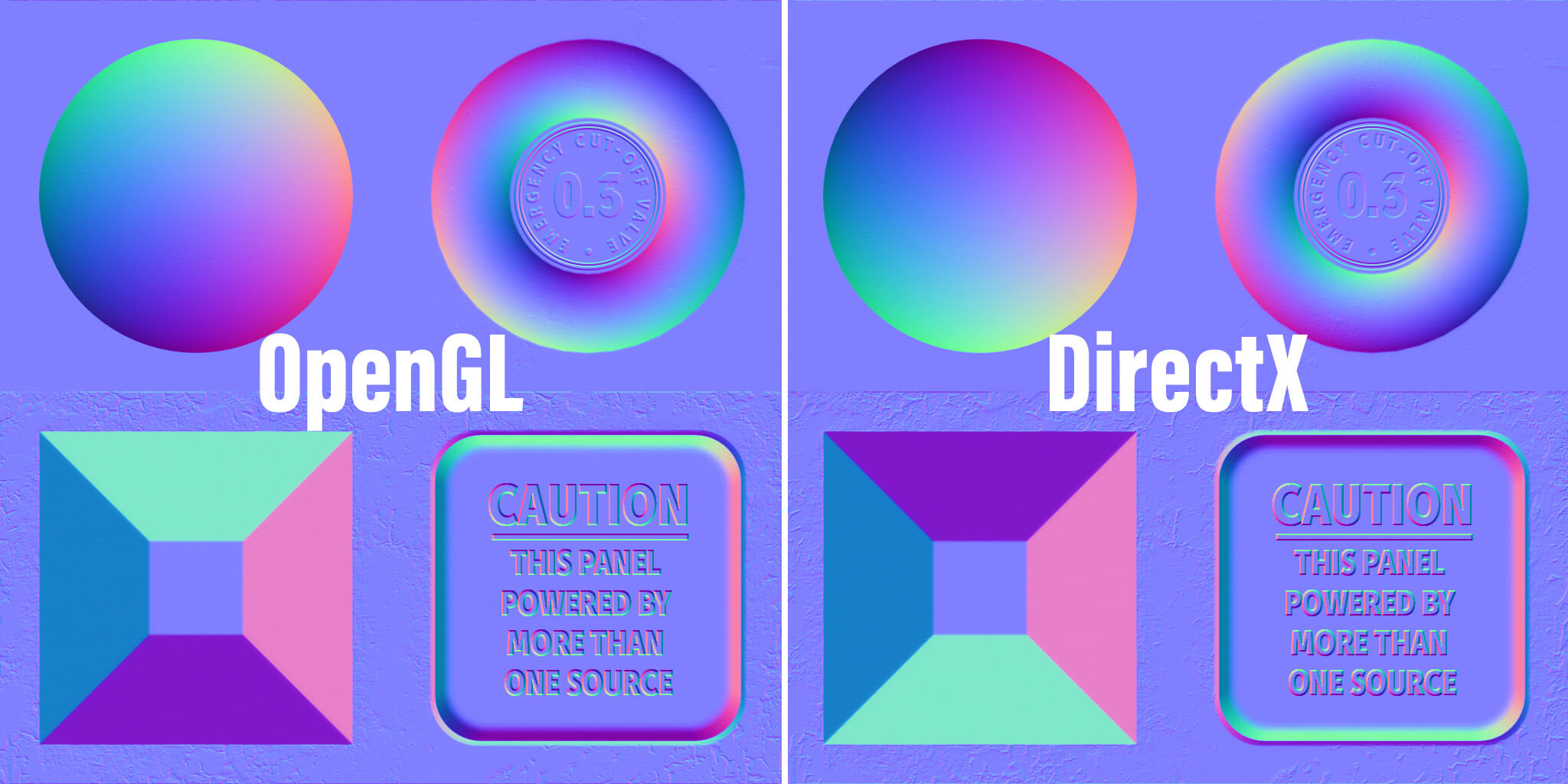
 solar python
it sadly didn´t work, still thanks😢
it said that it has no uniform scale
what does that mean?

in the corner, left
is that important?
tribal pivot
solar python
it said that it has no uniform scale
ctrl+a and apply scale
while in object mode
it sets your scale to 1,1,1
solar python
where to find apply scale?
ok found it
i will see if it worked
OMG IT ACTUALLY WORKED
IT TOOK US ALMOST 5 HOURS
thank you so much, bro ily🙏

 lofty elbow
hello
signal coral
What do your LOD proportions look like on average?
Assume a LOD2 of 3-3.5k tris, what would your LOD1 and 0 look like roughly in tri count?
 glacial vector
That's a really weird way to ask, why would your starting point be LOD2
Also the scale of the asset is a critical variable in this question
misty lantern
Vertex density in screen space and preserving visual features that need to be preserved is what matters really
 teal python
Is there a way to automaticly choose Point (no filter) option for the Filter Mode when importing assets into unity ? It's on Bilinear by default and it's tedious when working on 2D projects
hoary kindle
teal python
Is there a way to automaticly choose Point (no filter) option for the Filter Mod...
Seems like you could do that with presets https://docs.unity3d.com/Manual/class-PresetManager.html
teal python
hoary kindle
Seems like you could do that with presets <https://docs.unity3d.com/Manual/class...
thanks 😄
hoary kindle
So choose a texture with the settings you want, make it a preset and choose it as the import preset in the preset manager
 sacred grotto
Hi all. Anyone uses BIM to make building assets for games?
signal coral
glacial vector
That's a really weird way to ask, why would your starting point be LOD2
Shmup game with hard surface ships. Makes sense to start with the low poly and then add subd and make your LOD0 the high poly to bake normals from. LOD1 is just for cutscenes but they transition in real time from the gameplay perspective at lod2
LOD0 in this case is just a journal entry
Not actual in game use LOD, just framing the scale.
I’ve got 3.5k lod2, 12k or so lod1, and lod0 is like 150k
misty lantern
signal coral
Shmup game with hard surface ships. Makes sense to start with the low poly and ...
That's not really how those terms are used
LODS are all for "in game"
High poly meshes are only for authoring the meshes that would go into the game, and would stay out of game assets entirely
signal coral
Fair
signal coral
glacial vector
That's a really weird way to ask, why would your starting point be LOD2
Also what about multiresolution workflows?
misty lantern
signal coral
Also what about multiresolution workflows?
It's just a workflow
Regardless of how you make your mesh, you will balance the polycounts of each LOD level to suit your game's needs specifically
Those needs being how your meshes will appear on the screen, and how much performance you have to spare for vertices
signal coral
I guess, how would you approach such a workflow? I was starting high poly and dissolving edges to break back down to low poly. Those methods took so long but I’d have a progression of like 20-30k > 6k > 3k usually
Then tried reversing it and it went more like 2k > 12k > 150k but only cuz im essentially just applying subd1 for the next resolution and subd2 plus extra geometry for baking a normal map for the high poly
But the latter method cut the asset development time by 60%
also latter method had the drawback of needing a secondary normal map for the high poly, so two materials
Or I can wire up the shader to swap normal maps at a certain distance
Just trying to wrap my head around the best approach is all. /rant
misty lantern
signal coral
Or I can wire up the shader to swap normal maps at a certain distance
That sounds a bit backwards as well
You only need to bake one normal map from the highest poly, each LOD level can use that one
signal coral
It’s cuz the normal maps for the lower res models are using details baked from the ultra high poly. But they become redundant when that actual geometry is on the mesh is why
But some of the normal details are from texturing in substance.
Which I do need to keep
Maybe this is just a weird use case scenario? Idk
The giga high poly mesh is just for a journal entry so it’ll ever be the only model on screen in those cases - maybe a background prop (it’s a space fighter ship model, so in the hangar I wanted to have a close up view of the ship in the background)
misty lantern
signal coral
It’s cuz the normal maps for the lower res models are using details baked from t...
Not something I've had to deal with but that's a fair question
signal coral
misty lantern
Not something I've had to deal with but that's a fair question
I remember the standard packaged lit shader that comes with Unity BIRP has a secondary detail map option
At least I think that’s an alternate normal map
misty lantern
Detail mapping is for an "overlay" normal map, intended for tiling fine detail
signal coral
Yeah! Basically the idea. There’s some universal normal map that all resolutions share - like the bumpiness of the painted metal and panel lines I like to do in substance. But then there’s the geometry baked detail
Which only goes on the lower two resolutions
It makes the high res version look “off” because the detail is overlaying the actual geometry of itself
misty lantern
The simplest option seems to be to have another material with normal map strength 0 for LOD0 and other LOD levels with discernible geometry detail
Strength property can be faded between materials (while texture properties could not) so a smooth transition is possible
Though not sure if LOD group component does that kind of material fading
signal coral
wonder if I can just store the baked geometry as a secondary map and blend it with the universal normals
Yeah that
Isn’t there an LOD texture node in shader graph
misty lantern
Or even simpler have a separate mesh for closeups with geometry detail and another for gameplay with normal maps only
That's the best option when you know you don't have to swap between them by distance
signal coral
Yeah I thought about that approach too, just a separate material for the high poly that uses a scaled down normal strength
Since I’m never showing the high poly version during gameplay
misty lantern
signal coral
Isn’t there an LOD texture node in shader graph
Yes but it's not something you normally need to worry about
Textures swap their mip level by distance automatically based on a lot of factors
misty lantern
signal coral
Yeah I thought about that approach too, just a separate material for the high po...
It won't need the normal map at all
signal coral
There’s still texture details that it would
misty lantern
It can its own, no need to play with strength or detail normals
signal coral
Right. So just separate model/derivative material?
misty lantern
Yes
misty lantern
signal coral
Then tried reversing it and it went more like 2k > 12k > 150k but only cuz im es...
This sounds like a lot more work than just dissolving or decimating detail though
Subdivision alone isn't going to add meaningful detail, and adding geometry on top of it manually seems harder than reducing geometry to me, and it's easy to change the silhouette too much to make the other levels no longer fit
signal coral
misty lantern
This sounds like a lot more work than just dissolving or decimating detail thoug...
Decimation makes a mess of topology - while it works
misty lantern
If you can reduce geometry detail without making making a mess of the topology, it sounds like that goemetry was unnecessary to begin with
signal coral
that’s just how the decimate operation seems to work
misty lantern
The higher the LOD level, the higher the viewing distance and the lower the polycount are so how accurate you need to be about it drops sharply as well
signal coral
I got some example for this
misty lantern
Decimate is a very naive operation, so you can only rely on it situationally particularly for preserving silhouettes
signal coral


Yeah it preserves the shape just fine.
This was before I learned about multires too
FWIW the deformations still look good at the perspective you’d see it at (LOD2) even with the decimated geometry
misty lantern
And sometimes there simply isn't much more you can remove, manually or otherwise without messing up the silhouette or the UV islands
signal coral
What you said about messing up the silhouette with going low > high, yeah that is a concern and have to be careful not to overshoot those boundaries
misty lantern
And in those cases you have to leave some crucial geometry in, or get creative with things like billboards
signal coral
But it’s the same with Multires. If you need to do a dramatic deformation that would disrupt the base silhouette you have to check some box so it sculpts the base mesh as well
misty lantern
Iirc dissolve and decimate technically preserve topology, which means the LOD meshes can be smoothly blended between
Data transfer can be useful for re-projecting data like UV coordinates from one mesh to another if the textures drift a lot, but that probably prevents the blending from happening gracefully
And in that example you can get much better results with other means besides a very heavy handed decimate
signal coral
They can. Dissolving manually was decent enough but still have to be careful to preserve the silhouette and avoid dissolving seams. It’s just a very time consuming process
misty lantern
signal coral
They can. Dissolving manually was decent enough but still have to be careful to...
Making sure you know all the shortcuts and tricks the selection tools have helps a huge deal
And with experience you learn more ways to do the process and to make it easier in advance by thinking ahead
Also, Unity 6.1 or 6.2 has auto-LOD feature
Though they never can be fully smart about it, for a lot of meshes that's totally adequate
lusty beacon
misty lantern
Also, Unity 6.1 or 6.2 has auto-LOD feature
Though they never can be fully smart...
Wait, it has an auto lod feature?
Didn't know about that
misty lantern
lusty beacon
Wait, it has an auto lod feature?
Haven't tried it yet but apparently so
lusty beacon
misty lantern
Haven't tried it yet but apparently so
So is that supposed to be more peformant than tessellating?
I'm talking lower poly model with tessellation vs higher poly model with auto lod
misty lantern
lusty beacon
I'm talking lower poly model with tessellation vs higher poly model with auto lo...
LODs are generated at import, not at runtime, so performant yes
https://docs.unity3d.com/6000.2/Documentation/Manual/lod/mesh-lod-landing.html
Tessellation is mostly for a different purpose, to be used for surfaces where it makes sense to use displacement maps
lusty beacon
misty lantern
LODs are generated at import, not at runtime, so performant yes
<https://docs.un...
Yeah I know, and I wonder how auto lod would behave with vertex displacement
misty lantern
lusty beacon
Yeah I know, and I wonder how auto lod would behave with vertex displacement
I imagine it'd only make sense to kick in when already at LOD0 and getting even closer
Tessellation increases vertices, LODs reduce them
lusty beacon
misty lantern
I imagine it'd only make sense to kick in when already at LOD0 and getting even ...
Yeah yeah, that's not necessarily bad
Butot might not help at like lod1 at a steep angle
Might need to test that but it sounds like it could be a reasonable alternative to tessellation displacement
misty lantern
lusty beacon
Might need to test that but it sounds like it could be a reasonable alternative ...
The uses are kind of different
LODs are for characters, tessellation is for environments roughly speaking
Terrains tend to use only some form of tessellation
Props like big rocks or other large items may benefit from both
Displacement maps which require tessellation shine with repeatable surface detail, and can be swapped for a totally different style with a generic mesh underneath
With characters and small props it's hard for me to think of a situation where displacement is needed or useful
lusty beacon
misty lantern
With characters and small props it's hard for me to think of a situation where d...
Yeah I'm thinking exactly of rocks
Not terrain though, at least not large mesh terrains
misty lantern
lusty beacon
Yeah I'm thinking exactly of rocks
I think since your environments are dark and might always have limited long range visibility, distance LODs might not be of much importance
Maybe even enough to use the component only to cull them over distance
lusty beacon
misty lantern
Maybe even enough to use the component only to cull them over distance
I do camera culling anyway
10 meters
So that's irrelevant I guess
Idk why I'm distracted by this anyway, it shouldn't be that significant anyway
 flint sentinel
Hey, I have this huge room, sort of, and I am not sure what the best way to go about textures is.
We tried to make UV maps as optimized as possible(not all of them yet tho), use high quality compression in unity import settings, 100% compress pngs when baking and exporting from blender, and merging multiple objects to reuse textures.
Even with all that, some of the textures that are meant to be viewed up close at times are still low quality, even at 4k resolution.
Now I'm wondering whether it's ok to have ~4-8 8k textures to make it all look good or whether that's too big of a performance hit.
We are targeting mid-high end pcs and laptops but it'd be nice if the game was compatible with lower end machines too.
We do plan to have the texture quality setting as well, but I don't know if that'll make up for using such high res textures in the first place.
Please @ me and thanks in advance!


 fresh olive
flint sentinel
Hey, I have this huge room, sort of, and I am not sure what the best way to go a...
fresh olive
flint sentinel
Hey, I have this huge room, sort of, and I am not sure what the best way to go a...
Hey! First of all, that's a beautiful room.
Second, if you're targeting mid-high end machines, higher res textures should be no problem. Unity auto generates mipmaps which are just low res versions of a texture, and uses those when certain conditions are met, basically it's LOD for textures
If you're looking to maximize performance, use tileable textures. I use a pretty cheap asset for that, or you could do it manually. Another option is to add variation to the tiling texture using a shader, some clever layering could easily add more flair and break the pattern while having minimal impact on performance. And of course, you should definitely add quality settings, preferrably automatic ones that adjust to run on almost any machine.
fresh olive
flint sentinel
Hey, I have this huge room, sort of, and I am not sure what the best way to go a...
Side note, the best way to find an optimal solution is trial and error. Make sure it looks as good as possible, test it. If it's too slow, make compromises. I like to purposefully throttle my processors or just switch to several other machines of varying tiers to check for any potential bottlenecks.
 jagged mulch
This feels a lot harder than it should be i just need someone to show me how to do basic stuff for 3d modeling
fresh olive
jagged mulch
This feels a lot harder than it should be i just need someone to show me how to ...
You really don't have to worry all that much when learning the basics. These techniques only really matter when it comes to bigger, commercial projects. All you have to keep in mind is try minimizing polygons, and try to use smaller textures :)
jagged mulch
i dont know what any of that means
fresh olive
jagged mulch
i dont know what any of that means
You're a complete beginner?
potent wraith
jagged mulch
This feels a lot harder than it should be i just need someone to show me how to ...
What's the actual question? Is it related to art-asset-workflow?
jagged mulch
fresh olive
You're a complete beginner?
YES
jagged mulch
potent wraith
What's the actual question? Is it related to art-asset-workflow?
im not sure the guy from general told me to go herew
fresh olive
jagged mulch
YES
i'll assume your goal is making assets for games
You should start by getting familiar with the terminology and basic concepts.
jagged mulch
i was trying to make and avatar for vrc
outer halo
jagged mulch
im not sure the guy from general told me to go herew
The guy from general told you to go here if you have specific technical questions. Asking someone to mentor you is not what this server is for.
fresh olive
jagged mulch
i was trying to make and avatar for vrc
I'm not sure if this is the correct channel
jagged mulch
outer halo
The guy from general told you to go here if you have specific technical question...
ouch okay i was just trying to ask questions
you guys are scary
outer halo
You haven't asked a question yet.