#archived-lighting
1 messages · Page 69 of 1
 celest crystal
 upper fable
So pointlight is a sphere and so on
celest crystal
Hmm. That's intriguing, I kinda way to read up on that. =D
So, built in with deferred rendering sounds right for my project, would you say?
I'm also using distance based shadowmask for mixed lighting atm.
 timber lichen
As for me Forward+ is the best solution
celest crystal
What's your argument for forward?
timber lichen
Its have clustered lighting thats more optimized than deferred lighting
timber lichen
celest crystal
What's your argument for forward?
Optimization
celest crystal
Could you elaborate? I'm sorta at the start of this journey...!
timber lichen
celest crystal
Could you elaborate? I'm sorta at the start of this journey...!
I will send link, wait the minute
celest crystal
Np!
timber lichen

Comparing Forward, Deferred, and Forward+ rendering algorithms using DirectX 11.
celest crystal
Thank you!
Oh, dumb question - am I correct in understanding that with Built-In Realtime, Emissive materials will ONLY appear to be lit by an internal light source, but NOT light the surrounding area?
(Also, Distance Shadowmask seems about right for a proc-gen game that doesn't have huge outside areas, right?)
upper fable
celest crystal
Oh, dumb question - am I correct in understanding that with Built-In Realtime, E...
Yes, emission only makes the color brighter so bloom can make it glow etc. but with realtime lighting emissive materials doesnt light surrounding objects
celest crystal
Bang on, so it's basically unlit. =)
I did a quick mockup to test lighting in Unity, work out the fps etc. It's basically a rough remake of room 302 from Silent Hill 4. https://reverend-speed.itch.io/lighting-tests-01 There's also a link to my entire project on that page (the only difference is that the project is from before I tried deferred lighting). Can anybody suggest any better practices regards lighting, performance-wise? (Still reading the Forward+ Rendering doc!)
itch.io
Realtime GI lighting for Webgl experiment inspired by Silent Hill 4.
upper fable
celest crystal
So, built in with deferred rendering sounds right for my project, would you say?
Deferred shading is at its best when theres dozens of small lights affecting single object. Forward+ is quite optimized too but sadly it doesnt exist on urp yet (unity is working on it). Forward renderer in urp is currently limited to 8 pixel lights. You can try to *decrease the amount of pixel lights (forward) by splitting large objects into smaller pieces so less lights affects single object. Changing between render paths is pretty easy so it should be easy to test performance of different rendering paths on your game. On most cases forward is doing pretty good job but deferred can be good choise when you have a lot of per pixel lights. I think testing the performance on your game is only way to find out which one is faster
celest crystal
(Sorry, I'm just eating dinner, but I'm reading your note and thinking!)
I don't think URP is suitable for me - I'm looking to get on as many platforms as possible, I can't use GI baking (as everything gets set in realtime), I want to use camera stacking... URP just seems completely unsuited.
upper fable
Whats the problem with using urp for wide range of platforms?
celest crystal
Deferred shading is at its best when theres dozens of small lights affecting single object.
Hmm. So... I guess I should ask, what's 'small' in this context? And regards a 'single object' - so is this 'texels', then? Or is this mostly bounded by how many pixels it takes up on-screen, so it's sorta affected by game resolution ala post-processing? (Apologies for enormous amounts of 'dumb' here...!)
celest crystal
upper fable
Whats the problem with using urp for wide range of platforms?
Mostly going by this flowchart...!
"Built-In Render Pipeline - The good old full-featured renderer for a wide range of platforms."
LRP (as URP is mentioned in this chart) has strong real-time lighting limitations. I'm not looking for massively high performance, as I'll be taking a more stylised approach - and I've seen a degree of the visual quality I'm looking to achieve proved out using Built-In with Tormented Souls.

You can try to *decrease the amount of pixel lights (forward) by splitting large objects into smaller pieces so less lights affects single object.
But in situations with, for example, walls and floors that are made with probuilder, splitting the object seems to create a variety of lighting artifacts (non-uniform shading across the apparent surface), compared to the smooth unified lighting I was able to get with the deferred render.
(Reading those docs now)
Yeah, this is kinda how I imagined deferred rendering would work. That said, I'm not fully sure I'm clear on the line,
The lighting pass is performed by rendering each light source as a geometric object in the scene. Each pixel that is touched by the light’s geometric representation is shaded using the desired lighting equation.
Given the depth pass is basically a 2D representation (storing depth per pixel)... would the geometric object be flat? This is difficult to visualise.
https://www.3dgep.com/wp-content/uploads/2015/08/G-Buffer.jpg
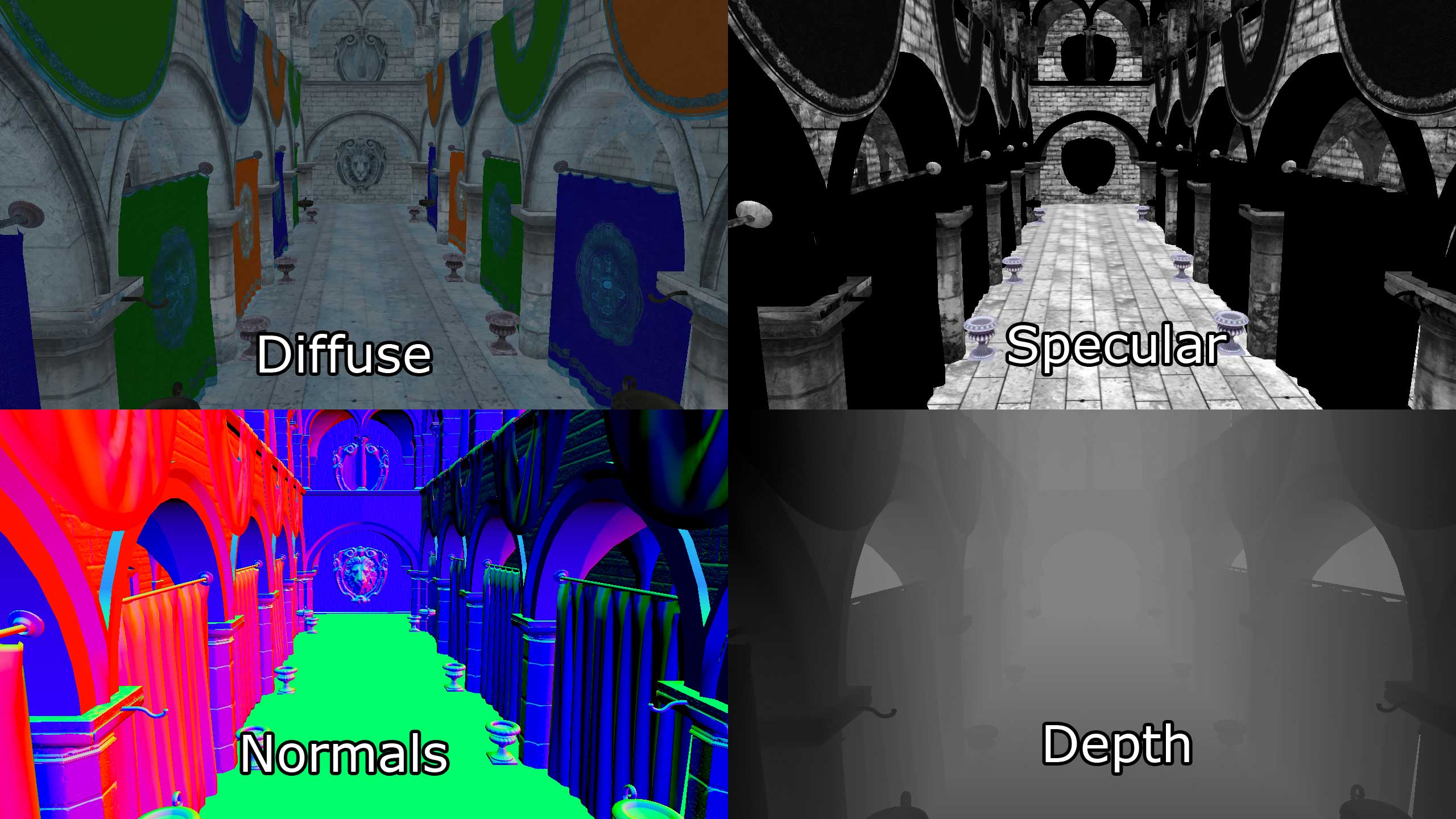
Another disadvantage of deferred shading is that only a single lighting model can be simulated in the lighting pass.
I don't suppose anybody could explain 'lighting model' in this context? I'm presuming we're not talking about cel shading, etc. Are we getting into linear versus gamma here?
timber lichen
celest crystal
> Another disadvantage of deferred shading is that only a single lighting model ...
Its means you cant create unique light model for material, as i can understand
For example anisotropy
celest crystal
Ah, so you'd have to fake anisotropy. Well, not fake... just do specular with a nice texture. =)
timber lichen
celest crystal
Ah, so you'd have to fake anisotropy. Well, not fake... just do specular with a ...
No. Not really. In Unity HDRP, this is somehow bypassed and HDRP have anisotropy in Deferred render
I have not studied how HDRP works, so I will not say more.
upper fable
celest crystal
> Deferred shading is at its best when theres dozens of small lights affecting s...
"small" is... idk, it's relative... when camera is inside light source (within the range of point light for example), it's rendered as fullscreen quad instead of the corresponding 3d mesh (so every pixel on the screen gets processed once) and that can be quite espensive especially if you're inside multiple light sources simultaneously. amount of lighting calculations scales according to screen size/the amount object covers the screen on both rendering paths (I'm not sure what you mean by texels in this context but I believe this has nothing to do with texels)
overhead of deferred lights mostly comes from pixels covered by all lights in total so smaller and fewer lights is better
upper fable
celest crystal
> You can try to *decrease the amount of pixel lights (forward) by splitting lar...
By large I meant large. for example if you have a large map which is made out of single piece, it's waste of resources to calculate lighting for every pixel even if most lights covers only small portion of the screen
celest crystal
(Apologies in advance, I'm kinda paraphrasing your notes to check that I understood what you were saying)
That makes a certain amount of sense to me. If you're within the range volume of a light, there's no point in trying to cull or do the equivalent of per pixel, it's kinda treated like screen postprocessing so every pixel needs to be treated.
However, at a distance, the limits of the geometric shapes are used as borders for the light processing, so it doesn't affect the entire screen, only the visible 'shape' of the light. If you have an object on screen that's lit by multiple lights which are relatively small on the screen, you could have multiple of these shapes overlapping and providing additional light and nuance to the object. However, if these lights take up a large amount of screen space, then that's multiple geometric lighting objects that need to be calculated over a large amount of the available screen space pixels (per resolution).
However, that all happens after the geometry has been calculated, so if I'm 'within' a light range, the render time will still differ depending on if I'm looking at a vista or if I'm looking at a wall.
celest crystal
upper fable
By large I meant large. for example if you have a large map which is made out of...
But it's still only calculating the pixels within the screen resolution, right? So if I had a large single-object map, every light on screen will have to affect all geometry that's within the camera frustum.
upper fable
celest crystal
But it's still only calculating the pixels within the screen resolution, right? ...
right, when geometry is drawn on the screen, everything out of the screen is ignored in the rasterization part so even if you have lets say huge quad and your camera is watching at it from near, only the pixels visible to the camera will be drawn (hope I understood correctly what you asked). yes, when light is considered affecting object, the light is provided for the shader that renders the object and then that light has to be taken into account for every pixel of that object (this is true only on forward rendering)
celest crystal
But... they both need to take into account each pixel, just at different times, right?
Forward does the Opague Pass and the Transparent Pass.
During forward rendering, all lighting is performed in the pixel shader together will all other material shading instructions.
Deferred does Geo pass, the Lighting, then a forward Transparent Pass.
In the lighting pass, the geometric volumes that represent the lights are rendered into the scene and the material information stored in the G-buffer is used to compute the lighting for the rasterized pixels.
It's just that deferred doesn't have to do any lighting until the very end, and then it's using the depth buffer and the lighting geometry to shade the screen pixels (but taking longer the bigger and more overlapping the lighting geo happens to be onscreen).
(And thank you, @upper fable , for your extreme patience here)
(Still trying to read that article. I'm currently understanding about 45% of it. =/ I've done some shader programming in the past, so I have a very basic grasp of this)
upper fable
celest crystal
Mostly going by this flowchart...!
> "Built-In Render Pipeline - The good old f...
(I have to go eat something now but I'll come back to the more recent messages bit later) First of all, your chart looks different from mine ⬇️ (the image is so blurry it's impossible to tell what's different exactly). I think you have chosen older version of unity on the documentation so all the details may not be relevant anymore. What comes to different platform, I don't know what are the platform that BIRP supports and URP doesn't (urp supports mobile platforms, pc, webgl, consoles etc.). "has strong real-time lighting limitations" isn't relevant anymore (compared to HDRP it's more limited tho), I'm not able to think of any major features that BIRP supports and URP doesn't. Unity have actually told they are going to deprecate BIRP in future and change URP as the default render pipeline. That means unity is working hard getting all BIRP features in URP too and already URP is having many cool features that BIRP is lacking (vfx graph and decals for example). URP is great choise for stylized games (it's hard to which commercial games are made with custom scriptable render pipeline, URP, HDRP, BIRP etc. but by fast googling I found that Lost in Random for example is made with URP so there's no doubt URP can be used for real game projects). Only limitation what comes to your project that I can think of is the pixel light count limited to 8 which will be fixed in the future when Forward+ is released.
 celest crystal
I believe URP doesn't have camera stacking, but I can't currently find the docs that say that. Gonna keep reading here (I had thought Forward+ was already out for URP!). Enjoy your food!
upper fable
celest crystal
I believe URP doesn't have camera stacking, but I can't currently find the docs ...
Urp has camera stacking but it works bit differently compared to birp. According to the roadmap (https://unity.com/roadmap/unity-platform) forward+ is "in progress"
celest crystal
AleksiH, I'm gonna play a game with some friends now, but I'll check back in in a bit. I guess I'm somewhat loath to switch to URP to a degree because I did so a long time ago... and then had to switch back, which was as user-friendly as digging a rusty trowel into my groin.
Ah, I see - but you atm you'd recommend URP with deferred, then?
upper fable
celest crystal
Ah, I see - but you atm you'd recommend URP with deferred, then?
Yeah, probably. Hard to tell without seeing the game but I have started favoring urp over birp as I dont see many areas where birp is better nowadays but its up to you. Birp isnt still bad, its just not much different from urp and urp have some extra features that doesnt exist on birp. Birp is very stable and pretty performant, theres no need to change to urp if theres no specific feature you need from urp (like decals or vfx graph). Theres also loads of asset store assets (most are paid) that can be used to make decals and volumetric lighting (built in only in hdrp) etc. with birp
celest crystal
Just saw this diagram and had to applaud. I GET IT!

Unsurprisingly, THAT'S REALLY CLEVER.
upper fable
celest crystal
Just saw this diagram and had to applaud. I GET IT!
Whats that supposed represent 😅 ? Light mesh (like the sphere mesh for point light) z-culling?
celest crystal
Yeah, basically. It's (part of) an implementation of deferred rendering. You render the back faces of the light mesh - and yep, it's basically z-culling, identifying what faces are visible and within the lighting area on the depth/stencil buffer. I do not pretend to understand all this, but I do like how they're capturing the correct information to process based on the light volumes. =D
Just as a reference, these games are slightly in the ballpark of what I'm trying to do -

Tormented Souls (top) and Mother's Embrace (bottom). Both are a little more high poly than I have in mind, but it gives you an idea of the kinda tone and environments you're likely to encounter
timber lichen
upper fable
(I have to go eat something now but I'll come back to the more recent messages b...
For this reason, I created my own pipeline. Based on URP, it is easy to create your own pipeline. Many graphic features are not available in the URP. For example i created tessellation, fabric, eye, parallax occlusion, hair, layered lit shaders

I got a monster between HDRP and URP 
I don't understand why Unity don't do something like this with packages
celest crystal
Good heavens. I'm a decent gameplay programmer, I'm not likely to build my own pipeline. =/
upper fable
timber lichen
I don't understand why Unity don't do something like this with packages
Why not to submit the idea in the unitys roadmap? Maybe not enough people need it or unity doesnt know they do 🤷♂️
timber lichen
upper fable
Why not to submit the idea in the unitys roadmap? Maybe not enough people need i...
This is unlikely to happen. Firstly, I have already put my pipeline in the asset store. Secondly, my asset has dubious technologies for Unity (such as SGSSS(Spherical Gaussians Subsurface Scattering), Pre-Integrated SSS and sheen shading that i created without any base in physics).
upper fable
Its weird how single person can do all of that and it takes years for unity to make single fricking feature 😆
timber lichen
upper fable
Its weird how single person can do all of that and it takes years for unity to m...
I understand them in some way. When you are a mastodon in the market, you decide what will be the standard. You have to be careful in this matter.
upper fable
I have to agree that I have no idea how to manage program like unity with millions of features and thousands of coders working on it. Its great that unity is very modular and theres a lot of assets to get some nice features that unity havent implemented themself
 deft fiber
celest crystal
Mostly going by this flowchart...!
> "Built-In Render Pipeline - The good old f...
deft fiber
celest crystal
Mostly going by this flowchart...!
> "Built-In Render Pipeline - The good old f...
URP's limitations are mainly stemming directly from it's wide range of platform support
They don't implement features before they're robust enough to work across most if not all supported platforms
Your example pictures look perfectly doable to me with URP and deferred rendering
It certainly feels like a slow pace at which we're getting the features but how they're making the engine is a pretty far cry from how we're customizing it
timber lichen
upper fable
I have to agree that I have no idea how to manage program like unity with millio...
Yes, in this way I like the Unity more than UE.
deft fiber
The features we implement only need to work for us (and a lot of the time only for a test project) but whatever they put in must work for professional teams and will be trialed and scrutinized for years afterwards
upper fable
celest crystal
But... they both need to take into account each pixel, just at different times, ...
Overlapping lights itself arent problem performance wise but more lights in general makes more overhead (as every light has to be rendered separately as a mesh. That process should be somewhat cheap tho)
 brave estuary
I need help, for whatever reason my lights go through objects and show up like this, its really annoying
 deft fiber
brave estuary
I need help, for whatever reason my lights go through objects and show up like t...
deft fiber
brave estuary
I need help, for whatever reason my lights go through objects and show up like t...
what exactly do you mean "like this"?
brave estuary
deft fiber
what exactly do you mean "like this"?
You see that like weird thing in the middle, it’s coming through the grass
 deft fiber
Behind the post processing, image stretching and compression I can't see what's going on
brave estuary
deft fiber
Behind the post processing, image stretching and compression I can't see what's ...
It’s like a light decal and it’s shining through everything
deft fiber
Reflection of the directional light, probably?
brave estuary
 celest crystal
deft fiber
Your example pictures look perfectly doable to me with URP and deferred renderin...
celest crystal
deft fiber
Your example pictures look perfectly doable to me with URP and deferred renderin...
Just to be 100% clear, this would be entirely realtime (no baking, no gi as the environments would be proc-gen'd from tiles, ala https://store.steampowered.com/app/278620/TinyKeep/), ideally also using some camera stacking. It'd be nice to get this running on WebGL in addition to modern consoles and mobile. I don't think I'm going to be using some graphics-related products from the Asset store. URP doesn't have Fwd+ yet, but you think URP with deferred should do the job?

In TinyKeep players will embrace the role of a hopeless prisoner held deep in a forgotten dungeon who one day wakes up to find themselves mysteriously released. Their savior is nowhere to be seen, but the cell door is broken and ajar, tempting them with the sweet scent of freedom. With nothing but a flickering lantern and a strange letter left b...
Price
$9.99
Recommendations
252
brave estuary
deft fiber
Reflection of the directional light, probably?
its not directional though.
celest crystal
upper fable
Overlapping lights itself arent problem performance wise but more lights in gene...
Righto. By any chance did you take a look at my Silent Hill demo environment? It's very rough, but if you could take a quick look I'd really appreciate it. I'm just desperately trying to avoid beginner mistakes and work with best practices.https://reverend-speed.itch.io/lighting-tests-01
itch.io
Realtime GI lighting for Webgl experiment inspired by Silent Hill 4.
deft fiber
brave estuary
its not directional though.
That's the best guess I can make given the clues
brave estuary
deft fiber
That's the best guess I can make given the clues
idk what I did but I fixed it
I removed the light and put a new one
then suddenly it worked
celest crystal
Just going through this feature comparison... https://docs.unity3d.com/Packages/com.unity.render-pipelines.universal@13.1/manual/universalrp-builtin-feature-comparison.html Can anybody tell me what 'Ambient Mode' is, under 'Environmental Lighting'? Would this relate to the ambient light level?
Also somewhat alarmed to find Surface Shaders aren't supported in URP, but I presume there's a terminology gap I'm dealing with there...
 zinc oxide
Is there any work around for this issue? I can't believe did they not fixit in 2021.3.2 either?! https://issuetracker.unity3d.com/issues/scene-is-brighter-in-standalone-player-if-it-was-open-in-the-editor-at-build-time
It makes cloud build entirely useless... Or any game with more than one scene..
I dont know if it is limited to URP, or limited to realtime lighting
Reproduction steps: 1. Check out repository https://github.com/Wilfrid-Unity/test-unity-scene-brightness that contains repro-project...
upper fable
celest crystal
Also somewhat alarmed to find Surface Shaders aren't supported in URP, but I pre...
(Sorry I dont know what the ambient mode means) Have you worked with lit shader graph? Surface shaders are pretty much that but in handwritten format. In surface shaders with given inputs (textures, uvs, fragment position, camera position etc.) you calculate values like Albedo, Gloss, Normal, Alpha (just like in lit sg) and unity does the rest to calculate lighting, shadows etc. using the values provided (note that surface shaders also has vertex stage so you can do vertex deformation etc. in the shader just like lit sg). If you want to write shaders yourself, lack of surface shaders isnt big limitation as shader graph exists but it is a big deal what comes to assets made by others, many assets uses surface shaders so youd have to recreate them yourself with shader graph (which isnt always very straight forward. Theres also things like final color stage that simply doesnt exist on shader graph). So if youre highly relying on assets made by others, you may have problems with urp. Unity is currently working on urp/hdrp surface shader but I have no idea when it will be released. Same time unity is working with shader blocks (feature that would allow to make shaders more easily (with more freedom compared to ss?). Shader blocks are meant to work on all render pipelines too) which is stated to be "surface shader replacement".
deft fiber
I don't know what ambient mode refers to exactly either but I don't think the list is fully up to date
Lens flare, ambient occlusion, box projection, light cookies (and projectors and motion vectors?) are listed as "not supported" or "in research" but I'm pretty sure at least most of those are in recent URP versions already
 gloomy marsh
Hi, i just started working with lighting and i dont know how to fix this. When i load a scene from the editor, the lighting looks normal (bright), but when i load the same scene from a script, the lighting becomes dark.
deft fiber
gloomy marsh
Hi, i just started working with lighting and i dont know how to fix this. When i...
You need to generate lighting for the scene in lighting window
If it's not generated, the editor will fill it in with temporary lighting, but this does not happen at runtime scene switch
gloomy marsh
ok, thanks!
celest crystal
Thanks @upper fable and @deft fiber, been testing URP and associated samples and, honestly, having a great deal of fun with it. I tried moving to this about 3-4 years ago and it was kind've a nightmare, but everything seems very tidy and functional now (really enjoying the frame hold functions and the straightforward access to the depth map!). AFAIK I'm not using graphical elements from the Asset Store, so this should be just fine. Having a little trouble assigning two materials to one mesh atm, but that's not a huge issue at the moment. Looking forward to playing with the shader blocks. Barring some disaster, I imagine I'll be moving to URP shortly (though I might come back and bother you with some questions in the future, no promises! =D). Cheers!
celest crystal
I assume that if a fairly simple Built-In project has been importing / converting to URP for this long, I should probably end task...!

 raven escarp
I need some help with unity textures. Is anyone skilled in that department?
upper fable
raven escarp
I need some help with unity textures. Is anyone skilled in that department?
Most of us know something about textures but no one is going to commit to something they have no idea what it is, no one knows everything. Youd be better to just ask your question and someone will answer if they know it
raven escarp
Okay. I'm working with a grass texture on a terrain map, and the surface of it looks bizarrely shiny. I have the metallic and smoothness settings turned all the way down as you can see on the right, and it still looks really weird.

The normal map also isn't working correctly. In the tutorial I'm following, the normal map makes it look pretty realistic, but in my version, it has this awkward splotchy appearance that makes it look like it's just ignoring the presence of some parts of the texture as seen here:

You can see the settings for the diffuse and normal map zoomed in here:

The lighting on the asphalt sections of the painted texture also look bizarrely metallic, and I think I have the same settings for both texture paints.

I'm using a mac if that makes any difference.
 regal urchin
https://gyazo.com/44a6fcfbc89b26d1b0b11ed943b75540
Hello, my flashlight stops suddenly on the flat ground

Its an aura 2 spotlight
raven escarp
Alright, since my last request for help, I figured out that I need to turn on create from greyscale, and I needed to turn off dynamic clipping in the camera settings, because that was giving me a serious headache. This is what it looks like up close now:

If you look on the right, you'll see that there's still a weird shading issue on the asphalt that makes it look like the light comes in layers. Can anyone help me fix that?
celest crystal
Using URP, is there a way to have a light illuminate a smallish room without whiting-out nearby surfaces? I'm trying to rebalance my Silent Hill Room 203 test using URP (and linear over gamma, I think) and it's proving surprisingly difficult.

For a similar set of values I was able to light the majority of the room in birp, while maintaining shadows from the fins on the ceiling.

For an example of how it SHOULD look, check this out: https://www.youtube.com/watch?v=zTPSFUK44qc&t=16s

Use The mouse for move( also can use WASD keys) / Usa el mouse para moverte (tambien puedes usar las teclas WASD)
If you like the video give thumb up and subscribe to my YT Channel for more works like this / Si te gusta el video dale pulgar arriba y subscribete a mi canal de YT para ver mas trabajos asi.
Facebook Version (360VR JPG), same co...
My outcome seems way too dark.
 deft fiber
@raven escarp Your normal map looks very strange, as if it's missing some channels entirely
You wouldn't "generate a normal map from greyscale" with a texture that's already meant to be a normal map
deft fiber
 pseudo wadi
Why priorize ilumination check box is not showing off on my project
pseudo wadi
Why priorize ilumination check box is not showing off on my project
https://docs.unity3d.com/Manual/class-MeshRenderer.html Look it up here, there's an explanation
deft fiber
celest crystal
Using URP, is there a way to have a light illuminate a smallish room without whi...
This is how lights usually look with gamma color space instead of linear, so I'd check that first
Enabling HDR and using a type of tonemapping post process usually removes this huge "contrast" in lights instantly
The original thing seems to be using baked lighting anyhow, which suffers much less from gamma space limitations
upper fable
celest crystal
Using URP, is there a way to have a light illuminate a smallish room without whi...
In URP inverse square of distance is used for light attenuation. it's more accurate compared to real world but it's sometimes hard to get things lit correctly. have you tried using hdr + different tonemapping themes? Afaik tonemapping can be useful to get more even lighting. you could also use two light setup so spot light (with something like 160 degrees angle) could work as the main light and then you could use bit darker point light to light the ceiling etc.

 deft fiber
That's definitely a great idea
As realtime lights ignore the shape of the light fixture / lamp shade it's best to fake the effect in some way
You can also fake bounce lighting from the illuminated floor the same way, as long as objects are unlikely to be between both light sources
raven escarp
deft fiber
<@410539886978793473> Your normal map looks very strange, as if it's missing som...
What do you mean by “missing some channels?”
 main sand
- What is the common way to pair 2d sprites and 3d lighting? It's not about illusion, but 3d environment with 2d sprites in it. For me now they are bright no matter what, even if there's no light at all. Also please redirect me if this is the wrong place to ask
deft fiber
raven escarp
What do you mean by “missing some channels?”
Normal maps in their preview normally display specific colors denoting the vectors stored in each pixels, usually they are a shade of purple with green and red mixed in
Yours only looks to have blue and cyan, as if it's missing the red channel entirely
raven escarp
This particular normal map was created in unity based on the original texture. The tutorial seems to be lacking the magenta in the initial conversion as well, but his results look significantly better. If you’d like to see the tutorial let me know.
deft fiber
raven escarp
This particular normal map was created in unity based on the original texture. T...
Sure that may give a clue
raven escarp
https://youtu.be/ehDRTdRGd1w
He starts adding in the normal maps at 19:40.

This is a full length series upload for those who don't want to go through all 22 tutorials. They're here in one place now. Want to know how to make a game in Unity?. In this viewer-requested series, we'll be learning how we can create a driving/racing game in Unity. This series of unity tutorials will explore how we can create courses, mission...
deft fiber
raven escarp
https://youtu.be/ehDRTdRGd1w
He starts adding in the normal maps at 19:40.
That's a completely wrong way to go about it
raven escarp
How would you go about it instead?
deft fiber
The shading of the grass in the tutorial is just as broken as it is for you
Setting texture type to normal map doesn't generate a normal map, it tells the engine to use the texture in a different color space so a normal map will work properly
But the point is it has to be a normal map
raven escarp
Do you know a better way to generate a normal map from an image?
deft fiber
Shader graph can generate normal maps, other options are external programs like Gimp
But consider that a normal map from a color texture won't be perfectly correct, it'd have to be a height map of the surface
raven escarp
Do you have any ideas why his results might have looked better than mine in that case?
 crude plaza
raven escarp
How would you go about it instead?
crude plaza
raven escarp
How would you go about it instead?
what he is doing in the video is converting a normal image into a normal map
a normal shows what direction a surface points in
so it can be used for shading

like this
deft fiber
raven escarp
Do you have any ideas why his results might have looked better than mine in that...
If you ask me his results look awful
Though he's not using punctual lights, as I think you said it didn't look as bad with just a directional light
deft fiber
crude plaza
what he is doing in the video is converting a normal image into a normal map
He's not converting anything, just using a color texture as a normal map
crude plaza
thats what im saying
its completely wrong because he is converting a normal image into a normal map
deft fiber
crude plaza
its completely wrong because he is converting a normal image into a normal map
It's misleading to call it converting, as conversion implies a conversion process of some sort
That's what spawned this confusion initially
crude plaza
well hes converting it
you can see the normal image turns into a normal map
even though its a completely wrong one
deft fiber
crude plaza
you can see the normal image turns into a normal map
That's quite not correct
It doesn't matter whether it's marked as "type: normal map" or not because it's not a normal map nor has it been turned into a normal map
 deft fiber
Precisely
crude plaza
when the image has turned into a normal map
deft fiber
Incorrect
crude plaza
deft fiber
Incorrect
substantiate your claim
deft fiber
crude plaza
substantiate your claim
"Normal map" the term means the texture's pixel stores directional vectors instead of colors, although the data is just values in both cases
"Type: normal map" just tells the engine to not do any color space conversions which it needs to do for color textures to display correctly
A color texture used as a normal map contains nonsensical data
Regardless whether the color space conversions are done or not, it doesn't change the fact that the data is nonsensical
crude plaza
i wasnt implying that it was sensical
but it does convert it into a normal map
because the image was a normal RGBA image
and now its turned into a normal map
doesnt matter if it doesnt make sense
its still a normal map
deft fiber
It's not any more a normal map even if you tell the engine to treat it as a normal map
Because it never was and never will be
crude plaza
crude plaza
so youre saying if i have an arbitrary texture that there is not the slight possibility that this is the exact normal map for that?
because it is used as a normal map

surprise
this is also a normal map
deft fiber
crude plaza
so youre saying if i have an arbitrary texture that there is not the slight poss...
Unless the color texture originally was a normal map, then no, that doesn't really happen
crude plaza
deft fiber
Unless the color texture originally was a normal map, then no, that doesn't real...
im not arguing with you over whether or not it is the right normal map for it
but it converted an image into a normal map
if it parses through to the GPU as a normal map
then its a normal map
how is the computer supposed to know whether or not that would be the correct normal map for the situation
deft fiber
That miraculous scenario could happen just as likely even if it's not marked as a normal map
Just so the color space conversions and remaps used for color textures miraculously result in the exact normal map we need
crude plaza
thats not what im arguing to you over
you fail to comprehend that a normal map is not based on correctness
because even a normal map is just an estimation
deft fiber
There is no "conversion"
Anyway, it's pointless and misleading to call it a normal map when it doesn't work
crude plaza
then how did the image turn into another image that can directly be fed as a normal map
crude plaza
deft fiber
Anyway, it's pointless and misleading to call it a normal map when it doesn't wo...
well not really
the same way i can call a car a car if it doesnt drive
or i can call a horse a horse even though it doesnt exactly look like one
deft fiber
It's the same as filling a gas tank with milk and saying it's gasoline because it's in a gas tank
crude plaza
the difference is the milk would not power the car
deft fiber
That's my problem with your reasoning
crude plaza
the normal map would be fed to the gpu
and displayed on the screen
even though its wrong
crude plaza
deft fiber
It's the same as filling a gas tank with milk and saying it's gasoline because i...
i can fill a gas tank with a different type of gasoline and it would still be gasoline
deft fiber
The milk would get fed into the engine and then ...not work as gasoline
crude plaza
deft fiber
The milk would get fed into the engine and then ...not work as gasoline
and it would break the engine
but the normal map it converted to
would function as a normal map
just not the correct one for the situation
what do you fail to understand
deft fiber
Well, the milk would function as gasoline in that it sure would slosh around in the engine
But it wouldn't do what we want gasoline to do
deft fiber
Well not fundamentally, it's all just atoms and molecules like textures are all just values
crude plaza
the same way a drawing is a drawing even though its ugly
crude plaza
deft fiber
Well not fundamentally, it's all just atoms and molecules like textures are all ...
youre going out of scope
deft fiber
I think you are
Even if you can logically prove that all data types are fundamentally the same, that doesn't mean you should call one data type another different data type which is meant to be used in an entirely different way
 deft fiber
Yes, as I recall explaining
crude plaza
okay
then does the grass map not store directions?
even though theyre pretty much random?
deft fiber
It stores colors, not directions, obviously
crude plaza
illiteracy strikes again
crude plaza
deft fiber
It stores colors, not directions, obviously
im talking about the normal map, as i said map
deft fiber
color maps store colors, normal maps store normals
It's all just numbers
Intent is what matters
crude plaza
deft fiber
color maps store colors, normal maps store normals
It's all just numbers
how is the normal map made from the grass texture not storing normals?
theyre not the correct normals in the slightest
but they are still normals
deft fiber
anything you put into a normal map slot is treated as normals
deft fiber
Nothing about the pixels in the texture file changes when you set the type to normal
They're not "normals" or "colors" until they're used to render normals or colors
You can fill a normal map slot with a texture that's not of "type: normal" and it'll still treat the data as normals
This happens in the shader, not in the asset
 deft fiber
changes how?
deft fiber
Nothing about the data itself becomes fundamentally different
deft fiber
The shader doesn't care about what data there is
The only thing that matters is how to get it to display correctly
crude plaza
crude plaza
look at this
deft fiber
My original point is that whether something is a normal map or not depends on whether it works as one
crude plaza
tell me that the original grass texture does not get converted into a DXT5 texture
used for normal maps
so it is a normal map
if i export that image and reload it it cant be used directly as a normal map is what youre implying
because it is not a normal map to your words
deft fiber
I think the disagreement we have is that you're thinking from the perspective of the computer only
I'm thinking from the perspective of asset creation
crude plaza
from the aspect of asset creation youre still wrong
because its not a usable normal map
but it still is a normal map
deft fiber
Well, only if it was made with that intent or if it gives results as such
crude plaza
thats contradictory
deft fiber
If you recall the original problem were people assuming that flagging something for the engine to use as a normal map would convert it to a valid normal map
From the perspective of the computer there was no problem at all, but from an asset creation perspective an ordinary color map is plain not a valid normal map
Which is a fundamental misunderstanding of how normal maps should be made
crude plaza
deft fiber
He's not converting anything, just using a color texture as a normal map
.
that was your statement
not converting

nowhere in the definition of convert does it state that it would be correct
anyway do you have experience with the unity render pipeline
deft fiber
The error was assuming that converting means generating, which is obviously a recurring problem
crude plaza
crude plaza
anyway do you have experience with the unity render pipeline
?
because im having trouble with sorting order with z coordinate
or maybe the 3d engine would work
deft fiber
crude plaza
because im having trouble with sorting order with z coordinate
Ah, what's this related to?
crude plaza
topdown 2d game
let me see if i fixed it
i fixed it nvm
just took me 3 hours to find out that the 2d renderer does not support the z coordinate for sorting layers
i had to create my own shadow script because URP doesnt have soft shadows for 2d games
deft fiber
crude plaza
just took me 3 hours to find out that the 2d renderer does not support the z coo...
https://docs.unity3d.com/Manual/2DSorting.html It does support sorting by depth, but there's basically multiple sorting methods working at the same time in priority order
In short, layers take precedence over depth
I haven't used URP 2D lighting a lot but I hear it's pretty limiting in terms of features still
crude plaza
ye i mean
look


thats with these coords
the z coordinate should make it possible for my player to be above that

this is barely above

but when i walk behind the tree
it is still above
when i remove the render pipeline
this happens
deft fiber
Sprites are tricky also because they use the pivot point's Z for depth sorting
Doubly difficult with perspective cameras if you use that instead of orthographic
crude plaza
excuse me let me just
disable my shadow script
because it is now purple

note
the z coordinate

it is working without the pipeline
with the initial coordinate
no matter how i adjust the settings
the pipeline will not work
but i do need it for glowing lights
deft fiber
There's a lot of ways to do sorting
If I had to do it I'd put everything on the same sort layer and order, make sure every sprite pivot point is at "ground level" and then move all objects in Z based on their position, as if the world was 3D basically
crude plaza
i did that
but the universal render pipeline messes with the Z coordinate
and the universal one doesnt support 2d lighting
deft fiber
crude plaza
but the universal render pipeline messes with the Z coordinate
That sounds like something that shouldn't happen
regal urchin
crude plaza
<@697118155440390290> you discovered falloff?
No but for some unknown reason changing the range worked today, while it didnt yesterday
LMAO
crude plaza
deft fiber
That sounds like something that shouldn't happen
it does though
regal urchin
Unity do be wierd sometimes
crude plaza
trust me i know
celest crystal
deft fiber
This is how lights usually look with gamma color space instead of linear, so I'd...
This is how lights usually look with gamma color space instead of linear, so I'd check that first
Yeah, I'm sorry, this was the main problem. I thought I'd switched to Linear when I converted to URP, but was still in Gamma. Changing removes the over-white effect and allows me to light the room effectively.
The original thing seems to be using baked lighting anyhow, which suffers much less from gamma space limitations
Absolutely. The original was unquestionably baked. I am trying to approximate, as closely as possible, PS2 lighting with realtime deferred only, as a means to get better with lighting (the environment is MUCH more basic - eg., the original had modelled moldings and siding boards).
celest crystal
upper fable
In URP inverse square of distance is used for light attenuation. it's more accur...
I'd used a variety of spot and point lights to achieve the original lighting (to be accurate, I'd originally used two spot lights, then found I got more accurate room lighting with a point light). I've also made most of the lamp elements non-shadow-casting.
I don't think I need tonemapping in order to achieve my current target, BUT I'll definitely look into it! Thank you for the notes / recommendations, I'll follow these up.
celest crystal
deft fiber
You can also fake bounce lighting from the illuminated floor the same way, as lo...
I was always faking a little, but for the most part this lighting is working fine in-editor.
However... I've a new problem/query... =/
deft fiber
HDR and tonemapping are worth looking into
Might not make it look more retro-authentic, but better probably!
celest crystal
Better is better!
=D
Just trying to hit this 'basic' target atm, then move on from it.
deft fiber
I'm quite sure the light coming from point and spot lights is exactly the same, except around the spotlight's edge falloff
celest crystal
My current problem is relating to some shadow masks / lightmaps flickering on and off depending on position in the room. This is noticeable in editor...
...but it's absolutely crazy in WebGL mode:
itch.io
Realtime GI lighting for Webgl experiment inspired by Silent Hill 4.
In the movie above, you can see issues on the right side of the screen, under the nearby lamp, with the shadow of the dresser switching on and off, the lights of the fridge sometimes shining through the fridge and onto the back walls, etc.
Again, happy to upload my full project if that would help identify issues.
deft fiber
Hmm I think you're running into realtime shadow atlas limits
Shadow casting lights aren't super cheap even in deferred rendering, and webgl likes to put a whole lot more limits on a lot of things
celest crystal
WebGL isn't a huge issue for me, I can drop it eventually. But Tormented Souls had approximately 50 realtime lights (I'll double-check this in a sec) in the biggest location in the game and hit 30fps on a Switch.
deft fiber
Also, can't stop spinning to the right whenever the webgl window is in focus for some reason
celest crystal
(That was using BIRP)
celest crystal
deft fiber
Also, can't stop spinning to the right whenever the webgl window is in focus for...
Huh, weird. I'll look into that, but I'm not going to emphasise debugging the code for this project...!)
deft fiber
Works well enough for a quick and dirty test though
celest crystal
Sorry, wasn't 50 lights, was 44 lights.

All realtime, birp.

I'm just trying to figure out how I can approach something like this.
crude plaza
looks good
a lot of it is baked is it not?
because otherwise thats impressive if its in unity
 crude plaza
dang
celest crystal
I know! I'm assuming they were using deferred, but I don't know for sure.
Gonna grab some food, but I'll be back on this when I return...!
(Btw, buy Tormented Souls, it's a good time, especially if you can play it with a friend. https://store.steampowered.com/app/1367590/Tormented_Souls/ (currently 25% off!) Also, buy Hellpoint, it's lovely. https://store.steampowered.com/app/628670/Hellpoint/ (I'm not associated with either of these games, I just think they're very pretty examples of good Unity action games))

⠀⠀⠀⠀⠀⠀⠀⠀⠀⠀⠀⠀⠀⠀⠀⠀Something Evil Lurks at WinterlakeWhile investigating the disappearance of twin girls at Winterlake, something terrible happens to Caroline Walker. Waking in the dead of night, naked and hooked up to some kind of outdated medical equipment in a bathtub, Caroline must fight for her life as she explores the halls of the abandoned m...
Price
$14.99
Recommendations
2429
Metacritic
75

Hellpoint is a dark sci fi RPG that takes place on a derelict space colony in the aftermath of a massive quantic cataclysm. You play a Spawn of the Authority brought to this world to investigate the circumstances of this event and unravel this deep interstellar intrigue. You will explore the open world of the Irid Novo colony, orbiting in real t...
Price
$34.99
Recommendations
1945
Metacritic
64
celest crystal
deft fiber
Shadow casting lights aren't super cheap even in deferred rendering, and webgl l...
Btw, I should be clear, I wasn't having this issue while using BIRP.
deft fiber
celest crystal
Btw, I should be clear, I wasn't having this issue while using BIRP.
So is the demo on BiRP or URP?
celest crystal
The current webplayer that I've just uploaded and linked here is URP. The previous one (which was just replaced) was BIRP. I have both URP and BIRP versions of the project.
Happy to provide these projects.
I should say, I'm new to the BiRP/URP issues, I'm just trying to find what works best for me, it's entirely possible I'm ballsing something up.
 tall arch
can the bounds of a realtime reflection probe not be rotated?
also is there any way in urp to make it so that a reflection probe only affects certain objects
celest crystal
@tall arch Pretty sure you can't rotate the reflection probe bounds - they're sorta like collider bounds, afaik, the sides are always orthagonal to the world axes.
crude plaza
@celest crystal do you have experience with 2d URP
celest crystal
I think you can perhaps use the Culling Mask for the reflection probe to only record certain objects. Outside of that, I'm a little out of my depth. Worth a look here? https://docs.unity3d.com/Manual/class-ReflectionProbe.html
 celest crystal
crude plaza
<@270290394066059264> do you have experience with 2d URP
celest crystal
crude plaza
<@270290394066059264> do you have experience with 2d URP
Oh, heavens no. I've been paid to work on 2D projects with BiRP back in the day, but I don't go to 2D by choice (unless it's fake 2D).
celest crystal
Oh, man. Hmm. Not really. I'm... still fighting to get my answers on URP/BIRP right now, as you can see. =(
crude plaza
did you change your quality in project settings yet
did you change your rendermode to auto
crude plaza
i think you can change the pixel light count in quality too
celest crystal
No, I think I was thinking of something else. 'Rendermode'?
crude plaza
or use deferred rendering
celest crystal
I'm using deferred rendering.
 crude plaza
try important if its on auto
celest crystal
Yeah, I think everything's on auto. Will try. Good point...!
 celest crystal
I'd changed it back in BiRP - went to 8 - but I think it's irrelevant for deferred?
crude plaza
maybe change your near clipping
celest crystal
Welp, testing lights set to 'important' in editor now.
celest crystal
Only for transparency and... something ... else... I vaguely remember, right?
celest crystal
Changing importance from 'Auto' to 'Important' doesn't seem to have had any effect. Good call, though...!
URP doesn't appear to have the Pixel Light Count field, or else it goes away when the rendering path is 'Deferred'.

Will take a look at the near clipping.
No, sadly, changing the camera near clipping plane has no apparent effect on the shadows popping in and out. Again, worth a try, thank you.
crude plaza
try scaling everything
much larger
maybe its floating point errors
try changing the shadow bias
try decreasing your shadow distance
or increasing
@celest crystal
celest crystal
? Scaling - the environment?
crude plaza
mhm
celest crystal
...Okay, hang on.
celest crystal
Made it larger and smaller.
crude plaza
all right
celest crystal
Thanks for all the thought on this.
crude plaza
and are you using a linear color space?
celest crystal
Yep, using Linear Color Space.
Scaled everything up 100 in world scale and... it did not like it.
crude plaza
celest crystal
Yep, using Linear Color Space.
try changing it
celest crystal
Hey, nothing succeeds like excess, they say. But I've moved it to 4...
celest crystal
crude plaza
try changing it
I moved to Linear today in order to solve other problems...! I'll take a look, though.
Scaling to 4 seems to just make everything black:
 crude plaza
celest crystal
Scaling to 4 seems to just make everything black:
crude plaza
celest crystal
Scaling to 4 seems to just make everything black:
does it flicker though
you have to increase intensities too of course
celest crystal
Righto.
Increased intensities by 10. Still pretty dark, but I don't think I'm getting that shift in lightmaps...
crude plaza
so its working?
celest crystal
Still testing...
...Yeah, that... seems to have solved the issue in editor mode...!
It's hard to compare quality of lighting and the scaled version is definitely off a bit and needs retuning, but... otherwise it seems to have avoided the flickering. Wow, you really think that could be a floating point error issue there?
crude plaza
precision issue i guess
celest crystal
Mm.
celest crystal
Interesting. Good intuition / knowhow...
crude plaza
definitely not my first guess though
celest crystal
Unsure I want to scale everything as an answer to this, however... I'll look into your other suggestions also.
celest crystal
Seems that way. Yet I wasn't having this problem with BiRB, or so it seemed...
(Want to double-check that)
celest crystal
Yeah, as far as I can tell, there's no shadow error in BiRB. Now, this is in Gamma, so I'm going to switch it to Linear to check that.
So, I think the realtime lighting/shadows are more harmonious, softer, richer in URP, but I'm not getting those particular shadow issues in BiRP.
BiRP on the left, URP on the right:

...
So should I draw the conclusion that unless Unity improves the fp precision for shadows in URP, then the only realistic option for realtime lighting everywhere (due to proc gen) is BiRP? (Given these tests, given Tormented Souls performance etc)
crude plaza
celest crystal
So should I draw the conclusion that unless Unity improves the fp precision for ...
not really
if you scale everything then it should work
celest crystal
Isn't that going to completely mess with physics? I mean... I guess... you... scale everything... Hmm.
Just seems like an absurd solution, though I understand the logic to an extent.
Further dumb question, you'd expect that solution to work for a game that would have quite large environments, not just that test room? Maybe 256x256 units in size, perhaps 8 or so floors in height?

 fair torrent
Hello, there are shadows in my scene and game view however when I press the play button, the lighting shows no shadows and the environment became very bright. I have baked the lighting for more than 10 hours. But still, the lighting does not have any shadows. Does anyone know how to fix this?

 deft fiber
@raven escarp I forgot that unity had the option to generate a valid normal map with the "generate from normal map" option, no need to do it elsewhere
 trail storm
Hello, Is there any way (including plugins) for the lightmap textures to bake assets per zones in the scene?
upper fable
celest crystal
Isn't that going to completely mess with physics? I mean... I guess... you... sc...
Id never scale everything unless theres some very very odd reason for that. So what was your issue this time?
upper fable
celest crystal
URP doesn't appear to have the Pixel Light Count field, or else it goes away whe...
Its on the URP asset (deferred doesnt take that into account)
upper fable
celest crystal
https://reverend-speed.itch.io/lighting-tests-01
btw are you sure these requirements are satisfied? I'd imagine the rendering path will fall back to forward in case deferred isn't possible for some reason. you can increase the Per Object Limit from URP Asset so it will work atleast decently with forward path too

@celest crystal Could you provide more information about shadow flickering on editor (with deferred rendering)? I'd imagine it's because of shadow atlas being too small/per pixel lights being too high resolution to fit in the atlas as Spazi suggested
deft fiber
Darn, forgot about all the different OpenGL and WebGL versions
celest crystal
upper fable
Id never scale everything unless theres some very very odd reason for that. So w...
This comes from trying to resolve the flickering shadow issue based on movement (see attached video). This solution was from Cruor, who suggested that it was a floating point precision issue and that scaling everything up and adjusting the lights would resolve the issue. It seems to have removed the position-based flickering, but... just seems like a weird solution. =/ I'm happy to provide both my URP and BiRP projects.
celest crystal
upper fable
Its on the URP asset (deferred doesnt take that into account)
Found that, thanks for the reference. To be clear, am I right in understanding that you're saying,
"while the lights 'Per Object Limit' can be changed, this is irrelevant for deferred"
, hence,
(deferred doesnt take that into account)
My DirectX version is 12. I'm running a Windows 10 desktop. My Shader model is 5.1.
Any chance you could link me to this note? I believe I have deferred rendering working for my BiRP webplayer.
 celest crystal
upper fable
<@270290394066059264> Could you provide more information about shadow flickering...
celest crystal
upper fable
<@270290394066059264> Could you provide more information about shadow flickering...
That's possible, as I've upgraded the project from BiRP to URP so all the settings may not be optimal. I'll investigate the shadow atlas issue, though feel free to point me in the direction of the parts I need to change... =P
(Currently investigating 'Per Object Limit' for lights w/deferred & the shadow atlas)
upper fable
celest crystal
Any chance you could link me to this note? I believe I have deferred rendering w...
upper fable
celest crystal
Found that, thanks for the reference. To be clear, am I right in understanding t...
yes, deferred shouldn't have any limit for realtime lights (shadows are bit different, all the additional lights must fit inside single atlas (afaik birp uses own atlas for each shadow caster, make sure to disable shadows for lights that doesn't actually cast shadows)). in case the render path falls back to forward, you may want to use more than the default Per Object Limit.
celest crystal
upper fable
<https://docs.unity3d.com/Packages/com.unity.render-pipelines.universal@12.0/man...
Thank you.
celest crystal
upper fable
yes, deferred shouldn't have any limit for realtime lights (shadows are bit diff...
I see.
Actually, frustratingly, I've just seen this error,
Reduced additional punctual light shadows resolution by 2 to make 63 shadow maps fit in the 4096x4096 shadow atlas. To avoid this, increase shadow atlas size, decrease big shadow resolutions, or reduce the number of shadow maps active in the same frame
UnityEngine.GUIUtility:ProcessEvent (int,intptr,bool&)
, which I imagine is related. I've been changing the atlas resolutions in the URP asset, to no obvious result so far. Will keep tinkering.
Hmm. So URP isn't yet suited for presenting this project in Webgl.
upper fable
celest crystal
https://reverend-speed.itch.io/lighting-tests-01
this shadow Issue here I believe happens because the near plane value of the light (under Shadows section, not same as cameras near plane) is too high
 celest crystal
10-4. I'll look into that, but atm the main issue for URP webgl is trying to resolve the walls being covered in blackness. That problem doesn't appear in other versions.

The errors in question, plus the Shadow Atlas Resolution doubled.
The position-based flicker/switch persists.
upper fable
celest crystal
you gotta make the Shadow Resolution Tiers much lower (try to divide everything by 2 or 4)
celest crystal
Ah. I'd doubled them. =P
Uno momento.
No change, unfortunately. Is there an 'apply' button that I'm missing?
 upper fable
celest crystal
The position-based flicker/switch persists.
upper fable
celest crystal
The position-based flicker/switch persists.
does the flickering happen for shadows only or lights in whole?
celest crystal
Shadows only, as far as I can see. Light can be seen shining against the wall behind the fridge from one distance, before moving forward and having the shadows block out the light. Just checking, did you see the video above? Would it help if I shared my screen?
upper fable
celest crystal
No change, unfortunately. Is there an 'apply' button that I'm missing?
there shouldn't be. are you sure you're editing correct urp asset? could you show your per light inspector/shadow setup
upper fable
celest crystal
also your shadow distance seems way too high. I doubt you need to see shadows from 50 meters range with this type of scene
celest crystal
upper fable
there shouldn't be. are you sure you're editing correct urp asset? could you sho...
are you editing correct urp asset:
I think so!

Point light setup for main living room light:
 upper fable
celest crystal
Point light setup for main living room light:
upper fable
celest crystal
Point light setup for main living room light:
wait what. why is the light resolution 1024? I think you really are editing wrong asset
it seems you're using Ultra_PipelineAsset and editing Univeral Render Pipeline Asset
celest crystal
@tough wolf
am i looking at room 302 btw?
Indeed you are. Using a very basic mockup as a test for realtime lighting in Unity.
I ended up using some lights without shadows
Ah, that's interesting. May I ask which project you were working on?
celest crystal
upper fable
wait what. why is the light resolution 1024? I think you really are editing wron...
That's possible - as I say, this was an upgraded project. It's using the defaults for BiRP in a lot of areas. So I should change this value on each individual light rather than the overall Pipeline Asset... oh, goddamn, Ultra_PipelineAsset, let me check.
Sadly, no. One leaves that to Bloober team. =D
Ooorgh, I'm confused. Okay, so... every Quality level seems to have it's own Universal Render Pipeline Asset.
Can't really, as I'm trying to specifically recreate the lighting of room 302 with realtime lighting.
The BiRP project and a URP webplayer are here, if you're interested, @tough wolf https://reverend-speed.itch.io/lighting-tests-01
itch.io
Realtime GI lighting for Webgl experiment inspired by Silent Hill 4.
upper fable
celest crystal
Ooorgh, I'm confused. Okay, so... every Quality level seems to have it's own Uni...
yes, and I tend to just remove the assets I don't need (and leave only one as I'm usually targeting only for pc and not very wide range of platforms) so I don't get confused with them
celest crystal
Please don't hit me - however, I am desperately looking for best practices. This project will not be going anywhere near publishing, however. It's a test for realtime lighting.
celest crystal
upper fable
yes, and I tend to just remove the assets I don't need (and leave only one as I'...
Righto.
=D
Ultimately, I'd like to publish to as many platforms as possible, in the end. For the moment, however, as this is currently screaming madness, I'll make everything the same asset. Thank you for that advice!
upper fable
celest crystal
That's possible - as I say, this was an upgraded project. It's using the default...
the deal with the urp asset is to set 3 different shadow resolution tiers you can then choose per light so you can easily select the correct tier for each light (you can also use Custom if you want to set something different per light)
celest crystal
AHHHHHHHHH.
AH OKAY.
I mean, fucking obvious, I'm an idiot, yes, that makes sense.
Okay, I'll try setting all the light resolution to low and then increase as required.
upper fable
you may want to use different resolution for different lights depending on the light shape, shadow strength etc. (some lights even the minimum resolution of 128 can look good enough)
later you can see what is the minimum atlas size you can use and not get the warning that appeared earlier
celest crystal
Yep yep yep yep yep.
Yep yep yep.
Weird flickering * gone *.
Gotcha.
How on earth do you have that much patience?
I am most grateful.
upper fable
celest crystal
How on earth do you have that much patience?
that's good question, I don't know, I'm happy to help
celest crystal
Welp, you're a good person. Cheers. Yeah, as you've deduced, the errors have vanished also.
Ooh, it really doesn't like even one light set to medium. Hmm.
upper fable
celest crystal
Ooh, it really doesn't like even one light set to medium. Hmm.
Is the atlas resolution still set to 4096?
upper fable
celest crystal
Ooh, it really doesn't like even one light set to medium. Hmm.
what is the medium? 512?
celest crystal
Yeah.
upper fable
btw how many shadow casting lights you have in total?
celest crystal
When I had the issue just a minute ago, I had the lights set to 256.
17...! In a 4-room apartment.
Honestly, it's not too bad with everything set to low. Some shadow acne, which is a shame...
upper fable
is your shadow max distance still set to 50? assuming you're working with real world scale, that sounds quite high
upper fable
celest crystal
Honestly, it's not too bad with everything set to low. Some shadow acne, which i...
you can fix shadow acne by increasing the bias values
celest crystal
Yep, will be looking at that. Just checking the shadow max distance...
deft fiber
I'd make sure the apartment is in real world scale before tweaking distance variables too much
celest crystal
Oh, it is.
It's a issue I have, @deft fiber . =P
Sorry, that was in response to Spazi asking if the --
There we go. =D
Christ, it takes me so long to find those values.
Yeah, seems set to 50.
Honestly, it's not a huge issue - I'm basically trying to replicate baked lighting with realtime lights here, even if it's a PS2 game. This is pretty good as a start.
crude plaza
celest crystal
Further dumb question, you'd expect that solution to work for a game that would ...
i dont see why not
celest crystal
I think we may have solved the issue by turning the light resolution tiers to 'Low', atm.
Though I'm still experimenting.
That said, I don't think I have a clear reason why your approach wouldn't work, Cruor. =)
celest crystal
I was getting a relevant error message, it turns out... One moment:
Reduced additional punctual light shadows resolution by 2 to make 63 shadow maps fit in the 4096x4096 shadow atlas. To avoid this, increase shadow atlas size, decrease big shadow resolutions, or reduce the number of shadow maps active in the same frame
UnityEngine.GUIUtility:ProcessEvent (int,intptr,bool&)
crude plaza
ye
shadows dont fit in the atlas
increasing the atlas res in URP should have fixed that
celest crystal
I'm currently just trying to work out what quality settings I need in concert with the low light settings.
crude plaza
celest crystal
I'm currently just trying to work out what quality settings I need in concert wi...
low light settings decreases the quality by a lot
celest crystal
Tried increasing the resolution, but I kept getting the error messages.
crude plaza
i think 4096x4096 may be the maximum size
celest crystal
It DOES, but atm it's livable. 17 lights for a 4-room appartment, mimicking baked lighting for a PS2 game.
celest crystal
crude plaza
i think 4096x4096 may be the maximum size
I believe so.
crude plaza
you can change it in the URP asset i believe
but it may be some fiddling
also normally i would suggest changing the detail depending on distance
but this is quite a small environment
celest crystal
Well, the dropdown only goes to 4096. Maybe I could get into the code with that, but... seems... like a long way to go...
Mmm.
crude plaza
celest crystal
Well, the dropdown only goes to 4096. Maybe I could get into the code with that,...
thats what i mean
celest crystal
Sure.
crude plaza
if this were a custom lighting script and shader i would suggest
using compute
no idea how to implement that with URP though
celest crystal
Mm. Unfortunately, I'm not a programmer of that callibre yet - I'm a pretty solid gameplay programmer, but outside of some shader work... well, there be dragons...!
crude plaza
why not use HDRP btw
celest crystal
There be larger dragons! Currently I'm a dev team of one, and I don't imagine the team will grow to larger than 4. Afaik, HDRP requires a lot more work to achieve a reasonable visual quality bar. I'm also looking to ultimately port to as many platforms as I can.
crude plaza
ah
HDRP is quite simple once you get used to it
and you can adjust quality for different platforms
be back in like 3.5 hours
celest crystal
once you get used to it
Sadly, that's an unknown quantity for me, and if it turned out to be a long learning experience I honestly couldn't afford it. Seems more reasonable to adjust graphics targets.
Catch you later.
celest crystal
Could anybody clarify this for me?

I'm currently trying to convert my own pipeline asset to the equivilent of 'Ultra', while maintaining the lighting settings I currently have.
celest crystal
Yeah, not really having much luck getting the WebGL player to work correctly. Then it seems this note really rules out the WebGL player, unless I turn off deferred lighting. (Just checking that folks here agree with that)

 onyx glen
Hellooo!
I am trying to make a night-theme game. I changed the skybox to a solid colour (Black) and deleted the directional light. But why is the cube with a simple material material still luminant. Isn't everything supposed to be dark now 

 toxic rover
Does anyone know the default directional light color? I deleted the one in my scene and when i recreated one it was white
onyx glen
toxic rover
Does anyone know the default directional light color? I deleted the one in my sc...

FFF4D6
 sterile iron
Hello,
We use this panel for manage lighting and set then to real time, baked or mixed.
That mean when i will generate the lighting that will do according to which mode the light is ?
Baked lighting is for static gameobject, real time lighting is for no static gameobject and mixed is for both static or not static gameobject ?
So if i want my light affect both static and not static gameobject i have to select mixed for all my lights ? If i want to affect only a type of gameobject i have to select real time or baked ?

 keen hearth
anyone know how I can make my emissions give light to environment in URP 2021?
old doc says to use the realtime illumination toggle but that's not an option on mine


 spring bronze
Hey can someone tell me why the keys on the right are behaving so weirdly with the light? I want it to look like it does on the left / how the cube on the right one behaves
I can't use the left one because the keys aren't individual objects so I cut them out, made them seperate objects and added more geometry
timber lichen

anyone know why my lighting looks like this?
Ive tried everything I could think of to fix it
any help would be greatly appreciated
timber lichen
Here’s how the rest of the map looks, fine. No issues. It’s just that one room that has horizons lines

 abstract trail
Is it possible to make a realistic looking star in space. I really do not like making lights
abstract trail
Alright thanks I'll give it a try
 simple latch
Hi, I wonder if anyone could help me. I'm on URP. When I change scenes (for example, clicking a button on the title scene to go to the game scene) the environment lighting suddenly is turned off. So all my shadows are black and it looks horrible. I've tried baking the lights but my scene is very big and a bit complex and it gave me some errors and some assets turned completely black, while others had random specks of light, which with my bloom, created really hard random points of light. So I deleted all bake data. I've done some research and the most common answer is to generate a lightmap, but as I said, some assets are not baking correctly
So idk what should I do
deft fiber
simple latch
Hi, I wonder if anyone could help me. I'm on URP. When I change scenes (for exam...
The solution is correct, but you don't actually need to have anything to lightmap
Simply generate lighting with lightmapping itself disabled
Editor generates temporary lighting for the scene when you enter playmode, but this doesn't happen in build or scene change
simple latch
deft fiber
Simply generate lighting with lightmapping itself disabled
ohh I didnt know that, I'll take a look
celest crystal
Hey folks. Again, I'm confused about the meaning of the statement in the image, and I can't find a clear explanation of what 'Renderer List' refers to (possibly the available renderers in the camera 'Renderer' dropdown?). Some clarity on this would be much appreciated.

And then again, I'd love to get confirmation that the only way to get WebGL to work with URP is through the Forward Rendering Path.
 deft fiber
celest crystal
And then again, I'd love to get confirmation that the only way to get WebGL to w...
deft fiber
celest crystal
And then again, I'd love to get confirmation that the only way to get WebGL to w...
Well, that's what it seems to say
celest crystal
deft fiber
Well, that's what it seems to say
Yep, I thought so, but I'm just trying to question my assumptions here! I've course-corrected a lot on lighting recently. =D
 thick kestrel
Is it normal that when i try to bake a reflection probe via it's inspectore "Bake" button, it starts baking lightmaps for my whole scene?
celest crystal
celest crystal
Hey folks. Again, I'm confused about the meaning of the statement in the image, ...
Oh, good grief, the Renderer List is the one at the top of the Render Pipeline Asset. Christ. AND THE REASON IT'S COMPLAINING is because my default renderer is set to deferred which is incompatible with OpenGLES3 IT'S LIKE I CAN'T EVEN READ SOMETIMES RRRGH
 fickle needle
thick kestrel
Is it normal that when i try to bake a reflection probe via it's inspectore "Bak...
fickle needle
thick kestrel
Is it normal that when i try to bake a reflection probe via it's inspectore "Bak...
In URP? Yes, but i believe it only does it once then it doesn't need to, you could also cancel it
celest crystal
thick kestrel
Is it normal that when i try to bake a reflection probe via it's inspectore "Bak...
I imagine that if you're using baked lighting and it's not fully baked when you hit 'bake' on t he reflection probe, it would bake the lighting for the scene, just to provide a light-accurate map. I presume there's ways to cull the relevant lights, or you could even turn off the irrelevant lights while baking the reflection probe. That said, I'm sorta new at this, so take what I'm saying with a good amount of salt.
fickle needle
also make sure "auto" generate lighting/baking in your lightmapper settings is disabled
thick kestrel
Yep it's URP. Basicly im on a big project and if i recall correctly before i was able to generate the reflection probe only. Auto gen is off yes. Maybe i just need to set my dir light to realtime then
 buoyant kraken
Heya, I'm in URP and trying to bake lighting for a street scene but it's turning out like this with each adjacent tile object having vastly different colouration. Any idea where I might be going wrong?
 crude plaza
anyone got any assets for smooth 2d lighting?
like soft shadows
or any way i can do a pixel shader
in 2d
celest crystal
@cinder parcel Any chance I could nudge you again? I'm still trying to get my realtime lighting up to spec. I'm trying to recreate room302 from Silent Hill 4 as a test, and I've ended up with 11 lights for the main living room/kitchen. I'm wondering how many (deferred, I assume!) lights you used on average per room (or per scene, I guess - I think there's loading on each room). Just don't want to go down the wrong lighting route when building this on my own...!
 cinder parcel
celest crystal
<@121824209092476929> Any chance I could nudge you again? I'm still trying to ge...
cinder parcel
celest crystal
<@121824209092476929> Any chance I could nudge you again? I'm still trying to ge...
On small rooms, we used a light per object emitting light, so for example on the TS bathroom
each candle group is a light
depending on the scene, it could be anywhere from 5 to 15
celest crystal
Good grief. I'm continually impressed by how good TS looks, and by what you pulled out of the realtime lighting...! To check, I assume everything was deferred, as you surely couldn't have so many lights otherwise?
cinder parcel
we routinely used a lot of lights, I dont think we ever hit the light limit accidentally
celest crystal
But that's because you using a scene per room, surely?
cinder parcel
yup, thats why
celest crystal
Yeah, it's going to be a little trickier. I'm basically using room tiles for my test, so... sightlines are going to be key. =)
celest crystal
Actually, sorry @cinder parcel , you didn't say - were you guys using deferred? Either way, thanks for sharing the information. I'll keep pushing TS!
cinder parcel
Pretty sure we were, I would have to double check
celest crystal
No worries, no rush there. I appreciate all your thoughts on this. I was really worried about using realtime lights until I saw how beautifully you and your team executed in TS.
 blazing cedar
So I have a character in URP with a lit material but he is only being affected by the 1 directional light and not by a spotlight set to Mixed. the character is easily within range
celest crystal
I'm afraid not, @tough wolf , I intend basically assembling environments in realtime from tiles, eg. Tiny Keep https://store.steampowered.com/app/278620/TinyKeep/ . Global illumination is impossible. I'll be targetting a PS1/PS2 visual quality, but everything's going to be procedural. It's possible I'll be able to bake lighting into textures in Blender, but that's eating into my memory budget and slightly limiting my flexibility (I'd like to be able to have procedural wallpaper with shaders etc). I'm investigating overriding Unity's lightmaps, but atm. it's simpler to achieve goals with realtime lights.
That SAID, I'm at the start of my journey here. I'm very open to new research directions or ideas (feel free to assume I'm an idiot, or explain like I'm five!). And I appreciate your interest! =D
In TinyKeep players will embrace the role of a hopeless prisoner held deep in a forgotten dungeon who one day wakes up to find themselves mysteriously released. Their savior is nowhere to be seen, but the cell door is broken and ajar, tempting them with the sweet scent of freedom. With nothing but a flickering lantern and a strange letter left b...
Price
$9.99
Recommendations
252
Btw, given your interest in Silent Hill etc. @tough wolf , you might enjoy this group I run: https://steamcommunity.com/groups/fixedcamera

Check our Curator and the most extensive list of Fixed Multicam games on every platform! NIGHT OF THE SCISSORS https://store.steampowered.com/app/1975180/The_Night_of_the_Scissors Breaking into an abandoned post office, Adam discovers a scissor wielding maniac! OUT NOW! We appreciate games with direct character control and multiple predefined th...
sterile iron
Why that take 1h ?
 deft fiber
sterile iron
Why that take 1h ?
deft fiber
sterile iron
Why that take 1h ?
Baking global illumination is slow
Especially slow if you include a lot of small or high-detail objects into global illumination
If you are not doing the final bake, it's best to reduce texel density a lot and the sample counts by some amount
GPU baking is much faster than CPU baking if you have a capable GPU
sterile iron
deft fiber
Baking global illumination is slow
Especially slow if you include a lot of small...
texel density a lot and the sample counts by some amount : where is that ?
deft fiber
sterile iron
texel density a lot and the sample counts by some amount : where is that ?
In the image you shared
@sterile iron https://docs.unity3d.com/2019.1/Documentation/Manual/LightmappingSettings.html this page explains what every setting does
sterile iron
deft fiber
In the image you shared
i don't see texel density
deft fiber
sterile iron
i don't see texel density
ah, I mean the part that says "lightmap resolution" and "texels per unit"
sterile iron
how many you set
deft fiber
sterile iron
how many you set
I usually set it to 20, but for temporary bakes in large scenes it could probably be even lower
When finding acceptable settings for a temp bake the best approach usually is to set the variables really low and increase in steps until you strike a balance between acceptable quality and acceptable bake time
sterile iron
Ok
Can you tell me what is the difference between realtime lightmaps and baked lightmaps ? I think one is for static GO and other one for not static GO that move on the scene ?
I created a topic "About light mode and lighting window" on the Unity forum because I have a lot of questions. If you can help me, thank you.
https://forum.unity.com/threads/about-light-mode-and-lighting-window.1282373/

Unity Forum
Hello,
Light mode
We use this panel for manage lighting and set then to real time, baked or mixed.
[IMG]
That mean when i will generate the lighting...
 late wolf
Hey guys, when I use real time GI i get weird artefact like this, do you know what could cause it ?

FYI, these are 2x2 plane meshes if it helps

 dusty parcel
You can’t really do much.
If you want seamless lighting, those meshes should be merged together. Light mapping and enlighten don’t like highly modular levels like that.
celest crystal
Oh, goddamnit, I knew I meant to ask - @cinder parcel , was there a particular reason you guys used Built-In Render Pipeline? I've been talking to folks here and doing some experiments and I'm about converted to URP, though it can't handle deferred lights in WebGL. I'm not seeing massive benefits, but it's about achieved parity in features with BiRP (as far as I can tell), plus it'll be better supported in the future... (Oh, also, did you see if you guys were using deferred?) Thanks!
cinder parcel
We were using Aura
but ended up ditching it
and never swapped renderers after that because the game looked good enough as it was
celest crystal
Oh, I'm not familiar with that. I'll look it up. Yeah, that must have been an odd but pleasing day.
cinder parcel
it's a volumetric lighting engine, pretty good
celest crystal
Ohhh, yeah, I can see why you'd want the volumetric lights. But you do so well with the polygon light shafts.
cinder parcel
yeah, those behave really well
celest crystal
I'd say you could get some really neat effects with the volumetric lights (and I have ideas), but you get so much with just the Olde Ways.
deft fiber
sterile iron
Can you tell me what is the difference between realtime lightmaps and baked ligh...
Read the lighting section in the docs I linked
It's all in there and I doubt anyone's going to reiterate everything in there just for you
@celest crystal Using procedural assets doesn't mean you can't use static lightmaps, they can be made prefab-based instead of scene-based using some extension
As long as you avoid baked lighting at the prefab seams it should be fine
You can get a lot of mileage out of the plain old forward rendering if you limit light ranges and cut the house mesh into smaller sections
If you know exactly where the lights will be, sectioning based on range will be even easier
 tribal plaza
Hello everyone, I'm building a scene with an interior and windows, using an external light source, baking everything (I use Mixed for Direction Light), building a room from modules, a roof, walls, and so on. I'm getting this problem with the light, this is how it looks only when viewed from afar. I use URP, I know about "Shadow Acne" I used the appropriate solution, but it did not help. In the picture, the light passes through the planes, which are located close to each other.
 deft fiber
tribal plaza
Hello everyone, I'm building a scene with an interior and windows, using an exte...
deft fiber
tribal plaza
Hello everyone, I'm building a scene with an interior and windows, using an exte...
Using thin or disconnected meshes will always cause problems with shadow casting
tribal plaza
deft fiber
Using thin or disconnected meshes will always cause problems with shadow casting
And a thing is to pack building by modules, then merge it into one mesh by probuilder or smth?
deft fiber
tribal plaza
And a thing is to pack building by modules, then merge it into one mesh by probu...
That would help
Note that shadow casting treats edges with sharp normals as disconnected
If I was making procedural tiles like that I would give them some thickness and perhaps make their "inside" thicker so they can overlap
tribal plaza
Ok, but how than modular building assets work in real game development pipeline? Build it from modules and then pack it in one mesh?
deft fiber
Merging them into bigger modules is one workaround
Probably possible to merge the meshes at runtime with a script if you know how and can take the performance hit
I would prefer to give the panels some thickness like this

Either just make them blockier or let the insides overlap
And use smooth normals wherever you can
tribal plaza
That first image is interesting, i'll try it. Thanks a lot.
late wolf
dusty parcel
If you want seamless lighting, those meshes should be merged together. Light map...
Thanks for the reply ! Should I merge the actual FBX in my modelling software or can I do it in the engine ?
dusty parcel
late wolf
Thanks for the reply ! Should I merge the actual FBX in my modelling software or...
Modeling software
celest crystal
deft fiber
<@270290394066059264> Using procedural assets doesn't mean you can't use static ...
I appreciate the advice. I'm still not sure I want to work with forward - if the rooms are fairly closed off from each other, then the hope is that there shouldn't be too much overdraw of lights between rooms, freeing me from the 8 pixel light restriction and creating a smoother outcome. That said, Fwd would give me WebGL back. =)
I've been looking for
some extension
or method or lead to get baked lighting in Unity for some time - but as it happens, I searched again today and found the following:
https://forum.unity.com/threads/baked-lighting-on-prefabs-dynamically-generated-level.930534/
...which also linked to this:
https://github.com/Ayfel/PrefabLightmapping
...which, honestly, is lovely. Especially as it seems to now handled the Runtime Light Probes issue.
So... y'know, might end up with baked lighting after all. =)
As long as you avoid baked lighting at the prefab seams it should be fine
Ehh, the issue is that I'm likely to have lighting right up against the walls of the rooms, etc.

Unity Forum
Hi Everyone!
I am creating my level at runtime by instantiating prefabs. I am trying to find the best way to use lighting for them. I am familiar with...
GitHub
Script for saving lightmapping data to prefabs. Used through the Assets tab in Unity. Place your prefbas in the scene with this script at the root. Set up your lighting and in the editor go to Asse...
celest crystal
deft fiber
I would prefer to give the panels some thickness like this
Yeah, ultimately I've come to the conclusion that some polygons that will never been seen by players are worthwhile, just to block incoming light. =/
 sly hatch
Hi guys, how can i increase the fps?
 deft fiber
sly hatch
Hi guys, how can i increase the fps?
deft fiber
sly hatch
Hi guys, how can i increase the fps?
Optimization is always specific to game and scene
Your best bet is using the profiler and frame debugger to identify what the performance culprit is and optimize those parts specifically
Best to do it in build so the editor won't be hogging the same resources
 lavish notch
guys I made as when I beat a level I enter another level/scene but when it changes scenes everything turns like really really dark
how do I fix that
deft fiber
lavish notch
guys I made as when I beat a level I enter another level/scene but when it chang...
Generate lighting for the scene
deft fiber
lavish notch
how do I do that
In the lighting window disable "Auto Generate" and click "Generate Lighting"
deft fiber
Same place every other window can be found in
lavish notch
here?
 deft fiber
Getting closer
lavish notch
 deft fiber
https://docs.unity3d.com/Manual/lighting-window.html another hint can be found here
 deft fiber
Yes
If it starts baking lightmaps and you don't want baked lightmaps, you can cancel it and disable "baked global illumination" as they're not necessary to fix the darkening issue
lavish notch
bruh the floor went black


 lavish notch
deft fiber
Try generating again with baked global illumination disabled
lavish notch
deft fiber
Try generating again with baked global illumination disabled
I finished it but can I redo?
regal urchin
https://forum.unity.com/threads/light-problem-flickering.116995/ Hello, Im having this exact problem, but neither of the 2 presented solutions work for me.
Unity Forum
Hello people,
I am building a small level on Unity3D and I am having a light issue. They are flickering when I am at certain positions!
I have made...
deft fiber
lavish notch
That's the baked global illumination you probably don't want
If generating again with it disabled doesn't get rid of the baked lightmap, there's a dropdown menu that allows you to clear the baked light cache to remove it
 lament barn
why does my material not react to baked lightmaps?
on the left is the standard URP lit material
on the right is my own material

this is a screen of the lightmap view

even if i change the texture of the material to white

 chilly kettle
Your own Material use a URP/Lit Shader?
 chilly kettle
the only difference between this planes is the material?
lament barn
yep
chilly kettle
Then show me your Material
lament barn
 chilly kettle
You use a complete white metallic map. Means it behaves like metal.
delete height-, normal- and metallic map, if you do not have a usefull one
lament barn
the height and normal maps do contain details
but you're right
if i remove the metallic map i get shading again
chilly kettle
when using metallic maps, you should also use a reflection probe, to bring the metallic reflections to work
otherwise its just dark
lament barn
thanks!
chilly kettle
worked?
lament barn
yep
chilly kettle
nice. gj 🙂
regal urchin
regal urchin
https://forum.unity.com/threads/light-problem-flickering.116995/ Hello, Im havin...
Bump
deft fiber
regal urchin
Bump
Can you demonstrate the problem? Hard to know what the original problem was since the video link is dead
If it is the exact same problem, then the solution is the same
But we'll need some clue why the solution wouldn't work in your specific case
regal urchin
deft fiber
Can you demonstrate the problem? Hard to know what the original problem was sinc...
Here you go 🙂
deft fiber
regal urchin
Here you go 🙂
That definitely looks like a typical scenario for a pixel light limit problem
What's the limit at now and which render pipeline is this using?
(looks nice btw)
regal urchin
deft fiber
That definitely looks like a typical scenario for a pixel light limit problem
Wh...
I am using built-in pipeline, and the pixel light count is cranked to 100 with no results
Thanks, Im using Aura 2 for lightning, but the results are the same even with normal lights :c
chilly kettle
When you look away from the lights, they may be deativated by culling?
deft fiber
regal urchin
I am using built-in pipeline, and the pixel light count is cranked to 100 with n...
If you set light limit to 1, does that seem to have an effect, conversely?
regal urchin
deft fiber
If you set light limit to 1, does that seem to have an effect, conversely?
No difference between 1 and 100
regal urchin
chilly kettle
When you look away from the lights, they may be deativated by culling?
Could be, I am very new to fixing anything lightning related since Im used to out-of-the-box solutions
deft fiber
regal urchin
No difference between 1 and 100
That's definitely strange to me
regal urchin
chilly kettle
When you look away from the lights, they may be deativated by culling?
Is there a way to force-stop culling? Its going to be an open world anyways so Ill have to program a system to deactive stuff far away anyways
Or atleast adjust culling settings
deft fiber
I don't think lights get culled by frustum or occlusion culling
At least I haven't seen any instructions how to do it nor evidence that it's possible
chilly kettle
just try do deactivate it, to get sure its not the culling
 deft fiber
I suppose Aura 2 is the unknown factor here, it could be overriding light limits or be implementing its own culling systems
regal urchin
Yeah its not culling, I did find a workaround, though it looks a lot less nice than the original solution :C I removed the "light" from the particle system and just added it as a normal light in the scene, which works fine
Now that I think about it, that probably couldve been an important detail
deft fiber
Ah, particle lights
That is significant
regal urchin
Ah yeah I am so sorry
deft fiber
Particles do get culled in various ways and their lights with them
regal urchin
I just now see how that would be important yes
deft fiber
You can animate the light's movement, brightness and color using animation or scripting to make it nice and flickery
And you only really need one light like that which saves performance and avoids limits
regal urchin
Theres already a light flicker-script I got from the asset store  But youre most probably right, wasting 10 dynamic lights just to give the fire that bit of an extra twist might be pretty dumb
deft fiber
Especially in the case of long range lights
regal urchin
Yeah thanks for your time, Ill use this as a solution. Very much appreciated 🙂
 calm stump
How do you get sharp lighting in unity similar to somerville?
upper fable
calm stump
How do you get sharp lighting in unity similar to somerville?
Be more specific. Maybe show screenshots of the exact look/effect you want to accomplish. I dont know what you mean by "sharp lighting"


 upper fable
They have propably used custom shaders for almost everything to get that cartoonish look. Again, what you mean by "sharp" in this context?
 calm stump
Yes
upper fable
Those "light rays" are most likely faked using simple 3d meshes with custom transparent shader
calm stump
Right but how does the light fit with the mesh?
Because at then of it, there is light on the ground the same shape as the light ray, if you know what I mean
upper fable
Im not sure if I quite do
With that custom shader, the light can be faded out at the end of the mesh
The shader also most likely checks the depth buffer and makes the "light ray" weaker when its closer to its background (the ground for example)
timber lichen
So idk where to ask this but, fog isn't rendering on anything except for sprites (and transparent textures, for some reason...) how do I fix this??

It worked properly before and only recently started happening
 molten swallow
spam cmd+z that the universal bugfix
timber lichen
That did nothing
upper fable
timber lichen
So idk where to ask this but, fog isn't rendering on anything except for sprites...
Are you using default unity shaders or custom ones?
timber lichen
It's not an issue with the shaders, since it works perfectly fine with the same shader in other scenes
 timber lichen
upper fable
Are you using default unity shaders or custom ones?
timber lichen
upper fable
Are you using default unity shaders or custom ones?
Built-in ones
Basically Bumped Diffuse Cutout to be exact
turns out I messed something up with my camera settings and that's what messed it up... I fixed it lmao
molten swallow
xD
 night pilot
Does anybody know why I am getting these lighting bugs and how to fix it?
 upper fable
night pilot
Does anybody know why I am getting these lighting bugs and how to fix it?
upper fable
night pilot
Does anybody know why I am getting these lighting bugs and how to fix it?
That happens for flat shaded objects only, you can try to prevent that by lowering the normal bias value and enabling two sided shadows for that character
 uncut coral
Hi! I'm setting up 2 uv channels, first one for textures and 2nd one for baked lightmap. How do I implement it in unity? I read that uv1 channel in unity is used for baked lightmap.
 feral knoll
Hey, how do I make that 2D light comes from under this sprite ?

because now it is shining so much
and how to hide it under sprite ?
night pilot
upper fable
That happens for flat shaded objects only, you can try to prevent that by loweri...
This worked great, thanks so much!
deft fiber
feral knoll
Hey, how do I make that 2D light comes from under this sprite ?
It's often good enough to use an emissive and/or additive sprite to give an underglow to an object, lights are expensive and unwieldy
main sand
- I try to set up 2d sprites in 3d world with ability to physically rotate them, yet they look weird. Either they are not affected by the light or affected so badly that they turn black at certain degrees. How to cope with that?
 upper whale
Hello, does soembody know how do i set the spotlight and pointlight as realtime? Thanks <3
 smoky pilot
Hey guys I have a quick question. Whats wrong with that model? Under it it's a black spot and I don't know how to get rid of it.
 deft fiber
smoky pilot
Hey guys I have a quick question. Whats wrong with that model? Under it it's a b...
deft fiber
smoky pilot
Hey guys I have a quick question. Whats wrong with that model? Under it it's a b...
Texel invalidity
Light rays must not hit mesh backfaces during baking
 pale blaze
im getting this random error can someone help?
 chilly kettle
pale blaze
im getting this random error can someone help?
chilly kettle
pale blaze
im getting this random error can someone help?
Do you have a self written shader?
pale blaze
Nope, i just deleted a random material i created
 tacit kayak
I'm interested in using 2D Lighting for a visibility system. Does anyone know if there's a way for a Shadow Caster 2D to cast shadows at full strength into specific light sources?
lament barn
How do I exclude static objects that are already lit by my baked lightmaps from my realtime lights?
I have some static and some moving objects in my scene, and want my static objects to be lit by baked light
only the moving objects should be lit by realtime lighting
if i dont use realtiem lighting the moving objects are just dark
but if I enable realtime lighting my static objects also change
 slate ocean
lament barn
How do I exclude static objects that are already lit by my baked lightmaps from ...
slate ocean
lament barn
How do I exclude static objects that are already lit by my baked lightmaps from ...
You want to use unlit shaders.
slate ocean
lament barn
if i dont use realtiem lighting the moving objects are just dark
I'm not sure what you're going for, but maybe Light Probes might help you?
lament barn
slate ocean
You want to use unlit shaders.
if i use unlit shaders wont they just not be lit at all
 lament barn
My problem is
the baked lightmap looks pretty good
but my non-static models
are obviously not lit by it, since baking only works on static objects
so i need to lit those moving objects with realtime lighting
slate ocean
Are you using Light Probes? What you're describing is exactly what they're for
lament barn
however, realtime lighting ALSO lights my static objects
lament barn
slate ocean
Are you using Light Probes? What you're describing is exactly what they're for
No
slate ocean
Light Probes bake the lighting data around them
And project them onto dynamic objects
This is scene without light probes (the cups are non-static objects)

And this is scene with:
 lament barn
oh damn thats cool
 simple zinc
How do I light a 2d sprite with a 3d light?
in a 3d environment
it seems like when i am using a texture on on object (using the texture shader) light wont affect it..
 simple zinc
not really
when i am using the 3d light the 2d object looks like there is not light around it
bland
empty
sad
slate ocean
So
simple zinc
is the material i am using the problem?
slate ocean
If you want 3D lights, you have to use 3D objects. My suggestion is to try using quads/planes instead of sprites.
simple zinc
i am using a 2d grid
slate ocean
So the entire game is 2D?
simple zinc
i guess i need a way to tile the wall?
simple zinc
slate ocean
So the entire game is 2D?
nope, it a 3d game but the wall has a grid child which is covering its surface like a carpet covering a floor with tiles
slate ocean
Can you show an example?
simple zinc
yeah sure, lemme open my laptop.. thought i could get an answer without the example and fix it later but here i am
one sec
slate ocean
simple zinc
yeah sure, lemme open my laptop.. thought i could get an answer without the exam...
Sorry, I don't fully understand what you're going for is all.
So an example would help me give you a better answer
simple zinc
its ok lol
the light option is enabled but the light doesn't affect the wall

@slate ocean
slate ocean
And the walls are sprites?
simple zinc
yes, the walls textures are sprites and the cube itself has no texutre
 slate ocean
Then yeah, just use a quad
 slate ocean
You just have to figure out how to correctly apply your wall texture to it
simple zinc
yeah im stuck on that rn
and it also seems like the light doesnt affect the quad as well
oh nvm
nvm
ok, i applied the texture but now i want the quad to be bigger, i thought it would tile the texture but it just streches it
slate ocean
No, it won't tile. You're going to have to make multiple quads
This is essentially what the 2D grid does for you, but unfortunately you'll have to it manually
I would suggest just duplicating and use Unity's snapping tools to get it where you want it
simple zinc
slate ocean
No, it won't tile. You're going to have to make multiple quads
wouldn't that lag the game?
simple zinc
slate ocean
This is essentially what the 2D grid does for you, but unfortunately you'll have...
oh
slate ocean
Nope
It's the same triangle count
If anything, the lighting might lag the game though
Depending on what you're doing with it
Lights are very expensive
simple zinc
ok thanks, ill updated you if you're interested
slate ocean
Sure thing, just ping me!
deft fiber
simple zinc
ok, i applied the texture but now i want the quad to be bigger, i thought it wou...
This is usually why "UV mapping" to determine how a texture is laid/stretched/repeated over a 3D surface is an important tool for 3D levels
Often done in a modeling program but ProBuilder can do it too
simple zinc
is it normal to have the intensity in the thousands for a splash of light'?
 unkempt nest
Hi. Im confused. I have an area light on the ceiling just above these, and some very small point lights on the lamps, but im getting these weird bars and one couch isnt even lighting up. Am i doing something wrong?

 deft fiber
simple zinc
is it normal to have the intensity in the thousands for a splash of light'?
deft fiber
simple zinc
is it normal to have the intensity in the thousands for a splash of light'?
Depends
If it's not HDRP then no, I don't think
If it is HDRP then it depends on the unit and exposure
deft fiber
unkempt nest
Hi. Im confused. I have an area light on the ceiling just above these, and some ...
With baked lighting? I'd check for lightmap UV overlap in the debug view
unkempt nest
deft fiber
With baked lighting? I'd check for lightmap UV overlap in the debug view
I got a few errors saying the objects have possibly incorrect UV's, so im going through and making sure their import settings have it checked.
I went through everything and checked them all on, and it fixed it. 👍
 glossy lantern
Hello,
I have a problem with lighting. I am using unity 2021.2.10f1 hdrp. On mine and some other PCs everything looks fine but some people have a problem that the lights are very bright. Do you know what could be the issue and how to fix it?

 wise egret
Hello,
i was wondering is there anyway to make font material Get Lighting Data? like if there is Light its Bright and if there is no light its dark.
sly hatch
Hi, I have to do a day / night cycle for my scene but I don't know how to do it. Currently the scene in question by default is set at night, with a post processing profile suitable for the night scene and a skybox with night sky. The problem is that I can't figure out how to change the post processing profile and the skybox to one suitable for daytime during the cycle between night and day.
 lunar mauve
sly hatch
Hi, I have to do a day / night cycle for my scene but I don't know how to do it....
lunar mauve
sly hatch
Hi, I have to do a day / night cycle for my scene but I don't know how to do it....
Set up a post process volume for day. When you want it to be night, set the day volume's weight to 0 and the night volume's weight to 1. When you want it to be day, set it the opposite way. You can blend between the two by "animating" the weight values between 0 and 1 over time.
Here's a thread on blending skyboxes. https://forum.unity.com/threads/how-to-blend-two-independent-skyboxes.834613/
Unity Forum
Hi, I'm trying to implement my own simple day night cycle. Light and ambience blending works fine. Blending two skyboxes via shader is also easy...
 nimble furnace
how do i improve the shadows? hdrp
 timber lichen
why when i bake my scene, the shining in the pic go away ? how can i fix that

 upper fable
nimble furnace
how do i improve the shadows? hdrp
upper fable
nimble furnace
how do i improve the shadows? hdrp
Smaller shadow distance, more cascades, higher resolution
deft fiber
timber lichen
why when i bake my scene, the shining in the pic go away ? how can i fix that
Baked lights don't give specular reflections except via the reflection probe
Do you have a reflection probe?
 modest patio
deft fiber
Baked lights don't give specular reflections except via the reflection probe
Do ...
modest patio
deft fiber
Baked lights don't give specular reflections except via the reflection probe
Do ...
and you'll also find that even with reflection probes you wont get as much specular as with realtime lights.
deft fiber
modest patio
and you'll also find that even with reflection probes you wont get as much specu...
Really? I guess by virtue of realtime lights usually being closer to the object they're shining on that would happen, but I haven't noticed a fundamental difference
modest patio
deft fiber
Really? I guess by virtue of realtime lights usually being closer to the object ...
Yeah man I'm having real trouble at the minute. The only way I can replicate the same reflections as realtime is to boost my Met/Smoothness values after baking.
Unless I'm doing something wrong of course lol
deft fiber
Anyhow @timber lichen I wouldn't recommend lightmapping any objects that small
Lightmapping is mostly efficient for walls and maybe large furniture
The rest of the smaller objects would be better lit by light probes if static or probes + realtime lights if dynamic
modest patio
upper fable
Smaller shadow distance, more cascades, higher resolution
Also dont be afraid of realtime light sunless youre building for Android. You can turn off shadows if youre worried about perf and still get gorgous looking reflections/specular highlights
 silk venture
I'm trying to update my lightmaps after upgrading to 2022.1 and I'm getting this error. What do?
Is there a way to find which texture is causing problem or something like that?

 nimble lava
What is causing the jpg-like artifacting in my light bake?
 deft fiber
nimble lava
What is causing the jpg-like artifacting in my light bake?
deft fiber
nimble lava
What is causing the jpg-like artifacting in my light bake?
Compression and low resolution, mainly compression
 drowsy osprey
How can I get rid of these shadow artifacts? The meshes are primitive cubes. They appear on every cube.
 upper fable
drowsy osprey
How can I get rid of these shadow artifacts? The meshes are primitive cubes. The...
upper fable
drowsy osprey
How can I get rid of these shadow artifacts? The meshes are primitive cubes. The...
Changing bias values can help on that
drowsy osprey
upper fable
Changing bias values can help on that
Thank you!! setting the depth bias to 3 fixed the issue
nimble lava
deft fiber
Compression and low resolution, mainly compression
compression quality fixed it, thanks!
regal urchin
Whats up with my lightning? Any ideas on how to fix that?
The structure has two sided shadows on
Same effect is visible in scene view
Using Aura 2 but the result is the same with regular lights
deft fiber
regal urchin
Whats up with my lightning? Any ideas on how to fix that?
Looks a lot like a shadow distance problem
Try tweaking those as the first thing
If it persists it may be useful to reproduce the problem in a clearer way
regal urchin
deft fiber
Looks a lot like a shadow distance problem
Try tweaking those as the first thing...
That fixed it, thank you very much!
 unkempt depot
How I can stop Point Light to behave like this?
 deft fiber
unkempt depot
How I can stop Point Light to behave like this?
deft fiber
unkempt depot
How I can stop Point Light to behave like this?
Can't tell from the gif, is it happening based on camera position or angle? What's the light range and distance to object?
unkempt depot
Range is around 1000000, cuz my intended use of that light is simulating sun in center of star system, but it also happens on small scale.
1000 range I can see same behaviour.
 hasty pelican
Hi, I have a weird issue with the ambient light:
In my scene player is able to turn off lights, for this I switch the skybox material to null and the intensity multiplier to 0 so it's completely dark.
When I turn the lights back on I put the default-skybox material back on and the intensity multiplier back to 1 but the scene looks like it's still 0.
When I select an object in the scene view while in play mode / hover with the mouse above the inspector window/tab then suddenly the ambient turns back on to look like "1" and the scene looks like before turning the lights off, like it should.
Making a build doesn't solve this issue.
Any help for fixing this problem?
 twilit mural
Hi i have a scene with a lot of fog, but i want to make these indicator towers that can be seen very far, how can i achieve this?

light doesnt show on its own
 sly fox
is there a reason why baked lighting doesn't work in unity 2021
upper fable
twilit mural
Hi i have a scene with a lot of fog, but i want to make these indicator towers t...
are you using forward or deferred rendering? also how are you implementing the fog? particles? the default fog feature?
 agile totem
My glass material doesn't let light thought anymore, anyone know why that's the case?
I baked it yesterday and it was working fine.
 simple latch
Hello! Idk if this question goes here or terrain but I'll try both... I've tried baking my lighting (simply 1 directional light) in my scene which is a big terrain, the trees are also placed with the terrain tools (except a couple placed individually), and as you can see, some trees are casting shadows (right) but some are not (left front), and apparently none of them are receiving shadow in themselves (the trees at the right, there's a big rock to their right, but none of the trees are in shadow. So, the trees don't have shadows). Additionally, here are my terrain lightmap settings. Since my terrain is gigantic, and my GPU isn't fit to bake lights, the generate lighting process takes about 2h with CPU, so I would appreciate it if you ask me anything else you need before I start the generate lighting process again. By the way, I wonder if I need to rebake everything after making just a couple changes. Because once I had everything baked, I changed the settings of two trees that ended up completely black and clicked generate again, but it had to do the whole 2h process. I'm asking if it seriously needs to redo everything just for those little changes.

 trail storm
Is there any way to increase the reflection probe blending volume between 2 probes without scaling the mesh game object receiving the reflection?
I'm trying to make the blending between 2 reflection probes last longer, but since the reflection volume is huge, the mesh object is tiny and the blending is volume based, it only last a fraction of a second.
Any tips ?
 olive hinge
Hi guys, Is there any way to make baked lighting look like its realtime/mixed version? Sorry for my lack of lighting knowledge.

 chilly kettle
Bottom is baked?
olive hinge
Yes
chilly kettle
Add a reflection probes to get reflections
And maybe adjust materials Smoothness/Metallic
deft fiber
olive hinge
Hi guys, Is there any way to make baked lighting look like its realtime/mixed ve...
Something's off about the lightmap UVs and/or lightmapper settings
Looks like the buildings aren't receiving light or shadow properly at all
Do test bakes in a very simple scene to practice the process and get a feel for what settings work
olive hinge
chilly kettle
And maybe adjust materials Smoothness/Metallic
It looks glossier... but not really do the job 😅

The reflection probe is already there
olive hinge
deft fiber
Something's off about the lightmap UVs and/or lightmapper settings
Looks like th...
Which setting should I adjust? The material or the light?
chilly kettle
olive hinge
Which setting should I adjust? The material or the light?
Both. None of them work solo. They always work together. A bad Material effects the lighting and vice versa
Do you check the „generate lightmap UV“ in the import settings of the model?
olive hinge
chilly kettle
Do you check the „generate lightmap UV“ in the import settings of the model?
It's checked
deft fiber
olive hinge
Which setting should I adjust? The material or the light?
Hard to say what's wrong with it, there's so many moving parts in light baking
That's why I recommend test bakes
And practice in general
olive hinge
deft fiber
Hard to say what's wrong with it, there's so many moving parts in light baking
T...
Thanks, I'll check it out
 main wolf
olive hinge
Hi guys, Is there any way to make baked lighting look like its realtime/mixed ve...
main wolf
olive hinge
Hi guys, Is there any way to make baked lighting look like its realtime/mixed ve...
without custom shader, no.
deft fiber
Definitely yes if the baking settings are right

 shadow horizon
https://streamable.com/gezxub Does anyone know whats causing this?

the shadows are just fugly aswell
sly fox
Hi, when I instantiate my player the lighting from the directional light is pitch black. But if I already have my player in the scene it's fine
 shadow horizon
progress.. look at left and right of this shadow tree, i dont get how to have smooth shadows. these cascades look awefully small. but they need to be around here to have a crisp like look to them.

 kindred harness
Hello community, i have a weird problem in one of my scene for a while, lightmapping goes fine in all scene of the projects but this one couldn't find the issue.
Here is my problem : I bake the lightmap, they look perfectly fine and detailed in the texture, but in the scene and game view, some of my objects are all black white.
Here are some picture of these white and black object and their respective lightmapping :


What could be the cause of this? It used to be only a scene view issue, (it was showing properly in play mode) but now it is the same in play mode, black and white
ETA: I am in URP*
ETA2: Swapping from Lit to SimpleLit fixed the problem in play mode, but not in sceneview. So I technically don't have any issues anymore but if anyone has hints as to why it happens i would be grateful
 somber acorn
I'm trying to use light probes for indirect lighting on some of my objects, but the result is not as nice as using a light map.
In my test I cranked up the indirect lighting, and as you can see in the picture, the light is not as seamless as it should be.
I put the light probes on either side of the objects and above / below them. I fixed some of the issue by adding more probes, but the issue still exists.
For context, I'm using light probes instead of light maps because some of the objects have UV issues that would require an actual artist to create a lightmap UV for them.


 lime shoal
Right now my sun looks like on the right, I want it to look more like the left... How do I fix this?
 lime shoal
Lens flare maybe is th term I'm looking for?
 summer aspen
What pipeline are you using? I think URP had skybox shader that handled Sun like that, for the designated point light.
 lyric jackal
sly fox
Hi, when I instantiate my player the lighting from the directional light is pitc...
lyric jackal
sly fox
Hi, when I instantiate my player the lighting from the directional light is pitc...
i have a similiar issue to that too! i play the game and my menu background is fine when i load first lvl navigate back to menu it turns pitch black and i dont knowhow to fix that
 deft fiber
lyric jackal
i have a similiar issue to that too! i play the game and my menu background is f...
deft fiber
lyric jackal
i have a similiar issue to that too! i play the game and my menu background is f...
what do you get when you search "lights get darker when loading scene"
lyric jackal
deft fiber
what do you get when you search "lights get darker when loading scene"
when i search on google?
deft fiber
lyric jackal
when i search on google?
Yes
That should usually be your first course of action in any dilemma
lyric jackal
i would do that but i dont know what to put in something like this
deft fiber
lyric jackal
i would do that but i dont know what to put in something like this
Sometimes the right words may seem elusive, but the most literal description is often the most effective, and a good starting point at worst
Did my suggestion work?
lyric jackal
deft fiber
Sometimes the right words may seem elusive, but the most literal description is ...
i got this, but i cant seem to find the answer on here https://answers.unity.com/questions/1264278/unity-5-directional-light-problem-please-help.html
Unity is the ultimate game development platform. Use Unity to build high-quality 3D and 2D games, deploy them across mobile, desktop, VR/AR, consoles or the Web, and connect with loyal and enthusiastic players and customers.
deft fiber
lyric jackal
i got this, but i cant seem to find the answer on here https://answers.unity.com...
Second reply of that thread
First reply of the second google result by the same name
Always look through multiple suggested solutions and check comments for which seems to have worked for others
lyric jackal
okay
deft fiber
This technique hereon out will help you solve practically any problem that you can't find in the docs
lyric jackal
okay
ty
cause i feel so embarrased always asking for help with simple stuff because i started like a year ago but took like an 11 month break and this is my first game after that break
deft fiber
lyric jackal
cause i feel so embarrased always asking for help with simple stuff because i st...
No shame in that, everyone gets stuck
If you can display that you took initiative before asking questions, that's a very positive signal to anyone who could potentially help
sly fox
lyric jackal
i have a similiar issue to that too! i play the game and my menu background is f...
I simply fixed it by creating a lighting setting for the scene
I had no lighting setting before, so Unity screwed it up somehow
sly fox
lyric jackal
cause i feel so embarrased always asking for help with simple stuff because i st...
Asking questions is not a weakness, its a strength. It takes courage to do so, you just need to take some time to think about how to ask for something and if you couldn't find the answer online already.
lyric jackal
thank you both for the kind words! we need more nice people like you!
 plucky sun


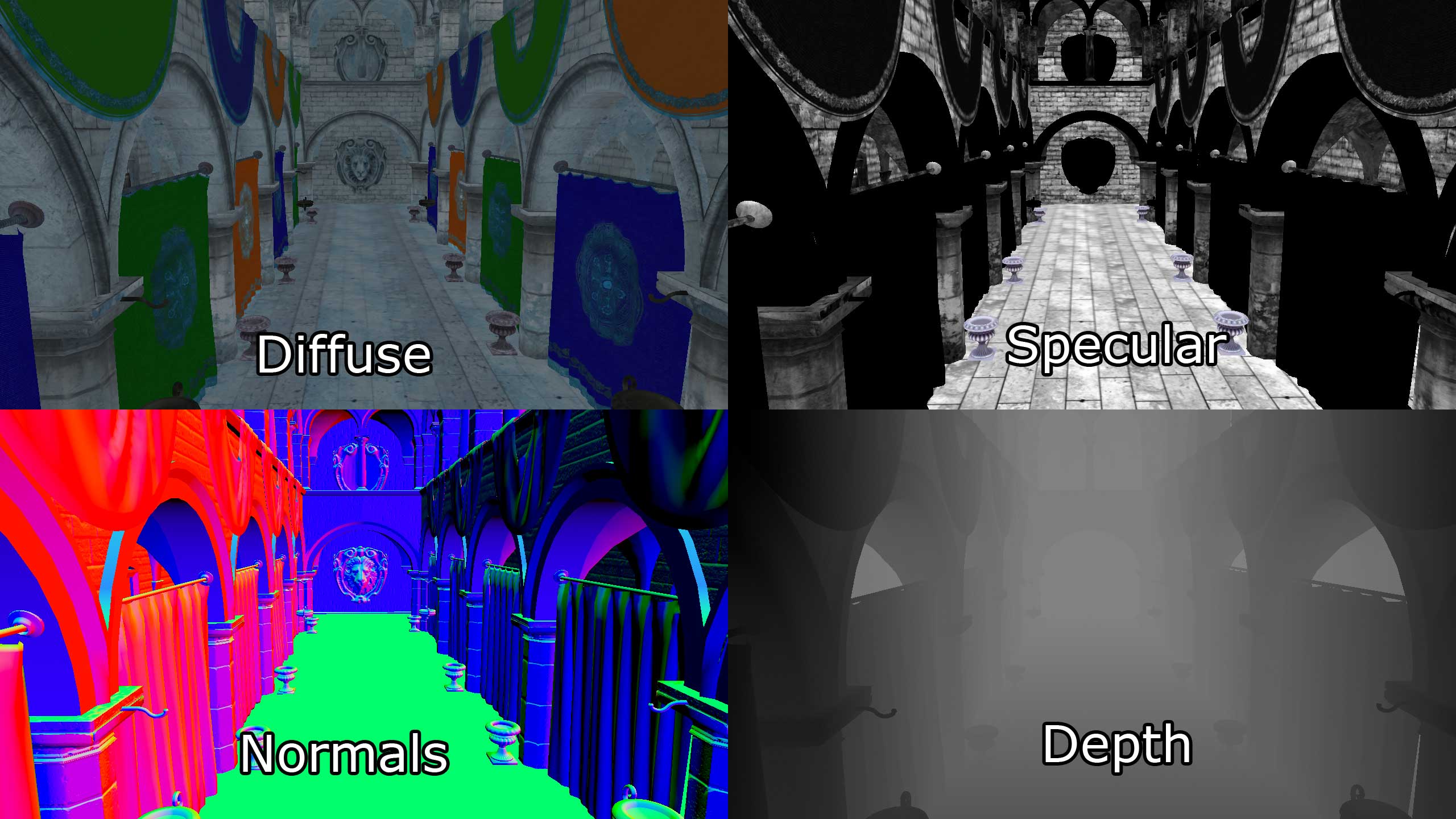
 somber acorn
should I expect dark areas to become darker after baking?
I'm lighting a cave scene and I set up the environment light so the shadowed areas are still visible, but they become way dark after baking