#archived-lighting
1 messages · Page 64 of 1
 mystic dew
you can try to place light probes near from wall corners, light sources and shadows outline

blue - window hole
yellow - point light source
orange - shadow outline from window
 rich meadow
That makes sense to me, I knew it was overboard. Thank you so much @mystic dew
 fickle needle
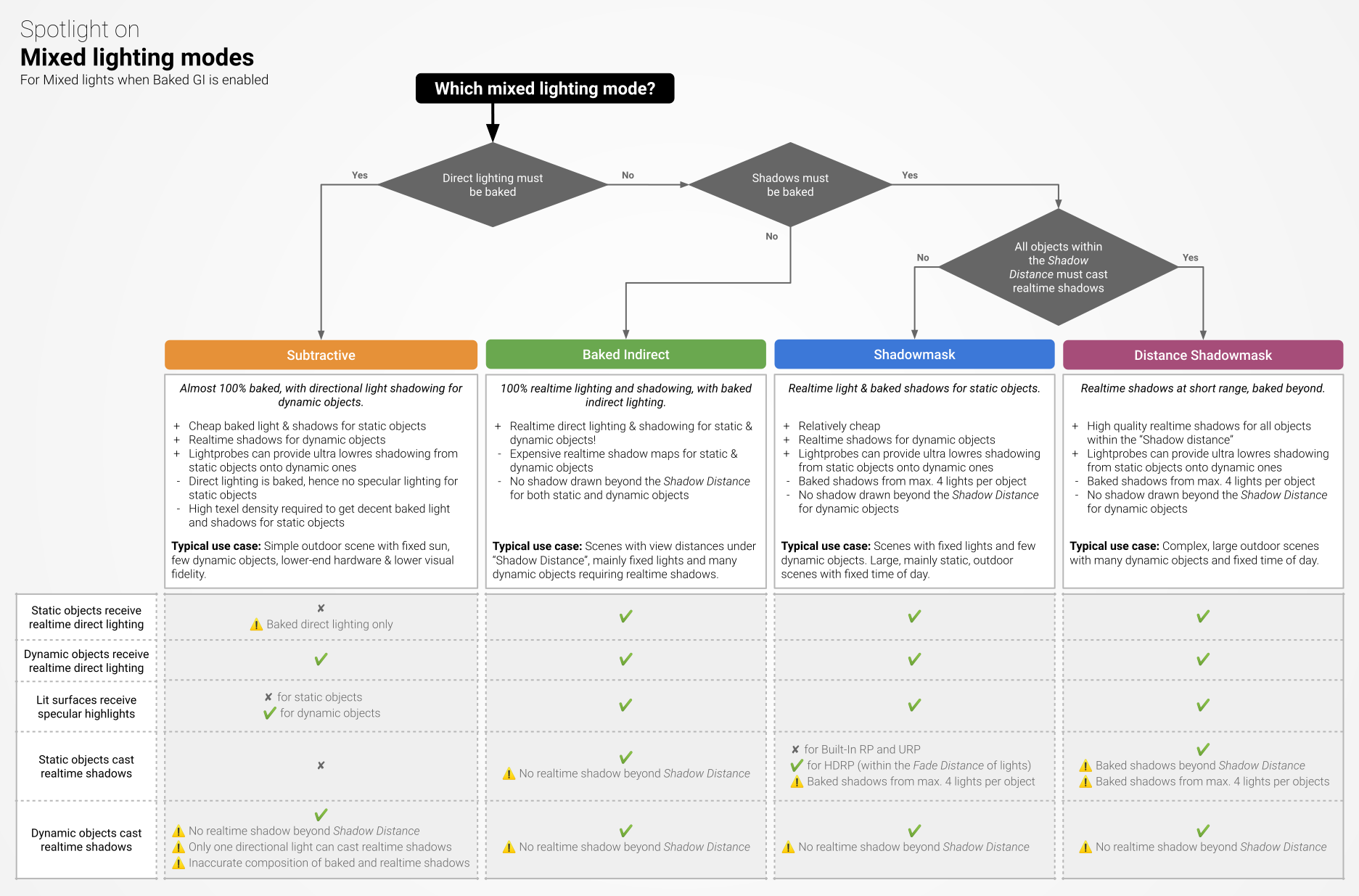
- You need to use shadowmasks if you want shadows over long distances without the cost, it'll switch from realtime shadows to baked shadows at a certain distance (if the building itself is dynamic, then I can't think of anything other then increasing shadow distance)
- Maybe use meshes such as cubes/planes and set them to shadowed only, and place them around to cover the bleeding
 maiden trellis
How can I make the lights not blend together, but still have them both affect shadows

 desert ruin
is there a way to have a high emission on a material without turning it solid white with a colored glow
 dense wing
it will not be quite good performance as a single probe also takes a lot of fps drop
 rapid kestrel
Hi, I have a wall represented by one plane, so only visible from one direction. When baking the lightning I get these weird lightning artifacts. Any ideas how i can fix this?


 rocky peak
@rapid kestrel did you make sure to "generate lightmap uvs" on that wall object?
 nocturne dock
Hello! Anyone know how can I make the light be shown on white surfaces, like it does on all the other ones? Like you can clearly see the light on the red blocks... but not so much on the white ones..
 rocky peak
nocturne dock
Hello! Anyone know how can I make the light be shown on white surfaces, like it ...
rocky peak
nocturne dock
Hello! Anyone know how can I make the light be shown on white surfaces, like it ...
Try turning the white blocks gray-ish. To see if it provides a contrast
 stable patio
rapid kestrel
Hi, I have a wall represented by one plane, so only visible from one direction. ...
stable patio
rapid kestrel
Hi, I have a wall represented by one plane, so only visible from one direction. ...
Try enabling Double Sided GI in material properties, it should fix your issue
 rich meadow
is there a way to create a light probe group without it attaching itself to my other groups or is this just how it works?

 eternal bay
Lumens are a second-order unit and thus scale by surface area
More specifically, they scale by solid angles (https://en.wikipedia.org/wiki/Solid_angle) - steradians are the unit you technically want, as they are a measure of how much "surface area" is present on a distanced sphere from a perspective point
In geometry, a solid angle (symbol: Ω) is a measure of the amount of the field of view from some particular point that a given object covers. That is, it is a measure of how large the object appears to an observer looking from that point.
The point from which the object is viewed is called the apex of the solid angle, and the object is said to s...
 crude fox
So, 10x bigger would basically be 100x lumens?
eternal bay
that rough heuristic should work, but remember that "bigger" is defined by perspective arc
if it covers 10 times the area on a hypersphere projected to the distance of the object's surface, then yes, exactly that
crude fox
Ah, that does seem more realistic for a bulb that close.
 eternal bay
just checked on wikipedia- yep, luminous flux is defined in terms of steradians
1 cd · 1 sr = 1 lm
effectively, lux is defined by how much light comes from a source to a point- and game lighting systems extrapolate that point-measure to account for pupils not being a point-receiver, but an area; think of it like how you can't measure instantaneous velocity, but you can use a known value of it times a timespan to produce a distance
(because the amount of photons hitting a point is always zero / infinitesimal, but the amount passing through an area may be positive)
(given a point, unless there is already a photon at that point, it will never have a photon at that point- because Real Numbers are messy that way)
crude fox
It definitely looks more real for the size it's meant to be, but maybe a bit too bright?
 eternal bay
that looks to me like a 100W lamp at that distance given the eyes are adapted to the environment
try the same image but with SSGI enabled, to simulate pupil contraction; the environment should dim, and the objects should look "realer" to what you'd expect from the lamp
crude fox
It's 25w
eternal bay
a 100w table lamp at "normal" scale should be about 750 lumens
220W is almost unheard of in table lamps
ahhh- yeah, that should be about 250 lumens at real scale
crude fox
220 was the lumens not the watt
eternal bay
Hm. Try the SSGI suggestion, and see what happens
if it's not that, then you may be using a non-PBR shader on your geometry on the desk there
alternatively, you've loaded specularity maps that are just fully white...
crude fox
I can't tell what ssgi is doing
eternal bay
super-simplified, SSGI takes the average brightness on the screen and tries to keep it at a set level
it's kinda like what your eyes do- they try to keep the amount of incoming light constant by dilating and contracting the pupils
 crude fox
I can't at the moment. DM?
eternal bay
sure; just trying to avoid clutter until we have a solution to present
fickle needle
SSGI needs to be activated in camera frame settings as well.
 visual belfry
What lighting settings should I have so a bake takes about 1 minute with an RTX 2080?


Setting everything back down to default results in discrete lighting (also changed back to GPU)


Aha, so having a plane scaled by 10 caused this. Because the UV was stretched over a larger surface, the lightmap resolution scaled with it
visual belfry
fixed the light banding issue by disabling "compress lightmaps" All other settings are default (besides being set to GPU)

 versed ginkgo
Im using Realtime GI, and I've got a problem with indirect lighting looking different in project view and build...
in playmode everything is bright enough and color balance is good, after building project light is darker and as you can see in the picture it's supposed to be yellowish (as light source temperature) but it's white...
Is there a solution for this problem?... It has to look the same as in playmode.
 visual belfry
do you have skybox enabled in editor?
versed ginkgo
yes
 formal veldt
I have a GUI element that is effected by lighting, however it doesn't seem like it's affected by the shadows cast by that lighting
which I want it to be

you can see here it's dark
the gun

and here it's lit because its near a spot light

but when I step into the shadow cast from that spot light its still bright
 valid warren
how do I assign the output texture of a reflection probe to a cubemap input for a material? When I use material.SetTexture() with a regular cubemap it works fine but I can't seem to get it assigned to the output of the reflection probe (the slot in the material inspector stays empty). The reflection probe is set to render realtime every frame and a reflection shows up in the preview window.
formal veldt
ok I think it maybe has to do with normal maps
my GUI element has a normalmap shader
but I dont think shadows affect normalmaps? idk
will I have to edit the shader or can I apply the global light level on top of this somehow
formal veldt
is it possible to darken a Canvas element when it's in shadow?
 cursive coyote
I'm having some trouble with the 2D lighting, I've set the shadow intensities and setup the shadow caster scripts but it doesn't seem to cast a shadow
 undone condor
formal veldt
is it possible to darken a Canvas element when it's in shadow?
undone condor
formal veldt
is it possible to darken a Canvas element when it's in shadow?
height, intensity, and overall placement
one sec
@formal veldt lets figure this out in vc
undone condor
formal veldt
just tell me what you mean by height intensity etc.
let me screen share in vc, you can be muted or whatever
formal veldt
I just wanna know what factors affect it
I have a sprite normalmap shader material if that's relevent
undone condor
formal veldt
I have a sprite normalmap shader material if that's relevent
its all about light placement
formal veldt
like how? its within the light range it's affected by the light itself already
it just treats shadows as if they were not there
undone condor
i need to see how your project works
formal veldt
its just a spot light and a Canvas set to Screen Space - Camera which has an Image with a custom shader
undone condor
i am quite stupid rn soo. sorry ask someone else
 elder dew
 sacred lynx
j
 fresh oracle
@karmic scarab Do you use global illumination?
 karmic scarab
fresh oracle
<@!740455745979416607> Do you use global illumination?
karmic scarab
fresh oracle
<@!740455745979416607> Do you use global illumination?
no
 karmic scarab
nah, didn't work
fresh oracle
It could be a model issue
formal veldt
anyone else have any ideas of how to make canvas elements affected by shadows?
 gilded cloak
i have this lighting effect on an ability of mine that's trying to simulate a flash of light after an explosion. im wondering how i can make the color stand out on it. i make the flash effect i started with a high intensity and then used leantween to scale the intensity down over like 1-1.5s, it looks okay, but it lacks color which i was hoping for
 fleet nimbus
i have an issue where my area lights aren't working at all
I have clicked on Generate Lighting in the Lighting window, still nothing
 main wolf
formal veldt
anyone else have any ideas of how to make canvas elements affected by shadows?
main wolf
formal veldt
anyone else have any ideas of how to make canvas elements affected by shadows?
1st option, you need to make the canvas mode to anything than screen overlay, then, you need to change the material to use shader that's affected by light and shadow
2nd option, you change the part that's affected by shadow into sprite, set it as camera's child, and change that sprite material so it's affected by shadow (I'm not sure if sprites are already affected by shadow or not)
formal veldt
main wolf
1st option, you need to make the canvas mode to anything than screen overlay, th...
I have it in screen space camera, with a normalmap shader. Will I need the shader to respect shadows or something? I dont know why it doesn't since it otherwise responds to all other light sources
 novel jacinth
trying to add lighting to my 2D game and it seems to be working out well except for when the player goes below the light source

when standing anywhere below, its as if the light isnt there

I assume its because of the normal vector of the sprite is facing away from the light source
but is there any way to "fix" this?
this is how the player is positioned btw

the sprite is perpendicular to the ground
novel jacinth
ok I figured it out by changing the normal in the shader
 void tusk
Anyone here that knows how to make Unity actually bake light? I'm like 2 days in and it's still stuck at 18% lol
rocky peak
void tusk
Anyone here that knows how to make Unity actually bake light? I'm like 2 days in...
it's a complex system with a lot of moving parts.
rocky peak
void tusk
Anyone here that knows how to make Unity actually bake light? I'm like 2 days in...
But if it were me, my first step to diagnosing why it's stuck would be to try to bake static only. No realtime GI
and of course bake at crappy quality settings, just to see if it can complete
void tusk
I'm baking ultra crappy settings currently
I tried using both the CPU (I have a Threadripper) and GPU (RTX 3080ti)
rocky peak
What version of unity?
void tusk
2021.2.6f1 though the problem persists in older editors too. Not really sure how to troubleshoot as it won't bake even with said scene being empty lol
rocky peak
void tusk
2021.2.6f1 though the problem persists in older editors too. Not really sure how...
Okay let's start on a fresh scene. For science.
void tusk
Fresh scene works
rocky peak
1 ). What is your Direct Light set too? Mixed, Realtime, or Static?
void tusk
Realtime
void tusk
Yes, but you still need to "bake" realtime lighting
rocky peak
no it's the opposite - realtime is calculated at runtime
"static" is baked
but has zero interaction
void tusk
enabling this requires baking
 rocky peak
void tusk
enabling this requires baking
rocky peak
void tusk
enabling this requires baking
Do you know what "realtime lighting" is? Have you read the documents?
and are you sure you need realtime?
void tusk
It literally says precomputed realtime GI in the documentation
Did you read it?
You need to calculate it
rocky peak
Yes. I've been working with Unity for close to a decade now
And I have successfully baked maps, both large and small
and without needing a threadripper 😉
void tusk
And I am thankful for your assistance despite being talked down to
rocky peak
No I'm not attempting to talk down to you, I am trying to help you
If you're brand new to map baking you really don't want to tinker with Realtime. Yet.
you want to gain mastery of static first and leave realtime off
just to get the hang of it
void tusk
But telling me that I don't know what Realtime GI is when I am watching the Unity tutorial on the matter saying you still need to generate lightning to use it is just weird
And the documentation reads that you still need to precompute it
By pressing Generate Lighting
rocky peak
Yes if you were certain you wanted realtime lighting. But can you tell me what case scenario you're doing that will require Realtime GI? Can you tell me what it's pros are versus 100% static baked or mixed?
can you tell me the cons fo it?
Can you tell me if you need deferred versus forward? and why/
void tusk
I would love baked lights but it won't bake
Which was my problem
Even with realtime disabled
void tusk
I have been stuck like this:
 rocky peak
mixed means it will bake static light on items that won't move
rocky peak
void tusk
I have been stuck like this:
Yes and when I was starting out I had the same problem - it wouldn't move past a certain point. I thought Unity was broken.
But it was me. I didn't udnerstand what I was doing
Turns out the rendering/lighting system is not straight forward
you have to make sure you set everything right to work in proper cooperation
void tusk
Yes, but there isn't exactly a lot of complications when having a single directional light set to realtime while point lights are set to baked
The only reason I am wanting baked point lights is because there is a per mesh limit on point lights
rocky peak
Well I thought the same too until I got better acquainted with the system
void tusk
Meaning you can only have a maximum of 1-8 lights affecting the same mesh
Including terrain
Because it is too expensive with more passes anyways
rocky peak
yes. And then that changes too, if you pick deferred versus forward rendering
void tusk
Deferred breaks my underwater rendering shader
rocky peak
And then each light has a different mode - mixed, realtime, and baked
void tusk
Yes, and therefore I have point lights set to baked
rocky peak
void tusk
Deferred breaks my underwater rendering shader
Forward it is. You can only have 4 Realtime ilghts
Or, last I checked, it was four only
rocky peak
void tusk
8 if you change pipeline settings
Are you targeting mobile or crappy computers as your platform? Or webGL?
void tusk
Nope
rocky peak
then you should be good
Okay - in a new scene, set your directional to mixed
this means it will grant realtime lighting to active objects, but also baked lighting to static objects
You can make yourself a 3D Plane and 3D cube as an example
Highlight your 3D Plane and 3D cube and check "static"

Objects not chcked as "static" will be considered "live" and will not get a baked map
void tusk
I really appreciate that you are breaking it down like this but you are genuinely mistaking the situation I guess
rocky peak
void tusk
I really appreciate that you are breaking it down like this but you are genuinel...
ahh well if you're feeling this doesn't help then I wish you luck
void tusk
You don't need to check static as long as you check contribute GI though btw
rocky peak
Objects not casting a light source, do not need to contribute a GI
rocky peak
My friend I'm trying to help you. You don't want EVERYTHING in your scene to be realtime GI
that is why you can't finish a bake
void tusk
If you uncheck contribute GI your objects won't be included in baked lightmaps
rocky peak
if you have a house, and it never moves and never changes lighting, you want it static only
if you have lights that flash or change very fast- they can be realtime, but not baked. They will use light probes
void tusk
When you check Static it will always check contribute GI
rocky peak
if you want somethign that slowly changes lighting over time- like a sun in the sky or apulsating light, then you can calculate Realtime GI on it.
void tusk
So I was just pointing out the oxymoron in saying check static but not contribute GI when checking static by default checks contribute GI
And the documentation on contribute GI says it is required to for it to be included when baking lightmaps
rocky peak
Tell you what- how advanced are you with Unity? Have you been on Unity Learn yet?
void tusk
Yes, I am quite advanced with Unity
Which was my point
I have never had issues with the lightmapper previously
rocky peak
I see.
void tusk
And for this one map it will not bake at all
rocky peak
You've baked succesffully before then?
void tusk
Like zero progression
Yes lol
There is a difference between a bake taking a long time
rocky peak
Okay in that case if you're advanced then
ensure you've added lightmaps to all your items
void tusk
And having 0 progress after a day of baking
rocky peak
if you forgot it will frag your system
Then check your UV Charts in Scene View
Check for UV OVerlap and check your texel density
As needed, adjusty our Lightmaps to be smaller/less quality until the system stops fragging
void tusk
Currently can't select UV charts in scene view as it's not baked yet
Currently I have them all set to 0.01 scale and verylow resolution
I have absolute terrible settings and it simply won't bake
rocky peak
Uncheck Realtime Globall Illumination. Only check Baked Global Illumnation with Lighting Mode set to Shadowmask
rocky peak
even on a scene with just a cube and just a plane?
void tusk
No, baking just a plane and a cube works fine. Adding a single terrain breaks it though
rocky peak
How big is your terrain?
void tusk
1024x1024 with lightmap scale set to 0.025 and lightmap params set to Very Low
rocky peak
alright and your directional Light settings?
void tusk
Mixed currently
It'll be stuck like this
You might be thinking to just let it wait

No effect sadly as I did that overnight lol
rocky peak
No. My dinky thinkstation can bake one terrain, one plane, and one cube in five minutes flat
So yours shoudl too
with a threadripper

Clear your GI cache
for science
void tusk
If I use a third party lightmapper called Bakery, it bakes the lightmap perfectly in 3 minutes flat. But the asset is not compatible with URP12 yet
rocky peak
void tusk
If I use a third party lightmapper called Bakery, it bakes the lightmap perfectl...
Oh URP... you own my soul. And yet do not do enough...
void tusk
And the reason I upgraded to a newer Unity version in the first place was a fatal memory leak when adding more than 4 layers to the terrain
100% reproducable so I made a repro case and submitted
rocky peak
void tusk
And the reason I upgraded to a newer Unity version in the first place was a fata...
Unity's terrain system could use a facelift
void tusk
And they said it was fixed and coming in the next bugfix patch and that was 3 patches ago
void tusk
Giving it a go now
rocky peak
void tusk
Giving it a go now
to be clear- on the basic scene or on your target scene?
void tusk
Clearing the GI cache should clear project wide
rocky peak
void tusk
Clearing the GI cache should clear project wide
yes but I'm curiuos where your attempting to bake
If you can pull it off in a basic scene, right, but still no go in your target scene, it might mean corrupt UVs
or at least, I've had that issue happen to me
void tusk
Well I do have overlapping UVs on some objects but that has never caused this issue before
I can disable those and see if it helps
By choice in case you were wondering
rocky peak
void tusk
Well I do have overlapping UVs on some objects but that has never caused this is...
Overlapping shouldn't break everyting.
but bad corrupted data from a modeler who put shitty UVs in COULD do it
and I have had a situation where I've had to turn off a bunch of objects, and literally hunt down a culprit mesh
Inefficient yes. But rare, thankfully
void tusk
But it shouldn't matter if they are disabled though?
rocky peak
if they are turned off and not in the scene, the corrupted UV data will not break it
overlapping UVs are not he same as corrupted
overlapped UVs produce shadowy artifacts but you should still finish a bake.
void tusk
Hmm clearing the GI cache is at least looking like it did something
rocky peak
void tusk
Hmm clearing the GI cache is at least looking like it did something
let's hpoe that was it then
it filled up it's cache and couldn't proceed
Like dropping windows down to less than 8GB on HDD. - breaks weird things
void tusk
Sounds unlikely as it was at like 1.5gb only while the cache size is set to 128gb
rocky peak
void tusk
Sounds unlikely as it was at like 1.5gb only while the cache size is set to 128g...
well that would be a shame if its still not fixed, and is unable to bake a terrain
my thinkstation can bake a default terrain with a single directional light set to mixed and do it in five minutes or less
void tusk
Meanwhile I have a threadripper 3970x and an rtx 3080ti, 128gb ram and a kingston fury 4TB m.2 ssd and can't prevent Unity from crashing and burning when performing basic tasks
rocky peak
void tusk
Meanwhile I have a threadripper 3970x and an rtx 3080ti, 128gb ram and a kingsto...
something does certainly seem wrong with that
depending on how this acts, may require an inspection of whether Unity is corrupted. OR possibly a driver fail on the GPU
void tusk
It bakes the terrain now at least
rocky peak
void tusk
It bakes the terrain now at least
then perhaps something was corrupted in the GI Cache - even though it was not full, it was not capable for some reason?
void tusk
But won't bake the target scene. So something is corrupted in relation to that I guess
Gonna have to enable gameobjects one by one sadly
rocky peak
void tusk
But won't bake the target scene. So something is corrupted in relation to that I...
That's horrible news but information you now have that you didn't before
try adding the terrain from the target scene into a new scene and baking by itself
see if that creates a break
void tusk
 rocky peak
so now it's a question of hunting down where that corrupted data is
I do recommend baking the target terrain in a new scene first
in case something is corrupt on that
void tusk
This is a fresh scene because that was one of the first things I tried
after the whole terrain issue previously
rocky peak
I see
void tusk
If you got that memory leak once it would brick your project and scene
rocky peak
so fresh scene + default terrain: Bakes.
fresh scene + target terrain: Breaks.
do I have that right?
rocky peak
that's good news too!
At this point, I'd start with my static objects. I usually organize them under an empty called "STATIC ONLY" to make it easier
and I'd go through to see if everybody was set to static like they were supposed to be
and I'd also check that the meshes in question have "Generate Lightmap UVs" checked
void tusk
Phew I have way too many objects to only arrange them under one object. But I am going through the list now

All the lights are set to baked though in case you were wondering
rocky peak
Good to konw
know*
you probably want at least one directional set to Mixed
but I highly suspect you've got a 3D Mesh in there with corrupted data, and when Unity gets around to baking it, it shits the bed.
Or you have a 3D mesh that does not have "Generate Lightmap UVs" checked
Hmmm I just tired baking on a cone-primitive prefab without "Lightmap UVs" checked. It hsouldn't break a bake cycle. Just has ugly UV artifects
void tusk
Any way to search for fbx's in the project folder though? to make sure I get everyone
.fbx or t:fbx does not work
 void tusk
Got it
rocky peak
Go through and see that Generate Lightmap UVs is available
void tusk
Yeah on it
rocky peak
that being said I just baked in URP starter scene with custom mesh, and it does bake. Just looks awful

so something else may be wrong in the scene
void tusk
Hah, just wait until you try to build I guess
void tusk
I had an issue in 2020.3.20 something where it took hours to build the default scene
rocky peak
I see.
void tusk
It was running 100 shader compilers on my CPU taking forever to compile variants
Not 100 but something pretty close to that
 wicked leaf
So I've been doing the lightning tutorial from unity creative core pathway and on the indoor lighting part they say (more or less): create emissive material, apply it to an object. Set workspace as specular, enable emission, choose HDR colour and set intensity at 2.5. Now click on the draw mode and choose Emissive. You can see that the object with your emissive material is marked as yellow to show you it's emissive.
Well that doesnt happen to me, nothing is shown in this view mode. Additionally whatever the whitish-colour I choose the object starts to 'glow' red and intensity changes randomly to values between 1-1.5. Latest Unity 2020.3LTS version. Anyone able to explain this to me?
Obviously I'm a newbie
Honestly the deeper into this tutorial I go the more everything breaks, after (seemingly) doing nothing else than what it said previously I bake a lightmap and everything is almost white with most of the shadows gone, not even talking about subtle reflections from other colourful lights
Oh and one time after setting objects to static like it said Unity tells me: itll take 8 minutes to bake it. Great, I go for a quick smoke, come back. Time left: 12 hours. I'm so lost lmao
comparison how it looks in the tutorial ready version vs mine

 rocky peak
wicked leaf
So I've been doing the lightning tutorial from unity creative core pathway and o...
rocky peak
wicked leaf
So I've been doing the lightning tutorial from unity creative core pathway and o...
Is this teh same version the tutorial calls for?
 modest flower
wicked leaf
Oh and one time after setting objects to static like it said Unity tells me: itl...
modest flower
wicked leaf
Oh and one time after setting objects to static like it said Unity tells me: itl...
its possible the renderer fell back grom GPU to CPU, as for WHY, thats a different issue, maybe you can reduce lightmap sizes, that usually solves it for me (but you bake more lightmaps this way)
rocky peak
They change tiny nuanced things between each Unity version and it's annoying.
modest flower
is this an "appropriate" way to use lightprobes? if not what is the optimal pattern for placing them (without additional plugins)

it works, but it takes a bit of time too do
 tribal lion
Any idea on this?, wheel spokes should be like the left wheel, not the right one, they are way to thick

They have the same materials, and settings on the mesh renderer
tribal lion
modest flower
is this an "appropriate" way to use lightprobes? if not what is the optimal patt...
I'd place them when there are obvious light or reflection changes and in between those to blend properly
wicked leaf
rocky peak
Is this teh same version the tutorial calls for?
the tutorial simply says Unity 2020.3, Im currently using the latest release so 2020.3.25f1
also worth mentioning that initially tutorial scene looked very similiar to the 'finished' one with the exception of shadows being ugly etc, things that I was supposed to fix as I go through the tutorial. And one time I just bake it and everything becomes white lol
tribal lion
tribal lion
Any idea on this?, wheel spokes should be like the left wheel, not the right one...
Lowering the shadow bias seems to do it
fleet nimbus
fleet nimbus
I have clicked on Generate Lighting in the Lighting window, still nothing
tried switching to Spot and that didnt work either
only point and directional does for some odd reason
 void tusk
Lmao, not exactly. But at least it finishes a bake now.. sometimes
If you try to cancel a bake you need to restart the editor
rocky peak
void tusk
If you try to cancel a bake you need to restart the editor
that's annoying
void tusk
80% of the time it just won't bake but 20% of the time with the same settings it will
rocky peak
void tusk
80% of the time it just won't bake but 20% of the time with the same settings it...
that is just bizarre
But sounds like a unity bug then
void tusk
Honestly in my eyes it's just standard Unity
rocky peak
For science, have you tested it in 2019? Can yout est it in 2019
void tusk
Like if I want I can still just make a new scene, add a terrain
add 5 layers to the terrain and paint a dot with all 5
and Unity will cry and crash
On a fresh project even
eternal bay
Crossposting from HDRP:
If anyone here has a thorough understanding of the lighting subsystem in HDRP, I have made a patch which allows you to render to separate pseudo-layers per-camera via the renderingLayerMask property, and haven't been able to get lights to not span the gap between masked layers. I'm hoping to make this viable for use, but my understanding of real-time lighting is limited at best.
https://gist.github.com/Dessix/14e6b3c8c0b73e1454d54db06e908c98
void tusk
rocky peak
For science, have you tested it in 2019? Can yout est it in 2019
Unity is just utterly broken for me idk
rocky peak
void tusk
Unity is just utterly broken for me idk
alright WEIRD thing to try. Do it for the science - right-click and run Unity as Admin. I'm guessing of course
void tusk
Already running as admin due to access problems on the harddrive previously
Preparing bake will just spam like this until I focus on Unity
Which will always return it to 0
and unfocusing Unity will return it to this state of completing many times over with no progress
rocky peak
okay... well last question - do you have more than 40GB of free space on her HDD? That causes weird Unity gremlins if it's not the case, @void tusk
void tusk
Have like 120GB left on that SSD
But I am getting OpenCL errors CL_OUT_OF_RESOURCES despite this clearly not being the case

 deft fiber
@void tusk Have you done test bakes in small, simple scenes?
Baked lighting is usually not preferred in large outdoor scenes because bake complexity and lightmap sizes grow immense
Or if you do it, only do it for terrain and light probes
If you still get issues baking with the simple test scene, I'd start troubleshooting hardware and driver problems on the SSD and GPU tbh
void tusk
deft fiber
<@!318408025230671884> Have you done test bakes in small, simple scenes?
Baked l...
What is my alternative?
I can't use global illumination and I can't bake lights?
deft fiber
Realtime lighting
void tusk
No, that does 100% not work at all
void tusk
deft fiber
Realtime lighting
 deft fiber
Enlighten is out of question?
void tusk
Isn't enlighten deprecated?
deft fiber
It's un-deprecated again on some versions and pipelines
void tusk
Gonna try it
void tusk
I can get it working with a test scene
Problem is that it is incredibly inconsistent in when it breaks
I can bake 5 times with the same settings and 4 will fail whilst 1 will succeed
I can gradually start with an entirely disabled scene, enable 1 by 1
and at some stage it breaks
so great, I have located the corrupted gameobject
deft fiber
Progress!
void tusk
Only even with that disabled it will break again on another gameobject
and it won't break at that same gameobject next time
So there is no definitive cutoff at where the lightmapper breaks
And there is no warning
Half the times I even try to start the lightmapper this happens:
deft fiber
Hmm, both with CPU and GPU baking?
void tusk
Yes sir
I use a Threadripper and an RTX 3080ti
If I use a third party lightmapper like Bakery
It bakes the scene in 5 minutes flat
Whilst Unity at best uses an hour
Sadly the third party is not compatible with newest URP etc
So it's not an option
deft fiber
void tusk
I use a Threadripper and an RTX 3080ti
ah, I mean it breaks with either? as you can't use both at the same time, right
void tusk
Yeah, it breaks with either
deft fiber
At least that confirms it's probably not an issue with those parts, which is good
rocky peak
void tusk
Yeah, it breaks with either
are you using any light probes?
void tusk
None
rocky peak
void tusk
None
Hmm. The forums say you can disable progressive updates. Have you done that?
void tusk
Yep
rocky peak
well damn
void tusk
I got it working once though so I have finished baking once, but I am not exactly itching to make any changes..
rocky peak
have you been consistently clearing your GI cache as well?
void tusk

Yeah
This result is good though so I'm happy with that
But I'll be in for the same shitstorm next time I want to bkae
bake
rocky peak
That's good ot hear but it's still frustrating because if you DO have a change - it's giong to be hard to implement
maybe next time, try going to the advanced filtering and turning off denoisers. For science
void tusk
I'll try @deft fiber s suggestion for trying Enlighten next time I think
Maybe that'll help
Even though I originally thought it to be deprecated
rocky peak
void tusk
Even though I originally thought it to be deprecated
I had heard the same too but at this point, you're not being done any favors with standard
deft fiber
I haven't tried its comeback version yet, no idea what it's like
 void tusk
It does
Urp 11
Current URP is URP 12
Baking with Bakery is super quick and good
But you get warnings that disable all realtime lighting
Including point lights on spells projectiles etc
Due to the lighting assets being incompatible with current version of unity
deft fiber
Hasn't 12 been out for quite a while?
void tusk
Problem is Unity rewrites the codebase for functions like this constantly which means sometimes it's a waste for asset devs to update
Until the next major x with x amount of features etc
 stable lichen
Is there a way to edit lightmaps in photoshop?
rapid kestrel
I have both static and dynamic object in the scene. When baking with 'Bake Indirect' all dynamic objects appear darker in comparison to the static object due to the indirect light acting only on static object. How can can an even lightning in the scene? Is the a way to increase the lighting intensity on dynamic object only to compensate the indirect intensity?
deft fiber
stable lichen
Is there a way to edit lightmaps in photoshop?
Lightmaps are stored in a folder as image textures when generated, I think they can be edited no problem
 alpine briar
How can i make my Baked lighting look more like my Realtime Lighting?
my realtime lighting is perfect but when i bake no matter what the settings it just looks like crap
deft fiber
alpine briar
my realtime lighting is perfect but when i bake no matter what the settings it j...
What do you mean crap? Usually people have the opposite problem
alpine briar
deft fiber
What do you mean crap? Usually people have the opposite problem
baked shadows look extremely soft
everything is darker
just doesnt look good
id just use the Realtime but this project is for mobile so i cant
deft fiber
alpine briar
baked shadows look extremely soft
Softness is determined mainly by the size of your light sources, and the resolution of the lightmap
Overall brightness usually doesn't change but I suppose you could make the lights brighter? Or increase exposure with post processing
alpine briar
deft fiber
Softness is determined mainly by the size of your light sources, and the resolut...
i tried upping the resolution of the lightmap but its the same
i also tried putting the intensity higher on the Directional Light thats lighting up the whole scene
just doesnt look good, ive been messing around with the settings for like 3 days but i just cant get it to look good i dont know what to do
deft fiber
The whole scene is not the issue?
alpine briar
deft fiber
The whole scene is not the issue?
wdym
deft fiber
alpine briar
wdym
sorry, misread
It's very hard to give any advice on this info alone
probably wouldn't hurt to share pictures of the realtime vs baked lighting
alpine briar
deft fiber
sorry, misread
It's very hard to give any advice on this info alone
probably wou...
alright one sec
alpine briar
Realtime @deft fiber


Baked
just looks darker and the shadows are just blurry in the Baked one
even if i put the lightmap resolution up
rocky peak
alpine briar
just looks darker and the shadows are just blurry in the Baked one
What shadow mode are you using? And what kind of a lightbox do you have?
alpine briar
im using Subtractive with Progressive GPU
rocky peak
alpine briar
im using Subtractive with Progressive GPU
Are you using a procedural skybox? Or something else?
alpine briar
its a HDRI thats basically just a gradient of white and grey
 rocky peak
okay - show me a picture of your Environment tab, under lighting
alpine briar
 rocky peak
alpine briar
rocky peak
alpine briar
Okay to get a better shadow color, try setting yoru Enviornment Lighting Source to "Color" and changing your Ambient color to a more skyblue-ish color. Something lighting anyway.
FYI: A good HDRi or EXR Skybox does wonders for baked lighting
On to the Shadow mode - For what reason are you using subtractive?
alpine briar
rocky peak
On to the Shadow mode - For what reason are you using subtractive?
Cheaper for mobile
this is a project for a mobile game
rocky peak
Are you on URP and Forward?
alpine briar
rocky peak
Are you on URP and Forward?
URP
it does say Forward Renderer when i go to the setting im using
rocky peak
alpine briar
gonna try changing the HDRI
Make sure you tell the Lighting tab to source colors from skybox
rocky peak
alpine briar
i just dont get why it looks so different to realtime
Baking is a complex, nuanced art
Also - the Unity Baker is kinda.. .well. Stupid.
Bakery does great things. But may not be compatible with your URP
alpine briar
Well im glad i got someone to point me in the right direction atleast
rocky peak
alpine briar
Well im glad i got someone to point me in the right direction atleast
Well don't thank me yet - let's see if I can solve the fuzzy issues
I don't always solve problems here. but sometimes I can nudge in a new/better direction
okay show me your Directional Light properties
 rocky peak
alpine briar
rocky peak
alpine briar
Is this Unity 2021?
rocky peak
Alright are your walls set to static, and baked?
alpine briar
rocky peak
Alright are your walls set to static, and baked?
Yeah
 alpine briar
u want me to go to Baked Lightmap?
rocky peak
yeah
alpine briar

even if i set the lightmap resolution to the max it still pretty much looks the same
rocky peak
alpine briar
Do you know what "resolution" you're viewing these at? For example, did you accidentally set yourself to "Very Low" ?
deft fiber
alpine briar
just looks darker and the shadows are just blurry in the Baked one
Honestly the baked version here to me looks... better? Or at least more correct
It's darker because the alley is occluded by its walls from being lit by the sky
The resolution is trickier, as realtime lights use much higher resolution shadow maps generally
I guess you could remove the darkening by not baking ambient occlusion
As you can see in that debug view, lightmap resolution is not static across all surfaces, but it can vary
You could optimize and improve it by increasing the relative lightmap UV size of the walls that recieve high resolution shadows, but that could get ...manual
Still, objects have a "size in lightmap" setting somewhere I recall
alpine briar
deft fiber
Still, objects have a "size in lightmap" setting somewhere I recall
i maxed that out but it looks the same
rocky peak
deft fiber
Still, objects have a "size in lightmap" setting somewhere I recall
I believe it's on the "Model's" settings
Nope I lied
You can set that on the instance of the mesh in the scene, my pardons
deft fiber
Did you yet show the settings you use to bake?
alpine briar
deft fiber
Honestly the baked version here to me looks... better? Or at least more correct
...
i understand but i just dont want this mushy look, im using the realtime as reference
rocky peak
First, did you confirm what settings you're on? Low-Quality versus High-Quality?
alpine briar
rocky peak
First, did you confirm what settings you're on? Low-Quality versus High-Quality?

these are the settings im using
 deft fiber
Lightmap resolution of 15 and max lightmap size 512 are rather low
Reasonable, but not quite maxed out
alpine briar
deft fiber
Reasonable, but not quite maxed out
no no i mean i maxed it out in a previous bake
not this one
rocky peak
My screen might be slightly different than yours but do you mind going to your project settings, and showing me what your "Quality" screen looks like

 left helm
Does the generated lighting save any kind of metadata of what lightmap settings were used? I baked my lighting a long time ago but did not save the lighting settings, I want to know the environment lighting ambient color I used in particular
 alpine briar
rocky peak
My screen might be slightly different than yours but do you mind going to your p...
alpine briar
rocky peak
My screen might be slightly different than yours but do you mind going to your p...
 rocky peak
show me above that too - the part where all the "Quality" settings are listed
deft fiber
Realtime shadow resolution is based on the distance you're viewing it at, so it can be functionally infinite
Baked shadows are limited to the surface's size in lightmap, that's pretty fundamental
rocky peak
left helm
Does the generated lighting save any kind of metadata of what lightmap settings ...
If you have the original scene with the primo baked lighting you can open it up and look at your light rendering tab
left helm
I don't think I have the original scene, but ill take a look if I can find it, I assume there is no other way to check these settings otherwise, thanks!
deft fiber
I think the only real workaround is to have the walls that need hi-res shadows have a bigger size in the lightmap
But it is kinda weird if it stays blurry even when you increase the resolution as you say
rocky peak
deft fiber
But it is kinda weird if it stays blurry even when you increase the resolution a...
that's part of why I was wondering if they stuck themselves to "Low-Quality" in the Quality screen. IIRC, you can "double-click" the quality you want to view the game at, and if you click "Very Low" it will mimic what Very Low looks looks like (aka, will have crappy bakes)
deft fiber
this is at texel density 40 and max lightmap size 1024, a kind of a worst case scenario with thin shadow casting objects but it doesn't look terrible
 alpine briar
rocky peak
show me above that too - the part where all the "Quality" settings are listed
alpine briar
rocky peak
show me above that too - the part where all the "Quality" settings are listed

you mean this?
deft fiber
texture quality here also affects lightmaps
 alpine briar
rocky peak
So you're on Medium - is that the default medium from Unity?
alpine briar
rocky peak
So you're on Medium - is that the default medium from Unity?
no its
alpine briar
alpine briar
this one
deft fiber
alpine briar
this one
That one doesn't have the texture quality setting
rocky peak
alpine briar
this one
Yeah I was gonna say - you keep showing me your render pipeline info
but your quality settings override the render pipeline in some areas
and you might have your Shadow Resolution set to "Low Resolution" only in the quality settings
you do not have a "High Quality" or "Ultra" setting in your game, which is likely by design if you're targeting Android/Mobile
alpine briar
rocky peak
you do not have a "High Quality" or "Ultra" setting in your game, which is likel...
i just removed those as i didnt need them
deft fiber
"Shadow resolution" is just for realtime shadows, but yea
Lightmaps are considered ordinary textures
rocky peak
deft fiber
"Shadow resolution" is just for realtime shadows, but yea
Lightmaps are consider...
ahh my pardons
alpine briar
sorry im really beginner to Lightmapping and Baking and all this
deft fiber
It can be quite confusing! I have no idea why quality settings are split between the quality tab and pipeline assets
rocky peak
deft fiber
It can be quite confusing! I have no idea why quality settings are split between...
Well in that case I suppose tinkering with the Adv. Filtering could help/
but yes - setting the walls with the shadows to a larger size on the Lightmap atlas
alpine briar
rocky peak
but yes - setting the walls with the shadows to a larger size on the Lightmap at...
it says "Object's Size in lightmap has reached the max atlas size"
rocky peak
This is my progressive - 12 minutes done from baking but I changed the Baked Shadow Angle a touch - set the Plane size to 2, and then added Adv. Filtering and it cleaned up pretty well. It's not even finish with the bake and is looking to be pretty sharp
 deft fiber
alpine briar
it says "Object's Size in lightmap has reached the max atlas size"
deft fiber
alpine briar
it says "Object's Size in lightmap has reached the max atlas size"
So, what's the max lightmap size currently
rocky peak
alpine briar
it says "Object's Size in lightmap has reached the max atlas size"
Yes you are running into the "riddle" of lightmap baking.
alpine briar
deft fiber
So, what's the max lightmap size currently
the max i can set it to is 4.5
deft fiber
here's the earlier scene with lightmap resolution / texel density 80, still 1024 max lightmap size
 deft fiber
alpine briar
the max i can set it to is 4.5
deft fiber
alpine briar
the max i can set it to is 4.5
I mean this

So as you can see here, it's the lightmap resolution / texels per unit that's mainly responsible for how crisp the shadows are
It can't be maxed out, you can increase it until unity dies
rocky peak
deft fiber
It can't be maxed out, you can increase it until unity _dies_
but please don't do this. lol
alpine briar
deft fiber
I mean this
i put it up to 4096 and baked the lighting and it still looked the same
deft fiber
alpine briar
i put it up to 4096 and baked the lighting and it still looked the same
With what lightmap resolution / texels per unit?
alpine briar
so i just discarded that as not a part of the problem
deft fiber
This is a function of multiple variables
alpine briar
deft fiber
With what lightmap resolution / texels per unit?
15
alpine briar
This is for a mobile game with a big map thats why im trying to keep it low
as the mb size racks up quickly
deft fiber
It does
rocky peak
alpine briar
as the mb size racks up quickly
well then again, you're running into the Baking riddle.
You want it to look good? that means a BIG texel st
alpine briar
rocky peak
well then again, you're running into the Baking riddle.
You want it to look goo...
i dont mind putting the texel size up
rocky peak
So what is going to happen here is a "balancing act". You need to figure out how much is "just enogh" that you're willing to live with
rocky peak
alpine briar
i dont mind putting the texel size up
Also, keep in mind that on a small screen, you may not see those blocks
The screen you're going to view this on may be too small
so you can get away with slightly blocky shadows
alpine briar
rocky peak
Also, keep in mind that on a small screen, you may not see those blocks
Yeah but i failed to mention this isnt like a phone game
i say Mobile as in im running it on the Oculus Quest 2
rocky peak
alpine briar
i say Mobile as in im running it on the Oculus Quest 2
Ahh plot thickens
alpine briar
rocky peak
Ahh plot thickens
Haha
deft fiber
Lightmaps aren't free
sometimes they're cheaper than realtime lighting, even on mobile
But you have to figure out where the bottleneck of your platform is and find the best compromise of settings
rocky peak
Quest 2 is more adv. than a simple phone - it's got some sharp processors
Patchi is on point (as usual)
deft fiber
You could up the texels per unit, see how it looks, see how it runs
rocky peak
Although Quest 2 is a "mobile" platform, it's not a phone and you can get away with some stuff and use bigger texels. OR even use a few more real time lights believe it or not
alpine briar
deft fiber
Lightmaps aren't free
sometimes they're cheaper than realtime lighting, even on ...
No no i get that but this is just 1 level of many levels, that means my lightmaps are going up to 200mbs per level
alpine briar
rocky peak
Although Quest 2 is a "mobile" platform, it's not a phone and you can get away w...
True true i was running with Realtime at like a good 60fps but 60 isnt good enough for VR
rocky peak
alpine briar
No no i get that but this is just 1 level of many levels, that means my lightmap...
You may want to pick smaller levels then, with real time lighitng
rocky peak
alpine briar
True true i was running with Realtime at like a good 60fps but 60 isnt good enou...
truth
alpine briar
rocky peak
You may want to pick smaller levels then, with real time lighitng
Quest 2 headsets have up to 128gb so i should be fine
rocky peak
But forward rendering URP can do 4 real time lights
deft fiber
alpine briar
No no i get that but this is just 1 level of many levels, that means my lightmap...
That's all part of the balancing
Lightmaps take disk space, need to be loaded from disk and kept in vram
Realtime lights are heavy on the GPU
rocky peak
What kind of graphics are you leveraging? Are you trying to do somethign that looks like Dr. Who Edge of Time? Or something more like "Bait!" ?
alpine briar
rocky peak
What kind of graphics are you leveraging? Are you trying to do somethign that lo...
in-between
deft fiber
alpine briar
should i just experiment with the texel size?
Yes, do experiment
You won't get rid of the blurriness until you give it the resolution it needs to work with
And you won't know what solution has better performance until you test them on the target platform
Optimization based on guesstimation is a big trap
You end up doing a lot of work that amounts to nothing
rocky peak
deft fiber
Optimization based on guesstimation is a big trap
I feel called out...
deft fiber
rocky peak
I feel called out...
Been there 🤣
rocky peak
alpine briar
in-between
Anyway the Dr. Who game is 5GB to get the maps it does have
But in any given level, you'll notice it's pretty controlled on the lights
While I don't have the game project in front of me (... and let's face it it was probably made in Unreal, not Unity), well I bet it has one directional light for the sky, one light around the character, and then it probably bakes the rest
alpine briar
are those 2 the only VR games you've played? @rocky peak
rocky peak
alpine briar
are those 2 the only VR games you've played? <@!772925429589606441>
No they were just a few examples I gave
I've played a lot of VR games
Was there one in particular that you had in mind?
alpine briar
rocky peak
Was there one in particular that you had in mind?
No no but i wouldnt say they're great examples considering they're both just more of "experiences"
rather than games
rocky peak
alpine briar
No no but i wouldnt say they're great examples considering they're both just mor...
All games are experiences.
Some are just more focused on the mechanics (beat saber) and some more on a story and atmosphere (The Wolves in the Walls, Dr. Who, Moss, name it)
But by all means - tell me what game you'd say is more similar to yours. "Less experience" and more "game"
alpine briar
im just surprised your not using Half-Life: Alyx or Boneworks or Walking Dead S&S and such as an example as people usually do haha
its great to see someone talk about the other games too
Boneworks was made in Unity tho which is interesting
rocky peak
AHh well I'm an off-beat kind of character.
though I should admit now I haven't done Boneworks yet
I'm looking at the preview though
alpine briar
have you played the other 2?
rocky peak
I'll be my let foot it's primarily baked
rocky peak
alpine briar
have you played the other 2?
Tried Walking Dead and I wussed out. I used to be fearless but not anymore. I also wussed out on FNAFs.
I've got HLA in the hopper just need to actually go through it some more
alpine briar
rocky peak
Tried Walking Dead and I wussed out. I used to be fearless but not anymore. I a...
Oh man going through that cemetery tunnel (forgot what its called) is creepy as hell
game makes you do it many times too haha
i think the game was made in Unreal tho
rocky peak
Yeah pardon me while I NOPE tf out.
lol
I couldn't even finish watching the miniseries let alone play the game

this soft squishyiness looks baked to me
alpine briar
Oh yeah the lighting defo is baked in Boneworks
they were gonna release it with realtime lighting
but they realized it was too demanding
rocky peak
Boneworks is 20Gb
alpine briar
theres some gameplay of it out there with realtime lighting
rocky peak
alpine briar
theres some gameplay of it out there with realtime lighting
I bet the Adeno can handle it
WD: S&S is 40Gb
and WD looks like UNreal
rocky peak

Unreal Engine
Skydance Interactive's Peter T. Akemann provides an overview for The Walking Dead: Saints & Sinners’ combat system.
I'm assumign so
at least, I assume that's why they have this guy on the Unreal Engine blog
anyhow. Back to lighting
keep us posted on the progress of your game and don't be afraid to clock a few Texels in your maps. Dr. Who is 5Gb. Boneworks 20GB. Surely something in between the two shouldn't turn an eye.
alpine briar
rocky peak
keep us posted on the progress of your game and don't be afraid to clock a few T...
Yeaah but Boneworks is a PCVR game haha
lots more space there
deft fiber
My test room with the ridicuous 80 texel density was 5mb
rocky peak
alpine briar
Yeaah but Boneworks is a PCVR game haha
ahh
either way I don't think you should worry yet
alpine briar
@rocky peak i think i just figured out the issue
i was increasing the Lightmap Resolution
but not the Max Lightmap Size haha
rocky peak
alpine briar
but not the Max Lightmap Size haha
that's pretty much what Patchi said
alpine briar
i dont need everything to be at a high resolution tho
only some of the walls need those sharp shadows
the rest are just normal
should i manually go through the non important ones and decrease their resolution? they look the same either way
 limber moth
Ive been having this weird issue with spotlights, they have been coming out as these series of dots, when I create a new spot light this happens as well, and my old ones that were placed before had the same issue

Is this a common issue? Because I do not know whats causing it
alpine briar
okay so im finally starting to get that detail, but my lightmap size has gone 4x @rocky peak @deft fiber

about 600mb just for this level
Actually i just realized
i can keep all the lighting for everything the same and just increase the important parts
rocky peak
alpine briar
i can keep all the lighting for everything the same and just increase the import...
If it's the strategy I'm thinking of, I've employed it. I've slammed "crap" lightmap settings on on most everything, and then only gave "high" resolution treatment on select things.
Since this is a wall, you might even entertain leaving JUST that wall as "realtime" lighting, so you get crisp shadows. And the rest as baked. There's a natural delineator at the edge anyways
alpine briar
rocky peak
If it's the strategy I'm thinking of, I've employed it. I've slammed "crap" lig...
Yeah i tried leaving that wall as realtime
didnt look that great tho
this is working now tho
i put my max lightmap resolution too low
rocky peak
good deal
alpine briar
i am really grateful that you and @deft fiber helped me out
rocky peak
limber moth
Ive been having this weird issue with spotlights, they have been coming out as t...
I haven't seen this before, outside of someone using a Cookie
alpine briar
i was almost gonna give up on this whole lighting thing
have been trying to get it to work for the past few days and its finally going somewhere
limber moth
Yeah its really weird
alpine briar
btw my realtime lighting has this weird blue tint @rocky peak

but my realtime shadow color is just grey
do you happen to know why this is happening?
rocky peak
alpine briar
btw my realtime lighting has this weird blue tint <@!772925429589606441>
Realtime ambient/shadow lighting has a color link under Subtractive
rocky peak
alpine briar
btw my realtime lighting has this weird blue tint <@!772925429589606441>
and then the baked shadows has a color link under environment
I closed down my Unity project with the lighting in it, so you'll have to go check the Render > Lighting tab yourself
deft fiber
limber moth
Ive been having this weird issue with spotlights, they have been coming out as t...
Looks like the light is attempting to use a texture or a cookie that is somehow configured incorrectly, might be of wrong type, wrong clamping settings or something
alpine briar
rocky peak
Realtime ambient/shadow lighting has a color link under Subtractive
you mean like the "Realtime Shadow Color"?
limber moth
So how would I fix that, since a newly created light has the same issue
Only spot lights
rocky peak
alpine briar
you mean like the "Realtime Shadow Color"?
yes
alpine briar
Yeah thats on grey tho
rocky peak
alpine briar
Yeah thats on grey tho
try changing the color
try matching them to be the same
 alpine briar
rocky peak
try matching them to be the same
alpine briar
rocky peak
try matching them to be the same
ah alright
rocky peak
.o
alpine briar
Also how does Ambient Occlusion work? no matter what setting i put it on it doesnt do anything to my scene
deft fiber
limber moth
Only spot lights
Are they using light cookies?

 deft fiber
Cookie is not set to anything so that's probably not our issue
rocky peak
alpine briar
If you hover your mouse over the titles and leave it for a second, it should provide you with a pop-up/tool tip that tells you what it does
rocky peak
alpine briar
Also, at this point there's a few things you'll want to do if you really want to get good with the rendering system:
-
Open up the Unity Docs, and read about every field. Look up Ambient Occlusion, and what these contribution fields do.
-
You'll want to head to Unity Learn, sign up, and take their lighting courses (it's free). If memory serves, there is a "Making things look great In Unity" course, and an intermediate lighting course.
-
You'll also want to do a set of 100 set-ups, 100 push-ups, 100 squats, and a 10km run every single day too.
Okay that last part is a One-Punch Man reference 😛
alpine briar
rocky peak
Also, at this point there's a few things you'll want to do if you really want to...
Lol i cant do the 3rd step, if i do it i wont be considered as a game developer
deft fiber
alpine briar
what do these settings even do?
AO simulates soft shadowing of tight geometry
It's the reason why your alley is much darker with baked lighting
 alpine briar
deft fiber
AO simulates soft shadowing of tight geometry
It's the reason why your alley is ...
alpine briar
deft fiber
AO simulates soft shadowing of tight geometry
It's the reason why your alley is ...
i know what ambient occlusion is, but its not doing anything when i bake my lighting
scene looks the same when turning it on or off
deft fiber
Not with any simple slider, no
rocky peak
alpine briar
is there anyway i can make it
AO can be kicked into gear a few ways.
-
There is an AO texture map you can add to your individual wall textures. You can paint areas of the wall that will hardly ever get light. So, the mortar, as an example,.
-
Post Processing has an AO setting you can add on the fly.
-
AO only appears in the crevices where it's that much harder for light to reach it. So, if you're not seeing it, chances are your scene is just too bright
deft fiber
You can have more light, or more shadow via less light, but neither really increase the contrast of AO
It's a bit weird that AO is a separate bake, because it's practically all part of the same package
The alley is also recieving less sunlight, and less bounce lighting from the sun in turn
deft fiber
alpine briar
Oh, here the max distance looks to be so small it probably won't darken the whole alley
And usually it is somewhat small, a meter or two
alpine briar
deft fiber
Oh, here the max distance looks to be so small it probably won't darken the whol...
Whats like a starting point i could set it at?
Also can i use Reflection Probes on Mobile?
baked reflection probes
deft fiber
I have never made mobile projects but I haven't heard of such a limitation
deft fiber
alpine briar
Whats like a starting point i could set it at?
I think 1 is the default
rocky peak
alpine briar
Also can i use Reflection Probes on Mobile?
I'd like to provide you a recommendation to not say mobile.
When you say "mobile" people will give you advice tailored to working on both Android and iPhone, and that's very specific. They'll also assume that they don't have GPU to rely on (because most phones don't have such a thing, with some Samsung Galaxy phones being an exception).
The Quest 2, however, has decent GPU, and is considerably more capable than the average "mobile" device.
And yes. Quest 2 can handle a baked reflection probe
I've even done some tests with realtime probes
alpine briar
rocky peak
I'd like to provide you a recommendation to not say mobile.
When you say "mobil...
the problem is that most people dont know what the Quest 2 is haha
rocky peak
alpine briar
the problem is that most people dont know what the Quest 2 is haha
If they don't know what the Quest 2 is, then you don't want their advice anyways.
VR and Quest 2 is a very specific platform, with very specific quirks.
For example, some shaders work great in a 2D phone platform game but then break like mad in VR. You'd think they'd be the same? Only there's two cameras you're dealing with on a Quest 2, and they render in a specific matter. And if you're asking someone "Why is my shader broken? Im' targeting mobile" they might give you the wrong advice.
 white gate

 lucid sage
Lights z fighting?

 stark temple
lucid sage
Lights z fighting?
lucid sage
stark temple
lucid sage
Lights z fighting?
lucid sage
I see, but whats the difference between baked lighting and real time?
stark temple
Baking is an offline process where you convert all the lighting into textures which are applied to the objects instead of being recalculated each frame.
lucid sage
Alright but if you were too build the game would the lights be able to still affect shadows or is it just static?
stark temple
lucid sage
Alright but if you were too build the game would the lights be able to still aff...
It's all very complex https://docs.unity3d.com/uploads/Main/BestPracticeLightingPipeline5.svg
lucid sage
Alright thx helps alot, ill check it out
lucid sage
Anyone got a tutorial for baked indirect lighting?
 kind light
how to render a scene like this with only occlusion?
 alpine briar
rocky peak
For example, some shaders work great in a 2D phone platform game but then break ...
alpine briar
rocky peak
For example, some shaders work great in a 2D phone platform game but then break ...
i agree, Thanks
rocky peak
kind light
how to render a scene like this with only occlusion?
You could leverage post-processing effects to de-saturate the color and increase the contrast.
 timber lichen
how do you do 2d lighting?
the most I found requires universal pipe renderer
which I think i have to create a new project for it right?
 nova pewter
i created the first image in blender and have ported the scene to unity so i can begin working on gameplay. any tips on how i can make my unity lighting look the same as my blender lighting?

 rocky peak
nova pewter
i created the first image in blender and have ported the scene to unity so i can...
rocky peak
nova pewter
i created the first image in blender and have ported the scene to unity so i can...
Good morning from the Mountain Time.
When asking yourself how to accomplish something in Unity, it will be of benefit to break down you questions into steps.
Step 1, for me was "How do I make a black sky with a GIANT friggin sun?" - The answer was to make a new Material, set it to Skybox > Procedural. I give this new material a GIANT sun, with decent convergence, and relatively low exposure. I set it's tint to black and it's ground to a dark orange.
I go to my Render > Lighting tab, and I see this to my Skybox, and I set my Directional Light as the sun, and I rotate the sun until it's nearly down, under the horizon.
Then I set up my lighting tab for a bake
rocky peak
nova pewter
i created the first image in blender and have ported the scene to unity so i can...
Here's a first pass:

obviously more tinkering is warranted.
nova pewter
rocky peak
Here's a first pass:
thank you! this is incredibly helpful!
timber lichen
timber lichen
how do you do 2d lighting?
can anyone help with this?
 proper holly
just import URP from the package manager and modify materials to use URP shaders, there's an automated process for it
googling "unity how to migrate project to URP" should give you enough info to pull this off
timber lichen
proper holly
googling "unity how to migrate project to URP" should give you enough info to pu...
thanks didn't know you could do this
are there any differences between urp and standard 2d?
proper holly
i haven't used it that much, but the main differences are in performance, lighting and shaders
shouldn't give you much problems
timber lichen
ok perfect
timber lichen
it doesnt work
it doesnt show me the 2d lighting
like global light
i did all the stuff to make it urp
rocky peak
timber lichen
i did all the stuff to make it urp
I've never done 2D lighting in Unity so I may not be able to help.
But were you following a tutorial or osmething?
timber lichen
yes
this
and

I have always admired day night cycles, and have made a few in the past. This is an easy way to get a good result!
Code:
https://pastebin.com/6Yfhy50x
Project: https://drive.google.com/file/d/1tCtqEHcH98gTVjKQ1uICPToy15EW0Fcm/view?usp=sharing
Want to talk to me, or other like minded developers?
Join The Discord: https://discord.gg/MVYFGFyhS8...
rocky peak
timber lichen
yes
Okay... so what is precisely going wrong. And what did you expect to happen?
timber lichen
rocky peak
Okay... so what is precisely going wrong. And what did you expect to happen?
when you click light
rocky peak
timber lichen
when you click light
That doesn't tell me what is wrong.
Can you give me a time stamp from the YouTube video that you are specifically stuck at?
timber lichen
 timber lichen
rocky peak
That doesn't tell me what is wrong.
Can you give me a time stamp from the YouTu...
timber lichen
rocky peak
That doesn't tell me what is wrong.
Can you give me a time stamp from the YouTu...
i was sending this screen so it can help better understand
following the tutorial
before directional, there should be a 2d light option
rocky peak
timber lichen
i was sending this screen so it can help better understand
Did you do the step where you setup a "2D Renderer" ?
timber lichen
rocky peak
Did you do the step where you setup a "2D Renderer" ?
yep
rocky peak
timber lichen
yep
Okay. Show me your 2D Renderer settings
timber lichen
rocky peak
Okay. Show me your 2D Renderer settings
 rocky peak
timber lichen
rocky peak
timber lichen
Under your Assets folder, you should have a "Settings" folder. Click in there. There should be a 2DRenderer data item
rocky peak
timber lichen
 timber lichen
doesnt appear
rocky peak
timber lichen
doesnt appear
Are you saying you don't have a Settings folder?
timber lichen
just have scenes and scenes
timber lichen
rocky peak
Are you saying you don't have a Settings folder?
 rocky peak
Interesting. Do you have something called a UniversalRenderPipelineGlobalSettings ?
timber lichen
rocky peak
Interesting. Do you have something called a `UniversalRenderPipelineGlobalSetti...
where should i check?
rocky peak
timber lichen
where should i check?
Try typing it into the search bar
rocky peak
This indicates to me that your project did not make a successful switch to URP
and without URP, you can't work with the 2D Renderer, and therefore, you can't work with 2D Lights
The easiest way to get a URP project going is to create one from scratch via Unity Hub
If you choose to go the route of making a new project that is URP to begin with, Unity provides a nice "2D URP" template that jumpstarts you.
 timber lichen
rocky peak
If you choose to go the route of making a new project that is URP to begin with,...
timber lichen
rocky peak
If you choose to go the route of making a new project that is URP to begin with,...
why do you have the 2d urp but it doesnt show up in mine????
rocky peak
timber lichen
why do you have the 2d urp but it doesnt show up in mine????
I am using Unity Hub 2.4.3 with Unity Version 2021.2.0b4. What are you using?
timber lichen
2.4.2
rocky peak
timber lichen
2.4.2
It could be that Hub 2.4.2. doesn't have access to that template
timber lichen
imma look into that
rocky peak
timber lichen
imma look into that
meanwhile, you can still try to convert an existing project to URP. There is more than one step to converting a project to URP.
Not only must download URP, and then install, it, but you then have to create a URP Scriptable Render Pipeline asset, and you must plug that into your Project Settings too.
timber lichen
rocky peak
meanwhile, you can still try to convert an existing project to URP. There is mo...
i did that too
that's why i find it strange it didnt work
rocky peak
timber lichen
i did that too
So you right-clicked your project, went to "Create > Rendering > UniversalRP" ?
timber lichen
rocky peak
So you right-clicked your project, went to "Create > Rendering > UniversalRP" ?
yep
rocky peak
timber lichen
yep
ahh so. this is a critical step to "Configuring your Project for URP", and is step two in the tutorial you linked me too.
But you just said "I did that too", but then turned around and said you didn't actually do it
timber lichen
rocky peak
ahh so. this is a critical step to "Configuring your Project for URP", and is st...
i meant yes
idk why i said nope
rocky peak
Well I'll leave you too it then. Good luck.
Remember, Unity requires attention to detail. You have to read everything. You can't skip a step.
timber lichen
rocky peak
Well I'll leave you too it then. Good luck.
Remember, Unity requires attention ...
yeah
dense wing
how to make lights to react to audio??
lucid sage
timing should work
 stark temple
Lightmap compression
lucid sage
how to fix?
stark temple
lucid sage
how to fix?
lucid sage
thx
 civic ivy
Is there a way to make a light effect only 1 specific gameobject? I cant use layers because this is done at runtime, and there may be any/unknown number of lights and objects.
timber lichen
rocky peak
Well I'll leave you too it then. Good luck.
Remember, Unity requires attention ...
i did it! i ported the thing to urp
rocky peak
timber lichen
i did it! i ported the thing to urp
Excellent! Does that mean you have access to your 2D Lights now?
timber lichen
rocky peak
Excellent! Does that mean you have access to your 2D Lights now?
yes
rocky peak
Excellent. Good luck.
[ Insert Hunger Games: "May the odds be ever in your favor" Meme here ]
left helm
Is there a good way to fix these shadow lines in the lighting build? These are 2 seperate meshes
 rocky peak
left helm
Is there a good way to fix these shadow lines in the lighting build? These are 2...
rocky peak
left helm
Is there a good way to fix these shadow lines in the lighting build? These are 2...
Are these baked?
left helm
Yes, I used MeshBaker to bake the objects to one mesh, then I generated the lightmap, these are static shadows
But 2 different meshes, this is where they split
Mesh ends at the orange line
 rocky peak
left helm
Mesh ends at the orange line
rocky peak
left helm
Mesh ends at the orange line
Yeah this is what we call a "UV" seam. Double check that both meshes have the same Lightmap settings. If one of them is set to a lower resolution, for example, that would explain why their baked shadows are so disparate
lucid sage
Ooh that helps a ton too
lucid sage
nvm But they are two separate objects and for some reason when i look at it different it's perfect but when i look at it a different way then it shows this weird line for some reason


the first one is trash but the second one is perfect
oooh wait its when i go close its perfect but farther away to not
how would i fix this?
deft fiber
lucid sage
nvm But they are two separate objects and for some reason when i look at it diff...
Are these images from the same bake? I don't recognize this issue right away
deft fiber
@lucid sage and are the lights in the picture lighting the ceiling dynamically or by using the light map?
If they're baked on the lightmap, the lighting shouldn't be able to change
deft fiber
Spot lights can be dynamic or static
If you disable the lights, is the ceiling still lit?
If the ceiling darkens, their light is dynamic, and so subject to things like object light limit
lucid sage
The ceiling is not lit when i disable them
deft fiber
lucid sage
The ceiling is not lit when i disable them
So, the light is not baked
deft fiber
lucid sage
so it cant be mixed, it has to be on baked
It can be and probably should
Both the lights and the ceiling/walls need to be Contribue GI Static
 deft fiber
Your lightmap looks to be very low resolution and might be catching artifacts from somewhere, but at least it's working
lucid sage
alright cool
i think ill keep it like that for now since its a prototype
but thx for the help, appreciate it
deft fiber
lucid sage
i think ill keep it like that for now since its a prototype
It's good to keep resolution low at testing stage for quick generation
If you want you can check for "texel validity" and "UV overlap" in viewport draw modes in case they reveal any obvious errors
lucid sage
got it
 oak snow
Figured to pop in here if someone knows a bit more about cameras than I do, as you can see, the Camera doesn't show anything 😂 😭
 lucid sage
rendering
civic ivy
civic ivy
Is there a way to make a light effect only 1 specific gameobject? I cant use lay...
Can anyone help me with this? Is this possible at all?
deft fiber
civic ivy
Is there a way to make a light effect only 1 specific gameobject? I cant use lay...
Why can't you use layers at runtime?
civic ivy
deft fiber
Why can't you use layers at runtime?
There's a max of 32 layers, and there may be any number of lights and objects at any given time
my current work around without the torture of creating my own shadow caster is to max out of 4 lights for any object (last 4 layers are reserved for that)
deft fiber
This sounds like a pretty extreme case
civic ivy
trying to do doom style sprites that get the proper rotation of a sprite for accurate shadows
like a character facing at the front of a sprite, but a light on the left gets the left facing sprite to cast a left shadow on the right
brain melting stuff, it's killing me lol
deft fiber
So, doom style sprites which cast shadows as if they were solid?
Am I getting that right
civic ivy
I think so, but just in case, time for a bad ms paint diagram

contributes to the illusion of 3D, at least in theory, I have to implement to test it
simulated

 deft fiber
@civic ivy First instinct would be to have shadow-only meshes for each sprite, but I suppose preventing those from shadowing the sprites themselves would be tricky
 vapid oar
So I'm using tags and culling masks for a space sim. Basically to simplify my issue I have the inside as a 1:1 model with the character controller and a camera that only renders that culling out anything not part of the 1:1 scene, and the spaceships/planets et all are scaled down and on another scene with other cameras that have culling for the space scenery only and not the 1:1 interiors. My issue is I have a reflection problem on the 1:1 model, but it applies the reflections to the space models and its' very obvious. I can't find an option to select what the reflection probe applies to and have a separate set of them. Anyone know if I've overlooked anything or if I need to do more trickery?
 fallow thicket
is it possible to build multiple maps in a queue?
using unity's default light baker
 wise hawk
civic ivy
trying to do doom style sprites that get the proper rotation of a sprite for acc...
wise hawk
civic ivy
trying to do doom style sprites that get the proper rotation of a sprite for acc...
So
This is something I did a while ago
What you need to do is handle billboarding on the GPU.
there's some caveats though
The shadowcasting pass renders the object much like you would draw it to the screen, but only depth
the problem is the specific way that different light sources are rendered in terms of perspective
Directional lights are an orthographic view from an infinite distance, rotated along the transform of the light
that's not too bad
Spots' up axis seems arbitrary, which can be a problem with the billboarding if you're trying to determine which way is up for the sprite
The real issue though is point lights. They render 8 times and then composite the result. I could not get it to work with this at all, some of the frames are upside down, the projection makes them wider in some areas than others... it's really a mess
If you figure it out please post back. I ended up just accepting that my billboard shadows would look wrong at some angles
But yeah. You need to do all the math for selecting the viewing angles/billboarding inside the shader, that way it's available to the shadowcaster pass.
Anyways that would make it faster, so if you can do it, it's a good idea
 wise hawk
Towards the camera, which is positionned where the light is
It's rendered per light
Like
the shadowcaster pass you can imagine as it rendering the scene from the perspective of each light, one at a time
this is why pixel lights get exponentially expensive to render
If your billboarding shader is setup to face the camera, it will face the lights individually for the individual shadowcasting renders
deft fiber
I see!
 terse thunder
Hi, i am getting this output in some mobile while everything is fine in editor and most of the phones

Can someone help me with that? My unity version is 2019.4.29f1
 summer aspen
Likely an unsupported shader. Test with default mobile shaders.
terse thunder
summer aspen
Likely an unsupported shader. Test with default mobile shaders.
Its a default standard shader 😕
summer aspen
mobile shader specifically
timber lichen
Any reason why I set the lighting to baked then generate it it's black

I figured it out
 mortal oasis
why tf is unity baking lightmap with some wrong uvs even though i disabled generate lightmap uvs option in mesh settings and made custom uvs in second channel
this is my second uvs in blender and i can see that they are the same in unity in mesh uv viewer but baked lightmap is still using wrong uvs


i missed some setting or what
mortal oasis
seems like there no way to make unity to not scale or move my uvs

 hallow nimbus
timber lichen
What's gone wrong here?
hallow nimbus
timber lichen
What's gone wrong here?
turn off lighting at the scene mode (the bulb icon)
timber lichen
no i mean the way the floor essentially toggles vibrancy depending on where i look
you may need to turn brightness up on device to see what i mean
 south birch
I've got an issue with a torch mechanic I'm working on, I added in a Spotlight source, attached it to my main camera but the light keeps flickering
hallow nimbus
timber lichen
you may need to turn brightness up on device to see what i mean
oh i see, you didn't really exactly pointed out the problem so i just assumed to that you can't see the scene, my bad
well i haven't really studied the lighting stuff yet in Unity so apologies if I can't help you out
south birch
When I'm looking around the spotlight flickers, but if I'm looking at a certain direction and moving the light will stay on, or stay off (keep in mind the spotlight is constantly enabled in the inspector so no reason why it shouldn't be off. Or flickering)
deft fiber
@timber lichen Realtime light limits per object
timber lichen
i tried merging the probuilder cubes
but is there a way i can make the walls a single geometry to keep my light limit low
deft fiber
timber lichen
but is there a way i can make the walls a single geometry to keep my light limit...
The light limit is per object so you'd have to split the level into multiple objects, rather than merge them
If your rendering pipeline supports deferred rendering, you could try that, as it doesn't have the per object light limitations or expense
 olive jetty
ayo, this normal? it is using my integrated instead of dedicated GPU

and can't seem to be able to change
 deft fiber
 median ruin
https://streamable.com/djlvll
median ruin
https://streamable.com/djlvll
I had a similar issue which apparently was caused by polygon faces that are too long, too thin and extend way out of the camera's range so shadow's don't render properly
But I'm not sure if that's the case at the ramp
I'd try messing with shadow cascade settings to see if that has any effect
With my long polygon issue it seemed that only the first shadow cascade was affected for whatever reason
median ruin
I mean every single object in the scene is a stretched cube
So this might be causing it
Thx for the info
 supple kelp
Is there any way to see what my baked lighting looks like without having to wait 8+ hours every time I want to change and test the lighting?
supple kelp
Help! I made a reflective box using reflection probes and it's reflecting the dark surface underneath it. The reflection probe shows a black box in the spot where the reflective box is and its reflecting itself help
 paper orbit
is it just me or is lighting somehow broken on Unity 2021.2 / URP 12 in builds? It looks like the environmental light is simply missing in builds while it's working fine in editor.. I'm seeing this both in windows editor / uwp build and mac editor / mac build
deft fiber
supple kelp
Is there any way to see what my baked lighting looks like without having to wait...
Use less samples and resolution for non-final bakes
Bake on GPU instead of CPU if your hardware supports it, 8 hours is a long time
deft fiber
supple kelp
Help! I made a reflective box using reflection probes and it's reflecting the da...
I believe you can exclude objects using culling masks from the reflection probe, and to set a minimum clipping distance so it ignores objects that are too close
 versed garnet
Any idea of why this could be happening?

 willow timber
 supple kelp
deft fiber
Use less samples and resolution for non-final bakes
Bake on GPU instead of CPU i...
supple kelp
deft fiber
Use less samples and resolution for non-final bakes
Bake on GPU instead of CPU i...
My lightmap resolution is 3
deft fiber
supple kelp
My lightmap resolution is 3
Does that even produce anything usable? What about samples
Also, what sort of objects do you have marked static?
If you have meshes that are small or have high polycount marked static, or even worse, small high poly meshes, it can lead to exponential bake time costs
supple kelp
Mainly just walls and floors and stuff, which have just 2 triangles
deft fiber
Hmm, nothing that should add up to long bake times
 indigo crag
Do anyone got a free flare texture to share to my light? Cant find any
 sacred sail
Not sure where to post, but i think heres the best bet. Anyone Know how to make TextMeshPro match the local lighting in game? (Not UI)

 gritty fractal
 unique flower
After baking my objects are no longer reflecting any light from the sun. (tried baking at higher resolution as well with no success)

thats without baking

thats after baking (i have reflection probes in my scene and light probe groups)

 limber delta
versed garnet
Any idea of why this could be happening?
limber delta
versed garnet
Any idea of why this could be happening?
I have the same problem. It's because the geometry isn't continous (in my case at least). I'm also wondering if there is any way to fix it? Otherwise I won't be able to work with modules for the walls and the floor etc. I'm using Unity 2021.2.4f1 and baking lights (URP).

Tips, play around with the lightmap resolution and make sure you lightmap UVs are good. Upping the res seems to help out a lot.
deft fiber
sacred sail
Not sure where to post, but i think heres the best bet. Anyone Know how to make ...
If you're on built-in render pipeline, you can change the TMP font material's shader to Distance Field (Surface) and you will get lighting
deft fiber
unique flower
thats after baking (i have reflection probes in my scene and light probe groups)
It's not that the reflection is missing but it looks like the sun's light is missing entirely
I believe your directional light needs to be of type Mixed to work with Shadowmask lighting mode, and marked static
unique flower
so i need mixed lighting on, if i do this i get my reflections back but then baking does not really change anything. shadows are no longer nicely baked as they are when using "baked"
 hexed linden
Hey. We are having some problems with some lightprobes We cant figure out why this is happing, Our lightprobes gets over blown and looks horrible. it also get strance from in the middle of no where.


 warm plover
deft fiber
unique flower
so i need mixed lighting on, if i do this i get my reflections back but then bak...
warm plover
deft fiber
unique flower
so i need mixed lighting on, if i do this i get my reflections back but then bak...
There's something messed up with your configuration, that's not what mixed lighting should do
If you want reflections, your sun needs to be of type mixed, but from your screenshot it appears the directional lighting is not working at all with baking
For best visuals you would use Mixed directional light with Shadowmask on in baking settings
This will treat the sun as a realtime light up close for reflections and crisp shadows, but fade to baked light when viewed from far away
Aside from that you have to choose whether to use a purely baked directional light that casts no reflections and writes shadows directly on the lightmaps, or a purely realtime light with only indirect lighting written onto the lightmaps
unique flower
Ok thanks for the information
 onyx sonnet
Hello, is there anything like Lumen in Unity Engine, even in Preview state or all lights need to be done manually ?
 pulsar aspen
onyx sonnet
Hello, is there anything like Lumen in Unity Engine, even in Preview state or a...
pulsar aspen
onyx sonnet
Hello, is there anything like Lumen in Unity Engine, even in Preview state or a...

Unity Forum
So, Unreal Engine 5 EA dropped today and what got me wondering is the new GI tech, aka Lumen.
It looks like a non RT based GI (although it can be...
There is Global Illumination in unity yes.
deft fiber
Vague question and vague answer
The thread seems to have little more than people arguing about experimental and theoretical lighting solutions
deft fiber
SSGI seems to be the most similar to Lumen
Enlighten also works but it has its own limitations
 hoary hemlock
Anybody know the best way to do interior lighting for a procedural dungeon? Struggling to come up with a solution that looks good and is performant
[Built in pipeline btw]
deft fiber
hoary hemlock
Anybody know the best way to do interior lighting for a procedural dungeon? Stru...
There are many ways, none of them best
Realtime lights are not bad, and if you can use deferred rendering you'll have a lot of freedom how to scatter them around
Baked lightmaps look great and it's possible to store them in prefabs, though I've never tried that for myself to see how tricky it is
Then there's also Enlighten which is an interesting hybrid solution, but with which your mileage might vary wildly
deft fiber
hoary hemlock
does deferred allow for a lot of point lights?
Significantly more than forward rendering, for cheaper
hoary hemlock
interesting! I'll give it a shot thanks
deft fiber
timber lichen
lighting is turning off when i look left
You're going to have to provide more info than that