#archived-lighting
1 messages · Page 52 of 1
 orchid fjord
i think you should check installation of hdrp once more as you might get what the problem is
 jolly glen
Yea I’m just going to start over. Make a new HDRP project and import over the assets
And hope to god that I can fix all the problems
orchid fjord
anyone knows what this white spot doing on my mesh ,it is not a part of the texture I am applying to the mesh and the problem is occuring after i baked lights.It glows to much after I apply glow in post processing 😦
@orchid fjord help?
 little mason
Hey could I get some help with lighting I am super new
I'm trying to make a super basic city with unity and there is this ugly black shadown on the building
how do I fix this
I tried moving the directional light around but nothing happened
 balmy vine
jolly glen
balmy vine
jolly glen
why isnt the reflections working
 teal stratus
why isnt the reflections working
@jolly glen Try box projection
Any idea what's causing this?
@balmy vine low shadow resolution or low shadow bias
jolly glen
What’s box projection?
teal stratus
its an option in the reflection probe
the probe instead of being projected at an infinite space
gets projected only in the specific box
try it

 covert stirrup
Are you building for android?
 twilit oasis
yes
covert stirrup
Then you should go to build settings and change texture compression to ASTC. And go and do something else because it's gonna take a while
covert stirrup
ASTC is a texture compression format. It takes longer to compress but will create way less artefacts on your lightmaps
The issues you're seeing is due to the compression
twilit oasis
so how can i do that !
covert stirrup
Already told you
twilit oasis
i am using standard pipline
covert stirrup
Then you should go to build settings and change texture compression to ASTC. And go and do something else because it's gonna take a while
twilit oasis
i fixed i just uncheck the compressed lightmap in lighting setting and now its fixed !💯
 keen pagoda
I had this question a few days ago and no answer.
[SOLUTION] If you experience the same issue. My terrain meshes were dynamic batching - which caused the reflection calculation to go haywire. Setting the material to GPU instancing has solved the issue.
[SOLVED]How do I stop this from happening?
 versed olive
I recently upgraded to HDRP and when I re-baked the lighting for the scene, I left the characters in the scene. Now the scene looks great but the characters are all very dark, even black. How do I fix this? I thought I set them to be lit dynamically...
 hollow forum
This is my issue


It dosent render the shadow correctly
Bias seems to be the issue
 hot harness
hey anyone know any good glow shaders
 sick plinth
I am having a issue where when I bake my lighting, all the lights are barely visible
 brisk comet
that golf thing! I just learned about this the other day, they don't have any of these near me at all. Seemed interesting!
 timber lichen
this has only been happening today, it was originally using realtime GI but i turned it off and now it just always does this
just this giant square where the lighting is different
 neat yacht
bit of an odd question, but is there any way to create a 'mask' for a lighting render pass?
I'm using some stuff to write to the stencil buffer and want to use that to determine whether or not a pixel should be lit by a given light.
this isn't the immediate thing I'm working on, but it's the next step after this one, so I figured I'd ask early.
of note, this is on the legacy renderer.
 stark temple
@timber lichen generally when there's a square it's something like reflection probes only being in one location, or not having enough blending
 hoary copper
@keen pagoda did you have multiple reflections there?
versed olive
I changed my default lightmap settings for the hi-res option, how do I reset them?
keen pagoda
@hoary copper Thanks. My terrain meshes were dynamic batching - which caused the reflection calculation to go haywire. Setting the material to GPU instancing has solved the issue.
hoary copper
I see. I had same problem actually. I can fixed it by making my probes not collide wach other
 upper tartan
Hey guy I am wondering about lighting, can I blend a spotlight point light and area light together?
 crystal pewter
just a simple question: how do I add skyboxes in HDRP?
 primal garnet
Hello everyone! I've got a problem with my point lights. As seen in the screenshots, they work just fine in unity, meaning the traffic light is also lighted, while in the built app this doesn't happen. The light is a child of the pole, if that helps. The lightmaps aren't built yet either. What could be the problem and how do I solve it?
covert stirrup
Make sure your Quality settings in editor are the same as in your build @primal garnet. The amount of realtime lights depends on this
primal garnet
Alright! I will look at the values later today. Thanks for the help!
sick plinth
I am still having the issue where when I bake my lighting, then all the lights basicly turn off
 haughty plume
Hi i don't suppose anyone here could anyone here explain to me what Screen Space Shadows do, and what pros and cons there are? or point me to some documentation that isn't 'screen space shadows are shadows that appear in the screen space, you can turn this on or off'? would really appreciate it 🙂
 shell whale
@primal garnet I wouldn't do that with lights. I would just update the material's emissive value and have a texture for it. Also, because having that signal cast lights into the scene is likely unnecessary
primal garnet
Alright, I'll look into that aswell
teal stratus
Alright, I'll look into that aswell
@primal garnet or at least if you want to use a lot of lights with the poles use Deferred rendering path. Allows for infinite pixel lights + better post processing effects in some cases
primal garnet
I've went for emissive materials...although I did bump into a problem I'm still trying to fix
because the lights really took a toll on the framerate, especially since it's a mobile game
primal garnet
So, i set the green light to an emissive material, but it doesn't generate any lights. All the objects nearby are static, and baking doesn't fix it.
 graceful swan
@primal garnet you might want use post processing to generate bloom on the greenlight. emissive materials also need intensity of your emissive color in the material.
primal garnet
The intensity was 4.46, last time I checked
 violet night
try add point light or area light
primal garnet
I removed them because they caused performance issues
violet night
ya, realtime light definitely use up some performance depend on how many you have, Emissive light only work in baked lightmap not in realtime
the only way for you to have realtime light is use point light. To optimize it, you can disable shadow to improve performance. If you want to keep the shadow, use baked + lightmap for your dynamic object can catch the light
 paper gorge
why does it look like there is emission/light inside of this thing. the texture has no emission, neither is there a light inside the thing
timber lichen
Hi, I am having a problem with trees I create in SpeedTree. I'm not sure if this is the right channel to put it but every time I get near any tree its as if the lighting changes and updates very obviously. Has anyone encountered this before? There is barely a difference between the lighting on the tree before and after the shift.
 timber plank
Hi everyone, I have a black flickering issue when I move my camera in front of a specific object in my scene.
This screenshot show the problem. (when we move the camera a little we manage to get this black screen (on the right)).
I disabled all items on my scene and there is one one them that cause this issue. I don't know why ...
Our scene is baked (and if we remove the bake the problem disappear :/), we are on HDRP and unity 2019
 kindred plank
Hi, we are working on a scene that has a door hidden in the walls. So, everything is static, except for the door which looks like a section of the wall. Any tips on how to make a dynamic object light look the same as the static objects?
It is using light probes around the door
violet night
@kindred plank can have a look on your light probe setup?
 hoary pendant
hey guys! i need help
i'm using HDRP at 2019.4
i have this beautiful light shine into the scene
however, i lose it once i tick the wall's material to be "double-sided"
i understand that i lose some of it because of the walls, however i expected to have some of it through the windows, but that's not the case
i dont understand what to do to keep the lights shine only through the windows
 mystic dew
@hoary pendant select wall mesh and disable cast shadows...
 wet locust
why is my baked light being so weird? See this checker board next to the road, it's all the same material:
this is what it's like with realtime global:
 unborn torrent
Probably ur mesh doesn't have UVs for Ligthmaps
wet locust
Synty stuff from the asset store 😒
I click the Generate Lightmap UV's button on the mesh?
violet night
yap
unborn torrent
You can also make them manualy in 3d software if you want have better control over them
wet locust
so I generated, but still have a random problem
the same squares are always dark like that every bake
and are the same object/material as what is to their left
unborn torrent
So now only those two have problem yes?
unborn torrent
Hmm if its not UVs problem maybe try increasing baking settings? Also baking on CPU can be more accurate and causing less artifacts than baking in GPU.
unborn torrent
unfortunetly baking on CPU is more time consuming 😛
wet locust
i7700k
unborn torrent
but you can still try baking in high settings on GPU and setting big resolution for ligthmaps and texels. I think it will be enough to check if it is problem with baking settings or meshes
wet locust
I changed the lightmap size and it moved which ones have the errors
also set the lightmap parameters to highresolution
with gpu again, because I'm about to go to bed, not wait 20 mins for cpu..
also because if that's how long it takes on a tiny scene, hate to think how long it takes in a big one
doubled the lightmap resolution and, once again, it didn't fix the problem, just reshuffled the locations
unborn torrent
wierd, it can be caused by mesh 3d, but i totaly dont know what could be wrong in such simple 3d model
wet locust
oh oops found the problem
two mesh with nearly the same name
set the UV generate on the wrong one
unborn torrent
heh xD
so good luck now with ligthmaps 😄 Personaly i would't generate UVs in unity. Creating them in 3d soft like blender is safer
wet locust
thanks for the help and tips
primal garnet
@violet night I'm sorry for tagging you. You previously said that emissive light won't work in realtime, and just on baked lightmaps. Does that mean that a change in the traffic lights won't light any area nearby it when, for example, red's turned on instead of green? Or would it work just fine, with light generated when the emissive value would be raised?
timber plank
Hi everyone, I have a black flickering issue when I move my camera in front of a specific object in my scene.
This screenshot show the problem. (when we move the camera a little we manage to get this black screen (on the right)).
I disabled all items on my scene and there is one one them that cause this issue. I don't know why ...
Our scene is baked (and if we remove the bake the problem disappear :/), we are on HDRP and unity 2019
violet night
@primal garnet sorry it was like 3am when you tag me. Ya it wont work
primal garnet
No worries! Thanks for getting back at me!
sick plinth
I am experiencing extreme shadow flicker in my scene. Its more the shadows are actually moveing side to side as I move the camera around
teal stratus
I am experiencing extreme shadow flicker in my scene. Its more the shadows are actually moveing side to side as I move the camera around
@sick plinth increase your camera near plane or if you are using close fit switch to stable
sick plinth
Where is the close fit option located?
violet night
@sick plinth in the quality setting
 near bison
Can anyone show me what settings I need to use to bake shadows from trees onto my terrain? Nothing I do is working. I need to know what settings should be applied to the meshes in the prefab, what settings need to be set on the directional light, and what settings need to be set in the lightmapper. For now I only want baked lighting, no realtime lights. I would like to use shadowmasks eventually, but first I'm just trying to bake shadows because nothing I do aside from using a single directional real time light seems to work with my terrain.
violet night
dont remember bake shadows work for Unity terrains with tree, only way for it to work is you place the tree like prefab
 royal briar
near bison
royal briar
near bison
So it turns out the reason I wasn't getting any lightmapping on my terrain was because I'd failed to do the most obvious thing, which is check "Lightmap Static" within the terrain settings. In my defense, this is only the second environment I've lightmapped, and the last was a year ago, and it didn't have terrains, so I didn't even realize that option even existed for terrains.
timber lichen
anyone know how to fix this? using blue as a light color makes it's core magenta....i know increasing the radius helps but I would like to make sure the core matches the outer color if possible..
near bison
@timber lichen Are you using post processing? HDR stuff can affect the color. Your light could also have a very slight amount of red in it which might then become more apparent when the blue is clamped to the max but you're still trying to make the light go brighter. Just a theory.
Can anyone tell me how Unity handles cases where an object is outside your light probes? I have an issue where objects sitting on the ground on my terrain are brighter than expected and the probes are not underground nearby, so I'm thinking maybe it's blending in ambient light somewhere, but changing that in the lighting panel has no effect. Not sure if that gets baked in.
timber lichen
@near bison i am, fog and a touch of bloom, so perhaps thats whats interfering with it...
hmm, apparently not...disabling the bloom doesnt help..
violet night
ah... terrain been in unity long long ago
near bison
@timber lichen Its the Tonemapping mode which is what would cause this. Try setting it to linear or custom. I had some red lights turn orange when they were bright with the ACES mode that is the default.
timber lichen
@near bison do you happen to know which section of preferences I can find tonemapping mode?
near bison
Select the post processing volume in your scene. It's in the inspector for that.
 pulsar aspen
I don't get it guys, I've not touched anything since creating a fresh project
I've messed with the lights themselves, nothing
quality settings, nothing changes unless I remove the shadow completely
though I did notice it gets drastically worse when changing quality tier, but changing anything in the individual quality settings does nothing
alright so apparently it's filtering though a transparent object, how can I make this work?
removing it, whatever lol that's bad.
 tender prawn
We have updated our project from Unity 2019.4 to 2020.1 and SOME of our models have somehow broken lightmaps. Other models are just fine. I have compared the project files in WinMerge and:
- The .FBX files (and thus the UV maps) and meta files are identical.
- The .scene files and meta files are identical.
- The lightmap images and meta files are identical.
As a 3D modeler this looks like the UV maps have changed so they do not match the underlying lightmap anymore. But they haven't, both are identical. Does anyone have any idea what could cause the lightmaps on some objects to break but not all? Here are two images of the situation. 1st one has broken lightmaps. 2nd one has broken lightmaps on one object, but correct lightmaps on all the rest.
covert stirrup
Are the lighmaps auto generated? Have you tried reimporting those assets to refresh the UVs?
tender prawn
Yes the objects' UV's are autogenerated by Unity. But like I mentioned earlier, in both Unity versions the models, scenes, and their meta files are identical down to the bits. However, I have now discovered a discrepancy that causes this lighting error and it is exactly what I thought it was: the UV's in the baked lightmaps are not identical. (Image attached of with a different object selected that has this issue.) I have no idea why they have changed though. Anybody have any thoughs? Where are these scene-level baked lightmap UVs stored? Could I somehow copy them over from version 2019?
violet night
sometimes is because of the GI Cache, try clear it and bake again
tender prawn
Reimporting the models does not change anything in either 2020 or 2019 because the settings are identical. We are aware that rebaking would solve the issue but with 20+ scenes and 8+ hours per scene to bake, that is our last option.
tender prawn
I would still like to try overriding the 2020 scene UV data with the data from 2019 but I haven't found it. The GI cache seems to contain some mystery binary data.
violet night
what I guess is they changed the algorithm to remap the UV, so that's why it run
tender prawn
The curious thing is that I currently have both editors open and in the preferences both editors point to the same directory for GI cache so that cannot be where the UV data is stored.
violet night
GI cache is to make the bake process faster next time
UV data should be still inside your project folder
but old GI cache data can cause wrong result for your lightmap, so I always clear it when I make significant version upgrade
 calm shore
Why is there baked lighting?
tender prawn
Why not? We get higher quality lighting + ambient occlusion with fraction of the cost of the realtime lighting and all of our scenes are 99% static meshes.
teal stratus
So it turns out the reason I wasn't getting any lightmapping on my terrain was because I'd failed to do the most obvious thing, which is check "Lightmap Static" within the terrain settings. In my defense, this is only the second environment I've lightmapped, and the last was a year ago, and it didn't have terrains, so I didn't even realize that option even existed for terrains.
@near bison that option exists for any object and you can check just static and all static flags will be on,including Lightmap Static
 woeful prism
hey gang, lighting question
how can i create lights that Bake into my light probes....but do NOT bake when i generate lightmaps?
i setup a separate new Layer (ex Characterlights) and threw the light in there, but its' still baking into the world geo around it
suggestions?
@calm shore it's a kind of performance optimization used to help framerate, often for lower-end machines/GPUs
anyone?
calm shore
I have no idea lol
 errant rose
@woeful prism well, first, you apparently can't use light culling masks for lightmaps just to get that out of the way (that feature is on the roadmap though.) https://issuetracker.unity3d.com/issues/cullingmask-lightmapping-ignores-lights-culling-mask
To reproduce: 1. Open attached project "CullingMask" 2. Open scene 1 3. Let it bake 4. Notice that lightmap is baked for all static ...
@woeful prism I would think you could just disable those specific lights you want exclude before generating lightmaps, and then re-enable them after. maybe write an editor script using layers or tags if you need to automate it for a large number of lights all over the scene hierarchy. HOWEVER this is dependent on the lightmapper having an option to only bake light probes or only bake light maps which afaik is not currently possible either but is on the roadmap: https://forum.unity.com/threads/anyway-to-only-bake-light-probes.728279/
Unity Forum
As title says, some of my big maps take 2-3 hours to fully bake, so it'd be great that when I update my light probes I don't have to re-bake light maps...
errant rose
@woeful prism so for a proper workflow I'm not exactly sure what to recommend in the meantime other than to voice your feedback. That's just what I could find on the topic.
woeful prism
(thanks for detailed reply anyway)
errant rose
@woeful prism
The only other idea I have as a workaround maybe:
- bake / generate lighting for lightmaps how you want. (first disable the lights you don't want in the light map.)
- make backups of the light maps (assets)
- then re-enable the lights you want for light probes only
- re-generate / bake all lighting (which will bake new light probes that we want ...and new light maps we don't want.)
- replace the new light maps with the light maps assets we actually want that were backed up in the second step.
assuming this even works, you could presumably all put this in an editor script to make it easier / automated
@woeful prism though, at the same time, I discourage investing too much time / resources into workarounds at least not before voicing your feedback to Unity about addressing the feature/limitation properly. Otherwise they'll think it's not a highly demanded feature if everyone quietly grumbles and just uses some silly workaround without voicing feedback.
woeful prism
thats an interesting idea
i was thinkn might be possible to do a workaround where the light probs are in another scene (or prefab) that gets referenced in, delete the world geo and bake the probes. brittle but probably do-able.
for yor solution, do you know, are the lightmaps actually written to disk somewhere? I thought they were imbedded in the binary of the scenefile...
errant rose
@woeful prism yeah as far as i know they are just 2d image files, they look like texture atlases
woeful prism
right, i just cant remeber ever seeing a file on drive; Our version control (perforce) never checks in an actual texture....thats something i can look into
errant rose
you're using progressive lightmapper? or enlighten? maybe there's a difference, idk
woeful prism
not sure, i though enlighten was deprecated? 2019.4.f10
errant rose
i don't use lightmapping much myself, I just know in the HDRP example scene with progressive lightmapper the lightmap is a 2d image asset selected in the lighting window
woeful prism
oh, were URP
you can see it like a 2d atlas as you said, in editor
but dont think you can 'copy' it for later
errant rose
oh, were URP
@woeful prism oh well in that case I thought lighting probes for GI / Global Illumination aren't even supported yet for URP?
there are two GI related features on the URP roadmap currently"under consideration"
https://portal.productboard.com/8ufdwj59ehtmsvxenjumxo82/tabs/3-universal-render-pipeline
Product roadmap and feature requests. Welcome to our product portal.
woeful prism
thanks i check it out
haughty plume
i'm using HDRP and wet surfaces, the realtime lights look great, but the camera itself doesnt move around in game, and the baked lighing looks terrible. is there a way of capturing the realtime light and baking that instead? in this pucture the one on the left if baked and the one on the right is realtime
or something like only render that lighting pass on enabled instead of every frame
when i say realtime, i meant mixed, but its having the same effect
violet night
almost all realtime reflection doesn't work with bake lighting
violet night
you probably have to use screen space reflection
or realtime GI
but I not sure realtime GI still exists in Unity or not, the last time I used it for commercial project is 5.6
haughty plume
hmm, i havent used SSR for a while
i might turn down the threshold so it cover that and see what happens
violet night
ok sure, but bear in mind that SSR can be super expensive, so have to play with the setting a bit
haughty plume
yeah, the mixed lights are expensive too
i have a set of six in one place but nothing ever moves in that area
i've not worried too much yet, i'm still building the scene, but frame speed has hit the floor
or roof, the rate hit the floor.....its slow, you get the idea
 fallow sail
I'm having some issues with URP's 2D lights and shadows. I'm using a point light that's casting shadows, and it works great, except when you're getting close to a wall that's supposed to cast shadows to the other side of it. The closer you get, the less area the shadow covers.
I'm having trouble finding information on this, or even putting it to words for a google search. Does anyone know anything about this?
haughty plume
well SSR doesn't really seem to notice the lights at all
hah, well 'receive SSR' might help 😛
okay so no, SSR doesnt really help at all
i just kind of see a gentle reflection of the streetlamp on the same flat looking plane
violet night
haha sad to heard that, but since you already using HDRP, so I guess mixed lighting should be fine
but provide some graphic setting to allow user to tweak like shadow distance and etc
haughty plume
we'll see, the downside is i use a zoomed out camera to there is lots on screen, the up side is the camera is fixed and i bet there are loads of cheats to get around the performance, just need to learn them
i stuck a relfection probe in and that had a positive effect but the shadows were still an issue i guess
i was never able to find out what screen space shadows do, why i would want them, why i would not
@fallow sail i dont know but it almost looks like your light is shining under the wall? does it only happen there?
fallow sail
@haughty plume No. Happens on every thin wall in the stage. If I go to the room below it and stick to the wall there, you'd see the effect happen on the top room. Same goes for left-right connected rooms if the wall is thin enough.
It does look like the light is shining from above/under the wall, but not only are they both on the same depth of 0, but I also don't think that the 2D lights care about depth at all, as changing the light to actually be above/under the walls changes nothing in how the end result looks.
haughty plume
k note to self, dont use point lights
fallow sail
@haughty plume Well, no. It's not just point lights. I just verified and all light types behave this way.
I feel like there's something very basic I'm missing, because there's just no way the whole system is broken by just having thin walls in your scene and no one brought it before... Right?
haughty plume
is there like, a shadow limit and or something
i'm not one of the experts, sorry, but in my view, yes you do come across things that are seemingly broken because someone just hasnt come across it
the company i work work gets bug reports sometimes and it's like....er...it's been like this for years!
so if you thicken the affected wall, it stops doing it?
fallow sail
If I thicken it enough then yes, but I can get to the wall from the other side as well, which means that the other side will have shadows that it shouldn't have.
 valid edge
how to I get all of the lights to work at once? It seems like I can only activate some by looking at them at certain angles
teal stratus
Use deferred render pipeline for using a lot of lights
Or increase the pixel light count in the quality settings
however performance with multiple lights is a lot better in deferred
 agile flint
Hello. I've posted a question in #archived-hdrp , but it's lighting related. Maybe somebody here knows what's up
pulsar aspen
post it here as well for a better chance at a response
sounds like global illumination though @agile flint
agile flint
@pulsar aspen ok, reposting from #archived-hdrp
I'm having issues with 2D lights and URP. My whole scene (every object with Sprite-Lit-Default) gets evenly lit as soon as I create any light whatsoever (even a low intensity small point light).
I've fixed it by creating a completely new project with a 2D template and setting up URP from scratch, and then importing my assets from the "broken" project.
 brittle trench
Am I right in thinking that particles generated by the VFX Graph (the GPU computed one) can't light objects?
I couldn't use one to light up a dark room, I'd have to use a Particle System with lit particles for that.
valid edge
does anyone know why my shadows dissapeared between my projects?
I think even when I import this using VRC the lights work in it so im assuming I have some editor thing closed
I also have this water shader that is only showing up if the camera is like, stuffed into the mesh
its like theres some weird render distance thing going on
 drifting sage
 frigid badge
Hi, I try to make interior lighting, but my rendering is bad do you have any resources who talk interior lighting for URP 2019.3? Thank in advance
 bright drift
 hoary egret
Im new to unity and I was wondering what I can do to fix this
 dry arch
I keep getting these weird black shadows when I generate lightmap. To me it seems quite random, sometimes one object get it, another time another. I have generate UV:s turned on. I'm guessing I miss something basic.
violet night
@dry arch probably can try to increase the direct and indirect sample
dry arch
@violet night thank you, i will try that!
violet night
but I also have a bit of glitch but not like this weird shadow, which apparently is a known glitch for progressive
 sweet bay
hey all, i'm pulling my hair out and was wondering if anyone might be able to help
I was trying to get the highlighted lights to you know be lights, in the process i messed everything up, i was following a tutorial by Brackeys, i wasnt able to do everything step by step because everything im using is off the asset store and sketchfab, im not very good at all this, i just started like a week ago but i just wanted to decorate a world for VRchat but now it looks like this
trouble shooting i've done so far:
try to go back to default settings
try rapid pressing undo until i got back to before i even thought about lighting
exit without saving then reopen
 bright barn
Hello guys i'm using Bloom effect in computer and high level phones it's looking perfect but in my phone it's looking really bad. I can see lighting glows pixel pixel. Does anyone know solution? My phone is Samsung Note 3
@oblique hamlet do you know any solution mate?
 oblique hamlet
no i avoid lighting like the plague it is
 golden mantle
Realtime GI is not working for me. Anyone know why? Ground and wall are baked with Enlighten. Sphere is set to dynamic ( not static ).
Sphere inspector:
Lighting Window: (HDR color intensity set to 10.0)
 wispy skiff
HDRP question: How do I completely get rid of specular on a material? There always seems to remain some fresnel at sharp angles, and when using certain types of shaders that trick the normal. Turning off specular on the light takes it away completely, but I don't want it gone on the light.
 quick saddle
anyone know a simple way of making normal maps?
 grim sonnet
Hello everyone! I have this shadow acne problem, I did try to change the shadow bias, but it didn't work. You see it on the rocks. Has someone the same issue and find a solution? Thx in advance.
 limpid crown
I've been fighting with shadows for ages lol. I've never been able to make them look how I want 😦 is the light hitting the rocks at a sharp angle? like this?
 flint geode
 shadow horizon
How do i get my scene darker? its still far too bright and i dont know how to make it darker :/
quick saddle
anyone know a simple way of making normal maps?
violet night
@quick saddle there a few website can do that with texture or you can use nvidia normal map plugin for Photoshop, but the result definitely not so accurate
quick saddle
oh I don't have photoshop
 wheat bone
Anyone know any guides for how reflection probes should be placed in-doors? I'm looking for a way to do it programatically. Just placing one per room looks ok for square rooms, but not so much when they need multiple probes
my first instinct was to set it up like this https://cdn.discordapp.com/attachments/514215010562605076/761080864943243265/unknown.png

but it makes a very visible seem in the L shaped room https://cdn.discordapp.com/attachments/514215010562605076/761082337273970728/unknown.png

if i blend the smaller one into the bigger one then it just moves the seem https://cdn.discordapp.com/attachments/514215010562605076/761083610156892190/unknown.png

i tried a grid too.. but that's kinda much worse
wheat bone
how would you do that L shaped room?
wheat bone
it sorta looks wrong on the line between them
i can't blend the big one because then it will 'leak' outside
blending the small one puts artifacts on the floor/ceiling (my second lit pic)
wheat bone
i think it looks more visible like that 😦
@quick saddle nice free tool for generating normals/other pbr textures https://boundingboxsoftware.com/materialize/
quick saddle
cool is it easy?
quick saddle
ok cool
quick saddle
damn I don't think it'll do what I want sice i work with pixel art
quick saddle
found something called spriteilluminator
mystic dew
@hardy rivet select mesh > make it shadow both side
 abstract onyx
I'm making an Unity WebGL Application. And I have some problems with the lights: -The lights was set to realtime and it was good, but suddenly in the new builds of the project the lights stopped working on Safari. I know I should use baked lights with WebGL, but when I'm baking the lights the enemy character (which has a skinned mesh renderer) doesn't receive any lights at all.
 hardy rivet
Also, anyone know what's causing this weird black circle
It's there as you fly around and in game
Ah nevermind, it's the max shadow distance
 rancid coral
How can I fix these shading issues?
timber lichen
Can I have some help please? I need to try fix the lighting on this so it isn't black on one side. I would use emission but it doesn't work well on purple. Any ideas?


 lusty vine
I'm trying to have strips that emit light, but unfortunately I can't use emissive sources that aren't static as it requires baking. So I tried faking it using point lights but... as you can see that doesn't look very good, plus shadows don't work. Is there a way to make these strokes emit light? The walls will be moving and the player will be fixed (on the Z axis).
 hasty nest
Like there's a whole 180° light angle relative to the chunks angle where the light just doesn't apply. But the other types of lights work perfectly
hasty nest
I'm generating chunks, like minecraft. Each block is composed with quad meshes that I defined in code, the hard way, one for each side of a block. Here's what the quad at the top of a block looks like
Am I doing it right ?  Because each mesh lightning is working as intended with point lights, but spots and directional lights won't work when the X or Y angle is between -90 and 90.
hasty nest
And when the light is facing exactly downward, it doesn't light anything else than the capsule character
pulsar aspen
how do you guys prevent light from leaking through your models? eg a wall with a light on one side, and lighting spilling out from the seams
 summer aspen
@pulsar aspen Set lighting on the renderer on the model to two sided
pulsar aspen
I'll try this appreciate it!
near bison
How come in this view of lightmap indices, one of my detail objects, the grass, is visible? There's lots of other grass and flowers on the terrain which do not show up in this view which makes me think these are being lightmapped but they don't seem to be set that way.
near bison
I'm really confused about lighting here...
So I have these rocks on my terrain. I want them to cast shadows on the terrain's lightmap, but not be lightmapped themsevles.
If I hover over the Lightmap Static checkbox it says with it checked the object "will be present in lightmapping calculations". And I want it to be present... For the purposes of casting shadows, but not for the purposes of being lit. In addition, there is a Cast Shadows checkbox. And there is a Scale in lightmap parameter when I check Lightmap Static.
So am I understanding things right, that for it to cast shadows on the terrain, BOTH cast shadows AND lightmap static have to be checked?
Futhermore, to prevent it from being lightmapped, do I just set the lightmap scale to 0?
Finally, if all that is true, what is the purpose of Lightmap Static under the static checkbox up top in the inspector?
near bison
I have an issue where Unity appears to be disabling a point light when I look in a certain direction where I have some spot lights in the distance. These are all realtime, and perhaps I could bake the spotlights, but I'm curious if there's a way to handle this situation without resorting to baked lights. Now, if I could use scripting, the problem would be easy enough to solve, but because this is a world I'm making for VRChat, I can't use scripts. So, I'm wondering if there is some way to disable lights based on distance without resorting to the use of scripts? One option I've heard about is to use triggers to enable lights as you get near them, though this is less than ideal in an outdoor scene, where I would like to be able to see the nearest lights even at a great distance if possible. I did have one idea, but I don't know if it will work. I was thinking about the possibility of using LOD to cull them. But I don't think Unity allows you to attach objects like lights to different LODs on an object, so that option is probably out.
 deft eagle
Hey I'm pretty new to unity and I have a procedurally generated maze so I put the lights in realtime and there's always some weird artifacts when I put them in realtime (ig from not having any light maps), is there any way to get rid of these artifacts?
This is how it looks when I'm not moving
pulsar aspen
check your quality settings? @deft eagle
there is still such a thing as lightmaps in realtime if I'm not mistaken, it's just written in realtime
check your model has generated lightmap UV's? (mesh tab)
deft eagle
check your quality settings? @deft eagle
@pulsar aspen it's a VR game running on the quest so i dont want to pump up the settings to much since I don't have much knowledge on the subject
pulsar aspen
right- so I would recommend you do some research on the topic since things like this can come up and it's quite simple once you understand it
without cranking up the setting, just to alleviate issues like this
deft eagle
any idea what settings should I focus on?
pulsar aspen
quality settings :: mesh renderer :: mesh :: lighting
is what I would do personally
oh also, one obvious thing would be is this baked?
*it's realtime
right
pulsar aspen
since I'm getting about 30 minute bake time would just like to ask here, is this poor resolution due to sample size or what would be the exact setting I should look into for better quality
pulsar aspen
I bumped up up the res to 4096 hopefully that does the trick ? insane bake time of 1:30 man I hope it works out.. area lights are a pain
 wild token
super noob lighting question. I've got a direction light at a 45 degree angle. I've got a top down view of a capsule on a plane. No matter where I move the capsule or light, the shadow doesn't change. Are directional lights more so "global" lights that affected everything regardless of where it is? If I use a spot or point light, I see the affect I would expect
deft eagle
I bumped up up the res to 4096 hopefully that does the trick ? insane bake time of 1:30 man I hope it works out.. area lights are a pain
@pulsar aspen Had a 40 minutes bake time until I switched to progressive GPU, went down to 30 seconds
paper gorge
Is there a way in which I can use my GPU instead of my CPU while baking the lighting?
when I try it gives this Error
covert stirrup
Give the walls an unlit shader
teal stratus
Is there a way in which I can use my GPU instead of my CPU while baking the lighting?
@paper gorge reduce the lightmap size
what graphics card do you have?
since I'm getting about 30 minute bake time would just like to ask here, is this poor resolution due to sample size or what would be the exact setting I should look into for better quality
@pulsar aspen i think thats either compression or low samples. Try a denoiser
 modern condor
I made a second UV channel for my baked lighting
this seems to be ignoring it? is a terrible layout normal?
paper gorge
@teal stratus I got a GeForce RTX 2070 with Max-Q Design
And my lightmap size is already pretty low
I found it tho, the unity page helped a lot, but it looked way more difficult than I thought
modern condor
is this what a normal lightmap looks like?
teal stratus
is this what a normal lightmap looks like?
idk sorry
@teal stratus I got a GeForce RTX 2070 with Max-Q Design
@paper gorge what lightmap size do you have currently?
paper gorge
1024
teal stratus
with my RTX 2060 i can properly bake 1024x lightmaps and since Unity 2020 i can bake 2048x lightmaps.
what unity version are you using?
paper gorge
I needed yo dit deep into the appdata path to find unity files and change a few digits
teal stratus
lol thats weird,which ones
paper gorge
currently I'm on 2019.4.10f1
teal stratus
yeah i could bake 2048x lightmaps only when on unity 2020 or newer as they prob optimized vram usage
paper gorge
Unity.exe "-OpenCL-PlatformAndDeviceIndices" <platform index> <device index>
Those between the < >
teal stratus
oh so it was using the wrong gpu
teal stratus
yea
paper gorge
But I haven't touched those index's at all. I'm not that great when it comes to unity haha
so to find this out on my own (with internet ofcourse) was kinda spooky
teal stratus
yeah
It's a little weird to have to tamper with some hidden engine files to make it work well lol
paper gorge
yea exactly
covert stirrup
@modern condor did you check 'Generate lightmap UVs' on the mesh?
modern condor
@modern condor did you check 'Generate lightmap UVs' on the mesh?
@covert stirrup I made my own uv2, so I dont want to check that
covert stirrup
Sure, that's correct
So what you're looking at is a lightmap for your entire scene. Unity takes all the static objects and packs them into new UV set which means several objects share the same lightmap
The UVs are scaled based on the scale of your object in your scene
But if the unwrap itself looks borked it might be that the second UV set wasn't exported correctly
covert stirrup
Can you show your UV set list?
covert stirrup
and what does map2 look like?
modern condor
I exported as .fbx because obj doesnt have multiple channels
that was map2
map 1 has all the crazy overlaps because they are different meshes/ textures
covert stirrup
ok sure
Then I'm not sure, I'm afraid
Try swapping the UV sets in the import settings and see if that changes things
covert stirrup
Yea
I guess maybe it still packs per UV island rather than the whole UV set
But that's not what I thought
modern condor
oh god
I think youre right
its not doing it as a whole and treating them as indiciduals
covert stirrup
Yes cause it looks like the islands themselves are the same
modern condor
 covert stirrup
You don't have that much padding between your islands, so maybe that forces a new layout
modern condor
does it even recognise they are capable of being on the same texture?
its supposed to be 2k map
hence padding is small
I could try with more space?
modern condor
rather than unity?
covert stirrup
Yeah it packs better and bakes way nicer
modern condor
for lighting??
modern condor
in unity?
modern condor
does it place the baked maps into the same baked lightmaps section?
covert stirrup
In the lighting settings you mean? Yes
modern condor
ah ok, unity doesnt allow custom uv layouts for lightmaps
so the shells are the same but the layout is their own
I will just increase the size so it fits better
modern condor
@covert stirrup I fiddled with it
this is a lot better
still so much wasted space, but this will do
I am going to try that bakery thing as well
do you think I will notice a difference?
covert stirrup
Difference in the packing I don’t know, difference in quality yes I’d say so
 plucky schooner
I have a question ~ if I bake lights in mixed mode, then will the light overall be faster, since it's only calculating lighting for non baked objects?
also in mixed mode, do the baked lights affect baked geometry at all? For example, can I have a flickering baked light?
 gloomy blaze
Good Evening. Could someone please correct me? A light probe is useless without baked lightmap; and/or won't work with spawned lights?
I have a random maze generator with random pillar placements; some pillars have a light. I can still use light probes?
gloomy blaze
?

 rugged summit
 lilac mortar
thats pog
paper gorge
my bake keeps getting stuck on the 'Preparing Bake' part
anyone know how to fix this?
near bison
Why does a point light shine through my mesh like there's a hole in the bottom?
 fervent turret
hi, can someone explain to me why unity says that my camera requires deferred rendering to use soft particles, yet it still works perfectly fine with forward rendering? this warning is a bit misleading
Why does a point light shine through my mesh like there's a hole in the bottom?
@near bison does your mesh cast shadows?
near bison
@fervent turret Yes.
 warped gate
Any advice how to fix the lighting from blending everything together?
you can't really see the height of the terrain
when looking from above
 unkempt fiber
anyone know why this might happen? top is editor looking fine, bottom is my android phone with messed up lightmaps/textures
 wanton stratus
I have my scene, which is completely pitch black (which I want). But because of this, the gun and torch (which is what the M-47 thing is), cannot be seen. How could I make these appear but not shine light into the level
Using a Point Light works, but if I get close to the walls the light shines on it
teal stratus
@fervent turret Yes.
@near bison enable double sided shadows (mesh renderer-cast shadows-two sided)
https://i.gyazo.com/c97d8e0de88d5f729394167fa727301b.mp4
@warped gate enable shadows
near bison
@teal stratus But the pumpkin has inward facing faces... Those should prevent the light from passing out the back. And in any case, the backfaces shouldn't be illuminated by a light behind them.
near bison
@teal stratus I'll try it out of desperation later, but I still want to know the WHY of it working, even if it solves the problem.
And how do I change the light's shadow bias? There is no shadow bias setting on the point light that I can see.
Oh and I'm also currently unable to try anything because Bakery is refusing to bake anything now, giving me lots of different errors.
 fierce swallow
Hi everyone, I think I have a simple question. I notice these strange shadows after a certain distance on my objects. Can anyone tell me what is causing it (or what the terminology for this is so I can research it on my own?) Notice the dark lines on the front face that follows the edges of the two cubes.
paper gorge
I had lightbaked while something was standing here. but now I deleted it and tried to bake again but now the shadows on the wall remain and some kind of horizontal lines apaired
does anyone know how I can solve this
 lunar pollen
why are only some of my volumetric lights rendering in hdrp?
they all have the same light settings on them
covert stirrup
Can you show their ranges in scene view?
You can’t have too many overlapping real-time lights, so you need to limit their range
 robust relic
Is there an alternative to baking lights? Our project keeps crashing after 18 hours.
 keen badger
Hi, I'm new here and I've come to solve the problem of lighting the scene. I have placed a few copies of one object (chair) into scene with one direct light as a sun and some emissive objects. Some chairs are ok, but some are very underexposed. I almost accepted that I would have to edit the light map manually.
Is there any solution on random dark objects?
near bison
How can I fix the lighting on my trees? They're bright in the distance, then become darker as I move closer. I understand that they become darker when I move closer because of the shadowmasks, but I don't understand why, with light probes and occlusion probes baked, they're not more closely matching the light when I get close.
keen badger
This is how baked light map looks like in 3D view
near bison
@paper gorge You probably need to mess with bias: https://docs.unity3d.com/Manual/ShadowPerformance.html
@paper gorge There's also probably something going on where you have shadowmasking enabled, so those lines are caused by a real time light casting shadow onto the surface.
timber lichen
Hey. Can somebody help me please. How can I fix this black side of the purple cube? Anybody know?
keen badger
Hey. Can somebody help me please. How can I fix this black side of the purple cube? Anybody know?
@timber lichen The problem seems to be in environment lighting. Put some ground and other objects into scene to get some reflected light or use second directional light from behind but with much lower intensity.
timber lichen
Okay thanks.
keen badger
scene after baking, chairs do have only Diffuse and Normal map, but they are really dark
Its should be more like this:
keen badger
I have edited lightmap file in photoshop and its fine now.
primal garnet
Hello everyone! I came back with my previous question, because now I have to focus on it. I've asked a couple of weeks ago how could I implement traffic lights in my game. I have tried using area lights, but they seem to cause performance issues. Someone suggested I should use emissive textures, but the emission seems to be caught only when the lighting is baked, and doesn't really work dynamically. So, my question is, how can I simulate this without using too much performance(since it's a mobile game)? (if emissive textures would work in my case, I wouldn't mind trying again, since there are not many explanations online). Any help is appreciated!
covert stirrup
For mobile I would make a fake light. Just a plane with alpha on it that gives an illusion of light
You could use a point light with a tiny range. But it will be less performant
near bison
@primal garnet What sort of effect are you trying to achieve with these traffic lights? Are the lenses supposed to merely appear fully lit, or do you want them to illuminate things around them? If you want them to just appear fully lit, then you just make that part of the texture emissive. If you want them to affect other objects, you can crank that emissive texture up over 1.0 brightness and I believe it will bake the light into surrounding lightmaps, and if you have light probes they'll pick up the light and illuminate dynamic objects. Or you could put a spotlight on them and use that to light the world with either baked light or dynamic light, but if this is for mobile, I would imagine dynamic lights are a no-no, so you will want to stick to baked light and light probes.
 jaunty briar
I'm trying to use baked reflection probes whilst using realtime lighting. However, the lighting is animated (flickers), and when it's supposed to be completely dark, the reflection probe (baked from lit environment) forces the brightness up. Is there a way to have a baked reflection probe's intensity react to realtime lights?
To put it differently, I want the scene to be completely black when there's no light, but the baked reflection probe won't allow that obviously.
I know, if I want it to react to lighting, why not use realtime at that point. It's because the platform I'm building for has it blacklisted.
covert stirrup
I would probably bake two separate reflection probes and switch between them hehe @jaunty briar
 rough iris
Do you know if there is a way to save your map with baked lighting so you don’t need to bake it again? Also how can I get indirect lighting?
primal garnet
@near bison well, that's the point. Since emissive textures only work when the lightmap is baked, I guess that would mean that changing the lights (for example, from green to red) wouldn't affect the traffic pole, which is supposed to look like it's lighted a bit by the current state of the lights.
But since dynamic lights will cause problems, I guess I'll have to stick to emissive textures, hoping that they'll look alright
covert stirrup
Everything comes at a cost, and on mobile you need to consider value vs cost @primal garnet. I would still use my suggestion over just an emissive material
primal garnet
Hm. I will try that too, although i must find a way to make that look at least close to reality
I haven't really worked with lightning before, so it's quite a challenge, ngl.
covert stirrup
It’s a big topic
near bison
@primal garnet Perhaps you could separate out the stuff which will be hit by the light and then bake three different lightmaps, light probes, and reflection probes for those objects and switch between them somehow?
primal garnet
Yeah, I'll stick to Ole's suggestion  . I don't think it's really worth the hassle, since mobile games lack those kind of details
rough iris
Would anyone be able to hop in a call and help me get my lighting set up.
 pliant rapids
Hey guys, so I'm pretty new to Unity 3D and unity at all. My question is what is the best light color and intensity for 3d game with toon graphics similar to fall guys?
covert stirrup
No one can tell you that. You just need to try
 obsidian canopy
Are there any good tools for baking lightmaps per prefab instead of per scene?
covert stirrup
Yes, bakery has support for this @obsidian canopy
obsidian canopy
Never heard of that, i'll have to take a look
teal stratus
bakery is a gpu lightmapper, you can buy it on the asset store
Unity`s lightmapper can also bake prefabs but you are going to need some extra scripts and set up
 vocal ivy
I was trying to make some headlights and so I turned my directional light color to black and I can't seem to get the headlights too show up at all...anyone know what I'm doing wrong. I watched someone do this in a YouTube video but it isn't working. I'm using URP
I'm using two spot lights but neither of them show up in the preview or the game window, I tried turning the intensity and distance and angle up but I'm getting nothing
It's stange just how hard simple things like adding a second light source into a scene is in Unity compared to other engines
vocal ivy
Yeah I'm an idiot, the lights were barely inside the model lol
Thanks for the response
 wise zealot
Hey all, I'm not great at lighting ..
Please take a look at this picture:
https://i.imgur.com/7mKp1B9.jpg
How do I make the light from that star in game look more like the star that is in scene view!
Thanks for reading and thanks in advance for any help!!
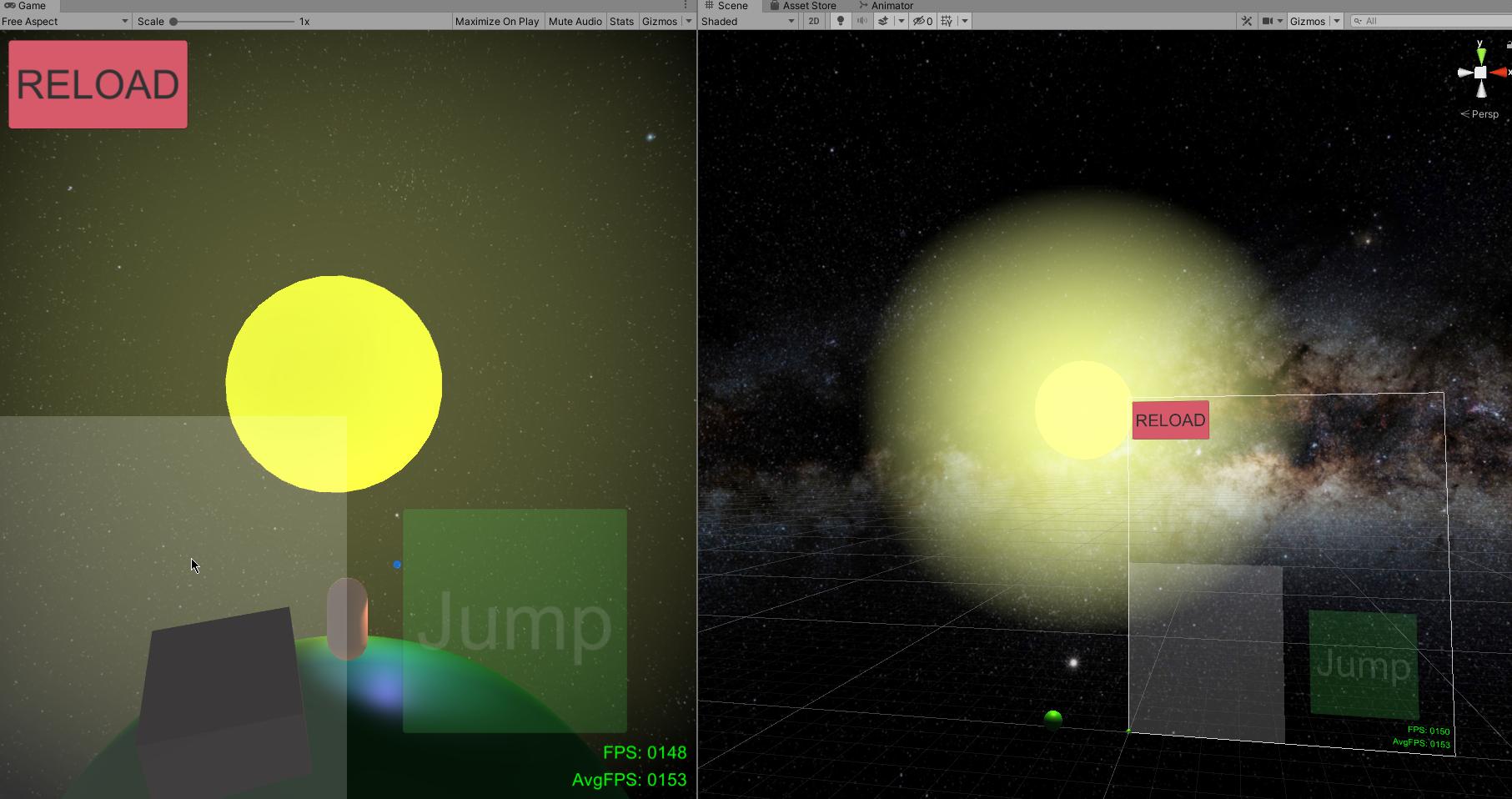
Hmm, apparently it does look like that when the camera is further away:
https://i.imgur.com/hgQUZAx.jpg
How can I make it look like that when it is close?
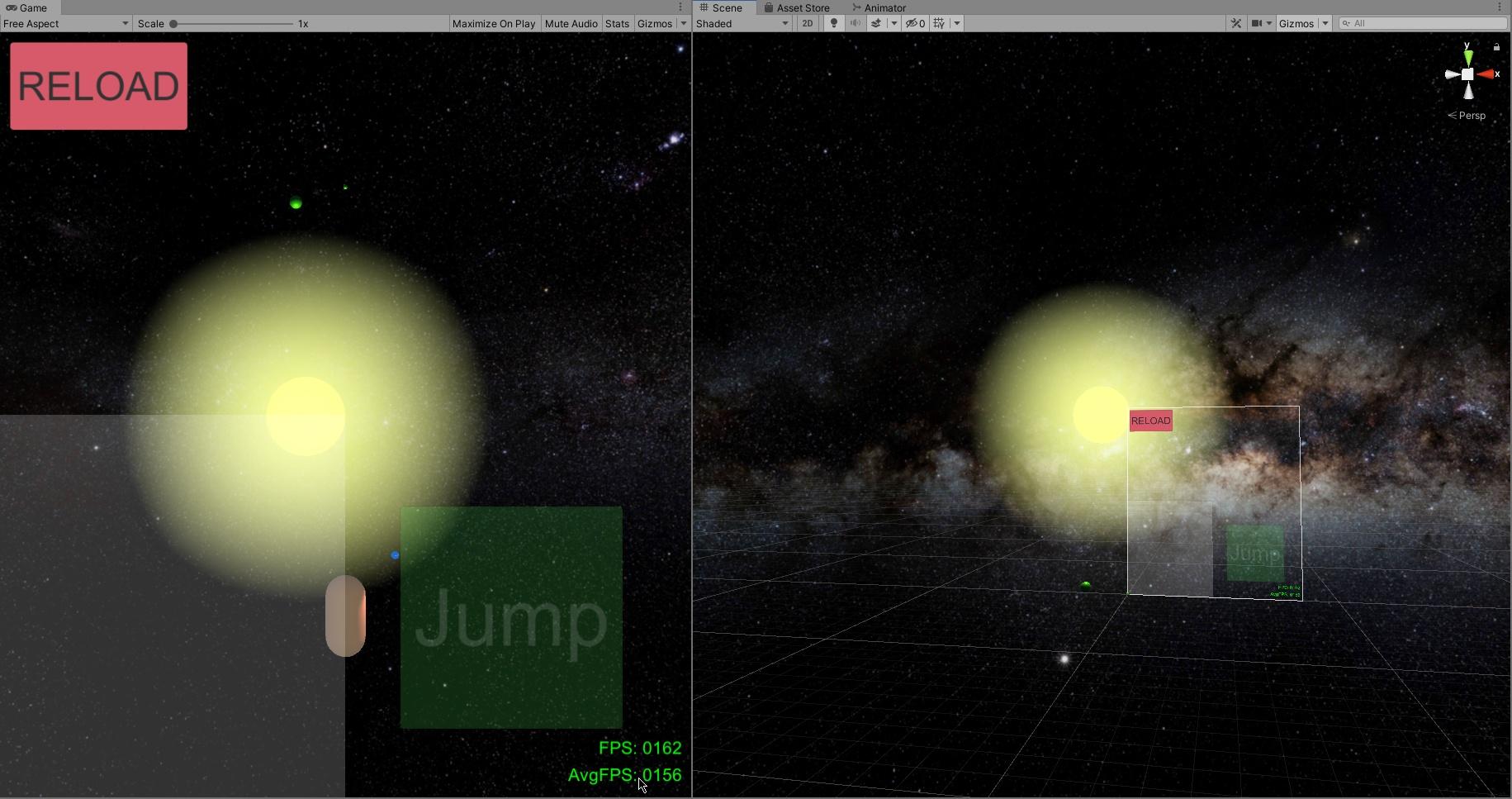
This circular shape around the star is drawn by a halo, if that's important
 wet dune
I'm testing changing from gamma to linear color space and everything ended up tinting green, any ideas ?
 empty wigeon
I have this circle near the camera where it calculates the shadows.
Any way to smooth this transition or make it go away completely?
wise zealot
increase clipping plane or something like that? @empty wigeon (in camera settings on object)
empty wigeon
lemme check, project just crash so have to reopen it
adjusting the near planes only extends the circle but doesn't. Also makes it problematic when i have objects that are close to the camera that need to be rendered.
Far plane doesnt change anything
 supple coral

 torn spruce
is is possible to have a script that reads how bright an area is around a character?
 wanton lantern
Very quickly, would someone be able to help me? I’m trying to create a little bit of shading in my game as a test to play around with lightning and stuff, but there’s a little issue. I only need it in one scene. My player constantly carries over to the next scene, so always has its material set for the night scene. How would I go about making the player only have the material enabled on the third scene?
paper gorge
Okay so, these weird lines and shadow are showing on this wall. There used to be something there when I bake the first time but I deleted it and it still shows the shadow. I already tried lightbaking again but the shadow wont disappear, neither do the weird horizontal lines
anyone got any idea on how to fix it?
 lone pier
How do I make Unity allow me to use more dynamic lights? I only have six real-time lights in my scene but the fifth and six ones don't work because Unity is complaining that there are too many real-time lights. I hate baked lighting because it really breaks the emersion in VR because of the lack of real-time shadows, so I want to avoid it as much as possible.
Also in order for baked lighting to work you need to set all of the objects affected to static, which just won't work for what I am doing.
lone pier
Please if anyone could help me out I would be very grateful. I'm a complete noob when it comes to Unity and lighting.
lone pier
How do I fix this?
Only some of my point lights work
The rest don't affect my scene at all.
I found that I had to set this slider up to allow for more lights but it still caps out at eight.
Is there a way to exceed this limit?
paper gorge
@near bison do you know what kind of setting in the bias can solve this? cuz I've played around a bit and nothing changes
 tight moss
is there a performance cost to using the standard shader over mobile/diffuse if its static geometry that is not lit by any dynamic lights?
i'm using bakery and i only recently noticed in baked outdoor scenes objects with the mobile diffuse shader get like no baked indirect lighting, they look terrible
plucky schooner
I believe if they are not being lit by any dynamic lights (including directional) then they'd essentially be equivalent
 molten marsh
Hey, does anyone know how to fix this issue I'm having trying to bake GI on an object with alpha transparency? It seams like it's ignoring the alpha
timber lichen
So I'm having trouble deciding:
Should I have windows in my office building level? The overall theme I'd like to achieve is a dark, some-what lit up office with an eerie but fun atmosphere
contradictory ik but
I was going to do basic emission lighting for my windows then bake them
 compact remnant
Is there any solution for light cookies for URP?
paper gorge
okay so, it looks like there is something wrong with the shadows here
looks like there is something that's preventing the light to go right
this is what it looks like when I add a spot light on that shadow
 native berry
Does anyone know if "Scale in lightmap" affects baked Shadowsmasks?
 clever pollen
anyone have an idea how to apply the shadow caster for tiles?
the tiles are code generated
summer aspen
@clever pollen Please don't cross post.
 tidal musk
hello peoples. Im wondering if anyone has any insight into what may or may not be an issue i seem to be tripping up on. I have a few street lamps set up, each with a point light, centered in the lamp, and when i apply materials to the glass portion of the lamp, the light seems to come and go randomly, not functioning half the time, seemingly randomly.
I have tried from opaque to transparent materials, and it doesnt seem as if anyone is really the problem, sometimes, the light casts through with opaque materials , sometimes it doesnt.
So, i guess im just inquiring as to wether there is some reason light would NOT pass through a faceless piece of geometry. Man , i dont think i make any sense. 😦
 red fossil
Hey guys, I've got an odd issue here
This is the map I'm porting to Unity, with the default skybox. Everything is static, has Generate Lightmap UV's enabled, and is all baked GI.
Looks fine right?
Here is the skybox exported from Max, not rotated.
Still fine. However, when I rotate the skybox to 180...
Any wall that isn't facing the directional light blacks out.
So here's how I "fixed it", but I don't really like how I needed to do it. I've mirrored the directional light, rotated the mesh 180, and leave the skybox to 0.
Sorry for the info dump
timber lichen
@red fossil nice level design though
native berry
@red fossil Are you baking light?
timber lichen
https://cdn.discordapp.com/attachments/541456006396248065/765985305933119548/interior.PNG
Thoughts on my lighting for an interior office map? It's suppose to be low poly, warm, but not fully lit up

there's also not a lot of lights, just those in the hallway
native berry
@red fossil iirc skybox is used for baking so if you alter it you'll alter the lightmaps
red fossil
Yea the ambient mode for it is baked, but each photo I took after a new lightmap bake
native berry
@red fossil why are you rotating the skybox?
red fossil
To match the original map
native berry
I thought with default skybox you just alter the direction light for sun etc.
still not sure why you'd want to rotate it
red fossil
Okay so I seemed to have figured it out, it was the Optix-denoiser I had enabled that bugged it
Thank you guys for your help though!
 fringe wraith
Has anyone else ever experience this kind of issue with baked GI? I found that sometimes I have this kind of issue with overlapping objects. They usually are gone when I switched from directional mode to non-directional mode.
 regal moss
red fossil
regal moss
red fossil
@regal moss You have "generate lightmap uvs" enabled on your meshes?
And your directional mode is set to non-directional, maybe thats it?
 wide hazel
Anyone know why my dynamic objects are flickering like this? They are lit by lightprobes
 spice verge
my android game looks yellowish on my Samsung Galaxy A6+. I checked on my father's Redmi phone, it looks exactly like i made it in unity editor. I checked night light option in my phone, it was turned off and everything else (photos, videos and other games) looks fine. Only my game looks yellowish on my phone. Its fine on other android phones. Anybody know how to solve it?
paper gorge
How come my directional light doesn't show any shadows?
paper gorge
HDRP
2019.4.10f1
 idle bramble
What does this generally mean?
 supple patrol
How come my directional light doesn't show any shadows?
@paper gorge If you Lightsource is set to "baked" it won't render any non-static objects (setting it to "mixed" bakes the lightmap for static objects and handles non-static objects in realtime. If the Object can be changed to static, it would be preferable).
Another posibility could be that the objects are set to not cast shadows in the mesh renderer component
Hey, how comes my Light Probes are incredibly bright while using "Shadowmask"? My Directional Light is 5000 Lux. Going any higher makes it almost impossible to work with. (I transferred over some sample scene settings to find the culprid, but the only setting that fixes the insane glow is changing to "Baked indirect")
teal stratus
What does this generally mean?
@idle bramble too large lightmap size or at least thats the most common lack of resources error
shadow horizon
I keep getting these black lines on object when im a certain distance away from them, when i get closer they vanish. How do i fix this?
 vestal vine
can somone send me a skybox or tell me where to find one
teal stratus
asset store has a lot of skyboxes
some are free
I keep getting these black lines on object when im a certain distance away from them, when i get closer they vanish. How do i fix this?
@shadow horizon light shadow bias
shadow horizon
@teal stratus I assume that's on my flashlight light components. What do I change it to?
teal stratus
just increase a bit normal bias
if that doesnt work
increase normal bias
the exact values depend on the scene,shadow resolution,shadow distance,cascades,etc
@shadow horizon
shadow horizon
I will try it out, thank you
@teal stratus Do you know if increasing the values hinders performance in any meaningful way? Setting depth to 10 (max) fixes it, but anything lower then that it has the lines
 lilac horizon
how do i make a texture glow in vrchat im losing my mind helpppp
teal stratus
@teal stratus Do you know if increasing the values hinders performance in any meaningful way? Setting depth to 10 (max) fixes it, but anything lower then that it has the lines
@shadow horizon it does not hinder performance but too high values will probably affect shadows themselves as they will apear disconnected from the caster
you can either use bias or, try using hard shadows instead as they seem to have less artifacts (in this case the black lines)
lusty vine
Baking lightmaps is yielding results like these. Does anyone know why?
supple patrol
how did the walls get created?
lusty vine
I don't know. They're from the synthy prototype asset
But also I'm using the default lighting settings from the URP sample scene
I increased the resolution and padding in the lighting settings and it seems to help a bit.
supple patrol
This may be bullshit, but to my eyes this looks like a faulty mesh and normals
lusty vine
But should the settings I changed still work then?
lusty vine
the padding was set to 2, and resolution 16. I updated them to 16 and 64 respectively
click your mesh asset, then enable generate Lightmap UVS
Will try that now
Should I always do that?
I've never even seen that option before
Now I'm getting:
There are 15 objects in the Scene with overlapping UV's. Please see the details list below or use the 'UV Overlap' visualisation mode in the Scene View or Lightmaps in Lighting Settings for more information.
Actually never mind that... I have a different question.
I want to learn everything about lighting to finally understand it instead of guessing constantly. What are the best resources for this?
supple patrol
check out the pinned message in this channel
lusty vine
Pinned messages? Found it, sorry
Why did I choose to do indoor lighting... 😅
Those pinned messages are pretty good, thanks for that.
I'm trying to achieve lighting like in the Portal games
supple patrol
still open, anyone got a clue? I work around it now by disabling the Lightprobe gizmos, but i fear this might bite me in the butt later down the line...
 bold kindle
Hi, Can anyone suggest a good Skybox for HDRP (VR and PC) with dynamic clouds?
near bison
Why does it seem like Bakery is calculating the light for texels which are outside of the UV's of the objects in the lightmap?
paper gorge
I get so annoyed by lighting XD
Why does the light have this weird grain effect?
I tried lowering the Lux value, the distance, etc.
HDRP 2019.4.10f1
paper gorge
also, can you have too many reflections probes in a scene?
covert stirrup
Yes, reflection probes impact the amount of draw calls
 odd flax
hey. I'm using URP. This is a realtime spot light. Is there anything I can do to fix this clipping?
near bison
Why is it even if I have generate lightmap UV's enabled, and all my objects have a scale of 1, it seems like the texels aren't evenly distributed on my objects? Here for example I have a truck, and the windshield appears to have a much higher texel density than the rest of it in spite of all meshes being set to have the same lightmap scale.
supple patrol
if the lightmap scale is the same, wouldn't it make sense that smaller textures have a bigger scale on their respective lightmap?
near bison
No?
If I have a lightmap scale of 10 texels per meter, and I have a 1 meter cube with a 0.1 meter cube sitting on top of it, then I would expect the 1 meter cube to have 10 texels across it, and the 0.1 meter cube to get a single texel of coverage.
That would lead to a consistent lightmap resolution across my scene. Why would I want the windows on my truck there to have far sharper shadows than the rest of the truck just because they're smaller?
supple patrol
on the other hand you'd limit your shadow quality to the biggest object in your scene, tough
near bison
Of course I understand it is impossible to have consistent lighting quality across EVERY object in my scene.
But in the case were I have both small vehicles and large buildings, if I specify I want a lightmap resolution of 10 texels per unit, then Unity should attempt to adhere to that, except in cases where it cannot, in which case, as it already does, it should throw an error that the object cannot fit within the largest lightmap at the specified resolution, and it should automatically reduce the resolution to what will fit, for convenience.
I would much rather have my small and medium size objects adhere to my 10 texels per meter requirement, and have my buildings drop down to 1 texel per meter, than have the scale of my lightmaps all over the place, so I have to go to every tiny object and adjust the scale down manually to make my scene consistent and not have insanely long bake times and wasted lightmap space.
And if Unity does not do this, then why even name the parameter "texels per unit" when clearly that is not actually what that parameter represents?
supple patrol
if you look at the lightmap, are the windows bigger than they should be?
i assume they are a separate object? What's the Scale on those objects?
near bison
The scale of all the objects that make up the truck is 1.
This is after I manually adjusted the scale of the lightmaps on everything.
supple patrol
so you scaled the windows below 1? odd
near bison
Scaled them below 1? No?
The scale of the lightmaps in the scene is 8 texels per unit. But while this resolution was fine for the ground, the car was not getting 8 texels per unit. It looked more like 1 or 2 texels per unit. So I bumped the car's lightmap scale up to 10. Then the windows were too high res, so I lowered those to 5, along with the wheels the undercarriage, and the interior, which all had greater texel density than the body of the car.
But I suppose you could say I scaled the windows below 1... if we consider 1 to be the baseline for the car body. They are half that res. But as you can see the texel density is now the same as the car body.
odd flax
hey. I'm using URP. This is a realtime spot light. Is there anything I can do to fix this clipping?
does anyone have any idea? https://discordapp.com/channels/489222168727519232/497873729578336276/767735819070865438
 tall arch
hi guys! i was wondering if there was a way to bake hard shadows in urp? i tried doing it but no matter what it gives me soft shadows
near bison
What am I not understanding here?
The rectangle in the middle is a license plate. It is a 1x1 quad scaled down to .35 x .175.
My lightmap resolution is 8 texels per unit.
I have set the scale in lightmap for the quad to 3.
Now first of all, if I were to assume the checkers on the screen represent texels in the lightmap, it ought to have plenty of resolution. But that doesn't seem to be the case.
And second, 8 texels per unit * a scale of 3 * the quad's width of .35 = 8.4 texels. So I would assume that quad should be covering about 8x4 texels in the lightmap. But it's covering ONE texel in the lightmap.
I also note it is square in the lightmap. So perhaps it does not even take into account the scaling of the object. However in that case, I would expect it to have a resolution of 24x24 texels. Clearly that is not the case either.
So what's going on here?
 stone musk
How do I bake lights?
 rough pulsar
how do i fix this...
 tall dirge
hey guys, I've been using th profiler and noticed a spike due to "Input Lighting" and was advised to turn off "Realtime GI" to stop this. I have unticked "Realtime GI" in the Lighting tab but this does not seem to have helped... Any Ideas id I need to untick or change other settings? Thanks
 static pasture
Have an fbx that contains 3 materials and when baking they are overlapping and not really sure what i can do to fix it without separating them or atlasing the textures together.
if anyone could help i would really appreciate it
After skimming this discord i worked it out,
turn this on in import settings
timber lichen
I deleted the sun source and now it's difficult to see the inside of the structures I've made as it was basically fullbright before
I tried to replace it with another directional light but it's all still dark and I need to be able to see in the structures
when I move my camera certain areas go dark
timber lichen
I think I fixed some of my problems but I'm still having to deal with a darkened interior view of the rooms when I move my camera around.
timber lichen
if anyone could ping me with some advice about how to fix the darkened interiors when the camera's moved that would be excellent
 toxic hemlock
paper gorge
toxic hemlock
paper gorge
so this left and right wall both have the same material. how come the left wall turn out more black then the other?
supple patrol
are both walls static?
paper gorge
yea
supple patrol
you have a directional light? Does changing it's direction affect the lighting of the wall?
paper gorge
nope the only lights which are affecting these walls are point, spot and area lights
all pretty much balanced in the middle
supple patrol
is the surface lightmap baked? How does the object look on the Lightmap? Is there maybe an Overlap?
paper gorge
shouldn't overlaps be a problem for the outlines of an object?
supple patrol
if you lightmap is too small to fit everything it just overlays the objects
timber lichen
I would like to give a more darker but yet cartoonish look. Any suggestions? I'm a noob with lightining
timber lichen
@toxic hemlock look into shader pipeline and postprocessing
supple patrol
I would like to give a more darker but yet cartoonish look. Any suggestions? I'm a noob with lightining
@timber lichen More Lightsources like Walltorches would enable you to make the Directional light darker. I'd guess that would help.
You got Normal Maps on your Materials, especially Ground and Wall?
timber lichen
It's sinty assets
I guess there are
anyway I'll try your suggestion! Thanks
What about ambient lightining? Should I use it?
supple patrol
That's really a design decision you have to answer yourself. Ambient light out of nowhere feels fake. But when your player can't see where he's going, it sucks as well.
timber lichen
I see ok! I'll make some tests and post here
supple patrol

CG Cookie
Lighting in CG is always a hot topic and video games are no different. Lighting is a complex subject which requires a delicate balance, not just from a visual perspective but from a performance perspective in games. You need to determine what parts should be well lit and how t...
 wind anchor
Anyone got some really good lighting and graphics tutorials for either Unlit, Lit, or DXR setups? I kinda get how they work but I'm more of a programmer and need to figure it out
timber lichen
guys so i want to remove reflections from my game or make lighting resembling this game:
teal stratus
well that game had reflections but they were baked on cubemaps
just use vertex lit models with no shadows
and reflective vertex lit for the cars
use a projector-quad for the character and car shadows
@timber lichen
timber lichen
How do I stop faces going dark when I move my camera around?
 topaz jackal
Can anybody suggest how to improve lighting in this scene? Using hdrp with directional light set to mixed. when I press build lightmap it doesn't change anything.
wind anchor
@topaz jackal Maybe setup some volumetric lighting; It could really ad some depth and atmosphere to the scene.
timber lichen
@teal stratus thx
 onyx prawn
greetings everyone
in your opinion , does light in the back of the car look good?
because in the front it looks better imo
sometimes when driving it starts to look weird in the back, some areas become darker. etc
topaz jackal
@wind anchor ive tried this, but for the most part if I change the settings even a little (like exposure) it makes everything way too dark or bright. I like it the way it is there but for the directional light is there any way to have some kind of light bouncing without raytracing gi? Baked gi doesn’t seem to do much. The inside of the room is still very dark even with the bright directional light shining in
Should I just use point lights to make this effect?
teal stratus
Can anybody suggest how to improve lighting in this scene? Using hdrp with directional light set to mixed. when I press build lightmap it doesn't change anything.
@topaz jackal set the lighting settings to enable baked lighting (indirect or shadowmask) and set all of the static geometry with the proper static option
sometimes when driving it starts to look weird in the back, some areas become darker. etc
@onyx prawn yeah it looks kinda dark
i would add a realtime reflection probe
onyx prawn
@teal stratus thanks, i'll try it when i will be at home and btw while making this i used somekind of random reflection probe i found in my assets and a ssr from post processing stack
 dawn cape
Hey guys i dont know why some of my lights arent baking,mixed and realtime work but as soon as i bake they dissapear and the lux value is already high and nothing shows
This is how it looks when not baked
After Bake
supple patrol
The floor is a static Object?
dawn cape
Yes
 lyric oracle
That looks like some shadow bias issues, try playing with the Bias and Normal Bias under the realtime shadows on your light. Lower values can give better results, but at zero you risk artifacts like you've got there. Even bringing them up a very small amount might fix it.
 worthy crater
The lighting illuminating all the sides. idk why
 atomic ocean
Why i have this weird light in corner? all normals good, its solid model with solid walls
 tropic lance
if the shadows aren't baked it's because of the shadowmap resolution, it's a good idea to put a solid wall behind it or if there is one make the wall thicker @atomic ocean
anyone ever have their lightmaps suddenly render/uv improperly? I'm using probuilder and I did all the steps to regenerate lightmap uvs, it was baking perfectly and then I added light probes and it broke, even if I remove the probes it still bakes this way, tried restarting the editor too
I'm using HDRP if that makes any difference
looks like it's not even baking properly
 balmy stratus
 sharp cedar
unity is very bad when it comes to lighting
mystic dew
@sharp cedar really? i was thinking that it depends on skills of artist...
mystic dew
not really. i can do good lighting on HDRP and URP pipelines 
sharp cedar
Light bleeds a lot
mystic dew
like ?
sharp cedar
And I would have to pay for an asset to fix it
mystic dew
you about light in the corners of models?
sharp cedar
Yes
mystic dew
here is many ways to fix that
sharp cedar
I already reduced the bias to the minimum
mystic dew
- Lower shadow draw distance and increase shadow map resolution.
2.Place a cube with shadow only render to block those light leaks
sharp cedar
These things shouldnt happen to begin with
mystic dew
well its not really hard to fix those problems by tweaks 2 settings 🤷♂️
sharp cedar
I really want and tried to use unity for my project, but I just keep running into issues that shouldnt be there
mystic dew
@sharp cedar try to place a cube, where are in mesh render have SHADOW ONLY render mode
so it will block light leaks
sharp cedar
Can I fix it without doing this?
mystic dew
@sharp cedar do you know how working shadowmaps in game engines ?
sharp cedar
Nope ;-;
mystic dew
a place where are wall connect can have light leaks
due resolution of shadowmaps in this place not enough to cower it
sharp cedar
So?
sharp cedar
It doesnt work
mystic dew
just place a big cube between sun and room
mystic dew
are you on URP?
sharp cedar
Yes
sharp cedar
What
mystic dew
yes
sharp cedar
Why
mystic dew
well they research more optimized way to draw shadows for Point Light
but atm its not yet possible
sharp cedar
Thats pretty dumb if you ask me
mystic dew
maybe in 2022 URP will support casting shadows from Point Light
so for now place Spot Light with wide 180 degrees setup
topaz jackal
So is baked GI completely removed from HDRP now? I can't get this interior scene to look right. I've tried adding light probes, and reflection probes. I tried increasing indirect intensity on the directional light and increased indirect intensity in the rendering settings. Here's what it looks like with and without baked lightmap.
mystic dew
@topaz jackal no, make sure your models is static and models import settings correct for baked light
topaz jackal
Oooh ok, it was a problem with RealtimeCSG settings. Thanks.
 solid rapids
does somebody now some good lighting settings for a night scene with post processing v2? any tips?
 sonic nymph
sharp cedar
sonic nymph
sharp cedar
Why is my Global Illumination stuck at 99%?
mystic dew
@sharp cedar what is your settings for bake light?
sharp cedar
@mystic dew
 eternal pewter
Can someone help me with my game's lighting? I don't know too much about lighting but this scene just doesn't looks real. It kinda looks fake, idk why. I have the Color Space set to Linear, some Fog and some PP in URP
What can I do to improve the look of the scene?
mystic dew
@sharp cedar hahah bro, did you watched tutorials about light baking?
seems like you trying do to something that you do not know and blame engine xD
but all here is your blame
A- should be 2
B should be - 40
C should be 2048 or more
@eternal pewter open the lighting tab in Unity. Use gradient lighting instead of skybox light
If you will match your gradient lighting with fog light and sky light, its will looks a lot better
eternal pewter
oh damn that already made it look better
If you will match your gradient lighting with fog light and sky light, its will looks a lot better
Gotcha
thnx
sharp cedar
@mystic dew 1 hour to bake
mystic dew
yea bro, bake light can took long time for get nice result
so work on scene, leave PC bake light at night, go sleep
sharp cedar
Unreal takes 10 mins at maximum tho...
mystic dew
well, maybe on UE you bake at super low quality and small scene ?
What can cause longer time to bake -
- Bad imported objects.
- Bad settings.
- Very big scene with a lot of props to bake
those factors can cause longer time to bake.
ofc in UE4 and Unity itself i can place single cube, setup 8k lightmaps and bake everything in less that one min.
 runic sundial
im making a dust2 mod for a unity game. using mixed lightning and it shines between some meshes. why is that and how can it be fixed?
eternal pewter
This definitely looks much better, but can I do anything else? I can't really get the feel from the scene
mystic dew
but what you would like to achieve exactly ? @eternal pewter
mystic dew
click on sun, and make shadows soft only
if you are on URP, you can added volume component to empty gameboject and create PP effects
eternal pewter
Well that's the problem, I don't really know. I'm just playing around with the scene and trying to keep what I like. Just trying to make the place look more believable.
click on sun, and make shadows soft only
A sun?
if you are on URP, you can added volume component to empty gameboject and create PP effects
Yup already doing that
mystic dew
Directional light - its a sun 😄
mystic dew
Check URP Render pipeline settings for soft light checkbox's
eternal pewter
Ah ok working
BTW how many cascades should I have?
Not even sure what they do, seems like reducing cascades to 2 from 4 makes things much softer
mystic dew
you can have 2 cascades and 25-50 units draw shadows distance
eternal pewter
Yes, better
runic sundial
im making a dust2 mod for a unity game. using mixed lightning and it shines between some meshes. why is that and how can it be fixed?
@runic sundial it looks like after disabling mesh compression the issue is 99% gone
sharp cedar
@mystic dew
mystic dew
@sharp cedar go to scene view and click on shading mode to show lightbake
mystic dew
omg, your model lightmaps is soooo ugly
its should be only squares
and better to keep same pixels density on every objects
sharp cedar
How can I fix it
mystic dew
did you model those objects?
sharp cedar
Those are assets
eternal pewter
Take it to a 3D software and play with the UVs
mystic dew
well first:
1.Open asset store and write BAD review about this asset.
2. Go to FBX file that contain those 3d models, open import settigns and make sure its have procedural UV map generator
eternal pewter
Those are assets
😳 Lol
sharp cedar
By Synty Studio
eternal pewter
omg
sharp cedar
Why
sharp cedar
Oof
eternal pewter
Actually my scene is using all assets of their Nature pack
I'm afraid to bake my scene now
eternal pewter
2 question
- Why is everything transparent?
- Why I see so squares on the mountain?
covert stirrup
- Because you haven't baked yet
- Because their scale in lightmap is too low, which is set on each mesh in the scene
@eternal pewter
eternal pewter
First one I figured, second one turned out that I didn't had the Lightmap UV thing turned on, in the import settings, doing that gave we checker marks on all the objects
 scenic ravine
why is white just a ugly grey ?
mystic dew
@scenic ravine check your ambient lighting ?
 gloomy mica
By any chance does any know if theres any known issues with Lightmapping and Nvidia cards or something. I'm clutching at straws I imagine but I've been having nightmares trying to get lightmapping to work correctly, even to the point where the early parts of basic tutorials are not working as expected.
tropic lance
why would my lighting randomly do this? like it's vertex based now sort of
@gloomy mica try enabling debug editor and setting your materials to double-sided gi
it was because my normal map wasn't set as a normal map texture nvm
paper gorge
so my skybox is being rendered first but I need it to be rendered last. how do I change this?
 lean nova
Is it possible to make a transparent lit urp shader cast a shadow?
timber lichen
Hi guys I am new to the chat!
I am working on a 2D project, using 2D lights, but when I build the project in WebGL the screen is all black.
Does WebGL support 2D lights rendering?
thanks!
wispy skiff
Hey, I have a weird issue with what I suspect are the shadowmaps in HDRP. The shadowmaps move around and interfere with the falloff of point and spot lights depending on camera angle.
I haven't upgraded Unity or HDRP recently. This has just appeared in the past few weeks for me.
Anyone recognize?
It gets kind of resolved if I increase the near plane for shadows, but that's not gonna work in all situations
 candid pecan
Hey, Guys. Can anyone tell me if it's possible to store baked reflection data in a prefab?
 viral gale
Anybody know why is the tree is visible out far even tho it supposed to be dark
@everyone
 deep notch
becauze of ze fog
viral gale
becauze of ze fog
@deep notch ahhh make sense thanks dude
becauze of ze fog
@deep notch turned off the fog stil the same
send help
deep notch
@viral gale then idk
supple patrol
Is there Ambient Lighting or a Directional Light?
supple patrol
what did you changeß
 swift briar
Hello, a quick lightmapping question.. do people/studios ever bake their lightmaps in other 3d software nowadays? If so, I was wondering how you would go about applying these lightmaps (using a custom material that has the extra texture input slot?). I noticed the old lightmapped materials are now "legacy".
Or would you just bake it into the diffuse rgb, if you were going to take the external software route, forgoing the extra UV set?
 kind kelp
How do I prevent light from bleeding into things? I made a long walkway with some 3d cubes, and they go down into the terrain, but light bleeds into where the terrain and the cube intersect
cube goes down into terrain
but light gets in somehow
mystic dew
@kind kelp you have to increase lightmap resolution on terrain.
kind kelp
Ah, didn't realize terrain has a lightmap setting. Just experimenting to see how I can get dark areas in an otherwise lit world ^^ Thanks
 keen pike
Hi, i try to upgrade my project from build in to HDRP, works fine just my First person view got overlighten when activated, gots normal after ~15 sec in First person


 tall arch
is there any way to get more than 8 lights
 lofty osprey
There are 133 objects in the Scene with overlapping UV's. Please see the details list below or use the 'UV Overlap' visualisation mode in the Scene View or Lightmaps in Lighting Settings for more information.this is the warning iam getting
can anyone help me how to use UV overlap
i am baking the light
i am a beginner
 primal lagoon
how to fix this?
quick saddle
upgrade materials
obsidian canopy
Is there any tool, any work around, anything I can use to link light probes to a prefab instead of a scene?
quick saddle
like an empty game object?
obsidian canopy
We can bake lightmaps for prefabs in scenes and load them/move them around and that works great, but Light Probes don't work
 young coral
hey can somebody quick help me in unity. I have a 3d model but every time i drag it into the hierachy, my camera goes gray
before
thats before
obsidian canopy
Unity Lighting Data Asset is garbage.
Not being able to use light probes in generated maps kind of sucks. Is there any good alternatives?
young coral
im a complete noob but my understanding is that you use something like blender or 3ds max to do lighting but maybe i dont understand your question
 fallow bone
unity's converter asset is the easiest way
obsidian canopy
@fallow bone Could you please give me a hint of what to look for?
obsidian canopy
Thanks mate, but I'm not sure how this would solve my problem
fallow bone
1 second

Need to swap or replace lots of objects in your scene? Maybe you want to replace some of the objects and need a random selection tool? This free Unity editor tool can do just that!
Download Tool (dropbox): https://www.dropbox.com/s/s9s7xssib0j6dto/Object_Swapper.unitypackage?...
this is not my video
i found this one helpful when i had that problem
paper gorge
I got a few problems and I think they all have 1 sollution, but Idk how to fix it
its those dark places. I quite a few lights in my scene, but somehow many objects turn out dark like the inside of this thing
and this wall also, the material is almost completely white, but it looks like its dark grey
does anyone know how I can solve this
HDRP 2019.4.10f1
pulsar aspen
I know the obvious answer is "crank up the lights" but I'm creating a very specific space, it can't be washed out at all
does anyone know how I can fix my scenes lighting (it's being baked), the walls are somewhat dark so it's just eating any light I give it
Albedo boost? Intensity?
indirect/albedo seem to lighten things
quick saddle
Global light?
 digital delta
Hi, I have a problem with the ilumination, when i set the scene lights to baked, the scene is not iluminated, lights just iluminate when i set them to real o mixed
why is this happening?
now they are baked lights
ok sorry, im dumb, i forgot to set walls to static....
digital delta
Im using quads for the walls and for the roof, and after baking lights this happens
 haughty jolt
https://gyazo.com/6b0f44eacd1f41a1439b92a4baf1a4b5 Does anyone know whats going on?
It's a simple shader graph shader with some bloom, but its really glitching out?
Here are my bloom settings
The shader itself is literally just a scrolling UV map to make a little flame
Also the HDR intensity is at 0, so I dont understand
 sly roost
someone help me out i cant create 2d lights my unity version is Unity 2020.1.5f1 (64-bit)
supple patrol
is that an URP-Project?
sly roost
yes
 winged cedar
Good evening fellow unities 😎
Have you ever encountered uv lightmap bleeds?
Would you know how to fix these? I create the uv lightmaps automatically with unity
uv overlapping view
 hollow blade
Hello, a friend of mine is having trouble where he's trying to get realtime shadows to be cast in a URP project but the shadows are not showing up. We've checked that objects have a cast shadow option enabled as well as increasing the shadow distance in the quality settings. Is there something we're missing here?
supple patrol
lightsource set to mixed/realtime?
hollow blade
lightsource was already set to mixed
 hoary canopy
Any idea why half of my materials turn pink when I add a point light to my scene? Using URP, Baked GI w/ Baked Indirect. Point light is baked with soft shadows enabled. The only other light in the scene is a directional light that is mixed mode.
obsidian canopy
Going to ask again, maybe a Unity rep will see this!
We need support for light probes being at run time (Able to move them for level gen). Are there any tools for this?
sly roost
someone help me out i cant create 2d lights my unity version is Unity 2020.1.5f1 (64-bit)
@sly roost help me out someone
 little sigil
I'm having a weird lighting issue