#archived-lighting
1 messages · Page 51 of 1
 sharp cedar
 obtuse flame
Make separate UV channels for each model
 candid pecan
Hey Guys, regarding mixed lights, what kind of shadows do they cast? are they realtime or static?
 covert stirrup
Well, both. That’s why they are called mixed. You should look up the docs in this, they explain it pretty well
 versed nacelle
When building a project on the command-line (in CI), is it common to bake Global Illumination during build time? (And would that prevent usage of -nographics as per the official docs?) https://docs.unity3d.com/2020.2/Documentation/Manual/CommandLineArguments.html

I'm having the feeling that no lightning artist will know this level of detail on CI build level. Any place where I should go with this question?
 gaunt hull
What is causing my baked lightmap to look like this in URP?
My lightmapUVs are all laid out
Lightmap settings:
 frail hill
Is there something like a ambient light that ineed to get some light on this tree?
as you can see it does have a texture but its not receiving enough light to look non-black
frail hill
i dont see what you mean @frozen crypt
some videos show it here.. but i cant see it
frail hill
Ok i found it inside my enviroment profile but it doesnt actually help to make leaves brighter unless i turn it up so high that its annoying for any other place in the level
 wet ingot
Hello, Just oppened my Unity and it looks like this, its just a 3D project but I remember unity looks brighter, any idea why this happens? I created another project and lightningh looks the same, i´m planning on upgrading my renderer pipeline later in my project but I just want to know why it looks like this and if it´s going to affect when I upgrade to the Universal Renderer Pipeline
 haughty jolt
Got to Rendering -> Lighting -> Generate Lighting
And see what happens
@wet ingot
Also, anyone here good with URP know why Baked Global Illumination baking never finishes?
wet ingot
Thx, it was because of that
 timber lichen
Hello peeps, I have a question about baked lightmaps. Suppose I have 3 scenes:
- For models
- For Lighting
- Empty scene
It's possible for me to change the Lighting scene and have different lightmaps that are displayed by this combination?
In the attached screenshot I have a daylight setting
And in this one I have a nighttime setting
 mental pulsar
I'm using point light, any idea what is causing the hard line?
 sage vortex
Hi! how can I setup diferent lighnting (I mean day and night) for the same scene?
 silk lichen
These doors get completely black like this after I bake the lightmap
any idea how to fix it?
 naive edge
I’m trying to light a room with no windows, and most items are static but a few will be dynamic. Using LWRP in Unity 2019.2
How can I get my dynamic objects to cast shadows on static objects? Do I have to fake the shadows? I can’t really include a directional light inside of the room, and that’s the only thing that lets me cast shadows on static objects...
 teal stratus
@naive edge subtractive mixed should work. If it does not,update to URP and a newer version of Unity instead
@silk lichen check generate lightmap uvs on mesh import settings
@mental pulsar what render pipeline are you using and is the light realtime or baked?
naive edge
@teal stratus unfortunately subtractive mixed says that dynamic will cast shadows on static only using a directional light. I’ll check if that is different in a newer version...
silk lichen
@silk lichen check generate lightmap uvs on mesh import settings
thx
 wanton hinge
@naive edge he was right but didnt tell you in an more understandable way,
you gotta use mixed lights, they bake indirect lighting and give you direct realtime light.
in the lighting settings you gotta change the lighting mode to "shadowmask" for that
to let your dynamic objects beeing lit by indirect (baked) light as well you have to place light probes at areas where the light changes.
timber lichen
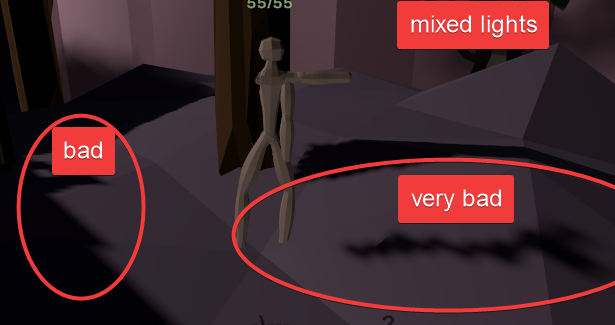
how doess thaat work? i want mixed liightss (good quality realtime close, bad quality bake far)
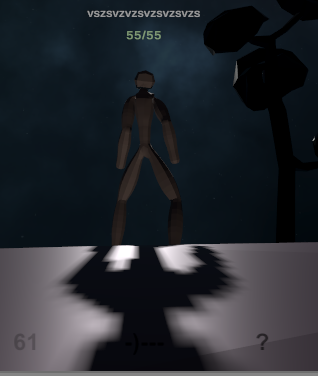
omg why my shadows are pixelish
 teal stratus
@teal stratus unfortunately subtractive mixed says that dynamic will cast shadows on static only using a directional light. I’ll check if that is different in a newer version...
@naive edge oh i didnt get what you said before but yeah you could have used shadowmask if you were not using LWRP or URP
but with urp or lwrp you are forced to use a directional light for shadows in a baked lighting environment
how doess thaat work? i want mixed liightss (good quality realtime close, bad quality bake far)
@timber lichen bake lighting with Shadowmask mode,reduce the shadow distance,increase the shadow quality and enable shadow cascades
timber lichen
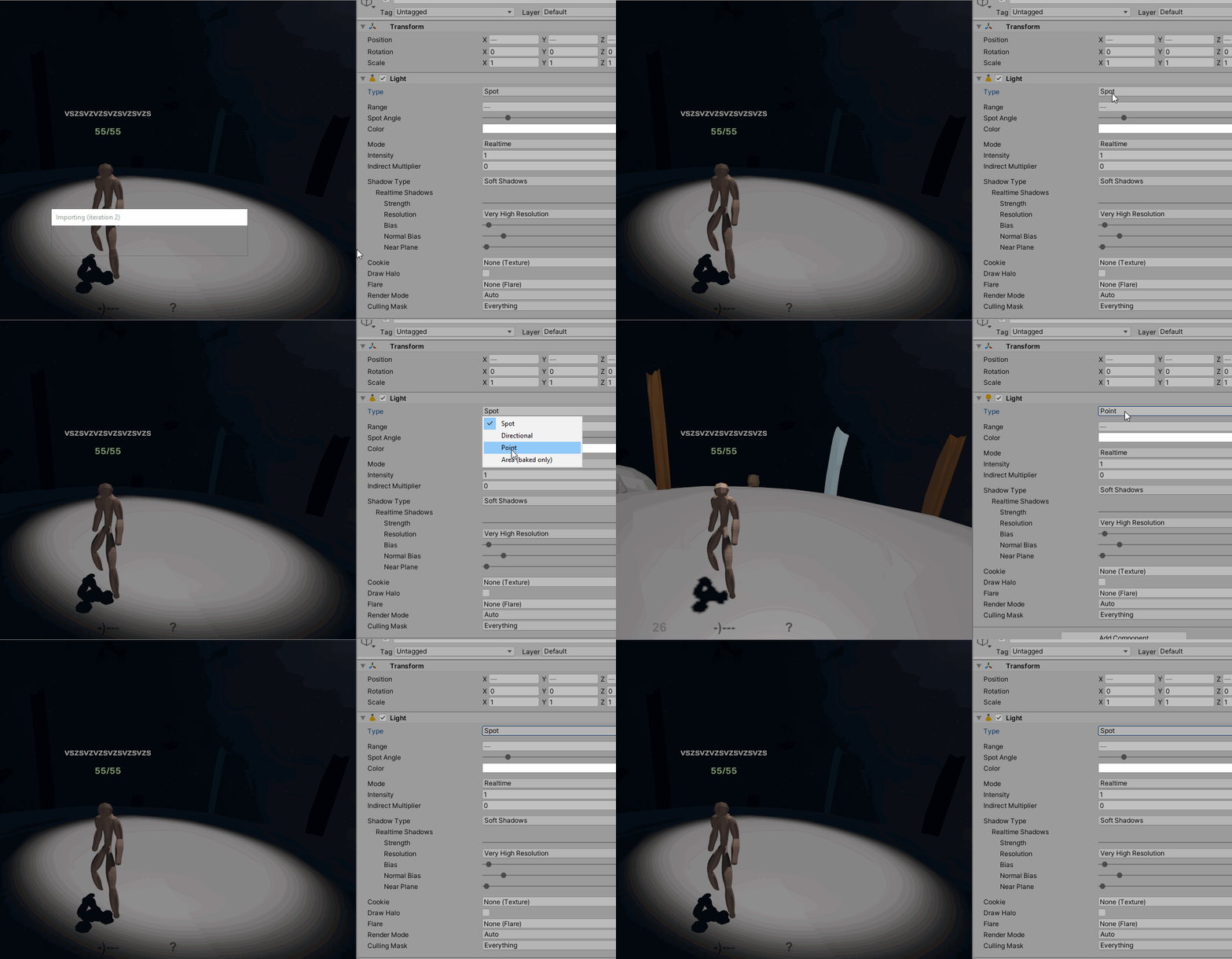
i have that done
seems direct lightining works well
spot also works well
But not Point
(I need it for point light)
 teal stratus
@timber lichen how close is the light to the player object? i see some bias issues
is that light supposed to move?
if not
bake it with shadowmask
so you can then reduce shadow distance
and have better shadows
did you enable shadow cascades?
candid pecan
Hey Guys, I have a query regarding the "Contribute Global Illumination" option for a mesh. If that's enabled, does that mean baked lightmaps will be generated? is that required when the mesh is lit by a real-time light as well? Please let me know. Thanks.
 jaunty shore
Hi, why is my grass became so shiny/metal-ly looking if it's under shadow
Hdrp, btw
Oh yeah, also I've turned the metallic and smoothness value to 0
timber lichen
nice lava
 hollow ridge
@jaunty shore
Change the smoothness and metallic value in the material you are using. Else, I don’t know what’s happening...
jaunty shore
I've set it all to 0
hollow ridge
So it is maybe in your lighting settings.
Like the shadow or something like that...
@jaunty shore
jaunty shore
Okay, where do i find that settings
hollow ridge
Open a tab named lighting settings.
Think this is in Window-> lighting->lighting settings.
@jaunty shore
hollow ridge
Ok!
jaunty shore
Can't find anything correspond to shadow
hollow ridge
Hm, show me the lighting settings you’ve found...
@jaunty shore
Normally there is something about shadow
jaunty shore
Sorry i couldn't send photos, basically it only consist of lightmapper settings and GI
@hollow ridge
hollow ridge
Do you have the baking process at the bottom?
@jaunty shore
hollow ridge
Oh!
Hum, I don’t have unity in front of me so i am trying to do it by memory.
But look at the settings of your light source. Is there a reflection probe in your scene?
@jaunty shore
jaunty shore
Absolutely not, i don't use any reflection probe
hollow ridge
This is a terrain layer, right?
jaunty shore
Yup
hollow ridge
Ok so it, is maybe because the texture is so big that the normal map makes some weird reflection, it happened to me on a rock that I have made huge.
Maybe try to change the tiling.
covert stirrup
Does it still look glossy if you remove the normal map?
hollow ridge
If you edit the terrain layer, you can change tiling.
So it is maybe the normal map as I said.
jaunty shore
Changing tiling doesn't help
hollow ridge
You don’t see it much because your texture is bright but darker texture with normal map means no lights that can show the normal map.
Did you try for the tiling of the normal map?
jaunty shore
Couldn't find the tiling of the normal, i only found normal scale
hollow ridge
Try to reduce it.
jaunty shore
Is this warning contribute to the problem?
hollow ridge
Maybe
That means that you have to modify the normal map.
And set it to normal map.
When you import it, the texture is set to default.
Do you have the button « fix now »?
jaunty shore
Nope
covert stirrup
Yeah change the texture type
jaunty shore
What? Like change the format?
hollow ridge
Yes!
covert stirrup
The texture type. In the import settings
hollow ridge
When you go in asset then double click the normal map, something shows up in the inspector. At the top of it there is the texture type, it is set to default but you can change it to normal map.
hollow ridge
And when you remove the heigh map from the texture?
jaunty shore
Update: even without normal, its still kinda shiny
hollow ridge
If there is one
hollow ridge
Is the game view showing this shiny reflection?
jaunty shore
Yes
jaunty shore
Here's without the normal
hollow ridge
Ok, so the problem is the normal
The shine at the left is a little reflection of realtime light.
It makes it more realistic
hollow ridge
No problem!
hollow ridge
We will find a solution.
Try to reduce the intensity of the sun source.
And add the normal map.
hollow ridge
Ok.
Can you show me how are the settings of your lighting settings?
Because sometimes the skybox affect the lighting
hollow ridge
Can I see the bottom of the settings please? With your image try already using ambient occlusion.
Set light probe sample to 0
jaunty shore
That's literally the bottom of the settings
hollow ridge
Ah! This is the light map settings!
jaunty shore
You said lighting settings, this is what popped up
hollow ridge
At the bottom of it there is the base of lighting, like the sun source.
Try scrolling up, I see that there is something up. Shadowmask etc...
jaunty shore
I see shadowmask and baked GI
hollow ridge
And no more?
hollow ridge
Hmm... do you have any static object in your scene?
hollow ridge
reduce the light map size!! 1024 is too much
Set to 256
It will take a few minutes
128 a minute
hollow ridge
Ok!
jaunty shore
Okay, its done
jaunty shore
If i unchecked the baked gi, the whole ligtmapper settings will be greyed out
hollow ridge
Ok only probe.
To 4
Reduce indirect intensity
Not to 0 but like 1 or 2
Sorry, .4 or .5
hollow ridge
Wat?
jaunty shore
Yeah, man. Idk
jaunty shore
Yep
hollow ridge
The terrain has parameter
jaunty shore
Yes
jaunty shore
Yeah, i created a blank material
hollow ridge
But there is some white reflection, you see?
jaunty shore
Yes
hollow ridge
There is some reflections based on the default material.
So white glossy reflections!
If you set the material with the grass material you have created it can be better
jaunty shore
Yeah but i can't figure what is it, the metallic and smoothness is 0
hollow ridge
There is always reflections made even if there is metallic and smoothness to 0
So set the reflection probe to 0 and material with a grass material.
Does it work?
jaunty shore
What about this thang?
hollow ridge
Ok you are using a shader that is not compatible.
Select the Nature -> terrain shader at the top of inspector when you are on the material information
jaunty shore
Which one, i found three, diffuse, specular and standard
jaunty shore
It turned into pink
hollow ridge
Ok just set the material in terrain settings to none
And reset the floor material
To standard shader
hollow ridge
The material or the terrain?
hollow ridge
If it is the terrain you should go back to white material
 celest leaf
guys, how i make a skybox/cubmap in HDRPL, using file format.exr?
or how i transform an material skybox to HDRI.exr?
hollow ridge
And the material to just standard not nature-> terrain etc...
jaunty shore
Yes, just standard
hollow ridge
And it is still pink?
jaunty shore
I tried this earlier with tree prefab, hdrp doesn't support any shader except hdrp -> lit
Yes, it's pink
jaunty shore
Dude, you can just leave this know, im worried i'll waste your time
jaunty shore
Im the one who should say sorry, that's lot of your time i wasted
Yes, i already stopped that
hollow ridge
Ok thank you very much! Maybe you should ask on your computer at unity answer
jaunty shore
Yes, this could be a bug too! Thanks you good lad, and sorry
hollow ridge
Thank you to you!
jaunty shore
See ya, i'll try to fix this problem on my own
celest leaf
guys, how i make a skybox/cubmap in HDRPL, using file format.exr?
@celest leaf someone ?
 austere canopy
@celest leaf you mean from a external tool?
or do you mean if you have exr / hdr file you like to set that as the Sky in the hdrp?
 clever pollen
hey, i just started using those experimental 2d lights for my game, but i can't make it so the light (sprite light) would ignore some gameobjects and also i cant setup shadow casters, they just dont work
celest leaf
@austere canopy in vdd, i have a cubemap, but i figured out how to "convert" it to use in HDRP, just need to take any image, change its property, for cubemap and unity already recognizes
 lucid brook
hey I need some help in baked lighning.
hollow ridge
How can I help you?
lucid brook
thanks for your quick reply
this is my scene, with directional light set as baked
and after I generate it from setting
hollow ridge
Yes?
lucid brook
its too dark
hollow ridge
Ok, can you show me how the lighting settings are?
lucid brook
i mean after deleting lightmap data, this is result
when I change to Mixed lightning it bakes properly
wait, giving you result
mixed lightning
hollow ridge
Ok, so what is the problem. It’s dark?
lucid brook
i mean the first pic i gave
and the above pic I gave
are far different right?
first one don't have any lights
hollow ridge
Yes, the first picture is only made with lights from the skybox.
lucid brook
ohk, but I do have added directional light in the scene
hollow ridge
The last one is the combination of the two.
The mixed lighting is best to use with baked lights
hollow ridge
Yup, this is the best to do.
hollow ridge
You set the directional mode to non-directional?
lucid brook
hmm yea
i will try again wait

Let's learn some basics of light mapping in Unity 2020.1 using Universal Render pipeline (URP).
You will also learn some Unity tips and techniques to improve and speed up light baking workflow.
☑️Old House 3D model : https://bit.ly/2xQSeU4
▬▬▬▬▬▬▬▬▬▬▬▬▬▬▬▬▬▬▬▬
☑️Quick Lin...
in this video at 4:50
he generates lightning with baked lights
I again got the dull scene
hollow ridge
You are using directional lights, the lights go from up to down, right?
So the only things that will be enlighten by the lights is at the bottom the parts that face the light
So when you bake you obtain the second picture.
hollow ridge
Because it’s using realtime and baked lighting
lucid brook
So when you bake you obtain the second picture.
@hollow ridge which picture you talking about
Because it’s using realtime and baked lighting
@hollow ridge ohk
hollow ridge
@lucid brook #archived-lighting message
lucid brook
but this is when I delete the data
after deleting data it should give black screen right?
I mean
this is when I have created the maps
hollow ridge
How can I say it?
lucid brook
this is when I deleted them
lucid brook
yes
hollow ridge
When a light go trough the invisible plane unity calculate that he can’t because there is a plane
When you remove the data, I think that it ignore that information
lucid brook
yea I did, its still dark, auto generate is on too
lucid brook
okay..
hollow ridge
Remember if the light is not in the room it won’t work!
lucid brook
that is point light and light is auto generated
no change
using realtime
idk whats going wrong
hollow ridge
This is weird
Try spotlight too just in case, and augment range and intensity so that you can see the light circle
lucid brook
nothing
hollow ridge
This is really weird...
There is not even the gizmos that shows the angle and range
Try adding a light maybe
hollow ridge
Yeah but when you select the light in scene view, is something appearing like a simulation that shows angle range etc...
hollow ridge
Yup, the intensity is to what number?
hollow ridge
Ok there is a big problem.
Try setting lights to baked and reduce light a little, wait it finish baking.
Oh maybe the sun source in lighting settings have to change...
A point light for sun source is not right...
lucid brook
okay, will try
hollow ridge
There is nothing as sun source this is not the problem.
hollow ridge
Found it! You set the baking mode to bake indirect! So mixed light will show like realtime lights
hollow ridge
Yup but mixed lights gave you a good rendering, no?
hollow ridge
So to verify if the lighting are working set it to mixed not to realtime.
Then set to baked.
Also, it’s recommended to not auto generate.
And to generate only when you press the button next to auto generate
hollow ridge
Ok cool!
lucid brook
everything great, but changing to bake, is again giving dull
idk what the problem is....
hollow ridge
Yeah but wait for calculations
hollow ridge
You can see there is a difference between the first time.
hollow ridge
Light map size is to big I think.
lucid brook
in mixed lightning, lightmap size is big
hollow ridge
1024 is like 3hours of calculation with baking.
Decompress lightmap
And wait for calculation
hollow ridge
No problem so for 1024
No I think light are working now if I am looking at the photo you gave me.
Just try to make a good fit.
Like more hot light(not in white but in light yellow)
Just, are you using a point light?
hollow ridge
That’s why
hollow ridge
Make a point with 50 range and 3 intensity at the top of the tank.
hollow ridge
But mixed is doing it right?
lucid brook
yep
my exact point
what mixed is doing
baked should do that too
and PS
mixed, realtime, anything
hollow ridge
Yeah
lucid brook
point light is not working
for any type, only directional
idk whats the problem, its 3 hrs now ":)
hollow ridge
I’m sorry taking your time but this is really weird
Can you, maybe reset lighting settings? Attention save before doing it.
You know what forget it don’t reset it can destroy maybe all what you’ve done so far for your lights...
Not destroy but... make you restart from the beginning for the lights
hollow ridge
Is realtime a problem for your game?
hollow ridge
And if you try to make an émissive plane from the ceiling?
lucid brook
yea, that I can try once for sure
hollow ridge
Because this is something that can provide good result on baked lights. And I am better with it.
I’ve done more emissive scenes than baked light scenes... Sorry if this is not what you want...
lucid brook
i will try once for sure, currently going off
thanks for ya help
also, I'm using URP, maybe its some Unity bug
baked light should work, I have seen vids
hollow ridge
Ok
Maybe ask to unity answer, there are more qualified people than me that can help you! And it’s better if this is a bug...
Sorry for wasting your time, if of course emissive material don’t work...
lucid brook
i would anyway waste my time, its not your mistake @hollow ridge , at least I tried everything possible 🙂
see ya
hollow ridge
See y’a
 olive kiln
Why does my lightmap bleed/glitch like this?
 frozen crypt
Looks like you did a Lightmap Pack when setting up your UVs. Set a seam down both sides. @olive kiln
olive kiln
I didn’t make this model.
It also happens with solid color materials as well. (If that helps)
 whole coral
is it possible to have realtime shadows in urp? cant find how to activate them, setting "Shadowtype: Hard Shadow" in my spotlight does nothing
I want to have my flashlight cast shadows
and muzzleflash too
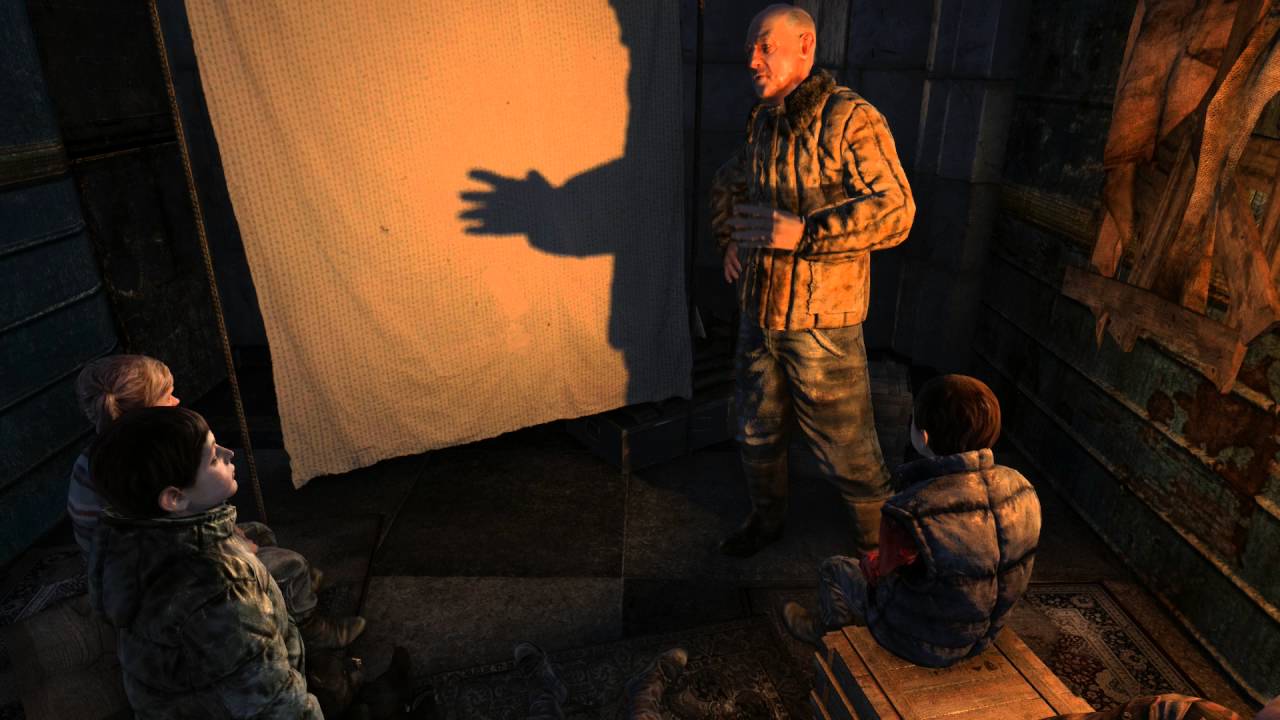
similiar to this:
https://www.youtube.com/watch?v=PO3qi2qN0k0
Sad that the kids have only ever known monsters as the animals.
whole coral
nevermind, just found out urp doesnt support deferred rendering yet
 storm hatch
Anyone know why I can see a light in the scene view but not game view?
The light turns off if it's placed in certain areas

 sharp crater
hey unity experts... I know a lot of 3d, but completely new to unity
I'd like to use a noise function to animate a light's intensity going into altspace VR, and they don't allow scripts.
In Maya I'd just use a noise function, and hand code something... is there a way to do it in unity without scripts?
Also if there is a way to do it, is there a way to tie particle properties to the same noise?
thanks!
teal stratus
Using noise you are going to need a script . You could try animating the light instead with the animation window
 forest rose
Any reason why light isn't on scene view?
 mystic dew
@forest rose because its area light that will cast light only when you bake light on scene
forest rose
So baking is rendering light but can only be seen in game view?
mystic dew
baked only light can be see only when you will BAKE light on scene
forest rose
Im quite lame when it comes to lighting. What happened?
mystic dew
seems like you have to watch some YouTube tutorials about basic of lighting in Unity.
forest rose
Unfortunate but it looks like its true
@mystic dew I will watch tutorials but I would like to know why all the colour from my scene has vanished though so I can get it back to normal
forest rose
I know why its like that, Unity takes the colour out of the scene when you search for something so you can find it better with its colour remaining
except the lighting isnt an object so it wasnt being highlighted haha
 dusty gyro
Dumb question... how do I check what render pipeline I'm template I'm using?
 errant stream
I thinks its in project settings/graphics and then you'll have the name of the assets thats use for your render pipeline
errant stream
Probably that you're using the default 3D render pipeline, or that you deleted the render pipeline asset. You can always import the Universal or The Hd render pipeline from the package manager if you want to switch I believe
dusty gyro
@errant stream thanks. Got that imported and am now using the URP.
 glad flower
Hello, so I have a top-down 2D project and, I want to make my lights to also have shadows, basically I want to make the light unable to light other stuff behind the walls
 open sedge
anyone here?
teal stratus
Hello, so I have a top-down 2D project and, I want to make my lights to also have shadows, basically I want to make the light unable to light other stuff behind the walls
@glad flower URP has some 2d shadow thingys with it. look at shadow caster components and add them to the walls
glad flower
Yeah I looked at it, run into even more issues
I just bought a lighting and shadows asset for 2D because my patience was just dying
timber lichen
@olive kiln generate lightmap uvs. if it still bleeds you can also increase packing margin here manually.
I love the HDRP. (realtime lighting only, defferred).
holy shit that looks amazing
 obtuse crane
dang
olive kiln
@timber lichen Nothing worked for me. I ended up scrapping the model and using a new one.
teal stratus
daaaang thats beautiful
 vapid bone
I am getting these square artefacts when baking lightmaps. Do you know what I can do?
 violet night
increase lightmap resolution
 hot tangle
Hey guys, do you think this level's lighting is OK?
Also, any reason why point lights can't cast realtime shadows?
 covert stirrup
There seems to be a mismatch between light sources and light objects. It seems strange when there's a clear source of light but nothing there to cast it
What I mean is if you add some lamp meshes where you have the lights, it will make more sense
hot tangle
Yup, I'll do that. But, pretending that the lamps are present, what do you think?
Is it ok to leave the character without shadows that casts onto other objects or should I fake a shadow texture underneath the character's boots?
covert stirrup
I think it creates a cool atmosphere :) And no, it didn't occur to me that there were no shadows on the character
hot tangle
Cool.. thanks.
 obtuse coral
I'm not sure if this is the best place to post this, but I'm having an issue with a shader graph. It takes in an HDR image and maps it to a skydome (geometry). The HDR's thumbnail when loaded into the project is yellow and blown out, and when I assign the HDR to the shader and put the geo in the scene it's blown out too
This is how the skybox should look
And this is how it looks when applied to my shader
I'm obviously missing something in how Unity handles HDR's when assigned as a skybox through the skybox shader...
Also to note, I'm deploying this over webgl...
When in a standalone build it all looks fine, but in webgl I'm getting this error
 low sand
i don't think it's inverted, blue's would turn orange right? i see oranges turning more orange
looks way oversaturated
frozen crypt
@obtuse coral Its webGL... it doesn't support things like Global Illumination.
timber lichen
it supports Baked GI, but the skybox should still work.
hdrs as skyboxes should work everywhere.the only think I can suggest is maybe try adjusting the import format stuff.
 glacial solar
I think he is using it as a "skydome (geometry)" rather than a skybox.. Does WebGL maybe have some limitation where it can only use the hdr as a skybox perhaps?
 fallow dust
Does anyone know how to turn off the 'dimming' effect where lighting re-adjusts after a bright light? HDRP thing probably
 lyric narwhal
@fallow dust auto-exposure is on by default. Add an exposure volume override and set it to fixed.
 icy sluice
Hey All, just wondering if anyone has heard of an update for Shadow Mask baked lighting in URP? Any idea when it will be supported?
fallow dust
@lyric narwhal Amazing, thank you.
timber lichen
Hey did anyone had problems with baking lights in 2020? This has been happening and I'm not sure whats causing it as the settings are the same as we were using in 2019
Things I tried:
- Putting a solid ground
- Editting normals
- Changing the UV
- Increase padding
None has worked so far.
The imports are with Weld Vertices and we are with Stitched on.
timber lichen
weld vertices I believe require the pairs to be perfectly (about) positioned but not already face between them. if you check the splines at that corner (move it) in max/blender/whatever to see if there is a face tucked in there.
but if you open it there you may as well weld them manually if that is the case.
timber lichen
Oh I got to solve that by the Filtering options in the Unity 2020 baking menu, set it to none
 graceful steeple
guys i need help on making an object glow
 dusky acorn
how i can create a new spherical HDRI map into unity 2019 ? I mean render a new one from scratch. PM, please.

Skyboxes are used for reflections and for lighting your scenes. Here's a quick beginner/intermediate tutorial on how to render your own custom HDRI skyboxes in Unity by baking reflection probes.
i got this tuto but it generate only a legacy cubemap
 sinful anvil
hi everyone ! Anyone knows why i get those weird reflections ? thanks a lot !
the white thing in the water ? sometimes i see distinguahble objects
 shell whale
Does anyone know of an open source or paid license that has a custom light probe solution? I want to be able to load light probes at runtime and position them where I need
 winter echo
I have a URP render pipeline, and lights seem to be dissapearing when I add new ones. I tried changing the per pixel lighting in Edit > Project Settings > Quality, but I couldn't find it
teal stratus
@winter echo the pixel lights count in URP is in the URP quality asset
usually located under the Settings folder in the Assets folder
winter echo
ah, ok
jaunty shore
Hi, is GI not possible for hdrp without baking lightmaps? So yeah... Realtime
mystic dew
@jaunty shore you can use SSGI + Probe Volumes
jaunty shore
@mystic dew but my gpu doesn't support ray tracing yet
mystic dew
well SSGI and RTXGI its a bit different stuff
for SSGI you do not need to have RTX
RTXGI give more correct result and request RTX card
jaunty shore
I thought ssgi was tied with the ray tracing feature
On what version is it? The ssgi?
mystic dew
2020.1 or 2020.2 HDRP 9x or HDRP 10.x
 hoary egret
I dont know if it has anything to do with lighting but i added a normal map to rocks in my game but now they are black. any idea whats going on
jaunty shore
@hoary egret is your rock under shadow?
hoary egret
no, it has direct light, I can get a screenshot if you would like.
hoary egret
the one unity comes with out of the box, I havent gotten any pipelines yet
jaunty shore
I see
jaunty shore
Did you have your base color map applied?
hoary egret
Im sorry im a noob with unity can what do you mean by color map?
jaunty shore
Let me send an example
hoary egret
alright
jaunty shore
Left is color map, and right one is normal map
So basically just a plain texture with colors
hoary egret
Oh ok
Im not using a texture with the normal map, just a basic color should I be using a texture?
jaunty shore
Didn't you said the rock turned black after you applied normal map?
hoary egret
yeah
jaunty shore
What happened if you removed the normal?
hoary egret
it fixed the lighting
jaunty shore
Hmm, so normal is the issue. Can you send me a screenshot of your material window?
hoary egret
should i add the map back and send a screenshot?
jaunty shore
Yeah, sure
hoary egret
one moment
the normal map works on the sphere but not on the rock
i think it might be the model actually
let me try the material on a cube
jaunty shore
Wait, did you drag the material onto the model or not?
hoary egret
I did
jaunty shore
Okay, that's weird
hoary egret
I used blenders rock generator if that helps at all
jaunty shore
Yeah, maybe try with unity builtin prefabs and see if it'll works
jaunty shore
Except the blender model?
hoary egret
yeah
jaunty shore
What format did you export it from blender?
jaunty shore
Try obj, i use blender too. And i have no problem with it, just incase this will work
hoary egret
alright give me a moment
jaunty shore
Alrighty
hoary egret
nope
hoary egret
No i havent
jaunty shore
That might as well be the issue, otherwise i have no clue
jaunty shore
Also, you haven't sent me the screenshot of the material window within unity
hoary egret
nevermind didnt work
is the material display in the corner of my screen not the window?
jaunty shore
Yes, the one with the sliders and stuffs
hoary egret
oh yeah ill send you an image sorry
jaunty shore
No need to be sorry
hoary egret
jaunty shore
I saw nothing odds there except for the smoothness slider set to max
hoary egret
adjusting it doesnt seem to do anything
jaunty shore
Okay so the normal would work on any model but the model from blender?
hoary egret
yeah
im starting to think its the rock generator
let me test it on an older model of mine
hoary egret
and now my file explorer is being broken....
jaunty shore
Ah, F
hoary egret
apparently i cant drag files off of it anymore
im going to revert to an older version of my project
jaunty shore
Happens to me once in a while, restarting would do it for me
hoary egret
when i was using previous models
jaunty shore
Ah okay
hoary egret
i think its just the rock generator being bad
yeah
ok thanks for helping me solve it
does this server still have the thanking system?
jaunty shore
Tbh i don't feel like helping you at all lmao
hoary egret
I mean you lead me to the conclusion so i think that counts as helping
jaunty shore
Sure, btw you can make rocks manually faster if you use noise texture to generate rock form object
In blender
jaunty shore
Not a problem
 fast moat
why do my graphics look so dark and dull? they're supposed to be bright and colourful like the bottom left
i'm trying to get this result
fast moat
anyone? 😦
covert stirrup
Did you bake your lighting?
fast moat
nope i've not baked anything
where do i find Ambient Source in 2020.1.2f1?
step in the right direction lol
its really shiny lol
 analog prism
Hi guys
Any idea why i have this weird artifacting
It seems like its something to do with the lods. LOD 0 looks fine but LOD 1 has this artifacting
Any assistance would be greatly appreciated
I even turned off the blue lights and there is still artifacting
This is driving me nuts
Also I just have the purple light which is baked 😢
 fallow thicket
anyone know why when I bake lighting in Unity 2020.1 with URP it removes all my roughness information on my materials?
Is it even possible with URP to have PBR materials with baked lighting?
timber lichen
still making assets and stuff. HDRP, Deferred. No Baked Lighting. Literally everything here has 4 LOD Levels.
 rigid peak
sorry if i sound dumb, but my lens flare isnt showing up in my game view. I have an empty with a lens flare component and a lens flare asset. I can see it in my scene view. Help?
Ah, never mind. I got it.
 rancid coral
Can someone help me figure out why my lighting is doing this? It was doing it on a different model that I was trying to import before, I closed and reopened unity, now it's doing it on this one too
Idk if it's lighting or my materials
seems to be only on models that have unity materials that are just colors
obtuse flame
Might be the material
 clever vigil
I haven't been in unity for a while so i'm a little confused as to whats causing this issue with my shadows. All the bias from the source light are set to 0. Anyone have any ideas on a solution to have the shadows display correctly?
timber lichen
@clever vigil what scale are you working at?
clever vigil
Nothing out of the ordinary, the shelves are about 1m high for reference
This was just the best camera angle to display the shadow error
timber lichen
At that size it might not be possible to beat it. But if you plan to use baked lighting it should look OK.
timber lichen
point light shadows can be weird. even on HDRP.
also they have a wider area to cover so I imagine it could be precision.
clever vigil
Why should scale make a difference if this is 1m or 10m tall?
It's like the shadows are offset it's very confusing haha
timber lichen
shadow scale is constant in scene regardless of object scale. So a workaround can be to just double your scale.
what is your shadow distance set to?
but yeah your near plane is where shadows start casting relative to the light.
clever vigil
Yeah I can adjust the near plane and such but at 0.1 which is the lowest itll go it doesn't reach the corners
The default 150 I think for shadow distance
timber lichen
on HDRP it can go even lower.
clever vigil
Ah ok I'll look into that then, hopeful that's a simple fix with HDRP then
I dont think the project is setup for that atm
timber lichen
You can just import the package and it should give you options to upgrade.
However, backup your project (or commit to git, if you are using it).
you near plane can go as low as 0.0001 on hdrp.
 deep vector
Click window, lighting, rendering, at the bottom click bake lights
 swift notch
what is the best way to give the lighting a red tint, without making everything pure red?
 opal sapphire
Hey guys, I hope everyone is doing good, I had a question about 2d lighting
when animating a character to open a window to let light in, what's the best approach to animating the room light up. Would it be to draw the room frame by frame with new lighting, or would it be to use the unity built in lightweight package
hot tangle
Hi guys, does anyone know how I could recreate the blob shadow projector in URP?
 dapper glen
Thursday shenanigans.
candid pecan
Can anyone tell me a fix for these inaccurate reflections?
mystic dew
@candid pecan reflections of reflections without RTX?
candid pecan
@candid pecan reflections of reflections without RTX?
@mystic dew getting planar reflections is not possible without RTX is it?
fallow thicket
Does light baking take forever during the GI process for anyone else? I'm doing it in a scene with a single object and it's taking forever
candid pecan
Does light baking take forever during the GI process for anyone else? I'm doing it in a scene with a single object and it's taking forever
@fallow thicket what's your scene setup like?
fallow thicket
It was just a couple simple assets on a Plane. I found out changing the directional light to 'Mixed' helped the materials look normal PBR @candid pecan
I'm finding Unity likes to hang on the Global Illumination loading bar when I bake sometimes. I also found out it bugged one time and I had to restart the engine and it worked again
Unity did a few GI processes and now it decided to hang like this for a long time now... Not sure whats going on.
oh god it just updated and says it's going to take 142 days haha what the hell?
and now it's at 1 hour..hmmm haha
mystic dew
@candid pecan planar reflections wont reflect other planar reflections
Until you will enable option for that probably
candid pecan
oh god it just updated and says it's going to take 142 days haha what the hell?
@fallow thicket there's clearly something in the scene that's causing it. Try shifting to Progressive GPU preview. And yeah, usually it helps to restart unity. Also keep track of you lightmap settings - samples, lightmap resolution etc. - they're huge factors in determining how long build times are.
fallow thicket
yeah I'm using the progressive PGU preview. My samples might be a bit high, I'll check that out. Thanks. I'm switching from Bakery to the new Unity native light baker..I wonder if it will be better.
candid pecan
Can anyone tell me how to get rid of this weird artifacting that happens when meshes are viewed from a distance? this is most prominent among meshes which have an emissive part in it.
Can anyone tell me how to get rid of this weird artifacting that happens when meshes are viewed from a distance? this is most prominent among meshes which have an emissive part in it.
@candid pecan
 fading terrace
Currently having a lot of issues with the lightmaps, Im not sure what or why. I´ve been tweaking settings for hours now, but i keep getting these horrible Uv-Overlapping
mystic dew
@fading terrace show us your models. its modular?
fading terrace
@mystic dew Its this Asset called HouseBuilder, where you draw your floorplan and the asset generates the building.
Same issue on the outside, the textures are fine, there isnt a single issue before baking the lights, so my assumption is that its a difference in texels or some Ambient Occulusion (As it seems to only affect those corners and crevices that AO would affect, so perhaps the stitching the asset uses may not be recognized properly.)
mystic dew
@fading terrace well its common problem for modular mesh. Try to make bigger distance between UV Lightmap merge and bigger lightmap resolution
fading terrace
@fading terrace well its common problem for modular mesh. Try to make bigger distance between UV Lightmap merge and bigger lightmap resolution
@mystic dew The resolution is currently on 50 texels per unit. What do you think I should increase it by?
When you say bigger distance between UV Lightmaps, are you referring to the lightmap padding?
mystic dew
yea
fading terrace
Padding is set to 2, And resolution is at 50. What would you increase them to?
mystic dew
well seems like there to many parts
better to leanr 3d models and do nice optimized building that will works good with baked lighting
fading terrace
I thought about that as well, but this is one building, part of a city. Thats a lot of fully designed exterior and interior building, Im not sure that where I should place my efforts currently. Is there no way to fix this issue? You mentioned the Padding and the resolution, but im still not sure what I should set them to? Would padding set to 4 and resolution at 100 be too much? or whats the balance?
mystic dew
well open scene view, and show us Baked light view mode (where is shaded)
mystic dew
what is your lightmap render resolution?
try make 4096.
That happening because of your model not optimized and have problems in topology like not merged vertex.
so really better to do models in 3dMax or Blender or generate in Houdine that use this tool
fading terrace
Yea, I think your right
but I have to make a lot of buildings
And then add that to the learning curve of the software, making it extremely time consuming.
mystic dew
well in this case better to use Houdini. Generate whole city and export to Unity
fading terrace
Render resolution to 4096 and keep the padding at 2? Any changes to the max Lightmap Size?
mystic dew
Because your current models will be even heavy for games 😄
fading terrace
Does houdini generate interiors as well?
mystic dew
that will be hard, because it mostly generate complex shapes.
but if you will make him follow to generate primitive cubes, that probably can work
but your idea by using this asset + interiors + city = 1 FPS
fading terrace
Currently I haven't had any issues so far, even spawning multiple building 20+ is not showing any performance issues.
mystic dew
well that good, until you will go to more complex and density city with furniture,outside props and maybe working street light
fading terrace
Yea, that could become problematic, currently I just want to fix this lighting issue, then I´ll tackle other problems as they show up
mystic dew
@fading terrace btw from my experience good light baked possible mostly on building with optimized topology like on left at this example
fading terrace
Okay, Thanks. I´ll see if I can get the result I want from this asset, if not I´ll have to look into something else.
timber lichen
how to have equal lighting on all places
like
no shadows and everything
just pure light
im doing a sample map and i want just one light that lights up the whole scene
shell whale
That's called "ambient light"
opal sapphire
Hey guys, so I used a lightweight RP for lighting. I pushed my changes, but when I try to clone the changes and open up the project i get this error
apparently the material does not have a _MainText texture property
im not sure what does means, as it worked just fine on my original project, only when I tried to clone it I ran into this issue
on the project that works, this seems to be my Mat
but on the proj with the issue, my mats look like this
timber lichen
while following this video https://www.youtube.com/watch?v=F5l8vP90EvU&t=1s, I noticed that I can't attach the New 2D Renderer Data to the Universal Render Pipeline Asset

We have a new 2D Renderer for 2D games, which includes the features 2D Lights and 2D Shadows! In this video, we're going to take a look at how we can use Unity 2019 and the Universal Render Pipeline (URP) to add 2D Lights and Shadows to our 2D games!
Download the Lost Crypt p...
haughty jolt
So I have this setup for URP, I just want some interior lighting that's obviously baked for the most part but has the players real time shadows
I'm using Spot lights, and the shadows kind of look like ass right now, does anyone know what I'm doing wrong?
timber lichen
it bakes and finished, i go into play mode and test a bit and when i stop its baking again >:C
do i have to use baked lights?
it just takes so long in one scene even if i just change a bit of terrain
and there is not much besides that terrain
and for some reason it rebaked after i exited play mode
timber lichen
Also does it have to use CPU? why doesnt gpu one work?
oh now it works... before it always switched back to cpu progressive 
anyway look at this mess anyone know whats the problem? xD
or rather the solution to the problem of the flickering(?) textures
 gloomy blaze
Good Afternoon... Are Point Light Shadows only avalable on HDRP? I'm currently using URP
covert stirrup
As you can see here they're still working on it https://docs.unity3d.com/Packages/com.unity.render-pipelines.universal@7.1/manual/universalrp-builtin-feature-comparison.html
gloomy blaze
Well that's a bummer :c
covert stirrup
It's a shame yeah


 gloomy blaze
Does anyone know how to fix that issue where in one angle the light works, but then in another angle it doesnt?
 south lava
@gloomy blaze can you provide screenshots?
Anyone know why Environment Lighting wont work with Skybox? I have a skybox material set but only when choosing "Color" in Environment Lighting it will apply the lighting... I tried changing the skybox but with no luck, I am using URP and Unity version 2019.4
also, there is no customization for the environment lighting, should it be like that? (the only one is intensity multiplier but I don't know how it will affect the lighting when applying the skybox)
 median osprey
@south lava Let's go step by step. I also struggle with all those lighting settings. Switch to the main directional light in hierarchy and check the settings:
Tell me, what Mode do you have
south lava
@median osprey I found the problem, I just needed to tick "Contribute Global Illumination" and select "Lightmaps"
median osprey
@south lava Is it in the Skybox material ? I bet I would be struggling with it in future too
south lava
Its in the gameobject's you want to apply the lighting to
median osprey
Got it
south lava
The "Contribute Global Illumination" thing is a bit odd, because it implies that the gameobject will contribute, but what if you don't want it to contribute? (I'll suggest you read about it before, maybe I did it wrong)
south lava
It depends if the lighting is real-time or not
You can see it here at "Ambient Mode", but it is disabled for "Skybox" for some reason...
there should be an option to change it to Real-Time
Actually it is disabled for all options in "Source"
But, changing the "Baked Global Illumination" below, seem to hide it entirely, so there must be some option to enable the Ambient Mode
 elder thicket
whats the best way to bake content , say if I bake A and then later at some point I bake B so, it's better to bake A and B together to avoid recursion?
My bake keeps going in a loop where it reach 10 seconds and goes back to 6 minutes and keeps going.
gloomy blaze
@south lava I Forgot to strike it out; it was the Lights per Object limit. I ended up working around it. Thank you for replying though
 indigo orchid
Is there a way to make volumetric lights in urp that's easier than this?
median osprey
@indigo orchid Couldn't find anything... HDRP has volumetric options and stuff for directional light. URP uses meshes 😦
timber lichen
What are some very simple things I can do to make the default lighting look a lot better in a 3D forest environment? I’ve never messed with lightning before and think the default one is bad
frozen crypt
@timber lichen Depends on your style. This might help. It helped me a lot with sun sets. https://www.youtube.com/watch?v=J-IN3AjSQHo
 lunar pollen
how do i make light pass thru a transparent glass material in hdrp?
 pulsar aspen
Would it be possible for me to change the color of a shadow, for a specific object only?
timber lichen
thanks @frozen crypt
frozen crypt
@lunar pollen should be able to set the object to not cast shadows.
lunar pollen
is there not a way to tell it to only let part of the light through?
also on a different note, now do i fix this
one is facing away from the sun, the other towards
obviously this isnt what i want
my density volume appears to be seeing light thru walls
hot tangle
Guys, which one is better? Brighter or Darker?
 open harness
Darker looks a bit more ominous, while brighter seems a bit off
hot tangle
Cool, I was rooting for it too.
 prime zealot
Is there a way to override Light layers in prefabs? Right now I can only do it through each child objects with mesh renderer??
 keen crow
When lightmapping I'm struggling to see the effect of a low direct/environment sample count. This entire scene is static and the lights are set to Baked mode. I set direct to 1 and environment to 8 and see no drop in quality. Is my test scene not complex enough? I want to make sure I understand what the sample counts do.
 scarlet karma
Hello! Using HDRP, is there a way to make an object receive light from a light source but not shadows from that same light source?
lunar pollen
How do i make my underground lighting darker in hdrp? the ambient light is bleeding in
 errant rose
How do i make my underground lighting darker in hdrp? the ambient light is bleeding in
@lunar pollen this is best discussed here in #archived-lighting instead of #archived-hdrp.
one solution is to use layer masking / a culling mask for the ambient light and all "underground" objects https://docs.unity3d.com/ScriptReference/Light-cullingMask.html
a more photorealistic approach would be to not use an ambient light at all and only a directional light for a global light, with some kind of global illumination plus shadows and ambient occlusion.
lunar pollen
how do i make my physically based sky not emit light but keep its shading?
the exposure multiplier set to 0 removes ambient light, but then the skybox becomes black
errant rose
@lunar pollen I think you just go to the Lighting settings window, change the (lighting) Source from Skybox to Color (e.g. set to black).. but keep the Skybox Material selected for the background: https://docs.unity3d.com/Manual/lighting-window.html
errant rose
well it's a bit different but same concept. you disable the skybox for lighting but keep it as a background. look around in the other lighting tabs, the camera settings, and the volume profile settings, the hdrp asset settings.
scarlet karma
does GI work on HDRP? I thought I recall reading that it didn't
and I haven't had any luck getting it to work
lunar pollen
@scarlet karma
scarlet karma
yeah, I've seen no difference when I've tinkered with that
lunar pollen
well it's a bit different but same concept. you disable the skybox for lighting but keep it as a background. look around in the other lighting tabs, the camera settings, and the volume profile settings, the hdrp asset settings.
@errant rose my game has custom mapping, im creating the map on a completely different pc as the one that has th main branch. custom render pipeline settings isnt an option, nor are custom camera settings
errant rose
@scarlet karma i know that Enlighten only works for Built-in RP. HDRP does support the CPU/GPU progressive lightmapper. HDRP also has RTGI (ray traced global illumination) (newer GPUs only) and SSGI (screen space global illumination) support is coming soon.
https://docs.unity3d.com/Manual/realtime-gi-using-enlighten.html

Unity Learn
In this tutorial, you will learn how to use the emissive properties of HDRP Materials to contribute to a Scene’s Global Illumination.
@lunar pollen
see here under this section:
Decoupling the visual environment from the lighting environment
You can use the sky Lighting Override Mask in your Unity Project’s HDRP Asset to separate the Visual Environment from the environment lighting.
https://docs.unity3d.com/Packages/com.unity.render-pipelines.high-definition@8.2/manual/Environment-Lighting.html
lunar pollen
i saw that, but wasnt able to find a lighting over ride mask in my hdrp asset
wait no
i found the lighting over ride mask, but it was unclear how to use it
wait i maybe figured it out
ok so i got the opposite of what i need. the physically based sky component now controls the ambient lighting, not the skybox
i added another visual environment volume, and no i have 2 skyboxes that are fighting eachother
scarlet karma
@errant rose thanks for the link, that's a start! it looks like realtime GI isn't available in HDRP yet, is that correct?
errant rose
@scarlet karma i think currently only realtime raytraced GI via DXR, aka RTX. But SSGI (that will bring real-time GI to many more GPUs / platforms) is coming soon though, by the end of the year likely for Unity 2020.2 /3 + HDRP 10
timber lichen
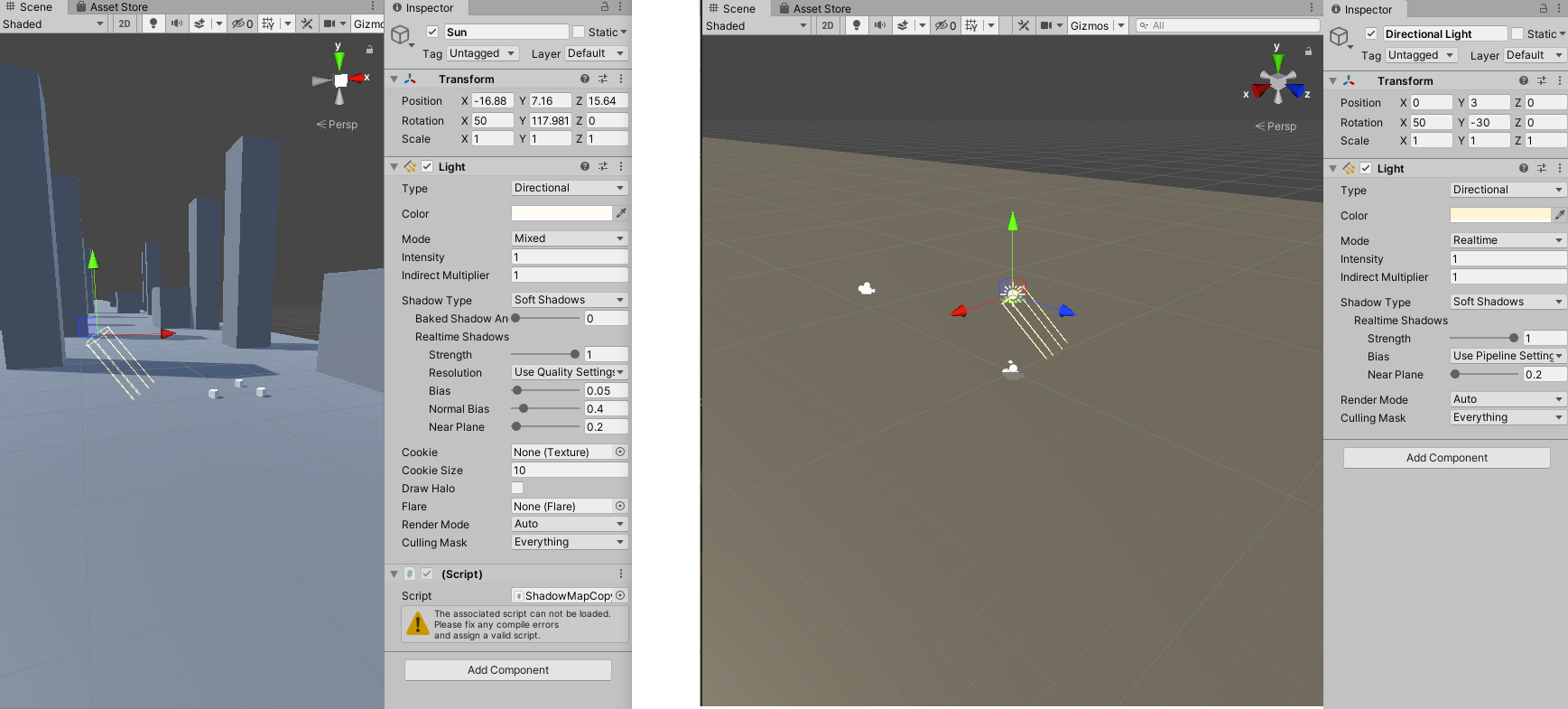
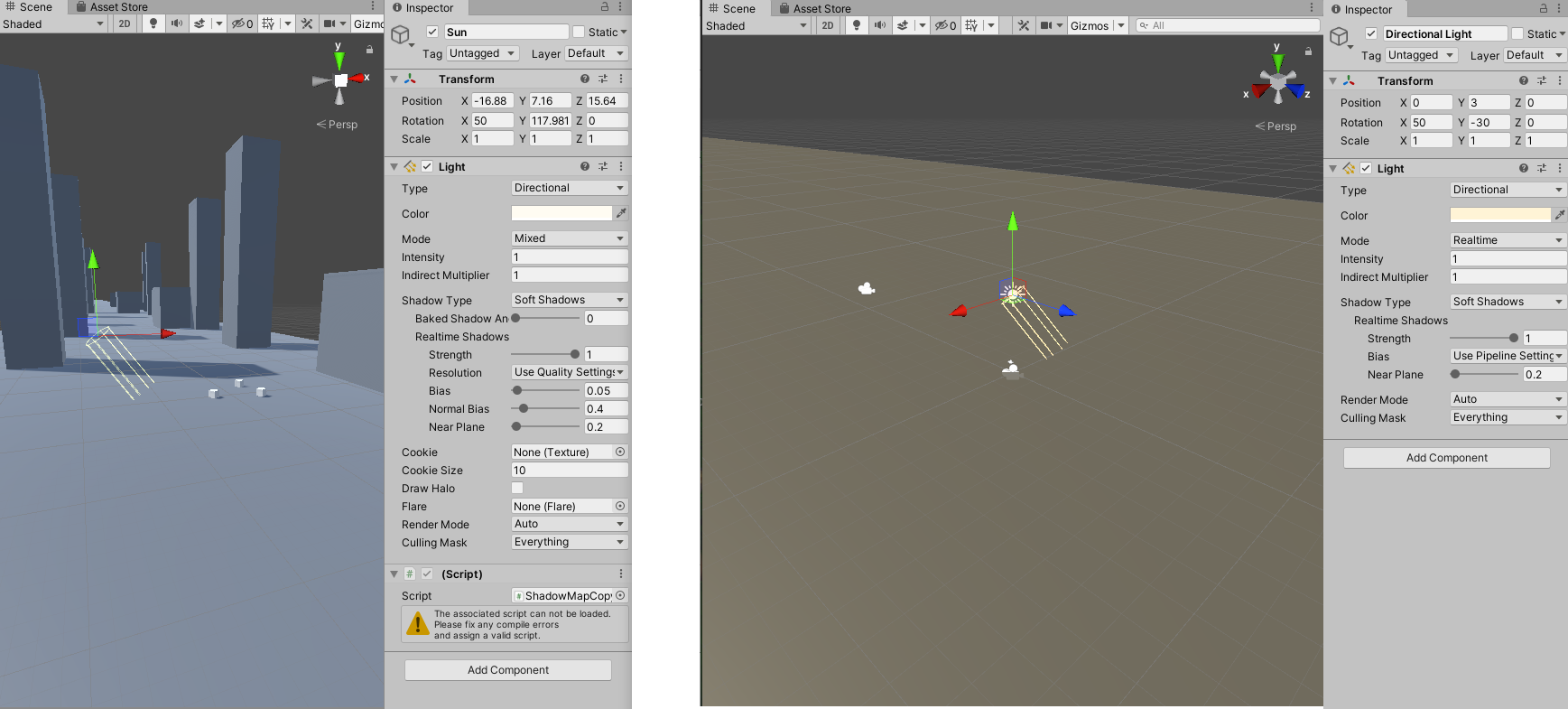
hi, any idea why when starting a new project, sometimes the lighting is weird, all yellow and darker, see the image (left normal(note: using a blueish material), right yellow), the light in both projects have the same settings https://i.gyazo.com/f300d3feab91d807a2cb15fd6136b458.png
 scarlet karma
@errant rose nice, thanks for the info! I'd been teetering on the bleeding edge until netcode stopped working in 2020.2 for me 😦
errant rose
@scarlet karma ah yeah i hear you, i am sticking to Unity 2020.1 for now.. maybe I'll start using 2020.2 when it's later in the beta cycle and final release is imminent.
scarlet karma
@errant rose not sure if you noticed the question I put up prior to the other convo we've been engaged within, but since I have your attention and you seem knowledgeable, I'll ask :)
do you know if it's possible to set an object up to receive light from a light but not shadow? I've tried using light layers, but I've found that if an object receives light, it also receives shadow, no matter how I poke at it
errant rose
Hello! Using HDRP, is there a way to make an object receive light from a light source but not shadows from that same light source?
@scarlet karma i found this thread on the forum: https://forum.unity.com/threads/cant-disable-receive-shadows-on-specific-object-using-hdrp.566113/
Unity Forum
Hi everyone !
(Version used: 2018.2.8)
I've started using HDRP to make my scene looks cool and managed to get the terrain material works with it....
which points to this HDRP doc that describes Shadow Light Layers
https://docs.unity3d.com/Packages/com.unity.render-pipelines.high-definition@8.2/manual/Light-Layers.html
scarlet karma
wow, I simply don't have that response from you in my history! lol
errant rose
I just responded to it now, you're not crazy
scarlet karma
oh okay, I thought that was a quote of my first message
errant rose
it is, i just scrolled up
scarlet karma
I thought I was losing it, or discord was failing me (again)
sorry, a quote of my first message and a response from you*
yeah I've tried shadow layers too, not working as I'd expect/in a way that will work for me
(deleted messages because I realized they weren't quite accurate)
if I choose anything other than "Default light layer" in the shadow layers selection of my light, I get no shadows anywhere
so by doing this, I can get a lamp that casts no shadows on any object, not selectively casting shadows to only the objects I desire
I could duplicate my light and hack that together, but I feel like that shouldn't be necessary
(apologies for the potentially confusing explanation, it's a goofy one)
 wet locust
anyone know how I may be able to cast a shadow on an otherwise invisible object?
scarlet karma
@wet locust so it receives shadow but is otherwise invisible? not sure if it's the best way, but you could use a grab pass or the scene color node if you're using shader graph, and use that as the albedo.. it'd otherwise be unlit. I think that'd work
wet locust
@scarlet karma unfortunately my project is stuck in Unity 2017. Shader Graph is the new(ish) shader making thing for 2019+ right?
scarlet karma
I'm not sure when it came into existence, but I think it's been used since ~2018ish and is used with the URP and HDRP, yep
are you comfortable with shader creation at all?
wet locust
yeah dang, this is on standard pipeline '17
I actually can't program. I use PlayMaker
scarlet karma
@wet locust I was attempting to throw something together for you quickly, but I don't have an older project stood up. I'll see if I can put something together for you.
wet locust
thanks. Any help is appreciated
 hexed fossil
Hey all, I'm playing around with point lights and set them to baked. None of my objects are able to cast shadows, even set to static. Does anyone know why?
Here is a primitive cube and a probuilder cube
Oh and I also disabled directional light
and this is in Universal Render Pipeline if that helps
 weak pine
How do I get rid of this little line crap?
timber lichen
how can i generate lightmaps faster? i have a 100x100 plane with a material of max smoothness and a reflection probe of the same size, both set to static, and a single directional light, but when i hit generate lighting the estimated time increases to over an hour
that's the entire scene, and it still isn't happening, i don't know what settings i might have wrong
i tried halving all the settings
seems to be no change
the estimated time just continuously goes up
even with settings this low it does it
timber lichen
ok i think maybe i was maxing out on system memory and that's why it wasn't working maybe
 balmy vine
Unchecking Baked Global Illumination is the only solution to reduce generation and build time I'm aware of. @timber lichen
Good news is I've found it looks better realtime, just costs you in performance
timber lichen
redid all my meshes (and prefabs) and happy so far (legacy renderer) .
except for the part wher I need to adjust door height
lunar pollen
how do i manage ambient lighting intensity in HDRP
 scenic pawn
All of the sudden (I can't remember changing any settings) the lighting started acting up in my scene, no changes to this ground material does anything, before it had a nice reflection but now it looks very bland, any idea what could have happened? Its just a directional light and a flattened cube
silk lichen
why are these blobs appearing on lightmaps ?
they started showing up after I increased the intensity multiplier from 0 to 0.5
hot tangle
@silk lichen Try increasing the lightmap resolutions until you get it right?
@scenic pawn It probably used baked lightmap, maybe generate again?
teal stratus
why are these blobs appearing on lightmaps ?
@silk lichen 1: Try enabling a denoiser in Filtering- Advanced - and set every denoiser to Open Image Denoise (or prefer Optix if you have an nvidia gpu)
2: If you are willing to wait a longer time, increase sample counts
i think those blobs are noise
so you need either more samples or a denoiser
scenic pawn
@hot tangle thanks for the response! I noticed that I had auto-generate unchecked, so I created a new lighting settings and clicked generate, then checked that box, but no change, it seems to be a problem with just the floor not reacting correctly to lights, I will send another screenshot
lunar pollen
is there a way to make skybox/ ambient lighting not go through walls?
lunar pollen
answer: reflection probes
hot tangle
@scenic pawn I'm guessing the floor won't move in your game, so I would suggest you mark it "static".
And, check the material, it is possible that the material has a black color or is set to unlit(if you're using URP). Set the point light to use mixed lighting, then click generate on the lighting settings again.
timber lichen
Not sure if this should go under terrain or here but I'm having an issue with seam artifacts when baking my lightmaps. In the editor it displays fine but in-game theres a sharp defect in the way the lightmap displays
EDIT: nevermind, i figured out how to get a useable uv map to avoid bad seams in visible areas
This is supposed to be a rocky outcrop/overhang on some cliffs
 barren idol
Hello fellas, I've got some problems with seams on segement edges after bake
Also, I've these bizzare artifacts in some locations
These are my settings
scenic pawn
@hot tangle that didnt seem to work, its ONLY the floor, some strange setting switched (I think when I imported some assets) and here is the difference before and after
this last one is after for the black floor
hot tangle
@scenic pawn Which pipeline are you using? Is there a simple way that I could replicate your scene to see if I can be of any help?
scenic pawn
@hot tangle thanks for the response, I am not using a render pipeline at the moment (so just the default one?) and the only thing I can think of that I changed was importing some assets from here (I dont know if this matters or could change anything) - https://www.raywenderlich.com/1142814-introduction-to-multiplayer-games-with-unity-and-photon

raywenderlich.com
Learn how to make your own multiplayer game with Unity and the Photon Unity Networking (PUN) library.
hopefully this gives some more idea of whats going on
timber lichen
HDRP, Baked Lighting.
 celest ice
Hi everyone, I was following a tutorial that was basically making a DOOM clone.
All the sprites are 2d, except for the walls which are just a cube model textured with a 2D sprite.
How would I go about adding lighting to this? The texture im using for the materials is currently "Unlit/Texture" I don't see a "Lit/Texture" equivalent so im not sure even what shader to use on my materials
teal stratus
Use the standard shader
for the 2D sprites use the standard shader with cutout mode
celest ice
ok! thanks, will the lighting look weird because of the mix of 2d and 3d? or should it work out okay?
I've only really used the liighting system once and it was in a pure 2d game
teal stratus
It will probably look a bit weird on the 2d objects sometimes but that depends on where you place the lights and if you use shadows,etc
or how do you set up lighting in general
for example you can use baked lighting with light probes
faster and should look ok
idk what are you trying to approach tho
celest ice
that sounds like a good place for me to start messing with and see where I can get. Thanks a lot!
teal stratus
np
 iron coyote
Anyone here who's had issues with shadows flickering when moving the camera, both in editor and build?
It's something that started showing in our game, and It's extremely jarring, and I've tried almost everything...
Hope to dear god someone can help with an answer.
A "Technical Wizard" credit will be given in the credits, because i sure as *** have tried almost every solution I've found online, next to spirit cooking with moloch, and nothing as changed..
mystic dew
@iron coyote you have to upscale shadow resolution maybe?
iron coyote
@mystic dew Do you know where it's located? We're using HDRP, so it's not under "Quality Settings".
mystic dew
@iron coyote you have to edit HDRP Asset file or click on directional light in change shadow resolution
iron coyote
I just found it on the light sources, and set them to 2048 (Ultra in our HDRP Settings).
Still doesn't remove the flickering 😦
mystic dew
@iron coyote try to lower shadow draw distance?
iron coyote
@mystic dew Hmm, set it down to 50, but it still persists.
Don't know what happened, but this started happening now:
Looks like it was Contact Shadow acting up.
Setting the length to 0 removed it.
But the flickering adventure still continues 😦
hot tangle
@scenic pawn Perhaps you need to create a new material and apply to your ground cube. I can't seem to create the problem you have here.
timber lichen
also - your HDRP is set to deferred?
scenic pawn
@hot tangle I went ahead and just created a whole new scene, and the problem was gone, I still have no idea what happened but it seems to be good now, thanks a lot for the help!
timber lichen
Why is the right wall black?
how do i disable so that the light doesnt affect any walls or such like the wall on the right is black now instead of blue like the one on the left???
storm hatch
@timber lichen It needs to be set to static to get lighting assuming the light is baked
timber lichen
how do i do that?
storm hatch
top right of the inspector there's a checkbox
violet night
dont really get it, probably can just set the culling mask in your light component to not include the layer for the wall layer object, but also mean the light can cast through the wall
or use unlit shader for wall, so all the light wont affect the wall
timber lichen
where can i find unlit shader?
violet night
 jolly glen
can i have some help
 quaint yew
does Unity have support for PBR material baking? (PBR Material + lighting info ----> 1 texture??)
i saw this technique used in a GearVR demo, but it was done in 3DSMax + Vray then brought into Unity
hot tangle
Hey guys, does anyone know how I can replicate the blob shadow projector from the standard assets for URP?
 keen pagoda
Cant get reflection probe working
looks fine
back up a bit and this happens
settings
What am I missing?
covert stirrup
You mean the perspective should change when you move @keen pagoda?
 orchid fjord
anyone knows what this white spot doing on my mesh ,it is not a part of the texture I am applying to the mesh and the problem is occuring after i baked lights.It glows to much after I apply glow in post processing 😦
jolly glen
I’m getting this problem in the camera
jolly glen
I’m getting this error nonstop
And this is what the render pipeline wizard looks like
orchid fjord
you created hdrp asset in project panel right?
jolly glen
I think?
I just installed the HDRP in my project
And I ran the wizzard and got all these errors
I’m clicking the fix buttons but nothing is changing
jolly glen
orchid fjord
check if you have done this
jolly glen
^
orchid fjord
hmm
jolly glen
This isn’t a fresh project
It’s had like 2 months of work on it
So I know that has to do with it
This is the first time I’ve messed with lighting
orchid fjord
you also creted the hdrp assset and the renderer?
and assigned the asset to the renderer?
jolly glen
Isn’t that what I sent above?
orchid fjord
I didnt worked with hdrp before but I think it has the same installation process as of the URP
but anyways
ask someone at general code
jolly glen
But it’s not code?
orchid fjord
right but you can ask as they might know
orchid fjord
like you know coding but you also know other stuuf
jolly glen
Is it too late for my project is it not possible to do convert this late?