
#Discord Tips and Tricks
47 messages · Page 1 of 1 (latest)
 rugged lily

Discord
Want to inject some flavor into your everyday text chat? You're in luck! Discord uses Markdown, a simple plain text formatting system that'll help you make your sentences stand out. Here's how to d...
Want to make it easier to tell what time you are talking about? This is a time convertor you can use in discord!
https://hammertime.cyou/

 glossy pendant
Very much so
 west stump
rugged lily
https://support.discord.com/hc/en-us/articles/210298617
west stump
rugged lily
https://support.discord.com/hc/en-us/articles/210298617
There is also this little hover over version if your on PC App version
 rugged lily
I don’t think I’ve noticed that before!
west stump
You highlight what you want it t~~o effect and bam~~
 sterile stump
I don’t have a pc, so I have no choice but to use mobile and I’ve always wondered how to do a lot of things I’ve noticed other people do and I’m like oh that’s awesome, how the hell do I do that with my phone lol
 young pagoda
Does anybody know how to set up forums to be a grouping rather than a forum for a specific channel?
Like how we have the general forums here with all of the forums within it, as opposed to the Vol 9 Spoilers forum in the RWBY channel.
rugged lily
young pagoda
Does anybody know how to set up forums to be a grouping rather than a forum for ...
We have Forums and then threads. Are you looking to sort forums?
young pagoda
Oh, there's a different thing?
I'm basically wanting to copy this into my own server for folks to put in ideas and suggestions.
I assumed it was all forums. I forgot about "threads"
rugged lily
So if you right click or hold down on a message it will allow you to create a thread based off the messages you selected.

Forums are a bit different to set up.
Chelsea set up our forums so I’m not 💯 how to get those set up.
young pagoda
I think I got it


I for some reason thought it would make a thread under a specific channel.
young pagoda
Anybody got suggestions on reputable bots that can do things like auto-assigning roles that don't cost money?
Or any other quality of life bots that you've found helpful?
 torn plume

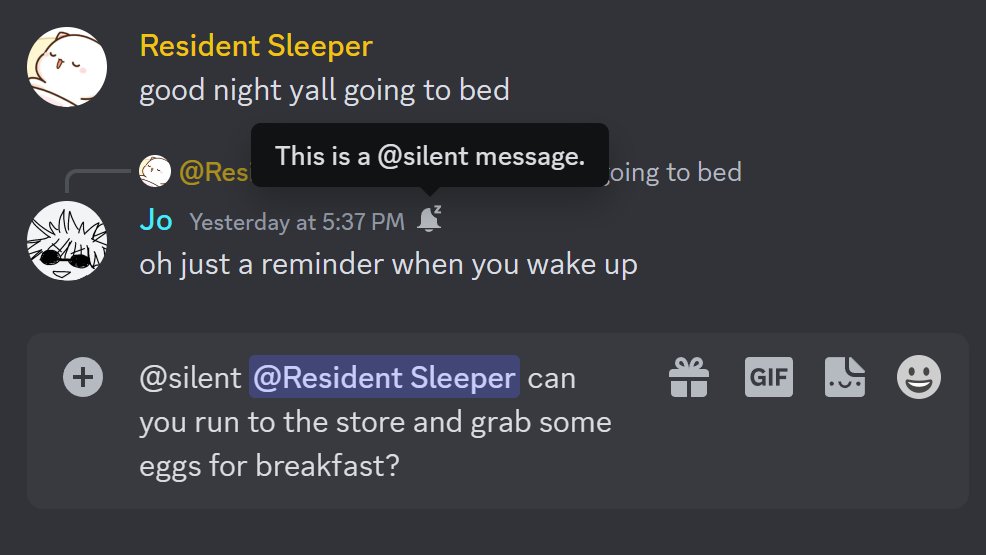
btw if you add @ silent to the start of a discord message, the recipient will see the red dot but not get a push/desktop/sound notification
(so you can go ahead and send that 3AM ping)
Likes
12975
Retweets
1379
 Twitter
·
Twitter
·
 shell sparrow
Is there a way to edit/create a button link on your own profile?
torn plume
shell sparrow
Is there a way to edit/create a button link on your own profile?
I don’t believe so, you can like other profiles like Xbox and Spotify that have links associated with them though
shell sparrow
oh
 quick tusk
If you do this # then a space at the beginning of you message you get extra bold
like this
 gleaming briar
 reef cloud
I know this is old, but the supported are # ## and ### you can't do more like in the above, that's why it didn't work
Header 1
Header 2
Header 3
# Header 1
## Header 2
### Header 3
 unkempt minnow
K thanks
 sweet sandal
I compiled a list recently of the tags I know about.
 quick tusk
You can put servers into folders (at least on mobile)

Hold on the server to move it then move it on top of another
 candid oxide
Some 🪟 keyboard shortcuts (Ctrl + I for Italics, Ctrl + B for Bold, etc.) work wonders as well.
candid oxide
quick tusk
Hold on the server to move it then move it on top of another
Drag the one of the icons on top of another to create a folder on the desktop. Thanks for showing us the mobile shortcut.
 mystic warren