#Nitro Voron 2.4
1 messages · Page 3 of 1
 south plume
 odd dew
I don't wanna bring down working printers lol
south plume
I really don't know why this isn't working right
Do you happen to have an adapter to access a serial console?
Like I have one somewhere that just sticks onto the gpio
odd dew
can I set wifi info in the armbian files?
south plume
odd dew
can I set wifi info in the armbian files?
How were you setting it before?
Oh wait NVM
There should be a config somewhere for wifi yeah
At this point you can't carry the printer over to an access point?
 ashen agate
probably not the greatest idea right now
south plume
ashen agate
probably not the greatest idea right now
No?
ashen agate
uhhh, do you have the other SD card, the small one, inserted to the m8p?
south plume
south plume
No?
I mean if we can rule out WiFi that makes things somewhat easier
odd dew
The one straight from armbisn did the same
odd dew
ashen agate
uhhh, do you have the other SD card, the small one, inserted to the m8p?
It's not no.
Does it...need to be..?
 ashen agate
probably not, im not sure
south plume
south plume
https://tenor.com/view/guaton-computadora-enojado-computer-rage-gif-14480338
Fix it that way
Lol
ashen agate
is it possible you could try screwing down the cb1 any further?
south plume
odd dew
Does it...need to be..?
No
It needed to be screwed tighter than I was comfortable with, although you've got a green light on the manta so I'm not sure it's that's the issue
Wouldn't hurt though
south plume
odd dew
I can try..
I mean you can try pushing down on the board where the connectors are while booting too
ashen agate
fucking rats...
 ashen agate
so, as a recap our current thoughts are:
very long ethernet cable
new SD card
 south plume
Hence why I recommended replacing it lol
south plume
ashen agate
so, as a recap our current thoughts are:
very long ethernet cable
new SD card
I did say you could move the printer
odd dew
Yes. I know. But another $70 on top of an already expensive purchase wasn't really tingling my fancy
south plume
That's fair
odd dew
south plume
I did say you could move the printer
Are u gonna re stitch me hernia closed
south plume
odd dew
Yes. I know. But another $70 on top of an already expensive purchase wasn't real...
I did not realize they were that expensive now
I expected like $40
$100 for a 4gb pi4b... Jeez
Glad I had an extra on hand I guess
@odd dew you said you have two printers using one pi each right now correct?
Just some enders or something?
odd dew
A voxelab and a qidi plus4. The voxelab is a pi 3
south plume
Argh
I ran 3 of my old printers of a single pi3b+ but they were slow (like 50mm/s slow)
I don't think that'll work for you either...
odd dew
What SHOULD the lights look like when it's running properly..
did u guys use raspberry pi imager or balena?
ashen agate
i used raspi imager.
ashen agate
i see on my cm1, a red light, and the green light flashes with two green blinks, a pause, repeat.
the one from github, the one i flashed was CB1_Debian12_Klipper_kernel6.6_20241219.img.xz
south plume
odd dew
did u guys use raspberry pi imager or balena?
Neither, I forget the program name but I'm on linux anyways
https://rufus.ie/en/
Is supposed to also be good, but I don't think it'll do better than etcher in this case
Rufus: Create bootable USB drives the easy way
ashen agate
the next chance you get to look at the SD card and its folders in the computer
could you show the file list
 boreal marsh
I saw above that when you connected the sd card to your computer windows popped up saying there’s something wrong with the card. You didn’t click it and tell it to repair did you?
odd dew
boreal marsh
I saw above that when you connected the sd card to your computer windows popped ...
No. I've re-flashed this card 50 times
boreal marsh
ashen agate
i see on my cm1, a red light, and the green light flashes with two green blinks,...
That’s the heartbeat btw. It gets faster when under a higher load. It’s one of the many status indicator options.
boreal marsh
odd dew
No. I've re-flashed this card 50 times
Gotcha.
You are always welcome to open a #request_help ticket for more in depth help if you’d like
ashen agate
did you edit a file that looks like this?
 ashen agate
should be in the same folder as the other config file
odd dew
Am I supposed to edit it?
boreal marsh
To put your WiFi details in it yes.
odd dew
apparently i can jump 2 pins and power the board from a usb c then could plug it into my switch with ethernet..
odd dew
boreal marsh
To put your WiFi details in it yes.
they're set in settings.json
boreal marsh
odd dew
apparently i can jump 2 pins and power the board from a usb c then could plug it...
There is a VUSB jumper for that yes.
boreal marsh
odd dew
they're set in settings.json
Not for CB1 OS…
boreal marsh

GitHub
OS System image for CB1. Contribute to bigtreetech/CB1 development by creating an account on GitHub.
odd dew
sysem.cfg is the one i edited
had the name wrong.
GitHub
OS System image for CB1. Contribute to bigtreetech/CB1 development by creating an account on GitHub.
boreal marsh
Gotcha. The file above that @ashen agate is showing is the armbianEnv.txt file. I had them flipped in my head. 😅
(I was trying to link to that section on the GitHub but my phone didn’t like me. Lol)
odd dew
clay showed config.txt
boreal marsh
Different name in different OS systems
odd dew
which looks completely different
so no i didnt edit something like that lol
should I have an image on the screen during setup or no
cause maybe it doesnt like the & sign in my wifi password or something stupid
boreal marsh
So my suggestion for testing this would be the following: Flash the image from the GitHub above to the SD card, Only edit the system.cfg file to enable klipperscreen, then install the sd card in the SOC slot and attempt boot. If everything’s working you should get an output on the display and the LEDs on the Manta by the CB1 flashing. You can log into your WiFi via klipperscreen if comes up.
south plume
odd dew
should I have an image on the screen during setup or no
Even if you use minimal (which doesn't have klipper screen or any display server whatsoever installed) you should at least get a terminal output on the screen
ashen agate
odd dew
clay showed config.txt
i think what i posted was a much older config.
boreal marsh
south plume
Even if you use minimal (which doesn't have klipper screen or any display server...
^ and LEDs on.
odd dew
Do I turn on btt pad 7?
boreal marsh
Nope. Leave that setting alone. Just uncomment the KS rotation and output lines.
odd dew
boreal marsh
So my suggestion for testing this would be the following: Flash the image from t...
Green led on CB1, red led on the manta board to the left of that and a flashing green ack light on the manta. No display output.
The red light went away?
boreal marsh
odd dew
The red light went away?
That’s normal. Move the display connection to hdmi0
You are booted up btw.
odd dew
boreal marsh
That’s normal. Move the display connection to hdmi0
My config file is set to HDMI-1
(still no display on 0)
It's also not on my wifi
boreal marsh
odd dew
My config file is set to HDMI-1
Yes. But the cb1 only has 1 hdmi output. Which is on the port labeled hdmi0. It’s hdmi1 to the OS.
boreal marsh
odd dew
(still no display on 0)
May have to unsafely reboot (just turn off power and back on) for it to detect.
(Unsafe because have no button to hit shutdown properly atm)
odd dew
It wont connect to wifi still though so either it doesnt like SSIDs with periods, passwords with & signs..or the wifi antenna range sucks.
boreal marsh
Afaik it works better on 2.4Ghz networks. For now though we should try and get Klipperscreen to show because if we can we can just its network manager to connect.
odd dew
it is a 2.4
boreal marsh
Something strange to try. Plug the display into your computer to verify it works then plug it back into the printer. This has worked for others before when the screen didn’t work on the manta, tested it on computer, then put it back on the manta only for it to start working again.
odd dew
Ughhhh

This time when rebooting I didn't even get a red light it went straight to flashing green
boreal marsh
That’s fine
The flashing green indicates the cb1 is alive and booted/booting.
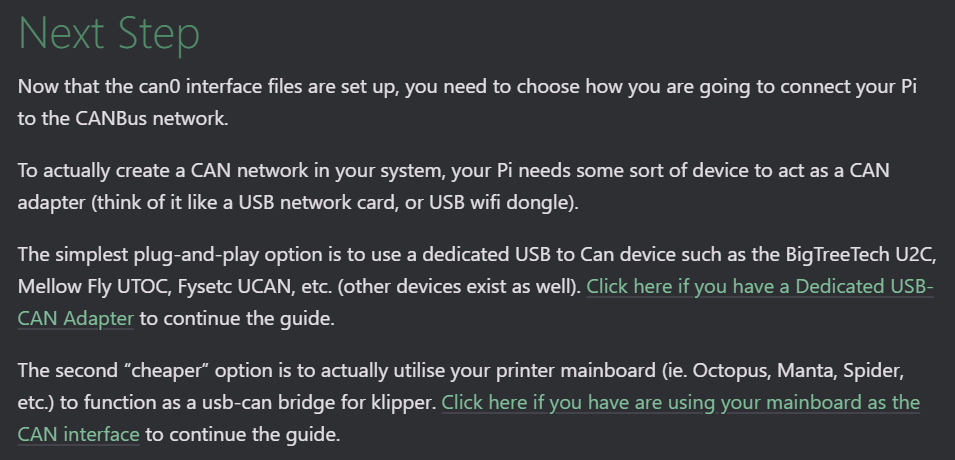
In theory. You can do what you suggested earlier. VUSB jumper for powering via USB (need at least 2-3A on 5v for that) and Ethernet to your network switch.
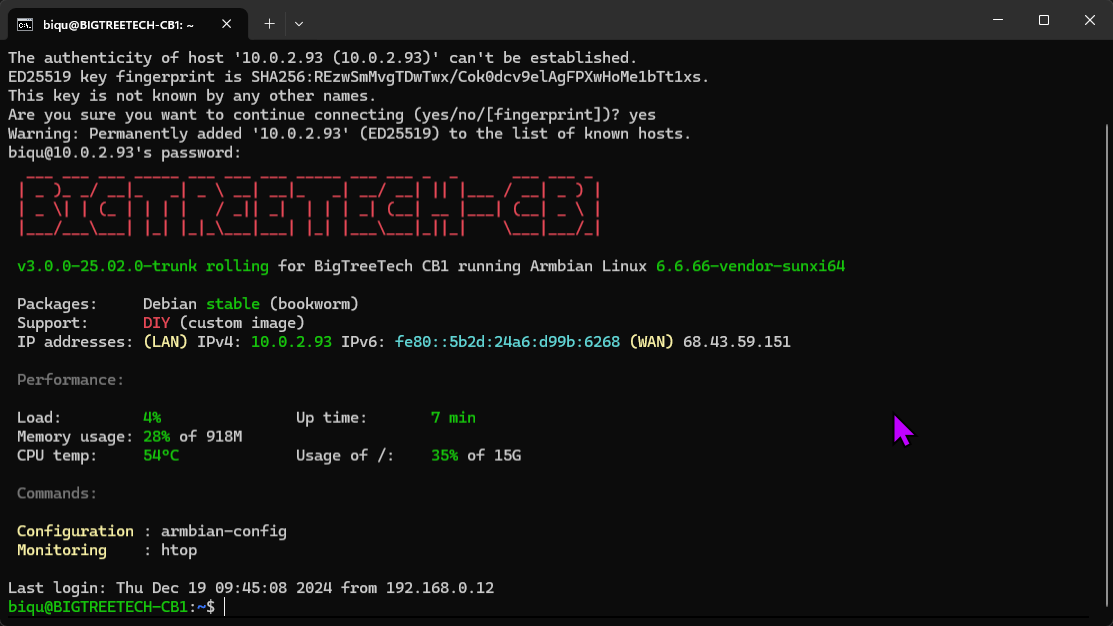
That would get it online, you ssh into it, and then run sudo nmtui to connect it to WiFi.


 boreal marsh
Probably something in that config file just wasn’t happy. It’s BTT, this is kinda expected sometimes.

 boreal marsh
Hooray!

 boreal marsh
odd dew
i need a drink
boreal marsh
odd dew
i need a drink
Perhaps go partake of a small shot of adult courage fluid and take a nap. Lol
odd dew
so...now what..
boreal marsh
Voron docs should guide you through the config setup.
odd dew
now i gotta do something with the 128mb card..and the toolhead board..
boreal marsh
You don’t need the 128mb card. You can flash the manta via DFU mode and the toolhead board will be flashed via RP2 boot mode.
ashen agate
Im in dreamland for the next 8h.
odd dew
boreal marsh
You don’t need the 128mb card. You can flash the manta via DFU mode and the tool...
the manta can be flashed by...the cb1..?
or..
ashen agate
Yes
odd dew
how
boreal marsh
odd dew
the manta can be flashed by...the cb1..?
Yes. On the manta the STM32 is connected to the CB1 via USB.
south plume
boreal marsh
You don’t need the 128mb card. You can flash the manta via DFU mode and the tool...
I couldn't get mine to flash over DFU, but perhaps that was just me
boreal marsh
south plume
I couldn't get mine to flash over DFU, but perhaps that was just me
I’ve always flashed mine with DFU. Lol
odd dew
is there a guide for this
south plume
Even the first time?
odd dew
i dont see it
boreal marsh
odd dew
how
Following esotericals guide for flashing it as a can bus bridge. Since you’ll need that anyways.
 cloud emberBOT
south plume
ashen agate
Im in dreamland for the next 8h.
cloud emberBOT
south plume
ashen agate
Im in dreamland for the next 8h.
Yeah I probably should be too lol
boreal marsh
Make sure to do every step in the guide.
south plume
Well... If you have issues flashing over DFU @odd dew you can use the SD card. I just used filezilla over ssh to transfer the firmware file to my laptop then to my SD card. Possibly could have been more efficient by copying it directly from the cb1 to the SD card but 🤷 . Regardless, I should probably go, good luck with the rest of the build.
odd dew
I dont have to worry about resistors right..
boreal marsh
Nope
ashen agate
Not until a little later
boreal marsh
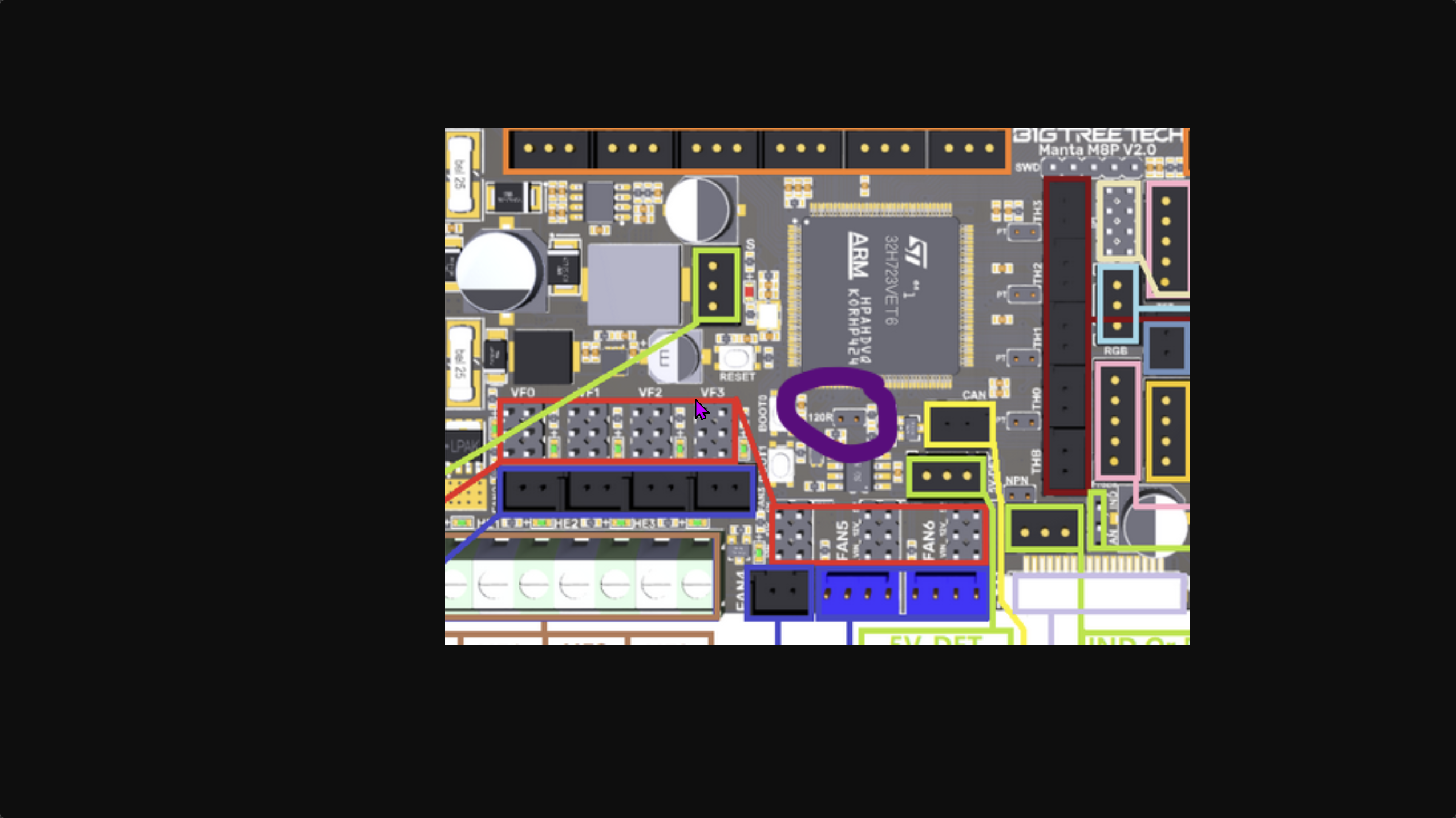
Well. Other than the jumper on the manta and sb2209 for the 120ohm on can bus. But that’s easy
 ashen agate
Yes. The can is connected up to the manta already, but not the toolhead (yet)
ashen agate
Yes.
 boreal marsh
odd dew
I dont understand how the 3 boards play together
boreal marsh
odd dew
I dont understand how the 3 boards play together
So. The CB1 runs Linux and controls the printer. The Manta (which holds the CB1) has a STM32 MCU on board which controls all the motors and other things connected to it. And the SB2209 which controls the toolhead components.
The STM32 has a CAN transceiver onboard to talk to the toolhead board via a CANbus. You will flash the STM32 in with CANbus bridge firmware which will allow the CB1 to use the CAN transceiver connected to the STM32 to talk to any board on the CANbus.
boreal marsh
odd dew
do I want iperf3 to start automatically..?
Genuinely… no idea. I’ve never seen that asked before. 😅
odd dew
Well hopefully not casue I tried to screenshot it and it went away lmao
boreal marsh
Lmao. Fair
 low crescent
odd dew
do I want iperf3 to start automatically..?
low crescent
odd dew
do I want iperf3 to start automatically..?
No, not needed.
odd dew
https://i.imgur.com/x5dyitV.png this jumper is rleady in place
https://canbus.esoterical.online/mainboard_flashing/common_hardware/BigTreeTech Manta M8P v2.0/README.html these steps arent in order right?
Esoterical’s CANBus Guide
A guide for setting up CANBus hardware on 3D printers
I make the config FIRST, then plug in the can cable, dfu mode..?
I thought I didnt want to connect the can cable for a while
ashen agate
You dont need to plug in the can cable until after you get through flashing the mainboard
And, iirc, the first flash of the toolhead board is over usb. Then the rest through the cable .
The common hardware page is the information required for you to go through the main page instructions
odd dew
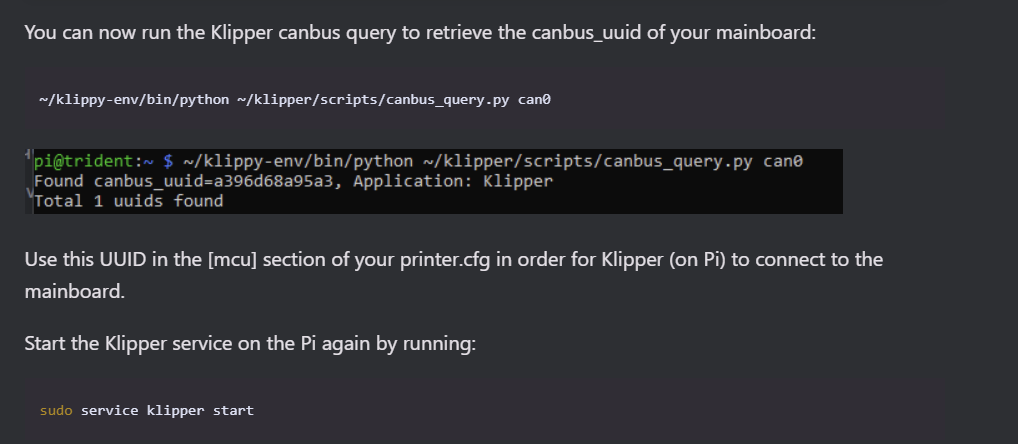
when it says this does it mean it wants me to set it now? or keep track of for later..
toolhead board is next
cant wait to redo all this once i get the cm4 😢
low crescent
You will not need to redo the firmware flashing that you are doing now when you switch. Just the OS an the getting started for the CAN setup.
odd dew
low crescent
You will not need to redo the firmware flashing that you are doing now when you ...
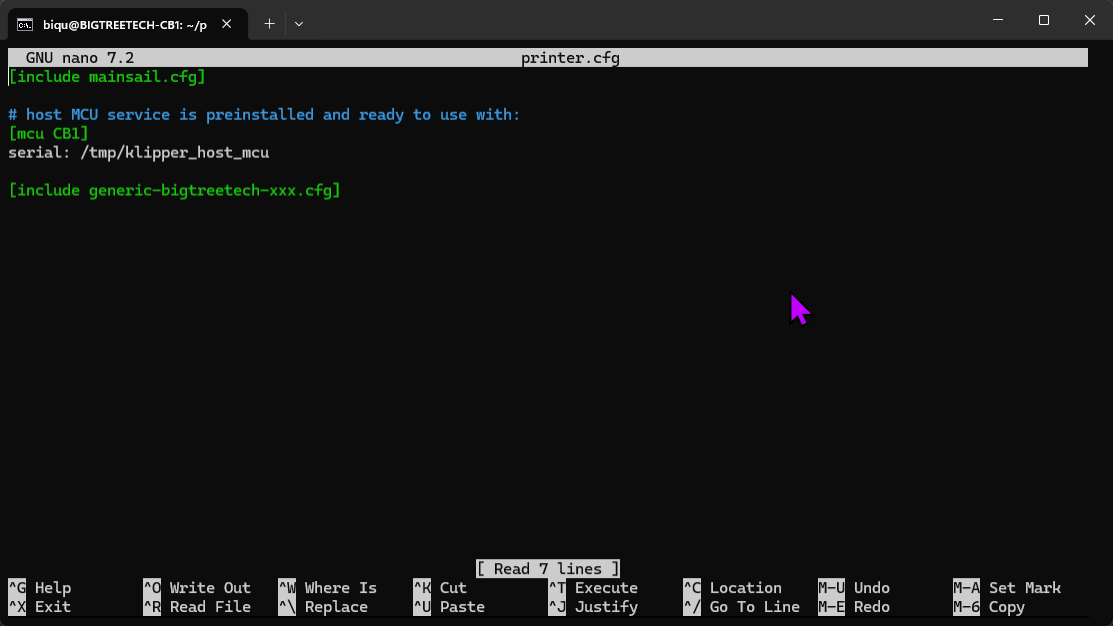
Do I just note this uuid for later?
https://i.imgur.com/EhxeFzm.png all my printer.cfg has right now is this
 low crescent
You can add it to your printer.cfg if you want. I'd grab the one from the formbot kit repo and fill in the two UUID's.
You will need to update the tool head temp sensor config.
odd dew
do I?
low crescent
It is expecting the the PT1000 and you are changing to NTC 100K.
odd dew
ah..
So...its safe to connect the toolhead now..? not gonna go into max overdrive and blow up?
odd dew
I still gotta put in my y endstop
odd dew
Boys
Where the hell does the y end stop go
I assume on the gantry
I don't see this in my printed pieces :/
 low crescent
odd dew
I don't see this in my printed pieces :/
low crescent
odd dew
I don't see this in my printed pieces :/
Those also require cable chains to be used. Is there specific mod to put it on the A motor linked in the kit?
odd dew
low crescent
Those also require cable chains to be used. Is there specific mod to put it on t...
Uhhhh...

Says y end stop gets mounted on the a motor mount
low crescent
Did you print the Voron on or the Formbot one?
 low crescent
Yes, that woudl be the spot.
odd dew
Thank god
Would it make sense for the wire to come up through the hole on the top of the motor mount?

Edit: no
 jade citrus
The small one of for the manta board, the other one is for the cb1
odd dew
 low crescent
Wire needs to go down the chain eventually.
odd dew
So since the toolhead board is next to flash is it now safe to connect to power and data? I know before it said to keep it disconnected..
But it kinda has to be powered to interact with it
Glad I took this picture

 median crane
odd dew
So since the toolhead board is next to flash is it now safe to connect to power ...
median crane
odd dew
So since the toolhead board is next to flash is it now safe to connect to power ...
what said that?
odd dew
median crane
what said that?
The formbot guide and people in here said to disconnect anything that heats up
bed, hotend, can board..
median crane
odd dew
The formbot guide and people in here said to disconnect anything that heats up
can board isn't "something that can heat up"
the hotend heater is
but that's not the same thing
odd dew
 median crane
I don't really keep up on what formbot is telling people to do, (their guides suck) but if you're following esoterical's guide, there's a specific step where it tells you to hook up the canbus toolhead board by USB for flashing, and then another specific step later where it tells you to switch it to canbus
median crane
odd dew
https://i.imgur.com/i2Zl2s9.png
meh
median crane
odd dew
https://canbus.esoterical.online/mainboard_flashing/common_hardware/BigTreeTech%...
you referenced it back here
odd dew
median crane
you referenced it back here
thanks
odd dew
median crane
you referenced it back here
Is it legit just connecting it with a usb c to A cable straight to the board..? not using the can cable/power combo
low crescent
odd dew
Is it legit just connecting it with a usb c to A cable straight to the board..? ...
For uploading Katapult, yes. Then you use CAN for kipper.
median crane
odd dew
Is it legit just connecting it with a usb c to A cable straight to the board..? ...
The microcontroller doesn’t inherently know how to receive firmware over canbus. It does inherently know how to receive it over usb
And yes, usb power is sufficient for that purpose. It’s not like you need to turn on any 24v fans or heaters 😛
median crane
odd dew
But you have to use a jumper to allow powering it over USB right?
yes, that sounds right
I think there's a jumper right next to the canbus & usb connectors
odd dew
Does the board INSIDE the front cover of the SB that controls the fans and LEDs also have to be flashed? or just the 2209 (long boi)
low crescent
Just the main board.
odd dew
So the SB2209 is the one mounted to the side of the SB (long one with the thick cable) and that is what the RP2040 plugs into?
RP2040 being the one mounted inside the front cover of the SB with the leds/fans plugged in
cant find the right jumper for that tiny terminal 🥴
low crescent
No, the RP2040 is the MCU on the 2209 board as there is version with a STM32 MCU
odd dew
im trying to find the bag of jumpers for that module
jade citrus
odd dew
But it kinda has to be powered to interact with it
just power it up over usb for flashing, esotoricals walke through the process and tells you when to hook up 24v
odd dew
jade citrus
just power it up over usb for flashing, esotoricals walke through the process a...
Yeah I'm trying to find the jumper that jumps the 5v from USB lol
jade citrus
odd dew
Yeah I'm trying to find the jumper that jumps the 5v from USB lol
theyre tiny
jade citrus
mine where in the little box the board came in
I know that sounds obvious but with a shot

Worst case, you could borrow the 120ohm resister jumper to power it up on 5v
odd dew
These are too big..


Found it

She's alive
My laptop did a GPU driver update last night now it keeps crashing 💀🙃
F u windows
Grrrrr
 jade citrus
well the good news is the computer is just connecting to the pi, its not stored on the pc
bad news is it need to connect
odd dew
This is making me want to do violent things
https://i.imgur.com/9Sa2SrX.png toolhead flashed
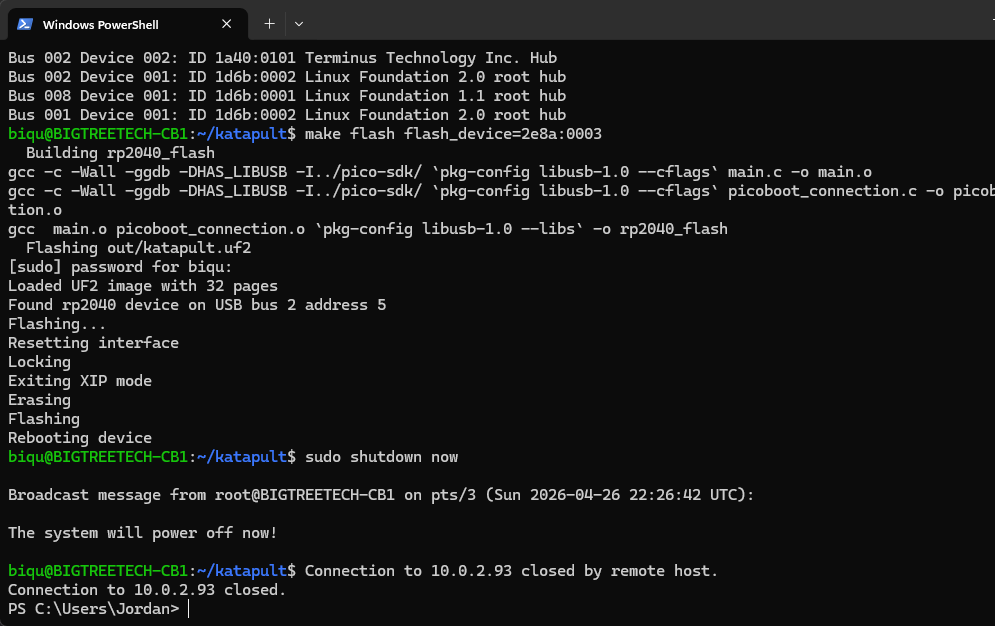
Now I gotta crimp some connectors on the 24v cable. Do I just use some spade terminals? The kit came with some ferrules but...the formbot guide says it connects straight to the psu which doesnt have a spot for ferrules
low crescent
Yeah, spade terminals are perfered. Also, remove the solder if you are crimping.
odd dew
roger
odd dew
Stripping the insulation back on this cable is scary trying not to damage the wires

Think I actually got it


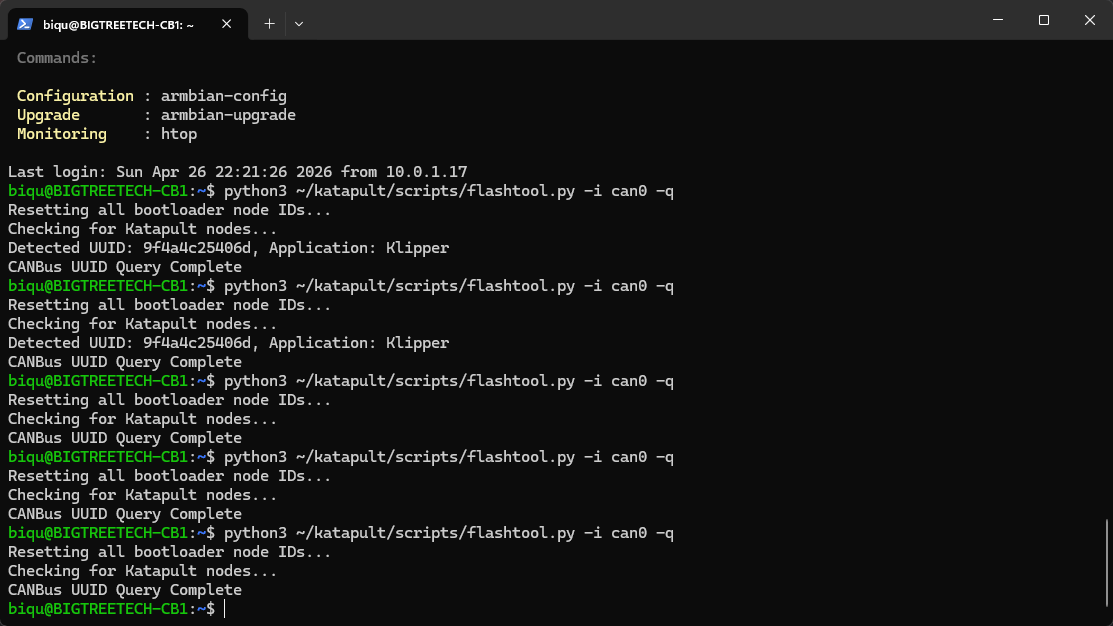
ffffff
It should be showing up in katapult mode. I double clicked reset on the toolhead board now it's not showing up at all
ok the one its picking up is the mainboard
low crescent
Are the termination resistors installed on both devices.
odd dew
low crescent
Are the termination resistors installed on both devices.
I put the resistor on the toolhead board during flash for the USB then removed it as instructed before hooking up the can cable
This keeps alternating red/green

Oh...I need that too huh..

That is also just a regular jumper right?
Also I know I have to change these dip switches to work with my new thermistor on the hotend instead of the pt1000
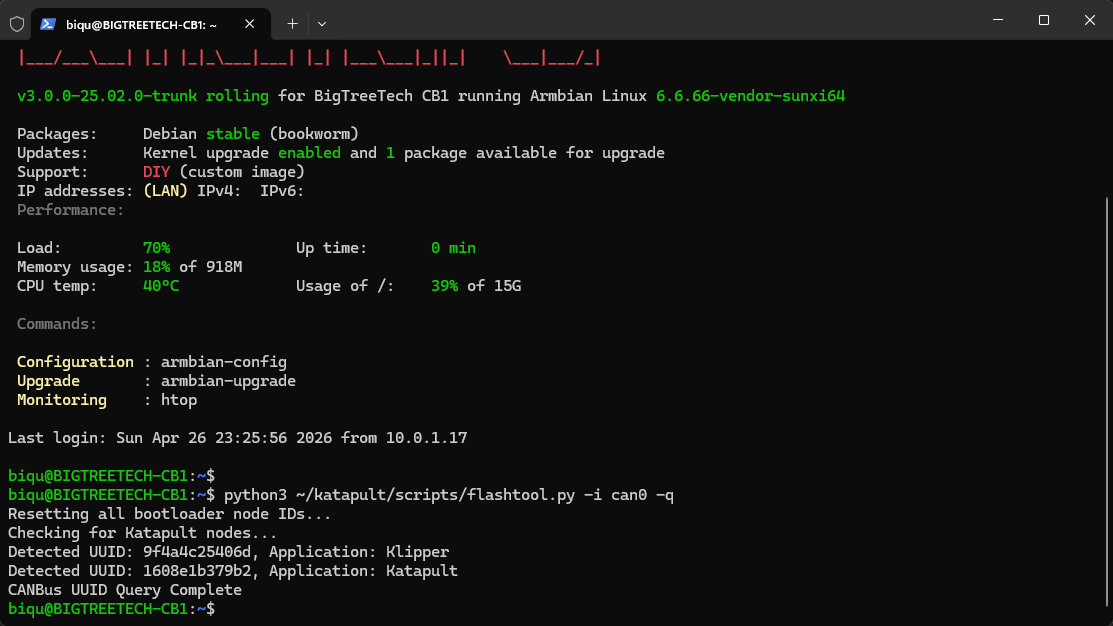
WOOOO
 odd dew
So do I now just override my printer.cfg with the one from formbot's github? https://github.com/FORMBOT/Voron-2.4/blob/main/Config/printer.cfg

GitHub
Contribute to FORMBOT/Voron-2.4 development by creating an account on GitHub.
https://i.imgur.com/SAFWUUg.png im just getting this right now
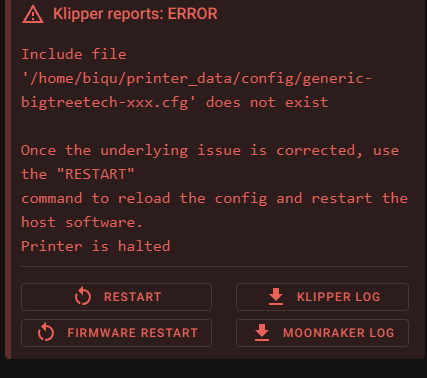
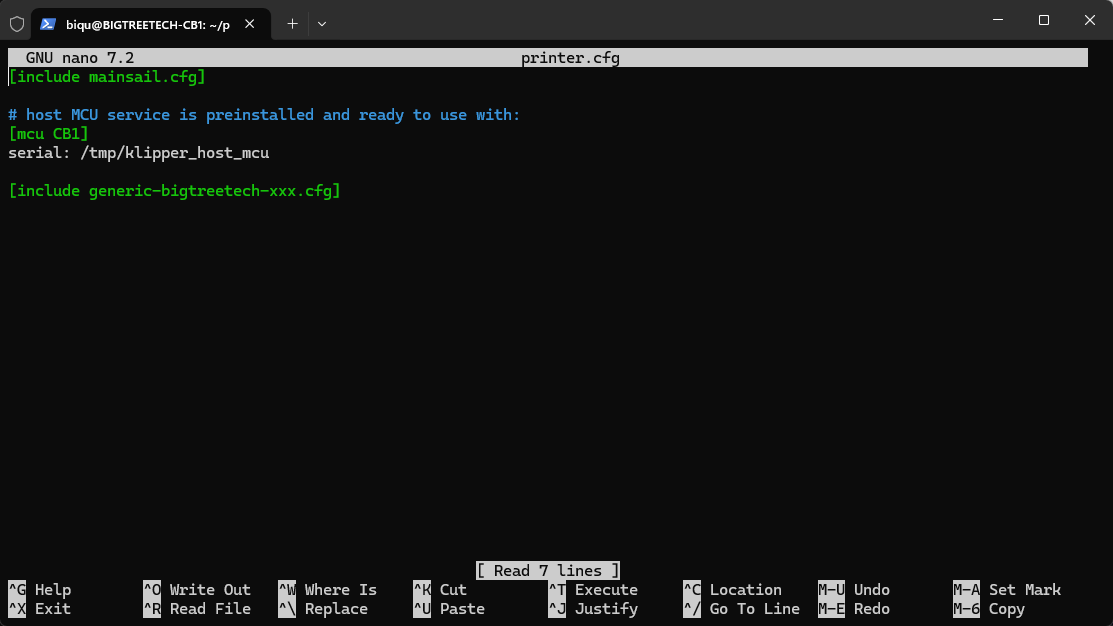
https://i.imgur.com/l1uVAk2.png which makes sense cause this is all my printer.cfg has in it: https://i.imgur.com/l1uVAk2.png
 median crane
odd dew
So do I now just override my printer.cfg with the one from formbot's github? htt...
median crane
odd dew
So do I now just override my printer.cfg with the one from formbot's github? htt...
yes
and then you go through it and start setting up your mcus, and all the other "edit here" points
odd dew
median crane
yes
Thanks, #voron_2_discussion message
Is it safe to hook eveything back up?
boreal marsh
odd dew
Also I know I have to change these dip switches to work with my new thermistor o...
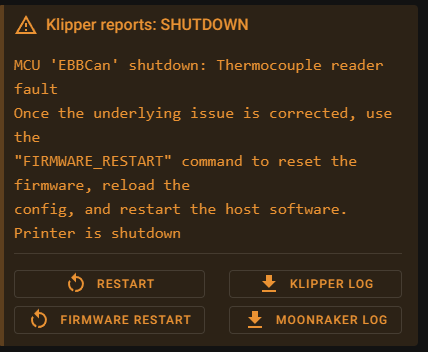
You actually don’t. The switches are for the max31865 chip which is connected to the 4 port JST connector. Your new hotend thermistor connects to a ADC (analog to digital converter) in the RP2040 via that 2 pin port right below the 4 pin one.
odd dew
boreal marsh
You actually don’t. The switches are for the max31865 chip which is connected to...
Yeah the one I've been working on for 2 hours removing the old plug and putting a new plug on 🥴
Pain in the ***
low crescent
odd dew
Yeah the one I've been working on for 2 hours removing the old plug and putting ...
You already had the 2 pin on it. You don't need to change it.
odd dew
low crescent
You already had the 2 pin on it. You don't need to change it.
Connector is the wrong type. Much too large.
No fit in hole
low crescent
OK, XH -> PH
 odd dew
boreal marsh
You actually don’t. The switches are for the max31865 chip which is connected to...
odd dew
boreal marsh
You actually don’t. The switches are for the max31865 chip which is connected to...
What do I need to set the configs to?
[extruder]
step_pin: EBBCan:gpio18
dir_pin: EBBCan:gpio19
enable_pin: !EBBCan:gpio17
microsteps: 16
rotation_distance: 22.905740611
gear_ratio: 50:10
nozzle_diameter: 0.400
filament_diameter: 1.750
heater_pin: EBBCan:gpio7
control: pid
min_temp: 0
max_extrude_only_distance: 105
max_extrude_cross_section: 2
pid_kp: 57.369
pid_ki: 2.533
pid_kd: 324.854
sensor_type: MAX31865
sensor_pin: EBBCan:gpio9
spi_software_sclk_pin: EBBCan:gpio10
spi_software_mosi_pin: EBBCan:gpio8
spi_software_miso_pin: EBBCan:gpio11
rtd_nominal_r: 100
rtd_reference_r: 430
rtd_num_of_wires: 2
max_temp: 300
Check the example config for the SB2209/RP2040 on the GitHub. It’ll show you what to change.
odd dew

I changed sensor_pin to gpio27, which is what TH0 would translate to according to this chart...same error.
median crane
sensor type is wrong, and NOTHING from spi_software_* onwards should be there (that stuff is all for the max31865)
odd dew
median crane
sensor type is wrong, and NOTHING from `spi_software_*` onwards should be there ...
So all this goes away?
spi_software_sclk_pin: EBBCan:gpio10
spi_software_mosi_pin: EBBCan:gpio8
spi_software_miso_pin: EBBCan:gpio11
rtd_nominal_r: 100
rtd_reference_r: 430
rtd_num_of_wires: 2
max_temp: 300
(oh, except max_temp at the very end. keep that)
median crane
if its specifically a ATC Semitec 104NT-4-R025H42G, use that
otherwise, Generic 3950
odd dew
Where do I even see valid options to enter?
low crescent
sensor_type:
median crane
I mean, its probably the ATC Semitec one then?
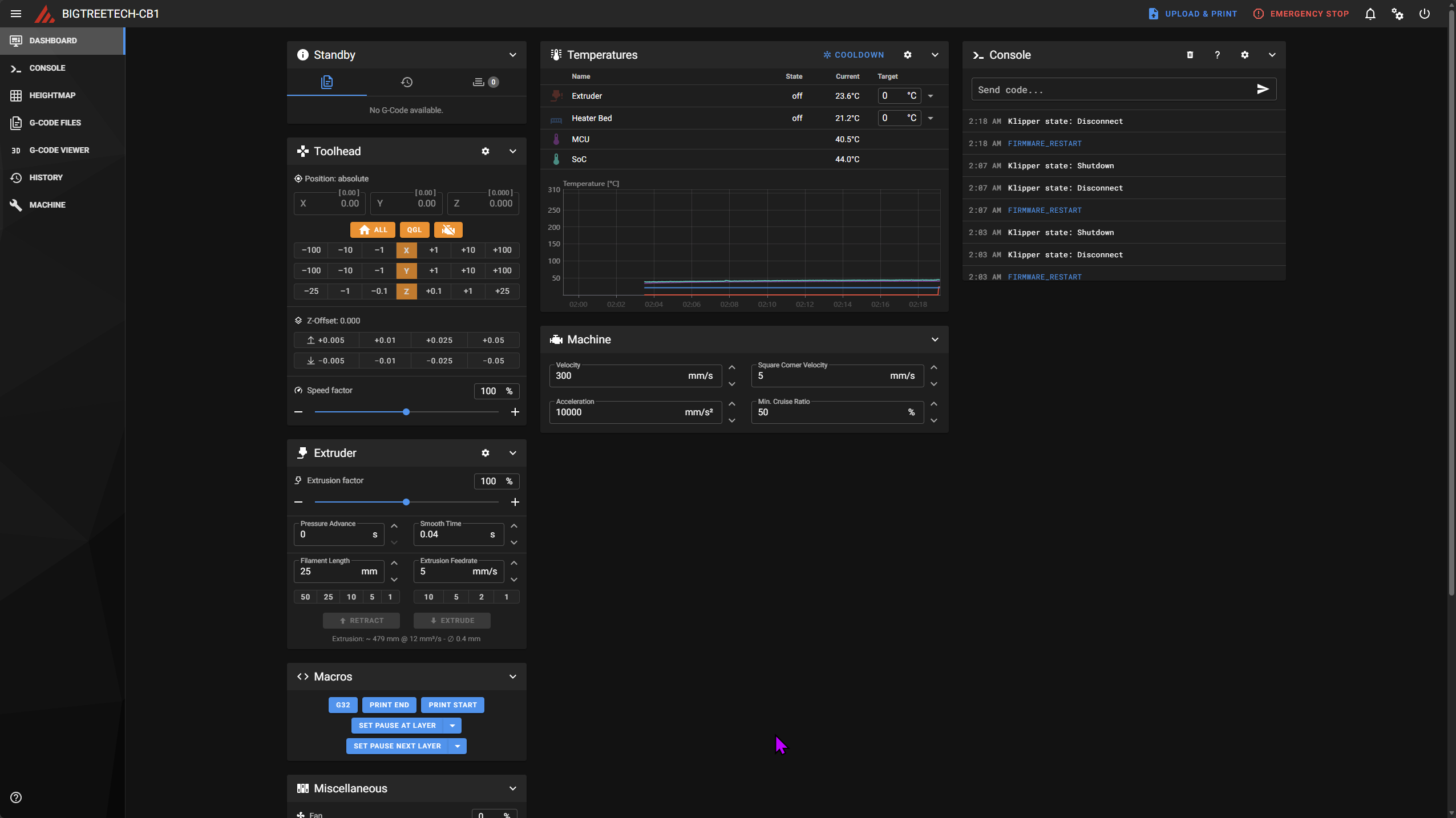 median crane
excuse me sir, are you aware that your mouse cursor is purple? 😛
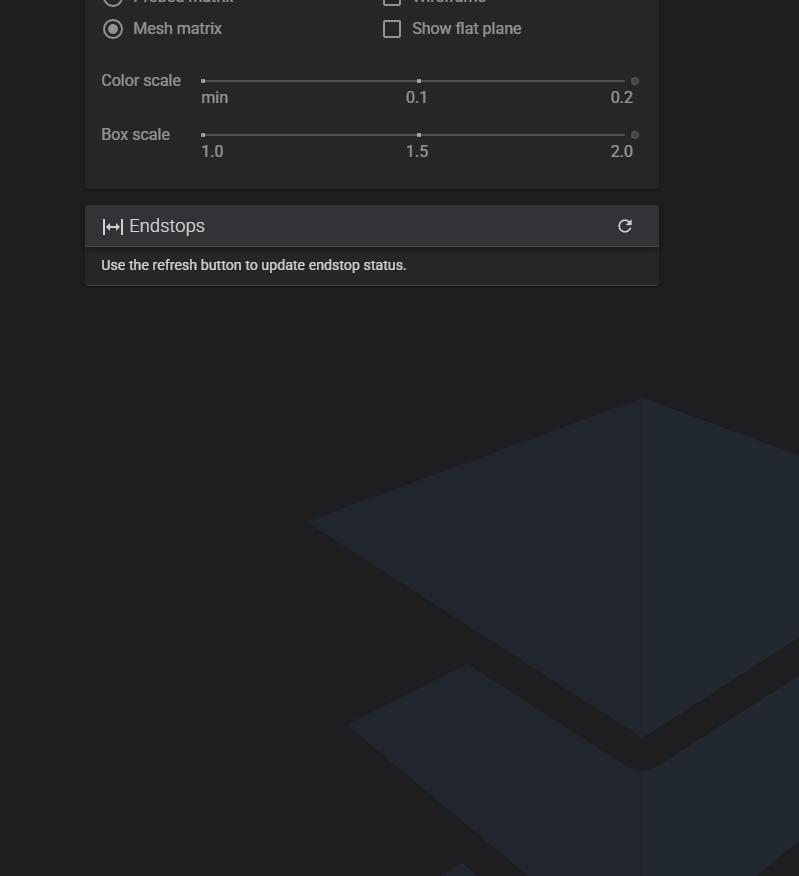 median crane
eh. they'll turn up when you hit the button, iirc
odd dew
errrr
median crane
I'd say you are here: https://docs.vorondesign.com/build/startup/
odd dew
the buttons?
the printer is still on its side rn
so i def shouldnt move anything
it shouldnt move on its own at all right?
median crane
odd dew
the buttons?
"use the refresh button to update endstop status"
and if you look just over to the top right of that panel, you do indeed see a refresh button...
odd dew
oh that refresh button.
i was hitting f5
This is my first diy don't bully me
I'm used to seeing enstops updating in realtime
Ok all 3 end stops update properly
low crescent
Onto the startup guide. Congratulations BTW!
median crane
odd dew
I'm used to seeing enstops updating in realtime
klipper only really monitors endstops when there's a reason to, such as something trying to home
odd dew
Still so much to do after this. Gotta mount the light, screen, panels, cable manage....
I should probably plug in the front of the SB now too
boreal marsh
With power off!
odd dew
yes
and i have the misalignment protector installed

The colors dont seem to adjust properly all the time
odd
boreal marsh
odd dew
The colors dont seem to adjust properly all the time
Can you show what you mean?
odd dew
boreal marsh
Can you show what you mean?
my phone does not want to capture the voron logo
boreal marsh
odd dew
Color order is probably wrong for the LEDs. Check your config and verify it’s GRBW
odd dew
boreal marsh
Color order is probably wrong for the LEDs. Check your config and verify it’s GR...
[neopixel toolhead_light]
pin: EBBCan:gpio16
chain_count: 3
color_order: GRBW
OH! Look at that led color selection window again. At the bottom is the controls for the white channel. Turn it off so that it’s just the RGB channels on.
This is the white channel
 odd dew
boreal marsh
OH! Look at that led color selection window again. At the bottom is the controls...
odd dew
boreal marsh
OH! Look at that led color selection window again. At the bottom is the controls...
my hero!
So just to make sure my stuff is wired up right, the bottom fan on the SB is the "part fan" and the top fan is automatically controlled by hotend temp right?
boreal marsh
You had the right colors. Just the white was making them look like a different color. Lol
odd dew
the "part fan" doesnt seem to move much air even at 100%
boreal marsh
odd dew
So just to make sure my stuff is wired up right, the bottom fan on the SB is the...
Top fan is part cooling, bottom fan is hotend temp controlled (aka the HE fan)
boreal marsh
Either swap the pin name in the config or turn off and swap where they are plugged in.
boreal marsh
odd dew
Correct. You have them in the right place. But probably swapped where they are plugged in or pin names in config.
boreal marsh
Bottom one is for keeping the heatsink on the hotend cold. Top on is for cooling the prints as you print.
odd dew
this hotend temp climbs QUICK
https://i.imgur.com/l0K7fVO.png definitely needs to be PID tuned
 boreal marsh
Tiny mass. Lol.
low crescent
Yeah, it should move 1mm and that looks close.
boreal marsh
Sounds like coil whine. Completely normal. And the clicking is just it changing direction.
You won’t notice it while printing. Just be hearing the movement of the printer instead.
 boreal marsh
That’s why I recommend running it up to the exhaust and down the back of the printer. Then you can zip tie it to the ptfe tube to hold it up.
odd dew
I don't even have the panels in yet though
boreal marsh
There’s a PUG exhaust cover for it as well. (You don’t need the panel for the exhaust cover to mount)
odd dew
This exhaust?
 boreal marsh
This is one of those times where you just take a leap of faith as well.
odd dew
🥴
boreal marsh
odd dew
This exhaust?
The exhaust hole in is the panel. Most people end up not using that part in your hand because why would you want to remove hot air from inside the chamber.
odd dew
The exhaust hole in is the panel?
boreal marsh
Yea. There’s cutout on the top of the back panel. That’s the exhaust hole. Most use a cover for it to just run the toolhead umbilical and ptfe tube out.
 odd dew
i actually have this on my qidi
 boreal marsh
The little umbilical arm?
odd dew
yep
boreal marsh
Pretty sure the one in that pic is https://www.printables.com/model/978123-voron-bowden-ptfe-tube-guide-arm-and-canbus-cable
 odd dew
 boreal marsh
Pretty sure the one in that pic is https://www.printables.com/model/978123-voron...
boreal marsh
boreal marsh
Pretty sure the one in that pic is https://www.printables.com/model/978123-voron...
I run this in both my tridents. Lol. Long for the 350 and short for the 250. Both with bearings cause I love bearings.
odd dew
I have extra bearings just for that from the first one I made
I had an issue where the steel wire pulled out of the toolhead side
boreal marsh
I just don’t use the spring steel wires. Lol. Zip ties and ptfe tube are my support for the umbilical.
odd dew
Fair enough
boreal marsh
Okay. And the 250 might be cheating because it has a CPAP tube to support it as well. Lol
 odd dew
THAT IS SEXYYYY
boreal marsh
Thanks. That’s #1406666805249835219 if you ever wanna look more into that printer. Lol
boreal marsh
That camera angle is my phone. 🤣. The led bars are custom designed by me. Not posted anywhere yet either. They are just aluminum c channel for LEDs with 144 pixels/m led strips.
That printer is kinda my pride and joy. I spent a ton of time purely on aesthetics for it.
odd dew
i sleep with a cpap so its funny seeing it in printers...
how fast does that baby go to need cpap??
boreal marsh
odd dew
i sleep with a cpap so its funny seeing it in printers...
I bet. Lol
boreal marsh
odd dew
how fast does that baby go to need cpap??
Not very. It’s made to be aesthetically pleasing moreso than fast. Lol. But in theory it is capable of printing upwards of 80³ flow. Lol
boreal marsh
How convenient that there’s a Goliath hotend in that printer. 
odd dew
that means nothing to a normie like me
boreal marsh
Goliath hotend is VZBot’s hotend. Lol.
odd dew
oh
boreal marsh
Yea. Lol. I just have it in a Voron.
odd dew
Is there a printable index thing to help line the magnetic sheet up properly?
boreal marsh
odd dew
Is there a printable index thing to help line the magnetic sheet up properly?
Search printables for v2.4 and mods and you’ll find everything you want. 😂 https://www.printables.com/model/346782-voron-24-bed-alignment-stop
 boreal marsh
odd dew
I saw that but it didnt look right, maybe it is..
boreal marsh
odd dew
I saw that but it didnt look right, maybe it is..
Goes on the corner but mounts to the bed extrusions.
boreal marsh
odd dew
which of these should I print?
I’d say M and measure your umbilical thickness for the mm size.
odd dew
boreal marsh
I’d say M and measure your umbilical thickness for the mm size.
By "umbilical thickness" do you mean the thickness of the cable, or scouting for the braided sleeve? Etc
boreal marsh
odd dew
By "umbilical thickness" do you mean the thickness of the cable, or scouting for...
Thickness of the cable (assuming you aren’t using a braided sleeve you won’t need to size it up any)
odd dew
I would like to use a braided sleeve but won't be right away
boreal marsh
So print one the size (or close to it) of your cable thickness for now and then later on print another for +2mm or so.
odd dew
Seems big brain
My box turtle thinks there's 47g of filament left, this print is gonna take like 35...
Let's see if we can do it
boreal marsh
It’s a tiny bit of plastic. lol. And also this is why Vorons are so awesome. So many mods to be done. 😂
odd dew
🤞
odd dew
boreal marsh
Like this one. https://www.printables.com/model/1162435-voron-exhaust-cover-with...
What is that honeycomb shape? It's not in the files
boreal marsh
odd dew
What is that honeycomb shape? It's not in the files
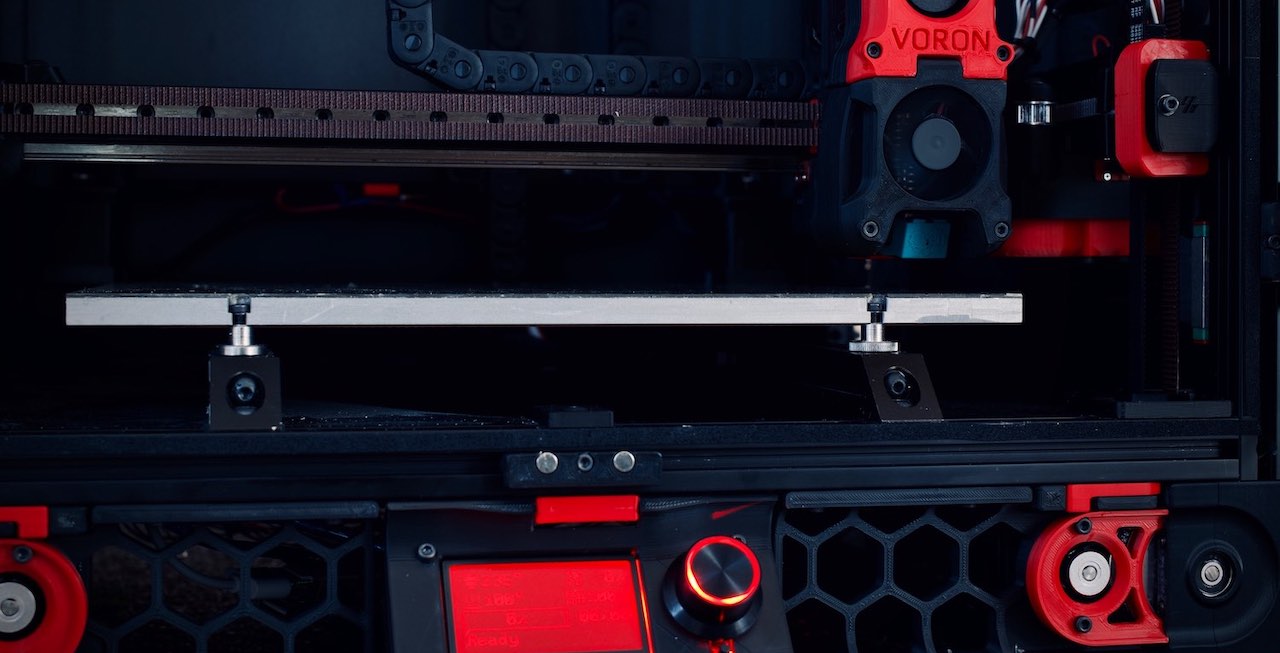
GitHub
Voron 2 CoreXY 3D Printer design. Contribute to VoronDesign/Voron-2 development by creating an account on GitHub.
odd dew
boreal marsh
Like this one. https://www.printables.com/model/1162435-voron-exhaust-cover-with...
How does this thing even mount to the frame?
boreal marsh
odd dew
How does this thing even mount to the frame?
2 M5 roll in nuts and 2 M5x8 (or x10 I forget for bigger printers).
odd dew
boreal marsh
2 M5 roll in nuts and 2 M5x8 (or x10 I forget for bigger printers).
Alright so I don't HAVE to use the plexiglass panels at all
boreal marsh
odd dew
Alright so I don't HAVE to use the plexiglass panels at all
Not until you wanna enclose it anyways.
odd dew
I will eventually but I wanna get it up and running before adding even more weight and making it harder to servic
 sweet jasper
Hows the healing going?
odd dew
Left inguinal hernia btw if u care to look it up lmao
Got 3 incisions above my belly button where they stuck the davinci robot in
odd dew
boreal marsh
Not until you wanna enclose it anyways.
Any chance u can get me more pictures of how ur vent exhaust thingy is mounted
I can't make heads or tails of it
boreal marsh
odd dew
Any chance u can get me more pictures of how ur vent exhaust thingy is mounted
Not really… it’s not something I take pics of often. 😅
odd dew
Not near it? Lol
So I need to remove the can cable from the z chain
And run the cable...somewhere..
odd dew
Much better

Now just have to figure out how long I need the PTFE and can cable
Yes my Christmas tree is still up. Sue me
south plume
odd dew
Now just have to figure out how long I need the PTFE and can cable
I don't think I actually cut the ptfe on my build
Doesn't really hurt to have a little extra anyways
south plume
south plume
Doesn't really hurt to have a little extra anyways
I needed it too for my stupid routing I have to make the spool easy to reach from where I put the printer
jade citrus
odd dew
Now just have to figure out how long I need the PTFE and can cable
i wouldnt cut the can cable lol
and if you do cut it leave a good bit of extra
odd dew
jade citrus
i wouldnt cut the can cable lol
Whaaat no I didn't plan on cutting it lmao
jade citrus
odd dew
Whaaat no I didn't plan on cutting it lmao
Good lol 😭🤣 as with most things I like to leave as much extra as I can untill I can verify that where I cut will leave enough for it's purpose plus the intended extra
odd dew
I think I'm missing the piece to secure the z chain to the gantry center
https://i.imgur.com/PaKm7Ew.png this mkaes no sense to me. It says there is no physical endstop with tap, then tells me to move the endstop 💀
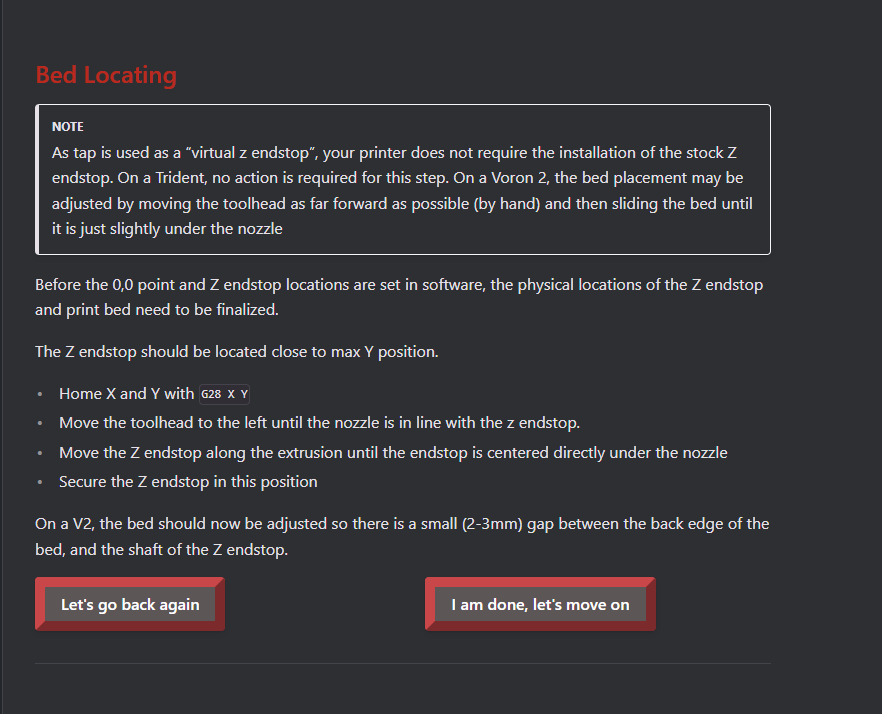
wtf richard
median crane
odd dew
https://i.imgur.com/PaKm7Ew.png this mkaes no sense to me. It says there is no p...
The note basically tells you that the general instructions don’t apply due to your hardware choices
And then the general instructions are there anyway, just for reference
odd dew
ahhh..ok
well, i think now is a good time to make sure my AB belts are properly tensioned with the phone app?
I did the manual/automatic moves to 350,350 and 0,0 but havent done QGL or adjusted Z yet
sweet jasper
odd dew
well, i think now is a good time to make sure my AB belts are properly tensioned...
You want to leave them a little loose for the first startup. Don't try to be super precise with getting them to match right now. As the machine heats up, the belts also get tighter.
odd dew
the directions want me to make sure the nozzle isnt over the bed at 0,0 but its hard to tell cause the Z is so far up
odd dew
I tried doing a z home and one of the corners started making a weird clicking noise so I hit the power switch. No idea why
it was almost all the way down
low crescent
odd dew
I tried doing a z home and one of the corners started making a weird clicking no...
Hitting the power switch without shutting down the SBC versus a fast way to corrupt your SD card. I would suggest next time using the emergency stop button in the web UI to disable the printer.
odd dew
I'm used to an emmc which isn't so fragile
low crescent
I don’t think that is necessarily true and I would treat either the same way.
odd dew
hmm...
well maybe ive just gotten lucky lmao
so....about the noise..
I should be able to home Z without doing QGL right? it falls first in the startup thing
sweet jasper
the steps should be covered in the startup guide. You would need to home Z first though
sweet jasper
Can you manually lower the gantry (SLOWLY) any lower than that? The gantrey looks like it is really far off from level as well. Get your gantry close to level. and make sure the Z joints are slightly loose for this one.
And you confirmed motion on each Z stepper in order using stepper buzz?
odd dew
by turning off the motors and manually just pulling up on a corner or what
sweet jasper
and they were all going in the same direction? I would triple check that
It looks like you have one side going up and the other going down. When you buzz the Z all should move in the same direction and back.
odd dew
All 4 corners first go up then back down.
Well
Well looks can be deceiving I guess
sweet jasper
You care about what direction the gantry moved
odd dew
moves?
sweet jasper
yes, when you buzz Z steppers it moves your gantry
sweet jasper
Don't care about clockwise or not. Care about the direction the gantry moves. if it goes up in the corner and then down, it should do the same in each corner.
odd dew
alright then they all go up first then down.
sweet jasper
OK. now with the motors off, gently lower the gantry down lower than you have it now to make sure there isn't something stuck in a belt path
odd dew
by just..pushing on the sides..? or
sweet jasper
yep... slowly. do not force anything.
odd dew
Something isn't happy..
They all kinda seem to stop at the same height
is it possible to be "racked" in this direction too??
sweet jasper
Not really. What could be stopping it from moving down? you will need to inspect the Z drives. Have bolts instead of grubscrews or something?
odd dew
Well if its a z drive issue, it should also have issues going up
cause the motors rotate in a circle..
sweet jasper
so what would block them from going down?
odd dew
ghosts? demons?
it wont let me go up cause its not homed
for testing
it thinks its at Z 10
sweet jasper
don't worry about the Z 10. it has no clue where it is until it homes.
sweet jasper
Well yeah... Did you test the tap sensor for triggered?
sweet jasper
You have to manually move it and check the status turns from red to blue on the sensor.
odd dew
but yes if i push up on the toolhead, it does change to triggered.
by hand.
i did test that
sweet jasper
OK. so now, what could be blocking it from going down? You have stoppers in the z rails still?
sweet jasper
Sometimes the answers can be easy 🙂
sweet jasper
LOL
odd dew

// probe accuracy results: maximum 0.087500, minimum 0.070000, range 0.017500, average 0.082750, median 0.083750, standard deviation 0.004535
ok SD on run 2 is better
// probe accuracy results: maximum 0.080000, minimum 0.067500, range 0.012500, average 0.076750, median 0.077500, standard deviation 0.003363
i wonder if the friction from the extra belts is causing issues on the side of the toolhead
oh..would probably help if i had the screws holding the front cover on too
sweet jasper
make sure you adjust the magnets on the tap as discussed in the manual for it
sweet jasper
Now check the tension of all of your Z belts. remember that after homing, you should be able to put moderate pressure up and down on the gantry corners without them moving very much
odd dew
I should probably test my bed heater too
sweet jasper
Follow the steps in the guide 🙂
 sweet jasper
Cut it around here
 sweet jasper
Then leave them a little longer if you want
low crescent
You buy new belts.
sweet jasper
That will be more than plenty though.
odd dew
ok ok

I have a ton of extra z beltage
Ok so I home the printer then do probe_accuracy
First result is always higher: // probe accuracy results: maximum 0.110000, minimum 0.090000, range 0.020000, average 0.105750, median 0.107500, standard deviation 0.005706
2nd result is usually better
// probe accuracy results: maximum 0.105000, minimum 0.095000, range 0.010000, average 0.103000, median 0.105000, standard deviation 0.003122
I feel like a QGL would be needed for best results no?
Z belt tension seems good when pressing down on the gantry
sweet jasper
Run it a few more times and adjust the magnets again. Get everything settled
And make sure the bed screws are tight.
sweet jasper
I tighten 3
odd dew
the "current" temp jumped MUCH higher than is physically possible lol https://i.imgur.com/dhXPD8A.png

little worrying but..
 weak plaza
I have peek screws, I tighten 4 
sweet jasper
I have an 18mm thick bed, I tighten 4
odd dew
well i havent gotten nipped yet touching the printer with the ssr running so...hopefully that means my grounds are decent enough
sweet jasper
The grounds are there In case something goes wrong
odd dew
yes
 odd dew
the bed actually did get hot impressively quick
sweet jasper
Might be close to qgl time
odd dew
have to pid tune hotend first
sweet jasper
Yep, but close
odd dew
yes

we do be getting close
i bave identified a must have...i need the SB lights to come on when FW boots
// probe accuracy results: maximum 0.135000, minimum 0.110000, range 0.025000, average 0.131000, median 0.132500, standard deviation 0.007176 bruhhh 0.07
whattttt
re-homed and re-ran, 0.04 now. Wild
// probe accuracy results: maximum 0.105000, minimum 0.087500, range 0.017500, average 0.100500, median 0.102500, standard deviation 0.004848
17:31:59
// probe at 175.000,175.000 is z=0.087500
17:32:00
// probe at 175.000,175.000 is z=0.097500
17:32:01
// probe at 175.000,175.000 is z=0.100000
17:32:03
// probe at 175.000,175.000 is z=0.102500
17:32:03
// probe at 175.000,175.000 is z=0.100000
17:32:04
// probe at 175.000,175.000 is z=0.102500
17:32:05
// probe at 175.000,175.000 is z=0.102500
17:32:06
// probe at 175.000,175.000 is z=0.102500
17:32:07
// probe at 175.000,175.000 is z=0.105000
17:32:08
// probe at 175.000,175.000 is z=0.105000
Is this the "trending up" that it warns about?
sweet jasper
No, those are reasonable
odd dew
I unscrewed the screws holding the tap magnets, didnt hear anything and re-tightened them, no change
sweet jasper
Perfect. Keep trucking
odd dew
Even though im out of spec for the SD?
sweet jasper
Yes
It gets better with being used and the next steps are going to exercise it well
weak plaza
odd dew
this takes a while eh
there are ways to speed it up 🙂
sweet jasper
First starting yes. You can speed it up as your accuracy goes up
odd dew
Alright well it stopped so im guessing that means its done
sweet jasper
What does the console say?
odd dew
36:18
// Making the following Z adjustments:
// stepper_z = 0.004500
// stepper_z1 = 0.000200
// stepper_z2 = -0.004500
// stepper_z3 = -0.000200
17:36:18
// Retries: 4/10 Probed points range: 0.005000 tolerance: 0.007500
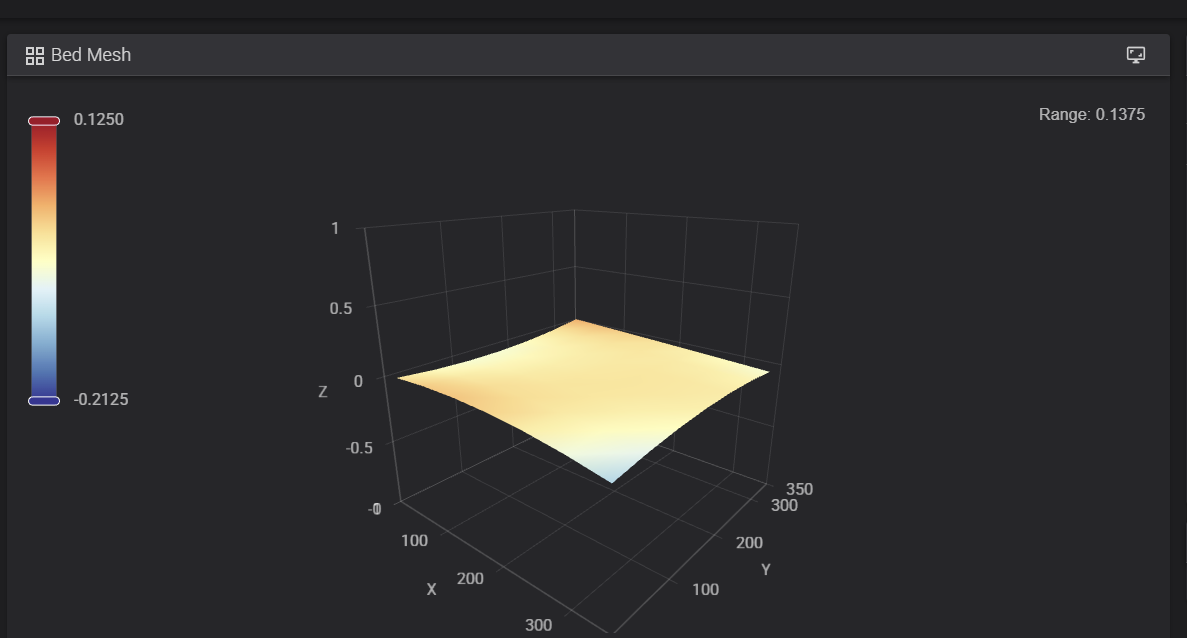 sweet jasper
That is an excellent mesh too
sweet jasper
Expected. Set them to 0 now
odd dew
Then re-run mesh? or just continue the steps
sweet jasper
Just continue. Should be getting close to slicer setup
odd dew
ok
Well I guess the "fun part" is over, now I gotta clean up cables, finish securing the z chain, put on the panels...the screen..
ehhh panels can come later lmao
sweet jasper
Only a few days past your original deadline. really good actually. LOL
odd dew
ive been using the printer feet to "roll" the printer on the table so i dont cross my lifting weight limit
I must be missing the slicer setup steps, not seeing those in the startup guide
weak plaza
odd dew
ive been using the printer feet to "roll" the printer on the table so i dont cro...
My original foot mounts crumbled after a few years of doing that, print some spares eventually lol
odd dew
good to know
weak plaza
odd dew
good to know
they were Polymaker ABS, so take that as you will
odd dew
I think I have to calibrate rotation distance still
ashen agate
probably print the rock n rolls
odd dew
weak plaza
they were Polymaker ABS, so take that as you will
im using injection molded ones from formbot
ashen agate
also this thread fixed my leds 🎉
weak plaza
odd dew
im using injection molded ones from formbot
might be fine, idk
odd dew
ashen agate
also this thread fixed my leds 🎉
huh
ashen agate
i had the stealthburner leds configured wrong so they were always messed up but saw the answer in this thread this morning.
weak plaza
odd dew
now im trying to figure out how to make the LEDs turn purple automatically
you can set startup values with
initial_GREEN: 0
initial_BLUE: 0
initial_WHITE: 1```
or whatever you need for purplejust put that under whatever LEDs you want on at startup
sweet jasper
odd dew
I must be missing the slicer setup steps, not seeing those in the startup guide
 odd dew
ope
can i get a red circle too
i thought that was the end

do I actually have to do the e-steps...or can i just use the values from the table lol
im a lazy mf
 sweet jasper
odd dew
do I *actually* have to do the e-steps...or can i just use the values from the t...
sweet jasper
odd dew
do I *actually* have to do the e-steps...or can i just use the values from the t...
You must do it
odd dew
I actually gotta put filament through this puppy 😮
feellin real
With the hotend at temperature, make a mark on the filament between the roll of filament and your extruder, between 120mm and 150mm away from the entrance to the extruder. Measure the distance from the entrance of the extruder to that mark.
Does this mean to stick the filament into the extruder, THEN make the mark
sweet jasper
Yes. You want to measure the filament extrusion. It needs to be engaged with the extruder gears before you make the mark
odd dew
roger
sweet jasper
Extruder needs to be hot before you can hit the extrude button too
odd dew
I just realized I dont HAVE a way of feeding filament into this thing for an actual print, unless i fed it straight from a dry box
sweet jasper
Nothing wrong with that. Loop it over the top extrusion
odd dew

- Calibrate e-steps
- Fit PTFE between toolhead and exhaust thingy
- Strap the PTFE and CAN cable together...
- Screen?
- Cable management
sweet jasper
I mean, I would skip the screen personally but that sounds about right
sweet jasper
Screens are just one more thing to fiddle with to me. That webpage you are on works from your cell phone too
odd dew
lmao
Ok so I made a mark 130mm up, extruded 100mm and the mark was now at 37.53mm up
so it extruded 92.47
making my new rotation distance 20.97122608217
does that seem feasible?
sweet jasper
The trick is to put that value into the printer config, save and restart button and do it a second time to check your work
odd dew
makes sense
im using side cutters to make my mark so its hard not to cut straight through the filament lmao
sweet jasper
It is one of the most important settings on the machine. Don’t hesitate to do it multiple times
lol. I do it with the extruder off the toolhead. Cut it flush with the bottom of the extruder and then send 100mm, whatever is sticking out is the value extruded. Makes it so you don’t have to make marks
odd dew
my brain cant comprehend these basic things lmao
sweet jasper
Yet
odd dew
Ok so
I made a mark 120mm up
extruded 100
the mark is now 14.57mm from the top
So the amount it ACTUALLY extruded is... 100 - 14.57 = 85.43??
sweet jasper
105.43
odd dew
heh
odd dew
odd dew
my brain cant comprehend these basic things lmao
as I said
my brain doesnt like having to do inverses
sweet jasper
😂
odd dew
shhhhhiii
i accidentally cut the filament
Got 19.28 this time
but its hard to measure from the EXACT same spot every time
im gonna say its fineeee
sweet jasper
For your first run, it will be fine. You will want to revisit it when you have more patience. Then you can do it my way 😉

 sweet jasper
Yep
odd dew
One concern I do have is when the toolhead moves, it'll pull the ptfe further into the ECAS coupler and won't be able to come back out
sweet jasper
If it is pulling more out, it needs more. You should be able to go to the front corners and maintain a gradual arc
odd dew
sweet jasper
If it is pulling more out, it needs more. You should be able to go to the front ...
I mean when it goes to the rear it'll push back in
sweet jasper
Nah.
odd dew
Alright lol
sweet jasper
That fitting should be screwed in on the other side of the exhaust panel technically but it shouldn’t make a difference


 sweet jasper
Not bad for the first time. Not like anyone would call @crude storm to check your umbilical
odd dew
😭💀
sweet jasper
odd dew
I definitely need a nozzle wiper
A decent retract at the end of a print can eliminate the need for wiping your schnozzberrys
 crude storm
https://youtu.be/IzYNO515-M0?si=qkdnSVj9cRO8PzTb second half of video

How to route your umbilical: Three ways for Trident and three ways for V2.
Special Thanks to Schonclee for asking the question about which umbilical routing is preferred.
V2 starts about at about 6:30
Galvanic Bowden tube Guide (use the short arm for Trident, and the long arm for V2):
https://mods.vorondesign.com/details/8CxQeqS1lXhlGphwkyqh7g...
odd dew
Is there an easy test I can do to make sure my AB belts are perfectly even before cutting anything
sweet jasper
If they are evenly tensioned and the tensioners are similar on each side, they are going to be good to go
odd dew
https://i.imgur.com/oMDcYGY.png SHEEEEEESHH
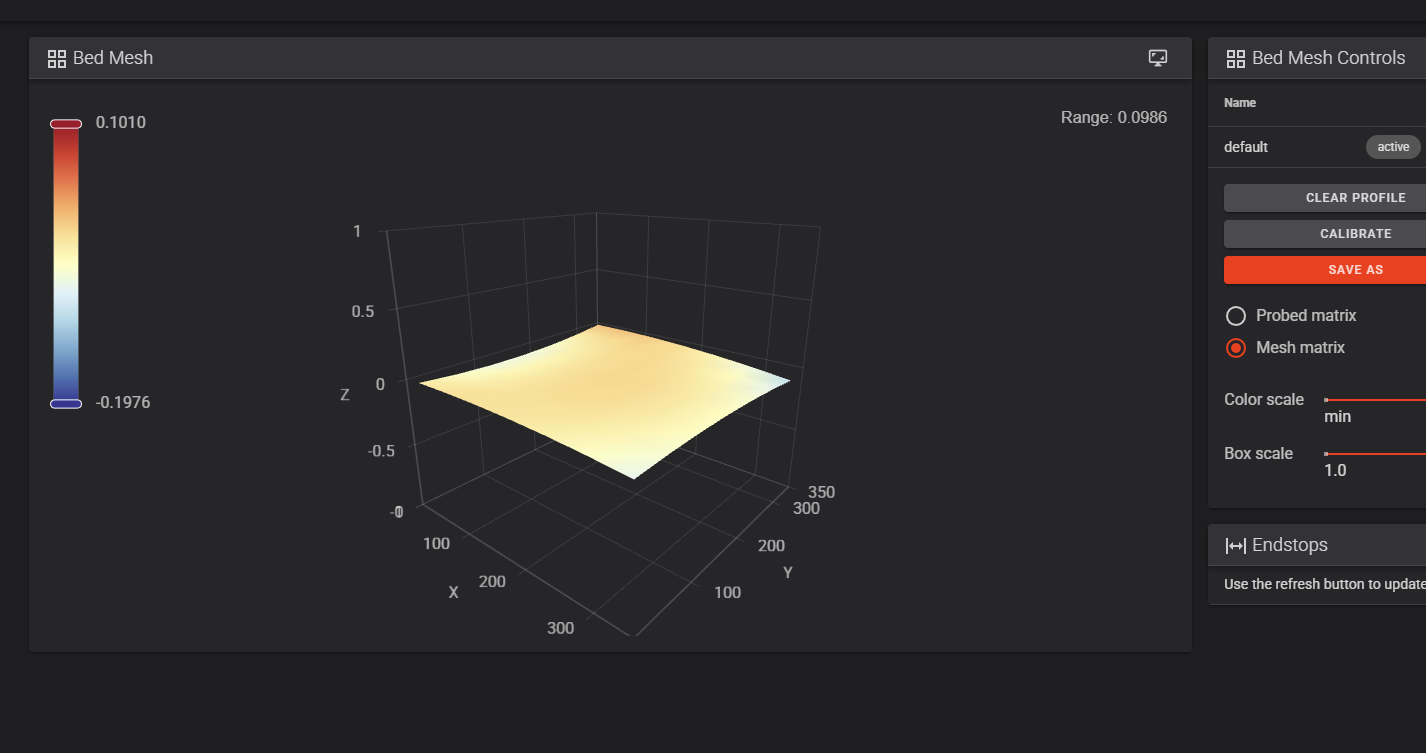
thats the lowest ive ever gotten on a printer
sweet jasper
Told ya tap was awesome
odd dew
QGL takes FORRREEVERR tho
sweet jasper
You will be able to speed it up soon. Need you to get used to the machine first. Mine take less than 90 seconds. There are a few tricks to make it faster.
And what is 90 seconds when your preheat times are longer? Embrace simplicity. It can only get more complicated if you insist
boreal marsh
I mean. I’m more tempted to ignore wheels in the “what is 90 seconds” part even though he’s right.
sweet jasper
odd dew
so next is slicer setup then first test print? 👀
First.
Add this to your printer config between two macros
[gcode_macro QUAD_GANTRY_LEVEL]
rename_existing: BASE_QUAD_GANTRY_LEVEL
gcode:
    # Pass 1: Initial Coarse Leveling
    BASE_QUAD_GANTRY_LEVEL HORIZONTAL_MOVE_Z=10 RETRY_TOLERANCE=1
    # Pass 2: Fine Leveling and Accuracy
    BASE_QUAD_GANTRY_LEVEL HORIZONTAL_MOVE_Z=2
You youngsters and your zoomies
boreal marsh
sweet jasper
You youngsters and your zoomies
 sweet jasper
Add this to your printer config between two macros
```ini
[gcode_macro QUAD_GA...
sweet jasper
sweet jasper
Add this to your printer config between two macros
```ini
[gcode_macro QUAD_GA...
@odd dew, you see this one?
odd dew
yes lol
odd dew
sweet jasper
<@250426565114986509>, you see this one?
Whats the difference?
sweet jasper
odd dew
Whats the difference?
It changes the qgl to a coarse and fine adjustment. So when you speed up, it is still accurate. I wanted it in there before you found that setting
odd dew
oh lmao
sweet jasper
First pass just gets them to within 1mm of each other, second pass only moves 2mm in z
odd dew
https://docs.vorondesign.com/build/slicer/ sending for easy access from my other pc lmao
boreal marsh
I do the same. Lol
sweet jasper
I have a whole server just for it and other things
boreal marsh
I just use whatever channel my pc has open.
odd dew
Should I be good to just use the default voron 2.4 350^3 profile from orca?
sweet jasper
Yup
odd dew
[gcode_macro PRINT_START]
#   Use PRINT_START for the slicer starting script - please customise for your slicer of choice
gcode:
    G32                            ; home all axes
    G1 Z20 F3000                   ; move nozzle away from bed
this feels..lacking lmao
cloud emberBOT
odd dew
ahhhh shiiie
I dont have a chamber temp sensor yet..
ill be stealing it from the E3D V6 and extending it to become chamber temp
sweet jasper
You can comment out the temperature wait line for now
odd dew
I do have a nevermore, but was advised to do bed fans instead
sweet jasper
Whoever told you that qualifies for genius
odd dew
Wonder who it couldve been
sweet jasper
@lofty oasis?
odd dew
It does seem kinda weird that I dont wanna detox the air tho
south plume
odd dew
the "current" temp jumped MUCH higher than is physically possible lol https://i....
Are you in 240v land?
odd dew
south plume
Are you in 240v land?
no
sweet jasper
odd dew
It does seem kinda weird that I dont wanna detox the air tho
Particulates are the problem, let them settle before opening the door
sweet jasper
south plume
You shouldn't be running at 100%
Nonsense
odd dew
  ##  Uncomment for bed mesh (1 of 2 for bed mesh)
  #BED_MESH_CLEAR                                       # Clear old saved bed mesh (if any)
dont I want bed mesh...?
sweet jasper
By the letter of the spec sheet, no, but this has been gone over for quite a few years now. It is fine
sweet jasper
odd dew
```
## Uncomment for bed mesh (1 of 2 for bed mesh)
#BED_MESH_CLEAR ...
You run the mesh every time in this macro. It clears it when it starts to make way for the new one
odd dew
so, yes
south plume
sweet jasper
Nonsense
#voron_electronics message
sweet jasper
If you want to mesh, uncomment that one and the second one
sweet jasper
south plume
https://discord.com/channels/460117602945990666/463171288853250048/1483193572776...
Yes, I am aware. I stand by what I said
south plume
sweet jasper
Yes, I am aware. I stand by what I said
...why?
sweet jasper
south plume
...why?
Because our duty cycle is so low, it doesn’t actually raise the ssr into de-rating territory
sweet jasper
You can always go adjust it. 😂
We have tests in 24p and 120 land and are talking 2-5 degrees above ambient
odd dew
gcode:
  # This part fetches data from your slicer. Such as bed, extruder, and chamber temps and size of your printer.
  {% set target_bed = params.BED|int %}
  {% set target_extruder = params.EXTRUDER|int %}
  3{% set target_chamber = params.CHAMBER|default("45")|int %}
  #{% set target_chamber_minimal = params.CHAMBER_MINIMAL|default("0")|int %}
  #{% set target_chamber_wait = [target_chamber, target_chamber_minimal]|select(">", 0)|min|default(0) %}
  {% set x_wait = printer.toolhead.axis_maximum.x|float / 2 %}
  {% set y_wait = printer.toolhead.axis_maximum.y|float / 2 %}
Just comment out chamber stuff?
sweet jasper
odd dew
```
gcode:
# This part fetches data from your slicer. Such as bed, extruder, a...
Leave all of that. You will need it later and it isn’t in the way for now
odd dew
I just dont want it waiting for a temp on a non-existent sensor
sweet jasper
Still set chamber parameters in the slicer filament settings just like you had one. Then when you add it, you willl be ready to go
odd dew
alright cool
sweet jasper
odd dew
I just dont want it waiting for a temp on a non-existent sensor
Remember when I said comment out the temperature wait line above? Thats the one that makes it wait 😛
odd dew
oh here
#TEMPERATURE_WAIT SENSOR="temperature_sensor chamber" MINIMUM={target_chamber_wait} # Waits for chamber temp
Its updating the SB LEDs, but I dont have the macros its trying to call such as STATUS_HOMING
sweet jasper
Then you can comment out those lines
 lofty oasis
In the SB Github
sweet jasper
In the stealthburner GitHub
odd dew
oh i figured it was custonm
south plume
ashen agate
i had the stealthburner leds configured wrong so they were always messed up but ...
Mine are messed up too so perhaps I have to try whatever it was
lofty oasis
There's also an LED Effects version if you want to be gucci
south plume
lofty oasis
There's also an LED Effects version if you want to be gucci
No animated LEDs on a cb1 methinks
sweet jasper
LED effects just shouldn’t be used
south plume
south plume
Mine are messed up too so perhaps I have to try whatever it was
Although I have the issue that one of mine is green and the rest are fine
ashen agate
i like my living room dark and mildly noisy
odd dew
lofty oasis
There's also an LED Effects version if you want to be gucci
oooh yes pls give me the crashy stuff

lofty oasis
sweet jasper
LED effects just shouldn’t be used
Booooo
odd dew
ok fine..ill wait till i get a cm4
south plume
I mean you can try it
sweet jasper
You like timer too close errors? Thats how you get them
south plume
Just maybe don't use it with a 12h print
 sweet jasper
lofty oasis
https://tenor.com/view/skill-issue-urge-resist-cat-gif-25536160
sweet jasper
lofty oasis
https://tenor.com/view/skill-issue-urge-resist-cat-gif-25536160
I’ll give you a skill issue
south plume
sweet jasper
You like timer too close errors? Thats how you get them
No those are my favorite
sweet jasper
We should probably shitpost less and start harassing our newest printer for when serial
odd dew
Is it just using the stock G28? is that why I dont see one defined separately?
south plume
south plume
No those are my favorite
No trigger after full movement is a pretty close second though
sweet jasper
odd dew
Is it just using the stock G28? is that why I dont see one defined separately?
Yep. Built in
sweet jasper
south plume
No trigger after full movement is a pretty close second though
Tighten down your z joints or get the fixed ones
sweet jasper
odd dew
we need STATUS_HOMING in there somewhere.
If you can see the LEDs you can see the toolhead 
south plume
sweet jasper
Tighten down your z joints or get the fixed ones
Oh I haven't gotten it myself, but generally in the x/y that sounds like a bad time
odd dew
no fun in that
south plume
south plume
Oh I haven't gotten it myself, but generally in the x/y that sounds like a bad t...
Actually any axis
 sweet jasper
That’s not a dinoclip
sweet jasper
odd dew
is it time..?
Might be time
odd dew
I smell catastropic failure incoming
sweet jasper
Did you set your z offset?
sweet jasper
Skipped a step in the startup guide?
sweet jasper
Cool. Full send
odd dew
and I did it hot so I added an extra 0.01
even though that caused the paper to rip when i pulled it out
sweet jasper
It will be ok, you are better off starting a bit too close and then backing off. It’s like a slice in golf. Gotta go the other way and work back to the middle
odd dew
ok
south plume
odd dew
I did the paper thing
Can't you do auto calibrate with tap?
Though paper for the first run isn't bad or anything
odd dew
Yeah but even with beacon you gotta do some manual calibration too
south plume
You have beacon?
sweet jasper
Beacon sucks
south plume
sweet jasper
Beacon sucks
 sweet jasper
south plume
https://tenor.com/view/cat-kitty-kitten-angry-mad-gif-16754054616247640902
sweet jasper
south plume
https://tenor.com/view/cat-kitty-kitten-angry-mad-gif-16754054616247640902
Spend that money on a better bed instead and you are far better off
sweet jasper
odd dew
ok
How’s it going??
 sweet jasper
Well, you built it from a pile of parts. Everything is common and off the shelf. You can fix it if it goes sideways
 sweet jasper
Probably. I removed that section from the macro.
odd dew
I also hate knowing what the printer is doing
They hot glue mold turned out great
That*
sweet jasper
It becomes so commonplace that I don’t even watch them start.
sweet jasper
odd dew
They hot glue mold turned out great
Hot glue mold?
odd dew
For the voron logo in the sb
sweet jasper
odd dew
For the voron logo in the sb
Dude. Take that out!!!!!!!
sweet jasper
The glue will become mobile as the chamber temps start going up. I had it leak down into the fan, the duct, and the tap. Glued them all together and crashed the gantry so hard it broke parts.
Not joking.
odd dew
💀 wtf
sweet jasper
Not a problem with the panels off, but don’t put them on
odd dew
Whoever recommended that to me needs public execution then
It seemed like a good alternative to spending $20 on a roll of clear filament
south plume
odd dew
It seemed like a good alternative to spending $20 on a roll of clear filament
I just used white filament
odd dew
I don't have white ASA or anything higher temp
south plume
Well it wouldn't hurt to have white abs on hand
sweet jasper
#voron_tap message
odd dew
Christ
sweet jasper
Leave it with no diffuser vs hot glue unless you are only going to run PLA ever
odd dew
It's fine until I put panels on at least right
sweet jasper
Yeah. Past 60 it shouldn’t be there. I would even trust the high temp hot glue
south plume
odd dew
It's fine until I put panels on at least right
I would assume so, so long as the glue isn't too close to hot parts of the hotend
odd dew
The B belt keeps slapping against the extrusion during high speeds
sweet jasper
Tighten it a little. It can be done while running
sweet jasper
See, if you had your Reddit username, discord username and the date on a piece of paper, that could be a serial video
odd dew
😭💀
sweet jasper
It’s still running, right? 😂
odd dew
Yes
The qidi discord is plotting my downfall

So of a bitch IMMEDIATELY after sending that my print broke free from the build plate
sweet jasper
So, it sounds like it is time to tune your z offset and make sure the plate is clean.
odd dew
Welllll I gave it the IPA wipe down..
south plume
odd dew
Welllll I gave it the IPA wipe down..
Dish soap
 south plume
sweet jasper
See, if you had your Reddit username, discord username and the date on a piece o...
south plume
sweet jasper
See, if you had your Reddit username, discord username and the date on a piece o...
Don't actually need discord on the paper
sweet jasper
Textured plates are hard mode. Smooth sheets or bare steel and glue are so easy to tune
sweet jasper
south plume
Don't actually need discord on the paper
Supposed to
south plume
You just need it in the post title according to the subreddit instructions
sweet jasper
I would put it on the paper too for completeness
south plume
Doesn't hurt
odd dew
sweet jasper
Textured plates are hard mode. Smooth sheets or bare steel and glue are so easy ...
The other side is smooth
sweet jasper
odd dew
The other side is smooth
Flip it. So much better
odd dew
Ehhhh
south plume
odd dew
The other side is smooth
I went like 50 print hours before I realized I forgot to take the plastic film off that side
sweet jasper
You will not be the last
south plume
odd dew
VFAs go crazy
What speeds are you running?
sweet jasper
odd dew
VFAs go crazy
You don’t care about those right now. You still need to work on belt tensions, first layer, and so on
south plume
That ^ I was more asking out of curiosity
odd dew
south plume
What speeds are you running?
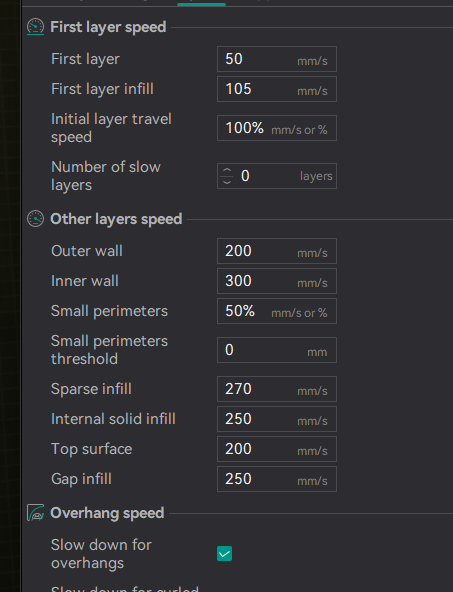
its the same PETG profile from my other printer
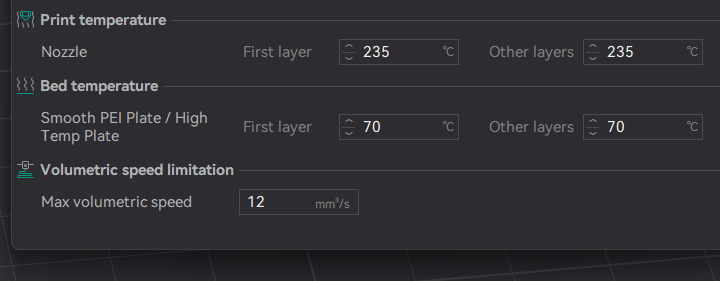 south plume
odd dew
https://i.imgur.com/ZqAB56y.png
south plume
odd dew
https://i.imgur.com/ZqAB56y.png
Accels?
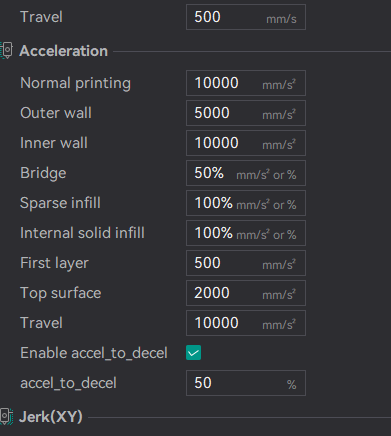 sweet jasper
You might want to halve those 10ks for a little bit until you break in the machine
south plume
Yeah that's a bit high for now
Though eventually you should be able to get it higher than that by a fair margin
odd dew
hopefully that for now stands true, i got this thing to go zoom zoom, def dont want it to be SLOWER than my other printer
good good..
south plume
odd dew
hopefully that _for now_ stands true, i got this thing to go zoom zoom, def dont...
My 350 formbot kit runs 25500 accels at 500mm/s (if I can get the flow)
odd dew
god damn
south plume
I have A4T and am running the motors at 1A though so ymmv
sweet jasper
Zoom zoom comes quickly. You just don’t want to be frustrated working up to it
south plume
odd dew
sitting in the dish rack drying rn
Oh I just wipe mine with a paper towel and wave it around a bit lol
I'm too impatient
odd dew
south plume
Oh I just wipe mine with a paper towel and wave it around a bit lol
I usually do too but im waiting for dinner anyway
sweet jasper
I try to keep normal runs at 300 for most speeds and 14k. I can always speed it up, but I have to have reliable machines
south plume
Oh yeah I should say my outer walls run at 5k accel though
sweet jasper
7500 on outer so similar. That is the only place it matters as long as the hardware can handle what you push on the inner parts of the print
odd dew
So first step is z offset
sweet jasper
Search my name and nasa fabric. I walk through a simple way to live tune that forces you to get to close to the bed and creep back up to perfect
odd dew
on...youtube? xvids? discord?
south plume
The hub
south plume
sweet jasper
7500 on outer so similar. That is the only place it matters as long as the hardw...
Interesting
sweet jasper
odd dew
on...youtube? xvids? discord?
Discord. lol
south plume
Did you pick that from IS or just from printing?
odd dew





 sweet jasper
odd dew
https://i.imgur.com/OccgvFu.png cap
sweet jasper
odd dew
https://i.imgur.com/OccgvFu.png cap
#voronuser_mods message
sweet jasper
south plume
Did you pick that from IS or just from printing?
Outer perimeter is the only thing that is really impacted by IS. Pick whatever you want for everything else. There is some nuance to it but as a general rule
south plume
I meant I picked 5k because it was about the max suggested by IS
odd dew
So should I do 4x4 to start..?
south plume
south plume
I meant I picked 5k because it was about the max suggested by IS
So I was curious if your IS was different
sweet jasper
south plume
So I was curious if your IS was different
Oh. Yes. That is where my outer number came from
south plume
What mods do you have?
sweet jasper
odd dew
So should I do 4x4 to start..?
8x8. It gives enough movement for the toolhead to get out of the way so you can see
south plume
Oh right rigid z is one
sweet jasper
Rigid z is the only real mod aside from a ton of insulation, bed fans, A4T and some qol
odd dew
sweet jasper
8x8. It gives enough movement for the toolhead to get out of the way so you can ...
just the STL right?
sweet jasper
odd dew
just the STL right?
Yup
south plume
sweet jasper
Rigid z is the only real mod aside from a ton of insulation, bed fans, A4T and s...
Hrm
Will rigid z make a 2.5k difference?
odd dew
sheeesh 3 hour print
sweet jasper
odd dew
sheeesh 3 hour print
You only do the first layer. 😂
sweet jasper
south plume
Will rigid z make a 2.5k difference?
Your results are your results.
odd dew
Ok so print it, watch it while its doing the hexagon outlines, babystep it down... 0.01 at a time? until the hexes touch, then come back up..?
sweet jasper
odd dew
Ok so print it, watch it while its doing the hexagon outlines, babystep it down....
Yup until there is about a .5mm gap
south plume
sweet jasper
Your results are your results.
Well because our printers are fairly similar otherwise, so it makes me wonder if I have some mechanical issue
sweet jasper
odd dew
I what
As you back away, the hexes separate again.
sweet jasper
south plume
Well because our printers are fairly similar otherwise, so it makes me wonder if...
Or it could be that you just need to run the machine more. I am a firm believer that you run IS once, input the values and run the machine 3-500 hours before looking at it again. Especially on a new machine
sweet jasper
You will have that loose screw fall out on its own before you just randomly find it. It’s called 3d printing, not worrying about an acceleration number that limits less than 10% of the print. until you run out of stuff to fix on the other 90%, you have a high probability of chasing your tail instead of unicorns
odd dew
It would appear I need to enable gcode arcs..
cause its spamming unknown command g2/g3 in console lmao
sweet jasper
Disable them in the slicer. There is a greater chance of ttc errors with them on
odd dew
They get automatically enabled depending on z hop setting too so what z hop do u use
sweet jasper
Not near a machine to get a value you for you, but I do know you want to disable the arcs.
odd dew
Nvm it was my wifi takin a dump
sweet jasper
odd dew
Nvm it was my wifi takin a dump
So you know why to disable the arcs, klipper converts them to lines anyway, so you waste the CPU’s power for zero gain. Start doing a lot with the cpu and it can cause errors on low powered devices
odd dew
It looks so...weird...
south plume
Where paper >:(
odd dew
 odd dew
The nozzle is too close to the bed?
sweet jasper
Oh yeah
sweet jasper
There should be a gap between them
 odd dew
Looks like it's printing with hot glue lmao
sweet jasper
Use coarser moves at first to get it close
sweet jasper
Yeah, I know. It can take an attempt or two to get into the reasonable zone. Also helps to slow WAY down, like 20mm/s while you are doing it. Gives more time for your changes to become apparent
south plume
odd dew
Looks like it's printing with hot glue lmao
I mean (these) 3d printers are essentially glorified hot glue guns
odd dew
Think we're getting there
sweet jasper
Also, it looks like the devils filament