
#How to figure out nozzle size for slicer setup?
87 messages · Page 1 of 1 (latest)
 frigid nebula
 rare ermine
I would user prusaslicer or orcaslicer these days, but back to your question. Start with .4mm that is by far the most common size.
frigid nebula
Ah thanks for the tip! Ill transfer to one of those then
 fringe tendon
The dimples on the tell you the size, although in their wisdom E3D decided 4 dimples wouldn't mean 0.4 haha.

E3D
Discover the versatile V6 nozzle range by E3D. Our comprehensive datasheet provides detailed specifications and performance insights for the industry-leading V6 nozzles. Explore various sizes, materials, and configurations to optimize your 3D printing experience.
frigid nebula
So it seems I was getting ahead of myself. I'm stuck at the Extruder Calibration (e-steps)

How do I get it to extrude 10mm of filament?
rare ermine
The instructions are for 100mm
In the webpage for the printer, aft the hotend is at temp there will be an extrude button with distance and speed nearby
frigid nebula
haha damn its right there

thanks
I'm greatly deviating from the original question.. but when I try extruding 10mm to check if it's running in the right direction, it looks like the white wheel is fixated.
I tried flipping the white lever up but still it looks like it's fixated in place. I'll drop some pictures.. would you know whats going on?


 fringe tendon
Whats the extruder section of the config look like?
You say you are repairing a 2.4. What have you done/changed?
frigid nebula
I'm repairing a V2.2. I checked the filament but that seems to be completely stuck.
frigid nebula
fringe tendon
Whats the extruder section of the config look like?
Ill check


I'm thinking that the filament is fixated somewhere
frigid nebula
Oh really? Where do I find those?
I haven't came across it in the software installation and down instructions
fringe tendon
It's in the config, in the screenshot
frigid nebula
... 😄
Sorry, do I flip that white lever up and do I keep it down during printing?
Nevermind, found a tutorial!
fringe tendon
Down
frigid nebula
It's still completely stuck. I'm also not able to move the filameter up or down by hand when I flip the lever up. I've checked this vid (https://www.youtube.com/watch?v=sTXL5StZUYI) from the Voron youtube and I can't move it an inch
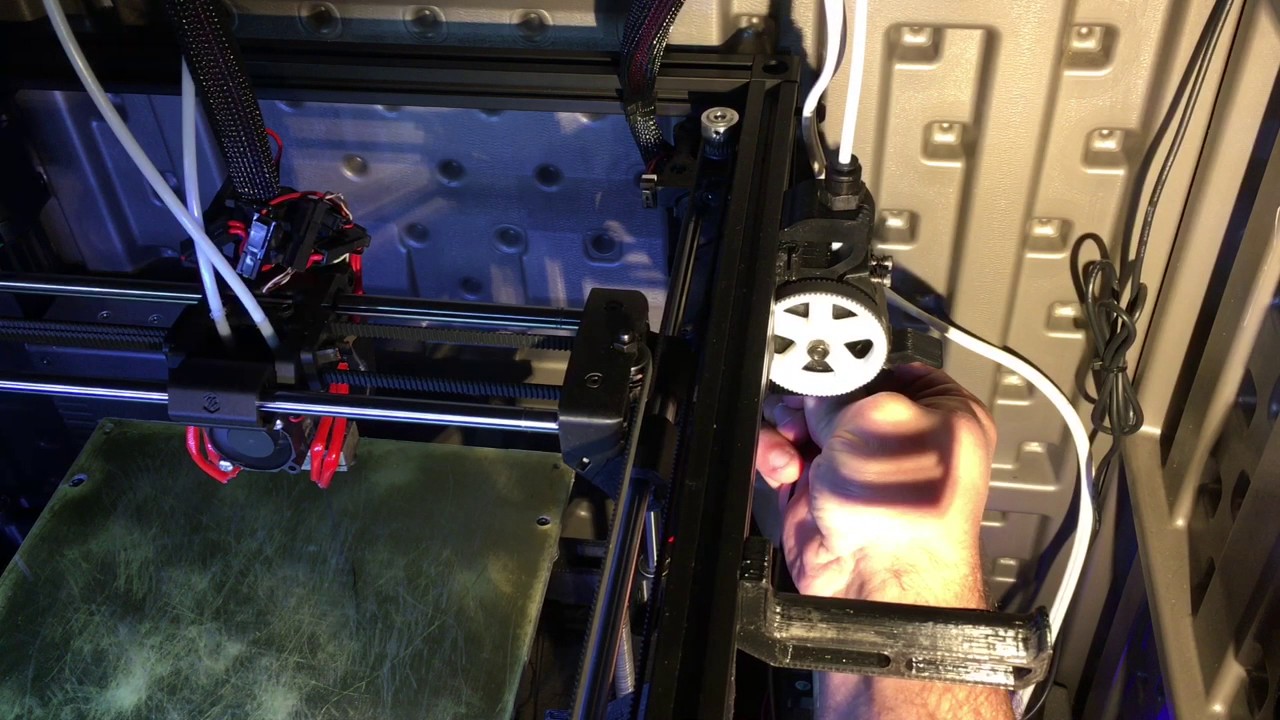
A short video showing filament loading/unloading procedure for VORON printer with a Belted Extruder.
(i updated the gear ratio)
fringe tendon
So how did you get the filament in the first time?
frigid nebula
I didnt. Long story short is that this thing was build some time ago and during a company move it almost ended up in the dumperster because no-one could get it to work and the original builder left the company.
So I did the entire software part again
😄
fringe tendon
There is white filament in the PTFE tube
frigid nebula
Yea there is. But the white gearwheel doesn't like moving
fringe tendon
What control board does it have?
fringe tendon
I would remove the ptfe tube and remove the white filament manually.
1.3 what?
There are 100's of boards
frigid nebula
fringe tendon
1.3 what?
SKR V1.3
thats the one
It has the dual MCU setup (I saw that there was some variation also on that, not sure if it's worthwile mentioning)
fringe tendon
So assuming the M4 is in the E0 port the pins appear correct.
Is the hotend heated up
frigid nebula
fringe tendon
Is the hotend heated up
Yes
fringe tendon
What port do you have the hotend heater in?
Can you post a picture of the electronics bay
frigid nebula
fringe tendon
What port do you have the hotend heater in?
2.5
 fringe tendon
Can you upload your printer.cfg
frigid nebula
fringe tendon
Did you follow the Voron wiring for this or is this as it was?
frigid nebula
I kept it for what it was but I did had to flip the motor A & B connectors for example
fringe tendon
It appear the extruder uart pin is wrong
uart_pin: P1.9
interpolate: false
run_current: 0.5
sense_resistor: 0.110
stealthchop_threshold: 0```P1.9 is wrong
Should be P1.8
frigid nebula
Do you base that of this? (sorry, I'm trying to figure how this all works :))
 fringe tendon
Top right CS pins
If you look at the other steppers they will have one of those
P1.9 doesn't exist.
Well it does but.
OH hold on
The Voron config has 1.9 too. I'm confused
frigid nebula
Still.. funnily enough I get the same error
(like it wants to move.. but it cant.
frigid nebula
I can't. If I pull on the filament on the rights hand side (towards the camera) it's completely stuck.
I'm trying to remove the PTFE tube on the left hand side and check if I can move that but the tube is also stuck (I'm pulling on it so hard I'm pretty sure it's gonna tear)
fringe tendon
To remove the tube you need to push the blue part of the coupler in while pulling the tube out
frigid nebula
Yea I tried with all my might but it's completely stuck :D. I've never seen this before.
I might have to unscrew this thing
rare ermine
Is the filament stuck in the meltzone?
frigid nebula
fringe tendon
Do you have the lever up
yes
frigid nebula
rare ermine
Is the filament stuck in the meltzone?
I honestly don't know. Ill try directly on the head to remove that PTFE tube
No it's a 100% at the extruder
euhm.. that sounds weird.
I mean not at meltzone
frigid nebula
frigid nebula
So here I mean 😄
The kids are waking up.. Ill get back to it tonight!
frigid nebula
Maybe it's best to close this support request and mark it as solved, as my original problem has been solved :D.
Ill open a new one for the filament being stuck in the extruder. Hopefully someone else has come before me and found a solution.
Thanks a bunch for your help guys!!
rare ermine
frigid nebula
Maybe it's best to close this support request and mark it as solved, as my origi...
You are more than welcome to join the more lively chat #voron_2_discussion I will mark this one as solved for ya.