My experience with CAN has been pretty good. Make sure your polarity is correct between devices and make sure the 120 ohm terminating resistor is on on both end devices. I used kiuah to install klipper on a clean build of a raspberry pi. Couldn't have been easier. Great documentation online for even this monkey to follow. Make sure linux sees the devices before trying to edit configuration files.
#jumping off point. getting ready to enter the mix
56 messages · Page 1 of 1 (latest)
 silk iron
Once you have klipper installed, you will use it to build the firmware for your mainboard as well as any CAN devices. I suggest going one at a time. Start with getting communication to your mainboard. This will give you a good taste of what's to come with configuration files. Everything for the most part is documented either on klippers site or on a Youtube video somewhere. I recently came from the Marlin and OctoPrint world... It was a bit of a learning curve, but once I realized how everything was structured and built, I never looked back!
Everything is so much easier now. At least for me. All my machines have been (or are in the process of being) converted over.
 broken lance
silk iron
My experience with CAN has been pretty good. Make sure your polarity is correct...
broken lance
silk iron
My experience with CAN has been pretty good. Make sure your polarity is correct...
Ha. This monkey will for sure find some way to make this a wild experience. I’m going to be a pain in the ass here but I can’t help it. Polarity I’m clear on. Terminator resistor I’m pretty clear on as well. So my manta needs to have klipper installed on it after the physical precautions and preparations are in place. I’ll jump on the kiuah documentation and read up on it. Thanks a ton.
silk iron
BTT's documentation for flashing the OS is pretty good. I too am using the Manta series boards. Are you running the CB1 or CM4? I have two of each and they have their minor differences. But both very functional.
broken lance
silk iron
BTT's documentation for flashing the OS is pretty good. I too am using the Mant...
Cb1. This is my first build so I really don’t know crap about any of this. My cnc machine was pretty easy so I figured I would up the experience and build one of these. I have a Prusa that I’ve dialed in so I thought I had a good enough knowledge base to try this out. The community seems to be pretty inviting so that’s a big plus.
broken lance
silk iron
My experience with CAN has been pretty good. Make sure your polarity is correct...
So step one is for me to install klipper on the cb1?
silk iron
Step 1. Get an OS on the CB1. https://github.com/bigtreetech/CB1

GitHub
OS System image for CB1. Contribute to bigtreetech/CB1 development by creating an account on GitHub.
broken lance
silk iron
Step 1. Get an OS on the CB1. https://github.com/bigtreetech/CB1
Told ya I was new to this. Step 1. OS on CB1!!!!! Thanks. I’m on it. Happy new year
broken lance
silk iron
Step 1. Get an OS on the CB1. https://github.com/bigtreetech/CB1
So is this a typo/language barrier issue or should I be looking for a program called notpad? I feel that it’s a typo and I should be gearing up for more of them.
 broken lance
silk iron
Step 1. Get an OS on the CB1. https://github.com/bigtreetech/CB1
broken lance
silk iron
Step 1. Get an OS on the CB1. https://github.com/bigtreetech/CB1
Can this be done on a Mac or do I need to pick up a pc to do this?
silk iron
any text editor can be used. I personally use VSCode, but to each his own. Notepad is what the author used
I just saw you are running the m8p board on a 2.4 and trying to use the magic phoenix canbus. I have used all but THAT board in the manta series... But it shouldn't be any different than any of the others.
are you using the EBB SB2209 CANBUS toolhead from this page? https://magicphoenix.xyz/product/voron-v2-4-customized-kit/
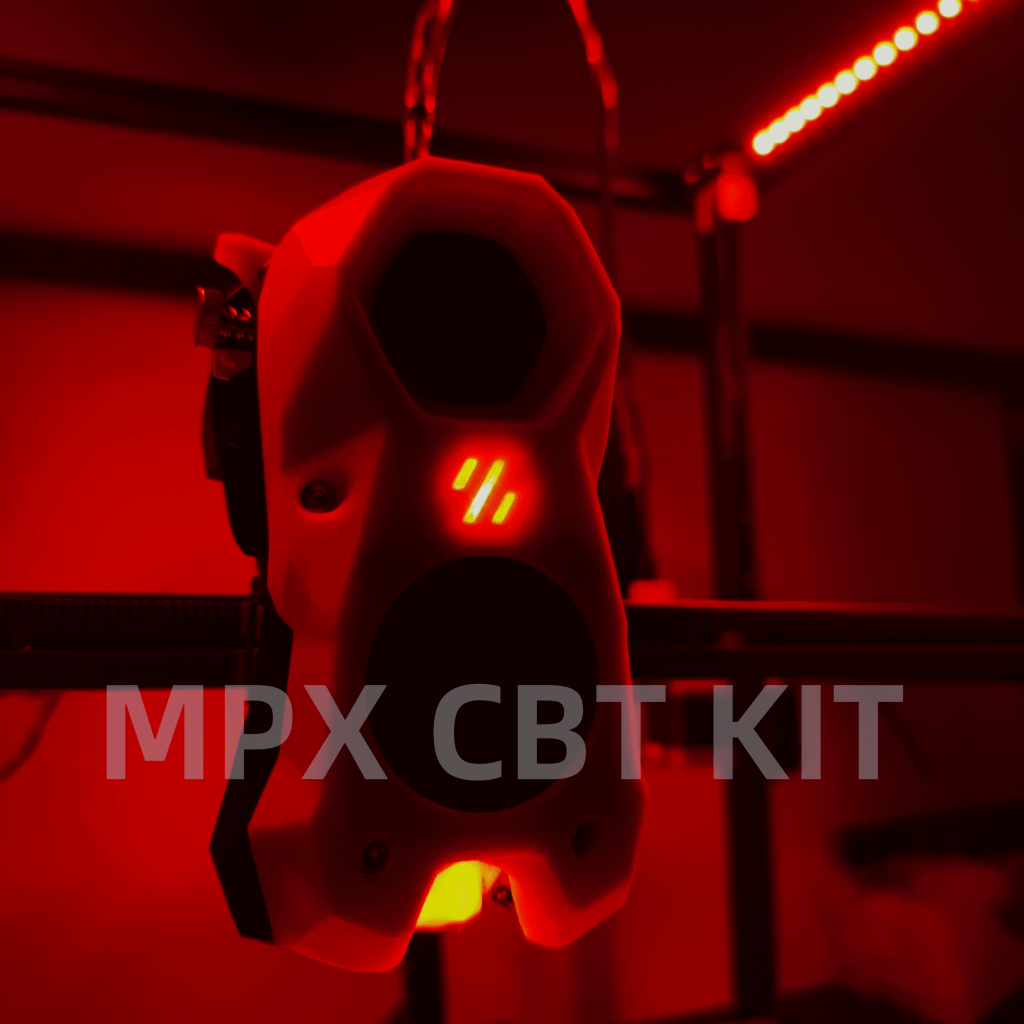
Or is it something else?
I assume you have the 2.0 of the board, so here is the link for it's resources.. https://github.com/bigtreetech/Manta-M8P/tree/master/V2.0

GitHub
Contribute to bigtreetech/Manta-M8P development by creating an account on GitHub.
if it is the EBB SB2209 that you have, it's the same one I am putting on my latest build. So far so good! Here are the resources for it. https://github.com/bigtreetech/EBB

GitHub
Contribute to bigtreetech/EBB development by creating an account on GitHub.
you will want to get your CB1 online and talking. I use PuTTY as my terminal program, but again to each his own. Once you get the OS installed, updated and Klipper installed, you will then build your firmware for your controller. I personally copy the file off onto a sd card and flash that way, but you can do it over the USB cable as well (details in the documentation).
The klipper configuration documentation link will quickly become your best friend. The CANBUS specific stuff is here. https://www.klipper3d.org/CANBUS.html?h=canbus#configuring-klipper
silk iron
A lot of users get confused when they get comms to the board, but klipper still doesn't start and throws ADC errors. It's expecting to see both the bed and hot end temperatures read correct values. You can either hook them up before you start tinkering with code, or you can do like some of us lazy people and edit the min_temp for each sensor to something like -50. When the controller sees an open sensor, it will read a negative value. If it sees something lower than the value declared in the config, it throws an error. The error that a bunch of people run into.
make it lower than what it reads when disconnected and the error goes away! LoL
broken lance
silk iron
are you using the EBB SB2209 CANBUS toolhead from this page? https://magicphoen...
Yes. This one is the one I’m using.
broken lance
silk iron
Step 1. Get an OS on the CB1. https://github.com/bigtreetech/CB1
This is why I was asking about mac computers
 broken lance
On it
silk iron
Just to verify, you are sure you have the eMMC version of the CB1? The couple that I have are not. Just making sure.
You could always just image an sd card with the OS and run it off of that.
I believe osx has a disk imaging utility built right in.
You wouldn't use the eMMC, but you would have a running CB1
the two machines I have running eMMC boards are both the CM4 board. I wanted to see what the difference was between the CB1 with 1gig ram and the CM4 with 8 gigs of ram.
broken lance
I’m not sure. I’m on vacation and away from all the hardware. I’ll be home tonight. I’ve been busy chasing my daughter through the southwest. Apparently this kid loves rocks
silk iron
If rocks are her jam, you got of easy dad.
double check it. Either way, you can run the board off the SD card AFAIK
broken lance
I’ve been discussing this with you so I can wrap my mind around all of it before I get to it. At least try and get my mind around it. Oh I have one kid who has a whole other set of “likes”. I appreciate this one liking nature and rocks
silk iron
I would be blown away if you couldn't boot the EMMC board via SD.
Yeah, just keep her away from horses.
or get three side jobs.
silk iron
broken lance
I’ve been discussing this with you so I can wrap my mind around all of it before...
The first time can be a little difficult, just because of the initial shock of all the steps. But once you trudge through it once (and then rebuild it a couple of times), you will quickly get the gist of the whole thing. Then it's chasing the always elusive perfect config. 3d printing is one of the only places where "tweaking" is not frowned upon! LoL

This is a basic tutorial on how to install Klipper on CB1 module used in BigTreeTech Manta M8P.
Playlist for BTT Manta
https://youtube.com/playlist?list=PLP-VDZmS6bFqG-zVmoJ2NDctvGSAo0KT7
One Time Tips, You Can PayPal Me:
https://www.paypal.me/EBraiman
Patreon:
https://www.patreon.com/edbraiman
buymeacoffee:
https://www.buymeacoffee.com/ebraim...
This guy is a great resource for info. This video helped me with a few things. All the manta board videos (or CB1 videos) I have seen on YouTube are for the most part interchangable. Other than specific configs of course.

CanBoot has Change it's name to katapult after the making of this video. Any mention of CanBoot can be replaced with katapult
How to set up CANbus on the Bigtreetech Manta M8P to work with multiple nodes.
I have see several having issues getting CANbus working on the Manta M8P v.1.1 so if that is you or you are just going at it for the fir...
Here is another good video I had in my bookmarks. This was the video that helped me get my EBB talking to my Manta board. You setup the Manta as the USB to CAN adapter. It's kind of an odd setup, but once configured you shouldn't have to mess with it anymore.
broken lance
silk iron
Just to verify, you are sure you have the eMMC version of the CB1? The couple t...
I have this one here I’m going to read up on it now.
 broken lance
silk iron
Yeah, just keep her away from horses.
broken lance
silk iron
Yeah, just keep her away from horses.
my wife is the one into horses. she volunteers at a horse rescue here in california. i can tell that volunteer is leading towards own.
 little pasture
pretty sure that is not an eMMC version of the CB1 and yes, you can do it all from a Mac. I just setup a CB1 on an E3EZ this past week from a Mac. Just need to get that image file to an SD card - easy enough through Terminal
 feral bramble
I am also a newbie with klipper and just finished my mechanical build of a trident so basically am sitting in the same boat. To my understanding so far the steps you need to take are:
- Install klipper on your btt cb1/pi
- Connect your mainboard to the pi/cb1 via usb not forgetting to put the 5v jumper on both.
- Compile the firmware for your mainboard and install it through the pi/cb1
- Flash the u2c board with latest firmware to be able to communicate over canbus
- Flash your canbus ebb 2209/2240/whatever board from the pi/cb1. Don't forget the 120ohm jumbers on both the ebb and the u2c.
- Replace the pin mappings in your printer.conf with the ones in the sample ebb file.
- Go over all the settings in the printer.conf once again.
- That should be it, apart from implementing any custom macros etc.
Probably I missed a bunch but just as a rough overview that should be it.
broken lance
feral bramble
I am also a newbie with klipper and just finished my mechanical build of a tride...
so ive managed to get myself here but im not versed in the terminal . whats the way to start in on number 5 on the list? i take it thats where i am. thanks
 feral bramble
I think that is what you are looking for (in case you have the ebb 2240 board, if not just search for the same site on bigtreetech github for your board): https://bigtreetech.github.io/docs/EBB 2240 2209 CAN.html#linear-fan-connection
Scroll down to software configuration.
broken lance
feral bramble
I think that is what you are looking for (in case you have the ebb 2240 board, i...
im going to be running the ebb sb2209
feral bramble
broken lance
im going to be running the ebb sb2209
Then the same instructions apply. It's for both boards.
broken lance
feral bramble
Then the same instructions apply. It's for both boards.
i take it im not using canboot...thats a custom boot loader right?
feral bramble
You don't have to use it, but then you need to connect your pi via usb to the ebb if you want to flash it again in the future. With canboot you can do that via the canbus. So, not really important but it's also not difficult to flash.
Just search for camboot instructions on btt's github if you want to still do it.