#h1-tech-support
1 messages · Page 26 of 1
 frosty tiger
 shut island
Question, if I delete the tech beta my saves should be fine right? I'm afraid of my saves getting deleted
frosty tiger
uninstalling the tech beta won't delete your save files
If you are worried you can make a backup of your save files. That is what I do.
the path is C:\Users\*\Documents\Saved Games
the * is your username on the computer
Copy the entire Hades folder
frosty tiger
Thank you for checking
shut island
@frosty tiger Thanks!
 tropic bloom
Just got the game, but for some reason the settings in the menu are unresponsive and whenever I try starting a new game the only thing that shows up is Zagreus, but the entirety of the screen is an abyss. I can still move around and attack things, but everything is invisible to me. I tried hugging the wall and once I got into a new area the game gave me an error telling me that it wouldn't save. Is this a known issue?
 runic pollen
this isn't super serious but before one of the recent patches, the board that displayed employee of the month (by the wretched broker) used to have voice lines for the images, and now, even after I've met the characters in the picture (like Meg and Thanatos) Zagreus just stands there with his head tilted. is there supposed to be any commentary from him anymore or does it stay silent from now on?
tropic bloom
to clarify, this is what it looks like https://steamcommunity.com/sharedfiles/filedetails/?id=2155184995

Steam Community: Hades. great start
 tulip apex
Is anyone else having issues with the game launching on the wrong monitor with a dual monitor setup?
It's been a thing for me a while but until the 31938 patch or the one before it it could easily be solved by and unchecking and re-checking the fullscreen display option. now I have to unplug and replug my 2nd monitor every time I launch the game.
 grave igloo
the same thing is happening with me as well i usually change the resolution of the game make it windowded and drag to the screen i want and fullscreen again and it works but now when i try to drag the window window slides all the way to the bottom of the screen under the taskbar so i cannot get back to the game unless i close the game and execute again
 latent shore
hello my game freezes mid game and it shows up as not responding i lose my progress of my run its happened a few times now and its rather demoralizing
idk if anyone knows what to do
grave igloo
you can send crash reports when the game crashes when it happened to me i just sent a crash report the developers will get to see it if you leave a report
 forest violet
I'm so sad. I too have suffered the game crashing. @latent shore Were you using a particular weapon?
latent shore
im using the sword u start with
forest violet
Oh okay, I've been using an unlocked weapon and was wondering if it was just that one.
Have you noticed it happening during anything in particular? During a regular attack or a special?
grave igloo
i think the reason why the crashing is happening might be the improvements and the changes that has been made in the game engine because for me it happened on the most recent update. Were you guys experiencing the issue after the lastest update too ?
forest violet
It had been some time since I played, but I didn't have this issue during the Night update.
In fact, I don't think the game has ever crashed on me until recently.
It is what it is though. RIP my sweet run.
grave igloo
although i did notice something when the game crashed on me when i was fighting in the boos of elysium, my next run after i sent a crash report i had rarer boons as i played so my next run in replacement was really smooth as well just figured i would write this i dont know if it was by luck or if it is actually intended but it was cool
forest violet
It's luck I'm pretty sure. Your boons get shuffled around randomly.
 graceful badge
I was able to follow the first step, but cannot find hades.exe. The game still saves but about every other dungeon this message pops up. Please helps its annoying as hell.
 nova elbow
In my recent victory post I mentioned that, in Styx, the Piercing Butterfly wouldn't proc until the last room for each tunnel, where I would take damage anyway cause I suck, but I'm curious if that's intentional or not since each room is like an encounter leading up to the last room.
 remote mirage
is anyone else having issues with getting Than to do damage on Thesus and the Bull?
ive noticed it about 2 or 3 times now Ive done the summon and they take no damage despite them being in the circle
i submitted my F10 and lost my progress in the game
wow great
:/
remote mirage
I alt tabbed to here, posted. went back to f10, filled it out
and hades was closed/gone after i submitted
tested it again and it was fine this time
didnt close the game so i dont know why it did in the middle of my damn run when i actually had a problem while fighting them in Elysium
maybe their fight is bugged in more then 1 way
 sharp narwhal
@remote mirage If your game crashes to desktop after hitting F10 again, could you do the following:
- Type "Event Viewer" into the Windows search bar, and open the program.
- Once the Event Viewer is open, click the dropdown menu on the left for "Windows Logs", then select "Application"
- Click on the error entries on the right to highlight them and view the details of the error. Look for errors that mention "Hades" or "Hades.exe"
- Hold down Ctrl and then click to select all of the "Error" events related to Hades
- In the Action menu bar at the top of the screen, choose "Save Selected Events". This will create a ".evtx" file that contains all of the errors you highlighted
- Next, run dxdiag.exe and generate a report by clicking "Save All Information" at the bottom of the window. There are detailed instructions here: https://support.microsoft.com/en-us/help/4028644/windows-open-and-run-dxdiagexe
- Attach both the .evtx (error log) file and the DxDiag.txt (DxDiag results file) to an email and send it to support@supergiantgames.com and we'll take a look!
@nova elbow It is as-designed, yes.
@graceful badge Hades.exe is located in one of the following directories by default, depending on your launcher:
\Program Files\Steam\steamapps\common\Hades\x64
\Program Files\Epic Games\Hades\x64
If you continue to get this message after checking file permissions and antivirus whitelists, could you generate a DxDiag.txt file - instructions above - and send it to support@supergiantgames.com with a description of the issue?
@tulip apex @grave igloo Please generate a DxDiag.txt file by running DxDiag.exe and clicking "Save all information" (instructions: https://support.microsoft.com/en-us/help/4028644/windows-open-and-run-dxdiagexe) and send it to support@supergiantgames.com with a description of the issue!
@tropic bloom If you haven't yet, try verifying your installation through Steam and making sure your graphics drivers are up to date. If neither of those helps, please send Hades.log (\Documents\Saved Games\Hades\ ) and a DxDiag.txt file (instructions above) to support@supergiantgames.com with a description of the issue!
@latent shore Next time your game freezes, after you close it, could you send Hades.log (\Documents\Saved Games\Hades\ ) and a DxDiag.txt file (instructions above) to support@supergiantgames.com with a description of the issue? We'll look into it!
@dapper spruce Could you send Hades.log (\Documents\Saved Games\Hades\ ) and a DxDiag.txt file (instructions above) to support@supergiantgames.com with a description of the issue? We'll look into it!
@primal whale Please try reporting the lag with F10 in-game when it's particularly serious!
@humble vigil That's a known issue that we're still looking into; restarting the game should fix it.
 strange zinc
Idk where to post that kind of questions so I'll ask it here
Is there some kind of debug-mode or some other way to access specific dialogues? I'm making a vid about Hades and need some specific replicas from characters (||Zagreus and Dio talking about Orpheus|| and ||Megaera mentions high heat||)
sharp narwhal
There isn't a debug mode per se, but if you poked around in the scripts, it should be fairly easy to replace generic conversations with the ones you're looking for, or to modify conditions to make the conversations you want to show up, show up
You might want to ask the Hades modding discord folks if they have any tips: https://discord.gg/KuMbyrN
 regal hatch
i think i've missed a scene with Dusa; I have her at full bond in the codex, but her keepsake doesn't say that we have a bond, and i never got the ambrosia giving back scene
 snow socket
The scene occuring is a random chance, just give it time.
 burnt herald
hey the F10 thingy wouldn't send for me for whatever reason the other day. Reporting this visual text render thing I've seen happen more than once - though only on the boon screen. Looks like the font isn't being applied to the boon screen string. Reason unknown - though when I think about it the bug might always be seen in the first/top boon slot and not the other two.
 drowsy meadow
None of my three keyboards have any known key incompatibilities, and the "dash towards cursor" setting is most definitely off, but for some reason, holding any directional buttons and spamming dash whilst attacking in the opposite direction of the dash, it dashes me towards the attack rather than the direction about 1/3 to 1/5 dashes anyways, randomly. Any clue/idea?
 stray elm
Report it in-game with f10, I've had that bug for a while now :/
frosty tiger
Well good thing is when you see the devs are playing Hades it usually means a hotfix is always somewhere near us.
 austere drift
@drowsy meadow try pressing attack before your dash vs pressing dash before your attack? I don't play on KBM, but that sounds like possibly intentional behavior.
drowsy meadow
I hope for the sake of the devs that dashing in any other way than where the player intends isn't "intentional" behaviour for a roguelike.
austere drift
¯_(ツ)_/¯
drowsy meadow
And I just gave it a test, I can recreate it with a controller also, though I don't know precisely whether it's because of attacking before/after dash, because it's the easiest to reproduce when spamming attack and/or when holding attack.
austere drift
I can't reproduce that at all on pad. If I hold any direction before pressing the dash button, I always dash in that direction.
 fleet ferry
hey, sorry if this is something already known, but i cant boot the game properly at all, it will just show a black screen and freeze, no crash logger either. i have followed each thing on the FAQ too, as well as something to do with G-sync. just hoping to get some info thrown my way (update: decided to have a mess around with the antivirus i had installed which was avast, had to compleately uninstall it and reboot my pc and it now works)
austere drift
The game became unresponsive yesterday when entering a Chaos Gate, and I had to force close it, but no bug report came up. Anything I should send your way when that happens that would help you out?
austere drift
And, just had a crash in Asphodel when leaving the Witches Circle without a bug report coming up.
 hot charm
Does anyone know how to get the game to trigger the use of ps4 icons when using a ps4 controller? I always use one and yet it shows xbox icons. I've seen streamers who have ps4 prompts though.
 last kettle
@burnt herald @drowsy meadow and @hot charm , please report these issues with F10 and we'll take a look.
@austere drift , if you ever encounter a crash without the bug reporter again, it'd be useful to have your error log and DxDiag. Feel free to send them our way using the following steps:
- Type "Event Viewer" into the Windows search bar, and open the program.
- Once the Event Viewer is open, click the dropdown menu on the left for "Windows Logs", then select "Application"
- Click on the error entries on the right to highlight them and view the details of the error. Look for errors that mention "Hades" or "Hades.exe"
- Hold down Ctrl and then click to select all of the "Error" events related to Hades
- In the Action menu bar at the top of the screen, choose "Save Selected Events". This will create a ".evtx" file that contains all of the errors you highlighted
- Next, run dxdiag.exe and generate a report by clicking "Save All Information" at the bottom of the window. There are detailed instructions here: https://support.microsoft.com/en-us/help/4028644/windows-open-and-run-dxdiagexe
- Attach both the .evtx (error log) file and the DxDiag.txt (DxDiag results file) to an email and send it to support@supergiantgames.com and we'll take a look!
hot charm
I'm not sure how to bug report for icons. It doesn't seem so much a bug with the game as it is with Steam.
 pastel forge
Hi, I'm having a bug where i'm unable to drag the window between monitors on a dual monitor setup?
everytime I change the resolution so i can move it in windowed mode, it just slides to the bottom of my screen, and i'm unable to drag it up further.
 sharp narwhal
Hey @gusty tartan , can you generate a DxDiag.txt file by running DxDiag.exe and clicking "Save all information"? Instructions here: https://support.microsoft.com/en-us/help/4028644/windows-open-and-run-dxdiagexe
Please send the DxDiag.txt file to support@supergiantgames.com with a description of the issue and we'll take a look!
 gusty tartan
Think it has to do with some weird interaction with my dead partitioned HDD, tried disabling the HDD but now i'm having a different issue of the game not even opening even after reinstalling. Trying to eliminate this as an issue first, since i think this has to be it.
 long nova
Hi, was wondering if anyone was successfully able to restore sound on Hades after losing it. The sound worked fine for a while, then one day I loaded up the game and.... no sound. Sound works fine in other games/windows, etc. Running off steam.
gusty tartan
Yeah, it just won't even open now. 
Holy heck i fixed it
3 straight hours of fixing interactions with my dead HDD
 desert gull
when I tabbed out of the game and tabbed back in within a minute, the game restarted itself and I lost all my progress
it was kinda sad because I was getting good combination of boons
oh i just tabbed out again and I couldn't open the window back up
task manager said it was not responding and I had to force quit it from there
 wind pelican
i will leave a note here, it's not the first time but i have problems with the xbox one control, the game simply don't recognize
 fresh sage
Hi everyone, I'm currently having an issue that is making the game literally unplayable. Since the 1.0 the game suffers from very low FPS in some specific places, like the line of souls in front of Hades, every bossfight, all of asphodel. Everytime I'm in those places my fps go from 60 to 30-40. My Specs are Core i5 4440 3.10GHz 8GB RAM GTX 1650
 dim spruce
hey @fresh sage please try out the steps under #h1-tech-fixes and if nothing there helps would you mind DM-ing me your DxDiag following the instructions here:
https://support.microsoft.com/en-us/help/4028644/windows-open-and-run-dxdiagexe
as well as this file:
\Documents\Saved Games\Hades\Hades.log
hey @wind pelican please try this and see if it helps:
- Right-click on Hades in your Steam Library
- Select 'Properties...'
- Press the button that says 'Set Launch Options...'
- Enter the following: /UseNativeGaInput=true /UseNativeGaInputNoControllers=false
 azure cradle
I F10'nd it but, just to make sure, i've picked Hestia + Hammer Explosive Shot + Hammer Ricochet Shot (in that order) and only Explosive Shot was working on the Hestia Empowered Bullet
But at the end of the game i switched hammer boons and lost the Explosive shot, now the Ricochet Shot is working
Is this an F10 bug or are you guys just looking into game crashes?
sharp narwhal
That's an F10 bug! We're aware of that issue and looking into it
 left crater
Is it normal to begin game with black Tartare ?
sharp narwhal
@left crater Several people have reported that this can be caused by antivirus software blocking Hades from accessing its content files. Try whitelisting Hades.exe with any antivirus software that you have. Hades.exe should, by default, be located in one of the following directories:
\Program Files\Steam\SteamApps\common\Hades\x64
\Program Files\Epic Games\Hades\x64
left crater
ok, it was safe file from bit defender
 distant harbor
I'm sorry if this has been mentioned before, but my game just crashed while fighting Theseus and Asterius and I just lost a whole hourish of gameplay. The game autosaves, so I am wondering why it just put me back in the area with my weapons instead of outside of the arena. I have exited the game part way through a run before and it put me back in the place I was when I exited.
dim spruce
hey @distant harbor sorry to hear that. when the game crashed did the bug reporter pop up and was able to be submitted? or did it freeze or crash with no message? if you haven't already started a new run you may be able to get your progress back by going to:
\Documents\Saved Games\Hades
backing up the files to your desktop first, and then renaming Profile1_Temp.sav to Profile1.sav, overwriting the latter
 pseudo dawn
Any updates on if the Steam Remote play will be enabled for Hades?
distant harbor
@dim spruce it froze and crashed, I got nothing pop up to send a bug report unfortunately. I haven't started a new run yet, so I will try to see if I can find my progress
It worked! Thank you so much for your help, it was a pretty good run so I'm glad to have my progress back.
 solar fox
Very minor and insignificant issue/question - is there a way to enable audio to remain even when window is not in focus? (re: game gets muted when I alt tab to check OBS). Again, not a huge deal just wondering if I was missing the option in menu.
dim spruce
@solar fox this may work for you /RequireFocusToUpdate=false though that will actually prevent the whole game from pausing, not just audio
Hey @distant harbor one more thing if you don’t mind actually, would you be able to do the steps below and send me this file which may contain info from your freeze?
- Type "Event Viewer" into the Windows search bar, and open the program.
- Once the Event Viewer is open, click the dropdown menu on the left for "Windows Logs", then select "Application"
- Click on the error entries on the right to highlight them and view the details of the error. Look for errors that mention "Hades" or "Hades.exe"
- Hold down Ctrl and then click to select all of the "Error" events related to Hades
- In the Action menu bar at the top of the screen, choose "Save Selected Events". This will create a ".evtx" file that contains all of the errors you highlighted.
 winter iron
hey... not sure it matters, but I just submitted a bug report citing an endless animation... but turns out it was just my controller. can you cancel a bug report?
dim spruce
@winter iron no big deal for us thanks for letting us know!
winter iron
@dim spruce super.. you guys rock btw
distant harbor
I have saved the thing as a .evtx file
dim spruce
great, you can DM it to me here
solar fox
@dim spruce I will give that a try, tyvm
wind pelican
@dim spruce thanks 🙂
frosty tiger
hey guys, so anytime I'm playing Hades and I minimize the game, when I reopen it the game blackscreens.
never mind, fixed it. sorry for the bother : )
wait I thought I fixed it
dim spruce
hey @frosty tiger we're aware of that issue and working on a fix, thanks for reporting!
 rain cradle
It sometimes takes for me 2 or 3 tries, before it back to normal from the blackscreen
frosty tiger
Ok. Glad to know it's not just my computer
rain cradle
Its known issue
 unkempt junco
Hey, I don't know if this is tech support but I can no longer access aspects after the latest update?
 winter kelp
wait the game just crashed in Elysium and when i opened it again im back at the house????
stray elm
If Your Game Crashes and You Lose Progress
If something happens and you start the game and find your save data missing, chances are it can still be recovered. Please follow these steps:· Navigate to \Documents\Saved Games\Hades
· Rename Profile1.sav.bak to Profile1.sav (or Profile1_temp.sav.bak to Profile1.sav); this assumes you use Save Slot 1
· Then open the Play menu in-game and look for the save.
 weak chasm
I don't know where else to put this minor thing but why is the font different here suddenly:
 flint compass
press F10 to report bugs!
 rose kestrel
When I try to remap keys, the game doesn't respond and I have to press alt+F4
dim spruce
@rose kestrel please try the following and see if it helps:
- Right-click on Hades in your Steam Library
- Select 'Properties...'
- Press the button that says 'Set Launch Options...'
- Enter the following: /UseNativeGaInput=true /UseNativeGaInputNoControllers=false
 slate pike
How do I transfer my save data from the epic game's store over to steam?
sharp narwhal
Hades always uses the same save directory regardless of platform, so you shouldn't need to transfer anything
Saves are stored at \Documents\Saved Games\Hades
slate pike
So if I start hades from steam, it'll use those files?
Thanks
I assumed that wouldn't be the case for some reason
sharp narwhal
They should just show up when you start the game, yeah!
 lapis roost
well. i report some bugs on in-game report system but where could i find the solving tracks (like it's a duplicated bugs or it's on way to solving)?
 signal ether
@lapis roost thank you for reporting bugs. There is no public bug tracker. We will look at the issues and try to fix them.
If your issue is related to localization, you may also post in #hades-localization and we can try to get it to our community translators.
lapis roost
there are some related but some arn't, the screenshot is just a sample.
thx for replay @signal ether
 final verge
picking achilles aspect of the spear made the game crash
 humble vigil
so I was standing near the place where Thanatos usually stands (but he wasn't there today) and I found I could gift a nectar but there was no one there, so I pressed it anyway and apparently it somehow gifted to Thanatos
for more context, this happened after I found Thanatos talking to Nyx for the first time and then disappearing
stray elm
@humble vigil stuff like that you can report with f10 in-game
humble vigil
I see thanks
stray elm
Quick note--I just submitted a bug report about Thunder Flourish on Malphon. I mentioned I'd had Splitting Bolt last run. While I did have that, what I meant to say was Double Strike
burnt herald
Can someone tell me if i was meant to be able to give Dusa two ambrosia to advance her bond?
stray elm
Yup!
frosty tiger
Hello
While in-game I see the "saving" icon but when I start my game up it takes me back to an old save.
I believe the save file is not being updated.
Can someone help me?
 hoary cloud
You need to quit to save your progress
Give up revert you to the point right before the run
If you need to stop playing and resume at another time, please use the quit option.
 forest sigil
Hello, i recently upgraded from windows 7 to 10, and while I was able to play before (with some lag, admittedly), now I can't
The game looks like this:
I have tried everything in the tech fixes, including downgrading my graphical drivers with the version from intel's site, using the compatibility mode to run as windows 7, disabling steam overlay, opening the game from outside of Steam
updated directx, and installed Visual C++
sharp narwhal
@forest sigil This is usually an antivirus or file permissions issue. Try whitelisting Hades.exe with any antivirus you have installed, and disable Windows Defender's controlled folder access: https://support.microsoft.com/en-us/help/4046851/windows-10-allow-blocked-app-windows-security
sharp narwhal
No problem!
 flat crater
So I downloaded the update today and started the game, when I started playing (was in Elysium just before its boss fight) I instantly noticed a significant drop in fps, was like 6 fps then increased to 18 then varied between 18~25 fps, during some animations it drops back to 6 fps. This started today after the update
Maybe its a temporary problem?
dim spruce
hi @flat crater could you try the steps under "If You're Experiencing Hitching or Frame Rate / Performance Issues with the Game" in #h1-tech-fixes and if nothing there helps would you mind DM-ing me your DxDiag following the instructions here:
https://support.microsoft.com/en-us/help/4028644/windows-open-and-run-dxdiagexe
as well as this file:
\Documents\Saved Games\Hades\Hades.log
flat crater
Ok thanks I'll try that
frosty tiger
hi it seems like im unable to complete the sisyphus quests after talking with megaera and hades
any tips for that?
stray elm
You'll also need to talk to || Nyx ||
stray elm
She's MIA?
frosty tiger
she gives me the usual dialoge without giving me the chance to talk to him
stray elm
Hmm
stray elm
This one took me a while, even with talking to everyone constantly
Do you have the || Admin Chamber ||?
frosty tiger
yup
the thing is this was a long time ago
otherwise i wouldnt be posting it here
im still locked 30 runs after it started
stray elm
Probably wouldn't hurt to drop a bug report for right now, otherwise not sure, sorry
frosty tiger
already did
sharp narwhal
@frosty tiger You're missing a conversation with ||Nyx||. You need to ||gift her nectar at least one more time|| in order for the conversation to play.
sharp narwhal
Oh? Maybe I was looking at the wrong report... Let me check again
Did you include any contact information I could use to look it up?
And was this a recent report or an older one?
sharp narwhal
Ah, alright, I was looking at recent things-- oh good!
 terse zephyr
Hi! Big fan of the game so far. Anyway, I have possibly soft-locked my game and reloading does not work
I accidentally tried leaving Zagreus's room while accessing the prophecy list, and now I cannot interact with anything in the House of Hades
Escape also did not work, so I ALT-F4'd out.
But I actually "fixed" it, but no idea how. I reloaded my save file three times and it did not work (ALT+F4'd out each time). On the third reload, I attempted to submit a bug report with F10, which pulled up the bug report screen (I'll submit a ticket later), and then quit that out and then the game. On the fourth reload (immediately after the F10), I was able to interact with everything again.
 north ridge
I guess this isn't officially a problem, but I wanted to bring it up just in case. In my last Charon fight, I dropped a boulder right in the middle of the room and it left Obol and Darkness pickups behind. After the fight, Charon tried to get to the center of the room but couldn't because he was blocked, so he just kept moving back and forth. I thought I had softlocked! Luckily, he eventually gave up and just dropped his item away from the center of the room.
So I guess, good job preventing a softlock here!
sharp narwhal
@gusty stream Could you send a report with F10 in-game when you're experiencing heavy lag? The report sends us diagnostic information that helps us pinpoint locations and setups we still need to optimize for!
 soft quartz
Haven't been able to find anyone with a similar issue. I'm constantly getting a BSOD. Sometimes it occurs while loading the main title selection and sometimes it occurs while in-game. Unfortunate, because it makes progression more or less impossible.
I've tried all the general troubleshooting tips - verified files, launched as admin, etc.
Running a Ryzen 3600X, RX 5700 XT, 16 GB, B450 Tomahawk Max
 whole crane
For some reason only lately characters voices are super quite except Zags, I haven't changed any volume settings just hopped on and it was quite.
stray elm
Report that with f10 in-game!
whole crane
thanks just did
 gusty stream
ill do an F10 report next time I play and experience lag, sure.
 slender pumice
is the 4th rail aspect's "dash strike" supposed to dash at the direction where you are attacking? this variates between my direction key and my beam and it's rather annoying
stray elm
@slender pumice As far as I know, that's a bug and should be reported in game
slender pumice
alright thank you
stray elm
o7
 worn acorn
Good evening, I'm not entirely sure where I should mention this, but World Spiltter, aka big chop isn't dealing damage (it still apllies the affects of any boon applied, for example hangover still works but no damage). I considered the bug possibilties, if there were no boons on attack and vice versa and all, but no, its entirely not working. I had noticed that it temporarily works upon taking damage from enemies but will stop out of the blue. I've reported the bug once, but other instances were too difficult to report and ad me dying most of time.
stray elm
Reporting it in-game is usually enough, thanks for double-checking!
worn acorn
You're welcome! It just happened too often that I think it needs to be mentioned a little more than necessary, it does basically sets your fate in stone when your attack doesn't work.
stray elm
Yup
 visual oasis
yesterday my game was running fine. today it launches into a white screen.
Verified my game files
changed to not full screen through launch options
tried gpuindex launch options
updated my nvidia drivers
still white screen for like 3 minutes, then black screen
also removed steam overlay
I will try the hard way. uninstall and reinstall the game
 hasty plover
@visual oasis apologies for the inconvenience.
Is still not working for you?
visual oasis
Im currently on another game. I will return to you as soom as I can and let you know
visual oasis
After a reboot and reinstall the game is working as before. I wish I could give details to help.
 reef panther
Hi! I updated Hades for the first time in a while today. Tried to start it up and got the "something went wrong" warning
if I keep going, it simply shows the game menu, and a a lot of graphics assets are missing
I can see menu items, and if I continue through to starting a game, it loads me into a black screen with a partial loaded atreus, I can move around, etc.
I turned off antivirus, and ran as administrator with the same result
and then reinstalled with the same issue
I have tried both x86 and x64 versions
sharp narwhal
Try disabling Windows defender's controlled folder access: https://support.microsoft.com/en-us/help/4046851/windows-10-allow-blocked-app-windows-security
sharp narwhal
I see; do you know if you have any other file permissions issues (read-only restrictions, etc) or additional antivirus software floating around that might be causing that?
sharp narwhal
Gotcha
There's definitely some kind of read-write access issue, but I unfortunately don't have a whole lot more advice for you than that; you can check in again here on Monday when the engineers are here, or send an email to support@supergiantgames.com and we'll check your ticket out soon!
sharp narwhal
More than likely if file access is a problem, the game won't be able to create a log
reef panther
ah ok
I am running windows on Parallels
but everything is installed in a partition the Windows install has access to
sharp narwhal
Ohhh, ok we've heard from folks that the game doesn't work with Parallels
That was before the engine conversion, but I'm not surprised it's still an issue
reef panther
ah darn
yeah I think it worked a few weeks ago
I had a lot of display size issues, but once I got those sorted it would work great
sharp narwhal
I'm surprised it was working at all, I was under the impression it didn't. We don't have any official guidelines or anything for troubleshooting issues with Parallels so I can't give a whole lot of pointers there either...
reef panther
ah ok, well thanks for letting me know
sharp narwhal
No problem! Like I said, that error message is related to file permissions and read-write access to the game's .pkg content files in a directory something like \Hades\Content\Win, or potentially to and from your Documents folder, where the game tries to create save data
So if you want to try some targeted troubleshooting, that would be where to look
reef panther
is there a default path it tries to use for the documents folder?
sharp narwhal
Probably C:\Users\ [your name]\Documents\Saved Games\Hades
sharp narwhal
Yeah; is there a Hades.log file in there?
sharp narwhal
The DebugLog is old, from before we switched the code base. It's failing to create a log
reef panther
yeah I just scrolled and I see it hasn't been added to since 5/8/20
is it worth trying to delete that folder and starting over?
sharp narwhal
I don't know that that would help, no
 wild obsidian
Hey, just ran into a minor bug (text formstting seems off on a boon. How best can i report it?
sharp narwhal
Use F10 in-game!
wild obsidian
Thank you! Forogt the key
reef panther
So I can confirm its accessing the Documents folder
I deleted it, and restarted the game and the folder is back with a profile1.sav and profile1_temp.sav
hasty plover
After a reboot and reinstall the game is working as before. I wish I could give details to help.
@visual oasis glad it's working for you 🙂
 junior birch
hey, I think i have a problem in my game
All of the enemies are moving way slower than normal
or at least most of them are, I think
I know the numbskulls and exalted are moving much slower than they should, and the rest of the enemies seem to be moving slower too
frosty tiger
I have the same problem
 neat crest
Since a bit ago, I've been having audio problems with the game, no idea why
 haughty agate
Is there any way to run the game at 2400x1080 resolution?
frosty tiger
My game is slow, and I can move zag while he revives with a defiance
frosty tiger
It's unplayable
 cyan escarp
Okay, so, I had a bug, and using the tool for reports ended freezing my PC...
The bug is, basically after I finished one of those "Trial chests", I went too fast to it, spamming E, and then somehow, instead of giving me the reward the trial started again
 jaunty pecan
Dashing Flight (while you dash your special does 100% more dmg and is faster) does not work with the special of Shield Aspect of Beowolf. Did not test is with other wpns, but with Beo I am sure. not working
 light flume
Hitting F10 during Zag's end of game death crashed the game and then wiped the previous run from the save it seems. Bummer because I managed something like 4 Duos that save and it was one of my more successful ones lol
stray elm
@light flume you can try this:
If something happens and you start the game and find your save data missing, chances are it can still be recovered. Please follow these steps:
· Navigate to \Documents\Saved Games\Hades
· Rename Profile1.sav.bak to Profile1.sav (or Profile1_temp.sav.bak to Profile1.sav); this assumes you use Save Slot 1
· Then open the Play menu in-game and look for the save.
to recover your progress
stray elm
look at the timestamp of the file
light flume
it's from over a month ago so probably not what I want
stray elm
then check Profile1_temp.sav.bak
light flume
same date. Profile2 is the right date but I assume that's second slave slot
stray elm
yup
light flume
well, one run isn't a big deal
 manic valve
Not sure if this is a bug or not but oceans bounty doesnt seem to be boosting gold from side hustle.
stray elm
I believe Ocean's Bounty says "room rewards" @manic valve
manic valve
Ahhh thats why, specific to chamber rewards. Thanks for clarification!
 normal crypt
Is it ok that i didn't get feedback on specified email when i send bug report?
visual oasis
So as I mentioned yesterday, after trying all the suggested fixes to the game not starting, I reinstalled the game. It worked for 2 runs.
Now the game is again starting on a black screen.
Is it worth mentionning that I am as well streaming and running Streamlabs OBS.
Anyway, I will now wait for the next update to try again
 barren swan
I'm not having any conversations with Papa after I defeat the boss sometimes, is that intended? Or should I F10 that when it happens?
 clever tide
This is a very dumb detail, but this happens when moving in the lounge kitchen (in front of the kegs):
Normal kegs
Weird kegs
 rough loom
Wen i did a run and talked with Euridice she began talking like when she and Orpheus were still arguing, but this is after i had already freed Orpheus and got them back together. I think this is a bug on Euridice's lines
visual oasis
Yes, so I'm pretty sure now what is going wrong in my case (see my messages above): I cannot capture the game through Streamlabs and that is what is at the origin of all the crashes. Obviously other people are streaming the game. So it might be my settings.
Thing is, once the game crashed once, whatever I do, it will keep crashing until I reboot my PC.
slender pumice
Bullrushing while holding a direction key makes me bullrush in that direction
 oblique sentinel
idk if this is the right channel to talk about this, but I've been having some visual glitches recently. In some chambers, the enemies and I just teleport randomly. In other chambers, enemies and projectiles appear double. I can't see Charon's well after I finish a chamber and in between areas. Is this just me, or has this been brought up already?
stray elm
@oblique sentinel devs might have you do more, but you can definitely report bugs like those in in-game with f10
@rough loom try and f10 dialogue bugs like that in-game
@clever tide try and f10 visual bugs like that in-game
@barren swan you don't always get a full conversation afterwards
@normal crypt They don't usually reply to the emails, to my knowledge
@slender pumice What do you mean?
oblique sentinel
ok thanks
slender pumice
gimme a sec ill obs a short clip
stray elm
And you're holding input in the direction you end up moving?
slender pumice
yes
stray elm
Can you hit Skelly with it if you move into him?
stray elm
Sure
slender pumice
stray elm
You'll also want to f10 when you're moving backwards, so the devs can see it
slender pumice
ill sumbit the videos as well
stray elm
Can't send a video through f10, but if you drop your discord tag in the report and tell them you put videos here that would work
slender pumice
links
stray elm
Out of curiosity, are you using keyboard or controller?
slender pumice
keyboard
slender pumice
yes
alright even weirder, ill post a video of this
all 4 aspects shown (reported in game with zeus)
slender pumice
ikr
stray elm
Try without that selected, then try reselecting it

 stray elm
Was that still with attack to cursor??
slender pumice
i unselected and reselected
stray elm
Dunno then, hopefully the devs will be able to figure it out ^.^
stray elm
Oh, mood. I'm usually sending 2 or 3 reports per run lol
slender pumice
:>
frosty tiger
"the revenge of the sea god" prophecy doesn't trigger for me ?
stray elm
Which part of it doesn't trigger? As in, you haven't gotten the prophecy, or talking to Poseidon after completing it hasn't triggered the completion dialogue?
 velvet cradle
so if i played on my desktop is there any way for my laptop to get the save data? (epic games)
velvet cradle
okay ill give it a shot, thank you!
stray elm
o7
 mystic aurora
I currently get the "Unable to Read Data!" error every time I launch the game after restoring my save from a backup.
I made an exception for Hades and Epic Games Store in my firewall, made sure all of my saves were NOT set to read-only, ran Epic Games and Hades as Admin, and turned Windows Controlled Folder Access off.
The game DOES save correctly and I still have my old save. But the error message still pops up, which makes me a little nervous.
Anything I might've missed?
frosty tiger
@stray elm mmm i enabled extreme mesures, i defeated thesus, and then i talked to poseidon in the same run.
stray elm
Have you talked to him again since?
frosty tiger
yes in fact, it wasn't new, i did several extreme mesures lvl 3
stray elm
Then I'd f10 if you haven't already
frosty tiger
ok i will but it seems that it's gonna be hard to know exactly when i f10 ( before talking to poseidon in the temple of styx or after ? )
stray elm
When you're talking to him next
frosty tiger
ok thank you i will try this one after work
stray elm
o7
 shrewd atlas
Using the f10 button resulted in my game to crash, and also erased my run (midway).. Is that normal?
flint compass
if you havent started a new run, you can recover your run like this:
· Navigate to \Documents\Saved Games\Hades
· Rename Profile1.sav.bak to Profile1.sav (or Profile1_temp.sav.bak to Profile1.sav); this assumes you use Save Slot 1
· Then open the Play menu in-game and look for the save.
F10 shouldnt crash your game
shrewd atlas
Thats a good tip, thanks mate!
And yes it is weird this happened..Used it like 6 times without a problem
 acoustic gust
For some reason, F10 doesn't work properly for me. Instead of making a screenshot, it just turns my game's screen black and then, supposedly, makes a screenshot of that black screen.
flint compass
press F10 in game to report bugs @pastel forge
pastel forge
ooh thanks
sorry i was playing on controller, didn't think of using the in-game reporter.
frosty tiger
So I updated my drivers
And now steam won't work
How can I uninstall these updates
In fact just trying to launch steam has crashed my computer 4 times now
stray elm
That sounds like an error on steam's side, I'd look into their tech support as well
frosty tiger
Aaa======Welll now steam works
But hades crashes my computer now so
It's like my computer wants me not to play hades because it's 7 years old smh
is it because I have intel graphics
Either way, fun game, hope it's not my computer and after v1.0 I can play it
Also are you sure it's steam(although I suppose it would make sense)
Because other games I try to play run horribly
Funnily enough, these problems only occured after installing new drivers from #h1-tech-fixes 🤔
 craggy willow
wasn't cloud saves supposed to be turned on with this update?
burnt herald
So uhh, is it common for the bug reporter to take up to a minute to submit?
stray elm
Sometimes yeah, @burnt herald
frosty tiger
So can I ask here if I've tried everything in #h1-tech-fixes
stray elm
@craggy willow it says in the patch notes that cloud saves for EGS were temporarily disabled
frosty tiger
Because nothing in tech fixes works
stray elm
One of the devs or QA people will ping you when they get a chance, my dude. If I could help you I would xD
burnt herald
Sometimes yeah,
@stray elm ok cool, not just me then
stray elm
Yeah o7
acoustic gust
So, any ideas for why would that happen?
For some reason, F10 doesn't work properly for me. Instead of making a screenshot, it just turns my game's screen black and then, supposedly, makes a screenshot of that black screen.
manic valve
Is there a reason I cant post in the feedback channel? I made a fairly well recieved post and up/down thumbed some ideas and now i dont have permission. Did i do something wrong or does that happen periodically?
stray elm
@manic valve read the pins in feedback
 vast gull
you don't have the early access role rn
stray elm
They'll tell you what to do
vast gull
that might be related to the mess-up related to that role that happened recently
stray elm
There was a problem earlier with the roles, where people who didn't have the correct role could still post
That problem was fixed, so you'll need to get the role to be able to post
manic valve
Ah i see, its fixed now, thanks all!
stray elm
o7
frosty tiger
One of the devs or QA people will ping you when they get a chance, my dude. If I could help you I would xD
@stray elm Oh I didn't know sorry
stray elm
no worries ^.^
sharp narwhal
@frosty tiger Is the game crashing to desktop or freezing?
frosty tiger
The loading screen loads, freezes halfway through, then crashes all other programs I have running, then crashes itself
 north violet
So guys, i launched the game this afternoon, my save was gone, thought it was weird so i clicked on profile 1 and it just obviously started a new game. I think since my original save was on profile one and i just started a new save on the same profile, that my old save is gone.... any clues?
sharp narwhal
Goldre, if you check Windows Event Viewer you might get a little more insight into what's going on - click in your search bar and just type "event viewer", then expand the "Windows Logs" category on the left and try looking at the System and Application subsections
If you're having a RAM issue, for example, your computer might've created a log about it
@north violet Saves are stored locally; have you done anything like format your hard drive or reinstall windows lately?
north violet
i did reformat but i thought there were cloud saves?
sharp narwhal
There are cloud saves available on Steam, unless you've synced your saves again since losing them
Cloud saving isn't supported through Epic right now
For Hades specifically, not in general - there were technical issues with it that we're ironing out
frosty tiger
So what am I supposed to do in this event viewer
I just see a bunch of information, error, warning
@sharp narwhal
sharp narwhal
Look through the events around the same time as when the game crashed everything
They should have time-stamps; you can click on them to see more information
 frigid orchid
Hello everyone. I would like to inform you that I cannot play more after this patch I played normally with an average of FPS at 25, and after the update the FPS dropped to 2~5, I did not report it before because I thought there would be hotfixes, so now I tried to play again and the FPS has improved but it is still bad (average of 9).
my setup is not good but I played normally
Win7 64bit, i3, 8gb Ram, Intel HD 3k
(I already used dxcpl, and I tested it with and without it)
I hope my feedback helps. great game, congratulations! (waiting for achievements and emoticons xD)
stray elm
@frigid orchid if you haven't already, press f10 while in-game, so you can report your low fps
 shell burrow
Two days ago, I was able to open Hades without issue. I've played roughly 160 hours with minimum-to-no hiccups in performance or otherwise. I've experienced an odd crash or two here or there, but nothing that broke things entirely. When I went to open Hades tonight, I was unable to. After I click "Play", it opens to a black screen and sort of hangs. When I perform any input on the window, I get a "Not Responding" prompt that asks me if I want to wait or close the program. I've followed every step in the #h1-tech-fixes channel to no avail. I also uninstalled and re-installed the game with no success.
Other odd behavior I can note is that sometimes, when I force close the game, Steam also hangs. It recovers, though, whereas Hades does not. I was able to (by waiting for a very long time) get it to play audio once, and load the initial prompt screen, but the game was otherwise unresponsive and when I tried to interact with the prompt, it gave me the "Not Responding" prompt again.
Open to any suggestions at this point. 😦
FWIW, I've also tried 1 or 2 other Steam games and they've run without issues.
dim spruce
hi @shell burrow would you mind DM-ing me your DxDiag following the instructions here:
https://support.microsoft.com/en-us/help/4028644/windows-open-and-run-dxdiagexe
as well as this file:
\Documents\Saved Games\Hades\Hades.log
shell burrow
Sure, I'll need to add you as a friend first to be able to exchange DMs - is that ok?
(You can unfriend me after if you need to. 🙂 )
dim spruce
sure
shell burrow
Thanks again for your help, Gavin!
frigid orchid
@frigid orchid if you haven't already, press f10 while in-game, so you can report your low fps
@stray elm done, thank you
stray elm
o7
frosty tiger
ok i've reported a bug on the revenge of the sea god... while it didn't show me the prophecy was realize upon talking to poseidon... i did get the prophecy after getting back to hades house, so i guess you can ignore that report sorry...
 kind kestrel
Found a WEIRD bug which I'm not sure people have encountered: https://youtu.be/KCcwEmDQ3lQ
I've already reported. Just showing it off.
Fair warning: Spoiler for a Rail aspect.

 past saddle
Just had my first Hades crash. Is there a crash log that I can send in?
sharp narwhal
@past saddle Did the game crash to desktop, freeze, or did it create a bug reporter window?
past saddle
It froze and crashed to desktop. No bug reporter appeared
sharp narwhal
@kind kestrel Interesting! Did you submit a report with F10 in-game about that? If not I can try to reproduce it from scratch, but we do prefer F10 reports!
past saddle
I tried to hit F10 but nothing happened
sharp narwhal
@past saddle Alright, there should be a Hades.log file in \Documents\Saved Games\Hades; could you send that and a DxDiag.txt file (run DxDiag.exe and click "Save all information", https://support.microsoft.com/en-us/help/4028644/windows-open-and-run-dxdiagexe) to support@supergiantgames.com with a description of what was happening when the game crashed? We'll take a look!
past saddle
@sharp narwhal just emailed you. Hope it helps! It's been very a stable game. I have found that I need to close out Signal on my PC. If I ever get a new message while I am playing Hades, the frame timing becomes unreliable and the game feels like it is hitching. I'm guessing that's because the encryption uses a lot of CPU for a short amount of time.
kind kestrel
@sharp narwhal I did submit it! You can easily replicate it by holding attack for the Lucifer Rail then spamming the Cast button.
sharp narwhal
@kind kestrel I actually can't reproduce that issue by doing what you've described; is cast bound to a specific mouse button or anything for you? I've seen a few reports of weird control issues that don't occur on my bog standard keyboard & mouse / xbox 360 controller so I suspect something with your devices
Not that there's a problem with your devices, just some weird interaction that isn't there on mine 😅
kind kestrel
Odd. @sharp narwhal my attack is bound to mouse left click and my Cast is bound to q.
If it helps, I had infinity chamber and the quick startup hammer upgrades.
kind kestrel
@sharp narwhal I tested it again and it seems like it's not a specific set of buttons or key mappings. I believe it's an interaction between the Hammer Upgrades and the cast.
 honest mortar
Is this where I ask about something off in the game?
Two of the weapons aren't appearing in game for me, and I've got about 7 hours play time
stray elm
so currently, you have 4 unlocked weapons, and two empty slots?
stray elm
I'd report that in-game with f10, especially if you've done a couple of runs since you unlocked the last weapon
honest mortar
Okay, I will try that - thank you.
stray elm
o7
frosty tiger
something doesn't seem right here but I can't quite put my finger on it https://puu.sh/G7e3S/1bd440b933.png


 worn drift
Black screen at launch, no sound. Have followed all the guide (including setting launch option, Hades is running high performance graphic card, graphic card is updated, testing .exe from both x86 and x64 as admin, etc).
Not sure if relevant, but I play this game between my gaming laptop and gaming pc. The laptop has the issues of opening the game, but not the pc
dim spruce
hi @worn drift give this a try:
· Right-click on Hades in your Steam Library
· Select 'Properties...'
· Press the button that says 'Set Launch Options...'
· Enter the following: /UseNativeGaInput=true /UseNativeGaInputNoControllers=false
worn drift
@dim spruce no luck. Also sometimes F10 auto pops and sometimes not, when the black screen is up as well if that helps
dim spruce
ah did you put your name here in the F10 report? I can look it up and see if it has anything helpful
worn drift
Sure, I can send another one. One sec. Thanks for the help! Much appreciated. Great game
 glass moon
I've got a minor gameplay bug to report. I didn't use F10 because I didn't know about it, but F10 seems to break hades.exe for me, so...
I finished the last encounter to unlock a chaos boon giving me an extra cast. It refilled my casts from 0 to 4 without collecting the ones that were on the ground, effectively giving me 7 casts in play. It made the following trove fight easier.
As for F10, it just minimizes the window and when it pull it back up, it's teal and unresponsive.
 mellow lance
Hi, I had a save file that I was pretty deep into and then suddenly it is gone. I tried the fixes recommended (rename Profile1.sav.bak and rename Profile1_temp.sav.bak) but both of these put me back to right after the very first run of the game... Is my save file just gone then?
The weird thing is I don't think there was ever a crash, I just exited the game as normal the last time I stopped playing a couple days ago and I didn't notice anything wrong.
stray elm
@frosty tiger next time that happens, you can report it with f10.
@mellow lance what are the timestamps for your save files? Are any of them recent?
@glass moon it might take a little bit for the bug report window to pop up. Does the game actually become "unresponsive" (not responding), or just can't interact with it?
glass moon
@stray elm it's just a blank teal screen. I can see and move the Hades mouse cursor, but there's nothing to do except force close it from the task manager.
stray elm
If you alt-tab, the bug report window might be there somewhere. It's also possible that it's not opening up right away
 north girder
Thanks Swan, that's exactly what I needed to hear rn. Alt-tab was the solution for me
glass moon
I left it for over 15 minutes and still nothing be a blank teal screen. Or maybe it's turquoise. No second bug report window opened, if that's what's supposed to happen.
stray elm
Hmm. Not sure then, Offriender. Hopefully one of the devs will have something tomorrow
 night rivet
I had to reformat my computer recently and now my save file is missing. Is there a way to have to client check for a cloud save on Epic?
Nevermind, apparently the devs don't care about the portion of the playerbase that supported the game since the beginning, y'know, the people that would benefit the most from cloud saving. Thanks gang... Appreciate losing nearly 1000 hours of gameplay.
 mystic plaza
Encountered a hard-lock in the game, not sure where else to post this. F10 did not work as the game was already hard-locked and the bug reporter would not open, waited for a good 5 minutes.
Was in Asphodel in the Charon shop chamber just before the boss. 8 heat, but none that affected my boons. I had just bought an Ares boon, then went to buy a mini-pom (the 50 coin one that upgrades a random boon). Soon as I purchased it, Zagreus called out "Give me a better boon", then the game locked up and the sounds of purchasing (the coins FX and the activation FX) looped over and over as if I kept purchasing it. The text for what boon was upgraded did not appear as if the game couldn't figure out which boon to upgrade. I wish I knew exactly the configuration I had during that run so I could give more detail, but when I finally killed the game and loaded my save, I was back at House of Hades.
 main girder
It sounds like my save file is stuck in a chamber that causes my game to crash. Is there any way to clear that run and force me to restart?
sharp narwhal
@main girder Are you getting a bug reporter window each time? How is the game crashing?
@mystic plaza Next time you get a freeze like that, you can send Hades.log (located in \Documents\Saved Games\Hades\ ) and a DxDiag.txt report (run DxDiag.exe and click "save all information, https://support.microsoft.com/en-us/help/4028644/windows-open-and-run-dxdiagexe) to support@supergiantgames.com along with a description of what happened before the crash and we'll take a look! You don't need to do that this time - your log has already been overwritten - just next time this happens.
@night rivet Cloud saving wasn't available as an option on the Epic Store until somewhat recently, and was rolled out in a staggered fashion. We had been experimenting with enabling it for Hades once it did become available, and trialed it earlier during this update cycle, but it immediately caused technical issues, including data loss. Because of those issues, we disabled it again while we continue to work on the compatibility problems. We're sorry for the inconvenience - I understand it's not the same, but if you'd like a "complete" save file rather than needing to start over from scratch, there are some available from https://www.speedrun.com/hades/resources .
Speedrunning leaderboards, resources, forums, and more!
mellow lance
@frosty tiger next time that happens, you can report it with f10.
@mellow lance what are the timestamps for your save files? Are any of them recent?
@stray elm
The last one was a Profile1.sjson from 7/14 which is when i last played
stray elm
Hmm, any others from that date?
mellow lance
the Hades.log, the activeProfile file, there's also my original Profile1.sav
stray elm
Your original Profile1.sav has the correct date?
stray elm
Hmm. Try going back to that save maybe? (The 7/12)
mellow lance
that was the one that broke though haha
stray elm
Ooh, right
Not sure then, I'd f10 it (try to not go through any doors so it doesn't autosave), and mention your discord tag so they can help you
 steady mantle
it says this but i dont have profile_temp.sav or profile.sav.bak in my docs
what do i need to do?
about 2 weeks ago I think somebody tried to help me since my save got deleted, I might have messed around there but I am not sure and don't know what to do
sharp narwhal
If you already renamed your .bak file and haven't played again since, or if the game hasn't been able to make new saves, then that could be why your .bak file is missing
Do you have antivirus software that could be targeting those files?
It also looks like you have two copies of your .sjson file, which wouldn't normally happen; did you copy one of those over?
steady mantle
I'm not too sure, should I turn off my antivirus?
sorry I just don't really remember
sharp narwhal
You can check to see if it's quarantined anything, and add Hades.exe to its whitelist/exclusion list
Given that you moved some things around I wouldn't be surprised if something got misplaced or mis-copied accidentally, too; I'm not sure how much I can do in that case, other than point you to https://www.speedrun.com/hades/resources, which has some completed save files available
Speedrunning leaderboards, resources, forums, and more!
steady mantle
it isn't on the whitelist or anything, in fact I just now put it one the exception lis
list
I wanted to start a hell mode save anyway so its not that bad...the thing is the the curropt data message keeps popping up, should I just uninstall and reinstall the game?
sharp narwhal
If you want to clear out the save data entirely, you can just manually delete the \Documents\Saved Games\Hades folder that has your save and config data in it and start fresh
 noble latch
anyone else having issues where some of the game's sound cuts out?
-my drivers are up to date
-whatever the issue is it's something that affects people watching me stream as well as myself
-it seems to only affect hades
affected sounds include some but not all npc dialogue, the map ticker noise when you progress to a new stage, and some hit effects
stray elm
if that happens, press f10 in-game to report it
noble latch
okay
 dreamy pawn
Can't post images on feedback, but just so you guys know, sometimes Achilles' sprite is thrown behind the vase.
stray elm
when that happens, @dreamy pawn , report it in-game with f10
dreamy pawn
Sweet!
stray elm
Just sent in a bug report about Zeus' dodge boon, immediately afterwards realized I was just not noticing it, feel free to ignore the report ^.^
 arctic wind
I haven't been keeping up on bugs reported, but is it a known issue for the game performance to go to crap when you alt tab and come back?
stray elm
I'd report that
arctic wind
K doing so
game ran great before the patch, runs even better after the patch.... unless I have a twitch stream on my other monitor or if I alt tab and come back
or sometimes on bootup it will have no sound
or other times I will start it and it is all chunky
stray elm
you know how to report in-game? that'll go directly to the devs
arctic wind
I have 32GB of ram I7700K proc with a 1080TI, I would be really surprised if it had something to do with my computer sucking haha
yeah I am doing an ingame report now on the chunky after alt tab
stray elm
o7
sharp narwhal
yeah that's broken right now, sorry about that
the RAM display I mean
the reporter works fine otherwise
arctic wind
Ok cool I won't mention that in my report
didn't want them thinking I had some super lopsided build with 4 GB of ram but solid other parts 
Pfft ram who needs that? just give me the biggest graphics card and proc you can
thanks for the help folks 🙂
Also thanks to the supergiant folks who make such an awesome game!
main girder
@main girder Are you getting a bug reporter window each time? How is the game crashing?
@sharp narwhal when I load the game the application just stops and I’m back to the desktop with no messages. I’ve tried pressing f10 during the load time but it didnt work.
 crude acorn
@main girder could you zip and send me the content of your \Documents\Saved Games\Hades folder in a private message?
 chrome nova
1st time game breaking bug, after beating Erinyes (in french) game crashed and launch the "report window" with a black screen !
Relaunching the game worked with my game after beating them already saved, super wierd but now this is OK !
 golden fog
Hopefully this is the right channel for it, I just had the Duo boon from Ares/Poseidon. Is it correct, that sometimes the activation results in just dropping the shard and it does nothing?
I think you need to mouseover an enemy for it to properly work. But shouldnt it be like an aura you activate?
stray elm
@golden fog you can report bugs like that in-game with f10 ^.^
golden fog
Oh thanks 🙂
stray elm
o7
 haughty sleet
With the small patch released yesterday, this previously reported issue has returned. https://discordapp.com/channels/456889434672201729/520430049003044864/727935859566837942 The fix for me was the "/UseSwapEffectDiscard=true" launch option, but that seems to not have an effect on my issue anymore. Have tried all the steps listed under hades-tech-fixes and nothing fixes it except for disconnecting my second monitor, which of course is the cause of the issue I'm experiencing.
dim spruce
hi @haughty sleet apologies for that, would you mind DM-ing me your DxDiag following the instructions here:
https://support.microsoft.com/en-us/help/4028644/windows-open-and-run-dxdiagexe
as well as this file:
\Documents\Saved Games\Hades\Hades.log
 dull kelp
Sorry for asking such a silly question, but how can I move the window around? I tried picking a lower resolution and disabling borderless, yet I can't manage to click the top bar.
 sturdy heart
Hey anyone else experience this issue? I submitted a bug report, but in the mean time it makes it a bit annoying to play - giant squares in the middle of different rooms.
sharp narwhal
@sturdy heart It seems likely that's due to a corrupt or missing file in your installation; you should verify the game files through the launcher, there are instructions in #h1-tech-fixes
sturdy heart
Oh great thanks @sharp narwhal ! Good luck on your hunt for a new name.
sharp narwhal
Hahaha thank you, I keep forgetting to think up a pun
sturdy heart
Well "Elli-Vader" comes to mind, but I'm not great with puns. https://i.pinimg.com/564x/c8/2f/c1/c82fc153a1495522df2c0daf6bd9375f.jpg


And that fix definitely did the trick.
frosty tiger
Thanks @sharp narwhal , finally found the problem was thermal throttling
sharp narwhal
Glad you got it worked out!
 unique quest
Tried to launch Hades and I'm getting this, "Steam was unable to sync your files for Hades with the Steam Cloud. If you have launched this application from another computer [which I haven't] your application settings and/or progress may not be in sync with what is stored in the Cloud. If you launch the application now you may lose those changes or progress."
If I lose my progress I'll never play the game again; I don't wanna lose my progress and I have no clue what's happening.
stray elm
first thing you can do @unique quest is check your files in Documents/Saved Games/Hades. Profile1.sav should be timestamped at the last time you played the game. If that's the case, you've definitely not lost any progress. If that isn't the case, check Profile1_temp.sav.bak, and see if that's timestamped correctly
unique quest
Okay, so it looks like Profile1.sav is time stamped for four days ago which I think is when I last played and the Prifle1j_temp.sav.bak is timestamped for today around 6 AM.
So I should be okay if I launch?
stray elm
you should be--if you want to hedge your bets, copy the files into another folder for safekeeping
 bleak basin
Just found a bug -- upgraded the Aspect of Hades on the Spear for the first time, unlocking it. Now I see this:
vast gull
bugs can be reported in-game with f10!
 mental meadow
I think I have a bug that doesn't let me report a bug. I used F10 to show a text glitch and it black screened my game.
 nimble trout
@mental meadow alt-tab out of the game, then choose bug report window out of the 2 related to Hades
Not sure why it works that way but helps to know
glass moon
The game crashed and I lost all my progress in the run. Before I load back into the house of hades, is there any way I might be able to recover my run? Any temporary or backup save?
 sharp bluff
Game literally just crashed for me and lost all progress too (mid-fight with Hades)
glass moon
Oof. I was just starting the temple of Styx
sharp bluff
That's pretty good too
I don't believe there's a fix (other than taking a short breather to come to terms with it 😆 )
stray elm
Yo! @sharp bluff @glass moon !
There is a way to recover your progress!
Go to Documents/Saved Games/Hades, and replace Profile1.sav with Profile1_temp.sav.bak (as in, rename Profile1_temp.sav.bak to Profile1.sav)
sharp bluff
Hmm, I just tried that and it brought me back to a fight with Hades from 20 runs previously (I was 87+ runs, and this save was from run 67, and I'd been doing a shield run and this is a fists run)
stray elm
Alright, other option
Check which .sav file has the most recent timestamp
And use that one xD
If there isn't one from just before the crash, you might be outta luck, but there should be one
sharp bluff
Yes, that worked! For me it was Profile1_Temp.sav
stray elm
Sweet!
sharp bluff
Sorry for the misinformation, @glass moon And thanks for the help, @stray elm !
glass moon
Yes! I can also confirm it works
stray elm
No worries ^.^ Glad you both got it to work!
 fiery linden
Has anyone had the issue where the game just hang when you quit the game?
worn drift
Black screen at launch, no sound. Have followed all the guide (including setting launch option, Hades is running high performance graphic card, graphic card is updated, testing .exe from both x86 and x64 as admin, etc).
Not sure if relevant, but I play this game between my gaming laptop and gaming pc. The laptop has the issues of opening the game, but not the pc
@worn drift
ah did you put your name here in the F10 report? I can look it up and see if it has anything helpful
@dim spruce
Any luck on fixing black screen at launch? Latest update didn't fix it.
dim spruce
hey @worn drift yes I see your reports, sorry it wasn't fixed yet. we are taking a look at them, though it probably won't be until Monday we can get you a better answer! hopefully you can play on your desktop in the meantime but we are definitely continuing to look into it
austere drift
I don't know if it's something else on my computer or a recent patch, but lately Hades takes like 10 seconds to launch through Steam when before it would launch right away. 
 violet vortex


Hi, my end game save file got corrupted. I tried the steps outlined in the error message and nothing happened. I'm 60 hours in and just doing heat/speed runs at this point, wondering if it would be possible to just get sent an end game save with everything unlocked?
stray elm
If you'd like an end-game save, they are available on the speedrunning website (don't have a link on hand, sorry). The devs might be able to help you recover your save if you'd like, though
violet vortex
Thank you!
stray elm
o7
barren swan
Didn't F10 something that I should've. Sorry I turned off my brain after that fight, this happened a little while ago. ||Theseues spear Aspect confirmed?|| :P
Basically Theseus' thrown spear remained on-screen after defeating him just when he had thrown it.
nimble trout
Had a similar thing happen to me, Did  so i got you covered mate
 shell hull
Version: Release 32276
Renderer: uninitialized
OS: Microsoft Windows NT 6.1.7601 Service Pack 1
RAM: 3288
Cores: 2
64-bit: True
Region: ru-RU
FATAL EXCEPTION at 0x000007FEF9956131
Violation when reading address 0x7fef9
Code: 0xc0000005
ExceptionStack Trace:
at 0x000007fef9956131
RAM usage: 67% (~1 GB available or 1108762624 bytes)
Hello! Just experienced the thing above. May you help me?
stray elm
did that pop up in a window when the game crashed?
and have you tried running the game again since?
shell hull
Hello! Thanks for the fast responce and excuse my poor English. Yep, after I launch the game, the bug report window shows and it's all I have. I tried all steps from tech-fixes but I think it's maybe something with my comp but I have no clue. I checked ram, drivers and so on.
stray elm
Your English is fine ^.^ If the game keeps crashing when you go to open it, there isn't anything I can do to help you personally, but one of the Developers will likely reach out to you. Best of luck!
shell hull
Thank you! 🙂
light flume
My F10 breaks my game too. The first time it happened I thought it was because it did it at the ||Final frame with the game end narration|| but I just did it while in Hades' house and got another freeze. Occasionally I'm also getting situations where there's a lingering process after closing the game and I can't restart it until finding it and stopping it.
The bug I was reporting was that when your dialog with Than is about how you took it upon yourself to get Orpheus and Euridice together again is over Zag responded to Than with two different parting lines one after the other that contradicted. I think it was "goodbye then" and then "Than, wait."
kind kestrel
So @austere flax and I were doing some Sword Tech Talk and found out that if you Nova Carry (my shorthand for interrupting your Nova with a Dash to "carry" the AoE damage to a different end location), if you attempt to start Sword's Attack Combo, rather than doing the expected Combo 1 -> Combo 2 -> Combo 3, Zagreus instead does Combo 1 -> Combo 1 -> Combo 2 -> Combo 3.
In the below video I demonstrate it. However, it seems to be inconsistent as every so often Zagreus does the "normal" combo instead of the 4-hit variation (an instance of the "normal combo" happening after a Nova Carry can be seen at around 15 seconds into the video). Because of that, I'm assuming that this is a bug and have reported it (will also post on #h1-tech-support).
Possible Applications: Needing to hit the enemy with 3 attacks without having to commit to the Combo 3's long animation/knockback.

Doing a Nova Carry into Attacks causes the Sword to do Combo 1 into Combo 1 instead of the expected Combo 1 into Combo 2.
This essentially gives Zag a "4-hit Combo." Better yet, it lets you do 3 full hits without having to do the Thrust (which can be useful if you don't want...
mental meadow
I think you guys were just being cheeky here, but just in case, there is a typo in this quote.
 deep elbow
where exactly is the typo? and if their is a typo please report it with the in game bug reporter (F10)
mental meadow
@deep elbow Using F-10 always crashes my game. This is in the administrative chamber next to the poster that allows you to inspire the shades
deep elbow
oof that sucks 😦
mental meadow
@deep elbow and sorry, the typo is the word you... he says your best, but he is talking about making mistakes so I think it was just a joke
deep elbow
all good mate ^_^
stray elm
@grizzled bolt there's a way to recover your save
 grizzled bolt
I still have my file as of before the run.
grizzled bolt
I don't think it's worth the effort, to be honest
 fathom wedge
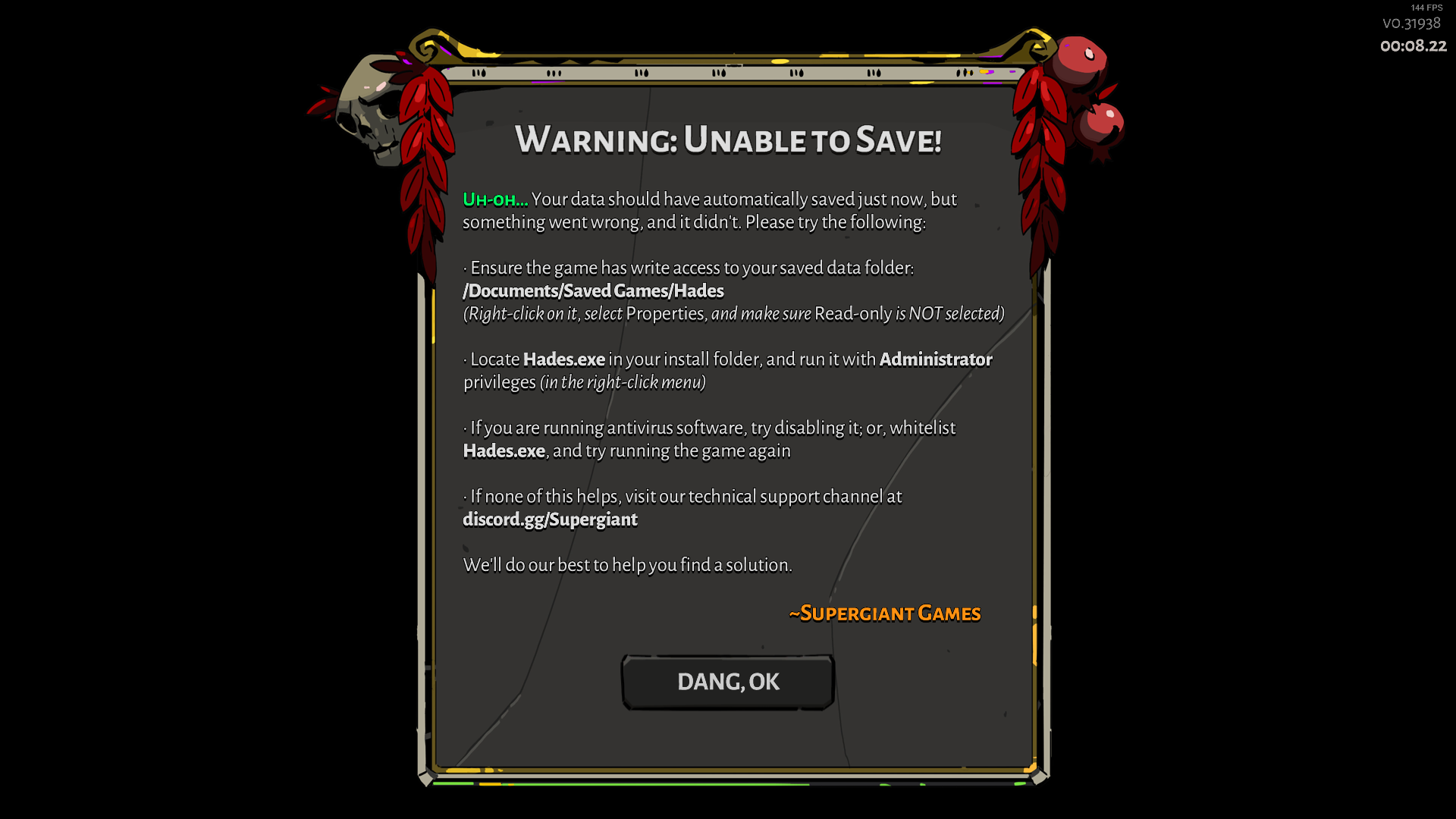
Keep getting Unable to Read Data when starting the game. There's no folder PC/Documents/Saved Games when during the first checkpoint. Also it gives me the error Unable to Save at each checkpoint
dim spruce
hey @shell hull when you get a chance see if these steps help with launching the game:
· Right-click on Hades in your Steam Library
· Select 'Properties...'
· Press the button that says 'Set Launch Options...'
· Enter the following: /UseNativeGaInput=true /UseNativeGaInputNoControllers=false
 teal wraith
Hello everyone!
I currently encounter a sound bug with the HADES game.
This is a device switch problem between the speakers and the wireless headset.
There are no such problems with all the other games I play.Configuration:
- Windows 10 Pro 64 (v2004)
- Ryzen 3900X
- 32GO RAM
- Sound BlasterX AE-5 sound card connected to Altec Lansing speakers (last drivers & firmware)
- Steeelseries Arctis Pro Wireless (the steelseries receiver is connected to a usb port 3.0) (last drivers & clean install)
Explanation:
If my sound is configured on my speakers, when I'm in games (I did the tests today):
Risk of rain 1 & 2, Green Hell, Path of Exile, Prison Architect, Torchlight 2, Wolcen, Doom Ethernal...


If I switch my sound through the classic windows tool:
http://www.aerao.net/divers/hades/speak.jpg


The game sound, which comes out of the speakers, automatically switches to my headphones. By reversing it works fine.
For some reason I don't understand, HADES game is the only one in my Steam library where the sound doesn't switch, (neither from the speakers to the headphones, nor from the headphones to the speakers). It remains in the device selected first.
I have to close the game and restart it for it to work (but I couldn't switch to the other device afterwards).Do you have an idea, a solution?
Thank you!
rain cradle
You mean during playing ?
from little tips I can reccomend using EarTrumpet app , which you can find in Microsoft store
I do not think it help but its great tool to redirect sound to many devices. Like music to BT speakers, while you still play game on speakers, and talk with friends on headset.
glass moon
I encountered this bug where it wouldn't let me quit because it thought the stage wasn't clear, so I had to go on and clear the next stage before quitting. I can't F10 because it breaks the game for me.
Some context: I cleared the room (as you can see from the next rooms being available) and I also cleared a trove. During the trove fight, I used a late-game item ||Fidi to summon Dusa, and she seemed to think the room wasn't clear either, because after the battle ended, she fired a shot right before leaving.||
 ivory root
Hi people, quick question, i just change my computer and installed again Hades on this pc, I have the steam cloud enabled but its not bringing the last save, its only one really old, so how i could bring my save to this pc? where are those files? thanks!!
stray elm
the files are in Documents/Saved Games/Hades
if you still have access to your old PC, should be pretty easy to copy over ^.^
ivory root
yes i have access ill do that 😄 thanks swan
stray elm
o7
 near pilot
I dont know if this is the plans to report a small bug found in game. When you are right in front of the wine barrels in the lounge, it clips and part of them diapers when walking from the right of them to the left
near pilot
thank you
stray elm
o7
 frail widget
I can't F10 most of the time :/
the game collapses, but no bug report window comes up. When I try to open the game once again the window shows only black screen and an in-game cursor
teal wraith
@rain cradle yes, during playing. no problem with other games, I just retested with CSGO, mass effect 3, it works very well.
At the moment, HADES is the only game where the sound doesn't switch.
 thick lava
@teal wraith hey thanks for reporting this! Right now you can't change the audio device while the game is running, unfortunately
nimble trout
While the slamming courage of Asterius is indeed respectable, I think this time he tried a bit too hard to slam Zagreus
A lot of bosses actually seem to get impervious state and not lose it until their attack pattern is complete, that may need some revising. I'd try to get other clips if they come along the way
stray elm
@lavish hemlock if no one has pinged you yet, Hades does save every room. It just doesn't restore to that point unless you actually quit. However, you can manually restore to that point
 lavish hemlock
Thanks, I've just found it!
stray elm
o7
barren swan
@frail widget did you try Alt+tabbing?
frail widget
@barren swan Yep! It doesn't work
barren swan
Because it sometimes gets hidden behind the main game window. *In Chaos voice* 'Interesting'.
frail widget
Taskbar shows that there's only one window
 abstract vessel
I keep having the game crash (and the (Bug Reporter come up) almost every time I try to buy something from Charon's Shop (not Well). Anyone experience anything like that?
sharp narwhal
When the bug reporter comes up, what kind of error is it giving you? A fatal exception?
sharp narwhal
That's fine - if you submit a report with your Discord username in the contact info I can find it quickly and take a look
sharp narwhal
Cool, thanks, I'll check that out shortly!
abstract vessel
cheers. Best of luck!
 vocal pagoda
Not sure this is the best spot for this, but the auto save doesn't always work. I had a crash half way through the Theses encounter and it rolled back the whole run like I never even started.
 clear delta
Guys, so I tried launching my game today and I get a black screen and it alt-tabs to the steam launcher and gives me a bug, I tried a bunch of things, reinstalled the game and checked my drivers and directx etc and nothing helps
also, when I try launching the epicgames launcher it is flickering and can't click anything related to it so I have to remove it by task manager, I don't know if those 2 are related
any solutions ?
sharp narwhal
@vocal pagoda Crashes are sometimes interpreted by the game as a "Give Up" scenario, depending on when the game crashes, which is what causes the data rollback. There are instructions in #h1-tech-fixes to restore save data that might help.
@clear delta Have you been submitting the reports it creates when it fails to start?
clear delta
yes, I submitted a few
sharp narwhal
Did you include any contact information? That'll make it easier to find your report. A discord username is fine
clear delta
I put my name and email as it asks
sharp narwhal
👍
If you want to send me a private message with your name or email, I'll look up your reports
 tight jacinth
hi guys got a bit of a problem had BIG nasty bug playing hades, and 3 things happened 1-Zag froze and suffered a giant amount of damage making me lose 1 death defiance. 2-The poisoned effect in the screen wouldnt vanish even though i finished the room. 3-the game can't read my files and i did everything the game asked so im coming here
did an f10 report also steam is taking forever to finish hades. so everytime i finish playing i have to close steam
ill uninstall and reinstall and report if it worked
 desert nest
I am unable to change the controls for Hades. After clicking on the action I want to change, the game becomes unresponsive. The cursor still moves on the screen and changes slightly when I press LMB or RMB, but the assigned button for the action does not change no matter what I do and it is impossible to leave the menu. Is this a known issue?
I was thinking that this might be somehow connected to the game's controller interaction since that's how I played initially and then decided to try keyboard+mouse
The controller was and is not connected to the computer while I m trying to change the controls though.
desert nest
Oh also, I tried launching the game with controller ignore option, it did nothing. Playing on Steam.
dim spruce
hey @desert nest try the following and see if it helps:
· Right-click on Hades in your Steam Library
· Select 'Properties...'
· Press the button that says 'Set Launch Options...'
· Enter the following: /UseNativeGaInput=true /UseNativeGaInputNoControllers=false
desert nest
@dim spruce it worked, thank you!
 dry olive
Hi guys, i have some problems with the game right now. While in a escape attempt, the enemies attacks don't seem to register to Zagreus. On one hand this is fine, because i can't take damage, but this also cause me to be unable to move past the fourth room of Elysium. Is there a way i can fix this?
 atomic trout
Why can't you pass the fourth room because of this?
Also, did you report the bug with F10?
dry olive
I don't know for sure. The room encounter finishes, but the doors stay locked
sharp narwhal
Report that with F10 please, I'll take a look!
Oh I see your report, thanks!
@dry olive When I load your save into my copy of the game, it's working fine, which makes me think it's an issue with your copy of the game. Do you have any mods installed? Have you tried verifying your installation through the game's launcher?
 frosty walrus
sharp narwhal
frosty walrus
sharp narwhal
I assume you tried the steps listed there already - have you tried disabling Controlled Folder Access in Windows Defender?
frosty walrus
I think my norton antivirus is still blocking actions from hades, even after i whitelisted it
sharp narwhal
Try turning Norton off completely and see if that resolves it - if it does, we'll reach out to Norton/Symantec and see about getting the game added back to their global whitelist
frosty walrus
Yep
It worked just fine
I picked up an item, and the save icon popped up without issue
sharp narwhal
Alright, thanks for letting me know. A lot of people started reporting this just recently, so I wouldn't be surprised if some small .exe file change has caused Norton to start catching the game again.
frosty walrus
Thank you for your availability and your quick help and insight
sharp narwhal
Yep, no problem! Symantec usually responds pretty quickly so once I confirm this is mostly/only a Norton issue I'll reach out and it should be resolved soon
For the purpose of reporting, do you mind letting me know which Norton product you have?
frosty walrus
Norton360, family plan
sharp narwhal
Thank you!
frosty walrus
No, its you thats doing all the work, im just telling you what i have. So really, you are the one thats doing a great job here
Could you please contact me once this issue is fixed, until it is, i will be playing without the firewall, but id like to put it up as soon as i reasonably can
dry olive
@sharp narwhal No i don't have any mods installed.
sharp narwhal
Have you verified your installation through the launcher?
 plain coral
I'm having stuttering problems when I pick up items (boons, gems, poms, anything). I tried the suggestions in tech-fixes and none worked except the "Set launch options" suggestion, but this causes other bugs like blinking lights in the hub map. Are there any other solutions? Twice the stuttering has caused the game to crash. Other than that I'm having no performance issues
 grave fulcrum
~40 hours in, and for the first time I managed to fish before starting an encounter in asphodel (pool spawned right next to the dock). Interestingly, thanatos also spawned during this encounter- which is pretty much what saved me from dying, since I was stuck in my position (I'm guessing due to fishing?). I could still dash and attack, but couldn't move normally. Unfortunately, once all enemies were cleared, I couldn't pick up the boon; was forced to restart. Great game overall- just thought reporting this particular bug would be helpful.
stray elm
@grave fulcrum if stuff like that happens, you can actually report it in-game with f10! ^.^
grave fulcrum
ah- thank you!
stray elm
sure thing o7
north ridge
Just in case there's any doubt, the boon font error is still a thing. In be past, I noticed that the font would appear differently when the boon was highlighted versus not highlighted.
stray elm
just keep reporting with f10 when it happens
 naive night
Hello
Just want to help you guys with testing and maybe it is not relevant now, but still
A few months ago during a usual run with the sword I cleared an entire room of Ashpodel level and reward was Darkness. But it did not appear at all. I was looking for it everywhere in the room for 15 minutes, really. But I failed 😦 So I had to restart the run
stray elm
I'm sorry about your run! If something like that (or any other bug) pops up again, you can report it in-game with f10
naive night
Yeah, I am aware of it now. But back then did not know that
Since then there were no any bugs
Thank u for your answer!
stray elm
o7
nimble trout
Got hit through Athena's Aid, likely because of Hades defeat animation. Personally wasn't impacted because of defiance, but if someone wouldn't have it...
deep elbow
@nimble trout please use the in game bug reporter (F10) to report in game bugs/glitches
nimble trout
I'd willingly do so, but missed the moment entirely by the time I realized what happened 
unless F10 also has a backlog?
deep elbow
you can upload the video to something like streamable and add the link to your bug report; also your description of the bug/glitch in a lot of cases is more valuable than the screenshot the bug reporter captures
nimble trout
Ah, putting links, will do!
 proper flume
hunter instinct font weird
stray elm
You can report bugs like that in-game with f10 @proper flume ^.^
austere drift
@dim spruce I set the launch options to /UseNativeGaInput=true /UseNativeGaInputNoControllers=false like you said in the email, but now the game won't accept my right trigger input. 
Yeah, removed the code for the launch options, and now it accepts RT again.
 tranquil moth
hey guys, ive been enjoying play the game so far but my game has been giving me hard freeze recently. How do I fix that issue?
 raw echo
Anyone else experiencing lower FPS (I'm talking 20 fps lowerthan usual) when Orpheus is singing in the hall? Kinda weird
 white apex
I just had an amazing run with bow and beat the final boss with it, however I accidentally hit the bug report button and it black screened my game even when I alt-tabbed out of it. So I close the game and lose the run :( and the save loads at the very start of it. The only evidence I have that I did the run is this screenshot. I did the local saves copy+paste thing but none of them is that specific run. I don't think there's anything I can do to get it back so I just wanna suggest having the game auto-save after a boss is defeated lol
 kindred widget
the game is supposed to black screen when you f10
it opens a second game window for the bug reporting
and when you close that window the game goes back to normal
white apex
yeah that's what I alt-tabbed for
deep elbow
if that happens again, try alt+tabbing as the bug reporter can open behind the game sometimes
white apex
next time I'll do that but it's a bit inconvenient
dim spruce
@austere drift yea just remove it for now again if it's not compatible with your controllers!
stray elm
@frigid fog hey! Could I request that you make a small edit to the #h1-tech-fixes channel? In the part that tells people how to recover a lost save, it specifically mentions the two .bak files. However, what I believe people should be looking for is the most recent .sav (or .bak) file, which in my experience is usually Profile1_temp.sav.
 frigid fog
Thank you for the feedback, @stray elm. We've updated the language around that.
stray elm
Sure thing! Happy to help ^.^
 gritty coyote
Not sure if this is a bug or a feature, so I'm posting it in here rather than the in-game bug menu, but aren't the satyr sacks always supposed to be in the lowest difficulty dungeon rooms?
That's how I've always found them, but I just cleared the three lowest difficulty and the sack wasn't there.
nimble trout
They can appear on any door, harder or not
Personally I go for harder one on 2nd and meet sack very often
arctic wind
Running into no sound on start randomly, reported it a few times with the in game tool
Any workarounds floating around? Tried restarting the game about 5 times now and I am getting no sound
Had sound the first time but now I get nothing
This has been an issue for me since the blood price update dropped
 silver edge
So since I bought the Eldest Sigil Restoration, Nyx hasn't been showing up in the Great Hall any longer. She showed up once in a Chaos gate, but since then nothing for 20+ runs, and it's holding up my other interactions. I can't progress with Achilles, and Dusa hasn't said anything other than generic nervous "am I in trouble" for maybe 50 runs at this point, even though I don't have the keepsake for either of them. Am I just supposed to keep playing, or is something wrong?
stray elm
@arctic wind There are a couple potential fixes listed in #h1-tech-fixes , if you haven't already checked those out
@silver edge if it's been that long, I would probably report it with f10, and mention your discord tag so that they can ping you if you're missing something
 soft dagger
Guessing this it the place for this. Seeing the boon "Trippy Shot" being referred to as "Trippy Flare" when given the option to replace it here, not sure if that's intended. Also, didn't know about using F10 prior to this
sharp narwhal
Trippy Flare is the correct name when using Hera - Trippy Shot shouldn't be showing up in your boons list on the left. I'll check it out soon!
glass moon
Using the aspect of hestia with seeking fire, the first shot doesn’t actually seek. Bug or feature?
sharp narwhal
Currently as designed
glass moon
Ah, that’s too bad. I picked the upgrade with that in mind
sharp narwhal
You're welcome to leave feedback about it in #hades-feedback !
glass moon
Based on my run history and from seeing victory screenshots others, it seems like the caption “Olympus caller” is given frequently when one has Dionysus’ aid. I don’t think dionysus’s aid is easy to spam, so I suspect there’s a bug there in that the game thinks it’s used more often than it actually is.
 glossy hull
https://cdn.discordapp.com/attachments/718328035493019711/736708884139475024/unknown.png chaos is trying to murder my face how to fix

 sharp narwhal
Try verifying your installation through the game's launcher - instructions are in #h1-tech-fixes
glossy hull
okay
 cobalt dagger
I've been trying on hades on friends account for the past few days, and i really enjoy the game so imma get it for myself now, is progress saved locally? like will I get my old save on my own acc
cobalt dagger
thanks
stray elm
o7
abstract vessel
any news on that audio glitch I brought up? I have a nice run saved with the fists, and I can't wait to get back into it.
sharp narwhal
Oh, that should've been hotfixed a while ago!
Though if it's still crashing for you please send in another report
abstract vessel
was there another patch?
sharp narwhal
There have been several small hotfixes for engine and stability problems, yes
abstract vessel
but not of those "big patch, here are the changes" kind?
firing up, the run right now
sharp narwhal
No - content changes stopped rolling out several weeks ago, but due to ongoing technical/stability/performance issues with our new code base, we've been continuing to push tech fixes
abstract vessel
damn, still crashed
sharp narwhal
Hmm
Alright, I'll ask about it again on Monday - is your game up to date, just to be sure?
abstract vessel
0.32674
sharp narwhal
Should be version 326...something
Yeah
Alright, sorry about that - will check in on it soon
abstract vessel
thanks, cheers
austere drift
I get "An error occured while updating Hades (app running)" in Steam a lot lately.
abstract vessel
@sharp narwhal I verified the integrity of the Hades files, and the bug seems to have gone away. I will report it again, if it shows up.
 icy widget
Good time. Can any help with this thing? It happend after big update Hades, but I closed it and game started. Now I found else game with it, but after close game not started https://sun9-70.userapi.com/1cC6eDWd9NySajcvh9Y-JWzJ4Qf7qRxkg8bLyA/BSHR_2rmdXY.jpg

 stray elm
Hey @icy widget ! You might want to check out #h1-tech-fixes , in the very last section (above Known Issues)
 visual bloom
Not sure why Deflect changed typefaces, but here it is
Also for QA: I was having issues for a prolonged period of time where hades wasn't able to access my saves. Tried all the fixes, and nothing worked.
Turns out that I had a login to windows 10 that was a school account, and so that also came with all of that school's admin restrictions. Removing the login, and then making exceptions in windows defender fixed the problem for me.
 cursive steeple
Hi, I am worriied that i have a problem: i havent been given a single Demeter boon option since the time i finished the game for the first time. Its been 5 runs already (2 of them i also was able to escape, so not a short runs) and havent seen a single one. Could it be just a coincidence?
I can send screenshots of run reports if needed
atomic trout
Probably just random luck.
cursive steeple
if average amounts of boons for the run is 10 and the probability of getting each god is equal then the probability of me not getting Demeter should be near 0,5%. Guess i should be proud?...
atomic trout
Has to happen eventually.
stray elm
@visual bloom if the font shows up weird (or any other bugs pop up) you can report them in-game with f10
visual bloom
@visual bloom if the font shows up weird (or any other bugs pop up) you can report them in-game with f10
@stray elm Cool, thanks for the info, will do int he future
stray elm
@cursive steeple two things: probability isn't equal (you're only likely to see about 4 gods per run), and if you're worried about it, you could submit an f10 report and mention your discord tag, asking if you're missing something to see Demeter. iirc, there should actually be a scripted event where you meet her, so it may be worth doing
cursive steeple
@stray elm Thanks, will do. I have already seen her event and met her boons a few times before i sucsessfuly escaped for the first time.
stray elm
Hmm, okay. Could just be RNG (since it's definitely not as small as 0.5% not to see her)
 safe cradle
I tried entering my game (not through steam) to just see some small details. The game oppened and it showed me what's in the picture. I followed step 2 just to then notice that an update was available through steam. I tried returning all the files that I moved where they were supposed to be and updated it. The message appeared again. I continued up until step 5 with no results. I began to have files with the same name in the Hades folder. I just got nervous and scared to mess everything up. Can you help me please?
 vivid lance
hello small thing the text here is kinda overlaped on each other on aspect of Chiron with the words Special an automatically
deep elbow
@vivid lance please report in game bugs/glitches with the in game bug reporter (F10)
vivid lance
ah ok ty
frosty tiger
Missing 1 track but it doesn't show up in Court Music. Court Music has a tick as if I have bought them all.
atomic trout
Report it with F10.
It happened to me as well, and that's what I did. It's not fixed, but it's a known issue.
 formal ivy
I dunno if this is a bug or not, but nectars that drop from infernal troves don't level up abilities
atomic trout
None of the infernal trove drops grant the special effects.
Same for drops from Poseidon or Bouldy.
Dio's Nectar boon drop does count however.
stray elm
☝️ 👍
sharp narwhal
@safe cradle Hey there - not sure what might've happened, but it's possible that your backup files were corrupted as well. If you'd like, you can pack your /Documents/Saved Games/Hades folder into a .zip file and send it to me in a direct message (it should be small enough for Discord...probably), I'll take a look
stray elm
(it's definitely small enough for Discord)
@broken lynx you may still be able to recover that run
 broken lynx
The backup saves save the room I crashed in?
stray elm
Potentially, but the autosave (Profile1_temp.sav) at the very least saves when you enter the boss room. Check which .sav file has the most recent timestamp (if you walked into a different room after loading back in, you may have lost it though)
broken lynx
I went back to the game to check if the run actually counted, so I'll know
stray elm
Aight. And if you'd like, you can send a screenshot of your save files and I'll see if I can help you get the right one (if you're not sure)
broken lynx
Well, let's see.
the temp profile save is from today.
The main profile save is from last week.
Yeah I'm gonna try. Thanks for the save (advice)!
stray elm
o7
Best of luck!
You may need to fight the final boss again, just a heads up
So be prepared
I'm not sure exactly when the game autosaves
broken lynx
Afaik it inly saves at the beginning of the room
But it won't be a problem, it wasn't that close
stray elm
Hahaha
safe cradle
@sharp narwhal On it! Thank you very much!
 rain vault
So I'm trying to fix my corrupt save data, but I can't find the .savs anywhere in steam's folders, even though all hiddens are set to show
I'm sure they can't be GONE because it did give me the corrupt data prompt not just try and start me over
Nevermind, somehow my documents folder had hidden files NOT visible unlike the rest of my computer
I'm a big dumb
 tranquil ocean
I don't know what actually happened, but yesterday Hades was working fine. Today it is lagging in the main menu after the game's launch and in the first seconds after save's loading.
noble latch
so I'm having that one save issue, where the recommendation is
2. Rename Profile1_Temp.sav.bak to Profile1.sav (or Profile1.sav.bak to Profile1.sav); this assumes you use Save Slot 1```
but what do I do if I already have another save file with that name? just overwrite it?Move or rename it
stray elm
@tranquil ocean there might be something for you to do in #h1-tech-fixes , but you can also submit a bug report, and just describe what's happening
tranquil ocean
Thank you. I guess I need to press F10 in-game to make a bug report?
stray elm
Yup!
tranquil ocean
Thanks again.
tranquil ocean
After checking the game's files all of them were fine. And the game itself didn't lag during the launch in the places I mentioned before.
Thank you again. I guess it was an error or something on my side.
tight jacinth
hi guys sorry to say but every time i press the f10 to report a bug it crashes my game
it also erases ALL of my progress for that run so i have to restart from scratch.
sharp narwhal
Crashes your game how? Crash to desktop, freeze? If you press alt+tab does the bug reporter window come to the front?
tight jacinth
it freezes the game the bug reperter makes my screen flash and does not respond, i have to use the task manager to get out
sharp narwhal
It sounds like it might be opening up behind the game - try using alt+tab to pull the window to the front and let me know if that helps
tight jacinth
it doesn't ill share a screenshot
it just opens up the screen but i cant do anything to it
sharp narwhal
Alright - could you generate a DxDiag.txt file by running DxDiag.exe and clicking "Save all information" (https://support.microsoft.com/en-us/help/4028644/windows-open-and-run-dxdiagexe )? Send the DxDiag.txt along with a description of the issue to support@supergiantgames.com and we'll take a look.
stray elm
In addition @tight jacinth , you should be able to recover your run, following the steps in #h1-tech-fixes
tight jacinth
thanks a lot it helped
also i sent the the file hope it helps you locate the problem
 magic matrix
hey guys i have a bit of a problem
or at least i think it's a problem
i installed the game on a new device and none of my progress is saved
will i have to re grind everything?
it's on the same accoutn and everything
sharp narwhal
Hades doesn't have cloud saves on Epic, though cloud saving is enabled on Steam. You can transfer your files manually by copying over the files located at /Documents/Saved Games/Hades from your original device to your new device.
sharp narwhal
I see - sorry about that. There are some fully loaded saves available from https://www.speedrun.com/hades/resources that you can download and use if you'd like!
Speedrunning leaderboards, resources, forums, and more!
magic matrix
thanks alot
magic matrix
alright i've spoke to a friend and he's able to give me his
we're at similar points in the game so i wont get spoiled
 jade lagoon
Hi I wanna ask about the fps of this game, mine is locked at 120hz how to unlock it since i have 240hz monitor
I use rtx 2060 for reference
 fiery sand
Does hades support cloud save on epic store in next update? epic have cloud save but this game dont have cloud save on epic
sharp narwhal
@fiery sand We trialed cloud saving with Epic earlier during this update cycle and it caused a number of technical issues, so we deactivated it again. We're continuing to work on it, sorry for the inconvenience!
@frosty walrus Symantec got back to me and said Hades had been removed from their detection list, but it may be 24 hours before you see that come into effect
austere drift
@jade lagoon have you tried turning off V-Sync?
As far as I know, if your GPU can't maintain 240 fps at 240 Hz, V-Sync will drop your fps to half your refresh rate. So that sounds like a V-Sync issue.
 mortal kiln
Funny thing - I cought 354 fishes, talked with Poseidon many times, but Denizent of the Deep in Fated List still not performed.
P.s. I even tried to collect 50 fishes and then give it to Chief.
sharp narwhal
@mortal kiln You also need to have caught ||at least one legendary fish from any biome||
mortal kiln
Oh, thanks 
 sage knot
For some reason when I add Hades as a none steam game to steam then try to load up the game the game crashes. It did not use to do this before.
 mental hound
Hello everyone, sorry for my english,
I come here because i have the message "unable read data" and i try all recommendation and It does not work, if someone have solution i take it 🙂
Thanks
 gentle pier
Hey, i'm posting here because i have no idea how to fix my game and i miss playing it, let me pet my dog. I keep getting the message "unable to read data" when starting up the game, when i try starting up a new game it is unable to save. my old saves look to still be in documents, but the game cant seem to read them. i've tried most if not all the suggestions ive seen but i'm stuck. any help is appreciated, i love this game a lot and i wanna get a chance to play the new update!
stray elm
@sage knot do you have the game through Epic, but want to run it through Steam? That may not be possible
white apex
@gentle pier did you try validating your files on steam? (sorry I know you said you tried everything)
gentle pier
yep!
stray elm
@mental hound @gentle pier Hopefully one of the devs or QA folk will reach out to you soon. In the meantime (and if you haven't already) try validating the game files, and/or reinstalling the game.
Another thing to try: Copy all of your save files (located in Documents/Saved Games/Hades) to another folder, then delete the originals. Then, try starting up the game again, and see if it will let you do anything.
gentle pier
So, im pretty sure its cause my Saved Games is stuck as read only? i've tried to fix it with a few different solutions, but im not very computer savvy so
stray elm
As in, if you right-click on the file and then select "Properties", the "read-only" box is clicked?
gentle pier
yep
stray elm
what happens if you try unclicking it?
gentle pier
i can apply it, but as soon as i check it again its clicked again
mental hound
we can't unclick windows, stay in read only i try few hour for unclick this
@stray elm i try ^^
mental hound
Ok, my english are to bad for explain what happens exactly, but i try, i play this morning and i have save bug so i quit and i restars the game i lost my progrssion and return when at starts this morning, now i try what you say and launch the game and i the game starts with my progression it's like i have two save,
thanks for the help i think it's ok now, realy thanks i lost many hour for this probleme and you resolve in 2 minute ^^
stray elm
Oh sweet, glad that that worked ^.^
sage knot
I bought the game on Epic because it was not out on steam yet. And it use tone able to open through steam
stray elm
Does it work when you try to run it through Epic?
barren swan
I'm cleaning up my device storage and is it okay to delete the screenshots that are stored when you ?
sharp narwhal
@barren swan If you don't want them, sure, go ahead!
stray elm
@sharp narwhal hey, just checking in: cowduck (up above) never said that they were able to resolve their issue, any ideas for them?
sharp narwhal
I figured they hadn't tried controlled folder access yet and was waiting for them to respond to that message - @gentle pier Any luck?
There's also a thread here on Microsoft's support forum about files being stuck in read-only mode: https://answers.microsoft.com/en-us/windows/forum/windows_10-files/cannot-change-filesfolders-from-read-only/fabf4d26-972a-4881-9f0e-38f788fe1f43

My files are divided into two Users folders to facilitate working on business files from another computer. That part works fine on both computers which are both on W10. The other set comes up as read
gentle pier
Havent sat down to work on it today yet, I cant remember if I've tried controlled folder access yet, but I'll try it just to make sure
Controlled folder access is turned off already
Also reading that article I did not know that the black square did not mean it was checked so now I have even less idea of what I'm doing
Later today I'll probably throw my far more tech savvy father at the computer and see if he can dispense wisdom
 still swallow
@hasty plover I think there is an issue with the bow as the aspect of hera and the dual power curse of drowning when putting cast in the bow. I also have chain shot for the bow. It seem like it will only drop 1 per enemy instead of all on the first. This may be voluntary, but i would like to know
sharp narwhal
@still swallow Please report bugs in-game with F10!
hasty plover
@still swallow thank you for bringing it up, once you report we can look it at our end :).
frosty tiger
Got Hades on Epic Games but would much rather migrate to Steam, planning on rebuying it either way, but is it possible to migrate my save data?
 thin pivot
@frosty tiger yes, check \documents\saved games\hades\ *.sav
i'm pretty sure both versions use the same directory so your save files should be fine
frosty tiger
Nice and all I gotta do is just drag and drop it?
thin pivot
fairly sure. that's how i migrated my files from my normal pc to my gaming pc while waiting for cloud support to be added
deep elbow
if you're using the same pc and just migrating from epic to steam, you shouldn't need to do anything
frosty tiger
Alright cool. Here's to hoping. I really don't like the Epic client but wanted to try the game on sale first. Now I know without a doubt that I am willing to pay full price and just did X3
thin pivot
"im pretty sure both versions use the same directory, so your save files should be fine"
frosty tiger
Yeh
 coral hemlock
Hello
I cannot start Hades after buying it, may I have some help please
I've tried to launch it not in fullscreen, and I don't have any antiviruses
I've also tried updating my graphic drivers and launch it as administratot
Here is the debugging console
sharp narwhal
Hey there, did you submit that report when it popped up?
coral hemlock
yes
(if it's written too little the error is : FATAL EXCEPTION at 0x00007FFDB4CABF80)
sharp narwhal
Alright - looks like a game asset issue. Have you tried verifying the installation through Steam? Right-click Hades in your Steam library > properties > local files > verify integrity of game files
coral hemlock
It is running in the background as we speak ^^
But I've done it an hour earlier and nothing was missing
sharp narwhal
I'll ask an engineer about it but it will be a few hours before he's at work and can comment - sorry for the inconvenience!
coral hemlock
no problem, I'm verifying the game files again, if it fixes anything I'll write it, if not I'll wait here 🙂
sharp narwhal
Thanks!
 mortal fern
hello, i sent a message via twitter and it told me to come here
I recently lost my save file for Hades due to an unfortunate accident where my drive was fried.
I'm told it's possible to recover the file as i have put in bug reports in the past
also, would it be possible to move that save file to steam?
i think having a cloud save it much more...safe, in the future
mortal fern
yeah i had it on EGS initially during the early access
stray elm
ah, I follow. Currently, EGS doesn't have cloud saves because they ran into technical issues
They did try though :S
stray elm
If you'd like a save that's further along so you don't have to grind, you could ask around here or check out the speedrunning website for a save
Sure thing ^.^
austere drift
I'm told it's possible to recover the file as i have put in bug reports in the past
A bug report sends the devs your save file, too, so yeah.
mortal fern
Yup. Just need them to get back to me now =w=
Better to lose 10 or so escape attempt of progress than 150 something
stray elm
Did you put your email on the reports?
mortal fern
no but i did put my name
idk if that alone is enough tho 😬
tho i'm fairly certain no one else used my name so hopefully 🤞
stray elm
ye
 thorny fog
So we are getting errors that seem to be coming from the fact that we have our "My Documents" folder redirected to a server I have in the house. Basically none of our saves are showing up, and new saves cannot be made.
frosty tiger
Hi, Im getting a "Unable to Read Data" error at the start of many screens. I kinda can pllay the game but it looks like its gonna crash at any moment. Tips? i Have reinstalled and verified the game. Says it cannot save and it cannot accest the savegame folder data. I've done all that is asked from me in the message.
stray elm
@frosty tiger There are a couple things to try listed in #h1-tech-fixes , have you looked at those?
frosty tiger
@stray elm yup, Ive done everything
stray elm
Alright, then sorry about that. Hopefully one of the devs or QA people will reach out to you soon to help
 plucky cradle
I guess I should be posting my issue here, so I'll copy it:
Does Flurry Cast no longer work with Trippy Shot?
I've had it two or three times where holding down only displays the targeting point with Zag's arm outstretched.
sharp narwhal
That's a bug that we're aware of and we're currently working on a fix!
 dense jasper
Hello, I apologize for possible mistakes when using the translator. Problem: when choosing a sphere, a dialogue with the gods appears and at this moment the game crashes, sometimes it helps to skip the dialogue, but it does not always help, there are failures when communicating with the boss, checking the cache via Steam did not help, you need to restore the save through documents, is there a solution or just wait for the patch?
sharp narwhal
@dense jasper Do you have antivirus software installed?
dense jasper
windows 10 defender only
sharp narwhal
When the game crashes, is it creating a bug reporter window, freezing up, or crashing to desktop?
dense jasper
first freezes, after 15 seconds to the desktop
sharp narwhal
Alright - could you follow these instructions to send me some more information? Since you're using a translator, if something doesn't make sense, ask me again and I'll explain more.
- Type "Event Viewer" into the Windows search bar, and open the program.
- Once the Event Viewer is open, click the dropdown menu on the left for "Windows Logs", then select "Application"
- Click on the error entries on the right to highlight them and view the details of the error. Look for errors that mention "Hades" or "Hades.exe"
- Hold down Ctrl and then click to select all of the "Error" events related to Hades
- In the Action menu bar at the top of the screen, choose "Save Selected Events". This will create a ".evtx" file that contains all of the errors you highlighted
- Next, run dxdiag.exe and generate a report by clicking "Save All Information" at the bottom of the window. There are detailed instructions here: https://support.microsoft.com/en-us/help/4028644/windows-open-and-run-dxdiagexe
- Attach both the .evtx (error log) file and the DxDiag.txt (DxDiag results file) to an email and send it to support@supergiantgames.com
plucky cradle
@sharp narwhal Thanks! I figured it was as such. Thank you all for your hard work!
dense jasper
I changed the language from Russian to English and there are no more crashes
sharp narwhal
@dense jasper That sounds like there could be some text errors then - if your game crashes again, after you restore your save, could you load your save and send a report with F10 about the crash?
stray elm
@frosty tiger any luck getting it to work?
 hollow moss
Game is currently freezing and crashing a lot
sharp narwhal
Sorry about that! Do the freezes have anything in common? The game is becoming unresponsive and not creating a bug report window, right?
 carmine siren
so i'm not really sure if this is a bug but, im on my 42nd run in hellmode and i havent seen thanatos. not once. I also have a number of people at the "locked heart" where i can't give them more nectar, but they arent offering up their task on chatting to them
sharp narwhal
How far have you been getting in your runs, generally speaking?
stray elm
For some of the locked hearts, there are specific other people (plus a lot of dialogue) you have to go through first, so that might be part of it
carmine siren
To styx
Haven't been out yet
But for instance I have sisyphus at the locked heart, he doesn't ask me ever about lightening his sentence, hades doesn't have much to say to me in general, Meg is busy talking about other stuff, so it feels stuck.
And I've had like 5 or 6 conversations with sis since I got to his locked heart.
stray elm
You also need to talk to || Nyx || about Sisyphus
carmine siren
Hrm ok it hadnt cone up with them they been talking about chaos every time we chat
stray elm
They're involved with a lot of the other characters