#h1-tech-support
1 messages · Page 18 of 1
 rain cradle
Yeach but the game is set of textures in 2D environment. So if game can load (no error that there is no texture in files or so) them that's means there is issue while processing them on gpu side or engine
 sleek raven
anywho
its only in the first 3 areas
which is super odd
soon as I got to zone 4 it fixed it self
rain cradle
That's why I could first verify files
sleek raven
I even made it to hades himself for the first time and almost won lol
Im verifying it rn
I guess it could be a bug but at one point in the fight I charmed hades
and he just kinda
uh
moonwalked backwards
then snapped out of it one second later
Aight verification is done
through epic
would it have told me if something was wrong?
 sharp narwhal
Don't know
rain cradle
It will just Re-download few files
sleek raven
Graphics drivers update almost done
rain cradle
So clean install if possible
sleek raven
Also I should note I am, EXTREMELY, far above minimum specs
sleek raven
1920x1080
sleek raven
Aight gonna re launch hades
everythings done
lets see if that fixed it
I think it worked. Will continue playing and will update if I find it happens again
 tardy current
Not sure where the proper place to report this is, but I just had a bug where I brought Hades to 50% in 2nd phase and he was stuck in invuln trying to path somewhere in the bottom middle unpathable area
sharp narwhal
You can report bugs with F10 in-game!
sharp narwhal
It's alright 😄 For future reference
We have other reports of that issue so no biggy
 frosty tiger
@sharp narwhal Excuse me for (ab)using the @ call on you, but is the F10 in-game feature a way to send a ticket with details about the game's bugs? So far have played and finished it more than 10 times died like 30 something, so played for a long time, and no bugs or errors, asking for future reference.
sharp narwhal
That's right! When you hit F10, a bug report window will appear that will let you describe the issue. When you click submit, it will send us your description, a screenshot, a copy of your save file, and some other diagnostic info to help replicate the issue.
frosty tiger
Btw, did you guys by any chance did a sudden update to the game?
I am using the chaos aspect shield and the special doesn't stunlock the enemies with red hp bar like before.
And it also feels slower/sluggish.
It was really fine a moment ago when I played.
I am verifying in case things went wrong or something.
 final junco
A weird thing happened where no voice would play out in dialogue(or sometimes hearing the voice like it came from really far) unless I opened the menu and closed it for each line. It strangely doesn't affect Zagreus' voice lines, just the rest of the cast.
Restarting fixed it but thought to report it anyway
sharp narwhal
@frosty tiger Nope, no changes since the last hotfix like two weeks ago
@final junco Yeah, that's a known issue we're still looking into
frosty tiger
Oh, okay, must have been my imagination then.
The normal attack with the shield is good and okay and stunlocks the enemies, but the special throwing shield(s) is not stunlocking them.
Maybe it was my imagination, I don't know, also Athena's artefact doesn't seem to be working well, should report that.
Thank you for the game and that you guys keep updating it!
sharp narwhal
When you say it isn't working well, what do you mean?
There are some cases in which a Hermes boon, for example, will generate before a boon for a god trinket
Hermes boons operate on a different rotation than the other Olympians
frosty tiger
Like, the special was kind of faster in throwing AND stunlocking the enemies with red bar hp, meaning, they couldn't move or do anything.
Just like when auto attacking them with regular attack.
But now it feels like they are reacting like they have yellow bar hp.
The shield on their health.
Kinda weird to explain, but maybe it's my imagination and I burned my brain playing too much Hades with the shield and different boons - Herme's included lol
 round cliff
hmm. i've done all of possible fix, but it seems that it still randomly crash during the gameplay
rain cradle
A little something I discovered for AMD owners. Turning ON Radeon Anti-LAG maybe dont brings the framerates higher but the avarage of frames will be much higher .
For me it was 60-140 now its almost whole time 85-140
 oak coral
Guys, what is the mail to contact Supergiant tech support?
sharp narwhal
@oak coral support@supergiantgames.com for emails
 silk cove
Hello guys, my game is crashing in the middle of the game and it doesn't open the bug report window
sharp narwhal
Please notify support@supergiantgames.com and attach Windows Event Viewer information as follows:
1. Search for Event Viewer in the start menu, go to Windows Logs > Application
2. Select all of the "Error" events you can find related to Hades
3. In the Action menu bar, choose "Save Selected Events"
4. Run dxdiag.exe and generate a report by clicking "Save All Information". (More detailed instructions here: https://support.microsoft.com/en-us/help/4028644/windows-open-and-run-dxdiagexe)
5. Attach the .evtx file and DxDiag.txt and email us!``` sour sail
Screen has gone black and version number in top left is flickering
Music is still playing
And cursor is visible
sharp narwhal
Are you playing on Steam?
sour sail
Yes
sharp narwhal
Try disabling Steam overlay. Right-click Hades in your library, "Properties", then uncheck "Enable the Steam overlay while in-game".
sour sail
It was already unchecked
sharp narwhal
Alright, did you just change the resolution?
sharp narwhal
Mk. Black screen issues are usually caused by out of date graphics drivers, so i'd recommend going to the manufacturer's website and getting the latest drivers for your card.
You can also try forcing the game to boot in a locked resolution, and then change it in the settings and see if that helps
sour sail
Ok thanks
sharp narwhal
Right-click Hades > Properties > Set launch options and paste this: /FullScreen=false /NoBorder=true /X=1920 /Y=1080
sour sail
After closing Hades with task manager and restarting it without any special launch options it worked.
 subtle edge
@sharp narwhal (user with the game crashing on entering a certain tileset) I have an integrated intel GPU and a dedicated Nvidia Geforce 1050
frosty tiger
why cant anyone help me with my blurry texture bug
subtle edge
I was able to fix my issue; Nvidia was assigning the integrated GPU instead of the dedicated one
set it manually to use the dedicated card, that solved the issue
rain cradle
@jezi if you have blurred textures during some dash and attack then switch to 1080p
sleek raven
Its gotten so bad that I cant see the rewards for the next rooms now
the game is literally unplayable at this point
Its not a driver issue, the installation was verified, I have no idea what it is now
sharp narwhal
Oof.
Alright, can you send an email with screenshots, a DxDiag.txt, and a description of the problem to support@supergiantgames.com? Most staff is off until January 2nd, so it'll be a couple days, but we'll get someone to take a look soon.
frosty tiger
so uh yeah, im softlocked
even after getting gift from patroclus
i've tried every gift he gives and they all softlock me
sharp narwhal
@frosty tiger Someone else had this issue, with the "audio disabled" message - it's tied to that, I believe, though I'm not sure what you may have running that's disabled your audio
sharp narwhal
Let me see what the other person had
frosty tiger
ah i just fixed the driver error message
i belive its because once i boot my pc i have to set my default speaker as voicemeter input
sharp narwhal
Oh, alright - have the doors unlocked?
frosty tiger
yeah
sharp narwhal
👏
frosty tiger
i think when you enter one of those decision rooms, because theres no audio
zagreus doesnt have the audio popup queue thing above his head after he finishes talking
so the door doesnt open
because the bubble wasnt popping up when the audio was disabled
 west bison
Whenever I exit hades it deletes my save files what do i do
sharp narwhal
Your antivirus software is probably blocking Hades from creating a save file.
Whitelist the game in your antivirus software, or allow access to your Documents folder in Windows Defender. Ensure that you have a folder at Documents\Saved Games\Hades

Follow the information here https://support.microsoft.com/en-us/help/4046851/windows-10-allow-blocked-app-windows-security```Alright so I think the source of my problems was that I was launching from x84 instead of x64
A few hours in and no problems on 64
not sure why It was launching from 84 if it were so problematic
 queen night
Turning on AMD Anti-Lag solved my issues, I think this might be an interesting thing to note if people are having frame drop issues on AMD-based GPUs.
rain cradle
Nice to know it worked for you too
AntiLag make the buffer for frames rendered by gpu smaller (from 3 to 1/0) so frames are released faster. This effect of the higher frames should not be there but look like when the buffer is set to 3 the game engine does weird things. Overall you have also much lower delay between click and effect of the click on screen
 fallow wharf
hey so i've found an issue with a nintendo switch pro controller. if i try and use the charge attack with the spear, i'm stuck in the animation and i can't get out of it until the charge time limit completely runs out. tried pressing all the buttons and moving the stick, the only way to activate the attack manually is to use my mouse. haven't had any issues with other charge attacks like the aegis though.
 halcyon delta
not sure if this is nessecarily tech issue but I still havent got Thanatos to spawn
I know Im supposed to have over 20 runs or something but Im at 30 atm
I've already beaten the game with most of my weapons too
not sure if its a bug or not but he seems extremely rare and I have yet to encounter him
 toxic trout
this is going to sound dumb, but are you taking damage
i've noticed if i do too well he stops showing up?
halcyon delta
sometimes
usually I beat taratarus without taking any damage
that seems a bit dumb for a game where you're not supposed to take damage
especially because hes an important story character
toxic trout
well, it makes sense - he is, technically, showing up to help you
the rng around thanatos can be very fickle though
sharp narwhal
@halcyon delta There's no longer a run count required to see Thanatos; he'll show up at random at some point along the way
sharp narwhal
@fallow wharf We're aware of that issue! I've heard that turning vibration off and/or running through Steam big picture mode might help
halcyon delta
he's the only character who I have yet to meet/give a keepsake to
sharp narwhal
The RNG can be extremely fickle
fallow wharf
@sharp narwhal i think big picture did the trick, thanks!
 final topaz
Hey I'm getting some random freezing issues that I don't get in other games
 quasi lotus
i found a bug how do i report
map bug cant dash
https://clips.twitch.tv/AcceptableGoldenOctopusHotPokket

 solemn nymph
anyone just not able to see sysyphus?
I've done at least 10 runs but none of them had the optiuon of sysyphus
I believe I already paid the renovator but I just do not run into sysyphus
I do for patroclus and eurydice all the time though
 quick ingot
I've seen him on several of the runs I've made tonight. Probably just bad rng if you're actively looking for him, but hey, that's a rogue-lite for ya
solemn nymph
but this has been going on for last 3 days over the course of I feel like around 20 runs?
solemn nymph
which is the reason why I am trying to ask an official
to see if there is any bad luck protection or something
sharp narwhal
@solemn nymph It's probably RNG! No issues that I know of right now with Sisyphus not showing up.
 hoary glade
If i uninstall the Epic Store version of Hades , will there be an option to keep my saves for the Steam version ?
sharp narwhal
@hoary glade Yes, the game saves locally in Documents\Saved Games\Hades. The Steam and Epic versions save in the same location.
To make sure your saves aren't deleted when you uninstall, just in case, I'd make a backup copy of the Hades folder in Saved Games and put it somewhere safe before uninstalling. But it should be fine!
hoary glade
Alright , thank youuu ! ❤️
 tacit robin
I'm experiencing frequent (5-20 minutes of play) hangs leading to ultimately requiring a force close. My nVidia drivers are up to date and other nVidia settings should all be setup correctly. I didn't used to have this problem (first started playing during the Beefy Update).
sharp narwhal
So you're playing on Epic? Or did you switch over to Steam?
tacit robin
I'm still using the Epic Store. I attempted to verify files and reinstalled.
 unborn shoal
I've seen to have lost my 28 hour save.
Played on 31/12 and everything was fine. Tried again today 01/01 and the save seems to have reset at midnight.
(playing on steam - win10)
 boreal radish
Hello everyone! 3 days ago i played hades on my friend pc (he is like 10h in the game, i have 30h+ and fill items/upgrades) and i selected thr rong sync i think...now even at my house i got his saves and i cant see my save in game, only his... 100% i did not delete mine...so how can i proceed? Thx
frosty tiger
I guess the game has Cloud System in which case you're screwed.
Unless you can somehow find and salvage your save from the game's folder.
boreal radish
I have 100+ escape attempts ... Now i cant find how to sync my files
frosty tiger
C:\Users<User>\Documents\Saved Games\Hades.
This is from Supergiant Games page btw, so it's official.
unborn shoal
I can find the saved games in my folder, but can't seem to restore them back to yesterday
boreal radish
I even got the game on epic, i will try thx noel
Pretty wierd i got my friend files saves on my account :/
toxic trout
it's not really that weird
cloud sync uploads from the pc you're playing on to the cloud, so if that's what happened then your friend's saves got dumped in there over the top of yours
unborn shoal
just solved it by replacing all the save files with the .bak files (From hades-tech-fixes: I crashed and lost my progress!
Try renaming Profile1_temp.sav.bak to Profile1_temp.sav - Saves are located in Documents\Saved Games\Hades)
sharp narwhal
@unborn shoal Usually that kind of corruption occurs when your computer powers off unexpectedly - did that happen at any point or did it just corrupt randomly?
boreal radish
Do I need to delete the original Profile file so I can replace it will the bak. file?
solemn nymph
There's a frame stutter whenever I try to do attack spin with Varatha, especially when there's multiple enemies in the field
 elder blaze
every time i open my game i found my save delete it
why is that
?
im not sure if this relate it ot not
sharp narwhal
Your antivirus software is probably blocking the game from saving
Whitelist the game in your antivirus software, or allow access to your Documents folder in Windows Defender. Ensure that you have a folder at Documents\Saved Games\Hades
Follow the information here https://support.microsoft.com/en-us/help/4046851/windows-10-allow-blocked-app-windows-security``` buoyant aspen
Not really sure where to report this, but I just had a case where I had a trove trial in a styx tiny room, and accidentally managed to go through the door to the next room during the trial
sharp narwhal
You can report it with F10, though if it's not a bug, it's better suited for #hades-feedback !
buoyant aspen
it sounds like a bug, right? :p
...huh, F10 actually crashes my game
freezes, to be more accurate
it's been very stable otherwise (forty hours on the latest build = maybe two or three crashes total)
but yeah, this is a repeatable freeze
sharp narwhal
It's not a bug technically, it's intended that you can bail on trove trials if you don't want to finish them
Try alt+tab?
If you have steam overlay on too it might be conflicting with that
buoyant aspen
oh, really? huh
lemme try w/o steam overlay
yeah, I can alt-tab out, but there's no other window, and hades is pegging my cpu
sharp narwhal
You don't have two monitors, do you?
sharp narwhal
Oh well, that probably has something to do with it!
Proton is pretty spotty from what I've heard (haven't tried it myself), but I think it might be best to see if anyone running Proton has solutions
I can't really recommend much ^^;
buoyant aspen
I've found that it'll often take a sec to get working (Hades would just crash if I tried to run on my igpu via proton, for instance), but if there's something that gets it working it works smoothly
but yeah, it's totally possible something in the bug reporter is special-cased or such
 cunning ore
There seems to be an issue with props depth and explotions
 raw pilot
Hi! Sorry if this is the wrong channel but I've got a bug report:
I just finished a run where I received the "Sweet Nectar" boon (All Poms of Power you find are more effective.) and later sold it for 400 Obols to a pool of purging in one of the branches of Styx.
However, when I warped back to Charon's final shop, I still received two upgrades at a time from the Pom I purchased there. Is this a bug, or are the Poms' upgrade amounts locked in the first time you see them?
toxic trout
sometimes the poms in charon's shop are glowing and more powerful than normal!
if they weren't special poms then maybe that is a bug after all
but you should hit f10 in-game to report bugs when you find them! this channel is for technical issues with running the game and whatnot
raw pilot
Will do if I see it again. I don't know if they were glowing, but both of the poms purchased there gave me an extra upgrade. Ah, thanks!
 median oyster
Sorry if this is not the right channel for it but Hades keep crashing mid game/runs and this is the third time it crash. After the second time it crashed I uninstalled and reinstalled the game and after that it crashed again mid game. Not sure what to do or what causes this. It was running fine few days ago, but recently noticed it crashing more often and sooner unexpectedly.
sharp narwhal
Please notify support@supergiantgames.com and attach Windows Event Viewer information as follows:

1. Search for Event Viewer in the start menu, go to Windows Logs > Application
2. Select all of the "Error" events you can find related to Hades
3. In the Action menu bar, choose "Save Selected Events"
4. Run dxdiag.exe and generate a report by clicking "Save All Information". (More detailed instructions here: https://support.microsoft.com/en-us/help/4028644/windows-open-and-run-dxdiagexe)
5. Attach the .evtx file and DxDiag.txt and email us! ```Thank you! Submitted!
 worthy sandal
anyone else know how to get it to fullscreeen on a secondary monitor?
 gilded trench
Hi I'm planning to get Hades on Steam. Do I need to do anything to transfer my saved file when i make the switch?
toxic trout
nope! they save to he same location.
if you’re uninstalling the EGS version you could copy your save files somewhere else if you’d like to be absolutely certain, but they should be fine anyways
 steep storm
game seems to have a bug with the spear (and pro controller)
steep storm
how do I report https://youtu.be/L9CuG7bSYKk

Issue when using the nintendo pro controller and the spear weapon, the input tool in the top right displays everything correctly but the game seems to have some issues
frosty tiger
I literally dont know whats happening
it keeps crashing at random
my game crashed when I talked to chaos
 rigid sage
My voice audio keeps getting quiet and even going away all together even though I have it on the highest setting
 royal shale
@raw pilot Sometimes there are 3 poms in Charon's shop: one for 150 obols that give +1 level, two 250 obols that give +2 levels
sharp narwhal
@steep storm We're aware of that issue and looking into it. It may be improved by playing the game through Steam Big Picture mode, or turning off vibration.
@rigid sage That's a bug; we're aware of it and looking into it. It can be fixed by restarting the game.
@frosty tiger
Please notify support@supergiantgames.com and attach Windows Event Viewer information as follows:

1. Search for Event Viewer in the start menu, go to Windows Logs > Application
2. Select all of the "Error" events you can find related to Hades
3. In the Action menu bar, choose "Save Selected Events"
4. Run dxdiag.exe and generate a report by clicking "Save All Information". (More detailed instructions here: https://support.microsoft.com/en-us/help/4028644/windows-open-and-run-dxdiagexe)
5. Attach the .evtx file and DxDiag.txt and email us! ```yeah turning off vibration fixed it
also the ||gun|| weapon says "press to ||reload||" with a controller, not saying that you should use r3
sharp narwhal
Noted!
 cunning valve
Looked through the tech fixes and didnt see anything but after I beat the first boss and try to go to the next area my game crashes and when I try to load the save it also crashes I just got the game and its my 4th run if that matters
sharp narwhal
@cunning valve Verify your game - if you're on Steam, right-click Hades in your library, Properties > Local Files > "Verify integrity of game files"
cunning valve
That worked thanks so much!
 wintry raft
anyone ever have an issue where some weapons don't give bounty rewards?
i've done 3 runs with varatha now, properly leveled and overleveled, only darkness from bosses
toxic trout
what does the pact screen say, on the left side?
wintry raft
it says bounties available
toxic trout
do you have a screenshot?
wintry raft
i do not, but i submitted a bug report. will take one in a few minutes
https://i.imgur.com/eCYhg01.jpg this is the pact i did my last run with, got only darkness from the furies
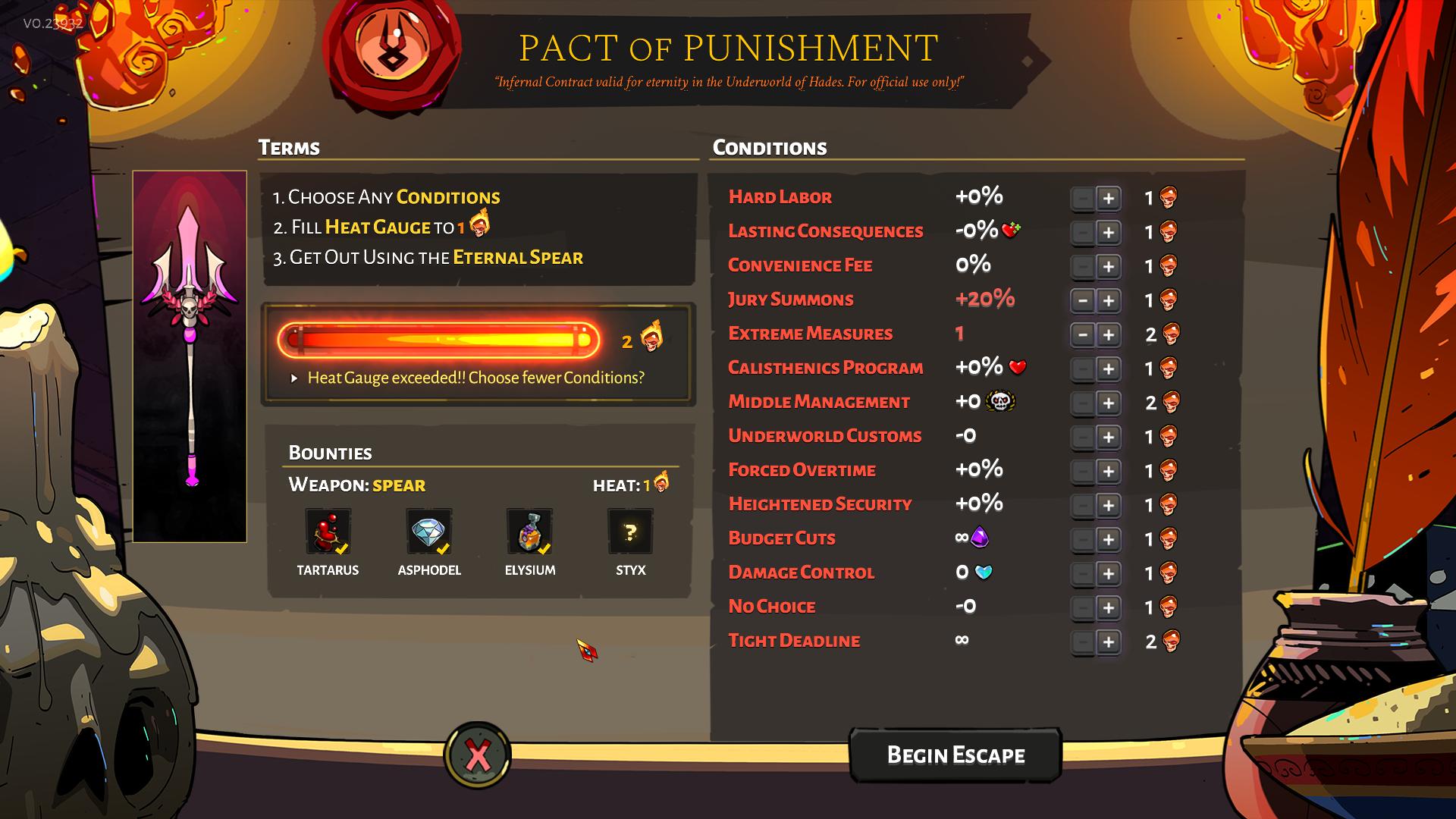
coronacht seems to work fine, not sure about other weapons
toxic trout
you've already claimed the bounties for the first three bosses
you need to beat the final boss on 1 heat before you can start gaining bounties from 2 heat or higher
 prisma kernel
I recently bought your early access game Hades on steam but every time i open it, it crashes saying it installed incorrectly. I uninstalled and reinstalled it, updated my drivers, made sure my windows defender is not blocking my save files, and Validated my files through steam. When i try to troubleshoot it myself online i only find articles pertaining to the Epic games launcher and dependency files.
I have a Ryzen 5 and a GTX 1070 with 32GB of DDR4 ram.
Im quite confused
and all my debuglog in notepad says is
InitializeUI: Customer-facing bug reporter
AddAttachment: Failed to attach: '' (file does not exist)
solemn nymph
I believe you can gain bounties on higher heat even if you don't finish lower heat runs
It's just that for a heat and weapon you've already claimed the bounty for, you cannot get them again.
toxic trout
nope, you cannot, higher heat will count towards the highest bounty you haven't finished
@solemn nymph see?
solemn nymph
Wait so if you finish the game 3 times with 3 heat, you will get bounties on all 3 runs?

given that you haven't done the run at all
frosty tiger
@rain cradle i am on 1080p and the textures still go blurry
 solar patrol
Is there a way to play in true borderless mode using two monitors?
I keep on having to alt-tab, which causes the screen to flash, which kicks in my photosensitivity.
tl;dr I'm looking to drag my mouse over to my other monitor without having to alt tab in order to switch YouTube videos without risking a seizure
sharp narwhal
@prisma kernel Follow these steps and send us an email
Please notify support@supergiantgames.com and attach Windows Event Viewer information as follows:
1. Search for Event Viewer in the start menu, go to Windows Logs > Application
2. Select all of the "Error" events you can find related to Hades
3. In the Action menu bar, choose "Save Selected Events"
4. Run dxdiag.exe and generate a report by clicking "Save All Information". (More detailed instructions here: https://support.microsoft.com/en-us/help/4028644/windows-open-and-run-dxdiagexe)
5. Attach the .evtx file and DxDiag.txt and email us!``` marsh whale
@worthy sandal
it wasn't possible in pyre last I tried
Well, it is possible, but the game will crash usually, and you have to manually move it by switching main monitor settings every time
not sure if they changed that for hades
but in general try moving it to windowed mode (alt+enter?) and then moving it with alt+space
otherwise, try launching the game with the second monitor set to main monitor, then switching main monitor
you could also try messing with the projector settings windows key + P
frosty tiger
um whenever i open the game it gives me a black screen is there any way to fix it ?
marsh whale
I had that problem with pyre a while back and I fixed it by editing something but it escapes me right now
either a script file or the save files had something wrong with it that
frosty tiger
oh
marsh whale
try validating files, changing monitor settings
frosty tiger
it worked initially but then i tried to change the screen resolution is crashed and now im getting the black screen
marsh whale
or wait for someone who has more special advice for you
ahhh
yes that's an issue I had too, relating to trying to get it on the other screen
delete your settings
for pyre
hades**
sorry
frosty tiger
how do i do that ? lol
marsh whale
uhh I'm not sure where it's stored for hades, probably in documents/my games
sharp narwhal
Your graphics drivers are probably out of date so you should update those
frosty tiger
um just did
sharp narwhal
but as for the nuclear option, you can either delete Profile1.sjson, or you can force the game to launch in fixed resolution
frosty tiger
how do i force it to launch in a fixed resolution
sharp narwhal
/FullScreen=false /NoBorder=true /X=1920 /Y=1080 is the command line to start the game up in fixed resolution, you can enter it by right-clicking hades in your steam library > Properties > General > Set launch options
frosty tiger
omg it worked ty
marsh whale
yeah I remember now when the profiles are broken that causes the issue
I guess maybe cus it automatically loads into a profile the launch option got ignored which doesn't fix the issue? or I'm misremembering because I was trying to fix a different black screen bug relating to the game starting up on the second monitor
frosty tiger
oh
marsh whale
If there's anything fundamentally wrong with the system SG uses it's that it rarely works with odd window settings
sharp narwhal
Windows is.............finnicky.
especially with dual monitor setups
We're trying 😅
If you have a specific setup you're having trouble with you can always send us a DxDiag or something and we can take a look
marsh whale
the only other game that i have that has similar problems is terraria and some really old games like morrowind
(terraria sometimes crashes if you move it cross monitors or plug in /unplug a monitor)
and old games just don't like to be moved or resolution changed at all
 raven wagon
I just ran into a bug in asphodel where I got frozen in place and couldn't do anything. I was using the bow and he was stuck in the bow fire animation as well. Even getting hit by an enemy only returned me to a standing position but still didn't allow for any inputs whatsoever.
sharp narwhal
You can report with F10 in-game!
raven wagon
Oh, that’s a great feature!
 turbid escarp
So uh, is it normal for the game to refuse to minimize? I keep trying to Ctrl-Esc but nothing really works, really frustrating. Is there a way to fix this?
 livid silo
I ran into an issue where the game grew laggier the further i got into my run, cultivating in a crash during hades phase 2 when i revived. it appears none of the progress during the run has been saved (darkness, gems, etc) and I was wondering if there was any way i could manualy try to recover what i had lost in teh run?
an easy way to change the amount of those resources i have, that kind of thing
plus, it just sucks to lose not only the run but everything you got during it due to what was probably a problem with my pc
 fringe oxide
yesterday i finished my 1st 4 heat run with rail, and went to sleep. Today after work i start a game and suddenly i had a spear. I didnt pay attention and start new rail run. But suddenly i had just same boons as yesterday. At this moment i realized my win didnt count and game still think i didnt make it
https://prnt.sc/qimqmz screen of yesterday win with 4 heat

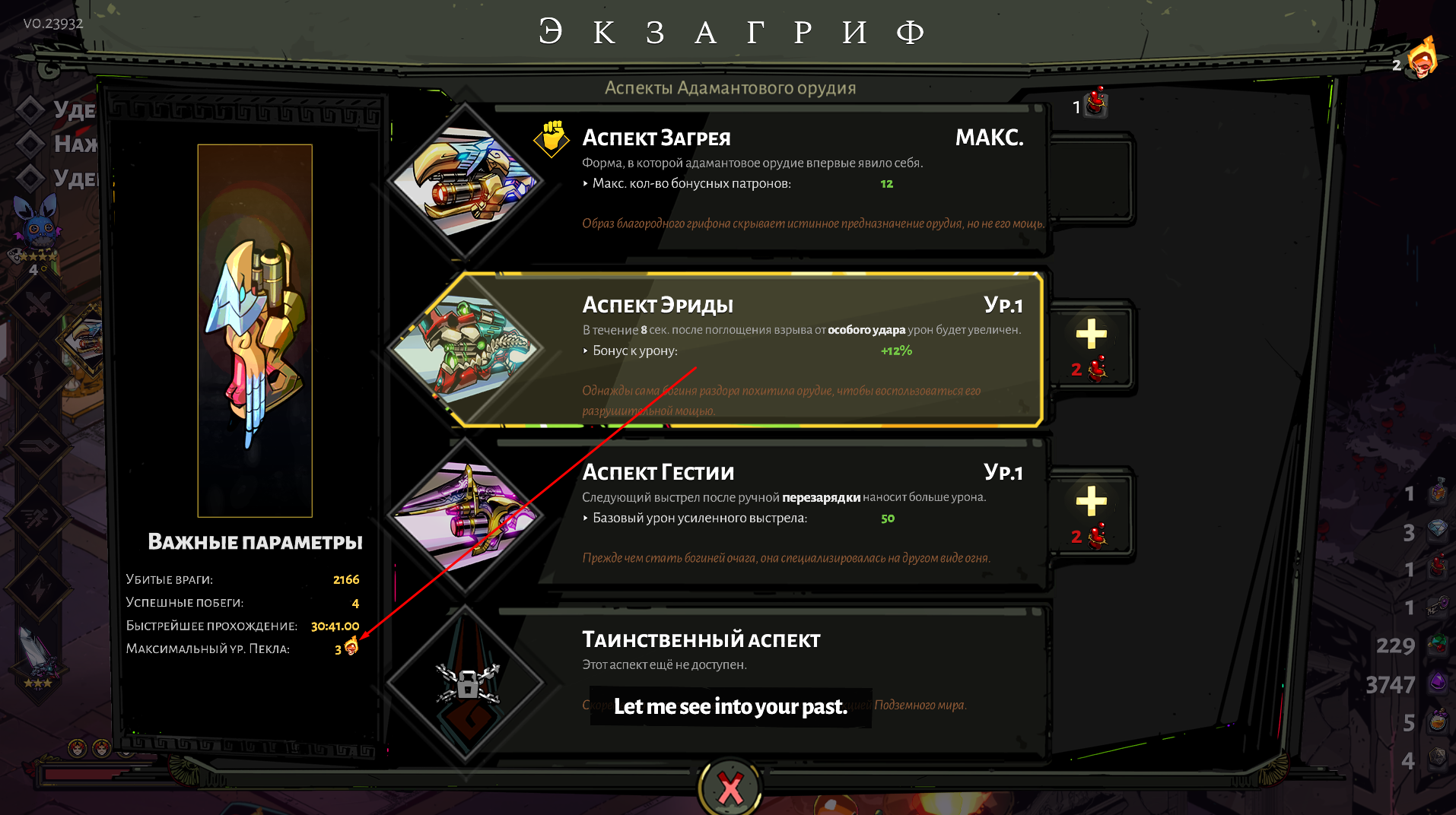
 surreal pike
This looks like a bug, it might be best to report with F10. Otherwise though, do you have the game whitelisted on any virus defender services you have? That can sometimes cause issues with saving.
fringe oxide
@surreal pike i'm not sure but... i do not have antivirus. maybe only integral one
fringe oxide
here ? http://prntscr.com/qiyfsx
 surreal pike
Yeah, looks like you’re good to go though so that may not be the issue unfortunately
fringe oxide
so... what should i do?
surreal pike
Unfortunately this is beyond my ability to assist you
sharp narwhal
If you quit at the wrong time, the game would have "given up" instead of "quitting"
That's what sounds like happened to me
When you give up, your run progress is rolled back; there should have been a warning about that when you closed out of the game.
If you force-quit the game using Task Manager or close out of it improperly in general, the game counts that as giving up.
fringe oxide
@sharp narwhal i absolutely sure i picked up blood and exit and died again and was back at House
but it rly looks like i surr - i have absolutely same rooms and boons
this is so dissapointing
i rly just dont want to do all this again
sharp narwhal
I'm sorry! I'm not sure what happened - it definitely sounds like the game thought it crashed or was force-closed
fringe oxide

 earnest warren
Hello everyone sorry for my English, yesterday I bought the game and the truth is terrible I have stuttering and fps drops all the time and I can not enjoy the game.
GPU: rx 580 8gb
CPU: Ryzen 5 1600
RAM: 16gb
It only happens to me in this game
sharp narwhal
@earnest warren Some folks with AMD cards have reported that turning on AMD Anti-Lag and turning off V-sync in GPU settings has improved their performance
 idle mirage
Anyone here that owns an Nvidia Shield Tv Pro and have been able to get Hades to work through it?
 urban ether
hey guys, i just had a blue screen after a finished run and my savefile is gone. tried the renaming save file fix but it didnt help
sharp narwhal
Not sure there's much else to be done - sorry!
 warm pumice
Hello! I've bought Hades through Epic Games. Is it possible for me to launch it through Steam? (Just asking for my comfort and so i can uninstall epic games maybe 😋 )
sharp narwhal
You can add Hades to your Steam library manually, but this won't give you access to any community features. You'll also need to keep Epic installed in order to update Hades, since the game is unfinished and still in Early Access.
However, Hades is DRM-free, so if you'd like to run it outside of any launchers, you can do so by running the .exe file in Epic Games\Hades\x64 or x86.
You just need to keep a launcher on hand so that you'll have access to updates and patches.
 vast sparrow
I ran into a bug today when fighting Tisiphone, I don't think it matters but it was a heat +1 run when they all fought against me. The bug was when I landed the killing blow she got a kill on me as well, what happened was that it triggered my revive twice. It played the sound and healed me up to 65 and than it played it again and got me to full hp all while I had the Kill screen on Tisiphone.
 rigid kayak
Got this Visual UI bug while playing on v 0.23932. I got a prompt for the codex, opened it and immediately exited.
It persists even when re-opening
exiting and reloading fixes it 🙂
sharp narwhal
@rigid kayak We're aware of that issue and looking into a fix! Thanks for the report - next time you run into a bug, you can report it with F10 in-game!
rigid kayak
Ah thank you! I was trying to figure out how to report bugs 🙂
 sweet viper
I am encountering issues with my save file being corrupted and the game not saving after I go to the main menu. It's happened twice and I'm losing all my progress continuously.
 errant plover
I died against Hades and the chat screen popped right as the death animation started. The death animation blocked the chat. The sound worked kinda fine. I could still hear the end of the chat when I revived back in the hub, juxtaposed with Zagreus' speech. Last thing it did was disable the controls once I had spawned back.
Quitting and logging back fixed the controls issue.
sharp narwhal
@sweet viper
Whitelist the game in your antivirus software, or allow access to your Documents folder in Windows Defender. Ensure that you have a folder at Documents\Saved Games\Hades

Follow the information here https://support.microsoft.com/en-us/help/4046851/windows-10-allow-blocked-app-windows-security```@errant plover We've received several reports of that issue and are looking into it; please report bugs using F10 in-game if you can!
errant plover
I'll do that!
rain cradle
Heads up to anyone who have AMD GPU and having low performance (here I cant help due of OpenGL support for AMD is bad, but my settings make the average FPS MUCH better)
My settings are from Radeon 2020 (require 19.2.2 driver or newer)
https://imgur.com/EhFGP0E
-The Latest setting (OpenGL triple Buffering) as well as V-sync are almost the same - both could be disabled, because somehow the game have troubles with it and lock to 30fps with lowest GPU - additionally if you can, turn on FreeSync ( so there will be no screen tearing)
-Radeon Anti-lag helped with average FPS
The rest I set up to apply Game settings instead AMD optimizations. ATM its best settings I found .
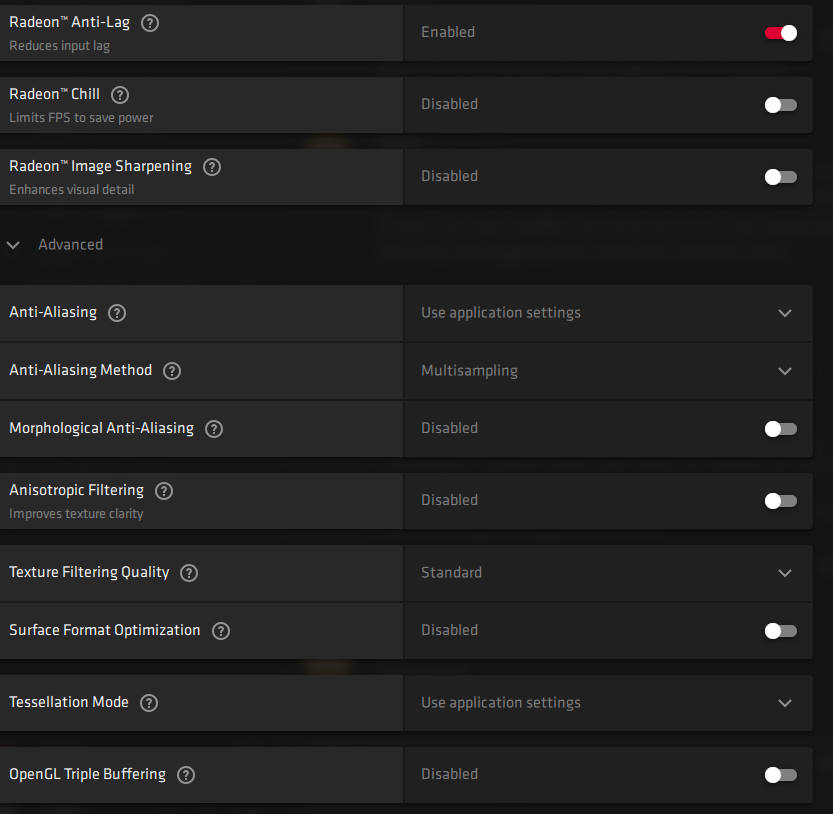 sweet viper
It does not show the "Virus & threat protection" to exclude anything.
sharp narwhal
There should be a switch that says "Controlled folder access" - did you turn that off?
sweet viper
"Virus & threat protection" the field itself does not exist.
Attempts to find it have ended with something along the lines of your IT doesn't have access or something. I can screenshot it if necessary.
 solemn beacon
I just had a crash I couldn't submit a bug report for because it BSOD'ed my computer and completely deleted my run :(
I was in Elysium, picked up a Hermes boon while a couple of blade rift casts were still flying around and one hit an explosive while I was in the boon selection menu
Immediate BSOD, when I relaunched the game I was back in the House as I was before I started the run
 proven fossil
I'm reporting a bug: the game always turns the vibration back on after i give up from a run to switch weapon or boon
frosty tiger
please use  in game to report bugs
actually, i don’t think that’s a bug at all
the game doesn’t save if you see a “give up” option
but if you see the option to “quit” rather than to give up, then your game has been saved
 grand raven
how can I get the game to launch on a different monitor than it does?
sharp narwhal
@sweet viper Yeah, a screenshot would be nice - sorry for the delayed response
@proven fossil We've received a lot of feedback saying as much and we're looking into it!
@solemn beacon You can submit the details of the crash by email if you'd like - follow the steps in #hades-tech-fixes-old for "Crashes without F10/Bug reporter"
sweet viper
It's fine! Here are the screenshots. Side note, I believe darker font might help make readability of notices might be helpful. If you cannot read it, it roughly says that my save is corrupted and default setting are applied.
sharp narwhal
Oh, yeah sorry I know what type of issue you're having - and it's caused by Hades being unable to access its save directory
I was more confused why Windows Defender didn't have the right options available for you to change
Do you have any other antivirus software? Is there another reason Hades wouldn't be able to access your Documents folder?
steep storm
vibration keeps turning itself back on, big issue for people with controllers an vibration messing with them
 strange zinc
Have some weird hits during Hades fight. On this screenshot, I dashed before he started an attack and after dash I got damage that triggered death defiance
steep storm
yeah that lil rock block crap has awful hitbox
 paper ibex
Is there a way to get Hades to run on my Second moniter :)?
rain cradle
Hades runs in full window, use windows key + shift + arrow ➡️⬅️
paper ibex
I didn't even know that was a thing you could do on windows.
You've opened my eyes, by the light @rain cradle
rain cradle
Glad to help
 fluid garden
Hades sometimes crashes my graphics card, I've done some quick googling but found nothing similar with a fix, currently running on an AMD Radeon RX 5700 XT, latest drivers (19.12.3 Optional)
Just ran it with the task manager on a second monitor and so far it seems like whenever I pick up an upgrade or load a new room there's a chance that the graphics card usage goes to 100% then the game forcibly closes, no error message or anything, whenever this happpens I cannot open the Radeon software again without restarting my computer.
 odd crater
is there any way to remove the 60fps cap on this game, the cursor seems really choppy at times and the game sometimes dips to 40fps, steam copy btw
rain cradle
look at mine post about AMD graphic
try settings the same as mine
you can also reset gpu driver using win + crtl + shift + B
but this looks more like an issue with redistributable code
can you try install newer visual C++ redistributable ?
there is link in #hades-tech-fixes-old
@odd crater you must turn off vsync for the game in your graphic settings
odd crater
thank you!
 gloomy holly
@whoever. Not sure if this is intended or not, but I was at the starting location after you die and talked with Than. After he left, I was still able to offer him ambrosia. FYI
odd crater
@rain cradle that worked but now i get horrible black lines across my screen when ever i move the cursor
its fine on controller but i normally play keyboard and mouse
rain cradle
can you try run in a window?
sharp narwhal
@gloomy holly Report issues like that with F10 in-game please!
sweet viper
I literally have no idea why it isn’t working. All my other games are able to access save files just fine, I’ve checks Hades’ permissions wherever I could and removed some antivirus software for good measure. Still getting this error.
rain cradle
Did you tried run game with Admin ? just using Hades.exe?
sharp narwhal
It could also be a problem with OneDrive sync

Windows Report | Error-free Tech Life
To fix Access is denied message on Windows 10, you need to take ownership of the problematic directory or use the administrator account.
 karmic lodge
hello, i can not save my game, I always have to start a new game, help please
sharp narwhal
Whitelist the game in your antivirus software, or allow access to your Documents folder in Windows Defender. Ensure that you have a folder at Documents\Saved Games\Hades

Follow the information here https://support.microsoft.com/en-us/help/4046851/windows-10-allow-blocked-app-windows-security

Follow Step 5 here to disable OneDrive sync for Hade's Save Directory: https://windowsreport.com/access-is-denied-windows-10/

If that doesn't work, find the drive where your Saved Games folder is located (usually C:). In Windows explorer (Windows 8 and above, only):

Right-click drive letter > Properties > Tools > Check

If errors are found, restart your PC and Windows will automatically fix them. This process can take up to an hour. ```Hey, I've just run into a problem wherein the cursor is hidden when the game is either full screen or at my monitor's native resolution. Borderless doesn't change anything. Seems to be related to having had a controller plugged in at some point and unplugging it. Any insight? I've reinstalled, launched the game with and without the controller plugged in, toggled mouse lock, and tweaked launch settings for resolution, but none of those things helped.
solar patrol
I noticed that in my last run that it's achievable for you to get enough speed upgrades that things become really buggy when you exit rooms
As you speed up you start wall glitching like crazy when you exit rooms
 toxic basalt
hello everyone. Been playing since the epic launch but never had a reason to join this. Super fun game love it a lot, but curious if anyone has any insight. I've changed my PC setup considerably from intel to a new ryzen 3600, 32gb of ram etc the whole nine yards. Also got a new 1440p 144hz monitor but still using my same 1070 gpu. I'm getting random single digit framerates. I've set my monitor back to 1080p and still the same thing. Is this a known bug with amd? or something that came up in the new update? An example is when using the spear and charging it the frames get seriously horrible like single digits lol
rain cradle
Hey, can you check tech fixes first? I don't think cpu have something to do with performance. It's rly good one. Can you set screen to 60hz?
It's weird I know but try it.
Also if you play with gamepad try turn off vibrationa, for some reason peoples got serious frame drops when vibrations could be played by game
 mortal grail
I was having issues with some voice lines not playing until I paused and unpaused during the line being played (temporary fix), but after the problem cropped up I verified files and it's working again. I'm not sure why it started happening in the first place, but I think that's all that's needed for the permanent fix in case anyone else was having that problem
sharp narwhal
@mortal grail There's a known issues in which, rarely, voiceover will stop playing or play out of only one channel. It can be resolved by restarting the game, but may crop up again. We're looking into a permanent fix.
mortal grail
I had tried restarting the game and it didn't fix it
sharp narwhal
Closing all the way out and booting back up?
mortal grail
Yep
sharp narwhal
News to me. Glad verifying fixed it - I'll make a note of that.
toxic basalt
@rain cradle sorry to get back to you late, but yes I did check #hades-tech-fixes-old first. I also tried to set the refresh to 60hz and no change. Very strange i agree
I will try and record footage maybe it will help out
when im home later tonight
i will turn off the vibration too
 indigo citrus
I have the game on steam, but I am unable to run it. Steam will show that the game is running, but the game itself doesn't actually open. I was looking through tech-fixes and couldn't find anything fitting. Has anyone experienced something similar?
sharp narwhal
@indigo citrus Can you run the game directly from its .exe file? If you go to Steam\steamapps\common\Hades\x64 and right-click the .exe to run it as administrator, does the same thing happen?
indigo citrus
Yes, I am unable to run the game in this method as well.
 rich storm
Over the Christmas break, I played this game (Epic Version) on a PC running a Radeon RX580. Now I'm back at my main PC using a RTX2080. On both PCs, my game would irregularly and randomly act as if the window would lose focus, like I had clicked another window or alt-tabbed -- meaning black screen for a second, than a static image until I left click. I play this game exclusively with a controller. Anyone know a solution?
sweet viper
Tried all of the above so far. Will try to uninstall then reinstall. Will get back to you.
 wild igloo
@rich storm are you playing on steam now?
rich storm
No, still on Epic!
 primal trellis
is the crash without bug report method from #hades-tech-fixes-old still relevant?
wild igloo
@rich storm are you playing borderless?
rich storm
No, just fullscreen. I believe I tried borderless and it still happened, but I’m not 100% sure about this
wild igloo
maybe you could try playing in a window and/or without borderless
don't really know what else you could try
rich storm
Okay, thank you! I’ll try closing some background apps one by one, too, and see if there might be a conflict — GoG 2.0 for example.
frosty tiger
I've had that issue with various other games and replugging the controller was a common fix
rich storm
Good idea, thank you! This also happened to me with RDR2, now that you mention it. Also using Epic.
 hybrid kestrel
ummm.. where can i submit a video of a bug i've encountered ?
wild igloo
@sharp narwhal
 wet quarry
I just fought Hades for the first time, I died, but seemed to trigger two cutscenes at the same time:
- The cutscene of Zagreus dying
- Hades saying he was brought low by his son, and expected this kind of behaviour from his brothers, or some such.
The death cutscene played over the top of the Hades one
Please note: Hades didn't kill me, one of his summoned witches did
When I respawned back at the house, I couldn't move, but I could still access the menu, quitting the menu fixed the issue, but just want to report that this is a potential issue.
sharp narwhal
@hybrid kestrel Use F10 in-game to report bugs!
@wet quarry Thanks for the report - we've had a handful of reports about that issue and are looking into it.
 small lodge
Twice now the game has crashed on me in the temple of styx where it's sent me back to the courtyard with none of the progress i made during the runs i was doing. The first time the game crashed while walking through the door into the Lord Hades boss fight, the second time it was while attacking a snakestone in one of the satyr tunnels.
sharp narwhal
The game rolling back progress is normal behavior after a hard crash - as for the crashes themselves, if you want to report them (if they didn't spawn a bug reporter window) you can follow the steps in #hades-tech-fixes-old under "Crashes without F10/Bug Reporter"
 vale pilot
Is there any way to transfer saves files between computers on epic? Bought the game on holydays to play on the travelling laptop and now i'd like to resume it on my everyday pc
sharp narwhal
@vale pilot Hades saves locally, in your Documents folder. You can copy the entire folder of Documents\Saved Games\Hades to a USB drive or other method of transferring files and copy-paste it on your other computer.
 sharp cove
games does not save progress even after showing the saving icon and saying it was saved less than a minute agon when exiting
nvm, it says settings for current profile are corrupted and cannot be read
 split fiber
sharp cove
split fiber
sharp cove
because of it i lose all of my progress and have to start all over agin everytime i play the game
sharp narwhal
Whitelist the game in your antivirus software, or allow access to your Documents folder in Windows Defender. Ensure that you have a folder at Documents\Saved Games\Hades
Follow the information here https://support.microsoft.com/en-us/help/4046851/windows-10-allow-blocked-app-windows-security``` deft jewel
#h1-tech-support It seems like the mouse lock option in settings causes mouse to occasionally slow down/jitter
sharp narwhal
We're aware - for now, we recommend not using it if it causes problems.
 bleak obsidian
#h1-tech-support Hi, is there a way to increase my mouse cursor size? On a 4k monitor its really tiny and keeps getting lost in the action... I didnt know where else to post this sorry.
sharp narwhal
You don't need to tag the channel for us to see your message. ^^
There isn't currently a way to change the cursor size. I believe feedback asking for larger cursor options has been posted in #hades-feedback ; you can search for it there and upvote it if you'd like!
bleak obsidian
Thank you
 stiff hazel
So for some reason whenever im using controller with the spear, and i charge the spin move, the game starts going down to like 10fps. But when i use mouse and keyboard and charge the spear, its fine.
 keen terrace
When I play in full screen mode / Windows 10 / and my mouse is gets to the edge of the screen, the entire screen goes black for like 1-2 seconds, as if I was playing full screen but windowed. This happens rarely but randomly
sharp cove
The windows thing worked, thank you
 hard pagoda
Trying to move a save file to a new pc, not recognizing it. Any ideas?
steep storm
any word on vibration setting itself back on mid runs? still having vibration cause controller issues (fine with it off) but having it turn itself back on is annoying
 royal iron
Anyone have luck with this dual monitor bug: https://steamcommunity.com/app/1145360/discussions/1/3124867129984475385/ ?

So I run two monitors, the game displays on both the mouse is on my right screen but is active on the left screen. So like I click on setting on the right screen but the menu for it pops up on the left screen. so I have to use the mouse on the left side of the screen to navig...
Nvm, clean install of nvidia drivers fixed it
 bitter sky
Call Boldy. He can block the bosses.
In my game, bonuses that fell from the stone blocked the minotaur at the column.
sharp narwhal
@hard pagoda Make sure it's in the same directory as it was originally - Documents\Saved Games\Hades. You may have to create a Saved Games folder in your Documents if you don't have one already.
Also make sure any antivirus software on your new computer isn't blocking access to the folder
hard pagoda
The issue was much dumber than that
I had a very small. Save file from first installing on the new pc to. Make sure it ran ok
And bc it was attached to a diff steam. Profile (wife's) it was overwriting bc of cloud sync
So we sorted it.eventually
sharp narwhal
Good to know!
 humble bronze
My keepsake thing doesn’t appear between boss areas so I can’t switch out keepsakes, does someone know a fix?
sharp narwhal
The keepsake case is no longer automatically available; it has to be acquired. Check around the House when you get back
humble bronze
Oh ok thanks
bleak obsidian
Yesterday I asked about mouse cursor size option but today I realized changing it in windows, changes it in game! problem solved!
 ember pendant
Hey, recently, the light went off and when I enter again in game i see that my entire progress was deleted. What can i do?
rain cradle
It probably happen when the game was saving. Sadly not so much you can do. You can check if the folder with saves include any *.bak files. If yes.
Then do a copy of everything (just for safe)
And remove the *.bak ending. If need remove the files with the same name. And try.
The saves are in documents/saved games /hades
ember pendant
But i see a message that supergiant have your progress or something like that
 pine flame
using the spears charge attack on a controller freezes Zagreus and he never does the attack it just charges
 stable mason
I get major FPS drop during some fights and really shouldn't with my PC. Can run most giant RPGs on Ultra @ 60fps.
 limpid halo
Interesting, is it when there are a lot of spawned entities during a fight?
stable mason
@limpid halo Seems like it never happens until beating the fury sisters, then in the next area aphodel (excuse my misspelling) it usually starts
definitely exacerbated when there are a lot of particles / enemies
stiff hazel
So I found out why the spear spin attack made it slow down to 11 fps when ai held it down; it was linked to vibration! So turning that off fixed it.
 floral viper
everyonce in a while when checking codex and exiting the menu. the codex stays on the screen even while im moving the character . pausing , re opening /closing codex does not get rid of it and now we get layers of text over eachother. (however transitioning rooms makes it go away so its not too detrimental to gameplay since you usually would never check codex during fights)
next time it happens ill be sure to screen shot and report with ingame reporter ^.^
 lean breach
^ that. Happens to me too, but i just exit the run/start game to make it go away. Didnt know transitioning rooms works
wild igloo
hey, does someone know how to enable console?
wild igloo
^answering my own question, you need the file "mobdebug.lua", which the developers have removed from public version
sharp narwhal
@floral viper This is a known issue we've received several reports of and are looking into - you can report bugs in-game using F10!
 gaunt forge
Hello - every time i swap from keyboard to controller it locks the game up. The only way to get a startup again is to restart my computer. Even though i terminate the process in task manager....
 sudden walrus
The mouse cursor gets all jittery for me randomly! It's like it's stuck in mud!
I've reported it with already
but anybody else has this issue?
sharp narwhal
Have you disabled mouse lock in the game settings?
sudden walrus
it's like the cursor speed varies widely: one second it's fine, the next it's stuttering and slowing down (so I have to physically drag the mouse furhter to cover the same distance)
oh
no I haven't
sharp narwhal
Give that a shot!
sharp narwhal
No prob, glad that fixed it!
 twin herald
anyone here get their DualShock 4 working with this game?
floral viper
i got the steam controller and was wondering if theres a way to remapp the back buttons. as of right now their tied to a and b
stiff hazel
For some reason vibration turns itself back on everytime I start the game. Not too annoying but just a minor inconvience.
floral viper
maybe its a saving issue?
 dull cosmos
a little late but, yeah @twin herald I've been using a DS4 for all my playtime so far. I set it up from within Steam "Big Picture" mode and it's been flawless so far. Just hoping we get in game PS4 icons for the controls at some point.
 ornate badger
Anyone having this problem where the game just crashes after loading the game to the welcome screen? (happens randomly)
 regal steeple
My game randomly crashed after clearing a room, now every time I load my save it instantly crashes again in that room. So now I cant play the game anymore on my save, I would have to start all over... Any suggestions? I thought maybe changing my current room in my save file but I have been unable to figure that out
regal steeple
Steam
sharp narwhal
Right-click Hades in your library > properties > local files > verify integrity of game files
regal steeple
Ok I will try that, I reinstalled the game before but that didnt seem to help
sharp narwhal
@ornate badger Follow the steps in #hades-tech-fixes-old under "Crashes without F10/Bug Reporter"
@stiff hazel Yeah, we're aware and looking into a fix
regal steeple
Verifying didnt help, still spawn in the same room getting the same crash instantly
sharp narwhal
Alright, #hades-tech-fixes-old, follow the steps under "Crashes without F10/Bug reporter"
regal steeple
I did get the bug report I sent the email containing the information yesterday
 muted apex
on my previous laptop with i3 6006u + mx110 game ran smooth, but on new laptop with ryzen 3500u + vega 8 it runs very slow. That laptop worked better in every other game I tested, but not in this one. I'll be glad if somebody able to help.
sharp narwhal
Hmm, yesterday? I'm not seeing your ticket. @regal steeple Would you mind DM-ing me the email address you contacted us from?
stiff hazel
Thanks m8, I appreciate your hardwork.
rain cradle
@muted apex because AMD graphic support for OpenGL (GPU drivers) are poor. So even if it slower than vega8 its better in OpenGL.
You can try turn off vsync for Hades in Radeon Settings
Also you can make custom PowerPlan and limit CPU perf to 50% so GPU will raise the frequency higher.
muted apex
i'll try it thank you
rain cradle
Also whats the laptop you have ?
frosty tiger
hey im having a hard time getting back to the actuall game like its not letting me enter the river of stiyx after dying
 cinder totem
Hey @frosty tiger ! Are you still having difficulties? I can try and point you in the right direction.
 trail night
i just beat thesius and the game crashed just as he died and i lost my progress from that entire run -_-
 royal oar
Hey there friends, just a quick question. After playing the game quite a bit (16 hours according to steam) and escaping successfully once, a good chunk of the dialogue scenes I'm encountering have either poorly mixed dialogue, or simply missing lines. Just checking, is this actually a bug or are these lines just not done yet?
sharp narwhal
It's a bug - restarting your game should fix it!
 naive pollen
I know this might be a personal problem, but has anyone else felt like the game is too "zoomed out" while playing on steam link to a large screen? Sometimes the spirit text is too small to read and some details seem difficult to make out (like telling between resources). Is there a way to adjust this or is it just a condition of playing in full resolution on a big screen?
 cyan quiver
so I have 42 hours on this game and yesterday when I tried to launch it just... wouldn't. I click play on steam and the icon appears on the taskbar but then 2 seconds later it disappears. Tried going into the local files and launching from there. The x64 has the bug but I can launch the x86. However, I have no controller support so I can't play the game the way I'm used to. Tried verifying local files on steam, tried reinstalling. Nothing.
Also updated my graphics drivers, nothing there as well
sharp narwhal
@cyan quiver You can follow these steps to submit a tech support ticket. We're off for the weekend but someone will get with you Monday!
Please notify support@supergiantgames.com and attach Windows Event Viewer information as follows:
1. Search for Event Viewer in the start menu, go to Windows Logs > Application
2. Select all of the "Error" events you can find related to Hades
3. In the Action menu bar, choose "Save Selected Events"
4. Run dxdiag.exe and generate a report by clicking "Save All Information". (More detailed instructions here: https://support.microsoft.com/en-us/help/4028644/windows-open-and-run-dxdiagexe)
5. Attach the .evtx file and DxDiag.txt and email us!``` harsh jewel
I’ve followed all the instructions for unlocking Skelly’s companion and the 7th heart is still the “locked” symbol. He won’t give me the Stygian quest. A bug maybe? EDIT: After doing 9 more runs he gave the quest.
cyan quiver
Well the game decided to work again today. Thanks for your help @sharp narwhal , maybe the support ticket I submitted could help me find out the cause
 whole elm
@cyan quiver I have the same problem, the game just does not want to launch. I can spam the icon... nothing.
 fading silo
Any chance that Hades is going to support DirectX or Vulkan? I am of those who has AMD Vega 64 GPU and I cannot even maintain 60fps because of that OpenGL issue, which is ridiculous for this kind of game.
EDIT: Also curious, why is this the case when consoles use AMD GPUs too?
@stable mason Do you have AMD gpu?
 sudden rain
Hey everyone, please let me know if this is intended. After visiting the muse(?) in asphodel that gives you a choice of three upgrades, i chose the one that upgrades rarity on 2 boons. I had epic athena resist damage boon, and after getting the upgrade it went down to common? Is this intended? I feel like i got cheated 😦
Let me know if im asking this in the right channel
 tall river
not a dev but it should upgrade your boon to heroic, not reset it to common
wild igloo
@sudden rain you should make a manual bug report
 static geyser
l need help, l opened the game today and my only save file says l have 1 escape attempt and 0 darkness. And that l last played on the first Jan.
sharp narwhal
@static geyser Your save data has been corrupted somehow; this usually happens when your computer shuts down unexpectedly while playing the game. If you go to Documents\Saved Games\Hades, you should have Profile1.sav, Profile1_Temp.sav, and .sav.bak versions of both of those files.
Move Profile1.sav to a different location and rename Profile1_Temp.sav to Profile1.sav, and try starting the game up.
If that doesn't work, try renaming the .sav.bak files to just .sav, one at a time.
@sudden rain You can report bugs like that using F10 in-game!
 spiral zinc
AMD user here (2400G + Vega 11).
The game peaks at 72fps@720p and 54fps@1080p with micro-stuttering at both resolutions and huge dips in performance during intense fights.
I have noticed that even though GPU load seems to hover around 70% during gameplay, GPU clock does not climb much at all.
Any chance of the game getting Vulkan support or fixing the OpenGL issue (assuming there's any possible fix)?
rain cradle
To all amd friends again.
Vsync ==> OFF
FreeSync ==> ON
I have 2400g and I have 70-150 fps
@sudden rain consoles have amd but different driver. It's not the card issue but a driver. On Linux with fan made drivers the Opengl runs fine
about the vulkan or directx. Vulkan is not supported by the open source engine they use. DirectX will cause massive issues with animations playback
spiral zinc
Thank you @rain cradle for the heads up.
I don't have a FreeSync monitor i.e. the FreeSync toggle is greyed out for me so no luck there.
HOWEVER! (dramatic music plays)
Turning on "OpenGL Triple Buffering" under Graphics>Advanced in the Radeon Software fixed it for me.
Hope this helps others as well.
rain cradle
Well personally I have the option off too. But I enabled AntiLag feature
But if I somehow help then great!
I also don't have freesync, but I told about it cuz it definitely will help without vsync
spiral zinc
Thanks for the help!
 pine fern
My copy of hades freezes after I open the Microsoft game bar until I flicker the screen via alt+tab etc?
 warped sleet
Is it in fullscreen or windowed
pine fern
Default settings?
warped sleet
I think it's fullscreen by default. Try going into your settings and putting it as windowed, or windowed fullscreen
pine fern
It’s not a big issue unless I actually open the game bar which I only ever do by accident
I just want to make sure if it’s a bug it’s known
warped sleet
Your description is not very precise, so it's hard to know if this is simply a ''normal'' issue or an actual but depending on your computer settings / game settings?
What do you mean by freeze, like the whole screen stops moving and no sound is being played? Then you have to alt+tab back in?
pine fern
The screen stops moving and no sound and can’t control the game until I minimized the screen and re open it
warped sleet
When you come back into the game, did things happen, like if you were in the middle of a fight does the fight continue like if nothing happened or did enemies move and attack during the time you alt+tab back in?
pine fern
I haven’t been dumb enough to gamebar during a battle yet lol, and from what I can tell I’m just sitting there in game
warped sleet
It would be interesting to try for science.. it seems that the game just pauses because it loses focus
By game bar do you mean like pressing the windows button or is there some other windows thingy I'm not aware of?
 vagrant swallow
xbox gamebar on win10 i think
warped sleet
how would one open that? I'll try reproducing the issue once I get home..
warped sleet
Win+G seems to be it indeed
I'm not home currently, but once I am I'll give it a shot and see if I get the issue as well.
vagrant swallow
yeah like xbox button on controller
pine fern
The button where the XBox button is
warped sleet
For now, you can try fiddling with your settings (I'm thinking fullscreen or windowed can have an impact) or just use F10 in-game to report it right after it happens
vagrant swallow
xbox game bar kinda pops up just like nvidia and steam sidebar thingy when you start the game.
pine fern
I wasn’t expecting to use it either lol
vagrant swallow
that overlay could create problems yeah..
rain cradle
well if you dont use xbox dashboard just turn it off in windows 10 settings
vagrant swallow
yup.
fading silo
@rain cradle so no DirectX or Vulkan then, right?
So, with your suggested settings my framerate really improved. Although I have no idea why AntiLag helps in this case. Maybe some issue with frame buffers? V-Sync uses frame buffers and AntiLag also works by reducing frame buffering... just my guess
rain cradle
yeach I think. It can be that AMD drivers completely don't know what to do with memory. So its better to release frame as soon as possible instead holding it in memory. I think it apply to whole OpenGL API driver for AMD with the memory management
warped sleet
I tested it myself and I seem to be getting a "freeze" that stops as soon as I click back into the game.. but if you're working with controller maybe that's part of the issue. It seems Xbox Gamebar is just not compatible with Hades yet
pine fern
Hmm
 inner willow
hi, i've been experiencing fps drops in some boss rooms and rooms with a lot of enemies in general. Any way i could fix this or improve my fps?
 pliant bough
Yop !
I bought on the Epic Game Store Hades yesterday, when I start a game it systematically displays "impossible to save the game on the storage device. Try again?".
How to fix it please ?
 cinder owl
Good Morning
I've installed the game yesterday (its been a few months till the last time I've played). (Btw I format my pc and tried to keep my profile saves)
Well the issue is: When I start the game, the game's icon appears in the task bar but after a few seconds it disappears and the game closes. I've looked for it and I found out that the game gets "Suspended" 1-2 seconds after I run it.
May I have some help?
(I've tried uninstalling, run as and administrator from game's files)
fading silo
@inner willow Do you have AMD GPU?
 stray kite
hey anyone solve an issue of it cutting off half the window while streaming in OBS?
inner willow
@fading silo No, I have an NVidia GPU
fading silo
@inner willow If it is laptop, make sure Hades is using the Nvidia GPU.
inner willow
Okay, will do! Thank You!
 crystal oracle
hey all, my savefile was corrupted while transferring it manually to another PC. Is there a way to download a savefile somewhere?
sharp narwhal
@crystal oracle speedrun.com/hades has a set of save files available
@pliant bough Make sure you have enough space on your disk to save. You should also ensure your antivirus isn't blocking access to your Documents folder - check #hades-tech-fixes-old under "the game won't save"
@cinder owl Have you tried running both the x64 and x86 Hades.exe files outside of the launcher?
crystal oracle
@sharp narwhal I tried that one out, but sadly it didn't work. The file is called profile1.sav, which I replaced mine with. Nothing changed though. In the folder are more files, so maybe Supergiant changed the savefile architecture?
sharp narwhal
Delete your Profile1_Temp.sav and then overwrite your Profile1.sav
crystal oracle
@sharp narwhal Thank you so much, it worked! ::D
 mellow patrol
someone can explain me what does this mean?
I mean, I dont know what is this, nor if this is a problem of mine or of the own game, so here I am
sharp narwhal
It's most likely to be a graphics error of some sort. Are your drivers up to date?
spiral zinc
Just noticed that hades only uses a single core/thread instead of spreading out it's workload. Might explain the massive frame drops i'm getting with multiple enemies/effects on screen even on 720p
 broken cosmos
how do I solve this. I can not run steam BPM mode as well
My drivers are updated
mellow patrol
same about drivers, just a week ago I had no problem, has the game had a little update in this time or something
sharp narwhal
No, no updates since late December
You can follow these steps to report and we'll look into it in more detail
1. Search for Event Viewer in the start menu, go to Windows Logs > Application
2. Select all of the "Error" events you can find related to Hades
3. In the Action menu bar, choose "Save Selected Events"
4. Run dxdiag.exe and generate a report by clicking "Save All Information". (More detailed instructions here: https://support.microsoft.com/en-us/help/4028644/windows-open-and-run-dxdiagexe)
5. Attach the .evtx file and DxDiag.txt and email us!```dont know why, I dont received this msg this time, even though, thx for trying to help
pliant bough
@sharp narwhal Thank you very much it's fixed ! I am a fan of Supergiant Games, what's a awesome games ! 
frosty tiger
whenever I do my special attack my fps drops by A LOT, any idea how to fix this?
 echo beacon
hey cant start game
when i click on the game button it just acts like i want to clear the save
it also says i have only one attempt even though i've done a lot more than that
sharp narwhal
@echo beacon It sounds like your save data has been corrupted. Usually this happens when your computer loses power or blue-screens while you're playing. Do you have more than one save file?
echo beacon
I can launch other save files, so it's just definite save file corruption?
that's really dissapointing
sharp narwhal
Sorry, just wanted to know so I could give better instructions. Which of your saves is it? Farthest left being 1 and farthest right being 4.
echo beacon
save slot number one
sharp narwhal
Cool.
echo beacon
probably got corrupted by a hard shutdown last night
sharp narwhal
If you navigate to Documents\Saved Games\Hades, you should have a Profile1.sav, Profile1_Temp.sav, Profile1.sav.bak, and Profile1_Temp.sav.bak
Copy Profile1.sav and Profile1_Temp.sav somewhere safe, your desktop maybe. Then delete the copy of Profile1.sav that's in Documents\Saved Games\Hades, and rename Profile1_Temp.sav to Profile1.sav
If that doesn't work when you start the game up again, try the same thing with Profile1.sav.bak and Profile1_Temp.sav.bak - just remove the .bak so they're Profile1.sav and Profile1_Temp.sav.
echo beacon
i'll get back to you once i've done that
IT WORKED
put me back at the bone hydra instead of being dead but i've got my progress back! thank you so much!
sharp narwhal
You're welcome!
cinder owl
@sharp narwhal Yeah, I've tried both
sharp narwhal
Follow the steps in #hades-tech-fixes-old under "Crashes without F10 / Bug reporter" and email us!
 tiny sundial
Just encountered this little bug
Just so you know, I continued a game I paused in elysium a few updates ago, so it's maybe just something to do with continuing an old run from another update
 vast gull
bugs are reported ingame with f10!
sharp narwhal
@tiny sundial Yes, that is likely a backwards compatibility issue - should resolve when you start a new run!
 kind quarry
trying to load my mid-run save results in this error
I can load my House of Hades save, but the house of hades is almost entirely black
sharp narwhal
Are you running the x86 version of the game?
 novel lion
Hey, I was fighting Meg, and game started to lag bad. Now I've found a Hermes Boon and it won't let me click an option. I can still use the escape key, but I am essentially soft locked unless I want to give up
Don't know if this is the correct place to report a bug, but thought I should mention it somehwere
novel lion
Keyboard
When I click escape and the menu comes up for display and stuff
those work fine
but trying to click a boon
doesn't
Usually there is a highlight on the Boon you have selected
sharp narwhal
Yeah, I feel like I've heard of this issue before but it's pretty rare..alt tabbing doesn't do anything?
novel lion
Yup
sharp narwhal
Huh. Fullscreen or windowed?
novel lion
Fullscreen
sharp narwhal
Welp, there goes my theory. Thanks for checking all that - my guess was that something caused the game to no longer register your mouse, you can fiddle with it some more but I don't know that there's a solution until we figure out what causes it.
novel lion
I had lag while fighting Meg just a few minutes before, it might be related; forgot to mention that in my bug report.
sharp narwhal
Noted, thanks
novel lion
Actually, lag might be the wrong word, it was more slow mo and frame drops, lag is usually input delay.
This is the first Boon I have found since then
Anyways, thanks for trying to help.
sharp narwhal
No problem, sorry for the trouble.
sharp narwhal
Yes, you will!
 grave cairn
I don't know if this is where I post this, but the game suddenly started doing this thing where the contrast increases (or maybe every object has double blacklines, I can't tell) any time I move
Edit: The issue, after looking at it again (after a restart and relaunch), is that all the darks get way darker. The best way I could way I could describe it is like the light darkens when moving
spiral zinc
I've noticed this as well but not in terms of brightness but visual fidelity in general. More like dynamic resolution i.e. the game lowers its rendering resolution during movement.
fading silo
@grave cairn Are you sure it is not caused by FreeSync or dynamic contrast on your monitor?
@spiral zinc Do you have AMD gpu? If yes, are you sure you don’t have Radeon Boost on?
spiral zinc
Yes I have an AMD gpu and that was my first thought as well. But I checked and it's not on.
I do however have "AntiLag", "Surface Format Optimization" and "OpenGL Triple Buffering" on
fading silo
@spiral zinc First of all, as per @rain cradle recommedantion, keep AntiLag on and force turn off vsync and opengl triple buffering (which wouldn’t work anyway without forcing v-sync on) for better performance. If surface format optimization is on by default, then keep it on.
spiral zinc
Thanks. I'll switch to these settings and do a run @1080p and see how it goes.
CPU utilization is still locked to just one thread.
fading silo
@spiral zinc Yeah that CPU utilization will stay like this until devs optimize it for multithreading, imo.
 leaden moth
I don't have a screenshot of it... as I was in the game just pulling my hairs out... but In a hades fight, I got stuck inside a chariot using the bow, I wasn't able to dash out of it or anything, and could only watch as my character died, respawned, and died more until I was out of respawns and life.
fading silo
@leaden moth You should report it via F10 key ingame, imo.
leaden moth
Does reporting it after respawning at home give the prior run info?
 light flume
Is the bow not shooting on mouse release or not aiming on mouse press a known issue?
spiral zinc
I just did another run with the suggested settings. Is it okay for me to post a video here of the issue? it's about 30secs long with only game audio.
Can't capture the issue in a screenshot unfortunately
Oh well, here's a video of the issue.
Notice how everything blurs during the attack animation and gets crisp again shortly after. It's most noticeable with the cobwebs.
Since the recording, I have also somehow miraculously changed the game's rendering engine from OpenGL to DX11 with much better performance. 🤣
Edit 1: I double checked by restarting Afterburner in case it was simply the OSD displaying incorrect information. Still shows DX11.
Edit 2: I have now noticed on the OSD that the renderer intermittently flickers between OpenGL and DX11 at high framerates.
Edit 3: I've figure out how the rendering mode changes. Using "Game Capture" in OBS to capture Hades changes the rendering mode to DX11. You do not need to record the game for it to change. Just open OBS and add it as a source. You can close OBS thereafter. This effect does not persist between game client restarts.
Edit 4: Running the game in DX11 mode introduces massive micro-stuttering during user-inputs. This issue seems to be isolated when running the game in fullscreen mode only. I resolved this by simply running the game in borderless-windowed mode.
Edit 5: Closing OBS after using it to switch to DX11 mode causes the game client to try and switch back to OpenGL intermittently thus causing the issue mentioned in "Edit 2" above. Solution: if you have the ram and processing resources, just minimize OBS while playing to keep the game client from trying to switch back to OpenGL.
This is the default idle performance on OpenGL
rain cradle
Directx drawing will cause issues cuz the game run in opengl
grave cairn
@fading silo it could be. It started when I switched my computer over from my TV to my monitor. I'll check later afterwork
 fleet sapphire
I can't seem to run Hades. I've been doing a few different troubleshooting methods but nothing seems to work. I feel like its a problem with the game not liking my default driver on my comp. Does the game require that I have an Nvidya driver? Or can I use my comps default drivers to run the game?
grave cairn
@fading silo I switched back to my TV. The issue persists. The shadows/darks get darker whenever I move
 hollow cairn
Every time i start the game with steam i get an error "SDL could not initialize!"
 empty pilot
Hey, I think I have found a bug - if you max Meg and Than romances at the same time it seems that one of them will never appear in Zag's bedroom. I have had Meg in there the very next run while 9 runs later Than still haven't visited me.
 full crater
hahahaaa i think thats just his rng, not a bug 😭 that happened to me too
empty pilot
It would not surprise me, but the fact is that Thanos was in the house 3 times in meanwhile and nothing. :-D
Also Zeus' cast can easily go behind the wall and be unreachable
sharp narwhal
Yeah that, uh, happens. A lot.
Not the Zeus cast thing, Thanatos showing up in the House but not in your room, thing.
As for the Zeus casts, report that in-game with F10 please!
sharp narwhal
@hollow cairn Sounds most likely to be an issue with your graphics drivers - are they up to date?
I'm sorry u_u
the rng is really bad
hollow cairn
Ill have to check
full crater
dont think of it as being stood up, think of it as...hes just rrrreaaaaly busy! so many people die 😂
hollow cairn
@sharp narwhal everything is up to date but i restarted my pc and now it works so i guess its fixed
thanks for the help anyways 
empty pilot
@sharp narwhal the Zeus' cast was just reported by F10 😉 it is stupidly easy to duplicate
sharp narwhal
Thanks!
 true hazel
Hello! Just had a crash, Any way for me to provide logs or anything that could help you? Just beat theseus and after his death screen just before the fade-to-black, froze a bit then just closed.
fleet sapphire
Does anyone happen to have an answer to my question?
 twilit sonnet
@fleet sapphire am not a high up in this server, but try verifying the integrity of the game files on steam
if you havent already*
sharp narwhal
The game doesn't require an Nvidia driver, but it does require the latest drivers for your card, and it requires that your computer meet the minimum specs listed in #hades-faq
fleet sapphire
I have done all the suggested ideas on their website, and I meet the specs.
Ive verified, reinstalled, updated drivers ect.
sharp narwhal
Alright, follow the steps in #hades-tech-fixes-old under "Crashes without F10/Bug Reporter" and email us then.
fleet sapphire
Thanks! I sent out an email a few days back but I'll see if the tech fixes work rn.
sharp narwhal
I thought I'd cleared my backlog...how many days ago is "a few"?
And/or could you DM me the email address you sent it from and I'll look for your ticket?
fleet sapphire
Oh actually, it seems you got back to me yesterday, just later in the day.
My apologies!
sharp narwhal
Oh, cool, good to know!
fleet sapphire
Thank you sm for your help!
What should the source name be for Hades in the Event Viewer?
sharp narwhal
Hades.exe
 devout surge
Im not sure if its my problem or the game problem but when I dash, or like use any attacks, depends on the weapon, the ground blurs out, and when i stand in place doing nothing the whole place will sharpen again
 empty sage
following up on a freezing issue on the loading screen. I was told to update my graphics drivers, did so, still freezes.
 nimble heath
@empty sage having the same issue! I get about 35% of the loading bar and the audio still plays, but it freezes visually 😥
nimble heath
I am on steam! I actually updated my drivers before to no avail, but uninstalling and reinstalling actually helped and it works just fine now!
sharp narwhal
Alright, glad to hear it's resolved - just in case, though, if you haven't yet, I'd disable the Steam overlay.
Right click Hades in your library > properties > general > uncheck "Enable the steam overlay while in-game"
nimble heath
will do!
 fallen kestrel
hi, can somebody says me if i can pass my progess from 1 of the slots from steam to another account at epicgames??
 fleet glacier
Hades early access translated to Spanish the complete game for when?
Hades early access translated to Spanish the complete game for when?
sharp narwhal
@fallen kestrel Hades stores its save files locally in Documents\Saved Games\Hades. As long as you're playing on the same computer, no matter which version of Hades you're playing, it will save to and load from that folder so your progress will always be up to date.
If you want to move your saves to a different computer, you can copy that folder to a thumb drive and move it over manually
fallen kestrel
LOVE you thank u man❤️
grave cairn
@grave cairn Yeah, I'm seeing it on my TV as well as my monitor, I'll look further into it again today.
grave cairn
It does happen on my TV, although not as exaggerated... interesting. I'll see if disabling the gsync or whatever the hell on my monitor changes anything and let you know
 slender ice
Since few days ago, the hades client doesn't start when i turned on Xsplit first.
 pure glade
haven't been able to play hades lately cus it says there's a file missing or corrupted when i try to launch it straight from the EXE and the Epic Games launcher keeps getting stuck on "Preparing the epic games launcher"
anyone know how to fix this issue? i fixed it briefly once before but i don't remember how it happened and it resumed pretty much immediately afterwards
sharp narwhal
Try clearing your web cache for Epic and see if that fixes it
C:\Users\<YOU>\AppData\Local\EpicGamesLauncher\Saved\webcache```deleting the webcache alone didn't seem to fix it, but i restarted the pc and it seems to be working now
ty for the suggestions anyways 👍
 ruby rivet
Game's display stopped working. It wasn't game freeze per say, because I could still send inputs (move, attack e.t.c.) and I received output in form of sound, I could even go to the settings, but my screen kept showing me the same thing. I got it twice after picking a boon and once right after defeating Hades for the first time ( 😦 ). Once after closing the game and returning I was back where this bug occured (it was after picking a boon), the other two times I lost the whole run
sharp narwhal
Are you playing on Steam?
ruby rivet
Yes
sharp narwhal
Try disabling the Steam overlay, if you haven't yet. Right-click Hades in your library > properties > general > uncheck "enable the steam overlay while in-game"
ruby rivet
Thanks. Is there some way to try and retrieve my run? I tried renaming the .sav.bak file to .sav but I was still in the House of Hades
sharp narwhal
Not really; hard-quitting or force-quitting the game is usually interpreted as a "Give Up" state. All of your save data has probably been updated to that at this point
Your random seed when you start the run over will be the same, though
ruby rivet
Ok, thank you
 kindred leaf
Game has been running fine up untill today, the cursor has vanished, still registers all the movements and clicks, but isn't visible. Nothing has changed on my system since when I ran it this morning untill reopening this afternoon. Thanks
*running on steam
 blissful valley
Hi, i bought game at EGS, but I am leaving EGS, could you transfer the game to Steam?If any confirmations are needed, I can provide them.
sharp narwhal
@blissful valley You can't transfer your purchase from EGS to Steam, but your save files are stored locally, so if you switch versions your data will still be in the same place and will load up automatically.
@kindred leaf Try switching to windowed mode and turning off mouse lock in the game, if you can. If you have f.lux installed on your computer, disable it while playing.
kindred leaf
@sharp narwhal Thank you, F.lux was the issue.
 errant oasis
I assume it's a known issue that people playing on controller don't have a binding that shows up for Reload often if they play with controller? I've seen it happen to multiple streamers. Most recently, someone using a PS4 controller and he said R3 was reloading, although in weapons room it as just blank.
rain cradle
Right joystick click is a reload
errant oasis
Maybe it varies on controller type? Regardless, in the weapons rooming having the keybinding being blank in the tutorial text isn't helpful. 🙂
sharp narwhal
It varies by controller - if you don't have a controller that allows joystick pressing, the reload hint won't show up. We're aware, though you can submit a bug report with F10 listing what type of controller you have if you'd like
rain cradle
@blissful valley You can return an game if you did not played more than 2h on EGS
blissful valley
@rain cradle I play a lot, i just leave EGS and want to transfer gane to Steam
 silent zinc
Games are not DRM-Free, so it can't be done i guess .-.
rain cradle
Actually Hades is DRM free
silent zinc
Oh, good to know that
rain cradle
You can run EGS just once per 2 month to update
You can copy it to another PC, (saves are in Documents)
 modern gorge
Hey every time im on the early access screen when launching Hades through steam the game freezes is there a known fix for that? Ive already tried disabling the steam overlay
 empty flame
Hate to do this whole thing, but was hoping to get some help to be able to play the game, currently it crashes on launch stating there is some issue with installation, i have no firewalls active, updated all graphics drivers, admin launch from the actual file, also disabled steam overlay, nothing seems to work, and I and did the whole dxdiag email thing but no response so far, just hoping to be able to play soon :(
rain cradle
Could you please send the error message? Use imgur or similar to post here
 humble ice
Just had the weirdest thing happen. Was battling in the final area, going through one of the five rooms. when I defeated the last enemy. The game completely froze and had to exit. Upon reentry, I was sent all the way back to the House of Hades, and not to my last save point. In-game, my last save was from yesterday, but in the documents folder, there are a bunch of today's save files.
Was a shame, was doing well too haha
sharp narwhal
@empty flame Yeah if you sent an email this weekend it won't have been looked at yet, since the weekend isn't business days. I'll try to take a look at it soon!
@humble ice Yeah, that's a consequence of how the game's save system works - hard crashes will sometimes roll your progress back.
fallen kestrel
I have my account in 2 different PCs, can the progress update auto in both PCs?
 humble latch
I wanted to report a freeze I encountered twice. Both times I was doing some combination of charging a shot with Coronacht, and/or dashing during very frantic encounters, one freeze occurred in Elysium, the other in Asphodel, with many enemies on the screen. The game audio turned off abruptly, and the last drawn frame paused in place. I attempted to alt-tab out and back in, and the action began again, but in a very stuttery way in which I could hear some response to my inputs, but the on-screen action didn't update smoothly; I would see an updated frame every two or three seconds, perhaps, and soon Zag was killed. I was unable to pause during the time, and alt-tabbing out and back in more times didn't help.
During the freezes I was playing with a Bluetooth Xbox One controller on the Steam version in Windows 10 w/ Hades installed to a spinning disk 1TB drive. Some of my specs: Nvidia GeForce GTX 970, AMD FX 8350 8-core, SoundBlaster Play! 3 USB Audio card, and GIGABYTE GA-990FXA-UD3 mobo. At the time I would likely have had the Steam Overlay, the Discord Overlay, and the GeForce Experience Overlay running. I had not yet disabled Steam Input for the game. I would have been running in Fullscreen with the default resolution. A list of some of the auto-start applications which may have been running: Discord, GeForce Experience, Logitech Gaming software, Twitch, Razer Synapse, iCloud, Realtek HD Audio Manager, Blizzard.
In order to mitigate the issue, I have since updated my display/audio drivers, have switched to using a wired Xbox 360 controller, I have disabled Steam Input, ensured my power settings profile was set to High Performance (it was), and have been exiting many of the startup services which I may have had running at the time of the freezes. I am also playing in Borderless Windowed mode now.
In order to help with bug reporting, what should I do if I encounter this again? I'd love to help hunt this down in whatever way I can.
fallen kestrel
Do you have Microsoft Visual C installed? And Nvidia Drivers Updated? https://support.microsoft.com/en-gb/help/2977003/the-latest-supported-visual-c-downloads
This article lists the download links for the latest versions of Visual C++.
humble latch
I did need to update my Nvidia drivers, and have installed the C++ Redistributable
I'm gonna play around with adding elements back, but suspect it was the wireless controller/bluetooth adapter myself.
fallen kestrel
probably was a bug caused by steam overlay, try to disable it
humble latch
I did that as well (both Steam and Discord, still need to disable the NVidia one). I'll report back if I see it again, but I've had two or three runs since, and things seem smooth so far.
fallen kestrel
Once thing more, in what resolution u was playing??
humble latch
I am not sure what the resolution would have been at the time. I had not modified any display settings, it was definitely fullscreen and most of my games tend to land on 1920x1080. I am now in Borderless Windowed at that resolution.
humble latch
Will do.
sharp narwhal
@humble latch It wouldn't surprise me if your controller was part of the issue. Compatibility with wireless/bluetooth controllers is a work in progress; turning off vibration in the game's settings may help.
fallen kestrel
@sharp narwhal thats not only on Nintendo Switch Pro Controller?
(just learning for help all as i can)
humble latch
I'll try that too to see if I can reproduce it. I'll probably switch over to the wireless controller again for a few runs without modifying anything else to try to isolate that element.
sharp narwhal
@fallen kestrel There's a specific issue with the Nintendo Switch Pro Controller with regard to holding down the attack button for the Spear's spin attack
humble latch
"I'm sure father will love that idea." - Zag prolly
fallen kestrel
I have my account in 2 different PCs, can the progress update auto in both PCs?
sharp narwhal
If you use cloud saving, you can download your progress, but be careful not to overwrite your saves with older files by accident
fallen kestrel
but if i download now the progress on a new PC the progress will stay at 0
@sharp narwhal
strange zinc
I suddenly pressed both talk and gift and this happened
sharp narwhal
@strange zinc Please report bugs like that with F10 in-game!
 brave jetty
@sharp narwhal My screen froze in the third "floor", the area after the bonehead hydra, and I can still hear the sounds of enemies/the pause menu, what can I do? I'm scared if I close the game I'll lose my progress
Wait nvm y'all answered that earlier my bad
 fervent cairn
Good day. Love your games, I play Hades from the very beginning of sales in the epic games store. But until now, after more than a YEAR, I can’t understand this - why do I need to run a 32bit game from a folder with a game, and 64bit crashes and does not start (it doesn’t matter manually from a folder or through the launcher)? I play not so often, but there are definitely 50 hours. not so long ago I sent more detailed logs to the mail by another error, namely, by the strange crash of the game between large locations (which appeared supposedly due to lack of memory). If necessary, I will provide everything you need for a solution.
sharp narwhal
The 32 bit version of the game has known issues with running out of memory, that we're currently trying to address. As for the 64 bit version not running - try downloading and installing or reinstalling the x64 version of this C++ redistributable: https://support.microsoft.com/en-gb/help/2977003/the-latest-supported-visual-c-downloads
This article lists the download links for the latest versions of Visual C++.
fervent cairn
Sad,what thats i already did and still the same.....but thanks
sharp narwhal
If you haven't sent logs for the x64 error, could you go ahead and do that? Like I said, the 32 bit out of memory error is something we're working to address, but I can look at the x64 errors, since it's clearly something else.
fervent cairn
i dont know how to see it. in debug logs nothing.
its usual windows crash like something gone wrong, and i cant see whats he mean.
fervent cairn
Updated. I usually dont install windows updates, who only on windows defender or which are aimed at "system security". As a result, after installing the accumulated (about 14 per year) - 64bit started. This is a very strange bug - there was not a single update on the stability and optimization of the system. I even installed corrections on the netframe as soon as they came out. I’ll check in more detail after a major update. But for a note for people who have Windows 8.1, you should take
 quaint umbra
sorry if this is a stupid question, but is there a way to manually patch this game? i currently have a capped network at home and i'd like to be able to download the upcoming patch at my office (they allow it! haha) to save data
rain cradle
if you have steam/epic in work then download it and then copy the Hades folder
quaint umbra
Ahh too bad, we use linux at work 
frosty tiger
i am wondering does this game on epic game store have a cloud save feature? i am wondering because my computer died a few months ago and i redownloaded the game and my save is gone i got no copys of the save
quaint umbra
I dont think egs still has one; hence why i switched to steam
frosty tiger
Hey guys, I bought the game yesterday and I'm having a bug where the screen completely freezes uppon entering some rooms but the game seems to be runing fine underneath, as I can hear it smoothly
sharp narwhal
@frosty tiger Are you on Steam?
frosty tiger
Yeah
I've tried to change to windowed no borders (read it on the fixes section) and still getting the same
frosty tiger
Update: Was able to defeat Meg after a couple restarts, but now upon entering first room of lvl 2 I get the same issue, restarted times already and it happened on all on them
I have a theory that it might be an issue with a specific enemy graphic content not loading correctly, could that be it? I've seen: skulls, ranged ghosts(?), melee basic and djinns(kinda), bomb vessels... and crystal laser thingies
dunno if this helps just babling what I can hehe
sharp narwhal
Sorry, got busy - @frosty tiger turn off the Steam overlay. Right-click hades in your library > properties > general > uncheck "enable the steam overlay while in-game"
 woeful vale
Has anyone been having an issue recently where the game loads the menu/music with no display? The loading graphic freezes halfway through. I can move the curser and the menu sounds still work.
I've been playing like normal for 12 hours and this is the first day it's happened. Granted I haven't played in a couple weeks. Reinstalled and still got the issue. Is there a way that I can tell the game to launch in Windowed mode?
sharp narwhal
@woeful vale If you're on Steam, try disabling the overlay - steps above
frosty tiger
Reinstalled the game and tried what you suggested, didn't work
Screen still gets frozen after entering the first level, and I can hear the sound of the game playing fine underneath. Also when i tab out and in again, I get a blackout screen with the cursor blinking on the screen (I can see it moving)
 plush bluff
what resolution are you running the game at?
frosty tiger
1920x1080
sharp narwhal
Are you using f.lux?
frosty tiger
Nope
This is after entering the first level of asphodeus, although I've encountered the issue occasionally on tartarus as well
But on the first map of asphodeus it's always happening, at least on this save
sharp narwhal
Do you have two monitors?
sharp narwhal
Just for the sake of elimination - yeah
if it turns out to be a dual monitor thing, you'll probably just need to fiddle with windows settings; compatibility can be very machine-specific, some folks have a lot of trouble and some never do
frosty tiger
Nope, still happening with one screen
I'm going to try to get to the same point on another run see if it happens the same
plush bluff
do other games do this to you at all?
frosty tiger
Not at all, only on this one
plush bluff
this is such an odd issue
 earnest wasp
if you have an nvidia card, make sure the geforce overlay is turned off too
i've had problems with performance in supergiant games because of that
more specifically when streaming, but it's worth a shot anyhow
frosty tiger
It happened again on a new run on the 4th map on tartarus
I really think it's a problem with some of the graphic files not loading correctlty
I'm going to try to do a full clear of any data and make a clean install (I've done this already I think, but I'm going to make sure)
Don't know if this is relevant, but I tried turning off 1 monitor after the issue happened, and now the cursor isn't blinking, but I think it's because the game got transfered from one screen to the other
Ok, this is weird. I tried to do the encounter blind, to see what happened if I changed the map (remeber I can play although the screen is frozen) and I died, obviously. Randomly clicking was able to return to Hades room, screen still frozen, and heard the classic "Back already...?" from Hades, but the screen is still frozen at the start of the encounter when it froze.
Here's a screenshot of the exact moment it frezes (tried to change resolution, didn't work either)
Another instance of a freeze on tartarus
 unborn glen
Avast moved the game to the virus chest. Charges: IDP generic
 feral bridge
sharp narwhal
feral bridge
sharp narwhal
@unborn glen We're aware that sometimes antivirus can block Hades.exe; we're looking into why this occurs. Please whitelist the game with your software.
unborn glen
ok cool, thanks
frosty tiger
oh maybe thats the problem
 astral sand
Not sure if it's intentional, but pressing left or right in the new contractor menu doesn't move me to one of the sub menus, instead it moves me up and down the list? At first I thought I couldnt access the new sub menus but realized i could get to them using the shoulder buttons (i use an xbox 360 controller on pc)
which was a bit weird because the codex operates differently
also, not game breaking and not sure how well i can replicate, but when i purchased upgrades for the bed chambers, then interacted with the new upgrade and then bumped into any geometry, Zag's animation would play at half speed as he returned to idle
sharp narwhal
Report bugs with F10 please!
astral sand
ohhhh
sharp narwhal
The feedback about navigating through menus should go to #hades-feedback once it's open again
astral sand
sounds good. thank you! sorry about that, pretty new here 😅
sharp narwhal
no problem! there are pinned posts in most channels describing what they're for - you can also check out #readme-first and #hades-faq
 regal roost
sorry if this is the wrong channel for this, but in my game the symbol for the new demeter keepsake I just got is the thunder signet from Zeus again?
 wooden spruce
can confirm, happens to me too
regal roost
thats what we were just talking about 🙂
 unique prawn
neat, guess there will be a hotfix for a lotta bugs dropping later this week
 fervent terrace
just in case there are any devs watching this channal, my game is freezing each time I enter an infernal gate = /
 wanton lion
Guessing bugs go here?
 thin sparrow
Bugs you report with F10 in game.
sharp narwhal
@fervent terrace Next time you see an infernal gate, hit F10 before you go in it and your game freezes. F10 will send us a copy of your save file so we can reproduce the issue.
fervent terrace
Will do, thanks
Don't want to ping you Mr Dev in case it annoys you xD, but I restarted my run just to see if I could find another Gate and make the report, and I did, right in the first room. I already sent the report, thank you for your time : )
 magic gulch
tfw malwarebytes detected hades as an randsomware and kicked me off mid run
 cunning cove
I ran into a bug where an enemy is stuck and I can't hit it I need like 20 coins from this chest to buy a respawn from the purple thing :/
thin sparrow
@cunning cove Make sure to report it in game as well with F10
 warped scarab
small visual bug: when you go in and out of the weapon chamber the icon of your currently equiped weapon stays on the screen
cunning cove
My keyboard doesn't have f10
magic gulch
@cunning coveencountered the same bug, reported it already
cunning cove
Do I still need to report it? And how do I fix this? My run is going so great
thin sparrow
Are you able to exit game, or does it force you to give up?
And you don't have to report bugs if you don't want to, it is just helpful.
cunning cove
Only give up 😦
magic gulch
i managed to kill it after a while with demeter dash, but lost 2 deaths defiances to trap in the process @cunning cove
 warm spindle
You can remap report bug button though
thin sparrow
OK reller I will DM you and we can get it figured out.
 misty rover
I'm having some fairly severe performance issues with the new patch
the game ran smooth 144 on the previous patch but i'm currently having a lot of lag and microfreezes, especially when hitting lots of enemies at once
sharp narwhal
@warped scarab @cunning cove @magic gulch We're aware of all of the above issues and working on fixes right now
warped scarab
awesome!
cunning cove
Great Dino helped me
 outer oak
What happen with the audios, voices and sounds. Sometime they seem mute.
sharp narwhal
@outer oak There's a known issue where voices sometimes become partially muted. Restarting the game should fix it.
 frail rain
Reported a crash in Temple of Styx. The game autocrashes whenever I load that save slot now.
leaden moth
Is Demeter trinket suppose to look exactly the same as Zues trinket?
 rustic siren
anyone else’s game breaks completely when spear with new aspect is equipped? hp bar is glitching and the spin attack is BAD, it charges and then just... stays there and releases like 4-5 seconds later? it’s on controller only so im stuck playing with keyboard
sharp narwhal
Are you using a switch pro controller @rustic siren ?
rustic siren
unfortunately yes @sharp narwhal
sharp narwhal
Yeah - there's been an issue with the spear spin specifically on switch pro controller
We're looking into a fix but recommend a different controller - preferably a wired one - for the time being
Turning off vibration may help
You can also try starting the game through Steam Big Picture mode with controller support disabled, then re-enabling controller support once the game has booted up
leaden moth
 sharp narwhal
We're aware, yeah
rustic siren
oh thank you @sharp narwhal !
ill go dig out my ancient xbox360 one then
sharp narwhal
Also reminder to anyone coming into this channel to post bugs that the game has a dedicated bug report key - you can use F10 in-game to send us a bug report that will help us see the issue quickly and reproduce it more easily! This channel is for tech support - not for reporting bugs.
 daring sentinel
there a problem with the game where it keeps micro stuttering i believe this a bug. my pc specs a well over the recommended amount ( amd a8 9600, rx570, 8gb rams, i know other people have this kind of problem when playing hades.
rain cradle
Turn off vsync
on radeon settings
if possible set freesync on
its due of OpenGL and AMD dont like each other
 grizzled hill
in patch notes, you guys said i need to see "v0.24884" but i see v0.24897. i guess some minor updates pushed after the big one? 
sharp narwhal
A hotfix for some crashes and high priority issues.
 rain mist
silly question: do i have to start a new game to see the new content?
sharp narwhal
Nope! You can continue on your old file.
rain mist
thx for the answer
 woven stag
I've been gettin and issue where the game doesn't seem to update on the epic launcher, anyone had that before?
tiny sundial
I just did a bug report on the final boss :
||Hades is invisible, he appears only when he moves and sometimes when he attacks||
Is that common ?
 frail garden
uh
my malwarebytes detected hades as ransomware??


It's totally a false positive I'm sure, but it's never triggered before while playing
So I'm not sure if something new is happening behind the scenes in the patch that's making the antimalware program freak out
woven stag
And now I just uninstalled and somehow it took the game away from my owned games?
cinder totem
Hey Slug! We're currently looking into why antivirus can block Hades.exe. For now, please whitelist the game with your software. 👍
cinder totem
@woven stag We've heard of that issues sometimes, I believe it's usually linked to not being logged in on the correct account. Please make sure you're logged into your Epic Games account, and then verify Hades in your library.
Thanks Slug!
woven stag
I'll check it out, thanks for the answer
@cinder totem sadly the game's missing from both of my accounts, it's probably more an issue on epics side of things tho im guessing
cinder totem
Yeah that's very strange! I recommend shooting their support an email. You should still have Hades listed in your purchase history as proof. 👍
 drowsy badge
I am also having the same issue as Azna, it's not giving me an option to verify it since it's not showing up in my library :/
completely uninstalling and reinstalling the epic games launcher seems to have fixed it for me and I can reinstall it now
woven stag
I'll try that out, I'll come back say if it worked for me
cinder totem
Yes please do! It'll be good to see if it works for more than one before I recommend it to people.
woven stag
So uninstalling and reinstalling the launcher hasn't worked for me, for some reason the game is still gone
 scarlet flame
Hey not sure if I should but glitches here but I dashed into the background on a Tartarus stage. I couldn't get back from there so I had to quit...
 ionic copper
Button prompts aren't displaying properly, when in Gamepad mode, after the update, is there something I can do to fix it?
Reseting the game didn't even do anything
Also, I'm getting serious lag, this always happens after a major update then goes away after a few days or a week, what's going on?
It's almost certainly not my hardware (my laptop is a pretty beefy thing) but I haven't heard enough reports of it happening to other people to be sure if the game is just poorly optimised, before they polish it up again in the small updates
fervent terrace
any updates on the infernal gate issue? : )
frosty tiger
so i used steam overlay and it froze, so i killed myself against an enemy and force quit, and now the game doesnt load, and theres a bugged "bring up steam overlay" popup in the bottom right
any suggestions?
fervent terrace
have u tried verifying the integrity of the game files through steam?
sharp narwhal
Turn off Steam overlay - right-click Hades in your Library, properties > general > uncheck "enable the steam overlay while in-game"
 lofty lintel
sorry if this is something people have already mentioned. i started up my game partway through asphodel and it kept crashing on my way into the demigorgon fight, and after a few tries, it eventually loaded back at the house. i figured it was because the last save was pre-update. but now i'm in tartarus and crashing immediately upon loading again. the game closes and brings up the crash report to send each time i load the file. again, sorry if someone already asked about this!
 sleek ore
Huh, with new House Contractor im able to see the Orpheus release papers but unable to buy them...more like it looks as if i already bought them though i swear I never even saw them before the update, nor did i get any reaction from either Orpheus or Eurydice.
magic gulch
was the rare crop bug reported already? it reset the affected boons rarity back to common after going to epic/heroic, cant really report it via f10 since it seems to permafreeze my game today
 craggy arch
does anyone get the unable to save progress on storage device? it happened right after the update
lofty lintel
i can't actually start the game up without immediately crashing now. is there a way to force it back to the house?
sharp narwhal
@lofty lintel Have you been submitting the crash reports?