#Shader Stuff
775 messages · Page 1 of 1 (latest)
 dusk lynx
 foggy glacier
I will pester you one day greatly 🙏
dusk lynx
post_final.frag
The main shader you're likely to edit. This receives flattened foreground and background textures from the engine and applies things like lighting, fog of war, glow, the sky (background) and things like the drug and water refraction effect.
Here's a comparison of it's inputs (the foreground, background, and glow textures) and the output that's rendered to the screen.

There are many other shaders available, but post_final.frag is the only one you can really do anything interesting with.
post_glow1.frag and post_glow2.frag
These shaders apply a simple accumulative blur effect over glowing materials, and then pass the result into post_final.frag.
These shaders feed the previous frame's glow texture back into itself, allowing for multi-frame accumulation to take place. This is the only place that a texture from the previous frame is carried across into the next, which allows for complex visual effects that require state information.
I heavily utilize this for an upcoming mod, completely replacing these two shaders for accumulative lighting and state information. For this reason, compatability between my mod and any other mods editing these won't be possible.
dusk lynx
An example of glow shader state and processing persisting on the pause menu and between games
The glow shader texture is alpha multiplied each frame, meaning I can't use the alpha channel and only get 24 bits per pixel to store data. This makes storing everything I need very difficult
dusk lynx
I need to store the glow color in linear color space to properly interpolate across it during denoising, AND I really need it in HDR to get the range of brightnesses I need
But I only have 8 bits per channel... I need at least double that
oh well, most people probably wouldn't mind or even notice if things get a bit grainy in low light areas
 polar delta
dusk lynx
oh well, most people probably wouldn't mind or even notice if things get a bit g...
polar delta
dusk lynx
oh well, most people probably wouldn't mind or even notice if things get a bit g...
apply a dither to low light areas and claim intentional design 
dusk lynx
I am actually using something similar to dithering
I need to improve my noise profile and fine tune the denoiser. Here's with it off and on
overrunning the noise buffer results in disco mode
dusk lynx
small light sources like the flasks are difficult as you need to use a lot of rays to increase the chance of hitting them, or use long frame accumulation which leads to streaking
dusk lynx
this visual artefact when landing on glowing materials is still in the game... It might be an issue as this mod works by making every material have glow
 polar delta
dusk lynx
small light sources like the flasks are difficult as you need to use a lot of ra...
polar delta
dusk lynx
small light sources like the flasks are difficult as you need to use a lot of ra...
could you add some uniforms which rig the rays to prefer going directly at the flasks if they would go near it?
dusk lynx
polar delta
could you add some uniforms which rig the rays to prefer going directly at the f...
I would do importance sampling like that if I could, but there is no way to get game state into the glow shader where I do the raycasting other than the material glow texture
polar delta
oh yeah its glow shader
hmm
add larger more diffuse glow around flasks?
or is glow just for materials?
dusk lynx
the glow is only from materials, so I would need to make the flask sprites physically larger.
However, I'll be trying some different sampling methods to help make smaller sources easier to hit
polar delta
dusk lynx
the glow is only from materials, so I would need to make the flask sprites physi...
spawn pixels that glow around them?
dusk lynx
or simply adding more rays
polar delta
can cosmetic particles glow?
dusk lynx
polar delta
spawn pixels that glow around them?
Potentially, but I would like to avoid introducing more visual elements that isn't the lighting directly.
Doing an energy preserving blur effect when I downsample the glow texture would be a good thing I can try
dusk lynx
polar delta
can cosmetic particles glow?
There is particle glow, yes. It comes pre-blurred from the engine but I can still use it for some soft lighting
I dont think cosmetic particles are included however. It needs to be an actual cell in the world
I've been trying to not think about particles so far, but I know they should be possible to add to the lighting model
dusk lynx
Added the ability for different materials (air, liquids, solids, etc.) to have different light transmittance values.
Now I can get that perfect cherenkov glow


 polar delta
hows this work
dusk lynx
I can identify some basic material properties based on the glow color. Namely:
- If it's air or a material
- If it is an occluder or an emitter
- If it's a liquid
Then I embed that into the distance distance field information and use it when raymarching to control light ray falloff
I can store 4 bits of material data per pixel, and this uses 5 of those 16 states. If I can find a way to identify other kinds of materials like gases, I can expand upon it
This can also be used for normal map generation and other fancy effects too. Some of these states could be reserved for special materials if I wanted to apply a cool effect
foggy glacier
alex the fucking goat, this shit is so cool 🙏
dusk lynx
I made some recent changes to how I pack data to unblock progress on this mod, which has solved a bunch of problems I couldn't figure out and allowed me to normalize all glow sources into one.
However, by doing this I have lost half of my dynamic range, so I'll need to apply dithering or some other smarts to counter banding issues

 polar delta
just blur with neighbours maybe?
foggy glacier
wouldnt that cause aforementioned banding issues?
polar delta
it would lessen them
the issue is you dont have enough unique states for representing colours because you need to be very efficient with bit usage
blurring lets you get more states for the same number of bits by guessing what it was before the compression
though it does introduce artifacts of its own which isnt ideal (when the transition actually should be sharp itll be wrong)
maybe only blur if the neighbour is ±1
foggy glacier
can you just as easily get colour of pixel 2 neighbours over? minor dithering like that could look fine assuming edges arent straight
dusk lynx
I have an advanced denoising algorithm which I use, and I need to apply proper dithering and also adjust the brightness levels to best use the brightness range available. The ranges in this screenshot hasn't been optimised yet
For proper denoising I need to store the output in linear color space, and then convert back to srgb after it's been multiplied into the scene
16 bits per channel is a minimum recommendation for this, with closer to 24 being ideal for linear color. But I have 8 
I tried several different encoding schemes to get 16 bits per channel, but it led to unsolvable problems that block progress
dusk lynx
So, something I did while making optimizations was to implement a linear time Euclidian distance transform algorithm that is referenced in these papers:
https://pure.rug.nl/ws/files/3059926/2002CompImagVisMeijster.pdf
https://arxiv.org/abs/2106.03503
This lets me build a distance field of the world in Lua, and is efficient enough to run in realtime. Involves a lot of raycasts


arXiv.org
Distance transformation is an image processing technique used for many different applications. Related to a binary image, the general idea is to determine the distance of all background points to the nearest object point (or vice versa). In this tutorial, different approaches are explained in detail and compared using examples. Corresponding sou...
This is likely useful for other things if anyone needs a distance field
dusk lynx
I noticed that my new downsampling method was introducing aliasing, leading to flickering
running a gaussian kernel over it during downsampling and again during sampling nearly completely removes it. This should also help make smaller items easier for rays to hit
dusk lynx
testing automatic exposure adjustment between dark and bright scenes. This is particularly useful for preserving the sudden brightness of things like explosions, allowing the camera to over-expose momentarily
toxic rock has a glow color of full white for some reason, one of the materials I'll need to edit later
This shows the adjustable eye adaptation speed. I'll do a bunch of playtesting to find something that feels right
dusk lynx
I've been able to create a brief over-exposure effect by changing where I calculate and store exposure values. There's still a single frame where the wrong exposure value is used but I should be able to fix that
For this to work, I apply exposure adjustment to the glow color to get it into a range that fits in the available 8 bits per channel, then after it makes it into post_final I reverse the exposure operation to get it back into a quantized "HDR" space where I can then use it for lighting and tonemapping. This only works because I can afford to lose color precision in the cases where the glow color dominates the brightness of the image, so the loss in precision won't be noticeable
dusk lynx
Comparison of that frame before and after I removed it. Purple pixels shows information loss


 mortal geyser
this is so cool
foggy glacier
looking forward to seeing the new number 1 mod on the workshop release
dusk lynx
working on shaping the exposure curve so that players can enjoy a cave being faintly lit by a bit of spilled magic juice, but also make out the details when staring directly into the sun. In this case, I need to boost the low end more
the numbers for those interested:
- Scene average log luminosity
- Smoothed exposure
- Target exposure
It's using a simple quartic shaping function in this video, but I'll need something more complex
mortal geyser
dusk lynx
working on shaping the exposure curve so that players can enjoy a cave being fai...
interesting way of debugging, what does the sectioned overlay represent?
dusk lynx
mortal geyser
interesting way of debugging, what does the sectioned overlay represent?
It's comparing the raw glow color against the final render with ambient lighting, multiplication into the game texture, exposure adjustment and tonemapping. It makes it easier to tell if the glow output is being clipped or not
dusk lynx
when working with shaders, things like this is often the only way to debug. How the code is running is a black box otherwise
but you can get used to telling which shades of color correspond to what values. Outputting a value as the pixel color and then using a color picker on the game window is often the easiest way to check what a variable equals
mortal geyser
dusk lynx
when working with shaders, things like this is often the only way to debug. How ...
this was always my biggest annoyance when shader debugging, it is an absolute headache to get values out of the shader
just never thought of segmenting the screen like that
usually i just have a toggle
dusk lynx
One benefit is that if you're working on a function and you input the screen coordinates, well you've just graphed it
dusk lynx
Many logarithms and parameter tuning later
I set the ambient light level very low to enhance the glow colors
dusk lynx
So it turns out that the magic creation effect whenever a material is transmuted is the brightest thing in the game. I should be able to catch this in the shader and make it less bright, or maybe this looks cool?
I believe it's a different color from lightning, which I do want to be this bright
mortal geyser
oh yeah i am not surprised, it is literally a pure white sphere
It looks cool though
i like how bright it is makes it feel magical
dusk lynx
flashbang spell
dusk lynx
I've been experimenting with an improved tonemapping, dithering and denoising technique to store HDR color information in a SDR texture. It looks effective so far and should greatly simplify some things
The bottom half shows the raw SDR image, and the top half is the HDR output after processing
 dusk lynx
Finally, HDR
I'd like to make explosions more punchy with this, a brief over-exposure before eye adaptation catches up
dusk lynx
After starting at the game's lighting for a long time, It's become apparent to me that the default fog of war effect is over exposed, leading to color fringing. Compare these two screenshots and you might notice there's a red and green band on the bricks in the left image, which isn't shown in the right image.
It should be an easy fix, worth making into a standalone mod?


Another comparison. I'll need to make other adjustments to keep the dark areas the same size, but you can see the differences in color


I had always thought the lighting looked a bit off, and I was right it seems
dusk lynx
the fog of war also adds a slight red tinge to everything in the game...
dusk lynx
re-implemented to remove the color fringing but preserve everything else

 dusk lynx
 dusk lynx
Time for me to redesign the entire pipeline again to fix a single problem
dusk lynx
Using a pure white material makes that banding a bit more noticeable. There's also banding on light components as well...

 dusk lynx
The buffer now contains multiple sub-buffers that I can feed into eachother, and allows for a variable number of frames to accumulate light over

This also leaves me with some spare sub-buffers I can use for more efficient normal map calculation
or any other effects I might think to add later
dusk lynx
I wonder if I could get away with using a fat ray to skip the denoiser altogether...
casting 127,116,000 rays per second
A bit more optimization and I think this could work, well under budget on a 3080
 foggy glacier
Seeing you work on it always excites me for the future, lmk if you have a stable build at some point I can use to see how CC materials look
mortal geyser
dusk lynx
After starting at the game's lighting for a long time, It's become apparent to m...
i love how i cannot see the difference at all lmao, i am completely blind to the color banding
dusk lynx
foggy glacier
Seeing you work on it always excites me for the future, lmk if you have a stable...
Once I figure out what I'm doing with these sub-buffers and have a stable output, I'll upload a WIP version here
mortal geyser
mortal geyser
i love how i cannot see the difference at all lmao, i am completely blind to the...
oh you know what, i think it might be my screen
dusk lynx
mortal geyser
i love how i cannot see the difference at all lmao, i am completely blind to the...
I couldn't see it at all on my phone, and only just on my fairly color accurate monitor, so I think most people would be
mortal geyser
dusk lynx
I couldn't see it at all on my phone, and only just on my fairly color accurate ...
yeah so in the steam workshop image, the "after" image has color banding aswell on all of my monitors lmao

my screens just have too low a color accuracy to see the difference lol
foggy glacier
thats very amusing lmao
dusk lynx
It's the difference between a smooth gradient from white to brown to black (fixed), and a gradient between white to yellow to red to brown to black (banding)
I don't see the specific banding I removed in your photo
mortal geyser
yeah so the only difference i see is that theres an extra yellow line
mortal geyser
dusk lynx
I don't see the specific banding I removed in your photo
this is the after
dusk lynx
Yes, that
dusk lynx
mortal geyser
this is the after
yes, it's meant to look like that
mortal geyser
it thought by color banding you meant the gradient bands
dusk lynx
Well it fixed it for me and makes me happy, so maybe other people as pedantic as me about color representation will find it useful to
mortal geyser
yeah thats good, i imagine it mostly starts to bother you when you have to look at this stuff as much as you do with the shaders lmao
dusk lynx
yes, I've gotten used to eyeballing 1/255 brightness deltas
Part of the lighting process involves gathering rays over a few frames, but I know that some people (me included) despise the streaking effects this causes in games when the camera moves. So I'll be including an option to blast all the rays at once to remove any smearing at the expense of very high GPU load
foggy glacier
streaking effects?
dusk lynx
foggy glacier
streaking effects?
caused when you're trying to accumulate light over multiple frames, but the glowing elements in the scene move between each frame
foggy glacier
oh like the glow remains slightly, following behind the source?
dusk lynx
Yes
foggy glacier
i cant recall if ive specifically noticed that in Noita
dusk lynx
It's not present in the base game, no. But it can appear in my lighting implementation
I'll record it once I un-break everything (everything breaks horribly with small shader changes)
foggy glacier
ahhhh i see that makes more sense
dusk lynx
I have somehow broken the replay recorder, it now outputs like this
 foggy glacier
i think the mod is feature complete, send it to the workshop!
dusk lynx
I found that packing 4x 8-bit floats into single 32 bit integers lets me pack even more data into a const array, letting me store more noise while still allowing the shader to compile 👍
 dusk lynx
I've managed to double the amount of raymarching while not adding significantly to the frame time, allowing me to calculate lighting on each pixel twice to store true HDR16 color without relying on dithering tricks. Should be a lot more stable (and look a whole lot better)
 foggy glacier
cheatgui?
dusk lynx
Yes, cheatgui is very useful for spawning flasks for testing glowing materials
foggy glacier
CE is neat, so is Conjurer Reborn 🥺
 meager tangle

meager tangle
dusk lynx
I have somehow broken the replay recorder, it now outputs like this
yoooo, diagonal replay recorder mod when???
foggy glacier
the fact you can mess with the recorder does actually interest me
is it possible to modify the recorder without affecting how the game itself looks?
like can i pass stuff into the recorder that isnt displayed in-game? im p sure you can show things in-game that don't show in the recorder by using GUI at the very least
dusk lynx
I only happens with the dev exe when exporting at 50% res, and is persisting without any mods and after removing game data and reinstalling...
foggy glacier
ahh i see
cant do silly spooky stuff then where something only showed up in the replay capture then
polar delta
dusk lynx
I only happens with the dev exe when exporting at 50% res, and is persisting wit...
i've had this happen before when poking things in memory in normal exe
which doesnt really say much
maybe a bad replay recorder res or something?
dusk lynx
I have messed around with the game's resolution values for widescreen mods before, it could be related to that
dusk lynx
Left - SDR
Right - HDR


getting the lerp maths wrong makes very pretty patterns

fixed

 polar delta
should toxic sludge glow?
dusk lynx
yes
It can now represent 281,474,976,710,655 unique colors
Still need to re-add the denoising step
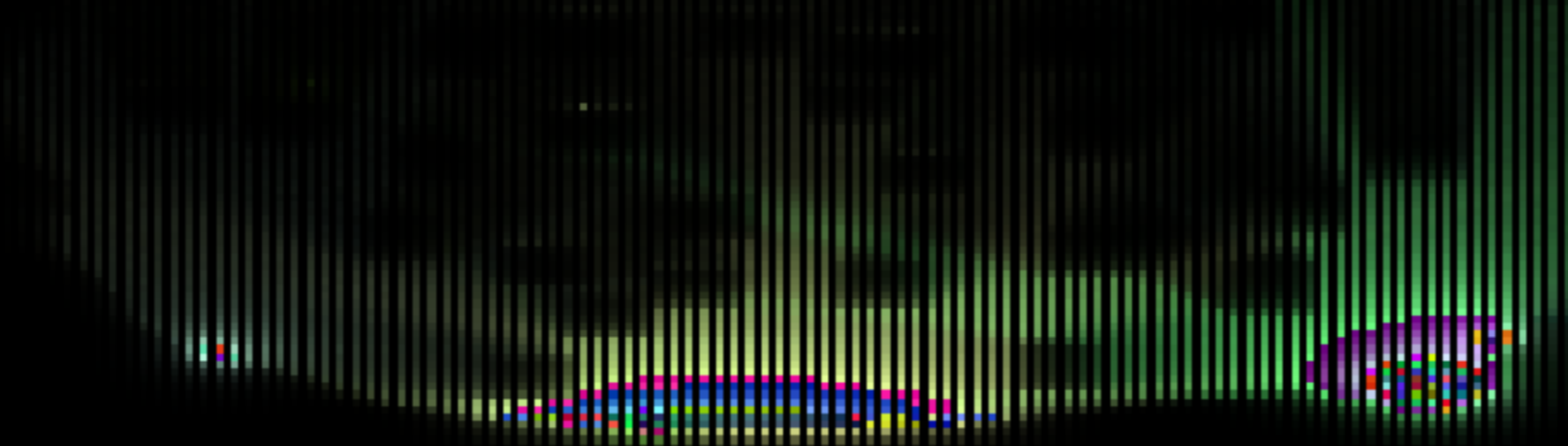
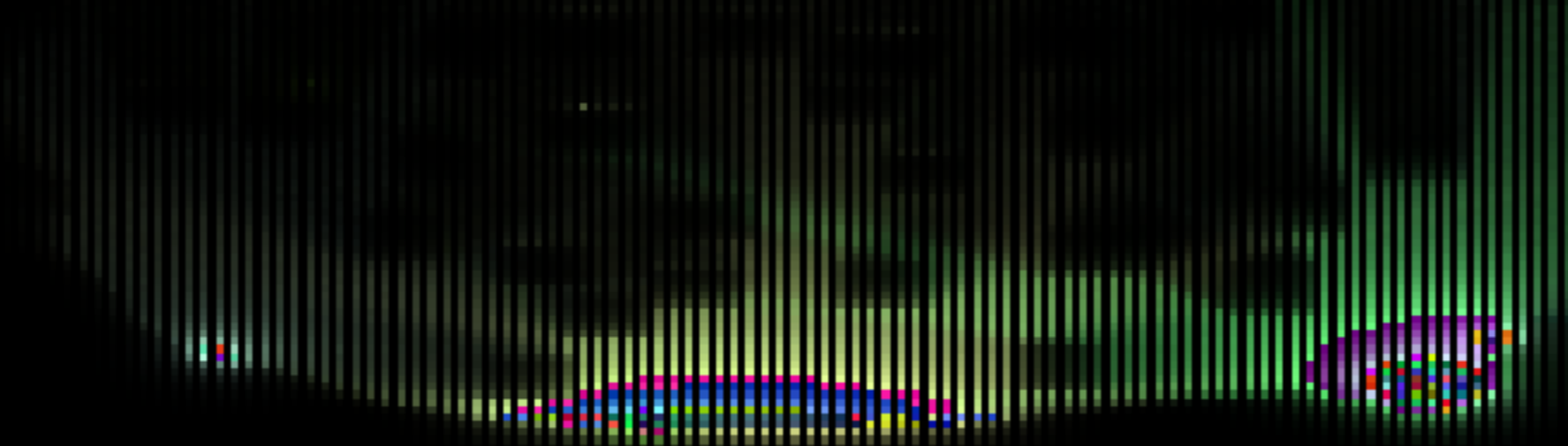
and what the actual glow texture looks like underneath it
 dusk lynx
After I rearrange some things in my "virtual pipeline", I should be able to get it down to 1 frame of delay including de-noising
Unfortunately, the HDR color uses up all the space I would have done multi-frame accumulation with, so all the rays are done at once now. The size of the color buffer can be reduced to improve performance if needed at the expensive of a lower resolution glow effect
though I could do in-place accumulation if it's really needed, just doesn't look as good as having separate history buffers
mortal geyser
dusk lynx
and what the actual glow texture looks like underneath it
i am curious about the section with the vertical lines? whats that for
 dusk lynx
mortal geyser
i am curious about the section with the vertical lines? whats that for
dusk lynx
mortal geyser
i am curious about the section with the vertical lines? whats that for
That's storing HDR color, 2 pixels are used to store each color. One pixel for the low 8 bits and the other for the high 8 bits
mortal geyser
dusk lynx
That's storing HDR color, 2 pixels are used to store each color. One pixel for t...
ohh i thought those black lines were just wasted space
dusk lynx
If something gets extremely bright (~100-200x brighter than usual), you should start seeing those dark columns become bright enough to see
dusk lynx
The next thing I need to fix is this shimmer caused by the different grid resolutions being used. I should be able to fix it by changing the raymarching process slightly.
dusk lynx
There's an off-by-one error in this line of code that I spent a while hunting down

textureSize returns the dimensions of a texture, not it's bounds. So I need to subtract 1 from the size before multiplying it by the normalized texture coordinates uv or it will be slightly off and result in an out of bounds access if uv is 1.0
It's not like this throws an error or anything, it just results in your pixels being a slightly different shade of color... very difficult to notice unless you specifically test for it
foggy glacier
nolla and their off-by-one errors <3
dusk lynx
this isn't even Nolla, this is OpenGL itself. Multiplying uv with textureSize feels like obvious way to convert between UV and pixel space (and you see this in lots of examples), but it's actually incorrect
foggy glacier
oh really? thats amusing, im surprised it wasnt a classic nolla off-by-one
considering they seem to have quite a few of those
dusk lynx
Nolla's shaders have a few off-by-x errors in them, but it all gets smoothed over anyway
dusk lynx
off by 1 error before and after

 foggy glacier
very amusing lmao
dusk lynx
It's very satisfying to think of a hypothesis of why something doesn't look right, go spend 5 minutes typing in the shader, save the file and then see the pixels turn the expected color. The pixels are the only feedback you get
dusk lynx
I just thought of a way to make several heavy components an order of magnitude faster, time for another redesign
dusk lynx
What kind of lava do you prefer?

 foggy glacier
i think maybe the former
 hasty zinc
i think the former as well
it feels more textured
 brave geode
former yeah, seems more molten and warmer compared to just being a bright neon liquid
hasty zinc
asked some other people i know, and they agreed on the former being better, but one preferred the brightness of the latter
dusk lynx
The difference comes from allowing rays to pass through the lava (left), and stopping rays as soon as they hit a glowing surface (right).
Stopping the ray at the surface gives more natural looking light outside of the lava, but the lava itself becomes a solid color.
I should be able to add a bloom effect to give the deeper lava a more intense color, so I can keep the more natural looking lighting
polar delta
i think the top should be red but the sides orange
meager tangle
hasty zinc
asked some other people i know, and they agreed on the former being better, but ...
I agree here
foggy glacier
@dusk lynx i feel like the answer is probably quite a conclusive "no" but i figured id ask the expert, is there a way to acquire visual data through the shader? like theres no way to read screen colours and save it to create like a camera or anything
to my knowledge data can only be passed to the shader, not from iirc?
i dont see a GameGetPostFxParameter so im assuming its not possible
but i figured if there was a haxx method to do it anyway you'd probably know o7
dusk lynx
foggy glacier
<@332404454274105344> i feel like the answer is probably quite a conclusive "no"...
Your assumption is correct, C- level OpenGL API calls are needed to make the output texture available to the CPU.
So it is possible with unsafe mode at least
dusk lynx
However, if you just need to communicate a signal back to Lua, there is one extremely haxx way to do it by purposefully loading the GPU to lower the framerate, and read the frame timings back in Lua. There's so many other things that could cause similar lag, and be careful to not crash the GPU and/or system
foggy glacier
do you have any idea how easy itd theoretically be for nolla to implement a way to transfer this data? for the purposes of adding to the API Wishlist
foggy glacier
dusk lynx
However, if you just need to communicate a signal back to Lua, there is *one* ex...
oh? im interested
i would like a theoretical method that allows me to take an in-game screenshot and display it in-game
getting the data is the difficulty
dusk lynx
foggy glacier
do you have any idea how easy itd theoretically be for nolla to implement a way ...
It should be a few OpenGL API calls to get the texture and then it needs to be saved into memory somewhere, but I don't know the specifics
dusk lynx
foggy glacier
i would like a theoretical method that allows me to take an in-game screenshot a...
Where do you want to display it, and for how long? It is possible to freeze pixels by not updating them, so an effect can be made that keeps an old frame on-screen. The portals demo I made uses this trick
foggy glacier
dusk lynx
Where do you want to display it, and for how long? It is possible to freeze pixe...
this sounds interesting, i could make do with a version that simply freezes pixels in the middle of the screen- the idea is i wanna have locations where you snap photos to do something
if this is possible then i will keep this conversation in mind and come back to you when i eventually get around to implementing this
dusk lynx
You could resize the entire screen into a smaller region (even rotate it, apply filters, etc.) and then keep those pixels in-place while the rest of the screen continues to uodate
But once in-place, it only lives in screen memory and there is no way to move it or modify it other than overwriting it
foggy glacier
my though process is taking a snapshot photo (perhaps with a filter applied as its frozen or some change in the visuals- akin to a ghost that shows up only in photos) and from there the photo is displayed momentarily in the middle of the screen before going away
dusk lynx
foggy glacier
do you have any idea how easy itd theoretically be for nolla to implement a way ...
If Nolla would add a way to manipulate the OpenGL pipeline... I could do so much more
foggy glacier
sounds like itd be worth putting in the API Wishlist
dusk lynx
foggy glacier
my though process is taking a snapshot photo (perhaps with a filter applied as i...
Yep, that can be done. You could also fade it out by writing pixels with partial alpha values to blend in color over time
foggy glacier
W
and from there i just need to check if the location the player is at is correct in order to confirm or reject the photo (do not need shader stuff at all for this)
foggy glacier
dusk lynx
If Nolla would add a way to manipulate the OpenGL pipeline... I could do so much...
you should totally throw up an entry for this if you think its the sort of thing nolla could reasonably add and/or this would greatly help in modding noita
dusk lynx
foggy glacier
you should totally throw up an entry for this if you think its the sort of thing...
Yeah, I'll think about it. It would be quite a bit of effort to set up, but it would help with shader modding immensely and make previously impossible things possible
foggy glacier
yeah, listing the pros and cons would be good, here's hoping for Epilogue 3!
dusk lynx
I was looking through old recordings and found this, I'm not sure I ever shared this demo or not. So here it is
foggy glacier
dusk lynx
I was looking through old recordings and found this, I'm not sure I ever shared ...
this is awesome
inconceivably so
dusk lynx
Creating proof-of-concept demos to show some tech is possible: ✅
Actually making content with said tech: ❌
foggy glacier
spreading knowledge of tech that is possible is great for inspiring those who make content to come up with something that uses it
i have a project i intend to get to at some point and leaning into wacky shader stuff for it like this is something im considering
dusk lynx
with the raymarching this demo uses, you can draw basically any shape you can describe mathematically. You could make some pretty wild things once you start adding more and more shapes, just re-draw anything you want
packing a series of shapes into a texture that's then processed in the shader would be the best way to add many shapes, as long as they are all primitive shapes or combinations of them
foggy glacier
knowing what's possible is one thing, but physically seeing it in an example here is what gets the mind racing imo, this is just cool to see
mortal geyser
dusk lynx
I was looking through old recordings and found this, I'm not sure I ever shared ...
i think you shared something similar before
don't think i have seen this particular one though
dusk lynx
the shader debugging experience
 dusk lynx
Data layout rev. 7, now featuring stability across 3 frames
dusk lynx
fine tuning the denoiser and interpolation. The interpolation still looks a bit blocky, I need to work on it more


 dusk lynx
I'm getting things ready for a preview build for anyone to try out and get some feedback
dusk lynx
Prerelease version of Noita RTX for anyone who wants to play with it.
Note that there are some performance optimizations I still need to make so this will be slower than the final release.
Brightness multipliers and debug visualizations can be changed in the rtx_compute() function in post_final.frag which you can adjust to your liking. There may be some amount of automatic exposure adjustment in later releases.
I also plan to do a pass on the game where I change the game's default glow and light colors to better match the new lighting system. If you see anything with strange colors such as toxic rock being white or enemies with incorrect light colors, please let me know.
dusk lynx
The ambient light level can be adjusted on line 1056 of post_final.frag, I haven't added a settings menu to adjust this yet
foggy glacier
testing with CC later 🙏
dusk lynx
Also, those with beefier PCs can up the ray count in post_flow1.frag, line 430. 256 seems plenty and 512 is probably past diminishing returns
mortal geyser
dusk lynx
okay it does not work alongside the parallax shader you made a while ago it seems
noted
foggy glacier
ill give it a go, ill post the results of some of the cool stuff when i try it
mortal geyser
(i was trying to use it in arena)
foggy glacier
lmao
mortal geyser
i like my competitive gamemodes with less visibility
foggy glacier
oooo i wonder if itll work fine with CC, since we do some minor shader stuff
mmmm should hopefully be fine
dusk lynx
mortal geyser
okay it does *not* work alongside the parallax shader you made a while ago it se...
I'm using the data folder while it's still in development, so it would overwrite other things until I set up the shadercode injection
foggy glacier
oh this shit's gonna be injected? good luck lmao
i thought this was gonna be dataoverride simply due to how much itd have to change
dusk lynx
(post_glow1.frag and post_glow2.frag are 100% rewritten, so those will stay as data files)
foggy glacier
ahhh makes sense
dusk lynx
but everything I do in post_final.frag can be injected easily
foggy glacier
alex peering into my computer as i download his silly mod test (my computer is now forfeit)
 foggy glacier
oooo i wonder if itll work fine with CC, since we do some minor shader stuff
foggy glacier
foggy glacier
oooo i wonder if itll work fine with CC, since we do some minor shader stuff
lmao

mmm something seems off, lemme turn off some of my mods rq and test it in a more "pure" environment

@dusk lynx should i be doing this in reg.exe or can i use dev?
dusk lynx
foggy glacier
<@332404454274105344> should i be doing this in reg.exe or can i use dev?
Either will work, but dev exe will let you edit and hot reload shaders if you want to tweak lighting parameters
foggy glacier
yeah it was a mod issue
dusk lynx
foggy glacier
lmao
I upgraded the GLSL version for some features I needed, which required removing some older things like gl_FragColor. I believe there is a GLSL version that gives me what I need, but still supports the older stuff so mods that rely on it don't break, I'll add that to my TODO
dusk lynx
The denoising changes to reduce aliasing hasn't worked well, and has just made things look a bit worse. I'll revert that and look into masking the aliasing some other way
I'll also make a public repo for this so that nightly changes are available
I'll also make a different thread for it, so that this one can remain about general shader modding
dusk lynx
GitHub
Lighting overhaul mod for Noita. Contribute to alex-3141/noita_rtx development by creating an account on GitHub.
dusk lynx
That repo has the sharper glow lighting I mentioned, so prefer to use that
 dusk lynx
foggy glacier
are particle gfx unaffected by this? will this be fixed or is this unavoidable?
dusk lynx
foggy glacier
are particle gfx unaffected by this? will this be fixed or is this unavoidable?
They are yet to be added. I get them pre-blurred, so I need to figure out how to add them
foggy glacier
also noticed the screen doesnt dim on pause, is this intentional?
temporary cuz you're redoing how lighting is handled entirely perhaps?
dusk lynx
foggy glacier
also noticed the screen doesnt dim on pause, is this intentional?
I'm bypassing the whole existing lighting system including the screen effects like the overlay, so it's yet to be re-added
foggy glacier
makes sense
dusk lynx
Also need to re-add trip effects, liquid distortion, fog of war, etc...
foggy glacier
ill stop playing around in this test run and see if i can figure out why lighting was scaled incorrectly before rq
i assume its something to do with the CC shader breaking, in which case i can just disable it for this test
dusk lynx
foggy glacier
i assume its something to do with the CC shader breaking, in which case i can ju...
Likely, I repurpose a lot of things in the shaders so any changes to them are likely to conflict
mod compatability is on the to-do list, but anything that modifies or relies on the glow shaders will have issues since they are completely rewritten and repurposed
foggy glacier
hmmm nvm mod works fine with cc besides that error
it appears to be conjurer breaking the mod apparently
do you have any idea what conjurer could be doing to mess up the lighting in this manner? appears to be some sort of scale or something thats set incorrectly
 dusk lynx
Looks like the texture coordinate is having some offset applied to it, or it may be y-inverted
foggy glacier
example of the fungus light being super offset to the right

totally appears to be some scale thats fucked

top left area is more aligned and gets more fucked as it travels down right
dusk lynx
foggy glacier
totally appears to be some scale thats fucked
Yep, this shows some kind of scaling issue
foggy glacier
is it likely a magic number that conjurer is messing with?
dusk lynx
Possibly yes, if it messes with any of the resolution settings
foggy glacier
goot it, i assume this will likely be resolved in the long term but for now ill just override the stuff conjurer is doing to mess this up
ahhh there it is
 dusk lynx
Aah yes, that seems like it would do it
foggy glacier
oh this with CC should be fun- assuming sharpy added light component compat
 dusk lynx
foggy glacier
oh this with CC should be fun- assuming sharpy added light component compat
dusk lynx
foggy glacier
oh this with CC should be fun- assuming sharpy added light component compat
If it uses cosmetic particles, then it won't be visible yet. Particles that are real cells in the world will work though
foggy glacier
yeah probs not however last time i spoke to him i believe he was working on adding lightcomponent support
lightcomponents are calculated in the mod rn, right?
dusk lynx
Yes, the mod gets light from 2 sources: Glowing on-screen materials and LightComponents
foggy glacier
in which case i hope he got around to adding light components to GE
dusk lynx
The raw point light output looks kind of awesome, I've just realised

I'm currently fixing the debug visualizations I broke in the prerelease, commit coming soon
foggy glacier
dusk lynx
The raw point light output looks kind of awesome, I've just realised
this is awesome lmao
now i should be able to test the mod
took a while but i found out conjurer's zoom setting is broken atm lmao
CC materials are wonderful
need to fix the bug tho cuz it causes init failue and only half the materials make it in lmao
dusk lynx
foggy glacier
took a while but i found out conjurer's zoom setting is broken atm lmao
I'm assuming it's not correctly scaling the glow texture? It makes sense, since the glow texture's size is fixed despite being able to change the rest of the game's resolution
foggy glacier
dusk lynx
I'm assuming it's not correctly scaling the glow texture? It makes sense, since ...
do you mean the setting being broken or just how your thing broke because of a different scale?
dusk lynx
foggy glacier
need to fix the bug tho cuz it causes init failue and only half the materials ma...
Checkout the latest commit with fixed debug visualisations, they can help identify materials that aren't getting the right colors
foggy glacier
cuz the setting was broken cuz they dont track it properly, i fixed it by setting the value manually in the files lmao, it was just failing to register my stuff
dusk lynx
foggy glacier
do you mean the setting being broken or just how your thing broke because of a d...
Just a guess from me. Unless Nolla change the game, or some unsafe mode things happen, this mod won't play nicely with camera zoom mods
foggy glacier
gooot it
i dont use those so im unaffected lmao 👍
something to throw in the doc later then
dusk lynx
The entire glow texture except that top right corner is being utilized lol. Almost didn't have enough room

I'll draw up a flowchart for how this texture is split up and used across 3 frames later on
 dusk lynx
Absolute chaos!
foggy glacier
can i spread the word on the test or would you rather wait to make it more publicly known?
dusk lynx
The game loves creating super bright 1x1 pixel spots, I've tried to remove them but some are still getting through it seems...
foggy glacier
chaotic pandorium is a tough beast to wrangle
if thers a way to achieve something, cpand never fails
dusk lynx
foggy glacier
can i spread the word on the test or would you rather wait to make it more publi...
Go ahead, it's now in a "playable state", but also mention that this is still in development and many things are unfinished or to be changed
I was recording some footage and saw this chest... is this normal?
the anticlimax chest
foggy glacier
yeah thats normal lmao
finding one is crazy but often they have barely anything of note lmao
dusk lynx
Ah I see, lol
I noticed color fringing at the bottom of the screen, I think I forgot to clamp some coordinates somewhere..
Since this mod makes all materials emissive, this old bug when you land on emissive things will happen constantly. not sure if it's fixable
 foggy glacier
huh, fascinating
dusk lynx
Nolla pls fix
foggy glacier
i need to restart my testing session, cpand sent a noise-making wisp or smth to NAN and now logs wont shut up no matter where i go lmao
 foggy glacier
dusk lynx
https://github.com/alex-3141/noita_rtx
foggy glacier
dusk lynx
https://github.com/alex-3141/noita_rtx
@meager tangle
meager tangle
foggy glacier
GE seems to influence light components, W
yes!! I recently added this change, and I am desperately hoping it works with this mod
wait
foggy glacier
worked fine as far as i could tell
meager tangle
i forgot there was a part of it i forgot to finish
foggy glacier
hydroxide glimmer on bomb made a pale blue light
foggy glacier
oooo
meager tangle
this is visible in Death Crosses
foggy glacier
that'll be cool
dusk lynx
I discovered a way to differentiate fire particles from the "base" fire color, and applied a luminance threshold to it to make the differences in fire brightness less extreme so there's less flickering. This makes fire much more yellow, I'll do some color balancing

 foggy glacier
assuming you can, pandorium is gonna look so fucking cool when you get cosmetic particles to work with this
dusk lynx
foggy glacier
assuming you can, pandorium is gonna look so fucking cool when you get cosmetic ...
I can, it's just not super straightforward
foggy glacier
dusk lynx
I can, it's just not super straightforward
goot it ill be looking forward to whenever you get around to that then
noita bad game, it failed to save the second gif, heres this at least, this showcases colours in a much more open environment- seeing so much poison gas is certainly interesting
 dusk lynx
I need to turn this pre-blurred texture into discrete pixels I can feed into the simulation
foggy glacier
is that collapsed holy mountain?
dusk lynx
foggy glacier
is that collapsed holy mountain?
Yes, but upsidedown
dusk lynx
hmm, how to tell where one pixel ends and the other begins. Some kind of deconvolution maybe?

I'll need to isolate a single pixel and determine what kind of blur this is and the kernel size, and then I might be able to do something
meager tangle
foggy glacier
noita bad game, it failed to save the second gif, heres this at least, this show...
ded gif
hasty zinc
dusk lynx
https://github.com/alex-3141/noita_rtx
nice, I'll give it a test when I can
foggy glacier
meager tangle
ded gif
let it load a bit first?
 barren barn
It's wonderful!
Although there's one problem at the very beginning that some layers seem to be reversed
After investigation, it was found that the problem lies with this setting ( low quality rendering )
Perhaps some setting recommendations should be added to the readme?
Although it is unlikely that low quality rendering will be enabled for players who pursue rtx effects, lol

 brave geode
polar delta
does anyone actually use it?
brave geode
polar delta
does anyone actually use it?
yes
#1141534183722852492 message
dusk lynx
barren barn
It's wonderful!
Although there's one problem at the very beginning that some la...
Interesting, thanks! I'll find out why this is happening and I should be able to fix it
dusk lynx
I accidentally broke liquids in a late night commit, it's now fixed
dusk lynx
I've added material color overrides to fix some materials that were broken and appearing as bright white.
I think the issue was caused by an interaction with base materials with child materials that use textures, but I haven't figured it out yet


Let me know if you see any other bright white materials
 vernal raptor
dusk lynx
Since this mod makes all materials emissive, this old bug when you land on emiss...
vernal raptor
dusk lynx
Since this mod makes all materials emissive, this old bug when you land on emiss...
reminds me of that weird phenomenon where some things will subtly glow blue in the dark on contact
triboluminescence iirc
like normal ass shit like sugar and tape
we can just say it's a feature 🔥
all materials now exhibit triboluminescence
dusk lynx
I've further reversed how the game processes glow colors and have now got all color sources into the same color range, so no more weirdly brighter than usual materials
meager tangle
dusk lynx
I've added material color overrides to fix some materials that were broken and a...

cant wait till I have time to test this out
foggy glacier
i did notice the stuff being weirdly white im glad that was fixed
mortal geyser
something seems to be weird
the lighting isn't hitting walls i think
when there is a light source on screen everything is lit up
looks very different from the showcase
was watching xytio play around with it on stream, he turned ambient light all the way down and it stilll looks like this everywhere

the old prerelease version looks correct though
dusk lynx
mortal geyser
was watching xytio play around with it on stream, he turned ambient light all th...
This looks to be because I've submoduled NXML which isn't included if you download the repo as a zip file from Github...
I guess I'll start making releases, and make some install instructions
polar delta
dusk lynx
This looks to be because I've submoduled NXML which isn't included if you downlo...
yeah, github zip download has been broken for ages
probably not going to get fixed anytime soon :(
dusk lynx
polar delta
yeah, github zip download has been broken for ages
I guess it's not technically part of the repo code, and some repos may have huge amounts of submoduled code, so it makes sense.
polar delta
apparently its because git-archive didnt support it in 2012
dusk lynx
Maybe I should make the mod bail if it can't load NXML
dusk lynx
mortal geyser
the old prerelease version looks correct though
Thank you for sending him the working version in the steam! I had no idea it would be broken like that
dusk lynx
I love the instant feedback you can get by setting shader uniforms from the settings menu
polar delta
did you kill the pause menu darken?
dusk lynx
polar delta
did you kill the pause menu darken?
Yes (or more specifically, I've not re-added it yet)
dusk lynx
polar delta
my shaders are very sad
That's a lot of errors.. Is that from running this mod? I'm making frequent changes so checking out HEAD may be broken, I'm making a new release now
polar delta
its still sad
dusk lynx
Hmm, interesting. GLSL should be fairly universal, but it's failing here.
Looks to be an issue with texture2D and the GLSL version I've specified.
If you change the first line of each shader to #version 400, does that help?
 dusk lynx
I think I can go as low as version 130 or 120, but I'll need to swap out some conveniences
dusk lynx
polar delta
well thats unusual
One of the glow shaders might have failed to compile, if you edit and save them, do you see any compilation errors?
polar delta
yeah still some shader errors
array constructor sad
do you know how the line number format for these works?
or is it borked by includes / lua editing
probably uint materialCounts[16] = uint[16](0);
doing uint materialCounts[16] = uint[16](0, 0, 0, 0, 0, 0, 0, 0, 0, 0, 0, 0, 0, 0, 0, 0); fixes it
dusk lynx
polar delta
do you know how the line number format for these works?
It should be the line numbers, but it seems to not align in those logs. Annoyingly it doesn't tell you which shader the error comes from
dusk lynx
polar delta
doing ` uint materialCounts[16] = uint[16](0, 0, 0, 0, 0, 0, 0, 0, 0, 0, 0, 0...
There are some conveniences from newer GLSL versions I use, yeah. Your GPU driver may also need specific syntax too, but I've not tested much outside of my own setup
polar delta
maybe me setting version 400 is the issue
i dont have any versions which work with (0)
dusk lynx
Thank you for the logs, I'll dig through them later to see if I can improve compatibility
polar delta
it seems the earliest versions that work are 400 for post final and post glow1, and 330 for post glow2
nvm that might just be my gpu not liking other versions
dusk lynx
I use some newer fancy bit twiddling functions in post_final.frag that need v400 I think
polar delta
post glow2 seems to work with 130, but the others dont like anything before 400
dusk lynx
If you set them all to version 400, does it compile without issues?
polar delta
polar delta
doing ` uint materialCounts[16] = uint[16](0, 0, 0, 0, 0, 0, 0, 0, 0, 0, 0, 0...
other than this
regardless of version uint16 doesn't work
dusk lynx
When you start the game, are you seeing a list of patched materials being printed to the console?
dusk lynx
It should print a line for every material in the game, so yes. I'll reduce the noise later but it's useful for debugging
If you enable this debug visualisation in post_final.frag, line 1152, what does the buffer look like?
 polar delta
diff --git a/data/shaders/post_final.frag b/data/shaders/post_final.frag
index 26f52fa..383ad5c 100644
--- a/data/shaders/post_final.frag
+++ b/data/shaders/post_final.frag
@@ -1,4 +1,4 @@
-#version 450 core
+#version 400
 #define DITHER
 #define HIQ

@@ -1791,4 +1791,4 @@ void main()
     // Apply Noita RTX lighting
     // TODO: This clobbers the rest of the shader output. Need better integration.
     outColor.rgb = rtx_compute(tex_coord, tex_coord_glow);
-}
\ No newline at end of file
+}
diff --git a/data/shaders/post_glow1.frag b/data/shaders/post_glow1.frag
index 12a818d..56a9925 100644
--- a/data/shaders/post_glow1.frag
+++ b/data/shaders/post_glow1.frag
@@ -1,4 +1,4 @@
-#version 450 core
+#version 400

 #define BUFFER tex_glow_prev_frame

diff --git a/data/shaders/post_glow2.frag b/data/shaders/post_glow2.frag
index 0cfe4d6..eee7957 100644
--- a/data/shaders/post_glow2.frag
+++ b/data/shaders/post_glow2.frag
@@ -1,4 +1,4 @@
-#version 450 core
+#version 400
 #extension GL_ARB_gpu_shader5 : enable

 // TOTAL BUFFER SIZE: 431x242
@@ -339,7 +339,7 @@ float downsampleEmitters(ivec2 st){
 }

 uint mostCommonMaterial4x4(ivec2 st){
-    uint materialCounts[16] = uint[16](0);
+    uint materialCounts[16] = uint[16](0, 0, 0, 0, 0, 0, 0, 0, 0, 0, 0, 0, 0, 0, 0, 0);
     for(int y = 0; y < 4; y++){
         for(int x = 0; x < 4; x++){
             ivec2 sample_st = st + ivec2(y, x);

 dusk lynx
Ah, all looks correct!
dusk lynx
polar delta
```diff
diff --git a/data/shaders/post_final.frag b/data/shaders/post_final.frag...
Thanks for the diff! I'll add these changes in
What platform/GPU are you on? I gather a Linux distribution of some kind?
polar delta
no idea what noita is running on tbh
probably integrated graphics?
05:00.0 VGA compatible controller: Advanced Micro Devices, Inc. [AMD/ATI] Phoenix1 (rev c2)
distro is ubuntu
are you going to get rid of emissives?
dusk lynx
polar delta
are you going to get rid of emissives?
Yes, the plan is to patch all emissive sprites on startup and convert them to regular sprites with lightcomponents. But some sprites benefit from being emissive (ghost enemies for example), so I'm not sure yet what to do with those. Maybe I'll selectively change sprites based on what fits the game best
I don't know how possible that is yet, though

GitHub
Fix black screen on game restarts
Fix fireflies in fire particles
mortal geyser
dusk lynx
This looks to be because I've submoduled NXML which isn't included if you downlo...
oh i completely didn't consider that would be the case, i just told him to download the zip because it was the easiest method of downloading lol
foggy glacier
oh thats fascinating i didnt know that was an issue
should make a disclaimer about that on projects that use submodules in the future
dusk lynx
The first time I use git submodules in a project and it causes issues... I've learnt now, at least
squashing more fireflies (random white pixels that appear). These were showing up on fire and whiskey gas


If any mods add fire particles that are grayscale (r == g == b), then this will remove them since that's the only way I've been able to identify these firefly particles so far
dusk lynx
The glow color of freezing vapour gas particles will render at a much higher brightness if some other material is directly to the left of it. This feels like a bug, since I don't know what this would be useful for

I know some gas particles are 2 pixels wide, maybe it's related to that?
foggy glacier
i think its likely to do with that
dusk lynx
Well it's my problem now. I should be able to filter these particles out
dusk lynx
Hmm, it could be actually, since I use white as the occluder color and these are right against it.
meager tangle
grr, additive my beloathed
mortal geyser
the fire flickering is still very strange, theres occasional white flashes that feel a bit jarring
especially noticable with dust turned on
dusk lynx
Fireflies are still getting through... I think I'll give up on a way to ID these exactly and just dot it with white and threshold, since the game desaturates these pixels a lot
the dot method also fixes these too


Are there any glowing white (or near white) gasses in the game? This approach would kill them
foggy glacier
there is in CC
CC has Potion Gas
Levitatium might get close in va- thats a liquid not a gas im dumb
afa i can remember i think Freezing Vapour might be the closest, at least in terms of gasses that glow
dusk lynx
Looking through the base game materials, steam_trailer is the closest to white I could find and it's safe from the threshold
 dusk lynx
I've added a set of rules that I think does a good job in the latest commit
dusk lynx
Experimenting with some new occlusion logic that allows light to illuminate walls, but to not leak through them. This makes harder shadows and better resembles line-of-sight systems which some people like

 meager tangle
Ooh, I do like this!!
vernal raptor
this would go super hard with lightup lanterns
I wonder if it'd be possible to put together a mod that makes lanterns emit cosmetic fire particles that work with this mod
no wait, light comps and such already work, don't they
sleep deprivation is fucking with me
dusk lynx
vernal raptor
no wait, light comps and such already work, don't they
Yes, they do. Im adding the new logic to the light components light sources now
vernal raptor
awesome
mortal geyser
dusk lynx
Experimenting with some new occlusion logic that allows light to illuminate wall...
i love this
dusk lynx

the lightcomponent lights are a harder to work with since the lightcomponent can be inside some material like the lamps in hiisi base, and don't seem to be aligned very well with the material pixels
meager tangle
dusk lynx
It turns out that any physics objects that are rotated are full of holes! A bit of processing and the holes are filled

 meager tangle
Huh!!!
mortal geyser
oh yeah i have noticed that
pretty sure i've seen holes like that in vanilla physics bodies before
it is hard to rotate pixel art without deleting or adding pixels
dusk lynx
mortal geyser
it is hard to rotate pixel art without deleting or adding pixels
It is a solved problem though, check out https://www.youtube.com/watch?v=1LCEiVDHJmc
I assumed Noita would be using this technique, it's a perfect use case for it

Check out Jane Street's excellent Academy of Math and Programming (AMP). https://bit.ly/3T6gc3n
Jane Street has put together a fun logic puzzle to get folks excited about the AMP program. You don’t need to complete the puzzle to apply – it’s just something fun to get you thinking! Check it out: https://bit.ly/sum-amp
Here are Andrew Tayl...
mortal geyser
dusk lynx
It is a solved problem though, check out https://www.youtube.com/watch?v=1LCEiVD...
is this using the skewing thing?
dusk lynx
Yes
mortal geyser
thats how i rotate pixel art in photoshop because photoshop is notoriously bad at pixel art rotation
lmao
skewing bypasses the weird nearest neighbor scaling it does when rotating
vernal raptor
lol yeah
foggy glacier
dusk lynx
It is a solved problem though, check out https://www.youtube.com/watch?v=1LCEiVD...
id say a big reason why it doesnt is probs cuz they didnt write the box2d physics code themselves, its just a library that then has the physics body pretend to be a regular material for reaction purposes briefly every frame
though theres a decent chance they also would not have used it even if they had written the physics sim themselves lmao
mortal geyser
foggy glacier
id say a big reason why it doesnt is probs cuz they didnt write the box2d physic...
i mean they did write the rendering and pixel simulation part
just not the physics engine behind it
not reason they couldn't have done the rendering / pixel positioning this way
foggy glacier
mmmm i guess thats fair, my perspective was that they just have the pixel follow positions on the box2d so it follows the natural rotation of the physics body, but they could have used skewing instead that is true
meager tangle
devs, come back!! we need you to patch the game again!!!
vernal raptor
devs!!! more modding api changes!!! I beg of you!!!!
mortal geyser
devs please hand over the PDB file
meager tangle
the what file?
foggy glacier
devs please hand over all the files
mortal geyser
meager tangle
the what file?
PDB files are a debugging file which contains symbols and such which makes reverse engineering the engine WAY easier
dusk lynx
I'm using a threshold of how thick a wall needs to be in order to completely block a ray, which you can see how the orange light doesn't leak into the above area once I set it low enough. This treshold needs to be high enough to not block rays trying to reach the emissive pixels of the alters in the holy mountain, however.


 meager tangle
ooh!!
mortal geyser
@dusk lynx how do i stop my parallax from turning weird colors when using your custom parallax script?

what it is supposed to look like for reference:
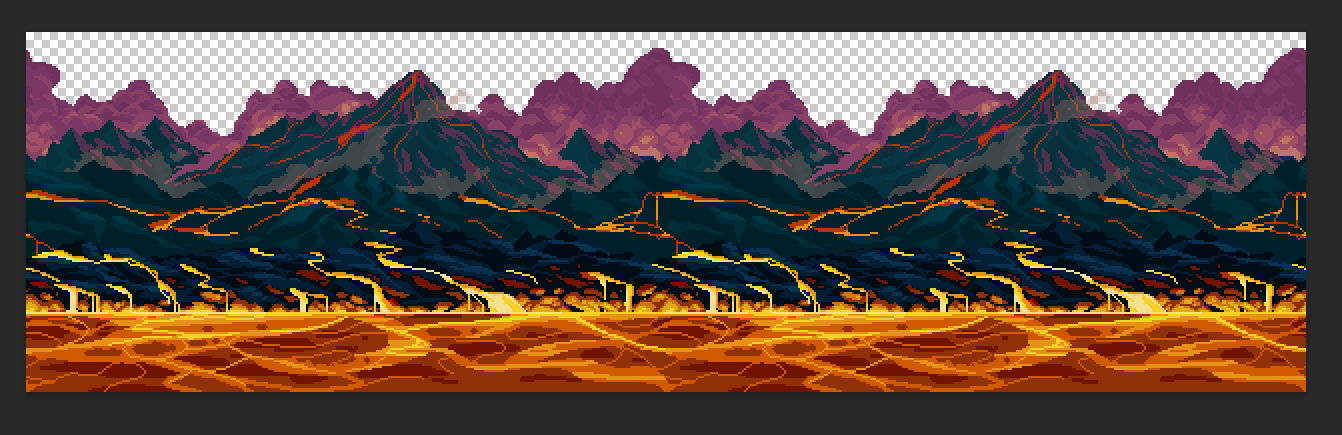
seems like the colors are getting inverted somehow
actually no it isn't inverted because the brightness is the same
vernal raptor
mortal geyser
actually no it isn't inverted because the brightness is the same
hue inversion?
+180
mortal geyser
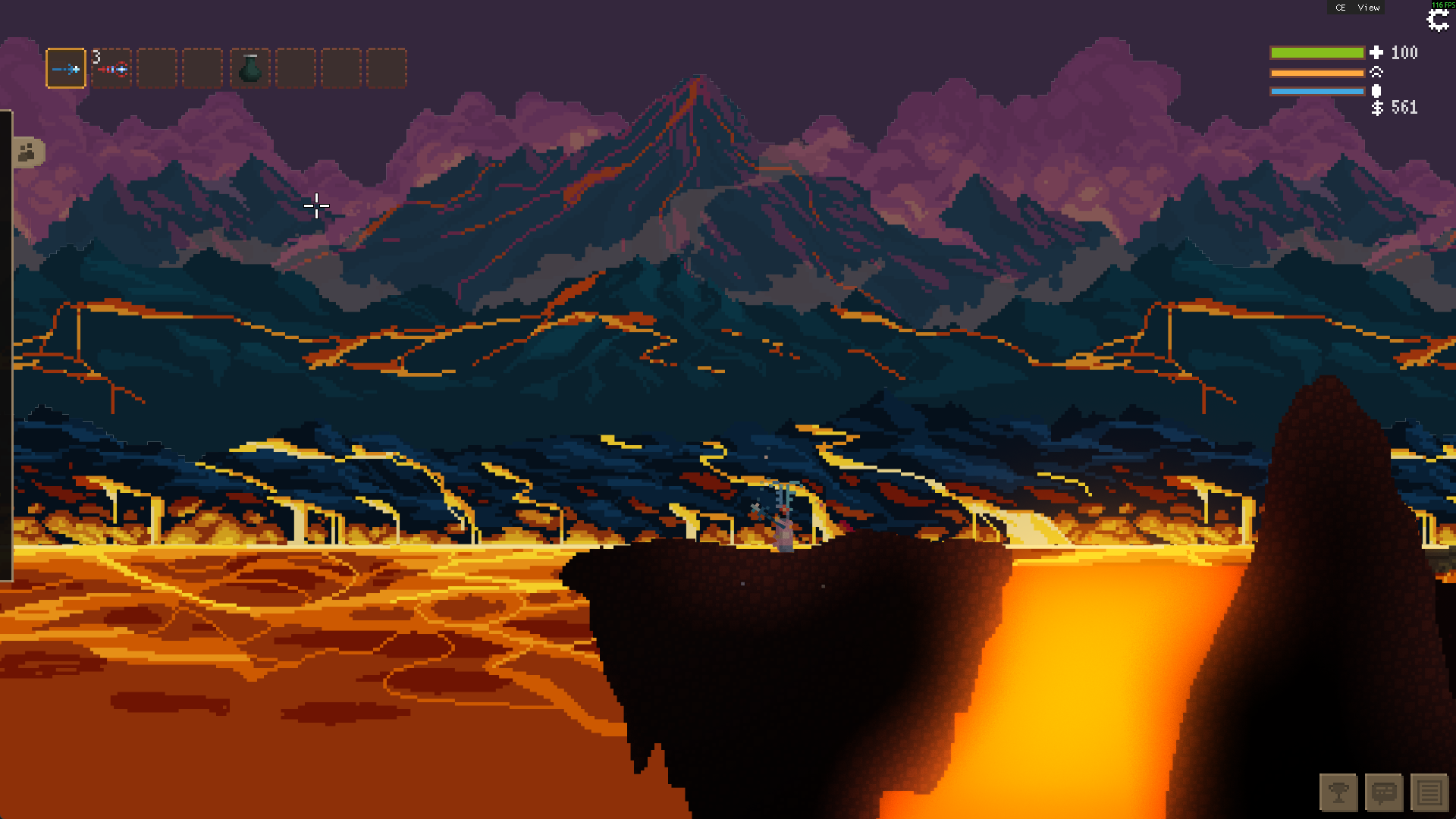
oh the red and blue channel were swapped for some reason
unswapping the channels fixed it
foggy glacier
i did find it strange that the purple mountains in the distance retained their colour lmao

 dusk lynx
mortal geyser
one thing of note, theres fringing around all the layers
dusk lynx
mortal geyser
one thing of note, theres fringing around all the layers
Interesting, looks like it's only happening on layers over the sky color?
mortal geyser
dusk lynx
Interesting, looks like it's only happening on layers over the sky color?
it was due to billinear filtering
meager tangle
dusk lynx
https://github.com/alex-3141/noita_rtx/releases/tag/v0.2.2
is this the most up-to-date version?
meager tangle
...so, i've both tried cloning the latest commit into the mods folder, and i've tried downloading and unzipping the 0.2.2 prerelease, and both versions show me a perfectly white screen. I have no idea why it's doing this, I've fiddled with the mod settings and nothing changed

it lets me play the game
i just can't see anything
@foggy glacier do you know what's going on?
i know you've played with this more than i have
I had to init and update nxml, but like
that still didn't fix it
foggy glacier
this is what shaders do when they fail to compile
there some kind of arbitrary error happening causing the entire thing to fail
ill need to check this out tomorrow perhaps
meager tangle
i wanted to stream the mod 
but it not working kinda killed the hype to try other mods
so like
ig im not streaming
vernal raptor
are you running it alongside any other mods?
meager tangle
nope
but i'm about to test another github branch of my save00 to see if another mod infected this one
vernal raptor
what's the mod folder called?
vernal raptor
I mean for this mod
meager tangle
noita_rtx
yeah, no, it's not a weird edge case where another disabled mod is infecting this one
meager tangle
this happened with both the current version and the featured prerelease
imma test noita_dev
vernal raptor
yeah I was gonna suggest trying the other exe
meager tangle
nope
vernal raptor
seems to work on the normal exe for me
meager tangle
 vernal raptor
hmmm
meager tangle
 vernal raptor
maybe it only works if you have comp explorer on..?
vernal raptor
hmmm, for sanity's sake, try reinstalling and making sure it all lines up right
vernal raptor
very unusual that this isn't working
meager tangle
i'm using Prerelease v0.2.2
 vernal raptor
and you're certain that it's mods/noita_rtx/init.lua, yes?
meager tangle
yes
vernal raptor
very strange
meager tangle
loading
nope

tempted to nuke my mods folder temporarily
....hm

maybe it's a system issue?
iunnno

i'm just collecting as much info as i can for when alex wakes up
 dusk lynx
meager tangle
dusk lynx
meager tangle
Interesting, I've never seen that error before. Based off the message, I think I know the fix
dusk lynx
I believe this may be an issue unique to Intel Arc, as I've never been able to test on it before
dusk lynx
meager tangle
i'm just collecting as much info as i can for when alex wakes up
Thank you for doing that!
Please test if this build fixes the issue. If it does, I'll publish it as the next release
I also noticed your GPU usage was near 100%... If this isn't a side effect of the error and performance on Intel Arc is poor, you can try lowering the number of rays in noita_rtx/data/shaders/post_glow1.frag on line 431. 128 or even 64 rays should still be enough
meager tangle
dusk lynx
Thank you for doing that!
Please test if this build fixes the issue. If it does,...
No problem!! I'll give this a test sometime today and will update you on what I find

meager tangle
Me when I finally get around to testing this
I just got home from visiting with family for Easter weekend last night!
So now I'm able to work on some personal projects (finally!)
OH YEAH


@dusk lynx it works!! You also fixed the GPU issue!
thanks!! I'm going to give this a playtest tonight on stream! (maybe alongside Fungal Pain + Apotheosis...)
brave geode
I’m sure Apotheosis doesn’t have any random light components on various entities that don’t fit cause they were forgotten about when copy pasted over :p
meager tangle
If it does, I'll find them!
I wonder what the Wizard's Den biome modifier does in this mod
I wonder how the ToSR looks...
That place could probably look HAUNTING
brave geode
well the fog of war stuff is currently unimplemented right?
meager tangle
Apoth and noita_rtx are not compatible! Seems like the two mods both add shader stuff, and they clash

I'm not expecting mod compatibility to be the top priority rn, esp given that this mod is still in early development
But it'd be pretty cool if at the very least, Apoth compat was put on the todo list
(given it's the most popular mod in the community :D)
dusk lynx
Yep, it will be made compatible with Apoth, I've just not started on that yet


 polar delta
dusk lynx
Yep, it will be made compatible with Apoth, I've just not started on that yet
polar delta
dusk lynx
Yep, it will be made compatible with Apoth, I've just not started on that yet
given it currently uses data files wouldnt you need to redo a large amount of the shader to make it compatible?
dusk lynx
polar delta
given it currently uses data files wouldnt you need to redo a large amount of th...
Ill need to move some things around, but the majority of the new code is separated into easy to insert functions
 rancid crow
Looks great, any chance you can integrate the raytraced black holes mod as an option? Seems like it would fit really well with the theme, but as far as I can tell they aren't compatible
(I'm guessing this has already been mentioned)
dusk lynx
rancid crow
Looks great, any chance you can integrate the raytraced black holes mod as an op...
It should be possible, yes. I'll likely need to modify both mods to make them work efficiently together. It's also part of the mod compatibility plan once the main feature set of the lighting mod is complete
I'm hoping to find some time to dedicate to this soon
meager tangle
Oh!! I'm not sure if this has been brought up, but tablets glow white, not green, and their glow is....
the glow doesnt interact well with the tablet's physics body, I suppose
You'll see what I mean if you check them out
dusk lynx
Yes I'll need to change the default glow color on tablets. As for the interaction when light components are inside a physics body, it's something I've not been able to fix yet
rancid crow
I think the way the lighting works with the tablet looks really cool, actually. But yeah, I think it should be green/blue for the tablet in the tree
foggy glacier
dusk lynx
current latest ver
i linked this in noita chat so thought id mark the latest build of the mod
polar delta
So called git
foggy glacier
@dusk lynx i have a thing i wanna do with shaders and wanna know how doable it is
i wanna in realtime display the current screen really small and pixelated on a little in-world screen
would i be able to have it capture the entire game like GUI and all, but still have the player walk in front of it to block the screen?
(might ask you to assist me with implementation as well if thats fine)
polar delta
Gui is impossible
Displaying the rest on a small screen would be pretty easy
You just need to translate the various positions
polar delta
polar delta
Displaying the rest on a small screen would be pretty easy
Probably hard to make compatible though
dusk lynx
foggy glacier
i wanna in realtime display the current screen really small and pixelated on a l...
Easy, but GUI elements won't show
foggy glacier
yeahhh got it. ill see if i can get shaders to function on my computer (if you recall, i had issues where shader changes would not update realtime on my noita_dev)
polar delta
foggy glacier
yeahhh got it. ill see if i can get shaders to function on my computer (if you r...
That feature is kinda unreliable
Sometimes it just doesn't work
dusk lynx
foggy glacier
would i be able to have it capture the entire game like GUI and all, but still h...
Player is in the same layer as everything else. You could only get the player/other ents to render in front of the screen if there is no background sprite in the way (sky layer is visible), or if you DIY a greenscreen
foggy glacier
polar delta
Sometimes it just doesn't work
oh really? in the past whenever i brought it up, everyone seemed very confused by it, so i assumed it wa sjust a me-issue
polar delta
I've also had it mysteriously break for seemingly no reason
foggy glacier
concerning
foggy glacier
dusk lynx
Player is in the same layer as everything else. You could only get the player/ot...
its an arcade cabinet placed in a custom pixel scene in the lower left of Vault, I kinda wanna have it so you can walk up to it, and then if you interact with it the screen renders in front of the player and zooms in to take up the screen and then you're provide a gui thingy where you can do some stuff before you close it and it shrinks back
polar delta
If you fixed the player sprite you could easily make them render in front
dusk lynx
That will be easy then, as long as you want to have it render over the top of everything else
foggy glacier
dusk lynx
That will be easy then, as long as you want to have it render over the top of ev...
when they interact with the machine, yeah i want it to render over everything except the GUI i throw up
polar delta
Gui must be above all
foggy glacier
sure, even inventory? i can work with that
dusk lynx
The effect can be done by moving the existing shadercode into an isolated function that returns a color, and then calling it with modified coordinates based on the position and size of the virtual screen. This should be doable in a mod compatible way as well, if you don't modify any indentation and make some minimal changes
Directly modifying the texture coords is another simpler way that would also work
polar delta
You may need to be careful if the screen to world mappings fixed point is inside the screen
foggy glacier
wdym?
polar delta
You map arcade screen to real world coords right
What if the new coord is in the screen
dusk lynx
world pos would be mapped to screen pos, which would then be used to determine which pixels are in/out of the virtual screen
 faint gulch
oh damn, I've completely missed this, insane that you've already got it to a prerelease state
looks like I was worried for nothing – even in the most extreme gameplay scenarios my gpu utilization never spiked above 50 (most of the time it's a stable 30%; on a defective laptop 3050 btw)
I assume modded materials are not patched to be lit up within lasers yet, so that's why this beam is not emitting? When it does though, the lighting is gorgeous ngl.


very interesting to see the difference having "emissive" turned on makes now


vanilla for comparison


MagicConvertMaterialComponent seems to be a particularly nefarious about pure white ultrabright single pixel spam on reaction (not sure if I've captured it adequately on this screenshot lol)

Lastly, the difference in lighting is so dramatic that the environments previously authored for the vanilla rendering pipeline get entirely ruined upon the transition (frankly, a good thing given how much of a pain it is to design anything except for a variation of barely lit cave under Nolla's reign of terror). The first comparison is with default values, the second one is me tinkering with provided config values until the image looks more-or-less correct.


 dusk lynx
faint gulch
I assume modded materials are not patched to be lit up within lasers yet, so tha...
dusk lynx
faint gulch
I assume modded materials are not patched to be lit up within lasers yet, so tha...
Yeah, some materials and sprites (mainly emissives) need to be patched during startup to work with the lighting system. I assume that laser was emissive?
dusk lynx
faint gulch
MagicConvertMaterialComponent seems to be a particularly nefarious about pure wh...
Yeah, the game making bright pixels outside of a range I can control is my nemesis... Something that needs more work
dusk lynx
faint gulch
Lastly, the difference in lighting is so dramatic that the environments previous...
I'm hoping to make authoring for the new lighting as easy as I can for other modders.
Scenes like those might need entirely different sprites to look best, though..
Adding a new light component type for directional lights (like that lamp) is something I can absolutely do. I might experiment with a flashlight wand
I'm going to have an abundance of free time in a week from now, in which I'll work lots on this
faint gulch
dusk lynx
Yeah, some materials and sprites (mainly emissives) need to be patched during st...
All of the materials it uses are emissive but they are also apparently vanilla (been a while since I've looked at my own xmls lol)
faint gulch
dusk lynx
I'm going to have an abundance of free time in a week from now, in which I'll wo...
Based!
foggy glacier
@dusk lynx do you know what controls how the screen reacts to colour grading, and more specifically how i might speed it up?
messing with colour grading option for biomes, wanna be able to see the effects when i enter a biome immediately for testing
foggy glacier
oh i think this is it

ill take a look into it later if i dont get a response by then
faint gulch
the rays though... 😩
some insane scenes can be setup

wonder how Aloittaa looks
never mind, much simpler geometry than I recalled
dusk lynx
foggy glacier
<@332404454274105344> do you know what controls how the screen reacts to colour ...
Honestly, I haven't looked into that before. There seems to be some vanilla code that handles it, as you've already found. I'm currently bypassing all vanilla code, so it won't be applied anyway
foggy glacier
gooot it
foggy glacier
foggy glacier
oh i think this is it
do you know what i could do here to speed it up at least?
and/or make it instant?
dusk lynx
foggy glacier
do you know what i could do here to speed it up at least?
Replacing color_grading.a with step(0.0, color_grading.a) should do it
foggy glacier
got it, thx 👍
dusk lynx
Actually, might need to use step(0.01, color_grading.a)
foggy glacier
ill try both
but basically smaller steps is faster
ill tinker around with it in a bit
dusk lynx
I noticed the vanilla code is averaging color values as a luminance calculation in that code you sent... something Ill need to do properly when I replace it
though if the game and mod authors has already authored biome grading for that calculation, it's best to leave it as-is
dusk lynx
Experimenting with applying diffs at runtime in an attempt to avoid mod incompatibility and make development easier

diffs are being generated and applied correctly, but it remains to be seen how much this helps
polar delta
dusk lynx
Experimenting with applying diffs at runtime in an attempt to avoid mod incompat...
I think doing some kind of diff on an s expr of the code would work better
So that it can handle formatting changes
dusk lynx
It didn't end up working very well with the current algorithm. Will need to instead try a line based 3 way merge
dusk lynx
Instead of using diffs, I made some macros that generate a Lua script to apply the patches instead. This achieves my goal of having a single file with all my shadercode in it while still being syntactically correct for linters.
This makes it compatible with Apotheosis and New Enemies Mod (as in, it compiles and runs), but some effects are likely being clobbered still until I shift more code around


 foggy glacier
gorgeous
meager tangle
Woohoo!!!
dusk lynx
seeing how I can adapt the base game's fog effect into the new lighting model. The example here uses the fog to catch more light from light sources
The fog also has it's own color, which is less noticeable when using this method, so I may need to artificially mix in some more of the color to make it look as expected


mixing in 20% artificial fog color, for example.
 dusk lynx
getting light to interact with fog over the background was more involved, I had to add an extra layer for it.
I think this workaround code is related to it, and is no longer needed


The rest of the pipeline is integrated too - fog of war, worm blood nightvision, liquid distortion, fungal trip, etc.
I'll make a toggle for fog of war to switch between this default style, turning it off, and line-of-sight based vision
mortal geyser
it looks so good
though the lights popping in and out of existance at the edges of the screen will always stay jarring for me, but since you don't have off screen data i don't see how that could ever be solved
polar delta
dusk lynx
getting light to interact with fog over the background was more involved, I had ...
it only happens for some people
i added that code because a few people posted about it being broken for them and this seemed to fix it
it definitely is needed
dusk lynx
mortal geyser
though the lights popping in and out of existance at the edges of the screen wil...
the best I can for materials is make them fade in/fade out as they get close to the edges. The point light sources can kind of be fixed at high expense that probably isn't worth it
polar delta
though given they had quite old gpus they might have issues running this idk
mortal geyser
dusk lynx
the best I can for materials is make them fade in/fade out as they get close to...
increase virtual resolution and crop with shaders (and make everything look like dogshit because the pixels are no longer square)
dusk lynx
polar delta
i added that code because a few people posted about it being broken for them and...
I see, I'll need to do some testing. Weird things happen when using negative alpha values, maybe it's related to that?
polar delta
maybe
this should only change this if alpha is -0 iirc
assuming their gpu implements ieee754 correctly
mortal geyser
mortal geyser
increase virtual resolution and crop with shaders (and make everything look like...
i did this for my dome keeper mod to add the ability to zoom in and out and it makes it look so bad when zoomed in lmao
polar delta
i assume its some weird bug with their gpu
polar delta
mortal geyser
increase virtual resolution and crop with shaders (and make everything look like...
smh set virtual res to 1080p
mortal geyser
polar delta
smh set virtual res to 1080p
i don't even know if it is a multiples of 2 problem
i think it is just noita being weird when pixel perfect rendering is off
dusk lynx
mortal geyser
i did this for my dome keeper mod to add the ability to zoom in and out and it m...
I wanted to do that, but the glow shader works on a fixed resolution and it messes up texture alignment... And also the scaling issues you mentioned
polar delta
mortal geyser
i don't even know if it is a multiples of 2 problem
youll need your zoom factor to be near a rational with a small denominator and your virtual resolution to divide your monitor resolution
otherwise itll look bad
mortal geyser
dusk lynx
I wanted to do that, but the glow shader works on a fixed resolution and it mess...
yayy nolla making good decisions
perhaps worth in the future to look into having a unsafe addon that increase it?
after you finish the main mod
polar delta
@nolla expose the full rendering pipeline to safe api
whats the worst that could happen
mortal geyser
polar delta
@nolla expose the full rendering pipeline to safe api
adding a spell that explodes your gpu
dusk lynx
mortal geyser
perhaps worth in the future to look into having a unsafe addon that increase it?
That would be nice, but this entire mod is built around that resolution restriction at this point
dusk lynx
polar delta
i assume its some weird bug with their gpu
Are there any screenshots of this bug? I should be able to identify if it's a negative/NaN alpha issue if I see it
polar delta
yes
#noita-chat message
might have to do some digging to find all the messages
especially given they have deleted their account
dusk lynx
Thanks! Looking at that screenshot, I don't see the usual signs I expect... I'm not sure
polar delta
yeah its weird
you can see the different tests i tried and the results
to try and figure something out i suppose
i really have no idea what was going on with it
dusk lynx
This is the effect from negative alpha - the solid R, G, B pixels
polar delta
i think it seems more like sometimes color_fg.rgb = NaN, NaN, NaN, alpha = 0\
polar delta
dusk lynx
This is the effect from negative alpha - the solid R, G, B pixels
that is a bit unusual
dusk lynx
polar delta
i think it seems more like sometimes color_fg.rgb = NaN, NaN, NaN, alpha = 0\
These lines seem the most likely to cause issues when color_fg.a is 0.0. These lines are removed in my mod, at the very least
 dusk lynx
I think I've reproduced it if the clamp were to fail

This is another fix that avoids passing NaN into clamp. I've found that it's common for Nolla to use specific alpha values to change behavior in these shaders, so this isn't out of place
 polar delta
dusk lynx
I think I've reproduced it if the `clamp` were to fail
polar delta
dusk lynx
I think I've reproduced it if the `clamp` were to fail
do you know why their gpu does that?
dusk lynx
polar delta
do you know why their gpu does that?
I'm guessing undefined behaviour, though it doesn't say for the specific case of NaN
 dusk lynx
 polar delta
so if theres a nan it should always return the first argument
which will be x
so returning nan is the correct behaviour
does that mean that gpus which dont have the black sky are technically not implemented correctly?
dusk lynx
It's now a feature 👍
polar delta
are gpu floats supposed to be ieee754 compliant?
yes apparently
ig my gpu is broken
dusk lynx
I've pulled these from a more recent GLSL spec (460), it may be different for the very old version Noita runs (110)
polar delta
where are they from?
dusk lynx
polar delta
seems like its technically ok?
As an input value to one of the processing units, a floating-point variable is expected to match the IEEE single precision floating-point definition for precision and dynamic range. It is not required that the precision of internal processing match the IEEE floating-point specification for floating-point operations, but the guidelines for precision established by the OpenGL 1.4 specification must be met. Similarly, treatment of conditions such as divide by 0 may lead to an unspecified result, but in no case should such a condition lead to the interruption or termination of processing.
its not required to return nan for division by 0 seemingly
or be a proper float
dusk lynx
Yeah, shaders will let you all kind of things and continue running. I have an older AMD card I could do some testing on
dusk lynx
I've made some adjustments that removed the need for Noita RTX to load last, and it now maintains compatibility with other mods regardless of load ordering
dusk lynx
meager tangle
How??
I downgraded the shader version to one that still supports the old features, but is still new enough to include the features I need. So I no longer have to upgrade other mod's shadercode (which requires running after they do)
dusk lynx
Seems like a good time for a release https://github.com/alex-3141/noita_rtx/releases/tag/v0.3.0

GitHub
Re-introduce vanilla visual effects:
Fog of war
Liquid distortion
Sky light
Fog
Nightvision
Color grading
Damage flash
Overlay
Shroom effect
Brightness / Contrast / Gamma settings options
Low heal...
I'll need to go back and update raytraced black holes with all the new shader patch generation pipeline stuff I've built for this