Hello! Bought a CyperpowerPC in 2021 with a friend and it has run flawlessly. But for over 2 years i've started to notice the pc turns on and off a bunch of times before it finally says "beep!" and boots up. This last year it can sometimes take from 2-20 power cycles before it finally boots up. I'm not really that big of a tech boy, but this is starting to piss me off lowkey. I've also tried to get help from the staff, but my friends father got the recipe for the pc's we ordered so i cant give em, even tho ive given the letters on the back of the pc. So gotta fix it on my own hands i guess (Thanks). My motherboard is the Asus Rog Maximuss XIII Hero. On the manual it says the far left Q-Led is the CPU thats at fault. Could that really be the case? And if so wtf do I do lol :D.
#My Q-LED is showing red when booting up my pc :(
20 messages · Page 1 of 1 (latest)
 ornate birch
 finite tigerBOT
To provide the best level of support possible, please make sure you have provided as much information as possible.
This could include:
🔸 The problem you're facing
🔸 How frequently the issue occurs
🔸 Any pictures or videos of the issue
🔸 Related error codes or log files
🔸 Any further comments which to help us resolve your problem
Please bear in mind that this forum is for support from the community; the official customer support team can be contacted via phone and email.
☎️ 0333 323 7776
📧 [email protected]
finite tigerBOT
 WhoCrashed
 CyberPowerPC UK 🔸 0333 323 7776 🔸 https://www.cyberpowersystem.co.uk
 tulip cradle

download analyze see if it can point use in the right area of the fault
try disabling fast boot if its turned on in the bios
finite tigerBOT
 Resetting CMOS
:one: Shut down your PC and unplug the power cord from the wall.
:two: Locate the CMOS battery (see the image below). On some motherboards, you may have to remove the graphics card in order to access it.
:three: Remove the CMOS battery from the motherboard by pressing down on the clip and pulling the battery out.
:four: Hold down the case power button for three seconds while your PC is unplugged.
:five: Install the CMOS battery back into the motherboard and plug the power cord back into the wall.
:six: Plug in and turn on your PC.
A video guide is also available below
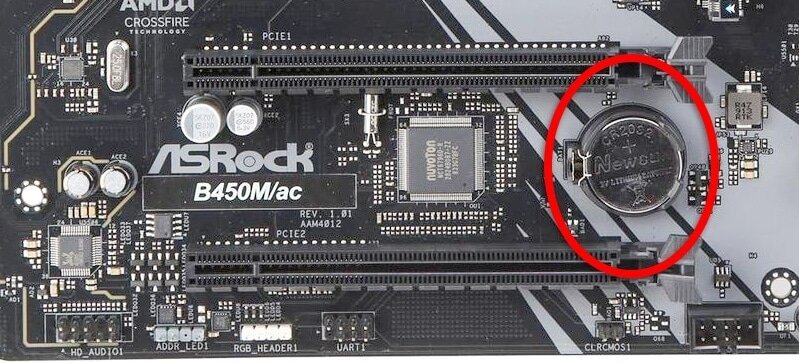 CyberPowerPC UK 🔸 0333 323 7776 🔸 https://www.cyberpowersystem.co.uk
 MemTest86 Memory Testing
:one: Download MemTest86 using the link below.
:two: Open the zip file you downloaded and run ImageUSB
:three: Click 'Extract', choose a File Location then click 'Extract' again.
:four: Run ImageUSB from the File Explorer windows which just opened and select your USB stick from the list.
:five: Click the Write button, ensuring that any files on your USB stick that you would like to keep are backed up.
:six: Shut down the PC you are going to be testing, insert the USB stick and press the following key while your PC is turning on, depending on your motherboard:
 ASUS/ROG: F8
 Aorus/Gigabyte: F12


 MSI/ASRock/Cyberpower: F11
Then select your USB Drive from the list and press Enter.
:seven: Wait for the 10 second timer to finish and the test will begin.
:exclamation: If MemTest86 picks up an error, or the test has finished (It will stop automatically), let us know.
After making a MemTest86 USB, you will notice that your USB will have much less capacity. To fix this, reopen the ImageUSB tool, select Reformat USB drive under Step 2, then click Write again.
CyberPowerPC UK 🔸 0333 323 7776 🔸 https://www.cyberpowersystem.co.uk
tulip cradle
ram testing see if one is faulty
finite tigerBOT
 :tada: Congrats @tulip cradle, you levelled up to 17! :tada:
tulip cradle
o first before mem test
finite tigerBOT
Reseating RAM
CyberPowerPC UK 🔸 0333 323 7776 🔸 https://www.cyberpowersystem.co.uk
ornate birch
tulip cradle
not gunna lie kinda wild why the pc wouldnt be in your name
It's because my friends dad got a job in the UK (we're from Denmark) so he ordered them from there and went back to Denmark with em. I got a intel I9 11000k. I have already done the memtest86 or ehat its called -> everything is fine also reset the cmos but still powercycles. The Qled is the far left indicating its the CPU
Also my pc runs perfectly when it finally boots up
ornate birch
Ill try do that then - btw thanks for trying to help mate