#CPU Light on motherboard is solid but pc works fine?!?! and now case fans dont light up…
20 messages · Page 1 of 1 (latest)
 boreal dove
 fickle lichenBOT
Thread Created!
To provide the best level of support possible, please make sure you have provided as much information as possible.
This could include:
🔸 The problem you're facing
🔸 How frequently the issue occurs
🔸 Any pictures or videos of the issue
🔸 Related error codes or log files
🔸 Any further comments which to help us resolve your problem
Please bear in mind that this forum is for support from the community; the official customer support team can be contacted via phone and email.
☎️ 0333 323 7776
📧 [email protected]
boreal dove
if anyone can help that would be amazing!!!
boreal dove
ive checked all the wiring and it is plugged in?
specs are rtx 5070to shadow oc x3, ryzen 7800x3d 32gb ram 6000mts and a gigabyte x870 gaming wifi 6 with a rm1000x psu
and everytime i boot pc it does this now but runs fine..
fickle lichenBOT
 Resetting CMOS
:one: Shut down your PC and unplug the power cord from the wall.
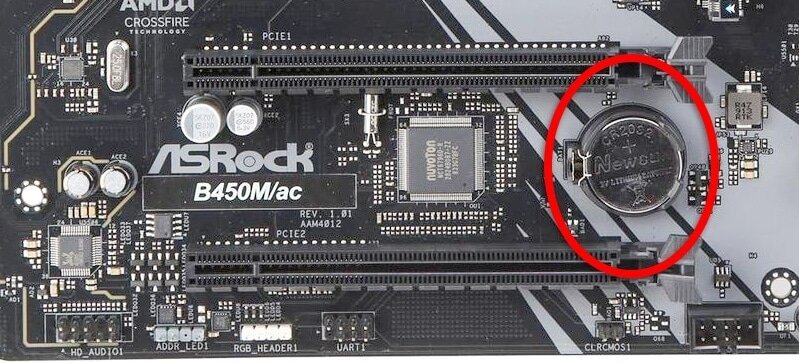
:two: Locate the CMOS battery (see the image below). On some motherboards, you may have to remove the graphics card in order to access it.
:three: Remove the CMOS battery from the motherboard by pressing down on the clip and pulling the battery out.
:four: Hold down the case power button for three seconds while your PC is unplugged.
:five: Install the CMOS battery back into the motherboard and plug the power cord back into the wall.
:six: Plug in and turn on your PC.
A video guide is also available below
 CyberPowerPC UK 🔸 0333 323 7776 🔸 https://www.cyberpowersystem.co.uk
 prime light
boreal dove
and everytime i boot pc it does this now but runs fine..
prime light
boreal dove
and everytime i boot pc it does this now but runs fine..
could you try this and see if this fixes the cpu light issue
weird that theres no actual issues with it. i wonder if it might be a memory setting somehow causing it
boreal dove
i have expo turned on but this only happened recently ive had the pc for few months no issues!
When im home from work tonight ill try the cmos again and maybe switch out ran
ram*
boreal dove
prime light
could you try this and see if this fixes the cpu light issue
done cmos reset no change :((
boreal dove
prime light
weird that theres no actual issues with it. i wonder if it might be a memory set...
heres a vid of my pc running i just got back from work
no crashes on games or anything
i updated bios to f9D and still no change
just the 2 ram sticks glowing now 😭😭
fickle lichenBOT
@boreal dove
This thread has been inactive for 72 hours
:green_square: If your query has been resolved, click the 'Close' button. Don't forget to thank the members that have helped you with the /thanks command!
:red_square: If you still need support, click the 'Keep Open' button in the next 24 hours to keep this thread active.
:question: Need more support on this issue later? Please create a new thread - you can always reference this thread in your new one.
prime light
boreal dove
just the 2 ram sticks glowing now 😭😭
Weird. I’d go to cs for this one and see their thoughts
fickle lichenBOT
Customer Support
:telephone: 0333 323 7776
:e_mail: [email protected]
:clock3: Monday - Friday, 9:00am - 5:30pm
Please ensure to include as much information about your query as possible, and ensure to include your order number if you require after-sales support.
CyberPowerPC UK 🔸 0333 323 7776 🔸 https://www.cyberpowersystem.co.uk