
#GOT MY FIRST CYBERPOWERPC DELIVERED TODAY!
53 messages · Page 1 of 1 (latest)
 clever tundra
 whole gale
Did you plug in to the GPU?
 cosmic jacinthBOT
 Monitor Cables
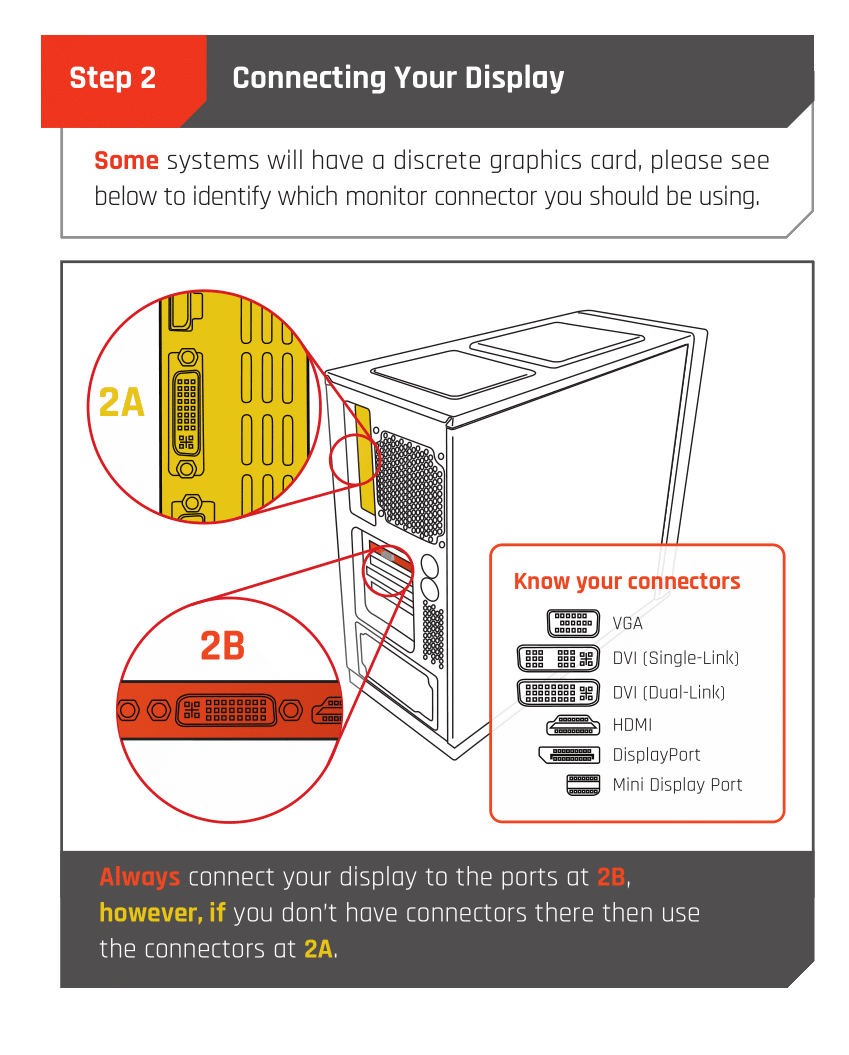
If you have a discrete GPU then you need to plug your monitor cable into the graphics card, not the motherboard. This can be found on the Quick Start Guide which was emailed to you, or you can download it with the /tag guide command.
 CyberPowerPC UK 🔸 0333 323 7776 🔸 https://www.cyberpowersystem.co.uk
whole gale
clever tundra
i just got my pc delivered a while ago with the 31.5inch MSI monitor. i’m so exc...
CyberPowerPC UK 🔸 0333 323 7776 🔸 https://www.cyberpowersystem.co.uk
whole gale
clever tundra
i just got my pc delivered a while ago with the 31.5inch MSI monitor. i’m so exc...
Oh sorry misread, so the PC was working then all of a sudden restarted?
clever tundra
whole gale
Oh sorry misread, so the PC was working then all of a sudden restarted?
yes. just tripped off and back on in split second. the rgb lights didn’t even go off.
it was the monitor that made me realize
and i had to put my password back on to log on to the pc at both occurrences
whole gale
clever tundra
yes. just tripped off and back on in split second. the rgb lights didn’t even go...
Hmm okay how are you plugged in to the PC, directly into a wall socket or power extension?
And does the LED light on the mobo go away or is it permanent?
clever tundra
whole gale
Hmm okay how are you plugged in to the PC, directly into a wall socket or power ...
directly for now.
clever tundra
whole gale
And does the LED light on the mobo go away or is it permanent?
it goes away after restart is done
whole gale
clever tundra
it goes away after restart is done
LED light blinking on startup is normal it cycles through various checks
clever tundra
whole gale
LED light blinking on startup is normal it cycles through various checks
right
whole gale
PC being on and power cycling randomly I lean more towards an issue with the PSU/Power Cable/Socket
What are temps like?
cosmic jacinthBOT
 HWiNFO
Download either the Installer or Portable version
For temperatures, run in Sensor Only mode.
CyberPowerPC UK 🔸 0333 323 7776 🔸 https://www.cyberpowersystem.co.uk
clever tundra
whole gale
PC being on and power cycling randomly I lean more towards an issue with the PSU...
okay, i am on my way to church right now
i’ll switch the socket, make sure the plus to socket and psu is well connected and try again.
after these have been done, i’ll come back to this
clever tundra
cosmic jacinth
also i’ll download this and let you know the temps
thank you for your prompt response.
i’ll get back to you asap
whole gale
No worries, hopefully it'd be as easy as a socket swap to fix it if not CyberPower warranty is top tier and will help
clever tundra
thank you so much
i’m trying to not get too worried as well because my msi laptop just got spoilt and i had to get this asap for my work.
but it’s all good, fingers crossed
clever tundra
whole gale
What are temps like?
 cosmic jacinthBOT
 :tada: Congrats @clever tundra, you levelled up to 4! :tada:
whole gale
clever tundra
Run HWInfo in sensors only mode
Then scroll down until you see CPU temp and also GPU temp
clever tundra
whole gale
Then scroll down until you see CPU temp and also GPU temp
cpu - 37°C
gpu - 32.8°C (hot spot 40.2°C)
clever tundra
gonna start that now
i switched the sockets too
so i’ll update these 2 and see if it trip off while i’m at it
whole gale
clever tundra
i switched the sockets too
so i’ll update these 2 and see if it trip off while i...
Okay if that doesn't resolve then it's very likely a power issue with the PSU / Power Cable / Outlet etc official support may be able to provide more things to try if you contact them 🙏
clever tundra
whole gale
Okay if that doesn't resolve then it's very likely a power issue with the PSU / ...
okay, i’ll keep you posted
clever tundra
clever tundra
cpu - 37°C
gpu - 32.8°C (hot spot 40.2°C)
sorry buddy
the cpu temp i gave you before was the one under motherboard category
under cpu intel core i5 category
cpu temp is 58°C
whole gale
clever tundra
sorry buddy
the cpu temp i gave you before was the one under motherboard categor...
No worries, still well within operating range so that’s all fine
PCs have safety feature and will turn off it something gets too hot to prevent damage
clever tundra
right. thank you very much for your reply and help
clever tundra
hello... pc just tripped off and back on again
and i got this after it came back on
 cosmic jacinthBOT
 WhoCrashed
CyberPowerPC UK 🔸 0333 323 7776 🔸 https://www.cyberpowersystem.co.uk
whole gale
WhoCrashed
CyberPowerPC UK 🔸 0333 323 7776 🔸 https://www.cyberpowersystem.co.uk
whole gale
Try download this see if there is any crash logs on there

 whole gale
clever tundra
here is the result of the analysis
whole gale
clever tundra
here is the result of the analysis
GPU / driver related could maybe try a DDU let CyberPower know about these crash logs too as if a DDU don't fix it, could be a faulty GPU
cosmic jacinthBOT
 Display Driver Uninstaller
:one: Download the driver for your GPU from the manufacturer's website using the links below, but don't install them yet.
:two: Download the latest version of DDU by clicking the button below, clicking on the top post which is called "Display Driver Uninstaller (DDU) VXX.X.X.X Released", and clicking the link to *** Download DDU "Installer" *** in that post.
:three: Open the program you just downloaded, and install DDU.
:four: Disconnect from the Internet by unplugging your Ethernet cable or turning off Wi-Fi in the bottom-right corner. This will prevent Windows Update from automatically re-downloading the GPU drivers after rebooting, as we are going to install the driver ourselves.
:five: Open the Start Menu, click the power icon then hold Shift on your keyboard and click Restart. Once your PC has restarted, select Troubleshoot > Advanced options > Startup Settings > Restart, and press 4 to load into safe mode.
:six: Launch DDU, using the icon on your desktop.
:seven: On the right side, select the type as GPU, and the brand as the manufacturer of your GPU. Then, click 'Clean and Restart'.
:eight: Once you have loaded back into Windows, install the GPU drivers you downloaded earlier. Once they have installed and you have rebooted your PC if required, you can reconnect your Internet connection, and your GPU drivers have been fully reinstalled.
CyberPowerPC UK 🔸 0333 323 7776 🔸 https://www.cyberpowersystem.co.uk
clever tundra
whole gale
GPU / driver related could maybe try a DDU let CyberPower know about these crash...
are Cyberpower staff on here at all bud?
whole gale
clever tundra
are Cyberpower staff on here at all bud?
Not often, unless it's during work hours (9-5:30pm)
They have the orange names and @staff role
clever tundra
i will put a call through to them tomorrow
thank you
cosmic jacinthBOT
:tada: Congrats @clever tundra, you levelled up to 5! :tada:
whole gale
No worries hope you get it sorted 🙏
clever tundra
thank you so much
clever tundra
cosmic jacinth
just dumping another crash report from this morning after doing this


 uncut olive
a DDU is recommended - if that doesn't fix things i might recommend reverting to an old driver which may be more stable
clever tundra
i have done DDU twice now
i did a sfc sacn as well + healthrestore
downloaded afterburn from msi to push my GPU back by -30
trying to see what the result would be