
#PC keeps Bluescreening
69 messages · Page 1 of 1 (latest)
 lucid quail
 graceful bay
Hey so I havent touched my PC since October of 2024 (Monitor was broken), and to...
graceful bay
Hey so I havent touched my PC since October of 2024 (Monitor was broken), and to...
what specs?
graceful bay
lucid quail
what specs?
i’m not sure really
all i remember is that theres an:
rtx 3060
intel core i5 11400
also was able to find this screenshot

 gleaming wagonBOT
 :tada: Congrats @graceful bay, you levelled up to 1! :tada:
 Resetting CMOS
:one: Shut down your PC and unplug the power cord from the wall.
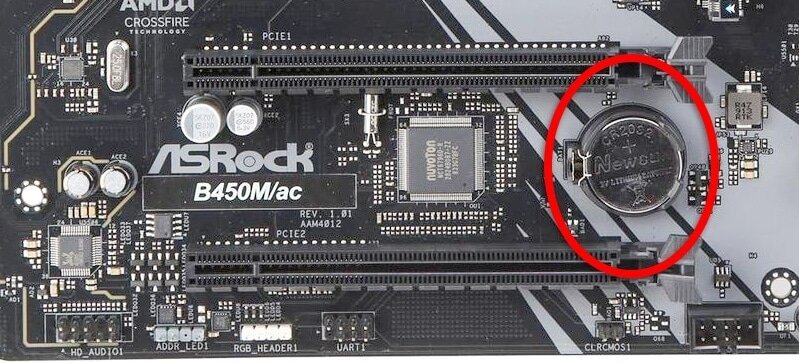
:two: Locate the CMOS battery (see the image below). On some motherboards, you may have to remove the graphics card in order to access it.
:three: Remove the CMOS battery from the motherboard by pressing down on the clip and pulling the battery out.
:four: Hold down the case power button for three seconds while your PC is unplugged.
:five: Install the CMOS battery back into the motherboard and plug the power cord back into the wall.
:six: Plug in and turn on your PC.
A video guide is also available below
 CyberPowerPC UK 🔸 0333 323 7776 🔸 https://www.cyberpowersystem.co.uk
lucid quail
CyberPowerPC UK 🔸 0333 323 7776 🔸 https://www.cyberpowersystem.co.uk
lucid quail
i'd try a cmos reset

your cmos is between two slots

so you shouldn't need to take the GPU out
lucid quail
it shouldn't be causing issues like these but you can always try it
graceful bay
or disable Secure Boot and Fast Startup in the BIOS
yeah i really can’t tell what it is
because when i plugged in my new monitor
it would load into windows
but the second i tried to open something
it would bsod
graceful bay
i did the bios reset
and got the message that bios has been reset
going to try downloading windows again
Yea no luck
gleaming wagonBOT
:tada: Congrats @graceful bay, you levelled up to 2! :tada:
graceful bay
got this same message
 lucid quail
can you try it with a minimal config? for this you'll need to take 1 stick of RAM out and leave one stick of RAM in, take out all peripherals except your keyboard, mouse and monitor (this includes USB devices)
graceful bay
lucid quail
can you try it with a minimal config? for this you'll need to take 1 stick of RA...
wait..
if i take out my usb
how would i be able to download windows
lucid quail
oh don't include that
gleaming wagonBOT
:tada: Congrats @lucid quail, you levelled up to 29! :tada:
 graceful bay
so leave my usb drive in?
lucid quail
yes
graceful bay
took out 1 stick of ram
trying again
windows 11 is downloading
going to see if it blue screens again and the error comes up
No luck
it bsod again and showing the same error now
 gleaming wagonBOT
:tada: Congrats @graceful bay, you levelled up to 3! :tada:
 lucid quail
graceful bay
I was able to get this tho
lucid quail
graceful bay
I was able to get this tho
what drive do you have? is it a WD drive?
graceful bay
how do i find that?
graceful bay
lucid quail
what drive do you have? is it a WD drive?
no idea tbh
lucid quail
graceful bay
how do i find that?
it'll say in task manager on your drive (it'll say the name of the drive) or in BIOS where it'll say the name of the drive in boot options
graceful bay
i can’t access task manager
so it’ll have to be through bios
ok so heres the weird thing @lucid quail 😭
i tried to download windows 10
and it actually worked...
it downloaded
and im on w10
lucid quail
oh - it may have been a security option in bios that wasn't enabled - windows 11 requires certain security features to be enabled iirc (TPM and secure boot)
i know you mentioned disabling secure boot but it may have also been an issue with TPM, not sure tbh
graceful bay
I disabled secure boot
graceful bay
@lucid quail does it matter where i put my ram stick
lucid quail
graceful bay
<@272086709099954176> does it matter where i put my ram stick
2nd and 4th slots should have RAM sticks in them
graceful bay
yea
gleaming wagonBOT
:tada: Congrats @graceful bay, you levelled up to 4! :tada: