Hi I bought a pc in July of 2024 with a gigabyte motherboard 4090 i9 14900kf cost me 4 grand and it’s blue screening constantly it started 3 days after I bought it, I gave it some time in hopes it would fix itself but after fully reinstalling windows and updating BIOS it’s still blue screening constantly sometimes before I even have time to log in it crashes. Surely my warranty covers this right
#19 14900KF voltage problem?
241 messages · Page 1 of 1 (latest)
 runic forge
 languid sequoiaBOT
Thread Created!
To provide the best level of support possible, please make sure you have provided as much information as possible.
This could include:
🔸 The problem you're facing
🔸 How frequently the issue occurs
🔸 Any pictures or videos of the issue
🔸 Related error codes or log files
🔸 Any further comments which to help us resolve your problem
Please bear in mind that this forum is for support from the community; the official customer support team can be contacted via phone and email.
☎️ 0333 323 7776
📧 [email protected]
runic forge
Mainly KMODE_EXCEPTION_NOTHANDLED , kernel something something
I’ve had so many blue screens sometimes it’s just loads of different ones
I have mini dumps of the crashes and it says BEdaisy
 blazing sierra
To answer the elephant in the room, ULTIMATELY the warranty would cover it, but we can see if we can troubleshoot anything
runic forge
Nt
Those are the two mini dumps
BEdaisy and NT oh and riot vanguard was crashing my pc too
blazing sierra
If it's been crashing since July, why haven't you reached out before then?
And when you say you updated the BIOS, When did you update it? Because the whole microcode patches were later than July iirc
languid sequoiaBOT
 Resetting CMOS
:one: Shut down your PC and unplug the power cord from the wall.
:two: Locate the CMOS battery (see the image below). On some motherboards, you may have to remove the graphics card in order to access it.
:three: Remove the CMOS battery from the motherboard by pressing down on the clip and pulling the battery out.
:four: Hold down the case power button for three seconds while your PC is unplugged.
:five: Install the CMOS battery back into the motherboard and plug the power cord back into the wall.
:six: Plug in and turn on your PC.
A video guide is also available below
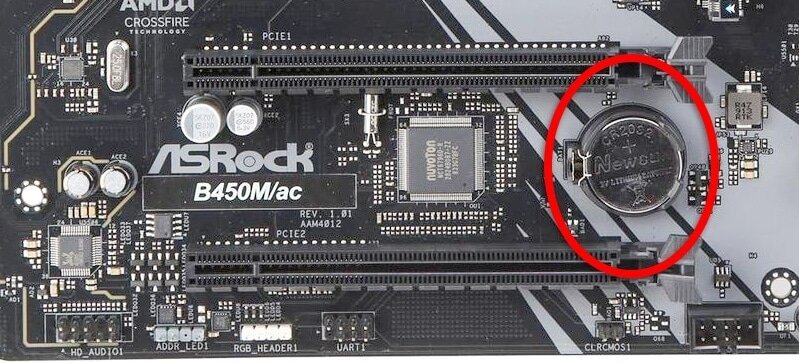
 CyberPowerPC UK 🔸 0333 323 7776 🔸 https://www.cyberpowersystem.co.uk
runic forge
blazing sierra
If it's been crashing since July, why haven't you reached out before then?
CyberPowerPC UK 🔸 0333 323 7776 🔸 https://www.cyberpowersystem.co.uk
runic forge
blazing sierra
If it's been crashing since July, why haven't you reached out before then?
Idk I just gave it some time hoping it would fix itself and I’m not a insane computer guy so didn’t rlly know what to do
runic forge
blazing sierra
And when you say you updated the BIOS, When did you update it? Because the whole...
I updated yesterday cause there was a issue with my pc not even reading my usb so had to reinstall windows then it was able to read my usb memory stick and then I updated bios
I’m not too comfortable with removing stuff from my pc in case of breaking something
languid sequoiaBOT
 :tada: Congrats @runic forge, you levelled up to 1! :tada:
runic forge
Never built a or taken apart my oc other than ram before ahaha
 eternal goblet
runic forge
I’m not too comfortable with removing stuff from my pc in case of breaking somet...
eternal goblet
runic forge
I’m not too comfortable with removing stuff from my pc in case of breaking somet...
it's a little battery
runic forge
Pc*
blazing sierra

Disclaimer: All guides provided are generalised information for personal troubleshooting. None of which are certified by the respective part manufacturers. Any improper installation/removal, mishandling, or negligence on your part, will be counted as physical damage and therefore void your warranty. If you have at anytime concerns or wariness pl...
eternal goblet
you just take a battery out and put it back in again 5 minutes later
very simple
easier than ram
runic forge
Took it out I’ll give it 5 mins
eternal goblet
 blazing sierra
so you say you've reinstalled windows
how have you reinstalled it? via windows itself or USB
 blazing sierra
And after you've reinstalled Windows, when does the blue screens occur?
runic forge
blazing sierra
And after you've reinstalled Windows, when does the blue screens occur?
Sometimes before I even log into the pc, when I play a game, noticed it happening on escape from tarkov. And today it happens when I was literally just watching twitch
I’ve noticed it happen when trying to update windows it just crashes on the update screen
blazing sierra
So, You've reinstalled windows, completely wiping the drives, yea?
eternal goblet
what specs do you have
blazing sierra
funnily enough, I think this is down to anti-cheats being a parasite

BattleEye service
runic forge
it happens because of riot vanguard and BE but it also happens on windows installer 2

 eternal goblet
can you get the list of specs from the invoice making sure to censor address and order number
runic forge
my dad bought it so i dont have the email lemme check with him tho if he can find it
eternal goblet
there's one specifically that i want to know about and that's what drive you have
do you know what drive you have
if so can you tell me the drive name
you can find it in task manager -> performance then select your boot drive
runic forge
WD_BLACK SN770 2TB
languid sequoiaBOT
:tada: Congrats @runic forge, you levelled up to 2! :tada:
blazing sierra
oh no
eternal goblet
ok well i think i know the issue...
blazing sierra
think we have found the issue
blazing sierra
yeah, WD drives, and windows version 24h2 don't like eachother
eternal goblet

Western Digital
Find detailed answers to your support questions for your Western Digital, SanDisk, WD_BLACK, or WD storage product.
eternal goblet
update your drives firmware
runic forge
updated
blazing sierra
restart pc
eternal goblet
find out
blazing sierra
see if it happens again
runic forge
alright ill let u know lol
blazing sierra
go gaming
 runic forge
RIP tarkov just wiped :(((
Tbf it never happened when I played Poe
And it didn’t happen before when I played tarkov, it only happened recently after this recent update they did
eternal goblet
runic forge
Crashed again
crashed or bluescreened?
runic forge
Blue screened
Happened twice as I was speaking to u
I’m gonna try a different game
See if it is just battle eye
I just got another one whilst closing tarkov down called PAGE_FAULT something lemme check dbug
eternal goblet
page_fault_in_nonpaged_area?
runic forge
 eternal goblet
can you send the file
runic forge
those are all the crashes today
i can play poe2 fine no crashes
before i played tarkov when i wiped i hadnt had crashes for like 2 months
i played other games fine 2 just tarkov so id say the crashes started again 2 days ago
blazing sierra
might be a sign to start playing bejeweled instead of all these shooty games
runic forge
i had them before tho when i had riot vanguard installed and after i deleted that the blue screens stopped until now
languid sequoiaBOT
:tada: Congrats @runic forge, you levelled up to 3! :tada:
blazing sierra
 runic forge
blazing sierra
runic forge
blazing sierra
ahaha im too addicted to tarkov to ever stop playing
blazing sierra
this is your wake up call 
runic forge
its rlly weird tho cause ive played tarkov before on this pc and didnt have an issue but this patch ive now been having blue screen issues
blazing sierra
chances are, if it's just happened from this patch, then you're probably part of a much larger group of people
all getting the issue
sounds like they've done a dodgy update
runic forge
whats the nt tho?
blazing sierra
iirc NT is a windows kernel for driver requests and memory management
runic forge
could that be linked to the battle eye issue
im just very confused why i was getting a blue screen and then getting a run of them like 2 - 3 consecutive ones
like not even a chance to even try a game just loaded up pc and it would blue screen
eternal goblet
the dump files are all driver related or related to accessing freed memory
it's probably a game bug
runic forge
well hopefully they fix it soon
like u say i might be part of a wider audience getting this issue
eternal goblet
reinstall the games
runic forge
reinstalling now, i did reinstall yesterday and issue was still happening
do u think i should call up cyberpower about it like maybe a problem with my hardware or do u think it is defo game related and they just did a dodgy update
cause ik with the 19 14900kf there was riot vanguard problems and blue screens reported back in the day, may of got a dodgy cpu?
blazing sierra
The chances of it being hardware related is low.
eternal goblet
runic forge
do u think i should call up cyberpower about it like maybe a problem with my har...
it's highly unlikely but if you have a few hours you can watch your pc do a memory test
languid sequoiaBOT
 MemTest86 Memory Testing
:one: Download MemTest86 using the link below.
:two: Open the zip file you downloaded and run ImageUSB
:three: Click 'Extract', choose a File Location then click 'Extract' again.
:four: Run ImageUSB from the File Explorer windows which just opened and select your USB stick from the list.
:five: Click the Write button, ensuring that any files on your USB stick that you would like to keep are backed up.
:six: Shut down the PC you are going to be testing, insert the USB stick and press the following key while your PC is turning on, depending on your motherboard:
 ASUS/ROG: F8
 Aorus/Gigabyte: F12


 MSI/ASRock/Cyberpower: F11
Then select your USB Drive from the list and press Enter.
:seven: Wait for the 10 second timer to finish and the test will begin.
:exclamation: If MemTest86 picks up an error, or the test has finished (It will stop automatically), let us know.
After making a MemTest86 USB, you will notice that your USB will have much less capacity. To fix this, reopen the ImageUSB tool, select Reformat USB drive under Step 2, then click Write again.
CyberPowerPC UK 🔸 0333 323 7776 🔸 https://www.cyberpowersystem.co.uk
eternal goblet
 eternal goblet
yes
runic forge
Aight time to go watch squid game lmao
Thank you for ur help btw guys appreciate u taking time out ur day to do this
blazing sierra
just remember the invoice of £5.99 diagnosis with £10.99 per ongoing minute
eternal goblet
 blazing sierra
the £10.99 per minute is split evenly between @eternal goblet and I
eternal goblet
 runic forge
blazing sierra
the £10.99 per minute is split evenly between <@272086709099954176> and I
runic forge
blazing sierra
the £10.99 per minute is split evenly between <@272086709099954176> and I
Lmaoooo I read the top one and thought u was being serious ahaha
I was like fuck I’m broke ahaha
Just for reassurance cause I’m an over thinker when it comes to my pc, u don’t think I need to be calling up cyber power tomorrow and asking for like a replacement cpu or replacement anything?
blazing sierra
runic forge
Lmaoooo I read the top one and thought u was being serious ahaha
£5.99 inital diagnosis, and the current bill of £1109.99 is due so far
 blazing sierra
runic forge
Just for reassurance cause I’m an over thinker when it comes to my pc, u don’t t...
blazing sierra
runic forge
Just for reassurance cause I’m an over thinker when it comes to my pc, u don’t t...
We'll see how the troubleshooting goes, but there is always cyberpower available if you wanted more direct advice
runic forge
blazing sierra
We'll see how the troubleshooting goes, but there is always cyberpower available...
Hopefully this troubleshooting gives u an idea then
Do I need to be the buyer of the pc to be able to organise a send back of the pc or replacement?
blazing sierra
I do think it would have to be the buyer of the PC, for GDPR
runic forge
Ok that’s fine if they need to have the pc back for further troubleshooting or replacement then that can be sorted no problem, but let’s hope that’s not the case and we can fix it at home :)
eternal goblet
runic forge
Just for reassurance cause I’m an over thinker when it comes to my pc, u don’t t...
do you need a replacement cpu?
runic forge
eternal goblet
do you need a replacement cpu?
Idk i don’t know what the problem is
eternal goblet
the games
eternal goblet
probably not no
runic forge
There’s so many articles on the 13th gen and 14th gen cpus having problems
eternal goblet
you updated bios multiple times
runic forge
Only once
eternal goblet
ok then it's likely you have the fix to the 14th gen issues
so the cpu isn't a problem
blazing sierra
The whole 13th and 14th gen issues were fixed in the micro code patches
eternal goblet
i really think this is a software issue
based on the fact it happens... when you open particular software
runic forge
U think u guys might be able to help me fix?
eternal goblet
is the memtest done
runic forge
 languid sequoiaBOT
:tada: Congrats @runic forge, you levelled up to 4! :tada:
runic forge
Don’t know how long left but that’s what it’s done so far
This screen is a different language to me ahahaha ( as in too technical)
Also I changed a couple settings in bios after the bios update but before I updated the firmware so idk if this is a issue but I changed the extreme to performance and put on XMP 1 which is what my IT tech friend said to do could this have any problems
This was when I was trying to underclock my cpu but apparently I can’t underclock in my bios as thought it may of been a voltage problem
eternal goblet
runic forge
This was when I was trying to underclock my cpu but apparently I can’t undercloc...
did you check to see if it was a cpu voltage issue
 eternal goblet
or were you mindlessly doing things
runic forge
Don’t know how to check voltage issues
And this was just something my friend was telling me to do who works in IT
BSOD were happening before this tho
And after
languid sequoiaBOT
 HWiNFO
Download either the Installer or Portable version
For temperatures, run in Sensor Only mode.
CyberPowerPC UK 🔸 0333 323 7776 🔸 https://www.cyberpowersystem.co.uk
eternal goblet
do this when the memtest is done
it SHOWS you the voltages and what your system's doing rather than guessing what it's doing
runic forge
Alright I’ll do that after thanks
runic forge

Nearly done
No problems so far I assume

Done


Idk what u wanna see so I just took a picture of everything lmao


@eternal goblet
eternal goblet
you clicked the wrong option when you opened hwinfo
you need to click sensor status


 runic forge
@blazing sierra if i go to windows 10 will that chnage warrenty
sounds stupid but just a question
blazing sierra
runic forge
<@903357754209628180> if i go to windows 10 will that chnage warrenty
it wouldn't no
but windows 10 is meh
and is no longer supported after next year
runic forge
ah okay, idk i think im just gonna have to phone cyberpower tomorrow and just ask for there help im getting so many errors. my pc is laggy af, sometimes doesnt even let me type in the windows search bar, it lags super hard when i put my pin in and sign into my desktop
like its giga fucked idk
i have invoice and order number so should be fine
 unreal palm
I play tarkov on a older PC than PKY and ive no crashing
blazing sierra
unreal palm
I play tarkov on a older PC than PKY and ive no crashing
Is it a 13th or 14th gen Intel?
unreal palm
blazing sierra
Is it a 13th or 14th gen Intel?
My PC is neither , i jnow a few streamers on both 13/14th gen with no issues , has be tried reinstalling battleye?
runic forge
unreal palm
My PC is neither , i jnow a few streamers on both 13/14th gen with no issues , h...
I don’t have Battleeye installed the software itself it’s auto integrated into tarkov u don’t need a standalone download of batteye
runic forge
unreal palm
I play tarkov on a older PC than PKY and ive no crashing
I didn’t have issues with tarkov until this patch
Never ever blue screened on tarkov
Until now
eternal goblet
i thought u said july
 tough juniper
BEdaisy is some kind of battleye error. Another member here was having the same issues and I couldn't help them figure it out
unreal palm
runic forge
I don’t have Battleeye installed the software itself it’s auto integrated into t...
Verifty game files using the battlestate launcher
and uninstall battleeye and launch the game it should install and update battleeye again
in your Tarkov Directory theres a battlEye folder with an uninstall bat file
 runic forge
eternal goblet
i thought u said july
runic forge
eternal goblet
i thought u said july
yh july i got it not 3 months ago
runic forge
so i seemed to of fixed the issue
languid sequoiaBOT
:tada: Congrats @runic forge, you levelled up to 5! :tada:
runic forge
buuuuuuut
ive had to turn off turbo boost technology which is a 30-40% performance loss
so gg i need to get a replacement
blazing sierra
runic forge
so gg i need to get a replacement
Not necessarily, but there is definitely something that needs sorted.
languid sequoiaBOT
Customer Support
:telephone: 03333-237776
:e_mail: [email protected]
:clock3: Monday - Friday, 9:00am - 5:30pm - closed 1st January
Please ensure to include as much information about your query as possible, and ensure to include your order number if you require after-sales support.
 CyberPowerPC UK 🔸 0333 323 7776 🔸 https://www.cyberpowersystem.co.uk
blazing sierra
CyberPowerPC UK 🔸 0333 323 7776 🔸 https://www.cyberpowersystem.co.uk
blazing sierra
They'll be able to provide further support
runic forge
yh ill give em a ring tomorrow glad i got the issue sorted for now just gotta play games with frame drops rip
eternal goblet
shoulda gone amd!
runic forge
in thr furture i will be