#Wont connect to tv
34 messages · Page 1 of 1 (latest)
 muted merlin
 cyan hazelBOT
Thread Created!
To provide the best level of support possible, please make sure you have provided as much information as possible.
This could include:
🔸 The problem you're facing
🔸 How frequently the issue occurs
🔸 Any pictures or videos of the issue
🔸 Related error codes or log files
🔸 Any further comments which to help us resolve your problem
Please bear in mind that this forum is for support from the community; the official customer support team can be contacted via phone and email.
☎️ 0333 323 7776
📧 [email protected]
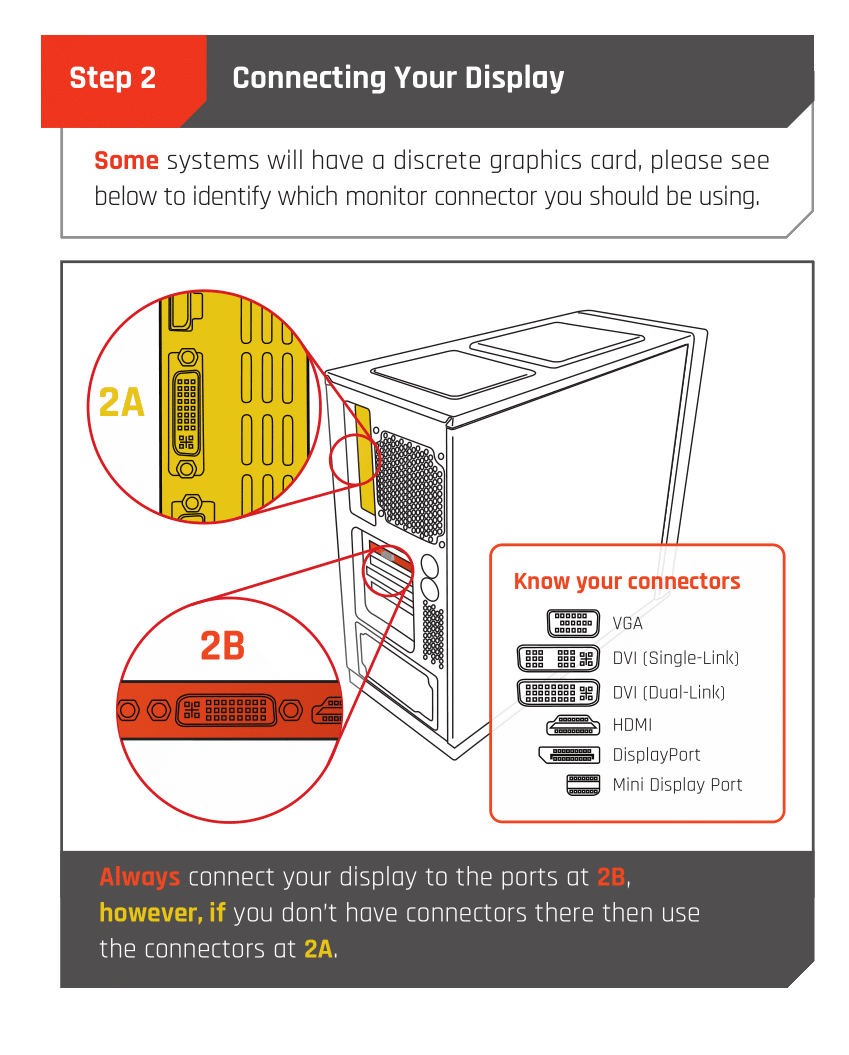
 Monitor Cables
If you have a discrete GPU then you need to plug your monitor cable into the graphics card, not the motherboard. This can be found on the Quick Start Guide which was emailed to you, or you can download it with the /tag guide command.
 CyberPowerPC UK 🔸 0333 323 7776 🔸 https://www.cyberpowersystem.co.uk
 mortal gust
Plug the cable in to the below part ^
muted merlin
It doesnt exist
mortal gust
muted merlin
It doesnt exist
You able to send your list of specs?

 cyan hazelBOT
 :tada: Congrats @muted merlin, you levelled up to 1! :tada:
 muted merlin
I sent a photo
mortal gust
That top port where you're plugging it in now will never work as that'd use your CPUs onboard graphics which the 12400F doesn't have
Take a picture of the glass side of the PC and send please


 mortal gust
That's alright
There should be ports there at the back, is the gpu lined up properly?
 mortal gust
 mortal gust
Get it plugged in!! 😄
muted merlin
Im a dumbass
mortal gust
muted merlin
Im a dumbass
It's a common mistake don't worry XD
muted merlin
Got it!!!
 obtuse palm
muted merlin
Im a dumbass
obtuse palm
muted merlin
Im a dumbass
yup but like lewis said it's a common mistake but wouldn't worry about it :P
Have a wonderful christmas and enjoy your new PC
muted merlin
❤️